© 2015 IBM Corporation
AME-2272 IBM MQ:
Using publish/subscribe in
an MQ network
David Ware
Agenda
• The basics
• The possibilities
• Compare and contrast
• Scenarios
1
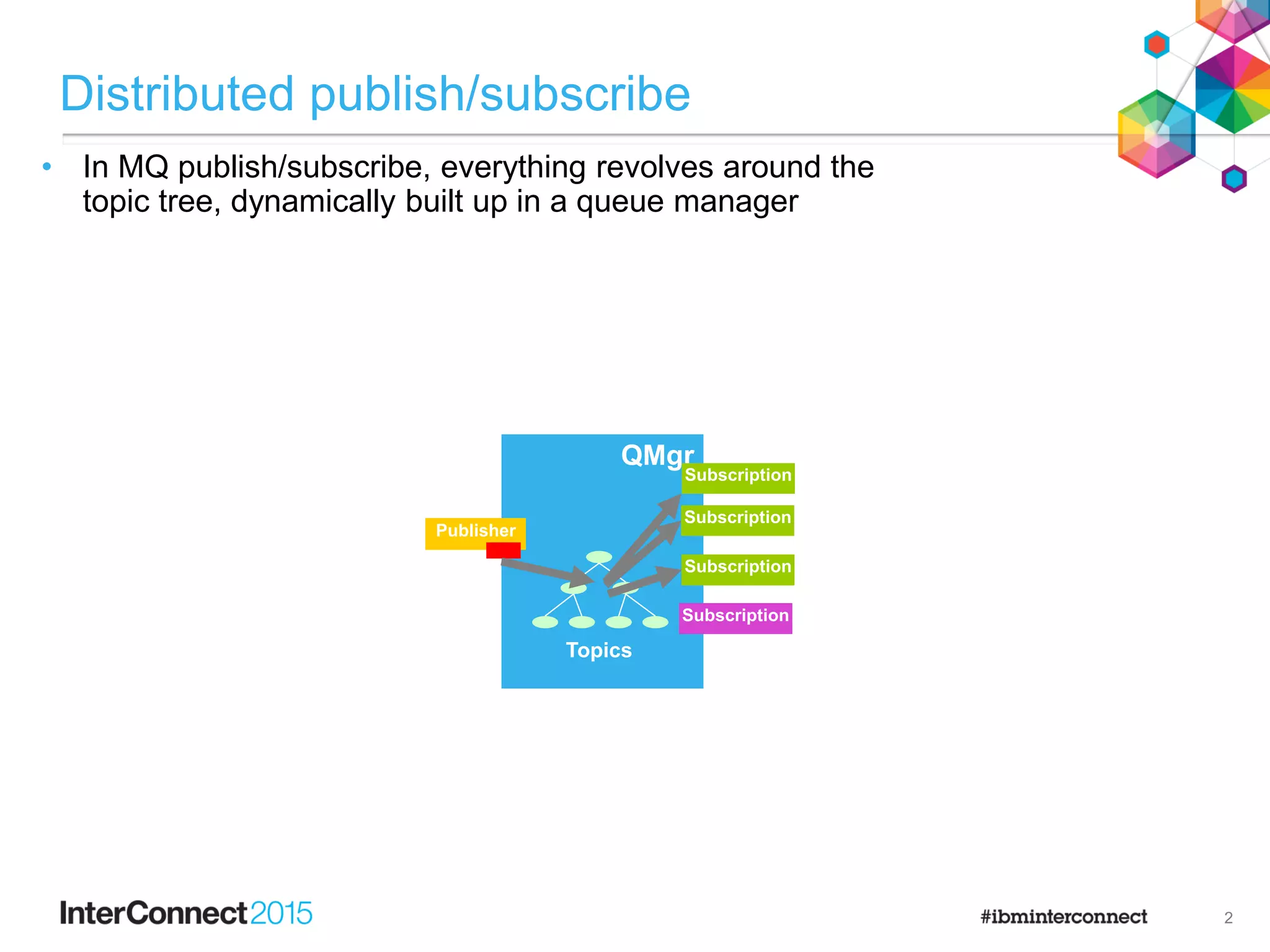
QMgr
Distributed publish/subscribe
QMgr
Topics
Subscription
Publisher
Subscription
Subscription
• In MQ publish/subscribe, everything revolves around the
topic tree, dynamically built up in a queue manager
Subscription
2
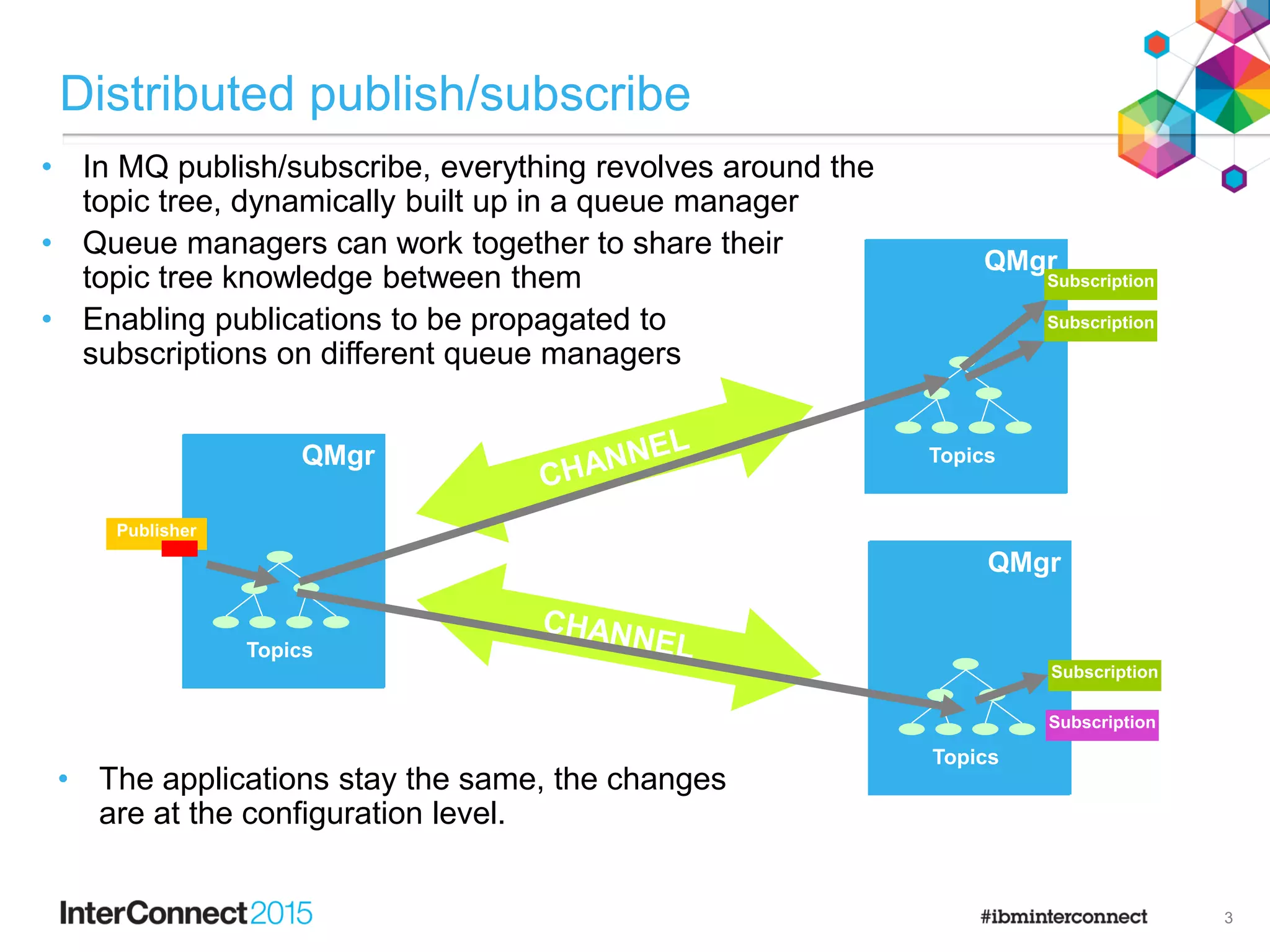
QMgrQMgr
Topics
Publisher
QMgrQMgr
Topics
Subscription
QMgrQMgr
Topics
Subscription
Subscription
Distributed publish/subscribe
• In MQ publish/subscribe, everything revolves around the
topic tree, dynamically built up in a queue manager
• Queue managers can work together to share their
topic tree knowledge between them
• Enabling publications to be propagated to
subscriptions on different queue managers
• The applications stay the same, the changes
are at the configuration level.
Subscription
3
Distributed publish/subscribe topologies
• Publish/subscribe topologies can either be created as a
defined hierarchy
• or more dynamically as a cluster
• In both cases, publish/subscribe configuration is required…
Subscription
Publisher
Subscription
Subscription
Publisher
Subscription
Subscription
Subscription
4
Configuring
Hierarchies
• Hierarchies have been supported since the original IBM MQ
publish/subscribe broker support.
• Every queue manager defines its parent in the hierarchy.
• (except for the root queue manager)
• ALTER QMGR PARENT(QMGR1)
• Each pair of directly related queue managers must be able to connect to each
other using MQ channels.
• Manual channels, with queue manager named transmission queues or queue
manager aliases.
• They are both in the same cluster.
• Use DISPLAY PUBSUB to check the relationships
• By default all subscription knowledge is shared
across the hierarchy.
• No requirement to define administered topic
objects or modify applications.
• Controlled by scoping down topics.
– Subscription Scope and Publication Scope.
6
Hierarchies
• Once the parent relationship has been configured on the child queue
manager, both queue managers should show each other when
displaying PUBSUB status:
DISPLAY PUBSUB
1 : DISPLAY PUBSUB
AMQ8723: Display pub/sub status details.
QMNAME(QMB) TYPE(LOCAL)
AMQ8723: Display pub/sub status details.
QMNAME(QMD) TYPE(CHILD)
AMQ8723: Display pub/sub status details.
QMNAME(QMA) TYPE(PARENT)
• Additionally, informational messages will be written to each queue
manager’s logs when a relationship is established:
AMQ5964: Pub/sub hierarchy connected.
EXPLANATION: A pub/sub hierarchy connection has been established with child or parent queue
manager 'QMA'.
7
Publish/Subscribe Clusters
• No additional connectivity configuration is required (that’s handled by clusters)
• By default, no subscription knowledge is shared between members of a cluster.
• Meaning no publications automatically flow between queue managers.
• Enabling distributed pub/sub in a cluster is initially achieved by clustering an
administered topic definition on one of the queue managers in the cluster.
• Set the cluster name to the name of the cluster.
• DEFINE TOPIC(FRUITOBJ) TOPICSTR(‘/Price/Fruit’) CLUSTER(CLUSTER1)
• Every queue manager in the cluster automatically becomes aware of the clustered
topic and shares subscription knowledge for any topic strings within that branch of
the topic tree.
• Publications for those topic strings will now be propagated to the queue
managers in the cluster with
matching subscriptions.
• No application changes
are required.
FRUITOBJ
TOPICSTR(‘/Price/Fruit’)
Fruit
Apples Oranges
Publisher
Subscription
Subscription
Subscription
8
Price
Clusters
• Once a topic object has been added to a cluster every queue manager should have
visibility of it. This can be seen by displaying cluster topics on a queue manager:
DISPLAY TOPIC(*) TYPE(CLUSTER) TOPICSTR CLUSQMGR CLROUTE CLSTATE
3 : DISPLAY TOPIC(*) TYPE(CLUSTER) TOPICSTR CLUSQMGR CLROUTE CLSTATE
AMQ8633: Display topic details.
TOPIC(FRUITOBJ) TYPE(CLUSTER)
TOPICSTR(/Price/Fruit) CLUSQMGR(QMGR2)
CLROUTE(DIRECT) CLSTATE(ACTIVE)
• The above display command includes CLROUTE and CLSTATE. These are new for
IBM MQ V8.
• CLROUTE is covered in the following slides.
• CLSTATE gives feedback on the current state of this cluster object. Anything other that ACTIVE
implies a problem that should be investigated.
• If the cluster topic is not visible on a queue manager, check that the cluster
channels too and from the full repositories are functioning correctly and that no
errors are reported on those full repositories, the queue manager where the topic is
defined or the queue manager where the topic was not visible.
9
Clusters
• Publish/subscribe in clusters now has two modes of routing publications.
• DIRECT: Publications are sent directly from the publisher’s queue manager to every queue
manager in the cluster with a matching subscription.
• TOPIC HOST: Publications are routed via one or more queue managers in the cluster. These are
the queue managers where the clustered topic definitions were defined.
• DEFINE TOPIC … CLUSTER(…) CLROUTE(DIRECT|TOPICHOST)
Publisher
Subscription
Subscription
Subscription
Publisher
Subscription
Subscription
Subscription
V8
FRUIT
10
Cluster routing
• IBM MQ V8 introduces the new topic object attribute of CLROUTE
(ClusterPubRoute). This takes two values:
• DIRECT
– All queue managers in the cluster are aware of everyone else and will send publications
directly to other queue managers in the cluster with matching subscriptions. This is the
default.
• TOPICHOST
– Only the queue manager(s) where the topic object is defined are aware of everyone else.
Publications are forwarded to these topic hosting queue managers, who then forward onto
queue managers with matching subscriptions.
• To use topic host routing in a cluster, the following queue managers must be at
V8 or above:
• The topic hosting queue managers
• The full repository queue managers
• The queue managers where subscriptions exist
• The queue managers where publishers connect
• Any older queue managers will not be aware of the topic host routed topic
definition and continue to behave as if it was not defined in the cluster.
11
So which is best?
• One size does not fit all.
• Before choosing, you need to understand a little more about how it
works…
12
So which is best?
• Should I use a hierarchy, a direct or a topic host cluster topic?
• It depends…
• Many factors will influence the design of a pub/sub topology:
• Number of queue managers in the topology
• Size and shape of those queue managers
– Their capacity, availability, lifetime, interconnectivity…
• Number and lifetime of subscriptions
• Number and lifetime of individual topic strings
• Publication traffic
• Distribution pattern of publications to subscribers
• …
• One size does not fit all.
• First, you need to understand more about how it works…
13
The mechanics
CHANNEL
QMgrQMgr
Topics
QMgrQMgr
Topics
Subscription
/Prices/Fruit/Apples
How it works: subscription propagation
• A subscription for a topic string is created on a queue manager.
• That queue manager tells others that it is interested in that topic string.
• Those queue managers register proxy subscriptions to represent the interest.
• On a queue manager, when a message is published to the topic string, a copy
of the message is sent, over MQ channels, to each queue manager that a
proxy subscription is held for.
• The receiving queue manager processes the message and gives a copy to
each subscription it holds (including any proxies…).
• Additional subscriptions on the same topic string do not require additional
proxy subscriptions to be flowed.
Proxy Subscription
/Prices/Fruit/Apples
Proxy Subscription
/Prices/Fruit/Apples
Publisher
/Prices/Fruit/Apples
Subscription
/Prices/Fruit/Apples
15
Proxy subscriptions
• Proxy subscriptions are a special type of subscription that tells one queue
manager that another queue manager needs a copy of any matching
publications to be sent to it.
• Proxy subscriptions can be viewed on a queue manager using MQSC or
MQ Explorer. This shows which queue managers will receive a publication
for which topic.
DISPLAY SUB(*) SUBTYPE(PROXY) TOPICSTR DESTQMGR
AMQ8096: WebSphere MQ subscription inquired.
SUBID(414D5120514D4752312020202020202021123C5320000E02)
SUB(SYSTEM.PROXY.QMGR2 CLUSTER1 /X/Y) TOPICSTR(/X/Y)
DESTQMGR(QMGR2) SUBTYPE(PROXY)
AMQ8096: WebSphere MQ subscription inquired.
SUBID(414D5120514D4752312020202020202021123C5320000E05)
SUB(SYSTEM.PROXY.QMGR2 CLUSTER1 /X/Z) TOPICSTR(/X/Z)
DESTQMGR(QMGR2) SUBTYPE(PROXY)
• If a queue manager has multiple subscriptions to the same topic string only
a single proxy subscription is generated.
• Proxy subscriptions do not include any selectors set on the subscription.
16
How it works: in a hierarchy
• Proxy subscriptions are sent from a queue manager to every directly
connected queue manager in the hierarchy.
• They in turn send proxy subscriptions onto any further relations.
• Until everyone in the hierarchy is aware of the topic string being subscribed to.
• Publications are then sent back down the path of proxy subscriptions.
Publisher
Subscription
Proxy
Proxy
Proxy
Proxy
Proxy
Proxy
Proxy
Proxy
Subscription
ProxyProxy
Proxy
17
FRUIT
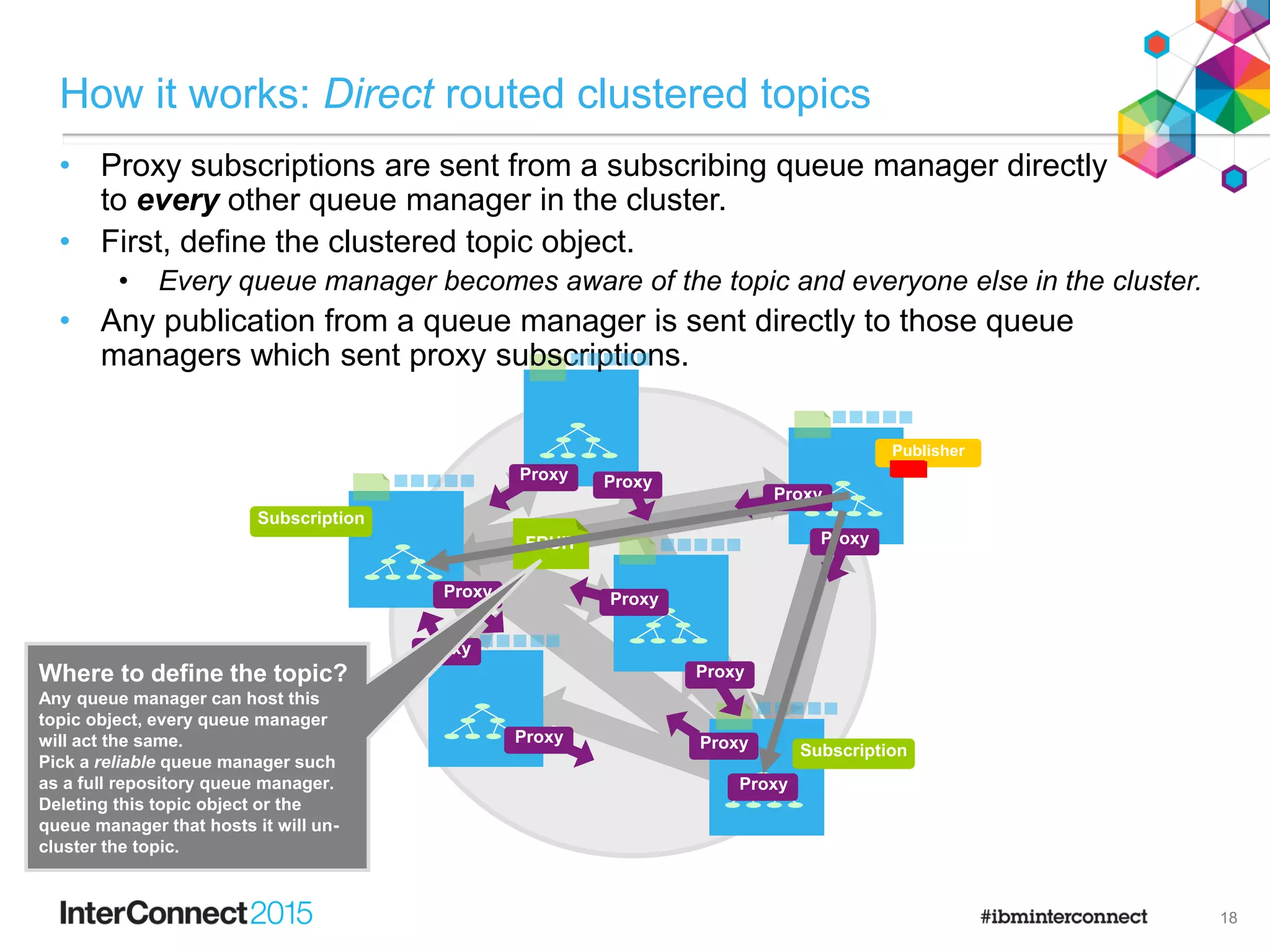
How it works: Direct routed clustered topics
Publisher
Subscription
Subscription
18
• Proxy subscriptions are sent from a subscribing queue manager directly
to every other queue manager in the cluster.
• First, define the clustered topic object.
• Every queue manager becomes aware of the topic and everyone else in the cluster.
• Any publication from a queue manager is sent directly to those queue
managers which sent proxy subscriptions.
Proxy
Proxy
Proxy
Proxy
Proxy
Proxy
Proxy
Proxy
Proxy
Proxy
Proxy
Proxy
Proxy
Proxy
Proxy
Where to define the topic?
Any queue manager can host this
topic object, every queue manager
will act the same.
Pick a reliable queue manager such
as a full repository queue manager.
Deleting this topic object or the
queue manager that hosts it will un-
cluster the topic.
Where to define the topic?
This time the queue manager must be
carefully considered.
It must be able to handle the
additional messaging load for routing
and be able to satisfy any availability
requirements.
This time, a full repository is not
recommended – they should not be
used for application messaging
traffic.
How it works: Topic host routed clustered topics
• Proxy subscriptions are sent from a subscribing queue manager only to
queue managers that host a definition of the clustered topic.
• Define the clustered topic object on a suitable queue manager.
• Only the topic hosts become aware of everyone else.
• Any publication from a queue manager is always sent to one of the topic hosts,
who then forwards the message to any subscribing queue managers.
Publisher
Subscription
Subscription
V8
19
FRUIT
Proxy
Proxy
Side-by-side
Side-by-side: scaling
• Channel connectivity is restricted in both topic host routed clusters
and hierarchies.
• Direct routed clusters will result in many queue manager channels being
established, even to queue managers with no publishers or subscribers.
• This can be a concern for large clusters.
• Hierarchies and direct routed clusters share subscription knowledge
across all queue managers.
PublisherSubscription
Subscription
Subscription
Subscription
Publisher
Subscription
Subscription
Hierarchy
Direct Cluster
Topic host cluster
21
Publisher
Topic
Side-by-side: publication flows
• Direct routed clusters ensure publications take the shortest path
between publishers and subscribers.
• Topic host routed clusters can introduce an additional hop, with
hierarchies relying on even more.
• In both of these, careful placing of subscribers and publishers can achieve
the same single-hop route that direct clusters provides.
PublisherSubscription
Subscription
Publisher
Subscription
Subscription
Subscription
Subscription
Hierarchy:1,2,3… hops
Direct Cluster: 1 hop
Topic host cluster: 1 or 2 hops
Publisher
Topic
22
Side-by-side: configuration
• Hierarchies require fine grain planning and configuration of queue
managers.
• Harder to alter the hierarchical structure.
• Clusters allow queue managers to join and leave without too much
consideration once the overall plan is defined.
• Careful planning of topic host routers is required.
PublisherSubscription
Subscription
Publisher
Subscription
Subscription
Publisher
Subscription
Subscription
Topic
Hierarchy
Direct Cluster
Topic host cluster
23
Side-by-side: availability
• An unavailable queue manager in a hierarchy can cut off many others.
• In a direct routed cluster it’ll only affect the subscribers and publishers on
that queue manager.
• In a topic host routed cluster it can affect more if the queue manager hosts
a topic definition.
• But this can be avoided…
PublisherSubscription
Subscription
Publisher
Subscription
Subscription
Publisher
Subscription
Subscription
Topic
Hierarchy
Direct Cluster
Topic host cluster
24
Topic host routing
• Multiple queue managers can host the same clustered topic.
• Each learns of all the proxy subscriptions for that topic
• Publications are routed based on availability and workload balancing.
• This increases availability and scalability of routes.
• Multiple topic hosts for a topic enable workload balancing of publication traffic.
• Publications will no longer maintain their
relative order.
Publisher
Subscription
Proxy
Subscription
Proxy
FRUIT
FRUIT
Proxy
Proxy
25
VEG
TOPICSTR(‘/Price/Vegetables’)
Topic host routing
• Alternatively, hosting different topics on
different queue managers can
also be used to increase
availability and
scaling.
Publisher
Subscription
Subscription
FRUIT
FRUIT
FRUIT
TOPICSTR(‘/Price/Fruit’)
Price
Fruit
Apples Oranges
Vegetables
Potatoes
VEG
26
Comparison summary
• Scaling
• Topic host routed clusters provide the best options for scaling.
• Availability
• Clusters can be configured to avoid single points of failures, unlike
hierarchies.
• Publication performance
• All topologies use very similar inter queue manager techniques for
transferring messages, and each can be designed to minimise
routes between queue managers.
• Configuration
• Clustering is the most dynamic and simplest solution – especially
where clusters are already in use.
27
Putting it into practice
• A couple of dozen queue managers.
• Administratively created subscriptions for each major application, perhaps a
hundred, with different topics, rarely changing.
• Publishers and subscriptions spread across most of the queue managers.
• The simplest to create is a cluster with direct routed topics.
‘A bit of pub/sub’
Topic
29
• A thousand queue managers, all talking to a few in HQ, but rarely to each other.
• Each with its own subscriptions and publishers.
• Do not use a direct cluster topic!
A big ‘hub and spoke’ cluster
30
A big ‘hub and spoke’ cluster
31
• A thousand queue managers, all talking to a few in HQ, but rarely to each other.
• Each with its own subscriptions and publishers.
• Instead, use topic host routed clustered topics, possibly on a dedicated set of
routing queue managers, sized to take the load.
• An existing single cluster containing hundreds or thousands of queue
managers. Each connected to a few others in the cluster, as required.
• A few applications need to support inter queue manager pub/sub on a handful of
queue managers.
• It is best not to create a direct routed clustered topic in that cluster.
• This would result in all queue managers learning and potentially creating channels to
connect to each other.
A small amount of pub/sub within a much larger cluster
32
• One solution is to create a dedicated overlaid cluster for the queue
managers requiring publish/subscribe and clustering a direct topic.
• Optionally use PSCLUS to prevent clustered topic definitions being created in
the wider cluster.
• The key is to set it on the full repositories, with separate FRs for the new cluster
A small amount of pub/sub within a much larger cluster
V7.1
33
• Alternatively, create a hierarchy and don’t cluster the topic
• Again, use PSCLUS to prevent clustered topic definitions being created
anywhere in the cluster
A small amount of pub/sub within a much larger cluster
V7.1
34
• Or use a topic host routed clustered topic.
• All queue managers become aware of the topic but only those using it will
communicate with the topic host queue manager(s).
• However…
• The topic hosting queue managers may still need to communicate with all other
queue managers under certain error circumstances.
• And you can’t use PSCLUS to protect the whole cluster
A small amount of pub/sub within a much larger cluster
35
A very dynamic setup
• Thousands of loosely connected dynamic subscriptions, on thousands
of different topic strings, continually coming and going, along with
corresponding publishers.
• A few queue managers to provide availability and subscription load sharing.
• This introduces a special problem….
• Proxy subscription ‘churn’, where MQ is working hard to move the proxy
subscription information between queue managers, conflicting with the job of moving
the publications.
A very dynamic setup
37
• Setting proxy subscription to force generates a wildcarded proxy
subscription on all queue managers where that topic is seen.
• All queue managers when in a cluster.
• Only the queue manager where it is defined when in a hierarchy.
• Every publication is always sent to every queue manager and onto the subscriptions.
• If no local subscriptions exist for a publication, it is simply discarded.
• Once that is in place there is no longer a need for individual proxy subscriptions for
specific topic strings.
• This is automatic in IBM MQ V8, but requires intervention prior to this
Publication broadcast
/Orders/# /Orders/#
/Orders/#
/Orders/#
/Orders/#
/Orders/#
V8
TOPIC
TOPICSTR(‘/Orders’)
CLUSTER(CLUS1)
PROXYSUB(FORCE)
38
Subscription propagation or publication
broadcast?
• Some scenarios mean the benefits of a subscription propagation model start
to be eclipsed by the overheads.
• A large set of fast changing subscriptions can result in proxy subscription churn.
• Proxy subscriptions have a per topic string granularity.
• Proxy subscription propagation is asynchronous.
– The delay can become a problem.
• An alternative is to broadcast publications across multiple queue managers
on the expectation that subscriptions will exist.
• No need to propagate the per topic string proxy subscriptions.
• Potentially extra publication load (every queue manager sees every publication).
• Broadcast mode is enabled through the use of setting the Proxy Subscription
attribute to Force on an administered topic object.
V8 Improved in IBM MQ V8
39
Subscription propagation or publication
broadcast?
• When considering the load on the system from the proxy subscription traffic monitor
the following queues.
• The SYSTEM.INTER.QMGR.FANREQ queue on the subscriber queue manager.
• The SYSTEM.INTER.QMGR.CONTROL queue on all other queue managers in the cluster.
• Any significant message backlog on these queues implies that either the rate of
subscription change is too great for the system or a queue manager is not correctly
functioning in the cluster.
• When PROXYSUB is set to FORCE on a IBM MQ V8 queue manager, the
wildcarded proxy subscription covering all sub-topics will be generated and no
subsequent proxy subscriptions will be generated.
• Prior to IBM MQ V8, setting PROXYSUB to FORCE for a topic will generate the
wildcarded proxy subscription in advance but it will not stop the individual proxy
subscriptions being created for each newly subscribed topic.
• This can be achieved in a coarse grain way using the pscProxySubFlags tuning parameter, as
documented in the info center.
40
Subscription availability
• A single instance of a point-to-point application risks being a single
point of failure.
• A way to mitigate this is to make that application continuously available:
• Cluster and duplicate the request queue.
• Deploy an instance of the application against each queue.
• Use MQ cluster workload balancing to distribute messages.
• How do we get the same with a publish/subscribe application?....
The continuously available point-to-point application
App
Requestor
App 42
The continuously available subscription
• The aim is to configure the system so that an application that processes
publications can run as multiple instances, across multiple queue managers.
• Publications are distributed across the instances and not duplicated.
• The instinct is to cluster the topic and duplicate the subscription.
• This is not the solution, it will lead to multiple copies of each publication…
App
Publisher
App
TOPIC
CLUSTER(CLUSTER1)
Subscription Subscription
43
The continuously available subscription
• Don’t define the topic as clustered (this is really important).
• Configure matching clustered queues, as for point-to-point and have the consuming
applications open these point-to-point queues instead of subscribing.
• Define the subscription where the publisher is connected.
• Point the subscription at the cluster queue, leaving the target queue manager blank.
• Publish to the topic, and consume from the queues.
• Without a clustered topic, you must define the same subscription on every queue
manager where a publisher can connect.
App
Publisher
App
Publisher
Subscription Subscription
Publisher
Subscription
44
Hints and tips
Problem determination
• Double check your configuration.
• When in a cluster, check each queue manager’s cluster knowledge.
• In V8 check the cluster state
• When in a hierarchy, check your relationships.
• Check the error logs.
• Check your channels.
• Check your proxy subscriptions.
• Check your topic status.
• Watch for publication movement.
• Look for a build up of messages.
46
Problem determination 1/2
• Double check your configuration
• Remember that topic objects inherit behaviour from higher topic nodes, this can affect how lower
topics behave. Especially for things like SUBSCOPE and PUBSCOPE.
• When in a cluster, check each queue manager’s cluster knowledge.
• Use DISPLAY TOPIC(*) TYPE(CLUSTER)
• From V8, check the CLSTATE to see if problems exist (see the info center for more details).
• When in a hierarchy, check your relationships.
• Use DISPLAY PUBSUB
• Check the error logs.
• It may be obvious but check the error logs of the queue managers with publishers and
subscribers, and full repository queue managers, and any in between (topic hosts or hierarchy
members).
• Check your channels.
• If the channels to and from the queue managers are not running, publication traffic, proxy
subscriptions, topic configuration (clusters) or relationships (hierarchies) will not flow.
• Check your proxy subscriptions on each queue manager.
• Use DISPLAY SUB(*) SUBTYPE(PROXY)
• Check your topic status.
• Use DISPLAY TPSTATUS( ) to show how a topic string will behave, this takes into account any
administered topic objects that relate to it in the topic tree.
47
Problem determination 2/2
• Watch for publication movement.
• Publications may be flowing, but not noticed.
• Check the NUMMSGS value on the proxy subscriptions using DISPLAY SBSTATUS( ) to see if
publications have been sent to the originator of the proxy subscription.
• Check the MSGS value on the channels to see if they are flowing using DISPLAY CHSTATUS( )
• Look for a build up of messages.
• In the event of problems, messages can build up on system queues. These may be because the
system is producing messages too quickly or an error has occurred. Investigate to see if
messages are still being processed, but slowly, or no messages are processed.
• Queues which should be empty under normal running are:
– SYSTEM.INTER.QMGR.PUBS (clusters)
– Publications arriving from remote queue managers
– SYSTEM.INTER.QMGR.FANREQ (clusters)
– Requests to send proxy subscriptions (sometimes has one message, that’s ok)
– SYSTEM.INTER.QMGR.CONTROL (clusters)
– Requests from other queue managers to register proxy subscriptions
– SYSTEM.CLUSTER.TRANSMIT.QUEUE (or any other transmission queue involved)
– All inter queue manager outbound messages
– SYSTEM.BROKER.DEFAULT.STREAM (hierarchies)
– Publications arriving from remote queue managers (and local ‘queued’ pub/sub
applications)
– SYSTEM.BROKER.CONTROL.QUEUE
– Requests to register/deregister subscriptions
– SYSTEM.BROKER.INTER.BROKER.COMMUNICATIONS (hierarchies)
– Requests from other queue managers in the hierarchy.
48
Performance
• Distributing publishers and subscribers does cost in latency.
• Keep high intensity publishers and subscribers together.
• Or at least minimise their routes.
• But it does enable horizontal scaling.
• Try to remove bottlenecks by having multiple subscription locations and
routes to maximise throughput.
• Maximising throughput.
• Message ordering is your enemy.
• Multiple routes are possible at multiple levels:
– Routing queue managers when using topic host routing.
– Ideally for the same topics, but even across different topics can improve
throughput.
– Multiple cluster channels when using any clustering.
– Multiple queue manager threads when processing inter-queue manager traffic.
• Don’t forget to consider the subscription and channel overheads.
49
Performance
• Check out the IBM MQ V7.5 Publish/Subscribe performance report.
• SupportPac MP0C
• (Found at http://www.ibm.com/support/docview.wss?uid=swg24033638 at the time
of writing!)
50
Summary
• The basics
• The possibilities
• Compare and contrast
• Scenarios
51
Notices and Disclaimers
Copyright © 2015 by International Business Machines Corporation (IBM). No part of this document may be reproduced or
transmitted in any form without written permission from IBM.
U.S. Government Users Restricted Rights - Use, duplication or disclosure restricted by GSA ADP Schedule Contract with
IBM.
Information in these presentations (including information relating to products that have not yet been announced by IBM) has been
reviewed for accuracy as of the date of initial publication and could include unintentional technical or typographical errors. IBM
shall have no responsibility to update this information. THIS DOCUMENT IS DISTRIBUTED "AS IS" WITHOUT ANY WARRANTY,
EITHER EXPRESS OR IMPLIED. IN NO EVENT SHALL IBM BE LIABLE FOR ANY DAMAGE ARISING FROM THE USE OF
THIS INFORMATION, INCLUDING BUT NOT LIMITED TO, LOSS OF DATA, BUSINESS INTERRUPTION, LOSS OF PROFIT
OR LOSS OF OPPORTUNITY. IBM products and services are warranted according to the terms and conditions of the
agreements under which they are provided.
Any statements regarding IBM's future direction, intent or product plans are subject to change or withdrawal without
notice.
Performance data contained herein was generally obtained in a controlled, isolated environments. Customer examples are
presented as illustrations of how those customers have used IBM products and the results they may have achieved. Actual
performance, cost, savings or other results in other operating environments may vary.
References in this document to IBM products, programs, or services does not imply that IBM intends to make such products,
programs or services available in all countries in which IBM operates or does business.
Workshops, sessions and associated materials may have been prepared by independent session speakers, and do not
necessarily reflect the views of IBM. All materials and discussions are provided for informational purposes only, and are neither
intended to, nor shall constitute legal or other guidance or advice to any individual participant or their specific situation.
It is the customer’s responsibility to insure its own compliance with legal requirements and to obtain advice of competent legal
counsel as to the identification and interpretation of any relevant laws and regulatory requirements that may affect the customer’s
business and any actions the customer may need to take to comply with such laws. IBM does not provide legal advice or
represent or warrant that its services or products will ensure that the customer is in compliance with any law.
52
Notices and Disclaimers (con’t)
Information concerning non-IBM products was obtained from the suppliers of those products, their published
announcements or other publicly available sources. IBM has not tested those products in connection with this
publication and cannot confirm the accuracy of performance, compatibility or any other claims related to non-IBM
products. Questions on the capabilities of non-IBM products should be addressed to the suppliers of those products.
IBM does not warrant the quality of any third-party products, or the ability of any such third-party products to
interoperate with IBM’s products. IBM EXPRESSLY DISCLAIMS ALL WARRANTIES, EXPRESSED OR IMPLIED,
INCLUDING BUT NOT LIMITED TO, THE IMPLIED WARRANTIES OF MERCHANTABILITY AND FITNESS FOR A
PARTICULAR PURPOSE.
The provision of the information contained herein is not intended to, and does not, grant any right or license under any
IBM patents, copyrights, trademarks or other intellectual property right.
• IBM, the IBM logo, ibm.com, Bluemix, Blueworks Live, CICS, Clearcase, DOORS®, Enterprise Document
Management System™, Global Business Services ®, Global Technology Services ®, Information on Demand,
ILOG, Maximo®, MQIntegrator®, MQSeries®, Netcool®, OMEGAMON, OpenPower, PureAnalytics™,
PureApplication®, pureCluster™, PureCoverage®, PureData®, PureExperience®, PureFlex®, pureQuery®,
pureScale®, PureSystems®, QRadar®, Rational®, Rhapsody®, SoDA, SPSS, StoredIQ, Tivoli®, Trusteer®,
urban{code}®, Watson, WebSphere®, Worklight®, X-Force® and System z® Z/OS, are trademarks of
International Business Machines Corporation, registered in many jurisdictions worldwide. Other product and
service names might be trademarks of IBM or other companies. A current list of IBM trademarks is available on
the Web at "Copyright and trademark information" at: www.ibm.com/legal/copytrade.shtml.
53
Thank You
Your Feedback is
Important!
Access the InterConnect 2015
Conference CONNECT Attendee
Portal to complete your session
surveys from your smartphone,
laptop or conference kiosk.
IBM MQ: Using Publish/Subscribe in an MQ Network

IBM MQ: Using Publish/Subscribe in an MQ Network

  • 1.
    © 2015 IBMCorporation AME-2272 IBM MQ: Using publish/subscribe in an MQ network David Ware
  • 2.
    Agenda • The basics •The possibilities • Compare and contrast • Scenarios 1
  • 3.
    QMgr Distributed publish/subscribe QMgr Topics Subscription Publisher Subscription Subscription • InMQ publish/subscribe, everything revolves around the topic tree, dynamically built up in a queue manager Subscription 2
  • 4.
    QMgrQMgr Topics Publisher QMgrQMgr Topics Subscription QMgrQMgr Topics Subscription Subscription Distributed publish/subscribe • InMQ publish/subscribe, everything revolves around the topic tree, dynamically built up in a queue manager • Queue managers can work together to share their topic tree knowledge between them • Enabling publications to be propagated to subscriptions on different queue managers • The applications stay the same, the changes are at the configuration level. Subscription 3
  • 5.
    Distributed publish/subscribe topologies •Publish/subscribe topologies can either be created as a defined hierarchy • or more dynamically as a cluster • In both cases, publish/subscribe configuration is required… Subscription Publisher Subscription Subscription Publisher Subscription Subscription Subscription 4
  • 6.
  • 7.
    Hierarchies • Hierarchies havebeen supported since the original IBM MQ publish/subscribe broker support. • Every queue manager defines its parent in the hierarchy. • (except for the root queue manager) • ALTER QMGR PARENT(QMGR1) • Each pair of directly related queue managers must be able to connect to each other using MQ channels. • Manual channels, with queue manager named transmission queues or queue manager aliases. • They are both in the same cluster. • Use DISPLAY PUBSUB to check the relationships • By default all subscription knowledge is shared across the hierarchy. • No requirement to define administered topic objects or modify applications. • Controlled by scoping down topics. – Subscription Scope and Publication Scope. 6
  • 8.
    Hierarchies • Once theparent relationship has been configured on the child queue manager, both queue managers should show each other when displaying PUBSUB status: DISPLAY PUBSUB 1 : DISPLAY PUBSUB AMQ8723: Display pub/sub status details. QMNAME(QMB) TYPE(LOCAL) AMQ8723: Display pub/sub status details. QMNAME(QMD) TYPE(CHILD) AMQ8723: Display pub/sub status details. QMNAME(QMA) TYPE(PARENT) • Additionally, informational messages will be written to each queue manager’s logs when a relationship is established: AMQ5964: Pub/sub hierarchy connected. EXPLANATION: A pub/sub hierarchy connection has been established with child or parent queue manager 'QMA'. 7
  • 9.
    Publish/Subscribe Clusters • Noadditional connectivity configuration is required (that’s handled by clusters) • By default, no subscription knowledge is shared between members of a cluster. • Meaning no publications automatically flow between queue managers. • Enabling distributed pub/sub in a cluster is initially achieved by clustering an administered topic definition on one of the queue managers in the cluster. • Set the cluster name to the name of the cluster. • DEFINE TOPIC(FRUITOBJ) TOPICSTR(‘/Price/Fruit’) CLUSTER(CLUSTER1) • Every queue manager in the cluster automatically becomes aware of the clustered topic and shares subscription knowledge for any topic strings within that branch of the topic tree. • Publications for those topic strings will now be propagated to the queue managers in the cluster with matching subscriptions. • No application changes are required. FRUITOBJ TOPICSTR(‘/Price/Fruit’) Fruit Apples Oranges Publisher Subscription Subscription Subscription 8 Price
  • 10.
    Clusters • Once atopic object has been added to a cluster every queue manager should have visibility of it. This can be seen by displaying cluster topics on a queue manager: DISPLAY TOPIC(*) TYPE(CLUSTER) TOPICSTR CLUSQMGR CLROUTE CLSTATE 3 : DISPLAY TOPIC(*) TYPE(CLUSTER) TOPICSTR CLUSQMGR CLROUTE CLSTATE AMQ8633: Display topic details. TOPIC(FRUITOBJ) TYPE(CLUSTER) TOPICSTR(/Price/Fruit) CLUSQMGR(QMGR2) CLROUTE(DIRECT) CLSTATE(ACTIVE) • The above display command includes CLROUTE and CLSTATE. These are new for IBM MQ V8. • CLROUTE is covered in the following slides. • CLSTATE gives feedback on the current state of this cluster object. Anything other that ACTIVE implies a problem that should be investigated. • If the cluster topic is not visible on a queue manager, check that the cluster channels too and from the full repositories are functioning correctly and that no errors are reported on those full repositories, the queue manager where the topic is defined or the queue manager where the topic was not visible. 9
  • 11.
    Clusters • Publish/subscribe inclusters now has two modes of routing publications. • DIRECT: Publications are sent directly from the publisher’s queue manager to every queue manager in the cluster with a matching subscription. • TOPIC HOST: Publications are routed via one or more queue managers in the cluster. These are the queue managers where the clustered topic definitions were defined. • DEFINE TOPIC … CLUSTER(…) CLROUTE(DIRECT|TOPICHOST) Publisher Subscription Subscription Subscription Publisher Subscription Subscription Subscription V8 FRUIT 10
  • 12.
    Cluster routing • IBMMQ V8 introduces the new topic object attribute of CLROUTE (ClusterPubRoute). This takes two values: • DIRECT – All queue managers in the cluster are aware of everyone else and will send publications directly to other queue managers in the cluster with matching subscriptions. This is the default. • TOPICHOST – Only the queue manager(s) where the topic object is defined are aware of everyone else. Publications are forwarded to these topic hosting queue managers, who then forward onto queue managers with matching subscriptions. • To use topic host routing in a cluster, the following queue managers must be at V8 or above: • The topic hosting queue managers • The full repository queue managers • The queue managers where subscriptions exist • The queue managers where publishers connect • Any older queue managers will not be aware of the topic host routed topic definition and continue to behave as if it was not defined in the cluster. 11
  • 13.
    So which isbest? • One size does not fit all. • Before choosing, you need to understand a little more about how it works… 12
  • 14.
    So which isbest? • Should I use a hierarchy, a direct or a topic host cluster topic? • It depends… • Many factors will influence the design of a pub/sub topology: • Number of queue managers in the topology • Size and shape of those queue managers – Their capacity, availability, lifetime, interconnectivity… • Number and lifetime of subscriptions • Number and lifetime of individual topic strings • Publication traffic • Distribution pattern of publications to subscribers • … • One size does not fit all. • First, you need to understand more about how it works… 13
  • 15.
  • 16.
    CHANNEL QMgrQMgr Topics QMgrQMgr Topics Subscription /Prices/Fruit/Apples How it works:subscription propagation • A subscription for a topic string is created on a queue manager. • That queue manager tells others that it is interested in that topic string. • Those queue managers register proxy subscriptions to represent the interest. • On a queue manager, when a message is published to the topic string, a copy of the message is sent, over MQ channels, to each queue manager that a proxy subscription is held for. • The receiving queue manager processes the message and gives a copy to each subscription it holds (including any proxies…). • Additional subscriptions on the same topic string do not require additional proxy subscriptions to be flowed. Proxy Subscription /Prices/Fruit/Apples Proxy Subscription /Prices/Fruit/Apples Publisher /Prices/Fruit/Apples Subscription /Prices/Fruit/Apples 15
  • 17.
    Proxy subscriptions • Proxysubscriptions are a special type of subscription that tells one queue manager that another queue manager needs a copy of any matching publications to be sent to it. • Proxy subscriptions can be viewed on a queue manager using MQSC or MQ Explorer. This shows which queue managers will receive a publication for which topic. DISPLAY SUB(*) SUBTYPE(PROXY) TOPICSTR DESTQMGR AMQ8096: WebSphere MQ subscription inquired. SUBID(414D5120514D4752312020202020202021123C5320000E02) SUB(SYSTEM.PROXY.QMGR2 CLUSTER1 /X/Y) TOPICSTR(/X/Y) DESTQMGR(QMGR2) SUBTYPE(PROXY) AMQ8096: WebSphere MQ subscription inquired. SUBID(414D5120514D4752312020202020202021123C5320000E05) SUB(SYSTEM.PROXY.QMGR2 CLUSTER1 /X/Z) TOPICSTR(/X/Z) DESTQMGR(QMGR2) SUBTYPE(PROXY) • If a queue manager has multiple subscriptions to the same topic string only a single proxy subscription is generated. • Proxy subscriptions do not include any selectors set on the subscription. 16
  • 18.
    How it works:in a hierarchy • Proxy subscriptions are sent from a queue manager to every directly connected queue manager in the hierarchy. • They in turn send proxy subscriptions onto any further relations. • Until everyone in the hierarchy is aware of the topic string being subscribed to. • Publications are then sent back down the path of proxy subscriptions. Publisher Subscription Proxy Proxy Proxy Proxy Proxy Proxy Proxy Proxy Subscription ProxyProxy Proxy 17
  • 19.
    FRUIT How it works:Direct routed clustered topics Publisher Subscription Subscription 18 • Proxy subscriptions are sent from a subscribing queue manager directly to every other queue manager in the cluster. • First, define the clustered topic object. • Every queue manager becomes aware of the topic and everyone else in the cluster. • Any publication from a queue manager is sent directly to those queue managers which sent proxy subscriptions. Proxy Proxy Proxy Proxy Proxy Proxy Proxy Proxy Proxy Proxy Proxy Proxy Proxy Proxy Proxy Where to define the topic? Any queue manager can host this topic object, every queue manager will act the same. Pick a reliable queue manager such as a full repository queue manager. Deleting this topic object or the queue manager that hosts it will un- cluster the topic.
  • 20.
    Where to definethe topic? This time the queue manager must be carefully considered. It must be able to handle the additional messaging load for routing and be able to satisfy any availability requirements. This time, a full repository is not recommended – they should not be used for application messaging traffic. How it works: Topic host routed clustered topics • Proxy subscriptions are sent from a subscribing queue manager only to queue managers that host a definition of the clustered topic. • Define the clustered topic object on a suitable queue manager. • Only the topic hosts become aware of everyone else. • Any publication from a queue manager is always sent to one of the topic hosts, who then forwards the message to any subscribing queue managers. Publisher Subscription Subscription V8 19 FRUIT Proxy Proxy
  • 21.
  • 22.
    Side-by-side: scaling • Channelconnectivity is restricted in both topic host routed clusters and hierarchies. • Direct routed clusters will result in many queue manager channels being established, even to queue managers with no publishers or subscribers. • This can be a concern for large clusters. • Hierarchies and direct routed clusters share subscription knowledge across all queue managers. PublisherSubscription Subscription Subscription Subscription Publisher Subscription Subscription Hierarchy Direct Cluster Topic host cluster 21 Publisher Topic
  • 23.
    Side-by-side: publication flows •Direct routed clusters ensure publications take the shortest path between publishers and subscribers. • Topic host routed clusters can introduce an additional hop, with hierarchies relying on even more. • In both of these, careful placing of subscribers and publishers can achieve the same single-hop route that direct clusters provides. PublisherSubscription Subscription Publisher Subscription Subscription Subscription Subscription Hierarchy:1,2,3… hops Direct Cluster: 1 hop Topic host cluster: 1 or 2 hops Publisher Topic 22
  • 24.
    Side-by-side: configuration • Hierarchiesrequire fine grain planning and configuration of queue managers. • Harder to alter the hierarchical structure. • Clusters allow queue managers to join and leave without too much consideration once the overall plan is defined. • Careful planning of topic host routers is required. PublisherSubscription Subscription Publisher Subscription Subscription Publisher Subscription Subscription Topic Hierarchy Direct Cluster Topic host cluster 23
  • 25.
    Side-by-side: availability • Anunavailable queue manager in a hierarchy can cut off many others. • In a direct routed cluster it’ll only affect the subscribers and publishers on that queue manager. • In a topic host routed cluster it can affect more if the queue manager hosts a topic definition. • But this can be avoided… PublisherSubscription Subscription Publisher Subscription Subscription Publisher Subscription Subscription Topic Hierarchy Direct Cluster Topic host cluster 24
  • 26.
    Topic host routing •Multiple queue managers can host the same clustered topic. • Each learns of all the proxy subscriptions for that topic • Publications are routed based on availability and workload balancing. • This increases availability and scalability of routes. • Multiple topic hosts for a topic enable workload balancing of publication traffic. • Publications will no longer maintain their relative order. Publisher Subscription Proxy Subscription Proxy FRUIT FRUIT Proxy Proxy 25
  • 27.
    VEG TOPICSTR(‘/Price/Vegetables’) Topic host routing •Alternatively, hosting different topics on different queue managers can also be used to increase availability and scaling. Publisher Subscription Subscription FRUIT FRUIT FRUIT TOPICSTR(‘/Price/Fruit’) Price Fruit Apples Oranges Vegetables Potatoes VEG 26
  • 28.
    Comparison summary • Scaling •Topic host routed clusters provide the best options for scaling. • Availability • Clusters can be configured to avoid single points of failures, unlike hierarchies. • Publication performance • All topologies use very similar inter queue manager techniques for transferring messages, and each can be designed to minimise routes between queue managers. • Configuration • Clustering is the most dynamic and simplest solution – especially where clusters are already in use. 27
  • 29.
  • 30.
    • A coupleof dozen queue managers. • Administratively created subscriptions for each major application, perhaps a hundred, with different topics, rarely changing. • Publishers and subscriptions spread across most of the queue managers. • The simplest to create is a cluster with direct routed topics. ‘A bit of pub/sub’ Topic 29
  • 31.
    • A thousandqueue managers, all talking to a few in HQ, but rarely to each other. • Each with its own subscriptions and publishers. • Do not use a direct cluster topic! A big ‘hub and spoke’ cluster 30
  • 32.
    A big ‘huband spoke’ cluster 31 • A thousand queue managers, all talking to a few in HQ, but rarely to each other. • Each with its own subscriptions and publishers. • Instead, use topic host routed clustered topics, possibly on a dedicated set of routing queue managers, sized to take the load.
  • 33.
    • An existingsingle cluster containing hundreds or thousands of queue managers. Each connected to a few others in the cluster, as required. • A few applications need to support inter queue manager pub/sub on a handful of queue managers. • It is best not to create a direct routed clustered topic in that cluster. • This would result in all queue managers learning and potentially creating channels to connect to each other. A small amount of pub/sub within a much larger cluster 32
  • 34.
    • One solutionis to create a dedicated overlaid cluster for the queue managers requiring publish/subscribe and clustering a direct topic. • Optionally use PSCLUS to prevent clustered topic definitions being created in the wider cluster. • The key is to set it on the full repositories, with separate FRs for the new cluster A small amount of pub/sub within a much larger cluster V7.1 33
  • 35.
    • Alternatively, createa hierarchy and don’t cluster the topic • Again, use PSCLUS to prevent clustered topic definitions being created anywhere in the cluster A small amount of pub/sub within a much larger cluster V7.1 34
  • 36.
    • Or usea topic host routed clustered topic. • All queue managers become aware of the topic but only those using it will communicate with the topic host queue manager(s). • However… • The topic hosting queue managers may still need to communicate with all other queue managers under certain error circumstances. • And you can’t use PSCLUS to protect the whole cluster A small amount of pub/sub within a much larger cluster 35
  • 37.
  • 38.
    • Thousands ofloosely connected dynamic subscriptions, on thousands of different topic strings, continually coming and going, along with corresponding publishers. • A few queue managers to provide availability and subscription load sharing. • This introduces a special problem…. • Proxy subscription ‘churn’, where MQ is working hard to move the proxy subscription information between queue managers, conflicting with the job of moving the publications. A very dynamic setup 37
  • 39.
    • Setting proxysubscription to force generates a wildcarded proxy subscription on all queue managers where that topic is seen. • All queue managers when in a cluster. • Only the queue manager where it is defined when in a hierarchy. • Every publication is always sent to every queue manager and onto the subscriptions. • If no local subscriptions exist for a publication, it is simply discarded. • Once that is in place there is no longer a need for individual proxy subscriptions for specific topic strings. • This is automatic in IBM MQ V8, but requires intervention prior to this Publication broadcast /Orders/# /Orders/# /Orders/# /Orders/# /Orders/# /Orders/# V8 TOPIC TOPICSTR(‘/Orders’) CLUSTER(CLUS1) PROXYSUB(FORCE) 38
  • 40.
    Subscription propagation orpublication broadcast? • Some scenarios mean the benefits of a subscription propagation model start to be eclipsed by the overheads. • A large set of fast changing subscriptions can result in proxy subscription churn. • Proxy subscriptions have a per topic string granularity. • Proxy subscription propagation is asynchronous. – The delay can become a problem. • An alternative is to broadcast publications across multiple queue managers on the expectation that subscriptions will exist. • No need to propagate the per topic string proxy subscriptions. • Potentially extra publication load (every queue manager sees every publication). • Broadcast mode is enabled through the use of setting the Proxy Subscription attribute to Force on an administered topic object. V8 Improved in IBM MQ V8 39
  • 41.
    Subscription propagation orpublication broadcast? • When considering the load on the system from the proxy subscription traffic monitor the following queues. • The SYSTEM.INTER.QMGR.FANREQ queue on the subscriber queue manager. • The SYSTEM.INTER.QMGR.CONTROL queue on all other queue managers in the cluster. • Any significant message backlog on these queues implies that either the rate of subscription change is too great for the system or a queue manager is not correctly functioning in the cluster. • When PROXYSUB is set to FORCE on a IBM MQ V8 queue manager, the wildcarded proxy subscription covering all sub-topics will be generated and no subsequent proxy subscriptions will be generated. • Prior to IBM MQ V8, setting PROXYSUB to FORCE for a topic will generate the wildcarded proxy subscription in advance but it will not stop the individual proxy subscriptions being created for each newly subscribed topic. • This can be achieved in a coarse grain way using the pscProxySubFlags tuning parameter, as documented in the info center. 40
  • 42.
  • 43.
    • A singleinstance of a point-to-point application risks being a single point of failure. • A way to mitigate this is to make that application continuously available: • Cluster and duplicate the request queue. • Deploy an instance of the application against each queue. • Use MQ cluster workload balancing to distribute messages. • How do we get the same with a publish/subscribe application?.... The continuously available point-to-point application App Requestor App 42
  • 44.
    The continuously availablesubscription • The aim is to configure the system so that an application that processes publications can run as multiple instances, across multiple queue managers. • Publications are distributed across the instances and not duplicated. • The instinct is to cluster the topic and duplicate the subscription. • This is not the solution, it will lead to multiple copies of each publication… App Publisher App TOPIC CLUSTER(CLUSTER1) Subscription Subscription 43
  • 45.
    The continuously availablesubscription • Don’t define the topic as clustered (this is really important). • Configure matching clustered queues, as for point-to-point and have the consuming applications open these point-to-point queues instead of subscribing. • Define the subscription where the publisher is connected. • Point the subscription at the cluster queue, leaving the target queue manager blank. • Publish to the topic, and consume from the queues. • Without a clustered topic, you must define the same subscription on every queue manager where a publisher can connect. App Publisher App Publisher Subscription Subscription Publisher Subscription 44
  • 46.
  • 47.
    Problem determination • Doublecheck your configuration. • When in a cluster, check each queue manager’s cluster knowledge. • In V8 check the cluster state • When in a hierarchy, check your relationships. • Check the error logs. • Check your channels. • Check your proxy subscriptions. • Check your topic status. • Watch for publication movement. • Look for a build up of messages. 46
  • 48.
    Problem determination 1/2 •Double check your configuration • Remember that topic objects inherit behaviour from higher topic nodes, this can affect how lower topics behave. Especially for things like SUBSCOPE and PUBSCOPE. • When in a cluster, check each queue manager’s cluster knowledge. • Use DISPLAY TOPIC(*) TYPE(CLUSTER) • From V8, check the CLSTATE to see if problems exist (see the info center for more details). • When in a hierarchy, check your relationships. • Use DISPLAY PUBSUB • Check the error logs. • It may be obvious but check the error logs of the queue managers with publishers and subscribers, and full repository queue managers, and any in between (topic hosts or hierarchy members). • Check your channels. • If the channels to and from the queue managers are not running, publication traffic, proxy subscriptions, topic configuration (clusters) or relationships (hierarchies) will not flow. • Check your proxy subscriptions on each queue manager. • Use DISPLAY SUB(*) SUBTYPE(PROXY) • Check your topic status. • Use DISPLAY TPSTATUS( ) to show how a topic string will behave, this takes into account any administered topic objects that relate to it in the topic tree. 47
  • 49.
    Problem determination 2/2 •Watch for publication movement. • Publications may be flowing, but not noticed. • Check the NUMMSGS value on the proxy subscriptions using DISPLAY SBSTATUS( ) to see if publications have been sent to the originator of the proxy subscription. • Check the MSGS value on the channels to see if they are flowing using DISPLAY CHSTATUS( ) • Look for a build up of messages. • In the event of problems, messages can build up on system queues. These may be because the system is producing messages too quickly or an error has occurred. Investigate to see if messages are still being processed, but slowly, or no messages are processed. • Queues which should be empty under normal running are: – SYSTEM.INTER.QMGR.PUBS (clusters) – Publications arriving from remote queue managers – SYSTEM.INTER.QMGR.FANREQ (clusters) – Requests to send proxy subscriptions (sometimes has one message, that’s ok) – SYSTEM.INTER.QMGR.CONTROL (clusters) – Requests from other queue managers to register proxy subscriptions – SYSTEM.CLUSTER.TRANSMIT.QUEUE (or any other transmission queue involved) – All inter queue manager outbound messages – SYSTEM.BROKER.DEFAULT.STREAM (hierarchies) – Publications arriving from remote queue managers (and local ‘queued’ pub/sub applications) – SYSTEM.BROKER.CONTROL.QUEUE – Requests to register/deregister subscriptions – SYSTEM.BROKER.INTER.BROKER.COMMUNICATIONS (hierarchies) – Requests from other queue managers in the hierarchy. 48
  • 50.
    Performance • Distributing publishersand subscribers does cost in latency. • Keep high intensity publishers and subscribers together. • Or at least minimise their routes. • But it does enable horizontal scaling. • Try to remove bottlenecks by having multiple subscription locations and routes to maximise throughput. • Maximising throughput. • Message ordering is your enemy. • Multiple routes are possible at multiple levels: – Routing queue managers when using topic host routing. – Ideally for the same topics, but even across different topics can improve throughput. – Multiple cluster channels when using any clustering. – Multiple queue manager threads when processing inter-queue manager traffic. • Don’t forget to consider the subscription and channel overheads. 49
  • 51.
    Performance • Check outthe IBM MQ V7.5 Publish/Subscribe performance report. • SupportPac MP0C • (Found at http://www.ibm.com/support/docview.wss?uid=swg24033638 at the time of writing!) 50
  • 52.
    Summary • The basics •The possibilities • Compare and contrast • Scenarios 51
  • 53.
    Notices and Disclaimers Copyright© 2015 by International Business Machines Corporation (IBM). No part of this document may be reproduced or transmitted in any form without written permission from IBM. U.S. Government Users Restricted Rights - Use, duplication or disclosure restricted by GSA ADP Schedule Contract with IBM. Information in these presentations (including information relating to products that have not yet been announced by IBM) has been reviewed for accuracy as of the date of initial publication and could include unintentional technical or typographical errors. IBM shall have no responsibility to update this information. THIS DOCUMENT IS DISTRIBUTED "AS IS" WITHOUT ANY WARRANTY, EITHER EXPRESS OR IMPLIED. IN NO EVENT SHALL IBM BE LIABLE FOR ANY DAMAGE ARISING FROM THE USE OF THIS INFORMATION, INCLUDING BUT NOT LIMITED TO, LOSS OF DATA, BUSINESS INTERRUPTION, LOSS OF PROFIT OR LOSS OF OPPORTUNITY. IBM products and services are warranted according to the terms and conditions of the agreements under which they are provided. Any statements regarding IBM's future direction, intent or product plans are subject to change or withdrawal without notice. Performance data contained herein was generally obtained in a controlled, isolated environments. Customer examples are presented as illustrations of how those customers have used IBM products and the results they may have achieved. Actual performance, cost, savings or other results in other operating environments may vary. References in this document to IBM products, programs, or services does not imply that IBM intends to make such products, programs or services available in all countries in which IBM operates or does business. Workshops, sessions and associated materials may have been prepared by independent session speakers, and do not necessarily reflect the views of IBM. All materials and discussions are provided for informational purposes only, and are neither intended to, nor shall constitute legal or other guidance or advice to any individual participant or their specific situation. It is the customer’s responsibility to insure its own compliance with legal requirements and to obtain advice of competent legal counsel as to the identification and interpretation of any relevant laws and regulatory requirements that may affect the customer’s business and any actions the customer may need to take to comply with such laws. IBM does not provide legal advice or represent or warrant that its services or products will ensure that the customer is in compliance with any law. 52
  • 54.
    Notices and Disclaimers(con’t) Information concerning non-IBM products was obtained from the suppliers of those products, their published announcements or other publicly available sources. IBM has not tested those products in connection with this publication and cannot confirm the accuracy of performance, compatibility or any other claims related to non-IBM products. Questions on the capabilities of non-IBM products should be addressed to the suppliers of those products. IBM does not warrant the quality of any third-party products, or the ability of any such third-party products to interoperate with IBM’s products. IBM EXPRESSLY DISCLAIMS ALL WARRANTIES, EXPRESSED OR IMPLIED, INCLUDING BUT NOT LIMITED TO, THE IMPLIED WARRANTIES OF MERCHANTABILITY AND FITNESS FOR A PARTICULAR PURPOSE. The provision of the information contained herein is not intended to, and does not, grant any right or license under any IBM patents, copyrights, trademarks or other intellectual property right. • IBM, the IBM logo, ibm.com, Bluemix, Blueworks Live, CICS, Clearcase, DOORS®, Enterprise Document Management System™, Global Business Services ®, Global Technology Services ®, Information on Demand, ILOG, Maximo®, MQIntegrator®, MQSeries®, Netcool®, OMEGAMON, OpenPower, PureAnalytics™, PureApplication®, pureCluster™, PureCoverage®, PureData®, PureExperience®, PureFlex®, pureQuery®, pureScale®, PureSystems®, QRadar®, Rational®, Rhapsody®, SoDA, SPSS, StoredIQ, Tivoli®, Trusteer®, urban{code}®, Watson, WebSphere®, Worklight®, X-Force® and System z® Z/OS, are trademarks of International Business Machines Corporation, registered in many jurisdictions worldwide. Other product and service names might be trademarks of IBM or other companies. A current list of IBM trademarks is available on the Web at "Copyright and trademark information" at: www.ibm.com/legal/copytrade.shtml. 53
  • 55.
    Thank You Your Feedbackis Important! Access the InterConnect 2015 Conference CONNECT Attendee Portal to complete your session surveys from your smartphone, laptop or conference kiosk.