1© 2020 Amazon Web Services, Inc. or its affiliates. All rights reserved |
Detect bias in ML models and understand model predictions
Krishnaram Kenthapadi
Principal Scientist, Amazon AWS AI
Amazon SageMaker Clarify
2© 2020 Amazon Web Services, Inc. or its affiliates. All rights reserved |
Predictive
Maintenance
Manufacturing,
Automotive, IoT
Demand
Forecasting
Retail, Consumer
Goods, Manufacturing
Fraud
Detection
Financial Services,
Online Retail
Credit Risk
Prediction
Financial Services,
Retail
Extract and
Analyze Data
from Documents
Healthcare, Legal,
Media/Ent, Education
Computer
Vision
Healthcare, Pharma,
Manufacturing
Autonomous
Driving
Automotive,
Transportation
Personalized
Recommendations
Media & Entertainment,
Retail, Education
Churn
Prediction
Retail, Education,
Software & Internet
https://aws.amazon.c
om/sagemaker/gettin
g-started
Amazon SageMaker Customer ML Use cases
3© 2020 Amazon Web Services, Inc. or its affiliates. All rights reserved |
Bias and Explainability: Challenges
1 Without detection, it is hard to know if bias has entered an ML model:
• Imbalances may be present in the initial dataset
• Bias may develop during training
• Bias may develop over time after model deployment
2 Machine learning models are often complex & opaque, making explainability critical:
• Regulations may require companies to be able to explain model predictions
• Internal stakeholders and customers may need explanations for model behavior
• Data science teams can improve models if they understand model behavior
4© 2020 Amazon Web Services, Inc. or its affiliates. All rights reserved |
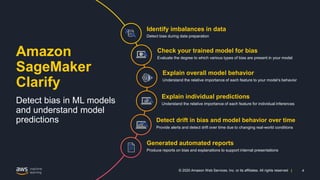
Amazon
SageMaker
Clarify
Detect bias in ML models
and understand model
predictions
Detect bias during data preparation
Identify imbalances in data
Evaluate the degree to which various types of bias are present in your model
Check your trained model for bias
Understand the relative importance of each feature to your model’s behavior
Explain overall model behavior
Understand the relative importance of each feature for individual inferences
Explain individual predictions
Provide alerts and detect drift over time due to changing real-world conditions
Detect drift in bias and model behavior over time
Generated automated reports
Produce reports on bias and explanations to support internal presentations
5© 2020 Amazon Web Services, Inc. or its affiliates. All rights reserved |
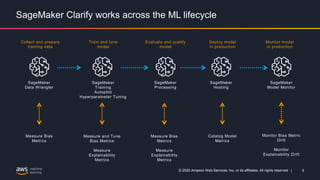
SageMaker Clarify works across the ML lifecycle
Collect and prepare
training data
Train and tune
model
Evaluate and qualify
model
Deploy model
in production
Monitor model
in production
Measure Bias
Metrics
Measure and Tune
Bias Metrics
Measure
Explainability
Metrics
Catalog Model
Metrics
Measure Bias
Metrics
Measure
Explainability
Metrics
Monitor Bias Metric
Drift
Monitor
Explainability Drift
SageMaker
Data Wrangler
SageMaker
Training
Autopilot
Hyperparameter Tuning
SageMaker
Processing
SageMaker
Hosting
SageMaker
Model Monitor
6© 2020 Amazon Web Services, Inc. or its affiliates. All rights reserved |
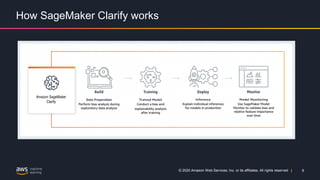
How SageMaker Clarify works
Amazon SageMaker
Clarify
7© 2020 Amazon Web Services, Inc. or its affiliates. All rights reserved |
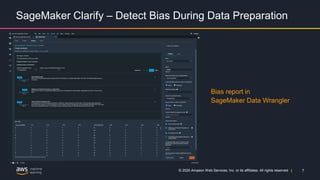
SageMaker Clarify – Detect Bias During Data Preparation
Bias report in
SageMaker Data Wrangler
8© 2020 Amazon Web Services, Inc. or its affiliates. All rights reserved |
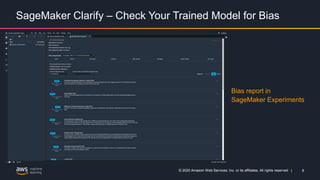
SageMaker Clarify – Check Your Trained Model for Bias
Bias report in
SageMaker Experiments
9© 2020 Amazon Web Services, Inc. or its affiliates. All rights reserved |
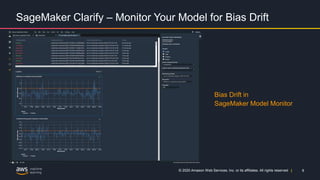
SageMaker Clarify – Monitor Your Model for Bias Drift
Bias Drift in
SageMaker Model Monitor
10© 2020 Amazon Web Services, Inc. or its affiliates. All rights reserved |
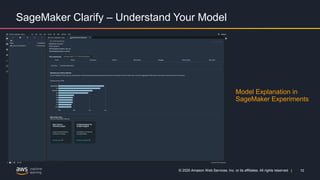
SageMaker Clarify – Understand Your Model
Model Explanation in
SageMaker Experiments
11© 2020 Amazon Web Services, Inc. or its affiliates. All rights reserved |
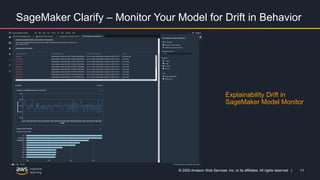
SageMaker Clarify – Monitor Your Model for Drift in Behavior
Explainability Drift in
SageMaker Model Monitor
12© 2020 Amazon Web Services, Inc. or its affiliates. All rights reserved |
Demo: https://youtu.be/cQo2ew0DQw0
13© 2020 Amazon Web Services, Inc. or its affiliates. All rights reserved |
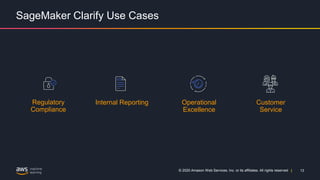
SageMaker Clarify Use Cases
Regulatory
Compliance
Internal Reporting Operational
Excellence
Customer
Service
14© 2020 Amazon Web Services, Inc. or its affiliates. All rights reserved |
SageMaker Clarify – Pricing & Availability
SageMaker Clarify is
generally available
SageMaker Clarify is
available at no
additional cost as
part of Amazon
SageMaker
SageMaker Clarify is
available in all AWS
Regions where
SageMaker is
available
15© 2020 Amazon Web Services, Inc. or its affiliates. All rights reserved |
Best Practices
• Fairness as a Process:
• The notions of bias and fairness are highly application dependent and the
choice of the attribute(s) for which bias is to be measured, as well as the choice
of the bias metrics, may need to be guided by social, legal, and other non-
technical considerations.
• Building consensus and achieving collaboration across key stakeholders (such
as product, policy, legal, engineering, and AI/ML teams, as well as end users
and communities) is a prerequisite for the successful adoption of fairness-aware
ML approaches in practice.
• Fairness and explainability considerations may be applicable during each
stage of the ML lifecycle.
16© 2020 Amazon Web Services, Inc. or its affiliates. All rights reserved |
Fairness and Explainability by Design in the ML Lifecycle
17© 2020 Amazon Web Services, Inc. or its affiliates. All rights reserved |
Thank You!
For more information on Amazon SageMaker Clarify, please refer:
• https://aws.amazon.com/sagemaker/clarify
• https://aws.amazon.com/blogs/aws/new-amazon-sagemaker-clarify-detects-
bias-and-increases-the-transparency-of-machine-learning-models
• https://github.com/aws/amazon-sagemaker-clarify
Acknowledgments: Amazon SageMaker Clarify core team, Amazon AWS AI
team, and partners across Amazon

Amazon SageMaker Clarify

  • 1.
    1© 2020 AmazonWeb Services, Inc. or its affiliates. All rights reserved | 1© 2020 Amazon Web Services, Inc. or its affiliates. All rights reserved | Detect bias in ML models and understand model predictions Krishnaram Kenthapadi Principal Scientist, Amazon AWS AI Amazon SageMaker Clarify
  • 2.
    2© 2020 AmazonWeb Services, Inc. or its affiliates. All rights reserved | Predictive Maintenance Manufacturing, Automotive, IoT Demand Forecasting Retail, Consumer Goods, Manufacturing Fraud Detection Financial Services, Online Retail Credit Risk Prediction Financial Services, Retail Extract and Analyze Data from Documents Healthcare, Legal, Media/Ent, Education Computer Vision Healthcare, Pharma, Manufacturing Autonomous Driving Automotive, Transportation Personalized Recommendations Media & Entertainment, Retail, Education Churn Prediction Retail, Education, Software & Internet https://aws.amazon.c om/sagemaker/gettin g-started Amazon SageMaker Customer ML Use cases
  • 3.
    3© 2020 AmazonWeb Services, Inc. or its affiliates. All rights reserved | Bias and Explainability: Challenges 1 Without detection, it is hard to know if bias has entered an ML model: • Imbalances may be present in the initial dataset • Bias may develop during training • Bias may develop over time after model deployment 2 Machine learning models are often complex & opaque, making explainability critical: • Regulations may require companies to be able to explain model predictions • Internal stakeholders and customers may need explanations for model behavior • Data science teams can improve models if they understand model behavior
  • 4.
    4© 2020 AmazonWeb Services, Inc. or its affiliates. All rights reserved | Amazon SageMaker Clarify Detect bias in ML models and understand model predictions Detect bias during data preparation Identify imbalances in data Evaluate the degree to which various types of bias are present in your model Check your trained model for bias Understand the relative importance of each feature to your model’s behavior Explain overall model behavior Understand the relative importance of each feature for individual inferences Explain individual predictions Provide alerts and detect drift over time due to changing real-world conditions Detect drift in bias and model behavior over time Generated automated reports Produce reports on bias and explanations to support internal presentations
  • 5.
    5© 2020 AmazonWeb Services, Inc. or its affiliates. All rights reserved | SageMaker Clarify works across the ML lifecycle Collect and prepare training data Train and tune model Evaluate and qualify model Deploy model in production Monitor model in production Measure Bias Metrics Measure and Tune Bias Metrics Measure Explainability Metrics Catalog Model Metrics Measure Bias Metrics Measure Explainability Metrics Monitor Bias Metric Drift Monitor Explainability Drift SageMaker Data Wrangler SageMaker Training Autopilot Hyperparameter Tuning SageMaker Processing SageMaker Hosting SageMaker Model Monitor
  • 6.
    6© 2020 AmazonWeb Services, Inc. or its affiliates. All rights reserved | How SageMaker Clarify works Amazon SageMaker Clarify
  • 7.
    7© 2020 AmazonWeb Services, Inc. or its affiliates. All rights reserved | SageMaker Clarify – Detect Bias During Data Preparation Bias report in SageMaker Data Wrangler
  • 8.
    8© 2020 AmazonWeb Services, Inc. or its affiliates. All rights reserved | SageMaker Clarify – Check Your Trained Model for Bias Bias report in SageMaker Experiments
  • 9.
    9© 2020 AmazonWeb Services, Inc. or its affiliates. All rights reserved | SageMaker Clarify – Monitor Your Model for Bias Drift Bias Drift in SageMaker Model Monitor
  • 10.
    10© 2020 AmazonWeb Services, Inc. or its affiliates. All rights reserved | SageMaker Clarify – Understand Your Model Model Explanation in SageMaker Experiments
  • 11.
    11© 2020 AmazonWeb Services, Inc. or its affiliates. All rights reserved | SageMaker Clarify – Monitor Your Model for Drift in Behavior Explainability Drift in SageMaker Model Monitor
  • 12.
    12© 2020 AmazonWeb Services, Inc. or its affiliates. All rights reserved | Demo: https://youtu.be/cQo2ew0DQw0
  • 13.
    13© 2020 AmazonWeb Services, Inc. or its affiliates. All rights reserved | SageMaker Clarify Use Cases Regulatory Compliance Internal Reporting Operational Excellence Customer Service
  • 14.
    14© 2020 AmazonWeb Services, Inc. or its affiliates. All rights reserved | SageMaker Clarify – Pricing & Availability SageMaker Clarify is generally available SageMaker Clarify is available at no additional cost as part of Amazon SageMaker SageMaker Clarify is available in all AWS Regions where SageMaker is available
  • 15.
    15© 2020 AmazonWeb Services, Inc. or its affiliates. All rights reserved | Best Practices • Fairness as a Process: • The notions of bias and fairness are highly application dependent and the choice of the attribute(s) for which bias is to be measured, as well as the choice of the bias metrics, may need to be guided by social, legal, and other non- technical considerations. • Building consensus and achieving collaboration across key stakeholders (such as product, policy, legal, engineering, and AI/ML teams, as well as end users and communities) is a prerequisite for the successful adoption of fairness-aware ML approaches in practice. • Fairness and explainability considerations may be applicable during each stage of the ML lifecycle.
  • 16.
    16© 2020 AmazonWeb Services, Inc. or its affiliates. All rights reserved | Fairness and Explainability by Design in the ML Lifecycle
  • 17.
    17© 2020 AmazonWeb Services, Inc. or its affiliates. All rights reserved | Thank You! For more information on Amazon SageMaker Clarify, please refer: • https://aws.amazon.com/sagemaker/clarify • https://aws.amazon.com/blogs/aws/new-amazon-sagemaker-clarify-detects- bias-and-increases-the-transparency-of-machine-learning-models • https://github.com/aws/amazon-sagemaker-clarify Acknowledgments: Amazon SageMaker Clarify core team, Amazon AWS AI team, and partners across Amazon

Editor's Notes

  • #3 Amazon SageMaker helps data scientists and developers to prepare, build, train, and deploy high-quality machine learning (ML) models quickly by bringing together a broad set of capabilities purpose-built for ML. Ignore notes below (I won’t go into details) Predictive Maintenance Predict if a component will fail before failure based on sensor data. Example applications include predicting failure and remaining useful life (RUL) of automotive fleets, manufacturing equipment, and IoT sensors. The key value is increased vehicle and equipment up-time and cost savings. This use case is widely used in automotive and manufacturing industries. Industries: Automotive, Manufacturing Georgia Pacific uses SageMaker to detect machine issues early. To learn more, read the case study.   Demand Forecasting Use historical data to forecast key demand metrics faster and make more accurate business decisions around production, pricing, inventory management, and purchasing/re-stocking. The key value is meeting customer demand, reducing inventory carrying costs by reducing surplus inventory, and reducing waste. This use case is used mainly in financial services, manufacturing, retail, and consumer packaged goods (CPG) industries. Industries: Financial Services (FSI), Manufacturing, Retail, Consumer Packaged Goods (CPG) Advanced Microgrid Solutions has built an ML model with SageMaker to forecast energy prices in near real time. Watch the re:Invent session. Fraud Detection Automate the detection of potentially fraudulent activity and flag it for review. The key value is reducing costs associated with fraud and maintaining customer trust. This use case is used mainly in financial services and online retail industries. Industries: FSI, Retail Euler Hermes uses SageMaker to catch suspicious domains. Learn more from the blog post. Credit Risk Prediction Explain individual predictions from a credit application to predict whether the credit will be paid back or not (often called a credit default). The key value is identifying bias and satisfying regulatory requirements. This use case is used mainly in financial services and online retail industries. Industries: FSI We have a Explaining Credit Decisions customized solution using SageMaker that can be used to explain individual predictions from machine learning models, including applications for credit decisions, churn prediction, medical diagnosis, and fraud detection. Extract & Analyze Data from Documents Understand text in written and digital documents and forms, extract information, and use it to classify items and make decisions. Industries: Healthcare, FSI, Legal, M&E, Education Computer Vision (image analysis) Main sub-use cases are: 1) Automatically medical diagnosis from X-ray and other imaging data; 2) Manufacturing quality control automation to detect defective parts; 3) Drug discovery; 4) Social distancing and tracking concentration of people for COVID-19 in public places. Industries: Healthcare/Pharma, Manufacturing, Public Sector Autonomous Driving Reinforcement learning and object detection algorithms. Industries: Automotive Personalized Recommendations Make personalized recommendations based on historical trends. Industries: M&E, Retail, Education (most likely classes to ensure graduation) Churn Prediction Predict customer likelihood to churn. Industries: Retail, Education, Software & Internet (SaaS)
  • #4 Biases are imbalances in the training data or the prediction behavior of the model across different groups, such as age or income bracket. Biases can result from the data or algorithm used to train your model. For instance, if an ML model is trained primarily on data from middle-aged individuals, it may be less accurate when making predictions involving younger and older people. ----- Regulatory Compliance Regulations may require companies to be able to explain financial decisions and take steps around model risk management. Amazon SageMaker Clarify can help flag any potential bias present in the initial data or in the model after training and can also help explain which model features contributed the most to an ML model’s prediction. Internal Reporting & Compliance Data science teams are often required to justify or explain ML models to internal stakeholders, such as internal auditors or executives. Amazon SageMaker Clarify can provide data science teams with a graph of feature importance when requested and can help quantify potential bias in an ML model or the data used to train it in order to provide additional information needed to support internal requirements. Customer Service Customer-facing employees, such as financial advisors or loan officers, may review a prediction made by an ML model as part of the course of their work. Working with the data science team, these employees can get a visual report via API directly from Amazon SageMaker Clarify with details on which features were most important to a given prediction in order to review it before making decisions that may impact customers. ----- Ignore notes below (I will use description at https://aws.amazon.com/sagemaker/clarify) ML models, especially those that make predictions which serve end customers, are at risk of being biased and producing incorrect or harmful outcomes if proper precautions are not taken, making the ability to detect bias across the ML lifecycle critical. Let’s look at some of the ways bias may become present in a model: The initial data set you use for your model might contain imbalances, such as not having enough examples of members of a certain class which then cause the model to become biased against that class. Your model might develop biased behavior during the training process. For example, the model might use bank location as a positive indicator to approve a loan as opposed to actual financial data if one particular bank location approves more loans than others. In this case, the model has bias towards applicants that apply at that location and against applicants that do not, regardless of their financial standing. Finally, bias may develop over time if data in the real world begins to diverge from the data used to train your deployed model. For example, if your model has been trained on an outdated set of mortgage rates it may start to become biased against certain home loan applicants. But to understand WHY bias is present, we need explainability. And explainability is useful for more than just bias. Let me explain. Many regulators need to understand why the ML model made a given prediction and whether the prediction was free from bias, both in training and at inference You may need to provide explanations to internal teams (loan officers, customer service reps, compliance officers) in addition to end users / customers. For example a loan officer may need help explaining to a customer what factors caused their application to be denied. Finally, data science teams can improve models given a deeper understanding on whether a model is making the right inferences for the right reasons, or if perhaps irrelevant data points are being used that are altering model behavior.
  • #5 Detect bias in your data and model Identify imbalances in data SageMaker Clarify is integrated with Amazon SageMaker Data Wrangler, making it easier to identify bias during data preparation. You specify attributes of interest, such as gender or age, and SageMaker Clarify runs a set of algorithms to detect any presence of bias in those attributes. After the algorithm runs, SageMaker Clarify provides a visual report with a description of the sources and measurements of possible bias so that you can identify steps to remediate the bias. For example, in a financial dataset that contains only a few examples of business loans to one age group as compared to others, SageMaker will flag the imbalance so that you can avoid a model that disfavors that age group. Check your trained model for bias You can also check your trained model for bias, such as predictions that produce a negative result more frequently for one group than they do for another. SageMaker Clarify is integrated with SageMaker Experiments so that after a model has been trained, you can identify attributes you would like to check for bias, such as age. SageMaker runs a set of algorithms to check the trained model and provides you with a visual report that identifies the different types of bias for each attribute, such as whether older groups receive more positive predictions compared to younger groups. Monitor your model for bias Although your initial data or model may not have been biased, changes in the world may introduce bias to a model that has already been trained. For example, a substantial change in home buyer demographics could cause a home loan application model to become biased if certain groups were not present or accurately represented in the original training data. SageMaker Clarify is integrated with SageMaker Model Monitor, enabling you to configure alerting systems like Amazon CloudWatch to notify you if your model exceeds certain bias metric thresholds.  Explain model behavior Understand your model Trained models may consider some model inputs more strongly than others when generating predictions. For example, a loan application model may weigh credit history more heavily than other factors. SageMaker Clarify is integrated with SageMaker Experiments to provide a graph detailing which features contributed most to your model’s overall prediction-making process after the model has been trained. These details may be useful for compliance requirements or can help determine if a particular model input has more influence than it should on overall model behavior. Explain individual model predictions Customers and internal stakeholders both want transparency into how models make their predictions. SageMaker Clarify integrates with SageMaker Experiments to show you the importance of each model input for a specific prediction. Results can be made available to customer-facing employees so that they have an understanding of the model’s behavior when making decisions based on model predictions. Monitor your model for changes in behavior Changes in real-world data can cause your model to give different weights to model inputs, changing its behavior over time. For example, a decline in home prices could cause a model to weigh income less heavily when making loan predictions. Amazon SageMaker Clarify is integrated with SageMaker Model Monitor to alert you if the importance of model inputs shift, causing model behavior to change.
  • #6 Amazon SageMaker Clarify works across the entire ML workflow to implement bias detection and explainability. - It can look for bias in your initial dataset as part of SageMaker Data Wrangler - It can check for bias in your trained model as part of SageMaker Experiments, and also explain the behavior of your model overall - It extends SageMaker Model Monitor to check for changes in bias or explainability over time in your deployed model - It can provide explanations for individual inferences made by your deployed model
  • #7 So to recap: - You can check your data for bias during data prep - You can check for bias in your trained model, and explain overall model behavior - You can provide explanations for individual predictions made by your deployed model - You can monitor and alert on any changes to model bias or behavior over time
  • #8 Let’s take a quick product tour SageMaker Clarify is integrated with Amazon SageMaker Data Wrangler, making it easier to identify bias during data preparation. You specify attributes of interest, such as gender or age, and SageMaker Clarify runs a set of algorithms to detect any presence of bias in those attributes. After the algorithm runs, SageMaker Clarify provides a visual report with a description of the sources and measurements of possible bias so that you can identify steps to remediate the bias. For example, in a financial dataset that contains only a few examples of business loans to one age group as compared to others, SageMaker will flag the imbalance so that you can avoid a model that disfavors that age group.
  • #9 You can also check your trained model for bias, such as predictions that produce a negative result more frequently for one group than they do for another. SageMaker Clarify is integrated with SageMaker Experiments so that after a model has been trained, you can identify attributes you would like to check for bias, such as age. SageMaker runs a set of algorithms to check the trained model and provides you with a visual report that identifies the different types of bias for each attribute, such as whether older groups receive more positive predictions compared to younger groups.
  • #10 Although your initial data or model may not have been biased, changes in the world may introduce bias to a model that has already been trained. For example, a substantial change in home buyer demographics could cause a home loan application model to become biased if certain groups were not present or accurately represented in the original training data. SageMaker Clarify is integrated with SageMaker Model Monitor, enabling you to configure alerting systems like Amazon CloudWatch to notify you if your model exceeds certain bias metric thresholds. 
  • #11 Trained models may consider some model inputs more strongly than others when generating predictions. For example, a loan application model may weigh credit history more heavily than other factors. SageMaker Clarify is integrated with SageMaker Experiments to provide a graph detailing which features contributed most to your model’s overall prediction-making process after the model has been trained. These details may be useful for compliance requirements or can help determine if a particular model input has more influence than it should on overall model behavior.
  • #12 Changes in real-world data can cause your model to give different weights to model inputs, changing its behavior over time. For example, a decline in home prices could cause a model to weigh income less heavily when making loan predictions. Amazon SageMaker Clarify is integrated with SageMaker Model Monitor to alert you if the importance of model inputs shift, causing model behavior to change.
  • #13 This concludes the overview of Amazon SageMaker Clarify, with a focus on the explainability functionality. Please refer the SageMaker Clarify webpage and the AWS blog post for additional information, including best practices for evaluating fairness and explainability in the ML lifecycle. Next, we will present the demo of SageMaker Clarify. Demo: https://youtu.be/cQo2ew0DQw0
  • #14 Regulatory Compliance Regulations may require companies to be able to explain financial decisions and take steps around model risk management. Amazon SageMaker Clarify can help flag any potential bias present in the initial data or in the model after training and can also help explain which model features contributed the most to an ML model’s prediction. Internal Reporting & Compliance Data science teams are often required to justify or explain ML models to internal stakeholders, such as internal auditors or executives. Amazon SageMaker Clarify can provide data science teams with a graph of feature importance when requested and can help quantify potential bias in an ML model or the data used to train it in order to provide additional information needed to support internal requirements. Customer Service Customer-facing employees, such as financial advisors or loan officers, may review a prediction made by an ML model as part of the course of their work. Working with the data science team, these employees can get a visual report via API directly from Amazon SageMaker Clarify with details on which features were most important to a given prediction in order to review it before making decisions that may impact customers. ----- Ignore below: As we mentioned earlier, there are a few use cases where bias detection and explainability are key – this is by no means an exhaustive list: Compliance: Regulations often require companies to remain unbiased and to be able to explain financial decisions. Internal Reporting: Data science teams are often required to justify or explain ML models to internal stakeholders, such as internal auditors or executives who would like more transparency. Operational Excellence: ML is often applied in operational scenarios, such as predictive maintenance and application users may want insight into why a given machine needs to be repaired. Customer Service: Customer-facing employees such as healthcare workers, financial advisors, or loan officers often need to field questions around the result of a decision made by an ML model, such as a denied loan.
  • #15 Please see region table for details: https://aws.amazon.com/about-aws/global-infrastructure/regional-product-services/
  • #16 Here are some best practices for evaluating fairness and explainability in the ML lifecycle. Fairness and explainability should be taken into account during each stage of the ML lifecycle, for example, Problem Formation, Dataset Construction, Algorithm Selection, Model Training Process, Testing Process, Deployment, and Monitoring/Feedback. It is important to have the right tools to do this analysis. To encourage engaging with these considerations, here are a few example questions worth asking during each of these stages. Fairness as a Process: We recognize that the notions of bias and fairness are highly application dependent and that the choice of the attribute(s) for which bias is to be measured, as well as the choice of the bias metrics, may need to be guided by social, legal, and other non-technical considerations. Building consensus and achieving collaboration across key stakeholders (such as product, policy, legal, engineering, and AI/ML teams, as well as end users and communities) is a prerequisite for the successful adoption of fairness-aware ML approaches in practice.
  • #17 Here are some best practices for evaluating fairness and explainability in the ML lifecycle. Fairness and explainability should be taken into account during each stage of the ML lifecycle, for example, Problem Formation, Dataset Construction, Algorithm Selection, Model Training Process, Testing Process, Deployment, and Monitoring/Feedback. It is important to have the right tools to do this analysis. To encourage engaging with these considerations, here are a few example questions worth asking during each of these stages. Fairness as a Process: We recognize that the notions of bias and fairness are highly application dependent and that the choice of the attribute(s) for which bias is to be measured, as well as the choice of the bias metrics, may need to be guided by social, legal, and other non-technical considerations. Building consensus and achieving collaboration across key stakeholders (such as product, policy, legal, engineering, and AI/ML teams, as well as end users and communities) is a prerequisite for the successful adoption of fairness-aware ML approaches in practice.
  • #18 This concludes the overview of Amazon SageMaker Clarify, with a focus on the explainability functionality. Please refer the SageMaker Clarify webpage and the AWS blog post for additional information, including best practices for evaluating fairness and explainability in the ML lifecycle. Thank you for listening to this talk.