Introduction to RDS
AmazonRelational Database Service (Amazon RDS) is a web service that
makes it easier to set up, operate, and scale a relational database in the AWS
Cloud. It provides cost-efficient, resizable capacity for an industry-standard
relational database and manages common database administration tasks.
Advantages of Amazon RDS:
Amazon RDS provides the following principal advantages over database
deployments that aren't fully managed:
• You can use database engines that you are already familiar with: IBM Db2,
MariaDB, Microsoft SQL Server, MySQL, Oracle Database, and PostgreSQL.
• Amazon RDS manages backups, software patching, automatic failure
detection, and recovery.
• You can turn on automated backups, or manually create your own backup
snapshots. You can use these backups to restore a database. The Amazon RDS
restore process works reliably and efficiently.
Amazon RDS sharedresponsibility model
• Amazon RDS is responsible for hosting the software components and
infrastructure of DB instances and DB clusters. You are responsible for
query tuning, which is the process of adjusting SQL queries to
improve performance. Query performance is highly dependent on
database design, data size, data distribution, application workload,
and query patterns, which can vary greatly. Monitoring and tuning are
highly individualized processes that you own for your RDS databases.
You can use Amazon RDS Performance Insights and other tools to
identify problematic queries.
6.
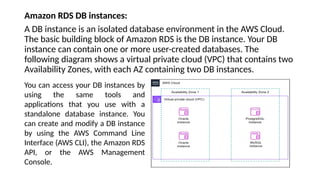
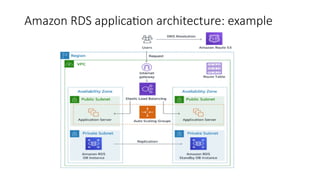
Amazon RDS DBinstances:
A DB instance is an isolated database environment in the AWS Cloud.
The basic building block of Amazon RDS is the DB instance. Your DB
instance can contain one or more user-created databases. The
following diagram shows a virtual private cloud (VPC) that contains two
Availability Zones, with each AZ containing two DB instances.
You can access your DB instances by
using the same tools and
applications that you use with a
standalone database instance. You
can create and modify a DB instance
by using the AWS Command Line
Interface (AWS CLI), the Amazon RDS
API, or the AWS Management
Console.
• Elastic LoadBalancing: AWS routes user traffic through Elastic Load Balancing. A
load balancer distributes workloads across multiple compute resources, such as
virtual servers. In this sample use case, the Elastic Load Balancer forwards client
requests to application servers.
• Application servers: Application servers interact with RDS DB instances. An
application server in AWS is typically hosted on EC2 instances, which provide
scalable computing capacity. The application servers reside in public subnets
with different Availability Zones (AZs) within the same Virtual Private Cloud
(VPC).
• RDS DB instances The EC2 application servers interact with RDS DB instances.
The DB instances reside in private subnets within different Availability Zones
(AZs) within the same Virtual Private Cloud (VPC). Because the subnets are
private, no requests from the internet are permitted. The primary DB instance
replicates to another DB instance, called a read replica. Both DB instances are in
private subnets within the VPC, which means that Internet users can't access
them directly
9.
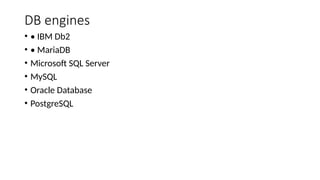
DB engines
• •IBM Db2
• • MariaDB
• Microsoft SQL Server
• MySQL
• Oracle Database
• PostgreSQL
10.
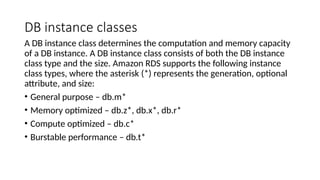
DB instance classes
ADB instance class determines the computation and memory capacity
of a DB instance. A DB instance class consists of both the DB instance
class type and the size. Amazon RDS supports the following instance
class types, where the asterisk (*) represents the generation, optional
attribute, and size:
• General purpose – db.m*
• Memory optimized – db.z*, db.x*, db.r*
• Compute optimized – db.c*
• Burstable performance – db.t*





![Introduction to AWS Cloud Databases [Apr 2020]](https://cdn.slidesharecdn.com/ss_thumbnails/introductiontoawsclouddatabasesapr2020-240904112416-f4009f50-thumbnail.jpg?width=640&height=640&fit=bounds)


