บทที่ 5 โปรแกรมย่อยและแผนภูมิ
ลำำดับขั้น
5.1 โปรแกรมย่อย
5.2 ตัวแปรแบบโกลบอลและตัวแปร
แบบโลคอล
5.3 กำรใช้งำนฟังก์ชันในภำษำซี
5.4 แผนภูมิลำำดับขั้น
Copyright (c) 2006 by Sasalak Tongkaw2
COMPUTER PROGRAMMING AND ALGORITH
โปรแกรมย่อย
หมำยถึง หน่วยย่อยของโปรแกรม
บำงครั้งเรียกว่ำ ฟังก์ชัน (functions)
หรือกระบวนงำน (Procedure)
Double_it
Copyright (c) 2006 by Sasalak Tongkaw3
COMPUTER PROGRAMMING AND ALGORITH
กำรใช้งำนฟังก์ชันในภำษำซี
ฟังก์ชันในภำษำซีมีอยู่ 2
ชนิดคือ
ฟังก์ชั่นที่มีอยู่ในไลบรำรีของ
ภำษำซี อยู่ในโฟลเดอร์ lib มี
นำมสกุล .h
ฟังก์ชั่นที่เรำสร้ำงขึ้นเอง
ฟังก์ชั่นที่มีอยู่แล้วในภำษำซีเวลำจะ
เรียกใช้งำนก็ต้องทำำกำร include
ไฟล์นำมสกุล .h เช่นถ้ำต้องกำรใช้
ฟังก์ชั่น prinf หรือ scanf จะต้อง
include ไฟล์ชื่อ stdio.h มำก่อน
เป็นต้น
ฟังก์ชันที่เขียนขึ้นเองใหม่เหมือนกับ
Copyright (c) 2006 by Sasalak Tongkaw4
COMPUTER PROGRAMMING AND ALGORITH
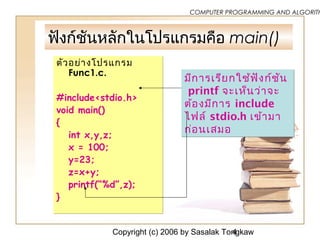
ฟังก์ชันหลักในโปรแกรมคือ main()
ตัวอย่ำงโปรแกรม
Func1.c.
#include<stdio.h>
void main()
{
int x,y,z;
x = 100;
y=23;
z=x+y;
printf(“%d”,z);
}
ตัวอย่ำงโปรแกรม
Func1.c.
#include<stdio.h>
void main()
{
int x,y,z;
x = 100;
y=23;
z=x+y;
printf(“%d”,z);
}
มีกำรเรียกใช้ฟังก์ชัน
printf จะเห็นว่ำจะ
ต้องมีกำร include
ไฟล์ stdio.h เข้ำมำ
ก่อนเสมอ
มีกำรเรียกใช้ฟังก์ชัน
printf จะเห็นว่ำจะ
ต้องมีกำร include
ไฟล์ stdio.h เข้ำมำ
ก่อนเสมอ
Copyright (c) 2006 by Sasalak Tongkaw5
COMPUTER PROGRAMMING AND ALGORITH
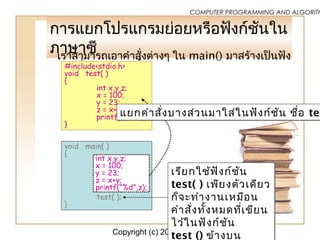
กำรแยกโปรแกรมย่อยหรือฟังก์ชันใน
ภำษำซีเรำสำมำรถเอำคำำสั่งต่ำงๆ ใน main() มำสร้ำงเป็นฟัง
ก์ชั่นใหม่ได้ดังนี้#include<stdio.h>
void test( )
{
int x,y,z;
x = 100;
y = 23;
z = x+y;
printf(“%d”,z);
}
void main( )
{
test( );
}
เรียกใช้ฟังก์ชัน
test( ) เพียงตัวเดียว
ก็จะทำำงำนเหมือน
คำำสั่งทั้งหมดที่เขียน
ไว้ในฟังก์ชัน
test () ข้ำงบน
เรียกใช้ฟังก์ชัน
test( ) เพียงตัวเดียว
ก็จะทำำงำนเหมือน
คำำสั่งทั้งหมดที่เขียน
ไว้ในฟังก์ชัน
test () ข้ำงบน
int x,y,z;
x = 100;
y = 23;
z = x+y;
printf(“%d”,z);
แยกคำำสั่งบำงส่วนมำใส่ในฟังก์ชัน ชื่อ tesแยกคำำสั่งบำงส่วนมำใส่ในฟังก์ชัน ชื่อ tes
Copyright (c) 2006 by Sasalak Tongkaw6
COMPUTER PROGRAMMING AND ALGORITH
โปรแกรมเขียนใหม่จะเป็นดังนี้
#include<stdio.h>
void test( )
{
int x,y,z;
x = 100;
y = 23;
z = x+y;
printf(“%d”,z);
}
void main( )
{
test( );
}
ส่วนของฟังก์ชัน ชื่อว่ำ test ( )ส่วนของฟังก์ชัน ชื่อว่ำ test ( )
เรียกชื่อฟังก์ชัน test ( ) เพื่อทำำงำนตรงจุดนี้เรียกชื่อฟังก์ชัน test ( ) เพื่อทำำงำนตรงจุดนี้ฟังก์ชันหลักฟังก์ชันหลัก
ตัวอย่างโปรแกรม Double_it
Copyright (c) 2006 by Sasalak Tongkaw8
COMPUTER PROGRAMMING AND ALGORITH
ตัวอย่าง ผังงานปกติ
EOFEOF
Print “END”Print “END”
Print ANSPrint ANS
StartStart
Yes
ANS=number*2ANS=number*2
EndEnd
No
Get numberGet number
Get numberGet numberNumber=0Number=0
แยกเป็นโปรแกรมย่อยชื่อ
Double_it
Copyright (c) 2006 by Sasalak Tongkaw9
COMPUTER PROGRAMMING AND ALGORITH
โปรแกรม Double1.cpp
#include<stdio.h>
#include<conio.h>
void main()
{
int number,ans;
clrscr();
printf("Number=");
scanf("%d",&number);
do {
ans=number*2; //แยกไปเป็นโปรแกรมย่อย
Double_it
printf("ANS=%dn",ans);
printf("Number=");
scanf("%d",&number);
} while (number!=0);
}
Copyright (c) 2006 by Sasalak Tongkaw10
COMPUTER PROGRAMMING AND ALGORITH
ตัวอย่าง ผังงานมีโปรแกรมย่อย
Double_It
EOFEOF
Print “END”Print “END”
Print ANSPrint ANS
StartStart
Yes
EndEnd
No
Get numberGet number
Double_itDouble_it
Double_ItDouble_It
Double_itDouble_it
ReturnReturn
Number=0Number=0
Copyright (c) 2006 by Sasalak Tongkaw11
COMPUTER PROGRAMMING AND ALGORITH
โปรแกรม Double2.cpp
#include<stdio.h>
#include<conio.h>
int number,ans;
void double_it()
{
ans=number*2;
}
void main()
{ clrscr();
printf("Number=");
scanf("%d",&number);
do {
double_it();
printf("ANS=%dn",ans);
printf("Number=");
scanf("%d",&number);
} while (number!=0);
}
Copyright (c) 2006 by Sasalak Tongkaw12
COMPUTER PROGRAMMING AND ALGORITH
ตัวแปรที่ใช้งานในโปรแกรม
• ตัวแปรแบบโกลบอล global variable
• ตัวแปรแบบโลคอล local variable
Copyright (c) 2006 by Sasalak Tongkaw13
COMPUTER PROGRAMMING AND ALGORITH
ตัวแปรแบบโกลบอล Global
Variable
• เป็นตัวแปรที่ใช้ตลอดทั้ง
โปรแกรม ทั้งในโปรแกรมหลัก
และในโปรแกรมย่อย
• ประกาศไว้ภายนอกโปรแกรม
หลักเพียงครั้งเดียว
Copyright (c) 2006 by Sasalak Tongkaw14
COMPUTER PROGRAMMING AND ALGORITH
Global Variable
#include<stdio.h>
#include<conio.h>
int number,ans;
Function 1
Function 2
Main program
Copyright (c) 2006 by Sasalak Tongkaw15
COMPUTER PROGRAMMING AND ALGORITH
โปรแกรม Double2.cpp
#include<stdio.h>
#include<conio.h>
int number,ans;
void doubleit()
{
ans=number*2;
}
void main()
{ clrscr();
printf("Number=");
scanf("%d",&number);
do {
doubleit();
printf("ANS=%dn",ans);
printf("Number=");
scanf("%d",&number);
} while (number!=0);
}
Global variable
Function
Main Program
Copyright (c) 2006 by Sasalak Tongkaw16
COMPUTER PROGRAMMING AND ALGORITH
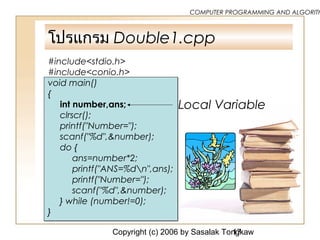
ตัวแปรแบบโลคอล Local Variable
• ตัวแปรที่ใช้ในโพรซีเจอร์หรือ
ฟังก์ชัน
• การเปลี่ยนแปลงค่าของตัวแปรโล
คอลจะไม่กระทบต่อโปรแกรม
หลักข้างนอก
Copyright (c) 2006 by Sasalak Tongkaw17
COMPUTER PROGRAMMING AND ALGORITH
โปรแกรม Double1.cpp
#include<stdio.h>
#include<conio.h>
void main()
{
int number,ans;
clrscr();
printf("Number=");
scanf("%d",&number);
do {
ans=number*2;
printf("ANS=%dn",ans);
printf("Number=");
scanf("%d",&number);
} while (number!=0);
}
Local Variable
ฝึกปฏิบัติการแยกโปรแกรมย่อยฝึกปฏิบัติการแยกโปรแกรมย่อย
โปรแกรม showmenu()
Copyright (c) 2006 by Sasalak Tongkaw19
COMPUTER PROGRAMMING AND ALGORITH
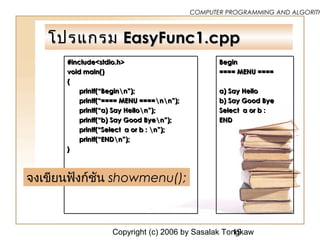
โปรแกรมโปรแกรม EasyFunc1.cppEasyFunc1.cpp
#include<stdio.h>
void main()
{
printf(“Beginn”);
printf(“==== MENU ====nn”);
printf(“a) Say Hellon”);
printf(“b) Say Good Byen”);
printf(“Select a or b : n”);
printf(“ENDn”);
}
#include<stdio.h>
void main()
{
printf(“Beginn”);
printf(“==== MENU ====nn”);
printf(“a) Say Hellon”);
printf(“b) Say Good Byen”);
printf(“Select a or b : n”);
printf(“ENDn”);
}
Begin
==== MENU ====
a) Say Hello
b) Say Good Bye
Select a or b :
END
Begin
==== MENU ====
a) Say Hello
b) Say Good Bye
Select a or b :
END
จงเขียนฟังก์ชัน showmenu();
Copyright (c) 2006 by Sasalak Tongkaw20
COMPUTER PROGRAMMING AND ALGORITH
เฉลย โปรแกรมเฉลย โปรแกรม EasyFunc2.cppEasyFunc2.cpp
#include<stdio.h>
void showmenu()
{
printf(“==== MENU ====nn”);
printf(“a) Say Hellon”);
printf(“b) Say Good Byen”);
printf(“Select a or b : n”);
}
Void main()
{
printf(“Beginn”);
showmenu();
printf(“ENDn”);
}
#include<stdio.h>
void showmenu()
{
printf(“==== MENU ====nn”);
printf(“a) Say Hellon”);
printf(“b) Say Good Byen”);
printf(“Select a or b : n”);
}
Void main()
{
printf(“Beginn”);
showmenu();
printf(“ENDn”);
}
Begin
==== MENU ====
a) Say Hello
b) Say Good Bye
Select a or b :
END
Begin
==== MENU ====
a) Say Hello
b) Say Good Bye
Select a or b :
END
2
1
3
4
5
6
7
8
9
10
Copyright (c) 2006 by Sasalak Tongkaw21
COMPUTER PROGRAMMING AND ALGORITH
โปรแกรมย่อยของโปรแกรมย่อย
เป็นโปรแกรมย่อยที่อยู่ภายใน
โปรแกรมย่อยอีกทีหนึ่ง
Copyright (c) 2006 by Sasalak Tongkaw22
COMPUTER PROGRAMMING AND ALGORITH
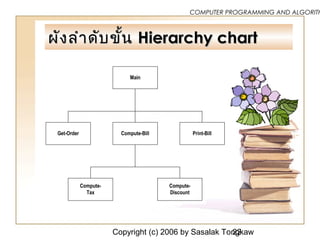
ผังลำาดับขั้นผังลำาดับขั้น Hierarchy chartHierarchy chart
Main
Compute-BillGet-Order Print-Bill
Compute-
Tax
Compute-
Discount
Copyright (c) 2006 by Sasalak Tongkaw23
COMPUTER PROGRAMMING AND ALGORITH
ค้นคว้าเพิ่มเติม
• สไลด์ประกอบการเรียน
ดาวน์โหลดได้ที่ LMS ของ
มหาวิทยาลัยรายวิชา 4121103
การเขียนโปรแกรมคอมพิวเตอร์
และอัลกอริทึ่ม
• เว็บไซต์วิชา 4121202 การเขียน
โปรแกรมภาษาคอมพิวเตอร์ 1
http://samet.skru.ac.th/
~tsasalak/c/c-index.htm
END OF CHEPTER 5
ANY QUESTION ?

4121103 การเขียนโปรแกรมและอัลกอริทึ่ม SLIDE 5/7

  • 1.
    บทที่ 5 โปรแกรมย่อยและแผนภูมิ ลำำดับขั้น 5.1โปรแกรมย่อย 5.2 ตัวแปรแบบโกลบอลและตัวแปร แบบโลคอล 5.3 กำรใช้งำนฟังก์ชันในภำษำซี 5.4 แผนภูมิลำำดับขั้น
  • 2.
    Copyright (c) 2006by Sasalak Tongkaw2 COMPUTER PROGRAMMING AND ALGORITH โปรแกรมย่อย หมำยถึง หน่วยย่อยของโปรแกรม บำงครั้งเรียกว่ำ ฟังก์ชัน (functions) หรือกระบวนงำน (Procedure) Double_it
  • 3.
    Copyright (c) 2006by Sasalak Tongkaw3 COMPUTER PROGRAMMING AND ALGORITH กำรใช้งำนฟังก์ชันในภำษำซี ฟังก์ชันในภำษำซีมีอยู่ 2 ชนิดคือ ฟังก์ชั่นที่มีอยู่ในไลบรำรีของ ภำษำซี อยู่ในโฟลเดอร์ lib มี นำมสกุล .h ฟังก์ชั่นที่เรำสร้ำงขึ้นเอง ฟังก์ชั่นที่มีอยู่แล้วในภำษำซีเวลำจะ เรียกใช้งำนก็ต้องทำำกำร include ไฟล์นำมสกุล .h เช่นถ้ำต้องกำรใช้ ฟังก์ชั่น prinf หรือ scanf จะต้อง include ไฟล์ชื่อ stdio.h มำก่อน เป็นต้น ฟังก์ชันที่เขียนขึ้นเองใหม่เหมือนกับ
  • 4.
    Copyright (c) 2006by Sasalak Tongkaw4 COMPUTER PROGRAMMING AND ALGORITH ฟังก์ชันหลักในโปรแกรมคือ main() ตัวอย่ำงโปรแกรม Func1.c. #include<stdio.h> void main() { int x,y,z; x = 100; y=23; z=x+y; printf(“%d”,z); } ตัวอย่ำงโปรแกรม Func1.c. #include<stdio.h> void main() { int x,y,z; x = 100; y=23; z=x+y; printf(“%d”,z); } มีกำรเรียกใช้ฟังก์ชัน printf จะเห็นว่ำจะ ต้องมีกำร include ไฟล์ stdio.h เข้ำมำ ก่อนเสมอ มีกำรเรียกใช้ฟังก์ชัน printf จะเห็นว่ำจะ ต้องมีกำร include ไฟล์ stdio.h เข้ำมำ ก่อนเสมอ
  • 5.
    Copyright (c) 2006by Sasalak Tongkaw5 COMPUTER PROGRAMMING AND ALGORITH กำรแยกโปรแกรมย่อยหรือฟังก์ชันใน ภำษำซีเรำสำมำรถเอำคำำสั่งต่ำงๆ ใน main() มำสร้ำงเป็นฟัง ก์ชั่นใหม่ได้ดังนี้#include<stdio.h> void test( ) { int x,y,z; x = 100; y = 23; z = x+y; printf(“%d”,z); } void main( ) { test( ); } เรียกใช้ฟังก์ชัน test( ) เพียงตัวเดียว ก็จะทำำงำนเหมือน คำำสั่งทั้งหมดที่เขียน ไว้ในฟังก์ชัน test () ข้ำงบน เรียกใช้ฟังก์ชัน test( ) เพียงตัวเดียว ก็จะทำำงำนเหมือน คำำสั่งทั้งหมดที่เขียน ไว้ในฟังก์ชัน test () ข้ำงบน int x,y,z; x = 100; y = 23; z = x+y; printf(“%d”,z); แยกคำำสั่งบำงส่วนมำใส่ในฟังก์ชัน ชื่อ tesแยกคำำสั่งบำงส่วนมำใส่ในฟังก์ชัน ชื่อ tes
  • 6.
    Copyright (c) 2006by Sasalak Tongkaw6 COMPUTER PROGRAMMING AND ALGORITH โปรแกรมเขียนใหม่จะเป็นดังนี้ #include<stdio.h> void test( ) { int x,y,z; x = 100; y = 23; z = x+y; printf(“%d”,z); } void main( ) { test( ); } ส่วนของฟังก์ชัน ชื่อว่ำ test ( )ส่วนของฟังก์ชัน ชื่อว่ำ test ( ) เรียกชื่อฟังก์ชัน test ( ) เพื่อทำำงำนตรงจุดนี้เรียกชื่อฟังก์ชัน test ( ) เพื่อทำำงำนตรงจุดนี้ฟังก์ชันหลักฟังก์ชันหลัก
  • 7.
  • 8.
    Copyright (c) 2006by Sasalak Tongkaw8 COMPUTER PROGRAMMING AND ALGORITH ตัวอย่าง ผังงานปกติ EOFEOF Print “END”Print “END” Print ANSPrint ANS StartStart Yes ANS=number*2ANS=number*2 EndEnd No Get numberGet number Get numberGet numberNumber=0Number=0 แยกเป็นโปรแกรมย่อยชื่อ Double_it
  • 9.
    Copyright (c) 2006by Sasalak Tongkaw9 COMPUTER PROGRAMMING AND ALGORITH โปรแกรม Double1.cpp #include<stdio.h> #include<conio.h> void main() { int number,ans; clrscr(); printf("Number="); scanf("%d",&number); do { ans=number*2; //แยกไปเป็นโปรแกรมย่อย Double_it printf("ANS=%dn",ans); printf("Number="); scanf("%d",&number); } while (number!=0); }
  • 10.
    Copyright (c) 2006by Sasalak Tongkaw10 COMPUTER PROGRAMMING AND ALGORITH ตัวอย่าง ผังงานมีโปรแกรมย่อย Double_It EOFEOF Print “END”Print “END” Print ANSPrint ANS StartStart Yes EndEnd No Get numberGet number Get numberGet number Double_itDouble_it Double_ItDouble_It Double_itDouble_it ReturnReturn Number=0Number=0
  • 11.
    Copyright (c) 2006by Sasalak Tongkaw11 COMPUTER PROGRAMMING AND ALGORITH โปรแกรม Double2.cpp #include<stdio.h> #include<conio.h> int number,ans; void double_it() { ans=number*2; } void main() { clrscr(); printf("Number="); scanf("%d",&number); do { double_it(); printf("ANS=%dn",ans); printf("Number="); scanf("%d",&number); } while (number!=0); }
  • 12.
    Copyright (c) 2006by Sasalak Tongkaw12 COMPUTER PROGRAMMING AND ALGORITH ตัวแปรที่ใช้งานในโปรแกรม • ตัวแปรแบบโกลบอล global variable • ตัวแปรแบบโลคอล local variable
  • 13.
    Copyright (c) 2006by Sasalak Tongkaw13 COMPUTER PROGRAMMING AND ALGORITH ตัวแปรแบบโกลบอล Global Variable • เป็นตัวแปรที่ใช้ตลอดทั้ง โปรแกรม ทั้งในโปรแกรมหลัก และในโปรแกรมย่อย • ประกาศไว้ภายนอกโปรแกรม หลักเพียงครั้งเดียว
  • 14.
    Copyright (c) 2006by Sasalak Tongkaw14 COMPUTER PROGRAMMING AND ALGORITH Global Variable #include<stdio.h> #include<conio.h> int number,ans; Function 1 Function 2 Main program
  • 15.
    Copyright (c) 2006by Sasalak Tongkaw15 COMPUTER PROGRAMMING AND ALGORITH โปรแกรม Double2.cpp #include<stdio.h> #include<conio.h> int number,ans; void doubleit() { ans=number*2; } void main() { clrscr(); printf("Number="); scanf("%d",&number); do { doubleit(); printf("ANS=%dn",ans); printf("Number="); scanf("%d",&number); } while (number!=0); } Global variable Function Main Program
  • 16.
    Copyright (c) 2006by Sasalak Tongkaw16 COMPUTER PROGRAMMING AND ALGORITH ตัวแปรแบบโลคอล Local Variable • ตัวแปรที่ใช้ในโพรซีเจอร์หรือ ฟังก์ชัน • การเปลี่ยนแปลงค่าของตัวแปรโล คอลจะไม่กระทบต่อโปรแกรม หลักข้างนอก
  • 17.
    Copyright (c) 2006by Sasalak Tongkaw17 COMPUTER PROGRAMMING AND ALGORITH โปรแกรม Double1.cpp #include<stdio.h> #include<conio.h> void main() { int number,ans; clrscr(); printf("Number="); scanf("%d",&number); do { ans=number*2; printf("ANS=%dn",ans); printf("Number="); scanf("%d",&number); } while (number!=0); } Local Variable
  • 18.
  • 19.
    Copyright (c) 2006by Sasalak Tongkaw19 COMPUTER PROGRAMMING AND ALGORITH โปรแกรมโปรแกรม EasyFunc1.cppEasyFunc1.cpp #include<stdio.h> void main() { printf(“Beginn”); printf(“==== MENU ====nn”); printf(“a) Say Hellon”); printf(“b) Say Good Byen”); printf(“Select a or b : n”); printf(“ENDn”); } #include<stdio.h> void main() { printf(“Beginn”); printf(“==== MENU ====nn”); printf(“a) Say Hellon”); printf(“b) Say Good Byen”); printf(“Select a or b : n”); printf(“ENDn”); } Begin ==== MENU ==== a) Say Hello b) Say Good Bye Select a or b : END Begin ==== MENU ==== a) Say Hello b) Say Good Bye Select a or b : END จงเขียนฟังก์ชัน showmenu();
  • 20.
    Copyright (c) 2006by Sasalak Tongkaw20 COMPUTER PROGRAMMING AND ALGORITH เฉลย โปรแกรมเฉลย โปรแกรม EasyFunc2.cppEasyFunc2.cpp #include<stdio.h> void showmenu() { printf(“==== MENU ====nn”); printf(“a) Say Hellon”); printf(“b) Say Good Byen”); printf(“Select a or b : n”); } Void main() { printf(“Beginn”); showmenu(); printf(“ENDn”); } #include<stdio.h> void showmenu() { printf(“==== MENU ====nn”); printf(“a) Say Hellon”); printf(“b) Say Good Byen”); printf(“Select a or b : n”); } Void main() { printf(“Beginn”); showmenu(); printf(“ENDn”); } Begin ==== MENU ==== a) Say Hello b) Say Good Bye Select a or b : END Begin ==== MENU ==== a) Say Hello b) Say Good Bye Select a or b : END 2 1 3 4 5 6 7 8 9 10
  • 21.
    Copyright (c) 2006by Sasalak Tongkaw21 COMPUTER PROGRAMMING AND ALGORITH โปรแกรมย่อยของโปรแกรมย่อย เป็นโปรแกรมย่อยที่อยู่ภายใน โปรแกรมย่อยอีกทีหนึ่ง
  • 22.
    Copyright (c) 2006by Sasalak Tongkaw22 COMPUTER PROGRAMMING AND ALGORITH ผังลำาดับขั้นผังลำาดับขั้น Hierarchy chartHierarchy chart Main Compute-BillGet-Order Print-Bill Compute- Tax Compute- Discount
  • 23.
    Copyright (c) 2006by Sasalak Tongkaw23 COMPUTER PROGRAMMING AND ALGORITH ค้นคว้าเพิ่มเติม • สไลด์ประกอบการเรียน ดาวน์โหลดได้ที่ LMS ของ มหาวิทยาลัยรายวิชา 4121103 การเขียนโปรแกรมคอมพิวเตอร์ และอัลกอริทึ่ม • เว็บไซต์วิชา 4121202 การเขียน โปรแกรมภาษาคอมพิวเตอร์ 1 http://samet.skru.ac.th/ ~tsasalak/c/c-index.htm
  • 24.
    END OF CHEPTER5 ANY QUESTION ?