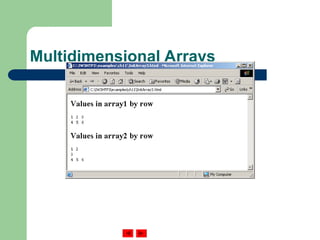
The document provides an overview of JavaScript arrays, including their dynamic nature, elements access, and initialization methods. It covers array declaration, memory allocation, and examples of summing array elements using loops. Additionally, it explores multidimensional arrays, their declaration, and initialization, complete with scripting examples for practical implementation.

![c[ 6 ]
-45
6
0
72
1543
-89
0
62
-3
1
6453
78
Name of array c[ 0 ]
c[ 1 ]
c[ 2 ]
c[ 3 ]
c[ 11 ]
c[ 10 ]
c[ 9 ]
c[ 8 ]
c[ 7 ]
c[ 5 ]
c[ 4 ]
Position number (index
or subscript) of the
element within array c
Fig. 11.1 A 12-element array.](https://image.slidesharecdn.com/lecture9-240822201051-bebcf5c2/85/ajava-arrays-topic-brief-explanation-data-4-320.jpg)
![Outline
1 <?xml version = "1.0"?>
2 <!DOCTYPE html PUBLIC "-//W3C//DTD XHTML 1.0 Strict//EN"
3 "http://www.w3.org/TR/xhtml1/DTD/xhtml1-strict.dtd">
4
5 <!-- Fig. 11.3: InitArray.html -->
6 <!-- Initializing an Array -->
7
8 <html xmlns = "http://www.w3.org/1999/xhtml">
9 <head>
10 <title>Initializing an Array</title>
11
12 <script type = "text/javascript">
13 <!--
14 // this function is called when the <body> element's
15 // onload event occurs
16 function initializeArrays()
17 {
18 var n1 = new Array( 5 ); // allocate 5-element Array
19 var n2 = new Array(); // allocate empty Array
20
21 // assign values to each element of Array n1
22 for ( var i = 0; i < n1.length; ++i )
23 n1[ i ] = i;
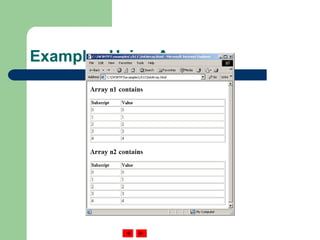
Array n1 has five elements.
The for loop initializes the elements in n1 to
their subscript numbers (0 to 4).
Array n2 is an empty array.](https://image.slidesharecdn.com/lecture9-240822201051-bebcf5c2/85/ajava-arrays-topic-brief-explanation-data-7-320.jpg)
![Outline
24
25 // create and initialize five-elements in Array n2
26 for ( i = 0; i < 5; ++i )
27 n2[ i ] = i;
28
29 outputArray( "Array n1 contains", n1 );
30 outputArray( "Array n2 contains", n2 );
31 }
32
33 // output "header" followed by a two-column table
34 // containing subscripts and elements of "theArray"
35 function outputArray( header, theArray )
36 {
37 document.writeln( "<h2>" + header + "</h2>" );
38 document.writeln( "<table border = "1" width =" +
39 ""100%">" );
40
41 document.writeln( "<thead><th width = "100"" +
42 "align = "left">Subscript</th>" +
43 "<th align = "left">Value</th></thead><tbody>" );
The for loop adds five elements to Array n2 and initialize
each element to its subscript number (0 to 4).
Each function displays the
contents of its respective Array
in an XHTML table.
The first time function ouputArray is called,
variable header gets the value of “Array n1
contains” and variable theArray gets the
value of n1.
The second time function ouputArray is
called, variable header gets the value of
“Array n2 contains” and variable
theArray gets the value of n2.](https://image.slidesharecdn.com/lecture9-240822201051-bebcf5c2/85/ajava-arrays-topic-brief-explanation-data-8-320.jpg)
![Outline
44
45 for ( var i = 0; i < theArray.length; i++ )
46 document.writeln( "<tr><td>" + i + "</td><td>" +
47 theArray[ i ] + "</td></tr>" );
48
49 document.writeln( "</tbody></table>" );
50 }
51 // -->
52 </script>
53
54 </head><body onload = "initializeArrays()"></body>
55 </html>](https://image.slidesharecdn.com/lecture9-240822201051-bebcf5c2/85/ajava-arrays-topic-brief-explanation-data-9-320.jpg)
![Outline
SumArray.html
(1 of 2)
1 <?xml version = "1.0"?>
2 <!DOCTYPE html PUBLIC "-//W3C//DTD XHTML 1.0 Strict//EN"
3 "http://www.w3.org/TR/xhtml1/DTD/xhtml1-strict.dtd">
4
5 <!-- Fig. 11.5: SumArray.html -->
6 <!-- Summing Elements of an Array -->
7
8 <html xmlns = "http://www.w3.org/1999/xhtml">
9 <head>
10 <title>Sum the Elements of an Array</title>
11
12 <script type = "text/javascript">
13 <!--
14 function start()
15 {
16 var theArray = [ 1, 2, 3, 4, 5, 6, 7, 8, 9, 10 ];
17 var total1 = 0, total2 = 0;
18
19 for ( var i = 0; i < theArray.length; i++ )
20 total1 += theArray[ i ];
21
22 document.writeln( "Total using subscripts: " + total1 );
23
The for loop sums the values contained in the 10-
element integer array called theArray.](https://image.slidesharecdn.com/lecture9-240822201051-bebcf5c2/85/ajava-arrays-topic-brief-explanation-data-12-320.jpg)
![Outline
SumArray.html
(2 of 2)
24 for ( var element in theArray )
25 total2 += theArray[ element ];
26
27 document.writeln( "<br />Total using for...in: " +
28 total2 );
29 }
30 // -->
31 </script>
32
33 </head><body onload = "start()"></body>
34 </html>
Variable element is assigned a subscript
in the range of 0 up to, but not including,
theArray.length.](https://image.slidesharecdn.com/lecture9-240822201051-bebcf5c2/85/ajava-arrays-topic-brief-explanation-data-13-320.jpg)
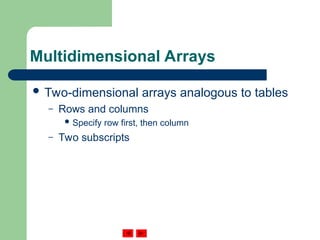
![Multidimensional Arrays
a[ 1 ][ 0 ] a[ 1 ][ 1 ] a[ 1 ][ 2 ] a[ 1 ][ 3 ]
Row 0
Row 1
Row 2
Column 0 Column 1 Column 2 Column 3
Row subscript (or index)
Array name
Column subscript (or index)
a[ 0 ][ 0 ] a[ 0 ][ 1 ] a[ 0 ][ 2 ] a[ 0 ][ 3 ]
a[ 2 ][ 0 ] a[ 2 ][ 1 ] a[ 2 ][ 2 ] a[ 2 ][ 3 ]
Two-dimensional array with three rows and four columns.](https://image.slidesharecdn.com/lecture9-240822201051-bebcf5c2/85/ajava-arrays-topic-brief-explanation-data-15-320.jpg)
![Multidimensional Arrays
Declaring and initializing multidimensional
arrays
– Group by row in square brackets
– Treated as arrays of arrays
– Creating array b with one row of two elements
and a second row of three elements:
var b = [ [ 1, 2 ], [ 3, 4, 5 ] ];](https://image.slidesharecdn.com/lecture9-240822201051-bebcf5c2/85/ajava-arrays-topic-brief-explanation-data-16-320.jpg)
![Multidimensional Arrays
Also possible to use new operator
– Create array b with two rows, first with five
columns and second with three:
var b;
b = new Array( 2 );
b[ 0 ] = new Array( 5 );
b[ 1 ] = new Array( 3 );](https://image.slidesharecdn.com/lecture9-240822201051-bebcf5c2/85/ajava-arrays-topic-brief-explanation-data-17-320.jpg)
![Outline
InitArray3.html
(1 of 2)
1 <?xml version = "1.0"?>
2 <!DOCTYPE html PUBLIC "-//W3C//DTD XHTML 1.0 Strict//EN"
3 "http://www.w3.org/TR/xhtml1/DTD/xhtml1-strict.dtd">
4
5 <!-- Fig. 11.13: InitArray3.html -->
6 <!-- Initializing Multidimensional Arrays -->
7
8 <html xmlns = "http://www.w3.org/1999/xhtml">
9 <head>
10 <title>Initializing Multidimensional Arrays</title>
11
12 <script type = "text/javascript">
13 <!--
14 function start()
15 {
16 var array1 = [ [ 1, 2, 3 ], // first row
17 [ 4, 5, 6 ] ]; // second row
18 var array2 = [ [ 1, 2 ], // first row
19 [ 3 ], // second row
20 [ 4, 5, 6 ] ]; // third row
21
22 outputArray( "Values in array1 by row", array1 );
23 outputArray( "Values in array2 by row", array2 );
24 }
Array array1 provides six initializers in
two rows.
Array array2 provides six initializers in
three rows.
Function outputArray displays each array’s
elements in a Web page.](https://image.slidesharecdn.com/lecture9-240822201051-bebcf5c2/85/ajava-arrays-topic-brief-explanation-data-18-320.jpg)
![Outline
InitArray3.html
(2 of 2)
25
26 function outputArray( header, theArray )
27 {
28 document.writeln( "<h2>" + header + "</h2><tt>" );
29
30 for ( var i in theArray ) {
31
32 for ( var j in theArray[ i ] )
33 document.write( theArray[ i ][ j ] + " " );
34
35 document.writeln( "<br />" );
36 }
37
38 document.writeln( "</tt>" );
39 }
40 // -->
41 </script>
42
43 </head><body onload = "start()"></body>
44 </html>
Referencing the multidimensional
array theArray.](https://image.slidesharecdn.com/lecture9-240822201051-bebcf5c2/85/ajava-arrays-topic-brief-explanation-data-19-320.jpg)