Approaches to game AI
Ivan Dolgushin
Game developer at Appturn
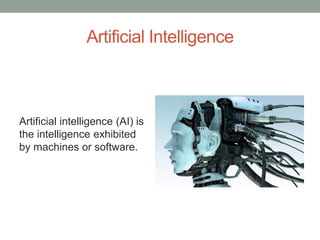
Artificial Intelligence
Artificial intelligence (AI) is
the intelligence exhibited
by machines or software.
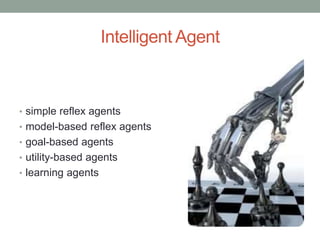
Intelligent Agent
• simple reflex agents
• model-based reflex agents
• goal-based agents
• utility-based agents
• learning agents
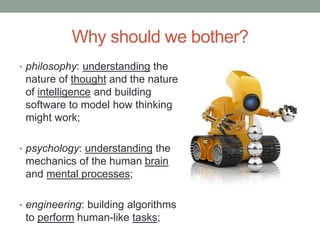
Why should we bother?
• philosophy: understanding the
nature of thought and the nature
of intelligence and building
software to model how thinking
might work;
• psychology: understanding the
mechanics of the human brain
and mental processes;
• engineering: building algorithms
to perform human-like tasks;
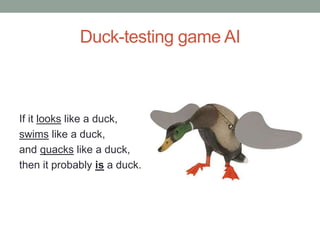
Duck-testing game AI
If it looks like a duck,
swims like a duck,
and quacks like a duck,
then it probably is a duck.
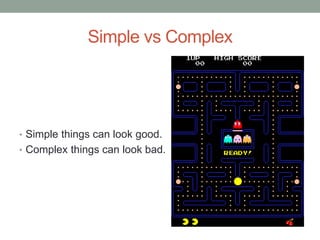
Simple vs Complex
• Simple things can look good.
• Complex things can look bad.
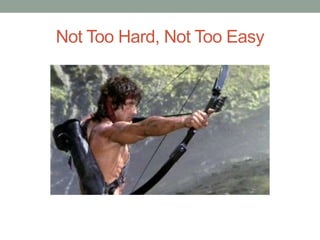
Not Too Hard, Not Too Easy
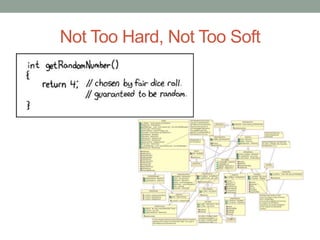
Not Too Hard, Not Too Soft
What do we need it for?
• Steering
• Pathfinding
• Decision making
• Learning
• Predicting actions
• Group AI and
coordinated actions
• Sensory input
Cowboy Style
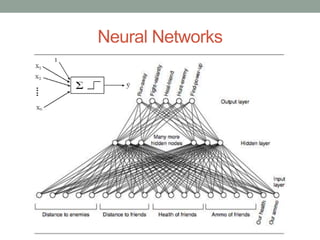
Neural Networks
NN: Summary
Pros:
• mass parallelism;
• distributed representation of
information and computation;
• ability to learn and generalize;
• adaptability;
• process information in the
context;
• tolerant to errors.
Cons:
• hard to teach;
• hard to test;
• hard to interpret data.
Summary: think twice before adopting in your project
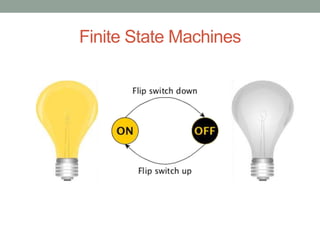
Finite State Machines
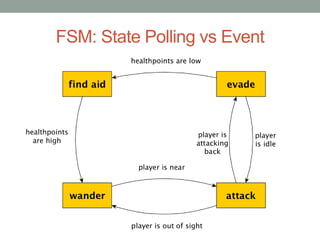
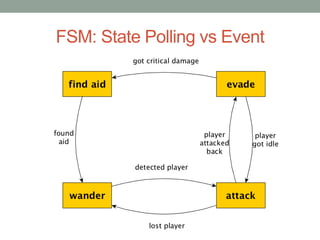
FSM: State Polling vs Event
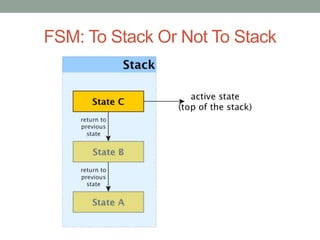
FSM: To Stack Or Not To Stack
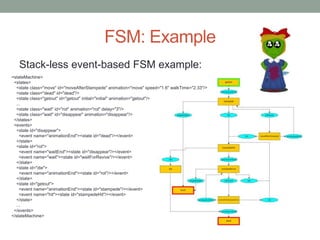
FSM: Example
Stack-less event-based FSM example:
<stateMachine>
<states>
<state class="move" id="moveAfterStampede" animation="move" speed="1.6" walkTime="2.33"/>
<state class="dead" id="dead"/>
<state class="getout" id="getout" initial="initial" animation="getout"/>
...
<state class="wait" id="rot" animation="rot" delay="3"/>
<state class="wait" id="disappear" animation="disappear"/>
</states>
<events>
<state id="disappear">
<event name="animationEnd"><state id="dead"/></event>
</state>
<state id="rot">
<event name="waitEnd"><state id="disappear"/></event>
<event name="wait"><state id="waitForRevive"/></event>
</state>
<state id="die">
<event name="animationEnd"><state id="rot"/></event>
</state>
<state id="getout">
<event name="animationEnd"><state id="stampede"/></event>
<event name="hit"><state id="stampedeHit"/></event>
</state>
...
</events>
</stateMachine>
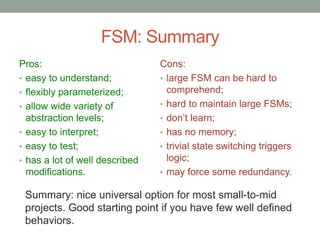
FSM: Summary
Pros:
• easy to understand;
• flexibly parameterized;
• allow wide variety of
abstraction levels;
• easy to interpret;
• easy to test;
• has a lot of well described
modifications.
Cons:
• large FSM can be hard to
comprehend;
• hard to maintain large FSMs;
• don’t learn;
• has no memory;
• trivial state switching triggers
logic;
• may force some redundancy.
Summary: nice universal option for most small-to-mid
projects. Good starting point if you have few well defined
behaviors.
Growing Trees
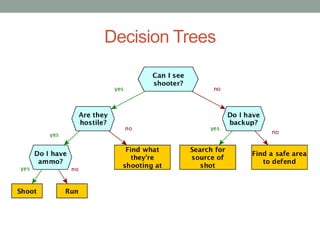
Decision Trees
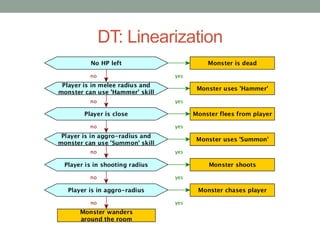
DT: Linearization
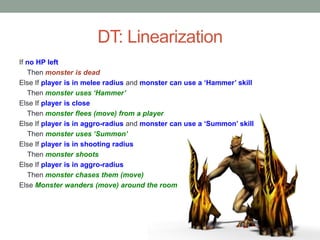
DT: Linearization
If no HP left
Then monster is dead
Else If player is in melee radius and monster can use a ‘Hammer’ skill
Then monster uses ‘Hammer’
Else If player is close
Then monster flees (move) from a player
Else If player is in aggro-radius and monster can use a ‘Summon’ skill
Then monster uses ‘Summon’
Else If player is in shooting radius
Then monster shoots
Else If player is in aggro-radius
Then monster chases them (move)
Else Monster wanders (move) around the room
DT: Summary
Pros:
• easy to understand;
• easy to interpret, especially
in linearized form;
• easy to reuse subtrees;
• easy to add learning
• easy to understand learnt
knowledge.
Cons:
• don’t learn;
• has no memory;
• depends on world state, not
on events in the world;
• may force some
redundancy.
Summary: good for turn-based games and other games
with atomic (instant) actions and a lot of factors with the
few significant values each.
Behaviour Trees
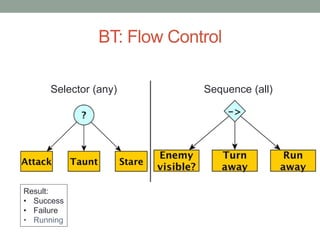
BT: Flow Control
Selector (any) Sequence (all)
Result:
• Success
• Failure
• Running
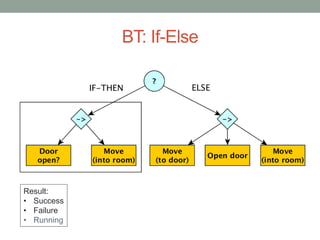
BT: If-Else
Result:
• Success
• Failure
• Running
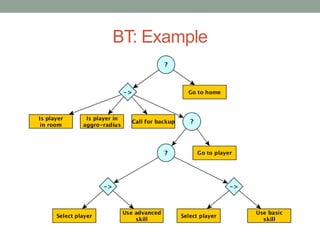
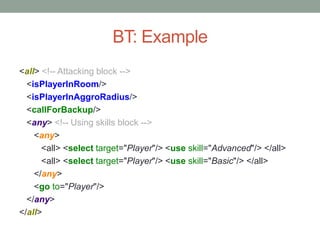
BT: Example
BT: Example
<all> <!-- Attacking block -->
<isPlayerInRoom/>
<isPlayerInAggroRadius/>
<callForBackup/>
<any> <!-- Using skills block -->
<any>
<all> <select target="Player"/> <use skill="Advanced"/> </all>
<all> <select target="Player"/> <use skill="Basic"/> </all>
</any>
<go to="Player"/>
</any>
</all>
BT: Summary
Pros
• very flexible and extensible;
• easy to interpret after some
practice;
• extends strengths of DTs with
some FSM features;
• allows to work on different
abstraction/detail levels;
• high modularity;
• easy to reuse subtrees.
Cons
• require certain mindset to
comprehend;
• explicit flow control
configuration may sometimes
look redundant;
• don’t learn;
• has no memory;
• depends on world state, not on
events in the world;
Summary: great technique for all variety of project sizes
and complexities, if you are willing to learn thinking in BT-
way.
Cause vs Goal
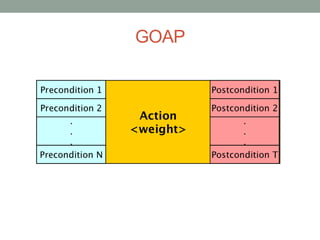
GOAP
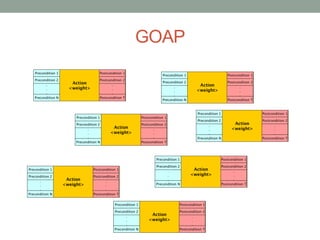
GOAP
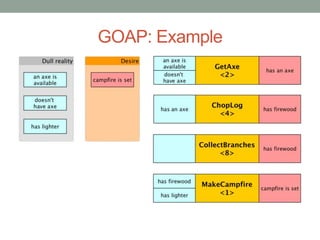
GOAP: Example
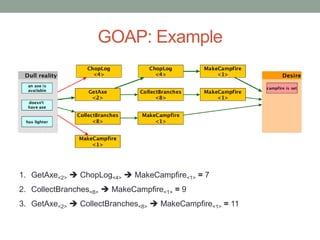
GOAP: Example
1. GetAxe<2>  ChopLog<4>  MakeCampfire<1> = 7
2. CollectBranches<8>  MakeCampfire<1> = 9
3. GetAxe<2>  CollectBranches<8>  MakeCampfire<1> = 11
Thank you!
Questions?
Ivan Dolgushin
ivand@appturn.com

Approaches to game AI overview

  • 1.
    Approaches to gameAI Ivan Dolgushin Game developer at Appturn
  • 2.
    Artificial Intelligence Artificial intelligence(AI) is the intelligence exhibited by machines or software.
  • 3.
    Intelligent Agent • simplereflex agents • model-based reflex agents • goal-based agents • utility-based agents • learning agents
  • 4.
    Why should webother? • philosophy: understanding the nature of thought and the nature of intelligence and building software to model how thinking might work; • psychology: understanding the mechanics of the human brain and mental processes; • engineering: building algorithms to perform human-like tasks;
  • 5.
    Duck-testing game AI Ifit looks like a duck, swims like a duck, and quacks like a duck, then it probably is a duck.
  • 6.
    Simple vs Complex •Simple things can look good. • Complex things can look bad.
  • 7.
    Not Too Hard,Not Too Easy
  • 8.
    Not Too Hard,Not Too Soft
  • 9.
    What do weneed it for? • Steering • Pathfinding • Decision making • Learning • Predicting actions • Group AI and coordinated actions • Sensory input
  • 10.
  • 11.
  • 12.
    NN: Summary Pros: • massparallelism; • distributed representation of information and computation; • ability to learn and generalize; • adaptability; • process information in the context; • tolerant to errors. Cons: • hard to teach; • hard to test; • hard to interpret data. Summary: think twice before adopting in your project
  • 13.
  • 14.
  • 15.
  • 16.
    FSM: To StackOr Not To Stack
  • 17.
    FSM: Example Stack-less event-basedFSM example: <stateMachine> <states> <state class="move" id="moveAfterStampede" animation="move" speed="1.6" walkTime="2.33"/> <state class="dead" id="dead"/> <state class="getout" id="getout" initial="initial" animation="getout"/> ... <state class="wait" id="rot" animation="rot" delay="3"/> <state class="wait" id="disappear" animation="disappear"/> </states> <events> <state id="disappear"> <event name="animationEnd"><state id="dead"/></event> </state> <state id="rot"> <event name="waitEnd"><state id="disappear"/></event> <event name="wait"><state id="waitForRevive"/></event> </state> <state id="die"> <event name="animationEnd"><state id="rot"/></event> </state> <state id="getout"> <event name="animationEnd"><state id="stampede"/></event> <event name="hit"><state id="stampedeHit"/></event> </state> ... </events> </stateMachine>
  • 18.
    FSM: Summary Pros: • easyto understand; • flexibly parameterized; • allow wide variety of abstraction levels; • easy to interpret; • easy to test; • has a lot of well described modifications. Cons: • large FSM can be hard to comprehend; • hard to maintain large FSMs; • don’t learn; • has no memory; • trivial state switching triggers logic; • may force some redundancy. Summary: nice universal option for most small-to-mid projects. Good starting point if you have few well defined behaviors.
  • 19.
  • 20.
  • 21.
  • 22.
    DT: Linearization If noHP left Then monster is dead Else If player is in melee radius and monster can use a ‘Hammer’ skill Then monster uses ‘Hammer’ Else If player is close Then monster flees (move) from a player Else If player is in aggro-radius and monster can use a ‘Summon’ skill Then monster uses ‘Summon’ Else If player is in shooting radius Then monster shoots Else If player is in aggro-radius Then monster chases them (move) Else Monster wanders (move) around the room
  • 23.
    DT: Summary Pros: • easyto understand; • easy to interpret, especially in linearized form; • easy to reuse subtrees; • easy to add learning • easy to understand learnt knowledge. Cons: • don’t learn; • has no memory; • depends on world state, not on events in the world; • may force some redundancy. Summary: good for turn-based games and other games with atomic (instant) actions and a lot of factors with the few significant values each.
  • 24.
  • 25.
    BT: Flow Control Selector(any) Sequence (all) Result: • Success • Failure • Running
  • 26.
  • 27.
  • 28.
    BT: Example <all> <!--Attacking block --> <isPlayerInRoom/> <isPlayerInAggroRadius/> <callForBackup/> <any> <!-- Using skills block --> <any> <all> <select target="Player"/> <use skill="Advanced"/> </all> <all> <select target="Player"/> <use skill="Basic"/> </all> </any> <go to="Player"/> </any> </all>
  • 29.
    BT: Summary Pros • veryflexible and extensible; • easy to interpret after some practice; • extends strengths of DTs with some FSM features; • allows to work on different abstraction/detail levels; • high modularity; • easy to reuse subtrees. Cons • require certain mindset to comprehend; • explicit flow control configuration may sometimes look redundant; • don’t learn; • has no memory; • depends on world state, not on events in the world; Summary: great technique for all variety of project sizes and complexities, if you are willing to learn thinking in BT- way.
  • 30.
  • 31.
  • 32.
  • 33.
  • 34.
    GOAP: Example 1. GetAxe<2> ChopLog<4>  MakeCampfire<1> = 7 2. CollectBranches<8>  MakeCampfire<1> = 9 3. GetAxe<2>  CollectBranches<8>  MakeCampfire<1> = 11
  • 35.

Editor's Notes

  • #3 01:30 Искусственный интеллект (ИИ) - это интеллект, демонстрируемый механизмами или ПО
  • #4 2:30 Интеллектуальные агенты (ИА) - сущности, получающие информацию через систему сенсоров о состоянии управляемых ими процессов и осуществляющие влияние на них через систему актуаторов, при этом их реакция рациональна в том смысле, что их действия содействуют достижению определенных параметров. Рациональный агент (англ. rational agent) — это агент, действующий оптимальным для достижения наилучшего ожидаемого результата образом. Рациональным агентом может быть любое действующие лицо принимающее решения. Как правило, это любое живое существо, включая человека, группа людей, организация, робот или программа. Всех агентов можно разделить на пять групп по типу обработки воспринимаемой информации: Агенты с простым поведением. Агенты с поведением, основанным на модели. Целенаправленные агенты. Практичные агенты. Обучающиеся агенты. Агенты с простым поведением действуют на основе текущих знаний по схеме условие-действие. Они должны иметь возможность наблюдать все условия и не обладают памятью. Агенты с поведением, основанным на модели, могут оперировать с частично наблюдаемой средой. Агент содержит модель, представляющую его “картину мира”, на основании которой он может принимать решения, даже не наблюдая какой-то части реального мира. Целенаправленные агенты, помимо прочего, хранят информацию о тех ситуациях, которые для них желательны. Это дает агенту способ выбрать среди многих путей тот, что приведет к нужной цели. Практичные агенты обладают так же “функцией полезности”, позволяющей им определить насколько та или иная ситуация для них предпочтительна. Обучающиеся агенты отличаются от всех предыдущих типов способностью обучаться и развиваться в процессе взаимодействия с окружающей средой.
  • #5 03:15
  • #6 04:00 Окно восприятия
  • #7 05:30 Слишком сожный ИИ в неподходящей ситуации в лучшем случае сожрет у вас кучу времени на разработку и ни один пользователь не заметит офигенно крутой мимики болельщиков в вашем футбольном симуляторе. А в худшем случае это будет выглядеть тупо. С другой стороны, простые, основанные, например, на случайных значениях, алгоритмы уже могут давать весьма неплохо выглядящие результаты.
  • #8 06:10
  • #9 07:30
  • #11 07:50
  • #12 08:30
  • #13 13:30
  • #14 14:15
  • #15 14:45 State polling
  • #16 15:15 Events
  • #17 16:15
  • #18 17:30
  • #19 21:30
  • #21 23:00
  • #23 23:30
  • #24 28:30
  • #26 31:30
  • #27 32:00
  • #29 34:00
  • #30 38:45