Denodo TechTalks
Product Deep-Dive Series
A product deep-dive, webinar series covering
the critical capabilities of Denodo’s modern
data virtualization
Agile Development
Lifecycle and Best
Practices with Denodo
Princess Jamelyn Ramos
Technical Consultant | Denodo
AGENDA
1. Development Methodologies with Denodo Platform
2. Agile Project Development Timeline
3. Sprint Activities and Best Practices
4. Q&A
Development
Methodologies with the
Denodo Platform
5
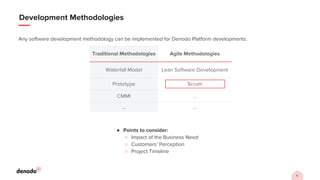
Development Methodologies
Any software development methodology can be implemented for Denodo Platform developments.
● Points to consider:
○ Impact of the Business Need
○ Customers’ Perception
○ Project Timeline
Traditional Methodologies Agile Methodologies
Waterfall Model Lean Software Development
Prototype Scrum
CMMI …
… …
Agile Development
Scrum
7
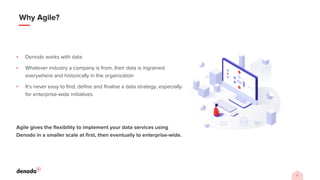
Why Agile?
▪ Denodo works with data
▪ Whatever industry a company is from, their data is ingrained
everywhere and historically in the organization
▪ It’s never easy to find, define and finalise a data strategy, especially
for enterprise-wide initiatives
Agile gives the flexibility to implement your data services using
Denodo in a smaller scale at first, then eventually to enterprise-wide.
8
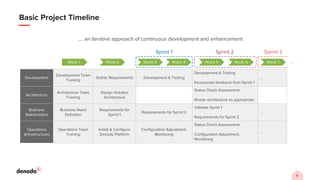
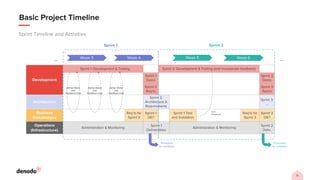
Basic Project Timeline
Development
Development Team
Training
Gather Requirements Development & Testing
Development & Testing
Incorporate feedback from Sprint 1
…
Architecture
Architecture Team
Training
Design Solution
Architecture
Status Check Assessment
Revise architecture as appropriate
…
Business
Stakeholders
Business Need
Definition
Requirements for
Sprint 1
Requirements for Sprint 2
Validate Sprint 1
Requirements for Sprint 3
…
Operations
(Infrastructure)
Operations Team
Training
Install & Configure
Denodo Platform
Configuration Adjustment,
Monitoring
Status Check Assessment
Configuration Adjustment,
Monitoring
…
Week 1 Week 2 Week 3 Week 4 Week 5 Week 6
Sprint 1 Sprint 2
Week 7
Sprint 3
…
…. an iterative approach of continuous development and enhancement
Sprint Activities and Best
Practices
10
Before You Start
Pre-Sprint Activities
Communication and preparation are required for all the
stakeholders.
● High-level business need has been defined
● Ranking of priorities (e.g. required, nice to have, …)
● Technical trainings and business workshops are done
○ Use case discovery
○ Functional workshops
○ Denodo trainings
● Solution architecture has been designed
● Redundant needs and reusable solutions have been identified
● Infrastructure and platform installations are ready
● Common definition of “DONE” for all the teams
11
Basic Project Timeline
Sprint Timeline and Activities
Week 3
Development
Sprint 2: Development & Testing (and incorporate feedback)
Sprint 1
Demo
Sprint 2
Demo
Sprint 2
Req’ts
Sprint 3
Req’ts
Architecture
Sprint 2:
Architecture &
Requirements
Sprint 3:
…
Business
Stakeholders
Req’ts for
Sprint 2
Sprint 1
OK?
Sprint 1 Test
and Validation
Req’ts for
Sprint 3
Sprint 2
OK?
Operations
(Infrastructure)
Administration & Monitoring
Sprint 1
Deliverables
Administration & Monitoring
Sprint 2
Deliv.
Promotion
for validation
Week 4 Week 5 Week 6
Sprint 1 Sprint 2
User
Feedback
…
…
Ad-hoc Demo
and
Feedback Loop
Ad-hoc Demo
and
Feedback Loop
Ad-hoc Demo
and
Feedback Loop
Sprint 1: Development & Testing
Promotion
for validation
12
Sprint Timeline and Activities
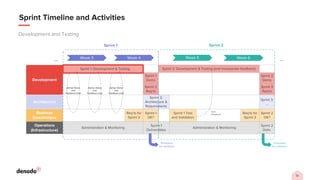
Development and Testing
Week 3
Development
Sprint 2: Development & Testing (and incorporate feedback)
Sprint 1
Demo
Sprint 2
Demo
Sprint 2
Req’ts
Sprint 3
Req’ts
Architecture
Sprint 2:
Architecture &
Requirements
Sprint 3:
…
Business
Stakeholders
Req’ts for
Sprint 2
Sprint 1
OK?
Sprint 1 Test
and Validation
Req’ts for
Sprint 3
Sprint 2
OK?
Operations
(Infrastructure)
Administration & Monitoring
Sprint 1
Deliverables
Administration & Monitoring
Sprint 2
Deliv.
Promotion
for validation
Week 4 Week 5 Week 6
Sprint 1 Sprint 2
User
Feedback
…
…
Ad-hoc Demo
and
Feedback Loop
Ad-hoc Demo
and
Feedback Loop
Ad-hoc Demo
and
Feedback Loop
Sprint 1: Development & Testing
Promotion
for validation
13
Sprint Timeline and Activities
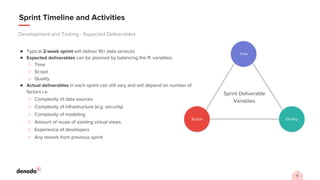
● Typical 2-week sprint will deliver 10+ data services
● Expected deliverables can be planned by balancing the ff. variables:
○ Time
○ Scope
○ Quality
● Actual deliverables in each sprint can still vary and will depend on number of
factors i.e.
○ Complexity of data sources
○ Complexity of infrastructure (e.g. security)
○ Complexity of modeling
○ Amount of reuse of existing virtual views
○ Experience of developers
○ Any rework from previous sprint
Development and Testing - Expected Deliverables
Sprint Deliverable
Variables
Quality
Scope
Time
14
Best Practices
● Ideally all development artifacts should be saved in a Version Control System (VCS)
○ In simple scenarios, coordinated developers should be working on the same development server and sharing a
vdb
○ Developers should PUSH or Check In their changes to VCS from Denodo Designer Studio
● Denodo Testing Tool allows developers to create ‘unit-style’ and regression tests in created views
○ Tests execute queries against a view and compare results of each query against a set of expected results
○ Denodo Testing Tool is a script-driven, lightweight stand-alone testing application
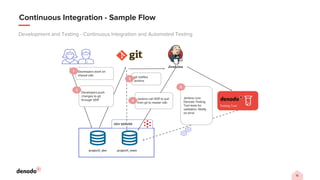
● Tests can be automatically triggered using Jenkins as part of existing continuous integration (CI) processes like when
artifact is checked in to VCS
○ e.g. server-side hooks in Git
● Global elements (e.g. jar extensions, internalizations, etc.) should be done by administrators of the Denodo servers,
and not by developers
○ Avoids affecting other projects that also use the same global elements
Development and Testing - Continuous Integration and Automated Testing
15
Continuous Integration - Sample Flow
Development and Testing - Continuous Integration and Automated Testing
project1_main
project1_dev
DEV SERVER
Testing Tool
Developers work on
shared vdb
1
Developers push
changes to git
through VDP
2
git notifies
Jenkins
Jenkins call VDP to pull
from git to master vdb
4
Jenkins runs
Denodo Testing
Tool tests for
validation. Notify
on error
5
3
16
Setup
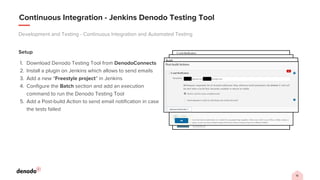
1. Download Denodo Testing Tool from DenodoConnects
2. Install a plugin on Jenkins which allows to send emails
3. Add a new “Freestyle project” in Jenkins
4. Configure the Batch section and add an execution
command to run the Denodo Testing Tool
5. Add a Post-build Action to send email notification in case
the tests failed
Development and Testing - Continuous Integration and Automated Testing
Continuous Integration - Jenkins Denodo Testing Tool
19
Sprint Timeline and Activities
End of Sprint
Week 3
Development
Sprint 2: Development & Testing (and incorporate feedback)
Sprint 1
Demo
Sprint 2
Demo
Sprint 2
Req’ts
Sprint 3
Req’ts
Architecture
Sprint 2:
Architecture &
Requirements
Sprint 3:
…
Business
Stakeholders
Req’ts for
Sprint 2
Sprint 1
OK?
Sprint 1 Test
and Validation
Req’ts for
Sprint 3
Sprint 2
OK?
Operations
(Infrastructure)
Administration & Monitoring
Sprint 1
Deliverables
Administration & Monitoring
Sprint 2
Deliv.
Promotion
for validation
Week 4 Week 5 Week 6
Sprint 1 Sprint 2
User
Feedback
…
…
Ad-hoc Demo
and
Feedback Loop
Ad-hoc Demo
and
Feedback Loop
Ad-hoc Demo
and
Feedback Loop
Sprint 1: Development & Testing
Promotion
for validation
20
Sprint Timeline and Activities
End of Sprint - Activities
For the Current Sprint …
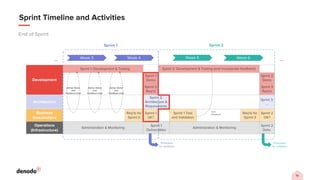
● Sprint Review
○ Development team (Scrum team) presents and shows sprint deliverables to
Business Stakeholders
■ What worked, what didn’t and needs further effort
○ Business Stakeholders approve deliverables (or reject for rework)
■ Note: Approval can be partial i.e. approve only some deliverables
For the Next Sprint …
● Sprint Planning
○ Business Stakeholders present requirements for next sprint to Development
team
■ Development team get any clarifications necessary
○ Development and Architecture teams define architecture and deliverables for
next sprint
21
Sprint Timeline and Activities
Promotion
Week 3
Development
Sprint 2: Development & Testing (and incorporate feedback)
Sprint 1
Demo
Sprint 2
Demo
Sprint 2
Req’ts
Sprint 3
Req’ts
Architecture
Sprint 2:
Architecture &
Requirements
Sprint 3:
…
Business
Stakeholders
Req’ts for
Sprint 2
Sprint 1
OK?
Sprint 1 Test
and Validation
Req’ts for
Sprint 3
Sprint 2
OK?
Operations
(Infrastructure)
Administration & Monitoring
Sprint 1
Deliverables
Administration & Monitoring
Sprint 2
Deliv.
Promotion
for validation
Week 4 Week 5 Week 6
Sprint 1 Sprint 2
User
Feedback
…
…
Ad-hoc Demo
and
Feedback Loop
Ad-hoc Demo
and
Feedback Loop
Ad-hoc Demo
and
Feedback Loop
Sprint 1: Development & Testing
Promotion
for validation
22
Sprint Timeline and Activities
Promotion - Promotion Process
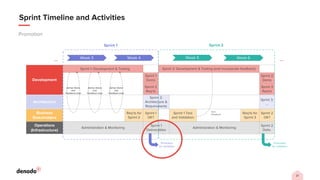
Deploy to Production
5. [Operations] If (2), (3) and (4)
pass and in accordance with
operational policies, deploy
artifacts to Production
environment
Deploy to Test Environment
1. [Development] Changes and
artifacts are checked in and
unit tested
2. [Operations] Build and
deploy sprint artifacts to Test
environment
Operational and Functional Tests
3. [Operations] Test deployment
from an operations perspective
e.g. stability, performance, etc.
4. [Business Stakeholders] Test
delivered artifacts (data services)
from a business functionality
perspective
23
Best Practices
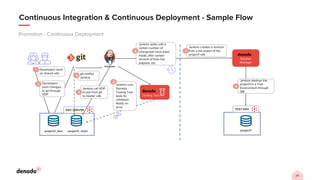
● Deployment to test environment can be automated using Solution Manager API or Denodo export and import scripts
● Testing by Operations team can also be automated using the Denodo Testing Tool
○ Ensure that there are no regressions after new deployment
● For High Availability (HA) and heavy queries, it is advised to do simulated performance and load testing which can be
automated using tools like K6, JMeter, etc.
○ In combination with the report generated by tools like JMeter, Denodo Diagnostic & Monitoring Tool is useful to
monitor the Denodo servers’ behavior during performance and load testing.
● Business Stakeholder testing is, more than likely, going to be manual testing using a client application of choice (e.g.
Tableau, Power BI, Excel, etc.)
● Final promotion to Production environment can also be automated using Solution Manager API or custom scripts.
Promotion - Continuous Deployment
24
Continuous Integration & Continuous Deployment - Sample Flow
Promotion - Continuous Deployment
Solution
Manager
project1_main
project1_dev
DEV SERVER
Testing Tool
project1
TEST ENV
Developers work
on shared vdb
1
Developers
push changes
to git through
VDP
2
git notifies
Jenkins
Jenkins call VDP
to pull from git
to master vdb
4
Jenkins runs
Denodo
Testing Tool
tests for
validation.
Notify on
error
5
3
Jenkins creates a revision
from a full export of the
project1 vdb
7
Jenkins deploys the
project1 in a Test
Environment through
SM
8
Jenkins waits until a
certain number of
changesets have been
made, after certain
amount of time has
elapsed, etc.
6
25
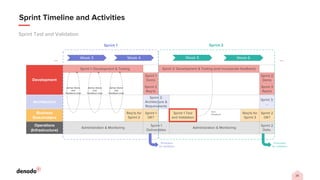
Sprint Timeline and Activities
Sprint Test and Validation
Week 3
Development
Sprint 2: Development & Testing (and incorporate feedback)
Sprint 1
Demo
Sprint 2
Demo
Sprint 2
Req’ts
Sprint 3
Req’ts
Architecture
Sprint 2:
Architecture &
Requirements
Sprint 3:
…
Business
Stakeholders
Req’ts for
Sprint 2
Sprint 1
OK?
Sprint 1 Test
and Validation
Req’ts for
Sprint 3
Sprint 2
OK?
Operations
(Infrastructure)
Administration & Monitoring
Sprint 1
Deliverables
Administration & Monitoring
Sprint 2
Deliv.
Promotion
for validation
Week 4 Week 5 Week 6
Sprint 1 Sprint 2
User
Feedback
…
…
Ad-hoc Demo
and
Feedback Loop
Ad-hoc Demo
and
Feedback Loop
Ad-hoc Demo
and
Feedback Loop
Sprint 1: Development & Testing
Promotion
for validation
26
Sprint Test and Validation
Sprint Timeline and Activities
● Business Stakeholders test previous sprint artifacts (data services) in the
test environment
○ If applicable, the business can test and validate the deliverables in the
middle of the sprint
○ It’s highly recommended to capture feedbacks as early as possible to
assess their impact on the current scope
● Validate that the data services work as expected and as defined
● Provide feedback to Development team if issues are discovered
● Agree, with the Development team, a timeline for correcting any defects
○ Note: The fix for an issue might not fall into the current sprint
CLOSING
REMARKS
▪ How Denodo works with different development methodologies and why we focus in
agile
▪ Different activities before, during, and after the sprint
▪ Best practices on how to manage your development and testing
▪ Best practices on how to manage your promotion process
▪ Different Denodo tools and features that you can leverage to have a continuous
integration (CI) and continuous deployment (CD) processes
Version Control Systems Integration — Virtual DataPort Administration Guide (denodo.com)
Denodo Testing Tool - User Manual
REST API — Solution Manager Administration Guide (denodo.com)
Q&A
Thanks!
www.denodo.com info@denodo.com
© Copyright Denodo Technologies. All rights reserved
Unless otherwise specified, no part of this PDF file may be reproduced or utilized in any for or by any means, electronic or mechanical, including photocopying and
microfilm, without prior the written authorization from Denodo Technologies.

Agile Development Lifecycle and Best Practices with Denodo

  • 1.
    Denodo TechTalks Product Deep-DiveSeries A product deep-dive, webinar series covering the critical capabilities of Denodo’s modern data virtualization
  • 2.
    Agile Development Lifecycle andBest Practices with Denodo Princess Jamelyn Ramos Technical Consultant | Denodo
  • 3.
    AGENDA 1. Development Methodologieswith Denodo Platform 2. Agile Project Development Timeline 3. Sprint Activities and Best Practices 4. Q&A
  • 4.
  • 5.
    5 Development Methodologies Any softwaredevelopment methodology can be implemented for Denodo Platform developments. ● Points to consider: ○ Impact of the Business Need ○ Customers’ Perception ○ Project Timeline Traditional Methodologies Agile Methodologies Waterfall Model Lean Software Development Prototype Scrum CMMI … … …
  • 6.
  • 7.
    7 Why Agile? ▪ Denodoworks with data ▪ Whatever industry a company is from, their data is ingrained everywhere and historically in the organization ▪ It’s never easy to find, define and finalise a data strategy, especially for enterprise-wide initiatives Agile gives the flexibility to implement your data services using Denodo in a smaller scale at first, then eventually to enterprise-wide.
  • 8.
    8 Basic Project Timeline Development DevelopmentTeam Training Gather Requirements Development & Testing Development & Testing Incorporate feedback from Sprint 1 … Architecture Architecture Team Training Design Solution Architecture Status Check Assessment Revise architecture as appropriate … Business Stakeholders Business Need Definition Requirements for Sprint 1 Requirements for Sprint 2 Validate Sprint 1 Requirements for Sprint 3 … Operations (Infrastructure) Operations Team Training Install & Configure Denodo Platform Configuration Adjustment, Monitoring Status Check Assessment Configuration Adjustment, Monitoring … Week 1 Week 2 Week 3 Week 4 Week 5 Week 6 Sprint 1 Sprint 2 Week 7 Sprint 3 … …. an iterative approach of continuous development and enhancement
  • 9.
    Sprint Activities andBest Practices
  • 10.
    10 Before You Start Pre-SprintActivities Communication and preparation are required for all the stakeholders. ● High-level business need has been defined ● Ranking of priorities (e.g. required, nice to have, …) ● Technical trainings and business workshops are done ○ Use case discovery ○ Functional workshops ○ Denodo trainings ● Solution architecture has been designed ● Redundant needs and reusable solutions have been identified ● Infrastructure and platform installations are ready ● Common definition of “DONE” for all the teams
  • 11.
    11 Basic Project Timeline SprintTimeline and Activities Week 3 Development Sprint 2: Development & Testing (and incorporate feedback) Sprint 1 Demo Sprint 2 Demo Sprint 2 Req’ts Sprint 3 Req’ts Architecture Sprint 2: Architecture & Requirements Sprint 3: … Business Stakeholders Req’ts for Sprint 2 Sprint 1 OK? Sprint 1 Test and Validation Req’ts for Sprint 3 Sprint 2 OK? Operations (Infrastructure) Administration & Monitoring Sprint 1 Deliverables Administration & Monitoring Sprint 2 Deliv. Promotion for validation Week 4 Week 5 Week 6 Sprint 1 Sprint 2 User Feedback … … Ad-hoc Demo and Feedback Loop Ad-hoc Demo and Feedback Loop Ad-hoc Demo and Feedback Loop Sprint 1: Development & Testing Promotion for validation
  • 12.
    12 Sprint Timeline andActivities Development and Testing Week 3 Development Sprint 2: Development & Testing (and incorporate feedback) Sprint 1 Demo Sprint 2 Demo Sprint 2 Req’ts Sprint 3 Req’ts Architecture Sprint 2: Architecture & Requirements Sprint 3: … Business Stakeholders Req’ts for Sprint 2 Sprint 1 OK? Sprint 1 Test and Validation Req’ts for Sprint 3 Sprint 2 OK? Operations (Infrastructure) Administration & Monitoring Sprint 1 Deliverables Administration & Monitoring Sprint 2 Deliv. Promotion for validation Week 4 Week 5 Week 6 Sprint 1 Sprint 2 User Feedback … … Ad-hoc Demo and Feedback Loop Ad-hoc Demo and Feedback Loop Ad-hoc Demo and Feedback Loop Sprint 1: Development & Testing Promotion for validation
  • 13.
    13 Sprint Timeline andActivities ● Typical 2-week sprint will deliver 10+ data services ● Expected deliverables can be planned by balancing the ff. variables: ○ Time ○ Scope ○ Quality ● Actual deliverables in each sprint can still vary and will depend on number of factors i.e. ○ Complexity of data sources ○ Complexity of infrastructure (e.g. security) ○ Complexity of modeling ○ Amount of reuse of existing virtual views ○ Experience of developers ○ Any rework from previous sprint Development and Testing - Expected Deliverables Sprint Deliverable Variables Quality Scope Time
  • 14.
    14 Best Practices ● Ideallyall development artifacts should be saved in a Version Control System (VCS) ○ In simple scenarios, coordinated developers should be working on the same development server and sharing a vdb ○ Developers should PUSH or Check In their changes to VCS from Denodo Designer Studio ● Denodo Testing Tool allows developers to create ‘unit-style’ and regression tests in created views ○ Tests execute queries against a view and compare results of each query against a set of expected results ○ Denodo Testing Tool is a script-driven, lightweight stand-alone testing application ● Tests can be automatically triggered using Jenkins as part of existing continuous integration (CI) processes like when artifact is checked in to VCS ○ e.g. server-side hooks in Git ● Global elements (e.g. jar extensions, internalizations, etc.) should be done by administrators of the Denodo servers, and not by developers ○ Avoids affecting other projects that also use the same global elements Development and Testing - Continuous Integration and Automated Testing
  • 15.
    15 Continuous Integration -Sample Flow Development and Testing - Continuous Integration and Automated Testing project1_main project1_dev DEV SERVER Testing Tool Developers work on shared vdb 1 Developers push changes to git through VDP 2 git notifies Jenkins Jenkins call VDP to pull from git to master vdb 4 Jenkins runs Denodo Testing Tool tests for validation. Notify on error 5 3
  • 16.
    16 Setup 1. Download DenodoTesting Tool from DenodoConnects 2. Install a plugin on Jenkins which allows to send emails 3. Add a new “Freestyle project” in Jenkins 4. Configure the Batch section and add an execution command to run the Denodo Testing Tool 5. Add a Post-build Action to send email notification in case the tests failed Development and Testing - Continuous Integration and Automated Testing Continuous Integration - Jenkins Denodo Testing Tool
  • 17.
    19 Sprint Timeline andActivities End of Sprint Week 3 Development Sprint 2: Development & Testing (and incorporate feedback) Sprint 1 Demo Sprint 2 Demo Sprint 2 Req’ts Sprint 3 Req’ts Architecture Sprint 2: Architecture & Requirements Sprint 3: … Business Stakeholders Req’ts for Sprint 2 Sprint 1 OK? Sprint 1 Test and Validation Req’ts for Sprint 3 Sprint 2 OK? Operations (Infrastructure) Administration & Monitoring Sprint 1 Deliverables Administration & Monitoring Sprint 2 Deliv. Promotion for validation Week 4 Week 5 Week 6 Sprint 1 Sprint 2 User Feedback … … Ad-hoc Demo and Feedback Loop Ad-hoc Demo and Feedback Loop Ad-hoc Demo and Feedback Loop Sprint 1: Development & Testing Promotion for validation
  • 18.
    20 Sprint Timeline andActivities End of Sprint - Activities For the Current Sprint … ● Sprint Review ○ Development team (Scrum team) presents and shows sprint deliverables to Business Stakeholders ■ What worked, what didn’t and needs further effort ○ Business Stakeholders approve deliverables (or reject for rework) ■ Note: Approval can be partial i.e. approve only some deliverables For the Next Sprint … ● Sprint Planning ○ Business Stakeholders present requirements for next sprint to Development team ■ Development team get any clarifications necessary ○ Development and Architecture teams define architecture and deliverables for next sprint
  • 19.
    21 Sprint Timeline andActivities Promotion Week 3 Development Sprint 2: Development & Testing (and incorporate feedback) Sprint 1 Demo Sprint 2 Demo Sprint 2 Req’ts Sprint 3 Req’ts Architecture Sprint 2: Architecture & Requirements Sprint 3: … Business Stakeholders Req’ts for Sprint 2 Sprint 1 OK? Sprint 1 Test and Validation Req’ts for Sprint 3 Sprint 2 OK? Operations (Infrastructure) Administration & Monitoring Sprint 1 Deliverables Administration & Monitoring Sprint 2 Deliv. Promotion for validation Week 4 Week 5 Week 6 Sprint 1 Sprint 2 User Feedback … … Ad-hoc Demo and Feedback Loop Ad-hoc Demo and Feedback Loop Ad-hoc Demo and Feedback Loop Sprint 1: Development & Testing Promotion for validation
  • 20.
    22 Sprint Timeline andActivities Promotion - Promotion Process Deploy to Production 5. [Operations] If (2), (3) and (4) pass and in accordance with operational policies, deploy artifacts to Production environment Deploy to Test Environment 1. [Development] Changes and artifacts are checked in and unit tested 2. [Operations] Build and deploy sprint artifacts to Test environment Operational and Functional Tests 3. [Operations] Test deployment from an operations perspective e.g. stability, performance, etc. 4. [Business Stakeholders] Test delivered artifacts (data services) from a business functionality perspective
  • 21.
    23 Best Practices ● Deploymentto test environment can be automated using Solution Manager API or Denodo export and import scripts ● Testing by Operations team can also be automated using the Denodo Testing Tool ○ Ensure that there are no regressions after new deployment ● For High Availability (HA) and heavy queries, it is advised to do simulated performance and load testing which can be automated using tools like K6, JMeter, etc. ○ In combination with the report generated by tools like JMeter, Denodo Diagnostic & Monitoring Tool is useful to monitor the Denodo servers’ behavior during performance and load testing. ● Business Stakeholder testing is, more than likely, going to be manual testing using a client application of choice (e.g. Tableau, Power BI, Excel, etc.) ● Final promotion to Production environment can also be automated using Solution Manager API or custom scripts. Promotion - Continuous Deployment
  • 22.
    24 Continuous Integration &Continuous Deployment - Sample Flow Promotion - Continuous Deployment Solution Manager project1_main project1_dev DEV SERVER Testing Tool project1 TEST ENV Developers work on shared vdb 1 Developers push changes to git through VDP 2 git notifies Jenkins Jenkins call VDP to pull from git to master vdb 4 Jenkins runs Denodo Testing Tool tests for validation. Notify on error 5 3 Jenkins creates a revision from a full export of the project1 vdb 7 Jenkins deploys the project1 in a Test Environment through SM 8 Jenkins waits until a certain number of changesets have been made, after certain amount of time has elapsed, etc. 6
  • 23.
    25 Sprint Timeline andActivities Sprint Test and Validation Week 3 Development Sprint 2: Development & Testing (and incorporate feedback) Sprint 1 Demo Sprint 2 Demo Sprint 2 Req’ts Sprint 3 Req’ts Architecture Sprint 2: Architecture & Requirements Sprint 3: … Business Stakeholders Req’ts for Sprint 2 Sprint 1 OK? Sprint 1 Test and Validation Req’ts for Sprint 3 Sprint 2 OK? Operations (Infrastructure) Administration & Monitoring Sprint 1 Deliverables Administration & Monitoring Sprint 2 Deliv. Promotion for validation Week 4 Week 5 Week 6 Sprint 1 Sprint 2 User Feedback … … Ad-hoc Demo and Feedback Loop Ad-hoc Demo and Feedback Loop Ad-hoc Demo and Feedback Loop Sprint 1: Development & Testing Promotion for validation
  • 24.
    26 Sprint Test andValidation Sprint Timeline and Activities ● Business Stakeholders test previous sprint artifacts (data services) in the test environment ○ If applicable, the business can test and validate the deliverables in the middle of the sprint ○ It’s highly recommended to capture feedbacks as early as possible to assess their impact on the current scope ● Validate that the data services work as expected and as defined ● Provide feedback to Development team if issues are discovered ● Agree, with the Development team, a timeline for correcting any defects ○ Note: The fix for an issue might not fall into the current sprint
  • 25.
    CLOSING REMARKS ▪ How Denodoworks with different development methodologies and why we focus in agile ▪ Different activities before, during, and after the sprint ▪ Best practices on how to manage your development and testing ▪ Best practices on how to manage your promotion process ▪ Different Denodo tools and features that you can leverage to have a continuous integration (CI) and continuous deployment (CD) processes Version Control Systems Integration — Virtual DataPort Administration Guide (denodo.com) Denodo Testing Tool - User Manual REST API — Solution Manager Administration Guide (denodo.com)
  • 26.
  • 27.
    Thanks! www.denodo.com info@denodo.com © CopyrightDenodo Technologies. All rights reserved Unless otherwise specified, no part of this PDF file may be reproduced or utilized in any for or by any means, electronic or mechanical, including photocopying and microfilm, without prior the written authorization from Denodo Technologies.