Aerospike aer . o . spike [air-oh- spahyk]
noun, 1. tip of a rocket that enhances speed and stability
KVS Data Access
Topics
➤ Structured v. Unstructured Data
➤ Database Hierarchy and Definitions
➤ Data Access Patterns
© 2013 Aerospike. All rights reserved. | Records | Pg. 3
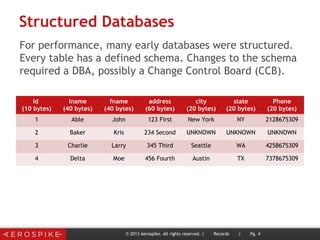
Structured Databases
For performance, many early databases were structured.
Every table has a defined schema. Changes to the schema
required a DBA, possibly a Change Control Board (CCB).
© 2013 Aerospike. All rights reserved. | Records | Pg. 4
id
(10 bytes)
lname
(40 bytes)
fname
(40 bytes)
address
(60 bytes)
city
(20 bytes)
state
(20 bytes)
Phone
(20 bytes)
1 Able John 123 First New York NY 2128675309
2 Baker Kris 234 Second UNKNOWN UNKNOWN UNKNOWN
3 Charlie Larry 345 Third Seattle WA 4258675309
4 Delta Moe 456 Fourth Austin TX 7378675309
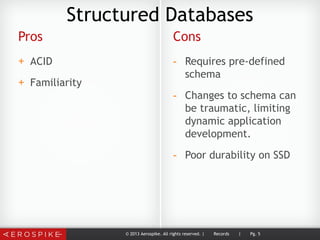
Pros
+ ACID
+ Familiarity
Cons
- Requires pre-defined
schema
- Changes to schema can
be traumatic, limiting
dynamic application
development.
- Poor durability on SSD
© 2013 Aerospike. All rights reserved. | Records | Pg. 5
Structured Databases
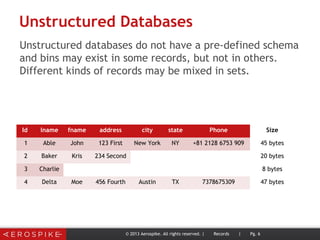
Unstructured Databases
Unstructured databases do not have a pre-defined schema
and bins may exist in some records, but not in others.
Different kinds of records may be mixed in sets.
© 2013 Aerospike. All rights reserved. | Records | Pg. 6
Id lname fname address city state Phone Size
1 Able John 123 First New York NY +81 2128 6753 909 45 bytes
2 Baker Kris 234 Second 20 bytes
3 Charlie 8 bytes
4 Delta Moe 456 Fourth Austin TX 7378675309 47 bytes
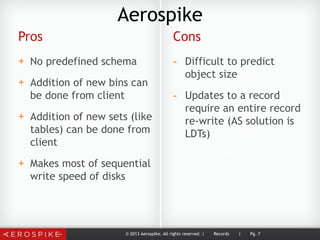
Pros
+ No predefined schema
+ Addition of new bins can
be done from client
+ Addition of new sets (like
tables) can be done from
client
+ Makes most of sequential
write speed of disks
Cons
- Difficult to predict
object size
- Updates to a record
require an entire record
re-write (AS solution is
LDTs)
© 2013 Aerospike. All rights reserved. | Records | Pg. 7
Aerospike
What Do You Want From A Distributed DB?
• Hide the complexity of distribution.
• Linear scalability.
• Better service availability.
© 2013 Aerospike. All rights reserved. Pg. 8
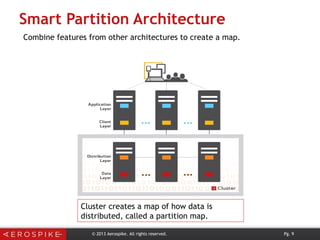
Smart Partition Architecture
© 2013 Aerospike. All rights reserved. Pg. 9
Cluster creates a map of how data is
distributed, called a partition map.
Combine features from other architectures to create a map.
Smart Partitioning
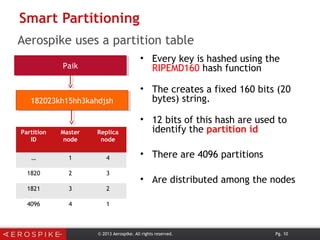
• Every key is hashed using the
RIPEMD160 hash function
• The creates a fixed 160 bits (20
bytes) string.
• 12 bits of this hash are used to
identify the partition id
• There are 4096 partitions
• Are distributed among the nodes
PaikPaik
182023kh15hh3kahdjsh182023kh15hh3kahdjsh
Partition
ID
Master
node
Replica
node
… 1 4
1820 2 3
1821 3 2
4096 4 1
© 2013 Aerospike. All rights reserved. Pg. 10
Aerospike uses a partition table
Smart Partitioning
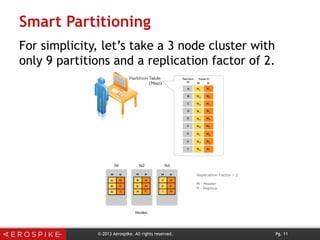
For simplicity, let’s take a 3 node cluster with
only 9 partitions and a replication factor of 2.
© 2013 Aerospike. All rights reserved. Pg. 11
© 2013 Aerospike. All rights reserved. | Records | Pg. 12
Database Hierarchy
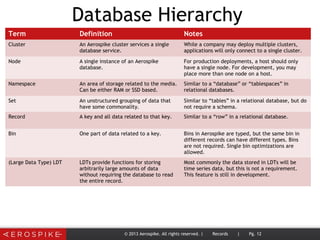
Term Definition Notes
Cluster An Aerospike cluster services a single
database service.
While a company may deploy multiple clusters,
applications will only connect to a single cluster.
Node A single instance of an Aerospike
database.
For production deployments, a host should only
have a single node. For development, you may
place more than one node on a host.
Namespace An area of storage related to the media.
Can be either RAM or SSD based.
Similar to a “database” or “tablespaces” in
relational databases.
Set An unstructured grouping of data that
have some commonality.
Similar to “tables” in a relational database, but do
not require a schema.
Record A key and all data related to that key. Similar to a “row” in a relational database.
Bin One part of data related to a key. Bins in Aerospike are typed, but the same bin in
different records can have different types. Bins
are not required. Single bin optimizations are
allowed.
(Large Data Type) LDT LDTs provide functions for storing
arbitrarily large amounts of data
without requiring the database to read
the entire record.
Most commonly the data stored in LDTs will be
time series data, but this is not a requirement.
This feature is still in development.
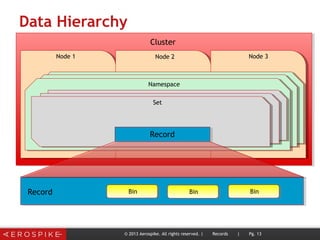
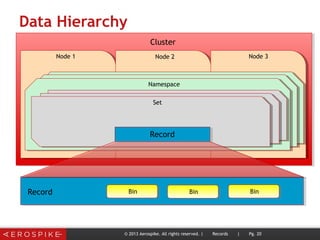
Data Hierarchy
Cluster
Node 1 Node 2 Node 3
Namespace
Set
Record
Record BinBin
© 2013 Aerospike. All rights reserved. | Records | Pg. 13
Bin
Cluster
➤ Will be distributed on different nodes.
➤ Management of cluster is automated, so
no manual rebalancing or reconfiguration
is necessary.
➤ Will contain one or more namespaces.
Adding/removing namespaces requires a
cluster-wide restart.
© 2013 Aerospike. All rights reserved. | Records | Pg. 14
Nodes
➤ Each node is assumed to be identical.
➤ Data (and their associated traffic) will be
evenly balanced across the nodes.
➤ Big differences between nodes imply a
problem.
➤ Node capacity should take into account
node failure patterns.
© 2013 Aerospike. All rights reserved. | Records | Pg. 15
Namespaces
➤ Are associated with the storage media:
 Hybrid (ram for index and SSD for data)
 RAM + disk for persistence only
 RAM only
➤ Each can be configured with their own:
 replication factor (change requires a cluster-wide restart)
 RAM and disk configuration
 settings for high-watermark
 default TTL (if you have data that must never be
automatically deleted, you must set this to “0”)
© 2013 Aerospike. All rights reserved. | Records | Pg. 16
Sets
➤ Similar to “tables” in relational
databases.
➤ Sets are optional.
➤ Schema does not have to be pre-defined.
➤ In order to request a record, you must
know its set.
➤ Scans can be done across a set
© 2013 Aerospike. All rights reserved. | Records | Pg. 17
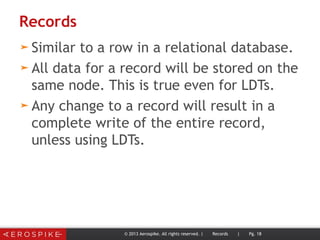
Records
➤ Similar to a row in a relational database.
➤ All data for a record will be stored on the
same node. This is true even for LDTs.
➤ Any change to a record will result in a
complete write of the entire record,
unless using LDTs.
© 2013 Aerospike. All rights reserved. | Records | Pg. 18
Bins
➤ Values Are typed. Current types are:
 Simple (integer, string, blob [language specific])
 Complex (list, map)
 Large Data Types (LDTs)
➤ A single bin may be updated by the client.
 Increment
 Replacement
 User Defined Function (UDF)
© 2013 Aerospike. All rights reserved. | Records | Pg. 19
Data Hierarchy
Cluster
Node 1 Node 2 Node 3
Namespace
Set
Record
Record BinBin
© 2013 Aerospike. All rights reserved. | Records | Pg. 20
Bin
Data Access Patterns
 Read
 Write
 Update
© 2013 Aerospike. All rights reserved. | Records | Pg. 21
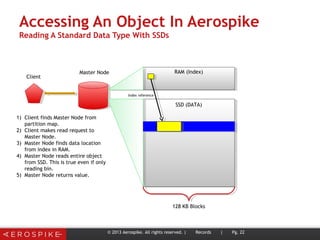
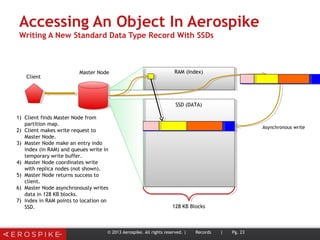
Accessing An Object In Aerospike
Reading A Standard Data Type With SSDs
© 2013 Aerospike. All rights reserved. | Records | Pg. 22
128 KB Blocks
Master Node
SSD (DATA)
Client
RAM (Index)
1) Client finds Master Node from
partition map.
2) Client makes read request to
Master Node.
3) Master Node finds data location
from index in RAM.
4) Master Node reads entire object
from SSD. This is true even if only
reading bin.
5) Master Node returns value.
Index reference
Accessing An Object In Aerospike
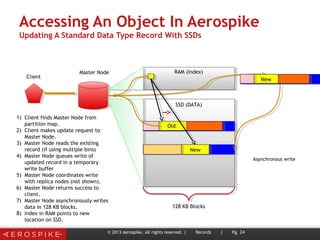
Writing A New Standard Data Type Record With SSDs
© 2013 Aerospike. All rights reserved. | Records | Pg. 23
128 KB Blocks
Master Node
SSD (DATA)
Client
RAM (Index)
1) Client finds Master Node from
partition map.
2) Client makes write request to
Master Node.
3) Master Node make an entry indo
index (in RAM) and queues write in
temporary write buffer.
4) Master Node coordinates write
with replica nodes (not shown).
5) Master Node returns success to
client.
6) Master Node asynchronously writes
data in 128 KB blocks.
7) Index in RAM points to location on
SSD.
Asynchronous write
Accessing An Object In Aerospike
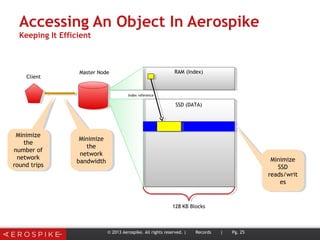
Updating A Standard Data Type Record With SSDs
© 2013 Aerospike. All rights reserved. | Records | Pg. 24
128 KB Blocks
Master Node
SSD (DATA)
Client
RAM (Index)
1) Client finds Master Node from
partition map.
2) Client makes update request to
Master Node.
3) Master Node reads the existing
record (if using multiple bins)
4) Master Node queues write of
updated record in a temporary
write buffer
5) Master Node coordinates write
with replica nodes (not shown).
6) Master Node returns success to
client.
7) Master Node asynchronously writes
data in 128 KB blocks.
8) Index in RAM points to new
location on SSD.
Asynchronous write
Old
New
New
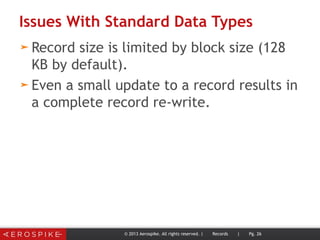
Accessing An Object In Aerospike
Keeping It Efficient
© 2013 Aerospike. All rights reserved. | Records | Pg. 25
128 KB Blocks
Master Node
SSD (DATA)
Client
RAM (Index)
Index reference
Minimize
the
number of
network
round trips
Minimize
the
number of
network
round trips
Minimize
the
network
bandwidth
Minimize
the
network
bandwidth Minimize
SSD
reads/writ
es
Minimize
SSD
reads/writ
es
Issues With Standard Data Types
➤ Record size is limited by block size (128
KB by default).
➤ Even a small update to a record results in
a complete record re-write.
© 2013 Aerospike. All rights reserved. | Records | Pg. 26
Example Use Case
To compare different systems, let’s take a
look at a standard task.
➤Find out if an object has some value
➤If it does, update the record and return a
value
© 2013 Aerospike. All rights reserved. | Records | Pg. 27
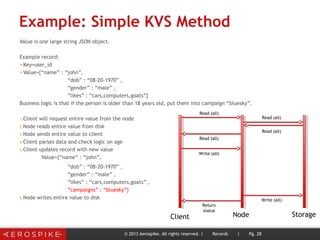
Example: Simple KVS Method
Value is one large string JSON object.
Example record:
➤Key=user_id
➤Value={“name” : “john”,
“dob” : “08-20-1970” ,
“gender” : “male” ,
“likes” : “cars,computers,goats”}
Business logic is that if the person is older than 18 years old, put them into campaign “bluesky”.
1.Client will request entire value from the node
2.Node reads entire value from disk
3.Node sends entire value to client
4.Client parses data and check logic on age
5.Client updates record with new value
Value={“name” : “john”,
“dob” : “08-20-1970” ,
“gender” : “male” ,
“likes” : “cars,computers,goats” ,
“campaigns” : “bluesky”}
6.Node writes entire value to disk
© 2013 Aerospike. All rights reserved. | Records | Pg. 28
Client Node Storage
Read (all)
Read (all)
Read (all)
Read (all)
Write (all)
Write (all)
Return
status
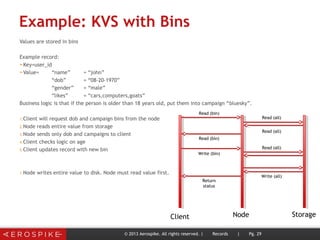
Example: KVS with Bins
Values are stored in bins
Example record:
➤Key=user_id
➤Value= “name” = “john”
“dob” = “08-20-1970”
“gender” = “male”
“likes” = “cars,computers,goats”
Business logic is that if the person is older than 18 years old, put them into campaign “bluesky”.
1.Client will request dob and campaign bins from the node
2.Node reads entire value from storage
3.Node sends only dob and campaigns to client
4.Client checks logic on age
5.Client updates record with new bin
1.Node writes entire value to disk. Node must read value first.
© 2013 Aerospike. All rights reserved. | Records | Pg. 29
Client Node Storage
Read (bin)
Read (all)
Read (all)
Read (bin)
Write (bin)
Write (all)
Read (all)
Return
status
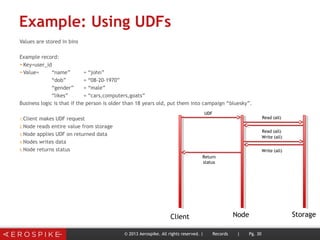
Example: Using UDFs
Values are stored in bins
Example record:
➤Key=user_id
➤Value= “name” = “john”
“dob” = “08-20-1970”
“gender” = “male”
“likes” = “cars,computers,goats”
Business logic is that if the person is older than 18 years old, put them into campaign “bluesky”.
1.Client makes UDF request
2.Node reads entire value from storage
3.Node applies UDF on returned data
4.Nodes writes data
5.Node returns status
© 2013 Aerospike. All rights reserved. | Records | Pg. 30
Client Node Storage
UDF
Read (all)
Read (all)
Return
status
Write (all)
Write (all)
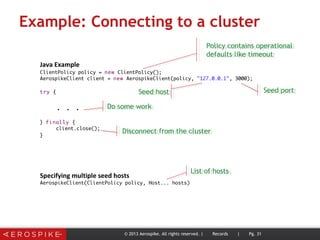
Example: Connecting to a cluster
© 2013 Aerospike. All rights reserved. | Records | Pg. 31
Policy contains operational
defaults like timeout
Policy contains operational
defaults like timeout
Seed hostSeed host Seed portSeed port
Do some workDo some work
Disconnect from the clusterDisconnect from the cluster
List of hostsList of hosts
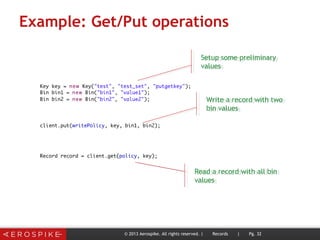
Example: Get/Put operations
© 2013 Aerospike. All rights reserved. | Records | Pg. 32
Setup some preliminary
values
Setup some preliminary
values
Write a record with two
bin values
Write a record with two
bin values
Read a record with all bin
values
Read a record with all bin
values
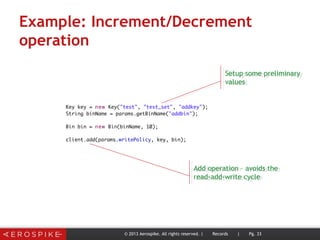
Example: Increment/Decrement
operation
© 2013 Aerospike. All rights reserved. | Records | Pg. 33
Setup some preliminary
values
Setup some preliminary
values
Add operation – avoids the
read-add-write cycle
Add operation – avoids the
read-add-write cycle
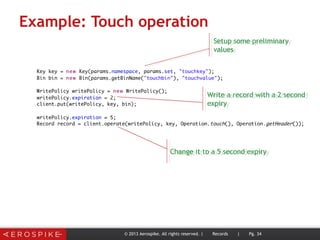
Example: Touch operation
© 2013 Aerospike. All rights reserved. | Records | Pg. 34
Setup some preliminary
values
Setup some preliminary
values
Write a record with a 2 second
expiry
Write a record with a 2 second
expiry
Change it to a 5 second expiryChange it to a 5 second expiry

Aerospike: Key Value Data Access

  • 1.
    Aerospike aer .o . spike [air-oh- spahyk] noun, 1. tip of a rocket that enhances speed and stability
  • 2.
  • 3.
    Topics ➤ Structured v.Unstructured Data ➤ Database Hierarchy and Definitions ➤ Data Access Patterns © 2013 Aerospike. All rights reserved. | Records | Pg. 3
  • 4.
    Structured Databases For performance,many early databases were structured. Every table has a defined schema. Changes to the schema required a DBA, possibly a Change Control Board (CCB). © 2013 Aerospike. All rights reserved. | Records | Pg. 4 id (10 bytes) lname (40 bytes) fname (40 bytes) address (60 bytes) city (20 bytes) state (20 bytes) Phone (20 bytes) 1 Able John 123 First New York NY 2128675309 2 Baker Kris 234 Second UNKNOWN UNKNOWN UNKNOWN 3 Charlie Larry 345 Third Seattle WA 4258675309 4 Delta Moe 456 Fourth Austin TX 7378675309
  • 5.
    Pros + ACID + Familiarity Cons -Requires pre-defined schema - Changes to schema can be traumatic, limiting dynamic application development. - Poor durability on SSD © 2013 Aerospike. All rights reserved. | Records | Pg. 5 Structured Databases
  • 6.
    Unstructured Databases Unstructured databasesdo not have a pre-defined schema and bins may exist in some records, but not in others. Different kinds of records may be mixed in sets. © 2013 Aerospike. All rights reserved. | Records | Pg. 6 Id lname fname address city state Phone Size 1 Able John 123 First New York NY +81 2128 6753 909 45 bytes 2 Baker Kris 234 Second 20 bytes 3 Charlie 8 bytes 4 Delta Moe 456 Fourth Austin TX 7378675309 47 bytes
  • 7.
    Pros + No predefinedschema + Addition of new bins can be done from client + Addition of new sets (like tables) can be done from client + Makes most of sequential write speed of disks Cons - Difficult to predict object size - Updates to a record require an entire record re-write (AS solution is LDTs) © 2013 Aerospike. All rights reserved. | Records | Pg. 7 Aerospike
  • 8.
    What Do YouWant From A Distributed DB? • Hide the complexity of distribution. • Linear scalability. • Better service availability. © 2013 Aerospike. All rights reserved. Pg. 8
  • 9.
    Smart Partition Architecture ©2013 Aerospike. All rights reserved. Pg. 9 Cluster creates a map of how data is distributed, called a partition map. Combine features from other architectures to create a map.
  • 10.
    Smart Partitioning • Everykey is hashed using the RIPEMD160 hash function • The creates a fixed 160 bits (20 bytes) string. • 12 bits of this hash are used to identify the partition id • There are 4096 partitions • Are distributed among the nodes PaikPaik 182023kh15hh3kahdjsh182023kh15hh3kahdjsh Partition ID Master node Replica node … 1 4 1820 2 3 1821 3 2 4096 4 1 © 2013 Aerospike. All rights reserved. Pg. 10 Aerospike uses a partition table
  • 11.
    Smart Partitioning For simplicity,let’s take a 3 node cluster with only 9 partitions and a replication factor of 2. © 2013 Aerospike. All rights reserved. Pg. 11
  • 12.
    © 2013 Aerospike.All rights reserved. | Records | Pg. 12 Database Hierarchy Term Definition Notes Cluster An Aerospike cluster services a single database service. While a company may deploy multiple clusters, applications will only connect to a single cluster. Node A single instance of an Aerospike database. For production deployments, a host should only have a single node. For development, you may place more than one node on a host. Namespace An area of storage related to the media. Can be either RAM or SSD based. Similar to a “database” or “tablespaces” in relational databases. Set An unstructured grouping of data that have some commonality. Similar to “tables” in a relational database, but do not require a schema. Record A key and all data related to that key. Similar to a “row” in a relational database. Bin One part of data related to a key. Bins in Aerospike are typed, but the same bin in different records can have different types. Bins are not required. Single bin optimizations are allowed. (Large Data Type) LDT LDTs provide functions for storing arbitrarily large amounts of data without requiring the database to read the entire record. Most commonly the data stored in LDTs will be time series data, but this is not a requirement. This feature is still in development.
  • 13.
    Data Hierarchy Cluster Node 1Node 2 Node 3 Namespace Set Record Record BinBin © 2013 Aerospike. All rights reserved. | Records | Pg. 13 Bin
  • 14.
    Cluster ➤ Will bedistributed on different nodes. ➤ Management of cluster is automated, so no manual rebalancing or reconfiguration is necessary. ➤ Will contain one or more namespaces. Adding/removing namespaces requires a cluster-wide restart. © 2013 Aerospike. All rights reserved. | Records | Pg. 14
  • 15.
    Nodes ➤ Each nodeis assumed to be identical. ➤ Data (and their associated traffic) will be evenly balanced across the nodes. ➤ Big differences between nodes imply a problem. ➤ Node capacity should take into account node failure patterns. © 2013 Aerospike. All rights reserved. | Records | Pg. 15
  • 16.
    Namespaces ➤ Are associatedwith the storage media:  Hybrid (ram for index and SSD for data)  RAM + disk for persistence only  RAM only ➤ Each can be configured with their own:  replication factor (change requires a cluster-wide restart)  RAM and disk configuration  settings for high-watermark  default TTL (if you have data that must never be automatically deleted, you must set this to “0”) © 2013 Aerospike. All rights reserved. | Records | Pg. 16
  • 17.
    Sets ➤ Similar to“tables” in relational databases. ➤ Sets are optional. ➤ Schema does not have to be pre-defined. ➤ In order to request a record, you must know its set. ➤ Scans can be done across a set © 2013 Aerospike. All rights reserved. | Records | Pg. 17
  • 18.
    Records ➤ Similar toa row in a relational database. ➤ All data for a record will be stored on the same node. This is true even for LDTs. ➤ Any change to a record will result in a complete write of the entire record, unless using LDTs. © 2013 Aerospike. All rights reserved. | Records | Pg. 18
  • 19.
    Bins ➤ Values Aretyped. Current types are:  Simple (integer, string, blob [language specific])  Complex (list, map)  Large Data Types (LDTs) ➤ A single bin may be updated by the client.  Increment  Replacement  User Defined Function (UDF) © 2013 Aerospike. All rights reserved. | Records | Pg. 19
  • 20.
    Data Hierarchy Cluster Node 1Node 2 Node 3 Namespace Set Record Record BinBin © 2013 Aerospike. All rights reserved. | Records | Pg. 20 Bin
  • 21.
    Data Access Patterns Read  Write  Update © 2013 Aerospike. All rights reserved. | Records | Pg. 21
  • 22.
    Accessing An ObjectIn Aerospike Reading A Standard Data Type With SSDs © 2013 Aerospike. All rights reserved. | Records | Pg. 22 128 KB Blocks Master Node SSD (DATA) Client RAM (Index) 1) Client finds Master Node from partition map. 2) Client makes read request to Master Node. 3) Master Node finds data location from index in RAM. 4) Master Node reads entire object from SSD. This is true even if only reading bin. 5) Master Node returns value. Index reference
  • 23.
    Accessing An ObjectIn Aerospike Writing A New Standard Data Type Record With SSDs © 2013 Aerospike. All rights reserved. | Records | Pg. 23 128 KB Blocks Master Node SSD (DATA) Client RAM (Index) 1) Client finds Master Node from partition map. 2) Client makes write request to Master Node. 3) Master Node make an entry indo index (in RAM) and queues write in temporary write buffer. 4) Master Node coordinates write with replica nodes (not shown). 5) Master Node returns success to client. 6) Master Node asynchronously writes data in 128 KB blocks. 7) Index in RAM points to location on SSD. Asynchronous write
  • 24.
    Accessing An ObjectIn Aerospike Updating A Standard Data Type Record With SSDs © 2013 Aerospike. All rights reserved. | Records | Pg. 24 128 KB Blocks Master Node SSD (DATA) Client RAM (Index) 1) Client finds Master Node from partition map. 2) Client makes update request to Master Node. 3) Master Node reads the existing record (if using multiple bins) 4) Master Node queues write of updated record in a temporary write buffer 5) Master Node coordinates write with replica nodes (not shown). 6) Master Node returns success to client. 7) Master Node asynchronously writes data in 128 KB blocks. 8) Index in RAM points to new location on SSD. Asynchronous write Old New New
  • 25.
    Accessing An ObjectIn Aerospike Keeping It Efficient © 2013 Aerospike. All rights reserved. | Records | Pg. 25 128 KB Blocks Master Node SSD (DATA) Client RAM (Index) Index reference Minimize the number of network round trips Minimize the number of network round trips Minimize the network bandwidth Minimize the network bandwidth Minimize SSD reads/writ es Minimize SSD reads/writ es
  • 26.
    Issues With StandardData Types ➤ Record size is limited by block size (128 KB by default). ➤ Even a small update to a record results in a complete record re-write. © 2013 Aerospike. All rights reserved. | Records | Pg. 26
  • 27.
    Example Use Case Tocompare different systems, let’s take a look at a standard task. ➤Find out if an object has some value ➤If it does, update the record and return a value © 2013 Aerospike. All rights reserved. | Records | Pg. 27
  • 28.
    Example: Simple KVSMethod Value is one large string JSON object. Example record: ➤Key=user_id ➤Value={“name” : “john”, “dob” : “08-20-1970” , “gender” : “male” , “likes” : “cars,computers,goats”} Business logic is that if the person is older than 18 years old, put them into campaign “bluesky”. 1.Client will request entire value from the node 2.Node reads entire value from disk 3.Node sends entire value to client 4.Client parses data and check logic on age 5.Client updates record with new value Value={“name” : “john”, “dob” : “08-20-1970” , “gender” : “male” , “likes” : “cars,computers,goats” , “campaigns” : “bluesky”} 6.Node writes entire value to disk © 2013 Aerospike. All rights reserved. | Records | Pg. 28 Client Node Storage Read (all) Read (all) Read (all) Read (all) Write (all) Write (all) Return status
  • 29.
    Example: KVS withBins Values are stored in bins Example record: ➤Key=user_id ➤Value= “name” = “john” “dob” = “08-20-1970” “gender” = “male” “likes” = “cars,computers,goats” Business logic is that if the person is older than 18 years old, put them into campaign “bluesky”. 1.Client will request dob and campaign bins from the node 2.Node reads entire value from storage 3.Node sends only dob and campaigns to client 4.Client checks logic on age 5.Client updates record with new bin 1.Node writes entire value to disk. Node must read value first. © 2013 Aerospike. All rights reserved. | Records | Pg. 29 Client Node Storage Read (bin) Read (all) Read (all) Read (bin) Write (bin) Write (all) Read (all) Return status
  • 30.
    Example: Using UDFs Valuesare stored in bins Example record: ➤Key=user_id ➤Value= “name” = “john” “dob” = “08-20-1970” “gender” = “male” “likes” = “cars,computers,goats” Business logic is that if the person is older than 18 years old, put them into campaign “bluesky”. 1.Client makes UDF request 2.Node reads entire value from storage 3.Node applies UDF on returned data 4.Nodes writes data 5.Node returns status © 2013 Aerospike. All rights reserved. | Records | Pg. 30 Client Node Storage UDF Read (all) Read (all) Return status Write (all) Write (all)
  • 31.
    Example: Connecting toa cluster © 2013 Aerospike. All rights reserved. | Records | Pg. 31 Policy contains operational defaults like timeout Policy contains operational defaults like timeout Seed hostSeed host Seed portSeed port Do some workDo some work Disconnect from the clusterDisconnect from the cluster List of hostsList of hosts
  • 32.
    Example: Get/Put operations ©2013 Aerospike. All rights reserved. | Records | Pg. 32 Setup some preliminary values Setup some preliminary values Write a record with two bin values Write a record with two bin values Read a record with all bin values Read a record with all bin values
  • 33.
    Example: Increment/Decrement operation © 2013Aerospike. All rights reserved. | Records | Pg. 33 Setup some preliminary values Setup some preliminary values Add operation – avoids the read-add-write cycle Add operation – avoids the read-add-write cycle
  • 34.
    Example: Touch operation ©2013 Aerospike. All rights reserved. | Records | Pg. 34 Setup some preliminary values Setup some preliminary values Write a record with a 2 second expiry Write a record with a 2 second expiry Change it to a 5 second expiryChange it to a 5 second expiry

Editor's Notes

  • #2 Fastest Best uptime Predictable performance consistency
  • #9 Horizontal scaling can provide many benefits. Let’s take a look at some of the major features. This might seem odd, but first, you want features that prevent you from having to think about having a distributed database.
  • #10 The cluster