presented by Mullaikani A May 21, 2009
MAINFRAME REACH RICH Text UI Integrated media GUI CLIENT/SERVER WEB APPLICATIONS 2004 1992 1998 RICH INTERNET APPLICATIONS Applications have evolved
Agenda What is Flex? Why to use Flex? How to develop? MXML and ActionScript Examples
  Adobe Flex Rich Internet Application (RIA)‏ Flex vs. Flash Built on MXML and ActionScript Free Flex 3 SDK Current Version: Adobe Flex 3 Adobe Builder 3
Why use Flex Scalability designed to scale from simple components in websites to full-blown browser-based or desktop applications developers can select data transport methods including support for XML over HTTP or Adobe's Action Message Format (AMF)‏
Cross-platform, accessible applications RIAs created with Flex can run in the browser using Adobe Flash Player software or on the desktop on Adobe AIR Cross Browser Compatible Why use Flex
How do you develop Flex apps  Can choose to develop Flex Apps in an Eclipse based Flex Builder IDE or in an IDE of their choice  Adobe Flex Builder is most often used to write code because of its user friendly
Being a dialect of XML, standard validity rules apply: tags must be closed, and all the other XML rules apply. Pattern: Mxml
MXML and ActionScript <?xml version=&quot;1.0&quot; encoding=&quot;utf-8&quot; ?> <mx:Application xmlns:mx=&quot;http://www.adobe.com/2006/mxml&quot; xmlns=&quot;*&quot; layout=&quot;vertical” creationComplete=&quot;initApp()&quot;> <mx:Script> <![CDATA[ public function initApp():void { mainTxt.text = “Hello World!!”; } public function sayHello():void { Alert.show(“Hello World!!”);  } ]]> </mx:Script>
<mx:Label id=&quot;title&quot; fontSize=&quot;24&quot; fontStyle=&quot;bold” text='&quot;Hello, world!&quot; Example'/> <mx:TextArea id = &quot;mainTxt&quot; width=&quot;250&quot;/> <mx:Button id=“btn” width=“20” click=“sayHello()”/>  </mx:Application
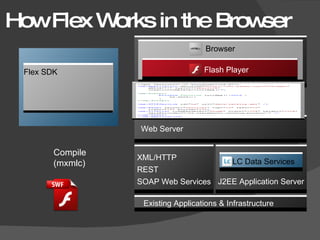
How Flex Works in the Browser Compile(mxmlc) Flex SDK Browser Flash Player Browser Flash Player Existing Applications & Infrastructure  J2EE Application Server LC Data Services XML/HTTP REST SOAP Web Services Web Server Flex SDK
Adobe Flex Builder Powerful coding tool Code refactoring engine IDE built on Eclipse Code Hinting Design Mode
LAST BUT NOT LEAST FLEX IS FLEXIBLE

Adobe Flex

  • 1.
  • 2.
    MAINFRAME REACH RICHText UI Integrated media GUI CLIENT/SERVER WEB APPLICATIONS 2004 1992 1998 RICH INTERNET APPLICATIONS Applications have evolved
  • 3.
    Agenda What isFlex? Why to use Flex? How to develop? MXML and ActionScript Examples
  • 4.
    AdobeFlex Rich Internet Application (RIA)‏ Flex vs. Flash Built on MXML and ActionScript Free Flex 3 SDK Current Version: Adobe Flex 3 Adobe Builder 3
  • 5.
    Why use FlexScalability designed to scale from simple components in websites to full-blown browser-based or desktop applications developers can select data transport methods including support for XML over HTTP or Adobe's Action Message Format (AMF)‏
  • 6.
    Cross-platform, accessible applicationsRIAs created with Flex can run in the browser using Adobe Flash Player software or on the desktop on Adobe AIR Cross Browser Compatible Why use Flex
  • 7.
    How do youdevelop Flex apps Can choose to develop Flex Apps in an Eclipse based Flex Builder IDE or in an IDE of their choice Adobe Flex Builder is most often used to write code because of its user friendly
  • 8.
    Being a dialectof XML, standard validity rules apply: tags must be closed, and all the other XML rules apply. Pattern: Mxml
  • 9.
    MXML and ActionScript<?xml version=&quot;1.0&quot; encoding=&quot;utf-8&quot; ?> <mx:Application xmlns:mx=&quot;http://www.adobe.com/2006/mxml&quot; xmlns=&quot;*&quot; layout=&quot;vertical” creationComplete=&quot;initApp()&quot;> <mx:Script> <![CDATA[ public function initApp():void { mainTxt.text = “Hello World!!”; } public function sayHello():void { Alert.show(“Hello World!!”); } ]]> </mx:Script>
  • 10.
    <mx:Label id=&quot;title&quot; fontSize=&quot;24&quot;fontStyle=&quot;bold” text='&quot;Hello, world!&quot; Example'/> <mx:TextArea id = &quot;mainTxt&quot; width=&quot;250&quot;/> <mx:Button id=“btn” width=“20” click=“sayHello()”/> </mx:Application
  • 11.
    How Flex Worksin the Browser Compile(mxmlc) Flex SDK Browser Flash Player Browser Flash Player Existing Applications & Infrastructure J2EE Application Server LC Data Services XML/HTTP REST SOAP Web Services Web Server Flex SDK
  • 12.
    Adobe Flex BuilderPowerful coding tool Code refactoring engine IDE built on Eclipse Code Hinting Design Mode
  • 13.
    LAST BUT NOTLEAST FLEX IS FLEXIBLE