Better Drupal  Interaction Design  with Flex Chris Charlton -  [email_address]  - Rich Media Institute (.com)
Me?  Chris.Charlton::I.speak.geek(); Coder Writer Teacher LA Drupal LA Flash LA AIR Flex, Flash, AIR PHP SQL Web Standards Authorized Adobe Flex Champion “I'm the Dude, man!”
Today's Flex Agenda Flex – What? Why? Who? How? Where? Debunk Flex myths HTML & Flex – similarities and differences Flex & Flash – similarities and differences Ringside Seats: HTML+JS vs. Flex CSS in Flex/Flash Flex & Drupal Raffle (for sure) & Bonus (if there's time)
What is Flex? First and foremost Flex is a  framework  for the Flash Platform (now called the Adobe Platform) Adobe has a commercial IDE: Flex Builder Flex is a declarative language: MXML  (XML based) <mx:CheckBox label=”Click Me” click=”chkBoxClicked()”/> Flex is the answer for developers who hate Flash and HTML
If your app is a __, Flex would be __ Car  – Flex would be the chassis and the engine (you to code the exterior, interior, and a radio) Baby  – Flex would be the organs, bones, cells, initial DNA, and some exterior – you choose the hair and eye color, then program some attitude. House/Building  – Flex would be pre-fab parts, the foundation, plus plumbing & central air.
Why Flex? It's RAD (Rapid Application Development) Not complicated Large backing Large community Publish for the web or desktop software (AIR) Open sourced Cost: FREE – WHAT?! FREE? YES, FREE! Everyone else is doing it! (It's the future)
Who uses Flex? Adobe IBM SAP MTV Intel E*Trade Citicorp FedEx MasterCard Symantec Xerox Kodak LG Playboy American Cancer Society Johnson & Johnson Kaiser Permanente Northrop Grumman Lockheed Martin Boeing Raytheon U.S. Air Force U.S. Army U.S. Department of Defense U.S. Department of Education Brinks Inc. Macys ... and Drupal users like you! FAA Cingular Wireless Alltel MCI Worldcom T-Mobile Wireless Oracle Cisco Systems Pfizer Johnson & Johnson eBay CDW Mercedes-Benz Disney Monster.com
Myths of Flex You need a “Flex Player” -  WRONG! (Flash Player is the only thing you need) Flex is proprietary –  WRONG! (Flex is open source – opensource.adobe.com) Flex only loads XML/RSS –  WRONG! (Binary, Sockets, RPC, TXT, PHP/Java/.Net, ...) Flex costs money to run/use/get –  WRONG! (Flex is free: SDK, Framework, knowledge) No  “back” button or deep-linking –  WRONG! (Flash/Flex have had this capability since v6)
Similarities Between XHTML & Flex Both are XML based languages/markup (tags) Both can use higher level interactive languages: - HTML has JavaScript - Flex has ActionScript Both support CSS Both have forms, text control, and support for the media trio (images, video, audio) Both support custom namespaces Both are free Both support the “back” and “forward” buttons
Differences Between HTML & Flex Flex and ActionScript are compiled languages, not interpreted like HTML/CSS/JS/PHP - Compiled Outputs = SWF & AIR file formats HTML, by default, uses multiple files/pages; Flex can be multiple pages or just one file. HTML doesn't have a framework – it can't. Web standards HTML/CSS render natively, while Flash Player needs to be installed for Flash/Flex content... until Firefox 3 & IE8!!!
Similarities Between Flash & Flex Both run on the Flash Player and AIR runtime Both are ActionScript at their hearts – same code, same effects & filters, same capabilities. Both have commercial and free IDE's Adobe.com, OSflash.org, RIAforge.org Both can share components (SWC), classes, and media  (SWF, FLV, MOV/MP4/M4V, AAC/MP3/M4A) Both have a connection to open source.
Differences Between Flash & Flex Flash  has a time line, and art design tools Flash  is targeted for design and animation Flash  does not have a native framework Flash  isn't a language Flash  will get you a rich, cool web site Flex  is only code -  Flex Builder has design tools for theming (CSS) Flex  is targeted for any developer. Flex   is  a framework. Flex   is  a language. Flex  really speeds up development of rich  applications (RIA's)
RIA (Rich Internet Applications) Marketing term for some; way of life for others. Rich  interface design, multimedia  (images, video, audio) . Needs to do something on or with the  Internet . Application  – needs to do something, for someone (hopefully useful and world changing) Examples: Twitter client, Adobe Media Player, Adobe Premiere Express, Agile Agenda, Adobe Photoshop Express, Saffron UML, ... (Multimedia, Marketing/Business/Sales, Development, Medical, Social, Government)
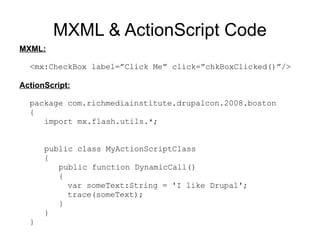
MXML & ActionScript Code MXML: <mx:CheckBox label=”Click Me” click=”chkBoxClicked()”/> ActionScript: package com.richmediainstitute.drupalcon.2008.boston { import mx.flash.utils.*; public class MyActionScriptClass { public function DynamicCall() {   var someText:String = 'I like Drupal';   trace(someText); } } }
Ready to see a fight?! Rules:  No external classes, libraries, frameworks, or hacks
XHTML & JS  vs.  MXML & AS Round 1:  Forms
XHTML & JS  vs.  MXML & AS Forms: Form tag (container) Input fields Select Lists/Menus Buttons File [upload] field Radio Buttons/Groups Checkboxes Textarea Fieldset* Everything XHTML has, plus... Restricted Input Formatters/Validators  (credit card, currency, date, string, email, number, phone, regexp, social security, zipcode) Color Picker Numeric Stepper Date Field & Chooser Sliders  (Horizontal & Vertical) Required fields option
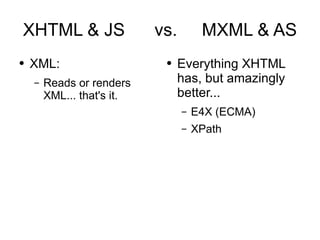
XHTML & JS  vs.  MXML & AS Round 2:  XML
XHTML & JS  vs.  MXML & AS XML: Reads or renders XML... that's it. Everything XHTML has, but amazingly better... E4X (ECMA) XPath
XHTML & JS  vs.  MXML & AS Round 3:  Data  Visualization
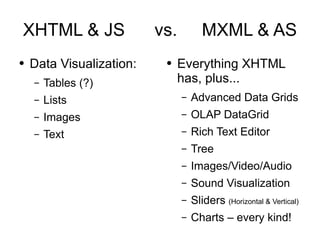
XHTML & JS  vs.  MXML & AS Data Visualization: Tables (?) Lists Images Text Everything XHTML has, plus... Advanced Data Grids OLAP DataGrid Rich Text Editor Tree Images/Video/Audio Sound Visualization Sliders  (Horizontal & Vertical) Charts – every kind!
XHTML & JS  vs.  MXML & AS Round 4:  Data Connectivity
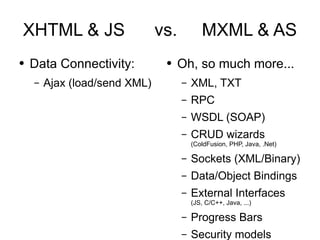
XHTML & JS  vs.  MXML & AS Data Connectivity: Ajax (load/send XML) Oh, so much more... XML, TXT RPC WSDL (SOAP) CRUD wizards (ColdFusion, PHP, Java, .Net) Sockets (XML/Binary) Data/Object Bindings External Interfaces (JS, C/C++, Java, ...) Progress Bars Security models
XHTML & JS  vs.  MXML & AS Round 5:  User &  System Level Interactivity
Interactivity: Clicks Some Events File [reference] field Cursors History Management  (back/forward buttons, deep links for pages) Load/Render Plug-in Media & Objects Capable of transitions Mouse position Basic printing  XHTML & JS  vs.  MXML & AS Hehe, that's nothing... Tons of events   (callbacks, “hooks”, and your custom events) Multi-file Upload Better mouse control (track, hide, change, stack, detect) External Interfaces (JS, C/C++, Java, ...) Transitions & Effects (real) Object History and State Management AS can load more AS Modul mode (real), and True Full-screen support Powerful [controlled] printing
Flex Wins! right!?!
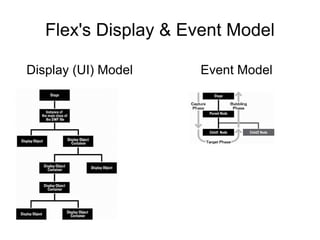
Flex's Display & Event Model Display (UI) Model Event Model
UI Elements & Components A lot to use and choose from Layout Containers & Navigators (~30) UI Components (>25) Charts (10) No depth level so you can make components and sub-components galore Every UI Element/Component has a lot of features available (styling, effects, events, data)
CSS in Flex/Flash CSS can be loaded Load the same CSS that your XHTML uses CSS can be embedded CSS can be shared CSS can be compiled (SWF) Code your own custom CSS features, like the open-sourced Degrafa project (new)
Drupal Integration AMFPHP (module) – this is a binary gateway for you to pass your data through and send to Flex/Flash in an insane speed. Super tiny versus XML. Services (module) – make “services” (functions) that your Flex/Flash calls to get and send data  (XML or AMFPHP) SWFaddress (module) – old deep-linking lib SWFobject (module) – embed SWF properly* SWFtools (module) – a bunch of stuff (I don't use) VISIT THE FLEX + DRUPAL SESSION TOMORROW *Microsoft announced after April there shouldn't be a need for SWFobject, but Adobe isn't taking that chance and plans to adopt SWFobejct.
SUPER NEW STUFF (Flash 10) Flash (FLA) files are now XML (XFL) Flash will have 3D built-in (Papervision engine) Flash will have smart animation (no keyframes and support for “bones” or inverse kinematics) “ Hydra” will change effects forever
SUPER NEW STUFF (Flex 4) “ Thermo” will be the designer-developer liaison If Flash Player has 3D, Flex will have 3D Database Drivers – NO WAY! Public beta and staying open-source
Q&A E-mail me if you have more questions [email_address] Check out our courses:  RichMediaInstitute.com
Raffle 1 st  Prize: TICKET to a Drupal course (~$500) 2 nd  Prize: Advanced Flex Application Development book signed by me! (~$55) 3 rd  Prize: AIR/Flex 3 Launch T-Shirt (~$1M) Free for all:  O'Rielly coupons, AIR stickers, Drupal love
Bonus Topics Crowd votes on: - What is AIR? Cross-platform desktop runtime - Apache & IIS Modules: Run MXML/AS natively - Mozilla adds ActionScript to Mozilla 2, Firefox 3, SpiderMonkey, & IE8  (“Tamarin” JIT, “ActionMonkey”; GPL/LGPL/MPL)

Better Drupal Interaction Design with Flex

  • 1.
    Better Drupal Interaction Design with Flex Chris Charlton - [email_address] - Rich Media Institute (.com)
  • 2.
    Me? Chris.Charlton::I.speak.geek();Coder Writer Teacher LA Drupal LA Flash LA AIR Flex, Flash, AIR PHP SQL Web Standards Authorized Adobe Flex Champion “I'm the Dude, man!”
  • 3.
    Today's Flex AgendaFlex – What? Why? Who? How? Where? Debunk Flex myths HTML & Flex – similarities and differences Flex & Flash – similarities and differences Ringside Seats: HTML+JS vs. Flex CSS in Flex/Flash Flex & Drupal Raffle (for sure) & Bonus (if there's time)
  • 4.
    What is Flex?First and foremost Flex is a framework for the Flash Platform (now called the Adobe Platform) Adobe has a commercial IDE: Flex Builder Flex is a declarative language: MXML (XML based) <mx:CheckBox label=”Click Me” click=”chkBoxClicked()”/> Flex is the answer for developers who hate Flash and HTML
  • 5.
    If your appis a __, Flex would be __ Car – Flex would be the chassis and the engine (you to code the exterior, interior, and a radio) Baby – Flex would be the organs, bones, cells, initial DNA, and some exterior – you choose the hair and eye color, then program some attitude. House/Building – Flex would be pre-fab parts, the foundation, plus plumbing & central air.
  • 6.
    Why Flex? It'sRAD (Rapid Application Development) Not complicated Large backing Large community Publish for the web or desktop software (AIR) Open sourced Cost: FREE – WHAT?! FREE? YES, FREE! Everyone else is doing it! (It's the future)
  • 7.
    Who uses Flex?Adobe IBM SAP MTV Intel E*Trade Citicorp FedEx MasterCard Symantec Xerox Kodak LG Playboy American Cancer Society Johnson & Johnson Kaiser Permanente Northrop Grumman Lockheed Martin Boeing Raytheon U.S. Air Force U.S. Army U.S. Department of Defense U.S. Department of Education Brinks Inc. Macys ... and Drupal users like you! FAA Cingular Wireless Alltel MCI Worldcom T-Mobile Wireless Oracle Cisco Systems Pfizer Johnson & Johnson eBay CDW Mercedes-Benz Disney Monster.com
  • 8.
    Myths of FlexYou need a “Flex Player” - WRONG! (Flash Player is the only thing you need) Flex is proprietary – WRONG! (Flex is open source – opensource.adobe.com) Flex only loads XML/RSS – WRONG! (Binary, Sockets, RPC, TXT, PHP/Java/.Net, ...) Flex costs money to run/use/get – WRONG! (Flex is free: SDK, Framework, knowledge) No “back” button or deep-linking – WRONG! (Flash/Flex have had this capability since v6)
  • 9.
    Similarities Between XHTML& Flex Both are XML based languages/markup (tags) Both can use higher level interactive languages: - HTML has JavaScript - Flex has ActionScript Both support CSS Both have forms, text control, and support for the media trio (images, video, audio) Both support custom namespaces Both are free Both support the “back” and “forward” buttons
  • 10.
    Differences Between HTML& Flex Flex and ActionScript are compiled languages, not interpreted like HTML/CSS/JS/PHP - Compiled Outputs = SWF & AIR file formats HTML, by default, uses multiple files/pages; Flex can be multiple pages or just one file. HTML doesn't have a framework – it can't. Web standards HTML/CSS render natively, while Flash Player needs to be installed for Flash/Flex content... until Firefox 3 & IE8!!!
  • 11.
    Similarities Between Flash& Flex Both run on the Flash Player and AIR runtime Both are ActionScript at their hearts – same code, same effects & filters, same capabilities. Both have commercial and free IDE's Adobe.com, OSflash.org, RIAforge.org Both can share components (SWC), classes, and media (SWF, FLV, MOV/MP4/M4V, AAC/MP3/M4A) Both have a connection to open source.
  • 12.
    Differences Between Flash& Flex Flash has a time line, and art design tools Flash is targeted for design and animation Flash does not have a native framework Flash isn't a language Flash will get you a rich, cool web site Flex is only code - Flex Builder has design tools for theming (CSS) Flex is targeted for any developer. Flex is a framework. Flex is a language. Flex really speeds up development of rich applications (RIA's)
  • 13.
    RIA (Rich InternetApplications) Marketing term for some; way of life for others. Rich interface design, multimedia (images, video, audio) . Needs to do something on or with the Internet . Application – needs to do something, for someone (hopefully useful and world changing) Examples: Twitter client, Adobe Media Player, Adobe Premiere Express, Agile Agenda, Adobe Photoshop Express, Saffron UML, ... (Multimedia, Marketing/Business/Sales, Development, Medical, Social, Government)
  • 14.
    MXML & ActionScriptCode MXML: <mx:CheckBox label=”Click Me” click=”chkBoxClicked()”/> ActionScript: package com.richmediainstitute.drupalcon.2008.boston { import mx.flash.utils.*; public class MyActionScriptClass { public function DynamicCall() { var someText:String = 'I like Drupal'; trace(someText); } } }
  • 15.
    Ready to seea fight?! Rules: No external classes, libraries, frameworks, or hacks
  • 16.
    XHTML & JS vs. MXML & AS Round 1: Forms
  • 17.
    XHTML & JS vs. MXML & AS Forms: Form tag (container) Input fields Select Lists/Menus Buttons File [upload] field Radio Buttons/Groups Checkboxes Textarea Fieldset* Everything XHTML has, plus... Restricted Input Formatters/Validators (credit card, currency, date, string, email, number, phone, regexp, social security, zipcode) Color Picker Numeric Stepper Date Field & Chooser Sliders (Horizontal & Vertical) Required fields option
  • 18.
    XHTML & JS vs. MXML & AS Round 2: XML
  • 19.
    XHTML & JS vs. MXML & AS XML: Reads or renders XML... that's it. Everything XHTML has, but amazingly better... E4X (ECMA) XPath
  • 20.
    XHTML & JS vs. MXML & AS Round 3: Data Visualization
  • 21.
    XHTML & JS vs. MXML & AS Data Visualization: Tables (?) Lists Images Text Everything XHTML has, plus... Advanced Data Grids OLAP DataGrid Rich Text Editor Tree Images/Video/Audio Sound Visualization Sliders (Horizontal & Vertical) Charts – every kind!
  • 22.
    XHTML & JS vs. MXML & AS Round 4: Data Connectivity
  • 23.
    XHTML & JS vs. MXML & AS Data Connectivity: Ajax (load/send XML) Oh, so much more... XML, TXT RPC WSDL (SOAP) CRUD wizards (ColdFusion, PHP, Java, .Net) Sockets (XML/Binary) Data/Object Bindings External Interfaces (JS, C/C++, Java, ...) Progress Bars Security models
  • 24.
    XHTML & JS vs. MXML & AS Round 5: User & System Level Interactivity
  • 25.
    Interactivity: Clicks SomeEvents File [reference] field Cursors History Management (back/forward buttons, deep links for pages) Load/Render Plug-in Media & Objects Capable of transitions Mouse position Basic printing XHTML & JS vs. MXML & AS Hehe, that's nothing... Tons of events (callbacks, “hooks”, and your custom events) Multi-file Upload Better mouse control (track, hide, change, stack, detect) External Interfaces (JS, C/C++, Java, ...) Transitions & Effects (real) Object History and State Management AS can load more AS Modul mode (real), and True Full-screen support Powerful [controlled] printing
  • 26.
  • 27.
    Flex's Display &Event Model Display (UI) Model Event Model
  • 28.
    UI Elements &Components A lot to use and choose from Layout Containers & Navigators (~30) UI Components (>25) Charts (10) No depth level so you can make components and sub-components galore Every UI Element/Component has a lot of features available (styling, effects, events, data)
  • 29.
    CSS in Flex/FlashCSS can be loaded Load the same CSS that your XHTML uses CSS can be embedded CSS can be shared CSS can be compiled (SWF) Code your own custom CSS features, like the open-sourced Degrafa project (new)
  • 30.
    Drupal Integration AMFPHP(module) – this is a binary gateway for you to pass your data through and send to Flex/Flash in an insane speed. Super tiny versus XML. Services (module) – make “services” (functions) that your Flex/Flash calls to get and send data (XML or AMFPHP) SWFaddress (module) – old deep-linking lib SWFobject (module) – embed SWF properly* SWFtools (module) – a bunch of stuff (I don't use) VISIT THE FLEX + DRUPAL SESSION TOMORROW *Microsoft announced after April there shouldn't be a need for SWFobject, but Adobe isn't taking that chance and plans to adopt SWFobejct.
  • 31.
    SUPER NEW STUFF(Flash 10) Flash (FLA) files are now XML (XFL) Flash will have 3D built-in (Papervision engine) Flash will have smart animation (no keyframes and support for “bones” or inverse kinematics) “ Hydra” will change effects forever
  • 32.
    SUPER NEW STUFF(Flex 4) “ Thermo” will be the designer-developer liaison If Flash Player has 3D, Flex will have 3D Database Drivers – NO WAY! Public beta and staying open-source
  • 33.
    Q&A E-mail meif you have more questions [email_address] Check out our courses: RichMediaInstitute.com
  • 34.
    Raffle 1 st Prize: TICKET to a Drupal course (~$500) 2 nd Prize: Advanced Flex Application Development book signed by me! (~$55) 3 rd Prize: AIR/Flex 3 Launch T-Shirt (~$1M) Free for all: O'Rielly coupons, AIR stickers, Drupal love
  • 35.
    Bonus Topics Crowdvotes on: - What is AIR? Cross-platform desktop runtime - Apache & IIS Modules: Run MXML/AS natively - Mozilla adds ActionScript to Mozilla 2, Firefox 3, SpiderMonkey, & IE8 (“Tamarin” JIT, “ActionMonkey”; GPL/LGPL/MPL)