Introduction
An Android Application that lets you manage all your
contacts in one place
Provides a reliable and persistent storage for the key
information related to your contacts
Simple UI and essential features to add & modify the
contacts
Introduction (contd..)
Address Book lets you store name, address, e-mail,
phone numbers.
You can directly call a number from a contact.
At least one phone number (phone1) is mandatory
Multiple Contacts with same phone number are not
allowed
Features
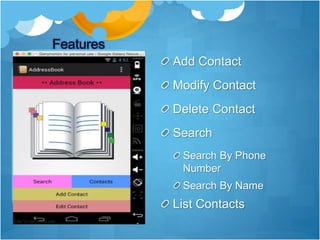
Add Contact
Modify Contact
Delete Contact
Search
Search By Phone
Number
Search By Name
List Contacts
Add Contact
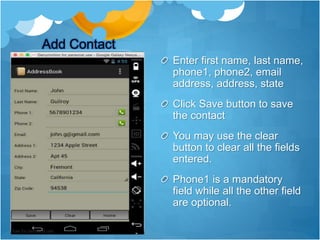
Enter first name, last name,
phone1, phone2, email
address, address, state
Click Save button to save
the contact
You may use the clear
button to clear all the fields
entered.
Phone1 is a mandatory
field while all the other field
are optional.
List Contacts
Click on the Contacts
button on the home screen
to list the stored contacts.
When no Contacts are
available, an error
message “No Contacts
Found, Please Add Your
First Contact” would be
displayed
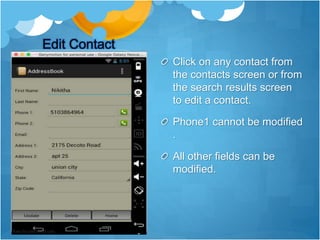
Edit Contact
Click on any contact from
the contacts screen or from
the search results screen
to edit a contact.
Phone1 cannot be modified
.
All other fields can be
modified.
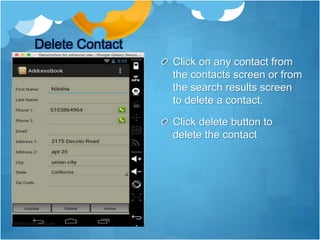
Delete Contact
Click on any contact from
the contacts screen or from
the search results screen
to delete a contact.
Click delete button to
delete the contact
Search Contact
Click on the Search
Contacts button on the
home screen to search the
stored contacts.
A contact can be searched
using phone number or
name.
All the matching contacts
with the search criteria
would be displayed.
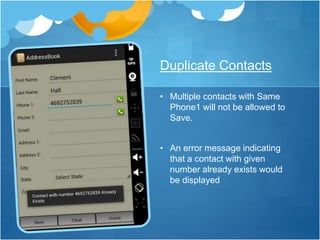
• Multiple contacts with Same
Phone1 will not be allowed to
Save.
• An error message indicating
that a contact with given
number already exists would
be displayed
Duplicate Contacts
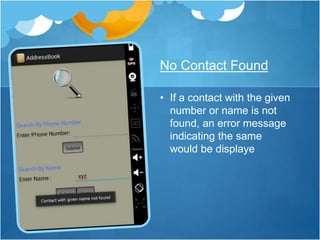
• If a contact with the given
number or name is not
found, an error message
indicating the same
would be displaye
No Contact Found
Address Book

Address Book

  • 2.
    Introduction An Android Applicationthat lets you manage all your contacts in one place Provides a reliable and persistent storage for the key information related to your contacts Simple UI and essential features to add & modify the contacts
  • 3.
    Introduction (contd..) Address Booklets you store name, address, e-mail, phone numbers. You can directly call a number from a contact. At least one phone number (phone1) is mandatory Multiple Contacts with same phone number are not allowed
  • 4.
    Features Add Contact Modify Contact DeleteContact Search Search By Phone Number Search By Name List Contacts
  • 5.
    Add Contact Enter firstname, last name, phone1, phone2, email address, address, state Click Save button to save the contact You may use the clear button to clear all the fields entered. Phone1 is a mandatory field while all the other field are optional.
  • 6.
    List Contacts Click onthe Contacts button on the home screen to list the stored contacts. When no Contacts are available, an error message “No Contacts Found, Please Add Your First Contact” would be displayed
  • 7.
    Edit Contact Click onany contact from the contacts screen or from the search results screen to edit a contact. Phone1 cannot be modified . All other fields can be modified.
  • 8.
    Delete Contact Click onany contact from the contacts screen or from the search results screen to delete a contact. Click delete button to delete the contact
  • 9.
    Search Contact Click onthe Search Contacts button on the home screen to search the stored contacts. A contact can be searched using phone number or name. All the matching contacts with the search criteria would be displayed.
  • 12.
    • Multiple contactswith Same Phone1 will not be allowed to Save. • An error message indicating that a contact with given number already exists would be displayed Duplicate Contacts
  • 13.
    • If acontact with the given number or name is not found, an error message indicating the same would be displaye No Contact Found