Day 1
Sap FICO
S- System
A- Applications
P- Products
in Data Processing
FICO
FI stands for Finance
CO stands for controlling
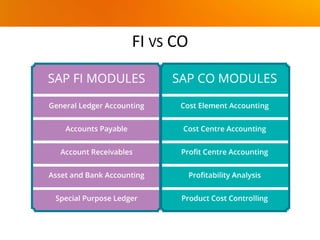
FI VS CO
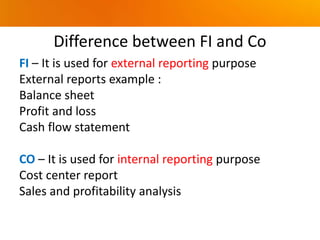
Difference between FI and Co
FI – It is used for external reporting purpose
External reports example :
Balance sheet
Profit and loss
Cash flow statement
CO – It is used for internal reporting purpose
Cost center report
Sales and profitability analysis
Versions in sap
• SAP R/3 4.0:
This was one of the early versions of ECC, introduced in the late 1990s. It provided a client-server
architecture and offered improved integration and scalability compared to its predecessors.
• SAP R/3 4.6:
This version brought significant improvements in terms of stability, performance, and new
functionalities. It introduced the Internet Transaction Server (ITS) and the Business Connector,
enabling web-based access to SAP systems.
• SAP ECC 5.0:
Released in 2004, ECC 5.0 brought enhanced functionality for financials, human resources, and
other modules. It introduced the SAP NetWeaver platform, which provided a common technology
stack for various SAP applications.
• SAP ECC 6.0:
Introduced in 2005, ECC 6.0 represented a major release with numerous enhancements and new
features. It offered improved industry-specific functionalities, better integration capabilities, and
introduced the SAP Enhancement Package concept, allowing customers to selectively activate new
functionalities without performing a full system upgrade.
• SAP ERP 6.0 EHP (Enhancement Package) 7:
This version, released in 2013, is the most recent enhancement package for ECC 6.0. It includes
additional functionalities and industry-specific enhancements.
Cloud vs On premises
Cloud computing involves accessing software
and infrastructure over the internet,
While
On-premises refers to locally installed and
maintained infrastructure.
Benefits of cloud
•
Scalability: Easily adjust your resources up or down based on demand, allowing for flexible and cost-efficient
operations.
• Cost Savings: Avoid upfront investments in hardware and maintenance costs, paying only for the services and
resources you use.
• Accessibility: Access your data and applications from anywhere with an internet connection, enabling remote
work and collaboration.
• Reliability: Cloud providers ensure high availability and minimal downtime through robust infrastructure and
redundancy measures.
• Security: Benefit from advanced security measures implemented by cloud providers, protecting your data and
applications against threats.
• Disaster Recovery: Built-in backup and recovery features in the cloud help safeguard your data and enable faster
recovery in case of incidents.
• Rapid Deployment: Cloud services allow for quick deployment, reducing time-to-market for applications and
services.
• Innovation and Updates: Take advantage of continuous innovation and updates from cloud providers, accessing
the latest technologies without managing upgrades.
• Global Reach: Expand your business globally with the global presence of cloud services, reaching customers in
different regions more easily.
• Integration and Collaboration: Cloud platforms offer integration capabilities, enabling seamless collaboration
between applications and services.
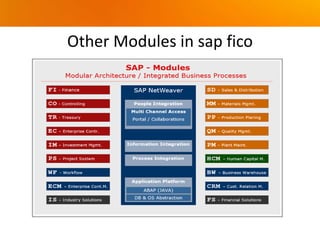
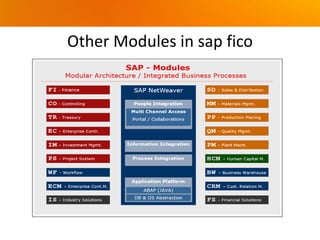
Other Modules in sap fico
S4 HANA
• S – SIMPLE
• 4 – 4 TH UPGRADE VERSION
• HANA
Types of Projects
SAP implementation projects:
These projects involve setting up and configuring SAP software to meet the specific
requirements of a business.
Upgrade projects:
These involve upgrading existing SAP systems to a newer version, which may
include new functionality and features.
Migration projects:
These involve moving data from one system to another, such as moving data from
a legacy system to SAP.
Custom development projects:
These involve developing custom software programs within SAP to meet specific
business requirements.
Integration projects:
These involve integrating SAP with other systems, such as third-party software or
other SAP systems.
Types of Projects cont..
Rollout projects:
These involve implementing SAP in one or more additional
locations, based on the successful implementation of an
initial SAP project.
Support projects:
These involve providing ongoing support for SAP systems,
including maintenance, enhancements, and bug fixes.
Training projects:
These involve developing and delivering training programs
to users and stakeholders to ensure that they are able to
use SAP effectively.
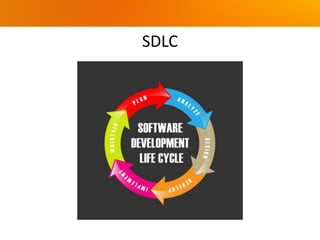
SDLC
ASAP methodology
• ASAP (Accelerated SAP)
• is a methodology developed by SAP to guide
the implementation of SAP software.
• It provides a structured approach for
implementing and managing SAP projects,
from project preparation to
post-implementation support.
Stages of Implementation In SAP
• Project preparation
• Business Blue print
• Realization
• Final Preparation
• GO Live and support
Project preparation phase
• Scope
• Objectives
• Deliverable
• Team meetings
• Kick off meetings
• AS IS
• TO BE
• GAP
Business Blue Print Phase
• Requirement gathering is done
• We will understand the client business process
and will document the business process of the
client
Realization Phase
• Configuration
• Customization – develop custom code
• Testing
Final Preparation
• Finalize system configuration
• Conduct end to end testing
• Cutover activities
• Preparation for cutover
Go Live
Deploy the SAP Into Production

acharya IT trainings

  • 1.
  • 2.
    Sap FICO S- System A-Applications P- Products in Data Processing
  • 3.
    FICO FI stands forFinance CO stands for controlling
  • 4.
  • 5.
    Difference between FIand Co FI – It is used for external reporting purpose External reports example : Balance sheet Profit and loss Cash flow statement CO – It is used for internal reporting purpose Cost center report Sales and profitability analysis
  • 6.
    Versions in sap •SAP R/3 4.0: This was one of the early versions of ECC, introduced in the late 1990s. It provided a client-server architecture and offered improved integration and scalability compared to its predecessors. • SAP R/3 4.6: This version brought significant improvements in terms of stability, performance, and new functionalities. It introduced the Internet Transaction Server (ITS) and the Business Connector, enabling web-based access to SAP systems. • SAP ECC 5.0: Released in 2004, ECC 5.0 brought enhanced functionality for financials, human resources, and other modules. It introduced the SAP NetWeaver platform, which provided a common technology stack for various SAP applications. • SAP ECC 6.0: Introduced in 2005, ECC 6.0 represented a major release with numerous enhancements and new features. It offered improved industry-specific functionalities, better integration capabilities, and introduced the SAP Enhancement Package concept, allowing customers to selectively activate new functionalities without performing a full system upgrade. • SAP ERP 6.0 EHP (Enhancement Package) 7: This version, released in 2013, is the most recent enhancement package for ECC 6.0. It includes additional functionalities and industry-specific enhancements.
  • 7.
    Cloud vs Onpremises Cloud computing involves accessing software and infrastructure over the internet, While On-premises refers to locally installed and maintained infrastructure.
  • 8.
    Benefits of cloud • Scalability:Easily adjust your resources up or down based on demand, allowing for flexible and cost-efficient operations. • Cost Savings: Avoid upfront investments in hardware and maintenance costs, paying only for the services and resources you use. • Accessibility: Access your data and applications from anywhere with an internet connection, enabling remote work and collaboration. • Reliability: Cloud providers ensure high availability and minimal downtime through robust infrastructure and redundancy measures. • Security: Benefit from advanced security measures implemented by cloud providers, protecting your data and applications against threats. • Disaster Recovery: Built-in backup and recovery features in the cloud help safeguard your data and enable faster recovery in case of incidents. • Rapid Deployment: Cloud services allow for quick deployment, reducing time-to-market for applications and services. • Innovation and Updates: Take advantage of continuous innovation and updates from cloud providers, accessing the latest technologies without managing upgrades. • Global Reach: Expand your business globally with the global presence of cloud services, reaching customers in different regions more easily. • Integration and Collaboration: Cloud platforms offer integration capabilities, enabling seamless collaboration between applications and services.
  • 9.
  • 10.
  • 11.
    S4 HANA • S– SIMPLE • 4 – 4 TH UPGRADE VERSION • HANA
  • 12.
    Types of Projects SAPimplementation projects: These projects involve setting up and configuring SAP software to meet the specific requirements of a business. Upgrade projects: These involve upgrading existing SAP systems to a newer version, which may include new functionality and features. Migration projects: These involve moving data from one system to another, such as moving data from a legacy system to SAP. Custom development projects: These involve developing custom software programs within SAP to meet specific business requirements. Integration projects: These involve integrating SAP with other systems, such as third-party software or other SAP systems.
  • 13.
    Types of Projectscont.. Rollout projects: These involve implementing SAP in one or more additional locations, based on the successful implementation of an initial SAP project. Support projects: These involve providing ongoing support for SAP systems, including maintenance, enhancements, and bug fixes. Training projects: These involve developing and delivering training programs to users and stakeholders to ensure that they are able to use SAP effectively.
  • 14.
  • 15.
    ASAP methodology • ASAP(Accelerated SAP) • is a methodology developed by SAP to guide the implementation of SAP software. • It provides a structured approach for implementing and managing SAP projects, from project preparation to post-implementation support.
  • 16.
    Stages of ImplementationIn SAP • Project preparation • Business Blue print • Realization • Final Preparation • GO Live and support
  • 17.
    Project preparation phase •Scope • Objectives • Deliverable • Team meetings • Kick off meetings • AS IS • TO BE • GAP
  • 18.
    Business Blue PrintPhase • Requirement gathering is done • We will understand the client business process and will document the business process of the client
  • 19.
    Realization Phase • Configuration •Customization – develop custom code • Testing
  • 20.
    Final Preparation • Finalizesystem configuration • Conduct end to end testing • Cutover activities • Preparation for cutover
  • 21.
    Go Live Deploy theSAP Into Production