CHAPTER TWO
Overview of Business Processes
2.1. INFORMATION NEEDS AND
BUSINESS PROCESSES
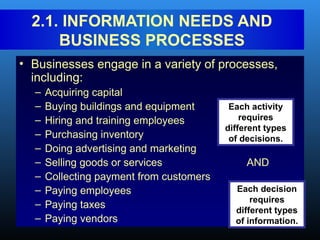
• Businesses engage in a variety of processes,
including:
– Acquiring capital
– Buying buildings and equipment
– Hiring and training employees
– Purchasing inventory
– Doing advertising and marketing
– Selling goods or services AND
– Collecting payment from customers
– Paying employees
– Paying taxes
– Paying vendors
Each activity
requires
different types
of decisions.
Each decision
requires
different types
of information.
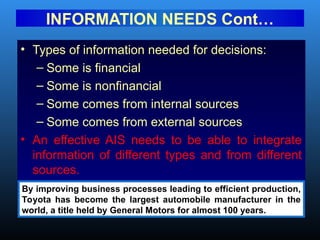
• Types of information needed for decisions:
– Some is financial
– Some is nonfinancial
– Some comes from internal sources
– Some comes from external sources
• An effective AIS needs to be able to integrate
information of different types and from different
sources.
INFORMATION NEEDS Cont…
By improving business processes leading to efficient production,
Toyota has become the largest automobile manufacturer in the
world, a title held by General Motors for almost 100 years.
2.2. INTERACTION WITH EXTERNAL AND
INTERNAL PARTIES
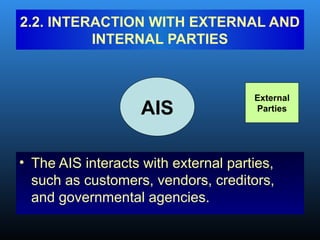
• The AIS interacts with external parties,
such as customers, vendors, creditors,
and governmental agencies.
AIS
External
Parties
INTERACTION WITH Cont…
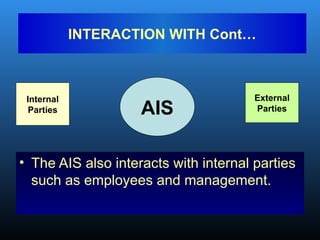
• The AIS also interacts with internal parties
such as employees and management.
AIS
Internal
Parties
External
Parties
INTERACTION WITH Cont…
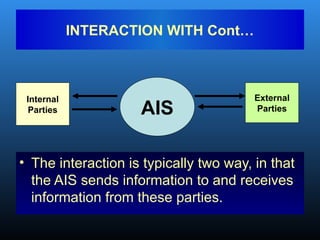
• The interaction is typically two way, in that
the AIS sends information to and receives
information from these parties.
AIS
Internal
Parties
External
Parties
• A transaction is:
– An agreement between two entities to
exchange goods or services; OR
– Any other event that can be measured in
economic terms by an organization.
• EXAMPLES:
– Sell goods to customers
– Depreciate equipment
2.3. BUSINESS CYCLES
• The business transaction cycle is a
process that:
– Begins with capturing data about a
transaction.
– Ends with an information output, such as
financial statements.
BUSINESS CYCLES Cont…
• Many business processes are paired in
give-get exchanges.
• Basic exchanges can be grouped into five
major transaction cycles:
– Revenue cycle
– Expenditure cycle
– Production cycle
– Human resources/payroll cycle
– Financing cycle
BUSINESS CYCLES Cont…
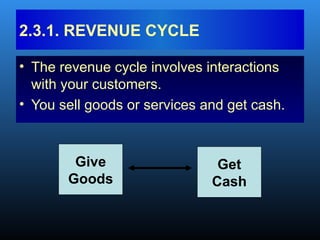
• The revenue cycle involves interactions
with your customers.
• You sell goods or services and get cash.
2.3.1. REVENUE CYCLE
Give
Goods
Get
Cash
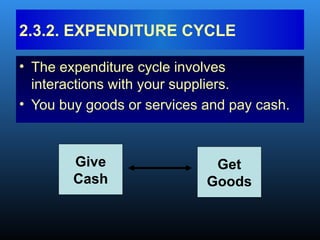
• The expenditure cycle involves
interactions with your suppliers.
• You buy goods or services and pay cash.
2.3.2. EXPENDITURE CYCLE
Give
Cash
Get
Goods
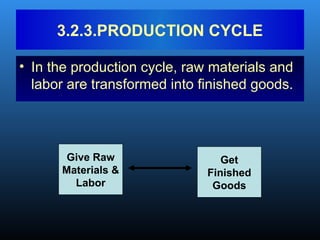
• In the production cycle, raw materials and
labor are transformed into finished goods.
3.2.3.PRODUCTION CYCLE
Give Raw
Materials &
Labor
Get
Finished
Goods
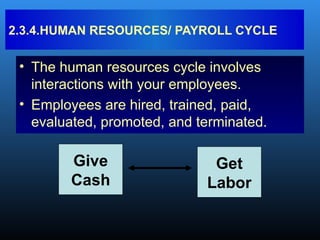
• The human resources cycle involves
interactions with your employees.
• Employees are hired, trained, paid,
evaluated, promoted, and terminated.
2.3.4.HUMAN RESOURCES/ PAYROLL CYCLE
Give
Cash
Get
Labor
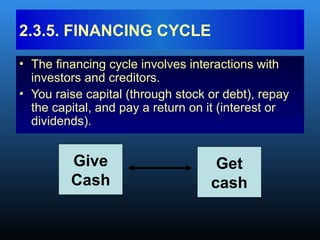
• The financing cycle involves interactions with
investors and creditors.
• You raise capital (through stock or debt), repay
the capital, and pay a return on it (interest or
dividends).
2.3.5. FINANCING CYCLE
Give
Cash
Get
cash
• Thousands of transactions can occur
within any of these cycles.
• But there are relatively few types of
transactions in a cycle.
BUSINESS CYCLES Cont…
• EXAMPLE: In the revenue cycle, the basic
give-get transaction is:
– Give goods
– Get cash
BUSINESS CYCLES
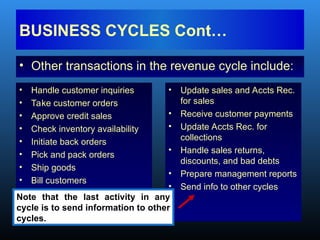
• Other transactions in the revenue cycle include:
BUSINESS CYCLES Cont…
• Handle customer inquiries
• Take customer orders
• Approve credit sales
• Check inventory availability
• Initiate back orders
• Pick and pack orders
• Ship goods
• Bill customers
• Update sales and Accts Rec.
for sales
• Receive customer payments
• Update Accts Rec. for
collections
• Handle sales returns,
discounts, and bad debts
• Prepare management reports
• Send info to other cycles
Note that the last activity in any
cycle is to send information to other
cycles.
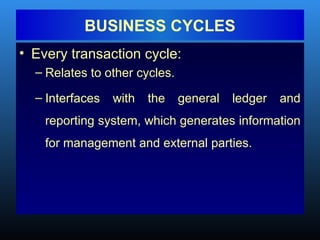
• Every transaction cycle:
– Relates to other cycles.
– Interfaces with the general ledger and
reporting system, which generates information
for management and external parties.
BUSINESS CYCLES
General Ledger
and Reporting
System
Revenue
Cycle
Expenditure
Cycle
Production
Cycle
Human Res./
Payroll Cycle
Financing
Cycle
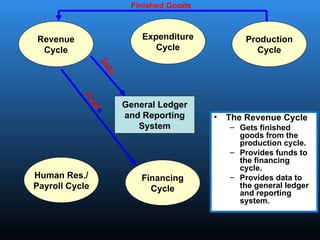
• The Revenue Cycle
– Gets finished
goods from the
production cycle.
– Provides funds to
the financing
cycle.
– Provides data to
the general ledger
and reporting
system.
Finished Goods
F
u
n
d
s
D
a
t
a
General Ledger
and Reporting
System
Revenue
Cycle
Expenditure
Cycle
Production
Cycle
Human Res./
Payroll Cycle
Financing
Cycle
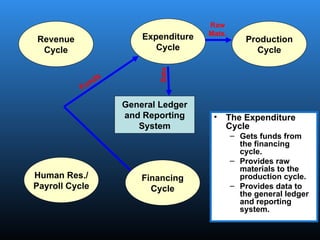
• The Expenditure
Cycle
– Gets funds from
the financing
cycle.
– Provides raw
materials to the
production cycle.
– Provides data to
the general ledger
and reporting
system.
Funds
Raw
Mats.
Data
General Ledger
and Reporting
System
Revenue
Cycle
Expenditure
Cycle
Production
Cycle
Human Res./
Payroll Cycle
Financing
Cycle
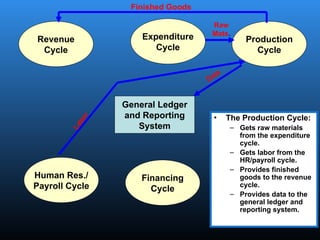
• The Production Cycle:
– Gets raw materials
from the expenditure
cycle.
– Gets labor from the
HR/payroll cycle.
– Provides finished
goods to the revenue
cycle.
– Provides data to the
general ledger and
reporting system.
Raw
Mats.
Data
Finished Goods
L
a
b
o
r
General Ledger
and Reporting
System
Revenue
Cycle
Expenditure
Cycle
Production
Cycle
Human Res./
Payroll Cycle
Financing
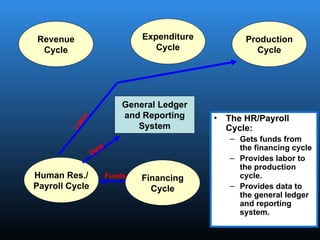
Cycle
• The HR/Payroll
Cycle:
– Gets funds from
the financing cycle
– Provides labor to
the production
cycle.
– Provides data to
the general ledger
and reporting
system.
L
a
b
o
r
Funds
Data
General Ledger
and Reporting
System
Revenue
Cycle
Expenditure
Cycle
Production
Cycle
Human Res./
Payroll Cycle
Financing
Cycle
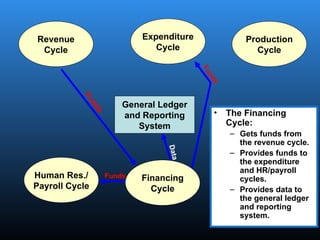
• The Financing
Cycle:
– Gets funds from
the revenue cycle.
– Provides funds to
the expenditure
and HR/payroll
cycles.
– Provides data to
the general ledger
and reporting
system.
Funds
D
a
t
a
F
u
n
d
s
F
u
n
d
s
General Ledger
and Reporting
System
Revenue
Cycle
Expenditure
Cycle
Production
Cycle
Human Res./
Payroll Cycle
Financing
Cycle
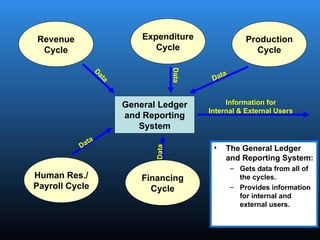
• The General Ledger
and Reporting System:
– Gets data from all of
the cycles.
– Provides information
for internal and
external users.
Information for
Internal & External Users
Data
Data
Data
Data
D
a
t
a
• Many accounting software packages
implement the different transaction cycles
as separate modules.
– Not every module is needed in every
organization, e.g., retail companies don’t have
a production cycle.
– Some companies may need extra modules.
– The implementation of each transaction cycle
can differ significantly across companies.
Business Cont…
• However the cycles are implemented, it is
critical that the AIS be able to:
– Accommodate the information needs of
managers.
– Integrate financial and nonfinancial data.
BUSINESS CYCLES
• Accountants play an important role in data
processing. They answer questions such as:
– What data should be entered and stored?
– Who should be able to access the data?
– How should the data be organized, updated, stored,
accessed, and retrieved?
– How can scheduled and unanticipated information
needs be met?
• To answer these questions, they must
understand data processing concepts.
2.4. TRANSACTION PROCESSING:
THE DATA PROCESSING CYCLE
• An important function of the AIS is to
efficiently and effectively process the data
about a company’s transactions.
– In manual systems, data is entered into paper
journals and ledgers.
– In computer-based systems, the series of
operations performed on data is referred to as
the data processing cycle.
TRANSACTION PROCESSING:
THE DATA PROCESSING CYCLE
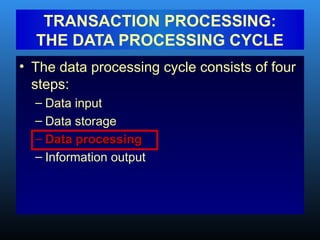
• The data processing cycle consists of four
steps:
– Data input
– Data storage
– Data processing
– Information output
TRANSACTION PROCESSING:
THE DATA PROCESSING CYCLE
• The first step in data processing is to
capture the data.
• Usually triggered by a business activity.
• Data is captured about:
– The event that occurred.
– The resources affected by the event.
– The agents who participated.
2.4.1. DATA INPUT
• Data needs to be organized for easy and
efficient access.
• Let’s start with some defining basic
vocabulary terms with respect to data
storage.
2.4.2.DATA STORAGE
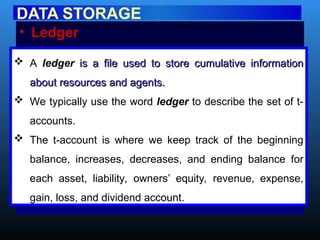
• Ledger
DATA STORAGE
 A ledger is a file used to store cumulative information
is a file used to store cumulative information
about resources and agents.
 We typically use the word ledger to describe the set of t-
accounts.
 The t-account is where we keep track of the beginning
balance, increases, decreases, and ending balance for
each asset, liability, owners’ equity, revenue, expense,
gain, loss, and dividend account.
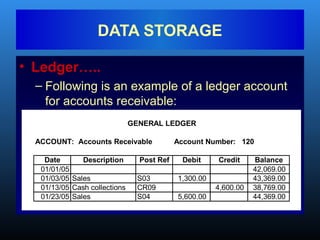
• Ledger…..
– Following is an example of a ledger account
for accounts receivable:
DATA STORAGE
ACCOUNT: Accounts Receivable Account Number: 120
Date Description Post Ref Debit Credit Balance
01/01/05 42,069.00
01/03/05 Sales S03 1,300.00 43,369.00
01/13/05 Cash collections CR09 4,600.00 38,769.00
01/23/05 Sales S04 5,600.00 44,369.00
GENERAL LEDGER
• Ledgers can be General Ledger or
Subsidiary ledger
• General ledger
DATA STORAGE
The general ledger is the summary level
information for all accounts. Detail information is
not kept in this account.
• General ledger example
DATA STORAGE
Example: Suppose XYZ Co. has three
customers. Adam owes XYZ $100. Bira owes
$200. And Chala owes XYZ $300. The balance in
accounts receivable in the general ledger will be
$600, but you will not be able to tell how much
individual customers owe by looking at that
account. The detail isn’t there.
diary ledger
DATA STORAGE
The subsidiary ledgers contain the detail
accounts associated with the related general
ledger account. The accounts receivable
subsidiary ledger will contain three separate
t-accounts—one for Adam, one for Bira, and one
for Chala.
• Subsidiary ledger…..
DATA STORAGE
The related general ledger account is often
called a “control” account.
The sum of the subsidiary account balances
should equal the balance in the control
account.
• Coding techniques for Ledgers
DATA STORAGE
• Coding is a method of systematically assigning
numbers or letters to data items to help classify
and organize them. There are many types of codes
including:
– Sequence codes
– Block codes
– Group codes
• Sequence Codes
DATA STORAGE
• With sequence codes, items (such as checks or
invoices) are numbered consecutively to ensure no
gaps in the sequence. The numbering helps ensure
that:
– All items are accounted for.
– There are no duplicated numbers, which would
suggest errors or fraud.
E.g. Sales orders, purchase orders, checks,
receiving reports….
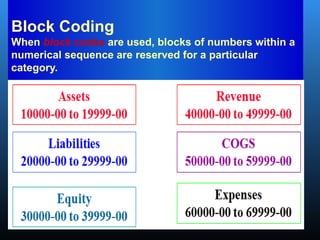
Block Coding
When block codes are used, blocks of numbers within a
numerical sequence are reserved for a particular
category.
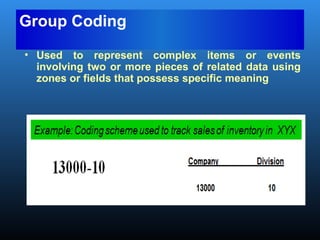
Group Coding
• Used to represent complex items or events
involving two or more pieces of related data using
zones or fields that possess specific meaning
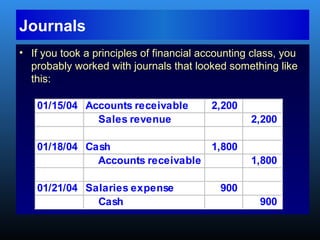
• If you took a principles of financial accounting class, you
probably worked with journals that looked something like
this:
01/15/04 Accounts receivable 2,200
Sales revenue 2,200
01/18/04 Cash 1,800
Accounts receivable 1,800
01/21/04 Salaries expense 900
Cash 900
Journals
Audit trail
DATA STORAGE
• An audit trail exists when there is sufficient
there is sufficient
documentation to allow the tracing of a
transaction from beginning to end or from the
end back to the beginning.
• The inclusion of posting references and
references and
document numbers enable the tracing of
transactions through the journals and ledgers
and therefore facilitate the audit trail.
• Now let’s move on to discussing some
computer-based storage concepts, including:
– Entity
– Attribute
– Record
– Data Value
– Field
– File
– Master File
– Transaction File
– Database
2.5. COMPUTER-BASED STORAGE CONCEPTS
• An entity is something about which information
is stored.
• In your university’s student information system,
one entity is the student.
one entity is the student. The student
information system stores information about
students.
COMPUTER-BASED STORAGE
CONCEPTS
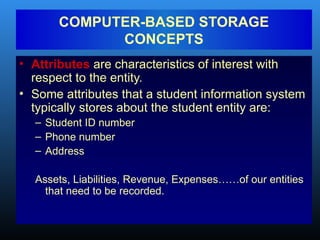
• Attributes are characteristics of interest with
respect to the entity.
• Some attributes that a student information system
typically stores about the student entity are:
– Student ID number
– Phone number
– Address
Assets, Liabilities, Revenue, Expenses……of our entities
that need to be recorded.
COMPUTER-BASED STORAGE
CONCEPTS
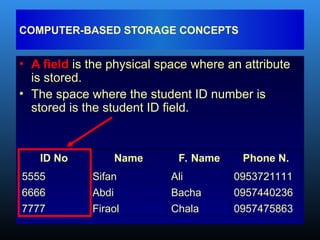
• A field is the physical space where an attribute
is stored.
• The space where the student ID number is
stored is the student ID field.
COMPUTER-BASED STORAGE CONCEPTS
ID No Name F. Name Phone N.
5555 Sifan Ali 0953721111
6666 Abdi Bacha 0957440236
7777 Firaol Chala 0957475863
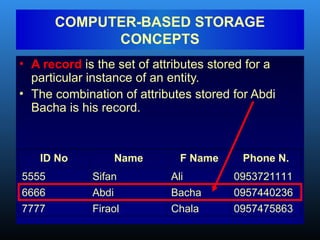
• A record is the set of attributes stored for a
particular instance of an entity.
• The combination of attributes stored for Abdi
Bacha is his record.
COMPUTER-BASED STORAGE
CONCEPTS
ID No Name F Name Phone N.
5555 Sifan Ali 0953721111
6666 Abdi Bacha 0957440236
7777 Firaol Chala 0957475863
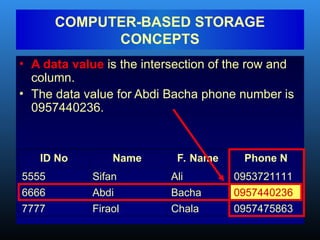
• A data value is the intersection of the row and
column.
• The data value for Abdi Bacha phone number is
0957440236.
COMPUTER-BASED STORAGE
CONCEPTS
ID No Name F. Name Phone N
5555 Sifan Ali 0953721111
6666 Abdi Bacha 0957440236
7777 Firaol Chala 0957475863
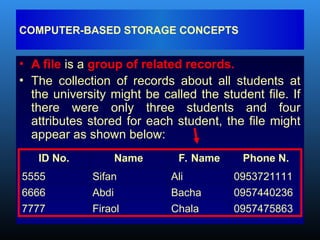
• A file is a group of related records.
• The collection of records about all students at
the university might be called the student file. If
there were only three students and four
attributes stored for each student, the file might
appear as shown below:
COMPUTER-BASED STORAGE CONCEPTS
ID No. Name F. Name Phone N.
5555 Sifan Ali 0953721111
6666 Abdi Bacha 0957440236
7777 Firaol Chala 0957475863
• A master file is a file that stores
cumulative information about an
organization’s entities.
• It is conceptually similar to a ledger in a
manual AIS in that:
– The file is permanent.
– The file exists across fiscal periods.
– Changes are made to the file to reflect the
effects of new transactions.
COMPUTER-BASED STORAGE CONCEPTS
• A transaction file is a file that contains
records of individual transactions (events)
that occur during a fiscal period.
• It is conceptually similar to a journal in a
manual AIS in that:
– The files are temporary.
– The files are usually maintained for one fiscal
period.
COMPUTER-BASED STORAGE CONCEPTS
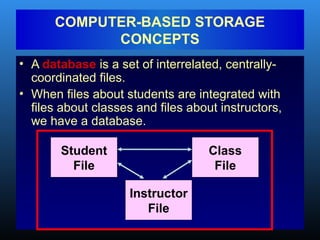
• A database is a set of interrelated, centrally-
coordinated files.
• When files about students are integrated with
files about classes and files about instructors,
we have a database.
COMPUTER-BASED STORAGE
CONCEPTS
Student
File
Class
File
Instructor
File
• The data processing cycle consists of four
steps:
– Data input
– Data storage
– Data processing
Data processing
– Information output
TRANSACTION PROCESSING:
THE DATA PROCESSING CYCLE
• Once data about a business activity has
been collected and entered into a system,
it must be processed.
2.6. DATA PROCESSING
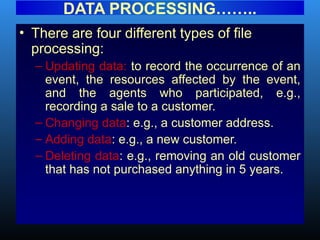
• There are four different types of file
processing:
– Updating data: to record the occurrence of an
event, the resources affected by the event,
and the agents who participated, e.g.,
recording a sale to a customer.
– Changing data: e.g., a customer address.
– Adding data: e.g., a new customer.
– Deleting data: e.g., removing an old customer
that has not purchased anything in 5 years.
DATA PROCESSING……..
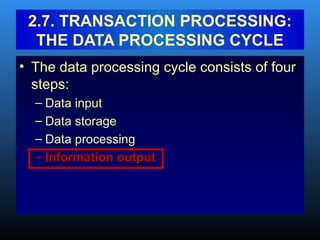
• The data processing cycle consists of four
steps:
– Data input
– Data storage
– Data processing
– Information output
Information output
2.7. TRANSACTION PROCESSING:
THE DATA PROCESSING CYCLE
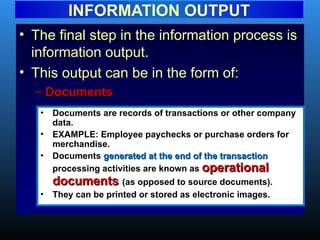
• The final step in the information process is
information output.
• This output can be in the form of:
– Documents
Documents
INFORMATION OUTPUT
• Documents are records of transactions or other company
data.
• EXAMPLE: Employee paychecks or purchase orders for
merchandise.
• Documents generated at the end of the transaction
generated at the end of the transaction
processing activities are known as operational
operational
documents
documents (as opposed to source documents).
• They can be printed or stored as electronic images.
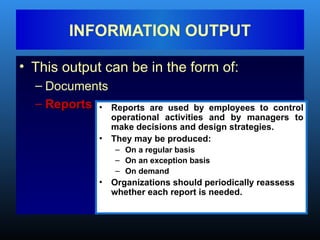
• This output can be in the form of:
– Documents
– Reports
Reports
INFORMATION OUTPUT
• Reports are used by employees to control
operational activities and by managers to
make decisions and design strategies.
• They may be produced:
– On a regular basis
– On an exception basis
– On demand
• Organizations should periodically reassess
whether each report is needed.
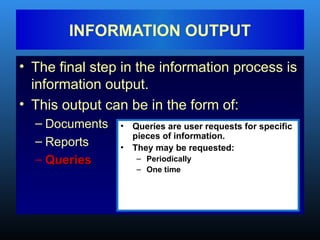
• The final step in the information process is
information output.
• This output can be in the form of:
– Documents
– Reports
– Queries
Queries
INFORMATION OUTPUT
• Queries are user requests for specific
pieces of information.
• They may be requested:
– Periodically
– One time
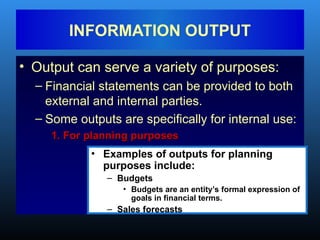
• Output can serve a variety of purposes:
– Financial statements can be provided to both
external and internal parties.
– Some outputs are specifically for internal use:
1. For planning purposes
INFORMATION OUTPUT
• Examples of outputs for planning
purposes include:
– Budgets
• Budgets are an entity’s formal expression of
goals in financial terms.
– Sales forecasts
2. For management of day-to-day operations
INFORMATION OUTPUT
• Example: Delivery schedules
3. For control purposes
• Performance reports are outputs that are
used for control purposes.
• These reports compare an organization’s
standard or expected performance with
its actual outcomes.
• Management by exception is an
approach to utilizing performance
reports that focuses on investigating and
acting on only those variances that are
significant.
4. For evaluation purposes
INFORMATION OUTPUT
• These outputs might include:
– Surveys of customer satisfaction.
– Reports on employee error rates.
• The traditional AIS captured financial data.
– Non-financial data was captured in other,
sometimes-redundant systems
• Enterprise Resource Planning (ERP) systems
are designed to integrate all aspects of a
company’s operations (including both
financial and non-financial information) with
the traditional functions of an AIS.
2.8. ROLE OF THE AIS
• End of Chapter Two!!

Accounting Information System Chapter 02.ppt

  • 1.
    CHAPTER TWO Overview ofBusiness Processes
  • 2.
    2.1. INFORMATION NEEDSAND BUSINESS PROCESSES • Businesses engage in a variety of processes, including: – Acquiring capital – Buying buildings and equipment – Hiring and training employees – Purchasing inventory – Doing advertising and marketing – Selling goods or services AND – Collecting payment from customers – Paying employees – Paying taxes – Paying vendors Each activity requires different types of decisions. Each decision requires different types of information.
  • 3.
    • Types ofinformation needed for decisions: – Some is financial – Some is nonfinancial – Some comes from internal sources – Some comes from external sources • An effective AIS needs to be able to integrate information of different types and from different sources. INFORMATION NEEDS Cont… By improving business processes leading to efficient production, Toyota has become the largest automobile manufacturer in the world, a title held by General Motors for almost 100 years.
  • 4.
    2.2. INTERACTION WITHEXTERNAL AND INTERNAL PARTIES • The AIS interacts with external parties, such as customers, vendors, creditors, and governmental agencies. AIS External Parties
  • 5.
    INTERACTION WITH Cont… •The AIS also interacts with internal parties such as employees and management. AIS Internal Parties External Parties
  • 6.
    INTERACTION WITH Cont… •The interaction is typically two way, in that the AIS sends information to and receives information from these parties. AIS Internal Parties External Parties
  • 7.
    • A transactionis: – An agreement between two entities to exchange goods or services; OR – Any other event that can be measured in economic terms by an organization. • EXAMPLES: – Sell goods to customers – Depreciate equipment 2.3. BUSINESS CYCLES
  • 8.
    • The businesstransaction cycle is a process that: – Begins with capturing data about a transaction. – Ends with an information output, such as financial statements. BUSINESS CYCLES Cont…
  • 9.
    • Many businessprocesses are paired in give-get exchanges. • Basic exchanges can be grouped into five major transaction cycles: – Revenue cycle – Expenditure cycle – Production cycle – Human resources/payroll cycle – Financing cycle BUSINESS CYCLES Cont…
  • 10.
    • The revenuecycle involves interactions with your customers. • You sell goods or services and get cash. 2.3.1. REVENUE CYCLE Give Goods Get Cash
  • 11.
    • The expenditurecycle involves interactions with your suppliers. • You buy goods or services and pay cash. 2.3.2. EXPENDITURE CYCLE Give Cash Get Goods
  • 12.
    • In theproduction cycle, raw materials and labor are transformed into finished goods. 3.2.3.PRODUCTION CYCLE Give Raw Materials & Labor Get Finished Goods
  • 13.
    • The humanresources cycle involves interactions with your employees. • Employees are hired, trained, paid, evaluated, promoted, and terminated. 2.3.4.HUMAN RESOURCES/ PAYROLL CYCLE Give Cash Get Labor
  • 14.
    • The financingcycle involves interactions with investors and creditors. • You raise capital (through stock or debt), repay the capital, and pay a return on it (interest or dividends). 2.3.5. FINANCING CYCLE Give Cash Get cash
  • 15.
    • Thousands oftransactions can occur within any of these cycles. • But there are relatively few types of transactions in a cycle. BUSINESS CYCLES Cont…
  • 16.
    • EXAMPLE: Inthe revenue cycle, the basic give-get transaction is: – Give goods – Get cash BUSINESS CYCLES
  • 17.
    • Other transactionsin the revenue cycle include: BUSINESS CYCLES Cont… • Handle customer inquiries • Take customer orders • Approve credit sales • Check inventory availability • Initiate back orders • Pick and pack orders • Ship goods • Bill customers • Update sales and Accts Rec. for sales • Receive customer payments • Update Accts Rec. for collections • Handle sales returns, discounts, and bad debts • Prepare management reports • Send info to other cycles Note that the last activity in any cycle is to send information to other cycles.
  • 18.
    • Every transactioncycle: – Relates to other cycles. – Interfaces with the general ledger and reporting system, which generates information for management and external parties. BUSINESS CYCLES
  • 19.
    General Ledger and Reporting System Revenue Cycle Expenditure Cycle Production Cycle HumanRes./ Payroll Cycle Financing Cycle • The Revenue Cycle – Gets finished goods from the production cycle. – Provides funds to the financing cycle. – Provides data to the general ledger and reporting system. Finished Goods F u n d s D a t a
  • 20.
    General Ledger and Reporting System Revenue Cycle Expenditure Cycle Production Cycle HumanRes./ Payroll Cycle Financing Cycle • The Expenditure Cycle – Gets funds from the financing cycle. – Provides raw materials to the production cycle. – Provides data to the general ledger and reporting system. Funds Raw Mats. Data
  • 21.
    General Ledger and Reporting System Revenue Cycle Expenditure Cycle Production Cycle HumanRes./ Payroll Cycle Financing Cycle • The Production Cycle: – Gets raw materials from the expenditure cycle. – Gets labor from the HR/payroll cycle. – Provides finished goods to the revenue cycle. – Provides data to the general ledger and reporting system. Raw Mats. Data Finished Goods L a b o r
  • 22.
    General Ledger and Reporting System Revenue Cycle Expenditure Cycle Production Cycle HumanRes./ Payroll Cycle Financing Cycle • The HR/Payroll Cycle: – Gets funds from the financing cycle – Provides labor to the production cycle. – Provides data to the general ledger and reporting system. L a b o r Funds Data
  • 23.
    General Ledger and Reporting System Revenue Cycle Expenditure Cycle Production Cycle HumanRes./ Payroll Cycle Financing Cycle • The Financing Cycle: – Gets funds from the revenue cycle. – Provides funds to the expenditure and HR/payroll cycles. – Provides data to the general ledger and reporting system. Funds D a t a F u n d s F u n d s
  • 24.
    General Ledger and Reporting System Revenue Cycle Expenditure Cycle Production Cycle HumanRes./ Payroll Cycle Financing Cycle • The General Ledger and Reporting System: – Gets data from all of the cycles. – Provides information for internal and external users. Information for Internal & External Users Data Data Data Data D a t a
  • 25.
    • Many accountingsoftware packages implement the different transaction cycles as separate modules. – Not every module is needed in every organization, e.g., retail companies don’t have a production cycle. – Some companies may need extra modules. – The implementation of each transaction cycle can differ significantly across companies. Business Cont…
  • 26.
    • However thecycles are implemented, it is critical that the AIS be able to: – Accommodate the information needs of managers. – Integrate financial and nonfinancial data. BUSINESS CYCLES
  • 27.
    • Accountants playan important role in data processing. They answer questions such as: – What data should be entered and stored? – Who should be able to access the data? – How should the data be organized, updated, stored, accessed, and retrieved? – How can scheduled and unanticipated information needs be met? • To answer these questions, they must understand data processing concepts. 2.4. TRANSACTION PROCESSING: THE DATA PROCESSING CYCLE
  • 28.
    • An importantfunction of the AIS is to efficiently and effectively process the data about a company’s transactions. – In manual systems, data is entered into paper journals and ledgers. – In computer-based systems, the series of operations performed on data is referred to as the data processing cycle. TRANSACTION PROCESSING: THE DATA PROCESSING CYCLE
  • 29.
    • The dataprocessing cycle consists of four steps: – Data input – Data storage – Data processing – Information output TRANSACTION PROCESSING: THE DATA PROCESSING CYCLE
  • 30.
    • The firststep in data processing is to capture the data. • Usually triggered by a business activity. • Data is captured about: – The event that occurred. – The resources affected by the event. – The agents who participated. 2.4.1. DATA INPUT
  • 31.
    • Data needsto be organized for easy and efficient access. • Let’s start with some defining basic vocabulary terms with respect to data storage. 2.4.2.DATA STORAGE
  • 32.
    • Ledger DATA STORAGE A ledger is a file used to store cumulative information is a file used to store cumulative information about resources and agents. about resources and agents.  We typically use the word ledger to describe the set of t- accounts.  The t-account is where we keep track of the beginning balance, increases, decreases, and ending balance for each asset, liability, owners’ equity, revenue, expense, gain, loss, and dividend account.
  • 33.
    • Ledger….. – Followingis an example of a ledger account for accounts receivable: DATA STORAGE ACCOUNT: Accounts Receivable Account Number: 120 Date Description Post Ref Debit Credit Balance 01/01/05 42,069.00 01/03/05 Sales S03 1,300.00 43,369.00 01/13/05 Cash collections CR09 4,600.00 38,769.00 01/23/05 Sales S04 5,600.00 44,369.00 GENERAL LEDGER
  • 34.
    • Ledgers canbe General Ledger or Subsidiary ledger • General ledger DATA STORAGE The general ledger is the summary level information for all accounts. Detail information is not kept in this account.
  • 35.
    • General ledgerexample DATA STORAGE Example: Suppose XYZ Co. has three customers. Adam owes XYZ $100. Bira owes $200. And Chala owes XYZ $300. The balance in accounts receivable in the general ledger will be $600, but you will not be able to tell how much individual customers owe by looking at that account. The detail isn’t there.
  • 36.
    diary ledger DATA STORAGE Thesubsidiary ledgers contain the detail accounts associated with the related general ledger account. The accounts receivable subsidiary ledger will contain three separate t-accounts—one for Adam, one for Bira, and one for Chala.
  • 37.
    • Subsidiary ledger….. DATASTORAGE The related general ledger account is often called a “control” account. The sum of the subsidiary account balances should equal the balance in the control account.
  • 38.
    • Coding techniquesfor Ledgers DATA STORAGE • Coding is a method of systematically assigning numbers or letters to data items to help classify and organize them. There are many types of codes including: – Sequence codes – Block codes – Group codes
  • 39.
    • Sequence Codes DATASTORAGE • With sequence codes, items (such as checks or invoices) are numbered consecutively to ensure no gaps in the sequence. The numbering helps ensure that: – All items are accounted for. – There are no duplicated numbers, which would suggest errors or fraud. E.g. Sales orders, purchase orders, checks, receiving reports….
  • 40.
    Block Coding When blockcodes are used, blocks of numbers within a numerical sequence are reserved for a particular category.
  • 41.
    Group Coding • Usedto represent complex items or events involving two or more pieces of related data using zones or fields that possess specific meaning
  • 42.
    • If youtook a principles of financial accounting class, you probably worked with journals that looked something like this: 01/15/04 Accounts receivable 2,200 Sales revenue 2,200 01/18/04 Cash 1,800 Accounts receivable 1,800 01/21/04 Salaries expense 900 Cash 900 Journals
  • 43.
    Audit trail DATA STORAGE •An audit trail exists when there is sufficient there is sufficient documentation to allow the tracing of a documentation to allow the tracing of a transaction from beginning to end or from the transaction from beginning to end or from the end back to the beginning. end back to the beginning. • The inclusion of posting references and references and document numbers enable the tracing of document numbers enable the tracing of transactions through the journals and ledgers transactions through the journals and ledgers and therefore facilitate the audit trail. and therefore facilitate the audit trail.
  • 44.
    • Now let’smove on to discussing some computer-based storage concepts, including: – Entity – Attribute – Record – Data Value – Field – File – Master File – Transaction File – Database 2.5. COMPUTER-BASED STORAGE CONCEPTS
  • 45.
    • An entityis something about which information is stored. • In your university’s student information system, one entity is the student. one entity is the student. The student information system stores information about students. COMPUTER-BASED STORAGE CONCEPTS
  • 46.
    • Attributes arecharacteristics of interest with respect to the entity. • Some attributes that a student information system typically stores about the student entity are: – Student ID number – Phone number – Address Assets, Liabilities, Revenue, Expenses……of our entities that need to be recorded. COMPUTER-BASED STORAGE CONCEPTS
  • 47.
    • A fieldis the physical space where an attribute is stored. • The space where the student ID number is stored is the student ID field. COMPUTER-BASED STORAGE CONCEPTS ID No Name F. Name Phone N. 5555 Sifan Ali 0953721111 6666 Abdi Bacha 0957440236 7777 Firaol Chala 0957475863
  • 48.
    • A recordis the set of attributes stored for a particular instance of an entity. • The combination of attributes stored for Abdi Bacha is his record. COMPUTER-BASED STORAGE CONCEPTS ID No Name F Name Phone N. 5555 Sifan Ali 0953721111 6666 Abdi Bacha 0957440236 7777 Firaol Chala 0957475863
  • 49.
    • A datavalue is the intersection of the row and column. • The data value for Abdi Bacha phone number is 0957440236. COMPUTER-BASED STORAGE CONCEPTS ID No Name F. Name Phone N 5555 Sifan Ali 0953721111 6666 Abdi Bacha 0957440236 7777 Firaol Chala 0957475863
  • 50.
    • A fileis a group of related records. • The collection of records about all students at the university might be called the student file. If there were only three students and four attributes stored for each student, the file might appear as shown below: COMPUTER-BASED STORAGE CONCEPTS ID No. Name F. Name Phone N. 5555 Sifan Ali 0953721111 6666 Abdi Bacha 0957440236 7777 Firaol Chala 0957475863
  • 51.
    • A masterfile is a file that stores cumulative information about an organization’s entities. • It is conceptually similar to a ledger in a manual AIS in that: – The file is permanent. – The file exists across fiscal periods. – Changes are made to the file to reflect the effects of new transactions. COMPUTER-BASED STORAGE CONCEPTS
  • 52.
    • A transactionfile is a file that contains records of individual transactions (events) that occur during a fiscal period. • It is conceptually similar to a journal in a manual AIS in that: – The files are temporary. – The files are usually maintained for one fiscal period. COMPUTER-BASED STORAGE CONCEPTS
  • 53.
    • A databaseis a set of interrelated, centrally- coordinated files. • When files about students are integrated with files about classes and files about instructors, we have a database. COMPUTER-BASED STORAGE CONCEPTS Student File Class File Instructor File
  • 54.
    • The dataprocessing cycle consists of four steps: – Data input – Data storage – Data processing Data processing – Information output TRANSACTION PROCESSING: THE DATA PROCESSING CYCLE
  • 55.
    • Once dataabout a business activity has been collected and entered into a system, it must be processed. 2.6. DATA PROCESSING
  • 56.
    • There arefour different types of file processing: – Updating data: to record the occurrence of an event, the resources affected by the event, and the agents who participated, e.g., recording a sale to a customer. – Changing data: e.g., a customer address. – Adding data: e.g., a new customer. – Deleting data: e.g., removing an old customer that has not purchased anything in 5 years. DATA PROCESSING……..
  • 57.
    • The dataprocessing cycle consists of four steps: – Data input – Data storage – Data processing – Information output Information output 2.7. TRANSACTION PROCESSING: THE DATA PROCESSING CYCLE
  • 58.
    • The finalstep in the information process is information output. • This output can be in the form of: – Documents Documents INFORMATION OUTPUT • Documents are records of transactions or other company data. • EXAMPLE: Employee paychecks or purchase orders for merchandise. • Documents generated at the end of the transaction generated at the end of the transaction processing activities are known as operational operational documents documents (as opposed to source documents). • They can be printed or stored as electronic images.
  • 59.
    • This outputcan be in the form of: – Documents – Reports Reports INFORMATION OUTPUT • Reports are used by employees to control operational activities and by managers to make decisions and design strategies. • They may be produced: – On a regular basis – On an exception basis – On demand • Organizations should periodically reassess whether each report is needed.
  • 60.
    • The finalstep in the information process is information output. • This output can be in the form of: – Documents – Reports – Queries Queries INFORMATION OUTPUT • Queries are user requests for specific pieces of information. • They may be requested: – Periodically – One time
  • 61.
    • Output canserve a variety of purposes: – Financial statements can be provided to both external and internal parties. – Some outputs are specifically for internal use: 1. For planning purposes 1. For planning purposes INFORMATION OUTPUT • Examples of outputs for planning purposes include: – Budgets • Budgets are an entity’s formal expression of goals in financial terms. – Sales forecasts
  • 62.
    2. For managementof day-to-day operations 2. For management of day-to-day operations INFORMATION OUTPUT • Example: Delivery schedules 3. For control purposes 3. For control purposes • Performance reports are outputs that are used for control purposes. • These reports compare an organization’s standard or expected performance with its actual outcomes. • Management by exception is an approach to utilizing performance reports that focuses on investigating and acting on only those variances that are significant.
  • 63.
    4. For evaluationpurposes 4. For evaluation purposes INFORMATION OUTPUT • These outputs might include: – Surveys of customer satisfaction. – Reports on employee error rates.
  • 64.
    • The traditionalAIS captured financial data. – Non-financial data was captured in other, sometimes-redundant systems • Enterprise Resource Planning (ERP) systems are designed to integrate all aspects of a company’s operations (including both financial and non-financial information) with the traditional functions of an AIS. 2.8. ROLE OF THE AIS
  • 65.
    • End ofChapter Two!!