Campus Management System
Presentation By
Max Intelligence
http://max-intell.com
ABOUT ACADMAX
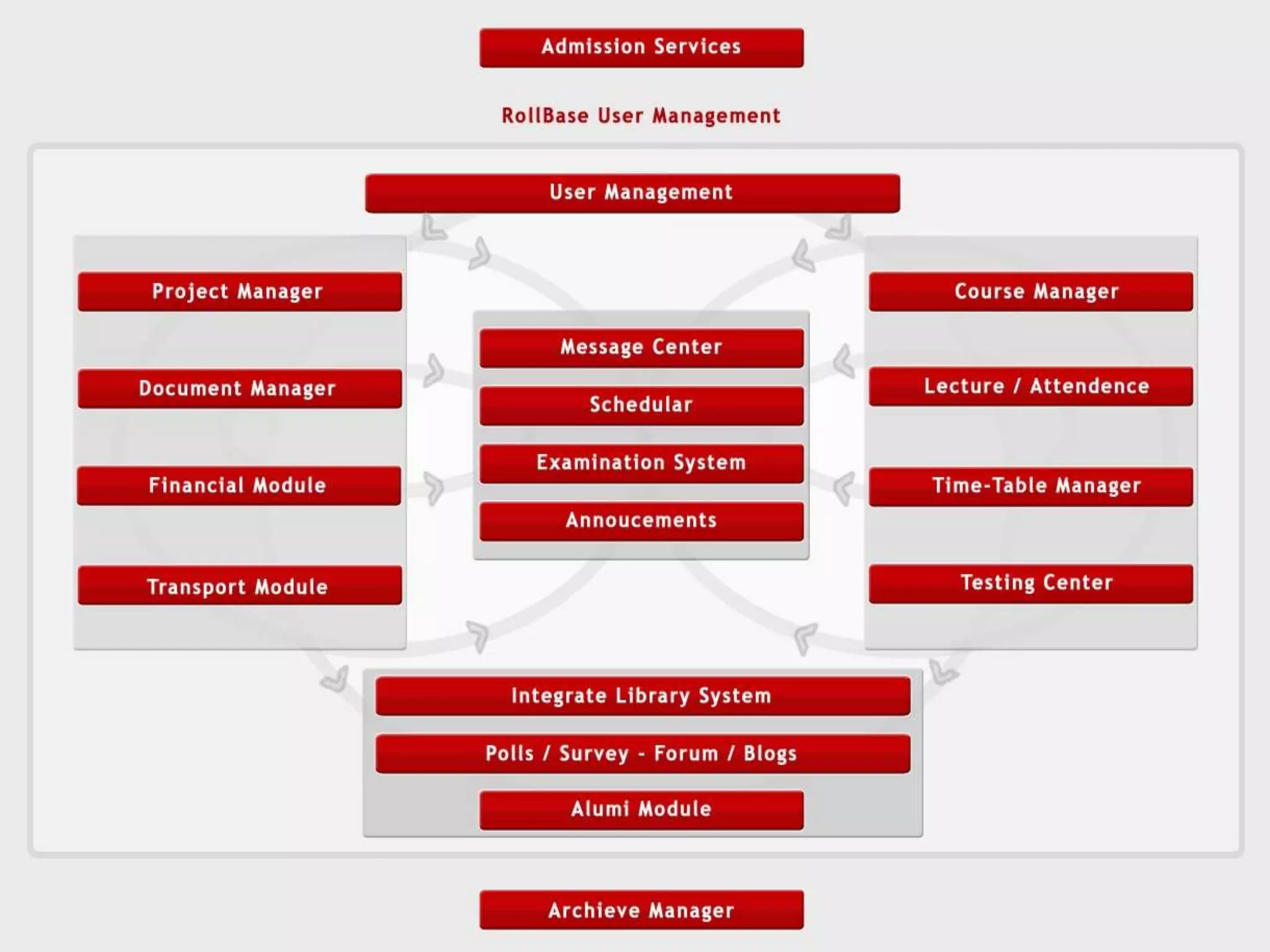
• The university lifecycle is the focus of Acadmax
Campus Solution. It will help to manage the entire
student, teacher and employees lifecycle seamlessly –
from recruiting of student to admission, through
student services and alumni relationship – in a secure
and stable environment.
• Throughout the student lifecycle, Acadmax Campus
Solutions drives efficiency and productivity in all
business processes – so university can focus time and
resources on the objectives that define the success of
the institute.
• With Acadmax Campus Solution, information delivery
is role-based, so students, teachers and university
staff see exactly the information they need.
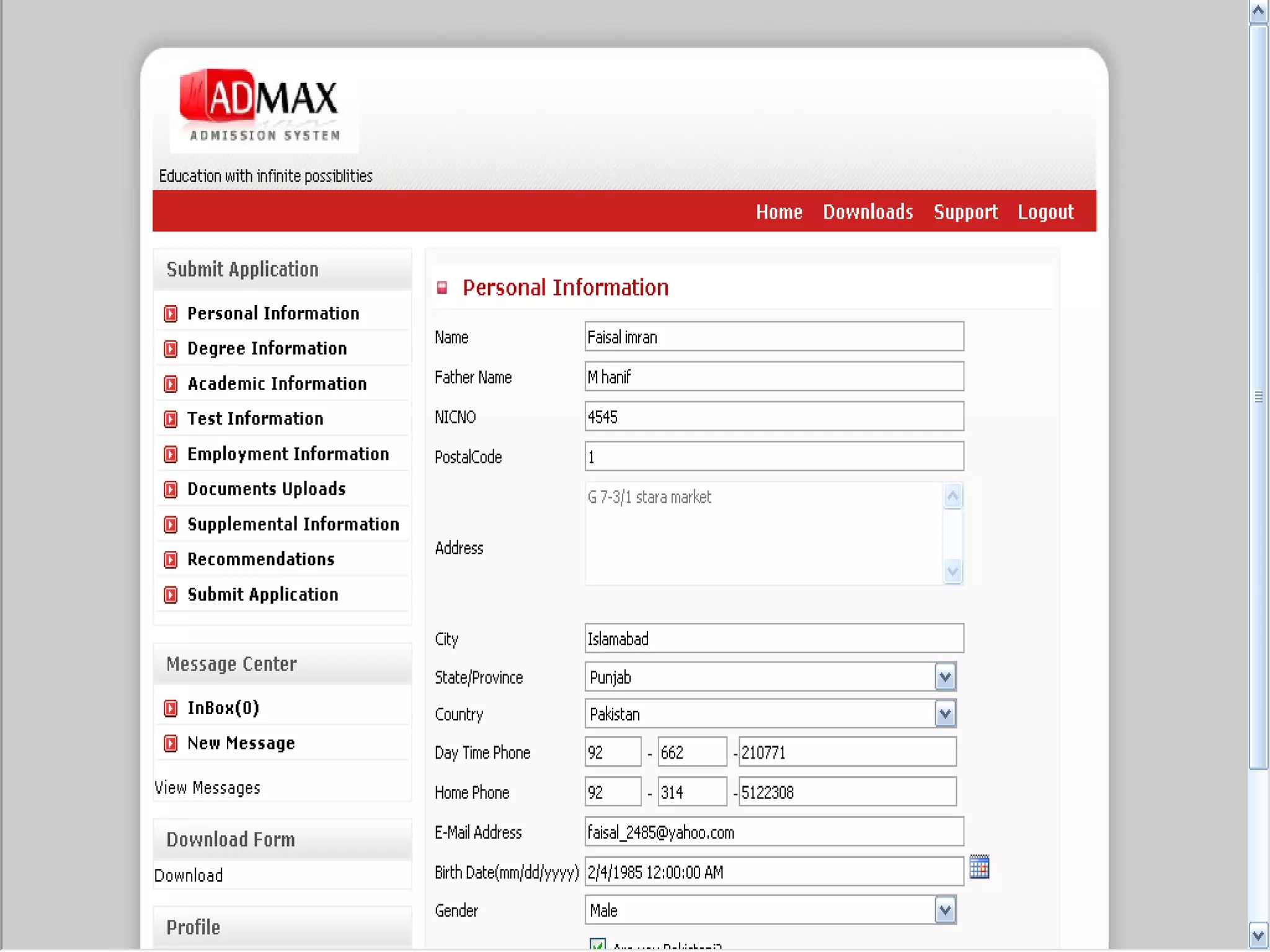
• Allow Admission Department to:
– A student can apply online to multiple programs as per
university policy
– Track incoming and outgoing correspondence, eliminate
redundant correspondences.
– Create personalized letters to match each applicant
interest
– Self Application Status Tracking Mechanism
– Maintain and Track full range of Application data.
– Identify received and missing application components:
test score, transcripts, recommendation letters etc.
– Maintain Unlimited biographical info of candidates
– Produce variety of reports for analysis
Admission/Registration Services
• Create/Manage System & Non-System Roles
– Administrator can create Acadmax roles:
• Teachers (BULK creation)
• Students (BULK creation)
• Employees (BULK creation)
• And Misc roles as per the requirements
– View Complete User Profile
– Acadmax User Interfaces
• Developed using best DB design practices and
security model, software to act on that database, and
have 4-tier graphical user interface with SelfServ
(one each for administrators, Faculty, Student and
Employees).
User/Role Management
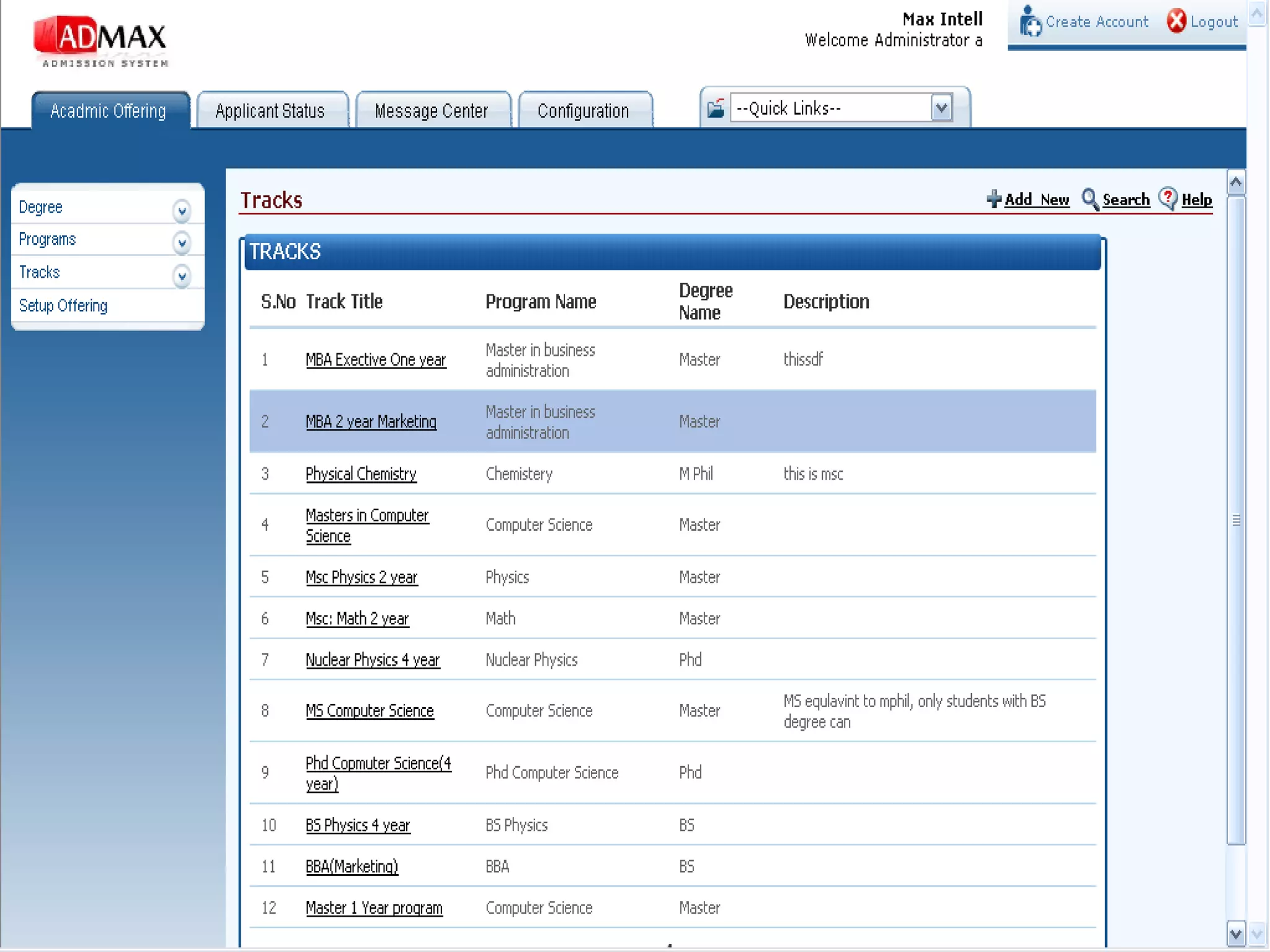
• Allow concerned department to:
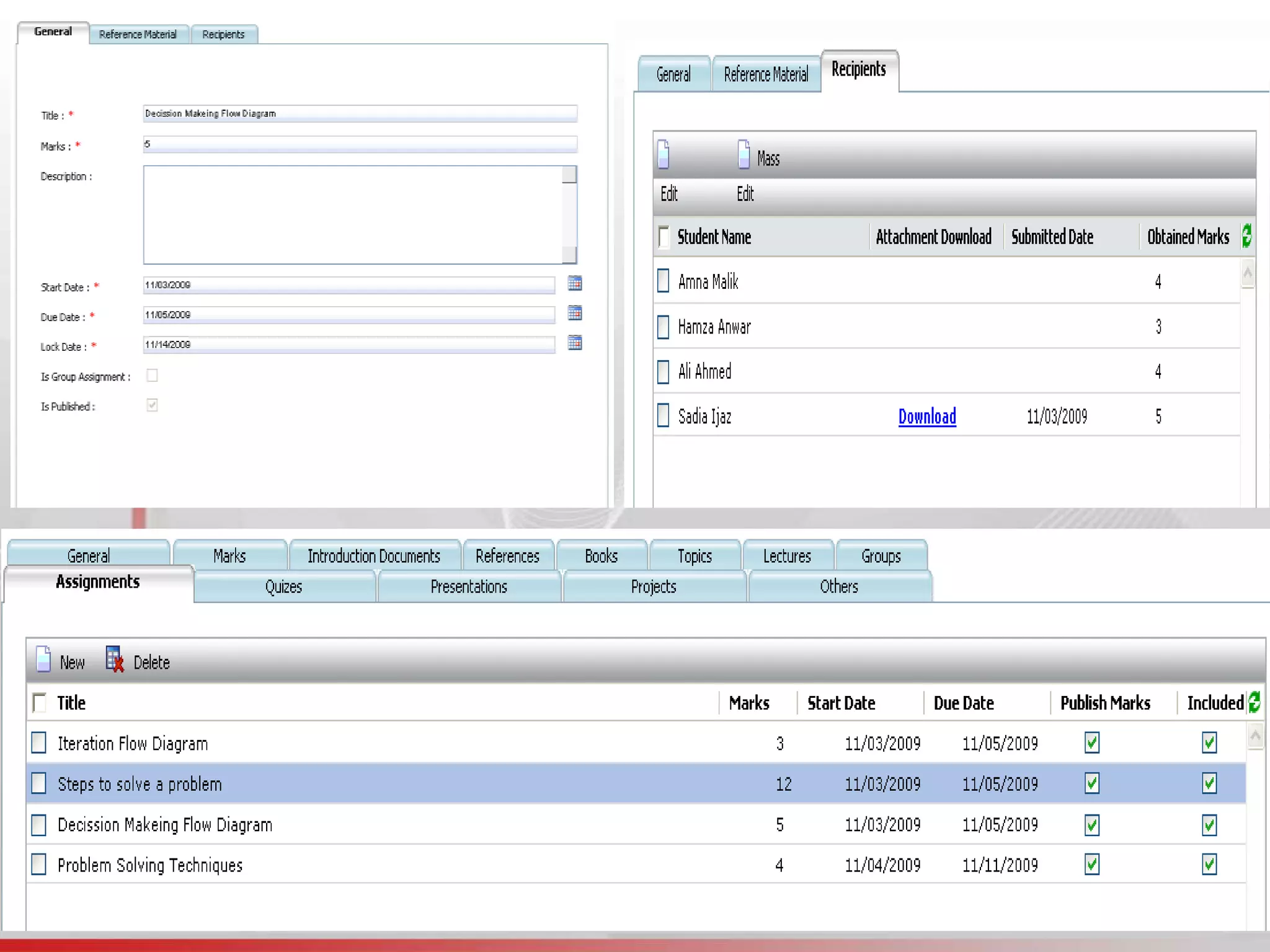
– Create/Configure Courses:
• General Details, Marks, Pre-requisites, Introduction
Documents, Assignments, Books, Topics, Lectures,
References.
– Department has ability to:
• Create/Delete Course Instances with Timeline
• Assign Teacher to Course and Design Course Plan.
• Define Pre-Requisites
– Manage Online Student Registration
• Dept. can Approve/Disapprove Student Applications
– View/Manage All Course Activities:
• Course Plan, Assignments, Presentation, Project and
Exam Marks, Course History and Results.
• Download/Upload Course materials.
• Create different course groups of class
Course Management
• Create/Manage Lectures of Course Instance
– Teacher can create Lectures:
• Add Topics and Reference Material
• Track Course Lecture Progress
• Manage Makeup Lectures
• Mark Attendance and Run Automated Reports
Lecture/Attendance Management
Financial Module
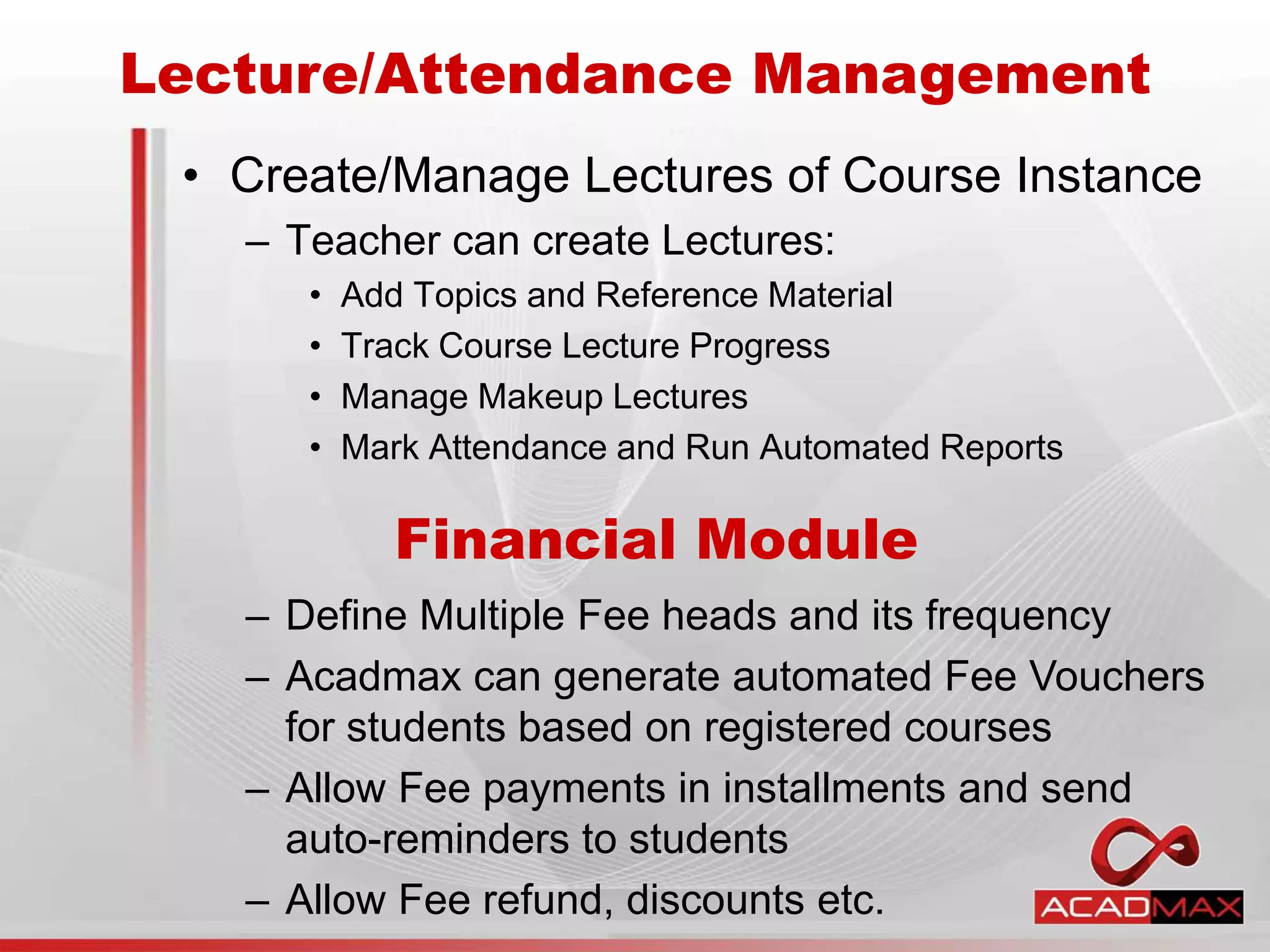
– Define Multiple Fee heads and its frequency
– Acadmax can generate automated Fee Vouchers
for students based on registered courses
– Allow Fee payments in installments and send
auto-reminders to students
– Allow Fee refund, discounts etc.
– Create Financial Plan Approval Committee to
review scholarships, concessions and installments.
– Define Scholarships configuration, plans, eligibility
and duration.
– Budget heads, maintenance and assets head and
deprecation of assets.
– Payroll Management (bonus, deductions, pay
heads, pay slip generation etc.)
– Approval path for new purchases
– Fee defaulter list and auto-reminders
– Log all financial activities
– Generate multiple reports at all users level.
Financial Module (cont.)
– Inventory Control
– Logs of Expendable (stationary, lab equipment) and
Property inventory (chairs, computers)
– Issue voucher (and get e-signs from dept.)
– Tracking of items in Receiving voucher
– Auction and Billing of old/new inventory
– Departments maintains its own inventory which
can/could be cross-checked with the Admin office
– Departments can send demand for new inventory
[HoD approval]
– Alerts on expendable stock like number of items
remaining (thrash-hold limit is set)
– Purchase committee creation, decision and
tracking. Property Ledger is maintain
Campus Administration Module
• Create/Manage Campus Time Table and
Examination Dates
– Administrator/Department can create:
• Department Rooms, setup lecture duration
• Daily Lectures (start/end time and days)
• Set Time Table Configuration
• Ability to design session based Exam activities
• Create Time Table and Exams date sheets using
Acadmax build-in Manager (add/edit time slots)
• Auto-Conflict Handling of Exams and Time Table
• Different Time Table and Date Sheet Views
– “Department View”, “Room View”, “Course View”,
“Teacher View”, and “Student View”
Time Table and Scheduler
• Examination Department can issue/create:
• Instructions to faculty members regarding paper marking
• Marks distribution for BS/MS/PhD Programs
• Creating/Managing Exam Schedules
• Admit Cards to Students
• Rechecking of answer scripts and scrutiny of Result
• Compilation, Approval and Notification of Result
• Publication of Online and Offline Exam results
• Semester Result Cards
• Transcripts and Degree Generation
• Tabulation
Examination Services
• Acadmax allow users to share documents for
knowledge transfer, where:
– Users can create:
• Sharing zone
• Upload sharable documents
• Allow sharing capability, for individual, group or global
• Download sharable document
• Set Shared document life time.
• Set Document size limit
Document Manager
• Acadmax offer comprehensive Project
Management Module where,
– Department/Student has the:
• Ability to Define/Select the Project Proposals
• Create Different Project Types (Individual/Group)
• Submission and Approval of Synopsis
• Assign Internal and External supervisor(s)
• Track communication between student and teacher for
any particular pre-proposal acceptance.
• Add reference documents to project proposal etc. Create
Milestones, To-Dos, Deliverables etc. and set time
constraints to it.
• Evaluation of Thesis and Conduct of Presentation
• View all Department and Student Thesis/Project
Project Management Module
• Acadmax has Integrated Library Solution -
Libmax, where:
– Users can:
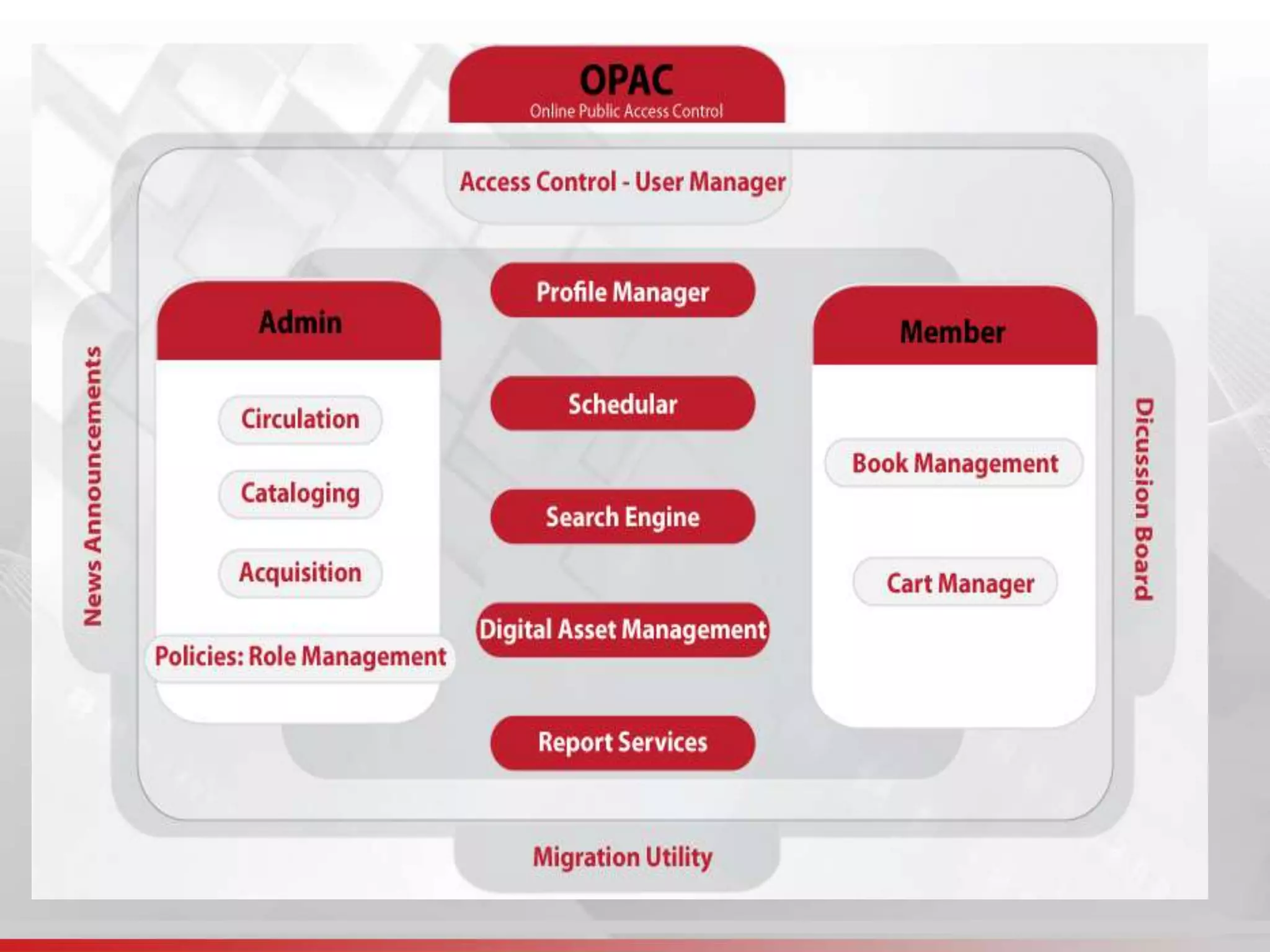
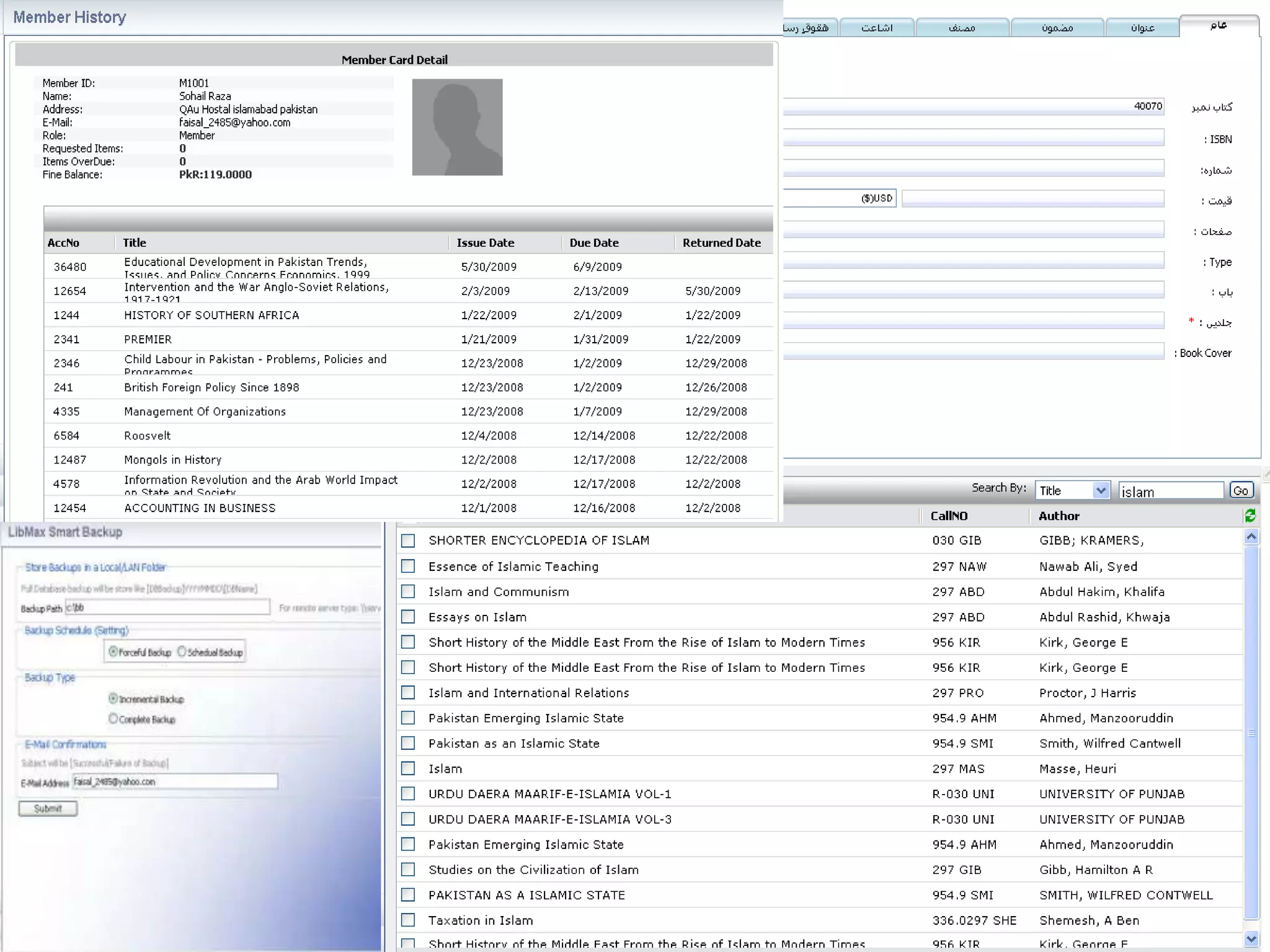
• Access Library catalog through role-base accounts
• OPAC Support
• Digital and Physical content Management
• Multilingual Support
• MARC (Machine Readable Cataloging)
• Modules: Acquisition, Technical Section, Circulation
• Reporting Services, Automated Emails, Reminders
• Cart Manager, Journals Manager, Migration Utility,
Backup and Restore Module
• Link your Library with International Resource Centers
• Integrate “N” number of libraries into Big Cluster
Integrated Library System (ILS)
• Acadmax Users can benefits from 1000s of
user defined questions:
– Where users have ability to:
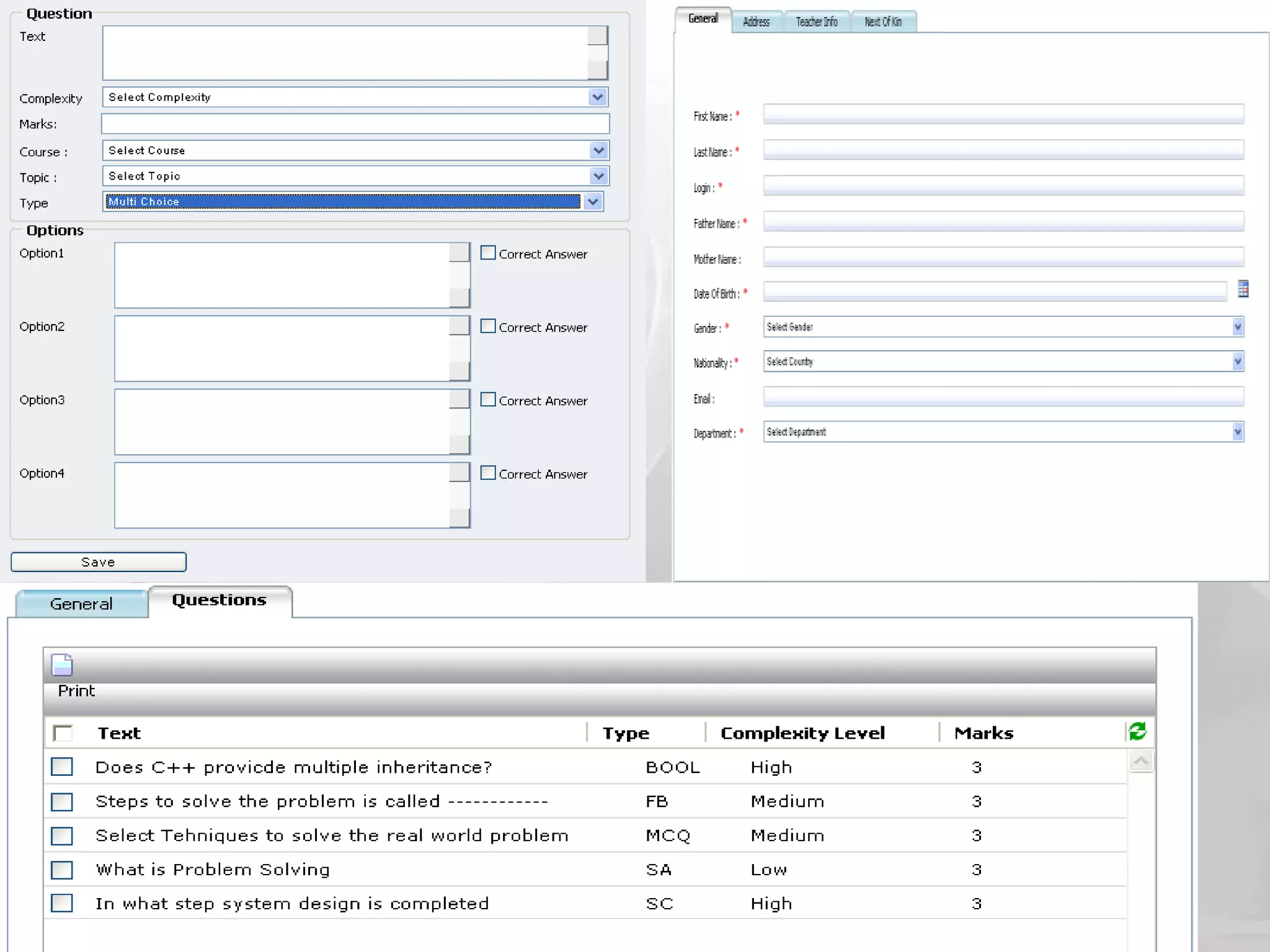
• Create multiple type of questions, add them in Private or
Public Question Bank
• Designate Questions to certain category
• Create Paper Skeleton
• Generate paper from skeleton
• Create Exams and assign existing papers to it.
• Trigger Online Exams on Set Time
• Self Evaluating Exercise (SEE) Module.
Testing Center: Question Bank
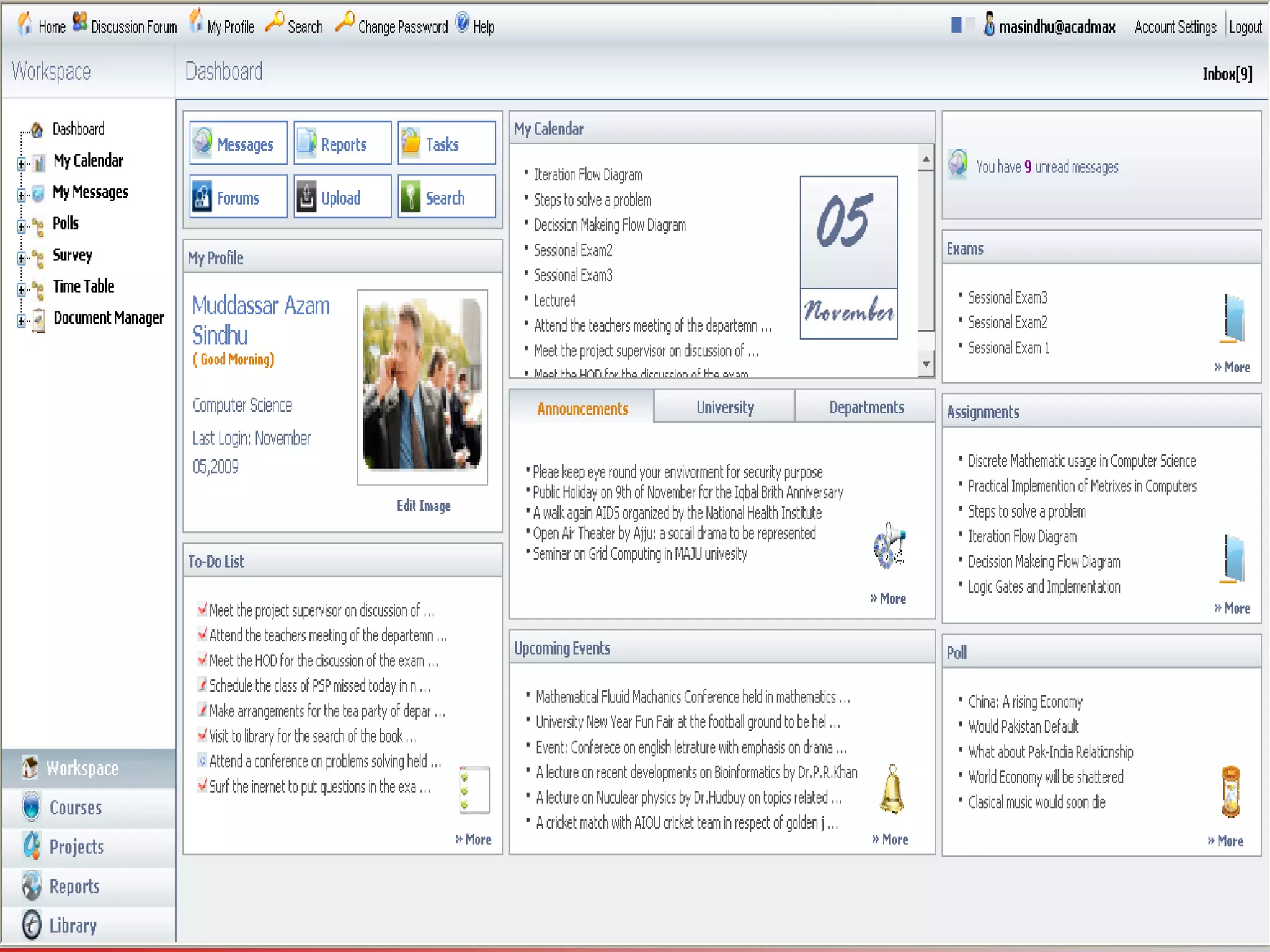
• All Acadmax Domain Users have:
• Ability to create Announcements of different types:
General, University and Department and set life time.
• Create/Manage Campus Events
• Create/Manage To-Dos, set alerts before/after To-Dos
become due
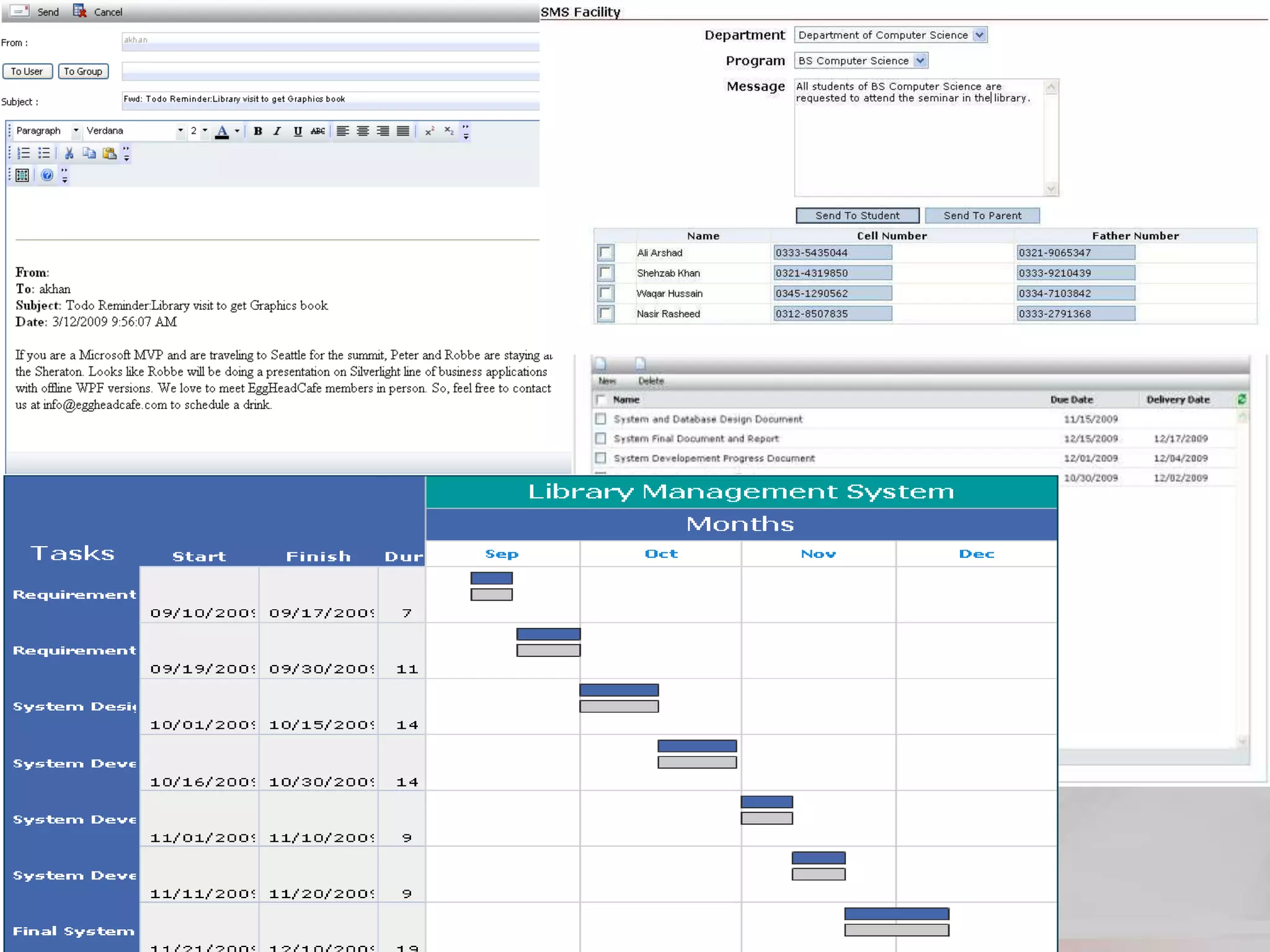
• Send SMS alerts to all or selected recipients.
• All Acadmax users can manage Polls
– Users can create:
• Group and Global Polls
• Create Survey for research purposes and set time limit
to it.
• Run results of Polls and Survey
Announcements/Events/To-Dos
Polls, Forums and Survey
• All Acadmax users can manage message
Center
– And all Acadmax users can:
• Messages to individuals or groups within Acadmax domain
• Create Message Groups
• Ability to reply, reply all, forward using editor
• Create Folders and move messages within these folders
• Read/Unread messages
– Where Examination Branch or Department can:
• Release Examination Schedule
• Exchange notes with HoDs of university departments
• Pass results details to President and Senior Management
Message Center
• Acadmax has integrated transport module
which has following sub-modules:
– Drivers management
– Maintenance/Stock management
– Fleet management
– Route management
– Report management
University Transport System
• Acadmax can manage multiple hostel related
activities in integrated environment.
– Hostel Information, define floors, rooms and their types.
– Hostel Admin can process applicant, fee status and
relevant actions to be taken. Maintain waiting lists.
– Define multiple services offered for specific room or all.
– Maintain Hostel Expanses, which is integrated with
Financial module for all users (admin, students, faculty)
– Keep track of Disciplinary actions and fines.
– Visitors/Guardian Profile updates, synced with Acadmax
Profile manager.
– Warden, Asst. Warden interfaces, attendance tracking,
leave type, in/out tracking.
– Auto Alerts and Multiple Reports.
Hostel Management
• Alumni of an university is as important as
Student itself, Acadmax offers:
– Easy and Single-Click Registration of University Student
as Alumni.
– Ability to Categorize Alumni of University
– Alumni can update their personal profile details and
share it with members
– Ability of Alumni to Post Jobs
– HoD can broadcast messages to its Alumni
– The members can search Jobs and university alumni,
build/search resume, view department photo gallery
– Maintain Archive of Posted Jobs
– Administrator can produce variety of reports for
analysis
Alumni Module
• Acadmax offers Extensive reporting services
– Examination department and Users can view/run:
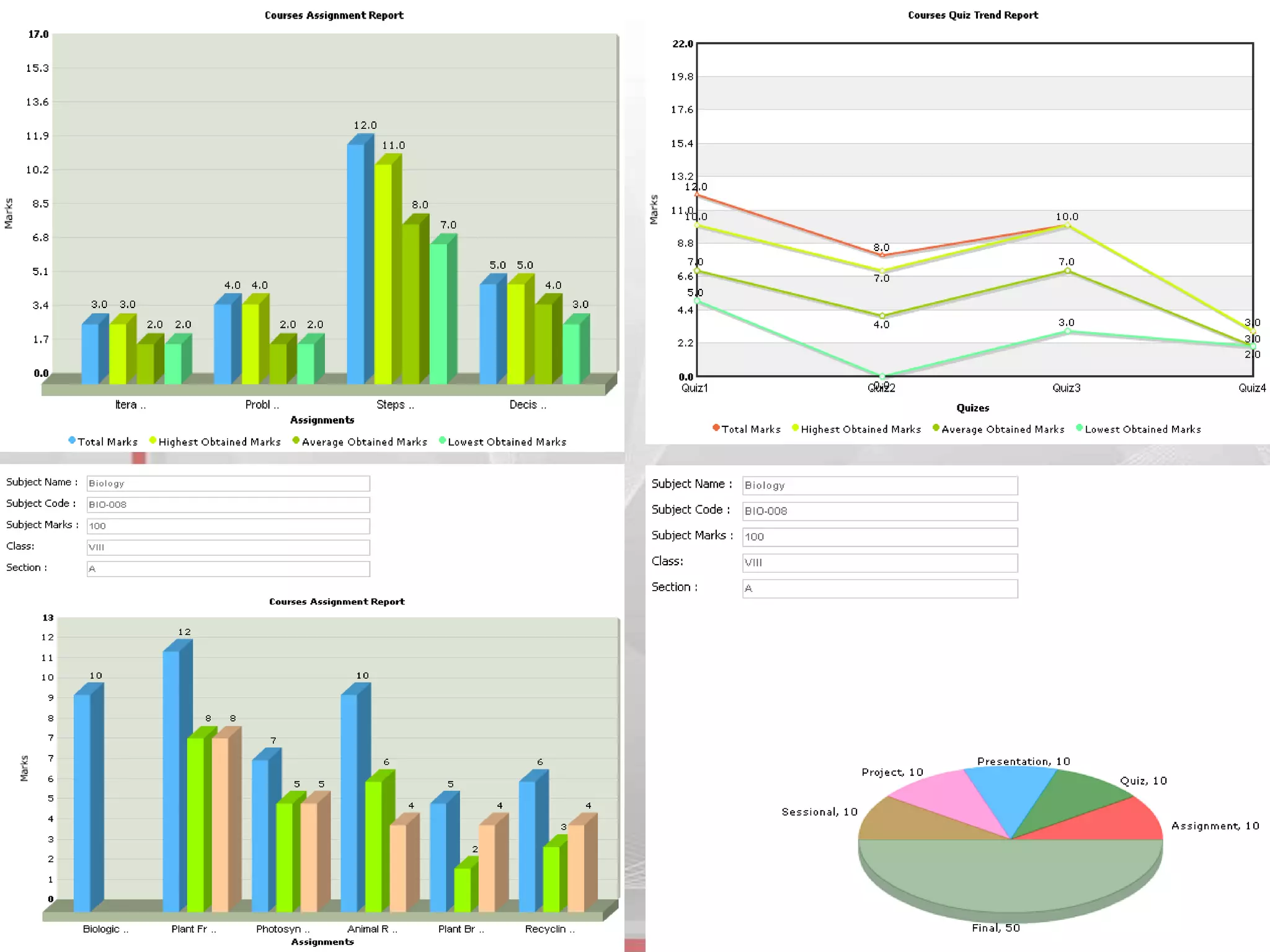
• Course Progress Reports
• Assignments Reports
• Quizzes Reports
• Presentation Reports
• Thesis/Project Reports
• Examination Reports
• Academic Transcript Report
• Degree Generation Reports
• Attendance Reports
• Custom Argument Reports
• Auto-Triggered Reports
• Acadmax Module Reports
Reporting Module
• Security
N – Tier Application
• To make web and database applications both secure &
accessible, provision to run on Secure Socket Layer.
• Various components of the solution are independently
developed, maintained, updated and integrated.
• Localizing changes to one part of the solution minimizes
the impact on other parts.
Web Services
• Describes a standard way of integrating web base
application and gives controlled shareable access of
Acadmax resources to other web-based services.
Online Degree Verification
• Acadmax will provision degree verification mechanism
for HEC in password protected mode.
Few Other Benefits
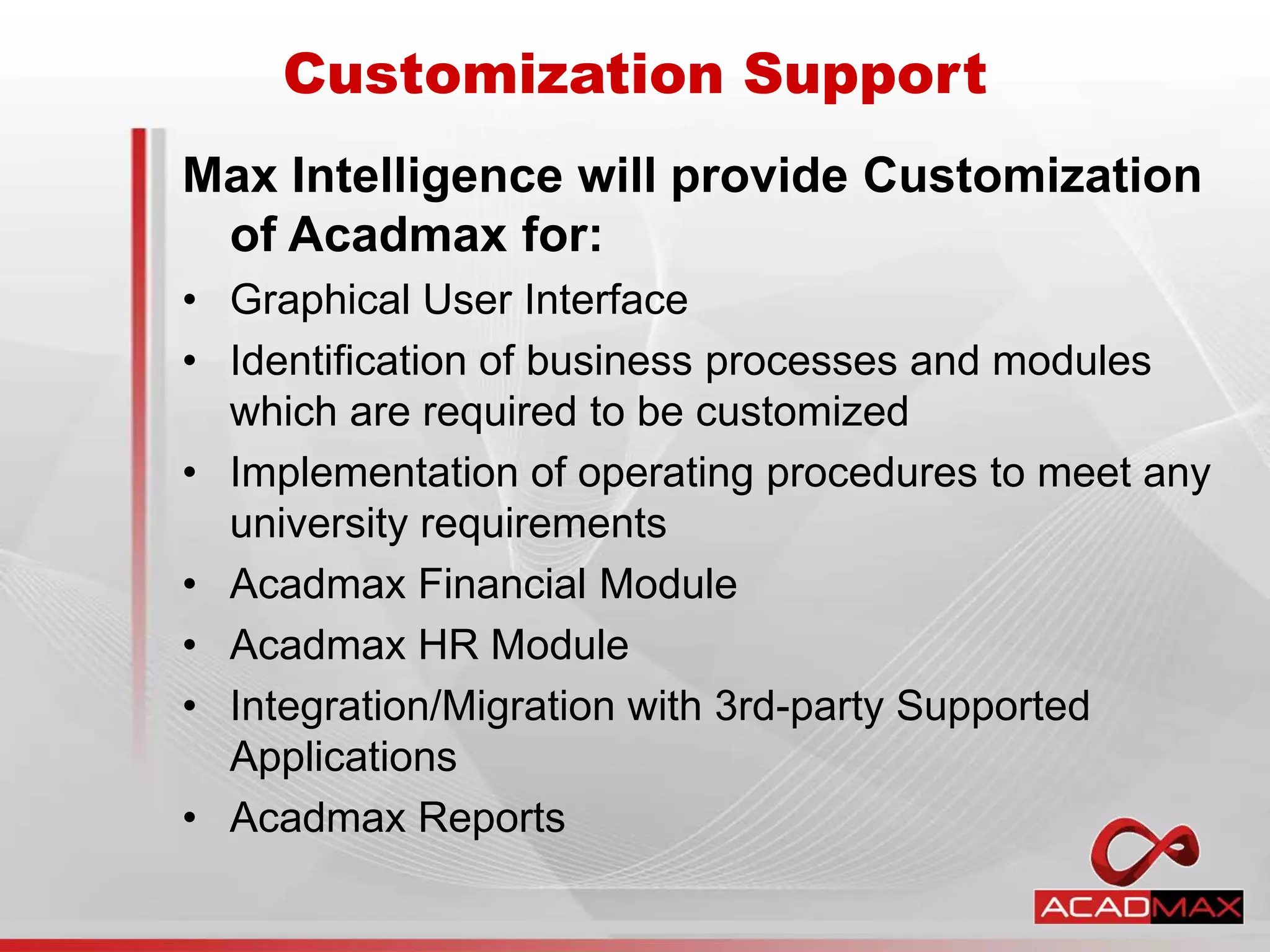
Customization Support
Max Intelligence will provide Customization
of Acadmax for:
• Graphical User Interface
• Identification of business processes and modules
which are required to be customized
• Implementation of operating procedures to meet any
university requirements
• Acadmax Financial Module
• Acadmax HR Module
• Integration/Migration with 3rd-party Supported
Applications
• Acadmax Reports
Education with Infinite Possibilities
THANK YOU

Acadmax - campus management solution

  • 1.
    Campus Management System PresentationBy Max Intelligence http://max-intell.com
  • 2.
    ABOUT ACADMAX • Theuniversity lifecycle is the focus of Acadmax Campus Solution. It will help to manage the entire student, teacher and employees lifecycle seamlessly – from recruiting of student to admission, through student services and alumni relationship – in a secure and stable environment. • Throughout the student lifecycle, Acadmax Campus Solutions drives efficiency and productivity in all business processes – so university can focus time and resources on the objectives that define the success of the institute. • With Acadmax Campus Solution, information delivery is role-based, so students, teachers and university staff see exactly the information they need.
  • 4.
    • Allow AdmissionDepartment to: – A student can apply online to multiple programs as per university policy – Track incoming and outgoing correspondence, eliminate redundant correspondences. – Create personalized letters to match each applicant interest – Self Application Status Tracking Mechanism – Maintain and Track full range of Application data. – Identify received and missing application components: test score, transcripts, recommendation letters etc. – Maintain Unlimited biographical info of candidates – Produce variety of reports for analysis Admission/Registration Services
  • 5.
    • Create/Manage System& Non-System Roles – Administrator can create Acadmax roles: • Teachers (BULK creation) • Students (BULK creation) • Employees (BULK creation) • And Misc roles as per the requirements – View Complete User Profile – Acadmax User Interfaces • Developed using best DB design practices and security model, software to act on that database, and have 4-tier graphical user interface with SelfServ (one each for administrators, Faculty, Student and Employees). User/Role Management
  • 6.
    • Allow concerneddepartment to: – Create/Configure Courses: • General Details, Marks, Pre-requisites, Introduction Documents, Assignments, Books, Topics, Lectures, References. – Department has ability to: • Create/Delete Course Instances with Timeline • Assign Teacher to Course and Design Course Plan. • Define Pre-Requisites – Manage Online Student Registration • Dept. can Approve/Disapprove Student Applications – View/Manage All Course Activities: • Course Plan, Assignments, Presentation, Project and Exam Marks, Course History and Results. • Download/Upload Course materials. • Create different course groups of class Course Management
  • 7.
    • Create/Manage Lecturesof Course Instance – Teacher can create Lectures: • Add Topics and Reference Material • Track Course Lecture Progress • Manage Makeup Lectures • Mark Attendance and Run Automated Reports Lecture/Attendance Management Financial Module – Define Multiple Fee heads and its frequency – Acadmax can generate automated Fee Vouchers for students based on registered courses – Allow Fee payments in installments and send auto-reminders to students – Allow Fee refund, discounts etc.
  • 8.
    – Create FinancialPlan Approval Committee to review scholarships, concessions and installments. – Define Scholarships configuration, plans, eligibility and duration. – Budget heads, maintenance and assets head and deprecation of assets. – Payroll Management (bonus, deductions, pay heads, pay slip generation etc.) – Approval path for new purchases – Fee defaulter list and auto-reminders – Log all financial activities – Generate multiple reports at all users level. Financial Module (cont.)
  • 9.
    – Inventory Control –Logs of Expendable (stationary, lab equipment) and Property inventory (chairs, computers) – Issue voucher (and get e-signs from dept.) – Tracking of items in Receiving voucher – Auction and Billing of old/new inventory – Departments maintains its own inventory which can/could be cross-checked with the Admin office – Departments can send demand for new inventory [HoD approval] – Alerts on expendable stock like number of items remaining (thrash-hold limit is set) – Purchase committee creation, decision and tracking. Property Ledger is maintain Campus Administration Module
  • 10.
    • Create/Manage CampusTime Table and Examination Dates – Administrator/Department can create: • Department Rooms, setup lecture duration • Daily Lectures (start/end time and days) • Set Time Table Configuration • Ability to design session based Exam activities • Create Time Table and Exams date sheets using Acadmax build-in Manager (add/edit time slots) • Auto-Conflict Handling of Exams and Time Table • Different Time Table and Date Sheet Views – “Department View”, “Room View”, “Course View”, “Teacher View”, and “Student View” Time Table and Scheduler
  • 11.
    • Examination Departmentcan issue/create: • Instructions to faculty members regarding paper marking • Marks distribution for BS/MS/PhD Programs • Creating/Managing Exam Schedules • Admit Cards to Students • Rechecking of answer scripts and scrutiny of Result • Compilation, Approval and Notification of Result • Publication of Online and Offline Exam results • Semester Result Cards • Transcripts and Degree Generation • Tabulation Examination Services
  • 12.
    • Acadmax allowusers to share documents for knowledge transfer, where: – Users can create: • Sharing zone • Upload sharable documents • Allow sharing capability, for individual, group or global • Download sharable document • Set Shared document life time. • Set Document size limit Document Manager
  • 13.
    • Acadmax offercomprehensive Project Management Module where, – Department/Student has the: • Ability to Define/Select the Project Proposals • Create Different Project Types (Individual/Group) • Submission and Approval of Synopsis • Assign Internal and External supervisor(s) • Track communication between student and teacher for any particular pre-proposal acceptance. • Add reference documents to project proposal etc. Create Milestones, To-Dos, Deliverables etc. and set time constraints to it. • Evaluation of Thesis and Conduct of Presentation • View all Department and Student Thesis/Project Project Management Module
  • 14.
    • Acadmax hasIntegrated Library Solution - Libmax, where: – Users can: • Access Library catalog through role-base accounts • OPAC Support • Digital and Physical content Management • Multilingual Support • MARC (Machine Readable Cataloging) • Modules: Acquisition, Technical Section, Circulation • Reporting Services, Automated Emails, Reminders • Cart Manager, Journals Manager, Migration Utility, Backup and Restore Module • Link your Library with International Resource Centers • Integrate “N” number of libraries into Big Cluster Integrated Library System (ILS)
  • 16.
    • Acadmax Userscan benefits from 1000s of user defined questions: – Where users have ability to: • Create multiple type of questions, add them in Private or Public Question Bank • Designate Questions to certain category • Create Paper Skeleton • Generate paper from skeleton • Create Exams and assign existing papers to it. • Trigger Online Exams on Set Time • Self Evaluating Exercise (SEE) Module. Testing Center: Question Bank
  • 17.
    • All AcadmaxDomain Users have: • Ability to create Announcements of different types: General, University and Department and set life time. • Create/Manage Campus Events • Create/Manage To-Dos, set alerts before/after To-Dos become due • Send SMS alerts to all or selected recipients. • All Acadmax users can manage Polls – Users can create: • Group and Global Polls • Create Survey for research purposes and set time limit to it. • Run results of Polls and Survey Announcements/Events/To-Dos Polls, Forums and Survey
  • 18.
    • All Acadmaxusers can manage message Center – And all Acadmax users can: • Messages to individuals or groups within Acadmax domain • Create Message Groups • Ability to reply, reply all, forward using editor • Create Folders and move messages within these folders • Read/Unread messages – Where Examination Branch or Department can: • Release Examination Schedule • Exchange notes with HoDs of university departments • Pass results details to President and Senior Management Message Center
  • 19.
    • Acadmax hasintegrated transport module which has following sub-modules: – Drivers management – Maintenance/Stock management – Fleet management – Route management – Report management University Transport System
  • 20.
    • Acadmax canmanage multiple hostel related activities in integrated environment. – Hostel Information, define floors, rooms and their types. – Hostel Admin can process applicant, fee status and relevant actions to be taken. Maintain waiting lists. – Define multiple services offered for specific room or all. – Maintain Hostel Expanses, which is integrated with Financial module for all users (admin, students, faculty) – Keep track of Disciplinary actions and fines. – Visitors/Guardian Profile updates, synced with Acadmax Profile manager. – Warden, Asst. Warden interfaces, attendance tracking, leave type, in/out tracking. – Auto Alerts and Multiple Reports. Hostel Management
  • 21.
    • Alumni ofan university is as important as Student itself, Acadmax offers: – Easy and Single-Click Registration of University Student as Alumni. – Ability to Categorize Alumni of University – Alumni can update their personal profile details and share it with members – Ability of Alumni to Post Jobs – HoD can broadcast messages to its Alumni – The members can search Jobs and university alumni, build/search resume, view department photo gallery – Maintain Archive of Posted Jobs – Administrator can produce variety of reports for analysis Alumni Module
  • 22.
    • Acadmax offersExtensive reporting services – Examination department and Users can view/run: • Course Progress Reports • Assignments Reports • Quizzes Reports • Presentation Reports • Thesis/Project Reports • Examination Reports • Academic Transcript Report • Degree Generation Reports • Attendance Reports • Custom Argument Reports • Auto-Triggered Reports • Acadmax Module Reports Reporting Module
  • 23.
    • Security N –Tier Application • To make web and database applications both secure & accessible, provision to run on Secure Socket Layer. • Various components of the solution are independently developed, maintained, updated and integrated. • Localizing changes to one part of the solution minimizes the impact on other parts. Web Services • Describes a standard way of integrating web base application and gives controlled shareable access of Acadmax resources to other web-based services. Online Degree Verification • Acadmax will provision degree verification mechanism for HEC in password protected mode. Few Other Benefits
  • 24.
    Customization Support Max Intelligencewill provide Customization of Acadmax for: • Graphical User Interface • Identification of business processes and modules which are required to be customized • Implementation of operating procedures to meet any university requirements • Acadmax Financial Module • Acadmax HR Module • Integration/Migration with 3rd-party Supported Applications • Acadmax Reports
  • 33.
    Education with InfinitePossibilities THANK YOU