ABSTRACT CLASS AND
INTERFACE
Topic Name:
OOP
CONCEPT
WELCOME
SMITA KUNDU
ASHRAFUL HAQUE
PROHOR
MD MAZHARUL ISLAM
TANBIR AHMED RABIN
171-15-8555
171-15-9181
171-15-8950
171-15-8951
CONCEPT:
OBJECT ORIENTED PROGRAMING
Object Oriented Programming is a paradigm that
provides many concepts such as inheritance, data
binding, polymorphism etc.
The programming paradigm where everything is
represented as an object, is known as truly object-
oriented programming language.
Object-Oriented Programming is a methodology or
paradigm to design a program using classes and
objects.
CONCEPT:
OBJECT ORIENTED PROGRAMING
Object-Oriented Programming simplifies the software
development and maintenance by providing some concepts:
Object
Class
Inheritance
Polymorphism
Abstraction
Encapsulation
CONCEPT:
OBJECT ORIENTED PROGRAMING
Object
Any entity that has state and behavior is known as an object.
For example: chair, pen, table, keyboard, bike etc. It can be
physical and logical.
Class
Collection of objects is called class. It is a logical entity.
Inheritance
When one object acquires all the properties and behavior's of
parent object.
CONCEPT:
OBJECT ORIENTED PROGRAMING
Polymorphism
When one task is performed by different ways i.e. known as
polymorphism.
Abstraction
Hiding internal details and showing functionality is known as
abstraction.
Encapsulation
Binding (or wrapping) code and data together into a single unit
is known as encapsulation.
CONCEPT:
ABSTRACTION
Abstraction is a process of hiding the implementation
details and showing only functionality to the user.
Another way, it shows only important things to the
user and hides the internal details for example
sending sms, you just type the text and send the
message. You don't know the internal processing
about the message delivery.
WAYS TO ACHIEVE
ABSTRACTION
There are two ways to achieve abstraction in java
 Abstract class (0 to 100%)
 Interface (100%)
CONCEPT:
ABSTRACT CLASS
A class that is declared with abstract keyword, is
known as abstract class in java.
It can have abstract and non-abstract methods
(method with body).
CLASS
ABSTRACT CLASS
A class that is declared as abstract is known as abstract class.
It needs to be extended and its method implemented.
It cannot be instantiated.
FEATURES:
ABSTRACT CLASS
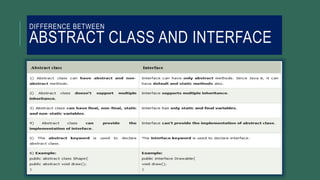
Abstract class can have abstract and non-abstract methods.
Abstract class doesn't support multiple inheritance.
Abstract class can have final, non-final, static and non-static
variables
Abstract class can provide the implementation of interface.
The abstract keyword is used to declare abstract class.
SYNTAX :
ABSTRACT CLASS
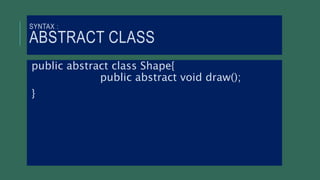
public abstract class Shape{
public abstract void draw();
}
SYNTAX :
ABSTRACT METHOD
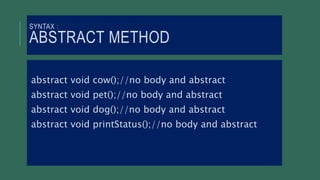
abstract void cow();//no body and abstract
abstract void pet();//no body and abstract
abstract void dog();//no body and abstract
abstract void printStatus();//no body and abstract
EXAMPLE:
ABSTRACT CLASS AND METHOD
abstract class Bike{
abstract void run();
}
class Honda4 extends Bike{
void run(){
System.out.println("running safely..");
}
public static void main(String args[]){
Bike obj = new Honda4();
obj.run();
}
}
EXAMPLE:
ABSTRACT CLASS AND METHOD
abstract class Shape{
abstract void draw();
}
class Rectangle extends Shape{
void draw(){ System.out.println("drawing rectangle");
}
}
class Circle1 extends Shape{
void draw(){ System.out.println("drawing circle");
}
}
class TestAbstraction1{
public static void main(String args[]){
Shape s=new Circle1();
s.draw(); }
}
CONCEPT:
INTERFACE
An interface in java is a blueprint of a class. It has
static constants and abstract methods.
The interface in java is a mechanism to achieve
abstraction. There can be only abstract methods in the
java interface not method body. It is used to achieve
abstraction and multiple inheritance in Java.
Java Interface also represents IS-A relationship.
It cannot be instantiated just like abstract class.
USES:
INTERFACE
There are mainly three reasons to use interface.
They are given below.
It is used to achieve abstraction.
By interface, we can support the functionality of multiple
inheritance.
It can be used to achieve loose coupling.
SYNTAX:
INTERFACE
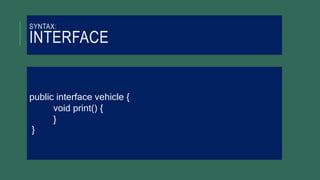
public interface vehicle {
void print() {
}
}
EXAMPLE:
INTERFACE
interface Drawable{
void draw();
}
class Rectangle implements Drawable{
public void draw(){System.out.println("drawing rectangle");}
}
class Circle implements Drawable{
public void draw(){System.out.println("drawing circle");}
}
class TestInterface1{
public static void main(String args[]){
Drawable d=new Circle();//In real scenario, object is provided by method e.g. getDrawable()
d.draw();
}}
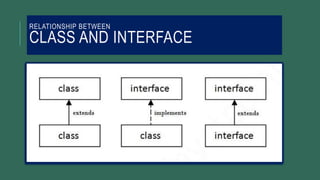
RELATIONSHIP BETWEEN
CLASS AND INTERFACE
EXAMPLE:
MULTIPLE INHERITANCE
INTERFACE
interface Printable{
void print();
}
interface Showable{
void show();
}
class A7 implements Printable,Showable{
public void print(){System.out.println("Hello");}
public void show(){System.out.println("Welcome");}
public static void main(String args[]){
A7 obj = new A7();
obj.print();
obj.show();
}
}
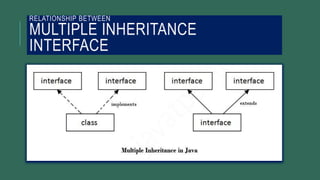
RELATIONSHIP BETWEEN
MULTIPLE INHERITANCE
INTERFACE
DIFFERENCE BETWEEN
ABSTRACT CLASS AND INTERFACE
Abstract class and interface

Abstract class and interface

  • 2.
  • 3.
    WELCOME SMITA KUNDU ASHRAFUL HAQUE PROHOR MDMAZHARUL ISLAM TANBIR AHMED RABIN 171-15-8555 171-15-9181 171-15-8950 171-15-8951
  • 4.
    CONCEPT: OBJECT ORIENTED PROGRAMING ObjectOriented Programming is a paradigm that provides many concepts such as inheritance, data binding, polymorphism etc. The programming paradigm where everything is represented as an object, is known as truly object- oriented programming language. Object-Oriented Programming is a methodology or paradigm to design a program using classes and objects.
  • 5.
    CONCEPT: OBJECT ORIENTED PROGRAMING Object-OrientedProgramming simplifies the software development and maintenance by providing some concepts: Object Class Inheritance Polymorphism Abstraction Encapsulation
  • 6.
    CONCEPT: OBJECT ORIENTED PROGRAMING Object Anyentity that has state and behavior is known as an object. For example: chair, pen, table, keyboard, bike etc. It can be physical and logical. Class Collection of objects is called class. It is a logical entity. Inheritance When one object acquires all the properties and behavior's of parent object.
  • 7.
    CONCEPT: OBJECT ORIENTED PROGRAMING Polymorphism Whenone task is performed by different ways i.e. known as polymorphism. Abstraction Hiding internal details and showing functionality is known as abstraction. Encapsulation Binding (or wrapping) code and data together into a single unit is known as encapsulation.
  • 8.
    CONCEPT: ABSTRACTION Abstraction is aprocess of hiding the implementation details and showing only functionality to the user. Another way, it shows only important things to the user and hides the internal details for example sending sms, you just type the text and send the message. You don't know the internal processing about the message delivery.
  • 9.
    WAYS TO ACHIEVE ABSTRACTION Thereare two ways to achieve abstraction in java  Abstract class (0 to 100%)  Interface (100%)
  • 10.
    CONCEPT: ABSTRACT CLASS A classthat is declared with abstract keyword, is known as abstract class in java. It can have abstract and non-abstract methods (method with body).
  • 11.
    CLASS ABSTRACT CLASS A classthat is declared as abstract is known as abstract class. It needs to be extended and its method implemented. It cannot be instantiated.
  • 12.
    FEATURES: ABSTRACT CLASS Abstract classcan have abstract and non-abstract methods. Abstract class doesn't support multiple inheritance. Abstract class can have final, non-final, static and non-static variables Abstract class can provide the implementation of interface. The abstract keyword is used to declare abstract class.
  • 13.
    SYNTAX : ABSTRACT CLASS publicabstract class Shape{ public abstract void draw(); }
  • 14.
    SYNTAX : ABSTRACT METHOD abstractvoid cow();//no body and abstract abstract void pet();//no body and abstract abstract void dog();//no body and abstract abstract void printStatus();//no body and abstract
  • 15.
    EXAMPLE: ABSTRACT CLASS ANDMETHOD abstract class Bike{ abstract void run(); } class Honda4 extends Bike{ void run(){ System.out.println("running safely.."); } public static void main(String args[]){ Bike obj = new Honda4(); obj.run(); } }
  • 16.
    EXAMPLE: ABSTRACT CLASS ANDMETHOD abstract class Shape{ abstract void draw(); } class Rectangle extends Shape{ void draw(){ System.out.println("drawing rectangle"); } } class Circle1 extends Shape{ void draw(){ System.out.println("drawing circle"); } } class TestAbstraction1{ public static void main(String args[]){ Shape s=new Circle1(); s.draw(); } }
  • 17.
    CONCEPT: INTERFACE An interface injava is a blueprint of a class. It has static constants and abstract methods. The interface in java is a mechanism to achieve abstraction. There can be only abstract methods in the java interface not method body. It is used to achieve abstraction and multiple inheritance in Java. Java Interface also represents IS-A relationship. It cannot be instantiated just like abstract class.
  • 18.
    USES: INTERFACE There are mainlythree reasons to use interface. They are given below. It is used to achieve abstraction. By interface, we can support the functionality of multiple inheritance. It can be used to achieve loose coupling.
  • 19.
  • 20.
    EXAMPLE: INTERFACE interface Drawable{ void draw(); } classRectangle implements Drawable{ public void draw(){System.out.println("drawing rectangle");} } class Circle implements Drawable{ public void draw(){System.out.println("drawing circle");} } class TestInterface1{ public static void main(String args[]){ Drawable d=new Circle();//In real scenario, object is provided by method e.g. getDrawable() d.draw(); }}
  • 21.
  • 22.
    EXAMPLE: MULTIPLE INHERITANCE INTERFACE interface Printable{ voidprint(); } interface Showable{ void show(); } class A7 implements Printable,Showable{ public void print(){System.out.println("Hello");} public void show(){System.out.println("Welcome");} public static void main(String args[]){ A7 obj = new A7(); obj.print(); obj.show(); } }
  • 23.
  • 24.