‫البشريه‬ ‫الموارد‬–‫العامه‬ ‫العالقات‬Human Resources – P.R.O
‫التسجيل‬
Registration
‫التفعيل‬
Activation
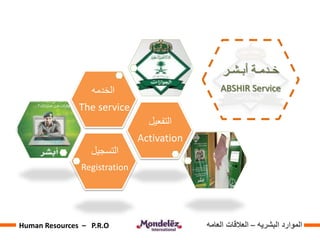
‫الخدمه‬
The service
‫البشريه‬ ‫الموارد‬–‫العامه‬ ‫العالقات‬Human Resources – P.R.O
‫بالخدمة‬ ‫تعريف‬
Definition of service
‫البشريه‬ ‫الموارد‬–‫العامه‬ ‫العالقات‬Human Resources – P.R.O
‫التسجيل‬
Registration
Log on the web site
‫الموقع‬ ‫الى‬ ‫الدخول‬
http://www.moi.gov.sa
‫البشريه‬ ‫الموارد‬–‫العامه‬ ‫العالقات‬Human Resources – P.R.O
‫التسجيل‬
Registration
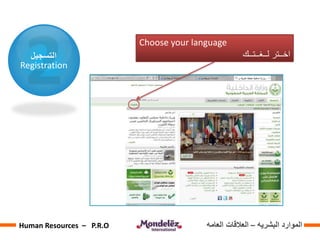
Choose your language
‫لــغــتــك‬ ‫اخــتر‬
‫البشريه‬ ‫الموارد‬–‫العامه‬ ‫العالقات‬Human Resources – P.R.O
‫التسجيل‬
Registration
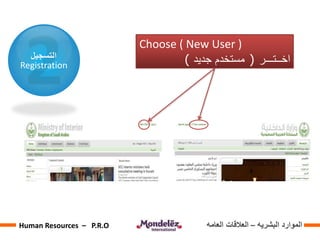
Choose ( New User )
‫اخــتـــر‬(‫جديد‬ ‫مستخدم‬)
‫البشريه‬ ‫الموارد‬–‫العامه‬ ‫العالقات‬Human Resources – P.R.O
‫التسجيل‬
Registration
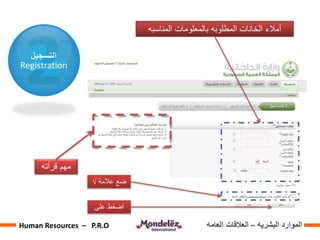
‫المناسبه‬ ‫بالمعلومات‬ ‫المطلوبه‬ ‫الخانات‬ ‫أمالء‬
‫قرأته‬ ‫مهم‬
‫عالمة‬ ‫ضع‬√
‫على‬ ‫اضغط‬
‫البشريه‬ ‫الموارد‬–‫العامه‬ ‫العالقات‬Human Resources – P.R.O
‫التسجيل‬
Registration
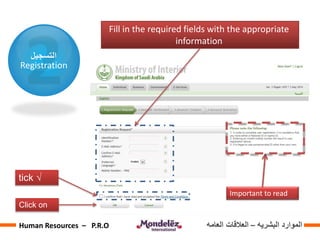
Fill in the required fields with the appropriate
information
Important to read
√tick
Click on
‫البشريه‬ ‫الموارد‬–‫العامه‬ ‫العالقات‬Human Resources – P.R.O
‫التسجيل‬
Registration
‫بعد‬‫اتمام‬‫المرحله‬‫األولى‬‫من‬‫التسجيل‬‫سوف‬‫تصلك‬‫رساله‬‫على‬‫هاتفك‬‫المحمول‬‫تحتوي‬‫على‬
‫كود‬‫مؤقت‬
‫المرحله‬‫الثانيه‬:‫قم‬‫بادخال‬‫الكود‬‫المؤقت‬‫المستلم‬
‫ا‬‫لمرحله‬‫الثالثه‬:‫نقوم‬‫بادخال‬‫التالي‬:
-‫اسم‬‫مستخدم‬‫و‬‫بريد‬‫اليكتروني‬
-‫رقم‬‫السري‬
-‫نختار‬‫سؤال‬‫سري‬‫و‬‫االجابه‬‫عليه‬
‫بعد‬‫اتمام‬‫جميع‬‫مراحل‬‫التسجيل‬‫تاتي‬‫المرحله‬‫المتبقيه‬‫هي‬‫تاكيد‬‫الهوية‬‫و‬‫هذا‬‫ما‬‫سي‬‫تم‬‫شرحه‬
‫في‬‫الشريحه‬‫القادمه‬
After the completion of the first phase of registration you will receive a
message on your mobile phone containing the temporary code
Second phase: Enter the temporary code
Third phase you enter :
- a user name
- E-mail
- Password
- choose a secret question and answer it
After the completion of all stages of the registration a final stage is the
residual phase, this is to confirm your identity, which will be explained
in the next slide
‫البشريه‬ ‫الموارد‬–‫العامه‬ ‫العالقات‬Human Resources – P.R.O
‫التفعيل‬
Activation
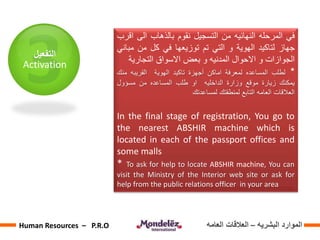
‫في‬‫المرحله‬‫النهائيه‬‫من‬‫التسجيل‬‫نقوم‬‫بالذهاب‬‫الى‬‫اقرب‬
‫جهاز‬‫لتاكيد‬‫الهوية‬‫و‬‫التي‬‫تم‬‫توزيعها‬‫في‬‫كل‬‫من‬‫مب‬‫اني‬
‫الجوازات‬‫و‬‫االحوال‬‫المدنيه‬‫و‬‫بعض‬‫االسواق‬‫التجارية‬
*‫لطلب‬‫المساعده‬‫لمعرفة‬‫اماكن‬‫أجهزة‬‫تاكيد‬‫الهوية‬‫القريبه‬‫منك‬
‫يمكنك‬‫زيارة‬‫موقع‬‫وزارة‬‫الداخليه‬‫او‬‫طلب‬‫المساعده‬‫من‬‫مسؤول‬
‫العالقات‬‫العامه‬‫التابع‬‫لمنطقتك‬‫لمساعدتك‬
In the final stage of registration, You go to
the nearest ABSHIR machine which is
located in each of the passport offices and
some malls
* To ask for help to locate ABSHIR machine, You can
visit the Ministry of the Interior web site or ask for
help from the public relations officer in your area
‫البشريه‬ ‫الموارد‬–‫العامه‬ ‫العالقات‬Human Resources – P.R.O
‫التفعيل‬
Activation
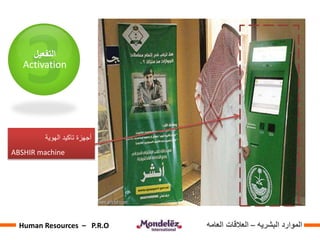
‫الهوية‬ ‫تاكيد‬ ‫أجهزة‬
ABSHIR machine
‫البشريه‬ ‫الموارد‬–‫العامه‬ ‫العالقات‬Human Resources – P.R.O
‫التفعيل‬
Activation
‫بعد‬‫االنتهاء‬‫من‬‫تاكيد‬‫الهوية‬‫عبر‬‫االجهزه‬‫المخصصه‬
‫ستصلك‬‫رسالة‬‫على‬‫هاتفك‬‫المحمول‬‫بالرقم‬‫السري‬‫ا‬‫لجديد‬
‫عندها‬‫تكون‬‫قد‬‫اتممت‬‫جميع‬‫المراحل‬‫و‬‫يمكنك‬‫ذلك‬‫من‬
‫االستفاده‬‫من‬‫جميع‬‫الخدمات‬‫المتوفره‬‫في‬‫موقع‬‫وزار‬‫ة‬
‫الداخليه‬
After the completion of the confirmation of
identity at the ABSHIR machine, you will
receive a new PIN in a message on your
mobile phone
Then you have completed all the stages and
so you can take advantage of all the services
available at the site of the Ministry of the
Interior
‫البشريه‬ ‫الموارد‬–‫العامه‬ ‫العالقات‬Human Resources – P.R.O
‫النهاية‬ ‫في‬ ‫و‬..‫اي‬ ‫في‬ ‫ساعدنا‬ ‫قد‬ ‫نكون‬ ‫ان‬ ‫نتمنى‬‫صال‬
‫المطلوب‬ ‫المعلومة‬ ‫الى‬ ‫الوصول‬ ‫تسهيل‬ ‫و‬ ‫الفكره‬‫ه‬
‫تحيات‬ ‫مع‬
‫الـحارث‬ ‫نــاصر‬
‫البشرية‬ ‫الموارد‬ ‫قسم‬–‫العامه‬ ‫العالقات‬
In the end .. I hope that we have
delighted in delivering the idea and
easier access to the information required
With regards,
Nasser Al-Hareth
Human Resources Department - P.R.O
Nasser.Alharet@mdlz.com
Nasser.Alhareth@gmail.com
‫البشريه‬ ‫الموارد‬–‫العامه‬ ‫العالقات‬Human Resources – P.R.O

Abshir