A
PRESENTATION
ON
SURFACE COMPUTER
Presented to:- Presented by:-
Mr. Amit Maharshi Abhishek Meena
Dept. of EE (JNIT)
Objectives:
 To study what is surface computer?
 To study working & process of surface
computer.
 To study applications of surface computer.
 To study advantages & disadvantages of surface
computer
What is surface computer?
Surface computing is the term for the use of a
specialized computer in which traditional GUI
elements are replaced by everyday objects.
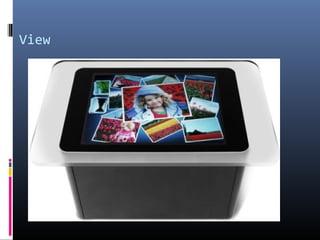
The Surface is a horizontal display on a table-like
form.
Instead of a keyboard and mouse, the user interacts
directly with a touch-sensitive screen.
30-inch diagonal display in table like form factor.
That’s easy for an individuals or multiple people
interact with just like in the real world.
Available in retail stores, restaurants, hotels,
casinos..
History of surface computer
 2001: The product idea for Surface was initially
conceptualized by Steven Bathiche .
 2003:1st prototype (t1 ) was produced to bill gets for
appruval
 2004: Microsoft built more than 85 early prototypes for
Surface.
 2005: The final hardware design was completed.
 2007: Interactive table top device was designed than
seamlessly bring both the physical and virtual words
into one.
View
Features
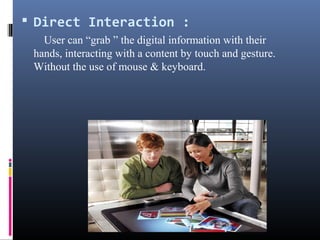
 Direct Interaction :
User can “grab ” the digital information with their
hands, interacting with a content by touch and gesture.
Without the use of mouse & keyboard.
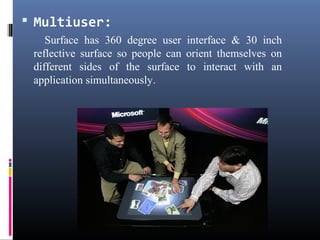
 Multiuser:
Surface has 360 degree user interface & 30 inch
reflective surface so people can orient themselves on
different sides of the surface to interact with an
application simultaneously.
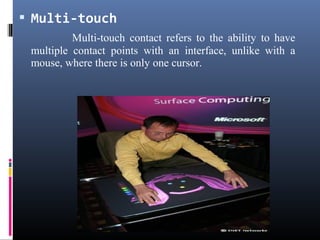
 Multi-touch
Multi-touch contact refers to the ability to have
multiple contact points with an interface, unlike with a
mouse, where there is only one cursor.
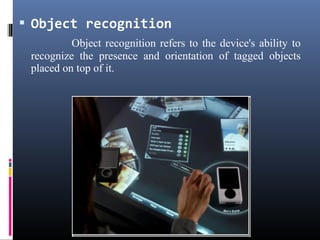
 Object recognition
Object recognition refers to the device's ability to
recognize the presence and orientation of tagged objects
placed on top of it.
Design & Working of
surface computer
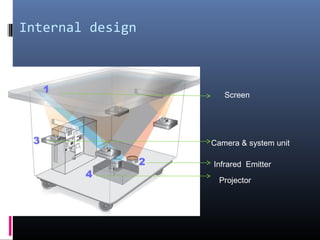
Internal design
Camera & system unit
Infrared Emitter
Projector
Screen
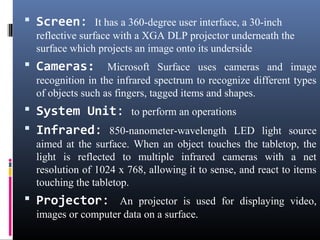
 Screen: It has a 360-degree user interface, a 30-inch
reflective surface with a XGA DLP projector underneath the
surface which projects an image onto its underside
 Cameras: Microsoft Surface uses cameras and image
recognition in the infrared spectrum to recognize different types
of objects such as fingers, tagged items and shapes.
 System Unit: to perform an operations
 Infrared: 850-nanometer-wavelength LED light source
aimed at the surface. When an object touches the tabletop, the
light is reflected to multiple infrared cameras with a net
resolution of 1024 x 768, allowing it to sense, and react to items
touching the tabletop.
 Projector: An projector is used for displaying video,
images or computer data on a surface.
Working
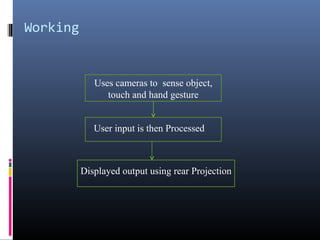
Uses cameras to sense object,
touch and hand gesture
Displayed output using rear Projection
User input is then Processed
Applications:
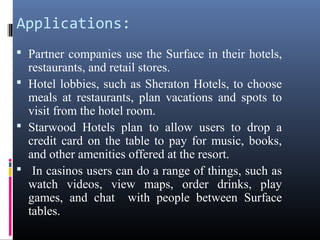
 Partner companies use the Surface in their hotels,
restaurants, and retail stores.
 Hotel lobbies, such as Sheraton Hotels, to choose
meals at restaurants, plan vacations and spots to
visit from the hotel room.
 Starwood Hotels plan to allow users to drop a
credit card on the table to pay for music, books,
and other amenities offered at the resort.
 In casinos users can do a range of things, such as
watch videos, view maps, order drinks, play
games, and chat with people between Surface
tables.
Advantages:
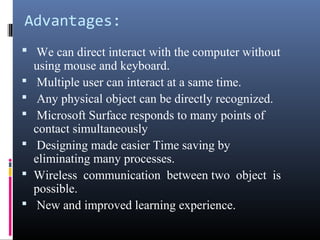
 We can direct interact with the computer without
using mouse and keyboard.
 Multiple user can interact at a same time.
 Any physical object can be directly recognized.
 Microsoft Surface responds to many points of
contact simultaneously
 Designing made easier Time saving by
eliminating many processes.
 Wireless communication between two object is
possible.
 New and improved learning experience.
Disadvantages:
 Not portable and Very expensive
 Dim lighting required to avoid washing out of screen.
 Barcode Required for an objects.
 This is insecure system.
Conclusion:
 Surface computer is advanced computer having large
touch screen.
 Users can interact with the machine by touching or
dragging their fingertips and objects such as
paintbrushes across the screen.
 We can use surface computer in different hotels,
Restaurants, casinos.
Thank You

Abhishek meena

  • 1.
    A PRESENTATION ON SURFACE COMPUTER Presented to:-Presented by:- Mr. Amit Maharshi Abhishek Meena Dept. of EE (JNIT)
  • 2.
    Objectives:  To studywhat is surface computer?  To study working & process of surface computer.  To study applications of surface computer.  To study advantages & disadvantages of surface computer
  • 3.
    What is surfacecomputer? Surface computing is the term for the use of a specialized computer in which traditional GUI elements are replaced by everyday objects. The Surface is a horizontal display on a table-like form. Instead of a keyboard and mouse, the user interacts directly with a touch-sensitive screen. 30-inch diagonal display in table like form factor. That’s easy for an individuals or multiple people interact with just like in the real world. Available in retail stores, restaurants, hotels, casinos..
  • 4.
    History of surfacecomputer  2001: The product idea for Surface was initially conceptualized by Steven Bathiche .  2003:1st prototype (t1 ) was produced to bill gets for appruval  2004: Microsoft built more than 85 early prototypes for Surface.  2005: The final hardware design was completed.  2007: Interactive table top device was designed than seamlessly bring both the physical and virtual words into one.
  • 5.
  • 6.
  • 7.
     Direct Interaction: User can “grab ” the digital information with their hands, interacting with a content by touch and gesture. Without the use of mouse & keyboard.
  • 8.
     Multiuser: Surface has360 degree user interface & 30 inch reflective surface so people can orient themselves on different sides of the surface to interact with an application simultaneously.
  • 9.
     Multi-touch Multi-touch contactrefers to the ability to have multiple contact points with an interface, unlike with a mouse, where there is only one cursor.
  • 10.
     Object recognition Objectrecognition refers to the device's ability to recognize the presence and orientation of tagged objects placed on top of it.
  • 11.
    Design & Workingof surface computer
  • 12.
    Internal design Camera &system unit Infrared Emitter Projector Screen
  • 13.
     Screen: Ithas a 360-degree user interface, a 30-inch reflective surface with a XGA DLP projector underneath the surface which projects an image onto its underside  Cameras: Microsoft Surface uses cameras and image recognition in the infrared spectrum to recognize different types of objects such as fingers, tagged items and shapes.  System Unit: to perform an operations  Infrared: 850-nanometer-wavelength LED light source aimed at the surface. When an object touches the tabletop, the light is reflected to multiple infrared cameras with a net resolution of 1024 x 768, allowing it to sense, and react to items touching the tabletop.  Projector: An projector is used for displaying video, images or computer data on a surface.
  • 14.
    Working Uses cameras tosense object, touch and hand gesture Displayed output using rear Projection User input is then Processed
  • 15.
    Applications:  Partner companiesuse the Surface in their hotels, restaurants, and retail stores.  Hotel lobbies, such as Sheraton Hotels, to choose meals at restaurants, plan vacations and spots to visit from the hotel room.  Starwood Hotels plan to allow users to drop a credit card on the table to pay for music, books, and other amenities offered at the resort.  In casinos users can do a range of things, such as watch videos, view maps, order drinks, play games, and chat with people between Surface tables.
  • 16.
    Advantages:  We candirect interact with the computer without using mouse and keyboard.  Multiple user can interact at a same time.  Any physical object can be directly recognized.  Microsoft Surface responds to many points of contact simultaneously  Designing made easier Time saving by eliminating many processes.  Wireless communication between two object is possible.  New and improved learning experience.
  • 17.
    Disadvantages:  Not portableand Very expensive  Dim lighting required to avoid washing out of screen.  Barcode Required for an objects.  This is insecure system.
  • 18.
    Conclusion:  Surface computeris advanced computer having large touch screen.  Users can interact with the machine by touching or dragging their fingertips and objects such as paintbrushes across the screen.  We can use surface computer in different hotels, Restaurants, casinos.
  • 19.