WHY WI-FI IS KEEPING YOUR HOTEL FROM
RECEIVING FIVE STAR REVIEWS.
White paper
V2.1 - 06/07/2016
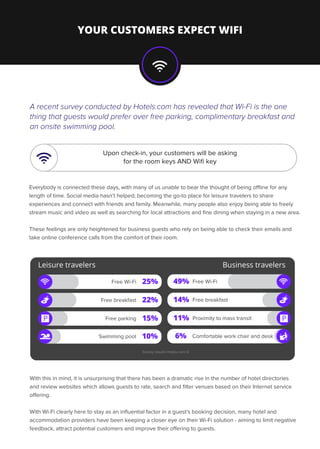
A recent survey conducted by Hotels.com has revealed that Wi-Fi is the one
thing that guests would prefer over free parking, complimentary breakfast and
an onsite swimming pool.
Everybody is connected these days, with many of us unable to bear the thought of being offline for any
length of time. Social media hasn’t helped; becoming the go-to place for leisure travelers to share
experiences and connect with friends and family. Meanwhile, many people also enjoy being able to freely
stream music and video as well as searching for local attractions and fine dining when staying in a new area.
These feelings are only heightened for business guests who rely on being able to check their emails and
take online conference calls from the comfort of their room.
YOUR CUSTOMERS EXPECT WIFI
Upon check-in, your customers will be asking
for the room keys AND Wifi key
Free Wi-Fi 25%
Free breakfast 22%
Free parking 15%P
Swimming pool 10%
Free Wi-Fi49%
Free breakfast14%
Proximity to mass transit11%
Comfortable work chair and desk6%
Leisure travelers Business travelers
Survey results Hotels.com ©
P
With this in mind, it is unsurprising that there has been a dramatic rise in the number of hotel directories
and review websites which allows guests to rate, search and filter venues based on their Internet service
offering.
With Wi-Fi clearly here to stay as an influential factor in a guest’s booking decision, many hotel and
accommodation providers have been keeping a closer eye on their Wi-Fi solution - aiming to limit negative
feedback, attract potential customers and improve their offering to guests.
WHAT REALLY MATTERS?
Speed is king
The speed of a Wi-Fi connection was the biggest concern among hotel reviewers, with many
claiming that they wanted to use the internet for streaming and video calling as well as the odd
email or light browsing.
One reviewer complains:
Really reliable
Following speed, the reliability of an internet connection was a major concern to hotel guests.
Although basic internet use (emails, web browsing) is possible on an intermittent connection, video
and music streaming services require a strong, consistent connection.
“The internet service has such restricted bandwidth that it is virtually unusable for
most common purposes such as Skype, etc. It is barely adequate for reading
email and looking at the weather”
Even more alarmingly for hotels, reviewers have been seen actively discouraging other guests from
booking with a hotel that had poor internet:
“I only ever book hotels with in-room internet because it is a necessity for me
when I travel. This hotel has wifi in certain areas and wired ports in all the rooms
[...] My biggest disappointment was with the speed - the login page lists as
256kb/s up/down but usage was much slower and felt like a dial up.
Be warned, if you like your internet fast and hot, this ain’t the place to stay.”
On top of this, many business travellers may be relying on connections to common business cloud
software such as Salesforce or Marketo, and VPNs such as GotoMeeting and join.me. These typically
require a dependable always-on connection, failure to provide this could make business travel
disastrous.
WHAT REALLY MATTERS?
A common complaint noticed in hotel reviews was the need for guests to wander around the room
and hotel itself searching for optimal signal. Hotels frequently lack sufficient wireless access points,
or fail to position them intelligently in a way that covers the entire property well.
In addition, many hotel’s Wi-Fi service is not capable of managing high occupancy, with high usage
causing dips in performance. These operational shortcomings leave many guests complaining about
poor connection.
With public awareness of identity theft and personal data at an all time high, guests are raising their
security and privacy concerns more frequently. If a Wi-Fi network is insecure, a guest’s browsing
could be hijacked, video calls could be monitored and most importantly, their financial information
could be compromised while making online purchases.
In addition to security, hotels must also be looking to protect their business from the likes of
hackers, virus’ and trojans, as well as spam senders using their Wi-Fi services to spread.
“I had purchased a 24hr block of wireless internet [...] but could barely get a signal
because the room was so far away… I eventually realised that I needed to go on the
balcony to get a good signal”.
“The Internet signal was very weak there. The rooms closer to the middle
of the building had a better signal, so we needed to go to the hall every time
we needed to access the web.”
Security matters
FOUR STAGES TO FIVE STAR REVIEWS
This may seem like an attractive prospect, however the technology behind the marketing facade rarely
lives up to expectations. This combination of limited networking knowledge and poor implementation
tends to leave hotels with little more than a poor Wi-Fi connection.
In the early days when hotels first began having Wi-Fi implemented, it was possible to simply place
Access Points down all of the corridors. As technology has advanced and expectations have increased,
this just isn’t workable any more.
If you are looking to make improvements to your Wi-Fi offering then, before you start down the
implementation route, take a look at these four key stages you should be considering:
A trap that many have fallen into within recent years is to look to marketing companies
for Wi-Fi services; lured in by their promise to extract meaningful data from guests
which can be used for campaigns.
The ultimate goal must be to provide fast and reliable Wi-Fi to all guests when the hotel is at it’s fullest
capacity. To achieve this, you must have a good understanding of your hotel’s layout, the different
types of guest and the facilities that they require. For example:
You should also account for GuestNet style landing pages, data gathering and ecommerce
requirements too.
Economy rooms - closely packed together, generating high density needs
Stage 1: Planning
Premium rooms - high expectation with medium density, they may also expect dedicated services,
Conference rooms - high density with a high speed is required
Restaurants & Bar - high density and medium speeds required
Stage 2: Design
Armed with a clear plan of what is required, the next stage is concerned with design. Ensuring you are
using the latest technology available will ensure you are getting all the best features while also future
proofing for years to come.
FOUR STAGES TO FIVE STAR REVIEWS
CONTACT US TODAY ON ITSERVICES@AAP3.COM
Access Point installation and structured cabling
Network Engineering
It is strongly recommended that you enlist a third party to conduct a Wi-Fi Site Survey. This will identify
the most appropriate locations for your Access Points based on your building; ensuring that there are
no black spots or weak signals.
Additional Access Points can then be incorporated into the design to add value to premium rooms,
conference bridges and leisure areas.
The implementation stage is broken into two phases:
A clear and detailed plan is handed to an accredited installer who ensures the Access Points are positioned
accurately and safely. All structured cabling is hidden away as much as possible, ensuring it is in-keeping
with the building aesthetics.
Following this, the Network Engineers will come and connect all the Access Points together and
configure the system to work.
Stage 3: Integrations
It’s all too common for this stage to be given the least focus, but in reality, it’s just as important. After
investing time and money into the perfect Wi-Fi service, it is paramount to ensure that it continues
to perform to a high standard.
Investing in the ongoing support of the Wi-Fi is critical to ensure that the system remains up to
date with software and security patches; resolving any issues in a timely manner and replacing
equipment that is not functioning.
What’s more, if your new system is designed to generate revenue via a pay to access or
product/service sales, then it is worthwhile to have the system monitored 24/7 to ensure that
it is always available.
Stage 4: Operate
europe.aap3.com

aap3 Wi-Fi for Hotels Whitepaper

  • 1.
    WHY WI-FI ISKEEPING YOUR HOTEL FROM RECEIVING FIVE STAR REVIEWS. White paper V2.1 - 06/07/2016
  • 2.
    A recent surveyconducted by Hotels.com has revealed that Wi-Fi is the one thing that guests would prefer over free parking, complimentary breakfast and an onsite swimming pool. Everybody is connected these days, with many of us unable to bear the thought of being offline for any length of time. Social media hasn’t helped; becoming the go-to place for leisure travelers to share experiences and connect with friends and family. Meanwhile, many people also enjoy being able to freely stream music and video as well as searching for local attractions and fine dining when staying in a new area. These feelings are only heightened for business guests who rely on being able to check their emails and take online conference calls from the comfort of their room. YOUR CUSTOMERS EXPECT WIFI Upon check-in, your customers will be asking for the room keys AND Wifi key Free Wi-Fi 25% Free breakfast 22% Free parking 15%P Swimming pool 10% Free Wi-Fi49% Free breakfast14% Proximity to mass transit11% Comfortable work chair and desk6% Leisure travelers Business travelers Survey results Hotels.com © P With this in mind, it is unsurprising that there has been a dramatic rise in the number of hotel directories and review websites which allows guests to rate, search and filter venues based on their Internet service offering. With Wi-Fi clearly here to stay as an influential factor in a guest’s booking decision, many hotel and accommodation providers have been keeping a closer eye on their Wi-Fi solution - aiming to limit negative feedback, attract potential customers and improve their offering to guests.
  • 3.
    WHAT REALLY MATTERS? Speedis king The speed of a Wi-Fi connection was the biggest concern among hotel reviewers, with many claiming that they wanted to use the internet for streaming and video calling as well as the odd email or light browsing. One reviewer complains: Really reliable Following speed, the reliability of an internet connection was a major concern to hotel guests. Although basic internet use (emails, web browsing) is possible on an intermittent connection, video and music streaming services require a strong, consistent connection. “The internet service has such restricted bandwidth that it is virtually unusable for most common purposes such as Skype, etc. It is barely adequate for reading email and looking at the weather” Even more alarmingly for hotels, reviewers have been seen actively discouraging other guests from booking with a hotel that had poor internet: “I only ever book hotels with in-room internet because it is a necessity for me when I travel. This hotel has wifi in certain areas and wired ports in all the rooms [...] My biggest disappointment was with the speed - the login page lists as 256kb/s up/down but usage was much slower and felt like a dial up. Be warned, if you like your internet fast and hot, this ain’t the place to stay.” On top of this, many business travellers may be relying on connections to common business cloud software such as Salesforce or Marketo, and VPNs such as GotoMeeting and join.me. These typically require a dependable always-on connection, failure to provide this could make business travel disastrous.
  • 4.
    WHAT REALLY MATTERS? Acommon complaint noticed in hotel reviews was the need for guests to wander around the room and hotel itself searching for optimal signal. Hotels frequently lack sufficient wireless access points, or fail to position them intelligently in a way that covers the entire property well. In addition, many hotel’s Wi-Fi service is not capable of managing high occupancy, with high usage causing dips in performance. These operational shortcomings leave many guests complaining about poor connection. With public awareness of identity theft and personal data at an all time high, guests are raising their security and privacy concerns more frequently. If a Wi-Fi network is insecure, a guest’s browsing could be hijacked, video calls could be monitored and most importantly, their financial information could be compromised while making online purchases. In addition to security, hotels must also be looking to protect their business from the likes of hackers, virus’ and trojans, as well as spam senders using their Wi-Fi services to spread. “I had purchased a 24hr block of wireless internet [...] but could barely get a signal because the room was so far away… I eventually realised that I needed to go on the balcony to get a good signal”. “The Internet signal was very weak there. The rooms closer to the middle of the building had a better signal, so we needed to go to the hall every time we needed to access the web.” Security matters
  • 5.
    FOUR STAGES TOFIVE STAR REVIEWS This may seem like an attractive prospect, however the technology behind the marketing facade rarely lives up to expectations. This combination of limited networking knowledge and poor implementation tends to leave hotels with little more than a poor Wi-Fi connection. In the early days when hotels first began having Wi-Fi implemented, it was possible to simply place Access Points down all of the corridors. As technology has advanced and expectations have increased, this just isn’t workable any more. If you are looking to make improvements to your Wi-Fi offering then, before you start down the implementation route, take a look at these four key stages you should be considering: A trap that many have fallen into within recent years is to look to marketing companies for Wi-Fi services; lured in by their promise to extract meaningful data from guests which can be used for campaigns. The ultimate goal must be to provide fast and reliable Wi-Fi to all guests when the hotel is at it’s fullest capacity. To achieve this, you must have a good understanding of your hotel’s layout, the different types of guest and the facilities that they require. For example: You should also account for GuestNet style landing pages, data gathering and ecommerce requirements too. Economy rooms - closely packed together, generating high density needs Stage 1: Planning Premium rooms - high expectation with medium density, they may also expect dedicated services, Conference rooms - high density with a high speed is required Restaurants & Bar - high density and medium speeds required Stage 2: Design Armed with a clear plan of what is required, the next stage is concerned with design. Ensuring you are using the latest technology available will ensure you are getting all the best features while also future proofing for years to come.
  • 6.
    FOUR STAGES TOFIVE STAR REVIEWS CONTACT US TODAY ON ITSERVICES@AAP3.COM Access Point installation and structured cabling Network Engineering It is strongly recommended that you enlist a third party to conduct a Wi-Fi Site Survey. This will identify the most appropriate locations for your Access Points based on your building; ensuring that there are no black spots or weak signals. Additional Access Points can then be incorporated into the design to add value to premium rooms, conference bridges and leisure areas. The implementation stage is broken into two phases: A clear and detailed plan is handed to an accredited installer who ensures the Access Points are positioned accurately and safely. All structured cabling is hidden away as much as possible, ensuring it is in-keeping with the building aesthetics. Following this, the Network Engineers will come and connect all the Access Points together and configure the system to work. Stage 3: Integrations It’s all too common for this stage to be given the least focus, but in reality, it’s just as important. After investing time and money into the perfect Wi-Fi service, it is paramount to ensure that it continues to perform to a high standard. Investing in the ongoing support of the Wi-Fi is critical to ensure that the system remains up to date with software and security patches; resolving any issues in a timely manner and replacing equipment that is not functioning. What’s more, if your new system is designed to generate revenue via a pay to access or product/service sales, then it is worthwhile to have the system monitored 24/7 to ensure that it is always available. Stage 4: Operate
  • 7.