GreenCloud: A TutorialGreenCloud: A Tutorial
Presented by:
Md. Habibur Rahman (11-94853-2)
Adnan Mehedi (12-95467-1)Adnan Mehedi (12-95467-1)
Course:
Simulation and Modeling Techniques
Instructor:
Dr. Md. Shamim Akhter
Introduction to GreenCloud
Reasons for Learning GreenCloud
Prerequisites
How to install GreenCloud in Ubuntu 11.10
AgendaAgenda
How to install GreenCloud in Ubuntu 11.10
Exciting example on GreenCloud
GreenCloudGreenCloud
Motivation
• The lack of detailed simulators on the market
was the motivation to develop GreenCloud that
allows researchers to observe, interact and
measure cloud performance.measure cloud performance.
GreenCloud is a sophisticated open source
cloud computing simulator
Greencloud as been elaborated in the context
of the GreenIT project.
http://greencloud.gforge.uni.lu/index.html
There also was no provisioning for observing
clouds for their energy-efficiency
Simulation environment for energy-aware
cloud computing data centers.
GreenCloud FeatureGreenCloud Feature
GreenCloud is an extension of the well-
known NS2 network simulator
Focused primarily on the communications
within a cloud, i.e., all of the communication
processes are simulated on packet level.
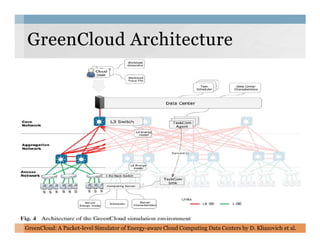
GreenCloudGreenCloud ArchitectureArchitecture
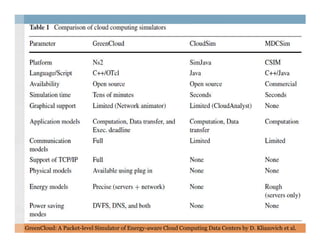
GreenCloud: A Packet-level Simulator of Energy-aware Cloud Computing Data Centers by D. Kliazovich et al.
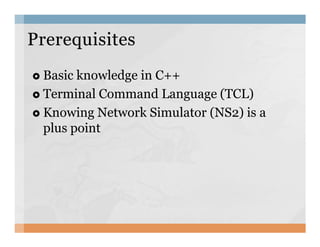
Basic knowledge in C++
Terminal Command Language (TCL)
Knowing Network Simulator (NS2) is a
plus point
PrerequisitesPrerequisites
plus point
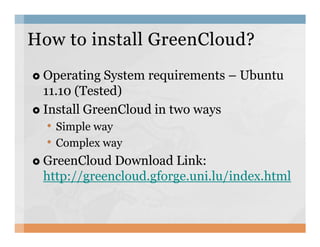
Operating System requirements – Ubuntu
11.10 (Tested)
Install GreenCloud in two ways
• Simple way
How to install GreenCloud?How to install GreenCloud?
• Simple way
• Complex way
GreenCloud Download Link:
http://greencloud.gforge.uni.lu/index.html
We need to download the virtual machine
(Ubuntu) with GreenCloud simulator and
VM contains:
• default Ubuntu installation, with many extraneous
packages removed
Simple way to install GreenCloudSimple way to install GreenCloud
packages removed
• TCL, TK, OTCL, TclCL packages are installed
• NS2 and GreenCloud installed from source
• Eclipse with the NS2/GreenCloud project already set
up
• Only need the VMware Player or VMware
Workstation
VM Download Link : http://greencloud.gforge.uni.lu/vm.html
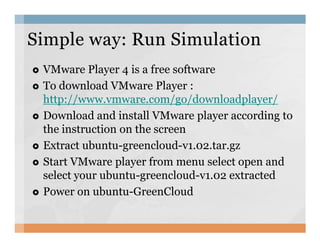
VMware Player 4 is a free software
To download VMware Player :
http://www.vmware.com/go/downloadplayer/
Download and install VMware player according to
the instruction on the screen
Simple way: Run SimulationSimple way: Run Simulation
the instruction on the screen
Extract ubuntu-greencloud-v1.02.tar.gz
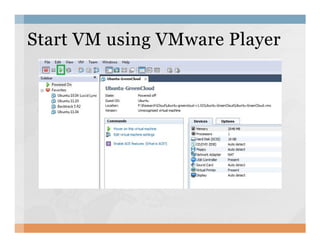
Start VMware player from menu select open and
select your ubuntu-greencloud-v1.02 extracted
Power on ubuntu-GreenCloud
Start VM using VMware PlayerStart VM using VMware Player
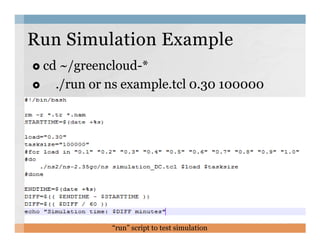
cd ~/greencloud-*
./run or ns example.tcl 0.30 100000
Run Simulation ExampleRun Simulation Example
“run” script to test simulation
For example you’ve installed ubuntu 11.10 in
your machine.
Now you want to install GreenCloud in your
machine to simulate cloud.
Complex way to installComplex way to install GGreenCloudreenCloud
machine to simulate cloud.
You need to download GreenCloud:
http://greencloud.gforge.uni.lu/
Unpack the downloaded GreenCloud software.
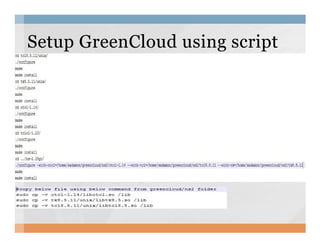
Install GreenCloud using a setup script
Setup GreenCloud using scriptSetup GreenCloud using script
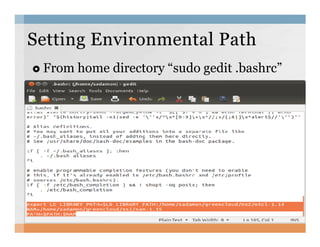
From home directory “sudo gedit .bashrc”
SettingSetting Environmental PathEnvironmental Path
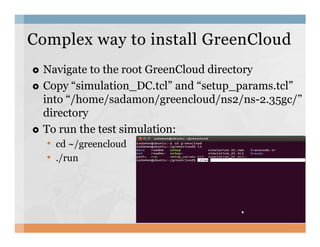
Navigate to the root GreenCloud directory
Copy “simulation_DC.tcl” and “setup_params.tcl”
into “/home/sadamon/greencloud/ns2/ns-2.35gc/”
directory
To run the test simulation:
Complex way to install GreenCloudComplex way to install GreenCloud
To run the test simulation:
• cd ~/greencloud
• ./run
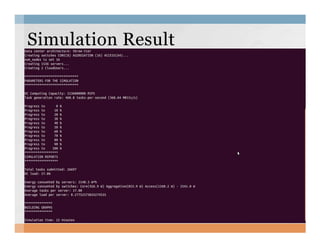
Simulation ResultSimulation Result
Thank you ☺Thank you ☺

A tutorial on GreenCloud

  • 1.
    GreenCloud: A TutorialGreenCloud:A Tutorial Presented by: Md. Habibur Rahman (11-94853-2) Adnan Mehedi (12-95467-1)Adnan Mehedi (12-95467-1) Course: Simulation and Modeling Techniques Instructor: Dr. Md. Shamim Akhter
  • 2.
    Introduction to GreenCloud Reasonsfor Learning GreenCloud Prerequisites How to install GreenCloud in Ubuntu 11.10 AgendaAgenda How to install GreenCloud in Ubuntu 11.10 Exciting example on GreenCloud
  • 3.
    GreenCloudGreenCloud Motivation • The lackof detailed simulators on the market was the motivation to develop GreenCloud that allows researchers to observe, interact and measure cloud performance.measure cloud performance. GreenCloud is a sophisticated open source cloud computing simulator Greencloud as been elaborated in the context of the GreenIT project. http://greencloud.gforge.uni.lu/index.html
  • 4.
    There also wasno provisioning for observing clouds for their energy-efficiency Simulation environment for energy-aware cloud computing data centers. GreenCloud FeatureGreenCloud Feature GreenCloud is an extension of the well- known NS2 network simulator Focused primarily on the communications within a cloud, i.e., all of the communication processes are simulated on packet level.
  • 5.
    GreenCloudGreenCloud ArchitectureArchitecture GreenCloud: APacket-level Simulator of Energy-aware Cloud Computing Data Centers by D. Kliazovich et al.
  • 6.
    GreenCloud: A Packet-levelSimulator of Energy-aware Cloud Computing Data Centers by D. Kliazovich et al.
  • 7.
    Basic knowledge inC++ Terminal Command Language (TCL) Knowing Network Simulator (NS2) is a plus point PrerequisitesPrerequisites plus point
  • 8.
    Operating System requirements– Ubuntu 11.10 (Tested) Install GreenCloud in two ways • Simple way How to install GreenCloud?How to install GreenCloud? • Simple way • Complex way GreenCloud Download Link: http://greencloud.gforge.uni.lu/index.html
  • 9.
    We need todownload the virtual machine (Ubuntu) with GreenCloud simulator and VM contains: • default Ubuntu installation, with many extraneous packages removed Simple way to install GreenCloudSimple way to install GreenCloud packages removed • TCL, TK, OTCL, TclCL packages are installed • NS2 and GreenCloud installed from source • Eclipse with the NS2/GreenCloud project already set up • Only need the VMware Player or VMware Workstation VM Download Link : http://greencloud.gforge.uni.lu/vm.html
  • 10.
    VMware Player 4is a free software To download VMware Player : http://www.vmware.com/go/downloadplayer/ Download and install VMware player according to the instruction on the screen Simple way: Run SimulationSimple way: Run Simulation the instruction on the screen Extract ubuntu-greencloud-v1.02.tar.gz Start VMware player from menu select open and select your ubuntu-greencloud-v1.02 extracted Power on ubuntu-GreenCloud
  • 11.
    Start VM usingVMware PlayerStart VM using VMware Player
  • 12.
    cd ~/greencloud-* ./run orns example.tcl 0.30 100000 Run Simulation ExampleRun Simulation Example “run” script to test simulation
  • 13.
    For example you’veinstalled ubuntu 11.10 in your machine. Now you want to install GreenCloud in your machine to simulate cloud. Complex way to installComplex way to install GGreenCloudreenCloud machine to simulate cloud. You need to download GreenCloud: http://greencloud.gforge.uni.lu/ Unpack the downloaded GreenCloud software. Install GreenCloud using a setup script
  • 14.
    Setup GreenCloud usingscriptSetup GreenCloud using script
  • 15.
    From home directory“sudo gedit .bashrc” SettingSetting Environmental PathEnvironmental Path
  • 16.
    Navigate to theroot GreenCloud directory Copy “simulation_DC.tcl” and “setup_params.tcl” into “/home/sadamon/greencloud/ns2/ns-2.35gc/” directory To run the test simulation: Complex way to install GreenCloudComplex way to install GreenCloud To run the test simulation: • cd ~/greencloud • ./run
  • 17.
  • 18.