CloudSim: A TutorialCloudSim: A Tutorial
Presented by:
Md. Habibur Rahman (11-94853-2)
Adnan Mehedi (12-95467-1)Adnan Mehedi (12-95467-1)
Course:
Simulation and Modeling Techniques
Instructor:
Dr. Md. Shamim Akhter
Introduction to CloudSim
Reasons for Learning CloudSim
Prerequisites
How to use CloudSim with Eclipse
AgendaAgenda
How to use CloudSim with Eclipse
Sample example on CloudSim
Motivation
• provides a generalized and extensible simulation
framework that enables modeling, simulation,
and experimentation of emerging Cloud
computing infrastructures and application
CloudSimCloudSim
computing infrastructures and application
services
CloudSim is developed in the CLOUDS Laboratory,
at the Computer Science and Software Engineering
Department of the University of Melbourne.
CloudSim Toolkit 3.0 released at Jan 13, 2012
www.cloudbus.orghttp://code.google.com/p/cloudsim/
Support for modeling and simulation of large
scale Cloud computing data centers
Energy-aware computational resources
Support for data center network topologies and
message-passing applications
CloudSim FeatureCloudSim Feature
message-passing applications
Support for dynamic insertion of simulation
elements, stop and resume of simulation
Support for user-defined policies for allocation of
hosts to virtual machines and policies for
allocation of host resources to virtual machines
http://code.google.com/p/cloudsim/
CloudSim ArchitectureCloudSim Architecture
Cloud resource provisioning
Energy-efficient management of data
center resources
Optimization of cloud computing
Reasons for LearningReasons for Learning CloudSimCloudSim
Optimization of cloud computing
Research activities
Limitation: No Graphical User Interface
(GUI)
We’ll need at least basic understanding of
how to program in Java
We’ll need some basic OOP concept
PrerequisitesPrerequisites
Part 1
• Setting up Development Environments
Part 2
• Use Ecplise with CloudSim
How to use CloudSim with EclipseHow to use CloudSim with Eclipse
• Use Ecplise with CloudSim
Part 3
• Run sample example using CloudSim
Supported OS
• Windows XP (32-bit), Vista (32- or 64-bit), or
Windows 7 (32- or 64-bit)
• Mac OS X 10.5.8 or later (x86 only)
Part 1: SettingPart 1: Setting upup DevelopmentDevelopment
EnvironmentsEnvironments
• Mac OS X 10.5.8 or later (x86 only)
• Linux (tested on Ubuntu Linux, Lucid Lynx)
Development environment (Eclipse based)
• Eclipse Classic (versions 3.5.1 and higher)
• JDK 1.6 or later
• CloudSim tool kit
To set up the development environment, we
need:
Java Development Kit (1.6 is preferable)
Part 1:Part 1: SettingSetting up Developmentup Development
Environments (cont.)Environments (cont.)
Eclipse IDE (classic)
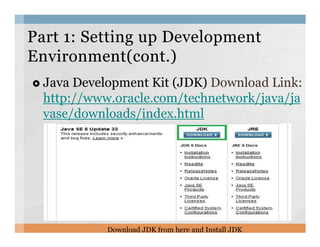
Java Development Kit (JDK) Download Link:
http://www.oracle.com/technetwork/java/ja
vase/downloads/index.html
Part 1:Part 1: SettingSetting up Developmentup Development
Environment(contEnvironment(cont.).)
Download JDK from here and Install JDK
Eclipse IDE Download Link:
http://www.eclipse.org/downloads/
Setting up DevelopmentSetting up Development
Environment(contEnvironment(cont.).)
Download the highlighted version of Eclipse IDE
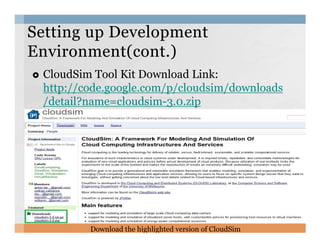
CloudSim Tool Kit Download Link:
http://code.google.com/p/cloudsim/downloads
/detail?name=cloudsim-3.0.zip
Setting up DevelopmentSetting up Development
Environment(cont.)Environment(cont.)
Download the highlighted version of CloudSim
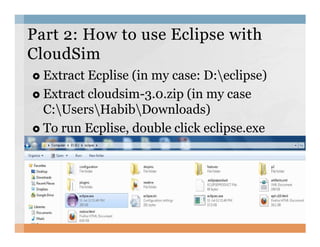
Extract Ecplise (in my case: D:eclipse)
Extract cloudsim-3.0.zip (in my case
C:UsersHabibDownloads)
To run Ecplise, double click eclipse.exe
Part 2: How to use Eclipse withPart 2: How to use Eclipse with
CloudSimCloudSim
To run Ecplise, double click eclipse.exe
OPEN ECLIPSE -> NEW -> JAVA
PROJECT
Part 2: How to use Eclipse withPart 2: How to use Eclipse with
CloudSimCloudSim
Part 2: How to use Eclipse withPart 2: How to use Eclipse with
CloudSimCloudSim
• Write the Project Name
• Untick the USE Default
Location
• Browse and target it to
where you extracted thewhere you extracted the
CloudSim-3.0
• On JRE Select JavaSE-1.6
or JavaSE-1.7
• Project Layout second
option
• Click Next
Part 2: How to use Eclipse withPart 2: How to use Eclipse with
CloudSimCloudSim
• Finally you got the
RIGHT screen
• Select Finish
CloudSimExample1.java : shows how to
create a datacenter with one host and run
one cloudlet on it
CloudSimExample2.java : shows how to
Part 3: Simulation ExamplePart 3: Simulation Example
CloudSimExample2.java : shows how to
create a datacenter with one host and run
two cloudlets on it
To create class just right click from
“org.cloudbus.cloudsim.examples”, select
“New” then “Class”
Step1: RunStep1: Run example using CloudSimexample using CloudSim
Write Class name and click “Finish”
Step2: Run exampleStep2: Run example using CloudSimusing CloudSim
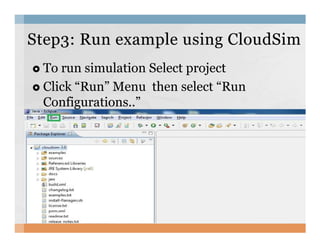
To run simulation Select project
Click “Run” Menu then select “Run
Configurations..”
Step3: RunStep3: Run example using CloudSimexample using CloudSim
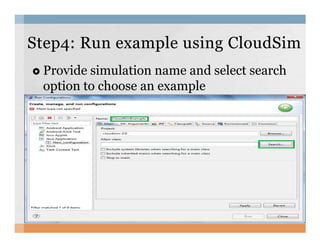
Provide simulation name and select search
option to choose an example
Step4: RunStep4: Run example using CloudSimexample using CloudSim
Select specific example and press OK
Step5: RunStep5: Run example using CloudSimexample using CloudSim
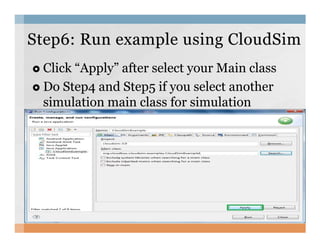
Click “Apply” after select your Main class
Do Step4 and Step5 if you select another
simulation main class for simulation
Step6: RunStep6: Run example using CloudSimexample using CloudSim
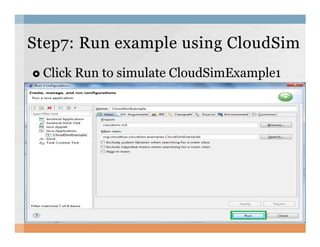
Click Run to simulate CloudSimExample1
Step7:Step7: RunRun example using CloudSimexample using CloudSim
Simulation ResultSimulation Result
Thank you ☺Thank you ☺

A tutorial on CloudSim

  • 1.
    CloudSim: A TutorialCloudSim:A Tutorial Presented by: Md. Habibur Rahman (11-94853-2) Adnan Mehedi (12-95467-1)Adnan Mehedi (12-95467-1) Course: Simulation and Modeling Techniques Instructor: Dr. Md. Shamim Akhter
  • 2.
    Introduction to CloudSim Reasonsfor Learning CloudSim Prerequisites How to use CloudSim with Eclipse AgendaAgenda How to use CloudSim with Eclipse Sample example on CloudSim
  • 3.
    Motivation • provides ageneralized and extensible simulation framework that enables modeling, simulation, and experimentation of emerging Cloud computing infrastructures and application CloudSimCloudSim computing infrastructures and application services CloudSim is developed in the CLOUDS Laboratory, at the Computer Science and Software Engineering Department of the University of Melbourne. CloudSim Toolkit 3.0 released at Jan 13, 2012 www.cloudbus.orghttp://code.google.com/p/cloudsim/
  • 4.
    Support for modelingand simulation of large scale Cloud computing data centers Energy-aware computational resources Support for data center network topologies and message-passing applications CloudSim FeatureCloudSim Feature message-passing applications Support for dynamic insertion of simulation elements, stop and resume of simulation Support for user-defined policies for allocation of hosts to virtual machines and policies for allocation of host resources to virtual machines http://code.google.com/p/cloudsim/
  • 5.
  • 6.
    Cloud resource provisioning Energy-efficientmanagement of data center resources Optimization of cloud computing Reasons for LearningReasons for Learning CloudSimCloudSim Optimization of cloud computing Research activities Limitation: No Graphical User Interface (GUI)
  • 7.
    We’ll need atleast basic understanding of how to program in Java We’ll need some basic OOP concept PrerequisitesPrerequisites
  • 8.
    Part 1 • Settingup Development Environments Part 2 • Use Ecplise with CloudSim How to use CloudSim with EclipseHow to use CloudSim with Eclipse • Use Ecplise with CloudSim Part 3 • Run sample example using CloudSim
  • 9.
    Supported OS • WindowsXP (32-bit), Vista (32- or 64-bit), or Windows 7 (32- or 64-bit) • Mac OS X 10.5.8 or later (x86 only) Part 1: SettingPart 1: Setting upup DevelopmentDevelopment EnvironmentsEnvironments • Mac OS X 10.5.8 or later (x86 only) • Linux (tested on Ubuntu Linux, Lucid Lynx) Development environment (Eclipse based) • Eclipse Classic (versions 3.5.1 and higher) • JDK 1.6 or later • CloudSim tool kit
  • 10.
    To set upthe development environment, we need: Java Development Kit (1.6 is preferable) Part 1:Part 1: SettingSetting up Developmentup Development Environments (cont.)Environments (cont.) Eclipse IDE (classic)
  • 11.
    Java Development Kit(JDK) Download Link: http://www.oracle.com/technetwork/java/ja vase/downloads/index.html Part 1:Part 1: SettingSetting up Developmentup Development Environment(contEnvironment(cont.).) Download JDK from here and Install JDK
  • 12.
    Eclipse IDE DownloadLink: http://www.eclipse.org/downloads/ Setting up DevelopmentSetting up Development Environment(contEnvironment(cont.).) Download the highlighted version of Eclipse IDE
  • 13.
    CloudSim Tool KitDownload Link: http://code.google.com/p/cloudsim/downloads /detail?name=cloudsim-3.0.zip Setting up DevelopmentSetting up Development Environment(cont.)Environment(cont.) Download the highlighted version of CloudSim
  • 14.
    Extract Ecplise (inmy case: D:eclipse) Extract cloudsim-3.0.zip (in my case C:UsersHabibDownloads) To run Ecplise, double click eclipse.exe Part 2: How to use Eclipse withPart 2: How to use Eclipse with CloudSimCloudSim To run Ecplise, double click eclipse.exe
  • 15.
    OPEN ECLIPSE ->NEW -> JAVA PROJECT Part 2: How to use Eclipse withPart 2: How to use Eclipse with CloudSimCloudSim
  • 16.
    Part 2: Howto use Eclipse withPart 2: How to use Eclipse with CloudSimCloudSim • Write the Project Name • Untick the USE Default Location • Browse and target it to where you extracted thewhere you extracted the CloudSim-3.0 • On JRE Select JavaSE-1.6 or JavaSE-1.7 • Project Layout second option • Click Next
  • 17.
    Part 2: Howto use Eclipse withPart 2: How to use Eclipse with CloudSimCloudSim • Finally you got the RIGHT screen • Select Finish
  • 18.
    CloudSimExample1.java : showshow to create a datacenter with one host and run one cloudlet on it CloudSimExample2.java : shows how to Part 3: Simulation ExamplePart 3: Simulation Example CloudSimExample2.java : shows how to create a datacenter with one host and run two cloudlets on it
  • 19.
    To create classjust right click from “org.cloudbus.cloudsim.examples”, select “New” then “Class” Step1: RunStep1: Run example using CloudSimexample using CloudSim
  • 20.
    Write Class nameand click “Finish” Step2: Run exampleStep2: Run example using CloudSimusing CloudSim
  • 21.
    To run simulationSelect project Click “Run” Menu then select “Run Configurations..” Step3: RunStep3: Run example using CloudSimexample using CloudSim
  • 22.
    Provide simulation nameand select search option to choose an example Step4: RunStep4: Run example using CloudSimexample using CloudSim
  • 23.
    Select specific exampleand press OK Step5: RunStep5: Run example using CloudSimexample using CloudSim
  • 24.
    Click “Apply” afterselect your Main class Do Step4 and Step5 if you select another simulation main class for simulation Step6: RunStep6: Run example using CloudSimexample using CloudSim
  • 25.
    Click Run tosimulate CloudSimExample1 Step7:Step7: RunRun example using CloudSimexample using CloudSim
  • 26.
  • 27.
  • 28.