By
       Jorge Garifuna
Professional Web Developer
   info@GariDigital.com
        213-915-4402

    JGari.com/resume

   Twitter: @jgarifuna
SMS your Name and Email to:


       213-985-4413
SMS your name & email to: 213-985-4413   JGari.com/resume
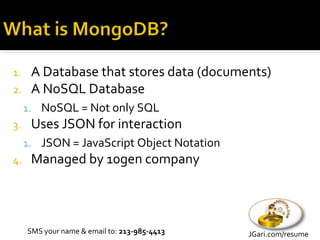
1. A Database that stores data (documents)
2. A NoSQL Database
     1. NoSQL = Not only SQL
3.    Uses JSON for interaction
     1. JSON = JavaScript Object Notation
4.    Managed by 10gen company


     SMS your name & email to: 213-985-4413   JGari.com/resume
1.    Scalable
2.    High performance
3.    Open source
4.    Written in C++
5.    Humongous 


     SMS your name & email to: 213-985-4413   JGari.com/resume
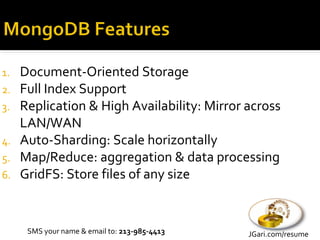
1.   Document-Oriented Storage
2.   Full Index Support
3.   Replication & High Availability: Mirror across
     LAN/WAN
4.   Auto-Sharding: Scale horizontally
5.   Map/Reduce: aggregation & data processing
6.   GridFS: Store files of any size


      SMS your name & email to: 213-985-4413   JGari.com/resume
1. Not a Relational Database (RDBMS)
2. Not ideal for every scenario


     SMS your name & email to: 213-985-4413   JGari.com/resume
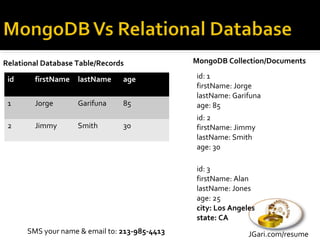
Relational Database Table/Records              MongoDB Collection/Documents

 id     firstName   lastName    age            id: 1
                                               firstName: Jorge
                                               lastName: Garifuna
 1      Jorge       Garifuna    85             age: 85
                                               id: 2
 2      Jimmy       Smith       30             firstName: Jimmy
                                               lastName: Smith
                                               age: 30

                                               id: 3
                                               firstName: Alan
                                               lastName: Jones
                                               age: 25
                                               city: Los Angeles
                                               state: CA
      SMS your name & email to: 213-985-4413                  JGari.com/resume
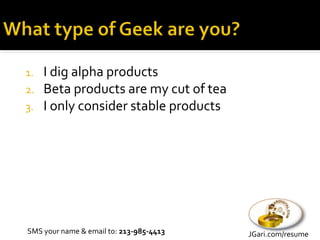
1. I dig alpha products
2. Beta products are my cut of tea
3. I only consider stable products


SMS your name & email to: 213-985-4413   JGari.com/resume
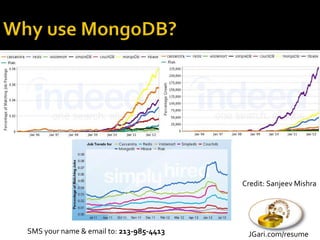
Credit: Sanjeev Mishra


SMS your name & email to: 213-985-4413    JGari.com/resume
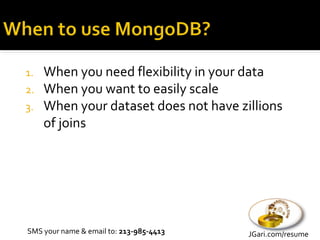
1. When you need flexibility in your data
2. When you want to easily scale
3. When your dataset does not have zillions
   of joins


SMS your name & email to: 213-985-4413   JGari.com/resume
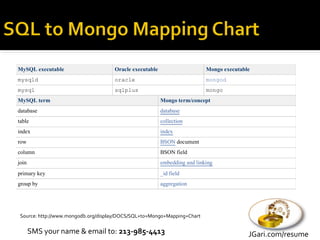
MySQL executable                     Oracle executable                     Mongo executable
mysqld                               oracle                                mongod
mysql                                sqlplus                               mongo
MySQL term                                               Mongo term/concept
database                                                 database
table                                                    collection
index                                                    index
row                                                      BSON document
column                                                   BSON field
join                                                     embedding and linking
primary key                                              _id field
group by                                                 aggregation


 Source: http://www.mongodb.org/display/DOCS/SQL+to+Mongo+Mapping+Chart


       SMS your name & email to: 213-985-4413                                             JGari.com/resume
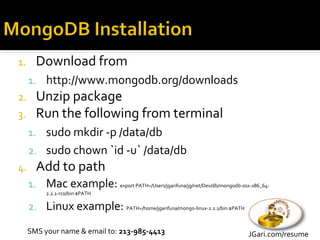
1.     Download from
     1. http://www.mongodb.org/downloads
2.     Unzip package
3.     Run the following from terminal
     1. sudo mkdir -p /data/db
     2. sudo chown `id -u` /data/db
4.     Add to path
     1. Mac example: export PATH=/Users/jgarifuna/jg/net/Dev/db/mongodb-osx-x86_64-
          2.2.1-rc0/bin:$PATH

     2. Linux example: PATH=/home/jgarifuna/mongo-linux-2.2.1/bin:$PATH

     SMS your name & email to: 213-985-4413                                 JGari.com/resume
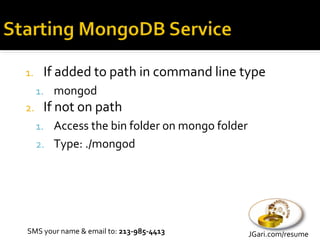
1.    If added to path in command line type
     1. mongod
2.    If not on path
     1. Access the bin folder on mongo folder
     2. Type: ./mongod


SMS your name & email to: 213-985-4413          JGari.com/resume
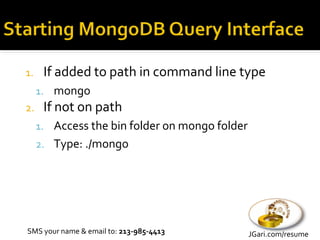
1.    If added to path in command line type
     1. mongo
2.    If not on path
     1. Access the bin folder on mongo folder
     2. Type: ./mongo


SMS your name & email to: 213-985-4413          JGari.com/resume
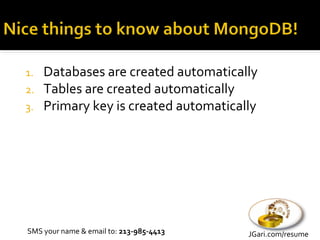
1. Databases are created automatically
2. Tables are created automatically
3. Primary key is created automatically


SMS your name & email to: 213-985-4413   JGari.com/resume
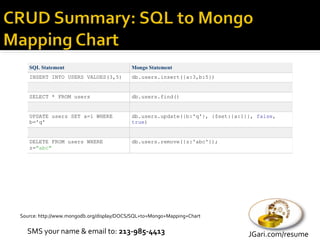
SQL Statement                           Mongo Statement
   INSERT INTO USERS VALUES(3,5)           db.users.insert({a:3,b:5})


   SELECT * FROM users                     db.users.find()


   UPDATE users SET a=1 WHERE              db.users.update({b:'q'}, {$set:{a:1}}, false,
   b='q'                                   true)


   DELETE FROM users WHERE                 db.users.remove({z:'abc'});
   z="abc"


Source: http://www.mongodb.org/display/DOCS/SQL+to+Mongo+Mapping+Chart


  SMS your name & email to: 213-985-4413                                       JGari.com/resume
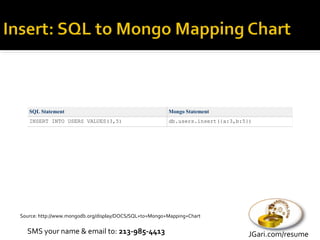
SQL Statement                                         Mongo Statement
   INSERT INTO USERS VALUES(3,5)                         db.users.insert({a:3,b:5})


Source: http://www.mongodb.org/display/DOCS/SQL+to+Mongo+Mapping+Chart


  SMS your name & email to: 213-985-4413                                         JGari.com/resume
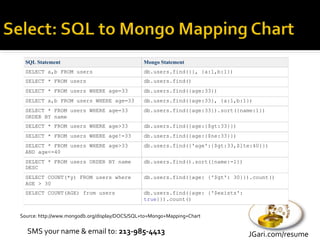
SQL Statement                                Mongo Statement
  SELECT a,b FROM users                        db.users.find({}, {a:1,b:1})
  SELECT * FROM users                          db.users.find()
  SELECT * FROM users WHERE age=33             db.users.find({age:33})
  SELECT a,b FROM users WHERE age=33           db.users.find({age:33}, {a:1,b:1})
  SELECT * FROM users WHERE age=33             db.users.find({age:33}).sort({name:1})
  ORDER BY name
  SELECT * FROM users WHERE age>33             db.users.find({age:{$gt:33}})
  SELECT * FROM users WHERE age!=33            db.users.find({age:{$ne:33}})
  SELECT * FROM users WHERE age>33             db.users.find({'age':{$gt:33,$lte:40}})
  AND age<=40
  SELECT * FROM users ORDER BY name            db.users.find().sort({name:-1})
  DESC
  SELECT COUNT(*y) FROM users where            db.users.find({age: {'$gt': 30}}).count()
  AGE > 30
  SELECT COUNT(AGE) from users                 db.users.find({age: {'$exists':
                                               true}}).count()


Source: http://www.mongodb.org/display/DOCS/SQL+to+Mongo+Mapping+Chart


  SMS your name & email to: 213-985-4413                                         JGari.com/resume
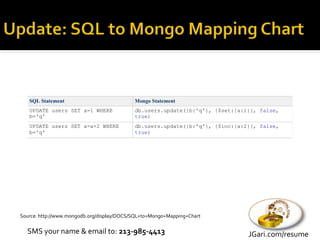
SQL Statement                            Mongo Statement
   UPDATE users SET a=1 WHERE               db.users.update({b:'q'}, {$set:{a:1}}, false,
   b='q'                                    true)
   UPDATE users SET a=a+2 WHERE             db.users.update({b:'q'}, {$inc:{a:2}}, false,
   b='q'                                    true)


Source: http://www.mongodb.org/display/DOCS/SQL+to+Mongo+Mapping+Chart


  SMS your name & email to: 213-985-4413                                       JGari.com/resume
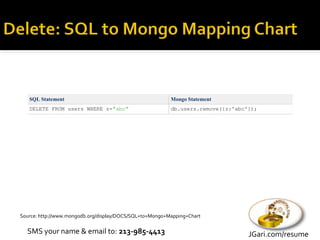
SQL Statement                                          Mongo Statement
   DELETE FROM users WHERE z="abc"                        db.users.remove({z:'abc'});


Source: http://www.mongodb.org/display/DOCS/SQL+to+Mongo+Mapping+Chart


  SMS your name & email to: 213-985-4413                                          JGari.com/resume
SMS your name & email to: 213-985-4413   JGari.com/resume
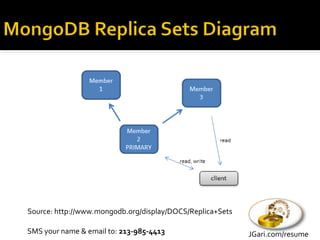
Source: http://www.mongodb.org/display/DOCS/Replica+Sets

SMS your name & email to: 213-985-4413                     JGari.com/resume
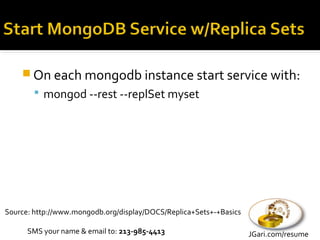
 On each mongodb instance start service with:
         mongod --rest --replSet myset


Source: http://www.mongodb.org/display/DOCS/Replica+Sets+-+Basics

      SMS your name & email to: 213-985-4413                        JGari.com/resume
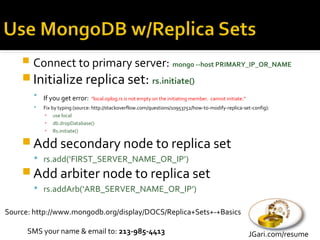
   Connect to primary server: mongo --host PRIMARY_IP_OR_NAME
     Initialize replica set: rs.initiate()
           If you get error:    "local.oplog.rs is not empty on the initiating member. cannot initiate.”
           Fix by typing (source: http://stackoverflow.com/questions/10953752/how-to-modify-replica-set-config):
            ▪ use local
            ▪ db.dropDatabase()
            ▪ Rs.initiate()

     Add secondary node to replica set
         rs.add(‘FIRST_SERVER_NAME_OR_IP’)
     Add arbiter node to replica set
         rs.addArb(‘ARB_SERVER_NAME_OR_IP’)

Source: http://www.mongodb.org/display/DOCS/Replica+Sets+-+Basics

      SMS your name & email to: 213-985-4413                                                                JGari.com/resume
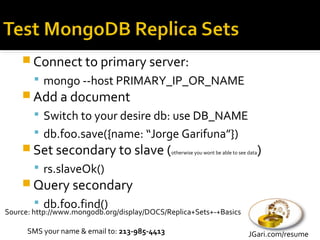
 Connect to primary server:
         mongo --host PRIMARY_IP_OR_NAME
     Add a document
         Switch to your desire db: use DB_NAME
         db.foo.save({name: “Jorge Garifuna”})
     Set secondary to slave (otherwise you wont be able to see data)
         rs.slaveOk()
     Query secondary
         db.foo.find()
Source: http://www.mongodb.org/display/DOCS/Replica+Sets+-+Basics

      SMS your name & email to: 213-985-4413                        JGari.com/resume
public static function getIpGeoDataFromMongo($ip) {
     $rv = array();
     if (strlen($ip) > 0) {
        $m = new Mongo(); // connect, MongoClient
        $db = $m->selectDB("geoip");
        $collection_geo_city_blocks = new MongoCollection($db, self::IP_BLOCKS_TABLE_NAME);
        $ip = addslashes($ip);
        $ip = ip2long($ip);
        $query = array('$and' => array (
                 array( 'startIpNum' => array('$lte' => $ip) ),
                 array('endIpNum' => array('$gte' => $ip) )
             )
        );
        $cursor = $collection_geo_city_blocks->find($query);
        $result = $cursor->getNext();

           if (isset($result['locId']) && strlen($result['locId']) > 0) {
              $collection_geo_city_locations = new MongoCollection($db, self::IP_LOCATIONS_TABLE_NAME);
              $query = array('locId' => $result['locId']);
              $cursor = $collection_geo_city_locations->find($query);
              $rv = $cursor->getNext();
           }
       }

       return $rv;
   }


SMS your name & email to: 213-985-4413                                                           JGari.com/resume
Some Basic
           Node JS stuff
SMS your name & email to: 213-985-4413   JGari.com/resume
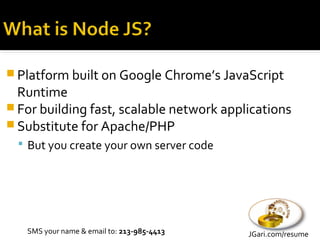
 Platform built on Google Chrome’s JavaScript
  Runtime
 For building fast, scalable network applications
 Substitute for Apache/PHP
   But you create your own server code


   SMS your name & email to: 213-985-4413   JGari.com/resume
 Download from
   nodejs.org
 Run installation


   SMS your name & email to: 213-985-4413   JGari.com/resume
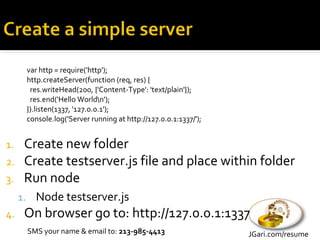
var http = require('http');
      http.createServer(function (req, res) {
       res.writeHead(200, {'Content-Type': 'text/plain'});
       res.end('Hello Worldn');
      }).listen(1337, '127.0.0.1');
      console.log('Server running at http://127.0.0.1:1337/');


1.    Create new folder
2.    Create testserver.js file and place within folder
3.    Run node
     1. Node testserver.js
4.    On browser go to: http://127.0.0.1:1337
      SMS your name & email to: 213-985-4413                     JGari.com/resume
1. A Node JS Application Framework
2. Uses MVC (model, view, controller) pattern


     SMS your name & email to: 213-985-4413   JGari.com/resume
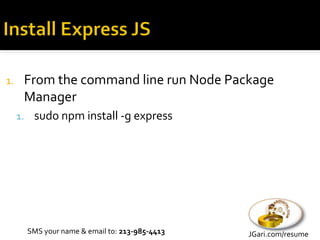
1.    From the command line run Node Package
      Manager
     1. sudo npm install -g express


       SMS your name & email to: 213-985-4413   JGari.com/resume
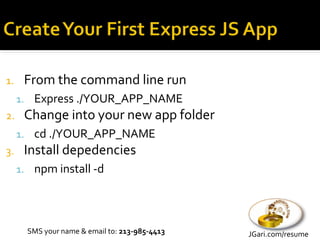
1.    From the command line run
     1. Express ./YOUR_APP_NAME
2.    Change into your new app folder
     1. cd ./YOUR_APP_NAME
3.    Install depedencies
     1. npm install -d


       SMS your name & email to: 213-985-4413   JGari.com/resume
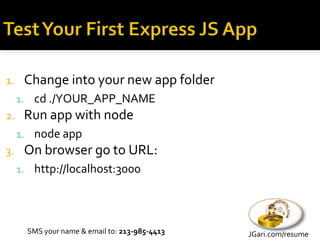
1.    Change into your new app folder
     1. cd ./YOUR_APP_NAME
2.    Run app with node
     1. node app
3.    On browser go to URL:
     1. http://localhost:3000


       SMS your name & email to: 213-985-4413   JGari.com/resume
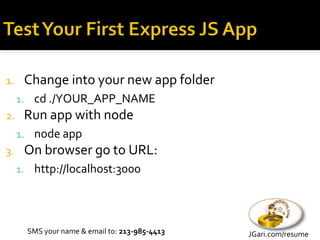
1.    Change into your new app folder
     1. cd ./YOUR_APP_NAME
2.    Run app with node
     1. node app
3.    On browser go to URL:
     1. http://localhost:3000


       SMS your name & email to: 213-985-4413   JGari.com/resume
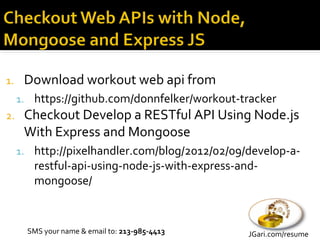
1.    Download workout web api from
     1. https://github.com/donnfelker/workout-tracker
2.    Checkout Develop a RESTful API Using Node.js
      With Express and Mongoose
     1. http://pixelhandler.com/blog/2012/02/09/develop-a-
        restful-api-using-node-js-with-express-and-
        mongoose/


       SMS your name & email to: 213-985-4413    JGari.com/resume
 While you think…
  Sign up to LAMPsig’s mailing list at:
   ▪ http://lampsig.org


  Join LAMPsig on Meetup at:
   ▪ http://www.meetup.com/LAMPsig


  Jorge Garifuna
   ▪ info@GariDigital.com
   ▪ @jgarifuna
SMS your name & email to: 213-985-4413     JGari.com/resume
1.     http://www.mongodb.org
2.     http://nodejs.org
3.     http://expressjs.com
4.     http://pixelhandler.com/blog/2012/02/09/dev
       elop-a-restful-api-using-node-js-with-
       express-and-mongoose
5.     http://lampsig.org
6.     http://www.meetup.com/LAMPsig

     SMS your name & email to: 213-985-4413   JGari.com/resume

A practical intro to web development with mongo db and nodejs when, why and how v2

  • 1.
    By Jorge Garifuna Professional Web Developer info@GariDigital.com 213-915-4402 JGari.com/resume Twitter: @jgarifuna
  • 2.
    SMS your Nameand Email to: 213-985-4413 SMS your name & email to: 213-985-4413 JGari.com/resume
  • 3.
    1. A Databasethat stores data (documents) 2. A NoSQL Database 1. NoSQL = Not only SQL 3. Uses JSON for interaction 1. JSON = JavaScript Object Notation 4. Managed by 10gen company SMS your name & email to: 213-985-4413 JGari.com/resume
  • 4.
    1. Scalable 2. High performance 3. Open source 4. Written in C++ 5. Humongous  SMS your name & email to: 213-985-4413 JGari.com/resume
  • 5.
    1. Document-Oriented Storage 2. Full Index Support 3. Replication & High Availability: Mirror across LAN/WAN 4. Auto-Sharding: Scale horizontally 5. Map/Reduce: aggregation & data processing 6. GridFS: Store files of any size SMS your name & email to: 213-985-4413 JGari.com/resume
  • 6.
    1. Not aRelational Database (RDBMS) 2. Not ideal for every scenario SMS your name & email to: 213-985-4413 JGari.com/resume
  • 7.
    Relational Database Table/Records MongoDB Collection/Documents id firstName lastName age id: 1 firstName: Jorge lastName: Garifuna 1 Jorge Garifuna 85 age: 85 id: 2 2 Jimmy Smith 30 firstName: Jimmy lastName: Smith age: 30 id: 3 firstName: Alan lastName: Jones age: 25 city: Los Angeles state: CA SMS your name & email to: 213-985-4413 JGari.com/resume
  • 8.
    1. I digalpha products 2. Beta products are my cut of tea 3. I only consider stable products SMS your name & email to: 213-985-4413 JGari.com/resume
  • 9.
    Credit: Sanjeev Mishra SMSyour name & email to: 213-985-4413 JGari.com/resume
  • 10.
    1. When youneed flexibility in your data 2. When you want to easily scale 3. When your dataset does not have zillions of joins SMS your name & email to: 213-985-4413 JGari.com/resume
  • 11.
    MySQL executable Oracle executable Mongo executable mysqld oracle mongod mysql sqlplus mongo MySQL term Mongo term/concept database database table collection index index row BSON document column BSON field join embedding and linking primary key _id field group by aggregation Source: http://www.mongodb.org/display/DOCS/SQL+to+Mongo+Mapping+Chart SMS your name & email to: 213-985-4413 JGari.com/resume
  • 12.
    1. Download from 1. http://www.mongodb.org/downloads 2. Unzip package 3. Run the following from terminal 1. sudo mkdir -p /data/db 2. sudo chown `id -u` /data/db 4. Add to path 1. Mac example: export PATH=/Users/jgarifuna/jg/net/Dev/db/mongodb-osx-x86_64- 2.2.1-rc0/bin:$PATH 2. Linux example: PATH=/home/jgarifuna/mongo-linux-2.2.1/bin:$PATH SMS your name & email to: 213-985-4413 JGari.com/resume
  • 13.
    1. If added to path in command line type 1. mongod 2. If not on path 1. Access the bin folder on mongo folder 2. Type: ./mongod SMS your name & email to: 213-985-4413 JGari.com/resume
  • 14.
    1. If added to path in command line type 1. mongo 2. If not on path 1. Access the bin folder on mongo folder 2. Type: ./mongo SMS your name & email to: 213-985-4413 JGari.com/resume
  • 15.
    1. Databases arecreated automatically 2. Tables are created automatically 3. Primary key is created automatically SMS your name & email to: 213-985-4413 JGari.com/resume
  • 16.
    SQL Statement Mongo Statement INSERT INTO USERS VALUES(3,5) db.users.insert({a:3,b:5}) SELECT * FROM users db.users.find() UPDATE users SET a=1 WHERE db.users.update({b:'q'}, {$set:{a:1}}, false, b='q' true) DELETE FROM users WHERE db.users.remove({z:'abc'}); z="abc" Source: http://www.mongodb.org/display/DOCS/SQL+to+Mongo+Mapping+Chart SMS your name & email to: 213-985-4413 JGari.com/resume
  • 17.
    SQL Statement Mongo Statement INSERT INTO USERS VALUES(3,5) db.users.insert({a:3,b:5}) Source: http://www.mongodb.org/display/DOCS/SQL+to+Mongo+Mapping+Chart SMS your name & email to: 213-985-4413 JGari.com/resume
  • 18.
    SQL Statement Mongo Statement SELECT a,b FROM users db.users.find({}, {a:1,b:1}) SELECT * FROM users db.users.find() SELECT * FROM users WHERE age=33 db.users.find({age:33}) SELECT a,b FROM users WHERE age=33 db.users.find({age:33}, {a:1,b:1}) SELECT * FROM users WHERE age=33 db.users.find({age:33}).sort({name:1}) ORDER BY name SELECT * FROM users WHERE age>33 db.users.find({age:{$gt:33}}) SELECT * FROM users WHERE age!=33 db.users.find({age:{$ne:33}}) SELECT * FROM users WHERE age>33 db.users.find({'age':{$gt:33,$lte:40}}) AND age<=40 SELECT * FROM users ORDER BY name db.users.find().sort({name:-1}) DESC SELECT COUNT(*y) FROM users where db.users.find({age: {'$gt': 30}}).count() AGE > 30 SELECT COUNT(AGE) from users db.users.find({age: {'$exists': true}}).count() Source: http://www.mongodb.org/display/DOCS/SQL+to+Mongo+Mapping+Chart SMS your name & email to: 213-985-4413 JGari.com/resume
  • 19.
    SQL Statement Mongo Statement UPDATE users SET a=1 WHERE db.users.update({b:'q'}, {$set:{a:1}}, false, b='q' true) UPDATE users SET a=a+2 WHERE db.users.update({b:'q'}, {$inc:{a:2}}, false, b='q' true) Source: http://www.mongodb.org/display/DOCS/SQL+to+Mongo+Mapping+Chart SMS your name & email to: 213-985-4413 JGari.com/resume
  • 20.
    SQL Statement Mongo Statement DELETE FROM users WHERE z="abc" db.users.remove({z:'abc'}); Source: http://www.mongodb.org/display/DOCS/SQL+to+Mongo+Mapping+Chart SMS your name & email to: 213-985-4413 JGari.com/resume
  • 21.
    SMS your name& email to: 213-985-4413 JGari.com/resume
  • 22.
    Source: http://www.mongodb.org/display/DOCS/Replica+Sets SMS yourname & email to: 213-985-4413 JGari.com/resume
  • 23.
     On eachmongodb instance start service with:  mongod --rest --replSet myset Source: http://www.mongodb.org/display/DOCS/Replica+Sets+-+Basics SMS your name & email to: 213-985-4413 JGari.com/resume
  • 24.
    Connect to primary server: mongo --host PRIMARY_IP_OR_NAME  Initialize replica set: rs.initiate()  If you get error: "local.oplog.rs is not empty on the initiating member. cannot initiate.”  Fix by typing (source: http://stackoverflow.com/questions/10953752/how-to-modify-replica-set-config): ▪ use local ▪ db.dropDatabase() ▪ Rs.initiate()  Add secondary node to replica set  rs.add(‘FIRST_SERVER_NAME_OR_IP’)  Add arbiter node to replica set  rs.addArb(‘ARB_SERVER_NAME_OR_IP’) Source: http://www.mongodb.org/display/DOCS/Replica+Sets+-+Basics SMS your name & email to: 213-985-4413 JGari.com/resume
  • 25.
     Connect toprimary server:  mongo --host PRIMARY_IP_OR_NAME  Add a document  Switch to your desire db: use DB_NAME  db.foo.save({name: “Jorge Garifuna”})  Set secondary to slave (otherwise you wont be able to see data)  rs.slaveOk()  Query secondary  db.foo.find() Source: http://www.mongodb.org/display/DOCS/Replica+Sets+-+Basics SMS your name & email to: 213-985-4413 JGari.com/resume
  • 26.
    public static functiongetIpGeoDataFromMongo($ip) { $rv = array(); if (strlen($ip) > 0) { $m = new Mongo(); // connect, MongoClient $db = $m->selectDB("geoip"); $collection_geo_city_blocks = new MongoCollection($db, self::IP_BLOCKS_TABLE_NAME); $ip = addslashes($ip); $ip = ip2long($ip); $query = array('$and' => array ( array( 'startIpNum' => array('$lte' => $ip) ), array('endIpNum' => array('$gte' => $ip) ) ) ); $cursor = $collection_geo_city_blocks->find($query); $result = $cursor->getNext(); if (isset($result['locId']) && strlen($result['locId']) > 0) { $collection_geo_city_locations = new MongoCollection($db, self::IP_LOCATIONS_TABLE_NAME); $query = array('locId' => $result['locId']); $cursor = $collection_geo_city_locations->find($query); $rv = $cursor->getNext(); } } return $rv; } SMS your name & email to: 213-985-4413 JGari.com/resume
  • 27.
    Some Basic Node JS stuff SMS your name & email to: 213-985-4413 JGari.com/resume
  • 28.
     Platform builton Google Chrome’s JavaScript Runtime  For building fast, scalable network applications  Substitute for Apache/PHP  But you create your own server code SMS your name & email to: 213-985-4413 JGari.com/resume
  • 29.
     Download from  nodejs.org  Run installation SMS your name & email to: 213-985-4413 JGari.com/resume
  • 30.
    var http =require('http'); http.createServer(function (req, res) { res.writeHead(200, {'Content-Type': 'text/plain'}); res.end('Hello Worldn'); }).listen(1337, '127.0.0.1'); console.log('Server running at http://127.0.0.1:1337/'); 1. Create new folder 2. Create testserver.js file and place within folder 3. Run node 1. Node testserver.js 4. On browser go to: http://127.0.0.1:1337 SMS your name & email to: 213-985-4413 JGari.com/resume
  • 31.
    1. A NodeJS Application Framework 2. Uses MVC (model, view, controller) pattern SMS your name & email to: 213-985-4413 JGari.com/resume
  • 32.
    1. From the command line run Node Package Manager 1. sudo npm install -g express SMS your name & email to: 213-985-4413 JGari.com/resume
  • 33.
    1. From the command line run 1. Express ./YOUR_APP_NAME 2. Change into your new app folder 1. cd ./YOUR_APP_NAME 3. Install depedencies 1. npm install -d SMS your name & email to: 213-985-4413 JGari.com/resume
  • 34.
    1. Change into your new app folder 1. cd ./YOUR_APP_NAME 2. Run app with node 1. node app 3. On browser go to URL: 1. http://localhost:3000 SMS your name & email to: 213-985-4413 JGari.com/resume
  • 35.
    1. Change into your new app folder 1. cd ./YOUR_APP_NAME 2. Run app with node 1. node app 3. On browser go to URL: 1. http://localhost:3000 SMS your name & email to: 213-985-4413 JGari.com/resume
  • 36.
    1. Download workout web api from 1. https://github.com/donnfelker/workout-tracker 2. Checkout Develop a RESTful API Using Node.js With Express and Mongoose 1. http://pixelhandler.com/blog/2012/02/09/develop-a- restful-api-using-node-js-with-express-and- mongoose/ SMS your name & email to: 213-985-4413 JGari.com/resume
  • 37.
     While youthink…  Sign up to LAMPsig’s mailing list at: ▪ http://lampsig.org  Join LAMPsig on Meetup at: ▪ http://www.meetup.com/LAMPsig  Jorge Garifuna ▪ info@GariDigital.com ▪ @jgarifuna SMS your name & email to: 213-985-4413 JGari.com/resume
  • 38.
    1. http://www.mongodb.org 2. http://nodejs.org 3. http://expressjs.com 4. http://pixelhandler.com/blog/2012/02/09/dev elop-a-restful-api-using-node-js-with- express-and-mongoose 5. http://lampsig.org 6. http://www.meetup.com/LAMPsig SMS your name & email to: 213-985-4413 JGari.com/resume