MIXING  COMPUTER-ASSISTED TRANSLATION AND MACHINE TRANSLATION:  THE GOOD,  THE BAD AND THE UGLY
THE ISSUE Can we combine TM and MT?  Copyright 2008 Cris Silva and Giovana Boselli
OUTLINE Our story How MT and TM can work together Defining MT and TM systems Our 14-step experiment Final considerations Copyright 2008 Cris Silva and Giovana Boselli
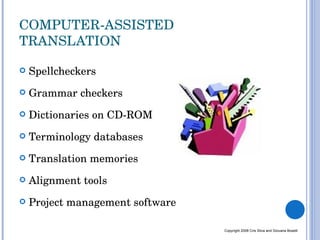
COMPUTER-ASSISTED TRANSLATION Spellcheckers Grammar checkers Dictionaries on CD-ROM Terminology databases  Translation memories Alignment tools Project management software Copyright 2008 Cris Silva and Giovana Boselli
DEFINING TM AND MT TRANSLATION MEMORY  =  searchable database containing source and translated sentences MACHINE TRANSLATION =  application of computers to the task of translating texts from one natural language to another.   Copyright 2008 Cris Silva and Giovana Boselli
OUR SCENARIO Trados + Google Translate + MS old Glossaries Copyright 2008 Cris Silva and Giovana Boselli
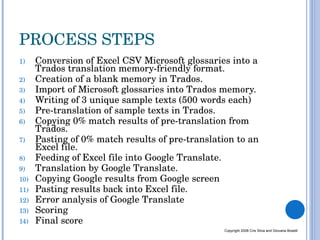
PROCESS STEPS Conversion of Excel CSV Microsoft glossaries into a Trados translation memory-friendly format. Creation of a blank memory in Trados. Import of Microsoft glossaries into Trados memory.  Writing of 3 unique sample texts (500 words each) Pre-translation of sample texts in Trados. Copying 0% match results of pre-translation from Trados.  Pasting of 0% match results of pre-translation to an Excel file. Feeding of Excel file into Google Translate. Translation by Google Translate. Copying Google results from Google screen Pasting results back into Excel file. Error analysis of Google Translate  Scoring Final score Copyright 2008 Cris Silva and Giovana Boselli
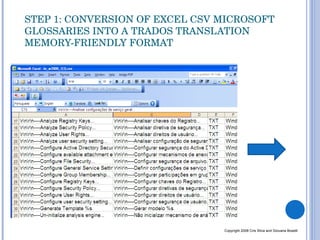
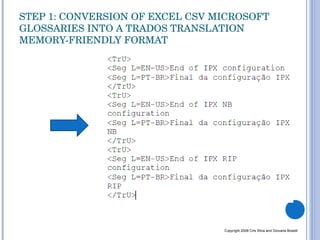
STEP 1: CONVERSION OF EXCEL CSV MICROSOFT GLOSSARIES INTO A TRADOS TRANSLATION MEMORY-FRIENDLY FORMAT Copyright 2008 Cris Silva and Giovana Boselli
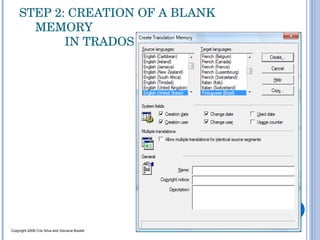
STEP 2: CREATION OF A BLANK MEMORY    IN TRADOS  Copyright 2008 Cris Silva and Giovana Boselli
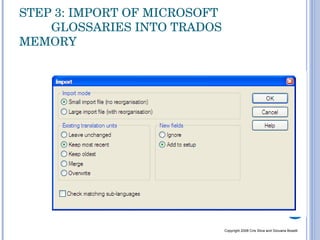
STEP 3: IMPORT OF MICROSOFT  GLOSSARIES INTO TRADOS MEMORY Copyright 2008 Cris Silva and Giovana Boselli
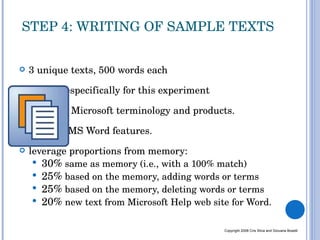
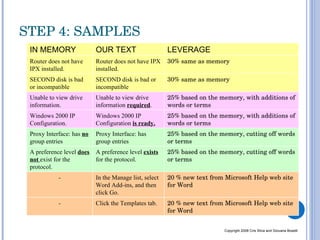
3 unique texts, 500 words each written especifically for this experiment  based on Microsoft terminology and products.  focus on MS Word features. leverage proportions from memory: 30%  same as memory (i.e., with a 100% match) 25%  based on the memory, adding words or terms 25%  based on the memory, deleting words or terms 20%  new text from Microsoft Help web site for Word. STEP 4: WRITING OF SAMPLE TEXTS Copyright 2008 Cris Silva and Giovana Boselli
STEP 4: SAMPLES  Copyright 2008 Cris Silva and Giovana Boselli IN MEMORY OUR TEXT LEVERAGE Router does not have IPX installed.  Router does not have IPX installed.  30% same as memory SECOND disk is bad or incompatible  SECOND disk is bad or incompatible  30% same as memory Unable to view drive information.  Unable to view drive information  required .  25% based on the memory, with additions of words or terms Windows 2000 IP Configuration. Windows 2000 IP Configuration  is ready. 25% based on the memory, with additions of words or terms Proxy Interface: has  no  group entries Proxy Interface: has group entries 25% based on the memory, cutting off words or terms A preference level  does not  exist for the protocol. A preference level  exists  for the protocol. 25% based on the memory, cutting off words or terms -  In the Manage list, select Word Add-ins, and then click Go. 20 % new text from Microsoft Help web site for Word - Click the Templates tab. 20 % new text from Microsoft Help web site for Word
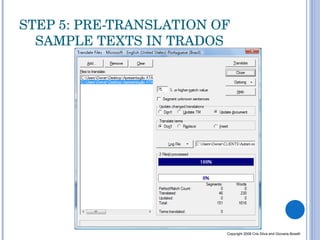
STEP 5: PRE-TRANSLATION OF SAMPLE TEXTS IN TRADOS Copyright 2008 Cris Silva and Giovana Boselli
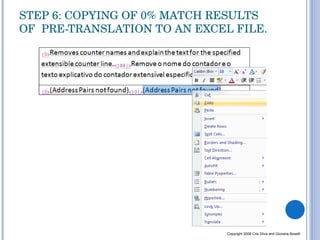
STEP 6: COPYING OF 0% MATCH RESULTS OF  PRE-TRANSLATION TO AN EXCEL FILE. Copyright 2008 Cris Silva and Giovana Boselli
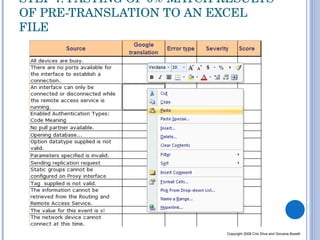
STEP 7: PASTING OF 0% MATCH RESULTS OF PRE-TRANSLATION TO AN EXCEL FILE Copyright 2008 Cris Silva and Giovana Boselli
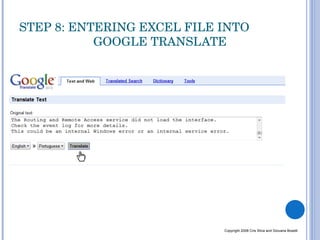
STEP 8: ENTERING EXCEL FILE INTO      GOOGLE TRANSLATE Copyright 2008 Cris Silva and Giovana Boselli
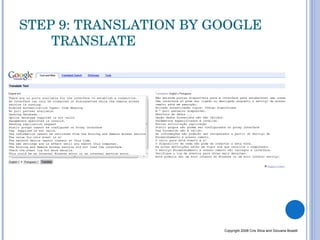
STEP 9: TRANSLATION BY GOOGLE  TRANSLATE Copyright 2008 Cris Silva and Giovana Boselli
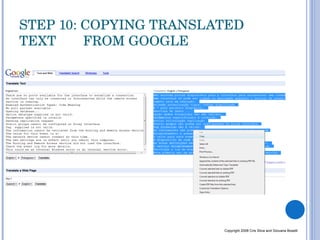
STEP 10: COPYING TRANSLATED TEXT  FROM GOOGLE  Copyright 2008 Cris Silva and Giovana Boselli
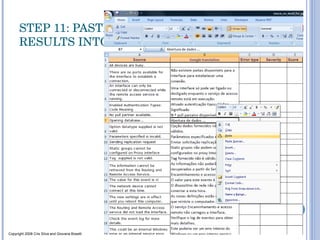
STEP 11: PASTING GOOGLE TRANSLATE RESULTS INTO EXCEL Copyright 2008 Cris Silva and Giovana Boselli
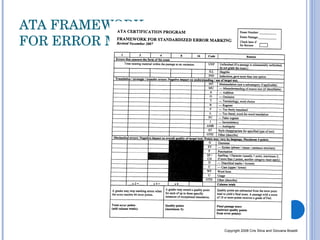
ATA FRAMEWORK  FOR ERROR MARKING Copyright 2008 Cris Silva and Giovana Boselli
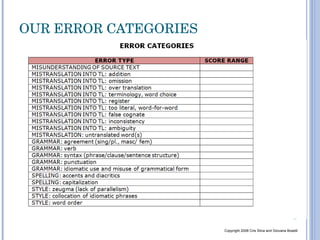
OUR ERROR CATEGORIES Copyright 2008 Cris Silva and Giovana Boselli
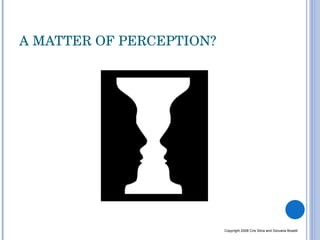
A MATTER OF PERCEPTION? Copyright 2008 Cris Silva and Giovana Boselli
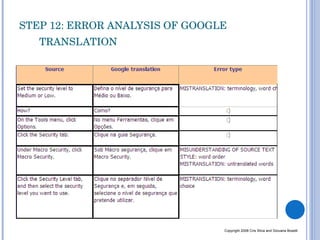
STEP 12: ERROR ANALYSIS OF GOOGLE TRANSLATION  Copyright 2008 Cris Silva and Giovana Boselli
METRICS Copyright 2008 Cris Silva and Giovana Boselli
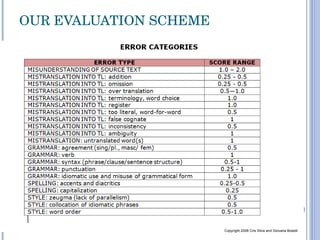
OUR EVALUATION SCHEME Copyright 2008 Cris Silva and Giovana Boselli
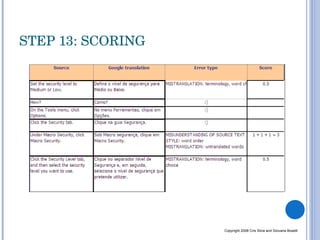
STEP 13: SCORING Copyright 2008 Cris Silva and Giovana Boselli
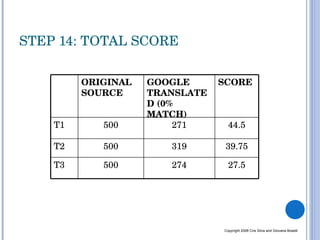
STEP 14: TOTAL SCORE Copyright 2008 Cris Silva and Giovana Boselli ORIGINAL SOURCE GOOGLE TRANSLATED (0% MATCH) SCORE T1 500 271 44.5 T2 500 319 39.75 T3 500 274 27.5
THANK YOU… Cris Silva    Giovana Boselli [email_address]   [email_address]   We would like to thank Renato Beninatto Sue Ellen Wright Jonathan Mendoza Riccardo Schiaffino Copyright 2008 Cris Silva and Giovana Boselli

Boselli & Silva Mixing Cat And Mt

  • 1.
    MIXING COMPUTER-ASSISTEDTRANSLATION AND MACHINE TRANSLATION: THE GOOD, THE BAD AND THE UGLY
  • 2.
    THE ISSUE Canwe combine TM and MT? Copyright 2008 Cris Silva and Giovana Boselli
  • 3.
    OUTLINE Our storyHow MT and TM can work together Defining MT and TM systems Our 14-step experiment Final considerations Copyright 2008 Cris Silva and Giovana Boselli
  • 4.
    COMPUTER-ASSISTED TRANSLATION SpellcheckersGrammar checkers Dictionaries on CD-ROM Terminology databases Translation memories Alignment tools Project management software Copyright 2008 Cris Silva and Giovana Boselli
  • 5.
    DEFINING TM ANDMT TRANSLATION MEMORY = searchable database containing source and translated sentences MACHINE TRANSLATION = application of computers to the task of translating texts from one natural language to another. Copyright 2008 Cris Silva and Giovana Boselli
  • 6.
    OUR SCENARIO Trados+ Google Translate + MS old Glossaries Copyright 2008 Cris Silva and Giovana Boselli
  • 7.
    PROCESS STEPS Conversionof Excel CSV Microsoft glossaries into a Trados translation memory-friendly format. Creation of a blank memory in Trados. Import of Microsoft glossaries into Trados memory. Writing of 3 unique sample texts (500 words each) Pre-translation of sample texts in Trados. Copying 0% match results of pre-translation from Trados. Pasting of 0% match results of pre-translation to an Excel file. Feeding of Excel file into Google Translate. Translation by Google Translate. Copying Google results from Google screen Pasting results back into Excel file. Error analysis of Google Translate Scoring Final score Copyright 2008 Cris Silva and Giovana Boselli
  • 8.
    STEP 1: CONVERSIONOF EXCEL CSV MICROSOFT GLOSSARIES INTO A TRADOS TRANSLATION MEMORY-FRIENDLY FORMAT Copyright 2008 Cris Silva and Giovana Boselli
  • 9.
    STEP 1: CONVERSIONOF EXCEL CSV MICROSOFT GLOSSARIES INTO A TRADOS TRANSLATION MEMORY-FRIENDLY FORMAT Copyright 2008 Cris Silva and Giovana Boselli
  • 10.
    STEP 2: CREATIONOF A BLANK MEMORY IN TRADOS Copyright 2008 Cris Silva and Giovana Boselli
  • 11.
    STEP 3: IMPORTOF MICROSOFT GLOSSARIES INTO TRADOS MEMORY Copyright 2008 Cris Silva and Giovana Boselli
  • 12.
    3 unique texts,500 words each written especifically for this experiment based on Microsoft terminology and products. focus on MS Word features. leverage proportions from memory: 30% same as memory (i.e., with a 100% match) 25% based on the memory, adding words or terms 25% based on the memory, deleting words or terms 20% new text from Microsoft Help web site for Word. STEP 4: WRITING OF SAMPLE TEXTS Copyright 2008 Cris Silva and Giovana Boselli
  • 13.
    STEP 4: SAMPLES Copyright 2008 Cris Silva and Giovana Boselli IN MEMORY OUR TEXT LEVERAGE Router does not have IPX installed. Router does not have IPX installed. 30% same as memory SECOND disk is bad or incompatible SECOND disk is bad or incompatible 30% same as memory Unable to view drive information. Unable to view drive information required . 25% based on the memory, with additions of words or terms Windows 2000 IP Configuration. Windows 2000 IP Configuration is ready. 25% based on the memory, with additions of words or terms Proxy Interface: has no group entries Proxy Interface: has group entries 25% based on the memory, cutting off words or terms A preference level does not exist for the protocol. A preference level exists for the protocol. 25% based on the memory, cutting off words or terms - In the Manage list, select Word Add-ins, and then click Go. 20 % new text from Microsoft Help web site for Word - Click the Templates tab. 20 % new text from Microsoft Help web site for Word
  • 14.
    STEP 5: PRE-TRANSLATIONOF SAMPLE TEXTS IN TRADOS Copyright 2008 Cris Silva and Giovana Boselli
  • 15.
    STEP 6: COPYINGOF 0% MATCH RESULTS OF PRE-TRANSLATION TO AN EXCEL FILE. Copyright 2008 Cris Silva and Giovana Boselli
  • 16.
    STEP 7: PASTINGOF 0% MATCH RESULTS OF PRE-TRANSLATION TO AN EXCEL FILE Copyright 2008 Cris Silva and Giovana Boselli
  • 17.
    STEP 8: ENTERINGEXCEL FILE INTO GOOGLE TRANSLATE Copyright 2008 Cris Silva and Giovana Boselli
  • 18.
    STEP 9: TRANSLATIONBY GOOGLE TRANSLATE Copyright 2008 Cris Silva and Giovana Boselli
  • 19.
    STEP 10: COPYINGTRANSLATED TEXT FROM GOOGLE Copyright 2008 Cris Silva and Giovana Boselli
  • 20.
    STEP 11: PASTINGGOOGLE TRANSLATE RESULTS INTO EXCEL Copyright 2008 Cris Silva and Giovana Boselli
  • 21.
    ATA FRAMEWORK FOR ERROR MARKING Copyright 2008 Cris Silva and Giovana Boselli
  • 22.
    OUR ERROR CATEGORIESCopyright 2008 Cris Silva and Giovana Boselli
  • 23.
    A MATTER OFPERCEPTION? Copyright 2008 Cris Silva and Giovana Boselli
  • 24.
    STEP 12: ERRORANALYSIS OF GOOGLE TRANSLATION Copyright 2008 Cris Silva and Giovana Boselli
  • 25.
    METRICS Copyright 2008Cris Silva and Giovana Boselli
  • 26.
    OUR EVALUATION SCHEMECopyright 2008 Cris Silva and Giovana Boselli
  • 27.
    STEP 13: SCORINGCopyright 2008 Cris Silva and Giovana Boselli
  • 28.
    STEP 14: TOTALSCORE Copyright 2008 Cris Silva and Giovana Boselli ORIGINAL SOURCE GOOGLE TRANSLATED (0% MATCH) SCORE T1 500 271 44.5 T2 500 319 39.75 T3 500 274 27.5
  • 29.
    THANK YOU… CrisSilva Giovana Boselli [email_address] [email_address] We would like to thank Renato Beninatto Sue Ellen Wright Jonathan Mendoza Riccardo Schiaffino Copyright 2008 Cris Silva and Giovana Boselli