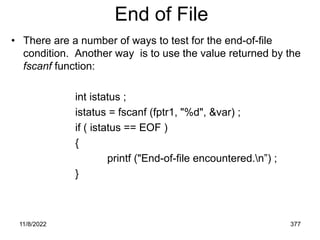
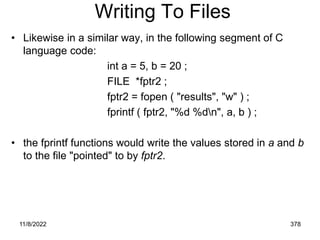
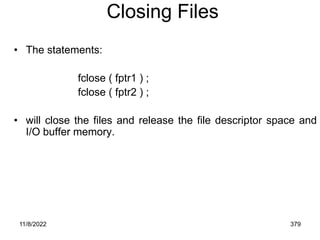
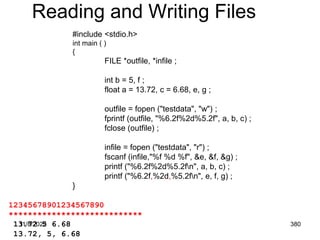
C Programming Language
11/8/2022 2
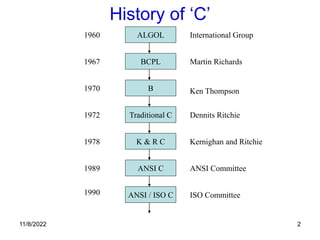
History of ‘C’
ALGOL International Group
BCPL
B
Traditional C
K & R C
ANSI C
ANSI / ISO C
Martin Richards
Ken Thompson
Dennits Ritchie
Kernighan and Ritchie
ANSI Committee
ISO Committee
1960
1967
1970
1972
1978
1989
1990
11/8/2022 3
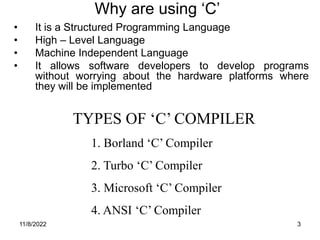
TYPES OF ‘C’ COMPILER
1. Borland ‘C’ Compiler
2. Turbo ‘C’ Compiler
3. Microsoft ‘C’ Compiler
4. ANSI ‘C’ Compiler
Why are using ‘C’
• It is a Structured Programming Language
• High – Level Language
• Machine Independent Language
• It allows software developers to develop programs
without worrying about the hardware platforms where
they will be implemented
11/8/2022 4
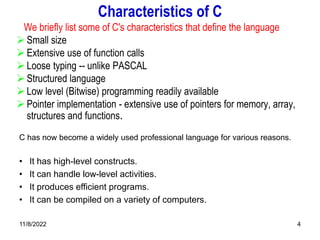
Characteristics of C
We briefly list some of C's characteristics that define the language
 Small size
 Extensive use of function calls
 Loose typing -- unlike PASCAL
 Structured language
 Low level (Bitwise) programming readily available
 Pointer implementation - extensive use of pointers for memory, array,
structures and functions.
C has now become a widely used professional language for various reasons.
• It has high-level constructs.
• It can handle low-level activities.
• It produces efficient programs.
• It can be compiled on a variety of computers.
11/8/2022 5
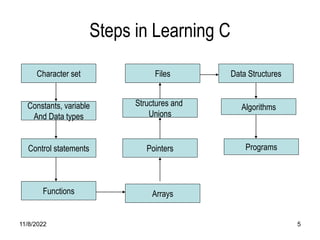
Steps in Learning C
Character set
Constants, variable
And Data types
Control statements
Functions
Files
Structures and
Unions
Pointers
Arrays
Data Structures
Algorithms
Programs
11/8/2022 6
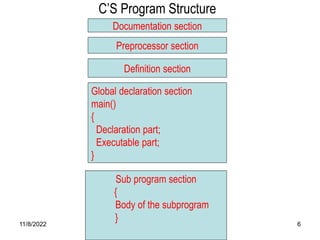
C’S Program Structure
Documentation section
Preprocessor section
Definition section
Global declaration section
main()
{
Declaration part;
Executable part;
}
Sub program section
{
Body of the subprogram
}
11/8/2022 7
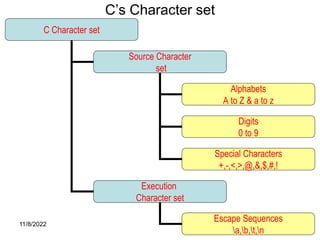
C’s Character set
C Character set
Source Character
set
Execution
Character set
Alphabets
A to Z & a to z
Escape Sequences
a,b,t,n
Digits
0 to 9
Special Characters
+,-,<,>,@,&,$,#,!
11/8/2022 8
C TOKENS
C TOKENS
Keywords
Identifiers
Strings
Special Symbols
Constants
Operators
-15.5
100
main
amount
float
while
“ABC”
“YEAR”
+ - * /
[ ]
{ }
11/8/2022 9
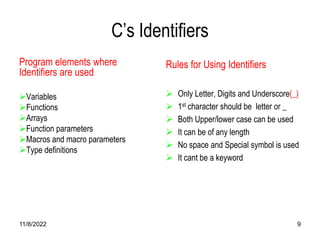
C’s Identifiers
Program elements where
Identifiers are used
Variables
Functions
Arrays
Function parameters
Macros and macro parameters
Type definitions
Rules for Using Identifiers
 Only Letter, Digits and Underscore(_)
 1st character should be letter or _
 Both Upper/lower case can be used
 It can be of any length
 No space and Special symbol is used
 It cant be a keyword
11/8/2022 10
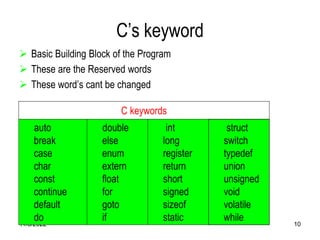
C’s keyword
 Basic Building Block of the Program
 These are the Reserved words
 These word’s cant be changed
C keywords
auto
break
case
char
const
continue
default
do
double
else
enum
extern
float
for
goto
if
int
long
register
return
short
signed
sizeof
static
struct
switch
typedef
union
unsigned
void
volatile
while
11/8/2022 11
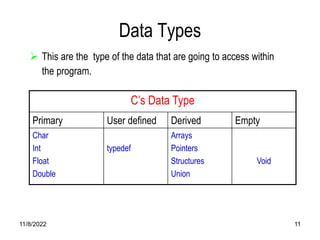
Data Types
 This are the type of the data that are going to access within
the program.
C’s Data Type
Primary User defined Derived Empty
Char
Int
Float
Double
typedef
Arrays
Pointers
Structures
Union
Void
11/8/2022 12
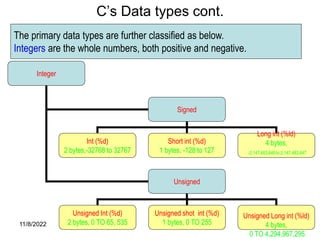
C’s Data types cont.
Integer
Signed
Unsigned
Int (%d)
2 bytes,-32768 to 32767
Short int (%d)
1 bytes, -128 to 127
Long int (%ld)
4 bytes,
-2,147,483,648 to 2,147,483,647
Unsigned Int (%d)
2 bytes, 0 TO 65, 535
Unsigned shot int (%d)
1 bytes, 0 TO 255
Unsigned Long int (%ld)
4 bytes,
0 TO 4,294,967,295
The primary data types are further classified as below.
Integers are the whole numbers, both positive and negative.
11/8/2022 13
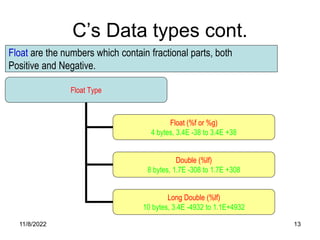
C’s Data types cont.
Float Type
Float (%f or %g)
4 bytes, 3.4E -38 to 3.4E +38
Double (%lf)
8 bytes, 1.7E -308 to 1.7E +308
Long Double (%lf)
10 bytes, 3.4E -4932 to 1.1E+4932
Float are the numbers which contain fractional parts, both
Positive and Negative.
11/8/2022 14
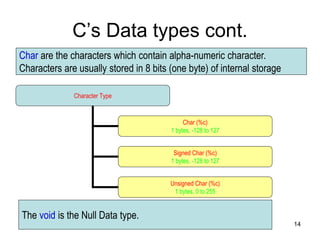
C’s Data types cont.
Character Type
Char (%c)
1 bytes, -128 to 127
Signed Char (%c)
1 bytes, -128 to 127
Unsigned Char (%c)
1 bytes, 0 to 255
Char are the characters which contain alpha-numeric character.
Characters are usually stored in 8 bits (one byte) of internal storage
The void is the Null Data type.
11/8/2022 15
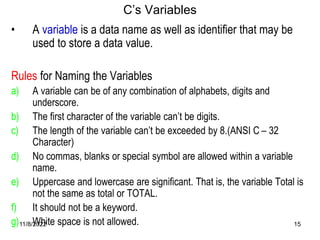
C’s Variables
• A variable is a data name as well as identifier that may be
used to store a data value.
Rules for Naming the Variables
a) A variable can be of any combination of alphabets, digits and
underscore.
b) The first character of the variable can’t be digits.
c) The length of the variable can’t be exceeded by 8.(ANSI C – 32
Character)
d) No commas, blanks or special symbol are allowed within a variable
name.
e) Uppercase and lowercase are significant. That is, the variable Total is
not the same as total or TOTAL.
f) It should not be a keyword.
g) White space is not allowed.
11/8/2022 16
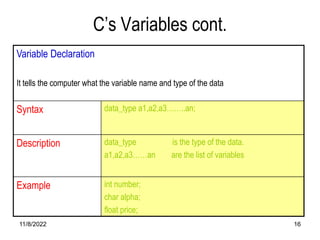
C’s Variables cont.
Variable Declaration
It tells the computer what the variable name and type of the data
Syntax data_type a1,a2,a3……..an;
Description data_type is the type of the data.
a1,a2,a3……an are the list of variables
Example int number;
char alpha;
float price;
11/8/2022 17
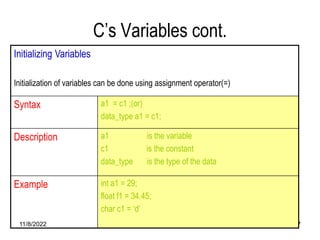
C’s Variables cont.
Initializing Variables
Initialization of variables can be done using assignment operator(=)
Syntax a1 = c1 ;(or)
data_type a1 = c1;
Description a1 is the variable
c1 is the constant
data_type is the type of the data
Example int a1 = 29;
float f1 = 34.45;
char c1 = ‘d’
11/8/2022 18
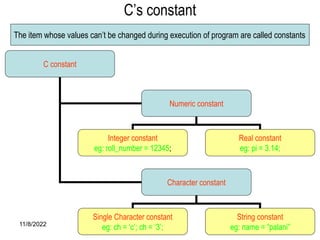
C’s constant
C constant
Numeric constant
Character constant
Integer constant
eg: roll_number = 12345;
Real constant
eg: pi = 3.14;
Single Character constant
eg: ch = ‘c’; ch = ‘3’;
String constant
eg: name = “palani”
The item whose values can’t be changed during execution of program are called constants
11/8/2022 19
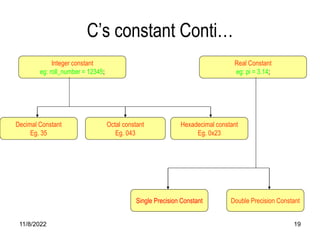
C’s constant Conti…
Integer constant
eg: roll_number = 12345;
Hexadecimal constant
Eg. 0x23
Octal constant
Eg. 043
Decimal Constant
Eg. 35
Real Constant
eg: pi = 3.14;
Double Precision Constant
Single Precision Constant
11/8/2022 20
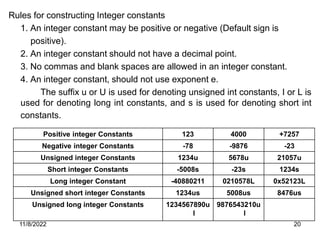
Rules for constructing Integer constants
1. An integer constant may be positive or negative (Default sign is
positive).
2. An integer constant should not have a decimal point.
3. No commas and blank spaces are allowed in an integer constant.
4. An integer constant, should not use exponent e.
The suffix u or U is used for denoting unsigned int constants, I or L is
used for denoting long int constants, and s is used for denoting short int
constants.
Positive integer Constants 123 4000 +7257
Negative integer Constants -78 -9876 -23
Unsigned integer Constants 1234u 5678u 21057u
Short integer Constants -5008s -23s 1234s
Long integer Constant -40880211 0210578L 0x52123L
Unsigned short integer Constants 1234us 5008us 8476us
Unsigned long integer Constants 1234567890u
l
9876543210u
l
11/8/2022 21
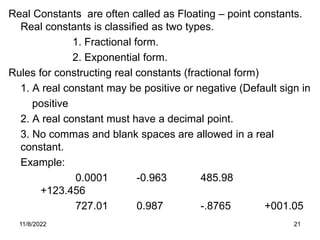
Real Constants are often called as Floating – point constants.
Real constants is classified as two types.
1. Fractional form.
2. Exponential form.
Rules for constructing real constants (fractional form)
1. A real constant may be positive or negative (Default sign in
positive
2. A real constant must have a decimal point.
3. No commas and blank spaces are allowed in a real
constant.
Example:
0.0001 -0.963 485.98
+123.456
727.01 0.987 -.8765 +001.05
11/8/2022 22
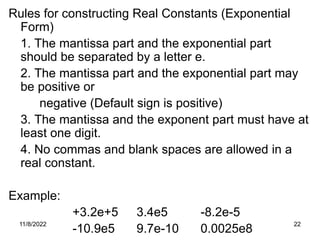
Rules for constructing Real Constants (Exponential
Form)
1. The mantissa part and the exponential part
should be separated by a letter e.
2. The mantissa part and the exponential part may
be positive or
negative (Default sign is positive)
3. The mantissa and the exponent part must have at
least one digit.
4. No commas and blank spaces are allowed in a
real constant.
Example:
+3.2e+5 3.4e5 -8.2e-5
-10.9e5 9.7e-10 0.0025e8
11/8/2022 23
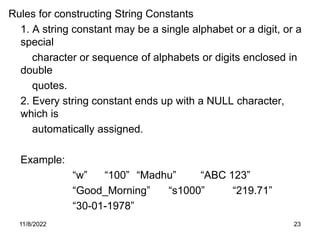
Rules for constructing String Constants
1. A string constant may be a single alphabet or a digit, or a
special
character or sequence of alphabets or digits enclosed in
double
quotes.
2. Every string constant ends up with a NULL character,
which is
automatically assigned.
Example:
“w” “100” “Madhu” “ABC 123”
“Good_Morning” “s1000” “219.71”
“30-01-1978”
11/8/2022 24
C’ Delimiters
Symbol Name Meaning
# Hash Pre-processor directive
, comma Variable delimiters (to separate list of
variables)
: colon Label delimiters
; Semi colon Statement delimiters
() parenthesis Used in expressions or in functions
{} Curly braces Used in blocking ‘C’ structure
[] Square braces Used along with arrays
Delimiters are the symbols, which has some syntactic meaning and has
got significance.
11/8/2022 25
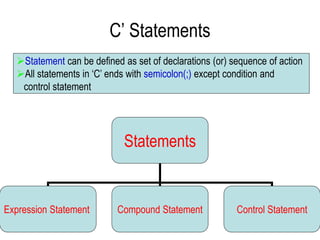
C’ Statements
Statements
Expression Statement Compound Statement Control Statement
Statement can be defined as set of declarations (or) sequence of action
All statements in ‘C’ ends with semicolon(;) except condition and
control statement
11/8/2022 26
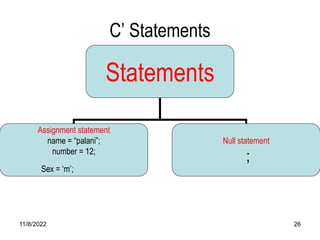
C’ Statements
Statements
Assignment statement
name = “palani”;
number = 12;
Sex = ‘m’;
Null statement
;
11/8/2022 27
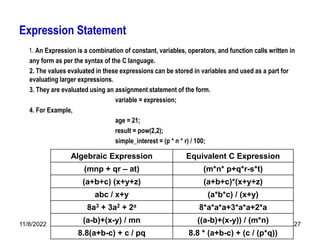
Expression Statement
1. An Expression is a combination of constant, variables, operators, and function calls written in
any form as per the syntax of the C language.
2. The values evaluated in these expressions can be stored in variables and used as a part for
evaluating larger expressions.
3. They are evaluated using an assignment statement of the form.
variable = expression;
4. For Example,
age = 21;
result = pow(2,2);
simple_interest = (p * n * r) / 100;
Algebraic Expression Equivalent C Expression
(mnp + qr – at) (m*n* p+q*r-s*t)
(a+b+c) (x+y+z) (a+b+c)*(x+y+z)
abc / x+y (a*b*c) / (x+y)
8a3 + 3a2 + 2a 8*a*a*a+3*a*a+2*a
(a-b)+(x-y) / mn ((a-b)+(x-y)) / (m*n)
8.8(a+b-c) + c / pq 8.8 * (a+b-c) + (c / (p*q))
11/8/2022 28
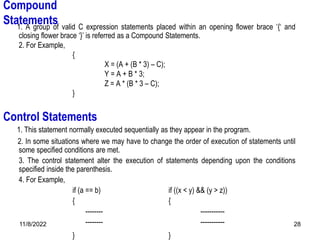
Compound
Statements
1. A group of valid C expression statements placed within an opening flower brace ‘{‘ and
closing flower brace ‘}’ is referred as a Compound Statements.
2. For Example,
{
X = (A + (B * 3) – C);
Y = A + B * 3;
Z = A * (B * 3 – C);
}
1. This statement normally executed sequentially as they appear in the program.
2. In some situations where we may have to change the order of execution of statements until
some specified conditions are met.
3. The control statement alter the execution of statements depending upon the conditions
specified inside the parenthesis.
4. For Example,
if (a == b) if ((x < y) && (y > z))
{ {
-------- -----------
-------- -----------
} }
Control Statements
11/8/2022 29
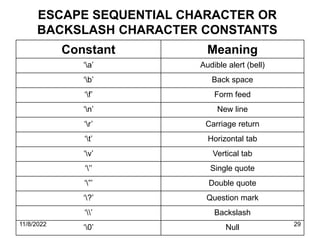
Constant Meaning
‘a’ Audible alert (bell)
‘b’ Back space
‘f’ Form feed
‘n’ New line
‘r’ Carriage return
‘t’ Horizontal tab
‘v’ Vertical tab
‘’’ Single quote
‘”’ Double quote
‘?’ Question mark
‘’ Backslash
‘0’ Null
ESCAPE SEQUENTIAL CHARACTER OR
BACKSLASH CHARACTER CONSTANTS
11/8/2022 30
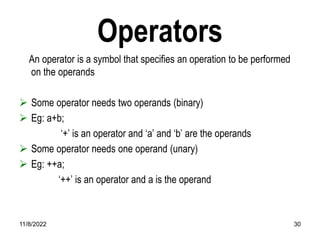
Operators
An operator is a symbol that specifies an operation to be performed
on the operands
 Some operator needs two operands (binary)
 Eg: a+b;
‘+’ is an operator and ‘a’ and ‘b’ are the operands
 Some operator needs one operand (unary)
 Eg: ++a;
‘++’ is an operator and a is the operand
11/8/2022 31
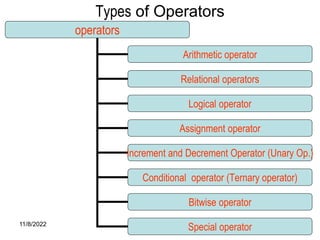
Types of Operators
operators
Arithmetic operator
Relational operators
Logical operator
Assignment operator
Increment and Decrement Operator (Unary Op.)
Conditional operator (Ternary operator)
Bitwise operator
Special operator
11/8/2022 32
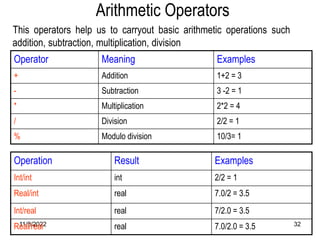
Arithmetic Operators
Operator Meaning Examples
+ Addition 1+2 = 3
- Subtraction 3 -2 = 1
* Multiplication 2*2 = 4
/ Division 2/2 = 1
% Modulo division 10/3= 1
This operators help us to carryout basic arithmetic operations such
addition, subtraction, multiplication, division
Operation Result Examples
Int/int int 2/2 = 1
Real/int real 7.0/2 = 3.5
Int/real real 7/2.0 = 3.5
Real/real real 7.0/2.0 = 3.5
11/8/2022 33
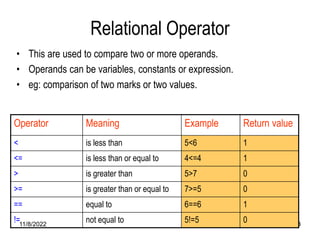
Relational Operator
• This are used to compare two or more operands.
• Operands can be variables, constants or expression.
• eg: comparison of two marks or two values.
Operator Meaning Example Return value
< is less than 5<6 1
<= is less than or equal to 4<=4 1
> is greater than 5>7 0
>= is greater than or equal to 7>=5 0
== equal to 6==6 1
!= not equal to 5!=5 0
11/8/2022 34
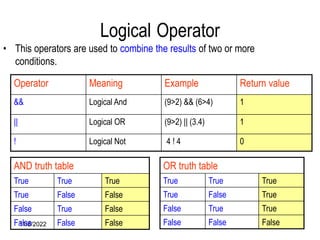
Logical Operator
Operator Meaning Example Return value
&& Logical And (9>2) && (6>4) 1
|| Logical OR (9>2) || (3.4) 1
! Logical Not 4 ! 4 0
AND truth table
True True True
True False False
False True False
False False False
OR truth table
True True True
True False True
False True True
False False False
• This operators are used to combine the results of two or more
conditions.
11/8/2022 35
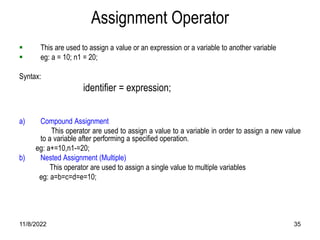
Assignment Operator
 This are used to assign a value or an expression or a variable to another variable
 eg: a = 10; n1 = 20;
Syntax:
identifier = expression;
a) Compound Assignment
This operator are used to assign a value to a variable in order to assign a new value
to a variable after performing a specified operation.
eg: a+=10,n1-=20;
b) Nested Assignment (Multiple)
This operator are used to assign a single value to multiple variables
eg: a=b=c=d=e=10;
11/8/2022 36
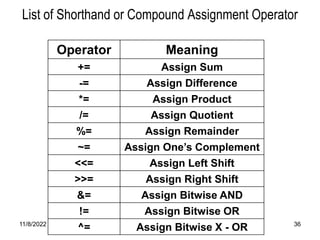
List of Shorthand or Compound Assignment Operator
Operator Meaning
+= Assign Sum
-= Assign Difference
*= Assign Product
/= Assign Quotient
%= Assign Remainder
~= Assign One’s Complement
<<= Assign Left Shift
>>= Assign Right Shift
&= Assign Bitwise AND
!= Assign Bitwise OR
^= Assign Bitwise X - OR
11/8/2022 37
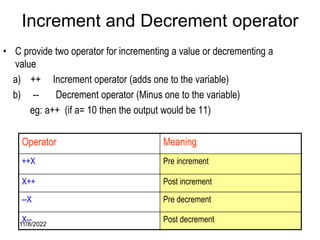
Increment and Decrement operator
• C provide two operator for incrementing a value or decrementing a
value
a) ++ Increment operator (adds one to the variable)
b) -- Decrement operator (Minus one to the variable)
eg: a++ (if a= 10 then the output would be 11)
Operator Meaning
++X Pre increment
X++ Post increment
--X Pre decrement
X-- Post decrement
11/8/2022 38
Increment and Decrement operator Conti…
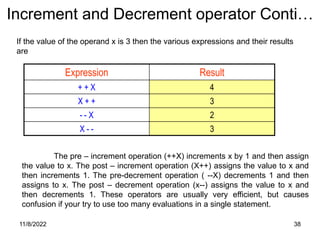
Expression Result
+ + X 4
X + + 3
- - X 2
X - - 3
If the value of the operand x is 3 then the various expressions and their results
are
The pre – increment operation (++X) increments x by 1 and then assign
the value to x. The post – increment operation (X++) assigns the value to x and
then increments 1. The pre-decrement operation ( --X) decrements 1 and then
assigns to x. The post – decrement operation (x--) assigns the value to x and
then decrements 1. These operators are usually very efficient, but causes
confusion if your try to use too many evaluations in a single statement.
11/8/2022 39
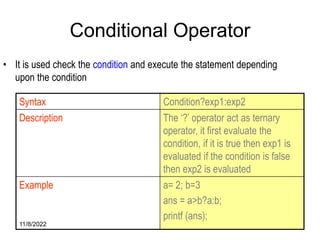
Conditional Operator
• It is used check the condition and execute the statement depending
upon the condition
Syntax Condition?exp1:exp2
Description The ‘?’ operator act as ternary
operator, it first evaluate the
condition, if it is true then exp1 is
evaluated if the condition is false
then exp2 is evaluated
Example a= 2; b=3
ans = a>b?a:b;
printf (ans);
11/8/2022 40
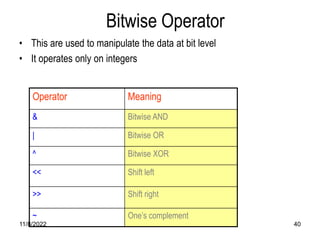
Bitwise Operator
• This are used to manipulate the data at bit level
• It operates only on integers
Operator Meaning
& Bitwise AND
| Bitwise OR
^ Bitwise XOR
<< Shift left
>> Shift right
~ One’s complement
11/8/2022 41
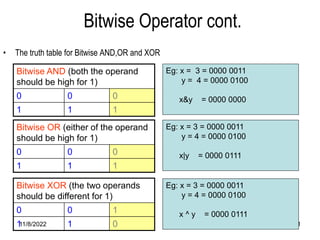
Bitwise Operator cont.
Bitwise AND (both the operand
should be high for 1)
0 0 0
1 1 1
Bitwise XOR (the two operands
should be different for 1)
0 0 1
1 1 0
• The truth table for Bitwise AND,OR and XOR
Bitwise OR (either of the operand
should be high for 1)
0 0 0
1 1 1
Eg: x = 3 = 0000 0011
y = 4 = 0000 0100
x&y = 0000 0000
Eg: x = 3 = 0000 0011
y = 4 = 0000 0100
x|y = 0000 0111
Eg: x = 3 = 0000 0011
y = 4 = 0000 0100
x ^ y = 0000 0111
11/8/2022 42
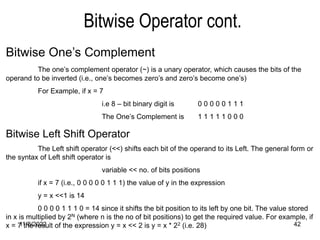
Bitwise Operator cont.
Bitwise One’s Complement
The one’s complement operator (~) is a unary operator, which causes the bits of the
operand to be inverted (i.e., one’s becomes zero’s and zero’s become one’s)
For Example, if x = 7
i.e 8 – bit binary digit is 0 0 0 0 0 1 1 1
The One’s Complement is 1 1 1 1 1 0 0 0
Bitwise Left Shift Operator
The Left shift operator (<<) shifts each bit of the operand to its Left. The general form or
the syntax of Left shift operator is
variable << no. of bits positions
if x = 7 (i.e., 0 0 0 0 0 1 1 1) the value of y in the expression
y = x <<1 is 14
0 0 0 0 1 1 1 0 = 14 since it shifts the bit position to its left by one bit. The value stored
in x is multiplied by 2N (where n is the no of bit positions) to get the required value. For example, if
x = 7 the result of the expression y = x << 2 is y = x * 22 (i.e. 28)
11/8/2022 43
Bitwise Operator cont.
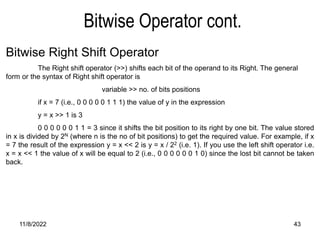
Bitwise Right Shift Operator
The Right shift operator (>>) shifts each bit of the operand to its Right. The general
form or the syntax of Right shift operator is
variable >> no. of bits positions
if x = 7 (i.e., 0 0 0 0 0 1 1 1) the value of y in the expression
y = x >> 1 is 3
0 0 0 0 0 0 1 1 = 3 since it shifts the bit position to its right by one bit. The value stored
in x is divided by 2N (where n is the no of bit positions) to get the required value. For example, if x
= 7 the result of the expression y = x << 2 is y = x / 22 (i.e. 1). If you use the left shift operator i.e.
x = x << 1 the value of x will be equal to 2 (i.e., 0 0 0 0 0 0 1 0) since the lost bit cannot be taken
back.
11/8/2022 44
Some of the special operators used in C language. These operators are
referred as separators or punctuators.
1. Ampersand (&) 2. Comma (,)
3. Asterisk ( * ) 4. Ellipsis (…)
5. Braces ({}) 6. Hash (#)
7. Brackets ([]) 8. Parenthesis (())
9. Colon (:) 10. Semicolon(;)
Special Operator
11/8/2022 45
Special Operator
Operator Meaning
Ampersand
(&)
Ampersand (&) also referred as address operator usually precedes the
identifier name, which indicates the memory location (Address) of the
identifier.
Asterisk
( * )
Asterisk ( * ) also referred as an indirection operator, is an unary operator
usally precedes the identifier name, which indicates the creation of a
pointer operator.
Braces
( {} )
The opening ( { ) and closing ( } ) braces indicate the start and end of
compound statement or a function. A semicolon is not necessary after
the closing brace of the statement, except in case of structure
declaration.
Brackets
( [ ] )
Brackets [ ] also referred as array subscript operator is used to indicate
single and multi dimensional array subscripts.
11/8/2022 46
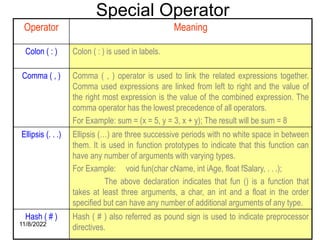
Special Operator
Operator Meaning
Colon ( : ) Colon ( : ) is used in labels.
Comma ( , ) Comma ( , ) operator is used to link the related expressions together.
Comma used expressions are linked from left to right and the value of
the right most expression is the value of the combined expression. The
comma operator has the lowest precedence of all operators.
For Example: sum = (x = 5, y = 3, x + y); The result will be sum = 8
Ellipsis (. . .) Ellipsis (…) are three successive periods with no white space in between
them. It is used in function prototypes to indicate that this function can
have any number of arguments with varying types.
For Example: void fun(char cName, int iAge, float fSalary, . . .);
The above declaration indicates that fun () is a function that
takes at least three arguments, a char, an int and a float in the order
specified but can have any number of additional arguments of any type.
Hash ( # ) Hash ( # ) also referred as pound sign is used to indicate preprocessor
directives.
11/8/2022 47
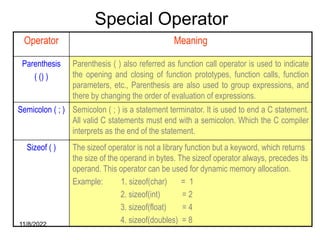
Special Operator
Operator Meaning
Parenthesis
( () )
Parenthesis ( ) also referred as function call operator is used to indicate
the opening and closing of function prototypes, function calls, function
parameters, etc., Parenthesis are also used to group expressions, and
there by changing the order of evaluation of expressions.
Semicolon ( ; ) Semicolon ( ; ) is a statement terminator. It is used to end a C statement.
All valid C statements must end with a semicolon. Which the C compiler
interprets as the end of the statement.
Sizeof ( ) The sizeof operator is not a library function but a keyword, which returns
the size of the operand in bytes. The sizeof operator always, precedes its
operand. This operator can be used for dynamic memory allocation.
Example: 1. sizeof(char) = 1
2. sizeof(int) = 2
3. sizeof(float) = 4
4. sizeof(doubles) = 8
Operator Precedence and
Associativity of Operator
11/8/2022 49
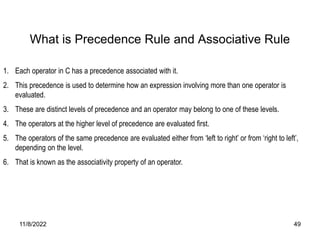
1. Each operator in C has a precedence associated with it.
2. This precedence is used to determine how an expression involving more than one operator is
evaluated.
3. These are distinct levels of precedence and an operator may belong to one of these levels.
4. The operators at the higher level of precedence are evaluated first.
5. The operators of the same precedence are evaluated either from ‘left to right’ or from ‘right to left’,
depending on the level.
6. That is known as the associativity property of an operator.
What is Precedence Rule and Associative Rule
11/8/2022 50
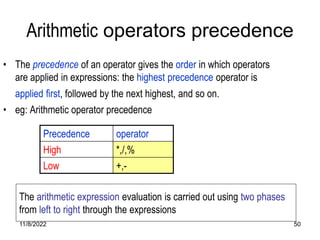
Arithmetic operators precedence
• The precedence of an operator gives the order in which operators
are applied in expressions: the highest precedence operator is
applied first, followed by the next highest, and so on.
• eg: Arithmetic operator precedence
Precedence operator
High *,/,%
Low +,-
The arithmetic expression evaluation is carried out using two phases
from left to right through the expressions
11/8/2022 51
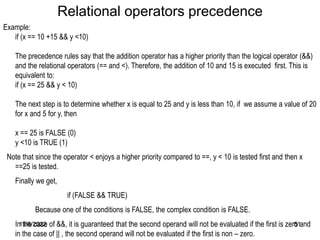
Example:
if (x == 10 +15 && y <10)
The precedence rules say that the addition operator has a higher priority than the logical operator (&&)
and the relational operators (== and <). Therefore, the addition of 10 and 15 is executed first. This is
equivalent to:
if (x == 25 && y < 10)
The next step is to determine whether x is equal to 25 and y is less than 10, if we assume a value of 20
for x and 5 for y, then
x == 25 is FALSE (0)
y <10 is TRUE (1)
Note that since the operator < enjoys a higher priority compared to ==, y < 10 is tested first and then x
==25 is tested.
Finally we get,
if (FALSE && TRUE)
Because one of the conditions is FALSE, the complex condition is FALSE.
In the case of &&, it is guaranteed that the second operand will not be evaluated if the first is zero and
in the case of || , the second operand will not be evaluated if the first is non – zero.
Relational operators precedence
11/8/2022 52
Precedence and Associativity Table
• The following table lists all the operators, in order of
precedence, with their associativity
Operators Operations Associativity priority
() Function call Left to Right 1
[] Square brackets
-> Structure operator
. Dot operator
+ Unary plus Right to Left 2
- Unary minus
++ Increment
-- Decrement
! Not
11/8/2022 53
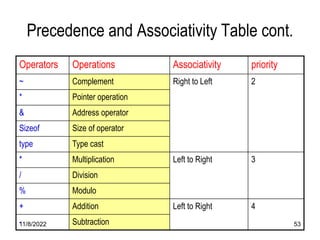
Precedence and Associativity Table cont.
Operators Operations Associativity priority
~ Complement Right to Left 2
* Pointer operation
& Address operator
Sizeof Size of operator
type Type cast
* Multiplication Left to Right 3
/ Division
% Modulo
+ Addition Left to Right 4
- Subtraction
11/8/2022 54
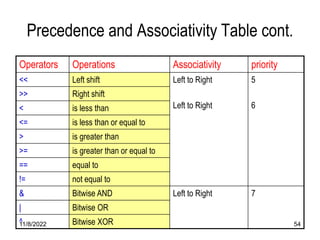
Precedence and Associativity Table cont.
Operators Operations Associativity priority
<< Left shift Left to Right
Left to Right
5
6
>> Right shift
< is less than
<= is less than or equal to
> is greater than
>= is greater than or equal to
== equal to
!= not equal to
& Bitwise AND Left to Right 7
| Bitwise OR
^ Bitwise XOR
11/8/2022 55
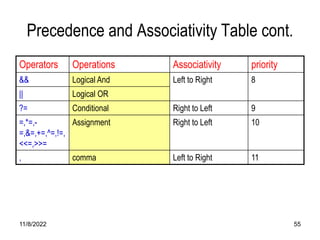
Precedence and Associativity Table cont.
Operators Operations Associativity priority
&& Logical And Left to Right 8
|| Logical OR
?= Conditional Right to Left 9
=,*=,-
=,&=,+=,^=,!=,
<<=,>>=
Assignment Right to Left 10
, comma Left to Right 11
11/8/2022 56
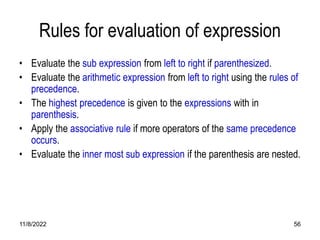
Rules for evaluation of expression
• Evaluate the sub expression from left to right if parenthesized.
• Evaluate the arithmetic expression from left to right using the rules of
precedence.
• The highest precedence is given to the expressions with in
parenthesis.
• Apply the associative rule if more operators of the same precedence
occurs.
• Evaluate the inner most sub expression if the parenthesis are nested.
11/8/2022 57
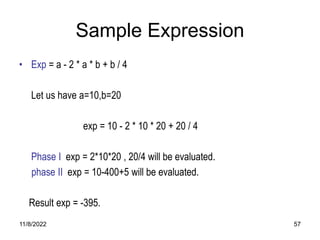
Sample Expression
• Exp = a - 2 * a * b + b / 4
Let us have a=10,b=20
exp = 10 - 2 * 10 * 20 + 20 / 4
Phase I exp = 2*10*20 , 20/4 will be evaluated.
phase II exp = 10-400+5 will be evaluated.
Result exp = -395.
11/8/2022 58
Expression Evaluation
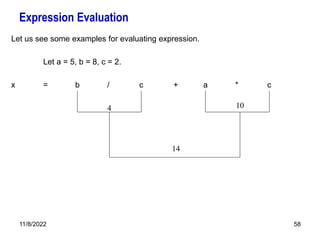
Let us see some examples for evaluating expression.
Let a = 5, b = 8, c = 2.
x = b / c + a * c
4 10
14
11/8/2022 59
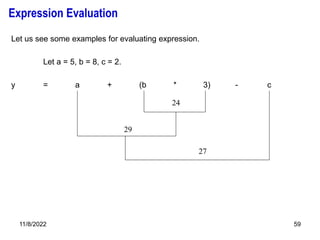
Let us see some examples for evaluating expression.
Let a = 5, b = 8, c = 2.
y = a + (b * 3) - c
29
27
24
Expression Evaluation
TYPE CONVERSION
OR
TYPE CASTING
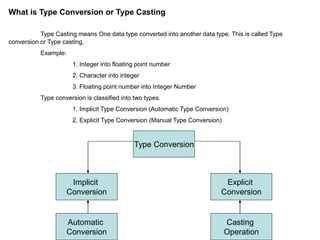
What is Type Conversion or Type Casting
Type Casting means One data type converted into another data type. This is called Type
conversion or Type casting.
Example:
1. Integer into floating point number
2. Character into integer
3. Floating point number into Integer Number
Type conversion is classified into two types.
1. Implicit Type Conversion (Automatic Type Conversion)
2. Explicit Type Conversion (Manual Type Conversion)
Type Conversion
Implicit
Conversion
Explicit
Conversion
Automatic
Conversion
Casting
Operation
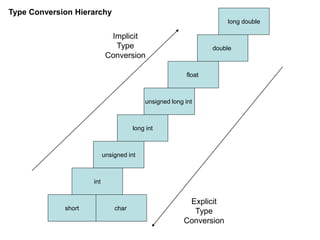
Type Conversion Hierarchy
short char
int
unsigned int
long int
unsigned long int
float
double
long double
Implicit
Type
Conversion
Explicit
Type
Conversion
Implicit Type Conversion
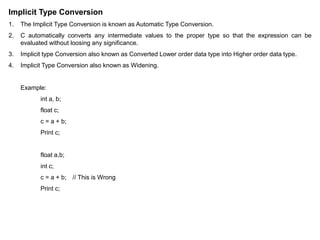
1. The Implicit Type Conversion is known as Automatic Type Conversion.
2. C automatically converts any intermediate values to the proper type so that the expression can be
evaluated without loosing any significance.
3. Implicit type Conversion also known as Converted Lower order data type into Higher order data type.
4. Implicit Type Conversion also known as Widening.
Example:
int a, b;
float c;
c = a + b;
Print c;
float a,b;
int c;
c = a + b; // This is Wrong
Print c;
Explicit Type Conversion
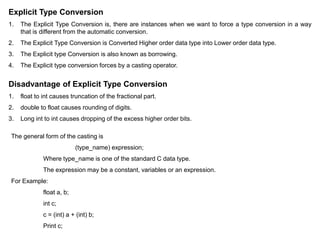
1. The Explicit Type Conversion is, there are instances when we want to force a type conversion in a way
that is different from the automatic conversion.
2. The Explicit Type Conversion is Converted Higher order data type into Lower order data type.
3. The Explicit type Conversion is also known as borrowing.
4. The Explicit type conversion forces by a casting operator.
Disadvantage of Explicit Type Conversion
1. float to int causes truncation of the fractional part.
2. double to float causes rounding of digits.
3. Long int to int causes dropping of the excess higher order bits.
The general form of the casting is
(type_name) expression;
Where type_name is one of the standard C data type.
The expression may be a constant, variables or an expression.
For Example:
float a, b;
int c;
c = (int) a + (int) b;
Print c;
11/8/2022 65
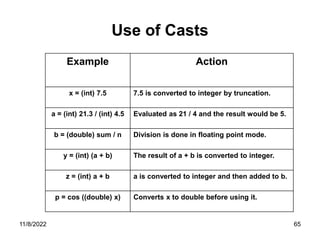
Use of Casts
Example Action
x = (int) 7.5 7.5 is converted to integer by truncation.
a = (int) 21.3 / (int) 4.5 Evaluated as 21 / 4 and the result would be 5.
b = (double) sum / n Division is done in floating point mode.
y = (int) (a + b) The result of a + b is converted to integer.
z = (int) a + b a is converted to integer and then added to b.
p = cos ((double) x) Converts x to double before using it.
Input And Output Functions
11/8/2022 67
Ip / Op Statements
 We have two methods for providing data to the program.
a) Assigning the data to the variables in a program.
b) By using the input/output statements.
 ‘c’ language supports two types of Ip / Op statements
 This operations are carried out through function calls.
 Those function are collectively known as standard I / O library
11/8/2022 68
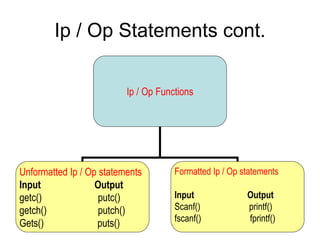
Ip / Op Statements cont.
Ip / Op Functions
Unformatted Ip / Op statements
Input Output
getc() putc()
getch() putch()
Gets() puts()
Formatted Ip / Op statements
Input Output
Scanf() printf()
fscanf() fprintf()
11/8/2022 69
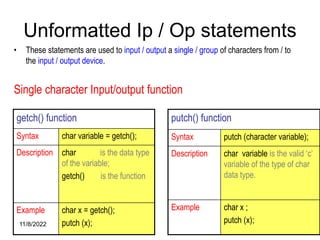
Unformatted Ip / Op statements
getch() function
Syntax char variable = getch();
Description char is the data type
of the variable;
getch() is the function
Example char x = getch();
putch (x);
• These statements are used to input / output a single / group of characters from / to
the input / output device.
Single character Input/output function
putch() function
Syntax putch (character variable);
Description char variable is the valid ‘c’
variable of the type of char
data type.
Example char x ;
putch (x);
11/8/2022 70
Unformatted Ip / Op statements
cont.
gets() function
Syntax gets (char type of array
variable);
Description valid ‘c’ variable declared
as one dimensional array.
Example char s[10];
gets (s);
Group of character Input / output function.
 Gets() and puts are used to read / display the string from / to the
standard input / output device.
puts() function
Syntax puts (char type of array
variable)
Description valid ‘c’ variable declared
as one dimensional array.
Example char s[10];
gets (s);
puts (s);
11/8/2022 71
Sample Program
#include<stdio.h>
Void main()
{
char name[10];
char address[20];
Puts(“Enter the name : ”);
gets(name);
puts(“Enter the address : ”);
gets(address);
puts(“Name = “)
puts(name);
puts(“Address = “);
puts(address);
}
11/8/2022 72
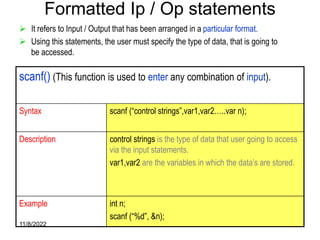
Formatted Ip / Op statements
 It refers to Input / Output that has been arranged in a particular format.
 Using this statements, the user must specify the type of data, that is going to
be accessed.
scanf() (This function is used to enter any combination of input).
Syntax scanf (“control strings”,var1,var2…..var n);
Description control strings is the type of data that user going to access
via the input statements.
var1,var2 are the variables in which the data’s are stored.
Example int n;
scanf (“%d”, &n);
11/8/2022 73
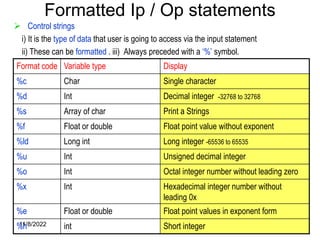
Formatted Ip / Op statements
 Control strings
i) It is the type of data that user is going to access via the input statement
ii) These can be formatted . iii) Always preceded with a ‘%’ symbol.
Format code Variable type Display
%c Char Single character
%d Int Decimal integer -32768 to 32768
%s Array of char Print a Strings
%f Float or double Float point value without exponent
%ld Long int Long integer -65536 to 65535
%u Int Unsigned decimal integer
%o Int Octal integer number without leading zero
%x Int Hexadecimal integer number without
leading 0x
%e Float or double Float point values in exponent form
%h int Short integer
11/8/2022 74
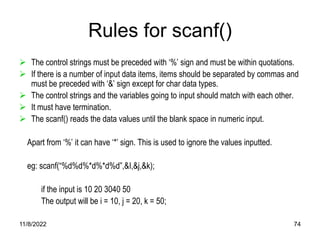
Rules for scanf()
 The control strings must be preceded with ‘%’ sign and must be within quotations.
 If there is a number of input data items, items should be separated by commas and
must be preceded with ‘&’ sign except for char data types.
 The control strings and the variables going to input should match with each other.
 It must have termination.
 The scanf() reads the data values until the blank space in numeric input.
Apart from ‘%’ it can have ‘*’ sign. This is used to ignore the values inputted.
eg: scanf(“%d%d%*d%*d%d”,&I,&j,&k);
if the input is 10 20 3040 50
The output will be i = 10, j = 20, k = 50;
11/8/2022 75
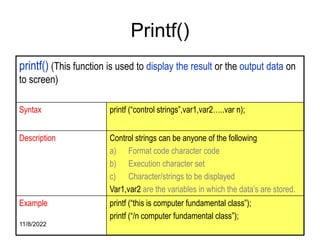
Printf()
printf() (This function is used to display the result or the output data on
to screen)
Syntax printf (“control strings”,var1,var2…..var n);
Description Control strings can be anyone of the following
a) Format code character code
b) Execution character set
c) Character/strings to be displayed
Var1,var2 are the variables in which the data’s are stored.
Example printf (“this is computer fundamental class”);
printf (“/n computer fundamental class”);
11/8/2022 76
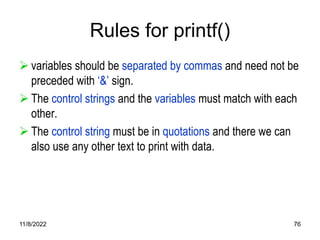
Rules for printf()
 variables should be separated by commas and need not be
preceded with ‘&’ sign.
 The control strings and the variables must match with each
other.
 The control string must be in quotations and there we can
also use any other text to print with data.
11/8/2022 77
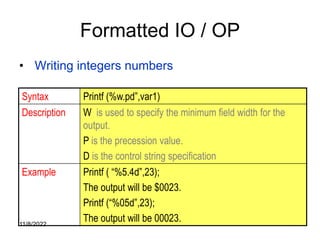
Formatted IO / OP
• Writing integers numbers
Syntax Printf (%w.pd”,var1)
Description W is used to specify the minimum field width for the
output.
P is the precession value.
D is the control string specification
Example Printf ( “%5.4d”,23);
The output will be $0023.
Printf (“%05d”,23);
The output will be 00023.
11/8/2022 78
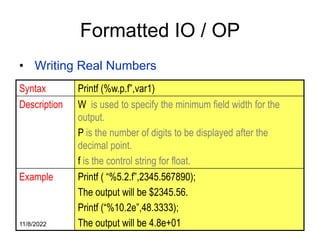
Formatted IO / OP
• Writing Real Numbers
Syntax Printf (%w.p.f”,var1)
Description W is used to specify the minimum field width for the
output.
P is the number of digits to be displayed after the
decimal point.
f is the control string for float.
Example Printf ( “%5.2.f”,2345.567890);
The output will be $2345.56.
Printf (“%10.2e”,48.3333);
The output will be 4.8e+01
11/8/2022 79
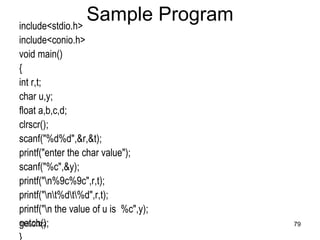
Sample Program
include<stdio.h>
include<conio.h>
void main()
{
int r,t;
char u,y;
float a,b,c,d;
clrscr();
scanf("%d%d",&r,&t);
printf("enter the char value");
scanf("%c",&y);
printf("n%9c%9c",r,t);
printf("nt%dt%d",r,t);
printf("n the value of u is %c",y);
getch();
Control Statements
(Decision Making)
11/8/2022 81
Control Statements
A program consists of a number of statements which are usually
executed in sequence. Programs can be much more powerful if we
can control the order in which statements are run.
Statements fall into three general types;
1) Assignment, where values, usually the results of calculations, are stored in
variables.
2) Input / Output, data is read in or printed out.
3) Control, the program makes a decision about what to do next.
11/8/2022 82
Control Statements
Control statements in C are used to write powerful programs
by;
Repeating important sections of the program.
Selecting between optional sections of a program.
11/8/2022 83
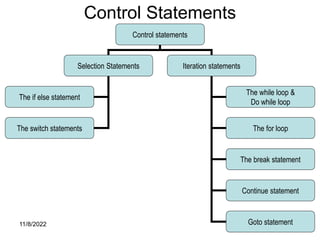
Control Statements
Control statements
Selection Statements Iteration statements
The if else statement
The switch statements
The while loop &
Do while loop
The for loop
The break statement
Continue statement
Goto statement
11/8/2022 84
Control Statements cont.
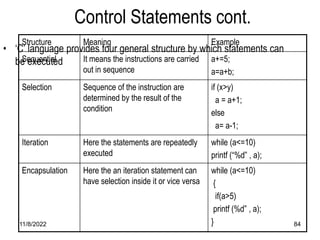
• ‘C’ language provides four general structure by which statements can
be executed
Structure Meaning Example
Sequential It means the instructions are carried
out in sequence
a+=5;
a=a+b;
Selection Sequence of the instruction are
determined by the result of the
condition
if (x>y)
a = a+1;
else
a= a-1;
Iteration Here the statements are repeatedly
executed
while (a<=10)
printf (“%d” , a);
Encapsulation Here the an iteration statement can
have selection inside it or vice versa
while (a<=10)
{
if(a>5)
printf (%d” , a);
}
11/8/2022 85
SELECTION STATEMENT
11/8/2022 86
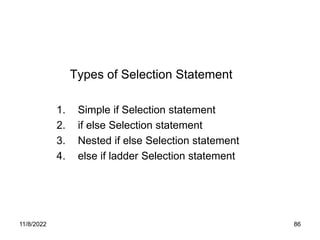
Types of Selection Statement
1. Simple if Selection statement
2. if else Selection statement
3. Nested if else Selection statement
4. else if ladder Selection statement
11/8/2022 87
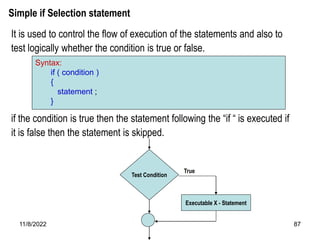
Simple if Selection statement
It is used to control the flow of execution of the statements and also to
test logically whether the condition is true or false.
if the condition is true then the statement following the “if “ is executed if
it is false then the statement is skipped.
Syntax:
if ( condition )
{
statement ;
}
Test Condition
Executable X - Statement
True
11/8/2022 88
Selection Statement
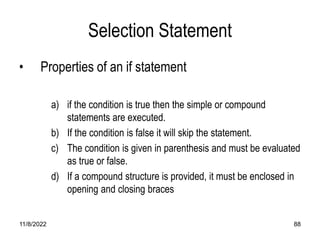
• Properties of an if statement
a) if the condition is true then the simple or compound
statements are executed.
b) If the condition is false it will skip the statement.
c) The condition is given in parenthesis and must be evaluated
as true or false.
d) If a compound structure is provided, it must be enclosed in
opening and closing braces
11/8/2022 89
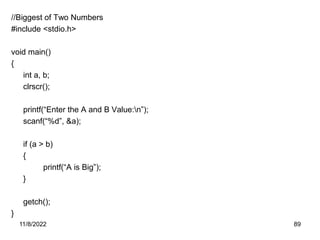
//Biggest of Two Numbers
#include <stdio.h>
void main()
{
int a, b;
clrscr();
printf(“Enter the A and B Value:n”);
scanf(“%d”, &a);
if (a > b)
{
printf(“A is Big”);
}
getch();
}
11/8/2022 90
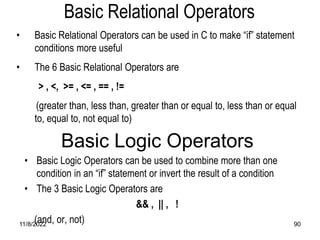
• Basic Relational Operators can be used in C to make “if” statement
conditions more useful
• The 6 Basic Relational Operators are
> , <, >= , <= , == , !=
(greater than, less than, greater than or equal to, less than or equal
to, equal to, not equal to)
Basic Relational Operators
Basic Logic Operators
• Basic Logic Operators can be used to combine more than one
condition in an “if” statement or invert the result of a condition
• The 3 Basic Logic Operators are
&& , || , !
(and, or, not)
11/8/2022 91
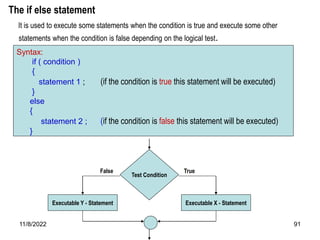
The if else statement
It is used to execute some statements when the condition is true and execute some other
statements when the condition is false depending on the logical test.
Syntax:
if ( condition )
{
statement 1 ; (if the condition is true this statement will be executed)
}
else
{
statement 2 ; (if the condition is false this statement will be executed)
}
Test Condition
Executable X - Statement
True
Executable Y - Statement
False
11/8/2022 92
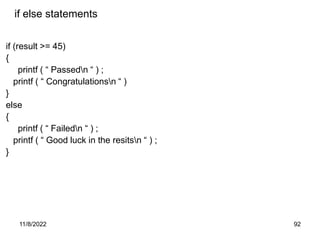
if else statements
if (result >= 45)
{
printf ( “ Passedn “ ) ;
printf ( “ Congratulationsn “ )
}
else
{
printf ( “ Failedn “ ) ;
printf ( “ Good luck in the resitsn “ ) ;
}
11/8/2022 93
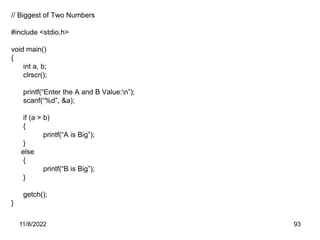
// Biggest of Two Numbers
#include <stdio.h>
void main()
{
int a, b;
clrscr();
printf(“Enter the A and B Value:n”);
scanf(“%d”, &a);
if (a > b)
{
printf(“A is Big”);
}
else
{
printf(“B is Big”);
}
getch();
}
11/8/2022 94
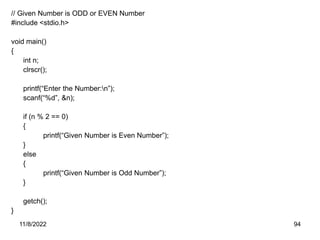
// Given Number is ODD or EVEN Number
#include <stdio.h>
void main()
{
int n;
clrscr();
printf(“Enter the Number:n”);
scanf(“%d”, &n);
if (n % 2 == 0)
{
printf(“Given Number is Even Number”);
}
else
{
printf(“Given Number is Odd Number”);
}
getch();
}
11/8/2022 95
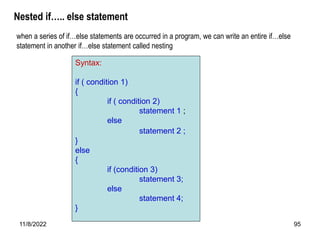
Nested if….. else statement
Syntax:
if ( condition 1)
{
if ( condition 2)
statement 1 ;
else
statement 2 ;
}
else
{
if (condition 3)
statement 3;
else
statement 4;
}
when a series of if…else statements are occurred in a program, we can write an entire if…else
statement in another if…else statement called nesting
11/8/2022 96
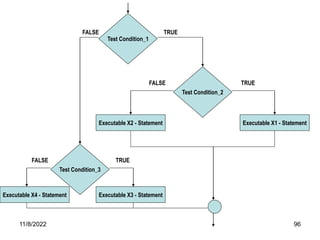
Test Condition_1
Executable X2 - Statement
Test Condition_2
Executable X1 - Statement
Test Condition_3
Executable X4 - Statement Executable X3 - Statement
TRUE
TRUE
TRUE
FALSE
FALSE
FALSE
11/8/2022 97
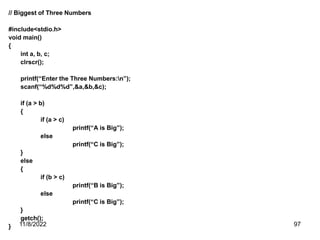
// Biggest of Three Numbers
#include<stdio.h>
void main()
{
int a, b, c;
clrscr();
printf(“Enter the Three Numbers:n”);
scanf(“%d%d%d”,&a,&b,&c);
if (a > b)
{
if (a > c)
printf(“A is Big”);
else
printf(“C is Big”);
}
else
{
if (b > c)
printf(“B is Big”);
else
printf(“C is Big”);
}
getch();
}
11/8/2022 98
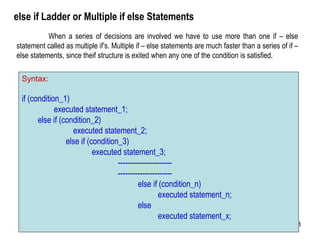
else if Ladder or Multiple if else Statements
Syntax:
if (condition_1)
executed statement_1;
else if (condition_2)
executed statement_2;
else if (condition_3)
executed statement_3;
----------------------
----------------------
else if (condition_n)
executed statement_n;
else
executed statement_x;
When a series of decisions are involved we have to use more than one if – else
statement called as multiple if’s. Multiple if – else statements are much faster than a series of if –
else statements, since theif structure is exited when any one of the condition is satisfied.
11/8/2022 99
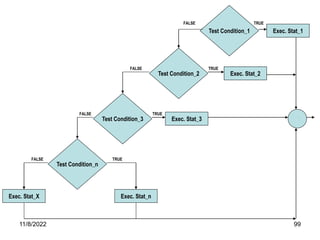
Test Condition_1
Test Condition_2
Exec. Stat_1
Test Condition_3
TRUE
Test Condition_n
Exec. Stat_2
Exec. Stat_3
Exec. Stat_n
Exec. Stat_X
TRUE
TRUE
TRUE
FALSE
FALSE
FALSE
FALSE
11/8/2022 100
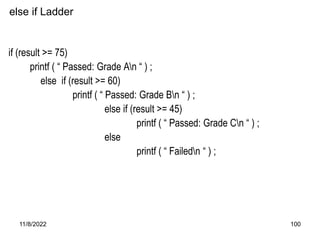
else if Ladder
if (result >= 75)
printf ( “ Passed: Grade An “ ) ;
else if (result >= 60)
printf ( “ Passed: Grade Bn “ ) ;
else if (result >= 45)
printf ( “ Passed: Grade Cn “ ) ;
else
printf ( “ Failedn “ ) ;
11/8/2022 101
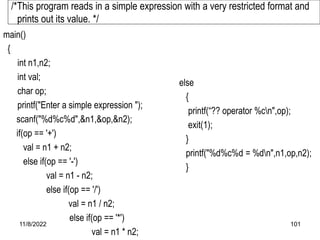
main()
{
int n1,n2;
int val;
char op;
printf("Enter a simple expression ");
scanf("%d%c%d",&n1,&op,&n2);
if(op == '+')
val = n1 + n2;
else if(op == '-')
val = n1 - n2;
else if(op == '/')
val = n1 / n2;
else if(op == '*')
val = n1 * n2;
else
{
printf(“?? operator %cn",op);
exit(1);
}
printf("%d%c%d = %dn",n1,op,n2);
}
/*This program reads in a simple expression with a very restricted format and
prints out its value. */
11/8/2022 102
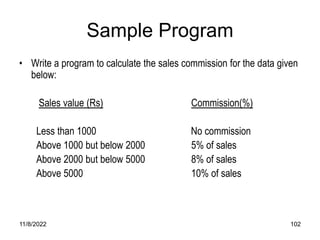
Sample Program
• Write a program to calculate the sales commission for the data given
below:
Sales value (Rs) Commission(%)
Less than 1000 No commission
Above 1000 but below 2000 5% of sales
Above 2000 but below 5000 8% of sales
Above 5000 10% of sales
11/8/2022 103
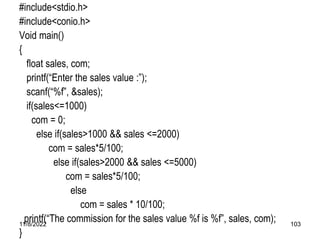
#include<stdio.h>
#include<conio.h>
Void main()
{
float sales, com;
printf(“Enter the sales value :”);
scanf(“%f”, &sales);
if(sales<=1000)
com = 0;
else if(sales>1000 && sales <=2000)
com = sales*5/100;
else if(sales>2000 && sales <=5000)
com = sales*5/100;
else
com = sales * 10/100;
printf(“The commission for the sales value %f is %f”, sales, com);
}
11/8/2022 104
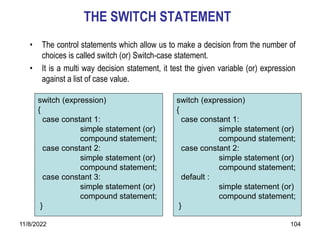
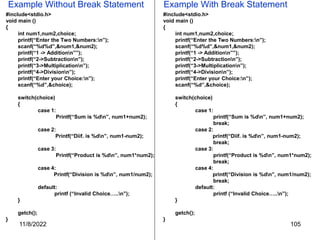
THE SWITCH STATEMENT
• The control statements which allow us to make a decision from the number of
choices is called switch (or) Switch-case statement.
• It is a multi way decision statement, it test the given variable (or) expression
against a list of case value.
switch (expression)
{
case constant 1:
simple statement (or)
compound statement;
case constant 2:
simple statement (or)
compound statement;
case constant 3:
simple statement (or)
compound statement;
}
switch (expression)
{
case constant 1:
simple statement (or)
compound statement;
case constant 2:
simple statement (or)
compound statement;
default :
simple statement (or)
compound statement;
}
11/8/2022 105
Example Without Break Statement
#include<stdio.h>
void main ()
{
int num1,num2,choice;
printf(“Enter the Two Numbers:n”);
scanf(“%d%d”,&num1,&num2);
printf(“1 -> Additionn””);
printf(“2->Subtractionn”);
printf(“3->Multiplicationn”);
printf(“4->Divisionn”);
printf(“Enter your Choice:n”);
scanf(“%d”,&choice);
switch(choice)
{
case 1:
Printf(“Sum is %dn”, num1+num2);
case 2:
Printf(“Diif. is %dn”, num1-num2);
case 3:
Printf(“Product is %dn”, num1*num2);
case 4:
Printf(“Division is %dn”, num1/num2);
default:
printf (“Invalid Choice…..n”);
}
getch();
}
#include<stdio.h>
void main ()
{
int num1,num2,choice;
printf(“Enter the Two Numbers:n”);
scanf(“%d%d”,&num1,&num2);
printf(“1 -> Additionn””);
printf(“2->Subtractionn”);
printf(“3->Multiplicationn”);
printf(“4->Divisionn”);
printf(“Enter your Choice:n”);
scanf(“%d”,&choice);
switch(choice)
{
case 1:
printf(“Sum is %dn”, num1+num2);
break;
case 2:
printf(“Diif. is %dn”, num1-num2);
break;
case 3:
printf(“Product is %dn”, num1*num2);
break;
case 4:
printf(“Division is %dn”, num1/num2);
break;
default:
printf (“Invalid Choice…..n”);
}
getch();
}
Example With Break Statement
11/8/2022 106
Fall through Statement in C
11/8/2022 107
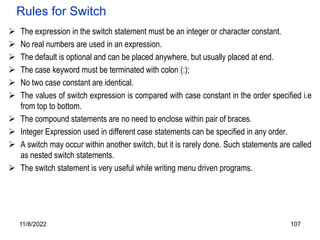
Rules for Switch
 The expression in the switch statement must be an integer or character constant.
 No real numbers are used in an expression.
 The default is optional and can be placed anywhere, but usually placed at end.
 The case keyword must be terminated with colon (:);
 No two case constant are identical.
 The values of switch expression is compared with case constant in the order specified i.e
from top to bottom.
 The compound statements are no need to enclose within pair of braces.
 Integer Expression used in different case statements can be specified in any order.
 A switch may occur within another switch, but it is rarely done. Such statements are called
as nested switch statements.
 The switch statement is very useful while writing menu driven programs.
11/8/2022 108
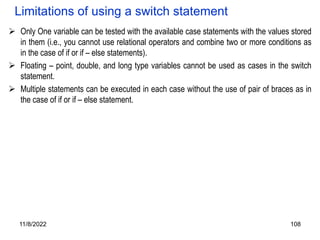
Limitations of using a switch statement
 Only One variable can be tested with the available case statements with the values stored
in them (i.e., you cannot use relational operators and combine two or more conditions as
in the case of if or if – else statements).
 Floating – point, double, and long type variables cannot be used as cases in the switch
statement.
 Multiple statements can be executed in each case without the use of pair of braces as in
the case of if or if – else statement.
11/8/2022 109
Iteration Statements
1. Iteration statements is also known as Looping statement.
2. A segment of the program that is executed repeatedly is called as a loop.
3. Some portion of the program has to be specified several number of times or until a
particular condition is satisfied.
4. Such repetitive operation is done through a loop structure.
5. The Three methods by which you can repeat a part of a program are,
1. while Loops
2. do….while loops
3. for Loop
Loops generally consist of two parts :
Control expressions: One or more control expressions which control the execution of the
loop,
Body : which is the statement or set of statements which is executed over and
over
11/8/2022 110
Any looping statement , would include the following steps:
a) Initialization of a condition variable
b) Test the control statement.
c) Executing the body of the loop depending on the condition.
d) Updating the condition variable.
11/8/2022 111
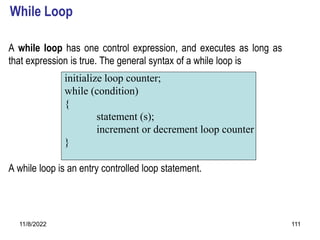
While Loop
A while loop has one control expression, and executes as long as
that expression is true. The general syntax of a while loop is
A while loop is an entry controlled loop statement.
initialize loop counter;
while (condition)
{
statement (s);
increment or decrement loop counter
}
11/8/2022 112
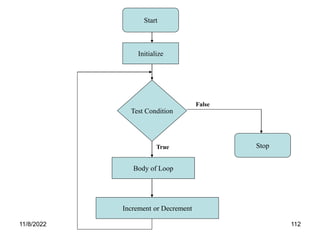
Start
Initialize
Test Condition
Body of Loop
Increment or Decrement
Stop
False
True
11/8/2022 113
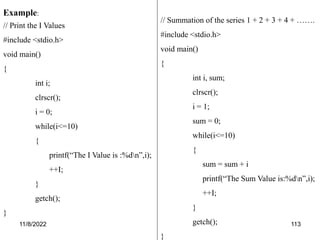
Example:
// Print the I Values
#include <stdio.h>
void main()
{
int i;
clrscr();
i = 0;
while(i<=10)
{
printf(“The I Value is :%dn”,i);
++I;
}
getch();
}
// Summation of the series 1 + 2 + 3 + 4 + …….
#include <stdio.h>
void main()
{
int i, sum;
clrscr();
i = 1;
sum = 0;
while(i<=10)
{
sum = sum + i
printf(“The Sum Value is:%dn”,i);
++I;
}
getch();
}
11/8/2022 114
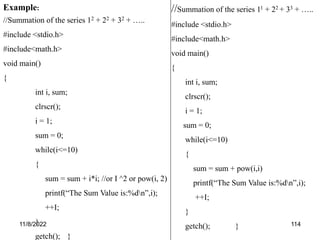
Example:
//Summation of the series 12 + 22 + 32 + …..
#include <stdio.h>
#include<math.h>
void main()
{
int i, sum;
clrscr();
i = 1;
sum = 0;
while(i<=10)
{
sum = sum + i*i; //or I ^2 or pow(i, 2)
printf(“The Sum Value is:%dn”,i);
++I;
}
getch(); }
//Summation of the series 11 + 22 + 33 + …..
#include <stdio.h>
#include<math.h>
void main()
{
int i, sum;
clrscr();
i = 1;
sum = 0;
while(i<=10)
{
sum = sum + pow(i,i)
printf(“The Sum Value is:%dn”,i);
++I;
}
getch(); }
11/8/2022 115
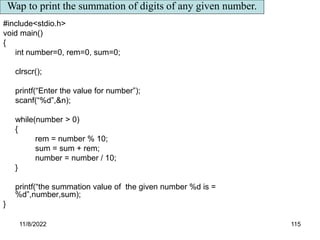
#include<stdio.h>
void main()
{
int number=0, rem=0, sum=0;
clrscr();
printf(“Enter the value for number”);
scanf(“%d”,&n);
while(number > 0)
{
rem = number % 10;
sum = sum + rem;
number = number / 10;
}
printf(“the summation value of the given number %d is =
%d”,number,sum);
}
Wap to print the summation of digits of any given number.
11/8/2022 116
THE do-while LOOP
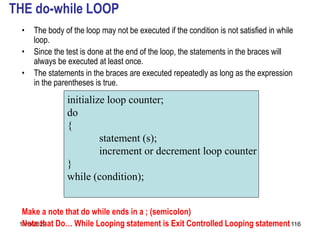
• The body of the loop may not be executed if the condition is not satisfied in while
loop.
• Since the test is done at the end of the loop, the statements in the braces will
always be executed at least once.
• The statements in the braces are executed repeatedly as long as the expression
in the parentheses is true.
Make a note that do while ends in a ; (semicolon)
Note that Do… While Looping statement is Exit Controlled Looping statement
initialize loop counter;
do
{
statement (s);
increment or decrement loop counter
}
while (condition);
11/8/2022 117
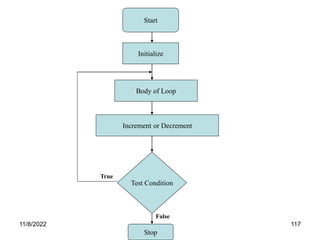
Start
Initialize
Test Condition
Body of Loop
Increment or Decrement
Stop
False
True
11/8/2022 118
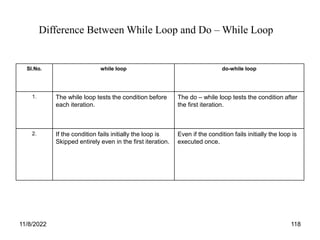
Sl.No. while loop do-while loop
1. The while loop tests the condition before
each iteration.
The do – while loop tests the condition after
the first iteration.
2. If the condition fails initially the loop is
Skipped entirely even in the first iteration.
Even if the condition fails initially the loop is
executed once.
Difference Between While Loop and Do – While Loop
11/8/2022 119
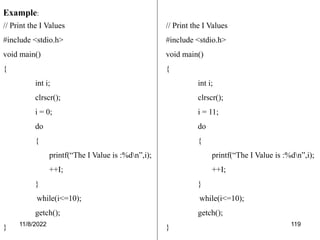
Example:
// Print the I Values
#include <stdio.h>
void main()
{
int i;
clrscr();
i = 0;
do
{
printf(“The I Value is :%dn”,i);
++I;
}
while(i<=10);
getch();
}
// Print the I Values
#include <stdio.h>
void main()
{
int i;
clrscr();
i = 11;
do
{
printf(“The I Value is :%dn”,i);
++I;
}
while(i<=10);
getch();
}
11/8/2022 120
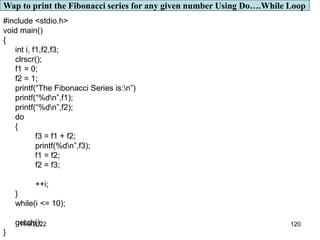
#include <stdio.h>
void main()
{
int i, f1,f2,f3;
clrscr();
f1 = 0;
f2 = 1;
printf(“The Fibonacci Series is:n”)
printf(“%dn”,f1);
printf(“%dn”,f2);
do
{
f3 = f1 + f2;
printf(%dn”,f3);
f1 = f2;
f2 = f3;
++i;
}
while(i <= 10);
getch();
}
Wap to print the Fibonacci series for any given number Using Do….While Loop
11/8/2022 121
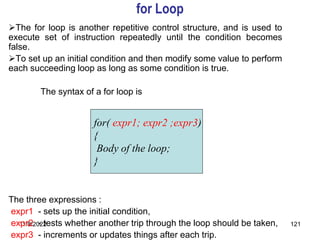
for Loop
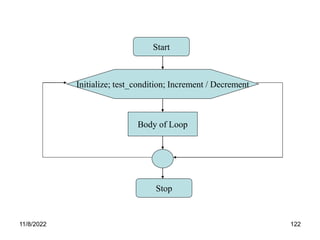
The for loop is another repetitive control structure, and is used to
execute set of instruction repeatedly until the condition becomes
false.
To set up an initial condition and then modify some value to perform
each succeeding loop as long as some condition is true.
The syntax of a for loop is
The three expressions :
expr1 - sets up the initial condition,
expr2 - tests whether another trip through the loop should be taken,
expr3 - increments or updates things after each trip.
for( expr1; expr2 ;expr3)
{
Body of the loop;
}
11/8/2022 122
Start
Initialize; test_condition; Increment / Decrement
Body of Loop
Stop
11/8/2022 123
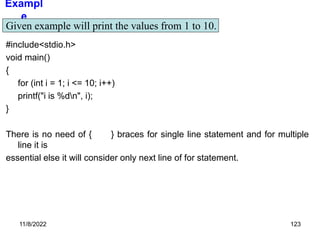
Exampl
e
#include<stdio.h>
void main()
{
for (int i = 1; i <= 10; i++)
printf("i is %dn", i);
}
There is no need of { } braces for single line statement and for multiple
line it is
essential else it will consider only next line of for statement.
Given example will print the values from 1 to 10.
11/8/2022 124
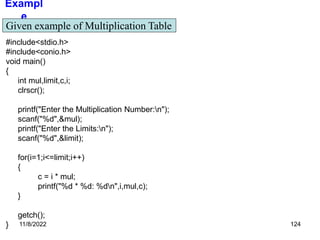
Exampl
e
#include<stdio.h>
#include<conio.h>
void main()
{
int mul,limit,c,i;
clrscr();
printf("Enter the Multiplication Number:n");
scanf("%d",&mul);
printf("Enter the Limits:n");
scanf("%d",&limit);
for(i=1;i<=limit;i++)
{
c = i * mul;
printf("%d * %d: %dn",i,mul,c);
}
getch();
}
Given example of Multiplication Table
11/8/2022 125
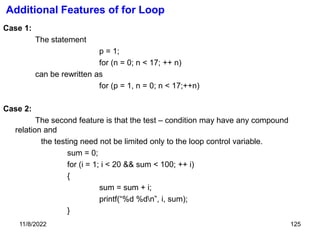
Additional Features of for Loop
Case 1:
The statement
p = 1;
for (n = 0; n < 17; ++ n)
can be rewritten as
for (p = 1, n = 0; n < 17;++n)
Case 2:
The second feature is that the test – condition may have any compound
relation and
the testing need not be limited only to the loop control variable.
sum = 0;
for (i = 1; i < 20 && sum < 100; ++ i)
{
sum = sum + i;
printf(“%d %dn”, i, sum);
}
11/8/2022 126
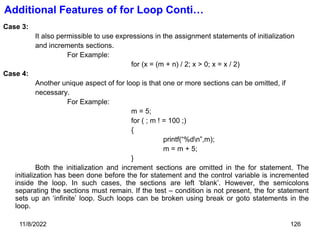
Additional Features of for Loop Conti…
Case 3:
It also permissible to use expressions in the assignment statements of initialization
and increments sections.
For Example:
for (x = (m + n) / 2; x > 0; x = x / 2)
Case 4:
Another unique aspect of for loop is that one or more sections can be omitted, if
necessary.
For Example:
m = 5;
for ( ; m ! = 100 ;)
{
printf(“%dn”,m);
m = m + 5;
}
Both the initialization and increment sections are omitted in the for statement. The
initialization has been done before the for statement and the control variable is incremented
inside the loop. In such cases, the sections are left ‘blank’. However, the semicolons
separating the sections must remain. If the test – condition is not present, the for statement
sets up an ‘infinite’ loop. Such loops can be broken using break or goto statements in the
loop.
11/8/2022 127
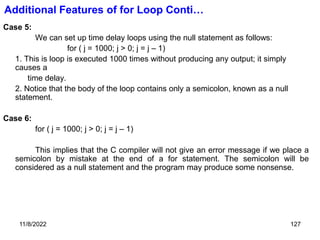
Case 5:
We can set up time delay loops using the null statement as follows:
for ( j = 1000; j > 0; j = j – 1)
1. This is loop is executed 1000 times without producing any output; it simply
causes a
time delay.
2. Notice that the body of the loop contains only a semicolon, known as a null
statement.
Case 6:
for ( j = 1000; j > 0; j = j – 1)
This implies that the C compiler will not give an error message if we place a
semicolon by mistake at the end of a for statement. The semicolon will be
considered as a null statement and the program may produce some nonsense.
Additional Features of for Loop Conti…
11/8/2022 128
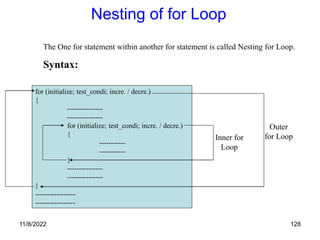
Nesting of for Loop
The One for statement within another for statement is called Nesting for Loop.
Syntax:
for (initialize; test_condi; incre. / decre.)
{
---------------
---------------
for (initialize; test_condi; incre. / decre.)
{
-----------
-----------
}
---------------
---------------
}
-----------------
-----------------
Outer
for Loop
Inner for
Loop
11/8/2022 129
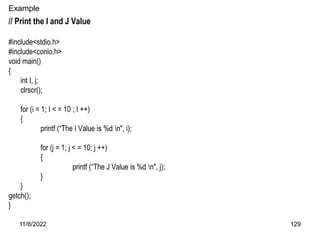
Example
// Print the I and J Value
#include<stdio.h>
#include<conio.h>
void main()
{
int I, j;
clrscr();
for (i = 1; I < = 10 ; I ++)
{
printf (“The I Value is %d n", i);
for (j = 1; j < = 10; j ++)
{
printf (“The J Value is %d n", j);
}
}
getch();
}
11/8/2022 130
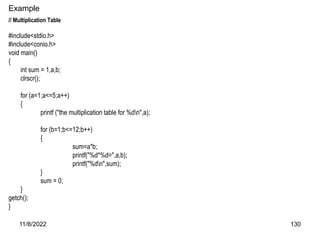
Example
// Multiplication Table
#include<stdio.h>
#include<conio.h>
void main()
{
int sum = 1,a,b;
clrscr();
for (a=1;a<=5;a++)
{
printf ("the multiplication table for %dn",a);
for (b=1;b<=12;b++)
{
sum=a*b;
printf("%d*%d=",a,b);
printf("%dn",sum);
}
sum = 0;
}
getch();
}
11/8/2022 131
Exercise
1) Write a program that will read in N numbers and print out their average.
2) Wap to print the following series for N given number
1+(1+2)+(1+2+3)+(1+2+3+4)………
3) Wap to print the following series for N given number
+
++
+++
++++
+++++
++++++ ………..
4) Wap to print the following series for N given number
1
111
11111
1111111
11/8/2022 132
JUMPS IN LOOPS
11/8/2022 133
1. Loops perform a set of operations repeatedly until the control variable fails to satisfy the
test – condition.
2. The number of times a loop is repeated is decided in advance and the test condition is
written to achieve this.
3. Sometimes, when executing a loop it becomes desirable to skip a part of the loop or to
leave the loop as soon as a certain condition occurs.
4. Jumps out of a Loop is Classified into three types
1. break;
2. continue;
3. goto;
11/8/2022 134
The break Statement
1. A break statement is used to terminate of to exit a for, switch, while or do – while
statements and the execution continues following the break statement.
2. The general form of the break statement is
3. The break statement does not have any embedded expression or arguments.
4. The break statement is usually used at the end of each case and before the start of the next
case statement.
5. The break statement causes the control to transfer out of the entire switch statement.
break;
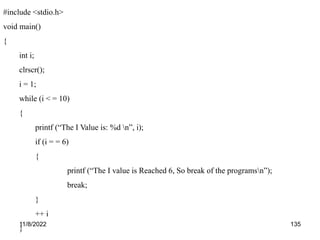
11/8/2022 135
#include <stdio.h>
void main()
{
int i;
clrscr();
i = 1;
while (i < = 10)
{
printf (“The I Value is: %d n”, i);
if (i = = 6)
{
printf (“The I value is Reached 6, So break of the programsn”);
break;
}
++ i
}
11/8/2022 136
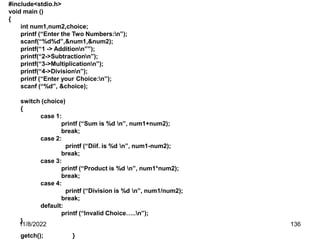
#include<stdio.h>
void main ()
{
int num1,num2,choice;
printf (“Enter the Two Numbers:n”);
scanf(“%d%d”,&num1,&num2);
printf(“1 -> Additionn””);
printf(“2->Subtractionn”);
printf(“3->Multiplicationn”);
printf(“4->Divisionn”);
printf (“Enter your Choice:n”);
scanf (“%d”, &choice);
switch (choice)
{
case 1:
printf (“Sum is %d n”, num1+num2);
break;
case 2:
printf (“Diif. is %d n”, num1-num2);
break;
case 3:
printf (“Product is %d n”, num1*num2);
break;
case 4:
printf (“Division is %d n”, num1/num2);
break;
default:
printf (“Invalid Choice…..n”);
}
getch(); }
11/8/2022 137
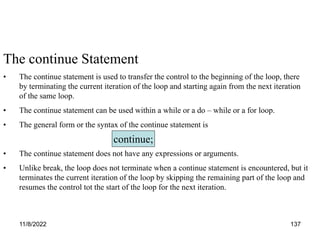
The continue Statement
• The continue statement is used to transfer the control to the beginning of the loop, there
by terminating the current iteration of the loop and starting again from the next iteration
of the same loop.
• The continue statement can be used within a while or a do – while or a for loop.
• The general form or the syntax of the continue statement is
• The continue statement does not have any expressions or arguments.
• Unlike break, the loop does not terminate when a continue statement is encountered, but it
terminates the current iteration of the loop by skipping the remaining part of the loop and
resumes the control tot the start of the loop for the next iteration.
continue;
11/8/2022 138
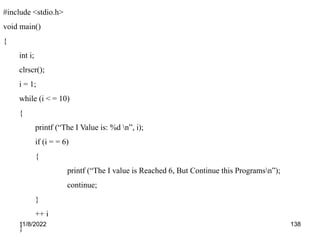
#include <stdio.h>
void main()
{
int i;
clrscr();
i = 1;
while (i < = 10)
{
printf (“The I Value is: %d n”, i);
if (i = = 6)
{
printf (“The I value is Reached 6, But Continue this Programsn”);
continue;
}
++ i
}
11/8/2022 139
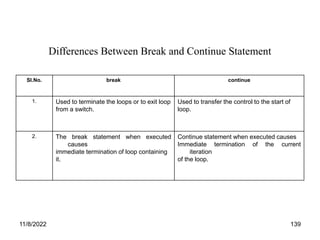
Sl.No. break continue
1. Used to terminate the loops or to exit loop
from a switch.
Used to transfer the control to the start of
loop.
2. The break statement when executed
causes
immediate termination of loop containing
it.
Continue statement when executed causes
Immediate termination of the current
iteration
of the loop.
Differences Between Break and Continue Statement
11/8/2022 140
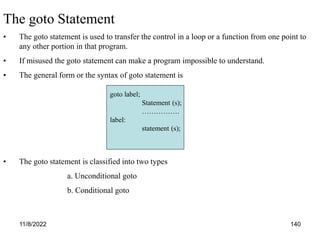
The goto Statement
• The goto statement is used to transfer the control in a loop or a function from one point to
any other portion in that program.
• If misused the goto statement can make a program impossible to understand.
• The general form or the syntax of goto statement is
• The goto statement is classified into two types
a. Unconditional goto
b. Conditional goto
goto label;
Statement (s);
…………….
label:
statement (s);
11/8/2022 141
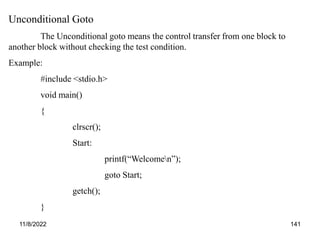
Unconditional Goto
The Unconditional goto means the control transfer from one block to
another block without checking the test condition.
Example:
#include <stdio.h>
void main()
{
clrscr();
Start:
printf(“Welcomen”);
goto Start;
getch();
}
11/8/2022 142
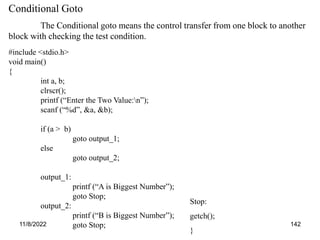
Conditional Goto
The Conditional goto means the control transfer from one block to another
block with checking the test condition.
#include <stdio.h>
void main()
{
int a, b;
clrscr();
printf (“Enter the Two Value:n”);
scanf (“%d”, &a, &b);
if (a > b)
goto output_1;
else
goto output_2;
output_1:
printf (“A is Biggest Number”);
goto Stop;
output_2:
printf (“B is Biggest Number”);
goto Stop;
Stop:
getch();
}
11/8/2022 143
UNIT IV
ARRAYS AND FUNCTIONS
Arrays
11/8/2022 145
Definition of Array
An array is a fixed – size sequenced collection of elements of the
same data type. It is simply a grouping of like – type data. In its simplest
form, an array can be used to represent a list of numbers, or list of names.
(OR)
Array is a Collection of Homogenous Data Items Example
1. List of employees in an organization.
2. List of products and their cost sold by a store.
3. Test Scores of a class of students.
Types of Array
1. One Dimensional Array
2. Two Dimensional Array
3. Multi Dimensional Array
11/8/2022 147
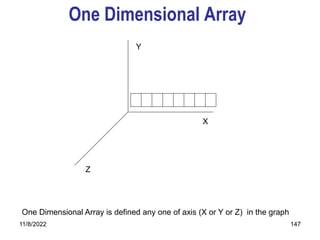
One Dimensional Array
X
Y
Z
One Dimensional Array is defined any one of axis (X or Y or Z) in the graph
11/8/2022 148
Arrays
So far, we've been declaring simple variables
int i;
It is also possible to declare an array of Several elements. an array
is a variable that can hold more than one value , The declaration
int a[10];
declares an array, named a, consisting of ten elements, each of
type int.
We can represent the array a above with a picture like this:
•Arrays are zero-based: the ten elements of a 10-element array are
numbered from 0 to 9.
11/8/2022 149
Arrays
• An array uses a single identifier, together with an integer
index, to create one variable that can hold many values
• An array is created the same as a “normal” variable, but
with the addition of square brackets indicating the size of
the array
• Each value in the array is called an element
11/8/2022 150
One Dimensional Arrays
Syntax data_type array_name[size];
Description Data_type valid data type in C language
Array_name name given to the array
Size are the size of the dimensions
Example int a[3];
float b[4];
11/8/2022 151
Initializing Arrays
• An array is initialized using a code block containing
comma-delimited values which match in position the
elements in the array
• If there are values in the initialization block, but not
enough to fill the array, all the elements in the array
without values are initialized to 0 in the case of float or
int, and NULL in the case of char
• If there are values in the initialization block, an explicit
size for the array does not need to be specified, only an
empty Array Element Operator is needed. C will count
the values and size the array for you.
11/8/2022 152
Initializing Arrays
int x [ 5 ] = { 1,2,3,4,5 }; size 10 bytes
creates array with elements 0-4 values 1-5
int x [ 5 ] = { 4,3 }; size 10 bytes
creates array with elements 0-4 values 4,3,0,0,0
int x [ ] = { 1,2,3 }; size 6 bytes
creates array with elements 0-2 values 1,2,3
char c [ 4 ] = { ‘M’ , ‘o’ , ‘o’ }; size 4 bytes
creates array with elements 0-3 values M o o
NULL
11/8/2022 153
Arrays Cont’
•The first element of the array is x[0], the second element is x[1]..
e.g x[0] = 10; x[1] = 20; x[2] = 30 x[3] = 40
x[4] = 50
Total = 150;
This loop sets all ten elements of the array a to 0.
int a[i]; int i;
for(i = 0; i < 10; i = i + 1)
a[i] = 0;
To copy the contents of one array to another, you must again do so
one by one:
int b[10];
for(i = 0; i < 10; i = i + 1)
b[i] = a[i];
Printing Array Values
for(i = 0; i < 10; i = i + 1)
printf("%dn", a[i]);
11/8/2022 154
Array Basics
• An array has a fixed number of elements based on
its creation
• The elements are ALWAYS numbered from 0 to 1
less than the array’s size
• Referencing an element outside of the created
bounds is possible but not recommended
11/8/2022 155
Visual Representation of an Array
?
?
23
?
int x[4];
x[2]=23;
342901
342905
342909
342913
0
1
2
3
X
Address
Offset
Identifier
Value
11/8/2022 156
The Array Element Operator [ ]
• The Array Element Operator is used to reference a
specific array element
• The expression inside the Array Element must resolve
to type int. This value is known as an index
• The value of the index can be any number, but care
should be taken that the index falls within the bounds of
the array. The bounds of an array are defined as 0 to 1
less than the size of the array
11/8/2022 157
Array Example
#include <stdio.h>
int main(void)
{
int x[5];
x[0]=23; valid
x[2.3]=5; invalid: index is not an int
x[6]=45; valid but not recommended
return 0;
}
11/8/2022 158
A Simple Array Example
#include <stdio.h>
int main(void)
{
int i , x[ 5 ] , total = 0 ;
for ( i = 0 ; i < 5 ; i++ )
{
printf( “Enter mark %d” , i );
scanf ( “%d” , &x[ i ] );
}
for ( i = 0 ; i < 5 ; i++ )
total = total + x[ i ];
printf ( “The average is %d” , total / 5 );
return 0;
}
11/8/2022 159
ARRAYS
• DON'T declare arrays with subscripts larger than
you will need; it wastes memory.
• DON'T forget that in C, arrays are referenced
starting with subscript 0, not 1.
11/8/2022 160
Sample program
#include<stdio.h>
main()
{
int a[5],i;
printf(‘enter the array elements”);
for(i = 0;i<5;i++)
scanf(“%d”,&a[i]);
printf(“Array in the reverse order”);
for(i = 5;i>0;i--)
printf(“%d”,a[i];
}
11/8/2022 161
#inlcude<stdio.h>
#define Max 5;
main();
{
int a[Max], i, min;
int pos = 0;
printf(“Enter the array elements”);
for(i=0;i<5;i++)
scanf(‘%d”,&a[i]);
min = a[0];
for(i=1;i<Max;i++)
if(a[i] < min)
{
min = a[i];
pos = i;
}
printf(“ Minimum Value = %d” , min);
printf(“ Position of the Minimum Value = %d” , pos);
}
11/8/2022 162
Exercise
Identify the errors if any,
1) #define Max 1.5;
main()
{
int a[Max];
}
2) main()
{
int i,a[5];
for(i=0;i<5;i++);
a[i] = 0;
}
11/8/2022 163
main()
{
int size;
scanf(“%d”,&size);
int arr[size];
for(int i=1;i<size;i++)
{
scanf(“%d”,&arr[i]);
printf(“%d”,arr[i]);
}
}
11/8/2022 164
• State whether the following are true or false
1) The array int num[26] has twenty-six elements.
2) The expression num[1] designates the first element in the
array.
3) The expression num[27] designates the twenty-eighth
element in the array.
• What is the difference between the 5’s in these two
expressions
int num[5];
num[5] = 200;
11/8/2022 165
Two-Dimensional Arrays
• Two-dimensional Array: a collection of a fixed
number of components arranged in two
dimensions
– All components are of the same type
• The syntax for declaring a two-dimensional array
is:
dataType arrayName[intexp1][intexp2];
where intexp1 and intexp2 are expressions yielding
positive integer values
11/8/2022 166
Two-Dimensional Arrays
(continued)
• The two expressions intexp1 and intexp2 specify
the number of rows and the number of columns,
respectively, in the array
• Two-dimensional arrays are sometimes called
matrices or tables
11/8/2022 167
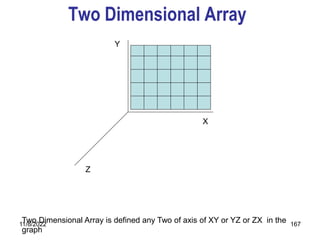
Two Dimensional Array
X
Y
Z
Two Dimensional Array is defined any Two of axis of XY or YZ or ZX in the
graph
11/8/2022 168
11/8/2022 169
Two Dimensional Arrays
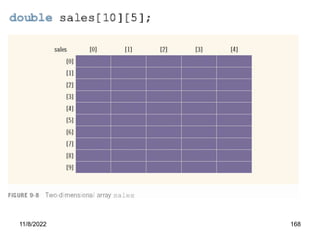
Syntax data_type array_name[size_1][size_2];
Description Data_type valid data type in C language
Array_name name given to the array
Size_1 is the row size of the array
Size_2 is the column size of the array
Example int a[3][3];
float b[4][4];
Int a[3][2];
11/8/2022 170
Two Dimensional Array Initializing
int table [2][3] = {0,0,0,1,1,1};
int table [2][3] = {{0,0,0},{1,1,1}};
int table [2][3] = {
{0,0,0},
{1,1,1}
};
int table [ ][3] = {
{0,0,0}
{1,1,1}
};
11/8/2022 171
Two Dimensional Array Initializing
If the values are missing in an initializer, they are automatically set to zero. For
instance, the statement
int table [2][3] = {
{1,1},
{2}
};
will initialize the first two elements of the first row to one, the first element of the
second row to two , and all other elements to zero.
When all the elements are to be initialized to zero, the following short – cut method
may be used.
int m[3][5] = { {0},{0},{0} };
The first element of each row is explicitly initialized to zero while other elements are
automatically initialized to zero, The following statement will also achieve the same
result:
int m[3][5] = {0,0};
11/8/2022 172
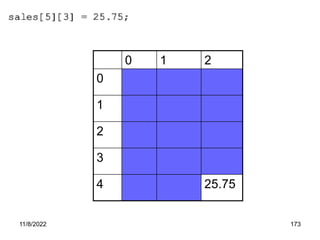
Accessing Array Components
• The syntax to access a component of a
two-dimensional array is:
arrayName[indexexp1][indexexp2]
where indexexp1 and indexexp2 are
expressions yielding nonnegative integer
values
• indexexp1 specifies the row position and
indexexp2 specifies the column position
11/8/2022 173
0 1 2
0
1
2
3
4 25.75
11/8/2022 174
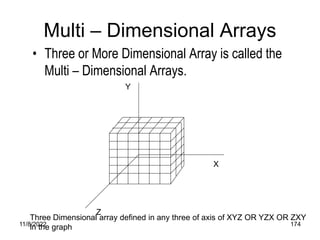
Multi – Dimensional Arrays
• Three or More Dimensional Array is called the
Multi – Dimensional Arrays.
X
Y
Z
Three Dimensional array defined in any three of axis of XYZ OR YZX OR ZXY
in the graph
11/8/2022 175
Multi Dimensional Arrays
• This arrays have more than one dimensions.
Syntax data_type array_name[size1][size2]…….[sizen];
Description Data_type valid data type in C language
Array_name name given to the array
Size1,size2 are the sizes of the dimensions
Example Int a[3][3][3];
Float b[4][4][4];
11/8/2022 176
CHARACTER ARRAYS
AND STRINGS
11/8/2022 177
Character and Strings
• An char array is a group of characters that store related
data
• A String is a special char array that does not store
related data, but a single piece of data made up of a
number of characters OR A string is a sequence of
character that is treated as a single data item. Any
group of characters defined between double quotation
marks is a string constant.
• Example: Grades can be stored in a char array with the
values A,B,C,D,F; when we want to print a specific
grade we use only 1 element of the array
• Example: But for grades like “Pass” and “Fail” we must
print ALL the elements
11/8/2022 178
String Conti…
• Most Computers languages have a string data
type; C does NOT
• There are 3 ways to store strings in memory
– Fixed Length
– Stored Length
– Terminated
• C adopts the Terminated String approach
• A string in C is an array of chars terminated by
the String Terminator or NULL character 0
11/8/2022 179
Common String Operation
1. Reading and Writing Strings
2. Combining strings together
3. Copying one string to another
4. Comparing strings for equality
5. Extracting a portion of a string
11/8/2022 180
Declaring and Initializing of String
The General form of String is
char string_name [size];
Example:
char city [10];
char name[30];
When the complier assigns a character string to a character array, it automatically supplies a
multicharacter (‘0’) at the end of the string. Therefore, the size should be equal to the maximum number
of characters in the string plus one.
C Permits a character array to be initialized in either of the following two forms:
char city [9] = “ NEW YORK”;
char city [9] = {‘N’.’E’,’W’,’ ‘,’Y’,’O’,’R’,’K’,’0’);
C also permits us to initialize a character array without specifying the number of elements. In such
cases, the size of the array will be determined automatically, base on the number of elements
initialiazed. For Example, the statement
char string [ ] = {‘G’,’O’,’O’,’D’,’0’};
11/8/2022 181
DeclaringConti….
We can also declare the size much larger than the string size in the initializer. That is, the statement.
char str[9] = “GOOD”;
G O O D 0 0 0 0 0
The following declaration is illegal.
(I) char str[5];
str = “GOOD”;
This will result in a compile time error. Also note that we cannot separate the
initialization from declaration.
(II) char s1[4] = “abc”;
char s2[4];
s2 = s2; /* Error */
is not allowed. An array name cannot be used as the left operand of an assignment
operator.
11/8/2022 182
Creating a String in C
h
i
!
h
i
!
/0
array string
1820
1821
1822
2820
2821
2822
2823
11/8/2022 183
READING STRINGS FROM TERMINAL
The familiar input function scanf can be used with %s format specification to read in a string of characters.
Example:
char address [10];
scanf(“%s”,address);
The problem with the scanf function is that it terminates its input on the first white space it finds. Therefore, if the following
line of text is typed in at the terminal,
NEW YORK
then only the string “NEW” will be read into the array address, since the blank space after the word ‘NEW’ will terminate the
string reading.
The scanf calls in the case of character arrays, the ampersand (&) is not required before the variable name.
The address array is created in the memory as shown below:
N E W O ? ? ? ? ? ?
Note that the unused locations are filled with garbage.
If we want to read the entire line “NEW YORK”, then we may use two character arrays of approximate
sizes. That is,
char adr1[5], adr2[5];
scanf(“%s %s”,adr1,adr2);
With the line of text
NEW YORK
11/8/2022 184
READING STRINGS FROM TERMINAL
We can also specify the field width using the form %ws in the scanf statement for reading a specified number of
characters from the input string.
Example: scanf(“%ws”,name);
Here two things may happen.
1. The width w is equal to or greater than the number of characters typed in. The entire string will be
stored in the string variable.
2. The width w is less than the number of characters in the string. The excess characters will be
truncated and left unread.
Consider the following statements:
char name [10];
scanf(“%5s”,name);
The input string RAM and KRISHNA will be stored as:
R A M 0 ? ? ? ? ? ?
K R I S H 0 ? ? ? ?
11/8/2022 185
Reading a Line of Text
We have seen just now that scanf with %s or %ws can read only strings without white spaces. That is, they cannot be
used for reading a text containing more than one word. However, C Supports a format specification known as the edit set
conversion code % [..] that can be used to read a line containing a variety of characters, including white spaces. Recall
that we have used this conversion code in the program segment
char line [80];
scanf (“%[^n]”,line);
printf(“%s”,line);
will read a line of input from the keyboard and display the same on the screen. We would very rarely use this method.
Using getchar and gets Functions
To read a single character from the terminal, using the function getchar. We can use this function repeatedly to read
successive single characters from the input and place them into a character array. Thus, an entire line of text can be read
and stored in an array. The reading is terminated when the newline character (‘n’) is entered and the null character is
then inserted at the end of the string. The getchar function call takes the form:
char ch;
ch = getchar ( );
Note that the getchar function has no parameters.
11/8/2022 186
#include <stdio.h>
void main()
{
char line[81], character;
int c;
c = 0;
printf("Enter text. Press <Return> at endn");
do
{
character = getchar( );
line[c] = character;
c++;
}
while(character != 'n');
c = c - 1;
line [c] = '0';
printf("n%sn", line);
}
11/8/2022 187
getchar and gets Conti….
Another and more convenient method of reading a string of text containing white spaces is to use the library function
gets available in the <stdio.h> header file. This is a simple function with one string parameter and called as under.
gets (str);
str is string variable declared properly. It reads characters into str from the keyboard until a new line character is
encountered and then appends a null character to the string. Unlike scanf, it does not skip white spaces. For example the
code segment
char line [80];
gets (line);
printf(“%s”,, line);
reads a line of text from the keyboard and displays it on the screen. The last two statements may be combined as follows:
printf(“%s”,gets(line));
C does not provide operators that work on strings directly. For instance we cannot assign one string to another directly.
For example, the assignment statements.
string = “ABC”
string1 = string2;
are not valid.
11/8/2022 188
#include<stdio.h>
void main()
{
char string1[80],string2[80];
int i;
printf("Enter a string n");
printf("?");
scanf("%s",string2);
for(i=0;string2[i] != 'o'; i++)
string1[i] = string2[i];
string1[i] = 'o';
printf("n");
printf("%sn", string1);
printf("Number of characters = %dn",i);
}
11/8/2022 189
WRITING A STRINGS TO SCREEN
We have used extensively the printf function with %s format to print strings to the screen. The
format %s can be used to display an array of characters that is terminated by the null character. For
example, the statement
printf(“%s”, name);
can be used to display the entire contents of the array name.
We can also specify the precision with which the array is displayed. For instance, the specification
%10.4
Indicates that the first four characters are to be printed in a field width of 10 columns.
However, if we include the minus sign in the specification (e.g., %-10.4s), the string will be printed left-
justified.
Using putchar and puts Functions
Like getchar, C supports another character handling function putchar to output the values of character
variables. It takes the following form:
char ch = ‘A’;
putchar (ch);
The function putchar requires one parameter. This statement is equivalent to:
printf(“%c”,ch);
We have used putchar function to write characters to the screen. We can use this function repeatedly to
output a string of characters stored in an array using a loop:
11/8/2022 190
Example:
char name[6] = “PARIS”;
for(i=0;i<5;i++)
putchar (name[i]);
putchar(‘n’);
Another and more convenient way of printing string values is to use the function puts declared in the
header file <stdio.h>. This is a one parameter function and invoked as under:
puts (str);
Where str is a string variable containing a string value. This prints the value of the string variable str and
then moves the cursor to the beginning of the next line on the screen. For example, the program segment
char line [80];
gets (line);
puts (line);
Reads a line of text from the keyboard and displays it on the screen. Note that the syntax is very simple
compared to using the scanf and printf statements
Using putchar and puts Functions Conti…
11/8/2022 191
The C Library supports a large number of string – handling function that can be used to carry
out many of the string manipulations.
The most commonly used string – handling functions.
STRING HANDLING FUNCTIONS
Function Action
strcat ( ) Concatenates two strings
strcmp ( ) Compares two strings
strcpy ( ) Copies one strings over
another
strlen ( ) Finds the length of a string
11/8/2022 192
Function
11/8/2022 193
C function can be classified into two categories, namely, library functions and user – defined
functions. main is an example of user – defined functions. printf and scanf belong to the category of library
functions. We have also used other library functions such as sqrt, cos, strcat, etc.
The main distinction between these two categories is that library functions are not required to be
written by us whereas a user – defined function has to be developed by the user at the time of writing a
program.
Introduction
Some Characteristic of modular programming are:
1. Each module should do only one thing.
2. Communication between modules is allowed only by a calling module.
3. A module can be called by one and only one higher module
4. No communication can take place directly between modules that do not have calling – called relationship
5. All modules are designed as single – entry, single – exit systems using control structures
11/8/2022 194
1. Every program must have a main function to indicate where the program has to begin its execution. While it
is possible to code any program utilizing only main function. It leads to a number of problems.
2. The program may become too large and complex and as a result the task of debugging, testing, and
maintaining becomes difficult.
3. If a program is divided into functional parts, then each part may be independently coded and later
combined into a single unit. These subprograms called ‘functions’ are much easier to understand, debug,
and test.
4. The length of a source program can be reduced by using functions at appropriate places. This factor is
particularly critical with microcomputers where memory space is limited.
5. It is easy to locate and isolate a faulty function for further investigations.
6. A function may be used by many other programs.
Need for User – Defined Functions
11/8/2022 195
DEFINITION
• A function is a named, independent section of C code that performs a
specific task and optionally returns a value to the calling program.
• A function is named
• A function is independent.
• A function performs a specific task.
• A function can return a value to the calling program.
11/8/2022 196
Function COND…
• FUNCTION DECLARATION
• FUNCTION DEFINITION
• FUNCTION INVOCATION (FUNCTION CALL)
11/8/2022 197
FUNCTION DEFINITION SYNTAX
A function definition, also known as function implementation shall include the following elements.
1. Function Name
2. Function Type
3. List of Parameters
4. Local variable declarations
5. Function Statements
6. A Return statement
All the six elements are grouped into two parts, namely,
1. Function header (First three Elements)
2. Function Body (Second three Elements)
function_type function_name(parameter_list)
{
local variable declaration;
executable statement_1;
executable statement_2;
---------------------------------
---------------------------------
return statement;
} Example:
float mul ( float x, float y)
{
float result;
result = x * y;
return (result);
}
11/8/2022 198
FUNCTION PROTYPING OR FUNCTION
DECLARATION
• A function prototype is a very important feature of modern C
programming
• It must be added to a C program just before the main function, if
we call that function before defining it
• It tells the compiler what type of value the function returns,
numbers and types of parameters, and order in which these
parameters are expected.
• There is no need for a prototype if the function is called after its
definition
11/8/2022 199
FUNCTION DECLARATION SYNTAX
Like variables, all functions in a C program must be declared, before they are invoked, A function declaration (also
known as function prototype) consists of four parts.
1. Function type (return type)
2. Function name
3. Parameter list
4. Terminating semicolon
The general format is
Function_type function_name(parameter_list);
Example:
float mul (float x, float y);
11/8/2022 200
Function Definition
A simple format of a C function definition is as
follows:
return-value-type function-
name(parameters)
{
Declarations;
Statements;
Return (expression);
}
Function Prototype
11/8/2022 201
Sl.No. Function prototype Function definition
1. It declares the function. It defines the function
2. It ends with a semicolon. It doesn’t end with a semicolon.
3. Declaration need not include
parameters.
Definition should include names for the
parameters.
Difference Between Function Prototyping and Function Definition
11/8/2022 202
WORKING PRINCIPLES
11/8/2022 203
Function Terminologies
Local and global variables
– Local: a variable defined inside a function
– Global: a variable defined outside of functions
Sl.No. Local Variables Global Variables
1. These are declared within the body of
the function.
These are declared outside the function.
2. These variables can be referred only
within the function in which it is
declared. The values of the
variables disappear once the
function finishes its execution.
These variable can be referred from any
part of the program value of variables
disappear only after the entire
execution or the program.
11/8/2022 204
Formal and Actual Parameters
• In C, there are two types of parameters
• Formal parameters appear in the
prototype and definition, and are
representative of the data types the
function expects to receive
• Actual parameters appear only in a
function call and are the actual data
passed
11/8/2022 205
Example
#include <stdio.h>
void MyFun( int ); Formal Parameter
int main( void )
{
int x=3;
printf( “x has a value of %d”, x);
MyFun( x ); Actual Parameter
printf( “x has a value of %d”, x);
return 0; Parameter Passing
}
void MyFun( int x ) Formal Parameter
{
printf( “x has a value of %d”, x);
x = 77;
printf( “x has a value of %d”, x);
}
11/8/2022 206
Function prototype and
definition
#include <stdio.h>
int mod(int , int); /* Function Prototype */
void main()
{
printf("The mod is: %d ", mod(4,5));
}
/* Function Definition */
int mod(int x, int y)
{
return x % y;
}
11/8/2022 207
CATEGORIES OF FUNCTIONS
Category 1: Functions with no arguments and no return values.
Category 2: Functions with arguments and no return values.
Category 3: Functions with arguments and one return value.
Category 4: Functions with no arguments but return a value.
Category 5: Functions that return multiple values.
11/8/2022 208
Function with No return type
and No arguments
void main()
{
…….
…….
…….
func1();
…….
}
void func1()
{
…….
…….
…….
…….
}
11/8/2022 209
#include<stdio.h>
void add();
void main()
{
add();
}
void add()
{
int a,b,c;
printf(“enter any two numbers”)
scanf(“%d%d”,&a,&b);
c= a+b;
printf(“the addition of %d and %d is %d”,a,b,c);
}
11/8/2022 210
Function with No return type
and with arguments
Void main()
{
…….
…….
…….
func1(x,y);
…….
}
func1(a,b)
{
…….
…….
…….
…….
}
11/8/2022 211
#include<stdio.h>
void add(int,int);
void main()
{
int x,y,c;
printf(“enter any two numbers”)
scanf(“%d%d”,&x,&y);
add(x,y);
}
void add(int a,int b)
{
int c;
c= a+b;
printf(“the addition of %d and %d is %d”,a,b,c);
}
11/8/2022 212
Function with return type
and with arguments
void main()
{
…….
…….
…….
int
func1(x,y);
…….
}
int
func1(a,b)
{
…….
…….
…….
…….
}
11/8/2022 213
#include<stdio.h>
int add(int,int);
Void main()
{
int x,y,c;
printf(“enter any two numbers”)
scanf(“%d%d”,&x,&y);
c = add(x,y);
printf(“The Result = %d ”,c);
}
int add(int a ,int b)
{
int c;
c= a+b;
return (c);
}
11/8/2022 214
Function with return type
and No arguments
void main()
{
…….
…….
…….
int
func1();
…….
}
int func1()
{
…….
…….
…….
…….
}
11/8/2022 215
#include<stdio.h>
int add();
Void main()
{
int c;
c = add();
printf(“The Result = %d ”,c);
}
int add()
{
int a,b,c;
printf(“enter any two numbers”)
scanf(“%d%d”,&a,&b);
c= a+b;
return (c);
}
11/8/2022 216
Functions that return multiple values
#include <stdio.h>
void interchange (int *a , int *b)
void main()
{
int i=5,j=10;
printf(“Before : I and J value is %d and %d”,I,j);
interchange(&i,&j);
printf(“After : I and J value is %d and %d”,I,j);
}
void interchange (int *a, int *b)
{
int t;
t=*a
*a=*b
*b=t
}
O/p: Before : I and J value is 5 and 10
After : I and J value is 10 and 5
11/8/2022 217
Function without a prototype
#include <stdio.h>
int sum(int x, int y)
{
return x+y;
}
void main()
{
printf("The sum is: %d ", sum(4,5));
}
11/8/2022 218
Parameter Passing Methods
• In C there are two ways of passing parameters to a
function
Call by Value
Call by Reference
11/8/2022 219
Call by value
Copy of data passed to function
Changes to copy do not change original
Prevent unwanted side effects
This Method copies the value of actual
parameters(calling program) into the formal
parameters(called program) of the functions.
Here the changes of the formal parameters cannot
affect the actual parameters. Because only the copy of
actual arguments were passed.
A function can return only one value per call.
11/8/2022 220
Example
#include <stdio.h>
int cube (int)
void main()
{
int n=5;
printf(“Cube of %d is %d”,n,cube(n));
}
int cube (int x);
{
x=x*x*x;
return x;
}
O/p: Cube of 5 is 125
11/8/2022 221
Call by reference
Function can directly access data
Changes affect original
It is another way of passing parameter to the
functions here the address of arguments are copied into
the parameters inside the functions.
The address is used to access the actual
arguments used in the call.
By using this we can make a function to return
more the one value(indirectly).
11/8/2022 222
Example
#include <stdio.h>
void interchange (int *a , int *b)
void main()
{
int i=5,j=10;
printf(“Before : I and J value is %d and %d”,I,j);
interchange(&i,&j);
printf(“After : I and J value is %d and %d”,I,j);
}
void interchange (int *a, int *b)
{
int t;
t=*a
*a=*b
*b=t
}
O/p: Before : I and J value is 5 and 10
After : I and J value is 10 and 5
11/8/2022 223
Call by value
Vs
Call by reference
• Call by value
Copy of data passed to function
Changes to copy do not change original
Prevent unwanted side effects
• Call by reference
Function can directly access data
Changes affect original
11/8/2022 224
#include <stdio.h>
void swap(int, int);
void main()
{
int num1, num2;
num1 = 10; num2 = 20;
swap ( num1, num2 );
printf("%d %dn", num1, num2);
}
void swap(int val1, int val2)
{
int temp;
temp = val1;
val1 = val2;
val1 = temp;
}
11/8/2022 225
Swap two integers using call by value(cont.)
• In the above example, we passed parameters by value, a copy is
made of the variable and thus any change made to the parameters
val1 and val2 will not be passed back to the main function
• The main function will not know anything about
the swapping of val1 and val2
Therefore, the output of the above program will be
….?
• Normally if we wished to pass back a value we
would use return or we would pass the parameters
by reference
11/8/2022 226
Nested Functions
In C , it provides a facility to write one function
with in another function. This is called nesting
of functions
Main()
{
---------
func1();
---------
---------
}
func1()
{
---------
func2();
---------
---------
}
func2()
{
---------
---------
---------
---------
}
Recursion
11/8/2022 228
Recursion
Recursion is a process of calling the same
function itself again and again until same
condition is satisfied.
This is used for repetitive computation in
which each action is satisfied in terms of a
previous result
•A function can call itself
–Directly
–Indirectly
Function1()
{
-----
Function1();
-----
}
11/8/2022 229
Recursion vs. Iteration
• Repetition
– Iteration: explicit loop
– Recursion: repeated function calls
• Termination
– Iteration: loop condition fails
– Recursion: base case recognized
• Both can have infinite loops
• Balance between performance (iteration) and
good software engineering (recursion)
11/8/2022 230
Sl.No. Iteration Recursion
1. Iteration explicitly user a repetition
structure.
Recursion achieves repetition throught
repeated function calls.
2. Iteration terminates when the loop
continuation condition fails.
Recursion terminates when a base case
is
reached.
3. Iteration keeps modifying the counter
until the loop continuation condition
fails.
Recursion keeps producing simple
versions
of the original problem until the base
case is
reached.
4. An infinite loop occurs when the loop
step
continuation test never becomes false.
An infinite loop occurs if the recursion
doses
not reduce the problem each time in a
manner that converges the base case.
5. Iteration normally occurs within a loop
so
extra memory assignment is omitted.
Recursion causes another copy of the
function & hence a considerable memory
space is occupied.
6. It reduces the processor operating It increases the processor operating
Difference Between Iteration and Recursion
11/8/2022 231
Example:
fibonacci.c
function Fibonacci ( n )
{
if ( n is less than or equal to 1 ) then
return n
else
return Fibonacci ( n - 2 ) + Fibonacci ( n - 1 )
}
/* Compute the n-th Fibonacci number,
when=0,1,2,... */
long fib ( int n )
{
if ( n <= 1 )
return n ;
else
return fib( n - 2 ) + fib( n - 1 );
}
11/8/2022 232
Example: Computation of fib(4)
+
fib(2) fib(3)
fib(4)
long fib ( int n )
{
if ( n <= 1 )
return n ;
else
return fib( n - 2 ) + fib( n - 1 );
}
4
4
4 4
11/8/2022 233
Example: Computation of fib(4)
fib(2) fib(3)
+
fib(4)
long fib ( int n )
{
if ( n <= 1 )
return n ;
else
return fib( n - 2 ) + fib( n - 1 );
}
2
2
2 2
+
fib(0) fib(1)
11/8/2022 234
Example: Computation of fib(4)
fib(2) fib(3)
+
fib(4)
long fib ( int n )
{
if ( n <= 1 )
return n ;
else
return fib( n - 2 ) + fib( n - 1 );
}
0
0
+
fib(0) fib(1)
0
11/8/2022 235
Example: Computation of fib(4)
fib(2) fib(3)
+
fib(4)
long fib ( int n )
{
if ( n <= 1 )
return n ;
else
return fib( n - 2 ) + fib( n - 1 );
}
0
0
+
0 fib(1)
0
11/8/2022 236
Example: Computation of fib(4)
fib(2) fib(3)
+
fib(4)
+ fib(1)
0
long fib ( int n )
{
if ( n <= 1 )
return n ;
else
return fib( n - 2 ) + fib( n - 1 );
}
2
2
2
20
11/8/2022 237
Example: Computation of fib(4)
fib(2) fib(3)
+
fib(4)
long fib ( int n )
{
if ( n <= 1 )
return n ;
else
return fib( n - 2 ) + fib( n - 1 );
}
1
1
+ fib(1)
0
1
11/8/2022 238
Example: Computation of fib(4)
fib(2) fib(3)
+
fib(4)
long fib ( int n )
{
if ( n <= 1 )
return n ;
else
return fib( n - 2 ) + fib( n - 1 );
}
1
1
+ 1
0
1
11/8/2022 239
Example: Computation of fib(4)
fib(2) fib(3)
+
fib(4)
+
0 1
long fib ( int n )
{
if ( n <= 1 )
return n ;
else
return fib( n - 2 ) + fib( n - 1 );
}
2
2
0 2
1
11/8/2022 240
Example: Computation of fib(4)
1 fib(3)
+
fib(4)
long fib ( int n )
{
if ( n <= 1 )
return n ;
else
return fib( n - 2 ) + fib( n - 1 );
}
2
2
0
+
0 1
2
1
11/8/2022 241
Example: Computation of fib(4)
+ fib(3)
fib(4)
long fib ( int n )
{
if ( n <= 1 )
return n ;
else
return fib( n - 2 ) + fib( n - 1 );
}
4
4
4 4
1
+
0 1
1
11/8/2022 242
Example: Computation of fib(4)
+ fib(3)
fib(4)
long fib ( int n )
{
if ( n <= 1 )
return n ;
else
return fib( n - 2 ) + fib( n - 1 );
}
3
3
3 3
1
+
0 1 +
fib(1) fib(2)
11/8/2022 243
Example: Computation of fib(4)
+ fib(3)
fib(4)
1
+
0 1 +
fib(1) fib(2)
long fib ( int n )
{
if ( n <= 1 )
return n ;
else
return fib( n - 2 ) + fib( n - 1 );
}
1
1
1
11/8/2022 244
Example: Computation of fib(4)
+ fib(3)
fib(4)
1
+
0 1 +
1 fib(2)
long fib ( int n )
{
if ( n <= 1 )
return n ;
else
return fib( n - 2 ) + fib( n - 1 );
}
1
1
1
11/8/2022 245
Example: Computation of fib(4)
+ fib(3)
fib(4)
1
+
0 1 +
1 fib(2)
long fib ( int n )
{
if ( n <= 1 )
return n ;
else
return fib( n - 2 ) + fib( n - 1 );
}
3
3
3 3
1
11/8/2022 246
Example: Computation of fib(4)
+ fib(3)
fib(4)
1
+
0 1 +
1 fib(2)
long fib ( int n )
{
if ( n <= 1 )
return n ;
else
return fib( n - 2 ) + fib( n - 1 );
}
2
2
2 2
+
fib(0) fib(1)
11/8/2022 247
Example: Computation of fib(4)
+ fib(3)
fib(4)
1
+
0 1 +
1 fib(2)
+
fib(0) fib(1)
long fib ( int n )
{
if ( n <= 1 )
return n ;
else
return fib( n - 2 ) + fib( n - 1 );
}
0
0
0
11/8/2022 248
Example: Computation of fib(4)
+ fib(3)
fib(4)
1
+
0 1 +
1 fib(2)
+
0 fib(1)
long fib ( int n )
{
if ( n <= 1 )
return n ;
else
return fib( n - 2 ) + fib( n - 1 );
}
0
0
0
11/8/2022 249
Example: Computation of fib(4)
+ fib(3)
fib(4)
1
+
0 1 +
1 fib(2)
+
0 fib(1)
long fib ( int n )
{
if ( n <= 1 )
return n ;
else
return fib( n - 2 ) + fib( n - 1 );
}
2
2
2 2
0
11/8/2022 250
Example: Computation of fib(4)
+ fib(3)
fib(4)
1
+
0 1 +
1 fib(2)
+
0 fib(1)
long fib ( int n )
{
if ( n <= 1 )
return n ;
else
return fib( n - 2 ) + fib( n - 1 );
}
1
1
1
11/8/2022 251
Example: Computation of fib(4)
+ fib(3)
fib(4)
1
+
0 1 +
1 fib(2)
+
0 1
long fib ( int n )
{
if ( n <= 1 )
return n ;
else
return fib( n - 2 ) + fib( n - 1 );
}
1
1
1
11/8/2022 252
Example: Computation of fib(4)
+ fib(3)
fib(4)
1
+
0 1 +
1 fib(2)
+
0 1
long fib ( int n )
{
if ( n <= 1 )
return n ;
else
return fib( n - 2 ) + fib( n - 1 );
}
2
2
2 2
0 1
11/8/2022 253
Example: Computation of fib(4)
+ fib(3)
fib(4)
1
+
0 1 +
1 1
+
0 1
long fib ( int n )
{
if ( n <= 1 )
return n ;
else
return fib( n - 2 ) + fib( n - 1 );
}
2
2
2 2
0 1
11/8/2022 254
Example: Computation of fib(4)
+ fib(3)
fib(4)
1
+
0 1 +
1 1
+
0 1
long fib ( int n )
{
if ( n <= 1 )
return n ;
else
return fib( n - 2 ) + fib( n - 1 );
}
3
3
3 3
1 1
11/8/2022 255
Example: Computation of fib(4)
+ 2
fib(4)
1
+
0 1 +
1 1
long fib ( int n )
{
if ( n <= 1 )
return n ;
else
return fib( n - 2 ) + fib( n - 1 );
}
3
3
3 3
1 1
+
0 1
11/8/2022 256
Example: Computation of fib(4)
+ 2
fib(4)
1
+
0 1 +
1 1
+
0 1
long fib ( int n )
{
if ( n <= 1 )
return n ;
else
return fib( n - 2 ) + fib( n - 1 );
}
4
4
4 4
1 2
11/8/2022 257
Example: Computation of fib(4)
+ 2
3
1
+
0 1 +
1 1
+
0 1
long fib ( int n )
{
if ( n <= 1 )
return n ;
else
return fib( n - 2 ) + fib( n - 1 );
}
4
4
4 4
1 2
11/8/2022 258
Example: Computation of fib(4)
+ 2
3
1
+
0 1 +
1 1
+
0 1
Thus, fib(4) returns the value 3
11/8/2022 259
int main(void)
{
int number;
printf("Enter number: ");
scanf("%d", &number);
printf("Fibonacci(%d) = %ldn",
number, fib(number));
return 0;
}
Example:
fibonacci.c
Sample main() for testing the fib() function:
11/8/2022 260
Scope
Where can you use a variable which is declared in a
function?
• In that function only
• Not in a calling function
• Not in a called function
11/8/2022 261
Scope: Local Variables
• Formal parameters: only accessible whilst a
function is executing
• Variables declared in a function body: only
accessible whilst the function is executing
• In fact, this is true of every block in a program
11/8/2022 262
Exercise
• Write a program to find the factorial using a
functions.
• Write a program to find the value of xn. For any
given values of x and n .
Passing arrays to Functions
11/8/2022 264
Arrays to the function in One dimensional
• An entire array can be transferred to a function as a parameter.
• Actual parameter : the array name is enough without subscripts to
transfer an array.
• Formal parameter : must be declared as an array to receive the
values from main program.
syntax :
void func(int,int[])
main() void func(int x, int arr[10])
{ {
int a[10],i; …………
func(i,a); …………
} }
11/8/2022 265
Three Rules of Pass an Array to a Function
1. The function must be called by passing only the name of the array.
2. In the function definition, the formal parameter must be an array type; the
size of the array does not need to be specified.
3. The function prototype must show that the argument is an array.
11/8/2022 266
Sample program
#include<stdio.h>
#inlcude<conio.h>
void add(int[])
void main()
{
int i,arr[10];
printf(“Enter 10 elements of the
array”);
for(i = 0;i<10;i++)
scanf(‘%d”,&arr[i]);
add(arr);
}
void add(int a[])
{
int i,sum = 0;
for(i = 0;i<10;i++)
sum = sum+a[i];
printf(“ the value of sum is %d”,
sum);
}
11/8/2022 267
Changing an Array in a Function
#include <stdio.h>
void fun ( int [ ] )
int main(void)
{
int array[ ] = { 1 , 2 , 3 , 4 , 5 };
fun ( array );
printf ( “%d” , array [ 3 ] ); Will print 20
return 0;
}
void fun ( int x[ ] )
{
x[3] = 20;
return;
}
11/8/2022 268
#include<stdio.h>
void main()
{
float largest(float a[ ], int n);
float value [4] = {2.5,-4.75,1.2,3.67};
printf("%fn",largest(value,4);
}
float largest(float a[ ], int n)
{
int i;
float max;
max = a[0];
for(i=1; i<n; i++)
if(max < a[i])
max = a[i];
return(max);
}
Largest of Given Numbers
11/8/2022 269
Sorting of Given Numbers
#include<stdio.h>
void main()
{
int i;
int mark[5] = {40,90,73,81,35};
printf("Marks before sortingn");
for(i = 0;i<5;i++)
printf("%d",marks[i]);
printf("nn");
sort(5,marks);
printf("Marks after sortingn");
for(i = 0;i<5;i++)
printf("%4d",mark[i]);
printf("n");
}
11/8/2022 270
Sorting of Given Numbers Conti….
void sort(int m,int x[])
{
int i,j,t;
for(i=0;i<m-1;i++)
for(j=i+1;j<m;j++)
if (x[i] > x[j])
{
t = x[i];
x[i] = x[j];
x[j] = t;
}
}
11/8/2022 271
Arrays to the function in Two dimensional
Like simple arrays, we can also pass multidimensional array to functions.
The approach is similar to the one we did with one – dimensional arrays.
The rules are simple.
1. The function must be called by passing only the array name.
2. In the function definition, we must indicate that the array has two
dimensions by including two sets of brackets.
3. The size of the second dimension must be specified.
4. The prototype declaration should be similar to the function header.
11/8/2022 272
Calculates the average of the values in a two – dimensional matrix
#include<stdio.h>
void main()
{
int M = 3, N = 2;
double average (int [] [N],int,int);
double mean;
int matrix [M][N] = {{1,2},{3,4},{5,6}};
mean = average(matrix, M, N);
printf("The Mean of the Two Dimensional Array is: %f",mean);
}
double average(int x [ ] [N],int M,int N)
{
int i,j;
double sum = 0.0;
for(i=0;i<m;i++)
for(j=1;j<N;j++)
sum = sum + x[i][j];
return (sum / (M * N);
}
11/8/2022 273
Passing Strings to Functions
The Strings are treated as character arrays in C, the rules for passing strings to functions are very similar to
those for passing arrays to functions.
Basic Rules are:
1. The string to be passed must be declared as a formal argument of the function when it is
defined.
Example:
void display(char item_name[])
{
----------------
----------------
}
2. The function prototype must show that the argument is a string. For the above function
definition, the prototype can be written as
void display(char str[ ])
3. A call to the function must have a string array name without subscripts as its actual arguments.
Example:
display(names);
where names is a properly declared string array in the calling function.
11/8/2022 274
POINTER CONCEPT
11/8/2022 275
Pointer Declaration
Consider the declarclaation,
int i=3;
This declaration tells the C Compiler to,
(a) Reserve space in memory to hold the integer value.
(b) Associate the names i with this memory location.
(c) Store the value3 at this location.
i
65524
We can see that the computer has selected memory location 65524 as the place to store the value 3. It is
not fixed because the computer can change the location later. We can print this address number through
the following program:
main( )
{
int i=3;
printf(“n Address of i= %u”, &i);
printf(“n Value of i= %d:, i);
}
Output: Address of i= 65524
Value of i= 3.
3
Location Name
Value at Location
Location Number
11/8/2022 276
• Look at the first printf( ) statement carefully. ‘&’ used in this statement is C’s ‘address of’ operator.
• The expression &i returns the address of the variable i, which in this case happens to be 65524.
• Hence it is printed out using %u, which is a format specifier for printing an unsigned integer.
• We have been using the ‘&’ operator all the time in the scanf( ) statement.
• The other pointer operator available in C is ‘*’, called ‘value at address’ operator.
• It gives the value stored at a particular address. The ‘value at address’ operator is also called ‘indirection’
operator.
• Observe carefully the output of the following program:
main( )
{
int i = 3 ;
printf ( "nAddress of i = %u", &i ) ;
printf ( "nValue of i = %d", i ) ;
printf ( "nValue of i = %d", *( &i ) ) ;
}
The output of the above program would be:
Address of i = 65524
Value of i = 3
Value of i = 3
• Note that printing the value of *( &i ) is same as printing the value of i.
• The expression &i gives the address of the variable i. This address can be collected in a variable, by
saying,
j = &i ;
11/8/2022 277
• But remember that j is not an ordinary variable like any other integer variable. It is a variable that
contains the address of other variable (i in this case).
• Since j is a variable the compiler must provide it space in the memory. Once again, the following
memory map would illustrate the contents of i and j.
i j
65524 65522
• As you can see, i’s value is 3 and j’s value is i’s address.
• But wait, we can’t use j in a program without declaring it. And since j is a variable that contains the
address of i, it is declared as,
int *j ;
• This declaration tells the compiler that j will be used to store the address of an integer value.
• In other words j points to an integer. How do we justify the usage of * in the declaration,
int *j ;
• Let us go by the meaning of *. It stands for ‘value at address’. Thus, int *j would mean, the value at
the address contained in j is an int.
3 65524
11/8/2022 278
• Here is a program that demonstrates the relationships we have been discussing.
main( )
{
int i = 3 ;
int *j ;
j = &i ;
printf ( "nAddress of i = %u", &i ) ;
printf ( "nAddress of i = %u", j ) ;
printf ( "nAddress of j = %u", &j ) ;
printf ( "nValue of j = %u", j ) ;
printf ( "nValue of i = %d", i ) ;
printf ( "nValue of i = %d", *( &i ) ) ;
printf ( "nValue of i = %d", *j ) ;
}
The output of the above program would be:
Address of i = 65524
Address of j = 65522
Value of j = 65524
Value of i = 3
Value of i = 3
Value of i = 3
11/8/2022 279
• Look at the following declarations,
int *alpha ;
char *ch ;
float *s ;
• The declaration float *s does not mean that s is going to contain a floating-point value. What it means is,
s is going to contain the address of a floating-point value.
• Similarly, char *ch means that ch is going to contain the address of a char value. Or in other words, the
value at address stored in ch is going to be a char.
Double Pointer:
The concept of pointers can be further extended. Pointer, we know is a variable that contains
address of another variable. Now this variable itself might be another pointer. Thus, we now have a pointer
that contains another pointer’s address.
The following example should make this point clear.
main( )
{
int i = 3, *j, **k ;
j = &i ;
k = &j ;
printf ( "nAddress of i = %u", &i ) ;
printf ( "nAddress of i = %u", j ) ;
printf ( "nAddress of i = %u", *k ) ;
printf ( "nAddress of j = %u", &j ) ;
printf ( "nAddress of j = %u", k ) ;
11/8/2022 280
printf ( "nAddress of k = %u", &k ) ;
printf ( "nValue of j = %u", j ) ;
printf ( "nValue of k = %u", k ) ;
printf ( "nValue of i = %d", i ) ;
printf ( "nValue of i = %d", * ( &i ) ) ;
printf ( "nValue of i = %d", *j ) ;
printf ( "nValue of i = %d", **k ) ;
}
The output of the above program would be:
Address of i = 65524
Address of j = 65522
Address of k = 65520
Value of j = 65524
Value of k = 65522
Value of i = 3
Value of i = 3
Value of i = 3
Value of i = 3
11/8/2022 281
• Remember that when you run this program the addresses that get printed might turn out to be something
different, However, with these addresses too the relationship between i, j and k can be easily
established.
i j k
65524 65522 65520
• Observe how the variables j and k have been declared,
int i, *j, **k ;
• Here, i is an ordinary int, j is a pointer to an int (often called an integer pointer), whereas k is a pointer to
an integer pointer.
• We can extend the above program still further by creating a pointer to a pointer to an integer pointer.
Back to Function Calls
The two types of function calls—call by value and call by reference. Arguments can generally be
passed to functions in one of the two ways:
(a) sending the values of the arguments
(b) sending the addresses of the arguments
• In the first method the ‘value’ of each of the actual arguments in the calling function is copied into
corresponding formal arguments of the called function.
• With this method the changes made to the formal arguments in the called function have no effect on the
values of actual arguments in the calling function.
3 65524 65522
11/8/2022 282
• The following program illustrates the ‘Call by Value’.
main( )
{
int a = 10, b = 20 ;
swapv ( a, b ) ;
printf ( "na = %d b = %d", a, b ) ;
}
swapv ( int x, int y )
{
int t ;
t = x ;
x = y ;
y = t ;
printf ( "nx = %d y = %d", x, y ) ;
}
The output of the above program would be:
x = 20 y = 10
a = 10 b = 20
• Note that values of a and b remain unchanged even after exchanging the values of x and y.
11/8/2022 283
• In the second method (call by reference) the addresses of actual arguments in the calling function are
copied into formal arguments of the called function.
• This means that using these addresses we would have an access to the actual arguments and hence
we would be able to manipulate them.
• The following program illustrates this fact.
main( )
{
int a = 10, b = 20 ;
swapr ( &a, &b ) ;
printf ( "na = %d b = %d", a, b ) ;
}
swapr( int *x, int *y )
{
int t ;
t = *x ;
*x = *y ;
*y = t ;
}
• The output of the above program would be:
a = 20 b = 10
• Note that this program manages to exchange the values of a and b using their addresses stored in x
and y.
Storage class
11/8/2022 285
Storage class
• Every variable or constant possesses a data type
• In addition to the data type, a variable possesses an attribute called
storage class.
where v1,v2 are the variables
data_type is the valid data type in c language
storage_class gives information regarding lifetime and scope.
Storage_class data_type v1,v2,v3,………………..vn.
11/8/2022 286
Storage class cont’
• Lifetime
Lifetime or Longetivity of a variable refers to the duration for which
the variable retains a given value during the execution of a program.
• Scope
It is the portion of the program in which the variable may be visible or
available .It can classified into two types
Type 1:
Local variable (or) private variable (or) internal variable.
Type 2:
Global variable (or) public variable (or) external variable.
11/8/2022 287
Types
Sl.No Types of Storage Class Reserved words
1 Automatic auto
2 Register register
3 Static static
4 External extern
11/8/2022 288
Automatic variables
• By default all variables are automatic storage class.
• Their memory space is automatically allocated as the
variable is declared.
• These variables are given only temporary memory space
and after the execution all the automatic variables will get
disposed.
• It can not be accessed directly by other functions.
11/8/2022 289
Sample Program
#include<stdio.h>
Void main()
{
float f1 = 10.2;
{
float f1 = 40.00;
{
float f1 = 33.9;
printf(“the value of f1 in block 3 is %f”,f1);
}
printf(“the value of f1 in block 2 is %f”,f1);
}
printf(“the value of f1 in block 1 is %f”,f1);
}
11/8/2022 290
Static Variables
• The variables are declared with static keyword.
• It can be internal static (or) external static based on the place of its
declaration.
• Both are declared using the keyword static.
• The storage used by an static variable in a block is not lost after the
completion of the execution.
• Even after the termination of the block, the value of the static variable
is available.
• If the value is changed during the execution the recent value is
retained.
• When the execution enters the next time the same block, the
initialiser is neglected and the recently stored value is retained.
11/8/2022 291
Sample Program
#include<iostream.h>
#include<conio.h>
int fun(int);
void main()
{
int i,x;
clrscr();
for(i=1;i<=10;i++)
{
x = fun(i);
cout<<"The I Value
is:"<<x<<endl;
}
getch();
}
int fun(int a)
{
auto int sum = 100;
sum = sum + a;
return(sum);
}
11/8/2022 292
Output
When sum is auto
• The I Value is:101
• The I Value is:102
• The I Value is:103
• The I Value is:104
• The I Value is:105
• The I Value is:106
• The I Value is:107
• The I Value is:108
• The I Value is:109
• The I Value is:110
When sum is static
• The I Value is:101
• The I Value is:103
• The I Value is:106
• The I Value is:110
• The I Value is:115
• The I Value is:121
• The I Value is:128
• The I Value is:136
• The I Value is:145
• The I Value is:155
11/8/2022 293
Register Variables
• The variables are declared using register keyword.
• The scope and lifetime is same as that of automatic variables.
• For any given operation the data available in the memory should be
transferred to the CPU registers.
• So if the data are stored in register itself then the time for data
transfer from the memory to the register is saved.
• Only a few values can be placed at a time and hence it is advisable
to use limited register variables. main()
{
register int i;
for(i=0;i<10;i++)
printf(“%d”,i);
}
11/8/2022 294
External variables
• It refers to the location outside a block i.e., prior to the main() or
beyond the closing braces ( } ) of the outermost block in a program .
• The value is available throughout the program because of its global
scope.
• Whenever an external variable is modified in a block, the effect is
propagated to all places where ever it is used.
11/8/2022 295
Sample Program
main()
{
extern int x=5;
int y = 10,z;
z = y/x;
printf(“x = %d, y = %d, z = %d”, x, y, z);
}
C Standard Library
11/8/2022 297
C Standard Library
Every implementation of C comes with a standard
library of predefined functions.
Note that, in programming, a library is a
collection of functions.
The functions that are common to all versions of C
are known as the C Standard Library.
11/8/2022 298
C Standard Library Function Examples
Function
Name
Math
Name Value Example
abs(x) absolute
value
|x| abs(-1) returns 1
sqrt(x) square root x0.5 sqrt(2.0) returns 1.414
…
exp(x) exponential ex exp(1.0) returns 2.718
…
log(x) natural
logarithm
ln x log(2.718…) returns 1.0
sin(x) sine sin x sin(3.14…) returns 0.0
cos(x) cosine cos x cos(3.14…) returns -1.0
tan(x) tangent tan x tan(3.14…) returns 0.0
ceil(x) ceiling ┌ x ┐ ceil(2.5) returns 3.0
floor(x) floor └ x ┘
floor(2.5) returns 2.0
11/8/2022 299
Using the C Standard Math Library
If you’re going to use functions like cos that are from
the part of the C standard library that has to do with
math, then you need to do two things:
1. In your source code, immediately below the
#include <stdio.h>
you must also put
#include <math.h>
2. When you compile, you must append -lm to the
end of your compile command:
gcc -o funcargs funcargs.c –lm
(Note that this is hyphen ell em, NOT hyphen one
em.)
11/8/2022 300
UNIT V
STRUCTURES AND FILES
11/8/2022 Lecture 2: User Defined Data
Types
301
User Defined Data
types
STRUCTURES
11/8/2022 302
11/8/2022 Lecture 2: User Defined Data
Types
302
User Defined Data types
• C has several mechanisms for creating data types other
than the basic ones (int, float, etc.) provided by the
language.
– structs – a collection of named variables
– unions – a types that can hold one of a set of variables
– enum – a set of named integers
– typedef – define a name for a user type
• These tools are especially useful when combined with
pointers and dynamic memory allocation.
11/8/2022 Lecture 2: User Defined Data
Types
303
Structure
1. A structure is derived type usually representing a collection of
variables of same or different data types grouped together under a
single name.
2. The variables or data items in a structure are called as members of the
structure.
3. A structure may contain one or more integer variables, floating – point
variables character variables, arrays, pointers , and even other
structures can also be included as members.
4. Structures help to organize data, particularly in large programs,
because they allow a group of related variables to be treated as a
single unit.
11/8/2022 304
Why use structs?
• The last example is one of the main reasons. Rather than having four
arrays of items, we have one array of structs.
• When combined with dynamic memory allocation, we can create many
different data structures (trees, lists, heaps, etc.).
• Structs help to keep code organized logically.
11/8/2022 Lecture 2: User Defined Data
Types
305
Declaring a Structure
Structure declarations are somewhat more complex than array
declarations since a structure must be defined in terms of its individual
members.
The general form of the Structure is:
struct <structure_name>
{
data_type member_1;
data_type member_1;
…………………………..
…………………………..
data_type member_n;
};
11/8/2022 306
11/8/2022 Lecture 2: User Defined Data
Types
306
Usually declare structs in global scope, often in a separate file.
// Declare a person struct
struct person {
char name[50];
int age;
char phone[15];
float height;
};
1. struct is keyword.
2. Structure_name is the user defined name, usually referred as a tag, which is
used to identify the structure.
3. Member_1 to Member_n is the list of members with its data type in structures.
4. The list of member declarations is enclosed in a pair of flower braces.
5. The closing brace of the structure and the semicolon ends the structure
declaration.
Example:
11/8/2022 307
11/8/2022 Lecture 2: User Defined Data
Types
307
• A field is an individual variable in the struct. It is accessed by var.
field where var is the struct variable and field is the field name.
// Declare a person struct
struct person
{
char name[50];
int age;
char phone[15];
float height;
};
fields
tag name or structure name
•Each field has its own memory location.
11/8/2022 308
Various ways to create a structure
Defined for variables
struct Date { // see example: structEx2.c
int month;
int day;
} birth, current;
struct Date { // see example: structEx1.c
int month;
int day;
} ;
struct { // see example: structEx0.c
int month;
int day;
} birth, current;
Defined as a new data type
Defined as both a new data type and variables
11/8/2022 Lecture 2: User Defined Data
Types
309
Defining a Structure
1. Declaring a structure is just a skeleton it merely describes the template.
2. It does not reserve any memory space rather the declaration creates a new data type.
3. So, to use the structure you have to define it.
4. Defining a structure means creating variables to access the members in the structure.
5. Creating a structure variable allocates sufficient memory space to hold all the members
of the structure.
6. The structure variables can be created during structure declaration or by explicitly
using the structure name.
The general form of the Structure is:
struct <structure_name>
{
data_type member_1;
data_type member_1;
…………………………..
…………………………..
data_type member_n;
}structure_variable;
11/8/2022 310
11/8/2022 Lecture 2: User Defined Data
Types
310
struct person {
char name[50];
int age[5];
char phone[15];
float height;
}stud;
Example:
Where the structure person declares a variable stud of its type. The structure_variable is are
declared like ordinary variables is used to access the members of the structure. More than one
structure_variable can also be declared by placing a comma in between the variables.
The memory allocation for the structure person is
name 50 bytes
age 5 bytes
phone 15 bytes
height 4 bytes
11/8/2022 311
The syntax for defining the structure using the structure name is
Example:
struct person stud; or person stud;
If you need only one structure variable, the structure name or the tag is
not necessary.
For example.
struct{
char name[50];
int age[5];
char phone[15];
float height;
}stud;
struct structure_name structure_variable;
Or
structure_name structure_variable;
11/8/2022 312
1. Where the structure declares and defines a variable named stud.
2. Note that the structure name or the structure variables may be omitted, but both,
should not be omitted.
3. The member names within a particular structure must be distinct from one
another though a member name can be same as the name of the variable, which
is defined outside the structure.
4. For example,
struct{
char name[50];
int age[5];
char phone[15];
float height;
}stud;
char phone[15];
1. Where character variable phone inside the structure shares the same name with
the variable phone declare outside the structure.
2. Note that a structure declaration that is not followed by a list of variables
reserves not storage space, it merely describes the template (i.e., the structure
is only defined not declared.
11/8/2022 313
Accessing Structure Members
1. We have declared and defined the structure and how let us see how the elements
of the structure can be accessed.
2. A member of a structure is always referred and accessed by the structure
variable.
3. The general form or the syntax of accessing a member of a structure is
Example:
stud.name; stud.age; stud.phone stud.height
To assign a value to the member of the structure use,
stud.name = “sakthi vinayagam”; stud.age = “32”;
structure_variable.member_name;
11/8/2022 314
#include <stdio.h>
// Declare a person struct
struct person
{
char name[50];
int age;
char phone[15];
float height;
};
int main()
{
struct person stud;
stud.name = “sakthi”;
stud.age = 32;
stud.phone = “9865140132”;
stud.height = 175.34;
Structs: Example
stud
sakthi
name
31
age
9865140132
phone
175
height
char[50]
int
char[15]
float
printf(“The Stud name is:%dn”,stud.name);
printf(“The Stud age is: %dn”,stud.age);
printf(“The Stud phone is:%dn”,stud.phone);
printf(“The Stud height is:%dn”,stud.height);
getch();
}
11/8/2022 315
Initializing Structure
1. The syntax of C language prevents the programmer from initializing individual
structure members within the structure template.
2. Structure members can be initialized only by using structure variables during
structure declarations or by explicitly using the structure name.
3. The syntax for initializing the structure during structure declaration is
struct <structure_name>
{
data_type member_1;
………………………..
data_type member_n;
}structure_variable = {value_1,value_2,……….value_n};
Example:
struct{
char name[50];
int age[5];
char phone[15];
float height;
}stud = {“sakthi”,31,”986514013”,173.86};
11/8/2022 316
Example Program for structure initialization
#include <stdio.h>
// Declare a person struct
Struct
{
char name[50];
int age[5];
char phone[15];
float height;
}stud =
{“sakthi”,31,”986514013”,173.86};
int main()
{
printf(“The Stud name is:%dn”,stud.name);
printf(“The Stud age is: %dn”,stud.age);
printf(“The Stud phone is:%dn”,stud.phone);
printf(“The Stud height is:%dn”,stud.height);
getch();
}
11/8/2022 317
#include <stdio.h>
// Declare a person struct
struct person
{
char name[50];
int age;
char phone[15];
float height;
};
int main()
{
struct person stud_1={“sak”,31};
struct person stud_2={“vel”};
stud_1.phone = “9865140132”;
stud_1.height = 175.34;
stud_3 = stud_1;
printf(“The Stud name is:%dn”,stud_1.name);
printf(“The Stud age is: %dn”,stud_1.age);
printf(“The Stud phone is:%dn”,stud_1.phone);
printf(“The Stud height is:%dn”,stud_1.height);
printf(“The Stud name is:%dn”,stud_2.name);
printf(“The Stud name is:%dn”,stud_3.name);
printf(“The Stud age is: %dn”,stud_3.age);
printf(“The Stud phone is:%dn”,stud_3.phone);
printf(“The Stud height is:%dn”,stud_3.height);
getch();
}
Note:
The information contained in one
structure variable can also be assigned to
another structure variable using a single
assignment statement.
Example Program for structure initialization
11/8/2022 318
Sl.No. Array Structures
1. An array is an single entity
representing a collection of data
items of same data types.
A structure is a single entity
representing a collection of data
items of different data types.
2. Individual entries in an array are
called elements.
Individual entries in a structure are
called members.
3. An array declaration reserves
enough memory space for its
elements.
The structure definition reserves
enough memory space for it s
members.
4. No keyword is used to represent
arrays except the square braces []
preceding the variable name
indicates that it is an array.
The keyword struct tells us that we
are dealing with structures.
5. Initialization of elements can be
done during array declaration.
Initialization of members can be
done only during structure definition.
Difference Between Array and Structure
11/8/2022 319
Difference Between Array and Structure Conti…
Sl.No. Array Structures
6. The elements of an array are stored in
sequence of memory locations.
The members of a structure are not stored
sequences of memory locations.
7. The array elements are accessed by its
followed by the square braces [] within
which the index is placed.
The members of a structure are accessed by
the dot operator (also called as the period
operator)
8. The General format is
data_type variable_name [size];
Ex:
int sum [100];
The General format is
struct <struct_name>
{
data_type structure_member_1;
data_type structure_member_2;
data_type structure_member_3;
.
.
data_type structure_member_n;
}structure_variable;
Ex:
struct student
{
char studentname[20];
int rollno;
}stud;
11/8/2022 320
STRUCTURE WITHIN STRUCTURE OR NESTING
OF STRUCTURE
1. Structure within a structure means nesting of structures.
Example:
struct salary
{
char name[20];
char department[10];
int basic_pay;
int dearness_allowance;
int house_rent_allowance;
int city_allowance;
}employee;
This structures defines name, department, basic pay and three kind of allowance.
We can group all the items related to allowance together and declare them under a
substructure.
11/8/2022 321
STRUCTURE WITHIN STRUCTURE OR
NESTING OF STRUCTURE
Case 1:
struct employee
{
char name[20];
char department[10];
struct salary
{
int basic_pay;
int dearness_allowance;
int house_rent_allowance;
int city_allowance;
}emp_salary;
}emp_person;
11/8/2022 322
STRUCTURE WITHIN STRUCTURE OR
NESTING OF STRUCTURE
Case 2:
struct employee
{
char name[20];
char department[10];
};
struct salary
{
int basic_pay;
int dearness_allowance;
int house_rent_allowance;
int city_allowance;
struct employee emp_persion;
}emp_salary;
Structures and
Functions
There are three methods by which the values of a structure can be transferred from
one function to another.
1. The first method is to pass each member of the structure as an actual
argument of the function call. The actual arguments are then treated independently like
ordinary variables. The is the most elementary method and becomes unmanageable
and inefficient when the structure size is large.
2. The second method involves passing of a copy of the entire structure to the
called function. Since the function is working on a copy of the structure, and changes
to structure members within the function are not reflected in the original structure (in
the calling function). It is , therefore, necessary for the function to return the entire
structure back to the calling function. All Compilers may not support this method of
passing the entire structure as a parameter.
3. The third approach employs a concept called pointers to pass the structure
as an argument. In this case, the address location of the structure is passed to the
called function. The function can access indirectly the entire structure and work on it.
This is similar to the way arrays are passed to function. This method is more eifficient
as compared to the second one.
The general format of sending a copy of a structure to the called function is:
function_name (structure_variable_name);
The called function takes the following form:
data_type function_name(struct_type st_name)
{
---------------
---------------
return (expression);
}
The following points are important to note:
1. The called function must be declared for its type, appropriate to the data
type it is expected to return. For example, if it is returning a copy of the entire structure,
then it must be declared as struct with an appropriate tag name.
2. The structure variable used as the actual argument and the corresponding
formal argument in the called function must be of the same struct type.
3. The return statement is necessary only when the function is returning some
data back to the calling function. The expression may be any simple variable or
structure variable or an expression using simple variables.
4. When a function returns a structure, it must be assigned to a structure of
identical type in the calling function.
5. The called functions must be declared in the calling function appropriately.
11/8/2022 327
We can send structures to functions
#include <stdio.h>
struct Date
{
int month;
int day;
} ;
void callToFunction( struct Date val ); // function prototype
int main( )
{
struct Date birth = {9, 31};
printf( "Birth date: %d/%d/n", birth.month, birth.day );
callToFunction( birth );
printf( "Birth date after function: %d/%d/n", birth.month, birth.day );
}
void callToFunction( struct Date val )
{
val.month = 1;
val.day = 28;
}
11/8/2022 328
#include <stdio.h>
struct Date
{
int month;
int day;
} ;
void callToFunction( struct Date val ); // function prototype
int main( )
{
struct Date birth = {9, 31};
printf( "Birth date: %d/%dn", birth.month, birth.day );
callToFunction( birth );
printf( "Birth date after function: %d/%dn", birth.month, birth.day );
}
void callToFunction( struct Date val )
{
val.month = 1;
val.day = 28;
}
We can send structures to functions
OUTPUT:
cs157> gcc structFunc.c
cs157> a.out
Birth date: 9/31
Birth date after function: 9/31
Function
does not
change
original!
11/8/2022 329
#include <stdio.h>
struct Date
{
int month;
int day;
} ;
void callToFunction( struct Date val ); // function prototype
int main( )
{
struct Date birth = {9, 31};
printf( "Birth date: %d/%dn", birth.month, birth.day );
callToFunction( birth );
printf( "Birth date after function: %d/%dn", birth.month, birth.day );
}
void callToFunction( struct Date val )
{
val.month = 1;
val.day = 28;
}
We can send structures to functions
OUTPUT:
cs157> gcc structFunc.c
cs157> a.out
Birth date: 9/31
Birth date after function: 9/31
Function
does not
change
original!
Val is a full
copy of birth
structure
11/8/2022 330
#include <stdio.h>
struct Date
{
int month;
int day;
} birth = {9, 31};
void callToFunction( );
int main( )
{
printf( "Birth date: %d/%dn", birth.month, birth.day );
callToFunction( );
printf( "Birth date after call to function: %d/%dn", birth.month, birth.day );
}
void callToFunction( )
{
birth.month = 1;
birth.day = 28;
}
We can refer to globally defined structures
11/8/2022 331
#include <stdio.h>
struct Date
{
int month;
int day;
} birth = {9, 31};
void callToFunction( );
int main( )
{
printf( "Birth date: %d/%dn", birth.month, birth.day );
callToFunction( );
printf( "Birth date after call to function: %d/%dn", birth.month, birth.day );
}
void callToFunction( )
{
birth.month = 1;
birth.day = 28;
}
We can refer to globally defined structures
OUTPUT:
cs157> gcc structFunc2.c
cs157> a.out
Birth date: 9/31
Birth date after function: 1/28
Function
does
change
original!
birth is a global
variable, so function
affects original
11/8/2022 332
#include <stdio.h>
struct Date
{
int month;
int day;
};
void callToFunction( struct Date * );
int main( )
{
struct Date birth;
birth.month = 9;
birth.day = 31;
printf( "Birth date: %d/%dn", birth.month, birth.day );
callToFunction( &birth );
printf( "Birth date after function: %d/%dn", birth.month, birth.day );
}
void callToFunction( struct Date *birth )
{
birth->month = 1;
birth->day = 28;
}
We can send a pointer to the structure
Use -> to
dereference from a
pointer
Send the address
to the function
11/8/2022 333
#include <stdio.h>
struct Date
{
int month;
int day;
};
void callToFunction( struct Date * );
int main( )
{
struct Date birth;
birth.month = 9;
birth.day = 31;
printf( "Birth date: %d/%dn", birth.month, birth.day );
callToFunction( &birth );
printf( "Birth date after function: %d/%dn", birth.month, birth.day );
}
void callToFunction( struct Date *birth )
{
birth->month = 1;
birth->day = 28;
}
We can send a pointer to the structure
OUTPUT:
cs157> gcc structFunc3.c
cs157> a.out
Birth date: 9/31
Birth date after function: 1/28
Function
does
change
original!
Use -> to
dereference from a
pointer
Send the address
to the function
Arrays of
Structures
11/8/2022 335
We use structures to describe the format of a number of related variables. For
example, in analyzing the marks obtained by a class of students, we may use a
template to describe student name and marks obtained in various subjects and then
declare all the student as structure variables. In such cases, we may declare an array
of structures, each element of the array representing a structure variable.
For example:
struct class student [100];
defines an array called student, that consists of 100 elements. Each element is
defined to be of the type struct class. Consider the following declaration:
struct marks
{
int subject_1;int subject_2;int subject_3;
}
main
{
struct marks student [3] =
{{45,68,81},{75,53,69},{57,36,71}};
11/8/2022 336
We can create arrays of structs just like any other type.
name
age
phone
4.21
height
char[50]
unsigned char
char[15]
float
int main() {
struct person people[4];
people[2].age = 54;
people[0].height = 4.21;
...etc...
}
name
age
phone
height
char[50]
unsigned char
char[15]
float
name
54
age
phone
height
char[50]
unsigned char
char[15]
float
name
age
phone
height
char[50]
unsigned char
char[15]
float
11/8/2022 337
#include <stdio.h>
#include <string.h>
struct student {
char name[50];
int age;
char phone[15];
float height;
};
#define NUMSTUDENTS 3
int main( )
{
struct student cs157[NUMSTUDENTS] =
{ {"Bob", 84, "555-1010", 6.3 },
{ "Rob", 14, "555-1100", 4.8 },
{ "Zob", 4, "555-9999", 2.7 },
} ;
for( int i=0; i<NUMSTUDENTS; i++ )
printf( "Student %i: %s %d years oldn",
i+1, cs157[i].name, cs157[i].age );
}
OUTPUT:
cs157> gcc people.c -std=c99
cs157> a.out
Student 1: Bob 84 years old
Student 2: Rob 14 years old
Student 3: Zob 4 years old
11/8/2022 338
Structures and sizeof
• Due to memory alignment restrictions, the size of a structure is >= the sum
of the sizes of its member variables
struct blah {
char x;
int y;
char z;
};
• Always use sizeof to determine the size of a structure
• sizeof(blah)  12 bytes
x
y y y y
z
= Padding
Memory layout
11/8/2022 339
C Permits the use of arrays as structure members. We can use single – or multi –
dimensional array of type int or float.
For Example, the following structure declaration is valid:
struct marks
{
int number;
float subject [3];
} student [2];
Here the member subject contains three elements, subject [0], subject [1] and
subject [2]. These elements can be accessed using appropriate subscripts.
For example, the name
student [1] . Subject [2];
Would refer to the marks obtained in the third subject by the second student.
11/8/2022 340
Structure bit fields
• Recall bit flags and bit masks
• Useful when we need to pack several flags or objects into the
smallest amount of space possible
• Structure bit fields make this a little easier at the cost of portability
struct argb {
unsigned int alpha : 8;
unsigned int red : 8;
unsigned int green : 8;
unsigned int blue : 8;
};
• Implementation-dependent!
Unions
11/8/2022 342
Unions
• A union is a type that allows several
variables to be stored in the same memory
location (but not at the same time).
• It provides a way of improving memory
efficiency.
• On most modern desktop machines, this is
not really an issue, and unions will be
used less frequently.
11/8/2022 343
// Declare a union
union int_or_float {
int i;
float f;
};
Unions
• The declaration is similar to that of a
struct, but the implementation is different.
• Only one field will contain data and be
accessible at any given time.
tag name
fields
11/8/2022 344
// Declare a union
union int_or_float {
int i;
float f;
};
Unions
tag name
fields
q
14
????
i
f
int
float
int main() {
union int_or_float q;
q.i = 14;
}
11/8/2022 345
// Declare a union
union int_or_float {
int i;
float f;
};
Unions
tag name
fields
q
????
175.543
i
f
int
float
int main() {
union int_or_float q;
q.i = 14;
q.f = 175.543;
}
11/8/2022 346
// Declare a union
union int_or_float {
int i;
float f;
};
Unions
tag name
fields
q
175
????
i
f
int
float
int main() {
union int_or_float q;
q.i = 14;
q.f = 175.543;
q.i = q.f;
}
11/8/2022 347
Unions
• Accessing a union member that has not
been assigned most recently will produce
undefined results.
• Unless you are really concerned about
memory use (perhaps when writing code
for an embedded device), stay away from
unions.
11/8/2022 348
Unions
• Syntactically similar to structures
• However, all member variables occupy the
same location in memory
• You are responsible for accessing the right
members at the right time
• Union size is size of the largest member
union UBlah {
char x;
int y;
char z;
};
x,y,z
Memory layout
y y y
11/8/2022 349
Unions (2)
union {
char x;
int y;
char* z;
} utype;
utype.x = 'c';
printf("%cn", utype.x);
utype.z = "Hello";
printf("%sn", utype.z);
printf("%dn", utype.y); /* Undefined! */
Enumerated Types
11/8/2022 351
Enumerated Types
• The enum type allows you to specify a
finite set of names to which C will
automatically give values.
• These names can be compared which
makes them useful in situations where a
variable should only take on values from a
small set.
11/8/2022 352
Enum
// Declare a enum
enum r_p_s {
rock,
paper,
scissors
};
tag name
values
• Values are assigned starting at zero and
incrementing by 1.
• While enums are comparable with ints, you
should avoid treating them as integers.
11/8/2022 353
enum Example
// Declare a enum
enum r_p_s {
rock,
paper,
scissors
};
player
int main() {
enum r_p_s player, machine;
}
machine
11/8/2022 354
enum Example
// Declare a enum
enum r_p_s {
rock,
paper,
scissors
};
player
rock
int main() {
enum r_p_s player, machine;
player = rock;
}
machine
11/8/2022 355
enum Example
// Declare a enum
enum r_p_s {
rock,
paper,
scissors
};
player
rock
int main() {
enum r_p_s player, machine;
player = rock;
machine = scissors;
if (machine == player)
printf(“Tied.n”);
else
...
}
machine
scissors
11/8/2022 356
enumerated types example
// Declare a enum
enum r_p_s {
rock,
paper,
scissors
};
player
rock
enum result happened = tie;
if(machine == player)
happened = tie;
else if((machine+1)%3 == player)
happened = win;
else if((player+1)%3 == machine)
happened = loss;
machine
scissors
// Declare a enum
enum result {
win,
loss,
tie
};
happened
win
Types
11/8/2022 358
Tag Names and Declarations
• The syntax for defining structs, unions, and
enums is very similar.
• The type is either struct, unions, or enums.
• The tag is a name for the type. It
differentiates on struct from another.
• After the declaration a list of variables to
create can be given.
type tag {
...
} var1, var2, var3, ...;
11/8/2022 359
typedefs
• Allow you to make a new “logical”
name for an existing data type.
• Like a name-tag
• Makes code more readable.
typedef char * string;
int main ( )
{
// instead of char* my_string;
string name;
strcpy(name,”hello”);
}
11/8/2022 360
Typedefs
• A typedef is a name for some type. Any type
can be named with a typedef.
struct my_struct_S
{
int age;
char name[30];
};
typedef struct my_struct_S person;
int main()
{
// instead of struct my_struct_S people[20];
person people[20];
}
11/8/2022 361
Typedefs
• For stucts, enums, and unions the syntax can be
slightly simplified.
• We can combine the declaration and the typedef.
This allows us to leave out the tag name.
typedef struct
{
int age;
char name[30];
} person;
int main( )
{
person people[20];
}
11/8/2022 362
Initialization of User Defined Types
• We can define the values of user defined types at
the declaration. The syntax is similar to that of
array intialization.
typedef struct {
char name[50];
unsigned char age;
char phone[15];
float height;
} person;
int main() {
person company[2] = {{“Robert Smitherson”, 45,
“(303)-111-2222”, 5.9},
{“Sally Robertson”, 38,
“(303)-222-1111”, 5.5}};
}
11/8/2022 363
Nested Types
• It is legal to nest the definition of user
defined types.
Structs, for example, can have structs (or
unions or enums) as members.
• The members of nested types are
accessed using the same ‘.’ operator. We
might, for example, have something like
var.stype.age.
11/8/2022 364
Nested User Defined Types
typedef struct {
char name[50];
unsigned char age;
char phone[15];
float height;
union {
int num_new_teeth; // if age <= 2
int school_grade; // if age <= 18
int fake_hips; // if age >= 60
} info;
} person;
int main() {
person bob;
bob.age = 75;
bob.info.fake_hips = 2;
}
11/8/2022 365
Anonymous Nested Types
• You can leave off the type name for
nested types.
typedef struct {
unsigned char age;
union {
int num_new_teeth; // if age <= 2
int school_grade; // if age <= 18
int fake_hips; // if age >= 60
}; //no name
} person;
int main() {
person bob;
bob.age = 75;
bob.fake_hips = 2;
}
11/8/2022 366
Complex example
typedef struct {
enum {
beverage, candy, snack
} type;
char name[30];
union {
float fl_ounces;
int pieces;
int servings;
};
float cost;
int count;
} item;
int main() {
item vendmach[20];
...
vendmach[0].type = beverage;
strcpy(vendmach[0].name,”Coke”);
vendmach[0].fl_ounces = 12;
vendmach[0].cost = 1.25;
vendmach[0].count = 10;
vendmach[0].type = candy;
strcpy(vendmach[0].name,”KitKat”);
vendmach[0].pieces = 4;
vendmach[0].cost = 0.95;
vendmach[0].count = 7;
vendmach[0].type = snack;
strcpy(vendmach[0].name,”Pringles”);
vendmach[0].servings = 2;
vendmach[0].cost = 1.10;
vendmach[0].count = 5;
...
FILE HANDLING IN C
11/8/2022 369
Files in C
• In C, each file is simply a sequential stream of bytes. C
imposes no structure on a file.
• A file must first be opened properly before it can be
accessed for reading or writing. When a file is opened, a
stream is associated with the file.
• Successfully opening a file returns a pointer to (i.e., the
address of) a file structure, which contains a file descriptor
and a file control block.
11/8/2022 370
Files in C
• The statement:
FILE *fptr1, *fptr2 ;
• declares that fptr1 and fptr2 are pointer variables of
type FILE. They will be assigned the address of a file
descriptor, that is, an area of memory that will be
associated with an input or output stream.
• Whenever you are to read from or write to the file, you
must first open the file and assign the address of its file
descriptor (or structure) to the file pointer variable.
11/8/2022 371
Opening Files
• The statement:
fptr1 = fopen ( "mydata", "r" ) ;
would open the file mydata for input (reading).
• The statement:
fptr2 = fopen ("results", "w" ) ;
would open the file results for output (writing).
• Once the files are open, they stay open until you
close them or end the program (which will close all
files.)
11/8/2022 372
Modes for opening files
• The second argument of fopen is the mode in which we
open the file. There are three
• "r" opens a file for reading
• "w" opens a file for writing - and writes over all previous
contents (deletes the file so be careful!)
• "a" opens a file for appending - writing on the end of the
file.
11/8/2022 373
The exit() function
• Sometimes error checking means we want an
"emergency exit" from a program. We want it to stop
dead.
• In main we can use "return" to stop.
• In functions we can use exit to do this.
• Exit is part of the stdlib.h library
• exit(-1);
• in a function is exactly the same as
• return -1;
• in the main routine
11/8/2022 374
Testing for Successful Open
• If the file was not able to be opened, then the value
returned by the fopen routine is NULL.
• For example, let's assume that the file mydata does not
exist. Then:
FILE *fptr1 ;
fptr1 = fopen ( "mydata", "r") ;
if (fptr1 == NULL)
{
printf ("File 'mydata' did not open.n") ;
}
11/8/2022 375
Reading From Files
• In the following segment of C language code:
int a, b ;
FILE *fptr1, *fptr2 ;
fptr1 = fopen ( "mydata", "r" ) ;
fscanf ( fptr1, "%d%d", &a, &b) ;
• the fscanf function would read values from the file "pointed"
to by fptr1 and assign those values to a and b.
11/8/2022 376
End of File
• The end-of-file indicator informs the program when there are
no more data (no more bytes) to be processed.
• There are a number of ways to test for the end-of-file
condition. One is to use the feof function which returns a
true or false condition:
fscanf (fptr1, "%d", &var) ;
if ( feof (fptr1) )
{
printf ("End-of-file encountered.n”);
}
11/8/2022 377
End of File
• There are a number of ways to test for the end-of-file
condition. Another way is to use the value returned by the
fscanf function:
int istatus ;
istatus = fscanf (fptr1, "%d", &var) ;
if ( istatus == EOF )
{
printf ("End-of-file encountered.n”) ;
}
11/8/2022 378
Writing To Files
• Likewise in a similar way, in the following segment of C
language code:
int a = 5, b = 20 ;
FILE *fptr2 ;
fptr2 = fopen ( "results", "w" ) ;
fprintf ( fptr2, "%d %dn", a, b ) ;
• the fprintf functions would write the values stored in a and b
to the file "pointed" to by fptr2.
11/8/2022 379
Closing Files
• The statements:
fclose ( fptr1 ) ;
fclose ( fptr2 ) ;
• will close the files and release the file descriptor space and
I/O buffer memory.
11/8/2022 380
Reading and Writing Files
#include <stdio.h>
int main ( )
{
FILE *outfile, *infile ;
int b = 5, f ;
float a = 13.72, c = 6.68, e, g ;
outfile = fopen ("testdata", "w") ;
fprintf (outfile, "%6.2f%2d%5.2f", a, b, c) ;
fclose (outfile) ;
infile = fopen ("testdata", "r") ;
fscanf (infile,"%f %d %f", &e, &f, &g) ;
printf ("%6.2f%2d%5.2fn", a, b, c) ;
printf ("%6.2f,%2d,%5.2fn", e, f, g) ;
}
12345678901234567890
****************************
13.72 5 6.68
13.72, 5, 6.68
11/8/2022 381
Thank You!

6276830.ppt

  • 1.
  • 2.
    11/8/2022 2 History of‘C’ ALGOL International Group BCPL B Traditional C K & R C ANSI C ANSI / ISO C Martin Richards Ken Thompson Dennits Ritchie Kernighan and Ritchie ANSI Committee ISO Committee 1960 1967 1970 1972 1978 1989 1990
  • 3.
    11/8/2022 3 TYPES OF‘C’ COMPILER 1. Borland ‘C’ Compiler 2. Turbo ‘C’ Compiler 3. Microsoft ‘C’ Compiler 4. ANSI ‘C’ Compiler Why are using ‘C’ • It is a Structured Programming Language • High – Level Language • Machine Independent Language • It allows software developers to develop programs without worrying about the hardware platforms where they will be implemented
  • 4.
    11/8/2022 4 Characteristics ofC We briefly list some of C's characteristics that define the language  Small size  Extensive use of function calls  Loose typing -- unlike PASCAL  Structured language  Low level (Bitwise) programming readily available  Pointer implementation - extensive use of pointers for memory, array, structures and functions. C has now become a widely used professional language for various reasons. • It has high-level constructs. • It can handle low-level activities. • It produces efficient programs. • It can be compiled on a variety of computers.
  • 5.
    11/8/2022 5 Steps inLearning C Character set Constants, variable And Data types Control statements Functions Files Structures and Unions Pointers Arrays Data Structures Algorithms Programs
  • 6.
    11/8/2022 6 C’S ProgramStructure Documentation section Preprocessor section Definition section Global declaration section main() { Declaration part; Executable part; } Sub program section { Body of the subprogram }
  • 7.
    11/8/2022 7 C’s Characterset C Character set Source Character set Execution Character set Alphabets A to Z & a to z Escape Sequences a,b,t,n Digits 0 to 9 Special Characters +,-,<,>,@,&,$,#,!
  • 8.
    11/8/2022 8 C TOKENS CTOKENS Keywords Identifiers Strings Special Symbols Constants Operators -15.5 100 main amount float while “ABC” “YEAR” + - * / [ ] { }
  • 9.
    11/8/2022 9 C’s Identifiers Programelements where Identifiers are used Variables Functions Arrays Function parameters Macros and macro parameters Type definitions Rules for Using Identifiers  Only Letter, Digits and Underscore(_)  1st character should be letter or _  Both Upper/lower case can be used  It can be of any length  No space and Special symbol is used  It cant be a keyword
  • 10.
    11/8/2022 10 C’s keyword Basic Building Block of the Program  These are the Reserved words  These word’s cant be changed C keywords auto break case char const continue default do double else enum extern float for goto if int long register return short signed sizeof static struct switch typedef union unsigned void volatile while
  • 11.
    11/8/2022 11 Data Types This are the type of the data that are going to access within the program. C’s Data Type Primary User defined Derived Empty Char Int Float Double typedef Arrays Pointers Structures Union Void
  • 12.
    11/8/2022 12 C’s Datatypes cont. Integer Signed Unsigned Int (%d) 2 bytes,-32768 to 32767 Short int (%d) 1 bytes, -128 to 127 Long int (%ld) 4 bytes, -2,147,483,648 to 2,147,483,647 Unsigned Int (%d) 2 bytes, 0 TO 65, 535 Unsigned shot int (%d) 1 bytes, 0 TO 255 Unsigned Long int (%ld) 4 bytes, 0 TO 4,294,967,295 The primary data types are further classified as below. Integers are the whole numbers, both positive and negative.
  • 13.
    11/8/2022 13 C’s Datatypes cont. Float Type Float (%f or %g) 4 bytes, 3.4E -38 to 3.4E +38 Double (%lf) 8 bytes, 1.7E -308 to 1.7E +308 Long Double (%lf) 10 bytes, 3.4E -4932 to 1.1E+4932 Float are the numbers which contain fractional parts, both Positive and Negative.
  • 14.
    11/8/2022 14 C’s Datatypes cont. Character Type Char (%c) 1 bytes, -128 to 127 Signed Char (%c) 1 bytes, -128 to 127 Unsigned Char (%c) 1 bytes, 0 to 255 Char are the characters which contain alpha-numeric character. Characters are usually stored in 8 bits (one byte) of internal storage The void is the Null Data type.
  • 15.
    11/8/2022 15 C’s Variables •A variable is a data name as well as identifier that may be used to store a data value. Rules for Naming the Variables a) A variable can be of any combination of alphabets, digits and underscore. b) The first character of the variable can’t be digits. c) The length of the variable can’t be exceeded by 8.(ANSI C – 32 Character) d) No commas, blanks or special symbol are allowed within a variable name. e) Uppercase and lowercase are significant. That is, the variable Total is not the same as total or TOTAL. f) It should not be a keyword. g) White space is not allowed.
  • 16.
    11/8/2022 16 C’s Variablescont. Variable Declaration It tells the computer what the variable name and type of the data Syntax data_type a1,a2,a3……..an; Description data_type is the type of the data. a1,a2,a3……an are the list of variables Example int number; char alpha; float price;
  • 17.
    11/8/2022 17 C’s Variablescont. Initializing Variables Initialization of variables can be done using assignment operator(=) Syntax a1 = c1 ;(or) data_type a1 = c1; Description a1 is the variable c1 is the constant data_type is the type of the data Example int a1 = 29; float f1 = 34.45; char c1 = ‘d’
  • 18.
    11/8/2022 18 C’s constant Cconstant Numeric constant Character constant Integer constant eg: roll_number = 12345; Real constant eg: pi = 3.14; Single Character constant eg: ch = ‘c’; ch = ‘3’; String constant eg: name = “palani” The item whose values can’t be changed during execution of program are called constants
  • 19.
    11/8/2022 19 C’s constantConti… Integer constant eg: roll_number = 12345; Hexadecimal constant Eg. 0x23 Octal constant Eg. 043 Decimal Constant Eg. 35 Real Constant eg: pi = 3.14; Double Precision Constant Single Precision Constant
  • 20.
    11/8/2022 20 Rules forconstructing Integer constants 1. An integer constant may be positive or negative (Default sign is positive). 2. An integer constant should not have a decimal point. 3. No commas and blank spaces are allowed in an integer constant. 4. An integer constant, should not use exponent e. The suffix u or U is used for denoting unsigned int constants, I or L is used for denoting long int constants, and s is used for denoting short int constants. Positive integer Constants 123 4000 +7257 Negative integer Constants -78 -9876 -23 Unsigned integer Constants 1234u 5678u 21057u Short integer Constants -5008s -23s 1234s Long integer Constant -40880211 0210578L 0x52123L Unsigned short integer Constants 1234us 5008us 8476us Unsigned long integer Constants 1234567890u l 9876543210u l
  • 21.
    11/8/2022 21 Real Constantsare often called as Floating – point constants. Real constants is classified as two types. 1. Fractional form. 2. Exponential form. Rules for constructing real constants (fractional form) 1. A real constant may be positive or negative (Default sign in positive 2. A real constant must have a decimal point. 3. No commas and blank spaces are allowed in a real constant. Example: 0.0001 -0.963 485.98 +123.456 727.01 0.987 -.8765 +001.05
  • 22.
    11/8/2022 22 Rules forconstructing Real Constants (Exponential Form) 1. The mantissa part and the exponential part should be separated by a letter e. 2. The mantissa part and the exponential part may be positive or negative (Default sign is positive) 3. The mantissa and the exponent part must have at least one digit. 4. No commas and blank spaces are allowed in a real constant. Example: +3.2e+5 3.4e5 -8.2e-5 -10.9e5 9.7e-10 0.0025e8
  • 23.
    11/8/2022 23 Rules forconstructing String Constants 1. A string constant may be a single alphabet or a digit, or a special character or sequence of alphabets or digits enclosed in double quotes. 2. Every string constant ends up with a NULL character, which is automatically assigned. Example: “w” “100” “Madhu” “ABC 123” “Good_Morning” “s1000” “219.71” “30-01-1978”
  • 24.
    11/8/2022 24 C’ Delimiters SymbolName Meaning # Hash Pre-processor directive , comma Variable delimiters (to separate list of variables) : colon Label delimiters ; Semi colon Statement delimiters () parenthesis Used in expressions or in functions {} Curly braces Used in blocking ‘C’ structure [] Square braces Used along with arrays Delimiters are the symbols, which has some syntactic meaning and has got significance.
  • 25.
    11/8/2022 25 C’ Statements Statements ExpressionStatement Compound Statement Control Statement Statement can be defined as set of declarations (or) sequence of action All statements in ‘C’ ends with semicolon(;) except condition and control statement
  • 26.
    11/8/2022 26 C’ Statements Statements Assignmentstatement name = “palani”; number = 12; Sex = ‘m’; Null statement ;
  • 27.
    11/8/2022 27 Expression Statement 1.An Expression is a combination of constant, variables, operators, and function calls written in any form as per the syntax of the C language. 2. The values evaluated in these expressions can be stored in variables and used as a part for evaluating larger expressions. 3. They are evaluated using an assignment statement of the form. variable = expression; 4. For Example, age = 21; result = pow(2,2); simple_interest = (p * n * r) / 100; Algebraic Expression Equivalent C Expression (mnp + qr – at) (m*n* p+q*r-s*t) (a+b+c) (x+y+z) (a+b+c)*(x+y+z) abc / x+y (a*b*c) / (x+y) 8a3 + 3a2 + 2a 8*a*a*a+3*a*a+2*a (a-b)+(x-y) / mn ((a-b)+(x-y)) / (m*n) 8.8(a+b-c) + c / pq 8.8 * (a+b-c) + (c / (p*q))
  • 28.
    11/8/2022 28 Compound Statements 1. Agroup of valid C expression statements placed within an opening flower brace ‘{‘ and closing flower brace ‘}’ is referred as a Compound Statements. 2. For Example, { X = (A + (B * 3) – C); Y = A + B * 3; Z = A * (B * 3 – C); } 1. This statement normally executed sequentially as they appear in the program. 2. In some situations where we may have to change the order of execution of statements until some specified conditions are met. 3. The control statement alter the execution of statements depending upon the conditions specified inside the parenthesis. 4. For Example, if (a == b) if ((x < y) && (y > z)) { { -------- ----------- -------- ----------- } } Control Statements
  • 29.
    11/8/2022 29 Constant Meaning ‘a’Audible alert (bell) ‘b’ Back space ‘f’ Form feed ‘n’ New line ‘r’ Carriage return ‘t’ Horizontal tab ‘v’ Vertical tab ‘’’ Single quote ‘”’ Double quote ‘?’ Question mark ‘’ Backslash ‘0’ Null ESCAPE SEQUENTIAL CHARACTER OR BACKSLASH CHARACTER CONSTANTS
  • 30.
    11/8/2022 30 Operators An operatoris a symbol that specifies an operation to be performed on the operands  Some operator needs two operands (binary)  Eg: a+b; ‘+’ is an operator and ‘a’ and ‘b’ are the operands  Some operator needs one operand (unary)  Eg: ++a; ‘++’ is an operator and a is the operand
  • 31.
    11/8/2022 31 Types ofOperators operators Arithmetic operator Relational operators Logical operator Assignment operator Increment and Decrement Operator (Unary Op.) Conditional operator (Ternary operator) Bitwise operator Special operator
  • 32.
    11/8/2022 32 Arithmetic Operators OperatorMeaning Examples + Addition 1+2 = 3 - Subtraction 3 -2 = 1 * Multiplication 2*2 = 4 / Division 2/2 = 1 % Modulo division 10/3= 1 This operators help us to carryout basic arithmetic operations such addition, subtraction, multiplication, division Operation Result Examples Int/int int 2/2 = 1 Real/int real 7.0/2 = 3.5 Int/real real 7/2.0 = 3.5 Real/real real 7.0/2.0 = 3.5
  • 33.
    11/8/2022 33 Relational Operator •This are used to compare two or more operands. • Operands can be variables, constants or expression. • eg: comparison of two marks or two values. Operator Meaning Example Return value < is less than 5<6 1 <= is less than or equal to 4<=4 1 > is greater than 5>7 0 >= is greater than or equal to 7>=5 0 == equal to 6==6 1 != not equal to 5!=5 0
  • 34.
    11/8/2022 34 Logical Operator OperatorMeaning Example Return value && Logical And (9>2) && (6>4) 1 || Logical OR (9>2) || (3.4) 1 ! Logical Not 4 ! 4 0 AND truth table True True True True False False False True False False False False OR truth table True True True True False True False True True False False False • This operators are used to combine the results of two or more conditions.
  • 35.
    11/8/2022 35 Assignment Operator This are used to assign a value or an expression or a variable to another variable  eg: a = 10; n1 = 20; Syntax: identifier = expression; a) Compound Assignment This operator are used to assign a value to a variable in order to assign a new value to a variable after performing a specified operation. eg: a+=10,n1-=20; b) Nested Assignment (Multiple) This operator are used to assign a single value to multiple variables eg: a=b=c=d=e=10;
  • 36.
    11/8/2022 36 List ofShorthand or Compound Assignment Operator Operator Meaning += Assign Sum -= Assign Difference *= Assign Product /= Assign Quotient %= Assign Remainder ~= Assign One’s Complement <<= Assign Left Shift >>= Assign Right Shift &= Assign Bitwise AND != Assign Bitwise OR ^= Assign Bitwise X - OR
  • 37.
    11/8/2022 37 Increment andDecrement operator • C provide two operator for incrementing a value or decrementing a value a) ++ Increment operator (adds one to the variable) b) -- Decrement operator (Minus one to the variable) eg: a++ (if a= 10 then the output would be 11) Operator Meaning ++X Pre increment X++ Post increment --X Pre decrement X-- Post decrement
  • 38.
    11/8/2022 38 Increment andDecrement operator Conti… Expression Result + + X 4 X + + 3 - - X 2 X - - 3 If the value of the operand x is 3 then the various expressions and their results are The pre – increment operation (++X) increments x by 1 and then assign the value to x. The post – increment operation (X++) assigns the value to x and then increments 1. The pre-decrement operation ( --X) decrements 1 and then assigns to x. The post – decrement operation (x--) assigns the value to x and then decrements 1. These operators are usually very efficient, but causes confusion if your try to use too many evaluations in a single statement.
  • 39.
    11/8/2022 39 Conditional Operator •It is used check the condition and execute the statement depending upon the condition Syntax Condition?exp1:exp2 Description The ‘?’ operator act as ternary operator, it first evaluate the condition, if it is true then exp1 is evaluated if the condition is false then exp2 is evaluated Example a= 2; b=3 ans = a>b?a:b; printf (ans);
  • 40.
    11/8/2022 40 Bitwise Operator •This are used to manipulate the data at bit level • It operates only on integers Operator Meaning & Bitwise AND | Bitwise OR ^ Bitwise XOR << Shift left >> Shift right ~ One’s complement
  • 41.
    11/8/2022 41 Bitwise Operatorcont. Bitwise AND (both the operand should be high for 1) 0 0 0 1 1 1 Bitwise XOR (the two operands should be different for 1) 0 0 1 1 1 0 • The truth table for Bitwise AND,OR and XOR Bitwise OR (either of the operand should be high for 1) 0 0 0 1 1 1 Eg: x = 3 = 0000 0011 y = 4 = 0000 0100 x&y = 0000 0000 Eg: x = 3 = 0000 0011 y = 4 = 0000 0100 x|y = 0000 0111 Eg: x = 3 = 0000 0011 y = 4 = 0000 0100 x ^ y = 0000 0111
  • 42.
    11/8/2022 42 Bitwise Operatorcont. Bitwise One’s Complement The one’s complement operator (~) is a unary operator, which causes the bits of the operand to be inverted (i.e., one’s becomes zero’s and zero’s become one’s) For Example, if x = 7 i.e 8 – bit binary digit is 0 0 0 0 0 1 1 1 The One’s Complement is 1 1 1 1 1 0 0 0 Bitwise Left Shift Operator The Left shift operator (<<) shifts each bit of the operand to its Left. The general form or the syntax of Left shift operator is variable << no. of bits positions if x = 7 (i.e., 0 0 0 0 0 1 1 1) the value of y in the expression y = x <<1 is 14 0 0 0 0 1 1 1 0 = 14 since it shifts the bit position to its left by one bit. The value stored in x is multiplied by 2N (where n is the no of bit positions) to get the required value. For example, if x = 7 the result of the expression y = x << 2 is y = x * 22 (i.e. 28)
  • 43.
    11/8/2022 43 Bitwise Operatorcont. Bitwise Right Shift Operator The Right shift operator (>>) shifts each bit of the operand to its Right. The general form or the syntax of Right shift operator is variable >> no. of bits positions if x = 7 (i.e., 0 0 0 0 0 1 1 1) the value of y in the expression y = x >> 1 is 3 0 0 0 0 0 0 1 1 = 3 since it shifts the bit position to its right by one bit. The value stored in x is divided by 2N (where n is the no of bit positions) to get the required value. For example, if x = 7 the result of the expression y = x << 2 is y = x / 22 (i.e. 1). If you use the left shift operator i.e. x = x << 1 the value of x will be equal to 2 (i.e., 0 0 0 0 0 0 1 0) since the lost bit cannot be taken back.
  • 44.
    11/8/2022 44 Some ofthe special operators used in C language. These operators are referred as separators or punctuators. 1. Ampersand (&) 2. Comma (,) 3. Asterisk ( * ) 4. Ellipsis (…) 5. Braces ({}) 6. Hash (#) 7. Brackets ([]) 8. Parenthesis (()) 9. Colon (:) 10. Semicolon(;) Special Operator
  • 45.
    11/8/2022 45 Special Operator OperatorMeaning Ampersand (&) Ampersand (&) also referred as address operator usually precedes the identifier name, which indicates the memory location (Address) of the identifier. Asterisk ( * ) Asterisk ( * ) also referred as an indirection operator, is an unary operator usally precedes the identifier name, which indicates the creation of a pointer operator. Braces ( {} ) The opening ( { ) and closing ( } ) braces indicate the start and end of compound statement or a function. A semicolon is not necessary after the closing brace of the statement, except in case of structure declaration. Brackets ( [ ] ) Brackets [ ] also referred as array subscript operator is used to indicate single and multi dimensional array subscripts.
  • 46.
    11/8/2022 46 Special Operator OperatorMeaning Colon ( : ) Colon ( : ) is used in labels. Comma ( , ) Comma ( , ) operator is used to link the related expressions together. Comma used expressions are linked from left to right and the value of the right most expression is the value of the combined expression. The comma operator has the lowest precedence of all operators. For Example: sum = (x = 5, y = 3, x + y); The result will be sum = 8 Ellipsis (. . .) Ellipsis (…) are three successive periods with no white space in between them. It is used in function prototypes to indicate that this function can have any number of arguments with varying types. For Example: void fun(char cName, int iAge, float fSalary, . . .); The above declaration indicates that fun () is a function that takes at least three arguments, a char, an int and a float in the order specified but can have any number of additional arguments of any type. Hash ( # ) Hash ( # ) also referred as pound sign is used to indicate preprocessor directives.
  • 47.
    11/8/2022 47 Special Operator OperatorMeaning Parenthesis ( () ) Parenthesis ( ) also referred as function call operator is used to indicate the opening and closing of function prototypes, function calls, function parameters, etc., Parenthesis are also used to group expressions, and there by changing the order of evaluation of expressions. Semicolon ( ; ) Semicolon ( ; ) is a statement terminator. It is used to end a C statement. All valid C statements must end with a semicolon. Which the C compiler interprets as the end of the statement. Sizeof ( ) The sizeof operator is not a library function but a keyword, which returns the size of the operand in bytes. The sizeof operator always, precedes its operand. This operator can be used for dynamic memory allocation. Example: 1. sizeof(char) = 1 2. sizeof(int) = 2 3. sizeof(float) = 4 4. sizeof(doubles) = 8
  • 48.
  • 49.
    11/8/2022 49 1. Eachoperator in C has a precedence associated with it. 2. This precedence is used to determine how an expression involving more than one operator is evaluated. 3. These are distinct levels of precedence and an operator may belong to one of these levels. 4. The operators at the higher level of precedence are evaluated first. 5. The operators of the same precedence are evaluated either from ‘left to right’ or from ‘right to left’, depending on the level. 6. That is known as the associativity property of an operator. What is Precedence Rule and Associative Rule
  • 50.
    11/8/2022 50 Arithmetic operatorsprecedence • The precedence of an operator gives the order in which operators are applied in expressions: the highest precedence operator is applied first, followed by the next highest, and so on. • eg: Arithmetic operator precedence Precedence operator High *,/,% Low +,- The arithmetic expression evaluation is carried out using two phases from left to right through the expressions
  • 51.
    11/8/2022 51 Example: if (x== 10 +15 && y <10) The precedence rules say that the addition operator has a higher priority than the logical operator (&&) and the relational operators (== and <). Therefore, the addition of 10 and 15 is executed first. This is equivalent to: if (x == 25 && y < 10) The next step is to determine whether x is equal to 25 and y is less than 10, if we assume a value of 20 for x and 5 for y, then x == 25 is FALSE (0) y <10 is TRUE (1) Note that since the operator < enjoys a higher priority compared to ==, y < 10 is tested first and then x ==25 is tested. Finally we get, if (FALSE && TRUE) Because one of the conditions is FALSE, the complex condition is FALSE. In the case of &&, it is guaranteed that the second operand will not be evaluated if the first is zero and in the case of || , the second operand will not be evaluated if the first is non – zero. Relational operators precedence
  • 52.
    11/8/2022 52 Precedence andAssociativity Table • The following table lists all the operators, in order of precedence, with their associativity Operators Operations Associativity priority () Function call Left to Right 1 [] Square brackets -> Structure operator . Dot operator + Unary plus Right to Left 2 - Unary minus ++ Increment -- Decrement ! Not
  • 53.
    11/8/2022 53 Precedence andAssociativity Table cont. Operators Operations Associativity priority ~ Complement Right to Left 2 * Pointer operation & Address operator Sizeof Size of operator type Type cast * Multiplication Left to Right 3 / Division % Modulo + Addition Left to Right 4 - Subtraction
  • 54.
    11/8/2022 54 Precedence andAssociativity Table cont. Operators Operations Associativity priority << Left shift Left to Right Left to Right 5 6 >> Right shift < is less than <= is less than or equal to > is greater than >= is greater than or equal to == equal to != not equal to & Bitwise AND Left to Right 7 | Bitwise OR ^ Bitwise XOR
  • 55.
    11/8/2022 55 Precedence andAssociativity Table cont. Operators Operations Associativity priority && Logical And Left to Right 8 || Logical OR ?= Conditional Right to Left 9 =,*=,- =,&=,+=,^=,!=, <<=,>>= Assignment Right to Left 10 , comma Left to Right 11
  • 56.
    11/8/2022 56 Rules forevaluation of expression • Evaluate the sub expression from left to right if parenthesized. • Evaluate the arithmetic expression from left to right using the rules of precedence. • The highest precedence is given to the expressions with in parenthesis. • Apply the associative rule if more operators of the same precedence occurs. • Evaluate the inner most sub expression if the parenthesis are nested.
  • 57.
    11/8/2022 57 Sample Expression •Exp = a - 2 * a * b + b / 4 Let us have a=10,b=20 exp = 10 - 2 * 10 * 20 + 20 / 4 Phase I exp = 2*10*20 , 20/4 will be evaluated. phase II exp = 10-400+5 will be evaluated. Result exp = -395.
  • 58.
    11/8/2022 58 Expression Evaluation Letus see some examples for evaluating expression. Let a = 5, b = 8, c = 2. x = b / c + a * c 4 10 14
  • 59.
    11/8/2022 59 Let ussee some examples for evaluating expression. Let a = 5, b = 8, c = 2. y = a + (b * 3) - c 29 27 24 Expression Evaluation
  • 60.
  • 61.
    What is TypeConversion or Type Casting Type Casting means One data type converted into another data type. This is called Type conversion or Type casting. Example: 1. Integer into floating point number 2. Character into integer 3. Floating point number into Integer Number Type conversion is classified into two types. 1. Implicit Type Conversion (Automatic Type Conversion) 2. Explicit Type Conversion (Manual Type Conversion) Type Conversion Implicit Conversion Explicit Conversion Automatic Conversion Casting Operation
  • 62.
    Type Conversion Hierarchy shortchar int unsigned int long int unsigned long int float double long double Implicit Type Conversion Explicit Type Conversion
  • 63.
    Implicit Type Conversion 1.The Implicit Type Conversion is known as Automatic Type Conversion. 2. C automatically converts any intermediate values to the proper type so that the expression can be evaluated without loosing any significance. 3. Implicit type Conversion also known as Converted Lower order data type into Higher order data type. 4. Implicit Type Conversion also known as Widening. Example: int a, b; float c; c = a + b; Print c; float a,b; int c; c = a + b; // This is Wrong Print c;
  • 64.
    Explicit Type Conversion 1.The Explicit Type Conversion is, there are instances when we want to force a type conversion in a way that is different from the automatic conversion. 2. The Explicit Type Conversion is Converted Higher order data type into Lower order data type. 3. The Explicit type Conversion is also known as borrowing. 4. The Explicit type conversion forces by a casting operator. Disadvantage of Explicit Type Conversion 1. float to int causes truncation of the fractional part. 2. double to float causes rounding of digits. 3. Long int to int causes dropping of the excess higher order bits. The general form of the casting is (type_name) expression; Where type_name is one of the standard C data type. The expression may be a constant, variables or an expression. For Example: float a, b; int c; c = (int) a + (int) b; Print c;
  • 65.
    11/8/2022 65 Use ofCasts Example Action x = (int) 7.5 7.5 is converted to integer by truncation. a = (int) 21.3 / (int) 4.5 Evaluated as 21 / 4 and the result would be 5. b = (double) sum / n Division is done in floating point mode. y = (int) (a + b) The result of a + b is converted to integer. z = (int) a + b a is converted to integer and then added to b. p = cos ((double) x) Converts x to double before using it.
  • 66.
  • 67.
    11/8/2022 67 Ip /Op Statements  We have two methods for providing data to the program. a) Assigning the data to the variables in a program. b) By using the input/output statements.  ‘c’ language supports two types of Ip / Op statements  This operations are carried out through function calls.  Those function are collectively known as standard I / O library
  • 68.
    11/8/2022 68 Ip /Op Statements cont. Ip / Op Functions Unformatted Ip / Op statements Input Output getc() putc() getch() putch() Gets() puts() Formatted Ip / Op statements Input Output Scanf() printf() fscanf() fprintf()
  • 69.
    11/8/2022 69 Unformatted Ip/ Op statements getch() function Syntax char variable = getch(); Description char is the data type of the variable; getch() is the function Example char x = getch(); putch (x); • These statements are used to input / output a single / group of characters from / to the input / output device. Single character Input/output function putch() function Syntax putch (character variable); Description char variable is the valid ‘c’ variable of the type of char data type. Example char x ; putch (x);
  • 70.
    11/8/2022 70 Unformatted Ip/ Op statements cont. gets() function Syntax gets (char type of array variable); Description valid ‘c’ variable declared as one dimensional array. Example char s[10]; gets (s); Group of character Input / output function.  Gets() and puts are used to read / display the string from / to the standard input / output device. puts() function Syntax puts (char type of array variable) Description valid ‘c’ variable declared as one dimensional array. Example char s[10]; gets (s); puts (s);
  • 71.
    11/8/2022 71 Sample Program #include<stdio.h> Voidmain() { char name[10]; char address[20]; Puts(“Enter the name : ”); gets(name); puts(“Enter the address : ”); gets(address); puts(“Name = “) puts(name); puts(“Address = “); puts(address); }
  • 72.
    11/8/2022 72 Formatted Ip/ Op statements  It refers to Input / Output that has been arranged in a particular format.  Using this statements, the user must specify the type of data, that is going to be accessed. scanf() (This function is used to enter any combination of input). Syntax scanf (“control strings”,var1,var2…..var n); Description control strings is the type of data that user going to access via the input statements. var1,var2 are the variables in which the data’s are stored. Example int n; scanf (“%d”, &n);
  • 73.
    11/8/2022 73 Formatted Ip/ Op statements  Control strings i) It is the type of data that user is going to access via the input statement ii) These can be formatted . iii) Always preceded with a ‘%’ symbol. Format code Variable type Display %c Char Single character %d Int Decimal integer -32768 to 32768 %s Array of char Print a Strings %f Float or double Float point value without exponent %ld Long int Long integer -65536 to 65535 %u Int Unsigned decimal integer %o Int Octal integer number without leading zero %x Int Hexadecimal integer number without leading 0x %e Float or double Float point values in exponent form %h int Short integer
  • 74.
    11/8/2022 74 Rules forscanf()  The control strings must be preceded with ‘%’ sign and must be within quotations.  If there is a number of input data items, items should be separated by commas and must be preceded with ‘&’ sign except for char data types.  The control strings and the variables going to input should match with each other.  It must have termination.  The scanf() reads the data values until the blank space in numeric input. Apart from ‘%’ it can have ‘*’ sign. This is used to ignore the values inputted. eg: scanf(“%d%d%*d%*d%d”,&I,&j,&k); if the input is 10 20 3040 50 The output will be i = 10, j = 20, k = 50;
  • 75.
    11/8/2022 75 Printf() printf() (Thisfunction is used to display the result or the output data on to screen) Syntax printf (“control strings”,var1,var2…..var n); Description Control strings can be anyone of the following a) Format code character code b) Execution character set c) Character/strings to be displayed Var1,var2 are the variables in which the data’s are stored. Example printf (“this is computer fundamental class”); printf (“/n computer fundamental class”);
  • 76.
    11/8/2022 76 Rules forprintf()  variables should be separated by commas and need not be preceded with ‘&’ sign.  The control strings and the variables must match with each other.  The control string must be in quotations and there we can also use any other text to print with data.
  • 77.
    11/8/2022 77 Formatted IO/ OP • Writing integers numbers Syntax Printf (%w.pd”,var1) Description W is used to specify the minimum field width for the output. P is the precession value. D is the control string specification Example Printf ( “%5.4d”,23); The output will be $0023. Printf (“%05d”,23); The output will be 00023.
  • 78.
    11/8/2022 78 Formatted IO/ OP • Writing Real Numbers Syntax Printf (%w.p.f”,var1) Description W is used to specify the minimum field width for the output. P is the number of digits to be displayed after the decimal point. f is the control string for float. Example Printf ( “%5.2.f”,2345.567890); The output will be $2345.56. Printf (“%10.2e”,48.3333); The output will be 4.8e+01
  • 79.
    11/8/2022 79 Sample Program include<stdio.h> include<conio.h> voidmain() { int r,t; char u,y; float a,b,c,d; clrscr(); scanf("%d%d",&r,&t); printf("enter the char value"); scanf("%c",&y); printf("n%9c%9c",r,t); printf("nt%dt%d",r,t); printf("n the value of u is %c",y); getch();
  • 80.
  • 81.
    11/8/2022 81 Control Statements Aprogram consists of a number of statements which are usually executed in sequence. Programs can be much more powerful if we can control the order in which statements are run. Statements fall into three general types; 1) Assignment, where values, usually the results of calculations, are stored in variables. 2) Input / Output, data is read in or printed out. 3) Control, the program makes a decision about what to do next.
  • 82.
    11/8/2022 82 Control Statements Controlstatements in C are used to write powerful programs by; Repeating important sections of the program. Selecting between optional sections of a program.
  • 83.
    11/8/2022 83 Control Statements Controlstatements Selection Statements Iteration statements The if else statement The switch statements The while loop & Do while loop The for loop The break statement Continue statement Goto statement
  • 84.
    11/8/2022 84 Control Statementscont. • ‘C’ language provides four general structure by which statements can be executed Structure Meaning Example Sequential It means the instructions are carried out in sequence a+=5; a=a+b; Selection Sequence of the instruction are determined by the result of the condition if (x>y) a = a+1; else a= a-1; Iteration Here the statements are repeatedly executed while (a<=10) printf (“%d” , a); Encapsulation Here the an iteration statement can have selection inside it or vice versa while (a<=10) { if(a>5) printf (%d” , a); }
  • 85.
  • 86.
    11/8/2022 86 Types ofSelection Statement 1. Simple if Selection statement 2. if else Selection statement 3. Nested if else Selection statement 4. else if ladder Selection statement
  • 87.
    11/8/2022 87 Simple ifSelection statement It is used to control the flow of execution of the statements and also to test logically whether the condition is true or false. if the condition is true then the statement following the “if “ is executed if it is false then the statement is skipped. Syntax: if ( condition ) { statement ; } Test Condition Executable X - Statement True
  • 88.
    11/8/2022 88 Selection Statement •Properties of an if statement a) if the condition is true then the simple or compound statements are executed. b) If the condition is false it will skip the statement. c) The condition is given in parenthesis and must be evaluated as true or false. d) If a compound structure is provided, it must be enclosed in opening and closing braces
  • 89.
    11/8/2022 89 //Biggest ofTwo Numbers #include <stdio.h> void main() { int a, b; clrscr(); printf(“Enter the A and B Value:n”); scanf(“%d”, &a); if (a > b) { printf(“A is Big”); } getch(); }
  • 90.
    11/8/2022 90 • BasicRelational Operators can be used in C to make “if” statement conditions more useful • The 6 Basic Relational Operators are > , <, >= , <= , == , != (greater than, less than, greater than or equal to, less than or equal to, equal to, not equal to) Basic Relational Operators Basic Logic Operators • Basic Logic Operators can be used to combine more than one condition in an “if” statement or invert the result of a condition • The 3 Basic Logic Operators are && , || , ! (and, or, not)
  • 91.
    11/8/2022 91 The ifelse statement It is used to execute some statements when the condition is true and execute some other statements when the condition is false depending on the logical test. Syntax: if ( condition ) { statement 1 ; (if the condition is true this statement will be executed) } else { statement 2 ; (if the condition is false this statement will be executed) } Test Condition Executable X - Statement True Executable Y - Statement False
  • 92.
    11/8/2022 92 if elsestatements if (result >= 45) { printf ( “ Passedn “ ) ; printf ( “ Congratulationsn “ ) } else { printf ( “ Failedn “ ) ; printf ( “ Good luck in the resitsn “ ) ; }
  • 93.
    11/8/2022 93 // Biggestof Two Numbers #include <stdio.h> void main() { int a, b; clrscr(); printf(“Enter the A and B Value:n”); scanf(“%d”, &a); if (a > b) { printf(“A is Big”); } else { printf(“B is Big”); } getch(); }
  • 94.
    11/8/2022 94 // GivenNumber is ODD or EVEN Number #include <stdio.h> void main() { int n; clrscr(); printf(“Enter the Number:n”); scanf(“%d”, &n); if (n % 2 == 0) { printf(“Given Number is Even Number”); } else { printf(“Given Number is Odd Number”); } getch(); }
  • 95.
    11/8/2022 95 Nested if…..else statement Syntax: if ( condition 1) { if ( condition 2) statement 1 ; else statement 2 ; } else { if (condition 3) statement 3; else statement 4; } when a series of if…else statements are occurred in a program, we can write an entire if…else statement in another if…else statement called nesting
  • 96.
    11/8/2022 96 Test Condition_1 ExecutableX2 - Statement Test Condition_2 Executable X1 - Statement Test Condition_3 Executable X4 - Statement Executable X3 - Statement TRUE TRUE TRUE FALSE FALSE FALSE
  • 97.
    11/8/2022 97 // Biggestof Three Numbers #include<stdio.h> void main() { int a, b, c; clrscr(); printf(“Enter the Three Numbers:n”); scanf(“%d%d%d”,&a,&b,&c); if (a > b) { if (a > c) printf(“A is Big”); else printf(“C is Big”); } else { if (b > c) printf(“B is Big”); else printf(“C is Big”); } getch(); }
  • 98.
    11/8/2022 98 else ifLadder or Multiple if else Statements Syntax: if (condition_1) executed statement_1; else if (condition_2) executed statement_2; else if (condition_3) executed statement_3; ---------------------- ---------------------- else if (condition_n) executed statement_n; else executed statement_x; When a series of decisions are involved we have to use more than one if – else statement called as multiple if’s. Multiple if – else statements are much faster than a series of if – else statements, since theif structure is exited when any one of the condition is satisfied.
  • 99.
    11/8/2022 99 Test Condition_1 TestCondition_2 Exec. Stat_1 Test Condition_3 TRUE Test Condition_n Exec. Stat_2 Exec. Stat_3 Exec. Stat_n Exec. Stat_X TRUE TRUE TRUE FALSE FALSE FALSE FALSE
  • 100.
    11/8/2022 100 else ifLadder if (result >= 75) printf ( “ Passed: Grade An “ ) ; else if (result >= 60) printf ( “ Passed: Grade Bn “ ) ; else if (result >= 45) printf ( “ Passed: Grade Cn “ ) ; else printf ( “ Failedn “ ) ;
  • 101.
    11/8/2022 101 main() { int n1,n2; intval; char op; printf("Enter a simple expression "); scanf("%d%c%d",&n1,&op,&n2); if(op == '+') val = n1 + n2; else if(op == '-') val = n1 - n2; else if(op == '/') val = n1 / n2; else if(op == '*') val = n1 * n2; else { printf(“?? operator %cn",op); exit(1); } printf("%d%c%d = %dn",n1,op,n2); } /*This program reads in a simple expression with a very restricted format and prints out its value. */
  • 102.
    11/8/2022 102 Sample Program •Write a program to calculate the sales commission for the data given below: Sales value (Rs) Commission(%) Less than 1000 No commission Above 1000 but below 2000 5% of sales Above 2000 but below 5000 8% of sales Above 5000 10% of sales
  • 103.
    11/8/2022 103 #include<stdio.h> #include<conio.h> Void main() { floatsales, com; printf(“Enter the sales value :”); scanf(“%f”, &sales); if(sales<=1000) com = 0; else if(sales>1000 && sales <=2000) com = sales*5/100; else if(sales>2000 && sales <=5000) com = sales*5/100; else com = sales * 10/100; printf(“The commission for the sales value %f is %f”, sales, com); }
  • 104.
    11/8/2022 104 THE SWITCHSTATEMENT • The control statements which allow us to make a decision from the number of choices is called switch (or) Switch-case statement. • It is a multi way decision statement, it test the given variable (or) expression against a list of case value. switch (expression) { case constant 1: simple statement (or) compound statement; case constant 2: simple statement (or) compound statement; case constant 3: simple statement (or) compound statement; } switch (expression) { case constant 1: simple statement (or) compound statement; case constant 2: simple statement (or) compound statement; default : simple statement (or) compound statement; }
  • 105.
    11/8/2022 105 Example WithoutBreak Statement #include<stdio.h> void main () { int num1,num2,choice; printf(“Enter the Two Numbers:n”); scanf(“%d%d”,&num1,&num2); printf(“1 -> Additionn””); printf(“2->Subtractionn”); printf(“3->Multiplicationn”); printf(“4->Divisionn”); printf(“Enter your Choice:n”); scanf(“%d”,&choice); switch(choice) { case 1: Printf(“Sum is %dn”, num1+num2); case 2: Printf(“Diif. is %dn”, num1-num2); case 3: Printf(“Product is %dn”, num1*num2); case 4: Printf(“Division is %dn”, num1/num2); default: printf (“Invalid Choice…..n”); } getch(); } #include<stdio.h> void main () { int num1,num2,choice; printf(“Enter the Two Numbers:n”); scanf(“%d%d”,&num1,&num2); printf(“1 -> Additionn””); printf(“2->Subtractionn”); printf(“3->Multiplicationn”); printf(“4->Divisionn”); printf(“Enter your Choice:n”); scanf(“%d”,&choice); switch(choice) { case 1: printf(“Sum is %dn”, num1+num2); break; case 2: printf(“Diif. is %dn”, num1-num2); break; case 3: printf(“Product is %dn”, num1*num2); break; case 4: printf(“Division is %dn”, num1/num2); break; default: printf (“Invalid Choice…..n”); } getch(); } Example With Break Statement
  • 106.
  • 107.
    11/8/2022 107 Rules forSwitch  The expression in the switch statement must be an integer or character constant.  No real numbers are used in an expression.  The default is optional and can be placed anywhere, but usually placed at end.  The case keyword must be terminated with colon (:);  No two case constant are identical.  The values of switch expression is compared with case constant in the order specified i.e from top to bottom.  The compound statements are no need to enclose within pair of braces.  Integer Expression used in different case statements can be specified in any order.  A switch may occur within another switch, but it is rarely done. Such statements are called as nested switch statements.  The switch statement is very useful while writing menu driven programs.
  • 108.
    11/8/2022 108 Limitations ofusing a switch statement  Only One variable can be tested with the available case statements with the values stored in them (i.e., you cannot use relational operators and combine two or more conditions as in the case of if or if – else statements).  Floating – point, double, and long type variables cannot be used as cases in the switch statement.  Multiple statements can be executed in each case without the use of pair of braces as in the case of if or if – else statement.
  • 109.
    11/8/2022 109 Iteration Statements 1.Iteration statements is also known as Looping statement. 2. A segment of the program that is executed repeatedly is called as a loop. 3. Some portion of the program has to be specified several number of times or until a particular condition is satisfied. 4. Such repetitive operation is done through a loop structure. 5. The Three methods by which you can repeat a part of a program are, 1. while Loops 2. do….while loops 3. for Loop Loops generally consist of two parts : Control expressions: One or more control expressions which control the execution of the loop, Body : which is the statement or set of statements which is executed over and over
  • 110.
    11/8/2022 110 Any loopingstatement , would include the following steps: a) Initialization of a condition variable b) Test the control statement. c) Executing the body of the loop depending on the condition. d) Updating the condition variable.
  • 111.
    11/8/2022 111 While Loop Awhile loop has one control expression, and executes as long as that expression is true. The general syntax of a while loop is A while loop is an entry controlled loop statement. initialize loop counter; while (condition) { statement (s); increment or decrement loop counter }
  • 112.
    11/8/2022 112 Start Initialize Test Condition Bodyof Loop Increment or Decrement Stop False True
  • 113.
    11/8/2022 113 Example: // Printthe I Values #include <stdio.h> void main() { int i; clrscr(); i = 0; while(i<=10) { printf(“The I Value is :%dn”,i); ++I; } getch(); } // Summation of the series 1 + 2 + 3 + 4 + ……. #include <stdio.h> void main() { int i, sum; clrscr(); i = 1; sum = 0; while(i<=10) { sum = sum + i printf(“The Sum Value is:%dn”,i); ++I; } getch(); }
  • 114.
    11/8/2022 114 Example: //Summation ofthe series 12 + 22 + 32 + ….. #include <stdio.h> #include<math.h> void main() { int i, sum; clrscr(); i = 1; sum = 0; while(i<=10) { sum = sum + i*i; //or I ^2 or pow(i, 2) printf(“The Sum Value is:%dn”,i); ++I; } getch(); } //Summation of the series 11 + 22 + 33 + ….. #include <stdio.h> #include<math.h> void main() { int i, sum; clrscr(); i = 1; sum = 0; while(i<=10) { sum = sum + pow(i,i) printf(“The Sum Value is:%dn”,i); ++I; } getch(); }
  • 115.
    11/8/2022 115 #include<stdio.h> void main() { intnumber=0, rem=0, sum=0; clrscr(); printf(“Enter the value for number”); scanf(“%d”,&n); while(number > 0) { rem = number % 10; sum = sum + rem; number = number / 10; } printf(“the summation value of the given number %d is = %d”,number,sum); } Wap to print the summation of digits of any given number.
  • 116.
    11/8/2022 116 THE do-whileLOOP • The body of the loop may not be executed if the condition is not satisfied in while loop. • Since the test is done at the end of the loop, the statements in the braces will always be executed at least once. • The statements in the braces are executed repeatedly as long as the expression in the parentheses is true. Make a note that do while ends in a ; (semicolon) Note that Do… While Looping statement is Exit Controlled Looping statement initialize loop counter; do { statement (s); increment or decrement loop counter } while (condition);
  • 117.
    11/8/2022 117 Start Initialize Test Condition Bodyof Loop Increment or Decrement Stop False True
  • 118.
    11/8/2022 118 Sl.No. whileloop do-while loop 1. The while loop tests the condition before each iteration. The do – while loop tests the condition after the first iteration. 2. If the condition fails initially the loop is Skipped entirely even in the first iteration. Even if the condition fails initially the loop is executed once. Difference Between While Loop and Do – While Loop
  • 119.
    11/8/2022 119 Example: // Printthe I Values #include <stdio.h> void main() { int i; clrscr(); i = 0; do { printf(“The I Value is :%dn”,i); ++I; } while(i<=10); getch(); } // Print the I Values #include <stdio.h> void main() { int i; clrscr(); i = 11; do { printf(“The I Value is :%dn”,i); ++I; } while(i<=10); getch(); }
  • 120.
    11/8/2022 120 #include <stdio.h> voidmain() { int i, f1,f2,f3; clrscr(); f1 = 0; f2 = 1; printf(“The Fibonacci Series is:n”) printf(“%dn”,f1); printf(“%dn”,f2); do { f3 = f1 + f2; printf(%dn”,f3); f1 = f2; f2 = f3; ++i; } while(i <= 10); getch(); } Wap to print the Fibonacci series for any given number Using Do….While Loop
  • 121.
    11/8/2022 121 for Loop Thefor loop is another repetitive control structure, and is used to execute set of instruction repeatedly until the condition becomes false. To set up an initial condition and then modify some value to perform each succeeding loop as long as some condition is true. The syntax of a for loop is The three expressions : expr1 - sets up the initial condition, expr2 - tests whether another trip through the loop should be taken, expr3 - increments or updates things after each trip. for( expr1; expr2 ;expr3) { Body of the loop; }
  • 122.
    11/8/2022 122 Start Initialize; test_condition;Increment / Decrement Body of Loop Stop
  • 123.
    11/8/2022 123 Exampl e #include<stdio.h> void main() { for(int i = 1; i <= 10; i++) printf("i is %dn", i); } There is no need of { } braces for single line statement and for multiple line it is essential else it will consider only next line of for statement. Given example will print the values from 1 to 10.
  • 124.
    11/8/2022 124 Exampl e #include<stdio.h> #include<conio.h> void main() { intmul,limit,c,i; clrscr(); printf("Enter the Multiplication Number:n"); scanf("%d",&mul); printf("Enter the Limits:n"); scanf("%d",&limit); for(i=1;i<=limit;i++) { c = i * mul; printf("%d * %d: %dn",i,mul,c); } getch(); } Given example of Multiplication Table
  • 125.
    11/8/2022 125 Additional Featuresof for Loop Case 1: The statement p = 1; for (n = 0; n < 17; ++ n) can be rewritten as for (p = 1, n = 0; n < 17;++n) Case 2: The second feature is that the test – condition may have any compound relation and the testing need not be limited only to the loop control variable. sum = 0; for (i = 1; i < 20 && sum < 100; ++ i) { sum = sum + i; printf(“%d %dn”, i, sum); }
  • 126.
    11/8/2022 126 Additional Featuresof for Loop Conti… Case 3: It also permissible to use expressions in the assignment statements of initialization and increments sections. For Example: for (x = (m + n) / 2; x > 0; x = x / 2) Case 4: Another unique aspect of for loop is that one or more sections can be omitted, if necessary. For Example: m = 5; for ( ; m ! = 100 ;) { printf(“%dn”,m); m = m + 5; } Both the initialization and increment sections are omitted in the for statement. The initialization has been done before the for statement and the control variable is incremented inside the loop. In such cases, the sections are left ‘blank’. However, the semicolons separating the sections must remain. If the test – condition is not present, the for statement sets up an ‘infinite’ loop. Such loops can be broken using break or goto statements in the loop.
  • 127.
    11/8/2022 127 Case 5: Wecan set up time delay loops using the null statement as follows: for ( j = 1000; j > 0; j = j – 1) 1. This is loop is executed 1000 times without producing any output; it simply causes a time delay. 2. Notice that the body of the loop contains only a semicolon, known as a null statement. Case 6: for ( j = 1000; j > 0; j = j – 1) This implies that the C compiler will not give an error message if we place a semicolon by mistake at the end of a for statement. The semicolon will be considered as a null statement and the program may produce some nonsense. Additional Features of for Loop Conti…
  • 128.
    11/8/2022 128 Nesting offor Loop The One for statement within another for statement is called Nesting for Loop. Syntax: for (initialize; test_condi; incre. / decre.) { --------------- --------------- for (initialize; test_condi; incre. / decre.) { ----------- ----------- } --------------- --------------- } ----------------- ----------------- Outer for Loop Inner for Loop
  • 129.
    11/8/2022 129 Example // Printthe I and J Value #include<stdio.h> #include<conio.h> void main() { int I, j; clrscr(); for (i = 1; I < = 10 ; I ++) { printf (“The I Value is %d n", i); for (j = 1; j < = 10; j ++) { printf (“The J Value is %d n", j); } } getch(); }
  • 130.
    11/8/2022 130 Example // MultiplicationTable #include<stdio.h> #include<conio.h> void main() { int sum = 1,a,b; clrscr(); for (a=1;a<=5;a++) { printf ("the multiplication table for %dn",a); for (b=1;b<=12;b++) { sum=a*b; printf("%d*%d=",a,b); printf("%dn",sum); } sum = 0; } getch(); }
  • 131.
    11/8/2022 131 Exercise 1) Writea program that will read in N numbers and print out their average. 2) Wap to print the following series for N given number 1+(1+2)+(1+2+3)+(1+2+3+4)……… 3) Wap to print the following series for N given number + ++ +++ ++++ +++++ ++++++ ……….. 4) Wap to print the following series for N given number 1 111 11111 1111111
  • 132.
  • 133.
    11/8/2022 133 1. Loopsperform a set of operations repeatedly until the control variable fails to satisfy the test – condition. 2. The number of times a loop is repeated is decided in advance and the test condition is written to achieve this. 3. Sometimes, when executing a loop it becomes desirable to skip a part of the loop or to leave the loop as soon as a certain condition occurs. 4. Jumps out of a Loop is Classified into three types 1. break; 2. continue; 3. goto;
  • 134.
    11/8/2022 134 The breakStatement 1. A break statement is used to terminate of to exit a for, switch, while or do – while statements and the execution continues following the break statement. 2. The general form of the break statement is 3. The break statement does not have any embedded expression or arguments. 4. The break statement is usually used at the end of each case and before the start of the next case statement. 5. The break statement causes the control to transfer out of the entire switch statement. break;
  • 135.
    11/8/2022 135 #include <stdio.h> voidmain() { int i; clrscr(); i = 1; while (i < = 10) { printf (“The I Value is: %d n”, i); if (i = = 6) { printf (“The I value is Reached 6, So break of the programsn”); break; } ++ i }
  • 136.
    11/8/2022 136 #include<stdio.h> void main() { int num1,num2,choice; printf (“Enter the Two Numbers:n”); scanf(“%d%d”,&num1,&num2); printf(“1 -> Additionn””); printf(“2->Subtractionn”); printf(“3->Multiplicationn”); printf(“4->Divisionn”); printf (“Enter your Choice:n”); scanf (“%d”, &choice); switch (choice) { case 1: printf (“Sum is %d n”, num1+num2); break; case 2: printf (“Diif. is %d n”, num1-num2); break; case 3: printf (“Product is %d n”, num1*num2); break; case 4: printf (“Division is %d n”, num1/num2); break; default: printf (“Invalid Choice…..n”); } getch(); }
  • 137.
    11/8/2022 137 The continueStatement • The continue statement is used to transfer the control to the beginning of the loop, there by terminating the current iteration of the loop and starting again from the next iteration of the same loop. • The continue statement can be used within a while or a do – while or a for loop. • The general form or the syntax of the continue statement is • The continue statement does not have any expressions or arguments. • Unlike break, the loop does not terminate when a continue statement is encountered, but it terminates the current iteration of the loop by skipping the remaining part of the loop and resumes the control tot the start of the loop for the next iteration. continue;
  • 138.
    11/8/2022 138 #include <stdio.h> voidmain() { int i; clrscr(); i = 1; while (i < = 10) { printf (“The I Value is: %d n”, i); if (i = = 6) { printf (“The I value is Reached 6, But Continue this Programsn”); continue; } ++ i }
  • 139.
    11/8/2022 139 Sl.No. breakcontinue 1. Used to terminate the loops or to exit loop from a switch. Used to transfer the control to the start of loop. 2. The break statement when executed causes immediate termination of loop containing it. Continue statement when executed causes Immediate termination of the current iteration of the loop. Differences Between Break and Continue Statement
  • 140.
    11/8/2022 140 The gotoStatement • The goto statement is used to transfer the control in a loop or a function from one point to any other portion in that program. • If misused the goto statement can make a program impossible to understand. • The general form or the syntax of goto statement is • The goto statement is classified into two types a. Unconditional goto b. Conditional goto goto label; Statement (s); ……………. label: statement (s);
  • 141.
    11/8/2022 141 Unconditional Goto TheUnconditional goto means the control transfer from one block to another block without checking the test condition. Example: #include <stdio.h> void main() { clrscr(); Start: printf(“Welcomen”); goto Start; getch(); }
  • 142.
    11/8/2022 142 Conditional Goto TheConditional goto means the control transfer from one block to another block with checking the test condition. #include <stdio.h> void main() { int a, b; clrscr(); printf (“Enter the Two Value:n”); scanf (“%d”, &a, &b); if (a > b) goto output_1; else goto output_2; output_1: printf (“A is Biggest Number”); goto Stop; output_2: printf (“B is Biggest Number”); goto Stop; Stop: getch(); }
  • 143.
  • 144.
  • 145.
    11/8/2022 145 Definition ofArray An array is a fixed – size sequenced collection of elements of the same data type. It is simply a grouping of like – type data. In its simplest form, an array can be used to represent a list of numbers, or list of names. (OR) Array is a Collection of Homogenous Data Items Example 1. List of employees in an organization. 2. List of products and their cost sold by a store. 3. Test Scores of a class of students.
  • 146.
    Types of Array 1.One Dimensional Array 2. Two Dimensional Array 3. Multi Dimensional Array
  • 147.
    11/8/2022 147 One DimensionalArray X Y Z One Dimensional Array is defined any one of axis (X or Y or Z) in the graph
  • 148.
    11/8/2022 148 Arrays So far,we've been declaring simple variables int i; It is also possible to declare an array of Several elements. an array is a variable that can hold more than one value , The declaration int a[10]; declares an array, named a, consisting of ten elements, each of type int. We can represent the array a above with a picture like this: •Arrays are zero-based: the ten elements of a 10-element array are numbered from 0 to 9.
  • 149.
    11/8/2022 149 Arrays • Anarray uses a single identifier, together with an integer index, to create one variable that can hold many values • An array is created the same as a “normal” variable, but with the addition of square brackets indicating the size of the array • Each value in the array is called an element
  • 150.
    11/8/2022 150 One DimensionalArrays Syntax data_type array_name[size]; Description Data_type valid data type in C language Array_name name given to the array Size are the size of the dimensions Example int a[3]; float b[4];
  • 151.
    11/8/2022 151 Initializing Arrays •An array is initialized using a code block containing comma-delimited values which match in position the elements in the array • If there are values in the initialization block, but not enough to fill the array, all the elements in the array without values are initialized to 0 in the case of float or int, and NULL in the case of char • If there are values in the initialization block, an explicit size for the array does not need to be specified, only an empty Array Element Operator is needed. C will count the values and size the array for you.
  • 152.
    11/8/2022 152 Initializing Arrays intx [ 5 ] = { 1,2,3,4,5 }; size 10 bytes creates array with elements 0-4 values 1-5 int x [ 5 ] = { 4,3 }; size 10 bytes creates array with elements 0-4 values 4,3,0,0,0 int x [ ] = { 1,2,3 }; size 6 bytes creates array with elements 0-2 values 1,2,3 char c [ 4 ] = { ‘M’ , ‘o’ , ‘o’ }; size 4 bytes creates array with elements 0-3 values M o o NULL
  • 153.
    11/8/2022 153 Arrays Cont’ •Thefirst element of the array is x[0], the second element is x[1].. e.g x[0] = 10; x[1] = 20; x[2] = 30 x[3] = 40 x[4] = 50 Total = 150; This loop sets all ten elements of the array a to 0. int a[i]; int i; for(i = 0; i < 10; i = i + 1) a[i] = 0; To copy the contents of one array to another, you must again do so one by one: int b[10]; for(i = 0; i < 10; i = i + 1) b[i] = a[i]; Printing Array Values for(i = 0; i < 10; i = i + 1) printf("%dn", a[i]);
  • 154.
    11/8/2022 154 Array Basics •An array has a fixed number of elements based on its creation • The elements are ALWAYS numbered from 0 to 1 less than the array’s size • Referencing an element outside of the created bounds is possible but not recommended
  • 155.
    11/8/2022 155 Visual Representationof an Array ? ? 23 ? int x[4]; x[2]=23; 342901 342905 342909 342913 0 1 2 3 X Address Offset Identifier Value
  • 156.
    11/8/2022 156 The ArrayElement Operator [ ] • The Array Element Operator is used to reference a specific array element • The expression inside the Array Element must resolve to type int. This value is known as an index • The value of the index can be any number, but care should be taken that the index falls within the bounds of the array. The bounds of an array are defined as 0 to 1 less than the size of the array
  • 157.
    11/8/2022 157 Array Example #include<stdio.h> int main(void) { int x[5]; x[0]=23; valid x[2.3]=5; invalid: index is not an int x[6]=45; valid but not recommended return 0; }
  • 158.
    11/8/2022 158 A SimpleArray Example #include <stdio.h> int main(void) { int i , x[ 5 ] , total = 0 ; for ( i = 0 ; i < 5 ; i++ ) { printf( “Enter mark %d” , i ); scanf ( “%d” , &x[ i ] ); } for ( i = 0 ; i < 5 ; i++ ) total = total + x[ i ]; printf ( “The average is %d” , total / 5 ); return 0; }
  • 159.
    11/8/2022 159 ARRAYS • DON'Tdeclare arrays with subscripts larger than you will need; it wastes memory. • DON'T forget that in C, arrays are referenced starting with subscript 0, not 1.
  • 160.
    11/8/2022 160 Sample program #include<stdio.h> main() { inta[5],i; printf(‘enter the array elements”); for(i = 0;i<5;i++) scanf(“%d”,&a[i]); printf(“Array in the reverse order”); for(i = 5;i>0;i--) printf(“%d”,a[i]; }
  • 161.
    11/8/2022 161 #inlcude<stdio.h> #define Max5; main(); { int a[Max], i, min; int pos = 0; printf(“Enter the array elements”); for(i=0;i<5;i++) scanf(‘%d”,&a[i]); min = a[0]; for(i=1;i<Max;i++) if(a[i] < min) { min = a[i]; pos = i; } printf(“ Minimum Value = %d” , min); printf(“ Position of the Minimum Value = %d” , pos); }
  • 162.
    11/8/2022 162 Exercise Identify theerrors if any, 1) #define Max 1.5; main() { int a[Max]; } 2) main() { int i,a[5]; for(i=0;i<5;i++); a[i] = 0; }
  • 163.
    11/8/2022 163 main() { int size; scanf(“%d”,&size); intarr[size]; for(int i=1;i<size;i++) { scanf(“%d”,&arr[i]); printf(“%d”,arr[i]); } }
  • 164.
    11/8/2022 164 • Statewhether the following are true or false 1) The array int num[26] has twenty-six elements. 2) The expression num[1] designates the first element in the array. 3) The expression num[27] designates the twenty-eighth element in the array. • What is the difference between the 5’s in these two expressions int num[5]; num[5] = 200;
  • 165.
    11/8/2022 165 Two-Dimensional Arrays •Two-dimensional Array: a collection of a fixed number of components arranged in two dimensions – All components are of the same type • The syntax for declaring a two-dimensional array is: dataType arrayName[intexp1][intexp2]; where intexp1 and intexp2 are expressions yielding positive integer values
  • 166.
    11/8/2022 166 Two-Dimensional Arrays (continued) •The two expressions intexp1 and intexp2 specify the number of rows and the number of columns, respectively, in the array • Two-dimensional arrays are sometimes called matrices or tables
  • 167.
    11/8/2022 167 Two DimensionalArray X Y Z Two Dimensional Array is defined any Two of axis of XY or YZ or ZX in the graph
  • 168.
  • 169.
    11/8/2022 169 Two DimensionalArrays Syntax data_type array_name[size_1][size_2]; Description Data_type valid data type in C language Array_name name given to the array Size_1 is the row size of the array Size_2 is the column size of the array Example int a[3][3]; float b[4][4]; Int a[3][2];
  • 170.
    11/8/2022 170 Two DimensionalArray Initializing int table [2][3] = {0,0,0,1,1,1}; int table [2][3] = {{0,0,0},{1,1,1}}; int table [2][3] = { {0,0,0}, {1,1,1} }; int table [ ][3] = { {0,0,0} {1,1,1} };
  • 171.
    11/8/2022 171 Two DimensionalArray Initializing If the values are missing in an initializer, they are automatically set to zero. For instance, the statement int table [2][3] = { {1,1}, {2} }; will initialize the first two elements of the first row to one, the first element of the second row to two , and all other elements to zero. When all the elements are to be initialized to zero, the following short – cut method may be used. int m[3][5] = { {0},{0},{0} }; The first element of each row is explicitly initialized to zero while other elements are automatically initialized to zero, The following statement will also achieve the same result: int m[3][5] = {0,0};
  • 172.
    11/8/2022 172 Accessing ArrayComponents • The syntax to access a component of a two-dimensional array is: arrayName[indexexp1][indexexp2] where indexexp1 and indexexp2 are expressions yielding nonnegative integer values • indexexp1 specifies the row position and indexexp2 specifies the column position
  • 173.
    11/8/2022 173 0 12 0 1 2 3 4 25.75
  • 174.
    11/8/2022 174 Multi –Dimensional Arrays • Three or More Dimensional Array is called the Multi – Dimensional Arrays. X Y Z Three Dimensional array defined in any three of axis of XYZ OR YZX OR ZXY in the graph
  • 175.
    11/8/2022 175 Multi DimensionalArrays • This arrays have more than one dimensions. Syntax data_type array_name[size1][size2]…….[sizen]; Description Data_type valid data type in C language Array_name name given to the array Size1,size2 are the sizes of the dimensions Example Int a[3][3][3]; Float b[4][4][4];
  • 176.
  • 177.
    11/8/2022 177 Character andStrings • An char array is a group of characters that store related data • A String is a special char array that does not store related data, but a single piece of data made up of a number of characters OR A string is a sequence of character that is treated as a single data item. Any group of characters defined between double quotation marks is a string constant. • Example: Grades can be stored in a char array with the values A,B,C,D,F; when we want to print a specific grade we use only 1 element of the array • Example: But for grades like “Pass” and “Fail” we must print ALL the elements
  • 178.
    11/8/2022 178 String Conti… •Most Computers languages have a string data type; C does NOT • There are 3 ways to store strings in memory – Fixed Length – Stored Length – Terminated • C adopts the Terminated String approach • A string in C is an array of chars terminated by the String Terminator or NULL character 0
  • 179.
    11/8/2022 179 Common StringOperation 1. Reading and Writing Strings 2. Combining strings together 3. Copying one string to another 4. Comparing strings for equality 5. Extracting a portion of a string
  • 180.
    11/8/2022 180 Declaring andInitializing of String The General form of String is char string_name [size]; Example: char city [10]; char name[30]; When the complier assigns a character string to a character array, it automatically supplies a multicharacter (‘0’) at the end of the string. Therefore, the size should be equal to the maximum number of characters in the string plus one. C Permits a character array to be initialized in either of the following two forms: char city [9] = “ NEW YORK”; char city [9] = {‘N’.’E’,’W’,’ ‘,’Y’,’O’,’R’,’K’,’0’); C also permits us to initialize a character array without specifying the number of elements. In such cases, the size of the array will be determined automatically, base on the number of elements initialiazed. For Example, the statement char string [ ] = {‘G’,’O’,’O’,’D’,’0’};
  • 181.
    11/8/2022 181 DeclaringConti…. We canalso declare the size much larger than the string size in the initializer. That is, the statement. char str[9] = “GOOD”; G O O D 0 0 0 0 0 The following declaration is illegal. (I) char str[5]; str = “GOOD”; This will result in a compile time error. Also note that we cannot separate the initialization from declaration. (II) char s1[4] = “abc”; char s2[4]; s2 = s2; /* Error */ is not allowed. An array name cannot be used as the left operand of an assignment operator.
  • 182.
    11/8/2022 182 Creating aString in C h i ! h i ! /0 array string 1820 1821 1822 2820 2821 2822 2823
  • 183.
    11/8/2022 183 READING STRINGSFROM TERMINAL The familiar input function scanf can be used with %s format specification to read in a string of characters. Example: char address [10]; scanf(“%s”,address); The problem with the scanf function is that it terminates its input on the first white space it finds. Therefore, if the following line of text is typed in at the terminal, NEW YORK then only the string “NEW” will be read into the array address, since the blank space after the word ‘NEW’ will terminate the string reading. The scanf calls in the case of character arrays, the ampersand (&) is not required before the variable name. The address array is created in the memory as shown below: N E W O ? ? ? ? ? ? Note that the unused locations are filled with garbage. If we want to read the entire line “NEW YORK”, then we may use two character arrays of approximate sizes. That is, char adr1[5], adr2[5]; scanf(“%s %s”,adr1,adr2); With the line of text NEW YORK
  • 184.
    11/8/2022 184 READING STRINGSFROM TERMINAL We can also specify the field width using the form %ws in the scanf statement for reading a specified number of characters from the input string. Example: scanf(“%ws”,name); Here two things may happen. 1. The width w is equal to or greater than the number of characters typed in. The entire string will be stored in the string variable. 2. The width w is less than the number of characters in the string. The excess characters will be truncated and left unread. Consider the following statements: char name [10]; scanf(“%5s”,name); The input string RAM and KRISHNA will be stored as: R A M 0 ? ? ? ? ? ? K R I S H 0 ? ? ? ?
  • 185.
    11/8/2022 185 Reading aLine of Text We have seen just now that scanf with %s or %ws can read only strings without white spaces. That is, they cannot be used for reading a text containing more than one word. However, C Supports a format specification known as the edit set conversion code % [..] that can be used to read a line containing a variety of characters, including white spaces. Recall that we have used this conversion code in the program segment char line [80]; scanf (“%[^n]”,line); printf(“%s”,line); will read a line of input from the keyboard and display the same on the screen. We would very rarely use this method. Using getchar and gets Functions To read a single character from the terminal, using the function getchar. We can use this function repeatedly to read successive single characters from the input and place them into a character array. Thus, an entire line of text can be read and stored in an array. The reading is terminated when the newline character (‘n’) is entered and the null character is then inserted at the end of the string. The getchar function call takes the form: char ch; ch = getchar ( ); Note that the getchar function has no parameters.
  • 186.
    11/8/2022 186 #include <stdio.h> voidmain() { char line[81], character; int c; c = 0; printf("Enter text. Press <Return> at endn"); do { character = getchar( ); line[c] = character; c++; } while(character != 'n'); c = c - 1; line [c] = '0'; printf("n%sn", line); }
  • 187.
    11/8/2022 187 getchar andgets Conti…. Another and more convenient method of reading a string of text containing white spaces is to use the library function gets available in the <stdio.h> header file. This is a simple function with one string parameter and called as under. gets (str); str is string variable declared properly. It reads characters into str from the keyboard until a new line character is encountered and then appends a null character to the string. Unlike scanf, it does not skip white spaces. For example the code segment char line [80]; gets (line); printf(“%s”,, line); reads a line of text from the keyboard and displays it on the screen. The last two statements may be combined as follows: printf(“%s”,gets(line)); C does not provide operators that work on strings directly. For instance we cannot assign one string to another directly. For example, the assignment statements. string = “ABC” string1 = string2; are not valid.
  • 188.
    11/8/2022 188 #include<stdio.h> void main() { charstring1[80],string2[80]; int i; printf("Enter a string n"); printf("?"); scanf("%s",string2); for(i=0;string2[i] != 'o'; i++) string1[i] = string2[i]; string1[i] = 'o'; printf("n"); printf("%sn", string1); printf("Number of characters = %dn",i); }
  • 189.
    11/8/2022 189 WRITING ASTRINGS TO SCREEN We have used extensively the printf function with %s format to print strings to the screen. The format %s can be used to display an array of characters that is terminated by the null character. For example, the statement printf(“%s”, name); can be used to display the entire contents of the array name. We can also specify the precision with which the array is displayed. For instance, the specification %10.4 Indicates that the first four characters are to be printed in a field width of 10 columns. However, if we include the minus sign in the specification (e.g., %-10.4s), the string will be printed left- justified. Using putchar and puts Functions Like getchar, C supports another character handling function putchar to output the values of character variables. It takes the following form: char ch = ‘A’; putchar (ch); The function putchar requires one parameter. This statement is equivalent to: printf(“%c”,ch); We have used putchar function to write characters to the screen. We can use this function repeatedly to output a string of characters stored in an array using a loop:
  • 190.
    11/8/2022 190 Example: char name[6]= “PARIS”; for(i=0;i<5;i++) putchar (name[i]); putchar(‘n’); Another and more convenient way of printing string values is to use the function puts declared in the header file <stdio.h>. This is a one parameter function and invoked as under: puts (str); Where str is a string variable containing a string value. This prints the value of the string variable str and then moves the cursor to the beginning of the next line on the screen. For example, the program segment char line [80]; gets (line); puts (line); Reads a line of text from the keyboard and displays it on the screen. Note that the syntax is very simple compared to using the scanf and printf statements Using putchar and puts Functions Conti…
  • 191.
    11/8/2022 191 The CLibrary supports a large number of string – handling function that can be used to carry out many of the string manipulations. The most commonly used string – handling functions. STRING HANDLING FUNCTIONS Function Action strcat ( ) Concatenates two strings strcmp ( ) Compares two strings strcpy ( ) Copies one strings over another strlen ( ) Finds the length of a string
  • 192.
  • 193.
    11/8/2022 193 C functioncan be classified into two categories, namely, library functions and user – defined functions. main is an example of user – defined functions. printf and scanf belong to the category of library functions. We have also used other library functions such as sqrt, cos, strcat, etc. The main distinction between these two categories is that library functions are not required to be written by us whereas a user – defined function has to be developed by the user at the time of writing a program. Introduction Some Characteristic of modular programming are: 1. Each module should do only one thing. 2. Communication between modules is allowed only by a calling module. 3. A module can be called by one and only one higher module 4. No communication can take place directly between modules that do not have calling – called relationship 5. All modules are designed as single – entry, single – exit systems using control structures
  • 194.
    11/8/2022 194 1. Everyprogram must have a main function to indicate where the program has to begin its execution. While it is possible to code any program utilizing only main function. It leads to a number of problems. 2. The program may become too large and complex and as a result the task of debugging, testing, and maintaining becomes difficult. 3. If a program is divided into functional parts, then each part may be independently coded and later combined into a single unit. These subprograms called ‘functions’ are much easier to understand, debug, and test. 4. The length of a source program can be reduced by using functions at appropriate places. This factor is particularly critical with microcomputers where memory space is limited. 5. It is easy to locate and isolate a faulty function for further investigations. 6. A function may be used by many other programs. Need for User – Defined Functions
  • 195.
    11/8/2022 195 DEFINITION • Afunction is a named, independent section of C code that performs a specific task and optionally returns a value to the calling program. • A function is named • A function is independent. • A function performs a specific task. • A function can return a value to the calling program.
  • 196.
    11/8/2022 196 Function COND… •FUNCTION DECLARATION • FUNCTION DEFINITION • FUNCTION INVOCATION (FUNCTION CALL)
  • 197.
    11/8/2022 197 FUNCTION DEFINITIONSYNTAX A function definition, also known as function implementation shall include the following elements. 1. Function Name 2. Function Type 3. List of Parameters 4. Local variable declarations 5. Function Statements 6. A Return statement All the six elements are grouped into two parts, namely, 1. Function header (First three Elements) 2. Function Body (Second three Elements) function_type function_name(parameter_list) { local variable declaration; executable statement_1; executable statement_2; --------------------------------- --------------------------------- return statement; } Example: float mul ( float x, float y) { float result; result = x * y; return (result); }
  • 198.
    11/8/2022 198 FUNCTION PROTYPINGOR FUNCTION DECLARATION • A function prototype is a very important feature of modern C programming • It must be added to a C program just before the main function, if we call that function before defining it • It tells the compiler what type of value the function returns, numbers and types of parameters, and order in which these parameters are expected. • There is no need for a prototype if the function is called after its definition
  • 199.
    11/8/2022 199 FUNCTION DECLARATIONSYNTAX Like variables, all functions in a C program must be declared, before they are invoked, A function declaration (also known as function prototype) consists of four parts. 1. Function type (return type) 2. Function name 3. Parameter list 4. Terminating semicolon The general format is Function_type function_name(parameter_list); Example: float mul (float x, float y);
  • 200.
    11/8/2022 200 Function Definition Asimple format of a C function definition is as follows: return-value-type function- name(parameters) { Declarations; Statements; Return (expression); } Function Prototype
  • 201.
    11/8/2022 201 Sl.No. Functionprototype Function definition 1. It declares the function. It defines the function 2. It ends with a semicolon. It doesn’t end with a semicolon. 3. Declaration need not include parameters. Definition should include names for the parameters. Difference Between Function Prototyping and Function Definition
  • 202.
  • 203.
    11/8/2022 203 Function Terminologies Localand global variables – Local: a variable defined inside a function – Global: a variable defined outside of functions Sl.No. Local Variables Global Variables 1. These are declared within the body of the function. These are declared outside the function. 2. These variables can be referred only within the function in which it is declared. The values of the variables disappear once the function finishes its execution. These variable can be referred from any part of the program value of variables disappear only after the entire execution or the program.
  • 204.
    11/8/2022 204 Formal andActual Parameters • In C, there are two types of parameters • Formal parameters appear in the prototype and definition, and are representative of the data types the function expects to receive • Actual parameters appear only in a function call and are the actual data passed
  • 205.
    11/8/2022 205 Example #include <stdio.h> voidMyFun( int ); Formal Parameter int main( void ) { int x=3; printf( “x has a value of %d”, x); MyFun( x ); Actual Parameter printf( “x has a value of %d”, x); return 0; Parameter Passing } void MyFun( int x ) Formal Parameter { printf( “x has a value of %d”, x); x = 77; printf( “x has a value of %d”, x); }
  • 206.
    11/8/2022 206 Function prototypeand definition #include <stdio.h> int mod(int , int); /* Function Prototype */ void main() { printf("The mod is: %d ", mod(4,5)); } /* Function Definition */ int mod(int x, int y) { return x % y; }
  • 207.
    11/8/2022 207 CATEGORIES OFFUNCTIONS Category 1: Functions with no arguments and no return values. Category 2: Functions with arguments and no return values. Category 3: Functions with arguments and one return value. Category 4: Functions with no arguments but return a value. Category 5: Functions that return multiple values.
  • 208.
    11/8/2022 208 Function withNo return type and No arguments void main() { ……. ……. ……. func1(); ……. } void func1() { ……. ……. ……. ……. }
  • 209.
    11/8/2022 209 #include<stdio.h> void add(); voidmain() { add(); } void add() { int a,b,c; printf(“enter any two numbers”) scanf(“%d%d”,&a,&b); c= a+b; printf(“the addition of %d and %d is %d”,a,b,c); }
  • 210.
    11/8/2022 210 Function withNo return type and with arguments Void main() { ……. ……. ……. func1(x,y); ……. } func1(a,b) { ……. ……. ……. ……. }
  • 211.
    11/8/2022 211 #include<stdio.h> void add(int,int); voidmain() { int x,y,c; printf(“enter any two numbers”) scanf(“%d%d”,&x,&y); add(x,y); } void add(int a,int b) { int c; c= a+b; printf(“the addition of %d and %d is %d”,a,b,c); }
  • 212.
    11/8/2022 212 Function withreturn type and with arguments void main() { ……. ……. ……. int func1(x,y); ……. } int func1(a,b) { ……. ……. ……. ……. }
  • 213.
    11/8/2022 213 #include<stdio.h> int add(int,int); Voidmain() { int x,y,c; printf(“enter any two numbers”) scanf(“%d%d”,&x,&y); c = add(x,y); printf(“The Result = %d ”,c); } int add(int a ,int b) { int c; c= a+b; return (c); }
  • 214.
    11/8/2022 214 Function withreturn type and No arguments void main() { ……. ……. ……. int func1(); ……. } int func1() { ……. ……. ……. ……. }
  • 215.
    11/8/2022 215 #include<stdio.h> int add(); Voidmain() { int c; c = add(); printf(“The Result = %d ”,c); } int add() { int a,b,c; printf(“enter any two numbers”) scanf(“%d%d”,&a,&b); c= a+b; return (c); }
  • 216.
    11/8/2022 216 Functions thatreturn multiple values #include <stdio.h> void interchange (int *a , int *b) void main() { int i=5,j=10; printf(“Before : I and J value is %d and %d”,I,j); interchange(&i,&j); printf(“After : I and J value is %d and %d”,I,j); } void interchange (int *a, int *b) { int t; t=*a *a=*b *b=t } O/p: Before : I and J value is 5 and 10 After : I and J value is 10 and 5
  • 217.
    11/8/2022 217 Function withouta prototype #include <stdio.h> int sum(int x, int y) { return x+y; } void main() { printf("The sum is: %d ", sum(4,5)); }
  • 218.
    11/8/2022 218 Parameter PassingMethods • In C there are two ways of passing parameters to a function Call by Value Call by Reference
  • 219.
    11/8/2022 219 Call byvalue Copy of data passed to function Changes to copy do not change original Prevent unwanted side effects This Method copies the value of actual parameters(calling program) into the formal parameters(called program) of the functions. Here the changes of the formal parameters cannot affect the actual parameters. Because only the copy of actual arguments were passed. A function can return only one value per call.
  • 220.
    11/8/2022 220 Example #include <stdio.h> intcube (int) void main() { int n=5; printf(“Cube of %d is %d”,n,cube(n)); } int cube (int x); { x=x*x*x; return x; } O/p: Cube of 5 is 125
  • 221.
    11/8/2022 221 Call byreference Function can directly access data Changes affect original It is another way of passing parameter to the functions here the address of arguments are copied into the parameters inside the functions. The address is used to access the actual arguments used in the call. By using this we can make a function to return more the one value(indirectly).
  • 222.
    11/8/2022 222 Example #include <stdio.h> voidinterchange (int *a , int *b) void main() { int i=5,j=10; printf(“Before : I and J value is %d and %d”,I,j); interchange(&i,&j); printf(“After : I and J value is %d and %d”,I,j); } void interchange (int *a, int *b) { int t; t=*a *a=*b *b=t } O/p: Before : I and J value is 5 and 10 After : I and J value is 10 and 5
  • 223.
    11/8/2022 223 Call byvalue Vs Call by reference • Call by value Copy of data passed to function Changes to copy do not change original Prevent unwanted side effects • Call by reference Function can directly access data Changes affect original
  • 224.
    11/8/2022 224 #include <stdio.h> voidswap(int, int); void main() { int num1, num2; num1 = 10; num2 = 20; swap ( num1, num2 ); printf("%d %dn", num1, num2); } void swap(int val1, int val2) { int temp; temp = val1; val1 = val2; val1 = temp; }
  • 225.
    11/8/2022 225 Swap twointegers using call by value(cont.) • In the above example, we passed parameters by value, a copy is made of the variable and thus any change made to the parameters val1 and val2 will not be passed back to the main function • The main function will not know anything about the swapping of val1 and val2 Therefore, the output of the above program will be ….? • Normally if we wished to pass back a value we would use return or we would pass the parameters by reference
  • 226.
    11/8/2022 226 Nested Functions InC , it provides a facility to write one function with in another function. This is called nesting of functions Main() { --------- func1(); --------- --------- } func1() { --------- func2(); --------- --------- } func2() { --------- --------- --------- --------- }
  • 227.
  • 228.
    11/8/2022 228 Recursion Recursion isa process of calling the same function itself again and again until same condition is satisfied. This is used for repetitive computation in which each action is satisfied in terms of a previous result •A function can call itself –Directly –Indirectly Function1() { ----- Function1(); ----- }
  • 229.
    11/8/2022 229 Recursion vs.Iteration • Repetition – Iteration: explicit loop – Recursion: repeated function calls • Termination – Iteration: loop condition fails – Recursion: base case recognized • Both can have infinite loops • Balance between performance (iteration) and good software engineering (recursion)
  • 230.
    11/8/2022 230 Sl.No. IterationRecursion 1. Iteration explicitly user a repetition structure. Recursion achieves repetition throught repeated function calls. 2. Iteration terminates when the loop continuation condition fails. Recursion terminates when a base case is reached. 3. Iteration keeps modifying the counter until the loop continuation condition fails. Recursion keeps producing simple versions of the original problem until the base case is reached. 4. An infinite loop occurs when the loop step continuation test never becomes false. An infinite loop occurs if the recursion doses not reduce the problem each time in a manner that converges the base case. 5. Iteration normally occurs within a loop so extra memory assignment is omitted. Recursion causes another copy of the function & hence a considerable memory space is occupied. 6. It reduces the processor operating It increases the processor operating Difference Between Iteration and Recursion
  • 231.
    11/8/2022 231 Example: fibonacci.c function Fibonacci( n ) { if ( n is less than or equal to 1 ) then return n else return Fibonacci ( n - 2 ) + Fibonacci ( n - 1 ) } /* Compute the n-th Fibonacci number, when=0,1,2,... */ long fib ( int n ) { if ( n <= 1 ) return n ; else return fib( n - 2 ) + fib( n - 1 ); }
  • 232.
    11/8/2022 232 Example: Computationof fib(4) + fib(2) fib(3) fib(4) long fib ( int n ) { if ( n <= 1 ) return n ; else return fib( n - 2 ) + fib( n - 1 ); } 4 4 4 4
  • 233.
    11/8/2022 233 Example: Computationof fib(4) fib(2) fib(3) + fib(4) long fib ( int n ) { if ( n <= 1 ) return n ; else return fib( n - 2 ) + fib( n - 1 ); } 2 2 2 2 + fib(0) fib(1)
  • 234.
    11/8/2022 234 Example: Computationof fib(4) fib(2) fib(3) + fib(4) long fib ( int n ) { if ( n <= 1 ) return n ; else return fib( n - 2 ) + fib( n - 1 ); } 0 0 + fib(0) fib(1) 0
  • 235.
    11/8/2022 235 Example: Computationof fib(4) fib(2) fib(3) + fib(4) long fib ( int n ) { if ( n <= 1 ) return n ; else return fib( n - 2 ) + fib( n - 1 ); } 0 0 + 0 fib(1) 0
  • 236.
    11/8/2022 236 Example: Computationof fib(4) fib(2) fib(3) + fib(4) + fib(1) 0 long fib ( int n ) { if ( n <= 1 ) return n ; else return fib( n - 2 ) + fib( n - 1 ); } 2 2 2 20
  • 237.
    11/8/2022 237 Example: Computationof fib(4) fib(2) fib(3) + fib(4) long fib ( int n ) { if ( n <= 1 ) return n ; else return fib( n - 2 ) + fib( n - 1 ); } 1 1 + fib(1) 0 1
  • 238.
    11/8/2022 238 Example: Computationof fib(4) fib(2) fib(3) + fib(4) long fib ( int n ) { if ( n <= 1 ) return n ; else return fib( n - 2 ) + fib( n - 1 ); } 1 1 + 1 0 1
  • 239.
    11/8/2022 239 Example: Computationof fib(4) fib(2) fib(3) + fib(4) + 0 1 long fib ( int n ) { if ( n <= 1 ) return n ; else return fib( n - 2 ) + fib( n - 1 ); } 2 2 0 2 1
  • 240.
    11/8/2022 240 Example: Computationof fib(4) 1 fib(3) + fib(4) long fib ( int n ) { if ( n <= 1 ) return n ; else return fib( n - 2 ) + fib( n - 1 ); } 2 2 0 + 0 1 2 1
  • 241.
    11/8/2022 241 Example: Computationof fib(4) + fib(3) fib(4) long fib ( int n ) { if ( n <= 1 ) return n ; else return fib( n - 2 ) + fib( n - 1 ); } 4 4 4 4 1 + 0 1 1
  • 242.
    11/8/2022 242 Example: Computationof fib(4) + fib(3) fib(4) long fib ( int n ) { if ( n <= 1 ) return n ; else return fib( n - 2 ) + fib( n - 1 ); } 3 3 3 3 1 + 0 1 + fib(1) fib(2)
  • 243.
    11/8/2022 243 Example: Computationof fib(4) + fib(3) fib(4) 1 + 0 1 + fib(1) fib(2) long fib ( int n ) { if ( n <= 1 ) return n ; else return fib( n - 2 ) + fib( n - 1 ); } 1 1 1
  • 244.
    11/8/2022 244 Example: Computationof fib(4) + fib(3) fib(4) 1 + 0 1 + 1 fib(2) long fib ( int n ) { if ( n <= 1 ) return n ; else return fib( n - 2 ) + fib( n - 1 ); } 1 1 1
  • 245.
    11/8/2022 245 Example: Computationof fib(4) + fib(3) fib(4) 1 + 0 1 + 1 fib(2) long fib ( int n ) { if ( n <= 1 ) return n ; else return fib( n - 2 ) + fib( n - 1 ); } 3 3 3 3 1
  • 246.
    11/8/2022 246 Example: Computationof fib(4) + fib(3) fib(4) 1 + 0 1 + 1 fib(2) long fib ( int n ) { if ( n <= 1 ) return n ; else return fib( n - 2 ) + fib( n - 1 ); } 2 2 2 2 + fib(0) fib(1)
  • 247.
    11/8/2022 247 Example: Computationof fib(4) + fib(3) fib(4) 1 + 0 1 + 1 fib(2) + fib(0) fib(1) long fib ( int n ) { if ( n <= 1 ) return n ; else return fib( n - 2 ) + fib( n - 1 ); } 0 0 0
  • 248.
    11/8/2022 248 Example: Computationof fib(4) + fib(3) fib(4) 1 + 0 1 + 1 fib(2) + 0 fib(1) long fib ( int n ) { if ( n <= 1 ) return n ; else return fib( n - 2 ) + fib( n - 1 ); } 0 0 0
  • 249.
    11/8/2022 249 Example: Computationof fib(4) + fib(3) fib(4) 1 + 0 1 + 1 fib(2) + 0 fib(1) long fib ( int n ) { if ( n <= 1 ) return n ; else return fib( n - 2 ) + fib( n - 1 ); } 2 2 2 2 0
  • 250.
    11/8/2022 250 Example: Computationof fib(4) + fib(3) fib(4) 1 + 0 1 + 1 fib(2) + 0 fib(1) long fib ( int n ) { if ( n <= 1 ) return n ; else return fib( n - 2 ) + fib( n - 1 ); } 1 1 1
  • 251.
    11/8/2022 251 Example: Computationof fib(4) + fib(3) fib(4) 1 + 0 1 + 1 fib(2) + 0 1 long fib ( int n ) { if ( n <= 1 ) return n ; else return fib( n - 2 ) + fib( n - 1 ); } 1 1 1
  • 252.
    11/8/2022 252 Example: Computationof fib(4) + fib(3) fib(4) 1 + 0 1 + 1 fib(2) + 0 1 long fib ( int n ) { if ( n <= 1 ) return n ; else return fib( n - 2 ) + fib( n - 1 ); } 2 2 2 2 0 1
  • 253.
    11/8/2022 253 Example: Computationof fib(4) + fib(3) fib(4) 1 + 0 1 + 1 1 + 0 1 long fib ( int n ) { if ( n <= 1 ) return n ; else return fib( n - 2 ) + fib( n - 1 ); } 2 2 2 2 0 1
  • 254.
    11/8/2022 254 Example: Computationof fib(4) + fib(3) fib(4) 1 + 0 1 + 1 1 + 0 1 long fib ( int n ) { if ( n <= 1 ) return n ; else return fib( n - 2 ) + fib( n - 1 ); } 3 3 3 3 1 1
  • 255.
    11/8/2022 255 Example: Computationof fib(4) + 2 fib(4) 1 + 0 1 + 1 1 long fib ( int n ) { if ( n <= 1 ) return n ; else return fib( n - 2 ) + fib( n - 1 ); } 3 3 3 3 1 1 + 0 1
  • 256.
    11/8/2022 256 Example: Computationof fib(4) + 2 fib(4) 1 + 0 1 + 1 1 + 0 1 long fib ( int n ) { if ( n <= 1 ) return n ; else return fib( n - 2 ) + fib( n - 1 ); } 4 4 4 4 1 2
  • 257.
    11/8/2022 257 Example: Computationof fib(4) + 2 3 1 + 0 1 + 1 1 + 0 1 long fib ( int n ) { if ( n <= 1 ) return n ; else return fib( n - 2 ) + fib( n - 1 ); } 4 4 4 4 1 2
  • 258.
    11/8/2022 258 Example: Computationof fib(4) + 2 3 1 + 0 1 + 1 1 + 0 1 Thus, fib(4) returns the value 3
  • 259.
    11/8/2022 259 int main(void) { intnumber; printf("Enter number: "); scanf("%d", &number); printf("Fibonacci(%d) = %ldn", number, fib(number)); return 0; } Example: fibonacci.c Sample main() for testing the fib() function:
  • 260.
    11/8/2022 260 Scope Where canyou use a variable which is declared in a function? • In that function only • Not in a calling function • Not in a called function
  • 261.
    11/8/2022 261 Scope: LocalVariables • Formal parameters: only accessible whilst a function is executing • Variables declared in a function body: only accessible whilst the function is executing • In fact, this is true of every block in a program
  • 262.
    11/8/2022 262 Exercise • Writea program to find the factorial using a functions. • Write a program to find the value of xn. For any given values of x and n .
  • 263.
  • 264.
    11/8/2022 264 Arrays tothe function in One dimensional • An entire array can be transferred to a function as a parameter. • Actual parameter : the array name is enough without subscripts to transfer an array. • Formal parameter : must be declared as an array to receive the values from main program. syntax : void func(int,int[]) main() void func(int x, int arr[10]) { { int a[10],i; ………… func(i,a); ………… } }
  • 265.
    11/8/2022 265 Three Rulesof Pass an Array to a Function 1. The function must be called by passing only the name of the array. 2. In the function definition, the formal parameter must be an array type; the size of the array does not need to be specified. 3. The function prototype must show that the argument is an array.
  • 266.
    11/8/2022 266 Sample program #include<stdio.h> #inlcude<conio.h> voidadd(int[]) void main() { int i,arr[10]; printf(“Enter 10 elements of the array”); for(i = 0;i<10;i++) scanf(‘%d”,&arr[i]); add(arr); } void add(int a[]) { int i,sum = 0; for(i = 0;i<10;i++) sum = sum+a[i]; printf(“ the value of sum is %d”, sum); }
  • 267.
    11/8/2022 267 Changing anArray in a Function #include <stdio.h> void fun ( int [ ] ) int main(void) { int array[ ] = { 1 , 2 , 3 , 4 , 5 }; fun ( array ); printf ( “%d” , array [ 3 ] ); Will print 20 return 0; } void fun ( int x[ ] ) { x[3] = 20; return; }
  • 268.
    11/8/2022 268 #include<stdio.h> void main() { floatlargest(float a[ ], int n); float value [4] = {2.5,-4.75,1.2,3.67}; printf("%fn",largest(value,4); } float largest(float a[ ], int n) { int i; float max; max = a[0]; for(i=1; i<n; i++) if(max < a[i]) max = a[i]; return(max); } Largest of Given Numbers
  • 269.
    11/8/2022 269 Sorting ofGiven Numbers #include<stdio.h> void main() { int i; int mark[5] = {40,90,73,81,35}; printf("Marks before sortingn"); for(i = 0;i<5;i++) printf("%d",marks[i]); printf("nn"); sort(5,marks); printf("Marks after sortingn"); for(i = 0;i<5;i++) printf("%4d",mark[i]); printf("n"); }
  • 270.
    11/8/2022 270 Sorting ofGiven Numbers Conti…. void sort(int m,int x[]) { int i,j,t; for(i=0;i<m-1;i++) for(j=i+1;j<m;j++) if (x[i] > x[j]) { t = x[i]; x[i] = x[j]; x[j] = t; } }
  • 271.
    11/8/2022 271 Arrays tothe function in Two dimensional Like simple arrays, we can also pass multidimensional array to functions. The approach is similar to the one we did with one – dimensional arrays. The rules are simple. 1. The function must be called by passing only the array name. 2. In the function definition, we must indicate that the array has two dimensions by including two sets of brackets. 3. The size of the second dimension must be specified. 4. The prototype declaration should be similar to the function header.
  • 272.
    11/8/2022 272 Calculates theaverage of the values in a two – dimensional matrix #include<stdio.h> void main() { int M = 3, N = 2; double average (int [] [N],int,int); double mean; int matrix [M][N] = {{1,2},{3,4},{5,6}}; mean = average(matrix, M, N); printf("The Mean of the Two Dimensional Array is: %f",mean); } double average(int x [ ] [N],int M,int N) { int i,j; double sum = 0.0; for(i=0;i<m;i++) for(j=1;j<N;j++) sum = sum + x[i][j]; return (sum / (M * N); }
  • 273.
    11/8/2022 273 Passing Stringsto Functions The Strings are treated as character arrays in C, the rules for passing strings to functions are very similar to those for passing arrays to functions. Basic Rules are: 1. The string to be passed must be declared as a formal argument of the function when it is defined. Example: void display(char item_name[]) { ---------------- ---------------- } 2. The function prototype must show that the argument is a string. For the above function definition, the prototype can be written as void display(char str[ ]) 3. A call to the function must have a string array name without subscripts as its actual arguments. Example: display(names); where names is a properly declared string array in the calling function.
  • 274.
  • 275.
    11/8/2022 275 Pointer Declaration Considerthe declarclaation, int i=3; This declaration tells the C Compiler to, (a) Reserve space in memory to hold the integer value. (b) Associate the names i with this memory location. (c) Store the value3 at this location. i 65524 We can see that the computer has selected memory location 65524 as the place to store the value 3. It is not fixed because the computer can change the location later. We can print this address number through the following program: main( ) { int i=3; printf(“n Address of i= %u”, &i); printf(“n Value of i= %d:, i); } Output: Address of i= 65524 Value of i= 3. 3 Location Name Value at Location Location Number
  • 276.
    11/8/2022 276 • Lookat the first printf( ) statement carefully. ‘&’ used in this statement is C’s ‘address of’ operator. • The expression &i returns the address of the variable i, which in this case happens to be 65524. • Hence it is printed out using %u, which is a format specifier for printing an unsigned integer. • We have been using the ‘&’ operator all the time in the scanf( ) statement. • The other pointer operator available in C is ‘*’, called ‘value at address’ operator. • It gives the value stored at a particular address. The ‘value at address’ operator is also called ‘indirection’ operator. • Observe carefully the output of the following program: main( ) { int i = 3 ; printf ( "nAddress of i = %u", &i ) ; printf ( "nValue of i = %d", i ) ; printf ( "nValue of i = %d", *( &i ) ) ; } The output of the above program would be: Address of i = 65524 Value of i = 3 Value of i = 3 • Note that printing the value of *( &i ) is same as printing the value of i. • The expression &i gives the address of the variable i. This address can be collected in a variable, by saying, j = &i ;
  • 277.
    11/8/2022 277 • Butremember that j is not an ordinary variable like any other integer variable. It is a variable that contains the address of other variable (i in this case). • Since j is a variable the compiler must provide it space in the memory. Once again, the following memory map would illustrate the contents of i and j. i j 65524 65522 • As you can see, i’s value is 3 and j’s value is i’s address. • But wait, we can’t use j in a program without declaring it. And since j is a variable that contains the address of i, it is declared as, int *j ; • This declaration tells the compiler that j will be used to store the address of an integer value. • In other words j points to an integer. How do we justify the usage of * in the declaration, int *j ; • Let us go by the meaning of *. It stands for ‘value at address’. Thus, int *j would mean, the value at the address contained in j is an int. 3 65524
  • 278.
    11/8/2022 278 • Hereis a program that demonstrates the relationships we have been discussing. main( ) { int i = 3 ; int *j ; j = &i ; printf ( "nAddress of i = %u", &i ) ; printf ( "nAddress of i = %u", j ) ; printf ( "nAddress of j = %u", &j ) ; printf ( "nValue of j = %u", j ) ; printf ( "nValue of i = %d", i ) ; printf ( "nValue of i = %d", *( &i ) ) ; printf ( "nValue of i = %d", *j ) ; } The output of the above program would be: Address of i = 65524 Address of i = 65524 Address of j = 65522 Value of j = 65524 Value of i = 3 Value of i = 3 Value of i = 3
  • 279.
    11/8/2022 279 • Lookat the following declarations, int *alpha ; char *ch ; float *s ; • The declaration float *s does not mean that s is going to contain a floating-point value. What it means is, s is going to contain the address of a floating-point value. • Similarly, char *ch means that ch is going to contain the address of a char value. Or in other words, the value at address stored in ch is going to be a char. Double Pointer: The concept of pointers can be further extended. Pointer, we know is a variable that contains address of another variable. Now this variable itself might be another pointer. Thus, we now have a pointer that contains another pointer’s address. The following example should make this point clear. main( ) { int i = 3, *j, **k ; j = &i ; k = &j ; printf ( "nAddress of i = %u", &i ) ; printf ( "nAddress of i = %u", j ) ; printf ( "nAddress of i = %u", *k ) ; printf ( "nAddress of j = %u", &j ) ; printf ( "nAddress of j = %u", k ) ;
  • 280.
    11/8/2022 280 printf ("nAddress of k = %u", &k ) ; printf ( "nValue of j = %u", j ) ; printf ( "nValue of k = %u", k ) ; printf ( "nValue of i = %d", i ) ; printf ( "nValue of i = %d", * ( &i ) ) ; printf ( "nValue of i = %d", *j ) ; printf ( "nValue of i = %d", **k ) ; } The output of the above program would be: Address of i = 65524 Address of i = 65524 Address of i = 65524 Address of j = 65522 Address of j = 65522 Address of k = 65520 Value of j = 65524 Value of k = 65522 Value of i = 3 Value of i = 3 Value of i = 3 Value of i = 3
  • 281.
    11/8/2022 281 • Rememberthat when you run this program the addresses that get printed might turn out to be something different, However, with these addresses too the relationship between i, j and k can be easily established. i j k 65524 65522 65520 • Observe how the variables j and k have been declared, int i, *j, **k ; • Here, i is an ordinary int, j is a pointer to an int (often called an integer pointer), whereas k is a pointer to an integer pointer. • We can extend the above program still further by creating a pointer to a pointer to an integer pointer. Back to Function Calls The two types of function calls—call by value and call by reference. Arguments can generally be passed to functions in one of the two ways: (a) sending the values of the arguments (b) sending the addresses of the arguments • In the first method the ‘value’ of each of the actual arguments in the calling function is copied into corresponding formal arguments of the called function. • With this method the changes made to the formal arguments in the called function have no effect on the values of actual arguments in the calling function. 3 65524 65522
  • 282.
    11/8/2022 282 • Thefollowing program illustrates the ‘Call by Value’. main( ) { int a = 10, b = 20 ; swapv ( a, b ) ; printf ( "na = %d b = %d", a, b ) ; } swapv ( int x, int y ) { int t ; t = x ; x = y ; y = t ; printf ( "nx = %d y = %d", x, y ) ; } The output of the above program would be: x = 20 y = 10 a = 10 b = 20 • Note that values of a and b remain unchanged even after exchanging the values of x and y.
  • 283.
    11/8/2022 283 • Inthe second method (call by reference) the addresses of actual arguments in the calling function are copied into formal arguments of the called function. • This means that using these addresses we would have an access to the actual arguments and hence we would be able to manipulate them. • The following program illustrates this fact. main( ) { int a = 10, b = 20 ; swapr ( &a, &b ) ; printf ( "na = %d b = %d", a, b ) ; } swapr( int *x, int *y ) { int t ; t = *x ; *x = *y ; *y = t ; } • The output of the above program would be: a = 20 b = 10 • Note that this program manages to exchange the values of a and b using their addresses stored in x and y.
  • 284.
  • 285.
    11/8/2022 285 Storage class •Every variable or constant possesses a data type • In addition to the data type, a variable possesses an attribute called storage class. where v1,v2 are the variables data_type is the valid data type in c language storage_class gives information regarding lifetime and scope. Storage_class data_type v1,v2,v3,………………..vn.
  • 286.
    11/8/2022 286 Storage classcont’ • Lifetime Lifetime or Longetivity of a variable refers to the duration for which the variable retains a given value during the execution of a program. • Scope It is the portion of the program in which the variable may be visible or available .It can classified into two types Type 1: Local variable (or) private variable (or) internal variable. Type 2: Global variable (or) public variable (or) external variable.
  • 287.
    11/8/2022 287 Types Sl.No Typesof Storage Class Reserved words 1 Automatic auto 2 Register register 3 Static static 4 External extern
  • 288.
    11/8/2022 288 Automatic variables •By default all variables are automatic storage class. • Their memory space is automatically allocated as the variable is declared. • These variables are given only temporary memory space and after the execution all the automatic variables will get disposed. • It can not be accessed directly by other functions.
  • 289.
    11/8/2022 289 Sample Program #include<stdio.h> Voidmain() { float f1 = 10.2; { float f1 = 40.00; { float f1 = 33.9; printf(“the value of f1 in block 3 is %f”,f1); } printf(“the value of f1 in block 2 is %f”,f1); } printf(“the value of f1 in block 1 is %f”,f1); }
  • 290.
    11/8/2022 290 Static Variables •The variables are declared with static keyword. • It can be internal static (or) external static based on the place of its declaration. • Both are declared using the keyword static. • The storage used by an static variable in a block is not lost after the completion of the execution. • Even after the termination of the block, the value of the static variable is available. • If the value is changed during the execution the recent value is retained. • When the execution enters the next time the same block, the initialiser is neglected and the recently stored value is retained.
  • 291.
    11/8/2022 291 Sample Program #include<iostream.h> #include<conio.h> intfun(int); void main() { int i,x; clrscr(); for(i=1;i<=10;i++) { x = fun(i); cout<<"The I Value is:"<<x<<endl; } getch(); } int fun(int a) { auto int sum = 100; sum = sum + a; return(sum); }
  • 292.
    11/8/2022 292 Output When sumis auto • The I Value is:101 • The I Value is:102 • The I Value is:103 • The I Value is:104 • The I Value is:105 • The I Value is:106 • The I Value is:107 • The I Value is:108 • The I Value is:109 • The I Value is:110 When sum is static • The I Value is:101 • The I Value is:103 • The I Value is:106 • The I Value is:110 • The I Value is:115 • The I Value is:121 • The I Value is:128 • The I Value is:136 • The I Value is:145 • The I Value is:155
  • 293.
    11/8/2022 293 Register Variables •The variables are declared using register keyword. • The scope and lifetime is same as that of automatic variables. • For any given operation the data available in the memory should be transferred to the CPU registers. • So if the data are stored in register itself then the time for data transfer from the memory to the register is saved. • Only a few values can be placed at a time and hence it is advisable to use limited register variables. main() { register int i; for(i=0;i<10;i++) printf(“%d”,i); }
  • 294.
    11/8/2022 294 External variables •It refers to the location outside a block i.e., prior to the main() or beyond the closing braces ( } ) of the outermost block in a program . • The value is available throughout the program because of its global scope. • Whenever an external variable is modified in a block, the effect is propagated to all places where ever it is used.
  • 295.
    11/8/2022 295 Sample Program main() { externint x=5; int y = 10,z; z = y/x; printf(“x = %d, y = %d, z = %d”, x, y, z); }
  • 296.
  • 297.
    11/8/2022 297 C StandardLibrary Every implementation of C comes with a standard library of predefined functions. Note that, in programming, a library is a collection of functions. The functions that are common to all versions of C are known as the C Standard Library.
  • 298.
    11/8/2022 298 C StandardLibrary Function Examples Function Name Math Name Value Example abs(x) absolute value |x| abs(-1) returns 1 sqrt(x) square root x0.5 sqrt(2.0) returns 1.414 … exp(x) exponential ex exp(1.0) returns 2.718 … log(x) natural logarithm ln x log(2.718…) returns 1.0 sin(x) sine sin x sin(3.14…) returns 0.0 cos(x) cosine cos x cos(3.14…) returns -1.0 tan(x) tangent tan x tan(3.14…) returns 0.0 ceil(x) ceiling ┌ x ┐ ceil(2.5) returns 3.0 floor(x) floor └ x ┘ floor(2.5) returns 2.0
  • 299.
    11/8/2022 299 Using theC Standard Math Library If you’re going to use functions like cos that are from the part of the C standard library that has to do with math, then you need to do two things: 1. In your source code, immediately below the #include <stdio.h> you must also put #include <math.h> 2. When you compile, you must append -lm to the end of your compile command: gcc -o funcargs funcargs.c –lm (Note that this is hyphen ell em, NOT hyphen one em.)
  • 300.
  • 301.
    11/8/2022 Lecture 2:User Defined Data Types 301 User Defined Data types STRUCTURES
  • 302.
    11/8/2022 302 11/8/2022 Lecture2: User Defined Data Types 302 User Defined Data types • C has several mechanisms for creating data types other than the basic ones (int, float, etc.) provided by the language. – structs – a collection of named variables – unions – a types that can hold one of a set of variables – enum – a set of named integers – typedef – define a name for a user type • These tools are especially useful when combined with pointers and dynamic memory allocation.
  • 303.
    11/8/2022 Lecture 2:User Defined Data Types 303 Structure 1. A structure is derived type usually representing a collection of variables of same or different data types grouped together under a single name. 2. The variables or data items in a structure are called as members of the structure. 3. A structure may contain one or more integer variables, floating – point variables character variables, arrays, pointers , and even other structures can also be included as members. 4. Structures help to organize data, particularly in large programs, because they allow a group of related variables to be treated as a single unit.
  • 304.
    11/8/2022 304 Why usestructs? • The last example is one of the main reasons. Rather than having four arrays of items, we have one array of structs. • When combined with dynamic memory allocation, we can create many different data structures (trees, lists, heaps, etc.). • Structs help to keep code organized logically.
  • 305.
    11/8/2022 Lecture 2:User Defined Data Types 305 Declaring a Structure Structure declarations are somewhat more complex than array declarations since a structure must be defined in terms of its individual members. The general form of the Structure is: struct <structure_name> { data_type member_1; data_type member_1; ………………………….. ………………………….. data_type member_n; };
  • 306.
    11/8/2022 306 11/8/2022 Lecture2: User Defined Data Types 306 Usually declare structs in global scope, often in a separate file. // Declare a person struct struct person { char name[50]; int age; char phone[15]; float height; }; 1. struct is keyword. 2. Structure_name is the user defined name, usually referred as a tag, which is used to identify the structure. 3. Member_1 to Member_n is the list of members with its data type in structures. 4. The list of member declarations is enclosed in a pair of flower braces. 5. The closing brace of the structure and the semicolon ends the structure declaration. Example:
  • 307.
    11/8/2022 307 11/8/2022 Lecture2: User Defined Data Types 307 • A field is an individual variable in the struct. It is accessed by var. field where var is the struct variable and field is the field name. // Declare a person struct struct person { char name[50]; int age; char phone[15]; float height; }; fields tag name or structure name •Each field has its own memory location.
  • 308.
    11/8/2022 308 Various waysto create a structure Defined for variables struct Date { // see example: structEx2.c int month; int day; } birth, current; struct Date { // see example: structEx1.c int month; int day; } ; struct { // see example: structEx0.c int month; int day; } birth, current; Defined as a new data type Defined as both a new data type and variables
  • 309.
    11/8/2022 Lecture 2:User Defined Data Types 309 Defining a Structure 1. Declaring a structure is just a skeleton it merely describes the template. 2. It does not reserve any memory space rather the declaration creates a new data type. 3. So, to use the structure you have to define it. 4. Defining a structure means creating variables to access the members in the structure. 5. Creating a structure variable allocates sufficient memory space to hold all the members of the structure. 6. The structure variables can be created during structure declaration or by explicitly using the structure name. The general form of the Structure is: struct <structure_name> { data_type member_1; data_type member_1; ………………………….. ………………………….. data_type member_n; }structure_variable;
  • 310.
    11/8/2022 310 11/8/2022 Lecture2: User Defined Data Types 310 struct person { char name[50]; int age[5]; char phone[15]; float height; }stud; Example: Where the structure person declares a variable stud of its type. The structure_variable is are declared like ordinary variables is used to access the members of the structure. More than one structure_variable can also be declared by placing a comma in between the variables. The memory allocation for the structure person is name 50 bytes age 5 bytes phone 15 bytes height 4 bytes
  • 311.
    11/8/2022 311 The syntaxfor defining the structure using the structure name is Example: struct person stud; or person stud; If you need only one structure variable, the structure name or the tag is not necessary. For example. struct{ char name[50]; int age[5]; char phone[15]; float height; }stud; struct structure_name structure_variable; Or structure_name structure_variable;
  • 312.
    11/8/2022 312 1. Wherethe structure declares and defines a variable named stud. 2. Note that the structure name or the structure variables may be omitted, but both, should not be omitted. 3. The member names within a particular structure must be distinct from one another though a member name can be same as the name of the variable, which is defined outside the structure. 4. For example, struct{ char name[50]; int age[5]; char phone[15]; float height; }stud; char phone[15]; 1. Where character variable phone inside the structure shares the same name with the variable phone declare outside the structure. 2. Note that a structure declaration that is not followed by a list of variables reserves not storage space, it merely describes the template (i.e., the structure is only defined not declared.
  • 313.
    11/8/2022 313 Accessing StructureMembers 1. We have declared and defined the structure and how let us see how the elements of the structure can be accessed. 2. A member of a structure is always referred and accessed by the structure variable. 3. The general form or the syntax of accessing a member of a structure is Example: stud.name; stud.age; stud.phone stud.height To assign a value to the member of the structure use, stud.name = “sakthi vinayagam”; stud.age = “32”; structure_variable.member_name;
  • 314.
    11/8/2022 314 #include <stdio.h> //Declare a person struct struct person { char name[50]; int age; char phone[15]; float height; }; int main() { struct person stud; stud.name = “sakthi”; stud.age = 32; stud.phone = “9865140132”; stud.height = 175.34; Structs: Example stud sakthi name 31 age 9865140132 phone 175 height char[50] int char[15] float printf(“The Stud name is:%dn”,stud.name); printf(“The Stud age is: %dn”,stud.age); printf(“The Stud phone is:%dn”,stud.phone); printf(“The Stud height is:%dn”,stud.height); getch(); }
  • 315.
    11/8/2022 315 Initializing Structure 1.The syntax of C language prevents the programmer from initializing individual structure members within the structure template. 2. Structure members can be initialized only by using structure variables during structure declarations or by explicitly using the structure name. 3. The syntax for initializing the structure during structure declaration is struct <structure_name> { data_type member_1; ……………………….. data_type member_n; }structure_variable = {value_1,value_2,……….value_n}; Example: struct{ char name[50]; int age[5]; char phone[15]; float height; }stud = {“sakthi”,31,”986514013”,173.86};
  • 316.
    11/8/2022 316 Example Programfor structure initialization #include <stdio.h> // Declare a person struct Struct { char name[50]; int age[5]; char phone[15]; float height; }stud = {“sakthi”,31,”986514013”,173.86}; int main() { printf(“The Stud name is:%dn”,stud.name); printf(“The Stud age is: %dn”,stud.age); printf(“The Stud phone is:%dn”,stud.phone); printf(“The Stud height is:%dn”,stud.height); getch(); }
  • 317.
    11/8/2022 317 #include <stdio.h> //Declare a person struct struct person { char name[50]; int age; char phone[15]; float height; }; int main() { struct person stud_1={“sak”,31}; struct person stud_2={“vel”}; stud_1.phone = “9865140132”; stud_1.height = 175.34; stud_3 = stud_1; printf(“The Stud name is:%dn”,stud_1.name); printf(“The Stud age is: %dn”,stud_1.age); printf(“The Stud phone is:%dn”,stud_1.phone); printf(“The Stud height is:%dn”,stud_1.height); printf(“The Stud name is:%dn”,stud_2.name); printf(“The Stud name is:%dn”,stud_3.name); printf(“The Stud age is: %dn”,stud_3.age); printf(“The Stud phone is:%dn”,stud_3.phone); printf(“The Stud height is:%dn”,stud_3.height); getch(); } Note: The information contained in one structure variable can also be assigned to another structure variable using a single assignment statement. Example Program for structure initialization
  • 318.
    11/8/2022 318 Sl.No. ArrayStructures 1. An array is an single entity representing a collection of data items of same data types. A structure is a single entity representing a collection of data items of different data types. 2. Individual entries in an array are called elements. Individual entries in a structure are called members. 3. An array declaration reserves enough memory space for its elements. The structure definition reserves enough memory space for it s members. 4. No keyword is used to represent arrays except the square braces [] preceding the variable name indicates that it is an array. The keyword struct tells us that we are dealing with structures. 5. Initialization of elements can be done during array declaration. Initialization of members can be done only during structure definition. Difference Between Array and Structure
  • 319.
    11/8/2022 319 Difference BetweenArray and Structure Conti… Sl.No. Array Structures 6. The elements of an array are stored in sequence of memory locations. The members of a structure are not stored sequences of memory locations. 7. The array elements are accessed by its followed by the square braces [] within which the index is placed. The members of a structure are accessed by the dot operator (also called as the period operator) 8. The General format is data_type variable_name [size]; Ex: int sum [100]; The General format is struct <struct_name> { data_type structure_member_1; data_type structure_member_2; data_type structure_member_3; . . data_type structure_member_n; }structure_variable; Ex: struct student { char studentname[20]; int rollno; }stud;
  • 320.
    11/8/2022 320 STRUCTURE WITHINSTRUCTURE OR NESTING OF STRUCTURE 1. Structure within a structure means nesting of structures. Example: struct salary { char name[20]; char department[10]; int basic_pay; int dearness_allowance; int house_rent_allowance; int city_allowance; }employee; This structures defines name, department, basic pay and three kind of allowance. We can group all the items related to allowance together and declare them under a substructure.
  • 321.
    11/8/2022 321 STRUCTURE WITHINSTRUCTURE OR NESTING OF STRUCTURE Case 1: struct employee { char name[20]; char department[10]; struct salary { int basic_pay; int dearness_allowance; int house_rent_allowance; int city_allowance; }emp_salary; }emp_person;
  • 322.
    11/8/2022 322 STRUCTURE WITHINSTRUCTURE OR NESTING OF STRUCTURE Case 2: struct employee { char name[20]; char department[10]; }; struct salary { int basic_pay; int dearness_allowance; int house_rent_allowance; int city_allowance; struct employee emp_persion; }emp_salary;
  • 323.
  • 324.
    There are threemethods by which the values of a structure can be transferred from one function to another. 1. The first method is to pass each member of the structure as an actual argument of the function call. The actual arguments are then treated independently like ordinary variables. The is the most elementary method and becomes unmanageable and inefficient when the structure size is large. 2. The second method involves passing of a copy of the entire structure to the called function. Since the function is working on a copy of the structure, and changes to structure members within the function are not reflected in the original structure (in the calling function). It is , therefore, necessary for the function to return the entire structure back to the calling function. All Compilers may not support this method of passing the entire structure as a parameter. 3. The third approach employs a concept called pointers to pass the structure as an argument. In this case, the address location of the structure is passed to the called function. The function can access indirectly the entire structure and work on it. This is similar to the way arrays are passed to function. This method is more eifficient as compared to the second one.
  • 325.
    The general formatof sending a copy of a structure to the called function is: function_name (structure_variable_name); The called function takes the following form: data_type function_name(struct_type st_name) { --------------- --------------- return (expression); }
  • 326.
    The following pointsare important to note: 1. The called function must be declared for its type, appropriate to the data type it is expected to return. For example, if it is returning a copy of the entire structure, then it must be declared as struct with an appropriate tag name. 2. The structure variable used as the actual argument and the corresponding formal argument in the called function must be of the same struct type. 3. The return statement is necessary only when the function is returning some data back to the calling function. The expression may be any simple variable or structure variable or an expression using simple variables. 4. When a function returns a structure, it must be assigned to a structure of identical type in the calling function. 5. The called functions must be declared in the calling function appropriately.
  • 327.
    11/8/2022 327 We cansend structures to functions #include <stdio.h> struct Date { int month; int day; } ; void callToFunction( struct Date val ); // function prototype int main( ) { struct Date birth = {9, 31}; printf( "Birth date: %d/%d/n", birth.month, birth.day ); callToFunction( birth ); printf( "Birth date after function: %d/%d/n", birth.month, birth.day ); } void callToFunction( struct Date val ) { val.month = 1; val.day = 28; }
  • 328.
    11/8/2022 328 #include <stdio.h> structDate { int month; int day; } ; void callToFunction( struct Date val ); // function prototype int main( ) { struct Date birth = {9, 31}; printf( "Birth date: %d/%dn", birth.month, birth.day ); callToFunction( birth ); printf( "Birth date after function: %d/%dn", birth.month, birth.day ); } void callToFunction( struct Date val ) { val.month = 1; val.day = 28; } We can send structures to functions OUTPUT: cs157> gcc structFunc.c cs157> a.out Birth date: 9/31 Birth date after function: 9/31 Function does not change original!
  • 329.
    11/8/2022 329 #include <stdio.h> structDate { int month; int day; } ; void callToFunction( struct Date val ); // function prototype int main( ) { struct Date birth = {9, 31}; printf( "Birth date: %d/%dn", birth.month, birth.day ); callToFunction( birth ); printf( "Birth date after function: %d/%dn", birth.month, birth.day ); } void callToFunction( struct Date val ) { val.month = 1; val.day = 28; } We can send structures to functions OUTPUT: cs157> gcc structFunc.c cs157> a.out Birth date: 9/31 Birth date after function: 9/31 Function does not change original! Val is a full copy of birth structure
  • 330.
    11/8/2022 330 #include <stdio.h> structDate { int month; int day; } birth = {9, 31}; void callToFunction( ); int main( ) { printf( "Birth date: %d/%dn", birth.month, birth.day ); callToFunction( ); printf( "Birth date after call to function: %d/%dn", birth.month, birth.day ); } void callToFunction( ) { birth.month = 1; birth.day = 28; } We can refer to globally defined structures
  • 331.
    11/8/2022 331 #include <stdio.h> structDate { int month; int day; } birth = {9, 31}; void callToFunction( ); int main( ) { printf( "Birth date: %d/%dn", birth.month, birth.day ); callToFunction( ); printf( "Birth date after call to function: %d/%dn", birth.month, birth.day ); } void callToFunction( ) { birth.month = 1; birth.day = 28; } We can refer to globally defined structures OUTPUT: cs157> gcc structFunc2.c cs157> a.out Birth date: 9/31 Birth date after function: 1/28 Function does change original! birth is a global variable, so function affects original
  • 332.
    11/8/2022 332 #include <stdio.h> structDate { int month; int day; }; void callToFunction( struct Date * ); int main( ) { struct Date birth; birth.month = 9; birth.day = 31; printf( "Birth date: %d/%dn", birth.month, birth.day ); callToFunction( &birth ); printf( "Birth date after function: %d/%dn", birth.month, birth.day ); } void callToFunction( struct Date *birth ) { birth->month = 1; birth->day = 28; } We can send a pointer to the structure Use -> to dereference from a pointer Send the address to the function
  • 333.
    11/8/2022 333 #include <stdio.h> structDate { int month; int day; }; void callToFunction( struct Date * ); int main( ) { struct Date birth; birth.month = 9; birth.day = 31; printf( "Birth date: %d/%dn", birth.month, birth.day ); callToFunction( &birth ); printf( "Birth date after function: %d/%dn", birth.month, birth.day ); } void callToFunction( struct Date *birth ) { birth->month = 1; birth->day = 28; } We can send a pointer to the structure OUTPUT: cs157> gcc structFunc3.c cs157> a.out Birth date: 9/31 Birth date after function: 1/28 Function does change original! Use -> to dereference from a pointer Send the address to the function
  • 334.
  • 335.
    11/8/2022 335 We usestructures to describe the format of a number of related variables. For example, in analyzing the marks obtained by a class of students, we may use a template to describe student name and marks obtained in various subjects and then declare all the student as structure variables. In such cases, we may declare an array of structures, each element of the array representing a structure variable. For example: struct class student [100]; defines an array called student, that consists of 100 elements. Each element is defined to be of the type struct class. Consider the following declaration: struct marks { int subject_1;int subject_2;int subject_3; } main { struct marks student [3] = {{45,68,81},{75,53,69},{57,36,71}};
  • 336.
    11/8/2022 336 We cancreate arrays of structs just like any other type. name age phone 4.21 height char[50] unsigned char char[15] float int main() { struct person people[4]; people[2].age = 54; people[0].height = 4.21; ...etc... } name age phone height char[50] unsigned char char[15] float name 54 age phone height char[50] unsigned char char[15] float name age phone height char[50] unsigned char char[15] float
  • 337.
    11/8/2022 337 #include <stdio.h> #include<string.h> struct student { char name[50]; int age; char phone[15]; float height; }; #define NUMSTUDENTS 3 int main( ) { struct student cs157[NUMSTUDENTS] = { {"Bob", 84, "555-1010", 6.3 }, { "Rob", 14, "555-1100", 4.8 }, { "Zob", 4, "555-9999", 2.7 }, } ; for( int i=0; i<NUMSTUDENTS; i++ ) printf( "Student %i: %s %d years oldn", i+1, cs157[i].name, cs157[i].age ); } OUTPUT: cs157> gcc people.c -std=c99 cs157> a.out Student 1: Bob 84 years old Student 2: Rob 14 years old Student 3: Zob 4 years old
  • 338.
    11/8/2022 338 Structures andsizeof • Due to memory alignment restrictions, the size of a structure is >= the sum of the sizes of its member variables struct blah { char x; int y; char z; }; • Always use sizeof to determine the size of a structure • sizeof(blah)  12 bytes x y y y y z = Padding Memory layout
  • 339.
    11/8/2022 339 C Permitsthe use of arrays as structure members. We can use single – or multi – dimensional array of type int or float. For Example, the following structure declaration is valid: struct marks { int number; float subject [3]; } student [2]; Here the member subject contains three elements, subject [0], subject [1] and subject [2]. These elements can be accessed using appropriate subscripts. For example, the name student [1] . Subject [2]; Would refer to the marks obtained in the third subject by the second student.
  • 340.
    11/8/2022 340 Structure bitfields • Recall bit flags and bit masks • Useful when we need to pack several flags or objects into the smallest amount of space possible • Structure bit fields make this a little easier at the cost of portability struct argb { unsigned int alpha : 8; unsigned int red : 8; unsigned int green : 8; unsigned int blue : 8; }; • Implementation-dependent!
  • 341.
  • 342.
    11/8/2022 342 Unions • Aunion is a type that allows several variables to be stored in the same memory location (but not at the same time). • It provides a way of improving memory efficiency. • On most modern desktop machines, this is not really an issue, and unions will be used less frequently.
  • 343.
    11/8/2022 343 // Declarea union union int_or_float { int i; float f; }; Unions • The declaration is similar to that of a struct, but the implementation is different. • Only one field will contain data and be accessible at any given time. tag name fields
  • 344.
    11/8/2022 344 // Declarea union union int_or_float { int i; float f; }; Unions tag name fields q 14 ???? i f int float int main() { union int_or_float q; q.i = 14; }
  • 345.
    11/8/2022 345 // Declarea union union int_or_float { int i; float f; }; Unions tag name fields q ???? 175.543 i f int float int main() { union int_or_float q; q.i = 14; q.f = 175.543; }
  • 346.
    11/8/2022 346 // Declarea union union int_or_float { int i; float f; }; Unions tag name fields q 175 ???? i f int float int main() { union int_or_float q; q.i = 14; q.f = 175.543; q.i = q.f; }
  • 347.
    11/8/2022 347 Unions • Accessinga union member that has not been assigned most recently will produce undefined results. • Unless you are really concerned about memory use (perhaps when writing code for an embedded device), stay away from unions.
  • 348.
    11/8/2022 348 Unions • Syntacticallysimilar to structures • However, all member variables occupy the same location in memory • You are responsible for accessing the right members at the right time • Union size is size of the largest member union UBlah { char x; int y; char z; }; x,y,z Memory layout y y y
  • 349.
    11/8/2022 349 Unions (2) union{ char x; int y; char* z; } utype; utype.x = 'c'; printf("%cn", utype.x); utype.z = "Hello"; printf("%sn", utype.z); printf("%dn", utype.y); /* Undefined! */
  • 350.
  • 351.
    11/8/2022 351 Enumerated Types •The enum type allows you to specify a finite set of names to which C will automatically give values. • These names can be compared which makes them useful in situations where a variable should only take on values from a small set.
  • 352.
    11/8/2022 352 Enum // Declarea enum enum r_p_s { rock, paper, scissors }; tag name values • Values are assigned starting at zero and incrementing by 1. • While enums are comparable with ints, you should avoid treating them as integers.
  • 353.
    11/8/2022 353 enum Example //Declare a enum enum r_p_s { rock, paper, scissors }; player int main() { enum r_p_s player, machine; } machine
  • 354.
    11/8/2022 354 enum Example //Declare a enum enum r_p_s { rock, paper, scissors }; player rock int main() { enum r_p_s player, machine; player = rock; } machine
  • 355.
    11/8/2022 355 enum Example //Declare a enum enum r_p_s { rock, paper, scissors }; player rock int main() { enum r_p_s player, machine; player = rock; machine = scissors; if (machine == player) printf(“Tied.n”); else ... } machine scissors
  • 356.
    11/8/2022 356 enumerated typesexample // Declare a enum enum r_p_s { rock, paper, scissors }; player rock enum result happened = tie; if(machine == player) happened = tie; else if((machine+1)%3 == player) happened = win; else if((player+1)%3 == machine) happened = loss; machine scissors // Declare a enum enum result { win, loss, tie }; happened win
  • 357.
  • 358.
    11/8/2022 358 Tag Namesand Declarations • The syntax for defining structs, unions, and enums is very similar. • The type is either struct, unions, or enums. • The tag is a name for the type. It differentiates on struct from another. • After the declaration a list of variables to create can be given. type tag { ... } var1, var2, var3, ...;
  • 359.
    11/8/2022 359 typedefs • Allowyou to make a new “logical” name for an existing data type. • Like a name-tag • Makes code more readable. typedef char * string; int main ( ) { // instead of char* my_string; string name; strcpy(name,”hello”); }
  • 360.
    11/8/2022 360 Typedefs • Atypedef is a name for some type. Any type can be named with a typedef. struct my_struct_S { int age; char name[30]; }; typedef struct my_struct_S person; int main() { // instead of struct my_struct_S people[20]; person people[20]; }
  • 361.
    11/8/2022 361 Typedefs • Forstucts, enums, and unions the syntax can be slightly simplified. • We can combine the declaration and the typedef. This allows us to leave out the tag name. typedef struct { int age; char name[30]; } person; int main( ) { person people[20]; }
  • 362.
    11/8/2022 362 Initialization ofUser Defined Types • We can define the values of user defined types at the declaration. The syntax is similar to that of array intialization. typedef struct { char name[50]; unsigned char age; char phone[15]; float height; } person; int main() { person company[2] = {{“Robert Smitherson”, 45, “(303)-111-2222”, 5.9}, {“Sally Robertson”, 38, “(303)-222-1111”, 5.5}}; }
  • 363.
    11/8/2022 363 Nested Types •It is legal to nest the definition of user defined types. Structs, for example, can have structs (or unions or enums) as members. • The members of nested types are accessed using the same ‘.’ operator. We might, for example, have something like var.stype.age.
  • 364.
    11/8/2022 364 Nested UserDefined Types typedef struct { char name[50]; unsigned char age; char phone[15]; float height; union { int num_new_teeth; // if age <= 2 int school_grade; // if age <= 18 int fake_hips; // if age >= 60 } info; } person; int main() { person bob; bob.age = 75; bob.info.fake_hips = 2; }
  • 365.
    11/8/2022 365 Anonymous NestedTypes • You can leave off the type name for nested types. typedef struct { unsigned char age; union { int num_new_teeth; // if age <= 2 int school_grade; // if age <= 18 int fake_hips; // if age >= 60 }; //no name } person; int main() { person bob; bob.age = 75; bob.fake_hips = 2; }
  • 366.
    11/8/2022 366 Complex example typedefstruct { enum { beverage, candy, snack } type; char name[30]; union { float fl_ounces; int pieces; int servings; }; float cost; int count; } item; int main() { item vendmach[20]; ... vendmach[0].type = beverage; strcpy(vendmach[0].name,”Coke”); vendmach[0].fl_ounces = 12; vendmach[0].cost = 1.25; vendmach[0].count = 10; vendmach[0].type = candy; strcpy(vendmach[0].name,”KitKat”); vendmach[0].pieces = 4; vendmach[0].cost = 0.95; vendmach[0].count = 7; vendmach[0].type = snack; strcpy(vendmach[0].name,”Pringles”); vendmach[0].servings = 2; vendmach[0].cost = 1.10; vendmach[0].count = 5; ...
  • 367.
  • 368.
    11/8/2022 369 Files inC • In C, each file is simply a sequential stream of bytes. C imposes no structure on a file. • A file must first be opened properly before it can be accessed for reading or writing. When a file is opened, a stream is associated with the file. • Successfully opening a file returns a pointer to (i.e., the address of) a file structure, which contains a file descriptor and a file control block.
  • 369.
    11/8/2022 370 Files inC • The statement: FILE *fptr1, *fptr2 ; • declares that fptr1 and fptr2 are pointer variables of type FILE. They will be assigned the address of a file descriptor, that is, an area of memory that will be associated with an input or output stream. • Whenever you are to read from or write to the file, you must first open the file and assign the address of its file descriptor (or structure) to the file pointer variable.
  • 370.
    11/8/2022 371 Opening Files •The statement: fptr1 = fopen ( "mydata", "r" ) ; would open the file mydata for input (reading). • The statement: fptr2 = fopen ("results", "w" ) ; would open the file results for output (writing). • Once the files are open, they stay open until you close them or end the program (which will close all files.)
  • 371.
    11/8/2022 372 Modes foropening files • The second argument of fopen is the mode in which we open the file. There are three • "r" opens a file for reading • "w" opens a file for writing - and writes over all previous contents (deletes the file so be careful!) • "a" opens a file for appending - writing on the end of the file.
  • 372.
    11/8/2022 373 The exit()function • Sometimes error checking means we want an "emergency exit" from a program. We want it to stop dead. • In main we can use "return" to stop. • In functions we can use exit to do this. • Exit is part of the stdlib.h library • exit(-1); • in a function is exactly the same as • return -1; • in the main routine
  • 373.
    11/8/2022 374 Testing forSuccessful Open • If the file was not able to be opened, then the value returned by the fopen routine is NULL. • For example, let's assume that the file mydata does not exist. Then: FILE *fptr1 ; fptr1 = fopen ( "mydata", "r") ; if (fptr1 == NULL) { printf ("File 'mydata' did not open.n") ; }
  • 374.
    11/8/2022 375 Reading FromFiles • In the following segment of C language code: int a, b ; FILE *fptr1, *fptr2 ; fptr1 = fopen ( "mydata", "r" ) ; fscanf ( fptr1, "%d%d", &a, &b) ; • the fscanf function would read values from the file "pointed" to by fptr1 and assign those values to a and b.
  • 375.
    11/8/2022 376 End ofFile • The end-of-file indicator informs the program when there are no more data (no more bytes) to be processed. • There are a number of ways to test for the end-of-file condition. One is to use the feof function which returns a true or false condition: fscanf (fptr1, "%d", &var) ; if ( feof (fptr1) ) { printf ("End-of-file encountered.n”); }
  • 376.
    11/8/2022 377 End ofFile • There are a number of ways to test for the end-of-file condition. Another way is to use the value returned by the fscanf function: int istatus ; istatus = fscanf (fptr1, "%d", &var) ; if ( istatus == EOF ) { printf ("End-of-file encountered.n”) ; }
  • 377.
    11/8/2022 378 Writing ToFiles • Likewise in a similar way, in the following segment of C language code: int a = 5, b = 20 ; FILE *fptr2 ; fptr2 = fopen ( "results", "w" ) ; fprintf ( fptr2, "%d %dn", a, b ) ; • the fprintf functions would write the values stored in a and b to the file "pointed" to by fptr2.
  • 378.
    11/8/2022 379 Closing Files •The statements: fclose ( fptr1 ) ; fclose ( fptr2 ) ; • will close the files and release the file descriptor space and I/O buffer memory.
  • 379.
    11/8/2022 380 Reading andWriting Files #include <stdio.h> int main ( ) { FILE *outfile, *infile ; int b = 5, f ; float a = 13.72, c = 6.68, e, g ; outfile = fopen ("testdata", "w") ; fprintf (outfile, "%6.2f%2d%5.2f", a, b, c) ; fclose (outfile) ; infile = fopen ("testdata", "r") ; fscanf (infile,"%f %d %f", &e, &f, &g) ; printf ("%6.2f%2d%5.2fn", a, b, c) ; printf ("%6.2f,%2d,%5.2fn", e, f, g) ; } 12345678901234567890 **************************** 13.72 5 6.68 13.72, 5, 6.68
  • 380.