Percona Backup for
MongoDB
The Backup Open Source Tool for MongoDB
Vinicius Grippa
Vinicius Grippa is a Percona Senior Support Engineer, Oracle Ace,
and author of the book Learning MySQL. Vinicius has a Bachelor's
degree in Computer Science and has been working with databases
for 16 years. He has experience in designing databases for mission-
critical applications and, in the last few years, has become a
specialist in MySQL and MongoDB ecosystems. Working in the
Support team, he has helped Percona customers with hundreds of
different cases featuring a vast range of scenarios and complexities.
Vinicius is also active in the OS community, participating in virtual
rooms like Slack, and speaking at MeetUps, and presenting
conferences in Europe, Asia, North and South America.
Lead Senior Support Engineer at Percona
Jean da Silva
Jean joined Percona as a Support Engineer in 2020. Before
joining the team, he worked in a mission-critical
environment for 4 years, helping administer databases like
MySQL, MongoDB, and Oracle DB. Specializing in Database
Engineering, and Big Data, he likes to watch Formula 1 in his
free time.
Senior Support Engineer at Percona
Agenda.
❏ Why PBM.
❏ Features.
❏ Components and Architecture.
❏ How it works.
❏ Backup and Restore.
❏ Benchmark
❏ FAQ
.
.
.
.
.
.
.
Why PBM?
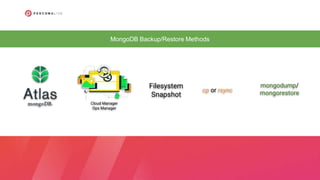
MongoDB Backup/Restore Methods
Cloud Manager
Ops Manager
Filesystem
Snapshot
cp or rsync
mongodump/
mongorestore
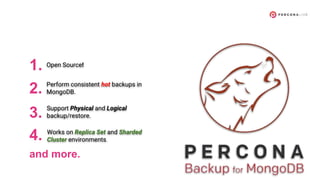
1. Open Source!
2. Perform consistent hot backups in
MongoDB.
3. Support Physical and Logical
backup/restore.
4. Works on Replica Set and Sharded
Cluster environments.
and more.
Features
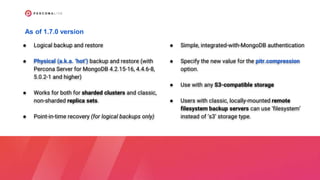
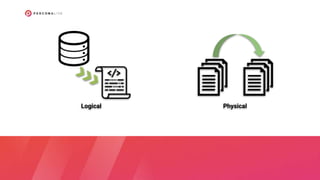
● Logical backup and restore
● Physical (a.k.a. ‘hot’) backup and restore (with
Percona Server for MongoDB 4.2.15-16, 4.4.6-8,
5.0.2-1 and higher)
● Works for both for sharded clusters and classic,
non-sharded replica sets.
● Point-in-time recovery (for logical backups only)
● Simple, integrated-with-MongoDB authentication
● Specify the new value for the pitr.compression
option.
● Use with any S3-compatible storage
● Users with classic, locally-mounted remote
filesystem backup servers can use ‘filesystem’
instead of ‘s3’ storage type.
As of 1.7.0 version
Components and
Architecture
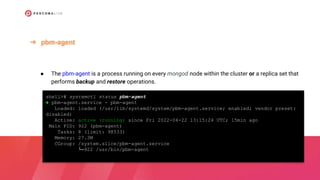
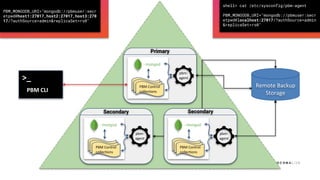
● The pbm-agent is a process running on every mongod node within the cluster or a replica set that
performs backup and restore operations.
➔ pbm-agent
shell># systemctl status pbm-agent
● pbm-agent.service - pbm-agent
Loaded: loaded (/usr/lib/systemd/system/pbm-agent.service; enabled; vendor preset:
disabled)
Active: active (running) since Fri 2022-04-22 13:15:24 UTC; 15min ago
Main PID: 922 (pbm-agent)
Tasks: 8 (limit: 98533)
Memory: 27.3M
CGroup: /system.slice/pbm-agent.service
└─922 /usr/bin/pbm-agent
shell># systemctl cat pbm-agent
# /lib/systemd/system/pbm-agent.service
[Unit]
Description=pbm-agent
After=time-sync.target network.target
[Service]
EnvironmentFile=-/etc/default/pbm-agent
Type=simple
User=mongod
Group=mongod
PermissionsStartOnly=true
ExecStart=/usr/bin/pbm-agent
[Install]
WantedBy=multi-user.target
● It’s the command-line utility that instructs pbm-agents to perform an operation.
➔ PBM CLI
● A single pbm-agent is only involved with one cluster (or non-sharded replica set). The pbm CLI
utility can connect to any cluster it has network access to, so it is possible for one user to list and
launch backups or restores on many clusters.
shell> pbm status
Cluster:
========
rs0:
- rs0/172.30.2.73:27017: pbm-agent v1.7.0 OK
- rs0/172.30.2.121:27017: pbm-agent v1.7.0 OK
- rs0/172.30.2.137:27017: pbm-agent v1.7.0 OK
PITR incremental backup:
========================
Status [OFF]
Currently running:
==================
Backups:
========
S3 us-west-2 s3://pbm-pl/pbm/backup
Snapshots:
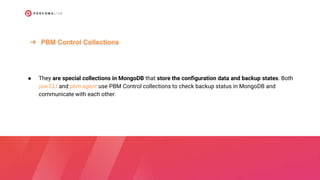
● They are special collections in MongoDB that store the configuration data and backup states. Both
pbm CLI and pbm-agent use PBM Control collections to check backup status in MongoDB and
communicate with each other.
➔ PBM Control Collections
rs0 [direct: primary] dataset> use admin
switched to db admin
rs0 [direct: primary] admin> show collections
pbmAgents
pbmBackups
pbmCmd
pbmConfig
pbmLock
pbmLockOp
pbmLog
pbmOpLog
pbmPITRChunks
pbmRRoles
pbmRUsers
system.keys
system.roles
system.users
system.version
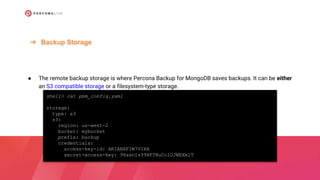
● The remote backup storage is where Percona Backup for MongoDB saves backups. It can be either
an S3 compatible storage or a filesystem-type storage.
➔ Backup Storage
shell> cat pbm_config.yaml
storage:
type: s3
s3:
region: us-west-2
bucket: mybucket
prefix: backup
credentials:
access-key-id: AKIABXFIW7VIXB
secret-access-key: 98asnIs99HFYNuColOJWEXmlT
shell> pbm config --list
pitr:
enabled: false
oplogSpanMin: 0
compression: s2
storage:
type: s3
s3:
provider: aws
region: us-west-2
bucket: pbm-pl
prefix: pbm/backup
credentials:
access-key-id: '***'
secret-access-key: '***'
maxUploadParts: 10000
storageClass: STANDARD
insecureSkipTLSVerify: false
How it Works
- mongod
Primary
PBM Control
collections
pbm-
agent
- mongod
Secondary
PBM Control
collections
pbm-
agent
- mongod
Secondary
PBM Control
collections
pbm-
agent
>_
PBM CLI
Remote Backup
Storage
shell> cat /etc/sysconfig/pbm-agent
PBM_MONGODB_URI="mongodb://pbmuser:secr
etpwd@localhost:27017/?authSource=admin
&replicaSet=rs0"
PBM_MONGODB_URI="mongodb://pbmuser:secr
etpwd@host1:27017,host2:27017,host3:270
17/?authSource=admin&replicaSet=rs0"
Backup
Logical Physical
shell> pbm backup
Starting backup '2022-04-24T17:22:19Z'....
Backup '2022-04-24T17:22:19Z' to remote store '/mongo_data/bkp' has
started
shell> pbm logs
2022-04-24T17:22:20Z I [rs0/ip-172-30-2-73.us-west-2.compute.internal:27017]
got command backup [name: 2022-04-24T17:22:19Z, compression: s2 (level:
default)] <ts: 1650820939>
2022-04-24T17:22:20Z I [rs0/ip-172-30-2-73.us-west-2.compute.internal:27017]
got epoch {1650820927 40}
2022-04-24T17:22:20Z I [rs0/ip-172-30-2-73.us-west-2.compute.internal:27017]
[backup/2022-04-24T17:22:19Z] backup started
>_ pbm backup
.Logical
OpLo
g
.Incremental backups
shell> pbm config --set pitr.enabled=true
[pitr.enabled=true]
shell> pbm config --set pitr.oplogSpanMin=1
[pitr.oplogSpanMin=1]
shell> pbm status
[...]
[...]
PITR chunks [6.96MB]:
2022-03-25T15:27:06 - 2022-04-25T01:57:49
-rw-rw-r-- 1 mongod mongod 2,6K abr 24 22:27 20220425011749-4.20220425012749-2.oplog.snappy
-rw-rw-r-- 1 mongod mongod 2,6K abr 24 22:37 20220425012749-2.20220425013749-2.oplog.snappy
-rw-rw-r-- 1 mongod mongod 2,5K abr 24 22:47 20220425013749-2.20220425014749-2.oplog.snappy
-rw-rw-r-- 1 mongod mongod 2,5K abr 24 22:57 20220425014749-2.20220425015749-2.oplog.snappy
2022-04-25-01:17:49-4
2022-04-25-01:27:49-2
Start:
End:
shell> pbm backup --type=physical
Starting backup '2022-04-25T00:55:30Z'....
Backup '2022-04-25T00:55:30Z' to remote store '/efs-mount-
point/pbm_bkp' has started
shell> pbm logs
2022-04-25T00:55:31Z I [rs0/ip-172-30-2-137.us-west-2.compute.internal:27017]
got command backup [name: 2022-04-25T00:55:30Z, compression: s2 (level:
default)] <ts: 1650848130>
2022-04-25T00:55:31Z I [rs0/ip-172-30-2-137.us-west-2.compute.internal:27017]
got epoch {1650841573 2}
2022-04-25T00:55:31Z I [rs0/ip-172-30-2-137.us-west-2.compute.internal:27017]
[backup/2022-04-25T00:55:30Z] backup started
2022-04-25T00:55:35Z I [rs0/ip-172-30-2-137.us-west-2.compute.internal:27017]
[backup/2022-04-25T00:55:30Z] uploading files
>_ pbm backup --type=physical
.Physical
Physical
Restore
>_ pbm restore
To restore a backup that you have made using pbm backup, use
the pbm restore command supplying the time stamp of the backup
that you intend to restore.
PBM identifies the type of the backup (physical or logical) and
restores the database up to the backup completion time.
shell> pbm restore 2022-03-25T15:27:00Z
Starting restore from '2022-03-25T15:27:00Z'...Restore of
the snapshot from '2022-03-25T15:27:00Z' has started
● A restore and Point-in-Time Recovery incremental backups are incompatible operations and cannot
be run simultaneously.
.Restore to the point in time
● You must disable Point-in-Time Recovery before restoring a database
shell> pbm config --set pitr.enabled=false
[pitr.enabled=false]
## pbm logs ##
2022-04-25T13:40:12.000-0300 I [pitr] got done signal, stopping
2022-04-25T13:40:12.000-0300 I [pitr] created chunk 2022-04-11T16:37:27 - 2022-04-
25T16:40:12
2022-04-25T13:40:12.000-0300 I [pitr] pausing/stopping with last_ts 2022-04-25
16:40:12 +0000 UTC
shell> pbm restore --time="2022-04-25T10:27:04"
Starting restore to the point in time '2022-04-25T10:27:04'...Restore to the point in time '2022-
04-25T10:27:04' has started
.Restore to the point in time
## pbm logs ##
2022-05-12T00:47:19.000-0300 I [pitrestore/2022-04-25T10:27:04Z] recovery started
2022-05-12T00:47:19.000-0300 D [pitrestore/2022-04-25T10:27:04Z] waiting for 'starting' status
2022-05-12T00:47:20.000-0300 I [pitrestore/2022-04-25T10:27:04Z] moving to state running
2022-05-12T00:47:22.507-0300 Setting num cpus to 12
[...]
2022-05-12T00:47:48.000-0300 I [pitrestore/2022-04-25T10:27:04Z] restoring users and roles
2022-05-12T00:47:48.000-0300 I [pitrestore/2022-04-25T10:27:04Z] moving to state dumpDone
2022-05-12T00:47:50.000-0300 I [pitrestore/2022-04-25T10:27:04Z] starting oplog replay
2022-05-12T00:47:50.000-0300 D [pitrestore/2022-04-25T10:27:04Z] + applying {replset 2022-03-
25T15:27:00Z_replset.oplog.s2 s2 {1648222021 2} {1648222025 3} 0}
2022-05-12T00:47:50.000-0300 D [pitrestore/2022-04-25T10:27:04Z] + applying {replset
pbmPitr/replset/20220325/20220325152705-3.20220425012649-4.oplog.snappy s2 {1648222025 3}
{1650850009 4} 0}
[...]
Benchmark
Benchmark Specs
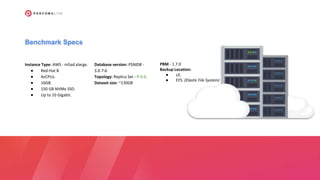
Instance Type: AWS - m5ad.xlarge.
● Red-Hat 8
● 4vCPUs.
● 16GB.
● 150 GB NVMe SSD.
● Up to 10 Gigabit.
Database version: PSMDB -
5.0.7-6.
Topology: Replica Set - P-S-S.
Dataset size: ~130GB
PBM - 1.7.0
Backup Location:
● s3.
● EFS. (Elastic File System)
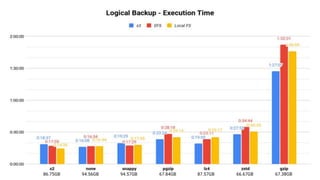
87.57GB
67.84GB
86.75GB 66.67GB
94.57GB
94.56GB
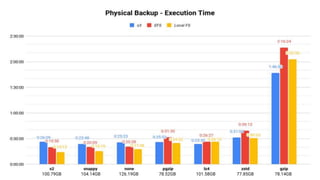
78.14GB
101.58GB
126.19GB 78.52GB
100.79GB 104.14GB 77.85GB
FAQ
Can I backup a single
collection?
Can I restore a single
collection?
Can I backup specific
shards in a cluster?
What’s the difference
between PBM and
mongodump?
Is it possible to refresh
a new environment with
a backup?
And you… Have any
question?
Thank you!
Percona Live 2022 - PBM - The Backup Open Source Tool for MongoDB

Percona Live 2022 - PBM - The Backup Open Source Tool for MongoDB

  • 1.
    Percona Backup for MongoDB TheBackup Open Source Tool for MongoDB
  • 2.
    Vinicius Grippa Vinicius Grippais a Percona Senior Support Engineer, Oracle Ace, and author of the book Learning MySQL. Vinicius has a Bachelor's degree in Computer Science and has been working with databases for 16 years. He has experience in designing databases for mission- critical applications and, in the last few years, has become a specialist in MySQL and MongoDB ecosystems. Working in the Support team, he has helped Percona customers with hundreds of different cases featuring a vast range of scenarios and complexities. Vinicius is also active in the OS community, participating in virtual rooms like Slack, and speaking at MeetUps, and presenting conferences in Europe, Asia, North and South America. Lead Senior Support Engineer at Percona
  • 3.
    Jean da Silva Jeanjoined Percona as a Support Engineer in 2020. Before joining the team, he worked in a mission-critical environment for 4 years, helping administer databases like MySQL, MongoDB, and Oracle DB. Specializing in Database Engineering, and Big Data, he likes to watch Formula 1 in his free time. Senior Support Engineer at Percona
  • 4.
    Agenda. ❏ Why PBM. ❏Features. ❏ Components and Architecture. ❏ How it works. ❏ Backup and Restore. ❏ Benchmark ❏ FAQ . . . . . . .
  • 5.
  • 7.
    MongoDB Backup/Restore Methods CloudManager Ops Manager Filesystem Snapshot cp or rsync mongodump/ mongorestore
  • 8.
    1. Open Source! 2.Perform consistent hot backups in MongoDB. 3. Support Physical and Logical backup/restore. 4. Works on Replica Set and Sharded Cluster environments. and more.
  • 9.
  • 10.
    ● Logical backupand restore ● Physical (a.k.a. ‘hot’) backup and restore (with Percona Server for MongoDB 4.2.15-16, 4.4.6-8, 5.0.2-1 and higher) ● Works for both for sharded clusters and classic, non-sharded replica sets. ● Point-in-time recovery (for logical backups only) ● Simple, integrated-with-MongoDB authentication ● Specify the new value for the pitr.compression option. ● Use with any S3-compatible storage ● Users with classic, locally-mounted remote filesystem backup servers can use ‘filesystem’ instead of ‘s3’ storage type. As of 1.7.0 version
  • 11.
  • 12.
    ● The pbm-agentis a process running on every mongod node within the cluster or a replica set that performs backup and restore operations. ➔ pbm-agent shell># systemctl status pbm-agent ● pbm-agent.service - pbm-agent Loaded: loaded (/usr/lib/systemd/system/pbm-agent.service; enabled; vendor preset: disabled) Active: active (running) since Fri 2022-04-22 13:15:24 UTC; 15min ago Main PID: 922 (pbm-agent) Tasks: 8 (limit: 98533) Memory: 27.3M CGroup: /system.slice/pbm-agent.service └─922 /usr/bin/pbm-agent
  • 13.
    shell># systemctl catpbm-agent # /lib/systemd/system/pbm-agent.service [Unit] Description=pbm-agent After=time-sync.target network.target [Service] EnvironmentFile=-/etc/default/pbm-agent Type=simple User=mongod Group=mongod PermissionsStartOnly=true ExecStart=/usr/bin/pbm-agent [Install] WantedBy=multi-user.target
  • 14.
    ● It’s thecommand-line utility that instructs pbm-agents to perform an operation. ➔ PBM CLI ● A single pbm-agent is only involved with one cluster (or non-sharded replica set). The pbm CLI utility can connect to any cluster it has network access to, so it is possible for one user to list and launch backups or restores on many clusters.
  • 15.
    shell> pbm status Cluster: ======== rs0: -rs0/172.30.2.73:27017: pbm-agent v1.7.0 OK - rs0/172.30.2.121:27017: pbm-agent v1.7.0 OK - rs0/172.30.2.137:27017: pbm-agent v1.7.0 OK PITR incremental backup: ======================== Status [OFF] Currently running: ================== Backups: ======== S3 us-west-2 s3://pbm-pl/pbm/backup Snapshots:
  • 16.
    ● They arespecial collections in MongoDB that store the configuration data and backup states. Both pbm CLI and pbm-agent use PBM Control collections to check backup status in MongoDB and communicate with each other. ➔ PBM Control Collections
  • 17.
    rs0 [direct: primary]dataset> use admin switched to db admin rs0 [direct: primary] admin> show collections pbmAgents pbmBackups pbmCmd pbmConfig pbmLock pbmLockOp pbmLog pbmOpLog pbmPITRChunks pbmRRoles pbmRUsers system.keys system.roles system.users system.version
  • 18.
    ● The remotebackup storage is where Percona Backup for MongoDB saves backups. It can be either an S3 compatible storage or a filesystem-type storage. ➔ Backup Storage shell> cat pbm_config.yaml storage: type: s3 s3: region: us-west-2 bucket: mybucket prefix: backup credentials: access-key-id: AKIABXFIW7VIXB secret-access-key: 98asnIs99HFYNuColOJWEXmlT
  • 19.
    shell> pbm config--list pitr: enabled: false oplogSpanMin: 0 compression: s2 storage: type: s3 s3: provider: aws region: us-west-2 bucket: pbm-pl prefix: pbm/backup credentials: access-key-id: '***' secret-access-key: '***' maxUploadParts: 10000 storageClass: STANDARD insecureSkipTLSVerify: false
  • 20.
  • 21.
    - mongod Primary PBM Control collections pbm- agent -mongod Secondary PBM Control collections pbm- agent - mongod Secondary PBM Control collections pbm- agent >_ PBM CLI Remote Backup Storage shell> cat /etc/sysconfig/pbm-agent PBM_MONGODB_URI="mongodb://pbmuser:secr etpwd@localhost:27017/?authSource=admin &replicaSet=rs0" PBM_MONGODB_URI="mongodb://pbmuser:secr etpwd@host1:27017,host2:27017,host3:270 17/?authSource=admin&replicaSet=rs0"
  • 22.
  • 23.
  • 24.
    shell> pbm backup Startingbackup '2022-04-24T17:22:19Z'.... Backup '2022-04-24T17:22:19Z' to remote store '/mongo_data/bkp' has started shell> pbm logs 2022-04-24T17:22:20Z I [rs0/ip-172-30-2-73.us-west-2.compute.internal:27017] got command backup [name: 2022-04-24T17:22:19Z, compression: s2 (level: default)] <ts: 1650820939> 2022-04-24T17:22:20Z I [rs0/ip-172-30-2-73.us-west-2.compute.internal:27017] got epoch {1650820927 40} 2022-04-24T17:22:20Z I [rs0/ip-172-30-2-73.us-west-2.compute.internal:27017] [backup/2022-04-24T17:22:19Z] backup started >_ pbm backup .Logical
  • 25.
    OpLo g .Incremental backups shell> pbmconfig --set pitr.enabled=true [pitr.enabled=true] shell> pbm config --set pitr.oplogSpanMin=1 [pitr.oplogSpanMin=1]
  • 26.
    shell> pbm status [...] [...] PITRchunks [6.96MB]: 2022-03-25T15:27:06 - 2022-04-25T01:57:49 -rw-rw-r-- 1 mongod mongod 2,6K abr 24 22:27 20220425011749-4.20220425012749-2.oplog.snappy -rw-rw-r-- 1 mongod mongod 2,6K abr 24 22:37 20220425012749-2.20220425013749-2.oplog.snappy -rw-rw-r-- 1 mongod mongod 2,5K abr 24 22:47 20220425013749-2.20220425014749-2.oplog.snappy -rw-rw-r-- 1 mongod mongod 2,5K abr 24 22:57 20220425014749-2.20220425015749-2.oplog.snappy 2022-04-25-01:17:49-4 2022-04-25-01:27:49-2 Start: End:
  • 27.
    shell> pbm backup--type=physical Starting backup '2022-04-25T00:55:30Z'.... Backup '2022-04-25T00:55:30Z' to remote store '/efs-mount- point/pbm_bkp' has started shell> pbm logs 2022-04-25T00:55:31Z I [rs0/ip-172-30-2-137.us-west-2.compute.internal:27017] got command backup [name: 2022-04-25T00:55:30Z, compression: s2 (level: default)] <ts: 1650848130> 2022-04-25T00:55:31Z I [rs0/ip-172-30-2-137.us-west-2.compute.internal:27017] got epoch {1650841573 2} 2022-04-25T00:55:31Z I [rs0/ip-172-30-2-137.us-west-2.compute.internal:27017] [backup/2022-04-25T00:55:30Z] backup started 2022-04-25T00:55:35Z I [rs0/ip-172-30-2-137.us-west-2.compute.internal:27017] [backup/2022-04-25T00:55:30Z] uploading files >_ pbm backup --type=physical .Physical Physical
  • 28.
  • 29.
    >_ pbm restore Torestore a backup that you have made using pbm backup, use the pbm restore command supplying the time stamp of the backup that you intend to restore. PBM identifies the type of the backup (physical or logical) and restores the database up to the backup completion time. shell> pbm restore 2022-03-25T15:27:00Z Starting restore from '2022-03-25T15:27:00Z'...Restore of the snapshot from '2022-03-25T15:27:00Z' has started
  • 30.
    ● A restoreand Point-in-Time Recovery incremental backups are incompatible operations and cannot be run simultaneously. .Restore to the point in time ● You must disable Point-in-Time Recovery before restoring a database shell> pbm config --set pitr.enabled=false [pitr.enabled=false] ## pbm logs ## 2022-04-25T13:40:12.000-0300 I [pitr] got done signal, stopping 2022-04-25T13:40:12.000-0300 I [pitr] created chunk 2022-04-11T16:37:27 - 2022-04- 25T16:40:12 2022-04-25T13:40:12.000-0300 I [pitr] pausing/stopping with last_ts 2022-04-25 16:40:12 +0000 UTC
  • 31.
    shell> pbm restore--time="2022-04-25T10:27:04" Starting restore to the point in time '2022-04-25T10:27:04'...Restore to the point in time '2022- 04-25T10:27:04' has started .Restore to the point in time ## pbm logs ## 2022-05-12T00:47:19.000-0300 I [pitrestore/2022-04-25T10:27:04Z] recovery started 2022-05-12T00:47:19.000-0300 D [pitrestore/2022-04-25T10:27:04Z] waiting for 'starting' status 2022-05-12T00:47:20.000-0300 I [pitrestore/2022-04-25T10:27:04Z] moving to state running 2022-05-12T00:47:22.507-0300 Setting num cpus to 12 [...] 2022-05-12T00:47:48.000-0300 I [pitrestore/2022-04-25T10:27:04Z] restoring users and roles 2022-05-12T00:47:48.000-0300 I [pitrestore/2022-04-25T10:27:04Z] moving to state dumpDone 2022-05-12T00:47:50.000-0300 I [pitrestore/2022-04-25T10:27:04Z] starting oplog replay 2022-05-12T00:47:50.000-0300 D [pitrestore/2022-04-25T10:27:04Z] + applying {replset 2022-03- 25T15:27:00Z_replset.oplog.s2 s2 {1648222021 2} {1648222025 3} 0} 2022-05-12T00:47:50.000-0300 D [pitrestore/2022-04-25T10:27:04Z] + applying {replset pbmPitr/replset/20220325/20220325152705-3.20220425012649-4.oplog.snappy s2 {1648222025 3} {1650850009 4} 0} [...]
  • 32.
  • 33.
    Benchmark Specs Instance Type:AWS - m5ad.xlarge. ● Red-Hat 8 ● 4vCPUs. ● 16GB. ● 150 GB NVMe SSD. ● Up to 10 Gigabit. Database version: PSMDB - 5.0.7-6. Topology: Replica Set - P-S-S. Dataset size: ~130GB PBM - 1.7.0 Backup Location: ● s3. ● EFS. (Elastic File System)
  • 34.
  • 37.
  • 40.
  • 41.
    Can I backupa single collection?
  • 42.
    Can I restorea single collection?
  • 43.
    Can I backupspecific shards in a cluster?
  • 44.
  • 45.
    Is it possibleto refresh a new environment with a backup?
  • 46.
    And you… Haveany question?
  • 47.