I PUC 2024-25(New syllabus) Computer Science Chapter 05 Getting started with Python
Dept. Of Computer Science, Sri Adichunchanagiri Ind PU college, Shivamogga 1
Chapter 5 Getting started with python 18 marks (1+1+1+2+3+5+5)
Introduction:
Program: An ordered set of instructions to be executed by a computer to carry out a specific task is called a program,
Programming language: The language used to specify set of instructions to the computer to carry out a specific task is called a
programming language.
Example: Python, C++, Java, C
Machine language or low-level language: Computers understand the language of 0 s and 1s which is called machine language or low level
language.
High-level programming languages: Programs written using English like words is called as high-level programming languages.
Example: Python, C++, Java, C
Source code: A program written in a high-level language is called source code.
Language translators: It is a software used to translate the source code into machine language.
Example: interpreter, compiler
Interpreter:
An interpreter processes the program statements one by one, first translating and then executing.
This process continues until an error occurs or the whole program is executed successfully.
In both the cases, program execution will stop.
Python uses an interpreter to convert its instructions into machine language, so that the computer can understand it.
Compiler: Compiler translates the entire source code, as a whole, into the object code (machine code). After scanning the whole program,
it generates error messages, if any.
Features of Python
• Python is a high-level language. It is a free and open source language.
• Python is an interpreted language, as Python programs are executed by an interpreter.
• Python programs are easy to understand as they have a clearly defined syntax and relatively simple structure.
• Python is case-sensitive. For example, NUMBER and number are not same in Python.
• Python is portable and platform independent, means it can run on various operating systems and hardware platforms.
• Python has a rich library of predefined functions.
2.
I PUC 2024-25(New syllabus) Computer Science Chapter 05 Getting started with Python
Dept. Of Computer Science, Sri Adichunchanagiri Ind PU college, Shivamogga 2
• Python is also helpful in web development. Many popular web services and applications are built using Python.
• Python uses indentation for blocks and nested blocks.
Working with Python
To write and run (execute) a Python program, a Python interpreter must be installed on computer or any online Python interpreter
can be used.
The interpreter is also called Python shell. A sample screen of Python interpreter is shown below.
Diagram: Thonny software (Python interpreter)
In the above screen, the symbol >>> is the Python prompt, which indicates that the interpreter is ready to take instructions.
We can type commands or statements on this prompt to execute them using a Python interpreter.
Execution Modes
There are two ways to use the Python interpreter to execute a program:
a) Interactive mode: This mode allows execution of individual statement instantaneously.
b) Script mode: This mode allows us to write more than one instruction in a file called Python source code file that can be executed.
a) Interactive Mode
To work in the interactive mode, simply type a Python statement on the >>> prompt directly.
As soon as enter key is pressed, the interpreter executes the statement and displays the result(s), as shown in the following figure.
Working in the interactive mode is convenient for testing a single line code for instant execution.
However, in the interactive mode, it is not possible to save the statements for future use and the statements need to be retyped to
run them again.
3.
I PUC 2024-25(New syllabus) Computer Science Chapter 05 Getting started with Python
Dept. Of Computer Science, Sri Adichunchanagiri Ind PU college, Shivamogga 3
Diagram: interactive mode using Python prompt (>>>)
b) Script Mode
In the script mode, write Python program in a file, save it and then use the interpreter to execute it.
Python scripts are saved as files where file name has extension “.py”.
By default, the Python scripts are saved in the Python installation folder.
Python script can be executed using following methods
a) Type the file name along with the path at the prompt. For example, if the name of the file is prog5.py, type prog5.py. Otherwise, open
the program directly from IDE (integrated development environment) as shown below.
Diagram: Executing Python program in script mode.
4.
I PUC 2024-25(New syllabus) Computer Science Chapter 05 Getting started with Python
Dept. Of Computer Science, Sri Adichunchanagiri Ind PU college, Shivamogga 4
b) While working in the script mode, after saving the file, click [Run]->[Run current script] from the menu as shown below.
c) The output appears on shell as shown in below
PYTHON KEYWORDS
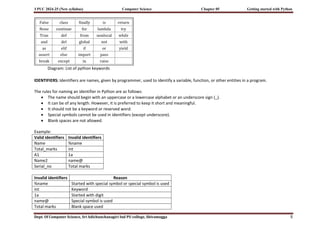
Keywords are reserved words, which has a specific meaning to the Python interpreter.
As Python is case sensitive, keywords must be written exactly as given in following table.
5.
I PUC 2024-25(New syllabus) Computer Science Chapter 05 Getting started with Python
Dept. Of Computer Science, Sri Adichunchanagiri Ind PU college, Shivamogga 5
Diagram: List of python keywords
IDENTIFIERS: Identifiers are names, given by programmer, used to identify a variable, function, or other entities in a program.
The rules for naming an identifier in Python are as follows:
The name should begin with an uppercase or a lowercase alphabet or an underscore sign (_).
It can be of any length. However, it is preferred to keep it short and meaningful.
It should not be a keyword or reserved word.
Special symbols cannot be used in identifiers (except underscore).
Blank spaces are not allowed.
Example:
Valid identifiers Invalid identifiers
Name %name
Total_marks int
A1 1a
Name2 name@
Serial_no Total marks
Invalid identifiers Reason
%name Started with special symbol or special symbol is used
int Keyword
1a Started with digit
name@ Special symbol is used
Total marks Blank space used
6.
I PUC 2024-25(New syllabus) Computer Science Chapter 05 Getting started with Python
Dept. Of Computer Science, Sri Adichunchanagiri Ind PU college, Shivamogga 6
VARIABLES:
It is a name (identifier) given to memory location to store a value.
Variable in Python refers to an object, which is an item, or element that is stored in the memory.
Value of a variable can be a string (e.g., ‘b’, ‘computer science’), numeric (e.g., 345) or any combination of alphanumeric characters
(CD67).
Example:
gender = 'M'
message = "Keep Smiling"
price = 987.9
Program: Python program to display values of variables.
message = "Keep Smiling"
userNo = 101
print(message)
print('User Number is', userNo)
Output:
Keep Smiling
User Number is 101
Note:
Variable declaration is implicit in Python, means variables are automatically declared and defined when they are assigned a value
the first time.
Variables must always be assigned values before they are used in expressions, otherwise it will lead to an error in the program.
Wherever a variable name occurs in an expression, the interpreter replaces it with the value of that particular variable.
Program: Python program to find the area of a rectangle given that its length is 10 units and breadth is 20 units.
#Program to find the area of a rectangle
length = 10
breadth = 20
area = length * breadth
print(area)
Output: 200
7.
I PUC 2024-25(New syllabus) Computer Science Chapter 05 Getting started with Python
Dept. Of Computer Science, Sri Adichunchanagiri Ind PU college, Shivamogga 7
COMMENTS
Comments are used to add a remark or a note in the source code.
In Python, a comment starts with # (hash sign). Everything following the # till the end of that line is treated as a comment and the
interpreter simply ignores it while executing the statement.
Comments are added with the purpose of making the source code easier for humans to understand.
Comments are used, primarily to document the meaning and purpose of source code and its input and output requirements,
Comments are useful when a group of programmers working on developing large and complex software.
Example:
#Variable amount is the total spending on grocery.
amount = 3400
#totalMarks is sum of marks in all the tests of Mathematics.
totalMarks = test1 + test2 + finalTest
Program: Python program to find the sum of two numbers.
#Program to find the sum of two numbers
num1 = 10
num2 = 20
result = num1 + num2
print(result)
Output: 30
EVERYTHING IS AN OBJECT
Python treats every value or data item whether numeric, string, or other type as an object.
Object can be assigned to some variable or can be passed to a function as an argument.
Every object in Python is assigned a unique identity (ID) which remains the same for the lifetime of that object.
This ID is memory address of the object.
The function id ( ) returns the identity of an object.
8.
I PUC 2024-25(New syllabus) Computer Science Chapter 05 Getting started with Python
Dept. Of Computer Science, Sri Adichunchanagiri Ind PU college, Shivamogga 8
Example:
>>> num1 = 20
>>> id (num1)
1433920576 #identity of num1.
>>> num2 = 30 - 10
>>> id (num2)
1433920576 #identity of num2 and num1 are same as both refers to object 20.
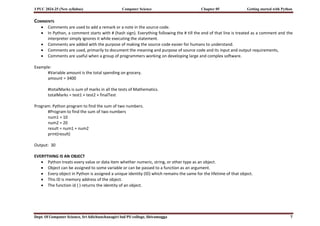
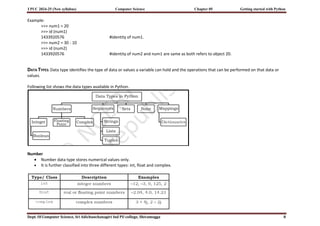
DATA TYPES: Data type identifies the type of data or values a variable can hold and the operations that can be performed on that data or
values.
Following list shows the data types available in Python.
Number
Number data type stores numerical values only.
It is further classified into three different types: int, float and complex.
9.
I PUC 2024-25(New syllabus) Computer Science Chapter 05 Getting started with Python
Dept. Of Computer Science, Sri Adichunchanagiri Ind PU college, Shivamogga 9
Boolean data type
Boolean data type (bool) is a subtype of integer.
It is a unique data type, consisting of two constants, True and False.
Boolean True value is non-zero, non-null and non-empty.
Boolean False is the value zero.
Sequence
A Python sequence is an ordered collection of items, where each item is indexed by an integer.
The three types of sequence data types available in Python are Strings, Lists and Tuples.
a) String
String is a group of characters. These characters may be alphabets, digits or special characters including spaces.
String values are enclosed either in single quotation marks (e.g., ‘Hello’) or in double quotation marks (e.g., “Hello”).
The quotes are not a part of the string, they are used to mark the beginning and end of the string for the interpreter.
It is not possible to perform numerical operations on strings, even when the string contains a numeric value.
Example,
>>> str1 = 'Hello Friend'
>>> str2 = "452"
b) List: List is a sequence of items separated by commas and the items are enclosed in square brackets [ ].
Example:
#To create a list
>>> list1 = [5, 3.4, "New Delhi", "20C", 45]
#print the elements of the list list1
>>> print (list1)
[5, 3.4, 'New Delhi', '20C', 45]
c) Tuple
Tuple is a sequence of items separated by commas and items are enclosed in parenthesis ( ).
Once created, we cannot change the tuple.
Example:
#create a tuple tuple1
>>> tuple1 = (10, 20, "Apple", 3.4, 'a')
10.
I PUC 2024-25(New syllabus) Computer Science Chapter 05 Getting started with Python
Dept. Of Computer Science, Sri Adichunchanagiri Ind PU college, Shivamogga 10
#print the elements of the tuple tuple1
>>> print(tuple1)
(10, 20, "Apple", 3.4, 'a')
Set
Set is an unordered collection of items separated by commas and the items are enclosed in curly brackets { }.
A set is similar to list, except that it cannot have duplicate entries.
Once created, elements of a set cannot be changed.
Example:
#create a set
>>> set1 = {10,20,3.14,"New Delhi"}
>>> print(type(set1))
<class 'set'>
>>> print(set1)
{10, 20, 3.14, "New Delhi"}
#duplicate elements are not included in set
>>> set2 = {1,2,1,3}
>>> print(set2)
{1, 2, 3}
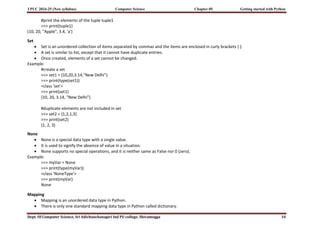
None
None is a special data type with a single value.
It is used to signify the absence of value in a situation.
None supports no special operations, and it is neither same as False nor 0 (zero).
Example:
>>> myVar = None
>>> print(type(myVar))
<class 'NoneType'>
>>> print(myVar)
None
Mapping
Mapping is an unordered data type in Python.
There is only one standard mapping data type in Python called dictionary.
11.
I PUC 2024-25(New syllabus) Computer Science Chapter 05 Getting started with Python
Dept. Of Computer Science, Sri Adichunchanagiri Ind PU college, Shivamogga 11
a) Dictionary
Dictionary in Python holds data items in key-value pairs.
Items in a dictionary are enclosed in curly brackets { }.
Every key is separated from its value using a colon (:) sign.
The key : value pairs of a dictionary can be accessed using the key.
The keys are usually strings and their values can be any data type.
In order to access any value in the dictionary, we have to specify its key in square brackets [ ].
Dictionaries permit faster access to data.
Example:
#create a dictionary
>>> dict1 = {'Fruit':'Apple', 'Climate':'Cold', 'Price(kg)':120}
>>> print(dict1)
{'Fruit': 'Apple', 'Climate': 'Cold', 'Price(kg)': 120}
>>> print(dict1['Price(kg)'])
120
Mutable and Immutable Data Types
Variables whose values can be changed after they are created and assigned are called mutable.
Variables whose values cannot be changed after they are created and assigned are called immutable.
When an attempt is made to update the value of an immutable variable, the old variable is destroyed and a new variable is created
by the same name in memory.
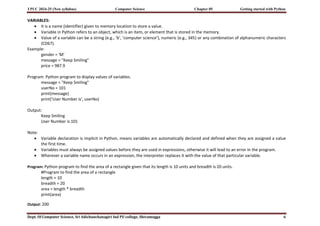
Python data types can be classified into mutable and immutable as shown below.
Diagram: Mutable and Immutable Data Types
12.
I PUC 2024-25(New syllabus) Computer Science Chapter 05 Getting started with Python
Dept. Of Computer Science, Sri Adichunchanagiri Ind PU college, Shivamogga 12
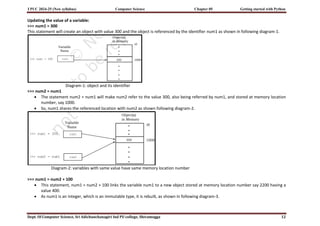
Updating the value of a variable:
>>> num1 = 300
This statement will create an object with value 300 and the object is referenced by the identifier num1 as shown in following diagram-1.
Diagram-1: object and its identifier
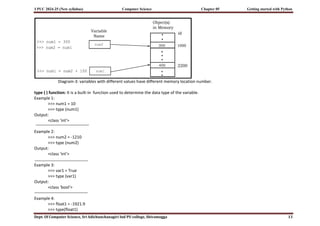
>>> num2 = num1
The statement num2 = num1 will make num2 refer to the value 300, also being referred by num1, and stored at memory location
number, say 1000.
So, num1 shares the referenced location with num2 as shown following diagram-2.
Diagram-2: variables with same value have same memory location number
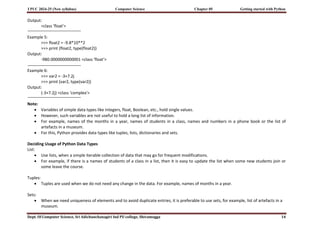
>>> num1 = num2 + 100
This statement, num1 = num2 + 100 links the variable num1 to a new object stored at memory location number say 2200 having a
value 400.
As num1 is an integer, which is an immutable type, it is rebuilt, as shown in following diagram-3.
13.
I PUC 2024-25(New syllabus) Computer Science Chapter 05 Getting started with Python
Dept. Of Computer Science, Sri Adichunchanagiri Ind PU college, Shivamogga 13
Diagram-3: variables with different values have different memory location number.
type ( ) function: It is a built-in function used to determine the data type of the variable.
Example 1:
>>> num1 = 10
>>> type (num1)
Output:
<class 'int'>
Example 2:
>>> num2 = -1210
>>> type (num2)
Output:
<class 'int'>
Example 3:
>>> var1 = True
>>> type (var1)
Output:
<class 'bool'>
Example 4:
>>> float1 = -1921.9
>>> type(float1)
14.
I PUC 2024-25(New syllabus) Computer Science Chapter 05 Getting started with Python
Dept. Of Computer Science, Sri Adichunchanagiri Ind PU college, Shivamogga 14
Output:
<class 'float'>
Example 5:
>>> float2 = -9.8*10**2
>>> print (float2, type(float2))
Output:
-980.0000000000001 <class 'float'>
Example 6:
>>> var2 = -3+7.2j
>>> print (var2, type(var2))
Output:
(-3+7.2j) <class 'complex'>
Note:
Variables of simple data types like integers, float, Boolean, etc., hold single values.
However, such variables are not useful to hold a long list of information.
For example, names of the months in a year, names of students in a class, names and numbers in a phone book or the list of
artefacts in a museum.
For this, Python provides data types like tuples, lists, dictionaries and sets.
Deciding Usage of Python Data Types
List:
Use lists, when a simple iterable collection of data that may go for frequent modifications.
For example, if there is a names of students of a class in a list, then it is easy to update the list when some new students join or
some leave the course.
Tuples:
Tuples are used when we do not need any change in the data. For example, names of months in a year.
Sets:
When we need uniqueness of elements and to avoid duplicate entries, it is preferable to use sets, for example, list of artefacts in a
museum.
15.
I PUC 2024-25(New syllabus) Computer Science Chapter 05 Getting started with Python
Dept. Of Computer Science, Sri Adichunchanagiri Ind PU college, Shivamogga 15
Dictionaries:
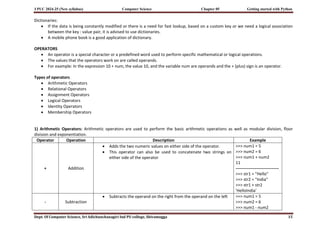
If the data is being constantly modified or there is a need for fast lookup, based on a custom key or we need a logical association
between the key : value pair, it is advised to use dictionaries.
A mobile phone book is a good application of dictionary.
OPERATORS
An operator is a special character or a predefined word used to perform specific mathematical or logical operations.
The values that the operators work on are called operands.
For example: In the expression 10 + num, the value 10, and the variable num are operands and the + (plus) sign is an operator.
Types of operators
Arithmetic Operators
Relational Operators
Assignment Operators
Logical Operators
Identity Operators
Membership Operators
1) Arithmetic Operators: Arithmetic operators are used to perform the basic arithmetic operations as well as modular division, floor
division and exponentiation.
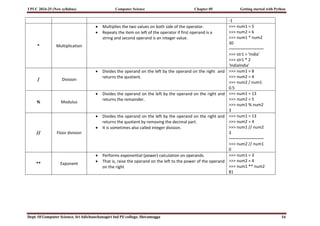
Operator Operation Description Example
+ Addition
Adds the two numeric values on either side of the operator.
This operator can also be used to concatenate two strings on
either side of the operator
>>> num1 = 5
>>> num2 = 6
>>> num1 + num2
11
-------------------------------
>>> str1 = "Hello"
>>> str2 = "India"
>>> str1 + str2
'HelloIndia'
- Subtraction
Subtracts the operand on the right from the operand on the left >>> num1 = 5
>>> num2 = 6
>>> num1 - num2
16.
I PUC 2024-25(New syllabus) Computer Science Chapter 05 Getting started with Python
Dept. Of Computer Science, Sri Adichunchanagiri Ind PU college, Shivamogga 16
-1
* Multiplication
Multiplies the two values on both side of the operator.
Repeats the item on left of the operator if first operand is a
string and second operand is an integer value.
>>> num1 = 5
>>> num2 = 6
>>> num1 * num2
30
-------------------------
>>> str1 = 'India'
>>> str1 * 2
'IndiaIndia'
/ Division
Divides the operand on the left by the operand on the right and
returns the quotient.
>>> num1 = 8
>>> num2 = 4
>>> num2 / num1
0.5
% Modulus
Divides the operand on the left by the operand on the right and
returns the remainder.
>>> num1 = 13
>>> num2 = 5
>>> num1 % num2
3
// Floor division
Divides the operand on the left by the operand on the right and
returns the quotient by removing the decimal part.
It is sometimes also called integer division.
>>> num1 = 13
>>> num2 = 4
>>> num1 // num2
3
-------------------------
>>> num2 // num1
0
** Exponent
Performs exponential (power) calculation on operands.
That is, raise the operand on the left to the power of the operand
on the right
>>> num1 = 3
>>> num2 = 4
>>> num1 ** num2
81
17.
I PUC 2024-25(New syllabus) Computer Science Chapter 05 Getting started with Python
Dept. Of Computer Science, Sri Adichunchanagiri Ind PU college, Shivamogga 17
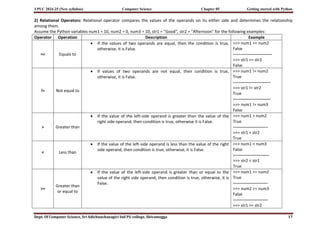
2) Relational Operators: Relational operator compares the values of the operands on its either side and determines the relationship
among them.
Assume the Python variables num1 = 10, num2 = 0, num3 = 10, str1 = "Good", str2 = "Afternoon" for the following examples:
Operator Operation Description Example
== Equals to
If the values of two operands are equal, then the condition is true,
otherwise, it is False.
>>> num1 == num2
False
----------------------------
>>> str1 == str2
False
!= Not equal to
If values of two operands are not equal, then condition is true,
otherwise, it is False.
>>> num1 != num2
True
---------------------------
>>> str1 != str2
True
---------------------------
>>> num1 != num3
False
> Greater than
If the value of the left-side operand is greater than the value of the
right side operand, then condition is true, otherwise it is False.
>>> num1 > num2
True
-------------------------
>>> str1 > str2
True
< Less than
If the value of the left-side operand is less than the value of the right
side operand, then condition is true, otherwise, it is False.
>>> num1 < num3
False
--------------------------
>>> str2 < str1
True
>=
Greater than
or equal to
If the value of the left-side operand is greater than or equal to the
value of the right side operand, then condition is true, otherwise, it is
False.
>>> num1 >= num2
True
-------------------------
>>> num2 >= num3
False
-------------------------
>>> str1 >= str2
18.
I PUC 2024-25(New syllabus) Computer Science Chapter 05 Getting started with Python
Dept. Of Computer Science, Sri Adichunchanagiri Ind PU college, Shivamogga 18
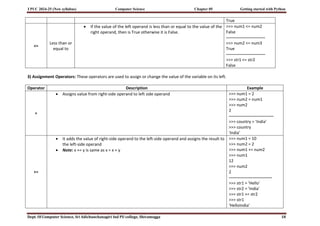
True
<=
Less than or
equal to
If the value of the left operand is less than or equal to the value of the
right operand, then is True otherwise it is False.
>>> num1 <= num2
False
----------------------------
>>> num2 <= num3
True
----------------------------
>>> str1 <= str2
False
3) Assignment Operators: These operators are used to assign or change the value of the variable on its left.
Operator Description Example
=
Assigns value from right-side operand to left side operand >>> num1 = 2
>>> num2 = num1
>>> num2
2
--------------------------------
>>> country = 'India'
>>> country
'India'
+=
It adds the value of right-side operand to the left-side operand and assigns the result to
the left-side operand
Note: x += y is same as x = x + y
>>> num1 = 10
>>> num2 = 2
>>> num1 += num2
>>> num1
12
>>> num2
2
-------------------------------
>>> str1 = 'Hello'
>>> str2 = 'India'
>>> str1 += str2
>>> str1
'HelloIndia'
19.
I PUC 2024-25(New syllabus) Computer Science Chapter 05 Getting started with Python
Dept. Of Computer Science, Sri Adichunchanagiri Ind PU college, Shivamogga 19
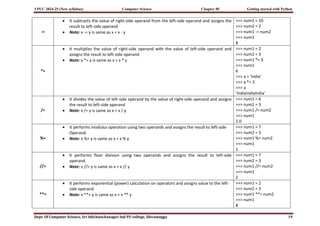
-=
It subtracts the value of right-side operand from the left-side operand and assigns the
result to left-side operand
Note: x -= y is same as x = x - y
>>> num1 = 10
>>> num2 = 2
>>> num1 -= num2
>>> num1
8
*=
It multiplies the value of right-side operand with the value of left-side operand and
assigns the result to left-side operand
Note: x *= y is same as x = x * y
>>> num1 = 2
>>> num2 = 3
>>> num1 *= 3
>>> num1
6
>>> a = 'India'
>>> a *= 3
>>> a
'IndiaIndiaIndia'
/=
It divides the value of left-side operand by the value of right-side operand and assigns
the result to left-side operand
Note: x /= y is same as x = x / y
>>> num1 = 6
>>> num2 = 3
>>> num1 /= num2
>>> num1
2.0
%=
It performs modulus operation using two operands and assigns the result to left-side
Operand.
Note: x %= y is same as x = x % y
>>> num1 = 7
>>> num2 = 3
>>> num1 %= num2
>>> num1
1
//=
It performs floor division using two operands and assigns the result to left-side
operand.
Note: x //= y is same as x = x // y
>>> num1 = 7
>>> num2 = 3
>>> num1 //= num2
>>> num1
2
**=
It performs exponential (power) calculation on operators and assigns value to the left-
side operand.
Note: x **= y is same as x = x ** y
>>> num1 = 2
>>> num2 = 3
>>> num1 **= num2
>>> num1
8
20.
I PUC 2024-25(New syllabus) Computer Science Chapter 05 Getting started with Python
Dept. Of Computer Science, Sri Adichunchanagiri Ind PU college, Shivamogga 20
4) Logical Operators:
The logical operator evaluates to either True or False based on the logical operands on either side.
Every value is logically either True or False.
By default, all values are True except None, False, 0 (zero), empty collections " ", ( ), [ ], { }, and few other special values.
For example, if num1 = 10, num2 = -20, then both num1 and num2 are logically True.
Operator Operation Description Example
and Logical AND If both the operands are True, then condition becomes True.
>>> True and True
True
---------------------------------
>>> num1 = 10
>>> num2 = -20
>>> bool(num1 and num2)
True
---------------------------------
>>> True and False
False
---------------------------------
>>> num3 = 0
>>> bool(num1 and num3)
False
---------------------------------
>>> False and False
False
or Logical OR
If any of the two operands are True, then condition becomes
True
>>> True or True
True
--------------------------------
>>> True or False
True
--------------------------------
>>> bool(num1 or num3)
True
--------------------------------
>>> False or False
21.
I PUC 2024-25(New syllabus) Computer Science Chapter 05 Getting started with Python
Dept. Of Computer Science, Sri Adichunchanagiri Ind PU college, Shivamogga 21
False
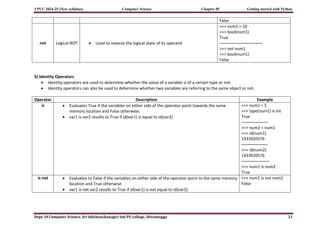
not Logical NOT Used to reverse the logical state of its operand
>>> num1 = 10
>>> bool(num1)
True
-------------------------------
>>> not num1
>>> bool(num1)
False
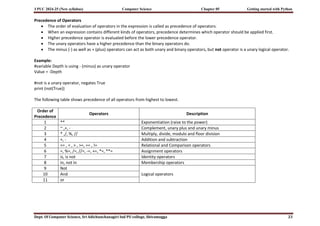
5) Identity Operators
Identity operators are used to determine whether the value of a variable is of a certain type or not.
Identity operators can also be used to determine whether two variables are referring to the same object or not.
Operator Description Example
is Evaluates True if the variables on either side of the operator point towards the same
memory location and False otherwise.
var1 is var2 results to True if id(var1) is equal to id(var2)
>>> num1 = 5
>>> type(num1) is int
True
-------------------
>>> num2 = num1
>>> id(num1)
1433920576
-------------------
>>> id(num2)
1433920576
--------------------
>>> num1 is num2
True
is not Evaluates to False if the variables on either side of the operator point to the same memory
location and True otherwise.
var1 is not var2 results to True if id(var1) is not equal to id(var2).
>>> num1 is not num2
False
22.
I PUC 2024-25(New syllabus) Computer Science Chapter 05 Getting started with Python
Dept. Of Computer Science, Sri Adichunchanagiri Ind PU college, Shivamogga 22
6) Membership Operators: Membership operators are used to check if a value is a member of the given sequence or not.
Operator Description Example
in Returns True if the variable/value is found in the specified sequence and False otherwise >>> a = [1,2,3]
>>> 2 in a
True
--------------------
>>> '1' in a
False
not in Returns True if the variable/value is not found in the specified sequence and False
otherwise
>>> a = [1,2,3]
>>> 10 not in a
True
--------------------
>>> 1 not in a
False
EXPRESSIONS
An expression is defined as a combination of constants, variables, and operators. An expression always evaluates to a value.
A value or a standalone variable is also considered as an expression but a standalone operator is not an expression.
Some examples of valid expressions are given below.
a) 100 b) 3.0 + 3.14 c) num d) 23/3 -5 * 7/(14 -2) e) num – 20.4 f) "Global" + "Citizen"
Binary operators: Binary operators work with two operands.
Example: 1) a+b 2) 7*6 3) c<d
Unary operators: These are the operators work with only one operand.
Example: 1) –a 2) y++ 3) *p
23.
I PUC 2024-25(New syllabus) Computer Science Chapter 05 Getting started with Python
Dept. Of Computer Science, Sri Adichunchanagiri Ind PU college, Shivamogga 23
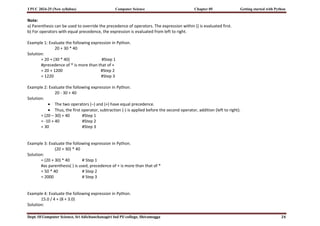
Precedence of Operators
The order of evaluation of operators in the expression is called as precedence of operators.
When an expression contains different kinds of operators, precedence determines which operator should be applied first.
Higher precedence operator is evaluated before the lower precedence operator.
The unary operators have a higher precedence than the binary operators do.
The minus (-) as well as + (plus) operators can act as both unary and binary operators, but not operator is a unary logical operator.
Example:
#variable Depth is using - (minus) as unary operator
Value = -Depth
#not is a unary operator, negates True
print (not(True))
The following table shows precedence of all operators from highest to lowest.
Order of
Precedence
Operators Description
1 ** Exponentiation (raise to the power)
2 ~ ,+, - Complement, unary plus and unary minus
3 * ,/, %, // Multiply, divide, modulo and floor division
4 +, - Addition and subtraction
5 <= , < , > , >=, == , != Relational and Comparison operators
6 =, %=, /=, //=, -=, +=, *=, **= Assignment operators
7 is, is not Identity operators
8 in, not in Membership operators
9 Not
Logical operators
10 And
11 or
24.
I PUC 2024-25(New syllabus) Computer Science Chapter 05 Getting started with Python
Dept. Of Computer Science, Sri Adichunchanagiri Ind PU college, Shivamogga 24
Note:
a) Parenthesis can be used to override the precedence of operators. The expression within () is evaluated first.
b) For operators with equal precedence, the expression is evaluated from left to right.
Example 1: Evaluate the following expression in Python.
20 + 30 * 40
Solution:
= 20 + (30 * 40) #Step 1
#precedence of * is more than that of +
= 20 + 1200 #Step 2
= 1220 #Step 3
Example 2: Evaluate the following expression in Python.
20 - 30 + 40
Solution:
The two operators (–) and (+) have equal precedence.
Thus, the first operator, subtraction (-) is applied before the second operator, addition (left to right).
= (20 – 30) + 40 #Step 1
= -10 + 40 #Step 2
= 30 #Step 3
Example 3: Evaluate the following expression in Python.
(20 + 30) * 40
Solution:
= (20 + 30) * 40 # Step 1
#as parenthesis( ) is used, precedence of + is more than that of *
= 50 * 40 # Step 2
= 2000 # Step 3
Example 4: Evaluate the following expression in Python.
15.0 / 4 + (8 + 3.0)
Solution:
25.
I PUC 2024-25(New syllabus) Computer Science Chapter 05 Getting started with Python
Dept. Of Computer Science, Sri Adichunchanagiri Ind PU college, Shivamogga 25
= 15.0 / 4 + (8.0 + 3.0) #Step 1
= 15.0 / 4.0 + 11.0 #Step 2
= 3.75 + 11.0 #Step 3
= 14.75 #Step 4
STATEMENT: In Python, a statement is a unit of code that the Python interpreter can execute.
Example:
>>> x = 4 #assignment statement
>>> cube = x ** 3 #assignment statement
>>> print (x, cube) #print statement
4 64
INPUT AND OUTPUT
During execution program accepts some data or information from programmer and after processing, program generates some
output.
In python input ( ) and print ( ) functions are used for accepting data and displaying the result respectively.
input ( ) function
This function accepts user input by prompting the user to enter data.
It accepts all user input numeric, alphanumeric as string.
The syntax for input ( ) is:
input ([Prompt])
Prompt is the string to display on the screen prior to taking the input and it is optional.
When a prompt is specified, first it is displayed on the screen after which the user can enter data.
The input ( ) takes exactly what is typed from the keyboard, converts it into a string and assigns it to the variable on left-hand side
of the assignment operator (=).
Entering data for the input function is terminated by pressing the enter key.
26.
I PUC 2024-25(New syllabus) Computer Science Chapter 05 Getting started with Python
Dept. Of Computer Science, Sri Adichunchanagiri Ind PU college, Shivamogga 26
Example:
>>> fname = input("Enter your first name: ")
Enter your first name: Arnab
----------------------------------------------------------
>>> age = input("Enter your age: ")
Enter your age: 19
---------------------------------------------------------
>>> type(age)
<class 'str'>
It is possible to typecast or change the datatype of the string data accepted from user to an appropriate numeric value. As shown in
following example
>>> age = int( input("Enter your age:")) #function int ( ) to convert string to integer
Enter your age: 19
>>> type(age)
<class 'int'>
print ( ) function
The print ( ) function is used to display the output data on standard output device.
The print ( ) outputs a complete line and then moves to the next line for subsequent output.
The syntax for print ( ) is:
print (value [, ..., sep = ' ', end = 'n'])
• sep: The optional parameter sep is a separator between the output values. We can use a character, integer or a string as a separator. The
default separator is space.
• end: This is also optional and it allows us to specify any string to be appended after the last value. The default is a new line.
27.
I PUC 2024-25(New syllabus) Computer Science Chapter 05 Getting started with Python
Dept. Of Computer Science, Sri Adichunchanagiri Ind PU college, Shivamogga 27
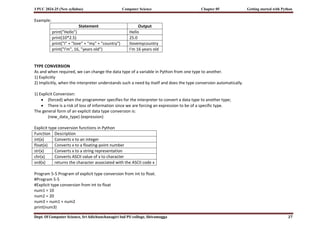
Example:
Statement Output
print("Hello") Hello
print(10*2.5) 25.0
print("I" + "love" + "my" + "country") Ilovemycountry
print("I'm", 16, "years old") I'm 16 years old
TYPE CONVERSION
As and when required, we can change the data type of a variable in Python from one type to another.
1) Explicitly
2) Implicitly, when the interpreter understands such a need by itself and does the type conversion automatically.
1) Explicit Conversion:
(forced) when the programmer specifies for the interpreter to convert a data type to another type;
There is a risk of loss of information since we are forcing an expression to be of a specific type.
The general form of an explicit data type conversion is:
(new_data_type) (expression)
Explicit type conversion functions in Python
Function Description
int(x) Converts x to an integer
float(x) Converts x to a floating-point number
str(x) Converts x to a string representation
chr(x) Converts ASCII value of x to character
ord(x) returns the character associated with the ASCII code x
Program 5-5 Program of explicit type conversion from int to float.
#Program 5-5
#Explicit type conversion from int to float
num1 = 10
num2 = 20
num3 = num1 + num2
print(num3)
28.
I PUC 2024-25(New syllabus) Computer Science Chapter 05 Getting started with Python
Dept. Of Computer Science, Sri Adichunchanagiri Ind PU college, Shivamogga 28
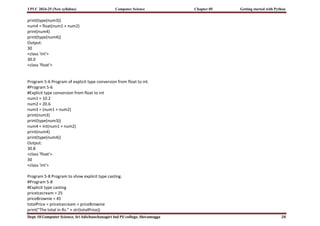
print(type(num3))
num4 = float(num1 + num2)
print(num4)
print(type(num4))
Output:
30
<class 'int'>
30.0
<class 'float'>
Program 5-6 Program of explicit type conversion from float to int.
#Program 5-6
#Explicit type conversion from float to int
num1 = 10.2
num2 = 20.6
num3 = (num1 + num2)
print(num3)
print(type(num3))
num4 = int(num1 + num2)
print(num4)
print(type(num4))
Output:
30.8
<class 'float'>
30
<class 'int'>
Program 5-8 Program to show explicit type casting.
#Program 5-8
#Explicit type casting
priceIcecream = 25
priceBrownie = 45
totalPrice = priceIcecream + priceBrownie
print("The total in Rs." + str(totalPrice))
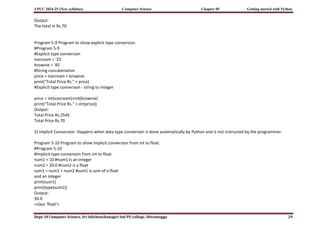
29.
I PUC 2024-25(New syllabus) Computer Science Chapter 05 Getting started with Python
Dept. Of Computer Science, Sri Adichunchanagiri Ind PU college, Shivamogga 29
Output:
The total in Rs.70
Program 5-9 Program to show explicit type conversion.
#Program 5-9
#Explicit type conversion
icecream = '25'
brownie = '45'
#String concatenation
price = icecream + brownie
print("Total Price Rs." + price)
#Explicit type conversion - string to integer
price = int(icecream)+int(brownie)
print("Total Price Rs." + str(price))
Output:
Total Price Rs.2545
Total Price Rs.70
2) Implicit Conversion: Happens when data type conversion is done automatically by Python and is not instructed by the programmer.
Program 5-10 Program to show implicit conversion from int to float.
#Program 5-10
#Implicit type conversion from int to float
num1 = 10 #num1 is an integer
num2 = 20.0 #num2 is a float
sum1 = num1 + num2 #sum1 is sum of a float
and an integer
print(sum1)
print(type(sum1))
Output:
30.0
<class 'float'>
30.
I PUC 2024-25(New syllabus) Computer Science Chapter 05 Getting started with Python
Dept. Of Computer Science, Sri Adichunchanagiri Ind PU college, Shivamogga 30
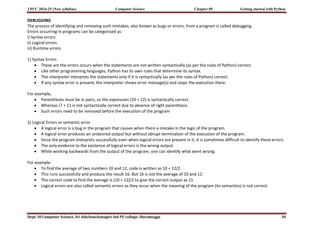
DEBUGGING
The process of identifying and removing such mistakes, also known as bugs or errors, from a program is called debugging.
Errors occurring in programs can be categorised as:
i) Syntax errors
ii) Logical errors
iii) Runtime errors
1) Syntax Errors
These are the errors occurs when the statements are not written syntactically (as per the rules of Python) correct.
Like other programming languages, Python has its own rules that determine its syntax.
The interpreter interprets the statements only if it is syntactically (as per the rules of Python) correct.
If any syntax error is present, the interpreter shows error message(s) and stops the execution there.
For example,
Parentheses must be in pairs, so the expression (10 + 12) is syntactically correct.
Whereas (7 + 11 is not syntactically correct due to absence of right parenthesis.
Such errors need to be removed before the execution of the program
2) Logical Errors or semantic error
A logical error is a bug in the program that causes when there a mistake in the logic of the program.
A logical error produces an undesired output but without abrupt termination of the execution of the program.
Since the program interprets successfully even when logical errors are present in it, it is sometimes difficult to identify these errors.
The only evidence to the existence of logical errors is the wrong output.
While working backwards from the output of the program, one can identify what went wrong.
For example:
To find the average of two numbers 10 and 12, code is written as 10 + 12/2.
This runs successfully and produce the result 16. But 16 is not the average of 10 and 12.
The correct code to find the average is (10 + 12)/2 to give the correct output as 11.
Logical errors are also called semantic errors as they occur when the meaning of the program (its semantics) is not correct.
31.
I PUC 2024-25(New syllabus) Computer Science Chapter 05 Getting started with Python
Dept. Of Computer Science, Sri Adichunchanagiri Ind PU college, Shivamogga 31
3) Runtime Error
A runtime error causes abnormal termination of program while it is executing.
Runtime error occurs, when the statement is correct syntactically, but the interpreter cannot execute it.
Runtime errors do not appear until after the program starts running or executing.
For example:
In division operation, if the denominator value is zero then it will give a runtime error like “division by zero”.
The following program shows two types of runtime errors when a user enters non-integer value or value ‘0’. The program generates
correct output when the user inputs an integer value for num2.
Program which generates runtime error.
#Program 5-11
#Runtime Errors Example
num1 = 10.0
num2 = int(input("num2 = "))
#if user inputs a string or a zero, it leads to runtime error
print(num1/num2)
![I PUC 2024-25 (New syllabus) Computer Science Chapter 05 Getting started with Python
Dept. Of Computer Science, Sri Adichunchanagiri Ind PU college, Shivamogga 4
b) While working in the script mode, after saving the file, click [Run]->[Run current script] from the menu as shown below.
c) The output appears on shell as shown in below
PYTHON KEYWORDS
Keywords are reserved words, which has a specific meaning to the Python interpreter.
As Python is case sensitive, keywords must be written exactly as given in following table.](https://image.slidesharecdn.com/5gettingstartedwithpython-250604052321-59b90ab7/85/5-getting-started-with-Python-1st-puc-syllubus-4-320.jpg)
![I PUC 2024-25 (New syllabus) Computer Science Chapter 05 Getting started with Python
Dept. Of Computer Science, Sri Adichunchanagiri Ind PU college, Shivamogga 9
Boolean data type
Boolean data type (bool) is a subtype of integer.
It is a unique data type, consisting of two constants, True and False.
Boolean True value is non-zero, non-null and non-empty.
Boolean False is the value zero.
Sequence
A Python sequence is an ordered collection of items, where each item is indexed by an integer.
The three types of sequence data types available in Python are Strings, Lists and Tuples.
a) String
String is a group of characters. These characters may be alphabets, digits or special characters including spaces.
String values are enclosed either in single quotation marks (e.g., ‘Hello’) or in double quotation marks (e.g., “Hello”).
The quotes are not a part of the string, they are used to mark the beginning and end of the string for the interpreter.
It is not possible to perform numerical operations on strings, even when the string contains a numeric value.
Example,
>>> str1 = 'Hello Friend'
>>> str2 = "452"
b) List: List is a sequence of items separated by commas and the items are enclosed in square brackets [ ].
Example:
#To create a list
>>> list1 = [5, 3.4, "New Delhi", "20C", 45]
#print the elements of the list list1
>>> print (list1)
[5, 3.4, 'New Delhi', '20C', 45]
c) Tuple
Tuple is a sequence of items separated by commas and items are enclosed in parenthesis ( ).
Once created, we cannot change the tuple.
Example:
#create a tuple tuple1
>>> tuple1 = (10, 20, "Apple", 3.4, 'a')](https://image.slidesharecdn.com/5gettingstartedwithpython-250604052321-59b90ab7/85/5-getting-started-with-Python-1st-puc-syllubus-9-320.jpg)
![I PUC 2024-25 (New syllabus) Computer Science Chapter 05 Getting started with Python
Dept. Of Computer Science, Sri Adichunchanagiri Ind PU college, Shivamogga 11
a) Dictionary
Dictionary in Python holds data items in key-value pairs.
Items in a dictionary are enclosed in curly brackets { }.
Every key is separated from its value using a colon (:) sign.
The key : value pairs of a dictionary can be accessed using the key.
The keys are usually strings and their values can be any data type.
In order to access any value in the dictionary, we have to specify its key in square brackets [ ].
Dictionaries permit faster access to data.
Example:
#create a dictionary
>>> dict1 = {'Fruit':'Apple', 'Climate':'Cold', 'Price(kg)':120}
>>> print(dict1)
{'Fruit': 'Apple', 'Climate': 'Cold', 'Price(kg)': 120}
>>> print(dict1['Price(kg)'])
120
Mutable and Immutable Data Types
Variables whose values can be changed after they are created and assigned are called mutable.
Variables whose values cannot be changed after they are created and assigned are called immutable.
When an attempt is made to update the value of an immutable variable, the old variable is destroyed and a new variable is created
by the same name in memory.
Python data types can be classified into mutable and immutable as shown below.
Diagram: Mutable and Immutable Data Types](https://image.slidesharecdn.com/5gettingstartedwithpython-250604052321-59b90ab7/85/5-getting-started-with-Python-1st-puc-syllubus-11-320.jpg)
![I PUC 2024-25 (New syllabus) Computer Science Chapter 05 Getting started with Python
Dept. Of Computer Science, Sri Adichunchanagiri Ind PU college, Shivamogga 20
4) Logical Operators:
The logical operator evaluates to either True or False based on the logical operands on either side.
Every value is logically either True or False.
By default, all values are True except None, False, 0 (zero), empty collections " ", ( ), [ ], { }, and few other special values.
For example, if num1 = 10, num2 = -20, then both num1 and num2 are logically True.
Operator Operation Description Example
and Logical AND If both the operands are True, then condition becomes True.
>>> True and True
True
---------------------------------
>>> num1 = 10
>>> num2 = -20
>>> bool(num1 and num2)
True
---------------------------------
>>> True and False
False
---------------------------------
>>> num3 = 0
>>> bool(num1 and num3)
False
---------------------------------
>>> False and False
False
or Logical OR
If any of the two operands are True, then condition becomes
True
>>> True or True
True
--------------------------------
>>> True or False
True
--------------------------------
>>> bool(num1 or num3)
True
--------------------------------
>>> False or False](https://image.slidesharecdn.com/5gettingstartedwithpython-250604052321-59b90ab7/85/5-getting-started-with-Python-1st-puc-syllubus-20-320.jpg)
![I PUC 2024-25 (New syllabus) Computer Science Chapter 05 Getting started with Python
Dept. Of Computer Science, Sri Adichunchanagiri Ind PU college, Shivamogga 22
6) Membership Operators: Membership operators are used to check if a value is a member of the given sequence or not.
Operator Description Example
in Returns True if the variable/value is found in the specified sequence and False otherwise >>> a = [1,2,3]
>>> 2 in a
True
--------------------
>>> '1' in a
False
not in Returns True if the variable/value is not found in the specified sequence and False
otherwise
>>> a = [1,2,3]
>>> 10 not in a
True
--------------------
>>> 1 not in a
False
EXPRESSIONS
An expression is defined as a combination of constants, variables, and operators. An expression always evaluates to a value.
A value or a standalone variable is also considered as an expression but a standalone operator is not an expression.
Some examples of valid expressions are given below.
a) 100 b) 3.0 + 3.14 c) num d) 23/3 -5 * 7/(14 -2) e) num – 20.4 f) "Global" + "Citizen"
Binary operators: Binary operators work with two operands.
Example: 1) a+b 2) 7*6 3) c<d
Unary operators: These are the operators work with only one operand.
Example: 1) –a 2) y++ 3) *p](https://image.slidesharecdn.com/5gettingstartedwithpython-250604052321-59b90ab7/85/5-getting-started-with-Python-1st-puc-syllubus-22-320.jpg)
![I PUC 2024-25 (New syllabus) Computer Science Chapter 05 Getting started with Python
Dept. Of Computer Science, Sri Adichunchanagiri Ind PU college, Shivamogga 25
= 15.0 / 4 + (8.0 + 3.0) #Step 1
= 15.0 / 4.0 + 11.0 #Step 2
= 3.75 + 11.0 #Step 3
= 14.75 #Step 4
STATEMENT: In Python, a statement is a unit of code that the Python interpreter can execute.
Example:
>>> x = 4 #assignment statement
>>> cube = x ** 3 #assignment statement
>>> print (x, cube) #print statement
4 64
INPUT AND OUTPUT
During execution program accepts some data or information from programmer and after processing, program generates some
output.
In python input ( ) and print ( ) functions are used for accepting data and displaying the result respectively.
input ( ) function
This function accepts user input by prompting the user to enter data.
It accepts all user input numeric, alphanumeric as string.
The syntax for input ( ) is:
input ([Prompt])
Prompt is the string to display on the screen prior to taking the input and it is optional.
When a prompt is specified, first it is displayed on the screen after which the user can enter data.
The input ( ) takes exactly what is typed from the keyboard, converts it into a string and assigns it to the variable on left-hand side
of the assignment operator (=).
Entering data for the input function is terminated by pressing the enter key.](https://image.slidesharecdn.com/5gettingstartedwithpython-250604052321-59b90ab7/85/5-getting-started-with-Python-1st-puc-syllubus-25-320.jpg)
![I PUC 2024-25 (New syllabus) Computer Science Chapter 05 Getting started with Python
Dept. Of Computer Science, Sri Adichunchanagiri Ind PU college, Shivamogga 26
Example:
>>> fname = input("Enter your first name: ")
Enter your first name: Arnab
----------------------------------------------------------
>>> age = input("Enter your age: ")
Enter your age: 19
---------------------------------------------------------
>>> type(age)
<class 'str'>
It is possible to typecast or change the datatype of the string data accepted from user to an appropriate numeric value. As shown in
following example
>>> age = int( input("Enter your age:")) #function int ( ) to convert string to integer
Enter your age: 19
>>> type(age)
<class 'int'>
print ( ) function
The print ( ) function is used to display the output data on standard output device.
The print ( ) outputs a complete line and then moves to the next line for subsequent output.
The syntax for print ( ) is:
print (value [, ..., sep = ' ', end = 'n'])
• sep: The optional parameter sep is a separator between the output values. We can use a character, integer or a string as a separator. The
default separator is space.
• end: This is also optional and it allows us to specify any string to be appended after the last value. The default is a new line.](https://image.slidesharecdn.com/5gettingstartedwithpython-250604052321-59b90ab7/85/5-getting-started-with-Python-1st-puc-syllubus-26-320.jpg)