5 Document Design
Concepts
June 2015
Copyright Š 2015 Scriptura Engage
You’re not alone in dealing with document design
Copyright Š 2015 Scriptura Engage
• Efficiently creating document templates and output has a huge impact on your business.
• Whether you are designing transactional documents, digital forms or customer onboarding
communications, you will encounter similar challenges a lot of your peers in other industries
are confronted with.
• Organizations can save time and money by focusing on the right concepts to make document
design more efficient.
Here’s some Empowerment!
Based on our experience we discovered 5 design concepts that can make a huge difference when
designing communications.
We are confident that one or more of these concepts will be of great value for your business.
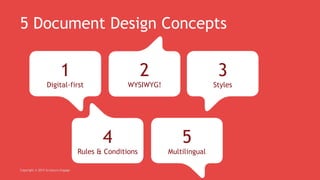
5 Document Design Concepts
Copyright Š 2015 Scriptura Engage
1
Digital-first
4
Rules & Conditions
2
WYSIWYG!
5
Multilingual
3
Styles
Digital-first
Copyright Š 2015 Scriptura Engage
• Digital-first means digital should be priority,
but paper still supported during transformation
• Each channel has its particular output flair
So don’t push out a scanned paper via email
• Bear in mind responsive design for mobile
• Invest in a digital-first communications
platform that supports multichannel delivery
WYSIWYG
Copyright Š 2015 Scriptura Engage
• What is more important than your time?
• You can design & modify templates < 1 day
• See the difference: it used to take up to 30 days
• Is programming still needed? No!
• What does my organization need to invest in?
• You should use an intuitive design environment
• Get your other work done as well by doing so!
Styles
Copyright Š 2015 Scriptura Engage
• Your Brand is one of your most important assets
• Protect it by assuring consistency:
 in all your communications and documents
 across the entire organization
 for each brand your organization may hold
How?
• Make use of Styles in your template design
• Promote and support the need of a customer
communications strategy in your organization
Rules &
Conditions
Copyright Š 2015 Scriptura Engage
• Convince your customers twice:
 Make your communications relevant
 Make your communications efficient
• Convince your colleagues twice:
 Offer wizard-driven conditions
 Offer one template for multiple documents
How?
• Embed conditional logic in your templates
• Include business rules in the template design
Multilingual
Copyright Š 2015 Scriptura Engage
• Language is one of the most sensitive aspects in
customer experience
• Use a communications platform that enables
you to design 1 template for multiple languages
• Consequently reduce the number of templates
• And enjoy your regained time
• Increase your customers’ responses by speaking
their language!
More info? Contact us:
EU phone: +32 3 425 40 00
US phone: 011 32 3 425 40 00
email: info@inventivegroup.com
Copyright Š 2015 Scriptura Engage

5 concepts of document design

  • 1.
    5 Document Design Concepts June2015 Copyright Š 2015 Scriptura Engage
  • 2.
    You’re not alonein dealing with document design Copyright © 2015 Scriptura Engage • Efficiently creating document templates and output has a huge impact on your business. • Whether you are designing transactional documents, digital forms or customer onboarding communications, you will encounter similar challenges a lot of your peers in other industries are confronted with. • Organizations can save time and money by focusing on the right concepts to make document design more efficient. Here’s some Empowerment! Based on our experience we discovered 5 design concepts that can make a huge difference when designing communications. We are confident that one or more of these concepts will be of great value for your business.
  • 3.
    5 Document DesignConcepts Copyright Š 2015 Scriptura Engage 1 Digital-first 4 Rules & Conditions 2 WYSIWYG! 5 Multilingual 3 Styles
  • 4.
    Digital-first Copyright © 2015Scriptura Engage • Digital-first means digital should be priority, but paper still supported during transformation • Each channel has its particular output flair So don’t push out a scanned paper via email • Bear in mind responsive design for mobile • Invest in a digital-first communications platform that supports multichannel delivery
  • 5.
    WYSIWYG Copyright © 2015Scriptura Engage • What is more important than your time? • You can design & modify templates < 1 day • See the difference: it used to take up to 30 days • Is programming still needed? No! • What does my organization need to invest in? • You should use an intuitive design environment • Get your other work done as well by doing so!
  • 6.
    Styles Copyright © 2015Scriptura Engage • Your Brand is one of your most important assets • Protect it by assuring consistency:  in all your communications and documents  across the entire organization  for each brand your organization may hold How? • Make use of Styles in your template design • Promote and support the need of a customer communications strategy in your organization
  • 7.
    Rules & Conditions Copyright ©2015 Scriptura Engage • Convince your customers twice:  Make your communications relevant  Make your communications efficient • Convince your colleagues twice:  Offer wizard-driven conditions  Offer one template for multiple documents How? • Embed conditional logic in your templates • Include business rules in the template design
  • 8.
    Multilingual Copyright © 2015Scriptura Engage • Language is one of the most sensitive aspects in customer experience • Use a communications platform that enables you to design 1 template for multiple languages • Consequently reduce the number of templates • And enjoy your regained time • Increase your customers’ responses by speaking their language!
  • 9.
    More info? Contactus: EU phone: +32 3 425 40 00 US phone: 011 32 3 425 40 00 email: info@inventivegroup.com Copyright Š 2015 Scriptura Engage