Productivity Improvements Four Different Models Print Speeds up to 45ppm Scan Speeds up to 57ppm New Energy Efficient, Low Temperature Fuser System Banner Mode Printing
Productivity Improvements Blank Page Omission Outside Erase Faster Creation of Slim PDFs  New Low Cost Hanging Finisher e-Bridge Open Architecture e-CONNECT support
Four New Models (Competitive & Faster Speeds)  Higher Speed 45ppm color model More Competitive 23ppm model
Energy Efficient, Low Temperature Fusing System Key New Technology for 45ppm color performance! Reduced energy consumption, optimizes energy efficiency, More stable process e-STUDIO4520c
Banner Printing Mode Print on 12” x 47” Wide Banners  Finishers Supported
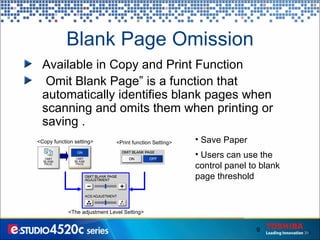
Blank Page Omission Save Paper Users can use the control panel to blank page threshold <Copy function setting> <Print function Setting> <The adjustment Level Setting> Available in Copy and Print Function Omit Blank Page” is a function that automatically identifies  blank pages when scanning and omits them when printing or saving .
Original Outside Erase &quot;Original Outside Erase&quot; is a function that automatically removes the surrounding dark area if a page is copied or scanned with the platen/RADF open With cover closed   With cover open   Using  “original outside erase”  function
Faster Creation of High Compression PDFs (Slim PDF)  The optional Image Acceleration Board is equipped with a programmable media processor for imaging processing.  As a result, the compression times to create Slim PDF can drastically shorten.  6 times faster processing speed  Imaging Acceleration Board
Paper Handling Configuration
New MJ1031  Hanging Finisher Improvements over MJ1022 1000 Sheet (not 900) 50 Sheet Stapling Finisher  (not 30 sheets)  12” x 18” Paper Support  MSRP $1,525
 
Improved Image Quality New e-FINE Toner and Developer Patented Toshiba IQ ASICS (e-FINE) Modified Development System New doctor blade New Color Registration Control New Auto Toner Control (ATC) System New Image Quality Control (ITC) Function Better Red Reproduction
New e-FINE Toner and Developer Enhanced Color Gamut  Improved Color Reproduction  Better Hue, Saturation and Brightness. Semi-Glossy Image
Patented Toshiba IQ  ASICS (e-FINE) Copy  IQ Improvements Improved detail in dark areas (shadows) e-STUDIO4520c e-STUDIO3510c
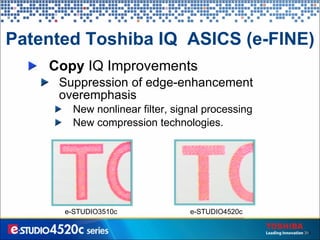
Patented Toshiba IQ  ASICS (e-FINE) Copy  IQ Improvements Suppression of edge-enhancement overemphasis New nonlinear filter, signal processing  New compression technologies.  e-STUDIO3510c e-STUDIO4520c
Patented Toshiba IQ  ASICS (e-FINE) Copy  IQ Improvements Graininess has been improved with new compression technologies e-STUDIO3510c e-STUDIO4520c
Patented Toshiba IQ  ASICS (e-FINE) Copy  IQ Improvements Clearer reproduction of text on color  background achieved by new half tone processing and filter algorithm  e-STUDIO3510c e-STUDIO4520c
Patented Toshiba IQ  ASICS (e-FINE) Print  IQ Improvements Improvement of half tone reproduction and color density  e-STUDIO3510c e-STUDIO4520c Original
Patented Toshiba IQ  ASICS (e-FINE) Print IQ  Improvements New Toner limit processing eliminates toner scattering while maintaining halftone sharpness e-STUDIO3510c e-STUDIO4520c e-STUDIO3510c e-STUDIO4520c
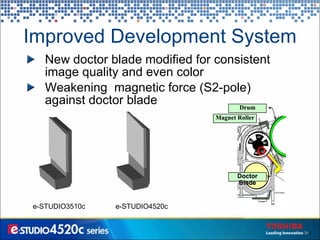
Improved Development System New doctor blade modified for consistent image quality and even color Weakening  magnetic force (S2-pole) against doctor blade e-STUDIO3510c e-STUDIO4520c Magnet Roller Doctor Blade Drum
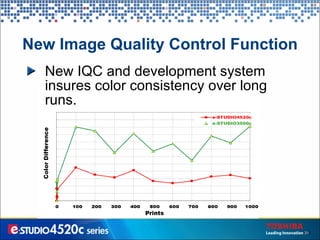
New Image Quality Control Function New IQC and development system insures color consistency over long runs.
New Color Registration Control Out of registration colors improved by over 10% K2 Position Error   Drum phase suiting
Better Red Reproduction A fixed resistor was added to the high voltage circuit of the first transfer roller Poor red was caused by the loss of Magenta toner by re-transfer. 3510c 4520c V0 GND Supply   Voltage 1 st  Transfer Roller +Transfer Belt Toner Photoconductor Fixed Resistance e-STUDIO3510c e-STUDIO4520c
 
Operability New 8.5 inch WVGA control panel “ My Menu” function Scan Preview Control Panel Print Function Button Improved Fax Function Interface Foreign Language Template Print Driver Import and Export Feature Secure Pattern Printing Feature
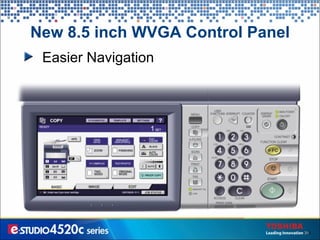
New 8.5 inch WVGA Control Panel Easier Navigation
“ My Menu” Function When using user authentication, the  &quot;My Menu&quot;  screen is personalized for each user Available Functions Personal Template Groups User name User Counter Information Personalized Templates
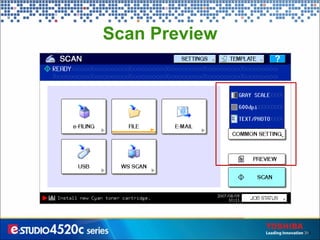
Scan Preview
Scan Preview
Control Panel Print Button
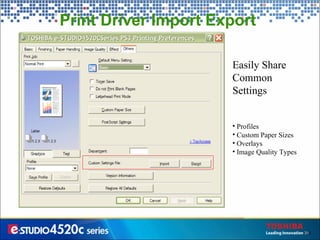
Print Driver Import Export  Easily Share Common Settings Profiles Custom Paper Sizes Overlays Image Quality Types
Print Driver Top Access
Print Driver ICC Profile Support 1. Select “Advanced”. 2. Click “Setting”. 3. Select “RGB” and/or “CMYK” “Source Profile”. 4. Select “Destination Profile”. User can choose whether to apply the source profiles to device color only or not. Choose the rendering intent. All profiles stored in MFP are listed.
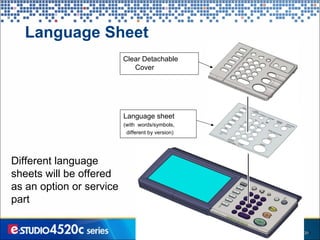
Language Sheet Different language sheets will be offered as an option or service part Language sheet (with  words/symbols, different by version)  Clear Detachable Cover
All cassettes (drawers) can be opened from the top and bottom Easy Drawer Accessibility
 
Serviceability Easy Replaceable Unit Design (ERU) Initial Developer is Shipped with product 70% initial setup costs savings for dealers
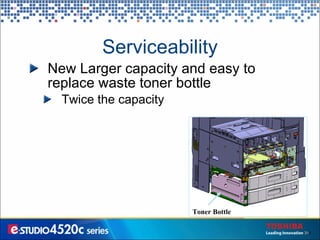
Serviceability New Larger capacity and easy to replace waste toner bottle Twice the capacity Toner Bottle
Serviceability Improved Development System Reliability New Developer New Toner Different Airflow Dust Filter New Pressure Removal Opening on the Developer Unit Lid to reduce the  amount of toner splash Pressure Removal Opening Partition Plate Filter
Serviceability Improved Transfer Belt Reliability PTFE coating to reduce the toner fixation    PTFE Coating
 

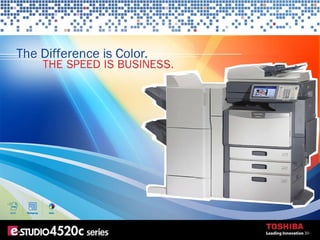
EStudio 4520c Color MFP Presentation

  • 1.
  • 2.
  • 3.
  • 4.
    Productivity Improvements FourDifferent Models Print Speeds up to 45ppm Scan Speeds up to 57ppm New Energy Efficient, Low Temperature Fuser System Banner Mode Printing
  • 5.
    Productivity Improvements BlankPage Omission Outside Erase Faster Creation of Slim PDFs New Low Cost Hanging Finisher e-Bridge Open Architecture e-CONNECT support
  • 6.
    Four New Models(Competitive & Faster Speeds) Higher Speed 45ppm color model More Competitive 23ppm model
  • 7.
    Energy Efficient, LowTemperature Fusing System Key New Technology for 45ppm color performance! Reduced energy consumption, optimizes energy efficiency, More stable process e-STUDIO4520c
  • 8.
    Banner Printing ModePrint on 12” x 47” Wide Banners Finishers Supported
  • 9.
    Blank Page OmissionSave Paper Users can use the control panel to blank page threshold <Copy function setting> <Print function Setting> <The adjustment Level Setting> Available in Copy and Print Function Omit Blank Page” is a function that automatically identifies blank pages when scanning and omits them when printing or saving .
  • 10.
    Original Outside Erase&quot;Original Outside Erase&quot; is a function that automatically removes the surrounding dark area if a page is copied or scanned with the platen/RADF open With cover closed With cover open Using “original outside erase” function
  • 11.
    Faster Creation ofHigh Compression PDFs (Slim PDF) The optional Image Acceleration Board is equipped with a programmable media processor for imaging processing. As a result, the compression times to create Slim PDF can drastically shorten. 6 times faster processing speed Imaging Acceleration Board
  • 12.
  • 13.
    New MJ1031 Hanging Finisher Improvements over MJ1022 1000 Sheet (not 900) 50 Sheet Stapling Finisher (not 30 sheets) 12” x 18” Paper Support MSRP $1,525
  • 14.
  • 15.
    Improved Image QualityNew e-FINE Toner and Developer Patented Toshiba IQ ASICS (e-FINE) Modified Development System New doctor blade New Color Registration Control New Auto Toner Control (ATC) System New Image Quality Control (ITC) Function Better Red Reproduction
  • 16.
    New e-FINE Tonerand Developer Enhanced Color Gamut Improved Color Reproduction Better Hue, Saturation and Brightness. Semi-Glossy Image
  • 17.
    Patented Toshiba IQ ASICS (e-FINE) Copy IQ Improvements Improved detail in dark areas (shadows) e-STUDIO4520c e-STUDIO3510c
  • 18.
    Patented Toshiba IQ ASICS (e-FINE) Copy IQ Improvements Suppression of edge-enhancement overemphasis New nonlinear filter, signal processing New compression technologies. e-STUDIO3510c e-STUDIO4520c
  • 19.
    Patented Toshiba IQ ASICS (e-FINE) Copy IQ Improvements Graininess has been improved with new compression technologies e-STUDIO3510c e-STUDIO4520c
  • 20.
    Patented Toshiba IQ ASICS (e-FINE) Copy IQ Improvements Clearer reproduction of text on color background achieved by new half tone processing and filter algorithm e-STUDIO3510c e-STUDIO4520c
  • 21.
    Patented Toshiba IQ ASICS (e-FINE) Print IQ Improvements Improvement of half tone reproduction and color density e-STUDIO3510c e-STUDIO4520c Original
  • 22.
    Patented Toshiba IQ ASICS (e-FINE) Print IQ Improvements New Toner limit processing eliminates toner scattering while maintaining halftone sharpness e-STUDIO3510c e-STUDIO4520c e-STUDIO3510c e-STUDIO4520c
  • 23.
    Improved Development SystemNew doctor blade modified for consistent image quality and even color Weakening magnetic force (S2-pole) against doctor blade e-STUDIO3510c e-STUDIO4520c Magnet Roller Doctor Blade Drum
  • 24.
    New Image QualityControl Function New IQC and development system insures color consistency over long runs.
  • 25.
    New Color RegistrationControl Out of registration colors improved by over 10% K2 Position Error Drum phase suiting
  • 26.
    Better Red ReproductionA fixed resistor was added to the high voltage circuit of the first transfer roller Poor red was caused by the loss of Magenta toner by re-transfer. 3510c 4520c V0 GND Supply   Voltage 1 st Transfer Roller +Transfer Belt Toner Photoconductor Fixed Resistance e-STUDIO3510c e-STUDIO4520c
  • 27.
  • 28.
    Operability New 8.5inch WVGA control panel “ My Menu” function Scan Preview Control Panel Print Function Button Improved Fax Function Interface Foreign Language Template Print Driver Import and Export Feature Secure Pattern Printing Feature
  • 29.
    New 8.5 inchWVGA Control Panel Easier Navigation
  • 30.
    “ My Menu”Function When using user authentication, the &quot;My Menu&quot; screen is personalized for each user Available Functions Personal Template Groups User name User Counter Information Personalized Templates
  • 31.
  • 32.
  • 33.
  • 34.
    Print Driver ImportExport Easily Share Common Settings Profiles Custom Paper Sizes Overlays Image Quality Types
  • 35.
  • 36.
    Print Driver ICCProfile Support 1. Select “Advanced”. 2. Click “Setting”. 3. Select “RGB” and/or “CMYK” “Source Profile”. 4. Select “Destination Profile”. User can choose whether to apply the source profiles to device color only or not. Choose the rendering intent. All profiles stored in MFP are listed.
  • 37.
    Language Sheet Differentlanguage sheets will be offered as an option or service part Language sheet (with words/symbols, different by version) Clear Detachable Cover
  • 38.
    All cassettes (drawers)can be opened from the top and bottom Easy Drawer Accessibility
  • 39.
  • 40.
    Serviceability Easy ReplaceableUnit Design (ERU) Initial Developer is Shipped with product 70% initial setup costs savings for dealers
  • 41.
    Serviceability New Largercapacity and easy to replace waste toner bottle Twice the capacity Toner Bottle
  • 42.
    Serviceability Improved DevelopmentSystem Reliability New Developer New Toner Different Airflow Dust Filter New Pressure Removal Opening on the Developer Unit Lid to reduce the amount of toner splash Pressure Removal Opening Partition Plate Filter
  • 43.
    Serviceability Improved TransferBelt Reliability PTFE coating to reduce the toner fixation   PTFE Coating
  • 44.

Editor's Notes

  • #8 The newly added a sub-heater lamp on e-STUDIO4520C series keep the temperature from falling off during the start-up stage. By adjusting the timing of the sub-heater lamp with the preassure roller, the fusing becomes more a stable fusing process.