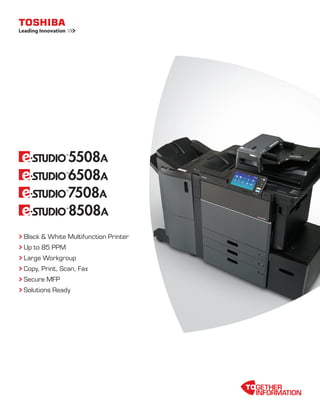
Black  White Multifunction Printer
Up to 85 PPM
Large Workgroup
Copy, Print, Scan, Fax
Secure MFP
Solutions Ready
Technology for every office, delivering advanced
functionality, ease of use and peace of mind.
Every industry has unique workflow needs. Toshiba has
developed customizable MFPs to make your job easier. Intuitive
and smartly integrated, our products simplify complex tasks and
give you control while providing the reliability Toshiba is known for.
Toshiba’s latest series delivers on our promise of Together
Information – our commitment to collaborate with clients
in order to provide tailored, cost-effective solutions that
meet your print, document management and content
needs while helping you meet your green objectives.
•• Speeds of 55, 65, 75 and 85 PPM black  white
•• Outstanding image quality and extra-high volume
•• Advanced e-BRIDGE Next technology
•• Fast dual-core processor
CONNECT. INTEGRATE. SIMPLIFY.
Faster, sleeker, and more volume than ever.
Toshiba is now introducing a sleek new lineup
that looks great inside and out. Along with an
ultra-modern look, you’ll also find innovative
technology like crisp, clean monochrome output
delivered at up to 85 pages per minute with an
impressive 6,020-sheet maximum capacity.
•• Precise 2,400 dpi x 600 dpi
with smoothing for text
•• Up to 3,600 dpi x 1,200 dpi in PostScript mode
•• New high-speed, high-capacity
Dual-Scan Document Feeder
•• Up to 720K maximum monthly copy volume
e-STUDIO5508A/e-STUDIO6508A/e-STUDIO7508A/e-STUDIO8508A
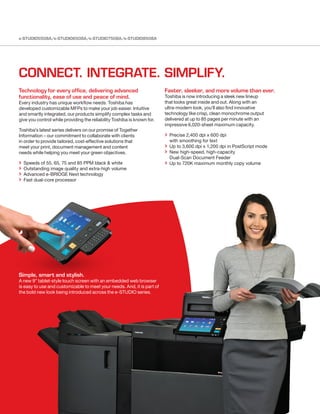
Simple, smart and stylish.
A new 9” tablet-style touch screen with an embedded web browser
is easy to use and customizable to meet your needs. And, it is part of
the bold new look being introduced across the e-STUDIO series.
FEATURES AND BENEFITS
AND MORE OF THEM.
With the Toshiba e-STUDIO8508A series, you can
improve workgroup connection, integrate and
simplify while improving efficiency with ultra-high
quality output at unprecedented volumes.
Higher Robust Speeds include 55/65/75/85
monochrome pages per minute.
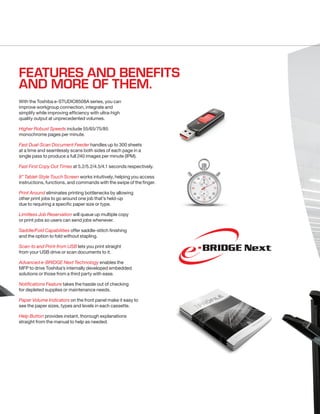
Fast Dual-Scan Document Feeder handles up to 300 sheets
at a time and seamlessly scans both sides of each page in a
single pass to produce a full 240 images per minute (IPM).
Fast First Copy Out Times at 5.2/5.2/4.5/4.1 seconds respectively.
9” Tablet-Style Touch Screen works intuitively, helping you access
instructions, functions, and commands with the swipe of the finger.
Print Around eliminates printing bottlenecks by allowing
other print jobs to go around one job that’s held-up
due to requiring a specific paper size or type.
Limitless Job Reservation will queue up multiple copy
or print jobs so users can send jobs whenever.
Saddle/Fold Capabilities offer saddle-stitch finishing
and the option to fold without stapling.
Scan-to and Print-from USB lets you print straight
from your USB drive or scan documents to it.
Advanced e-BRIDGE Next Technology enables the
MFP to drive Toshiba’s internally developed embedded
solutions or those from a third party with ease.
Notifications Feature takes the hassle out of checking
for depleted supplies or maintenance needs.
Paper Volume Indicators on the front panel make it easy to
see the paper sizes, types and levels in each cassette.
Help Button provides instant, thorough explanations
straight from the manual to help as needed.
HOW TOSHIBA IS RAISING
THE STANDARD.
When it comes to seamless workflow and simplified
integration, the e-STUDIO8508A series represents the
finest Toshiba has to offer. The latest e-BRIDGE Next
technology enables complete third-party integration and
support for internally driven solutions. A universal driver
along with PCL 6, PS3, and XPS support provide fast and
easy connectivity to Windows®
, Macintosh®
and more.
AirPrint and Mopria™
support means mobile users can print to
the MFP with ease. The e-BRIDGE Print  Capture application
provides additional capabilities including the ability to scan
from the MFP back to your mobile device. Also, a Dual-Line
Fax option can handle heavy fax volumes with ease.
Cloud Support
New Scan-to-Cloud and Cloud Print capabilities increase
productivity by allowing users to access, store and print
documents remotely from the MFP. Whether it’s Dropbox,
OneDrive or Google Drive, the new e-STUDIO8508A series
makes scanning to these cloud-based locations a breeze,
while embedded support for Google Cloud Print enables
easy printing to the MFP from anywhere you may be.
Advanced Security
Even more important than functionality is the
security offered by the e-STUDIO8508A series.
Such technological advancements include:
•• A 320GB Self-Encrypting Drive (SED) with
Automatic Drive Invalidation (ADI)  Data Overwrite
capability provides top level security
•• FIPS 140-2 Validated SED meets and
exceeds government requirements
•• IPsec is available to securely encrypt
data sent to and from the MFP
Environmental Responsibility
Because we have been working to protect the
environment as well as your security, you can rest
assured Toshiba has what it takes to protect both.
•• RoHS compliance, the use of recycled
plastics, and Low-Power (0.6W) Super Sleep
Mode work to help the environment
•• EPEAT Gold Registered in the global registry for
greener electronics, designed to help purchasers
choose products that reduce environmental impact
•• Energy Star V2.0 meets the latest,
more stringent requirements
PROOF WE’RE CONSTANTLY
REACHING HIGHER.
The Toshiba e-STUDIO8508A series tops all previous machines and helps large workgroups
improve productivity and connectivity while simplifying the overall workflow.
Double the Scan Speed
A 300-sheet high-speed, high-capacity Dual-
Scan Document Feeder (DSDF) produces up
to 120 IPM simplex and 240 IPM duplex.
Bluetooth/WiFi Option
Bluetooth feature provides support for a wireless keyboard to
simplify workflow processes at the MFP, while the WiFi capability
enables WiFi-Direct printing making it ideal for mobile users
Volumes and Volumes
A high monthly copy volume is 520K/590K/660K/720K
respectively. Impressive toner yields are 106,600 at 5% coverage.
Multi-Station Print Enabler
Toshiba’s internally developed Multi-Station Print Enabler
allows users to send print jobs from their desktop and
retrieve them at any convenient MFP by simply swiping
their badge and authenticating at that device.
Advanced e-BRIDGE Next Technology
Built on Linux®, this latest generation e-BRIDGE Next
architecture features an Embedded Web Browser, an Intel
Atom™
dual-core processor, 4GB RAM and a 320GB FIPS
140-2 Validated SED enabling the MFP to easily drive Toshiba’s
internally developed solutions or even third-party applications.
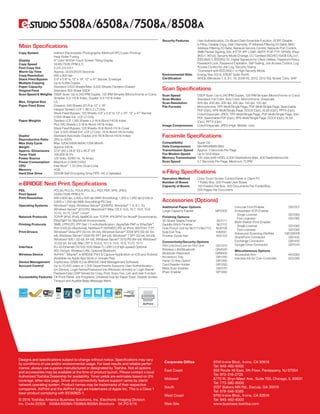
1
2 3
1	Accessory Tray  Keyboard Options
	 GR1250 – Accessory Tray
	 GR9000 – Bluetooth Keyboard
	 GR1260 – 10-Key Numeric Keypad
2	Finishing Options
	 MJ1111 – 50-Sheet Console Finisher
	 MJ1112 – 50-Sheet Saddle Stitch Finisher
	 MJ6106 – Hole Punch Unit
	 KA6551 – Side Exit Tray
3 	Connectivity Options
	 GD1370 – Fax Unit/2nd Line for Fax Unit
	 GN4020 – Wireless LAN/Bluetooth Module
	
4	 Additional Paper Options
	 MP2502 – 2,500 Sheet Large Capacity Feeder
Additional Option Highlights
•• IPsec Security Enabler
•• Multi-Station Print Enabler
•• Embedded OCR Enabler
4
Designs and specifications subject to change without notice. Specifications may vary
by conditions of use and/or environmental usage. For best results and reliable perfor-
mance, always use supplies manufactured or designated by Toshiba. Not all options
and accessories may be available at the time of product launch. Please contact a local
Authorized Toshiba Dealership for availability. Toner yields are estimates based on 5%
coverage, letter-size page. Driver and connectivity feature support varies by client/
network operating system. Product names may be trademarks of their respective
companies. AirPrint and the AirPrint logo are trademarks of Apple Inc. This is a Class 1
laser product complying with IEC60825-1.
© 2016 Toshiba America Business Solutions, Inc. Electronic Imaging Division
Inv. Code 22308 5508A/6508A/75086A/8508A Brochure 5K PG 6/16
Main Specifications
Copy System	Indirect Electrostatic Photographic Method/OPC/Laser Printing/
Heat Roller Fusing
Display	9” Color WVGA Touch Screen Tilting Display
Copy Speed	 55/65/75/85 PPM (LT)
First Copy Out	 5.2/5.2/4.5/4.1
Warm-Up Time	 Approx. 24/24/20/20 Seconds
Copy Resolution	 600 x 600 dpi
Stack Feed Bypass	 3.9” x 5.8” to 13” x 19”, 12” x 47” Banner, Envelope
Multiple Copying	 Up to 9,999 Copies
Paper Capacity	 Standard 3,520 Sheets/Max. 6,020 Sheets (Tandem Drawer)
Original Feed	 Standard 300-Sheet DSDF
Scan Speed  Weights	DSDF Scan: Up to 240 IPM Duplex, 120 IPM Simplex (Monochrome or Color),
Simplex: 9.3-110 lb Index, Duplex: 9.3-110 lb Index
Max. Original Size	LD
Paper Feed Sizes	Drawers: 540 Sheets-ST-R to 12” x 18”
	Integral Tandem LCF 1,160 x 2 LT-Only
	 Stack Feed Bypass: 120 Sheets-3.9” x 5.8” to 13” x 19”, 12” x 47” Banner
	2,500-Sheet Ext. LCF LT-Only
Paper Weights 	Tandem LCF 1,160 Sheets x 2-16 lb Bond-140 lb Index
	Plus 540 Sheets x 2-16 lb Bond-140 lb Index
	Stack Feed Bypass: 120 Sheets-16 lb Bond-110 lb Cover
	 Opt. 2,500-Sheet Ext. LCF LT-Only -16 lb Bond-140 lb Index
Duplex	Standard Automatic Duplex Unit (16 lb Bond-140 lb Index)
Reproduction Ratio	 25% to 400%
Max Duty Cycle	Max. 520K/590K/660K/720K Month
Weight	 Approx.430 lb
Approx. Dimensions	 37.6” (W) x 28.9” (D) x 48.3” (H)
Toner Yield	 106,600 @ 5%
Power Source	 120 Volts, 50/60 Hz, 16 Amps
Power Consumption	 Maximum 2.0kW (120V)
CPU	 Intel Atom™
1.33 GHz (Dual-Core)
Memory	4GB
Hard Disk Drive	 320GB Self-Encrypting Drive FIPS 140-2 Validated
e-BRIDGE Next Print Specifications
PDL	 PCL5e, PCL5c, PCL6 (PCL XL), PS3, PDF, XPS, JPEG
Print Speed	 55/65/75/85 PPM (LT)
Print Resolution	600 x 600 dpi, 2,400 x 600 dpi (With Smoothing), 1,200 x 1,200 dpi (2-bit) or
3,600 x 1,200 dpi (With Smoothing) PS Only
Operating Systems	Windows®
Vista, Windows Server®
2008/R2, Windows®
7, 8, 8.1, 10,
Windows Server®
2012/R2, Macintosh®
(Mac OS X 10.6, 10.7, 10.8, 10.9,
10.10, 10.11), Unix®
, Linux®
Network Protocols	TCP/IP (IPv4, IPv6), NetBIOS over TCP/IP, IPX/SPX®
for Novell®
Environments,
EtherTalk®
for Macintosh Environments
Printing Protocols	SMB, LPR/LPD, IPP (Ver.1.1) w/Authentication, AppleTalk PAP or EtherTalk™
,
Port 9100 (bi-directional), NetWare P-SERVER LPD w/ iPrint, WS Print, FTP
Print Drivers	Windows®
Vista SP2 (32-bit, 64-bit), Windows Server®
2008 SP2 (32-bit, 64-
bit), Windows Server®
2008 R2 SP1 (64-bit), Windows®
7 SP1 (32-bit, 64-bit),
Windows®
8/8.1 (32-bit, 64-bit), Windows Server®
2012/R2 (64-bit), Windows®
10 (32-bit, 64-bit), Mac OS®
X 10.6.8, 10.7.4, 10.8, 10.9, 10.10, 10.11
Interface	RJ-45 Ethernet (10/100/1000 Base-T), USB 2.0 (High-speed) Optional
802.11b/g/n, Wireless LAN, Optional Bluetooth
Wireless Device	AirPrint™
, Mopria®
, e-BRIDGE Print  Capture Application on iOS and Android
(Available via Apple App Store or Google Play)
Device Management	 TopAccess, EFMS 6.2 (e-BRIDGE Fleet Management Software)
Account Control	Up to 10,000 users or 1,000 Departments Supports User Authentication
(on Device), Login Name/Password (via Windows domain) or Login Name/
Password (via LDAP Server) for Copy, Print, Scan, Fax, List, and User Function
Accessibility Features	Tilt Front Panel, Job Programs, Universal Grip for Paper Trays, Disable Screen
Timeout and Audible Beep Message Alerts
Security Features	User Authentication, On-Board Data Scramble Function, SCEP, Disable
e-Filing, Disable Copy, Disk Overwrite, IP Address Filtering (10 Sets), MAC
Address Filtering (10 Sets), Network Service Control, Network Port Control,
SMB Packet Signing, SSL (HTTP, IPP, LDAP, SMTP, POP, FTP, DPWS), IPsec
(IKEv1, IKEv2), Security Mode Change, CC Certified (ISO/IEC15408 EAL3+)*,
IEEE2600.1, IEEE802.1X, Digital Signature for Client Utilities, Password Policy,
Password Lock, Password Expiration, Self Testing, Job Access Control, Log
Access Control for Job Log, Security Stamp
	 *Compliant with IEEE2600.1 in High Security Mode.
Environmental Stds.	Energy Star (V2.0), EPEAT Gold, RoHS
Certification	 WHQL (Windows 7, 8, 8.1, 10, 2008 R2, 2012, 2012 R2), Novell, Citrix, SAP
Scan Specifications
Scan Speed	DSDF Scan: Up to 240 IPM Duplex, 120 IPM Simplex (Monochrome or Color)
Scan Modes	 Standard: Full Color, Auto Color, Monochrome, Grayscale
Scan Resolution	 600 dpi, 400 dpi, 300 dpi, 200 dpi, 150 dpi, 100 dpi
File Formats	Monochrome: TIFF-Multi/Single Page, PDF-Multi/Single Page, Searchable
PDF (Opt.), XPS-Multi/Single Page, DOCX (Opt.), XLSX (Opt.), PPTX (Opt.)
	Color/Grayscale: JPEG, TIFF-Multi/Single Page, PDF-Multi/Single Page, Slim
PDF, Searchable PDF (Opt.), XPS-Multi/Single Page, DOCX (Opt.), XLSX
(Opt.), PPTX (Opt.)
Image Compression	 Color/Grayscale: JPEG (High, Middle, Low)
Facsimile Specifications
Compatibility	 Super G3
Data Compression 	 MH/MR/MMR/JBIG
Transmission Speed 	 Approx. 3 Seconds Per Page
Fax Modem Speed 	 Up to 33.6 Kbps
Memory Transmission	 100 Jobs (with HDD), 2,000 Destinations Max. 400 Destinations/Job
Scan Speed 	 0.7 Seconds Per Page, Maximum 73 IPM
e-Filing Specifications
Operation Method 	 Color Touch Screen Control Panel or Client PC
Number of Boxes 	 1 Public Box, 200 Private User Boxes
Capacity of Boxes 	100 Folders Per Box, 400 Documents Per Folder/Box,
200 Pages Per Document
Accessories (Options)
Additional Paper Options
Large Capacity Feeder	 MP2502
Finishing Options
50-Sheet Staple Finisher	 MJ1111
Saddle-Stitch Finisher	 MJ1112
Hole Punch Unit for MJ1111/MJ1112	 MJ6106
Side Exit Tray	 KA6551
Finisher Guide Rail	 KN1103
Connectivity/Security Options
FAX Unit/2nd Line for FAX Unit	 GD1370
Wireless LAN/Bluetooth	 GN4020
Bluetooth Keyboard	 GR9000
Accessory Tray	 GR1250
Panel 10-Key Option	 GR1260
Card Reader Holder 	 GR1290
Meta Scan Enabler	 GS1010
IPsec Enabler	 GP1080
Unicode Font Enabler	 GS1007
Embedded OCR Enabler	
Single License	 GS1080
Five Licenses	 GS1085
Multi-Station Print Enabler	
Single License	 GS1090
Five Licenses	 GS1095
Advanced Scanning (ReRite) 	 GB1280V8
SharePoint Connector 	 GB1440
Exchange Connector 	 GB1450
Google Drive Connector 	 GB1540
Miscellaneous Options
Accessible Arm	 KK2560
Harness Kit for Coin Controller 	 GQ1280
Corporate Office	 9740 Irvine Blvd., Irvine, CA 92618
	 Tel: 949-462-6000
East Coast	 959 Route 46 East, 5th Floor, Parsippany, NJ 07054
	 Tel: 973-316-2700
Midwest	 8770 W. Bryn Mawr Ave., Suite 700, Chicago, IL 60631
	 Tel: 773-380-6000
South	 2037 Bakers Mill Rd., Dacula, GA 30019
	 Tel: 678-546-9385
West Coast	 9740 Irvine Blvd., Irvine, CA 92618
	 Tel: 949-462-6000
Web Site	 www.business.toshiba.com