CSWD1001
Programming Methods
Decision Structures and Boolean Logic
18/9/2018
CSWD1001 @ Kwan Lee First City Unversity Malaysia
(FCUC)
1
What we’ll learn
• Introduction to decision structures
• If
• If then
• If else
• Nested decision structures
• The case structures – switch case
• Logical operators – True or False
• Boolean variables – 0 or 1
18/9/2018
CSWD1001 @ Kwan Lee First City Unversity Malaysia
(FCUC)
2
Decision Structures
program to perform actions only under certain conditions
allows a
18/9/2018
CSWD1001 @ Kwan Lee First City Unversity Malaysia
(FCUC)
3
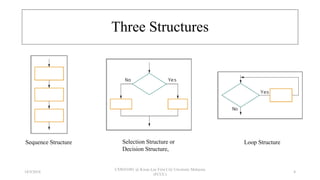
Three Structures
Sequence Structure Selection Structure or
Decision Structure,
Loop Structure
18/9/2018
CSWD1001 @ Kwan Lee First City Unversity Malaysia
(FCUC)
4
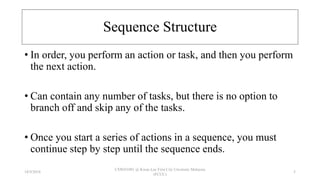
Sequence Structure
• In order, you perform an action or task, and then you perform
the next action.
• Can contain any number of tasks, but there is no option to
branch off and skip any of the tasks.
• Once you start a series of actions in a sequence, you must
continue step by step until the sequence ends.
18/9/2018
CSWD1001 @ Kwan Lee First City Unversity Malaysia
(FCUC)
5
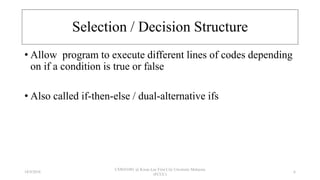
Selection / Decision Structure
• Allow program to execute different lines of codes depending
on if a condition is true or false
• Also called if-then-else / dual-alternative ifs
18/9/2018
CSWD1001 @ Kwan Lee First City Unversity Malaysia
(FCUC)
6
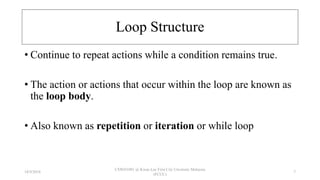
Loop Structure
• Continue to repeat actions while a condition remains true.
• The action or actions that occur within the loop are known as
the loop body.
• Also known as repetition or iteration or while loop
18/9/2018
CSWD1001 @ Kwan Lee First City Unversity Malaysia
(FCUC)
7
Stacking Structures -
Combination all Three Structures
18/9/2018
CSWD1001 @ Kwan Lee First City Unversity Malaysia
(FCUC)
8
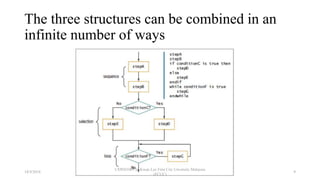
The three structures can be combined in an
infinite number of ways
18/9/2018
CSWD1001 @ Kwan Lee First City Unversity Malaysia
(FCUC)
9
Decision Structures
18/9/2018
CSWD1001 @ Kwan Lee First City Unversity Malaysia
(FCUC)
10
Four Types of Decision Structures
• If-then
• If-else
• Nested If
• Switch case
18/9/2018
CSWD1001 @ Kwan Lee First City Unversity Malaysia
(FCUC)
11
Structures If-then
• Use the If-then statement to write a single alternative decision
structure.
18/9/2018
CSWD1001 @ Kwan Lee First City Unversity Malaysia
(FCUC)
12
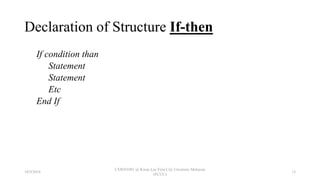
Declaration of Structure If-then
If condition than
Statement
Statement
Etc
End If
18/9/2018
CSWD1001 @ Kwan Lee First City Unversity Malaysia
(FCUC)
13
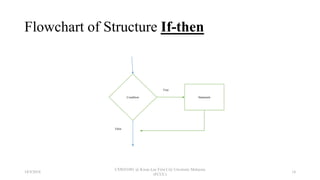
Flowchart of Structure If-then
Condition Statement
True
False
18/9/2018
CSWD1001 @ Kwan Lee First City Unversity Malaysia
(FCUC)
14
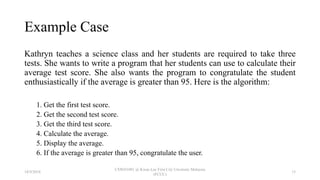
Example Case
Kathryn teaches a science class and her students are required to take three
tests. She wants to write a program that her students can use to calculate their
average test score. She also wants the program to congratulate the student
enthusiastically if the average is greater than 95. Here is the algorithm:
1. Get the first test score.
2. Get the second test score.
3. Get the third test score.
4. Calculate the average.
5. Display the average.
6. If the average is greater than 95, congratulate the user.
18/9/2018
CSWD1001 @ Kwan Lee First City Unversity Malaysia
(FCUC)
15
Pseudocode
Declare Real test1, test2, test3, average // Declare variables
Display "Enter the score for test #1." // Get test 1
Input test1
Display "Enter the score for test #2." // Get test 2
Input test2
Display "Enter the score for test #3." // Get test 3
Input test3
Set average = (test1 + test2 + test3) / 3 // Calculate the average score.
Display "The average is ", average // Display the average.
// If the average is greater than 95, congratulate the user.
If average > 95 Then
Display "Congratulations! Great average!"
End If
Program Output
Enter the score for test #1.
82 [Enter]
Enter the score for test #2.
76 [Enter]
Enter the score for test #3.
91 [Enter]
The average is 83
Enter the score for test #1.
93 [Enter]
Enter the score for test #2.
99 [Enter]
Enter the score for test #3.
96 [Enter]
The average is 96
Congratulations! Great average!
18/9/2018
CSWD1001 @ Kwan Lee First City Unversity Malaysia
(FCUC)
16
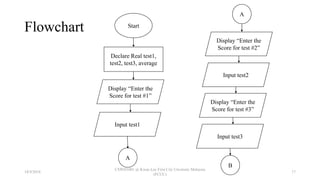
Flowchart Start
Declare Real test1,
test2, test3, average
Display “Enter the
Score for test #1”
Input test1
A
A
Display “Enter the
Score for test #2”
Input test2
Display “Enter the
Score for test #3”
Input test3
B
18/9/2018
CSWD1001 @ Kwan Lee First City Unversity Malaysia
(FCUC)
17
Flowchart Cont…
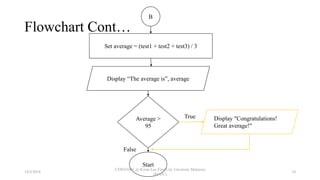
B
Set average = (test1 + test2 + test3) / 3
Display “The average is”, average
Average >
95
Display "Congratulations!
Great average!"
Start
True
False
18/9/2018
CSWD1001 @ Kwan Lee First City Unversity Malaysia
(FCUC)
18
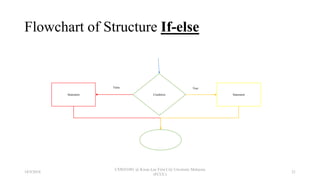
Structure If-else
• Will execute one group of statements if its Boolean
expression is true, or another group if its Boolean expression
is false.
18/9/2018
CSWD1001 @ Kwan Lee First City Unversity Malaysia
(FCUC)
19
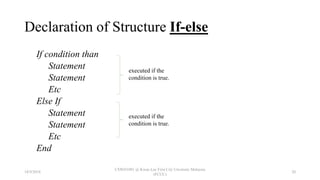
Declaration of Structure If-else
If condition than
Statement
Statement
Etc
Else If
Statement
Statement
Etc
End
executed if the
condition is true.
executed if the
condition is true.
18/9/2018
CSWD1001 @ Kwan Lee First City Unversity Malaysia
(FCUC)
20
Flowchart of Structure If-else
Condition Statement
TrueFalse
Statement
18/9/2018
CSWD1001 @ Kwan Lee First City Unversity Malaysia
(FCUC)
21
Example Case
Chris owns an auto repair business and has several employees. If an
employee works over 40 hours in a week, Chris pays that employee 1.5
times his or her regular hourly pay rate for all hours over 40. Chris has
asked you to design a simple payroll program that calculates an
employee’s gross pay, including any overtime wages. You design the
following algorithm:
1. Get the number of hours worked.
2. Get the hourly pay rate.
3. If the employee worked more than 40 hours, calculate the gross pay with
overtime. Otherwise, calculate the gross pay as usual.
4. Display the gross pay.
18/9/2018
CSWD1001 @ Kwan Lee First City Unversity Malaysia
(FCUC)
22
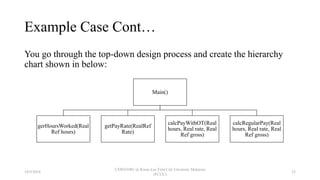
Example Case Cont…
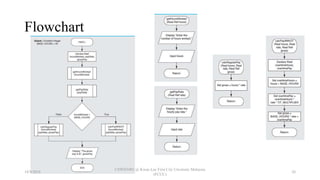
You go through the top-down design process and create the hierarchy
chart shown in below:
Main()
gerHoursWorked(Real
Ref hours)
getPayRate(RealRef
Rate)
calcPayWithOT(Real
hours, Real rate, Real
Ref gross)
calcRegularPay(Real
hours, Real rate, Real
Ref gross)
18/9/2018
CSWD1001 @ Kwan Lee First City Unversity Malaysia
(FCUC)
23
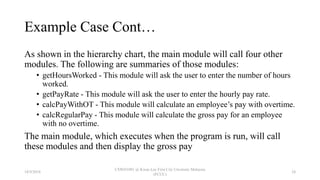
Example Case Cont…
As shown in the hierarchy chart, the main module will call four other
modules. The following are summaries of those modules:
• getHoursWorked - This module will ask the user to enter the number of hours
worked.
• getPayRate - This module will ask the user to enter the hourly pay rate.
• calcPayWithOT - This module will calculate an employee’s pay with overtime.
• calcRegularPay - This module will calculate the gross pay for an employee
with no overtime.
The main module, which executes when the program is run, will call
these modules and then display the gross pay
18/9/2018
CSWD1001 @ Kwan Lee First City Unversity Malaysia
(FCUC)
24
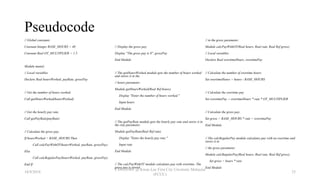
Pseudocode
// Global constants
Constant Integer BASE_HOURS = 40
Constant Real OT_MULTIPLIER = 1.5
Module main()
// Local variables
Declare Real hoursWorked, payRate, grossPay
// Get the number of hours worked.
Call getHoursWorked(hoursWorked)
// Get the hourly pay rate.
Call getPayRate(payRate)
// Calculate the gross pay.
If hoursWorked > BASE_HOURS Then
Call calcPayWithOT(hoursWorked, payRate, grossPay)
Else
Call calcRegularPay(hoursWorked, payRate, grossPay)
End If
// Display the gross pay.
Display "The gross pay is $", grossPay
End Module
// The getHoursWorked module gets the number of hours worked
and stores it in the
// hours parameter.
Module getHoursWorked(Real Ref hours)
Display "Enter the number of hours worked."
Input hours
End Module
// The getPayRate module gets the hourly pay rate and stores it in
the rate parameter.
Module getPayRate(Real Ref rate)
Display "Enter the hourly pay rate."
Input rate
End Module
// The calcPayWithOT module calculates pay with overtime. The
gross pay is stored
// in the gross parameter.
Module calcPayWithOT(Real hours, Real rate, Real Ref gross)
// Local variables
Declare Real overtimeHours, overtimePay
// Calculate the number of overtime hours.
Set overtimeHours = hours - BASE_HOURS
// Calculate the overtime pay
Set overtimePay = overtimeHours * rate * OT_MULTIPLIER
// Calculate the gross pay.
Set gross = BASE_HOURS * rate + overtimePay
End Module
// The calcRegularPay module calculates pay with no overtime and
stores it in
// the gross parameter.
Module calcRegularPay(Real hours, Real rate, Real Ref gross)
Set gross = hours * rate
End Module
18/9/2018
CSWD1001 @ Kwan Lee First City Unversity Malaysia
(FCUC)
25
Flowchart
18/9/2018
CSWD1001 @ Kwan Lee First City Unversity Malaysia
(FCUC)
26
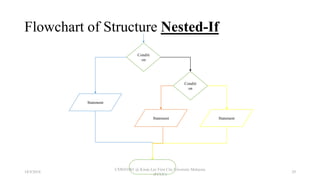
Structure Nested-If
• To test more than one condition, a decision structure can be
nested inside another decision structure.
• Same as if-else, the difference have another if-else inside
main if-else
18/9/2018
CSWD1001 @ Kwan Lee First City Unversity Malaysia
(FCUC)
27
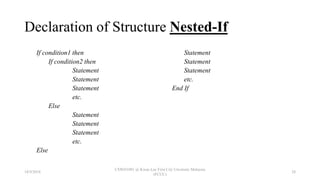
Declaration of Structure Nested-If
If condition1 then
If condition2 then
Statement
Statement
Statement
etc.
Else
Statement
Statement
Statement
etc.
Else
Statement
Statement
Statement
etc.
End If
18/9/2018
CSWD1001 @ Kwan Lee First City Unversity Malaysia
(FCUC)
28
Flowchart of Structure Nested-If
Conditi
on
Conditi
on
Statement
Statement Statement
18/9/2018
CSWD1001 @ Kwan Lee First City Unversity Malaysia
(FCUC)
29
Example Case
Consider a program that determines whether a bank customer
qualifies for a loan. To qualify, two conditions must exist:
1. the customer must earn at least $30,000 per year, and
2. the customer must have been employed at his or her current job
for at least two years.
18/9/2018
CSWD1001 @ Kwan Lee First City Unversity Malaysia
(FCUC)
30
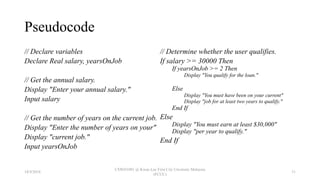
Pseudocode
// Declare variables
Declare Real salary, yearsOnJob
// Get the annual salary.
Display "Enter your annual salary."
Input salary
// Get the number of years on the current job.
Display "Enter the number of years on your"
Display "current job."
Input yearsOnJob
// Determine whether the user qualifies.
If salary >= 30000 Then
If yearsOnJob >= 2 Then
Display "You qualify for the loan."
Else
Display "You must have been on your current"
Display "job for at least two years to qualify."
End If
Else
Display "You must earn at least $30,000"
Display "per year to qualify."
End If
18/9/2018
CSWD1001 @ Kwan Lee First City Unversity Malaysia
(FCUC)
31
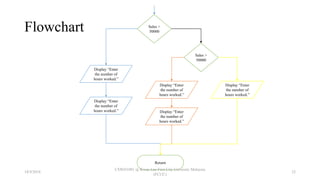
Flowchart Sales >
50000
Sales >
50000
Display “Enter
the number of
hours worked.”
Display “Enter
the number of
hours worked.”
Display “Enter
the number of
hours worked.”
Display “Enter
the number of
hours worked.”
Display “Enter
the number of
hours worked.”
Return
18/9/2018
CSWD1001 @ Kwan Lee First City Unversity Malaysia
(FCUC)
32
Structure Switch Case
• The case structure lets the value of a variable or an
expression determine which path of execution the program
will take.
• The case structure is a multiple alternative decision structure.
18/9/2018
CSWD1001 @ Kwan Lee First City Unversity Malaysia
(FCUC)
33
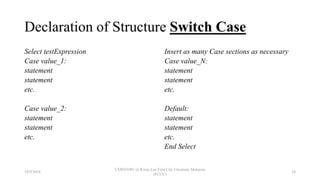
Declaration of Structure Switch Case
Select testExpression
Case value_1:
statement
statement
etc.
Case value_2:
statement
statement
etc.
Insert as many Case sections as necessary
Case value_N:
statement
statement
etc.
Default:
statement
statement
etc.
End Select
18/9/2018
CSWD1001 @ Kwan Lee First City Unversity Malaysia
(FCUC)
34
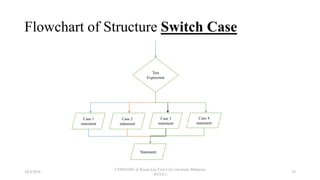
Flowchart of Structure Switch Case
Test
Expression
Case 1
statement
Case 2
statement
Case 3
statement
Case 4
statement
Statement
18/9/2018
CSWD1001 @ Kwan Lee First City Unversity Malaysia
(FCUC)
35
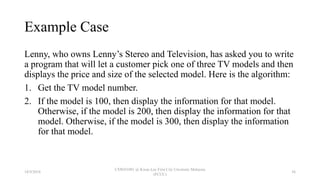
Example Case
Lenny, who owns Lenny’s Stereo and Television, has asked you to write
a program that will let a customer pick one of three TV models and then
displays the price and size of the selected model. Here is the algorithm:
1. Get the TV model number.
2. If the model is 100, then display the information for that model.
Otherwise, if the model is 200, then display the information for that
model. Otherwise, if the model is 300, then display the information
for that model.
18/9/2018
CSWD1001 @ Kwan Lee First City Unversity Malaysia
(FCUC)
36
Pseudocode
// Constants for the TV prices
Constant Real MODEL_100_PRICE = 199.99
Constant Real MODEL_200_PRICE = 269.99
Constant Real MODEL_300_PRICE = 349.99
// Constants for the TV sizes
Constant Integer MODEL_100_SIZE = 24
Constant Integer MODEL_200_SIZE = 27
Constant Integer MODEL_300_SIZE = 32
// Variable for the model number
Declare Integer modelNumber
// Get the model number.
Display "Which TV are you interested in?"
Display "The 100, 200, or 300?"
Input modelNumber
// Display the price and size.
Select modelNumber
Case 100:
Display "Price: $", MODEL_100_PRICE
Display "Size: ", MODEL_100_SIZE
Case 200:
Display "Price: $", MODEL_200_PRICE
Display "Size: ", MODEL_200_SIZE
Case 300:
Display "Price $", MODEL_300_PRICE
Display "Size: ", MODEL_300_SIZE
Default:
Display "Invalid model number"
End Select
Program Output
Which TV are you interested in?
The 100, 200, or 300?
100 [Enter]
Price: $199.99
Size: 24
18/9/2018
CSWD1001 @ Kwan Lee First City Unversity Malaysia
(FCUC)
37
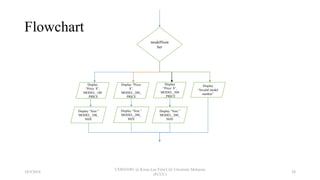
Flowchart
modelNum
ber
Display
“Price: $”,
MODEL_100
_PRICE
Display “Price:
$”,
MODEL_200_
PRICE
Display
“Price: $”,
MODEL_300
_PRICE
Display
“Invalid model
number”
Display “Size:”
MODEL_100_
SIZE
Display “Size:”
MODEL_200_
SIZE
Display “Size:”
MODEL_300_
SIZE
18/9/2018
CSWD1001 @ Kwan Lee First City Unversity Malaysia
(FCUC)
38
Relational Operators
18/9/2018
CSWD1001 @ Kwan Lee First City Unversity Malaysia
(FCUC)
39
A specific relationship exists between two values
Definition
18/9/2018
CSWD1001 @ Kwan Lee First City Unversity Malaysia
(FCUC)
40
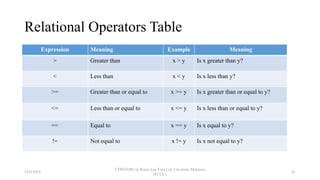
Relational Operators Table
Expression Meaning Example Meaning
> Greater than x > y Is x greater than y?
< Less than x < y Is x less than y?
>= Greater than or equal to x >= y Is x greater than or equal to y?
<= Less than or equal to x <= y Is x less than or equal to y?
== Equal to x == y Is x equal to y?
!= Not equal to x != y Is x not equal to y?
18/9/2018
CSWD1001 @ Kwan Lee First City Unversity Malaysia
(FCUC)
41
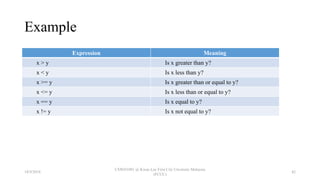
Example
Expression Meaning
x > y Is x greater than y?
x < y Is x less than y?
x >= y Is x greater than or equal to y?
x <= y Is x less than or equal to y?
x == y Is x equal to y?
x != y Is x not equal to y?
18/9/2018
CSWD1001 @ Kwan Lee First City Unversity Malaysia
(FCUC)
42
Logical Operator
18/9/2018
CSWD1001 @ Kwan Lee First City Unversity Malaysia
(FCUC)
43
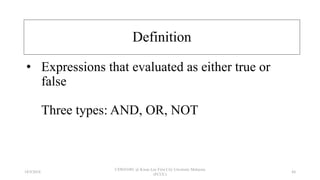
• Expressions that evaluated as either true or
false
Three types: AND, OR, NOT
Definition
18/9/2018
CSWD1001 @ Kwan Lee First City Unversity Malaysia
(FCUC)
44
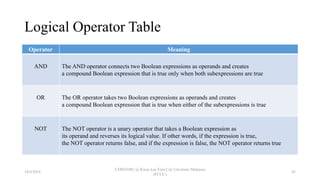
Logical Operator Table
Operator Meaning
AND The AND operator connects two Boolean expressions as operands and creates
a compound Boolean expression that is true only when both subexpressions are true
OR The OR operator takes two Boolean expressions as operands and creates
a compound Boolean expression that is true when either of the subexpressions is true
NOT The NOT operator is a unary operator that takes a Boolean expression as
its operand and reverses its logical value. If other words, if the expression is true,
the NOT operator returns false, and if the expression is false, the NOT operator returns true
18/9/2018
CSWD1001 @ Kwan Lee First City Unversity Malaysia
(FCUC)
45
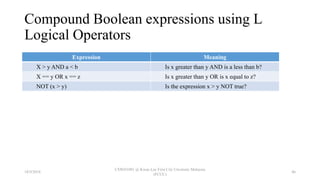
Compound Boolean expressions using L
Logical Operators
Expression Meaning
X > y AND a < b Is x greater than y AND is a less than b?
X == y OR x == z Is x greater than y OR is x equal to z?
NOT (x > y) Is the expression x > y NOT true?
18/9/2018
CSWD1001 @ Kwan Lee First City Unversity Malaysia
(FCUC)
46
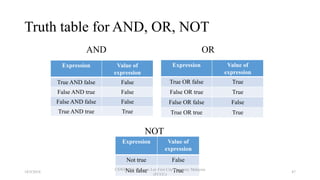
Truth table for AND, OR, NOT
AND
Expression Value of
expression
True AND false False
False AND true False
False AND false False
True AND true True
Expression Value of
expression
True OR false True
False OR true True
False OR false False
True OR true True
OR
Expression Value of
expression
Not true False
Not false True
NOT
18/9/2018
CSWD1001 @ Kwan Lee First City Unversity Malaysia
(FCUC)
47
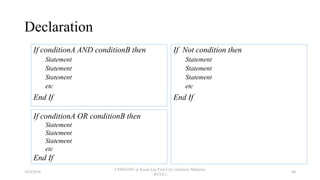
Declaration
If conditionA AND conditionB then
Statement
Statement
Statement
etc
End If
If Not condition then
Statement
Statement
Statement
etc
End If
If conditionA OR conditionB then
Statement
Statement
Statement
etc
End If
18/9/2018
CSWD1001 @ Kwan Lee First City Unversity Malaysia
(FCUC)
48
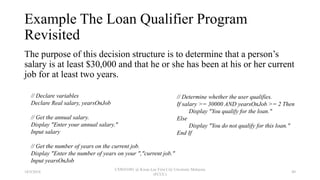
Example The Loan Qualifier Program
Revisited
The purpose of this decision structure is to determine that a person’s
salary is at least $30,000 and that he or she has been at his or her current
job for at least two years.
// Determine whether the user qualifies.
If salary >= 30000 AND yearsOnJob >= 2 Then
Display "You qualify for the loan."
Else
Display "You do not qualify for this loan."
End If
// Declare variables
Declare Real salary, yearsOnJob
// Get the annual salary.
Display "Enter your annual salary."
Input salary
// Get the number of years on the current job.
Display "Enter the number of years on your ","current job."
Input yearsOnJob
18/9/2018
CSWD1001 @ Kwan Lee First City Unversity Malaysia
(FCUC)
49
Yet Another Loan Qualifier Program
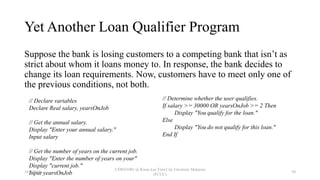
Suppose the bank is losing customers to a competing bank that isn’t as
strict about whom it loans money to. In response, the bank decides to
change its loan requirements. Now, customers have to meet only one of
the previous conditions, not both.
// Determine whether the user qualifies.
If salary >= 30000 OR yearsOnJob >= 2 Then
Display "You qualify for the loan."
Else
Display "You do not qualify for this loan."
End If
// Declare variables
Declare Real salary, yearsOnJob
// Get the annual salary.
Display "Enter your annual salary."
Input salary
// Get the number of years on the current job.
Display "Enter the number of years on your"
Display "current job."
Input yearsOnJob18/9/2018
CSWD1001 @ Kwan Lee First City Unversity Malaysia
(FCUC)
50
Boolean Variables
18/9/2018
CSWD1001 @ Kwan Lee First City Unversity Malaysia
(FCUC)
51
• A Boolean variable can hold one of two values: true or
false.
• Boolean variables are commonly used as flags, which
indicate whether specific conditions exist.
18/9/2018
CSWD1001 @ Kwan Lee First City Unversity Malaysia
(FCUC)
52
Example
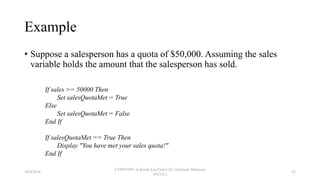
• Suppose a salesperson has a quota of $50,000. Assuming the sales
variable holds the amount that the salesperson has sold.
If sales >= 50000 Then
Set salesQuotaMet = True
Else
Set salesQuotaMet = False
End If
If salesQuotaMet == True Then
Display "You have met your sales quota!"
End If
18/9/2018
CSWD1001 @ Kwan Lee First City Unversity Malaysia
(FCUC)
53
Good Practise as Programmer
18/9/2018
CSWD1001 @ Kwan Lee First City Unversity Malaysia
(FCUC)
54
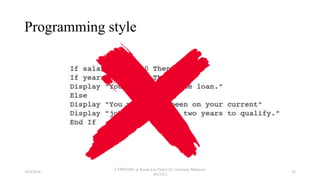
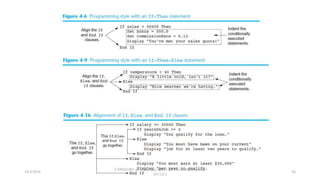
Programming style
18/9/2018
CSWD1001 @ Kwan Lee First City Unversity Malaysia
(FCUC)
55
18/9/2018
CSWD1001 @ Kwan Lee First City Unversity Malaysia
(FCUC)
56
Reasons for Structure
18/9/2018
CSWD1001 @ Kwan Lee First City Unversity Malaysia
(FCUC)
57
Clarity
• The number-doubling program is small. As programs get bigger, they get more
confusing if they are not structured
Professionalism
• All other programmers expect your programs to be structured. It is the way things are
done professionally.
Efficiency
• Most newer computer languages are structured languages with syntax that lets you
deal efficiently with sequence, selection, and looping.
Maintenance
• You and other programmers will find it easier to modify and maintain structured
programs as changes are required in the future.
Modularity
• Structured programs can be easily broken down into routines or modules that can be
assigned to any number of programmers. The routines are then pieced back together.
18/9/2018
CSWD1001 @ Kwan Lee First City Unversity Malaysia
(FCUC)
58
Summary
• Every decision you make in a computer program involves evaluating a
Boolean expression.
• You can use if-then-else or if-then structures to choose between two
possible outcomes. You use if-then-else structures when action is
required whether the selection is true or false. Use if-then structures
when there is only one outcome for the question for which action is
required.
• You can use relational comparison operators to compare two operands
of the same type. Th e standard comparison operators are =, >, <, >=,
<=, and <>.
18/9/2018
CSWD1001 @ Kwan Lee First City Unversity Malaysia
(FCUC)
59
Summary
• In an AND decision, two conditions must be true for a resulting action
to take place. An AND decision requires a nested decision, or a nested
if.
• In an OR decision, at least one of two conditions must be true for a
resulting action to take place. In an OR decision, fi rst ask the question
that is more likely to be true.
• When you combine AND and OR operators in an expression, the AND
operators take precedence, meaning their Boolean values are evaluated
first.
18/9/2018
CSWD1001 @ Kwan Lee First City Unversity Malaysia
(FCUC)
60

4 Decision Structures and Boolean Logic

  • 1.
    CSWD1001 Programming Methods Decision Structuresand Boolean Logic 18/9/2018 CSWD1001 @ Kwan Lee First City Unversity Malaysia (FCUC) 1
  • 2.
    What we’ll learn •Introduction to decision structures • If • If then • If else • Nested decision structures • The case structures – switch case • Logical operators – True or False • Boolean variables – 0 or 1 18/9/2018 CSWD1001 @ Kwan Lee First City Unversity Malaysia (FCUC) 2
  • 3.
    Decision Structures program toperform actions only under certain conditions allows a 18/9/2018 CSWD1001 @ Kwan Lee First City Unversity Malaysia (FCUC) 3
  • 4.
    Three Structures Sequence StructureSelection Structure or Decision Structure, Loop Structure 18/9/2018 CSWD1001 @ Kwan Lee First City Unversity Malaysia (FCUC) 4
  • 5.
    Sequence Structure • Inorder, you perform an action or task, and then you perform the next action. • Can contain any number of tasks, but there is no option to branch off and skip any of the tasks. • Once you start a series of actions in a sequence, you must continue step by step until the sequence ends. 18/9/2018 CSWD1001 @ Kwan Lee First City Unversity Malaysia (FCUC) 5
  • 6.
    Selection / DecisionStructure • Allow program to execute different lines of codes depending on if a condition is true or false • Also called if-then-else / dual-alternative ifs 18/9/2018 CSWD1001 @ Kwan Lee First City Unversity Malaysia (FCUC) 6
  • 7.
    Loop Structure • Continueto repeat actions while a condition remains true. • The action or actions that occur within the loop are known as the loop body. • Also known as repetition or iteration or while loop 18/9/2018 CSWD1001 @ Kwan Lee First City Unversity Malaysia (FCUC) 7
  • 8.
    Stacking Structures - Combinationall Three Structures 18/9/2018 CSWD1001 @ Kwan Lee First City Unversity Malaysia (FCUC) 8
  • 9.
    The three structurescan be combined in an infinite number of ways 18/9/2018 CSWD1001 @ Kwan Lee First City Unversity Malaysia (FCUC) 9
  • 10.
    Decision Structures 18/9/2018 CSWD1001 @Kwan Lee First City Unversity Malaysia (FCUC) 10
  • 11.
    Four Types ofDecision Structures • If-then • If-else • Nested If • Switch case 18/9/2018 CSWD1001 @ Kwan Lee First City Unversity Malaysia (FCUC) 11
  • 12.
    Structures If-then • Usethe If-then statement to write a single alternative decision structure. 18/9/2018 CSWD1001 @ Kwan Lee First City Unversity Malaysia (FCUC) 12
  • 13.
    Declaration of StructureIf-then If condition than Statement Statement Etc End If 18/9/2018 CSWD1001 @ Kwan Lee First City Unversity Malaysia (FCUC) 13
  • 14.
    Flowchart of StructureIf-then Condition Statement True False 18/9/2018 CSWD1001 @ Kwan Lee First City Unversity Malaysia (FCUC) 14
  • 15.
    Example Case Kathryn teachesa science class and her students are required to take three tests. She wants to write a program that her students can use to calculate their average test score. She also wants the program to congratulate the student enthusiastically if the average is greater than 95. Here is the algorithm: 1. Get the first test score. 2. Get the second test score. 3. Get the third test score. 4. Calculate the average. 5. Display the average. 6. If the average is greater than 95, congratulate the user. 18/9/2018 CSWD1001 @ Kwan Lee First City Unversity Malaysia (FCUC) 15
  • 16.
    Pseudocode Declare Real test1,test2, test3, average // Declare variables Display "Enter the score for test #1." // Get test 1 Input test1 Display "Enter the score for test #2." // Get test 2 Input test2 Display "Enter the score for test #3." // Get test 3 Input test3 Set average = (test1 + test2 + test3) / 3 // Calculate the average score. Display "The average is ", average // Display the average. // If the average is greater than 95, congratulate the user. If average > 95 Then Display "Congratulations! Great average!" End If Program Output Enter the score for test #1. 82 [Enter] Enter the score for test #2. 76 [Enter] Enter the score for test #3. 91 [Enter] The average is 83 Enter the score for test #1. 93 [Enter] Enter the score for test #2. 99 [Enter] Enter the score for test #3. 96 [Enter] The average is 96 Congratulations! Great average! 18/9/2018 CSWD1001 @ Kwan Lee First City Unversity Malaysia (FCUC) 16
  • 17.
    Flowchart Start Declare Realtest1, test2, test3, average Display “Enter the Score for test #1” Input test1 A A Display “Enter the Score for test #2” Input test2 Display “Enter the Score for test #3” Input test3 B 18/9/2018 CSWD1001 @ Kwan Lee First City Unversity Malaysia (FCUC) 17
  • 18.
    Flowchart Cont… B Set average= (test1 + test2 + test3) / 3 Display “The average is”, average Average > 95 Display "Congratulations! Great average!" Start True False 18/9/2018 CSWD1001 @ Kwan Lee First City Unversity Malaysia (FCUC) 18
  • 19.
    Structure If-else • Willexecute one group of statements if its Boolean expression is true, or another group if its Boolean expression is false. 18/9/2018 CSWD1001 @ Kwan Lee First City Unversity Malaysia (FCUC) 19
  • 20.
    Declaration of StructureIf-else If condition than Statement Statement Etc Else If Statement Statement Etc End executed if the condition is true. executed if the condition is true. 18/9/2018 CSWD1001 @ Kwan Lee First City Unversity Malaysia (FCUC) 20
  • 21.
    Flowchart of StructureIf-else Condition Statement TrueFalse Statement 18/9/2018 CSWD1001 @ Kwan Lee First City Unversity Malaysia (FCUC) 21
  • 22.
    Example Case Chris ownsan auto repair business and has several employees. If an employee works over 40 hours in a week, Chris pays that employee 1.5 times his or her regular hourly pay rate for all hours over 40. Chris has asked you to design a simple payroll program that calculates an employee’s gross pay, including any overtime wages. You design the following algorithm: 1. Get the number of hours worked. 2. Get the hourly pay rate. 3. If the employee worked more than 40 hours, calculate the gross pay with overtime. Otherwise, calculate the gross pay as usual. 4. Display the gross pay. 18/9/2018 CSWD1001 @ Kwan Lee First City Unversity Malaysia (FCUC) 22
  • 23.
    Example Case Cont… Yougo through the top-down design process and create the hierarchy chart shown in below: Main() gerHoursWorked(Real Ref hours) getPayRate(RealRef Rate) calcPayWithOT(Real hours, Real rate, Real Ref gross) calcRegularPay(Real hours, Real rate, Real Ref gross) 18/9/2018 CSWD1001 @ Kwan Lee First City Unversity Malaysia (FCUC) 23
  • 24.
    Example Case Cont… Asshown in the hierarchy chart, the main module will call four other modules. The following are summaries of those modules: • getHoursWorked - This module will ask the user to enter the number of hours worked. • getPayRate - This module will ask the user to enter the hourly pay rate. • calcPayWithOT - This module will calculate an employee’s pay with overtime. • calcRegularPay - This module will calculate the gross pay for an employee with no overtime. The main module, which executes when the program is run, will call these modules and then display the gross pay 18/9/2018 CSWD1001 @ Kwan Lee First City Unversity Malaysia (FCUC) 24
  • 25.
    Pseudocode // Global constants ConstantInteger BASE_HOURS = 40 Constant Real OT_MULTIPLIER = 1.5 Module main() // Local variables Declare Real hoursWorked, payRate, grossPay // Get the number of hours worked. Call getHoursWorked(hoursWorked) // Get the hourly pay rate. Call getPayRate(payRate) // Calculate the gross pay. If hoursWorked > BASE_HOURS Then Call calcPayWithOT(hoursWorked, payRate, grossPay) Else Call calcRegularPay(hoursWorked, payRate, grossPay) End If // Display the gross pay. Display "The gross pay is $", grossPay End Module // The getHoursWorked module gets the number of hours worked and stores it in the // hours parameter. Module getHoursWorked(Real Ref hours) Display "Enter the number of hours worked." Input hours End Module // The getPayRate module gets the hourly pay rate and stores it in the rate parameter. Module getPayRate(Real Ref rate) Display "Enter the hourly pay rate." Input rate End Module // The calcPayWithOT module calculates pay with overtime. The gross pay is stored // in the gross parameter. Module calcPayWithOT(Real hours, Real rate, Real Ref gross) // Local variables Declare Real overtimeHours, overtimePay // Calculate the number of overtime hours. Set overtimeHours = hours - BASE_HOURS // Calculate the overtime pay Set overtimePay = overtimeHours * rate * OT_MULTIPLIER // Calculate the gross pay. Set gross = BASE_HOURS * rate + overtimePay End Module // The calcRegularPay module calculates pay with no overtime and stores it in // the gross parameter. Module calcRegularPay(Real hours, Real rate, Real Ref gross) Set gross = hours * rate End Module 18/9/2018 CSWD1001 @ Kwan Lee First City Unversity Malaysia (FCUC) 25
  • 26.
    Flowchart 18/9/2018 CSWD1001 @ KwanLee First City Unversity Malaysia (FCUC) 26
  • 27.
    Structure Nested-If • Totest more than one condition, a decision structure can be nested inside another decision structure. • Same as if-else, the difference have another if-else inside main if-else 18/9/2018 CSWD1001 @ Kwan Lee First City Unversity Malaysia (FCUC) 27
  • 28.
    Declaration of StructureNested-If If condition1 then If condition2 then Statement Statement Statement etc. Else Statement Statement Statement etc. Else Statement Statement Statement etc. End If 18/9/2018 CSWD1001 @ Kwan Lee First City Unversity Malaysia (FCUC) 28
  • 29.
    Flowchart of StructureNested-If Conditi on Conditi on Statement Statement Statement 18/9/2018 CSWD1001 @ Kwan Lee First City Unversity Malaysia (FCUC) 29
  • 30.
    Example Case Consider aprogram that determines whether a bank customer qualifies for a loan. To qualify, two conditions must exist: 1. the customer must earn at least $30,000 per year, and 2. the customer must have been employed at his or her current job for at least two years. 18/9/2018 CSWD1001 @ Kwan Lee First City Unversity Malaysia (FCUC) 30
  • 31.
    Pseudocode // Declare variables DeclareReal salary, yearsOnJob // Get the annual salary. Display "Enter your annual salary." Input salary // Get the number of years on the current job. Display "Enter the number of years on your" Display "current job." Input yearsOnJob // Determine whether the user qualifies. If salary >= 30000 Then If yearsOnJob >= 2 Then Display "You qualify for the loan." Else Display "You must have been on your current" Display "job for at least two years to qualify." End If Else Display "You must earn at least $30,000" Display "per year to qualify." End If 18/9/2018 CSWD1001 @ Kwan Lee First City Unversity Malaysia (FCUC) 31
  • 32.
    Flowchart Sales > 50000 Sales> 50000 Display “Enter the number of hours worked.” Display “Enter the number of hours worked.” Display “Enter the number of hours worked.” Display “Enter the number of hours worked.” Display “Enter the number of hours worked.” Return 18/9/2018 CSWD1001 @ Kwan Lee First City Unversity Malaysia (FCUC) 32
  • 33.
    Structure Switch Case •The case structure lets the value of a variable or an expression determine which path of execution the program will take. • The case structure is a multiple alternative decision structure. 18/9/2018 CSWD1001 @ Kwan Lee First City Unversity Malaysia (FCUC) 33
  • 34.
    Declaration of StructureSwitch Case Select testExpression Case value_1: statement statement etc. Case value_2: statement statement etc. Insert as many Case sections as necessary Case value_N: statement statement etc. Default: statement statement etc. End Select 18/9/2018 CSWD1001 @ Kwan Lee First City Unversity Malaysia (FCUC) 34
  • 35.
    Flowchart of StructureSwitch Case Test Expression Case 1 statement Case 2 statement Case 3 statement Case 4 statement Statement 18/9/2018 CSWD1001 @ Kwan Lee First City Unversity Malaysia (FCUC) 35
  • 36.
    Example Case Lenny, whoowns Lenny’s Stereo and Television, has asked you to write a program that will let a customer pick one of three TV models and then displays the price and size of the selected model. Here is the algorithm: 1. Get the TV model number. 2. If the model is 100, then display the information for that model. Otherwise, if the model is 200, then display the information for that model. Otherwise, if the model is 300, then display the information for that model. 18/9/2018 CSWD1001 @ Kwan Lee First City Unversity Malaysia (FCUC) 36
  • 37.
    Pseudocode // Constants forthe TV prices Constant Real MODEL_100_PRICE = 199.99 Constant Real MODEL_200_PRICE = 269.99 Constant Real MODEL_300_PRICE = 349.99 // Constants for the TV sizes Constant Integer MODEL_100_SIZE = 24 Constant Integer MODEL_200_SIZE = 27 Constant Integer MODEL_300_SIZE = 32 // Variable for the model number Declare Integer modelNumber // Get the model number. Display "Which TV are you interested in?" Display "The 100, 200, or 300?" Input modelNumber // Display the price and size. Select modelNumber Case 100: Display "Price: $", MODEL_100_PRICE Display "Size: ", MODEL_100_SIZE Case 200: Display "Price: $", MODEL_200_PRICE Display "Size: ", MODEL_200_SIZE Case 300: Display "Price $", MODEL_300_PRICE Display "Size: ", MODEL_300_SIZE Default: Display "Invalid model number" End Select Program Output Which TV are you interested in? The 100, 200, or 300? 100 [Enter] Price: $199.99 Size: 24 18/9/2018 CSWD1001 @ Kwan Lee First City Unversity Malaysia (FCUC) 37
  • 38.
    Flowchart modelNum ber Display “Price: $”, MODEL_100 _PRICE Display “Price: $”, MODEL_200_ PRICE Display “Price:$”, MODEL_300 _PRICE Display “Invalid model number” Display “Size:” MODEL_100_ SIZE Display “Size:” MODEL_200_ SIZE Display “Size:” MODEL_300_ SIZE 18/9/2018 CSWD1001 @ Kwan Lee First City Unversity Malaysia (FCUC) 38
  • 39.
    Relational Operators 18/9/2018 CSWD1001 @Kwan Lee First City Unversity Malaysia (FCUC) 39
  • 40.
    A specific relationshipexists between two values Definition 18/9/2018 CSWD1001 @ Kwan Lee First City Unversity Malaysia (FCUC) 40
  • 41.
    Relational Operators Table ExpressionMeaning Example Meaning > Greater than x > y Is x greater than y? < Less than x < y Is x less than y? >= Greater than or equal to x >= y Is x greater than or equal to y? <= Less than or equal to x <= y Is x less than or equal to y? == Equal to x == y Is x equal to y? != Not equal to x != y Is x not equal to y? 18/9/2018 CSWD1001 @ Kwan Lee First City Unversity Malaysia (FCUC) 41
  • 42.
    Example Expression Meaning x >y Is x greater than y? x < y Is x less than y? x >= y Is x greater than or equal to y? x <= y Is x less than or equal to y? x == y Is x equal to y? x != y Is x not equal to y? 18/9/2018 CSWD1001 @ Kwan Lee First City Unversity Malaysia (FCUC) 42
  • 43.
    Logical Operator 18/9/2018 CSWD1001 @Kwan Lee First City Unversity Malaysia (FCUC) 43
  • 44.
    • Expressions thatevaluated as either true or false Three types: AND, OR, NOT Definition 18/9/2018 CSWD1001 @ Kwan Lee First City Unversity Malaysia (FCUC) 44
  • 45.
    Logical Operator Table OperatorMeaning AND The AND operator connects two Boolean expressions as operands and creates a compound Boolean expression that is true only when both subexpressions are true OR The OR operator takes two Boolean expressions as operands and creates a compound Boolean expression that is true when either of the subexpressions is true NOT The NOT operator is a unary operator that takes a Boolean expression as its operand and reverses its logical value. If other words, if the expression is true, the NOT operator returns false, and if the expression is false, the NOT operator returns true 18/9/2018 CSWD1001 @ Kwan Lee First City Unversity Malaysia (FCUC) 45
  • 46.
    Compound Boolean expressionsusing L Logical Operators Expression Meaning X > y AND a < b Is x greater than y AND is a less than b? X == y OR x == z Is x greater than y OR is x equal to z? NOT (x > y) Is the expression x > y NOT true? 18/9/2018 CSWD1001 @ Kwan Lee First City Unversity Malaysia (FCUC) 46
  • 47.
    Truth table forAND, OR, NOT AND Expression Value of expression True AND false False False AND true False False AND false False True AND true True Expression Value of expression True OR false True False OR true True False OR false False True OR true True OR Expression Value of expression Not true False Not false True NOT 18/9/2018 CSWD1001 @ Kwan Lee First City Unversity Malaysia (FCUC) 47
  • 48.
    Declaration If conditionA ANDconditionB then Statement Statement Statement etc End If If Not condition then Statement Statement Statement etc End If If conditionA OR conditionB then Statement Statement Statement etc End If 18/9/2018 CSWD1001 @ Kwan Lee First City Unversity Malaysia (FCUC) 48
  • 49.
    Example The LoanQualifier Program Revisited The purpose of this decision structure is to determine that a person’s salary is at least $30,000 and that he or she has been at his or her current job for at least two years. // Determine whether the user qualifies. If salary >= 30000 AND yearsOnJob >= 2 Then Display "You qualify for the loan." Else Display "You do not qualify for this loan." End If // Declare variables Declare Real salary, yearsOnJob // Get the annual salary. Display "Enter your annual salary." Input salary // Get the number of years on the current job. Display "Enter the number of years on your ","current job." Input yearsOnJob 18/9/2018 CSWD1001 @ Kwan Lee First City Unversity Malaysia (FCUC) 49
  • 50.
    Yet Another LoanQualifier Program Suppose the bank is losing customers to a competing bank that isn’t as strict about whom it loans money to. In response, the bank decides to change its loan requirements. Now, customers have to meet only one of the previous conditions, not both. // Determine whether the user qualifies. If salary >= 30000 OR yearsOnJob >= 2 Then Display "You qualify for the loan." Else Display "You do not qualify for this loan." End If // Declare variables Declare Real salary, yearsOnJob // Get the annual salary. Display "Enter your annual salary." Input salary // Get the number of years on the current job. Display "Enter the number of years on your" Display "current job." Input yearsOnJob18/9/2018 CSWD1001 @ Kwan Lee First City Unversity Malaysia (FCUC) 50
  • 51.
    Boolean Variables 18/9/2018 CSWD1001 @Kwan Lee First City Unversity Malaysia (FCUC) 51
  • 52.
    • A Booleanvariable can hold one of two values: true or false. • Boolean variables are commonly used as flags, which indicate whether specific conditions exist. 18/9/2018 CSWD1001 @ Kwan Lee First City Unversity Malaysia (FCUC) 52
  • 53.
    Example • Suppose asalesperson has a quota of $50,000. Assuming the sales variable holds the amount that the salesperson has sold. If sales >= 50000 Then Set salesQuotaMet = True Else Set salesQuotaMet = False End If If salesQuotaMet == True Then Display "You have met your sales quota!" End If 18/9/2018 CSWD1001 @ Kwan Lee First City Unversity Malaysia (FCUC) 53
  • 54.
    Good Practise asProgrammer 18/9/2018 CSWD1001 @ Kwan Lee First City Unversity Malaysia (FCUC) 54
  • 55.
    Programming style 18/9/2018 CSWD1001 @Kwan Lee First City Unversity Malaysia (FCUC) 55
  • 56.
    18/9/2018 CSWD1001 @ KwanLee First City Unversity Malaysia (FCUC) 56
  • 57.
    Reasons for Structure 18/9/2018 CSWD1001@ Kwan Lee First City Unversity Malaysia (FCUC) 57
  • 58.
    Clarity • The number-doublingprogram is small. As programs get bigger, they get more confusing if they are not structured Professionalism • All other programmers expect your programs to be structured. It is the way things are done professionally. Efficiency • Most newer computer languages are structured languages with syntax that lets you deal efficiently with sequence, selection, and looping. Maintenance • You and other programmers will find it easier to modify and maintain structured programs as changes are required in the future. Modularity • Structured programs can be easily broken down into routines or modules that can be assigned to any number of programmers. The routines are then pieced back together. 18/9/2018 CSWD1001 @ Kwan Lee First City Unversity Malaysia (FCUC) 58
  • 59.
    Summary • Every decisionyou make in a computer program involves evaluating a Boolean expression. • You can use if-then-else or if-then structures to choose between two possible outcomes. You use if-then-else structures when action is required whether the selection is true or false. Use if-then structures when there is only one outcome for the question for which action is required. • You can use relational comparison operators to compare two operands of the same type. Th e standard comparison operators are =, >, <, >=, <=, and <>. 18/9/2018 CSWD1001 @ Kwan Lee First City Unversity Malaysia (FCUC) 59
  • 60.
    Summary • In anAND decision, two conditions must be true for a resulting action to take place. An AND decision requires a nested decision, or a nested if. • In an OR decision, at least one of two conditions must be true for a resulting action to take place. In an OR decision, fi rst ask the question that is more likely to be true. • When you combine AND and OR operators in an expression, the AND operators take precedence, meaning their Boolean values are evaluated first. 18/9/2018 CSWD1001 @ Kwan Lee First City Unversity Malaysia (FCUC) 60

Editor's Notes

  • #10 Attaching structures and to end is called stacking structures