CSWD1001
Programming Methods
Program Design Methodology – Data, Design
18/9/2018
CSWD1001 @ Kwan Lee First City Unversity Malaysia
(FCUC)
1
What we’ll Learn
• How you design a program
• Declaring and using variables and constants
• Assigning values to variables
• Named constants
• The need for good planning and design
18/9/2018
CSWD1001 @ Kwan Lee First City Unversity Malaysia
(FCUC)
2
How you design a Program ??
18/9/2018
CSWD1001 @ Kwan Lee First City Unversity Malaysia
(FCUC)
3
Two steps:
1. Understand the task that the program is to perform.
• User requirements – gains related information through interview a
customer
• Create a list of different software requirements based on the data
gathered
2. Determine the steps that must be taken to perform the task.
• Breaking down the task into a series of steps.
18/9/2018
CSWD1001 @ Kwan Lee First City Unversity Malaysia
(FCUC)
4
Example Step Designing a Program
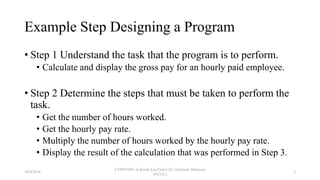
• Step 1 Understand the task that the program is to perform.
• Calculate and display the gross pay for an hourly paid employee.
• Step 2 Determine the steps that must be taken to perform the
task.
• Get the number of hours worked.
• Get the hourly pay rate.
• Multiply the number of hours worked by the hourly pay rate.
• Display the result of the calculation that was performed in Step 3.
18/9/2018
CSWD1001 @ Kwan Lee First City Unversity Malaysia
(FCUC)
5
Example Converting Algorithm to
Pseudocode
Algorithm
• Step 1 Understand the task that the program is to perform.
• Calculate and display the gross pay for an hourly paid
employee.
• Step 2 Determine the steps that must be taken to perform
the task.
• Get the number of hours worked.
• Get the hourly pay rate.
• Multiply the number of hours worked by the hourly pay
rate.
• Display the result of the calculation that was performed in
Step 3.
Pseudocode
Display "Enter the number of hours the employee worked."
Input hours
Display "Enter the employee's hourly pay rate."
Input payRate
Set grossPay = hours * payRate
Display "The employee's gross pay is $", grossPay
18/9/2018
CSWD1001 @ Kwan Lee First City Unversity Malaysia
(FCUC)
6
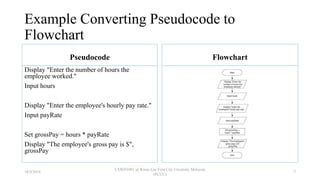
Example Converting Pseudocode to
Flowchart
Pseudocode
Display "Enter the number of hours the
employee worked."
Input hours
Display "Enter the employee's hourly pay rate."
Input payRate
Set grossPay = hours * payRate
Display "The employee's gross pay is $",
grossPay
Flowchart
18/9/2018
CSWD1001 @ Kwan Lee First City Unversity Malaysia
(FCUC)
7
Working with Variables ??
What is Variables ??
18/9/2018
CSWD1001 @ Kwan Lee First City Unversity Malaysia
(FCUC)
8
Variables is a
storage location in memory
that is
represented by a name
18/9/2018
CSWD1001 @ Kwan Lee First City Unversity Malaysia
(FCUC)
9
Features of a Variables
•Holds just one value
•Declare before using it (Declaration)
18/9/2018
CSWD1001 @ Kwan Lee First City Unversity Malaysia
(FCUC)
10
How you do a Declaration
Declare data type [name of the variable]
18/9/2018
CSWD1001 @ Kwan Lee First City Unversity Malaysia
(FCUC)
11
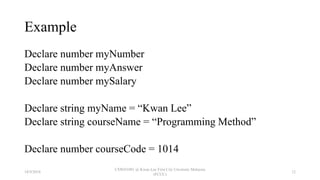
Example
Declare number myNumber
Declare number myAnswer
Declare number mySalary
Declare string myName = “Kwan Lee”
Declare string courseName = “Programming Method”
Declare number courseCode = 1014
18/9/2018
CSWD1001 @ Kwan Lee First City Unversity Malaysia
(FCUC)
12
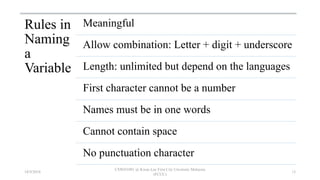
Rules in
Naming
a
Variable
Meaningful
Allow combination: Letter + digit + underscore
Length: unlimited but depend on the languages
First character cannot be a number
Names must be in one words
Cannot contain space
No punctuation character
18/9/2018
CSWD1001 @ Kwan Lee First City Unversity Malaysia
(FCUC)
13
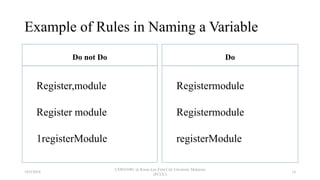
Example of Rules in Naming a Variable
Do not Do
Register,module
Register module
1registerModule
Do
Registermodule
Registermodule
registerModule
18/9/2018
CSWD1001 @ Kwan Lee First City Unversity Malaysia
(FCUC)
14
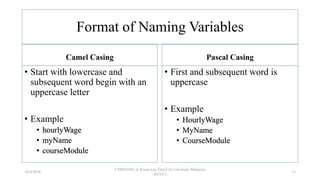
Format of Naming Variables
Camel Casing
• Start with lowercase and
subsequent word begin with an
uppercase letter
• Example
• hourlyWage
• myName
• courseModule
Pascal Casing
• First and subsequent word is
uppercase
• Example
• HourlyWage
• MyName
• CourseModule
18/9/2018
CSWD1001 @ Kwan Lee First City Unversity Malaysia
(FCUC)
15
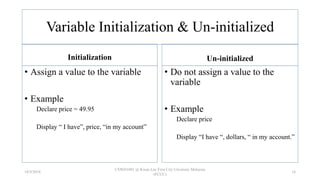
Variable Initialization & Un-initialized
Initialization
• Assign a value to the variable
• Example
Declare price = 49.95
Display “ I have”, price, “in my account”
Un-initialized
• Do not assign a value to the
variable
• Example
Declare price
Display “I have “, dollars, “ in my account.”
18/9/2018
CSWD1001 @ Kwan Lee First City Unversity Malaysia
(FCUC)
16
Be careful with GARBAGE variable
A variable’s unknown value before initialization
18/9/2018
CSWD1001 @ Kwan Lee First City Unversity Malaysia
(FCUC)
17
Declare a Constant Variable Name
A named constant is similar to a variable,
except it can be assigned a value only once
18/9/2018
CSWD1001 @ Kwan Lee First City Unversity Malaysia
(FCUC)
18
Example of Declare a Constant Variable
Name
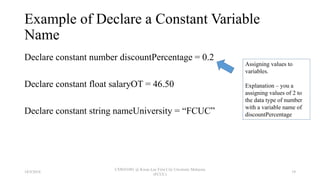
Declare constant number discountPercentage = 0.2
Declare constant float salaryOT = 46.50
Declare constant string nameUniversity = “FCUC”
Assigning values to
variables.
Explanation – you a
assigning values of 2 to
the data type of number
with a variable name of
discountPercentage
18/9/2018
CSWD1001 @ Kwan Lee First City Unversity Malaysia
(FCUC)
19
Avoid a MAGIC variable
The unnamed constant
Example
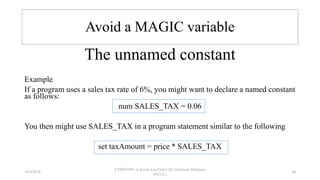
If a program uses a sales tax rate of 6%, you might want to declare a named constant
as follows:
num SALES_TAX = 0.06
You then might use SALES_TAX in a program statement similar to the following
set taxAmount = price * SALES_TAX
18/9/2018
CSWD1001 @ Kwan Lee First City Unversity Malaysia
(FCUC)
20
Understanding the Data Types of Variables
18/9/2018
CSWD1001 @ Kwan Lee First City Unversity Malaysia
(FCUC)
21
A variable’s data type
is
simply the type of data that the variable will hold
18/9/2018
CSWD1001 @ Kwan Lee First City Unversity Malaysia
(FCUC)
22
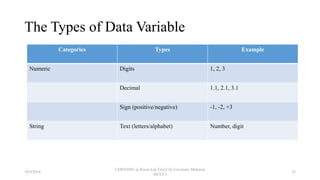
The Types of Data Variable
Categories Types Example
Numeric Digits 1, 2, 3
Decimal 1.1, 2.1, 3.1
Sign (positive/negative) -1, -2, +3
String Text (letters/alphabet) Number, digit
18/9/2018
CSWD1001 @ Kwan Lee First City Unversity Malaysia
(FCUC)
23
Performing Arithmetic Operations
18/9/2018
CSWD1001 @ Kwan Lee First City Unversity Malaysia
(FCUC)
24
What is Arithmetic Operation
An arithmetic operator
is a
mathematical function that takes two
operands and performs a calculation on
them.
18/9/2018
CSWD1001 @ Kwan Lee First City Unversity Malaysia
(FCUC)
25
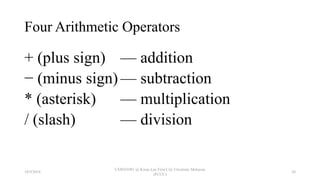
Four Arithmetic Operators
+ (plus sign) — addition
− (minus sign) — subtraction
* (asterisk) — multiplication
/ (slash) — division
18/9/2018
CSWD1001 @ Kwan Lee First City Unversity Malaysia
(FCUC)
26
• In programming languages, you can combine
arithmetic statements.
• When you do, every operator follows rules of
precedence (also called the order of operations)
that dictate the order in which operations in the same
statement are carried out
18/9/2018
CSWD1001 @ Kwan Lee First City Unversity Malaysia
(FCUC)
27
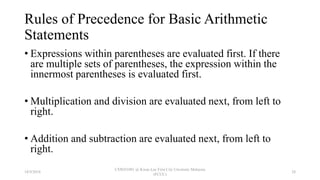
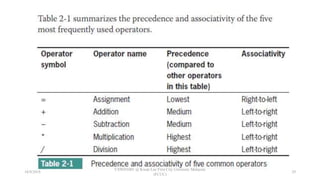
Rules of Precedence for Basic Arithmetic
Statements
• Expressions within parentheses are evaluated first. If there
are multiple sets of parentheses, the expression within the
innermost parentheses is evaluated first.
• Multiplication and division are evaluated next, from left to
right.
• Addition and subtraction are evaluated next, from left to
right.
18/9/2018
CSWD1001 @ Kwan Lee First City Unversity Malaysia
(FCUC)
28
18/9/2018
CSWD1001 @ Kwan Lee First City Unversity Malaysia
(FCUC)
29
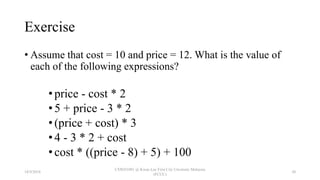
Exercise
• Assume that cost = 10 and price = 12. What is the value of
each of the following expressions?
•price - cost * 2
•5 + price - 3 * 2
•(price + cost) * 3
•4 - 3 * 2 + cost
•cost * ((price - 8) + 5) + 100
18/9/2018
CSWD1001 @ Kwan Lee First City Unversity Malaysia
(FCUC)
30
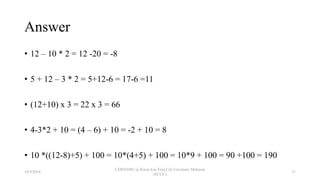
Answer
• 12 – 10 * 2 = 12 -20 = -8
• 5 + 12 – 3 * 2 = 5+12-6 = 17-6 =11
• (12+10) x 3 = 22 x 3 = 66
• 4-3*2 + 10 = (4 – 6) + 10 = -2 + 10 = 8
• 10 *((12-8)+5) + 100 = 10*(4+5) + 100 = 10*9 + 100 = 90 +100 = 190
18/9/2018
CSWD1001 @ Kwan Lee First City Unversity Malaysia
(FCUC)
31
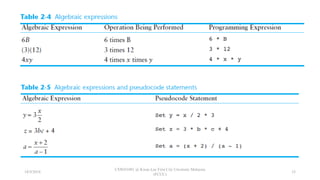
Arithmetic  Formula  Programming Statements
18/9/2018
CSWD1001 @ Kwan Lee First City Unversity Malaysia
(FCUC)
32
18/9/2018
CSWD1001 @ Kwan Lee First City Unversity Malaysia
(FCUC)
33
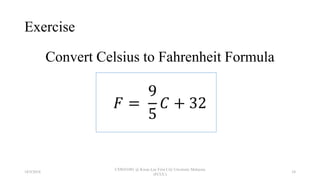
Exercise
Convert Celsius to Fahrenheit Formula
𝐹 =
9
5
𝐶 + 32
18/9/2018
CSWD1001 @ Kwan Lee First City Unversity Malaysia
(FCUC)
34
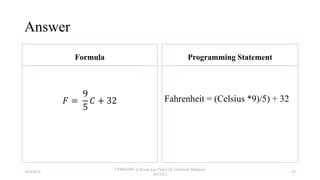
Answer
Formula
𝐹 =
9
5
𝐶 + 32
Programming Statement
Fahrenheit = (Celsius *9)/5) + 32
18/9/2018
CSWD1001 @ Kwan Lee First City Unversity Malaysia
(FCUC)
35
The need
for
good planning and design
18/9/2018
CSWD1001 @ Kwan Lee First City Unversity Malaysia
(FCUC)
36
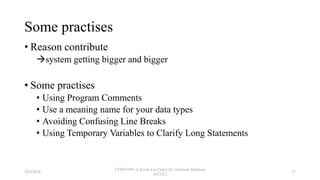
Some practises
• Reason contribute
system getting bigger and bigger
• Some practises
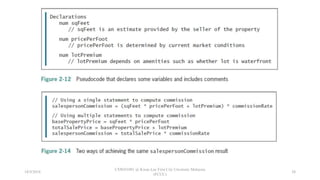
• Using Program Comments
• Use a meaning name for your data types
• Avoiding Confusing Line Breaks
• Using Temporary Variables to Clarify Long Statements
18/9/2018
CSWD1001 @ Kwan Lee First City Unversity Malaysia
(FCUC)
37
18/9/2018
CSWD1001 @ Kwan Lee First City Unversity Malaysia
(FCUC)
38
Summary
• Variables are named memory locations, the contents of which can vary.
• Before you can use a variable in any program, you must include a
declaration for it.
• A declaration includes a data type and an identifi er. Every computer
programming language has its own set of rules for naming variables;
however, all variable names must be written as one word without embedded
spaces, and should have appropriate meaning.
• Data types include numeric and string. A named constant is similar to a
variable, except it can be assigned a value only once.
• Most programming languages use +, −, *, and / as the four standard
arithmetic operators.
18/9/2018
CSWD1001 @ Kwan Lee First City Unversity Malaysia
(FCUC)
39
Summary
• As your programs become larger and more complicated, the need for
good planning and design increases.
• You should use program comments where appropriate. Choose
identifiers wisely, strive to design clear statements within your
programs and modules, write clear prompts and echo input, and
continue to maintain good programming habits as you develop your
programming skills.
18/9/2018
CSWD1001 @ Kwan Lee First City Unversity Malaysia
(FCUC)
40
END
18/9/2018
CSWD1001 @ Kwan Lee First City Unversity Malaysia
(FCUC)
41

2 Program Design Methodology

  • 1.
    CSWD1001 Programming Methods Program DesignMethodology – Data, Design 18/9/2018 CSWD1001 @ Kwan Lee First City Unversity Malaysia (FCUC) 1
  • 2.
    What we’ll Learn •How you design a program • Declaring and using variables and constants • Assigning values to variables • Named constants • The need for good planning and design 18/9/2018 CSWD1001 @ Kwan Lee First City Unversity Malaysia (FCUC) 2
  • 3.
    How you designa Program ?? 18/9/2018 CSWD1001 @ Kwan Lee First City Unversity Malaysia (FCUC) 3
  • 4.
    Two steps: 1. Understandthe task that the program is to perform. • User requirements – gains related information through interview a customer • Create a list of different software requirements based on the data gathered 2. Determine the steps that must be taken to perform the task. • Breaking down the task into a series of steps. 18/9/2018 CSWD1001 @ Kwan Lee First City Unversity Malaysia (FCUC) 4
  • 5.
    Example Step Designinga Program • Step 1 Understand the task that the program is to perform. • Calculate and display the gross pay for an hourly paid employee. • Step 2 Determine the steps that must be taken to perform the task. • Get the number of hours worked. • Get the hourly pay rate. • Multiply the number of hours worked by the hourly pay rate. • Display the result of the calculation that was performed in Step 3. 18/9/2018 CSWD1001 @ Kwan Lee First City Unversity Malaysia (FCUC) 5
  • 6.
    Example Converting Algorithmto Pseudocode Algorithm • Step 1 Understand the task that the program is to perform. • Calculate and display the gross pay for an hourly paid employee. • Step 2 Determine the steps that must be taken to perform the task. • Get the number of hours worked. • Get the hourly pay rate. • Multiply the number of hours worked by the hourly pay rate. • Display the result of the calculation that was performed in Step 3. Pseudocode Display "Enter the number of hours the employee worked." Input hours Display "Enter the employee's hourly pay rate." Input payRate Set grossPay = hours * payRate Display "The employee's gross pay is $", grossPay 18/9/2018 CSWD1001 @ Kwan Lee First City Unversity Malaysia (FCUC) 6
  • 7.
    Example Converting Pseudocodeto Flowchart Pseudocode Display "Enter the number of hours the employee worked." Input hours Display "Enter the employee's hourly pay rate." Input payRate Set grossPay = hours * payRate Display "The employee's gross pay is $", grossPay Flowchart 18/9/2018 CSWD1001 @ Kwan Lee First City Unversity Malaysia (FCUC) 7
  • 8.
    Working with Variables?? What is Variables ?? 18/9/2018 CSWD1001 @ Kwan Lee First City Unversity Malaysia (FCUC) 8
  • 9.
    Variables is a storagelocation in memory that is represented by a name 18/9/2018 CSWD1001 @ Kwan Lee First City Unversity Malaysia (FCUC) 9
  • 10.
    Features of aVariables •Holds just one value •Declare before using it (Declaration) 18/9/2018 CSWD1001 @ Kwan Lee First City Unversity Malaysia (FCUC) 10
  • 11.
    How you doa Declaration Declare data type [name of the variable] 18/9/2018 CSWD1001 @ Kwan Lee First City Unversity Malaysia (FCUC) 11
  • 12.
    Example Declare number myNumber Declarenumber myAnswer Declare number mySalary Declare string myName = “Kwan Lee” Declare string courseName = “Programming Method” Declare number courseCode = 1014 18/9/2018 CSWD1001 @ Kwan Lee First City Unversity Malaysia (FCUC) 12
  • 13.
    Rules in Naming a Variable Meaningful Allow combination:Letter + digit + underscore Length: unlimited but depend on the languages First character cannot be a number Names must be in one words Cannot contain space No punctuation character 18/9/2018 CSWD1001 @ Kwan Lee First City Unversity Malaysia (FCUC) 13
  • 14.
    Example of Rulesin Naming a Variable Do not Do Register,module Register module 1registerModule Do Registermodule Registermodule registerModule 18/9/2018 CSWD1001 @ Kwan Lee First City Unversity Malaysia (FCUC) 14
  • 15.
    Format of NamingVariables Camel Casing • Start with lowercase and subsequent word begin with an uppercase letter • Example • hourlyWage • myName • courseModule Pascal Casing • First and subsequent word is uppercase • Example • HourlyWage • MyName • CourseModule 18/9/2018 CSWD1001 @ Kwan Lee First City Unversity Malaysia (FCUC) 15
  • 16.
    Variable Initialization &Un-initialized Initialization • Assign a value to the variable • Example Declare price = 49.95 Display “ I have”, price, “in my account” Un-initialized • Do not assign a value to the variable • Example Declare price Display “I have “, dollars, “ in my account.” 18/9/2018 CSWD1001 @ Kwan Lee First City Unversity Malaysia (FCUC) 16
  • 17.
    Be careful withGARBAGE variable A variable’s unknown value before initialization 18/9/2018 CSWD1001 @ Kwan Lee First City Unversity Malaysia (FCUC) 17
  • 18.
    Declare a ConstantVariable Name A named constant is similar to a variable, except it can be assigned a value only once 18/9/2018 CSWD1001 @ Kwan Lee First City Unversity Malaysia (FCUC) 18
  • 19.
    Example of Declarea Constant Variable Name Declare constant number discountPercentage = 0.2 Declare constant float salaryOT = 46.50 Declare constant string nameUniversity = “FCUC” Assigning values to variables. Explanation – you a assigning values of 2 to the data type of number with a variable name of discountPercentage 18/9/2018 CSWD1001 @ Kwan Lee First City Unversity Malaysia (FCUC) 19
  • 20.
    Avoid a MAGICvariable The unnamed constant Example If a program uses a sales tax rate of 6%, you might want to declare a named constant as follows: num SALES_TAX = 0.06 You then might use SALES_TAX in a program statement similar to the following set taxAmount = price * SALES_TAX 18/9/2018 CSWD1001 @ Kwan Lee First City Unversity Malaysia (FCUC) 20
  • 21.
    Understanding the DataTypes of Variables 18/9/2018 CSWD1001 @ Kwan Lee First City Unversity Malaysia (FCUC) 21
  • 22.
    A variable’s datatype is simply the type of data that the variable will hold 18/9/2018 CSWD1001 @ Kwan Lee First City Unversity Malaysia (FCUC) 22
  • 23.
    The Types ofData Variable Categories Types Example Numeric Digits 1, 2, 3 Decimal 1.1, 2.1, 3.1 Sign (positive/negative) -1, -2, +3 String Text (letters/alphabet) Number, digit 18/9/2018 CSWD1001 @ Kwan Lee First City Unversity Malaysia (FCUC) 23
  • 24.
    Performing Arithmetic Operations 18/9/2018 CSWD1001@ Kwan Lee First City Unversity Malaysia (FCUC) 24
  • 25.
    What is ArithmeticOperation An arithmetic operator is a mathematical function that takes two operands and performs a calculation on them. 18/9/2018 CSWD1001 @ Kwan Lee First City Unversity Malaysia (FCUC) 25
  • 26.
    Four Arithmetic Operators +(plus sign) — addition − (minus sign) — subtraction * (asterisk) — multiplication / (slash) — division 18/9/2018 CSWD1001 @ Kwan Lee First City Unversity Malaysia (FCUC) 26
  • 27.
    • In programminglanguages, you can combine arithmetic statements. • When you do, every operator follows rules of precedence (also called the order of operations) that dictate the order in which operations in the same statement are carried out 18/9/2018 CSWD1001 @ Kwan Lee First City Unversity Malaysia (FCUC) 27
  • 28.
    Rules of Precedencefor Basic Arithmetic Statements • Expressions within parentheses are evaluated first. If there are multiple sets of parentheses, the expression within the innermost parentheses is evaluated first. • Multiplication and division are evaluated next, from left to right. • Addition and subtraction are evaluated next, from left to right. 18/9/2018 CSWD1001 @ Kwan Lee First City Unversity Malaysia (FCUC) 28
  • 29.
    18/9/2018 CSWD1001 @ KwanLee First City Unversity Malaysia (FCUC) 29
  • 30.
    Exercise • Assume thatcost = 10 and price = 12. What is the value of each of the following expressions? •price - cost * 2 •5 + price - 3 * 2 •(price + cost) * 3 •4 - 3 * 2 + cost •cost * ((price - 8) + 5) + 100 18/9/2018 CSWD1001 @ Kwan Lee First City Unversity Malaysia (FCUC) 30
  • 31.
    Answer • 12 –10 * 2 = 12 -20 = -8 • 5 + 12 – 3 * 2 = 5+12-6 = 17-6 =11 • (12+10) x 3 = 22 x 3 = 66 • 4-3*2 + 10 = (4 – 6) + 10 = -2 + 10 = 8 • 10 *((12-8)+5) + 100 = 10*(4+5) + 100 = 10*9 + 100 = 90 +100 = 190 18/9/2018 CSWD1001 @ Kwan Lee First City Unversity Malaysia (FCUC) 31
  • 32.
    Arithmetic  Formula Programming Statements 18/9/2018 CSWD1001 @ Kwan Lee First City Unversity Malaysia (FCUC) 32
  • 33.
    18/9/2018 CSWD1001 @ KwanLee First City Unversity Malaysia (FCUC) 33
  • 34.
    Exercise Convert Celsius toFahrenheit Formula 𝐹 = 9 5 𝐶 + 32 18/9/2018 CSWD1001 @ Kwan Lee First City Unversity Malaysia (FCUC) 34
  • 35.
    Answer Formula 𝐹 = 9 5 𝐶 +32 Programming Statement Fahrenheit = (Celsius *9)/5) + 32 18/9/2018 CSWD1001 @ Kwan Lee First City Unversity Malaysia (FCUC) 35
  • 36.
    The need for good planningand design 18/9/2018 CSWD1001 @ Kwan Lee First City Unversity Malaysia (FCUC) 36
  • 37.
    Some practises • Reasoncontribute system getting bigger and bigger • Some practises • Using Program Comments • Use a meaning name for your data types • Avoiding Confusing Line Breaks • Using Temporary Variables to Clarify Long Statements 18/9/2018 CSWD1001 @ Kwan Lee First City Unversity Malaysia (FCUC) 37
  • 38.
    18/9/2018 CSWD1001 @ KwanLee First City Unversity Malaysia (FCUC) 38
  • 39.
    Summary • Variables arenamed memory locations, the contents of which can vary. • Before you can use a variable in any program, you must include a declaration for it. • A declaration includes a data type and an identifi er. Every computer programming language has its own set of rules for naming variables; however, all variable names must be written as one word without embedded spaces, and should have appropriate meaning. • Data types include numeric and string. A named constant is similar to a variable, except it can be assigned a value only once. • Most programming languages use +, −, *, and / as the four standard arithmetic operators. 18/9/2018 CSWD1001 @ Kwan Lee First City Unversity Malaysia (FCUC) 39
  • 40.
    Summary • As yourprograms become larger and more complicated, the need for good planning and design increases. • You should use program comments where appropriate. Choose identifiers wisely, strive to design clear statements within your programs and modules, write clear prompts and echo input, and continue to maintain good programming habits as you develop your programming skills. 18/9/2018 CSWD1001 @ Kwan Lee First City Unversity Malaysia (FCUC) 40
  • 41.
    END 18/9/2018 CSWD1001 @ KwanLee First City Unversity Malaysia (FCUC) 41

Editor's Notes

  • #11 A declaration: a statement that provides a data type and an identifier for a variable. An identifier: a variable’s name. Data type: a classification that describes the following: What values can be held by the item How the item is stored in computer memory What operations can be performed on the data item
  • #38 Program comments are written explanations that are not part of the program logic but that serve as documentation for readers of the program.