3D Printing
Turning molten plastic into neat toys
3D Printing
• Lots of different kinds of 3d printing
• Some use powder, metal, etc.
• Primary home/hobby printing is “FDM” –
Fused Deposition Modelling
– Basically: A glue gun controlled by a printer
– Assembly is layer-by-layer
Models: Makerbot
• Consumer-targeted 3d
printer
• Designed to be ‘no
setup’; easy for
consumers
• Costs about $2200
Models: Printrbot
• Originally kickstarter
• Typically sold as kits
(but can buy assembled
for $100)
• Varies in cost from
$300-$800
• Targeted at hobbyists.
Materials
• PLA
– Biodegradable
– Produced from corn
– Lower melting temperature (compared to ABS)

• ABS
– Higher temperature
– Higher melting temperature

• Can print in other things (teflon; nylon; wood
filament) – much less common (and more
expensive)
Costs
• “Filament” (plastic used as input to the
printer) typically costs about $30/kg
– Can be found as low as $20, but “you get what
you pay for”

• Many small items can be made for 50 cents or
so worth of plastic
What can you make?
• Just about anything plastic with enough care
• Limited by build volume (Printrbot Plus is 8”
cube) and layering approach
– You aren’t going to build a car with a 3d printer
very quickly
– You’re also not going to build a chandelier very
easily – anything with overhangs can be difficult
How it works: Software
• Take a 3D model (STL file)
• Use a ‘slicer’ to turn it into layered paths for
the head of the printer
• Slicer intelligently fills in solid spaces with
material
– Also tries to minimize plastic on the insides of
pieces so as to not waste material
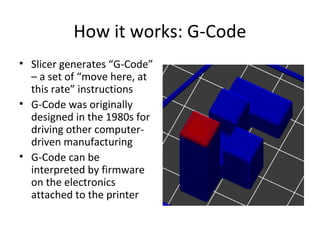
How it works: G-Code
• Slicer generates “G-Code”
– a set of “move here, at
this rate” instructions
• G-Code was originally
designed in the 1980s for
driving other computerdriven manufacturing
• G-Code can be
interpreted by firmware
on the electronics
attached to the printer
How it works: Repetier
• Software to control
overall interactions with
the printer
• Communicates over
USB to printer
• Has UI to control
position, heat, fan, etc.
• Repetier also has slicing
and G-Code
visualization
How it works: Printing
• Melts 3D plastic in a heated head (~200
degrees C)
• Prints onto flat surface – important to get the
first layer right so it sticks
• Motor feeds material through the hot end,
pushing plastic out the other side.
• Motors move the bed and the print head in 3
dimensions to print
How it works: Complex Prints
• Some 3D models can’t be printed without
overhangs
• Two basic components: Bridges and support
material
• Bridges are connections between two existing
pieces of plastic
• Support material is thin layers designed to
form a basis for bridges – temporary, intended
to snap-away
How it works: Complex Shapes
• Not all complex shapes
are complex prints
though
• Some shapes with lots
of holes in them can still
be printed (relatively)
easily
• Common style: Voronoi
surface
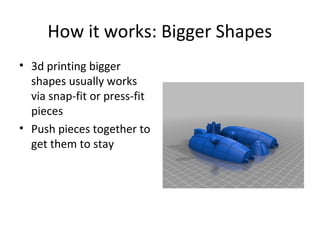
How it works: Bigger Shapes
• 3d printing bigger
shapes usually works
via snap-fit or press-fit
pieces
• Push pieces together to
get them to stay
Coolest Items
• Articulated excavator:
“Little Digger”,
thing:208315
• Prints as one piece
• Wheels, cab, and arm
move
Coolest Items
•
•
•
•

Fidget cubes
Prints as one piece
Hinged
thing:230139
Finding Models: Thingiverse
• Thingiverse is a 3d model repository that
offers lots of 3d models
• Social – can also share 3d models, share
‘makes’, etc.
• Supported by Makerware
• Good to find first things to print – toys,
puzzles, printer improvements…
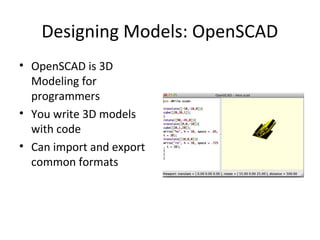
Designing Models: OpenSCAD
• OpenSCAD is 3D
Modeling for
programmers
• You write 3D models
with code
• Can import and export
common formats
Designing Models: Sketchup
• Sketchup – formerly from Google – is another
design tool
• Free plugin to support export to STL
• Can be used as a visual design tool (rather
than code)
Creating your own Filament
• Filament extruders can be purchased as kits
for a few hundred $
• Take in plastic pellets ($7-$10/kg instead of
$30-$40)
• No commonly available way to re-melt prints
currently, but people are working on recyclers
Other types of 3D Printing
•
•
•
•

Powder bed 3d printing
Laser sintering
Laminated
Light Polymerized
Things to know
• 3D Printers – at least, printrbot – is *not* a
commercially ready tool

– It requires a lot of tinkering and tweaking to get good
prints
– When the answer from support to a problem is “Pull
out your multimeter and measure the resistance” you
know you’re in a hobbyist market

• If you buy a kit – expect it to take a while to build
• Bed level is important: Bed level and belt tension
are the two most important aspects of good
prints
FAQ
• Have you printed a gun?
– No. This is a silly use of 3d printing, there are lots
of easy ways to build your own gun.

• How long have you had it?
– About two weeks

• Is it made of wood?
– Yep

3D Printing

  • 1.
    3D Printing Turning moltenplastic into neat toys
  • 2.
    3D Printing • Lotsof different kinds of 3d printing • Some use powder, metal, etc. • Primary home/hobby printing is “FDM” – Fused Deposition Modelling – Basically: A glue gun controlled by a printer – Assembly is layer-by-layer
  • 3.
    Models: Makerbot • Consumer-targeted3d printer • Designed to be ‘no setup’; easy for consumers • Costs about $2200
  • 4.
    Models: Printrbot • Originallykickstarter • Typically sold as kits (but can buy assembled for $100) • Varies in cost from $300-$800 • Targeted at hobbyists.
  • 5.
    Materials • PLA – Biodegradable –Produced from corn – Lower melting temperature (compared to ABS) • ABS – Higher temperature – Higher melting temperature • Can print in other things (teflon; nylon; wood filament) – much less common (and more expensive)
  • 6.
    Costs • “Filament” (plasticused as input to the printer) typically costs about $30/kg – Can be found as low as $20, but “you get what you pay for” • Many small items can be made for 50 cents or so worth of plastic
  • 7.
    What can youmake? • Just about anything plastic with enough care • Limited by build volume (Printrbot Plus is 8” cube) and layering approach – You aren’t going to build a car with a 3d printer very quickly – You’re also not going to build a chandelier very easily – anything with overhangs can be difficult
  • 8.
    How it works:Software • Take a 3D model (STL file) • Use a ‘slicer’ to turn it into layered paths for the head of the printer • Slicer intelligently fills in solid spaces with material – Also tries to minimize plastic on the insides of pieces so as to not waste material
  • 9.
    How it works:G-Code • Slicer generates “G-Code” – a set of “move here, at this rate” instructions • G-Code was originally designed in the 1980s for driving other computerdriven manufacturing • G-Code can be interpreted by firmware on the electronics attached to the printer
  • 10.
    How it works:Repetier • Software to control overall interactions with the printer • Communicates over USB to printer • Has UI to control position, heat, fan, etc. • Repetier also has slicing and G-Code visualization
  • 11.
    How it works:Printing • Melts 3D plastic in a heated head (~200 degrees C) • Prints onto flat surface – important to get the first layer right so it sticks • Motor feeds material through the hot end, pushing plastic out the other side. • Motors move the bed and the print head in 3 dimensions to print
  • 12.
    How it works:Complex Prints • Some 3D models can’t be printed without overhangs • Two basic components: Bridges and support material • Bridges are connections between two existing pieces of plastic • Support material is thin layers designed to form a basis for bridges – temporary, intended to snap-away
  • 13.
    How it works:Complex Shapes • Not all complex shapes are complex prints though • Some shapes with lots of holes in them can still be printed (relatively) easily • Common style: Voronoi surface
  • 14.
    How it works:Bigger Shapes • 3d printing bigger shapes usually works via snap-fit or press-fit pieces • Push pieces together to get them to stay
  • 15.
    Coolest Items • Articulatedexcavator: “Little Digger”, thing:208315 • Prints as one piece • Wheels, cab, and arm move
  • 16.
    Coolest Items • • • • Fidget cubes Printsas one piece Hinged thing:230139
  • 17.
    Finding Models: Thingiverse •Thingiverse is a 3d model repository that offers lots of 3d models • Social – can also share 3d models, share ‘makes’, etc. • Supported by Makerware • Good to find first things to print – toys, puzzles, printer improvements…
  • 18.
    Designing Models: OpenSCAD •OpenSCAD is 3D Modeling for programmers • You write 3D models with code • Can import and export common formats
  • 19.
    Designing Models: Sketchup •Sketchup – formerly from Google – is another design tool • Free plugin to support export to STL • Can be used as a visual design tool (rather than code)
  • 20.
    Creating your ownFilament • Filament extruders can be purchased as kits for a few hundred $ • Take in plastic pellets ($7-$10/kg instead of $30-$40) • No commonly available way to re-melt prints currently, but people are working on recyclers
  • 21.
    Other types of3D Printing • • • • Powder bed 3d printing Laser sintering Laminated Light Polymerized
  • 22.
    Things to know •3D Printers – at least, printrbot – is *not* a commercially ready tool – It requires a lot of tinkering and tweaking to get good prints – When the answer from support to a problem is “Pull out your multimeter and measure the resistance” you know you’re in a hobbyist market • If you buy a kit – expect it to take a while to build • Bed level is important: Bed level and belt tension are the two most important aspects of good prints
  • 23.
    FAQ • Have youprinted a gun? – No. This is a silly use of 3d printing, there are lots of easy ways to build your own gun. • How long have you had it? – About two weeks • Is it made of wood? – Yep