• HEADING HERE
• SUB HEADER
360PMR – Plan Manage Respond
The 360PMR program facilitates the logistical planning,
management, and response processes. The system leverages
user friendly data input screens, map-centric planning tools, and
a hardware agnostic design to streamline collaborated planning
efforts. The system can be utilized at all stages of the planning
and management process.
360PMR
Plan Manage Respond
OVERVIEW
STAGE 1
PRODUCT OVERVIEW
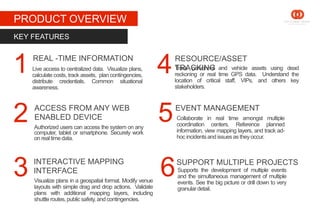
Live access to centralized data. Visualize plans,
calculate costs, track assets, plan contingencies,
distribute credentials. Common situational
awareness.
KEY FEATURES
Track personnel and vehicle assets using dead
reckoning or real time GPS data. Understand the
location of critical staff, VIPs, and others key
stakeholders.
REAL -TIME INFORMATION
Visualize plans in a geospatial format. Modify venue
layouts with simple drag and drop actions. Validate
plans with additional mapping layers, including
shuttleroutes,public safety, and contingencies.
Authorized users can access the system on any
computer, tablet or smartphone. Securely work
on realtime data.
INTERACTIVE MAPPING
INTERFACE
ACCESS FROM ANY WEB
ENABLED DEVICE
RESOURCE/ASSET
TRACKING
Supports the development of multiple events
and the simultaneous management of multiple
events. See the big picture or drill down to very
granulardetail.
1
2
3 6
5
4
SUPPORT MULTIPLE PROJECTS
EVENT MANAGEMENT
Collaborate in real time amongst multiple
coordination centers. Reference planned
information, view mapping layers, and track ad-
hoc incidentsand issuesas theyoccur.
STAGE 1
PRODUCT OVERVIEW
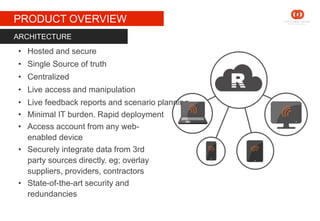
• Hosted and secure
• Single Source of truth
• Centralized
• Live access and manipulation
• Live feedback reports and scenario planning
• Minimal IT burden. Rapid deployment
• Access account from any web-
enabled device
• Securely integrate data from 3rd
party sources directly. eg; overlay
suppliers, providers, contractors
• State-of-the-art security and
redundancies
ARCHITECTURE
STAGE 1
PRODUCT OVERVIEW
• Visualize plans in an easy to interpret fashion.
• Test alternative configuration and layout options and see instant
results.
• Seamlessly integrate with cost accord program to enable turn key
budget management while providing end users with a user friendly
map-centric interface.
• Robust management tools for actively managing the overall event as
well as sub-events and incidents that may occur.
ISSUE SOLVING
STAGE 1
PRODUCT OVERVIEW
SOLUTION FOCUSSED DESIGN
• Unique in the market
• Built off a proven platform event and incident
management platform
• Efficient interface to enter data ONCE
• Link to Cost Accord Program for seamless integration of
budget, cost, and interactive map
• Preplan for multiple contingencies
• Promote compliance with policy and procedure through
easy access to documents and information
• Visual reporting and dashboards
STAGE 1
PRODUCT OVERVIEW
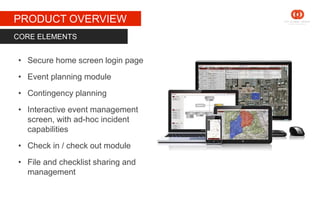
• Secure home screen login page
• Event planning module
• Contingency planning
• Interactive event management
screen, with ad-hoc incident
capabilities
• Check in / check out module
• File and checklist sharing and
management
CORE ELEMENTS
STAGE 1
PRODUCT OVERVIEW
• Access from nearly any device
• Real time data sharing
• Common view of event data between all stakeholders
• Access and analyze complex data in a friendly way
using map-driven tools and layout
• Rapidly respond to change. Manage ad-hoc incidents
and contingencies by leveraging pre-planned and on-
the-fly data
BENEFITS
STAGE 1
PRODUCT OVERVIEW
• Cost managers
• Designers
• Procurement managers
• Project managers
• Venue managers
• Site managers
• Executives
• Public safety agencies
• External groups (Functional Areas Teams)
USER TYPES
SOME EXAMPLES
STAGE 1
SCREENSHOTS
MAP-BASED VENUE
PLANNING
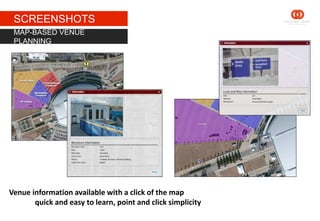
Venue information available with a click of the map
quick and easy to learn, point and click simplicity
STAGE 1
SCREENSHOTS
CONTENGENCY PLANNING
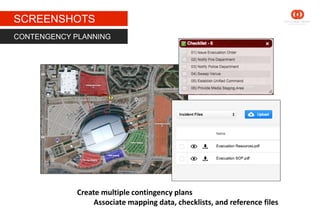
Create multiple contingency plans
Associate mapping data, checklists, and reference files
STAGE 1
SCREENSHOTS
LIVE EVENT MANAGEMENT
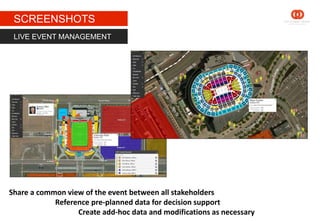
Share a common view of the event between all stakeholders
Reference pre-planned data for decision support
Create add-hoc data and modifications as necessary
STAGE 1
SCREENSHOTS
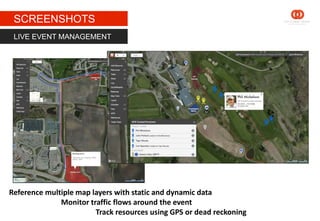
LIVE EVENT MANAGEMENT
Reference multiple map layers with static and dynamic data
Monitor traffic flows around the event
Track resources using GPS or dead reckoning
STAGE 1
SCREENSHOTS
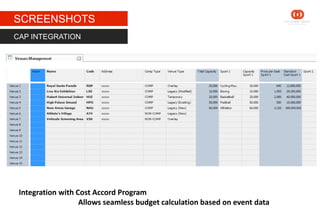
Integration with Cost Accord Program
Allows seamless budget calculation based on event data
CAP INTEGRATION
THANK YOU

360PMR – Plan Manage Respond

  • 1.
  • 2.
    360PMR – PlanManage Respond The 360PMR program facilitates the logistical planning, management, and response processes. The system leverages user friendly data input screens, map-centric planning tools, and a hardware agnostic design to streamline collaborated planning efforts. The system can be utilized at all stages of the planning and management process.
  • 3.
  • 4.
    STAGE 1 PRODUCT OVERVIEW Liveaccess to centralized data. Visualize plans, calculate costs, track assets, plan contingencies, distribute credentials. Common situational awareness. KEY FEATURES Track personnel and vehicle assets using dead reckoning or real time GPS data. Understand the location of critical staff, VIPs, and others key stakeholders. REAL -TIME INFORMATION Visualize plans in a geospatial format. Modify venue layouts with simple drag and drop actions. Validate plans with additional mapping layers, including shuttleroutes,public safety, and contingencies. Authorized users can access the system on any computer, tablet or smartphone. Securely work on realtime data. INTERACTIVE MAPPING INTERFACE ACCESS FROM ANY WEB ENABLED DEVICE RESOURCE/ASSET TRACKING Supports the development of multiple events and the simultaneous management of multiple events. See the big picture or drill down to very granulardetail. 1 2 3 6 5 4 SUPPORT MULTIPLE PROJECTS EVENT MANAGEMENT Collaborate in real time amongst multiple coordination centers. Reference planned information, view mapping layers, and track ad- hoc incidentsand issuesas theyoccur.
  • 5.
    STAGE 1 PRODUCT OVERVIEW •Hosted and secure • Single Source of truth • Centralized • Live access and manipulation • Live feedback reports and scenario planning • Minimal IT burden. Rapid deployment • Access account from any web- enabled device • Securely integrate data from 3rd party sources directly. eg; overlay suppliers, providers, contractors • State-of-the-art security and redundancies ARCHITECTURE
  • 6.
    STAGE 1 PRODUCT OVERVIEW •Visualize plans in an easy to interpret fashion. • Test alternative configuration and layout options and see instant results. • Seamlessly integrate with cost accord program to enable turn key budget management while providing end users with a user friendly map-centric interface. • Robust management tools for actively managing the overall event as well as sub-events and incidents that may occur. ISSUE SOLVING
  • 7.
    STAGE 1 PRODUCT OVERVIEW SOLUTIONFOCUSSED DESIGN • Unique in the market • Built off a proven platform event and incident management platform • Efficient interface to enter data ONCE • Link to Cost Accord Program for seamless integration of budget, cost, and interactive map • Preplan for multiple contingencies • Promote compliance with policy and procedure through easy access to documents and information • Visual reporting and dashboards
  • 8.
    STAGE 1 PRODUCT OVERVIEW •Secure home screen login page • Event planning module • Contingency planning • Interactive event management screen, with ad-hoc incident capabilities • Check in / check out module • File and checklist sharing and management CORE ELEMENTS
  • 9.
    STAGE 1 PRODUCT OVERVIEW •Access from nearly any device • Real time data sharing • Common view of event data between all stakeholders • Access and analyze complex data in a friendly way using map-driven tools and layout • Rapidly respond to change. Manage ad-hoc incidents and contingencies by leveraging pre-planned and on- the-fly data BENEFITS
  • 10.
    STAGE 1 PRODUCT OVERVIEW •Cost managers • Designers • Procurement managers • Project managers • Venue managers • Site managers • Executives • Public safety agencies • External groups (Functional Areas Teams) USER TYPES
  • 11.
  • 12.
    STAGE 1 SCREENSHOTS MAP-BASED VENUE PLANNING Venueinformation available with a click of the map quick and easy to learn, point and click simplicity
  • 13.
    STAGE 1 SCREENSHOTS CONTENGENCY PLANNING Createmultiple contingency plans Associate mapping data, checklists, and reference files
  • 14.
    STAGE 1 SCREENSHOTS LIVE EVENTMANAGEMENT Share a common view of the event between all stakeholders Reference pre-planned data for decision support Create add-hoc data and modifications as necessary
  • 15.
    STAGE 1 SCREENSHOTS LIVE EVENTMANAGEMENT Reference multiple map layers with static and dynamic data Monitor traffic flows around the event Track resources using GPS or dead reckoning
  • 16.
    STAGE 1 SCREENSHOTS Integration withCost Accord Program Allows seamless budget calculation based on event data CAP INTEGRATION
  • 17.