
Subject Name Code Credit Hours 
GRAPHIC DESIGN FUNDAMENTALS GDF 111 4 
GDF 111 Graphic Design 
Fundamentals
Subject Name Code Credit Hours 
GRAPHIC DESIGN FUNDAMENTALS GDF 111 4 
Typography 
• Typeface- design of the letters 
• Font- complete set of characters (software 
typeface) 
• Above all else, the audience must be able to 
read it!
Subject Name Code Credit Hours 
GRAPHIC DESIGN FUNDAMENTALS GDF 111 4 
Typeface Categories 
• Serif- conservative and highly legible 
• San-Serif- casual and legible 
• Scripts- hand written 
• Novelty-immediate tone setting and hard to 
read
Subject Name Code Credit Hours 
GRAPHIC DESIGN FUNDAMENTALS GDF 111 4 
Type Characteristics 
• Size 
– Measured in pica or points- 72 points in an inch… 
12 points in a pica… 6 picas per inch 
– Computer screen can be deceptive 
– Printed proof to see actual size 
– Web design should be judged on a screen
Subject Name Code Credit Hours 
GRAPHIC DESIGN FUNDAMENTALS GDF 111 4 
Type Characteristics cont. 
• Line Length 
– Measured in pica 
– Flow to fill predetermined column 
• Style 
– Legibility prime concern 
– Either stick to one type family or they need to be 
very different
Subject Name Code Credit Hours 
GRAPHIC DESIGN FUNDAMENTALS GDF 111 4 
Type Characteristics cont. 
• Leading 
– Vertical Space between lines 
– Readability concerns 
• Spacing 
– Kerning- space between letters 
– Word Spacing
Subject Name Code Credit Hours 
GRAPHIC DESIGN FUNDAMENTALS GDF 111 4 
Type Characteristics cont. 
• Format 
– Justified-all lines same length 
– Unjustified- flush left or right, center and 
asymmetrical 
• Style and Content 
– Visual tone 
– Affects image of client
Subject Name Code Credit Hours 
GRAPHIC DESIGN FUNDAMENTALS GDF 111 4 
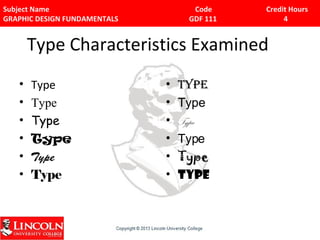
Type Characteristics Examined 
• Type 
• Type 
• Type 
• Type 
• Type 
• Type 
• Type 
• Type 
• Type 
• Type 
• Type 
• Type
Subject Name Code Credit Hours 
GRAPHIC DESIGN FUNDAMENTALS GDF 111 4 
Typeface Layout Tips 
• Serif body/San Title or vice verca 
• No novelty in body 
• Italics for emphasis 
• Never all caps 
• Limit 2 fonts per page 
• Limit 3 font sizes per page 
• Simplify
Subject Name Code Credit Hours 
GRAPHIC DESIGN FUNDAMENTALS GDF 111 4 
Text Contrast Layout Tips 
• Contract title and body text for interest 
• Vary size, weight, style, separation, color 
differences 
• Best legibility (black text/white paper) 
• Reduce legibility (black text/dark paper) 
• Simplify
Subject Name Code Credit Hours 
GRAPHIC DESIGN FUNDAMENTALS GDF 111 4 
Text Format Tips 
• Consistent space 
• Separate paragraphs with either line space or indent, 
not both. 
• 50-70 words per line 
• Leave plenty of white space 
• Balance 
• Look at the whole 
• Simplify
Subject Name Code Credit Hours 
GRAPHIC DESIGN FUNDAMENTALS GDF 111 4 
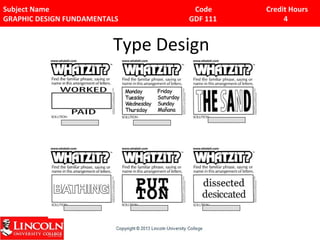
Type Design
Subject Name Code Credit Hours 
GRAPHIC DESIGN FUNDAMENTALS GDF 111 4 
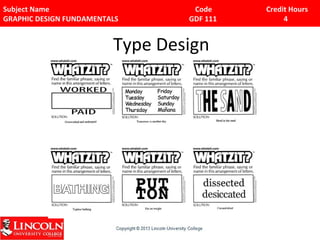
Type Design
Subject Name Code Credit Hours 
GRAPHIC DESIGN FUNDAMENTALS GDF 111 4 
Images 
• Creating Graphics 
• Illustration- using images that represent or 
express to make a visual statement 
• Can show something that cannot be 
photographed 
• Purpose- present product, tell story, clarify 
concept, or demonstrate a service.
Subject Name Code Credit Hours 
GRAPHIC DESIGN FUNDAMENTALS GDF 111 4 
Basic Types of Graphic Creation 
Programs 
• Drawing- Vector programs 
– Illustrator- draws object… no layers 
• Paint- Bitmap programs 
– Photoshop- working in pixels and layers 
– .bmp .jpeg .gif .pic .tif
Subject Name Code Credit Hours 
GRAPHIC DESIGN FUNDAMENTALS GDF 111 4 
What is a Pixel? 
• Building Blocks 
• # of pixels and color determine image quality, 
size and the look of the image 
• Cannot delete a pixel, just change its color 
• More pixels, larger file size… so eliminate 
unnecessary pixels 
• # of pixels per inch determine resolution, the 
key to image quality
Subject Name Code Credit Hours 
GRAPHIC DESIGN FUNDAMENTALS GDF 111 4 
Pros/Cons of Bitmap images 
• Most appropriate for photo-realistic images and 
complex drawings 
• Large file size, inability to resize or scale without 
effort and loss of quality 
• Bit-depth determines # of colors that can be 
displayed by individual pixel 
• Can grab from screen, scan it, download or capture it 
• Can manipulate it, adjust it, cut and paste it
Subject Name Code Credit Hours 
GRAPHIC DESIGN FUNDAMENTALS GDF 111 4 
Pros/Cons of Vector images 
• Most appropriate for shapes (mathematically 
expressed) 
• Can be filled with color and patterns 
• Use a fraction of the file space as bitmaps 
• For web, downloads faster 
• Most programs can export vector to bitmap 
• Vector images require a plug-in to display on the web 
(Flash) 
• Can not be used for photo-realistic images
Subject Name Code Credit Hours 
GRAPHIC DESIGN FUNDAMENTALS GDF 111 4 
File Formats 
• High Quality for printing 
– TIFF- high image quality 
– EPS- less common 
• Compression Formats for Screen 
– JPEG- photos and illustration 
– GIF- text, logos and charts 
– PNG- need transparency around the graphic 
– PDF- design intact- paper files
Subject Name Code Credit Hours 
GRAPHIC DESIGN FUNDAMENTALS GDF 111 4 
Basic Photo Design Issues 
• Aspect Ratio 
• Scanning and Essential Area- Over scan 
• Information Density 
– Watch for information overload 
– Try not to crowd too much info into one space
Subject Name Code Credit Hours 
GRAPHIC DESIGN FUNDAMENTALS GDF 111 4 
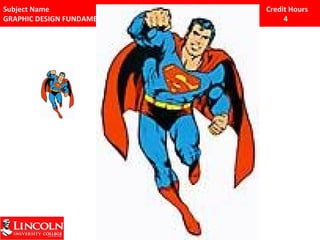
Digital Cameras and Scanning 
• Choosing the Best Resolution? 
– Input and Output 
• How distribute? 72 for web, 100-300 for 
printing 
• Formula for resolution- x 1.5 or 2 
• Pros use 1,200 or 2,400 hundred for original 
and link to file
Subject Name Code Credit Hours 
GRAPHIC DESIGN FUNDAMENTALS GDF 111 4
Subject Name Code Credit Hours 
GRAPHIC DESIGN FUNDAMENTALS GDF 111 4 
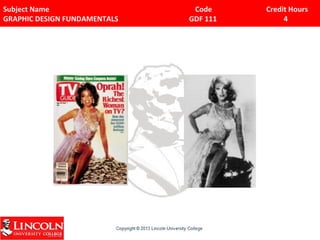
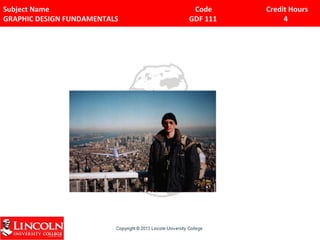
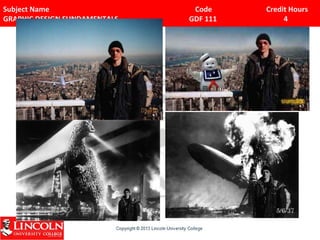
Impact of Photography 
• Not capturing reality 
– Fact that camera is there can change things 
– Editing and Manipulating
Subject Name Code Credit Hours 
GRAPHIC DESIGN FUNDAMENTALS GDF 111 4
Subject Name Code Credit Hours 
GRAPHIC DESIGN FUNDAMENTALS GDF 111 4
Subject Name Code Credit Hours 
GRAPHIC DESIGN FUNDAMENTALS GDF 111 4
Subject Name Code Credit Hours 
GRAPHIC DESIGN FUNDAMENTALS GDF 111 4 
What is the goal(s)? 
• Owner’s Goals 
– Business aspect = 
Making money 
– Measure the audience 
– Brand Positioning = 
Personality 
• User’s Goals 
– Information 
– Commerce 
– Easy 
– Useable 
– Identifiable
Subject Name Code Credit Hours 
GRAPHIC DESIGN FUNDAMENTALS GDF 111 4 
Identifying User Goals 
• Again, let’s use the website your group is working on. 
• What would be some user goals for a site? 
• How would they use the site? 
• What do they want from this site? 
• How many steps would be acceptable to perform a 
task?
Subject Name Code Credit Hours 
GRAPHIC DESIGN FUNDAMENTALS GDF 111 4 
Determine cost, timeline, and tasks 
• As a general rule, three variable are time, 
money, and people. 
• Budget is total of estimated hours for each 
task at hourly rate 
• Have contractors and consultant work off-site 
and with own equipment, so they are not 
employees
Subject Name Code Credit Hours 
GRAPHIC DESIGN FUNDAMENTALS GDF 111 4 
Project Bid 
• The cover and package 
• Table of contents 
• Needs analysis and description 
• Target audience 
• Creative strategy 
• Project implementation 
• Budget
Subject Name Code Credit Hours 
GRAPHIC DESIGN FUNDAMENTALS GDF 111 4 
Content Acquisition 
• Self produced 
• Third party content sources (clip art, stock footage 
library, public domain sources) 
• Public Domain has no owner, but never assume 
• Copyrighted material can not be used without 
permission 
• If in doubt, don’t use it unless you paid for it.
Subject Name Code Credit Hours 
GRAPHIC DESIGN FUNDAMENTALS GDF 111 4 
Using Talent 
• American Federation of Television and Radio Artists 
(AFTRA) or Screen Actors Guild (SAG) 
• Talent Agency 
• Auditions and Casting Calls 
• Union Contracts ($540/8 hour day) 
• Release Forms 
• Always think about future use, when working with 
release forms.

3 Typography

  • 1.
    Subject Name CodeCredit Hours GRAPHIC DESIGN FUNDAMENTALS GDF 111 4 GDF 111 Graphic Design Fundamentals
  • 2.
    Subject Name CodeCredit Hours GRAPHIC DESIGN FUNDAMENTALS GDF 111 4 Typography • Typeface- design of the letters • Font- complete set of characters (software typeface) • Above all else, the audience must be able to read it!
  • 3.
    Subject Name CodeCredit Hours GRAPHIC DESIGN FUNDAMENTALS GDF 111 4 Typeface Categories • Serif- conservative and highly legible • San-Serif- casual and legible • Scripts- hand written • Novelty-immediate tone setting and hard to read
  • 4.
    Subject Name CodeCredit Hours GRAPHIC DESIGN FUNDAMENTALS GDF 111 4 Type Characteristics • Size – Measured in pica or points- 72 points in an inch… 12 points in a pica… 6 picas per inch – Computer screen can be deceptive – Printed proof to see actual size – Web design should be judged on a screen
  • 5.
    Subject Name CodeCredit Hours GRAPHIC DESIGN FUNDAMENTALS GDF 111 4 Type Characteristics cont. • Line Length – Measured in pica – Flow to fill predetermined column • Style – Legibility prime concern – Either stick to one type family or they need to be very different
  • 6.
    Subject Name CodeCredit Hours GRAPHIC DESIGN FUNDAMENTALS GDF 111 4 Type Characteristics cont. • Leading – Vertical Space between lines – Readability concerns • Spacing – Kerning- space between letters – Word Spacing
  • 7.
    Subject Name CodeCredit Hours GRAPHIC DESIGN FUNDAMENTALS GDF 111 4 Type Characteristics cont. • Format – Justified-all lines same length – Unjustified- flush left or right, center and asymmetrical • Style and Content – Visual tone – Affects image of client
  • 8.
    Subject Name CodeCredit Hours GRAPHIC DESIGN FUNDAMENTALS GDF 111 4 Type Characteristics Examined • Type • Type • Type • Type • Type • Type • Type • Type • Type • Type • Type • Type
  • 9.
    Subject Name CodeCredit Hours GRAPHIC DESIGN FUNDAMENTALS GDF 111 4 Typeface Layout Tips • Serif body/San Title or vice verca • No novelty in body • Italics for emphasis • Never all caps • Limit 2 fonts per page • Limit 3 font sizes per page • Simplify
  • 10.
    Subject Name CodeCredit Hours GRAPHIC DESIGN FUNDAMENTALS GDF 111 4 Text Contrast Layout Tips • Contract title and body text for interest • Vary size, weight, style, separation, color differences • Best legibility (black text/white paper) • Reduce legibility (black text/dark paper) • Simplify
  • 11.
    Subject Name CodeCredit Hours GRAPHIC DESIGN FUNDAMENTALS GDF 111 4 Text Format Tips • Consistent space • Separate paragraphs with either line space or indent, not both. • 50-70 words per line • Leave plenty of white space • Balance • Look at the whole • Simplify
  • 12.
    Subject Name CodeCredit Hours GRAPHIC DESIGN FUNDAMENTALS GDF 111 4 Type Design
  • 13.
    Subject Name CodeCredit Hours GRAPHIC DESIGN FUNDAMENTALS GDF 111 4 Type Design
  • 14.
    Subject Name CodeCredit Hours GRAPHIC DESIGN FUNDAMENTALS GDF 111 4 Images • Creating Graphics • Illustration- using images that represent or express to make a visual statement • Can show something that cannot be photographed • Purpose- present product, tell story, clarify concept, or demonstrate a service.
  • 15.
    Subject Name CodeCredit Hours GRAPHIC DESIGN FUNDAMENTALS GDF 111 4 Basic Types of Graphic Creation Programs • Drawing- Vector programs – Illustrator- draws object… no layers • Paint- Bitmap programs – Photoshop- working in pixels and layers – .bmp .jpeg .gif .pic .tif
  • 16.
    Subject Name CodeCredit Hours GRAPHIC DESIGN FUNDAMENTALS GDF 111 4 What is a Pixel? • Building Blocks • # of pixels and color determine image quality, size and the look of the image • Cannot delete a pixel, just change its color • More pixels, larger file size… so eliminate unnecessary pixels • # of pixels per inch determine resolution, the key to image quality
  • 17.
    Subject Name CodeCredit Hours GRAPHIC DESIGN FUNDAMENTALS GDF 111 4 Pros/Cons of Bitmap images • Most appropriate for photo-realistic images and complex drawings • Large file size, inability to resize or scale without effort and loss of quality • Bit-depth determines # of colors that can be displayed by individual pixel • Can grab from screen, scan it, download or capture it • Can manipulate it, adjust it, cut and paste it
  • 18.
    Subject Name CodeCredit Hours GRAPHIC DESIGN FUNDAMENTALS GDF 111 4 Pros/Cons of Vector images • Most appropriate for shapes (mathematically expressed) • Can be filled with color and patterns • Use a fraction of the file space as bitmaps • For web, downloads faster • Most programs can export vector to bitmap • Vector images require a plug-in to display on the web (Flash) • Can not be used for photo-realistic images
  • 19.
    Subject Name CodeCredit Hours GRAPHIC DESIGN FUNDAMENTALS GDF 111 4 File Formats • High Quality for printing – TIFF- high image quality – EPS- less common • Compression Formats for Screen – JPEG- photos and illustration – GIF- text, logos and charts – PNG- need transparency around the graphic – PDF- design intact- paper files
  • 20.
    Subject Name CodeCredit Hours GRAPHIC DESIGN FUNDAMENTALS GDF 111 4 Basic Photo Design Issues • Aspect Ratio • Scanning and Essential Area- Over scan • Information Density – Watch for information overload – Try not to crowd too much info into one space
  • 21.
    Subject Name CodeCredit Hours GRAPHIC DESIGN FUNDAMENTALS GDF 111 4 Digital Cameras and Scanning • Choosing the Best Resolution? – Input and Output • How distribute? 72 for web, 100-300 for printing • Formula for resolution- x 1.5 or 2 • Pros use 1,200 or 2,400 hundred for original and link to file
  • 22.
    Subject Name CodeCredit Hours GRAPHIC DESIGN FUNDAMENTALS GDF 111 4
  • 23.
    Subject Name CodeCredit Hours GRAPHIC DESIGN FUNDAMENTALS GDF 111 4 Impact of Photography • Not capturing reality – Fact that camera is there can change things – Editing and Manipulating
  • 24.
    Subject Name CodeCredit Hours GRAPHIC DESIGN FUNDAMENTALS GDF 111 4
  • 25.
    Subject Name CodeCredit Hours GRAPHIC DESIGN FUNDAMENTALS GDF 111 4
  • 26.
    Subject Name CodeCredit Hours GRAPHIC DESIGN FUNDAMENTALS GDF 111 4
  • 27.
    Subject Name CodeCredit Hours GRAPHIC DESIGN FUNDAMENTALS GDF 111 4 What is the goal(s)? • Owner’s Goals – Business aspect = Making money – Measure the audience – Brand Positioning = Personality • User’s Goals – Information – Commerce – Easy – Useable – Identifiable
  • 28.
    Subject Name CodeCredit Hours GRAPHIC DESIGN FUNDAMENTALS GDF 111 4 Identifying User Goals • Again, let’s use the website your group is working on. • What would be some user goals for a site? • How would they use the site? • What do they want from this site? • How many steps would be acceptable to perform a task?
  • 29.
    Subject Name CodeCredit Hours GRAPHIC DESIGN FUNDAMENTALS GDF 111 4 Determine cost, timeline, and tasks • As a general rule, three variable are time, money, and people. • Budget is total of estimated hours for each task at hourly rate • Have contractors and consultant work off-site and with own equipment, so they are not employees
  • 30.
    Subject Name CodeCredit Hours GRAPHIC DESIGN FUNDAMENTALS GDF 111 4 Project Bid • The cover and package • Table of contents • Needs analysis and description • Target audience • Creative strategy • Project implementation • Budget
  • 31.
    Subject Name CodeCredit Hours GRAPHIC DESIGN FUNDAMENTALS GDF 111 4 Content Acquisition • Self produced • Third party content sources (clip art, stock footage library, public domain sources) • Public Domain has no owner, but never assume • Copyrighted material can not be used without permission • If in doubt, don’t use it unless you paid for it.
  • 32.
    Subject Name CodeCredit Hours GRAPHIC DESIGN FUNDAMENTALS GDF 111 4 Using Talent • American Federation of Television and Radio Artists (AFTRA) or Screen Actors Guild (SAG) • Talent Agency • Auditions and Casting Calls • Union Contracts ($540/8 hour day) • Release Forms • Always think about future use, when working with release forms.