1
Tutorial 2 : Interfacing Sensors to Rpi |
Learning Python on the Go....
2
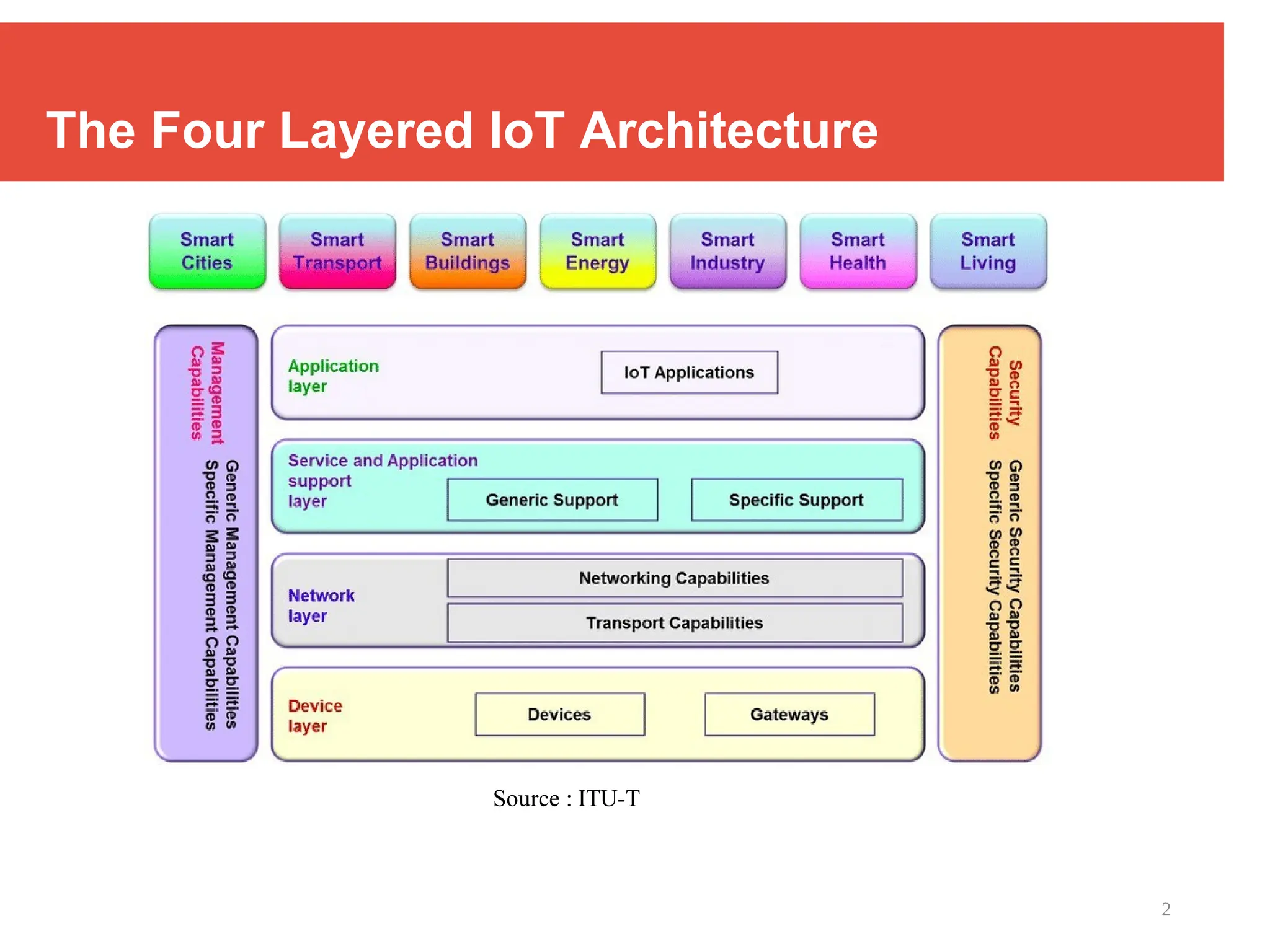
The Four Layered IoT Architecture
Source : ITU-T
3
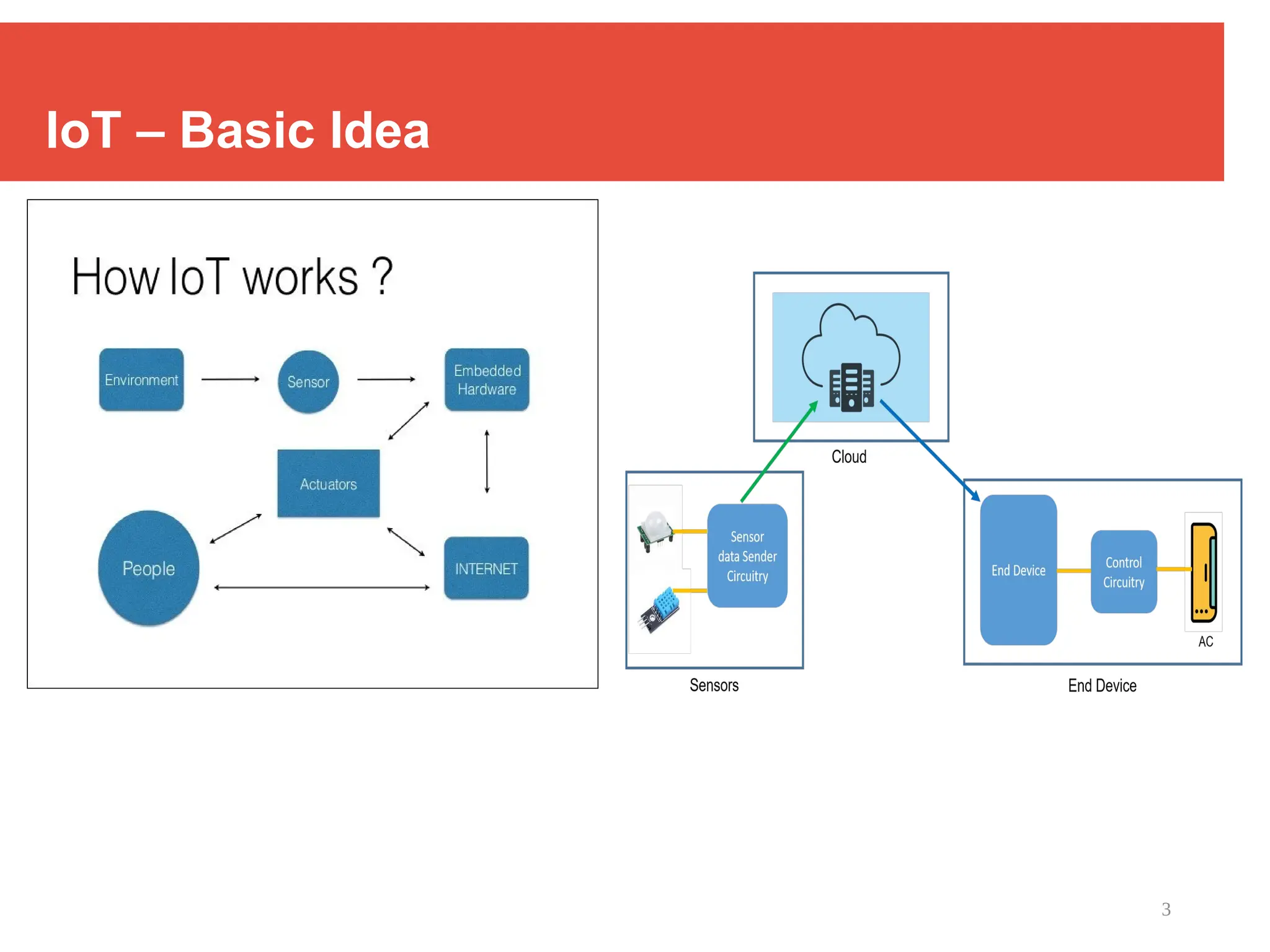
IoT – Basic Idea
4
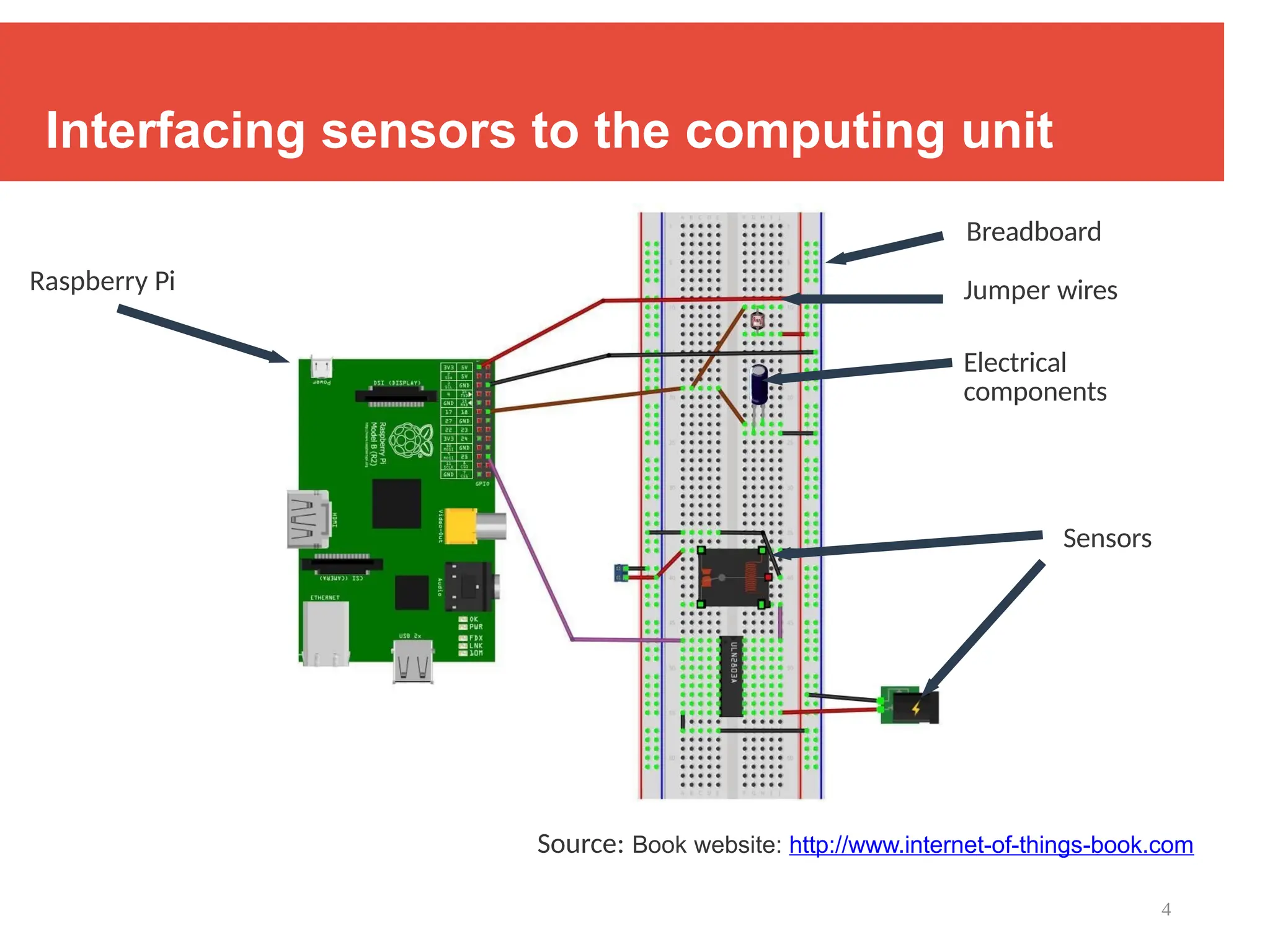
Interfacing sensors to the computing unit
Source: Book website: http://www.internet-of-things-book.com
Raspberry Pi
Breadboard
Jumper wires
Electrical
components
Sensors
5
Components
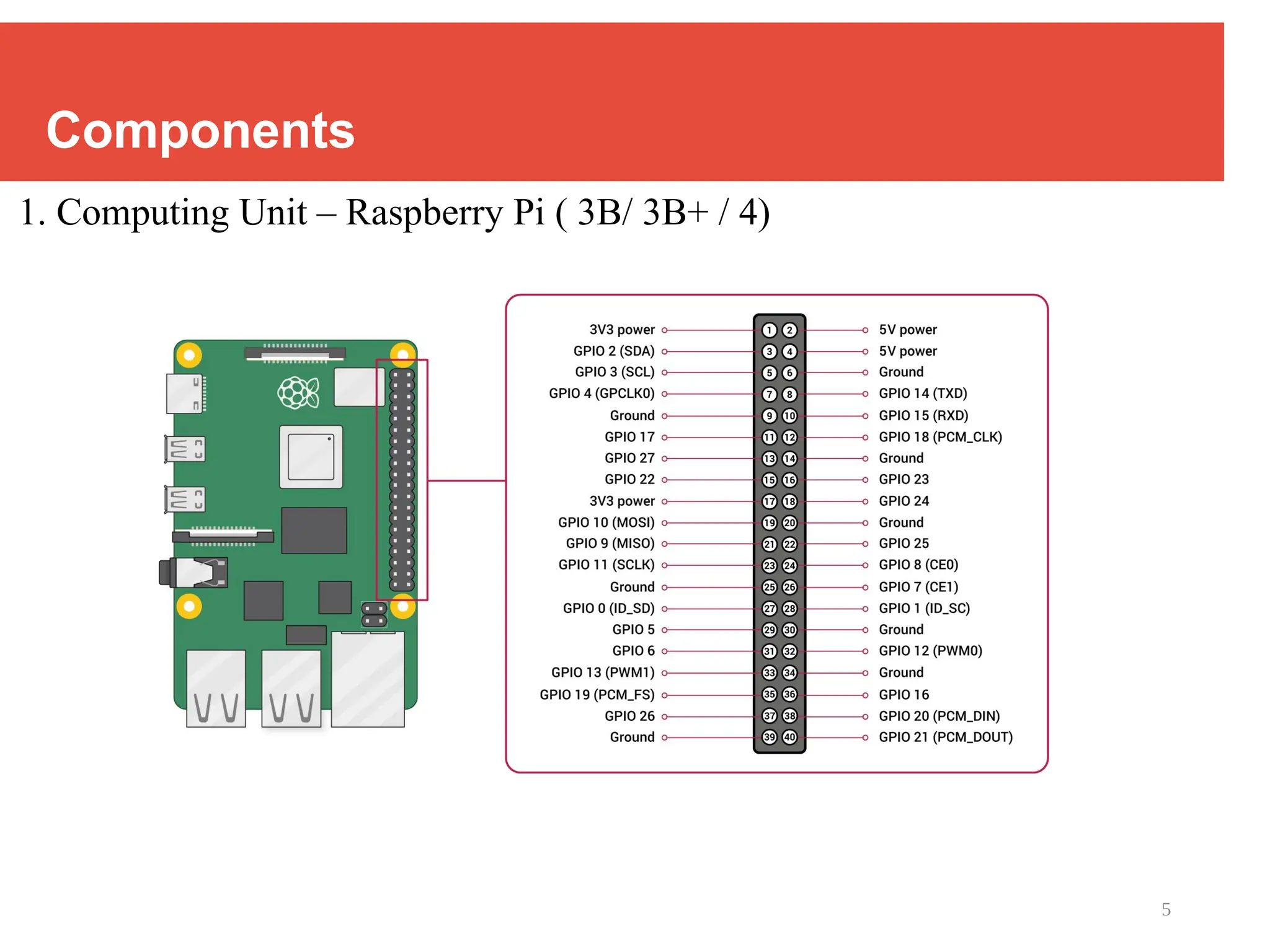
1. Computing Unit – Raspberry Pi ( 3B/ 3B+ / 4)
6
Components
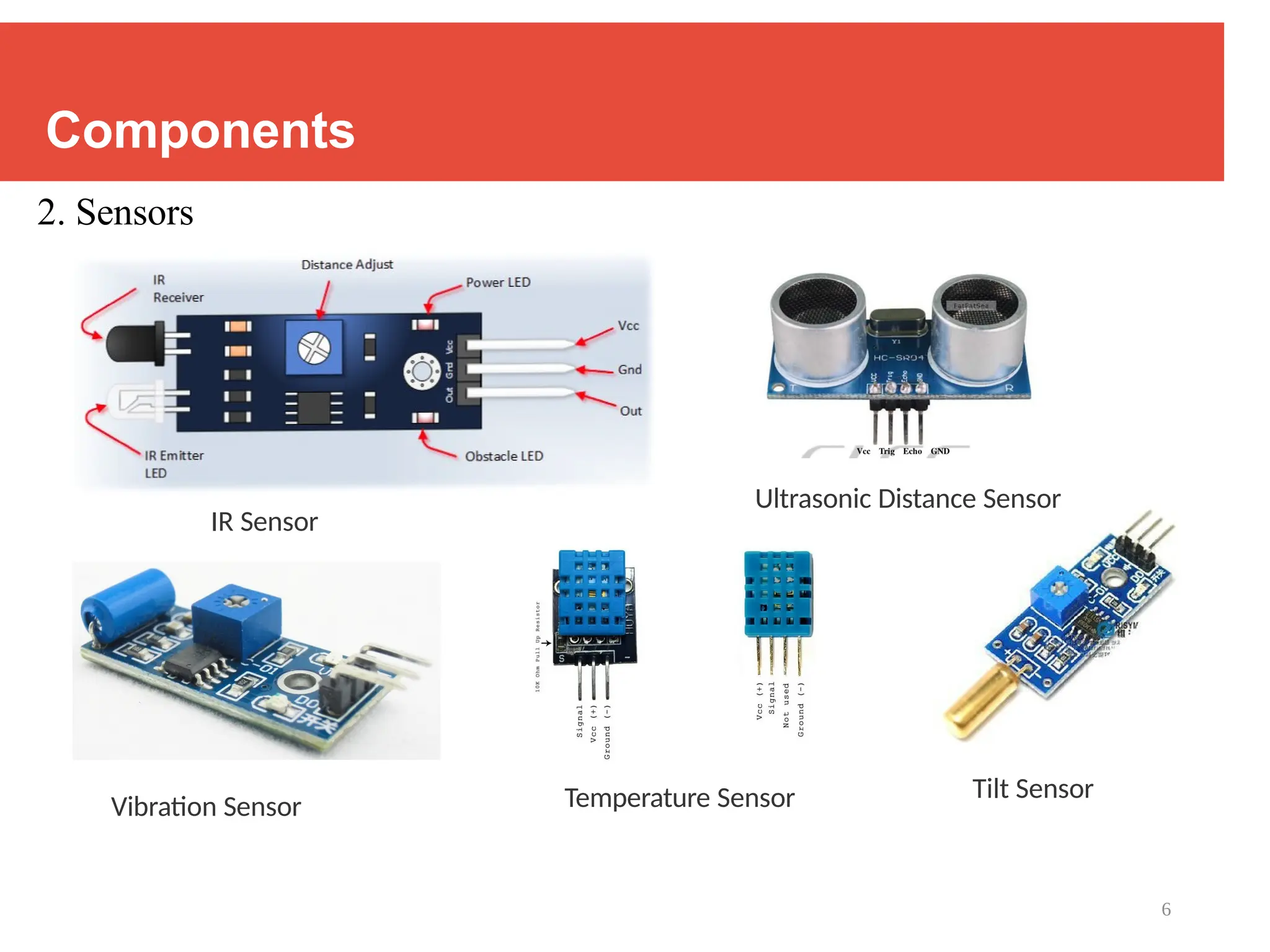
2. Sensors
Vibration Sensor Temperature Sensor Tilt Sensor
IR Sensor
Ultrasonic Distance Sensor
7
Components
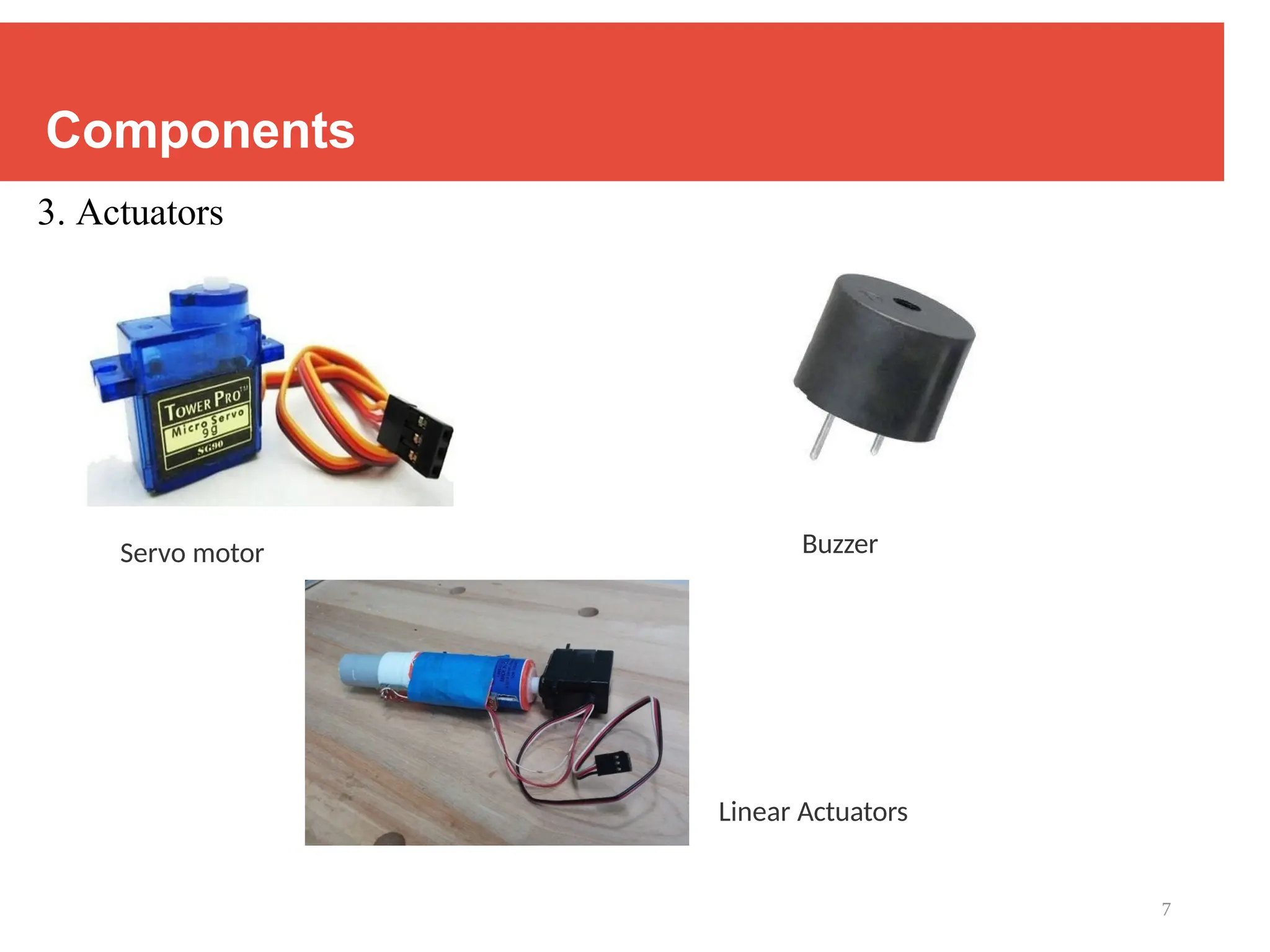
3. Actuators
Servo motor Buzzer
Linear Actuators
8
Components
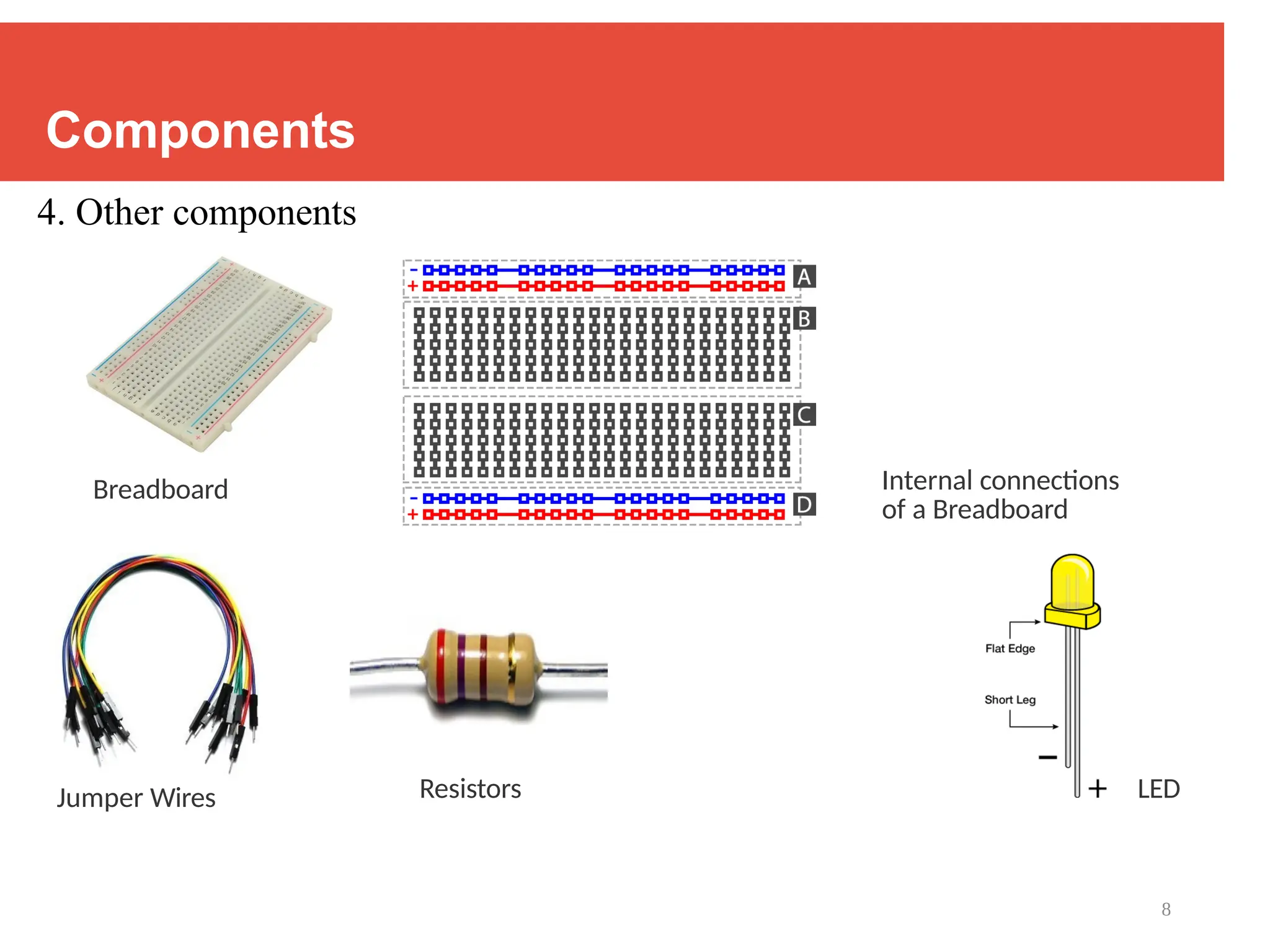
4. Other components
Breadboard Internal connections
of a Breadboard
Jumper Wires Resistors LED
9
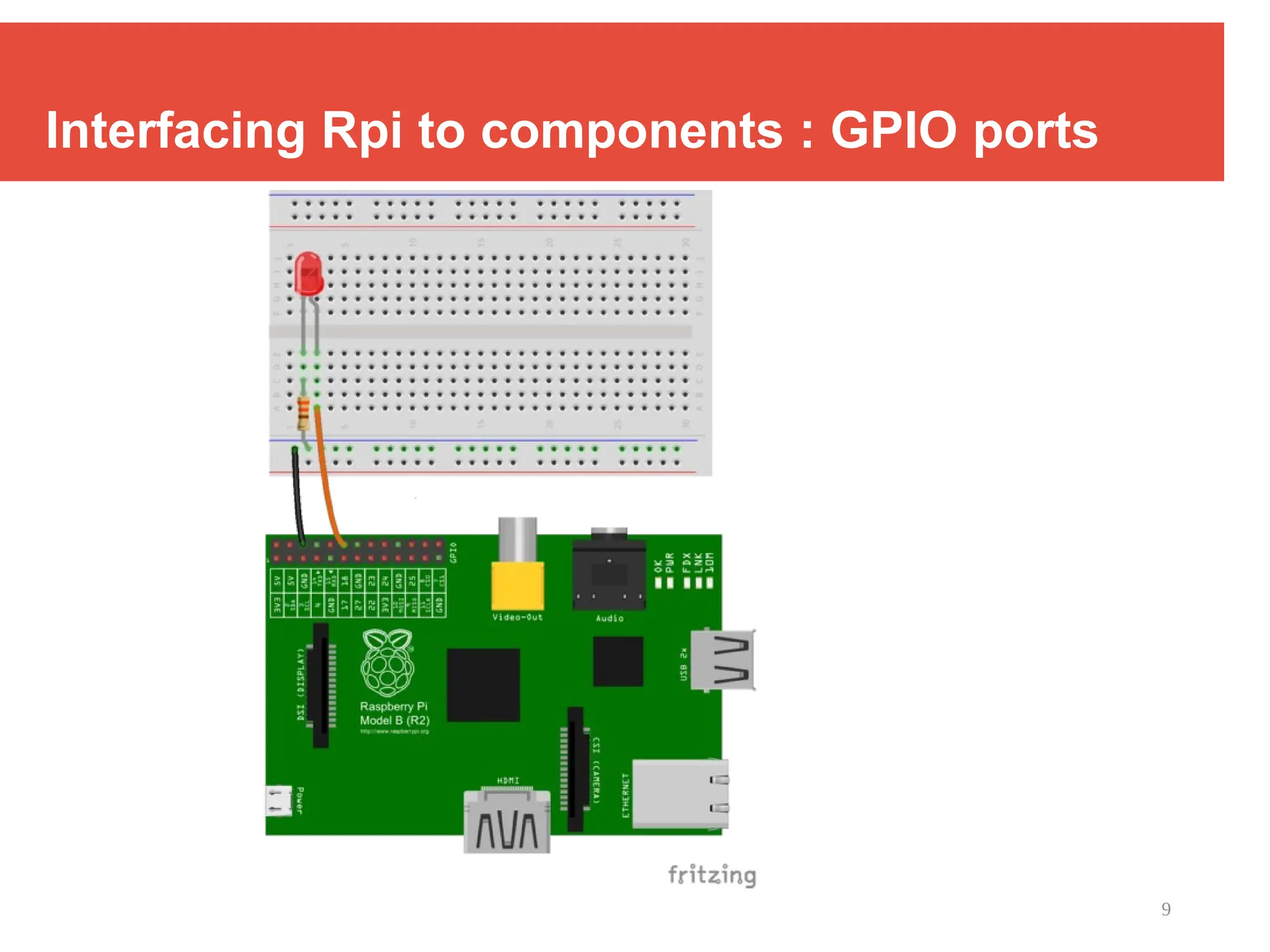
Interfacing Rpi to components : GPIO ports
10
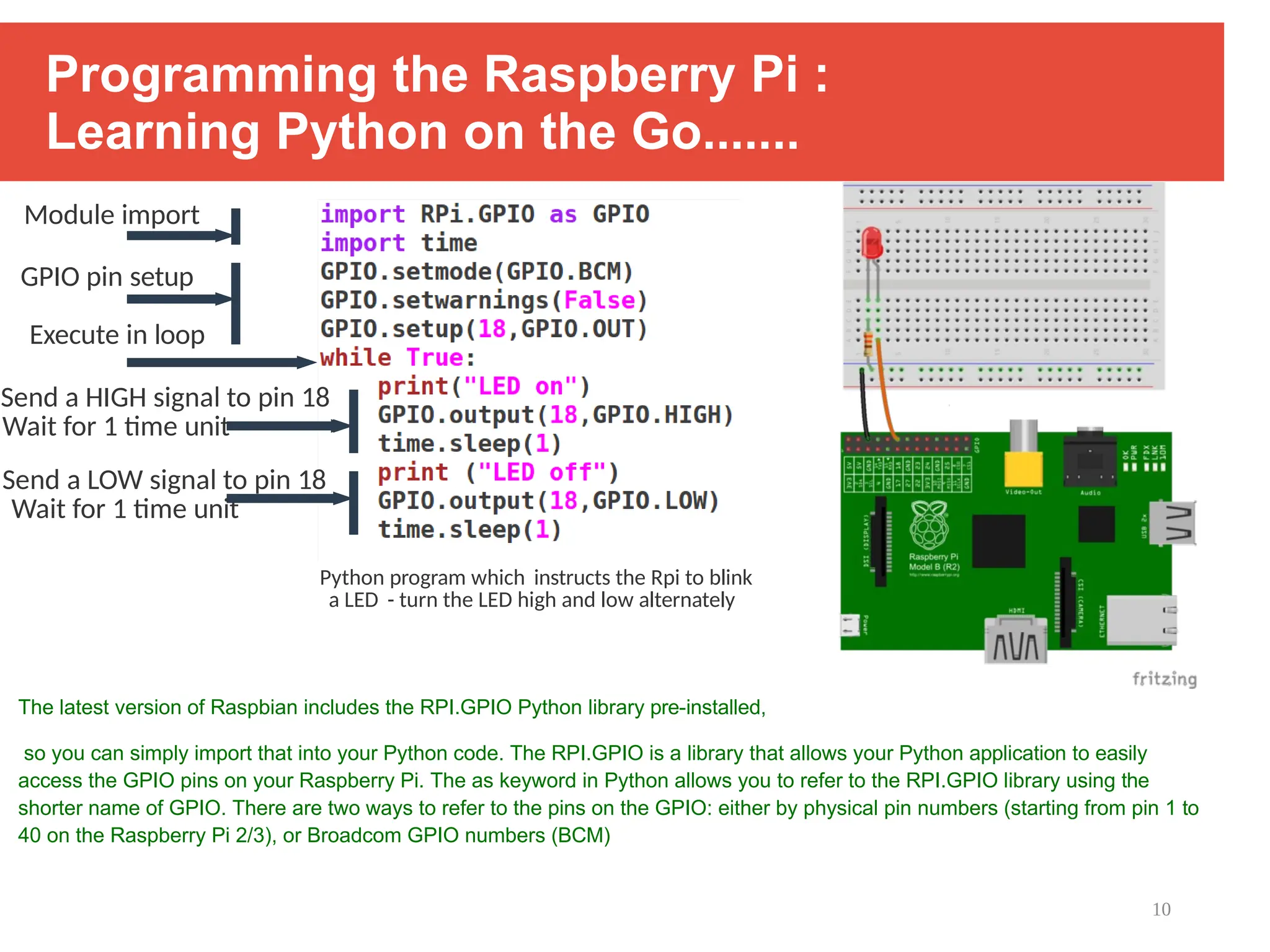
Programming the Raspberry Pi :
Learning Python on the Go.......
The latest version of Raspbian includes the RPI.GPIO Python library pre-installed,
so you can simply import that into your Python code. The RPI.GPIO is a library that allows your Python application to easily
access the GPIO pins on your Raspberry Pi. The as keyword in Python allows you to refer to the RPI.GPIO library using the
shorter name of GPIO. There are two ways to refer to the pins on the GPIO: either by physical pin numbers (starting from pin 1 to
40 on the Raspberry Pi 2/3), or Broadcom GPIO numbers (BCM)
Module import
GPIO pin setup
Execute in loop
Send a HIGH signal to pin 18
Wait for 1 time unit
Send a LOW signal to pin 18
Wait for 1 time unit
Python program which instructs the Rpi to blink
a LED - turn the LED high and low alternately
11
Introducing Python
1. General-purpose, versatile, and powerful programming languaage
2. It was created by Guido van Rossum in 1991 and was named after the
British comedy show, Monty Python’s Flying Circus.
3. Applications – scripting, web development, data visualization,
data analysis, machine learning
4. Characteristics :
i. Multi-paradigm programming language - Python supports more than
one
programming paradigms including object-oriented programming and structured
Programming
12
Introducing Python
4. Characteristics :
ii. Interpreted and Interactive language – does not require compilation steps,
Users provide command at the prompt which get executed directly
iii. Easy to learn and maintain – fewer syntactical constructions,
Statements feel like English with pseudo code constructs
iv. Extendable, Scalable and Portable
v. Broad Range of Library support
13
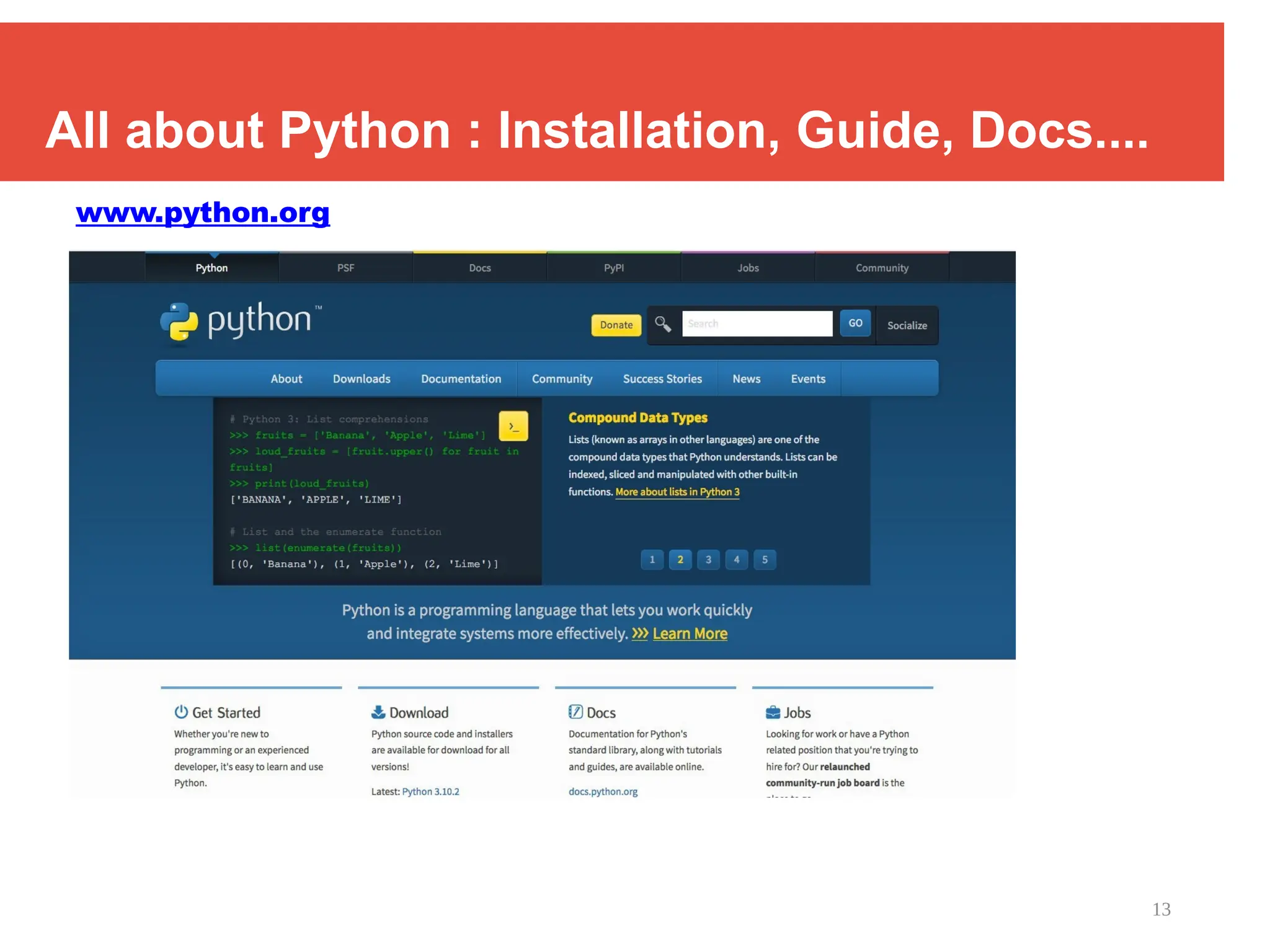
All about Python : Installation, Guide, Docs....
www.python.org
14
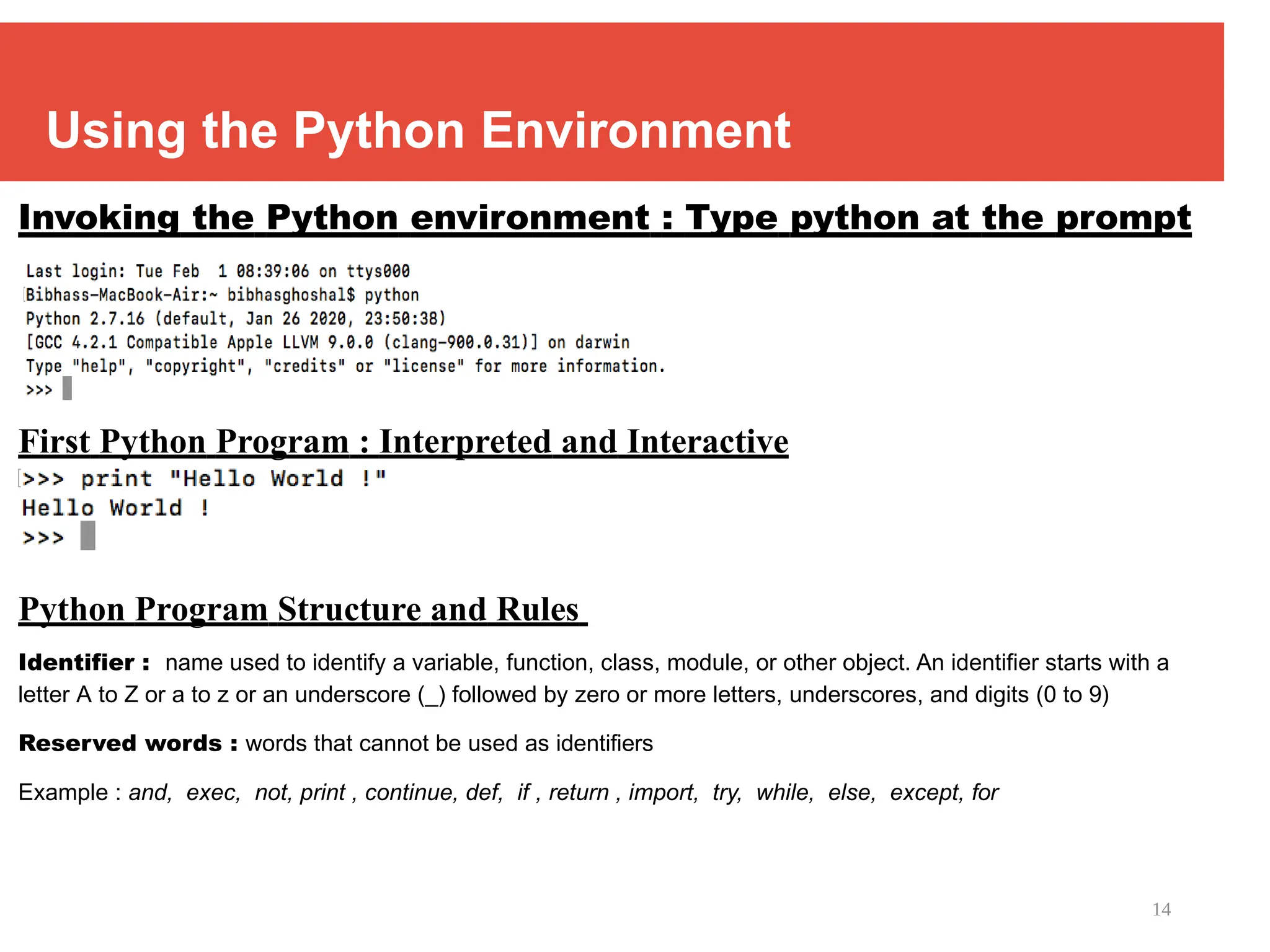
Using the Python Environment
Invoking the Python environment : Type python at the prompt
First Python Program : Interpreted and Interactive
Python Program Structure and Rules
Identifier : name used to identify a variable, function, class, module, or other object. An identifier starts with a
letter A to Z or a to z or an underscore (_) followed by zero or more letters, underscores, and digits (0 to 9)
Reserved words : words that cannot be used as identifiers
Example : and, exec, not, print , continue, def, if , return , import, try, while, else, except, for
15
Python Program Structure
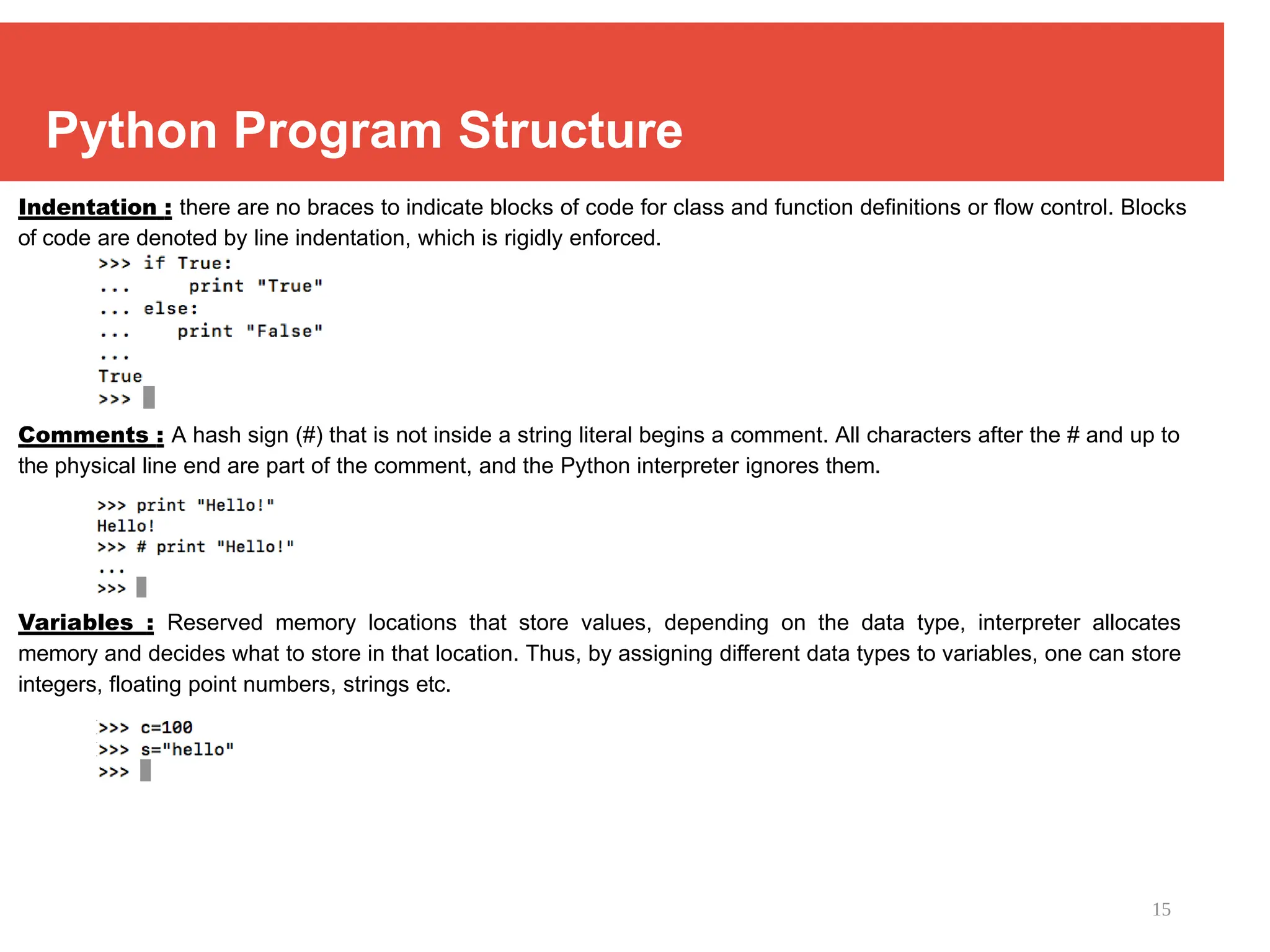
Indentation : there are no braces to indicate blocks of code for class and function definitions or flow control. Blocks
of code are denoted by line indentation, which is rigidly enforced.
Comments : A hash sign (#) that is not inside a string literal begins a comment. All characters after the # and up to
the physical line end are part of the comment, and the Python interpreter ignores them.
Variables : Reserved memory locations that store values, depending on the data type, interpreter allocates
memory and decides what to store in that location. Thus, by assigning different data types to variables, one can store
integers, floating point numbers, strings etc.
16
Data Types in Python
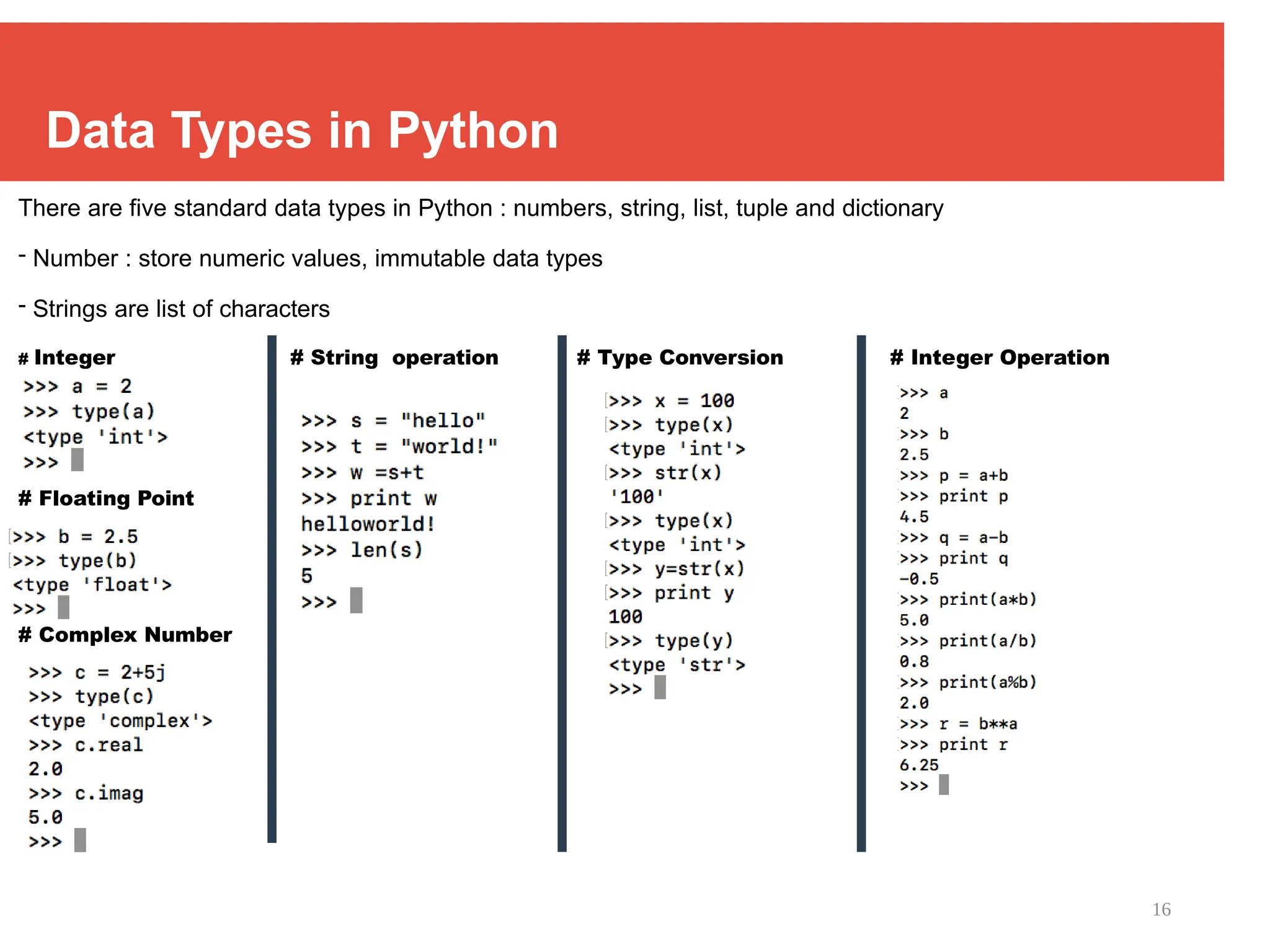
There are five standard data types in Python : numbers, string, list, tuple and dictionary
- Number : store numeric values, immutable data types
- Strings are list of characters
# Integer # String operation # Type Conversion # Integer Operation
# Floating Point
# Complex Number
17
Compound Data Types Python in Linux
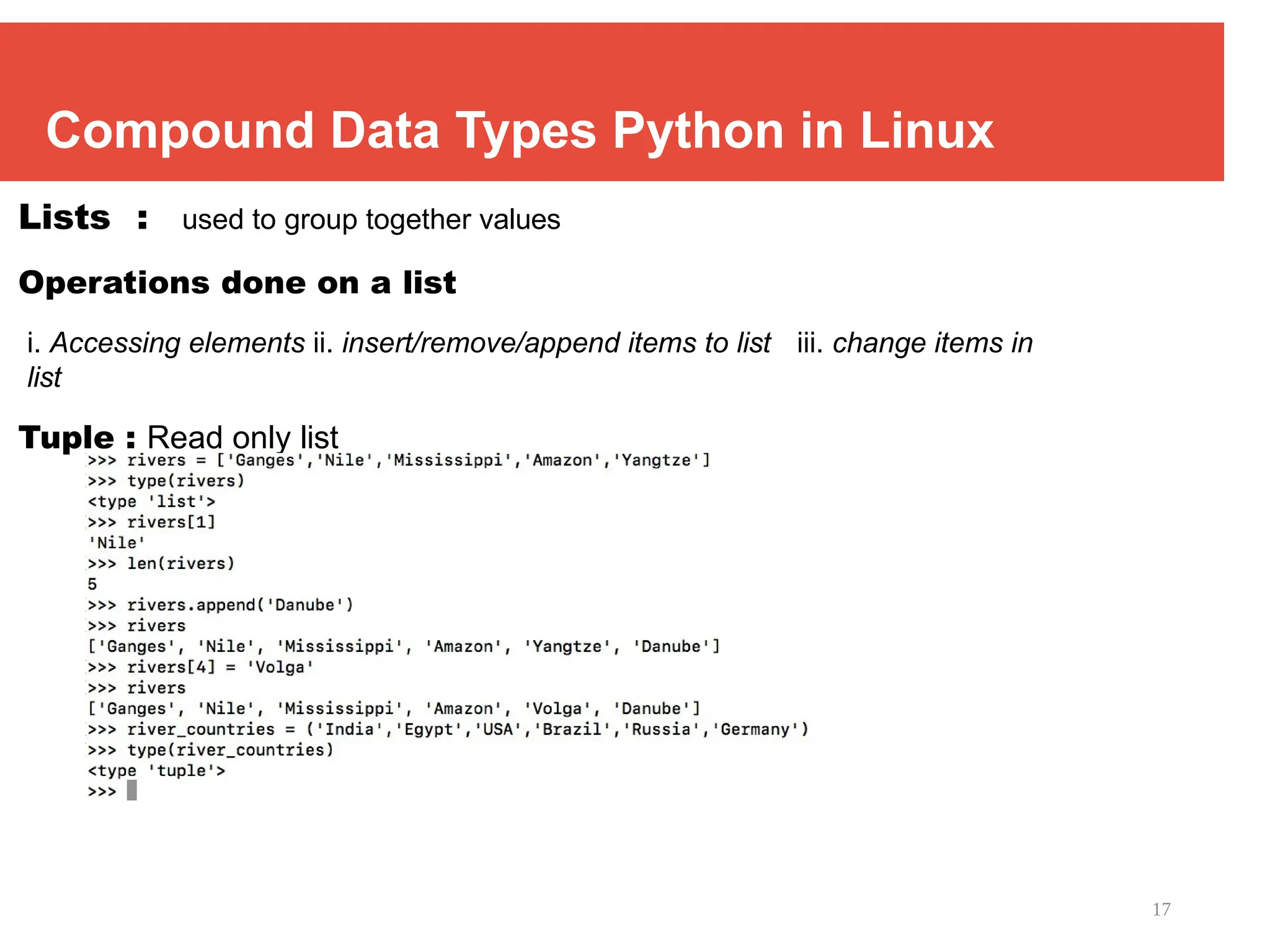
Lists : used to group together values
Operations done on a list
i. Accessing elements ii. insert/remove/append items to list iii. change items in
list
Tuple : Read only list
18
Compound Data Types Python in Linux
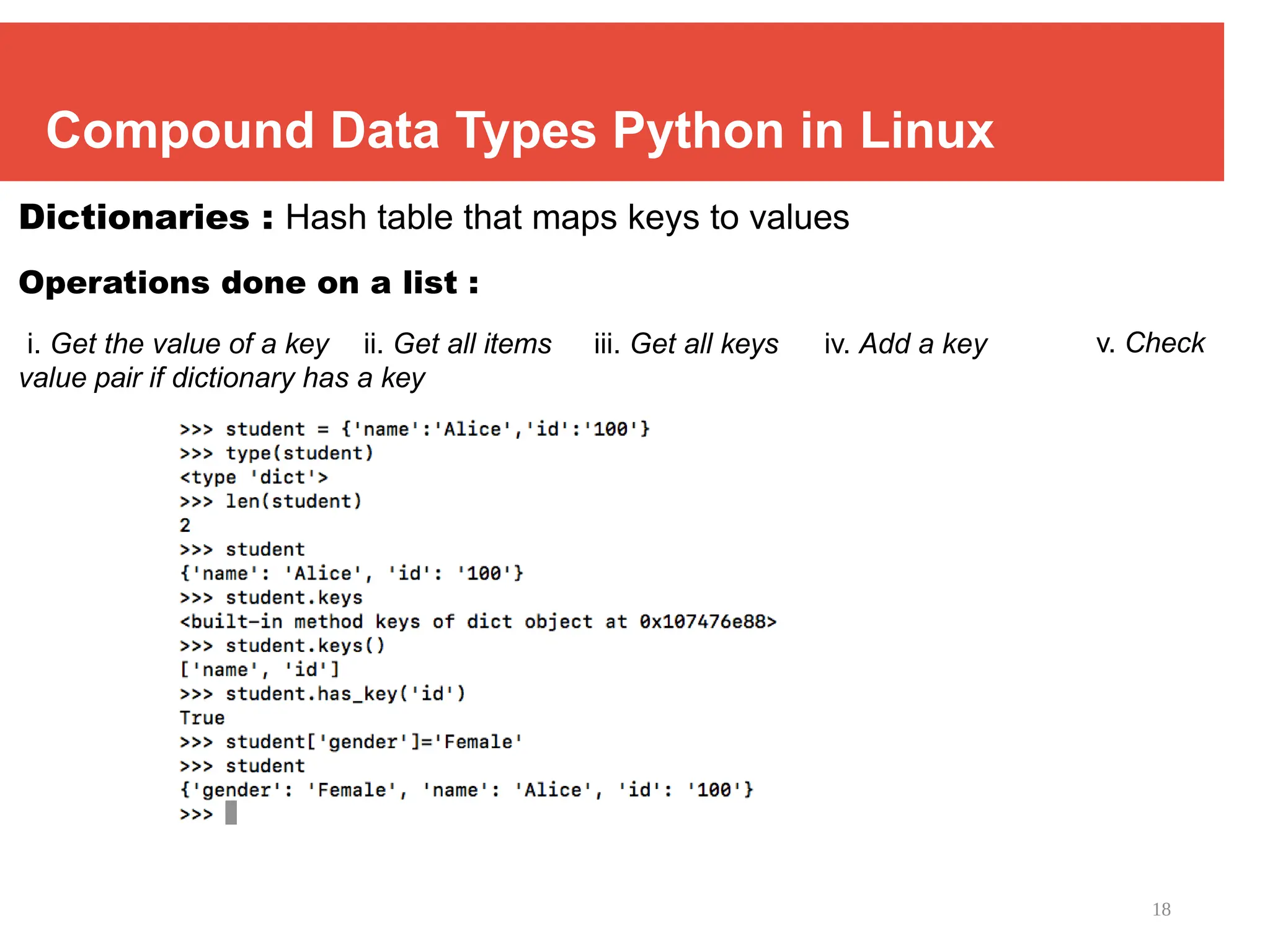
Dictionaries : Hash table that maps keys to values
Operations done on a list :
i. Get the value of a key ii. Get all items iii. Get all keys iv. Add a key
value pair if dictionary has a key
v. Check
19
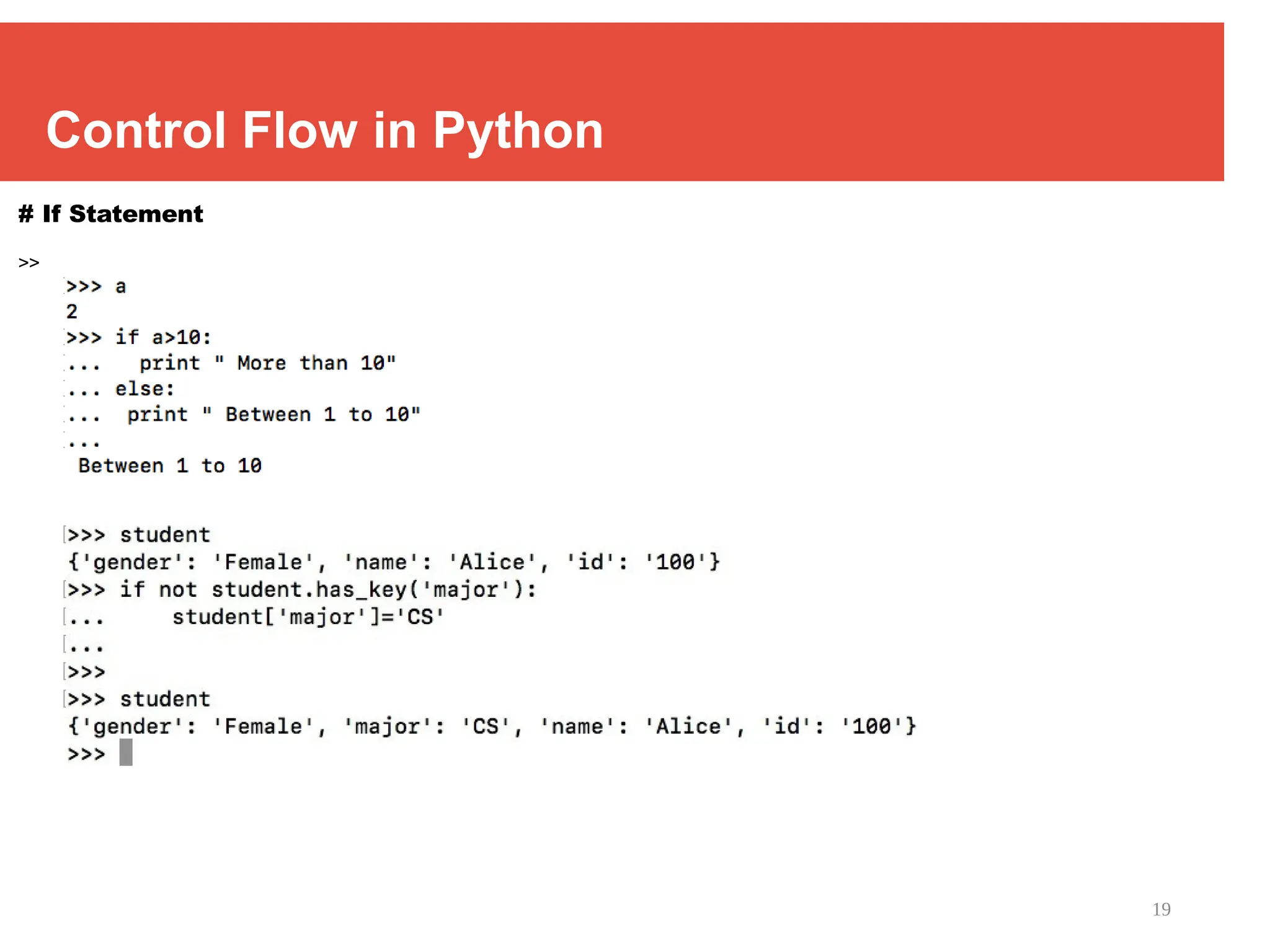
Control Flow in Python
# If Statement
>>
20
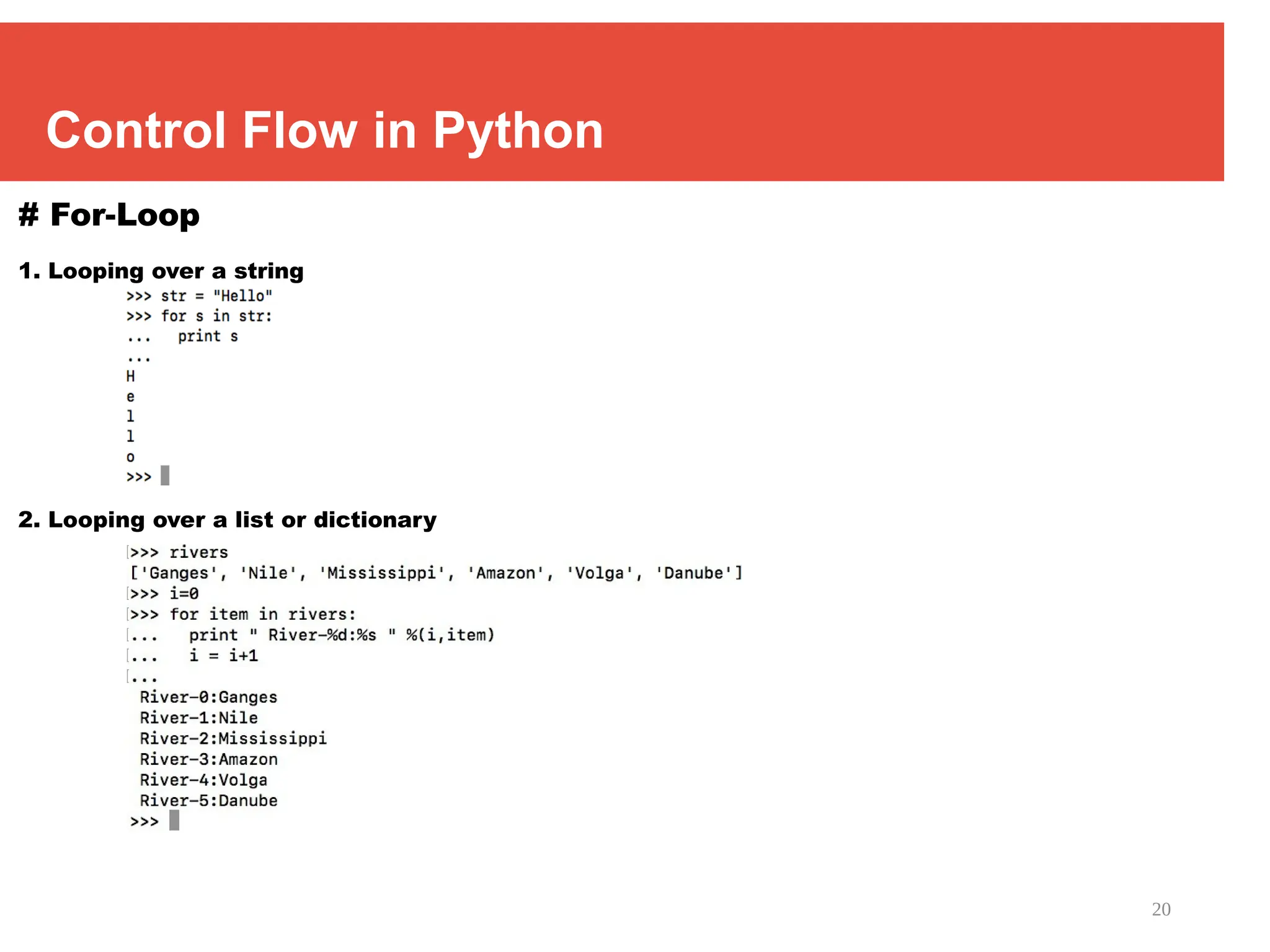
Control Flow in Python
# For-Loop
1. Looping over a string
2. Looping over a list or dictionary
21
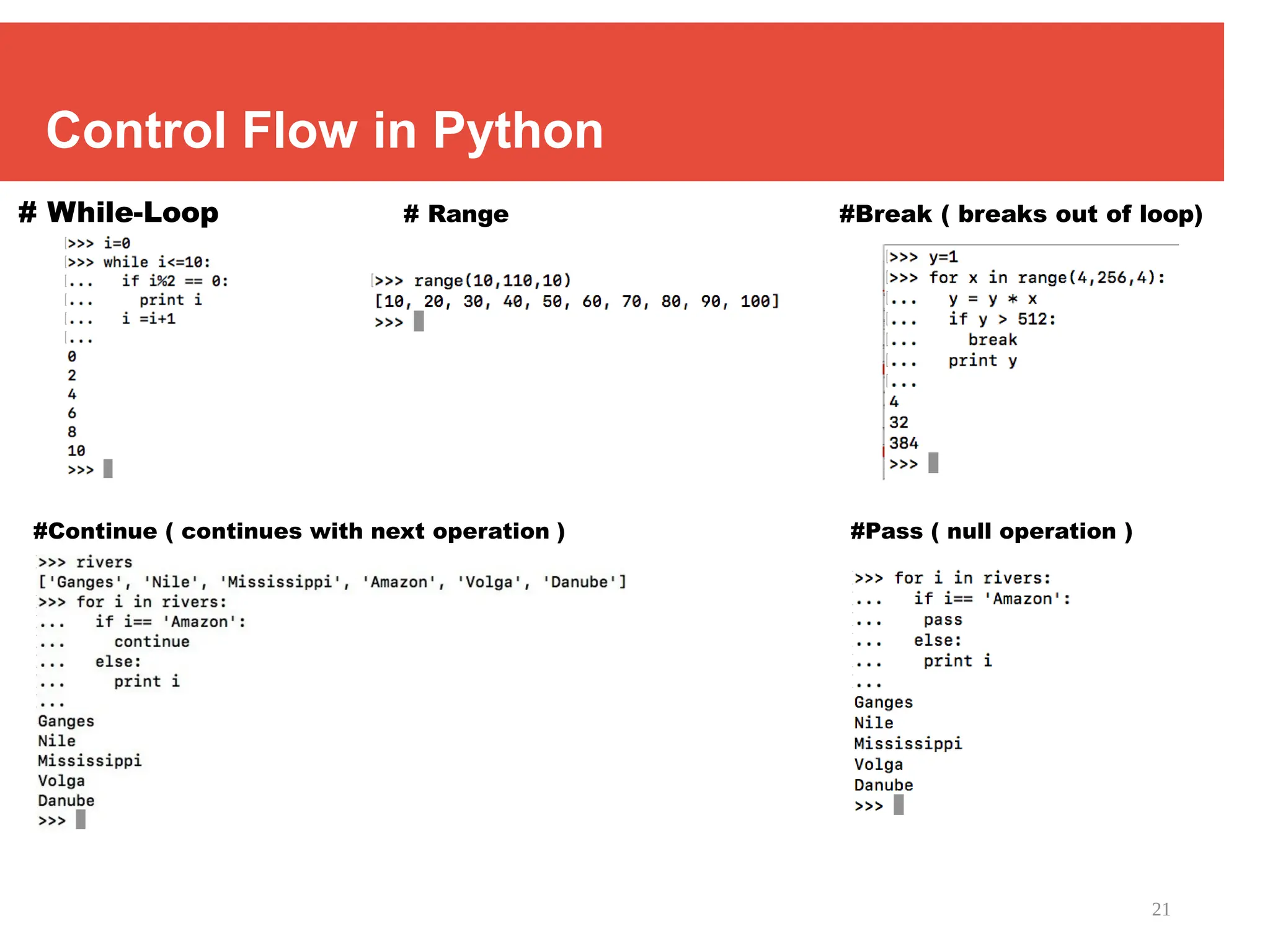
Control Flow in Python
# While-Loop # Range #Break ( breaks out of loop)
#Continue ( continues with next operation ) #Pass ( null operation )
22
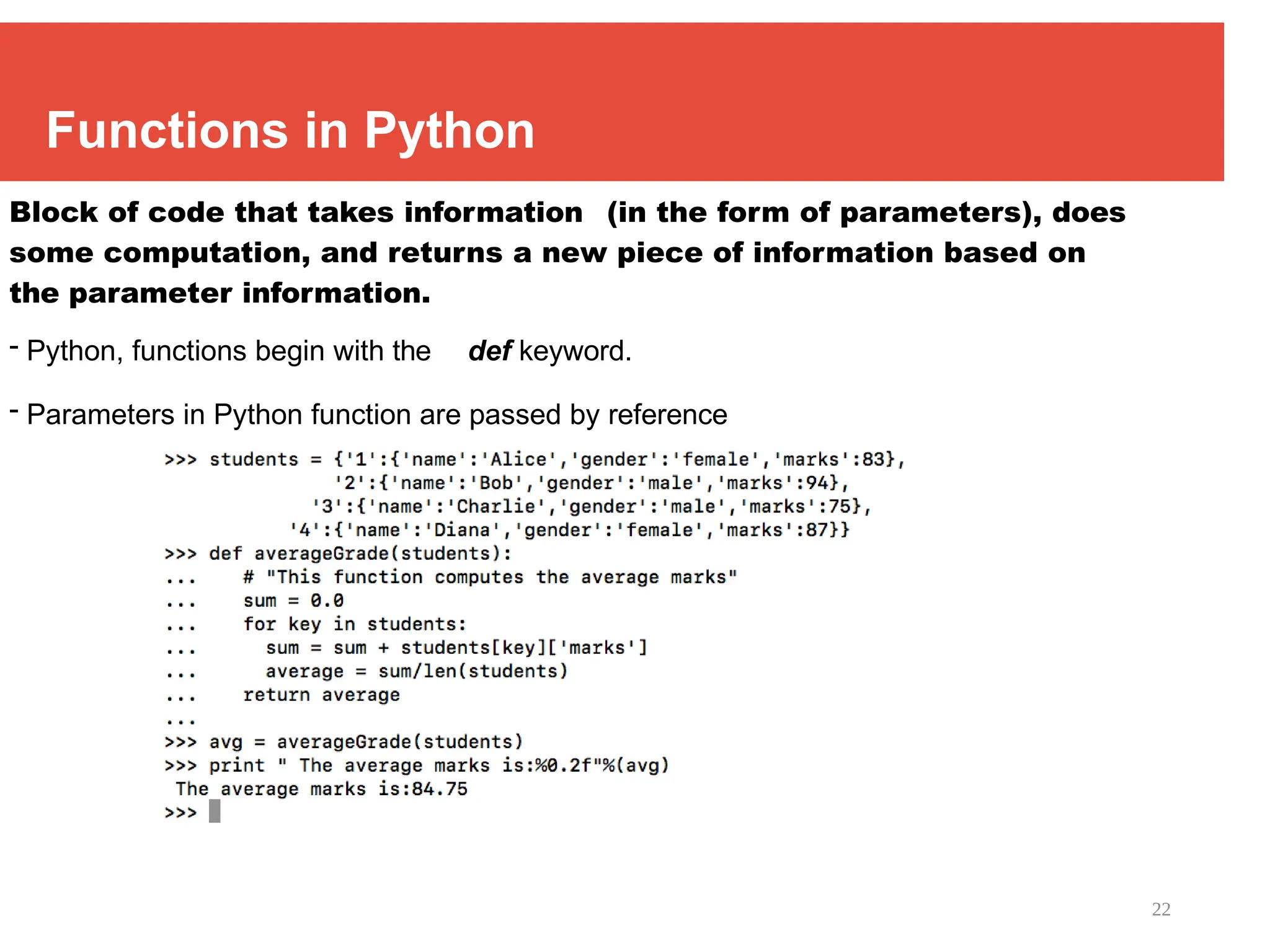
Functions in Python
Block of code that takes information (in the form of parameters), does
some computation, and returns a new piece of information based on
the parameter information.
- Python, functions begin with the def keyword.
- Parameters in Python function are passed by reference
23
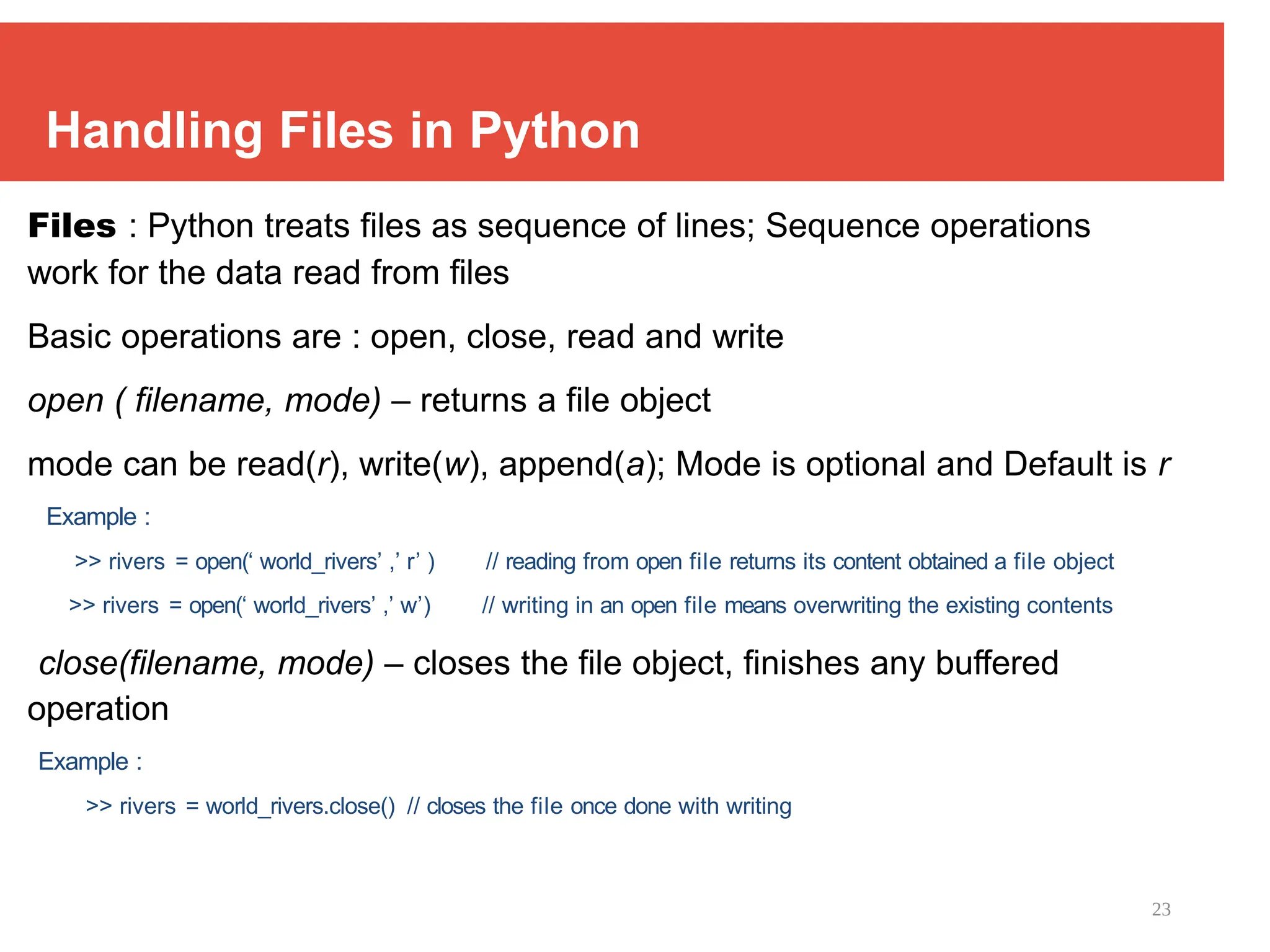
Handling Files in Python
Files : Python treats files as sequence of lines; Sequence operations
work for the data read from files
Basic operations are : open, close, read and write
open ( filename, mode) – returns a file object
mode can be read(r), write(w), append(a); Mode is optional and Default is r
Example :
>> rivers = open(‘ world_rivers’ ,’ r’ ) // reading from open file returns its content obtained a file object
>> rivers = open(‘ world_rivers’ ,’ w’) // writing in an open file means overwriting the existing contents
close(filename, mode) – closes the file object, finishes any buffered
operation
Example :
>> rivers = world_rivers.close() // closes the file once done with writing
24
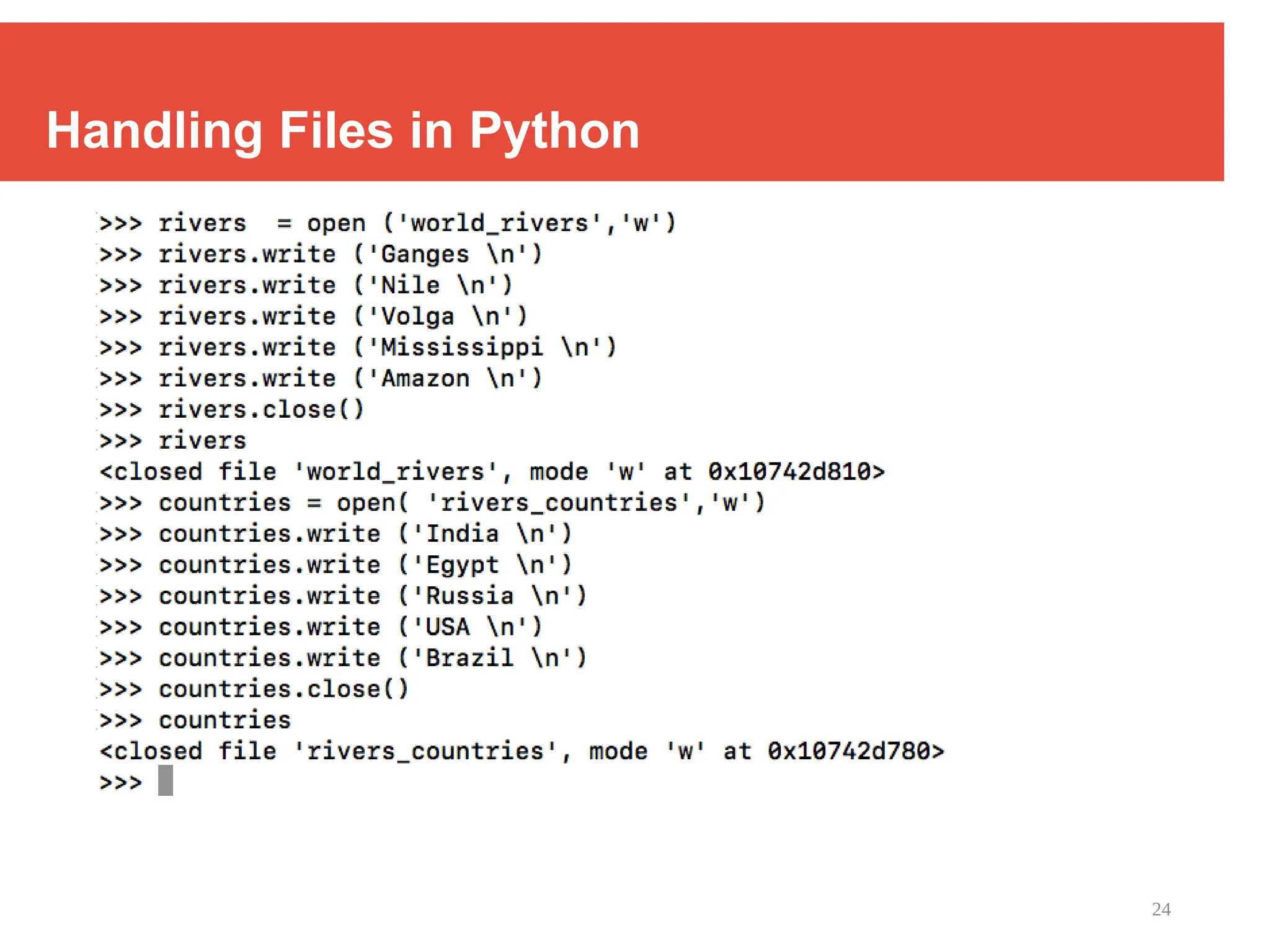
Handling Files in Python
25
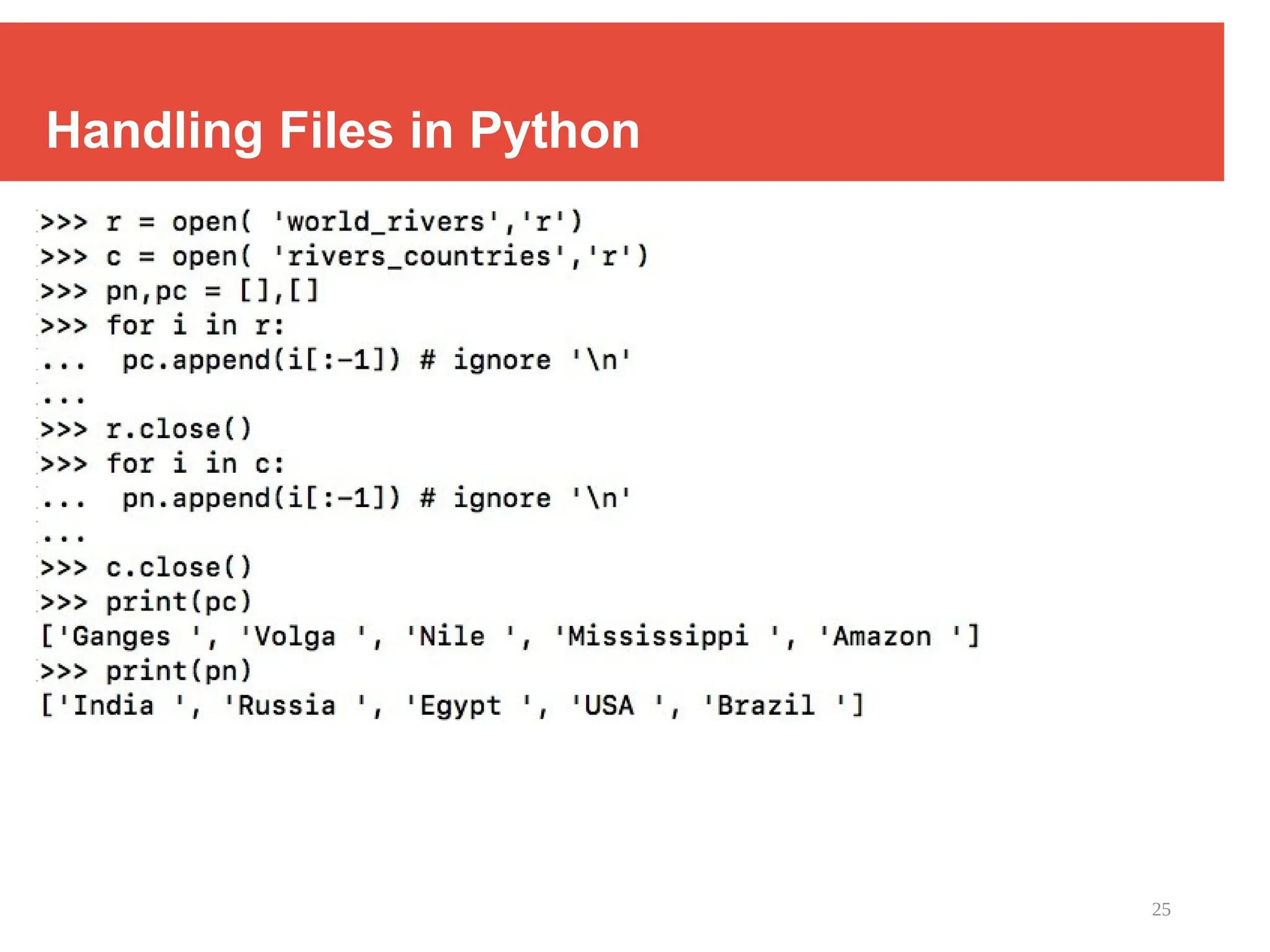
Handling Files in Python
26
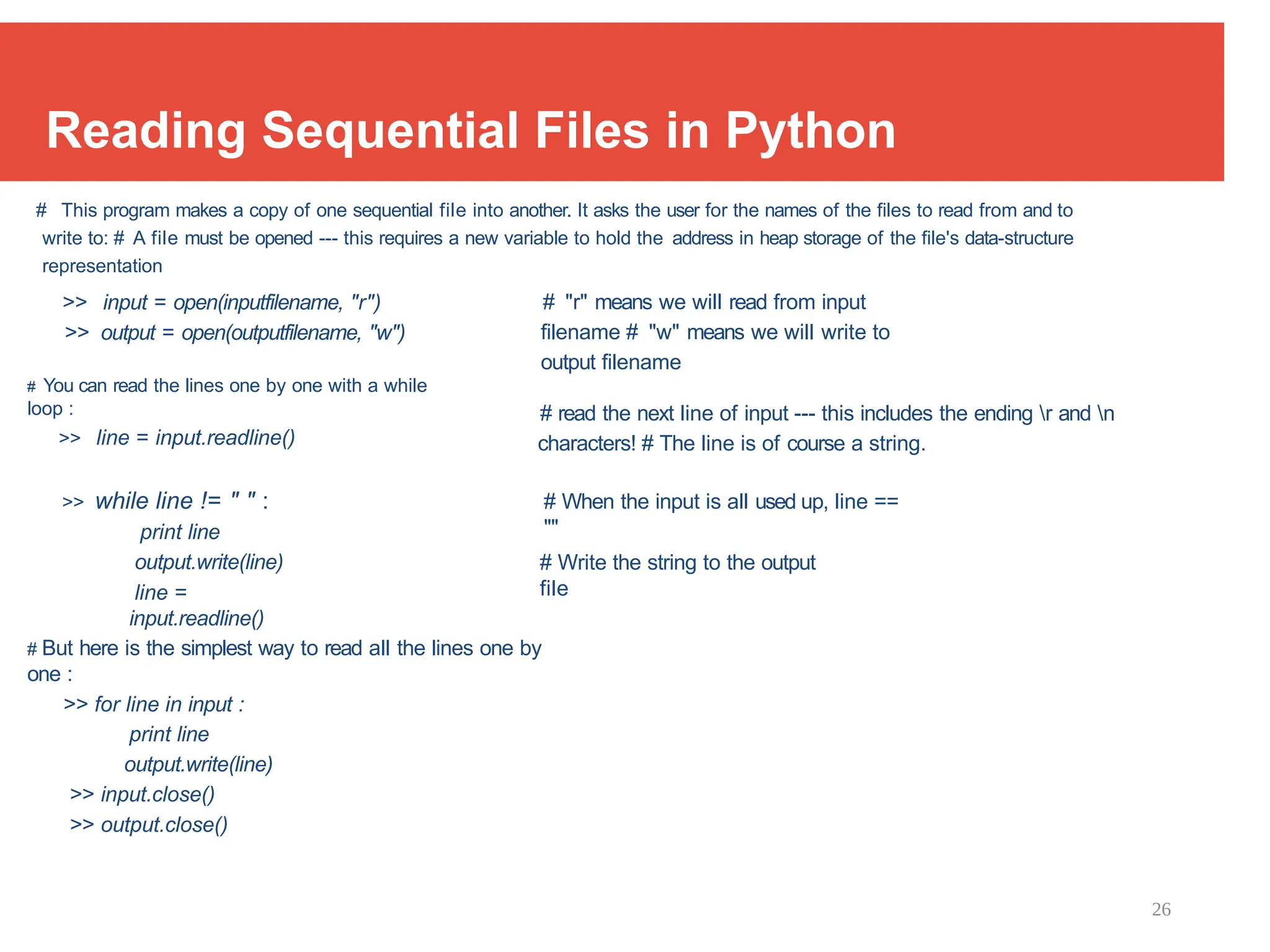
Reading Sequential Files in Python
# This program makes a copy of one sequential file into another. It asks the user for the names of the files to read from and to
write to: # A file must be opened --- this requires a new variable to hold the address in heap storage of the file's data-structure
representation
>> input = open(inputfilename, "r")
>> output = open(outputfilename, "w")
# You can read the lines one by one with a while
loop :
>> line = input.readline()
# "r" means we will read from input
filename # "w" means we will write to
output filename
# read the next line of input --- this includes the ending r and n
characters! # The line is of course a string.
>> while line != " " :
print line
output.write(line)
line =
input.readline()
# When the input is all used up, line ==
""
# Write the string to the output
file
# But here is the simplest way to read all the lines one by
one :
>> for line in input :
print line
output.write(line)
>> input.close()
>> output.close()
27
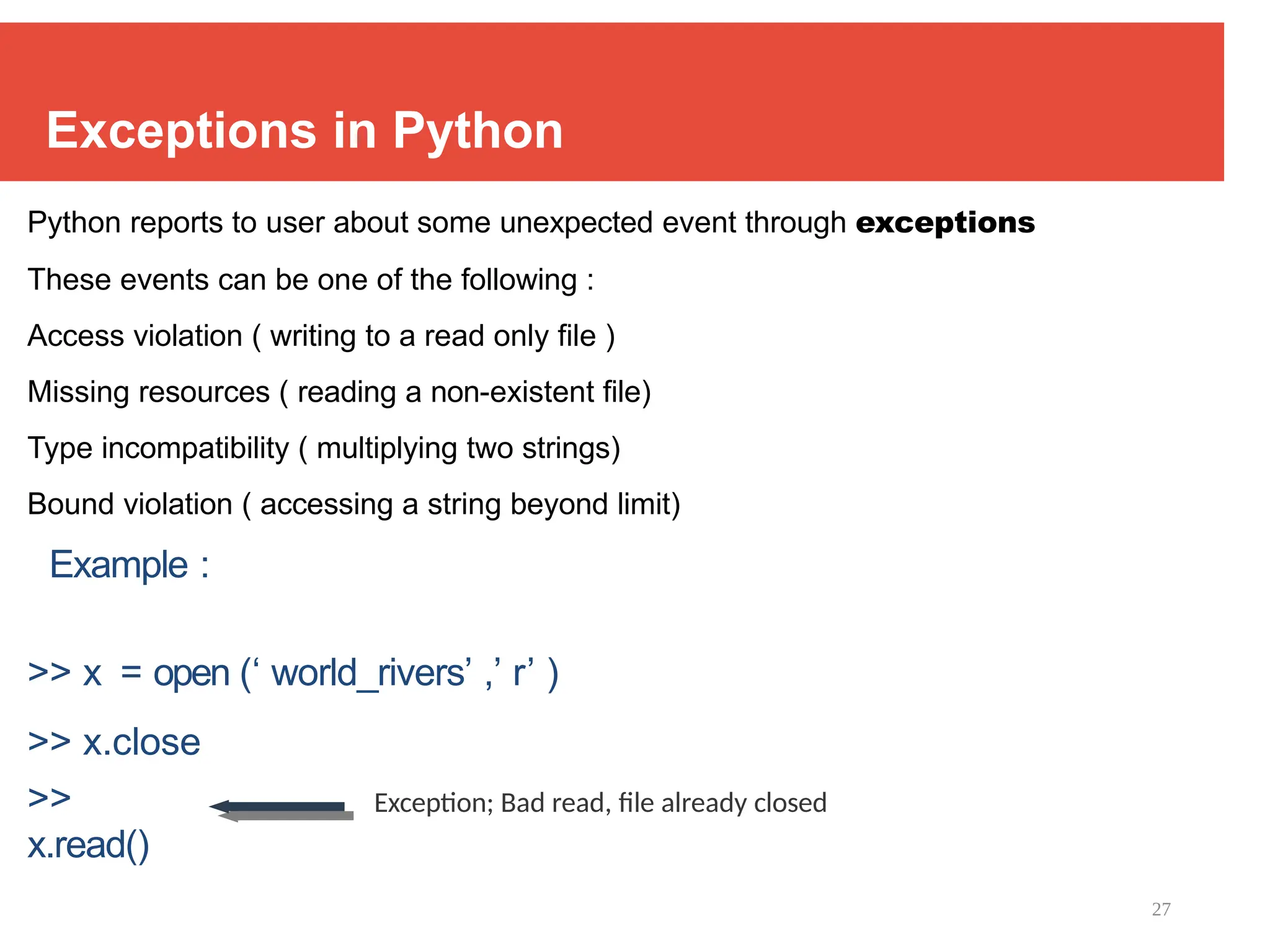
Exceptions in Python
Python reports to user about some unexpected event through exceptions
These events can be one of the following :
Access violation ( writing to a read only file )
Missing resources ( reading a non-existent file)
Type incompatibility ( multiplying two strings)
Bound violation ( accessing a string beyond limit)
Example :
>> x = open (‘ world_rivers’ ,’ r’ )
>> x.close
>>
x.read()
Exception; Bad read, file already closed
28
Exception Handling in Python
try.......except......else
try:
Operations that can raise
exceptions. except [Optional list of
exceptions] : In case of exceptions,
do the recovery. else : # else is
optional
If no exception then do normal
things
try.......finally
try :
Operations that can raise
exceptions. finally :
Execute irrespective of whether
exception was raised or not. Typically
clean-up stuff
# Program to depict else clause with try-except
# Function which returns a/b
def example(a , b):
try:
c = ((a+b) // (a-b))
except ZeroDivisionError:
print ("a/b
result in 0")
else:
print (c)
# Driver program to test
above function
example(2.0, 3.0)
example(3.0, 3.0)
-5.0
a/b result in 0
29
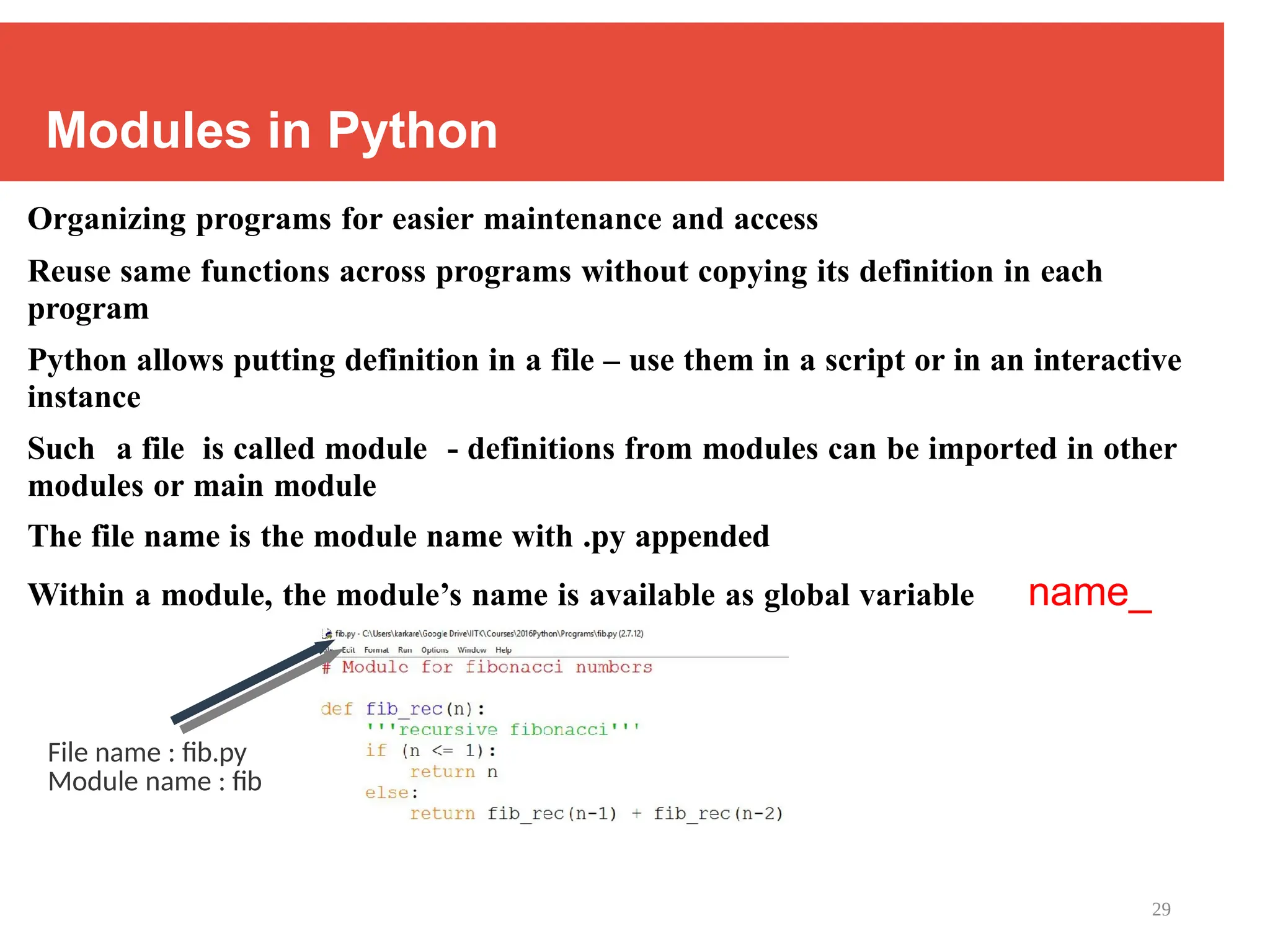
Modules in Python
Organizing programs for easier maintenance and access
Reuse same functions across programs without copying its definition in each
program
Python allows putting definition in a file – use them in a script or in an interactive
instance
Such a file is called module - definitions from modules can be imported in other
modules or main module
The file name is the module name with .py appended
Within a module, the module’s name is available as global variable name_
File name : fib.py
Module name : fib
30
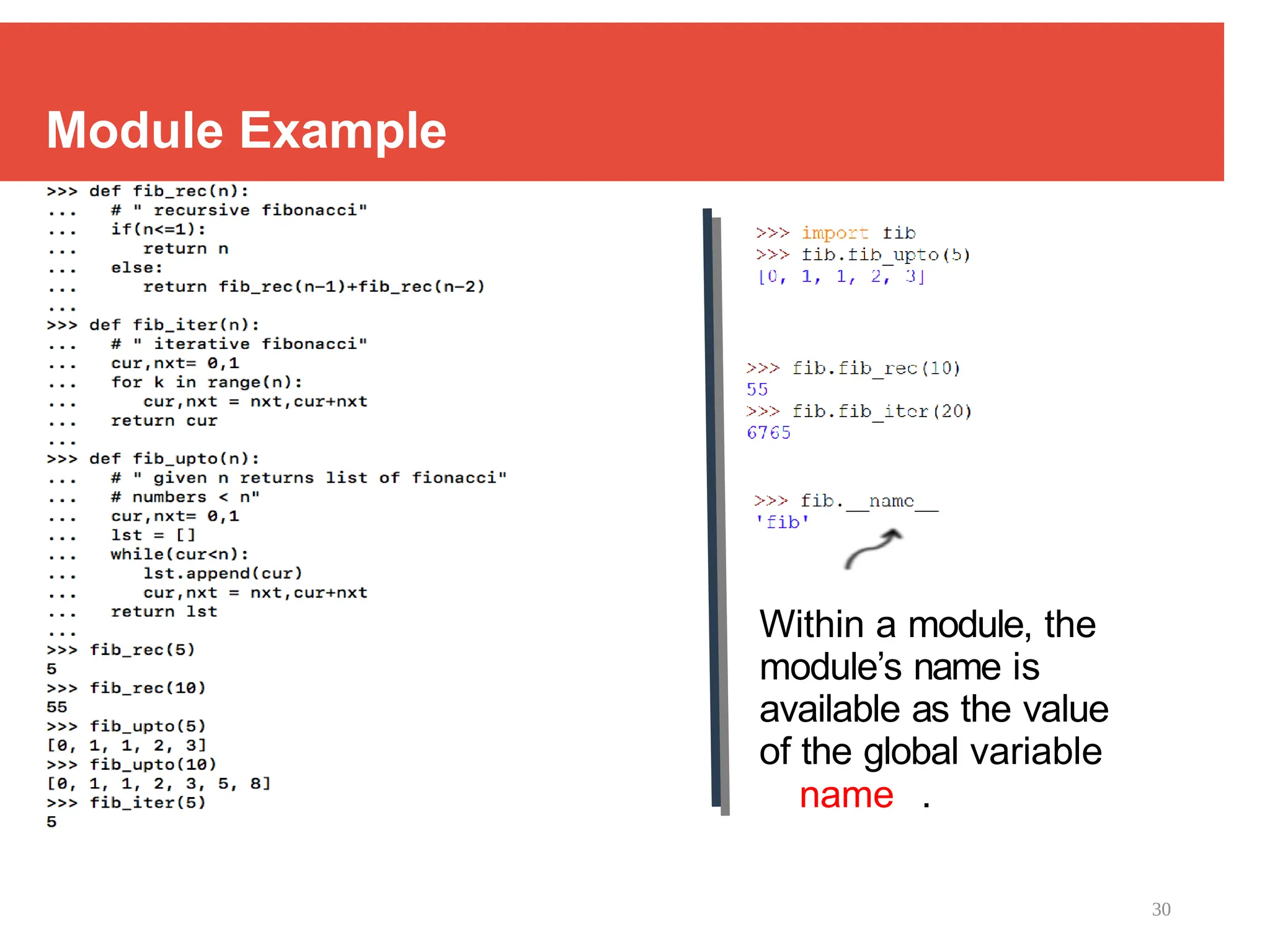
Module Example
Within a module, the
module’s name is
available as the value
of the global variable
name .
31
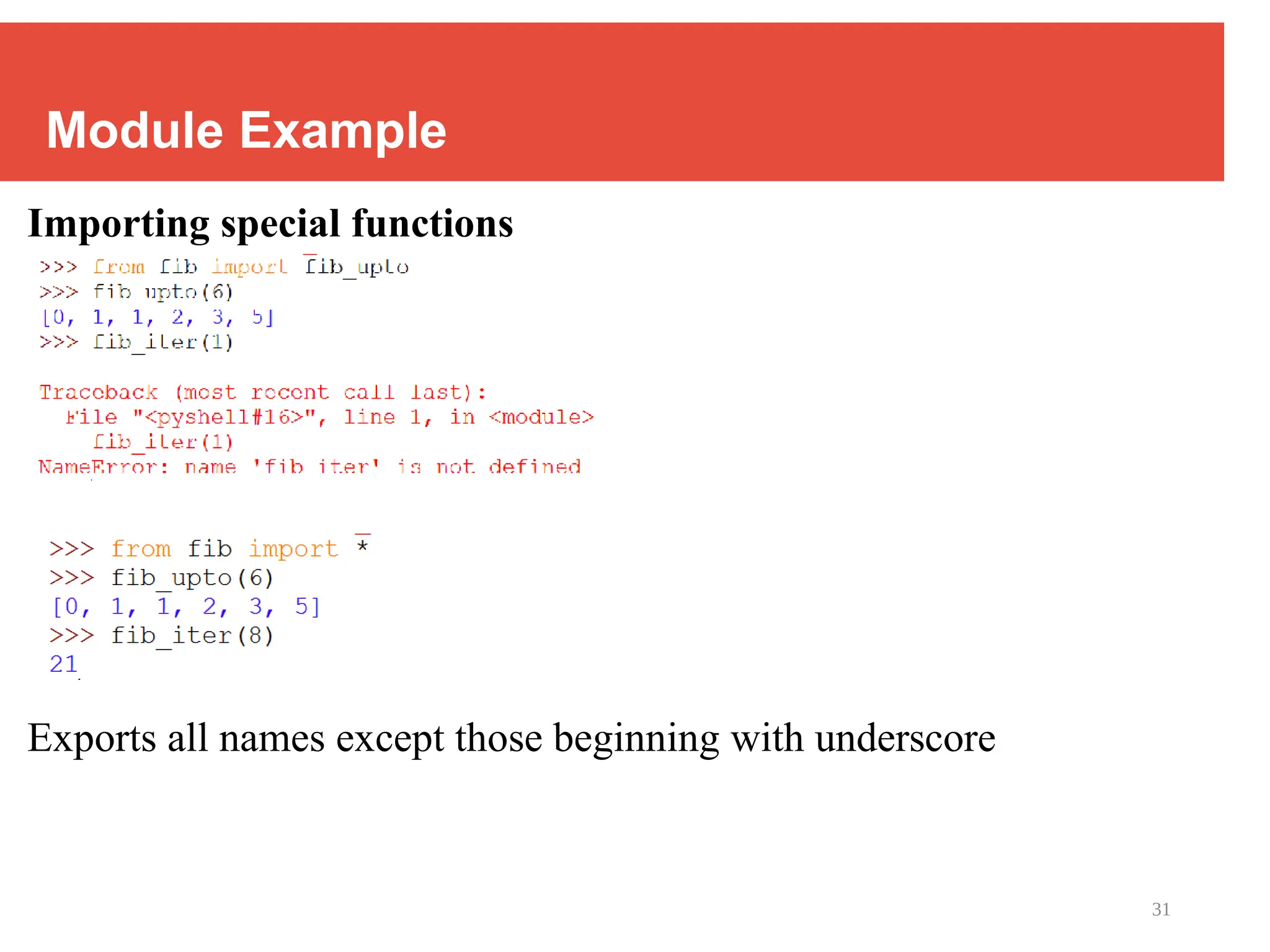
Module Example
Importing special functions
Exports all names except those beginning with underscore
32
_main_ in Modules
When you run a module on the command line with : python fib.py <arguments>
the code in the module will be executed in the module just as if you imported it but with
the
name set to " main ".
By adding the code at the end of your module, you can make the file usable as script as
well as importable module
if name == " main ":
Example:
if name == " main ":
import sys
print (fib_iter(int(sys.argv[ 1])))
• This code parses the command line only if the module is executed as the “ main” file :
$ python fib.py
10 55
• If the module
is imported,
the code is
33
Back to Raspberry Pi Using
Python
34
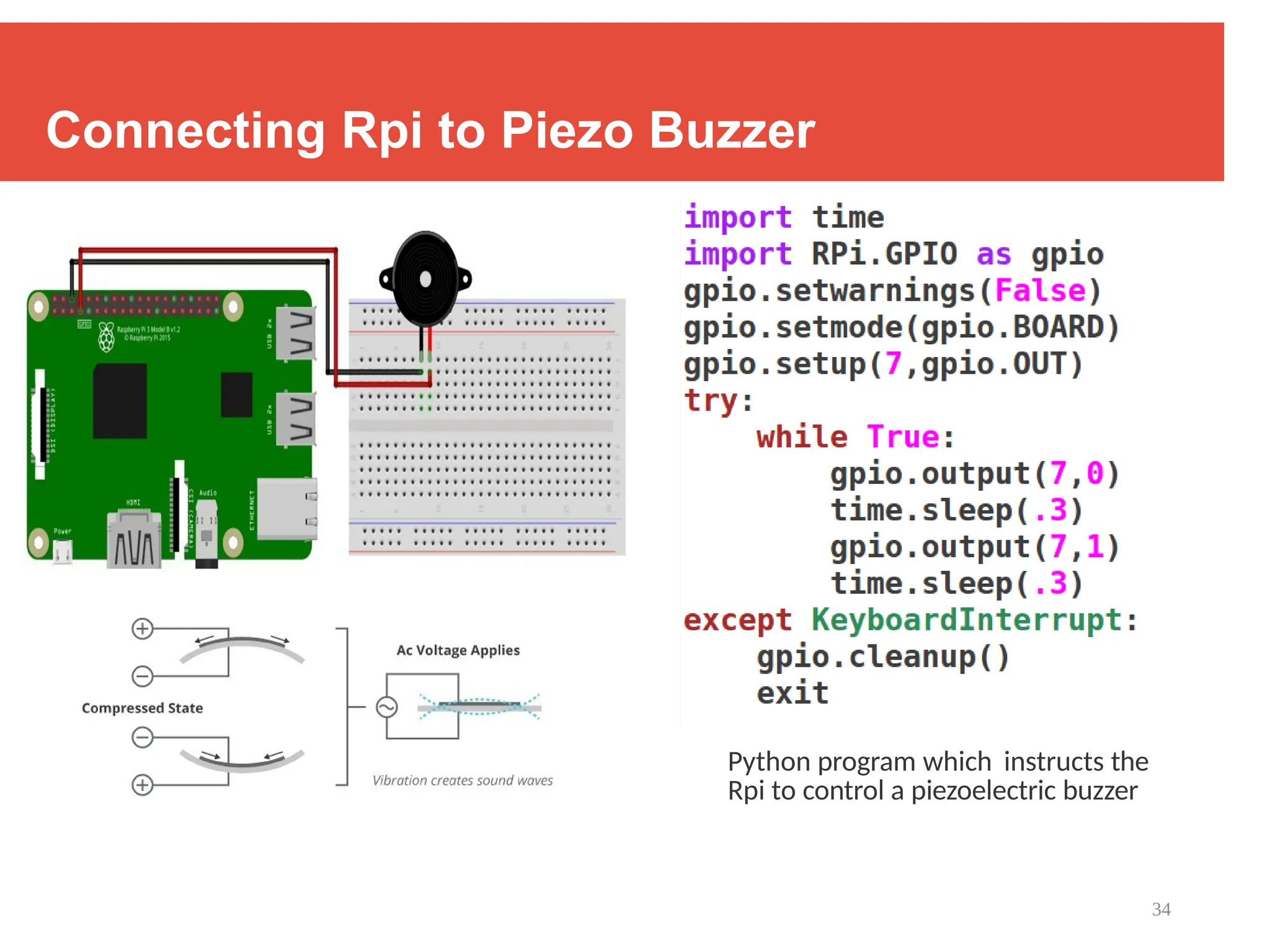
Connecting Rpi to Piezo Buzzer
Python program which instructs the
Rpi to control a piezoelectric buzzer
35
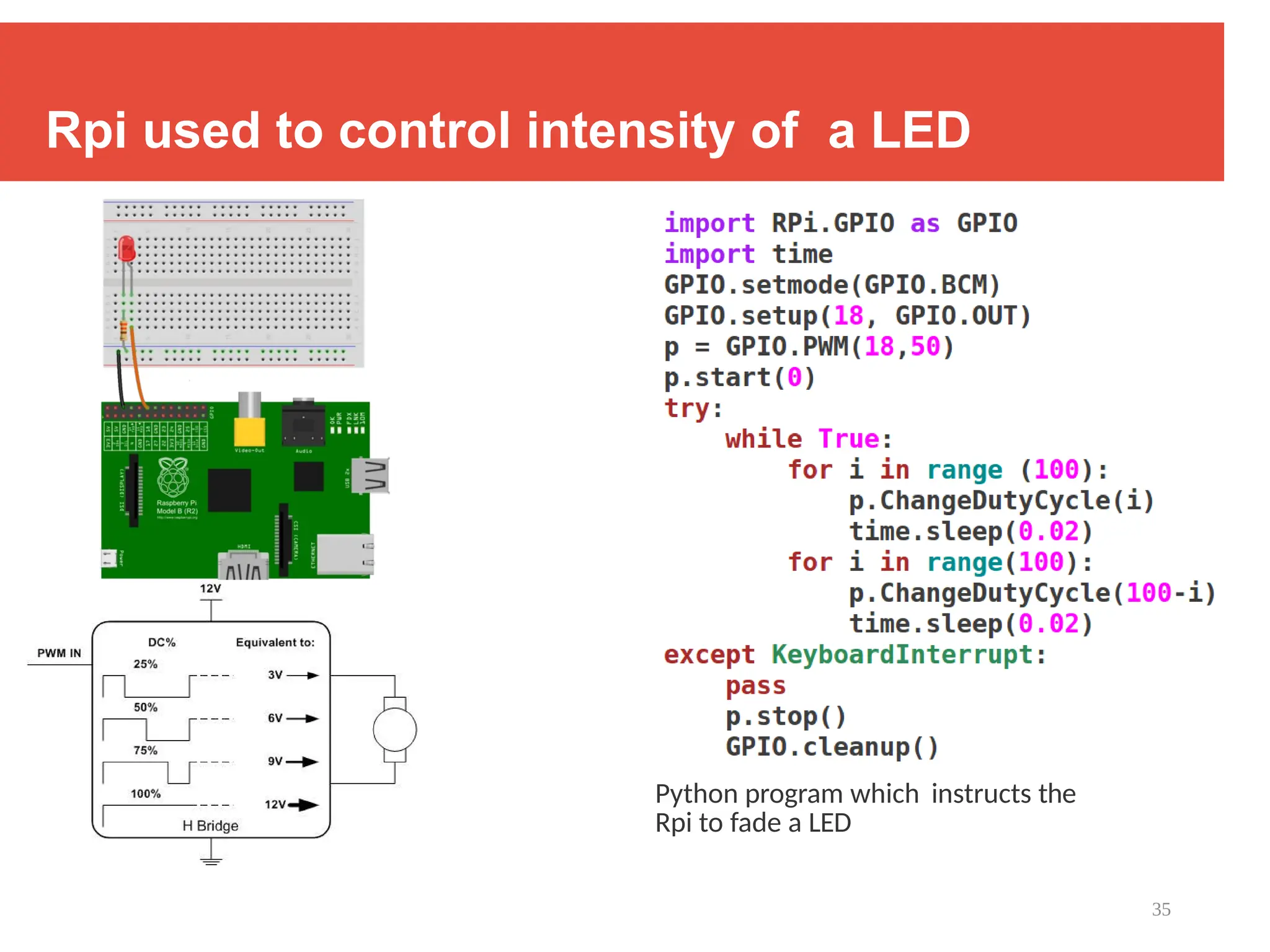
Rpi used to control intensity of a LED
Python program which instructs the
Rpi to fade a LED
36
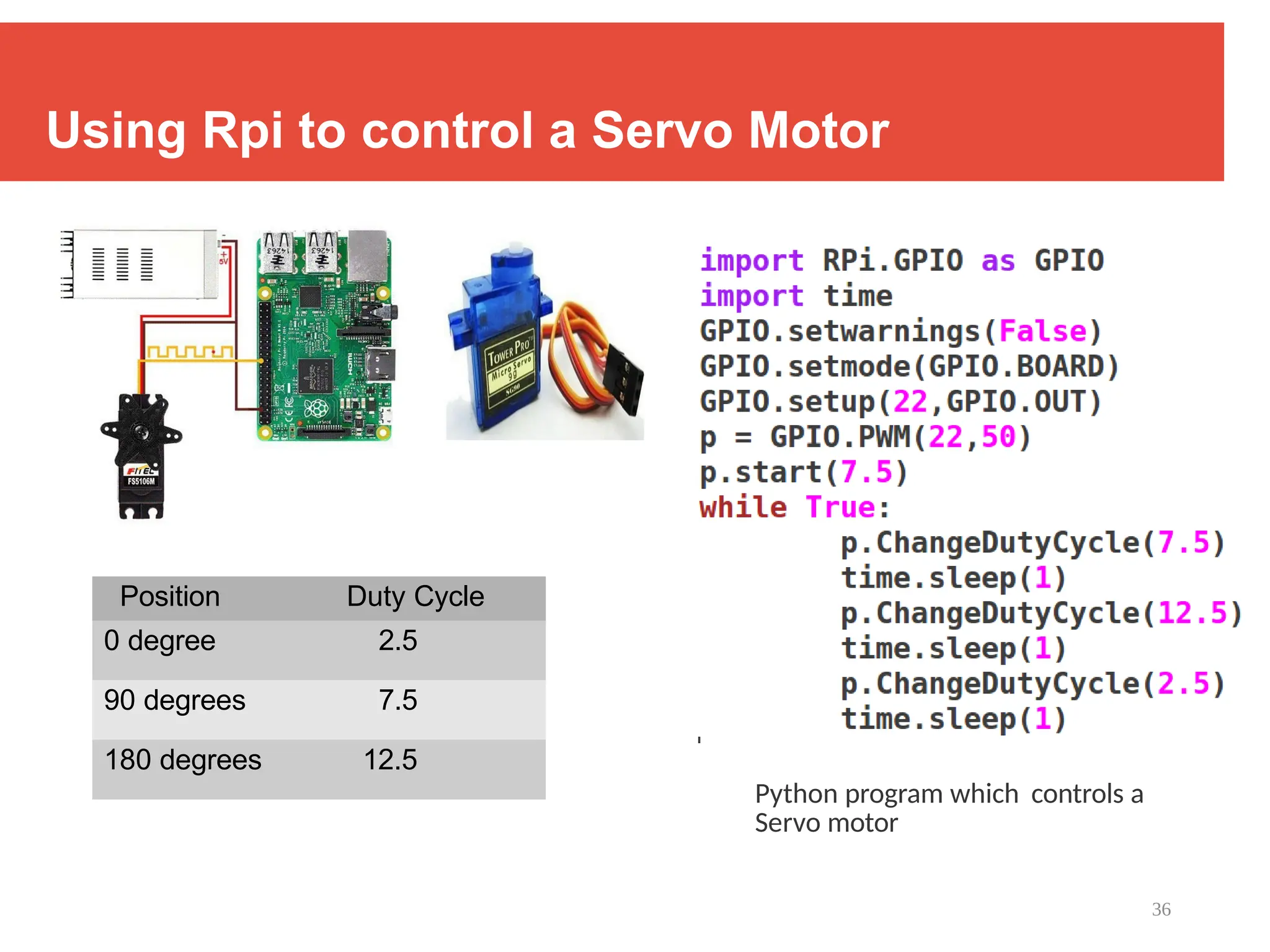
Using Rpi to control a Servo Motor
Python program which controls a
Servo motor
Position Duty Cycle
0 degree 2.5
90 degrees 7.5
180 degrees 12.5
37
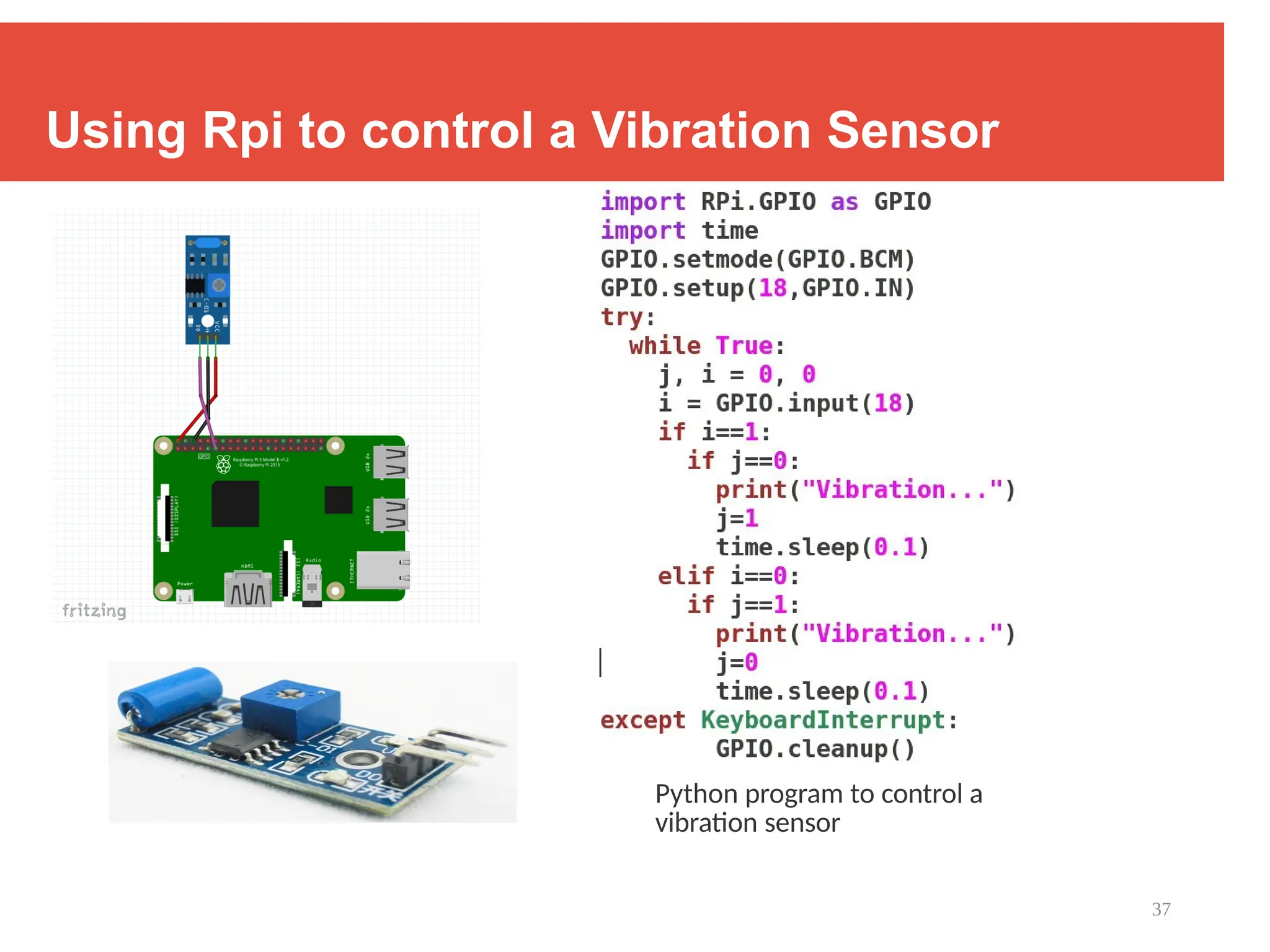
Using Rpi to control a Vibration Sensor
Python program to control a
vibration sensor
38
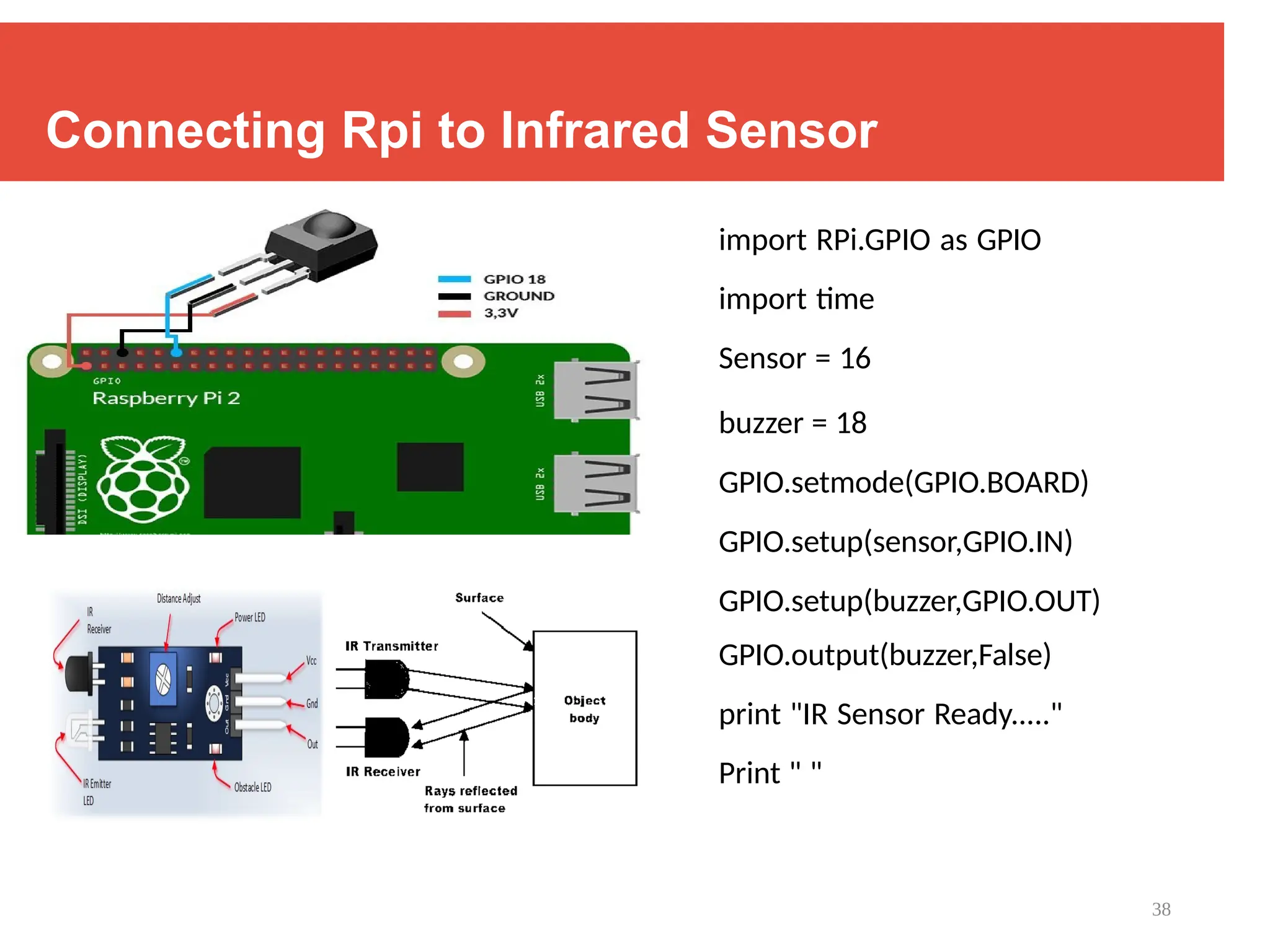
Connecting Rpi to Infrared Sensor
import RPi.GPIO as GPIO
import time
Sensor = 16
buzzer = 18
GPIO.setmode(GPIO.BOARD)
GPIO.setup(sensor,GPIO.IN)
GPIO.setup(buzzer,GPIO.OUT)
GPIO.output(buzzer,False)
print "IR Sensor Ready....."
Print " "
39
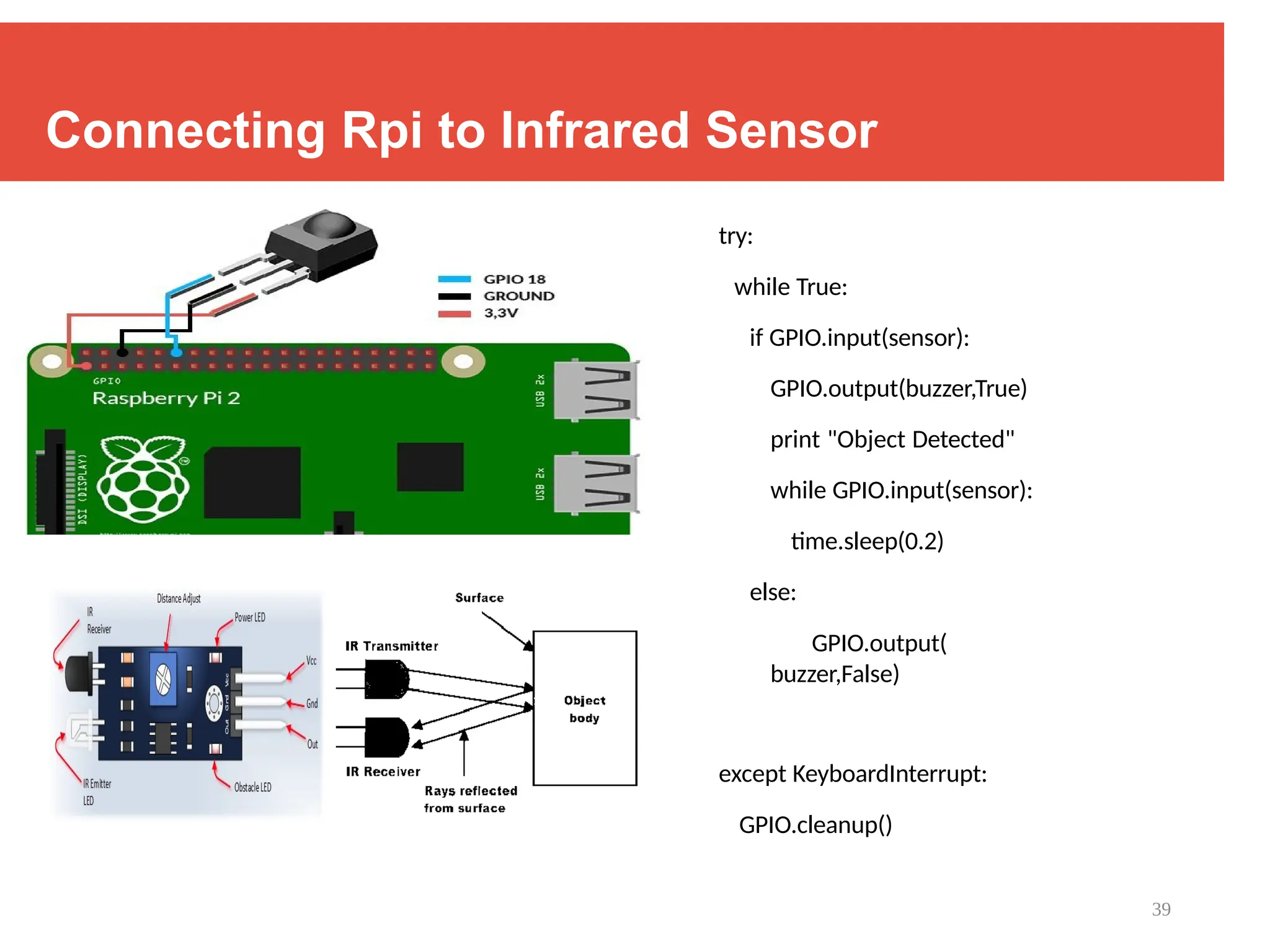
Connecting Rpi to Infrared Sensor
try:
while True:
if GPIO.input(sensor):
GPIO.output(buzzer,True)
print "Object Detected"
while GPIO.input(sensor):
time.sleep(0.2)
else:
GPIO.output(
buzzer,False)
except KeyboardInterrupt:
GPIO.cleanup()
40
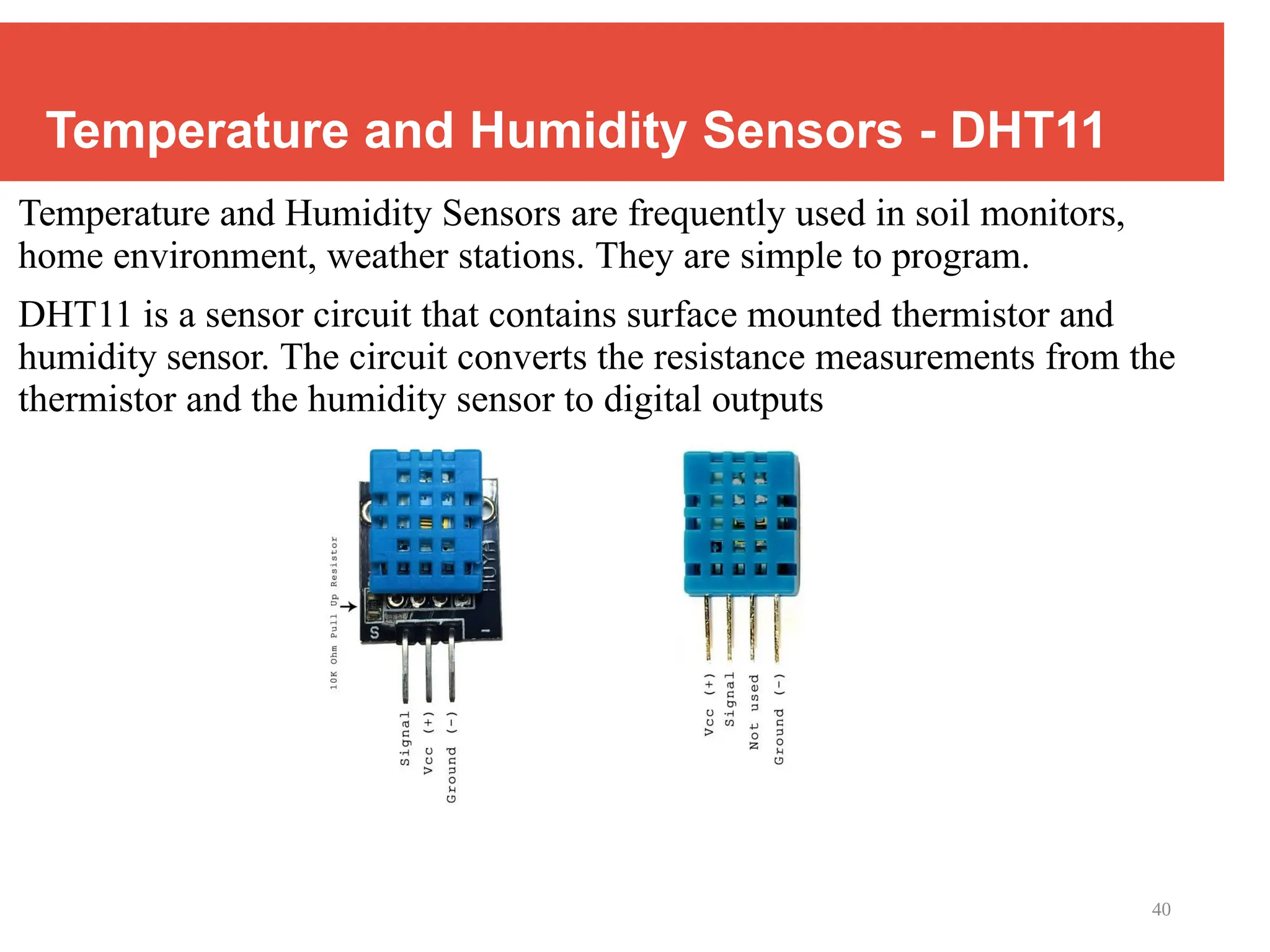
Temperature and Humidity Sensors - DHT11
Temperature and Humidity Sensors are frequently used in soil monitors,
home environment, weather stations. They are simple to program.
DHT11 is a sensor circuit that contains surface mounted thermistor and
humidity sensor. The circuit converts the resistance measurements from the
thermistor and the humidity sensor to digital outputs
41
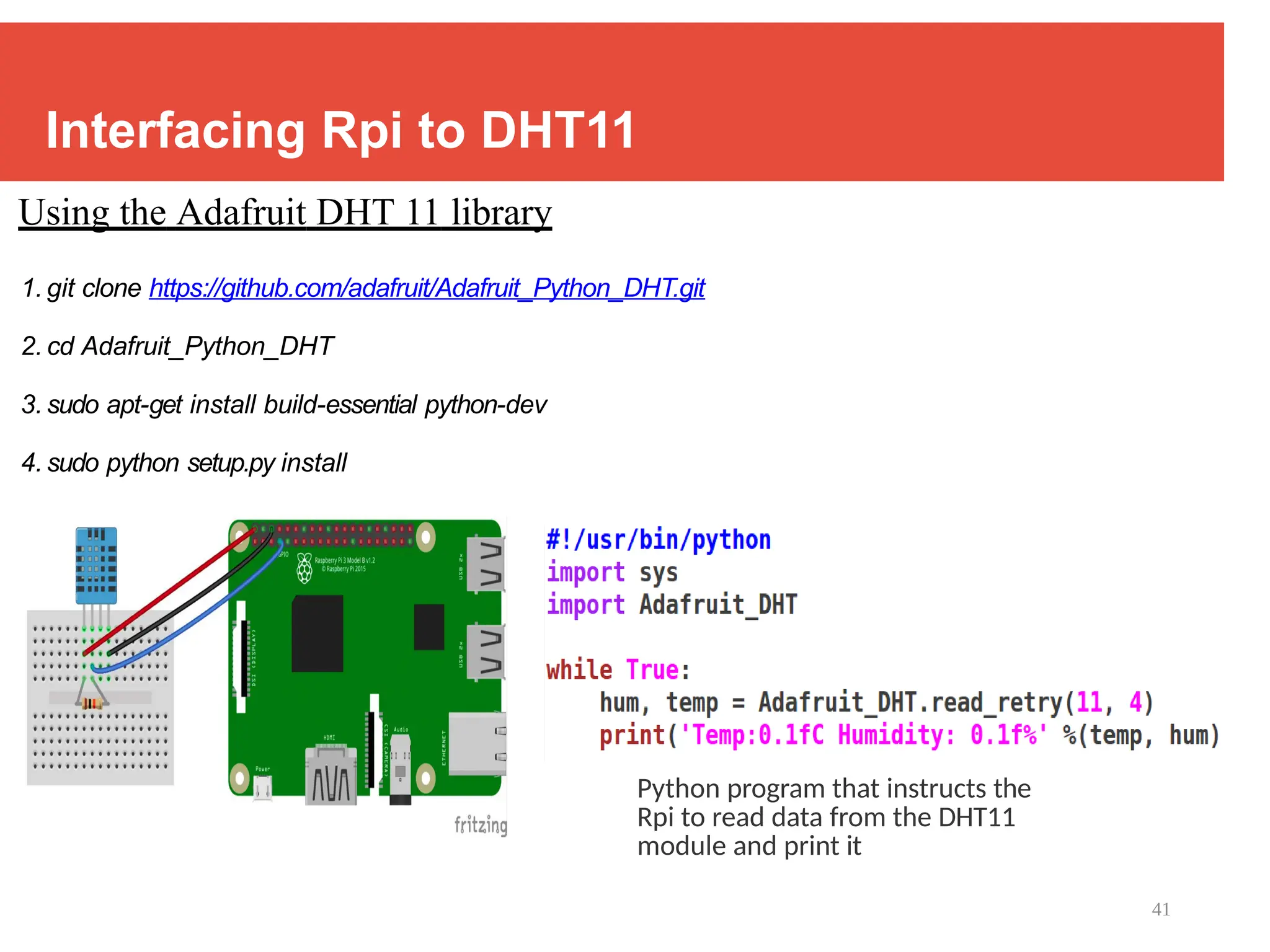
Interfacing Rpi to DHT11
Using the Adafruit DHT 11 library
1. git clone https://github.com/adafruit/Adafruit_Python_DHT.git
2. cd Adafruit_Python_DHT
3. sudo apt-get install build-essential python-dev
4. sudo python setup.py install
Python program that instructs the
Rpi to read data from the DHT11
module and print it
3-Tut2_Interfacing_Sensors_RPioT.pptx good reference

  • 1.
    1 Tutorial 2 :Interfacing Sensors to Rpi | Learning Python on the Go....
  • 2.
    2 The Four LayeredIoT Architecture Source : ITU-T
  • 3.
  • 4.
    4 Interfacing sensors tothe computing unit Source: Book website: http://www.internet-of-things-book.com Raspberry Pi Breadboard Jumper wires Electrical components Sensors
  • 5.
    5 Components 1. Computing Unit– Raspberry Pi ( 3B/ 3B+ / 4)
  • 6.
    6 Components 2. Sensors Vibration SensorTemperature Sensor Tilt Sensor IR Sensor Ultrasonic Distance Sensor
  • 7.
  • 8.
    8 Components 4. Other components BreadboardInternal connections of a Breadboard Jumper Wires Resistors LED
  • 9.
    9 Interfacing Rpi tocomponents : GPIO ports
  • 10.
    10 Programming the RaspberryPi : Learning Python on the Go....... The latest version of Raspbian includes the RPI.GPIO Python library pre-installed, so you can simply import that into your Python code. The RPI.GPIO is a library that allows your Python application to easily access the GPIO pins on your Raspberry Pi. The as keyword in Python allows you to refer to the RPI.GPIO library using the shorter name of GPIO. There are two ways to refer to the pins on the GPIO: either by physical pin numbers (starting from pin 1 to 40 on the Raspberry Pi 2/3), or Broadcom GPIO numbers (BCM) Module import GPIO pin setup Execute in loop Send a HIGH signal to pin 18 Wait for 1 time unit Send a LOW signal to pin 18 Wait for 1 time unit Python program which instructs the Rpi to blink a LED - turn the LED high and low alternately
  • 11.
    11 Introducing Python 1. General-purpose,versatile, and powerful programming languaage 2. It was created by Guido van Rossum in 1991 and was named after the British comedy show, Monty Python’s Flying Circus. 3. Applications – scripting, web development, data visualization, data analysis, machine learning 4. Characteristics : i. Multi-paradigm programming language - Python supports more than one programming paradigms including object-oriented programming and structured Programming
  • 12.
    12 Introducing Python 4. Characteristics: ii. Interpreted and Interactive language – does not require compilation steps, Users provide command at the prompt which get executed directly iii. Easy to learn and maintain – fewer syntactical constructions, Statements feel like English with pseudo code constructs iv. Extendable, Scalable and Portable v. Broad Range of Library support
  • 13.
    13 All about Python: Installation, Guide, Docs.... www.python.org
  • 14.
    14 Using the PythonEnvironment Invoking the Python environment : Type python at the prompt First Python Program : Interpreted and Interactive Python Program Structure and Rules Identifier : name used to identify a variable, function, class, module, or other object. An identifier starts with a letter A to Z or a to z or an underscore (_) followed by zero or more letters, underscores, and digits (0 to 9) Reserved words : words that cannot be used as identifiers Example : and, exec, not, print , continue, def, if , return , import, try, while, else, except, for
  • 15.
    15 Python Program Structure Indentation: there are no braces to indicate blocks of code for class and function definitions or flow control. Blocks of code are denoted by line indentation, which is rigidly enforced. Comments : A hash sign (#) that is not inside a string literal begins a comment. All characters after the # and up to the physical line end are part of the comment, and the Python interpreter ignores them. Variables : Reserved memory locations that store values, depending on the data type, interpreter allocates memory and decides what to store in that location. Thus, by assigning different data types to variables, one can store integers, floating point numbers, strings etc.
  • 16.
    16 Data Types inPython There are five standard data types in Python : numbers, string, list, tuple and dictionary - Number : store numeric values, immutable data types - Strings are list of characters # Integer # String operation # Type Conversion # Integer Operation # Floating Point # Complex Number
  • 17.
    17 Compound Data TypesPython in Linux Lists : used to group together values Operations done on a list i. Accessing elements ii. insert/remove/append items to list iii. change items in list Tuple : Read only list
  • 18.
    18 Compound Data TypesPython in Linux Dictionaries : Hash table that maps keys to values Operations done on a list : i. Get the value of a key ii. Get all items iii. Get all keys iv. Add a key value pair if dictionary has a key v. Check
  • 19.
    19 Control Flow inPython # If Statement >>
  • 20.
    20 Control Flow inPython # For-Loop 1. Looping over a string 2. Looping over a list or dictionary
  • 21.
    21 Control Flow inPython # While-Loop # Range #Break ( breaks out of loop) #Continue ( continues with next operation ) #Pass ( null operation )
  • 22.
    22 Functions in Python Blockof code that takes information (in the form of parameters), does some computation, and returns a new piece of information based on the parameter information. - Python, functions begin with the def keyword. - Parameters in Python function are passed by reference
  • 23.
    23 Handling Files inPython Files : Python treats files as sequence of lines; Sequence operations work for the data read from files Basic operations are : open, close, read and write open ( filename, mode) – returns a file object mode can be read(r), write(w), append(a); Mode is optional and Default is r Example : >> rivers = open(‘ world_rivers’ ,’ r’ ) // reading from open file returns its content obtained a file object >> rivers = open(‘ world_rivers’ ,’ w’) // writing in an open file means overwriting the existing contents close(filename, mode) – closes the file object, finishes any buffered operation Example : >> rivers = world_rivers.close() // closes the file once done with writing
  • 24.
  • 25.
  • 26.
    26 Reading Sequential Filesin Python # This program makes a copy of one sequential file into another. It asks the user for the names of the files to read from and to write to: # A file must be opened --- this requires a new variable to hold the address in heap storage of the file's data-structure representation >> input = open(inputfilename, "r") >> output = open(outputfilename, "w") # You can read the lines one by one with a while loop : >> line = input.readline() # "r" means we will read from input filename # "w" means we will write to output filename # read the next line of input --- this includes the ending r and n characters! # The line is of course a string. >> while line != " " : print line output.write(line) line = input.readline() # When the input is all used up, line == "" # Write the string to the output file # But here is the simplest way to read all the lines one by one : >> for line in input : print line output.write(line) >> input.close() >> output.close()
  • 27.
    27 Exceptions in Python Pythonreports to user about some unexpected event through exceptions These events can be one of the following : Access violation ( writing to a read only file ) Missing resources ( reading a non-existent file) Type incompatibility ( multiplying two strings) Bound violation ( accessing a string beyond limit) Example : >> x = open (‘ world_rivers’ ,’ r’ ) >> x.close >> x.read() Exception; Bad read, file already closed
  • 28.
    28 Exception Handling inPython try.......except......else try: Operations that can raise exceptions. except [Optional list of exceptions] : In case of exceptions, do the recovery. else : # else is optional If no exception then do normal things try.......finally try : Operations that can raise exceptions. finally : Execute irrespective of whether exception was raised or not. Typically clean-up stuff # Program to depict else clause with try-except # Function which returns a/b def example(a , b): try: c = ((a+b) // (a-b)) except ZeroDivisionError: print ("a/b result in 0") else: print (c) # Driver program to test above function example(2.0, 3.0) example(3.0, 3.0) -5.0 a/b result in 0
  • 29.
    29 Modules in Python Organizingprograms for easier maintenance and access Reuse same functions across programs without copying its definition in each program Python allows putting definition in a file – use them in a script or in an interactive instance Such a file is called module - definitions from modules can be imported in other modules or main module The file name is the module name with .py appended Within a module, the module’s name is available as global variable name_ File name : fib.py Module name : fib
  • 30.
    30 Module Example Within amodule, the module’s name is available as the value of the global variable name .
  • 31.
    31 Module Example Importing specialfunctions Exports all names except those beginning with underscore
  • 32.
    32 _main_ in Modules Whenyou run a module on the command line with : python fib.py <arguments> the code in the module will be executed in the module just as if you imported it but with the name set to " main ". By adding the code at the end of your module, you can make the file usable as script as well as importable module if name == " main ": Example: if name == " main ": import sys print (fib_iter(int(sys.argv[ 1]))) • This code parses the command line only if the module is executed as the “ main” file : $ python fib.py 10 55 • If the module is imported, the code is
  • 33.
    33 Back to RaspberryPi Using Python
  • 34.
    34 Connecting Rpi toPiezo Buzzer Python program which instructs the Rpi to control a piezoelectric buzzer
  • 35.
    35 Rpi used tocontrol intensity of a LED Python program which instructs the Rpi to fade a LED
  • 36.
    36 Using Rpi tocontrol a Servo Motor Python program which controls a Servo motor Position Duty Cycle 0 degree 2.5 90 degrees 7.5 180 degrees 12.5
  • 37.
    37 Using Rpi tocontrol a Vibration Sensor Python program to control a vibration sensor
  • 38.
    38 Connecting Rpi toInfrared Sensor import RPi.GPIO as GPIO import time Sensor = 16 buzzer = 18 GPIO.setmode(GPIO.BOARD) GPIO.setup(sensor,GPIO.IN) GPIO.setup(buzzer,GPIO.OUT) GPIO.output(buzzer,False) print "IR Sensor Ready....." Print " "
  • 39.
    39 Connecting Rpi toInfrared Sensor try: while True: if GPIO.input(sensor): GPIO.output(buzzer,True) print "Object Detected" while GPIO.input(sensor): time.sleep(0.2) else: GPIO.output( buzzer,False) except KeyboardInterrupt: GPIO.cleanup()
  • 40.
    40 Temperature and HumiditySensors - DHT11 Temperature and Humidity Sensors are frequently used in soil monitors, home environment, weather stations. They are simple to program. DHT11 is a sensor circuit that contains surface mounted thermistor and humidity sensor. The circuit converts the resistance measurements from the thermistor and the humidity sensor to digital outputs
  • 41.
    41 Interfacing Rpi toDHT11 Using the Adafruit DHT 11 library 1. git clone https://github.com/adafruit/Adafruit_Python_DHT.git 2. cd Adafruit_Python_DHT 3. sudo apt-get install build-essential python-dev 4. sudo python setup.py install Python program that instructs the Rpi to read data from the DHT11 module and print it