Elements of a
Computer System
Understanding Computers
L1 – Elements of a Computer
Elements - Learning Objectives
• All will be able to distinguish between
hardware and software and identify Input,
Output and Storage devices
• Most will be able to explain what RAM and
ROM are used for and distinguish between
main memory and permanent storage devices
• Some will be able to name and explain the
three stages in the Fetch Execute Cycle
Understanding Computers
L1 – Elements of a Computer
Hardware or Software?
What is Hardware? What is Software?
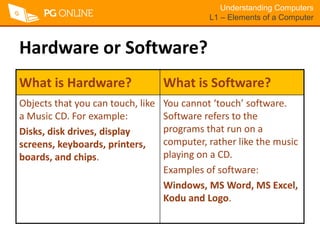
Objects that you can touch, like
a Music CD. For example:
Disks, disk drives, display
screens, keyboards, printers,
boards, and chips.
You cannot ‘touch’ software.
Software refers to the
programs that run on a
computer, rather like the music
playing on a CD.
Examples of software:
Windows, MS Word, MS Excel,
Kodu and Logo.
Understanding Computers
L1 – Elements of a Computer
Input, Output & Storage Devices
What is an
output device?
What is an
input device?
What is a
Storage device?
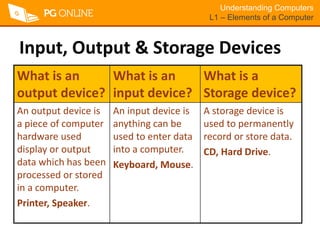
An output device is
a piece of computer
hardware used
display or output
data which has been
processed or stored
in a computer.
Printer, Speaker.
An input device is
anything can be
used to enter data
into a computer.
Keyboard, Mouse.
A storage device is
used to permanently
record or store data.
CD, Hard Drive.
Understanding Computers
L1 – Elements of a Computer
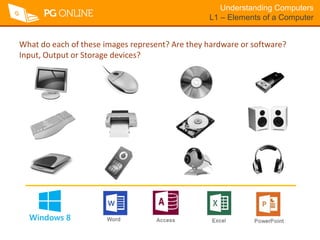
What do each of these images represent? Are they hardware or software?
Input, Output or Storage devices?
Understanding Computers
L1 – Elements of a Computer
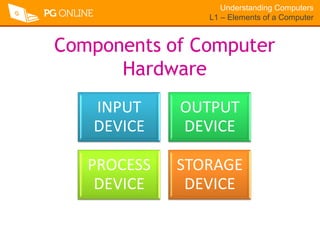
Components of Computer
Hardware
INPUT
DEVICE
OUTPUT
DEVICE
PROCESS
DEVICE
STORAGE
DEVICE
The Central
Processing Unit
(CPU)
Understanding Computers
L1 – Elements of a Computer
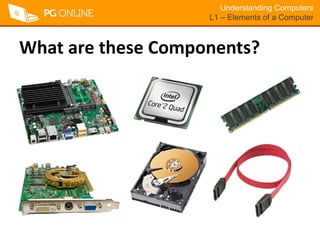
What are these Components?
Understanding Computers
L1 – Elements of a Computer
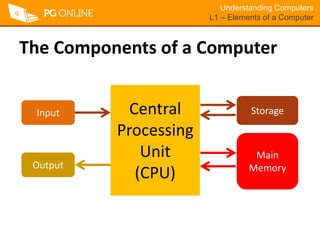
The Components of a Computer
Central
Processing
Unit
(CPU)
Input
Output
Main
Memory
Storage
Understanding Computers
L1 – Elements of a Computer
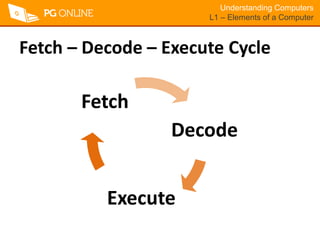
Fetch – Decode – Execute Cycle
Decode
Execute
Fetch
Understanding Computers
L1 – Elements of a Computer
Fetch – Decode – Execute Cycle
• Computer has a list of instructions in memory
to carry out.
• CPU Fetches top instruction from the list
• Instructions is passed to Decoder to interpret
• Decoder passes on the instruction
• Instruction is Executed or carried out
• CPU Fetches top instruction from the list…

2.elements of computer system - Understanding computers

  • 1.
    Elements of a ComputerSystem Understanding Computers
  • 2.
    Understanding Computers L1 –Elements of a Computer Elements - Learning Objectives • All will be able to distinguish between hardware and software and identify Input, Output and Storage devices • Most will be able to explain what RAM and ROM are used for and distinguish between main memory and permanent storage devices • Some will be able to name and explain the three stages in the Fetch Execute Cycle
  • 3.
    Understanding Computers L1 –Elements of a Computer Hardware or Software? What is Hardware? What is Software? Objects that you can touch, like a Music CD. For example: Disks, disk drives, display screens, keyboards, printers, boards, and chips. You cannot ‘touch’ software. Software refers to the programs that run on a computer, rather like the music playing on a CD. Examples of software: Windows, MS Word, MS Excel, Kodu and Logo.
  • 4.
    Understanding Computers L1 –Elements of a Computer Input, Output & Storage Devices What is an output device? What is an input device? What is a Storage device? An output device is a piece of computer hardware used display or output data which has been processed or stored in a computer. Printer, Speaker. An input device is anything can be used to enter data into a computer. Keyboard, Mouse. A storage device is used to permanently record or store data. CD, Hard Drive.
  • 5.
    Understanding Computers L1 –Elements of a Computer What do each of these images represent? Are they hardware or software? Input, Output or Storage devices?
  • 6.
    Understanding Computers L1 –Elements of a Computer Components of Computer Hardware INPUT DEVICE OUTPUT DEVICE PROCESS DEVICE STORAGE DEVICE
  • 7.
  • 8.
    Understanding Computers L1 –Elements of a Computer What are these Components?
  • 9.
    Understanding Computers L1 –Elements of a Computer The Components of a Computer Central Processing Unit (CPU) Input Output Main Memory Storage
  • 10.
    Understanding Computers L1 –Elements of a Computer Fetch – Decode – Execute Cycle Decode Execute Fetch
  • 11.
    Understanding Computers L1 –Elements of a Computer Fetch – Decode – Execute Cycle • Computer has a list of instructions in memory to carry out. • CPU Fetches top instruction from the list • Instructions is passed to Decoder to interpret • Decoder passes on the instruction • Instruction is Executed or carried out • CPU Fetches top instruction from the list…