John “Scooter” Morris
Alex Pico
April 7, 2015
Introduction to Cytoscape 3
2
Outline
• Biological Networks
– Why Networks?
– Biological Network Taxonomy
– Analytical Approaches
– Visualization
• Break
• Introduction to Cytoscape
• Hands on Tutorial
– Data import
– Layout and apps
• Break
• Hands on: Using Cytoscape to explore YOUR data
6
Installation
• If you haven’t already, please install:
– Cytoscape 3.2.1
– Apps:
• clusterMaker, chemViz, cyAnimator
7
Why Networks?
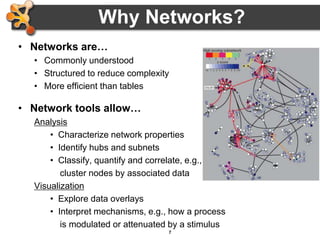
• Networks are…
• Commonly understood
• Structured to reduce complexity
• More efficient than tables
• Network tools allow…
Analysis
• Characterize network properties
• Identify hubs and subnets
• Classify, quantify and correlate, e.g.,
cluster nodes by associated data
Visualization
• Explore data overlays
• Interpret mechanisms, e.g., how a process
is modulated or attenuated by a stimulus
8
Applications of Network Biology
jActiveModules, UCSD
PathBlast, UCSD
mCode, University of Toronto
DomainGraph, Max Planck Institute
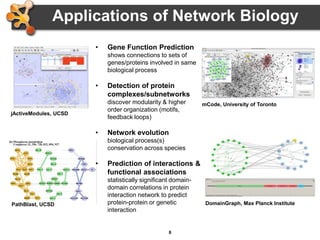
• Gene Function Prediction
shows connections to sets of
genes/proteins involved in same
biological process
• Detection of protein
complexes/subnetworks
discover modularity & higher
order organization (motifs,
feedback loops)
• Network evolution
biological process(s)
conservation across species
• Prediction of interactions &
functional associations
statistically significant domain-
domain correlations in protein
interaction network to predict
protein-protein or genetic
interaction
9
Applications in Disease
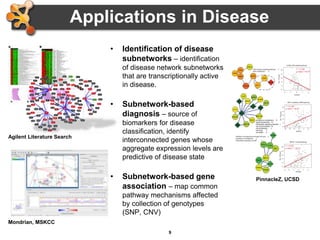
• Identification of disease
subnetworks – identification
of disease network subnetworks
that are transcriptionally active
in disease.
• Subnetwork-based
diagnosis – source of
biomarkers for disease
classification, identify
interconnected genes whose
aggregate expression levels are
predictive of disease state
• Subnetwork-based gene
association – map common
pathway mechanisms affected
by collection of genotypes
(SNP, CNV)
Agilent Literature Search
Mondrian, MSKCC
PinnacleZ, UCSD
10
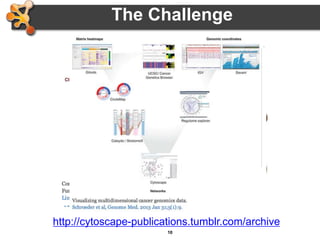
The Challenge
http://cytoscape-publications.tumblr.com/archive
11
Biological Network Taxonomy
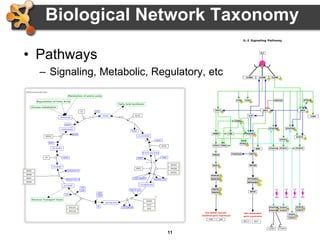
• Pathways
– Signaling, Metabolic, Regulatory, etc
12
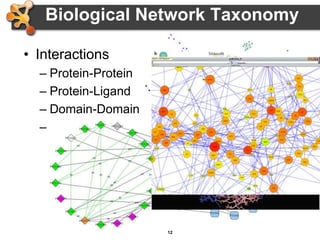
Biological Network Taxonomy
• Interactions
– Protein-Protein
– Protein-Ligand
– Domain-Domain
– Others
• Residue or atomic
• Cell-cell
• Epidemiology
• Social networks
13
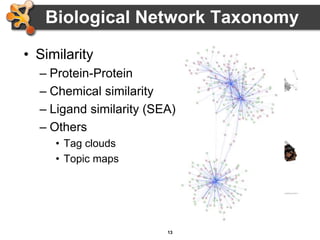
Biological Network Taxonomy
• Similarity
– Protein-Protein
– Chemical similarity
– Ligand similarity (SEA)
– Others
• Tag clouds
• Topic maps
14
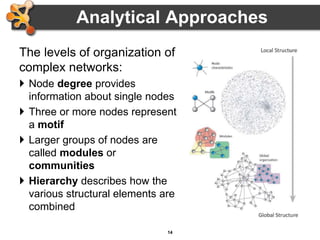
The levels of organization of
complex networks:
 Node degree provides
information about single nodes
 Three or more nodes represent
a motif
 Larger groups of nodes are
called modules or
communities
 Hierarchy describes how the
various structural elements are
combined
Analytical Approaches
24
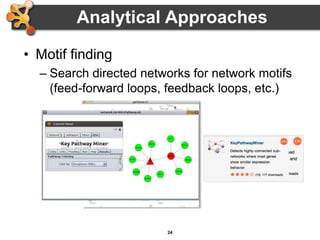
• Motif finding
– Search directed networks for network motifs
(feed-forward loops, feedback loops, etc.)
Analytical Approaches
25
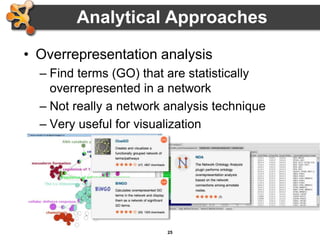
• Overrepresentation analysis
– Find terms (GO) that are statistically
overrepresented in a network
– Not really a network analysis technique
– Very useful for visualization
Analytical Approaches
26
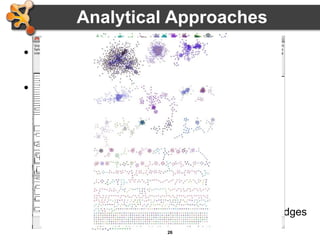
• Clustering (find hubs, complexes)
– Goal: group related items together
• Clustering types:
– Hierarchical clustering
• Divide network into pair-wise hierarchy
– K-Means clustering
• Divide network into k groups
– MCL
• Uses a flow simulation to find groups
– Community Clustering
• Maximize intra-cluster edges vs. inter-cluster edges
Analytical Approaches
27
Visualization of Biological Networks
• Data Mapping
• Layouts
• Animation
29
Data Mapping
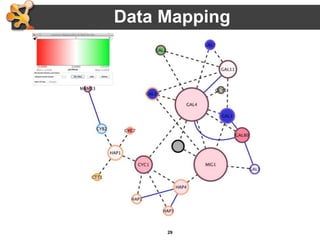
• Mapping of data values associated with
graph elements onto graph visuals
• Visual attributes
– Node fill color, border color, border width, size,
shape, opacity, label
– Edge type, color, width, ending type, ending
size, ending color
• Mapping types
– Passthrough (labels)
– Continuous (numeric values)
– Discrete (categories)
30
• Avoid cluttering your visualization with too
much data
– Map the data you are specifically interested in
to call out meaningful differences
– Mapping too much data to visual attributes may
just confuse the viewer
– Can always create multiple networks and map
different values
Data Mapping
31
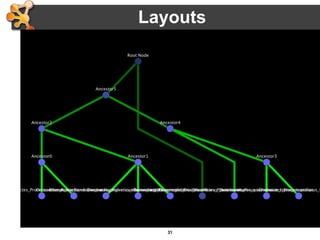
• Layouts determine the location of nodes and
(sometimes) the paths of edges
• Types:
– Simple
• Grid
• Partitions
– Hierarchical
• layout data as a tree or hierarchy
• Works best when there are no loops
– Circular (Radial)
• arrange nodes around a circle
• could use node attributes to govern position
– e.g. degree sorted
Layouts
32
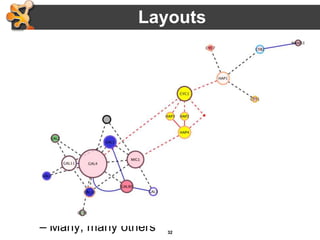
• Types:
– Force-Directed
• simulate edges as springs
• may be weighted or unweighted
– Combining layouts
• Use a general layout (force directed) for the entire
graph, but use hierarchical or radial to focus on a
particular portion
– Multi-layer layouts
• Partition graph, layout each partition then layout
partitions
– Many, many others
Layouts
33
• Use layouts to convey the relationships
between the nodes
• Layout algorithms may need to be “tuned”
to fit your network
– LayoutsSettings… menu
• Lots of parameters to change layout
algorithm behavior
• Can also consider laying out portions of
your network
Layouts
34
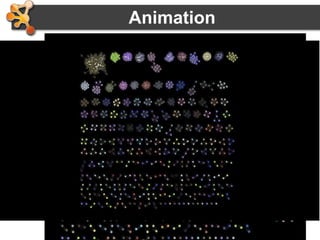
Animation
• Animation is useful to show changes in a
network:
– Over a time series
– Over different conditions
– Between species
35
Introduction to Cytoscape
• Overview
• Core Concepts
– Networks and Tables
– Visual Properties
– Cytoscape Apps
• Working with Data
– Loading networks from files and online databases
– Loading data tables from CSV or Excel files
– The Table Panel
37
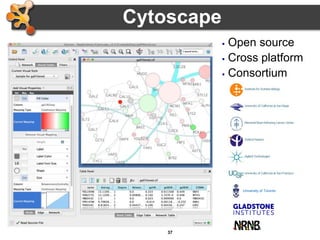
 Open source
 Cross platform
 Consortium
Cytoscape
University of Toronto
38
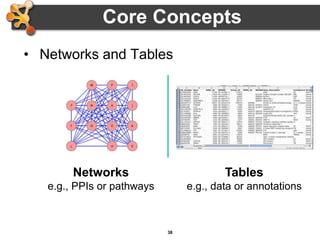
Core Concepts
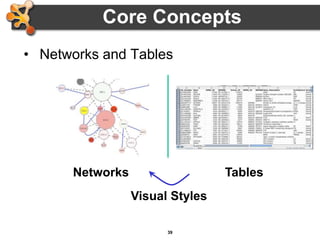
• Networks and Tables
Tables
e.g., data or annotations
Networks
e.g., PPIs or pathways
39
Core Concepts
• Networks and Tables
TablesNetworks
Visual Styles
40
Core Concepts
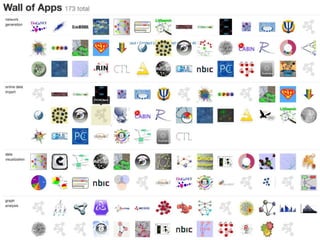
• Cytoscape Apps!
http://apps.cytoscape.org
41
Cytoscape
• Common use cases
– Visualizing:
• Protein-protein interactions
• Pathways
– Integrating:
• Expression profiles
• Other state data
– Analyzing:
• Network properties
• Data mapped onto network
42
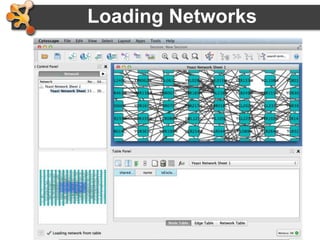
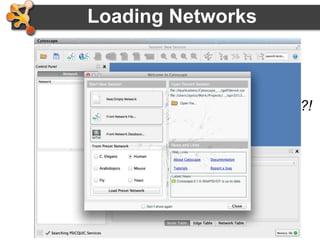
Loading Networks
• Use import network from file
– Excel file
– Comma or tab delimited text
43
Loading Networks
• Use import network from file
– Excel file
– Comma or tab delimited text
• But what if I don’t have any network files?!
44
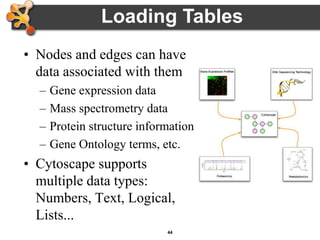
Loading Tables
• Nodes and edges can have
data associated with them
– Gene expression data
– Mass spectrometry data
– Protein structure information
– Gene Ontology terms, etc.
• Cytoscape supports
multiple data types:
Numbers, Text, Logical,
Lists...
45
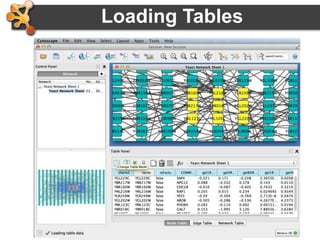
• Use import table from file
– Excel file
– Comma or tab delimited text
Loading Tables
46
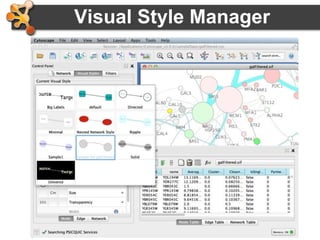
Visual Style Manager
• Click on Visual Styles tab
– Default, Mapping, Bypass
47
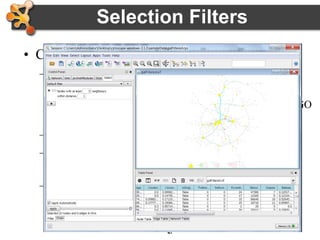
• Click on Select tab
– Select nodes and edges based on a node or edge
columns
• Nodes with degree > 10 or annotated with a particular GO
term
– Dynamic filtering for numerical values
– Build complex filters using AND, OR, NOT
relations
– Define topological filters (considers properties of
near-by nodes)
Selection Filters
48
• Sessions save pretty much everything:
Networks, Properties, Visual styles, Screen sizes
• Export networks in different formats: SIF, GML,
XGMML, BioPAX, PSI-MI 1 & 2.5
• Publication quality graphics in several formats:
PDF, EPS, SVG, PNG, JPEG, and BMP
Saving and Exporting
49
Getting Help
cytoscape-helpdesk@googlegroups.com
56
Hands-on Tutorial
Introduction to Cytoscape:
Networks, Data, Styles, Layouts and App Manager
http://tutorials.cytoscape.org

2015 Cytoscape 3.2 Tutorial

  • 1.
    John “Scooter” Morris AlexPico April 7, 2015 Introduction to Cytoscape 3
  • 2.
    2 Outline • Biological Networks –Why Networks? – Biological Network Taxonomy – Analytical Approaches – Visualization • Break • Introduction to Cytoscape • Hands on Tutorial – Data import – Layout and apps • Break • Hands on: Using Cytoscape to explore YOUR data
  • 3.
    6 Installation • If youhaven’t already, please install: – Cytoscape 3.2.1 – Apps: • clusterMaker, chemViz, cyAnimator
  • 4.
    7 Why Networks? • Networksare… • Commonly understood • Structured to reduce complexity • More efficient than tables • Network tools allow… Analysis • Characterize network properties • Identify hubs and subnets • Classify, quantify and correlate, e.g., cluster nodes by associated data Visualization • Explore data overlays • Interpret mechanisms, e.g., how a process is modulated or attenuated by a stimulus
  • 5.
    8 Applications of NetworkBiology jActiveModules, UCSD PathBlast, UCSD mCode, University of Toronto DomainGraph, Max Planck Institute • Gene Function Prediction shows connections to sets of genes/proteins involved in same biological process • Detection of protein complexes/subnetworks discover modularity & higher order organization (motifs, feedback loops) • Network evolution biological process(s) conservation across species • Prediction of interactions & functional associations statistically significant domain- domain correlations in protein interaction network to predict protein-protein or genetic interaction
  • 6.
    9 Applications in Disease •Identification of disease subnetworks – identification of disease network subnetworks that are transcriptionally active in disease. • Subnetwork-based diagnosis – source of biomarkers for disease classification, identify interconnected genes whose aggregate expression levels are predictive of disease state • Subnetwork-based gene association – map common pathway mechanisms affected by collection of genotypes (SNP, CNV) Agilent Literature Search Mondrian, MSKCC PinnacleZ, UCSD
  • 7.
  • 8.
    11 Biological Network Taxonomy •Pathways – Signaling, Metabolic, Regulatory, etc
  • 9.
    12 Biological Network Taxonomy •Interactions – Protein-Protein – Protein-Ligand – Domain-Domain – Others • Residue or atomic • Cell-cell • Epidemiology • Social networks
  • 10.
    13 Biological Network Taxonomy •Similarity – Protein-Protein – Chemical similarity – Ligand similarity (SEA) – Others • Tag clouds • Topic maps
  • 11.
    14 The levels oforganization of complex networks:  Node degree provides information about single nodes  Three or more nodes represent a motif  Larger groups of nodes are called modules or communities  Hierarchy describes how the various structural elements are combined Analytical Approaches
  • 12.
    24 • Motif finding –Search directed networks for network motifs (feed-forward loops, feedback loops, etc.) Analytical Approaches
  • 13.
    25 • Overrepresentation analysis –Find terms (GO) that are statistically overrepresented in a network – Not really a network analysis technique – Very useful for visualization Analytical Approaches
  • 14.
    26 • Clustering (findhubs, complexes) – Goal: group related items together • Clustering types: – Hierarchical clustering • Divide network into pair-wise hierarchy – K-Means clustering • Divide network into k groups – MCL • Uses a flow simulation to find groups – Community Clustering • Maximize intra-cluster edges vs. inter-cluster edges Analytical Approaches
  • 15.
    27 Visualization of BiologicalNetworks • Data Mapping • Layouts • Animation
  • 16.
    29 Data Mapping • Mappingof data values associated with graph elements onto graph visuals • Visual attributes – Node fill color, border color, border width, size, shape, opacity, label – Edge type, color, width, ending type, ending size, ending color • Mapping types – Passthrough (labels) – Continuous (numeric values) – Discrete (categories)
  • 17.
    30 • Avoid clutteringyour visualization with too much data – Map the data you are specifically interested in to call out meaningful differences – Mapping too much data to visual attributes may just confuse the viewer – Can always create multiple networks and map different values Data Mapping
  • 18.
    31 • Layouts determinethe location of nodes and (sometimes) the paths of edges • Types: – Simple • Grid • Partitions – Hierarchical • layout data as a tree or hierarchy • Works best when there are no loops – Circular (Radial) • arrange nodes around a circle • could use node attributes to govern position – e.g. degree sorted Layouts
  • 19.
    32 • Types: – Force-Directed •simulate edges as springs • may be weighted or unweighted – Combining layouts • Use a general layout (force directed) for the entire graph, but use hierarchical or radial to focus on a particular portion – Multi-layer layouts • Partition graph, layout each partition then layout partitions – Many, many others Layouts
  • 20.
    33 • Use layoutsto convey the relationships between the nodes • Layout algorithms may need to be “tuned” to fit your network – LayoutsSettings… menu • Lots of parameters to change layout algorithm behavior • Can also consider laying out portions of your network Layouts
  • 21.
    34 Animation • Animation isuseful to show changes in a network: – Over a time series – Over different conditions – Between species
  • 22.
    35 Introduction to Cytoscape •Overview • Core Concepts – Networks and Tables – Visual Properties – Cytoscape Apps • Working with Data – Loading networks from files and online databases – Loading data tables from CSV or Excel files – The Table Panel
  • 23.
    37  Open source Cross platform  Consortium Cytoscape University of Toronto
  • 24.
    38 Core Concepts • Networksand Tables Tables e.g., data or annotations Networks e.g., PPIs or pathways
  • 25.
    39 Core Concepts • Networksand Tables TablesNetworks Visual Styles
  • 26.
    40 Core Concepts • CytoscapeApps! http://apps.cytoscape.org
  • 27.
    41 Cytoscape • Common usecases – Visualizing: • Protein-protein interactions • Pathways – Integrating: • Expression profiles • Other state data – Analyzing: • Network properties • Data mapped onto network
  • 28.
    42 Loading Networks • Useimport network from file – Excel file – Comma or tab delimited text
  • 29.
    43 Loading Networks • Useimport network from file – Excel file – Comma or tab delimited text • But what if I don’t have any network files?!
  • 30.
    44 Loading Tables • Nodesand edges can have data associated with them – Gene expression data – Mass spectrometry data – Protein structure information – Gene Ontology terms, etc. • Cytoscape supports multiple data types: Numbers, Text, Logical, Lists...
  • 31.
    45 • Use importtable from file – Excel file – Comma or tab delimited text Loading Tables
  • 32.
    46 Visual Style Manager •Click on Visual Styles tab – Default, Mapping, Bypass
  • 33.
    47 • Click onSelect tab – Select nodes and edges based on a node or edge columns • Nodes with degree > 10 or annotated with a particular GO term – Dynamic filtering for numerical values – Build complex filters using AND, OR, NOT relations – Define topological filters (considers properties of near-by nodes) Selection Filters
  • 34.
    48 • Sessions savepretty much everything: Networks, Properties, Visual styles, Screen sizes • Export networks in different formats: SIF, GML, XGMML, BioPAX, PSI-MI 1 & 2.5 • Publication quality graphics in several formats: PDF, EPS, SVG, PNG, JPEG, and BMP Saving and Exporting
  • 35.
  • 36.
    56 Hands-on Tutorial Introduction toCytoscape: Networks, Data, Styles, Layouts and App Manager http://tutorials.cytoscape.org

Editor's Notes

  • #2 EDIT: Presenter list and workshop information
  • #3 EDIT: schedule
  • #4 EDIT: introductions per presenter
  • #5 EDIT: introductions per presenter
  • #7 EDIT: Update per provisions
  • #9 Gene Function Prediction – basic but important, examining genes (proteins) in a network context shows connections to sets of genes/proteins involved in same biological process that are likely to function in that process Detection of protein complexes/other modular structures – although interaction networks are based on pair-wise interactions, there is clear evidence for modularity & higher order organization (motifs, feedback loops) Network evolution – biological process(s) conservation across species (PathBLAST, NetworkBLAST to align p-p interaction networks & clusters) Prediction of new interactions and functional associations – Statistically significant domain-domain correlations in protein interaction network suggest that certain domain (and domain pairs) mediate protein binding. Machine learning extends this to suggest to predict protein-protein or genetic interaction through integration of diverse types of evidence for interaction
  • #10 Identification of disease subnetworks – identification of disease network subnetworks that are transcriptionally active in disease. These suggest key pathway components in disease progression and provide leads for further study and potential therapeutic targets Subnetwork-based diagnosis – subnetworks also provide a rich source of biomarkers for disease classification, based on mRNA profiling integrated with protein networks to identify subnetwork biomarkers (interconnected genes whose aggregate expression levels are predictive of disease state) Subnetwork-based gene association – molecular networks will provide a powerful framework for mapping common pathway mechanisms affected by collection of genotypes (SNP, CNV)
  • #11 Some good examples An example with perhaps too many visual properties Cool cell illustration Mapping brain regions (not proteins!) Cytoscape is often just one part of an analysis pipeline
  • #12 Signaling pathway: Interleukin-2 Metabolic pathway: Krebs (TCA) Cycle
  • #26 Note: all Cytoscape ORA tools provide a network visualization of terms and a ranked table with statistics
  • #29 Last two: - NetGestalt (used to align data in fashion of genome browsers) - BioFrabric (used to organize/explore massive hairballs)
  • #36 EDIT: according to schedule
  • #38 NOTE: Pre-acknowledgements slide
  • #39 Notes: it is a Cytoscape goal that both the graph model and the data are free from Biological semantics
  • #41 Screenshots: App Store front page, example app, and wall of apps Note: mention increasing number of apps (and ports to 3.x) Alternative: visit App Store live
  • #44 Welcome! - web services: a couple provided by default (more in App Store) - preset networks from BioGRID per species (mouse over for details)
  • #47 New interface! - def, map, byp - example continuous mapping panel - menu of provided visual styles
  • #54 Note: these used to be major issues in 2.x
  • #58 TODO: Update
  • #59 clusterMaker: - simple: galFiltered -> BiNGO - complex: collins PPI litSearch: - CDC25, human, cancer WikiPathways - human: TCA, Statin or 5-FU
  • #61 EDIT: update Timing section just before presenting
  • #62 The example file, galFiltered.cys is included with all Cytoscape releases. It is taken from Ideker, et.al. 2001, although it has gained significantly more annotations over the years. It shows a protein-protein interaction network that focuses on the galactose (gal) utilization in the yeast Saccharomyces cerevisiae. The network was perturbed by gene deletion of the major GAL genes, then the cells were grown in the presence and absence of galactose.