WHAT I HAVE LEARNT ABOUT
TECHNOLOGIES FROM THE
PROCESS OF CONSTRUCTING
THIS PRODUCT?
BY ISAIAH BHATTI
INTRODUCTION
• In this blog post I will be writing about the use of technology
and the impact it has had on this particular media project.
Throughout the whole project, from the initial idea to the final
product, technology was a key part that was used every step of
the way. The next few slides will contain the different types of
technology used and a description along with them. In addition
to this I will be writing about what I had learned from each
piece of equipment or program.
HARDWARE
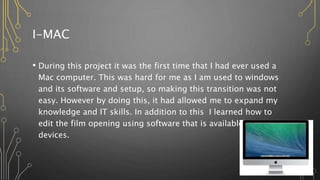
I-MAC
• During this project it was the first time that I had ever used a
Mac computer. This was hard for me as I am used to windows
and its software and setup, so making this transition was not
easy. However by doing this, it had allowed me to expand my
knowledge and IT skills. In addition to this I learned how to
edit the film opening using software that is available on these
devices.
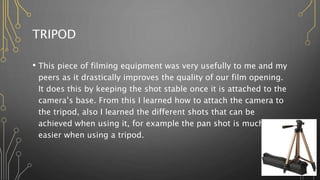
TRIPOD
• This piece of filming equipment was very usefully to me and my
peers as it drastically improves the quality of our film opening.
It does this by keeping the shot stable once it is attached to the
camera’s base. From this I learned how to attach the camera to
the tripod, also I learned the different shots that can be
achieved when using it, for example the pan shot is much
easier when using a tripod.
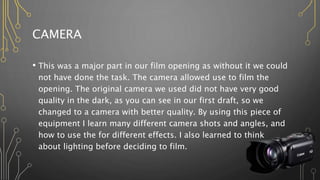
CAMERA
• This was a major part in our film opening as without it we could
not have done the task. The camera allowed use to film the
opening. The original camera we used did not have very good
quality in the dark, as you can see in our first draft, so we
changed to a camera with better quality. By using this piece of
equipment I learn many different camera shots and angles, and
how to use the for different effects. I also learned to think
about lighting before deciding to film.
SD CARD
• An SD card is a small storage device that is inserted into a
device such as phones and cameras, however you will need an
SD card adapter for computer as most of them will not have a
slot for this. SD cards allow you to store and transfer data form
different devices. This helped us in the project as it allowed us
to transfer the video from the camera to the computer in order
for us to edit. In addition to we used it as a backup for the
video.
SOFTWARE
PHOTOSHOP
• This piece of software is used to edit pictures and videos on
computers. We used Photoshop to create our production
company logo. It helped us by allowing us to change the colour
of the font and to add the hand into the picture. This allowed
me to practice my skills in Photoshop.
POWERPOINT
• PowerPoint is a windows program that give you the ability to
make presentations to show to others. I have used this to
present my research and planning in my blogs. When using
PowerPoint in this project, there was not much for me to learn
as I am very familiar with the software.
IMOVIE
• This is a software on i-Mac that is used to edit videos, through
changing the volume, adding sound effects and non diegetic
sound, and cutting the video. During the time of this project, it
was my very first time using this particular program, therefore
it took me some time to learn the skills required to make a
quality product.
ONLINE TOOLS
YOUTUBE
• YouTube is an extremely popular and recent social media
platform, that billions of people us on a daily basis. It is a
website in which people can upload videos for the public to
view, however this can be changed to meet the needs of the
uploader. In addition to this the audience can like or dislike,
comment and share videos. I was already familiar with this site
but I did learn how to upload videos.
PREZI
• Prezi is similar to PowerPoint in the fact that it allows the users
to create presentations that can be shared with others. But
Prezi differs due to it being an online tool, so it can accessed
from anywhere, where as PowerPoint must be purchased and
installed to be used on specific devices. It is a tool that was
newly introduced tome therefore some adjusting to.
BLOGGER
• Blogger is an online tool that can be accessed through the
users email. It allows the user to post about any topic of their
choice, either privately or publicly. This tool was useful as it
enabled me to present my work to you. In addition to this it
allowed me to update my work to improve or expand on it. I
learned a lot about how to use this tool as it was the first time I
ever used it, for example I learned how to set up my own blog,
and how to post on my blog.
SLIDESHARE
• This online tool allowed me to embed PowerPoints such as this
one, into online sites such as blogger. From this I learned how
to use the site in order for me to achieve this goal as it was the
first time I had ever used it.

2. what i have learnt about technologies from the

  • 1.
    WHAT I HAVELEARNT ABOUT TECHNOLOGIES FROM THE PROCESS OF CONSTRUCTING THIS PRODUCT? BY ISAIAH BHATTI
  • 2.
    INTRODUCTION • In thisblog post I will be writing about the use of technology and the impact it has had on this particular media project. Throughout the whole project, from the initial idea to the final product, technology was a key part that was used every step of the way. The next few slides will contain the different types of technology used and a description along with them. In addition to this I will be writing about what I had learned from each piece of equipment or program.
  • 3.
  • 4.
    I-MAC • During thisproject it was the first time that I had ever used a Mac computer. This was hard for me as I am used to windows and its software and setup, so making this transition was not easy. However by doing this, it had allowed me to expand my knowledge and IT skills. In addition to this I learned how to edit the film opening using software that is available on these devices.
  • 5.
    TRIPOD • This pieceof filming equipment was very usefully to me and my peers as it drastically improves the quality of our film opening. It does this by keeping the shot stable once it is attached to the camera’s base. From this I learned how to attach the camera to the tripod, also I learned the different shots that can be achieved when using it, for example the pan shot is much easier when using a tripod.
  • 6.
    CAMERA • This wasa major part in our film opening as without it we could not have done the task. The camera allowed use to film the opening. The original camera we used did not have very good quality in the dark, as you can see in our first draft, so we changed to a camera with better quality. By using this piece of equipment I learn many different camera shots and angles, and how to use the for different effects. I also learned to think about lighting before deciding to film.
  • 7.
    SD CARD • AnSD card is a small storage device that is inserted into a device such as phones and cameras, however you will need an SD card adapter for computer as most of them will not have a slot for this. SD cards allow you to store and transfer data form different devices. This helped us in the project as it allowed us to transfer the video from the camera to the computer in order for us to edit. In addition to we used it as a backup for the video.
  • 8.
  • 9.
    PHOTOSHOP • This pieceof software is used to edit pictures and videos on computers. We used Photoshop to create our production company logo. It helped us by allowing us to change the colour of the font and to add the hand into the picture. This allowed me to practice my skills in Photoshop.
  • 10.
    POWERPOINT • PowerPoint isa windows program that give you the ability to make presentations to show to others. I have used this to present my research and planning in my blogs. When using PowerPoint in this project, there was not much for me to learn as I am very familiar with the software.
  • 11.
    IMOVIE • This isa software on i-Mac that is used to edit videos, through changing the volume, adding sound effects and non diegetic sound, and cutting the video. During the time of this project, it was my very first time using this particular program, therefore it took me some time to learn the skills required to make a quality product.
  • 12.
  • 13.
    YOUTUBE • YouTube isan extremely popular and recent social media platform, that billions of people us on a daily basis. It is a website in which people can upload videos for the public to view, however this can be changed to meet the needs of the uploader. In addition to this the audience can like or dislike, comment and share videos. I was already familiar with this site but I did learn how to upload videos.
  • 14.
    PREZI • Prezi issimilar to PowerPoint in the fact that it allows the users to create presentations that can be shared with others. But Prezi differs due to it being an online tool, so it can accessed from anywhere, where as PowerPoint must be purchased and installed to be used on specific devices. It is a tool that was newly introduced tome therefore some adjusting to.
  • 15.
    BLOGGER • Blogger isan online tool that can be accessed through the users email. It allows the user to post about any topic of their choice, either privately or publicly. This tool was useful as it enabled me to present my work to you. In addition to this it allowed me to update my work to improve or expand on it. I learned a lot about how to use this tool as it was the first time I ever used it, for example I learned how to set up my own blog, and how to post on my blog.
  • 16.
    SLIDESHARE • This onlinetool allowed me to embed PowerPoints such as this one, into online sites such as blogger. From this I learned how to use the site in order for me to achieve this goal as it was the first time I had ever used it.