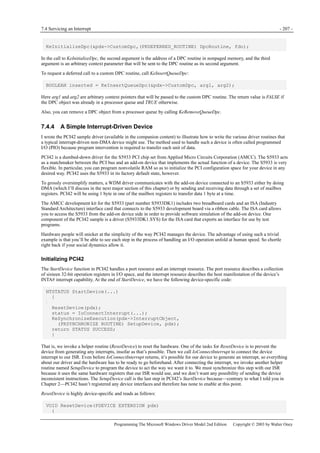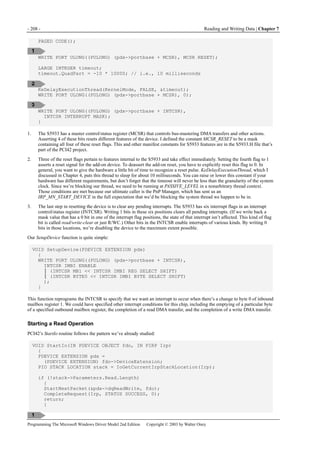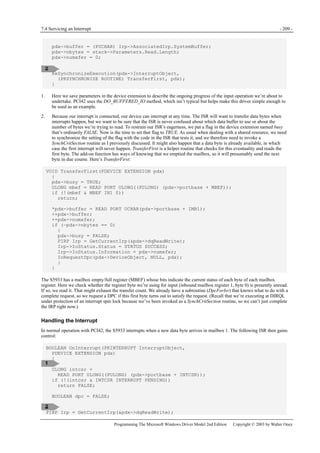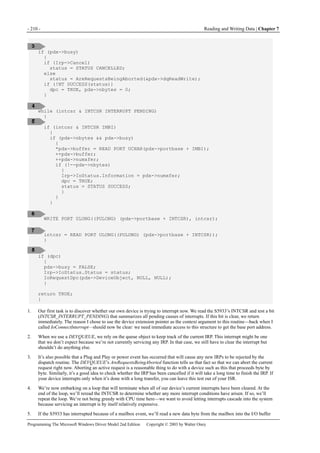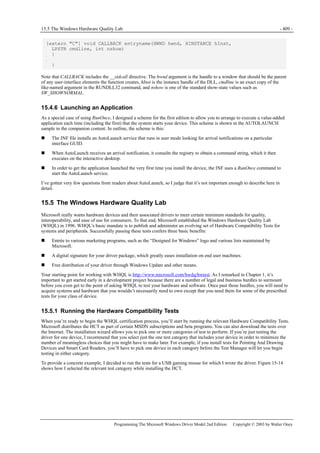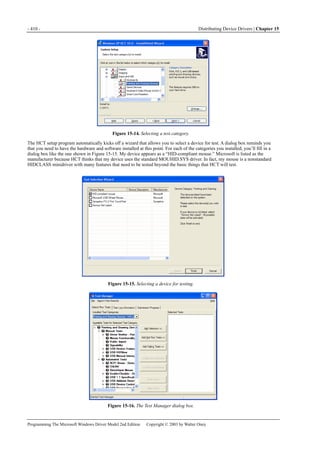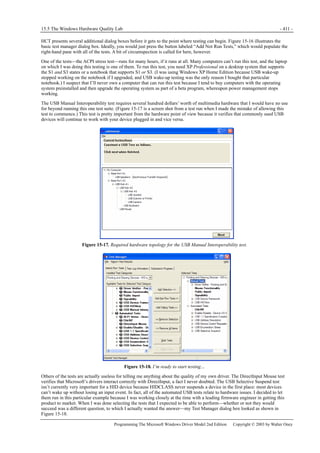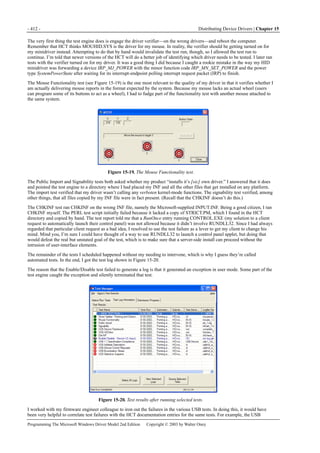









PUBLISHED BY
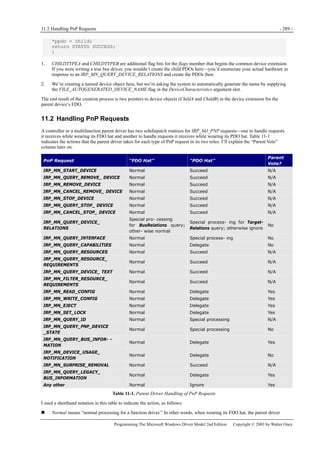
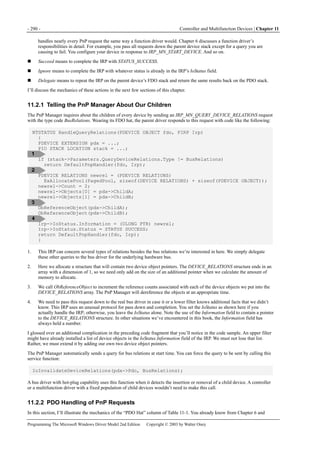
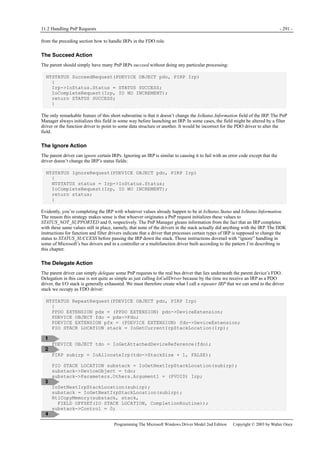
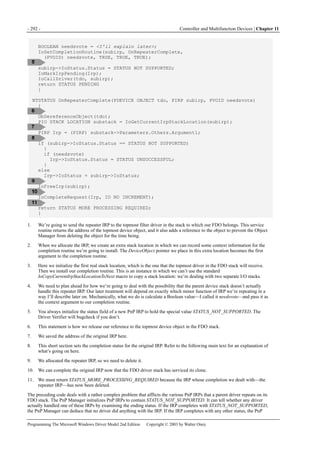
Microsoft Press
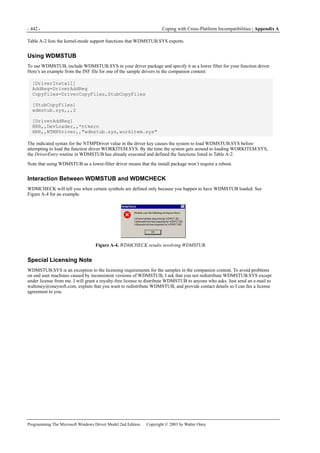
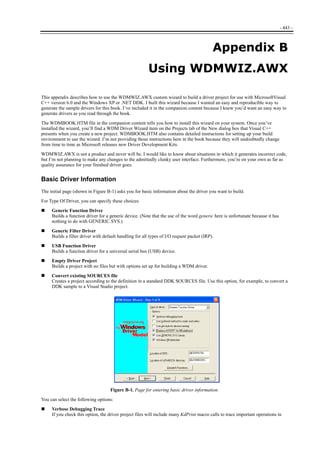
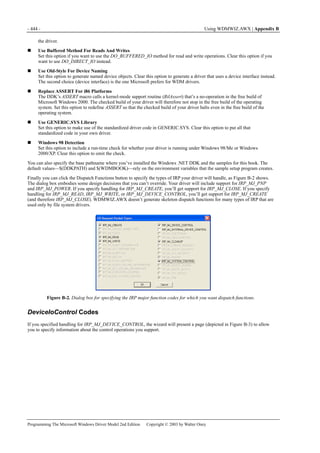
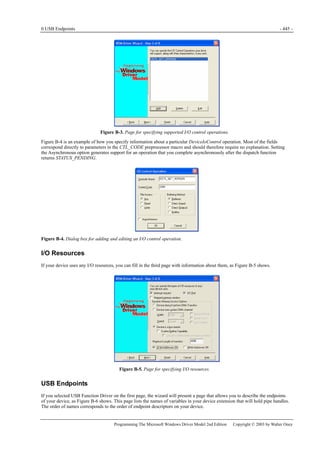
A Division of Microsoft Corporation
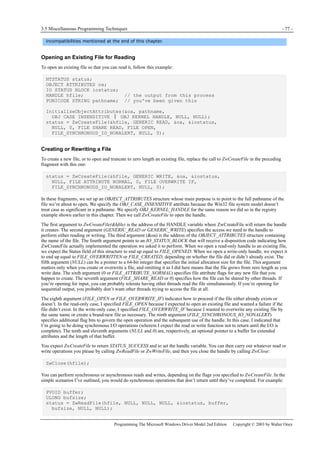
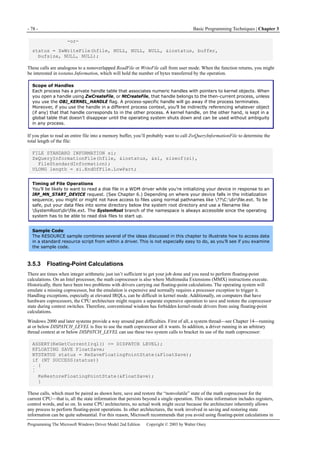
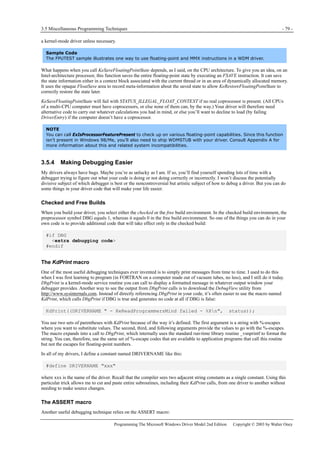
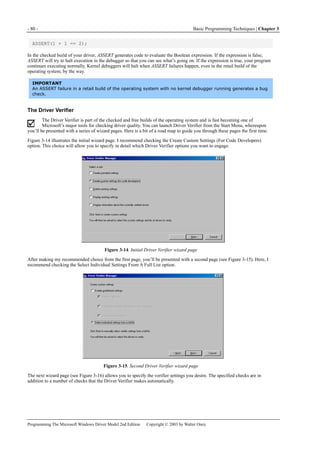
One Microsoft Way
Redmond, Washington 98052-6399
Copyright © 2003 by Walter Oney
All rights reserved. No part of the contents of this book may be reproduced or transmitted in any form or by any means without
the written permission of the publisher.
Library of Congress Cataloging-in-Publication Data
Oney, Walter.
Programming the Microsoft Windows Driver Model / Walter Oney -- 2nd ed.
p. cm.
Includes index.
ISBN 0-7356-1803-8
1. Microsoft Windows NT device drivers (Computer programs) 2. Computer
programming. I. Title.
QA76.76.D49 O54 2002
005.7'126--dc21 2002038650
Printed and bound in the United States of America.
1 2 3 4 5 6 7 8 9 QWT 8 7 6 5 4 3
Distributed in Canada by H.B. Fenn and Company Ltd.
A CIP catalogue record for this book is available from the British Library.
Microsoft Press books are available through booksellers and distributors worldwide. For further information about
international editions, contact your local Microsoft Corporation office or contact Microsoft Press International directly at fax
(425) 936-7329. Visit our Web site at www.microsoft.com/mspress. Send comments to mspinput@microsoft.com.
Klingon font Copyright 2002, Klingon Language Institute. Active Directory, DirectX, Microsoft, MSDN, MS-DOS, Visual
C++, Visual Studio, Win32, Windows, and Windows NT are either registered trademarks or trademarks of Microsoft
Corporation in the United States and/or other countries. Other product and company names mentioned herein may be the
trademarks of their respective owners.
The example companies, organizations, products, domain names, e-mail addresses, logos, people, places, and events depicted
herein are fictitious. No association with any real company, organization, product, domain name, e-mail address, logo, person,
place, or event is intended or should be inferred.
Acquisitions Editor: Juliana Aldous
Project Editor: Dick Brown
Technical Editor: Jim Fuchs
I
Table of Contents
Acknowledgments IX
Introduction X
1 Beginning a Driver Project - 1 -
1.1 A Brief History of Device Drivers - 1 -
1.2 An Overview of the Operating Systems - 3 -
1.2.1 Windows XP Overview - 3 -
1.2.2 Windows 98/Windows Me Overview - 4 -
1.3 What Kind of Driver Do I Need? - 6 -
1.3.1 WDM Drivers - 7 -
1.3.2 Other Types of Drivers - 8 -
1.3.3 Management Overview and Checklist - 9 -
2 Basic Structure of a WDM Driver - 11 -
2.1 How Drivers Work - 11 -
2.1.1 How Applications Work - 11 -
2.1.2 Device Drivers - 12 -
2.2 How the System Finds and Loads Drivers - 14 -
2.2.1 Device and Driver Layering - 14 -
2.2.2 Plug and Play Devices - 15 -
2.2.3 Legacy Devices - 17 -
2.2.4 Recursive Enumeration - 18 -
2.2.5 Order of Driver Loading - 19 -
2.2.6 IRP Routing - 20 -
2.3 The Two Basic Data Structures - 23 -
2.3.1 Driver Objects - 23 -
2.3.2 Device Objects - 25 -
2.4 The DriverEntry Routine - 27 -
2.4.1 Overview of DriverEntry - 28 -
2.4.2 DriverUnload - 29 -
2.5 The AddDevice Routine - 29 -
2.5.1 Creating a Device Object - 30 -
2.5.2 Naming Devices - 31 -
2.5.3 Other Global Device Initialization - 39 -
2.5.4 Putting the Pieces Together - 42 -
2.6 Windows 98/Me Compatibility Notes - 43 -
2.6.1 Differences in DriverEntry Call - 43 -
2.6.2 DriverUnload - 43 -
2.6.3 The GLOBAL?? Directory - 43 -
2.6.4 Unimplemented Device Types - 43 -
3 Basic Programming Techniques - 45 -
3.1 The Kernel-Mode Programming Environment - 45 -
3.1.1 Using Standard Run-Time Library Functions - 46 -
3.1.2 A Caution About Side Effects - 46 -
II
3.2 Error Handling - 46 -
3.2.1 Status Codes - 47 -
3.2.2 Structured Exception Handling - 48 -
3.2.3 Bug Checks - 54 -
3.3 Memory Management - 55 -
3.3.1 User-Mode and Kernel-Mode Address Spaces - 55 -
3.3.2 Heap Allocator - 60 -
3.3.3 Linked Lists - 64 -
3.3.4 Lookaside Lists - 67 -
3.4 String Handling - 69 -
3.5 Miscellaneous Programming Techniques - 71 -
3.5.1 Accessing the Registry - 71 -
3.5.2 Accessing Files - 76 -
3.5.3 Floating-Point Calculations - 78 -
3.5.4 Making Debugging Easier - 79 -
3.6 Windows 98/Me Compatibility Notes - 82 -
3.6.1 File I/O - 82 -
3.6.2 Floating Point - 82 -
4 Synchronization - 83 -
4.1 An Archetypal Synchronization Problem - 83 -
4.2 Interrupt Request Level - 85 -
4.2.1 IRQL in Operation - 86 -
4.2.2 IRQL Compared with Thread Priorities - 86 -
4.2.3 IRQL and Paging - 87 -
4.2.4 Implicitly Controlling IRQL - 87 -
4.2.5 Explicitly Controlling IRQL - 88 -
4.3 Spin Locks - 88 -
4.3.1 Some Facts About Spin Locks - 89 -
4.3.2 Working with Spin Locks - 89 -
4.3.3 Queued Spin Locks - 90 -
4.4 Kernel Dispatcher Objects - 91 -
4.4.1 How and When You Can Block - 91 -
4.4.2 Waiting on a Single Dispatcher Object - 92 -
4.4.3 Waiting on Multiple Dispatcher Objects - 93 -
4.4.4 Kernel Events - 94 -
4.4.5 Kernel Semaphores - 96 -
4.4.6 Kernel Mutexes - 97 -
4.4.7 Kernel Timers - 98 -
4.4.8 Using Threads for Synchronization - 101 -
4.4.9 Thread Alerts and APCs - 102 -
4.5 Other Kernel-Mode Synchronization Primitives - 104 -
4.5.1 Fast Mutex Objects - 104 -
4.5.2 Interlocked Arithmetic - 106 -
4.5.3 Interlocked List Access - 108 -
4.5.4 Windows 98/Me Compatibility Notes - 110 -
5 The I/O Request Packet - 111 -
5.1 Data Structures - 111 -
5.1.1 Structure of an IRP - 111 -
III
5.1.2 The I/O Stack - 113 -
5.2 The “Standard Model” for IRP Processing - 114 -
5.2.1 Creating an IRP - 114 -
5.2.2 Forwarding to a Dispatch Routine - 116 -
5.2.3 Duties of a Dispatch Routine - 119 -
5.2.4 The StartIo Routine - 123 -
5.2.5 The Interrupt Service Routine - 124 -
5.2.6 Deferred Procedure Call Routine - 124 -
5.3 Completion Routines - 125 -
5.4 Queuing I/O Requests - 132 -
5.4.1 Using the DEVQUEUE Object - 134 -
5.4.2 Using Cancel-Safe Queues - 136 -
5.5 Cancelling I/O Requests - 140 -
5.5.1 If It Weren’t for Multitasking… - 140 -
5.5.2 Synchronizing Cancellation - 140 -
5.5.3 Some Details of IRP Cancellation - 141 -
5.5.4 How the DEVQUEUE Handles Cancellation - 142 -
5.5.5 Cancelling IRPs You Create or Handle - 146 -
5.5.6 Handling IRP_MJ_CLEANUP - 151 -
5.5.7 Cleanup with a DEVQUEUE - 152 -
5.5.8 Cleanup with a Cancel-Safe Queue - 153 -
5.6 Summary—Eight IRP-Handling Scenarios - 153 -
5.6.1 Scenario 1—Pass Down with Completion Routine - 154 -
5.6.2 Scenario 2—Pass Down Without Completion Routine - 154 -
5.6.3 Scenario 3—Complete in the Dispatch Routine - 155 -
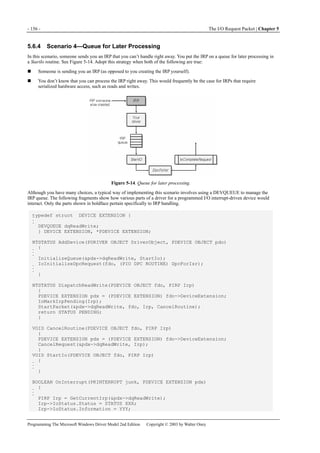
5.6.4 Scenario 4—Queue for Later Processing - 156 -
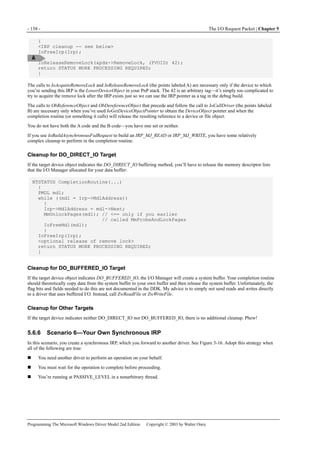
5.6.5 Scenario 5—Your Own Asynchronous IRP - 157 -
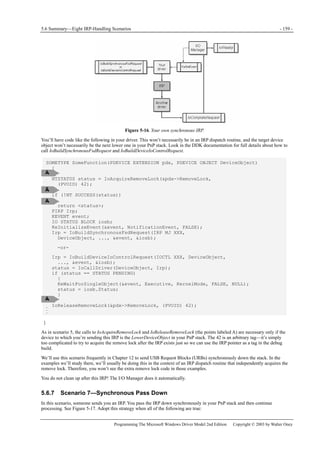
5.6.6 Scenario 6—Your Own Synchronous IRP - 158 -
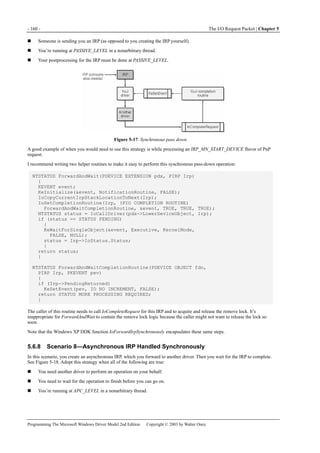
5.6.7 Scenario 7—Synchronous Pass Down - 159 -
5.6.8 Scenario 8—Asynchronous IRP Handled Synchronously - 160 -
6 Plug and Play for Function Drivers - 163 -
6.1 IRP_MJ_PNP Dispatch Function - 164 -
6.2 Starting and Stopping Your Device - 165 -
6.2.1 IRP_MN_START_DEVICE - 166 -
6.2.2 IRP_MN_STOP_DEVICE - 167 -
6.2.3 IRP_MN_REMOVE_DEVICE - 168 -
6.2.4 IRP_MN_SURPRISE_REMOVAL - 169 -
6.3 Managing PnP State Transitions - 169 -
6.3.1 Starting the Device - 171 -
6.3.2 Is It OK to Stop the Device? - 171 -
6.3.3 While the Device Is Stopped - 172 -
6.3.4 Is It OK to Remove the Device? - 173 -
6.3.5 Synchronizing Removal - 174 -
6.3.6 Why Do I Need This @#$! Remove Lock, Anyway? - 176 -
6.3.7 How the DEVQUEUE Works with PnP - 178 -
6.4 Other Configuration Functionality - 181 -
6.4.1 Filtering Resource Requirements - 181 -
6.4.2 Device Usage Notifications - 182 -
IV
6.4.3 PnP Notifications - 184 -
6.5 Windows 98/Me Compatibility Notes - 191 -
6.5.1 Surprise Removal - 191 -
6.5.2 PnP Notifications - 191 -
6.5.3 The Remove Lock - 191 -
7 Reading and Writing Data - 193 -
7.1 Configuring Your Device - 193 -
7.2 Addressing a Data Buffer - 195 -
7.2.1 Specifying a Buffering Method - 195 -
7.3 Ports and Registers - 198 -
7.3.1 Port Resources - 200 -
7.3.2 Memory Resources - 201 -
7.4 Servicing an Interrupt - 201 -
7.4.1 Configuring an Interrupt - 202 -
7.4.2 Handling Interrupts - 203 -
7.4.3 Deferred Procedure Calls - 204 -
7.4.4 A Simple Interrupt-Driven Device - 207 -
7.5 Direct Memory Access - 211 -
7.5.1 Transfer Strategies - 212 -
7.5.2 Performing DMA Transfers - 213 -
7.5.3 Using a Common Buffer - 222 -
7.5.4 A Simple Bus-Master Device - 224 -
7.6 Windows 98/Me Compatibility Notes - 225 -
8 Power Management - 227 -
8.1 The WDM Power Model - 227 -
8.1.1 The Roles of WDM Drivers - 227 -
8.1.2 Device Power and System Power States - 227 -
8.1.3 Power State Transitions - 228 -
8.1.4 Handling IRP_MJ_POWER Requests - 229 -
8.2 Managing Power Transitions - 231 -
8.2.1 Required Infrastructure - 232 -
8.2.2 Initial Triage - 233 -
8.2.3 System Power IRPs That Increase Power - 233 -
8.2.4 System Power IRPs That Decrease Power - 238 -
8.2.5 Device Power IRPs - 238 -
8.2.6 Flags to Set in AddDevice - 244 -
8.3 Additional Power-Management Details - 245 -
8.3.1 Device Wake-Up Features - 245 -
8.3.2 Powering Off When Idle - 250 -
8.3.3 Using Sequence Numbers to Optimize State Changes - 252 -
8.4 Windows 98/Me Compatibility Notes - 253 -
8.4.1 The Importance of DO_POWER_PAGABLE - 253 -
8.4.2 Completing Power IRPs - 253 -
8.4.3 Requesting Device Power IRPs - 253 -
8.4.4 PoCallDriver - 253 -
8.4.5 Other Differences - 253 -
9 I/O Control Operations - 255 -
V
9.1 The DeviceIoControl API - 255 -
9.1.1 Synchronous and Asynchronous Calls to DeviceIoControl - 256 -
9.1.2 Defining I/O Control Codes - 257 -
9.2 Handling IRP_MJ_DEVICE_CONTROL - 258 -
9.3 METHOD_BUFFERED - 259 -
9.3.1 The DIRECT Buffering Methods - 260 -
9.3.2 METHOD_NEITHER - 261 -
9.3.3 Designing a Safe and Secure IOCTL Interface - 262 -
9.4 Internal I/O Control Operations - 263 -
9.5 Notifying Applications of Interesting Events - 264 -
9.5.1 Using a Shared Event for Notification - 265 -
9.5.2 Using a Pending IOCTL for Notification - 266 -
9.6 Windows 98/Me Compatibility Notes - 269 -
10 Windows Management Instrumentation - 271 -
10.1 WMI Concepts - 271 -
10.1.1 A Sample Schema - 272 -
10.1.2 Mapping WMI Classes to C Structures - 273 -
10.2 WDM Drivers and WMI - 274 -
10.2.1 Delegating IRPs to WMILIB - 275 -
10.2.2 Advanced Features - 280 -
10.3 Windows 98/Me Compatibility Notes - 285 -
11 Controller and Multifunction Devices - 287 -
11.1 Overall Architecture - 287 -
11.1.1 Child Device Objects - 287 -
11.2 Handling PnP Requests - 289 -
11.2.1 Telling the PnP Manager About Our Children - 290 -
11.2.2 PDO Handling of PnP Requests - 290 -
11.2.3 Handling Device Removal - 293 -
11.2.4 Handling IRP_MN_QUERY_ID - 293 -
11.2.5 Handling IRP_MN_QUERY_DEVICE_RELATIONS - 294 -
11.2.6 Handling IRP_MN_QUERY_INTERFACE - 294 -
11.2.7 Handling IRP_MN_QUERY_PNP_DEVICE_STATE - 297 -
11.3 Handling Power Requests - 297 -
11.4 Handling Child Device Resources - 299 -
12 The Universal Serial Bus - 301 -
12.1 Programming Architecture - 301 -
12.1.1 Device Hierarchy - 302 -
12.1.2 What’s in a Device? - 303 -
12.1.3 Information Flow - 304 -
12.1.4 Descriptors - 310 -
12.2 Working with the Bus Driver - 315 -
12.2.1 Initiating Requests - 315 -
12.2.2 Configuration - 317 -
12.2.3 Managing Bulk Transfer Pipes - 323 -
12.2.4 Managing Interrupt Pipes - 329 -
12.2.5 Control Requests - 329 -
12.2.6 Managing Isochronous Pipes - 331 -
VI
12.2.7 Idle Power Management for USB Devices - 340 -
13 Human Interface Devices - 343 -
13.1 Drivers for HID Devices - 343 -
13.2 Reports and Report Descriptors - 343 -
13.2.1 Sample Keyboard Descriptor - 343 -
13.2.2 HIDFAKE Descriptor - 345 -
13.3 HIDCLASS Minidrivers - 346 -
13.3.1 DriverEntry - 346 -
13.3.2 Driver Callback Routines - 347 -
13.3.3 Internal IOCTL Interface - 351 -
13.3.4 IOCTL_HID_GET_DEVICE_DESCRIPTOR - 353 -
13.4 Windows 98/Me Compatibility Notes - 360 -
13.4.1 Handling IRP_MN_QUERY_ID - 360 -
13.4.2 Joysticks - 361 -
14 Specialized Topics - 363 -
14.1 Logging Errors - 363 -
14.1.1 Creating an Error Log Packet - 364 -
14.1.2 Creating a Message File - 365 -
14.2 System Threads - 367 -
14.2.1 Creating and Terminating System Threads - 368 -
14.2.2 Using a System Thread for Device Polling - 369 -
14.3 Work Items - 371 -
14.3.1 Watchdog Timers - 372 -
14.4 Windows 98/Me Compatibility Notes - 375 -
14.4.1 Error Logging - 375 -
14.4.2 Waiting for System Threads to Finish - 375 -
14.4.3 Work Items - 375 -
15 Distributing Device Drivers - 377 -
15.1 The Role of the Registry - 377 -
15.1.1 The Hardware (Instance) Key - 378 -
15.1.2 The Class Key - 379 -
15.1.3 The Driver Key - 380 -
15.1.4 The Service (Software) Key - 380 -
15.1.5 Accessing the Registry from a Program - 381 -
15.1.6 Device Object Properties - 382 -
15.2 The INF File - 383 -
15.2.1 Install Sections - 386 -
15.2.2 Populating the Registry - 388 -
15.2.3 Security Settings - 391 -
15.2.4 Strings and Localization - 392 -
15.2.5 Device Identifiers - 392 -
15.2.6 Driver Ranking - 396 -
15.2.7 Tools for INF Files - 397 -
15.3 Defining a Device Class - 399 -
15.3.1 A Property Page Provider - 400 -
15.4 Customizing Setup - 402 -
15.4.1 Installers and Co-installers - 403 -
VII
15.4.2 Preinstalling Driver Files - 407 -
15.4.3 Value-Added Software - 407 -
15.4.4 Installing a Driver Programmatically - 408 -
15.4.5 The RunOnce Key - 408 -
15.4.6 Launching an Application - 409 -
15.5 The Windows Hardware Quality Lab - 409 -
15.5.1 Running the Hardware Compatibility Tests - 409 -
15.5.2 Submitting a Driver Package - 413 -
15.6 Windows 98/Me Compatibility Notes - 417 -
15.6.1 Property Page Providers - 417 -
15.6.2 Installers and Co-installers - 417 -
15.6.3 Preinstalled Driver Packages - 417 -
15.6.4 Digital Signatures - 418 -
15.6.5 Installing Drivers Programmatically - 418 -
15.6.6 CONFIGMG API - 418 -
15.6.7 INF Incompatibilities - 418 -
15.6.8 Registry Usage - 418 -
15.7 Getting Device Properties - 419 -
16 Filter Drivers - 421 -
16.1 The Role of a Filter Driver - 421 -
16.1.1 Upper Filter Drivers - 421 -
16.1.2 Lower Filter Drivers - 423 -
16.2 Mechanics of a Filter Driver - 424 -
16.2.1 The DriverEntry Routine - 424 -
16.2.2 The AddDevice Routine - 424 -
16.2.3 The DispatchAny Function - 426 -
16.2.4 The DispatchPower Routine - 426 -
16.2.5 The DispatchPnp Routine - 427 -
16.3 Installing a Filter Driver - 428 -
16.3.1 Installing a Class Filter - 428 -
16.3.2 Installing a Device Filter with the Function Driver - 430 -
16.3.3 Installing a Device Filter for an Existing Device - 430 -
16.4 Case Studies - 430 -
16.4.1 Lower Filter for Traffic Monitoring - 430 -
16.4.2 Named Filters - 431 -
16.4.3 Bus Filters - 433 -
16.4.4 Keyboard and Mouse Filters - 433 -
16.4.5 Filtering Other HID Devices - 435 -
16.5 Windows 98/Me Compatibility Notes - 435 -
16.5.1 WDM Filters for VxD Drivers - 435 -
16.5.2 INF Shortcut - 436 -
16.5.3 Class Filter Drivers - 436 -
A Coping with Cross-Platform Incompatibilities - 437 -
Determining the Operating System Version - 437 -
Run-Time Dynamic Linking - 437 -
Checking Platform Compatibility - 438 -
Defining Win98/Me Stubs for Kernel-Mode Routines - 439 -
Version Compatibility - 440 -
VIII
Stub Functions - 440 -
Using WDMSTUB - 442 -
Interaction Between WDMSTUB and WDMCHECK - 442 -
Special Licensing Note - 442 -
B Using WDMWIZ.AWX - 443 -
Basic Driver Information - 443 -
DeviceIoControl Codes - 444 -
I/O Resources - 445 -
USB Endpoints - 445 -
WMI Support - 446 -
Parameters for the INF File - 447 -
Now What? - 448 -
IX
Acknowledgments
Many people helped me write this book. At the beginning of the project, Anne Hamilton, Senior Acquisitions Editor at
Microsoft Press, had the vision to realize that a revision of this book was needed. Juliana Aldous, the Acquisitions Editor,
shepherded the project through to the complete product you're holding in your hands. Her team included Dick Brown, Jim
Fuchs, Shawn Peck, Rob Nance, Sally Stickney, Paula Gorelick, Elizabeth Hansford, and Julie Kawabata. That the grammar
and diction in the book are correct, that the figures are correctly referenced and intelligible, and that the index accurately
correlates with the text are due to all of them.
Marc Reinig and Dr. Lawrence M. Schoen provided valuable assistance with a linguistic and typographical issue.
Mike Tricker of Microsoft deserves special thanks for championing my request for a source code license, as does Brad
Carpenter for his overall support of the revision project.
Eliyas Yakub acted as the point man to obtain technical reviews of the content of the book and to facilitate access to all sorts of
resources within Microsoft. Among the developers and managers who took time from busy schedules to make sure that this
book would be as accurate as possible are—in no particular order—Adrian Oney (no relation, but I'm fond of pointing out his
vested interest in a book that has his name on the spine), Allen Marshall, Scott Johnson, Martin Borve, Jean Valentine, Doron
Holan, Randy Aull, Jake Oshins, Neill Clift, Narayanan Ganapathy, Fred Bhesania, Gordan Lacey, Alan Warwick, Bob Fruth,
and Scott Herrboldt.
Lastly, my wife, Marty, provided encouragement and support throughout the project.
X
Introduction
This book explains how to write device drivers for the newest members of the Microsoft Windows family of operating systems
using the Windows Driver Model (WDM). In this Introduction, I'll explain who should be reading this book, the organization
of the book, and how to use the book most effectively. You'll also find a note on errors and a section on other resources you can
use to learn about driver programming. Looking ahead, Chapter 1 explains how the two main branches of the Windows family
operate internally, what a WDM device driver is, and how it relates to the rest of Windows.
Who Should Read This Book
I've aimed this book at experienced programmers who don't necessarily know anything about writing device drivers for
Windows operating systems. This book is for you if you want to learn how to do that. To succeed at driver writing, you will
need to understand the C programming language very well because WDM drivers are written in C. You'll also need to be
exceptionally able to tolerate ambiguity and to reverse-engineer portions of the operating system because a good deal of trial
and error in the face of incomplete or inaccurate information is required.
Writing a WDM driver is much like writing a kernel-mode driver for Windows NT4.0. It's a bit easier because you don't have
to detect and configure your own hardware. Ironically, it's simultaneously harder because correctly handling Plug and Play and
power management is fiendishly difficult. If you've written kernel-mode drivers for Windows NT, you'll have no trouble at all
reading this book. You'll also be glad to have some code samples that you can cut and paste to deal with the aforementioned
fiendishly difficult areas.
Writing a WDM driver is completely unlike writing a virtual device driver (VxD) for Windows 3.0 and its successors, a UNIX
driver, or a real-mode driver for MS-DOS. If your experience lies in those areas, expect to work hard learning this new
technology. Nonetheless, I think programming WDM drivers is easier than programming those other drivers because you have
more rules to follow, leading to fewer choices between confusing alternatives. Of course, you have to learn the rules before you
can benefit from that fact.
If you already own a copy of the first edition of this book and are wondering whether you should buy this revised edition,
here's a bit of information to help you decide. Windows XP and Windows Me made few changes in the way you develop
drivers for Windows 2000 and Windows 98, respectively. The main reason we decided to revise this book is that so many
changes had accumulated on my update/errata Web page. This edition does, of course, explain some of the new bells and
whistles that Windows XP brings with it. It contains more explicit advice about writing robust, secure drivers. It also, frankly,
explains some things much better than the first edition does.
Chapter 1 has some information that will be useful to development managers and others who need to plan hardware projects.
It's very embarrassing to be brought up short near the end of a hardware development project by the realization that you need a
driver. Sometimes you'll be able to find a generic driver that will handle your hardware. Often, however, such a driver won't
exist and you'll need to write one yourself. I hope to convince you managers in the first chapter that writing drivers is pretty
hard and deserves your attention earlier rather than later. When you're done reading that chapter, by the way, give the book to
the person who's going to carry the oar. And buy lots more copies. (As I told one of my college friends, you can always use the
extra copies as dining room chair extenders for a young family.)
Organization of This Book
After teaching driver programming seminars for many years, I've come to understand that people learn things in fundamentally
different ways. Some people like to learn a great deal of theory about something and then learn how to apply that theory to
practical problems. Other people like to learn practical things first and then learn the general theory. I call the former approach
deductive and the latter approach inductive. I personally prefer an inductive approach, and I've organized this book to suit that
style of learning.
My aim is to explain how to write device drivers. Broadly speaking, I want to provide the minimum background you'll need to
write an actual driver and then move on to more specialized topics. That "minimum background" is pretty extensive, however;
it consumes seven chapters. Once past Chapter 7, you'll be reading about topics that are important but not necessarily on the
fall line that leads straight downhill to a working driver.
Chapter 1, "Beginning a Driver Project," as I've mentioned, describes WDM device drivers and how they relate to Windows
itself. Along the way, I'll relate the story of how we got to where we are today in operating system and driver technology. The
chapter also explains how to choose the kind of driver you need, provides an overview and checklist specifically for
development managers, and addresses the issue of binary compatibility.
Chapter 2, "Basic Structure of a WDM Driver," explains the basic data structures that Windows 2000 uses to manage I/O
devices and the basic way your driver relates to those data structures. I'll discuss the driver object and the device object. I'll
also discuss how you write two of the subroutines—the DriverEntry and AddDevice routines—that every WDM driver
package contains.
Driver Security and Reliability>>>> XI
Programming The Microsoft Windows Driver Model 2nd Edition Copyright © 2003 by Walter Oney
Chapter 3, "Basic Programming Techniques," describes the most important service functions you can call on to perform
mundane programming tasks. In that chapter, I'll discuss error handling, memory management, and a few other miscellaneous
tasks.
Chapter 4, "Synchronization," discusses how your driver can synchronize access to shared data in the multitasking,
multiprocessor world of Windows XP. You'll learn the details about interrupt request level (IRQL) and about various
synchronization primitives that the operating system offers for your use.
Chapter 5, "The I/O Request Packet," introduces the subject of input/output programming, which of course is the real reason
for this book. I'll explain where I/O request packets come from, and I'll give an overview of what drivers do with them when
they follow what I call the "standard model" for IRP processing. I'll also discuss the knotty subject of IRP queuing and
cancellation, wherein accurate reasoning about synchronization problems becomes crucial.
Chapter 6, "Plug and Play for Function Drivers," concerns just one type of I/O request packet, namely IRP_MJ_PNP. The Plug
and Play Manager component of the operating system sends you this IRP to give you details about your device's configuration
and to notify you of important events in the life of your device.
Chapter 7, "Reading and Writing Data," is where we finally get to write driver code that performs I/O operations. I'll discuss
how you obtain configuration information from the PnP Manager and how you use that information to prepare your driver for
"substantive" IRPs that read and write data. I'll present two simple driver sample programs as well: one for dealing with a PIO
device and one for dealing with a bus-mastering DMA device.
Chapter 8, "Power Management," describes how your driver participates in power management. I think you'll find, as I did,
that power management is pretty complicated. Unfortunately, you have to participate in the system's power management
protocols, or else the system as a whole won't work right. Luckily, the community of driver writers already has a grand
tradition of cutting and pasting, and that will save you.
Chapter 9, "I/O Control Operations," contains a discussion of this important way for applications and other drivers to
communicate "out of band" with your driver.
Chapter 10, "Windows Management Instrumentation," concerns a scheme for enterprisewide computer management in which
your driver can and should participate. I'll explain how you can provide statistical and performance data for use by monitoring
applications, how you can respond to standard WMI controls, and how you can alert controlling applications of important
events when they occur.
Chapter 11, "Controller and Multifunction Devices," discusses how to write a driver for a device that embodies multiple
functions, or multiple instances of the same function, in one physical device.
Chapter 12, "The Universal Serial Bus," describes how to write drivers for USB devices.
Chapter 13, "Human Interface Devices," explains how to write a driver for this important class of devices.
Chapter 14, "Specialized Topics," describes system threads, work items, error logging, and other special programming topics.
Chapter 15, "Distributing Device Drivers," tells you how to arrange for your driver to get installed on end user systems. You'll
learn the basics of writing an INF file to control installation, and you'll also learn some interesting and useful things to do with
the system registry. This is where to look for information about WHQL submissions too.
Chapter 16, "Filter Drivers," discusses when you can use filter drivers to your advantage and how to build and install them.
Appendix A, "Coping with Cross-Platform Incompatibilities," explains how to determine which version of the operating
system is in control and how to craft a binary-compatible driver.
Appendix B, "Using WDMWIZ.AWX," describes how to use my Visual C++ application wizard to build a driver.
WDMWIZ.AWX is not intended to take the place of a commercial toolkit. Among other things, that means that it's not easy
enough to use that you can dispense with documentation.
Driver Security and Reliability
Software security and reliability is everybody's job. Those of us who write drivers have a special responsibility because our
code runs in the trusted kernel. When our code crashes, it usually takes the whole system with it. When our code has a trap
door, a hacker can squeeze through to take over the whole system and, perhaps, the enterprise it serves. It behooves all of us to
take these issues seriously. If we don't, real people can suffer economic and physical injury.
Because of the seriousness of security issues in driver programming, this edition uses a special icon to highlight areas that
are especially important to driver reliability and security.
The Driver Verifier component of the operating system performs a variety of checks on a driver—if we ask it to. The
Windows Hardware Quality Laboratory (WHQL) will run your driver with all sorts of Driver Verifier tests enabled, so
you might as well beat them to it by enabling Driver Verifier as soon as your driver is minimally functional. We'll use this icon
to mark discussions of how the Driver Verifier can help you debug your driver.
XII <<<<Introduction
Programming The Microsoft Windows Driver Model 2nd Edition Copyright © 2003 by Walter Oney
Sample Files
You can find sample files for this book at the Microsoft Press Web site at http://www.microsoft.com/mspress/books/6262.asp.
Clicking the Companion Content link takes you to a page from which you can download the sa mples. You can also find the
files on the book's companion CD.
This book’s companion content contains a great many sample drivers and test programs. I crafted each sample with a view
toward illustrating a particular issue or technique that the text discusses. Each of the samples is, therefore, a “toy” that you
can’t just ship after changing a few lines of code. I wrote the samples this way on purpose. Over the years, I've observed that
programmer-authors tend to build samples that illustrate their prowess at overcoming complexity rather than samples that teach
beginners how to solve basic problems, so I won’t do that to you. Chapter 7 and Chapter 12 have some drivers that work with
“real” hardware, namely development boards from the makers of a PCI chip set and a USB chip set. Apart from that, however,
all the drivers are for nonexistent hardware.
In nearly every case, I built a simple user-mode test program that you can use to explore the operation of the sample driver.
These test programs are truly tiny: they contain just a few lines of code and are concerned with only whatever point the driver
sample attempts to illustrate. Once again, I think it’s better to give you a simple way to exercise the driver code that I assume
you’re really interested in instead of trying to show off every MFC programming trick I’ve ever learned.
You’re free to use all the sample code in this book in your own projects without paying me or anyone else a royalty. (Of course,
you must consult the detailed license agreement at the end of this book—this paraphrase is not intended to override that
agreement in any way.) Please don’t ship GENERIC.SYS to your customers, and please don't ship a driver that calls functions
from GENERIC.SYS. The GENERIC.CHM help file in the companion content contains instructions on how to rename
GENERIC to something less, well, generic. I intend readers to ship WDMSTUB.SYS and the AutoLaunch.exe modules, but
I’ll ask you to execute a royalty-free license agreement before doing so. Simply e-mail me at waltoney@oneysoft.com, and I’ll
tell you what to do. The license agreement basically obligates you to ship only the latest version of these components with an
installation program that will prevent end users from ending up with stale copies.
About the Companion CD
The CD that comes with this book contains the complete source code and an executable copy of each sample. To access those
files, insert the companion CD in your computer’s CD-ROM drive, and make a selection from the menu that appears. If the
AutoRun feature isn’t enabled on your system (if a menu doesn’t appear when you insert the disc in your computer’s CD-ROM
drive), run StartCD.exe in the root folder of the companion CD. Installing the sample files on your hard disk requires
approximately 50 MB of disk space.
The companion CD also contains a few utility programs that you might find useful in your own work. Open the file
WDMBOOK.HTM in your Web browser for an index to the samples and an explanation of how to use these tools.
The setup program on the CD gives you the option to install all the samples on your own disk or to leave them on the CD.
However, setup will not actually install any kernel-mode components on your system. Setup will ask your permission to add
some environment variables to your system. The build procedure for the samples relies on these environment variables. They
will be correctly set immediately on Windows XP and the next time you reboot Windows 98/Windows Me.
If your computer runs both Windows XP and Windows 98/Windows Me, I recommend performing a full install under both
operating systems so that the registry and the environment are correctly set up in both places. Run the setup program from the
installed sample directory the second time too, to avoid useless file copying. It isn’t necessary or desirable to specify different
target directories for the two installations.
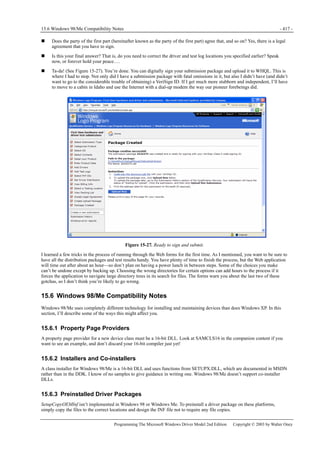
Each sample includes an HTML file that explains (very briefly)
what the sample does, how to build it, and how to test it. I
recommend that you read the file before trying to install the
sample because some of the samples have unusual installation
requirements. Once you’ve installed a sample driver, you’ll find
that the Device Manager has an extra property page from which
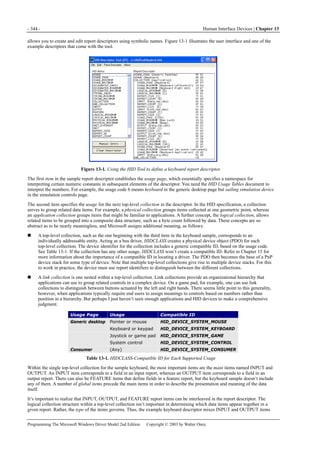
you can view the same HTML file, as shown here:
How the Samples Were Created
There’s a good reason why my sample drivers look as though
they all came out of a cookie cutter: they did. Faced with so
many samples to write, I decided to write a custom application
wizard. The wizard functionality in Microsoft Visual C++
version 6.0 is almost up to snuff for building a WDM driver
project, so I elected to depend on it. The wizard is named
WDMWIZ.AWX, and you’ll find it in the companion content.
I’ve documented how to use it in Appendix B. Use it, if you
want, to construct the skeletons for your own drivers. But be
aware that this wizard is not of product grade—it’s intended to
help you learn about writing drivers rather than to replace or compete with a commercial toolkit. Be aware too that you need to
change a few project settings by hand because the wizard support is only almost what’s needed. Refer to the
WDMBOOK.HTM in the root directory of the companion CD for more information.
System Requirements>>>>> XIII
Programming The Microsoft Windows Driver Model 2nd Edition Copyright © 2003 by Walter Oney
Building the Samples
I vastly prefer using the Microsoft Visual Studio 6.0 integrated development environment for driver projects. If you share this
preference, you can follow suit when you work with my samples. The WDMBOOK.HTM file in the companion content
contains detailed instructions about how to set up the development environment. I’m deliberately not repeating those
instructions here because they may change in the future. Each sample also includes a standard SOURCES file for use with the
Driver Development Kit (DDK) build environments, in case your preference lies in that direction.
Updates to the Samples
At my Web site,http://www.oneysoft.com, you’ll find a page concerning service packs for the sample drivers. In the three years
since the first edition was printed, I issued about a dozen service packs. Service packs fix bugs and offer new samples. If you
install my sample drivers, I recommend that you also install each new service pack as it comes out.
If you want to find out when a new service pack is available, you can fill out a simple online form to be added to my mailing
list. First edition subscribers needn’t reregister, by the way: you’re all grandfathered in.
GENERIC.SYS
A WDM driver contains a great deal of code that you could call boilerplate for handling Plug and Play and power management.
This code is long. It’s boring. It’s easy to get wrong. My samples all rely on what amounts to a kernel-mode DLL named
GENERIC.SYS. WDMWIZ.AWX will build a project that uses GENERIC.SYS or that doesn’t, as you specify.
GENERIC.CHM in the companion content details the support functions that GENERIC.SYS exports, in case you want to use
them yourself.
The downside to my using GENERIC all over the place is that I managed to obscure how some crucial things occur in the
driver. The drivers that use GENERIC delegate all of the IRP_MJ_PNP (see Chapter 6) and IRP_MJ_POWER (see Chapter 8)
handling to GENERIC, which then calls back to driver-specific routines to handle details. The following table describes the
important callback functions.
IRP Type Callback Function Purpose
IRP_MJ_PNP StartDevice
Start the device (map memory registers, connect interrupt, and so
on).
StopDevice
Halt device and release I/O resources (unmap memory registers,
disconnect interrupt, and so on).
RemoveDevice
Undo steps performed in AddDevice (disconnect from lower device
object, delete device object, and so on).
OkayToStop
(Optional) Is it OK to stop this device now (used while processing
IRP_MN_QUERY_STOP_DEVICE)?
OkayToRemove
(Optional) Is it OK to remove this device now (used while processing
IRP_MN_QUERY_REMOVE_DEVICE)?
FlushPendingIo
(Optional) Take any required action to force pending operations to
finish in the near future.
IRP_MJ_POWER QueryPower
(Optional) Is a proposed change in device power OK (used while
processing IRP_MN_QUERY_POWER)?
SaveDeviceContext
(Optional) Save any device context that will be lost during a period of
low power.
RestoreDeviceContext (Optional) Restore device context after a period of low power.
GetDevicePowerState
(Optional) Get device power state corresponding to a given system
power state.
System Requirements
To run the sample programs in the companion content, you’ll need a computer running Windows 98 Second Edition, Windows
Me, Windows 2000, Windows XP, or any later version of Windows. Some of the samples require a USB port and an EZ-USB
development kit from Cypress Semiconductors. Two of the samples require an ISA expansion slot and an S5933-DK
development board (or equivalent) from Applied Micro Circuits Corporation.
To build the sample programs, you’ll need a set of software tools that will change over time whenever I issue service packs.
The file WDMBOOK.HTM describes the requirements and will be updated when requirements change. At the time this book
is published, you’ll need the following:
The Microsoft Windows .NET DDK.
Microsoft Visual Studio 6.0. Any edition will do, and it doesn’t matter whether you’ve installed any of the service packs.
When you’re building the driver samples, you’ll be using just the integrated development environment provided by
Visual Studio. The compiler and other build tools will be coming from the DDK.
For one of the samples only (PNPMON), the Windows 98 DDK.
XIV <<<<Introduction
Programming The Microsoft Windows Driver Model 2nd Edition Copyright © 2003 by Walter Oney
If you have to use Windows 98 or Windows Me as your only build and test environment, you’ll also need to obtain a copy of
the Windows DDK for a pre-.NET platform. Microsoft denied me permission to distribute a version of the resource compiler
that would work on Windows 98/Windows Me or a cross-platform-compatible version of USBD.LIB. Grab these from
wherever you can find them before Microsoft stops supporting earlier versions of the DDK. Bear in mind that drivers built on
Windows 98/Windows Me might not run on Windows 2000 and later platforms due to an error in checksum computation in the
image helper DLL.
Support
Every effort has been made to ensure the accuracy of this book and the contents of the companion content. Microsoft Press
provides corrections for books through the World Wide Web at the following address:
http://www.microsoft.com/mspress/support
To connect directly to the Microsoft Press Knowledge Base and enter a query regarding a question or an issue that you might
have, go to:
http://www.microsoft.com/mspress/support/search.asp
If you have comments, questions, or ideas regarding this book or the companion content, or questions that aren’t answered by
querying the Knowledge Base, please send them to Microsoft Press by e-mail to:
mspinput@microsoft.com
Or by postal mail to:
Microsoft Press
Attn:
Programming Microsoft SQL Server 2000 with Microsoft Visual Basic .NET
Editor
One Microsoft Way
Redmond, WA 98052-6399
Please note that product support is not offered through the preceding mail address. For product support information, please
visit the Microsoft Support Web site at:
http://support.microsoft.com
Note on Errors
Despite heroic attention to detail, I and the editors at Microsoft Press let a few errors slip by from my original manuscript to
the finished first edition of this book. I overlooked a few technical things, slipped up on some others, and learned about still
others after the book was in print. My personal favorite was the “Special Sauce” layer in Figure 3-1, which was a typically
lame attempt to introduce humor into the editorial process that went awry when the original draft of the figure made it into the
finished book. At any rate, my errata/update Web page has grown to about 30 printed pages, and my desire to start over at zero
was one of the main reasons for this edition.
But, sigh, there will still be corrections and updates to be made to this edition too. I’ll continue to publish updates and errata at
http://www.oneysoft.com for at least the next couple of years. I recommend you go there first and often to stay up-to-date. And
please send me your comments and questions so that I can correct as many errors as possible.
Other Resources
This book shouldn’t be the only source of information you use to learn about driver programming. It emphasizes the features
that I think are important, but you might need information I don’t provide, or you might have a different way of learning than I
do. I don’t explain how the operating system works except insofar as it bears on what I think you need to know to effectively
write drivers. If you’re a deductive learner, or if you simply want more theoretical background, you might want to consult one
of the additional resources listed next. If you’re standing in a bookstore right now trying to decide which book to buy, my
advice is to buy all of them: a wise craftsperson never skimps on his or her tools. Besides, you can never tell when a young
dinner guest may need help reaching the table.
Books Specifically About Driver Development
Art Baker and Jerry Lozano, The Windows 2000 Device Driver Book: A Guide for Programmers, 2nd edition (Prentice Hall,
2001). Quite readable. Some errors survive from the first edition.
Edward N. Dekker and Joseph M. Newcomer, Developing Windows NT Device Drivers: A Programmer’s Handbook
(Addison-Wesley, 1999). A fine book with a fine sense of humor. Written just before WDM came out, so not much coverage of
that.
Rajeev Nagar, Windows NT File System Internals: A Developer’s Guide (O’Reilly & Associates, 1997). Nothing at all to do
About the Author XV
Programming The Microsoft Windows Driver Model 2nd Edition Copyright © 2003 by Walter Oney
with WDM, but the only book that attempts to explain the internals of the Windows NT file system.
Peter G. Viscarola and W. Anthony Mason, Windows NT Device Driver Development (Macmillan, 1998). Technical and
authoritative. A WDM edition is supposedly coming someday.
Other Useful Books
Michael Howard and David LeBlanc, Writing Secure Code (Microsoft Press, 2001). Exceptionally detailed and readable
discussion of security issues in applications. I’ll be reiterating many of Writing Secure Code’s lessons throughout this book.
Gary Nebbett, Windows NT/2000 Native API Reference (MacMillan, 2000). Detailed exposition of the underdocumented native
API.
David A. Solomon and Mark E. Russinovich, Inside Windows 2000, Third Edition (Microsoft Press, 2000). All about the
operating system. How come they got their pictures on the cover, inquiring minds would like to know?
Magazines
Old editions of Microsoft Systems Journal and Windows Developer Journal contain many articles about driver programming.
Both of the magazines have gone to that Great Publishers Clearinghouse in the sky, however, and I can’t speak for how well or
often their successors cover driver issues.
Online Resources
The comp.os.ms-windows.programmer.nt.kernel-mode newsgroup provides a forum for technical discussion on kernel-mode
programming issues. On the msnews.microsoft.com server, you can subscribe to microsoft.public.development.device.drivers.
You can find mailing list servers for file system and driver programming issues by going to http://www.osr.com.
Roedy Green, “How to Write Unmaintainable Code” (2002), which I found at http://www.mindprod.com/unmain.html.
Seminars and Development Services
I conduct public and on-site seminars on WDM programming. Visit my Web site at http://www.oneysoft.com for more
information and schedules. I also develop custom drivers for hardware manufacturers all over the world. I promise this is the
only commercial in the book. (Not counting the back cover of the book, that is, which is full of statements aimed at getting you
to buy the book and whose correspondence, if any, to reality will become susceptible to evaluation only if you succumb and
actually read the book.)
About the Author
Walter Oney has 35 years of experience in systems-level programming and has been teaching Windows device driver classes
for 10 years. He was a contributing editor to Microsoft Systems Journal during its heyday and is a Microsoft MVP. He has
written several books, including Systems Programming for Windows 95 and the first edition of Programming the Microsoft
Windows Driver Model. In his free time, he’s a committed jogger, a fan of classical dance, and an amateur oboist. He and his
wife, Marty, live in Boston, Massachusetts.
- 1 -
Chapter 1
1 Beginning a Driver Project
In this chapter, I’ll present an overview of the driver writing process. My own personal involvement with personal computing
dates from the mid-1980s, when IBM introduced its personal computer (PC) with MS-DOS as the operating system. Decisions
made by IBM and Microsoft that long ago are still being felt today. Consequently, a bit of historical perspective will help you
understand how to program device drivers.
Windows Driver Model (WDM) drivers run in two radically different operating system environments, and I’ll provide an
overview of the architecture of these environments in this chapter. Windows XP, like Windows 2000 and earlier versions of
Windows NT, provides a formal framework in which drivers play well-defined roles in carrying out I/O operations on behalf of
applications and other drivers. Windows Me, like Windows 9x and Windows 3.x before it, is a more freewheeling sort of
system in which drivers play many roles.
The first step in any driver project is to decide what kind of driver you need to write—if indeed you need to write one at all.
I’ll describe many different classes of device in this chapter with a view toward helping you make this decision.
Finally I’ll round out the chapter with a management checklist to help you understand the scope of the project.
1.1 A Brief History of Device Drivers
The earliest PCs ran on an Intel processor chip that provided addressability for 640 KB of “real” memory—so called because
the memory was really there in the form of memory chips that the processor addressed directly by means of a 20-bit physical
address. The processor itself offered just one mode of operation, the so-called real mode, wherein the processor combined
information from two 16-bit registers to form a 20-bit memory address for every instruction that referenced memory. The
computer architecture included the concept of expansion slots that brave users could populate with cards purchased separately
from the computer itself. The cards themselves usually came with instructions about how to set DIP switches (later, jumpers
between pins) in order to make slight changes in I/O configuration. You had to keep a map of all the I/O and interrupt
assignments for your PC in order to do this correctly. MS-DOS incorporated a scheme based on the CONFIG.SYS file whereby
the operating system could load real-mode device drivers for original equipment and for add-on cards. Inevitably, these drivers
were programmed in assembly language and relied to a greater or lesser extent on the INT instruction to talk to the BIOS and
to system services within MS-DOS itself. End users perforce learned how to invoke applications via commands. Application
programmers perforce learned how to program the video display, keyboard, and mouse directly because neither MS-DOS nor
the system BIOS did so adequately.
Later on, IBM introduced the AT class of personal computers based on the Intel 80286 processor. The 286 processor added a
protected mode of operation wherein programs could address up to 16 MB of main and extended memory using a 24-bit
segment address (specified indirectly via a segment selector in a 16-bit segment register) and a 16-bit offset. MS-DOS itself
remained a real-mode operating system, so several software vendors built DOS extender products to allow programmers to
migrate their real-mode applications to protected mode and gain access to all the memory that was becoming available on the
market. Since MS-DOS was still in charge of the computer, driver technology didn’t advance at this point.
The watershed change in PC technology occurred—in my view, anyway—when Intel released the 80386 processor chip. The
386 allowed programs to access up to 4 GB of virtual memory addressed indirectly via page tables, and it allowed programs to
easily use 32-bit quantities for arithmetic and addressing. There was a flurry of activity in the software tools market as
compiler vendors and DOS extender companies raced to capture the ever-growing volume of large applications hungry for
memory and processor speed. Device drivers were still 16-bit real-mode programs written in assembly language and installed
via CONFIG.SYS, and end users still needed to manually configure cards.
Subsequent advances in processor chips have been mainly in the area of performance and capacity. As I write this chapter,
computers operating faster than 1 GHz with 50-GB hard drives and 512 MB (or more) of memory are commonplace and easily
affordable by large segments of the population.
In parallel with the evolution of the platform, another evolution was occurring with operating system technology. Most people,
even including programmers of system software, prefer graphics-based ways of interacting with computers to character-based
ways. Microsoft was late to the graphical operating system party—Apple beat them with the first Macintosh—but has come to
dominate it with the Windows family of operating systems. In the beginning, Windows was just a graphical shell for real-mode
MS-DOS. Over time, a collection of Windows drivers for common hardware, including the display, keyboard, and mouse,
came into existence. These drivers were executable files with a .DRV extension, and they were written primarily in assembly
language.
With the advent of the AT class of computer, Microsoft added a protected-mode version of Windows. Microsoft ported the
real-mode .DRV drivers to protected mode as well. Hardware other than the standard Windows devices (the display, keyboard,
and mouse) continued to be handled by real-mode MS-DOS drivers.
- 2 - Beginning a Driver Project | Chapter 1
Programming The Microsoft Windows Driver Model 2nd Edition Copyright © 2003 by Walter Oney
Finally, some time after PCs with 386 processors became widely available, Microsoft released Windows 3.0, whose
“enhanced” mode of operation took full advantage of the virtual memory capabilities. Even so, it was still true that every new
piece of hardware needed a real-mode driver. But now there was a big problem. To support multitasking of MS-DOS
applications (a requirement for end user acceptance of Windows), Microsoft had built a virtual-machine operating system.
Each MS-DOS application ran in its own virtual machine, as did the Windows graphical environment. But all those MS-DOS
applications were trying to talk directly to hardware by issuing IN and OUT instructions, reading and writing device memory,
and handling interrupts from the hardware. Furthermore, two or more applications sharing processor time could be issuing
conflicting instructions to the hardware. They would certainly conflict over use of the display, keyboard, and mouse, of course.
To allow multiple applications to share physical hardware, Microsoft introduced the concept of a virtual device driver, whose
broad purpose is to “virtualize” a hardware device. Such drivers were generically called VxDs because most of them had
filenames fitting the pattern VxD.386, where x indicated the type of device they managed. Using this concept, Windows 3.0
created the appearance of virtual machines outfitted with separate instances of many hardware devices. But the devices
themselves continued, in most cases, to be driven by real-mode MS-DOS drivers. A VxD’s role was to mediate application
access to hardware by first intercepting the application’s attempts to touch the hardware and briefly switching the processor to
a sort of real mode called virtual 8086 mode to run the MS-DOS driver.
Not to put too fine a face on it, mode switching to run real-mode drivers was a hack whose only virtue was that it allowed for a
reasonably smooth growth in the hardware platform and operating system. Windows 3.0 had many bugs whose root cause was
that very feature of the architecture. Microsoft’s answer was to be OS/2, which it was developing in harmony (using a
twentieth-century definition of harmony, that is) with IBM.
Microsoft’s version of OS/2 became Windows NT, whose first public release was in the early 1990s, shortly after Windows 3.1.
Microsoft built Windows NT from the ground up with the intention of making it a durable and secure platform on which to run
Windows. Drivers for Windows NT used a brand-new kernel-mode technology that shared practically nothing with the other
two driver technologies then in vogue. Windows NT drivers used the C programming language almost exclusively so that they
could be recompiled for new CPU architectures without requiring any source changes.
Another thing happened along about the Windows 3.0 time frame that has an important ramification for us today. Windows 3.0
formally divided the software world into user-mode and kernel-mode programs. User-mode programs include all the
applications and games that people buy computers to run, but they are not to be trusted to deal robustly (or even honestly) with
hardware or with other programs. Kernel-mode programs include the operating system itself and all the device drivers that
people like you and me write. Kernel-mode programs are fully trusted and can touch any system resource they please.
Although Windows 3.0 segregated programs by their mode of operation, no version of Windows (not even Windows Me) has
actually put memory protection in place to yield a secure system. Security is the province of Windows NT and its successors,
which do forbid user-mode programs from seeing or changing the resources managed by the kernel.
Computing power didn’t really advance to the point where an average PC could run Windows NT well until quite recently.
Microsoft therefore had to keep the Windows product line alive. Windows 3.0 grew into 3.1, 3.11, and 95. Starting with
Windows 95, if you wanted to write a device driver, you would write something called a VxD that was really just a 32-bit
protected-mode driver. Also starting with Windows 95, end users could throw away their I/O maps because the new Plug and
Play feature of the operating system identified and configured hardware somewhat automatically. As a hardware maker, though,
you might have had to write a real-mode driver to keep happy those of your customers who weren’t upgrading from Windows
3.1. Meanwhile, Windows NT grew into 3.5, 4.0. You would have needed a third driver to support these systems, and not much
of your programming knowledge would have been portable between projects.
Enough was enough. Microsoft designed a new technology for device drivers, the Windows Driver Model (WDM), and put it
into Windows 98 and Windows Me, the successors to Windows 95. They also put this technology into Windows 2000 and
Windows XP, the successors to Windows NT 4.0. By the time of Windows Me, MS-DOS was present only by courtesy and
there was finally no need for a hardware maker to worry about real-mode device drivers. Because WDM was, at least by
original intention, practically the same on all platforms, it became possible to write just one driver.
To summarize, we stand today in the shadow of the original PC architecture and of the first versions of MS-DOS. End users
still occasionally have to open the skin of their PCs to install expansion cards, but we use a different and more powerful bus
nowadays than we did originally. Plug and Play and the Peripheral Component Interconnect (PCI) bus have largely removed
the need for end users to keep track of I/O, memory, and interrupt request usage. There is still a BIOS in place, but its job
nowadays is mostly to boot the system and to inform the real operating system (Windows XP or Windows Me) about
configuration details discovered along the way. And WDM drivers still have the file extension .SYS, just as the first real-mode
drivers did.
1.2 An Overview of the Operating Systems - 3 -
Programming The Microsoft Windows Driver Model 2nd Edition Copyright © 2003 by Walter Oney
1.2 An Overview of the Operating Systems
The Windows Driver Model provides a framework for device drivers that operate in two operating systems—Windows
98/Windows Me and Windows 2000/Windows XP. As discussed in the preceding historical summary, these two pairs of
operating systems are the products of two lines of parallel evolution. In fact, I’ll refer to the former pair of systems with the
abbreviation “98/Me” to emphasize their common heritage and to the latter pair simply as XP. Although to the end user these
two pairs of systems are similar, they work quite differently on the inside. In this section, I’ll present a brief overview of the
two systems.
1.2.1 Windows XP Overview
Figure 1-1. Windows XP architecture.
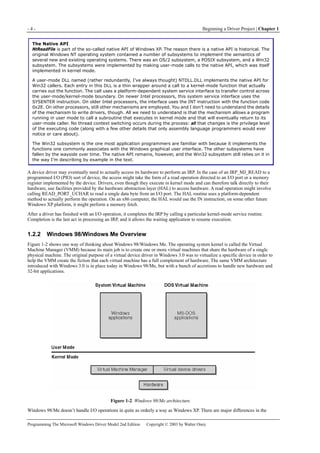
Figure 1-1 is a highly abbreviated functional diagram of the Windows XP operating system, wherein I emphasize the features
that are important to people who write device drivers. Every platform where Windows XP runs supports two modes of
execution. Software executes either in user mode or in kernel mode. A user-mode program that wants to, say, read some data
from a device would call an application programming interface (API) such as ReadFile. A subsystem module such as
KERNEL32.DLL implements this API by invoking a native API function such as NtReadFile. Refer to the sidebar for more
information about the native API.
We often say that NtReadFile is part of a system component called the I/O Manager. The term I/O Manager is perhaps a little
misleading because there isn’t any single executable module with that name. We need a name to use when discussing the
“cloud” of operating system services that surrounds our own driver, though, and this name is the one we usually pick.
Many routines serve a purpose similar to NtReadFile. They operate in kernel mode in order to service an application’s request
to interact with a device in some way. They all validate their parameters, thereby ensuring that they don’t inadvertently allow a
security breach by performing an operation, or accessing some data, that the user-mode program wouldn’t have been able to
perform or access by itself. They then create a data structure called an I/O request packet (IRP) that they pass to an entry point
in some device driver. In the case of an original ReadFile call, NtReadFile would create an IRP with the major function code
IRP_MJ_READ (a constant in a DDK [Driver Development Kit] header file). Processing details at this point can differ, but a
likely scenario is for a routine such as NtReadFile to return to the user-mode caller with an indication that the operation
described by the IRP hasn’t finished yet. The user-mode program might continue about its business and then wait for the
operation to finish, or it might wait immediately. Either way, the device driver proceeds independently of the application to
service the request.
- 4 - Beginning a Driver Project | Chapter 1
Programming The Microsoft Windows Driver Model 2nd Edition Copyright © 2003 by Walter Oney
The Native API
NtReadFile is part of the so-called native API of Windows XP. The reason there is a native API is historical. The
original Windows NT operating system contained a number of subsystems to implement the semantics of
several new and existing operating systems. There was an OS/2 subsystem, a POSIX subsystem, and a Win32
subsystem. The subsystems were implemented by making user-mode calls to the native API, which was itself
implemented in kernel mode.
A user-mode DLL named (rather redundantly, I’ve always thought) NTDLL.DLL implements the native API for
Win32 callers. Each entry in this DLL is a thin wrapper around a call to a kernel-mode function that actually
carries out the function. The call uses a platform-dependent system service interface to transfer control across
the user-mode/kernel-mode boundary. On newer Intel processors, this system service interface uses the
SYSENTER instruction. On older Intel processors, the interface uses the INT instruction with the function code
0x2E. On other processors, still other mechanisms are employed. You and I don’t need to understand the details
of the mechanism to write drivers, though. All we need to understand is that the mechanism allows a program
running in user mode to call a subroutine that executes in kernel mode and that will eventually return to its
user-mode caller. No thread context switching occurs during the process: all that changes is the privilege level
of the executing code (along with a few other details that only assembly language programmers would ever
notice or care about).
The Win32 subsystem is the one most application programmers are familiar with because it implements the
functions one commonly associates with the Windows graphical user interface. The other subsystems have
fallen by the wayside over time. The native API remains, however, and the Win32 subsystem still relies on it in
the way I’m describing by example in the text.
A device driver may eventually need to actually access its hardware to perform an IRP. In the case of an IRP_MJ_READ to a
programmed I/O (PIO) sort of device, the access might take the form of a read operation directed to an I/O port or a memory
register implemented by the device. Drivers, even though they execute in kernel mode and can therefore talk directly to their
hardware, use facilities provided by the hardware abstraction layer (HAL) to access hardware. A read operation might involve
calling READ_PORT_UCHAR to read a single data byte from an I/O port. The HAL routine uses a platform-dependent
method to actually perform the operation. On an x86 computer, the HAL would use the IN instruction; on some other future
Windows XP platform, it might perform a memory fetch.
After a driver has finished with an I/O operation, it completes the IRP by calling a particular kernel-mode service routine.
Completion is the last act in processing an IRP, and it allows the waiting application to resume execution.
1.2.2 Windows 98/Windows Me Overview
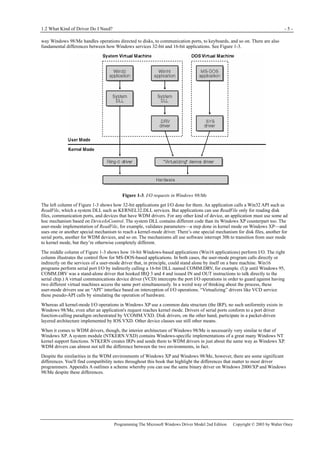
Figure 1-2 shows one way of thinking about Windows 98/Windows Me. The operating system kernel is called the Virtual
Machine Manager (VMM) because its main job is to create one or more virtual machines that share the hardware of a single
physical machine. The original purpose of a virtual device driver in Windows 3.0 was to virtualize a specific device in order to
help the VMM create the fiction that each virtual machine has a full complement of hardware. The same VMM architecture
introduced with Windows 3.0 is in place today in Windows 98/Me, but with a bunch of accretions to handle new hardware and
32-bit applications.
Figure 1-2. Windows 98/Me architecture.
Windows 98/Me doesn’t handle I/O operations in quite as orderly a way as Windows XP. There are major differences in the
1.2 What Kind of Driver Do I Need? - 5 -
Programming The Microsoft Windows Driver Model 2nd Edition Copyright © 2003 by Walter Oney
way Windows 98/Me handles operations directed to disks, to communication ports, to keyboards, and so on. There are also
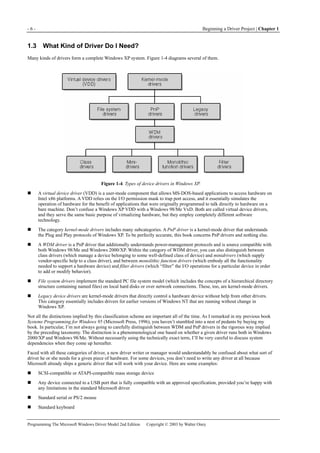
fundamental differences between how Windows services 32-bit and 16-bit applications. See Figure 1-3.
Figure 1-3. I/O requests in Windows 98/Me
The left column of Figure 1-3 shows how 32-bit applications get I/O done for them. An application calls a Win32 API such as
ReadFile, which a system DLL such as KERNEL32.DLL services. But applications can use ReadFile only for reading disk
files, communication ports, and devices that have WDM drivers. For any other kind of device, an application must use some ad
hoc mechanism based on DeviceIoControl. The system DLL contains different code than its Windows XP counterpart too. The
user-mode implementation of ReadFile, for example, validates parameters—a step done in kernel mode on Windows XP—and
uses one or another special mechanism to reach a kernel-mode driver. There’s one special mechanism for disk files, another for
serial ports, another for WDM devices, and so on. The mechanisms all use software interrupt 30h to transition from user mode
to kernel mode, but they’re otherwise completely different.
The middle column of Figure 1-3 shows how 16-bit Windows-based applications (Win16 applications) perform I/O. The right
column illustrates the control flow for MS-DOS-based applications. In both cases, the user-mode program calls directly or
indirectly on the services of a user-mode driver that, in principle, could stand alone by itself on a bare machine. Win16
programs perform serial port I/O by indirectly calling a 16-bit DLL named COMM.DRV, for example. (Up until Windows 95,
COMM.DRV was a stand-alone driver that hooked IRQ 3 and 4 and issued IN and OUT instructions to talk directly to the
serial chip.) A virtual communications device driver (VCD) intercepts the port I/O operations in order to guard against having
two different virtual machines access the same port simultaneously. In a weird way of thinking about the process, these
user-mode drivers use an “API” interface based on interception of I/O operations. “Virtualizing” drivers like VCD service
these pseudo-API calls by simulating the operation of hardware.
Whereas all kernel-mode I/O operations in Windows XP use a common data structure (the IRP), no such uniformity exists in
Windows 98/Me, even after an application's request reaches kernel mode. Drivers of serial ports conform to a port driver
function-calling paradigm orchestrated by VCOMM.VXD. Disk drivers, on the other hand, participate in a packet-driven
layered architecture implemented by IOS.VXD. Other device classes use still other means.
When it comes to WDM drivers, though, the interior architecture of Windows 98/Me is necessarily very similar to that of
Windows XP. A system module (NTKERN.VXD) contains Windows-specific implementations of a great many Windows NT
kernel support functions. NTKERN creates IRPs and sends them to WDM drivers in just about the same way as Windows XP.
WDM drivers can almost not tell the difference between the two environments, in fact.
Despite the similarities in the WDM environments of Windows XP and Windows 98/Me, however, there are some significant
differences. You'll find compatibility notes throughout this book that highlight the differences that matter to most driver
programmers. Appendix A outlines a scheme whereby you can use the same binary driver on Windows 2000/XP and Windows
98/Me despite these differences.
- 6 - Beginning a Driver Project | Chapter 1
Programming The Microsoft Windows Driver Model 2nd Edition Copyright © 2003 by Walter Oney
1.3 What Kind of Driver Do I Need?
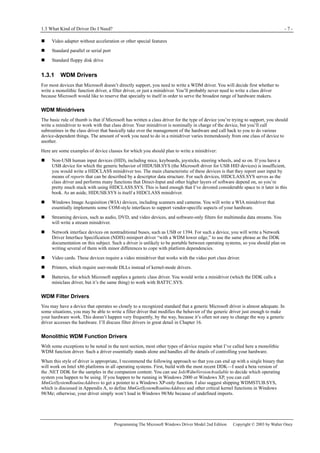
Many kinds of drivers form a complete Windows XP system. Figure 1-4 diagrams several of them.
Figure 1-4. Types of device drivers in Windows XP.
A virtual device driver (VDD) is a user-mode component that allows MS-DOS-based applications to access hardware on
Intel x86 platforms. A VDD relies on the I/O permission mask to trap port access, and it essentially simulates the
operation of hardware for the benefit of applications that were originally programmed to talk directly to hardware on a
bare machine. Don’t confuse a Windows XP VDD with a Windows 98/Me VxD. Both are called virtual device drivers,
and they serve the same basic purpose of virtualizing hardware, but they employ completely different software
technology.
The category kernel-mode drivers includes many subcategories. A PnP driver is a kernel-mode driver that understands
the Plug and Play protocols of Windows XP. To be perfectly accurate, this book concerns PnP drivers and nothing else.
A WDM driver is a PnP driver that additionally understands power-management protocols and is source compatible with
both Windows 98/Me and Windows 2000/XP. Within the category of WDM driver, you can also distinguish between
class drivers (which manage a device belonging to some well-defined class of device) and minidrivers (which supply
vendor-specific help to a class driver), and between monolithic function drivers (which embody all the functionality
needed to support a hardware device) and filter drivers (which “filter” the I/O operations for a particular device in order
to add or modify behavior).
File system drivers implement the standard PC file system model (which includes the concepts of a hierarchical directory
structure containing named files) on local hard disks or over network connections. These, too, are kernel-mode drivers.
Legacy device drivers are kernel-mode drivers that directly control a hardware device without help from other drivers.
This category essentially includes drivers for earlier versions of Windows NT that are running without change in
Windows XP.
Not all the distinctions implied by this classification scheme are important all of the time. As I remarked in my previous book
Systems Programming for Windows 95 (Microsoft Press, 1996), you haven’t stumbled into a nest of pedants by buying my
book. In particular, I’m not always going to carefully distinguish between WDM and PnP drivers in the rigorous way implied
by the preceding taxonomy. The distinction is a phenomenological one based on whether a given driver runs both in Windows
2000/XP and Windows 98/Me. Without necessarily using the technically exact term, I’ll be very careful to discuss system
dependencies when they come up hereafter.
Faced with all these categories of driver, a new driver writer or manager would understandably be confused about what sort of
driver he or she needs for a given piece of hardware. For some devices, you don’t need to write any driver at all because
Microsoft already ships a generic driver that will work with your device. Here are some examples:
SCSI-compatible or ATAPI-compatible mass storage device
Any device connected to a USB port that is fully compatible with an approved specification, provided you’re happy with
any limitations in the standard Microsoft driver
Standard serial or PS/2 mouse
Standard keyboard
1.3 What Kind of Driver Do I Need? - 7 -
Programming The Microsoft Windows Driver Model 2nd Edition Copyright © 2003 by Walter Oney
Video adapter without acceleration or other special features
Standard parallel or serial port
Standard floppy disk drive
1.3.1 WDM Drivers
For most devices that Microsoft doesn’t directly support, you need to write a WDM driver. You will decide first whether to
write a monolithic function driver, a filter driver, or just a minidriver. You’ll probably never need to write a class driver
because Microsoft would like to reserve that specialty to itself in order to serve the broadest range of hardware makers.
WDM Minidrivers
The basic rule of thumb is that if Microsoft has written a class driver for the type of device you’re trying to support, you should
write a minidriver to work with that class driver. Your minidriver is nominally in charge of the device, but you’ll call
subroutines in the class driver that basically take over the management of the hardware and call back to you to do various
device-dependent things. The amount of work you need to do in a minidriver varies tremendously from one class of device to
another.
Here are some examples of device classes for which you should plan to write a minidriver:
Non-USB human input devices (HID), including mice, keyboards, joysticks, steering wheels, and so on. If you have a
USB device for which the generic behavior of HIDUSB.SYS (the Microsoft driver for USB HID devices) is insufficient,
you would write a HIDCLASS minidriver too. The main characteristic of these devices is that they report user input by
means of reports that can be described by a descriptor data structure. For such devices, HIDCLASS.SYS serves as the
class driver and performs many functions that Direct-Input and other higher layers of software depend on, so you’re
pretty much stuck with using HIDCLASS.SYS. This is hard enough that I’ve devoted considerable space to it later in this
book. As an aside, HIDUSB.SYS is itself a HIDCLASS minidriver.
Windows Image Acquisition (WIA) devices, including scanners and cameras. You will write a WIA minidriver that
essentially implements some COM-style interfaces to support vendor-specific aspects of your hardware.
Streaming devices, such as audio, DVD, and video devices, and software-only filters for multimedia data streams. You
will write a stream minidriver.
Network interface devices on nontraditional buses, such as USB or 1394. For such a device, you will write a Network
Driver Interface Specification (NDIS) miniport driver “with a WDM lower edge,” to use the same phrase as the DDK
documentation on this subject. Such a driver is unlikely to be portable between operating systems, so you should plan on
writing several of them with minor differences to cope with platform dependencies.
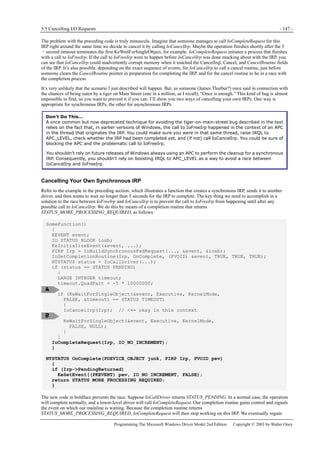
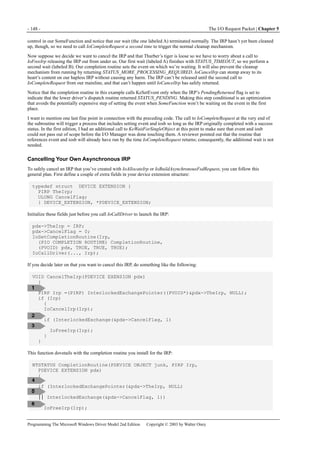
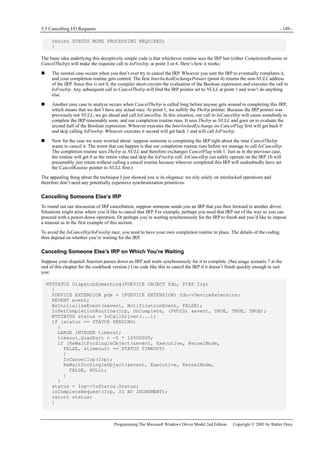
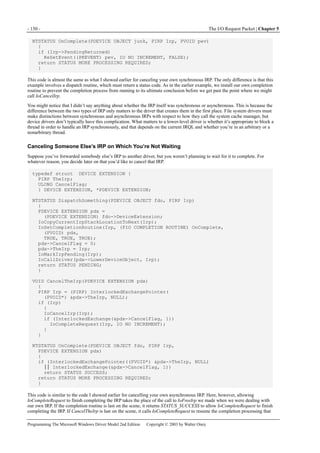
Video cards. These devices require a video minidriver that works with the video port class driver.
Printers, which require user-mode DLLs instead of kernel-mode drivers.
Batteries, for which Microsoft supplies a generic class driver. You would write a minidriver (which the DDK calls a
miniclass driver, but it’s the same thing) to work with BATTC.SYS.
WDM Filter Drivers
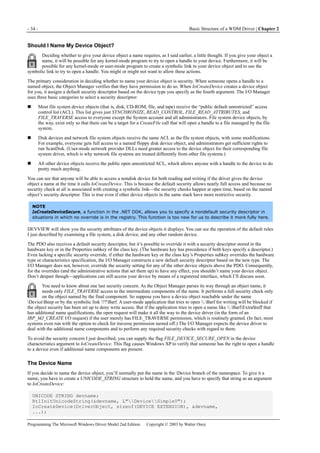
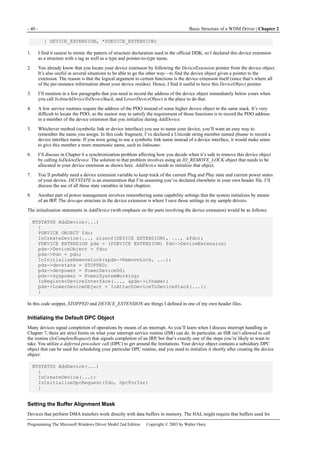
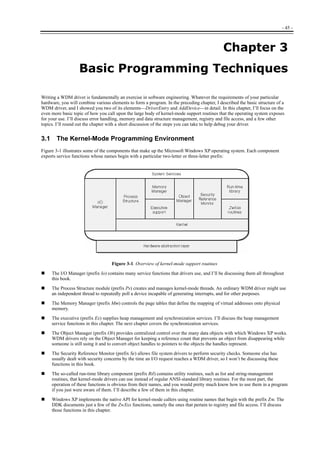
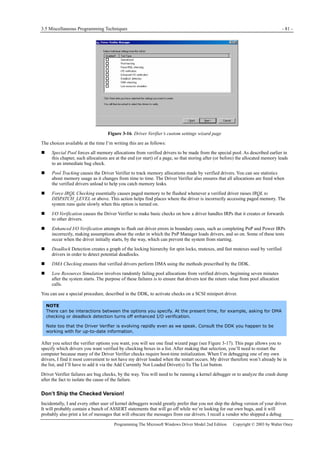
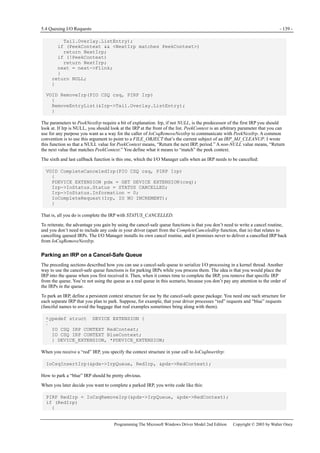
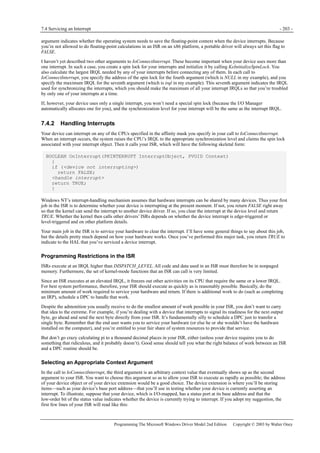
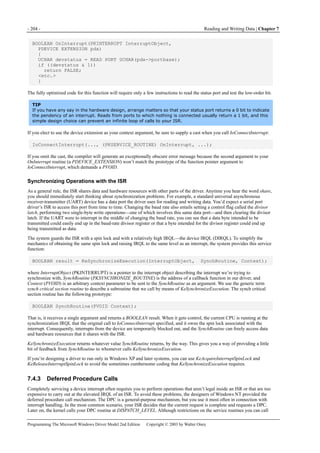
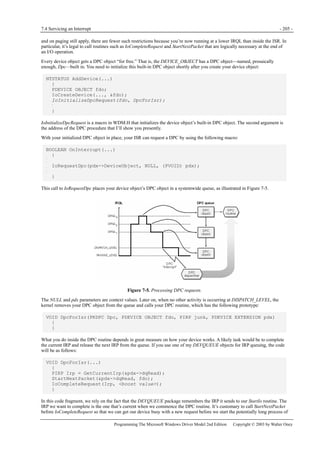
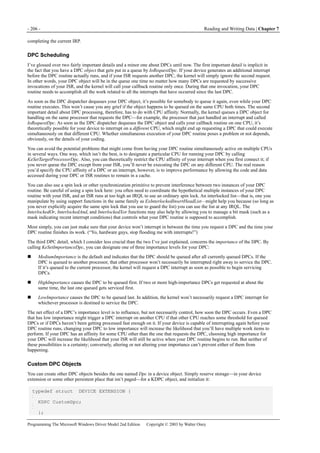
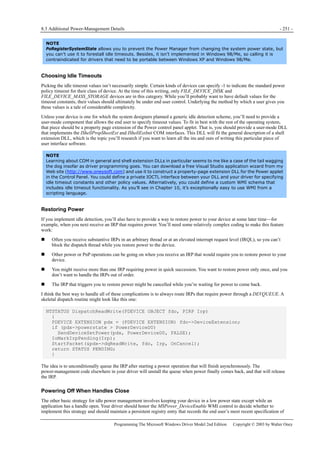
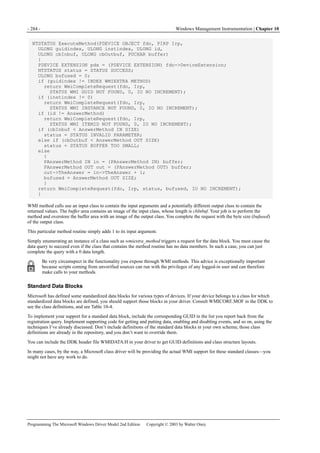
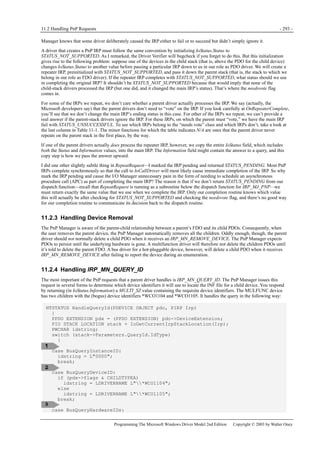
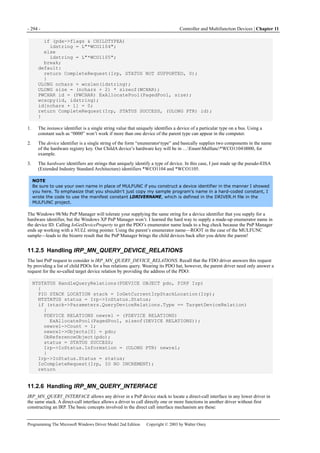
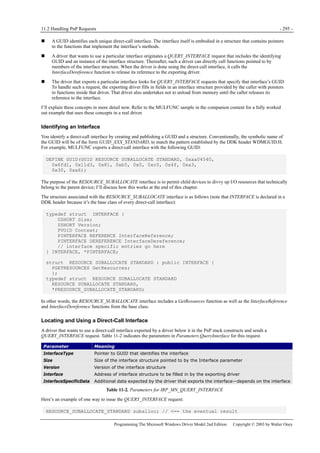
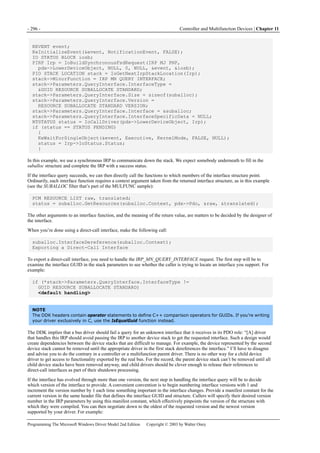
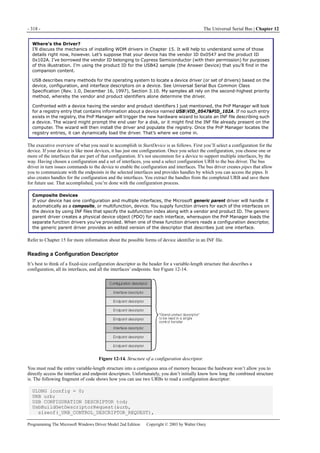
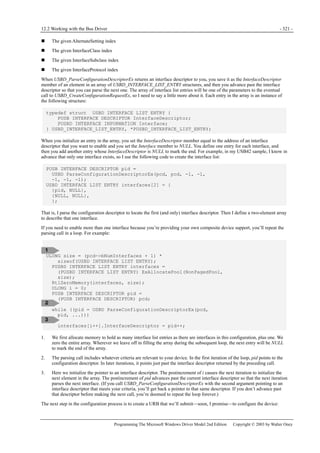
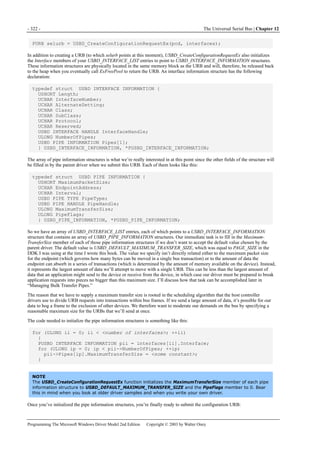
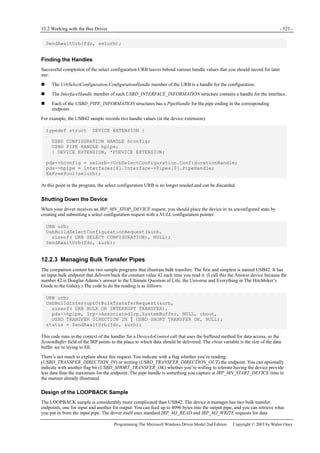
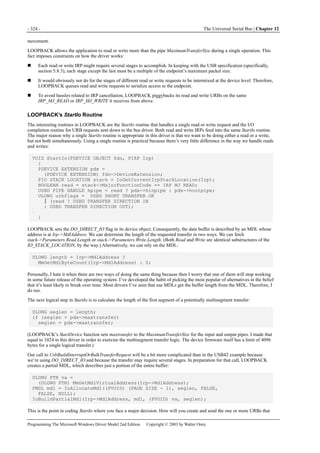
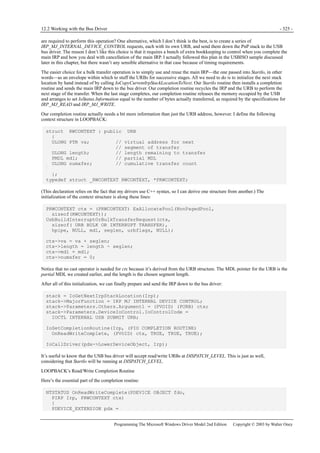
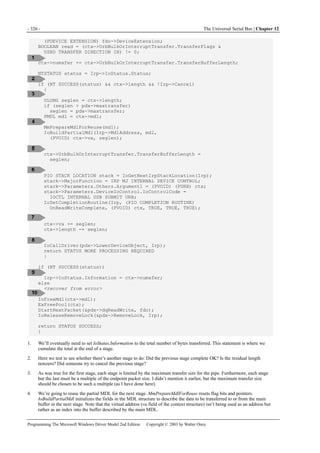
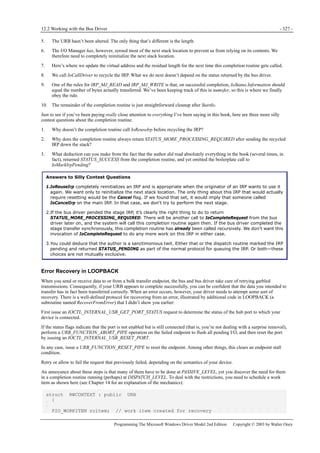
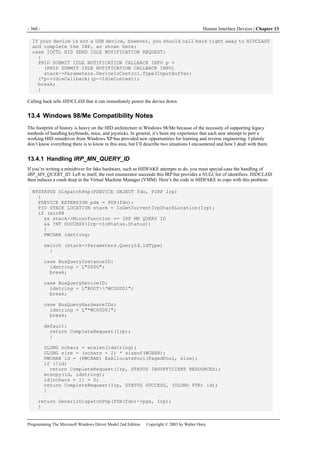
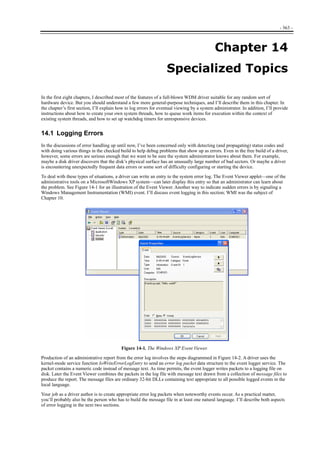
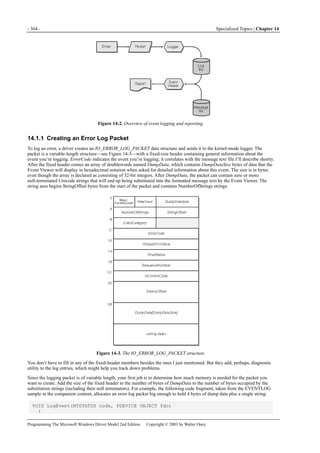
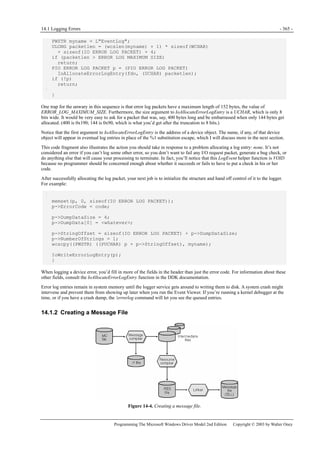
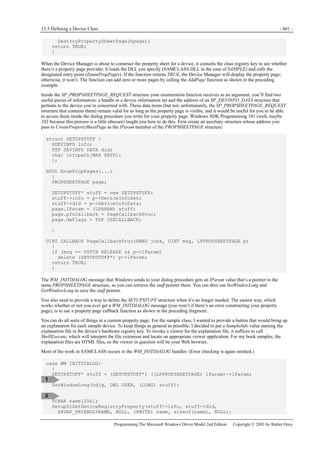
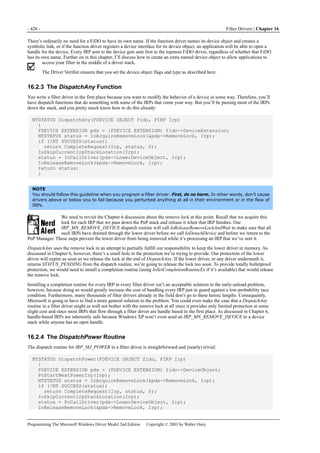
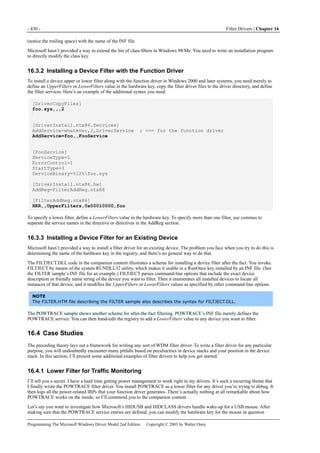
You may have a device that operates so closely to a recognized standard that a generic Microsoft driver is almost adequate. In
some situations, you may be able to write a filter driver that modifies the behavior of the generic driver just enough to make
your hardware work. This doesn’t happen very frequently, by the way, because it’s often not easy to change the way a generic
driver accesses the hardware. I’ll discuss filter drivers in great detail in Chapter 16.
Monolithic WDM Function Drivers
With some exceptions to be noted in the next section, most other types of device require what I’ve called here a monolithic
WDM function driver. Such a driver essentially stands alone and handles all the details of controlling your hardware.
When this style of driver is appropriate, I recommend the following approach so that you can end up with a single binary that
will work on Intel x86 platforms in all operating systems. First, build with the most recent DDK—I used a beta version of
the .NET DDK for the samples in the companion content. You can use IoIsWdmVersionAvailable to decide which operating
system you happen to be using. If you happen to be running in Windows 2000 or Windows XP, you can call
MmGetSystemRoutineAddress to get a pointer to a Windows XP-only function. I also suggest shipping WDMSTUB.SYS,
which is discussed in Appendix A, to define MmGetSystemRoutineAddress and other critical kernel functions in Windows
98/Me; otherwise, your driver simply won’t load in Windows 98/Me because of undefined imports.
- 8 - Beginning a Driver Project | Chapter 1
Programming The Microsoft Windows Driver Model 2nd Edition Copyright © 2003 by Walter Oney
Here are some examples of devices for which you might write a monolithic WDM function driver:
Any kind of SmartCard reader except one attached to a serial port
Digital-to-analog converter
ISA card supporting proprietary identification tag read/write transducer
More About Binary Compatibility
Originally, WDM was to have been binary portable across all versions of Windows. Because of release schedules
and second (and higher-order) thoughts, every release since Windows 98 has included support for more and
more kernel functions that are useful, and sometimes even essential, for robust and convenient programming.
An example is the IoXxxWorkItem family of functions, discussed in Chapter 14, which was added to Windows
2000 and which must be used instead of the similar but less robust ExXxxWorkItem family. Unless you do
something extra, a driver that calls IoXxxWorkItem functions simply won’t load in Windows 98/Me because the
operating system doesn’t export the functions. MmGetSystemRoutineAddress is another function that didn’t
make it into Windows 98/Me, unfortunately, so you can’t even make a run-time decision regarding which work
item functions to call. As if this weren’t enough, the WHQL tests for all drivers flag calls to the ExXxxWorkItem
functions.
In Windows 98/Me, a VxD named NTKERN implements the WDM subset of kernel support functions. As
discussed in more detail in Appendix A, NTKERN relies on defining new export symbols for use by the run-time
loader. You can also define your own export symbols, which is how WDMSTUB manages to define missing
symbols for use by the kind of binary-portable driver I’m advocating you build.
The companion content for this book includes the WDMCHECK utility, which you can run on a Windows 98/Me
system to check a driver for missing imports. If you’ve developed a driver that works perfectly in Windows XP,
I suggest copying the driver to a Windows 98/Me system and running WDMCHECK first thing. If WDMCHECK
shows that your driver calls some unsupported functions, the next thing to check is whether WDMSTUB
supports those functions. If so, just add WDMSTUB to your driver package as shown in Appendix A. If not, either
modify your driver or send me an e-mail asking me to modify WDMSTUB. Either way, you’ll eventually end up
with a binary-compatible driver.
1.3.2 Other Types of Drivers
A few situations exist in which a monolithic WDM function driver won’t suffice because of architectural differences between
Windows 98/Me and Windows 2000/XP. In the following cases, you would need to write two drivers: a WDM driver for
Windows 2000/XP and a VxD driver for Windows 98/Me:
A driver for a serial port. The Windows 98/Me driver is a VxD that offers the VCOMM port driver interface at its upper
edge, whereas the Windows 2000/XP driver is a WDM driver that offers a rich and rigidly specified IOCTL interface at
its upper edge. The two upper-edge specifications have nothing in common.
A driver for a device connected to a serial port. The Windows 98/Me driver is a VxD that calls VCOMM in order to talk
to the port. The Windows 2000/XP driver is a WDM driver that talks to SERIAL.SYS or some other serial port driver that
implements the same IOCTL interface.
A driver for a nonstandard USB mass storage device. For Windows 98/Me, you’ll write a VxD that fits into the I/O
Supervisor hierarchy of layered drivers. For Windows 2000/XP, you’ll write a monolithic WDM function driver that
accepts SCSI Request Blocks at its upper edge and communicates with the USB device at its lower edge.
For two classes of device, Microsoft defined a portable driver architecture long before WDM:
Small Computer System Interface (SCSI) adapters use a “SCSI miniport” driver, which doesn’t use any of the standard
kernel support functions and relies instead on a special API exported by SCSIPORT.SYS or SCSIPORT.VXD, as the case
may be. The miniport is portable between systems.
Network interface cards use an “NDIS miniport driver,” which relies exclusively on a special API exported by NDIS.SYS
or NDIS.VXD, as the case may be. At one time, NDIS miniport drivers were portable between systems, but portability
has pretty much been lost by now. Network protocol drivers and so-called “intermediate” drivers that provide filtering
functionality also orbit around NDIS.
1.3 What Kind of Driver Do I Need? - 9 -
Programming The Microsoft Windows Driver Model 2nd Edition Copyright © 2003 by Walter Oney
1.3.3 Management Overview and Checklist
If you’re a development manager, or if you’re otherwise responsible for delivering a hardware device to market, there are a few
things you need to know about device drivers. You need to decide, first of all, whether you need a customized driver and, if so,
what kind. The preceding section should help you with that decision, but you might want to hire an expert consultant for the
limited purpose of advising you on that score.
If your evaluation leads you to believe you need a custom driver, you then need to locate an appropriate programmer. The sad
truth is that WDM driver programming is pretty hard, and only experienced (and expensive!) programmers are capable of
doing it well. Some companies have cadres of driver programmers, but most can’t afford to. If you’re in the latter situation,
your basic choice is between training someone who’s already on your staff, hiring a programmer who already has the necessary
skills, engaging a consultant or contract programmer, or outsourcing the development to a company that specializes in driver
programming. All of these alternatives have pluses and minuses, and you will have to weigh them based on your own unique
needs.
Driver programming should start as soon as there is a reasonably firm specification for how the hardware will work. You
should expect to modify the specification in light of unpleasant discoveries during driver development, and you should also
expect to iterate your hardware/firmware and driver design several times. Flexibility and a willingness to start over will really
help you.
You should also expect driver programming to last longer and cost more than you initially imagine. All software is subject to
time and cost overruns. Additional overruns in this kind of programming stem from communication difficulties between the
hardware and software people, from ambiguity in specifications and in the DDK documentation, from bugs in all the
components, and from delays in engineering and production.
In most cases, you’ll want to submit your hardware and software to the Windows Hardware Quality Lab (WHQL) in order to
obtain a digital certificate that will streamline installation and provide an entrée to one of Microsoft’s logo programs. You’ll do
most of the testing yourself, and you’ll need specific computer setups to do it, so find out early what the testing requirements
are for your class of device to avoid being caught short at the end of your project. (Just as an example, testing a USB device
requires you to have a variety of audio hardware in a specific topology, even if your device has nothing to do with audio or any
other kind of streaming media.)
Also prepare your business infrastructure for working with WHQL. At a minimum, this will require obtaining a Data Universal
Numbering System (DUNS) number from Dun and Bradstreet (or providing equivalent proof of business organization) and a
digital signature certificate from Verisign. As of this writing, the DUNS number was free, but the Verisign certificate was not.
And working through all the processes of multiple companies will take time.
Pay attention early on to how end users will install the driver software. Most vendors of add-on hardware prefer to ship a
custom installation program on a CD-ROM, and writing the installer is a lengthy process that can consume an experienced
programmer for several weeks. Web-based driver repositories are quite common and require special attention to installation
issues.
Drivers can provide statistical and other management information in two ways. The Windows Management Instrumentation
(WMI) subsystem provides a language- and transport-independent pathway for various sorts of binary data. Microsoft has
established standard WMI classes for certain types of device, and your own industry subgroup may have established other
standards to which your driver should conform. Chapter 10 contains information on how to conform to the Microsoft standards,
but finding out how to fit in with the rest of the industry may be a job for your company’s trade group representatives.
The second way of providing management information is by means of the system event log, which has been part of Windows
NT since the beginning and which gives administrators a quick way of learning about exceptional conditions that have arisen
in the recent past. Your driver should report events that an administrator would be interested in and can do something about.
Whoever programs your driver should consult with an experienced system administrator to decide which events to log, so as to
avoid cluttering the log with routine and unexceptional information. Your driver executable file will also probably include the
text of messages in a special multilingual message resource, and it would be a good idea to have a trained writer compose that
text. (I’m not saying your driver programmer can’t do this, but he or she may not be the best choice.)
In addition to a driver, you may need control panel or other configuration software. The driver programmer and a specialist in
user interaction should work together to build these components. Since they’ll be installed along with the driver, they’ll be part
of the package that WHQL digitally signs, so they need to be finished at the same time as the driver.
Finally, don’t treat your drivers as unimportant details. Having a good driver with a smooth installation is at least as important
as the exterior appearance of the product. To put it simply, if your driver crashes the operating system, reviewers will alert the
public, and anyone who doesn’t read the reviews will be irately returning your product to the stores. You won’t have any repeat
business from people whose systems have crashed, even once, because of your driver. So a myopic decision to short-fund
driver development could easily have a dramatic, negative effect on your bottom line for years to come. This advice is
especially important for hardware manufacturers in developing countries, where managers have a tendency to look for every
possible way to cut costs. I suggest that driver development is one place where cost-based decision making is inappropriate.
- 10 - Beginning a Driver Project | Chapter 1
Programming The Microsoft Windows Driver Model 2nd Edition Copyright © 2003 by Walter Oney
To summarize, plan your project with the following milestones in mind:
Evaluation of required driver and selection of programming talent
Programming specification for hardware complete enough for driver work to begin
Prototype hardware available for driver testing
Driver and hardware/firmware working together as originally intended
Installation (INF) file tested on all operating systems
Control panels and other ancillary software done
WMI and event log functionality done and tested
WHQL self-tests passed and submission made
Custom installation program done (not part of WHQL submission)
Ready to burn discs and ship product!
- 11 -
Chapter 2
2 Basic Structure of a WDM Driver
In the first chapter, I described the basic architecture of the Microsoft Windows XP and Microsoft Windows 98/Me operating
systems. I explained that the purpose of a device driver is to manage a piece of hardware on behalf of the system, and I
discussed how to decide what kind of driver your hardware will need. In this chapter, I’ll describe more specifically what
program code goes into a WDM driver and how different kinds of drivers work together to manage hardware. I’ll also present
an overview of how the system finds and loads drivers.
2.1 How Drivers Work
A useful way to think of a complete driver is as a container for a collection of subroutines that the operating system calls to
perform various operations that relate to your hardware. Figure 2-1 illustrates this concept. Some routines, such as the
DriverEntry and AddDevice routines, as well as dispatch functions for a few types of I/O Request Packet (IRP), will be present
in every such container. Drivers that need to queue requests might have a StartIo routine. Drivers that perform direct memory
access (DMA) transfers will have an AdapterControl routine. Drivers for devices that generate hardware interrupts will have an
interrupt service routine (ISR) and a deferred procedure call (DPC) routine. Most drivers will have dispatch functions for
several types of IRP besides the three that are shown in Figure 2-1. One of your jobs as the author of a WDM driver, therefore,
is to select the functions that need to be included in your particular container.
Figure 2-1. A driver considered as a package of subroutines.
I’ll show you in this chapter how to write the DriverEntry and AddDevice routines for a monolithic function driver, one of the
types of WDM driver this book discusses. As you’ll learn in later chapters, filter drivers also have DriverEntry and AddDevice
routines that are similar to what you’ll see here. As you’ll also learn, minidrivers have very different DriverEntry routines and
may or may not have AddDevice routines, all depending on how the author of the associated class driver designed the class
driver interface.
2.1.1 How Applications Work
It’s worth a moment to reflect on the implications of the “package of subroutines” model for a driver by contrasting it with the
“main program and helpers” model that applies to an application. Consider this program, which is among the first that many of
us learn to write:
- 12 - Basic Structure of a WDM Driver | Chapter 2
Programming The Microsoft Windows Driver Model 2nd Edition Copyright © 2003 by Walter Oney
int main(int argc, char* argv[])
{
printf("Hello, world!n");
return 0;
}
This program consists of a main program named main and a library of helper routines, most of which we don’t explicitly call.
One of the helper routines, printf, prints a message to the standard output file. After compiling the source module containing
the main program and linking it with a runtime library containing printf and the other helper routines needed by the main
program, you would end up with an executable module that you might name HELLO.EXE. I’ll go so far as to call this module
by the grandiose name application because it’s identical in principle to every other application now in existence or hereafter
written. You could invoke this application from a command prompt this way:
C:>hello
Hello, world!
C:>
Here are some other common facts about applications:
Some of the helper routines an application uses come from a static library, from which the linkage editor extracts them as
part of the build process. printf is one of these functions.
Other helper routines are dynamically linked from system dynamic-link libraries (DLLs). For these routines, the linkage
editor places special import references in the executable file, and the runtime loader fixes up these references to point to
the actual system code. As a matter of fact, the entire Win32 API used by application programs is dynamically linked, so
you can see that dynamic linking is a very important concept in Windows programming.
Executable files can contain symbolic information that allows debuggers to associate runtime addresses with the original
source code.
Executable files can also contain resource data, such as dialog box templates, text strings, and version identification.
Placing this sort of data within the file is better than using separate auxiliary files because it avoids the problem of having
mismatched files.
The interesting thing about HELLO.EXE is that once the operating system gives it control, it doesn’t return until it’s
completely done with the task it performs. That’s a characteristic of every application you’ll ever use in Windows, actually. In
a console-mode application such as HELLO, the operating system initially transfers control to an initialization function that’s
part of the compiler’s runtime library. The initialization function eventually calls main to do the application’s work.
Graphical applications in Windows work in much the same way except that the main program is named WinMain instead of
main. WinMain operates a message pump to receive and dispatch messages to window procedures. It returns to the operating
system when the user closes the main window. If the only Windows applications you ever build use Microsoft Foundation
Classes (MFC), the WinMain procedure is buried in the library where you might never spot it, but rest assured it’s there.
More than one application can appear to be running simultaneously on a computer, even a computer that has just one central
processing unit. The operating system kernel contains a scheduler that gives short blocks of time, called time slices, to all the
threads that are currently eligible to run. An application begins life with a single thread and can create more if it wants. Each
thread has a priority, given to it by the system and subject to adjustment up and down for various reasons. At each decision
point, the scheduler picks the highest-priority eligible thread and gives it control by loading a set of saved register images,
including an instruction pointer, into the processor registers. A processor interrupt accompanies expiration of the thread’s time
slice. As part of handling the interrupt, the system saves the current register images, which can be restored the next time the
system decides to redispatch the same thread.
Instead of just waiting for its time slice to expire, a thread can block each time it initiates a time-consuming activity in another
thread until the activity finishes. This is better than spinning in a polling loop waiting for completion because it allows other
threads to run sooner than they would if the system had to rely solely on expiration of a time slice to turn its attention to some
other thread.
Now, I know you already knew what I just said. I just wanted to focus attention on the fact that an application is, at bottom, a
selfish thread that grabs the CPU and tries to hold on until it exits and that the operating system scheduler acts like a
playground monitor to make a bunch of selfish threads play well together.
2.1.2 Device Drivers
Like HELLO.EXE, a driver is also an executable file. It has the file extension .SYS, but structurally the disk file looks exactly
like any 32-bit Windows or console-mode application. Also like HELLO.EXE, a driver uses a number of helper routines, many
of which are dynamically linked from the operating system kernel or from a class driver or other supporting library. A driver
file can have symbolic debugging information and resource data too.
2.1 How Drivers Work - 13 -
Programming The Microsoft Windows Driver Model 2nd Edition Copyright © 2003 by Walter Oney
The System Is in Charge
Unlike HELLO.EXE, however, a driver doesn’t contain a main program. Instead, it contains a collection of subroutines that the
system can call when the system thinks it’s time to. To be sure, these subroutines can use helper subroutines in the driver, in
static libraries, and in the operating system, but the driver isn’t in charge of anything except its own hardware: the system is in
charge of everything else, including the decisions about when to run your driver code.
Here’s a brief snapshot of how the operating system might call subroutines in your driver:
1. The user plugs in your device, so the system loads your driver executable into virtual memory and calls your DriverEntry
routine. DriverEntry does a few things and returns.
2. The Plug and Play Manager (PnP Manager) calls your AddDevice routine, which does a few things and returns.
3. The PnP Manager sends you a few IRPs. Your dispatch function processes each IRP in turn and returns.
4. An application opens a handle to your device, whereupon the system sends you another IRP. Your dispatch routine does a
little work and returns.
5. The application tries to read some data, whereupon the system sends you an IRP. Your dispatch routine puts the IRP in a
queue and returns.
6. A previous I/O operation finishes by signaling a hardware interrupt to which your driver is connected. Your interrupt
routine does a little bit of work, schedules a DPC, and returns.
7. Your DPC routine runs. Among other things, it removes the IRP you queued at step 5 and programs your hardware to
read the data. Then the DPC routine returns to the system.
8. Time passes, during which the system makes many other brief calls into your subroutines.
9. Eventually, the end user unplugs your device. The PnP Manager sends you some IRPs, which you process and return. The
operating system calls your DriverUnload routine, which usually just does a tiny amount of work and returns. Then the
system removes your driver code from virtual memory.
At each step of this process, the system decided that your driver needed to do something, be it initializing, processing an IRP,
handling an interrupt, or whatever. So the system selected the appropriate subroutine within your driver. Your routine did what
it was supposed to do and returned to the system.
Threads and Driver Code
Another way in which drivers are dissimilar to applications is that the system doesn’t create a special thread in which to run the
driver code. Instead, a driver subroutine executes in the context of whatever thread happens to be currently active at the time
the system decides to call that subroutine.
It’s not possible to predict which thread will be current at the time a hardware interrupt occurs. As an analogy, imagine that
you’re watching a carousel at an amusement park. The horses on the carousel are like threads in a running system. Call the
horse that’s nearest to you the “current” horse. Now suppose you decide to take a picture with your camera the next time you
overhear someone say the phrase, “That’s awesome, dude.” (In my experience at amusement parks, this does not entail a long
wait.) You wouldn’t expect to be able to predict which horse would be “current” in your snapshot. Which of all the eligible
threads that happens to be executing at the time of hardware interrupt is likewise not predictable. We call this an arbitrary
thread, and we speak of running in an arbitrary thread context.
The system is often running in an arbitrary thread context when it decides to call a subroutine in your driver. The thread
context would be arbitrary—for example, when your interrupt service routine gets control. If you schedule a DPC, the thread in
which your DPC routine runs will be arbitrary. If you queue IRPs, your StartIo routine will be called in an arbitrary thread. In
fact, if some driver outside your own stack sends you an IRP, you have to assume that the thread context is arbitrary. Such
would normally be the case for a storage driver since a file system driver will be the agent ultimately responsible for doing
reads and writes.
The system doesn’t always execute driver code in an arbitrary thread context. A driver can create its own system threads by
calling PsCreateSystemThread. A driver can also ask the system to call it back in the context of a system thread by scheduling
a work item. In these situations, we consider the thread context to be nonarbitrary. I’ll discuss the mechanics of system threads
and work items in Chapter 14.
Another situation in which the thread context is not arbitrary occurs when an application issues an API call that causes the I/O
Manager to send an IRP directly to a driver. You can know when you write a driver whether or not this will be the case with
respect to each type of IRP you handle.
You care whether the thread context is arbitrary for two reasons. First, a driver shouldn’t block an arbitrary thread: it would be
unfair to halt one thread while you carry out activities that benefit some other thread.
The second reason applies when a driver creates an IRP to send to some other driver. As I’ll discuss more fully in Chapter 5,
you need to create one kind of IRP (an asynchronous IRP) in an arbitrary thread, but you might create a different kind of IRP (a
- 14 - Basic Structure of a WDM Driver | Chapter 2
Programming The Microsoft Windows Driver Model 2nd Edition Copyright © 2003 by Walter Oney
synchronous IRP) in a nonarbitrary thread. The I/O Manager ties the synchronous kind of IRP to the thread within which you
create the IRP. It will cancel the IRP automatically if that thread terminates. The I/O Manager doesn’t tie an asynchronous IRP
to any particular thread, though. The thread in which you create an asynchronous IRP may have nothing to do with the I/O
operation you’re trying to perform, and it would be incorrect for the system to cancel the IRP just because that thread happens
to terminate. So it doesn’t.
Symmetric Multiprocessing
Windows XP uses a so-called symmetric model for managing computers with multiple central processors. In this model, each
CPU is treated exactly like every other CPU with respect to thread scheduling. Each CPU has its own current thread. It’s
perfectly possible for the I/O Manager, executing in the context of the threads running on two or more CPUs, to call
subroutines in your driver simultaneously. I’m not talking about the sort of fake simultaneity with which threads execute on a
single CPU—on the time scale of the computer, the threads are really taking turns. Rather, on a multiprocessor machine,
different threads really do execute at the same time. As you can imagine, simultaneous execution leads to exacting
requirements for drivers to synchronize access to shared data. In Chapter 4, I’ll discuss the various synchronization methods
that you can use for this purpose.
2.2 How the System Finds and Loads Drivers
I emphasized in the preceding section how the operating system is in overall charge of the computer and calls on device drivers
to do small amounts of work with respect to hardware. Drivers have a similarly passive role in the process that causes them to
be loaded in the first place. It will help you understand the rest of the book if you understand right away how the system
detects hardware, determines which driver to load, and then configures the driver to manage the hardware. The system uses
two slightly different methods, depending on whether the hardware is Plug and Play compatible:
A Plug and Play device has an electronic signature that the system can detect. For Plug and Play devices, a system bus
driver detects the existence of the hardware and reads the signature to determine what kind of hardware it is. Thereafter,
an automatic process based on the registry and INF files allows the system to load the right driver.
A legacy device does not have any electronic signature, so the system can’t detect it automatically. The end user must
therefore initiate the “detection” process by invoking the Add New Hardware Wizard, which ends with the system
knowing that a certain new piece of hardware exists. Thereafter, the system uses the same automatic registry-and-INF-file
process that’s used for Plug and Play devices to load the right driver.
Whichever method the system uses to detect hardware and load a driver, the driver itself will be a WDM driver that reacts
passively to calls from the operating system. On this point, WDM drivers contrast sharply with kernel-mode drivers for earlier
versions of Windows NT and with VxD drivers prior to Windows 95. In those environments, you had to somehow arrange for
the system to load your driver. Your driver would then scan hardware buses looking for its own hardware and decide whether
to stay resident or not. In addition, your driver had to determine which I/O resources to use and take steps to prevent other
drivers from taking the same resources.
2.2.1 Device and Driver Layering
Before I can make sense of the hardware detection and driver loading processes, I need to explain the concept of driver
layering illustrated in Figure 2-2. In the figure, the left column represents an upwardly linked stack of kernel
DEVICE_OBJECT structures, all of which relate to how the system manages a single piece of hardware. The middle column
represents the collection of device drivers that have roles to play in the management. The right column illustrates the flow of
an IRP through the drivers.
In the Windows Driver Model, each hardware device has at least two device drivers. One of these drivers, which we call the
function driver, is what you’ve always thought of as being the device driver. It understands all the details about how to make
the hardware work. It’s responsible for initiating I/O operations, for handling the interrupts that occur when those operations
finish, and for providing a way for the end user to exercise any control over the device that might be appropriate.
NOTE
A monolithic WDM function driver is a single executable file with dynamic links to NTOSKRNL.EXE, which
contains the kernel of the operating system, and HAL.DLL, which contains the hardware abstraction layer
(HAL). A function driver can dynamically link to other kernel-mode DLLs too. In situations in which Microsoft has
provided a class driver for your type of hardware, your minidriver will dynamically link to the class driver. The
combination of minidriver and class driver adds up to a single function driver. You may see pictures in which
things called class drivers appear to be above or below a minidriver. I prefer to think of those so-called “class”
drivers as free-standing filter drivers and to use the term class driver solely for drivers that are next to
minidrivers, reached by means of explicit imports, and acting as partners that the minidriver willingly brings
into play.
2.2 How the System Finds and Loads Drivers - 15 -
Programming The Microsoft Windows Driver Model 2nd Edition Copyright © 2003 by Walter Oney
Figure 2-2. Layering of device objects and drivers in the Windows Driver Model.
We call the other of the two drivers that every device has the bus driver. It’s responsible for managing the connection between
the hardware and the computer. For example, the bus driver for the Peripheral Component Interconnect (PCI) bus is the
software component that actually detects that your card is plugged into a PCI slot and determines the requirements your card
has for I/O-mapped or memory-mapped connections with the host. It’s also the software that turns on or off the flow of
electrical current to your card’s slot.
Some devices have more than two drivers. We use the generic term filter driver to describe these other drivers. Some filter
drivers simply watch as the function driver performs I/O. More often, a software or hardware vendor supplies a filter driver to
modify the behavior of an existing function driver in some way. Upper filter drivers see IRPs before the function driver, and
they have the chance to support additional features that the function driver doesn’t know about. Sometimes an upper filter can
perform a workaround for a bug or other deficiency in the function driver or the hardware. Lower filter drivers see IRPs that
the function driver is trying to send to the bus driver. (A lower filter is below the function driver in the stack but still above the
bus driver.) In some cases, such as when the device is attached to a universal serial bus (USB), a lower filter can modify the
stream of bus operations that the function driver is trying to perform.
Referring once again to Figure 2-2, notice that each of the four drivers shown for a hypothetical device has a connection to one
of the DEVICE_OBJECT structures in the left column. The acronyms used in the structures are these:
PDO stands for physical device object. The bus driver uses this object to represent the connection between the device and
the bus.
FDO stands for function device object. The function driver uses this object to manage the functionality of the device.
FiDO stands for filter device object. A filter driver uses this object as a place to store the information it needs to keep
about the hardware and its filtering activities. (The early beta releases of the Windows 2000 DDK used the term FiDO,
and I adopted it then. The DDK no longer uses this term because, I guess, it was considered too frivolous.)
What Is a Bus?
I’ve already used the terms bus and bus driver pretty freely without explaining what they mean. For purposes
of the WDM, a bus is anything that you can plug a device into, either physically or metaphorically.
This is a pretty broad definition. Not only does it include items such as the PCI bus, but it also includes a Small
Computer System Interface (SCSI) adapter, a parallel port, a serial port, a USB hub, and so on—anything, in
fact, that can have another device plugged into it.
The definition also includes a notional root bus that exists only as a figment of our imagination. Think of the root
bus as being the bus into which all legacy devices plug. Thus, the root bus is the parent of a non-PnP Industry
Standard Architecture (ISA) card or of a SmartCard reader that connects to the serial port but doesn’t answer
with a standard identification string to the serial port enumeration signals. We also consider the root bus to be
the parent of the PCI bus—this is because the PCI bus does not itself announce its presence electronically, and
the operating system therefore has to treat it like a legacy device.
2.2.2 Plug and Play Devices
To repeat what I said earlier, a Plug and Play device is one that has an electronic signature that a bus driver can interrogate to
learn the identity of a device. Here are some examples of these signatures:
A PCI card has a configuration space that the PCI bus driver can read via dedicated memory or I/O port addresses. The
configuration space contains vendor and product identification information.
A USB device returns a device descriptor in response to a standardized control-pipe transaction. The device descriptor
contains vendor and product identification information.
- 16 - Basic Structure of a WDM Driver | Chapter 2
Programming The Microsoft Windows Driver Model 2nd Edition Copyright © 2003 by Walter Oney
A Personal Computer Memory Card International Association (PCMCIA) device has attribute memory that the PCMCIA
bus driver can read in order to determine the identity of the card.
A bus driver for a Plug and Play bus has the ability to enumerate its bus by scanning all possible slots at start-up time. Drivers
for buses that support hot plugging of devices during a session (as do USB and PCMCIA) also monitor some sort of hardware
signal that indicates arrival of a new device, whereupon the driver reenumerates its bus. The end result of the enumeration or
reenumeration process is a collection of PDOs. See point 1 in Figure 2-3.
Figure 2-3. Installing a Plug and Play device.
When a bus driver detects the insertion or removal of hardware, it calls IoInvalidateDeviceRelations to notify the PnP Manager
that the bus’s population of child devices has changed. To obtain an updated list of the PDOs for the child devices, the PnP
Manager sends an IRP to the bus driver. The major function code for this IRP is IRP_MJ_PNP, and the minor function code is
IRP_MN_QUERY_DEVICE_RELATIONS, with a code indicating that the PnP Manager is looking for the so-called “bus”
relations. This is point 2 in Figure 2-3.
NOTE
Each IRP has a major and a minor function code. The major function code indicates what sort of request the IRP
contains. IRP_MJ_PNP is the major function code for requests that the PnP Manager makes. With some of the
major function codes, including IRP_MJ_PNP, the minor function code is required to further specify the
operation.In response to the bus relations query, the bus driver returns its list of PDOs. The PnP Manager can
easily determine which of the PDOs represent devices that it hasn’t yet initialized. Let’s focus on the PDO for
your hardware for the time being and see what happens next.
The PnP Manager will send another IRP to the bus driver, this time with the minor function code IRP_MN_QUERY_ID. This is
point 3 in Figure 2-3. In fact, the PnP Manager sends several such IRPs, each with an operand that instructs the bus driver to
return a particular type of identifier. One of the identifiers, the device identifier, uniquely specifies the type of device. A device
identifier is just a string, and it might look like one of these examples:
PCIVEN_102C&DEV_00E0&SUBSYS_00000000
USBVID_0547&PID_2125&REV_0002
PCMCIAMEGAHERTZ-CC10BT/2-BF05
NOTE
Each bus driver has its own scheme for formatting the electronic signature information it gathers into an
identifier string. I’ll discuss the identifier strings used by common bus drivers in Chapter 15. That chapter is also
the place to look for information about INF files and about where the various registry keys described in the text
are in the registry hierarchy and what sorts of information are kept in the keys.The PnP Manager uses the device
identifier to locate a hardware key in the system registry. For the moment, let’s assume that this is the first time
your particular device has been plugged into the computer. In that case, there won’t yet be a hardware key for
your type of device. This is where the setup subsystem steps in to figure out what software is needed to support
your device. (See point 4 in Figure 2-3.)
2.2 How the System Finds and Loads Drivers - 17 -
Programming The Microsoft Windows Driver Model 2nd Edition Copyright © 2003 by Walter Oney
The PnP Manager uses the device identifier to locate a hardware key in the system registry. For the moment, let’s assume that
this is the first time your particular device has been plugged into the computer. In that case, there won’t yet be a hardware key
for your type of device. This is where the setup subsystem steps in to figure out what software is needed to support your device.
(See point 4 in Figure 2-3.)
Installation instructions for all types of hardware exist in files with the extension .INF. Each INF contains one or more model
statements that relate particular device identifier strings to install sections within that INF file. Confronted with brand-new
hardware, then, the setup subsystem tries to find an INF file containing a model statement that matches the device identifier. It
will be your responsibility to provide this file, which is why I labeled the box You that corresponds to this step. I’m being
deliberately vague at this point about how the system searches for INF files and ranks the several model statements it’s likely
to find. I’ll burden you with these details in Chapter 15, but it would be a bit much to do that just yet.
When the setup subsystem finds the right model statement, it carries out the instructions you provide in an install section.
These instructions probably include copying some files onto the end user’s hard drive, defining a new driver service in the
registry, and so on. By the end of the process, the setup program will have created the hardware key in the registry and
installed all of the software you provided.
Now step back a few paragraphs and suppose that this was not the first time this particular computer had seen an instance of
your hardware. For example, maybe we’re talking about a USB device that the user introduced to the system long ago and that
the user is now reattaching to the system. In that case, the PnP Manager would have found the hardware key and would not
have needed to invoke the setup program. So the PnP Manager would skip around all the setup processing to point 5 in Figure
2-3.
At this point, the PnP Manager knows there is a device and that your driver is responsible for it. If your driver isn’t already
loaded in virtual memory, the PnP Manager calls the Memory Manager to map it in. The system doesn’t read the disk file
containing your driver directly into memory. Instead, it creates a file mapping that causes the driver code and data to be fetched
by paging I/O. The fact that the system uses a file mapping really doesn’t affect you much except that it has the side effect of
making you be careful later on about when you allow your driver to be unmapped. The Memory Manager then calls your
DriverEntry routine.
Next the PnP Manager calls your AddDevice routine to inform your driver that a new instance of your device has been
discovered. (See point 5 in Figure 2-3.) Then the PnP Manager sends an IRP to the bus driver with the minor function code
IRP_MN_QUERY_RESOURCE_REQUIREMENTS. This IRP is basically asking the bus driver to describe the requirements
your device has for an interrupt request line, for I/O port addresses, for I/O memory addresses, and for system DMA channels.
The bus driver constructs a list of these resource requirements and reports them back. (See point 6 in Figure 2-3.)
Finally the PnP Manager is ready to configure the hardware. It works with a set of resource arbitrators to assign resources to
your device. If that can be done—and it usually can be—the PnP Manager sends an IRP_MJ_PNP to your driver with the
minor function code IRP_MN_START_DEVICE. Your driver handles this IRP by configuring and connecting various kernel
resources, following which your hardware is ready to use.
Windows NT Drivers Contrasted
The process described in the text for how Windows XP (and, indeed, Windows 2000, Windows 95, and all
successors of Windows 95) finds and loads drivers requires the driver to be relatively passive. Windows NT 4.0
and before worked quite differently. In those systems, you would have provided some sort of setup program to
install your driver. Your setup program would have modified the registry to cause your driver to be loaded during
the next system restart. At that time, the system would load your driver and call your DriverEntry routine.
Your DriverEntry would have somehow determined which instances of your hardware were actually present. You
might have scanned all possible slots of a PCI bus, for example, or assumed that each instance of your device
corresponded to a subkey in the registry.
After detecting your own hardware, your DriverEntry routine would go on to assign and reserve I/O resources
and then to do the configuration and connection steps that a present-day WDM driver does. As you can see,
then, WDM drivers have much less work to do to get started than did drivers for earlier versions of Windows NT.
2.2.3 Legacy Devices
I use the term legacy device to describe any device that isn’t Plug and Play, meaning that the operating system can’t detect its
existence automatically. Let’s suppose your device fits this category. After purchasing your device, the end user will first
invoke the Add New Hardware Wizard and will make a series of dialog selections to lead the setup program to an install
section in an INF file. (See Figure 2-4, point 1.)
The setup program follows the instructions in the install section by creating registry entries for use by the root enumerator
(point 2 in Figure 2-4). The registry entries might include a logical configuration that lists the I/O resource requirements for the
device (point 3).
Finally the setup program instructs the end user to restart the system (point 4). The designers of the setup system expected that
the end user would now need to follow the manufacturer’s directions to configure the card by setting jumpers or switches and
would then need to insert the card into an expansion slot of a powered-down computer.
- 18 - Basic Structure of a WDM Driver | Chapter 2
Programming The Microsoft Windows Driver Model 2nd Edition Copyright © 2003 by Walter Oney
Figure 2-4. The detection process for a legacy device.
Following the restart (or following the end user’s decision to bypass the restart), the root enumerator will scan the registry and
find the newly added device. Thereafter, the process of loading your driver is nearly identical to that for a Plug and Play device.
See Figure 2-5.
NOTE
Most of the sample drivers in the companion content are for fake hardware, and you install them as if the
(nonexistent) hardware were a legacy device. One or two of the samples work with I/O ports and interrupts.
The respective INF files contain LogConfig sections to cause the PnP Manager to assign these resources. If you
install one of these drivers via the Add New Hardware Wizard, the system will think that a power-off restart is
needed, but you don’t really need to restart.
Figure 2-5. Loading a legacy driver.
2.2.4 Recursive Enumeration
In the preceding sections, I described how the system loads the correct driver for a single device. That description begs the
question of how the system manages to load drivers for all the hardware in the computer. The answer is that it uses a recursive
process.
2.2 How the System Finds and Loads Drivers - 19 -
Programming The Microsoft Windows Driver Model 2nd Edition Copyright © 2003 by Walter Oney
In the first instance, the PnP Manager invokes the root enumerator to find all hardware that can’t electronically announce its
presence—including the primary hardware bus (such as PCI). The root bus driver gets information about the computer from
the registry, which was initialized by the Windows XP Setup program. Setup got the information by running an elaborate
hardware detection program and by asking the end user suitable questions. Consequently, the root bus driver knows enough to
create a PDO for the primary bus.
The function driver for the primary bus can then enumerate its own hardware electronically. When a bus driver enumerates
hardware, it acts in the guise of an ordinary function driver. Having detected a piece of hardware, however, the driver switches
roles: it becomes a bus driver and creates a new PDO for the detected hardware. The PnP Manager then loads drivers for this
device PDO, as previously discussed. It might happen that the function driver for the device enumerates still more hardware, in
which case the whole process repeats recursively. The end result will be a tree like that shown in Figure 2-6, wherein a
bus-device stack branches into other device stacks for the hardware attached to that bus. The dark-shaded boxes in the figure
illustrate how one driver can wear an “FDO hat” to act as the function driver for its hardware and a “PDO hat” to act as the bus
driver for the attached devices.
2.2.5 Order of Driver Loading
I said earlier that devices can have upper and lower filter drivers as well as a function driver. Two registry keys associated with
the device contain information about filter drivers. The hardware key, which contains information about an instance of your
hardware, can have UpperFilters and LowerFilters values that specify filter drivers for that instance. There is another registry
key for the class to which the device belongs. For example, a mouse belongs to the Mouse class, which you could probably
have figured out without me telling you. The class key can also contain UpperFilters and LowerFilters values. They specify
filter drivers that the system will load for every device belonging to the class.
Figure 2-6. Layering of recursively enumerated devices.
No matter where it appears, an UpperFilters or LowerFilters value is of type REG_MULTI_SZ and can therefore contain one
or more null-terminated Unicode string values.
NOTE
Windows 98/Me doesn’t support the REG_MULTI_SZ registry type and doesn’t fully support Unicode. In
Windows 98/Me, the UpperFilters and LowerFilters values are REG_BINARY values that contain multiple
null-terminated ANSI strings followed by an extra null terminator.
It may be important in some situations to understand in what order the system calls drivers. The actual process of “loading” a
driver entails mapping its code image into virtual memory, and the order in which that’s done is actually not very interesting.
You might be interested, however, in knowing the order of calls to the AddDevice functions in the various drivers. (Refer to
Figure 2-7.)
1. The system first calls the AddDevice functions in any lower filter drivers specified in the device key for the device, in the
order in which they appear in the LowerFilters value.
2. Then the system calls AddDevice in any lower filter drivers specified in the class key. Again, the calls occur in the order
- 20 - Basic Structure of a WDM Driver | Chapter 2
Programming The Microsoft Windows Driver Model 2nd Edition Copyright © 2003 by Walter Oney
in which the drivers appear in the LowerFilters string.
3. The system calls AddDevice in the driver specified by the Service value in the device key. This is the function driver.
4. The system calls AddDevice for any upper filter drivers specified in the device key, in the order in which they appear in
the UpperFilters data string.
5. Finally the system calls AddDevice for any upper filter drivers specified in the class key, in the order in which they
appear in the UpperFilters data string.
As I explain later in this chapter, each AddDevice function creates a kernel DEVICE_OBJECT and links it into the stack rooted
in the PDO. Therefore, the order of calls to AddDevice governs the order of device objects in the stack and, ultimately, the
order in which drivers see IRPs.
NOTE
You might have noticed that the loading of upper and lower filters belonging to the class and to the device
instance isn’t neatly nested as you might have expected. Before I knew the facts, I guessed that device-level
filters would be closer to the function driver than class-level filters.
Figure 2-7. Order of AddDevice calls
2.2.6 IRP Routing
The formal layering of drivers in the WDM facilitates routing IRPs from one driver to another in a predictable way. Figure 2-2
illustrates the general idea: whenever the system wants to carry out an operation on a device, it sends an IRP to the topmost
filter driver in the stack. That driver can decide to process the IRP, to pass the IRP down to the next level, or to do both. Each
driver that sees the IRP makes the same decision. Eventually, the IRP might reach the bus driver in its PDO role. The bus
driver does not usually pass the IRP any further, despite what Figure 2-6 might seem to imply. Rather, the bus driver usually
completes the IRP. In some situations, the bus driver will pass the same IRP to the stack (the parent driver stack) in which it
plays the FDO role. In other situations, the bus driver will create a secondary IRP and pass it to the parent driver stack.
How the Device Stack Is Implemented
I’ll show you the DEVICE_OBJECT data structure a bit later in this chapter. The opaque field AttachedDevice
links device objects into a vertical stack. Starting with the PDO, each device object points to the object
immediately above it. There is no documented downward pointer—drivers must keep track on their own of
what’s underneath them. (In fact, IoAttachDeviceToDeviceStack does set up a downward pointer in a structure
for which the DDK doesn’t have a complete declaration. It would be unwise to try to reverse-engineer that
structure because it’s subject to change at any time.)
The AttachedDevice field is purposely not documented because its proper use requires synchronization with
code that might be deleting device objects from memory. You and I are allowed to call
IoGetAttachedDeviceReference to find the topmost device object in a given stack. That function also increments
a reference count that will prevent that object from being prematurely removed from memory. If you wanted to
work your way down to the PDO, you could send your own device an IRP_MJ_PNP request with the minor
function code IRP_MN_QUERY_DEVICE_RELATIONS and the Type parameter TargetDeviceRelation. The PDO’s
driver will answer by returning the address of the PDO. It would be a great deal easier just to remember the PDO
address when you first create the device object.
Similarly, to know which device object is immediately underneath you, you need to save a pointer when you first
add your object to the stack. Since each of the drivers in a stack will have its own unknowable way of
implementing the downward pointers used for IRP dispatching, it’s not practical to alter the device stack once
the stack has been created.
2.2 How the System Finds and Loads Drivers - 21 -
Programming The Microsoft Windows Driver Model 2nd Edition Copyright © 2003 by Walter Oney
A few examples should clarify the relationship between FiDOs, FDOs, and PDOs. The first example concerns a read operation
directed to a device that happens to be on a secondary PCI bus that itself attaches to the main bus through a PCI-to-PCI bridge
chip. To keep things simple, let’s suppose there’s one FiDO for this device, as illustrated in Figure 2-8. You’ll learn in later
chapters that a read request turns into an IRP with the major function code IRP_MJ_READ. Such a request would flow first to
the upper FiDO and then to the function driver for the device. (That driver is the one for the device object marked FDOdev in
the figure.) The function driver calls the HAL directly to perform its work, so none of the other drivers in the figure will see the
IRP.
Figure 2-8. The flow of a read request for a device on a secondary bus.
A variation on the first example is shown in Figure 2-9. Here we have a read request for a device plugged into a USB hub that
itself is plugged into the host controller. The complete device tree therefore contains stacks for the device, for the hub, and for
the host controller. The IRP_MJ_READ flows through the FiDO to the function driver, which then sends one or more IRPs of a
different kind downward to its own PDO. The PDO driver for a USB device is USBHUB.SYS, and it forwards the IRPs to the
topmost driver in the host controller device stack, skipping the two-driver stack for the USB hub in the middle of the figure.
Figure 2-9. The flow of a read request for a USB device.
The third example is similar to the first except that the IRP in question is a notification concerning whether a disk drive on a
PCI bus will be used as the repository for a system paging file. You’ll learn in Chapter 6 that this notification takes the form of
an IRP_MJ_PNP request with the minor function code IRP_MN_DEVICE_USAGE_NOTIFICATION. In this case, the FiDO
driver passes the request to the FDOdev driver, which takes note of it and passes it further down the stack to the PDOdev driver.
This particular notification has implications about how other I/O requests that concern the PnP system or power management
will be handled, so the PDOdev driver sends an identical notification to the stack within which is the FDObus, as illustrated in
Figure 2-10. (Not all bus drivers work this way, but the PCI bus does.)
- 22 - Basic Structure of a WDM Driver | Chapter 2
Programming The Microsoft Windows Driver Model 2nd Edition Copyright © 2003 by Walter Oney
Figure 2-10. The flow of a device usage notification
Visualizing the Device Tree
To better visualize the way device objects and drivers are layered, it helps to have a tool. I wrote the DEVVIEW
utility, which you’ll find in the companion content, for this purpose. With the USB42 sample for Chapter 12
plugged into a secondary USB hub, I ran DEVVIEW and generated the two screen shots shown in Figure 2-11
and Figure 2-12.
This particular device uses only two device objects. The PDO is managed by USBHUB.SYS, whereas the FDO is
managed by USB42. In the first of these screen shots, you can see other information about the PDO.
It’s worth experimenting with DEVVIEW on your own system to see how various drivers are layered for the
hardware you own.
Figure 2-11. DEVVIEW information about USB42’s PDO.
2.3 The Two Basic Data Structures - 23 -
Programming The Microsoft Windows Driver Model 2nd Edition Copyright © 2003 by Walter Oney
Figure 2-12. DEVVIEW information about USB42’s FDO.
2.3 The Two Basic Data Structures
This section describes the two most basic data structures that concern a WDM driver: the driver object and the device object.
The driver object represents the driver itself and contains pointers to all the driver subroutines that the system will ever call on
its own motion. (For the sake of completeness, you should know that you often provide pointers to other routines within your
driver as arguments in various kernel-mode service calls.) The device object represents an instance of hardware and contains
data to help you manage that instance.
2.3.1 Driver Objects
The I/O Manager uses a driver object data structure to represent each device driver. (See Figure 2-13.) Like many of the data
structures we’ll be discussing, the driver object is partially opaque. This means that you and I are supposed to directly access or
change only certain fields in the structure, even though the DDK headers declare the entire structure. I’ve shown the opaque
fields of the driver object in the figure with a gray background. These opaque fields are analogous to the private and protected
members of a C++ class, and the accessible fields are analogous to public members.
The DDK headers declare the driver object, and all other kernel-mode data structures for that matter, in a stylized way, as this
excerpt from WDM.H illustrates:
typedef struct _DRIVER_OBJECT {
CSHORT Type;
CSHORT Size;
} DRIVER_OBJECT, *PDRIVER_OBJECT;
That is, the header declares a structure with the type name DRIVER_OBJECT. It also declares a pointer type
(PDRIVER_OBJECT) and assigns a structure tag (_DRIVER_OBJECT). This declaration pattern appears many places in the
DDK, and I won’t mention it again. The headers also declare a small set of type names (such as CSHORT) to describe the
atomic data types used in kernel mode. CSHORT, for example, means “signed short integer used as a cardinal number.” Table
2-1 lists some of these names.
- 24 - Basic Structure of a WDM Driver | Chapter 2
Programming The Microsoft Windows Driver Model 2nd Edition Copyright © 2003 by Walter Oney
Type Name Description
PVOID, PVOID64 Generic pointers (default precision and 64-bit precision)
NTAPI
Used with service function declarations to force use of __stdcall calling convention on i86
architectures
VOID Equivalent to “void”
CHAR, PCHAR 8-bit character, pointer to same (signed or not according to compiler default)
UCHAR, PUCHAR Unsigned 8-bit character, pointer to same
SCHAR, PSCHAR Signed 8-bit character, pointer to same
SHORT, PSHORT Signed 16-bit integer, pointer to same
CSHORT Signed short integer, used as a cardinal number
USHORT, PUSHORT Unsigned 16-bit integer, pointer to same
LONG, PLONG Signed 32-bit integer, pointer to same
ULONG, PULONG Unsigned 32-bit integer, pointer to same
WCHAR, PWSTR,
PWCHAR
Wide (Unicode) character or string
PCWSTR Pointer to constant Unicode string
NTSTATUS Status code (typed as signed long integer)
LARGE_INTEGER Signed 64-bit integer
ULARGE_INTEGER Unsigned 64-bit integer
PSZ, PCSZ Pointer to ASCIIZ (single-byte) string or constant string
BOOLEAN, PBOOLEAN TRUE or FALSE (equivalent to UCHAR)
Table 2-1. Common Type Names for Kernel-Mode Drivers
Figure 2-13. The DRIVER_OBJECT data structure.
2.3 The Two Basic Data Structures - 25 -
Programming The Microsoft Windows Driver Model 2nd Edition Copyright © 2003 by Walter Oney
NOTE
Note on 64-bit Types: The DDK headers contain type names that will make it relatively painless for driver
authors to compile the same source code for either 32-bit or 64-bit Intel platforms. For example, instead of
blithely assuming that a long integer and a pointer are the same size, you should declare variables that might
be either a LONG_PTR or a ULONG_PTR. Such a variable can hold either a long (or unsigned long) or a pointer
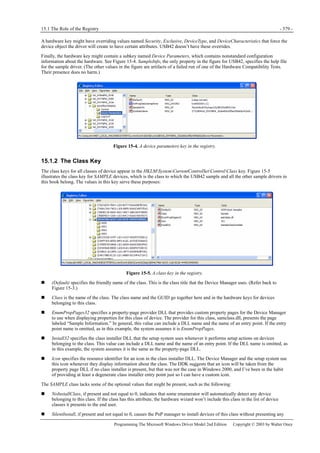
to something. Also, for example, use the type SIZE_T to declare an integer that can count as high as a pointer
might span—you’ll get a 64-bit integer on a 64-bit platform. These and other 32/64 typedefs are in the DDK
header file named BASETSD.H.
I’ll briefly discuss the accessible fields of the driver object structure now.
DeviceObject (PDEVICE_OBJECT) anchors a list of device object data structures, one for each of the devices managed by the
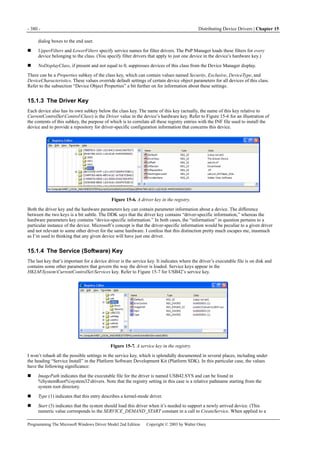
driver. The I/O Manager links the device objects together and maintains this field. The DriverUnload function of a non-WDM
driver would use this field to traverse the list of device objects in order to delete them. A WDM driver probably doesn’t have
any particular need to use this field.
DriverExtension (PDRIVER_EXTENSION) points to a small substructure within which only the AddDevice
(PDRIVER_ADD_DEVICE) member is accessible to the likes of us. (See Figure 2-14.) AddDevice is a pointer to a function
within the driver that creates device objects; this function is rather a big deal, and I’ll discuss it at length in the section “The
AddDevice Routine” later in this chapter.
Figure 2-14. The DRIVER_EXTENSION data structure.
HardwareDatabase (PUNICODE_STRING) describes a string that names a hardware database registry key for the device. This
is a name like RegistryMachineHardwareDescriptionSystem and names the registry key within which resource allocation
information resides. WDM drivers have no need to access the information below this key because the PnP Manager performs
resource allocation automatically. The name is stored in Unicode. (In fact, all kernel-mode string data uses Unicode.) I’ll
discuss the format and the use of the UNICODE_STRING data structure in the next chapter.
FastIoDispatch (PFAST_IO_DISPATCH) points to a table of function pointers that file system and network drivers export.
How these functions are used is beyond the scope of this book. If you’re interested in learning more about file system drivers,
consult Rajeev Nagar’s Windows NT File System Internals: A Developer’s Guide (O’Reilly & Associates, 1997).
DriverStartIo (PDRIVER_STARTIO) points to a function in your driver that processes I/O requests that the I/O Manager has
serialized for you. I’ll discuss request queuing in general and the use of this routine in particular in Chapter 5.
DriverUnload (PDRIVER_UNLOAD) points to a cleanup function in your driver. I’ll discuss this function a bit further on in
connection with DriverEntry, but you might as well know now that a WDM driver probably doesn’t have any significant
cleanup to do anyway.
MajorFunction (array of PDRIVER_DISPATCH) is a table of pointers to functions in your driver that handle each of the
roughly two dozen types of I/O requests. This table is also something of a big deal, as you might guess, because it defines how
I/O requests make it into your code.
2.3.2 Device Objects
Figure 2-15 illustrates the format of a device object and uses the same shading convention for opaque fields that I used in the
preceding discussion of driver objects. As the author of a WDM driver, you’ll create some of these objects by calling
IoCreateDevice.
DriverObject (PDRIVER_OBJECT) points to the object describing the driver associated with this device object, usually the
one that called IoCreateDevice to create it.
NextDevice (PDEVICE_OBJECT) points to the next device object that belongs to the same driver as this one. This field is the
one that links device objects together starting from the driver object’s DeviceObject member. There’s probably no reason for a
WDM driver to use this field. That’s just as well because proper use of this pointer requires synchronization using an internal
system lock that’s not exposed for access by device drivers.
- 26 - Basic Structure of a WDM Driver | Chapter 2
Programming The Microsoft Windows Driver Model 2nd Edition Copyright © 2003 by Walter Oney
Figure 2-15. The DEVICE_OBJECT data structure.
CurrentIrp (PIRP) is used by the Microsoft IRP queuing routines StartPacket and StartNextPacket to record the IRP most
recently sent to your StartIo routine. WDM drivers should implement their own IRP queues (see Chapter 5) and may have no
use for this field.
Flags (ULONG) contains a collection of flag bits. Table 2-2 lists the bits that are accessible to driver writers.
Flag Description
DO_BUFFERED_IO
Reads and writes use the buffered method (system copy buffer) for accessing
user-mode data.
DO_EXCLUSIVE Only one thread at a time is allowed to open a handle.
DO_DIRECT_IO
Reads and writes use the direct method (memory descriptor list) for accessing
user-mode data.
DO_DEVICE_INITIALIZING Device object isn’t initialized yet.
DO_POWER_PAGABLE IRP_MJ_PNP must be handled at PASSIVE_LEVEL.
DO_POWER_INRUSH Device requires large inrush of current during power-on.
Table 2-2. Flags in a DEVICE_OBJECT Data Structure
Table 2-3. Characteristics Flags in a DEVICE_OBJECT Data Structure
Characteristics (ULONG) is another collection of flag bits describing various optional characteristics of the device. (See Table
2-3.) The I/O Manager initializes these flags based on an argument to IoCreateDevice. Filter drivers propagate some of them
Flag Description
FILE_REMOVABLE_MEDIA Media can be removed from device.
FILE_READ_ONLY_DEVICE Media can only be read, not written.
FILE_FLOPPY_DISKETTE Device is a floppy disk drive.
FILE_WRITE_ONCE_MEDIA Media can be written once.
FILE_REMOTE_DEVICE Device accessible through network connection.
FILE_DEVICE_IS_MOUNTED Physical media is present in device.
FILE_VIRTUAL_VOLUME This is a virtual volume.
FILE_AUTOGENERATED_DEVICE_NAME I/O Manager should automatically generate a name for this device.
FILE_DEVICE_SECURE_OPEN Force security check during open.
2.4 The DriverEntry Routine - 27 -
Programming The Microsoft Windows Driver Model 2nd Edition Copyright © 2003 by Walter Oney
upward in the device stack. (See the detailed discussion of filter drivers in Chapter 16 for more information about flag
propagation.)
DeviceExtension (PVOID) points to a data structure you define that will hold per-instance information about the device. The
I/O Manager allocates space for the structure, but its name and contents are entirely up to you. A common convention is to
declare a structure with the type name DEVICE_EXTENSION. To access it given a pointer (for example, fdo) to the device
object, use a statement like this one:
PDEVICE_EXTENSION pdx = (PDEVICE_EXTENSION) fdo->DeviceExtension;
It happens to be true (now, anyway) that the device extension immediately follows the device object in memory. It would be a
bad idea to rely on this always being true, though, especially when the documented method of following the DeviceExtension
pointer will always work.
DeviceType (DEVICE_TYPE) is an enumeration constant describing what type of device this is. The I/O Manager initializes
this member based on an argument to IoCreateDevice. Filter drivers might conceivably need to inspect it. At the date of this
writing, there are over 50 possible values for this member. Consult the DDK documentation entry “Specifying Device Types”
in the MSDN Library for a list.
StackSize (CCHAR) counts the number of device objects starting from this one and descending all the way to the PDO. The
purpose of this field is to inform interested parties regarding how many stack locations should be created for an IRP that will
be sent first to this device’s driver. WDM drivers don’t normally need to modify this value, however, because the support
routine they use for building the device stack (IoAttachDeviceToDeviceStack) does so automatically.
AlignmentRequirement (ULONG) specifies the required alignment for data buffers used in read or write requests to this device.
WDM.H contains a set of manifest constants ranging from FILE_BYTE_ALIGNMENT and FILE_WORD_ALIGNMENT up to
FILE_512_BYTE_ALIGNMENT for these values. The values are just powers of 2 minus 1. For example, the value 0x3F is
FILE_64_BYTE_ALIGNMENT.
2.4 The DriverEntry Routine
In preceding sections, I said that the PnP Manager loads the drivers needed for hardware and calls their AddDevice functions. A
given driver might be used for more than one piece of similar hardware, and there’s some global initialization that the driver
needs to perform only once when it’s loaded for the first time. That global initialization is the responsibility of the DriverEntry
routine:
extern "C" NTSTATUS DriverEntry(IN PDRIVER_OBJECT DriverObject,
IN PUNICODE_STRING RegistryPath)
{
}
NOTE
You call the main entry point to a kernel-mode driver “DriverEntry” because the build script—if you use standard
procedures—will instruct the linker that DriverEntry is the entry point, and it’s best to make your code match
this assumption (or else change the build script, but why bother?).
Sample Code
You can experiment with the ideas discussed in this chapter using the STUPID sample driver. STUPID
implements DriverEntry and AddDevice but nothing else. It’s similar to the very first driver I attempted to write
when I was learning.
Before I describe the code you’d write inside DriverEntry, I want to mention a few things about the function prototype itself.
Unbeknownst to you and me (unless we look carefully at the compiler options used in the build script), kernel-mode functions
and the functions in your driver use the __stdcall calling convention when compiled for an x86 computer. This shouldn’t affect
any of your programming, but it’s something to bear in mind when you’re debugging. I used the extern “C” directive because,
as a rule, I package my code in a C++ compilation unit—mostly to gain the freedom to declare variables wherever I please
instead of only immediately after left braces. This directive suppresses the normal C++ decoration of the external name so that
the linker can find this function. Thus, an x86 compile produces a function whose external name is _DriverEntry@8.
Another point about the prototype of DriverEntry is those “IN” keywords. IN and OUT are both noise words that the DDK
defines as empty strings. By original intention, they perform a documentation function. That is, when you see an IN parameter,
you’re supposed to infer that it’s purely input to your function. An OUT parameter is output by your function, while an IN
OUT parameter is used for both input and output. As it happens, the DDK headers don’t always use these keywords intuitively,
and there’s not a great deal of point to them. To give you just one example out of many: DriverEntry claims that the
DriverObject pointer is IN; indeed, you don’t change the pointer, but you will assuredly change the object to which it points.
- 28 - Basic Structure of a WDM Driver | Chapter 2
Programming The Microsoft Windows Driver Model 2nd Edition Copyright © 2003 by Walter Oney
The last general thing I want you to notice about the prototype is that it declares this function as returning an NTSTATUS value.
NTSTATUS is actually just a long integer, but you want to use the typedef name NTSTATUS instead of LONG so that people
understand your code better. A great many kernel-mode support routines return NTSTATUS status codes, and you’ll find a list
of them in the DDK header NTSTATUS.H. I’ll have a bit more to say about status codes in the next chapter; for now, just be
aware that your DriverEntry function will be returning a status code when it finishes.
2.4.1 Overview of DriverEntry
The first argument to DriverEntry is a pointer to a barely initialized driver object that represents your driver. A WDM driver’s
DriverEntry function will finish initializing this object and return. Non-WDM drivers have a great deal of extra work to
do—they must also detect the hardware for which they’re responsible, create device objects to represent the hardware, and do
all the configuration and initialization required to make the hardware fully functional. The relatively arduous detection and
configuration steps are handled automatically for WDM drivers by the PnP Manager, as I’ll discuss in Chapter 6. If you want
to know how a non-WDM driver initializes itself, consult Art Baker and Jerry Lozano’s The Windows 2000 Device Driver
Book (Prentice Hall, 2d ed., 2001) and Viscarola and Mason’s Windows NT Device Driver Development (Macmillan, 1998).
The second argument to DriverEntry is the name of the service key in the registry. This string is not persistent—you must copy
it if you plan to use it later. In a WDM driver, the only use I’ve ever made of this string is as part of WMI registration. (See
Chapter 10.)
A WDM driver’s main job in DriverEntry is to fill in the various function pointers in the driver object. These pointers indicate
to the operating system where to find the subroutines you’ve decided to place in your driver container. They include these
pointer members of the driver object:
DriverUnload
Set this to point to whatever cleanup routine you create. The I/O Manager will call this routine just prior to unloading the
driver. If there’s nothing to clean up, you need to have a DriverUnload function for the system to be able to unload your
driver dynamically.
DriverExtension->AddDevice
Set this to point to your AddDevice function. The PnP Manager will call AddDevice once for each hardware instance
you’re responsible for. Since AddDevice is so important to the way WDM drivers work, I’ve devoted the next main
section of this chapter (“The AddDevice Routine”) to explaining what it does.
DriverStartIo
If your driver uses the standard method of queuing I/O requests, you’ll set this member of the driver object to point to
your StartIo routine. Don’t worry (yet, that is) if you don’t understand what I mean by the “standard” queuing method; all
will become clear in Chapter 5, where you’ll discover that WDM drivers shouldn’t use it.
MajorFunction
The I/O Manager initializes this vector of function pointers to point to a dummy dispatch function that fails every request.
You’re presumably going to be handling certain types of IRPs—otherwise, your driver is basically going to be deaf and
inert—so you’ll set at least some of these pointers to your own dispatch functions. Chapter 5 discusses IRPs and dispatch
functions in detail. For now, all you need to know is that you must handle two kinds of IRPs and that you’ll probably be
handling several other kinds as well.
A nearly complete DriverEntry routine will, then, look like this:
extern "C" NTSTATUS DriverEntry(IN PDRIVER_OBJECT DriverObject,
IN PUNICODE_STRING RegistryPath)
{
DriverObject->DriverUnload = DriverUnload;
DriverObject->DriverExtension->AddDevice = AddDevice;
DriverObject->MajorFunction[IRP_MJ_PNP] = DispatchPnp;
DriverObject->MajorFunction[IRP_MJ_POWER] = DispatchPower;
DriverObject->MajorFunction[IRP_MJ_SYSTEM_CONTROL] = DispatchWmi;
servkey.Buffer = (PWSTR) ExAllocatePool(PagedPool,
RegistryPath->Length + sizeof(WCHAR));
if (!servkey.Buffer)
return STATUS_INSUFFICIENT_RESOURCES;
servkey.MaximumLength = RegistryPath->Length + sizeof(WCHAR);
RtlCopyUnicodeString(&servkey, RegistryPath);
servkey.Buffer[RegistryPath->Length/sizeof(WCHAR)] = 0;
return STATUS_SUCCESS;
2.5 The AddDevice Routine - 29 -
Programming The Microsoft Windows Driver Model 2nd Edition Copyright © 2003 by Walter Oney
}
1. These two statements set the function pointers for entry points elsewhere in the driver. I elected to give them simple
names indicative of their function: DriverUnload and AddDevice.
2. Every WDM driver must handle PNP, POWER, and SYSTEM_CONTROL I/O requests, and it should handle
SYSTEM_CONTROL I/O requests. This is where you specify your dispatch functions for these requests. What’s now
IRP_MJ_SYSTEM_CONTROL was called IRP_MJ_WMI in some early beta releases of the Windows XP DDK, which is
why I called my dispatch function DispatchWmi.
3. In place of this ellipsis, you’ll have code to set several additional MajorFunction pointers.
4. If you ever need to access the service registry key elsewhere in your driver, it’s a good idea to make a copy of the
RegistryPath string here. I’ve assumed that you declared a global variable named servkey as a UNICODE_STRING
elsewhere. I’ll explain the mechanics of working with Unicode strings in the next chapter.
5. Returning STATUS_SUCCESS is how you indicate success. If you were to discover something wrong, you’d return an
error code chosen from the standard set in NTSTATUS.H or from a set of error codes that you define yourself.
STATUS_SUCCESS happens to be numerically 0.
Subroutine Naming
Many driver writers give the subroutines in their drivers names that include the name of the driver. For example,
instead of defining AddDevice and DriverUnload functions, many programmers would define Stupid_AddDevice
and Stupid_DriverUnload. I’m told that earlier versions of Microsoft’s WinDbg debugger forced a convention like
this onto (possibly unwilling) programmers because it had just one global namespace. Later versions of this
debugger don’t have that limitation, but you’ll observe that the DDK sample drivers still follow the convention.
Now, I’m a great fan of code reuse and an indifferent typist. For me, it has seemed much simpler to have short
subroutine names that are exactly the same from one project to the next. That way, I can just lift a body of code
from one driver and paste it into another without needing to make a bunch of name changes. I can also compare
one driver with another without having extraneous name differences clutter up the comparison results.
2.4.2 DriverUnload
The purpose of a WDM driver’s DriverUnload function is to clean up after any global initialization that DriverEntry might
have done. There’s almost nothing to do. If you made a copy of the RegistryPath string in DriverEntry, though, DriverUnload
would be the place to release the memory used for the copy:
VOID DriverUnload(PDRIVER_OBJECT DriverObject)
{
RtlFreeUnicodeString(&servkey);
}
If your DriverEntry routine returns a failure status, the system doesn’t call your DriverUnload routine. Therefore, if
DriverEntry generates any side effects that need cleaning up prior to returning an error status, DriverEntry has to perform the
cleanup.
2.5 The AddDevice Routine
In the preceding main section, I showed how you initialize a WDM driver when it’s first loaded. In general, though, a driver
might be called upon to manage more than one actual device. In the WDM architecture, a driver has a special AddDevice
function that the PnP Manager can call for each such device. The function has the following skeleton:
NTSTATUS AddDevice(PDRIVER_OBJECT DriverObject, PDEVICE_OBJECT pdo)
{
return STATUS_SOMETHING; // e.g., STATUS_SUCCESS
}
The DriverObject argument points to the same driver object that you initialized in your DriverEntry routine. The pdo argument
is the address of the physical device object at the bottom of the device stack, even if there are already filter drivers below.
The basic responsibility of AddDevice in a function driver is to create a device object and link it into the stack rooted in this
PDO. The steps involved are as follows:
1. Call IoCreateDevice to create a device object and an instance of your own device extension object.
2. Register one or more device interfaces so that applications know about the existence of your device. Alternatively, give
- 30 - Basic Structure of a WDM Driver | Chapter 2
Programming The Microsoft Windows Driver Model 2nd Edition Copyright © 2003 by Walter Oney
the device object a name and then create a symbolic link.
3. Next initialize your device extension and the Flags member of the device object.
4. Call IoAttachDeviceToDeviceStack to put your new device object into the stack.
Now I’ll explain these steps in more detail. I’ll show a complete example of AddDevice at the very end of this discussion.
NOTE
In the code snippets that follow, I’ve deliberately left out all the error handling that should be there. That’s so
I could concentrate on the normal control flow through AddDevice. You mustn’t imitate this programming style
in a production driver—but of course you already knew that. I’ll discuss how to handle errors in the next chapter.
Every code sample in the companion content has full error checking in place too.
2.5.1 Creating a Device Object
You create a device object by calling IoCreateDevice. For example:
PDEVICE_OBJECT fdo;
NTSTATUS status = IoCreateDevice(DriverObject,
sizeof(DEVICE_EXTENSION), NULL, FILE_DEVICE_UNKNOWN,
FILE_DEVICE_SECURE_OPEN, FALSE, &fdo);
The first argument (DriverObject) is the same value supplied to AddDevice as the first parameter. This argument establishes
the connection between your driver and the new device object, thereby allowing the I/O Manager to send you IRPs intended
for the device. The second argument is the size of your device extension structure. As I discussed earlier in this chapter, the I/O
Manager allocates this much additional memory and sets the DeviceExtension pointer in the device object to point to it.
The third argument, which is NULL in this example, can be the address of a UNICODE_STRING providing a name for the
device object. Deciding whether to name your device object and which name to give it requires some thought, and I’ll describe
these surprisingly complex considerations a bit further on in the section “Should I Name My Device Object?”
The fourth argument (FILE_DEVICE_UNKNOWN) is one of the device types defined in WDM.H. Whatever value you specify
here can be overridden by an entry in the device’s hardware key or class key. If both keys have an override, the device key has
precedence. For devices that fit into one of the established categories, specify the right value in one of these places because
some details about the interaction between your driver and the surrounding system depend on it. In fact, the device type is
crucial for the correct functioning of a file system driver or a disk or tape driver. Additionally, the default security settings for
your device object depend on this device type.
The fifth argument (FILE_DEVICE_SECURE_OPEN) provides the Characteristics flag for the device object. (See Table 2-3.)
Most of these flags are relevant for mass storage devices. The flag bit FILE_AUTOGENERATED_DEVICE_NAME is for use
by bus and multifunction drivers when creating PDOs. I’ll discuss the importance of FILE_DEVICE_SECURE_OPEN later in
this chapter in the section “Should I Name My Device Object?” Whatever value you specify here can be overridden by an
entry in the device’s hardware key or class key. If both keys have an override, the hardware key has precedence.
The sixth argument to IoCreateDevice (FALSE in my example) indicates whether the device is exclusive. The I/O Manager
allows only one handle to be opened by normal means to an exclusive device. Whatever value you specify here can be
overridden by an entry in the device’s hardware key or class key. If both keys have an override, the hardware key has
precedence.
NOTE
The exclusivity attribute matters only for whatever named device object is the target of an open request. If you
follow Microsoft’s recommended guidelines for WDM drivers, you won’t give your device object a name. Open
requests will then target the PDO, but the PDO will not usually be marked exclusive because the bus driver
generally has no way of knowing whether you need your device to be exclusive. The only time the PDO will be
marked exclusive is when there’s an Exclusive override in the device’s hardware key or the class key’s
Properties subkey. You’re best advised, therefore, to avoid relying on the exclusive attribute altogether.
Instead, make your IRP_MJ_CREATE handler reject open requests that would violate whatever restriction you
require.
The last argument (&fdo) points to a location where IoCreateDevice will store the address of the device object it creates.
If IoCreateDevice fails for some reason, it returns a status code and doesn’t alter the PDEVICE_OBJECT described by the last
argument. If it succeeds, it returns a successful status code and sets the PDEVICE_OBJECT pointer. You can then proceed to
initialize your device extension and do the other work associated with creating a new device object. Should you discover an
error after this point, you should release the device object and return a status code. The code to accomplish these tasks would
be something like this:
NTSTATUS status = IoCreateDevice(...);
2.5 The AddDevice Routine - 31 -
Programming The Microsoft Windows Driver Model 2nd Edition Copyright © 2003 by Walter Oney
if (!NT_SUCCESS(status))
return status;
if (<some other error discovered>)
{
IoDeleteDevice(fdo);
return status;
}
I’ll explain the NTSTATUS status codes and the NT_SUCCESS macro in the next chapter.
2.5.2 Naming Devices
Windows XP uses a centralized Object Manager to manage many of its internal data structures, including the driver and device
objects I’ve been talking about. David Solomon and Mark Russinovich present a fairly complete explanation of the Object
Manager and namespace in Chapter 3, “System Mechanisms,” of Inside Windows 2000, Third Edition (Microsoft Press, 2000).
Objects have names, which the Object Manager maintains in a hierarchical namespace. Figure 2-16 is a screen shot of my
DEVVIEW application showing the top level of the name hierarchy. The objects displayed as folders in this screen shot are
directory objects, which can contain subdirectories and “regular” objects. The objects displayed with other icons are examples
of these regular objects. (In this respect, DEVVIEW is similar to the WINOBJ utility that you’ll find in the BINWINNT
directory of the Platform SDK. WINOBJ can’t give you information about device objects and drivers, though, which is why I
wrote DEVVIEW in the first place.)
Figure 2-16. Using DEVVIEW to view the namespace.
Device objects can have names that conventionally live in the Device directory. Names for devices serve two purposes in
Windows XP. Giving your device object a name allows other kernel-mode components to find it by calling service functions
such as IoGetDeviceObjectPointer. Having found your device object, they can send you IRPs.
The other purpose of naming a device object is to allow applications to open handles to the device so they can send you IRPs.
An application uses the standard CreateFile API to open a handle, whereupon it can use ReadFile, WriteFile, and
DeviceIoControl to talk to you. The pathname an application uses to open a device handle begins with the prefix . rather than
with a standard Universal Naming Convention (UNC) name such as C:MYFILE.CPP or FREDC-DriveHISFILE.CPP.
Internally, the I/O Manager converts this prefix to ?? before commencing a name search. To provide a mechanism for
connecting names in the ?? directory to objects whose names are elsewhere (such as in the Device directory), the Object
Manager implements an object called a symbolic link.
The name ?? has a special meaning in Windows XP. Confronted with this name, the Object Manager first searches a portion of
the kernel namespace that is local to the current user session. To see how this works, establish two or more sessions and start
DEVVIEW in one of them. Expand the Sessions folder, and you will eventually see folders for each user. Figure 2-18, which
appears later in this chapter, provides an example. If the local search isn’t successful, the Object Manager then searches the
GLOBAL?? folder.
- 32 - Basic Structure of a WDM Driver | Chapter 2
Programming The Microsoft Windows Driver Model 2nd Edition Copyright © 2003 by Walter Oney
Symbolic Links
A symbolic link is a little bit like a desktop shortcut in that it points to some other entity that’s the real object of attention. One
use of symbolic links in Windows XP is to connect the leading portion of MS-DOS-style names to devices. Figure 2-17 shows
a portion of the GLOBAL?? directory, which includes a number of symbolic links. Notice, for example, that C and other drive
letters in the MS-DOS file-naming scheme are actually links to objects whose names are in the Device directory. These links
allow the Object Manager to jump somewhere else in the namespace as it parses through a name. So if I call CreateFile with
the name C:MYFILE.CPP, the Object Manager will take this path to open the file:
Figure 2-17. The GLOBAL?? directory with several symbolic links.
1. Kernel-mode code initially sees the name ??C:MYFILE.CPP. The Object Manager special-cases the “??” name to mean
the DosDevices directory for the current session. (In Figure 2-18, this directory is one of the subdirectories of
Sessions0DosDevices.)
2. The Object Manager doesn’t find “C:” in the session DosDevices directory, so it follows a symbolic link named “Global”
to the “GLOBAL??” directory.
3. The Object Manager now looks up “C:” in the GLOBAL?? directory. It finds a symbolic link by that name, so it forms
the new kernel-mode pathname DeviceHarddiskVolume1MYFILE.CPP and parses that.
4. Working with the new pathname, the Object Manager looks up “Device” in the root directory and finds a directory object.
5. The Object Manager looks up “HarddiskVolume1” in the Device directory. It finds a device object by that name.
Opening a Disk File
The overall process that occurs when an application opens a disk file is complicated almost beyond belief. To
continue the example in the text, the driver for HarddiskVolume1 would be a file system driver such as
NTFS.SYS, FASTFAT.SYS, or CDFS.SYS. How a file system realizes that a particular disk volume belongs to it and
initializes to handle the volume is itself a saga of Norse proportions. That would have already happened before
an application could get far enough to call CreateFile with a particular volume letter in the pathname, though,
so we can ignore that process.
The file system driver will locate the topmost device object in the storage stack that includes the physical disk
drive on which the C volume happens to be mounted. The I/O Manager and file system driver share
management of a Volume Parameters Block (VPB) that ties the storage stack and the file system’s volume stack
together. In principle, the file system driver sends IRPs to the storage driver in order to read directory entries
that it can search while parsing the pathname specified by the original CreateFile call. In practice, the file
system calls the kernel cache manager, which fulfills requests from an in-memory cache if possible and makes
recursive calls to the file system driver to fill cache buffers. Deadlock prevention and surprise dismount handling
during this process require heroic efforts, including a mechanism whereby a file system driver can stash a
pointer to an automatic variable (that is, one allocated on the call/return stack) to be used in deeper layers of
recursion within the same thread.
2.5 The AddDevice Routine - 33 -
Programming The Microsoft Windows Driver Model 2nd Edition Copyright © 2003 by Walter Oney
Luckily, you needn’t worry about VPBs and other complications arising from the way file system drivers work in
any driver besides one for a storage device. I won’t say any more about this in the book.
At this point in the process, the Object Manager will create an IRP that it will send to the driver or drivers for
HarddiskVolume1. The IRP will eventually cause some file system driver or another to locate and open a disk file. Describing
how a file system driver works is beyond the scope of this book, but the sidebar “Opening a Disk File” will give you a bit of
the flavor.
If we were dealing with a device name such as COM1, the driver that ended up receiving the IRP would be the driver for
DeviceSerial0. How a device driver handles an open request is definitely within the scope of this book, and I’ll be discussing
it in this chapter (in the section “Should I Name My Device Object?”) and in Chapter 5, when I’ll talk about IRP processing in
general.
A user-mode program can create a symbolic link in the local (session) namespace by calling DefineDosDevice, as in this
example (see Figure 2-18):
BOOL okay = DefineDosDevice(DDD_RAW_TARGET_PATH,
"barf", "DeviceBeep");
Figure 2-18. Symbolic link created by DefineDosDevice
You can create a symbolic link in a WDM driver by calling IoCreateSymbolicLink,
IoCreateSymbolicLink(linkname, targname);
where linkname is the name of the symbolic link you want to create and targname is the name to which you’re linking.
Incidentally, the Object Manager doesn’t care whether targname is the name of any existing object: someone who tries to
access an object by using a link that points to an undefined name simply receives an error. If you want to allow user-mode
programs to override your link and point it somewhere else, you should call IoCreateUnprotectedSymbolicLink instead.
The kernel-mode equivalent of the immediately preceding DefineDosDevice call is this:
UNICODE_STRING linkname;
UNICODE_STRING targname;
RtlInitUnicodeString(&linkname, L"DosDevicesbarf");
RtlInitUnicodeString(&targname, L"DeviceBeep");
IoCreateSymbolicLink(&linkname, &targname);
- 34 - Basic Structure of a WDM Driver | Chapter 2
Programming The Microsoft Windows Driver Model 2nd Edition Copyright © 2003 by Walter Oney
Should I Name My Device Object?
Deciding whether to give your device object a name requires, as I said earlier, a little thought. If you give your object a
name, it will be possible for any kernel-mode program to try to open a handle to your device. Furthermore, it will be
possible for any kernel-mode or user-mode program to create a symbolic link to your device object and to use the
symbolic link to try to open a handle. You might or might not want to allow these actions.
The primary consideration in deciding whether to name your device object is security. When someone opens a handle to a
named object, the Object Manager verifies that they have permission to do so. When IoCreateDevice creates a device object
for you, it assigns a default security descriptor based on the device type you specify as the fourth argument. The I/O Manager
uses three basic categories to select a security descriptor:
Most file system device objects (that is, disk, CD-ROM, file, and tape) receive the “public default unrestricted” access
control list (ACL). This list gives just SYNCHRONIZE, READ_CONTROL, FILE_READ_ATTRIBUTES, and
FILE_TRAVERSE access to everyone except the System account and all administrators. File system device objects, by
the way, exist only so that there can be a target for a CreateFile call that will open a handle to a file managed by the file
system.
Disk devices and network file system objects receive the same ACL as the file system objects, with some modifications.
For example, everyone gets full access to a named floppy disk device object, and administrators get sufficient rights to
run ScanDisk. (User-mode network provider DLLs need greater access to the device object for their corresponding file
system driver, which is why network file systems are treated differently from other file systems.)
All other device objects receive the public open unrestricted ACL, which allows anyone with a handle to the device to do
pretty much anything.
You can see that anyone will be able to access a nondisk device for both reading and writing if the driver gives the device
object a name at the time it calls IoCreateDevice. This is because the default security allows nearly full access and because no
security check at all is associated with creating a symbolic link—the security checks happen at open time, based on the named
object’s security descriptor. This is true even if other device objects in the same stack have more restrictive security.
NOTE
IoCreateDeviceSecure, a function in the .NET DDK, allows you to specify a nondefault security descriptor in
situations in which no override is in the registry. This function is too new for us to describe it more fully here.
DEVVIEW will show you the security attributes of the device objects it displays. You can see the operation of the default rules
I just described by examining a file system, a disk device, and any other random device.
The PDO also receives a default security descriptor, but it’s possible to override it with a security descriptor stored in the
hardware key or in the Properties subkey of the class key. (The hardware key has precedence if both keys specify a descriptor.)
Even lacking a specific security override, if either the hardware key or the class key’s Properties subkey overrides the hardware
type or characteristics specification, the I/O Manager constructs a new default security descriptor based on the new type. The
I/O Manager does not, however, override the security setting for any of the other device objects above the PDO. Consequently,
for the overrides (and the administrative actions that set them up) to have any effect, you shouldn’t name your device object.
Don’t despair though—applications can still access your device by means of a registered interface, which I’ll discuss soon.
You need to know about one last security concern. As the Object Manager parses its way through an object name, it
needs only FILE_TRAVERSE access to the intermediate components of the name. It performs a full security check only
on the object named by the final component. So suppose you have a device object reachable under the name
DeviceBeep or by the symbolic link ??Barf. A user-mode application that tries to open .Barf for writing will be blocked if
the object security has been set up to deny write access. But if the application tries to open a name like .BarfExtraStuff that
has additional name qualifications, the open request will make it all the way to the device driver (in the form of an
IRP_MJ_CREATE I/O request) if the user merely has FILE_TRAVERSE permission, which is routinely granted. (In fact, most
systems even run with the option to check for traverse permission turned off.) The I/O Manager expects the device driver to
deal with the additional name components and to perform any required security checks with regard to them.
To avoid the security concern I just described, you can supply the flag FILE_DEVICE_SECURE_OPEN in the device
characteristics argument to IoCreateDevice. This flag causes Windows XP to verify that someone has the right to open a handle
to a device even if additional name components are present.
The Device Name
If you decide to name the device object, you’ll normally put the name in the Device branch of the namespace. To give it a
name, you have to create a UNICODE_STRING structure to hold the name, and you have to specify that string as an argument
to IoCreateDevice:
UNICODE_STRING devname;
RtlInitUnicodeString(&devname, L"DeviceSimple0");
IoCreateDevice(DriverObject, sizeof(DEVICE_EXTENSION), &devname,
...);
2.5 The AddDevice Routine - 35 -
Programming The Microsoft Windows Driver Model 2nd Edition Copyright © 2003 by Walter Oney
I’ll discuss the use of RtlInitUnicodeString in the next chapter.
NOTE
Starting in Windows XP, device object names are case insensitive. In Windows 98/Me and in Windows 2000,
they are case sensitive. Be sure to spell Device exactly as shown if you want your driver to be portable across
all the systems. Note also the spelling of DosDevices, particularly if your mother tongue doesn’t inflect the
plural form of nouns!
Conventionally, drivers assign their device objects a name by concatenating a string naming their device type (“Simple” in this
code fragment) with a 0-based integer denoting an instance of that type. In general, you don’t want to hard-code a name as I
just did—you want to compose it dynamically using string-manipulation functions like the following:
UNICODE_STRING devname;
static LONG lastindex = -1;
LONG devindex = InterlockedIncrement(&lastindex);
WCHAR name[32];
_snwprintf(name, arraysize(name), L"DeviceSIMPLE%2.2d",devindex);
RtlInitUnicodeString(&devname, name);
IoCreateDevice(...);
I’ll explain the various service functions used in this code fragment in the next couple of chapters. The instance number you
derive for private device types might as well be a static variable, as shown in the code fragment.
Notes on Device Naming
The GLOBAL?? directory used to be named DosDevices. The change was made to move the often-searched
directory of user-mode names to the front of the alphabetical list of directories. Windows 98/Me doesn’t
recognize the name ?? or GLOBAL??.
Windows 2000 defines a symbolic link named DosDevices that points to the ?? directory. Windows XP treats
DosDevices differently depending on the process context at the time you create an object. If you create an
object, such as a symbolic link, in a system thread, DosDevices refers to GLOBAL??, and you end up with a
global name. If you create an object in a user thread, DosDevices refers to ??, and you end up with a
session-specific name. In most situations, a device driver creates symbolic links in its AddDevice function,
which runs in a system thread, and so ends up with globally named objects in all WDM environments simply by
putting the symbolic link in DosDevices. If you create a symbolic link at another time, you should use
GLOBAL?? in Windows XP and DosDevices in earlier systems. See Appendix A for a discussion of how to
distinguish between WDM platforms.
A quick-and-dirty shortcut for testing is to name your device object in the DosDevices directory, as many of the
sample drivers in the companion content do. A production driver should name the device object in Device,
however, to avoid the possibility of creating an object that ought to be global in a session-private namespace.
In previous versions of Windows NT, drivers for certain classes of devices (notably disks, tapes, serial ports, and
parallel ports) called IoGetConfigurationInformation to obtain a pointer to a global table containing counts of
devices in each of these special classes. A driver would use the current value of the counter to compose a name
like Harddisk0, Tape1, and so on and would also increment the counter. WDM drivers don’t need to use this
service function or the table it returns, however. Constructing names for the devices in these classes is now the
responsibility of a Microsoft type-specific class driver (such as DISK.SYS).
Device Interfaces
The older method of naming I just discussed—naming your device object and creating a symbolic link name that applications
can use—has two major problems. We’ve already discussed the security implications of giving your device object a name. In
addition, the author of an application that wants to access your device has to know the scheme you adopted to name your
devices. If you’re the only one writing the applications that will be accessing your hardware, that’s not much of a problem. But
if many different companies will be writing applications for your hardware, and especially if many hardware companies are
making similar devices, devising a suitable naming scheme is difficult.
To solve these problems, WDM introduces a new naming scheme for devices that is language-neutral, easily extensible, usable
in an environment with many hardware and software vendors, and easily documented. The scheme relies on the concept of a
device interface, which is basically a specification for how software can access hardware. A device interface is uniquely
identified by a 128-bit GUID. You can generate GUIDs by running the Platform SDK utilities UUIDGEN or GUIDGEN—both
utilities generate the same kind of number, but they output the result in different formats. The idea is that some industry group
gets together to define a standard way of accessing a certain kind of hardware. As part of the standard-making process,
someone runs GUIDGEN and publishes the resulting GUID as the identifier that will be forever after associated with that
interface standard.
- 36 - Basic Structure of a WDM Driver | Chapter 2
Programming The Microsoft Windows Driver Model 2nd Edition Copyright © 2003 by Walter Oney
More About GUIDs
The GUIDs used to identify software interfaces are the same kind of unique identifier that’s used in the
Component Object Model (COM) to identify COM interfaces and in the Open Software Foundation (OSF)
Distributed Computing Environment (DCE) to identify the target of a remote procedure call (RPC). For an
explanation of how GUIDs are generated so as to be statistically unique, see page 66 of Kraig Brockschmidt’s
Inside OLE, Second Edition (Microsoft Press, 1995), which contains a further reference to the original algorithm
specification by the OSF. I found the relevant portion of the OSF specification on line at
http://www.opengroup.org/onlinepubs/9629399/apdxa.htm.
The mechanics of creating a GUID for use in a device driver involve running either UUIDGEN or GUIDGEN and
then capturing the resulting identifier in a header file. GUIDGEN is easier to use because it allows you to choose
to format the GUID for use with the DEFINE_GUID macro and to copy the resulting string onto the Clipboard.
Figure 2-19 shows the GUIDGEN window. You can paste its output into a header file to end up with this:
// {CAF53C68-A94C-11d2-BB4A-00C04FA330A6}
DEFINE_GUID(<<name>>,
0xcaf53c68, 0xa94c, 0x11d2, 0xbb, 0x4a, 0x0, 0xc0, 0x4f,
0xa3, 0x30, 0xa6);
You then replace <<name>> with something more mnemonic like GUID_DEVINTERFACE_SIMPLE and include
the definition in your driver and applications.
Figure 2-19. Using GUIDGEN to generate a GUID
I think of an interface as being analogous to the protein markers that populate the surface of living cells. An application
desiring to access a particular kind of device has its own protein markers that fit like a key into the markers exhibited by
conforming device drivers. See Figure 2-20.
Figure 2-20. Using device interfaces to match applications and devices
Registering a Device Interface
A function driver’s AddDevice function should register one or more device interfaces by calling IoRegisterDeviceInterface, as
shown here:
2.5 The AddDevice Routine - 37 -
Programming The Microsoft Windows Driver Model 2nd Edition Copyright © 2003 by Walter Oney
#include <initguid.h>
#include "guids.h"
NTSTATUS AddDevice(...)
{
IoRegisterDeviceInterface(pdo, &GUID_DEVINTERFACE_SIMPLE,NULL, &pdx->ifname);
}
1. We’re about to include a header (GUIDS.H) that contains one or more DEFINE_GUID macros. DEFINE_GUID
normally declares an external variable. Somewhere in the driver, though, we have to actually reserve initialized storage
for every GUID we’re going to reference. The system header file INITGUID.H works some preprocessor magic to make
DEFINE_GUID reserve the storage even if the definition of the DEFINE_GUID macro happens to be in one of the
precompiled header files.
2. I’m assuming here that I put the GUID definitions I want to reference into a separate header file. This would be a good
idea, inasmuch as user-mode code will also need to include these definitions and won’t want to include a bunch of
extraneous kernel-mode declarations relevant only to our driver.
3. The first argument to IoRegisterDeviceInterface must be the address of the PDO for your device. The second argument
identifies the GUID associated with your interface, and the third argument specifies additional qualified names that
further subdivide your interface. Only Microsoft code uses this name subdivision scheme. The last argument is the
address of a UNICODE_STRING structure that will receive the name of a symbolic link that resolves to this device
object.
The return value from IoRegisterDeviceInterface is a Unicode string that applications will be able to determine without
knowing anything special about how you coded your driver and will then be able to use in opening a handle to the device. The
name is pretty ugly, by the way; here’s an example that I generated for one of my sample devices:
?ROOT#UNKNOWN#0000#{b544b9a2-6995-11d3-81b5-00c04fa330a6}.
All that registration actually does is create the symbolic link name and save it in the registry. Later on, in response to the
IRP_MN_START_DEVICE Plug and Play request we’ll discuss in Chapter 7, you’ll make the following call to
IoSetDeviceInterfaceState to enable the interface:
IoSetDeviceInterfaceState(&pdx->ifname, TRUE);
In response to this call, the I/O Manager creates an actual symbolic link object pointing to the PDO for your device. You’ll
make a matching call to disable the interface at a still later time (just call IoSetDeviceInterfaceState with a FALSE argument),
whereupon the I/O Manager will delete the symbolic link object while preserving the registry entry that contains the name. In
other words, the name persists and will always be associated with this particular instance of your device; the symbolic link
object comes and goes with the hardware.
Since the interface name ends up pointing to the PDO, the PDO’s security descriptor ends up controlling whether people can
access your device. That’s good because it’s the PDO’s security that you control in the INF used to install the driver.
Enumerating Device Interfaces
Both kernel-mode and user-mode code can locate all the devices that happen to support an interface in which they’re interested.
I’m going to explain how to enumerate all the devices for a particular interface in user mode. The enumeration code is so
tedious to write that I eventually wrote a C++ class to make my own life simpler. You’ll find this code in the
DEVICELIST.CPP and DEVICELIST.H files that are part of the HIDFAKE and DEVPROP samples in Chapter 8. These files
declare and implement a CDeviceList class, which contains an array of CDeviceListEntry objects. These two classes have the
following declaration:
class CDeviceListEntry
{
public:
CDeviceListEntry(LPCTSTR linkname, LPCTSTR friendlyname);
CDeviceListEntry(){}
CString m_linkname;
CString m_friendlyname;
};
class CDeviceList
{
- 38 - Basic Structure of a WDM Driver | Chapter 2
Programming The Microsoft Windows Driver Model 2nd Edition Copyright © 2003 by Walter Oney
public:
CDeviceList(const GUID& guid);
~CDeviceList();
GUID m_guid;
CArray<CDeviceListEntry, CDeviceListEntry&> m_list;
int Initialize();
};
The classes rely on the CString class and CArray template class that are part of the Microsoft Foundation Classes (MFC)
framework. The constructors for these two classes simply copy their arguments into the obvious data members:
CDeviceList::CDeviceList(const GUID& guid)
{
m_guid = guid;
}
CDeviceListEntry::CDeviceListEntry(LPCTSTR linkname,LPCTSTR friendlyname)
{
m_linkname = linkname;
m_friendlyname = friendlyname;
}
All the interesting work occurs in the CDeviceList::Initialize function. The executive overview of what it does is this: it will
enumerate all of the devices that expose the interface whose GUID was supplied to the constructor. For each such device, it
will determine a friendly name that we’re willing to show to an unsuspecting end user. Finally it will return the number of
devices it found. Here’s the code for this function:
int CDeviceList::Initialize()
{
HDEVINFO info = SetupDiGetClassDevs(&m_guid, NULL, NULL,
DIGCF_PRESENT │ DIGCF_INTERFACEDEVICE);
if (info == INVALID_HANDLE_VALUE)
return 0;
SP_INTERFACE_DEVICE_DATA ifdata;
ifdata.cbSize = sizeof(ifdata);
DWORD devindex;
for (devindex = 0;
SetupDiEnumDeviceInterfaces(info,NULL, &m_guid, devindex, &ifdata);
++devindex)
{
DWORD needed;
SetupDiGetDeviceInterfaceDetail(info, &ifdata, NULL, 0, &needed, NULL);
PSP_INTERFACE_DEVICE_DETAIL_DATA detail =
(PSP_INTERFACE_DEVICE_DETAIL_DATA) malloc(needed);
detail->cbSize = sizeof(SP_INTERFACE_DEVICE_DETAIL_DATA);
SP_DEVINFO_DATA did = {sizeof(SP_DEVINFO_DATA)};
SetupDiGetDeviceInterfaceDetail(info, &ifdata, detail, needed, NULL, &did));
TCHAR fname[256];
if (!SetupDiGetDeviceRegistryProperty(info, &did,
SPDRP_FRIENDLYNAME, NULL, (PBYTE) fname,
sizeof(fname), NULL)
&& !SetupDiGetDeviceRegistryProperty(info, &did,
SPDRP_DEVICEDESC,
NULL, (PBYTE) fname, sizeof(fname), NULL))
_tcsncpy(fname, detail->DevicePath, 256);
fname[255] = 0;
CDeviceListEntry e(detail->DevicePath, fname);
free((PVOID) detail);
m_list.Add(e);
}
2.5 The AddDevice Routine - 39 -
Programming The Microsoft Windows Driver Model 2nd Edition Copyright © 2003 by Walter Oney
SetupDiDestroyDeviceInfoList(info);
return m_list.GetSize();
}
1. This statement opens an enumeration handle that we can use to find all devices that have registered an interface that uses
the same GUID.
2. Here we call SetupDiEnumDeviceInterfaces in a loop to find each device.
3. The only two items of information we need are the detail information about the interface and information about the
device instance. The detail is just the symbolic name for the device. Since it’s variable in length, we make two calls to
SetupDiGetDeviceInterfaceDetail. The first call determines the length. The second call retrieves the name.
4. We obtain a friendly name for the device from the registry by asking for either the FriendlyName or the DeviceDesc.
5. We create a temporary instance named e of the CDeviceListEntry class, using the device’s symbolic name as both the link
name and the friendly name.
NOTE
You might be wondering how the registry comes to have a FriendlyName for a device. The INF file you use to
install your device driver—see Chapter 15—can have an HW section that specifies registry parameters for the
device. You can provide a FriendlyName as one of these parameters, but bear in mind that every instance of
your hardware will have the same name if you do. The MAKENAMES sample describes a DLL-based way of
defining a unique friendly name for each instance. You can also write a CoInstaller DLL that will define unique
friendly names.
If you don’t define a FriendlyName, by the way, most system components will use the DeviceDesc string in the
registry. This string originates in the INF file and will usually describe your device by manufacturer and model.
Sample Code
The DEVINTERFACE sample is a user-mode program that enumerates all instances of all known device interface
GUIDs on your system. One way to use this sample is as a way to determine which GUID you need to enumerate
to find a particular device.
2.5.3 Other Global Device Initialization
You need to take some other steps during AddDevice to initialize your device object. I’m going to describe these steps in the
order you should do them, which isn’t exactly the same order as their respective logical importance. I want to emphasize that
the code snippets in this section are even more fragmented than usual—I’m going to show only enough of the entire
AddDevice routine to establish the surrounding context for the small pieces I’m trying to illustrate.
Initializing the Device Extension
The content and management of the device extension are entirely up to you. The data members you place in this structure will
obviously depend on the details of your hardware and on how you go about programming the device. Most drivers would need
a few items placed there, however, as illustrated in the following fragment of a declaration:
typedef struct _DEVICE_EXTENSION {
PDEVICE_OBJECT DeviceObject;
PDEVICE_OBJECT LowerDeviceObject;
PDEVICE_OBJECT Pdo;
UNICODE_STRING ifname;
IO_REMOVE_LOCK RemoveLock;
DEVSTATE devstate;
DEVSTATE prevstate;
DEVICE_POWER_STATE devpower;
SYSTEM_POWER_STATE syspower;
DEVICE_CAPABILITIES devcaps;
- 40 - Basic Structure of a WDM Driver | Chapter 2
Programming The Microsoft Windows Driver Model 2nd Edition Copyright © 2003 by Walter Oney
} DEVICE_EXTENSION, *PDEVICE_EXTENSION;
1. I find it easiest to mimic the pattern of structure declaration used in the official DDK, so I declared this device extension
as a structure with a tag as well as a type and pointer-to-type name.
2. You already know that you locate your device extension by following the DeviceExtension pointer from the device object.
It’s also useful in several situations to be able to go the other way—to find the device object given a pointer to the
extension. The reason is that the logical argument to certain functions is the device extension itself (since that’s where all
of the per-instance information about your device resides). Hence, I find it useful to have this DeviceObject pointer.
3. I’ll mention in a few paragraphs that you need to record the address of the device object immediately below yours when
you call IoAttachDeviceToDeviceStack, and LowerDeviceObject is the place to do that.
4. A few service routines require the address of the PDO instead of some higher device object in the same stack. It’s very
difficult to locate the PDO, so the easiest way to satisfy the requirement of those functions is to record the PDO address
in a member of the device extension that you initialize during AddDevice.
5. Whichever method (symbolic link or device interface) you use to name your device, you’ll want an easy way to
remember the name you assign. In this code fragment, I’ve declared a Unicode string member named ifname to record a
device interface name. If you were going to use a symbolic link name instead of a device interface, it would make sense
to give this member a more mnemonic name, such as linkname.
6. I’ll discuss in Chapter 6 a synchronization problem affecting how you decide when it’s safe to remove this device object
by calling IoDeleteDevice. The solution to that problem involves using an IO_REMOVE_LOCK object that needs to be
allocated in your device extension as shown here. AddDevice needs to initialize that object.
7. You’ll probably need a device extension variable to keep track of the current Plug and Play state and current power states
of your device. DEVSTATE is an enumeration that I’m assuming you’ve declared elsewhere in your own header file. I’ll
discuss the use of all these state variables in later chapters.
8. Another part of power management involves remembering some capability settings that the system initializes by means
of an IRP. The devcaps structure in the device extension is where I save those settings in my sample drivers.
The initialization statements in AddDevice (with emphasis on the parts involving the device extension) would be as follows:
NTSTATUS AddDevice(...)
{
PDEVICE_OBJECT fdo;
IoCreateDevice(..., sizeof(DEVICE_EXTENSION), ..., &fdo);
PDEVICE_EXTENSION pdx = (PDEVICE_EXTENSION) fdo->DeviceExtension;
pdx->DeviceObject = fdo;
pdx->Pdo = pdo;
IoInitializeRemoveLock(&pdx->RemoveLock, ...);
pdx->devstate = STOPPED;
pdx->devpower = PowerDeviceD0;
pdx->syspower = PowerSystemWorking;
IoRegisterDeviceInterface(..., &pdx->ifname);
pdx->LowerDeviceObject = IoAttachDeviceToDeviceStack(...);
}
In this code snippet, STOPPED and DEVICE_EXTENSION are things I defined in one of my own header files.
Initializing the Default DPC Object
Many devices signal completion of operations by means of an interrupt. As you’ll learn when I discuss interrupt handling in
Chapter 7, there are strict limits on what your interrupt service routine (ISR) can do. In particular, an ISR isn’t allowed to call
the routine (IoCompleteRequest) that signals completion of an IRP, but that’s exactly one of the steps you’re likely to want to
take. You utilize a deferred procedure call (DPC) to get around the limitations. Your device object contains a subsidiary DPC
object that can be used for scheduling your particular DPC routine, and you need to initialize it shortly after creating the device
object:
NTSTATUS AddDevice(...)
{
IoCreateDevice(...);
IoInitializeDpcRequest(fdo, DpcForIsr)
}
Setting the Buffer Alignment Mask
Devices that perform DMA transfers work directly with data buffers in memory. The HAL might require that buffers used for
2.5 The AddDevice Routine - 41 -
Programming The Microsoft Windows Driver Model 2nd Edition Copyright © 2003 by Walter Oney
DMA be aligned to some particular boundary, and your device might require still more stringent alignment. The
AlignmentRequirement field of the device object expresses the restriction—it’s a bit mask equal to 1 less than the required
address boundary. You can round an arbitrary address down to this boundary with this statement:
PVOID address = ...;
SIZE_T ar = fdo->AlignmentRequirement;
address = (PVOID) ((SIZE_T) address & ~ar);
You round an arbitrary address up to the next alignment boundary like this:
PVOID address = ...;
SIZE_T ar = fdo->AlignmentRequirement;
address = (PVOID) (((SIZE_T) address + ar) & ~ar);
In these two code fragments, I used SIZE_T casts to transform the pointer (which may be 32 bits or 64 bits wide, depending on
the platform for which you’re compiling) into an integer wide enough to span the same range as the pointer.
IoCreateDevice sets the AlignmentRequirement field of the new device object equal to whatever the HAL requires. For
example, the HAL for Intel x86 chips has no alignment requirement, so AlignmentRequirement is 0 initially. If your device
requires a more stringent alignment for the data buffers it works with (say, because you have bus-mastering DMA capability
with a special alignment requirement), you want to override the default setting. For example:
if (MYDEVICE_ALIGNMENT - 1 > fdo->AlignmentRequirement)
fdo->AlignmentRequirement = MYDEVICE_ALIGNMENT - 1;
I’ve assumed here that elsewhere in your driver is a manifest constant named MYDEVICE_ALIGNMENT that equals a power
of 2 and represents the required alignment of your device’s data buffers.
Miscellaneous Objects
Your device might well use other objects that need to be initialized during AddDevice. Such objects might include various
synchronization objects, linked list anchors, scatter/gather list buffers, and so on. I’ll discuss these objects, and the fact that
initialization during AddDevice would be appropriate, in various other parts of this book.
Initializing the Device Flags
Two of the flag bits in your device object need to be initialized during AddDevice and never changed thereafter: the
DO_BUFFERED_IO and DO_DIRECT_IO flags. You can set one (but only one) of these bits to declare once and for all how
you want to handle memory buffers coming from user mode as part of read and write requests. (I’ll explain in Chapter 7 what
the difference between these two buffering methods is and why you’d want to pick one or the other.) The reason you have to
make this important choice during AddDevice is that any upper filter drivers that load afterwards will be copying your flag
settings, and it’s the setting of the bits in the topmost device object that’s actually important. Were you to change your mind
after the filter drivers loaded, they probably wouldn’t know about the change.
Two of the flag bits in the device object pertain to power management. In contrast with the two buffering flags, these two can
be changed at any time. I’ll discuss them in greater detail in Chapter 8, but here’s a preview. DO_POWER_PAGABLE means
that the Power Manager must send you IRP_MJ_POWER requests at interrupt request level (IRQL) PASSIVE_LEVEL. (If you
don’t understand all of the concepts in the preceding sentence, don’t worry—I’ll completely explain all of them in later
chapters.) DO_POWER_INRUSH means that your device draws a large amount of current when powering on, so the Power
Manager should make sure that no other inrush device is powering up simultaneously.
Building the Device Stack
Each filter and function driver has the responsibility of building up the stack of device objects, starting from the PDO and
working upward. You accomplish your part of this work with a call to IoAttachDeviceToDeviceStack:
NTSTATUS AddDevice(..., PDEVICE_OBJECT pdo)
{
PDEVICE_OBJECT fdo;
IoCreateDevice(..., &fdo);
pdx->LowerDeviceObject = IoAttachDeviceToDeviceStack(fdo, pdo);
}
The first argument to IoAttachDeviceToDeviceStack (fdo) is the address of your own newly created device object. The second
argument is the address of the PDO. The second parameter to AddDevice is this address. The return value is the address of
whatever device object is immediately underneath yours, which can be the PDO or the address of some lower filter device
object. Figure 2-21 illustrates the situation when there are three lower filter drivers for your device. By the time your
AddDevice function executes, all three of their AddDevice functions have already been called. They have created their
- 42 - Basic Structure of a WDM Driver | Chapter 2
Programming The Microsoft Windows Driver Model 2nd Edition Copyright © 2003 by Walter Oney
respective FiDOs and linked them into the stack rooted at the PDO. When you call IoAttachDeviceToDeviceStack, you get
back the address of the topmost FiDO.
IoAttachDeviceToDeviceStack might conceivably fail by returning a NULL pointer. For this to occur, someone would have to
remove the physical device from the system at just the point in time when your AddDevice function was doing its work, and
the PnP Manager would have to process the removal on another CPU. I’m not even sure these conditions are enough to trigger
a failure. (Or else the driver under you could have forgotten to clear DO_DEVICE_INITIALIZING, I suppose.) You would deal
with the failure by cleaning up and returning STATUS_DEVICE_REMOVED from your AddDevice function.
Figure 2-21. What IoAttachDeviceToDeviceStack returns.
Clear DO_DEVICE_INITIALIZING
Pretty much the last thing you do in AddDevice should be to clear the DO_DEVICE_INITIALIZING flag in your device object:
fdo->Flags &= ~DO_DEVICE_INITIALIZING;
While this flag is set, the I/O Manager will refuse to attach other device objects to yours or to open a handle to your device.
You have to clear the flag because your device object initially arrives in the world with the flag set. In previous releases of
Windows NT, most drivers created all of their device objects during DriverEntry. When DriverEntry returns, the I/O Manager
automatically traverses the list of device objects linked from the driver object and clears this flag. Since you’re creating your
device object long after DriverEntry returns, however, this automatic flag clearing won’t occur, and you must do it yourself.
2.5.4 Putting the Pieces Together
Here is a complete AddDevice function, presented without error checking or annotations and including all the pieces described
in the preceding sections:
NTSTATUS AddDevice(PDRIVER_OBJECT DriverObject, PDEVICE_OBJECT pdo)
{
PDEVICE_OBJECT fdo;
NTSTATUS status = IoCreateDevice(DriverObject,
sizeof(DEVICE_EXTENSION), NULL,
FILE_DEVICE_UNKNOWN, FILE_DEVICE_SECURE_OPEN, FALSE, &fdo);
PDEVICE_EXTENSION pdx = (PDEVICE_EXTENSION)
fdo->DeviceExtension;
IoRegisterDeviceInterface(pdo, &GUID_DEVINTERFACE_SIMPLE, NULL, &pdx->ifname);
pdx->DeviceObject = fdo;
pdx->Pdo = pdo;
IoInitializeRemoveLock(&pdx->RemoveLock, 0, 0, 0);
pdx->devstate = STOPPED;
2.6 Windows 98/Me Compatibility Notes - 43 -
Programming The Microsoft Windows Driver Model 2nd Edition Copyright © 2003 by Walter Oney
pdx->devpower = PowerDeviceD0;
pdx->syspower = PowerSystemWorking;
IoInitializeDpcRequest(fdo, DpcForIsr);
if (MYDEVICE_ALIGNMENT - 1 > fdo->AlignmentRequirement)
fdo->AlignmentRequirement = MYDEVICE_ALIGNMENT - 1;
KeInitializeSpinLock(&pdx->SomeSpinLock);
KeInitializeEvent(&pdx->SomeEvent, NotificationEvent, FALSE);
InitializeListHead(&pdx->SomeListAnchor);
fdo->Flags │= DO_BUFFERED_IO │ DO_POWER_PAGABLE;
pdx->LowerDeviceObject = IoAttachDeviceToDeviceStack(fdo, pdo);
fdo->Flags &= ~DO_DEVICE_INITIALIZING;
return STATUS_SUCCESS;
}
2.6 Windows 98/Me Compatibility Notes
Windows 98/Me handles some of the details surrounding device object creation and driver loading differently than Windows
XP. This section explains the differences that might affect your driver. I’ve already mentioned a few of these, but repetition
can’t hurt.
2.6.1 Differences in DriverEntry Call
As I indicated earlier, the DriverEntry routine receives a UNICODE_STRING argument naming the service key for the driver.
In Windows XP, the string is a full registry path of the form RegistryMachineSystemCurrentControlSetServicesxxx (where
xxx is the name of the service entry for your driver). In Windows 98/Me, however, the string is of the form
SystemCurrentControlSetServices<classname ><instance#> (where <classname> is the class name of your device and
<instance#> is an instance number such as 0000 indicating which device of that class you happen to be). You can open the key
in either environment by calling ZwOpenKey, however.
2.6.2 DriverUnload
Windows 98/Me will call DriverUnload within a call to IoDeleteDevice that occurs within DriverEntry. You care about this
only if (1) your DriverEntry function calls IoCreateDevice and then (2) decides to return an error status, whereupon it (3)
cleans up by calling IoDeleteDevice.
2.6.3 The GLOBAL?? Directory
Windows 98/Me doesn’t understand the directory name GLOBAL??. Consequently, you need to put symbolic link names in
the DosDevices directory. You can use DosDevices in Windows XP also because it’s a symbolic link to the ?? directory,
whose (virtual) contents include GLOBAL??.
2.6.4 Unimplemented Device Types
Windows 98 didn’t support creating device objects for mass storage devices. These are devices with types
FILE_DEVICE_DISK, FILE_DEVICE_TAPE, FILE_DEVICE_CD_ROM, and FILE_DEVICE_VIRTUAL_DISK. You can call
IoCreateDevice, and it will even return with a status code of STATUS_SUCCESS, but it won’t have actually created a device
object or modified the PDEVICE_OBJECT variable whose address you gave as the last argument.
- 45 -
Chapter 3
3 Basic Programming Techniques
Writing a WDM driver is fundamentally an exercise in software engineering. Whatever the requirements of your particular
hardware, you will combine various elements to form a program. In the preceding chapter, I described the basic structure of a
WDM driver, and I showed you two of its elements—DriverEntry and AddDevice—in detail. In this chapter, I’ll focus on the
even more basic topic of how you call upon the large body of kernel-mode support routines that the operating system exposes
for your use. I’ll discuss error handling, memory and data structure management, registry and file access, and a few other
topics. I’ll round out the chapter with a short discussion of the steps you can take to help debug your driver.
3.1 The Kernel-Mode Programming Environment
Figure 3-1 illustrates some of the components that make up the Microsoft Windows XP operating system. Each component
exports service functions whose names begin with a particular two-letter or three-letter prefix:
Figure 3-1. Overview of kernel-mode support routines
The I/O Manager (prefix Io) contains many service functions that drivers use, and I’ll be discussing them all throughout
this book.
The Process Structure module (prefix Ps) creates and manages kernel-mode threads. An ordinary WDM driver might use
an independent thread to repeatedly poll a device incapable of generating interrupts, and for other purposes.
The Memory Manager (prefix Mm) controls the page tables that define the mapping of virtual addresses onto physical
memory.
The executive (prefix Ex) supplies heap management and synchronization services. I’ll discuss the heap management
service functions in this chapter. The next chapter covers the synchronization services.
The Object Manager (prefix Ob) provides centralized control over the many data objects with which Windows XP works.
WDM drivers rely on the Object Manager for keeping a reference count that prevents an object from disappearing while
someone is still using it and to convert object handles to pointers to the objects the handles represent.
The Security Reference Monitor (prefix Se) allows file system drivers to perform security checks. Someone else has
usually dealt with security concerns by the time an I/O request reaches a WDM driver, so I won’t be discussing these
functions in this book.
The so-called run-time library component (prefix Rtl) contains utility routines, such as list and string-management
routines, that kernel-mode drivers can use instead of regular ANSI-standard library routines. For the most part, the
operation of these functions is obvious from their names, and you would pretty much know how to use them in a program
if you just were aware of them. I’ll describe a few of them in this chapter.
Windows XP implements the native API for kernel-mode callers using routine names that begin with the prefix Zw. The
DDK documents just a few of the ZwXxx functions, namely the ones that pertain to registry and file access. I’ll discuss
those functions in this chapter.
- 46 - Basic Programming Techniques | Chapter 3
Programming The Microsoft Windows Driver Model 2nd Edition Copyright © 2003 by Walter Oney
The Windows XP kernel (prefix Ke) is where all the low-level synchronization of activities between threads and
processors occurs. I’ll discuss the KeXxx functions in the next chapter.
The very bottom layer of the operating system, on which the support sandwich rests, is the hardware abstraction layer (or
HAL, prefix Hal). All the operating system’s knowledge of how the computer is actually wired together reposes in the
HAL. The HAL understands how interrupts work on a particular platform, how to address I/O and memory-mapped
devices, and so on. Instead of talking directly to their hardware, WDM drivers call functions in the HAL to do it. The
driver ends up being platform-independent and bus-independent.
3.1.1 Using Standard Run-Time Library Functions
Historically, the Windows NT architects preferred that drivers not use the run-time libraries supplied by vendors of C
compilers. In part, the initial disapproval arose from simple timing. Windows NT was designed at a time when there was no
ANSI standard for what functions belonged in a standard library and when many compiler vendors existed, each with its own
idea of what might be cool to include and its own unique quality standards. Another factor is that standard run-time library
routines sometimes rely on initialization that can happen only in a user-mode application and are sometimes implemented in a
thread-unsafe or multiprocessor-unsafe way.
I suggested in the first edition that it would be OK to use a number of “standard” runtime library functions for string
processing. That was probably bad advice, though, because most of us (including me!) have a hard time using them
safely. It’s true (at least at the time I’m writing this paragraph) that the kernel exports standard string functions such as
strcpy, wcscmp, and strncpy. Since these functions work with null-terminated strings, though, it’s just too easy to make
mistakes with them. Are you sure you’ve provided a large enough target buffer for strcpy? Are you sure that both of the strings
you’re comparing with wcscmp have a null terminator before they tail off into a not-present page? Were you aware that strncpy
can fail to null-terminate the target string if the source string is longer than the target?
Because of all the potential problems with run-time library functions, Microsoft now recommends using the set of “safe” string
functions declared in NtStrsafe.h. I’ll discuss these functions, and the very few standard string and byte functions that it’s safe
to use in a driver, later in this chapter.
3.1.2 A Caution About Side Effects
Many of the support “functions” that you use in a driver are defined as macros in the DDK header files. We were all taught to
avoid using expressions that have side effects (that is, expressions that alter the state of the computer in some persistent way)
as arguments to macros for the obvious reason that the macro can invoke the argument more or less than exactly once.
Consider, for example, the following code:
int a = 2, b = 42, c;
c = min(a++, b);
What’s the value of a afterward? (For that matter, what’s the value of c?) Take a look at a plausible implementation of min as a
macro:
#define min(x,y) (((x) < (y)) ? (x) : (y))
If you substitute a++ for x, you can see that a will equal 4 because the expression a++ gets executed twice. The value of the
“function” min will be 3 instead of the expected 2 because the second invocation of a++ delivers the value.
You basically can’t tell when the DDK will use a macro and when it will declare a real external function. Sometimes a
particular service function will be a macro for some platforms and a function call for other platforms. Furthermore, Microsoft
is free to change its mind in the future. Consequently, you should follow this rule when programming a WDM driver:
Never use an expression that has side effects as an argument to a kernel-mode service function.
3.2 Error Handling
To err is human; to recover is part of software engineering. Exceptional conditions are always arising in programs. Some of
them start with program bugs, either in our own code or in the user-mode applications that invoke our code. Some of them
relate to system load or the instantaneous state of hardware. Whatever the cause, unusual circumstances demand a flexible
response from our code. In this section, I’ll describe three aspects of error handling: status codes, structured exception handling,
and bug checks. In general, kernel-mode support routines report unexpected errors by returning a status code, whereas they
report expected variations in normal flow by returning a Boolean or numeric value other than a formal status code. Structured
exception handling offers a standardized way to clean up after really unexpected events, such as dereferencing an invalid
user-mode pointer, or to avoid the system crash that normally ensues after such events. A bug check is the internal name for a
catastrophic failure for which a system shutdown is the only cure.
3.2 Error Handling - 47 -
Programming The Microsoft Windows Driver Model 2nd Edition Copyright © 2003 by Walter Oney
3.2.1 Status Codes
Kernel-mode support routines (and your code too, for that matter) indicate success or failure by returning a status code to their
caller. An NTSTATUS value is a 32-bit integer composed of several subfields, as illustrated in Figure 3-2. The high-order 2 bits
denote the severity of the condition being reported—success, information, warning, or error. I’ll explain the impact of the
customer flag shortly. The facility code indicates which system component originated the message and basically serves to
decouple development groups from each other when it comes to assigning numbers to codes. The remainder of the status
code—16 bits’ worth—indicates the exact condition being reported.
Figure 3-2. Format of an NTSTATUS code.
You should always check the status returns from routines that provide them. I’m going to break this rule frequently in some of
the code fragments I show you because including all the necessary error handling code often obscures the expository purpose
of the fragment. But don’t you emulate this sloppy practice!
If the high-order bit of a status code is 0, any number of the remaining bits could be set and the code would still indicate
success. Consequently, never just compare status codes with 0 to see whether you’re dealing with success—instead, use the
NT_SUCCESS macro:
NTSTATUS status = SomeFunction(...);
if (!NT_SUCCESS(status))
{
//handle error
}
Not only do you want to test the status codes you receive from routines you call, but you also want to return status codes to the
routines that call you. In the preceding chapter, I dealt with two driver subroutines—DriverEntry and AddDevice—that are
both defined as returning NTSTATUS codes. As I discussed, you want to return STATUS_SUCCESS as the success indicator
from these routines. If something goes wrong, you often want to return an appropriate status code, which is sometimes the
same value that a routine returned to you.
As an example, here are some initial steps in the AddDevice function, with all the error checking left in:
NTSTATUS AddDevice(PDRIVER_OBJECT DriverObject, PDEVICE_OBJECT pdo)
{
NTSTATUS status;
PDEVICE_OBJECT fdo;
status = IoCreateDevice(DriverObject, sizeof(DEVICE_EXTENSION),
NULL, FILE_DEVICE_UNKNOWN, FILE_DEVICE_SECURE_OPEN, FALSE,
&fdo);
if (!NT_SUCCESS(status))
{
KdPrint(("IoCreateDevice failed - %Xn", status));
return status;
}
PDEVICE_EXTENSION pdx = (PDEVICE_EXTENSION) fdo->DeviceExtension;
pdx->DeviceObject = fdo;
pdx->Pdo = pdo;
pdx->state = STOPPED;
IoInitializeRemoveLock(&pdx->RemoveLock, 0, 0, 0);
status = IoRegisterDeviceInterface(pdo, &GUID_SIMPLE, NULL,
&pdx->ifname);
if (!NT_SUCCESS(status))
{
KdPrint(("IoRegisterDeviceInterface failed - %Xn", status));
IoDeleteDevice(fdo);
- 48 - Basic Programming Techniques | Chapter 3
Programming The Microsoft Windows Driver Model 2nd Edition Copyright © 2003 by Walter Oney
return status;
}
}
1. If IoCreateDevice fails, we’ll simply return the same status code it gave us. Note the use of the NT_SUCCESS macro as
described in the text.
2. It’s sometimes a good idea, especially while debugging a driver, to print any error status you discover. I’ll discuss the
exact usage of KdPrint later in this chapter (in the “Making Debugging Easier” section).
3. IoInitializeRemoveLock, discussed in Chapter 6, cannot fail. Consequently, there’s no need to check a status code.
Generally speaking, most functions declared with type VOID are in the same “cannot fail” category. A few VOID
functions can fail by raising an exception, but the DDK documents that behavior very clearly.
4. Should IoRegisterDeviceInterface fail, we have some cleanup to do before we return to our caller; namely, we must call
IoDeleteDevice to destroy the device object we just created.
You don’t always have to fail calls that lead to errors in the routines you call, of course. Sometimes you can ignore an error.
For example, in Chapter 8, I’ll tell you about a power management I/O request with the subtype
IRP_MN_POWER_SEQUENCE that you can use as an optimization to avoid unnecessary state restoration during a power-up
operation. Not only is it optional whether you use this request, but it’s also optional for the bus driver to implement it.
Therefore, if that request should fail, you should just go about your business. Similarly, you can ignore an error from
IoAllocateErrorLogEntry because the inability to add an entry to the error log isn’t at all critical.
Completing an IRP with an error status—driver programmers call this failing the IRP—usually leads to a failure indication in
the return from a Win32 API function in an application. The application can call GetLastError to determine the cause of the
failure. If you fail the IRP with a status code containing the customer flag, GetLastError will return exactly that status code. If
you fail the IRP with a status code in which the customer flag is 0 (which is the case for every standard status code defined by
Microsoft), GetLastError returns a value drawn from WINERROR.H in the Platform SDK. Knowledge Base article Q113996,
“Mapping NT Status Error Codes to Win32 Error Codes,” documents the correspondence between GetLastError return values
and kernel status codes. Table 3-1 shows the correspondence for the most important status codes.
Kernel-Mode Status Code User-Mode Error Code
STATUS_SUCCESS NO_ERROR (0)
STATUS_INVALID_PARAMETER ERROR_INVALID_PARAMETER
STATUS_NO_SUCH_FILE ERROR_FILE_NOT_FOUND
STATUS_ACCESS_DENIED ERROR_ACCESS_DENIED
STATUS_INVALID_DEVICE_REQUEST ERROR_INVALID_FUNCTION
ERROR_BUFFER_TOO_SMALL ERROR_INSUFFICIENT_BUFFER
STATUS_DATA_ERROR ERROR_CRC
Table 3-1. Correspondence Between Common Kernel-Mode and User-Mode Status Codes
The difference between an error and a warning can be significant. For example, failing a METHOD_BUFFERED control
operation (see Chapter 9) with STATUS_BUFFER_OVERFLOW—a warning—causes the I/O Manager to copy data to the
user-mode buffer. Failing the same operation with STATUS_BUFFER_TOO_SMALL—an error—causes the I/O Manager to
not copy any data.
3.2.2 Structured Exception Handling
The Windows family of operating systems provides a method of handling exceptional conditions that helps you avoid potential
system crashes. Closely integrated with the compiler’s code generator, structured exception handling lets you easily place a
guard on sections of your code and invoke exception handlers when something goes wrong in the guarded section. Structured
exception handling also lets you easily provide cleanup statements that you can be sure will always execute no matter how
control leaves a guarded section of code.
Very few of my seminar students have been familiar with structured exceptions, so I’m going to explain some of the basics
here. You can write better, more bulletproof code if you use these facilities. In many situations, the parameters that you receive
in a WDM driver have been thoroughly vetted by other code and won’t cause you to generate inadvertent exceptions. Good
taste may, therefore, be the only impetus for you to use the stuff I’m describing in this section. As a general rule, though, you
always want to protect direct references to user-mode virtual memory with a structured exception frame. Such references occur
when you directly reference memory and when you call MmProbeAndLockPages, ProbeForRead, and ProbeForWrite, and
perhaps at other times.
Sample Code
The SEHTEST sample driver illustrates the mechanics of structured exceptions in a WDM driver.
3.2 Error Handling - 49 -
Programming The Microsoft Windows Driver Model 2nd Edition Copyright © 2003 by Walter Oney
Which Exceptions Can Be Trapped
Gary Nebbett researched the question of which exceptions can be trapped with the structured exception
mechanism and reported his results in a newsgroup post several years ago. The SEHTEST sample incorporates
what he learned. In summary, the following exceptions will be caught when they occur at IRQL less than or
equal to DISPATCH_LEVEL (note that some of these are specific to the Intel x86 processor):
Anything signaled by ExRaiseStatus and related functions
Attempt to dereference invalid pointer to user-mode memory
Debug or breakpoint exception
Integer overflow (INTO instruction)
Invalid opcode
Note that a reference to an invalid kernel-mode pointer leads directly to a bug check and can’t be trapped.
Likewise, a divide-by-zero exception or a BOUND instruction exception leads to a bug check.
Kernel-mode programs use structured exceptions by establishing exception frames on the same stack that’s used for argument
passing, subroutine calling, and automatic variables. A dedicated processor register points to the current exception frame. Each
frame points to the preceding frame. Whenever an exception occurs, the kernel searches the list of exception frames for an
exception handler. It will always find one because there is an exception frame at the very top of the stack that will handle any
otherwise unhandled exception. Once the kernel locates an exception handler, it unwinds the execution and exception frame
stacks in parallel, calling cleanup handlers along the way. Then it gives control to the exception handler.
When you use the Microsoft compiler, you can use Microsoft extensions to the C/C++ language that hide some of the
complexities of working with the raw operating system primitives. You use the __try statement to designate a compound
statement as the guarded body for an exception frame, and you use either the __finally statement to establish a termination
handler or the __except statement to establish an exception handler.
NOTE
It’s better to always spell the words __try, __finally, and __except with leading underscores. In C compilation
units, the DDK header file WARNING.H defines macros spelled try, finally, and except to be the words with
underscores. DDK sample programs use those macro names rather than the underscored names. The problem
this can create for you is that in a C++ compilation unit, try is a statement verb that pairs with catch to invoke
a completely different exception mechanism that’s part of the C++ language. C++ exceptions don’t work in a
driver unless you manage to duplicate some infrastructure from the run-time library. Microsoft would prefer you
not do that because of the increased size of your driver and the memory pool overhead associated with handling
the throw verb.
Try-Finally Blocks
It’s easiest to begin explaining structured exception handling by describing the try-finally block, which you can use to provide
cleanup code:
__try
{
<guarded body>
}
__finally
{
<termination handler>
}
In this fragment of pseudocode, the guarded body is a series of statements and subroutine calls that expresses some main idea
in your program. In general, these statements have side effects. If there are no side effects, there’s no particular point to using a
try-finally block because there’s nothing to clean up. The termination handler contains statements that undo some or all of the
side effects that the guarded body might leave behind.
Semantically, the try-finally block works as follows: First the computer executes the guarded body. When control leaves the
guarded body for any reason, the computer executes the termination handler. See Figure 3-3.
- 50 - Basic Programming Techniques | Chapter 3
Programming The Microsoft Windows Driver Model 2nd Edition Copyright © 2003 by Walter Oney
Figure 3-3. Flow of control in a try-finally block.
Here’s one simple illustration:
LONG counter = 0;
__try
{
++counter;
}
__finally
{
--counter;
}
KdPrint(("%dn", counter));
First the guarded body executes and increments the counter variable from 0 to 1. When control “drops through” the right brace
at the end of the guarded body, the termination handler executes and decrements counter back to 0. The value printed will
therefore be 0.
Here’s a slightly more complicated variation:
VOID RandomFunction(PLONG pcounter)
{
__try
{
++*pcounter;
return;
}
__finally
{
--*pcounter;
}
}
The net result of this function is no change to the integer at the end of the pcounter pointer: whenever control leaves the
guarded body for any reason, including a return statement or a goto, the termination handler executes. Here the guarded body
increments the counter and performs a return. Next the cleanup code executes and decrements the counter. Then the subroutine
actually returns.
One final example should cement the idea of a try-finally block:
static LONG counter = 0;
__try
{
++counter;
BadActor();
}
__finally
{
--counter;
}
Here I’m supposing that we call a function, BadActor, that will raise some sort of exception that triggers a stack unwind. As
part of the process of unwinding the execution and exception stacks, the operating system will invoke our cleanup code to
restore the counter to its previous value. The system then continues unwinding the stack, so whatever code we have after the
__finally block won’t get executed.
3.2 Error Handling - 51 -
Programming The Microsoft Windows Driver Model 2nd Edition Copyright © 2003 by Walter Oney
Try-Except Blocks
The other way to use structured exception handling involves a try-except block:
__try
{
<guarded body>
}
__except(<filter expression>)
{
<exception handler>
}
The guarded body in a try-except block is code that might fail by generating an exception. Perhaps you’re going to call a
kernel-mode service function such as MmProbeAndLockPages that uses pointers derived from user mode without explicit
validity checking. Perhaps you have other reasons. In any case, if you manage to get all the way through the guarded body
without an error, control continues after the exception handler code. You’ll think of this case as being the normal one. If an
exception arises in your code or in any of the subroutines you call, however, the operating system will unwind the execution
stack, evaluating the filter expressions in __except statements. These expressions yield one of the following values:
EXCEPTION_EXECUTE_HANDLER is numerically equal to 1 and tells the operating system to transfer control to your
exception handler. If your handler falls through the ending right brace, control continues within your program at the
statement immediately following that right brace. (I’ve seen Platform SDK documentation to the effect that control
returns to the point of the exception, but that’s not correct.)
EXCEPTION_CONTINUE_SEARCH is numerically equal to 0 and tells the operating system that you can’t handle the
exception. The system keeps scanning up the stack looking for another handler. If no one has provided a handler for the
exception, a system crash will occur.
EXCEPTION_CONTINUE_EXECUTION is numerically equal to -1 and tells the operating system to return to the point
where the exception was raised. I’ll have a bit more to say about this expression value a little further on.
Take a look at Figure 3-4 for the possible control paths within and around a try-except block.
Figure 3-4. Flow of control in a try-except block.
For example, you can protect yourself from receiving an invalid pointer by using code like the following. (See the SEHTEST
sample in the companion content.)
PVOID p = (PVOID) 1;
__try
{
KdPrint(("About to generate exceptionn"));
ProbeForWrite(p, 4, 4);
KdPrint(("You shouldn't see this messagen"));
}
__except(EXCEPTION_EXECUTE_HANDLER)
{
KdPrint(("Exception was caughtn"));
}
KdPrint(("Program kept control after exceptionn"));
ProbeForWrite tests a data area for validity. In this example, it will raise an exception because the pointer argument we supply
isn’t aligned to a 4-byte boundary. The exception handler gains control. Control then flows to the next statement after the
exception handler and continues within your program.
In the preceding example, had you returned the value EXCEPTION_CONTINUE_SEARCH, the operating system would have
continued unwinding the stack looking for an exception handler. Neither your exception handler code nor the code following it
would have been executed: either the system would have crashed or some higher-level handler would have taken over.
- 52 - Basic Programming Techniques | Chapter 3
Programming The Microsoft Windows Driver Model 2nd Edition Copyright © 2003 by Walter Oney
You should not return EXCEPTION_CONTINUE_EXECUTION in kernel mode because you have no way to alter the
conditions that caused the exception in order to allow a retry to occur.
Note that you cannot trap arithmetic exceptions, or page faults due to referencing an invalid kernel-mode pointer, by using
structured exceptions. You just have to write your code so as not to generate such exceptions. It’s pretty obvious how to avoid
dividing by 0—just check, as in this example:
ULONG numerator, denominator; // <== numbers someone gives you
ULONG quotient;
if (!denominator)
<handle error>else
quotient = numerator / denominator;
But what about a pointer that comes to you from some other part of the kernel? There is no function that you can use to check
the validity of a kernel-mode pointer. You just need to follow this rule:
Usually, trust values that a kernel-mode component gives you.
I don’t mean by this that you shouldn’t liberally sprinkle your code with ASSERT statements—you should because you may
not initially understand all the ins and outs of how other kernel components work. I just mean that you don’t need to burden
your own driver with excessive defenses against mistakes in other, well-tested, parts of the system unless you need to work
around a bug.
More About NULL Pointers
While we’re on the subject of invalid pointers, note that a NULL pointer is (a) an invalid user-mode pointer in
Windows XP and (b) a perfectly valid pointer in Windows 98/Me. If you use a NULL pointer directly, as in *p, or
indirectly, as in p->StructureMember, you’ll be trying to reference something in the first few bytes of virtual
memory. Doing so in Windows XP will cause a trappable access violation.
Dereferencing a NULL pointer in Windows 98/Me will not, of itself, cause any immediately observable problem.
I once spent several days tracking down a bug that resulted from overstoring location 0x0000000C in a
Windows 95 system. That location is the real-mode vector for the breakpoint (INT 3) interrupt. The wild store
didn’t show up until some infrequently used application did an INT 3 that wasn’t caught by a debugger. The
system reflected the interrupt to real mode. The invalid interrupt vector pointed to memory containing a bunch
of technically valid but nonsensical instructions followed by an invalid one. The system halted with an invalid
operation exception. As you can see, the eventual symptom was very far removed in space and time from the
wild store.
To debug a different problem in Windows 98, I once installed a debugging driver to catch alterations to the first
16 bytes of virtual memory. I had to remove it because so many VxD drivers (including some belonging to
Microsoft) were getting caught.
The moral of these anecdotes is that you should always test pointers for NULL before using them if there is any
possibility that the pointer could be NULL. To learn whether the possibility exists, read documentation and
specifications very carefully.
Exception Filter Expressions
You might be wondering how to perform any sort of involved error detection or correction when all you’re allowed to do is
evaluate an expression that yields one of three integer values. You could use the C/C++ comma operator to string expressions
together:
__except(expr-1, ... EXCEPTION_CONTINUE_SEARCH){}
The comma operator basically discards whatever value is on its left side and evaluates its right side. The value that’s left over
after this computational game of musical chairs (with just one chair!) is the value of the expression.
You could use the C/C++ conditional operator to perform a more involved calculation:
__except(<some-expr>
? EXCEPTION_EXECUTE_HANDLER
: EXCEPTION_CONTINUE_SEARCH)
If the some_expr expression is TRUE, you execute your own handler. Otherwise, you tell the operating system to keep looking
for another handler above you in the stack.
Finally, it should be obvious that you could just write a subroutine whose return value is one of the EXCEPTION_Xxx values:
LONG EvaluateException()
3.2 Error Handling - 53 -
Programming The Microsoft Windows Driver Model 2nd Edition Copyright © 2003 by Walter Oney
{
if (<some-expr>)
return EXCEPTION_EXECUTE_HANDLER;
else
return EXCEPTION_CONTINUE_SEARCH;
}
__except(EvaluateException())
For any of these expression formats to do you any good, you need access to more information about the exception. You can
call two functions when evaluating an __except expression that will supply the information you need. Both functions actually
have intrinsic implementations in the Microsoft compiler and can be used only at the specific times indicated:
GetExceptionCode() returns the numeric code for the current exception. This value is an NTSTATUS value that you can
compare with manifest constants in ntstatus.h if you want to. This function is available in an __except expression and
within the exception handler code that follows the __except clause.
GetExceptionInformation() returns the address of an EXCEPTION_POINTERS structure that, in turn, allows you to learn
all the details about the exception, such as where it occurred, what the machine registers contained at the time, and so on.
This function is available only within an __except expression.
NOTE
The scope rules for names that appear in try-except and try-finally blocks are the same as elsewhere in the
C/C++ language. In particular, if you declare variables within the scope of the compound statement that follows
__try, those names aren’t visible in a filter expression, an exception handler, or a termination handler.
Documentation to the contrary that you might have seen in the Platform SDK or on MSDN is incorrect. For what
it’s worth, the stack frame containing any local variables declared within the scope of the guarded body still
exists at the time the filter expression is evaluated. So if you had a pointer (presumably declared at some outer
scope) to a variable declared within the guarded body, you could safely dereference it in a filter expression.
Because of the restrictions on how you can use these two expressions in your program, you’ll probably want to use them in a
function call to some filter function, like this:
LONG EvaluateException(NTSTATUS status, PEXCEPTION_POINTERS xp)
{
}
__except(EvaluateException(GetExceptionCode(),
GetExceptionInformation()))
Raising Exceptions
Program bugs are one way you can (inadvertently) raise exceptions that invoke the structured exception handling mechanism.
Application programmers are familiar with the Win32 API function RaiseException, which allows you to generate an arbitrary
exception on your own. In WDM drivers, you can call the routines listed in Table 3-2. I’m not going to give you a specific
example of calling these functions because of the following rule:
Raise an exception only in a nonarbitrary thread context, when you know there’s an exception handler above you, and when
you really know what you’re doing.
In particular, raising exceptions is not a good way to tell your callers information that you discover in the ordinary course of
executing. It’s far better to return a status code, even though that leads to apparently more unreadable code. You should avoid
exceptions because the stack-unwinding mechanism is very expensive. Even the cost of establishing exception frames is
significant and something to avoid when you can.
Service Function Description
ExRaiseStatus Raise exception with specified status code
ExRaiseAccessViolation Raise STATUS_ACCESS_VIOLATION
ExRaiseDatatypeMisalignment Raise STATUS_DATATYPE_MISALIGNMENT
Table 3-2. Service Functions for Raising Exceptions
- 54 - Basic Programming Techniques | Chapter 3
Programming The Microsoft Windows Driver Model 2nd Edition Copyright © 2003 by Walter Oney
Real-World Examples
Notwithstanding the expense of setting up and tearing down exception frames, you have to use structured exception
syntax in an ordinary driver in particular situations.
One of the times you must set up an exception handler is when you call MmProbeAndLockPages to lock the pages for a
memory descriptor list (MDL) you’ve created:
PMDL mdl = MmCreateMdl(...);
__try
{
MmProbeAndLockPages(mdl, ...);
}
__except(EXCEPTION_EXECUTE_HANDLER)
{
NTSTATUS status = GetExceptionCode();
IoFreeMdl(mdl);
return CompleteRequest(Irp, status, 0);
}
(CompleteRequest is a helper function I use to handle the mechanics of completing I/O requests. Chapter 5 explains all about
I/O requests and what it means to complete one.)
Another time to use an exception handler is when you want to access user-mode memory using a pointer from an untrusted
source. In the following example, suppose you obtained the pointer p from a user-mode program and believe it points to an
integer:
PLONG p; // from user-mode
__try
{
ProbeForRead(p, 4, 4);
LONG x = *p;
}
__except(EXCEPTION_EXECUTE_HANDLER)
{
NTSTATUS status = GetExceptionCode();
}
3.2.3 Bug Checks
Unrecoverable errors in kernel mode can manifest themselves in the so-called blue screen of death (BSOD) that’s all too
familiar to driver programmers. Figure 3-5 is an example (hand-painted because no screen capture software is running when
one of these occurs!). Internally, these errors are called bug checks, after the service function you use to diagnose their
occurrence: KeBugCheckEx. The main feature of a bug check is that the system shuts itself down in as orderly a way as
possible and presents the BSOD. Once the BSOD appears, the system is dead and must be rebooted.
You call KeBugCheckEx like this:
KeBugCheckEx(bugcode, info1, info2, info3, info4);
where bugcode is a numeric value identifying the cause of the error and info1, info2, and so on are integer parameters that will
appear in the BSOD display to help a programmer understand the details of the error. This function does not return (!).
As a developer, you don’t get much information from the Blue Screen. If you’re lucky, the information will include the offset
of an instruction within your driver. Later on, you can examine this location in a kernel debugger and, perhaps, deduce a
possible cause for the bug check. Microsoft’s own bug-check codes appear in bugcodes.h (one of the DDK headers); a fuller
explanation of the codes and their various parameters can be found in Knowledge Base article Q103059, “Descriptions of Bug
Codes for Windows NT,” which is available on MSDN, among other places.
Sample Code
The BUGCHECK sample driver illustrates how to call KeBugCheckEx. I used it to generate the screen shot for
Figure 3-5.
3.3 Memory Management - 55 -
Programming The Microsoft Windows Driver Model 2nd Edition Copyright © 2003 by Walter Oney
Figure 3-5. The blue screen of death.
You can certainly create your own bug-check codes if you want. The Microsoft values are simple integers beginning with 1
(APC_INDEX_MISMATCH) and (currently) extending through 0xF6 (PCI_VERIFIER_DETECTED_VIOLATION), along with
a few others. To create your own bug-check code, define an integer constant as if it were STATUS_SEVERITY_SUCCESS
status code, but supply either the customer flag or a nonzero facility code. For example:
#define MY_BUGCHECK_CODE 0x002A0001
KeBugCheckEx(MY_BUGCHECK_CODE, 0, 0, 0, 0);
You use a nonzero facility code (42 in this example) or the customer flag (which I left 0 in this example) so that you can tell
your own codes from the ones Microsoft uses.
Now that I’ve told you how to generate your own BSOD, let me tell you when to do it: never. Or at most, in the checked build
of your driver for use during your own internal debugging. You and I are unlikely to write a driver that will discover an error so
serious that taking down the system is the only solution. It would be far better to log the error (using the error-logging facilities
I’ll describe in Chapter 14) and return a status code.
Note that the end user can configure the behavior of KeBugCheckEx in the advanced settings for My Computer. The user can
choose to automatically restart the machine or to generate the BSOD. The end user can likewise choose several levels of detail
(including none) for a dump file and whether to log an event in the system event log.
3.3 Memory Management
In this section, I’ll discuss the topic of memory management. Windows XP divides the available virtual address space in
several ways. One division—a very firm one based on security and integrity concerns—is between user-mode addresses and
kernel-mode addresses. Another division, which is almost but not quite coextensive with the first, is between paged and
nonpaged memory. All user-mode addresses and some kernel-mode addresses reference page frames that the Memory Manager
swaps to and from the disk over time, while some kernel-mode addresses always reference page frames in physical memory.
Since Windows XP allows portions of drivers to be paged, I’ll explain how you control the pageability of your driver at the
time you build your driver and at run time.
Windows XP provides several methods for managing memory. I’ll describe two basic service
functions—ExAllocatePoolWithTag and ExFreePool—that you use for allocating and releasing randomly sized blocks from a
heap. I’ll also describe the primitives that you use for organizing memory blocks into linked lists of structures. Finally I’ll
describe the concept of a lookaside list, which allows you to efficiently allocate and release blocks that are all the same size.
3.3.1 User-Mode and Kernel-Mode Address Spaces
Windows XP and Microsoft Windows 98/Me run on computers that support a virtual address space, wherein virtual addresses
are mapped either to physical memory or (conceptually, anyway) to page frames within a swap file on disk. To grossly simplify
matters, you can think of the virtual address space as being divided into two parts: a kernel-mode part and a user-mode part.
See Figure 3-6.
- 56 - Basic Programming Techniques | Chapter 3
Programming The Microsoft Windows Driver Model 2nd Edition Copyright © 2003 by Walter Oney
Figure 3-6. User-mode and kernel-mode portions of the address space.
Each user-mode process has its own address context, which maps the user-mode virtual addresses to a unique collection of
physical page frames. In other words, the meaning of any particular virtual address changes from one moment to the next as
the Windows XP scheduler switches from a thread in one process to a thread in another process. Part of the work in switching
threads is to change the page tables used by a processor so that they refer to the incoming thread’s process context.
It’s generally unlikely that a WDM driver will execute in the same thread context as the initiator of the I/O requests it handles.
We say that we’re running in arbitrary thread context if we don’t know for sure to which process the current user-mode
address context belongs. In arbitrary thread context, we simply can’t use a virtual address that belongs to user mode because
we can’t have any idea to what physical memory it might point. In view of this uncertainty, we generally obey the following
rule inside a driver program:
Never (well, hardly ever) directly reference user-mode memory.
In other words, don’t take an address that a user-mode application provides and treat that address as a pointer that we can
directly dereference. I’ll discuss in later chapters a few techniques for accessing data buffers that originate in user mode. All
we need to know right now, though, is that we’re (nearly) always going to be using kernel-mode virtual addresses whenever we
want to access the computer’s memory.
How Big Is a Page?
In a virtual memory system, the operating system organizes physical memory and the swap file into like-size page frames. In a
WDM driver, you can use the manifest constant PAGE_SIZE to tell you how big a page is. In some Windows XP computers, a
page is 4096 bytes long; in others, it’s 8192 bytes long. A related constant named PAGE_SHIFT equals the page size as a
power of 2. That is:
PAGE_SIZE == 1 << PAGE_SHIFT
For your convenience, you can use a few preprocessor macros in your code when you’re working with the size of a page:
ROUND_TO_PAGES rounds a size in bytes to the next-higher page boundary. For example, ROUND_TO_PAGES(1) is
4096 on a 4-KB-page computer.
BYTES_TO_PAGES determines how many pages are required to hold a given number of bytes beginning at the start of a
page. For example, BYTES_TO_PAGES(42) would be 1 on all platforms, and BYTES_TO_PAGES(5000) would be 2 on
some platforms and 1 on others.
BYTE_OFFSET returns the byte offset portion of a virtual address. That is, it calculates the starting offset within some
page frame of a given address. On a 4-KB-page computer, BYTE_OFFSET(0x12345678) would be 0x678.
PAGE_ALIGN rounds a virtual address down to a page boundary. On a 4-KB-page computer, PAGE_ALIGN(0x12345678)
would be 0x12345000.
ADDRESS_AND_SIZE_TO_SPAN_PAGES returns the number of page frames occupied by a specified number of bytes
beginning at a specified virtual address. For example, the statement
ADDRESS_AND_SIZE_TO_SPAN_PAGES(0x12345FFF, 2) is 2 on a 4-KB-page machine because the 2 bytes span a
page boundary.
Paged and Nonpaged Memory
The whole point of a virtual memory system is that you can have a virtual address space that’s much bigger than the amount of
physical memory on the computer. To accomplish this feat, the Memory Manager needs to swap page frames in and out of
physical memory. Certain parts of the operating system can’t be paged, though, because they’re needed to support the Memory
Manager itself. The most obvious example of something that must always be resident in memory is the code that handles page
faults (the exceptions that occur when a page frame isn’t physically present when needed) and the data structures used by the
page fault handler.
3.3 Memory Management - 57 -
Programming The Microsoft Windows Driver Model 2nd Edition Copyright © 2003 by Walter Oney
The category of “must be resident” stuff is much broader than just the page fault handlers. Windows XP allows hardware
interrupts to occur at nearly any time, including while a page fault is being serviced. If this weren’t so, the page fault handler
wouldn’t be able to read or write pages from a device that uses an interrupt. Thus, every hardware interrupt service routine
must be in nonpaged memory. The designers of Windows NT decided to include even more routines in the nonpaged category
by using a simple rule:
Code executing at or above interrupt request level (IRQL) DISPATCH_LEVEL cannot cause page faults.
I’ll elaborate on this rule in the next chapter.
You can use the PAGED_CODE preprocessor macro (declared in wdm.h) to help you discover violations of this rule in the
checked build of your driver. For example:
NTSTATUS DispatchPower(PDEVICE_OBJECT fdo, PIRP Irp)
{
PAGED_CODE()
}
PAGED_CODE contains conditional compilation. In the checked-build environment, it prints a message and generates an
assertion failure if the current IRQL is too high. In the free-build environment, it doesn’t do anything. To understand why
PAGED_CODE is useful, imagine that DispatchPower needs for some reason to be in nonpaged memory but that you have
misplaced it in paged memory. If the system happens to call DispatchPower at a time when the page containing it isn’t present,
a page fault will occur, followed by a bug check. The bug check code will be pretty uninformative
(IRQL_NOT_LESS_OR_EQUAL or DRIVER_IRQL_NOT_LESS_OR_EQUAL), but at least you’ll find out that you have a
problem. If you test your driver in a situation in which the page containing DispatchPower happens fortuitously to be in
memory, though, there won’t be a page fault. PAGED_CODE will detect the problem even so.
Setting the Driver Verifier “Force IRQL Checking” option will greatly increase the chances of discovering that you’ve
broken the rule about paging and IRQL. The option forces pageable pages out of memory whenever verified drivers
raise the IRQL to DISPATCH_LEVEL or beyond.
Compile-Time Control of Pageability
Given that some parts of your driver must always be resident and some parts can be paged, you need a way to control the
assignment of your code and data to the paged and nonpaged pools. You accomplish part of this job by instructing the compiler
how to apportion your code and data among various sections. The run-time loader uses the names of the sections to put parts of
your driver in the places you intend. You can also accomplish parts of this job at run time by calling various Memory Manager
routines that I’ll discuss in the next section.
NOTE
Win32 executable files, including kernel-mode drivers, are internally composed of one or more sections. A
section can contain code or data and, generally speaking, has additional attributes such as being readable,
writable, shareable, executable, and so on. A section is also the smallest unit that you can designate when
you’re specifying pageability. When loading a driver image, the system puts sections whose literal names begin
with PAGE or .EDA (the start of .EDATA) into the paged pool unless the DisablePagingExecutive value in the
HKLMSystemCurrentControlSetControlSession ManagerMemory Management key happens to be set (in
which case no driver paging occurs). Note that these names are case sensitive! In one of the little twists of fate
that affect us all from time to time, running Soft-Ice/W on Windows XP requires you to disable kernel paging in
this way. This certainly makes it harder to find bugs caused by misplacement of driver code or data into the
paged pool! If you use this debugger, I recommend that you religiously use the PAGED_CODE macro and the
Driver Verifier.
The traditional way of telling the compiler to put code into a particular section is to use the alloc_text pragma. Since not every
compiler will necessarily support the pragma, the DDK headers either define or don’t define the constant ALLOC_PRAGMA
to tell you whether to use the pragma. You can then invoke the pragma to specify the section placement of individual
subroutines in your driver, as follows:
#ifdef ALLOC_PRAGMA
#pragma alloc_text(PAGE, AddDevice)
#pragma alloc_text(PAGE, DispatchPnp)
#endif
These statements serve to place the AddDevice and DispatchPnp functions into the paged pool.
The Microsoft C/C++ compiler places two annoying restrictions on using alloc_text:
The pragma must follow the declaration of a function but precede the definition. One way to obey this rule is to declare
all the functions in your driver in a standard header file and invoke alloc_text at the start of the source file that contains a
- 58 - Basic Programming Techniques | Chapter 3
Programming The Microsoft Windows Driver Model 2nd Edition Copyright © 2003 by Walter Oney
given function but after you include that header.
The pragma can be used only with functions that have C-linkage. In other words, it won’t work for class member
functions or for functions in a C++ source file that you didn’t declare using extern “C”.
To control the placement of data variables, you use a different pragma under the control of a different preprocessor macro
symbol:
#ifdef ALLOC_DATA_PRAGMA
#pragma data_seg("PAGEDATA")
#endif
The data_seg pragma causes all static data variables declared in a source module after the appearance of the pragma to go into
the paged pool. You’ll notice that this pragma differs in a fundamental way from alloc_text. A pageable section starts where
#pragma data_seg(“PAGEDATA”) appears and ends where a countervailing #pragma data_seg() appears. Alloc_text, on the
other hand, applies to a specific function.
More About Section Placement
In general, I find it more convenient to specify the section placement of whole blocks of code by using the
Microsoft code_seg pragma, which works the same way as data_seg, only for code. That is, you can tell the
Microsoft compiler to start putting functions into the paged pool like this:
#pragma code_seg("PAGE")
NTSTATUS AddDevice(...){...}
NTSTATUS DispatchPnp(...){...}
The AddDevice and DispatchPnp functions would both end up in the paged pool. You can check to see whether
you’re compiling with the Microsoft compiler by testing the existence of the predefined preprocessor macro
_MSC_VER.
To revert to the default code section, just code #pragma code_seg with no argument:
#pragma code_seg()
Similarly, to revert to the regular nonpaged data section, code #pragma data_seg with no argument:
#pragma data_seg()
This sidebar is also the logical place to mention that you can also direct code into the INIT section if it’s not
needed once your driver finishes initializing. For example:
#pragma alloc_text(INIT, DriverEntry)
This statement forces the DriverEntry function into the INIT section. The system will release the memory it
occupies when it returns. This small savings isn’t very important in the grand scheme of things because a WDM
driver’s DriverEntry function isn’t very big. Previous Windows NT drivers had large DriverEntry functions that
had to create device objects, locate resources, configure devices, and so on. For them, using this feature
offered significant memory savings.
Notwithstanding the low utility of putting DriverEntry in the INIT section in a WDM driver, I was in the habit of
doing so until quite recently. Because of a bug in Windows 98/Me, I had a situation in which a WDM driver wasn’t
being completely removed from memory after I unplugged my hardware. One part of the system didn’t
understand this and tried to call DriverEntry when I replugged the hardware. The memory that had originally
contained DriverEntry had long since been overwritten by INIT code belonging to other drivers, and a crash
resulted. This was very difficult to debug! I now prefer to place DriverEntry in a paged section.
You can use the DUMPBIN utility that comes with Microsoft Visual C++ .NET to easily see how much of your
driver is initially pageable. Your marketing department might even want to crow about how much less nonpaged
memory you use than your competitors.
Run-Time Control of Pageability
Table 3-3 lists the service functions you can use at run time to fine-tune the pageability of your driver in various situations. The
purpose of these routines is to let you release the physical memory that would otherwise be tied up by your code and data
during periods when it won’t be needed. In Chapter 8, for example, I’ll discuss how you can put your device into a low power
state during periods of inactivity. Powering down might be a good time to release your locked pages.
3.3 Memory Management - 59 -
Programming The Microsoft Windows Driver Model 2nd Edition Copyright © 2003 by Walter Oney
Service Function Description
MmLockPagableCodeSection Locks a code section given an address inside it
MmLockPagableDataSection Locks a data section given an address inside it
MmLockPagableSectionByHandle
Locks a code section by using a handle from a previous
MmLockPagableCodeSection call (Windows 2000 and Windows XP only)
MmPageEntireDriver Unlocks all pages belonging to driver
MmResetDriverPaging Restores compile-time pageability attributes for entire driver
MmUnlockPagableImageSection Unlocks a locked code or data section
Table 3-3. Routines for Dynamically Locking and Unlocking Driver Pages
I’m going to describe one way to use these functions to control the pageability of code in your driver. You might want to read
the DDK descriptions to learn about other ways to use them. First distribute subroutines in your driver into separately named
code sections, like this:
#pragma alloc_text(PAGEIDLE, DispatchRead)
#pragma alloc_text(PAGEIDLE, DispatchWrite)
That is, define a section name beginning with PAGE and ending in any four-character suffix you please. Then use the
alloc_text pragma to place some group of your own routines in that special section. You can have as many special pageable
sections as you want, but your logistical problems will grow as you subdivide your driver in this way.
During initialization (say, in DriverEntry), lock your pageable sections like this:
PVOID hPageIdleSection;
NTSTATUS DriverEntry(...)
{
hPageIdleSection = MmLockPagableCodeSection((PVOID) DispatchRead);
}
When you call MmLockPagableCodeSection, you specify any address at all within the section you’re trying to lock. The real
purpose of making this call during DriverEntry is to obtain the handle value it returns, which I’ve shown you saving in a global
variable named hPageIdleSection. You’ll use that handle much later on, when you decide you don’t need a particular section in
memory for a while:
MmUnlockPagableImageSection(hPageIdleSection);
This call will unlock the pages containing the PAGEIDLE section and allow them to move in and out of memory on demand. If
you later discover that you need those pages back again, you make this call:
MmLockPagableSectionByHandle(hPageIdleSection);
Following this call, the PAGEIDLE section will once again be in nonpaged memory (but not necessarily the same physical
memory as previously). Note that this function call is available to you only in Windows 2000 and Windows XP, and then only
if you’ve included ntddk.h instead of wdm.h. In other situations, you will have to call MmLockPagableCodeSection again.
You can do something similar to place data objects into pageable sections:
PVOID hPageDataSection;
#pragma data_seg("PAGE")
ULONG ulSomething;
#pragma data_seg()
hPageDataSection = MmLockPagableDataSection((PVOID)&ulSomething);
MmUnlockPagableImageSection(hPageDataSection);
MmLockPagableSectionByHandle(hPageDataSection);
I’ve played fast and loose with my syntax here—these statements would appear in widely separated parts of your driver.
The key idea behind the Memory Manager service functions I just described is that you initially lock a section containing one
or more pages and obtain a handle for use in subsequent calls. You can then unlock the pages in a particular section by calling
MmUnlockPagableImageSection and passing the corresponding handle. Relocking the section later on requires a call to
MmLockPagableSectionByHandle.
- 60 - Basic Programming Techniques | Chapter 3
Programming The Microsoft Windows Driver Model 2nd Edition Copyright © 2003 by Walter Oney
A quick shortcut is available if you’re sure that no part of your driver will need to be resident for a while.
MmPageEntireDriver will mark all the sections in a driver’s image as being pageable. Conversely, MmResetDriverPaging will
restore the compile-time pageability attributes for the entire driver. To call these routines, you just need the address of some
piece of code or data in the driver. For example:
MmPageEntireDriver((PVOID) DriverEntry);
MmResetDriverPaging((PVOID) DriverEntry);
You need to exercise care when using any of the Memory Manager routines I’ve just described if your device uses an
interrupt. If you page your entire driver, the system will also page your interrupt service routine (ISR). If your device or
any device with which you share an interrupt vector should interrupt, the system will try to call your ISR. Even if you
think your interrupt isn’t shared and you’ve inhibited your device from generating an interrupt, bear in mind that spurious
interrupts have been known to occur. If the ISR isn’t present, the system will crash. You avoid this problem by disconnecting
your interrupt before allowing the ISR to be paged.
3.3.2 Heap Allocator
The basic heap allocation service function in kernel mode is ExAllocatePoolWithTag. You call it like this:
PVOID p = ExAllocatePoolWithTag(type, nbytes, tag);
The type argument is one of the POOL_TYPE enumeration constants described in Table 3-4, and nbytes is the number of bytes
you want to allocate. The tag argument is an arbitrary 32-bit value. The return value is a kernel-mode virtual address pointer to
the allocated memory block.
In most drivers, including the samples in this book and in the DDK, you’ll see calls to an older function named
ExAllocatePool:
PVOID p = ExAllocatePool(type, nbytes);
ExAllocatePool was the heap allocation function in the earliest versions of Windows NT. In the Windows XP DDK,
ExAllocatePool is actually a macro that invokes ExAllocatePoolWithTag using the tag value ’ mdW’ (’Wdm’ plus a trailing
space after byte reversal).
Pool Type Description
NonPagedPool Allocates from the nonpaged pool of memory
PagedPool Allocates from the paged pool of memory
NonPagedPoolCacheAligned
Allocates from the nonpaged pool and ensures that memory is aligned with the
CPU cache
PagedPoolCacheAligned
Allocates from the paged pool of memory and ensures that memory is aligned
with the CPU cache
Table 3-4. Pool Type Arguments for ExAllocatePool
The most basic decision you must make when you call ExAllocatePoolWithTag is whether the allocated memory block can be
swapped out of memory. That choice depends simply on which parts of your driver will need to access the memory block. If
you’ll be using a memory block at or above DISPATCH_LEVEL, you must allocate it from the nonpaged pool. If you’ll always
use the memory block below DISPATCH_LEVEL, you can allocate from the paged or nonpaged pool as you choose.
Allocations from the PagedPool must occur at an IRQL less than DISPATCH_LEVEL. Allocations from the
NonPagedPool must occur at an IRQL less than or equal to DISPATCH_LEVEL. The Driver Verifier bug checks
whether you violate either of these rules.
3.3 Memory Management - 61 -
Programming The Microsoft Windows Driver Model 2nd Edition Copyright © 2003 by Walter Oney
Limits on Pool Allocations
A frequently asked question is, “How much memory can I allocate with one call to ExAllocatePoolWithTag?”
Unfortunately, there’s no simple answer to the question. A starting point is to determine the maximum sizes of
the paged and non-paged pools. You can consult Knowledge Base article Q126402 and Chapter 7 of Inside
Windows 2000 (Microsoft Press, 2000) for (probably) more information than you’ll ever want to know about this
topic. By way of example, on a 512 MB machine, I ended up with a maximum nonpaged pool size of 128 MB and
an actual paged pool size of 168 MB.
Knowing the pool sizes is not the end of the story, though. I wouldn’t expect to be able to allocate anywhere
close to 128 MB of nonpaged memory on this 512-MB computer in one call to ExAllocatePoolWithTag. For one
thing, other parts of the system will have used up significant amounts of nonpaged memory by the time my
driver gets a chance to try, and the system would probably run very poorly if I took all that was left over. For
another thing, the virtual address space is likely to be fragmented once the system has been running for a
while, so the heap manager wouldn’t be able to find an extremely large contiguous range of unused virtual
addresses.
In actual, not-very-scientific tests, using the MEMTEST sample from the companion content, I was able to
allocate about 129 MB of paged memory and 100 MB of nonpaged memory in a single call.
Sample Code
The MEMTEST sample uses ExAllocatePoolWithTagPriority to determine the largest contiguous allocations
possible from the paged and nonpaged pools.
When you use ExAllocatePoolWithTag, the system allocates 4 more bytes of memory than you asked for and returns you a
pointer that’s 4 bytes into that block. The tag occupies the initial 4 bytes and therefore precedes the pointer you receive. The
tag will be visible to you when you examine memory blocks while debugging or while poring over a crash dump, and it can
help you identify the source of a memory block that’s involved in some problem or another. For example:
#define DRIVERTAG 'KNUJ'
PVOID p = ExAllocatePoolWithTag(PagedPool, 42, DRIVERTAG);
Here I used a 32-bit integer constant as the tag value. On a little-endian computer such as an x86, the bytes that compose this
value will be reversed in memory to spell out a common word in the English language. Several features of the Driver Verifier
relate to specific memory tags, by the way, so you can do yourself a favor in the debugging department by using one more
unique tags in your allocation calls.
Do not specify zero or “ GIB” (BIG with a space at the end, after byte reversal) as a tag value. Zero-tagged blocks can’t
be tracked, and the system internally uses the BIG tag for its own purposes. Do not request zero bytes. This restriction
could be a special concern if you’re writing your own C or C++ runtime support, since malloc and operator new allow requests
for zero bytes.
More About Pool Tags
Several diagnostic mechanisms inside the kernel depend on pool tagging, and you can help yourself analyze
your driver’s performance by picking a unique set of tags. You must also explicitly enable kernel pool tagging in
the retail release of the system (it’s enabled by default in the checked build) by using the GFLAGS.EXE utility.
GFLAGS is part of the platform SDK and other components.
Having done both of these things—using unique tags in your driver and enabling pool tagging in the kernel—you
can profitably use a few tools. POOLMON and POOLTAG in the DDK tools directory report on memory usage by
tag value. You can also ask GFLAGS to make one of your pools “special” in order to check for overwrites.
The pointer you receive will be aligned with at least an 8-byte boundary. If you place an instance of some structure in the
allocated memory, members to which the compiler assigns an offset divisible by 4 or 8 will therefore occupy an address
divisible by 4 or 8 too. On some RISC platforms, of course, you must have doubleword and quadword values aligned in this
way. For performance reasons, you might want to be sure that the memory block will fit in the fewest possible number of
processor cache lines. You can specify one of the XxxCacheAligned type codes to achieve that result. If you ask for less than a
page’s worth of memory, the block will be contained in a single page. If you ask for at least a page’s worth of memory, the
block will start on a page boundary.
NOTE
Asking for PAGE_SIZE + 1 bytes of memory is about the worst thing you can do to the heap allocator: the
system reserves two pages, of which nearly half will ultimately be wasted.
It should go without saying that you need to be extra careful when accessing memory you’ve allocated from the free storage
pools in kernel mode. Since driver code executes in the most privileged mode possible for the processor, there’s almost no
protection from wild stores.
- 62 - Basic Programming Techniques | Chapter 3
Programming The Microsoft Windows Driver Model 2nd Edition Copyright © 2003 by Walter Oney
Using GFLAGS or the Driver Verifier’s Special Pool option allows you to find memory overwrite errors more easily.
With this option, allocations from the “special” pool lie at the end of a page that’s followed in virtual memory by a
not-present page. Trying to touch memory past the end of your allocated block will earn you an immediate page fault. In
addition, the allocator fills the rest of the page with a known pattern. When you eventually release the memory, the system
checks to see whether you overwrote the pattern. In combination, these checks make it much easier to detect bugs that result
from “coloring outside the lines” of your allocated memory. You can also ask to have allocations at the start of a page preceded
by a not-present page, by the way. Refer to Knowledge Base article Q192486 for more information about the special pool.
Handling Low-Memory Situations
If there isn’t enough memory to satisfy your request, the pool allocator returns a NULL pointer. You should always test
the return value and do something reasonable. For example:
PMYSTUFF p = (PMYSTUFF) ExAllocatePool(PagedPool, sizeof(MYSTUFF));
if (!p)
return STATUS_INSUFFICIENT_RESOURCES;
Additional pool types include the concept must succeed. If there isn’t enough heap memory to satisify a request from the
must-succeed pool, the system bug checks. Drivers should not allocate memory using one of the must-succeed specifiers. This
is because a driver can nearly always fail whatever operation is under way. Causing a system crash in a low-memory situation
is not something a driver should do. Furthermore, only a limited pool of must-succeed memory exists in the entire system, and
the operating system might not be able to allocate memory needed to keep the computer running if drivers tie up some. In fact,
Microsoft wishes it had never documented the must-succeed options in the DDK to begin with.
The Driver Verifier will bug check whether a driver specifies one of the must-succeed pool types in an allocation
request. In addition, if you turn on the low-resource-simulation option in the Driver Verifier, your allocations will begin
randomly failing after the system has been up seven or eight minutes. Every five minutes or so, the system will fail all your
allocations for a burst of 10 seconds.
In some situations, you might want to use a technique that’s commonly used in file system drivers. If you OR the value
POOL_RAISE_IF_ALLOCATION_FAILURE (0x00000010) into the pool type code, the heap allocator will raise a
STATUS_INSUFFICIENT_RESOURCES exception instead of returning NULL if there isn’t enough memory. You should use a
structured exception frame to catch such an exception. For example:
#ifndef POOL_RAISE_IF_ALLOCATION_FAILURE
#define POOL_RAISE_IF_ALLOCATION_FAILURE 16
#endif
#define PagedPoolRaiseException (POOL_TYPE) 
(PagedPool │ POOL_RAISE_IF_ALLOCATION_FAILURE)
#define NonPagedPoolRaiseException (POOL_TYPE) 
(NonPagedPool │ POOL_RAISE_IF_ALLOCATION_FAILURE)
NTSTATUS SomeFunction()
{
NTSTATUS status;
__try
{
PMYSTUFF p = (PMYSTUFF)
ExAllocatePoolWithTag(PagedPoolRaiseException,
sizeof(MYSTUFF), DRIVERTAG);
<Code that uses "p" without checking it for NULL>
status = STATUS_SUCCESS;
}
__except(EXCEPTION_EXECUTE_HANDLER)
{
status = GetExceptionCode();
}
return status;
}
NOTE
POOL_RAISE_IF_ALLOCATION_FAILURE is defined in NTIFS.H, a header file that’s available only as part of the
extra-cost Installable File System kit. Doing memory allocations with this flag set is so common in file system
drivers, though, that I thought you should know about it.
3.3 Memory Management - 63 -
Programming The Microsoft Windows Driver Model 2nd Edition Copyright © 2003 by Walter Oney
Incidentally, I suggest that you not go crazy trying to diagnose or recover from failures to allocate small blocks of memory. As
a practical matter, an allocation request for, say, 32 bytes is never going to fail. If memory were that tight, the system would be
running so sluggishly that someone would surely reboot the machine. You must not be the cause of a system crash in this
situation, though, because you would thereby be the potential source of a denial-of-service exploit. But since the error won’t
arise in real life, there’s no point in putting elaborate code into your driver to log errors, signal WMI events, print debugging
messages, execute alternative algorithms, and so on. Indeed, the extra code needed to do all that might be the reason the system
didn’t have the extra 32 bytes to give you in the first place! Thus, I recommend testing the return value from every call to
ExAllocatePoolWithTag. If it discloses an error, do any required cleanup and return a status code. Period.
Releasing a Memory Block
To release a memory block you previously allocated with ExAllocatePoolWithTag, you call ExFreePool:
ExFreePool((PVOID) p);
You do need to keep track somehow of the memory you’ve allocated from the pool in order to release it when it’s no longer
needed. No one else will do that for you. You must sometimes closely read the DDK documentation of the functions you call
with an eye toward memory ownership. For example, in the AddDevice function I showed you in the previous chapter, there’s a
call to IoRegisterDeviceInterface. That function has a side effect: it allocates a memory block to hold the string that names the
interface. You are responsible for releasing that memory later on.
The Driver Verifier checks at DriverUnload time to ensure a verified driver has released all the memory it allocated. In
addition, the verifier sanity-checks all calls to ExFreePool to make sure they refer to a complete block of memory
allocated from a pool consistent with the current IRQL.
The DDK headers declare an undocumented function named ExFreePoolWithTag. This function was intended for internal use
only in order to make sure that system components didn’t inadvertently release memory belonging to other components. The
function was politely called a “waste of time” by one of the Microsoft developers, which pretty much tells us that we needn’t
worry about what it does or how to use it. (Hint: you need to do some other undocumented things in order to use it
successfully.)
Two More Functions
Although ExAllocatePoolWithTag is the function you should use for heap allocation, you can use two other pool allocation
functions in special circumstances: ExAllocatePoolWithQuotaTag (and a macro named ExAllocatePoolWithQuota that supplies
a default tag) and ExAllocatePoolWithTagPriority. ExAllocatePoolWithQuotaTag allocates a memory block and charges the
current thread’s scheduling quota. This function is for use by file system drivers and other drivers running in a nonarbitrary
thread context for allocating memory that belongs to the current thread. A driver wouldn’t ordinarily use this function because
a quota violation causes the system to raise an exception.
ExAllocatePoolWithTagPriority, which is new with Windows XP, allows you to specify how important you consider it to be
that a memory allocation request succeed:
PVOID p = ExAllocatePoolWithTagPriority(type, nbytes, tag, priority);
The arguments are the same as we’ve been studying except that you also supply an additional priority indicator. See Table 3-5.
Priority Argument Description
LowPoolPriority System may fail request if low on resources. Driver can easily cope with failure.
NormalPoolPriority System may fail request if low on resources.
HighPoolPriority System should not fail request unless completely out of resources.
Table 3-5. Pool Priority Arguments for ExAllocatePoolWithTagPriority
The DDK indicates that most drivers should specify NormalPoolPriority when calling this function. HighPoolPriority should
be reserved for situations in which success is critically important to the continued working of the system.
You can lexigraphically append the phrases SpecialPoolOverrun and SpecialPoolUnderrun to the names given in Table
3-5 (for example, LowPoolPrioritySpecialPoolOverrun, and so on). If an allocation would use the special pool, the
overrun and underrun flags override the default placement of blocks.
At the time I’m writing this, ExAllocatePoolWithTagPriority turns into a simple call to ExAllocatePoolWithTag if you are
asking for paged memory at high priority or nonpaged memory at any priority. The extra resource checking happens only with
requests for paged memory at low or normal priority. This behavior could change in service packs or later versions of the
operating system.
- 64 - Basic Programming Techniques | Chapter 3
Programming The Microsoft Windows Driver Model 2nd Edition Copyright © 2003 by Walter Oney
3.3.3 Linked Lists
Windows XP makes extensive use of linked lists as a way of organizing collections of similar data structures. In this chapter,
I’ll discuss the basic service functions you use to manage doubly-linked and singly-linked lists. Separate service functions
allow you to share linked lists between threads and across multiple processors; I’ll describe those functions in the next chapter
after I’ve explained the synchronization primitives on which they depend.
Whether you organize data structures into a doubly-linked or a singly-linked list, you normally embed a linking
substructure—either a LIST_ENTRY or a SINGLE_LIST_ENTRY—into your own data structure. You also reserve a list head
element somewhere that uses the same structure as the linking element. For example:
typedef struct _TWOWAY
{
LIST_ENTRY linkfield;
} TWOWAY, *PTWOWAY;
LIST_ENTRY DoubleHead;
typedef struct _ONEWAY
{
SINGLE_LIST_ENTRY linkfield;
} ONEWAY, *PONEWAY;
SINGLE_LIST_ENTRY SingleHead;
When you call one of the list-management service functions, you always work with the linking field or the list head—never
directly with the containing structures themselves. So suppose you have a pointer (pdElement) to one of your TWOWAY
structures. To put that structure on a list, you’d reference the embedded linking field like this:
InsertTailList(&DoubleHead, &pdElement->linkfield);
Similarly, when you retrieve an element from a list, you’re really getting the address of the embedded linking field. To recover
the address of the containing structure, you can use the CONTAINING_RECORD macro. (See Figure 3-7.)
Figure 3-7. The CONTAINING_RECORD macro.
So if you wanted to process and discard all the elements in a singly-linked list, your code would look something like this:
PSINGLE_LIST_ENTRY psLink = PopEntryList(&SingleHead);
while (psLink)
{
PONEWAY psElement = CONTAINING_RECORD(psLink, ONEWAY, linkfield);
ExFreePool(psElement);
psLink = PopEntryList(&SingleHead);
}
Just before the start of this loop, and again after every iteration, you retrieve the current first element of the list by calling
PopEntryList. PopEntryList returns the address of the linking field within a ONEWAY structure, or else it returns NULL to
signify that the list is empty. Don’t just indiscriminately use CONTAINING_RECORD to develop an element address that you
then test for NULL—you need to test the link field address that PopEntryList returns!
3.3 Memory Management - 65 -
Programming The Microsoft Windows Driver Model 2nd Edition Copyright © 2003 by Walter Oney
Doubly-Linked Lists
A doubly-linked list links its elements both backward and forward in a circular fashion. See Figure 3-8. That is, starting with
any element, you can proceed forward or backward in a circle and get back to the same element. The key feature of a
doubly-linked list is that you can add or remove elements anywhere in the list.
Figure 3-8. Topology of a doubly-linked list.
Table 3-6 lists the service functions you use to manage a doubly-linked list.
Service Function or Macro Description
InitializeListHead Initializes the LIST_ENTRY at the head of the list
InsertHeadList Inserts element at the beginning
InsertTailList Inserts element at the end
IsListEmpty Determines whether list is empty
RemoveEntryList Removes element
RemoveHeadList Removes first element
RemoveTailList Removes last element
Table 3-6. Service Functions for Use with Doubly-Linked List
Here is a fragment of a fictitious program to illustrate how to use some of these functions:
typedef struct _TWOWAY {
LIST_ENTRY linkfield;
} TWOWAY, *PTWOWAY;
LIST_ENTRY DoubleHead;
InitializeListHead(&DoubleHead);
ASSERT(IsListEmpty(&DoubleHead));
PTWOWAY pdElement = (PTWOWAY) ExAllocatePool(PagedPool,sizeof(TWOWAY));
InsertTailList(&DoubleHead, &pdElement->linkfield);
if (!IsListEmpty(&DoubleHead))
{
PLIST_ENTRY pdLink = RemoveHeadList(&DoubleHead);
pdElement = CONTAINING_RECORD(pdLink, TWOWAY, linkfield);
ExFreePool(pdElement);
}
1. InitializeListHead initializes a LIST_ENTRY to point (both backward and forward) to itself. That configuration indicates
that the list is empty.
2. InsertTailList puts an element at the end of the list. Notice that you specify the address of the embedded linking field
instead of your own TWOWAY structure. You could call InsertHeadList to put the element at the beginning of the list
- 66 - Basic Programming Techniques | Chapter 3
Programming The Microsoft Windows Driver Model 2nd Edition Copyright © 2003 by Walter Oney
instead of the end. By supplying the address of the link field in some existing TWOWAY structure, you could put the new
element either just after or just before the existing one.
PTWOWAY prev;
InsertHeadList(&prev->linkfield, &pdElement->linkfield);
PTWOWAY next;
InsertTailList(&next->linkfield, &pdElement->linkfield);
3. Recall that an empty doubly-linked list has the list head pointing to itself, both backward and forward. Use IsListEmpty to
simplify making this check. The return value from RemoveXxxList will never be NULL!
4. RemoveHeadList removes the element at the head of the list and gives you back the address of the linking field inside it.
RemoveTailList does the same thing, just with the element at the end of the list instead.
It’s important to know the exact way RemoveHeadList and RemoveTailList are implemented if you want to avoid errors. For
example, consider the following innocent-looking statement:
if (<some-expr>)
pdLink = RemoveHeadList(&DoubleHead);
What I obviously intended with this construction was to conditionally extract the first element from a list. C’est raisonnable,
n’est-ce pas? But no, when you debug this later on, you find that elements keep mysteriously disappearing from the list. You
discover that pdLink gets updated only when the if expression is TRUE but that RemoveHeadList seems to get called even
when the expression is FALSE.
Mon dieu! What’s going on here? Well, RemoveHeadList is really a macro that expands into multiple statements. Here’s what
the compiler really sees in the above statement:
if (<some-expr>)
pdLink = (&DoubleHead)->Flink;
{{
PLIST_ENTRY _EX_Blink;
PLIST_ENTRY _EX_Flink;
_EX_Flink = ((&DoubleHead)->Flink)->Flink;
_EX_Blink = ((&DoubleHead)->Flink)->Blink;
_EX_Blink->Flink = _EX_Flink;
_EX_Flink->Blink = _EX_Blink;
}}
Aha! Now the reason for the mysterious disappearance of list elements becomes clear. The TRUE branch of the if statement
consists of just the single statement pdLink = (&DoubleHead)->Flink, which stores a pointer to the first element. The logic
that removes a list element stands alone outside the scope of the if statement and is therefore always executed. Both
RemoveHeadList and RemoveTailList amount to an expression plus a compound statement, and you dare not use either of them
in a spot where the syntax requires an expression or a statement alone. Zut alors!
The other list-manipulation macros don’t have this problem, by the way. The difficulty with RemoveHeadList and
RemoveTailList arises because they have to return a value and do some list manipulation. The other macros do only one or the
other, and they’re syntactically safe when used as intended.
Singly-Linked Lists
A singly-linked list links its elements in only one direction, as illustrated in Figure 3-9. Windows XP uses singly-linked lists to
implement pushdown stacks, as suggested by the names of the service routines in Table 3-7. Just as was true for doubly-linked
lists, these “functions” are actually implemented as macros in wdm.h, and similar cautions apply. PushEntryList and
PopEntryList generate multiple statements, so you can use them only on the right side of an equal sign in a context in which
the compiler is expecting multiple statements.
Service Function or Macro Description
PushEntryList Adds element to top of list
PopEntryList Removes topmost element
Table 3-7. Service Functions for Use with Singly-Linked Lists
3.3 Memory Management - 67 -
Programming The Microsoft Windows Driver Model 2nd Edition Copyright © 2003 by Walter Oney
Figure 3-9. Topology of a singly-linked list.
The following pseudofunction illustrates how to manipulate a singly-linked list:
typedef struct _ONEWAY {
SINGLE_LIST_ENTRY linkfield;
} ONEWAY, *PONEWAY;
SINGLE_LIST_ENTRY SingleHead;
SingleHead.Next = NULL;
PONEWAY psElement = (PONEWAY) ExAllocatePool(PagedPool,
sizeof(ONEWAY));
PushEntryList(&SingleHead, &psElement->linkfield);
SINGLE_LIST_ENTRY psLink = PopEntryList(&SingleHead);
if (psLink)
{
psElement = CONTAINING_RECORD(psLink, ONEWAY, linkfield);
ExFreePool(psElement);
}
1. Instead of invoking a service function to initialize the head of a singly-linked list, just set the Next field to NULL. Note
also the absence of a service function for testing whether this list is empty; just test Next yourself.
2. PushEntryList puts an element at the head of the list, which is the only part of the list that’s directly accessible. Notice
that you specify the address of the embedded linking field instead of your own ONEWAY structure.
3. PopEntryList removes the first entry from the list and gives you back a pointer to the link field inside it. In contrast with
doubly-linked lists, a NULL value indicates that the list is empty. In fact, there’s no counterpart to IsListEmpty for use
with a singly-linked list.
3.3.4 Lookaside Lists
Even employing the best possible algorithms, a heap manager that deals with randomly sized blocks of memory will require
some scarce processor time to coalesce adjacent free blocks from time to time. Figure 3-10 illustrates how, when something
returns block B to the heap at a time when blocks A and C are already free, the heap manager can combine blocks A, B, and C
to form a single large block. The large block is then available to satisfy some later request for a block bigger than any of the
original three components.
Figure 3-10. Coalescing adjacent free blocks in a heap.
If you know you’re always going to be working with fixed-size blocks of memory, you can craft a much more efficient scheme
for managing a heap. You can, for example, preallocate a large block of memory that you subdivide into pieces of the given
fixed size. Then you can devise some scheme for knowing which blocks are free and which are in use, as suggested by Figure
3-11. Returning a block to such a heap merely involves marking it as free—you don’t need to coalesce it with adjacent blocks
- 68 - Basic Programming Techniques | Chapter 3
Programming The Microsoft Windows Driver Model 2nd Edition Copyright © 2003 by Walter Oney
because you never need to satisfy randomly sized requests.
Merely allocating a large block that you subdivide might not be the best way to implement a fixed-size heap, though. In
general, it’s hard to guess how much memory to preallocate. If you guess too high, you’ll be wasting memory. If you guess too
low, your algorithm will either fail when it runs out (bad!) or make too-frequent trips to a surrounding random heap manager to
get space for more blocks (better). Microsoft has created the lookaside list object and a set of adaptive algorithms to deal with
these shortcomings.
Figure 3-11. A heap containing fixed-size blocks.
Figure 3-12 illustrates the concept of a lookaside list. Imagine that you had a glass that you could (somehow—the laws of
physics don’t exactly make this easy!) balance upright in a swimming pool. The glass represents the lookaside list object.
When you initialize the object, you tell the system how big the memory blocks (water drops, in this analogy) are that you’ll be
working with. In earlier versions of Windows NT, you could also specify the capacity of the glass, but the operating system
now determines that adaptively. To allocate a memory block, the system first tries to remove one from the list (remove a water
drop from the glass). If there are no more, the system dips into the surrounding memory pool. Conversely, to return a memory
block, the system first tries to put it back on the list (add a water drop to the glass). But if the list is full, the block goes back
into the pool using the regular heap manager routine (the drop slops over into the swimming pool).
Figure 3-12. Lookaside lists.
The system periodically adjusts the depths of all lookaside lists based on actual usage. The details of the algorithm aren’t really
important, and they’re subject to change in any case. Basically (in the current release, anyway), the system will reduce the
depth of lookaside lists that haven’t been accessed recently or that aren’t forcing pool access at least 5 percent of the time. The
depth never goes below 4, however, which is also the initial depth of a new list.
When the Driver Verifier is running, all lookaside lists are set to a depth of zero, which forces all allocation and free
calls to go directly to the pool. This action makes it more likely that driver problems involving memory corruption can
be caught. Just bear this fact in mind when you’re debugging your driver with the Driver Verifier engaged.
Table 3-8 lists the eight service functions that you use when you work with a lookaside list. There are really two sets of four
functions, one set for a lookaside list that manages paged memory (the ExXxxPagedLookasideList set) and another for a
lookaside list that manages nonpaged memory (the ExXxxNPagedLookasideList set). The first thing you must do is reserve
nonpaged memory for a PAGED_LOOKASIDE_LIST or an NPAGED_LOOKASIDE_LIST object. Even the paged variety of
object needs to be in nonpaged memory because the system will access the list object itself at an elevated IRQL.
Service Function Description
ExInitializeNPagedLookasideList ExInitializePagedLookasideList Initialize a lookaside list
ExAllocateFromNPagedLookasideList ExAllocateFromPagedLookasideList Allocate a fixed-size block
ExFreeToNPagedLookasideList ExFreeToPagedLookasideList
Release a block back to a
lookaside list
ExDeleteNPagedLookasideList ExDeletePagedLookasideList Destroy a lookaside list
Table 3-8. Service Functions for Lookaside List
3.4 String Handling - 69 -
Programming The Microsoft Windows Driver Model 2nd Edition Copyright © 2003 by Walter Oney
After reserving storage for the lookaside list object somewhere, you call the appropriate initialization routine:
PPAGED_LOOKASIDE_LIST pagedlist;
PNPAGED_LOOKASIDE_LIST nonpagedlist;
ExInitializePagedLookasideList(pagedlist, Allocate, Free, 0, blocksize, tag, 0);
ExInitializeNPagedLookasideList(nonpagedlist, Allocate, Free,
0, blocksize, tag, 0);
(The only difference between the two examples is the spelling of the function name and the first argument.)
The first argument to either of these functions points to the [N]PAGED_LOOKASIDE_LIST object for which you’ve already
reserved space. Allocate and Free are pointers to routines you can write to allocate or release memory from a random heap.
You can use NULL for either or both of these parameters, in which case ExAllocatePoolWithTag and ExFreePool will be used,
respectively. The blocksize parameter is the size of the memory blocks you will be allocating from the list, and tag is the 32-bit
tag value you want placed in front of each such block. The two zero arguments are placeholders for values that you supplied in
previous versions of Windows NT but that the system now determines on its own; these values are flags to control the type of
allocation and the depth of the lookaside list.
To allocate a memory block from the list, call the appropriate AllocateFrom function:
PVOID p = ExAllocateFromPagedLookasideList(pagedlist);
PVOID q = ExAllocateFromNPagedLookasideList(nonpagedlist);
To put a block back onto the list, call the appropriate FreeTo function:
ExFreeToPagedLookasideList(pagedlist, p);
ExFreeToNPagedLookasideList(nonpagedlist, q);
Finally, to destroy a list, call the appropriate Delete function:
ExDeletePagedLookasidelist(pagedlist);
ExDeleteNPagedLookasideList(nonpagedlist);
It is very important for you to explicitly delete a lookaside list before allowing the list object to pass out of scope. I’m
told that a common programming mistake is to place a lookaside list object in a device extension and then forget to
delete the object before calling IoDeleteDevice. If you make this mistake, the next time the system runs through its list
of lookaside lists to tune their depths, it will put its foot down on the spot where your list object used to be, probably with bad
results.
3.4 String Handling
WDM drivers can work with string data in any of four formats:
A Unicode string, normally described by a UNICODE_STRING structure, contains 16-bit characters. Unicode has
sufficient code points to accommodate the language scripts used on this planet. A whimsical attempt to standardize code
points for the Klingon language, reported in the first edition, has been rejected. A reader of the first edition sent me the
following e-mail comment about this:
I suspect this is rude, and possibly obscene.
An ANSI string, normally described by an ANSI_STRING structure, contains 8-bit characters. A variant is an
OEM_STRING, which also describes a string of 8-bit characters. The difference between the two is that an OEM string
has characters whose graphic depends on the current code page, whereas an ANSI string has characters whose graphic is
independent of code page. WDM drivers won’t normally deal with OEM strings because they would have to originate in
user mode, and some other kernel-mode component will have already translated them into Unicode strings by the time
the driver sees them.
A null-terminated string of characters. You can express constants using normal C syntax, such as “Hello, world!” Strings
employ 8-bit characters of type CHAR, which are assumed to be from the ANSI character set. The characters in string
constants originate in whatever editor you used to create your source code. If you use an editor that relies on the
then-current code page to display graphics in the editing window, be aware that some characters might have a different
meaning when treated as part of the Windows ANSI character set.
- 70 - Basic Programming Techniques | Chapter 3
Programming The Microsoft Windows Driver Model 2nd Edition Copyright © 2003 by Walter Oney
A null-terminated string of wide characters (type WCHAR). You can express wide string constants using normal C syntax,
such as L"Goodbye, cruel world!" Such strings look like Unicode constants, but, being ultimately derived from some text
editor or another, actually use only the ASCII and Latin1 code points (0020-007F and 00A0-00FF) that correspond to the
Windows ANSI set.
The UNICODE_STRING and ANSI_STRING data structures both have the layout depicted in Figure 3-13. The Buffer field of
either structure points to a data area elsewhere in memory that contains the string data. MaximumLength gives the length of the
buffer area, and Length provides the (current) length of the string without regard to any null terminator that might be present.
Both length fields are in bytes, even for the UNICODE_STRING structure.
Figure 3-13. The UNICODE_STRING and ANSI_STRING structures.
The kernel defines three categories of functions for working with Unicode and ANSI strings. One category has names
beginning with Rtl (for run-time library). Another category includes most of the functions that are in a standard C library for
managing null-terminated strings. The third category includes the safe string functions from strsafe.h, which will hopefully be
packaged in a DDK header named NtStrsafe.h by the time you read this. I can’t add any value to the DDK documentation by
repeating what it says about the RtlXxx functions. I have, however, distilled in Table 3-9 a list of now-deprecated standard C
string functions and the recommended alternatives from NtStrsafe.h.
Standard function
(deprecated)
Safe UNICODE Alternative Safe ANSI Alternative
strcpy, wcscpy,
strncpy, wcsncpy
RtlStringCbCopyW, RtlStringCchCopyW
RtlStringCbCopyA,
RtlStringCchCopyA
strcat, wcscat,
strncat, wcsncat
RtlStringCbCatW, RtlStringCchCatW
RtlStringCbCatA,
RtlStringCchCatA
sprintf, swprintf,
_snprintf, _snwprintf
RtlStringCbPrintfW, RtlStringCchPrintfW
RtlStringCbPrintfA,
RtlStringCchPrintfA
vsprintf, vswprintf,
vsnprintf, _vsnwprintf
RtlStringCbVPrintfW, RtlStringCchVPrintfW
RtlStringCbVPrintfA,
RtlStringCchVPrintfA
strlen, wcslen RtlStringCbLengthW, RtlStringCchLengthW
RtlStringCbLengthA,
RtlStringCchLengthA
Table 3-9. Safe Functions for String Manipulation
NOTE
I based the contents of Table 3-9 on a description of how one of the kernel developers planned to craft
NtStrsafe.h from an existing user-mode header named strsafe.h. Don’t trust me—trust the contents of the
DDK!
It’s also okay, but not idiomatic, to use memcpy, memmove, memcmp, and memset in a driver. Nonetheless, most driver
programmers use these RtlXxx functions in preference:
RtlCopyMemory or RtlCopyBytes instead of memcpy to copy a “blob” of bytes from one place to another. These functions
are actually identical in the current Windows XP DDK. Furthermore, for Intel 32-bit targets, both are macro’ed to
memcpy, and memcpy is the subject of a #pragma intrinsic, so the compiler generates inline code to perform it.
RtlZeroMemory instead of memset to zero an area of memory. RtlZeroMemory is macro’ed to memset for Intel 32-bit
targets, and memset is mentioned in a #pragmaintrinsic.
You should use the safe string functions in preference to standard run-time routines such as strcpy and the like. As I
mentioned at the outset of this chapter, the standard string functions are available, but they’re often too hard to use
safely. Consider these points in choosing which string functions you’ll use in your driver:
The uncounted forms strcpy, strcat, sprintf, and vsprintf (and their Unicode equivalents) don’t protect you against
overrunning the target buffer. Neither does strncat (and its Unicode equivalent), wherein the length argument applies to
the source string.
3.5 Miscellaneous Programming Techniques - 71 -
Programming The Microsoft Windows Driver Model 2nd Edition Copyright © 2003 by Walter Oney
The strncpy and wcsncpy functions will fail to append a null terminator to the target if the source is at least as long as the
specified length. In addition, these functions have the possibly expensive feature of filling any leftover portion of the
target buffer with nulls.
Any of the deprecated functions has the potential to walk off the end of a memory page looking in vain for a null
terminator. This trait makes them especially dangerous when dealing with string data coming to you from user mode.
As I write this, NtStrsafe.h doesn’t currently define any comparison functions (strcmp, etc.). Keep your eye on the DDK
for such functions. Note that case-insensitive comparisons of ANSI strings are tricky because they depend on localization
settings that can vary from one session to another on the same computer.
Allocating and Releasing String Buffers
You often define UNICODE_STRING (or ANSI_STRING) structures as automatic variables or as parts of your own device
extension. The string buffers to which these structures point usually occupy dynamically allocated memory, but you’ll
sometimes want to work with string constants too. Keeping track of who owns the memory to which a particular
UNICODE_STRING or ANSI_STRING structure points can be a bit of a problem. Consider the following fragment of a
function:
UNICODE_STRING foo;
if (bArriving)
RtlInitUnicodeString(&foo, L"Hello, world!");
else
{
ANSI_STRING bar;
RtlInitAnsiString(&bar, "Goodbye, cruel world!");
RtlAnsiStringToUnicodeString(&foo, &bar, TRUE);
}
RtlFreeUnicodeString(&foo); // <== don't do this!
In one case, we initialize foo.Length, foo.MaximumLength, and foo.Buffer to describe a wide character string constant in our
driver. In another case, we ask the system (by means of the TRUE third argument to RtlAnsiStringToUnicodeString) to allocate
memory for the Unicode translation of an ANSI string. In the first case, it’s a mistake to call RtlFreeUnicodeString because it
will unconditionally try to release a memory block that’s part of our code or data. In the second case, it’s mandatory to call
RtlFreeUnicodeString eventually if we want to avoid a memory leak.
The moral of the preceding example is that you have to know where the memory comes from in any UNICODE_STRING
structures you use so that you can release the memory only when necessary.
3.5 Miscellaneous Programming Techniques
In the remainder of this chapter, I’m going to discuss some miscellaneous topics that might be useful in various parts of your
driver. I’ll begin by describing how you access the registry database, which is where you can find various configuration and
control information that might affect your code or your hardware. I’ll go on to describe how you access disk files and other
named devices. A few words will suffice to describe how you can perform floating-point calculations in a WDM driver. Finally
I’ll describe a few of the features you can embed in your code to make it easier to debug your driver in the unlikely event it
shouldn’t work correctly the first time you try it out.
3.5.1 Accessing the Registry
Windows XP and Windows 98/Me record configuration and other important information in a database called the registry.
WDM drivers can call the functions listed in Table 3-10 to access the registry. If you’ve done user-mode programming
involving registry access, you might be able to guess how to use these functions in a driver. I found the kernel-mode support
functions sufficiently different, however, that I think it’s worth describing how you might use them.
In this section, I’ll discuss, among other things, the ZwXxx family of routines and RtlDeleteRegistryValue, which provide the
basic registry functionality that suffices for most WDM drivers.
Opening a Registry Key
Before you can interrogate values in the registry, you need to open the key that contains them. You use ZwOpenKey to open an
existing key. You use ZwCreateKey either to open an existing key or to create a new key. Either function requires you to first
initialize an OBJECT_ATTRIBUTES structure with the name of the key and (perhaps) other information. The
OBJECT_ATTRIBUTES structure has the following declaration:
- 72 - Basic Programming Techniques | Chapter 3
Programming The Microsoft Windows Driver Model 2nd Edition Copyright © 2003 by Walter Oney
typedef struct _OBJECT_ATTRIBUTES {
ULONG Length;
HANDLE RootDirectory;
PUNICODE_STRING ObjectName;
ULONG Attributes;
PVOID SecurityDescriptor;
PVOID SecurityQualityOfService;
} OBJECT_ATTRIBUTES;
Service Function Description
IoOpenDeviceRegistryKey Opens special key associated with a physical device object (PDO)
IoOpenDeviceInterfaceRegistryKey Opens a registry key associated with a registered device interface
RtlDeleteRegistryValue Deletes a registry value
RtlQueryRegistryValues Reads several values from the registry
RtlWriteRegistryValue Writes a value to the registry
ZwClose Closes handle to a registry key
ZwCreateKey Creates a registry key
ZwDeleteKey Deletes a registry key
ZwDeleteValueKey Deletes a value (Windows 2000 and later)
ZwEnumerateKey Enumerates subkeys
ZwEnumerateValueKey Enumerates values within a registry key
ZwFlushKey Commits registry changes to disk
ZwOpenKey Opens a registry key
ZwQueryKey Gets information about a registry key
ZwQueryValueKey Gets a value within a registry key
ZwSetValueKey Sets a value within a registry key
Table 3-10. Service Functions for Registry Access
Rather than initialize an instance of this structure by hand, it’s easiest to use the macro InitializeObjectAttributes, which I’m
about to show you.
Suppose, for example, that we wanted to open the service key for our driver. The I/O Manager gives us the name of this key as
a parameter to DriverEntry. So we could write code like the following:
NTSTATUS DriverEntry(PDRIVER_OBJECT DriverObject, PUNICODE_STRING RegistryPath)
{
OBJECT_ATTRIBUTES oa;
InitializeObjectAttributes(&oa, RegistryPath, OBJ_KERNEL_HANDLE │
OBJ_CASE_INSENSITIVE, NULL, NULL);
HANDLE hkey;
status = ZwOpenKey(&hkey, KEY_READ, &oa);
if (NT_SUCCESS(status))
{
ZwClose(hkey);
}
}
1. We’re initializing the object attributes structure with the registry pathname supplied to us by the I/O Manager and with a
NULL security descriptor. ZwOpenKey will ignore the security descriptor anyway—you can specify security attributes
only when you create a key for the first time.
2. ZwOpenKey will open the key for reading and store the resulting handle in our hkey variable.
3. ZwClose is a generic routine for closing a handle to a kernel-mode object. Here we use it to close the handle we have to
the registry key.
The OBJ_KERNEL_HANDLE flag, shown in the preceding code sample, is important for system integrity. If you’re
running in the context of a user thread when you call ZwOpenKey, and if you don’t supply this flag bit, the handle you
get will be available to the user-mode process. It might even happen that user-mode code will close the handle and open
3.5 Miscellaneous Programming Techniques - 73 -
Programming The Microsoft Windows Driver Model 2nd Edition Copyright © 2003 by Walter Oney
a new object, receiving back the same numeric value. All of a sudden, your calls to registry functions will be dealing with the
wrong kind of handle.
Even though we often refer to the registry as being a database, it doesn’t have all of the attributes that have come to be
associated with real databases. It doesn’t allow for committing or rolling back changes, for example. Furthermore, the access
rights you specify when you open a key (KEY_READ in the preceding example) are for security checking rather than for the
prevention of incompatible sharing. That is, two different processes can have the same key open after specifying write access
(for example). The system does guard against destructive writes that occur simultaneously with reads, however, and it does
guarantee that a key won’t be deleted while someone has an open handle to it.
Other Ways to Open Registry Keys
In addition to ZwOpenKey, Windows XP provides two other functions for opening registry keys.
IoOpenDeviceRegistryKey allows you to open one of the special registry keys associated with a device object:
HANDLE hkey;
Status = IoOpenDeviceRegistryKey(pdo, flag, access, &hkey);
where pdo is the address of the physical device object (PDO) at the bottom of your particular driver stack, flag is an indicator
for which special key you want to open (see Table 3-11), and access is an access mask such as KEY_READ.
Flag Value Selected Registry Key
PLUGPLAY_REGKEY_DEVICE The hardware (instance) subkey of the Enum key
PLUGPLAY_REGKEY_DRIVER The driver subkey of the class key
Table 3-11. Registry Key Codes for IoOpenDeviceRegistryKey
I use IoOpenDeviceRegistryKey with the PLUGPLAY_REGKEY_DEVICE flag very often in my own drivers. In Windows XP,
this function opens the Device Parameters subkey of the hardware key for the device. In Windows 98/Me, it opens the
hardware key itself. These keys are the right place to store parameter information about the hardware. I’ll discuss this key more
fully in Chapter 15 in connection with installing and distributing a driver.
IoOpenDeviceInterfaceRegistryKey opens the key associated with an instance of a registered device interface:
HANDLE hkey;
status = IoOpenDeviceInterfaceRegistryKey(linkname, access, &hkey);
where linkname is the symbolic link name of the registered interface and access is an access mask such as KEY_READ.
The interface registry key is a subkey of HKLMSystemCurrentControlSetControlDeviceClasses that persists from one
session to the next. It’s a good place to store parameter information that you want to share with user-mode programs because
user-mode code can call SetupDiOpenDeviceInterfaceRegKey to gain access to the same key.
Getting and Setting Values
Usually, you open a registry key because you want to retrieve a value from the database. The basic function you use for that
purpose is ZwQueryValueKey. For example, to retrieve the ImagePath value in the driver’s service key—I don’t actually know
why you’d want to know this, but that’s not my department—you could use the following code:
UNICODE_STRING valname;
RtlInitUnicodeString(&valname, L"ImagePath");
size = 0;
status = ZwQueryValueKey(hkey, &valname, KeyValuePartialInformation,
NULL, 0, &size);
if (status == STATUS_OBJECT_NAME_NOT_FOUND ││ size == 0)
<handle error>;
size = min(size, PAGE_SIZE);
PKEY_VALUE_PARTIAL_INFORMATION vpip =
PKEY_VALUE_PARTIAL_INFORMATION) ExAllocatePool(PagedPool, size);
if (!vpip)
<handle error>;
status = ZwQueryValueKey(hkey, &valname, KeyValuePartialInformation,
vpip, size, &size);
if (!NT_SUCCESS(status))
<handle error>;
<do something with vpip->Data>ExFreePool(vpip);
Here we make two calls to ZwQueryValueKey. The purpose of the first call is to determine how much space we need to allocate
- 74 - Basic Programming Techniques | Chapter 3
Programming The Microsoft Windows Driver Model 2nd Edition Copyright © 2003 by Walter Oney
for the KEY_VALUE_PARTIAL_INFORMATION structure we’re trying to retrieve. The second call retrieves the information. I
left the error checking in this code fragment because the errors didn’t work out in practice the way I expected them to. In
particular, I initially guessed that the first call to ZwQueryValueKey would return STATUS_BUFFER_TOO_SMALL (since I
passed it a zero-length buffer). It didn’t do that, though. The important failure code is
STATUS_OBJECT_NAME_NOT_FOUND, which indicates that the value doesn’t actually exist. Hence, I test for that value
only. If there’s some other error that prevents ZwQueryValueKey from working, the second call will uncover it.
NOTE
The reason for trimming the size to PAGE_SIZE is to impose a reasonableness limit on the amount of
memory you allocate. If a malicious user were able to gain access to the key from which you’re reading, he or
she could replace the ImagePath value with an arbitrary amount of data. Your driver could then become an
unwitting accomplice to a denial of service attack by consuming mass quantities of memory. Now, drivers
ordinarily deal with registry keys that only administrators can modify, and an administrator has many other
ways of attacking the system. It’s nonetheless good to provide a defense in depth against all forms of attack.
The so-called “partial” information structure you retrieve in this way contains the value’s data and a description of its data
type:
typedef struct _KEY_VALUE_PARTIAL_INFORMATION {
ULONG TitleIndex;
ULONG Type;
ULONG DataLength;
UCHAR Data[1];
} KEY_VALUE_PARTIAL_INFORMATION, *PKEY_VALUE_PARTIAL_INFORMATION;
Type is one of the registry data types listed in Table 3-12. (Additional data types are possible but not interesting to device
drivers.) DataLength is the length of the data value, and Data is the data itself. TitleIndex has no relevance to drivers. Here are
some useful facts to know about the various data types:
REG_DWORD is a 32-bit unsigned integer in whatever format (big-endian or little-endian) is natural for the platform.
REG_SZ describes a null-terminated Unicode string value. The null terminator is included in the DataLength count.
To expand a REG_EXPAND_SZ value by substituting environment variables, you should use RtlQueryRegistryValues as
your method of interrogating the registry. The internal routines for accessing environment variables aren’t documented or
exposed for use by drivers.
RtlQueryRegistryValues is also a good way to interrogate REG_MULTI_SZ values in that it will call your designated
callback routine once for each of the potentially many strings.
NOTE
Notwithstanding the apparent utility of RtlQueryRegistryValues, I’ve avoided using it ever since it caused a
crash in one of my drivers. Apparently, the value I was reading required the function to call a helper function
that was placed in the initialization section of the kernel and that was, therefore, no longer present.
Data TypeConstant Description
REG_BINARY Variable-length binary data
REG_DWORD Unsigned long integer in natural format for the platform
REG_EXPAND_SZ
Null-terminated Unicode string containing %-escapes for environment variable
names
REG_MULTI_SZ One or more null-terminated Unicode strings, followed by an extra null
REG_SZ Null-terminated Unicode string
Table 3-12. Types of Registry Values Useful to WDM Drivers
To set a registry value, you must have KEY_SET_VALUE access to the parent key. I used KEY_READ earlier, which wouldn’t
give you such access. You could use KEY_WRITE or KEY_ALL_ACCESS, although you thereby gain more than the necessary
permission. Then call ZwSetValueKey. For example:
RtlInitUnicodeString(&valname, L"TheAnswer");
ULONG value = 42;
ZwSetValueKey(hkey, &valname, 0, REG_DWORD, &value, sizeof(value));
Deleting Subkeys or Values
To delete a value in an open key, you can use RtlDeleteRegistryValue in the following special way:
3.5 Miscellaneous Programming Techniques - 75 -
Programming The Microsoft Windows Driver Model 2nd Edition Copyright © 2003 by Walter Oney
RtlDeleteRegistryValue(RTL_REGISTRY_HANDLE, (PCWSTR) hkey, L"TheAnswer");
RtlDeleteRegistryValue is a general service function whose first argument can designate one of several special places in the
registry. When you use RTL_REGISTRY_HANDLE, as I did in this example, you indicate that you already have an open handle
to the key within which you want to delete a value. You specify the key (with a cast to make the compiler happy) as the second
argument. The third and final argument is the null-terminated Unicode name of the value you want to delete. This is one time
when you don’t have to create a UNICODE_STRING structure to describe the string.
In Windows 2000 and later, you can use ZwDeleteValueKey to delete a value (it’s an oversight that this function isn’t
documented in the DDK):
UNICODE_STRING valname;
RtlInitUnicodeString(&valname, L"TheAnswer");
ZwDeleteValueKey(hkey, &valname);
You can delete only those keys that you’ve opened with at least DELETE permission (which you get with KEY_ALL_ACCESS).
You call ZwDeleteKey:
ZwDeleteKey(hkey);
The key lives on until all handles are closed, but subsequent attempts to open a new handle to the key or to access the key by
using any currently open handle will fail with STATUS_KEY_DELETED. Since you have an open handle at this point, you
must be sure to call ZwClose sometime. (The DDK documentation entry for ZwDeleteKey says the handle becomes invalid. It
doesn’t—you must still close it by calling ZwClose.)
Enumerating Subkeys or Values
A complicated activity you can carry out with an open registry key is to enumerate the elements (subkeys and values) that the
key contains. To do this, you’ll first call ZwQueryKey to determine a few facts about the subkeys and values, such as their
number, the length of the largest name, and so on. ZwQueryKey has an argument that indicates which of three types of
information you want to retrieve about the key. These types are named basic, node, and full. To prepare for an enumeration,
you’d be interested first in the full information:
typedef struct _KEY_FULL_INFORMATION {
LARGE_INTEGER LastWriteTime;
ULONG TitleIndex;
ULONG ClassOffset;
ULONG ClassLength;
ULONG SubKeys;
ULONG MaxNameLen;
ULONG MaxClassLen;
ULONG Values;
ULONG MaxValueNameLen;
ULONG MaxValueDataLen;
WCHAR Class[1];
} KEY_FULL_INFORMATION, *PKEY_FULL_INFORMATION;
This structure is actually of variable length since Class[0] is just the first character of the class name. It’s customary to make
one call to find out how big a buffer you need to allocate and a second call to get the data, as follows:
ULONG size;
ZwQueryKey(hkey, KeyFullInformation, NULL, 0, &size);
size = min(size, PAGE_SIZE);
PKEY_FULL_INFORMATION fip = (PKEY_FULL_INFORMATION)
ExAllocatePool(PagedPool, size);
ZwQueryKey(hkey, KeyFullInformation, fip, size, &size);
Were you now interested in the subkeys of your registry key, you could perform the following loop calling ZwEnumerateKey:
for (ULONG i = 0; i < fip->SubKeys; ++i)
{
ZwEnumerateKey(hkey, i, KeyBasicInformation, NULL, 0, &size);
size = min(size, PAGE_SIZE);
PKEY_BASIC_INFORMATION bip = (PKEY_BASIC_INFORMATION)
ExAllocatePool(PagedPool, size);
ZwEnumerateKey(hkey, i, KeyBasicInformation, bip, size, &size);
<do something with bip->Name>
- 76 - Basic Programming Techniques | Chapter 3
Programming The Microsoft Windows Driver Model 2nd Edition Copyright © 2003 by Walter Oney
ExFreePool(bip);
}
The key fact you discover about each subkey is its name, which shows up as a counted Unicode string in the
KEY_BASIC_INFORMATION structure you retrieve inside the loop:
typedef struct _KEY_BASIC_INFORMATION {
LARGE_INTEGER LastWriteTime;
ULONG Type;
ULONG NameLength;
WCHAR Name[1];
} KEY_BASIC_INFORMATION, *PKEY_BASIC_INFORMATION;
The name isn’t null-terminated; you must use the NameLength member of the structure to determine its length. Don’t forget
that the length is in bytes! The name isn’t the full registry path either; it’s just the name of the subkey within whatever key
contains it. This is actually lucky because you can easily open a subkey given its name and an open handle to its parent key.
To accomplish an enumeration of the values in an open key, employ the following method:
ULONG maxlen = fip->MaxValueNameLen + sizeof(KEY_VALUE_BASIC_INFORMATION);
maxlen = min(maxlen, PAGE_SIZE);
PKEY_VALUE_BASIC_INFORMATION vip = (PKEY_VALUE_BASIC_INFORMATION)
ExAllocatePool(PagedPool, maxlen);
for (ULONG i = 0; i < fip->Values; ++i)
{
ZwEnumerateValueKey(hkey, i, KeyValueBasicInformation, vip, maxlen, &size);
<do something with vip->Name>
}
ExFreePool(vip);
Allocate space for the largest possible KEY_VALUE_BASIC_INFORMATION structure that you’ll ever retrieve based on the
MaxValueNameLen member of the KEY_FULL_INFORMATION structure. Inside the loop, you’ll want to do something with
the name of the value, which comes to you as a counted Unicode string in this structure:
typedef struct _KEY_VALUE_BASIC_INFORMATION {
ULONG TitleIndex;
ULONG Type;
ULONG NameLength;
WCHAR Name[1];
} KEY_VALUE_BASIC_INFORMATION, *PKEY_VALUE_BASIC_INFORMATION;
Once again, having the name of the value and an open handle to its parent key is just what you need to retrieve the value, as
shown in the preceding section.
There are variations on ZwQueryKey and on these two enumeration functions that I haven’t discussed. You can, for example,
obtain full information about a subkey when you call ZwEnumerateKey. I showed you only how to get the basic information
that includes the name. You can retrieve data values only, or names plus data values, from ZwEnumerateValueKey. I showed
you only how to get the name of a value.
3.5.2 Accessing Files
It’s sometimes useful to be able to read and write regular disk files from inside a WDM driver. Perhaps you need to download a
large amount of microcode to your hardware, or perhaps you need to create your own extensive log of information for some
purpose. There’s a set of ZwXxx routines to help you do these things.
File access via the ZwXxx routines require you be running at PASSIVE_LEVEL (see the next chapter) in a thread that can
safely be suspended. In practice, the latter requirement means that you must not have disabled Asynchronous Procedure Calls
(APCs) by calling KeEnterCriticalRegion. You’ll read in the next chapter that some synchronization primitives require you to
raise the IRQL above PASSIVE_LEVEL or to disable APCs. Just bear in mind that those synchronization primitives and file
access are incompatible.
The first step in accessing a disk file is to open a handle by calling ZwCreateFile. The full description of this function in the
DDK is relatively complex because of all the ways in which it can be used. I’m going to show you two simple scenarios,
however, that are useful if you just want to read or write a file whose name you already know.
Sample Code
The FILEIO sample driver in the companion content illustrates calls to some of the ZwXxx functions discussed
in this section. This particular sample is valuable because it provides workarounds for the platform
3.5 Miscellaneous Programming Techniques - 77 -
Programming The Microsoft Windows Driver Model 2nd Edition Copyright © 2003 by Walter Oney
incompatibilities mentioned at the end of this chapter.
Opening an Existing File for Reading
To open an existing file so that you can read it, follow this example:
NTSTATUS status;
OBJECT_ATTRIBUTES oa;
IO_STATUS_BLOCK iostatus;
HANDLE hfile; // the output from this process
PUNICODE_STRING pathname; // you've been given this
InitializeObjectAttributes(&oa, pathname,
OBJ_CASE_INSENSITIVE │ OBJ_KERNEL_HANDLE, NULL, NULL);
status = ZwCreateFile(&hfile, GENERIC_READ, &oa, &iostatus,
NULL, 0, FILE_SHARE_READ, FILE_OPEN,
FILE_SYNCHRONOUS_IO_NONALERT, NULL, 0);
Creating or Rewriting a File
To create a new file, or to open and truncate to zero length an existing file, replace the call to ZwCreateFile in the preceding
fragment with this one:
status = ZwCreateFile(&hfile, GENERIC_WRITE, &oa, &iostatus,
NULL, FILE_ATTRIBUTE_NORMAL, 0, FILE_OVERWRITE_IF,
FILE_SYNCHRONOUS_IO_NONALERT, NULL, 0);
In these fragments, we set up an OBJECT_ATTRIBUTES structure whose main purpose is to point to the full pathname of the
file we’re about to open. We specify the OBJ_CASE_INSENSITIVE attribute because the Win32 file system model doesn’t
treat case as significant in a pathname. We specify OBJ_KERNEL_HANDLE for the same reason we did so in the registry
example shown earlier in this chapter. Then we call ZwCreateFile to open the handle.
The first argument to ZwCreateFile(&hfile) is the address of the HANDLE variable where ZwCreateFile will return the handle
it creates. The second argument (GENERIC_READ or GENERIC_WRITE) specifies the access we need to the handle to
perform either reading or writing. The third argument (&oa) is the address of the OBJECT_ATTRIBUTES structure containing
the name of the file. The fourth argument points to an IO_STATUS_BLOCK that will receive a disposition code indicating how
ZwCreateFile actually implemented the operation we asked it to perform. When we open a read-only handle to an existing file,
we expect the Status field of this structure to end up equal to FILE_OPENED. When we open a write-only handle, we expect it
to end up equal to FILE_OVERWRITTEN or FILE_CREATED, depending on whether the file did or didn’t already exist. The
fifth argument (NULL) can be a pointer to a 64-bit integer that specifies the initial allocation size for the file. This argument
matters only when you create or overwrite a file, and omitting it as I did here means that the file grows from zero length as you
write data. The sixth argument (0 or FILE_ATTRIBUTE_NORMAL) specifies file attribute flags for any new file that you
happen to create. The seventh argument (FILE_SHARE_READ or 0) specifies how the file can be shared by other threads. If
you’re opening for input, you can probably tolerate having other threads read the file simultaneously. If you’re opening for
sequential output, you probably don’t want other threads trying to access the file at all.
The eighth argument (FILE_OPEN or FILE_OVERWRITE_IF) indicates how to proceed if the file either already exists or
doesn’t. In the read-only case, I specified FILE_OPEN because I expected to open an existing file and wanted a failure if the
file didn’t exist. In the write-only case, I specified FILE_OVERWRITE_IF because I wanted to overwrite any existing file by
the same name or create a brand-new file as necessary. The ninth argument (FILE_SYNCHRONOUS_IO_NONALERT)
specifies additional flag bits to govern the open operation and the subsequent use of the handle. In this case, I indicated that
I’m going to be doing synchronous I/O operations (wherein I expect the read or write function not to return until the I/O is
complete). The tenth and eleventh arguments (NULL and 0) are, respectively, an optional pointer to a buffer for extended
attributes and the length of that buffer.
You expect ZwCreateFile to return STATUS_SUCCESS and to set the handle variable. You can then carry out whatever read or
write operations you please by calling ZwReadFile or ZwWriteFile, and then you close the handle by calling ZwClose:
ZwClose(hfile);
You can perform synchronous or asynchronous reads and writes, depending on the flags you specified to ZwCreateFile. In the
simple scenarios I’ve outlined, you would do synchronous operations that don’t return until they’ve completed. For example:
PVOID buffer;
ULONG bufsize;
status = ZwReadFile(hfile, NULL, NULL, NULL, &iostatus, buffer,
bufsize, NULL, NULL);
- 78 - Basic Programming Techniques | Chapter 3
Programming The Microsoft Windows Driver Model 2nd Edition Copyright © 2003 by Walter Oney
-or-
status = ZwWriteFile(hfile, NULL, NULL, NULL, &iostatus, buffer,
bufsize, NULL, NULL);
These calls are analogous to a nonoverlapped ReadFile or WriteFile call from user mode. When the function returns, you might
be interested in iostatus.Information, which will hold the number of bytes transferred by the operation.
Scope of Handles
Each process has a private handle table that associates numeric handles with pointers to kernel objects. When
you open a handle using ZwCreateFile, or NtCreateFile, that handle belongs to the then-current process, unless
you use the OBJ_KERNEL_HANDLE flag. A process-specific handle will go away if the process terminates.
Moreover, if you use the handle in a different process context, you’ll be indirectly referencing whatever object
(if any) that that handle corresponds to in the other process. A kernel handle, on the other hand, is kept in a
global table that doesn’t disappear until the operating system shuts down and can be used without ambiguity
in any process.
If you plan to read an entire file into a memory buffer, you’ll probably want to call ZwQueryInformationFile to determine the
total length of the file:
FILE_STANDARD_INFORMATION si;
ZwQueryInformationFile(hfile, &iostatus, &si, sizeof(si),
FileStandardInformation);
ULONG length = si.EndOfFile.LowPart;
Timing of File Operations
You’ll be likely to want to read a disk file in a WDM driver while you’re initializing your device in response to an
IRP_MN_START_DEVICE request. (See Chapter 6.) Depending on where your device falls in the initialization
sequence, you might or might not have access to files using normal pathnames like ??C:dirfile.ext. To be
safe, put your data files into some directory below the system root directory and use a filename like
SystemRootdirfile.ext. The SystemRoot branch of the namespace is always accessible since the operating
system has to be able to read disk files to start up.
Sample Code
The RESOURCE sample combines several of the ideas discussed in this chapter to illustrate how to access data
in a standard resource script from within a driver. This is not especially easy to do, as you’ll see if you examine
the sample code.
3.5.3 Floating-Point Calculations
There are times when integer arithmetic just isn’t sufficient to get your job done and you need to perform floating-point
calculations. On an Intel processor, the math coprocessor is also where Multimedia Extensions (MMX) instructions execute.
Historically, there have been two problems with drivers carrying out floating-point calculations. The operating system will
emulate a missing coprocessor, but the emulation is expensive and normally requires a processor exception to trigger it.
Handling exceptions, especially at elevated IRQLs, can be difficult in kernel mode. Additionally, on computers that have
hardware coprocessors, the CPU architecture might require a separate expensive operation to save and restore the coprocessor
state during context switches. Therefore, conventional wisdom has forbidden kernel-mode drivers from using floating-point
calculations.
Windows 2000 and later systems provide a way around past difficulties. First of all, a system thread—see Chapter 14—running
at or below DISPATCH_LEVEL is free to use the math coprocessor all it wants. In addition, a driver running in an arbitrary
thread context at or below DISPATCH_LEVEL can use these two system calls to bracket its use of the math coprocessor:
ASSERT(KeGetCurrentIrql() <= DISPATCH_LEVEL);
KFLOATING_SAVE FloatSave;
NTSTATUS status = KeSaveFloatingPointState(&FloatSave);
if (NT_SUCCESS(status))
{
KeRestoreFloatingPointState(&FloatSave);
}
These calls, which must be paired as shown here, save and restore the “nonvolatile” state of the math coprocessor for the
current CPU—that is, all the state information that persists beyond a single operation. This state information includes registers,
control words, and so on. In some CPU architectures, no actual work might occur because the architecture inherently allows
any process to perform floating-point operations. In other architectures, the work involved in saving and restoring state
information can be quite substantial. For this reason, Microsoft recommends that you avoid using floating-point calculations in
3.5 Miscellaneous Programming Techniques - 79 -
Programming The Microsoft Windows Driver Model 2nd Edition Copyright © 2003 by Walter Oney
a kernel-mode driver unless necessary.
Sample Code
The FPUTEST sample illustrates one way to use floating-point and MMX instructions in a WDM driver.
What happens when you call KeSaveFloatingPointState depends, as I said, on the CPU architecture. To give you an idea, on an
Intel-architecture processor, this function saves the entire floating-point state by executing an FSAVE instruction. It can save
the state information either in a context block associated with the current thread or in an area of dynamically allocated memory.
It uses the opaque FloatSave area to record meta-information about the saved state to allow KeRestoreFloatingPointState to
correctly restore the state later.
KeSaveFloatingPointState will fail with STATUS_ILLEGAL_FLOAT_CONTEXT if no real coprocessor is present. (All CPUs
of a multi-CPU computer must have coprocessors, or else none of them can, by the way.) Your driver will therefore need
alternative code to carry out whatever calculations you had in mind, or else you’ll want to decline to load (by failing
DriverEntry) if the computer doesn’t have a coprocessor.
NOTE
You can call ExIsProcessorFeaturePresent to check up on various floating-point capabilities. Since this function
isn’t present in Windows 98/Me, you’ll also need to ship WDMSTUB with your driver. Consult Appendix A for
more information about this and related system incompatibilities.
3.5.4 Making Debugging Easier
My drivers always have bugs. Maybe you’re as unlucky as I am. If so, you’ll find yourself spending lots of time with a
debugger trying to figure out what your code is doing or not doing correctly or incorrectly. I won’t discuss the potentially
divisive subject of which debugger is best or the noncontroversial but artistic subject of how to debug a driver. But you can do
some things in your driver code that will make your life easier.
Checked and Free Builds
When you build your driver, you select either the checked or the free build environment. In the checked build environment, the
preprocessor symbol DBG equals 1, whereas it equals 0 in the free build environment. So one of the things you can do in your
own code is to provide additional code that will take effect only in the checked build:
#if DBG
<extra debugging code>
#endif
The KdPrint macro
One of the most useful debugging techniques ever invented is to simply print messages from time to time. I used to do this
when I was first learning to program (in FORTRAN on a computer made out of vacuum tubes, no less), and I still do it today.
DbgPrint is a kernel-mode service routine you can call to display a formatted message in whatever output window your
debugger provides. Another way to see the output from DbgPrint calls is to download the DebugView utility from
http://www.sysinternals.com. Instead of directly referencing DbgPrint in your code, it’s often easier to use the macro named
KdPrint, which calls DbgPrint if DBG is true and generates no code at all if DBG is false:
KdPrint((DRIVERNAME " - KeReadProgrammersMind failed - %Xn", status));
You use two sets of parentheses with KdPrint because of the way it’s defined. The first argument is a string with %-escapes
where you want to substitute values. The second, third, and following arguments provide the values to go with the %-escapes.
The macro expands into a call to DbgPrint, which internally uses the standard run-time library routine _vsnprintf to format the
string. You can, therefore, use the same set of %-escape codes that are available to application programs that call this routine
but not the escapes for floating-point numbers.
In all of my drivers, I define a constant named DRIVERNAME like this:
#define DRIVERNAME "xxx"
where xxx is the name of the driver. Recall that the compiler sees two adjacent string constants as a single constant. Using this
particular trick allows me to cut and paste entire subroutines, including their KdPrint calls, from one driver to another without
needing to make source changes.
The ASSERT macro
Another useful debugging technique relies on the ASSERT macro:
- 80 - Basic Programming Techniques | Chapter 3
Programming The Microsoft Windows Driver Model 2nd Edition Copyright © 2003 by Walter Oney
ASSERT(1 + 1 == 2);
In the checked build of your driver, ASSERT generates code to evaluate the Boolean expression. If the expression is false,
ASSERT will try to halt execution in the debugger so that you can see what’s going on. If the expression is true, your program
continues executing normally. Kernel debuggers will halt when ASSERT failures happen, even in the retail build of the
operating system, by the way.
IMPORTANT
An ASSERT failure in a retail build of the operating system with no kernel debugger running generates a bug
check.
The Driver Verifier
The Driver Verifier is part of the checked and free builds of the operating system and is fast becoming one of
Microsoft’s major tools for checking driver quality. You can launch Driver Verifier from the Start Menu, whereupon
you’ll be presented with a series of wizard pages. Here is a bit of a road map to guide you through these pages the first time.
Figure 3-14 illustrates the initial wizard page. I recommend checking the Create Custom Settings (For Code Developers)
option. This choice will allow you to specify in detail which Driver Verifier options you want to engage.
Figure 3-14. Initial Driver Verifier wizard page
After making my recommended choice from the first page, you’ll be presented with a second page (see Figure 3-15). Here, I
recommend checking the Select Individual Settings From A Full List option.
Figure 3-15. Second Driver Verifier wizard page
The next wizard page (see Figure 3-16) allows you to specify the verifier settings you desire. The specified checks are in
addition to a number of checks that the Driver Verifier makes automatically.
3.5 Miscellaneous Programming Techniques - 81 -
Programming The Microsoft Windows Driver Model 2nd Edition Copyright © 2003 by Walter Oney
Figure 3-16. Driver Verifier’s custom settings wizard page
The choices available at the time I’m writing this are as follows:
Special Pool forces all memory allocations from verified drivers to be made from the special pool. As described earlier in
this chapter, such allocations are at the end (or start) of a page, so that storing after (or before) the allocated memory leads
to an immediate bug check.
Pool Tracking causes the Driver Verifier to track memory allocations made by verified drivers. You can see statistics
about memory usage as it changes from time to time. The Driver Verifier also ensures that all allocations are freed when
the verified drivers unload to help you catch memory leaks.
Force IRQL Checking essentially causes paged memory to be flushed whenever a verified driver raises IRQL to
DISPATCH_LEVEL or above. This action helps find places where the driver is incorrectly accessing paged memory. The
system runs quite slowly when this option is turned on.
I/O Verification causes the Driver Verifier to make basic checks on how a driver handles IRPs that it creates or forwards
to other drivers.
Enhanced I/O Verification attempts to flush out driver errors in boundary cases, such as completing PnP and Power IRPs
incorrectly, making assumptions about the order in which the PnP Manager loads drivers, and so on. Some of these tests
occur when the driver initially starts, by the way, which can prevent the system from starting.
Deadlock Detection creates a graph of the locking hierarchy for spin locks, mutexes, and fast mutexes used by verified
drivers in order to detect potential deadlocks.
DMA Checking ensures that verified drivers perform DMA using the methods prescribed by the DDK.
Low Resources Simulation involves randomly failing pool allocations from verified drivers, beginning seven minutes
after the system starts. The purpose of these failures is to ensure that drivers test the return value from pool allocation
calls.
You can use a special procedure, described in the DDK, to activate checks on a SCSI miniport driver.
NOTE
There can be interactions between the options you specify. At the present time, for example, asking for DMA
checking or deadlock detection turns off enhanced I/O verification.
Note too that the Driver Verifier is evolving rapidly even as we speak. Consult the DDK you happen to be
working with for up-to-date information.
After you select the verifier options you want, you will see one final wizard page (see Figure 3-17). This page allows you to
specify which drivers you want verified by checking boxes in a list. After making that selection, you’ll need to restart the
computer because many of the Driver Verifier checks require boot-time initialization. When I’m debugging one of my own
drivers, I find it most convenient to not have my driver loaded when the restart occurs. My driver therefore won’t already be in
the list, and I’ll have to add it via the Add Currently Not Loaded Driver(s) To The List button.
Driver Verifier failures are bug checks, by the way. You will need to be running a kernel debugger or to analyze the crash dump
after the fact to isolate the cause of the failure.
Don’t Ship the Checked Version!
Incidentally, I and every other user of kernel debuggers would greatly prefer that you not ship the debug version of your driver.
It will probably contain a bunch of ASSERT statements that will go off while we’re looking for our own bugs, and it will
probably also print a lot of messages that will obscure the messages from our drivers. I recall a vendor who shipped a debug
- 82 - Basic Programming Techniques | Chapter 3
Programming The Microsoft Windows Driver Model 2nd Edition Copyright © 2003 by Walter Oney
driver for a popular network card. This particular driver logs every packet it receives over the wire. Nowadays I carry with me
to consulting gigs a little driver that patches their driver to eliminate the spew. And I buy other vendors’ network cards.
Figure 3-17. Driver selection page for Driver Verifier.
3.6 Windows 98/Me Compatibility Notes
3.6.1 File I/O
The ZwXxx routines for accessing disk files don’t work well in Windows 98/Me because of two basic problems—one from the
architecture of Windows and the other from what looks like an ordinary bug in the original release of Windows 98.
The first problem with file access has to do with the order in which Windows 98/Me initializes various virtual device drivers.
The Configuration Manager (CONFIGMG.VXD) initializes before the Installable File System Manager (IFSMGR.VXD).
WDM drivers for devices that exist at start-up time receive their IRP_MN_START_DEVICE requests during CONFIGMG’s
initialization phase. But since IFSMGR hasn’t initialized at that point, it’s not possible to perform file I/O operations by using
ZwCreateFile and the other functions discussed earlier in this chapter. Furthermore, there’s no way for a WDM driver to defer
handling IRP_MN_START_DEVICE until file system functionality becomes available. If you don’t have a debugger such as
Soft-Ice/W running, the symptom you will see is a blue screen complaining of a Windows Protection error while initializing
CONFIGMG.
A second and more crippling problem existed in the July 1998 retail release of Windows 98. The problem had to do with the
validity checking that ZwReadFile, ZwWriteFile, and ZwQueryInformationFile perform on their arguments. If you supply an
IO_STATUS_BLOCK in kernel-mode memory (and there’s basically no way to do anything else), these functions probe a
virtual address that doesn’t exist. In this original release, the resulting page fault was caught by a structured exception handler
and resulted in you getting back STATUS_ACCESS_VIOLATION even when you did everything right. I don’t know of any
workaround for this except by using the technique in the FILEIO sample. The problem was fixed in Windows 98, Second
Edition, by the way.
The FILEIO sample in the companion content illustrates a way past these Windows 98/Me difficulties. FILEIO makes a
run-time decision whether to call the ZwXxx functions or instead to call VxD services to perform file operations.
3.6.2 Floating Point
Floating-point operations are permissible in Windows 98/Me WDM drivers, but with some important restrictions relative to the
situation in Windows XP:
You can do floating-point (including MMX) operations in a WDM driver only in a system thread. System threads include
those you create yourself by calling PsCreateSystemThread and system worker threads. Note that work item callbacks
occur in a system worker thread, so you can do floating point in such a callback.
You should do floating-point operations only at PASSIVE_LEVEL. (DISPATCH_LEVEL corresponds to VxD hardware
interrupt handling in Windows 98/Me.)
The DDK cautions that you should not attempt to circumvent these rules. For example, you might be tempted to use
KeSaveFloatingPointState and KeRestoreFloatingPointState in an IOCTL handler despite the explicit prohibition on doing so,
or to manually save and restore the FPU state. What can happen to you is this: if an exception is pending in the coprocessor
when you initially save the floating-point state, that exception will be taken when you restore the state. The kernel cannot
correctly handle that exception. There is no workaround for this problem, which is inherent in the Intel processor design and
the way VMCPD.VXD works.
Note that the FPUTEST sample program obeys these rules by refusing to work in Windows 98/Me.
- 83 -
Chapter 4
4 Synchronization
Microsoft Windows XP is a multitasking operating system that can run in a symmetric multiprocessor environment. It’s not my
purpose here to provide a rigorous description of the multitasking capabilities of Microsoft Windows XP; one good place to get
more information is David Solomon and Mark Russinovich’s Inside Windows 2000, Third Edition (Microsoft Press, 2000). All
we need to understand as driver writers is that our code executes in the context of one thread or another (and the thread context
can change from one invocation of our code to another) and that the exigencies of multitasking can yank control away from us
at practically any moment. Furthermore, true simultaneous execution of multiple threads is possible on a multiprocessor
machine. In general, we need to assume two worst-case scenarios:
1. The operating system can preempt any subroutine at any moment for an arbitrarily long period of time, so we cannot be
sure of completing critical tasks without interference or delay.
2. Even if we take steps to prevent preemption, code executing simultaneously on another CPU in the same computer can
interfere with our code—it’s even possible that the same set of instructions belonging to one of our programs could be
executing in parallel in the context of two different threads.
Windows XP allows you to solve these general synchronization problems by using a variety of synchronization primitives. The
system prioritizes the handling of hardware and software interrupts with the interrupt request level (IRQL). The system offers a
variety of synchronization primitives. Some of these primitives are appropriate at times when you can safely block and
unblock threads. One primitive, the spin lock, allows you to synchronize access to shared resources even at times when thread
blocking wouldn’t be allowed because of the priority level at which a program runs.
4.1 An Archetypal Synchronization Problem
A hackneyed example will motivate this discussion. Suppose your driver has a static integer variable that you use for some
purpose, say, to count the number of I/O requests that are currently outstanding:
static LONG lActiveRequests;
Suppose further that you increment this variable when you receive a request and decrement it when you later complete the
request:
NTSTATUS DispatchPnp(PDEVICE_OBJECT fdo, PIRP Irp)
{
++lActiveRequests;
... // process PNP request
--lActiveRequests;
}
I’m sure you recognize already that a counter such as this one ought not to be a static variable: it should be a member of your
device extension so that each device object has its own unique counter. Bear with me, and pretend that your driver always
manages only a single device. To make the example more meaningful, suppose finally that a function in your driver will be
called when it’s time to delete your device object. You might want to defer the operation until no more requests are outstanding,
so you might insert a test of the counter:
NTSTATUS HandleRemoveDevice(PDEVICE_OBJECT fdo, PIRP Irp)
{
if (lActiveRequests)
<wait for all requests to complete>
IoDeleteDevice(fdo);
}
This example describes a real problem, by the way, which we’ll tackle in Chapter 6 in our discussion of Plug and Play (PnP)
requests. The I/O Manager can try to remove one of our devices at a time when requests are active, and we need to guard
against that by keeping some sort of counter. I’ll show you in Chapter 6 how to use IoAcquireRemoveLock and some related
functions to solve the problem.
A horrible synchronization problem lurks in the code fragments I just showed you, but it becomes apparent only if you look
behind the increment and decrement operations inside DispatchPnp. On an x86 processor, the compiler might implement them
- 84 - Synchronization | Chapter 4
Programming The Microsoft Windows Driver Model 2nd Edition Copyright © 2003 by Walter Oney
using these instructions:
; ++lActiveRequests;
mov eax, lActiveRequests
add eax, 1
mov lActiveRequests, eax
; --lActiveRequests;
mov eax, lActiveRequests
sub eax, 1
mov lActiveRequests, eax
To expose the synchronization problem, let’s consider first what might go wrong on a single CPU. Imagine two threads that are
both trying to advance through DispatchPnp at roughly the same time. We know they’re not both executing truly
simultaneously because we have only a single CPU for them to share. But imagine that one of the threads is executing near the
end of the function and manages to load the current contents of lActiveRequests into the EAX register just before the other
thread preempts it. Suppose lActiveRequests equals 2 at that instant. As part of the thread switch, the operating system saves
the EAX register (containing the value 2) as part of the outgoing thread’s context image somewhere in main memory.
NOTE
The point being made in the text isn’t limited to thread preemption that occurs as a result of a time slice
expiring. Threads can also involuntarily lose control because of page faults, changes in CPU affinity, or priority
changes instigated by outside agents. Think, therefore, of preemption as being an all-encompassing term that
includes all means of giving control of a CPU to another thread without explicit permission from the currently
running thread.
Now imagine that the other thread manages to get past the incrementing code at the beginning of DispatchPnp. It will
increment lActiveRequests from 2 to 3 (because the first thread never got to update the variable). If the first thread preempts
this other thread, the operating system will restore the first thread’s context, which includes the value 2 in the EAX register.
The first thread now proceeds to subtract 1 from EAX and store the result back in lActiveRequests. At this point,
lActiveRequests contains the value 1, which is incorrect. Somewhere down the road, we might prematurely delete our device
object because we’ve effectively lost track of one I/O request.
Solving this particular problem is easy on an x86 computer—we just replace the load/add/store and load/subtract/store
instruction sequences with atomic instructions:
; ++lActiveRequests;
inc lActiveRequests
; --lActiveRequests;
dec lActiveRequests
On an Intel x86, the INC and DEC instructions cannot be interrupted, so there will never be a case in which a thread can be
preempted in the middle of updating the counter. As it stands, though, this code still isn’t safe in a multiprocessor environment
because INC and DEC are implemented in several microcode steps. It’s possible for two different CPUs to be executing their
microcode just slightly out of step such that one of them ends up updating a stale value. The multi-CPU problem can also be
avoided in the x86 architecture by using a LOCK prefix:
; ++lActiveRequests;
lock inc lActiveRequests
; --lActiveRequests;
lock dec lActiveRequests
The LOCK instruction prefix locks out all other CPUs while the microcode for the current instruction executes, thereby
guaranteeing data integrity.
Not all synchronization problems have such an easy solution, unfortunately. The point of this example isn’t to demonstrate how
to solve one simple problem on one of the platforms where Windows XP runs but rather to illustrate the two sources of
difficulty: preemption of one thread by another in the middle of a state change and simultaneous execution of conflicting
state-change operations. We can avoid difficulty by judiciously using synchronization primitives, such as mutual exclusion
objects, to block other threads while our thread accesses shared data. At times when thread blocking is impermissible, we can
avoid preemption by using the IRQL priority scheme, and we can pre vent simultaneous execution by judiciously using spin
locks.
4.2 Interrupt Request Level - 85 -
Programming The Microsoft Windows Driver Model 2nd Edition Copyright © 2003 by Walter Oney
4.2 Interrupt Request Level
Windows XP assigns an interrupt request level to each hardware interrupt and to a select few software events. Each CPU has
its own IRQL. We label the different IRQL levels with names such as PASSIVE_LEVEL, APC_LEVEL, and so on. Figure 4-1
illustrates the range of IRQL values for the x86 platform. (In general, the numeric values of IRQL depend on which platform
you’re talking about.) Most of the time, the computer executes in user mode at PASSIVE_LEVEL. All of your knowledge about
how multitasking operating systems work applies at PASSIVE_LEVEL. That is, the scheduler may preempt a thread at the end
of a time slice or because a higher-priority thread has become eligible to run. Threads can also voluntarily block while they
wait for events to occur.
Figure 4-1. Interrupt request levels.
When an interrupt occurs, the kernel raises the IRQL on the interrupting CPU to the level associated with that interrupt. The
activity of processing an interrupt can be—uh, interrupted—to process an interrupt at a higher IRQL but never to process an
interrupt at the same or a lower IRQL. I’m sorry to use the word interrupt in two slightly different ways here. I struggled to
find a word to describe the temporary suspension of an activity that wouldn’t cause confusion with thread preemption, and that
was the best choice.
What I just said is sufficiently important to be enshrined as a rule:
An activity on a given CPU can be interrupted only by an activity that executes at a higher IRQL.
You have to read this rule the way the computer does. Expiration of a time slice eventually invokes the thread scheduler at
DISPATCH_LEVEL. The scheduler can then make a different thread current. When the IRQL returns to PASSIVE_LEVEL, a
different thread is running. But it’s still true that the first PASSIVE_LEVEL activity wasn’t interrupted by the second
PASSIVE_LEVEL activity. I thought this interpretation was incredible hair-splitting until it was pointed out to me that this
arrangement allows a thread running at APC_LEVEL to be preempted by a different thread running at PASSIVE_LEVEL.
Perhaps a more useful statement of the rule is this one:
An activity on a given CPU can be interrupted only by an activity that executes at a higher IRQL. An activity at or above
DISPATCH_LEVEL cannot be suspended to perform another activity at or below the then-current IRQL.
Since each CPU has its own IRQL, it’s possible for any CPU in a multiprocessor computer to run at an IRQL that’s less than or
equal to the IRQL of any other CPU. In the next major section, I’ll tell you about spin locks, which combine the within-a-CPU
synchronizing behavior of an IRQL with a multiprocessor lockout mechanism. For the time being, though, I’m talking just
about what happens on a single CPU.
To repeat something I just said, user-mode programs execute at PASSIVE_LEVEL. When a user-mode program calls a function
in the native API, the CPU switches to kernel mode but continues to run at PASSIVE_LEVEL in the same thread context. Many
times, the native API function calls an entry point in a driver without raising the IRQL. Driver dispatch routines for most types
of I/O request packet (IRP) execute at PASSIVE_LEVEL. In addition, certain driver subroutines, such as DriverEntry and
AddDevice, execute at PASSIVE_LEVEL in the context of a system thread. In all of these cases, the driver code can be
preempted just as a user-mode application can be.
Certain common driver routines execute at DISPATCH_LEVEL, which is higher than PASSIVE_LEVEL. These include the
StartIo routine, deferred procedure call (DPC) routines, and many others. What they have in common is a need to access fields
- 86 - Synchronization | Chapter 4
Programming The Microsoft Windows Driver Model 2nd Edition Copyright © 2003 by Walter Oney
in the device object and the device extension without interference from driver dispatch routines and one another. When one of
these routines is running, the rule stated earlier guarantees that no thread can preempt it on the same CPU to execute a driver
dispatch routine because the dispatch routine runs at a lower IRQL. Furthermore, no thread can preempt it to run another of
these special routines because that other routine will run at the same IRQL.
NOTE
Dispatch routine and DISPATCH_LEVEL unfortunately have similar names. Dispatch routines are so called
because the I/O Manager dispatches I/O requests to them. DISPATCH_LEVEL is so called because it’s the IRQL
at which the kernel’s thread dispatcher originally ran when deciding which thread to run next. (The thread
dispatcher runs at SYNCH_LEVEL, if you care. This is the same as DISPATCH_LEVEL on a uniprocessor machine,
if you really care.)
Between DISPATCH_LEVEL and PROFILE_LEVEL is room for various hardware interrupt levels. In general, each device that
generates interrupts has an IRQL that defines its interrupt priority vis-à-vis other devices. A WDM driver discovers the IRQL
for its interrupt when it receives an IRP_MJ_PNP request with the minor function code IRP_MN_START_DEVICE. The
device’s interrupt level is one of the many items of configuration information passed as a parameter to this request. We often
refer to this level as the device IRQL, or DIRQL for short. DIRQL isn’t a single request level. Rather, it’s the IRQL for the
interrupt associated with whichever device is under discussion at the time.
The other IRQL levels have meanings that sometimes depend on the particular CPU architecture. Since those levels are used
internally by the kernel, their meanings aren’t especially germane to the job of writing a device driver. The purpose of
APC_LEVEL, for example, is to allow the system to schedule an asynchronous procedure call (APC), which I’ll describe in
detail later in this chapter. Operations that occur at HIGH_LEVEL include taking a memory snapshot just prior to hibernating
the computer, processing a bug check, handling a totally spurious interrupt, and others. I’m not going to attempt to provide an
exhaustive list here because, as I said, you and I don’t really need to know all the details.
To summarize, drivers are normally concerned with three interrupt request levels:
PASSIVE_LEVEL, at which many dispatch routines and a few special routines execute
DISPATCH_LEVEL, at which StartIo and DPC routines execute
DIRQL, at which an interrupt service routine executes
4.2.1 IRQL in Operation
To illustrate the importance of IRQL, refer to Figure 4-2, which illustrates a possible time sequence of events on a single CPU.
At the beginning of the sequence, the CPU is executing at PASSIVE_LEVEL. At time t1, an interrupt arrives whose service
routine executes at IRQL-1, one of the levels between DISPATCH_LEVEL and PROFILE_LEVEL. Then, at time t2, another
interrupt arrives whose service routine executes at IRQL-2, which is less than IRQL-1. Because of the rule already discussed,
the CPU continues servicing the first interrupt. When the first interrupt service routine completes at time t3, it might request a
DPC. DPC routines execute at DISPATCH_LEVEL. Consequently, the highest priority pending activity is the service routine
for the second interrupt, which therefore executes next. When it finishes at t4, assuming nothing else has occurred in the
meantime, the DPC will run at DISPATCH_LEVEL. When the DPC routine finishes at t5, IRQL can drop back to
PASSIVE_LEVEL.
Figure 4-2. Interrupt priority in action.
4.2.2 IRQL Compared with Thread Priorities
Thread priority is a very different concept from IRQL. Thread priority controls the actions of the scheduler in deciding when to
preempt running threads and what thread to start running next. The only “priority” that means anything at IRQLs above
APC_LEVEL is IRQL itself, and it controls which programs can execute rather than the thread context within which they
execute.
4.2 Interrupt Request Level - 87 -
Programming The Microsoft Windows Driver Model 2nd Edition Copyright © 2003 by Walter Oney
4.2.3 IRQL and Paging
One consequence of running at elevated IRQL is that the system becomes incapable of servicing page faults. The rule this fact
implies is simply stated:
Code executing at or above DISPATCH_LEVEL must not cause page faults.
One implication of this rule is that any of the subroutines in your driver that execute at or above DISPATCH_LEVEL must be
in nonpaged memory. Furthermore, all the data you access in such a subroutine must also be in nonpaged memory. Finally, as
IRQL rises, fewer and fewer kernel-mode support routines are available for your use.
The DDK documentation explicitly states the IRQL restrictions on support routines. For example, the entry for
KeWaitForSingleObject indicates two restrictions:
The caller must be running at or below DISPATCH_LEVEL.
If a nonzero timeout period is specified in the call, the caller must be running strictly below DISPATCH_LEVEL.
Reading between the lines, what is being said here is this: if the call to KeWaitForSingleObject might conceivably block for
any period of time (that is, you’ve specified a nonzero timeout), you must be below DISPATCH_LEVEL, where thread
blocking is permitted. If all you want to do is check to see whether an event has been signaled, however, you can be at
DISPATCH_LEVEL. You can’t call this routine at all from an interrupt service routine or other routine running above
DISPATCH_LEVEL.
For the sake of completeness, it’s well to point out that the rule against page faults is really a rule prohibiting any sort of
hardware exception, including page faults, divide checks, bounds exceptions, and so on. Software exceptions, like quota
violations and probe failures on nonpaged memory, are permissible. Thus, it’s acceptable to call ExAllocatePoolWithQuota to
allocate nonpaged memory at DISPATCH_LEVEL.
4.2.4 Implicitly Controlling IRQL
Most of the time, the system calls the routines in your driver at the correct IRQL for the activities you’re supposed to carry out.
Although I haven’t discussed many of these routines in detail, I want to give you an example of what I mean. Your first
encounter with a new I/O request occurs when the I/O Manager calls one of your dispatch routines to process an IRP. The call
usually occurs at PASSIVE_LEVEL because you might need to block the calling thread and you might need to call any support
routine at all. You can’t block a thread at a higher IRQL, of course, and PASSIVE_LEVEL is the level at which there are the
fewest restrictions on the support routines you can call.
NOTE
Driver dispatch routines usually execute at PASSIVE_LEVEL but not always. You can designate that you want to
receive IRP_MJ_POWER requests at DISPATCH_LEVEL by setting the DO_POWER_INRUSH flag, or by clearing
the DO_POWER_PAGABLE flag, in a device object. Sometimes a driver architecture requires that other drivers
be able to send certain IRPs at DISPATCH_LEVEL. The USB bus driver, for example, accepts data transfer
requests at DISPATCH_LEVEL or below. A standard serial-port driver accepts any read, write, or control
operation at or below DISPATCH_LEVEL.
If your dispatch routine queues the IRP by calling IoStartPacket, your next encounter with the request will be when the I/O
Manager calls your StartIo routine. This call occurs at DISPATCH_LEVEL because the system needs to access the queue of I/O
requests without interference from the other routines that are inserting and removing IRPs from the queue. As I’ll discuss later
in this chapter, queue access occurs under protection of a spin lock, and that carries with it execution at DISPATCH_LEVEL.
Later on, your device might generate an interrupt, whereupon your interrupt service routine will be called at DIRQL. It’s likely
that some registers in your device can’t safely be shared. If you access those registers only at DIRQL, you can be sure that no
one can interfere with your interrupt service routine (ISR) on a single-CPU computer. If other parts of your driver need to
access these crucial hardware registers, you would guarantee that those other parts execute only at DIRQL. The
KeSynchronizeExecution service function helps you enforce that rule, and I’ll discuss it in Chapter 7 in connection with
interrupt handling.
Still later, you might arrange to have a DPC routine called. DPC routines execute at DISPATCH_LEVEL because, among other
things, they need to access your IRP queue to remove the next request from a queue and pass it to your StartIo routine. You call
the IoStartNextPacket service routine to extract the next request from the queue, and it must be called at DISPATCH_LEVEL. It
might call your StartIo routine before returning. Notice how neatly the IRQL requirements dovetail here: queue access, the call
to IoStartNextPacket, and the possible call to StartIo are all required to occur at DISPATCH_LEVEL, and that’s the level at
which the system calls the DPC routine.
Although it’s possible for you to explicitly control IRQL (and I’ll explain how in the next section), there’s seldom any reason
to do so because of the correspondence between your needs and the level at which the system calls you. Consequently, you
don’t need to get hung up on which IRQL you’re executing at from moment to moment: it’s almost surely the correct level for
the work you’re supposed to do right then.
- 88 - Synchronization | Chapter 4
Programming The Microsoft Windows Driver Model 2nd Edition Copyright © 2003 by Walter Oney
4.2.5 Explicitly Controlling IRQL
When necessary, you can raise and subsequently lower the IRQL on the current processor by calling KeRaiseIrql and
KeLowerIrql. For example, from within a routine running at PASSIVE_LEVEL:
KIRQL oldirql;
ASSERT(KeGetCurrentIrql() <= DISPATCH_LEVEL);
KeRaiseIrql(DISPATCH_LEVEL, &oldirql);
KeLowerIrql(oldirql);
1. KIRQL is the typedef name for an integer that holds an IRQL value. We’ll need a variable to hold the current IRQL, so
we declare it this way.
2. This ASSERT expresses a necessary condition for calling KeRaiseIrql: the new IRQL must be greater than or equal to the
current level. If this relation isn’t true, KeRaiseIrql will bugcheck (that is, report a fatal error via a blue screen of death).
3. KeRaiseIrql raises the current IRQL to the level specified by the first argument. It also saves the current IRQL at the
location pointed to by the second argument. In this example, we’re raising IRQL to DISPATCH_LEVEL and saving the
current level in oldirql.
4. After executing whatever code we desired to execute at elevated IRQL, we lower the request level back to its previous
value by calling KeLowerIrql and specifying the oldirql value previously returned by KeRaiseIrql.
After raising the IRQL, you should eventually restore it to the original value. Otherwise, various assumptions made by code
you call later or by the code that called you can later turn out to be incorrect. The DDK documentation says that you must
always call KeLowerIrql with the same value as that returned by the immediately preceding call to KeRaiseIrql, but this
information isn’t exactly right. The only rule that KeLowerIrql actually applies is that the new IRQL must be less than or equal
to the current one. You can lower the IRQL in steps if you want to.
It’s a mistake (and a big one!) to lower IRQL below whatever it was when a system routine called your driver, even if you raise
it back before returning. Such a break in synchronization might allow some activity to preempt you and interfere with a data
object that your caller assumed would remain inviolate.
4.3 Spin Locks
To help you synchronize access to shared data in the symmetric multiprocessing world of Windows XP, the kernel lets you
define any number of spin lock objects. To acquire a spin lock, code on one CPU executes an atomic operation that tests and
then sets a memory variable in such a way that no other CPU can access the variable until the operation completes. If the test
indicates that the lock was previously free, the program continues. If the test indicates that the lock was previously held, the
program repeats the test-and-set in a tight loop: it “spins.” Eventually the owner releases the lock by resetting the variable,
whereupon one of the waiting CPUs’ test-and-set operations will report the lock as free.
Figure 4-3. Using a spin lock to guard a shared resource.
Figure 4-3 illustrates the concept of using a spin lock. Suppose we have some “resource” that might be used simultaneously on
two different CPUs. To make the example concrete, imagine that the resource is the LIST_ENTRY cell that anchors a linked list
of IRPs. The list might be accessed by one or more dispatch routines, a cancel routine, a DPC routine, and perhaps others as
well. Any number of these routines might be executing simultaneously on different CPUs and trying to modify the list anchor.
4.3 Spin Locks - 89 -
Programming The Microsoft Windows Driver Model 2nd Edition Copyright © 2003 by Walter Oney
To prevent chaos, we associate a spin lock with this “resource.”
Suppose now that code executing on CPU A wants to access the shared resource at time t1. It acquires the spin lock and begins
its access. Shortly afterward, at time t2, code executing on CPU B also wants to access the same resource. The CPU-B program
tries to acquire the spin lock. Since CPU A currently owns the spin lock, CPU B spins in a tight loop, continually checking and
rechecking the spin lock to see whether it has become free. When CPU A releases the lock at time t3, CPU B finds the lock free
and claims it. Then CPU B has unfettered access to the resource. Finally, at time t4, CPU B finishes its access and releases the
lock.
I want to be very clear about how a spin lock and a shared resource come to be associated. We make the association when we
design the driver. We decide that we will access the resource only while owning the spin lock. The operating system isn’t
aware of our decision. Furthermore, we can define as many spin locks as we want, to guard as many shared resources as we
want.
4.3.1 Some Facts About Spin Locks
You need to know several important facts about spin locks. First of all, if a CPU already owns a spin lock and tries to obtain it
a second time, the CPU will deadlock. No usage counter or owner identifier is associated with a spin lock; somebody either
owns the lock or not. If you try to acquire the lock when it’s owned, you’ll wait until the owner releases it. If your CPU
happens to already be the owner, the code that would release the lock can never execute because you’re spinning in a tight loop
testing and setting the lock variable.
CAUTION
You can certainly avoid the deadlock that occurs when a CPU tries to acquire a spin lock it already owns by
following this rule: make sure that the subroutine that claims the lock releases it and never tries to claim it
twice, and then don’t call any other subroutine while you own the lock. There’s no policeman in the operating
system to ensure you don’t call other subroutines—it’s just an engineering rule of thumb that will help you avoid
an inadvertent mistake. The danger you’re guarding against is that you (or some maintenance programmer
who follows in your footsteps) might forget that you’ve already claimed a certain spin lock. I’ll tell you about an
ugly exception to this salutary rule in Chapter 5, when I discuss IRP cancel routines.
In addition, acquiring a spin lock raises the IRQL to DISPATCH_LEVEL automatically. Consequently, code that acquires a lock
must be in nonpaged memory and must not block the thread in which it runs. (There is an exception in Windows XP and later
systems. KeAcquireInterruptSpinLock raises the IRQL to the DIRQL for an interrupt and claims the spin lock associated with
the interrupt.)
As an obvious corollary of the previous fact, you can request a spin lock only when you’re running at or below
DISPATCH_LEVEL. Internally, the kernel is able to acquire spin locks at an IRQL higher than DISPATCH_LEVEL, but you
and I are unable to accomplish that feat.
Another fact about spin locks is that very little useful work occurs on a CPU that’s waiting for a spin lock. The spinning
happens at DISPATCH_LEVEL with interrupts enabled, so a CPU that’s waiting for a spin lock can service hardware interrupts.
But to avoid harming performance, you need to minimize the amount of work you do while holding a spin lock that some other
CPU is likely to want.
Two CPUs can simultaneously hold two different spin locks, by the way. This arrangement makes sense: you associate a spin
lock with a certain shared resource, or some collection of shared resources. There’s no reason to hold up processing related to
different resources protected by different spin locks.
As it happens, there are separate uniprocessor and multiprocessor kernels. The Windows XP setup program decides which
kernel to install after inspecting the computer. The multiprocessor kernel implements spin locks as I’ve just described. The
uniprocessor kernel realizes, however, that another CPU can’t be in the picture, so it implements spin locks a bit more simply.
On a uniprocessor system, acquiring a spin lock raises the IRQL to DISPATCH_LEVEL and does nothing else. Do you see how
you still get the synchronization benefit from claiming the so-called lock in this case? For some piece of code to attempt to
claim the same spin lock (or any other spin lock, actually, but that’s not the point here), it would have to be running at or below
DISPATCH_LEVEL—you can request a lock starting at or below DISPATCH_LEVEL only. But we already know that’s
impossible because, once you’re above PASSIVE_LEVEL, you can’t be interrupted by any other activity that would run at the
same or a lower IRQL. Q., as we used to say in my high school geometry class, E.D.
4.3.2 Working with Spin Locks
To use a spin lock explicitly, allocate storage for a KSPIN_LOCK object in nonpaged memory. Then call KeInitializeSpinLock
to initialize the object. Later, while running at or below DISPATCH_LEVEL, acquire the lock, perform the work that needs to
be protected from interference, and then release the lock. For example, suppose your device extension contains a spin lock
named QLock that you use for guarding access to a special IRP queue you’ve set up. You’ll initialize this lock in your
AddDevice function:
typedef struct _DEVICE_EXTENSION {
- 90 - Synchronization | Chapter 4
Programming The Microsoft Windows Driver Model 2nd Edition Copyright © 2003 by Walter Oney
KSPIN_LOCK QLock;
} DEVICE_EXTENSION, *PDEVICE_EXTENSION;
NTSTATUS AddDevice(...)
{
PDEVICE_EXTENSION pdx = ...;
KeInitializeSpinLock(&pdx->QLock);
}
Elsewhere in your driver, say in the dispatch function for some type of IRP, you can claim (and quickly release) the lock
around some queue manipulation that you need to perform. Note that this function must be in nonpaged memory because it
executes for a period of time at an elevated IRQL.
NTSTATUS DispatchSomething(...)
{
KIRQL oldirql;
PDEVICE_EXTENSION pdx = ...;
KeAcquireSpinLock(&pdx->QLock, &oldirql);
KeReleaseSpinLock(&pdx->QLock, oldirql);
}
1. When KeAcquireSpinLock acquires the spin lock, it also raises IRQL to DISPATCH_LEVEL and returns the current (that
is, preacquisition) level in the variable to which the second argument points.
2. When KeReleaseSpinLock releases the spin lock, it also lowers IRQL back to the value specified in the second argument.
If you know you’re already executing at DISPATCH_LEVEL, you can save a little time by calling two special routines. This
technique is appropriate, for example, in DPC, StartIo, and other driver routines that execute at DISPATCH_LEVEL:
KeAcquireSpinLockAtDpcLevel(&pdx->QLock);
KeReleaseSpinLockFromDpcLevel(&pdx->QLock);
4.3.3 Queued Spin Locks
Windows XP introduces a new type of spin lock, called an in-stack queued spin lock, that has a more efficient implementation
than a regular spin lock. The mechanics of using this new kind of lock are a bit different from what I just described. You still
allocate a KSPIN_LOCK object in nonpaged memory to which all relevant parts of your driver have access, and you still
initialize it by calling KeAcquireSpinLock. To acquire and release the lock, however, you use code like the following:
KLOCK_QUEUE_HANDLE qh;
KeAcquireInStackQueuedSpinLock(&pdx->QLock, &qh);
KeReleaseInStackQueuedSpinLock(&qh);
1. The KLOCK_QUEUE_HANDLE structure is opaque—you’re not supposed to know what it contains, but you do have to
reserve storage for it. The best way to do that is to define an automatic variable (hence the in-stack part of the name).
2. Call KeAcquireInStackQueuedSpinLock instead of KeAcquireSpinLock to acquire the lock, and supply the address of the
KLOCK_QUEUE_HANDLE object as the second argument.
3. Call KeReleaseInStackQueuedSpinLock instead of KeReleaseSpinLock to release the lock.
The reason an in-stack queued spin lock is more efficient relates to the performance impact of a standard spin lock. With a
standard spin lock, each CPU that is contending for ownership constantly modifies the same memory location. Each
modification requires every contending CPU to reload the same dirty cache line. A queued spin lock, introduced for internal
use in Windows 2000, avoids this adverse effect by cleverly using interlocked exchange and compare-exchange operations to
track users and waiters for a lock. A waiting CPU continually reads (but does not write) a unique memory location. A CPU that
releases a lock alters the memory variable on which the next waiter is spinning.
4.4 Kernel Dispatcher Objects - 91 -
Programming The Microsoft Windows Driver Model 2nd Edition Copyright © 2003 by Walter Oney
Internal queued spin locks can’t be directly used by driver code because they rely on a fixed-size table of lock pointers to
which drivers don’t have access. Windows XP added the in-stack queued spin lock, which relies on an automatic variable
instead of the fixed-size table.
In addition to the two routines I showed you for acquiring and releasing this new kind of spin lock, you can also use two other
routines if you know you’re already executing at DISPATCH_LEVEL: KeAcquireInStackQueuedSpinLockAtDpcLevel and
KeReleaseInStackQueuedSpinLockFromDpcLevel. (Try spelling those names three times fast!)
NOTE
Because Windows versions earlier than XP don’t support the in-stack queued spin lock or interrupt spin lock
routines, you can’t directly call them in a driver intended to be binary portable between versions. The SPINLOCK
sample driver shows how to make a run-time decision to use the newer spin locks under XP and the old spin
locks otherwise.
4.4 Kernel Dispatcher Objects
The kernel provides five types of synchronization objects that you can use to control the flow of nonarbitrary threads. See
Table 4-1 for a summary of these kernel dispatcher object types and their uses. At any moment, one of these objects is in one
of two states: signaled or not-signaled. At times when it’s permissible for you to block a thread in whose context you’re
running, you can wait for one or more objects to reach the signaled state by calling KeWaitForSingleObject or
KeWaitForMultipleObjects. The kernel also provides routines for initializing and controlling the state of each of these objects.
Object Data Type Description
Event KEVENT Blocks a thread until some other thread detects that an event has occurred
Semaphore KSEMAPHORE Used instead of an event when an arbitrary number of wait calls can be satisfied
Mutex KMUTEX Excludes other threads from executing a particular section of code
Timer KTIMER Delays execution of a thread for a given period of time
Thread KTHREAD Blocks one thread until another thread terminates
Table 4-1. Kernel Dispatcher Objects
In the next few sections, I’ll describe how to use the kernel dispatcher objects. I’ll start by explaining when you can block a
thread by calling one of the wait primitives, and then I’ll discuss the support routines that you use with each of the object types.
I’ll finish this section by discussing the related concepts of thread alerts and asynchronous procedure call delivery.
4.4.1 How and When You Can Block
To understand when and how it’s permissible for a WDM driver to block a thread on a kernel dispatcher object, you have to
recall some of the basic facts about threads from Chapter 2. In general, whatever thread was executing at the time of a software
or hardware interrupt continues to be the current thread while the kernel processes the interrupt. We speak of executing
kernel-mode code in the context of this current thread. In response to interrupts of various kinds, the scheduler might decide to
switch threads, of course, in which case a new thread becomes “current.”
We use the terms arbitrary thread context and nonarbitrary thread context to describe the precision with which we can know
the thread in whose context we’re currently operating in a driver subroutine. If we know that we’re in the context of the thread
that initiated an I/O request, the context is not arbitrary. Much of the time, however, a WDM driver can’t know this fact
because chance usually controls which thread is active when the interrupt occurs that results in the driver being called. When
applications issue I/O requests, they cause a transition from user mode to kernel mode. The I/O Manager routines that create an
IRP and send it to a driver dispatch routine continue to operate in this nonarbitrary thread context, as does the first dispatch
routine to see the IRP. We use the term highest-level driver to describe the driver whose dispatch routine first receives the IRP.
As a general rule, only a highest-level driver can know for sure that it’s operating in a nonarbitrary thread context. Let’s
suppose you are a dispatch routine in a lower-level driver, and you’re wondering whether you’re getting called in an arbitrary
thread. If the highest-level driver just sent you an IRP directly from its dispatch routine, you’d be in the original, nonarbitrary,
thread. But suppose that driver had put an IRP on a queue and then returned to the application. That driver would have
removed the IRP from the queue in an arbitrary thread and then sent it or another IRP to you. Unless you know that didn’t
happen, you should assume you’re in an arbitrary thread if you’re not the highest-level driver.
Notwithstanding what I just said, in many situations you can be sure of the thread context. Your DriverEntry and AddDevice
routines are called in a system thread that you can block if you need to. You won’t often need to explicitly block inside these
routines, but you could if you wanted to. You receive IRP_MJ_PNP requests in a system thread too. In many cases, you must
block that thread to correctly process the request. Finally, you’ll sometimes receive I/O requests directly from an application, in
which case you’ll know you’re in a thread belonging to the application.
- 92 - Synchronization | Chapter 4
Programming The Microsoft Windows Driver Model 2nd Edition Copyright © 2003 by Walter Oney
NOTE
Microsoft uses the term highest-level driver primarily to distinguish between file system drivers and the storage
device drivers they call to do actual I/O. The file system driver is “highest level,” while the storage driver is not.
It would be easy to confuse this concept with the layering of WDM drivers, but it’s not the same. The way I think
of things is that all the WDM drivers for a given piece of hardware, including all the filter drivers, the function
driver, and the bus driver, are collectively either “highest level” or not. A filter driver has no business queuing
an IRP that, but for the intervention of the filter, would have flowed down the stack in the original thread
context. So if the thread context was nonarbitrary when the IRP got to the topmost filter dispatch object (FiDO),
it should still be nonarbitrary in every lower dispatch routine.
Also recall from the discussion earlier in this chapter that you must not block a thread if you’re executing at or above
DISPATCH_LEVEL.
Having recalled these facts about thread context and IRQL, we can state a simple rule about when it’s OK to block a thread:
Block only the thread that originated the request you’re working on, and only when executing at IRQL strictly less than
DISPATCH_LEVEL.
Several of the dispatcher objects, and the so-called Executive Fast Mutex I’ll discuss later in this chapter, offer “mutual
exclusion” functionality. That is, they permit one thread to access a given shared resource without interference from other
threads. This is pretty much what a spin lock does, so you might wonder how to choose between synchronization methods. In
general, I think you should prefer to synchronize below DISPATCH_LEVEL if you can because that strategy allows a thread
that owns a mutual exclusion lock to cause page faults and to be preempted by other threads if the thread continues to hold the
lock for a long time. In addition, this strategy allows other CPUs to continue doing useful work, even though threads have
blocked on those CPUs to acquire the same lock. If any of the code that accesses a shared resource can run at
DISPATCH_LEVEL, though, you must use a spin lock because the DISPATCH_LEVEL code might interrupt code running at
lower IRQL.
4.4.2 Waiting on a Single Dispatcher Object
You call KeWaitForSingleObject as illustrated in the following example:
ASSERT(KeGetCurrentIrql() <= DISPATCH_LEVEL);
LARGE_INTEGER timeout;
NTSTATUS status = KeWaitForSingleObject(object, WaitReason,
WaitMode, Alertable, &timeout);
As suggested by the ASSERT, you must be executing at or below DISPATCH_LEVEL to even call this service routine.
In this call, object points to the object you want to wait on. Although this argument is typed as a PVOID, it should be a pointer
to one of the dispatcher objects listed in Table 4-1. The object must be in nonpaged memory—for example, in a device
extension structure or other data area allocated from the nonpaged pool. For most purposes, the execution stack can be
considered nonpaged.
WaitReason is a purely advisory value chosen from the KWAIT_REASON enumeration. No code in the kernel actually cares
what value you supply here, so long as you don’t specify WrQueue. (Internally, scheduler code bases some decisions on
whether a thread is currently blocked for this “reason.”) The reason a thread is blocked is saved in an opaque data structure,
though. If you knew more about that data structure and were trying to debug a deadlock of some kind, you could perhaps gain
clues from the reason code. The bottom line: always specify Executive for this parameter; there’s no reason to say anything
else.
WaitMode is one of the two values of the MODE enumeration: KernelMode or UserMode. Alertable is a simple Boolean value.
Unlike WaitReason, these parameters do make a difference in the way the system behaves by controlling whether the wait can
be terminated early in order to deliver asynchronous procedure calls of various kinds. I’ll explain these interactions in more
detail in “Thread Alerts and APCs” later in this chapter. Waiting in user mode also authorizes the Memory Manager to swap
your thread’s kernel-mode stack out. You’ll see examples in this book and elsewhere where drivers create event objects, for
instance, as automatic variables. A bug check would result if some other thread were to call KeSetEvent at elevated IRQL at a
time when the event object was absent from memory. The bottom line: you should probably always wait in KernelMode and
specify FALSE for the Alertable parameter.
The last parameter to KeWaitForSingleObject is the address of a 64-bit timeout value, expressed in 100-nanosecond units. A
positive number for the timeout is an absolute timestamp relative to the January 1, 1601, epoch of the system clock. You can
determine the current time by calling KeQuerySystemTime, and you can add a constant to that value. A negative number is an
interval relative to the current time. If you specify an absolute time, a subsequent change to the system clock alters the duration
of the timeout you might experience. That is, the timeout doesn’t expire until the system clock equals or exceeds whatever
absolute value you specify. In contrast, if you specify a relative timeout, the duration of the timeout you experience is
unaffected by changes in the system clock.
4.4 Kernel Dispatcher Objects - 93 -
Programming The Microsoft Windows Driver Model 2nd Edition Copyright © 2003 by Walter Oney
Why January 1, 1601?
Years ago, when I was first learning the Win32 API, I was bemused by the choice of January 1, 1601, as the
origin for the timestamps in Windows NT. I understood the reason for this choice when I had occasion to write
a set of conversion routines. Everyone knows that years divisible by four are leap years. Many people know that
century years (such as 1900) are exceptions—they’re not leap years even though they’re divisible by 4. A few
people know that every fourth century year (such as 1600 and 2000) is an exception to the exception—they are
leap years. January 1, 1601, was the start of a 400-year cycle that ends in a leap year. If you base timestamps
on this origin, it’s possible to write programs that convert a Windows NT timestamp to a conventional
representation of the date (and vice versa) without doing any jumps.
Specifying a zero timeout causes KeWaitForSingleObject to return immediately with a status code indicating whether the
object is in the signaled state. If you’re executing at DISPATCH_LEVEL, you must specify a zero timeout because blocking is
not allowed. Each kernel dispatcher object offers a KeReadStateXxx service function that allows you to determine the state of
the object. Reading the state isn’t completely equivalent to waiting for zero time, however: when KeWaitForSingleObject
discovers that the wait is satisfied, it performs the side effects that the particular object requires. In contrast, reading the state of
the object doesn’t perform the operations, even if the object is already signaled and a wait would be satisfied if it were
requested right now.
Specifying a NULL pointer for the timeout parameter is OK and indicates an infinite wait.
The return value indicates one of several possible results. STATUS_SUCCESS is the result you expect and indicates that the
wait was satisfied. That is, either the object was in the signaled state when you made the call to KeWaitForSingleObject or else
the object was in the not-signaled state and later became signaled. When the wait is satisfied in this way, operations might need
to be performed on the object. The nature of these operations depends on the type of the object, and I’ll explain them later in
this chapter in connection with discussing each type of object. (For example, a synchronization type of event will be reset after
your wait is satisfied.)
The return value STATUS_TIMEOUT indicates that the specified timeout occurred without the object reaching the signaled
state. If you specify a zero timeout, KeWaitForSingleObject returns immediately with either this code (indicating that the
object is not-signaled) or STATUS_SUCCESS (indicating that the object is signaled). This return value isn’t possible if you
specify a NULL timeout parameter pointer because you thereby request an infinite wait.
Two other return values are possible. STATUS_ALERTED and STATUS_USER _APC mean that the wait has terminated without
the object having been signaled because the thread has received an alert or a user-mode APC, respectively. I’ll discuss these
concepts a bit further on in “Thread Alerts and APCs.”
Note that STATUS_TIMEOUT, STATUS_ALERTED, and STATUS_USER_APC all pass the NT_SUCCESS test. Therefore,
don’t simply use NT_SUCCESS on the return code from KeWaitForSingleObject in the expectation that it will distinguish
between cases in which the object was signaled and cases in which the object was not signaled.
Windows 98/Me Compatibility Note
KeWaitForSingleObject and KeWaitForMultipleObjects have a horrible bug in Windows 98 and Millennium in that
they can return the undocumented and nonsensical value 0xFFFFFFFF in two situations. One situation occurs
when a thread terminates while blocked on a WDM object. The wait returns early with this bogus code. The
return code should never happen (because it’s undocumented), and the wait shouldn’t terminate early unless
you specify TRUE for the Alertable parameter. You can work around this problem by just reissuing the wait.
The other circumstance in which you can get the bogus return occurs if the thread you’re trying to block is
already blocked. How, you might well ask, could you be executing in the context of a thread that’s really
blocked? This situation happens in Windows 98/Me when someone blocks on a VxD-level object with the
BLOCK_SVC_INTS flag and the system later calls a function in your driver at what’s called event time. You can
nominally be in the context of the blocked thread, and you simply cannot block a second time on a WDM object.
In fact, I’ve even seen KeWaitForSingleObject return with the IRQL raised to DISPATCH_LEVEL in this
circumstance. As far as I know, there’s no workaround for the problem. Thankfully, it seems to occur only with
drivers for serial devices, in which there’s a crossover between VxD and WDM code.
4.4.3 Waiting on Multiple Dispatcher Objects
KeWaitForMultipleObjects is a companion function to KeWaitForSingleObject that you use when you want to wait for one or
all of several dispatcher objects simultaneously. Call this function as in this example:
ASSERT(KeGetCurrentIrql() <= DISPATCH_LEVEL);
LARGE_INTEGER timeout;
NTSTATUS status = KeWaitForMultipleObjects(count, objects,
WaitType, WaitReason, WaitMode, Alertable, &timeout, waitblocks);
Here objects is the address of an array of pointers to dispatcher objects, and count is the number of pointers in the array. The
count must be less than or equal to the value MAXIMUM_WAIT_OBJECTS, which currently equals 64. The array, as well as
each of the objects to which the elements of the array point, must be in nonpaged memory. WaitType is one of the enumeration
- 94 - Synchronization | Chapter 4
Programming The Microsoft Windows Driver Model 2nd Edition Copyright © 2003 by Walter Oney
values WaitAll or WaitAny and specifies whether you want to wait until all of the objects are simultaneously in the signaled
state or whether, instead, you want to wait until any one of the objects is signaled.
The waitblocks argument points to an array of KWAIT_BLOCK structures that the kernel will use to administer the wait
operation. You don’t need to initialize these structures in any way—the kernel just needs to know where the storage is for the
group of wait blocks that it will use to record the status of each of the objects during the wait. If you’re waiting for a small
number of objects (specifically, a number no bigger than THREAD_WAIT_OBJECTS, which currently equals 3), you can
supply NULL for this parameter. If you supply NULL, KeWaitForMultipleObjects uses a preallocated array of wait blocks that
lives in the thread object. If you’re waiting for more objects than this, you must provide nonpaged memory that’s at least count
* sizeof(KWAIT_BLOCK) bytes in length.
The remaining arguments to KeWaitForMultipleObjects are the same as the corresponding arguments to
KeWaitForSingleObject, and most return codes have the same meaning.
If you specify WaitAll, the return value STATUS_SUCCESS indicates that all the objects managed to reach the signaled state
simultaneously. If you specify WaitAny, the return value is numerically equal to the objects array index of the single object that
satisfied the wait. If more than one of the objects happens to be signaled, you’ll be told about one of them—maybe the
lowest-numbered of all the ones that are signaled at that moment, but maybe some other one. You can think of this value being
STATUS_WAIT_0 plus the array index. You can’t simply perform the usual NT_SUCCESS test of the returned status before
extracting the array index from the status code, though, because other possible return codes (including STATUS_TIMEOUT,
STATUS_ALERTED, and STATUS_USER_APC) would also pass the test. Use code like this:
NTSTATUS status = KeWaitForMultipleObjects(...);
if ((ULONG) status < count)
{
ULONG iSignaled = (ULONG) status - (ULONG) STATUS_WAIT_0;
}
When KeWaitForMultipleObjects returns a status code equal to an object’s array index in a WaitAny case, it also performs the
operations required by that object. If more than one object is signaled and you specified WaitAny, the operations are performed
only for the one that’s deemed to satisfy the wait and whose index is returned. That object isn’t necessarily the first one in your
array that happens to be signaled.
4.4.4 Kernel Events
You use the service functions listed in Table 4-2 to work with kernel event objects. To initialize an event object, first reserve
nonpaged storage for an object of type KEVENT and then call KeInitializeEvent:
ASSERT(KeGetCurrentIrql() == PASSIVE_LEVEL);
KeInitializeEvent(event, EventType, initialstate);
Event is the address of the event object. EventType is one of the enumeration values NotificationEvent and
SynchronizationEvent. A notification event has the characteristic that, when it is set to the signaled state, it stays signaled until
it’s explicitly reset to the not-signaled state. Furthermore, all threads that wait on a notification event are released when the
event is signaled. This is like a manual-reset event in user mode. A synchronization event, on the other hand, gets reset to the
not-signaled state as soon as a single thread gets released. This is what happens in user mode when someone calls SetEvent on
an auto-reset event object. The only operation performed on an event object by KeWaitXxx is to reset a synchronization event
to not-signaled. Finally, initialstate is TRUE to specify that the initial state of the event is to be signaled and FALSE to specify
that the initial state is to be not-signaled.
Service Function Description
KeClearEvent Sets event to not-signaled; doesn’t report previous state
KeInitializeEvent Initializes event object
KeReadStateEvent Determines current state of event (Windows XP and Windows 2000 only)
KeResetEvent Sets event to not-signaled; returns previous state
KeSetEvent Sets event to signaled; returns previous state
Table 4-2. Service Functions for Use with Kernel Event Objects
NOTE
In this series of sections on synchronization primitives, I’m repeating the IRQL restrictions that the DDK
documentation describes. In the current release of Microsoft Windows XP, the DDK is sometimes more
restrictive than the operating system actually is. For example, KeClearEvent can be called at any IRQL, not just
at or below DISPATCH_LEVEL. KeInitializeEvent can be called at any IRQL, not just at PASSIVE_LEVEL.
However, you should regard the statements in the DDK as being tantamount to saying that Microsoft might
someday impose the documented restriction, which is why I haven’t tried to report the true state of affairs.
4.4 Kernel Dispatcher Objects - 95 -
Programming The Microsoft Windows Driver Model 2nd Edition Copyright © 2003 by Walter Oney
You can call KeSetEvent to place an event in the signaled state:
ASSERT(KeGetCurrentIrql() <= DISPATCH_LEVEL);
LONG wassignaled = KeSetEvent(event, boost, wait);
As implied by the ASSERT, you must be running at or below DISPATCH_LEVEL to call this function. The event argument is a
pointer to the event object in question, and boost is a value to be added to a waiting thread’s priority if setting the event results
in satisfying someone’s wait. See the sidebar (“That Pesky Third Argument to KeSetEvent”) for an explanation of the Boolean
wait argument, which a WDM driver would almost never want to specify as TRUE. The return value is nonzero if the event
was already in the signaled state before the call and 0 if the event was in the not-signaled state.
A multitasking scheduler needs to artificially boost the priority of a thread that waits for I/O operations or synchronization
objects in order to avoid starving threads that spend lots of time waiting. This is because a thread that blocks for some reason
generally relinquishes its time slice and won’t regain the CPU until either it has a relatively higher priority than other eligible
threads or other threads that have the same priority finish their time slices. A thread that never blocks, however, gets to
complete its time slices. Unless a boost is applied to the thread that repeatedly blocks, therefore, it will spend a lot of time
waiting for CPU-bound threads to finish their time slices.
You and I won’t always have a good idea of what value to use for a priority boost. A good rule of thumb to follow is to specify
IO_NO_INCREMENT unless you have a good reason not to. If setting the event is going to wake up a thread that’s dealing
with a time-sensitive data flow (such as a sound driver), supply the boost that’s appropriate to that kind of device (such as
IO_SOUND_INCREMENT). The important thing is not to boost the waiter for a silly reason. For example, if you’re trying to
handle an IRP_MJ_PNP request synchronously—see Chapter 6—you’ll be waiting for lower-level drivers to handle the IRP
before you proceed, and your completion routine will be calling KeSetEvent. Since Plug and Play requests have no special
claim on the processor and occur only infrequently, specify IO_NO_INCREMENT, even for a sound card.
That Pesky Third Argument to KeSetEvent
The purpose of the wait argument to KeSetEvent is to allow internal code to hand off control from one thread
to another very quickly. System components other than device drivers can, for example, create paired event
objects that are used by client and server threads to gate their communication. When the server wants to wake
up its paired client, it will call KeSetEvent with the wait argument set to TRUE and then immediately call
KeWaitXxx to put itself to sleep. The use of wait allows these two operations to be done atomically so that no
other thread can be awakened in between and possibly wrest control from the client and the server.
The DDK has always sort of described what happens internally, but I’ve found the explanation confusing. I’ll try
to explain it in a different way so that you can see why you should always say FALSE for this parameter.
Internally, the kernel uses a dispatcher database lock to guard operations related to thread blocking, waking,
and scheduling. KeSetEvent needs to acquire this lock, and so do the KeWaitXxx routines. If you say TRUE for
the wait argument, KeSetEvent sets a flag so that KeWaitXxx will know you did so, and it returns to you without
releasing this lock. When you turn around and (immediately, please—you’re running at a higher IRQL than
every hardware device, and you own a spin lock that’s very frequently in contention) call KeWaitXxx, it needn’t
acquire the lock all over again. The net effect is that you’ll wake up the waiting thread and put yourself to sleep
without giving any other thread a chance to start running.
You can see, first of all, that a function that calls KeSetEvent with wait set to TRUE has to be in nonpaged
memory because it will execute briefly above DISPATCH_LEVEL. But it’s hard to imagine why an ordinary device
driver would even need to use this mechanism because it would almost never know better than the kernel which
thread ought to be scheduled next. The bottom line: always say FALSE for this parameter. In fact, it’s not clear
why the parameter has even been exposed to tempt us.
You can determine the current state of an event (at any IRQL) by calling KeReadStateEvent:
LONG signaled = KeReadStateEvent(event);
The return value is nonzero if the event is signaled, 0 if it’s not-signaled.
NOTE
KeReadStateEvent isn’t supported in Microsoft Windows 98/Me, even though the other KeReadStateXxx
functions described here are. The absence of support has to do with how events and other synchronization
primitives are implemented in Windows 98/Me.
You can determine the current state of an event and, immediately thereafter, place it in the not-signaled state by calling the
KeResetEvent function (at or below DISPATCH_LEVEL):
ASSERT(KeGetCurrentIrql() <= DISPATCH_LEVEL);
LONG signaled = KeResetEvent(event);
If you’re not interested in the previous state of the event, you can save a little time by calling KeClearEvent instead:
- 96 - Synchronization | Chapter 4
Programming The Microsoft Windows Driver Model 2nd Edition Copyright © 2003 by Walter Oney
ASSERT(KeGetCurrentIrql() <= DISPATCH_LEVEL);
KeClearEvent(event);
KeClearEvent is faster because it doesn’t need to capture the current state of the event before setting it to not-signaled. But
beware of calling KeClearEvent when another thread might be using the same event since there’s no good way to control the
races between you clearing the event and some other thread setting it or waiting on it.
Using a Synchronization Event for Mutual Exclusion
I’ll tell you later in this chapter about two types of mutual exclusion objects—a kernel mutex and an executive fast
mutex—that you can use to limit access to shared data in situations in which a spin lock is inappropriate for some reason.
Sometimes you can simply use a synchronization event for this purpose. First define the event in nonpaged memory, as
follows:
typedef struct _DEVICE_EXTENSION {
KEVENT lock;
} DEVICE_EXTENSION, *PDEVICE_EXTENSION;
Initialize it as a synchronization event in the signaled state:
KeInitializeEvent(&pdx->lock, SynchronizationEvent, TRUE);
Enter your lightweight critical section by waiting on the event. Leave by setting the event.
KeWaitForSingleObject(&pdx->lock, Executive, KernelMode, FALSE, NULL);
KeSetEvent(&pdx->lock, EVENT_INCREMENT, FALSE);
Use this trick only in a system thread, though, to prevent a user-mode call to NtSuspendThread from creating a
deadlock. (This deadlock can easily happen if a user-mode debugger is running on the same process.) If you’re running
in a user thread, you should prefer to use an executive fast mutex. Don’t use this trick at all for code that executes in the
paging path, as explained later in connection with the “unsafe” way of acquiring an executive fast mutex.
4.4.5 Kernel Semaphores
A kernel semaphore is an integer counter with associated synchronization semantics. The semaphore is considered signaled
when the counter is positive and not-signaled when the counter is 0. The counter cannot take on a negative value. Releasing a
semaphore increases the counter, whereas successfully waiting on a semaphore decrements the counter. If the decrement makes
the count 0, the semaphore is then considered not-signaled, with the consequence that other KeWaitXxx callers who insist on
finding it signaled will block. Note that if more threads are waiting for a semaphore than the value of the counter, not all of the
waiting threads will be unblocked.
The kernel provides three service functions to control the state of a semaphore object. (See Table 4-3.) You initialize a
semaphore by making the following function call at PASSIVE_LEVEL:
ASSERT(KeGetCurrentIrql() == PASSIVE_LEVEL);
KeInitializeSemaphore(semaphore, count, limit);
In this call, semaphore points to a KSEMAPHORE object in nonpaged memory. The count variable is the initial value of the
counter, and limit is the maximum value that the counter will be allowed to take on, which must be as large as the initial count.
Service Function Description
KeInitializeSemaphore Initializes semaphore object
KeReadStateSemaphore Determines current state of semaphore
KeReleaseSemaphore Sets semaphore object to the signaled state
Table 4-3. Service Functions for Use with Kernel Semaphore Objects
If you create a semaphore with a limit of 1, the object is somewhat similar to a mutex in that only one thread at a time will be
able to claim it. A kernel mutex has some features that a semaphore lacks, however, to help prevent deadlocks. Accordingly,
there’s almost no point in creating a semaphore with a limit of 1.
If you create a semaphore with a limit bigger than 1, you have an object that allows multiple threads to access a given resource.
A familiar theorem in queuing theory dictates that providing a single queue for multiple servers is more fair (that is, results in
less variation in waiting times) than providing a separate queue for each of several servers. The average waiting time is the
4.4 Kernel Dispatcher Objects - 97 -
Programming The Microsoft Windows Driver Model 2nd Edition Copyright © 2003 by Walter Oney
same in both cases, but the variation in waiting times is smaller with the single queue. (This is why queues in stores are
increasingly organized so that customers wait in a single line for the next available clerk.) This kind of semaphore allows you
to organize a set of software or hardware servers to take advantage of that theorem.
The owner (or one of the owners) of a semaphore releases its claim to the semaphore by calling KeReleaseSemaphore:
ASSERT(KeGetCurrentIrql() <= DISPATCH_LEVEL);
LONG wassignaled = KeReleaseSemaphore(semaphore, boost, delta, wait);
This operation adds delta, which must be positive, to the counter associated with semaphore, thereby putting the semaphore in
the signaled state and allowing other threads to be released. In most cases, you’ll specify 1 for this parameter to indicate that
one claimant of the semaphore is releasing its claim. The boost and wait parameters have the same import as the corresponding
parameters to KeSetEvent, discussed earlier. The return value is 0 if the previous state of the semaphore was not-signaled and
nonzero if the previous state was signaled.
KeReleaseSemaphore doesn’t allow you to increase the counter beyond the limit specified when you initialized the semaphore.
If you try, it doesn’t adjust the counter at all, and it raises an exception with the code
STATUS_SEMAPHORE_LIMIT_EXCEEDED. Unless someone has a structured exception handler to trap the exception, a bug
check will eventuate.
You can also interrogate the current state of a semaphore with this call:
ASSERT(KeGetCurrentIrql() <= DISPATCH_LEVEL);
LONG signaled = KeReadStateSemaphore(semaphore);
The return value is nonzero if the semaphore is signaled and 0 if the semaphore is not-signaled. You shouldn’t assume that the
return value is the current value of the counter—it could be any nonzero value if the counter is positive.
Having told you all this about how to use kernel semaphores, I feel I ought to tell you that I’ve never seen a driver that uses
one of them.
4.4.6 Kernel Mutexes
The word mutex is a contraction of mutual exclusion. A kernel mutex object provides one method (and not necessarily the best
one) to serialize access by competing threads to a given shared resource. The mutex is considered signaled if no thread owns it
and not-signaled if a thread currently does own it. When a thread gains control of a mutex after calling one of the KeWaitXxx
routines, the kernel also prevents delivery of any but special kernel APCs to help avoid possible deadlocks. This is the
operation referred to in the earlier discussion of KeWaitForSingleObject (in the section “Waiting on a Single Dispatcher
Object”).
It’s generally better to use an executive fast mutex rather than a kernel mutex, as I’ll explain in more detail later in “Fast Mutex
Objects.” The main difference between the two is that acquiring a fast mutex raises the IRQL to APC_LEVEL, whereas
acquiring a kernel mutex doesn’t change the IRQL. Among the reasons you care about this fact is that completion of so-called
synchronous IRPs requires delivery of a special kernel-mode APC, which cannot occur if the IRQL is higher than
PASSIVE_LEVEL. Thus, you can create and use synchronous IRPs while owning a kernel mutex but not while owning an
executive fast mutex. Another reason for caring arises for drivers that execute in the paging path, as elaborated later on in
connection with the “unsafe” way of acquiring an executive fast mutex.
Another, less important, difference between the two kinds of mutex object is that a kernel mutex can be acquired recursively,
whereas an executive fast mutex cannot. That is, the owner of a kernel mutex can make a subsequent call to KeWaitXxx
specifying the same mutex and have the wait immediately satisfied. A thread that does this must release the mutex an equal
number of times before the mutex will be considered free.
Table 4-4 lists the service functions you use with mutex objects.
Service Function Description
KeInitializeMutex Initializes mutex object
KeReadStateMutex Determines current state of mutex
KeReleaseMutex Sets mutex object to the signaled state
Table 4-4. Service Functions for Use with Kernel Mutex Objects
To create a mutex, you reserve nonpaged memory for a KMUTEX object and make the following initialization call:
ASSERT(KeGetCurrentIrql() == PASSIVE_LEVEL);
KeInitializeMutex(mutex, level);
where mutex is the address of the KMUTEX object, and level is a parameter originally intended to help avoid deadlocks when
your own code uses more than one mutex. Since the kernel currently ignores the level parameter, I’m not going to attempt to
- 98 - Synchronization | Chapter 4
Programming The Microsoft Windows Driver Model 2nd Edition Copyright © 2003 by Walter Oney
describe what it used to mean.
The mutex begins life in the signaled—that is, unowned—state. An immediate call to KeWaitXxx would take control of the
mutex and put it in the not-signaled state.
You can interrogate the current state of a mutex with this function call:
ASSERT(KeGetCurrentIrql() <= DISPATCH_LEVEL);
LONG signaled = KeReadStateMutex(mutex);
The return value is 0 if the mutex is currently owned, nonzero if it’s currently unowned.
The thread that owns a mutex can release ownership and return the mutex to the signaled state with this function call:
ASSERT(KeGetCurrentIrql() <= DISPATCH_LEVEL);
LONG wassignaled = KeReleaseMutex(mutex, wait);
The wait parameter means the same thing as the corresponding argument to KeSetEvent. The return value is always 0 to
indicate that the mutex was previously owned because, if this were not the case, KeReleaseMutex would have bugchecked (it
being an error for anyone but the owner to release a mutex).
Just for the sake of completeness, I want to mention a macro in the DDK named KeWaitForMutexObject. (See WDM.H.) It’s
defined simply as follows:
#define KeWaitForMutexObject KeWaitForSingleObject
Using this special name offers no benefit at all. You don’t even get the benefit of having the compiler insist that the first
argument be a pointer to a KMUTEX instead of any random pointer type.
4.4.7 Kernel Timers
The kernel provides a timer object that functions something like an event that automatically signals itself at a specified
absolute time or after a specified interval. It’s also possible to create a timer that signals itself repeatedly and to arrange for a
DPC callback following the expiration of the timer. Table 4-5 lists the service functions you use with timer objects.
Service Function Description
KeCancelTimer Cancels an active timer
KeInitializeTimer Initializes a one-time notification timer
KeInitializeTimerEx Initializes a one-time or repetitive notification or synchronization timer
KeReadStateTimer Determines current state of a timer
KeSetTimer (Re)specifies expiration time for a notification timer
KeSetTimerEx (Re)specifies expiration time and other properties of a timer
Table 4-5. Service Functions for Use with Kernel Timer Objects
There are several usage scenarios for timers, which I’ll describe in the next few sections:
Timer used like a self-signaling event
Timer with a DPC routine to be called when a timer expires
Periodic timer used to call a DPC routine over and over again
Notification Timers Used like Events
In this scenario, we’ll create a notification timer object and wait until it expires. First allocate a KTIMER object in nonpaged
memory. Then, running at or below DISPATCH_LEVEL, initialize the timer object, as shown here:
PKTIMER timer; // <== someone gives you this
ASSERT(KeGetCurrentIrql() <= DISPATCH_LEVEL);
KeInitializeTimer(timer);
At this point, the timer is in the not-signaled state and isn’t counting down—a wait on the timer would never be satisfied. To
start the timer counting, call KeSetTimer as follows:
ASSERT(KeGetCurrentIrql() <= DISPATCH_LEVEL);
LARGE_INTEGER duetime;
4.4 Kernel Dispatcher Objects - 99 -
Programming The Microsoft Windows Driver Model 2nd Edition Copyright © 2003 by Walter Oney
BOOLEAN wascounting = KeSetTimer(timer, duetime, NULL);
The duetime value is a 64-bit time value expressed in 100-nanosecond units. If the value is positive, it’s an absolute time
relative to the same January 1, 1601, epoch used for the system timer. If the value is negative, it’s an interval relative to the
current time. If you specify an absolute time, a subsequent change to the system clock alters the duration of the timeout you
experience. That is, the timer doesn’t expire until the system clock equals or exceeds whatever absolute value you specify. In
contrast, if you specify a relative timeout, the duration of the timeout you experience is unaffected by changes in the system
clock. These are the same rules that apply to the timeout parameter to KeWaitXxx.
The return value from KeSetTimer, if TRUE, indicates that the timer was already counting down (in which case, our call to
KeSetTimer would have canceled it and started the count all over again).
At any time, you can determine the current state of a timer:
ASSERT(KeGetCurrentIrql() <= DISPATCH_LEVEL);
BOOLEAN counting = KeReadStateTimer(timer);
KeInitializeTimer and KeSetTimer are actually older service functions that have been superseded by newer functions. We could
have initialized the timer with this call:
ASSERT(KeGetCurrentIqrl() <= DISPATCH_LEVEL);
KeInitializeTimerEx(timer, NotificationTimer);
We could also have used the extended version of the set timer function, KeSetTimerEx:
ASSERT(KeGetCurrentIrql() <= DISPATCH_LEVEL);
LARGE_INTEGER duetime;
BOOLEAN wascounting = KeSetTimerEx(timer, duetime, 0, NULL);
I’ll explain a bit further on in this chapter the purpose of the extra parameters in these extended versions of the service
functions.
Once the timer is counting down, it’s still considered to be not-signaled until the specified due time arrives. At that point, the
object becomes signaled, and all waiting threads are released. The system guarantees only that the expiration of the timer will
be noticed no sooner than the due time you specify. If you specify a due time with a precision finer than the granularity of the
system timer (which you can’t control), the timeout will be noticed later than the exact instant you specify. You can call
KeQueryTimeIncrement to determine the granularity of the system clock.
Notification Timers Used with a DPC
In this scenario, we want expiration of the timer to trigger a DPC. You would choose this method of operation if you wanted to
be sure that you could service the timeout no matter what priority level your thread had. (Since you can wait only below
DISPATCH_LEVEL, regaining control of the CPU after the timer expires is subject to the normal vagaries of thread scheduling.
The DPC, however, executes at elevated IRQL and thereby effectively preempts all threads.)
We initialize the timer object in the same way. We also have to initialize a KDPC object for which we allocate nonpaged
memory. For example:
PKDPC dpc; // <== points to KDPC you've allocated
ASSERT(KeGetCurrentIrql() == PASSIVE_LEVEL);
KeInitializeTimer(timer);
KeInitializeDpc(dpc, DpcRoutine, context);
You can initialize the timer object by using either KeInitializeTimer or KeInitializeTimerEx, as you please. DpcRoutine is the
address of a deferred procedure call routine, which must be in nonpaged memory. The context parameter is an arbitrary 32-bit
value (typed as a PVOID) that will be passed as an argument to the DPC routine. The dpc argument is a pointer to a KDPC
object for which you provide nonpaged storage. (It might be in your device extension, for example.)
When we want to start the timer counting down, we specify the DPC object as one of the arguments to KeSetTimer or
KeSetTimerEx:
ASSERT(KeGetCurrentIrql() <= DISPATCH_LEVEL);
LARGE_INTEGER duetime;
BOOLEAN wascounting = KeSetTimer(timer, duetime, dpc);
You could also use the extended form KeSetTimerEx if you wanted to. The only difference between this call and the one we
examined in the preceding section is that we’ve specified the DPC object address as an argument. When the timer expires, the
system will queue the DPC for execution as soon as conditions permit. This would be at least as soon as you’d be able to wake
- 100 - Synchronization | Chapter 4
Programming The Microsoft Windows Driver Model 2nd Edition Copyright © 2003 by Walter Oney
up from a wait. Your DPC routine would have the following skeletal appearance:
VOID DpcRoutine(PKDPC dpc, PVOID context, PVOID junk1, PVOID junk2)
{
}
For what it’s worth, even when you supply a DPC argument to KeSetTimer or KeSetTimerEx, you can still call KeWaitXxx to
wait at PASSIVE_LEVEL or APC_LEVEL if you want. On a single-CPU system, the DPC would occur before the wait could
finish because it executes at a higher IRQL.
Synchronization Timers
Like event objects, timer objects come in both notification and synchronization flavors. A notification timer allows any number
of waiting threads to proceed once it expires. A synchronization timer, by contrast, allows only a single thread to proceed. Once
a thread’s wait is satisfied, the timer switches to the not-signaled state. To create a synchronization timer, you must use the
extended form of the initialization service function:
ASSERT(KeGetCurrentIrql() <= DISPATCH_LEVEL);
KeInitializeTimerEx(timer, SynchronizationTimer);
SynchronizationTimer is one of the values of the TIMER_TYPE enumeration. The other value is NotificationTimer.
If you use a DPC with a synchronization timer, think of queuing the DPC as being an extra thing that happens when the timer
expires. That is, expiration puts the timer in the signaled state and queues a DPC. One thread can be released as a result of the
timer being signaled.
The only use I’ve ever found for a synchronization timer is when you want a periodic timer (see the next section).
Periodic Timers
So far, I’ve discussed only timers that expire exactly once. By using the extended set timer function, you can also request a
periodic timeout:
ASSERT(KeGetCurrentIrql() <= DISPATCH_LEVEL);
LARGE_INTEGER duetime;
BOOLEAN wascounting = KeSetTimerEx(timer, duetime, period, dpc);
Here period is a periodic timeout, expressed in milliseconds (ms), and dpc is an optional pointer to a KDPC object. A timer of
this kind expires once at the due time and periodically thereafter. To achieve exact periodic expiration, specify the same
relative due time as the interval. Specifying a zero due time causes the timer to immediately expire, whereupon the periodic
behavior takes over. It often makes sense to start a periodic timer in conjunction with a DPC object, by the way, because doing
so allows you to be notified without having to repeatedly wait for the timeout.
Be sure to call KeCancelTimer to cancel a periodic timer before the KTIMER object or the DPC routine disappears
from memory. It’s quite embarrassing to let the system unload your driver and, 10 nanoseconds later, call your
nonexistent DPC routine. Not only that, but it causes a bug check. These problems are so hard to debug that the Driver
Verifier makes a special check for releasing memory that contains an active KTIMER.
An Example
One use for kernel timers is to conduct a polling loop in a system thread dedicated to the task of repeatedly checking a device
for activity. Not many devices nowadays need to be served by a polling loop, but yours may be one of the few exceptions. I’ll
discuss this subject in Chapter 14, and the companion content includes a sample driver (POLLING) that illustrates all of the
concepts involved. Part of that sample is the following loop that polls the device at fixed intervals. The logic of the driver is
such that the loop can be broken by setting a kill event. Consequently, the driver uses KeWaitForMultipleObjects. The code is
actually a bit more complicated than the following fragment, which I’ve edited to concentrate on the part related to the timer:
VOID PollingThreadRoutine(PDEVICE_EXTENSION pdx)
{
NTSTATUS status;
KTIMER timer;
KeInitializeTimerEx(&timer, SynchronizationTimer);
PVOID pollevents[] = {
(PVOID) &pdx->evKill,
4.4 Kernel Dispatcher Objects - 101 -
Programming The Microsoft Windows Driver Model 2nd Edition Copyright © 2003 by Walter Oney
(PVOID) &timer,
};
C_ASSERT(arraysize(pollevents) <= THREAD_WAIT_OBJECTS);
LARGE_INTEGER duetime = {0};
#define POLLING_INTERVAL 500
KeSetTimerEx(&timer, duetime, POLLING_INTERVAL, NULL);
while (TRUE)
{
status = KeWaitForMultipleObjects(arraysize(pollevents),
pollevents, WaitAny, Executive, KernelMode, FALSE,
NULL, NULL);
if (status == STATUS_WAIT_0)
break;
if (<device needs attention>)
<do something>;
}
KeCancelTimer(&timer);
PsTerminateSystemThread(STATUS_SUCCESS);
}
1. Here we initialize a kernel timer. You must specify a SynchronizationTimer here, because a NotificationTimer stays in the
signaled state after the first expiration.
2. We’ll need to supply an array of dispatcher object pointers as one of the arguments to KeWaitForMultipleObjects, and
this is where we set that up. The first element of the array is the kill event that some other part of the driver might set
when it’s time for this system thread to exit. The second element is the timer object. The C_ASSERT statement that
follows this array verifies that we have few enough objects in our array that we can implicitly use the default array of
wait blocks in our thread object.
3. The KeSetTimerEx statement starts a periodic timer running. The duetime is 0, so the timer goes immediately into the
signaled state. It will expire every 500 ms thereafter.
4. Within our polling loop, we wait for the timer to expire or for the kill event to be set. If the wait terminates because of the
kill event, we leave the loop, clean up, and exit this system thread. If the wait terminates because the timer has expired,
we go on to the next step.
5. This is where our device driver would do something related to our hardware.
Alternatives to Kernel Timers
Rather than use a kernel timer object, you can use two other timing functions that might be more appropriate. First of all, you
can call KeDelayExecutionThread to wait at PASSIVE_LEVEL for a given interval. This function is obviously less cumbersome
than creating, initializing, setting, and awaiting a timer by using separate function calls.
ASSERT(KeGetCurrentIrql() == PASSIVE_LEVEL);
LARGE_INTEGER duetime;
NSTATUS status = KeDelayExecutionThread(WaitMode, Alertable, &duetime);
Here WaitMode, Alertable, and the returned status code have the same meaning as the corresponding parameters to KeWaitXxx,
and duetime is the same kind of timestamp that I discussed previously in connection with kernel timers. Note that this function
requires a pointer to a large integer for the timeout parameter, whereas other functions related to timers require the large
integer itself.
If your requirement is to delay for a very brief period of time (less than 50 microseconds), you can call
KeStallExecutionProcessor at any IRQL:
KeStallExecutionProcessor(nMicroSeconds);
The purpose of this delay is to allow your hardware time to prepare for its next operation before your program continues
executing. The delay might end up being significantly longer than you request because KeStallExecutionProcessor can be
preempted by activities that occur at a higher IRQL than that which the caller is using.
4.4.8 Using Threads for Synchronization
The Process Structure component of the operating system provides a few routines that WDM drivers can use for creating and
- 102 - Synchronization | Chapter 4
Programming The Microsoft Windows Driver Model 2nd Edition Copyright © 2003 by Walter Oney
controlling system threads. I’ll be discussing these routines later on in Chapter 14 from the perspective of how you can use
these functions to help you manage a device that requires periodic polling. For the sake of thoroughness, I want to mention
here that you can use a pointer to a kernel thread object in a call to KeWaitXxx to wait for the thread to complete. The thread
terminates itself by calling PsTerminateSystemThread.
Before you can wait for a thread to terminate, you need to first obtain a pointer to the opaque KTHREAD object that internally
represents that thread, which poses a bit of a problem. While running in the context of a thread, you can determine your own
KTHREAD easily:
ASSERT(KeGetCurrentIrql() <= DISPATCH_LEVEL);
PKTHREAD thread = KeGetCurrentThread();
Unfortunately, when you call PsCreateSystemThread to create a new thread, you get back only an opaque HANDLE for the
thread. To get the KTHREAD pointer, you use an Object Manager service function:
HANDLE hthread;
PKTHREAD thread;
PsCreateSystemThread(&hthread, ...);
ObReferenceObjectByHandle(hthread, THREAD_ALL_ACCESS,
NULL, KernelMode, (PVOID*) &thread, NULL);
ZwClose(hthread);
ObReferenceObjectByHandle converts your handle to a pointer to the underlying kernel object. Once you have the pointer, you
can discard the handle by calling ZwClose. At some point, you need to release your reference to the thread object by making a
call to ObDereferenceObject:
ObDereferenceObject(thread);
4.4.9 Thread Alerts and APCs
Internally, the Windows NT kernel uses thread alerts as a way of waking threads. It uses an asynchronous procedure call as a
way of waking a thread to execute some particular subroutine in that thread’s context. The support routines that generate alerts
or APCs aren’t exposed for use by WDM driver writers. But since the DDK documentation and header files contain a great
many references to these concepts, I want to finish this discussion of kernel dispatcher objects by explaining them.
I’ll start by describing the “plumbing”—how these two mechanisms work. When someone blocks a thread by calling one of
the KeWaitXxx routines, they specify by means of a Boolean argument whether the wait is to be alertable. An alertable wait
might finish early—that is, without any of the wait conditions or the timeout being satisfied—because of a thread alert. Thread
alerts originate in user mode when someone calls the native API function NtAlertThread. The kernel returns the special status
value STATUS_ALERTED when a wait terminates early because of an alert.
An APC is a mechanism whereby the operating system can execute a function in the context of a particular thread. The
asynchronous part of an APC stems from the fact that the system effectively interrupts the target thread to execute an
out-of-line subroutine.
APCs come in three flavors: user mode, kernel mode, and special kernel mode. User-mode code requests a user-mode APC by
calling the Win32 API QueueUserAPC. Kernel-mode code requests an APC by calling an undocumented function for which
the DDK headers have no prototype. Diligent reverse engineers probably already know the name of this routine and something
about how to call it, but it’s really just for internal use and I’m not going to say any more about it. The system queues APCs to
a specific thread until appropriate execution conditions exist. Appropriate execution conditions depend on the type of APC, as
follows:
Special kernel APCs execute as soon as possible—that is, as soon as an activity at APC_LEVEL can be scheduled in the
thread. A special kernel APC can even temporarily awaken a blocked thread in many circumstances.
Normal kernel APCs execute after all special APCs have been executed but only when the target thread is running and no
other kernel-mode APC is executing in this thread. Delivery of normal kernel and user-mode APCs can be blocked by
calling KeEnterCriticalRegion.
User-mode APCs execute after both flavors of kernel-mode APC for the target thread have been executed but only if the
thread has previously been in an alertable wait in user mode. Execution actually occurs the next time the thread is
dispatched for execution in user mode.
If the system awakens a thread to deliver a user-mode APC, the wait primitive on which the thread was previously blocked
returns with one of the special status values STATUS_KERNEL_APC and STATUS_USER_APC.
The Strange Role of APC_LEVEL
The IRQ level named APC_LEVEL works in a way that I found to be unexpected. You’re allowed to block a thread running at
4.4 Kernel Dispatcher Objects - 103 -
Programming The Microsoft Windows Driver Model 2nd Edition Copyright © 2003 by Walter Oney
APC_LEVEL (or at PASSIVE_LEVEL, but we’re concerned only with APC_LEVEL right now). An APC_LEVEL thread can
also be interrupted by any hardware device, following which a higher-priority thread might become eligible to run. In either
situation, the thread scheduler can then give control of the CPU to another thread, which might be running at PASSIVE_LEVEL
or APC_LEVEL. In effect, the IRQL levels PASSIVE_LEVEL and APC_LEVEL pertain to a thread, whereas the higher IRQLs
pertain to a CPU.
How APCs Work with I/O Requests
The kernel uses the APC concept for several purposes. We’re concerned in this book just with writing device drivers, though,
so I’m only going to explain how APCs relate to the process of performing an I/O operation. In one of many possible scenarios,
when a user-mode program performs a synchronous ReadFile operation on a handle, the Win32 subsystem calls a kernel-mode
routine named NtReadFile. NtReadFile creates and submits an IRP to the appropriate device driver, which often returns
STATUS_PENDING to indicate that it hasn’t finished the operation. NtReadFile returns this status code to ReadFile, which
thereupon calls NtWaitForSingleObject to wait on the file object to which the user-mode handle points. NtWaitForSingleObject,
in turn, calls KeWaitForSingleObject to perform a nonalertable user-mode wait on an event object within the file object.
When the device driver eventually finishes the read operation, it calls IoCompleteRequest, which queues a special kernel-mode
APC. The APC routine calls KeSetEvent to signal the file object, thereby releasing the application to continue execution. Some
sort of APC is required because some of the tasks that need to be performed when an I/O request is completed (such as buffer
copying) must occur in the address context of the requesting thread. A kernel-mode APC is required because the thread in
question is not in an alertable wait state. A special APC is required because the thread is actually ineligible to run at the time
we need to deliver the APC. In fact, the APC routine is the mechanism for awakening the thread.
Kernel-mode routines can call ZwReadFile, which turns into a call to NtReadFile. If you obey the injunctions in the DDK
documentation when you call ZwReadFile, your call to NtReadFile will look almost like a user-mode call and will be
processed in almost the same way, with just two differences. The first, which is quite minor, is that any waiting will be done in
kernel mode. The other difference is that if you specified in your call to ZwCreateFile that you wanted to do synchronous
operations, the I/O Manager will automatically wait for your read to finish. The wait will be alertable or not, depending on the
exact option you specify to ZwCreateFile.
How to Specify Alertable and WaitMode Parameters
Now you have enough background to understand the ramifications of the Alertable and WaitMode parameters in the calls to the
various wait primitives. As a general rule, you’ll never be writing code that responds synchronously to requests from user
mode. You could do so for, say, certain I/O control requests. Generally speaking, however, it’s better to pend any operations
that take a long time to finish (by returning STATUS_PENDING from your dispatch routine) and to finish them asynchronously.
So, to continue speaking generally, you don’t often call a wait primitive in the first place. Thread blocking is appropriate in a
device driver in only a few scenarios, which I’ll describe in the following sections.
Kernel Threads
Sometimes you’ll create your own kernel-mode thread—when your device needs to be polled periodically, for example. In this
scenario, any waits performed will be in kernel mode because the thread runs exclusively in kernel mode.
Handling Plug and Play Requests
I’ll show you in Chapter 6 how to handle the I/O requests that the PnP Manager sends your way. Several such requests require
synchronous handling on your part. In other words, you pass them down the driver stack to lower levels and wait for them to
complete. You’ll be calling KeWaitForSingleObject to wait in kernel mode because the PnP Manager calls you within the
context of a kernel-mode thread. In addition, if you need to perform subsidiary requests as part of handling a PnP request—for
example, to talk to a universal serial bus (USB) device—you’ll be waiting in kernel mode.
Handling Other I/O Requests
When you’re handling other sorts of I/O requests and you know that you’re running in the context of a nonarbitrary thread that
must get the results of your deliberations before proceeding, it might conceivably be appropriate to block that thread by calling
a wait primitive. In such a case, you want to wait in the same processor mode as the entity that called you. Most of the time,
you can simply rely on the RequestorMode in the IRP you’re currently processing. If you gained control by means other than
an IRP, you could call ExGetPreviousMode to determine the previous processor mode. If you’re going to wait for a long time,
it would be well to use the result of these tests as the WaitMode argument in your KeWaitXxx call, and it would also be well to
specify TRUE for the Alertable argument.
NOTE
The bottom line: perform nonalertable waits unless you know you shouldn’t.
- 104 - Synchronization | Chapter 4
Programming The Microsoft Windows Driver Model 2nd Edition Copyright © 2003 by Walter Oney
4.5 Other Kernel-Mode Synchronization Primitives
The Windows XP kernel offers some additional methods for synchronizing execution between threads or for guarding access to
shared objects. In this section, I’ll discuss the fast mutex, which is a mutual exclusion object that offers faster performance than
a kernel mutex because it’s optimized for the case in which no contention is actually occurring. I’ll also describe the category
of support functions that include the word Interlocked somewhere in their name. These functions carry out certain common
operations—such as incrementing or decrementing an integer or inserting or removing an entry from a linked list—in an
atomic way that prevents multitasking or multiprocessing interference.
4.5.1 Fast Mutex Objects
An executive fast mutex provides an alternative to a kernel mutex for protecting a critical section of code. Table 4-6
summarizes the service functions you use to work with this kind of object.
Service Function Description
ExAcquireFastMutex Acquires ownership of mutex, waiting if necessary
ExAcquireFastMutexUnsafe
Acquires ownership of mutex, waiting if necessary, in circumstance in which caller has
already disabled receipt of APCs
ExInitializeFastMutex Initializes mutex object
ExReleaseFastMutex Releases mutex
ExReleaseFastMutexUnsafe Releases mutex without reenabling APC delivery
ExTryToAcquireFastMutex Acquires mutex if possible to do so without waiting
Table 4-6. Service Functions for Use with Executive Fast Mutexes
Compared with kernel mutexes, fast mutexes have the strengths and weaknesses summarized in Table 4-7. On the plus side, a
fast mutex is much faster to acquire and release if there’s no actual contention for it. On the minus side, a thread that acquires a
fast mutex will not be able to receive certain types of asynchronous procedure call, depending on exactly which functions you
call, and this constrains how you send IRPs to other drivers.
Kernel Mutex Fast Mutex
Can be acquired recursively by a single thread (system
maintains a claim counter)
Cannot be acquired recursively
Relatively slower Relatively faster
Owner will receive only “special” kernel APCs
Owner won’t receive any APCs unless you use the
XxxUnsafe functions
Can be part of a multiple-object wait
Cannot be used as an argument to
KeWaitForMultipleObjects
Table 4-7. Comparison of Kernel and Fast Mutex Objects
Incidentally, the DDK documentation about kernel mutex objects has long said that the kernel gives a priority boost to a thread
that claims a mutex. I’m reliably informed that this hasn’t actually been true since 1992 (the year, that is, not the Windows
build number). The documentation has also long said that a thread holding a mutex can’t be removed from the balance set (that
is, subjected to having all of its pages moved out of physical memory). This was true when Windows NT was young but hasn’t
been true for a long time.
To create a fast mutex, you must first allocate a FAST_MUTEX data structure in nonpaged memory. Then you initialize the
object by “calling” ExInitializeFastMutex, which is really a macro in WDM.H:
ASSERT(KeGetCurrentIrql() <= DISPATCH_LEVEL);
ExInitializeFastMutex(FastMutex);
where FastMutex is the address of your FAST_MUTEX object. The mutex begins life in the unowned state. To acquire
ownership later on, call one of these functions:
ASSERT(KeGetCurrentIrql() < DISPATCH_LEVEL);
ExAcquireFastMutex(FastMutex);
or
ASSERT(KeGetCurrentIrql() < DISPATCH_LEVEL);
ExAcquireFastMutexUnsafe(FastMutex);
The first of these functions waits for the mutex to become available, assigns ownership to the calling thread, and then raises the
4.5 Other Kernel-Mode Synchronization Primitives - 105 -
Programming The Microsoft Windows Driver Model 2nd Edition Copyright © 2003 by Walter Oney
current processor IRQL to APC_LEVEL. Raising the IRQL has the effect of blocking delivery of all APCs. The second of these
functions doesn’t change the IRQL.
You need to think about potential deadlocks if you use the “unsafe” function to acquire a fast mutex. A situation to
avoid is allowing user-mode code to suspend a thread in which you hold a mutex. That would deadlock other threads
that need the mutex. For this reason, the DDK recommends (and the Driver Verifier requires) that you forestall the
delivery of user-mode and normal kernel-mode APCs either by raising the IRQL to APC_LEVEL or by calling
KeEnterCriticalRegion before ExAcquireFastMutexUnsafe. (Thread suspension involves an APC, so user-mode code
can’t suspend your thread if you disallow user-mode APCs. Yes, I know the reasoning here is a bit of a stretch!)
Another possible deadlock can arise with a driver in the paging path—in other words, a driver that gets called to help the
memory manager process a page fault. Suppose you simply call KeEnterCriticalRegion and then ExAcquireFastMutexUnsafe.
Now suppose the system tries to execute a special kernel-mode APC in the same thread, which is possible because
KeEnterCriticalRegion doesn’t forestall special kernel APCs. The APC routine might page fault, which might then lead to you
being reentered and deadlocking on a second attempt to claim the same mutex. You avoid this situation by raising IRQL to
APC_LEVEL before acquiring the mutex in the first place or, more simply, by using KeAcquireFastMutex instead of
KeAcquireFastMutexUnsafe. The same problem can arise if you use a regular KMUTEX or a synchronization event, of course.
IMPORTANT
If you use ExAcquireFastMutex, you will be at APC_LEVEL. This means you can’t create any synchronous IRPs.
(The routines that do this must be called at PASSIVE_LEVEL.) Furthermore, you’ll deadlock if you try to wait for
a synchronous IRP to complete (because completion requires executing an APC, which can’t happen because of
the IRQL). In Chapter 5, I’ll discuss how to use asynchronous IRPs to work around this problem.
If you don’t want to wait if the mutex isn’t immediately available, use the “try to acquire” function:
ASSERT(KeGetCurrentIrql() < DISPATCH_LEVEL);
BOOLEAN acquired = ExTryToAcquireFastMutex(FastMutex);
If the return value is TRUE, you now own the mutex. If it’s FALSE, someone else owns the mutex and has prevented you from
acquiring it.
To release control of a fast mutex and allow some other thread to claim it, call the release function corresponding to the way
you acquired the fast mutex:
ASSERT(KeGetCurrentIrql() < DISPATCH_LEVEL);
ExReleaseFastMutex(FastMutex);
or
ASSERT(KeGetCurrentIrql() < DISPATCH_LEVEL);
ExReleaseFastMutexUnsafe(FastMutex);
A fast mutex is fast because the acquisition and release steps are optimized for the usual case in which there’s no contention for
the mutex. The critical step in acquiring the mutex is to atomically decrement and test an integer counter that indicates how
many threads either own or are waiting for the mutex. If the test indicates that no other thread owns the mutex, no additional
work is required. If the test indicates that another thread does own the mutex, the current thread blocks on a synchronization
event that’s part of the FAST_MUTEX object. Releasing the mutex entails atomically incrementing and testing the counter. If
the test indicates that no thread is currently waiting, no additional work is required. If another thread is waiting, however, the
owner calls KeSetEvent to release one of the waiters.
Note on Deadlock Prevention
Whenever you use synchronization objects such as spin locks, fast mutexes, and so on, in a driver, you should
be on the lookout for potential deadlocks. We’ve already talked about two deadlock issues: trying to acquire a
spin lock that you already hold and trying to claim a fast mutex or synchronization event with APCs enabled in
the thread. This sidebar concerns a more insidious potential deadlock that can arise when your driver uses more
than one synchronization object.
Suppose there are two synchronization objects, A and B. It doesn’t matter what types of objects these are, and
they needn’t even be the same type. Now suppose we have two subroutines—I’ll call them Fred and Barney just
so I have names to work with. Subroutine Fred claims object A followed by object B. Subroutine Barney claims
B followed by A. This sets up a potential deadlock if Fred and Barney can be simultaneously active or if a thread
running one of those routines can be preempted by a thread running the other routine.
The deadlock arises, as you probably remember from studying this sort of thing in school, when two threads
manage to execute Fred and Barney at about the same time. The Fred thread gets object A, while the Barney
thread gets object B. Fred now tries to get object B, but can’t have it (Barney has it). Barney, on the other hand,
now tries to get object A, but can’t have it (Fred has it). Both threads are now deadlocked, waiting for the other
one to release the object each needs.
- 106 - Synchronization | Chapter 4
Programming The Microsoft Windows Driver Model 2nd Edition Copyright © 2003 by Walter Oney
The easiest way to prevent this kind of deadlock is to always acquire objects such as A and B in the same order,
everywhere. The order in which you decide to acquire a set of resources is called the locking hierarchy. There
are other schemes, which involve conditional attempts to acquire resources combined with back-out loops, but
these are much harder to implement.
If you engage the Deadlock Detection option, the Driver Verifier will look for potential deadlocks resulting from
locking hierarchy violations involving spin locks, kernel mutexes, and executive fast mutexes.
The DDK documents another synchronization primitive that I didn’t discuss in this chapter: an ERESOURCE. File
system drivers use ERESOURCE objects extensively because they allow for shared and exclusive ownership.
Because file system drivers often have to use complex locking logic, the Driver Verifier doesn’t check the locking
hierarchy for an ERESOURCE.
4.5.2 Interlocked Arithmetic
You can call several service functions in a WDM driver to perform arithmetic in a way that’s thread-safe and
multiprocessor-safe. (See Table 4-8.) These routines come in two flavors. The first type of routine has a name beginning with
Interlocked and performs an atomic operation in such a way that no other thread or CPU can interfere. The other flavor has a
name beginning with ExInterlocked and uses a spin lock.
Service Function Description
InterlockedCompareExchange Compares and conditionally exchanges
InterlockedDecrement Subtracts 1 from an integer
InterlockedExchange Exchanges two values
InterlockedExchangeAdd Adds two values and returns sum
InterlockedIncrement Adds 1 to an integer
InterlockedOr ORs bits into an integer
InterlockedAnd ANDs bits into an integer
InterlockedXor Exclusive-ORs bits into an integer
ExInterlockedAddLargeInteger Adds value to 64-bit integer
ExInterlockedAddLargeStatistic Adds value to ULONG
ExInterlockedAddUlong Adds value to ULONG and returns initial value
ExInterlockedCompareExchange64 Exchanges two 64-bit values
Table 4-8. Service Functions for Interlocked Arithmetic
The InterlockedXxx functions can be called at any IRQL; they can also handle pageable data at PASSIVE_LEVEL because they
don’t require a spin lock. Although the ExInterlockedXxx routines can be called at any IRQL, they operate on the target data at
or above DISPATCH_LEVEL and therefore require a nonpaged argument. The only reason to use an ExInterlockedXxx function
is if you have a data variable that you sometimes need to increment or decrement and sometimes need to access throughout
some series of instructions. You would explicitly claim the spin lock around the multi-instruction accesses and use the
ExInterlockedXxx function to perform the simple increments or decrements.
InterlockedXxx Functions
InterlockedIncrement adds 1 to a long integer in memory and returns the postincrement value to you:
LONG result = InterlockedIncrement(pLong);
where pLong is the address of a variable typed as a LONG (that is, a long integer). Conceptually, the operation of the function
is equivalent to the statement return ++*pLong in C, but the implementation differs from that simple statement in order to
provide thread safety and multiprocessor safety. InterlockedIncrement guarantees that the integer is successfully incremented
even if code on other CPUs or in other eligible threads on the same CPU is simultaneously trying to alter the same variable. In
the nature of the operation, InterlockedIncrement cannot guarantee that the value it returns is still the value of the variable even
one machine cycle later because other threads or CPUs will be able to modify the variable as soon as the atomic increment
operation completes.
InterlockedDecrement is similar to InterlockedIncrement, but it subtracts 1 from the target variable and returns the
postdecrement value, just like the C statement return --*pLong but with thread safety and multiprocessor safety.
LONG result = InterlockedDecrement(pLong);
You call InterlockedCompareExchange like this:
4.5 Other Kernel-Mode Synchronization Primitives - 107 -
Programming The Microsoft Windows Driver Model 2nd Edition Copyright © 2003 by Walter Oney
LONG target;
LONG result = InterlockedCompareExchange(&target, newval, oldval);
Here target is a long integer used both as input and output to the function, oldval is your guess about the current contents of the
target, and newval is the new value that you want installed in the target if your guess is correct. The function performs an
operation similar to that indicated in the following C code but does so via an atomic operation that’s both thread-safe and
multiprocessor-safe:
LONG CompareExchange(PLONG ptarget, LONG newval, LONG oldval)
{
LONG value = *ptarget;
if (value == oldval)
*ptarget = newval;
return value;
}
In other words, the function always returns the previous value of the target variable to you. In addition, if that previous value
equals oldval, it sets the target equal to the newval you specify. The function uses an atomic operation to do the compare and
exchange so that the replacement happens only if you’re correct in your guess about the previous contents.
You can also call the InterlockedCompareExchangePointer function to perform a similar sort of compare-and-exchange
operation with a pointer. This function is defined either as a compiler-intrinsic (that is, a function for which the compiler
supplies an inline implementation) or a real function call, depending on how wide pointers are on the platform for which
you’re compiling and on the ability of the compiler to generate inline code.
The last function in this class is InterlockedExchange, which simply uses an atomic operation to replace the value of an integer
variable and to return the previous value:
LONG value;
LONG oldval = InterlockedExchange(&value, newval);
As you might have guessed, there’s also an InterlockedExchangePointer that exchanges a pointer value (64-bit or 32-bit,
depending on the platform). Be sure to cast the target of the exchange operation to avoid a compiler error when building 64-bit
drivers:
PIRP Irp = (PIRP) InterlockedExchangePointer( (PVOID*) &foo, NULL);
InterlockedOr, InterlockedAnd and InterlockedXor are new with the XP DDK. You can use them in drivers that will run on
earlier Windows versions because they’re actually implemented as compiler-intrinsic functions.
Interlocked Fetches and Stores?
A frequently asked question is how to do simple fetch-and-store operations on data that’s otherwise being accessed by
InterlockedXxx functions. You don’t have to do anything special to fetch a self-consistent value from a variable that other
people are modifying with interlocked operations so long as the data in question is aligned on a natural address boundary. Data
so aligned cannot cross a memory cache boundary, and the memory controller will always update a cache-sized memory block
atomically. Thus, if someone is updating a variable at about the same time you’re trying to read it, you’ll get either the
preupdate or the postupdate value but never anything in between.
For store operations, however, the answer is more complex. Suppose you write the following sort of code to guard access to
some shared data:
if (InterlockedExchange(&lock, 42) == 0)
{
sharedthing++;
lock = 0; // <== don't do this
}
This code will work fine on an Intel x86 computer, where every CPU sees memory writes in the same order. On another type
of CPU, though, there could be a problem. One CPU might actually change the memory variable lock to 0 before updating
memory for the increment statement. That behavior could allow two CPUs to simultaneously access sharedthing. This problem
could happen because of the way the CPU performs operations in parallel or because of quirks in the memory controller.
Consequently, you should rework the code to use an interlocked operation for both changes to lock:
if (InterlockedExchange(&lock, 42) == 0)
{
sharedthing++;
- 108 - Synchronization | Chapter 4
Programming The Microsoft Windows Driver Model 2nd Edition Copyright © 2003 by Walter Oney
InterlockedExchange(&lock, 0);
}
ExInterlockedXxx Functions
Each of the ExInterlockedXxx functions requires that you create and initialize a spin lock before you call it. Note that the
operands of these functions must all be in nonpaged memory because the functions operate on the data at elevated IRQL.
ExInterlockedAddLargeInteger adds two 64-bit integers and returns the previous value
of the target:
LARGE_INTEGER value, increment;
KSPIN_LOCK spinlock;
LARGE_INTEGER prev = ExInterlockedAddLargeInteger(&value, increment, &spinlock);
Value is the target of the addition and one of the operands. Increment is an integer operand that’s added to the target. Spinlock
is a spin lock that you previously initialized. The return value is the target’s value before the addition. In other words, the
operation of this function is similar to the following function except that it occurs under protection of the spin lock:
__int64 AddLargeInteger(__int64* pvalue, __int64 increment)
{
__int64 prev = *pvalue;
*pvalue += increment;
return prev;
}
Note that the return value is the preaddition value, which contrasts with the postincrement return from InterlockedExchange
and similar functions. (Also, not all compilers support the __int64 integer data type, and not all computers can perform a 64-bit
addition operation using atomic instructions.)
ExInterlockedAddUlong is analogous to ExInterlockedAddLargeInteger except that it works with 32-bit unsigned integers:
ULONG value, increment;
KSPIN_LOCK spinlock;
ULONG prev = ExInterlockedAddUlong(&value, increment, &spinlock);
This function likewise returns the preaddition value of the target of the operation.
ExInterlockedAddLargeStatistic is similar to ExInterlockedAddUlong in that it adds a 32-bit value to a 64-bit value:
VOID ExInterlockedAddLargeStatistic(PLARGE_INTEGER Addend, ULONG Increment);
This new function is faster than ExInterlockedAddUlong because it doesn’t need to return the preincrement value of the
Addend variable. It therefore doesn’t need to employ a spin lock for synchronization. The atomicity provided by this function
is, however, only with respect to other callers of the same function. In other words, if you had code on one CPU calling
ExInterlockedAddLargeStatistic at the same time as code on another CPU was accessing the Addend variable for either reading
or writing, you could get inconsistent results. I can explain why this is so by showing you this paraphrase of the Intel x86
implementation of the function (not the actual source code):
mov eax, Addend
mov ecx, Increment
lock add [eax], ecx
lock adc [eax+4], 0
This code works correctly for purposes of incrementing the Addend because the lock prefixes guarantee atomicity of each
addition operation and because no carries from the low-order 32 bits can ever get lost. The instantaneous value of the 64-bit
Addend isn’t always consistent, however, because an incrementer might be poised between the ADD and the ADC just at the
instant someone makes a copy of the complete 64-bit value. Therefore, even a caller of ExInterlockedCompareExchange64 on
another CPU could obtain an inconsistent value.
4.5.3 Interlocked List Access
The Windows NT executive offers three sets of support functions for dealing with linked lists in a thread-safe and
multiprocessor-safe way. These functions support doubly-linked lists, singly-linked lists, and a special kind of singly-linked list
called an S-List. I discussed noninterlocked doubly-linked and singly-linked lists in the preceding chapter. To close this chapter
on synchronization within WDM drivers, I’ll explain how to use these interlocked accessing primitives.
If you need the functionality of a FIFO queue, you should use a doubly-linked list. If you need the functionality of a
4.5 Other Kernel-Mode Synchronization Primitives - 109 -
Programming The Microsoft Windows Driver Model 2nd Edition Copyright © 2003 by Walter Oney
thread-safe and multiprocessor-safe pushdown stack, you should use an S-List. In both cases, to achieve thread safety and
multiprocessor safety, you will allocate and initialize a spin lock. The S-List might not actually use the spin lock, however,
because the presence of a sequence number might allow the kernel to implement it using just atomic compare-exchange sorts
of operations.
The support functions for performing interlocked access to list objects are similar, so I’ve organized this section along
functional lines. I’ll explain how to initialize all three kinds of lists. Then I’ll explain how to insert an item into all three kinds.
After that, I’ll explain how to remove items.
Initialization
You can initialize these lists as shown here:
LIST_ENTRY DoubleHead;
SINGLE_LIST_ENTRY SingleHead;
SLIST_HEADER SListHead;
InitializeListHead(&DoubleHead);
SingleHead.Next = NULL;
ExInitializeSListHead(&SListHead);
Don’t forget that you must also allocate and initialize a spin lock for each list. Furthermore, the storage for the list heads and
all the items you put into the lists must come from nonpaged memory because the support routines perform their accesses at
elevated IRQL. Note that the spin lock isn’t used during initialization of the list head because it doesn’t make any sense to
allow contention for list access before the list has been initialized.
Inserting Items
You can insert items at the head and tail of a doubly-linked list and at the head (only) of a singly-linked list or an S-List:
PLIST_ENTRY pdElement, pdPrevHead, pdPrevTail;
PSINGLE_LIST_ENTRY psElement, psPrevHead;
PKSPIN_LOCK spinlock;
pdPrevHead = ExInterlockedInsertHeadList(&DoubleHead, pdElement, spinlock);
pdPrevTail = ExInterlockedInsertTailList(&DoubleHead, pdElement, spinlock);
psPrevHead = ExInterlockedPushEntryList(&SingleHead, psElement, spinlock);
psPrevHead = ExInterlockedPushEntrySList(&SListHead, psElement, spinlock);
The return values are the addresses of the elements previously at the head (or tail) of the list in question. Note that the element
addresses you use with these functions are the addresses of list entry structures that are usually embedded in larger structures
of some kind, and you’ll need to use the CONTAINING_RECORD macro to recover the address of the surrounding structure.
Removing Items
You can remove items from the head of any of these lists:
pdElement = ExInterlockedRemoveHeadList(&DoubleHead, spinlock);
psElement = ExInterlockedPopEntryList(&SingleHead, spinlock);
psElement = ExInterlockedPopEntrySList(&SListHead, spinlock);
The return values are NULL if the respective lists are empty. Be sure to test the return value for NULLbefore applying the
CONTAINING_RECORD macro to recover a containing structure pointer.
IRQL Restrictions
You can call the S-List functions only while running at or below DISPATCH_LEVEL. The ExInterlockedXxx functions for
accessing doubly-linked or singly-linked lists can be called at any IRQL so long as all references to the list use an
ExInterlockedXxx call. The reason for no IRQL restrictions is that the implementations of these functions disable interrupts,
which is tantamount to raising IRQL to the highest possible level. Once interrupts are disabled, these functions then acquire the
spin lock you’ve specified. Since no other code can gain control on the same CPU, and since no code on another CPU can
- 110 - Synchronization | Chapter 4
Programming The Microsoft Windows Driver Model 2nd Edition Copyright © 2003 by Walter Oney
acquire the spin lock, your lists are protected.
NOTE
The DDK documentation states this rule in an overly restrictive way for at least some of the ExInterlockedXxx
functions. It says that all callers must be running at some single IRQL less than or equal to the DIRQL of your
interrupt object. There is, in fact, no requirement that all callers be at the same IRQL because you can call the
functions at any IRQL. Likewise, no <= DIRQL restriction exists either, but there’s also no reason for the code
you and I write to raise IRQL higher than that.
It’s perfectly OK for you to use ExInterlockedXxx calls to access a singly-linked or doubly-linked list (but not an S-List) in
some parts of your code and to use the noninterlocked functions (InsertHeadList and so on) in other parts of your code if you
follow a simple rule. Before using a noninterlocked primitive, acquire the same spin lock that your interlocked calls use.
Furthermore, restrict list access to code running at or below DISPATCH_LEVEL. For example:
// Access list using noninterlocked calls:
VOID Function1()
{
ASSERT(KeGetCurrentIrql() <= DISPATCH_LEVEL);
KIRQL oldirql;
KeAcquireSpinLock(spinlock, &oldirql);
InsertHeadList(...);
RemoveTailList(...);
KeReleaseSpinLock(spinlock, oldirql);
}
// Access list using interlocked calls:
VOID Function2()
{
ASSERT(KeGetCurrentIrql() <= DISPATCH_LEVEL);
ExInterlockedInsertTailList(..., spinlock);
}
The first function must be running at or below DISPATCH_LEVEL because that’s a requirement of calling KeAcquireSpinLock.
The reason for the IRQL restriction on the interlocked calls in the second function is as follows: Suppose Function1 acquires
the spin lock in preparation for performing some list accesses. Acquiring the spin lock raises IRQL to DISPATCH_LEVEL.
Now suppose an interrupt occurs on the same CPU at a higher IRQL and Function2 gains control to use one of the
ExInterlockedXxx routines. The kernel will now attempt to acquire the same spin lock, and the CPU will deadlock. This
problem arises from allowing code running at two different IRQLs to use the same spin lock: Function1 is at
DISPATCH_LEVEL, and Function2 is—practically speaking, anyway—at HIGH_LEVEL when it tries to recursively acquire
the lock.
4.5.4 Windows 98/Me Compatibility Notes
In addition to the horrible problem with KeWaitXxx functions described in an earlier sidebar and the fact that
KeReadStateEvent isn’t supported, note the following additional compatibility issues between Windows 98/Me on the one hand
and Windows 2000/XP on the other.
You cannot wait on a KTHREAD object in Windows 98/Me. Attempting to do so crashes the system because the thread object
doesn’t have the fields necessary for VWIN32 to wait on it.
DISPATCH_LEVEL in a WDM driver corresponds to what is called “interrupt time” in a VxD driver. Every WDM interrupt
service routine runs at a higher IRQL, which means that WDM interrupts have higher priority than non-WDM interrupts. If a
WDM device shares an interrupt with a VxD device, however, both interrupt routines run at the WDM driver’s DIRQL.
WDM driver code running at PASSIVE_LEVEL won’t be preempted in Windows 98/Me unless it blocks explicitly by waiting
for a dispatcher object or implicitly by causing a page fault.
Windows 98/Me is inherently a single-CPU operating system, so the spin lock primitives always just raise the IRQL. This fact,
combined with the fact that nonpaged driver code won’t be preempted, means that synchronization problems are much less
frequent in this environment. (Therefore, do most of your debugging in Windows XP so you’ll trip on the problems.)
- 111 -
Chapter 5
5 The I/O Request Packet
The operating system uses a data structure known as an I/O request packet, or IRP, to communicate with a kernel-mode device
driver. In this chapter, I’ll discuss this important data structure and the means by which it’s created, sent, processed, and
ultimately destroyed. I’ll include a discussion of the relatively complex subject of IRP cancellation.
This chapter is rather abstract, I’m afraid, because I haven’t yet talked about any of the concepts that surround specific types of
I/O request packets (IRPs). You might, therefore, want to skim this chapter and refer back to it while you’re reading later
chapters. The last major section of this chapter contains a cookbook, if you will, that presents the bare-bones code for handling
IRPs in eight different scenarios. You can use the cookbook without understanding all the theory that this chapter contains.
5.1 Data Structures
Two data structures are crucial to the handling of I/O requests: the I/O request packet itself and the IO_STACK_LOCATION
structure. I’ll describe both structures in this section.
5.1.1 Structure of an IRP
Figure 5-1 illustrates the IRP data structure, with opaque fields shaded in the usual convention of this book. A brief description
of the important fields follows.
Figure 5-1. I/O request packet data structure.
MdlAddress (PMDL) is the address of a memory descriptor list (MDL) describing the user-mode buffer associated with this
request. The I/O Manager creates this MDL for IRP_MJ_READ and IRP_MJ_WRITE requests if the topmost device object’s
flags indicate DO_DIRECT_IO. It creates an MDL for the output buffer used with an IRP_MJ_DEVICE_CONTROL request if
the control code indicates METHOD_IN_DIRECT or METHOD_OUT_DIRECT. The MDL itself describes the user-mode
virtual buffer and also contains the physical addresses of locked pages containing that buffer. A driver has to do additional
work, which can be quite minimal, to actually access the user-mode buffer.
- 112 - The I/O Request Packet | Chapter 5
Programming The Microsoft Windows Driver Model 2nd Edition Copyright © 2003 by Walter Oney
Flags (ULONG) contains flags that a device driver can read but not directly alter. None of these flags are relevant to a
Windows Driver Model (WDM) driver.
AssociatedIrp (union) is a union of three possible pointers. The alternative that a typical WDM driver might want to access is
named AssociatedIrp.SystemBuffer. The SystemBuffer pointer holds the address of a data buffer in nonpaged kernel-mode
memory. For IRP_MJ_READ and IRP_MJ_WRITE operations, the I/O Manager creates this data buffer if the topmost device
object’s flags specify DO_BUFFERED_IO. For IRP_MJ_DEVICE_CONTROL operations, the I/O Manager creates this buffer
if the I/O control function code indicates that it should. (See Chapter 9.) The I/O Manager copies data sent by user-mode code
to the driver into this buffer as part of the process of creating the IRP. Such data includes the data involved in a WriteFile call
or the so-called input data for a call to DeviceIoControl. For read requests, the device driver fills this buffer with data; the I/O
Manager later copies the buffer back to the user-mode buffer. For control operations that specify METHOD_BUFFERED, the
driver places the so-called output data in this buffer, and the I/O Manager copies it to the user-mode output buffer.
IoStatus (IO_STATUS_BLOCK) is a structure containing two fields that drivers set when they ultimately complete a request.
IoStatus.Status will receive an NTSTATUS code, while IoStatus.Information is a ULONG_PTR that will receive an information
value whose exact content depends on the type of IRP and the completion status. A common use of the Information field is to
hold the total number of bytes transferred by an operation such as IRP_MJ_READ that transfers data. Certain Plug and Play
(PnP) requests use this field as a pointer to a structure that you can think of as the answer to a query.
RequestorMode will equal one of the enumeration constants UserMode or KernelMode, depending on where the original I/O
request originated. Drivers sometimes inspect this value to know whether to trust some parameters.
PendingReturned (BOOLEAN) is meaningful in a completion routine and indicates whether the next lower dispatch routine
returned STATUS_PENDING. This chapter contains a disagreeably long discussion of how to use this flag.
Cancel (BOOLEAN) is TRUE if IoCancelIrp has been called to cancel this request and FALSE if it hasn’t (yet) been called. IRP
cancellation is a relatively complex topic that I’ll discuss fully later on in this chapter (in “Cancelling I/O Requests”).
CancelIrql (KIRQL) is the interrupt request level (IRQL) at which the special cancel spin lock was acquired. You reference this
field in a cancel routine when you release the spin lock.
CancelRoutine (PDRIVER_CANCEL) is the address of an IRP cancellation routine in your driver. You use IoSetCancelRoutine
to set this field instead of modifying it directly.
UserBuffer (PVOID) contains the user-mode virtual address of the output buffer for an IRP_MJ_DEVICE_CONTROL request
for which the control code specifies METHOD_NEITHER. It also holds the user-mode virtual address of the buffer for read
and write requests, but a driver should usually specify one of the device flags DO_BUFFERED_IO or DO_DIRECT_IO and
should therefore not usually need to access the field for reads or writes. When handling a METHOD_NEITHER control
operation, the driver can create its own MDL using this address.
Figure 5-2. Map of the Tail union in an IRP.
5.1 Data Structures - 113 -
Programming The Microsoft Windows Driver Model 2nd Edition Copyright © 2003 by Walter Oney
Tail.Overlay is a structure within a union that contains several members potentially useful to a WDM driver. Refer to Figure
5-2 for a map of the Tail union. In the figure, items at the same level as you read left to right are alternatives within a union,
while the vertical dimension portrays successive locations within a structure. Tail.Overlay.DeviceQueueEntry
(KDEVICE_QUEUE_ENTRY) and Tail.Overlay.DriverContext (PVOID[4]) are alternatives within an unnamed union within
Tail.Overlay. The I/O Manager uses DeviceQueueEntry as a linking field within the standard queue of requests for a device.
The cancel-safe queuing routines IoCsqXxx use the last entry in the DriverContext array. If these system usages don’t get in
your way, at moments when the IRP is not in some queue that uses this field and when you own the IRP, you can use the four
pointers in DriverContext in any way you please. Tail.Overlay.ListEntry (LIST_ENTRY) is available for you to use as a linking
field for IRPs in any private queue you choose to implement.
CurrentLocation (CHAR) and Tail.Overlay.CurrentStackLocation (PIO_STACK_LOCATION) aren’t documented for use by
drivers because support functions such as IoGetCurrentIrpStackLocation can be used instead. During debugging, however, it
might help you to realize that CurrentLocation is the index of the current I/O stack location and CurrentStackLocation is a
pointer to it.
5.1.2 The I/O Stack
Whenever any kernel-mode program creates an IRP, it also creates an associated array of IO_STACK_LOCATION structures:
one stack location for each of the drivers that will process the IRP and sometimes one more stack location for the use of the
originator of the IRP. (See Figure 5-3.) A stack location contains type codes and parameter information for the IRP as well as
the address of a completion routine. Refer to Figure 5-4 for an illustration of the stack structure.
Figure 5-3. Parallelism between driver and I/O stacks.
NOTE
I’ll discuss the mechanics of creating IRPs a bit further on in this chapter. It helps to know right now that the
StackSize field of a DEVICE_OBJECT indicates how many locations to reserve for an IRP sent to that device’s
driver.
MajorFunction (UCHAR) is the major function code associated with this IRP. This code is a value such as IRP_MJ_READ that
corresponds to one of the dispatch function pointers in the MajorFunction table of a driver object. Because the code is in the
I/O stack location for a particular driver, it’s conceivable that an IRP could start life as an IRP_MJ_READ (for example) and be
transformed into something else as it progresses down the stack of drivers. I’ll show you examples in Chapter 12 of how a
USB driver changes the personality of a read or write request into an internal control operation to submit the request to the
USB bus driver.
MinorFunction (UCHAR) is a minor function code that further identifies an IRP belonging to a few major function classes.
IRP_MJ_PNP requests, for example, are divided into a dozen or so subtypes with minor function codes such as
IRP_MN_START_DEVICE, IRP_MN_REMOVE_DEVICE, and so on.
Parameters (union) is a union of substructures, one for each type of request that has specific parameters. The substructures
include, for example, Create (for IRP_MJ_CREATE requests), Read (for IRP_MJ_READ requests), and StartDevice (for the
IRP_MN_START_DEVICE subtype of IRP_MJ_PNP).
DeviceObject (PDEVICE_OBJECT) is the address of the device object that corresponds to this stack entry. IoCallDriver fills
in this field.
FileObject (PFILE_OBJECT) is the address of the kernel file object to which the IRP is directed. Drivers often use the
FileObject pointer to correlate IRPs in a queue with a request (in the form of an IRP_MJ_CLEANUP) to cancel all queued
IRPs in preparation for closing the file object.
- 114 - The I/O Request Packet | Chapter 5
Programming The Microsoft Windows Driver Model 2nd Edition Copyright © 2003 by Walter Oney
Figure 5-4. I/O stack location data structure.
CompletionRoutine (PIO_COMPLETION_ROUTINE) is the address of an I/O completion routine installed by the driver above
the one to which this stack location corresponds. You never set this field directly—instead, you call IoSetCompletionRoutine,
which knows to reference the stack location below the one that your driver owns. The lowest-level driver in the hierarchy of
drivers for a given device never needs a completion routine because it must complete the request. The originator of a request,
however, sometimes does need a completion routine but doesn’t usually have its own stack location. That’s why each level in
the hierarchy uses the next lower stack location to hold its own completion routine pointer.
Context (PVOID) is an arbitrary context value that will be passed as an argument to the completion routine. You never set this
field directly; it’s set automatically from one of the arguments to IoSetCompletionRoutine.
5.2 The “Standard Model” for IRP Processing
Particle physics has its “standard model” for the universe, and so does WDM. Figure 5-5 illustrates a typical flow of ownership
for an IRP as it progresses through various stages in its life. Not every type of IRP will go through these steps, and some of the
steps might be missing or altered depending on the type of device and the type of IRP. Notwithstanding the possible variability,
however, the picture provides a useful starting point for discussion.
Figure 5-5. The “standard model” for IRP processing.
When you engage I/O Verification, the Driver Verifier makes a few basic checks on how you handle IRPs. Extended
I/O Verification includes many more checks. Because there are so many tests, however, I didn’t put the Driver Verifier
flag in the margin for every one of them. Basically, if the DDK or this chapter tells you not to do something, there is
probably a Driver Verifier test to make sure you don’t.
5.2.1 Creating an IRP
The IRP begins life when an entity calls an I/O Manager function to create it. In Figure 5-5, I used the term I/O Manager to
describe this entity, as though there were a single system component responsible for creating IRPs. In reality, no such single
actor in the population of operating system routines exists, and it would have been more accurate to just say that somebody
creates the IRP. Your own driver will be creating IRPs from time to time, for example, and you’ll occupy the initial ownership
5.2 The “Standard Model” for IRP Processing - 115 -
Programming The Microsoft Windows Driver Model 2nd Edition Copyright © 2003 by Walter Oney
box for those particular IRPs.
You can use any of four functions to create a new IRP:
IoBuildAsynchronousFsdRequest builds an IRP on whose completion you don’t plan to wait. This function and the next
are appropriate for building only certain types of IRP.
IoBuildSynchronousFsdRequest builds an IRP on whose completion you do plan to wait.
IoBuildDeviceIoControlRequest builds a synchronous IRP_MJ_DEVICE_CONTROL or
IRP_MJ_INTERNAL_DEVICE_CONTROL request.
IoAllocateIrp builds an asynchronous IRP of any type.
The Fsd in the first two of these function names stands for file system driver (FSD). Any driver is allowed to call these
functions to create an IRP destined for any other driver, though. The DDK also documents a function named
IoMakeAssociatedIrp for building an IRP that’s subordinate to some other IRP. WDM drivers should not call this function.
Indeed, completion of associated IRPs doesn’t work correctly in Microsoft Windows 98/Me anyway.
NOTE
Throughout this chapter, I use the terms synchronous and asynchronous IRPs because those are the terms used
in the DDK. Knowledgeable developers in Microsoft wish that the terms threaded and nonthreaded had been
chosen because they better reflect the way drivers use these two types of IRP. As should become clear, you use
a synchronous, or threaded, IRP in a non-arbitrary thread that you can block while you wait for the IRP to finish.
You use an asynchronous, or nonthreaded, IRP in every other case.
Creating Synchronous IRPs
Deciding which of these functions to call and determining what additional initialization you need to perform on an IRP is a
rather complicated matter. IoBuildSynchronousFsdRequest and IoBuildDeviceIoControlRequest create a so-called synchronous
IRP. The I/O Manager considers that a synchronous IRP belongs to the thread in whose context you create the IRP. This
ownership concept has several consequences:
If the owning thread terminates, the I/O Manager automatically cancels any pending synchronous IRPs that belong to that
thread.
Because the creating thread owns a synchronous IRP, you shouldn’t create one in an arbitrary thread—you most
emphatically do not want the I/O Manager to cancel the IRP because this thread happens to terminate.
Following a call to IoCompleteRequest, the I/O Manager automatically cleans up a synchronous IRP and signals an event
that you must provide.
You must take care that the event object still exists at the time the I/O Manager signals it.
Refer to IRP handling scenario number 6 at the end of this chapter for a code sample involving a synchronous IRP.
You must call these two functions at PASSIVE_LEVEL only. In particular, you must not be at APC_LEVEL (say, as a result of
acquiring a fast mutex) because the I/O Manager won’t then be able to deliver the special kernel asynchronous procedure call
(APC) that does all the completion processing. In other words, you mustn’t do this:
PIRP Irp = IoBuildSynchronousFsdRequest(...);
ExAcquireFastMutex(...);
NTSTATUS status = IoCallDriver(...);
if (status == STATUS_PENDING)
KeWaitForSingleObject(...); // <== don't do this
ExReleaseFastMutex(...);
The problem with this code is that the KeWaitForSingleObject call will deadlock: when the IRP completes, IoCompleteRequest
will schedule an APC in this thread. The APC routine, if it could run, would set the event. But because you’re already at
APC_LEVEL, the APC cannot run in order to set the event.
If you need to synchronize IRPs sent to another driver, consider the following alternatives:
Use a regular kernel mutex instead of an executive fast mutex. The regular mutex leaves you at PASSIVE_LEVEL and
doesn’t inhibit special kernel APCs.
Use KeEnterCriticalRegion to inhibit all but special kernel APCs, and then use ExAcquireFastMutexUnsafe to acquire the
mutex. This technique won’t work in the original release of Windows 98 because KeEnterCriticalRegion wasn’t
supported there. It will work on all later WDM platforms.
Use an asynchronous IRP. Signal an event in the completion routine. Refer to IRP-handling scenario 8 at the end of this
chapter for a code sample.
- 116 - The I/O Request Packet | Chapter 5
Programming The Microsoft Windows Driver Model 2nd Edition Copyright © 2003 by Walter Oney
A final consideration in calling the two synchronous IRP routines is that you can’t create just any kind of IRP using these
routines. See Table 5-1 for the details. A common trick for creating another kind of synchronous IRP is to ask for an
IRP_MJ_SHUTDOWN, which has no parameters, and then alter the MajorFunction code in the first stack location.
Support Function Types of IRP You Can Create
IoBuildSynchronousFsdRequest
IRP_MJ_READ
IRP_MJ_WRITE
IRP_MJ_FLUSH_BUFFERS
IRP_MJ_SHUTDOWN
IRP_MJ_PNP
IRP_MJ_POWER (but only for IRP_MN_POWER_SEQUENCE)
IoBuildDeviceIoControlRequest
IRP_MJ_DEVICE_CONTROL
IRP_MJ_INTERNAL_DEVICE_CONTROL
Table 5-1. Synchronous IRP Types
Creating Asynchronous IRPs
The other two IRP creation functions—IoBuildAsynchronousFsdRequest and IoAllocateIrp—create an asynchronous IRP.
Asynchronous IRPs don’t belong to the creating thread, and the I/O Manager doesn’t schedule an APC and doesn’t clean up
when the IRP completes. Consequently:
When a thread terminates, the I/O Manager doesn’t try to cancel any asynchronous IRPs that you happen to have created
in that thread.
It’s OK to create asynchronous IRPs in an arbitrary or nonarbitrary thread.
Because the I/O Manager doesn’t do any cleanup when the IRP completes, you must provide a completion routine that
will release buffers and call IoFreeIrp to release the memory used by the IRP.
Because the I/O Manager doesn’t automatically cancel asynchronous IRPs, you might have to provide code to do that
when you no longer want the operation to occur.
Because you don’t wait for an asynchronous IRP to complete, you can create and send one at IRQL <=
DISPATCH_LEVEL (assuming, that is, that the driver to which you send the IRP can handle the IRP at elevated
IRQL—you must check the specifications for that driver!). Furthermore, it’s OK to create and send an asynchronous IRP
while owning a fast mutex.
Refer to Table 5-2 for a list of the types of IRP you can create using the two asynchronous IRP routines. Note that
IoBuildSynchronousFsdRequest and IoBuildAsynchronousFsdRequest support the same IRP major function codes.
Support Function Types of IRP You Can Create
IoBuildAsynchronousFsdRequest
IRP_MJ_READ
IRP_MJ_WRITE
IRP_MJ_FLUSH_BUFFERS
IRP_MJ_SHUTDOWN
IRP_MJ_PNP
IRP_MJ_POWER (but only for IRP_MN_POWER_SEQUENCE)
IoAllocateIrp Any (but you must initialize the MajorFunction field of the first stack location)
Table 5-2. Asynchronous IRP Types
IRP-handling scenario numbers 5 and 8 at the end of this chapter contain “cookbook” code for using asynchronous IRPs.
5.2.2 Forwarding to a Dispatch Routine
After you create an IRP, you call IoGetNextIrpStackLocation to obtain a pointer to the first stack location. Then you initialize
just that first location. If you’ve used IoAllocateIrp to create the IRP, you need to fill in at least the MajorFunction code. If
you’ve used another of the four IRP-creation functions, the I/O Manager might have already done the required initialization.
You might then be able to skip this step, depending on the rules for that particular type of IRP. Having initialized the stack, you
call IoCallDriver to send the IRP to a device driver:
PDEVICE_OBJECT DeviceObject; // <== somebody gives you this
PIO_STACK_LOCATION stack = IoGetNextIrpStackLocation(Irp);
stack->MajorFunction = IRP_MJ_Xxx;
<other initialization of
"stack">NTSTATUS status = IoCallDriver(DeviceObject, Irp);
The first argument to IoCallDriver is the address of a device object that you’ve obtained somehow. Often you’re sending an
5.2 The “Standard Model” for IRP Processing - 117 -
Programming The Microsoft Windows Driver Model 2nd Edition Copyright © 2003 by Walter Oney
IRP to the driver under yours in the PnP stack. In that case, the DeviceObject in this fragment is the LowerDeviceObject you
saved in your device extension after calling IoAttachDeviceToDeviceStack. I’ll describe some other common ways of locating a
device object in a few paragraphs.
The I/O Manager initializes the stack location pointer in the IRP to 1 before the actual first location. Because the I/O stack is an
array of IO_STACK_LOCATION structures, you can think of the stack pointer as being initialized to point to the “-1” element,
which doesn’t exist. (In fact, the stack “grows” from high toward low addresses, but that detail shouldn’t obscure the concept
I’m trying to describe here.) We therefore ask for the “next” stack location when we want to initialize the first one.
What IoCallDriver Does
You can imagine IoCallDriver as looking something like this (but I hasten to add that this is not a copy of the actual source
code):
NTSTATUS IoCallDriver(PDEVICE_OBJECT DeviceObject, PIRP Irp)
{
IoSetNextIrpStackLocation(Irp);
PIO_STACK_LOCATION stack = IoGetCurrentIrpStackLocation(Irp);
stack->DeviceObject = DeviceObject;
ULONG fcn = stack->MajorFunction;
PDRIVER_OBJECT driver = DeviceObject->DriverObject;
return (*driver->MajorFunction[fcn])(DeviceObject, Irp);
}
As you can see, IoCallDriver simply advances the stack pointer and calls the appropriate dispatch routine in the driver for the
target device object. It returns the status code that that dispatch routine returns. Sometimes I see online help requests wherein
people attribute one or another unfortunate action to IoCallDriver. (For example, “IoCallDriver is returning an error code for
my IRP….”) As you can see, the real culprit is a dispatch routine in another driver.
Locating Device Objects
Apart from IoAttachDeviceToDeviceStack, drivers can locate device objects in at least two ways. I’ll tell you here about
IoGetDeviceObjectPointer and IoGetAttachedDeviceReference.
IoGetDeviceObjectPointer
If you know the name of the device object, you can call IoGetDeviceObjectPointer as shown here:
PUNICODE_STRING devname; // <== somebody gives you this
ACCESS_MASK access; // <== more about this later
PDEVICE_OBJECT DeviceObject;
PFILE_OBJECT FileObject;
NTSTATUS status;
ASSERT(KeGetCurrentIrql() == PASSIVE_LEVEL);
status = IoGetDeviceObjectPointer(devname, access, &FileObject, &DeviceObject);
This function returns two pointers: one to a FILE_OBJECT and one to a DEVICE_OBJECT.
To help defeat elevation-of-privilege attacks, specify the most restricted access consistent with your needs. For example,
if you’ll just be reading data, specify FILE_READ_DATA.
When you create an IRP for a target you discover this way, you should set the FileObject pointer in the first stack location.
Furthermore, it’s a good idea to take an extra reference to the file object until after IoCallDriver returns. The following
fragment illustrates both these ideas:
PIRP Irp = IoXxx(...);
PIO_STACK_LOCATION stack = IoGetNextIrpStackLocation(Irp);
ObReferenceObject(FileObject);
stack->FileObject = FileObject;<etc.>
IoCallDriver(DeviceObject, Irp);
ObDereferenceObject(FileObject);
The reason you put the file object pointer in each stack location is that the target driver might be using fields in the file object
to record per-handle information. The reason you take an extra reference to the file object is that you’ll have code somewhere
in your driver that dereferences the file object in order to release your hold on the target device. (See the next paragraph.)
Should that code execute before the target driver’s dispatch routine returns, the target driver might be removed from memory
before its dispatch routine returns. The extra reference prevents that bad result.
- 118 - The I/O Request Packet | Chapter 5
Programming The Microsoft Windows Driver Model 2nd Edition Copyright © 2003 by Walter Oney
NOTE
Removability of devices in a Plug and Play environment is the ultimate source of the early-unload problem
mentioned in the text. I discuss this problem in much greater detail in the next chapter. The upshot of that
discussion is that it’s your responsibility to avoid sending an IRP to a driver that might no longer be in memory
and to prevent the PnP manager from unloading a driver that’s still processing an IRP you’ve sent to that driver.
One aspect of how you fulfill that responsibility is shown in the text: take an extra reference to the file object
returned by IoGetDeviceObjectPointer around the call to IoCallDriver. In most drivers, you’ll probably need the
extra reference only when you’re sending an asynchronous IRP. In that case, the code that ordinarily
dereferences the file object is likely to be in some other part of your driver that runs asynchronously with the
call to IoCallDriver—say, in the completion routine you’re obliged to install for an asynchronous IRP. If you send
a synchronous IRP, you’re much more likely to code your driver in such a way that you don’t dereference the file
object until the IRP completes.
When you no longer need the device object, dereference the file object:
ObDereferenceObject(FileObject);
After making this call, don’t use either of the file or device object pointers.
IoGetDeviceObjectPointer performs several steps to locate the two pointers that it returns to you:
1. It uses ZwOpenFile to open a kernel handle to the named device object. Internally, this will cause the Object Manager to
create a file object and to send an IRP_MJ_CREATE to the target device. ZwOpenFile returns a file handle.
2. It calls ObReferenceObjectByHandle to get the address of the FILE_OBJECT that the handle represents. This address
becomes the FileObject return value.
3. It calls IoGetRelatedDeviceObject to get the address of the DEVICE_OBJECT to which the file object refers. This
address becomes the DeviceObject return value.
4. It calls ZwClose to close the handle.
Names for Device Objects
For you to use IoGetDeviceObjectPointer, a driver in the stack for the device to which you want to connect must
have named a device object. We studied device object naming in Chapter 2. Recall that a driver might have
specified a name in the Device folder in its call to IoCreateDevice, and it might have created one or more
symbolic links in the DosDevices folder. If you know the name of the device object or one of the symbolic links,
you can use that name in your call to IoGetDeviceObjectPointer.
Instead of naming a device object, the function driver for the target device might have registered a device
interface. I showed you the user-mode code for enumerating instances of registered interfaces in Chapter 2. I’ll
discuss the kernel-mode equivalent of that enumeration code in Chapter 6, when I discuss Plug and Play. The
upshot of that discussion is that you can obtain the symbolic link names for all the devices that expose a
particular interface. With a bit of effort, you can then locate the desired device object.
The reference that IoGetDeviceObjectPointer claims to the file object effectively pins the device object in memory too.
Releasing that reference indirectly releases the device object.
Based on this explanation of how IoGetDeviceObjectPointer works, you can see why it will sometimes fail with
STATUS_ACCESS_DENIED, even though you haven’t done anything wrong. If the target driver implements a “one handle
only” policy, and if a handle happens to be open, the driver will cause the IRP_MJ_CREATE to fail. That failure causes the
ZwOpenFile call to fail in turn. Note that you can expect this result if you try to locate a device object for a serial port or
SmartCard reader that happens to already be open.
Sometimes driver programmers decide they don’t want the clutter of two pointers to what appears to be basically the same
object, so they release the file object immediately after calling IoGetDeviceObjectPointer, as shown here:
status = IoGetDeviceObjectPointer(...);
ObReferenceObject(DeviceObject);
ObDereferenceObject(FileObject);
Referencing the device object pins it in memory until you dereference it. Dereferencing the file object allows the I/O Manager
to delete it right away.
Releasing the file object immediately might or might not be OK, depending on the target driver. Consider these fine points
before you decide to do it:
5.2 The “Standard Model” for IRP Processing - 119 -
Programming The Microsoft Windows Driver Model 2nd Edition Copyright © 2003 by Walter Oney
1. Deferencing the file object will cause the I/O Manager to send an immediate IRP_MJ_CLEANUP to the target driver.
2. IRPs that the target driver queues will no longer be associated with a file object. When you eventually release the device
object reference, the target driver will probably not be able to cancel any IRPs you sent it that remain on its queues.
3. In many situations, the I/O Manager will also send an IRP_MJ_CLOSE to the target driver. (If you’ve opened a disk file,
the file system driver’s use of the system cache will probably cause the IRP_MJ_CLOSE to be deferred.) Many drivers,
including the standard driver for serial ports, will now refuse to process IRPs that you send them.
4. Instead of claiming an extra reference to the file object around calls to IoCallDriver, you’ll want to reference the device
object instead.
NOTE
I recommend avoiding an older routine named IoAttachDevice, which appears superficially to be a sort-of
combination of IoGetDeviceObjectPointer and IoAttachDeviceToDeviceStack. The older routine does its internal
ZwClose call after attaching your device object. Your driver will receive the resulting IRP_MJ_CLOSE. To handle
the IRP correctly, you must call IoAttachDevice in such a way that your dispatch routine has access to the
location you specify for the output DEVICE_OBJECT pointer. It turns out that IoAttachDevice sets your output
pointer before calling ZwClose and depends on you using it to forward the IRP_MJ_CLOSE to the target device.
This is the only example I’ve seen in many decades of programming where you’re required to use the return
value from a function before the function actually returns.
IoGetAttachedDeviceReference
To send an IRP to all the drivers in your own PnP stack, use IoGetAttachedDeviceReference, as shown here:
PDEVICE_OBJECT tdo = IoGetAttachedDeviceReference(fdo);
ObDereferenceObject(tdo);
This function returns the address of the topmost device object in your own stack and claims a reference to that object. Because
of the reference you hold, you can be sure that the pointer will remain valid until you release the reference. As discussed earlier,
you might also want to take an extra reference to the topmost device object until IoCallDriver returns.
5.2.3 Duties of a Dispatch Routine
An archetypal IRP dispatch routine would look similar to this example:
NTSTATUS DispatchXxx(PDEVICE_OBJECT fdo, PIRP Irp)
{
PIO_STACK_LOCATION stack = IoGetCurrentIrpStackLocation(Irp);
PDEVICE_EXTENSION pdx =
(PDEVICE_EXTENSION) fdo->DeviceExtension;
return STATUS_Xxx;
}
1. You generally need to access the current stack location to determine parameters or to examine the minor function code.
2. You also generally need to access the device extension you created and initialized during AddDevice.
3. You’ll be returning some NTSTATUS code to IoCallDriver, which will propagate the code back to its caller.
Where I used an ellipsis in the foregoing prototypical dispatch function, a dispatch function has to choose between three
courses of action. It can complete the request immediately, pass the request down to a lower-level driver in the same driver
stack, or queue the request for later processing by other routines in this driver.
Completing an IRP
Someplace, sometime, someone must complete every IRP. You might want to complete an IRP in your dispatch routine in
cases like these:
If the request is erroneous in some easily determined way (such as a request to rewind a printer or to eject the keyboard), the
dispatch routine should cause the request to fail by completing it with an appropriate status code.
- 120 - The I/O Request Packet | Chapter 5
Programming The Microsoft Windows Driver Model 2nd Edition Copyright © 2003 by Walter Oney
If the request calls for information that the dispatch function can easily determine (such as a control request asking for the
driver’s version number), the dispatch routine should provide the answer and complete the request with a successful status
code.
Mechanically, completing an IRP entails filling in the Status and Information members within the IRP’s IoStatus block and
calling IoCompleteRequest. The Status value is one of the codes defined by manifest constants in the DDK header file
NTSTATUS.H. Refer to Table 5-3 for an abbreviated list of status codes for common situations. The Information value
depends on what type of IRP you’re completing and on whether you’re causing the IRP to succeed or to fail. Most of the time,
when you’re causing an IRP to fail (that is, completing it with an error status of some kind), you’ll set Information to 0. When
you cause an IRP that involves data transfer to succeed, you ordinarily set the Information field equal to the number of bytes
transferred.
Status Code Description
STATUS_SUCCESS Normal completion.
STATUS_UNSUCCESSFUL Request failed, but no other status code describes the reason specifically.
STATUS_NOT_IMPLEMENTED A function hasn’t been implemented.
STATUS_INVALID_HANDLE An invalid handle was supplied for an operation.
STATUS_INVALID_PARAMETER A parameter is in error.
STATUS_INVALID_DEVICE_REQUEST The request is invalid for this device.
STATUS_END_OF_FILE End-of-file marker reached.
STATUS_DELETE_PENDING The device is in the process of being removed from the system.
STATUS_INSUFFICIENT_RESOURCES Not enough system resources (often memory) to perform an operation.
Table 5-3. Some Commonly Used NTSTATUS Codes
NOTE
Always be sure to consult the DDK documentation for the correct setting of IoStatus.Information for the IRP
you’re dealing with. In some flavors of IRP_MJ_PNP, for example, this field is used as a pointer to a data
structure that the PnP Manager is responsible for releasing. If you were to overstore the Information field with
0 when causing the request to fail, you would unwittingly cause a resource leak.
Because completing a request is something you do so often, I find it useful to have a helper routine to carry out the mechanics:
NTSTATUS CompleteRequest(PIRP Irp, NTSTATUS status,
ULONG_PTR Information)
{
Irp->IoStatus.Status = status;
Irp->IoStatus.Information = Information;
IoCompleteRequest(Irp, IO_NO_INCREMENT);
return status;
}
I defined this routine in such a way that it returns whatever status value you supply as its second argument. That’s because I’m
such a lazy typist: the return value allows me to use this helper whenever I want to complete a request and then immediately
return a status code. For example:
NTSTATUS DispatchControl(PDEVICE_OBJECT fdo, PIRP Irp)
{
PIO_STACK_LOCATION stack = IoGetCurrentIrpStackLocation(Irp);
ULONG code = stack->Parameters.DeviceIoControl.IoControlCode;
if (code == IOCTL_TOASTER_BOGUS)
return CompleteRequest(Irp, STATUS_INVALID_DEVICE_REQUEST, 0);
}
You might notice that the Information argument to the CompleteRequest function is typed as a ULONG_PTR. In other words,
this value can be either a ULONG or a pointer to something (and therefore potentially 64 bits wide).
When you call IoCompleteRequest, you supply a priority boost value to be applied to whichever thread is currently waiting for
this request to complete. You normally choose a boost value that depends on the type of device, as suggested by the manifest
constant names listed in Table 5-4. The priority adjustment improves the throughput of threads that frequently wait for I/O
operations to complete. Events for which the end user is directly responsible, such as keyboard or mouse operations, result in
greater priority boosts in order to give preference to interactive tasks. Consequently, you want to choose the boost value with at
least some care. Don’t use IO_SOUND_INCREMENT for absolutely every operation a sound card driver finishes, for
example—it’s not necessary to apply this extraordinary priority increment to a get-driver-version control request.
5.2 The “Standard Model” for IRP Processing - 121 -
Programming The Microsoft Windows Driver Model 2nd Edition Copyright © 2003 by Walter Oney
Manifest Constant Numeric Priority Boost
IO_NO_INCREMENT 0
IO_CD_ROM_INCREMENT 1
IO_DISK_INCREMENT 1
IO_KEYBOARD_INCREMENT 6
IO_MAILSLOT_INCREMENT 2
IO_MOUSE_INCREMENT 6
IO_NAMED_PIPE_INCREMENT 2
IO_NETWORK_INCREMENT 2
IO_PARALLEL_INCREMENT 1
IO_SERIAL_INCREMENT 2
IO_SOUND_INCREMENT 8
IO_VIDEO_INCREMENT 1
Table 5-4. Priority Boost Values for IoCompleteRequest
Don’t, by the way, complete an IRP with the special status code STATUS_PENDING. Dispatch routines often return
STATUS_PENDING as their return value, but you should never set IoStatus.Status to this value. Just to make sure, the
checked build of IoCompleteRequest generates an ASSERT failure if it sees STATUS_PENDING in the ending status. Another
popular value for people to use by mistake is apparently -1, which doesn’t have any meaning as an NTSTATUS code at all.
There’s a checked-build ASSERT to catch that mistake too. The Driver Verifier will complain if you try to do either of these
bad things.
Before calling IoCompleteRequest, be sure to remove any cancel routine that you might have installed for an IRP. As you’ll
learn later in this chapter, you install a cancel routine while you keep an IRP in a queue. You must remove an IRP from the
queue before completing it. All the queuing schemes I’ll discuss in this book clear the cancel routine pointer when they
dequeue an IRP. Therefore, you probably don’t need to have additional code in your driver as in this sample:
IoSetCancelRoutine(Irp, NULL); // <== almost certainly redundant
IoCompleteRequest(Irp, ...);
So far, I’ve just explained how to call IoCompleteRequest. That function performs several tasks that you need to understand:
Calling completion routines that various drivers might have installed. I’ll discuss the important topic of I/O completion
routines later in this chapter.
Unlocking any pages belonging to Memory Descriptor List (MDL) structures attached to the IRP. An MDL will be used
for the buffer for an IRP_MJ_READ or IRP_MJ_WRITE for a device whose device object has the DO_DIRECT_IO flag
set. Control operations also use an MDL if the control code’s buffering method specifies one of the
METHOD_XX_DIRECT methods. I’ll discuss these issues more fully in Chapter 7 and Chapter 9, respectively.
Scheduling a special kernel APC to perform final cleanup on the IRP. This cleanup includes copying input data back to a
user buffer, copying the IRP’s ending status, and signaling whichever event the originator of the IRP might be waiting on.
The fact that completion processing includes an APC, and that the cleanup includes setting an event, imposes some
exacting requirements on the way a driver implements a completion routine, so I’ll also discuss this aspect of I/O
completion in more detail later.
Passing an IRP Down the Stack
The whole goal of the layering of device objects that WDM facilitates is for you to be able to easily pass IRPs from one layer
down to the next. Back in Chapter 2, I discussed how your AddDevice routine would contribute its portion of the effort
required to create a stack of device objects with a statement like this one:
pdx->LowerDeviceObject = IoAttachDeviceToDeviceStack(fdo, pdo);
where fdo is the address of your own device object and pdo is the address of the physical device object (PDO) at the bottom of
the device stack. IoAttachDeviceToDeviceStack returns to you the address of the device object immediately underneath yours.
When you decide to forward an IRP that you received from above, this is the device object you’ll specify in the eventual call to
IoCallDriver.
Before passing an IRP to another driver, be sure to remove any cancel routine that you might have installed for the IRP.
As I mentioned just a few paragraphs ago, you’ll probably fulfill this requirement without specifically worrying about it.
Your queue management code will zero the cancel routine pointer when it dequeues an IRP. If you never queued the IRP in the
first place, the driver above you will have made sure the cancel routine pointer was NULL. The Driver Verifier will make sure
that you don’t break this rule.
When you pass an IRP down, you have the additional responsibility of initializing the IO_STACK_LOCATION that the next
- 122 - The I/O Request Packet | Chapter 5
Programming The Microsoft Windows Driver Model 2nd Edition Copyright © 2003 by Walter Oney
driver will use to obtain its parameters. One way of doing this is to perform a physical copy, like this:
IoCopyCurrentIrpStackLocationToNext(Irp);
status = IoCallDriver(pdx->LowerDeviceObject, Irp);
IoCopyCurrentIrpStackLocationToNext is a macro in WDM.H that copies all the fields in an IO_STACK_LOCATION—except
for the ones that pertain to the I/O completion routines—from the current stack location to the next one. In previous versions of
Windows NT, kernel-mode driver writers sometimes copied the entire stack location, which would cause the caller’s
completion routine to be called twice. The IoCopyCurrentIrpStackLocationToNext macro, which is new with the WDM, avoids
the problem.
If you don’t care what happens to an IRP after you pass it down the stack, use the following alternative to
IoCopyCurrentIrpStackLocationToNext:
NTSTATUS ForwardAndForget(PDEVICE_OBJECT fdo, PIRP Irp)
{
PDEVICE_EXTENSION pdx = (PDEVICE_EXTENSION) fdo->DeviceExtension;
IoSkipCurrentIrpStackLocation(Irp);
return IoCallDriver(pdx->LowerDeviceObject, Irp);
}
IoSkipCurrentIrpStackLocation retards the IRP’s stack pointer by one position. IoCallDriver will immediately advance the
stack pointer. The net effect is to not change the stack pointer. When the next driver’s dispatch routine calls
IoGetCurrentIrpStackLocation, it will retrieve exactly the same IO_STACK_LOCATION pointer that we were working with,
and it will thereby process exactly the same request (same major and minor function codes) with the same parameters.
Figure 5-6. Comparison of copying vs. skipping I/O stack locations.
CAUTION
The version of IoSkipCurrentIrpStackLocation that you get when you use the Windows Me or Windows 2000
build environment in the DDK is a macro that generates two statements without surrounding braces. Therefore,
you mustn’t use it in a construction like this:
if (<expression>)
IoSkipCurrentIrpStackLocation(Irp); // <== don't do this!
The explanation of why IoSkipCurrentIrpStackLocation works is so tricky that I thought an illustration might help. Figure 5-6
illustrates a situation in which three drivers are in a particular stack: yours (the function device object [FDO]) and two others
(an upper filter device object [FiDO] and the PDO). In the picture on the left, you see the relationship between stack locations,
parameters, and completion routines when we do the copy step with IoCopyCurrentIrpStackLocationToNext. In the picture on
the right, you see the same relationships when we use the IoSkipCurrentIrpStackLocation shortcut. In the right-hand picture,
the third and last stack location is fallow, but nobody gets confused by that fact.
5.2 The “Standard Model” for IRP Processing - 123 -
Programming The Microsoft Windows Driver Model 2nd Edition Copyright © 2003 by Walter Oney
Queuing an IRP for Later Processing
The third alternative action for a dispatch routine is to queue the IRP for later processing. The following code snippet assumes
you’re using one of my DEVQUEUE queue objects for IRP queuing. I’ll explain the DEVQUEUE object later in this chapter.
NTSTATUS DispatchSomething(PDEVICE_OBJECT fdo, PIRP Irp)
{
IoMarkIrpPending(Irp);
StartPacket(&pdx->dqSomething, fdo, Irp, CancelRoutine);
return STATUS_PENDING;
}
1. Whenever we return STATUS_PENDING from a dispatch routine (as we’re about to do here), we make this call to help
the I/O Manager avoid an internal race condition. We must do this before we relinquish ownership of the IRP.
2. If our device is currently busy or stalled because of a PnP or Power event, StartPacket puts the request in a queue.
Otherwise, StartPacket marks the device as busy and calls our StartIo routine. I’ll describe the StartIo routine in the next
section. The last argument is the address of a cancel routine. I’ll discuss cancel routines later in this chapter.
3. We return STATUS_PENDING to tell our caller that we’re not done with this IRP yet.
It’s important not to touch the IRP once we call StartPacket. By the time that function returns, the IRP might have been
completed and the memory it occupies released. The pointer we have might, therefore, now be invalid.
5.2.4 The StartIo Routine
IRP-queuing schemes often revolve around calling a StartIo function to process IRPs:
VOID StartIo(PDEVICE_OBJECT device, PIRP Irp)
{
PIO_STACK_LOCATION stack = IoGetCurrentIrpStackLocation(Irp);
PDEVICE_EXTENSION pdx = (PDEVICE_EXTENSION) device->DeviceExtension;
}
A StartIo routine generally receives control at DISPATCH_LEVEL, meaning that it must not generate any page faults.
Your job in StartIo is to commence the IRP you’ve been handed. How you do this depends entirely on your device. Often you
will need to access hardware registers that are also used by your interrupt service routine (ISR) and, perhaps, by other routines
in your driver. In fact, sometimes the easiest way to commence a new operation is to store some state information in your
device extension and then fake an interrupt. Because either of these approaches needs to be carried out under the protection of
the same spin lock that protects your ISR, the correct way to proceed is to call KeSynchronizeExecution. For example:
VOID StartIo(...)
{
KeSynchronizeExecution(pdx->InterruptObject, TransferFirst, (PVOID) pdx);
}
BOOLEAN TransferFirst(PVOID context)
{
PDEVICE_EXTENSION pdx = (PDEVICE_EXTENSION) context;
<initialize device for new operation>
return TRUE;
}
The TransferFirst routine shown here is an example of the generic class of SynchCritSection routines, so called because
they’re synchronized with the ISR. I’ll discuss the SynchCritSection concept in more detail in Chapter 7.
In Windows XP and later systems, you can follow this template instead of calling KeSynchronizeExecution:
VOID StartIo(...)
{
KIRQL oldirql = KeAcquireInterruptSpinLock(pdx->InterruptObject);
- 124 - The I/O Request Packet | Chapter 5
Programming The Microsoft Windows Driver Model 2nd Edition Copyright © 2003 by Walter Oney
<initialize device for new operation>
KeReleaseInterruptSpinLock(pdx->InterruptObject, oldirql);
}
Once StartIo gets the device busy handling the new request, it returns. You’ll see the request next when your device interrupts
to signal that it’s done with whatever transfer you started.
5.2.5 The Interrupt Service Routine
When your device is finished transferring data, it might signal a hardware interrupt. In Chapter 7, I’ll show you how to use
IoConnectInterrupt to “hook” the interrupt. One of the arguments to IoConnectInterrupt is the address of your ISR. When an
interrupt occurs, the system calls your ISR. The ISR runs at the device IRQL (DIRQL) of your particular device and under the
protection of a spin lock associated specifically with your ISR. The ISR has the following skeleton:
BOOLEAN OnInterrupt(PKINTERRUPT InterruptObject, PDEVICE_EXENSION pdx)
{
if (<my device didn't interrupt>)
return FALSE;
return TRUE;
}
The first argument of your ISR is the address of the interrupt object created by IoConnectInterrupt, but you’re unlikely to use
this argument. The second argument is whatever context value you specified in your original call to IoConnectInterrupt; it will
probably be the address of your device extension, as shown in this fragment.
I’ll discuss the duties of your ISR in detail in Chapter 7 in connection with reading and writing data, the subject to which
interrupt handling is most relevant. To carry on with this discussion of the standard model, I need to tell you that one of the
likely things for the ISR to do is to schedule a deferred procedure call (DPC). The purpose of the DPC is to let you do things,
such as calling IoCompleteRequest, that can’t be done at the rarified DIRQL at which your ISR runs. So you might have a line
of code like this one:
IoRequestDpc(pdx->DeviceObject, NULL, pdx);
You’ll next see the IRP in the DPC routine you registered inside AddDevice with your call to IoInitializeDpcRequest. The
traditional name for that routine is DpcForIsr because it’s the DPC routine your ISR requests.
5.2.6 Deferred Procedure Call Routine
The DpcForIsr routine requested by your ISR receives control at DISPATCH_LEVEL. Generally, its job is to finish up the
processing of the IRP that caused the most recent interrupt. Often that job entails calling IoCompleteRequest to complete this
IRP and StartNextPacket to remove the next IRP from your device queue for forwarding to StartIo.
VOID DpcForIsr(PKDPC Dpc PDEVICE_OBJECT fdo, PIRP junk, PDEVICE_EXTENSION pdx)
{
StartNextPacket(&pdx->dqSomething, fdo);
IoCompleteRequest(Irp, boost);
}
StartNextPacket removes the next IRP from your queue and sends it to StartIo.
IoCompleteRequest completes the IRP you specify as the first argument. The second argument specifies a priority boost for the
thread that has been waiting for this IRP. You’ll also fill in the IoStatus block within the IRP before calling IoCompleteRequest,
as I explained earlier, in the section “Completing an IRP.”
I’m not (yet) showing you how to determine which IRP has just completed. You might notice that the third argument to the
DPC is typed as a pointer to an IRP. This is because, once upon a time, people often specified an IRP address as one of the
context parameters to IoRequestDpc, and that value showed up here. Trying to communicate an IRP pointer from the function
that queues a DPC is unwise, though, because it’s possible for there to be just one call to the DPC routine for any number of
requests to queue that DPC. Accordingly, the DPC routine should develop the current IRP pointer based on whatever scheme
you happen to be using for IRP queuing.
The call to IoCompleteRequest is the end of this standard way of handling an I/O request. After that call, the I/O Manager (or
whichever entity created the IRP in the first place) owns the IRP once more. That entity will destroy the IRP and might unblock
a thread that has been waiting for the request to complete.
5.3 Completion Routines - 125 -
Programming The Microsoft Windows Driver Model 2nd Edition Copyright © 2003 by Walter Oney
5.3 Completion Routines
You often need to know the results of I/O requests that you pass down to lower levels of the driver hierarchy or that you
originate. To find out what happened to a request, you install a completion routine by calling IoSetCompletionRoutine:
IoSetCompletionRoutine(Irp, CompletionRoutine, context,
InvokeOnSuccess, InvokeOnError, InvokeOnCancel);
Irp is the request whose completion you want to know about. CompletionRoutine is the address of the completion routine you
want called, and context is an arbitrary pointer-size value you want passed as an argument to the completion routine. The
InvokeOnXxx arguments are Boolean values indicating whether you want the completion routine called in three different
circumstances:
InvokeOnSuccess means you want the completion routine called when somebody completes the IRP with a status code
that passes the NT_SUCCESS test.
InvokeOnError means you want the completion routine called when somebody completes the IRP with a status code that
does not pass the NT_SUCCESS test.
InvokeOnCancel means you want the completion routine called when somebody calls IoCancelIrp before completing the
IRP. I worded this quite delicately: IoCancelIrp will set the Cancel flag in the IRP, and that’s the condition that gets tested
if you specify this argument. A cancelled IRP might end up being completed with STATUS_CANCELLED (which would
cause the NT_SUCCESS test to fail) or with any other status at all. If the IRP gets completed with an error and you
specified InvokeOnError, InvokeOnError by itself will cause your completion routine to be called. Conversely, if the IRP
gets completed without error and you specified InvokeOnSuccess, InvokeOnSuccess by itself will cause your completion
routine to be called. In these cases, InvokeOnCancel will be redundant. But if you left out one or the other (or both) of
InvokeOnSuccess or InvokeOnError, the InvokeOnCancel flag will let you see the eventual completion of an IRP whose
Cancel flag has been set, no matter which status is used for the completion.
At least one of these three flags must be TRUE. Note that IoSetCompletionRoutine is a macro, so you want to avoid arguments
that generate side effects. The three flag arguments and the function pointer, in particular, are each referenced twice by the
macro.
IoSetCompletionRoutine installs the completion routine address and context argument in the next
IO_STACK_LOCATION—that is, in the stack location in which the next lower driver will find its parameters. Consequently,
the lowest-level driver in a particular stack of drivers doesn’t dare attempt to install a completion routine. Doing so would be
pretty futile, of course, because—by definition of lowest-level driver—there’s no driver left to pass the request on to.
CAUTION
Recall that you are responsible for initializing the next I/O stack location before you call IoCallDriver. Do this
initialization before you install a completion routine. This step is especially important if you use
IoCopyCurrentIrpStackLocationToNext to initialize the next stack location because that function clears some
flags that IoSetCompletionRoutine sets.
A completion routine looks like this:
NTSTATUS CompletionRoutine(PDEVICE_OBJECT fdo, PIRP Irp, PVOID context)
{
return <some status code>;
}
It receives pointers to the device object and the IRP, and it also receives whichever context value you specified in the call to
IoSetCompletionRoutine. Completion routines can be called at DISPATCH_LEVEL in an arbitrary thread context but can also
be called at PASSIVE_LEVEL or APC_LEVEL. To accommodate the worst case (DISPATCH_LEVEL), completion routines
therefore need to be in nonpaged memory and must call only service functions that are callable at or below DISPATCH_LEVEL.
To accommodate the possibility of being called at a lower IRQL, however, a completion routine shouldn’t call functions such
as KeAcquireSpinLockAtDpcLevel that assume they’re at DISPATCH_LEVEL to start with.
There are really just two possible return values from a completion routine:
STATUS_MORE_PROCESSING_REQUIRED, which aborts the completion process immediately. The spelling of this
status code obscures its actual purpose, which is to short-circuit the completion of an IRP. Sometimes, a driver actually
does some additional processing on the same IRP. Other times, the flag just means, “Yo, IoCompleteRequest! Like, don’t
touch this IRP no more, dude!” Future versions of the DDK will therefore define an enumeration constant,
StopCompletion, that is numerically the same as STATUS_MORE_PROCESSING_REQUIRED but more evocatively
named. (Future printings of this book may also employ better grammar in describing the meaning to be ascribed the
constant, at least if my editors get their way.)
- 126 - The I/O Request Packet | Chapter 5
Programming The Microsoft Windows Driver Model 2nd Edition Copyright © 2003 by Walter Oney
Anything else, which allows the completion process to continue. Because any value besides
STATUS_MORE_PROCESSING_REQUIRED has the same meaning as any other, I usually just code STATUS_SUCCESS.
Future versions of the DDK will define STATUS_CONTINUE_COMPLETION and an enumeration constant, Con-
tinueCompletion, that are numerically the same as STATUS_SUCCESS.
I’ll have more to say about these return codes a bit further on in this chapter.
NOTE
The device object pointer argument to a completion routine is the value left in the I/O stack location’s
DeviceObject pointer. IoCallDriver ordinarily sets this value. People sometimes create an IRP with an extra stack
location so that they can pass parameters to a completion routine without creating an extra context structure.
Such a completion routine gets a NULL device object pointer unless the creator sets the DeviceObject field.
How Completion Routines Get Called
Figure 5-7. Logic of IoCompleteRequest.
IoCompleteRequest is responsible for calling all of the completion routines that drivers installed in their respective stack
locations. The way the process works, as shown in the flowchart in Figure 5-7, is this: Somebody calls IoCompleteRequest to
signal the end of processing for the IRP. IoCompleteRequest then consults the current stack location to see whether the driver
above the current level installed a completion routine. If not, it moves the stack pointer up one level and repeats the test. This
process repeats until a stack location is found that does specify a completion routine or until IoCompleteRequest reaches the
top of the stack. Then IoCompleteRequest takes steps that eventually result in somebody releasing the memory occupied by the
IRP (among other things).
When IoCompleteRequest finds a stack frame with a completion routine pointer, it calls that routine and examines the return
code. If the return code is anything other than STATUS_MORE_PROCESSING_REQUIRED, IoCompleteRequest moves the
stack pointer up one level and continues as before. If the return code is STATUS_MORE_PROCESSING_REQUIRED, however,
IoCompleteRequest stops dead in its tracks and returns to its caller. The IRP will then be in a sort of limbo state. The driver
whose completion routine halted the stack unwinding process is expected to do more work with the IRP and call
IoCompleteRequest to resume the completion process.
Within a completion routine, a call to IoGetCurrentIrpStackLocation will retrieve the same stack pointer that was current when
somebody called IoSetCompletionRoutine. You shouldn’t rely in a completion routine on the contents of any lower stack
location. To reinforce this rule, IoCompleteRequest zeroes most of the next location just before calling a completion routine.
5.3 Completion Routines - 127 -
Programming The Microsoft Windows Driver Model 2nd Edition Copyright © 2003 by Walter Oney
Actual Question from Who Wants to Be a Gazillionaire Driver Tycoon:
Suppose you install a completion routine and then immediately call IoCompleteRequest. What do you suppose
happens?
A. Your computer implodes, creating a gravitational singularity into which the universe instantaneously
collapses.
B. You receive the blue screen of death because you’re supposed to know better than to install a completion
routine in this situation.
C. IoCompleteRequest calls your completion routine. Unless the completion routine returns
STATUS_MORE_PROCESSING_REQUIRED, IoCompleteRequest then completes the IRP normally.
D. IoCompleteRequest doesn’t call your completion routine. It completes the IRP normally.
The Problem of IoMarkIrpPending
Completion routines have one more detail to attend to. You can learn this the easy way or the hard way, as they say in the
movies. First the easy way—just follow this rule:
Execute the following code in any completion routine that does not return STATUS_MORE_PROCESSING_REQUIRED :
if (Irp->PendingReturned) IoMarkIrpPending(Irp);
Now we’ll explore the hard way to learn about IoMarkIrpPending. Some I/O Manager routines manage an
IRP with code that functions much as does this example:
KEVENT event;
IO_STATUS_BLOCK iosb;
KeInitializeEvent(&event, ...);
PIRP Irp = IoBuildDeviceIoControlRequest(..., &event, &iosb);
NTSTATUS status = IoCallDriver(SomeDeviceObject, Irp);
if (status == STATUS_PENDING)
{
KeWaitForSingleObject(&event, ...);
status = iosb.Status;
}
else
<cleanup IRP>
The key here is that, if the returned status is STATUS_PENDING, the entity that creates this IRP will wait on the event that was
specified in the call to IoBuildDeviceIoControlRequest. This discussion could also be about an IRP built by
IoBuildSynchronousFsdRequest too—the important factor is the conditional wait on the event.
So who, you might well wonder, signals that event? IoCompleteRequest does this signaling indirectly by scheduling an APC to
the same routine that performs the <cleanup IRP> step in the preceding pseudocode. That cleanup code will do many tasks,
including calling IoFreeIrp to release the IRP and KeSetEvent to set the event on which the creator might be waiting. For some
types of IRP, IoCompleteRequest will always schedule the APC. For other types of IRP, though, IoCompleteRequest will
schedule the APC only if the SL_PENDING_RETURNED flag is set in the topmost stack location. You don’t need to know
which types of IRP fall into these two categories because Microsoft might change the way this function works and invalidate
the deductions you might make if you knew. You do need to know, though, that IoMarkPending is a macro whose only purpose
is to set SL_PENDING_RETURNED in the current stack location. Thus, if the dispatch routine in the topmost driver on the
stack does this:
NTSTATUS TopDriverDispatchSomething(PDEVICE_OBJECT fdo, PIRP Irp)
{
IoMarkIrpPending(Irp);
return STATUS_PENDING;
- 128 - The I/O Request Packet | Chapter 5
Programming The Microsoft Windows Driver Model 2nd Edition Copyright © 2003 by Walter Oney
}
things will work out nicely. (I’m violating my naming convention here to emphasize where this dispatch function lives.)
Because this dispatch routine returns STATUS_PENDING, the originator of the IRP will call KeWaitForSingleObject. Because
the dispatch routine sets the SL_PENDING_RETURNED flag, IoCompleteRequest will know to set the event on which the
originator waits.
But suppose the topmost driver merely passed the request down the stack, and the second driver pended the IRP:
NTSTATUS TopDriverDispatchSomething(PDEVICE_OBJECT fido, PIRP Irp)
{
PDEVICE_EXTENSION pdx = (PDEVICE_EXTENSION) fido->DeviceExtension;
IoCopyCurrentIrpStackLocationToNext(Irp);
return IoCallDriver(pdx->LowerDeviceObject, Irp);
}
NTSTATUS SecondDriverDispatchSomething(PDEVICE_OBJECT fdo, PIRP Irp)
{
IoMarkIrpPending(Irp);
return STATUS_PENDING;
}
Apparently, the second driver’s stack location contains the SL_PENDING_RETURNED flag, but the first driver’s does not.
IoCompleteRequest anticipates this situation, however, by propagating the SL_PENDING_RETURNED flag whenever it
unwinds a stack location that doesn’t have a completion routine associated with it. Because the top driver didn’t install a
completion routine, therefore, IoCompleteRequest will have set the flag in the topmost location, and it will have caused the
completion event to be signaled.
In another scenario, the topmost driver uses IoSkipCurrentIrpStackLocation instead of IoCopyCurrentIrpStackLocationToNext.
Here, everything works out by default. This is because the IoMarkIrpPending call in SecondDriverDispatchSomething sets the
flag in the topmost stack location to begin with.
Things get sticky if the topmost driver installs a completion routine:
NTSTATUS TopDriverDispatchSomething(PDEVICE_OBJECT fido, PIRP Irp)
{
PDEVICE_EXTENSION pdx = (PDEVICE_EXTENSION) fido->DeviceExtension;
IoCopyCurrentIrpStackLocationToNext(Irp);
IoSetCompletionRoutine(Irp, TopDriverCompletionRoutine, ...);
return IoCallDriver(pdx->LowerDeviceObject, Irp);
}
NTSTATUS SecondDriverDispatchSomething(PDEVICE_OBJECT fdo, PIRP Irp)
{
IoMarkIrpPending(Irp);
return STATUS_PENDING;
}
Here IoCompleteRequest won’t propagate SL_PENDING_RETURNED into the topmost stack location. I’m not exactly sure
why the Windows NT designers decided not to do this propagation, but it’s a fact that they did so decide. Instead, just before
calling the completion routine, IoCompleteRequest sets the PendingReturned flag in the IRP to whichever value
SL_PENDING_RETURNED had in the immediately lower stack location. The completion routine must then take over the job
of setting SL_PENDING_RETURNED in its own location:
NTSTATUS TopDriverCompletionRoutine(PDEVICE_OBJECT fido, PIRP Irp, ...)
{
if (Irp->PendingReturned)
IoMarkIrpPending(Irp);
return STATUS_SUCCESS;
}
If you omit this step, you’ll find that threads deadlock waiting for someone to signal an event that’s destined never to be
signaled. So don’t omit this step.
Given the importance of the call to IoMarkIrpPending, driver programmers through the ages have tried to find other ways of
dealing with the problem. Here is a smattering of bad ideas.
5.3 Completion Routines - 129 -
Programming The Microsoft Windows Driver Model 2nd Edition Copyright © 2003 by Walter Oney
Bad Idea # 1—Conditionally Call IoMarkIrpPending in the Dispatch Routine
The first bad idea is to try to deal with the pending flag solely in the dispatch routine, thereby keeping the completion routine
pristine and understandable in some vague way:
NTSTATUS TopDriverDispatchSomething(PDEVICE_OBJECT fido, PIRP Irp)
{
PDEVICE_EXTENSION pdx = (PDEVICE_EXTENSION) fido->DeviceExtension;
IoCopyCurrentIrpStackLocationToNext(Irp);
IoSetCompletionRoutine(Irp, TopDriverCompletionRoutine, ...);
NTSTATUS status = IoCallDriver(pdx->LowerDeviceObject, Irp);
if (status == STATUS_PENDING)
IoMarkIrpPending(Irp); // <== Argh! Don't do this!
return status;
}
The reason this is a bad idea is that the IRP might already be complete, and someone might already have called IoFreeIrp, by
the time IoCallDriver returns. You must treat the pointer as poison as soon as you give it away to a function that might
complete the IRP.
Bad idea # 2—Always Call IoMarkIrpPending in the Dispatch Routine
Here the dispatch routine unconditionally calls IoMarkIrpPending and then returns whichever value IoCallDriver returns:
NTSTATUS TopDriverDispatchSomething(PDEVICE_OBJECT fido, PIRP Irp)
{
PDEVICE_EXTENSION pdx = (PDEVICE_EXTENSION) fido->DeviceExtension;
IoMarkIrpPending(Irp); // <== Don't do this either!
IoCopyCurrentIrpStackLocationToNext(Irp);
IoSetCompletionRoutine(Irp, TopDriverCompletionRoutine, ...);
return IoCallDriver(pdx->LowerDeviceObject, Irp);
}
This is a bad idea if the next driver happens to complete the IRP in its dispatch routine and returns a nonpending status. In this
situation, IoCompleteRequest will cause all the completion cleanup to happen. When you return a nonpending status, the I/O
Manager routine that originated the IRP might call the same completion cleanup routine a second time. This leads to a
double-completion bug check.
Remember always to pair the call to IoMarkIrpPending with returning STATUS_PENDING. That is, do both or neither, but
never one without the other.
Bad Idea # 3—Call IoMarkPending Regardless of the Return Code from the Completion Routine
In this example, the programmer forgot the qualification of the rule about when to make the call to IoMarkIrpPending from a
completion routine:
NTSTATUS TopDriverDispatchSomething(PDEVICE_OBJECT fido, PIRP Irp)
{
PDEVICE_EXTENSION pdx = (PDEVICE_EXTENSION) fido->DeviceExtension;
KEVENT event;
KeInitializeEvent(&event, NotificationEvent, FALSE);
IoCopyCurrentIrpStackLocationToNext(Irp);
IoSetCompletionRoutine(Irp, TopDriverCompletionRoutine, &event,
TRUE, TRUE, TRUE);
IoCallDriver(pdx->LowerDeviceObject, Irp);
KeWaitForSingleObject(&event, ...);
Irp->IoStatus.Status = status;
IoCompleteRequest(Irp, IO_NO_INCREMENT);
return status;
}
NTSTATUS TopDriverCompletionRoutine(PDEVICE_OBJECT fido, PIRP Irp, PVOID pev)
{
if (Irp->PendingReturned)
IoMarkIrpPending(Irp); // <== oops
KeSetEvent((PKEVENT) pev, IO_NO_INCREMENT, FALSE);
- 130 - The I/O Request Packet | Chapter 5
Programming The Microsoft Windows Driver Model 2nd Edition Copyright © 2003 by Walter Oney
return STATUS_MORE_PROCESSING_REQUIRED;
}
What’s probably going on here is that the programmer wants to forward the IRP synchronously and then resume processing the
IRP after the lower driver finishes with it. (See IRP-handling scenario 7 at the end of this chapter.) That’s how you’re supposed
to handle certain PnP IRPs, in fact. This example can cause a double-completion bug check, though, if the lower driver
happens to return STATUS_PENDING. This is actually the same scenario as in the previous bad idea: your dispatch routine is
returning a nonpending status, but your stack frame has the pending flag set. People often get away with this bad idea, which
existed in the IRP_MJ_PNP handlers of many early Windows 2000 DDK samples, because no one ever posts a Plug and Play
IRP. (Therefore, PendingReturned is never set, and the incorrect call to IoMarkIrpPending never happens.)
A variation on this idea occurs when you create an asynchronous IRP of some kind. You’re supposed to provide a completion
routine to free the IRP, and you’ll necessarily return STATUS_MORE_PROCESSING_REQUIRED from that completion
routine to prevent IoCompleteRequest from attempting to do any more work on an IRP that has disappeared:
SOMETYPE SomeFunction()
{
PIRP Irp = IoBuildAsynchronousFsdRequest(...);
IoSetCompletionRoutine(Irp, MyCompletionRoutine, ...);
IoCallDriver(...);
}
NTSTATUS MyCompletionRoutine(PDEVICE_OBJECT junk, PIRP Irp,
PVOID context)
{
if (Irp->PendingReturned)
IoMarkIrpPending(Irp); // <== oops!
IoFreeIrp(Irp);
return STATUS_MORE_PROCESSING_REQUIRED;
}
The problem here is that there is no current stack location inside this completion routine! Consequently, IoMarkIrpPending
modifies a random piece of storage. Besides, it’s fundamentally silly to worry about setting a flag that IoCompleteRequest will
never inspect: you’re returning STATUS_MORE_PROCESSING_REQUIRED, which is going to cause IoCompleteRequest to
immediately return to its own caller without doing another single thing with your IRP.
Avoid both of these problems by remembering not to call IoMarkIrpPending from a completion routine that returns
STATUS_MORE_PROCESSING_REQUIRED.
Bad Idea # 4—Always Pend the IRP
Here the programmer gives up trying to understand and just always pends the IRP. This strategy avoids needing to do anything
special in the completion routine.
NTSTATUS TopDriverDispatchSomething(PDEVICE_OBJECT fido, PIRP Irp)
{
PDEVICE_EXTENSION pdx = (PDEVICE_EXTENSION) fido->DeviceExtension;
IoMarkIrpPending(Irp);
IoCopyCurrentIrpStackLocationToNext(Irp);
IoSetCompletionRoutine(Irp, TopDriverCompletionRoutine, ...);
IoCallDriver(pdx->LowerDeviceObject, Irp);
return STATUS_PENDING;
}
NTSTATUS TopDriverCompletionRoutine(PDEVICE_OBJECT fido, PIRP Irp, ...)
{
return STATUS_SUCCESS;
}
This strategy isn’t so much bad as inefficient. If SL_PENDING_RETURNED is set in the topmost stack location,
IoCompleteRequest schedules a special kernel APC to do the work in the context of the originating thread. Generally speaking,
if a dispatch routine posts an IRP, the IRP will end up being completed in some other thread. An APC is needed to get back into
the original context in order to do some buffer copying. But scheduling an APC is relatively expensive, and it would be nice to
avoid the overhead if you’re still in the original thread. Thus, if your dispatch routine doesn’t actually return
STATUS_PENDING, you shouldn’t mark your stack frame pending.
But nothing really awful will happen if you implement this bad idea, in the sense that the system will keep working normally.
Note also that Microsoft might someday change the way completion cleanup happens, so don’t write your driver on the
5.3 Completion Routines - 131 -
Programming The Microsoft Windows Driver Model 2nd Edition Copyright © 2003 by Walter Oney
assumption that an APC is always going to occur.
A Plug and Play Complication
The PnP Manager might conceivably decide to unload your driver before one of your completion routines has a chance to
return to the I/O Manager. Anyone who sends you an IRP is supposed to prevent this unhappy occurrence by making sure you
can’t be unloaded until you’ve finished handling that IRP. When you create an IRP, however, you have to protect yourself. Part
of the protection involves a so-called remove lock object, discussed in Chapter 6, which gates PnP removal until drivers under
you finish handling all outstanding IRPs. Another part of the protection is the following function, available in XP and later
releases of Windows:
IoSetCompletionRoutineEx(DeviceObject, Irp, CompletionRoutine,
context, InvokeOnSuccess, InvokeOnError, InvokeOnCancel);
NOTE
The DDK documentation for IoSetCompletionRoutineEx suggests that it’s useful only for non-PnP drivers. As
discussed here, however, on many occasions a PnP driver might need to use this function to achieve full
protection from early unloading.
The DeviceObject parameter is a pointer to your own device object. IoSetCompletionRoutineEx takes an extra reference to this
object just before calling your completion routine, and it releases the reference when your completion routine returns. The
extra reference pins the device object and, more important, your driver, in memory. But because this function doesn’t exist in
Windows versions prior to XP, you need to consider carefully whether you want to go to the trouble of calling
MmGetSystemRoutineAddress (and loading a Windows 98/Me implementation of the same function) to dynamically link to this
routine if it happens to be available. It seems to me that there are five discrete situations to consider:
Situation 1: Synchronous Subsidiary IRP
The first situation to consider occurs when you create a synchronous IRP to help you process an IRP that
someone else has sent you. You intend to complete the main IRP after the subsidiary IRP completes.
You wouldn’t ordinarily use a completion routine with a synchronous IRP, but you might want to if you were going to
implement the safe cancel logic discussed later in this chapter. If you follow that example, your completion routine will safely
return before you completely finish handling the subsidiary IRP and, therefore, comfortably before you complete the main IRP.
The sender of the main IRP is keeping you in memory until then. Consequently, you won’t need to use
IoSetCompletionRoutineEx.
Situation 2: Asynchronous Subsidiary IRP
In this situation, you use an asynchronous subsidiary IRP to help you implement a main IRP that someone sends you. You
complete the main IRP in the completion routine that you’re obliged to install for the subsidiary IRP.
Here you should use IoSetCompletionRoutineEx if it’s available because the main IRP sender’s protection expires as soon as
you complete the main IRP. Your completion routine still has to return to the I/O Manager and therefore needs the protection
offered by this new routine.
Situation 3: IRP Issued from Your Own System Thread
The third situation in our analysis of completion routines occurs when a system thread you’ve created (see Chapter 14 for a
discussion of system threads) installs completion routines for IRPs it sends to other drivers. If you create a truly asynchronous
IRP in this situation, use IoSetCompletionRoutineEx to install the obligatory completion routine and make sure that your driver
can’t unload before the completion routine is actually called. You could, for example, claim an IO_REMOVE_LOCK that you
release in the completion routine. If you use scenario 8 from the cookbook at the end of this chapter to send a nominally
asynchronous IRP in a synchronous way, however, or if you use synchronous IRPs in the first place, there’s no particular
reason to use IoSetCompletionRoutineEx because you’ll presumably wait for these IRPs to finish before calling
PsTerminateSystemThread to end the thread. Some other function in your driver will be waiting for the thread to terminate
before allowing the operating system to finally unload your driver. This combination of protections makes it safe to use an
ordinary completion routine.
Situation 4: IRP Issued from a Work Item
Here I hope you’ll be using IoAllocateWorkItem and IoQueueWorkItem, which protect your driver from being unloaded until
the work item callback routine returns. As in the previous situation, you’ll want to use IoSetCompletionRoutineEx if you issue
an asynchronous IRP and don’t wait (as in scenario 8) for it to finish. Otherwise, you don’t need the new routine unless you
somehow return before the IRP completes, which would be against all the rules for IRP handling and not just the rules for
completion routines.
- 132 - The I/O Request Packet | Chapter 5
Programming The Microsoft Windows Driver Model 2nd Edition Copyright © 2003 by Walter Oney
Situation 5: Synchronous or Asynchronous IRP for Some Other Purpose
Maybe you have some reason for issuing a synchronous IRP that is not in aid of an IRP that someone else has sent you and is
not issued from the context of your own system thread or a work item. I confess that I can’t think of a circumstance in which
you’d actually want to do this, but I think you’d basically be toast if you tried. Protecting your completion routine, if any,
probably helps a bit, but there’s no bulletproof way for you to guarantee that you’ll still be there when IoCallDriver returns. If
you think of a way, you’ll simply move the problem to after you do whatever it is you think of, at which point there has to be at
least a return instruction that will get executed without protection from outside your driver.
So don’t do this.
5.4 Queuing I/O Requests
Sometimes your driver receives an IRP that it can’t handle right away. Rather than reject the IRP by causing it to fail with an
error status, your dispatch routine places the IRP on a queue. In another part of your driver, you provide logic that removes one
IRP from the queue and passes it to a StartIo routine.
Queuing an IRP is conceptually very simple. You can provide a list anchor in your device extension, which you initialize in
your AddDevice function:
typedef struct _DEVICE_EXTENSION {
LIST_ENTRY IrpQueue;
BOOLEAN DeviceBusy;
} DEVICE_EXTENSION, *PDEVICE_EXTENSION;
NTSTATUS AddDevice(...)
{
InitializeListHead(&pdx->IrpQueue);
}
Then you can write two naive routines for queuing and dequeuing IRPs:
VOID NaiveStartPacket(PDEVICE_EXTENSION pdx, PIRP Irp)
{
if (pdx->DeviceBusy)
InsertTailList(&pdx->IrpQueue, &Irp->Tail.Overlay.ListEntry);
else
{
pdx->DeviceBusy = TRUE;
StartIo(pdx->DeviceObject, Irp);
}
}
VOID NaiveStartNextPacket(PDEVICE_EXTENSION pdx, PIRP Irp)
{
if (IsListEmpty(&pdx->IrpQueue))
pdx->DeviceBusy = FALSE;
else
{
PLIST_ENTRY foo = RemoveHeadList(&pdx->IrpQueue);
PIRP Irp = CONTAINING_RECORD(foo, IRP,
Tail.Overlay.ListEntry);
StartIo(pdx->DeviceObject, Irp);
}
}
5.4 Queuing I/O Requests - 133 -
Programming The Microsoft Windows Driver Model 2nd Edition Copyright © 2003 by Walter Oney
Microsoft Queuing Routines|
Apart from this sidebar, I’m omitting discussion of the functions IoStartPacket and IoStartNextPacket, which
have been part of Windows NT since the beginning. These functions implement a queuing model that’s
inappropriate for WDM drivers. In that model, a device is in one of three states: idle, busy with an empty queue,
or busy with a nonempty queue. If you call IoStartPacket at a time when the device is idle, it unconditionally
sends the IRP to your StartIo routine. Unfortunately, many times a WDM driver needs to queue an IRP even
though the device is idle. These functions also rely heavily on a global spin lock whose overuse has created a
serious performance bottleneck.
Just in case you happen to be working on an old driver that uses these obsolete routines, however, here’s how
they work. A dispatch routine would queue an IRP like this:
NTSTATUS DispatchSomething(PDEVICE_OBJECT fdo, PIRP Irp)
{
IoMarkIrpPending(Irp);
IoStartPacket(fdo, Irp, NULL, CancelRoutine);
return STATUS_PENDING;
}
Your driver would have a single StartIo routine. Your DriverEntry routine would set the DriverStartIo field of the
driver object to point to this routine. If your StartIo routine completes IRPs, you would also call IoSetStart-
IoAttributes (in Windows XP or later) to help prevent excessive recursion into StartIo. IoStartPacket and
IoStartNextPacket call StartIo to process one IRP at a time. In other words, StartIo is the place where the I/O
manager serializes access to your hardware.
A DPC routine (see the later discussion of how DPC routines work) would complete the previous IRP and start
the next one using this code:
VOID DpcForIsr(PKDPC junk, PDEVICE_OBJECT fdo, PIRP Irp, PVOID morejunk)
{
IoCompleteRequest(Irp, STATUS_NO_INCREMENT);
IoStartNextPacket(fdo, TRUE);
}
To provide for canceling a queued IRP, you would need to write a cancel routine. Illustrating that and the cancel
logic in StartIo is beyond the scope of this book.
In addition, you can rely on the CurrentIrp field of a DEVICE_OBJECT to always contain NULL or the address of
the IRP most recently sent (by IoStartPacket or IoStartNextPacket) to your StartIo routine.
Then your dispatch routine calls NaiveStartPacket, and your DPC routine calls NaiveStartNextPacket in the manner discussed
earlier in connection with the standard model.
There are many problems with this scheme, which is why I called it naive. The most basic problem is that your DPC routine
and multiple instances of your dispatch routine could all be simultaneously active on different CPUs. They would likely
conflict in trying to access the queue and the busy flag. You could address that problem by creating a spin lock and using it to
guard against the obvious races, as follows:
typedef struct _DEVICE_EXTENSION {
LIST_ENTRY IrpQueue;
KSPIN_LOCK IrpQueueLock;
BOOLEAN DeviceBusy;
} DEVICE_EXTENSION, *PDEVICE_EXTENSION;
NTSTATUS AddDevice(...)
{
InitializeListHead(&pdx->IrpQueue);
KeInitializeSpinLock(&pdx->IrpQueueLock);
}
VOID LessNaiveStartPacket(PDEVICE_EXTENSION pdx, PIRP Irp)
{
KIRQL oldirql;
KeAcquireSpinLock(&pdx->IrpQueueLock, &oldirql);
if (pdx->DeviceBusy)
{
- 134 - The I/O Request Packet | Chapter 5
Programming The Microsoft Windows Driver Model 2nd Edition Copyright © 2003 by Walter Oney
InsertTailList(&pdx->IrpQueue, &Irp->Tail.Overlay.ListEntry;
KeReleaseSpinLock(&pdx->IrpQueueLock, oldirql);
}
else
{
pdx->DeviceBusy = TRUE;
KeReleaseSpinLock(&pdx->IrpQueueLock, DISPATCH_LEVEL);
StartIo(pdx->DeviceObject, Irp);
KeLowerIrql(oldirql);
}
}
VOID LessNaiveStartNextPacket(PDEVICE_EXTENSION pdx, PIRP Irp)
{
KIRQL oldirql;
KeAcquireSpinLock(&pdx->IrpQueueLock, &oldirql);
if (IsListEmpty(&pdx->IrpQueue)
{
pdx->DeviceBusy = FALSE;
KeReleaseSpinLock(&pdx->IrpQueueLock, oldirql);
else
{
PLIST_ENTRY foo = RemoveHeadList(&pdx->IrpQueue);
KeReleaseSpinLock(&pdx->IrpQueueLock, DISPATCH_LEVEL);
PIRP Irp = CONTAINING_RECORD(foo, IRP, Tail.Overlay.ListEntry);
StartIo(pdx->DeviceObject, Irp);
KeLowerIrql(oldirql);
}
}
Incidentally, we always want to call StartIo at a single IRQL. Because DPC routines are among the callers of
LessNaiveStartNextPacket, and they run at DISPATCH_LEVEL, we pick DISPATCH_LEVEL. That means we want to stay at
DISPATCH_LEVEL when we release the spin lock.
(You did remember that these two queue management routines need to be in nonpaged memory because they run at
DISPATCH_LEVEL, right?)
These queueing routines are actually almost OK, but they have one more defect and a shortcoming. The shortcoming is that we
need a way to stall a queue for the duration of certain PnP and Power states. IRPs accumulate in a stalled queue until someone
unstalls the queue, whereupon the queue manager can resume sending IRPs to a StartIo routine. The defect in the “less naive”
set of routines is that someone could decide to cancel an IRP at essentially any time. IRP cancellation complicates IRP queuing
logic so much that I’ve devoted the next major section to discussing it. Before we get to that, though, let me explain how to use
the queuing routines that I crafted to deal with all the problems.
5.4.1 Using the DEVQUEUE Object
To solve a variety of IRP queuing problems, I created a package of subroutines for managing a queue object that I call a
DEVQUEUE. I’ll show you first the basic usage of a DEVQUEUE. Later in this chapter, I’ll explain how the major
DEVQUEUE service routines work. I’ll discuss in later chapters how your PnP and power management code interacts with the
DEVQUEUE object or objects you define.
You define a DEVQUEUE object for each queue of requests you’ll manage in the driver. For example, if your device manages
reads and writes in a single queue, you define one DEVQUEUE:
typedef struct _DEVICE_EXTENSION {
DEVQUEUE dqReadWrite;
} DEVICE_EXTENSION, *PDEVICE_EXTENSION;
On the CD Code for the DEVQUEUE is part of GENERIC.SYS. In addition, if you use my WDMWIZ to create a
skeleton driver and don’t ask for GENERIC.SYS support, your skeleton project will include the files
DEVQUEUE.CPP and DEVQUEUE.H, which fully implement exactly the same object. I don’t recommend trying to
type this code from the book because the code from the companion content will contain even more features
than I can describe in the book. I also recommend checking my Web site (www.oneysoft.com) for updates and
corrections.
Figure 5-8 illustrates the IRP processing logic for a typical driver using DEVQUEUE objects. Each DEVQUEUE has its own
StartIo routine, which you specify when you initialize the object in AddDevice:
5.4 Queuing I/O Requests - 135 -
Programming The Microsoft Windows Driver Model 2nd Edition Copyright © 2003 by Walter Oney
NTSTATUS AddDevice(...)
{
PDEVICE_EXTENSION pdx = ...;
InitializeQueue(&pdx->dqReadWrite, StartIo);
}
Figure 5-8. IRP flow with a DEVQUEUE and a StartIo routine.
You can specify a common dispatch function for both IRP_MJ_READ and IRP_MJ_WRITE:
NTSTATUS DriverEntry(PDRIVER_OBJECT DriverObject, PUNICODE_STRING RegistryPath)
{
DriverObject->MajorFunction[IRP_MJ_READ] = DispatchReadWrite;
DriverObject->MajorFunction[IRP_MJ_WRITE] = DispatchReadWrite;
}
#pragma PAGEDCODE
NTSTATUS DispatchReadWrite(PDEVICE_OBJECT fdo, PIRP Irp)
{
PAGED_CODE();
PDEVICE_EXTENSION pdx = (PDEVICE_EXTENSION) fdo->DeviceExtension;
IoMarkIrpPending(Irp);
StartPacket(&pdx->dqReadWrite, fdo, Irp, CancelRoutine);
return STATUS_PENDING;
}
#pragma LOCKEDCODE
VOID CancelRoutine(PDEVICE_OBJECT fdo, PIRP Irp)
{
PDEVICE_EXTENSION pdx = (PDEVICE_EXTENSION) fdo->DeviceExtension;
CancelRequest(&pdx->dqReadWrite, Irp);
}
Note that the cancel argument to StartPacket is not optional: you must supply a cancel routine, but you can see how simple that
routine will be.
If you complete IRPs in a DPC routine, you’ll also call StartNextPacket:
VOID DpcForIsr(PKPDC junk1, PDEVICE_OBJECT fdo, PIRP junk2,
PDEVICE_EXTENSION pdx)
{
StartNextPacket(&pdx->dqReadWrite, fdo);
}
If you complete IRPs in your StartIo routine, schedule a DPC to make the call to StartNextPacket in order to avoid excessive
- 136 - The I/O Request Packet | Chapter 5
Programming The Microsoft Windows Driver Model 2nd Edition Copyright © 2003 by Walter Oney
recursion. For example:
typedef struct _DEVICE_EXTENSION {
KDPC StartNextDpc;
} DEVICE_EXTENSION, *PDEVICE_EXTENSION;
NTSTATUS AddDevice(...)
{
KeInitializeDpc(&pdx->StartNextDpc,
(PKDEFERRED_ROUTINE) StartNextDpcRoutine, pdx);
}
VOID StartIo(...)
{
IoCompleteRequest(...);
KeInsertQueueDpc(&pdx->StartNextDpc, NULL, NULL);
}
VOID StartNextDpcRoutine(PKDPC junk1, PDEVICE_EXTENSION pdx,
PVOID junk2, PVOID junk3)
{
StartNextPacket(&pdx->dqReadWrite, pdx->DeviceObject);
}
In this example, StartIo calls IoCompleteRequest to complete the IRP it has just handled. Calling StartNextPacket directly
might lead to a recursive call to StartIo. After enough recursive calls, we’ll run out of stack. To avoid the potential stack
overflow, we queue the StartNextDpc DPC object and return. Because StartIo runs at DISPATCH_LEVEL, it won’t be possible
for the DPC routine to be called before StartIo returns. Therefore, StartNextDpcRoutine can call StartNextPacket without
worrying about recursion.
NOTE
If you were using the Microsoft queue routines IoStartPacket and IoStartNextPacket, you’d have a single
StartIo routine. Your DriverEntry routine would set the DriverStartIo pointer in the driver object to the address
of this routine. To avoid the recursion problem discussed in the text in Windows XP or later, you could call
IoSetStartIoAttributes.
5.4.2 Using Cancel-Safe Queues
Some drivers work better if they operate with a separate I/O thread. Such a thread wakes up each time there is an IRP to be
processed, processes IRPs until a queue is empty, and then goes back to sleep. I’ll discuss the details of how such a thread
routine works in Chapter 14, but this is the appropriate time to talk about how you can queue IRPs in such a driver. See Figure
5-9.
A DEVQUEUE isn’t appropriate for this situation because the DEVQUEUE wants to call a StartIo routine to process IRPs.
When you have a separate I/O thread, you want to be responsible in that thread for fetching IRPs. Microsoft provides a set of
routines for cancel-safe queue operations that provide most of the functionality you need. These routines don’t work
automatically with your PnP and Power logic, but I predict it won’t be hard to add such support. The Cancel sample in the
DDK shows how to work with a cancel-safe queue in exactly this situation, but I’ll go over the mechanics here as well.
NOTE
In their original incarnation, the cancel-safe queue functions weren’t appropriate when you wanted to use a
StartIo routine for actual I/O because they didn’t provide a way to set a CurrentIrp pointer and do a queue
operation inside one invocation of the queue lock. They were modified while I was writing this book to support
StartIo usage, but we didn’t have time to include an explanation of how to use the new features. I commend
you, therefore, to the DDK documentation.
Note also that the cancel-safe queue functions were first described in an XP release of the DDK. They are
implemented in a static library, however, and are therefore available for use on all prior platforms.
5.4 Queuing I/O Requests - 137 -
Programming The Microsoft Windows Driver Model 2nd Edition Copyright © 2003 by Walter Oney
Figure 5-9. IRP flow with an I/O thread.
Initialization for Cancel-Safe Queue
To take advantage of the cancel-safe queue functions, first declare six helper functions (see Table 5-5) that the I/O Manager
can call to perform operations on your queue. Declare an instance of the IO_CSQ structure in your device extension structure.
Also declare an anchor for your IRP queue and whichever synchronization object you want to use. You initialize these objects
in your AddDevice function. For example:
typedef struct _DEVICE_EXTENSION {
IO_CSQ IrpQueue;
LIST_ENTRY IrpQueueAnchor;
KSPIN_LOCK IrpQueueLock;
} DEVICE_EXTENSION, *PDEVICE_EXTENSION;
NTSTATUS AddDevice(PDRIVER_OBJECT DriverObject, PDEVICE_OBJECT pdo)
{
KeInitializeSpinLock(&pdx->IrpQueueLock);
InitializeListHead(&pdx->IrpQueueAnchor);
IoCsqInitialize(&pdx->IrpQueue, InsertIrp, RemoveIrp,
PeekNextIrp, AcquireLock, ReleaseLock, CompleteCanceledIrp);
}
Callback Routine Purpose
AcquireLock Acquire lock on the queue
CompleteCanceledIrp Complete an IRP that has been cancelled
InsertIrp Insert IRP into queue
PeekNextIrp Retrieve pointer to next IRP in queue without removing it
ReleaseLock Release queue lock
RemoveIrp Remove IRP from queue
Table 5-5. Cancel-Safe Queue Callback Routines
Using the Queue
You queue an IRP in a dispatch routine like this:
- 138 - The I/O Request Packet | Chapter 5
Programming The Microsoft Windows Driver Model 2nd Edition Copyright © 2003 by Walter Oney
NTSTATUS DispatchSomething(PDEVICE_OBJECT fdo, PIRP Irp)
{
PDEVICE_EXTENSION pdx = (PDEVICE_EXTENSION) fdo->DeviceExtension;
IoCsqInsertIrp(&pdx->IrpQueue, Irp, NULL);
return STATUS_PENDING;
}
It’s unnecessary and incorrect to call IoMarkIrpPending yourself because IoCsqInsertIrp does so automatically. As is true with
other queuing schemes, the IRP might be complete by the time IoCsqInsertIrp returns, so don’t touch the pointer afterwards.
To remove an IRP from the queue (say, in your I/O thread), use this code:
PIRP Irp = IoCsqRemoveNextIrp(&pdx->IrpQueue, PeekContext);
I’ll describe the PeekContext argument a bit further on. Note that the return value is NULL if no IRPs on are on the queue. The
IRP you get back hasn’t been cancelled, and any future call to IoCancelIrp is guaranteed to do nothing more than set the
Cancel flag in the IRP.
You’ll also want to provide a dispatch routine for IRP_MJ_CLEANUP that will interact with the queue. I’ll show you code for
that purpose a bit later in this chapter.
Cancel-Safe Queue Callback Routines
The I/O Manager calls your cancel-safe queue callback routines with the address of the queue object as one of the arguments.
To recover the address of your device extension structure, use the CONTAINING_RECORD macro:
#define GET_DEVICE_EXTENSION(csq) 
CONTAINING_RECORD(csq, DEVICE_EXTENSION, IrpQueue)
You supply callback routines for acquiring and releasing the lock you’ve decided to use for your queue. For example, if you
had settled on using a spin lock, you’d write these two routines:
VOID AcquireLock(PIO_CSQ csq, PKIRQL Irql)
{
PDEVICE_EXTENSION pdx = GET_DEVICE_EXTENSION(csq);
KeAcquireSpinLock(&pdx->IrpQueueLock, Irql);
}
VOID ReleaseLock(PIO_CSQ csq, KIRQL Irql)
{
PDEVICE_EXTENSION pdx = GET_DEVICE_EXTENSION(csq);
KeReleaseSpinLock(&pdx->IrpQueueLock, Irql);
}
You don’t have to use a spin lock for synchronization, though. You can use a mutex, a fast mutex, or any other object that suits
your fancy.
When you call IoCsqInsertIrp, the I/O Manager locks your queue by calling your AcquireLock routine and then calls your
InsertIrp routine:
VOID InsertIrp(PIO_CSQ csq, PIRP Irp)
{
PDEVICE_EXTENSION pdx = GET_DEVICE_EXTENSION(csq);
InsertTailList(&pdx->IrpQueueAnchor, &Irp->Tail.Overlay.ListEntry);
}
When you call IoCsqRemoveNextIrp, the I/O Manager locks your queue and calls your PeekNextIrp and RemoveIrp functions:
PIRP PeekNextIrp(PIO_CSQ csq, PIRP Irp, PVOID PeekContext)
{
PDEVICE_EXTENSION pdx = GET_DEVICE_EXTENSION(csq);
PLIST_ENTRY next = Irp
? Irp->Tail.Overlay.ListEntry.Flink
: pdx->IrpQueueAnchor.Flink;
while (next != &pdx->IrpQueueAnchor)
{
PIRP NextIrp = CONTAINING_RECORD(next, IRP,
5.4 Queuing I/O Requests - 139 -
Programming The Microsoft Windows Driver Model 2nd Edition Copyright © 2003 by Walter Oney
Tail.Overlay.ListEntry);
if (PeekContext && <NextIrp matches PeekContext>)
return NextIrp;
if (!PeekContext)
return NextIrp;
next = next->Flink;
}
return NULL;
}
VOID RemoveIrp(PIO_CSQ csq, PIRP Irp)
{
RemoveEntryList(&Irp->Tail.Overlay.ListEntry);
}
The parameters to PeekNextIrp require a bit of explanation. Irp, if not NULL, is the predecessor of the first IRP you should
look at. If Irp is NULL, you should look at the IRP at the front of the list. PeekContext is an arbitrary parameter that you can
use for any purpose you want as a way for the caller of IoCsqRemoveNextIrp to communicate with PeekNextIrp. A common
convention is to use this argument to point to a FILE_OBJECT that’s the current subject of an IRP_MJ_CLEANUP. I wrote
this function so that a NULL value for PeekContext means, “Return the next IRP, period.” A non-NULL value means, “Return
the next value that matches PeekContext.” You define what it means to “match” the peek context.
The sixth and last callback function is this one, which the I/O Manager calls when an IRP needs to be cancelled:
VOID CompleteCanceledIrp(PIO_CSQ csq, PIRP Irp)
{
PDEVICE_EXTENSION pdx = GET_DEVICE_EXTENSION(csq);
Irp->IoStatus.Status = STATUS_CANCELLED;
Irp->IoStatus.Information = 0;
IoCompleteRequest(Irp, IO_NO_INCREMENT);
}
That is, all you do is complete the IRP with STATUS_CANCELLED.
To reiterate, the advantage you gain by using the cancel-safe queue functions is that you don’t need to write a cancel routine,
and you don’t need to include any code in your driver (apart from the CompleteCanceledIrp function, that is) that relates to
cancelling queued IRPs. The I/O Manager installs its own cancel routine, and it promises never to deliver a cancelled IRP back
from IoCsqRemoveNextIrp.
Parking an IRP on a Cancel-Safe Queue
The preceding sections described how you can use a cancel-safe queue to serialize I/O processing in a kernel thread. Another
way to use the cancel-safe queue functions is for parking IRPs while you process them. The idea is that you would place the
IRP into the queue when you first received it. Then, when it comes time to complete the IRP, you remove that specific IRP
from the queue. You’re not using the queue as a real queue in this scenario, because you don’t pay any attention to the order of
the IRPs in the queue.
To park an IRP, define a persistent context structure for use by the cancel-safe queue package. You need one such structure for
each separate IRP that you plan to park. Suppose, for example, that your driver processes “red” requests and “blue” requests
(fanciful names to avoid the baggage that real examples sometimes bring along with them).
typedef struct _DEVICE_EXTENSION {
IO_CSQ_IRP_CONTEXT RedContext;
IO_CSQ_IRP_CONTEXT BlueContext;
} DEVICE_EXTENSION, *PDEVICE_EXTENSION;
When you receive a “red” IRP, you specify the context structure in your call to IoCsqInsertIrp:
IoCsqInsertIrp(&pdx->IrpQueue, RedIrp, &pdx->RedContext);
How to park a “blue” IRP should be pretty obvious.
When you later decide you want to complete a parked IRP, you write code like this:
PIRP RedIrp = IoCsqRemoveIrp(&pdx->IrpQueue, &pdx->RedContext);
if (RedIrp)
{
- 140 - The I/O Request Packet | Chapter 5
Programming The Microsoft Windows Driver Model 2nd Edition Copyright © 2003 by Walter Oney
RedIrp->IoStatus.Status = STATUS_XXX;
RedIrp->IoStatus.Information = YYY;
IoCompleteRequest(RedIrp, IO_NO_INCREMENT);
}
IoCsqRemoveIrp will return NULL if the IRP associated with the context structure has already been cancelled.
Bear in mind the following caveats when using this mechanism:
It’s up to you to make sure that you haven’t previously parked an IRP using a particular context structure. IoCsqInsertIrp
is a VOID function and therefore has no way to tell you when you violate this rule.
You mustn’t touch an I/O buffer associated with a parked IRP because the IRP can be cancelled (and the I/O buffer
released!) at any time while it’s parked. You should remove the IRP from the queue before trying to use a buffer.
5.5 Cancelling I/O Requests
Just as happens with people in real life, programs sometimes change their mind about the I/O requests they’ve asked you to
perform for them. We’re not talking about simple fickleness here. Applications might terminate after issuing requests that will
take a long time to complete, leaving requests outstanding. Such an occurrence is especially likely in the WDM world, where
the insertion of new hardware might require you to stall requests while the Configuration Manager rebalances resources or
where you might be told at any moment to power down your device.
To cancel a request in kernel mode, someone calls IoCancelIrp. The operating system automatically calls IoCancelIrp for
every IRP that belongs to a thread that’s terminating with requests still outstanding. A user-mode application can call CancelIo
to cancel all outstanding asynchronous operations issued by a given thread on a file handle. IoCancelIrp would like to simply
complete the IRP it’s given with STATUS_CANCELLED, but there’s a hitch: IoCancelIrp doesn’t know where you have salted
away pointers to the IRP, and it doesn’t know for sure whether you’re currently processing the IRP. So it relies on a cancel
routine you provide to do most of the work of cancelling an IRP.
It turns out that a call to IoCancelIrp is more of a suggestion than a demand. It would be nice if every IRP that somebody tried
to cancel really got completed with STATUS_CANCELLED. But it’s OK if a driver wants to go ahead and finish the IRP
normally if that can be done relatively quickly. You should provide a way to cancel I/O requests that might spend significant
time waiting in a queue between a dispatch routine and a StartIo routine. How long is significant is a matter for your own
sound judgment; my advice is to err on the side of providing for cancellation because it’s not that hard to do and makes your
driver fit better into the operating system.
5.5.1 If It Weren’t for Multitasking…
An intricate synchronization problem is associated with cancelling IRPs. Before I explain the problem and the solution, I want
to describe the way cancellation would work in a world where there was no multitasking and no concern with multiprocessor
computers. In that utopia, several pieces of the I/O Manager would fit together with your StartIo routine and with a cancel
routine you’d provide, as follows:
When you queue an IRP, you set the CancelRoutine pointer in the IRP to the address of your cancel routine. When you
dequeue the IRP, you set CancelRoutine to NULL.
IoCancelIrp unconditionally sets the Cancel flag in the IRP. Then it checks to see whether the CancelRoutine pointer in
the IRP is NULL. While the IRP is in your queue, CancelRoutine will be non-NULL. In this case, IoCancelIrp calls your
cancel routine. Your cancel routine removes the IRP from the queue where it currently resides and completes the IRP with
STATUS_CANCELLED.
Once you dequeue the IRP, IoCancelIrp finds the CancelRoutine pointer set to NULL, so it doesn’t call your cancel
routine. You process the IRP to completion with reasonable promptness (a concept that calls for engineering judgment),
and it doesn’t matter to anyone that you didn’t actually cancel the IRP.
5.5.2 Synchronizing Cancellation
Unfortunately for us as programmers, we write code for a multiprocessing, multitasking environment in which effects can
sometimes appear to precede causes. There are many possible race conditions between the queue insertion, queue removal, and
cancel routines in the naive scenario I just described. For example, what would happen if IoCancelIrp called your cancel
routine to cancel an IRP that happened to be at the head of your queue? If you were simultaneously removing an IRP from the
queue on another CPU, you can see that your cancel routine would probably conflict with your queue removal logic. But this is
just the simplest of the possible races.
In earlier times, driver programmers dealt with the cancel races by using a global spin lock—the cancel spin lock. Because you
shouldn’t use this spin lock for synchronization in your own driver, I’ve explained it briefly in the sidebar. Read the sidebar for
its historical perspective, but don’t plan to use this lock.
5.5 Cancelling I/O Requests - 141 -
Programming The Microsoft Windows Driver Model 2nd Edition Copyright © 2003 by Walter Oney
The Global Cancel Spin Lock
The original Microsoft scheme for synchronizing IRP cancellation revolved around a global cancel spin lock.
Routines named IoAcquireCancelSpinLock and IoReleaseCancelSpinLock acquire and release this lock. The
Microsoft queuing routines IoStartPacket and IoStartNextPacket acquire and release the lock to guard their
access to the cancel fields in an IRP and to the CurrentIrp field of the device object. IoCancelIrp acquires the
lock before calling your cancel routine but doesn’t release the lock. Your cancel routine runs briefly under the
protection of the lock and must call IoReleaseCancelSpinLock before returning.
In this scheme, your own StartIo routine must also acquire and release the cancel spin lock to safely test the
Cancel flag in the IRP and to reset the CancelRoutine pointer to NULL.
Hardly anyone was able to craft queuing and cancel logic that approached being bulletproof using this original
scheme. Even the best algorithms actually have a residual flaw arising from a coincidence in IRP pointer values.
In addition, the fact that every driver in the system needed to use a single spin lock two or three times in the
normal execution path created a measurable performance problem. Consequently, Microsoft now recommends
that drivers either use the cancel-safe queue routines or else copy someone else’s proven queue logic. Neither
Microsoft nor I would recommend that you try to design your own queue logic with cancellation because getting
it right is very hard.
Nowadays, we handle the cancel races in one of two ways. We can implement our own IRP queue (or, more probably, cut and
paste someone else’s). Or, in certain kinds of drivers, we can use the IoCsqXxx family of functions. You don’t need to
understand how the IoCsqXxx functions handle IRP cancellation because Microsoft intends these functions to be a black box.
I’ll discuss in detail how my own DEVQUEUE handles cancellation, but I first need to tell you a bit more about the internal
workings of IoCancelIrp.
5.5.3 Some Details of IRP Cancellation
Here is a sketch of IoCancelIrp. You need to know this to correctly write IRP-handling code. (This isn’t a copy of the Windows
XP source code—it’s an abridged excerpt.)
BOOLEAN IoCancelIrp(PIRP Irp)
{
IoAcquireCancelSpinLock(&Irp->CancelIrql);
Irp->Cancel = TRUE;
PDRIVER_CANCEL CancelRoutine = IoSetCancelRoutine(Irp, NULL);
if (CancelRoutine)
{
PIO_STACK_LOCATION stack = IoGetCurrentIrpStackLocation(Irp);
(*CancelRoutine)(stack->DeviceObject, Irp);
return TRUE;
}
else
{
IoReleaseCancelSpinLock(Irp->CancelIrql);
return FALSE;
}
}
1. IoCancelIrp first acquires the global cancel spin lock. As you know if you read the sidebar earlier, lots of old drivers
contend for the use of this lock in their normal IRP-handling path. New drivers hold this lock only briefly while handling
the cancellation of an IRP.
2. Setting the Cancel flag to TRUE alerts any interested party that IoCancelIrp has been called for this IRP.
3. IoSetCancelRoutine performs an interlocked exchange to simultaneously retrieve the existing CancelRoutine pointer and
set the field to NULL in one atomic operation.
4. IoCancelIrp calls the cancel routine, if there is one, without first releasing the global cancel spin lock. The cancel routine
must release the lock! Note also that the device object argument to the cancel routine comes from the current stack
location, where IoCallDriver is supposed to have left it.
5. If there is no cancel routine, IoCancelIrp itself releases the global cancel spin lock. Good idea, huh?
- 142 - The I/O Request Packet | Chapter 5
Programming The Microsoft Windows Driver Model 2nd Edition Copyright © 2003 by Walter Oney
5.5.4 How the DEVQUEUE Handles Cancellation
As I promised, I’ll now show you how the major DEVQUEUE routines work so you can see how they safely cope with IRP
cancellation.
DEVQUEUE Internals—Initialization
The DEVQUEUE object has this declaration in my DEVQUEUE.H and GENERIC.H header files:
typedef struct _DEVQUEUE {
LIST_ENTRY head;
KSPIN_LOCK lock;
PDRIVER_START StartIo;
LONG stallcount;
PIRP CurrentIrp;
KEVENT evStop;
NTSTATUS abortstatus;
} DEVQUEUE, *PDEVQUEUE;
InitializeQueue initializes one of these objects like this:
VOID NTAPI InitializeQueue(PDEVQUEUE pdq,
PDRIVER_STARTIO StartIo)
{
InitializeListHead(&pdq->head);
KeInitializeSpinLock(&pdq->lock);
pdq->StartIo = StartIo;
pdq->stallcount = 1;
pdq->CurrentIrp = NULL;
KeInitializeEvent(&pdq->evStop, NotificationEvent, FALSE);
pdq->abortstatus = (NTSTATUS) 0;
}
1. We use an ordinary (noninterlocked) doubly-linked list to queue IRPs. We don’t need to use an interlocked list because
we’ll always access it within the protection of our own spin lock.
2. This spin lock guards access to the queue and other fields in the DEVQUEUE structure. It also takes the place of the
global cancel spin lock for guarding nearly all of the cancellation process, thereby improving system performance.
3. Each queue has its own associated StartIo function that we call automatically in the appropriate places.
4. The stall counter indicates how many times somebody has requested that IRP delivery to StartIo be stalled. Initializing
the counter to 1 means that the IRP_MN_START_DEVICE handler must call RestartRequests to release an IRP. I’ll
discuss this issue more fully in Chapter 6.
5. The CurrentIrp field records the IRP most recently sent to the StartIo routine. Initializing this field to NULL indicates that
the device is initially idle.
6. We use this event when necessary to block WaitForCurrentIrp, one of the DEVQUEUE routines involved in handling
PnP requests. We’ll set the event inside StartNextPacket, which should always be called when the current IRP completes.
7. We reject incoming IRPs in two situations. The first situation occurs after we irrevocably commit to removing the device,
when we must start causing new IRPs to fail with STATUS_DELETE_PENDING. The second situation occurs during a
period of low power, when, depending on the type of device we’re managing, we might choose to cause new IRPs to fail
with the STATUS_DEVICE_POWERED_OFF code. The abortstatus field records the status code we should use in
rejecting IRPs in these situations.
In the steady state after all PnP initialization finishes, each DEVQUEUE will have a zero stallcount and abortstatus.
DEVQUEUE Internals—Queuing and Cancellation
Here is the complete implementation of the three DEVQUEUE routines whose usage I just showed you. I cut and pasted the
5.5 Cancelling I/O Requests - 143 -
Programming The Microsoft Windows Driver Model 2nd Edition Copyright © 2003 by Walter Oney
source code directly from GENERIC.SYS and did some minor formatting for the sake of readability on the printed page. I also
removed some power management code from StartNextPacket because it would just confuse this presentation.
VOID StartPacket(PDEVQUEUE pdq, PDEVICE_OBJECT fdo, PIRP Irp,
PDRIVER_CANCEL cancel)
{
KIRQL oldirql;
KeAcquireSpinLock(&pdq->lock, &oldirql);
NTSTATUS abortstatus = pdq->abortstatus;
if (abortstatus)
{
KeReleaseSpinLock(&pdq->lock, oldirql);
Irp->IoStatus.Status = abortstatus;
IoCompleteRequest(Irp, IO_NO_INCREMENT);
}
else if (pdq->CurrentIrp ││ pdq->stallcount)
{
IoSetCancelRoutine(Irp, cancel);
if (Irp->Cancel && IoSetCancelRoutine(Irp, NULL))
{
KeReleaseSpinLock(&pdq->lock, oldirql);
Irp->IoStatus.Status = STATUS_CANCELLED;
IoCompleteRequest(Irp, IO_NO_INCREMENT);
}
else
{
InsertTailList(&pdq->head, &Irp->Tail.Overlay.ListEntry);
KeReleaseSpinLock(&pdq->lock, oldirql);
}
}
else
{
pdq->CurrentIrp = Irp;
KeReleaseSpinLockFromDpcLevel(&pdq->lock);
(*pdq->StartIo)(fdo, Irp);
KeLowerIrql(oldirql);
}
}
VOID StartNextPacket(PDEVQUEUE pdq, PDEVICE_OBJECT fdo)
{
KIRQL oldirql;
KeAcquireSpinLock(&pdq->lock, &oldirql);
pdq->CurrentIrp = NULL;
while (!pdq->stallcount && !pdq->abortstatus
&& !IsListEmpty(&pdq->head))
{
PLIST_ENTRY next = RemoveHeadList(&pdq->head);
PIRP Irp = CONTAINING_RECORD(next, IRP, Tail.Overlay.ListEntry);
if (!IoSetCancelRoutine(Irp, NULL))
{
InitializeListHead(&Irp->Tail.Overlay.ListEntry);
continue;
}
pdq->CurrentIrp = Irp;
KeReleaseSpinLockFromDpcLevel(&pdq->lock);
- 144 - The I/O Request Packet | Chapter 5
Programming The Microsoft Windows Driver Model 2nd Edition Copyright © 2003 by Walter Oney
(*pdq->StartIo)(fdo, Irp);
KeLowerIrql(oldirql);
}
KeReleaseSpinLock(&pdq->lock, oldirql);
}
VOID CancelRequest(PDEVQUEUE pdq, PIRP Irp)
{
KIRQL oldirql = Irp->CancelIrql;
IoReleaseCancelSpinLock(DISPATCH_LEVEL);
KeAcquireSpinLockAtDpcLevel(&pdq->lock);
RemoveEntryList(&Irp->Tail.Overlay.ListEntry);
KeReleaseSpinLock(&pdq->lock, oldirql);
Irp->IoStatus.Status = STATUS_CANCELLED;
IoCompleteRequest(Irp, IO_NO_INCREMENT);
}
Now I’ll explain in detail how these functions work together to provide cancel-safe queuing. I’ll do this by describing a series
of scenarios that involve all of the code paths.
1. The Normal Case for StartPacket
The normal case for StartPacket occurs in the steady state when an IRP, which we assume has not been cancelled, arrives after
all PnP processing has taken place and at a time when the device was fully powered. In this situation, stallcount and
abortstatus will both be 0. The path through StartPacket depends on whether the device is busy, as follows:
We first acquire the spin lock associated with the queue. (See point 1.) Nearly all the DEVQUEUE routines acquire this
lock (see points 8 and 15), so we can be sure that no other code on any other CPU can do anything to the queue that
would invalidate the decisions we’re about to make.
If the device is busy, the if statement at point 3 will find CurrentIrp not set to NULL. The if statement at point 5 will also
fail (I’ll explain later exactly why), so we’ll get to point 6 to put the IRP in the queue. Releasing the spin lock is the last
thing we do in this code path.
If the device is idle, the if statement at point 3 will find CurrentIrp set to NULL. I’ve already assumed that stallcount is 0,
so we’ll get to point 7 in order to process this IRP. Note how we manage to call StartIo at DISPATCH_LEVEL after
releasing the spin lock.
2. The Normal Case for StartNextPacket
The normal case for StartNextPacket is similar to that for StartPacket. The stallcount and abortstatus members are 0, and the
IRP at the head of the queue hasn’t been cancelled. StartNextPacket executes these steps:
Acquires the queue spin lock (point 8). This protects the queue from simultaneous access by other CPUs trying to execute
StartPacket or CancelRequest. No other CPU can be trying to execute StartNextPacket because the only caller of
StartNextPacket is someone who has just finished processing some other IRP. We allow only one IRP to be active at a
time, so there should never be more than one such entity.
If the list is empty, we just release the spin lock and return. If StartPacket had been waiting for the lock, it will now find
that the device isn’t busy and will call StartIo.
If the list isn’t empty, the if test at point 10 will succeed, and we’ll enter a loop looking for the next uncancelled IRP.
The first step in the loop (point 11) is to remove the next IRP from the list. Note that RemoveHeadList returns the address
of a LIST_ENTRY built into the IRP. We use CONTAINING_RECORD to get the address of the IRP.
IoSetCancelRoutine (point 12) will return the non-NULL address of the cancel routine originally supplied to StartPacket.
This is because nothing, least of all IoCancelIrp, has changed this pointer since StartPacket set it. Consequently, we’ll get
to point 13, where we’ll send this IRP to the StartIo routine at DISPATCH_LEVEL.
3. IRP Cancelled Prior to StartPacket; Device Idle
Suppose StartPacket receives an IRP that was cancelled some time ago. At the time IoCancelIrp executed, there wouldn’t have
been a cancel routine for the IRP. (If there had been, it would have belonged to a driver higher up the stack than us. That other
driver would have completed the IRP instead of sending it down to us.) All that IoCancelIrp would have done, therefore, is to
set the Cancel flag in the IRP.
5.5 Cancelling I/O Requests - 145 -
Programming The Microsoft Windows Driver Model 2nd Edition Copyright © 2003 by Walter Oney
If the device is idle, the if test at point 3 fails and we once again go directly to point 7, where we send the IRP to StartIo. In
effect, we’re going to ignore the Cancel flag. This is fine so long as we process the IRP “relatively quickly,” which is an
engineering judgment. If we won’t process the IRP with reasonable dispatch, StartIo and the downstream logic for handling the
IRP should have code to detect the Cancel flag and to complete the IRP early.
4. IRP Cancelled During StartPacket; Device Idle
In this scenario, someone calls IoCancelIrp while StartPacket is running. Just as in scenario 3, IoCancelIrp will set the Cancel
flag and return. We’ll ignore the flag and send the IRP to StartIo.
5. IRP Cancelled Prior to StartPacket; Device Busy
The initial conditions are the same as in scenario 3 except that now the device is busy and the if test at point 3 succeeds. We’ll
set the cancel routine (point 4) and then test the Cancel flag (point 5). Because the Cancel flag is TRUE, we’ll go on to call
IoSetCancelRoutine a second time. The function will return the non-NULL address we just installed, whereupon we’ll
complete the IRP with STATUS_CANCELLED.
6. IRP Cancelled During StartPacket; Device Busy
This is the first sticky wicket we encounter in the analysis. Assume the same initial conditions as scenario 3, but now the
device is busy and someone calls IoCancelIrp at about the same time StartPacket is running. There are several possible
situations now:
Suppose we test the Cancel flag (point 5) before IoCancelIrp manages to set that flag. Since we find the flag set to FALSE,
we go to point 6 and queue the IRP. What happens next depends on how IoCancelIrp, CancelRequest, and
StartNextPacket interact. StartPacket is in a not-my-problem field at this point, however, and needn’t worry about this
IRP any more.
Suppose we test the Cancel flag (point 5) after IoCancelIrp sets the flag. We have already set the cancel pointer (point 4).
What happens next depends on whether IoCancelIrp or we are first to execute the IoSetCancelRoutine call that changes
the cancel pointer back to NULL. Recall that IoSetCancelRoutine is an atomic operation based on an
InterlockedExchangePointer. If we execute our call first, we get back a non-NULL value and complete the IRP.
IoCancelIrp gets back NULL and therefore doesn’t call any cancel routine.
On the other hand, if IoCancelIrp executes its IoSetCancelRoutine first, we will get back NULL from our call. We’ll go
on to queue the IRP (point 6) and to enter that not-my-problem field I just referred to. IoCancelIrp will call our cancel
routine, which will block (point 15) until we release the queue spin lock. Our cancel routine will eventually complete the
IRP.
7. Normal IRP Cancellation
IRPs don’t get cancelled very often, so I’m not sure it’s really right to use the word normal in this context. But if there were a
normal scenario for IRP cancellation, this would be it: someone calls IoCancelIrp to cancel an IRP that’s in our queue, but the
cancel process runs to conclusion before StartNextPacket can possibly try to reach it. The potential race between
StartNextPacket and CancelRequest therefore can’t materialize. Events will unfold this way:
IoCancelIrp acquires the global cancel spin lock, sets the Cancel flag, and executes IoSetCancelRoutine to
simultaneously retrieve the address of our cancel routine and set the cancel pointer in the IRP to NULL. (Refer to the
earlier sketch of IoCancelIrp.)
IoCancelIrp calls our cancel routine without releasing the lock. The cancel routine locates the correct DEVQUEUE and
calls CancelRequest. CancelRequest immediately releases the global cancel spin lock (point 14).
CancelRequest acquires the queue spin lock (point 15). Past this point, there can be no more races with other
DEVQUEUE routines.
CancelRequest removes the IRP from the queue (point 16) and then releases the spin lock. If StartNextPacket were to run
now, it wouldn’t find this IRP on the queue.
CancelRequest completes the IRP with STATUS_CANCELLED (point 17).
8. Pathological IRP Cancellation
The most difficult IRP cancellation scenario to handle occurs when IoCancelIrp tries to cancel the IRP at the head of our queue
while StartNextPacket is active. At point 12, StartNextPacket will nullify the cancel pointer. If the return value from
IoSetCancelRoutine is not NULL, we’ve beaten IoCancelIrp to the punch and can go on to process the IRP (point 13).
If the return value from IoSetCancelRoutine is NULL, however, it means that IoCancelIrp has gotten there first. CancelRequest
is probably waiting right now on another CPU for us to release the queue spin lock, whereupon it will dequeue the IRP and
complete it. The trouble is, we’ve already removed the IRP from the queue. I’m a bit proud of the trick I devised for coping
- 146 - The I/O Request Packet | Chapter 5
Programming The Microsoft Windows Driver Model 2nd Edition Copyright © 2003 by Walter Oney
with the situation: we simply initialize the linking field of the IRP as if it were the anchor of a list! The call to RemoveEntryList
at point 16 in CancelRequest will perform several motions with no net result to “remove” the IRP from the degenerate list it
now inhabits.
9. Things That Can’t Happen or Won’t Matter
The preceding list exhausts the possibilities for conflict between these DEVQUEUE routines and IoCancelIrp. (There is still a
race between IRP_MJ_CLEANUP and IRP cancellation, but I’ll discuss that a bit later in this chapter.) Here is a list of things
that might be causing you needless worry:
Could CancelRoutine be non-NULL when StartPacket gets control? It better not be, because a driver is supposed to
remove its cancel routine from an IRP before sending the IRP to another driver. StartPacket contains an ASSERT to this
effect. If you engage the Driver Verifier for your driver, it will verify that you nullify the cancel routine pointer in IRPs
that you pass down the stack, but it will not verify that the drivers above you have done this for IRPs they pass to you.
Could the cancel argument to StartPacket be NULL? It better not be: you might have noticed that much of the cancel
logic I described hinges on whether the IRP’s CancelRoutine pointer is NULL. StartPacket contains an ASSERT to test
this assumption.
Could someone call IoCancelIrp twice? The thing to think about is that the Cancel flag might be set in an IRP because of
some number of primeval calls to IoCancelIrp and that someone might call IoCancelIrp one more time (getting a little
impatient, are we?) while StartPacket is active. This wouldn’t matter because our first test of the Cancel flag occurs after
we install our cancel pointer. We would find the flag set to TRUE in this hypothetical situation and would therefore
execute the second call to IoSetCancelRoutine. Either IoCancelIrp or we win the race to reset the cancel pointer to NULL,
and whoever wins ends up completing the IRP. The residue from the primeval calls is simply irrelevant.
5.5.5 Cancelling IRPs You Create or Handle
Sometimes you’ll want to cancel an IRP that you’ve created or passed to another driver. Great care is required to avoid an
obscure, low-probability problem. Just for the sake of illustration, suppose you want to impose an overall 5-second timeout on
a synchronous I/O operation. If the time period elapses, you want to cancel the operation. Here is some naive code that, you
might suppose, would execute this plan:
SomeFunction()
{
KEVENT event;
IO_STATUS_BLOCK iosb;
KeInitializeEvent(&event, ...);
PIRP Irp = IoBuildSynchronousFsdRequest(..., &event, &iosb);
NTSTATUS status = IoCallDriver(DeviceObject, Irp);
if (status == STATUS_PENDING)
{
LARGE_INTEGER timeout;
timeout.QuadPart = -5 * 10000000;
if (KeWaitForSingleObject(&event, Executive, KernelMode,
FALSE, &timeout) == STATUS_TIMEOUT)
{
IoCancelIrp(Irp); // <== don't do this!
KeWaitForSingleObject(&event, Executive, KernelMode,
FALSE, NULL);
}
}
}
The first call (A) to KeWaitForSingleObject waits until one of two things happens. First, someone might complete the IRP, and
the I/O Manager’s cleanup code will then run and signal event.
Alternatively, the timeout might expire before anyone completes the IRP. In this case, KeWaitForSingleObject will return
STATUS_TIMEOUT. The IRP should now be completed quite soon in one of two paths. The first completion path is taken
when whoever was processing the IRP was really just about done when the timeout happened and has, therefore, already called
(or will shortly call) IoCompleteRequest. The other completion path is through the cancel routine that, we must assume, the
lower driver has installed. That cancel routine should complete the IRP. Recall that we have to trust other kernel-mode
components to do their jobs, so we have to rely on whomever we sent the IRP to complete it soon. Whichever path is taken, the
I/O Manager’s completion logic will set event and store the IRP’s ending status in iosb. The second call (B) to
KeWaitForSingleObject makes sure that the event and iosb objects don’t pass out of scope too soon. Without that second call,
we might return from this function, thereby effectively deleting event and iosb. The I/O Manager might then end up walking on
memory that belongs to some other subroutine.
5.5 Cancelling I/O Requests - 147 -
Programming The Microsoft Windows Driver Model 2nd Edition Copyright © 2003 by Walter Oney
The problem with the preceding code is truly minuscule. Imagine that someone manages to call IoCompleteRequest for this
IRP right around the same time we decide to cancel it by calling IoCancelIrp. Maybe the operation finishes shortly after the 5
‐second timeout terminates the first KeWaitForSingleObject, for example. IoCompleteRequest initiates a process that finishes
with a call to IoFreeIrp. If the call to IoFreeIrp were to happen before IoCancelIrp was done mucking about with the IRP, you
can see that IoCancelIrp could inadvertently corrupt memory when it touched the CancelIrql, Cancel, and CancelRoutine fields
of the IRP. It’s also possible, depending on the exact sequence of events, for IoCancelIrp to call a cancel routine, just before
someone clears the CancelRoutine pointer in preparation for completing the IRP, and for the cancel routine to be in a race with
the completion process.
It’s very unlikely that the scenario I just described will happen. But, as someone (James Thurber?) once said in connection with
the chances of being eaten by a tiger on Main Street (one in a million, as I recall), “Once is enough.” This kind of bug is almost
impossible to find, so you want to prevent it if you can. I’ll show you two ways of cancelling your own IRPs. One way is
appropriate for synchronous IRPs, the other for asynchronous IRPs.
Don’t Do This…
A once common but now deprecated technique for avoiding the tiger-on-main-street bug described in the text
relies on the fact that, in earlier versions of Windows, the call to IoFreeIrp happened in the context of an APC
in the thread that originates the IRP. You could make sure you were in that same thread, raise IRQL to
APC_LEVEL, check whether the IRP had been completed yet, and (if not) call IoCancelIrp. You could be sure of
blocking the APC and the problematic call to IoFreeIrp.
You shouldn’t rely on future releases of Windows always using an APC to perform the cleanup for a synchronous
IRP. Consequently, you shouldn’t rely on boosting IRQL to APC_LEVEL as a way to avoid a race between
IoCancelIrp and IoFreeIrp.
Cancelling Your Own Synchronous IRP
Refer to the example in the preceding section, which illustrates a function that creates a synchronous IRP, sends it to another
driver, and then wants to wait no longer than 5 seconds for the IRP to complete. The key thing we need to accomplish in a
solution to the race between IoFreeIrp and IoCancelIrp is to prevent the call to IoFreeIrp from happening until after any
possible call to IoCancelIrp. We do this by means of a completion routine that returns
STATUS_MORE_PROCESSING_REQUIRED, as follows:
SomeFunction()
{
KEVENT event;
IO_STATUS_BLOCK iosb;
KeInitializeEvent(&event, ...);
PIRP Irp = IoBuildSynchronousFsdRequest(..., &event, &iosb);
IoSetCompletionRoutine(Irp, OnComplete, (PVOID) &event, TRUE, TRUE, TRUE);
NTSTATUS status = IoCallDriver(...);
if (status == STATUS_PENDING)
{
LARGE_INTEGER timeout;
timeout.QuadPart = -5 * 10000000;
if (KeWaitForSingleObject(&event, Executive, KernelMode,
FALSE, &timeout) == STATUS_TIMEOUT)
{
IoCancelIrp(Irp); // <== okay in this context
KeWaitForSingleObject(&event, Executive, KernelMode,
FALSE, NULL);
}
}
IoCompleteRequest(Irp, IO_NO_INCREMENT);
}
NTSTATUS OnComplete(PDEVICE_OBJECT junk, PIRP Irp, PVOID pev)
{
if (Irp->PendingReturned)
KeSetEvent((PKEVENT) pev, IO_NO_INCREMENT, FALSE);
return STATUS_MORE_PROCESSING_REQUIRED;
}
The new code in boldface prevents the race. Suppose IoCallDriver returns STATUS_PENDING. In a normal case, the operation
will complete normally, and a lower-level driver will call IoCompleteRequest. Our completion routine gains control and signals
the event on which our mainline is waiting. Because the completion routine returns
STATUS_MORE_PROCESSING_REQUIRED, IoCompleteRequest will then stop working on this IRP. We eventually regain
- 148 - The I/O Request Packet | Chapter 5
Programming The Microsoft Windows Driver Model 2nd Edition Copyright © 2003 by Walter Oney
control in our SomeFunction and notice that our wait (the one labeled A) terminated normally. The IRP hasn’t yet been cleaned
up, though, so we need to call IoCompleteRequest a second time to trigger the normal cleanup mechanism.
Now suppose we decide we want to cancel the IRP and that Thurber’s tiger is loose so we have to worry about a call to
IoFreeIrp releasing the IRP out from under us. Our first wait (labeled A) finishes with STATUS_TIMEOUT, so we perform a
second wait (labeled B). Our completion routine sets the event on which we’re waiting. It will also prevent the cleanup
mechanism from running by returning STATUS_MORE_PROCESSING_REQUIRED. IoCancelIrp can stomp away to its
heart’s content on our hapless IRP without causing any harm. The IRP can’t be released until the second call to
IoCompleteRequest from our mainline, and that can’t happen until IoCancelIrp has safely returned.
Notice that the completion routine in this example calls KeSetEvent only when the IRP’s PendingReturned flag is set to
indicate that the lower driver’s dispatch routine returned STATUS_PENDING. Making this step conditional is an optimization
that avoids the potentially expensive step of setting the event when SomeFunction won’t be waiting on the event in the first
place.
I want to mention one last fine point in connection with the preceding code. The call to IoCompleteRequest at the very end of
the subroutine will trigger a process that includes setting event and iosb so long as the IRP originally completed with a success
status. In the first edition, I had an additional call to KeWaitForSingleObject at this point to make sure that event and iosb
could not pass out of scope before the I/O Manager was done touching them. A reviewer pointed out that the routine that
references event and iosb will already have run by the time IoCompleteRequest returns; consequently, the additional wait is not
needed.
Cancelling Your Own Asynchronous IRP
To safely cancel an IRP that you’ve created with IoAllocateIrp or IoBuildAsynchronousFsdRequest, you can follow this
general plan. First define a couple of extra fields in your device extension structure:
typedef struct _DEVICE_EXTENSION {
PIRP TheIrp;
ULONG CancelFlag;
} DEVICE_EXTENSION, *PDEVICE_EXTENSION;
Initialize these fields just before you call IoCallDriver to launch the IRP:
pdx->TheIrp = IRP;
pdx->CancelFlag = 0;
IoSetCompletionRoutine(Irp,
(PIO_COMPLETION_ROUTINE) CompletionRoutine,
(PVOID) pdx, TRUE, TRUE, TRUE);
IoCallDriver(..., Irp);
If you decide later on that you want to cancel this IRP, do something like the following:
VOID CancelTheIrp(PDEVICE_EXENSION pdx)
{
PIRP Irp =(PIRP) InterlockedExchangePointer((PVOID*)&pdx->TheIrp, NULL);
if (Irp)
{
IoCancelIrp(Irp);
if (InterlockedExchange(&pdx->CancelFlag, 1)
IoFreeIrp(Irp);
}
}
This function dovetails with the completion routine you install for the IRP:
NTSTATUS CompletionRoutine(PDEVICE_OBJECT junk, PIRP Irp,
PDEVICE_EXTENSION pdx)
{
if (InterlockedExchangePointer(&pdx->TheIrp, NULL)
││ InterlockedExchange(&pdx->CancelFlag, 1))
IoFreeIrp(Irp);
5.5 Cancelling I/O Requests - 149 -
Programming The Microsoft Windows Driver Model 2nd Edition Copyright © 2003 by Walter Oney
return STATUS_MORE_PROCESSING_REQUIRED;
}
The basic idea underlying this deceptively simple code is that whichever routine sees the IRP last (either CompletionRoutine or
CancelTheIrp) will make the requisite call to IoFreeIrp, at point 3 or 6. Here’s how it works:
The normal case occurs when you don’t ever try to cancel the IRP. Whoever you sent the IRP to eventually completes it,
and your completion routine gets control. The first InterlockedExchangePointer (point 4) returns the non-NULL address
of the IRP. Since this is not 0, the compiler short-circuits the evaluation of the Boolean expression and executes the call to
IoFreeIrp. Any subsequent call to CancelTheIrp will find the IRP pointer set to NULL at point 1 and won’t do anything
else.
Another easy case to analyze occurs when CancelTheIrp is called long before anyone gets around to completing this IRP,
which means that we don’t have any actual race. At point 1, we nullify the TheIrp pointer. Because the IRP pointer was
previously not NULL, we go ahead and call IoCancelIrp. In this situation, our call to IoCancelIrp will cause somebody to
complete the IRP reasonably soon, and our completion routine runs. It sees TheIrp as NULL and goes on to evaluate the
second half of the Boolean expression. Whoever executes the InterlockedExchange on CancelFlag first will get back 0
and skip calling IoFreeIrp. Whoever executes it second will get back 1 and will call IoFreeIrp.
Now for the case we were worried about: suppose someone is completing the IRP right about the time CancelTheIrp
wants to cancel it. The worst that can happen is that our completion routine runs before we manage to call IoCancelIrp.
The completion routine sees TheIrp as NULL and therefore exchanges CancelFlag with 1. Just as in the previous case,
the routine will get 0 as the return value and skip the IoFreeIrp call. IoCancelIrp can safely operate on the IRP. (It will
presumably just return without calling a cancel routine because whoever completed this IRP will undoubtedly have set
the CancelRoutine pointer to NULL first.)
The appealing thing about the technique I just showed you is its elegance: we rely solely on interlocked operations and
therefore don’t need any potentially expensive synchronization primitives.
Cancelling Someone Else’s IRP
To round out our discussion of IRP cancellation, suppose someone sends you an IRP that you then forward to another driver.
Situations might arise where you’d like to cancel that IRP. For example, perhaps you need that IRP out of the way so you can
proceed with a power-down operation. Or perhaps you’re waiting synchronously for the IRP to finish and you’d like to impose
a timeout as in the first example of this section.
To avoid the IoCancelIrp/IoFreeIrp race, you need to have your own completion routine in place. The details of the coding
then depend on whether you’re waiting for the IRP.
Canceling Someone Else’s IRP on Which You’re Waiting
Suppose your dispatch function passes down an IRP and waits synchronously for it to complete. (See usage scenario 7 at the
end of this chapter for the cookbook version.) Use code like this to cancel the IRP if it doesn’t finish quickly enough to suit
you:
NTSTATUS DispatchSomething(PDEVICE_OBJECT fdo, PIRP Irp)
{
PDEVICE_EXTENSION pdx = (PDEVICE_EXTENSION) fdo->DeviceExtension;
KEVENT event;
KeInitializeEvent(&event, NotificationEvent, FALSE);
IoSetCompletionRoutine(Irp, OnComplete, (PVOID) &event, TRUE, TRUE, TRUE);
NTSTATUS status = IoCallDriver(...);
if (status == STATUS_PENDING)
{
LARGE_INTEGER timeout;
timeout.QuadPart = -5 * 10000000;
if (KeWaitForSingleObject(&event, Executive, KernelMode,
FALSE, &timeout) == STATUS_TIMEOUT)
{
IoCancelIrp(Irp);
KeWaitForSingleObject(&event, Executive, KernelMode,
FALSE, NULL);
}
}
status = Irp->IoStatus.Status;
IoCompleteRequest(Irp, IO_NO_INCREMENT);
return status;
}
- 150 - The I/O Request Packet | Chapter 5
Programming The Microsoft Windows Driver Model 2nd Edition Copyright © 2003 by Walter Oney
NTSTATUS OnComplete(PDEVICE_OBJECT junk, PIRP Irp, PVOID pev)
{
if (Irp->PendingReturned)
KeSetEvent((PKEVENT) pev, IO_NO_INCREMENT, FALSE);
return STATUS_MORE_PROCESSING_REQUIRED;
}
This code is almost the same as what I showed earlier for canceling your own synchronous IRP. The only difference is that this
example involves a dispatch routine, which must return a status code. As in the earlier example, we install our own completion
routine to prevent the completion process from running to its ultimate conclusion before we get past the point where we might
call IoCancelIrp.
You might notice that I didn’t say anything about whether the IRP itself was synchronous or asynchronous. This is because the
difference between the two types of IRP only matters to the driver that creates them in the first place. File system drivers must
make distinctions between synchronous and asynchronous IRPs with respect to how they call the system cache manager, but
device drivers don’t typically have this complication. What matters to a lower-level driver is whether it’s appropriate to block a
thread in order to handle an IRP synchronously, and that depends on the current IRQL and whether you’re in an arbitrary or a
nonarbitrary thread.
Canceling Someone Else’s IRP on Which You’re Not Waiting
Suppose you’ve forwarded somebody else’s IRP to another driver, but you weren’t planning to wait for it to complete. For
whatever reason, you decide later on that you’d like to cancel that IRP.
typedef struct _DEVICE_EXTENSION {
PIRP TheIrp;
ULONG CancelFlag;
} DEVICE_EXTENSION, *PDEVICE_EXTENSION;
NTSTATUS DispatchSomething(PDEVICE_OBJECT fdo, PIRP Irp)
{
PDEVICE_EXTENSION pdx =
(PDEVICE_EXTENSION) fdo->DeviceExtension;
IoCopyCurrentIrpStackLocationToNext(Irp);
IoSetCompletionRoutine(Irp, (PIO_COMPLETION_ROUTINE) OnComplete,
(PVOID) pdx,
TRUE, TRUE, TRUE);
pdx->CancelFlag = 0;
pdx->TheIrp = Irp;
IoMarkIrpPending(Irp);
IoCallDriver(pdx->LowerDeviceObject, Irp);
return STATUS_PENDING;
}
VOID CancelTheIrp(PDEVICE_EXTENSION pdx)
{
PIRP Irp = (PIRP) InterlockedExchangePointer(
(PVOID*) &pdx->TheIrp, NULL);
if (Irp)
{
IoCancelIrp(Irp);
if (InterlockedExchange(&pdx->CancelFlag, 1))
IoCompleteRequest(Irp, IO_NO_INCREMENT);
}
}
NTSTATUS OnComplete(PDEVICE_OBJECT fdo, PIRP Irp,
PDEVICE_EXTENSION pdx)
{
if (InterlockedExchangePointer((PVOID*) &pdx->TheIrp, NULL)
││ InterlockedExchange(&pdx->CancelFlag, 1))
return STATUS_SUCCESS;
return STATUS_MORE_PROCESSING_REQUIRED;
}
This code is similar to the code I showed earlier for cancelling your own asynchronous IRP. Here, however, allowing
IoCompleteRequest to finish completing the IRP takes the place of the call to IoFreeIrp we made when we were dealing with
our own IRP. If the completion routine is last on the scene, it returns STATUS_SUCCESS to allow IoCompleteRequest to finish
completing the IRP. If CancelTheIrp is last on the scene, it calls IoCompleteRequest to resume the completion processing that
5.5 Cancelling I/O Requests - 151 -
Programming The Microsoft Windows Driver Model 2nd Edition Copyright © 2003 by Walter Oney
the completion routine short-circuited by returning STATUS_MORE_PROCESSING_REQUIRED.
One extremely subtle point regarding this example is the call to IoMarkIrpPending in the dispatch routine. Ordinarily, it would
be safe to just do this step conditionally in the completion routine, but not this time. If we should happen to call CancelTheIrp
in the context of some thread other than the one in which the dispatch routine runs, the pending flag is needed so that
IoCompleteRequest will schedule an APC to clean up the IRP in the proper thread. The easiest way to make that true is
simple—always mark the IRP pending.
5.5.6 Handling IRP_MJ_CLEANUP
Closely allied to the subject of IRP cancellation is the I/O request with the major function code IRP_MJ_CLEANUP. To
explain how you should process this request, I need to give you a little additional background.
When applications and other drivers want to access your device, they first open a handle to the device. Applications call
CreateFile to do this; drivers call ZwCreateFile. Internally, these functions create a kernel file object and send it to your driver
in an IRP_MJ_CREATE request. When the entity that opened the handle is done accessing your driver, it will call another
function, such as CloseHandle or ZwClose. Internally, these functions send your driver an IRP_MJ_CLOSE request. Just
before sending you the IRP_MJ_CLOSE, however, the I/O Manager sends you an IRP_MJ_CLEANUP so that you can cancel
any IRPs that belong to the same file object but that are still sitting in one of your queues. From the perspective of your driver,
the one thing all the requests have in common is that the stack location you receive points to the same file object in every
instance.
Figure 5-10 illustrates your responsibility when you receive IRP_MJ_CLEANUP. You should run through your queues of IRPs,
removing those that are tagged as belonging to the same file object. You should complete those IRPs with
STATUS_CANCELLED.
Figure 5-10. Driver responsibility for IRP_MJ_CLEANUP.
File Objects
Ordinarily, just one driver (the function driver, in fact) in a device stack implements all three of the following
requests: IRP_MJ_CREATE, IRP_MJ_CLOSE, and IRP_MJ_CLEANUP. The I/O Manager creates a file object (a
regular kernel object) and passes it in the I/O stack to the dispatch routines for all three of these IRPs. Anybody
who sends an IRP to a device should have a pointer to the same file object and should insert that pointer into
the I/O stack as well. The driver that handles these three IRPs acts as the owner of the file object in some sense,
in that it’s the driver that’s entitled to use the FsContext and FsContext2 fields of the object. So your
DispatchCreate routine can put something into one of these context fields for use by other dispatch routines and
for eventual cleanup by your DispatchClose routine.
It’s easy to get confused about IRP_MJ_CLEANUP. In fact, programmers who have a hard time understanding IRP
cancellation sometimes decide (incorrectly) to just ignore this IRP. You need both cancel and cleanup logic in your driver,
though:
IRP_MJ_CLEANUP means a handle is being closed. You should purge all the IRPs that pertain to that handle.
The I/O Manager and other drivers cancel individual IRPs for a variety of reasons that have nothing to do with closing
handles.
One of the times the I/O Manager cancels IRPs is when a thread terminates. Threads often terminate because their parent
process is terminating, and the I/O Manager will also automatically close all handles that are still open when a process
- 152 - The I/O Request Packet | Chapter 5
Programming The Microsoft Windows Driver Model 2nd Edition Copyright © 2003 by Walter Oney
terminates. The coincidence between this kind of cancellation and the automatic handle closing contributes to the
incorrect idea that a driver can get by with support for just one concept.
In this book, I’ll show you two ways of painlessly implementing support for IRP_MJ_CLEANUP, depending on whether
you’re using one of my DEVQUEUE objects or one of Microsoft’s cancel-safe queues.
5.5.7 Cleanup with a DEVQUEUE
If you’ve used a DEVQUEUE to queue IRPs, your IRP_MJ _CLEANUP routine will be astonishingly simple:
NTSTATUS DispatchCleanup(PDEVICE_OBJECT fdo, PIRP Irp)
{
PDEVICE_EXTENSION pdx = (PDEVICE_EXTENSION) fdo->DeviceExtension;
PIO_STACK_LOCATION stack = IoGetCurrentIrpStackLocation(Irp);
PFILE_OBJECT fop = stack->FileObject;
CleanupRequests(&pdx->dqReadWrite, fop, STATUS_CANCELLED);
return CompleteRequest(Irp, STATUS_SUCCESS, 0);
}
CleanupRequests will remove all IRPs from the queue that belong to the same file object and will complete those IRPs with
STATUS_CANCELLED. Note that you complete the IRP_MJ_CLEANUP request itself with STATUS_SUCCESS.
CleanupRequests contains a wealth of detail:
VOID CleanupRequests(PDEVQUEUE pdq, PFILE_OBJECT fop, NTSTATUS status)
{
LIST_ENTRY cancellist;
InitializeListHead(&cancellist);
KIRQL oldirql;
KeAcquireSpinLock(&pdq->lock, &oldirql);
PLIST_ENTRY first = &pdq->head;
PLIST_ENTRY next;
for (next = first->Flink; next != first; )
{
PIRP Irp = CONTAINING_RECORD(next, IRP,
Tail.Overlay.ListEntry);
PIO_STACK_LOCATION stack = IoGetCurrentIrpStackLocation(Irp);
PLIST_ENTRY current = next;
next = next->Flink;
if (fop && stack->FileObject != fop)
continue;
if (!IoSetCancelRoutine(Irp, NULL))
continue;
RemoveEntryList(current);
InsertTailList(&cancellist, current);
}
KeReleaseSpinLock(&pdq->lock, oldirql);
while (!IsListEmpty(&cancellist))
{
next = RemoveHeadList(&cancellist);
PIRP Irp = CONTAINING_RECORD(next, IRP,
Tail.Overlay.ListEntry);
Irp->IoStatus.Status = status;
IoCompleteRequest(Irp, IO_NO_INCREMENT);
}
}
1. Our strategy will be to move the IRPs that need to be cancelled into a private queue under protection of the queue’s spin
lock. Hence, we initialize the private queue and acquire the spin lock before doing anything else.
2. This loop traverses the entire queue until we return to the list head. Notice the absence of a loop increment step—the
third clause in the for statement. I’ll explain in a moment why it’s desirable to have no loop increment.
5.6 Summary—Eight IRP-Handling Scenarios - 153 -
Programming The Microsoft Windows Driver Model 2nd Edition Copyright © 2003 by Walter Oney
3. If we’re being called to help out with IRP_MJ_CLEANUP, the fop argument is the address of a file object that’s about to
be closed. We’re supposed to isolate the IRPs that pertain to the same file object, which requires us to first find the stack
location.
4. If we decide to remove this IRP from the queue, we won’t thereafter have an easy way to find the next IRP in the main
queue. We therefore perform the loop increment step here.
5. This especially clever statement comes to us courtesy of Jamie Hanrahan. We need to worry that someone might be trying
to cancel the IRP that we’re currently looking at during this iteration. They could get only as far as the point where
CancelRequest tries to acquire the spin lock. Before getting that far, however, they necessarily had to execute the
statement inside IoCancelIrp that nullifies the cancel routine pointer. If we find that pointer set to NULL when we call
IoSetCancelRoutine, therefore, we can be sure that someone really is trying to cancel this IRP. By simply skipping the
IRP during this iteration, we allow the cancel routine to complete it later on.
6. Here’s where we take the IRP out of the main queue and put it in the private queue instead.
7. Once we finish moving IRPs into the private queue, we can release our spin lock. Then we cancel all the IRPs we moved.
5.5.8 Cleanup with a Cancel-Safe Queue
To easily clean up IRPs that you’ve queued by calling IoCsqInsertIrp, simply adopt the convention that the peek context
parameter you use with IoCsqRemoveNextIrp, if not NULL, will be the address of a FILE_OBJECT. Your IRP_MJ_CANCEL
routine will look like this (compare with the Cancel sample in the DDK):
NTSTATUS DispatchCleanup(PDEVICE_OBJECT fdo, PIRP Irp)
{
PDEVICE_EXTENSION pdx = (PDEVICE_EXTENSION) fdo->DeviceExtension;
PIO_STACK_LOCATION stack = IoGetCurrentIrpStackLocation(Irp);
PFILE_OBJECT fop = stack->FileObject;
PIRP qirp;
while ((qirp = IoCsqRemoveNextIrp(&pdx->csq, fop)))
CompleteRequest(qirp, STATUS_CANCELLED, 0);
return CompleteRequest(Irp, STATUS_SUCCESS, 0);
}
Implement your PeekNextIrp callback routine this way:
PIRP PeekNextIrp(PIO_CSQ csq, PIRP Irp, PVOID PeekContext)
{
PDEVICE_EXTENSION pdx = GET_DEVICE_EXTENSION(csq);
PLIST_ENTRY next = Irp ? Irp->Tail.Overlay.ListEntry.Flink
: pdx->IrpQueueAnchor.Flink;
while (next != &pdx->IrpQueueAnchor)
{
PIRP NextIrp = CONTAINING_RECORD(next, IRP,
Tail.Overlay.ListEntry);
PIO_STACK_LOCATION stack =
IoGetCurrentIrpStackLocation(NextIrp);
if (!PeekContext ││ (PFILE_OBJECT) PeekContext == stack->FileObject)
return NextIrp;
next = next->Flink;
}
return NULL;
}
5.6 Summary—Eight IRP-Handling Scenarios
Notwithstanding the length of the preceding explanations, IRP handling is actually quite easy. By my reckoning, only eight
significantly different scenarios are in common use, and the code required to handle those scenarios is pretty simple. In this
final section of this chapter, I’ve assembled some pictures and code samples to help you sort out all the theoretical knowledge.
Because this section is intended as a cookbook that you can use without completely understanding every last nuance, I’ve
included calls to the remove lock functions that I’ll discuss in detail in Chapter 6. I’ve also used the shorthand
IoSetCompletionRoutine[Ex] to indicate places where you ought to call IoSetCompletionRoutineEx, in a system where it’s
available, to install a completion routine. I’ve also used an overloaded version of my CompleteRequest helper routine that
doesn’t change IoStatus.Information in these examples because that would be correct for IRP_MJ_PNP and not incorrect for
other types of IRP.
- 154 - The I/O Request Packet | Chapter 5
Programming The Microsoft Windows Driver Model 2nd Edition Copyright © 2003 by Walter Oney
5.6.1 Scenario 1—Pass Down with Completion Routine
In this scenario, someone sends you an IRP. You’ll forward this IRP to the lower driver in your PnP stack, and you’ll do some
postprocessing in a completion routine. See Figure 5-11. Adopt this strategy when all of the following are true:
Someone is sending you an IRP (as opposed to you creating the IRP yourself).
The IRP might arrive at DISPATCH_LEVEL or in an arbitrary thread (so you can’t block while the lower drivers handle
the IRP).
Your postprocessing can be done at DISPATCH_LEVEL if need be (because completion routines might be called at
DISPATCH_LEVEL).
Figure 5-11. Pass down with completion routine.
Your dispatch and completion routines will have this skeletal form:
NTSTATUS DispatchSomething(PDEVICE_OBJECT fdo, PIRP Irp)
{
PDEVICE_EXTENSION pdx = (PDEVICE_EXTENSION) fdo->DeviceExtension;
NTSTATUS status = IoAcquireRemoveLock(&pdx->RemoveLock, Irp);
if (!NT_SUCCESS(status))
return CompleteRequest(Irp, status);
IoCopyCurrentIrpStackLocationToNext(Irp);
IoSetCompletionRoutine(Irp,
(PIO_COMPLETION_ROUTINE) CompletionRoutine, pdx, TRUE, TRUE, TRUE);
return IoCallDriver(fdo, Irp);
}
NTSTATUS CompletionRoutine(PDEVICE_OBJECT fdo, PIRP Irp,PDEVICE_EXTENSION pdx)
{
if (Irp->PendingReturned)
IoMarkIrpPending(Irp);
<whatever post processing you wanted to do>
IoReleaseRemoveLock(&pdx->RemoveLock, Irp);
return STATUS_SUCCESS;
}
5.6.2 Scenario 2—Pass Down Without Completion Routine
In this scenario, someone sends you an IRP. You’ll forward the IRP to the lower driver in your PnP stack, but you don’t need to
do anything with the IRP. See Figure 5-12. Adopt this strategy, which can also be called the “Let Mikey try it” approach, when
both of the following are true:
Someone is sending you an IRP (as opposed to you creating the IRP yourself).
You don’t process this IRP, but a driver below you might want to.
5.6 Summary—Eight IRP-Handling Scenarios - 155 -
Programming The Microsoft Windows Driver Model 2nd Edition Copyright © 2003 by Walter Oney
Figure 5-12. Pass down without completion routine.
This scenario is often used in a filter driver, which should act as a simple conduit for every IRP that it doesn’t specifically need
to filter.
I recommend writing the following helper routine, which you can use whenever you need to employ this strategy.
NTSTATUS ForwardAndForget(PDEVICE_EXTENSION pdx, PIRP Irp)
{
//PDEVICE_EXTENSION pdx = (PDEVICE_EXTENSION) fdo->DeviceExtension;
NTSTATUS status = IoAcquireRemoveLock(&pdx->RemoveLock, Irp);
if (!NT_SUCCESS(status))
return CompleteRequest(Irp, status);
IoSkipCurrentIrpStackLocation (Irp);
status = IoCallDriver(pdx->LowerDeviceObject, Irp);
IoReleaseRemoveLock(&pdx->RemoveLock, Irp);
return status;
}
5.6.3 Scenario 3—Complete in the Dispatch Routine
In this scenario, you immediately complete an IRP that someone sends you. See Figure 5-13. Adopt this strategy when:
Someone is sending you an IRP (as opposed to you creating the IRP yourself), and
You can process the IRP immediately. This would be the case for many kinds of I/O control (IOCTL) requests. Or
Something is obviously wrong with the IRP, in which case causing it to fail immediately might be the kindest thing to do.
Figure 5-13. Complete in the dispatch routine.
Your dispatch routine has this skeletal form:
NTSTATUS DispatchSomething(PDEVICE_OBJECT fdo, PIRP Irp)
{
PDEVICE_EXTENSION pdx = (PDEVICE_EXTENSION) fdo->DeviceExtension;
<process the IRP>
Irp->IoStatus.Status = STATUS_XXX;
Irp->IoStatus.Information = YYY;
IoCompleteRequest(Irp, IO_NO_INCREMENT);
return STATUS_XXX;
}
- 156 - The I/O Request Packet | Chapter 5
Programming The Microsoft Windows Driver Model 2nd Edition Copyright © 2003 by Walter Oney
5.6.4 Scenario 4—Queue for Later Processing
In this scenario, someone sends you an IRP that you can’t handle right away. You put the IRP on a queue for later processing in
a StartIo routine. See Figure 5-14. Adopt this strategy when both of the following are true:
Someone is sending you an IRP (as opposed to you creating the IRP yourself).
You don’t know that you can process the IRP right away. This would frequently be the case for IRPs that require
serialized hardware access, such as reads and writes.
Figure 5-14. Queue for later processing.
Although you have many choices, a typical way of implementing this scenario involves using a DEVQUEUE to manage the
IRP queue. The following fragments show how various parts of a driver for a programmed I/O interrupt-driven device would
interact. Only the parts shown in boldface pertain specifically to IRP handling.
typedef struct _DEVICE_EXTENSION {
DEVQUEUE dqReadWrite;
} DEVICE_EXTENSION, *PDEVICE_EXTENSION;
NTSTATUS AddDevice(PDRIVER_OBJECT DriverObject, PDEVICE_OBJECT pdo)
{
InitializeQueue(&pdx->dqReadWrite, StartIo);
IoInitializeDpcRequest(fdo, (PIO_DPC_ROUTINE) DpcForIsr);
}
NTSTATUS DispatchReadWrite(PDEVICE_OBJECT fdo, PIRP Irp)
{
PDEVICE_EXTENSION pdx = (PDEVICE_EXTENSION) fdo->DeviceExtension;
IoMarkIrpPending(Irp);
StartPacket(&pdx->dqReadWrite, fdo, Irp, CancelRoutine);
return STATUS_PENDING;
}
VOID CancelRoutine(PDEVICE_OBJECT fdo, PIRP Irp)
{
PDEVICE_EXTENSION pdx = (PDEVICE_EXTENSION) fdo->DeviceExtension;
CancelRequest(&pdx->dqReadWrite, Irp);
}
VOID StartIo(PDEVICE_OBJECT fdo, PIRP Irp)
{
}
BOOLEAN OnInterrupt(PKINTERRUPT junk, PDEVICE_EXTENSION pdx)
{
PIRP Irp = GetCurrentIrp(&pdx->dqReadWrite);
Irp->IoStatus.Status = STATUS_XXX;
Irp->IoStatus.Information = YYY;
5.6 Summary—Eight IRP-Handling Scenarios - 157 -
Programming The Microsoft Windows Driver Model 2nd Edition Copyright © 2003 by Walter Oney
IoRequestDpc(pdx->DeviceObject, NULL, pdx);
}
VOID DpcForIsr(PKDPC junk1, PDEVICE_OBJECT fdo, PIRP junk2,
PDEVICE_EXTENSION pdx)
{
PIRP Irp = GetCurrentIrp(&pdx->dqReadWrite);
StartNextPacket(&pdx->dqReadWrite, fdo);
IoCompleteRequest(Irp, IO_NO_INCREMENT);
}
5.6.5 Scenario 5—Your Own Asynchronous IRP
In this scenario, you create an asynchronous IRP, which you forward to another driver. See Figure 5-15. Adopt this strategy
when the following conditions are true:
You need another driver to perform an operation on your behalf.
Either you’re in an arbitrary thread (which you shouldn’t block) or you’re running at DISPATCH_LEVEL (in which case you
can’t block).
Figure 5-15. Your own asynchronous IRP.
You’ll have code like the following in your driver. This won’t necessarily be in an IRP dispatch routine, and the target device
object won’t necessarily be the next lower one in your PnP stack. Look in the DDK documentation for full details about how to
call IoBuildAsynchronousFsdRequest and IoAllocateIrp.
SOMETYPE SomeFunction(PDEVICE_EXTENSION pdx, PDEVICE_OBJECT DeviceObject)
{
NTSTATUS status = IoAcquireRemoveLock(&pdx->RemoveLock, (PVOID) 42);
if (!NT_SUCCESS(status))
return <status>;
PIRP Irp;
Irp = IoBuildAsynchronousFsdRequest(IRP_MJ_XXX, DeviceObject, ...);
-or-
Irp = IoAllocateIrp(DeviceObject->StackSize, FALSE);
PIO_STACK_LOCATION stack = IoGetNextIrpStackLocation(Irp);
stack->MajorFunction = IRP_MJ_XXX;
<additional initialization)
IoSetCompletionRoutine[Ex]([pdx->DeviceObject,] Irp,
(PIO_COMPLETION_ROUTINE) CompletionRoutine, pdx,
TRUE, TRUE, TRUE);
ObReferenceObject(DeviceObject);
IoCallDriver(DeviceObject, Irp);
ObDereferenceObject(DeviceObject);
}
NTSTATUS CompletionRoutine(PDEVICE_OBJECT junk, PIRP Irp, PDEVICE_EXTENSION pdx)
- 158 - The I/O Request Packet | Chapter 5
Programming The Microsoft Windows Driver Model 2nd Edition Copyright © 2003 by Walter Oney
{
<IRP cleanup -- see below>
IoFreeIrp(Irp);
IoReleaseRemoveLock(&pdx->RemoveLock, (PVOID) 42);
return STATUS_MORE_PROCESSING_REQUIRED;
}
The calls to IoAcquireRemoveLock and IoReleaseRemoveLock (the points labeled A) are necessary only if the device to which
you’re sending this IRP is the LowerDeviceObject in your PnP stack. The 42 is an arbitrary tag—it’s simply too complicated to
try to acquire the remove lock after the IRP exists just so we can use the IRP pointer as a tag in the debug build.
The calls to ObReferenceObject and ObDereferenceObject that precede and follow the call to IoCallDriver (the points labeled
B) are necessary only when you’ve used IoGetDeviceObjectPointer to obtain the DeviceObject pointer and when the
completion routine (or something it calls) will release the resulting reference to a device or file object.
You do not have both the A code and the B code—you have one set or neither.
If you use IoBuildAsynchronousFsdRequest to build an IRP_MJ_READ or IRP_MJ_WRITE, you have some relatively
complex cleanup to perform in the completion routine.
Cleanup for DO_DIRECT_IO Target
If the target device object indicates the DO_DIRECT_IO buffering method, you’ll have to release the memory descriptor lists
that the I/O Manager allocated for your data buffer:
NTSTATUS CompletionRoutine(...)
{
PMDL mdl;
while ((mdl = Irp->MdlAddress))
{
Irp->MdlAddress = mdl->Next;
MmUnlockPages(mdl); // <== only if you earlier
// called MmProbeAndLockPages
IoFreeMdl(mdl);
}
IoFreeIrp(Irp);
<optional release of remove lock>
return STATUS_MORE_PROCESSING_REQUIRED;
}
Cleanup for DO_BUFFERED_IO Target
If the target device object indicates DO_BUFFERED_IO, the I/O Manager will create a system buffer. Your completion routine
should theoretically copy data from the system buffer to your own buffer and then release the system buffer. Unfortunately, the
flag bits and fields needed to do this are not documented in the DDK. My advice is to simply not send reads and writes directly
to a driver that uses buffered I/O. Instead, call ZwReadFile or ZwWriteFile.
Cleanup for Other Targets
If the target device indicates neither DO_DIRECT_IO nor DO_BUFFERED_IO, there is no additional cleanup. Phew!
5.6.6 Scenario 6—Your Own Synchronous IRP
In this scenario, you create a synchronous IRP, which you forward to another driver. See Figure 5-16. Adopt this strategy when
all of the following are true:
You need another driver to perform an operation on your behalf.
You must wait for the operation to complete before proceeding.
You’re running at PASSIVE_LEVEL in a nonarbitrary thread.
5.6 Summary—Eight IRP-Handling Scenarios - 159 -
Programming The Microsoft Windows Driver Model 2nd Edition Copyright © 2003 by Walter Oney
Figure 5-16. Your own synchronous IRP.
You’ll have code like the following in your driver. This won’t necessarily be in an IRP dispatch routine, and the target device
object won’t necessarily be the next lower one in your PnP stack. Look in the DDK documentation for full details about how to
call IoBuildSynchronousFsdRequest and IoBuildDeviceIoControlRequest.
SOMETYPE SomeFunction(PDEVICE_EXTENSION pdx, PDEVICE_OBJECT DeviceObject)
{
NTSTATUS status = IoAcquireRemoveLock(&pdx->RemoveLock,
(PVOID) 42);
if (!NT_SUCCESS(status))
return <status>;
PIRP Irp;
KEVENT event;
IO_STATUS_BLOCK iosb;
KeInitializeEvent(&event, NotificationEvent, FALSE);
Irp = IoBuildSynchronousFsdRequest(IRP_MJ_XXX,
DeviceObject, ..., &event, &iosb);
-or-
Irp = IoBuildDeviceIoControlRequest(IOCTL_XXX, DeviceObject,
..., &event, &iosb);
status = IoCallDriver(DeviceObject, Irp);
if (status == STATUS_PENDING)
{
KeWaitForSingleObject(&event, Executive, KernelMode, FALSE, NULL);
status = iosb.Status;
}
IoReleaseRemoveLock(&pdx->RemoveLock, (PVOID) 42);
}
As in scenario 5, the calls to IoAcquireRemoveLock and IoReleaseRemoveLock (the points labeled A) are necessary only if the
device to which you’re sending this IRP is the LowerDeviceObject in your PnP stack. The 42 is an arbitrary tag—it’s simply
too complicated to try to acquire the remove lock after the IRP exists just so we can use the IRP pointer as a tag in the debug
build.
We’ll use this scenario frequently in Chapter 12 to send USB Request Blocks (URBs) synchronously down the stack. In the
examples we’ll study there, we’ll usually be doing this in the context of an IRP dispatch routine that independently acquires the
remove lock. Therefore, you won’t see the extra remove lock code in those examples.
You do not clean up after this IRP! The I/O Manager does it automatically.
5.6.7 Scenario 7—Synchronous Pass Down
In this scenario, someone sends you an IRP. You pass the IRP down synchronously in your PnP stack and then continue
processing. See Figure 5-17. Adopt this strategy when all of the following are true:
- 160 - The I/O Request Packet | Chapter 5
Programming The Microsoft Windows Driver Model 2nd Edition Copyright © 2003 by Walter Oney
Someone is sending you an IRP (as opposed to you creating the IRP yourself).
You’re running at PASSIVE_LEVEL in a nonarbitrary thread.
Your postprocessing for the IRP must be done at PASSIVE_LEVEL.
Figure 5-17. Synchronous pass down.
A good example of when you would need to use this strategy is while processing an IRP_MN_START_DEVICE flavor of PnP
request.
I recommend writing two helper routines to make it easy to perform this synchronous pass-down operation:
NTSTATUS ForwardAndWait(PDEVICE_EXTENSION pdx, PIRP Irp)
{
KEVENT event;
KeInitialize(&event, NotificationRoutine, FALSE);
IoCopyCurrentIrpStackLocationToNext(Irp);
IoSetCompletionRoutine(Irp, (PIO_COMPLETION_ROUTINE)
ForwardAndWaitCompletionRoutine, &event, TRUE, TRUE, TRUE);
NTSTATUS status = IoCallDriver(pdx->LowerDeviceObject, Irp);
if (status == STATUS_PENDING)
{
KeWaitForSingleObject(&event, Executive, KernelMode,
FALSE, NULL);
status = Irp->IoStatus.Status;
}
return status;
}
NTSTATUS ForwardAndWaitCompletionRoutine(PDEVICE_OBJECT fdo,
PIRP Irp, PKEVENT pev)
{
if (Irp->PendingReturned)
KeSetEvent(pev, IO_NO_INCREMENT, FALSE);
return STATUS_MORE_PROCESSING_REQUIRED;
}
The caller of this routine needs to call IoCompleteRequest for this IRP and to acquire and release the remove lock. It’s
inappropriate for ForwardAndWait to contain the remove lock logic because the caller might not want to release the lock so
soon.
Note that the Windows XP DDK function IoForwardIrpSynchronously encapsulates these same steps.
5.6.8 Scenario 8—Asynchronous IRP Handled Synchronously
In this scenario, you create an asynchronous IRP, which you forward to another driver. Then you wait for the IRP to complete.
See Figure 5-18. Adopt this strategy when all of the following are true:
You need another driver to perform an operation on your behalf.
You need to wait for the operation to finish before you can go on.
You’re running at APC_LEVEL in a nonarbitrary thread.
5.6 Summary—Eight IRP-Handling Scenarios - 161 -
Programming The Microsoft Windows Driver Model 2nd Edition Copyright © 2003 by Walter Oney
Figure 5-18. Asynchronous IRP handled synchronously.
I use this technique when I’ve acquired an executive fast mutex and need to perform a synchronous operation. Your code
combines elements you’ve seen before (compare with scenarios 5 and 7):
SOMETYPE SomeFunction(PDEVICE_EXTENSION pdx, PDEVICE_OBJECT DeviceObject)
{
NTSTATUS status = IoAcquireRemoveLock(&pdx->RemoveLock, (PVOID) 42);
if (!NT_SUCCESS(status))
return <status>;
PIRP Irp;
Irp = IoBuildAsynchronousFsdRequest(IRP_MJ_XXX, DeviceObject, ...);
-or-
Irp = IoAllocateIrp(DeviceObject->StackSize, FALSE);
PIO_STACK_LOCATION stack = IoGetNextIrpStackLocation(Irp);
Stack->MajorFunction = IRP_MJ_XXX;
<additional initialization)
KEVENT event;
KeInitializeEvent(&event, NotificationEvent, FALSE);
IoSetCompletionRoutine[Ex]([pdx->DeviceObject], Irp,
(PIO_COMPLETION_ROUTINE) CompletionRoutine,
&event, TRUE, TRUE, TRUE);
status = IoCallDriver(DeviceObject, Irp);
if (status == STATUS_PENDING)
KeWaitForSingleObject(&event, Executive, KernelMode, FALSE, NULL);
IoReleaseRemoveLock(&pdx->RemoveLock, (PVOID) 42);
}
NTSTATUS CompletionRoutine(PDEVICE_OBJECT junk, PIRP Irp, PKEVENT pev)
{
if (Irp->PendingReturned)
KeSetEvent(pev, EVENT_INCREMENT, FALSE);
<IRP cleanup -- see above>
IoFreeIrp(Irp);
return STATUS_MORE_PROCESSING_REQUIRED;
}
The portions that differ from scenario 5 are in boldface.
As in earlier scenarios, the calls to IoAcquireRemoveLock and IoReleaseRemoveLock (the points labeled A) are necessary only
if the device to which you’re sending this IRP is the LowerDeviceObject in your PnP stack. The 42 is an arbitrary tag—it’s
simply too complicated to try to acquire the remove lock after the IRP exists just so we can use the IRP pointer as a tag in the
debug build.
Note that you must still perform all the same cleanup discussed earlier because the I/O Manager doesn’t clean up after an
asynchronous IRP. You might also need to provide for cancelling this IRP, in which case you should use the technique
- 163 -
Chapter 6
6 Plug and Play for Function Drivers
The Plug and Play (PnP) Manager communicates information and requests to device drivers via I/O request packets (IRPs)
with the major function code IRP_MJ_PNP. This type of request was new with Microsoft Windows 2000 and the Windows
Driver Model (WDM): previous versions of Microsoft Windows NT required device drivers to do most of the work of
detecting and configuring their devices. Happily, WDM drivers can let the PnP Manager do that work. To work with the PnP
Manager, driver authors will have to understand a few relatively complicated IRPs.
Plug and Play requests play two roles in the WDM. In their first role, these requests instruct the driver when and how to
configure or deconfigure itself and the hardware. Table 6-1 lists the roughly two dozen minor functions that a PnP request can
designate. Only a bus driver handles the nine minor functions shown with an asterisk; a filter driver or function driver would
simply pass these IRPs down the stack. Of the remaining minor functions, three have special importance to a typical filter
driver or function driver. The PnP Manager uses IRP_MN_START_DEVICE to inform the function driver which I/O resources
it has assigned to the hardware and to instruct the function driver to do any necessary hardware and software setup so that the
device can function. IRP_MN_STOP_DEVICE tells the function driver to shut down the device. IRP_MN_REMOVE_DEVICE
tells the function driver to shut down the device and release the associated device object. I’ll discuss these three minor
functions in detail in this chapter and the next; along the way, I’ll also describe the purpose of the other unstarred minor
functions that a filter driver or function driver might need to handle.
IRP Minor Function Code Description
IRP_MN_START_DEVICE Configure and initialize device
IRP_MN_QUERY_REMOVE_DEVICE Can device be removed safely?
IRP_MN_REMOVE_DEVICE Shut down and remove device
IRP_MN_CANCEL_REMOVE_DEVICE Ignore previous QUERY_REMOVE
IRP_MN_STOP_DEVICE Shut down device
IRP_MN_QUERY_STOP_DEVICE Can device be shut down safely?
IRP_MN_CANCEL_STOP_DEVICE Ignore previous QUERY_STOP
IRP_MN_QUERY_DEVICE_RELATIONS Get list of devices that are related in some specified way
IRP_MN_QUERY_INTERFACE Obtain direct-call function addresses
IRP_MN_QUERY_CAPABILITIES Determine capabilities of device
IRP_MN_QUERY_RESOURCES* Determine boot configuration
IRP_MN_QUERY_RESOURCE_REQUIREMENTS* Determine I/O resource requirements
IRP_MN_QUERY_DEVICE_TEXT* Obtain description or location string
IRP_MN_FILTER_RESOURCE_REQUIREMENTS Modify I/O resource requirements list
IRP_MN_READ_CONFIG* Read configuration space
IRP_MN_WRITE_CONFIG* Write configuration space
IRP_MN_EJECT* Eject the device
IRP_MN_SET_LOCK* Lock/unlock device against ejection
IRP_MN_QUERY_ID* Determine hardware ID of device
IRP_MN_QUERY_PNP_DEVICE_STATE Determine state of device
IRP_MN_QUERY_BUS_INFORMATION* Determine parent bus type
IRP_MN_DEVICE_USAGE_NOTIFICATION Note creation or deletion of paging, dump, or hibernate file
IRP_MN_SURPRISE_REMOVAL Note fact that device has been removed
Table 6-1. Minor Function Codes for IRP_MJ_PNP (* Indicates Handled Only by Bus Drivers)
A second and more complicated purpose of PnP requests is to guide the driver through a series of state transitions, as illustrated
in Figure 6-1. WORKING and STOPPED are the two fundamental states of the device. The STOPPED state is the initial state
of a device immediately after you create the device object. The WORKING state indicates that the device is fully operational.
Two of the intermediate states—PENDINGSTOP and PENDINGREMOVE—arise because of queries that all drivers for a
device must process before making the transition from WORKING. SURPRISEREMOVED occurs after the sudden and
unexpected removal of the physical hardware.
I introduced my DEVQUEUE queue management routines in the preceding chapter. The main reason for needing a custom
queuing scheme in the first place is to facilitate the PnP state transitions shown in Figure 6-1 and the power state transitions I’ll
discuss in Chapter 8. I’ll describe the DEVQUEUE routines that support these transitions in this chapter.
- 164 - Plug and Play for Function Drivers | Chapter 6
Programming The Microsoft Windows Driver Model 2nd Edition Copyright © 2003 by Walter Oney
Figure 6-1. State diagram for a device.
This chapter also discusses PnP notifications, which provide a way for drivers and user-mode programs to learn
asynchronously about the arrival and departure of devices. Properly handling these notifications is important for applications
that work with devices that can be hot plugged and unplugged.
I’ve devoted a separate chapter (Chapter 11) to bus and multifunction drivers.
TIP
You can save yourself a lot of work by copying and using my GENERIC.SYS library. Instead of writing your own
elaborate dispatch function for IRP_MJ_PNP, simply delegate this IRP to GenericDispatchPnp. See the
Introduction for a table that lists the callback functions your driver supplies to perform device-specific
operations. I’ve used the same callback function names in this chapter. In addition, I’m basically using
GENERIC’s PnP handling code for all of the examples.
6.1 IRP_MJ_PNP Dispatch Function
A simplified version of the dispatch function for IRP_MJ_PNP might look like the following:
NTSTATUS DispatchPnp(PDEVICE_OBJECT fdo, PIRP Irp)
{
PIO_STACK_LOCATION stack = IoGetCurrentIrpStackLocation(Irp);
ULONG fcn = stack->MinorFunction;
static NTSTATUS (*fcntab[])(PDEVICE_OBJECT, PIRP) = {
HandleStartDevice, // IRP_MN_START_DEVICE
HandleQueryRemove, // IRP_MN_QUERY_REMOVE_DEVICE
<etc.>,
};
if (fcn >= arraysize(fcntab))
return DefaultPnpHandler(fdo, Irp);
return (*fcntab[fcn])(fdo, Irp);
}
NTSTATUS DefaultPnpHandler(PDEVICE_OBJECT fdo, PIRP Irp)
{
IoSkipCurrentIrpStackLocation(Irp);
PDEVICE_EXTENSION pdx =
(PDEVICE_EXTENSION) fdo->DeviceExtension;
6.2 Starting and Stopping Your Device - 165 -
Programming The Microsoft Windows Driver Model 2nd Edition Copyright © 2003 by Walter Oney
return IoCallDriver(pdx->LowerDeviceObject, Irp);
}
1. All the parameters for the IRP, including the all-important minor function code, are in the stack location. Hence, we
obtain a pointer to the stack location by calling IoGetCurrentIrpStackLocation.
2. We expect the IRP’s minor function code to be one of those listed in Table 6‐1.
3. A method of handling the two dozen possible minor function codes is to write a subdispatch function for each one we’re
going to handle and then to define a table of pointers to those subdispatch functions. Many of the entries in the table will
be DefaultPnpHandler. Subdispatch functions such as HandleStartDevice will take pointers to a device object and an IRP
as parameters and will return an NTSTATUS code.
4. If we get a minor function code we don’t recognize, it’s probably because Microsoft defined a new one in a release of the
DDK after the DDK with which we built our driver. The right thing to do is to pass the minor function code down the
stack by calling the default handler. By the way, arraysize is a macro in one of my own header files that returns the
number of elements in an array. It’s defined as #define arraysize(p) (sizeof(p)/sizeof((p)[0])).
5. This is the operative statement in the dispatch routine, in which we index the table of subdispatch functions and call the
right one.
6. The DefaultPnpHandler routine is essentially the ForwardAndForget function I showed in connection with IPR-handling
scenario 2 in the preceding chapter. We’re passing the IRP down without a completion routine and therefore use
IoSkipCurrentIrpStackLocation to retard the IRP stack pointer in anticipation that IoCallDriver will immediately advance
it.
Using a Function Pointer Table
Using a table of function pointers to dispatch handlers for minor function codes as I’m showing you in
DispatchPnp entails some slight danger. A future version of the operating system might change the meaning of
some of the codes. That’s not a practical worry except during the beta test phase of a system, though, because
a later change would invalidate an unknown number of existing drivers. I like using a table of pointers to
subdispatch functions because having separate functions for the minor function codes seems like the right
engineering solution to me. If I were designing a C++ class library, for instance, I’d define a base class that
used virtual functions for each of the minor function codes.
Most programmers would probably place a switch statement in their DispatchPnp routine. You can simply
recompile your driver to conform to any reassignment of minor function codes. Recompilation will also
highlight—by producing compilation errors!—name changes that might signal functionality shifts. That
happened a time or two during the Microsoft Windows 98 and Windows 2000 betas, in fact. Furthermore, an
optimizing compiler should be able to use a jump table to produce slightly faster code for a switch statement
than for calls to subdispatch functions.
I think the choice between a switch statement and a table of function pointers is mostly a matter of taste, with
readability and modularity winning over efficiency in my own evaluation. You can avoid uncertainty during a
beta test by placing appropriate assertions in your code. For example, the HandleStartDevice function can
assert that stack->MinorFunction == IRP_MN_START_DEVICE. If you recompile your driver with each new beta
DDK, you’ll catch any number reassignments or name changes.
6.2 Starting and Stopping Your Device
Working with the bus driver, the PnP Manager automatically detects hardware and assigns I/O resources in Windows XP and
Windows 98/Me. Most modern devices have PnP features that allow system software to detect them automatically and to
electronically determine which I/O resources they require. In the case of legacy devices that have no electronic means of
identifying themselves to the operating system or of expressing their resource requirements, the registry database contains the
information needed for the detection and assignment operations.
NOTE
I find it hard to give an abstract definition of the term I/O resource that isn’t circular (for example, a resource
used for I/O), so I’ll give a concrete one instead. The WDM encompasses four standard I/O resource types: I/O
ports, memory registers, direct memory access (DMA) channels, and interrupt requests.
When the PnP Manager detects hardware, it consults the registry to learn which filter drivers and function drivers will manage
the hardware. As I discussed in Chapter 2, the PnP Manager loads these drivers (if necessary—one or more of them might
already be present, having been called into memory on behalf of some other hardware) and calls their AddDevice functions.
The AddDevice functions, in turn, create device objects and link them into a stack. At this point, the stage is set for the PnP
Manager, working with all of the device drivers, to assign I/O resources.
The PnP Manager initially creates a list of resource requirements for each device and allows the drivers to filter that list. I’m
going to ignore the filtering step for now because not every driver will need to participate in this step. Given a list of
- 166 - Plug and Play for Function Drivers | Chapter 6
Programming The Microsoft Windows Driver Model 2nd Edition Copyright © 2003 by Walter Oney
requirements, the PnP Manager can then assign resources so as to harmonize the potentially conflicting requirements of all the
hardware present on the system. Figure 6-2 illustrates how the PnP Manager can arbitrate between two different devices that
have overlapping requirements for an interrupt request number, for example.
Figure 6-2. Arbitration of conflicting I/O resource requirements.
6.2.1 IRP_MN_START_DEVICE
Once the resource assignments are known, the PnP Manager notifies each device by sending it a PnP request with the minor
function code IRP_MN_START_DEVICE. Filter drivers are typically not interested in this IRP, so they usually pass the request
down the stack by using the DefaultPnpHandler technique I showed you earlier in “IRP_MJ_PNP Dispatch Function.”
Function drivers, on the other hand, need to do a great deal of work on the IRP to allocate and configure additional software
resources and to prepare the device for operation. This work needs to be done, furthermore, at PASSIVE_LEVELafter the lower
layers in the device hierarchy have processed this IRP.
You might implement IRP_MN_START_DEVICE in a subdispatch routine—reached from the DispatchPnp dispatch routine
shown earlier—that has the following skeletal form:
NTSTATUS HandleStartDevice(PDEVICE_OBJECT fdo, PIRP Irp)
{
Irp->IoStatus.Status = STATUS_SUCCESS;
NTSTATUS status = ForwardAndWait(fdo, Irp);
if (!NT_SUCCESS(status))
return CompleteRequest(Irp, status);
PIO_STACK_LOCATION stack = IoGetCurrentIrpStackLocation(Irp);
status = StartDevice(fdo, <additional args>);
EnableAllInterfaces (pdx, True);
return CompleteRequest(Irp, status);
}
1. The bus driver uses the incoming setting of IoStatus.Status to determine whether upper-level drivers have handled this
IRP. The bus driver makes a similar determination for several other minor functions of IRP_MJ_PNP. We therefore need
to initialize the Status field of the IRP to STATUS_SUCCESS before passing it down.
2. ForwardAndWait is the function I showed you in Chapter 5 in connection with IRP-handling scenario 7 (synchronous
pass down). The function returns a status code. If the status code denotes some sort of failure in the lower layers, we
propagate the code back to our own caller. Because our completion routine returned STATUS_MORE_PRO-
CESSING_REQUIRED, we halted the completion process inside IoCompleteRequest. Therefore, we have to complete the
request all over again, as shown here.
3. Our configuration information is buried inside the stack parameters. I’ll show you where a bit further on.
4. StartDevice is a helper routine you write to handle the details of extracting and dealing with configuration information. In
my sample drivers, I’ve placed it in a separate source module named READWRITE.CPP. I’ll explain shortly what
6.2 Starting and Stopping Your Device - 167 -
Programming The Microsoft Windows Driver Model 2nd Edition Copyright © 2003 by Walter Oney
arguments you would pass to this routine besides the address of the device object.
5. EnableAllInterfaces enables all the device interfaces that you registered in your AddDevice routine. This step allows
applications to find your device when they use SetupDiXxx functions to enumerate instances of your registered interfaces.
6. Since ForwardAndWait short-circuited the completion process for the START_DEVICE request, we need to complete the
IRP a second time. In this example, I’m using an overloaded version of CompleteRequest that doesn’t change
IoStatus.Information, in accordance with the DDK rules for handling PnP requests.
You might guess (correctly!) that the IRP_MN_START_DEVICE handler has work to do that concerns the transition from the
initial STOPPED state to the WORKING state. I can’t explain that yet because I need to first explain the ramifications of other
PnP requests on state transitions, IRP queuing, and IRP cancellation. So I’m going to concentrate for a while on the
configuration aspects of the PnP requests.
The I/O stack location’s Parameters union has a substructure named StartDevice that contains the configuration information
you pass to the StartDevice helper function. See Table 6-2.
Field Name Description
AllocatedResources Contains raw resource assignments
AllocatedResourcesTranslated Contains translated resource assignments
Table 6-2. Fields in the Parameters.StartDevice Substructure of an I/O Stack Location
Both AllocatedResources and AllocatedResourcesTranslated are instances of the same kind of data structure, called a
CM_RESOURCE_LIST. This seems like a very complicated data structure if you judge only by its declaration in WDM.H. As
used in a start device IRP, however, all that remains of the complication is a great deal of typing. The “lists” will have just one
entry, a CM_PARTIAL_RESOURCE_LIST that describes all of the I/O resources assigned to the device. You can use statements
like the following to access the two lists:
PCM_PARTIAL_RESOURCE_LIST raw, translated;
raw = &stack->Parameters.StartDevice
.AllocatedResources->List[0].PartialResourceList;
translated = &stack->Parameters.StartDevice
.AllocatedResourcesTranslated->List[0].PartialResourceList;
The only difference between the last two statements is the reference to either the AllocatedResources or
AllocatedResourcesTranslated member of the parameters structure.
The raw and translated resource lists are the logical arguments to send to the StartDevice helper function, by the way:
status = StartDevice(fdo, raw, translated);
There are two different lists of resources because I/O buses and the CPU can address the same physical hardware in different
ways. The raw resources contain numbers that are bus-relative, whereas the translated resources contain numbers that are
system-relative. Prior to the WDM, a kernel-mode driver might expect to retrieve raw resource values from the registry, the
Peripheral Component Interconnect (PCI) configuration space, or some other source, and to translate them by calling routines
such as HalTranslateBusAddress and HalGetInterruptVector. See, for example, Art Baker’s The Windows NT Device Driver
Book: A Guide for Programmers (Prentice Hall, 1997), pages 122-62. Both the retrieval and translation steps are done by the
PnP Manager now, and all a WDM driver needs to do is access the parameters of a start device IRP as I’m now describing.
What you actually do with the resource descriptions inside your StartDevice function is a subject for Chapter 7.
6.2.2 IRP_MN_STOP_DEVICE
The stop device request tells you to shut your device down so that the PnP Manager can reassign I/O resources. At the
hardware level, shutting down involves pausing or halting current activity and preventing further interrupts. At the software
level, it involves releasing the I/O resources you configured at start device time. Within the framework of the
dispatch/subdispatch architecture I’ve been illustrating, you might have a subdispatch function like this one:
NTSTATUS HandleStopDevice(PDEVICE_OBJECT fdo, PIRP Irp)
{
<complicated stuff>
StopDevice(fdo, oktouch);
Irp->IoStatus.Status = STATUS_SUCCESS;
return DefaultPnpHandler(fdo, Irp);
}
- 168 - Plug and Play for Function Drivers | Chapter 6
Programming The Microsoft Windows Driver Model 2nd Edition Copyright © 2003 by Walter Oney
1. Right about here, you need to insert some more or less complicated code that concerns IRP queuing and cancellation. I’ll
show you the code that belongs in this spot further on in this chapter in “While the Device Is Stopped.”
2. In contrast with the start device case, in which we passed the request down and then did device-dependent work, here we
do our device-dependent stuff first and then pass the request down. The idea is that our hardware will be quiescent by the
time the lower layers see this request. I wrote a helper function named StopDevice to do the shutdown work. The second
argument indicates whether it will be OK for StopDevice to touch the hardware if it needs to. Refer to the sidebar
“Touching the Hardware When Stopping the Device” for an explanation of how to set this argument.
3. We always pass PnP requests down the stack. In this case, we don’t care what the lower layers do with the request, so we
can simply use the DefaultPnpHandler code to perform the mechanics.
The StopDevice helper function called in the preceding example is code you write that essentially reverses the configuration
steps you took in StartDevice. I’ll show you that function in the next chapter. One important fact about the function is that you
should code it in such a way that it can be called more than once for a single call to StartDevice. It’s not always easy for a PnP
IRP handler to know whether you’ve already called StopDevice, but it is easy to make StopDevice proof against duplicative
calls.
Touching the Hardware When Stopping the Device
In the skeleton of HandleStopDevice, I used an oktouch variable that I didn’t show you how to initialize. In the
scheme I’m teaching you in this book for writing a driver, the StopDevice function gets a BOOLEAN argument
that indicates whether it should be safe to address actual I/O operations to the hardware. The idea behind this
argument is that you might want to send certain instructions to your device as part of your shutdown protocol,
but there might be some reason why you can’t. You might want to tell your Personal Computer Memory Card
International Association (PCMCIA) modem to hang up the phone, for example, but there’s no point in trying if
the end user has already removed the modem card from the computer.
There’s no certain way to know whether your hardware is physically connected to the computer except by trying
to access it. Microsoft recommends, however, that if you succeeded in processing a START_DEVICE request,
you should go ahead and try to access your hardware when you process STOP_DEVICE and certain other PnP
requests. When I discuss how you track PnP state changes later in this chapter, I’ll honor this recommendation
by setting the oktouch argument to TRUE if we believe that the device is currently working and FALSE
otherwise.
6.2.3 IRP_MN_REMOVE_DEVICE
Recall that the PnP Manager calls the AddDevice function in your driver to notify you about an instance of the hardware you
manage and to give you an opportunity to create a device object. Instead of calling a function to do the complementary
operation, however, the PnP Manager sends you a PnP IRP with the minor function code IRP_MN_REMOVE_DEVICE. In
response to that, you’ll do the same things you did for IRP_MN_STOP_DEVICE to shut down your device, and then you’ll
delete the device object:
NTSTATUS HandleRemoveDevice(PDEVICE_OBJECT fdo, PIRP Irp)
{
PDEVICE_EXTENSION pdx = (PDEVICE_EXTENSION) fdo->DeviceExtension;
<complicated stuff>
DeregisterAllInterfaces(pdx);
StopDevice(fdo, oktouch);
Irp->IoStatus.Status = STATUS_SUCCESS;
NTSTATUS status = DefaultPnpHandler(fdo, Irp);
RemoveDevice(fdo);
return status;
}
This fragment looks similar to HandleStopDevice, with a couple of additions. DeregisterAllInterfaces will disable any device
interfaces you registered (probably in AddDevice) and enabled (probably in StartDevice), and it will release the memory
occupied by their symbolic link names. RemoveDevice will undo all the work you did inside AddDevice. For example:
VOID RemoveDevice(PDEVICE_OBJECT fdo)
{
PDEVICE_EXTENSION pdx = (PDEVICE_EXTENSION) fdo->DeviceExtension;
IoDetachDevice(pdx->LowerDeviceObject);
IoDeleteDevice(fdo);
}
1. This call to IoDetachDevice balances the call AddDevice made to IoAttachDeviceToDeviceStack.
6.3 Managing PnP State Transitions - 169 -
Programming The Microsoft Windows Driver Model 2nd Edition Copyright © 2003 by Walter Oney
2. This call to IoDeleteDevice balances the call AddDevice made to IoCreateDevice. Once this function returns, you should
act as if the device object no longer exists. If your driver isn’t managing any other devices, it will shortly be unloaded
from memory too.
Note, by the way, that you don’t get a stop device request followed by a remove device request. The remove device request
implies a shutdown, so you do both pieces of work in reply.
6.2.4 IRP_MN_SURPRISE_REMOVAL
Sometimes the end user has the physical ability to remove a device without going through any user interface elements first. If
the system detects that such a surprise removal has occurred, or that the device appears to be broken, it sends the driver a PnP
request with the minor function code IRP_MN_SURPRISE_REMOVAL. It will later send an IRP_MN_REMOVE_DEVICE.
Unless you previously set the SurpriseRemovalOK flag while processing IRP_MN_QUERY_CAPABILITIES (as I’ll discuss in
Chapter 8), some platforms also post a dialog box to inform the user that it’s potentially dangerous to yank hardware out of the
computer.
In response to the surprise removal request, a device driver should disable any registered interfaces. This will give applications
a chance to close handles to your device if they’re on the lookout for the notifications I discuss later in “PnP Notifications.”
Then the driver should release I/O resources and pass the request down:
NTSTATUS HandleSurpriseRemoval(PDEVICE_OBJECT fdo, PIRP Irp)
{
PDEVICE_EXTENSION pdx = (PDEVICE_EXTENSION) fdo->DeviceExtension;
<complicated stuff>
EnableAllInterfaces(pdx, FALSE);
StopDevice(fdo, oktouch);
Irp->IoStatus.Status = STATUS_SUCCESS;
return DefaultPnpHandler(fdo, Irp);
}
Whence IRP_MN_SURPRISE_REMOVAL?
The surprise removal PnP notification doesn’t happen as a simple and direct result of the end user yanking the
device from the computer. Some bus drivers can know when a device disappears. For example, removing a
universal serial bus (USB) device generates an electronic signal that the bus driver notices. For many other
buses, however, there isn’t any signal to alert the bus driver. The PnP Manager therefore relies on other
methods to decide that a device has disappeared.
A function driver can signal the disappearance of its device (if it knows) by calling IoInvalidateDeviceState and
then returning any of the values PNP_DEVICE_FAILED, PNP_DEVICE_REMOVED, or PNP_DEVICE_DISABLED
from the ensuing IRP_MN_QUERY_PNP_DEVICE_STATE. You might want to do this in your own driver if—to give
one example of many—your interrupt service routines (ISRs) read all 1 bits from a status port that normally
returns a mixture of 1s and 0s. More commonly, a bus driver calls IoInvalidateDeviceRelations to trigger a
re-enumeration and then fails to report the newly missing device. It’s worth knowing that when the end user
removes a device while the system is hibernating or in another low-power state, when power is restored, the
driver receives a series of power management IRPs before it receives the IRP_MN_SURPRISE_REMOVAL
request.
What these facts mean, practically speaking, is that your driver should be able to cope with errors that might
arise from having your device suddenly not present.
6.3 Managing PnP State Transitions
As I said at the outset of this chapter, WDM drivers need to track their devices through the state transitions diagrammed in
Figure 6-1. This state tracking also ties in with how you queue and cancel I/O requests. Cancellation in turn implicates the
global cancel spin lock, which is a performance bottleneck in a multi-CPU system. The standard model of IRP processing with
Microsoft queuing functions can’t solve all these interrelated problems. In this section, therefore, I’ll describe how my
DEVQUEUE object helps you cope with the complications Plug and Play creates.
Figure 6-3 illustrates the states of a DEVQUEUE. In the READY state, the queue accepts and forwards requests to your StartIo
routine in such a way that the device stays busy. In the STALLED state, however, the queue doesn’t forward IRPs to StartIo,
even when the device is idle. In the REJECTING state, the queue doesn’t even accept new IRPs. Figure 6-4 illustrates the flow
of IRPs through the queue.
- 170 - Plug and Play for Function Drivers | Chapter 6
Programming The Microsoft Windows Driver Model 2nd Edition Copyright © 2003 by Walter Oney
Figure 6-3. States of a DEVQUEUE object.
Figure 6-4. Flow of IRPs through a DEVQUEUE.
Table 6-3 lists the support functions you can use with a DEVQUEUE. I discussed how to use InitializeQueue, StartPacket,
StartNextPacket, and CancelRequest in the preceding chapter. Now it’s time to discuss all the other functions.
Support Function Description
AbortRequests Aborts current and future requests
AllowRequests Undoes effect of previous AbortRequests
AreRequestsBeingAborted Are we currently aborting new requests?
CancelRequest Generic cancel routine
CheckBusyAndStall Checks for idle device and stalls requests in one atomic operation
CleanupRequests Cancels all requests for a given file object in order to service IRP_MJ_CLEANUP
GetCurrentIrp Determines which IRP is currently being processed by associated StartIo routine
InitializeQueue Initializes DEVQUEUE object
RestartRequests Restarts a stalled queue
StallRequests Stalls the queue
StartNextPacket Dequeues and starts the next request
StartPacket Starts or queues a new request
WaitForCurrentIrp Waits for current IRP to finish
Table 6-3. DEVQUEUE Service Routines
The real point of using a DEVQUEUE instead of one of the queue objects defined in the DDK is that a DEVQUEUE makes it
easier to manage the transitions between PnP states. In all of my sample drivers, the device extension contains a state variable
with the imaginative name state. I also define an enumeration named DEVSTATE whose values correspond to the PnP states.
When you initialize your device object in AddDevice, you’ll call InitializeQueue for each of your device queues and also
indicate that the device is in the STOPPED state:
NTSTATUS AddDevice(...)
{
6.3 Managing PnP State Transitions - 171 -
Programming The Microsoft Windows Driver Model 2nd Edition Copyright © 2003 by Walter Oney
PDEVICE_EXTENSION pdx = ...;
InitializeQueue(&pdx->dqReadWrite, StartIo);
pdx->state = STOPPED;
}
After AddDevice returns, the system sends IRP_MJ_PNP requests to direct you through the various PnP states the device can
assume.
NOTE
If your driver uses GENERIC.SYS, GENERIC will initialize your DEVQUEUE object or objects for you. Just be sure
to give GENERIC the addresses of those objects in your call to InitializeGenericExtension.
6.3.1 Starting the Device
A newly initialized DEVQUEUE is in a STALLED state, such that a call to StartPacket will queue a request even when the
device is idle. You’ll keep the queue (or queues) in the STALLED state until you successfully process
IRP_MN_START_DEVICE, whereupon you’ll execute code like the following:
NTSTATUS HandleStartDevice(...)
{
status = StartDevice(...);
if (NT_SUCCESS(status))
{
pdx->state = WORKING;
RestartRequests(&pdx->dqReadWrite, fdo);
}
}
You record WORKING as the current state of your device, and you call RestartRequests for each of your queues to release any
IRPs that might have arrived between the time AddDevice ran and the time you received the IRP_MN_START_DEVICE
request.
6.3.2 Is It OK to Stop the Device?
The PnP Manager always asks your permission before sending you an IRP_MN_STOP_DEVICE. The query takes the form of
an IRP_MN_QUERY_STOP_DEVICE request that you can cause to succeed or fail as you choose. The query basically means,
“Would you be able to immediately stop your device if the system were to send you an IRP_MN_STOP_DEVICE in a few
nanoseconds?” You can handle this query in two slightly different ways. Here’s the first way, which is appropriate when your
device might be busy with an IRP that either finishes quickly or can be easily terminated in the middle:
NTSTATUS HandleQueryStop(PDEVICE_OBJECT fdo, PIRP Irp)
{
Irp->IoStatus.Status = STATUS_SUCCESS;
PDEVICE_EXTENSION pdx = (PDEVICE_EXTENSION) fdo->DeviceExtension;
if (pdx->state != WORKING)
return DefaultPnpHandler(fdo, Irp);
if (!OkayToStop(pdx))
return CompleteRequest(Irp, STATUS_UNSUCCESSFUL, 0);
StallRequests(&pdx->dqReadWrite);
WaitForCurrentIrp(&pdx->dqReadWrite);
pdx->state = PENDINGSTOP;
return DefaultPnpHandler(fdo, Irp);
}
1. This statement handles a peculiar situation that can arise for a boot device: the PnP Manager might send you a
QUERY_STOP when you haven’t initialized yet. You want to ignore such a query, which is tantamount to saying yes.
2. At this point, you perform some sort of investigation to see whether it will be OK to revert to the STOPPED state. I’ll
discuss factors bearing on the investigation next.
3. StallRequests puts the DEVQUEUE in the STALLED state so that any new IRP just goes into the queue.
WaitForCurrentIrp waits until the current request, if there is one, finishes on the device. These two steps make the device
- 172 - Plug and Play for Function Drivers | Chapter 6
Programming The Microsoft Windows Driver Model 2nd Edition Copyright © 2003 by Walter Oney
quiescent until we know whether the device is really going to stop or not. If the current IRP won’t finish quickly of its
own accord, you’ll do something (such as calling IoCancelIrp to force a lower-level driver to finish the current IRP) to
“encourage” it to finish; otherwise, WaitForCurrentIrp won’t return.
4. At this point, we have no reason to demur. We therefore record our state as PENDINGSTOP. Then we pass the request
down the stack so that other drivers can have a chance to accept or decline this query.
The other basic way of handling QUERY_STOP is appropriate when your device might be busy with a request that will take a
long time and can’t be stopped in the middle, such as a tape retension operation that can’t be stopped without potentially
breaking the tape. In this case, you can use the DEVQUEUE object’s CheckBusyAndStall function. That function returns TRUE
if the device is busy, whereupon you cause the QUERY_STOP to fail with STATUS_UNSUCCESSFUL. The function returns
FALSE if the device is idle, in which case it also stalls the queue. (The operations of checking the state of the device and
stalling the queue need to be protected by a spin lock, which is why I wrote this function in the first place.)
You can cause a stop query to fail for many reasons. Disk devices that are used for paging, for example, cannot be stopped.
Neither can devices that are used for storing hibernation or crash dump files. (You’ll know about these characteristics as a
result of an IRP_MN_DEVICE_USAGE_NOTIFICATION request, which I’ll discuss later in “Other Configuration
Functionality.”) Other reasons may also apply to your device.
Even if you have the query succeed, one of the drivers underneath you might cause it to fail for some reason. Even if all the
drivers have the query succeed, the PnP Manager might decide not to shut you down. In any of these cases, you’ll receive
another PnP request with the minor code IRP_MN_CANCEL_STOP_DEVICE to tell you that your device won’t be shut down.
You should then clear whatever state you set during the initial query:
NTSTATUS HandleCancelStop(PDEVICE_OBJECT fdo, PIRP Irp)
{
Irp->IoStatus.Status = STATUS_SUCCESS;
PDEVICE_EXTENSION pdx = (PDEVICE_EXTENSION) fdo->DeviceExtension;
if (pdx->state != PENDINGSTOP)
return DefaultPnpHandler(fdo, Irp);
NTSTATUS status = ForwardAndWait(fdo, Irp);
pdx->state = WORKING;
RestartRequests(&pdx->dqReadWrite, fdo);
return CompleteRequest(Irp, status);
}
We first check to see whether a stop operation is even pending. Some higher-level driver might have vetoed a query that we
never saw, so we’d still be in the WORKING state. If we’re not in the PENDINGSTOP state, we simply forward the IRP.
Otherwise, we send the CANCEL_STOP IRP synchronously to the lower-level drivers. That is, we use our ForwardAndWait
helper function to send the IRP down the stack and await its completion. We wait for low-level drivers because we’re about to
resume processing IRPs, and the drivers might have work to do before we send them an IRP. We then change our state variable
to indicate that we’re back in the WORKING state, and we call RestartRequests to unstall the queues we stalled when we
caused the query to succeed.
6.3.3 While the Device Is Stopped
If, on the other hand, all device drivers have the query succeed and the PnP Manager decides to go ahead with the shutdown,
you’ll get an IRP_MN_STOP_DEVICE next. Your subdispatch function will look like this one:
NTSTATUS HandleStopDevice(PDEVICE_OBJECT fdo, PIRP Irp)
{
Irp->IoStatus.Status = STATUS_SUCCESS;
PDEVICE_EXTENSION pdx = (PDEVICE_EXTENSION) fdo->DeviceExtension;
if (pdx->state != PENDINGSTOP);
{
<complicated stuff>
}
StopDevice(fdo, pdx->state == WORKING);
pdx->state = STOPPED;
return DefaultPnpHandler(fdo, Irp);
}
1. We expect the system to send us a QUERY_STOP before it sends us a STOP, so we should already be in the
PENDINGSTOP state with all of our queues stalled. There is, however, a bug in Windows 98 such that we can sometimes
get a STOP (without a QUERY_STOP) instead of a REMOVE. You need to take some action at this point that causes you
6.3 Managing PnP State Transitions - 173 -
Programming The Microsoft Windows Driver Model 2nd Edition Copyright © 2003 by Walter Oney
to reject any new IRPs, but you mustn’t really remove your device object or do the other things you do when you really
receive a REMOVE request.
2. StopDevice is the helper function I’ve already discussed that deconfigures the device.
3. We now enter the STOPPED state. We’re in almost the same situation as we were when AddDevice was done. That is, all
queues are stalled, and the device has no I/O resources. The only difference is that we’ve left our registered interfaces
enabled, which means that applications won’t have received removal notifications and will leave their handles open.
Applications can also open new handles in this situation. Both aspects are just as they should be because the stop
condition won’t last long.
4. As I previously discussed, the last thing we do to handle IRP_MN_STOP_DEVICE is pass the request down to the lower
layers of the driver hierarchy.
6.3.4 Is It OK to Remove the Device?
Just as the PnP Manager asks your permission before shutting your device down with a stop device request, it also might ask
your permission before removing your device. This query takes the form of an IRP_MN_QUERY_REMOVE_DEVICE request
that you can, once again, cause to succeed or fail as you choose. And, just as with the stop query, the PnP Manager will use an
IRP_MN_CANCEL_REMOVE_DEVICE request if it changes its mind about removing the device.
NTSTATUS HandleQueryRemove(PDEVICE_OBJECT fdo, PIRP Irp)
{
Irp->IoStatus.Status = STATUS_SUCCESS;
PDEVICE_EXTENSION pdx = (PDEVICE_EXTENSION) fdo->DeviceExtension;
if (OkayToRemove(fdo))
{
StallRequests(&pdx->dqReadWrite);
WaitForCurrentIrp(&pdx->dqReadWrite);
pdx->prevstate = pdx->state;
pdx->state = PENDINGREMOVE;
return DefaultPnpHandler(fdo, Irp);
}
return CompleteRequest(Irp, STATUS_UNSUCCESSFUL, 0);
}
NTSTATUS HandleCancelRemove(PDEVICE_OBJECT fdo, PIRP Irp)
{
Irp->IoStatus.Status = STATUS_SUCCESS;
PDEVICE_EXTENSION pdx = (PDEVICE_EXTENSION) fdo->DeviceExtension;
if (pdx->state != PENDINGREMOVE)
return DefaultPnpHandler(fdo, Irp);
NTSTATUS status = ForwardAndWait(fdo, Irp);
pdx->state = pdx->prevstate;
RestartRequests(&pdx->dqReadWrite, fdo);
return CompleteRequest(Irp, status);
}
1. This OkayToRemove helper function provides the answer to the question, “Is it OK to remove this device?” In general,
this answer includes some device-specific ingredients, such as whether the device holds a paging or hibernation file, and
so on.
2. Just as I showed you for IRP_MN_QUERY_STOP_DEVICE, you want to stall the request queue and wait for a short
period, if necessary, until the current request finishes.
3. If you look at Figure 6-1 carefully, you’ll notice that it’s possible to get a QUERY_REMOVE when you’re in either the
WORKING or the STOPPED state. The right thing to do if the current query is later cancelled is to return to the original
state. Hence, I have a prevstate variable in the device extension to record the prequery state.
4. We get the CANCEL_REMOVE request when someone either above or below us vetoes a QUERY_REMOVE. If we
never saw the query, we’ll still be in the WORKING state and don’t need to do anything with this IRP. Otherwise, we
need to forward it to the lower levels before we process it because we want the lower levels to be ready to process the
IRPs we’re about to release from our queues.
5. Here we undo the steps we took when we succeeded the QUERY_REMOVE. We revert to the previous state. We stalled
the queues when we handled the query and need to unstall them now.
- 174 - Plug and Play for Function Drivers | Chapter 6
Programming The Microsoft Windows Driver Model 2nd Edition Copyright © 2003 by Walter Oney
6.3.5 Synchronizing Removal
It turns out that the I/O Manager can send you PnP requests simultaneously with other substantive I/O requests, such as
requests that involve reading or writing. It’s entirely possible, therefore, for you to receive an IRP_MN_REMOVE_DEVICE at
a time when you’re still processing another IRP. It’s up to you to prevent untoward consequences, and the standard way to do
that involves using an IO_REMOVE_LOCK object and several associated kernel-mode support routines.
The basic idea behind the standard scheme for preventing premature removal is that you acquire the remove lock each time
you start processing a request that you will pass down the PnP stack, and you release the lock when you’re done. Before you
remove your device object, you make sure that the lock is free. If not, you wait until all references to the lock are released.
Figure 6-5 illustrates the process.
Figure 6-5. Operation of an IO_REMOVE_LOCK.
To handle the mechanics of this process, you define a variable in the device extension:
struct DEVICE_EXTENSION {
IO_REMOVE_LOCK RemoveLock;
};
You initialize the lock object during AddDevice:
NTSTATUS AddDevice(PDRIVER_OBJECT DriverObject, PDEVICE_OBJECT pdo)
{
IoInitializeRemoveLock(&pdx->RemoveLock, 0, 0, 0);
}
The last three parameters to IoInitializeRemoveLock are, respectively, a tag value, an expected maximum lifetime for a lock,
and a maximum lock count, none of which is used in the free build of the operating system.
These preliminaries set the stage for what you do during the lifetime of the device object. Whenever you receive an I/O request
that you plan to forward down the stack, you call IoAcquireRemoveLock. IoAcquireRemoveLock will return
STATUS_DELETE_PENDING if a removal operation is under way. Otherwise, it will acquire the lock and return
STATUS_SUCCESS. Whenever you finish such an I/O operation, you call IoReleaseRemoveLock, which will release the lock
and might unleash a heretofore pending removal operation. In the context of some purely hypothetical dispatch function that
synchronously forwards an IRP, the code might look like this:
NTSTATUS DispatchSomething(PDEVICE_OBJECT fdo, PIRP Irp)
{
PDEVICE_EXTENSION pdx = (PDEVICE_EXTENSION) fdo->DeviceExtension;
NTSTATUS status = IoAcquireRemoveLock(&pdx->RemoveLock, Irp);
if (!NT_SUCCESS(status))
return CompleteRequest(Irp, status, 0);
status = ForwardAndWait(fdo, Irp);
if (!NT_SUCCESS(status))
{
IoReleaseRemoveLock(&pdx->RemoveLock, Irp);
return CompleteRequest(Irp, status, 0);
}
IoReleaseRemoveLock(&pdx->RemoveLock, Irp);
return CompleteRequest(Irp, <some code>, <info value>);
}
6.3 Managing PnP State Transitions - 175 -
Programming The Microsoft Windows Driver Model 2nd Edition Copyright © 2003 by Walter Oney
The second argument to IoAcquireRemoveLock and IoReleaseRemoveLock is just a tag value that a checked build of the
operating system can use to match up acquisition and release calls, by the way.
The calls to acquire and release the remove lock dovetail with additional logic in the PnP dispatch function and the remove
device subdispatch function. First DispatchPnp has to obey the rule about locking and unlocking the device, so it will contain
the following code, which I didn’t show you earlier in “IRP_MJ_PNP Dispatch Function”:
NTSTATUS DispatchPnp(PDEVICE_OBJECT fdo, PIRP Irp)
{
PDEVICE_EXTENSION pdx = (PDEVICE_EXTENSION) fdo->DeviceExtension;
NTSTATUS status = IoAcquireRemoveLock(&pdx->RemoveLock, Irp);
if (!NT_SUCCESS(status))
return CompleteRequest(Irp, status, 0);
status = (*fcntab[fcn](fdo, Irp);
if (fcn != IRP_MN_REMOVE_DEVICE)
IoReleaseRemoveLock(&pdx->RemoveLock, Irp);
return status;
}
In other words, DispatchPnp locks the device, calls the subdispatch routine, and then (usually) unlocks the device afterward.
The subdispatch routine for IRP_MN_REMOVE_DEVICE has additional special logic that you also haven’t seen yet:
NTSTATUS HandleRemoveDevice(PDEVICE_OBJECT fdo, PIRP Irp)
{
Irp->IoStatus.Status = STATUS_SUCCESS;
PDEVICE_EXTENSION pdx = (PDEVICE_EXTENSION) fdo->DeviceExtension;
AbortRequests(&pdx->dqReadWrite, STATUS_DELETE_PENDING);
DeregisterAllInterfaces(pdx);
StopDevice(fdo, pdx->state == WORKING);
pdx->state = REMOVED;
NTSTATUS status = DefaultPnpHandler(pdx->LowerDeviceObject, Irp);
IoReleaseRemoveLockAndWait(&pdx->RemoveLock, Irp);
RemoveDevice(fdo);
return status;
}
1. Windows 98/Me doesn’t send the SURPRISE_REMOVAL request, so this REMOVE IRP may be the first indication you
have that the device has disappeared. Calling StopDevice allows you to release all your I/O resources in case you didn’t
get an earlier IRP that caused you to release them. Calling AbortRequests causes you to complete any queued IRPs and to
start rejecting any new IRPs.
2. We pass this request to the lower layers now that we’ve done our work.
3. The PnP dispatch routine acquired the remove lock. We now call the special function IoReleaseRemoveLockAndWait to
release that lock reference and wait until all references to the lock are released. Once you call
IoReleaseRemoveLockAndWait, any subsequent call to IoAcquireRemoveLock will elicit a STATUS_DELETE_PENDING
status to indicate that device removal is under way.
NOTE
You’ll notice that the IRP_MN_REMOVE_DEVICE handler might block while an IRP finishes. This is certainly OK
in Windows 98/Me and Windows XP, which were designed with this possibility in mind—the IRP gets sent in the
context of a system thread that’s allowed to block. Some WDM functionality (a Microsoft developer even called
it “embryonic”) is present in OEM releases of Microsoft Windows 95, but you can’t block a remove device
request there. Consequently, if your driver needs to run in Windows 95, you need to discover that fact and avoid
blocking. That discovery process is left as an exercise for you.
It bears repeating that you need to use the remove lock only for an IRP that you pass down the PnP stack. If you have the
stamina, you can read the next section to understand exactly why this conclusion is true—and note that it differs from the
conventional wisdom that I and others have been espousing for several years. If someone sends you an IRP that you handle
entirely inside your own driver, you can rely on whoever sent you the IRP to make sure your driver remains in memory until
you both complete the IRP and return from your dispatch routine. If you send an IRP to someone outside your PnP stack, you’ll
use other means (such as a referenced file or device object) to keep the target driver in memory until it both completes the IRP
and returns from its dispatch routine.
- 176 - Plug and Play for Function Drivers | Chapter 6
Programming The Microsoft Windows Driver Model 2nd Edition Copyright © 2003 by Walter Oney
6.3.6 Why Do I Need This @#$! Remove Lock, Anyway?
A natural question at this point is why, in the context of a robust and full-featured modern operating system, you even need to
worry about somebody unloading a driver when it knows, or should know, that it’s busy handling an IRP. This question is hard
to answer, but here goes.
The remove lock isn’t necessary to guard against having your device object removed out from under you while
you’re processing an IRP. Rather, it protects you from sending an IRP down your PnP stack to a lower device
object that no longer exists or that might cease to exist before the IRP finishes. To make this clear, I need to
explain rather fully how the PnP Manager and the Object Manager work together to keep drivers and device
objects around while they’re needed. I’m grossly oversimplifying here in order to emphasize the basic things you need to
understand.
First of all, every object that the Object Manager manages carries a reference count. When someone creates such an object, the
Object Manager initializes the reference count to 1. Thereafter, anyone can call ObReferenceObject to increment the reference
count and ObDereferenceObject to decrement it. For each type of object, there is a routine that you can call to destroy the
object. For example, IoDeleteDevice is the routine you call to delete a DEVICE_OBJECT. That routine never directly releases
the memory occupied by the object. Instead, it directly or indirectly calls ObDereferenceObject to release the original reference.
Only when the reference count drops to 0 will the Object Manager actually destroy the object.
NOTE
In Chapter 5, I advised you to take an extra reference to a file object or device object discovered via
IoGetDeviceObjectPointer around the call to IoCallDriver for an asynchronous IRP. The reason for the advice
may now be clear: you want to be sure the target driver for the IRP is pinned in memory until its dispatch
routine returns regardless of whether your completion routine releases the reference taken by
IoGetDeviceObjectPointer. Dang, but this is getting complicated!
IoDeleteDevice makes some checks before it releases the last reference to a device object. In both operating systems, it checks
whether the AttachedDevice pointer is NULL. This field in the device object points upward to the device object for the next
upward driver. This field is set by IoAttachDeviceToDeviceStack and reset by IoDetachDevice, which are functions that WDM
drivers call in their AddDevice and RemoveDevice functions, respectively.
You want to think about the entire PnP stack of device objects as being the target of IRPs that the I/O Manager and drivers
outside the stack send to “your” device. This is because the driver for the topmost device object in the stack is always first to
process any IRP. Before anyone sends an IRP to your stack, however, they will have a referenced pointer to this topmost device
object, and they won’t release the reference until after the IRP completes. So if a driver stack contains just one device object,
there will never be any danger of having a device object or driver code disappear while the driver is processing an IRP: the IRP
sender’s reference pins the device object in memory, even if someone calls IoDeleteDevice before the IRP completes, and the
device object pins the driver code in memory.
WDM driver stacks usually contain two or more device objects, so you have to wonder about the second and lower objects in a
stack. After all, whoever sends an IRP to the device has a reference only to the topmost device object, not to the objects lower
down in the stack. Imagine the following scenario, then. Someone sends an IRP_MJ_SOMETHING (a made-up major function
to keep us focused on the remove lock) to the topmost filter device object (FiDO), whose driver sends it down the stack to your
function driver. You plan to send this IRP down to the filter driver underneath you. But, at about the same time on another CPU,
the PnP Manager has sent your driver stack an IRP_MN_REMOVE_DEVICE request.
Before the PnP Manager sends REMOVE_DEVICE requests, it takes an extra reference to every device object in the stack.
Then it sends the IRP. Each driver passes the IRP down the stack and then calls IoDetachDevice followed by IoDeleteDevice.
At each level, IoDeleteDevice sees that AttachedDevice is not (yet) NULL and decides that the time isn’t quite right to
dereference the device object. When the driver at the next higher level calls IoDetachDevice, however, the time is right, and
the I/O Manager dereferences the device object. Without the PnP Manager’s extra reference, the object would then disappear,
and that might trigger unloading the driver at that level of the stack. Once the REMOVE_DEVICE request is complete, the PnP
Manager will release all the extra references. That will allow all but the topmost device object to disappear because only the
topmost object is protected by the reference owned by the sender of the IRP_MJ_SOMETHING.
IMPORTANT
Every driver I’ve ever seen or written processes REMOVE_DEVICE synchronously. That is, no driver ever pends
a REMOVE_DEVICE request. Consequently, the calls to IoDetachDevice and IoDeleteDevice at any level of the
PnP stack always happen after the lower-level drivers have already performed those calls. This fact doesn’t
impact our analysis of the remove lock because the PnP Manager won’t release its extra reference to the stack
until after REMOVE_DEVICE actually completes, which requires IoCompleteRequest to run to conclusion.
Can you see why the Microsoft folks who understand the PnP Manager deeply are fond of saying, “Game Over” at this point?
We’re going to trust whoever is above us in the PnP stack to keep our device object and driver code in memory until we’re
done handling the IRP_MJ_SOMETHING that I hypothesized. But we haven’t (yet) done anything to keep the next lower
device object and driver in memory. While we were getting ready to send the IRP down, the IRP_MN_REMOVE_DEVICE ran
to completion, and the lower driver is now gone!
And that’s the problem that the remove lock solves: we simply don’t want to pass an IRP down the stack if we’ve already
6.3 Managing PnP State Transitions - 177 -
Programming The Microsoft Windows Driver Model 2nd Edition Copyright © 2003 by Walter Oney
returned from handling an IRP_MN_REMOVE_DEVICE. Conversely, we don’t want to return from
IRP_MN_REMOVE_DEVICE (and thereby allow the PnP Manager to release what might be the last reference to the lower
device object) until we know the lower driver is done with all the IRPs that we’ve sent to it.
Armed with this understanding, let’s look again at an IRP-handling scenario in which the remove lock is helpful. This is an
example of my IRP-handling scenario 1 (pass down with completion routine) from Chapter 5:
NTSTATUS DispatchSomething(PDEVICE_OBJECT fdo, PIRP Irp)
{
PDEVICE_EXTENSION pdx = (PDEVICE_EXTENSION) fdo->DeviceExtension;
A NTSTATUS status = IoAcquireRemoveLock(&pdx->RemoveLock, Irp);
if (!NT_SUCCESS(status))
return CompleteRequest(Irp, status, 0);
IoCopyCurrentIrpStackLocationToNext(Irp);
IoSetCompletionRoutine(Irp,
(PIO_COMPLETION_ROUTINE) CompletionRoutine, pdx, TRUE, TRUE, TRUE);
return IoCallDriver(pdx->LowerDeviceObject, Irp);
}
NTSTATUS CompletionRoutine(PDEVICE_OBJECT fdo, PIRP Irp, PDEVICE_EXTENSION pdx)
{
if (Irp->PendingReturned)
IoMarkIrpPending(Irp);
<desired completion processing>
B IoReleaseRemoveLock(&pdx->RemoveLock, Irp);
return STATUS_SUCCESS;
}
In summary, we acquire the remove lock for this IRP in the dispatch routine, and we release it in the completion routine.
Suppose this IRP is racing an IRP_MN_REMOVE_DEVICE down the stack. If our HandleRemoveDevice function has gotten
to the point of calling IoReleaseRemoveLockAndWait before we get to point A, perhaps all the device objects in the stack are
teetering on the edge of extinction because the REMOVE_DEVICE may have finished long ago. If we’re the topmost device
object, somebody’s reference is keeping us alive. If we’re lower down the stack, the driver above us is keeping us alive. Either
way, it’s certainly OK for us to execute instructions. We’ll find that our call to IoAcquireRemoveLock returns
STATUS_DELETE_PENDING, so we’ll just complete the IRP and return.
Suppose instead that we win the race by calling IoAcquireRemoveLock before our HandleRemoveDevice function calls
IoReleaseRemoveLockAndWait. In this case, we’ll pass the IRP down the stack. IoReleaseRemoveLockAndWait will block until
our completion routine (at point B) releases the lock. At this exact instant, we fall back on the IRP sender’s reference or the
driver above us to keep us in memory long enough for our completion routine to return.
At this point in the analysis, I have to raise an alarming point that everyone who writes WDM drivers or writes or lectures
about them, including me, has missed until now. Passing an IRP down without a completion routine is actually unsafe because
it allows us to send an IRP down to a driver that isn’t pinned in memory. Anytime you see a call to
IoSkipCurrentIrpStackLocation (there are 204 of them in the Windows XP DDK), your antennae should twitch. We’ve all been
getting away with this because some redundant protections are in place and because the coincidence of an
IRP_MN_REMOVE_DEVICE with some kind of problem IRP is very rare. Refer to the sidebar for a discussion.
The Redundant Guards Against Early Removal
As the text says, Windows XP contains some redundant protections against early removal of device objects. In
both Windows XP and Windows 2000, the PnP Manager won’t send an IRP_MN_REMOVE_DEVICE if any file
objects exist that point to any device object in the stack. Many IRPs are handle based in that they originate in
callers that hold a referenced pointer to a file object. Consequently, there is never a concern with these
handle-based IRPs that your lower device object might disappear. You can dispense with the remove lock
altogether for these IRPs if you trust all the drivers who send them to you to either have a referenced file object
or hold their own remove lock while they’re outstanding.
There is a large class of IRP that device drivers never see because these IRPs involve file system operations on
volumes. Thus, worrying about what might happen as a device driver handles an
IRP_MJ_QUERY_VOLUME_INFORMATION, for example, isn’t practical.
Only a few IRPs aren’t handle based or aimed at file system drivers, and most of them carry their own built-in
safeguards. To get an IRP_MJ_SHUTDOWN, you have to specifically register with the I/O Manager by calling
IoRegisterShutdownNotification. IoDeleteDevice automatically deregisters you if you happen to forget, and you
won’t be getting REMOVE_DEVICE requests while shutdown notifications are in progress. (While we’re on the
subject, note these additional details about IRP_MJ_SHUTDOWN. Like every other IRP, this one will be sent first
to the topmost FiDO in the PnP stack if any driver in the stack has called IoRegisterShutdownNotification.
Furthermore, as many IRPs will be sent as there are drivers in the stack with active notification requests. Thus,
drivers should take care to do their shutdown processing only once and should pass this IRP down the stack
after doing their own shutdown processing.)
- 178 - Plug and Play for Function Drivers | Chapter 6
Programming The Microsoft Windows Driver Model 2nd Edition Copyright © 2003 by Walter Oney
IRP_MJ_SYSTEM_CONTROL is another special case. The Windows Management Instrumentation (WMI)
subsystem uses this request to perform WMI query and set operations. Part of your StopDevice processing
ought to be deregistering with WMI, and the deregistration call doesn’t return until all of these IRPs have
drained through your device. After the deregistration call, you won’t get any more WMI requests.
The PnP Manager itself is the source of most IRP_MJ_PNP requests, and you can be sure that it won’t overlap
a REMOVE_DEVICE request with another PnP IRP. You can’t, however, be sure there’s no overlap with PnP IRPs
sent by other drivers, such as a QUERY_DEVICE_RELATIONS to get the physical device object (PDO) address or
a QUERY_INTERFACE to locate a direct-call interface.
Finally, there’s IRP_MJ_POWER, which is a potential problem because the Power Manager doesn’t lock an entire
device stack and doesn’t hold a file object pointer.
The window of vulnerability is actually pretty small. Consider the following fragment of dispatch routines in two drivers:
NTSTATUS DriverA_DispatchSomething(...)
{
NTSTATUS status = IoAcquireRemoveLock(...);
if (!NT_SUCCESS(status))
return CompleteRequest(...);
IoSkipCurrentIrpStackLocation(...);
status = IoCallDriver(...);
IoReleaseRemoveLock(...);
return status;
}
NTSTATUS DriverB_DispatchSomething(...)
{
return ??;
}
Driver A’s use of the remove lock protects Driver B until Driver B’s dispatch routine returns. Thus, if Driver B completes the
IRP or itself passes the IRP down using IoSkipCurrentIrpStackLocation, Driver B’s involvement with the IRP will certainly be
finished by the time Driver A is able to release the remove lock. If Driver B were to pend the IRP, Driver A wouldn’t be
holding the remove lock by the time Driver B got around to completing the IRP. We can assume, however, that Driver B will
have some mechanism in place for purging its queues of pending IRPs before returning from its own HandleRemoveDevice
function. Driver A won’t call IoDetachDevice or return from its own HandleRemoveDevice function until afterwards.
The only time there will be a problem is if Driver B passes the IRP down with a completion routine installed via the original
IoSetCompletionRoutine macro. Even here, if the lowest driver that handles this IRP does so correctly, itsHandleRemoveDevice
function won’t return until the IRP is completed. We’ll have just a slim chance that Driver B could be unloaded before its
completion routine runs.
There is, unfortunately, no way for a driver to completely protect itself from being unloaded while processing an IRP. Any
scheme you or I can devise will inevitably risk executing at least one instruction (a return) after the system removes the driver
image from memory. You can, however, hope that the drivers above you minimize the risk by using the techniques I’ve
outlined here.
6.3.7 How the DEVQUEUE Works with PnP
In contrast with other examples in this book, I’m going to show you the full implementation of the DEVQUEUE object, even
though the source code is in the companion content. I’m making an exception in this case because I think an annotated listing
of the functions will make it easier for you to understand how to use it. We’ve already discussed the major routines in the
preceding chapter, so I can focus here on the routines that dovetail with IRP_MJ_PNP.
Stalling the Queue
Stalling the IRP queue involves two DEVQUEUE functions:
VOID NTAPI StallRequests(PDEVQUEUE pdq)
{
InterlockedIncrement(&pdq->stallcount);
}
6.3 Managing PnP State Transitions - 179 -
Programming The Microsoft Windows Driver Model 2nd Edition Copyright © 2003 by Walter Oney
BOOLEAN NTAPI CheckBusyAndStall(PDEVQUEUE pdq)
{
KIRQL oldirql;
KeAcquireSpinLock(&pdq->lock, &oldirql);
BOOLEAN busy = pdq->CurrentIrp != NULL;
if (!busy)
InterlockedIncrement(&pdq->stallcount);
KeReleaseSpinLock(&pdq->lock, oldirql);
return busy;
}
1. To stall requests, we just need to set the stall counter to a nonzero value. It’s unnecessary to protect the increment with a
spin lock because any thread that might be racing with us to change the value will also be using an interlocked increment
or decrement.
2. Since CheckBusyAndStall needs to operate as an atomic function, we first take the queue’s spin lock.
3. CurrentIrp being non-NULL is the signal that the device is busy handling one of the requests from this queue.
4. If the device is currently idle, this statement starts stalling the queue, thereby preventing the device from becoming busy
later on.
Recall that StartPacket and StartNextPacket don’t send IRPs to the queue’s StartIo routine while the stall counter is nonzero. In
addition, InitializeQueue initializes the stall counter to 1, so the queue begins life in the stalled state.
Restarting the Queue
RestartRequests is the function that unstalls a queue. This function is quite similar to StartNextPacket, which I showed you in
Chapter 5.
VOID RestartRequests(PDEVQUEUE pdq, PDEVICE_OBJECT fdo)
{
KIRQL oldirql;
KeAcquireSpinLock(&pdq->lock, &oldirql);
if (InterlockedDecrement(&pdq->stallcount) > 0)
{
KeReleaseSpinLock(&pdq->lock, oldirql);
return;
}
while (!pdq->stallcount && !pdq->CurrentIrp && !pdq->abortstatus
&& !IsListEmpty(&pdq->head))
{
PLIST_ENTRY next = RemoveHeadList(&pdq->head);
PIRP Irp = CONTAINING_RECORD(next, IRP, Tail.Overlay.ListEntry);
if (!IoSetCancelRoutine(Irp, NULL))
{
InitializeListHead(&Irp->Tail.Overlay.ListEntry);
continue;
}
pdq->CurrentIrp = Irp;
KeReleaseSpinLockFromDpcLevel(&pdq->lock);
(*pdq->StartIo)(fdo, Irp);
KeLowerIrql(oldirql);
return;
}
KeReleaseSpinLock(&pdq->lock, oldirql);
}
1. We acquire the queue spin lock to prevent interference from a simultaneous invocation of StartPacket.
2. Here we decrement the stall counter. If it’s still nonzero, the queue remains stalled, and we return.
3. This loop duplicates a similar loop inside StartNextPacket. We need to duplicate the code here to accomplish all of this
function’s actions within one invocation of the spin lock.
- 180 - Plug and Play for Function Drivers | Chapter 6
Programming The Microsoft Windows Driver Model 2nd Edition Copyright © 2003 by Walter Oney
NOTE
True confession: The first edition described a much simpler—and incorrect—implementation of
RestartRequests. A reader pointed out a race between the earlier implementation and StartPacket, which was
corrected on my Web site as shown here.
Awaiting the Current IRP
The handler for IRP_MN_STOP_DEVICE might need to wait for the current IRP, if any, to finish by calling
WaitForCurrentIrp:
VOID NTAPI WaitForCurrentIrp(PDEVQUEUE pdq)
{
KeClearEvent(&pdq->evStop);
ASSERT(pdq->stallcount != 0);
KIRQL oldirql;
KeAcquireSpinLock(&pdq->lock, &oldirql);
BOOLEAN mustwait = pdq->CurrentIrp != NULL;
KeReleaseSpinLock(&pdq->lock, oldirql);
if (mustwait)
KeWaitForSingleObject(&pdq->evStop, Executive, KernelMode, FALSE, NULL);
}
1. StartNextPacket signals the evStop event each time it’s called. We want to be sure that the wait we’re about to perform
doesn’t complete because of a now-stale signal, so we clear the event before doing anything else.
2. It doesn’t make sense to call this routine without first stalling the queue. Otherwise, StartNextPacket will just start the
next IRP if there is one, and the device will become busy again.
3. If the device is currently busy, we’ll wait on the evStop event until someone calls StartNextPacket to signal that event. We
need to protect our inspection of CurrentIrp with the spin lock because, in general, testing a pointer for NULL isn’t an
atomic event. If the pointer is NULL now, it can’t change later because we’ve assumed that the queue is stalled.
Aborting Requests
Surprise removal of the device demands that we immediately halt every outstanding IRP that might try to touch the hardware.
In addition, we want to make sure that all further IRPs are rejected. The AbortRequests function helps with these tasks:
VOID NTAPI AbortRequests(PDEVQUEUE pdq, NTSTATUS status)
{
pdq->abortstatus = status;
CleanupRequests(pdq, NULL, status);
}
Setting abortstatus puts the queue in the REJECTING state so that all future IRPs will be rejected with the status value our
caller supplied. Calling CleanupRequests at this point—with a NULL file object pointer so that CleanupRequests will process
the entire queue—empties the queue.
We don’t dare try to do anything with the IRP, if any, that’s currently active on the hardware. Drivers that don’t use the
hardware abstraction layer (HAL) to access the hardware—USB drivers, for example, which rely on the hub and
host-controller drivers—can count on another driver to cause the current IRP to fail. Drivers that use the HAL might, however,
need to worry about hanging the system or, at the very least, leaving an IRP in limbo because the nonexistent hardware can’t
generate the interrupt that would let the IRP finish. To deal with situations such as this, you call AreRequestsBeingAborted:
NTSTATUS AreRequestsBeingAborted(PDEVQUEUE pdq)
{
return pdq->abortstatus;
}
It would be silly, by the way, to use the queue spin lock in this routine. Suppose we capture the instantaneous value of
abortstatus in a thread-safe and multiprocessor-safe way. The value we return can become obsolete as soon as we release the
spin lock.
6.4 Other Configuration Functionality - 181 -
Programming The Microsoft Windows Driver Model 2nd Edition Copyright © 2003 by Walter Oney
NOTE
If your device might be removed in such a way that an outstanding request simply hangs, you should also have
some sort of watchdog timer running that will let you kill the IRP after a specified period of time. See the
“Watchdog Timers“ section in Chapter 14.
Sometimes we need to undo the effect of a previous call to AbortRequest. AllowRequests lets us do that:
VOID NTAPI AllowRequests(PDEVQUEUE pdq)
{
pdq->abortstatus = (NTSTATUS) 0;
}
6.4 Other Configuration Functionality
Up to this point, I’ve talked about the important concepts you need to know to write a hardware device driver. I’ll discuss two
less important minor function codes—IRP_MN_FILTER_RESOURCE_REQUIREMENTS and IRP_MN_DEVICE_
USAGE_NOTIFICATION—that you might need to process in a practical driver. Finally I’ll mention how you can register to
receive notifications about PnP events that affect devices other than your own.
6.4.1 Filtering Resource Requirements
Sometimes the PnP Manager is misinformed about the resource requirements of your driver. This can occur because of
hardware and firmware bugs, mistakes in the INF file for a legacy device, or other reasons. The system provides an escape
valve in the form of the IRP_MN_FILTER_RESOURCE_REQUIREMENTS request, which affords you a chance to examine
and possibly alter the list of resources before the PnP Manager embarks on the arbitration and assignment process that
culminates in your receiving a start device IRP.
When you receive a filter request, the FilterResourceRequirements substructure of the Parameters union in your stack location
points to an IO_RESOURCE_REQUIREMENTS_LIST data structure that lists the resource requirements for your device. In
addition, if any of the drivers above you have processed the IRP and modified the resource requirements, the
IoStatus.Information field of the IRP will point to a second IO_RESOURCE_REQUIREMENTS_LIST, which is the one from
which you should work. Your overall strategy will be as follows: If you want to add a resource to the current list of
requirements, you do so in your dispatch routine. Then you pass the IRP down the stack synchronously—that is, by using the
ForwardAndWait method you use with a start device request. When you regain control, you can modify or delete any of the
resource descriptions that appear in the list.
Here’s a brief and not very useful example that illustrates the mechanics of the filtering process:
NTSTATUS HandleFilterResources(PDEVICE_OBJECT fdo, PIRP Irp)
{
PDEVICE_EXTENSION pdx = (PDEVICE_EXTENSION) fdo->DeviceExtension;
PIO_STACK_LOCATION stack = IoGetCurrentIrpStackLocation(Irp);
PIO_RESOURCE_REQUIREMENTS_LIST original = stack->Parameters
.FilterResourceRequirements.IoResourceRequirementList;
PIO_RESOURCE_REQUIREMENTS_LIST filtered =
(PIO_RESOURCE_REQUIREMENTS_LIST) Irp->IoStatus.Information;
PIO_RESOURCE_REQUIREMENTS_LIST source = filtered ? filtered : original;
if (source->AlternativeLists != 1)
return DefaultPnpHandler(fdo, Irp);
ULONG sizelist = source->ListSize;
PIO_RESOURCE_REQUIREMENTS_LIST newlist =
(PIO_RESOURCE_REQUIREMENTS_LIST) ExAllocatePool(PagedPool,
sizelist + sizeof(IO_RESOURCE_DESCRIPTOR));
if (!newlist)
return DefaultPnpHandler(fdo, Irp);
RtlCopyMemory(newlist, source, sizelist);
newlist->ListSize += sizeof(IO_RESOURCE_DESCRIPTOR);
PIO_RESOURCE_DESCRIPTOR resource =
&newlist->List[0].Descriptors[newlist->List[0].Count++];
RtlZeroMemory(resource, sizeof(IO_RESOURCE_DESCRIPTOR));
- 182 - Plug and Play for Function Drivers | Chapter 6
Programming The Microsoft Windows Driver Model 2nd Edition Copyright © 2003 by Walter Oney
resource->Type = CmResourceTypeDevicePrivate;
resource->ShareDisposition = CmResourceShareDeviceExclusive;
resource->u.DevicePrivate.Data[0] = 42;
Irp->IoStatus.Information = (ULONG_PTR) newlist;
if (filtered && filtered != original)
ExFreePool(filtered);
NTSTATUS status = ForwardAndWait(fdo, Irp);
if (NT_SUCCESS(status))
{
// stuff
}
Irp->IoStatus.Status = status;
IoCompleteRequest(Irp, IO_NO_INCREMENT);
return status;
}
1. The parameters for this request include a list of I/O resource requirements. These are derived from the device’s
configuration space, the registry, or wherever the bus driver happens to find them.
2. Higher-level drivers might have already filtered the resources by adding requirements to the original list. If so, they set
the IoStatus.Information field to point to the expanded requirements list structure.
3. If there’s no filtered list, we’ll extend the original list. If there’s a filtered list, we’ll extend that.
4. Theoretically, several alternative lists of requirements could exist, but dealing with that situation is beyond the scope of
this simple example.
5. We need to add any resources before we pass the request down the stack. First we allocate a new requirements list and
copy the old requirements into it.
6. Taking care to preserve the preexisting order of the descriptors, we add our own resource description. In this example,
we’re adding a resource that’s private to the driver.
7. We store the address of the expanded list of requirements in the IRP’s IoStatus.Information field, which is where
lower-level drivers and the PnP system will be looking for it. If we just extended an already filtered list, we need to
release the memory occupied by the old list.
8. We pass the request down using the same ForwardAndWait helper function that we used for IRP_MN_START_DEVICE.
If we weren’t going to modify any resource descriptors on the IRP’s way back up the stack, we could just call
DefaultPnpHandler here and propagate the returned status.
9. When we complete this IRP, whether we indicate success or failure, we must take care not to modify the Information
field of the I/O status block: it might hold a pointer to a resource requirements list that some driver—maybe even
ours!—installed on the way down. The PnP Manager will release the memory occupied by that structure when it’s no
longer needed.
6.4.2 Device Usage Notifications
Disk drivers (and the drivers for disk controllers) in particular sometimes need to know extrinsic facts about how they’re being
used by the operating system, and the IRP_MN_DEVICE_USAGE_NOTIFICATION request provides a means to gain that
knowledge. The I/O stack location for the IRP contains two parameters in the Parameters.UsageNotification substructure. See
Table 6-4. The InPath value (a Boolean) indicates whether the device is in the device path required to support that usage, and
the Type value indicates one of several possible special usages.
Parameter Description
InPath TRUE if device is in the path of the Type usage; FALSE if not
Type Type of usage to which the IRP applies
Table 6-4. Fields in the Parameters.UsageNotification Substructure of an I/O Stack Location
In the subdispatch routine for the notification, you should have a switch statement (or other logic) that differentiates among the
notifications you know about. In most cases, you’ll pass the IRP down the stack. Consequently, a skeleton for the subdispatch
function is as follows:
NTSTATUS HandleUsageNotification(PDEVICE_OBJECT fdo, PIRP Irp)
{
PDEVICE_EXTENSION pdx = (PDEVICE_EXTENSION) fdo->DeviceExtension;
6.4 Other Configuration Functionality - 183 -
Programming The Microsoft Windows Driver Model 2nd Edition Copyright © 2003 by Walter Oney
PIO_STACK_LOCATION stack = IoGetCurrentIrpStackLocation(Irp);
DEVICE_USAGE_NOTIFICATION_TYPE type =
stack->Parameters.UsageNotification.Type;
BOOLEAN inpath = stack->Parameters.UsageNotification.InPath;
switch (type)
{
case DeviceUsageTypeHibernation:
Irp->IoStatus.Status = STATUS_SUCCESS;
break;
case DeviceUsageTypeDumpFile:
Irp->IoStatus.Status = STATUS_SUCCESS;
break;
case DeviceUsageTypePaging:
Irp->IoStatus.Status = STATUS_SUCCESS;
break;
default:
break;
}
return DefaultPnpHandler(fdo, Irp);
}
Set the Status field of the IRP to STATUS_SUCCESS for only the notifications that you explicitly recognize, as a signal to the
bus driver that you’ve processed them. The bus driver will assume that you didn’t know about—and therefore didn’t
process—a notification for which you don’t set STATUS_SUCCESS.
You might know that your device can’t support a certain kind of usage. Suppose, for example, that some fact that only you
know prevents your disk device from being used to store a hibernation file. In such a case, you should have the IRP fail if it
specifies the InPath value:
case DeviceUsageTypeHibernation:
if (inpath)
return CompleteRequest(Irp, STATUS_UNSUCCESSFUL, 0);
In the remainder of this section, I’ll briefly describe each of the current usage types.
DeviceUsageTypePaging
The InPathTRUE notification indicates that a paging file will be opened on the device. The InPathFALSE notification indicates
that a paging file has been closed. Generally, you should maintain a counter of the number of paging files you’ve been notified
about. While any paging file remains active, you’ll cause queries for STOP and REMOVE functions to fail. In addition, when
you receive the first paging notification, make sure that your dispatch routines for READ, WRITE, DEVICE_CONTROL, PNP,
and POWER requests are locked into memory. (Refer to the information on driver paging in “User-Mode and Kernel-Mode
Address Spaces” in Chapter 3 for more information.) You should also clear the DO_POWER_PAGABLE flag in your device
object to force the Power Manager to send you power IRPs at DISPATCH_LEVEL. To be safe, I’d also suggest nullifying any
idle-notification registration you might have made. (See Chapter 8 for a discussion of idle detection.)
NOTE
In Chapter 8, I’ll discuss how to set the DO_POWER_PAGABLE flag in a device object. You need to be sure that
you never clear this flag while a device object under yours has the flag set. You’ll want to clear the flag only in
a completion routine, after the lower-level drivers have cleared their own flags. You need a completion routine
anyway because you must undo anything you did in your dispatch routine if the IRP fails in the lower layers.
DeviceUsageTypeDumpFile
The InPathTRUE notification indicates that the device has been chosen as the repository for a crash dump file should one be
necessary. The InPathFALSE notification cancels that. Maintain a counter of TRUE minus FALSE notifications. While the
counter is nonzero:
Make sure that your power management code—see Chapter 8—will never take the device out of the D0, or fully on, state.
You can optimize your power behavior by inspecting the ShutdownType specified in system power IRPs in light of other
usages of which you’ve been notified. Explaining this advanced topic is beyond the scope of this book.
Avoid registering the device for idle detection, and nullify any outstanding registration.
Make sure that your driver causes stop and remove queries to fail.
- 184 - Plug and Play for Function Drivers | Chapter 6
Programming The Microsoft Windows Driver Model 2nd Edition Copyright © 2003 by Walter Oney
DeviceUsageTypeHibernation
The InPathTRUE notification indicates that the device has been chosen to hold the hibernation state file should one be written.
The InPathFALSE notification cancels that. You should maintain a counter of TRUE minus FALSE notifications. Your response
to system power IRPs that specify the PowerSystemHibernate state will be different than normal because your device will be
used momentarily to record the hibernate file. Elaboration of this particular feature of disk drivers is beyond the scope of this
book.
6.4.3 PnP Notifications
Windows XP and Windows 98/Me provide a way to notify both user-mode and kernel-mode components of particular PnP
events. Windows 95 has a WM_DEVICECHANGE message that user-mode programs can use to monitor, and sometimes
control, hardware and power changes in the system. The newer operating systems build on WM_DEVICECHANGE to allow
user-mode programs to easily detect when a driver enables or disables a registered device interface. Kernel-mode drivers can
also register for similar notifications.
NOTE
Refer to the documentation for WM_DEVICECHANGE, RegisterDeviceNotification, and
UnregisterDeviceNotification in the Platform SDK. I’ll give you examples of using this message and these APIs,
but I won’t explain all possible uses of them. Some of the illustrations that follow also assume you’re
comfortable programming with Microsoft Foundation Classes.
Using WM_DEVICECHANGE
An application with a window can subscribe for WM_DEVICECHANGE messages related to a specific interface GUID
(globally unique identifier). For example:
DEV_BROADCAST_DEVICEINTERFACE filter;
filter.dbcc_size = sizeof(filter);
filter.dbcc_devicetype = DBT_DEVTYP_DEVICEINTERFACE;
filter.dbcc_classguid = GUID_DEVINTERFACE_PNPEVENT;
m_hInterfaceNotification = RegisterDeviceNotification(m_hWnd, &filter, 0);
NOTE
The PNPEVENT sample shows how to monitor WM_DEVICECHANGE in order to monitor device insertion and
removal events. The examples in this section are drawn from the TEST program accompanying that sample. The
PNPEVENT driver itself is actually not very interesting.
The key statement here is the call to RegisterDeviceNotification, which asks the PnP Manager to send our window a
WM_DEVICECHANGE message whenever anyone enables or disables a GUID_DEVINTERFACE_PNPEVENT interface. So
suppose a device driver calls IoRegisterDeviceInterface with this interface GUID during its AddDevice function. We’re asking
to be notified when that driver calls IoSetDeviceInterfaceState to either enable or disable that registered interface.
When an application has a handle to a device, it can register for notifications concerning that specific handle:
DEV_BROADCAST_HANDLE filter = {0};
filter.dbch_size = sizeof(filter);
filter.dbch_devicetype = DBT_DEVTYP_HANDLE;
filter.dbch_handle = m_hDevice;
m_hHandleNotification = RegisterDeviceNotification(m_hWnd, &filter, 0);
For each of the notification handles you register, you should eventually call UnregisterDeviceNotification. In preparing the
first edition of this book, I found that this function was destabilizing Windows 98. A reader figured out these undocumented
rules about how to call this function safely:
Call UnregisterDeviceNotification while the window whose handle you specified in the registration call still exists.
In Windows 98 (and, presumably, Windows Me), don’t call UnregisterDeviceNotification from within the message
handler for a notification relating to the same notification handle. Doing so is perfectly safe in Windows 2000 and
Windows XP, though.
After your application registers for notifications, the system will send you WM_DEVICECHANGE window messages to alert
you to various events of possible interest. I’ll discuss here the DBT_DEVICEQUERYREMOVE and
DBT_DEVICEREMOVECOMPLETE notifications, which are of particular interest to applications. Unless an application
processes these notifications correctly, the PnP Manager can’t successfully handle the two most common device removal
scenarios.
6.4 Other Configuration Functionality - 185 -
Programming The Microsoft Windows Driver Model 2nd Edition Copyright © 2003 by Walter Oney
The QUERYREMOVE and REMOVECOMPLETE notifications relate to a specific handle. The TEST program for PNPEVENT
handles them this way:
BEGIN_MESSAGE_MAP(CTestDlg, CDialog)
//{{AFX_MSG_MAP(CTestDlg)
//}}AFX_MSG_MAP
ON_WM_DEVICECHANGE()END_MESSAGE_MAP()
BOOL CTestDlg::OnDeviceChange(UINT nEventType, DWORD dwData)
{
if (!dwData)
return TRUE;
_DEV_BROADCAST_HEADER* p = (_DEV_BROADCAST_HEADER*) dwData;
if (p->dbcd_devicetype == DBT_DEVTYP_DEVICEINTERFACE)
return HandleDeviceChange(nEventType,
(PDEV_BROADCAST_DEVICEINTERFACE) p);
else if (p->dbcd_devicetype == DBT_DEVTYP_HANDLE)
return HandleDeviceChange(nEventType,
(PDEV_BROADCAST_HANDLE) p);
else
return TRUE;
}
BOOL CTestDlg::HandleDeviceChange(DWORD evtype,
PDEV_BROADCAST_HANDLE dhp)
{
if (dhp->dbch_handle != m_hDevice)
return TRUE;
switch (evtype)
{
case DBT_DEVICEQUERYREMOVE:
if (!<okay to remove device>)
return BROADCAST_QUERY_DENY;
case DBT_DEVICEREMOVECOMPLETE:
case DBT_DEVICEREMOVEPENDING:
if (m_hHandleNotification && !win98)
{
UnregisterDeviceNotification(m_hHandleNotification);
m_hHandleNotification = NULL;
}
CloseHandle(m_hDevice);
break;
}
return TRUE;
}
1. TEST actually displays a message box at this point to ask you whether it will be OK to remove the device. In a real
application, you might have some reason to demur. If you decide it’s OK to remove the device, the code falls through into
the next case. I found that it was necessary in Windows 98/Me to close my handle now rather than wait for another
notification.
2. As I mentioned earlier, you can close a notification handle while handling a notification in Windows 2000 or XP but not
in Windows 98/Me.
3. This is the point of all the machinery: we want to close our handle to the device when it’s about to disappear or has
already disappeared.
I suggest that you now try the following experiment to exercise both of these code paths. Launch the test program for
PNPEVENT and install the PNPEVENT device. (See PNPEVENT.HTM for details of how to do this.) If you’re running
- 186 - Plug and Play for Function Drivers | Chapter 6
Programming The Microsoft Windows Driver Model 2nd Edition Copyright © 2003 by Walter Oney
DbgView (see http://www.sysinternals.com), you’ll observe the debug trace shown in lines 0 through 12 of Figure 6-6. The
window for TEST will show an arrival message for the device (the first line in Figure 6-7). Now follow the instructions for
installing and launching the PNPDTEST applet from the DDK Tools directory, and locate the device entry for PNPEVENT.
(See Figure 6-8.) You’ll find it indented below the Root node in the device list. Click the Test Surprise Remove button in
PNPDTEST.
Figure 6-6. Debug trace from the PNPEVENT experiment.
Figure 6-7. TEST’s event trace.
Because of the way PNPDTEST works internally, the first thing that happens is a DBT_DEVICEQUERYREMOVE notification
so that PNPDTEST can disable the device in order to install a filter driver. TEST presents a dialog asking whether it’s OK to
remove the device (Figure 6-9). You should answer yes, whereupon TEST will close its handle (Figure 6-10). Thereafter, the
PnP Manager will send an IRP_MN_QUERY_REMOVE_DEVICE followed by an IRP_MN_REMOVE_DEVICE to the
PNPEVENT driver. This sequence corresponds to lines 13 through 20 of the debug trace and the second event message in the
TEST window.
6.4 Other Configuration Functionality - 187 -
Programming The Microsoft Windows Driver Model 2nd Edition Copyright © 2003 by Walter Oney
Figure 6-8. PNPDTEST window.
Figure 6-9. TEST asks whether it’s OK to remove the device.
Figure 6-10. TEST closes its handle.
PNPDTEST will now restart the device, generating lines 21 through 32 of the debug trace and the third notification in the
TEST window. Note that TEST opens a new handle in response to the arrival notification.
Finally PNPDTEST causes an IRP_MN_SURPRISE_REMOVAL request to be sent to the PNPEVENT device. (Actually, it
causes its associated filter driver to call IoInvalidateDeviceState, which eventually triggers the surprise removal IRP in the way
I discussed earlier. You can see the trace of this internal magic in lines 33 through 39 of the debug trace.) PNPEVENT
processes this in the way we’ve discussed in this chapter. See lines 40 through 42 of the debug trace.
At this point, PNPEVENT will be in the SURPRISEREMOVED state. The driver can’t be unloaded because a handle is still
open. The test application will receive a WM_DEVICECHANGE with the DBT_DEVICEREMOVECOMPLETE code. The
application closes its handle (debug trace line 43), whereupon the PnP Manager finishes up by sending an
IRP_MN_REMOVE_DEVICE to PNPEVENT (debug trace lines 44 through 49).
You should notice that the application never receives a query in the surprise removal case.
I want to mention one fine point in connection with the DBT_DEVICEQUERYREMOVE notification. According to the
Platform SDK documentation for this query, an application might return the special value BROADCAST_QUERY_DENY to
decline permission to remove the device. This works as expected in Windows XP. That is, if you go to the Device Manager and
attempt to remove the device, and if the application declines permission, the device will not be removed. In fact, the PnP
Manager won’t even send the IRP_MN_QUERY_REMOVE_DEVICE request to the driver in this situation.
In other versions of the operating system, however, BROADCAST_QUERY_DENY doesn’t work as expected. The Device
Manager will appear to ignore the return code and proceed to remove the device from its window and to mark the device for
deletion. It will realize that the device can’t yet be removed, however, so it will post a dialog to the effect that you must restart
the system for the removal to take effect. The driver remains in memory.
Notifications to Windows XP Services
Windows XP service programs can also subscribe for PnP notifications. The service should call RegisterServiceCtrlHandlerEx
to register an extended control handler function. Then it can register for service control notifications about device interface
changes. For example, take a look at the following code (and see the AUTOLAUNCH sample in Chapter 15):
- 188 - Plug and Play for Function Drivers | Chapter 6
Programming The Microsoft Windows Driver Model 2nd Edition Copyright © 2003 by Walter Oney
DEV_BROADCAST_DEVICEINTERFACE filter = {0};
filter.dbcc_size = sizeof(filter);
filter.dbcc_devicetype = DBT_DEVTYPE_DEVICEINTERFACE;
filter.dbcc_classguid = GUID_AUTOLAUNCH_NOTIFY;
m_hNotification = RegisterDeviceNotification(m_hService,
(PVOID) &filter, DEVICE_NOTIFY_SERVICE_HANDLE);
Here m_hService is a service handle provided by the service manager when it starts your service, and
DEVICE_NOTIFY_SERVICE_HANDLE indicates that you’re registering for service control notifications instead of window
messages. After receiving a SERVICE_CONTROL_STOP command, you want to deregister the notification handle:
UnregisterDeviceNotification(m_hNotification);
When a PnP event involving the interface GUID occurs, the system calls your extended service control handler function:
DWORD __stdcall HandlerEx(DWORD ctlcode, DWORD evtype,
PVOID evdata, PVOID context)
{
}
where ctlcode will equal SERVICE_CONTROL_DEVICEEVENT, evtype will equal DBT_DEVICEARRIVAL or one of the
other DBT_Xxx codes, evdata will be the address of a Unicode version of the DEV_BROADCAST_DEVICEINTERFACE
structure, and context will be whatever context value you specified in your call to the RegisterServiceCtrlHandlerEx function.
Kernel-Mode Notifications
WDM drivers can use IoRegisterPlugPlayNotification to subscribe for interface and handle notifications. Here’s an exemplary
statement from the PNPMON sample driver that registers for notifications about the arrival and departure of an interface GUID
designated by an application—PNPMON’s TEST.EXE in this case—via an I/O control (IOCTL) operation:
status = IoRegisterPlugPlayNotification
(EventCategoryDeviceInterfaceChange,
PNPNOTIFY_DEVICE_INTERFACE_INCLUDE_EXISTING_INTERFACES,
&p->guid, pdx->DriverObject,
(PDRIVER_NOTIFICATION_CALLBACK_ROUTINE) OnPnpNotify,
reg, &reg->InterfaceNotificationEntry);
The first argument indicates that we want to receive notifications whenever someone enables or disables a specific interface
GUID. The second argument is a flag indicating that we want to receive callbacks right away for all instances of the interface
GUID that are already enabled. This flag allows our driver to start after some or all of the drivers that export the interface in
question and still receive notification callbacks about those interfaces. The third argument is the interface GUID in question. In
this case, it comes to us via an IOCTL from an application. The fourth argument is the address of our driver object. The PnP
Manager adds a reference to the object so that we can’t be unloaded while we have any notification handles outstanding. The
fifth argument is the address of a notification callback routine. The sixth argument is a context parameter for the callback
routine. In this case, I specified the address of a structure (reg) that contains information relative to this registration call. The
seventh and final argument gives the address of a variable where the PnP Manager should record a notification handle. We’ll
eventually call IoUnregisterPlugPlayNotification with the notification handle.
You need to call IoUnregisterPlugPlayNotification to close the registration handle. Because IoRegisterPlugPlayNotification
adds a reference to your driver object, it won’t do you any particular good to put this call in your DriverUnload routine.
DriverUnload won’t be called until the reference count drops to 0, which will never happen if DriverUnload itself has the
deregistration calls. This problem isn’t hard to solve—you just need to pick an appropriate time to deregister, such as when you
notice the last interface of a particular type being removed or in response to an IOCTL request from an application.
Given a symbolic link name for an enabled interface, you can also request notifications about changes to the device named by
the link. For example:
PUNICODE_STRING SymbolicLinkName; // <== input to this process
PDEVICE_OBJECT DeviceObject; // <== an output
PFILE_OBJECT FileObject; // <== another output
IoGetDeviceObjectPointer(&SymbolicLinkName, 0, &FileObject, &DeviceObject);
IoRegisterPlugPlayNotification(EventCategoryTargetDeviceChange, 0,
FileObject, pdx->DriverObject,
(PDRIVER_NOTIFICATION_CALLBACK_ROUTINE) OnPnpNotify,
reg, &reg->HandleNotificationEntry);
You shouldn’t put this code inside your PnP event handler, by the way. IoGetDeviceObjectPointer internally performs an open
operation for the named device object. A deadlock might occur if the target device were to perform certain kinds of PnP
6.4 Other Configuration Functionality - 189 -
Programming The Microsoft Windows Driver Model 2nd Edition Copyright © 2003 by Walter Oney
operations. You should instead schedule a work item by calling IoQueueWorkItem. Chapter 14 has more information about
work items. The PNPMON sample driver illustrates how to use a work item in this particular situation.
The notifications that result from these registration calls take the form of a call to the callback routine you specified:
NTSTATUS OnPnpNotify(PPLUGPLAY_NOTIFICATION_HEADER hdr, PVOID Context)
{
return STATUS_SUCCESS;
}
The PLUGPLAY_NOTIFICATION_HEADER structure is the common header for several different structures that the PnP
Manager uses for notifications:
typedef struct _PLUGPLAY_NOTIFICATION_HEADER {
USHORT Version;
USHORT Size;
GUID Event;
} PLUGPLAY_NOTIFICATION_HEADER, *PPLUGPLAY_NOTIFICATION_HEADER;
The Event GUID indicates what sort of event is being reported to you. See Table 6‐5. The DDK header file WDMGUID.H
contains the definitions of these GUIDs.
GUID Name Purpose of Notification
GUID_HWPROFILE_QUERY_CHANGE OK to change to a new hardware profile?
GUID_HWPROFILE_CHANGE_CANCELLED Change previously queried about has been cancelled.
GUID_HWPROFILE_CHANGE_COMPLETE Change previously queried about has been accomplished.
GUID_DEVICE_INTERFACE_ARRIVAL A device interface has just been enabled.
GUID_DEVICE_INTERFACE_REMOVAL A device interface has just been disabled.
GUID_TARGET_DEVICE_QUERY_REMOVE OK to remove a device object?
GUID_TARGET_DEVICE_REMOVE_CANCELLED Removal previously queried about has been cancelled.
GUID_TARGET_DEVICE_REMOVE_COMPLETE Removal previously queried about has been accomplished.
Table 6-5. PnP Notification GUIDs
If you receive either of the DEVICE_INTERFACE notifications, you can cast the hdr argument to the callback function as a
pointer to the following structure:
typedef struct _DEVICE_INTERFACE_CHANGE_NOTIFICATION {
USHORT Version;
USHORT Size;
GUID Event;
GUID InterfaceClassGuid;
PUNICODE_STRING SymbolicLinkName;
} DEVICE_INTERFACE_CHANGE_NOTIFICATION, *PDEVICE_INTERFACE_CHANGE_NOTIFICATION;
In the interface change notification structure, InterfaceClassGuid is the interface GUID, and SymbolicLinkName is the name of
an instance of the interface that’s just been enabled or disabled.
If you receive any of the TARGET_DEVICE notifications, you can cast the hdr argument as a pointer to this structure instead:
typedef struct _TARGET_DEVICE_REMOVAL_NOTIFICATION {
USHORT Version;
USHORT Size;
GUID Event;
PFILE_OBJECT FileObject;
} TARGET_DEVICE_REMOVAL_NOTIFICATION, *PTARGET_DEVICE_REMOVAL_NOTIFICATION;
where FileObject is the file object for which you requested notifications.
Finally, if you receive any of the HWPROFILE_CHANGE notifications, hdr will really be a pointer to this structure:
typedef struct _HWPROFILE_CHANGE_NOTIFICATION {
USHORT Version;
USHORT Size;
GUID Event;
} HWPROFILE_CHANGE_NOTIFICATION, *PHWPROFILE_CHANGE_NOTIFICATION;
- 190 - Plug and Play for Function Drivers | Chapter 6
Programming The Microsoft Windows Driver Model 2nd Edition Copyright © 2003 by Walter Oney
This doesn’t have any more information than the header structure itself—just a different typedef name.
One way to use these notifications is to implement a filter driver for an entire class of device interfaces. (There is a standard
way to implement filter drivers, either for a single driver or for a class of devices, based on setting entries in the registry. I’ll
discuss that subject in Chapter 16. Here I’m talking about filtering all devices that register a particular interface, for which
there’s no other mechanism.) In your driver’s DriverEntry routine, you register for PnP notifications about one or more
interface GUIDs. When you receive the arrival notification, you use IoGetDeviceObjectPointer to open a file object and then
register for target device notifications about the associated device. You also get a device object pointer from
IoGetDeviceObjectPointer, and you can send IRPs to that device by calling IoCallDriver. Be on the lookout for the
GUID_TARGET_DEVICE_QUERY_REMOVE notification because you have to dereference the file object before the removal
can continue.
The PNPMON Sample
The PNPMON sample illustrates how to register for and process PnP notifications in kernel mode. To give you
something you can run on your computer and actually see working, I designed PNPMON to simply pass
notifications back to a user-mode application (named TEST—what else?). This is pretty silly in that a user-mode
application can get these notifications on its own by calling RegisterDeviceNotification.
PNPMON is different from the other driver samples in this book. It’s intended to be dynamically loaded as a
helper for a user-mode application. The other drivers we look at are intended to manage hardware, real or
imagined. The user-mode application uses service manager API calls to load PNPMON, which creates exactly
one device object in its DriverEntry routine so that the application can use DeviceIoControl to get things done
in kernel mode. When the application exits, it closes its handle and calls the service manager to terminate the
driver.
PNPMON also includes a Windows 98/Me virtual device driver (VxD) that the test application can dynamically
load. It’s possible to dynamically load a WDM driver in Windows 98/Me by using an undocumented function
(_NtKernLoadDriver, if you care), but there’s no way to unload a driver that you’ve loaded in this way. You don’t
need to resort to undocumented functions, though, because VxDs can call most of the WDM support routines
directly by means of the WDMVXD import library in the Windows 98 DDK. (This library is missing from the
Windows Me portion of the Windows XP DDK.) Just about the only extra things you need to do in your VxD
project are include WDM.H ahead of the VxD header files and add WDMVXD.CLB to the list of inputs to the linker.
So PNPMON.VXD simply registers for PnP notifications as if it were a WDM driver and supports the same IOCTL
interface that PNPMON.SYS supports.
Custom Notifications
I’ll close this section by explaining how a WDM driver can generate custom PnP notifications. To signal a custom PnP event,
create an instance of the custom notification structure and call one of IoReportTargetDeviceChange or
IoReportTargetDeviceChangeAsynchronous. The asynchronous flavor returns immediately. The synchronous flavor waits—a
long time, in my experience—until the notification has been sent. The notification structure has this declaration:
typedef struct _TARGET_DEVICE_CUSTOM_NOTIFICATION {
USHORT Version;
USHORT Size;
GUID Event;
PFILE_OBJECT FileObject;
LONG NameBufferOffset;
UCHAR CustomDataBuffer[1];
} TARGET_DEVICE_CUSTOM_NOTIFICATION, *PTARGET_DEVICE_CUSTOM_NOTIFICATION;
Event is the custom GUID you’ve defined for the notification. FileObject is NULL—the PnP Manager will be sending
notifications to drivers who opened file objects for the same PDO as you specify in the IoReportXxx call. CustomDataBuffer
contains whatever binary data you elect followed by Unicode string data. NameBufferOffset is -1 if you don’t have any string
data; otherwise, it’s the length of the binary data that precedes the strings. You can tell how big the total data payload is by
subtracting the field offset of CustomDataBuffer from the Size value.
Here’s how PNPEVENT generates a custom notification when you press the Send Event button in the associated test dialog:
struct _RANDOM_NOTIFICATION : public _TARGET_DEVICE_CUSTOM_NOTIFICATION {
WCHAR text[14];
};
_RANDOM_NOTIFICATION notify;
notify.Version = 1;
notify.Size = sizeof(notify);
notify.Event = GUID_PNPEVENT_EVENT;
notify.FileObject = NULL;
notify.NameBufferOffset = FIELD_OFFSET(RANDOM_NOTIFICATION, text)
6.5 Windows 98/Me Compatibility Notes - 191 -
Programming The Microsoft Windows Driver Model 2nd Edition Copyright © 2003 by Walter Oney
- FIELD_OFFSET(RANDOM_NOTIFICATION, CustomDataBuffer);
*(PULONG)(notify.CustomDataBuffer) = 42;
wcscpy(notify.text, L"Hello, world!");
IoReportTargetDeviceChangeAsynchronous(pdx->Pdo, &notify, NULL, NULL);
That is, PNPEVENT generates a custom notification whose data payload contains the number 42 followed by the string Hello,
world!.
The notification shows up in any driver that registered for target device notifications pertaining to a file object for the same
PDO. If your notification callback routine gets a notification structure with a nonstandard GUID in the Event field, you can
expect that it’s somebody’s custom notification GUID. You need to understand what the GUID means before you go mucking
about in the CustomDataBuffer!
User-mode applications are supposed to be able to receive custom event notifications too, but I’ve not been able to get that to
work.
6.5 Windows 98/Me Compatibility Notes
There are a few important differences between Windows 98/Me on the one hand and Windows 2000/XP on the other with
respect to Plug and Play.
6.5.1 Surprise Removal
Windows 98/Me never sends an IRP_MN_SURPRISE_REMOVAL request. Consequently, a WDM driver needs to treat an
unexpected IRP_MN_REMOVE_DEVICE as indicating surprise removal. The code samples I showed you in this chapter
accomplish that by calling AbortRequests and StopDevice when they get this IRP out of the blue.
6.5.2 PnP Notifications
Windows 98/Me has calls to the IoReportTargetDeviceChange function fail with STATUS_NOT_IMPLEMENTED. It doesn’t
export the symbol IoReportTargetDeviceChangeAsynchronous at all; a driver that calls that function will simply fail to load in
Windows 98/Me. Refer to Appendix A for information about how you can stub this and other missing support functions so as
to be able to ship a single driver binary.
6.5.3 The Remove Lock
The original edition of Windows 98 didn’t include any of the remove lock functions. Windows 98, Second Edition, and
Windows Me include all but IoReleaseRemoveLockAndWait, which is the same as not supporting any of the functions, in my
view. I mean, the whole point of the remove lock mechanism is to gate IRP_MN_REMOVE_DEVICE, and that hinges on the
omitted function.
To make matters worse, a driver that references a function that the Windows 98/Me kernel doesn’t export simply won’t load.
DDK sample programs cope with this incompatibility in one of two ways. Some samples use a custom-built mechanism
instead of an IO_REMOVE_LOCK. Others provide functions with names like XxxAcquireRemoveLock, and so on, that mimic
the names of the standard remove lock functions.
My sample drivers use a variation of the second of these approaches. By means of #define statements, I substitute my own
declarations of the IO_REMOVE_LOCK object and support functions for the official ones. Thus, my sample code calls
IoAcquireRemoveLock, and so on. In the samples that use GENERIC.SYS, preprocessor trickery actually routes these calls to
functions with names such as GenericAcquireRemoveLock that reside in GENERIC.SYS. In the samples that don’t use
GENERIC.SYS, the preprocessor trickery routes the calls to functions with names such as AcquireRemoveLock that are located
in a file named REMOVELOCK.CPP.
I could have written my samples in such a way that they would call the standard remove lock functions instead of my own in
Windows XP. To make any of the samples work in Windows 98/Me, I’d have needed to have you install WDMSTUB.SYS
before you could run any of the samples. (See Appendix A.) I didn’t think this was a good way to explain WDM programming.
- 193 -
Chapter 7
7 Reading and Writing Data
All the infrastructure I’ve described so far in this book leads up to this chapter, where I finally cover how to read and write data
from a device. I’ll discuss the service functions you call to perform these important operations on a device plugged in to one of
the traditional buses, such as Peripheral Component Interconnect (PCI). Since many devices use a hardware interrupt to notify
system software about I/O completion or exceptional events, I’ll also discuss how to handle an interrupt. Interrupt processing
normally requires you to schedule a deferred procedure call (DPC), so I’ll describe the DPC mechanism too. Finally I’ll tell
you how to arrange direct memory access (DMA) transfers between your device and main memory.
7.1 Configuring Your Device
In the preceding chapter, I discussed the various IRP_MJ_PNP requests that the Plug and Play (PnP) Manager sends you.
IRP_MN_START_DEVICE is the vehicle for giving you information about the I/O resources that have been assigned by the
PnP Manager for your use. I showed you how to obtain parallel lists of raw and translated resource descriptions and how to call
a StartDevice helper function that would have the following prototype:
NTSTATUS StartDevice(PDEVICE_OBJECT fdo,
PCM_PARTIAL_RESOURCE_LIST raw,
PCM_PARTIAL_RESOURCE_LIST translated)
{
}
The time has now come to explain what to do with these resource lists. In summary, you’ll extract descriptions of your
assigned resources from the translated list and use those descriptions to create additional kernel objects that give you access to
your hardware.
Figure 7-1. Structure of a partial resource list.
The CM_PARTIAL_RESOURCE_LIST structures contain a count and an array of CM_PARTIAL_RESOURCE_DESCRIPTOR
structures, as illustrated in Figure 7-1. Each resource descriptor in the array has a Type member that indicates the type of
resource it describes and some additional members that supply the particulars about some allocated resource. You’re not going
to be surprised by what you find in this array, by the way: if your device uses an IRQ and a range of I/O ports, you’ll get two
resource descriptors in the array. One of the descriptors will be for your IRQ, and the other will be for your I/O port range.
Unfortunately, you can’t predict in advance the order in which these descriptors will happen to appear in the array.
- 194 - Reading and Writing Data | Chapter 7
Programming The Microsoft Windows Driver Model 2nd Edition Copyright © 2003 by Walter Oney
Consequently, your StartDevice helper function has to begin with a loop that “flattens” the array by extracting resource values
into a collection of local variables. You can later use the local variables to deal with the assigned resources in whatever order
you please (which, it goes without saying, can be different from the order in which the PnP Manager chose to present them to
you).
In sketch, then, your StartDevice function looks like this:
NTSTATUS StartDevice(PDEVICE_OBJECT fdo, PCM_PARTIAL_RESOURCE_LIST raw,
PCM_PARTIAL_RESOURCE_LIST translated)
{
PDEVICE_EXTENSION pdx = (PDEVICE_EXTENSION) fdo->DeviceExtension;
PCM_PARTIAL_RESOURCE_DESCRIPTOR resource = translated->PartialDescriptors;
ULONG nres = translated->Count;
<local variable declarations>
for (ULONG i = 0; i < nres; ++i, ++resource)
{
switch (resource->Type)
{
case CmResourceTypePort:
<save port info in local variables>
break;
case CmResourceTypeInterrupt:
<save interrupt info in local variables>
break;
case CmResourceTypeMemory:
<save memory info in local variables>
break;
case CmResourceTypeDma:
<save DMA info in local variables>
break;
}
}
<use local variables to configure driver & hardware> return STATUS_SUCCESS;
}
1. I’ll use the resource pointer to point to the current resource descriptor in the variable-length array. By the end of the
upcoming loop, it will point past the last valid descriptor.
2. The Count member of a resource list indicates how many resource descriptors are in the PartialDescriptors array.
3. You should declare appropriate local variables for each of the I/O resources you expect to receive. I’ll detail what these
should be later on when I discuss how to deal with each of the standard I/O resources.
4. Within the loop over resource descriptors, you use a switch statement to save resource description information into the
appropriate local variables. In the text, I posited a device that needed just an I/O port range and an interrupt, and such a
device would expect to find resource types CmResourceTypePort and CmResourceTypeInterrupt. I’m showing the other
two standard resource types—CmResourceTypeMemory and CmResourceTypeDma—for thoroughness.
5. Once outside the loop, the local variables you initialized in the various case labels will hold the resource information you
need.
If you have more than one resource of a particular type, you need to invent a way to tell the resource descriptors apart. To give
a concrete (but entirely fictitious) example, suppose your device uses one 4-KB range of memory for control purposes and a
different, 16-KB, range of memory as a data capture buffer. You expect to receive two CmResourceTypeMemory resources
from the PnP Manager. The control memory is the block that’s 4 KB long, whereas the data memory is the block that’s 16 KB
long. If your device’s resources have a distinguishing characteristic such as the size difference in the example, you’ll be able to
tell which resource is which.
When dealing with multiple resources of the same type, don’t assume that the resource descriptors will be in the same order
that your configuration space lists them in, and don’t assume that the same bus driver will always construct resource
descriptors in the same order on every platform or every release of the operating system. The first assumption is tantamount to
assuming that the bus driver programmer adopted a particular algorithm, while the second is tantamount to assuming that all
bus driver programmers think alike and will never change their minds.
I’ll explain how to deal with each of the four standard I/O resource types at appropriate places in the remainder of this chapter.
Table 7-1 presents an overview of the critical step (or steps) for each type of resource.
7.2 Addressing a Data Buffer - 195 -
Programming The Microsoft Windows Driver Model 2nd Edition Copyright © 2003 by Walter Oney
Resource Type Overview
Port Possibly map port range; save base port address in device extension
Memory Map memory range; save base address in device extension
Dma Call IoGetDmaAdapter to create an adapter object
Interrupt
Call IoConnectInterrupt to create an interrupt object that points to your interrupt service
routine (ISR)
Table 7-1. Overview of Processing Steps for I/O Resources
7.2 Addressing a Data Buffer
When an application initiates a read or write operation, it provides a data buffer by giving the I/O Manager a user-mode virtual
address and length. As I said back in Chapter 3, a kernel driver hardly ever accesses memory using a user-mode virtual address
because, in general, you can’t pin down the thread context with certainty. MicrosoftWindows XP gives you three ways to
access a user-mode data buffer:
1. In the buffered method, the I/O Manager creates a system buffer equal in size to the user-mode data buffer. You work with
this system buffer. The I/O Manager takes care of copying data between the user-mode buffer and the system buffer.
2. In the direct method, the I/O Manager locks the physical pages containing the user-mode buffer and creates an auxiliary
data structure called a memory descriptor list (MDL) to describe the locked pages. You work with the MDL.
3. In the neither method, the I/O Manager simply passes the user-mode virtual address to you. You work—very
carefully!—with the user-mode address.
Figure 7-2 illustrates the first two methods. The last method, of course, is kind of a nonmethod in that the system doesn’t do
anything to help you reach your data.
Figure 7-2. Accessing user-mode data buffers.
7.2.1 Specifying a Buffering Method
You specify your device’s buffering method for reads and writes by setting certain flag bits in your device object shortly after
you create it in your AddDevice function:
NTSTATUS AddDevice(...)
{
PDEVICE_OBJECT fdo;
IoCreateDevice(..., &fdo);
fdo->Flags │= DO_BUFFERED_IO;
<or>
fdo->Flags │= DO_DIRECT_IO;
<or>
fdo->Flags │= 0; // i.e., neither direct nor buffered
}
You can’t change your mind about the buffering method afterward. Filter drivers might copy this flag setting and will have no
way of knowing if you do change your mind and specify a different buffering method.
- 196 - Reading and Writing Data | Chapter 7
Programming The Microsoft Windows Driver Model 2nd Edition Copyright © 2003 by Walter Oney
The Buffered Method
When the I/O Manager creates an IRP_MJ_READ or IRP_MJ_WRITE request, it inspects the direct and buffered flags to
decide how to describe the data buffer in the new I/O request packet (IRP). If DO_BUFFERED_IO is set, the I/O Manager
allocates nonpaged memory equal in size to the user buffer. It saves the address and length of the buffer in two wildly different
places, as shown in boldface in the following code fragment. You can imagine the I/O Manager code being something like
this—this is not the actual Microsoft Windows NT source code.
PVOID uva; // <== user-mode virtual buffer address
ULONG length; // <== length of user-mode buffer
PVOID sva = ExAllocatePoolWithQuota(NonPagedPoolCacheAligned, length);
if (writing)
RtlCopyMemory(sva, uva, length);
Irp->AssociatedIrp.SystemBuffer = sva;
PIO_STACK_LOCATION stack = IoGetNextIrpStackLocation(Irp);
if (reading)
stack->Parameters.Read.Length = length;else
stack->Parameters.Write.Length = length;
<code to send and await IRP>
if (reading)
RtlCopyMemory(uva, sva, length);
ExFreePool(sva);
In other words, the system (copy) buffer address is in the IRP’s AssociatedIrp.SystemBuffer field, and the request length is in
the stack->Parameters union. This process includes additional details that you and I don’t need to know to write drivers. For
example, the copy that occurs after a successful read operation actually happens during an asynchronous procedure call (APC)
in the original thread context and in a different subroutine from the one that constructs the IRP. The I/O Manager saves the
user-mode virtual address (my uva variable in the preceding fragment) in the IRP’s UserBuffer field so that the copy step can
find it. Don’t count on either of these facts, though—they’re subject to change at any time.
The I/O Manager also takes care of releasing the free storage obtained for the system copy buffer when somebody eventually
completes the IRP.
The Direct Method
If you specified DO_DIRECT_IO in the device object, the I/O Manager creates an MDL to describe locked pages containing
the user-mode data buffer. The MDL structure has the following declaration:
typedef struct _MDL {
struct _MDL *Next;
CSHORT Size;
CSHORT MdlFlags;
struct _EPROCESS *Process;
PVOID MappedSystemVa;
PVOID StartVa;
ULONG ByteCount;
ULONG ByteOffset;
} MDL, *PMDL;
Figure 7-3 illustrates the role of the MDL. The StartVa member gives the virtual address—valid only in the context of the
user-mode process that owns the data—of the buffer. ByteOffset is the offset of the beginning of the buffer within a page frame,
and ByteCount is the size of the buffer in bytes. The Pages array, which isn’t formally declared as part of the MDL structure,
follows the MDL in memory and contains the numbers of the physical page frames to which the user-mode virtual addresses
map.
7.2 Addressing a Data Buffer - 197 -
Programming The Microsoft Windows Driver Model 2nd Edition Copyright © 2003 by Walter Oney
Figure 7-3. The memory descriptor list structure.
e never, by the way, access members of an MDL structure directly. We use macros and support functions instead—see Table
7-2.
Macro or Function Description
IoAllocateMdl Creates an MDL.
IoBuildPartialMdl Builds an MDL for a subset of an existing MDL.
IoFreeMdl Destroys an MDL.
MmBuildMdlForNonPagedPool Modifies an MDL to describe a region of kernel-mode nonpaged memory.
MmGetMdlByteCount Determines byte size of buffer.
MmGetMdlByteOffset Gets buffer offset within first page.
MmGetMdlPfnArray Locates array of physical page pointers.
MmGetMdlVirtualAddress Gets virtual address.
MmGetSystemAddressForMdl
Creates a kernel-mode virtual address that maps to the same locations in
memory.
MmGetSystemAddressForMdlSafe
Same as MmGetSystemAddressForMdl but preferred in Windows 2000 and later
systems.
MmInitializeMdl (Re)initializes an MDL to describe a given virtual buffer.
MmMapLockedPages
Creates a kernel-mode virtual address that maps to the same locations in
memory.
MmMapLockedPagesSpecifyCache
Similar to MmMapLockedPages but preferred in Windows 2000 and later
systems.
MmPrepareMdlForReuse Reinitializes an MDL.
MmProbeAndLockPages Locks pages after verifying address validity.
MmSizeOfMdl
Determines how much memory would be needed to create an MDL to describe
a given virtual buffer. You don’t need to call this routine if you use IoAllocateMdl
to create the MDL in the first place.
MmUnlockPages Unlocks the pages for this MDL.
MmUnmapLockedPages Undoes a previous MmMapLockedPages.
Table 7-2. Macros and Support Functions for Accessing an MDL
You can imagine the I/O Manager executing code like the following to perform a direct-method read or write:
KPROCESSOR_MODE mode; // <== either KernelMode or UserMode
PMDL mdl = IoAllocateMdl(uva, length, FALSE, TRUE, Irp);
MmProbeAndLockPages(mdl, mode, reading ? IoWriteAccess : IoReadAccess);
<code to send and await IRP>
MmUnlockPages(mdl);
IoFreeMdl(mdl);
The I/O Manager first creates an MDL to describe the user buffer. The third argument to IoAllocateMdl (FALSE) indicates that
this is the primary data buffer. The fourth argument (TRUE) indicates that the Memory Manager should charge the process
quota. The last argument (Irp) specifies the IRP to which this MDL should be attached. Internally, IoAllocateMdl sets
Irp->MdlAddress to the address of the newly created MDL, which is how you find it and how the I/O Manager eventually
- 198 - Reading and Writing Data | Chapter 7
Programming The Microsoft Windows Driver Model 2nd Edition Copyright © 2003 by Walter Oney
finds it so as to clean up.
The key event in this code sequence is the call to MmProbeAndLockPages, shown in boldface. This function verifies that the
data buffer is valid and can be accessed in the appropriate mode. If we’re writing to the device, we must be able to read the
buffer. If we’re reading from the device, we must be able to write to the buffer. In addition, the function locks the physical
pages containing the data buffer and fills in the array of page numbers that follows the MDL proper in memory. In effect, a
locked page becomes part of the nonpaged pool until as many callers unlock it as locked it in the first place.
The thing you’ll most likely do with an MDL in a direct-method read or write is to pass it as an argument to somebody else.
DMA transfers, for example, require an MDL for the MapTransfer step you’ll read about later in this chapter in “Performing
DMA Transfers.” Universal serial bus (USB) reads and writes, to give another example, always work internally with an MDL,
so you might as well specify DO_DIRECT_IO and pass the resulting MDLs along to the USB bus driver.
Incidentally, the I/O Manager does save the read or write request length in the stack->Parameters union. It’s nonetheless
customary for drivers to learn the request length directly from the MDL:
ULONG length = MmGetMdlByteCount(mdl);
The Neither Method
If you omit both the DO_DIRECT_IO and DO_BUFFERED_IO flags in the device object, you get the neither method by
default. The I/O Manager simply gives you a user-mode virtual address and a byte count (as shown in boldface) and leaves the
rest to you:
Irp->UserBuffer = uva;PIO_STACK_LOCATION stack = IoGetNextIrpStackLocation(Irp);
if (reading)
stack->Parameters.Read.Length = length;
else
stack->Parameters.Write.Length = length;
<code to send and await IRP>
Never simply access memory using a pointer you get from user mode. You can use MmProbeAndLockPages to create
an MDL for user-mode pages. Alternatively, you can call ProbeForRead or ProbeForWrite to verify that a range of
addresses truly belongs to user mode and then access the memory directly. You should use a structured exception frame
in either case to avoid a bug check in case there’s some problem with the pointer or the length. For example:
PVOID buffer = Irp->UserBuffer;
ULONG length = stack->Parameters.Read.Length;
if (Irp->RequestorMode != KernelMode)
{
__try
{
PMDL mdl = IoAllocateMdl(...);
MmProbeAndLockPages(...);
-or-
ProbeForRead(...);
<access memory at buffer>
}
__except(EXCEPTION_EXECUTE_HANDLER)
{
return CompleteRequest(Irp, GetExceptionCode(), 0);
}
7.3 Ports and Registers
Windows XP uses the abstract computer model depicted in Figure 7-4 to provide a unified driver interface in all CPU
architectures. In this mode, a CPU can have separate memory and I/O address spaces. To access a memory-mapped device, the
CPU employs a memory-type reference such as a load or a store directed to a virtual address. The CPU translates the virtual
address to a physical address by using a set of page tables. To access an I/O-mapped device, on the other hand, the CPU
invokes a special mechanism such as the x86 IN and OUT instructions.
7.3 Ports and Registers - 199 -
Programming The Microsoft Windows Driver Model 2nd Edition Copyright © 2003 by Walter Oney
Figure 7-4. Accessing ports and registers.
Devices have bus-specific ways of decoding memory and I/O addresses. In the case of the PCI bus, a host bridge maps CPU
physical memory addresses and I/O addresses to a bus address space that’s directly accessible to devices. Flag bits in the
device’s configuration space determine whether the bridge maps the device’s registers to a memory or an I/O address on CPUs
that have both address spaces.
As I’ve said, some CPUs have separate memory and I/O address spaces. Intel architecture CPUs have both, for example. Other
CPUs, such as the Alpha, have just a memory address space. If your device is I/O-mapped, the PnP Manager will give you port
resources. If your device is memory-mapped, it will give you memory resources instead.
Rather than have you place reams of conditionally compiled code in your driver for all possible platforms, the Windows NT
designers invented the hardware abstraction layer (HAL), to which I’ve alluded a few times in this book. The HAL provides
functions that you use to access port and memory resources. See Table 7-3. As the table indicates, you can READ/WRITE
either a single UCHAR/USHORT/ULONG or an array of them from or to a PORT/REGISTER. That makes 24 HAL functions
in all that are used for device access. Since a WDM driver doesn’t directly rely on the HAL for anything else, you might as
well think of these 24 functions as being the entire public interface to the HAL.
Access Width Functions for Port Access Functions for Memory Access
8 bits READ_PORT_UCHAR WRITE_PORT_UCHAR
READ_REGISTER_UCHAR
WRITE_REGISTER_UCHAR
16 bits
READ_PORT_USHORT
WRITE_PORT_USHORT
READ_REGISTER_USHORT
WRITE_REGISTER_USHORT
32 bits READ_PORT_ULONG WRITE_PORT_ULONG
READ_REGISTER_ULONG
WRITE_REGISTER_ULONG
String of 8-bit
bytes
READ_PORT_BUFFER_UCHAR
WRITE_PORT_BUFFER_UCHAR
READ_REGISTER_BUFFER_UCHAR
WRITE_REGISTER_BUFFER_UCHAR
String of 16-bit
words
READ_PORT_BUFFER_USHORT
WRITE_PORT_BUFFER_USHORT
READ_REGISTER_BUFFER_USHORT
WRITE_REGISTER_BUFFER_USHORT
String of 32-bit -
doublewords
READ_PORT_BUFFER_ULONG
WRITE_PORT_BUFFER_ULONG
READ_REGISTER_BUFFER_ULONG
WRITE_REGISTER_BUFFER_ULONG
Table 7-3. HAL Functions for Accessing Ports and Memory Registers
What goes on inside these access functions is (obviously!) highly dependent on the platform. The Intel x86 version of
READ_PORT_CHAR, for example, performs an IN instruction to read 1 byte from the designated I/O port. The Microsoft
Windows 98/Me implementation goes so far as to overstore the driver’s call instruction with an actual IN instruction in some
situations. The Alpha version of this routine performs a memory fetch. The Intel x86 version of READ_REGISTER_UCHAR
performs a memory fetch also; this function is macro’ed as a direct memory reference on the Alpha. The buffered version of
this function (READ_REGISTER_BUFFER_UCHAR), on the other hand, does some extra work in the Intel x86 environment
to ensure that all CPU caches are properly flushed when the operation finishes.
The whole point of having the HAL in the first place is so that you don’t have to worry about platform differences or about the
sometimes arcane requirements for accessing devices in the multitasking, multiprocessor environment of Windows XP. Your
job is quite simple: use a PORT call to access what you think is a port resource, and use a REGISTER call to access what you
think is a memory resource.
- 200 - Reading and Writing Data | Chapter 7
Programming The Microsoft Windows Driver Model 2nd Edition Copyright © 2003 by Walter Oney
7.3.1 Port Resources
I/O-mapped devices expose hardware registers that, on some CPU architectures (including Intel x86), are addressed by
software using a special I/O address space. On other CPU architectures, no separate I/O address space exists, and these
registers are addressed using regular memory references. Luckily, you don’t need to understand these addressing complexities.
If your device requests a port resource, one iteration of your loop over the translated resource descriptors will find a
CmResourceTypePort descriptor, and you’ll save three pieces of information.
typedef struct _DEVICE_EXTENSION {
PUCHAR portbase;
ULONG nports;
BOOLEAN mappedport;
} DEVICE_EXTENSION, *PDEVICE_EXTENSION;
PHYSICAL_ADDRESS portbase; // base address of range
for (ULONG i = 0; i < nres; ++i, ++resource)
{
switch (resource->Type)
{
case CmResourceTypePort:
portbase = resource->u.Port.Start;
pdx->nports = resource->u.Port.Length;
pdx->mappedport =
(resource->Flags & CM_RESOURCE_PORT_IO) == 0;
break;
}
if (pdx->mappedport)
{
pdx->portbase = (PUCHAR) MmMapIoSpace(portbase,
pdx->nports, MmNonCached);
if (!pdx->portbase)
return STATUS_NO_MEMORY;
}
else
pdx->portbase = (PUCHAR) portbase.QuadPart;
1. The resource descriptor contains a union named u that has substructures for each of the standard resource types. u.Port
has information about a port resource. u.Port.Start is the beginning address of a contiguous range of I/O ports, and
u.Port.Length is the number of ports in the range. The start address is a 64-bit PHYSICAL_ADDRESS value.
2. The Flags member of the resource descriptor for a port resource has the CM_RESOURCE_PORT_IO flag set if the CPU
architecture has a separate I/O address space to which the given port address belongs.
3. If the CM_RESOURCE_PORT_IO flag was clear, as it will be on an Alpha and perhaps other RISC platforms, you must
call MmMapIoSpace to obtain a kernel-mode virtual address by which the port can be accessed. The access will really
employ a memory reference, but you’ll still call the PORT flavor of HAL routines (READ_PORT_UCHAR and so on)
from your driver.
4. If the CM_RESOURCE_PORT_IO flag was set, as it will be on an x86 platform, you do not need to map the port address.
You’ll call the PORT flavor of HAL routines from your driver when you want to access one of your ports. The HAL
routines demand a PUCHAR port address argument, which is why we cast the base address to that type. The QuadPart
reference, by the way, results in your getting a 32-bit or 64-bit pointer, as appropriate to the platform for which you’re
compiling.
Whether or not the port address needs to be mapped via MmMapIoSpace, you’ll always call the HAL routines that deal with
I/O port resources: READ_PORT_UCHAR, WRITE_PORT_UCHAR, and so on. On a CPU that requires you to map a port
address, the HAL will be making memory references. On a CPU that doesn’t require the mapping, the HAL will be making I/O
references; on an x86, this means using one of the IN and OUT instruction family.
Your StopDevice helper routine has a small cleanup task to perform if you happen to have mapped your port resource:
7.4 Servicing an Interrupt - 201 -
Programming The Microsoft Windows Driver Model 2nd Edition Copyright © 2003 by Walter Oney
VOID StopDevice(...)
{
if (pdx->portbase && pdx->mappedport)
MmUnmapIoSpace(pdx->portbase, pdx->nports);
pdx->portbase = NULL;
}
7.3.2 Memory Resources
Memory-mapped devices expose registers that software accesses using load and store instructions. The translated resource
value you get from the PnP Manager is a physical address, and you need to reserve virtual addresses to cover the physical
memory. Later on, you’ll be calling HAL routines that deal with memory registers, such as READ_REGISTER_UCHAR,
WRITE_REGISTER_UCHAR, and so on. Your extraction and configuration code will look like the fragment below.
typedef struct _DEVICE_EXTENSION {
PUCHAR membase;
ULONG nbytes;
} DEVICE_EXTENSION, *PDEVICE_EXTENSION;
PHYSICAL_ADDRESS membase; // base address of range
for (ULONG i = 0; i < nres; ++i, ++resource)
{
switch (resource->Type)
{
case CmResourceTypeMemory:
membase = resource->u.Memory.Start;
pdx->nbytes = resource->u.Memory.Length;
break;
}
pdx->membase = (PUCHAR) MmMapIoSpace(membase, pdx->nbytes,
MmNonCached);
if (!pdx->membase)
return STATUS_NO_MEMORY;
1. Within the resource descriptor, u.Memory has information about a memory resource. u.Memory.Start is the beginning
address of a contiguous range of memory locations, and u.Memory.Length is the number of bytes in the range. The start
address is a 64-bit PHYSICAL_ADDRESS value. It’s not an accident that the u.Port and u.Memory substructures are
identical—it’s on purpose, and you can rely on it being true if you want to.
2. You must call MmMapIoSpace to obtain a kernel-mode virtual address by which the memory range can be accessed.
Your StopDevice function unconditionally unmaps your memory resources:
VOID StopDevice(...)
{
if (pdx->membase)
MmUnmapIoSpace(pdx->membase, pdx->nbytes);
pdx->membase = NULL;
}
7.4 Servicing an Interrupt
Many devices signal completion of I/O operations by asynchronously interrupting the processor. In this section, I’ll discuss
how you configure your driver for interrupt handling and how you service interrupts when they occur.
- 202 - Reading and Writing Data | Chapter 7
Programming The Microsoft Windows Driver Model 2nd Edition Copyright © 2003 by Walter Oney
7.4.1 Configuring an Interrupt
You configure an interrupt resource in your StartDevice function by calling IoConnectInterrupt using parameters that you can
simply extract from a CmResourceTypeInterrupt descriptor. Your driver and device need to be entirely ready to work correctly
when you call IoConnectInterrupt—you might even have to service an interrupt before the function returns—so you normally
make the call near the end of the configuration process. Some devices have a hardware feature that allows you to prevent them
from interrupting. If your device has such a feature, disable interrupts before calling IoConnectInterrupt and enable the
interrupts afterward. The extraction and configuration code for an interrupt would look like this:
typedef struct _DEVICE_EXTENSION {
PKINTERRUPT InterruptObject;
} DEVICE_EXTENSION, *PDEVICE_EXTENSION;
ULONG vector; // interrupt vector
KIRQL irql; // interrupt level
KINTERRUPT_MODE mode; // latching mode
KAFFINITY affinity; // processor affinity
BOOLEAN irqshare; // shared interrupt?
for (ULONG i = 0; i < nres; ++i, ++resource)
{
switch (resource->Type)
{
case CmResourceTypeInterrupt:
irql = (KIRQL) resource->u.Interrupt.Level;
vector = resource->u.Interrupt.Vector;
affinity = resource->u.Interrupt.Affinity;
mode = (resource->Flags == CM_RESOURCE_INTERRUPT_LATCHED)
? Latched : LevelSensitive;
irqshare = resource->ShareDisposition == CmResourceShareShared;
break;
}
status = IoConnectInterrupt(&pdx->InterruptObject,
(PKSERVICE_ROUTINE) OnInterrupt, (PVOID) pdx, NULL, vector, irql, irql, mode,
irqshare, affinity, FALSE);
1. The Level parameter specifies the interrupt request level (IRQL) for this interrupt.
2. The Vector parameter specifies the hardware interrupt vector for this interrupt. We don’t care what this number is because
we’re just going to act as a conduit between the PnP Manager and IoConnectInterrupt. All that matters is that the HAL
understand what the number means.
3. Affinity is a bit mask that indicates which CPUs will be allowed to handle this interrupt.
4. We need to tell IoConnectInterrupt whether our interrupt is edge-triggered or level-triggered. If the resource Flags field is
CM_RESOURCE_INTERRUPT_LATCHED, we have an edge-triggered interrupt. Otherwise, we have a level-triggered
interrupt.
5. Use this statement to discover whether your interrupt is shared.
In the call to IoConnectInterrupt at the end of this sequence, we will simply regurgitate the values we pulled out of the
interrupt resource descriptor. The first argument (&pdx->InterruptObject) indicates where to store the result of the connection
operation—namely, a pointer to a kernel interrupt object that describes your interrupt. The second argument (OnInterrupt) is
the name of your interrupt service routine; I’ll discuss ISRs a bit further on in this chapter. The third argument (pdx) is a
context value that will be passed as an argument to the ISR each time your device interrupts. I’ll have more to say about this
context parameter later as well in “Selecting an Appropriate Context Argument.”
The fifth and sixth arguments (vector and irql) specify the interrupt vector number and interrupt request level, respectively, for
the interrupt you’re connecting. The eighth argument (mode) is either Latched or LevelSensitive to indicate whether the
interrupt is edge-triggered or level-triggered. The ninth argument is TRUE if your interrupt is shared with other devices and
FALSE otherwise. The tenth argument (affinity) is the processor affinity mask for this interrupt. The eleventh and final
7.4 Servicing an Interrupt - 203 -
Programming The Microsoft Windows Driver Model 2nd Edition Copyright © 2003 by Walter Oney
argument indicates whether the operating system needs to save the floating-point context when the device interrupts. Because
you’re not allowed to do floating-point calculations in an ISR on an x86 platform, a portable driver will always set this flag to
FALSE.
I haven’t yet described two other arguments to IoConnectInterrupt. These become important when your device uses more than
one interrupt. In such a case, you create a spin lock for your interrupts and initialize it by calling KeInitializeSpinLock. You
also calculate the largest IRQL needed by any of your interrupts before connecting any of them. In each call to
IoConnectInterrupt, you specify the address of the spin lock for the fourth argument (which is NULL in my example), and you
specify the maximum IRQL for the seventh argument (which is irql in my example). This seventh argument indicates the IRQL
used for synchronizing the interrupts, which you should make the maximum of all your interrupt IRQLs so that you’re troubled
by only one of your interrupts at a time.
If, however, your device uses only a single interrupt, you won’t need a special spin lock (because the I/O Manager
automatically allocates one for you), and the synchronization level for your interrupt will be the same as the interrupt IRQL.
7.4.2 Handling Interrupts
Your device can interrupt on any of the CPUs specified in the affinity mask you specify in your call to IoConnectInterrupt.
When an interrupt occurs, the system raises the CPU’s IRQL to the appropriate synchronization level and claims the spin lock
associated with your interrupt object. Then it calls your ISR, which will have the following skeletal form:
BOOLEAN OnInterrupt(PKINTERRUPT InterruptObject, PVOID Context)
{
if (<device not interrupting>)
return FALSE;
<handle interrupt>
return TRUE;
}
Windows NT’s interrupt-handling mechanism assumes that hardware interrupts can be shared by many devices. Thus your first
job in the ISR is to determine whether your device is interrupting at the present moment. If not, you return FALSE right away
so that the kernel can send the interrupt to another device driver. If so, you clear the interrupt at the device level and return
TRUE. Whether the kernel then calls other drivers’ ISRs depends on whether the device interrupt is edge-triggered or
level-triggered and on other platform details.
Your main job in the ISR is to service your hardware to clear the interrupt. I’ll have some general things to say about this job,
but the details pretty much depend on how your hardware works. Once you’ve performed this major task, you return TRUE to
indicate to the HAL that you’ve serviced a device interrupt.
Programming Restrictions in the ISR
ISRs execute at an IRQL higher than DISPATCH_LEVEL. All code and data used in an ISR must therefore be in nonpaged
memory. Furthermore, the set of kernel-mode functions that an ISR can call is very limited.
Since an ISR executes at an elevated IRQL, it freezes out other activities on its CPU that require the same or a lower IRQL.
For best system performance, therefore, your ISR should execute as quickly as is reasonably possible. Basically, do the
minimum amount of work required to service your hardware and return. If there is additional work to do (such as completing
an IRP), schedule a DPC to handle that work.
Despite the admonition you usually receive to do the smallest amount of work possible in your ISR, you don’t want to carry
that idea to the extreme. For example, if you’re dealing with a device that interrupts to signal its readiness for the next output
byte, go ahead and send the next byte directly from your ISR. It’s fundamentally silly to schedule a DPC just to transfer a
single byte. Remember that the end user wants you to service your hardware (or else he or she wouldn’t have the hardware
installed on the computer), and you’re entitled to your fair share of system resources to provide that service.
But don’t go crazy calculating pi to a thousand decimal places in your ISR, either (unless your device requires you to do
something that ridiculous, and it probably doesn’t). Good sense should tell you what the right balance of work between an ISR
and a DPC routine should be.
Selecting an Appropriate Context Argument
In the call to IoConnectInterrupt, the third argument is an arbitrary context value that eventually shows up as the second
argument to your ISR. You want to choose this argument so as to allow your ISR to execute as rapidly as possible; the address
of your device object or of your device extension would be a good choice. The device extension is where you’ll be storing
items—such as your device’s base port address—that you’ll use in testing whether your device is currently asserting an
interrupt. To illustrate, suppose that your device, which is I/O-mapped, has a status port at its base address and that the
low-order bit of the status value indicates whether the device is currently trying to interrupt. If you adopt my suggestion, the
first few lines of your ISR will read like this:
- 204 - Reading and Writing Data | Chapter 7
Programming The Microsoft Windows Driver Model 2nd Edition Copyright © 2003 by Walter Oney
BOOLEAN OnInterrupt(PKINTERRUPT InterruptObject,
PDEVICE_EXTENSION pdx)
{
UCHAR devstatus = READ_PORT_UCHAR(pdx->portbase);
if ((devstatus & 1))
return FALSE;
<etc.>
}
The fully optimized code for this function will require only a few instructions to read the status port and test the low-order bit.
TIP
If you have any say in the hardware design, arrange matters so that your status port returns a 0 bit to indicate
the pendency of an interrupt. Reads from ports to which nothing is connected usually return a 1 bit, and this
simple design choice can prevent an infinite loop of calls to your ISR.
If you elect to use the device extension as your context argument, be sure to supply a cast when you call IoConnectInterrupt:
IoConnectInterrupt(..., (PKSERVICE_ROUTINE) OnInterrupt, ...);
If you omit the cast, the compiler will generate an exceptionally obscure error message because the second argument to your
OnInterrupt routine (a PDEVICE_EXTENSION) won’t match the prototype of the function pointer argument to
IoConnectInterrupt, which demands a PVOID.
Synchronizing Operations with the ISR
As a general rule, the ISR shares data and hardware resources with other parts of the driver. Anytime you hear the word share,
you should immediately start thinking about synchronization problems. For example, a standard universal asynchronous
receiver-transmitter (UART) device has a data port the driver uses for reading and writing data. You’d expect a serial port
driver’s ISR to access this port from time to time. Changing the baud rate also entails setting a control flag called the divisor
latch, performing two single-byte write operations—one of which involves this same data port—and then clearing the divisor
latch. If the UART were to interrupt in the middle of changing the baud rate, you can see that a data byte intended to be
transmitted could easily end up in the baud-rate divisor register or that a byte intended for the divisor register could end up
being transmitted as data.
The system guards the ISR with a spin lock and with a relatively high IRQL—the device IRQL (DIRQL). To simplify the
mechanics of obtaining the same spin lock and raising IRQL to the same level as an interrupt, the system provides this service
function:
BOOLEAN result = KeSynchronizeExecution(InterruptObject, SynchRoutine, Context);
where InterruptObject (PKINTERRUPT) is a pointer to the interrupt object describing the interrupt we’re trying to
synchronize with, SynchRoutine (PKSYNCHRONIZE_ROUTINE) is the address of a callback function in our driver, and
Context (PVOID) is an arbitrary context parameter to be sent to the SynchRoutine as an argument. We use the generic term
synch critical section routine to describe a subroutine that we call by means of KeSynchronizeExecution. The synch critical
section routine has the following prototype:
BOOLEAN SynchRoutine(PVOID Context);
That is, it receives a single argument and returns a BOOLEAN result. When it gets control, the current CPU is running at the
synchronization IRQL that the original call to IoConnectInterrupt specified, and it owns the spin lock associated with the
interrupt. Consequently, interrupts from the device are temporarily blocked out, and the SynchRoutine can freely access data
and hardware resources that it shares with the ISR.
KeSynchronizeExecution returns whatever value SynchRoutine returns, by the way. This gives you a way of providing a little
bit of feedback from SynchRoutine to whomever calls KeSynchronizeExecution.
If you’re designing a driver to run only in Windows XP and later systems, you can use KeAcquireInterruptSpinLock and
KeReleaseInterruptSpinLock to avoid the sometimes cumbersome coding that KeSynchronizeExecution requires.
7.4.3 Deferred Procedure Calls
Completely servicing a device interrupt often requires you to perform operations that aren’t legal inside an ISR or that are too
expensive to carry out at the elevated IRQL of an ISR. To avoid these problems, the designers of Windows NT provided the
deferred procedure call mechanism. The DPC is a general-purpose mechanism, but you use it most often in connection with
interrupt handling. In the most common scenario, your ISR decides that the current request is complete and requests a DPC.
Later on, the kernel calls your DPC routine at DISPATCH_LEVEL. Although restrictions on the service routines you can call
7.4 Servicing an Interrupt - 205 -
Programming The Microsoft Windows Driver Model 2nd Edition Copyright © 2003 by Walter Oney
and on paging still apply, there are fewer such restrictions because you’re now running at a lower IRQL than inside the ISR. In
particular, it’s legal to call routines such as IoCompleteRequest and StartNextPacket that are logically necessary at the end of
an I/O operation.
Every device object gets a DPC object “for free.” That is, the DEVICE_OBJECT has a DPC object—named, prosaically
enough, Dpc—built in. You need to initialize this built-in DPC object shortly after you create your device object:
NTSTATUS AddDevice(...)
{
PDEVICE_OBJECT fdo;
IoCreateDevice(..., &fdo);
IoInitializeDpcRequest(fdo, DpcForIsr);
}
IoInitializeDpcRequest is a macro in WDM.H that initializes the device object’s built-in DPC object. The second argument is
the address of the DPC procedure that I’ll show you presently.
With your initialized DPC object in place, your ISR can request a DPC by using the following macro:
BOOLEAN OnInterrupt(...)
{
IoRequestDpc(pdx->DeviceObject, NULL, (PVOID) pdx);
}
This call to IoRequestDpc places your device object’s DPC object in a systemwide queue, as illustrated in Figure 7-5.
Figure 7-5. Processing DPC requests.
The NULL and pdx parameters are context values. Later on, when no other activity is occurring at DISPATCH_LEVEL, the
kernel removes your DPC object from the queue and calls your DPC routine, which has the following prototype:
VOID DpcForIsr(PKDPC Dpc, PDEVICE_OBJECT fdo, PIRP junk, PDEVICE_EXTENSION pdx)
{
}
What you do inside the DPC routine depends in great measure on how your device works. A likely task would be to complete
the current IRP and release the next IRP from the queue. If you use one of my DEVQUEUE objects for IRP queuing, the code
will be as follows:
VOID DpcForIsr(...)
{
PIRP Irp = GetCurrentIrp(&pdx->dqRead);
StartNextPacket(&pdx->dqRead, fdo);
IoCompleteRequest(Irp, <boost value>);
}
In this code fragment, we rely on the fact that the DEVQUEUE package remembers the IRP it sends to our StartIo routine. The
IRP we want to complete is the one that’s current when we commence the DPC routine. It’s customary to call StartNextPacket
before IoCompleteRequest so that we can get our device busy with a new request before we start the potentially long process of
- 206 - Reading and Writing Data | Chapter 7
Programming The Microsoft Windows Driver Model 2nd Edition Copyright © 2003 by Walter Oney
completing the current IRP.
DPC Scheduling
I’ve glossed over two fairly important details and a minor one about DPCs until now. The first important detail is implicit in
the fact that you have a DPC object that gets put in a queue by IoRequestDpc. If your device generates an additional interrupt
before the DPC routine actually runs, and if your ISR requests another DPC, the kernel will simply ignore the second request.
In other words, your DPC object will be in the queue one time no matter how many DPCs are requested by successive
invocations of your ISR, and the kernel will call your callback routine only once. During that one invocation, your DPC
routine needs to accomplish all the work related to all the interrupts that have occurred since the last DPC.
As soon as the DPC dispatcher dequeues your DPC object, it’s possible for somebody to queue it again, even while your DPC
routine executes. This won’t cause you any grief if the object happens to be queued on the same CPU both times. The second
important detail about DPC processing, therefore, has to do with CPU affinity. Normally, the kernel queues a DPC object for
handling on the same processor that requests the DPC—for example, the processor that just handled an interrupt and called
IoRequestDpc. As soon as the DPC dispatcher dequeues the DPC object and calls your callback routine on one CPU, it’s
theoretically possible for your device to interrupt on a different CPU, which might end up requesting a DPC that could execute
simultaneously on that different CPU. Whether simultaneous execution of your DPC routine poses a problem or not depends,
obviously, on the details of your coding.
You can avoid the potential problems that might come from having your DPC routine simultaneously active on multiple CPUs
in several ways. One way, which isn’t the best, is to designate a particular CPU for running your DPC by calling
KeSetTargetProcessorDpc. Also, you can theoretically restrict the CPU affinity of your interrupt when you first connect it; if
you never queue the DPC except from your ISR, you’ll never be executing the DPC on any different CPU. The real reason
you’d specify the CPU affinity of a DPC or an interrupt, however, is to improve performance by allowing the code and data
accessed during your DPC or ISR routines to remain in a cache.
You can also use a spin lock or other synchronization primitive to prevent interference between two instances of your DPC
routine. Be careful of using a spin lock here: you often need to coordinate the hypothetical multiple instances of your DPC
routine with your ISR, and an ISR runs at too high an IRQL to use an ordinary spin lock. An interlocked list—that is, one you
manipulate by using support functions in the same family as ExInterlockedInsertHeadList—might help you because (so long as
you never explicitly acquire the same spin lock that you use to guard the list) you can use the list at any IRQL. The
InterlockedOr, InterlockedAnd, and InterlockedXor functions may also help by allowing you to manage a bit mask (such as a
mask indicating recent interrupt conditions) that controls what your DPC routine is supposed to accomplish.
Most simply, you can just make sure that your device won’t interrupt in between the time you request a DPC and the time your
DPC routine finishes its work. (“Yo, hardware guys, stop flooding me with interrupts!”)
The third DPC detail, which I consider less crucial than the two I’ve just explained, concerns the importance of the DPC. By
calling KeSetImportanceDpc, you can designate one of three importance levels for your DPC:
MediumImportance is the default and indicates that the DPC should be queued after all currently queued DPCs. If the
DPC is queued to another processor, that other processor won’t necessarily be interrupted right away to service the DPC.
If it’s queued to the current processor, the kernel will request a DPC interrupt as soon as possible to begin servicing
DPCs.
HighImportance causes the DPC to be queued first. If two or more high-importance DPCs get requested at about the
same time, the last one queued gets serviced first.
LowImportance causes the DPC to be queued last. In addition, the kernel won’t necessarily request a DPC interrupt for
whichever processor is destined to service the DPC.
The net effect of a DPC’s importance level is to influence, but not necessarily control, how soon the DPC occurs. Even a DPC
that has low importance might trigger a DPC interrupt on another CPU if that other CPU reaches some threshold for queued
DPCs or if DPCs haven’t been getting processed fast enough on it. If your device is capable of interrupting again before your
DPC routine runs, changing your DPC to low importance will increase the likelihood that you’ll have multiple work items to
perform. If your DPC has an affinity for some CPU other than the one that requests the DPC, choosing high importance for
your DPC will increase the likelihood that your ISR will still be active when your DPC routine begins to run. But neither of
these possibilities is a certainty; conversely, altering or not altering your importance can’t prevent either of them from
happening.
Custom DPC Objects
You can create other DPC objects besides the one named Dpc in a device object. Simply reserve storage—in your device
extension or some other persistent place that isn’t paged—for a KDPC object, and initialize it:
typedef struct _DEVICE_EXTENSION {
KDPC CustomDpc;
};
7.4 Servicing an Interrupt - 207 -
Programming The Microsoft Windows Driver Model 2nd Edition Copyright © 2003 by Walter Oney
KeInitializeDpc(&pdx->CustomDpc,(PKDEFERRED_ROUTINE) DpcRoutine, fdo);
In the call to KeInitializeDpc, the second argument is the address of a DPC routine in nonpaged memory, and the third
argument is an arbitrary context parameter that will be sent to the DPC routine as its second argument.
To request a deferred call to a custom DPC routine, call KeInsertQueueDpc:
BOOLEAN inserted = KeInsertQueueDpc(&pdx->CustomDpc, arg1, arg2);
Here arg1 and arg2 are arbitrary context pointers that will be passed to the custom DPC routine. The return value is FALSE if
the DPC object was already in a processor queue and TRUE otherwise.
Also, you can remove a DPC object from a processor queue by calling KeRemoveQueueDpc.
7.4.4 A Simple Interrupt-Driven Device
I wrote the PCI42 sample driver (available in the companion content) to illustrate how to write the various driver routines that
a typical interrupt-driven non-DMA device might use. The method used to handle such a device is often called programmed
I/O (PIO) because program intervention is required to transfer each unit of data.
PCI42 is a dumbed-down driver for the S5933 PCI chip set from Applied Micro Circuits Corporation (AMCC). The S5933 acts
as a matchmaker between the PCI bus and an add-on device that implements the actual function of a device. The S5933 is very
flexible. In particular, you can program nonvolatile RAM so as to initialize the PCI configuration space for your device in any
desired way. PCI42 uses the S5933 in its factory default state, however.
To grossly oversimplify matters, a WDM driver communicates with the add-on device connected to an S5933 either by doing
DMA (which I’ll discuss in the next major section of this chapter) or by sending and receiving data through a set of mailbox
registers. PCI42 will be using 1 byte in one of the mailbox registers to transfer data 1 byte at a time.
The AMCC development kit for the S5933 (part number S5933DK1) includes two breadboard cards and an ISA (Industry
Standard Architecture) interface card that connects to the S5933 development board via a ribbon cable. The ISA card allows
you to access the S5933 from the add-on device side in order to provide software simulation of the add-on device. One
component of the PCI42 sample is a driver (S5933DK1.SYS) for the ISA card that exports an interface for use by test
programs.
Hardware people will snicker at the simplicity of the way PCI42 manages the device. The advantage of using such a trivial
example is that you’ll be able to see each step in the process of handling an I/O operation unfold at human speed. So chortle
right back if your social dynamics allow it.
Initializing PCI42
The StartDevice function in PCI42 handles a port resource and an interrupt resource. The port resource describes a collection
of sixteen 32-bit operation registers in I/O space, and the interrupt resource describes the host manifestation of the device’s
INTA# interrupt capability. At the end of StartDevice, we have the following device-specific code:
NTSTATUS StartDevice(...)
{
ResetDevice(pdx);
status = IoConnectInterrupt(...);
KeSynchronizeExecution(pdx->InterruptObject,
(PKSYNCHRONIZE_ROUTINE) SetupDevice, pdx);
return STATUS_SUCCESS;
}
That is, we invoke a helper routine (ResetDevice) to reset the hardware. One of the tasks for ResetDevice is to prevent the
device from generating any interrupts, insofar as that’s possible. Then we call IoConnectInterrupt to connect the device
interrupt to our ISR. Even before IoConnectInterrupt returns, it’s possible for our device to generate an interrupt, so everything
about our driver and the hardware has to be ready to go beforehand. After connecting the interrupt, we invoke another helper
routine named SetupDevice to program the device to act the way we want it to. We must synchronize this step with our ISR
because it uses the same hardware registers that our ISR would use, and we don’t want any possibility of sending the device
inconsistent instructions. The SetupDevice call is the last step in PCI42’s StartDevice because—contrary to what I told you in
Chapter 2—PCI42 hasn’t registered any device interfaces and therefore has none to enable at this point.
ResetDevice is highly device-specific and reads as follows:
VOID ResetDevice(PDEVICE_EXTENSION pdx)
{
- 208 - Reading and Writing Data | Chapter 7
Programming The Microsoft Windows Driver Model 2nd Edition Copyright © 2003 by Walter Oney
PAGED_CODE();
WRITE_PORT_ULONG((PULONG) (pdx->portbase + MCSR), MCSR_RESET);
LARGE_INTEGER timeout;
timeout.QuadPart = -10 * 10000; // i.e., 10 milliseconds
KeDelayExecutionThread(KernelMode, FALSE, &timeout);
WRITE_PORT_ULONG((PULONG) (pdx->portbase + MCSR), 0);
WRITE_PORT_ULONG((PULONG) (pdx->portbase + INTCSR),
INTCSR_INTERRUPT_MASK);
}
1. The S5933 has a master control/status register (MCSR) that controls bus-mastering DMA transfers and other actions.
Asserting 4 of these bits resets different features of the device. I defined the constant MCSR_RESET to be a mask
containing all four of these reset flags. This and other manifest constants for S5933 features are in the S5933.H file that’s
part of the PCI42 project.
2. Three of the reset flags pertain to features internal to the S5933 and take effect immediately. Setting the fourth flag to 1
asserts a reset signal for the add-on device. To deassert the add-on reset, you have to explicitly reset this flag to 0. In
general, you want to give the hardware a little bit of time to recognize a reset pulse. KeDelayExecutionThread, which I
discussed in Chapter 4, puts this thread to sleep for about 10 milliseconds. You can raise or lower this constant if your
hardware has different requirements, but don’t forget that the timeout will never be less than the granularity of the system
clock. Since we’re blocking our thread, we need to be running at PASSIVE_LEVEL in a nonarbitrary thread context.
Those conditions are met because our ultimate caller is the PnP Manager, which has sent us an
IRP_MN_START_DEVICE in the full expectation that we’d be blocking the system thread we happen to be in.
3. The last step in resetting the device is to clear any pending interrupts. The S5933 has six interrupt flags in an interrupt
control/status register (INTCSR). Writing 1 bits in these six positions clears all pending interrupts. (If we write back a
mask value that has a 0 bit in one of the interrupt flag positions, the state of that interrupt isn’t affected. This kind of flag
bit is called read/write-clear or just R/WC.) Other bits in the INTCSR enable interrupts of various kinds. By writing 0
bits in those locations, we’re disabling the device to the maximum extent possible.
Our SetupDevice function is quite simple:
VOID SetupDevice(PDEVICE_EXTENSION pdx)
{
WRITE_PORT_ULONG((PULONG) (pdx->portbase + INTCSR),
INTCSR_IMBI_ENABLE
│ (INTCSR_MB1 << INTCSR_IMBI_REG_SELECT_SHIFT)
│ (INTCSR_BYTE0 << INTCSR_IMBI_BYTE_SELECT_SHIFT)
);
}
This function reprograms the INTCSR to specify that we want an interrupt to occur when there’s a change to byte 0 of inbound
mailbox register 1. We could have specified other interrupt conditions for this chip, including the emptying of a particular byte
of a specified outbound mailbox register, the completion of a read DMA transfer, and the completion of a write DMA transfer.
Starting a Read Operation
PCI42’s StartIo routine follows the pattern we’ve already studied:
VOID StartIo(IN PDEVICE_OBJECT fdo, IN PIRP Irp)
{
PDEVICE_EXTENSION pdx =
(PDEVICE_EXTENSION) fdo->DeviceExtension;
PIO_STACK_LOCATION stack = IoGetCurrentIrpStackLocation(Irp);
if (!stack->Parameters.Read.Length)
{
StartNextPacket(&pdx->dqReadWrite, fdo);
CompleteRequest(Irp, STATUS_SUCCESS, 0);
return;
}
7.4 Servicing an Interrupt - 209 -
Programming The Microsoft Windows Driver Model 2nd Edition Copyright © 2003 by Walter Oney
pdx->buffer = (PUCHAR) Irp->AssociatedIrp.SystemBuffer;
pdx->nbytes = stack->Parameters.Read.Length;
pdx->numxfer = 0;
KeSynchronizeExecution(pdx->InterruptObject,
(PKSYNCHRONIZE_ROUTINE) TransferFirst, pdx);
}
1. Here we save parameters in the device extension to describe the ongoing progress of the input operation we’re about to
undertake. PCI42 uses the DO_BUFFERED_IO method, which isn’t typical but helps make this driver simple enough to
be used as an example.
2. Because our interrupt is connected, our device can interrupt at any time. The ISR will want to transfer data bytes when
interrupts happen, but we want to be sure that the ISR is never confused about which data buffer to use or about the
number of bytes we’re trying to read. To restrain our ISR’s eagerness, we put a flag in the device extension named busy
that’s ordinarily FALSE. Now is the time to set that flag to TRUE. As usual when dealing with a shared resource, we need
to synchronize the setting of the flag with the code in the ISR that tests it, and we therefore need to invoke a
SynchCritSection routine as I previously discussed. It might also happen that a data byte is already available, in which
case the first interrupt will never happen. TransferFirst is a helper routine that checks for this eventuality and reads the
first byte. The add-on function has ways of knowing that we emptied the mailbox, so it will presumably send the next
byte in due course. Here’s TransferFirst:
VOID TransferFirst(PDEVICE_EXTENSION pdx)
{
pdx->busy = TRUE;
ULONG mbef = READ_PORT_ULONG((PULONG) (pdx->portbase + MBEF));
if (!(mbef & MBEF_IN1_0))
return;
*pdx->buffer = READ_PORT_UCHAR(pdx->portbase + IMB1);
++pdx->buffer;
++pdx->numxfer;
if (—pdx->nbytes == 0)
{
pdx->busy = FALSE;
PIRP Irp = GetCurrentIrp(&pdx->dqReadWrite);
Irp->IoStatus.Status = STATUS_SUCCESS;
Irp->IoStatus.Information = pdx->numxfer;
IoRequestDpc(pdx->DeviceObject, NULL, pdx);
}
}
The S5933 has a mailbox empty/full register (MBEF) whose bits indicate the current status of each byte of each mailbox
register. Here we check whether the register byte we’re using for input (inbound mailbox register 1, byte 0) is presently unread.
If so, we read it. That might exhaust the transfer count. We already have a subroutine (DpcForIsr) that knows what to do with a
complete request, so we request a DPC if this first byte turns out to satisfy the request. (Recall that we’re executing at DIRQL
under protection of an interrupt spin lock because we’ve been invoked as a SynchCritSection routine, so we can’t just complete
the IRP right now.)
Handling the Interrupt
In normal operation with PCI42, the S5933 interrupts when a new data byte arrives in mailbox 1. The following ISR then gains
control:
BOOLEAN OnInterrupt(PKINTERRUPT InterruptObject,
PDEVICE_EXTENSION pdx)
{
ULONG intcsr =
READ_PORT_ULONG((PULONG) (pdx->portbase + INTCSR));
if (!(intcsr & INTCSR_INTERRUPT_PENDING))
return FALSE;
BOOLEAN dpc = FALSE;
PIRP Irp = GetCurrentIrp(&pdx->dqReadWrite);
- 210 - Reading and Writing Data | Chapter 7
Programming The Microsoft Windows Driver Model 2nd Edition Copyright © 2003 by Walter Oney
if (pdx->busy)
{
if (Irp->Cancel)
status = STATUS_CANCELLED;
else
status = AreRequestsBeingAborted(&pdx->dqReadWrite);
if (!NT_SUCCESS(status))
dpc = TRUE, pdx->nbytes = 0;
}
while (intcsr & INTCSR_INTERRUPT_PENDING)
{
if (intcsr & INTCSR_IMBI)
{
if (pdx->nbytes && pdx->busy)
{
*pdx->buffer = READ_PORT_UCHAR(pdx->portbase + IMB1);
++pdx->buffer;
++pdx->numxfer;
if (!--pdx->nbytes)
{
Irp->IoStatus.Information = pdx->numxfer;
dpc = TRUE;
status = STATUS_SUCCESS;
}
}
}
WRITE_PORT_ULONG((PULONG) (pdx->portbase + INTCSR), intcsr);
intcsr = READ_PORT_ULONG((PULONG) (pdx->portbase + INTCSR));
}
if (dpc)
{
pdx->busy = FALSE;
Irp->IoStatus.Status = status;
IoRequestDpc(pdx->DeviceObject, NULL, NULL);
}
return TRUE;
}
1. Our first task is to discover whether our own device is trying to interrupt now. We read the S5933’s INTCSR and test a bit
(INTCSR_INTERRUPT_PENDING) that summarizes all pending causes of interrupts. If this bit is clear, we return
immediately. The reason I chose to use the device extension pointer as the context argument to this routine—back when I
called IoConnectInterrupt—should now be clear: we need immediate access to this structure to get the base port address.
2. When we use a DEVQUEUE, we rely on the queue object to keep track of the current IRP. This interrupt might be one
that we don’t expect because we’re not currently servicing any IRP. In that case, we still have to clear the interrupt but
shouldn’t do anything else.
3. It’s also possible that a Plug and Play or power event has occurred that will cause any new IRPs to be rejected by the
dispatch routine. The DEVQUEUE’s AreRequestsBeingAborted function tells us that fact so that we can abort the current
request right now. Aborting an active request is a reasonable thing to do with a device such as this that proceeds byte by
byte. Similarly, it’s a good idea to check whether the IRP has been cancelled if it will take a long time to finish the IRP. If
your device interrupts only when it’s done with a long transfer, you can leave this test out of your ISR.
4. We’re now embarking on a loop that will terminate when all of our device’s current interrupts have been cleared. At the
end of the loop, we’ll reread the INTCSR to determine whether any more interrupt conditions have arisen. If so, we’ll
repeat the loop. We’re not being greedy with CPU time here—we want to avoid letting interrupts cascade into the system
because servicing an interrupt is by itself relatively expensive.
5. If the S5933 has interrupted because of a mailbox event, we’ll read a new data byte from the mailbox into the I/O buffer
7.5 Direct Memory Access - 211 -
Programming The Microsoft Windows Driver Model 2nd Edition Copyright © 2003 by Walter Oney
for the current IRP. If you were to look in the MBEF register immediately after the read, you’d see that the read clears the
bit corresponding to inbound mailbox register 1, byte 0. Note that we needn’t test the MBEF to determine whether our
byte has actually changed because we programmed the device to interrupt only upon a change to that single byte.
6. Writing the INTCSR with its previous contents has the effect of clearing the six R/WC interrupt bits, not changing a few
read-only bits, and preserving the original setting of all read/write control bits.
7. Here we read the INTCSR to determine whether additional interrupt conditions have arisen. If so, we’ll repeat this loop to
service them.
8. As we progressed through the preceding code, we set the BOOLEANdpc variable to TRUE if a DPC is now appropriate to
complete the current IRP.
The DPC routine for PCI42 is as follows:
VOID DpcForIsr(PKDPC Dpc, PDEVICE_OBJECT fdo, PIRP junk,
PDEVICE_EXTENSION pdx)
{
PIRP Irp = GetCurrentIrp(&pdx->dqReadWrite);
StartNextPacket(&pdx->dqReadWrite, fdo);
IoCompleteRequest(Irp, IO_NO_INCREMENT);
}
Testing PCI42
If you want to examine PCI42 in operation, you need to do several things. First obtain and install an S5933DK1 development
board, including the ISA add-in interface card. Use the Add Hardware wizard to install the S5933DK1.SYS driver and the
PCI42.SYS driver. (I found that Windows 98 initially identified the development board as a nonworking sound card and that I
had to remove it in the Device Manager before I could install PCI42 as its driver. Windows XP handled the board normally.)
Then run both the ADDONSIM and TEST programs, which are in the PCI42 directory tree in the companion content.
ADDONSIM writes a data value to the mailbox via the ISA interface. TEST reads a data byte from PCI42. Determining the
value of the data byte is left as an exercise for you.
7.5 Direct Memory Access
Windows XP supports direct memory access transfers based on the abstract model of a computer depicted in Figure 7-6. In this
model, the computer is considered to have a collection of map registers that translate between physical CPU addresses and bus
addresses. Each map register holds the address of one physical page frame. Hardware accesses memory for reading or writing
by means of a logical, or bus-specific, address. The map registers play the same role as page table entries for software by
allowing hardware to use different numeric values for their addresses than the CPU understands.
Figure 7-6. Abstract computer model for DMA transfers.
Some CPUs, such as the Alpha, have actual hardware map registers. One of the steps in initializing a DMA
transfer—specifically, the MapTransfer step I’ll discuss presently—reserves some of these registers for your use. Other CPUs,
such as the Intel x86, don’t have map registers, but you write your driver as if they did. The MapTransfer step on such a
computer might end up reserving use of physical memory buffers that belong to the system, in which case the DMA operation
will proceed using the reserved buffer. Obviously, somebody has to copy data to or from the DMA buffer before or after the
- 212 - Reading and Writing Data | Chapter 7
Programming The Microsoft Windows Driver Model 2nd Edition Copyright © 2003 by Walter Oney
transfer. In certain cases—for example, when dealing with a bus-master device that has scatter/gather capability—the
MapTransfer phase might do nothing at all on an architecture without map registers.
The Windows XP kernel uses a data structure known as an adapter object to describe the DMA characteristics of a device and
to control access to potentially shared resources, such as system DMA channels and map registers. You get a pointer to an
adapter object by calling IoGetDmaAdapter during your StartDevice processing. The adapter object has a pointer to a structure
named DmaOperations that, in turn, contains pointers to all the other functions you need to call. See Table 7‐4. These
functions take the place of global functions (such as IoAllocateAdapter, IoMapTransfer, and the like) that you would have used
in previous versions of Windows NT. In fact, the global names are now macros that invoke the DmaOperations functions.
DmaOperations Function Pointer Description
PutDmaAdapter Destroys adapter object
AllocateCommonBuffer Allocates a common buffer
FreeCommonBuffer Releases a common buffer
AllocateAdapterChannel Reserves adapter and map registers
FlushAdapterBuffers Flushes intermediate data buffers after transfer
FreeAdapterChannel Releases adapter object and map registers
FreeMapRegisters Releases map registers only
MapTransfer Programs one stage of a transfer
GetDmaAlignment Gets address alignment required for adapter
ReadDmaCounter Determines residual count
GetScatterGatherList Reserves adapter and constructs scatter/gather list
PutScatterGatherList Releases scatter/gather list
Table 7-4. DmaOperations Function Pointers for DMA Helper Routines
7.5.1 Transfer Strategies
How you perform a DMA transfer depends on several factors:
If your device has bus-mastering capability, it has the necessary electronics to access main memory if you tell it a few
basic facts, such as where to start, how many units of data to transfer, whether you’re performing an input or an output
operation, and so on. You’ll consult with your hardware designers to sort out these details, or else you’ll be working from
a specification that tells you what to do at the hardware level.
A device with scatter/gather capability can transfer large blocks of data to or from noncontiguous areas of physical
memory. Using scatter/gather is advantageous for software because it eliminates the need to acquire large blocks of
contiguous page frames. Pages can simply be locked wherever they’re found in physical memory, and the device can be
told where they are.
If your device is not a bus master, you’ll be using the system DMA controller on the motherboard of the computer. This
style of DMA is sometimes called slave DMA. The system DMA controller associated with the ISA bus has some
limitations on what physical memory it can access and how large a transfer it can perform without reprogramming. The
controller for an Extended Industry Standard Architecture (EISA) bus lacks these limits. You won’t have to know—at
least, not in Windows XP—which type of bus your hardware plugs in to because the operating system is able to take
account of these different restrictions automatically.
Ordinarily, DMA operations involve programming hardware map registers or copying data either before or after the
operation. If your device needs to read or write data continuously, you don’t want to do either of these steps for each I/O
request—they might slow down processing too much to be acceptable in your particular situation. You can, therefore,
allocate what’s known as a common buffer, which your driver and your device can simultaneously access at any time.
Notwithstanding the fact that many details will be different depending on how these four factors interplay, the steps you
perform will have many common features. Figure 7-7 illustrates the overall operation of a transfer. You start the transfer in
your StartIo routine by requesting ownership of your adapter object. Ownership has meaning only if you’re sharing a system
DMA channel with other devices, but the Windows XP DMA model demands that you perform this step anyway. When the I/O
Manager is able to grant you ownership, it allocates some map registers for your temporary use and calls back to an adapter
control routine you provide. In your adapter control routine, you perform a transfer mapping step to arrange the first (maybe
the only) stage of the transfer. Multiple stages can be necessary if sufficient map registers aren’t available; your device must be
capable of handling any delay that might occur between stages.
7.5 Direct Memory Access - 213 -
Programming The Microsoft Windows Driver Model 2nd Edition Copyright © 2003 by Walter Oney
Figure 7-7. Flow of ownership during DMA.
Once your adapter control routine has initialized the map registers for the first stage, you signal your device to begin operation.
Your device will instigate an interrupt when this initial transfer completes, whereupon you’ll schedule a DPC. The DPC routine
will initiate another staged transfer if necessary, or else it will complete the request.
Somewhere along the way, you’ll release the map registers and the adapter object. The timing of these two events is one of the
details that differ based on the factors I summarized earlier in this section.
7.5.2 Performing DMA Transfers
Now I’ll go into detail about the mechanics of what’s often called a packet-based DMA transfer, wherein you transfer a
discrete amount of data by using the data buffer that accompanies an I/O request packet. Let’s start simply and suppose that
you face what will be a very common case nowadays: your device is a PCI bus master but doesn’t have scatter/gather
capability.
To start with, when you create your device object, you’ll ordinarily indicate that you want to use the direct method of data
buffering by setting the DO_DIRECT_IO flag. You choose the direct method because you’ll eventually be passing the address
of a memory descriptor list as one of the arguments to the MapTransfer function you’ll be calling. This choice poses a bit of a
problem with regard to buffer alignment, though. Unless the application uses the FILE_FLAG_NO_BUFFERING flag in its
call to CreateFile, the I/O Manager won’t enforce the device object’s AlignmentRequirement on user-mode data buffers. (It
doesn’t enforce the requirement for a kernel-mode caller at all except in the checked build.) If your device or the HAL requires
DMA buffers to begin on some particular boundary, therefore, you might end up copying a small portion of the user data to a
correctly aligned internal buffer to meet the alignment requirement—either that or cause to fail any request that has a
misaligned buffer.
In your StartDevice function, you create an adapter object by using code like the following:
DEVICE_DESCRIPTION dd;
RtlZeroMemory(&dd, sizeof(dd));
dd.Version = DEVICE_DESCRIPTION_VERSION;
dd.Master = TRUE;
dd.InterfaceType = InterfaceTypeUndefined;
dd.MaximumLength = MAXTRANSFER;
dd.Dma32BitAddresses = TRUE;
pdx->AdapterObject = IoGetDmaAdapter(pdx->Pdo, &dd, &pdx->nMapRegisters);
The last statement in this code fragment is the important one. IoGetDmaAdapter will communicate with the bus driver or the
HAL to create an adapter object, whose address it returns to you. The first parameter (pdx->Pdo) identifies the physical device
object (PDO) for your device. The second parameter points to a DEVICE_DESCRIPTION structure that you initialize to
describe the DMA characteristics of your device. The last parameter indicates where the system should store the maximum
number of map registers you’ll ever be allowed to attempt to reserve during a single transfer. You’ll notice that I reserved two
fields in the device extension (AdapterObject and nMapRegisters) to receive the two outputs from this function.
TIP
If you specify InterfaceTypeUndefined for the InterfaceType member of the DEVICE_DESCRIPTION structure,
the I/O Manager will internally query the bus driver to find out what type of bus your device happens to be
connected to. This relieves you of the burden of hard-coding the bus type or calling IoGetDeviceProperty to
determine it yourself.
- 214 - Reading and Writing Data | Chapter 7
Programming The Microsoft Windows Driver Model 2nd Edition Copyright © 2003 by Walter Oney
In your StopDevice function, you destroy the adapter object with this call:
VOID StopDevice(...)
{
if (pdx->AdapterObject)
(*pdx->AdapterObject->DmaOperations->PutDmaAdapter)
(pdx->AdapterObject);
pdx->AdapterObject = NULL;
}
You can request DMA verification in the Driver Verifier settings. If you do, the verifier will make sure that you follow
the correct protocol, as described here, all the way from creating the adapter object through finally deleting it with a
call to PutDmaAdapter. If you’re porting a driver from Windows NT version 4, expect to encounter several verifier bug checks
as you switch to using the newer protocol in Windows XP.
You won’t expect to receive an official DMA resource when your device is a bus master. That is, your resource extraction loop
won’t need a CmResourceTypeDma case label. The PnP Manager doesn’t assign you a DMA resource because your hardware
itself contains all the necessary electronics for performing DMA transfers, so nothing additional needs to be assigned to you.
Previous versions of Windows NT relied on a service function named HalGetAdapter to acquire the DMA adapter object. That
function still exists for compatibility, but new WDM drivers should call IoGetDmaAdapter instead. The difference between the
two is that IoGetDmaAdapter first issues an IRP_MN_QUERY_INTERFACE Plug and Play IRP to determine whether the
physical device object supports the GUID_BUS_INTERFACE_STANDARD direct call interface. If so, IoGetDmaAdapter uses
that interface to allocate the adapter object. If not, it simply calls HalGetAdapter.
Table 7-5 summarizes the fields in the DEVICE_DESCRIPTION structure you pass to IoGetDmaAdapter. The only fields that
are relevant for a bus-master device are those shown in the preceding StartDevice code fragment. The HAL might or might not
need to know whether your device recognizes 32-bit or 64-bit addresses—the Intel x86 HAL uses this flag only when you
allocate a common buffer or when the machine employs Physical Memory Extensions (PME), for example—but you should
indicate that capability anyway to retain portability. By zeroing the entire structure, we set ScatterGather to FALSE. Since we
won’t be using a system DMA channel, none of DmaChannel, DmaPort, DmaWidth, DemandMode, AutoInitialize,
IgnoreCount, and DmaSpeed will be examined by the routine that creates our adapter object.
Field Name Description
Relevant to
Device
Version Version number of structure—initialize to DEVICE_DESCRIPTION_VERSION All
Master Bus-master device—set based on your knowledge of device All
ScatterGather Device supports scatter/gather list—set based on your knowledge of device All
DemandMode
Use system DMA controller’s demand mode—set based on your knowledge
of device
Slave
AutoInitialize
Use system DMA controller’s autoinitialize mode—set based on your
knowledge of device
Slave
Dma32BitAddresses Can use 32-bit physical addresses All
IgnoreCount
Controller doesn’t maintain an accurate transfer count—set based on your
knowledge of device
Slave
Reserved1 Reserved—must be FALSE
Dma64BitAddresses Can use 64-bit physical addresses All
DoNotUse2 Reserved—must be 0
DmaChannel
DMA channel number—initialize from Channel attribute of resource
descriptor
Slave
InterfaceType Bus type—initialize to InterfaceTypeUndefined All
DmaWidth
Width of transfers—set based on your knowledge of device to Width8Bits,
Width16Bits, or Width32Bits
Slave
DmaSpeed
Speed of transfers—set based on your knowledge of device to Compatible, -
TypeA, TypeB, TypeC, or TypeF
Slave
MaximumLength
Maximum length of a single transfer—set based on your knowledge of
device (and round up to a multiple of PAGE_SIZE)
All
DmaPort
Microchannel-type bus port number—initialize from Port attribute of
resource descriptor
Slave
Table 7-5. Device Description Structure Used with IoGetDmaAdapter
To initiate an I/O operation, your StartIo routine first has to reserve the adapter object by calling the object’s
7.5 Direct Memory Access - 215 -
Programming The Microsoft Windows Driver Model 2nd Edition Copyright © 2003 by Walter Oney
AllocateAdapterChannel routine. One of the arguments to AllocateAdapterChannel is the address of an adapter control routine
that the I/O Manager will call when the reservation has been accomplished. Here’s an example of code you would use to
prepare and execute the call to AllocateAdapterChannel:
typedef struct _DEVICE_EXTENSION {
PADAPTER_OBJECT AdapterObject; // device's adapter object
ULONG nMapRegisters; // max # map registers
ULONG nMapRegistersAllocated; // # allocated for this xfer
ULONG numxfer; // # bytes transferred so far
ULONG xfer; // # bytes to transfer during this stage
ULONG nbytes; // # bytes remaining to transfer
PVOID vaddr; // virtual address for current stage
PVOID regbase; // map register base for this stage
} DEVICE_EXTENSION, *PDEVICE_EXTENSION;
VOID StartIo(PDEVICE_OBJECT fdo, PIRP Irp)
{
PDEVICE_EXTENSION pdx = (PDEVICE_EXTENSION) fdo->DeviceExtension;
PMDL mdl = Irp->MdlAddress;
pdx->numxfer = 0;
pdx->xfer = pdx->nbytes = MmGetMdlByteCount(mdl);
pdx->vaddr = MmGetMdlVirtualAddress(mdl);
ULONG nregs = ADDRESS_AND_SIZE_TO_SPAN_PAGES(pdx->vaddr, pdx->nbytes);
if (nregs > pdx->nMapRegisters)
{
nregs = pdx->nMapRegisters;
pdx->xfer = nregs * PAGE_SIZE - MmGetMdlByteOffset(mdl);
}
pdx->nMapRegistersAllocated = nregs;
NTSTATUS status = (*pdx->AdapterObject->DmaOperations
->AllocateAdapterChannel)(pdx->AdapterObject, fdo, nregs,
(PDRIVER_CONTROL) AdapterControl, pdx);
if (!NT_SUCCESS(status))
{
CompleteRequest(Irp, status, 0);
StartNextPacket(&pdx->dqReadWrite, fdo);
}
}
1. Your device extension needs several fields related to DMA transfers. The comments indicate the uses for these fields.
2. These few statements initialize fields in the device extension for the first stage of the transfer.
3. Here we calculate how many map registers we’ll ask the system to reserve for our use during this transfer. We begin by
calculating the number required for the entire transfer. The ADDRESS_AND_SIZE _TO_SPAN_PAGES macro takes into
account that the buffer might span a page boundary. The number we end up with might, however, exceed the maximum
allowed us by the original call to IoGetDmaAdapter. In that case, we need to perform the transfer in multiple stages. We
therefore scale back the first stage so as to use only the allowable number of map registers. We also need to remember
how many map registers we’re allocating (in the nMapRegistersAllocated field of the device extension) so that we can
release exactly the right number later on.
4. In this call to AllocateAdapterChannel, we specify the address of the adapter object, the address of our own device object,
the calculated number of map registers, and the address of our adapter control procedure. The last argument (pdx) is a
context parameter for the adapter control procedure.
In general, several devices can share a single adapter object. Adapter object sharing happens in real life only when you rely on
the system DMA controller; bus-master devices own dedicated adapter objects. But because you don’t need to know how the
system decides when to create adapter objects, you shouldn’t make any assumptions about it. In general, then, the adapter
object might be busy when you call AllocateAdapterChannel, and your request might therefore be put in a queue until the
adapter object becomes available. Also, all DMA devices on the computer share a set of map registers. Further delay can ensue
until the requested number of registers becomes available. Both of these delays occur inside AllocateAdapterChannel, which
calls your adapter control procedure when the adapter object and all the map registers you asked for are available.
- 216 - Reading and Writing Data | Chapter 7
Programming The Microsoft Windows Driver Model 2nd Edition Copyright © 2003 by Walter Oney
Even though a PCI bus-mastering device owns its own adapter object, if the device doesn’t have scatter/gather capability, it
requires the use of map registers. On CPUs such as Alpha that have map registers, AllocateAdapterChannel will reserve them
for your use. On CPUs such as Intel that don’t have map registers, AllocateAdapterChannel will reserve use of a software
surrogate, such as a contiguous area of physical memory.
What Gets Queued in AllocateAdapterChannel?
The object that AllocateAdapterChannel puts in queues to wait for the adapter object or the necessary number
of map registers is your device object. Some device architectures allow you to perform more than one DMA
transfer simultaneously. Since you can put only one device object in an adapter object queue at a time (without
crashing the system, that is), you need to create dummy device objects to take advantage of that multiple-DMA
capability.
As I’ve been discussing, AllocateAdapterChannel eventually calls your adapter control routine (at DISPATCH_LEVEL, just as
your StartIo routine does). You have two tasks to accomplish. First you should call the adapter object’s MapTransfer routine to
prepare the map registers and other system resources for the first stage of your I/O operation. In the case of a bus-mastering
device, MapTransfer will return a logical address that represents the starting point for the first stage. This logical address might
be the same as a CPU physical memory address, and it might not be. All you need to know about it is that it’s the right address
to program into your hardware. MapTransfer might also trim the length of your request to fit the map registers it’s using, which
is why you need to supply the address of the variable that contains the current stage length as an argument.
Your second task is to perform whatever device-dependent steps are required to inform your device of the physical address and
to start the operation on your hardware:
IO_ALLOCATION_ACTION AdapterControl(PDEVICE_OBJECT fdo,
PIRP junk, PVOID regbase, PDEVICE_EXTENSION pdx)
{
PIRP Irp = GetCurrentIrp(&pdx->dqReadWrite);
PMDL mdl = Irp->MdlAddress;
PIO_STACK_LOCATION stack = IoGetCurrentIrpStackLocation(Irp);
BOOLEAN isread = stack->MajorFunction == IRP_MJ_READ;
pdx->regbase = regbase;
KeFlushIoBuffers(mdl, isread, TRUE);
PHYSICAL_ADDRESS address =
(*pdx->AdapterObject->DmaOperations->MapTransfer)
(pdx->AdapterObject, mdl, regbase, pdx->vaddr, pdx->xfer,
!isread);
return DeallocateObjectKeepRegisters;
}
1. The second argument—which I named junk—to AdapterControl is whatever was in the CurrentIrp field of the device
object when you called AllocateAdapterChannel. When you use a DEVQUEUE for IRP queuing, you need to ask the
DEVQUEUE object which IRP is current. If you use the Microsoft queuing routines IoStartPacket and IoStartNextPacket
to manage the queue, junk would be the right IRP. In that case, I’d have named it Irp instead.
2. There are few differences between code to handle input and output operations using DMA, so it’s often convenient to
handle both operations in a single subroutine. This line of code examines the major function code for the IRP to decide
whether a read or write is occurring.
3. The regbase argument to this function is an opaque handle that identifies the set of map registers that have been reserved
for your use during this operation. You’ll need this value later, so you should save it in your device extension.
4. KeFlushIoBuffers makes sure that the contents of all processor memory caches for the memory buffer you’re using are
flushed to memory. The third argument (TRUE) indicates that you’re flushing the cache in preparation for a DMA
operation. The CPU architecture might require this step because, in general, DMA operations proceed directly to or from
memory without necessarily involving the caches.
5. The MapTransfer routine programs the DMA hardware for one stage of a transfer and returns the physical address where
the transfer should start. Notice that you supply the address of an MDL as the second argument to this function. Because
you need an MDL at this point, you would ordinarily have opted for the DO_DIRECT_IO buffering method when you
first created your device object, and the I/O Manager would therefore have automatically created the MDL for you. You
also pass along the map register base address (regbase). You indicate which portion of the MDL is involved in this stage
of the operation by supplying a virtual address (pdx->vaddr) and a byte count (pdx->xfer). MapTransfer will use the
7.5 Direct Memory Access - 217 -
Programming The Microsoft Windows Driver Model 2nd Edition Copyright © 2003 by Walter Oney
virtual address argument to calculate an offset into the buffer area, from which it can determine the physical page
numbers containing your data.
6. This is the point at which you program your hardware in the device-specific way that is required. You might, for example,
use one of the WRITE_Xxx HAL routines to send the physical address and byte count values to registers on your card, and
you might thereafter strobe a command register to begin transferring data.
7. We return the constant DeallocateObjectKeepRegisters to indicate that we’re done using the adapter object but are still
using the map registers. In this particular example (PCI bus master), there will never be any contention for the adapter
object in the first place, so it hardly matters that we’ve released the adapter object. In other bus-mastering situations,
though, we might be sharing a DMA controller with other devices. Releasing the adapter object allows those other
devices to begin transfers by using a disjoint set of map registers from the ones we’re still using.
An interrupt usually occurs shortly after you start the transfer, and the interrupt service routine usually requests a DPC to deal
with completion of the first stage of the transfer. Your DPC routine will look something like this:
VOID DpcForIsr(PKDPC Dpc, PDEVICE_OBJECT fdo,
PIRP junk, PDEVICE_EXTENSION pdx)
{
PIRP Irp = GetCurrentIrp(&pdx->dqReadWrite);
PMDL mdl = Irp->MdlAddress;
BOOLEAN isread = IoGetCurrentIrpStackLocation(Irp)
->MajorFunction == IRP_MJ_READ;
(*pdx->AdapterObject->DmaOperations->FlushAdapterBuffers)
(pdx->AdapterObject, mdl, pdx->regbase, pdx->vaddr, pdx->xfer, !isread);
pdx->nbytes -= pdx->xfer;
pdx->numxfer += pdx->xfer;
NTSTATUS status = STATUS_SUCCESS;
if (pdx->nbytes && NT_SUCCESS(status))
{
pdx->vaddr = (PVOID) ((PUCHAR) pdx->vaddr + pdx->xfer);
pdx->xfer = pdx->nbytes;
ULONG nregs = ADDRESS_AND_SIZE_TO_SPAN_PAGES(pdx->vaddr, pdx->nbytes);
if (nregs > pdx->nMapRegistersAllocated)
{
nregs = pdx->nMapRegistersAllocated;
pdx->xfer = nregs * PAGE_SIZE;
}
PHYSICAL_ADDRESS address =
(*pdx->AdapterObject->DmaOperations->MapTransfer)
(pdx->AdapterObject, mdl, pdx->regbase, pdx->vaddr, pdx->xfer, !isread);
}
else
{
ULONG numxfer = pdx->numxfer;
(*pdx->AdapterObject->DmaOperations->FreeMapRegisters)
(pdx->AdapterObject, pdx->regbase,
pdx->nMapRegistersAllocated);
StartNextPacket(&pdx->dqReadWrite, fdo);
CompleteRequest(Irp, status, numxfer);
}
}
1. When you use a DEVQUEUE for IRP queuing, you rely on the queue object to keep track of the current IRP.
2. The FlushAdapterBuffers routine handles the situation in which the transfer required use of intermediate buffers owned
by the system. If you’ve done an input operation that spanned a page boundary, the input data is now sitting in an
intermediate buffer and needs to be copied to the user-mode buffer.
3. Here we update the residual and cumulative data counts after the transfer stage that just completed.
- 218 - Reading and Writing Data | Chapter 7
Programming The Microsoft Windows Driver Model 2nd Edition Copyright © 2003 by Walter Oney
4. At this point, you determine whether the current stage of the transfer completed successfully or with an error. You might,
for example, read a status port or inspect the results of a similar operation performed by your interrupt routine. In this
example, I set the status variable to STATUS_SUCCESS with the expectation that you’d change it if you discovered an
error here.
5. If the transfer hasn’t finished yet, you need to program another stage. The first step in this process is to calculate the
virtual address of the next portion of the user-mode buffer. Bear in mind that this calculation is merely working with a
number—we’re not actually trying to access memory by using this virtual address. Accessing the memory would be a bad
idea, of course, because we’re currently executing in an arbitrary thread context.
6. The next few statements are almost identical to the ones we performed in the first stage for StartIo and AdapterControl.
The end result will be a logical address that can be programmed into your device. It might or might not correspond to a
physical address as understood by the CPU. One slight wrinkle is that we’re constrained to use only as many map
registers as were allocated by the adapter control routine; StartIo saved that number in the nMapRegistersAllocated field
of the device extension.
7. If the entire transfer is now complete, we need to release the map registers we’ve been using.
8. The remaining few statements in the DPC routine handle the mechanics of completing the IRP that got us here in the first
place.
Transfers Using Scatter/Gather Lists
If your hardware has scatter/gather support, the system has a much easier time doing DMA transfers to and from your device.
The scatter/gather capability permits the device to perform a transfer involving pages that aren’t contiguous in physical
memory.
Your StartDevice routine creates its adapter object in just about the same way I’ve already discussed, except (of course) that
you’ll set the ScatterGather flag to TRUE.
The traditional method—that is, the method you would have used in previous versions of Windows NT—to program a DMA
transfer involving scatter/gather functionality is practically identical to the packet-based example considered in the section on
Performing DMA Transfers. The only difference is that instead of making one call to MapTransfer for each stage of the transfer,
you need to make multiple calls. Each call gives you the information you need for a single element in a scatter/gather list that
contains a physical address and length. When you’re done with the loop, you can send the scatter/gather list to your device by
using some device-specific method, and you can then initiate the transfer.
I’m going to make some assumptions about the framework into which you’ll fit the construction of a scatter/gather list. First,
I’ll assume that you’ve defined a manifest constant named MAXSG that represents the maximum number of scatter/gather list
elements your device can handle. To make life as simple as possible, I’m also going to assume that you can just use the
SCATTER_GATHER_LIST structure defined in WDM.H to construct the list:
typedef struct _SCATTER_GATHER_ELEMENT {
PHYSICAL_ADDRESS Address;
ULONG Length;
ULONG_PTR Reserved;
} SCATTER_GATHER_ELEMENT, *PSCATTER_GATHER_ELEMENT;
typedef struct _SCATTER_GATHER_LIST {
ULONG NumberOfElements;
ULONG_PTR Reserved;
SCATTER_GATHER_ELEMENT Elements[];
} SCATTER_GATHER_LIST, *PSCATTER_GATHER_LIST;
Finally, I’m going to suppose that you can simply allocate a maximum-size scatter/gather list in your AddDevice function and
leave it lying around for use whenever you need it:
pdx->sglist = (PSCATTER_GATHER_LIST)
ExAllocatePool(NonPagedPool, sizeof(SCATTER_GATHER_LIST) +
MAXSG * sizeof(SCATTER_GATHER_ELEMENT));
With this infrastructure in place, your AdapterControl procedure will look like this:
IO_ALLOCATION_ACTION AdapterControl(PDEVICE_OBJECT fdo,
PIRP junk, PVOID regbase, PDEVICE_EXTENSION pdx)
{
PIRP Irp = GetCurrentIrp(&pdx->dqReadWrite);
PMDL mdl = Irp->MdlAddress;
BOOLEAN isread = IoGetCurrentIrpStackLocation(Irp)
7.5 Direct Memory Access - 219 -
Programming The Microsoft Windows Driver Model 2nd Edition Copyright © 2003 by Walter Oney
->MajorFunction == IRP_MJ_READ;
pdx->regbase = regbase;
KeFlushIoBuffers(mdl, isread, TRUE);
PSCATTER_GATHER_LIST sglist = pdx->sglist;
ULONG xfer = pdx->xfer;
PVOID vaddr = pdx->vaddr;
pdx->xfer = 0;
ULONG isg = 0;
while (xfer && isg < MAXSG)
{
ULONG elen = xfer;
sglist->Elements[isg].Address =
(*pdx->AdapterObject->DmaOperations->MapTransfer)
(pdx->AdapterObject, mdl, regbase, pdx->vaddr, &elen, !isread);
sglist->Elements[isg].Length = elen;
xfer -= elen;
pdx->xfer += elen;
vaddr = (PVOID) ((PUCHAR) vaddr + elen);
++isg;
}
sglist->NumberOfElements = isg;
return DeallocateObjectKeepRegisters;
}
1. See the earlier discussion of how to get a pointer to the correct IRP in an adapter control procedure.
2. We previously (in StartIo) calculated pdx->xfer based on the allowable number of map registers. We’re going to try to
transfer that much data now, but the allowable number of scatter/gather elements might further limit the amount we can
transfer during this stage. During the following loop, xfer will be the number of bytes that we haven’t yet mapped, and
we’ll recalculate pdx->xfer as we go.
3. Here’s the loop I promised you, where we call MapTransfer to construct scatter/gather elements. We’ll continue the loop
until we’ve mapped the entire stage of this transfer or until we run out of scatter/gather elements, whichever happens
first.
4. When we call MapTransfer for a scatter/gather device, it will modify the length argument (elen) to indicate how much of
the MDL starting at the given virtual address (vaddr) is physically contiguous and can therefore be mapped by a single
scatter/gather list element. It will also return the physical address of the beginning of the contiguous region.
5. Here’s where we update the variables that describe the current stage of the transfer. When we leave the loop, xfer will be
down to 0 (or else we’ll have run out of scatter/gather elements), pdx->xfer will be up to the total of all the elements we
were able to map, and vaddr will be up to the byte after the last one we mapped. We don’t update the pdx->vaddr field in
the device extension—we’re doing that in our DPC routine. Just another one of those pesky details….
6. Here’s where we increment the scatter/gather element index to reflect the fact that we’ve just used one up.
7. At this point, we have isg scatter/gather elements that we should program into our device in whatever
hardware-dependent way is appropriate. Then we should start the device working on the request.
8. Returning DeallocateObjectKeepRegisters is appropriate for a bus-mastering device. You can theoretically have a
nonmaster device with scatter/gather capability, and it would return KeepObject instead.
Your device now performs its DMA transfer and, presumably, interrupts to signal completion. Your ISR requests a DPC, and
your DPC routine initiates the next stage in the operation. The DPC routine will perform a MapTransfer loop like the one I just
showed you as part of that initiation process. I’ll leave the details of that code as an exercise for you.
Using GetScatterGatherList
Windows 2000 and Windows XP provide a shortcut to avoid the relatively cumbersome loop of calls to MapTransfer in the
common case in which you can accomplish the entire transfer by using either no map registers or no more than the maximum
number of map registers returned by IoGetDmaAdapter. The shortcut, which is illustrated in the SCATGATH sample in the
companion content, involves calling the GetScatterGatherList routine instead of AllocateAdapterChannel. Your StartIo routine
- 220 - Reading and Writing Data | Chapter 7
Programming The Microsoft Windows Driver Model 2nd Edition Copyright © 2003 by Walter Oney
looks like this:
VOID StartIo(PDEVICE_OBJECT fdo, PIRP Irp)
{
PDEVICE_EXTENSION pdx = (PDEVICE_EXTENSION) fdo->DeviceExtension;
PIO_STACK_LOCATION stack = IoGetCurrentIrpStackLocation(Irp);
NTSTATUS status;
PMDL mdl = Irp->MdlAddress;
ULONG nbytes = MmGetMdlByteCount(mdl);
PVOID vaddr = MmGetMdlVirtualAddress(mdl);
BOOLEAN isread = stack->MajorFunction == IRP_MJ_READ;
pdx->numxfer = 0;
pdx->nbytes = nbytes;
status =
(*pdx->AdapterObject->DmaOperations->GetScatterGatherList)
(pdx->AdapterObject, fdo, mdl, vaddr, nbytes,
(PDRIVER_LIST_CONTROL) DmaExecutionRoutine, pdx, !isread);
if (!NT_SUCCESS(status))
{
CompleteRequest(Irp, status, 0);
StartNextPacket(&pdx->dqReadWrite, fdo);
}
}
The call to GetScatterGatherList, shown in bold in the preceding code fragment, is the main difference between this StartIo
routine and the one we looked at in the preceding section. GetScatterGatherList waits if necessary until you can be granted use
of the adapter object and all the map registers you need. Then it builds a SCATTER_GATHER_LIST structure and passes it to
the DmaExecutionRoutine. You can then program your device by using the physical addresses in the scatter/gather elements
and initiate the transfer:
VOID DmaExecutionRoutine(PDEVICE_OBJECT fdo, PIRP junk,
PSCATTER_GATHER_LIST sglist, PDEVICE_EXTENSION pdx)
{
PIRP Irp = GetCurrentIrp(&pdx->dqReadWrite);
pdx->sglist = sglist;
}
1. You’ll need the address of the scatter/gather list in the DPC routine, which will release the list by calling
PutScatterGatherList.
2. At this point, program your device to do a read or write using the address and length pairs in the scatter/gather list. If the
list has more elements than your device can handle at one time, you’ll need to perform the whole transfer in stages. If you
can program a stage fairly quickly, I’d recommend adding logic to your interrupt service routine to initiate the additional
stages. If you think about it, your DmaExecutionRoutine is probably going to be synchronizing with your ISR anyway to
start the first stage, so this extra logic is probably not large. I programmed the SCATGATH sample with this idea in mind.
When the transfer finishes, call the adapter object’s PutScatterGatherList to release the list and the adapter:
VOID DpcForIsr(PKDPC Dpc, PDEVICE_OBJECT fdo, PIRP junk,
PVOID Context)
{
(*pdx->AdapterObject->DmaOperations->PutScatterGatherList)
(pdx->AdapterObject, pdx->sglist, !isread);
}
To decide whether you can use GetScatterGatherList, you need to be able to predict whether you’ll meet the preconditions for
its use. First of all, your driver will have to run on Windows 2000 or a later system only because this function isn’t available in
Windows 98/Me. On an Intel 32-bit platform, scatter/gather devices on a PCI or EISA bus can be sure of not needing any map
registers. Even on an ISA bus, you’ll be allowed to request up to 16 map register surrogates (8 if you’re also a bus-mastering
device) unless physical memory is so tight that the I/O system can’t allocate its intermediate I/O buffers. In that case, you
won’t be able to do DMA using the traditional method either, so there’s no point in worrying about it.
If you can’t predict with certainty at the time you code your driver that you’ll be able to use GetScatterGatherList, my advice
is to just fall back on the traditional loop of MapTransfer calls. You’ll need to put that code in place anyway to deal with cases
7.5 Direct Memory Access - 221 -
Programming The Microsoft Windows Driver Model 2nd Edition Copyright © 2003 by Walter Oney
in which GetScatterGatherList won’t work, and having two pieces of logic in your driver is just unnecessary complication.
Transfers Using the System Controller
If your device is not a bus master, DMA capability requires that it use the system DMA controller. As I’ve said, people often
use the phrase slave DMA, which emphasizes that such a device is not master of its own DMA fate. The system DMA
controllers have several characteristics that affect the internal details of how DMA transfers proceed:
There are a limited number of DMA channels that all slave devices must share. AllocateAdapterChannel has real
meaning in a sharing situation because only one device can be using a particular channel at a time.
You can expect to find a CmResourceTypeDma resource in the list of I/O resources delivered to you by the PnP Manager.
Your hardware is wired, either physically or logically, to the particular channel it uses. If you can configure the DMA
channel connection, you’ll need to send the appropriate commands at StartDevice time.
The system DMA controllers for an ISA bus computer are able to access data buffers in only the first 16 megabytes of
physical memory. Four channels for transferring data 8 bits at a time and three channels for transferring data 16 bits at a
time exist. The controller for 8-bit channels doesn’t correctly handle a buffer that crosses a 64-KB boundary; the
controller for 16-bit channels doesn’t correctly handle a buffer that crosses a 128-KB boundary.
Notwithstanding these factors, your driver code will be similar to the bus-mastering code we’ve just discussed. Your
StartDevice routine just works a little harder to set up its call to IoGetDmaAdapter, and your AdapterControl and DPC routines
apportion the steps of releasing the adapter object and map registers differently.
In StartDevice, you have a little bit of additional code to determine which DMA channel the PnP Manager has assigned for you,
and you also need to initialize more of the fields of the DEVICE_DESCRIPTION structure for IoGetDmaAdapter:
NTSTATUS StartDevice(...)
{
ULONG dmachannel; // system DMA channel #
ULONG dmaport; // MCA bus port number
for (ULONG i = 0; i < nres; ++i, ++resource)
{
switch (resource->Type)
{
case CmResourceTypeDma:
dmachannel = resource->u.Dma.Channel;
dmaport = resource->u.Dma.Port;
break;
}
}
DEVICE_DESCRIPTION dd;
RtlZeroMemory(&dd, sizeof(dd));
dd.Version = DEVICE_DESCRIPTION_VERSION;
dd.InterfaceType = InterfaceTypeUndefined;
dd.MaximumLength = MAXTRANSFER;
dd.DmaChannel = dmachannel;
dd.DmaPort = dmaport;
dd.DemandMode = ??;
dd.AutoInitialize = ??;
dd.IgnoreCount = ??;
dd.DmaWidth = ??;
dd.DmaSpeed = ??;
pdx->AdapterObject = IoGetDmaAdapter(...);
}
1. The I/O resource list will have a DMA resource, from which you need to extract the channel and port numbers. The
channel number identifies one of the DMA channels supported by a system DMA controller. The port number is relevant
only on a Micro Channel Architecture (MCA)-bus machine.
2. Beginning here, you have to initialize several fields of the DEVICE_DESCRIPTION structure based on your knowledge
of your device. See Table 7-5.
- 222 - Reading and Writing Data | Chapter 7
Programming The Microsoft Windows Driver Model 2nd Edition Copyright © 2003 by Walter Oney
Everything about your adapter control and DPC procedures will be identical to the code we looked at earlier for handling a
bus-mastering device without scatter/gather capability except for two small details. First, AdapterControl returns a different
value:
IO_ALLOCATION_ACTION AdapterControl(...)
{
return KeepObject;
}
The return value KeepObject indicates that we want to retain control over the map registers and the DMA channel we’re using.
Second, since we didn’t release the adapter object when AdapterControl returned, we have to do so in the DPC routine by
calling FreeAdapterChannel instead of FreeMapRegisters:
VOID DpcForIsr(...)
{
(*pdx->AdapterObject->DmaOperations->FreeAdapterChannel)
(pdx->AdapterObject);
}
7.5.3 Using a Common Buffer
As I mentioned in “Transfer Strategies,” you might want to allocate a common buffer for your device to use in performing
DMA transfers. A common buffer is an area of nonpaged, physically contiguous memory. Your driver uses a fixed virtual
address to access the buffer. Your device uses a fixed logical address to access the same buffer.
You can use the common buffer area in several ways. You can support a device that continuously transfers data to or from
memory by using the system DMA controller’s autoinitialize mode. In this mode of operation, completion of one transfer
triggers the controller to immediately reinitialize for another transfer.
Another use for a common buffer area is as a means to avoid extra data copying. The MapTransfer routine often copies the
data you supply into auxiliary buffers owned by the I/O Manager and used for DMA. If you’re stuck with doing slave DMA on
an ISA bus, it’s especially likely that MapTransfer will copy data to conform to the 16-MB address and buffer alignment
requirements of the ISA DMA controller. But if you have a common buffer, you’ll avoid the copy steps.
Allocating a Common Buffer
You’d normally allocate your common buffer at StartDevice time after creating your adapter object:
typedef struct _DEVICE_EXTENSION {
PVOID vaCommonBuffer;
PHYSICAL_ADDRESS paCommonBuffer;
} DEVICE_EXTENSION, *PDEVICE_EXTENSION;
dd.Dma32BitAddresses = ??;
dd.Dma64BitAddresses = ??;
pdx->AdapterObject = IoGetDmaAdapter(...);
pdx->vaCommonBuffer =
(*pdx->AdapterObject->DmaOperations->AllocateCommonBuffer)
(pdx->AdapterObject, <length>, &pdx->paCommonBuffer, FALSE);
Prior to calling IoGetDmaAdapter, you set the Dma32BitAddresses and Dma64BitAddresses flags in the
DEVICE_DESCRIPTION structure to state the truth about your device’s addressing capabilities. That is, if your device can
address a buffer using any 32-bit physical address, set Dma32BitAddresses to TRUE. If it can address a buffer using any 64-bit
physical address, set Dma64BitAddresses to TRUE.
In the call to AllocateCommonBuffer, the second argument is the byte length of the buffer you want to allocate. The fourth
argument is a BOOLEAN value that indicates whether you want the allocated memory to be capable of entry into the CPU
cache (TRUE) or not (FALSE).
AllocateCommonBuffer returns a virtual address. This address is the one you use within your driver to access the allocated
buffer area. AllocateCommonBuffer also sets the PHYSICAL_ADDRESS pointed to by the third argument to be the logical
address used by your device for its own buffer access.
7.5 Direct Memory Access - 223 -
Programming The Microsoft Windows Driver Model 2nd Edition Copyright © 2003 by Walter Oney
NOTE
The DDK carefully uses the term logical address to refer to the address value returned by MapTransfer and the
address value returned by the third argument of AllocateCommonBuffer. On many CPU architectures, a logical
address will be a physical memory address that the CPU understands. On other architectures, it might be an
address that only the I/O bus understands. Perhaps bus address would have been a better term.
Slave DMA with a Common Buffer
If you’re going to be performing slave DMA, you must create an MDL to describe the virtual addresses you receive. The actual
purpose of the MDL is to occupy an argument slot in an eventual call to MapTransfer. MapTransfer won’t end up doing any
copying, but it requires the MDL to discover that it doesn’t need to do any copying! You’ll normally create the MDL in your
StartDevice function just after allocating the common buffer:
pdx->vaCommonBuffer = ...;
pdx->mdlCommonBuffer = IoAllocateMdl(pdx->vaCommonBuffer,
<length>, FALSE, FALSE, NULL);
MmBuildMdlForNonPagedPool(pdx->mdlCommonBuffer);
To perform an output operation, first make sure by some means (such as an explicit memory copy) that the common buffer
contains the data you want to send to the device. The other DMA logic in your driver will be essentially the same as I showed
you earlier (in “Performing DMA Transfers”). You’ll call AllocateAdapterChannel. It will call your adapter control routine,
which will call KeFlushIoBuffers—if you allocated a cacheable buffer—and then call MapTransfer. Your DPC routine will call
FlushAdapterBuffers and FreeAdapterChannel. In all of these calls, you’ll specify the common buffer’s MDL instead of the
one that accompanied the read or write IRP you’re processing. Some of the service routines you call won’t do as much work
when you have a common buffer as when you don’t, but you must call them anyway. At the end of an input operation, you
might need to copy data out of your common buffer to some other place.
To fulfill a request to read or write more data than fits in your common buffer, you might need to periodically refill or empty
the buffer. The adapter object’s ReadDmaCounter function allows you to determine the progress of the ongoing transfer to help
you decide what to do.
Bus-Master DMA with a Common Buffer
If your device is a bus master, allocating a common buffer allows you to dispense with calling AllocateAdapterChannel,
MapTransfer, and FreeMapRegisters. You don’t need to call those routines because AllocateCommonBuffer also reserves the
map registers, if any, needed for your device to access the buffer. Each bus-master device has an adapter object that isn’t shared
with other devices and for which you therefore need never wait. Because you have a virtual address you can use to access the
buffer at any time, and because your device’s bus-mastering capability allows it to access the buffer by using the physical
address you’ve received back from AllocateCommonBuffer, no additional work is required.
Cautions About Using Common Buffers
A few cautions are in order with respect to common buffer allocation and usage. Physically contiguous memory is scarce in a
running system—so scarce that you might not be able to allocate the buffer you want unless you stake your claim quite early in
the life of a new session. The Memory Manager makes a limited effort to shuffle memory pages around to satisfy your request,
and that process can delay the return from AllocateCommonBuffer for a period of time. But the effort might fail, and you must
be sure to handle the failure case. Not only does a common buffer tie up potentially scarce physical pages, but it can also tie up
map registers that could otherwise be used by other devices. For both these reasons, you should use a common-buffer strategy
advisedly.
Another caution about common buffers arises from the fact that the Memory Manager necessarily gives you one or more full
pages of memory. Allocating a common buffer that’s just a few bytes long is wasteful and should be avoided. On the other
hand, it’s also wasteful to allocate several pages of memory that don’t actually need to be physically contiguous. As the DDK
suggests, therefore, it’s better to make several requests for smaller blocks if the blocks don’t have to be contiguous.
Releasing a Common Buffer
You would ordinarily release the memory occupied by your common buffer in your StopDevice routine just before you destroy
the adapter object:
(*pdx->AdapterObject->DmaOperations->FreeCommonBuffer)
(pdx->AdapterObject, <length>, pdx->paCommonBuffer, pdx->vaCommonBuffer, FALSE);
The second parameter to FreeCommonBuffer is the same length value you used when you allocated the buffer. The last
parameter indicates whether the memory is cacheable, and it should be the same as the last argument you used in the call to
AllocateCommonBuffer.
- 224 - Reading and Writing Data | Chapter 7
Programming The Microsoft Windows Driver Model 2nd Edition Copyright © 2003 by Walter Oney
7.5.4 A Simple Bus-Master Device
The PKTDMA sample driver in the companion content illustrates how to perform bus-master DMA operations without
scatter/gather support using the AMCC S5933 PCI matchmaker chip. I’ve already discussed details of how this driver
initializes the device in StartDevice and how it initiates a DMA transfer in StartIo. I’ve also discussed nearly all of what
happens in this driver’s AdapterControl and DpcForIsr routines. I indicated earlier that these routines would have some
device-dependent code for starting an operation on the device; I wrote a helper function named StartTransfer for that purpose:
VOID StartTransfer(PDEVICE_EXTENSION pdx,
PHYSICAL_ADDRESS address, BOOLEAN isread)
{
ULONG mcsr = READ_PORT_ULONG((PULONG)(pdx->portbase + MCSR);
ULONG intcsr =
READ_PORT_ULONG((PULONG)(pdx->portbase + INTCSR);
if (isread)
{
mcsr │= MCSR_WRITE_NEED4 │ MCSR_WRITE_ENABLE;
intcsr │= INTCSR_WTCI_ENABLE;
WRITE_PORT_ULONG((PULONG)(pdx->portbase + MWTC), pdx->xfer);
WRITE_PORT_ULONG((PULONG)(pdx->portbase + MWAR),
address.LowPart);
}
else
{
mcsr │= MCSR_READ_NEED4 │ MCSR_READ_ENABLE;
intcsr │= INTCSR_RTCI_ENABLE;
WRITE_PORT_ULONG((PULONG)(pdx->portbase + MRTC), pdx->xfer);
WRITE_PORT_ULONG((PULONG)(pdx->portbase + MRAR),
address.LowPart);
}
WRITE_PORT_ULONG((PULONG)(pdx->portbase + INTCSR), intcsr);
WRITE_PORT_ULONG((PULONG)(pdx->portbase + MCSR), mcsr);
}
This routine sets up the S5933 operations registers for a DMA transfer and then starts the transfer running. The steps in the
process are as follows:
1. Program the address (MxAR) and transfer count (MxTC) registers appropriate to the direction of data flow. AMCC chose
to use the term read to describe an operation in which data moves from memory to the device. Therefore, when we’re
implementing an IRP_MJ_WRITE, we program a read operation at the chip level. The address we use is the logical
address returned by MapTransfer.
2. Enable an interrupt when the transfer count reaches 0 by writing to the INTCSR.
3. Start the transfer by setting one of the transfer-enable bits in the MCSR.
It’s not obvious from this fragment of code, but the S5933 is actually capable of doing a DMA read and a DMA write at the
same time. I wrote PKTDMA in such a way that only one operation (either a read or a write) can be occurring. To generalize
the driver to allow both kinds of operation to occur simultaneously, you would need to (a) implement separate queues for read
and write IRPs and (b) create two device objects and two adapter objects—one pair for reading and the other for writing—so as
to avoid the embarrassment of trying to queue the same object twice inside AllocateAdapterChannel. I thought putting that
additional complication into the sample would end up confusing you. (I know I’m being pretty optimistic about my expository
skills to imply that I haven’t already confused you, but it could have been worse.)
Handling Interrupts in PKTDMA
PCI42 included an interrupt routine that did a small bit of work to move some data. PKTDMA’s interrupt routine is a little
simpler:
BOOLEAN OnInterrupt(PKINTERRUPT InterruptObject, PDEVICE_EXTENSION pdx)
{
ULONG intcsr = READ_PORT_ULONG((PULONG) (pdx->portbase + INTCSR));
if (!(intcsr & INTCSR_INTERRUPT_PENDING))
return FALSE;
ULONG mcsr = READ_PORT_ULONG((PULONG) (pdx->portbase + MCSR));
7.6 Windows 98/Me Compatibility Notes - 225 -
Programming The Microsoft Windows Driver Model 2nd Edition Copyright © 2003 by Walter Oney
WRITE_PORT_ULONG((PULONG) (pdx->portbase + MCSR),
mcsr & ~(MCSR_WRITE_ENABLE │ MCSR_READ_ENABLE));
intcsr &= ~(INTCSR_WTCI_ENABLE │ INTCSR_RTCI_ENABLE);
BOOLEAN dpc = GetCurrentIrp(&pdx->dqReadWrite) != NULL;
while (intcsr & INTCSR_INTERRUPT_PENDING)
{
InterlockedOr(&pdx->intcsr, intcsr);
WRITE_PORT_ULONG((PULONG) (pdx->portbase + INTCSR), intcsr);
intcsr = READ_PORT_ULONG((PULONG) (pdx->portbase + INTCSR));
}
if (dpc)
IoRequestDpc(pdx->DeviceObject, NULL, NULL);
return TRUE;
}
I’ll discuss only the ways in which this ISR differs from the one in PCI42:
1. The S5933 will keep trying to transfer data—subject to the count register, that is—so long as the enable bits are set in the
MCSR. This statement clears both bits. If your driver were handling simultaneous reads and writes, you’d determine
which kind of operation had just finished by testing the interrupt flags in the INTCSR, and then you’d disable just the
transfer in that direction.
2. We’ll shortly write back to the INTCSR to clear the interrupt. This statement ensures that we’ll also disable the
transfer-count-0 interrupts so that they can’t occur anymore. Once again, a driver that handles simultaneous reads and
writes would disable only the interrupt that just occurred.
Testing PKTDMA
You can test PKTDMA if you have an S5933DK1 development board. If you ran the PCI42 test, you already installed the
S5933DK1.SYS driver to handle the ISA add-on interface card. If not, you’ll need to install that driver for this test. Then install
PKTDMA.SYS as the driver for the S5933 development board itself. You can then run the TEST.EXE test program that’s in
the PKTDMATESTDEBUG directory. TEST will perform a write for 8192 bytes to PKTDMA. It will also issue a
DeviceIoControl to S5933DK1 to read the data back from the add-on side, and it will verify that it read the right values.
7.6 Windows 98/Me Compatibility Notes
MmGetSystemAddressForMdlSafe is a macro that invokes a function (MmMapLockedPagesSpecifyCache) that Windows
98/Me doesn’t export. The older macro, MmGetSystemAddressForMdl, is now deprecated. The Driver Verifier will flag a
runtime call to the older macro. The difference between the two is that MmGetSystemAddressForMdl will bug check if there
aren’t enough page table entries to map the specified memory, whereas MmGetSystemAddressForMdlSafe will simply return a
NULL pointer.
There is a portable workaround to the problem posed by MmGetSystemAddressForMdlSafe:
CSHORT oldfail = mdl->MdlFlags & MDL_MAPPING_CAN_FAIL;
mdl->MdlFlags │= MDL_MAPPING_CAN_FAIL;
PVOID address = MmMapLockedPages(mdl, KernelMode);
if (!oldfail)
mdl->MdlFlags &= ~MDL_MAPPING_CAN_FAIL;
Setting the MDL_MAPPING_CAN_FAIL flag causes Windows 2000 and XP to take the same internal code path as does
MmMapLockedPagesSpecifyCache, thereby fulfilling the spirit of the injunction to use the new macro. Windows 98/Me ignore
the flag (and they’ve always returned NULL in the failure case anyway, so there was never a need for the flag or the new
macro).
If you’re using my GENERIC.SYS, simply call GenericGetSystemAddressForMdl, which contains the foregoing code. I did
not attempt to add MmMapLockedPagesSpecifyCache to WDMSTUB.SYS (see Appendix A) because Windows 98/Me doesn’t
provide all the infrastructure needed to fully support that function.
- 227 -
Chapter 8
8 Power Management
Technophobes may take solace in the fact that they retain ultimate control over their electronic servants so long as they control
the power switch. Power is, of course, the sine qua non of computing, but personal computers haven’t done an especially good
job of managing it until quite recently.
More effective power management is important for at least three reasons. First, as a matter of sound ecology, using less power
helps minimize the impact of computing on the environment. Not only do computers require power, but so do the
air-conditioning systems for the rooms where the computers reside. A second reason better power management is needed is
familiar to many travelers: battery technology simply hasn’t kept pace with the demand for mobile computing of all kinds. And
finally, greater consumer acceptance of PCs as home appliances depends on improving power management. Current machines
have noisy fans and squealing disk drives when they’re on, and they take a long time to start up from the power-off state.
Decreasing the power-up latency and eliminating unnecessary noise—which also means minimizing power consumption so
that less cooling is required—will be necessary before PCs can comfortably occupy consumer niches.
In this chapter, I’ll discuss the role WDM drivers play in power management in the MicrosoftWindows XP and Microsoft
Windows 98/Me operating systems. The first major section of the chapter, “The WDM Power Model,” presents an overview of
the concepts you need to know about. The second section, “Managing Power Transitions,” is the meat of the chapter: I’ll
describe there the very complicated tasks a typical function driver carries out. I’ll finish the chapter with a discussion of some
ancillary responsibilities a WDM function driver has with respect to power management.
8.1 The WDM Power Model
In Windows XP and Windows 98/Me, the operating system takes over most of the job of managing power. This makes sense
because only the operating system really knows what’s going on, of course. A system BIOS charged with power management,
for example, can’t tell the difference between an application’s use of the screen and a screen saver’s. But the operating system
can tell the difference and thus can determine whether it’s OK to turn off the display.
As the global power policy owner for the computer, the operating system supports user interface elements that give the end
user ultimate control over power decisions. These elements include the control panel, commands in the Start menu, and APIs
for controlling device wake-up features. The Power Manager component of the kernel implements the operating system’s
power policies by sending I/O request packets (IRPs) to devices. WDM drivers have the primarily passive role of responding
to these IRPs, although you’ll probably find this passivity to incorporate a lot of active motion when I show you how much
code is involved.
8.1.1 The Roles of WDM Drivers
One of the drivers for a device acts as the power policy owner for the device. Since the function driver most often fills this role,
I’ll continue discussing power management as though that were invariably the case. Just bear in mind that your device might
have unique requirements that mandate giving the responsibilities of policy owner to a filter driver or to the bus driver instead.
The function driver receives IRPs (system IRPs) from the Power Manager that pertain to changes in the overall power state of
the system. Acting as policy owner for the device, it translates these instructions into device terms and originates new IRPs
(device IRPs). When responding to the device IRPs, the function driver worries about the details that pertain to the device.
Devices might carry onboard context information that you don’t want to lose during a period of low power. Keyboard drivers,
for example, might hold the state of locking keys (such as Caps Lock, Num Lock, and Scroll Lock), LEDs, and so on. The
function driver is responsible for saving and restoring that context. Some devices have a wake-up feature that allows them to
wake up a sleeping system when external events occur; the function driver works together with the end user to make sure that
the wake-up feature is available when needed. Many function drivers manage queues of substantive IRPs—that is, IRPs that
read or write data to the device, and they need to stall or release those queues as power wanes and waxes.
The bus driver at the bottom of the device stack is responsible for controlling the flow of current to your device and for
performing the electronic steps necessary to arm or disarm your device’s wake-up feature.
A filter driver normally acts as a simple conduit for power requests, passing them down to lower-level drivers by using the
special protocol I’ll describe a bit further on.
8.1.2 Device Power and System Power States
The Windows Driver Model uses the same terms to describe power states as does the Advanced Configuration and Power
Interface (ACPI) specification. (See http://www.acpi.info.) Devices can assume the four states illustrated in Figure 8-1. In the
- 228 - Power Management | Chapter 8
Programming The Microsoft Windows Driver Model 2nd Edition Copyright © 2003 by Walter Oney
D0 state, the device is fully functional. In the D3 state, the device is using no (or minimal) power and is therefore not
functioning (or is functioning at a very low level). The intermediate D1 and D2 states denote two different somnolent states for
the device. As a device moves from D0 to D3, it consumes less and less power. In addition, it remembers less and less context
information about its current state. Consequently, the latency period needed for the device’s transition back to D0 increases.
Figure 8-1. ACPI device power states.
Microsoft has formulated class-specific requirements for different types of devices. I found these requirements on line at
http://www.microsoft.com/hwdev/resources/specs/PMref/. The specifications mandate, for example, that every device support
at least the D0 and D3 states. Input devices (keyboards, mice, and so on) should also support the D1 state. Modem devices,
moreover, should additionally support D2. These differences in specifications for device classes stem from likely usage
scenarios and industry practice.
The operating system doesn’t deal directly with the power states of devices—that’s exclusively the province of device drivers.
Rather, the system controls power by using a set of system power states that are analogous to the ACPI device states. See
Figure 8-2. The Working state is the full-power, fully functional state of the computer. Programs are able to execute only when
the system is in the Working state.
Figure 8-2. System power states.
The other system power states correspond to reduced power configurations in which no instructions execute. The Shutdown
state is the power-off state. (Discussing the Shutdown state seems like discussing an unanswerable question such as, “What’s
inside a black hole?” Like the event horizon surrounding a black hole, though, the transition to Shutdown is something you’ll
need to know about as your device spirals in.) The Hibernate state is a variant of Shutdown in which the entire state of the
computer is recorded on disk so that a live session can be restarted when power comes back. The three sleeping states between
Hibernate and Working encompass gradations in power consumption.
8.1.3 Power State Transitions
The system initializes in the Working state. This almost goes without saying because the computer is, by definition, in the
Working state whenever it’s executing instructions. Most devices start out in the D0 state, although the policy owner for the
device might put it into a lower power state when it’s not actually in use. After the system is up and running, then, it reaches a
steady state in which the system power level is Working and devices are in various states depending on activity and capability.
End user actions and external events cause subsequent transitions between power states. A common transition scenario arises
when the user uses the Stand By command in the Turn Off Computer dialog box to put the machine into standby. In response,
the Power Manager first asks each driver whether the prospective loss of power will be OK by sending an IRP_MJ_POWER
request with the minor function code IRP_MN_QUERY_POWER. If all drivers acquiesce, the Power Manager sends a second
power IRP with the minor function code IRP_MN_SET_POWER. Drivers put their devices into lower power states in response
8.1 The WDM Power Model - 229 -
Programming The Microsoft Windows Driver Model 2nd Edition Copyright © 2003 by Walter Oney
to this second IRP. If any driver vetoes the query, the Power Manager still sends an IRP_MN_SET_POWER request, but it
usually specifies the current power level instead of the one originally proposed.
The system doesn’t always send IRP_MN_QUERY_POWER requests, by the way. Some events (such as the end user
unplugging the computer or the battery expiring) must be accepted without demur, and the operating system won’t issue a
query when they occur. But when a query is issued, and when a driver accepts the proposed state change by passing the request
along, the driver undertakes that it won’t start any operation that might interfere with the expected set-power request. A tape
driver, for example, will make sure that it’s not currently retensioning a tape—the interruption of which might break the
tape—before allowing a query for a low-power state to succeed. In addition, the driver will reject any subsequent retension
command until (and unless) a countervailing set-power request arrives to signal abandonment of the state change.
8.1.4 Handling IRP_MJ_POWER Requests
The Power Manager communicates with drivers by means of an IRP_MJ_POWER I/O request packet. Four minor function
codes are currently possible. See Table 8-1.
Minor Function Code Description
IRP_MN_QUERY_POWER Determines whether prospective change in power state can safely occur
IRP_MN_SET_POWER Instructs driver to change power state
IRP_MN_WAIT_WAKE
Instructs bus driver to arm wake-up feature; provides way for function driver to
know when wake-up signal occurs
IRP_MN_POWER_SEQUENCE Provides optimization for context saving and restoring
Table 8-1. Minor Function Codes for IRP_MJ_POWER
The Power substructure in the IO_STACK_LOCATION’s Parameters union has four parameters that describe the request, of
which only two will be of interest to most WDM drivers. See Table 8-2.
Field Name Description
SystemContext A context value used internally by the Power Manager
Type DevicePowerState or SystemPowerState (values of POWER_STATE_TYPE enumeration)
State
Power state—either a DEVICE_POWER_STATE enumeration value or a SYSTEM_POWER_STATE
enumeration value
ShutdownType A code indicating the reason for a transition to PowerSystemShutdown
Table 8-2. Fields in the Parameters.Power Substructure of an IO_STACK_LOCATION
All drivers—both filter drivers and the function driver—generally pass every power request down the stack to the driver
underneath them. The only exceptions are an IRP_MN_QUERY_POWER request that the driver wants to cause to fail and an
IRP that arrives while the device is being deleted.
Figure 8-3. Handling IRP_MJ_POWER requests.
Special rules govern how you pass power requests down to lower-level drivers. Refer to Figure 8-3 for an overview of the
process in the three possible variations you might use. First, before releasing control of a power IRP, you must call
PoStartNextPowerIrp. You do so even if you are completing the IRP with an error status. The reason for this call is that the
- 230 - Power Management | Chapter 8
Programming The Microsoft Windows Driver Model 2nd Edition Copyright © 2003 by Walter Oney
Power Manager maintains its own queue of power requests and must be told when it will be OK to dequeue and send the next
request to your device. In addition to calling PoStartNextPowerIrp, you must call the special routine PoCallDriver (instead of
IoCallDriver) to send the request to the next driver.
NOTE
Not only does the Power Manager maintain a queue of power IRPs for each device, but it maintains two such
queues. One queue is for system power IRPs (that is, IRP_MN_SET_POWER requests that specify a system
power state). The other queue is for device power IRPs (that is, IRP_MN_SET_POWER requests that specify a
device power state). One IRP of each kind can be simultaneously active. Your driver might also be handling a
Plug and Play (PnP) request and any number of substantive IRPs at the same time too, by the way.
The following function illustrates the mechanical aspects of passing a power request down the stack:
NTSTATUS DefaultPowerHandler(IN PDEVICE_OBJECT fdo, IN PIRP Irp)
{
PoStartNextPowerIrp(Irp);
IoSkipCurrentIrpStackLocation(Irp);
PDEVICE_EXTENSION pdx = (PDEVICE_EXTENSION) fdo->DeviceExtension;
return PoCallDriver(pdx->LowerDeviceObject, Irp);
}
1. PoStartNextPowerIrp tells the Power Manager that it can dequeue and send the next power IRP. You must make this call
for every power IRP you receive at a time when you own the IRP. In other words, the call must occur either in your
dispatch routine before you send the request to PoCallDriver or in a completion routine.
2. We use IoSkipCurrentIrpStackLocation to retard the IRP’s stack pointer by one position in anticipation that PoCallDriver
will immediately advance it. This is the same technique I’ve already discussed for passing a request down and ignoring
what happens to it afterwards.
3. You use PoCallDriver to forward power requests. Microsoft implemented this function to forestall the minimal, but
nonetheless measurable, impact on performance that might result from adding conditional logic to IoCallDriver to handle
power management.
The function driver takes the two steps of passing the IRP down and performing its device-specific action in a neatly nested
order, as shown in Figure 8-4: When removing power—that is, when changing to a lower power state—it performs the
device-dependent step first and then passes the request down. When adding power—when changing to a higher power state—it
passes the request down and performs the device-dependent step in a completion routine. This neat nesting of operations
guarantees that the pathway leading to the hardware has power while the driver manipulates the hardware.
Figure 8-4. Handling system power requests.
Power IRPs come to you in the context of a system thread that you must not block. There are several reasons why you can’t
block the thread. If your device has the INRUSH characteristic, or if you’ve cleared the DO_POWER_PAGABLE flag in your
device object, the Power Manager will send you IRPs at DISPATCH_LEVEL. You remember, of course, that you can’t block a
thread while executing at DISPATCH_LEVEL. Even if you’ve set DO_POWER_PAGABLE, however, so that you get power
IRPs at PASSIVE_LEVEL, you can cause a deadlock by requesting a device power IRP while servicing a system IRP and then
blocking: the Power Manager might not send you the device IRP until your system IRP dispatch routine returns, so you’ll wait
forever.
8.2 Managing Power Transitions - 231 -
Programming The Microsoft Windows Driver Model 2nd Edition Copyright © 2003 by Walter Oney
The function driver normally needs to perform several steps that require time to finish as part of handling some power requests.
The DDK points out that you can delay the completion of power IRPs by periods that the end user won’t find perceptible under
the circumstances, but being able to delay doesn’t mean being able to block. The requirement that you can’t block while these
operations finish means lavish use of completion routines to make the steps asynchronous.
Implicit in the notion that IRP_MN_QUERY_POWER poses a question for you to answer yes or no is the fact that you can
cause an IRP to fail with that minor function code. Having the IRP fail is how you say no. You don’t have any such freedom
with IRP_MN_SET_POWER requests, however: you must carry out the instructions they convey.
8.2 Managing Power Transitions
Performing power-management tasks correctly requires very accurate coding, and there are many complicating factors. For
example, your device might have the ability to wake up the system from a sleeping state. Deciding whether to have a query
succeed or fail, and deciding which device power state corresponds to a given new system power state, depend on whether
your wake-up feature is currently armed. You may have powered down your own device because of inactivity, and you need to
provide for restoring power when a substantive IRP comes along. Maybe your device is an “inrush” device that needs a large
spike of current to power on, in which case the Power Manager treats you specially. And so on.
I regret being unable to offer a simple explanation of how to handle power management in a driver. It seems to me that a
feature like this, which every driver must implement for the system to work properly, ought to have a simple explanation that
any programmer can understand. But it doesn’t. I recommend, therefore, that you simply adopt someone else’s proven
power-management code wholesale. If you build your driver to use GENERIC.SYS, you can delegate IRP_MJ_POWER
requests like this:
NTSTATUS DispatchPower(PDEVICE_OBJECT fdo, PIRP Irp)
{
PDEVICE_EXTENSION pdx =
(PDEVICE_EXTENSION) fdo->DeviceExtension;
return GenericDispatchPower(pdx->pgx, Irp);
}
GENERIC will then call back to your driver to handle certain device-dependent details. The power callback functions, all of
which are entirely optional, are shown in Table 8-3.
Callback Function Purpose
FlushPendingIo “Encourage” any pending operations to finish.
GetDevicePowerState Get the device power state to use for a specified system power state.
QueryPowerChange Determine whether a proposed change in device power state will be permissible.
RestoreDeviceContext Initiate nonblocking process to prepare device for use following restoration of power.
SaveDeviceContext Initiate nonblocking process to prepare device for loss of power.
Table 8-3. Power-Management Callbacks Used by GENERIC.SYS
If you use my WDMWIZ wizard to generate a skeleton driver that doesn’t use GENERIC, you’ll get a source file
(POWER.CPP) that implements the same power-handling model as GENERIC. Instead of callback routines, however, this
code contains several “if (FALSE)” blocks with TODO comments where you should insert code to do what the GENERIC
callbacks do.
In the following sections, I’ll describe the requirements for handling IRP_MN_QUERY_POWER and IRP_MN_SET_POWER
requests, and I’ll also describe the finite state machine I built to carry out those requirements. I’m not going to show you all of
the code, but I will show you enough fragments to cover the many fine points you must be aware of to understand anybody’s
code. If you wanted to implement your own power code, you wouldn’t have to use a finite state machine as I’ve done. You
could, for example, use a traditional set of I/O completion routines. I believe, however, that you would pretty much have to
arrange those completion routines in such a way that they would actually be equivalent to the state machine I’ll describe.
That’s why I feel justified in describing what might otherwise seem like an idiosyncratic implementation.
- 232 - Power Management | Chapter 8
Programming The Microsoft Windows Driver Model 2nd Edition Copyright © 2003 by Walter Oney
Debugging Power Management
Debugging power-management code in a driver is uncommonly hard. The problems start with the fact that
many desktop machines don’t actually support standby power states. The reason for that isn’t hard to
understand: most driver programmers are unable to successfully implement power management (it’s just too
hard!), and their drivers are running on your development machines and getting in the way. Not only do the
machines not support the power states you need for testing, but the operating system also silently decides to
suppress the power-management choices on the start menu. There’s no way to find out why your machine
won't support standby or hibernate choices—you just find out that it won’t.
For Windows 98/Me only, Microsoft publishes a tool named PMTSHOOT that will help you find out why your
machine doesn’t support standby. When I ran this program on one of my machines, I discovered that I needed
to disable my network cards—never mind how they got a logo if their drivers didn’t support power management
correctly—and to shut down Internet Connection Sharing. Now, really! I think I could just tell the other users on
my home office network (that would be me, myself, and I on a typical day) that the Internet will be temporarily
inaccessible, couldn’t I? This seems to me to be a case in which automation has run rampant into an area better
left to humans.
You may have to purchase a recent vintage laptop if you want to do serious power-management testing. This
is a lousy alternative if you’re dealing with a Peripheral Component Interconnect (PCI) card because laptops
typically lack expansion slots. Power management will work differently, and might not work at all, when the
laptop is docked. Thus, any expansion capabilities offered by your docking station might still fall short of what
you need. Universal serial bus (USB) host controllers vary widely in their support of power management too, so
you may find it hard to buy a laptop that lets you test USB devices.
Supposing you manage to find suitable hardware for testing, you’ll then run into problems trying to actually
debug your driver. On my previous laptop, the serial port was inaccessible to WinDbg and Soft-Ice alike,
apparently because of power-management features (!) associated with the infrared port that I didn’t want
originally and never used. Whenever there was a problem in my driver, it seemed that the serial port, network
adapter, and display had all been turned off already, so I couldn’t use any of my normal debugging techniques
to investigate failures. Writing messages to log files was also useless because of when the file systems decided
to shut down. All failures looked alike from this perspective: the system hung going into standby or resuming
afterward, and the screen was black. Good luck drawing deductions from that!
(Notwithstanding that the disk system may not be powered up at the times you need to capture debug prints
related to power management, the POWTRACE filter driver in the companion content will log to a disk file. Check
out POWTRACE.HTM for hints on how to use it.)
I’ve finally stumbled into a laborious procedure that nevertheless has let me debug power management in my
drivers. I use Soft-Ice, so I’m not dependent on having very many peripherals working. The keyboard and the
parallel port appear to keep power longer than my own devices—I don’t know whether this is on purpose or just
accidental, but I’m grateful that it’s true. So I wait for the system to hang, and I press the Print Screen key. If
I’m lucky, Soft-Ice has gained control because of some bug check or ASSERT, and I can use the printer as a
surrogate for the display. I can type a command and do another Print Screen to see the result. And so on.
Tedious, but better than trial and error.
A much better solution to the whole problem of power testing and debugging would be a test program that
would feed IRPs through a driver to perform a black box test. I’ve been lobbying Microsoft to write such a tool
for a while now, and I hope that persistence eventually pays off.
8.2.1 Required Infrastructure
Whoever actually processes power requests in your driver needs to maintain several data values in the device extension
structure:
typedef struct _DEVICE_EXTENSION {
DEVICE_POWER_STATE devpower;
SYSTEM_POWER_STATE syspower;
BOOLEAN StalledForPower;
} DEVICE_EXTENSION, *PDEVICE_EXTENSION;
1. The value devpower is the current device power state. You probably initialize this to PowerDeviceD0 at AddDevice time.
2. The value syspower is the current system power state. You always initialize this to PowerSystemWorking at AddDevice
time because the computer is self-evidently in the Working state. (You’re executing instructions.)
3. StalledForPower will be TRUE if your power-management code has stalled your substantive IRP queues across a period
8.2 Managing Power Transitions - 233 -
Programming The Microsoft Windows Driver Model 2nd Edition Copyright © 2003 by Walter Oney
of low power.
Note that GENERIC.SYS, if you use it, maintains these variables in its own private portion of the device extension structure;
you won’t need to declare them yourself.
8.2.2 Initial Triage
Your IRP_MJ_POWER dispatch function should initially distinguish between IRP_MN_QUERY_POWER and
IRP_MN_SET_POWER requests on the one hand and other minor function codes on the other. In nearly every case, you will
pend the query and set requests by calling IoMarkIrpPending and returning STATUS_PENDING. This is how you obey the rule,
stated earlier, that you can’t block the system thread in which you receive power IRPs. You will also want to examine the stack
parameters to distinguish three basic cases:
A system power IRP that increases system power. That is, an IRP for which Parameters.Power.Type is SystemPowerState
and for which Parameters.Power.State.SystemState is numerically less than the remembered syspower value. Note that
increasing values of the SYSTEM_POWER_STATE enumeration denote less power.
A system power IRP that decreases system power or leaves it the same.
A device power IRP. That is, an IRP for which Parameters.Power.Type is DevicePowerState, regardless of whether it
indicates more or less power than your device currently has.
You’ll handle power set and query operations in just about the same way up to a certain point, which is why you needn’t
initially distinguish between them.
Since I’m going to be showing you diagrams of my state machine, I have to explain just a bit more terminology. I put the code
for the state machine into a subroutine (HandlePowerEvent), the arguments to which are a context structure containing all of
the state information about the machine and an event code that indicates what has happened to cause the state machine to be
invoked. There are only three event codes. The dispatch routine uses NewIrp in the first call to the state machine.
MainIrpComplete indicates that an I/O completion routine is invoking the state machine to resume processing after a
lower-level driver has completed an IRP, and AsyncNotify means that some other asynchronous process has completed. The
state machine performs one or more actions based on the state and event codes. The machine initially occupies the InitialState
state, and it performs the TriageNewIrp action when called to process a NewIrp event, for example. I’ll explain the other states
and actions as they come up in the following narrative.
8.2.3 System Power IRPs That Increase Power
If a system power IRP implies an increase in the system power level, you’ll forward it immediately to the next lower driver
after installing a completion routine. In the completion routine, you’ll request the corresponding device power IRP. You’ll
select the return value from your completion routine as follows:
In Windows 2000 and later systems, if the system power IRP is IRP_MN_SET_POWER for PowerSystemWorking, you’ll
return STATUS_SUCCESS to allow the Power Manager to immediately send similar IRPs to other drivers. Doing this
speeds up restart from suspend by allowing drivers to overlap their device IRP processing.
In every other case, you’ll return STATUS_MORE_PROCESSING_REQUIRED to defer the completion of the system IRP.
You’ll complete the IRP after the device IRP completes.
Figure 8-5. IRP flow when increasing system power.
Figure 8-5 diagrams the flow of the IRP through all of the drivers.
- 234 - Power Management | Chapter 8
Programming The Microsoft Windows Driver Model 2nd Edition Copyright © 2003 by Walter Oney
Figure 8-6 illustrates the path taken by my finite state machine.
Figure 8-6. State transitions when increasing system power.
TriageNewIrp, as noted earlier, is the first action for every power IRP. It discovers that we’re dealing with a system
power IRP that increases power, and it therefore arranges to perform the ForwardMainIrp action next.
ForwardMainIrp installs an I/O completion routine and sends the system IRP down the driver stack after changing the
machine state to SysPowerUpPending. At this point, the state machine subroutine returns to the IRP_MJ_POWER
dispatch routine, which returns STATUS_PENDING.
When the bus driver completes the system power IRP, the I/O completion routine reinvokes the state machine with the
MainIrpComplete event code.
The SysPowerUpComplete action first tests the completion status for the IRP. If the bus driver failed the IRP, we arrange
to return STATUS_SUCCESS from the completion routine. That allows the IRP to finish completing with an error status.
This is also the point in the code where we test to see whether we’re dealing with an IRP_MN_SET_POWER for the
PowerSystemWorking state in Windows 2000 or later. If so, we’ll also allow the IRP to finish completing.
Unless the system IRP has failed in the bus driver, we go on to perform SelectDState to select the device power state that
corresponds to this IRP’s system power state and to perform SendDeviceIrp to request a device power IRP with the same
minor function code. I’ll discuss the mechanics of doing both of these actions in detail in a moment. It’s possible for the
SendDeviceIrp step to fail, in which case we’ll want to change the ending status for the system IRP to a failure code and
allow that IRP to complete. We then exit the finite state machine, whereupon our I/O completion routine will return
whatever status (STATUS_SUCCESS or STATUS_MORE_PROCESSING_REQUIRED) we’ve decided on after putting
the state machine into the SubPowerUpPending state.
Time will pass while our own driver handles the device power IRP we’ve just requested. Eventually, the Power Manager
will call a callback routine in our driver to inform us that the device power IRP has completed. The callback routine in
turn reinvokes the state machine with the AsyncNotify event code.
The SubPowerUpComplete action doesn’t actually do much in the retail build of my state machine except chain to the
CompleteMainIrp event.
CompleteMainIrp arranges to complete the system IRP if we haven’t already done that when performing
SysPowerUpComplete. Because the state machine has been invoked this time by an asynchronous event instead of an I/O
completion routine, we have to actually call IoCompleteRequest. We might, however, be running at DISPATCH_LEVEL.
In Windows 98/Me, we must be at PASSIVE_LEVEL when we complete power IRPs, so we might need to schedule a
8.2 Managing Power Transitions - 235 -
Programming The Microsoft Windows Driver Model 2nd Edition Copyright © 2003 by Walter Oney
work item (see Chapter 14) and return without destroying the state machine. The work-item callback routine then
reinvokes the state machine at PASSIVE_LEVEL to finish up.
DestroyContext is the last action performed by the state machine for any given power IRP. It releases the context structure
that the machinery has been using to keep track of state information.
I want you to notice what the net result of all of this motion has been: we have requested a device power IRP. I don’t want to
negatively characterize the kernel power-management architecture because I surely lack encyclopedic knowledge of all the
constituencies it serves and all the problems it solves. But all this motion does seem a trifle complex given the net result.
Mapping the System State to a Device State
Our obligation as power policy owner for a device is to originate a device power IRP, either a set or a query, with an
appropriate device power state. I broke this into two steps: SelectDState and SendDeviceIrp. I’ll discuss the first of these steps
now.
In general, we always want to put our device into the lowest power state that’s consistent with current device activity, with our
own wake-up feature (if any), with device capabilities, and with the impending state of the system. These factors can interplay
in a relatively complex way. To explain them fully, I need to digress briefly and talk about a PnP IRP that I avoided discussing
in Chapter 6: IRP_MN_QUERY_CAPABILITIES.
The PnP Manager sends a capabilities query shortly after starting your device and perhaps at other times. The parameter for the
request is a DEVICE_CAPABILITIES structure that contains several fields relevant to power management. Since this is the
only time in this book I’m going to discuss this structure, I’m showing you the entire declaration:
typedef struct _DEVICE_CAPABILITIES {
USHORT Size;
USHORT Version;
ULONG DeviceD1:1;
ULONG DeviceD2:1;
ULONG LockSupported:1;
ULONG EjectSupported:1;
ULONG Removable:1;
ULONG DockDevice:1;
ULONG UniqueID:1;
ULONG SilentInstall:1;
ULONG RawDeviceOK:1;
ULONG SurpriseRemovalOK:1;
ULONG WakeFromD0:1;
ULONG WakeFromD1:1;
ULONG WakeFromD2:1;
ULONG WakeFromD3:1;
ULONG HardwareDisabled:1;
ULONG NonDynamic:1;
ULONG Reserved:16;
ULONG Address;
ULONG UINumber;
DEVICE_POWER_STATE DeviceState[PowerSystemMaximum];
SYSTEM_POWER_STATE SystemWake;
DEVICE_POWER_STATE DeviceWake;
ULONG D1Latency;
ULONG D2Latency;
ULONG D3Latency;
} DEVICE_CAPABILITIES, *PDEVICE_CAPABILITIES;
Table 8-4 describes the fields in this structure that relate to power management.
- 236 - Power Management | Chapter 8
Programming The Microsoft Windows Driver Model 2nd Edition Copyright © 2003 by Walter Oney
Field Description
DeviceState Array of highest device states possible for each system state
SystemWake
Lowest system power state from which the device can generate a wake-up signal for the
system—PowerSystemUnspecified indicates that the device can’t wake up the system
DeviceWake
Lowest power state from which the device can generate a wake-up signal—PowerDeviceUnspecified
indicates that the device can’t generate a wake-up signal
D1Latency
Approximate worst-case time (in 100-microsecond units) required for the device to switch from D1
to D0 state
D2Latency
Approximate worst-case time (in 100-microsecond units) required for the device to switch from D2
to D0 state
D3Latency
Approximate worst-case time (in 100-microsecond units) required for the device to switch from D3
to D0 state
WakeFromD0
Flag indicating whether the device’s system wake-up feature is operative when the device is in the
indicated state
WakeFromD1 Same as above
WakeFromD2 Same as above
WakeFromD3 Same as above
Table 8-4. Power-Management Fields in the DEVICE_CAPABILITIES Structure
You normally handle the query capabilities IRP synchronously by passing it down and waiting for the lower layers to complete
it. After the pass-down, you’ll make any desired changes to the capabilities recorded by the bus driver. Your subdispatch
routine will look like this one:
NTSTATUS HandleQueryCapabilities(IN PDEVICE_OBJECT fdo, IN PIRP Irp)
{
PIO_STACK_LOCATION stack = IoGetCurrentIrpStackLocation(Irp);
PDEVICE_EXTENSION pdx = (PDEVICE_EXTENSION) fdo->DeviceExtension;
PDEVICE_CAPABILITIES pdc = stack-> Parameters.DeviceCapabilities.Capabilities;
if (pdc->Version < 1)
return DefaultPnpHandler(fdo, Irp);
<stuff>
NTSTATUS status = ForwardAndWait(fdo, Irp);
if (NT_SUCCESS(status))
{
stack = IoGetCurrentIrpStackLocation(Irp);
pdc = stack->Parameters.DeviceCapabilities.Capabilities;
<stuff>
AdjustDeviceCapabilities(pdx, pdc);
pdx->devcaps = *pdc;
}
return CompleteRequest(Irp, status);
}
1. The device capabilities structure has a version number member, which is currently always equal to 1. The structure is
designed to always be upward compatible, so you’ll be able to work with the version defined in the DDK that you build
your driver with and with any later incarnation of the structure. If, however, you’re confronted with a structure that’s
older than you’re able to work with, you should just ignore this IRP by passing it along.
2. Here’s where the DDK says you add capabilities.
3. Here’s where the DDK says you should remove capabilities set by the bus driver.
4. Depending on which platform you’re running on and which bus your device is connected to, the bus driver may have
incorrectly completed the power-related portions of the capabilities structure. AdjustDeviceCapabilities compensates for
that shortcoming.
5. It’s a good idea to make a copy of the capabilities structure. You’ll use the DeviceState map when you receive a system
power IRP. You might have occasion to consult other fields in the structure too.
It’s just not clear what the distinction is between “adding” and “removing” capabilities, unfortunately, and certain bus drivers
have had bugs that cause them to erase whatever changes you make in the capabilities structure as the IRP travels down the
stack. My advice, therefore, is to make your changes at both points 2 and 3 in the preceding code snippet—that is, both before
8.2 Managing Power Transitions - 237 -
Programming The Microsoft Windows Driver Model 2nd Edition Copyright © 2003 by Walter Oney
and after passing the IRP down.
You can modify SystemWake and DeviceWake to specify a higher power state than the bus driver thought was appropriate. You
can’t specify a lower power state for the wake-up fields, and you can’t override the bus driver’s decision that your device is
incapable of waking the system. If your device is ACPI-compliant, the ACPI filter will set the LockSupported, EjectSupported,
and Removable flags automatically based on the ACPI Source Language (ASL) description of the device—you won’t need to
worry about these capabilities.
You might want to set the SurpriseRemovalOK flag. Setting the flag suppresses the dialog box that earlier versions of Windows
presented when they detected the sudden and unexpected removal of a device. It’s normally OK for the end user to remove a
USB or 1394 device without first telling the system, and the function driver should set this flag to avoid annoying the user.
As noted (point 4), some bus drivers don’t correctly set the power-related fields in the capabilities structure, so it’s up to you to
tweak the structure somewhat. My AdjustDeviceCapabilities function, which is based on a talk given at WinHEC 2002 and on
an example in the DDK TOASTER sample, does the following:
Examines the DeviceState map in the capabilities structure. If D1 or D2 appears in that map, we can infer that the
DeviceD1 and DeviceD2 flags ought to have been set.
Uses the reported DeviceWake value, and the DeviceState value corresponding to the reported SystemWake value, to infer
the settings of the WakeFromDx flags and the DeviceD1 or DeviceD2 flag.
Infers SystemWake from the fact that some entry in the DeviceState map must allow the device to be at least as powered
as the lowest D-state from which wake-up is possible.
To return to our discussion of how to select a power state, GENERIC will calculate minimum and maximum values and choose
the lower of the two. The minimum is D3 unless you have an enabled wake-up feature and the system is in a state from which
your device can wake it, in which case the minimum is the remembered DeviceWake capability. The maximum is the
remembered DeviceState capability for the current system state. Then GENERIC calls your GetDevicePowerState callback, if
you have one, to allow you to override the selection by picking a higher state. You can decide, for example, to put the device
into D0 when system power is restored, but only if an application has a handle open to your device. For example:
DEVICE_POWER_STATE GetDevicePowerState(PDEVICE_OBJECT fdo,
SYSTEM_POWER_STATE sstate, DEVICE_POWER_STATE dstate)
{
PDEVICE_EXTENSION pdx = (PDEVICE_EXTENSION) fdo->DeviceExtension;
if (sstate > SystemPowerWorking ││ !pdx->handles)
return dstate;
return PowerDeviceD0;
}
Requesting a Device Power IRP
To submit an IRP_MN_SET_POWER or IRP_MN_QUERY_POWER request, you call the special function shown here:
PSOMETHING_OR_ANOTHER ctx;
POWER_STATE devstate;
devstate.DeviceState = PowerDeviceDx;
NTSTATUS postatus = PoRequestPowerIrp(pdx->Pdo, IRP_MN_XXX_POWER, devstate,
(PREQUEST_POWER_COMPLETE) PoCallbackRoutine, ctx, NULL);
The first argument to PoRequestPowerIrp is the address of the physical device object (PDO) at the bottom of your device’s
PnP stack. The second argument is the minor function code for the IRP we want to submit. Insofar as concerns us right now,
this would be the same minor function code as the system power IRP that we happen to be processing. That is, it’s either
IRP_MN_QUERY_POWER or IRP_MN_SET_POWER. The third argument is a power state derived as described in the
preceding section. PoCallbackRoutine is a callback routine (not a standard I/O completion routine), and ctx is a context
parameter for that function. The final argument (NULL in this example) is the address of a variable where PoRequestPowerIrp
will store the address of the IRP it creates. You don’t use this particular capability for SET and QUERY requests.
PoRequestPowerIrp creates a device power IRP of the specified type and with the specified power level, and sends it to the
topmost driver in your PnP stack. If PoRequestPowerIrp returns with STATUS_PENDING, you can infer that it actually created
and sent the IRP. The Power Manager will then eventually call your callback routine. If PoRequestPowerIrp returns anything
except STATUS_PENDING, however, the Power Manager will not call your callback routine. This possibility is why the
SendDeviceIrp action in my finite state machine might exit through the CompleteMainIrp action in order to complete the
system IRP.
You mustn’t request a device power IRP if your device is already in the state you’re requesting. There is a bug in Windows
98/Me such that PoRequestPowerIrp will appear to succeed in this case, but the CONFIGMG driver won’t actually send a
configuration event to NTKERN. In this situation, your power code will deadlock waiting for a call to your PoCallbackRoutine
that will never happen. It has also been my experience that Windows 2000 and Windows XP will hang while resuming from
standby if you ask to set the state that currently obtains.
- 238 - Power Management | Chapter 8
Programming The Microsoft Windows Driver Model 2nd Edition Copyright © 2003 by Walter Oney
8.2.4 System Power IRPs That Decrease Power
If the system power IRP implies no change or a reduction in the system power level, you’ll request a device power IRP with
the same minor function code (set or query) and a device power state that corresponds to the system state. When the device
power IRP completes, you’ll forward the system power IRP to the next lower driver. You’ll need a completion routine for the
system power IRP so that you can make the requisite call to PoStartNextPowerIrp and so that you can perform some additional
cleanup. See Figure 8-7 for an illustration of how the IRPs flow through the system in this case.
It’s not strictly necessary to issue the device-dependent power request as the system IRP is traveling down the stack. That is,
we can issue the request from the I/O completion routine for the system power IRP, just as we did in the case of a system
power IRP that increases power (studied earlier). In fact, the DDK says to do exactly this. Performing the steps in the order I
suggest has the virtue of having been tested and proven to work in many drivers on many WDM platforms since the first
edition was published, however. Here, therefore, I follow the admonition “If it ain’t broke, don’t fix it.”
Figure 8-7. IRP flow when decreasing system power.
Figure 8-8 diagrams how my finite state machine handles this type of IRP. TriageNewIrp puts the state machine into the
SubPowerDownPending state and jumps to the SelectDState action. You already saw that SelectDState selects a device power
state and leads to a SendDeviceIrp action to request a device power IRP. In the system power-down scenario, we’ll be
specifying a lower power state in this device IRP.
8.2.5 Device Power IRPs
All we actually do with system power IRPs is act as a conduit for them and request a device IRP either as the system IRP
travels down the driver stack or as it travels back up. We have more work to do with device power IRPs, however.
To begin with, we don’t want our device occupied by any substantive I/O operations while a change in the device power state
is under way. As early as we can in a sequence that leads to powering down our device, therefore, we wait for any outstanding
operation to finish, and we stop processing new operations. Since we’re not allowed to block the system thread in which we
receive power IRPs, an asynchronous mechanism is required. Once the current IRP finishes, we’ll continue processing the
device IRP. Each of the next four state diagrams (Figures 8-11 through 8-14), therefore, begins with the same sequence.
TriageNewIrp tests the StalledForPower flag to see whether the substantive IRP queues have already been stalled for a power
operation. If not, GENERIC does two things:
It calls the DEVQUEUE routine named StallAllRequestsAndNotify. That routine stalls all your substantive IRP queues and
returns an indication of whether your device is currently busy servicing an IRP from one of them. In the latter case,
GENERIC will end up deferring further processing of the IRP until someone calls StartNextPacket for each currently
busy queue.
It calls your FlushPendingIo callback routine if you have specified one. This function solves a problem reported by a
reader of the first edition, as follows: Your StartIo routine might have started a time-consuming operation that won’t
finish of its own accord. For example, you might have repackaged the IRP as an IRP_MJ_INTER-
NAL_DEVICE_CONTROL and sent it to the USB bus driver, and you’re planning to call StartNextPacket from a
completion routine when the USB device completes the repackaged IRP. This won’t necessarily happen soon without
some sort of “encouragement” (which, in this case, would be a pipe abort command) that your callback can supply.
8.2 Managing Power Transitions - 239 -
Programming The Microsoft Windows Driver Model 2nd Edition Copyright © 2003 by Walter Oney
Figure 8-8. State transitions when decreasing system power.
Figure 8-9. IRP flow when increasing device power.
If the device power IRP implies an increase in the device power level, we’ll forward it to the next lower driver. Refer to Figure
8-9 for an illustration of how the IRP flows through the system. The bus driver will process a device set-power IRP by, for
example, using whatever bus-specific mechanism is appropriate to turn on the flow of electrons to your device, and it will
complete the IRP. Your completion routine will initiate the operations required to restore context information to the device, and
it will return STATUS_MORE_PROCESSING_REQUIRED to interrupt the completion process for the device IRP. When the
context-restore operation finishes, you’ll resume processing substantive IRPs and finish completing the device IRP.
If the device power IRP implies no change or a reduction in the device power level, you perform any device-specific
processing (asynchronously, as we’ve discussed) and then forward the device IRP to the next lower driver. See Figure 8-10.
- 240 - Power Management | Chapter 8
Programming The Microsoft Windows Driver Model 2nd Edition Copyright © 2003 by Walter Oney
The “device-specific processing” for a query operation involves stalling your queues and waiting for all current substantive
IRPs to finish. The device-specific processing for a set operation includes saving device context information, if any, in memory
so that you can restore it later. The bus driver completes the request. In the case of a query operation, you can expect the bus
driver to complete the request with STATUS_SUCCESS to indicate acquiescence in the proposed power change. In the case of a
set operation, you can expect the bus driver to take the bus-dependent steps required to put your device into the specified
device power state. Your completion routine cleans up by calling PoStartNextPowerIrp, among other things.
Figure 8-10. IRP flow when decreasing device power.
Setting a Higher Device Power State
Figure 8-11 diagrams the state transitions that occur for an IRP_MN_SET_POWER that specifies a higher device power state
than that which is current.
The state transitions and actions are as follows:
TriageNewIrp makes sure that your substantive IRP queues are stalled. QueueStallComplete picks up the processing of
the device power IRP once this is accomplished.
ForwardMainIrp sends the device IRP down the PnP stack. The bus driver turns on the flow of current to the device and
completes the IRP.
When the device IRP completes, our completion routine reinvokes the state machine to perform the
DevPowerUpComplete action. If the device IRP failed (I’ve never seen this happen, by the way), we’ll exit via
CompleteMainIrp.
At this point, GENERIC will call your RestoreDeviceContext callback routine, if any, to allow you to initiate a
nonblocking process to prepare your device for operation in the new, higher power state. I’ll discuss this aspect of the
processing in more detail shortly.
When the context-restore operation finishes (or immediately if there’s no RestoreDeviceCallback),
ContextRestoreComplete unstalls the substantive IRP queues (which have presumably been stalled while power was off)
and hands off control to CompleteMainIrp.
CompleteMainIrp arranges to complete the device IRP. We sometimes get here from the I/O completion routine we’ve
installed for the device IRP, in which case we only need to return STATUS_SUCCESS to allow the completion process to
continue. In other cases, our I/O completion routine long ago returned STATUS_MORE_PROCESSING_REQUIRED, and
we need to call IoCompleteRequest to resume the completion process. In either case, since we’re usually processing a
device IRP that we requested while handling a system IRP, the next thing that will happen is that the Power Manager will
call our PoCompletionRoutine to indicate that the device IRP is truly finished. We then go on to destroy this instance of
the state machine, and another (earlier) instance picks up its own processing of a system IRP.
8.2 Managing Power Transitions - 241 -
Programming The Microsoft Windows Driver Model 2nd Edition Copyright © 2003 by Walter Oney
Figure 8-11. State transitions when setting a higher device power state.
The RestoreDeviceContext callback is an important part of how GENERIC helps you manage power for your device. As
indicated, you have the opportunity in this routine to initiate any sort of nonblocking process that you need to perform before
your device will be ready to operate with the new, higher power state. When GENERIC calls this routine, the bus driver has
already restored power to your device. The function has this skeleton:
VOID RestoreDeviceContext(PDEVICE_OBJECT fdo,
DEVICE_POWER_STATE oldstate, DEVICE_POWER_STATE newstate,
PVOID context)
{
}
Here oldstate and newstate are the previous and new states of your device, and context is an opaque parameter that you’ll
supply in an eventual call to GenericSaveRestoreComplete. Inside this function, you can perform any nonblocking activity
needed to prepare your device. That is, you can read and write hardware registers or call any other kernel routine that doesn’t
block the current thread. You can’t do something such as send a synchronous IRP to another driver because you would need to
block the current thread until that IRP completes. You can, however, send asynchronous IRPs to other drivers. When your
device is completely ready to go, make the following call back to GENERIC:
GenericSaveRestoreComplete(context);
where context is the context parameter you got in your RestoreDeviceContext call. GENERIC will then resume handling the
device power IRP as previously discussed. Note that you can call GenericSaveRestoreComplete from within your
RestoreDeviceContext function if you’ve finished all desired power-up operations.
- 242 - Power Management | Chapter 8
Programming The Microsoft Windows Driver Model 2nd Edition Copyright © 2003 by Walter Oney
NOTE
For whatever reason, I’ve written many drivers for SmartCard readers. My RestoreDeviceContext function for
these drivers completes any outstanding card-absent tracking IRP (a requirement for safely dealing with the
possibility that someone has replaced a card while power was off). In addition, with devices that require
continuous polling to detect card insertion and removal events, I restart the polling thread.
Note that you don’t need to supply a RestoreDeviceContext function if there’s no work to do at power-up time.
The net result of all the motion for a device set higher power request is that the bus driver repowers our device and we
thereafter prepare it for reuse. This is still a lot of motion, but at least something useful comes from it.
Querying for a Higher Device Power State
You shouldn’t expect to receive an IRP_MN_QUERY_POWER that refers to a higher power state than your device is already in,
but you shouldn’t crash the system if you do happen to receive one. Figure 8-12 illustrates the state changes my finite state
machine goes through in such a case. The machine simply stalls the IRP queues if they didn’t happen to have been stalled when
power was removed earlier.
Figure 8-12. State transitions for a query about a higher device power state.
Setting a Lower Device Power State
If the IRP is an IRP_MN_SET_POWER for the same or a lower device power state than current, the finite state machine goes
through the state transitions diagrammed in Figure 8-13.
8.2 Managing Power Transitions - 243 -
Programming The Microsoft Windows Driver Model 2nd Edition Copyright © 2003 by Walter Oney
Figure 8-13. State transitions when setting a lower device power state.
The actions and state transitions in this case are as follows:
TriageNewIrp makes sure that your substantive IRP queues are stalled. QueueStallComplete picks up the processing of
the device power IRP once this is accomplished.
At this point, GENERIC will call your SaveDeviceContext callback routine, if any, to allow you to initiate a nonblocking
process to prepare your device for operation in the new, lower power state. I’ll discuss this aspect of the processing in
more detail shortly.
When the context-save operation finishes (or immediately if there’s no SaveDeviceCallback), ContextSaveComplete
hands off control to ForwardMainIrp.
ForwardMainIrp sends the device IRP down the PnP stack. The bus driver turns off the flow of current to the device and
completes the IRP.
When the device IRP completes, our completion routine reinvokes the state machine to perform the CompleteMainIrp
action.
CompleteMainIrp arranges to complete the device IRP. We always get here from the I/O completion routine we’ve
installed for the device IRP, so we only need to return STATUS_SUCCESS to allow the completion process to continue.
Since we’re usually processing a device IRP that we requested while handling a system IRP, the next thing that will
happen is that the Power Manager will call our PoCompletionRoutine to indicate that the device IRP is truly finished. We
then go on to destroy this instance of the state machine, and another (earlier) instance picks up its own processing of a
system IRP.
GENERIC’s context-save protocol is exactly complementary to the context-restore protocol discussed previously. If you’ve
supplied a SaveDeviceContext function, GENERIC will call it:
VOID SaveDeviceContext(PDEVICE_OBJECT fdo,
DEVICE_POWER_STATE oldstate,
DEVICE_POWER_STATE newstate, PVOID context)
- 244 - Power Management | Chapter 8
Programming The Microsoft Windows Driver Model 2nd Edition Copyright © 2003 by Walter Oney
{
}
You initiate any desired nonblocking operation to prepare your device for low power operation, and you call
GenericSaveRestoreComplete when you finish. GENERIC then resumes handling the device power IRP as just described. Note
that your device still has power at the time GENERIC calls your callback routine.
You don’t need to supply a SaveDeviceContext function if there’s no work to do at power-down time.
NOTE
To finish the story about my SmartCard drivers, I use SaveDeviceContext to halt any polling thread that I might
have for detecting card insertions and removals. Since this operation requires blocking the current thread until
the polling thread exits, I ordinarily need to schedule a work item that can block a different system thread, wait
for the polling thread to terminate, and then call GenericSaveRestoreComplete.
Querying for a Lower Device Power State
An IRP_MN_QUERY_POWER that specifies the same or a lower device power state than current is the basic vehicle by which
a function driver gets to vote on changes in power levels. Figure 8-14 shows how my state machine handles such a query.
TriageNewIrp makes sure that your substantive IRP queues are stalled. QueueStallComplete picks up the processing of
the device power IRP once this is accomplished.
At this point (DevQueryDown), GENERIC will call your QueryPower callback routine, if any, to allow you to decide
whether to accept the proposed change. If your function returns FALSE, GENERIC then short-circuits around a couple of
actions to DevQueryDownComplete and thence to CompleteMainIrp.
ForwardMainIrp sends the device IRP down the PnP stack. The bus driver usually just completes the IRP with a success
status.
When the device IRP completes, our completion routine reinvokes the state machine to perform the
DevQueryDownComplete action. If the query has failed, we’ll unstall our queues just in case we don’t later get a
set-power IRP to make us do that.
CompleteMainIrp arranges to complete the device IRP. Since we’re usually processing a device IRP that we requested
while handling a system IRP, the next thing that will happen is that the Power Manager will call our
PoCompletionRoutine to indicate that the device IRP is truly finished. We then go on to destroy this instance of the state
machine, and another (earlier) instance picks up its own processing of a system IRP.
The net effect of these actions is to stall our substantive IRP queues if the query succeeds.
8.2.6 Flags to Set in AddDevice
Two flag bits in a device object—see Table 8-5—control various aspects of power management. After you call IoCreateDevice
in your AddDevice function, both of these bits will be set to 0, and you can set one or the other of them depending on
circumstances.
Flag Description
DO_POWER_PAGABLE Driver’s IRP_MJ_POWER dispatch routine must run at PASSIVE_LEVEL.
DO_POWER_INRUSH Powering on this device requires a large amount of current.
Table 8-5. Power-Management Flags in DEVICE_OBJECT
Set the DO_POWER_PAGABLE flag if your dispatch function for IRP_MJ_POWER requests must run at PASSIVE_LEVEL.
The flag has the name it does because, as you know, paging is allowed at PASSIVE_LEVEL only. If you leave this flag set to 0,
the Power Manager is free to send you power requests at DISPATCH_LEVEL. In fact, it always will do so in the current release
of Windows XP.
8.3 Additional Power-Management Details - 245 -
Programming The Microsoft Windows Driver Model 2nd Edition Copyright © 2003 by Walter Oney
Figure 8-14. State transitions for a query about a lower device power state.
8.3 Additional Power-Management Details
In this section, I’ll describe some additional details about power management, including flags you might need to set in your
device object, controlling your device’s wake-up feature, arranging for power-down requests after your device has been idle for
a predetermined time, and optimizing context-restore operations.
Set the DO_POWER_INRUSH flag if your device draws so much current when powering up that other devices should not be
allowed to power up simultaneously. The problem solved by this flag is familiar to people who’ve experienced multiple
simultaneous spikes of electricity demand at the end of a power outage—having all your appliances trying to cycle on at the
same time can blow the main breaker. The Power Manager guarantees that only one inrush device at a time will be powered up.
Furthermore, it sends power requests to inrush devices at DISPATCH_LEVEL, which implies that you should not also set the
DO_POWER_PAGABLE flag.
The system’s ACPI filter driver will set the INRUSH flag in the PDO automatically if the ASL description of the device so
indicates. All that’s required for the system to properly serialize inrush power is that some device object in the stack have the
INRUSH flag; you won’t need to set the flag in your own device object too. If the system can’t automatically determine that
you require inrush treatment, however, you’ll need to set the flag yourself.
The settings of the PAGABLE and INRUSH flags need to be consistent in all the device objects for a particular device. If the
PDO has the PAGABLE flag set, every device object should also have PAGABLE set. Otherwise, a bug check with the code
DRIVER_POWER_STATE_FAILURE can occur. (It’s legal for a PAGABLE device to be layered on top of a non-PAGABLE
device, just not the other way around.) If a device object has the INRUSH flag set, neither it nor any lower device objects
should be PAGABLE, or else an INTERNAL_POWER_ERROR bug check will occur. If you’re writing a disk driver, don’t
forget that you may change back and forth from time to time between pageable and nonpageable status in response to device
usage PnP notifications about paging files.
8.3.1 Device Wake-Up Features
Some devices have a hardware wake-up feature, which allows them to wake up a sleeping computer when an external event
- 246 - Power Management | Chapter 8
Programming The Microsoft Windows Driver Model 2nd Edition Copyright © 2003 by Walter Oney
occurs. See Figure 8-15. The power switch on the current crop of PCs is such a device. So are many modems and network
cards, which are able to listen for incoming calls and packets, respectively. USB devices ordinarily claim wake-up capability,
and many hubs and host controllers implement the wake-up signaling needed to support that claim.
Figure 8-15. Examples of devices that wake the system.
If your device has a wake-up feature, your function driver has additional power-management responsibilities beyond the ones
we’ve already discussed. The additional responsibilities revolve around the IRP_MN_WAIT_WAKE flavor of
IRP_MJ_POWER:
You’ll inspect the device capabilities to determine whether and under what circumstances, in the opinion of the bus driver
and the ACPI filter driver, your device will be capable of waking the system.
You’ll maintain some persistent setting to indicate whether the end user wants you to arm your device’s wake-up feature.
At a time when your device stack isn’t in the middle of a power transition, you’ll use PoRequestPowerIrp to originate an
IRP_MN_WAIT_WAKE request, which the bus driver will ordinarily pend.
When you have a choice about which power state to put your device into, you’ll try to choose the lowest available state
consistent with your device’s wake-up capabilities.
If your device causes the system to wake from a standby state, the bus driver will complete your WAIT_WAKE request.
Thereafter, the Power Manager will call your power callback routine, from within which you should originate a device
set-power request to restore your device to the D0 state.
NOTE
The WAKEUP sample in the companion content illustrates how to implement wake-up functionality using
GENERIC.SYS. GENERIC itself, also in the companion content, contains the code discussed throughout this
section. Note that WDMWIZ will generate exactly the same code (but with slightly different function names) if
you use it to generate a skeleton project that doesn’t use GENERIC.
Giving the End User Control
The end user has ultimate control over whether your device’s wake-up feature, if any, should actually be armed. The standard
way to provide this control is to support a Windows Management Instrumentation (WMI) class named
MSPower_DeviceWakeEnable. (See Chapter 10 for more information about WMI.) The Device Manager automatically
generates a Power Management tab in the device properties if the driver supports either MSPower_DeviceWakeEnable or
MSPower_DeviceEnable. See Figure 8-16.
Your driver should remember the current state of MSPower_DeviceWakeEnable’s Enable member in both your device
extension structure and in a registry key. You’ll probably want to initialize your device extension variable from the registry at
AddDevice time.
8.3 Additional Power-Management Details - 247 -
Programming The Microsoft Windows Driver Model 2nd Edition Copyright © 2003 by Walter Oney
Figure 8-16. Power Management tab in device properties.
WAIT_WAKE Mechanics
As the power policy owner for your device, your driver originates a WAIT_WAKE request by calling PoRequestPowerIrp:
if (InterlockedExchange(&pdx->wwoutstanding, 1))
<skip remaining statements>pdx->wwcancelled = 0;
POWER_STATE junk;
junk.SystemState = pdx->devcaps.SystemWake
status = PoRequestPowerIrp(pdx->Pdo, IRP_MN_WAIT_WAKE,
junk, (PREQUEST_POWER_COMPLETE) WaitWakeCallback,
pdx, &pdx->WaitWakeIrp);if (!NT_SUCCESS(status))
{
pdx->WakeupEnabled = FALSE;
pdx->wwoutstanding = 0;
}
PoRequestPowerIrp creates an IRP_MJ_POWER with the minor function IRP_MN_WAIT_WAKE and sends it to the topmost
driver in your own PnP stack. (I’ll explain the other statements shortly.) This fact means that your own POWER dispatch
function will see the IRP as it travels down the stack. You should install a completion routine and pass it further down the
stack:
IoCopyCurrentIrpStackLocationToNext(Irp);
IoSetCompletionRoutine(Irp, (PIO_COMPLETION_ROUTINE)
WaitWakeCompletionRoutine, pdx, TRUE, TRUE, TRUE);
PoStartNextPowerIrp(Irp);
status = PoCallDriver(pdx->LowerDeviceObject, Irp);
return status;
The bus driver will normally pend the IRP and return STATUS_PENDING. That status code will percolate back up through the
dispatch routines of all the drivers in your stack and will eventually cause PoRequestPowerIrp to return STATUS_PENDING.
Several other actions are possible, however:
If you send more than one WAIT_WAKE request, the bus driver will complete the second and subsequent ones with
STATUS_DEVICE_BUSY. In other words, you can have only one WAIT_WAKE outstanding.
If the device is already in too low a power state (less than the DeviceWake capability, in other words), the bus driver
completes a WAIT_WAKE with STATUS_INVALID_DEVICE_STATE.
If the device capabilities indicate that your device doesn’t support wake-up in the first place, the bus driver completes a
WAIT_WAKE with STATUS_NOT_SUPPORTED.
Note that if the bus driver immediately causes the IRP to fail, your I/O completion routine (WaitWakeCompletionRoutine in the
preceding example) will be called. Your power callback routine (WaitWakeCallback) will not.
- 248 - Power Management | Chapter 8
Programming The Microsoft Windows Driver Model 2nd Edition Copyright © 2003 by Walter Oney
Completing IRP_MN_WAIT_WAKE
In the normal case, when the bus driver returns STATUS_PENDING, you simply leave the IRP sitting there, waiting for one of
several things to happen:
The system goes into standby and, still later, wakes up because your device asserts its wake-up signal. The computer
hardware repowers automatically. The bus driver detects that your device is responsible and completes your WAIT_WAKE
with STATUS_SUCCESS. Later on, you and all other drivers receive a PowerSystemWorkingSET_POWER request. In
response, you originate a device power IRP to put your device into an appropriate power state. Since your device is
attempting to communicate with the computer, you’ll probably want to put the device into the D0 state at this point.
The system stays in (or returns to) the PowerSystemWorking state, but your device ends up in a low power state.
Thereafter, your device asserts its wake-up signal, and the bus driver completes your WAIT_WAKE. In this case, the
Power Manager won’t send you a system power IRP because the system is already in the working state, but your device
is still in its low power state. To handle this case properly, your power callback routine (WaitWakeCallback in the
example) needs to originate a device power IRP to put your device into (probably) the D0 state.
Your device or the system enters a power state inconsistent with your wake-up signaling. That is, your device goes to a
state less powered than DeviceWake, or the system goes to a state less powered than SystemWake. The bus driver realizes
that your wake-up signal can no longer occur, and it completes your WAIT_WAKE with
STATUS_INVALID_DEVICE_STATE.
You decide to abandon the WAIT_WAKE yourself, so you call IoCancelIrp. The bus driver’s cancel routine completes the
IRP with STATUS_CANCELLED. You should cancel your WAIT_WAKE (at least) when you process an
IRP_MN_STOP_DEVICE, IRP_MN_SURPRISE_REMOVAL, or IRP_MN_REMOVE_DEVICE request.
In all of these situations, the I/O Manager calls your I/O completion routine (WaitWakeCompletionRoutine) as a normal part of
completing the IRP. In addition, the Power Manager calls your power callback routine (WaitWakeCallback) once the IRP is
totally complete.
Your I/O Completion Routine
Cancelling an IRP_MN_WAIT_WAKE exposes the same race condition we discussed in Chapter 5 between your call to
IoCancelIrp and the bus driver’s call to IoCompleteRequest. To safely cancel the IRP, you can use a variation of the technique I
showed you for cancelling asynchronous IRPs. This technique relies on interlocking your cancel logic with your completion
routine in a special way, as shown here:
VOID CancelWaitWake(PDEVICE_EXTENSION pdx)
{
PIRP Irp = (PIRP) InterlockedExchangePointer((PVOID*) &pdx->WaitWakeIrp, NULL);
if (Irp)
{
IoCancelIrp(Irp);
if (InterlockedExchange(&pdx->wwcancelled, 1))
IoCompleteRequest(Irp, IO_NO_INCREMENT);
}
}
NTSTATUS WaitWakeCompletionRoutine(PDEVICE_OBJECT junk, PIRP Irp,
PDEVICE_EXTENSION pdx)
{
if (Irp->PendingReturned)
IoMarkIrpPending(Irp);
if (InterlockedExchangePointer(
(PVOID*) &pdx->WaitWakeIrp, NULL))
return STATUS_SUCCESS;
if (InterlockedExchange(&pdx->wwcancelled, 1))
return STATUS_SUCCESS;
return STATUS_MORE_PROCESSING_REQUIRED;
}
In the example I showed you in Chapter 5, we were dealing with an asynchronous IRP that we had created. We had the
responsibility for calling IoFreeIrp to delete the IRP when it was finally complete. In this situation, the Power Manager has
created the WAIT_WAKE IRP and will make its own call to IoFreeIrp when the IRP completes. To avoid the cancel/complete
race condition, therefore, we need to delay completion until we’re past the point where we might want to cancel the request.
The cancel logic depends partly on an undocumented but essential side effect of how PoRequestPowerIrp works internally.
Recall that the last argument to PoRequestPowerIrp is the address of a PIRP variable that will receive the address of the IRP
that gets created. PoRequestPowerIrp sets that variable before it sends the IRP to the topmost driver. In the example, I used
pdx->WaitWakeIrp for that parameter. This is the same data member used in the I/O completion routine and in the
8.3 Additional Power-Management Details - 249 -
Programming The Microsoft Windows Driver Model 2nd Edition Copyright © 2003 by Walter Oney
CancelWaitWake routine. I’m deliberately relying on the fact that PoRequestPowerIrp will set this member before sending the
IRP rather than after so that my completion and cancel logic will work correctly, even if invoked before the topmost dispatch
routine returns to PoRequestPowerIrp. Note that it would be a mistake to write your code this way:
PIRP foo;
status = PoRequestPowerIrp(pdx->Pdo, IRP_MN_WAIT_WAKE, junk,
(PREQUEST_POWER_COMPLETE) WaitWakeCallback, pdx, &foo);
pdx->WaitWakeIrp = foo; // <== don't do this
This sequence risks setting WaitWakeIrp to the address of a completed IRP. Havoc would occur were you to later try to cancel
that IRP.
Your Callback Routine
Your power callback routine for WAIT_WAKE will look something like this one:
VOID WaitWakeCallback(PDEVICE_OBJECT junk, UCHAR MinorFunction,
POWER_STATE state, PDEVICE_EXTENSION pdx,
PIO_STATUS_BLOCK pstatus)
{
InterlockedExchange(&pdx->wwoutstanding, 0);
if (!NT_SUCCESS(pstatus->Status))
return;
else
{
SendDeviceSetPower(pdx, PowerDeviceD0, FALSE);
}
}
Here I imagine that you’ve written (or copied!) a subroutine named SendDeviceSetPower that will originate a device
SET_POWER request. I don’t want to show you that function here because it needs to dovetail with your other power logic.
There’s a routine by that name in GENERIC.SYS or in any driver you build using WDMWIZ, so you can check out my
implementation of that function. You call SendDeviceSetPower to put your device into the D0 state to deal with the possibility
that the system is already in the working state when your wake-up signal occurs. As I discussed earlier, you need to bring your
own device out of its sleep state because you won’t get a system SET_POWER in the near future.
A Modest Proposal
System wake-up appears to have been afflicted with very many bugs across the different releases of WDM operating system
platforms, different buses, and different chip sets. Here is some anecdotal evidence that wake-up is pretty well broken on
platforms earlier than Windows XP:
Not long ago, I tested several brands and models of laptop computer, all of them running Windows XP Home or Windows
XP Professional, at a superstore before finding one that actually supported system wake-up from a USB device. This
feature is supposed to be standardized in the USB specification, and all the machines should have behaved the same way.
Not only did just one computer actually work, but it also stopped working when I upgraded from Windows XP Home to
Windows XP Professional. My developer contacts at Microsoft said, basically, “Gee, that shouldn’t have happened.”
I have an old Advanced Power Management (APM)-based laptop on which I installed Windows 2000 as an upgrade. If I
plug in a USB mouse and put the machine into standby, the system hangs trying to resume. This occurs because the USB
hub driver forces the system into a power state that the BIOS doesn’t actually honor, in order not to dishonor a pending
WAIT_WAKE that wouldn’t work anyway because the USB controller on the machine doesn’t support wake-up signaling.
There are no user interface choices that would let me disable the default behavior of issuing the WAIT_WAKE either.
Nothing in the DDK suggests cancelling a pending WAIT_WAKE before sending a system power query down the stack,
but that’s the only action that would actually forestall the incorrect choice of standby state. Of course, it wasn’t my driver
requesting the wake-up either: it was the MOUCLASS driver crafted by a large software company near Seattle. I’m sure
that there’s plenty of blame to share between the operating system vendor, the laptop vendor, and the various
manufacturers of components in the laptop.
On the same laptop, Windows 98 Second Edition (the operating system installed by the manufacturer) doesn’t hang when
resuming from standby. Instead, it (surprise!) removes the driver for the mouse, reenumerates the USB bus, and reloads
the same driver. It does the same with any USB device that has wake-up enabled when the machine was put into standby.
Not issuing the WAIT_WAKE causes the system to behave sensibly and not reload the driver. Note that if you had an
application using the device when the machine went into standby, the surprise removal would orphan the application’s
handle. I can predict a flurry of very confusing support calls about something like this.
On a different machine, a defect in the ACPI description of the machine causes SystemWakeup to be set to
PowerSystemWorking, which in turn causes USBHUB to assign a DeviceState mapping of PowerDeviceD2 for
PowerSystemWorking to any USB device. In other words, any driver that believes the device capabilities will find it
- 250 - Power Management | Chapter 8
Programming The Microsoft Windows Driver Model 2nd Edition Copyright © 2003 by Walter Oney
impossible to power the device on since it can apparently never rise above D2, even when the system is working!
Windows 98 Second Edition never seems to complete a WAIT_WAKE. Windows Me does, but only long after the
wake-up has occurred.
Prior to Windows XP, HIDCLASS, the standard driver for human input devices such as mice and keyboards (see Chapter
13) issued its WAIT_WAKE with the silly PowerState value PowerSystemWorking. Taken at face value, this means that
the system shouldn’t wake from any of the standby states. Obviously, no one lower down the stack is paying any attention
because the system manifestly will wake up from lower states. Apropos of this observation is a comment in the DDK
toaster sample to the effect that the PowerState parameter of WAIT_WAKE is ignored. So what’s a driver writer to do? Set
the parameter to PowerSystemWorking, set it to the SystemWake value from the capabilities, or simply ignore it? Anyway,
how could you tell that a mistake in this regard affected the behavior of your driver without exhaustively testing on every
conceivable permutation of hardware?
Faced with an apparently insoluble puzzle, I have formulated the following bit of advice: Never arm your device’s wake-up
feature without providing a user interface element (such as the Device Manager’s Power Management tab) that gives the user
control over whether you’re actually going to use the feature. Set the default for this feature to off (that is, no wake-up) in all
platforms prior to Windows XP. In Windows 98/Me, you’ll need to provide your own user interface for controlling your
wake-up feature since the Device Manager doesn’t generate the property page even if you support the WMI controls. At the
very least, provide for a registry setting that your tech support people know about.
There! I feel much better having gotten that off my chest!
8.3.2 Powering Off When Idle
As a general matter, the end user would prefer that your device not draw any power if it isn’t being used. Your driver might use
two schemes (at least) to implement such a policy. You can register with the Power Manager to be sent a low-power device IRP
when your device remains idle for a specified period. Alternatively, you can decide to keep your device in a low power state if
no handles happen to be open.
Powering Off After an Idle Period
The mechanics of the time-based idle detection scheme involve two service functions: PoRegisterDeviceForIdleDetection and
PoSetDeviceBusy.
To register for idle detection, make this service function call:
pdx->idlecount = PoRegisterDeviceForIdleDetection(pdx->Pdo,
ulConservationTimeout, ulPerformanceTimeout, PowerDeviceD3);
The first argument to PoRegisterDeviceForIdleDetection is the address of the PDO for your device. The second and third
arguments specify timeout periods measured in seconds. The conservation period will apply when the system is trying to
conserve power, such as when running on battery power. The performance period will apply when the system is trying to
maximize performance, such as when running on AC power. The fourth argument specifies the device power state into which
you want your device to be forced if it’s idle for longer than whichever of the timeout periods applies.
Indicating That You’re Not Idle
The return value from PoRegisterDeviceForIdleDetection is the address of a long integer that the system uses as a counter.
Every second, the Power Manager increments that integer. If it reaches the appropriate timeout value, the Power Manager
sends you a device set-power IRP indicating the power state you registered. At various places in your driver, you’ll reset this
counter to 0 to restart the idle detection period:
if (pdx->idlecount)
PoSetDeviceBusy(pdx->idlecount);
PoSetDeviceBusy is a macro in the WDM.H header file that uncritically dereferences its pointer argument to store a 0. It turns
out that PoRegisterDeviceForIdleDetection can return a NULL pointer, so you should check for NULL before calling
PoSetDeviceBusy.
Now that I’ve described what PoSetDeviceBusy does, you can see that its name is slightly misleading. It doesn’t tell the Power
Manager that your device is “busy,” in which case you’d expect to have to make another call later to indicate that your device
is no longer “busy.” Rather, it indicates that, at the particular instant you use the macro, your device isn’t idle. I’m not making
this point as a mere semantic quibble. If your device is busy with some sort of active request, you’ll want to have logic that
forestalls idle detection. So you might want to call PoSetDeviceBusy from many places in your driver: from various dispatch
routines, from your StartIo routine, and so on. Basically, you want to make sure that the detection period is longer than the
longest time that can elapse between the calls to PoSetDeviceBusy that you make during the normal processing of a request.
8.3 Additional Power-Management Details - 251 -
Programming The Microsoft Windows Driver Model 2nd Edition Copyright © 2003 by Walter Oney
NOTE
PoRegisterSystemState allows you to prevent the Power Manager from changing the system power state, but
you can’t use it to forestall idle timeouts. Besides, it isn’t implemented in Windows 98/Me, so calling it is
contraindicated for drivers that need to be portable between Windows XP and Windows 98/Me.
Choosing Idle Timeouts
Picking the idle timeout values isn’t necessarily simple. Certain kinds of devices can specify -1 to indicate the standard power
policy timeout for their class of device. At the time of this writing, only FILE_DEVICE_DISK and
FILE_DEVICE_MASS_STORAGE devices are in this category. While you’ll probably want to have default values for the
timeout constants, their values should ultimately be under end user control. Underlying the method by which a user gives you
these values is a tale of considerable complexity.
Unless your device is one for which the system designers planned a generic idle detection scheme, you’ll need to provide a
user-mode component that allows the end user to specify timeout values. To fit in best with the rest of the operating system,
that piece should be a property page extension of the Power control panel applet. That is, you should provide a user-mode DLL
that implements the IShellPropSheetExt and IShellExtInit COM interfaces. This DLL will fit the general description of a shell
extension DLL, which is the topic you’ll research if you want to learn all the ins and outs of writing this particular piece of
user interface software.
NOTE
Learning about COM in general and shell extension DLLs in particular seems to me like a case of the tail wagging
the dog insofar as driver programming goes. You can download a free Visual Studio application wizard from my
Web site (http://www.oneysoft.com) and use it to construct a property-page extension DLL for the Power applet
in the Control Panel. You could define a private IOCTL interface between your DLL and your driver for specifying
idle timeout constants and other policy values. Alternatively, you could define a custom WMI schema that
includes idle timeout functionality. As you’ll see in Chapter 10, it’s exceptionally easy to use WMI from a
scripting language.
Restoring Power
If you implement idle detection, you’ll also have to provide a way to restore power to your device at some later time—for
example, when you next receive an IRP that requires power. You’ll need some relatively complex coding to make this feature
work:
Often you receive substantive IRPs in an arbitrary thread or at an elevated interrupt request level (IRQL), so you can’t
block the dispatch thread while you restore power to the device.
Other power or PnP operations can be going on when you receive an IRP that would require you to restore power to your
device.
You might receive more than one IRP requiring power in quick succession. You want to restore power only once, and you
don’t want to handle the IRPs out of order.
The IRP that triggers you to restore power might be cancelled while you’re waiting for power to come back.
I think the best way to handle all of these complications is to always route IRPs that require power through a DEVQUEUE. A
skeletal dispatch routine might look like this one:
NTSTATUS DispatchReadWrite(PDEVICE_OBJECT fdo, PIRP Irp)
{
PDEVICE_EXTENSION pdx = (PDEVICE_EXTENSION) fdo->DeviceExtension;
if (pdx->powerstate > PowerDeviceD0)
SendDeviceSetPower(pdx, PowerDeviceD0, FALSE);
IoMarkIrpPending(Irp);
StartPacket(&pdx->dqReadWrite, fdo, Irp, OnCancel);
return STATUS_PENDING;
}
The idea is to unconditionally queue the IRP after starting a power operation that will finish asynchronously. The
power-management code elsewhere in your driver will unstall the queue when power finally comes back, and that will release
the IRP.
Powering Off When Handles Close
The other basic strategy for idle power management involves keeping your device in a low power state except while an
application has a handle open. Your driver should honor the MSPower_DeviceEnable WMI control to decide whether to
implement this strategy and should maintain a persistent registry entry that records the end user’s most recent specification of
- 252 - Power Management | Chapter 8
Programming The Microsoft Windows Driver Model 2nd Edition Copyright © 2003 by Walter Oney
the value of this control. Let’s suppose you define a member of your device extension structure to record the value of
MSPower_DeviceEnable and another to record the number of open handles:
typedef struct _DEVICE_EXTENSION {
LONG handles;
BOOLEAN autopower;
} DEVICE_EXTENSION, *PDEVICE_EXTENSION;
Your IRP_MJ_CREATE and IRP_MJ_CLOSE dispatch functions will do something like this:
NTSTATUS DispatchCreate(PDEVICE_OBJECT fdo, PIRP Irp)
{
PDEVICE_EXTENSION pdx = (PDEVICE_EXTENSION) fdo->DevicExtension;
if (InterlockedIncrement(&pdx->handles) == 1)
SendDeviceSetPower(fdo, PowerDeviceD0, TRUE);
}
NTSTATUS DispatchClose(PDEVICE_OBJECT fdo, PIRP Irp)
{
PDEVICE_EXTENSION pdx = (PDEVICE_EXTENSION) fdo->DevicExtension;
if (InterlockedDecrement(&pdx->handles) == 0 && pdx->autopower)
SendDeviceSetPower(fdo, PowerDeviceD3, TRUE);
}
These are synchronous calls to SendDeviceSetPower, so we don’t have to worry about race conditions between the power-up
operation initiated by DispatchCreate and the power-down operation initiated by the matching call to DispatchClose.
When you employ this strategy, you rely on the DEVQUEUE or an equivalent package to stall delivery of substantive IRPs to a
StartIo routine while power is off.
NOTE
A USB driver running in Windows XP or later should use the Selective Suspend protocol instead of directly
sending a device IRP to idle the device. Refer to Chapter 12 for details about Selective Suspend. The only
change to the sample code shown above is that you don’t just call SendDeviceSetPower. Instead, you send a
special idle registration IRP down the PnP stack with a pointer to a callback routine. The parent driver calls you
back when it’s time for you to actually put your device into a low power state, whereupon you make the call to
SendDeviceSetPower. The WAKEUP sample driver illustrates the necessary mechanics.
8.3.3 Using Sequence Numbers to Optimize State Changes
You might want to use an optimization technique in connection with removing and restoring power to your device. Two
background facts will help you make sense of the optimization technique. First, the bus driver doesn’t always power down a
device, even when it receives a device set-power IRP. This particular bit of intransigence arises because of the way computers
are wired together. There might be one or more power channels, and any random collection of devices might be wired to any
given channel. These devices are said to share a power relation. A particular device can’t be powered down unless all the other
devices on the same power channel are powered down as well. So to use the macabre example that I sometimes give my
seminar students, suppose the modem you want to power down happens to share a power channel with your computer’s
heart-lung machine—the system can’t power down your modem until the bypass operation is over.
The second background fact is that some devices require a great deal of time to change power. To return to the preceding
example, suppose your modem were such a device. At some point, you received and passed along a device set-power request
to put your modem to sleep. Unbeknownst to you, however, the bus driver didn’t actually power down the modem. When the
time came to restore power, you could have saved some time if you had known that your modem hadn’t lost power. That’s
where this particular optimization comes into play.
At the time you remove power, you can create and send a power request with the minor function code
IRP_MN_POWER_SEQUENCE to the drivers underneath yours. Even though this IRP is technically an IRP_MJ_POWER,
you use IoBuildAsynchronousFsdRequest instead of PoRequestPowerIrp to create it. You still use PoStartNextPowerIrp and
PoCallDriver when you handle it, though. The request completes after the bus driver stores three sequence numbers in an array
you provide. The sequence numbers indicate how many times your device has been put into the D1, D2, and D3 states. When
you’re later called upon to restore power, you create and send another IRP_MN_POWER_SEQUENCE request to obtain a new
set of sequence numbers. If the new set is the same as the set you captured at power-down time, you know that no state change
has occurred and that you can bypass whatever expensive process would be required to restore power.
Since IRP_MN_POWER_SEQUENCE simply optimizes a process that will work without the optimization, you needn’t use it.
Furthermore, the bus driver needn’t support it, and you shouldn’t treat failure of a power-sequence request as indicative of any
sort of error. The GENERIC sample in the companion content actually includes code to use the optimization, but I didn’t want
8.4 Windows 98/Me Compatibility Notes - 253 -
Programming The Microsoft Windows Driver Model 2nd Edition Copyright © 2003 by Walter Oney
to further complicate the textual discussion of the state machine by showing it here.
8.4 Windows 98/Me Compatibility Notes
Windows 98/Me incompletely implements many power-management features. Consequently, the Windows 98/Me environment
will forgive your mistakes more readily than Windows XP will, facilitating the initial development of a driver. But since
Windows 98/Me tolerates mistakes that Windows XP won’t tolerate, you must be sure to test all of your driver’s power
functionality under Windows XP.
8.4.1 The Importance of DO_POWER_PAGABLE
The DO_POWER_PAGABLE flag has additional and unexpected significance in Windows 98/Me. Unless every device object,
including the PDO and all filter devices, in your particular stack has this flag set, the I/O Manager tells the Windows 98/Me
Configuration Manager that the device supports only the D0 power state and is incapable of waking the system. Thus, an
additional consequence of not setting the DO_POWER_PAGABLE flag is that any idle notification request you make by calling
PoRegisterDeviceForIdleDetection is effectively ignored—that is, you’ll never receive a power IRP as a result of being idle
too long. Another consequence is that your device’s wake-up feature, if any, won’t be used.
8.4.2 Completing Power IRPs
You must complete power set and query requests in Windows 98/Me at PASSIVE_LEVEL only. If you look carefully at the
power-management code for GENERIC in the companion content, you’ll find it scheduling a work item instead of completing
the IRP at DISPATCH_LEVEL.
If you copy my code, or if you use GENERIC.SYS, you may have a bit of explaining to do when you submit your driver to
Windows Hardware Quality Lab (WHQL). Windows 98/Me does not support the IoXxxWorkItem functions that Windows 2000
and later systems provide, so it’s necessary to use the older ExXxxWorkItem functions. Unfortunately, the WHQL tests spot the
symbol import from your driver instead of performing a run-time test to see which function you actually call. My sample code
has a run-time test and therefore completely meets the spirit of the test, just not the letter of the law. If enough of my readers
ask for exceptions, maybe WHQL will change the tests. See Chapter 14 for information about work items and Chapter 15 for
information about WHQL.
8.4.3 Requesting Device Power IRPs
As previously discussed, Windows 98/Me has a bug whereby PoRequestPowerIrp can appear to succeed—that is, it returns
STATUS_PENDING—without actually causing you to receive a device set-power IRP. The problem arises when you ask for a
set-power IRP that specifies the same device state that your device is already in—the Windows 98/Me Configuration Manager
“knows” that there’s no news to report by sending a configuration event to the configuration function that NTKERN operates
on your behalf. Mind you, if you’re waiting for a device IRP to complete, your device will simply stop responding at this point.
I used an obvious workaround to overcome this problem: if we detect that we’re about to request a device power IRP for the
same power state that the device already occupies, I simply pretend that the device IRP succeeded. In terms of the state
transitions that HandlePowerEvent goes through, I jump from SendDeviceIrp directly to whichever action
(SubPowerUpComplete or SubPowerDownComplete) is appropriate.
8.4.4 PoCallDriver
PoCallDriver just calls IoCallDriver in Windows 98/Me. Consequently, it would be easy for you to make the mistake of using
IoCallDriver to forward power IRPs. There is, however, an even worse problem in Windows 98/Me.
The Windows XP version of PoCallDriver makes sure that it sends power IRPs to DO_POWER_PAGABLE drivers at
PASSIVE_LEVEL and to INRUSH or nonpaged drivers at DISPATCH_LEVEL. I took advantage of that fact in GENERIC to
forward power IRPs in situations in which HandlePowerEvent is called at DISPATCH_LEVEL from an I/O completion routine.
The Windows 98/Me version, since it’s just IoCallDriver under a different name, doesn’t switch IRQL. As it happens, all
power IRPs in Windows 98/Me should be sent at PASSIVE_LEVEL. So I wrote a helper routine named SafePoCallDriver for
use in GENERIC that queues an executive work item to send the IRP at PASSIVE_LEVEL. The implications of using a work
item in this situation are the same as discussed just above in connection with completing Power IRPs.
8.4.5 Other Differences
You should know about a few other differences between the way Windows 98/Me and Windows XP handle
power-management features. I’ll describe them briefly and indicate how they might affect the development of your drivers.
When you call PoRegisterDeviceForIdleDetection, you must supply the address of the PDO rather than your own device
object. That’s because, internally, the system needs to find the address of the DEVNODE that the Windows 98/Me
Configuration Manager works with, and that’s accessible only from the PDO. You can also use the PDO as the argument in
Windows XP, so you might as well write your code that way in the first place.
- 254 - Power Management | Chapter 8
Programming The Microsoft Windows Driver Model 2nd Edition Copyright © 2003 by Walter Oney
The PoSetPowerState support routine is a no-operation in Windows 98/Me. Furthermore, although it’s documented as
returning the previous device or system power state, the Windows 98/Me version returns whatever state argument you happen
to supply. This is the new state rather than the old state—or maybe just a random number that occupies an uninitialized
variable that you happened to use as an argument to the function: no one checks.
PoStartNextPowerIrp is a no-operation in Windows 98/Me, so it’s easy for you to forget to call it if you do your development
in Windows 98/Me.
The service routines having to do with device power relations (PoRegisterDeviceNotify and PoCancelDeviceNotify) aren’t
defined in Windows 98/Me. As far as I can tell, Windows 98/Me also doesn’t issue a PowerRelations query to gather the
information needed to support the callbacks in the first place. The service routines PoRegisterSystemState, PoSetSystemState,
and PoUnregisterSystemState are also not implemented in Windows 98/Me. To load a driver in Windows 98/Me that calls these
or other undefined service functions, you’ll need to employ a technique, like the WDMSTUB.SYS filter driver described in
Appendix A, for defining the missing functions.
- 255 -
Chapter 9
9 I/O Control Operations
If you look at the various types of requests that come to a device, most of them involve reading or writing data. On occasion,
however, an application needs to communicate “out of band” with the driver. For most types of device, the application can use
the standard MicrosoftWin32 API function DeviceIoControl. On the driver side, an application’s call to DeviceIoControl turns
into an I/O request packet (IRP) with the major function code IRP_MJ_DEVICE_CONTROL.
I’ll discuss the user-mode and kernel-mode sides of DeviceIoControl in this chapter. With several specific types of device,
however, an application isn’t supposed to (or can’t) use DeviceIoControl to talk to a driver. See Table 9-1.
Driver Type Alternative to DeviceIoControl
Human Interface Device (HID) minidriver (see
Chapter 13)
HidD_GetFeature, HidD_SetFeature
SCSI miniport driver IOCTL_SCSI_PASS_THROUGH
Network Driver Interface Specification (NDIS)
miniport driver
WMI request using custom GUID. You’re on your own for Win98
Gold, where WMI doesn’t work.
SmartCard reader driver (Interface Device
[IFD] Handler in PC/SC terms)
ScardControl
Table 9-1. Alternatives to DeviceIoControl for Certain Types of Driver
There is also a special problem associated with using DeviceIoControl to communicate with a filter driver. I’ll discuss that
problem and its solution in Chapter 16.
9.1 The DeviceIoControl API
The user-mode DeviceIoControl API has the following prototype:
result = DeviceIoControl(Handle, Code, InputData, InputLength,
OutputData, OutputLength, &Feedback, &Overlapped);
Handle (HANDLE) is an open handle open to the device. You obtain this handle by calling CreateFile in the following manner:
Handle = CreateFile(".IOCTL", GENERIC_READ │ GENERIC_WRITE,
0, NULL, OPEN_EXISTING, flags, NULL);
if (Handle == INVALID_HANDLE_VALUE)
<error>
CloseHandle(Handle);
The flags argument to CreateFile is either FILE_FLAG_OVERLAPPED or 0 to indicate whether you’ll be performing
asynchronous operations with this file handle. While you have the handle open, you can make calls to ReadFile, WriteFile, or
DeviceIoControl. When you’re done accessing the device, you should explicitly close the handle by calling CloseHandle. Bear
in mind, though, that the operating system automatically closes any handles that are left open when your process terminates.
The Code (DWORD) argument to DeviceIoControl is a control code that indicates the control operation you want to perform.
I’ll discuss how you define these codes a bit further on (in “Defining I/O Control Codes”). The InputData (PVOID) and
InputLength (DWORD) arguments describe a data area that you’re sending to the device driver. (That is, this data is input from
the perspective of the driver.) The OutputData (PVOID) and OutputLength (DWORD) arguments describe a data area that the
driver can completely or partially fill with information that it wants to send back to you. (That is, this data is output from the
perspective of the driver.) The driver will update the Feedback variable (a DWORD) to indicate how many bytes of output data
it gave you back. Figure 9-1 illustrates the relationship of these buffers with the application and the driver. The Overlapped
(OVERLAPPED) structure is used to help control an asynchronous operation, which is the subject of the next section. If you
specified FILE_FLAG_OVERLAPPED in the call to CreateFile, you must specify the OVERLAPPED structure pointer. If you
didn’t specify FILE_FLAG_OVERLAPPED, you might as well supply NULL for this last argument because the system is
going to ignore it anyway.
- 256 - I/O Control Operations | Chapter 9
Programming The Microsoft Windows Driver Model 2nd Edition Copyright © 2003 by Walter Oney
Figure 9-1. Input and output buffers for DeviceIoControl.
Whether a particular control operation requires an input buffer or an output buffer depends on the function being performed.
For example, an I/O control (IOCTL) that retrieves the driver’s version number probably requires an output buffer only. An
IOCTL that merely notifies the driver of some fact pertaining to the application probably requires only an input buffer. You can
imagine still other operations that require either both or neither of the input and output buffers—it all depends on what the
control operation does.
The return value from DeviceIoControl is a Boolean value that indicates success (if TRUE) or failure (if FALSE). In a failure
situation, the application can call GetLastError to find out why the call failed.
9.1.1 Synchronous and Asynchronous Calls to DeviceIoControl
When you make a synchronous call to DeviceIoControl, the calling thread blocks until the control operation completes. For
example:
HANDLE Handle = CreateFile(".IOCTL", ..., 0, NULL);
DWORD version, junk;
if (DeviceIoControl(Handle, IOCTL_GET_VERSION_BUFFERED,
NULL, 0, &version, sizeof(version), &junk, NULL))
printf("IOCTL.SYS version %d.%2.2dn", HIWORD(version),
LOWORD(version));
else
printf("Error %d in IOCTL_GET_VERSION_BUFFERED calln", GetLastError());
Here we open the device handle without the FILE_FLAG_OVERLAPPED flag. Our subsequent call to DeviceIoControl
therefore doesn’t return until the driver supplies the answer we’re asking for.
When you make an asynchronous call to DeviceIoControl, the calling thread doesn’t block immediately. Instead, it continues
processing until it reaches the point where it requires the result of the control operation. At that point, it calls an API that will
block the thread until the driver completes the operation. For example:
HANDLE Handle = CreateFile(".IOCTL", ...,
FILE_FLAG_OVERLAPPED, NULL);
DWORD version, junk;
OVERLAPPED Overlapped;
Overlapped.hEvent = CreateEvent(NULL, TRUE, FALSE, NULL);
DWORD code;
if (DeviceIoControl(Handle, ..., &Overlapped))
code = 0;
else
code = GetLastError();
<continue processing>
if (code == ERROR_IO_PENDING)
{
if (GetOverlappedResult(Handle, &Overlapped, &junk, TRUE))
code = 0;
else
code = GetLastError();
9.1 The DeviceIoControl API - 257 -
Programming The Microsoft Windows Driver Model 2nd Edition Copyright © 2003 by Walter Oney
}
CloseHandle(Overlapped.hEvent);
if (code != 0)
<error>
Two major differences exist between this asynchronous example and the earlier synchronous example. First, we specify the
FILE_FLAG_OVERLAPPED flag in the call to CreateFile. Second, the call to DeviceIoControl specifies the address of an
OVERLAPPED structure, within which we’ve initialized the hEvent event handle to describe a manual reset event. (For more
information about events and thread synchronization in general, see Jeffrey Richter’s Programming Applications for Microsoft
Windows, Fourth Edition [Microsoft Press, 1999].)
The asynchronous call to DeviceIoControl will have one of three results. First, it might return TRUE, meaning that the device
driver’s dispatch routine was able to complete the request right away. Second, it might return FALSE, and GetLastError might
retrieve the special error code ERROR_IO_PENDING. This result indicates that the driver’s dispatch routine returned
STATUS_PENDING and will complete the control operation later. Note that ERROR_IO_PENDING isn’t really an error—it’s
one of the two ways in which the system indicates that everything is proceeding normally. The third possible result from the
asynchronous call to DeviceIoControl is a FALSE return value coupled with a GetLastError value other than
ERROR_IO_PENDING. Such a result would be a real error.
At the point at which the application needs the result of the control operation, it calls one of the Win32 synchronization
primitives—GetOverlappedResult, WaitForSingleObject, or the like. GetOverlappedResult, the synchronization primitive I use
in this example, is especially convenient because it also retrieves the bytes-transferred feedback value and sets the
GetLastError result to indicate the result of the I/O operation. Although you can call WaitForSingleObject or a related
API—passing the Overlapped.hEvent event handle as an argument—you won’t be able to learn the results of the
DeviceIoControl operation; you’ll just learn that the operation has finished.
9.1.2 Defining I/O Control Codes
The Code argument to DeviceIoControl is a 32-bit numeric constant that you define using the CTL_CODE preprocessor macro
that’s part of both the DDK and the Platform SDK. Figure 9-2 illustrates the way in which the operating system partitions one
of these 32-bit codes into subfields.
Figure 9-2. Fields in an I/O control code.
The fields have the following interpretation:
The device type (16 bits, first argument to CTL_CODE) indicates the type of device that implements this control
operation. You should use the same value (for example, FILE_DEVICE_UNKNOWN) that you use in the driver when you
call IoCreateDevice. (File system device type codes cause the I/O Manager to use a different major function code for the
IRP it sends you.)
The access code (2 bits, fourth argument to CTL_CODE) indicates the access rights an application needs to its device
handle to issue this control operation.
The function code (12 bits, second argument to CTL_CODE) indicates precisely which control operation this code
describes. Microsoft reserves the first half of the range of this field—that is, values 0 through 2047—for standard control
operations. You and I therefore assign values in the range 2048 through 4095. The main purpose of this convention is to
allow you to define private control operations for standard devices.
The buffering method (2 bits, third argument to CTL_CODE) indicates how the I/O Manager is to handle the input and
output buffers supplied by the application. I’ll have a great deal to say about this field in the next section, when I describe
how to implement IRP_MJ_DEVICE_CONTROL in a driver.
I want to clarify one point of possible confusion. When you create your driver, you’re free to design a series of IOCTL
operations that applications can use in talking to your driver. Although some other driver author might craft a set of IOCTL
operations that uses exactly the same numeric values for control codes, the system will never be confused by the overlap
because IOCTL codes are interpreted by only the driver to which they’re addressed. Mind you, if you opened a handle to a
device belonging to that hypothetical other driver and then tried to send what you thought was one of your own IOCTLs to it,
confusion would definitely ensue.
The access code in an I/O control code gives you the ability to divide the world of users into four parts, based on a
security descriptor you attach to your device object:
Users to whom the security descriptor denies all access can’t open a handle, so they can’t issue any IOCTLs at all.
Users whom the security descriptor allows to open handles for reading but not writing can issue IOCTLs whose function
code specifies FILE_READ_ACCESS or FILE_ANY_ACCESS, but not those whose code specifies
FILE_WRITE_ACCESS.
- 258 - I/O Control Operations | Chapter 9
Programming The Microsoft Windows Driver Model 2nd Edition Copyright © 2003 by Walter Oney
Users whom the security descriptor allows to open handles for writing but not reading can issue IOCTLs whose function
code specifies FILE_WRITE_ACCESS or FILE_ANY_ACCESS, but not those whose code specifies
FILE_READ_ACCESS.
Users whom the security descriptor allows to open handles for both reading and writing can issue any IOCTL.
Mechanically, your life and the life of application programmers who need to call your driver will be easier if you place all of
your IOCTL definitions in a dedicated header file. In the samples in the companion content, the projects each have a header
named IOCTLS.H that contains these definitions. For example:
#ifndef CTL_CODE
#pragma message ( 
"CTL_CODE undefined. Include winioctl.h or wdm.h")
#endif
#define IOCTL_GET_VERSION_BUFFERED 
CTL_CODE(FILE_DEVICE_UNKNOWN, 0x800, METHOD_BUFFERED, 
FILE_ANY_ACCESS)
#define IOCTL_GET_VERSION_DIRECT 
CTL_CODE(FILE_DEVICE_UNKNOWN, 0x801, METHOD_OUT_DIRECT, 
FILE_ANY_ACCESS)
#define IOCTL_GET_VERSION_NEITHER 
CTL_CODE(FILE_DEVICE_UNKNOWN, 0x802, METHOD_NEITHER, 
FILE_ANY_ACCESS)
The reason for the message #pragma, by the way, is that I’m forever forgetting to include the header file (WINIOCTL.H) that
defines CTL_CODE for user-mode programs, and I also tend to forget the name. Better a message that will tell me what I’m
doing wrong than a few minutes grep’ing through the include directory, I always say.
9.2 Handling IRP_MJ_DEVICE_CONTROL
Each user-mode call to DeviceIoControl causes the I/O Manager to create an IRP with the major function code
IRP_MJ_DEVICE_CONTROL and to send that IRP to the driver dispatch routine at the top of the stack for the addressed
device. The top stack location contains the parameters listed in Table 9-2. Filter drivers might interpret some private codes
themselves but will—if correctly coded, that is—pass all others down the stack. A dispatch function that understands how to
handle the IOCTL will reside somewhere in the driver stack—most likely in the function driver, in fact.
Parameters.DeviceIoControl Field Description
OutputBufferLength Length of the output buffer—sixth argument to DeviceIoControl
InputBufferLength Length of the input buffer—fourth argument to DeviceIoControl
IoControlCode Control code—second argument to DeviceIoControl
Type3InputBuffer User-mode virtual address of input buffer for METHOD_NEITHER
Table 9-2. Stack Location Parameters for IRP_MJ_DEVICE_CONTROL
A skeletal dispatch function for control operations looks like this:
#pragma PAGEDCODE
NTSTATUS DispatchControl(PDEVICE_OBJECT fdo, PIRP Irp)
{
PAGED_CODE();
PDEVICE_EXTENSION pdx = (PDEVICE_EXTENSION) fdo->DeviceExtension;
NTSTATUS status = STATUS_SUCCESS;
ULONG info = 0;
PIO_STACK_LOCATION stack = IoGetCurrentIrpStackLocation(Irp);
ULONG cbin =
stack->Parameters.DeviceIoControl.InputBufferLength;
ULONG cbout =
stack->Parameters.DeviceIoControl.OutputBufferLength;
ULONG code =
stack->Parameters.DeviceIoControl.IoControlCode;
switch (code)
{
9.3 METHOD_BUFFERED - 259 -
Programming The Microsoft Windows Driver Model 2nd Edition Copyright © 2003 by Walter Oney
default:
status = STATUS_INVALID_DEVICE_REQUEST;
break;
}
return CompleteRequest(Irp, status, info);
}
1. You can be sure of being called at PASSIVE_LEVEL, so there’s no particular reason for a simple dispatch function to be
anywhere but paged memory.
2. The next few statements extract the function code and buffer sizes from the parameters union in the I/O stack. You often
need these values no matter which specific IOCTL you’re processing, so I find it easier always to include these
statements in the function.
3. This is where you get to exercise your own creativity by inserting case labels for the various IOCTL operations you
support.
4. It’s a good idea to return a meaningful status code if you’re given an IOCTL operation you don’t understand.
IMPORTANT
Always switch on the full 32 bits of the I/O control code to prevent a user-mode program from sneaking
past the access checks or causing the I/O Manager to prepare the parameters using the wrong buffering
method.
The way you handle each IOCTL depends on two factors. The first and most important of these is the actual purpose of the
IOCTL in your scheme of things. (Duh.) The second factor, which is critically important to the mechanics of your code, is the
method you selected for buffering user-mode data.
In Chapter 7, I discussed how you work with a user-mode program sending you a buffer load of data for output to your device
or filling a buffer with input from your device. As I indicated there, when it comes to read and write requests, you have to
make up your mind at AddDevice time whether you’re going to use the so-called buffered method or the direct method (or
neither of them) for accessing user-mode buffers in all read and write requests. Control requests also use one of these
addressing methods, but they work a little differently. Rather than specify a global addressing method via device-object flags,
you specify the addressing method for each IOCTL by means of the 2 low-order bits of the function code. Consequently, you
can have some IOCTLs that use the buffered method, some that use a direct method, and some that use neither method.
Moreover, the methods you pick for IOCTLs don’t affect in any way how you address buffers for read and write IRPs.
You choose one or the other buffering method based on several factors. Most IOCTL operations transfer much less than a page
worth of data in either direction and therefore use the METHOD_BUFFERED method. Operations that will transfer more than
a page of data should use one of the direct methods. The names of the direct methods seem to oppose common sense: you use
METHOD_IN_DIRECT if the application is sending data to the driver and METHOD_OUT_DIRECT if it’s the other way
around. If the application needn’t transfer any data at all, METHOD_NEITHER would be your best choice.
9.3 METHOD_BUFFERED
With METHOD_BUFFERED, the I/O Manager creates a kernel-mode copy buffer big enough for the larger of the user-mode
input and output buffers. When your dispatch routine gets control, the user-mode input data is sitting in the copy buffer. Before
completing the IRP, you fill the copy buffer with the output data you want to send back to the application. When you complete
the IRP, you set the IoStatus.Information field equal to the number of output bytes you put into the copy buffer. The I/O
Manager then copies that many bytes of data back to user mode and sets the feedback variable equal to that same count. Figure
9-3 illustrates these copy operations.
Inside the driver, you access both buffers at the same address—namely, the AssociatedIrp.SystemBuffer pointer in the IRP.
Once again, this is a kernel-mode virtual address that points to a copy of the input data. It obviously behooves you to finish
processing the input data before you overwrite this buffer with output data. (I hardly need to tell you—it’s the kind of mistake
you’ll make only once.)
- 260 - I/O Control Operations | Chapter 9
Programming The Microsoft Windows Driver Model 2nd Edition Copyright © 2003 by Walter Oney
Figure 9-3. Buffer management with METHOD_BUFFERED.
Here’s a simple example, drawn from the IOCTL sample program, of the code-specific handling for a METHOD_BUFFERED
operation:
case IOCTL_GET_VERSION_BUFFERED:
{
if (cbout < sizeof(ULONG))
{
status = STATUS_INVALID_BUFFER_SIZE;
break;
}
PULONG pversion = (PULONG) Irp->AssociatedIrp.SystemBuffer;
*pversion = 0x0004000A;
info = sizeof(ULONG);
break;
}
We first verify that we’ve been given an output buffer at least long enough to hold the doubleword we’re going to store there.
Then we use the SystemBuffer pointer to address the system copy buffer, in which we store the result of this simple operation.
The info local variable ends up as the IoStatus.Information field when the surrounding dispatch routine completes this IRP. The
I/O Manager copies that much data from the system copy buffer back to the user-mode buffer.
Always check the length of the buffers you’re given with an IRP_MJ_DEVICE_CONTROL, at least when the IRP’s
RequestorMode isn’t equal to KernelMode. With METHOD_BUFFERED and the two METHOD_XXX_DIRECT
methods, the I/O Manager will verify that the address and the length of the input and output buffers are valid, but you
are the only one who knows how long the buffers should be.
9.3.1 The DIRECT Buffering Methods
Both METHOD_IN_DIRECT and METHOD_OUT_DIRECT are handled the same way in the driver. They differ only in the
access rights required for the user-mode buffer. METHOD_IN_DIRECT needs read access; METHOD_OUT_DIRECT needs
read and write access. With both of these methods, the I/O Manager provides a kernel-mode copy buffer (at
AssociatedIrp.SystemBuffer) for the input data and an MDL for the output data buffer. Refer to Chapter 7 for all the gory
details about MDLs and to Figure 9-4 for an illustration of this method of managing the buffers.
Figure 9-4. Buffer management with METHOD_XXX_DIRECT.
9.3 METHOD_BUFFERED - 261 -
Programming The Microsoft Windows Driver Model 2nd Edition Copyright © 2003 by Walter Oney
Here’s an example of a simple handler for a METHOD_XXX_DIRECT request:
case IOCTL_GET_VERSION_DIRECT:
{
if (cbout < sizeof(ULONG))
{
status = STATUS_INVALID_BUFFER_SIZE;
break;
}
PULONG pversion = (PULONG)
MmGetSystemAddressForMdlSafe(Irp->MdlAddress);
*pversion = 0x0004000B;
info = sizeof(ULONG);
break;
}
The only substantive difference between this example and the previous one is the bold line. (I also altered the reported version
number so that I could easily know I was invoking the correct IOCTL from the test program.) With either DIRECT-method
request, we use the MDL pointed to by the MdlAddress field of the IRP to access the user-mode output buffer. You can do
direct memory access (DMA) using this address. In this example, I just called MmGetSystemAddressForMdlSafe to get a
kernel-mode alias address pointing to the physical memory described by the MDL.
TIP
To achieve binary portability, use the portable workaround for MmGetSystemAddressForMdlSafe that I
described in Chapter 7.
9.3.2 METHOD_NEITHER
With METHOD_NEITHER, the I/O Manager doesn’t try to translate the user-mode virtual addresses in any way. Consequently,
you most often use METHOD_NEITHER when you don’t need to transfer any data into or out of the driver.
IOCTL_SERIAL_SET_DTR, for example, is a standard serial port IOCTL for setting the Data Terminal Ready (DTR) signal
line. It’s defined to use METHOD_NEITHER because it has no data.
It’s possible to use METHOD_NEITHER when you do have data, however, provided you follow some rules about pointer
validation. You get (in the Type3InputBuffer parameter in the stack location) the user-mode virtual address of the input buffer,
and you get (in the UserBuffer field of the IRP) the user-mode virtual address of the output buffer. Neither address is of any use
unless you know you’re running in the same process context as the user-mode caller. If you do know you’re in the right process
context, you can just directly dereference the pointers:
case IOCTL_GET_VERSION_NEITHER:
{
if (cbout < sizeof(ULONG))
{
status = STATUS_INVALID_BUFFER_SIZE;
break;
}
PULONG pversion = (PULONG) Irp->UserBuffer;
if (Irp->RequestorMode != KernelMode)
{
__try
{
ProbeForWrite(pversion, sizeof(ULONG), 1);
*pversion = 0x0004000A;
}
__except(EXCEPTION_EXECUTE_HANDLER)
{
status = GetExceptionCode();
break;
}
}
else
*pversion = 0x0004000A;
info = sizeof(ULONG);
break;
}
As shown in the preceding code in boldface, the only real glitch here is that you want to make sure that it’s OK to write
into any buffer you get from an untrusted source. Refer to Chapter 3 if you’re rusty about structured exceptions.
- 262 - I/O Control Operations | Chapter 9
Programming The Microsoft Windows Driver Model 2nd Edition Copyright © 2003 by Walter Oney
ProbeForWrite is a standard kernel-mode service routine for testing whether a given user-mode virtual address can be written.
The second argument indicates the length of the data area you want to probe, and the third argument indicates the alignment
you require for the data area. In this example, we want to be sure that we can access 4 bytes for writing, but we’re willing to
tolerate single-byte alignment for the data area itself. What ProbeForWrite (and its companion function ProbeForRead)
actually tests is whether the given address range has the correct alignment and occupies the user-mode portion of the address
space—it doesn’t actually try to write to (or read from) the memory in question.
Additionally, you must perform the access within a structured exception frame. If any portion of the buffer happens to belong
to nonexistent pages at the time of the access, the memory manager will raise an exception instead of immediately
bugchecking. Your exception handler will backstop the exception and prevent the system from crashing.
9.3.3 Designing a Safe and Secure IOCTL Interface
How you design the IOCTL interface to your driver can have a big impact on the security and robustness of systems that
eventually run your code. You’ve probably noticed that this chapter has a lot of the little Security icons we’re using to flag
potential security problems. That’s because it’s pretty easy for sloppy coding to open unforeseen security holes or to
unintentionally compromise system integrity.
So, in addition to all the other things I’m pointing out in this chapter, here are some more things to consider as you design an
IOCTL interface for your driver.
Don’t assume that the only caller of your IOCTL interface will be your own application, which you have (of course!)
crafted to supply only valid parameters. Cyberterrorists use the same technique that a housefly uses to break in: they buzz
around the screen door until they find a hole. If your driver has a hole, hackers will find it and publicize it so widely that
everyone who cares will know.
Don’t pass null-terminated strings as arguments to an IOCTL. Provide a count instead. That way, the driver won’t risk
walking off the end of a page looking for a null terminator that happens not to be there.
Don’t put pointers inside the structures you use in IOCTL calls. Instead, package all the data for a particular call into a
single buffer that contains internal offset pointers. Take the time in the driver to validate the offsets and lengths with
respect to the overall length of the parameter structure.
Don’t write the equivalent of IOCTL_POKE_KERNEL_MEMORY. That is, don’t invent some sort of utility control
operation whose job is to write to kernel memory. Really—don’t do this, even in the debug version of your driver,
because debug versions have been known to make it out of the lab.
Be careful with hardware pass-through IOCTLs. Maybe your application has a need to directly communicate with
dedicated hardware, and maybe some sort of pass-through operation is the best way to provide this functionality. Just be
careful how much functionality you open up.
Avoid making one IOCTL dependent on state information left over from some preceding operation. The one invariant
rule about persistent state information is that it isn’t. Persistent, that is. Something always goes wrong to clobber the data
you were sure would stay put, so try to design IOCTL operations to be as nearly self-contained as you can.
It’s better not to use METHOD_NEITHER for control operations that involve data transfer because of two risks. First,
you might forget to do all the buffer validation that’s required to avoid security holes. Second, somewhere down the road,
someone might forget that the IOCTL used METHOD_NEITHER and call you in the wrong thread context. If you and the
programmers that follow in your footsteps are supremely well organized, these problems won’t arise, but one component
of successful engineering is to take account of human foibles.
Above all, don’t assume that no one will try to compromise the system through your driver. There need be only one
supremely evil person in the world for it to be dangerous to trust everyone, and there are many more than just one. It’s not
an exaggeration to suggest that actual lives may be on the line when the enemies of civilization systematically exploit
weaknesses in the world’s most prevalent operating system.
You can use the DEVCTL tool in the DDK to help you test your IOCTL interface for robustness, by the way. This tool will
send random IOCTLs and well-formed IOCTLs with bad parameters to your driver in an attempt to provoke a failure. This sort
of attack mimics what a script kiddie will do as soon as he or she lays hands on your driver, so you should run this test yourself
anyway.
Since there are limits on how cunning a generic tool such as DEVCTL can be, I also recommend that you build your own test
program to thoroughly explore all the boundary conditions in your IOCTL interface. Here are some ideas for things to test:
Invalid function codes. Don’t go nutty here since DEVCTL will do this type of testing exhaustively.
Function codes with mistakes in one or more of the four fields (device type, access mask, function code, and buffering
method).
Missing or extraneous input or output buffers.
Buffers that are too short but not altogether missing.
9.4 Internal I/O Control Operations - 263 -
Programming The Microsoft Windows Driver Model 2nd Edition Copyright © 2003 by Walter Oney
Simultaneous operations from different threads using the same handle and using different handles.
9.4 Internal I/O Control Operations
The system uses IRP_MJ_DEVICE_CONTROL to implement a DeviceIoControl call from user mode. Drivers sometimes need
to talk to each other too, and they use the related IRP_MJ_INTERNAL_DEVICE_CONTROL to do so. A typical code sequence
is as follows:
ASSERT(KeGetCurrentIrql() == PASSIVE_LEVEL);
KEVENT event;
KeInitializeEvent(&event, NotificationEvent, FALSE);
IO_STATUS_BLOCK iostatus;
PIRP Irp = IoBuildDeviceIoControlRequest(IoControlCode,
DeviceObject, pInBuffer, cbInBuffer, pOutBuffer, cbOutBuffer,
TRUE, &event, &iostatus);
NTSTATUS status = IoCallDriver(DeviceObject, Irp);
if (NT_SUCCESS(status))
KeWaitForSingleObject(&event, Executive, KernelMode,
FALSE, NULL);
Being at PASSIVE_LEVEL is a requirement for calling IoBuildDeviceIoControlRequest as well as for blocking on the event
object as shown here.
The IoControlCode argument to IoBuildDeviceIoControlRequest is a control code expressing the operation you want the target
device driver to perform. This code is the same kind of code you use with regular control operations. DeviceObject is a pointer
to the DEVICE_OBJECT whose driver will perform the indicated operation. The input and output buffer parameters serve the
same purpose as their counterparts in a user-mode DeviceIoControl call. The seventh argument, which I specified as TRUE in
this fragment, indicates that you’re building an internal control operation. (You could say FALSE here to create an
IRP_MJ_DEVICE_CONTROL instead.) I’ll describe the purpose of the event and iostatus arguments in a bit.
IoBuildDeviceIoControlRequest builds an IRP and initializes the first stack location to describe the operation code and buffers
you specify. It returns the IRP pointer to you so that you can do any additional initialization that might be required. In Chapter
12, for example, I’ll show you how to use an internal control request to submit a USB request block (URB) to the USB driver.
Part of that process involves setting a stack parameter field to point to the URB. You then call IoCallDriver to send the IRP to
the target device. If the return value passes the NT_SUCCESS test, you wait on the event object you specified as the eighth
argument to IoBuildDeviceIoControlRequest. The I/O Manager will set the event when the IRP finishes, and it will also fill in
your iostatus structure with the ending status and information values. Finally it will call IoFreeIrp to release the IRP.
Consequently, you don’t want to access the IRP pointer at all after you call IoCallDriver.
CAUTION
When you use automatic variables for the event and status-block arguments to
IoBuildDeviceIoControlRequest or IoBuildSynchronousFsdRequest, you must wait for the event to be signaled
if IoCallDriver returns STATUS_PENDING. Otherwise, you risk allowing the event and status block to pass out of
scope before the I/O Manager finishes completing the IRP. You can wait if IoCallDriver returns a success code,
but the wait ought to complete immediately because, in that case, the IRP has already been totally completed.
Don’t wait, however, if IoCallDriver returns an error code because, in an error case, the I/O Manager doesn’t set
the event and doesn’t touch the status block when it completes the IRP.
Since internal control operations require cooperation between two drivers, fewer rules about sending them exist than you’d
guess from what I’ve just described. You don’t have to use IoBuildDeviceIoControlRequest to create one of them, for example:
you can just call IoAllocateIrp and perform your own initialization. Provided the target driver isn’t expecting to handle internal
control operations solely at PASSIVE_LEVEL, you can also send one of these IRPs at DISPATCH_LEVEL, say, from inside an
I/O completion or a deferred procedure call (DPC) routine. (Of course, you can’t use IoBuildDeviceIoControlRequest in such a
case, and you can’t wait for the IRP to finish. But you can send the IRP because IoAllocateIrp and IoCallDriver can run at
DISPATCH_LEVEL or below.) You don’t even have to use the I/O stack parameter fields exactly as you would for a regular
IOCTL. In fact, calls to the USB driver use the field that would ordinarily be the output buffer length to hold the URB pointer.
So if you’re designing an internal control protocol for two of your own drivers, just think of
IRP_MJ_INTERNAL_DEVICE_CONTROL as being an envelope for whatever kind of message you want to send.
It’s not a good idea to use the same dispatch routine for internal and external control operations, by the way, at least not
without checking the major function code of the IRP. Here’s an example of why not: Suppose your driver has an
external control interface that allows an application to query the version number of your driver and an internal control
interface that allows a trusted kernel-mode caller to determine a vital secret that you don’t want to share with user-mode
programs. Then suppose you use one routine to handle both interfaces, as in this example:
NTSTATUS DriverEntry(...)
{
- 264 - I/O Control Operations | Chapter 9
Programming The Microsoft Windows Driver Model 2nd Edition Copyright © 2003 by Walter Oney
DriverObject->MajorFunction[IRP_MJ_DEVICE_CONTROL] =
DispatchControl;
DriverObject->MajorFunction[IRP_MJ_INTERNAL_DEVICE_CONTROL] =
DispatchControl;
}
NTSTATUS DispatchControl(...)
{
switch (code)
{
case IOCTL_GET_VERSION:
case IOCTL_INTERNAL_GET_SECRET:
// <== exposed for user-mode calls
}
}
If an application is able to somehow determine the numeric value of IOCTL_INTERNAL_GET_SECRET, it can issue a regular
DeviceIoControl call and bypass the intended security on that function.
9.5 Notifying Applications of Interesting Events
One extremely important use of IOCTL operations is to give a WDM driver a way to notify an application that an interesting
event (however you define “interesting,” that is) has occurred. To motivate this discussion, suppose you had an application that
needed to work closely with your driver in such a way that whenever a certain kind of hardware event occurred your driver
would alert the application so that it could take some sort of user-visible action. For example, a button press on an instrument
might trigger an application to begin collecting and displaying data. Whereas Windows 98/Me provides a couple of ways for a
driver to signal an application in this kind of situation—namely, asynchronous procedure calls or posted window
messages—those methods don’t work in Windows XP because the operating system lacks (or doesn’t expose) the necessary
infrastructure to make them work.
A WDM driver can notify an application about an interesting event in two ways:
The application can create an event that it shares with the driver. An application thread waits on the event, and the driver
sets the event when something interesting happens.
The application can issue a DeviceIoControl that the driver pends by returning STATUS_PENDING. The driver completes
the IRP when something interesting happens.
In either case, the application typically dedicates a thread to the task of waiting for the notification. That is, when you’re
sharing an event, you have a thread that spends most of its life asleep on a call to WaitForSingleObject. When you use a
pending IOCTL, you have a thread that spends most of its life waiting for DeviceIoControl to return. This thread doesn’t do
anything else except, perhaps, post a window message to a user interface thread to make something happen that will be visible
to the end user.
How to Organize Your Notification Thread
When using either notification method, you can avoid some “plumbing” problems by not having the notification
thread block simply on the event or the IOCTL, as the case may be. Instead, proceed as follows: First define a
“kill” event that your main application thread will set when it’s time for the notification thread to exit.
If you’re using the shared event scheme for notification, call WaitForMultipleObjects to wait for either the kill
event or the event you’re sharing with the driver.
If you’re using the pending IOCTL scheme, make asynchronous calls to DeviceIoControl. Instead of calling
GetOverlappedResult to block, call WaitForMultipleObjects to wait for either the kill event or the event
associated with the OVERLAPPED structure. If the return code indicates that the DeviceIoControl operation has
finished, you make a nonblocking call to GetOverlappedResult to get the return code and bytes-transferred
values. If the return code indicates that the kill event has been signaled, you call CancelIo to knock down the
DeviceIoControl, and you then exit from the thread procedure. Leave out the call to CancelIo if your application
has to run in Windows 98 Second Edition.
These two methods of solving the notification problem have the relative strengths and weaknesses shown in Table 9-3.
Notwithstanding that it appears superficially as though the pending IOCTL method has all sorts of advantages over the shared
event method, I recommend you use the shared event method because of the complexity of the race conditions you must
handle with the pending IOCTL method.
9.5 Notifying Applications of Interesting Events - 265 -
Programming The Microsoft Windows Driver Model 2nd Edition Copyright © 2003 by Walter Oney
Sharing an Event Pending an IRP_MJ_DEVICE_CONTROL
Application needs to create an object by calling
CreateEvent.
No object needed.
Driver has to convert handle to object pointer. No conversion needed.
No cancel logic needed; trivial cleanup.
Cancel and cleanup logic needed; usual horrible race
conditions.
Application knows only that “something happened”
when event gets signaled.
Driver can provide arbitrary amount of data when it
completes the IRP.
9.5.1 Using a Shared Event for Notification
The basic idea behind the event sharing method is that the application creates an event by calling CreateEvent and then uses
DeviceIoControl to send the event handle to the driver:
DWORD junk;
HANDLE hEvent = CreateEvent(NULL, FALSE, FALSE, NULL);
DeviceIoControl(hdevice, IOCTL_REGISTER_EVENT, &hEvent,
sizeof(hEvent), NULL, 0, &junk, NULL);
NOTE
The EVWAIT sample driver illustrates the shared event method of notifying an application about an interesting
event. You generate the “interesting” event by pressing a key on the keyboard, thereby causing the test
program to call a back-door IOCTL in the driver. In real life, an actual hardware occurrence would generate the
event.
The call to CreateEvent creates a kernel-mode KEVENT object and makes an entry into the application process’s handle table
that points to the KEVENT. The HANDLE value returned to the application is essentially an index into the handle table. The
handle isn’t directly useful to a WDM driver, though, for two reasons. First of all, there isn’t a documented kernel-mode
interface for setting an event, given just a handle. Second, and most important, the handle is useful only in a thread that
belongs to the same process. If driver code runs in an arbitrary thread (as it often does), it will be unable to reference the event
by using the handle.
To get around these two problems with the event handle, the driver has to “convert” the handle to a pointer to the underlying
KEVENT object. To handle a METHOD_BUFFERED control operation that the application uses to register an event with the
driver, use code like this:
HANDLE hEvent = *(PHANDLE) Irp->AssociatedIrp.SystemBuffer;
PKEVENT pevent;
NTSTATUS status = ObReferenceObjectByHandle(hEvent,
EVENT_MODIFY_STATE, *ExEventObjectType, Irp->RequestorMode,
(PVOID*) &pevent, NULL);
ObReferenceObjectByHandle looks up hEvent in the handle table for the current process and stores the address of the
associated kernel object in the pevent variable. If the RequestorMode in the IRP is UserMode, this function also verifies that
hEvent really is a handle to something, that the something is an event object, and that the handle was opened in a way that
includes the EVENT_MODIFY_STATE privilege.
Whenever you ask the object manager to resolve a handle obtained from user mode, request access and type checking
by indicating UserMode for the accessor mode argument to whichever object manager function you’re calling. After all,
the number you get from user mode might not be a handle at all, or it might be a handle to some other type of object. In
addition, avoid the undocumented ZwSetEvent function in order not to create the following security hole: even if you’ve made
sure that some random handle is for an event object, your user-mode caller could close the handle and receive back the same
numeric handle for a different type of object. You’d then unwittingly cause something bad to happen because you’re a trusted
caller of ZwSetEvent.
The application can wait for the event to happen:
WaitForSingleObject(hEvent, INFINITE);
The driver signals the event in the usual way:
KeSetEvent(pevent, EVENT_INCREMENT, FALSE);
Eventually, the application cleans up by calling CloseHandle. The driver has a separate reference to the event object, which it
must release by calling ObDereferenceObject. The object manager won’t destroy the event object until both these things occur.
- 266 - I/O Control Operations | Chapter 9
Programming The Microsoft Windows Driver Model 2nd Edition Copyright © 2003 by Walter Oney
9.5.2 Using a Pending IOCTL for Notification
The central idea in the pending IOCTL notification method is that when the application wants to receive event notifications
from the driver, it calls DeviceIoControl:
HANDLE hDevice = CreateFile(".<driver-name>", ...);
BOOL okay = DeviceIoControl(hDevice, IOCTL_WAIT_NOTIFY,
);
(IOCTL_WAIT_NOTIFY, by the way, is the control code I used in the NOTIFY sample in the companion content.)
The driver will pend this IOCTL and complete it later. If other considerations didn’t intrude, the code in the driver might be as
simple as this:
NTSTATUS DispatchControl(...)
{
switch (code)
{
case IOCTL_WAIT_NOTIFY:
IoMarkIrpPending(Irp);
pdx->NotifyIrp = Irp;
return STATUS_PENDING;
}
}
VOID OnInterestingEvent(...)
{
CompleteRequest(pdx->NotifyIrp,
STATUS_SUCCESS, 0); // <== don't do this!
}
The “other considerations” I just so conveniently tucked under the rug are, of course, all-important in crafting a working driver.
The originator of the IRP might decide to cancel it. The application might call CancelIo, or termination of the application
thread might cause a kernel-mode component to call IoCancelIrp. In either case, we must provide a cancel routine so that the
IRP gets completed. If power is removed from our device, or if our device is suddenly removed from the computer, we may
want to abort any outstanding IOCTL requests. In general, any number of IOCTLs might need to be aborted. Consequently,
we’ll need a linked list of them. Since multiple threads might be trying to access this linked list, we’ll also need a spin lock so
that we can access the list safely.
Helper Routines
To simplify my own life, I wrote a set of helper routines for managing asynchronous IOCTLs. The two most important of these
routines are named CacheControlRequest and UncacheControlRequest. They assume that you’re willing to accept only one
asynchronous IOCTL having a particular control code per device object and that you can, therefore, reserve a pointer cell in the
device extension to point to the IRP that’s currently outstanding. In NOTIFY, I call this pointer cell NotifyIrp. You accept the
asynchronous IRP this way:
switch (code)
{
case IOCTL_WAIT_NOTIFY:
if (<parameters invalid in some way>)
status = STATUS_INVALID_PARAMETER;
else
status = CacheControlRequest(pdx, Irp, &pdx->NotifyIrp);
break;
}
return status == STATUS_PENDING ? status : CompleteRequest(Irp, status, info);
The important statement here is the call to CacheControlRequest, which registers this IRP in such a way that we’ll be able to
cancel it later if necessary. It also records the address of this IRP in the NotifyIrp member of our device extension. We expect it
to return STATUS_PENDING, in which case we avoid completing the IRP and simply return STATUS_PENDING to our caller.
9.5 Notifying Applications of Interesting Events - 267 -
Programming The Microsoft Windows Driver Model 2nd Edition Copyright © 2003 by Walter Oney
NOTE
You can easily generalize the scheme I’m describing to permit an application to have an IRP of each type
outstanding for each open handle. Instead of putting the current IRP pointers in your device extension, put
them instead into a structure that you associate with the FILE_OBJECT that corresponds to the handle. You’ll
get a pointer to this FILE_OBJECT in the I/O stack location for IRP_MJ_CREATE, IRP_MJ_CLOSE, and, in fact, all
other IRPs generated for the file handle. You can use either the FsContext or FsContext2 field of the file object
for any purpose you choose.
Later, when whatever event the application is waiting for occurs, we execute code like this:
PIRP nfyirp = UncacheControlRequest(pdx, &pdx->NotifyIrp);if (nfyirp)
{
<do something>
CompleteRequest(nfyirp, STATUS_SUCCESS, <info value>);
}
This logic retrieves the address of the pending IOCTL_WAIT_NOTIFY request, does something to provide data back to the
application, and then completes the pending I/O request packet.
How the Helper Routines Work
I hid a wealth of complications inside the CacheControlRequest and UncacheControlRequest functions. These two functions
provide a thread-safe and multiprocessor-safe mechanism for keeping track of asynchronous IOCTL requests. They use a
variation on the techniques we’ve discussed elsewhere in the book for safely queuing and dequeuing IRPs at times when
someone else might be flitting about trying to cancel the IRP. I actually packaged these routines in GENERIC.SYS, and the
NOTIFY sample in the companion content shows how to call them. Here’s how those functions work (but note that the
GENERIC.SYS versions have ‘Generic’ in their names):
typedef struct _DEVICE_EXTENSION {
KSPIN_LOCK IoctlListLock;
LIST_ENTRY PendingIoctlList;
} DEVICE_EXTENSION, *PDEVICE_EXTENSION;
NTSTATUS CacheControlRequest(PDEVICE_EXTENSION pdx, PIRP Irp, PIRP* pIrp)
{
KIRQL oldirql;
KeAcquireSpinLock(&pdx->IoctlListLock, &oldirql);
NTSTATUS status;
if (*pIrp)
status = STATUS_UNSUCCESSFUL;
else if (pdx->IoctlAbortStatus)
status = pdx->IoctlAbortStatus;
else
{
IoSetCancelRoutine(Irp, OnCancelPendingIoctl);
if (Irp->Cancel && IoSetCancelRoutine(Irp, NULL))
status = STATUS_CANCELLED;
else
{
IoMarkIrpPending(Irp);
status = STATUS_PENDING;
Irp->Tail.Overlay.DriverContext[0] = pIrp;
*pIrp = Irp;
InsertTailList(&pdx->PendingIoctlList, &Irp->Tail.Overlay.ListEntry);
}
}
KeReleaseSpinLock(&pdx->IoctlListLock, oldirql);
return status;
}
VOID OnCancelPendingIoctl(PDEVICE_OBJECT fdo, PIRP Irp)
- 268 - I/O Control Operations | Chapter 9
Programming The Microsoft Windows Driver Model 2nd Edition Copyright © 2003 by Walter Oney
{
KIRQL oldirql = Irp->CancelIrql;
IoReleaseCancelSpinLock(DISPATCH_LEVEL);
PDEVICE_EXTENSION pdx = (PDEVICE_EXTENSION) fdo->DeviceExtension;
KeAcquireSpinLockAtDpcLevel(&pdx->IoctlListLock);
RemoveEntryList(&Irp->Tail.Overlay.ListEntry);
PIRP* pIrp = (PIRP*) Irp->Tail.Overlay.DriverContext[0];
InterlockedCompareExchange((PVOID*) pIrp, Irp, NULL);
KeReleaseSpinLock(&pdx->IoctlListLock, oldirql);
Irp->IoStatus.Status = STATUS_CANCELLED;
IoCompleteRequest(Irp, IO_NO_INCREMENT);
}
PIRP UncacheControlRequest(PDEVICE_EXTENSION pdx, PIRP* pIrp)
{
KIRQL oldirql;
KeAcquireSpinLock(&pdx->IoctlListLock, &oldirql);
PIRP Irp = (PIRP) InterlockedExchangePointer(pIrp, NULL);
if (Irp)
{
if (IoSetCancelRoutine(Irp, NULL))
{
RemoveEntryList(&Irp->Tail.Overlay.ListEntry);
}
else
Irp = NULL;
}
KeReleaseSpinLock(&pdx->IoctlListLock, oldirql);
return Irp;
}
1. We use a spin lock to guard the list of pending IOCTLs and also to guard all of the pointer cells that are reserved to point
to the current instance of each different type of asynchronous IOCTL request.
2. This is where we enforce the rule—it’s more of a design decision, really—that only one IRP of each type can be
outstanding at one time.
3. This if statement accommodates the fact that we may need to start failing incoming IRPs at some point because of PnP or
power events.
4. Since we’ll pend this IRP for what might be a long time, we should have a cancel routine for it. I’ve discussed cancel
logic so many times in this book that I feel sure you’d rather not read about it once more.
5. Here we’ve decided to go ahead and cache this IRP so that we can complete it later. Since we’re going to end up
returning STATUS_PENDING from our DispatchControl function, we need to call IoMarkIrpPending.
6. We need to have a way to NULL out the cache pointer cell when we cancel the IRP. Since there’s no way to get a context
parameter passed to our cancel routine, I decided to co-opt one of the DriverContext fields in the IRP to hold a pointer to
the cache pointer cell.
7. In the normal course of events, this statement uncaches an IRP.
8. Now that we’ve uncached our IRP, we don’t want it to be cancelled any more. If IoSetCancelRoutine returns NULL,
however, we know that this IRP is currently in the process of being cancelled. We return a NULL IRP pointer in that case.
NOTIFY also has an IRP_MJ_CLEANUP handler for pending IOCTLs that looks just about the same as the cleanup handlers
I’ve discussed for read and write operations. Finally, it includes an AbortPendingIoctls helper function for use at power-down
or surprise removal time, as follows:
VOID AbortPendingIoctls(PDEVICE_EXTENSION pdx, NTSTATUS status)
{
InterlockedExchange(&pdx->IoctlAbortStatus, status);
CleanupControlRequests(pdx, status, NULL);
}
CleanupControlRequests is the handler for IRP_MJ_CLEANUP. I wrote it in such a way that it cancels all outstanding IRPs if
the third argument—normally a file object pointer—is NULL.
NOTIFY is a bit too simple to serve as a complete model for a real-world driver. Here are some additional considerations for
9.6 Windows 98/Me Compatibility Notes - 269 -
Programming The Microsoft Windows Driver Model 2nd Edition Copyright © 2003 by Walter Oney
you to mull over in your own design process:
A driver might have several types of events that trigger notifications. You could decide to deal with these by using a
single IOCTL code, in which case you’d indicate the type of event by some sort of output data, or by using multiple
IOCTL codes.
You might want to allow multiple threads to register for events. If that’s the case, you certainly can’t have a single IRP
pointer in the device extension—you need a way of keeping track of all the IRPs that relate to a particular type of event.
If you use only a single type of IOCTL for all notifications, one way to keep track is to queue them on the
PendingIoctlList shown earlier. Then, when an event occurs, you execute a loop in which you call
ExInterlockedRemoveHeadList and IoCompleteRequest to empty the pending list. (I avoided this complexity in NOTIFY
by fiat—I decided I’d run only one instance of the test program at a time.)
Your IOCTL dispatch routine might be in a race with the activity that generates events. For example, in the USBINT
sample I’ll discuss in Chapter 12, we have a potential race between the IOCTL dispatch routine and the pseudointerrupt
routine that services an interrupt endpoint on a USB device. To avoid losing events or taking inconsistent actions, you
need a spin lock. Refer to the USBINT sample in the companion content for an illustration of how to use the spin lock
appropriately. (Synchronization wasn’t an issue in NOTIFY because by the time a human being is able to perform the
keystroke that unleashes the event signal, the notification request is almost certainly pending. If not, the signal request
gets an error.)
9.6 Windows 98/Me Compatibility Notes
The VxD service that NTKERN must use to complete an overlapped IOCTL operation (VWIN32_DIOCCompletionRoutine)
doesn’t provide for an error code. Thus, if an application performs an overlapped call to a WDM driver, the eventual call to
GetOverlappedResult will appear to succeed even if the driver failed the operation.
A Win32 application can use DeviceIoControl to communicate with a Windows 98/Me virtual device driver (VxD) as well as a
WDM driver. Three subtle and minor differences exist between IOCTLs for WDM drivers and IOCTLs for VxDs. The most
important difference has to do with the meaning of the device handle you obtain from CreateFile. When you’re working with a
WDM driver, the handle is for a specific device, whereas you get a handle for the driver when you’re talking to a VxD. In
practice, a VxD might need to implement a pseudohandle mechanism (embedded within the IOCTL data flow) to allow
applications to refer to specific instances of the hardware managed by the VxD.
Another difference between VxD and WDM control operations concerns the assignment of numeric control codes. As I
discussed earlier, you define a control code for a WDM driver by using the CTL_CODE macro, and you can’t define more than
2048 codes. For a VxD, all 32-bit values except 0 and -1 are available. If you want to write an application that can work with
either a VxD or a WDM driver, use CTL_CODE to define your control codes because a VxD will be able to work with the
resulting numeric values.
The last difference is a pretty minor one: the second-to-last argument to DeviceIoControl—a PDWORD pointing to a feedback
variable—is required when you call a WDM driver but not when you call a VxD. In other words, if you’re calling a WDM
driver, you must supply a non-NULL value pointing to a DWORD. If you’re calling a VxD, however, you can specify NULL if
you’re not interested in knowing how many data bytes are going into your output buffer. It shouldn’t hurt to supply the
feedback variable when you call a VxD, though. Furthermore, the fact that this pointer can be NULL is something that a VxD
writer might easily overlook, and you might provoke a bug if your application takes advantage of the freedom to say NULL.
- 271 -
Chapter 10
10 Windows Management
Instrumentation
Microsoft Windows XP supports a facility named Windows Management Instrumentation (WMI) as a way to manage the
computer system. WMI is Microsoft’s implementation of a broader industry standard called Web-Based Enterprise
Management (WBEM). The goal of WMI is to provide a model for system management and the description of management
data in an enterprise network that’s as independent as possible from a specific API set or data object model. Such independence
facilitates the development of general mechanisms for creating, transporting, and displaying data and for exercising control
over individual system components.
WDM drivers fit into WMI in three ways. See Figure 10-1. First, WMI responds to requests for data that conveys system
management information. Second, controller applications of various kinds can use the facilities of WMI to control generic
features of conforming devices. Finally, WMI provides an event-signalling mechanism that allows drivers to notify interested
applications of important events. I’ll discuss all three of these aspects of driver programming in this chapter.
Figure 10-1. The role of a WDM driver in WMI.
The WMI and WBEM Names
The Common Information Model (CIM) is a specification for Web-based enterprise management supported by
the Distributed Management Task Force (DMTF), formerly named the Desktop Management Task Force.
Microsoft named its implementation of the Common Information Model WBEM, which was essentially CIM for
Windows. The kernel-mode portion of CIM for Windows was called WMI. To get CIM more widely adopted, DMTF
started a marketing initiative and used WBEM as the name of CIM. Microsoft then renamed its implementation
of WBEM to WMI and renamed WMI (the kernel-mode portion) to WMI extensions for WDM. That being said,
WMI is compliant with the CIM and WBEM specification.
I’m afraid my usage of the various different terms in this chapter won’t go very far to resolve the confusion you
might feel at this point. I’d suggest that you think WMI whenever you see CIM or WBEM in this book and any
documentation Microsoft provides. You’ll probably then at least be thinking about the same concept that I and
Microsoft are trying to write about—until something with a name like “Windows Basic Extensions for Mortals” or
“Completely Integrated Mouse” comes along, that is. Then you’re on your own.
10.1 WMI Concepts
Figure 10-2 diagrams the overall architecture of WMI. In the WMI model, the world is divided into consumers and providers
of data and events. Consumers consume, and providers provide, blocks of data that are instances of abstract classes. The
concept involved here is no different from that of a class in the C++ language. Just like C++ classes, WMI classes have data
members and methods that implement behaviors for objects. What goes inside a data block isn’t specified by WMI—that
depends on who’s producing the data and for what purpose.
- 272 - Windows Management Instrumentation | Chapter 10
Programming The Microsoft Windows Driver Model 2nd Edition Copyright © 2003 by Walter Oney
Figure 10-2. The world of WMI.
WMI allows for multiple namespaces, each of which contains classes belonging to one or more providers. A namespace
contains attributes and classes, each of which must have a unique name within that namespace. Each namespace can have its
own security descriptor, which an administrator can specify in the Computer Management applet. Consumers and providers
alike specify the namespace within which they will operate. Table 10-1 lists some of the namespaces that exist on one of my
computers. The WMI namespace is the one we’re concerned with in this chapter since it’s where the classes are located that
drivers work with.
Namespace Name Description
rootCIMV2 Industry-standard classes
rootDEFAULT Registry access and monitoring
rootDirectoryLDAP Active Directory objects
rootMSAPPS Microsoft application classes
rootWMI WDM device driver classes
Table 10-1. WMI Namespaces on One of the Author’s Computers
A WDM driver can provide instances of one or more WMI classes in the rootwmi namespace. Many drivers support standard
classes defined by Microsoft in the DDK file named WMICORE.MOF. Drivers can also implement a customschema that
includes vendor-specific or device-specific classes. You define a schema by using a language named the Managed Object
Format, or MOF. The system maintains a data dictionary known as the repository that contains the definitions of all known
schemas. Assuming you do all the right things in your driver, the system will automatically put your schema into the repository
when it initializes your driver.
More Info
Another way of thinking about WMI is in terms of a classical relational database. A WMI class is the same thing
as a table. Instances of a class correspond to records, and the class members to fields in a record. The
repository plays the same role as a traditional data dictionary. There is even a query language associated with
WMI that includes concepts drawn from Structured Query Language (SQL), which database programmers are
familiar with.
10.1.1 A Sample Schema
Later in this chapter, I’ll show you a sample named WMI42.SYS, which is available in the companion content. This sample
has the following MOF schema:
[Dynamic, Provider("WMIProv"),
WMI,
Description("Wmi42 Sample Schema"),
guid("A0F95FD4-A587-11d2-BB3A-00C04FA330A6"),
locale("MS0x409")]
class Wmi42
{
[key, read]
string InstanceName;
[read] boolean Active;
[WmiDataId(1),
Description("The Answer to the Ultimate Question")
10.1 WMI Concepts - 273 -
Programming The Microsoft Windows Driver Model 2nd Edition Copyright © 2003 by Walter Oney
]
uint32 TheAnswer;
};
I don’t propose to describe all the details of the MOF syntax; that information is available as part of the Platform SDK and
WMI SDK documentation. You can either construct your MOF by hand, as I did for this simple example, or use a tool named
WBEM CIM Studio that comes with the WMI SDK. Here, however, is a brief explanation of the contents of this MOF file:
1. The provider named WMIProv is the system component that knows how to instantiate this class. It understands, for
example, how to call into kernel mode and send an I/O request packet (IRP) to an appropriate driver. It can find the right
driver by means of the globally unique identifier (GUID) that appears near the beginning of the file.
2. This schema declares a class named WMI42, which coincidentally has the same name as our driver. Instances of the class
have properties named InstanceName, Active, and TheAnswer.
As developers, we run the MOF compiler on this schema definition to produce a binary file that eventually ends up as a
resource in our driver executable file. Resource in this sense is the same concept that application developers have in mind
when they build dialog box templates, string tables, and other things that are part of their project’s resource script.
10.1.2 Mapping WMI Classes to C Structures
The WMI42 class is especially simple because it has just a single data member that happens to be a 32-bit integer. The mapping
from the class data structure used by WMI to the C structure used by the driver is therefore completely obvious. The mapping
of a more complex WMI class is harder to determine, especially if you declare the data items in a different order than the
WmiDataId ordinals. Rather than trying to predict how WMI will map a class, I recommend that you ask WMIMOFCK to
create a header file containing the declarations you’ll need. You can issue commands like these at a command prompt:
mofcomp -wmi -b:wmi42.bmf wmi42.mof
wmimofck -hwmi42.h -m wmi42.bmf
The mofcomp step yields a binary MOF file (wmi42.bmf). Among other things, the wmimofck step creates a header file
(wmi42.h) like this one:
#ifndef _wmi42_h_
#define _wmi42_h_
// Wmi42 - Wmi42
// Wmi42 Sample Schema
#define Wmi42Guid 
{ 0xa0f95fd4,0xa587,0x11d2, 
{ 0xbb,0x3a,0x00,0xc0,0x4f,0xa3,0x30,0xa6 } }
DEFINE_GUID(Wmi42_GUID,
0xa0f95fd4,0xa587,0x11d2,0xbb,0x3a,
0x00,0xc0,0x4f,0xa3,0x30,0xa6);
typedef struct _Wmi42
{
// The Answer to the Ultimate Question of Life,
// the Universe, and Everything
ULONG TheAnswer;
#define Wmi42_TheAnswer_SIZE sizeof(ULONG)
#define Wmi42_TheAnswer_ID 1
} Wmi42, *PWmi42;
#define Wmi42_SIZE (FIELD_OFFSET(Wmi42, TheAnswer) 
+ Wmi42_TheAnswer_SIZE)
#endif
Note that the size of the structure is not simply sizeof(Wmi42). The reason for the curious definition of Wmi42_SIZE is that
WMI class structures aren’t padded to a multiple of the most stringent interior alignment as are C structures.
TIP
All of the examples in this chapter rely on the version of WMIMOFCK that is part of beta versions of the
Windows .NET Server DDK. If you try to use an earlier DDK to build and test these samples, you’ll probably have
- 274 - Windows Management Instrumentation | Chapter 10
Programming The Microsoft Windows Driver Model 2nd Edition Copyright © 2003 by Walter Oney
to make some source changes to the driver code.
10.2 WDM Drivers and WMI
The kernel-mode support for WMI is based primarily on IRPs with the major code IRP_MJ_SYSTEM_CONTROL. You must
register your desire to receive these IRPs by making the following call:
IoWMIRegistrationControl(fdo, WMI_ACTION_REGISTER);
The appropriate time to make the registration call is in the AddDevice routine at a point when it would be safe for the system to
send the driver a system control IRP. In due course, the system will send you an IRP_MJ_SYSTEM_CONTROL request to
obtain detailed registration information about your device. You’ll balance the registration call with another call at
RemoveDevice time:
IoWMIRegistrationControl(fdo, WMI_ACTION_DEREGISTER);
If any WMI requests are outstanding at the time you make the deregistration call, IoWMIRegistrationControl waits until they
complete. It’s therefore necessary to make sure that your driver is still capable of responding to IRPs when you deregister. You
can have new IRPs fail with STATUS_DELETE_PENDING, but you have to respond.
Before explaining how to service the registration request, I’ll describe how you handle system control IRPs in general. An
IRP_MJ_SYSTEM_CONTROL request can have any of the minor function codes listed in Table 10-2.
Minor Function Code Description
IRP_MN_QUERY_ALL_DATA Gets all instances of every item in a data block
IRP_MN_QUERY_SINGLE_INSTANCE Gets every item in a single instance of a data block
IRP_MN_CHANGE_SINGLE_INSTANCE Replaces every item in a single instance of a data block
IRP_MN_CHANGE_SINGLE_ITEM Changes one item in a data block
IRP_MN_ENABLE_EVENTS Enables event generation
IRP_MN_DISABLE_EVENTS Disables event generation
IRP_MN_ENABLE_COLLECTION Starts collecting “expensive” statistics
IRP_MN_DISABLE_COLLECTION Stops collecting “expensive” statistics
IRP_MN_REGINFO_EX Gets detailed registration information
IRP_MN_EXECUTE_METHOD Executes a method function
Table 10-2. Minor Function Codes for IRP_MJ_SYSTEM_CONTROL
The Parameters union in the stack location includes a WMI substructure with parameters for the system control request:
struct {
ULONG_PTR ProviderId;
PVOID DataPath;
ULONG BufferSize;
PVOID Buffer;
} WMI;
ProviderId is a pointer to the device object to which the request is directed. Buffer is the address of an input/output area where
the first several bytes are mapped by the WNODE_HEADER structure. BufferSize gives the size of the buffer area. Your
dispatch function will extract some information from this buffer and will also return results in the same memory area. For all
the minor functions except IRP_MN_REGINFO, DataPath is the address of a 128-bit GUID that identifies a class of data
block. The DataPath field is either WMIREGISTER or WMIUPDATE (0 or 1, respectively) for an IRP_MN_REGINFO request,
depending on whether you’re being told to provide initial registration information or just to update the information you
supplied earlier.
When you design your driver, you must choose between two ways of handling system control IRPs. One method is relying on
the facilities of the WMILIB support “driver.” WMILIB is really a kernel-mode DLL that exports services you can call from
your driver to handle some of the annoying mechanics of IRP processing. The other method is simply handling the IRPs
yourself. If you use WMILIB, you’ll end up writing less code but you won’t be able to use every last feature of WMI to its
fullest—you’ll be limited to the subset supported by WMILIB. Furthermore, your driver won’t run under the original retail
release of Microsoft Windows 98 because WMILIB wasn’t available then. Before you let the lack of WMILIB in original
Windows 98 ruin your day, consult the compatibility notes at the end of this chapter.
WMILIB suffices for most drivers, so I’m going to limit my discussion to using WMILIB. The DDK documentation describes
how to handle system control IRPs yourself if you absolutely have to.
10.2 WDM Drivers and WMI - 275 -
Programming The Microsoft Windows Driver Model 2nd Edition Copyright © 2003 by Walter Oney
10.2.1 Delegating IRPs to WMILIB
In your dispatch routine for system control IRPs, you delegate most of the work to WMILIB with code like the following:
WMIGUIDREGINFO guidlist[] = {
{&Wmi42_GUID, 1, 0},
};
WMILIB_CONTEXT libinfo = {
arraysize(guidlist),
guidlist,
QueryRegInfo,
QueryDataBlock,
SetDataBlock,
SetDataItem,
ExecuteMethod,
FunctionControl,
};
NTSTATUS DispatchWmi(IN PDEVICE_OBJECT fdo, IN PIRP Irp)
{
PDEVICE_EXTENSION pdx = (PDEVICE_EXTENSION) fdo->DeviceExtension;
NTSTATUS status;
SYSCTL_IRP_DISPOSITION disposition;
status = WmiSystemControl(&libinfo, fdo, Irp, &disposition);
switch (disposition)
{
case IrpProcessed:
break;
case IrpNotCompleted:
IoCompleteRequest(Irp, IO_NO_INCREMENT);
break;
default:
case IrpNotWmi:
case IrpForward:
IoSkipCurrentIrpStackLocation(Irp);
status = IoCallDriver(pdx->LowerDeviceObject, Irp);
break;
}
return status;
}
1. The WMILIB_CONTEXT structure declared at file scope describes the class GUIDs your driver supports and lists several
callback functions that WMILIB uses to handle WMI requests in the appropriate device-dependent and driver-dependent
way. It’s OK to use a static context structure if the information in it doesn’t change from one IRP to the next.
2. This statement calls WMILIB to handle the IRP. We pass the address of our WMILIB_CONTEXT structure.
WmiSystemControl returns two pieces of information: an NTSTATUS code and a SYSCTL_IRP_DISPOSITION value.
3. Depending on the disposition code, we might have additional work to perform on this IRP. If the code is IrpProcessed,
the IRP has already been completed and we need do nothing more with it. This case would be the normal one for minor
functions other than IRP_MN_REGINFO.
4. If the disposition code is IrpNotCompleted, completing the IRP is our responsibility. This case would be the normal one
for IRP_MN_REGINFO. WMILIB has already filled in the IoStatus block of the IRP, so we need only call
IoCompleteRequest.
5. The default and IrpNotWmi cases shouldn’t arise in Windows XP. We’d get to the default label if we weren’t handling all
possible disposition codes; we’d get to the IrpNotWmi case label if we sent an IRP to WMILIB that didn’t have one of the
- 276 - Windows Management Instrumentation | Chapter 10
Programming The Microsoft Windows Driver Model 2nd Edition Copyright © 2003 by Walter Oney
minor function codes that specifies WMI functionality.
6. The IrpForward case occurs for system control IRPs that are intended for some other driver. Recall that the ProviderId
parameter indicates the driver that is supposed to handle this IRP. WmiSystemControl compares that value with the device
object pointer we supply as the second function argument. If they’re not the same, it returns IrpForward so that we’ll
send the IRP down the stack to the next driver.
The way a WMI consumer matches up to your driver in your driver’s role as a WMI provider is based on the GUID or GUIDs
you supply in the context structure. When a consumer wants to retrieve data, it (indirectly) accesses the data dictionary in the
WMI repository to translate a symbolic object name into a GUID. The GUID is part of the MOF syntax I showed you earlier.
You specify the same GUID in your context structure, and WMILIB takes care of the matching.
WMILIB will call routines in your driver to perform device-dependent or driver-dependent processing. Most of the time, the
callback routines will perform the requested operation synchronously. However, except in the case of IRP_MN_REGINFO,
you can defer processing by returning STATUS_PENDING and completing the request later.
The QueryRegInfo Callback
The first system control IRP we’ll receive after making our registration call has the minor function code IRP_MN_REGINFO.
When we pass this IRP to WmiSystemControl, it turns around and calls the QueryRegInfo function—it finds the function’s
address in our WMILIB_CONTEXT structure. Here’s how WMI42.SYS handles this callback:
NTSTATUS QueryRegInfo(PDEVICE_OBJECT fdo, PULONG flags,
PUNICODE_STRING instname, PUNICODE_STRING* regpath,
PUNICODE_STRING resname, PDEVICE_OBJECT* pdo)
{
PDEVICE_EXTENSION pdx = (PDEVICE_EXTENSION) fdo->DeviceExtension;
*flags = WMIREG_FLAG_INSTANCE_PDO;
*regpath = &servkey;
RtlInitUnicodeString(resname, L"MofResource");
*pdo = pdx->Pdo;
return STATUS_SUCCESS;
}
We set regpath to the address of a UNICODE_STRING structure that contains the name of the service registry key describing
our driver. This key is the one below …SystemCurrentControlSetServices. Our DriverEntry routine received the name of
this key as an argument and saved it in the global variable servkey. We set resname to the name we chose to give our schema in
our resource script. Here’s the resource file for WMI42.SYS so that you can see where this name comes from:
#include <windows.h>
LANGUAGE LANG_ENGLISH, SUBLANG_NEUTRAL
MofResource MOFDATA wmi42.bmf
WMI42.BMF is where our build script puts the compiled MOF file. You can name this resource anything you want to, but
MofResource is traditional (in a tradition stretching back to, uh, last Tuesday). All that matters about the name is that you
specify the same name when you service the QueryRegInfo call.
How we set the remaining values depends on how our driver wants to handle instance naming. I’ll come back to the subject of
instance naming later in this chapter (in “Instance Naming”). The simplest choice, and the one Microsoft strongly recommends,
is the one I adopted in WMI42.SYS: have the system automatically generate names that are static based on the name the bus
driver gave to the physical device object (PDO). When we make this choice of naming method, we do the following tasks in
QueryRegInfo:
Set the WMIREG_FLAG_INSTANCE_PDO flag in the flags value we’re returning to WMILIB. Setting the flag here tells
WMILIB that at least one of our objects uses PDO naming.
Set the pdo value we’re returning to WMILIB. In my sample drivers, my device extension has a field named Pdo that I
set at AddDevice time to make it available at times like this.
Apart from making your life easier, basing your instance names on the PDO allows viewer applications to automatically
determine your device’s friendly name and other properties without you doing anything more in your driver.
When you return a successful status from QueryRegInfo, WMILIB goes on to create a complicated structure called a
WMIREGINFO that includes your GUID list, your registry key, your resource name, and information about your instance
names. It returns to your dispatch function, which then completes the IRP and returns. Figure 10-3 diagrams this process.
10.2 WDM Drivers and WMI - 277 -
Programming The Microsoft Windows Driver Model 2nd Edition Copyright © 2003 by Walter Oney
Figure 10-3. Control flow for IRP_MN_REGINFO.
The QueryDataBlock Callback
The information you provide in your answer to the initial registration query allows the system to route relevant data operations
to you. User-mode code can use various COM interfaces to get and set data values at several levels of aggregation. Table 10‐
3 summarizes the four possibilities.
IRP Minor Function WMILIB Callback Description
IRP_MN_QUERY_ALL_DATA QueryDataBlock Gets all items of all instances
IRP_MN_QUERY_SINGLE_INSTANCE QueryDataBlock Gets all items of one instance
IRP_MN_CHANGE_SINGLE_INSTANCE SetDataBlock Sets all items of one instance
IRP_MN_CHANGE_SINGLE_ITEM SetDataItem Sets one item in one instance
Table 10-3. Forms of Data Queries
When someone wants to learn the value or values of the data you’re keeping, he or she sends you a system control IRP with
one of the minor function codes IRP_MN_QUERY_ALL_DATA or IRP_MN_QUERY_SINGLE_INSTANCE. If you’re using
WMILIB, you’ll delegate the IRP to WmiSystemControl, which will then call your QueryDataBlock callback routine. You’ll
provide the requested data, call another WMILIB routine named WmiCompleteRequest to complete the IRP, and then return to
WMILIB to unwind the process. In this situation, WmiSystemControl will return the IrpProcessed disposition code because
you’ve already completed the IRP. Refer to Figure 10-4 for a diagram of the overall control flow.
Your QueryDataBlock callback can end up being a relatively complex function if your driver is maintaining multiple instances
of a data block that varies in size from one instance to the next. I’ll discuss the complications later in “Dealing with Multiple
Instances.” The WMI42 sample shows how to handle a simpler case in which your driver maintains only one instance of the
WMI class:
NTSTATUS QueryDataBlock(PDEVICE_OBJECT fdo, PIRP Irp,
ULONG guidindex, ULONG instindex, ULONG instcount,
PULONG instlength, ULONG bufsize, PUCHAR buffer)
{
if (quidindex > arraysize(guidlist))
return WmiCompleteRequest(fdo, Irp,
STATUS_WMI_GUID_NOT_FOUND, 0, IO_NO_INCREMENT);
if (instindex != 0 ││ instcount != 1)
return WmiCompleteRequest(fdo, Irp,
STATUS_WMI_INSTANCE_NOT_FOUND, 0, IO_NO_INCREMENT);
if (!instlength ││ bufsize < Wmi42_SIZE)
return WmiCompleteRequest(fdo, Irp, STATUS_BUFFER_TOO_SMALL,
Wmi42_SIZE, IO_NO_INCREMENT);
PDEVICE_EXTENSION pdx = (PDEVICE_EXTENSION) fdo->DeviceExtension;
- 278 - Windows Management Instrumentation | Chapter 10
Programming The Microsoft Windows Driver Model 2nd Edition Copyright © 2003 by Walter Oney
PWmi42 pvalue = (PWmi42) buffer;
pvalue->TheAnswer = pdx->TheAnswer;
instlength[0] = Wmi42_SIZE;
return WmiCompleteRequest(fdo, Irp, STATUS_SUCCESS,
Wmi42_SIZE, IO_NO_INCREMENT);
}
1. The WMI subsystem should already have verified that we’re being queried for an instance of a class that we actually
support. Thus, guidindex should ordinarily be within the bounds of the GUID list, and instindex and instcount ought not
to exceed the number of instances we’ve said we own. If, however, we’ve just changed our registration information, we
might be servicing a request that was already “in flight,” and these tests would be needed to avoid mistakes.
2. We’re obliged to make this check to verify that the buffer area is large enough to accommodate the data and data length
values we’re going to put there. The first part of the test—is there an instlength array?—is boilerplate. The second part of
the test—is the buffer big enough for a Wmi42 structure?—is where we verify that all of our data values will fit.
3. The buffer parameter points to a memory area where we can put our data. The instlength parameter points to an array
where we’re supposed to place the length of each data instance we’re returning. Here we install the single data value our
schema calls for—the value of the TheAnswer property—and its length. Figuring out what TheAnswer actually is
numerically is left as an exercise for the reader.
4. The WMILIB specification requires us to complete the IRP by calling the WmiCompleteRequest helper routine. The
fourth argument indicates how much of the buffer area we used for data values. By now, the other arguments should be
self-explanatory.
Figure 10-4. Control flow for data queries.
The SetDataBlock Callback
The system might ask you to change an entire instance of one of your classes by sending you an
IRP_MN_CHANGE_SINGLE_INSTANCE request. WmiSystemControl processes this IRP by calling your SetDataBlock
callback routine. A simple version of this routine might look like this:
NTSTATUS SetDataBlock(PDEVICE_OBJECT fdo, PIRP Irp,
ULONG guidindex, ULONG instindex, ULONG bufsize,
PUCHAR buffer)
{
PDEVICE_EXTENSION pdx = (PDEVICE_EXTENSION) fdo->DeviceExtension;
10.2 WDM Drivers and WMI - 279 -
Programming The Microsoft Windows Driver Model 2nd Edition Copyright © 2003 by Walter Oney
if (quidindex > arraysize(guidlist))
return WmiCompleteRequest(fdo, Irp,
STATUS_WMI_GUID_NOT_FOUND, 0, IO_NO_INCREMENT);
if (instindex != 0)
return WmiCompleteRequest(fdo, Irp,
STATUS_WMI_INSTANCE_NOT_FOUND, 0, IO_NO_INCREMENT);
if (bufsize == Wmi42_SIZE)
{
pdx->TheAnswer = ((PWmi42) buffer)->TheAnswer;
status = STATUS_SUCCESS;
info = Wmi42_SIZE;
}
else
status = STATUS_INFO_LENGTH_MISMATCH, info = 0;
return WmiCompleteRequest(fdo, Irp, status, info, IO_NO_INCREMENT);
}
1. These are the same sanity checks I showed earlier for the QueryDataBlock callback function.
2. The system should already know—based on the MOF declaration—how big an instance of each class is and should give
us a buffer that’s exactly the right size. If it doesn’t, we’ll end up causing this IRP to fail. Otherwise, we’ll copy a new
value for the data block into the place where we keep our copy of that value.
3. We’re responsible for completing the IRP by calling WmiCompleteRequest.
The SetDataItem Callback
Sometimes consumers want to change just one field in one of the WMI objects we support. Each field has an identifying
number that appears in the WmiDataId property of the field’s MOF declaration. (The Active and InstanceName properties
aren’t changeable and don’t have identifiers. Furthermore, they’re implemented by the system and don’t even appear in the
data blocks we work with.) To change the value of one field, the consumer references the field’s ID. We then receive an
IRP_MN_CHANGE_SINGLE_ITEM request, which WmiSystemControl processes by calling our SetDataItem callback routine:
NTSTATUS SetDataItem(PDEVICE_OBJECT fdo, PIRP Irp, ULONG guidindex,
ULONG instindex, ULONG id, ULONG bufsize, PUCHAR buffer)
{
PDEVICE_EXTENSION pdx = (PDEVICE_EXTENSION) fdo->DeviceExtension;
NTSTATUS status;
ULONG info;
if (quidindex > arraysize(guidlist))
return WmiCompleteRequest(fdo, Irp,
STATUS_WMI_GUID_NOT_FOUND, 0, IO_NO_INCREMENT);
if (instindex != 0 ││ instcount != 1)
return WmiCompleteRequest(fdo, Irp,
STATUS_WMI_INSTANCE_NOT_FOUND, 0, IO_NO_INCREMENT);
if (id != Wmi42_TheAnswer_ID)
return WmiCompleteRequest(fdo, Irp,
STATUS_WMI_ITEMID_NOT_FOUND, 0, IO_NO_INCREMENT);
if (bufsize == Wmi42_SIZE)
{
pdx->TheAnswer = (PWmi42) buffer)->TheAnswer;
status = STATUS_SUCCESS;
info = Wmi42_SIZE;
}
else
status = STATUS_INFO_LENGTH_MISMATCH, info = 0;
return WmiCompleteRequest(fdo, Irp, status, info, IO_NO_INCREMENT);
}
In this example, the only difference between the SetDataItem and SetDataBlock callbacks is the additional test of the field
identifier, shown in boldface.
You can use the “-c” option when you run WMIMOFCK. This option generates a C-language source file with a number of
TODO items that you can complete in order to end up with pretty much all the code you need. I don’t use this feature myself,
because WDMWIZ generates skeleton code that fits better into my own framework and actually requires fewer changes. I do,
- 280 - Windows Management Instrumentation | Chapter 10
Programming The Microsoft Windows Driver Model 2nd Edition Copyright © 2003 by Walter Oney
however, use the “-h” option of WMIMOFCK as described earlier in this chapter, because there’s no good alternative for
getting the correct structure mapping.
10.2.2 Advanced Features
The preceding discussion covers much of what you need to know to provide meaningful performance information for metering
applications. Use your imagination here: instead of providing just a single statistic (TheAnswer), you can accumulate and
return any number of performance measures that are relevant to your specific device. You can support some additional WMI
features for more specialized purposes. I’ll discuss these features now.
Dealing with Multiple Instances
WMI allows you to create multiple instances of a particular class data block for a single device object. You might want to
provide multiple instances if your device is a controller or some other device in to which other devices plug; each instance
might represent data about one of the child devices. Mechanically, you specify the number of instances of a class in the
WMIGUIDREGINFO structure for the GUID associated with the class. If WMI42 had three different instances of its standard
data block, for example, it would have used the following GUID list in its WMILIB_CONTEXT structure:
WMIGUIDREGINFO guidlist[] = {
{&Wmi42_GUID, 3, 0},
};
The only difference between this GUID list and the one I showed you earlier is that the instance count here is 3 instead of 1.
This list declares that there will be three instances of the WMI42 data block, each with its own value for the three properties
(that is, InstanceName, Active, and TheAnswer) that belong in that block.
If the number of instances changes over time, you can call IoWmiRegistrationControl with the action code
WMIREG_ACTION_UPDATE_GUID to cause the system to send you another registration request, which you’ll process using
an updated copy of your WMILIB_CONTEXT structure. If you’re going to be changing your registration information, you
should probably allocate the WMILIB_CONTEXT structure and GUID list from the free pool rather than use static variables, by
the way.
If user-mode code were to enumerate all instances of GUID_WMI42_SCHEMA, it would find three instances. This result might
present a confusing picture to user-mode code, though. Depending on which WDM platform you’re running on, it may be
difficult to tell a priori that the three instances disclosed by the enumeration belong to a single device, as opposed to a situation
in which three WMI42 devices each expose a single instance of the same class. To allow WMI clients to sort out the difference
between the two situations, your schema should include a property (a device name or the like) that can function as a key.
Once you allow for the possibility of multiple instances, several of your WMILIB callbacks will require changes from the
simple examples I showed you earlier. In particular:
QueryDataBlock should be able to return the data block for a single instance or for any number of instances beginning at
a specific index.
SetDataBlock should interpret its instance number argument to decide which instance to change.
SetDataItem should likewise interpret its instance number argument to locate the instance within which the affected data
item will be found.
Figure 10-5. Getting multiple data block instances.
Figure 10-5 illustrates how your QueryDataBlock function uses the output buffer when it’s asked to provide more than one
instance of a data block. Imagine that you were asked to provide data for two instances beginning at instance number 2. You’ll
copy the data values, which I’ve shown as being of different sizes, into the data buffer. You start each instance on an 8-byte
10.2 WDM Drivers and WMI - 281 -
Programming The Microsoft Windows Driver Model 2nd Edition Copyright © 2003 by Walter Oney
boundary. You indicate the total number of bytes you consume when you complete the query, and you indicate the lengths of
each individual instance by filling in the instlength array, as shown in the figure.
Instance Naming
Each instance of a WMI class has a unique name. Consumers who know the name of an instance can perform queries and
invoke method routines. Consumers who don’t know the name or names of the instance or instances you provide can learn
them by enumerating the class. In any case, you’re responsible for generating the names that consumers use or discover.
I showed you the simplest way—from the driver’s perspective, that is—of naming instances of a custom data block, which is
to request that WMI automatically generate a static, unique name based on the name of the PDO for your device. If your PDO
has the name RootSAMPLE0000, for example, a PDO-based name for a single instance of a given data block will be
RootSAMPLE0000_0.
Basing instance names on the PDO name is obviously convenient because all you need to do in the driver is set the
WMIREG_FLAG_INSTANCE_PDO flag in the flags variable that WMILIB passes to your QueryRegInfo callback routine. The
author of a consumer application can’t know what this name will be, however, because the name will vary depending on how
your device was installed. To make the instance names slightly more predictable, you can elect to use a constant base name for
object instances instead. You indicate this choice by responding in the following way to the registration query:
NTSTATUS QueryRegInfo(PDEVICE_OBJECT fdo, PULONG flags,
PUNICODE_STRING instname, PUNICODE_STRING* regpath,
PUNICODE_STRING resname, PDEVICE_OBJECT* pdo)
{
*flags = WMIREG_FLAG_INSTANCE_BASENAME;
*regpath = &servkey;
RtlInitUnicodeString(resname, L"MofResource");
static WCHAR basename[] = L"WMIEXTRA";
instname->Buffer = (PWCHAR) ExAllocatePool(PagedPool, sizeof(basename));
if (!instname->Buffer)
return STATUS_INSUFFICIENT_RESOURCES;
instname->MaximumLength = sizeof(basename);
instname->Length = sizeof(basename) - 2;
RtlCopyMemory(instname->Buffer, basename, sizeof(basename));
}
The parts of this function that differ from the previous example of QueryRegInfo are in boldface. In the WMIEXTRA sample,
only one instance of each data block exists, and each receives the instance name WMIEXTRA with no additional decoration.
If you elect to use a base name, try to avoid generic names such as Toys because of the confusion that can ensue. The purpose
of this feature is to let you use specific names such as TailspinToys.
In some circumstances, static instance names won’t suit your needs. If you maintain a population of data blocks that changes
frequently, using static names means that you have to request a registration update each time the population changes. The
update is relatively expensive, and you should avoid requesting one often. You can assign dynamic instance names to the
instances of your data blocks instead of static names. The instance names then become part of the queries and replies that you
deal with in your driver. Unfortunately, WMILIB doesn’t support the use of dynamic instance names. To use this feature,
therefore, you’ll have to fully implement support for the IRP_MJ_SYSTEM_CONTROL requests that WMILIB would
other
2   programming.the.microsoft.windows.driver.model.2nd.edition

2 programming.the.microsoft.windows.driver.model.2nd.edition

  • 2.
    PUBLISHED BY Microsoft Press ADivision of Microsoft Corporation One Microsoft Way Redmond, Washington 98052-6399 Copyright © 2003 by Walter Oney All rights reserved. No part of the contents of this book may be reproduced or transmitted in any form or by any means without the written permission of the publisher. Library of Congress Cataloging-in-Publication Data Oney, Walter. Programming the Microsoft Windows Driver Model / Walter Oney -- 2nd ed. p. cm. Includes index. ISBN 0-7356-1803-8 1. Microsoft Windows NT device drivers (Computer programs) 2. Computer programming. I. Title. QA76.76.D49 O54 2002 005.7'126--dc21 2002038650 Printed and bound in the United States of America. 1 2 3 4 5 6 7 8 9 QWT 8 7 6 5 4 3 Distributed in Canada by H.B. Fenn and Company Ltd. A CIP catalogue record for this book is available from the British Library. Microsoft Press books are available through booksellers and distributors worldwide. For further information about international editions, contact your local Microsoft Corporation office or contact Microsoft Press International directly at fax (425) 936-7329. Visit our Web site at www.microsoft.com/mspress. Send comments to mspinput@microsoft.com. Klingon font Copyright 2002, Klingon Language Institute. Active Directory, DirectX, Microsoft, MSDN, MS-DOS, Visual C++, Visual Studio, Win32, Windows, and Windows NT are either registered trademarks or trademarks of Microsoft Corporation in the United States and/or other countries. Other product and company names mentioned herein may be the trademarks of their respective owners. The example companies, organizations, products, domain names, e-mail addresses, logos, people, places, and events depicted herein are fictitious. No association with any real company, organization, product, domain name, e-mail address, logo, person, place, or event is intended or should be inferred. Acquisitions Editor: Juliana Aldous Project Editor: Dick Brown Technical Editor: Jim Fuchs
  • 3.
    I Table of Contents AcknowledgmentsIX Introduction X 1 Beginning a Driver Project - 1 - 1.1 A Brief History of Device Drivers - 1 - 1.2 An Overview of the Operating Systems - 3 - 1.2.1 Windows XP Overview - 3 - 1.2.2 Windows 98/Windows Me Overview - 4 - 1.3 What Kind of Driver Do I Need? - 6 - 1.3.1 WDM Drivers - 7 - 1.3.2 Other Types of Drivers - 8 - 1.3.3 Management Overview and Checklist - 9 - 2 Basic Structure of a WDM Driver - 11 - 2.1 How Drivers Work - 11 - 2.1.1 How Applications Work - 11 - 2.1.2 Device Drivers - 12 - 2.2 How the System Finds and Loads Drivers - 14 - 2.2.1 Device and Driver Layering - 14 - 2.2.2 Plug and Play Devices - 15 - 2.2.3 Legacy Devices - 17 - 2.2.4 Recursive Enumeration - 18 - 2.2.5 Order of Driver Loading - 19 - 2.2.6 IRP Routing - 20 - 2.3 The Two Basic Data Structures - 23 - 2.3.1 Driver Objects - 23 - 2.3.2 Device Objects - 25 - 2.4 The DriverEntry Routine - 27 - 2.4.1 Overview of DriverEntry - 28 - 2.4.2 DriverUnload - 29 - 2.5 The AddDevice Routine - 29 - 2.5.1 Creating a Device Object - 30 - 2.5.2 Naming Devices - 31 - 2.5.3 Other Global Device Initialization - 39 - 2.5.4 Putting the Pieces Together - 42 - 2.6 Windows 98/Me Compatibility Notes - 43 - 2.6.1 Differences in DriverEntry Call - 43 - 2.6.2 DriverUnload - 43 - 2.6.3 The GLOBAL?? Directory - 43 - 2.6.4 Unimplemented Device Types - 43 - 3 Basic Programming Techniques - 45 - 3.1 The Kernel-Mode Programming Environment - 45 - 3.1.1 Using Standard Run-Time Library Functions - 46 - 3.1.2 A Caution About Side Effects - 46 -
  • 4.
    II 3.2 Error Handling- 46 - 3.2.1 Status Codes - 47 - 3.2.2 Structured Exception Handling - 48 - 3.2.3 Bug Checks - 54 - 3.3 Memory Management - 55 - 3.3.1 User-Mode and Kernel-Mode Address Spaces - 55 - 3.3.2 Heap Allocator - 60 - 3.3.3 Linked Lists - 64 - 3.3.4 Lookaside Lists - 67 - 3.4 String Handling - 69 - 3.5 Miscellaneous Programming Techniques - 71 - 3.5.1 Accessing the Registry - 71 - 3.5.2 Accessing Files - 76 - 3.5.3 Floating-Point Calculations - 78 - 3.5.4 Making Debugging Easier - 79 - 3.6 Windows 98/Me Compatibility Notes - 82 - 3.6.1 File I/O - 82 - 3.6.2 Floating Point - 82 - 4 Synchronization - 83 - 4.1 An Archetypal Synchronization Problem - 83 - 4.2 Interrupt Request Level - 85 - 4.2.1 IRQL in Operation - 86 - 4.2.2 IRQL Compared with Thread Priorities - 86 - 4.2.3 IRQL and Paging - 87 - 4.2.4 Implicitly Controlling IRQL - 87 - 4.2.5 Explicitly Controlling IRQL - 88 - 4.3 Spin Locks - 88 - 4.3.1 Some Facts About Spin Locks - 89 - 4.3.2 Working with Spin Locks - 89 - 4.3.3 Queued Spin Locks - 90 - 4.4 Kernel Dispatcher Objects - 91 - 4.4.1 How and When You Can Block - 91 - 4.4.2 Waiting on a Single Dispatcher Object - 92 - 4.4.3 Waiting on Multiple Dispatcher Objects - 93 - 4.4.4 Kernel Events - 94 - 4.4.5 Kernel Semaphores - 96 - 4.4.6 Kernel Mutexes - 97 - 4.4.7 Kernel Timers - 98 - 4.4.8 Using Threads for Synchronization - 101 - 4.4.9 Thread Alerts and APCs - 102 - 4.5 Other Kernel-Mode Synchronization Primitives - 104 - 4.5.1 Fast Mutex Objects - 104 - 4.5.2 Interlocked Arithmetic - 106 - 4.5.3 Interlocked List Access - 108 - 4.5.4 Windows 98/Me Compatibility Notes - 110 - 5 The I/O Request Packet - 111 - 5.1 Data Structures - 111 - 5.1.1 Structure of an IRP - 111 -
  • 5.
    III 5.1.2 The I/OStack - 113 - 5.2 The “Standard Model” for IRP Processing - 114 - 5.2.1 Creating an IRP - 114 - 5.2.2 Forwarding to a Dispatch Routine - 116 - 5.2.3 Duties of a Dispatch Routine - 119 - 5.2.4 The StartIo Routine - 123 - 5.2.5 The Interrupt Service Routine - 124 - 5.2.6 Deferred Procedure Call Routine - 124 - 5.3 Completion Routines - 125 - 5.4 Queuing I/O Requests - 132 - 5.4.1 Using the DEVQUEUE Object - 134 - 5.4.2 Using Cancel-Safe Queues - 136 - 5.5 Cancelling I/O Requests - 140 - 5.5.1 If It Weren’t for Multitasking… - 140 - 5.5.2 Synchronizing Cancellation - 140 - 5.5.3 Some Details of IRP Cancellation - 141 - 5.5.4 How the DEVQUEUE Handles Cancellation - 142 - 5.5.5 Cancelling IRPs You Create or Handle - 146 - 5.5.6 Handling IRP_MJ_CLEANUP - 151 - 5.5.7 Cleanup with a DEVQUEUE - 152 - 5.5.8 Cleanup with a Cancel-Safe Queue - 153 - 5.6 Summary—Eight IRP-Handling Scenarios - 153 - 5.6.1 Scenario 1—Pass Down with Completion Routine - 154 - 5.6.2 Scenario 2—Pass Down Without Completion Routine - 154 - 5.6.3 Scenario 3—Complete in the Dispatch Routine - 155 - 5.6.4 Scenario 4—Queue for Later Processing - 156 - 5.6.5 Scenario 5—Your Own Asynchronous IRP - 157 - 5.6.6 Scenario 6—Your Own Synchronous IRP - 158 - 5.6.7 Scenario 7—Synchronous Pass Down - 159 - 5.6.8 Scenario 8—Asynchronous IRP Handled Synchronously - 160 - 6 Plug and Play for Function Drivers - 163 - 6.1 IRP_MJ_PNP Dispatch Function - 164 - 6.2 Starting and Stopping Your Device - 165 - 6.2.1 IRP_MN_START_DEVICE - 166 - 6.2.2 IRP_MN_STOP_DEVICE - 167 - 6.2.3 IRP_MN_REMOVE_DEVICE - 168 - 6.2.4 IRP_MN_SURPRISE_REMOVAL - 169 - 6.3 Managing PnP State Transitions - 169 - 6.3.1 Starting the Device - 171 - 6.3.2 Is It OK to Stop the Device? - 171 - 6.3.3 While the Device Is Stopped - 172 - 6.3.4 Is It OK to Remove the Device? - 173 - 6.3.5 Synchronizing Removal - 174 - 6.3.6 Why Do I Need This @#$! Remove Lock, Anyway? - 176 - 6.3.7 How the DEVQUEUE Works with PnP - 178 - 6.4 Other Configuration Functionality - 181 - 6.4.1 Filtering Resource Requirements - 181 - 6.4.2 Device Usage Notifications - 182 -
  • 6.
    IV 6.4.3 PnP Notifications- 184 - 6.5 Windows 98/Me Compatibility Notes - 191 - 6.5.1 Surprise Removal - 191 - 6.5.2 PnP Notifications - 191 - 6.5.3 The Remove Lock - 191 - 7 Reading and Writing Data - 193 - 7.1 Configuring Your Device - 193 - 7.2 Addressing a Data Buffer - 195 - 7.2.1 Specifying a Buffering Method - 195 - 7.3 Ports and Registers - 198 - 7.3.1 Port Resources - 200 - 7.3.2 Memory Resources - 201 - 7.4 Servicing an Interrupt - 201 - 7.4.1 Configuring an Interrupt - 202 - 7.4.2 Handling Interrupts - 203 - 7.4.3 Deferred Procedure Calls - 204 - 7.4.4 A Simple Interrupt-Driven Device - 207 - 7.5 Direct Memory Access - 211 - 7.5.1 Transfer Strategies - 212 - 7.5.2 Performing DMA Transfers - 213 - 7.5.3 Using a Common Buffer - 222 - 7.5.4 A Simple Bus-Master Device - 224 - 7.6 Windows 98/Me Compatibility Notes - 225 - 8 Power Management - 227 - 8.1 The WDM Power Model - 227 - 8.1.1 The Roles of WDM Drivers - 227 - 8.1.2 Device Power and System Power States - 227 - 8.1.3 Power State Transitions - 228 - 8.1.4 Handling IRP_MJ_POWER Requests - 229 - 8.2 Managing Power Transitions - 231 - 8.2.1 Required Infrastructure - 232 - 8.2.2 Initial Triage - 233 - 8.2.3 System Power IRPs That Increase Power - 233 - 8.2.4 System Power IRPs That Decrease Power - 238 - 8.2.5 Device Power IRPs - 238 - 8.2.6 Flags to Set in AddDevice - 244 - 8.3 Additional Power-Management Details - 245 - 8.3.1 Device Wake-Up Features - 245 - 8.3.2 Powering Off When Idle - 250 - 8.3.3 Using Sequence Numbers to Optimize State Changes - 252 - 8.4 Windows 98/Me Compatibility Notes - 253 - 8.4.1 The Importance of DO_POWER_PAGABLE - 253 - 8.4.2 Completing Power IRPs - 253 - 8.4.3 Requesting Device Power IRPs - 253 - 8.4.4 PoCallDriver - 253 - 8.4.5 Other Differences - 253 - 9 I/O Control Operations - 255 -
  • 7.
    V 9.1 The DeviceIoControlAPI - 255 - 9.1.1 Synchronous and Asynchronous Calls to DeviceIoControl - 256 - 9.1.2 Defining I/O Control Codes - 257 - 9.2 Handling IRP_MJ_DEVICE_CONTROL - 258 - 9.3 METHOD_BUFFERED - 259 - 9.3.1 The DIRECT Buffering Methods - 260 - 9.3.2 METHOD_NEITHER - 261 - 9.3.3 Designing a Safe and Secure IOCTL Interface - 262 - 9.4 Internal I/O Control Operations - 263 - 9.5 Notifying Applications of Interesting Events - 264 - 9.5.1 Using a Shared Event for Notification - 265 - 9.5.2 Using a Pending IOCTL for Notification - 266 - 9.6 Windows 98/Me Compatibility Notes - 269 - 10 Windows Management Instrumentation - 271 - 10.1 WMI Concepts - 271 - 10.1.1 A Sample Schema - 272 - 10.1.2 Mapping WMI Classes to C Structures - 273 - 10.2 WDM Drivers and WMI - 274 - 10.2.1 Delegating IRPs to WMILIB - 275 - 10.2.2 Advanced Features - 280 - 10.3 Windows 98/Me Compatibility Notes - 285 - 11 Controller and Multifunction Devices - 287 - 11.1 Overall Architecture - 287 - 11.1.1 Child Device Objects - 287 - 11.2 Handling PnP Requests - 289 - 11.2.1 Telling the PnP Manager About Our Children - 290 - 11.2.2 PDO Handling of PnP Requests - 290 - 11.2.3 Handling Device Removal - 293 - 11.2.4 Handling IRP_MN_QUERY_ID - 293 - 11.2.5 Handling IRP_MN_QUERY_DEVICE_RELATIONS - 294 - 11.2.6 Handling IRP_MN_QUERY_INTERFACE - 294 - 11.2.7 Handling IRP_MN_QUERY_PNP_DEVICE_STATE - 297 - 11.3 Handling Power Requests - 297 - 11.4 Handling Child Device Resources - 299 - 12 The Universal Serial Bus - 301 - 12.1 Programming Architecture - 301 - 12.1.1 Device Hierarchy - 302 - 12.1.2 What’s in a Device? - 303 - 12.1.3 Information Flow - 304 - 12.1.4 Descriptors - 310 - 12.2 Working with the Bus Driver - 315 - 12.2.1 Initiating Requests - 315 - 12.2.2 Configuration - 317 - 12.2.3 Managing Bulk Transfer Pipes - 323 - 12.2.4 Managing Interrupt Pipes - 329 - 12.2.5 Control Requests - 329 - 12.2.6 Managing Isochronous Pipes - 331 -
  • 8.
    VI 12.2.7 Idle PowerManagement for USB Devices - 340 - 13 Human Interface Devices - 343 - 13.1 Drivers for HID Devices - 343 - 13.2 Reports and Report Descriptors - 343 - 13.2.1 Sample Keyboard Descriptor - 343 - 13.2.2 HIDFAKE Descriptor - 345 - 13.3 HIDCLASS Minidrivers - 346 - 13.3.1 DriverEntry - 346 - 13.3.2 Driver Callback Routines - 347 - 13.3.3 Internal IOCTL Interface - 351 - 13.3.4 IOCTL_HID_GET_DEVICE_DESCRIPTOR - 353 - 13.4 Windows 98/Me Compatibility Notes - 360 - 13.4.1 Handling IRP_MN_QUERY_ID - 360 - 13.4.2 Joysticks - 361 - 14 Specialized Topics - 363 - 14.1 Logging Errors - 363 - 14.1.1 Creating an Error Log Packet - 364 - 14.1.2 Creating a Message File - 365 - 14.2 System Threads - 367 - 14.2.1 Creating and Terminating System Threads - 368 - 14.2.2 Using a System Thread for Device Polling - 369 - 14.3 Work Items - 371 - 14.3.1 Watchdog Timers - 372 - 14.4 Windows 98/Me Compatibility Notes - 375 - 14.4.1 Error Logging - 375 - 14.4.2 Waiting for System Threads to Finish - 375 - 14.4.3 Work Items - 375 - 15 Distributing Device Drivers - 377 - 15.1 The Role of the Registry - 377 - 15.1.1 The Hardware (Instance) Key - 378 - 15.1.2 The Class Key - 379 - 15.1.3 The Driver Key - 380 - 15.1.4 The Service (Software) Key - 380 - 15.1.5 Accessing the Registry from a Program - 381 - 15.1.6 Device Object Properties - 382 - 15.2 The INF File - 383 - 15.2.1 Install Sections - 386 - 15.2.2 Populating the Registry - 388 - 15.2.3 Security Settings - 391 - 15.2.4 Strings and Localization - 392 - 15.2.5 Device Identifiers - 392 - 15.2.6 Driver Ranking - 396 - 15.2.7 Tools for INF Files - 397 - 15.3 Defining a Device Class - 399 - 15.3.1 A Property Page Provider - 400 - 15.4 Customizing Setup - 402 - 15.4.1 Installers and Co-installers - 403 -
  • 9.
    VII 15.4.2 Preinstalling DriverFiles - 407 - 15.4.3 Value-Added Software - 407 - 15.4.4 Installing a Driver Programmatically - 408 - 15.4.5 The RunOnce Key - 408 - 15.4.6 Launching an Application - 409 - 15.5 The Windows Hardware Quality Lab - 409 - 15.5.1 Running the Hardware Compatibility Tests - 409 - 15.5.2 Submitting a Driver Package - 413 - 15.6 Windows 98/Me Compatibility Notes - 417 - 15.6.1 Property Page Providers - 417 - 15.6.2 Installers and Co-installers - 417 - 15.6.3 Preinstalled Driver Packages - 417 - 15.6.4 Digital Signatures - 418 - 15.6.5 Installing Drivers Programmatically - 418 - 15.6.6 CONFIGMG API - 418 - 15.6.7 INF Incompatibilities - 418 - 15.6.8 Registry Usage - 418 - 15.7 Getting Device Properties - 419 - 16 Filter Drivers - 421 - 16.1 The Role of a Filter Driver - 421 - 16.1.1 Upper Filter Drivers - 421 - 16.1.2 Lower Filter Drivers - 423 - 16.2 Mechanics of a Filter Driver - 424 - 16.2.1 The DriverEntry Routine - 424 - 16.2.2 The AddDevice Routine - 424 - 16.2.3 The DispatchAny Function - 426 - 16.2.4 The DispatchPower Routine - 426 - 16.2.5 The DispatchPnp Routine - 427 - 16.3 Installing a Filter Driver - 428 - 16.3.1 Installing a Class Filter - 428 - 16.3.2 Installing a Device Filter with the Function Driver - 430 - 16.3.3 Installing a Device Filter for an Existing Device - 430 - 16.4 Case Studies - 430 - 16.4.1 Lower Filter for Traffic Monitoring - 430 - 16.4.2 Named Filters - 431 - 16.4.3 Bus Filters - 433 - 16.4.4 Keyboard and Mouse Filters - 433 - 16.4.5 Filtering Other HID Devices - 435 - 16.5 Windows 98/Me Compatibility Notes - 435 - 16.5.1 WDM Filters for VxD Drivers - 435 - 16.5.2 INF Shortcut - 436 - 16.5.3 Class Filter Drivers - 436 - A Coping with Cross-Platform Incompatibilities - 437 - Determining the Operating System Version - 437 - Run-Time Dynamic Linking - 437 - Checking Platform Compatibility - 438 - Defining Win98/Me Stubs for Kernel-Mode Routines - 439 - Version Compatibility - 440 -
  • 10.
    VIII Stub Functions -440 - Using WDMSTUB - 442 - Interaction Between WDMSTUB and WDMCHECK - 442 - Special Licensing Note - 442 - B Using WDMWIZ.AWX - 443 - Basic Driver Information - 443 - DeviceIoControl Codes - 444 - I/O Resources - 445 - USB Endpoints - 445 - WMI Support - 446 - Parameters for the INF File - 447 - Now What? - 448 -
  • 11.
    IX Acknowledgments Many people helpedme write this book. At the beginning of the project, Anne Hamilton, Senior Acquisitions Editor at Microsoft Press, had the vision to realize that a revision of this book was needed. Juliana Aldous, the Acquisitions Editor, shepherded the project through to the complete product you're holding in your hands. Her team included Dick Brown, Jim Fuchs, Shawn Peck, Rob Nance, Sally Stickney, Paula Gorelick, Elizabeth Hansford, and Julie Kawabata. That the grammar and diction in the book are correct, that the figures are correctly referenced and intelligible, and that the index accurately correlates with the text are due to all of them. Marc Reinig and Dr. Lawrence M. Schoen provided valuable assistance with a linguistic and typographical issue. Mike Tricker of Microsoft deserves special thanks for championing my request for a source code license, as does Brad Carpenter for his overall support of the revision project. Eliyas Yakub acted as the point man to obtain technical reviews of the content of the book and to facilitate access to all sorts of resources within Microsoft. Among the developers and managers who took time from busy schedules to make sure that this book would be as accurate as possible are—in no particular order—Adrian Oney (no relation, but I'm fond of pointing out his vested interest in a book that has his name on the spine), Allen Marshall, Scott Johnson, Martin Borve, Jean Valentine, Doron Holan, Randy Aull, Jake Oshins, Neill Clift, Narayanan Ganapathy, Fred Bhesania, Gordan Lacey, Alan Warwick, Bob Fruth, and Scott Herrboldt. Lastly, my wife, Marty, provided encouragement and support throughout the project.
  • 12.
    X Introduction This book explainshow to write device drivers for the newest members of the Microsoft Windows family of operating systems using the Windows Driver Model (WDM). In this Introduction, I'll explain who should be reading this book, the organization of the book, and how to use the book most effectively. You'll also find a note on errors and a section on other resources you can use to learn about driver programming. Looking ahead, Chapter 1 explains how the two main branches of the Windows family operate internally, what a WDM device driver is, and how it relates to the rest of Windows. Who Should Read This Book I've aimed this book at experienced programmers who don't necessarily know anything about writing device drivers for Windows operating systems. This book is for you if you want to learn how to do that. To succeed at driver writing, you will need to understand the C programming language very well because WDM drivers are written in C. You'll also need to be exceptionally able to tolerate ambiguity and to reverse-engineer portions of the operating system because a good deal of trial and error in the face of incomplete or inaccurate information is required. Writing a WDM driver is much like writing a kernel-mode driver for Windows NT4.0. It's a bit easier because you don't have to detect and configure your own hardware. Ironically, it's simultaneously harder because correctly handling Plug and Play and power management is fiendishly difficult. If you've written kernel-mode drivers for Windows NT, you'll have no trouble at all reading this book. You'll also be glad to have some code samples that you can cut and paste to deal with the aforementioned fiendishly difficult areas. Writing a WDM driver is completely unlike writing a virtual device driver (VxD) for Windows 3.0 and its successors, a UNIX driver, or a real-mode driver for MS-DOS. If your experience lies in those areas, expect to work hard learning this new technology. Nonetheless, I think programming WDM drivers is easier than programming those other drivers because you have more rules to follow, leading to fewer choices between confusing alternatives. Of course, you have to learn the rules before you can benefit from that fact. If you already own a copy of the first edition of this book and are wondering whether you should buy this revised edition, here's a bit of information to help you decide. Windows XP and Windows Me made few changes in the way you develop drivers for Windows 2000 and Windows 98, respectively. The main reason we decided to revise this book is that so many changes had accumulated on my update/errata Web page. This edition does, of course, explain some of the new bells and whistles that Windows XP brings with it. It contains more explicit advice about writing robust, secure drivers. It also, frankly, explains some things much better than the first edition does. Chapter 1 has some information that will be useful to development managers and others who need to plan hardware projects. It's very embarrassing to be brought up short near the end of a hardware development project by the realization that you need a driver. Sometimes you'll be able to find a generic driver that will handle your hardware. Often, however, such a driver won't exist and you'll need to write one yourself. I hope to convince you managers in the first chapter that writing drivers is pretty hard and deserves your attention earlier rather than later. When you're done reading that chapter, by the way, give the book to the person who's going to carry the oar. And buy lots more copies. (As I told one of my college friends, you can always use the extra copies as dining room chair extenders for a young family.) Organization of This Book After teaching driver programming seminars for many years, I've come to understand that people learn things in fundamentally different ways. Some people like to learn a great deal of theory about something and then learn how to apply that theory to practical problems. Other people like to learn practical things first and then learn the general theory. I call the former approach deductive and the latter approach inductive. I personally prefer an inductive approach, and I've organized this book to suit that style of learning. My aim is to explain how to write device drivers. Broadly speaking, I want to provide the minimum background you'll need to write an actual driver and then move on to more specialized topics. That "minimum background" is pretty extensive, however; it consumes seven chapters. Once past Chapter 7, you'll be reading about topics that are important but not necessarily on the fall line that leads straight downhill to a working driver. Chapter 1, "Beginning a Driver Project," as I've mentioned, describes WDM device drivers and how they relate to Windows itself. Along the way, I'll relate the story of how we got to where we are today in operating system and driver technology. The chapter also explains how to choose the kind of driver you need, provides an overview and checklist specifically for development managers, and addresses the issue of binary compatibility. Chapter 2, "Basic Structure of a WDM Driver," explains the basic data structures that Windows 2000 uses to manage I/O devices and the basic way your driver relates to those data structures. I'll discuss the driver object and the device object. I'll also discuss how you write two of the subroutines—the DriverEntry and AddDevice routines—that every WDM driver package contains.
  • 13.
    Driver Security andReliability>>>> XI Programming The Microsoft Windows Driver Model 2nd Edition Copyright © 2003 by Walter Oney Chapter 3, "Basic Programming Techniques," describes the most important service functions you can call on to perform mundane programming tasks. In that chapter, I'll discuss error handling, memory management, and a few other miscellaneous tasks. Chapter 4, "Synchronization," discusses how your driver can synchronize access to shared data in the multitasking, multiprocessor world of Windows XP. You'll learn the details about interrupt request level (IRQL) and about various synchronization primitives that the operating system offers for your use. Chapter 5, "The I/O Request Packet," introduces the subject of input/output programming, which of course is the real reason for this book. I'll explain where I/O request packets come from, and I'll give an overview of what drivers do with them when they follow what I call the "standard model" for IRP processing. I'll also discuss the knotty subject of IRP queuing and cancellation, wherein accurate reasoning about synchronization problems becomes crucial. Chapter 6, "Plug and Play for Function Drivers," concerns just one type of I/O request packet, namely IRP_MJ_PNP. The Plug and Play Manager component of the operating system sends you this IRP to give you details about your device's configuration and to notify you of important events in the life of your device. Chapter 7, "Reading and Writing Data," is where we finally get to write driver code that performs I/O operations. I'll discuss how you obtain configuration information from the PnP Manager and how you use that information to prepare your driver for "substantive" IRPs that read and write data. I'll present two simple driver sample programs as well: one for dealing with a PIO device and one for dealing with a bus-mastering DMA device. Chapter 8, "Power Management," describes how your driver participates in power management. I think you'll find, as I did, that power management is pretty complicated. Unfortunately, you have to participate in the system's power management protocols, or else the system as a whole won't work right. Luckily, the community of driver writers already has a grand tradition of cutting and pasting, and that will save you. Chapter 9, "I/O Control Operations," contains a discussion of this important way for applications and other drivers to communicate "out of band" with your driver. Chapter 10, "Windows Management Instrumentation," concerns a scheme for enterprisewide computer management in which your driver can and should participate. I'll explain how you can provide statistical and performance data for use by monitoring applications, how you can respond to standard WMI controls, and how you can alert controlling applications of important events when they occur. Chapter 11, "Controller and Multifunction Devices," discusses how to write a driver for a device that embodies multiple functions, or multiple instances of the same function, in one physical device. Chapter 12, "The Universal Serial Bus," describes how to write drivers for USB devices. Chapter 13, "Human Interface Devices," explains how to write a driver for this important class of devices. Chapter 14, "Specialized Topics," describes system threads, work items, error logging, and other special programming topics. Chapter 15, "Distributing Device Drivers," tells you how to arrange for your driver to get installed on end user systems. You'll learn the basics of writing an INF file to control installation, and you'll also learn some interesting and useful things to do with the system registry. This is where to look for information about WHQL submissions too. Chapter 16, "Filter Drivers," discusses when you can use filter drivers to your advantage and how to build and install them. Appendix A, "Coping with Cross-Platform Incompatibilities," explains how to determine which version of the operating system is in control and how to craft a binary-compatible driver. Appendix B, "Using WDMWIZ.AWX," describes how to use my Visual C++ application wizard to build a driver. WDMWIZ.AWX is not intended to take the place of a commercial toolkit. Among other things, that means that it's not easy enough to use that you can dispense with documentation. Driver Security and Reliability Software security and reliability is everybody's job. Those of us who write drivers have a special responsibility because our code runs in the trusted kernel. When our code crashes, it usually takes the whole system with it. When our code has a trap door, a hacker can squeeze through to take over the whole system and, perhaps, the enterprise it serves. It behooves all of us to take these issues seriously. If we don't, real people can suffer economic and physical injury. Because of the seriousness of security issues in driver programming, this edition uses a special icon to highlight areas that are especially important to driver reliability and security. The Driver Verifier component of the operating system performs a variety of checks on a driver—if we ask it to. The Windows Hardware Quality Laboratory (WHQL) will run your driver with all sorts of Driver Verifier tests enabled, so you might as well beat them to it by enabling Driver Verifier as soon as your driver is minimally functional. We'll use this icon to mark discussions of how the Driver Verifier can help you debug your driver.
  • 14.
    XII <<<<Introduction Programming TheMicrosoft Windows Driver Model 2nd Edition Copyright © 2003 by Walter Oney Sample Files You can find sample files for this book at the Microsoft Press Web site at http://www.microsoft.com/mspress/books/6262.asp. Clicking the Companion Content link takes you to a page from which you can download the sa mples. You can also find the files on the book's companion CD. This book’s companion content contains a great many sample drivers and test programs. I crafted each sample with a view toward illustrating a particular issue or technique that the text discusses. Each of the samples is, therefore, a “toy” that you can’t just ship after changing a few lines of code. I wrote the samples this way on purpose. Over the years, I've observed that programmer-authors tend to build samples that illustrate their prowess at overcoming complexity rather than samples that teach beginners how to solve basic problems, so I won’t do that to you. Chapter 7 and Chapter 12 have some drivers that work with “real” hardware, namely development boards from the makers of a PCI chip set and a USB chip set. Apart from that, however, all the drivers are for nonexistent hardware. In nearly every case, I built a simple user-mode test program that you can use to explore the operation of the sample driver. These test programs are truly tiny: they contain just a few lines of code and are concerned with only whatever point the driver sample attempts to illustrate. Once again, I think it’s better to give you a simple way to exercise the driver code that I assume you’re really interested in instead of trying to show off every MFC programming trick I’ve ever learned. You’re free to use all the sample code in this book in your own projects without paying me or anyone else a royalty. (Of course, you must consult the detailed license agreement at the end of this book—this paraphrase is not intended to override that agreement in any way.) Please don’t ship GENERIC.SYS to your customers, and please don't ship a driver that calls functions from GENERIC.SYS. The GENERIC.CHM help file in the companion content contains instructions on how to rename GENERIC to something less, well, generic. I intend readers to ship WDMSTUB.SYS and the AutoLaunch.exe modules, but I’ll ask you to execute a royalty-free license agreement before doing so. Simply e-mail me at waltoney@oneysoft.com, and I’ll tell you what to do. The license agreement basically obligates you to ship only the latest version of these components with an installation program that will prevent end users from ending up with stale copies. About the Companion CD The CD that comes with this book contains the complete source code and an executable copy of each sample. To access those files, insert the companion CD in your computer’s CD-ROM drive, and make a selection from the menu that appears. If the AutoRun feature isn’t enabled on your system (if a menu doesn’t appear when you insert the disc in your computer’s CD-ROM drive), run StartCD.exe in the root folder of the companion CD. Installing the sample files on your hard disk requires approximately 50 MB of disk space. The companion CD also contains a few utility programs that you might find useful in your own work. Open the file WDMBOOK.HTM in your Web browser for an index to the samples and an explanation of how to use these tools. The setup program on the CD gives you the option to install all the samples on your own disk or to leave them on the CD. However, setup will not actually install any kernel-mode components on your system. Setup will ask your permission to add some environment variables to your system. The build procedure for the samples relies on these environment variables. They will be correctly set immediately on Windows XP and the next time you reboot Windows 98/Windows Me. If your computer runs both Windows XP and Windows 98/Windows Me, I recommend performing a full install under both operating systems so that the registry and the environment are correctly set up in both places. Run the setup program from the installed sample directory the second time too, to avoid useless file copying. It isn’t necessary or desirable to specify different target directories for the two installations. Each sample includes an HTML file that explains (very briefly) what the sample does, how to build it, and how to test it. I recommend that you read the file before trying to install the sample because some of the samples have unusual installation requirements. Once you’ve installed a sample driver, you’ll find that the Device Manager has an extra property page from which you can view the same HTML file, as shown here: How the Samples Were Created There’s a good reason why my sample drivers look as though they all came out of a cookie cutter: they did. Faced with so many samples to write, I decided to write a custom application wizard. The wizard functionality in Microsoft Visual C++ version 6.0 is almost up to snuff for building a WDM driver project, so I elected to depend on it. The wizard is named WDMWIZ.AWX, and you’ll find it in the companion content. I’ve documented how to use it in Appendix B. Use it, if you want, to construct the skeletons for your own drivers. But be aware that this wizard is not of product grade—it’s intended to help you learn about writing drivers rather than to replace or compete with a commercial toolkit. Be aware too that you need to change a few project settings by hand because the wizard support is only almost what’s needed. Refer to the WDMBOOK.HTM in the root directory of the companion CD for more information.
  • 15.
    System Requirements>>>>> XIII ProgrammingThe Microsoft Windows Driver Model 2nd Edition Copyright © 2003 by Walter Oney Building the Samples I vastly prefer using the Microsoft Visual Studio 6.0 integrated development environment for driver projects. If you share this preference, you can follow suit when you work with my samples. The WDMBOOK.HTM file in the companion content contains detailed instructions about how to set up the development environment. I’m deliberately not repeating those instructions here because they may change in the future. Each sample also includes a standard SOURCES file for use with the Driver Development Kit (DDK) build environments, in case your preference lies in that direction. Updates to the Samples At my Web site,http://www.oneysoft.com, you’ll find a page concerning service packs for the sample drivers. In the three years since the first edition was printed, I issued about a dozen service packs. Service packs fix bugs and offer new samples. If you install my sample drivers, I recommend that you also install each new service pack as it comes out. If you want to find out when a new service pack is available, you can fill out a simple online form to be added to my mailing list. First edition subscribers needn’t reregister, by the way: you’re all grandfathered in. GENERIC.SYS A WDM driver contains a great deal of code that you could call boilerplate for handling Plug and Play and power management. This code is long. It’s boring. It’s easy to get wrong. My samples all rely on what amounts to a kernel-mode DLL named GENERIC.SYS. WDMWIZ.AWX will build a project that uses GENERIC.SYS or that doesn’t, as you specify. GENERIC.CHM in the companion content details the support functions that GENERIC.SYS exports, in case you want to use them yourself. The downside to my using GENERIC all over the place is that I managed to obscure how some crucial things occur in the driver. The drivers that use GENERIC delegate all of the IRP_MJ_PNP (see Chapter 6) and IRP_MJ_POWER (see Chapter 8) handling to GENERIC, which then calls back to driver-specific routines to handle details. The following table describes the important callback functions. IRP Type Callback Function Purpose IRP_MJ_PNP StartDevice Start the device (map memory registers, connect interrupt, and so on). StopDevice Halt device and release I/O resources (unmap memory registers, disconnect interrupt, and so on). RemoveDevice Undo steps performed in AddDevice (disconnect from lower device object, delete device object, and so on). OkayToStop (Optional) Is it OK to stop this device now (used while processing IRP_MN_QUERY_STOP_DEVICE)? OkayToRemove (Optional) Is it OK to remove this device now (used while processing IRP_MN_QUERY_REMOVE_DEVICE)? FlushPendingIo (Optional) Take any required action to force pending operations to finish in the near future. IRP_MJ_POWER QueryPower (Optional) Is a proposed change in device power OK (used while processing IRP_MN_QUERY_POWER)? SaveDeviceContext (Optional) Save any device context that will be lost during a period of low power. RestoreDeviceContext (Optional) Restore device context after a period of low power. GetDevicePowerState (Optional) Get device power state corresponding to a given system power state. System Requirements To run the sample programs in the companion content, you’ll need a computer running Windows 98 Second Edition, Windows Me, Windows 2000, Windows XP, or any later version of Windows. Some of the samples require a USB port and an EZ-USB development kit from Cypress Semiconductors. Two of the samples require an ISA expansion slot and an S5933-DK development board (or equivalent) from Applied Micro Circuits Corporation. To build the sample programs, you’ll need a set of software tools that will change over time whenever I issue service packs. The file WDMBOOK.HTM describes the requirements and will be updated when requirements change. At the time this book is published, you’ll need the following: The Microsoft Windows .NET DDK. Microsoft Visual Studio 6.0. Any edition will do, and it doesn’t matter whether you’ve installed any of the service packs. When you’re building the driver samples, you’ll be using just the integrated development environment provided by Visual Studio. The compiler and other build tools will be coming from the DDK. For one of the samples only (PNPMON), the Windows 98 DDK.
  • 16.
    XIV <<<<Introduction Programming TheMicrosoft Windows Driver Model 2nd Edition Copyright © 2003 by Walter Oney If you have to use Windows 98 or Windows Me as your only build and test environment, you’ll also need to obtain a copy of the Windows DDK for a pre-.NET platform. Microsoft denied me permission to distribute a version of the resource compiler that would work on Windows 98/Windows Me or a cross-platform-compatible version of USBD.LIB. Grab these from wherever you can find them before Microsoft stops supporting earlier versions of the DDK. Bear in mind that drivers built on Windows 98/Windows Me might not run on Windows 2000 and later platforms due to an error in checksum computation in the image helper DLL. Support Every effort has been made to ensure the accuracy of this book and the contents of the companion content. Microsoft Press provides corrections for books through the World Wide Web at the following address: http://www.microsoft.com/mspress/support To connect directly to the Microsoft Press Knowledge Base and enter a query regarding a question or an issue that you might have, go to: http://www.microsoft.com/mspress/support/search.asp If you have comments, questions, or ideas regarding this book or the companion content, or questions that aren’t answered by querying the Knowledge Base, please send them to Microsoft Press by e-mail to: mspinput@microsoft.com Or by postal mail to: Microsoft Press Attn: Programming Microsoft SQL Server 2000 with Microsoft Visual Basic .NET Editor One Microsoft Way Redmond, WA 98052-6399 Please note that product support is not offered through the preceding mail address. For product support information, please visit the Microsoft Support Web site at: http://support.microsoft.com Note on Errors Despite heroic attention to detail, I and the editors at Microsoft Press let a few errors slip by from my original manuscript to the finished first edition of this book. I overlooked a few technical things, slipped up on some others, and learned about still others after the book was in print. My personal favorite was the “Special Sauce” layer in Figure 3-1, which was a typically lame attempt to introduce humor into the editorial process that went awry when the original draft of the figure made it into the finished book. At any rate, my errata/update Web page has grown to about 30 printed pages, and my desire to start over at zero was one of the main reasons for this edition. But, sigh, there will still be corrections and updates to be made to this edition too. I’ll continue to publish updates and errata at http://www.oneysoft.com for at least the next couple of years. I recommend you go there first and often to stay up-to-date. And please send me your comments and questions so that I can correct as many errors as possible. Other Resources This book shouldn’t be the only source of information you use to learn about driver programming. It emphasizes the features that I think are important, but you might need information I don’t provide, or you might have a different way of learning than I do. I don’t explain how the operating system works except insofar as it bears on what I think you need to know to effectively write drivers. If you’re a deductive learner, or if you simply want more theoretical background, you might want to consult one of the additional resources listed next. If you’re standing in a bookstore right now trying to decide which book to buy, my advice is to buy all of them: a wise craftsperson never skimps on his or her tools. Besides, you can never tell when a young dinner guest may need help reaching the table. Books Specifically About Driver Development Art Baker and Jerry Lozano, The Windows 2000 Device Driver Book: A Guide for Programmers, 2nd edition (Prentice Hall, 2001). Quite readable. Some errors survive from the first edition. Edward N. Dekker and Joseph M. Newcomer, Developing Windows NT Device Drivers: A Programmer’s Handbook (Addison-Wesley, 1999). A fine book with a fine sense of humor. Written just before WDM came out, so not much coverage of that. Rajeev Nagar, Windows NT File System Internals: A Developer’s Guide (O’Reilly & Associates, 1997). Nothing at all to do
  • 17.
    About the AuthorXV Programming The Microsoft Windows Driver Model 2nd Edition Copyright © 2003 by Walter Oney with WDM, but the only book that attempts to explain the internals of the Windows NT file system. Peter G. Viscarola and W. Anthony Mason, Windows NT Device Driver Development (Macmillan, 1998). Technical and authoritative. A WDM edition is supposedly coming someday. Other Useful Books Michael Howard and David LeBlanc, Writing Secure Code (Microsoft Press, 2001). Exceptionally detailed and readable discussion of security issues in applications. I’ll be reiterating many of Writing Secure Code’s lessons throughout this book. Gary Nebbett, Windows NT/2000 Native API Reference (MacMillan, 2000). Detailed exposition of the underdocumented native API. David A. Solomon and Mark E. Russinovich, Inside Windows 2000, Third Edition (Microsoft Press, 2000). All about the operating system. How come they got their pictures on the cover, inquiring minds would like to know? Magazines Old editions of Microsoft Systems Journal and Windows Developer Journal contain many articles about driver programming. Both of the magazines have gone to that Great Publishers Clearinghouse in the sky, however, and I can’t speak for how well or often their successors cover driver issues. Online Resources The comp.os.ms-windows.programmer.nt.kernel-mode newsgroup provides a forum for technical discussion on kernel-mode programming issues. On the msnews.microsoft.com server, you can subscribe to microsoft.public.development.device.drivers. You can find mailing list servers for file system and driver programming issues by going to http://www.osr.com. Roedy Green, “How to Write Unmaintainable Code” (2002), which I found at http://www.mindprod.com/unmain.html. Seminars and Development Services I conduct public and on-site seminars on WDM programming. Visit my Web site at http://www.oneysoft.com for more information and schedules. I also develop custom drivers for hardware manufacturers all over the world. I promise this is the only commercial in the book. (Not counting the back cover of the book, that is, which is full of statements aimed at getting you to buy the book and whose correspondence, if any, to reality will become susceptible to evaluation only if you succumb and actually read the book.) About the Author Walter Oney has 35 years of experience in systems-level programming and has been teaching Windows device driver classes for 10 years. He was a contributing editor to Microsoft Systems Journal during its heyday and is a Microsoft MVP. He has written several books, including Systems Programming for Windows 95 and the first edition of Programming the Microsoft Windows Driver Model. In his free time, he’s a committed jogger, a fan of classical dance, and an amateur oboist. He and his wife, Marty, live in Boston, Massachusetts.
  • 19.
    - 1 - Chapter1 1 Beginning a Driver Project In this chapter, I’ll present an overview of the driver writing process. My own personal involvement with personal computing dates from the mid-1980s, when IBM introduced its personal computer (PC) with MS-DOS as the operating system. Decisions made by IBM and Microsoft that long ago are still being felt today. Consequently, a bit of historical perspective will help you understand how to program device drivers. Windows Driver Model (WDM) drivers run in two radically different operating system environments, and I’ll provide an overview of the architecture of these environments in this chapter. Windows XP, like Windows 2000 and earlier versions of Windows NT, provides a formal framework in which drivers play well-defined roles in carrying out I/O operations on behalf of applications and other drivers. Windows Me, like Windows 9x and Windows 3.x before it, is a more freewheeling sort of system in which drivers play many roles. The first step in any driver project is to decide what kind of driver you need to write—if indeed you need to write one at all. I’ll describe many different classes of device in this chapter with a view toward helping you make this decision. Finally I’ll round out the chapter with a management checklist to help you understand the scope of the project. 1.1 A Brief History of Device Drivers The earliest PCs ran on an Intel processor chip that provided addressability for 640 KB of “real” memory—so called because the memory was really there in the form of memory chips that the processor addressed directly by means of a 20-bit physical address. The processor itself offered just one mode of operation, the so-called real mode, wherein the processor combined information from two 16-bit registers to form a 20-bit memory address for every instruction that referenced memory. The computer architecture included the concept of expansion slots that brave users could populate with cards purchased separately from the computer itself. The cards themselves usually came with instructions about how to set DIP switches (later, jumpers between pins) in order to make slight changes in I/O configuration. You had to keep a map of all the I/O and interrupt assignments for your PC in order to do this correctly. MS-DOS incorporated a scheme based on the CONFIG.SYS file whereby the operating system could load real-mode device drivers for original equipment and for add-on cards. Inevitably, these drivers were programmed in assembly language and relied to a greater or lesser extent on the INT instruction to talk to the BIOS and to system services within MS-DOS itself. End users perforce learned how to invoke applications via commands. Application programmers perforce learned how to program the video display, keyboard, and mouse directly because neither MS-DOS nor the system BIOS did so adequately. Later on, IBM introduced the AT class of personal computers based on the Intel 80286 processor. The 286 processor added a protected mode of operation wherein programs could address up to 16 MB of main and extended memory using a 24-bit segment address (specified indirectly via a segment selector in a 16-bit segment register) and a 16-bit offset. MS-DOS itself remained a real-mode operating system, so several software vendors built DOS extender products to allow programmers to migrate their real-mode applications to protected mode and gain access to all the memory that was becoming available on the market. Since MS-DOS was still in charge of the computer, driver technology didn’t advance at this point. The watershed change in PC technology occurred—in my view, anyway—when Intel released the 80386 processor chip. The 386 allowed programs to access up to 4 GB of virtual memory addressed indirectly via page tables, and it allowed programs to easily use 32-bit quantities for arithmetic and addressing. There was a flurry of activity in the software tools market as compiler vendors and DOS extender companies raced to capture the ever-growing volume of large applications hungry for memory and processor speed. Device drivers were still 16-bit real-mode programs written in assembly language and installed via CONFIG.SYS, and end users still needed to manually configure cards. Subsequent advances in processor chips have been mainly in the area of performance and capacity. As I write this chapter, computers operating faster than 1 GHz with 50-GB hard drives and 512 MB (or more) of memory are commonplace and easily affordable by large segments of the population. In parallel with the evolution of the platform, another evolution was occurring with operating system technology. Most people, even including programmers of system software, prefer graphics-based ways of interacting with computers to character-based ways. Microsoft was late to the graphical operating system party—Apple beat them with the first Macintosh—but has come to dominate it with the Windows family of operating systems. In the beginning, Windows was just a graphical shell for real-mode MS-DOS. Over time, a collection of Windows drivers for common hardware, including the display, keyboard, and mouse, came into existence. These drivers were executable files with a .DRV extension, and they were written primarily in assembly language. With the advent of the AT class of computer, Microsoft added a protected-mode version of Windows. Microsoft ported the real-mode .DRV drivers to protected mode as well. Hardware other than the standard Windows devices (the display, keyboard, and mouse) continued to be handled by real-mode MS-DOS drivers.
  • 20.
    - 2 -Beginning a Driver Project | Chapter 1 Programming The Microsoft Windows Driver Model 2nd Edition Copyright © 2003 by Walter Oney Finally, some time after PCs with 386 processors became widely available, Microsoft released Windows 3.0, whose “enhanced” mode of operation took full advantage of the virtual memory capabilities. Even so, it was still true that every new piece of hardware needed a real-mode driver. But now there was a big problem. To support multitasking of MS-DOS applications (a requirement for end user acceptance of Windows), Microsoft had built a virtual-machine operating system. Each MS-DOS application ran in its own virtual machine, as did the Windows graphical environment. But all those MS-DOS applications were trying to talk directly to hardware by issuing IN and OUT instructions, reading and writing device memory, and handling interrupts from the hardware. Furthermore, two or more applications sharing processor time could be issuing conflicting instructions to the hardware. They would certainly conflict over use of the display, keyboard, and mouse, of course. To allow multiple applications to share physical hardware, Microsoft introduced the concept of a virtual device driver, whose broad purpose is to “virtualize” a hardware device. Such drivers were generically called VxDs because most of them had filenames fitting the pattern VxD.386, where x indicated the type of device they managed. Using this concept, Windows 3.0 created the appearance of virtual machines outfitted with separate instances of many hardware devices. But the devices themselves continued, in most cases, to be driven by real-mode MS-DOS drivers. A VxD’s role was to mediate application access to hardware by first intercepting the application’s attempts to touch the hardware and briefly switching the processor to a sort of real mode called virtual 8086 mode to run the MS-DOS driver. Not to put too fine a face on it, mode switching to run real-mode drivers was a hack whose only virtue was that it allowed for a reasonably smooth growth in the hardware platform and operating system. Windows 3.0 had many bugs whose root cause was that very feature of the architecture. Microsoft’s answer was to be OS/2, which it was developing in harmony (using a twentieth-century definition of harmony, that is) with IBM. Microsoft’s version of OS/2 became Windows NT, whose first public release was in the early 1990s, shortly after Windows 3.1. Microsoft built Windows NT from the ground up with the intention of making it a durable and secure platform on which to run Windows. Drivers for Windows NT used a brand-new kernel-mode technology that shared practically nothing with the other two driver technologies then in vogue. Windows NT drivers used the C programming language almost exclusively so that they could be recompiled for new CPU architectures without requiring any source changes. Another thing happened along about the Windows 3.0 time frame that has an important ramification for us today. Windows 3.0 formally divided the software world into user-mode and kernel-mode programs. User-mode programs include all the applications and games that people buy computers to run, but they are not to be trusted to deal robustly (or even honestly) with hardware or with other programs. Kernel-mode programs include the operating system itself and all the device drivers that people like you and me write. Kernel-mode programs are fully trusted and can touch any system resource they please. Although Windows 3.0 segregated programs by their mode of operation, no version of Windows (not even Windows Me) has actually put memory protection in place to yield a secure system. Security is the province of Windows NT and its successors, which do forbid user-mode programs from seeing or changing the resources managed by the kernel. Computing power didn’t really advance to the point where an average PC could run Windows NT well until quite recently. Microsoft therefore had to keep the Windows product line alive. Windows 3.0 grew into 3.1, 3.11, and 95. Starting with Windows 95, if you wanted to write a device driver, you would write something called a VxD that was really just a 32-bit protected-mode driver. Also starting with Windows 95, end users could throw away their I/O maps because the new Plug and Play feature of the operating system identified and configured hardware somewhat automatically. As a hardware maker, though, you might have had to write a real-mode driver to keep happy those of your customers who weren’t upgrading from Windows 3.1. Meanwhile, Windows NT grew into 3.5, 4.0. You would have needed a third driver to support these systems, and not much of your programming knowledge would have been portable between projects. Enough was enough. Microsoft designed a new technology for device drivers, the Windows Driver Model (WDM), and put it into Windows 98 and Windows Me, the successors to Windows 95. They also put this technology into Windows 2000 and Windows XP, the successors to Windows NT 4.0. By the time of Windows Me, MS-DOS was present only by courtesy and there was finally no need for a hardware maker to worry about real-mode device drivers. Because WDM was, at least by original intention, practically the same on all platforms, it became possible to write just one driver. To summarize, we stand today in the shadow of the original PC architecture and of the first versions of MS-DOS. End users still occasionally have to open the skin of their PCs to install expansion cards, but we use a different and more powerful bus nowadays than we did originally. Plug and Play and the Peripheral Component Interconnect (PCI) bus have largely removed the need for end users to keep track of I/O, memory, and interrupt request usage. There is still a BIOS in place, but its job nowadays is mostly to boot the system and to inform the real operating system (Windows XP or Windows Me) about configuration details discovered along the way. And WDM drivers still have the file extension .SYS, just as the first real-mode drivers did.
  • 21.
    1.2 An Overviewof the Operating Systems - 3 - Programming The Microsoft Windows Driver Model 2nd Edition Copyright © 2003 by Walter Oney 1.2 An Overview of the Operating Systems The Windows Driver Model provides a framework for device drivers that operate in two operating systems—Windows 98/Windows Me and Windows 2000/Windows XP. As discussed in the preceding historical summary, these two pairs of operating systems are the products of two lines of parallel evolution. In fact, I’ll refer to the former pair of systems with the abbreviation “98/Me” to emphasize their common heritage and to the latter pair simply as XP. Although to the end user these two pairs of systems are similar, they work quite differently on the inside. In this section, I’ll present a brief overview of the two systems. 1.2.1 Windows XP Overview Figure 1-1. Windows XP architecture. Figure 1-1 is a highly abbreviated functional diagram of the Windows XP operating system, wherein I emphasize the features that are important to people who write device drivers. Every platform where Windows XP runs supports two modes of execution. Software executes either in user mode or in kernel mode. A user-mode program that wants to, say, read some data from a device would call an application programming interface (API) such as ReadFile. A subsystem module such as KERNEL32.DLL implements this API by invoking a native API function such as NtReadFile. Refer to the sidebar for more information about the native API. We often say that NtReadFile is part of a system component called the I/O Manager. The term I/O Manager is perhaps a little misleading because there isn’t any single executable module with that name. We need a name to use when discussing the “cloud” of operating system services that surrounds our own driver, though, and this name is the one we usually pick. Many routines serve a purpose similar to NtReadFile. They operate in kernel mode in order to service an application’s request to interact with a device in some way. They all validate their parameters, thereby ensuring that they don’t inadvertently allow a security breach by performing an operation, or accessing some data, that the user-mode program wouldn’t have been able to perform or access by itself. They then create a data structure called an I/O request packet (IRP) that they pass to an entry point in some device driver. In the case of an original ReadFile call, NtReadFile would create an IRP with the major function code IRP_MJ_READ (a constant in a DDK [Driver Development Kit] header file). Processing details at this point can differ, but a likely scenario is for a routine such as NtReadFile to return to the user-mode caller with an indication that the operation described by the IRP hasn’t finished yet. The user-mode program might continue about its business and then wait for the operation to finish, or it might wait immediately. Either way, the device driver proceeds independently of the application to service the request.
  • 22.
    - 4 -Beginning a Driver Project | Chapter 1 Programming The Microsoft Windows Driver Model 2nd Edition Copyright © 2003 by Walter Oney The Native API NtReadFile is part of the so-called native API of Windows XP. The reason there is a native API is historical. The original Windows NT operating system contained a number of subsystems to implement the semantics of several new and existing operating systems. There was an OS/2 subsystem, a POSIX subsystem, and a Win32 subsystem. The subsystems were implemented by making user-mode calls to the native API, which was itself implemented in kernel mode. A user-mode DLL named (rather redundantly, I’ve always thought) NTDLL.DLL implements the native API for Win32 callers. Each entry in this DLL is a thin wrapper around a call to a kernel-mode function that actually carries out the function. The call uses a platform-dependent system service interface to transfer control across the user-mode/kernel-mode boundary. On newer Intel processors, this system service interface uses the SYSENTER instruction. On older Intel processors, the interface uses the INT instruction with the function code 0x2E. On other processors, still other mechanisms are employed. You and I don’t need to understand the details of the mechanism to write drivers, though. All we need to understand is that the mechanism allows a program running in user mode to call a subroutine that executes in kernel mode and that will eventually return to its user-mode caller. No thread context switching occurs during the process: all that changes is the privilege level of the executing code (along with a few other details that only assembly language programmers would ever notice or care about). The Win32 subsystem is the one most application programmers are familiar with because it implements the functions one commonly associates with the Windows graphical user interface. The other subsystems have fallen by the wayside over time. The native API remains, however, and the Win32 subsystem still relies on it in the way I’m describing by example in the text. A device driver may eventually need to actually access its hardware to perform an IRP. In the case of an IRP_MJ_READ to a programmed I/O (PIO) sort of device, the access might take the form of a read operation directed to an I/O port or a memory register implemented by the device. Drivers, even though they execute in kernel mode and can therefore talk directly to their hardware, use facilities provided by the hardware abstraction layer (HAL) to access hardware. A read operation might involve calling READ_PORT_UCHAR to read a single data byte from an I/O port. The HAL routine uses a platform-dependent method to actually perform the operation. On an x86 computer, the HAL would use the IN instruction; on some other future Windows XP platform, it might perform a memory fetch. After a driver has finished with an I/O operation, it completes the IRP by calling a particular kernel-mode service routine. Completion is the last act in processing an IRP, and it allows the waiting application to resume execution. 1.2.2 Windows 98/Windows Me Overview Figure 1-2 shows one way of thinking about Windows 98/Windows Me. The operating system kernel is called the Virtual Machine Manager (VMM) because its main job is to create one or more virtual machines that share the hardware of a single physical machine. The original purpose of a virtual device driver in Windows 3.0 was to virtualize a specific device in order to help the VMM create the fiction that each virtual machine has a full complement of hardware. The same VMM architecture introduced with Windows 3.0 is in place today in Windows 98/Me, but with a bunch of accretions to handle new hardware and 32-bit applications. Figure 1-2. Windows 98/Me architecture. Windows 98/Me doesn’t handle I/O operations in quite as orderly a way as Windows XP. There are major differences in the
  • 23.
    1.2 What Kindof Driver Do I Need? - 5 - Programming The Microsoft Windows Driver Model 2nd Edition Copyright © 2003 by Walter Oney way Windows 98/Me handles operations directed to disks, to communication ports, to keyboards, and so on. There are also fundamental differences between how Windows services 32-bit and 16-bit applications. See Figure 1-3. Figure 1-3. I/O requests in Windows 98/Me The left column of Figure 1-3 shows how 32-bit applications get I/O done for them. An application calls a Win32 API such as ReadFile, which a system DLL such as KERNEL32.DLL services. But applications can use ReadFile only for reading disk files, communication ports, and devices that have WDM drivers. For any other kind of device, an application must use some ad hoc mechanism based on DeviceIoControl. The system DLL contains different code than its Windows XP counterpart too. The user-mode implementation of ReadFile, for example, validates parameters—a step done in kernel mode on Windows XP—and uses one or another special mechanism to reach a kernel-mode driver. There’s one special mechanism for disk files, another for serial ports, another for WDM devices, and so on. The mechanisms all use software interrupt 30h to transition from user mode to kernel mode, but they’re otherwise completely different. The middle column of Figure 1-3 shows how 16-bit Windows-based applications (Win16 applications) perform I/O. The right column illustrates the control flow for MS-DOS-based applications. In both cases, the user-mode program calls directly or indirectly on the services of a user-mode driver that, in principle, could stand alone by itself on a bare machine. Win16 programs perform serial port I/O by indirectly calling a 16-bit DLL named COMM.DRV, for example. (Up until Windows 95, COMM.DRV was a stand-alone driver that hooked IRQ 3 and 4 and issued IN and OUT instructions to talk directly to the serial chip.) A virtual communications device driver (VCD) intercepts the port I/O operations in order to guard against having two different virtual machines access the same port simultaneously. In a weird way of thinking about the process, these user-mode drivers use an “API” interface based on interception of I/O operations. “Virtualizing” drivers like VCD service these pseudo-API calls by simulating the operation of hardware. Whereas all kernel-mode I/O operations in Windows XP use a common data structure (the IRP), no such uniformity exists in Windows 98/Me, even after an application's request reaches kernel mode. Drivers of serial ports conform to a port driver function-calling paradigm orchestrated by VCOMM.VXD. Disk drivers, on the other hand, participate in a packet-driven layered architecture implemented by IOS.VXD. Other device classes use still other means. When it comes to WDM drivers, though, the interior architecture of Windows 98/Me is necessarily very similar to that of Windows XP. A system module (NTKERN.VXD) contains Windows-specific implementations of a great many Windows NT kernel support functions. NTKERN creates IRPs and sends them to WDM drivers in just about the same way as Windows XP. WDM drivers can almost not tell the difference between the two environments, in fact. Despite the similarities in the WDM environments of Windows XP and Windows 98/Me, however, there are some significant differences. You'll find compatibility notes throughout this book that highlight the differences that matter to most driver programmers. Appendix A outlines a scheme whereby you can use the same binary driver on Windows 2000/XP and Windows 98/Me despite these differences.
  • 24.
    - 6 -Beginning a Driver Project | Chapter 1 Programming The Microsoft Windows Driver Model 2nd Edition Copyright © 2003 by Walter Oney 1.3 What Kind of Driver Do I Need? Many kinds of drivers form a complete Windows XP system. Figure 1-4 diagrams several of them. Figure 1-4. Types of device drivers in Windows XP. A virtual device driver (VDD) is a user-mode component that allows MS-DOS-based applications to access hardware on Intel x86 platforms. A VDD relies on the I/O permission mask to trap port access, and it essentially simulates the operation of hardware for the benefit of applications that were originally programmed to talk directly to hardware on a bare machine. Don’t confuse a Windows XP VDD with a Windows 98/Me VxD. Both are called virtual device drivers, and they serve the same basic purpose of virtualizing hardware, but they employ completely different software technology. The category kernel-mode drivers includes many subcategories. A PnP driver is a kernel-mode driver that understands the Plug and Play protocols of Windows XP. To be perfectly accurate, this book concerns PnP drivers and nothing else. A WDM driver is a PnP driver that additionally understands power-management protocols and is source compatible with both Windows 98/Me and Windows 2000/XP. Within the category of WDM driver, you can also distinguish between class drivers (which manage a device belonging to some well-defined class of device) and minidrivers (which supply vendor-specific help to a class driver), and between monolithic function drivers (which embody all the functionality needed to support a hardware device) and filter drivers (which “filter” the I/O operations for a particular device in order to add or modify behavior). File system drivers implement the standard PC file system model (which includes the concepts of a hierarchical directory structure containing named files) on local hard disks or over network connections. These, too, are kernel-mode drivers. Legacy device drivers are kernel-mode drivers that directly control a hardware device without help from other drivers. This category essentially includes drivers for earlier versions of Windows NT that are running without change in Windows XP. Not all the distinctions implied by this classification scheme are important all of the time. As I remarked in my previous book Systems Programming for Windows 95 (Microsoft Press, 1996), you haven’t stumbled into a nest of pedants by buying my book. In particular, I’m not always going to carefully distinguish between WDM and PnP drivers in the rigorous way implied by the preceding taxonomy. The distinction is a phenomenological one based on whether a given driver runs both in Windows 2000/XP and Windows 98/Me. Without necessarily using the technically exact term, I’ll be very careful to discuss system dependencies when they come up hereafter. Faced with all these categories of driver, a new driver writer or manager would understandably be confused about what sort of driver he or she needs for a given piece of hardware. For some devices, you don’t need to write any driver at all because Microsoft already ships a generic driver that will work with your device. Here are some examples: SCSI-compatible or ATAPI-compatible mass storage device Any device connected to a USB port that is fully compatible with an approved specification, provided you’re happy with any limitations in the standard Microsoft driver Standard serial or PS/2 mouse Standard keyboard
  • 25.
    1.3 What Kindof Driver Do I Need? - 7 - Programming The Microsoft Windows Driver Model 2nd Edition Copyright © 2003 by Walter Oney Video adapter without acceleration or other special features Standard parallel or serial port Standard floppy disk drive 1.3.1 WDM Drivers For most devices that Microsoft doesn’t directly support, you need to write a WDM driver. You will decide first whether to write a monolithic function driver, a filter driver, or just a minidriver. You’ll probably never need to write a class driver because Microsoft would like to reserve that specialty to itself in order to serve the broadest range of hardware makers. WDM Minidrivers The basic rule of thumb is that if Microsoft has written a class driver for the type of device you’re trying to support, you should write a minidriver to work with that class driver. Your minidriver is nominally in charge of the device, but you’ll call subroutines in the class driver that basically take over the management of the hardware and call back to you to do various device-dependent things. The amount of work you need to do in a minidriver varies tremendously from one class of device to another. Here are some examples of device classes for which you should plan to write a minidriver: Non-USB human input devices (HID), including mice, keyboards, joysticks, steering wheels, and so on. If you have a USB device for which the generic behavior of HIDUSB.SYS (the Microsoft driver for USB HID devices) is insufficient, you would write a HIDCLASS minidriver too. The main characteristic of these devices is that they report user input by means of reports that can be described by a descriptor data structure. For such devices, HIDCLASS.SYS serves as the class driver and performs many functions that Direct-Input and other higher layers of software depend on, so you’re pretty much stuck with using HIDCLASS.SYS. This is hard enough that I’ve devoted considerable space to it later in this book. As an aside, HIDUSB.SYS is itself a HIDCLASS minidriver. Windows Image Acquisition (WIA) devices, including scanners and cameras. You will write a WIA minidriver that essentially implements some COM-style interfaces to support vendor-specific aspects of your hardware. Streaming devices, such as audio, DVD, and video devices, and software-only filters for multimedia data streams. You will write a stream minidriver. Network interface devices on nontraditional buses, such as USB or 1394. For such a device, you will write a Network Driver Interface Specification (NDIS) miniport driver “with a WDM lower edge,” to use the same phrase as the DDK documentation on this subject. Such a driver is unlikely to be portable between operating systems, so you should plan on writing several of them with minor differences to cope with platform dependencies. Video cards. These devices require a video minidriver that works with the video port class driver. Printers, which require user-mode DLLs instead of kernel-mode drivers. Batteries, for which Microsoft supplies a generic class driver. You would write a minidriver (which the DDK calls a miniclass driver, but it’s the same thing) to work with BATTC.SYS. WDM Filter Drivers You may have a device that operates so closely to a recognized standard that a generic Microsoft driver is almost adequate. In some situations, you may be able to write a filter driver that modifies the behavior of the generic driver just enough to make your hardware work. This doesn’t happen very frequently, by the way, because it’s often not easy to change the way a generic driver accesses the hardware. I’ll discuss filter drivers in great detail in Chapter 16. Monolithic WDM Function Drivers With some exceptions to be noted in the next section, most other types of device require what I’ve called here a monolithic WDM function driver. Such a driver essentially stands alone and handles all the details of controlling your hardware. When this style of driver is appropriate, I recommend the following approach so that you can end up with a single binary that will work on Intel x86 platforms in all operating systems. First, build with the most recent DDK—I used a beta version of the .NET DDK for the samples in the companion content. You can use IoIsWdmVersionAvailable to decide which operating system you happen to be using. If you happen to be running in Windows 2000 or Windows XP, you can call MmGetSystemRoutineAddress to get a pointer to a Windows XP-only function. I also suggest shipping WDMSTUB.SYS, which is discussed in Appendix A, to define MmGetSystemRoutineAddress and other critical kernel functions in Windows 98/Me; otherwise, your driver simply won’t load in Windows 98/Me because of undefined imports.
  • 26.
    - 8 -Beginning a Driver Project | Chapter 1 Programming The Microsoft Windows Driver Model 2nd Edition Copyright © 2003 by Walter Oney Here are some examples of devices for which you might write a monolithic WDM function driver: Any kind of SmartCard reader except one attached to a serial port Digital-to-analog converter ISA card supporting proprietary identification tag read/write transducer More About Binary Compatibility Originally, WDM was to have been binary portable across all versions of Windows. Because of release schedules and second (and higher-order) thoughts, every release since Windows 98 has included support for more and more kernel functions that are useful, and sometimes even essential, for robust and convenient programming. An example is the IoXxxWorkItem family of functions, discussed in Chapter 14, which was added to Windows 2000 and which must be used instead of the similar but less robust ExXxxWorkItem family. Unless you do something extra, a driver that calls IoXxxWorkItem functions simply won’t load in Windows 98/Me because the operating system doesn’t export the functions. MmGetSystemRoutineAddress is another function that didn’t make it into Windows 98/Me, unfortunately, so you can’t even make a run-time decision regarding which work item functions to call. As if this weren’t enough, the WHQL tests for all drivers flag calls to the ExXxxWorkItem functions. In Windows 98/Me, a VxD named NTKERN implements the WDM subset of kernel support functions. As discussed in more detail in Appendix A, NTKERN relies on defining new export symbols for use by the run-time loader. You can also define your own export symbols, which is how WDMSTUB manages to define missing symbols for use by the kind of binary-portable driver I’m advocating you build. The companion content for this book includes the WDMCHECK utility, which you can run on a Windows 98/Me system to check a driver for missing imports. If you’ve developed a driver that works perfectly in Windows XP, I suggest copying the driver to a Windows 98/Me system and running WDMCHECK first thing. If WDMCHECK shows that your driver calls some unsupported functions, the next thing to check is whether WDMSTUB supports those functions. If so, just add WDMSTUB to your driver package as shown in Appendix A. If not, either modify your driver or send me an e-mail asking me to modify WDMSTUB. Either way, you’ll eventually end up with a binary-compatible driver. 1.3.2 Other Types of Drivers A few situations exist in which a monolithic WDM function driver won’t suffice because of architectural differences between Windows 98/Me and Windows 2000/XP. In the following cases, you would need to write two drivers: a WDM driver for Windows 2000/XP and a VxD driver for Windows 98/Me: A driver for a serial port. The Windows 98/Me driver is a VxD that offers the VCOMM port driver interface at its upper edge, whereas the Windows 2000/XP driver is a WDM driver that offers a rich and rigidly specified IOCTL interface at its upper edge. The two upper-edge specifications have nothing in common. A driver for a device connected to a serial port. The Windows 98/Me driver is a VxD that calls VCOMM in order to talk to the port. The Windows 2000/XP driver is a WDM driver that talks to SERIAL.SYS or some other serial port driver that implements the same IOCTL interface. A driver for a nonstandard USB mass storage device. For Windows 98/Me, you’ll write a VxD that fits into the I/O Supervisor hierarchy of layered drivers. For Windows 2000/XP, you’ll write a monolithic WDM function driver that accepts SCSI Request Blocks at its upper edge and communicates with the USB device at its lower edge. For two classes of device, Microsoft defined a portable driver architecture long before WDM: Small Computer System Interface (SCSI) adapters use a “SCSI miniport” driver, which doesn’t use any of the standard kernel support functions and relies instead on a special API exported by SCSIPORT.SYS or SCSIPORT.VXD, as the case may be. The miniport is portable between systems. Network interface cards use an “NDIS miniport driver,” which relies exclusively on a special API exported by NDIS.SYS or NDIS.VXD, as the case may be. At one time, NDIS miniport drivers were portable between systems, but portability has pretty much been lost by now. Network protocol drivers and so-called “intermediate” drivers that provide filtering functionality also orbit around NDIS.
  • 27.
    1.3 What Kindof Driver Do I Need? - 9 - Programming The Microsoft Windows Driver Model 2nd Edition Copyright © 2003 by Walter Oney 1.3.3 Management Overview and Checklist If you’re a development manager, or if you’re otherwise responsible for delivering a hardware device to market, there are a few things you need to know about device drivers. You need to decide, first of all, whether you need a customized driver and, if so, what kind. The preceding section should help you with that decision, but you might want to hire an expert consultant for the limited purpose of advising you on that score. If your evaluation leads you to believe you need a custom driver, you then need to locate an appropriate programmer. The sad truth is that WDM driver programming is pretty hard, and only experienced (and expensive!) programmers are capable of doing it well. Some companies have cadres of driver programmers, but most can’t afford to. If you’re in the latter situation, your basic choice is between training someone who’s already on your staff, hiring a programmer who already has the necessary skills, engaging a consultant or contract programmer, or outsourcing the development to a company that specializes in driver programming. All of these alternatives have pluses and minuses, and you will have to weigh them based on your own unique needs. Driver programming should start as soon as there is a reasonably firm specification for how the hardware will work. You should expect to modify the specification in light of unpleasant discoveries during driver development, and you should also expect to iterate your hardware/firmware and driver design several times. Flexibility and a willingness to start over will really help you. You should also expect driver programming to last longer and cost more than you initially imagine. All software is subject to time and cost overruns. Additional overruns in this kind of programming stem from communication difficulties between the hardware and software people, from ambiguity in specifications and in the DDK documentation, from bugs in all the components, and from delays in engineering and production. In most cases, you’ll want to submit your hardware and software to the Windows Hardware Quality Lab (WHQL) in order to obtain a digital certificate that will streamline installation and provide an entrée to one of Microsoft’s logo programs. You’ll do most of the testing yourself, and you’ll need specific computer setups to do it, so find out early what the testing requirements are for your class of device to avoid being caught short at the end of your project. (Just as an example, testing a USB device requires you to have a variety of audio hardware in a specific topology, even if your device has nothing to do with audio or any other kind of streaming media.) Also prepare your business infrastructure for working with WHQL. At a minimum, this will require obtaining a Data Universal Numbering System (DUNS) number from Dun and Bradstreet (or providing equivalent proof of business organization) and a digital signature certificate from Verisign. As of this writing, the DUNS number was free, but the Verisign certificate was not. And working through all the processes of multiple companies will take time. Pay attention early on to how end users will install the driver software. Most vendors of add-on hardware prefer to ship a custom installation program on a CD-ROM, and writing the installer is a lengthy process that can consume an experienced programmer for several weeks. Web-based driver repositories are quite common and require special attention to installation issues. Drivers can provide statistical and other management information in two ways. The Windows Management Instrumentation (WMI) subsystem provides a language- and transport-independent pathway for various sorts of binary data. Microsoft has established standard WMI classes for certain types of device, and your own industry subgroup may have established other standards to which your driver should conform. Chapter 10 contains information on how to conform to the Microsoft standards, but finding out how to fit in with the rest of the industry may be a job for your company’s trade group representatives. The second way of providing management information is by means of the system event log, which has been part of Windows NT since the beginning and which gives administrators a quick way of learning about exceptional conditions that have arisen in the recent past. Your driver should report events that an administrator would be interested in and can do something about. Whoever programs your driver should consult with an experienced system administrator to decide which events to log, so as to avoid cluttering the log with routine and unexceptional information. Your driver executable file will also probably include the text of messages in a special multilingual message resource, and it would be a good idea to have a trained writer compose that text. (I’m not saying your driver programmer can’t do this, but he or she may not be the best choice.) In addition to a driver, you may need control panel or other configuration software. The driver programmer and a specialist in user interaction should work together to build these components. Since they’ll be installed along with the driver, they’ll be part of the package that WHQL digitally signs, so they need to be finished at the same time as the driver. Finally, don’t treat your drivers as unimportant details. Having a good driver with a smooth installation is at least as important as the exterior appearance of the product. To put it simply, if your driver crashes the operating system, reviewers will alert the public, and anyone who doesn’t read the reviews will be irately returning your product to the stores. You won’t have any repeat business from people whose systems have crashed, even once, because of your driver. So a myopic decision to short-fund driver development could easily have a dramatic, negative effect on your bottom line for years to come. This advice is especially important for hardware manufacturers in developing countries, where managers have a tendency to look for every possible way to cut costs. I suggest that driver development is one place where cost-based decision making is inappropriate.
  • 28.
    - 10 -Beginning a Driver Project | Chapter 1 Programming The Microsoft Windows Driver Model 2nd Edition Copyright © 2003 by Walter Oney To summarize, plan your project with the following milestones in mind: Evaluation of required driver and selection of programming talent Programming specification for hardware complete enough for driver work to begin Prototype hardware available for driver testing Driver and hardware/firmware working together as originally intended Installation (INF) file tested on all operating systems Control panels and other ancillary software done WMI and event log functionality done and tested WHQL self-tests passed and submission made Custom installation program done (not part of WHQL submission) Ready to burn discs and ship product!
  • 29.
    - 11 - Chapter2 2 Basic Structure of a WDM Driver In the first chapter, I described the basic architecture of the Microsoft Windows XP and Microsoft Windows 98/Me operating systems. I explained that the purpose of a device driver is to manage a piece of hardware on behalf of the system, and I discussed how to decide what kind of driver your hardware will need. In this chapter, I’ll describe more specifically what program code goes into a WDM driver and how different kinds of drivers work together to manage hardware. I’ll also present an overview of how the system finds and loads drivers. 2.1 How Drivers Work A useful way to think of a complete driver is as a container for a collection of subroutines that the operating system calls to perform various operations that relate to your hardware. Figure 2-1 illustrates this concept. Some routines, such as the DriverEntry and AddDevice routines, as well as dispatch functions for a few types of I/O Request Packet (IRP), will be present in every such container. Drivers that need to queue requests might have a StartIo routine. Drivers that perform direct memory access (DMA) transfers will have an AdapterControl routine. Drivers for devices that generate hardware interrupts will have an interrupt service routine (ISR) and a deferred procedure call (DPC) routine. Most drivers will have dispatch functions for several types of IRP besides the three that are shown in Figure 2-1. One of your jobs as the author of a WDM driver, therefore, is to select the functions that need to be included in your particular container. Figure 2-1. A driver considered as a package of subroutines. I’ll show you in this chapter how to write the DriverEntry and AddDevice routines for a monolithic function driver, one of the types of WDM driver this book discusses. As you’ll learn in later chapters, filter drivers also have DriverEntry and AddDevice routines that are similar to what you’ll see here. As you’ll also learn, minidrivers have very different DriverEntry routines and may or may not have AddDevice routines, all depending on how the author of the associated class driver designed the class driver interface. 2.1.1 How Applications Work It’s worth a moment to reflect on the implications of the “package of subroutines” model for a driver by contrasting it with the “main program and helpers” model that applies to an application. Consider this program, which is among the first that many of us learn to write:
  • 30.
    - 12 -Basic Structure of a WDM Driver | Chapter 2 Programming The Microsoft Windows Driver Model 2nd Edition Copyright © 2003 by Walter Oney int main(int argc, char* argv[]) { printf("Hello, world!n"); return 0; } This program consists of a main program named main and a library of helper routines, most of which we don’t explicitly call. One of the helper routines, printf, prints a message to the standard output file. After compiling the source module containing the main program and linking it with a runtime library containing printf and the other helper routines needed by the main program, you would end up with an executable module that you might name HELLO.EXE. I’ll go so far as to call this module by the grandiose name application because it’s identical in principle to every other application now in existence or hereafter written. You could invoke this application from a command prompt this way: C:>hello Hello, world! C:> Here are some other common facts about applications: Some of the helper routines an application uses come from a static library, from which the linkage editor extracts them as part of the build process. printf is one of these functions. Other helper routines are dynamically linked from system dynamic-link libraries (DLLs). For these routines, the linkage editor places special import references in the executable file, and the runtime loader fixes up these references to point to the actual system code. As a matter of fact, the entire Win32 API used by application programs is dynamically linked, so you can see that dynamic linking is a very important concept in Windows programming. Executable files can contain symbolic information that allows debuggers to associate runtime addresses with the original source code. Executable files can also contain resource data, such as dialog box templates, text strings, and version identification. Placing this sort of data within the file is better than using separate auxiliary files because it avoids the problem of having mismatched files. The interesting thing about HELLO.EXE is that once the operating system gives it control, it doesn’t return until it’s completely done with the task it performs. That’s a characteristic of every application you’ll ever use in Windows, actually. In a console-mode application such as HELLO, the operating system initially transfers control to an initialization function that’s part of the compiler’s runtime library. The initialization function eventually calls main to do the application’s work. Graphical applications in Windows work in much the same way except that the main program is named WinMain instead of main. WinMain operates a message pump to receive and dispatch messages to window procedures. It returns to the operating system when the user closes the main window. If the only Windows applications you ever build use Microsoft Foundation Classes (MFC), the WinMain procedure is buried in the library where you might never spot it, but rest assured it’s there. More than one application can appear to be running simultaneously on a computer, even a computer that has just one central processing unit. The operating system kernel contains a scheduler that gives short blocks of time, called time slices, to all the threads that are currently eligible to run. An application begins life with a single thread and can create more if it wants. Each thread has a priority, given to it by the system and subject to adjustment up and down for various reasons. At each decision point, the scheduler picks the highest-priority eligible thread and gives it control by loading a set of saved register images, including an instruction pointer, into the processor registers. A processor interrupt accompanies expiration of the thread’s time slice. As part of handling the interrupt, the system saves the current register images, which can be restored the next time the system decides to redispatch the same thread. Instead of just waiting for its time slice to expire, a thread can block each time it initiates a time-consuming activity in another thread until the activity finishes. This is better than spinning in a polling loop waiting for completion because it allows other threads to run sooner than they would if the system had to rely solely on expiration of a time slice to turn its attention to some other thread. Now, I know you already knew what I just said. I just wanted to focus attention on the fact that an application is, at bottom, a selfish thread that grabs the CPU and tries to hold on until it exits and that the operating system scheduler acts like a playground monitor to make a bunch of selfish threads play well together. 2.1.2 Device Drivers Like HELLO.EXE, a driver is also an executable file. It has the file extension .SYS, but structurally the disk file looks exactly like any 32-bit Windows or console-mode application. Also like HELLO.EXE, a driver uses a number of helper routines, many of which are dynamically linked from the operating system kernel or from a class driver or other supporting library. A driver file can have symbolic debugging information and resource data too.
  • 31.
    2.1 How DriversWork - 13 - Programming The Microsoft Windows Driver Model 2nd Edition Copyright © 2003 by Walter Oney The System Is in Charge Unlike HELLO.EXE, however, a driver doesn’t contain a main program. Instead, it contains a collection of subroutines that the system can call when the system thinks it’s time to. To be sure, these subroutines can use helper subroutines in the driver, in static libraries, and in the operating system, but the driver isn’t in charge of anything except its own hardware: the system is in charge of everything else, including the decisions about when to run your driver code. Here’s a brief snapshot of how the operating system might call subroutines in your driver: 1. The user plugs in your device, so the system loads your driver executable into virtual memory and calls your DriverEntry routine. DriverEntry does a few things and returns. 2. The Plug and Play Manager (PnP Manager) calls your AddDevice routine, which does a few things and returns. 3. The PnP Manager sends you a few IRPs. Your dispatch function processes each IRP in turn and returns. 4. An application opens a handle to your device, whereupon the system sends you another IRP. Your dispatch routine does a little work and returns. 5. The application tries to read some data, whereupon the system sends you an IRP. Your dispatch routine puts the IRP in a queue and returns. 6. A previous I/O operation finishes by signaling a hardware interrupt to which your driver is connected. Your interrupt routine does a little bit of work, schedules a DPC, and returns. 7. Your DPC routine runs. Among other things, it removes the IRP you queued at step 5 and programs your hardware to read the data. Then the DPC routine returns to the system. 8. Time passes, during which the system makes many other brief calls into your subroutines. 9. Eventually, the end user unplugs your device. The PnP Manager sends you some IRPs, which you process and return. The operating system calls your DriverUnload routine, which usually just does a tiny amount of work and returns. Then the system removes your driver code from virtual memory. At each step of this process, the system decided that your driver needed to do something, be it initializing, processing an IRP, handling an interrupt, or whatever. So the system selected the appropriate subroutine within your driver. Your routine did what it was supposed to do and returned to the system. Threads and Driver Code Another way in which drivers are dissimilar to applications is that the system doesn’t create a special thread in which to run the driver code. Instead, a driver subroutine executes in the context of whatever thread happens to be currently active at the time the system decides to call that subroutine. It’s not possible to predict which thread will be current at the time a hardware interrupt occurs. As an analogy, imagine that you’re watching a carousel at an amusement park. The horses on the carousel are like threads in a running system. Call the horse that’s nearest to you the “current” horse. Now suppose you decide to take a picture with your camera the next time you overhear someone say the phrase, “That’s awesome, dude.” (In my experience at amusement parks, this does not entail a long wait.) You wouldn’t expect to be able to predict which horse would be “current” in your snapshot. Which of all the eligible threads that happens to be executing at the time of hardware interrupt is likewise not predictable. We call this an arbitrary thread, and we speak of running in an arbitrary thread context. The system is often running in an arbitrary thread context when it decides to call a subroutine in your driver. The thread context would be arbitrary—for example, when your interrupt service routine gets control. If you schedule a DPC, the thread in which your DPC routine runs will be arbitrary. If you queue IRPs, your StartIo routine will be called in an arbitrary thread. In fact, if some driver outside your own stack sends you an IRP, you have to assume that the thread context is arbitrary. Such would normally be the case for a storage driver since a file system driver will be the agent ultimately responsible for doing reads and writes. The system doesn’t always execute driver code in an arbitrary thread context. A driver can create its own system threads by calling PsCreateSystemThread. A driver can also ask the system to call it back in the context of a system thread by scheduling a work item. In these situations, we consider the thread context to be nonarbitrary. I’ll discuss the mechanics of system threads and work items in Chapter 14. Another situation in which the thread context is not arbitrary occurs when an application issues an API call that causes the I/O Manager to send an IRP directly to a driver. You can know when you write a driver whether or not this will be the case with respect to each type of IRP you handle. You care whether the thread context is arbitrary for two reasons. First, a driver shouldn’t block an arbitrary thread: it would be unfair to halt one thread while you carry out activities that benefit some other thread. The second reason applies when a driver creates an IRP to send to some other driver. As I’ll discuss more fully in Chapter 5, you need to create one kind of IRP (an asynchronous IRP) in an arbitrary thread, but you might create a different kind of IRP (a
  • 32.
    - 14 -Basic Structure of a WDM Driver | Chapter 2 Programming The Microsoft Windows Driver Model 2nd Edition Copyright © 2003 by Walter Oney synchronous IRP) in a nonarbitrary thread. The I/O Manager ties the synchronous kind of IRP to the thread within which you create the IRP. It will cancel the IRP automatically if that thread terminates. The I/O Manager doesn’t tie an asynchronous IRP to any particular thread, though. The thread in which you create an asynchronous IRP may have nothing to do with the I/O operation you’re trying to perform, and it would be incorrect for the system to cancel the IRP just because that thread happens to terminate. So it doesn’t. Symmetric Multiprocessing Windows XP uses a so-called symmetric model for managing computers with multiple central processors. In this model, each CPU is treated exactly like every other CPU with respect to thread scheduling. Each CPU has its own current thread. It’s perfectly possible for the I/O Manager, executing in the context of the threads running on two or more CPUs, to call subroutines in your driver simultaneously. I’m not talking about the sort of fake simultaneity with which threads execute on a single CPU—on the time scale of the computer, the threads are really taking turns. Rather, on a multiprocessor machine, different threads really do execute at the same time. As you can imagine, simultaneous execution leads to exacting requirements for drivers to synchronize access to shared data. In Chapter 4, I’ll discuss the various synchronization methods that you can use for this purpose. 2.2 How the System Finds and Loads Drivers I emphasized in the preceding section how the operating system is in overall charge of the computer and calls on device drivers to do small amounts of work with respect to hardware. Drivers have a similarly passive role in the process that causes them to be loaded in the first place. It will help you understand the rest of the book if you understand right away how the system detects hardware, determines which driver to load, and then configures the driver to manage the hardware. The system uses two slightly different methods, depending on whether the hardware is Plug and Play compatible: A Plug and Play device has an electronic signature that the system can detect. For Plug and Play devices, a system bus driver detects the existence of the hardware and reads the signature to determine what kind of hardware it is. Thereafter, an automatic process based on the registry and INF files allows the system to load the right driver. A legacy device does not have any electronic signature, so the system can’t detect it automatically. The end user must therefore initiate the “detection” process by invoking the Add New Hardware Wizard, which ends with the system knowing that a certain new piece of hardware exists. Thereafter, the system uses the same automatic registry-and-INF-file process that’s used for Plug and Play devices to load the right driver. Whichever method the system uses to detect hardware and load a driver, the driver itself will be a WDM driver that reacts passively to calls from the operating system. On this point, WDM drivers contrast sharply with kernel-mode drivers for earlier versions of Windows NT and with VxD drivers prior to Windows 95. In those environments, you had to somehow arrange for the system to load your driver. Your driver would then scan hardware buses looking for its own hardware and decide whether to stay resident or not. In addition, your driver had to determine which I/O resources to use and take steps to prevent other drivers from taking the same resources. 2.2.1 Device and Driver Layering Before I can make sense of the hardware detection and driver loading processes, I need to explain the concept of driver layering illustrated in Figure 2-2. In the figure, the left column represents an upwardly linked stack of kernel DEVICE_OBJECT structures, all of which relate to how the system manages a single piece of hardware. The middle column represents the collection of device drivers that have roles to play in the management. The right column illustrates the flow of an IRP through the drivers. In the Windows Driver Model, each hardware device has at least two device drivers. One of these drivers, which we call the function driver, is what you’ve always thought of as being the device driver. It understands all the details about how to make the hardware work. It’s responsible for initiating I/O operations, for handling the interrupts that occur when those operations finish, and for providing a way for the end user to exercise any control over the device that might be appropriate. NOTE A monolithic WDM function driver is a single executable file with dynamic links to NTOSKRNL.EXE, which contains the kernel of the operating system, and HAL.DLL, which contains the hardware abstraction layer (HAL). A function driver can dynamically link to other kernel-mode DLLs too. In situations in which Microsoft has provided a class driver for your type of hardware, your minidriver will dynamically link to the class driver. The combination of minidriver and class driver adds up to a single function driver. You may see pictures in which things called class drivers appear to be above or below a minidriver. I prefer to think of those so-called “class” drivers as free-standing filter drivers and to use the term class driver solely for drivers that are next to minidrivers, reached by means of explicit imports, and acting as partners that the minidriver willingly brings into play.
  • 33.
    2.2 How theSystem Finds and Loads Drivers - 15 - Programming The Microsoft Windows Driver Model 2nd Edition Copyright © 2003 by Walter Oney Figure 2-2. Layering of device objects and drivers in the Windows Driver Model. We call the other of the two drivers that every device has the bus driver. It’s responsible for managing the connection between the hardware and the computer. For example, the bus driver for the Peripheral Component Interconnect (PCI) bus is the software component that actually detects that your card is plugged into a PCI slot and determines the requirements your card has for I/O-mapped or memory-mapped connections with the host. It’s also the software that turns on or off the flow of electrical current to your card’s slot. Some devices have more than two drivers. We use the generic term filter driver to describe these other drivers. Some filter drivers simply watch as the function driver performs I/O. More often, a software or hardware vendor supplies a filter driver to modify the behavior of an existing function driver in some way. Upper filter drivers see IRPs before the function driver, and they have the chance to support additional features that the function driver doesn’t know about. Sometimes an upper filter can perform a workaround for a bug or other deficiency in the function driver or the hardware. Lower filter drivers see IRPs that the function driver is trying to send to the bus driver. (A lower filter is below the function driver in the stack but still above the bus driver.) In some cases, such as when the device is attached to a universal serial bus (USB), a lower filter can modify the stream of bus operations that the function driver is trying to perform. Referring once again to Figure 2-2, notice that each of the four drivers shown for a hypothetical device has a connection to one of the DEVICE_OBJECT structures in the left column. The acronyms used in the structures are these: PDO stands for physical device object. The bus driver uses this object to represent the connection between the device and the bus. FDO stands for function device object. The function driver uses this object to manage the functionality of the device. FiDO stands for filter device object. A filter driver uses this object as a place to store the information it needs to keep about the hardware and its filtering activities. (The early beta releases of the Windows 2000 DDK used the term FiDO, and I adopted it then. The DDK no longer uses this term because, I guess, it was considered too frivolous.) What Is a Bus? I’ve already used the terms bus and bus driver pretty freely without explaining what they mean. For purposes of the WDM, a bus is anything that you can plug a device into, either physically or metaphorically. This is a pretty broad definition. Not only does it include items such as the PCI bus, but it also includes a Small Computer System Interface (SCSI) adapter, a parallel port, a serial port, a USB hub, and so on—anything, in fact, that can have another device plugged into it. The definition also includes a notional root bus that exists only as a figment of our imagination. Think of the root bus as being the bus into which all legacy devices plug. Thus, the root bus is the parent of a non-PnP Industry Standard Architecture (ISA) card or of a SmartCard reader that connects to the serial port but doesn’t answer with a standard identification string to the serial port enumeration signals. We also consider the root bus to be the parent of the PCI bus—this is because the PCI bus does not itself announce its presence electronically, and the operating system therefore has to treat it like a legacy device. 2.2.2 Plug and Play Devices To repeat what I said earlier, a Plug and Play device is one that has an electronic signature that a bus driver can interrogate to learn the identity of a device. Here are some examples of these signatures: A PCI card has a configuration space that the PCI bus driver can read via dedicated memory or I/O port addresses. The configuration space contains vendor and product identification information. A USB device returns a device descriptor in response to a standardized control-pipe transaction. The device descriptor contains vendor and product identification information.
  • 34.
    - 16 -Basic Structure of a WDM Driver | Chapter 2 Programming The Microsoft Windows Driver Model 2nd Edition Copyright © 2003 by Walter Oney A Personal Computer Memory Card International Association (PCMCIA) device has attribute memory that the PCMCIA bus driver can read in order to determine the identity of the card. A bus driver for a Plug and Play bus has the ability to enumerate its bus by scanning all possible slots at start-up time. Drivers for buses that support hot plugging of devices during a session (as do USB and PCMCIA) also monitor some sort of hardware signal that indicates arrival of a new device, whereupon the driver reenumerates its bus. The end result of the enumeration or reenumeration process is a collection of PDOs. See point 1 in Figure 2-3. Figure 2-3. Installing a Plug and Play device. When a bus driver detects the insertion or removal of hardware, it calls IoInvalidateDeviceRelations to notify the PnP Manager that the bus’s population of child devices has changed. To obtain an updated list of the PDOs for the child devices, the PnP Manager sends an IRP to the bus driver. The major function code for this IRP is IRP_MJ_PNP, and the minor function code is IRP_MN_QUERY_DEVICE_RELATIONS, with a code indicating that the PnP Manager is looking for the so-called “bus” relations. This is point 2 in Figure 2-3. NOTE Each IRP has a major and a minor function code. The major function code indicates what sort of request the IRP contains. IRP_MJ_PNP is the major function code for requests that the PnP Manager makes. With some of the major function codes, including IRP_MJ_PNP, the minor function code is required to further specify the operation.In response to the bus relations query, the bus driver returns its list of PDOs. The PnP Manager can easily determine which of the PDOs represent devices that it hasn’t yet initialized. Let’s focus on the PDO for your hardware for the time being and see what happens next. The PnP Manager will send another IRP to the bus driver, this time with the minor function code IRP_MN_QUERY_ID. This is point 3 in Figure 2-3. In fact, the PnP Manager sends several such IRPs, each with an operand that instructs the bus driver to return a particular type of identifier. One of the identifiers, the device identifier, uniquely specifies the type of device. A device identifier is just a string, and it might look like one of these examples: PCIVEN_102C&DEV_00E0&SUBSYS_00000000 USBVID_0547&PID_2125&REV_0002 PCMCIAMEGAHERTZ-CC10BT/2-BF05 NOTE Each bus driver has its own scheme for formatting the electronic signature information it gathers into an identifier string. I’ll discuss the identifier strings used by common bus drivers in Chapter 15. That chapter is also the place to look for information about INF files and about where the various registry keys described in the text are in the registry hierarchy and what sorts of information are kept in the keys.The PnP Manager uses the device identifier to locate a hardware key in the system registry. For the moment, let’s assume that this is the first time your particular device has been plugged into the computer. In that case, there won’t yet be a hardware key for your type of device. This is where the setup subsystem steps in to figure out what software is needed to support your device. (See point 4 in Figure 2-3.)
  • 35.
    2.2 How theSystem Finds and Loads Drivers - 17 - Programming The Microsoft Windows Driver Model 2nd Edition Copyright © 2003 by Walter Oney The PnP Manager uses the device identifier to locate a hardware key in the system registry. For the moment, let’s assume that this is the first time your particular device has been plugged into the computer. In that case, there won’t yet be a hardware key for your type of device. This is where the setup subsystem steps in to figure out what software is needed to support your device. (See point 4 in Figure 2-3.) Installation instructions for all types of hardware exist in files with the extension .INF. Each INF contains one or more model statements that relate particular device identifier strings to install sections within that INF file. Confronted with brand-new hardware, then, the setup subsystem tries to find an INF file containing a model statement that matches the device identifier. It will be your responsibility to provide this file, which is why I labeled the box You that corresponds to this step. I’m being deliberately vague at this point about how the system searches for INF files and ranks the several model statements it’s likely to find. I’ll burden you with these details in Chapter 15, but it would be a bit much to do that just yet. When the setup subsystem finds the right model statement, it carries out the instructions you provide in an install section. These instructions probably include copying some files onto the end user’s hard drive, defining a new driver service in the registry, and so on. By the end of the process, the setup program will have created the hardware key in the registry and installed all of the software you provided. Now step back a few paragraphs and suppose that this was not the first time this particular computer had seen an instance of your hardware. For example, maybe we’re talking about a USB device that the user introduced to the system long ago and that the user is now reattaching to the system. In that case, the PnP Manager would have found the hardware key and would not have needed to invoke the setup program. So the PnP Manager would skip around all the setup processing to point 5 in Figure 2-3. At this point, the PnP Manager knows there is a device and that your driver is responsible for it. If your driver isn’t already loaded in virtual memory, the PnP Manager calls the Memory Manager to map it in. The system doesn’t read the disk file containing your driver directly into memory. Instead, it creates a file mapping that causes the driver code and data to be fetched by paging I/O. The fact that the system uses a file mapping really doesn’t affect you much except that it has the side effect of making you be careful later on about when you allow your driver to be unmapped. The Memory Manager then calls your DriverEntry routine. Next the PnP Manager calls your AddDevice routine to inform your driver that a new instance of your device has been discovered. (See point 5 in Figure 2-3.) Then the PnP Manager sends an IRP to the bus driver with the minor function code IRP_MN_QUERY_RESOURCE_REQUIREMENTS. This IRP is basically asking the bus driver to describe the requirements your device has for an interrupt request line, for I/O port addresses, for I/O memory addresses, and for system DMA channels. The bus driver constructs a list of these resource requirements and reports them back. (See point 6 in Figure 2-3.) Finally the PnP Manager is ready to configure the hardware. It works with a set of resource arbitrators to assign resources to your device. If that can be done—and it usually can be—the PnP Manager sends an IRP_MJ_PNP to your driver with the minor function code IRP_MN_START_DEVICE. Your driver handles this IRP by configuring and connecting various kernel resources, following which your hardware is ready to use. Windows NT Drivers Contrasted The process described in the text for how Windows XP (and, indeed, Windows 2000, Windows 95, and all successors of Windows 95) finds and loads drivers requires the driver to be relatively passive. Windows NT 4.0 and before worked quite differently. In those systems, you would have provided some sort of setup program to install your driver. Your setup program would have modified the registry to cause your driver to be loaded during the next system restart. At that time, the system would load your driver and call your DriverEntry routine. Your DriverEntry would have somehow determined which instances of your hardware were actually present. You might have scanned all possible slots of a PCI bus, for example, or assumed that each instance of your device corresponded to a subkey in the registry. After detecting your own hardware, your DriverEntry routine would go on to assign and reserve I/O resources and then to do the configuration and connection steps that a present-day WDM driver does. As you can see, then, WDM drivers have much less work to do to get started than did drivers for earlier versions of Windows NT. 2.2.3 Legacy Devices I use the term legacy device to describe any device that isn’t Plug and Play, meaning that the operating system can’t detect its existence automatically. Let’s suppose your device fits this category. After purchasing your device, the end user will first invoke the Add New Hardware Wizard and will make a series of dialog selections to lead the setup program to an install section in an INF file. (See Figure 2-4, point 1.) The setup program follows the instructions in the install section by creating registry entries for use by the root enumerator (point 2 in Figure 2-4). The registry entries might include a logical configuration that lists the I/O resource requirements for the device (point 3). Finally the setup program instructs the end user to restart the system (point 4). The designers of the setup system expected that the end user would now need to follow the manufacturer’s directions to configure the card by setting jumpers or switches and would then need to insert the card into an expansion slot of a powered-down computer.
  • 36.
    - 18 -Basic Structure of a WDM Driver | Chapter 2 Programming The Microsoft Windows Driver Model 2nd Edition Copyright © 2003 by Walter Oney Figure 2-4. The detection process for a legacy device. Following the restart (or following the end user’s decision to bypass the restart), the root enumerator will scan the registry and find the newly added device. Thereafter, the process of loading your driver is nearly identical to that for a Plug and Play device. See Figure 2-5. NOTE Most of the sample drivers in the companion content are for fake hardware, and you install them as if the (nonexistent) hardware were a legacy device. One or two of the samples work with I/O ports and interrupts. The respective INF files contain LogConfig sections to cause the PnP Manager to assign these resources. If you install one of these drivers via the Add New Hardware Wizard, the system will think that a power-off restart is needed, but you don’t really need to restart. Figure 2-5. Loading a legacy driver. 2.2.4 Recursive Enumeration In the preceding sections, I described how the system loads the correct driver for a single device. That description begs the question of how the system manages to load drivers for all the hardware in the computer. The answer is that it uses a recursive process.
  • 37.
    2.2 How theSystem Finds and Loads Drivers - 19 - Programming The Microsoft Windows Driver Model 2nd Edition Copyright © 2003 by Walter Oney In the first instance, the PnP Manager invokes the root enumerator to find all hardware that can’t electronically announce its presence—including the primary hardware bus (such as PCI). The root bus driver gets information about the computer from the registry, which was initialized by the Windows XP Setup program. Setup got the information by running an elaborate hardware detection program and by asking the end user suitable questions. Consequently, the root bus driver knows enough to create a PDO for the primary bus. The function driver for the primary bus can then enumerate its own hardware electronically. When a bus driver enumerates hardware, it acts in the guise of an ordinary function driver. Having detected a piece of hardware, however, the driver switches roles: it becomes a bus driver and creates a new PDO for the detected hardware. The PnP Manager then loads drivers for this device PDO, as previously discussed. It might happen that the function driver for the device enumerates still more hardware, in which case the whole process repeats recursively. The end result will be a tree like that shown in Figure 2-6, wherein a bus-device stack branches into other device stacks for the hardware attached to that bus. The dark-shaded boxes in the figure illustrate how one driver can wear an “FDO hat” to act as the function driver for its hardware and a “PDO hat” to act as the bus driver for the attached devices. 2.2.5 Order of Driver Loading I said earlier that devices can have upper and lower filter drivers as well as a function driver. Two registry keys associated with the device contain information about filter drivers. The hardware key, which contains information about an instance of your hardware, can have UpperFilters and LowerFilters values that specify filter drivers for that instance. There is another registry key for the class to which the device belongs. For example, a mouse belongs to the Mouse class, which you could probably have figured out without me telling you. The class key can also contain UpperFilters and LowerFilters values. They specify filter drivers that the system will load for every device belonging to the class. Figure 2-6. Layering of recursively enumerated devices. No matter where it appears, an UpperFilters or LowerFilters value is of type REG_MULTI_SZ and can therefore contain one or more null-terminated Unicode string values. NOTE Windows 98/Me doesn’t support the REG_MULTI_SZ registry type and doesn’t fully support Unicode. In Windows 98/Me, the UpperFilters and LowerFilters values are REG_BINARY values that contain multiple null-terminated ANSI strings followed by an extra null terminator. It may be important in some situations to understand in what order the system calls drivers. The actual process of “loading” a driver entails mapping its code image into virtual memory, and the order in which that’s done is actually not very interesting. You might be interested, however, in knowing the order of calls to the AddDevice functions in the various drivers. (Refer to Figure 2-7.) 1. The system first calls the AddDevice functions in any lower filter drivers specified in the device key for the device, in the order in which they appear in the LowerFilters value. 2. Then the system calls AddDevice in any lower filter drivers specified in the class key. Again, the calls occur in the order
  • 38.
    - 20 -Basic Structure of a WDM Driver | Chapter 2 Programming The Microsoft Windows Driver Model 2nd Edition Copyright © 2003 by Walter Oney in which the drivers appear in the LowerFilters string. 3. The system calls AddDevice in the driver specified by the Service value in the device key. This is the function driver. 4. The system calls AddDevice for any upper filter drivers specified in the device key, in the order in which they appear in the UpperFilters data string. 5. Finally the system calls AddDevice for any upper filter drivers specified in the class key, in the order in which they appear in the UpperFilters data string. As I explain later in this chapter, each AddDevice function creates a kernel DEVICE_OBJECT and links it into the stack rooted in the PDO. Therefore, the order of calls to AddDevice governs the order of device objects in the stack and, ultimately, the order in which drivers see IRPs. NOTE You might have noticed that the loading of upper and lower filters belonging to the class and to the device instance isn’t neatly nested as you might have expected. Before I knew the facts, I guessed that device-level filters would be closer to the function driver than class-level filters. Figure 2-7. Order of AddDevice calls 2.2.6 IRP Routing The formal layering of drivers in the WDM facilitates routing IRPs from one driver to another in a predictable way. Figure 2-2 illustrates the general idea: whenever the system wants to carry out an operation on a device, it sends an IRP to the topmost filter driver in the stack. That driver can decide to process the IRP, to pass the IRP down to the next level, or to do both. Each driver that sees the IRP makes the same decision. Eventually, the IRP might reach the bus driver in its PDO role. The bus driver does not usually pass the IRP any further, despite what Figure 2-6 might seem to imply. Rather, the bus driver usually completes the IRP. In some situations, the bus driver will pass the same IRP to the stack (the parent driver stack) in which it plays the FDO role. In other situations, the bus driver will create a secondary IRP and pass it to the parent driver stack. How the Device Stack Is Implemented I’ll show you the DEVICE_OBJECT data structure a bit later in this chapter. The opaque field AttachedDevice links device objects into a vertical stack. Starting with the PDO, each device object points to the object immediately above it. There is no documented downward pointer—drivers must keep track on their own of what’s underneath them. (In fact, IoAttachDeviceToDeviceStack does set up a downward pointer in a structure for which the DDK doesn’t have a complete declaration. It would be unwise to try to reverse-engineer that structure because it’s subject to change at any time.) The AttachedDevice field is purposely not documented because its proper use requires synchronization with code that might be deleting device objects from memory. You and I are allowed to call IoGetAttachedDeviceReference to find the topmost device object in a given stack. That function also increments a reference count that will prevent that object from being prematurely removed from memory. If you wanted to work your way down to the PDO, you could send your own device an IRP_MJ_PNP request with the minor function code IRP_MN_QUERY_DEVICE_RELATIONS and the Type parameter TargetDeviceRelation. The PDO’s driver will answer by returning the address of the PDO. It would be a great deal easier just to remember the PDO address when you first create the device object. Similarly, to know which device object is immediately underneath you, you need to save a pointer when you first add your object to the stack. Since each of the drivers in a stack will have its own unknowable way of implementing the downward pointers used for IRP dispatching, it’s not practical to alter the device stack once the stack has been created.
  • 39.
    2.2 How theSystem Finds and Loads Drivers - 21 - Programming The Microsoft Windows Driver Model 2nd Edition Copyright © 2003 by Walter Oney A few examples should clarify the relationship between FiDOs, FDOs, and PDOs. The first example concerns a read operation directed to a device that happens to be on a secondary PCI bus that itself attaches to the main bus through a PCI-to-PCI bridge chip. To keep things simple, let’s suppose there’s one FiDO for this device, as illustrated in Figure 2-8. You’ll learn in later chapters that a read request turns into an IRP with the major function code IRP_MJ_READ. Such a request would flow first to the upper FiDO and then to the function driver for the device. (That driver is the one for the device object marked FDOdev in the figure.) The function driver calls the HAL directly to perform its work, so none of the other drivers in the figure will see the IRP. Figure 2-8. The flow of a read request for a device on a secondary bus. A variation on the first example is shown in Figure 2-9. Here we have a read request for a device plugged into a USB hub that itself is plugged into the host controller. The complete device tree therefore contains stacks for the device, for the hub, and for the host controller. The IRP_MJ_READ flows through the FiDO to the function driver, which then sends one or more IRPs of a different kind downward to its own PDO. The PDO driver for a USB device is USBHUB.SYS, and it forwards the IRPs to the topmost driver in the host controller device stack, skipping the two-driver stack for the USB hub in the middle of the figure. Figure 2-9. The flow of a read request for a USB device. The third example is similar to the first except that the IRP in question is a notification concerning whether a disk drive on a PCI bus will be used as the repository for a system paging file. You’ll learn in Chapter 6 that this notification takes the form of an IRP_MJ_PNP request with the minor function code IRP_MN_DEVICE_USAGE_NOTIFICATION. In this case, the FiDO driver passes the request to the FDOdev driver, which takes note of it and passes it further down the stack to the PDOdev driver. This particular notification has implications about how other I/O requests that concern the PnP system or power management will be handled, so the PDOdev driver sends an identical notification to the stack within which is the FDObus, as illustrated in Figure 2-10. (Not all bus drivers work this way, but the PCI bus does.)
  • 40.
    - 22 -Basic Structure of a WDM Driver | Chapter 2 Programming The Microsoft Windows Driver Model 2nd Edition Copyright © 2003 by Walter Oney Figure 2-10. The flow of a device usage notification Visualizing the Device Tree To better visualize the way device objects and drivers are layered, it helps to have a tool. I wrote the DEVVIEW utility, which you’ll find in the companion content, for this purpose. With the USB42 sample for Chapter 12 plugged into a secondary USB hub, I ran DEVVIEW and generated the two screen shots shown in Figure 2-11 and Figure 2-12. This particular device uses only two device objects. The PDO is managed by USBHUB.SYS, whereas the FDO is managed by USB42. In the first of these screen shots, you can see other information about the PDO. It’s worth experimenting with DEVVIEW on your own system to see how various drivers are layered for the hardware you own. Figure 2-11. DEVVIEW information about USB42’s PDO.
  • 41.
    2.3 The TwoBasic Data Structures - 23 - Programming The Microsoft Windows Driver Model 2nd Edition Copyright © 2003 by Walter Oney Figure 2-12. DEVVIEW information about USB42’s FDO. 2.3 The Two Basic Data Structures This section describes the two most basic data structures that concern a WDM driver: the driver object and the device object. The driver object represents the driver itself and contains pointers to all the driver subroutines that the system will ever call on its own motion. (For the sake of completeness, you should know that you often provide pointers to other routines within your driver as arguments in various kernel-mode service calls.) The device object represents an instance of hardware and contains data to help you manage that instance. 2.3.1 Driver Objects The I/O Manager uses a driver object data structure to represent each device driver. (See Figure 2-13.) Like many of the data structures we’ll be discussing, the driver object is partially opaque. This means that you and I are supposed to directly access or change only certain fields in the structure, even though the DDK headers declare the entire structure. I’ve shown the opaque fields of the driver object in the figure with a gray background. These opaque fields are analogous to the private and protected members of a C++ class, and the accessible fields are analogous to public members. The DDK headers declare the driver object, and all other kernel-mode data structures for that matter, in a stylized way, as this excerpt from WDM.H illustrates: typedef struct _DRIVER_OBJECT { CSHORT Type; CSHORT Size; } DRIVER_OBJECT, *PDRIVER_OBJECT; That is, the header declares a structure with the type name DRIVER_OBJECT. It also declares a pointer type (PDRIVER_OBJECT) and assigns a structure tag (_DRIVER_OBJECT). This declaration pattern appears many places in the DDK, and I won’t mention it again. The headers also declare a small set of type names (such as CSHORT) to describe the atomic data types used in kernel mode. CSHORT, for example, means “signed short integer used as a cardinal number.” Table 2-1 lists some of these names.
  • 42.
    - 24 -Basic Structure of a WDM Driver | Chapter 2 Programming The Microsoft Windows Driver Model 2nd Edition Copyright © 2003 by Walter Oney Type Name Description PVOID, PVOID64 Generic pointers (default precision and 64-bit precision) NTAPI Used with service function declarations to force use of __stdcall calling convention on i86 architectures VOID Equivalent to “void” CHAR, PCHAR 8-bit character, pointer to same (signed or not according to compiler default) UCHAR, PUCHAR Unsigned 8-bit character, pointer to same SCHAR, PSCHAR Signed 8-bit character, pointer to same SHORT, PSHORT Signed 16-bit integer, pointer to same CSHORT Signed short integer, used as a cardinal number USHORT, PUSHORT Unsigned 16-bit integer, pointer to same LONG, PLONG Signed 32-bit integer, pointer to same ULONG, PULONG Unsigned 32-bit integer, pointer to same WCHAR, PWSTR, PWCHAR Wide (Unicode) character or string PCWSTR Pointer to constant Unicode string NTSTATUS Status code (typed as signed long integer) LARGE_INTEGER Signed 64-bit integer ULARGE_INTEGER Unsigned 64-bit integer PSZ, PCSZ Pointer to ASCIIZ (single-byte) string or constant string BOOLEAN, PBOOLEAN TRUE or FALSE (equivalent to UCHAR) Table 2-1. Common Type Names for Kernel-Mode Drivers Figure 2-13. The DRIVER_OBJECT data structure.
  • 43.
    2.3 The TwoBasic Data Structures - 25 - Programming The Microsoft Windows Driver Model 2nd Edition Copyright © 2003 by Walter Oney NOTE Note on 64-bit Types: The DDK headers contain type names that will make it relatively painless for driver authors to compile the same source code for either 32-bit or 64-bit Intel platforms. For example, instead of blithely assuming that a long integer and a pointer are the same size, you should declare variables that might be either a LONG_PTR or a ULONG_PTR. Such a variable can hold either a long (or unsigned long) or a pointer to something. Also, for example, use the type SIZE_T to declare an integer that can count as high as a pointer might span—you’ll get a 64-bit integer on a 64-bit platform. These and other 32/64 typedefs are in the DDK header file named BASETSD.H. I’ll briefly discuss the accessible fields of the driver object structure now. DeviceObject (PDEVICE_OBJECT) anchors a list of device object data structures, one for each of the devices managed by the driver. The I/O Manager links the device objects together and maintains this field. The DriverUnload function of a non-WDM driver would use this field to traverse the list of device objects in order to delete them. A WDM driver probably doesn’t have any particular need to use this field. DriverExtension (PDRIVER_EXTENSION) points to a small substructure within which only the AddDevice (PDRIVER_ADD_DEVICE) member is accessible to the likes of us. (See Figure 2-14.) AddDevice is a pointer to a function within the driver that creates device objects; this function is rather a big deal, and I’ll discuss it at length in the section “The AddDevice Routine” later in this chapter. Figure 2-14. The DRIVER_EXTENSION data structure. HardwareDatabase (PUNICODE_STRING) describes a string that names a hardware database registry key for the device. This is a name like RegistryMachineHardwareDescriptionSystem and names the registry key within which resource allocation information resides. WDM drivers have no need to access the information below this key because the PnP Manager performs resource allocation automatically. The name is stored in Unicode. (In fact, all kernel-mode string data uses Unicode.) I’ll discuss the format and the use of the UNICODE_STRING data structure in the next chapter. FastIoDispatch (PFAST_IO_DISPATCH) points to a table of function pointers that file system and network drivers export. How these functions are used is beyond the scope of this book. If you’re interested in learning more about file system drivers, consult Rajeev Nagar’s Windows NT File System Internals: A Developer’s Guide (O’Reilly & Associates, 1997). DriverStartIo (PDRIVER_STARTIO) points to a function in your driver that processes I/O requests that the I/O Manager has serialized for you. I’ll discuss request queuing in general and the use of this routine in particular in Chapter 5. DriverUnload (PDRIVER_UNLOAD) points to a cleanup function in your driver. I’ll discuss this function a bit further on in connection with DriverEntry, but you might as well know now that a WDM driver probably doesn’t have any significant cleanup to do anyway. MajorFunction (array of PDRIVER_DISPATCH) is a table of pointers to functions in your driver that handle each of the roughly two dozen types of I/O requests. This table is also something of a big deal, as you might guess, because it defines how I/O requests make it into your code. 2.3.2 Device Objects Figure 2-15 illustrates the format of a device object and uses the same shading convention for opaque fields that I used in the preceding discussion of driver objects. As the author of a WDM driver, you’ll create some of these objects by calling IoCreateDevice. DriverObject (PDRIVER_OBJECT) points to the object describing the driver associated with this device object, usually the one that called IoCreateDevice to create it. NextDevice (PDEVICE_OBJECT) points to the next device object that belongs to the same driver as this one. This field is the one that links device objects together starting from the driver object’s DeviceObject member. There’s probably no reason for a WDM driver to use this field. That’s just as well because proper use of this pointer requires synchronization using an internal system lock that’s not exposed for access by device drivers.
  • 44.
    - 26 -Basic Structure of a WDM Driver | Chapter 2 Programming The Microsoft Windows Driver Model 2nd Edition Copyright © 2003 by Walter Oney Figure 2-15. The DEVICE_OBJECT data structure. CurrentIrp (PIRP) is used by the Microsoft IRP queuing routines StartPacket and StartNextPacket to record the IRP most recently sent to your StartIo routine. WDM drivers should implement their own IRP queues (see Chapter 5) and may have no use for this field. Flags (ULONG) contains a collection of flag bits. Table 2-2 lists the bits that are accessible to driver writers. Flag Description DO_BUFFERED_IO Reads and writes use the buffered method (system copy buffer) for accessing user-mode data. DO_EXCLUSIVE Only one thread at a time is allowed to open a handle. DO_DIRECT_IO Reads and writes use the direct method (memory descriptor list) for accessing user-mode data. DO_DEVICE_INITIALIZING Device object isn’t initialized yet. DO_POWER_PAGABLE IRP_MJ_PNP must be handled at PASSIVE_LEVEL. DO_POWER_INRUSH Device requires large inrush of current during power-on. Table 2-2. Flags in a DEVICE_OBJECT Data Structure Table 2-3. Characteristics Flags in a DEVICE_OBJECT Data Structure Characteristics (ULONG) is another collection of flag bits describing various optional characteristics of the device. (See Table 2-3.) The I/O Manager initializes these flags based on an argument to IoCreateDevice. Filter drivers propagate some of them Flag Description FILE_REMOVABLE_MEDIA Media can be removed from device. FILE_READ_ONLY_DEVICE Media can only be read, not written. FILE_FLOPPY_DISKETTE Device is a floppy disk drive. FILE_WRITE_ONCE_MEDIA Media can be written once. FILE_REMOTE_DEVICE Device accessible through network connection. FILE_DEVICE_IS_MOUNTED Physical media is present in device. FILE_VIRTUAL_VOLUME This is a virtual volume. FILE_AUTOGENERATED_DEVICE_NAME I/O Manager should automatically generate a name for this device. FILE_DEVICE_SECURE_OPEN Force security check during open.
  • 45.
    2.4 The DriverEntryRoutine - 27 - Programming The Microsoft Windows Driver Model 2nd Edition Copyright © 2003 by Walter Oney upward in the device stack. (See the detailed discussion of filter drivers in Chapter 16 for more information about flag propagation.) DeviceExtension (PVOID) points to a data structure you define that will hold per-instance information about the device. The I/O Manager allocates space for the structure, but its name and contents are entirely up to you. A common convention is to declare a structure with the type name DEVICE_EXTENSION. To access it given a pointer (for example, fdo) to the device object, use a statement like this one: PDEVICE_EXTENSION pdx = (PDEVICE_EXTENSION) fdo->DeviceExtension; It happens to be true (now, anyway) that the device extension immediately follows the device object in memory. It would be a bad idea to rely on this always being true, though, especially when the documented method of following the DeviceExtension pointer will always work. DeviceType (DEVICE_TYPE) is an enumeration constant describing what type of device this is. The I/O Manager initializes this member based on an argument to IoCreateDevice. Filter drivers might conceivably need to inspect it. At the date of this writing, there are over 50 possible values for this member. Consult the DDK documentation entry “Specifying Device Types” in the MSDN Library for a list. StackSize (CCHAR) counts the number of device objects starting from this one and descending all the way to the PDO. The purpose of this field is to inform interested parties regarding how many stack locations should be created for an IRP that will be sent first to this device’s driver. WDM drivers don’t normally need to modify this value, however, because the support routine they use for building the device stack (IoAttachDeviceToDeviceStack) does so automatically. AlignmentRequirement (ULONG) specifies the required alignment for data buffers used in read or write requests to this device. WDM.H contains a set of manifest constants ranging from FILE_BYTE_ALIGNMENT and FILE_WORD_ALIGNMENT up to FILE_512_BYTE_ALIGNMENT for these values. The values are just powers of 2 minus 1. For example, the value 0x3F is FILE_64_BYTE_ALIGNMENT. 2.4 The DriverEntry Routine In preceding sections, I said that the PnP Manager loads the drivers needed for hardware and calls their AddDevice functions. A given driver might be used for more than one piece of similar hardware, and there’s some global initialization that the driver needs to perform only once when it’s loaded for the first time. That global initialization is the responsibility of the DriverEntry routine: extern "C" NTSTATUS DriverEntry(IN PDRIVER_OBJECT DriverObject, IN PUNICODE_STRING RegistryPath) { } NOTE You call the main entry point to a kernel-mode driver “DriverEntry” because the build script—if you use standard procedures—will instruct the linker that DriverEntry is the entry point, and it’s best to make your code match this assumption (or else change the build script, but why bother?). Sample Code You can experiment with the ideas discussed in this chapter using the STUPID sample driver. STUPID implements DriverEntry and AddDevice but nothing else. It’s similar to the very first driver I attempted to write when I was learning. Before I describe the code you’d write inside DriverEntry, I want to mention a few things about the function prototype itself. Unbeknownst to you and me (unless we look carefully at the compiler options used in the build script), kernel-mode functions and the functions in your driver use the __stdcall calling convention when compiled for an x86 computer. This shouldn’t affect any of your programming, but it’s something to bear in mind when you’re debugging. I used the extern “C” directive because, as a rule, I package my code in a C++ compilation unit—mostly to gain the freedom to declare variables wherever I please instead of only immediately after left braces. This directive suppresses the normal C++ decoration of the external name so that the linker can find this function. Thus, an x86 compile produces a function whose external name is _DriverEntry@8. Another point about the prototype of DriverEntry is those “IN” keywords. IN and OUT are both noise words that the DDK defines as empty strings. By original intention, they perform a documentation function. That is, when you see an IN parameter, you’re supposed to infer that it’s purely input to your function. An OUT parameter is output by your function, while an IN OUT parameter is used for both input and output. As it happens, the DDK headers don’t always use these keywords intuitively, and there’s not a great deal of point to them. To give you just one example out of many: DriverEntry claims that the DriverObject pointer is IN; indeed, you don’t change the pointer, but you will assuredly change the object to which it points.
  • 46.
    - 28 -Basic Structure of a WDM Driver | Chapter 2 Programming The Microsoft Windows Driver Model 2nd Edition Copyright © 2003 by Walter Oney The last general thing I want you to notice about the prototype is that it declares this function as returning an NTSTATUS value. NTSTATUS is actually just a long integer, but you want to use the typedef name NTSTATUS instead of LONG so that people understand your code better. A great many kernel-mode support routines return NTSTATUS status codes, and you’ll find a list of them in the DDK header NTSTATUS.H. I’ll have a bit more to say about status codes in the next chapter; for now, just be aware that your DriverEntry function will be returning a status code when it finishes. 2.4.1 Overview of DriverEntry The first argument to DriverEntry is a pointer to a barely initialized driver object that represents your driver. A WDM driver’s DriverEntry function will finish initializing this object and return. Non-WDM drivers have a great deal of extra work to do—they must also detect the hardware for which they’re responsible, create device objects to represent the hardware, and do all the configuration and initialization required to make the hardware fully functional. The relatively arduous detection and configuration steps are handled automatically for WDM drivers by the PnP Manager, as I’ll discuss in Chapter 6. If you want to know how a non-WDM driver initializes itself, consult Art Baker and Jerry Lozano’s The Windows 2000 Device Driver Book (Prentice Hall, 2d ed., 2001) and Viscarola and Mason’s Windows NT Device Driver Development (Macmillan, 1998). The second argument to DriverEntry is the name of the service key in the registry. This string is not persistent—you must copy it if you plan to use it later. In a WDM driver, the only use I’ve ever made of this string is as part of WMI registration. (See Chapter 10.) A WDM driver’s main job in DriverEntry is to fill in the various function pointers in the driver object. These pointers indicate to the operating system where to find the subroutines you’ve decided to place in your driver container. They include these pointer members of the driver object: DriverUnload Set this to point to whatever cleanup routine you create. The I/O Manager will call this routine just prior to unloading the driver. If there’s nothing to clean up, you need to have a DriverUnload function for the system to be able to unload your driver dynamically. DriverExtension->AddDevice Set this to point to your AddDevice function. The PnP Manager will call AddDevice once for each hardware instance you’re responsible for. Since AddDevice is so important to the way WDM drivers work, I’ve devoted the next main section of this chapter (“The AddDevice Routine”) to explaining what it does. DriverStartIo If your driver uses the standard method of queuing I/O requests, you’ll set this member of the driver object to point to your StartIo routine. Don’t worry (yet, that is) if you don’t understand what I mean by the “standard” queuing method; all will become clear in Chapter 5, where you’ll discover that WDM drivers shouldn’t use it. MajorFunction The I/O Manager initializes this vector of function pointers to point to a dummy dispatch function that fails every request. You’re presumably going to be handling certain types of IRPs—otherwise, your driver is basically going to be deaf and inert—so you’ll set at least some of these pointers to your own dispatch functions. Chapter 5 discusses IRPs and dispatch functions in detail. For now, all you need to know is that you must handle two kinds of IRPs and that you’ll probably be handling several other kinds as well. A nearly complete DriverEntry routine will, then, look like this: extern "C" NTSTATUS DriverEntry(IN PDRIVER_OBJECT DriverObject, IN PUNICODE_STRING RegistryPath) { DriverObject->DriverUnload = DriverUnload; DriverObject->DriverExtension->AddDevice = AddDevice; DriverObject->MajorFunction[IRP_MJ_PNP] = DispatchPnp; DriverObject->MajorFunction[IRP_MJ_POWER] = DispatchPower; DriverObject->MajorFunction[IRP_MJ_SYSTEM_CONTROL] = DispatchWmi; servkey.Buffer = (PWSTR) ExAllocatePool(PagedPool, RegistryPath->Length + sizeof(WCHAR)); if (!servkey.Buffer) return STATUS_INSUFFICIENT_RESOURCES; servkey.MaximumLength = RegistryPath->Length + sizeof(WCHAR); RtlCopyUnicodeString(&servkey, RegistryPath); servkey.Buffer[RegistryPath->Length/sizeof(WCHAR)] = 0; return STATUS_SUCCESS;
  • 47.
    2.5 The AddDeviceRoutine - 29 - Programming The Microsoft Windows Driver Model 2nd Edition Copyright © 2003 by Walter Oney } 1. These two statements set the function pointers for entry points elsewhere in the driver. I elected to give them simple names indicative of their function: DriverUnload and AddDevice. 2. Every WDM driver must handle PNP, POWER, and SYSTEM_CONTROL I/O requests, and it should handle SYSTEM_CONTROL I/O requests. This is where you specify your dispatch functions for these requests. What’s now IRP_MJ_SYSTEM_CONTROL was called IRP_MJ_WMI in some early beta releases of the Windows XP DDK, which is why I called my dispatch function DispatchWmi. 3. In place of this ellipsis, you’ll have code to set several additional MajorFunction pointers. 4. If you ever need to access the service registry key elsewhere in your driver, it’s a good idea to make a copy of the RegistryPath string here. I’ve assumed that you declared a global variable named servkey as a UNICODE_STRING elsewhere. I’ll explain the mechanics of working with Unicode strings in the next chapter. 5. Returning STATUS_SUCCESS is how you indicate success. If you were to discover something wrong, you’d return an error code chosen from the standard set in NTSTATUS.H or from a set of error codes that you define yourself. STATUS_SUCCESS happens to be numerically 0. Subroutine Naming Many driver writers give the subroutines in their drivers names that include the name of the driver. For example, instead of defining AddDevice and DriverUnload functions, many programmers would define Stupid_AddDevice and Stupid_DriverUnload. I’m told that earlier versions of Microsoft’s WinDbg debugger forced a convention like this onto (possibly unwilling) programmers because it had just one global namespace. Later versions of this debugger don’t have that limitation, but you’ll observe that the DDK sample drivers still follow the convention. Now, I’m a great fan of code reuse and an indifferent typist. For me, it has seemed much simpler to have short subroutine names that are exactly the same from one project to the next. That way, I can just lift a body of code from one driver and paste it into another without needing to make a bunch of name changes. I can also compare one driver with another without having extraneous name differences clutter up the comparison results. 2.4.2 DriverUnload The purpose of a WDM driver’s DriverUnload function is to clean up after any global initialization that DriverEntry might have done. There’s almost nothing to do. If you made a copy of the RegistryPath string in DriverEntry, though, DriverUnload would be the place to release the memory used for the copy: VOID DriverUnload(PDRIVER_OBJECT DriverObject) { RtlFreeUnicodeString(&servkey); } If your DriverEntry routine returns a failure status, the system doesn’t call your DriverUnload routine. Therefore, if DriverEntry generates any side effects that need cleaning up prior to returning an error status, DriverEntry has to perform the cleanup. 2.5 The AddDevice Routine In the preceding main section, I showed how you initialize a WDM driver when it’s first loaded. In general, though, a driver might be called upon to manage more than one actual device. In the WDM architecture, a driver has a special AddDevice function that the PnP Manager can call for each such device. The function has the following skeleton: NTSTATUS AddDevice(PDRIVER_OBJECT DriverObject, PDEVICE_OBJECT pdo) { return STATUS_SOMETHING; // e.g., STATUS_SUCCESS } The DriverObject argument points to the same driver object that you initialized in your DriverEntry routine. The pdo argument is the address of the physical device object at the bottom of the device stack, even if there are already filter drivers below. The basic responsibility of AddDevice in a function driver is to create a device object and link it into the stack rooted in this PDO. The steps involved are as follows: 1. Call IoCreateDevice to create a device object and an instance of your own device extension object. 2. Register one or more device interfaces so that applications know about the existence of your device. Alternatively, give
  • 48.
    - 30 -Basic Structure of a WDM Driver | Chapter 2 Programming The Microsoft Windows Driver Model 2nd Edition Copyright © 2003 by Walter Oney the device object a name and then create a symbolic link. 3. Next initialize your device extension and the Flags member of the device object. 4. Call IoAttachDeviceToDeviceStack to put your new device object into the stack. Now I’ll explain these steps in more detail. I’ll show a complete example of AddDevice at the very end of this discussion. NOTE In the code snippets that follow, I’ve deliberately left out all the error handling that should be there. That’s so I could concentrate on the normal control flow through AddDevice. You mustn’t imitate this programming style in a production driver—but of course you already knew that. I’ll discuss how to handle errors in the next chapter. Every code sample in the companion content has full error checking in place too. 2.5.1 Creating a Device Object You create a device object by calling IoCreateDevice. For example: PDEVICE_OBJECT fdo; NTSTATUS status = IoCreateDevice(DriverObject, sizeof(DEVICE_EXTENSION), NULL, FILE_DEVICE_UNKNOWN, FILE_DEVICE_SECURE_OPEN, FALSE, &fdo); The first argument (DriverObject) is the same value supplied to AddDevice as the first parameter. This argument establishes the connection between your driver and the new device object, thereby allowing the I/O Manager to send you IRPs intended for the device. The second argument is the size of your device extension structure. As I discussed earlier in this chapter, the I/O Manager allocates this much additional memory and sets the DeviceExtension pointer in the device object to point to it. The third argument, which is NULL in this example, can be the address of a UNICODE_STRING providing a name for the device object. Deciding whether to name your device object and which name to give it requires some thought, and I’ll describe these surprisingly complex considerations a bit further on in the section “Should I Name My Device Object?” The fourth argument (FILE_DEVICE_UNKNOWN) is one of the device types defined in WDM.H. Whatever value you specify here can be overridden by an entry in the device’s hardware key or class key. If both keys have an override, the device key has precedence. For devices that fit into one of the established categories, specify the right value in one of these places because some details about the interaction between your driver and the surrounding system depend on it. In fact, the device type is crucial for the correct functioning of a file system driver or a disk or tape driver. Additionally, the default security settings for your device object depend on this device type. The fifth argument (FILE_DEVICE_SECURE_OPEN) provides the Characteristics flag for the device object. (See Table 2-3.) Most of these flags are relevant for mass storage devices. The flag bit FILE_AUTOGENERATED_DEVICE_NAME is for use by bus and multifunction drivers when creating PDOs. I’ll discuss the importance of FILE_DEVICE_SECURE_OPEN later in this chapter in the section “Should I Name My Device Object?” Whatever value you specify here can be overridden by an entry in the device’s hardware key or class key. If both keys have an override, the hardware key has precedence. The sixth argument to IoCreateDevice (FALSE in my example) indicates whether the device is exclusive. The I/O Manager allows only one handle to be opened by normal means to an exclusive device. Whatever value you specify here can be overridden by an entry in the device’s hardware key or class key. If both keys have an override, the hardware key has precedence. NOTE The exclusivity attribute matters only for whatever named device object is the target of an open request. If you follow Microsoft’s recommended guidelines for WDM drivers, you won’t give your device object a name. Open requests will then target the PDO, but the PDO will not usually be marked exclusive because the bus driver generally has no way of knowing whether you need your device to be exclusive. The only time the PDO will be marked exclusive is when there’s an Exclusive override in the device’s hardware key or the class key’s Properties subkey. You’re best advised, therefore, to avoid relying on the exclusive attribute altogether. Instead, make your IRP_MJ_CREATE handler reject open requests that would violate whatever restriction you require. The last argument (&fdo) points to a location where IoCreateDevice will store the address of the device object it creates. If IoCreateDevice fails for some reason, it returns a status code and doesn’t alter the PDEVICE_OBJECT described by the last argument. If it succeeds, it returns a successful status code and sets the PDEVICE_OBJECT pointer. You can then proceed to initialize your device extension and do the other work associated with creating a new device object. Should you discover an error after this point, you should release the device object and return a status code. The code to accomplish these tasks would be something like this: NTSTATUS status = IoCreateDevice(...);
  • 49.
    2.5 The AddDeviceRoutine - 31 - Programming The Microsoft Windows Driver Model 2nd Edition Copyright © 2003 by Walter Oney if (!NT_SUCCESS(status)) return status; if (<some other error discovered>) { IoDeleteDevice(fdo); return status; } I’ll explain the NTSTATUS status codes and the NT_SUCCESS macro in the next chapter. 2.5.2 Naming Devices Windows XP uses a centralized Object Manager to manage many of its internal data structures, including the driver and device objects I’ve been talking about. David Solomon and Mark Russinovich present a fairly complete explanation of the Object Manager and namespace in Chapter 3, “System Mechanisms,” of Inside Windows 2000, Third Edition (Microsoft Press, 2000). Objects have names, which the Object Manager maintains in a hierarchical namespace. Figure 2-16 is a screen shot of my DEVVIEW application showing the top level of the name hierarchy. The objects displayed as folders in this screen shot are directory objects, which can contain subdirectories and “regular” objects. The objects displayed with other icons are examples of these regular objects. (In this respect, DEVVIEW is similar to the WINOBJ utility that you’ll find in the BINWINNT directory of the Platform SDK. WINOBJ can’t give you information about device objects and drivers, though, which is why I wrote DEVVIEW in the first place.) Figure 2-16. Using DEVVIEW to view the namespace. Device objects can have names that conventionally live in the Device directory. Names for devices serve two purposes in Windows XP. Giving your device object a name allows other kernel-mode components to find it by calling service functions such as IoGetDeviceObjectPointer. Having found your device object, they can send you IRPs. The other purpose of naming a device object is to allow applications to open handles to the device so they can send you IRPs. An application uses the standard CreateFile API to open a handle, whereupon it can use ReadFile, WriteFile, and DeviceIoControl to talk to you. The pathname an application uses to open a device handle begins with the prefix . rather than with a standard Universal Naming Convention (UNC) name such as C:MYFILE.CPP or FREDC-DriveHISFILE.CPP. Internally, the I/O Manager converts this prefix to ?? before commencing a name search. To provide a mechanism for connecting names in the ?? directory to objects whose names are elsewhere (such as in the Device directory), the Object Manager implements an object called a symbolic link. The name ?? has a special meaning in Windows XP. Confronted with this name, the Object Manager first searches a portion of the kernel namespace that is local to the current user session. To see how this works, establish two or more sessions and start DEVVIEW in one of them. Expand the Sessions folder, and you will eventually see folders for each user. Figure 2-18, which appears later in this chapter, provides an example. If the local search isn’t successful, the Object Manager then searches the GLOBAL?? folder.
  • 50.
    - 32 -Basic Structure of a WDM Driver | Chapter 2 Programming The Microsoft Windows Driver Model 2nd Edition Copyright © 2003 by Walter Oney Symbolic Links A symbolic link is a little bit like a desktop shortcut in that it points to some other entity that’s the real object of attention. One use of symbolic links in Windows XP is to connect the leading portion of MS-DOS-style names to devices. Figure 2-17 shows a portion of the GLOBAL?? directory, which includes a number of symbolic links. Notice, for example, that C and other drive letters in the MS-DOS file-naming scheme are actually links to objects whose names are in the Device directory. These links allow the Object Manager to jump somewhere else in the namespace as it parses through a name. So if I call CreateFile with the name C:MYFILE.CPP, the Object Manager will take this path to open the file: Figure 2-17. The GLOBAL?? directory with several symbolic links. 1. Kernel-mode code initially sees the name ??C:MYFILE.CPP. The Object Manager special-cases the “??” name to mean the DosDevices directory for the current session. (In Figure 2-18, this directory is one of the subdirectories of Sessions0DosDevices.) 2. The Object Manager doesn’t find “C:” in the session DosDevices directory, so it follows a symbolic link named “Global” to the “GLOBAL??” directory. 3. The Object Manager now looks up “C:” in the GLOBAL?? directory. It finds a symbolic link by that name, so it forms the new kernel-mode pathname DeviceHarddiskVolume1MYFILE.CPP and parses that. 4. Working with the new pathname, the Object Manager looks up “Device” in the root directory and finds a directory object. 5. The Object Manager looks up “HarddiskVolume1” in the Device directory. It finds a device object by that name. Opening a Disk File The overall process that occurs when an application opens a disk file is complicated almost beyond belief. To continue the example in the text, the driver for HarddiskVolume1 would be a file system driver such as NTFS.SYS, FASTFAT.SYS, or CDFS.SYS. How a file system realizes that a particular disk volume belongs to it and initializes to handle the volume is itself a saga of Norse proportions. That would have already happened before an application could get far enough to call CreateFile with a particular volume letter in the pathname, though, so we can ignore that process. The file system driver will locate the topmost device object in the storage stack that includes the physical disk drive on which the C volume happens to be mounted. The I/O Manager and file system driver share management of a Volume Parameters Block (VPB) that ties the storage stack and the file system’s volume stack together. In principle, the file system driver sends IRPs to the storage driver in order to read directory entries that it can search while parsing the pathname specified by the original CreateFile call. In practice, the file system calls the kernel cache manager, which fulfills requests from an in-memory cache if possible and makes recursive calls to the file system driver to fill cache buffers. Deadlock prevention and surprise dismount handling during this process require heroic efforts, including a mechanism whereby a file system driver can stash a pointer to an automatic variable (that is, one allocated on the call/return stack) to be used in deeper layers of recursion within the same thread.
  • 51.
    2.5 The AddDeviceRoutine - 33 - Programming The Microsoft Windows Driver Model 2nd Edition Copyright © 2003 by Walter Oney Luckily, you needn’t worry about VPBs and other complications arising from the way file system drivers work in any driver besides one for a storage device. I won’t say any more about this in the book. At this point in the process, the Object Manager will create an IRP that it will send to the driver or drivers for HarddiskVolume1. The IRP will eventually cause some file system driver or another to locate and open a disk file. Describing how a file system driver works is beyond the scope of this book, but the sidebar “Opening a Disk File” will give you a bit of the flavor. If we were dealing with a device name such as COM1, the driver that ended up receiving the IRP would be the driver for DeviceSerial0. How a device driver handles an open request is definitely within the scope of this book, and I’ll be discussing it in this chapter (in the section “Should I Name My Device Object?”) and in Chapter 5, when I’ll talk about IRP processing in general. A user-mode program can create a symbolic link in the local (session) namespace by calling DefineDosDevice, as in this example (see Figure 2-18): BOOL okay = DefineDosDevice(DDD_RAW_TARGET_PATH, "barf", "DeviceBeep"); Figure 2-18. Symbolic link created by DefineDosDevice You can create a symbolic link in a WDM driver by calling IoCreateSymbolicLink, IoCreateSymbolicLink(linkname, targname); where linkname is the name of the symbolic link you want to create and targname is the name to which you’re linking. Incidentally, the Object Manager doesn’t care whether targname is the name of any existing object: someone who tries to access an object by using a link that points to an undefined name simply receives an error. If you want to allow user-mode programs to override your link and point it somewhere else, you should call IoCreateUnprotectedSymbolicLink instead. The kernel-mode equivalent of the immediately preceding DefineDosDevice call is this: UNICODE_STRING linkname; UNICODE_STRING targname; RtlInitUnicodeString(&linkname, L"DosDevicesbarf"); RtlInitUnicodeString(&targname, L"DeviceBeep"); IoCreateSymbolicLink(&linkname, &targname);
  • 52.
    - 34 -Basic Structure of a WDM Driver | Chapter 2 Programming The Microsoft Windows Driver Model 2nd Edition Copyright © 2003 by Walter Oney Should I Name My Device Object? Deciding whether to give your device object a name requires, as I said earlier, a little thought. If you give your object a name, it will be possible for any kernel-mode program to try to open a handle to your device. Furthermore, it will be possible for any kernel-mode or user-mode program to create a symbolic link to your device object and to use the symbolic link to try to open a handle. You might or might not want to allow these actions. The primary consideration in deciding whether to name your device object is security. When someone opens a handle to a named object, the Object Manager verifies that they have permission to do so. When IoCreateDevice creates a device object for you, it assigns a default security descriptor based on the device type you specify as the fourth argument. The I/O Manager uses three basic categories to select a security descriptor: Most file system device objects (that is, disk, CD-ROM, file, and tape) receive the “public default unrestricted” access control list (ACL). This list gives just SYNCHRONIZE, READ_CONTROL, FILE_READ_ATTRIBUTES, and FILE_TRAVERSE access to everyone except the System account and all administrators. File system device objects, by the way, exist only so that there can be a target for a CreateFile call that will open a handle to a file managed by the file system. Disk devices and network file system objects receive the same ACL as the file system objects, with some modifications. For example, everyone gets full access to a named floppy disk device object, and administrators get sufficient rights to run ScanDisk. (User-mode network provider DLLs need greater access to the device object for their corresponding file system driver, which is why network file systems are treated differently from other file systems.) All other device objects receive the public open unrestricted ACL, which allows anyone with a handle to the device to do pretty much anything. You can see that anyone will be able to access a nondisk device for both reading and writing if the driver gives the device object a name at the time it calls IoCreateDevice. This is because the default security allows nearly full access and because no security check at all is associated with creating a symbolic link—the security checks happen at open time, based on the named object’s security descriptor. This is true even if other device objects in the same stack have more restrictive security. NOTE IoCreateDeviceSecure, a function in the .NET DDK, allows you to specify a nondefault security descriptor in situations in which no override is in the registry. This function is too new for us to describe it more fully here. DEVVIEW will show you the security attributes of the device objects it displays. You can see the operation of the default rules I just described by examining a file system, a disk device, and any other random device. The PDO also receives a default security descriptor, but it’s possible to override it with a security descriptor stored in the hardware key or in the Properties subkey of the class key. (The hardware key has precedence if both keys specify a descriptor.) Even lacking a specific security override, if either the hardware key or the class key’s Properties subkey overrides the hardware type or characteristics specification, the I/O Manager constructs a new default security descriptor based on the new type. The I/O Manager does not, however, override the security setting for any of the other device objects above the PDO. Consequently, for the overrides (and the administrative actions that set them up) to have any effect, you shouldn’t name your device object. Don’t despair though—applications can still access your device by means of a registered interface, which I’ll discuss soon. You need to know about one last security concern. As the Object Manager parses its way through an object name, it needs only FILE_TRAVERSE access to the intermediate components of the name. It performs a full security check only on the object named by the final component. So suppose you have a device object reachable under the name DeviceBeep or by the symbolic link ??Barf. A user-mode application that tries to open .Barf for writing will be blocked if the object security has been set up to deny write access. But if the application tries to open a name like .BarfExtraStuff that has additional name qualifications, the open request will make it all the way to the device driver (in the form of an IRP_MJ_CREATE I/O request) if the user merely has FILE_TRAVERSE permission, which is routinely granted. (In fact, most systems even run with the option to check for traverse permission turned off.) The I/O Manager expects the device driver to deal with the additional name components and to perform any required security checks with regard to them. To avoid the security concern I just described, you can supply the flag FILE_DEVICE_SECURE_OPEN in the device characteristics argument to IoCreateDevice. This flag causes Windows XP to verify that someone has the right to open a handle to a device even if additional name components are present. The Device Name If you decide to name the device object, you’ll normally put the name in the Device branch of the namespace. To give it a name, you have to create a UNICODE_STRING structure to hold the name, and you have to specify that string as an argument to IoCreateDevice: UNICODE_STRING devname; RtlInitUnicodeString(&devname, L"DeviceSimple0"); IoCreateDevice(DriverObject, sizeof(DEVICE_EXTENSION), &devname, ...);
  • 53.
    2.5 The AddDeviceRoutine - 35 - Programming The Microsoft Windows Driver Model 2nd Edition Copyright © 2003 by Walter Oney I’ll discuss the use of RtlInitUnicodeString in the next chapter. NOTE Starting in Windows XP, device object names are case insensitive. In Windows 98/Me and in Windows 2000, they are case sensitive. Be sure to spell Device exactly as shown if you want your driver to be portable across all the systems. Note also the spelling of DosDevices, particularly if your mother tongue doesn’t inflect the plural form of nouns! Conventionally, drivers assign their device objects a name by concatenating a string naming their device type (“Simple” in this code fragment) with a 0-based integer denoting an instance of that type. In general, you don’t want to hard-code a name as I just did—you want to compose it dynamically using string-manipulation functions like the following: UNICODE_STRING devname; static LONG lastindex = -1; LONG devindex = InterlockedIncrement(&lastindex); WCHAR name[32]; _snwprintf(name, arraysize(name), L"DeviceSIMPLE%2.2d",devindex); RtlInitUnicodeString(&devname, name); IoCreateDevice(...); I’ll explain the various service functions used in this code fragment in the next couple of chapters. The instance number you derive for private device types might as well be a static variable, as shown in the code fragment. Notes on Device Naming The GLOBAL?? directory used to be named DosDevices. The change was made to move the often-searched directory of user-mode names to the front of the alphabetical list of directories. Windows 98/Me doesn’t recognize the name ?? or GLOBAL??. Windows 2000 defines a symbolic link named DosDevices that points to the ?? directory. Windows XP treats DosDevices differently depending on the process context at the time you create an object. If you create an object, such as a symbolic link, in a system thread, DosDevices refers to GLOBAL??, and you end up with a global name. If you create an object in a user thread, DosDevices refers to ??, and you end up with a session-specific name. In most situations, a device driver creates symbolic links in its AddDevice function, which runs in a system thread, and so ends up with globally named objects in all WDM environments simply by putting the symbolic link in DosDevices. If you create a symbolic link at another time, you should use GLOBAL?? in Windows XP and DosDevices in earlier systems. See Appendix A for a discussion of how to distinguish between WDM platforms. A quick-and-dirty shortcut for testing is to name your device object in the DosDevices directory, as many of the sample drivers in the companion content do. A production driver should name the device object in Device, however, to avoid the possibility of creating an object that ought to be global in a session-private namespace. In previous versions of Windows NT, drivers for certain classes of devices (notably disks, tapes, serial ports, and parallel ports) called IoGetConfigurationInformation to obtain a pointer to a global table containing counts of devices in each of these special classes. A driver would use the current value of the counter to compose a name like Harddisk0, Tape1, and so on and would also increment the counter. WDM drivers don’t need to use this service function or the table it returns, however. Constructing names for the devices in these classes is now the responsibility of a Microsoft type-specific class driver (such as DISK.SYS). Device Interfaces The older method of naming I just discussed—naming your device object and creating a symbolic link name that applications can use—has two major problems. We’ve already discussed the security implications of giving your device object a name. In addition, the author of an application that wants to access your device has to know the scheme you adopted to name your devices. If you’re the only one writing the applications that will be accessing your hardware, that’s not much of a problem. But if many different companies will be writing applications for your hardware, and especially if many hardware companies are making similar devices, devising a suitable naming scheme is difficult. To solve these problems, WDM introduces a new naming scheme for devices that is language-neutral, easily extensible, usable in an environment with many hardware and software vendors, and easily documented. The scheme relies on the concept of a device interface, which is basically a specification for how software can access hardware. A device interface is uniquely identified by a 128-bit GUID. You can generate GUIDs by running the Platform SDK utilities UUIDGEN or GUIDGEN—both utilities generate the same kind of number, but they output the result in different formats. The idea is that some industry group gets together to define a standard way of accessing a certain kind of hardware. As part of the standard-making process, someone runs GUIDGEN and publishes the resulting GUID as the identifier that will be forever after associated with that interface standard.
  • 54.
    - 36 -Basic Structure of a WDM Driver | Chapter 2 Programming The Microsoft Windows Driver Model 2nd Edition Copyright © 2003 by Walter Oney More About GUIDs The GUIDs used to identify software interfaces are the same kind of unique identifier that’s used in the Component Object Model (COM) to identify COM interfaces and in the Open Software Foundation (OSF) Distributed Computing Environment (DCE) to identify the target of a remote procedure call (RPC). For an explanation of how GUIDs are generated so as to be statistically unique, see page 66 of Kraig Brockschmidt’s Inside OLE, Second Edition (Microsoft Press, 1995), which contains a further reference to the original algorithm specification by the OSF. I found the relevant portion of the OSF specification on line at http://www.opengroup.org/onlinepubs/9629399/apdxa.htm. The mechanics of creating a GUID for use in a device driver involve running either UUIDGEN or GUIDGEN and then capturing the resulting identifier in a header file. GUIDGEN is easier to use because it allows you to choose to format the GUID for use with the DEFINE_GUID macro and to copy the resulting string onto the Clipboard. Figure 2-19 shows the GUIDGEN window. You can paste its output into a header file to end up with this: // {CAF53C68-A94C-11d2-BB4A-00C04FA330A6} DEFINE_GUID(<<name>>, 0xcaf53c68, 0xa94c, 0x11d2, 0xbb, 0x4a, 0x0, 0xc0, 0x4f, 0xa3, 0x30, 0xa6); You then replace <<name>> with something more mnemonic like GUID_DEVINTERFACE_SIMPLE and include the definition in your driver and applications. Figure 2-19. Using GUIDGEN to generate a GUID I think of an interface as being analogous to the protein markers that populate the surface of living cells. An application desiring to access a particular kind of device has its own protein markers that fit like a key into the markers exhibited by conforming device drivers. See Figure 2-20. Figure 2-20. Using device interfaces to match applications and devices Registering a Device Interface A function driver’s AddDevice function should register one or more device interfaces by calling IoRegisterDeviceInterface, as shown here:
  • 55.
    2.5 The AddDeviceRoutine - 37 - Programming The Microsoft Windows Driver Model 2nd Edition Copyright © 2003 by Walter Oney #include <initguid.h> #include "guids.h" NTSTATUS AddDevice(...) { IoRegisterDeviceInterface(pdo, &GUID_DEVINTERFACE_SIMPLE,NULL, &pdx->ifname); } 1. We’re about to include a header (GUIDS.H) that contains one or more DEFINE_GUID macros. DEFINE_GUID normally declares an external variable. Somewhere in the driver, though, we have to actually reserve initialized storage for every GUID we’re going to reference. The system header file INITGUID.H works some preprocessor magic to make DEFINE_GUID reserve the storage even if the definition of the DEFINE_GUID macro happens to be in one of the precompiled header files. 2. I’m assuming here that I put the GUID definitions I want to reference into a separate header file. This would be a good idea, inasmuch as user-mode code will also need to include these definitions and won’t want to include a bunch of extraneous kernel-mode declarations relevant only to our driver. 3. The first argument to IoRegisterDeviceInterface must be the address of the PDO for your device. The second argument identifies the GUID associated with your interface, and the third argument specifies additional qualified names that further subdivide your interface. Only Microsoft code uses this name subdivision scheme. The last argument is the address of a UNICODE_STRING structure that will receive the name of a symbolic link that resolves to this device object. The return value from IoRegisterDeviceInterface is a Unicode string that applications will be able to determine without knowing anything special about how you coded your driver and will then be able to use in opening a handle to the device. The name is pretty ugly, by the way; here’s an example that I generated for one of my sample devices: ?ROOT#UNKNOWN#0000#{b544b9a2-6995-11d3-81b5-00c04fa330a6}. All that registration actually does is create the symbolic link name and save it in the registry. Later on, in response to the IRP_MN_START_DEVICE Plug and Play request we’ll discuss in Chapter 7, you’ll make the following call to IoSetDeviceInterfaceState to enable the interface: IoSetDeviceInterfaceState(&pdx->ifname, TRUE); In response to this call, the I/O Manager creates an actual symbolic link object pointing to the PDO for your device. You’ll make a matching call to disable the interface at a still later time (just call IoSetDeviceInterfaceState with a FALSE argument), whereupon the I/O Manager will delete the symbolic link object while preserving the registry entry that contains the name. In other words, the name persists and will always be associated with this particular instance of your device; the symbolic link object comes and goes with the hardware. Since the interface name ends up pointing to the PDO, the PDO’s security descriptor ends up controlling whether people can access your device. That’s good because it’s the PDO’s security that you control in the INF used to install the driver. Enumerating Device Interfaces Both kernel-mode and user-mode code can locate all the devices that happen to support an interface in which they’re interested. I’m going to explain how to enumerate all the devices for a particular interface in user mode. The enumeration code is so tedious to write that I eventually wrote a C++ class to make my own life simpler. You’ll find this code in the DEVICELIST.CPP and DEVICELIST.H files that are part of the HIDFAKE and DEVPROP samples in Chapter 8. These files declare and implement a CDeviceList class, which contains an array of CDeviceListEntry objects. These two classes have the following declaration: class CDeviceListEntry { public: CDeviceListEntry(LPCTSTR linkname, LPCTSTR friendlyname); CDeviceListEntry(){} CString m_linkname; CString m_friendlyname; }; class CDeviceList {
  • 56.
    - 38 -Basic Structure of a WDM Driver | Chapter 2 Programming The Microsoft Windows Driver Model 2nd Edition Copyright © 2003 by Walter Oney public: CDeviceList(const GUID& guid); ~CDeviceList(); GUID m_guid; CArray<CDeviceListEntry, CDeviceListEntry&> m_list; int Initialize(); }; The classes rely on the CString class and CArray template class that are part of the Microsoft Foundation Classes (MFC) framework. The constructors for these two classes simply copy their arguments into the obvious data members: CDeviceList::CDeviceList(const GUID& guid) { m_guid = guid; } CDeviceListEntry::CDeviceListEntry(LPCTSTR linkname,LPCTSTR friendlyname) { m_linkname = linkname; m_friendlyname = friendlyname; } All the interesting work occurs in the CDeviceList::Initialize function. The executive overview of what it does is this: it will enumerate all of the devices that expose the interface whose GUID was supplied to the constructor. For each such device, it will determine a friendly name that we’re willing to show to an unsuspecting end user. Finally it will return the number of devices it found. Here’s the code for this function: int CDeviceList::Initialize() { HDEVINFO info = SetupDiGetClassDevs(&m_guid, NULL, NULL, DIGCF_PRESENT │ DIGCF_INTERFACEDEVICE); if (info == INVALID_HANDLE_VALUE) return 0; SP_INTERFACE_DEVICE_DATA ifdata; ifdata.cbSize = sizeof(ifdata); DWORD devindex; for (devindex = 0; SetupDiEnumDeviceInterfaces(info,NULL, &m_guid, devindex, &ifdata); ++devindex) { DWORD needed; SetupDiGetDeviceInterfaceDetail(info, &ifdata, NULL, 0, &needed, NULL); PSP_INTERFACE_DEVICE_DETAIL_DATA detail = (PSP_INTERFACE_DEVICE_DETAIL_DATA) malloc(needed); detail->cbSize = sizeof(SP_INTERFACE_DEVICE_DETAIL_DATA); SP_DEVINFO_DATA did = {sizeof(SP_DEVINFO_DATA)}; SetupDiGetDeviceInterfaceDetail(info, &ifdata, detail, needed, NULL, &did)); TCHAR fname[256]; if (!SetupDiGetDeviceRegistryProperty(info, &did, SPDRP_FRIENDLYNAME, NULL, (PBYTE) fname, sizeof(fname), NULL) && !SetupDiGetDeviceRegistryProperty(info, &did, SPDRP_DEVICEDESC, NULL, (PBYTE) fname, sizeof(fname), NULL)) _tcsncpy(fname, detail->DevicePath, 256); fname[255] = 0; CDeviceListEntry e(detail->DevicePath, fname); free((PVOID) detail); m_list.Add(e); }
  • 57.
    2.5 The AddDeviceRoutine - 39 - Programming The Microsoft Windows Driver Model 2nd Edition Copyright © 2003 by Walter Oney SetupDiDestroyDeviceInfoList(info); return m_list.GetSize(); } 1. This statement opens an enumeration handle that we can use to find all devices that have registered an interface that uses the same GUID. 2. Here we call SetupDiEnumDeviceInterfaces in a loop to find each device. 3. The only two items of information we need are the detail information about the interface and information about the device instance. The detail is just the symbolic name for the device. Since it’s variable in length, we make two calls to SetupDiGetDeviceInterfaceDetail. The first call determines the length. The second call retrieves the name. 4. We obtain a friendly name for the device from the registry by asking for either the FriendlyName or the DeviceDesc. 5. We create a temporary instance named e of the CDeviceListEntry class, using the device’s symbolic name as both the link name and the friendly name. NOTE You might be wondering how the registry comes to have a FriendlyName for a device. The INF file you use to install your device driver—see Chapter 15—can have an HW section that specifies registry parameters for the device. You can provide a FriendlyName as one of these parameters, but bear in mind that every instance of your hardware will have the same name if you do. The MAKENAMES sample describes a DLL-based way of defining a unique friendly name for each instance. You can also write a CoInstaller DLL that will define unique friendly names. If you don’t define a FriendlyName, by the way, most system components will use the DeviceDesc string in the registry. This string originates in the INF file and will usually describe your device by manufacturer and model. Sample Code The DEVINTERFACE sample is a user-mode program that enumerates all instances of all known device interface GUIDs on your system. One way to use this sample is as a way to determine which GUID you need to enumerate to find a particular device. 2.5.3 Other Global Device Initialization You need to take some other steps during AddDevice to initialize your device object. I’m going to describe these steps in the order you should do them, which isn’t exactly the same order as their respective logical importance. I want to emphasize that the code snippets in this section are even more fragmented than usual—I’m going to show only enough of the entire AddDevice routine to establish the surrounding context for the small pieces I’m trying to illustrate. Initializing the Device Extension The content and management of the device extension are entirely up to you. The data members you place in this structure will obviously depend on the details of your hardware and on how you go about programming the device. Most drivers would need a few items placed there, however, as illustrated in the following fragment of a declaration: typedef struct _DEVICE_EXTENSION { PDEVICE_OBJECT DeviceObject; PDEVICE_OBJECT LowerDeviceObject; PDEVICE_OBJECT Pdo; UNICODE_STRING ifname; IO_REMOVE_LOCK RemoveLock; DEVSTATE devstate; DEVSTATE prevstate; DEVICE_POWER_STATE devpower; SYSTEM_POWER_STATE syspower; DEVICE_CAPABILITIES devcaps;
  • 58.
    - 40 -Basic Structure of a WDM Driver | Chapter 2 Programming The Microsoft Windows Driver Model 2nd Edition Copyright © 2003 by Walter Oney } DEVICE_EXTENSION, *PDEVICE_EXTENSION; 1. I find it easiest to mimic the pattern of structure declaration used in the official DDK, so I declared this device extension as a structure with a tag as well as a type and pointer-to-type name. 2. You already know that you locate your device extension by following the DeviceExtension pointer from the device object. It’s also useful in several situations to be able to go the other way—to find the device object given a pointer to the extension. The reason is that the logical argument to certain functions is the device extension itself (since that’s where all of the per-instance information about your device resides). Hence, I find it useful to have this DeviceObject pointer. 3. I’ll mention in a few paragraphs that you need to record the address of the device object immediately below yours when you call IoAttachDeviceToDeviceStack, and LowerDeviceObject is the place to do that. 4. A few service routines require the address of the PDO instead of some higher device object in the same stack. It’s very difficult to locate the PDO, so the easiest way to satisfy the requirement of those functions is to record the PDO address in a member of the device extension that you initialize during AddDevice. 5. Whichever method (symbolic link or device interface) you use to name your device, you’ll want an easy way to remember the name you assign. In this code fragment, I’ve declared a Unicode string member named ifname to record a device interface name. If you were going to use a symbolic link name instead of a device interface, it would make sense to give this member a more mnemonic name, such as linkname. 6. I’ll discuss in Chapter 6 a synchronization problem affecting how you decide when it’s safe to remove this device object by calling IoDeleteDevice. The solution to that problem involves using an IO_REMOVE_LOCK object that needs to be allocated in your device extension as shown here. AddDevice needs to initialize that object. 7. You’ll probably need a device extension variable to keep track of the current Plug and Play state and current power states of your device. DEVSTATE is an enumeration that I’m assuming you’ve declared elsewhere in your own header file. I’ll discuss the use of all these state variables in later chapters. 8. Another part of power management involves remembering some capability settings that the system initializes by means of an IRP. The devcaps structure in the device extension is where I save those settings in my sample drivers. The initialization statements in AddDevice (with emphasis on the parts involving the device extension) would be as follows: NTSTATUS AddDevice(...) { PDEVICE_OBJECT fdo; IoCreateDevice(..., sizeof(DEVICE_EXTENSION), ..., &fdo); PDEVICE_EXTENSION pdx = (PDEVICE_EXTENSION) fdo->DeviceExtension; pdx->DeviceObject = fdo; pdx->Pdo = pdo; IoInitializeRemoveLock(&pdx->RemoveLock, ...); pdx->devstate = STOPPED; pdx->devpower = PowerDeviceD0; pdx->syspower = PowerSystemWorking; IoRegisterDeviceInterface(..., &pdx->ifname); pdx->LowerDeviceObject = IoAttachDeviceToDeviceStack(...); } In this code snippet, STOPPED and DEVICE_EXTENSION are things I defined in one of my own header files. Initializing the Default DPC Object Many devices signal completion of operations by means of an interrupt. As you’ll learn when I discuss interrupt handling in Chapter 7, there are strict limits on what your interrupt service routine (ISR) can do. In particular, an ISR isn’t allowed to call the routine (IoCompleteRequest) that signals completion of an IRP, but that’s exactly one of the steps you’re likely to want to take. You utilize a deferred procedure call (DPC) to get around the limitations. Your device object contains a subsidiary DPC object that can be used for scheduling your particular DPC routine, and you need to initialize it shortly after creating the device object: NTSTATUS AddDevice(...) { IoCreateDevice(...); IoInitializeDpcRequest(fdo, DpcForIsr) } Setting the Buffer Alignment Mask Devices that perform DMA transfers work directly with data buffers in memory. The HAL might require that buffers used for
  • 59.
    2.5 The AddDeviceRoutine - 41 - Programming The Microsoft Windows Driver Model 2nd Edition Copyright © 2003 by Walter Oney DMA be aligned to some particular boundary, and your device might require still more stringent alignment. The AlignmentRequirement field of the device object expresses the restriction—it’s a bit mask equal to 1 less than the required address boundary. You can round an arbitrary address down to this boundary with this statement: PVOID address = ...; SIZE_T ar = fdo->AlignmentRequirement; address = (PVOID) ((SIZE_T) address & ~ar); You round an arbitrary address up to the next alignment boundary like this: PVOID address = ...; SIZE_T ar = fdo->AlignmentRequirement; address = (PVOID) (((SIZE_T) address + ar) & ~ar); In these two code fragments, I used SIZE_T casts to transform the pointer (which may be 32 bits or 64 bits wide, depending on the platform for which you’re compiling) into an integer wide enough to span the same range as the pointer. IoCreateDevice sets the AlignmentRequirement field of the new device object equal to whatever the HAL requires. For example, the HAL for Intel x86 chips has no alignment requirement, so AlignmentRequirement is 0 initially. If your device requires a more stringent alignment for the data buffers it works with (say, because you have bus-mastering DMA capability with a special alignment requirement), you want to override the default setting. For example: if (MYDEVICE_ALIGNMENT - 1 > fdo->AlignmentRequirement) fdo->AlignmentRequirement = MYDEVICE_ALIGNMENT - 1; I’ve assumed here that elsewhere in your driver is a manifest constant named MYDEVICE_ALIGNMENT that equals a power of 2 and represents the required alignment of your device’s data buffers. Miscellaneous Objects Your device might well use other objects that need to be initialized during AddDevice. Such objects might include various synchronization objects, linked list anchors, scatter/gather list buffers, and so on. I’ll discuss these objects, and the fact that initialization during AddDevice would be appropriate, in various other parts of this book. Initializing the Device Flags Two of the flag bits in your device object need to be initialized during AddDevice and never changed thereafter: the DO_BUFFERED_IO and DO_DIRECT_IO flags. You can set one (but only one) of these bits to declare once and for all how you want to handle memory buffers coming from user mode as part of read and write requests. (I’ll explain in Chapter 7 what the difference between these two buffering methods is and why you’d want to pick one or the other.) The reason you have to make this important choice during AddDevice is that any upper filter drivers that load afterwards will be copying your flag settings, and it’s the setting of the bits in the topmost device object that’s actually important. Were you to change your mind after the filter drivers loaded, they probably wouldn’t know about the change. Two of the flag bits in the device object pertain to power management. In contrast with the two buffering flags, these two can be changed at any time. I’ll discuss them in greater detail in Chapter 8, but here’s a preview. DO_POWER_PAGABLE means that the Power Manager must send you IRP_MJ_POWER requests at interrupt request level (IRQL) PASSIVE_LEVEL. (If you don’t understand all of the concepts in the preceding sentence, don’t worry—I’ll completely explain all of them in later chapters.) DO_POWER_INRUSH means that your device draws a large amount of current when powering on, so the Power Manager should make sure that no other inrush device is powering up simultaneously. Building the Device Stack Each filter and function driver has the responsibility of building up the stack of device objects, starting from the PDO and working upward. You accomplish your part of this work with a call to IoAttachDeviceToDeviceStack: NTSTATUS AddDevice(..., PDEVICE_OBJECT pdo) { PDEVICE_OBJECT fdo; IoCreateDevice(..., &fdo); pdx->LowerDeviceObject = IoAttachDeviceToDeviceStack(fdo, pdo); } The first argument to IoAttachDeviceToDeviceStack (fdo) is the address of your own newly created device object. The second argument is the address of the PDO. The second parameter to AddDevice is this address. The return value is the address of whatever device object is immediately underneath yours, which can be the PDO or the address of some lower filter device object. Figure 2-21 illustrates the situation when there are three lower filter drivers for your device. By the time your AddDevice function executes, all three of their AddDevice functions have already been called. They have created their
  • 60.
    - 42 -Basic Structure of a WDM Driver | Chapter 2 Programming The Microsoft Windows Driver Model 2nd Edition Copyright © 2003 by Walter Oney respective FiDOs and linked them into the stack rooted at the PDO. When you call IoAttachDeviceToDeviceStack, you get back the address of the topmost FiDO. IoAttachDeviceToDeviceStack might conceivably fail by returning a NULL pointer. For this to occur, someone would have to remove the physical device from the system at just the point in time when your AddDevice function was doing its work, and the PnP Manager would have to process the removal on another CPU. I’m not even sure these conditions are enough to trigger a failure. (Or else the driver under you could have forgotten to clear DO_DEVICE_INITIALIZING, I suppose.) You would deal with the failure by cleaning up and returning STATUS_DEVICE_REMOVED from your AddDevice function. Figure 2-21. What IoAttachDeviceToDeviceStack returns. Clear DO_DEVICE_INITIALIZING Pretty much the last thing you do in AddDevice should be to clear the DO_DEVICE_INITIALIZING flag in your device object: fdo->Flags &= ~DO_DEVICE_INITIALIZING; While this flag is set, the I/O Manager will refuse to attach other device objects to yours or to open a handle to your device. You have to clear the flag because your device object initially arrives in the world with the flag set. In previous releases of Windows NT, most drivers created all of their device objects during DriverEntry. When DriverEntry returns, the I/O Manager automatically traverses the list of device objects linked from the driver object and clears this flag. Since you’re creating your device object long after DriverEntry returns, however, this automatic flag clearing won’t occur, and you must do it yourself. 2.5.4 Putting the Pieces Together Here is a complete AddDevice function, presented without error checking or annotations and including all the pieces described in the preceding sections: NTSTATUS AddDevice(PDRIVER_OBJECT DriverObject, PDEVICE_OBJECT pdo) { PDEVICE_OBJECT fdo; NTSTATUS status = IoCreateDevice(DriverObject, sizeof(DEVICE_EXTENSION), NULL, FILE_DEVICE_UNKNOWN, FILE_DEVICE_SECURE_OPEN, FALSE, &fdo); PDEVICE_EXTENSION pdx = (PDEVICE_EXTENSION) fdo->DeviceExtension; IoRegisterDeviceInterface(pdo, &GUID_DEVINTERFACE_SIMPLE, NULL, &pdx->ifname); pdx->DeviceObject = fdo; pdx->Pdo = pdo; IoInitializeRemoveLock(&pdx->RemoveLock, 0, 0, 0); pdx->devstate = STOPPED;
  • 61.
    2.6 Windows 98/MeCompatibility Notes - 43 - Programming The Microsoft Windows Driver Model 2nd Edition Copyright © 2003 by Walter Oney pdx->devpower = PowerDeviceD0; pdx->syspower = PowerSystemWorking; IoInitializeDpcRequest(fdo, DpcForIsr); if (MYDEVICE_ALIGNMENT - 1 > fdo->AlignmentRequirement) fdo->AlignmentRequirement = MYDEVICE_ALIGNMENT - 1; KeInitializeSpinLock(&pdx->SomeSpinLock); KeInitializeEvent(&pdx->SomeEvent, NotificationEvent, FALSE); InitializeListHead(&pdx->SomeListAnchor); fdo->Flags │= DO_BUFFERED_IO │ DO_POWER_PAGABLE; pdx->LowerDeviceObject = IoAttachDeviceToDeviceStack(fdo, pdo); fdo->Flags &= ~DO_DEVICE_INITIALIZING; return STATUS_SUCCESS; } 2.6 Windows 98/Me Compatibility Notes Windows 98/Me handles some of the details surrounding device object creation and driver loading differently than Windows XP. This section explains the differences that might affect your driver. I’ve already mentioned a few of these, but repetition can’t hurt. 2.6.1 Differences in DriverEntry Call As I indicated earlier, the DriverEntry routine receives a UNICODE_STRING argument naming the service key for the driver. In Windows XP, the string is a full registry path of the form RegistryMachineSystemCurrentControlSetServicesxxx (where xxx is the name of the service entry for your driver). In Windows 98/Me, however, the string is of the form SystemCurrentControlSetServices<classname ><instance#> (where <classname> is the class name of your device and <instance#> is an instance number such as 0000 indicating which device of that class you happen to be). You can open the key in either environment by calling ZwOpenKey, however. 2.6.2 DriverUnload Windows 98/Me will call DriverUnload within a call to IoDeleteDevice that occurs within DriverEntry. You care about this only if (1) your DriverEntry function calls IoCreateDevice and then (2) decides to return an error status, whereupon it (3) cleans up by calling IoDeleteDevice. 2.6.3 The GLOBAL?? Directory Windows 98/Me doesn’t understand the directory name GLOBAL??. Consequently, you need to put symbolic link names in the DosDevices directory. You can use DosDevices in Windows XP also because it’s a symbolic link to the ?? directory, whose (virtual) contents include GLOBAL??. 2.6.4 Unimplemented Device Types Windows 98 didn’t support creating device objects for mass storage devices. These are devices with types FILE_DEVICE_DISK, FILE_DEVICE_TAPE, FILE_DEVICE_CD_ROM, and FILE_DEVICE_VIRTUAL_DISK. You can call IoCreateDevice, and it will even return with a status code of STATUS_SUCCESS, but it won’t have actually created a device object or modified the PDEVICE_OBJECT variable whose address you gave as the last argument.
  • 63.
    - 45 - Chapter3 3 Basic Programming Techniques Writing a WDM driver is fundamentally an exercise in software engineering. Whatever the requirements of your particular hardware, you will combine various elements to form a program. In the preceding chapter, I described the basic structure of a WDM driver, and I showed you two of its elements—DriverEntry and AddDevice—in detail. In this chapter, I’ll focus on the even more basic topic of how you call upon the large body of kernel-mode support routines that the operating system exposes for your use. I’ll discuss error handling, memory and data structure management, registry and file access, and a few other topics. I’ll round out the chapter with a short discussion of the steps you can take to help debug your driver. 3.1 The Kernel-Mode Programming Environment Figure 3-1 illustrates some of the components that make up the Microsoft Windows XP operating system. Each component exports service functions whose names begin with a particular two-letter or three-letter prefix: Figure 3-1. Overview of kernel-mode support routines The I/O Manager (prefix Io) contains many service functions that drivers use, and I’ll be discussing them all throughout this book. The Process Structure module (prefix Ps) creates and manages kernel-mode threads. An ordinary WDM driver might use an independent thread to repeatedly poll a device incapable of generating interrupts, and for other purposes. The Memory Manager (prefix Mm) controls the page tables that define the mapping of virtual addresses onto physical memory. The executive (prefix Ex) supplies heap management and synchronization services. I’ll discuss the heap management service functions in this chapter. The next chapter covers the synchronization services. The Object Manager (prefix Ob) provides centralized control over the many data objects with which Windows XP works. WDM drivers rely on the Object Manager for keeping a reference count that prevents an object from disappearing while someone is still using it and to convert object handles to pointers to the objects the handles represent. The Security Reference Monitor (prefix Se) allows file system drivers to perform security checks. Someone else has usually dealt with security concerns by the time an I/O request reaches a WDM driver, so I won’t be discussing these functions in this book. The so-called run-time library component (prefix Rtl) contains utility routines, such as list and string-management routines, that kernel-mode drivers can use instead of regular ANSI-standard library routines. For the most part, the operation of these functions is obvious from their names, and you would pretty much know how to use them in a program if you just were aware of them. I’ll describe a few of them in this chapter. Windows XP implements the native API for kernel-mode callers using routine names that begin with the prefix Zw. The DDK documents just a few of the ZwXxx functions, namely the ones that pertain to registry and file access. I’ll discuss those functions in this chapter.
  • 64.
    - 46 -Basic Programming Techniques | Chapter 3 Programming The Microsoft Windows Driver Model 2nd Edition Copyright © 2003 by Walter Oney The Windows XP kernel (prefix Ke) is where all the low-level synchronization of activities between threads and processors occurs. I’ll discuss the KeXxx functions in the next chapter. The very bottom layer of the operating system, on which the support sandwich rests, is the hardware abstraction layer (or HAL, prefix Hal). All the operating system’s knowledge of how the computer is actually wired together reposes in the HAL. The HAL understands how interrupts work on a particular platform, how to address I/O and memory-mapped devices, and so on. Instead of talking directly to their hardware, WDM drivers call functions in the HAL to do it. The driver ends up being platform-independent and bus-independent. 3.1.1 Using Standard Run-Time Library Functions Historically, the Windows NT architects preferred that drivers not use the run-time libraries supplied by vendors of C compilers. In part, the initial disapproval arose from simple timing. Windows NT was designed at a time when there was no ANSI standard for what functions belonged in a standard library and when many compiler vendors existed, each with its own idea of what might be cool to include and its own unique quality standards. Another factor is that standard run-time library routines sometimes rely on initialization that can happen only in a user-mode application and are sometimes implemented in a thread-unsafe or multiprocessor-unsafe way. I suggested in the first edition that it would be OK to use a number of “standard” runtime library functions for string processing. That was probably bad advice, though, because most of us (including me!) have a hard time using them safely. It’s true (at least at the time I’m writing this paragraph) that the kernel exports standard string functions such as strcpy, wcscmp, and strncpy. Since these functions work with null-terminated strings, though, it’s just too easy to make mistakes with them. Are you sure you’ve provided a large enough target buffer for strcpy? Are you sure that both of the strings you’re comparing with wcscmp have a null terminator before they tail off into a not-present page? Were you aware that strncpy can fail to null-terminate the target string if the source string is longer than the target? Because of all the potential problems with run-time library functions, Microsoft now recommends using the set of “safe” string functions declared in NtStrsafe.h. I’ll discuss these functions, and the very few standard string and byte functions that it’s safe to use in a driver, later in this chapter. 3.1.2 A Caution About Side Effects Many of the support “functions” that you use in a driver are defined as macros in the DDK header files. We were all taught to avoid using expressions that have side effects (that is, expressions that alter the state of the computer in some persistent way) as arguments to macros for the obvious reason that the macro can invoke the argument more or less than exactly once. Consider, for example, the following code: int a = 2, b = 42, c; c = min(a++, b); What’s the value of a afterward? (For that matter, what’s the value of c?) Take a look at a plausible implementation of min as a macro: #define min(x,y) (((x) < (y)) ? (x) : (y)) If you substitute a++ for x, you can see that a will equal 4 because the expression a++ gets executed twice. The value of the “function” min will be 3 instead of the expected 2 because the second invocation of a++ delivers the value. You basically can’t tell when the DDK will use a macro and when it will declare a real external function. Sometimes a particular service function will be a macro for some platforms and a function call for other platforms. Furthermore, Microsoft is free to change its mind in the future. Consequently, you should follow this rule when programming a WDM driver: Never use an expression that has side effects as an argument to a kernel-mode service function. 3.2 Error Handling To err is human; to recover is part of software engineering. Exceptional conditions are always arising in programs. Some of them start with program bugs, either in our own code or in the user-mode applications that invoke our code. Some of them relate to system load or the instantaneous state of hardware. Whatever the cause, unusual circumstances demand a flexible response from our code. In this section, I’ll describe three aspects of error handling: status codes, structured exception handling, and bug checks. In general, kernel-mode support routines report unexpected errors by returning a status code, whereas they report expected variations in normal flow by returning a Boolean or numeric value other than a formal status code. Structured exception handling offers a standardized way to clean up after really unexpected events, such as dereferencing an invalid user-mode pointer, or to avoid the system crash that normally ensues after such events. A bug check is the internal name for a catastrophic failure for which a system shutdown is the only cure.
  • 65.
    3.2 Error Handling- 47 - Programming The Microsoft Windows Driver Model 2nd Edition Copyright © 2003 by Walter Oney 3.2.1 Status Codes Kernel-mode support routines (and your code too, for that matter) indicate success or failure by returning a status code to their caller. An NTSTATUS value is a 32-bit integer composed of several subfields, as illustrated in Figure 3-2. The high-order 2 bits denote the severity of the condition being reported—success, information, warning, or error. I’ll explain the impact of the customer flag shortly. The facility code indicates which system component originated the message and basically serves to decouple development groups from each other when it comes to assigning numbers to codes. The remainder of the status code—16 bits’ worth—indicates the exact condition being reported. Figure 3-2. Format of an NTSTATUS code. You should always check the status returns from routines that provide them. I’m going to break this rule frequently in some of the code fragments I show you because including all the necessary error handling code often obscures the expository purpose of the fragment. But don’t you emulate this sloppy practice! If the high-order bit of a status code is 0, any number of the remaining bits could be set and the code would still indicate success. Consequently, never just compare status codes with 0 to see whether you’re dealing with success—instead, use the NT_SUCCESS macro: NTSTATUS status = SomeFunction(...); if (!NT_SUCCESS(status)) { //handle error } Not only do you want to test the status codes you receive from routines you call, but you also want to return status codes to the routines that call you. In the preceding chapter, I dealt with two driver subroutines—DriverEntry and AddDevice—that are both defined as returning NTSTATUS codes. As I discussed, you want to return STATUS_SUCCESS as the success indicator from these routines. If something goes wrong, you often want to return an appropriate status code, which is sometimes the same value that a routine returned to you. As an example, here are some initial steps in the AddDevice function, with all the error checking left in: NTSTATUS AddDevice(PDRIVER_OBJECT DriverObject, PDEVICE_OBJECT pdo) { NTSTATUS status; PDEVICE_OBJECT fdo; status = IoCreateDevice(DriverObject, sizeof(DEVICE_EXTENSION), NULL, FILE_DEVICE_UNKNOWN, FILE_DEVICE_SECURE_OPEN, FALSE, &fdo); if (!NT_SUCCESS(status)) { KdPrint(("IoCreateDevice failed - %Xn", status)); return status; } PDEVICE_EXTENSION pdx = (PDEVICE_EXTENSION) fdo->DeviceExtension; pdx->DeviceObject = fdo; pdx->Pdo = pdo; pdx->state = STOPPED; IoInitializeRemoveLock(&pdx->RemoveLock, 0, 0, 0); status = IoRegisterDeviceInterface(pdo, &GUID_SIMPLE, NULL, &pdx->ifname); if (!NT_SUCCESS(status)) { KdPrint(("IoRegisterDeviceInterface failed - %Xn", status)); IoDeleteDevice(fdo);
  • 66.
    - 48 -Basic Programming Techniques | Chapter 3 Programming The Microsoft Windows Driver Model 2nd Edition Copyright © 2003 by Walter Oney return status; } } 1. If IoCreateDevice fails, we’ll simply return the same status code it gave us. Note the use of the NT_SUCCESS macro as described in the text. 2. It’s sometimes a good idea, especially while debugging a driver, to print any error status you discover. I’ll discuss the exact usage of KdPrint later in this chapter (in the “Making Debugging Easier” section). 3. IoInitializeRemoveLock, discussed in Chapter 6, cannot fail. Consequently, there’s no need to check a status code. Generally speaking, most functions declared with type VOID are in the same “cannot fail” category. A few VOID functions can fail by raising an exception, but the DDK documents that behavior very clearly. 4. Should IoRegisterDeviceInterface fail, we have some cleanup to do before we return to our caller; namely, we must call IoDeleteDevice to destroy the device object we just created. You don’t always have to fail calls that lead to errors in the routines you call, of course. Sometimes you can ignore an error. For example, in Chapter 8, I’ll tell you about a power management I/O request with the subtype IRP_MN_POWER_SEQUENCE that you can use as an optimization to avoid unnecessary state restoration during a power-up operation. Not only is it optional whether you use this request, but it’s also optional for the bus driver to implement it. Therefore, if that request should fail, you should just go about your business. Similarly, you can ignore an error from IoAllocateErrorLogEntry because the inability to add an entry to the error log isn’t at all critical. Completing an IRP with an error status—driver programmers call this failing the IRP—usually leads to a failure indication in the return from a Win32 API function in an application. The application can call GetLastError to determine the cause of the failure. If you fail the IRP with a status code containing the customer flag, GetLastError will return exactly that status code. If you fail the IRP with a status code in which the customer flag is 0 (which is the case for every standard status code defined by Microsoft), GetLastError returns a value drawn from WINERROR.H in the Platform SDK. Knowledge Base article Q113996, “Mapping NT Status Error Codes to Win32 Error Codes,” documents the correspondence between GetLastError return values and kernel status codes. Table 3-1 shows the correspondence for the most important status codes. Kernel-Mode Status Code User-Mode Error Code STATUS_SUCCESS NO_ERROR (0) STATUS_INVALID_PARAMETER ERROR_INVALID_PARAMETER STATUS_NO_SUCH_FILE ERROR_FILE_NOT_FOUND STATUS_ACCESS_DENIED ERROR_ACCESS_DENIED STATUS_INVALID_DEVICE_REQUEST ERROR_INVALID_FUNCTION ERROR_BUFFER_TOO_SMALL ERROR_INSUFFICIENT_BUFFER STATUS_DATA_ERROR ERROR_CRC Table 3-1. Correspondence Between Common Kernel-Mode and User-Mode Status Codes The difference between an error and a warning can be significant. For example, failing a METHOD_BUFFERED control operation (see Chapter 9) with STATUS_BUFFER_OVERFLOW—a warning—causes the I/O Manager to copy data to the user-mode buffer. Failing the same operation with STATUS_BUFFER_TOO_SMALL—an error—causes the I/O Manager to not copy any data. 3.2.2 Structured Exception Handling The Windows family of operating systems provides a method of handling exceptional conditions that helps you avoid potential system crashes. Closely integrated with the compiler’s code generator, structured exception handling lets you easily place a guard on sections of your code and invoke exception handlers when something goes wrong in the guarded section. Structured exception handling also lets you easily provide cleanup statements that you can be sure will always execute no matter how control leaves a guarded section of code. Very few of my seminar students have been familiar with structured exceptions, so I’m going to explain some of the basics here. You can write better, more bulletproof code if you use these facilities. In many situations, the parameters that you receive in a WDM driver have been thoroughly vetted by other code and won’t cause you to generate inadvertent exceptions. Good taste may, therefore, be the only impetus for you to use the stuff I’m describing in this section. As a general rule, though, you always want to protect direct references to user-mode virtual memory with a structured exception frame. Such references occur when you directly reference memory and when you call MmProbeAndLockPages, ProbeForRead, and ProbeForWrite, and perhaps at other times. Sample Code The SEHTEST sample driver illustrates the mechanics of structured exceptions in a WDM driver.
  • 67.
    3.2 Error Handling- 49 - Programming The Microsoft Windows Driver Model 2nd Edition Copyright © 2003 by Walter Oney Which Exceptions Can Be Trapped Gary Nebbett researched the question of which exceptions can be trapped with the structured exception mechanism and reported his results in a newsgroup post several years ago. The SEHTEST sample incorporates what he learned. In summary, the following exceptions will be caught when they occur at IRQL less than or equal to DISPATCH_LEVEL (note that some of these are specific to the Intel x86 processor): Anything signaled by ExRaiseStatus and related functions Attempt to dereference invalid pointer to user-mode memory Debug or breakpoint exception Integer overflow (INTO instruction) Invalid opcode Note that a reference to an invalid kernel-mode pointer leads directly to a bug check and can’t be trapped. Likewise, a divide-by-zero exception or a BOUND instruction exception leads to a bug check. Kernel-mode programs use structured exceptions by establishing exception frames on the same stack that’s used for argument passing, subroutine calling, and automatic variables. A dedicated processor register points to the current exception frame. Each frame points to the preceding frame. Whenever an exception occurs, the kernel searches the list of exception frames for an exception handler. It will always find one because there is an exception frame at the very top of the stack that will handle any otherwise unhandled exception. Once the kernel locates an exception handler, it unwinds the execution and exception frame stacks in parallel, calling cleanup handlers along the way. Then it gives control to the exception handler. When you use the Microsoft compiler, you can use Microsoft extensions to the C/C++ language that hide some of the complexities of working with the raw operating system primitives. You use the __try statement to designate a compound statement as the guarded body for an exception frame, and you use either the __finally statement to establish a termination handler or the __except statement to establish an exception handler. NOTE It’s better to always spell the words __try, __finally, and __except with leading underscores. In C compilation units, the DDK header file WARNING.H defines macros spelled try, finally, and except to be the words with underscores. DDK sample programs use those macro names rather than the underscored names. The problem this can create for you is that in a C++ compilation unit, try is a statement verb that pairs with catch to invoke a completely different exception mechanism that’s part of the C++ language. C++ exceptions don’t work in a driver unless you manage to duplicate some infrastructure from the run-time library. Microsoft would prefer you not do that because of the increased size of your driver and the memory pool overhead associated with handling the throw verb. Try-Finally Blocks It’s easiest to begin explaining structured exception handling by describing the try-finally block, which you can use to provide cleanup code: __try { <guarded body> } __finally { <termination handler> } In this fragment of pseudocode, the guarded body is a series of statements and subroutine calls that expresses some main idea in your program. In general, these statements have side effects. If there are no side effects, there’s no particular point to using a try-finally block because there’s nothing to clean up. The termination handler contains statements that undo some or all of the side effects that the guarded body might leave behind. Semantically, the try-finally block works as follows: First the computer executes the guarded body. When control leaves the guarded body for any reason, the computer executes the termination handler. See Figure 3-3.
  • 68.
    - 50 -Basic Programming Techniques | Chapter 3 Programming The Microsoft Windows Driver Model 2nd Edition Copyright © 2003 by Walter Oney Figure 3-3. Flow of control in a try-finally block. Here’s one simple illustration: LONG counter = 0; __try { ++counter; } __finally { --counter; } KdPrint(("%dn", counter)); First the guarded body executes and increments the counter variable from 0 to 1. When control “drops through” the right brace at the end of the guarded body, the termination handler executes and decrements counter back to 0. The value printed will therefore be 0. Here’s a slightly more complicated variation: VOID RandomFunction(PLONG pcounter) { __try { ++*pcounter; return; } __finally { --*pcounter; } } The net result of this function is no change to the integer at the end of the pcounter pointer: whenever control leaves the guarded body for any reason, including a return statement or a goto, the termination handler executes. Here the guarded body increments the counter and performs a return. Next the cleanup code executes and decrements the counter. Then the subroutine actually returns. One final example should cement the idea of a try-finally block: static LONG counter = 0; __try { ++counter; BadActor(); } __finally { --counter; } Here I’m supposing that we call a function, BadActor, that will raise some sort of exception that triggers a stack unwind. As part of the process of unwinding the execution and exception stacks, the operating system will invoke our cleanup code to restore the counter to its previous value. The system then continues unwinding the stack, so whatever code we have after the __finally block won’t get executed.
  • 69.
    3.2 Error Handling- 51 - Programming The Microsoft Windows Driver Model 2nd Edition Copyright © 2003 by Walter Oney Try-Except Blocks The other way to use structured exception handling involves a try-except block: __try { <guarded body> } __except(<filter expression>) { <exception handler> } The guarded body in a try-except block is code that might fail by generating an exception. Perhaps you’re going to call a kernel-mode service function such as MmProbeAndLockPages that uses pointers derived from user mode without explicit validity checking. Perhaps you have other reasons. In any case, if you manage to get all the way through the guarded body without an error, control continues after the exception handler code. You’ll think of this case as being the normal one. If an exception arises in your code or in any of the subroutines you call, however, the operating system will unwind the execution stack, evaluating the filter expressions in __except statements. These expressions yield one of the following values: EXCEPTION_EXECUTE_HANDLER is numerically equal to 1 and tells the operating system to transfer control to your exception handler. If your handler falls through the ending right brace, control continues within your program at the statement immediately following that right brace. (I’ve seen Platform SDK documentation to the effect that control returns to the point of the exception, but that’s not correct.) EXCEPTION_CONTINUE_SEARCH is numerically equal to 0 and tells the operating system that you can’t handle the exception. The system keeps scanning up the stack looking for another handler. If no one has provided a handler for the exception, a system crash will occur. EXCEPTION_CONTINUE_EXECUTION is numerically equal to -1 and tells the operating system to return to the point where the exception was raised. I’ll have a bit more to say about this expression value a little further on. Take a look at Figure 3-4 for the possible control paths within and around a try-except block. Figure 3-4. Flow of control in a try-except block. For example, you can protect yourself from receiving an invalid pointer by using code like the following. (See the SEHTEST sample in the companion content.) PVOID p = (PVOID) 1; __try { KdPrint(("About to generate exceptionn")); ProbeForWrite(p, 4, 4); KdPrint(("You shouldn't see this messagen")); } __except(EXCEPTION_EXECUTE_HANDLER) { KdPrint(("Exception was caughtn")); } KdPrint(("Program kept control after exceptionn")); ProbeForWrite tests a data area for validity. In this example, it will raise an exception because the pointer argument we supply isn’t aligned to a 4-byte boundary. The exception handler gains control. Control then flows to the next statement after the exception handler and continues within your program. In the preceding example, had you returned the value EXCEPTION_CONTINUE_SEARCH, the operating system would have continued unwinding the stack looking for an exception handler. Neither your exception handler code nor the code following it would have been executed: either the system would have crashed or some higher-level handler would have taken over.
  • 70.
    - 52 -Basic Programming Techniques | Chapter 3 Programming The Microsoft Windows Driver Model 2nd Edition Copyright © 2003 by Walter Oney You should not return EXCEPTION_CONTINUE_EXECUTION in kernel mode because you have no way to alter the conditions that caused the exception in order to allow a retry to occur. Note that you cannot trap arithmetic exceptions, or page faults due to referencing an invalid kernel-mode pointer, by using structured exceptions. You just have to write your code so as not to generate such exceptions. It’s pretty obvious how to avoid dividing by 0—just check, as in this example: ULONG numerator, denominator; // <== numbers someone gives you ULONG quotient; if (!denominator) <handle error>else quotient = numerator / denominator; But what about a pointer that comes to you from some other part of the kernel? There is no function that you can use to check the validity of a kernel-mode pointer. You just need to follow this rule: Usually, trust values that a kernel-mode component gives you. I don’t mean by this that you shouldn’t liberally sprinkle your code with ASSERT statements—you should because you may not initially understand all the ins and outs of how other kernel components work. I just mean that you don’t need to burden your own driver with excessive defenses against mistakes in other, well-tested, parts of the system unless you need to work around a bug. More About NULL Pointers While we’re on the subject of invalid pointers, note that a NULL pointer is (a) an invalid user-mode pointer in Windows XP and (b) a perfectly valid pointer in Windows 98/Me. If you use a NULL pointer directly, as in *p, or indirectly, as in p->StructureMember, you’ll be trying to reference something in the first few bytes of virtual memory. Doing so in Windows XP will cause a trappable access violation. Dereferencing a NULL pointer in Windows 98/Me will not, of itself, cause any immediately observable problem. I once spent several days tracking down a bug that resulted from overstoring location 0x0000000C in a Windows 95 system. That location is the real-mode vector for the breakpoint (INT 3) interrupt. The wild store didn’t show up until some infrequently used application did an INT 3 that wasn’t caught by a debugger. The system reflected the interrupt to real mode. The invalid interrupt vector pointed to memory containing a bunch of technically valid but nonsensical instructions followed by an invalid one. The system halted with an invalid operation exception. As you can see, the eventual symptom was very far removed in space and time from the wild store. To debug a different problem in Windows 98, I once installed a debugging driver to catch alterations to the first 16 bytes of virtual memory. I had to remove it because so many VxD drivers (including some belonging to Microsoft) were getting caught. The moral of these anecdotes is that you should always test pointers for NULL before using them if there is any possibility that the pointer could be NULL. To learn whether the possibility exists, read documentation and specifications very carefully. Exception Filter Expressions You might be wondering how to perform any sort of involved error detection or correction when all you’re allowed to do is evaluate an expression that yields one of three integer values. You could use the C/C++ comma operator to string expressions together: __except(expr-1, ... EXCEPTION_CONTINUE_SEARCH){} The comma operator basically discards whatever value is on its left side and evaluates its right side. The value that’s left over after this computational game of musical chairs (with just one chair!) is the value of the expression. You could use the C/C++ conditional operator to perform a more involved calculation: __except(<some-expr> ? EXCEPTION_EXECUTE_HANDLER : EXCEPTION_CONTINUE_SEARCH) If the some_expr expression is TRUE, you execute your own handler. Otherwise, you tell the operating system to keep looking for another handler above you in the stack. Finally, it should be obvious that you could just write a subroutine whose return value is one of the EXCEPTION_Xxx values: LONG EvaluateException()
  • 71.
    3.2 Error Handling- 53 - Programming The Microsoft Windows Driver Model 2nd Edition Copyright © 2003 by Walter Oney { if (<some-expr>) return EXCEPTION_EXECUTE_HANDLER; else return EXCEPTION_CONTINUE_SEARCH; } __except(EvaluateException()) For any of these expression formats to do you any good, you need access to more information about the exception. You can call two functions when evaluating an __except expression that will supply the information you need. Both functions actually have intrinsic implementations in the Microsoft compiler and can be used only at the specific times indicated: GetExceptionCode() returns the numeric code for the current exception. This value is an NTSTATUS value that you can compare with manifest constants in ntstatus.h if you want to. This function is available in an __except expression and within the exception handler code that follows the __except clause. GetExceptionInformation() returns the address of an EXCEPTION_POINTERS structure that, in turn, allows you to learn all the details about the exception, such as where it occurred, what the machine registers contained at the time, and so on. This function is available only within an __except expression. NOTE The scope rules for names that appear in try-except and try-finally blocks are the same as elsewhere in the C/C++ language. In particular, if you declare variables within the scope of the compound statement that follows __try, those names aren’t visible in a filter expression, an exception handler, or a termination handler. Documentation to the contrary that you might have seen in the Platform SDK or on MSDN is incorrect. For what it’s worth, the stack frame containing any local variables declared within the scope of the guarded body still exists at the time the filter expression is evaluated. So if you had a pointer (presumably declared at some outer scope) to a variable declared within the guarded body, you could safely dereference it in a filter expression. Because of the restrictions on how you can use these two expressions in your program, you’ll probably want to use them in a function call to some filter function, like this: LONG EvaluateException(NTSTATUS status, PEXCEPTION_POINTERS xp) { } __except(EvaluateException(GetExceptionCode(), GetExceptionInformation())) Raising Exceptions Program bugs are one way you can (inadvertently) raise exceptions that invoke the structured exception handling mechanism. Application programmers are familiar with the Win32 API function RaiseException, which allows you to generate an arbitrary exception on your own. In WDM drivers, you can call the routines listed in Table 3-2. I’m not going to give you a specific example of calling these functions because of the following rule: Raise an exception only in a nonarbitrary thread context, when you know there’s an exception handler above you, and when you really know what you’re doing. In particular, raising exceptions is not a good way to tell your callers information that you discover in the ordinary course of executing. It’s far better to return a status code, even though that leads to apparently more unreadable code. You should avoid exceptions because the stack-unwinding mechanism is very expensive. Even the cost of establishing exception frames is significant and something to avoid when you can. Service Function Description ExRaiseStatus Raise exception with specified status code ExRaiseAccessViolation Raise STATUS_ACCESS_VIOLATION ExRaiseDatatypeMisalignment Raise STATUS_DATATYPE_MISALIGNMENT Table 3-2. Service Functions for Raising Exceptions
  • 72.
    - 54 -Basic Programming Techniques | Chapter 3 Programming The Microsoft Windows Driver Model 2nd Edition Copyright © 2003 by Walter Oney Real-World Examples Notwithstanding the expense of setting up and tearing down exception frames, you have to use structured exception syntax in an ordinary driver in particular situations. One of the times you must set up an exception handler is when you call MmProbeAndLockPages to lock the pages for a memory descriptor list (MDL) you’ve created: PMDL mdl = MmCreateMdl(...); __try { MmProbeAndLockPages(mdl, ...); } __except(EXCEPTION_EXECUTE_HANDLER) { NTSTATUS status = GetExceptionCode(); IoFreeMdl(mdl); return CompleteRequest(Irp, status, 0); } (CompleteRequest is a helper function I use to handle the mechanics of completing I/O requests. Chapter 5 explains all about I/O requests and what it means to complete one.) Another time to use an exception handler is when you want to access user-mode memory using a pointer from an untrusted source. In the following example, suppose you obtained the pointer p from a user-mode program and believe it points to an integer: PLONG p; // from user-mode __try { ProbeForRead(p, 4, 4); LONG x = *p; } __except(EXCEPTION_EXECUTE_HANDLER) { NTSTATUS status = GetExceptionCode(); } 3.2.3 Bug Checks Unrecoverable errors in kernel mode can manifest themselves in the so-called blue screen of death (BSOD) that’s all too familiar to driver programmers. Figure 3-5 is an example (hand-painted because no screen capture software is running when one of these occurs!). Internally, these errors are called bug checks, after the service function you use to diagnose their occurrence: KeBugCheckEx. The main feature of a bug check is that the system shuts itself down in as orderly a way as possible and presents the BSOD. Once the BSOD appears, the system is dead and must be rebooted. You call KeBugCheckEx like this: KeBugCheckEx(bugcode, info1, info2, info3, info4); where bugcode is a numeric value identifying the cause of the error and info1, info2, and so on are integer parameters that will appear in the BSOD display to help a programmer understand the details of the error. This function does not return (!). As a developer, you don’t get much information from the Blue Screen. If you’re lucky, the information will include the offset of an instruction within your driver. Later on, you can examine this location in a kernel debugger and, perhaps, deduce a possible cause for the bug check. Microsoft’s own bug-check codes appear in bugcodes.h (one of the DDK headers); a fuller explanation of the codes and their various parameters can be found in Knowledge Base article Q103059, “Descriptions of Bug Codes for Windows NT,” which is available on MSDN, among other places. Sample Code The BUGCHECK sample driver illustrates how to call KeBugCheckEx. I used it to generate the screen shot for Figure 3-5.
  • 73.
    3.3 Memory Management- 55 - Programming The Microsoft Windows Driver Model 2nd Edition Copyright © 2003 by Walter Oney Figure 3-5. The blue screen of death. You can certainly create your own bug-check codes if you want. The Microsoft values are simple integers beginning with 1 (APC_INDEX_MISMATCH) and (currently) extending through 0xF6 (PCI_VERIFIER_DETECTED_VIOLATION), along with a few others. To create your own bug-check code, define an integer constant as if it were STATUS_SEVERITY_SUCCESS status code, but supply either the customer flag or a nonzero facility code. For example: #define MY_BUGCHECK_CODE 0x002A0001 KeBugCheckEx(MY_BUGCHECK_CODE, 0, 0, 0, 0); You use a nonzero facility code (42 in this example) or the customer flag (which I left 0 in this example) so that you can tell your own codes from the ones Microsoft uses. Now that I’ve told you how to generate your own BSOD, let me tell you when to do it: never. Or at most, in the checked build of your driver for use during your own internal debugging. You and I are unlikely to write a driver that will discover an error so serious that taking down the system is the only solution. It would be far better to log the error (using the error-logging facilities I’ll describe in Chapter 14) and return a status code. Note that the end user can configure the behavior of KeBugCheckEx in the advanced settings for My Computer. The user can choose to automatically restart the machine or to generate the BSOD. The end user can likewise choose several levels of detail (including none) for a dump file and whether to log an event in the system event log. 3.3 Memory Management In this section, I’ll discuss the topic of memory management. Windows XP divides the available virtual address space in several ways. One division—a very firm one based on security and integrity concerns—is between user-mode addresses and kernel-mode addresses. Another division, which is almost but not quite coextensive with the first, is between paged and nonpaged memory. All user-mode addresses and some kernel-mode addresses reference page frames that the Memory Manager swaps to and from the disk over time, while some kernel-mode addresses always reference page frames in physical memory. Since Windows XP allows portions of drivers to be paged, I’ll explain how you control the pageability of your driver at the time you build your driver and at run time. Windows XP provides several methods for managing memory. I’ll describe two basic service functions—ExAllocatePoolWithTag and ExFreePool—that you use for allocating and releasing randomly sized blocks from a heap. I’ll also describe the primitives that you use for organizing memory blocks into linked lists of structures. Finally I’ll describe the concept of a lookaside list, which allows you to efficiently allocate and release blocks that are all the same size. 3.3.1 User-Mode and Kernel-Mode Address Spaces Windows XP and Microsoft Windows 98/Me run on computers that support a virtual address space, wherein virtual addresses are mapped either to physical memory or (conceptually, anyway) to page frames within a swap file on disk. To grossly simplify matters, you can think of the virtual address space as being divided into two parts: a kernel-mode part and a user-mode part. See Figure 3-6.
  • 74.
    - 56 -Basic Programming Techniques | Chapter 3 Programming The Microsoft Windows Driver Model 2nd Edition Copyright © 2003 by Walter Oney Figure 3-6. User-mode and kernel-mode portions of the address space. Each user-mode process has its own address context, which maps the user-mode virtual addresses to a unique collection of physical page frames. In other words, the meaning of any particular virtual address changes from one moment to the next as the Windows XP scheduler switches from a thread in one process to a thread in another process. Part of the work in switching threads is to change the page tables used by a processor so that they refer to the incoming thread’s process context. It’s generally unlikely that a WDM driver will execute in the same thread context as the initiator of the I/O requests it handles. We say that we’re running in arbitrary thread context if we don’t know for sure to which process the current user-mode address context belongs. In arbitrary thread context, we simply can’t use a virtual address that belongs to user mode because we can’t have any idea to what physical memory it might point. In view of this uncertainty, we generally obey the following rule inside a driver program: Never (well, hardly ever) directly reference user-mode memory. In other words, don’t take an address that a user-mode application provides and treat that address as a pointer that we can directly dereference. I’ll discuss in later chapters a few techniques for accessing data buffers that originate in user mode. All we need to know right now, though, is that we’re (nearly) always going to be using kernel-mode virtual addresses whenever we want to access the computer’s memory. How Big Is a Page? In a virtual memory system, the operating system organizes physical memory and the swap file into like-size page frames. In a WDM driver, you can use the manifest constant PAGE_SIZE to tell you how big a page is. In some Windows XP computers, a page is 4096 bytes long; in others, it’s 8192 bytes long. A related constant named PAGE_SHIFT equals the page size as a power of 2. That is: PAGE_SIZE == 1 << PAGE_SHIFT For your convenience, you can use a few preprocessor macros in your code when you’re working with the size of a page: ROUND_TO_PAGES rounds a size in bytes to the next-higher page boundary. For example, ROUND_TO_PAGES(1) is 4096 on a 4-KB-page computer. BYTES_TO_PAGES determines how many pages are required to hold a given number of bytes beginning at the start of a page. For example, BYTES_TO_PAGES(42) would be 1 on all platforms, and BYTES_TO_PAGES(5000) would be 2 on some platforms and 1 on others. BYTE_OFFSET returns the byte offset portion of a virtual address. That is, it calculates the starting offset within some page frame of a given address. On a 4-KB-page computer, BYTE_OFFSET(0x12345678) would be 0x678. PAGE_ALIGN rounds a virtual address down to a page boundary. On a 4-KB-page computer, PAGE_ALIGN(0x12345678) would be 0x12345000. ADDRESS_AND_SIZE_TO_SPAN_PAGES returns the number of page frames occupied by a specified number of bytes beginning at a specified virtual address. For example, the statement ADDRESS_AND_SIZE_TO_SPAN_PAGES(0x12345FFF, 2) is 2 on a 4-KB-page machine because the 2 bytes span a page boundary. Paged and Nonpaged Memory The whole point of a virtual memory system is that you can have a virtual address space that’s much bigger than the amount of physical memory on the computer. To accomplish this feat, the Memory Manager needs to swap page frames in and out of physical memory. Certain parts of the operating system can’t be paged, though, because they’re needed to support the Memory Manager itself. The most obvious example of something that must always be resident in memory is the code that handles page faults (the exceptions that occur when a page frame isn’t physically present when needed) and the data structures used by the page fault handler.
  • 75.
    3.3 Memory Management- 57 - Programming The Microsoft Windows Driver Model 2nd Edition Copyright © 2003 by Walter Oney The category of “must be resident” stuff is much broader than just the page fault handlers. Windows XP allows hardware interrupts to occur at nearly any time, including while a page fault is being serviced. If this weren’t so, the page fault handler wouldn’t be able to read or write pages from a device that uses an interrupt. Thus, every hardware interrupt service routine must be in nonpaged memory. The designers of Windows NT decided to include even more routines in the nonpaged category by using a simple rule: Code executing at or above interrupt request level (IRQL) DISPATCH_LEVEL cannot cause page faults. I’ll elaborate on this rule in the next chapter. You can use the PAGED_CODE preprocessor macro (declared in wdm.h) to help you discover violations of this rule in the checked build of your driver. For example: NTSTATUS DispatchPower(PDEVICE_OBJECT fdo, PIRP Irp) { PAGED_CODE() } PAGED_CODE contains conditional compilation. In the checked-build environment, it prints a message and generates an assertion failure if the current IRQL is too high. In the free-build environment, it doesn’t do anything. To understand why PAGED_CODE is useful, imagine that DispatchPower needs for some reason to be in nonpaged memory but that you have misplaced it in paged memory. If the system happens to call DispatchPower at a time when the page containing it isn’t present, a page fault will occur, followed by a bug check. The bug check code will be pretty uninformative (IRQL_NOT_LESS_OR_EQUAL or DRIVER_IRQL_NOT_LESS_OR_EQUAL), but at least you’ll find out that you have a problem. If you test your driver in a situation in which the page containing DispatchPower happens fortuitously to be in memory, though, there won’t be a page fault. PAGED_CODE will detect the problem even so. Setting the Driver Verifier “Force IRQL Checking” option will greatly increase the chances of discovering that you’ve broken the rule about paging and IRQL. The option forces pageable pages out of memory whenever verified drivers raise the IRQL to DISPATCH_LEVEL or beyond. Compile-Time Control of Pageability Given that some parts of your driver must always be resident and some parts can be paged, you need a way to control the assignment of your code and data to the paged and nonpaged pools. You accomplish part of this job by instructing the compiler how to apportion your code and data among various sections. The run-time loader uses the names of the sections to put parts of your driver in the places you intend. You can also accomplish parts of this job at run time by calling various Memory Manager routines that I’ll discuss in the next section. NOTE Win32 executable files, including kernel-mode drivers, are internally composed of one or more sections. A section can contain code or data and, generally speaking, has additional attributes such as being readable, writable, shareable, executable, and so on. A section is also the smallest unit that you can designate when you’re specifying pageability. When loading a driver image, the system puts sections whose literal names begin with PAGE or .EDA (the start of .EDATA) into the paged pool unless the DisablePagingExecutive value in the HKLMSystemCurrentControlSetControlSession ManagerMemory Management key happens to be set (in which case no driver paging occurs). Note that these names are case sensitive! In one of the little twists of fate that affect us all from time to time, running Soft-Ice/W on Windows XP requires you to disable kernel paging in this way. This certainly makes it harder to find bugs caused by misplacement of driver code or data into the paged pool! If you use this debugger, I recommend that you religiously use the PAGED_CODE macro and the Driver Verifier. The traditional way of telling the compiler to put code into a particular section is to use the alloc_text pragma. Since not every compiler will necessarily support the pragma, the DDK headers either define or don’t define the constant ALLOC_PRAGMA to tell you whether to use the pragma. You can then invoke the pragma to specify the section placement of individual subroutines in your driver, as follows: #ifdef ALLOC_PRAGMA #pragma alloc_text(PAGE, AddDevice) #pragma alloc_text(PAGE, DispatchPnp) #endif These statements serve to place the AddDevice and DispatchPnp functions into the paged pool. The Microsoft C/C++ compiler places two annoying restrictions on using alloc_text: The pragma must follow the declaration of a function but precede the definition. One way to obey this rule is to declare all the functions in your driver in a standard header file and invoke alloc_text at the start of the source file that contains a
  • 76.
    - 58 -Basic Programming Techniques | Chapter 3 Programming The Microsoft Windows Driver Model 2nd Edition Copyright © 2003 by Walter Oney given function but after you include that header. The pragma can be used only with functions that have C-linkage. In other words, it won’t work for class member functions or for functions in a C++ source file that you didn’t declare using extern “C”. To control the placement of data variables, you use a different pragma under the control of a different preprocessor macro symbol: #ifdef ALLOC_DATA_PRAGMA #pragma data_seg("PAGEDATA") #endif The data_seg pragma causes all static data variables declared in a source module after the appearance of the pragma to go into the paged pool. You’ll notice that this pragma differs in a fundamental way from alloc_text. A pageable section starts where #pragma data_seg(“PAGEDATA”) appears and ends where a countervailing #pragma data_seg() appears. Alloc_text, on the other hand, applies to a specific function. More About Section Placement In general, I find it more convenient to specify the section placement of whole blocks of code by using the Microsoft code_seg pragma, which works the same way as data_seg, only for code. That is, you can tell the Microsoft compiler to start putting functions into the paged pool like this: #pragma code_seg("PAGE") NTSTATUS AddDevice(...){...} NTSTATUS DispatchPnp(...){...} The AddDevice and DispatchPnp functions would both end up in the paged pool. You can check to see whether you’re compiling with the Microsoft compiler by testing the existence of the predefined preprocessor macro _MSC_VER. To revert to the default code section, just code #pragma code_seg with no argument: #pragma code_seg() Similarly, to revert to the regular nonpaged data section, code #pragma data_seg with no argument: #pragma data_seg() This sidebar is also the logical place to mention that you can also direct code into the INIT section if it’s not needed once your driver finishes initializing. For example: #pragma alloc_text(INIT, DriverEntry) This statement forces the DriverEntry function into the INIT section. The system will release the memory it occupies when it returns. This small savings isn’t very important in the grand scheme of things because a WDM driver’s DriverEntry function isn’t very big. Previous Windows NT drivers had large DriverEntry functions that had to create device objects, locate resources, configure devices, and so on. For them, using this feature offered significant memory savings. Notwithstanding the low utility of putting DriverEntry in the INIT section in a WDM driver, I was in the habit of doing so until quite recently. Because of a bug in Windows 98/Me, I had a situation in which a WDM driver wasn’t being completely removed from memory after I unplugged my hardware. One part of the system didn’t understand this and tried to call DriverEntry when I replugged the hardware. The memory that had originally contained DriverEntry had long since been overwritten by INIT code belonging to other drivers, and a crash resulted. This was very difficult to debug! I now prefer to place DriverEntry in a paged section. You can use the DUMPBIN utility that comes with Microsoft Visual C++ .NET to easily see how much of your driver is initially pageable. Your marketing department might even want to crow about how much less nonpaged memory you use than your competitors. Run-Time Control of Pageability Table 3-3 lists the service functions you can use at run time to fine-tune the pageability of your driver in various situations. The purpose of these routines is to let you release the physical memory that would otherwise be tied up by your code and data during periods when it won’t be needed. In Chapter 8, for example, I’ll discuss how you can put your device into a low power state during periods of inactivity. Powering down might be a good time to release your locked pages.
  • 77.
    3.3 Memory Management- 59 - Programming The Microsoft Windows Driver Model 2nd Edition Copyright © 2003 by Walter Oney Service Function Description MmLockPagableCodeSection Locks a code section given an address inside it MmLockPagableDataSection Locks a data section given an address inside it MmLockPagableSectionByHandle Locks a code section by using a handle from a previous MmLockPagableCodeSection call (Windows 2000 and Windows XP only) MmPageEntireDriver Unlocks all pages belonging to driver MmResetDriverPaging Restores compile-time pageability attributes for entire driver MmUnlockPagableImageSection Unlocks a locked code or data section Table 3-3. Routines for Dynamically Locking and Unlocking Driver Pages I’m going to describe one way to use these functions to control the pageability of code in your driver. You might want to read the DDK descriptions to learn about other ways to use them. First distribute subroutines in your driver into separately named code sections, like this: #pragma alloc_text(PAGEIDLE, DispatchRead) #pragma alloc_text(PAGEIDLE, DispatchWrite) That is, define a section name beginning with PAGE and ending in any four-character suffix you please. Then use the alloc_text pragma to place some group of your own routines in that special section. You can have as many special pageable sections as you want, but your logistical problems will grow as you subdivide your driver in this way. During initialization (say, in DriverEntry), lock your pageable sections like this: PVOID hPageIdleSection; NTSTATUS DriverEntry(...) { hPageIdleSection = MmLockPagableCodeSection((PVOID) DispatchRead); } When you call MmLockPagableCodeSection, you specify any address at all within the section you’re trying to lock. The real purpose of making this call during DriverEntry is to obtain the handle value it returns, which I’ve shown you saving in a global variable named hPageIdleSection. You’ll use that handle much later on, when you decide you don’t need a particular section in memory for a while: MmUnlockPagableImageSection(hPageIdleSection); This call will unlock the pages containing the PAGEIDLE section and allow them to move in and out of memory on demand. If you later discover that you need those pages back again, you make this call: MmLockPagableSectionByHandle(hPageIdleSection); Following this call, the PAGEIDLE section will once again be in nonpaged memory (but not necessarily the same physical memory as previously). Note that this function call is available to you only in Windows 2000 and Windows XP, and then only if you’ve included ntddk.h instead of wdm.h. In other situations, you will have to call MmLockPagableCodeSection again. You can do something similar to place data objects into pageable sections: PVOID hPageDataSection; #pragma data_seg("PAGE") ULONG ulSomething; #pragma data_seg() hPageDataSection = MmLockPagableDataSection((PVOID)&ulSomething); MmUnlockPagableImageSection(hPageDataSection); MmLockPagableSectionByHandle(hPageDataSection); I’ve played fast and loose with my syntax here—these statements would appear in widely separated parts of your driver. The key idea behind the Memory Manager service functions I just described is that you initially lock a section containing one or more pages and obtain a handle for use in subsequent calls. You can then unlock the pages in a particular section by calling MmUnlockPagableImageSection and passing the corresponding handle. Relocking the section later on requires a call to MmLockPagableSectionByHandle.
  • 78.
    - 60 -Basic Programming Techniques | Chapter 3 Programming The Microsoft Windows Driver Model 2nd Edition Copyright © 2003 by Walter Oney A quick shortcut is available if you’re sure that no part of your driver will need to be resident for a while. MmPageEntireDriver will mark all the sections in a driver’s image as being pageable. Conversely, MmResetDriverPaging will restore the compile-time pageability attributes for the entire driver. To call these routines, you just need the address of some piece of code or data in the driver. For example: MmPageEntireDriver((PVOID) DriverEntry); MmResetDriverPaging((PVOID) DriverEntry); You need to exercise care when using any of the Memory Manager routines I’ve just described if your device uses an interrupt. If you page your entire driver, the system will also page your interrupt service routine (ISR). If your device or any device with which you share an interrupt vector should interrupt, the system will try to call your ISR. Even if you think your interrupt isn’t shared and you’ve inhibited your device from generating an interrupt, bear in mind that spurious interrupts have been known to occur. If the ISR isn’t present, the system will crash. You avoid this problem by disconnecting your interrupt before allowing the ISR to be paged. 3.3.2 Heap Allocator The basic heap allocation service function in kernel mode is ExAllocatePoolWithTag. You call it like this: PVOID p = ExAllocatePoolWithTag(type, nbytes, tag); The type argument is one of the POOL_TYPE enumeration constants described in Table 3-4, and nbytes is the number of bytes you want to allocate. The tag argument is an arbitrary 32-bit value. The return value is a kernel-mode virtual address pointer to the allocated memory block. In most drivers, including the samples in this book and in the DDK, you’ll see calls to an older function named ExAllocatePool: PVOID p = ExAllocatePool(type, nbytes); ExAllocatePool was the heap allocation function in the earliest versions of Windows NT. In the Windows XP DDK, ExAllocatePool is actually a macro that invokes ExAllocatePoolWithTag using the tag value ’ mdW’ (’Wdm’ plus a trailing space after byte reversal). Pool Type Description NonPagedPool Allocates from the nonpaged pool of memory PagedPool Allocates from the paged pool of memory NonPagedPoolCacheAligned Allocates from the nonpaged pool and ensures that memory is aligned with the CPU cache PagedPoolCacheAligned Allocates from the paged pool of memory and ensures that memory is aligned with the CPU cache Table 3-4. Pool Type Arguments for ExAllocatePool The most basic decision you must make when you call ExAllocatePoolWithTag is whether the allocated memory block can be swapped out of memory. That choice depends simply on which parts of your driver will need to access the memory block. If you’ll be using a memory block at or above DISPATCH_LEVEL, you must allocate it from the nonpaged pool. If you’ll always use the memory block below DISPATCH_LEVEL, you can allocate from the paged or nonpaged pool as you choose. Allocations from the PagedPool must occur at an IRQL less than DISPATCH_LEVEL. Allocations from the NonPagedPool must occur at an IRQL less than or equal to DISPATCH_LEVEL. The Driver Verifier bug checks whether you violate either of these rules.
  • 79.
    3.3 Memory Management- 61 - Programming The Microsoft Windows Driver Model 2nd Edition Copyright © 2003 by Walter Oney Limits on Pool Allocations A frequently asked question is, “How much memory can I allocate with one call to ExAllocatePoolWithTag?” Unfortunately, there’s no simple answer to the question. A starting point is to determine the maximum sizes of the paged and non-paged pools. You can consult Knowledge Base article Q126402 and Chapter 7 of Inside Windows 2000 (Microsoft Press, 2000) for (probably) more information than you’ll ever want to know about this topic. By way of example, on a 512 MB machine, I ended up with a maximum nonpaged pool size of 128 MB and an actual paged pool size of 168 MB. Knowing the pool sizes is not the end of the story, though. I wouldn’t expect to be able to allocate anywhere close to 128 MB of nonpaged memory on this 512-MB computer in one call to ExAllocatePoolWithTag. For one thing, other parts of the system will have used up significant amounts of nonpaged memory by the time my driver gets a chance to try, and the system would probably run very poorly if I took all that was left over. For another thing, the virtual address space is likely to be fragmented once the system has been running for a while, so the heap manager wouldn’t be able to find an extremely large contiguous range of unused virtual addresses. In actual, not-very-scientific tests, using the MEMTEST sample from the companion content, I was able to allocate about 129 MB of paged memory and 100 MB of nonpaged memory in a single call. Sample Code The MEMTEST sample uses ExAllocatePoolWithTagPriority to determine the largest contiguous allocations possible from the paged and nonpaged pools. When you use ExAllocatePoolWithTag, the system allocates 4 more bytes of memory than you asked for and returns you a pointer that’s 4 bytes into that block. The tag occupies the initial 4 bytes and therefore precedes the pointer you receive. The tag will be visible to you when you examine memory blocks while debugging or while poring over a crash dump, and it can help you identify the source of a memory block that’s involved in some problem or another. For example: #define DRIVERTAG 'KNUJ' PVOID p = ExAllocatePoolWithTag(PagedPool, 42, DRIVERTAG); Here I used a 32-bit integer constant as the tag value. On a little-endian computer such as an x86, the bytes that compose this value will be reversed in memory to spell out a common word in the English language. Several features of the Driver Verifier relate to specific memory tags, by the way, so you can do yourself a favor in the debugging department by using one more unique tags in your allocation calls. Do not specify zero or “ GIB” (BIG with a space at the end, after byte reversal) as a tag value. Zero-tagged blocks can’t be tracked, and the system internally uses the BIG tag for its own purposes. Do not request zero bytes. This restriction could be a special concern if you’re writing your own C or C++ runtime support, since malloc and operator new allow requests for zero bytes. More About Pool Tags Several diagnostic mechanisms inside the kernel depend on pool tagging, and you can help yourself analyze your driver’s performance by picking a unique set of tags. You must also explicitly enable kernel pool tagging in the retail release of the system (it’s enabled by default in the checked build) by using the GFLAGS.EXE utility. GFLAGS is part of the platform SDK and other components. Having done both of these things—using unique tags in your driver and enabling pool tagging in the kernel—you can profitably use a few tools. POOLMON and POOLTAG in the DDK tools directory report on memory usage by tag value. You can also ask GFLAGS to make one of your pools “special” in order to check for overwrites. The pointer you receive will be aligned with at least an 8-byte boundary. If you place an instance of some structure in the allocated memory, members to which the compiler assigns an offset divisible by 4 or 8 will therefore occupy an address divisible by 4 or 8 too. On some RISC platforms, of course, you must have doubleword and quadword values aligned in this way. For performance reasons, you might want to be sure that the memory block will fit in the fewest possible number of processor cache lines. You can specify one of the XxxCacheAligned type codes to achieve that result. If you ask for less than a page’s worth of memory, the block will be contained in a single page. If you ask for at least a page’s worth of memory, the block will start on a page boundary. NOTE Asking for PAGE_SIZE + 1 bytes of memory is about the worst thing you can do to the heap allocator: the system reserves two pages, of which nearly half will ultimately be wasted. It should go without saying that you need to be extra careful when accessing memory you’ve allocated from the free storage pools in kernel mode. Since driver code executes in the most privileged mode possible for the processor, there’s almost no protection from wild stores.
  • 80.
    - 62 -Basic Programming Techniques | Chapter 3 Programming The Microsoft Windows Driver Model 2nd Edition Copyright © 2003 by Walter Oney Using GFLAGS or the Driver Verifier’s Special Pool option allows you to find memory overwrite errors more easily. With this option, allocations from the “special” pool lie at the end of a page that’s followed in virtual memory by a not-present page. Trying to touch memory past the end of your allocated block will earn you an immediate page fault. In addition, the allocator fills the rest of the page with a known pattern. When you eventually release the memory, the system checks to see whether you overwrote the pattern. In combination, these checks make it much easier to detect bugs that result from “coloring outside the lines” of your allocated memory. You can also ask to have allocations at the start of a page preceded by a not-present page, by the way. Refer to Knowledge Base article Q192486 for more information about the special pool. Handling Low-Memory Situations If there isn’t enough memory to satisfy your request, the pool allocator returns a NULL pointer. You should always test the return value and do something reasonable. For example: PMYSTUFF p = (PMYSTUFF) ExAllocatePool(PagedPool, sizeof(MYSTUFF)); if (!p) return STATUS_INSUFFICIENT_RESOURCES; Additional pool types include the concept must succeed. If there isn’t enough heap memory to satisify a request from the must-succeed pool, the system bug checks. Drivers should not allocate memory using one of the must-succeed specifiers. This is because a driver can nearly always fail whatever operation is under way. Causing a system crash in a low-memory situation is not something a driver should do. Furthermore, only a limited pool of must-succeed memory exists in the entire system, and the operating system might not be able to allocate memory needed to keep the computer running if drivers tie up some. In fact, Microsoft wishes it had never documented the must-succeed options in the DDK to begin with. The Driver Verifier will bug check whether a driver specifies one of the must-succeed pool types in an allocation request. In addition, if you turn on the low-resource-simulation option in the Driver Verifier, your allocations will begin randomly failing after the system has been up seven or eight minutes. Every five minutes or so, the system will fail all your allocations for a burst of 10 seconds. In some situations, you might want to use a technique that’s commonly used in file system drivers. If you OR the value POOL_RAISE_IF_ALLOCATION_FAILURE (0x00000010) into the pool type code, the heap allocator will raise a STATUS_INSUFFICIENT_RESOURCES exception instead of returning NULL if there isn’t enough memory. You should use a structured exception frame to catch such an exception. For example: #ifndef POOL_RAISE_IF_ALLOCATION_FAILURE #define POOL_RAISE_IF_ALLOCATION_FAILURE 16 #endif #define PagedPoolRaiseException (POOL_TYPE) (PagedPool │ POOL_RAISE_IF_ALLOCATION_FAILURE) #define NonPagedPoolRaiseException (POOL_TYPE) (NonPagedPool │ POOL_RAISE_IF_ALLOCATION_FAILURE) NTSTATUS SomeFunction() { NTSTATUS status; __try { PMYSTUFF p = (PMYSTUFF) ExAllocatePoolWithTag(PagedPoolRaiseException, sizeof(MYSTUFF), DRIVERTAG); <Code that uses "p" without checking it for NULL> status = STATUS_SUCCESS; } __except(EXCEPTION_EXECUTE_HANDLER) { status = GetExceptionCode(); } return status; } NOTE POOL_RAISE_IF_ALLOCATION_FAILURE is defined in NTIFS.H, a header file that’s available only as part of the extra-cost Installable File System kit. Doing memory allocations with this flag set is so common in file system drivers, though, that I thought you should know about it.
  • 81.
    3.3 Memory Management- 63 - Programming The Microsoft Windows Driver Model 2nd Edition Copyright © 2003 by Walter Oney Incidentally, I suggest that you not go crazy trying to diagnose or recover from failures to allocate small blocks of memory. As a practical matter, an allocation request for, say, 32 bytes is never going to fail. If memory were that tight, the system would be running so sluggishly that someone would surely reboot the machine. You must not be the cause of a system crash in this situation, though, because you would thereby be the potential source of a denial-of-service exploit. But since the error won’t arise in real life, there’s no point in putting elaborate code into your driver to log errors, signal WMI events, print debugging messages, execute alternative algorithms, and so on. Indeed, the extra code needed to do all that might be the reason the system didn’t have the extra 32 bytes to give you in the first place! Thus, I recommend testing the return value from every call to ExAllocatePoolWithTag. If it discloses an error, do any required cleanup and return a status code. Period. Releasing a Memory Block To release a memory block you previously allocated with ExAllocatePoolWithTag, you call ExFreePool: ExFreePool((PVOID) p); You do need to keep track somehow of the memory you’ve allocated from the pool in order to release it when it’s no longer needed. No one else will do that for you. You must sometimes closely read the DDK documentation of the functions you call with an eye toward memory ownership. For example, in the AddDevice function I showed you in the previous chapter, there’s a call to IoRegisterDeviceInterface. That function has a side effect: it allocates a memory block to hold the string that names the interface. You are responsible for releasing that memory later on. The Driver Verifier checks at DriverUnload time to ensure a verified driver has released all the memory it allocated. In addition, the verifier sanity-checks all calls to ExFreePool to make sure they refer to a complete block of memory allocated from a pool consistent with the current IRQL. The DDK headers declare an undocumented function named ExFreePoolWithTag. This function was intended for internal use only in order to make sure that system components didn’t inadvertently release memory belonging to other components. The function was politely called a “waste of time” by one of the Microsoft developers, which pretty much tells us that we needn’t worry about what it does or how to use it. (Hint: you need to do some other undocumented things in order to use it successfully.) Two More Functions Although ExAllocatePoolWithTag is the function you should use for heap allocation, you can use two other pool allocation functions in special circumstances: ExAllocatePoolWithQuotaTag (and a macro named ExAllocatePoolWithQuota that supplies a default tag) and ExAllocatePoolWithTagPriority. ExAllocatePoolWithQuotaTag allocates a memory block and charges the current thread’s scheduling quota. This function is for use by file system drivers and other drivers running in a nonarbitrary thread context for allocating memory that belongs to the current thread. A driver wouldn’t ordinarily use this function because a quota violation causes the system to raise an exception. ExAllocatePoolWithTagPriority, which is new with Windows XP, allows you to specify how important you consider it to be that a memory allocation request succeed: PVOID p = ExAllocatePoolWithTagPriority(type, nbytes, tag, priority); The arguments are the same as we’ve been studying except that you also supply an additional priority indicator. See Table 3-5. Priority Argument Description LowPoolPriority System may fail request if low on resources. Driver can easily cope with failure. NormalPoolPriority System may fail request if low on resources. HighPoolPriority System should not fail request unless completely out of resources. Table 3-5. Pool Priority Arguments for ExAllocatePoolWithTagPriority The DDK indicates that most drivers should specify NormalPoolPriority when calling this function. HighPoolPriority should be reserved for situations in which success is critically important to the continued working of the system. You can lexigraphically append the phrases SpecialPoolOverrun and SpecialPoolUnderrun to the names given in Table 3-5 (for example, LowPoolPrioritySpecialPoolOverrun, and so on). If an allocation would use the special pool, the overrun and underrun flags override the default placement of blocks. At the time I’m writing this, ExAllocatePoolWithTagPriority turns into a simple call to ExAllocatePoolWithTag if you are asking for paged memory at high priority or nonpaged memory at any priority. The extra resource checking happens only with requests for paged memory at low or normal priority. This behavior could change in service packs or later versions of the operating system.
  • 82.
    - 64 -Basic Programming Techniques | Chapter 3 Programming The Microsoft Windows Driver Model 2nd Edition Copyright © 2003 by Walter Oney 3.3.3 Linked Lists Windows XP makes extensive use of linked lists as a way of organizing collections of similar data structures. In this chapter, I’ll discuss the basic service functions you use to manage doubly-linked and singly-linked lists. Separate service functions allow you to share linked lists between threads and across multiple processors; I’ll describe those functions in the next chapter after I’ve explained the synchronization primitives on which they depend. Whether you organize data structures into a doubly-linked or a singly-linked list, you normally embed a linking substructure—either a LIST_ENTRY or a SINGLE_LIST_ENTRY—into your own data structure. You also reserve a list head element somewhere that uses the same structure as the linking element. For example: typedef struct _TWOWAY { LIST_ENTRY linkfield; } TWOWAY, *PTWOWAY; LIST_ENTRY DoubleHead; typedef struct _ONEWAY { SINGLE_LIST_ENTRY linkfield; } ONEWAY, *PONEWAY; SINGLE_LIST_ENTRY SingleHead; When you call one of the list-management service functions, you always work with the linking field or the list head—never directly with the containing structures themselves. So suppose you have a pointer (pdElement) to one of your TWOWAY structures. To put that structure on a list, you’d reference the embedded linking field like this: InsertTailList(&DoubleHead, &pdElement->linkfield); Similarly, when you retrieve an element from a list, you’re really getting the address of the embedded linking field. To recover the address of the containing structure, you can use the CONTAINING_RECORD macro. (See Figure 3-7.) Figure 3-7. The CONTAINING_RECORD macro. So if you wanted to process and discard all the elements in a singly-linked list, your code would look something like this: PSINGLE_LIST_ENTRY psLink = PopEntryList(&SingleHead); while (psLink) { PONEWAY psElement = CONTAINING_RECORD(psLink, ONEWAY, linkfield); ExFreePool(psElement); psLink = PopEntryList(&SingleHead); } Just before the start of this loop, and again after every iteration, you retrieve the current first element of the list by calling PopEntryList. PopEntryList returns the address of the linking field within a ONEWAY structure, or else it returns NULL to signify that the list is empty. Don’t just indiscriminately use CONTAINING_RECORD to develop an element address that you then test for NULL—you need to test the link field address that PopEntryList returns!
  • 83.
    3.3 Memory Management- 65 - Programming The Microsoft Windows Driver Model 2nd Edition Copyright © 2003 by Walter Oney Doubly-Linked Lists A doubly-linked list links its elements both backward and forward in a circular fashion. See Figure 3-8. That is, starting with any element, you can proceed forward or backward in a circle and get back to the same element. The key feature of a doubly-linked list is that you can add or remove elements anywhere in the list. Figure 3-8. Topology of a doubly-linked list. Table 3-6 lists the service functions you use to manage a doubly-linked list. Service Function or Macro Description InitializeListHead Initializes the LIST_ENTRY at the head of the list InsertHeadList Inserts element at the beginning InsertTailList Inserts element at the end IsListEmpty Determines whether list is empty RemoveEntryList Removes element RemoveHeadList Removes first element RemoveTailList Removes last element Table 3-6. Service Functions for Use with Doubly-Linked List Here is a fragment of a fictitious program to illustrate how to use some of these functions: typedef struct _TWOWAY { LIST_ENTRY linkfield; } TWOWAY, *PTWOWAY; LIST_ENTRY DoubleHead; InitializeListHead(&DoubleHead); ASSERT(IsListEmpty(&DoubleHead)); PTWOWAY pdElement = (PTWOWAY) ExAllocatePool(PagedPool,sizeof(TWOWAY)); InsertTailList(&DoubleHead, &pdElement->linkfield); if (!IsListEmpty(&DoubleHead)) { PLIST_ENTRY pdLink = RemoveHeadList(&DoubleHead); pdElement = CONTAINING_RECORD(pdLink, TWOWAY, linkfield); ExFreePool(pdElement); } 1. InitializeListHead initializes a LIST_ENTRY to point (both backward and forward) to itself. That configuration indicates that the list is empty. 2. InsertTailList puts an element at the end of the list. Notice that you specify the address of the embedded linking field instead of your own TWOWAY structure. You could call InsertHeadList to put the element at the beginning of the list
  • 84.
    - 66 -Basic Programming Techniques | Chapter 3 Programming The Microsoft Windows Driver Model 2nd Edition Copyright © 2003 by Walter Oney instead of the end. By supplying the address of the link field in some existing TWOWAY structure, you could put the new element either just after or just before the existing one. PTWOWAY prev; InsertHeadList(&prev->linkfield, &pdElement->linkfield); PTWOWAY next; InsertTailList(&next->linkfield, &pdElement->linkfield); 3. Recall that an empty doubly-linked list has the list head pointing to itself, both backward and forward. Use IsListEmpty to simplify making this check. The return value from RemoveXxxList will never be NULL! 4. RemoveHeadList removes the element at the head of the list and gives you back the address of the linking field inside it. RemoveTailList does the same thing, just with the element at the end of the list instead. It’s important to know the exact way RemoveHeadList and RemoveTailList are implemented if you want to avoid errors. For example, consider the following innocent-looking statement: if (<some-expr>) pdLink = RemoveHeadList(&DoubleHead); What I obviously intended with this construction was to conditionally extract the first element from a list. C’est raisonnable, n’est-ce pas? But no, when you debug this later on, you find that elements keep mysteriously disappearing from the list. You discover that pdLink gets updated only when the if expression is TRUE but that RemoveHeadList seems to get called even when the expression is FALSE. Mon dieu! What’s going on here? Well, RemoveHeadList is really a macro that expands into multiple statements. Here’s what the compiler really sees in the above statement: if (<some-expr>) pdLink = (&DoubleHead)->Flink; {{ PLIST_ENTRY _EX_Blink; PLIST_ENTRY _EX_Flink; _EX_Flink = ((&DoubleHead)->Flink)->Flink; _EX_Blink = ((&DoubleHead)->Flink)->Blink; _EX_Blink->Flink = _EX_Flink; _EX_Flink->Blink = _EX_Blink; }} Aha! Now the reason for the mysterious disappearance of list elements becomes clear. The TRUE branch of the if statement consists of just the single statement pdLink = (&DoubleHead)->Flink, which stores a pointer to the first element. The logic that removes a list element stands alone outside the scope of the if statement and is therefore always executed. Both RemoveHeadList and RemoveTailList amount to an expression plus a compound statement, and you dare not use either of them in a spot where the syntax requires an expression or a statement alone. Zut alors! The other list-manipulation macros don’t have this problem, by the way. The difficulty with RemoveHeadList and RemoveTailList arises because they have to return a value and do some list manipulation. The other macros do only one or the other, and they’re syntactically safe when used as intended. Singly-Linked Lists A singly-linked list links its elements in only one direction, as illustrated in Figure 3-9. Windows XP uses singly-linked lists to implement pushdown stacks, as suggested by the names of the service routines in Table 3-7. Just as was true for doubly-linked lists, these “functions” are actually implemented as macros in wdm.h, and similar cautions apply. PushEntryList and PopEntryList generate multiple statements, so you can use them only on the right side of an equal sign in a context in which the compiler is expecting multiple statements. Service Function or Macro Description PushEntryList Adds element to top of list PopEntryList Removes topmost element Table 3-7. Service Functions for Use with Singly-Linked Lists
  • 85.
    3.3 Memory Management- 67 - Programming The Microsoft Windows Driver Model 2nd Edition Copyright © 2003 by Walter Oney Figure 3-9. Topology of a singly-linked list. The following pseudofunction illustrates how to manipulate a singly-linked list: typedef struct _ONEWAY { SINGLE_LIST_ENTRY linkfield; } ONEWAY, *PONEWAY; SINGLE_LIST_ENTRY SingleHead; SingleHead.Next = NULL; PONEWAY psElement = (PONEWAY) ExAllocatePool(PagedPool, sizeof(ONEWAY)); PushEntryList(&SingleHead, &psElement->linkfield); SINGLE_LIST_ENTRY psLink = PopEntryList(&SingleHead); if (psLink) { psElement = CONTAINING_RECORD(psLink, ONEWAY, linkfield); ExFreePool(psElement); } 1. Instead of invoking a service function to initialize the head of a singly-linked list, just set the Next field to NULL. Note also the absence of a service function for testing whether this list is empty; just test Next yourself. 2. PushEntryList puts an element at the head of the list, which is the only part of the list that’s directly accessible. Notice that you specify the address of the embedded linking field instead of your own ONEWAY structure. 3. PopEntryList removes the first entry from the list and gives you back a pointer to the link field inside it. In contrast with doubly-linked lists, a NULL value indicates that the list is empty. In fact, there’s no counterpart to IsListEmpty for use with a singly-linked list. 3.3.4 Lookaside Lists Even employing the best possible algorithms, a heap manager that deals with randomly sized blocks of memory will require some scarce processor time to coalesce adjacent free blocks from time to time. Figure 3-10 illustrates how, when something returns block B to the heap at a time when blocks A and C are already free, the heap manager can combine blocks A, B, and C to form a single large block. The large block is then available to satisfy some later request for a block bigger than any of the original three components. Figure 3-10. Coalescing adjacent free blocks in a heap. If you know you’re always going to be working with fixed-size blocks of memory, you can craft a much more efficient scheme for managing a heap. You can, for example, preallocate a large block of memory that you subdivide into pieces of the given fixed size. Then you can devise some scheme for knowing which blocks are free and which are in use, as suggested by Figure 3-11. Returning a block to such a heap merely involves marking it as free—you don’t need to coalesce it with adjacent blocks
  • 86.
    - 68 -Basic Programming Techniques | Chapter 3 Programming The Microsoft Windows Driver Model 2nd Edition Copyright © 2003 by Walter Oney because you never need to satisfy randomly sized requests. Merely allocating a large block that you subdivide might not be the best way to implement a fixed-size heap, though. In general, it’s hard to guess how much memory to preallocate. If you guess too high, you’ll be wasting memory. If you guess too low, your algorithm will either fail when it runs out (bad!) or make too-frequent trips to a surrounding random heap manager to get space for more blocks (better). Microsoft has created the lookaside list object and a set of adaptive algorithms to deal with these shortcomings. Figure 3-11. A heap containing fixed-size blocks. Figure 3-12 illustrates the concept of a lookaside list. Imagine that you had a glass that you could (somehow—the laws of physics don’t exactly make this easy!) balance upright in a swimming pool. The glass represents the lookaside list object. When you initialize the object, you tell the system how big the memory blocks (water drops, in this analogy) are that you’ll be working with. In earlier versions of Windows NT, you could also specify the capacity of the glass, but the operating system now determines that adaptively. To allocate a memory block, the system first tries to remove one from the list (remove a water drop from the glass). If there are no more, the system dips into the surrounding memory pool. Conversely, to return a memory block, the system first tries to put it back on the list (add a water drop to the glass). But if the list is full, the block goes back into the pool using the regular heap manager routine (the drop slops over into the swimming pool). Figure 3-12. Lookaside lists. The system periodically adjusts the depths of all lookaside lists based on actual usage. The details of the algorithm aren’t really important, and they’re subject to change in any case. Basically (in the current release, anyway), the system will reduce the depth of lookaside lists that haven’t been accessed recently or that aren’t forcing pool access at least 5 percent of the time. The depth never goes below 4, however, which is also the initial depth of a new list. When the Driver Verifier is running, all lookaside lists are set to a depth of zero, which forces all allocation and free calls to go directly to the pool. This action makes it more likely that driver problems involving memory corruption can be caught. Just bear this fact in mind when you’re debugging your driver with the Driver Verifier engaged. Table 3-8 lists the eight service functions that you use when you work with a lookaside list. There are really two sets of four functions, one set for a lookaside list that manages paged memory (the ExXxxPagedLookasideList set) and another for a lookaside list that manages nonpaged memory (the ExXxxNPagedLookasideList set). The first thing you must do is reserve nonpaged memory for a PAGED_LOOKASIDE_LIST or an NPAGED_LOOKASIDE_LIST object. Even the paged variety of object needs to be in nonpaged memory because the system will access the list object itself at an elevated IRQL. Service Function Description ExInitializeNPagedLookasideList ExInitializePagedLookasideList Initialize a lookaside list ExAllocateFromNPagedLookasideList ExAllocateFromPagedLookasideList Allocate a fixed-size block ExFreeToNPagedLookasideList ExFreeToPagedLookasideList Release a block back to a lookaside list ExDeleteNPagedLookasideList ExDeletePagedLookasideList Destroy a lookaside list Table 3-8. Service Functions for Lookaside List
  • 87.
    3.4 String Handling- 69 - Programming The Microsoft Windows Driver Model 2nd Edition Copyright © 2003 by Walter Oney After reserving storage for the lookaside list object somewhere, you call the appropriate initialization routine: PPAGED_LOOKASIDE_LIST pagedlist; PNPAGED_LOOKASIDE_LIST nonpagedlist; ExInitializePagedLookasideList(pagedlist, Allocate, Free, 0, blocksize, tag, 0); ExInitializeNPagedLookasideList(nonpagedlist, Allocate, Free, 0, blocksize, tag, 0); (The only difference between the two examples is the spelling of the function name and the first argument.) The first argument to either of these functions points to the [N]PAGED_LOOKASIDE_LIST object for which you’ve already reserved space. Allocate and Free are pointers to routines you can write to allocate or release memory from a random heap. You can use NULL for either or both of these parameters, in which case ExAllocatePoolWithTag and ExFreePool will be used, respectively. The blocksize parameter is the size of the memory blocks you will be allocating from the list, and tag is the 32-bit tag value you want placed in front of each such block. The two zero arguments are placeholders for values that you supplied in previous versions of Windows NT but that the system now determines on its own; these values are flags to control the type of allocation and the depth of the lookaside list. To allocate a memory block from the list, call the appropriate AllocateFrom function: PVOID p = ExAllocateFromPagedLookasideList(pagedlist); PVOID q = ExAllocateFromNPagedLookasideList(nonpagedlist); To put a block back onto the list, call the appropriate FreeTo function: ExFreeToPagedLookasideList(pagedlist, p); ExFreeToNPagedLookasideList(nonpagedlist, q); Finally, to destroy a list, call the appropriate Delete function: ExDeletePagedLookasidelist(pagedlist); ExDeleteNPagedLookasideList(nonpagedlist); It is very important for you to explicitly delete a lookaside list before allowing the list object to pass out of scope. I’m told that a common programming mistake is to place a lookaside list object in a device extension and then forget to delete the object before calling IoDeleteDevice. If you make this mistake, the next time the system runs through its list of lookaside lists to tune their depths, it will put its foot down on the spot where your list object used to be, probably with bad results. 3.4 String Handling WDM drivers can work with string data in any of four formats: A Unicode string, normally described by a UNICODE_STRING structure, contains 16-bit characters. Unicode has sufficient code points to accommodate the language scripts used on this planet. A whimsical attempt to standardize code points for the Klingon language, reported in the first edition, has been rejected. A reader of the first edition sent me the following e-mail comment about this: I suspect this is rude, and possibly obscene. An ANSI string, normally described by an ANSI_STRING structure, contains 8-bit characters. A variant is an OEM_STRING, which also describes a string of 8-bit characters. The difference between the two is that an OEM string has characters whose graphic depends on the current code page, whereas an ANSI string has characters whose graphic is independent of code page. WDM drivers won’t normally deal with OEM strings because they would have to originate in user mode, and some other kernel-mode component will have already translated them into Unicode strings by the time the driver sees them. A null-terminated string of characters. You can express constants using normal C syntax, such as “Hello, world!” Strings employ 8-bit characters of type CHAR, which are assumed to be from the ANSI character set. The characters in string constants originate in whatever editor you used to create your source code. If you use an editor that relies on the then-current code page to display graphics in the editing window, be aware that some characters might have a different meaning when treated as part of the Windows ANSI character set.
  • 88.
    - 70 -Basic Programming Techniques | Chapter 3 Programming The Microsoft Windows Driver Model 2nd Edition Copyright © 2003 by Walter Oney A null-terminated string of wide characters (type WCHAR). You can express wide string constants using normal C syntax, such as L"Goodbye, cruel world!" Such strings look like Unicode constants, but, being ultimately derived from some text editor or another, actually use only the ASCII and Latin1 code points (0020-007F and 00A0-00FF) that correspond to the Windows ANSI set. The UNICODE_STRING and ANSI_STRING data structures both have the layout depicted in Figure 3-13. The Buffer field of either structure points to a data area elsewhere in memory that contains the string data. MaximumLength gives the length of the buffer area, and Length provides the (current) length of the string without regard to any null terminator that might be present. Both length fields are in bytes, even for the UNICODE_STRING structure. Figure 3-13. The UNICODE_STRING and ANSI_STRING structures. The kernel defines three categories of functions for working with Unicode and ANSI strings. One category has names beginning with Rtl (for run-time library). Another category includes most of the functions that are in a standard C library for managing null-terminated strings. The third category includes the safe string functions from strsafe.h, which will hopefully be packaged in a DDK header named NtStrsafe.h by the time you read this. I can’t add any value to the DDK documentation by repeating what it says about the RtlXxx functions. I have, however, distilled in Table 3-9 a list of now-deprecated standard C string functions and the recommended alternatives from NtStrsafe.h. Standard function (deprecated) Safe UNICODE Alternative Safe ANSI Alternative strcpy, wcscpy, strncpy, wcsncpy RtlStringCbCopyW, RtlStringCchCopyW RtlStringCbCopyA, RtlStringCchCopyA strcat, wcscat, strncat, wcsncat RtlStringCbCatW, RtlStringCchCatW RtlStringCbCatA, RtlStringCchCatA sprintf, swprintf, _snprintf, _snwprintf RtlStringCbPrintfW, RtlStringCchPrintfW RtlStringCbPrintfA, RtlStringCchPrintfA vsprintf, vswprintf, vsnprintf, _vsnwprintf RtlStringCbVPrintfW, RtlStringCchVPrintfW RtlStringCbVPrintfA, RtlStringCchVPrintfA strlen, wcslen RtlStringCbLengthW, RtlStringCchLengthW RtlStringCbLengthA, RtlStringCchLengthA Table 3-9. Safe Functions for String Manipulation NOTE I based the contents of Table 3-9 on a description of how one of the kernel developers planned to craft NtStrsafe.h from an existing user-mode header named strsafe.h. Don’t trust me—trust the contents of the DDK! It’s also okay, but not idiomatic, to use memcpy, memmove, memcmp, and memset in a driver. Nonetheless, most driver programmers use these RtlXxx functions in preference: RtlCopyMemory or RtlCopyBytes instead of memcpy to copy a “blob” of bytes from one place to another. These functions are actually identical in the current Windows XP DDK. Furthermore, for Intel 32-bit targets, both are macro’ed to memcpy, and memcpy is the subject of a #pragma intrinsic, so the compiler generates inline code to perform it. RtlZeroMemory instead of memset to zero an area of memory. RtlZeroMemory is macro’ed to memset for Intel 32-bit targets, and memset is mentioned in a #pragmaintrinsic. You should use the safe string functions in preference to standard run-time routines such as strcpy and the like. As I mentioned at the outset of this chapter, the standard string functions are available, but they’re often too hard to use safely. Consider these points in choosing which string functions you’ll use in your driver: The uncounted forms strcpy, strcat, sprintf, and vsprintf (and their Unicode equivalents) don’t protect you against overrunning the target buffer. Neither does strncat (and its Unicode equivalent), wherein the length argument applies to the source string.
  • 89.
    3.5 Miscellaneous ProgrammingTechniques - 71 - Programming The Microsoft Windows Driver Model 2nd Edition Copyright © 2003 by Walter Oney The strncpy and wcsncpy functions will fail to append a null terminator to the target if the source is at least as long as the specified length. In addition, these functions have the possibly expensive feature of filling any leftover portion of the target buffer with nulls. Any of the deprecated functions has the potential to walk off the end of a memory page looking in vain for a null terminator. This trait makes them especially dangerous when dealing with string data coming to you from user mode. As I write this, NtStrsafe.h doesn’t currently define any comparison functions (strcmp, etc.). Keep your eye on the DDK for such functions. Note that case-insensitive comparisons of ANSI strings are tricky because they depend on localization settings that can vary from one session to another on the same computer. Allocating and Releasing String Buffers You often define UNICODE_STRING (or ANSI_STRING) structures as automatic variables or as parts of your own device extension. The string buffers to which these structures point usually occupy dynamically allocated memory, but you’ll sometimes want to work with string constants too. Keeping track of who owns the memory to which a particular UNICODE_STRING or ANSI_STRING structure points can be a bit of a problem. Consider the following fragment of a function: UNICODE_STRING foo; if (bArriving) RtlInitUnicodeString(&foo, L"Hello, world!"); else { ANSI_STRING bar; RtlInitAnsiString(&bar, "Goodbye, cruel world!"); RtlAnsiStringToUnicodeString(&foo, &bar, TRUE); } RtlFreeUnicodeString(&foo); // <== don't do this! In one case, we initialize foo.Length, foo.MaximumLength, and foo.Buffer to describe a wide character string constant in our driver. In another case, we ask the system (by means of the TRUE third argument to RtlAnsiStringToUnicodeString) to allocate memory for the Unicode translation of an ANSI string. In the first case, it’s a mistake to call RtlFreeUnicodeString because it will unconditionally try to release a memory block that’s part of our code or data. In the second case, it’s mandatory to call RtlFreeUnicodeString eventually if we want to avoid a memory leak. The moral of the preceding example is that you have to know where the memory comes from in any UNICODE_STRING structures you use so that you can release the memory only when necessary. 3.5 Miscellaneous Programming Techniques In the remainder of this chapter, I’m going to discuss some miscellaneous topics that might be useful in various parts of your driver. I’ll begin by describing how you access the registry database, which is where you can find various configuration and control information that might affect your code or your hardware. I’ll go on to describe how you access disk files and other named devices. A few words will suffice to describe how you can perform floating-point calculations in a WDM driver. Finally I’ll describe a few of the features you can embed in your code to make it easier to debug your driver in the unlikely event it shouldn’t work correctly the first time you try it out. 3.5.1 Accessing the Registry Windows XP and Windows 98/Me record configuration and other important information in a database called the registry. WDM drivers can call the functions listed in Table 3-10 to access the registry. If you’ve done user-mode programming involving registry access, you might be able to guess how to use these functions in a driver. I found the kernel-mode support functions sufficiently different, however, that I think it’s worth describing how you might use them. In this section, I’ll discuss, among other things, the ZwXxx family of routines and RtlDeleteRegistryValue, which provide the basic registry functionality that suffices for most WDM drivers. Opening a Registry Key Before you can interrogate values in the registry, you need to open the key that contains them. You use ZwOpenKey to open an existing key. You use ZwCreateKey either to open an existing key or to create a new key. Either function requires you to first initialize an OBJECT_ATTRIBUTES structure with the name of the key and (perhaps) other information. The OBJECT_ATTRIBUTES structure has the following declaration:
  • 90.
    - 72 -Basic Programming Techniques | Chapter 3 Programming The Microsoft Windows Driver Model 2nd Edition Copyright © 2003 by Walter Oney typedef struct _OBJECT_ATTRIBUTES { ULONG Length; HANDLE RootDirectory; PUNICODE_STRING ObjectName; ULONG Attributes; PVOID SecurityDescriptor; PVOID SecurityQualityOfService; } OBJECT_ATTRIBUTES; Service Function Description IoOpenDeviceRegistryKey Opens special key associated with a physical device object (PDO) IoOpenDeviceInterfaceRegistryKey Opens a registry key associated with a registered device interface RtlDeleteRegistryValue Deletes a registry value RtlQueryRegistryValues Reads several values from the registry RtlWriteRegistryValue Writes a value to the registry ZwClose Closes handle to a registry key ZwCreateKey Creates a registry key ZwDeleteKey Deletes a registry key ZwDeleteValueKey Deletes a value (Windows 2000 and later) ZwEnumerateKey Enumerates subkeys ZwEnumerateValueKey Enumerates values within a registry key ZwFlushKey Commits registry changes to disk ZwOpenKey Opens a registry key ZwQueryKey Gets information about a registry key ZwQueryValueKey Gets a value within a registry key ZwSetValueKey Sets a value within a registry key Table 3-10. Service Functions for Registry Access Rather than initialize an instance of this structure by hand, it’s easiest to use the macro InitializeObjectAttributes, which I’m about to show you. Suppose, for example, that we wanted to open the service key for our driver. The I/O Manager gives us the name of this key as a parameter to DriverEntry. So we could write code like the following: NTSTATUS DriverEntry(PDRIVER_OBJECT DriverObject, PUNICODE_STRING RegistryPath) { OBJECT_ATTRIBUTES oa; InitializeObjectAttributes(&oa, RegistryPath, OBJ_KERNEL_HANDLE │ OBJ_CASE_INSENSITIVE, NULL, NULL); HANDLE hkey; status = ZwOpenKey(&hkey, KEY_READ, &oa); if (NT_SUCCESS(status)) { ZwClose(hkey); } } 1. We’re initializing the object attributes structure with the registry pathname supplied to us by the I/O Manager and with a NULL security descriptor. ZwOpenKey will ignore the security descriptor anyway—you can specify security attributes only when you create a key for the first time. 2. ZwOpenKey will open the key for reading and store the resulting handle in our hkey variable. 3. ZwClose is a generic routine for closing a handle to a kernel-mode object. Here we use it to close the handle we have to the registry key. The OBJ_KERNEL_HANDLE flag, shown in the preceding code sample, is important for system integrity. If you’re running in the context of a user thread when you call ZwOpenKey, and if you don’t supply this flag bit, the handle you get will be available to the user-mode process. It might even happen that user-mode code will close the handle and open
  • 91.
    3.5 Miscellaneous ProgrammingTechniques - 73 - Programming The Microsoft Windows Driver Model 2nd Edition Copyright © 2003 by Walter Oney a new object, receiving back the same numeric value. All of a sudden, your calls to registry functions will be dealing with the wrong kind of handle. Even though we often refer to the registry as being a database, it doesn’t have all of the attributes that have come to be associated with real databases. It doesn’t allow for committing or rolling back changes, for example. Furthermore, the access rights you specify when you open a key (KEY_READ in the preceding example) are for security checking rather than for the prevention of incompatible sharing. That is, two different processes can have the same key open after specifying write access (for example). The system does guard against destructive writes that occur simultaneously with reads, however, and it does guarantee that a key won’t be deleted while someone has an open handle to it. Other Ways to Open Registry Keys In addition to ZwOpenKey, Windows XP provides two other functions for opening registry keys. IoOpenDeviceRegistryKey allows you to open one of the special registry keys associated with a device object: HANDLE hkey; Status = IoOpenDeviceRegistryKey(pdo, flag, access, &hkey); where pdo is the address of the physical device object (PDO) at the bottom of your particular driver stack, flag is an indicator for which special key you want to open (see Table 3-11), and access is an access mask such as KEY_READ. Flag Value Selected Registry Key PLUGPLAY_REGKEY_DEVICE The hardware (instance) subkey of the Enum key PLUGPLAY_REGKEY_DRIVER The driver subkey of the class key Table 3-11. Registry Key Codes for IoOpenDeviceRegistryKey I use IoOpenDeviceRegistryKey with the PLUGPLAY_REGKEY_DEVICE flag very often in my own drivers. In Windows XP, this function opens the Device Parameters subkey of the hardware key for the device. In Windows 98/Me, it opens the hardware key itself. These keys are the right place to store parameter information about the hardware. I’ll discuss this key more fully in Chapter 15 in connection with installing and distributing a driver. IoOpenDeviceInterfaceRegistryKey opens the key associated with an instance of a registered device interface: HANDLE hkey; status = IoOpenDeviceInterfaceRegistryKey(linkname, access, &hkey); where linkname is the symbolic link name of the registered interface and access is an access mask such as KEY_READ. The interface registry key is a subkey of HKLMSystemCurrentControlSetControlDeviceClasses that persists from one session to the next. It’s a good place to store parameter information that you want to share with user-mode programs because user-mode code can call SetupDiOpenDeviceInterfaceRegKey to gain access to the same key. Getting and Setting Values Usually, you open a registry key because you want to retrieve a value from the database. The basic function you use for that purpose is ZwQueryValueKey. For example, to retrieve the ImagePath value in the driver’s service key—I don’t actually know why you’d want to know this, but that’s not my department—you could use the following code: UNICODE_STRING valname; RtlInitUnicodeString(&valname, L"ImagePath"); size = 0; status = ZwQueryValueKey(hkey, &valname, KeyValuePartialInformation, NULL, 0, &size); if (status == STATUS_OBJECT_NAME_NOT_FOUND ││ size == 0) <handle error>; size = min(size, PAGE_SIZE); PKEY_VALUE_PARTIAL_INFORMATION vpip = PKEY_VALUE_PARTIAL_INFORMATION) ExAllocatePool(PagedPool, size); if (!vpip) <handle error>; status = ZwQueryValueKey(hkey, &valname, KeyValuePartialInformation, vpip, size, &size); if (!NT_SUCCESS(status)) <handle error>; <do something with vpip->Data>ExFreePool(vpip); Here we make two calls to ZwQueryValueKey. The purpose of the first call is to determine how much space we need to allocate
  • 92.
    - 74 -Basic Programming Techniques | Chapter 3 Programming The Microsoft Windows Driver Model 2nd Edition Copyright © 2003 by Walter Oney for the KEY_VALUE_PARTIAL_INFORMATION structure we’re trying to retrieve. The second call retrieves the information. I left the error checking in this code fragment because the errors didn’t work out in practice the way I expected them to. In particular, I initially guessed that the first call to ZwQueryValueKey would return STATUS_BUFFER_TOO_SMALL (since I passed it a zero-length buffer). It didn’t do that, though. The important failure code is STATUS_OBJECT_NAME_NOT_FOUND, which indicates that the value doesn’t actually exist. Hence, I test for that value only. If there’s some other error that prevents ZwQueryValueKey from working, the second call will uncover it. NOTE The reason for trimming the size to PAGE_SIZE is to impose a reasonableness limit on the amount of memory you allocate. If a malicious user were able to gain access to the key from which you’re reading, he or she could replace the ImagePath value with an arbitrary amount of data. Your driver could then become an unwitting accomplice to a denial of service attack by consuming mass quantities of memory. Now, drivers ordinarily deal with registry keys that only administrators can modify, and an administrator has many other ways of attacking the system. It’s nonetheless good to provide a defense in depth against all forms of attack. The so-called “partial” information structure you retrieve in this way contains the value’s data and a description of its data type: typedef struct _KEY_VALUE_PARTIAL_INFORMATION { ULONG TitleIndex; ULONG Type; ULONG DataLength; UCHAR Data[1]; } KEY_VALUE_PARTIAL_INFORMATION, *PKEY_VALUE_PARTIAL_INFORMATION; Type is one of the registry data types listed in Table 3-12. (Additional data types are possible but not interesting to device drivers.) DataLength is the length of the data value, and Data is the data itself. TitleIndex has no relevance to drivers. Here are some useful facts to know about the various data types: REG_DWORD is a 32-bit unsigned integer in whatever format (big-endian or little-endian) is natural for the platform. REG_SZ describes a null-terminated Unicode string value. The null terminator is included in the DataLength count. To expand a REG_EXPAND_SZ value by substituting environment variables, you should use RtlQueryRegistryValues as your method of interrogating the registry. The internal routines for accessing environment variables aren’t documented or exposed for use by drivers. RtlQueryRegistryValues is also a good way to interrogate REG_MULTI_SZ values in that it will call your designated callback routine once for each of the potentially many strings. NOTE Notwithstanding the apparent utility of RtlQueryRegistryValues, I’ve avoided using it ever since it caused a crash in one of my drivers. Apparently, the value I was reading required the function to call a helper function that was placed in the initialization section of the kernel and that was, therefore, no longer present. Data TypeConstant Description REG_BINARY Variable-length binary data REG_DWORD Unsigned long integer in natural format for the platform REG_EXPAND_SZ Null-terminated Unicode string containing %-escapes for environment variable names REG_MULTI_SZ One or more null-terminated Unicode strings, followed by an extra null REG_SZ Null-terminated Unicode string Table 3-12. Types of Registry Values Useful to WDM Drivers To set a registry value, you must have KEY_SET_VALUE access to the parent key. I used KEY_READ earlier, which wouldn’t give you such access. You could use KEY_WRITE or KEY_ALL_ACCESS, although you thereby gain more than the necessary permission. Then call ZwSetValueKey. For example: RtlInitUnicodeString(&valname, L"TheAnswer"); ULONG value = 42; ZwSetValueKey(hkey, &valname, 0, REG_DWORD, &value, sizeof(value)); Deleting Subkeys or Values To delete a value in an open key, you can use RtlDeleteRegistryValue in the following special way:
  • 93.
    3.5 Miscellaneous ProgrammingTechniques - 75 - Programming The Microsoft Windows Driver Model 2nd Edition Copyright © 2003 by Walter Oney RtlDeleteRegistryValue(RTL_REGISTRY_HANDLE, (PCWSTR) hkey, L"TheAnswer"); RtlDeleteRegistryValue is a general service function whose first argument can designate one of several special places in the registry. When you use RTL_REGISTRY_HANDLE, as I did in this example, you indicate that you already have an open handle to the key within which you want to delete a value. You specify the key (with a cast to make the compiler happy) as the second argument. The third and final argument is the null-terminated Unicode name of the value you want to delete. This is one time when you don’t have to create a UNICODE_STRING structure to describe the string. In Windows 2000 and later, you can use ZwDeleteValueKey to delete a value (it’s an oversight that this function isn’t documented in the DDK): UNICODE_STRING valname; RtlInitUnicodeString(&valname, L"TheAnswer"); ZwDeleteValueKey(hkey, &valname); You can delete only those keys that you’ve opened with at least DELETE permission (which you get with KEY_ALL_ACCESS). You call ZwDeleteKey: ZwDeleteKey(hkey); The key lives on until all handles are closed, but subsequent attempts to open a new handle to the key or to access the key by using any currently open handle will fail with STATUS_KEY_DELETED. Since you have an open handle at this point, you must be sure to call ZwClose sometime. (The DDK documentation entry for ZwDeleteKey says the handle becomes invalid. It doesn’t—you must still close it by calling ZwClose.) Enumerating Subkeys or Values A complicated activity you can carry out with an open registry key is to enumerate the elements (subkeys and values) that the key contains. To do this, you’ll first call ZwQueryKey to determine a few facts about the subkeys and values, such as their number, the length of the largest name, and so on. ZwQueryKey has an argument that indicates which of three types of information you want to retrieve about the key. These types are named basic, node, and full. To prepare for an enumeration, you’d be interested first in the full information: typedef struct _KEY_FULL_INFORMATION { LARGE_INTEGER LastWriteTime; ULONG TitleIndex; ULONG ClassOffset; ULONG ClassLength; ULONG SubKeys; ULONG MaxNameLen; ULONG MaxClassLen; ULONG Values; ULONG MaxValueNameLen; ULONG MaxValueDataLen; WCHAR Class[1]; } KEY_FULL_INFORMATION, *PKEY_FULL_INFORMATION; This structure is actually of variable length since Class[0] is just the first character of the class name. It’s customary to make one call to find out how big a buffer you need to allocate and a second call to get the data, as follows: ULONG size; ZwQueryKey(hkey, KeyFullInformation, NULL, 0, &size); size = min(size, PAGE_SIZE); PKEY_FULL_INFORMATION fip = (PKEY_FULL_INFORMATION) ExAllocatePool(PagedPool, size); ZwQueryKey(hkey, KeyFullInformation, fip, size, &size); Were you now interested in the subkeys of your registry key, you could perform the following loop calling ZwEnumerateKey: for (ULONG i = 0; i < fip->SubKeys; ++i) { ZwEnumerateKey(hkey, i, KeyBasicInformation, NULL, 0, &size); size = min(size, PAGE_SIZE); PKEY_BASIC_INFORMATION bip = (PKEY_BASIC_INFORMATION) ExAllocatePool(PagedPool, size); ZwEnumerateKey(hkey, i, KeyBasicInformation, bip, size, &size); <do something with bip->Name>
  • 94.
    - 76 -Basic Programming Techniques | Chapter 3 Programming The Microsoft Windows Driver Model 2nd Edition Copyright © 2003 by Walter Oney ExFreePool(bip); } The key fact you discover about each subkey is its name, which shows up as a counted Unicode string in the KEY_BASIC_INFORMATION structure you retrieve inside the loop: typedef struct _KEY_BASIC_INFORMATION { LARGE_INTEGER LastWriteTime; ULONG Type; ULONG NameLength; WCHAR Name[1]; } KEY_BASIC_INFORMATION, *PKEY_BASIC_INFORMATION; The name isn’t null-terminated; you must use the NameLength member of the structure to determine its length. Don’t forget that the length is in bytes! The name isn’t the full registry path either; it’s just the name of the subkey within whatever key contains it. This is actually lucky because you can easily open a subkey given its name and an open handle to its parent key. To accomplish an enumeration of the values in an open key, employ the following method: ULONG maxlen = fip->MaxValueNameLen + sizeof(KEY_VALUE_BASIC_INFORMATION); maxlen = min(maxlen, PAGE_SIZE); PKEY_VALUE_BASIC_INFORMATION vip = (PKEY_VALUE_BASIC_INFORMATION) ExAllocatePool(PagedPool, maxlen); for (ULONG i = 0; i < fip->Values; ++i) { ZwEnumerateValueKey(hkey, i, KeyValueBasicInformation, vip, maxlen, &size); <do something with vip->Name> } ExFreePool(vip); Allocate space for the largest possible KEY_VALUE_BASIC_INFORMATION structure that you’ll ever retrieve based on the MaxValueNameLen member of the KEY_FULL_INFORMATION structure. Inside the loop, you’ll want to do something with the name of the value, which comes to you as a counted Unicode string in this structure: typedef struct _KEY_VALUE_BASIC_INFORMATION { ULONG TitleIndex; ULONG Type; ULONG NameLength; WCHAR Name[1]; } KEY_VALUE_BASIC_INFORMATION, *PKEY_VALUE_BASIC_INFORMATION; Once again, having the name of the value and an open handle to its parent key is just what you need to retrieve the value, as shown in the preceding section. There are variations on ZwQueryKey and on these two enumeration functions that I haven’t discussed. You can, for example, obtain full information about a subkey when you call ZwEnumerateKey. I showed you only how to get the basic information that includes the name. You can retrieve data values only, or names plus data values, from ZwEnumerateValueKey. I showed you only how to get the name of a value. 3.5.2 Accessing Files It’s sometimes useful to be able to read and write regular disk files from inside a WDM driver. Perhaps you need to download a large amount of microcode to your hardware, or perhaps you need to create your own extensive log of information for some purpose. There’s a set of ZwXxx routines to help you do these things. File access via the ZwXxx routines require you be running at PASSIVE_LEVEL (see the next chapter) in a thread that can safely be suspended. In practice, the latter requirement means that you must not have disabled Asynchronous Procedure Calls (APCs) by calling KeEnterCriticalRegion. You’ll read in the next chapter that some synchronization primitives require you to raise the IRQL above PASSIVE_LEVEL or to disable APCs. Just bear in mind that those synchronization primitives and file access are incompatible. The first step in accessing a disk file is to open a handle by calling ZwCreateFile. The full description of this function in the DDK is relatively complex because of all the ways in which it can be used. I’m going to show you two simple scenarios, however, that are useful if you just want to read or write a file whose name you already know. Sample Code The FILEIO sample driver in the companion content illustrates calls to some of the ZwXxx functions discussed in this section. This particular sample is valuable because it provides workarounds for the platform
  • 95.
    3.5 Miscellaneous ProgrammingTechniques - 77 - Programming The Microsoft Windows Driver Model 2nd Edition Copyright © 2003 by Walter Oney incompatibilities mentioned at the end of this chapter. Opening an Existing File for Reading To open an existing file so that you can read it, follow this example: NTSTATUS status; OBJECT_ATTRIBUTES oa; IO_STATUS_BLOCK iostatus; HANDLE hfile; // the output from this process PUNICODE_STRING pathname; // you've been given this InitializeObjectAttributes(&oa, pathname, OBJ_CASE_INSENSITIVE │ OBJ_KERNEL_HANDLE, NULL, NULL); status = ZwCreateFile(&hfile, GENERIC_READ, &oa, &iostatus, NULL, 0, FILE_SHARE_READ, FILE_OPEN, FILE_SYNCHRONOUS_IO_NONALERT, NULL, 0); Creating or Rewriting a File To create a new file, or to open and truncate to zero length an existing file, replace the call to ZwCreateFile in the preceding fragment with this one: status = ZwCreateFile(&hfile, GENERIC_WRITE, &oa, &iostatus, NULL, FILE_ATTRIBUTE_NORMAL, 0, FILE_OVERWRITE_IF, FILE_SYNCHRONOUS_IO_NONALERT, NULL, 0); In these fragments, we set up an OBJECT_ATTRIBUTES structure whose main purpose is to point to the full pathname of the file we’re about to open. We specify the OBJ_CASE_INSENSITIVE attribute because the Win32 file system model doesn’t treat case as significant in a pathname. We specify OBJ_KERNEL_HANDLE for the same reason we did so in the registry example shown earlier in this chapter. Then we call ZwCreateFile to open the handle. The first argument to ZwCreateFile(&hfile) is the address of the HANDLE variable where ZwCreateFile will return the handle it creates. The second argument (GENERIC_READ or GENERIC_WRITE) specifies the access we need to the handle to perform either reading or writing. The third argument (&oa) is the address of the OBJECT_ATTRIBUTES structure containing the name of the file. The fourth argument points to an IO_STATUS_BLOCK that will receive a disposition code indicating how ZwCreateFile actually implemented the operation we asked it to perform. When we open a read-only handle to an existing file, we expect the Status field of this structure to end up equal to FILE_OPENED. When we open a write-only handle, we expect it to end up equal to FILE_OVERWRITTEN or FILE_CREATED, depending on whether the file did or didn’t already exist. The fifth argument (NULL) can be a pointer to a 64-bit integer that specifies the initial allocation size for the file. This argument matters only when you create or overwrite a file, and omitting it as I did here means that the file grows from zero length as you write data. The sixth argument (0 or FILE_ATTRIBUTE_NORMAL) specifies file attribute flags for any new file that you happen to create. The seventh argument (FILE_SHARE_READ or 0) specifies how the file can be shared by other threads. If you’re opening for input, you can probably tolerate having other threads read the file simultaneously. If you’re opening for sequential output, you probably don’t want other threads trying to access the file at all. The eighth argument (FILE_OPEN or FILE_OVERWRITE_IF) indicates how to proceed if the file either already exists or doesn’t. In the read-only case, I specified FILE_OPEN because I expected to open an existing file and wanted a failure if the file didn’t exist. In the write-only case, I specified FILE_OVERWRITE_IF because I wanted to overwrite any existing file by the same name or create a brand-new file as necessary. The ninth argument (FILE_SYNCHRONOUS_IO_NONALERT) specifies additional flag bits to govern the open operation and the subsequent use of the handle. In this case, I indicated that I’m going to be doing synchronous I/O operations (wherein I expect the read or write function not to return until the I/O is complete). The tenth and eleventh arguments (NULL and 0) are, respectively, an optional pointer to a buffer for extended attributes and the length of that buffer. You expect ZwCreateFile to return STATUS_SUCCESS and to set the handle variable. You can then carry out whatever read or write operations you please by calling ZwReadFile or ZwWriteFile, and then you close the handle by calling ZwClose: ZwClose(hfile); You can perform synchronous or asynchronous reads and writes, depending on the flags you specified to ZwCreateFile. In the simple scenarios I’ve outlined, you would do synchronous operations that don’t return until they’ve completed. For example: PVOID buffer; ULONG bufsize; status = ZwReadFile(hfile, NULL, NULL, NULL, &iostatus, buffer, bufsize, NULL, NULL);
  • 96.
    - 78 -Basic Programming Techniques | Chapter 3 Programming The Microsoft Windows Driver Model 2nd Edition Copyright © 2003 by Walter Oney -or- status = ZwWriteFile(hfile, NULL, NULL, NULL, &iostatus, buffer, bufsize, NULL, NULL); These calls are analogous to a nonoverlapped ReadFile or WriteFile call from user mode. When the function returns, you might be interested in iostatus.Information, which will hold the number of bytes transferred by the operation. Scope of Handles Each process has a private handle table that associates numeric handles with pointers to kernel objects. When you open a handle using ZwCreateFile, or NtCreateFile, that handle belongs to the then-current process, unless you use the OBJ_KERNEL_HANDLE flag. A process-specific handle will go away if the process terminates. Moreover, if you use the handle in a different process context, you’ll be indirectly referencing whatever object (if any) that that handle corresponds to in the other process. A kernel handle, on the other hand, is kept in a global table that doesn’t disappear until the operating system shuts down and can be used without ambiguity in any process. If you plan to read an entire file into a memory buffer, you’ll probably want to call ZwQueryInformationFile to determine the total length of the file: FILE_STANDARD_INFORMATION si; ZwQueryInformationFile(hfile, &iostatus, &si, sizeof(si), FileStandardInformation); ULONG length = si.EndOfFile.LowPart; Timing of File Operations You’ll be likely to want to read a disk file in a WDM driver while you’re initializing your device in response to an IRP_MN_START_DEVICE request. (See Chapter 6.) Depending on where your device falls in the initialization sequence, you might or might not have access to files using normal pathnames like ??C:dirfile.ext. To be safe, put your data files into some directory below the system root directory and use a filename like SystemRootdirfile.ext. The SystemRoot branch of the namespace is always accessible since the operating system has to be able to read disk files to start up. Sample Code The RESOURCE sample combines several of the ideas discussed in this chapter to illustrate how to access data in a standard resource script from within a driver. This is not especially easy to do, as you’ll see if you examine the sample code. 3.5.3 Floating-Point Calculations There are times when integer arithmetic just isn’t sufficient to get your job done and you need to perform floating-point calculations. On an Intel processor, the math coprocessor is also where Multimedia Extensions (MMX) instructions execute. Historically, there have been two problems with drivers carrying out floating-point calculations. The operating system will emulate a missing coprocessor, but the emulation is expensive and normally requires a processor exception to trigger it. Handling exceptions, especially at elevated IRQLs, can be difficult in kernel mode. Additionally, on computers that have hardware coprocessors, the CPU architecture might require a separate expensive operation to save and restore the coprocessor state during context switches. Therefore, conventional wisdom has forbidden kernel-mode drivers from using floating-point calculations. Windows 2000 and later systems provide a way around past difficulties. First of all, a system thread—see Chapter 14—running at or below DISPATCH_LEVEL is free to use the math coprocessor all it wants. In addition, a driver running in an arbitrary thread context at or below DISPATCH_LEVEL can use these two system calls to bracket its use of the math coprocessor: ASSERT(KeGetCurrentIrql() <= DISPATCH_LEVEL); KFLOATING_SAVE FloatSave; NTSTATUS status = KeSaveFloatingPointState(&FloatSave); if (NT_SUCCESS(status)) { KeRestoreFloatingPointState(&FloatSave); } These calls, which must be paired as shown here, save and restore the “nonvolatile” state of the math coprocessor for the current CPU—that is, all the state information that persists beyond a single operation. This state information includes registers, control words, and so on. In some CPU architectures, no actual work might occur because the architecture inherently allows any process to perform floating-point operations. In other architectures, the work involved in saving and restoring state information can be quite substantial. For this reason, Microsoft recommends that you avoid using floating-point calculations in
  • 97.
    3.5 Miscellaneous ProgrammingTechniques - 79 - Programming The Microsoft Windows Driver Model 2nd Edition Copyright © 2003 by Walter Oney a kernel-mode driver unless necessary. Sample Code The FPUTEST sample illustrates one way to use floating-point and MMX instructions in a WDM driver. What happens when you call KeSaveFloatingPointState depends, as I said, on the CPU architecture. To give you an idea, on an Intel-architecture processor, this function saves the entire floating-point state by executing an FSAVE instruction. It can save the state information either in a context block associated with the current thread or in an area of dynamically allocated memory. It uses the opaque FloatSave area to record meta-information about the saved state to allow KeRestoreFloatingPointState to correctly restore the state later. KeSaveFloatingPointState will fail with STATUS_ILLEGAL_FLOAT_CONTEXT if no real coprocessor is present. (All CPUs of a multi-CPU computer must have coprocessors, or else none of them can, by the way.) Your driver will therefore need alternative code to carry out whatever calculations you had in mind, or else you’ll want to decline to load (by failing DriverEntry) if the computer doesn’t have a coprocessor. NOTE You can call ExIsProcessorFeaturePresent to check up on various floating-point capabilities. Since this function isn’t present in Windows 98/Me, you’ll also need to ship WDMSTUB with your driver. Consult Appendix A for more information about this and related system incompatibilities. 3.5.4 Making Debugging Easier My drivers always have bugs. Maybe you’re as unlucky as I am. If so, you’ll find yourself spending lots of time with a debugger trying to figure out what your code is doing or not doing correctly or incorrectly. I won’t discuss the potentially divisive subject of which debugger is best or the noncontroversial but artistic subject of how to debug a driver. But you can do some things in your driver code that will make your life easier. Checked and Free Builds When you build your driver, you select either the checked or the free build environment. In the checked build environment, the preprocessor symbol DBG equals 1, whereas it equals 0 in the free build environment. So one of the things you can do in your own code is to provide additional code that will take effect only in the checked build: #if DBG <extra debugging code> #endif The KdPrint macro One of the most useful debugging techniques ever invented is to simply print messages from time to time. I used to do this when I was first learning to program (in FORTRAN on a computer made out of vacuum tubes, no less), and I still do it today. DbgPrint is a kernel-mode service routine you can call to display a formatted message in whatever output window your debugger provides. Another way to see the output from DbgPrint calls is to download the DebugView utility from http://www.sysinternals.com. Instead of directly referencing DbgPrint in your code, it’s often easier to use the macro named KdPrint, which calls DbgPrint if DBG is true and generates no code at all if DBG is false: KdPrint((DRIVERNAME " - KeReadProgrammersMind failed - %Xn", status)); You use two sets of parentheses with KdPrint because of the way it’s defined. The first argument is a string with %-escapes where you want to substitute values. The second, third, and following arguments provide the values to go with the %-escapes. The macro expands into a call to DbgPrint, which internally uses the standard run-time library routine _vsnprintf to format the string. You can, therefore, use the same set of %-escape codes that are available to application programs that call this routine but not the escapes for floating-point numbers. In all of my drivers, I define a constant named DRIVERNAME like this: #define DRIVERNAME "xxx" where xxx is the name of the driver. Recall that the compiler sees two adjacent string constants as a single constant. Using this particular trick allows me to cut and paste entire subroutines, including their KdPrint calls, from one driver to another without needing to make source changes. The ASSERT macro Another useful debugging technique relies on the ASSERT macro:
  • 98.
    - 80 -Basic Programming Techniques | Chapter 3 Programming The Microsoft Windows Driver Model 2nd Edition Copyright © 2003 by Walter Oney ASSERT(1 + 1 == 2); In the checked build of your driver, ASSERT generates code to evaluate the Boolean expression. If the expression is false, ASSERT will try to halt execution in the debugger so that you can see what’s going on. If the expression is true, your program continues executing normally. Kernel debuggers will halt when ASSERT failures happen, even in the retail build of the operating system, by the way. IMPORTANT An ASSERT failure in a retail build of the operating system with no kernel debugger running generates a bug check. The Driver Verifier The Driver Verifier is part of the checked and free builds of the operating system and is fast becoming one of Microsoft’s major tools for checking driver quality. You can launch Driver Verifier from the Start Menu, whereupon you’ll be presented with a series of wizard pages. Here is a bit of a road map to guide you through these pages the first time. Figure 3-14 illustrates the initial wizard page. I recommend checking the Create Custom Settings (For Code Developers) option. This choice will allow you to specify in detail which Driver Verifier options you want to engage. Figure 3-14. Initial Driver Verifier wizard page After making my recommended choice from the first page, you’ll be presented with a second page (see Figure 3-15). Here, I recommend checking the Select Individual Settings From A Full List option. Figure 3-15. Second Driver Verifier wizard page The next wizard page (see Figure 3-16) allows you to specify the verifier settings you desire. The specified checks are in addition to a number of checks that the Driver Verifier makes automatically.
  • 99.
    3.5 Miscellaneous ProgrammingTechniques - 81 - Programming The Microsoft Windows Driver Model 2nd Edition Copyright © 2003 by Walter Oney Figure 3-16. Driver Verifier’s custom settings wizard page The choices available at the time I’m writing this are as follows: Special Pool forces all memory allocations from verified drivers to be made from the special pool. As described earlier in this chapter, such allocations are at the end (or start) of a page, so that storing after (or before) the allocated memory leads to an immediate bug check. Pool Tracking causes the Driver Verifier to track memory allocations made by verified drivers. You can see statistics about memory usage as it changes from time to time. The Driver Verifier also ensures that all allocations are freed when the verified drivers unload to help you catch memory leaks. Force IRQL Checking essentially causes paged memory to be flushed whenever a verified driver raises IRQL to DISPATCH_LEVEL or above. This action helps find places where the driver is incorrectly accessing paged memory. The system runs quite slowly when this option is turned on. I/O Verification causes the Driver Verifier to make basic checks on how a driver handles IRPs that it creates or forwards to other drivers. Enhanced I/O Verification attempts to flush out driver errors in boundary cases, such as completing PnP and Power IRPs incorrectly, making assumptions about the order in which the PnP Manager loads drivers, and so on. Some of these tests occur when the driver initially starts, by the way, which can prevent the system from starting. Deadlock Detection creates a graph of the locking hierarchy for spin locks, mutexes, and fast mutexes used by verified drivers in order to detect potential deadlocks. DMA Checking ensures that verified drivers perform DMA using the methods prescribed by the DDK. Low Resources Simulation involves randomly failing pool allocations from verified drivers, beginning seven minutes after the system starts. The purpose of these failures is to ensure that drivers test the return value from pool allocation calls. You can use a special procedure, described in the DDK, to activate checks on a SCSI miniport driver. NOTE There can be interactions between the options you specify. At the present time, for example, asking for DMA checking or deadlock detection turns off enhanced I/O verification. Note too that the Driver Verifier is evolving rapidly even as we speak. Consult the DDK you happen to be working with for up-to-date information. After you select the verifier options you want, you will see one final wizard page (see Figure 3-17). This page allows you to specify which drivers you want verified by checking boxes in a list. After making that selection, you’ll need to restart the computer because many of the Driver Verifier checks require boot-time initialization. When I’m debugging one of my own drivers, I find it most convenient to not have my driver loaded when the restart occurs. My driver therefore won’t already be in the list, and I’ll have to add it via the Add Currently Not Loaded Driver(s) To The List button. Driver Verifier failures are bug checks, by the way. You will need to be running a kernel debugger or to analyze the crash dump after the fact to isolate the cause of the failure. Don’t Ship the Checked Version! Incidentally, I and every other user of kernel debuggers would greatly prefer that you not ship the debug version of your driver. It will probably contain a bunch of ASSERT statements that will go off while we’re looking for our own bugs, and it will probably also print a lot of messages that will obscure the messages from our drivers. I recall a vendor who shipped a debug
  • 100.
    - 82 -Basic Programming Techniques | Chapter 3 Programming The Microsoft Windows Driver Model 2nd Edition Copyright © 2003 by Walter Oney driver for a popular network card. This particular driver logs every packet it receives over the wire. Nowadays I carry with me to consulting gigs a little driver that patches their driver to eliminate the spew. And I buy other vendors’ network cards. Figure 3-17. Driver selection page for Driver Verifier. 3.6 Windows 98/Me Compatibility Notes 3.6.1 File I/O The ZwXxx routines for accessing disk files don’t work well in Windows 98/Me because of two basic problems—one from the architecture of Windows and the other from what looks like an ordinary bug in the original release of Windows 98. The first problem with file access has to do with the order in which Windows 98/Me initializes various virtual device drivers. The Configuration Manager (CONFIGMG.VXD) initializes before the Installable File System Manager (IFSMGR.VXD). WDM drivers for devices that exist at start-up time receive their IRP_MN_START_DEVICE requests during CONFIGMG’s initialization phase. But since IFSMGR hasn’t initialized at that point, it’s not possible to perform file I/O operations by using ZwCreateFile and the other functions discussed earlier in this chapter. Furthermore, there’s no way for a WDM driver to defer handling IRP_MN_START_DEVICE until file system functionality becomes available. If you don’t have a debugger such as Soft-Ice/W running, the symptom you will see is a blue screen complaining of a Windows Protection error while initializing CONFIGMG. A second and more crippling problem existed in the July 1998 retail release of Windows 98. The problem had to do with the validity checking that ZwReadFile, ZwWriteFile, and ZwQueryInformationFile perform on their arguments. If you supply an IO_STATUS_BLOCK in kernel-mode memory (and there’s basically no way to do anything else), these functions probe a virtual address that doesn’t exist. In this original release, the resulting page fault was caught by a structured exception handler and resulted in you getting back STATUS_ACCESS_VIOLATION even when you did everything right. I don’t know of any workaround for this except by using the technique in the FILEIO sample. The problem was fixed in Windows 98, Second Edition, by the way. The FILEIO sample in the companion content illustrates a way past these Windows 98/Me difficulties. FILEIO makes a run-time decision whether to call the ZwXxx functions or instead to call VxD services to perform file operations. 3.6.2 Floating Point Floating-point operations are permissible in Windows 98/Me WDM drivers, but with some important restrictions relative to the situation in Windows XP: You can do floating-point (including MMX) operations in a WDM driver only in a system thread. System threads include those you create yourself by calling PsCreateSystemThread and system worker threads. Note that work item callbacks occur in a system worker thread, so you can do floating point in such a callback. You should do floating-point operations only at PASSIVE_LEVEL. (DISPATCH_LEVEL corresponds to VxD hardware interrupt handling in Windows 98/Me.) The DDK cautions that you should not attempt to circumvent these rules. For example, you might be tempted to use KeSaveFloatingPointState and KeRestoreFloatingPointState in an IOCTL handler despite the explicit prohibition on doing so, or to manually save and restore the FPU state. What can happen to you is this: if an exception is pending in the coprocessor when you initially save the floating-point state, that exception will be taken when you restore the state. The kernel cannot correctly handle that exception. There is no workaround for this problem, which is inherent in the Intel processor design and the way VMCPD.VXD works. Note that the FPUTEST sample program obeys these rules by refusing to work in Windows 98/Me.
  • 101.
    - 83 - Chapter4 4 Synchronization Microsoft Windows XP is a multitasking operating system that can run in a symmetric multiprocessor environment. It’s not my purpose here to provide a rigorous description of the multitasking capabilities of Microsoft Windows XP; one good place to get more information is David Solomon and Mark Russinovich’s Inside Windows 2000, Third Edition (Microsoft Press, 2000). All we need to understand as driver writers is that our code executes in the context of one thread or another (and the thread context can change from one invocation of our code to another) and that the exigencies of multitasking can yank control away from us at practically any moment. Furthermore, true simultaneous execution of multiple threads is possible on a multiprocessor machine. In general, we need to assume two worst-case scenarios: 1. The operating system can preempt any subroutine at any moment for an arbitrarily long period of time, so we cannot be sure of completing critical tasks without interference or delay. 2. Even if we take steps to prevent preemption, code executing simultaneously on another CPU in the same computer can interfere with our code—it’s even possible that the same set of instructions belonging to one of our programs could be executing in parallel in the context of two different threads. Windows XP allows you to solve these general synchronization problems by using a variety of synchronization primitives. The system prioritizes the handling of hardware and software interrupts with the interrupt request level (IRQL). The system offers a variety of synchronization primitives. Some of these primitives are appropriate at times when you can safely block and unblock threads. One primitive, the spin lock, allows you to synchronize access to shared resources even at times when thread blocking wouldn’t be allowed because of the priority level at which a program runs. 4.1 An Archetypal Synchronization Problem A hackneyed example will motivate this discussion. Suppose your driver has a static integer variable that you use for some purpose, say, to count the number of I/O requests that are currently outstanding: static LONG lActiveRequests; Suppose further that you increment this variable when you receive a request and decrement it when you later complete the request: NTSTATUS DispatchPnp(PDEVICE_OBJECT fdo, PIRP Irp) { ++lActiveRequests; ... // process PNP request --lActiveRequests; } I’m sure you recognize already that a counter such as this one ought not to be a static variable: it should be a member of your device extension so that each device object has its own unique counter. Bear with me, and pretend that your driver always manages only a single device. To make the example more meaningful, suppose finally that a function in your driver will be called when it’s time to delete your device object. You might want to defer the operation until no more requests are outstanding, so you might insert a test of the counter: NTSTATUS HandleRemoveDevice(PDEVICE_OBJECT fdo, PIRP Irp) { if (lActiveRequests) <wait for all requests to complete> IoDeleteDevice(fdo); } This example describes a real problem, by the way, which we’ll tackle in Chapter 6 in our discussion of Plug and Play (PnP) requests. The I/O Manager can try to remove one of our devices at a time when requests are active, and we need to guard against that by keeping some sort of counter. I’ll show you in Chapter 6 how to use IoAcquireRemoveLock and some related functions to solve the problem. A horrible synchronization problem lurks in the code fragments I just showed you, but it becomes apparent only if you look behind the increment and decrement operations inside DispatchPnp. On an x86 processor, the compiler might implement them
  • 102.
    - 84 -Synchronization | Chapter 4 Programming The Microsoft Windows Driver Model 2nd Edition Copyright © 2003 by Walter Oney using these instructions: ; ++lActiveRequests; mov eax, lActiveRequests add eax, 1 mov lActiveRequests, eax ; --lActiveRequests; mov eax, lActiveRequests sub eax, 1 mov lActiveRequests, eax To expose the synchronization problem, let’s consider first what might go wrong on a single CPU. Imagine two threads that are both trying to advance through DispatchPnp at roughly the same time. We know they’re not both executing truly simultaneously because we have only a single CPU for them to share. But imagine that one of the threads is executing near the end of the function and manages to load the current contents of lActiveRequests into the EAX register just before the other thread preempts it. Suppose lActiveRequests equals 2 at that instant. As part of the thread switch, the operating system saves the EAX register (containing the value 2) as part of the outgoing thread’s context image somewhere in main memory. NOTE The point being made in the text isn’t limited to thread preemption that occurs as a result of a time slice expiring. Threads can also involuntarily lose control because of page faults, changes in CPU affinity, or priority changes instigated by outside agents. Think, therefore, of preemption as being an all-encompassing term that includes all means of giving control of a CPU to another thread without explicit permission from the currently running thread. Now imagine that the other thread manages to get past the incrementing code at the beginning of DispatchPnp. It will increment lActiveRequests from 2 to 3 (because the first thread never got to update the variable). If the first thread preempts this other thread, the operating system will restore the first thread’s context, which includes the value 2 in the EAX register. The first thread now proceeds to subtract 1 from EAX and store the result back in lActiveRequests. At this point, lActiveRequests contains the value 1, which is incorrect. Somewhere down the road, we might prematurely delete our device object because we’ve effectively lost track of one I/O request. Solving this particular problem is easy on an x86 computer—we just replace the load/add/store and load/subtract/store instruction sequences with atomic instructions: ; ++lActiveRequests; inc lActiveRequests ; --lActiveRequests; dec lActiveRequests On an Intel x86, the INC and DEC instructions cannot be interrupted, so there will never be a case in which a thread can be preempted in the middle of updating the counter. As it stands, though, this code still isn’t safe in a multiprocessor environment because INC and DEC are implemented in several microcode steps. It’s possible for two different CPUs to be executing their microcode just slightly out of step such that one of them ends up updating a stale value. The multi-CPU problem can also be avoided in the x86 architecture by using a LOCK prefix: ; ++lActiveRequests; lock inc lActiveRequests ; --lActiveRequests; lock dec lActiveRequests The LOCK instruction prefix locks out all other CPUs while the microcode for the current instruction executes, thereby guaranteeing data integrity. Not all synchronization problems have such an easy solution, unfortunately. The point of this example isn’t to demonstrate how to solve one simple problem on one of the platforms where Windows XP runs but rather to illustrate the two sources of difficulty: preemption of one thread by another in the middle of a state change and simultaneous execution of conflicting state-change operations. We can avoid difficulty by judiciously using synchronization primitives, such as mutual exclusion objects, to block other threads while our thread accesses shared data. At times when thread blocking is impermissible, we can avoid preemption by using the IRQL priority scheme, and we can pre vent simultaneous execution by judiciously using spin locks.
  • 103.
    4.2 Interrupt RequestLevel - 85 - Programming The Microsoft Windows Driver Model 2nd Edition Copyright © 2003 by Walter Oney 4.2 Interrupt Request Level Windows XP assigns an interrupt request level to each hardware interrupt and to a select few software events. Each CPU has its own IRQL. We label the different IRQL levels with names such as PASSIVE_LEVEL, APC_LEVEL, and so on. Figure 4-1 illustrates the range of IRQL values for the x86 platform. (In general, the numeric values of IRQL depend on which platform you’re talking about.) Most of the time, the computer executes in user mode at PASSIVE_LEVEL. All of your knowledge about how multitasking operating systems work applies at PASSIVE_LEVEL. That is, the scheduler may preempt a thread at the end of a time slice or because a higher-priority thread has become eligible to run. Threads can also voluntarily block while they wait for events to occur. Figure 4-1. Interrupt request levels. When an interrupt occurs, the kernel raises the IRQL on the interrupting CPU to the level associated with that interrupt. The activity of processing an interrupt can be—uh, interrupted—to process an interrupt at a higher IRQL but never to process an interrupt at the same or a lower IRQL. I’m sorry to use the word interrupt in two slightly different ways here. I struggled to find a word to describe the temporary suspension of an activity that wouldn’t cause confusion with thread preemption, and that was the best choice. What I just said is sufficiently important to be enshrined as a rule: An activity on a given CPU can be interrupted only by an activity that executes at a higher IRQL. You have to read this rule the way the computer does. Expiration of a time slice eventually invokes the thread scheduler at DISPATCH_LEVEL. The scheduler can then make a different thread current. When the IRQL returns to PASSIVE_LEVEL, a different thread is running. But it’s still true that the first PASSIVE_LEVEL activity wasn’t interrupted by the second PASSIVE_LEVEL activity. I thought this interpretation was incredible hair-splitting until it was pointed out to me that this arrangement allows a thread running at APC_LEVEL to be preempted by a different thread running at PASSIVE_LEVEL. Perhaps a more useful statement of the rule is this one: An activity on a given CPU can be interrupted only by an activity that executes at a higher IRQL. An activity at or above DISPATCH_LEVEL cannot be suspended to perform another activity at or below the then-current IRQL. Since each CPU has its own IRQL, it’s possible for any CPU in a multiprocessor computer to run at an IRQL that’s less than or equal to the IRQL of any other CPU. In the next major section, I’ll tell you about spin locks, which combine the within-a-CPU synchronizing behavior of an IRQL with a multiprocessor lockout mechanism. For the time being, though, I’m talking just about what happens on a single CPU. To repeat something I just said, user-mode programs execute at PASSIVE_LEVEL. When a user-mode program calls a function in the native API, the CPU switches to kernel mode but continues to run at PASSIVE_LEVEL in the same thread context. Many times, the native API function calls an entry point in a driver without raising the IRQL. Driver dispatch routines for most types of I/O request packet (IRP) execute at PASSIVE_LEVEL. In addition, certain driver subroutines, such as DriverEntry and AddDevice, execute at PASSIVE_LEVEL in the context of a system thread. In all of these cases, the driver code can be preempted just as a user-mode application can be. Certain common driver routines execute at DISPATCH_LEVEL, which is higher than PASSIVE_LEVEL. These include the StartIo routine, deferred procedure call (DPC) routines, and many others. What they have in common is a need to access fields
  • 104.
    - 86 -Synchronization | Chapter 4 Programming The Microsoft Windows Driver Model 2nd Edition Copyright © 2003 by Walter Oney in the device object and the device extension without interference from driver dispatch routines and one another. When one of these routines is running, the rule stated earlier guarantees that no thread can preempt it on the same CPU to execute a driver dispatch routine because the dispatch routine runs at a lower IRQL. Furthermore, no thread can preempt it to run another of these special routines because that other routine will run at the same IRQL. NOTE Dispatch routine and DISPATCH_LEVEL unfortunately have similar names. Dispatch routines are so called because the I/O Manager dispatches I/O requests to them. DISPATCH_LEVEL is so called because it’s the IRQL at which the kernel’s thread dispatcher originally ran when deciding which thread to run next. (The thread dispatcher runs at SYNCH_LEVEL, if you care. This is the same as DISPATCH_LEVEL on a uniprocessor machine, if you really care.) Between DISPATCH_LEVEL and PROFILE_LEVEL is room for various hardware interrupt levels. In general, each device that generates interrupts has an IRQL that defines its interrupt priority vis-à-vis other devices. A WDM driver discovers the IRQL for its interrupt when it receives an IRP_MJ_PNP request with the minor function code IRP_MN_START_DEVICE. The device’s interrupt level is one of the many items of configuration information passed as a parameter to this request. We often refer to this level as the device IRQL, or DIRQL for short. DIRQL isn’t a single request level. Rather, it’s the IRQL for the interrupt associated with whichever device is under discussion at the time. The other IRQL levels have meanings that sometimes depend on the particular CPU architecture. Since those levels are used internally by the kernel, their meanings aren’t especially germane to the job of writing a device driver. The purpose of APC_LEVEL, for example, is to allow the system to schedule an asynchronous procedure call (APC), which I’ll describe in detail later in this chapter. Operations that occur at HIGH_LEVEL include taking a memory snapshot just prior to hibernating the computer, processing a bug check, handling a totally spurious interrupt, and others. I’m not going to attempt to provide an exhaustive list here because, as I said, you and I don’t really need to know all the details. To summarize, drivers are normally concerned with three interrupt request levels: PASSIVE_LEVEL, at which many dispatch routines and a few special routines execute DISPATCH_LEVEL, at which StartIo and DPC routines execute DIRQL, at which an interrupt service routine executes 4.2.1 IRQL in Operation To illustrate the importance of IRQL, refer to Figure 4-2, which illustrates a possible time sequence of events on a single CPU. At the beginning of the sequence, the CPU is executing at PASSIVE_LEVEL. At time t1, an interrupt arrives whose service routine executes at IRQL-1, one of the levels between DISPATCH_LEVEL and PROFILE_LEVEL. Then, at time t2, another interrupt arrives whose service routine executes at IRQL-2, which is less than IRQL-1. Because of the rule already discussed, the CPU continues servicing the first interrupt. When the first interrupt service routine completes at time t3, it might request a DPC. DPC routines execute at DISPATCH_LEVEL. Consequently, the highest priority pending activity is the service routine for the second interrupt, which therefore executes next. When it finishes at t4, assuming nothing else has occurred in the meantime, the DPC will run at DISPATCH_LEVEL. When the DPC routine finishes at t5, IRQL can drop back to PASSIVE_LEVEL. Figure 4-2. Interrupt priority in action. 4.2.2 IRQL Compared with Thread Priorities Thread priority is a very different concept from IRQL. Thread priority controls the actions of the scheduler in deciding when to preempt running threads and what thread to start running next. The only “priority” that means anything at IRQLs above APC_LEVEL is IRQL itself, and it controls which programs can execute rather than the thread context within which they execute.
  • 105.
    4.2 Interrupt RequestLevel - 87 - Programming The Microsoft Windows Driver Model 2nd Edition Copyright © 2003 by Walter Oney 4.2.3 IRQL and Paging One consequence of running at elevated IRQL is that the system becomes incapable of servicing page faults. The rule this fact implies is simply stated: Code executing at or above DISPATCH_LEVEL must not cause page faults. One implication of this rule is that any of the subroutines in your driver that execute at or above DISPATCH_LEVEL must be in nonpaged memory. Furthermore, all the data you access in such a subroutine must also be in nonpaged memory. Finally, as IRQL rises, fewer and fewer kernel-mode support routines are available for your use. The DDK documentation explicitly states the IRQL restrictions on support routines. For example, the entry for KeWaitForSingleObject indicates two restrictions: The caller must be running at or below DISPATCH_LEVEL. If a nonzero timeout period is specified in the call, the caller must be running strictly below DISPATCH_LEVEL. Reading between the lines, what is being said here is this: if the call to KeWaitForSingleObject might conceivably block for any period of time (that is, you’ve specified a nonzero timeout), you must be below DISPATCH_LEVEL, where thread blocking is permitted. If all you want to do is check to see whether an event has been signaled, however, you can be at DISPATCH_LEVEL. You can’t call this routine at all from an interrupt service routine or other routine running above DISPATCH_LEVEL. For the sake of completeness, it’s well to point out that the rule against page faults is really a rule prohibiting any sort of hardware exception, including page faults, divide checks, bounds exceptions, and so on. Software exceptions, like quota violations and probe failures on nonpaged memory, are permissible. Thus, it’s acceptable to call ExAllocatePoolWithQuota to allocate nonpaged memory at DISPATCH_LEVEL. 4.2.4 Implicitly Controlling IRQL Most of the time, the system calls the routines in your driver at the correct IRQL for the activities you’re supposed to carry out. Although I haven’t discussed many of these routines in detail, I want to give you an example of what I mean. Your first encounter with a new I/O request occurs when the I/O Manager calls one of your dispatch routines to process an IRP. The call usually occurs at PASSIVE_LEVEL because you might need to block the calling thread and you might need to call any support routine at all. You can’t block a thread at a higher IRQL, of course, and PASSIVE_LEVEL is the level at which there are the fewest restrictions on the support routines you can call. NOTE Driver dispatch routines usually execute at PASSIVE_LEVEL but not always. You can designate that you want to receive IRP_MJ_POWER requests at DISPATCH_LEVEL by setting the DO_POWER_INRUSH flag, or by clearing the DO_POWER_PAGABLE flag, in a device object. Sometimes a driver architecture requires that other drivers be able to send certain IRPs at DISPATCH_LEVEL. The USB bus driver, for example, accepts data transfer requests at DISPATCH_LEVEL or below. A standard serial-port driver accepts any read, write, or control operation at or below DISPATCH_LEVEL. If your dispatch routine queues the IRP by calling IoStartPacket, your next encounter with the request will be when the I/O Manager calls your StartIo routine. This call occurs at DISPATCH_LEVEL because the system needs to access the queue of I/O requests without interference from the other routines that are inserting and removing IRPs from the queue. As I’ll discuss later in this chapter, queue access occurs under protection of a spin lock, and that carries with it execution at DISPATCH_LEVEL. Later on, your device might generate an interrupt, whereupon your interrupt service routine will be called at DIRQL. It’s likely that some registers in your device can’t safely be shared. If you access those registers only at DIRQL, you can be sure that no one can interfere with your interrupt service routine (ISR) on a single-CPU computer. If other parts of your driver need to access these crucial hardware registers, you would guarantee that those other parts execute only at DIRQL. The KeSynchronizeExecution service function helps you enforce that rule, and I’ll discuss it in Chapter 7 in connection with interrupt handling. Still later, you might arrange to have a DPC routine called. DPC routines execute at DISPATCH_LEVEL because, among other things, they need to access your IRP queue to remove the next request from a queue and pass it to your StartIo routine. You call the IoStartNextPacket service routine to extract the next request from the queue, and it must be called at DISPATCH_LEVEL. It might call your StartIo routine before returning. Notice how neatly the IRQL requirements dovetail here: queue access, the call to IoStartNextPacket, and the possible call to StartIo are all required to occur at DISPATCH_LEVEL, and that’s the level at which the system calls the DPC routine. Although it’s possible for you to explicitly control IRQL (and I’ll explain how in the next section), there’s seldom any reason to do so because of the correspondence between your needs and the level at which the system calls you. Consequently, you don’t need to get hung up on which IRQL you’re executing at from moment to moment: it’s almost surely the correct level for the work you’re supposed to do right then.
  • 106.
    - 88 -Synchronization | Chapter 4 Programming The Microsoft Windows Driver Model 2nd Edition Copyright © 2003 by Walter Oney 4.2.5 Explicitly Controlling IRQL When necessary, you can raise and subsequently lower the IRQL on the current processor by calling KeRaiseIrql and KeLowerIrql. For example, from within a routine running at PASSIVE_LEVEL: KIRQL oldirql; ASSERT(KeGetCurrentIrql() <= DISPATCH_LEVEL); KeRaiseIrql(DISPATCH_LEVEL, &oldirql); KeLowerIrql(oldirql); 1. KIRQL is the typedef name for an integer that holds an IRQL value. We’ll need a variable to hold the current IRQL, so we declare it this way. 2. This ASSERT expresses a necessary condition for calling KeRaiseIrql: the new IRQL must be greater than or equal to the current level. If this relation isn’t true, KeRaiseIrql will bugcheck (that is, report a fatal error via a blue screen of death). 3. KeRaiseIrql raises the current IRQL to the level specified by the first argument. It also saves the current IRQL at the location pointed to by the second argument. In this example, we’re raising IRQL to DISPATCH_LEVEL and saving the current level in oldirql. 4. After executing whatever code we desired to execute at elevated IRQL, we lower the request level back to its previous value by calling KeLowerIrql and specifying the oldirql value previously returned by KeRaiseIrql. After raising the IRQL, you should eventually restore it to the original value. Otherwise, various assumptions made by code you call later or by the code that called you can later turn out to be incorrect. The DDK documentation says that you must always call KeLowerIrql with the same value as that returned by the immediately preceding call to KeRaiseIrql, but this information isn’t exactly right. The only rule that KeLowerIrql actually applies is that the new IRQL must be less than or equal to the current one. You can lower the IRQL in steps if you want to. It’s a mistake (and a big one!) to lower IRQL below whatever it was when a system routine called your driver, even if you raise it back before returning. Such a break in synchronization might allow some activity to preempt you and interfere with a data object that your caller assumed would remain inviolate. 4.3 Spin Locks To help you synchronize access to shared data in the symmetric multiprocessing world of Windows XP, the kernel lets you define any number of spin lock objects. To acquire a spin lock, code on one CPU executes an atomic operation that tests and then sets a memory variable in such a way that no other CPU can access the variable until the operation completes. If the test indicates that the lock was previously free, the program continues. If the test indicates that the lock was previously held, the program repeats the test-and-set in a tight loop: it “spins.” Eventually the owner releases the lock by resetting the variable, whereupon one of the waiting CPUs’ test-and-set operations will report the lock as free. Figure 4-3. Using a spin lock to guard a shared resource. Figure 4-3 illustrates the concept of using a spin lock. Suppose we have some “resource” that might be used simultaneously on two different CPUs. To make the example concrete, imagine that the resource is the LIST_ENTRY cell that anchors a linked list of IRPs. The list might be accessed by one or more dispatch routines, a cancel routine, a DPC routine, and perhaps others as well. Any number of these routines might be executing simultaneously on different CPUs and trying to modify the list anchor.
  • 107.
    4.3 Spin Locks- 89 - Programming The Microsoft Windows Driver Model 2nd Edition Copyright © 2003 by Walter Oney To prevent chaos, we associate a spin lock with this “resource.” Suppose now that code executing on CPU A wants to access the shared resource at time t1. It acquires the spin lock and begins its access. Shortly afterward, at time t2, code executing on CPU B also wants to access the same resource. The CPU-B program tries to acquire the spin lock. Since CPU A currently owns the spin lock, CPU B spins in a tight loop, continually checking and rechecking the spin lock to see whether it has become free. When CPU A releases the lock at time t3, CPU B finds the lock free and claims it. Then CPU B has unfettered access to the resource. Finally, at time t4, CPU B finishes its access and releases the lock. I want to be very clear about how a spin lock and a shared resource come to be associated. We make the association when we design the driver. We decide that we will access the resource only while owning the spin lock. The operating system isn’t aware of our decision. Furthermore, we can define as many spin locks as we want, to guard as many shared resources as we want. 4.3.1 Some Facts About Spin Locks You need to know several important facts about spin locks. First of all, if a CPU already owns a spin lock and tries to obtain it a second time, the CPU will deadlock. No usage counter or owner identifier is associated with a spin lock; somebody either owns the lock or not. If you try to acquire the lock when it’s owned, you’ll wait until the owner releases it. If your CPU happens to already be the owner, the code that would release the lock can never execute because you’re spinning in a tight loop testing and setting the lock variable. CAUTION You can certainly avoid the deadlock that occurs when a CPU tries to acquire a spin lock it already owns by following this rule: make sure that the subroutine that claims the lock releases it and never tries to claim it twice, and then don’t call any other subroutine while you own the lock. There’s no policeman in the operating system to ensure you don’t call other subroutines—it’s just an engineering rule of thumb that will help you avoid an inadvertent mistake. The danger you’re guarding against is that you (or some maintenance programmer who follows in your footsteps) might forget that you’ve already claimed a certain spin lock. I’ll tell you about an ugly exception to this salutary rule in Chapter 5, when I discuss IRP cancel routines. In addition, acquiring a spin lock raises the IRQL to DISPATCH_LEVEL automatically. Consequently, code that acquires a lock must be in nonpaged memory and must not block the thread in which it runs. (There is an exception in Windows XP and later systems. KeAcquireInterruptSpinLock raises the IRQL to the DIRQL for an interrupt and claims the spin lock associated with the interrupt.) As an obvious corollary of the previous fact, you can request a spin lock only when you’re running at or below DISPATCH_LEVEL. Internally, the kernel is able to acquire spin locks at an IRQL higher than DISPATCH_LEVEL, but you and I are unable to accomplish that feat. Another fact about spin locks is that very little useful work occurs on a CPU that’s waiting for a spin lock. The spinning happens at DISPATCH_LEVEL with interrupts enabled, so a CPU that’s waiting for a spin lock can service hardware interrupts. But to avoid harming performance, you need to minimize the amount of work you do while holding a spin lock that some other CPU is likely to want. Two CPUs can simultaneously hold two different spin locks, by the way. This arrangement makes sense: you associate a spin lock with a certain shared resource, or some collection of shared resources. There’s no reason to hold up processing related to different resources protected by different spin locks. As it happens, there are separate uniprocessor and multiprocessor kernels. The Windows XP setup program decides which kernel to install after inspecting the computer. The multiprocessor kernel implements spin locks as I’ve just described. The uniprocessor kernel realizes, however, that another CPU can’t be in the picture, so it implements spin locks a bit more simply. On a uniprocessor system, acquiring a spin lock raises the IRQL to DISPATCH_LEVEL and does nothing else. Do you see how you still get the synchronization benefit from claiming the so-called lock in this case? For some piece of code to attempt to claim the same spin lock (or any other spin lock, actually, but that’s not the point here), it would have to be running at or below DISPATCH_LEVEL—you can request a lock starting at or below DISPATCH_LEVEL only. But we already know that’s impossible because, once you’re above PASSIVE_LEVEL, you can’t be interrupted by any other activity that would run at the same or a lower IRQL. Q., as we used to say in my high school geometry class, E.D. 4.3.2 Working with Spin Locks To use a spin lock explicitly, allocate storage for a KSPIN_LOCK object in nonpaged memory. Then call KeInitializeSpinLock to initialize the object. Later, while running at or below DISPATCH_LEVEL, acquire the lock, perform the work that needs to be protected from interference, and then release the lock. For example, suppose your device extension contains a spin lock named QLock that you use for guarding access to a special IRP queue you’ve set up. You’ll initialize this lock in your AddDevice function: typedef struct _DEVICE_EXTENSION {
  • 108.
    - 90 -Synchronization | Chapter 4 Programming The Microsoft Windows Driver Model 2nd Edition Copyright © 2003 by Walter Oney KSPIN_LOCK QLock; } DEVICE_EXTENSION, *PDEVICE_EXTENSION; NTSTATUS AddDevice(...) { PDEVICE_EXTENSION pdx = ...; KeInitializeSpinLock(&pdx->QLock); } Elsewhere in your driver, say in the dispatch function for some type of IRP, you can claim (and quickly release) the lock around some queue manipulation that you need to perform. Note that this function must be in nonpaged memory because it executes for a period of time at an elevated IRQL. NTSTATUS DispatchSomething(...) { KIRQL oldirql; PDEVICE_EXTENSION pdx = ...; KeAcquireSpinLock(&pdx->QLock, &oldirql); KeReleaseSpinLock(&pdx->QLock, oldirql); } 1. When KeAcquireSpinLock acquires the spin lock, it also raises IRQL to DISPATCH_LEVEL and returns the current (that is, preacquisition) level in the variable to which the second argument points. 2. When KeReleaseSpinLock releases the spin lock, it also lowers IRQL back to the value specified in the second argument. If you know you’re already executing at DISPATCH_LEVEL, you can save a little time by calling two special routines. This technique is appropriate, for example, in DPC, StartIo, and other driver routines that execute at DISPATCH_LEVEL: KeAcquireSpinLockAtDpcLevel(&pdx->QLock); KeReleaseSpinLockFromDpcLevel(&pdx->QLock); 4.3.3 Queued Spin Locks Windows XP introduces a new type of spin lock, called an in-stack queued spin lock, that has a more efficient implementation than a regular spin lock. The mechanics of using this new kind of lock are a bit different from what I just described. You still allocate a KSPIN_LOCK object in nonpaged memory to which all relevant parts of your driver have access, and you still initialize it by calling KeAcquireSpinLock. To acquire and release the lock, however, you use code like the following: KLOCK_QUEUE_HANDLE qh; KeAcquireInStackQueuedSpinLock(&pdx->QLock, &qh); KeReleaseInStackQueuedSpinLock(&qh); 1. The KLOCK_QUEUE_HANDLE structure is opaque—you’re not supposed to know what it contains, but you do have to reserve storage for it. The best way to do that is to define an automatic variable (hence the in-stack part of the name). 2. Call KeAcquireInStackQueuedSpinLock instead of KeAcquireSpinLock to acquire the lock, and supply the address of the KLOCK_QUEUE_HANDLE object as the second argument. 3. Call KeReleaseInStackQueuedSpinLock instead of KeReleaseSpinLock to release the lock. The reason an in-stack queued spin lock is more efficient relates to the performance impact of a standard spin lock. With a standard spin lock, each CPU that is contending for ownership constantly modifies the same memory location. Each modification requires every contending CPU to reload the same dirty cache line. A queued spin lock, introduced for internal use in Windows 2000, avoids this adverse effect by cleverly using interlocked exchange and compare-exchange operations to track users and waiters for a lock. A waiting CPU continually reads (but does not write) a unique memory location. A CPU that releases a lock alters the memory variable on which the next waiter is spinning.
  • 109.
    4.4 Kernel DispatcherObjects - 91 - Programming The Microsoft Windows Driver Model 2nd Edition Copyright © 2003 by Walter Oney Internal queued spin locks can’t be directly used by driver code because they rely on a fixed-size table of lock pointers to which drivers don’t have access. Windows XP added the in-stack queued spin lock, which relies on an automatic variable instead of the fixed-size table. In addition to the two routines I showed you for acquiring and releasing this new kind of spin lock, you can also use two other routines if you know you’re already executing at DISPATCH_LEVEL: KeAcquireInStackQueuedSpinLockAtDpcLevel and KeReleaseInStackQueuedSpinLockFromDpcLevel. (Try spelling those names three times fast!) NOTE Because Windows versions earlier than XP don’t support the in-stack queued spin lock or interrupt spin lock routines, you can’t directly call them in a driver intended to be binary portable between versions. The SPINLOCK sample driver shows how to make a run-time decision to use the newer spin locks under XP and the old spin locks otherwise. 4.4 Kernel Dispatcher Objects The kernel provides five types of synchronization objects that you can use to control the flow of nonarbitrary threads. See Table 4-1 for a summary of these kernel dispatcher object types and their uses. At any moment, one of these objects is in one of two states: signaled or not-signaled. At times when it’s permissible for you to block a thread in whose context you’re running, you can wait for one or more objects to reach the signaled state by calling KeWaitForSingleObject or KeWaitForMultipleObjects. The kernel also provides routines for initializing and controlling the state of each of these objects. Object Data Type Description Event KEVENT Blocks a thread until some other thread detects that an event has occurred Semaphore KSEMAPHORE Used instead of an event when an arbitrary number of wait calls can be satisfied Mutex KMUTEX Excludes other threads from executing a particular section of code Timer KTIMER Delays execution of a thread for a given period of time Thread KTHREAD Blocks one thread until another thread terminates Table 4-1. Kernel Dispatcher Objects In the next few sections, I’ll describe how to use the kernel dispatcher objects. I’ll start by explaining when you can block a thread by calling one of the wait primitives, and then I’ll discuss the support routines that you use with each of the object types. I’ll finish this section by discussing the related concepts of thread alerts and asynchronous procedure call delivery. 4.4.1 How and When You Can Block To understand when and how it’s permissible for a WDM driver to block a thread on a kernel dispatcher object, you have to recall some of the basic facts about threads from Chapter 2. In general, whatever thread was executing at the time of a software or hardware interrupt continues to be the current thread while the kernel processes the interrupt. We speak of executing kernel-mode code in the context of this current thread. In response to interrupts of various kinds, the scheduler might decide to switch threads, of course, in which case a new thread becomes “current.” We use the terms arbitrary thread context and nonarbitrary thread context to describe the precision with which we can know the thread in whose context we’re currently operating in a driver subroutine. If we know that we’re in the context of the thread that initiated an I/O request, the context is not arbitrary. Much of the time, however, a WDM driver can’t know this fact because chance usually controls which thread is active when the interrupt occurs that results in the driver being called. When applications issue I/O requests, they cause a transition from user mode to kernel mode. The I/O Manager routines that create an IRP and send it to a driver dispatch routine continue to operate in this nonarbitrary thread context, as does the first dispatch routine to see the IRP. We use the term highest-level driver to describe the driver whose dispatch routine first receives the IRP. As a general rule, only a highest-level driver can know for sure that it’s operating in a nonarbitrary thread context. Let’s suppose you are a dispatch routine in a lower-level driver, and you’re wondering whether you’re getting called in an arbitrary thread. If the highest-level driver just sent you an IRP directly from its dispatch routine, you’d be in the original, nonarbitrary, thread. But suppose that driver had put an IRP on a queue and then returned to the application. That driver would have removed the IRP from the queue in an arbitrary thread and then sent it or another IRP to you. Unless you know that didn’t happen, you should assume you’re in an arbitrary thread if you’re not the highest-level driver. Notwithstanding what I just said, in many situations you can be sure of the thread context. Your DriverEntry and AddDevice routines are called in a system thread that you can block if you need to. You won’t often need to explicitly block inside these routines, but you could if you wanted to. You receive IRP_MJ_PNP requests in a system thread too. In many cases, you must block that thread to correctly process the request. Finally, you’ll sometimes receive I/O requests directly from an application, in which case you’ll know you’re in a thread belonging to the application.
  • 110.
    - 92 -Synchronization | Chapter 4 Programming The Microsoft Windows Driver Model 2nd Edition Copyright © 2003 by Walter Oney NOTE Microsoft uses the term highest-level driver primarily to distinguish between file system drivers and the storage device drivers they call to do actual I/O. The file system driver is “highest level,” while the storage driver is not. It would be easy to confuse this concept with the layering of WDM drivers, but it’s not the same. The way I think of things is that all the WDM drivers for a given piece of hardware, including all the filter drivers, the function driver, and the bus driver, are collectively either “highest level” or not. A filter driver has no business queuing an IRP that, but for the intervention of the filter, would have flowed down the stack in the original thread context. So if the thread context was nonarbitrary when the IRP got to the topmost filter dispatch object (FiDO), it should still be nonarbitrary in every lower dispatch routine. Also recall from the discussion earlier in this chapter that you must not block a thread if you’re executing at or above DISPATCH_LEVEL. Having recalled these facts about thread context and IRQL, we can state a simple rule about when it’s OK to block a thread: Block only the thread that originated the request you’re working on, and only when executing at IRQL strictly less than DISPATCH_LEVEL. Several of the dispatcher objects, and the so-called Executive Fast Mutex I’ll discuss later in this chapter, offer “mutual exclusion” functionality. That is, they permit one thread to access a given shared resource without interference from other threads. This is pretty much what a spin lock does, so you might wonder how to choose between synchronization methods. In general, I think you should prefer to synchronize below DISPATCH_LEVEL if you can because that strategy allows a thread that owns a mutual exclusion lock to cause page faults and to be preempted by other threads if the thread continues to hold the lock for a long time. In addition, this strategy allows other CPUs to continue doing useful work, even though threads have blocked on those CPUs to acquire the same lock. If any of the code that accesses a shared resource can run at DISPATCH_LEVEL, though, you must use a spin lock because the DISPATCH_LEVEL code might interrupt code running at lower IRQL. 4.4.2 Waiting on a Single Dispatcher Object You call KeWaitForSingleObject as illustrated in the following example: ASSERT(KeGetCurrentIrql() <= DISPATCH_LEVEL); LARGE_INTEGER timeout; NTSTATUS status = KeWaitForSingleObject(object, WaitReason, WaitMode, Alertable, &timeout); As suggested by the ASSERT, you must be executing at or below DISPATCH_LEVEL to even call this service routine. In this call, object points to the object you want to wait on. Although this argument is typed as a PVOID, it should be a pointer to one of the dispatcher objects listed in Table 4-1. The object must be in nonpaged memory—for example, in a device extension structure or other data area allocated from the nonpaged pool. For most purposes, the execution stack can be considered nonpaged. WaitReason is a purely advisory value chosen from the KWAIT_REASON enumeration. No code in the kernel actually cares what value you supply here, so long as you don’t specify WrQueue. (Internally, scheduler code bases some decisions on whether a thread is currently blocked for this “reason.”) The reason a thread is blocked is saved in an opaque data structure, though. If you knew more about that data structure and were trying to debug a deadlock of some kind, you could perhaps gain clues from the reason code. The bottom line: always specify Executive for this parameter; there’s no reason to say anything else. WaitMode is one of the two values of the MODE enumeration: KernelMode or UserMode. Alertable is a simple Boolean value. Unlike WaitReason, these parameters do make a difference in the way the system behaves by controlling whether the wait can be terminated early in order to deliver asynchronous procedure calls of various kinds. I’ll explain these interactions in more detail in “Thread Alerts and APCs” later in this chapter. Waiting in user mode also authorizes the Memory Manager to swap your thread’s kernel-mode stack out. You’ll see examples in this book and elsewhere where drivers create event objects, for instance, as automatic variables. A bug check would result if some other thread were to call KeSetEvent at elevated IRQL at a time when the event object was absent from memory. The bottom line: you should probably always wait in KernelMode and specify FALSE for the Alertable parameter. The last parameter to KeWaitForSingleObject is the address of a 64-bit timeout value, expressed in 100-nanosecond units. A positive number for the timeout is an absolute timestamp relative to the January 1, 1601, epoch of the system clock. You can determine the current time by calling KeQuerySystemTime, and you can add a constant to that value. A negative number is an interval relative to the current time. If you specify an absolute time, a subsequent change to the system clock alters the duration of the timeout you might experience. That is, the timeout doesn’t expire until the system clock equals or exceeds whatever absolute value you specify. In contrast, if you specify a relative timeout, the duration of the timeout you experience is unaffected by changes in the system clock.
  • 111.
    4.4 Kernel DispatcherObjects - 93 - Programming The Microsoft Windows Driver Model 2nd Edition Copyright © 2003 by Walter Oney Why January 1, 1601? Years ago, when I was first learning the Win32 API, I was bemused by the choice of January 1, 1601, as the origin for the timestamps in Windows NT. I understood the reason for this choice when I had occasion to write a set of conversion routines. Everyone knows that years divisible by four are leap years. Many people know that century years (such as 1900) are exceptions—they’re not leap years even though they’re divisible by 4. A few people know that every fourth century year (such as 1600 and 2000) is an exception to the exception—they are leap years. January 1, 1601, was the start of a 400-year cycle that ends in a leap year. If you base timestamps on this origin, it’s possible to write programs that convert a Windows NT timestamp to a conventional representation of the date (and vice versa) without doing any jumps. Specifying a zero timeout causes KeWaitForSingleObject to return immediately with a status code indicating whether the object is in the signaled state. If you’re executing at DISPATCH_LEVEL, you must specify a zero timeout because blocking is not allowed. Each kernel dispatcher object offers a KeReadStateXxx service function that allows you to determine the state of the object. Reading the state isn’t completely equivalent to waiting for zero time, however: when KeWaitForSingleObject discovers that the wait is satisfied, it performs the side effects that the particular object requires. In contrast, reading the state of the object doesn’t perform the operations, even if the object is already signaled and a wait would be satisfied if it were requested right now. Specifying a NULL pointer for the timeout parameter is OK and indicates an infinite wait. The return value indicates one of several possible results. STATUS_SUCCESS is the result you expect and indicates that the wait was satisfied. That is, either the object was in the signaled state when you made the call to KeWaitForSingleObject or else the object was in the not-signaled state and later became signaled. When the wait is satisfied in this way, operations might need to be performed on the object. The nature of these operations depends on the type of the object, and I’ll explain them later in this chapter in connection with discussing each type of object. (For example, a synchronization type of event will be reset after your wait is satisfied.) The return value STATUS_TIMEOUT indicates that the specified timeout occurred without the object reaching the signaled state. If you specify a zero timeout, KeWaitForSingleObject returns immediately with either this code (indicating that the object is not-signaled) or STATUS_SUCCESS (indicating that the object is signaled). This return value isn’t possible if you specify a NULL timeout parameter pointer because you thereby request an infinite wait. Two other return values are possible. STATUS_ALERTED and STATUS_USER _APC mean that the wait has terminated without the object having been signaled because the thread has received an alert or a user-mode APC, respectively. I’ll discuss these concepts a bit further on in “Thread Alerts and APCs.” Note that STATUS_TIMEOUT, STATUS_ALERTED, and STATUS_USER_APC all pass the NT_SUCCESS test. Therefore, don’t simply use NT_SUCCESS on the return code from KeWaitForSingleObject in the expectation that it will distinguish between cases in which the object was signaled and cases in which the object was not signaled. Windows 98/Me Compatibility Note KeWaitForSingleObject and KeWaitForMultipleObjects have a horrible bug in Windows 98 and Millennium in that they can return the undocumented and nonsensical value 0xFFFFFFFF in two situations. One situation occurs when a thread terminates while blocked on a WDM object. The wait returns early with this bogus code. The return code should never happen (because it’s undocumented), and the wait shouldn’t terminate early unless you specify TRUE for the Alertable parameter. You can work around this problem by just reissuing the wait. The other circumstance in which you can get the bogus return occurs if the thread you’re trying to block is already blocked. How, you might well ask, could you be executing in the context of a thread that’s really blocked? This situation happens in Windows 98/Me when someone blocks on a VxD-level object with the BLOCK_SVC_INTS flag and the system later calls a function in your driver at what’s called event time. You can nominally be in the context of the blocked thread, and you simply cannot block a second time on a WDM object. In fact, I’ve even seen KeWaitForSingleObject return with the IRQL raised to DISPATCH_LEVEL in this circumstance. As far as I know, there’s no workaround for the problem. Thankfully, it seems to occur only with drivers for serial devices, in which there’s a crossover between VxD and WDM code. 4.4.3 Waiting on Multiple Dispatcher Objects KeWaitForMultipleObjects is a companion function to KeWaitForSingleObject that you use when you want to wait for one or all of several dispatcher objects simultaneously. Call this function as in this example: ASSERT(KeGetCurrentIrql() <= DISPATCH_LEVEL); LARGE_INTEGER timeout; NTSTATUS status = KeWaitForMultipleObjects(count, objects, WaitType, WaitReason, WaitMode, Alertable, &timeout, waitblocks); Here objects is the address of an array of pointers to dispatcher objects, and count is the number of pointers in the array. The count must be less than or equal to the value MAXIMUM_WAIT_OBJECTS, which currently equals 64. The array, as well as each of the objects to which the elements of the array point, must be in nonpaged memory. WaitType is one of the enumeration
  • 112.
    - 94 -Synchronization | Chapter 4 Programming The Microsoft Windows Driver Model 2nd Edition Copyright © 2003 by Walter Oney values WaitAll or WaitAny and specifies whether you want to wait until all of the objects are simultaneously in the signaled state or whether, instead, you want to wait until any one of the objects is signaled. The waitblocks argument points to an array of KWAIT_BLOCK structures that the kernel will use to administer the wait operation. You don’t need to initialize these structures in any way—the kernel just needs to know where the storage is for the group of wait blocks that it will use to record the status of each of the objects during the wait. If you’re waiting for a small number of objects (specifically, a number no bigger than THREAD_WAIT_OBJECTS, which currently equals 3), you can supply NULL for this parameter. If you supply NULL, KeWaitForMultipleObjects uses a preallocated array of wait blocks that lives in the thread object. If you’re waiting for more objects than this, you must provide nonpaged memory that’s at least count * sizeof(KWAIT_BLOCK) bytes in length. The remaining arguments to KeWaitForMultipleObjects are the same as the corresponding arguments to KeWaitForSingleObject, and most return codes have the same meaning. If you specify WaitAll, the return value STATUS_SUCCESS indicates that all the objects managed to reach the signaled state simultaneously. If you specify WaitAny, the return value is numerically equal to the objects array index of the single object that satisfied the wait. If more than one of the objects happens to be signaled, you’ll be told about one of them—maybe the lowest-numbered of all the ones that are signaled at that moment, but maybe some other one. You can think of this value being STATUS_WAIT_0 plus the array index. You can’t simply perform the usual NT_SUCCESS test of the returned status before extracting the array index from the status code, though, because other possible return codes (including STATUS_TIMEOUT, STATUS_ALERTED, and STATUS_USER_APC) would also pass the test. Use code like this: NTSTATUS status = KeWaitForMultipleObjects(...); if ((ULONG) status < count) { ULONG iSignaled = (ULONG) status - (ULONG) STATUS_WAIT_0; } When KeWaitForMultipleObjects returns a status code equal to an object’s array index in a WaitAny case, it also performs the operations required by that object. If more than one object is signaled and you specified WaitAny, the operations are performed only for the one that’s deemed to satisfy the wait and whose index is returned. That object isn’t necessarily the first one in your array that happens to be signaled. 4.4.4 Kernel Events You use the service functions listed in Table 4-2 to work with kernel event objects. To initialize an event object, first reserve nonpaged storage for an object of type KEVENT and then call KeInitializeEvent: ASSERT(KeGetCurrentIrql() == PASSIVE_LEVEL); KeInitializeEvent(event, EventType, initialstate); Event is the address of the event object. EventType is one of the enumeration values NotificationEvent and SynchronizationEvent. A notification event has the characteristic that, when it is set to the signaled state, it stays signaled until it’s explicitly reset to the not-signaled state. Furthermore, all threads that wait on a notification event are released when the event is signaled. This is like a manual-reset event in user mode. A synchronization event, on the other hand, gets reset to the not-signaled state as soon as a single thread gets released. This is what happens in user mode when someone calls SetEvent on an auto-reset event object. The only operation performed on an event object by KeWaitXxx is to reset a synchronization event to not-signaled. Finally, initialstate is TRUE to specify that the initial state of the event is to be signaled and FALSE to specify that the initial state is to be not-signaled. Service Function Description KeClearEvent Sets event to not-signaled; doesn’t report previous state KeInitializeEvent Initializes event object KeReadStateEvent Determines current state of event (Windows XP and Windows 2000 only) KeResetEvent Sets event to not-signaled; returns previous state KeSetEvent Sets event to signaled; returns previous state Table 4-2. Service Functions for Use with Kernel Event Objects NOTE In this series of sections on synchronization primitives, I’m repeating the IRQL restrictions that the DDK documentation describes. In the current release of Microsoft Windows XP, the DDK is sometimes more restrictive than the operating system actually is. For example, KeClearEvent can be called at any IRQL, not just at or below DISPATCH_LEVEL. KeInitializeEvent can be called at any IRQL, not just at PASSIVE_LEVEL. However, you should regard the statements in the DDK as being tantamount to saying that Microsoft might someday impose the documented restriction, which is why I haven’t tried to report the true state of affairs.
  • 113.
    4.4 Kernel DispatcherObjects - 95 - Programming The Microsoft Windows Driver Model 2nd Edition Copyright © 2003 by Walter Oney You can call KeSetEvent to place an event in the signaled state: ASSERT(KeGetCurrentIrql() <= DISPATCH_LEVEL); LONG wassignaled = KeSetEvent(event, boost, wait); As implied by the ASSERT, you must be running at or below DISPATCH_LEVEL to call this function. The event argument is a pointer to the event object in question, and boost is a value to be added to a waiting thread’s priority if setting the event results in satisfying someone’s wait. See the sidebar (“That Pesky Third Argument to KeSetEvent”) for an explanation of the Boolean wait argument, which a WDM driver would almost never want to specify as TRUE. The return value is nonzero if the event was already in the signaled state before the call and 0 if the event was in the not-signaled state. A multitasking scheduler needs to artificially boost the priority of a thread that waits for I/O operations or synchronization objects in order to avoid starving threads that spend lots of time waiting. This is because a thread that blocks for some reason generally relinquishes its time slice and won’t regain the CPU until either it has a relatively higher priority than other eligible threads or other threads that have the same priority finish their time slices. A thread that never blocks, however, gets to complete its time slices. Unless a boost is applied to the thread that repeatedly blocks, therefore, it will spend a lot of time waiting for CPU-bound threads to finish their time slices. You and I won’t always have a good idea of what value to use for a priority boost. A good rule of thumb to follow is to specify IO_NO_INCREMENT unless you have a good reason not to. If setting the event is going to wake up a thread that’s dealing with a time-sensitive data flow (such as a sound driver), supply the boost that’s appropriate to that kind of device (such as IO_SOUND_INCREMENT). The important thing is not to boost the waiter for a silly reason. For example, if you’re trying to handle an IRP_MJ_PNP request synchronously—see Chapter 6—you’ll be waiting for lower-level drivers to handle the IRP before you proceed, and your completion routine will be calling KeSetEvent. Since Plug and Play requests have no special claim on the processor and occur only infrequently, specify IO_NO_INCREMENT, even for a sound card. That Pesky Third Argument to KeSetEvent The purpose of the wait argument to KeSetEvent is to allow internal code to hand off control from one thread to another very quickly. System components other than device drivers can, for example, create paired event objects that are used by client and server threads to gate their communication. When the server wants to wake up its paired client, it will call KeSetEvent with the wait argument set to TRUE and then immediately call KeWaitXxx to put itself to sleep. The use of wait allows these two operations to be done atomically so that no other thread can be awakened in between and possibly wrest control from the client and the server. The DDK has always sort of described what happens internally, but I’ve found the explanation confusing. I’ll try to explain it in a different way so that you can see why you should always say FALSE for this parameter. Internally, the kernel uses a dispatcher database lock to guard operations related to thread blocking, waking, and scheduling. KeSetEvent needs to acquire this lock, and so do the KeWaitXxx routines. If you say TRUE for the wait argument, KeSetEvent sets a flag so that KeWaitXxx will know you did so, and it returns to you without releasing this lock. When you turn around and (immediately, please—you’re running at a higher IRQL than every hardware device, and you own a spin lock that’s very frequently in contention) call KeWaitXxx, it needn’t acquire the lock all over again. The net effect is that you’ll wake up the waiting thread and put yourself to sleep without giving any other thread a chance to start running. You can see, first of all, that a function that calls KeSetEvent with wait set to TRUE has to be in nonpaged memory because it will execute briefly above DISPATCH_LEVEL. But it’s hard to imagine why an ordinary device driver would even need to use this mechanism because it would almost never know better than the kernel which thread ought to be scheduled next. The bottom line: always say FALSE for this parameter. In fact, it’s not clear why the parameter has even been exposed to tempt us. You can determine the current state of an event (at any IRQL) by calling KeReadStateEvent: LONG signaled = KeReadStateEvent(event); The return value is nonzero if the event is signaled, 0 if it’s not-signaled. NOTE KeReadStateEvent isn’t supported in Microsoft Windows 98/Me, even though the other KeReadStateXxx functions described here are. The absence of support has to do with how events and other synchronization primitives are implemented in Windows 98/Me. You can determine the current state of an event and, immediately thereafter, place it in the not-signaled state by calling the KeResetEvent function (at or below DISPATCH_LEVEL): ASSERT(KeGetCurrentIrql() <= DISPATCH_LEVEL); LONG signaled = KeResetEvent(event); If you’re not interested in the previous state of the event, you can save a little time by calling KeClearEvent instead:
  • 114.
    - 96 -Synchronization | Chapter 4 Programming The Microsoft Windows Driver Model 2nd Edition Copyright © 2003 by Walter Oney ASSERT(KeGetCurrentIrql() <= DISPATCH_LEVEL); KeClearEvent(event); KeClearEvent is faster because it doesn’t need to capture the current state of the event before setting it to not-signaled. But beware of calling KeClearEvent when another thread might be using the same event since there’s no good way to control the races between you clearing the event and some other thread setting it or waiting on it. Using a Synchronization Event for Mutual Exclusion I’ll tell you later in this chapter about two types of mutual exclusion objects—a kernel mutex and an executive fast mutex—that you can use to limit access to shared data in situations in which a spin lock is inappropriate for some reason. Sometimes you can simply use a synchronization event for this purpose. First define the event in nonpaged memory, as follows: typedef struct _DEVICE_EXTENSION { KEVENT lock; } DEVICE_EXTENSION, *PDEVICE_EXTENSION; Initialize it as a synchronization event in the signaled state: KeInitializeEvent(&pdx->lock, SynchronizationEvent, TRUE); Enter your lightweight critical section by waiting on the event. Leave by setting the event. KeWaitForSingleObject(&pdx->lock, Executive, KernelMode, FALSE, NULL); KeSetEvent(&pdx->lock, EVENT_INCREMENT, FALSE); Use this trick only in a system thread, though, to prevent a user-mode call to NtSuspendThread from creating a deadlock. (This deadlock can easily happen if a user-mode debugger is running on the same process.) If you’re running in a user thread, you should prefer to use an executive fast mutex. Don’t use this trick at all for code that executes in the paging path, as explained later in connection with the “unsafe” way of acquiring an executive fast mutex. 4.4.5 Kernel Semaphores A kernel semaphore is an integer counter with associated synchronization semantics. The semaphore is considered signaled when the counter is positive and not-signaled when the counter is 0. The counter cannot take on a negative value. Releasing a semaphore increases the counter, whereas successfully waiting on a semaphore decrements the counter. If the decrement makes the count 0, the semaphore is then considered not-signaled, with the consequence that other KeWaitXxx callers who insist on finding it signaled will block. Note that if more threads are waiting for a semaphore than the value of the counter, not all of the waiting threads will be unblocked. The kernel provides three service functions to control the state of a semaphore object. (See Table 4-3.) You initialize a semaphore by making the following function call at PASSIVE_LEVEL: ASSERT(KeGetCurrentIrql() == PASSIVE_LEVEL); KeInitializeSemaphore(semaphore, count, limit); In this call, semaphore points to a KSEMAPHORE object in nonpaged memory. The count variable is the initial value of the counter, and limit is the maximum value that the counter will be allowed to take on, which must be as large as the initial count. Service Function Description KeInitializeSemaphore Initializes semaphore object KeReadStateSemaphore Determines current state of semaphore KeReleaseSemaphore Sets semaphore object to the signaled state Table 4-3. Service Functions for Use with Kernel Semaphore Objects If you create a semaphore with a limit of 1, the object is somewhat similar to a mutex in that only one thread at a time will be able to claim it. A kernel mutex has some features that a semaphore lacks, however, to help prevent deadlocks. Accordingly, there’s almost no point in creating a semaphore with a limit of 1. If you create a semaphore with a limit bigger than 1, you have an object that allows multiple threads to access a given resource. A familiar theorem in queuing theory dictates that providing a single queue for multiple servers is more fair (that is, results in less variation in waiting times) than providing a separate queue for each of several servers. The average waiting time is the
  • 115.
    4.4 Kernel DispatcherObjects - 97 - Programming The Microsoft Windows Driver Model 2nd Edition Copyright © 2003 by Walter Oney same in both cases, but the variation in waiting times is smaller with the single queue. (This is why queues in stores are increasingly organized so that customers wait in a single line for the next available clerk.) This kind of semaphore allows you to organize a set of software or hardware servers to take advantage of that theorem. The owner (or one of the owners) of a semaphore releases its claim to the semaphore by calling KeReleaseSemaphore: ASSERT(KeGetCurrentIrql() <= DISPATCH_LEVEL); LONG wassignaled = KeReleaseSemaphore(semaphore, boost, delta, wait); This operation adds delta, which must be positive, to the counter associated with semaphore, thereby putting the semaphore in the signaled state and allowing other threads to be released. In most cases, you’ll specify 1 for this parameter to indicate that one claimant of the semaphore is releasing its claim. The boost and wait parameters have the same import as the corresponding parameters to KeSetEvent, discussed earlier. The return value is 0 if the previous state of the semaphore was not-signaled and nonzero if the previous state was signaled. KeReleaseSemaphore doesn’t allow you to increase the counter beyond the limit specified when you initialized the semaphore. If you try, it doesn’t adjust the counter at all, and it raises an exception with the code STATUS_SEMAPHORE_LIMIT_EXCEEDED. Unless someone has a structured exception handler to trap the exception, a bug check will eventuate. You can also interrogate the current state of a semaphore with this call: ASSERT(KeGetCurrentIrql() <= DISPATCH_LEVEL); LONG signaled = KeReadStateSemaphore(semaphore); The return value is nonzero if the semaphore is signaled and 0 if the semaphore is not-signaled. You shouldn’t assume that the return value is the current value of the counter—it could be any nonzero value if the counter is positive. Having told you all this about how to use kernel semaphores, I feel I ought to tell you that I’ve never seen a driver that uses one of them. 4.4.6 Kernel Mutexes The word mutex is a contraction of mutual exclusion. A kernel mutex object provides one method (and not necessarily the best one) to serialize access by competing threads to a given shared resource. The mutex is considered signaled if no thread owns it and not-signaled if a thread currently does own it. When a thread gains control of a mutex after calling one of the KeWaitXxx routines, the kernel also prevents delivery of any but special kernel APCs to help avoid possible deadlocks. This is the operation referred to in the earlier discussion of KeWaitForSingleObject (in the section “Waiting on a Single Dispatcher Object”). It’s generally better to use an executive fast mutex rather than a kernel mutex, as I’ll explain in more detail later in “Fast Mutex Objects.” The main difference between the two is that acquiring a fast mutex raises the IRQL to APC_LEVEL, whereas acquiring a kernel mutex doesn’t change the IRQL. Among the reasons you care about this fact is that completion of so-called synchronous IRPs requires delivery of a special kernel-mode APC, which cannot occur if the IRQL is higher than PASSIVE_LEVEL. Thus, you can create and use synchronous IRPs while owning a kernel mutex but not while owning an executive fast mutex. Another reason for caring arises for drivers that execute in the paging path, as elaborated later on in connection with the “unsafe” way of acquiring an executive fast mutex. Another, less important, difference between the two kinds of mutex object is that a kernel mutex can be acquired recursively, whereas an executive fast mutex cannot. That is, the owner of a kernel mutex can make a subsequent call to KeWaitXxx specifying the same mutex and have the wait immediately satisfied. A thread that does this must release the mutex an equal number of times before the mutex will be considered free. Table 4-4 lists the service functions you use with mutex objects. Service Function Description KeInitializeMutex Initializes mutex object KeReadStateMutex Determines current state of mutex KeReleaseMutex Sets mutex object to the signaled state Table 4-4. Service Functions for Use with Kernel Mutex Objects To create a mutex, you reserve nonpaged memory for a KMUTEX object and make the following initialization call: ASSERT(KeGetCurrentIrql() == PASSIVE_LEVEL); KeInitializeMutex(mutex, level); where mutex is the address of the KMUTEX object, and level is a parameter originally intended to help avoid deadlocks when your own code uses more than one mutex. Since the kernel currently ignores the level parameter, I’m not going to attempt to
  • 116.
    - 98 -Synchronization | Chapter 4 Programming The Microsoft Windows Driver Model 2nd Edition Copyright © 2003 by Walter Oney describe what it used to mean. The mutex begins life in the signaled—that is, unowned—state. An immediate call to KeWaitXxx would take control of the mutex and put it in the not-signaled state. You can interrogate the current state of a mutex with this function call: ASSERT(KeGetCurrentIrql() <= DISPATCH_LEVEL); LONG signaled = KeReadStateMutex(mutex); The return value is 0 if the mutex is currently owned, nonzero if it’s currently unowned. The thread that owns a mutex can release ownership and return the mutex to the signaled state with this function call: ASSERT(KeGetCurrentIrql() <= DISPATCH_LEVEL); LONG wassignaled = KeReleaseMutex(mutex, wait); The wait parameter means the same thing as the corresponding argument to KeSetEvent. The return value is always 0 to indicate that the mutex was previously owned because, if this were not the case, KeReleaseMutex would have bugchecked (it being an error for anyone but the owner to release a mutex). Just for the sake of completeness, I want to mention a macro in the DDK named KeWaitForMutexObject. (See WDM.H.) It’s defined simply as follows: #define KeWaitForMutexObject KeWaitForSingleObject Using this special name offers no benefit at all. You don’t even get the benefit of having the compiler insist that the first argument be a pointer to a KMUTEX instead of any random pointer type. 4.4.7 Kernel Timers The kernel provides a timer object that functions something like an event that automatically signals itself at a specified absolute time or after a specified interval. It’s also possible to create a timer that signals itself repeatedly and to arrange for a DPC callback following the expiration of the timer. Table 4-5 lists the service functions you use with timer objects. Service Function Description KeCancelTimer Cancels an active timer KeInitializeTimer Initializes a one-time notification timer KeInitializeTimerEx Initializes a one-time or repetitive notification or synchronization timer KeReadStateTimer Determines current state of a timer KeSetTimer (Re)specifies expiration time for a notification timer KeSetTimerEx (Re)specifies expiration time and other properties of a timer Table 4-5. Service Functions for Use with Kernel Timer Objects There are several usage scenarios for timers, which I’ll describe in the next few sections: Timer used like a self-signaling event Timer with a DPC routine to be called when a timer expires Periodic timer used to call a DPC routine over and over again Notification Timers Used like Events In this scenario, we’ll create a notification timer object and wait until it expires. First allocate a KTIMER object in nonpaged memory. Then, running at or below DISPATCH_LEVEL, initialize the timer object, as shown here: PKTIMER timer; // <== someone gives you this ASSERT(KeGetCurrentIrql() <= DISPATCH_LEVEL); KeInitializeTimer(timer); At this point, the timer is in the not-signaled state and isn’t counting down—a wait on the timer would never be satisfied. To start the timer counting, call KeSetTimer as follows: ASSERT(KeGetCurrentIrql() <= DISPATCH_LEVEL); LARGE_INTEGER duetime;
  • 117.
    4.4 Kernel DispatcherObjects - 99 - Programming The Microsoft Windows Driver Model 2nd Edition Copyright © 2003 by Walter Oney BOOLEAN wascounting = KeSetTimer(timer, duetime, NULL); The duetime value is a 64-bit time value expressed in 100-nanosecond units. If the value is positive, it’s an absolute time relative to the same January 1, 1601, epoch used for the system timer. If the value is negative, it’s an interval relative to the current time. If you specify an absolute time, a subsequent change to the system clock alters the duration of the timeout you experience. That is, the timer doesn’t expire until the system clock equals or exceeds whatever absolute value you specify. In contrast, if you specify a relative timeout, the duration of the timeout you experience is unaffected by changes in the system clock. These are the same rules that apply to the timeout parameter to KeWaitXxx. The return value from KeSetTimer, if TRUE, indicates that the timer was already counting down (in which case, our call to KeSetTimer would have canceled it and started the count all over again). At any time, you can determine the current state of a timer: ASSERT(KeGetCurrentIrql() <= DISPATCH_LEVEL); BOOLEAN counting = KeReadStateTimer(timer); KeInitializeTimer and KeSetTimer are actually older service functions that have been superseded by newer functions. We could have initialized the timer with this call: ASSERT(KeGetCurrentIqrl() <= DISPATCH_LEVEL); KeInitializeTimerEx(timer, NotificationTimer); We could also have used the extended version of the set timer function, KeSetTimerEx: ASSERT(KeGetCurrentIrql() <= DISPATCH_LEVEL); LARGE_INTEGER duetime; BOOLEAN wascounting = KeSetTimerEx(timer, duetime, 0, NULL); I’ll explain a bit further on in this chapter the purpose of the extra parameters in these extended versions of the service functions. Once the timer is counting down, it’s still considered to be not-signaled until the specified due time arrives. At that point, the object becomes signaled, and all waiting threads are released. The system guarantees only that the expiration of the timer will be noticed no sooner than the due time you specify. If you specify a due time with a precision finer than the granularity of the system timer (which you can’t control), the timeout will be noticed later than the exact instant you specify. You can call KeQueryTimeIncrement to determine the granularity of the system clock. Notification Timers Used with a DPC In this scenario, we want expiration of the timer to trigger a DPC. You would choose this method of operation if you wanted to be sure that you could service the timeout no matter what priority level your thread had. (Since you can wait only below DISPATCH_LEVEL, regaining control of the CPU after the timer expires is subject to the normal vagaries of thread scheduling. The DPC, however, executes at elevated IRQL and thereby effectively preempts all threads.) We initialize the timer object in the same way. We also have to initialize a KDPC object for which we allocate nonpaged memory. For example: PKDPC dpc; // <== points to KDPC you've allocated ASSERT(KeGetCurrentIrql() == PASSIVE_LEVEL); KeInitializeTimer(timer); KeInitializeDpc(dpc, DpcRoutine, context); You can initialize the timer object by using either KeInitializeTimer or KeInitializeTimerEx, as you please. DpcRoutine is the address of a deferred procedure call routine, which must be in nonpaged memory. The context parameter is an arbitrary 32-bit value (typed as a PVOID) that will be passed as an argument to the DPC routine. The dpc argument is a pointer to a KDPC object for which you provide nonpaged storage. (It might be in your device extension, for example.) When we want to start the timer counting down, we specify the DPC object as one of the arguments to KeSetTimer or KeSetTimerEx: ASSERT(KeGetCurrentIrql() <= DISPATCH_LEVEL); LARGE_INTEGER duetime; BOOLEAN wascounting = KeSetTimer(timer, duetime, dpc); You could also use the extended form KeSetTimerEx if you wanted to. The only difference between this call and the one we examined in the preceding section is that we’ve specified the DPC object address as an argument. When the timer expires, the system will queue the DPC for execution as soon as conditions permit. This would be at least as soon as you’d be able to wake
  • 118.
    - 100 -Synchronization | Chapter 4 Programming The Microsoft Windows Driver Model 2nd Edition Copyright © 2003 by Walter Oney up from a wait. Your DPC routine would have the following skeletal appearance: VOID DpcRoutine(PKDPC dpc, PVOID context, PVOID junk1, PVOID junk2) { } For what it’s worth, even when you supply a DPC argument to KeSetTimer or KeSetTimerEx, you can still call KeWaitXxx to wait at PASSIVE_LEVEL or APC_LEVEL if you want. On a single-CPU system, the DPC would occur before the wait could finish because it executes at a higher IRQL. Synchronization Timers Like event objects, timer objects come in both notification and synchronization flavors. A notification timer allows any number of waiting threads to proceed once it expires. A synchronization timer, by contrast, allows only a single thread to proceed. Once a thread’s wait is satisfied, the timer switches to the not-signaled state. To create a synchronization timer, you must use the extended form of the initialization service function: ASSERT(KeGetCurrentIrql() <= DISPATCH_LEVEL); KeInitializeTimerEx(timer, SynchronizationTimer); SynchronizationTimer is one of the values of the TIMER_TYPE enumeration. The other value is NotificationTimer. If you use a DPC with a synchronization timer, think of queuing the DPC as being an extra thing that happens when the timer expires. That is, expiration puts the timer in the signaled state and queues a DPC. One thread can be released as a result of the timer being signaled. The only use I’ve ever found for a synchronization timer is when you want a periodic timer (see the next section). Periodic Timers So far, I’ve discussed only timers that expire exactly once. By using the extended set timer function, you can also request a periodic timeout: ASSERT(KeGetCurrentIrql() <= DISPATCH_LEVEL); LARGE_INTEGER duetime; BOOLEAN wascounting = KeSetTimerEx(timer, duetime, period, dpc); Here period is a periodic timeout, expressed in milliseconds (ms), and dpc is an optional pointer to a KDPC object. A timer of this kind expires once at the due time and periodically thereafter. To achieve exact periodic expiration, specify the same relative due time as the interval. Specifying a zero due time causes the timer to immediately expire, whereupon the periodic behavior takes over. It often makes sense to start a periodic timer in conjunction with a DPC object, by the way, because doing so allows you to be notified without having to repeatedly wait for the timeout. Be sure to call KeCancelTimer to cancel a periodic timer before the KTIMER object or the DPC routine disappears from memory. It’s quite embarrassing to let the system unload your driver and, 10 nanoseconds later, call your nonexistent DPC routine. Not only that, but it causes a bug check. These problems are so hard to debug that the Driver Verifier makes a special check for releasing memory that contains an active KTIMER. An Example One use for kernel timers is to conduct a polling loop in a system thread dedicated to the task of repeatedly checking a device for activity. Not many devices nowadays need to be served by a polling loop, but yours may be one of the few exceptions. I’ll discuss this subject in Chapter 14, and the companion content includes a sample driver (POLLING) that illustrates all of the concepts involved. Part of that sample is the following loop that polls the device at fixed intervals. The logic of the driver is such that the loop can be broken by setting a kill event. Consequently, the driver uses KeWaitForMultipleObjects. The code is actually a bit more complicated than the following fragment, which I’ve edited to concentrate on the part related to the timer: VOID PollingThreadRoutine(PDEVICE_EXTENSION pdx) { NTSTATUS status; KTIMER timer; KeInitializeTimerEx(&timer, SynchronizationTimer); PVOID pollevents[] = { (PVOID) &pdx->evKill,
  • 119.
    4.4 Kernel DispatcherObjects - 101 - Programming The Microsoft Windows Driver Model 2nd Edition Copyright © 2003 by Walter Oney (PVOID) &timer, }; C_ASSERT(arraysize(pollevents) <= THREAD_WAIT_OBJECTS); LARGE_INTEGER duetime = {0}; #define POLLING_INTERVAL 500 KeSetTimerEx(&timer, duetime, POLLING_INTERVAL, NULL); while (TRUE) { status = KeWaitForMultipleObjects(arraysize(pollevents), pollevents, WaitAny, Executive, KernelMode, FALSE, NULL, NULL); if (status == STATUS_WAIT_0) break; if (<device needs attention>) <do something>; } KeCancelTimer(&timer); PsTerminateSystemThread(STATUS_SUCCESS); } 1. Here we initialize a kernel timer. You must specify a SynchronizationTimer here, because a NotificationTimer stays in the signaled state after the first expiration. 2. We’ll need to supply an array of dispatcher object pointers as one of the arguments to KeWaitForMultipleObjects, and this is where we set that up. The first element of the array is the kill event that some other part of the driver might set when it’s time for this system thread to exit. The second element is the timer object. The C_ASSERT statement that follows this array verifies that we have few enough objects in our array that we can implicitly use the default array of wait blocks in our thread object. 3. The KeSetTimerEx statement starts a periodic timer running. The duetime is 0, so the timer goes immediately into the signaled state. It will expire every 500 ms thereafter. 4. Within our polling loop, we wait for the timer to expire or for the kill event to be set. If the wait terminates because of the kill event, we leave the loop, clean up, and exit this system thread. If the wait terminates because the timer has expired, we go on to the next step. 5. This is where our device driver would do something related to our hardware. Alternatives to Kernel Timers Rather than use a kernel timer object, you can use two other timing functions that might be more appropriate. First of all, you can call KeDelayExecutionThread to wait at PASSIVE_LEVEL for a given interval. This function is obviously less cumbersome than creating, initializing, setting, and awaiting a timer by using separate function calls. ASSERT(KeGetCurrentIrql() == PASSIVE_LEVEL); LARGE_INTEGER duetime; NSTATUS status = KeDelayExecutionThread(WaitMode, Alertable, &duetime); Here WaitMode, Alertable, and the returned status code have the same meaning as the corresponding parameters to KeWaitXxx, and duetime is the same kind of timestamp that I discussed previously in connection with kernel timers. Note that this function requires a pointer to a large integer for the timeout parameter, whereas other functions related to timers require the large integer itself. If your requirement is to delay for a very brief period of time (less than 50 microseconds), you can call KeStallExecutionProcessor at any IRQL: KeStallExecutionProcessor(nMicroSeconds); The purpose of this delay is to allow your hardware time to prepare for its next operation before your program continues executing. The delay might end up being significantly longer than you request because KeStallExecutionProcessor can be preempted by activities that occur at a higher IRQL than that which the caller is using. 4.4.8 Using Threads for Synchronization The Process Structure component of the operating system provides a few routines that WDM drivers can use for creating and
  • 120.
    - 102 -Synchronization | Chapter 4 Programming The Microsoft Windows Driver Model 2nd Edition Copyright © 2003 by Walter Oney controlling system threads. I’ll be discussing these routines later on in Chapter 14 from the perspective of how you can use these functions to help you manage a device that requires periodic polling. For the sake of thoroughness, I want to mention here that you can use a pointer to a kernel thread object in a call to KeWaitXxx to wait for the thread to complete. The thread terminates itself by calling PsTerminateSystemThread. Before you can wait for a thread to terminate, you need to first obtain a pointer to the opaque KTHREAD object that internally represents that thread, which poses a bit of a problem. While running in the context of a thread, you can determine your own KTHREAD easily: ASSERT(KeGetCurrentIrql() <= DISPATCH_LEVEL); PKTHREAD thread = KeGetCurrentThread(); Unfortunately, when you call PsCreateSystemThread to create a new thread, you get back only an opaque HANDLE for the thread. To get the KTHREAD pointer, you use an Object Manager service function: HANDLE hthread; PKTHREAD thread; PsCreateSystemThread(&hthread, ...); ObReferenceObjectByHandle(hthread, THREAD_ALL_ACCESS, NULL, KernelMode, (PVOID*) &thread, NULL); ZwClose(hthread); ObReferenceObjectByHandle converts your handle to a pointer to the underlying kernel object. Once you have the pointer, you can discard the handle by calling ZwClose. At some point, you need to release your reference to the thread object by making a call to ObDereferenceObject: ObDereferenceObject(thread); 4.4.9 Thread Alerts and APCs Internally, the Windows NT kernel uses thread alerts as a way of waking threads. It uses an asynchronous procedure call as a way of waking a thread to execute some particular subroutine in that thread’s context. The support routines that generate alerts or APCs aren’t exposed for use by WDM driver writers. But since the DDK documentation and header files contain a great many references to these concepts, I want to finish this discussion of kernel dispatcher objects by explaining them. I’ll start by describing the “plumbing”—how these two mechanisms work. When someone blocks a thread by calling one of the KeWaitXxx routines, they specify by means of a Boolean argument whether the wait is to be alertable. An alertable wait might finish early—that is, without any of the wait conditions or the timeout being satisfied—because of a thread alert. Thread alerts originate in user mode when someone calls the native API function NtAlertThread. The kernel returns the special status value STATUS_ALERTED when a wait terminates early because of an alert. An APC is a mechanism whereby the operating system can execute a function in the context of a particular thread. The asynchronous part of an APC stems from the fact that the system effectively interrupts the target thread to execute an out-of-line subroutine. APCs come in three flavors: user mode, kernel mode, and special kernel mode. User-mode code requests a user-mode APC by calling the Win32 API QueueUserAPC. Kernel-mode code requests an APC by calling an undocumented function for which the DDK headers have no prototype. Diligent reverse engineers probably already know the name of this routine and something about how to call it, but it’s really just for internal use and I’m not going to say any more about it. The system queues APCs to a specific thread until appropriate execution conditions exist. Appropriate execution conditions depend on the type of APC, as follows: Special kernel APCs execute as soon as possible—that is, as soon as an activity at APC_LEVEL can be scheduled in the thread. A special kernel APC can even temporarily awaken a blocked thread in many circumstances. Normal kernel APCs execute after all special APCs have been executed but only when the target thread is running and no other kernel-mode APC is executing in this thread. Delivery of normal kernel and user-mode APCs can be blocked by calling KeEnterCriticalRegion. User-mode APCs execute after both flavors of kernel-mode APC for the target thread have been executed but only if the thread has previously been in an alertable wait in user mode. Execution actually occurs the next time the thread is dispatched for execution in user mode. If the system awakens a thread to deliver a user-mode APC, the wait primitive on which the thread was previously blocked returns with one of the special status values STATUS_KERNEL_APC and STATUS_USER_APC. The Strange Role of APC_LEVEL The IRQ level named APC_LEVEL works in a way that I found to be unexpected. You’re allowed to block a thread running at
  • 121.
    4.4 Kernel DispatcherObjects - 103 - Programming The Microsoft Windows Driver Model 2nd Edition Copyright © 2003 by Walter Oney APC_LEVEL (or at PASSIVE_LEVEL, but we’re concerned only with APC_LEVEL right now). An APC_LEVEL thread can also be interrupted by any hardware device, following which a higher-priority thread might become eligible to run. In either situation, the thread scheduler can then give control of the CPU to another thread, which might be running at PASSIVE_LEVEL or APC_LEVEL. In effect, the IRQL levels PASSIVE_LEVEL and APC_LEVEL pertain to a thread, whereas the higher IRQLs pertain to a CPU. How APCs Work with I/O Requests The kernel uses the APC concept for several purposes. We’re concerned in this book just with writing device drivers, though, so I’m only going to explain how APCs relate to the process of performing an I/O operation. In one of many possible scenarios, when a user-mode program performs a synchronous ReadFile operation on a handle, the Win32 subsystem calls a kernel-mode routine named NtReadFile. NtReadFile creates and submits an IRP to the appropriate device driver, which often returns STATUS_PENDING to indicate that it hasn’t finished the operation. NtReadFile returns this status code to ReadFile, which thereupon calls NtWaitForSingleObject to wait on the file object to which the user-mode handle points. NtWaitForSingleObject, in turn, calls KeWaitForSingleObject to perform a nonalertable user-mode wait on an event object within the file object. When the device driver eventually finishes the read operation, it calls IoCompleteRequest, which queues a special kernel-mode APC. The APC routine calls KeSetEvent to signal the file object, thereby releasing the application to continue execution. Some sort of APC is required because some of the tasks that need to be performed when an I/O request is completed (such as buffer copying) must occur in the address context of the requesting thread. A kernel-mode APC is required because the thread in question is not in an alertable wait state. A special APC is required because the thread is actually ineligible to run at the time we need to deliver the APC. In fact, the APC routine is the mechanism for awakening the thread. Kernel-mode routines can call ZwReadFile, which turns into a call to NtReadFile. If you obey the injunctions in the DDK documentation when you call ZwReadFile, your call to NtReadFile will look almost like a user-mode call and will be processed in almost the same way, with just two differences. The first, which is quite minor, is that any waiting will be done in kernel mode. The other difference is that if you specified in your call to ZwCreateFile that you wanted to do synchronous operations, the I/O Manager will automatically wait for your read to finish. The wait will be alertable or not, depending on the exact option you specify to ZwCreateFile. How to Specify Alertable and WaitMode Parameters Now you have enough background to understand the ramifications of the Alertable and WaitMode parameters in the calls to the various wait primitives. As a general rule, you’ll never be writing code that responds synchronously to requests from user mode. You could do so for, say, certain I/O control requests. Generally speaking, however, it’s better to pend any operations that take a long time to finish (by returning STATUS_PENDING from your dispatch routine) and to finish them asynchronously. So, to continue speaking generally, you don’t often call a wait primitive in the first place. Thread blocking is appropriate in a device driver in only a few scenarios, which I’ll describe in the following sections. Kernel Threads Sometimes you’ll create your own kernel-mode thread—when your device needs to be polled periodically, for example. In this scenario, any waits performed will be in kernel mode because the thread runs exclusively in kernel mode. Handling Plug and Play Requests I’ll show you in Chapter 6 how to handle the I/O requests that the PnP Manager sends your way. Several such requests require synchronous handling on your part. In other words, you pass them down the driver stack to lower levels and wait for them to complete. You’ll be calling KeWaitForSingleObject to wait in kernel mode because the PnP Manager calls you within the context of a kernel-mode thread. In addition, if you need to perform subsidiary requests as part of handling a PnP request—for example, to talk to a universal serial bus (USB) device—you’ll be waiting in kernel mode. Handling Other I/O Requests When you’re handling other sorts of I/O requests and you know that you’re running in the context of a nonarbitrary thread that must get the results of your deliberations before proceeding, it might conceivably be appropriate to block that thread by calling a wait primitive. In such a case, you want to wait in the same processor mode as the entity that called you. Most of the time, you can simply rely on the RequestorMode in the IRP you’re currently processing. If you gained control by means other than an IRP, you could call ExGetPreviousMode to determine the previous processor mode. If you’re going to wait for a long time, it would be well to use the result of these tests as the WaitMode argument in your KeWaitXxx call, and it would also be well to specify TRUE for the Alertable argument. NOTE The bottom line: perform nonalertable waits unless you know you shouldn’t.
  • 122.
    - 104 -Synchronization | Chapter 4 Programming The Microsoft Windows Driver Model 2nd Edition Copyright © 2003 by Walter Oney 4.5 Other Kernel-Mode Synchronization Primitives The Windows XP kernel offers some additional methods for synchronizing execution between threads or for guarding access to shared objects. In this section, I’ll discuss the fast mutex, which is a mutual exclusion object that offers faster performance than a kernel mutex because it’s optimized for the case in which no contention is actually occurring. I’ll also describe the category of support functions that include the word Interlocked somewhere in their name. These functions carry out certain common operations—such as incrementing or decrementing an integer or inserting or removing an entry from a linked list—in an atomic way that prevents multitasking or multiprocessing interference. 4.5.1 Fast Mutex Objects An executive fast mutex provides an alternative to a kernel mutex for protecting a critical section of code. Table 4-6 summarizes the service functions you use to work with this kind of object. Service Function Description ExAcquireFastMutex Acquires ownership of mutex, waiting if necessary ExAcquireFastMutexUnsafe Acquires ownership of mutex, waiting if necessary, in circumstance in which caller has already disabled receipt of APCs ExInitializeFastMutex Initializes mutex object ExReleaseFastMutex Releases mutex ExReleaseFastMutexUnsafe Releases mutex without reenabling APC delivery ExTryToAcquireFastMutex Acquires mutex if possible to do so without waiting Table 4-6. Service Functions for Use with Executive Fast Mutexes Compared with kernel mutexes, fast mutexes have the strengths and weaknesses summarized in Table 4-7. On the plus side, a fast mutex is much faster to acquire and release if there’s no actual contention for it. On the minus side, a thread that acquires a fast mutex will not be able to receive certain types of asynchronous procedure call, depending on exactly which functions you call, and this constrains how you send IRPs to other drivers. Kernel Mutex Fast Mutex Can be acquired recursively by a single thread (system maintains a claim counter) Cannot be acquired recursively Relatively slower Relatively faster Owner will receive only “special” kernel APCs Owner won’t receive any APCs unless you use the XxxUnsafe functions Can be part of a multiple-object wait Cannot be used as an argument to KeWaitForMultipleObjects Table 4-7. Comparison of Kernel and Fast Mutex Objects Incidentally, the DDK documentation about kernel mutex objects has long said that the kernel gives a priority boost to a thread that claims a mutex. I’m reliably informed that this hasn’t actually been true since 1992 (the year, that is, not the Windows build number). The documentation has also long said that a thread holding a mutex can’t be removed from the balance set (that is, subjected to having all of its pages moved out of physical memory). This was true when Windows NT was young but hasn’t been true for a long time. To create a fast mutex, you must first allocate a FAST_MUTEX data structure in nonpaged memory. Then you initialize the object by “calling” ExInitializeFastMutex, which is really a macro in WDM.H: ASSERT(KeGetCurrentIrql() <= DISPATCH_LEVEL); ExInitializeFastMutex(FastMutex); where FastMutex is the address of your FAST_MUTEX object. The mutex begins life in the unowned state. To acquire ownership later on, call one of these functions: ASSERT(KeGetCurrentIrql() < DISPATCH_LEVEL); ExAcquireFastMutex(FastMutex); or ASSERT(KeGetCurrentIrql() < DISPATCH_LEVEL); ExAcquireFastMutexUnsafe(FastMutex); The first of these functions waits for the mutex to become available, assigns ownership to the calling thread, and then raises the
  • 123.
    4.5 Other Kernel-ModeSynchronization Primitives - 105 - Programming The Microsoft Windows Driver Model 2nd Edition Copyright © 2003 by Walter Oney current processor IRQL to APC_LEVEL. Raising the IRQL has the effect of blocking delivery of all APCs. The second of these functions doesn’t change the IRQL. You need to think about potential deadlocks if you use the “unsafe” function to acquire a fast mutex. A situation to avoid is allowing user-mode code to suspend a thread in which you hold a mutex. That would deadlock other threads that need the mutex. For this reason, the DDK recommends (and the Driver Verifier requires) that you forestall the delivery of user-mode and normal kernel-mode APCs either by raising the IRQL to APC_LEVEL or by calling KeEnterCriticalRegion before ExAcquireFastMutexUnsafe. (Thread suspension involves an APC, so user-mode code can’t suspend your thread if you disallow user-mode APCs. Yes, I know the reasoning here is a bit of a stretch!) Another possible deadlock can arise with a driver in the paging path—in other words, a driver that gets called to help the memory manager process a page fault. Suppose you simply call KeEnterCriticalRegion and then ExAcquireFastMutexUnsafe. Now suppose the system tries to execute a special kernel-mode APC in the same thread, which is possible because KeEnterCriticalRegion doesn’t forestall special kernel APCs. The APC routine might page fault, which might then lead to you being reentered and deadlocking on a second attempt to claim the same mutex. You avoid this situation by raising IRQL to APC_LEVEL before acquiring the mutex in the first place or, more simply, by using KeAcquireFastMutex instead of KeAcquireFastMutexUnsafe. The same problem can arise if you use a regular KMUTEX or a synchronization event, of course. IMPORTANT If you use ExAcquireFastMutex, you will be at APC_LEVEL. This means you can’t create any synchronous IRPs. (The routines that do this must be called at PASSIVE_LEVEL.) Furthermore, you’ll deadlock if you try to wait for a synchronous IRP to complete (because completion requires executing an APC, which can’t happen because of the IRQL). In Chapter 5, I’ll discuss how to use asynchronous IRPs to work around this problem. If you don’t want to wait if the mutex isn’t immediately available, use the “try to acquire” function: ASSERT(KeGetCurrentIrql() < DISPATCH_LEVEL); BOOLEAN acquired = ExTryToAcquireFastMutex(FastMutex); If the return value is TRUE, you now own the mutex. If it’s FALSE, someone else owns the mutex and has prevented you from acquiring it. To release control of a fast mutex and allow some other thread to claim it, call the release function corresponding to the way you acquired the fast mutex: ASSERT(KeGetCurrentIrql() < DISPATCH_LEVEL); ExReleaseFastMutex(FastMutex); or ASSERT(KeGetCurrentIrql() < DISPATCH_LEVEL); ExReleaseFastMutexUnsafe(FastMutex); A fast mutex is fast because the acquisition and release steps are optimized for the usual case in which there’s no contention for the mutex. The critical step in acquiring the mutex is to atomically decrement and test an integer counter that indicates how many threads either own or are waiting for the mutex. If the test indicates that no other thread owns the mutex, no additional work is required. If the test indicates that another thread does own the mutex, the current thread blocks on a synchronization event that’s part of the FAST_MUTEX object. Releasing the mutex entails atomically incrementing and testing the counter. If the test indicates that no thread is currently waiting, no additional work is required. If another thread is waiting, however, the owner calls KeSetEvent to release one of the waiters. Note on Deadlock Prevention Whenever you use synchronization objects such as spin locks, fast mutexes, and so on, in a driver, you should be on the lookout for potential deadlocks. We’ve already talked about two deadlock issues: trying to acquire a spin lock that you already hold and trying to claim a fast mutex or synchronization event with APCs enabled in the thread. This sidebar concerns a more insidious potential deadlock that can arise when your driver uses more than one synchronization object. Suppose there are two synchronization objects, A and B. It doesn’t matter what types of objects these are, and they needn’t even be the same type. Now suppose we have two subroutines—I’ll call them Fred and Barney just so I have names to work with. Subroutine Fred claims object A followed by object B. Subroutine Barney claims B followed by A. This sets up a potential deadlock if Fred and Barney can be simultaneously active or if a thread running one of those routines can be preempted by a thread running the other routine. The deadlock arises, as you probably remember from studying this sort of thing in school, when two threads manage to execute Fred and Barney at about the same time. The Fred thread gets object A, while the Barney thread gets object B. Fred now tries to get object B, but can’t have it (Barney has it). Barney, on the other hand, now tries to get object A, but can’t have it (Fred has it). Both threads are now deadlocked, waiting for the other one to release the object each needs.
  • 124.
    - 106 -Synchronization | Chapter 4 Programming The Microsoft Windows Driver Model 2nd Edition Copyright © 2003 by Walter Oney The easiest way to prevent this kind of deadlock is to always acquire objects such as A and B in the same order, everywhere. The order in which you decide to acquire a set of resources is called the locking hierarchy. There are other schemes, which involve conditional attempts to acquire resources combined with back-out loops, but these are much harder to implement. If you engage the Deadlock Detection option, the Driver Verifier will look for potential deadlocks resulting from locking hierarchy violations involving spin locks, kernel mutexes, and executive fast mutexes. The DDK documents another synchronization primitive that I didn’t discuss in this chapter: an ERESOURCE. File system drivers use ERESOURCE objects extensively because they allow for shared and exclusive ownership. Because file system drivers often have to use complex locking logic, the Driver Verifier doesn’t check the locking hierarchy for an ERESOURCE. 4.5.2 Interlocked Arithmetic You can call several service functions in a WDM driver to perform arithmetic in a way that’s thread-safe and multiprocessor-safe. (See Table 4-8.) These routines come in two flavors. The first type of routine has a name beginning with Interlocked and performs an atomic operation in such a way that no other thread or CPU can interfere. The other flavor has a name beginning with ExInterlocked and uses a spin lock. Service Function Description InterlockedCompareExchange Compares and conditionally exchanges InterlockedDecrement Subtracts 1 from an integer InterlockedExchange Exchanges two values InterlockedExchangeAdd Adds two values and returns sum InterlockedIncrement Adds 1 to an integer InterlockedOr ORs bits into an integer InterlockedAnd ANDs bits into an integer InterlockedXor Exclusive-ORs bits into an integer ExInterlockedAddLargeInteger Adds value to 64-bit integer ExInterlockedAddLargeStatistic Adds value to ULONG ExInterlockedAddUlong Adds value to ULONG and returns initial value ExInterlockedCompareExchange64 Exchanges two 64-bit values Table 4-8. Service Functions for Interlocked Arithmetic The InterlockedXxx functions can be called at any IRQL; they can also handle pageable data at PASSIVE_LEVEL because they don’t require a spin lock. Although the ExInterlockedXxx routines can be called at any IRQL, they operate on the target data at or above DISPATCH_LEVEL and therefore require a nonpaged argument. The only reason to use an ExInterlockedXxx function is if you have a data variable that you sometimes need to increment or decrement and sometimes need to access throughout some series of instructions. You would explicitly claim the spin lock around the multi-instruction accesses and use the ExInterlockedXxx function to perform the simple increments or decrements. InterlockedXxx Functions InterlockedIncrement adds 1 to a long integer in memory and returns the postincrement value to you: LONG result = InterlockedIncrement(pLong); where pLong is the address of a variable typed as a LONG (that is, a long integer). Conceptually, the operation of the function is equivalent to the statement return ++*pLong in C, but the implementation differs from that simple statement in order to provide thread safety and multiprocessor safety. InterlockedIncrement guarantees that the integer is successfully incremented even if code on other CPUs or in other eligible threads on the same CPU is simultaneously trying to alter the same variable. In the nature of the operation, InterlockedIncrement cannot guarantee that the value it returns is still the value of the variable even one machine cycle later because other threads or CPUs will be able to modify the variable as soon as the atomic increment operation completes. InterlockedDecrement is similar to InterlockedIncrement, but it subtracts 1 from the target variable and returns the postdecrement value, just like the C statement return --*pLong but with thread safety and multiprocessor safety. LONG result = InterlockedDecrement(pLong); You call InterlockedCompareExchange like this:
  • 125.
    4.5 Other Kernel-ModeSynchronization Primitives - 107 - Programming The Microsoft Windows Driver Model 2nd Edition Copyright © 2003 by Walter Oney LONG target; LONG result = InterlockedCompareExchange(&target, newval, oldval); Here target is a long integer used both as input and output to the function, oldval is your guess about the current contents of the target, and newval is the new value that you want installed in the target if your guess is correct. The function performs an operation similar to that indicated in the following C code but does so via an atomic operation that’s both thread-safe and multiprocessor-safe: LONG CompareExchange(PLONG ptarget, LONG newval, LONG oldval) { LONG value = *ptarget; if (value == oldval) *ptarget = newval; return value; } In other words, the function always returns the previous value of the target variable to you. In addition, if that previous value equals oldval, it sets the target equal to the newval you specify. The function uses an atomic operation to do the compare and exchange so that the replacement happens only if you’re correct in your guess about the previous contents. You can also call the InterlockedCompareExchangePointer function to perform a similar sort of compare-and-exchange operation with a pointer. This function is defined either as a compiler-intrinsic (that is, a function for which the compiler supplies an inline implementation) or a real function call, depending on how wide pointers are on the platform for which you’re compiling and on the ability of the compiler to generate inline code. The last function in this class is InterlockedExchange, which simply uses an atomic operation to replace the value of an integer variable and to return the previous value: LONG value; LONG oldval = InterlockedExchange(&value, newval); As you might have guessed, there’s also an InterlockedExchangePointer that exchanges a pointer value (64-bit or 32-bit, depending on the platform). Be sure to cast the target of the exchange operation to avoid a compiler error when building 64-bit drivers: PIRP Irp = (PIRP) InterlockedExchangePointer( (PVOID*) &foo, NULL); InterlockedOr, InterlockedAnd and InterlockedXor are new with the XP DDK. You can use them in drivers that will run on earlier Windows versions because they’re actually implemented as compiler-intrinsic functions. Interlocked Fetches and Stores? A frequently asked question is how to do simple fetch-and-store operations on data that’s otherwise being accessed by InterlockedXxx functions. You don’t have to do anything special to fetch a self-consistent value from a variable that other people are modifying with interlocked operations so long as the data in question is aligned on a natural address boundary. Data so aligned cannot cross a memory cache boundary, and the memory controller will always update a cache-sized memory block atomically. Thus, if someone is updating a variable at about the same time you’re trying to read it, you’ll get either the preupdate or the postupdate value but never anything in between. For store operations, however, the answer is more complex. Suppose you write the following sort of code to guard access to some shared data: if (InterlockedExchange(&lock, 42) == 0) { sharedthing++; lock = 0; // <== don't do this } This code will work fine on an Intel x86 computer, where every CPU sees memory writes in the same order. On another type of CPU, though, there could be a problem. One CPU might actually change the memory variable lock to 0 before updating memory for the increment statement. That behavior could allow two CPUs to simultaneously access sharedthing. This problem could happen because of the way the CPU performs operations in parallel or because of quirks in the memory controller. Consequently, you should rework the code to use an interlocked operation for both changes to lock: if (InterlockedExchange(&lock, 42) == 0) { sharedthing++;
  • 126.
    - 108 -Synchronization | Chapter 4 Programming The Microsoft Windows Driver Model 2nd Edition Copyright © 2003 by Walter Oney InterlockedExchange(&lock, 0); } ExInterlockedXxx Functions Each of the ExInterlockedXxx functions requires that you create and initialize a spin lock before you call it. Note that the operands of these functions must all be in nonpaged memory because the functions operate on the data at elevated IRQL. ExInterlockedAddLargeInteger adds two 64-bit integers and returns the previous value of the target: LARGE_INTEGER value, increment; KSPIN_LOCK spinlock; LARGE_INTEGER prev = ExInterlockedAddLargeInteger(&value, increment, &spinlock); Value is the target of the addition and one of the operands. Increment is an integer operand that’s added to the target. Spinlock is a spin lock that you previously initialized. The return value is the target’s value before the addition. In other words, the operation of this function is similar to the following function except that it occurs under protection of the spin lock: __int64 AddLargeInteger(__int64* pvalue, __int64 increment) { __int64 prev = *pvalue; *pvalue += increment; return prev; } Note that the return value is the preaddition value, which contrasts with the postincrement return from InterlockedExchange and similar functions. (Also, not all compilers support the __int64 integer data type, and not all computers can perform a 64-bit addition operation using atomic instructions.) ExInterlockedAddUlong is analogous to ExInterlockedAddLargeInteger except that it works with 32-bit unsigned integers: ULONG value, increment; KSPIN_LOCK spinlock; ULONG prev = ExInterlockedAddUlong(&value, increment, &spinlock); This function likewise returns the preaddition value of the target of the operation. ExInterlockedAddLargeStatistic is similar to ExInterlockedAddUlong in that it adds a 32-bit value to a 64-bit value: VOID ExInterlockedAddLargeStatistic(PLARGE_INTEGER Addend, ULONG Increment); This new function is faster than ExInterlockedAddUlong because it doesn’t need to return the preincrement value of the Addend variable. It therefore doesn’t need to employ a spin lock for synchronization. The atomicity provided by this function is, however, only with respect to other callers of the same function. In other words, if you had code on one CPU calling ExInterlockedAddLargeStatistic at the same time as code on another CPU was accessing the Addend variable for either reading or writing, you could get inconsistent results. I can explain why this is so by showing you this paraphrase of the Intel x86 implementation of the function (not the actual source code): mov eax, Addend mov ecx, Increment lock add [eax], ecx lock adc [eax+4], 0 This code works correctly for purposes of incrementing the Addend because the lock prefixes guarantee atomicity of each addition operation and because no carries from the low-order 32 bits can ever get lost. The instantaneous value of the 64-bit Addend isn’t always consistent, however, because an incrementer might be poised between the ADD and the ADC just at the instant someone makes a copy of the complete 64-bit value. Therefore, even a caller of ExInterlockedCompareExchange64 on another CPU could obtain an inconsistent value. 4.5.3 Interlocked List Access The Windows NT executive offers three sets of support functions for dealing with linked lists in a thread-safe and multiprocessor-safe way. These functions support doubly-linked lists, singly-linked lists, and a special kind of singly-linked list called an S-List. I discussed noninterlocked doubly-linked and singly-linked lists in the preceding chapter. To close this chapter on synchronization within WDM drivers, I’ll explain how to use these interlocked accessing primitives. If you need the functionality of a FIFO queue, you should use a doubly-linked list. If you need the functionality of a
  • 127.
    4.5 Other Kernel-ModeSynchronization Primitives - 109 - Programming The Microsoft Windows Driver Model 2nd Edition Copyright © 2003 by Walter Oney thread-safe and multiprocessor-safe pushdown stack, you should use an S-List. In both cases, to achieve thread safety and multiprocessor safety, you will allocate and initialize a spin lock. The S-List might not actually use the spin lock, however, because the presence of a sequence number might allow the kernel to implement it using just atomic compare-exchange sorts of operations. The support functions for performing interlocked access to list objects are similar, so I’ve organized this section along functional lines. I’ll explain how to initialize all three kinds of lists. Then I’ll explain how to insert an item into all three kinds. After that, I’ll explain how to remove items. Initialization You can initialize these lists as shown here: LIST_ENTRY DoubleHead; SINGLE_LIST_ENTRY SingleHead; SLIST_HEADER SListHead; InitializeListHead(&DoubleHead); SingleHead.Next = NULL; ExInitializeSListHead(&SListHead); Don’t forget that you must also allocate and initialize a spin lock for each list. Furthermore, the storage for the list heads and all the items you put into the lists must come from nonpaged memory because the support routines perform their accesses at elevated IRQL. Note that the spin lock isn’t used during initialization of the list head because it doesn’t make any sense to allow contention for list access before the list has been initialized. Inserting Items You can insert items at the head and tail of a doubly-linked list and at the head (only) of a singly-linked list or an S-List: PLIST_ENTRY pdElement, pdPrevHead, pdPrevTail; PSINGLE_LIST_ENTRY psElement, psPrevHead; PKSPIN_LOCK spinlock; pdPrevHead = ExInterlockedInsertHeadList(&DoubleHead, pdElement, spinlock); pdPrevTail = ExInterlockedInsertTailList(&DoubleHead, pdElement, spinlock); psPrevHead = ExInterlockedPushEntryList(&SingleHead, psElement, spinlock); psPrevHead = ExInterlockedPushEntrySList(&SListHead, psElement, spinlock); The return values are the addresses of the elements previously at the head (or tail) of the list in question. Note that the element addresses you use with these functions are the addresses of list entry structures that are usually embedded in larger structures of some kind, and you’ll need to use the CONTAINING_RECORD macro to recover the address of the surrounding structure. Removing Items You can remove items from the head of any of these lists: pdElement = ExInterlockedRemoveHeadList(&DoubleHead, spinlock); psElement = ExInterlockedPopEntryList(&SingleHead, spinlock); psElement = ExInterlockedPopEntrySList(&SListHead, spinlock); The return values are NULL if the respective lists are empty. Be sure to test the return value for NULLbefore applying the CONTAINING_RECORD macro to recover a containing structure pointer. IRQL Restrictions You can call the S-List functions only while running at or below DISPATCH_LEVEL. The ExInterlockedXxx functions for accessing doubly-linked or singly-linked lists can be called at any IRQL so long as all references to the list use an ExInterlockedXxx call. The reason for no IRQL restrictions is that the implementations of these functions disable interrupts, which is tantamount to raising IRQL to the highest possible level. Once interrupts are disabled, these functions then acquire the spin lock you’ve specified. Since no other code can gain control on the same CPU, and since no code on another CPU can
  • 128.
    - 110 -Synchronization | Chapter 4 Programming The Microsoft Windows Driver Model 2nd Edition Copyright © 2003 by Walter Oney acquire the spin lock, your lists are protected. NOTE The DDK documentation states this rule in an overly restrictive way for at least some of the ExInterlockedXxx functions. It says that all callers must be running at some single IRQL less than or equal to the DIRQL of your interrupt object. There is, in fact, no requirement that all callers be at the same IRQL because you can call the functions at any IRQL. Likewise, no <= DIRQL restriction exists either, but there’s also no reason for the code you and I write to raise IRQL higher than that. It’s perfectly OK for you to use ExInterlockedXxx calls to access a singly-linked or doubly-linked list (but not an S-List) in some parts of your code and to use the noninterlocked functions (InsertHeadList and so on) in other parts of your code if you follow a simple rule. Before using a noninterlocked primitive, acquire the same spin lock that your interlocked calls use. Furthermore, restrict list access to code running at or below DISPATCH_LEVEL. For example: // Access list using noninterlocked calls: VOID Function1() { ASSERT(KeGetCurrentIrql() <= DISPATCH_LEVEL); KIRQL oldirql; KeAcquireSpinLock(spinlock, &oldirql); InsertHeadList(...); RemoveTailList(...); KeReleaseSpinLock(spinlock, oldirql); } // Access list using interlocked calls: VOID Function2() { ASSERT(KeGetCurrentIrql() <= DISPATCH_LEVEL); ExInterlockedInsertTailList(..., spinlock); } The first function must be running at or below DISPATCH_LEVEL because that’s a requirement of calling KeAcquireSpinLock. The reason for the IRQL restriction on the interlocked calls in the second function is as follows: Suppose Function1 acquires the spin lock in preparation for performing some list accesses. Acquiring the spin lock raises IRQL to DISPATCH_LEVEL. Now suppose an interrupt occurs on the same CPU at a higher IRQL and Function2 gains control to use one of the ExInterlockedXxx routines. The kernel will now attempt to acquire the same spin lock, and the CPU will deadlock. This problem arises from allowing code running at two different IRQLs to use the same spin lock: Function1 is at DISPATCH_LEVEL, and Function2 is—practically speaking, anyway—at HIGH_LEVEL when it tries to recursively acquire the lock. 4.5.4 Windows 98/Me Compatibility Notes In addition to the horrible problem with KeWaitXxx functions described in an earlier sidebar and the fact that KeReadStateEvent isn’t supported, note the following additional compatibility issues between Windows 98/Me on the one hand and Windows 2000/XP on the other. You cannot wait on a KTHREAD object in Windows 98/Me. Attempting to do so crashes the system because the thread object doesn’t have the fields necessary for VWIN32 to wait on it. DISPATCH_LEVEL in a WDM driver corresponds to what is called “interrupt time” in a VxD driver. Every WDM interrupt service routine runs at a higher IRQL, which means that WDM interrupts have higher priority than non-WDM interrupts. If a WDM device shares an interrupt with a VxD device, however, both interrupt routines run at the WDM driver’s DIRQL. WDM driver code running at PASSIVE_LEVEL won’t be preempted in Windows 98/Me unless it blocks explicitly by waiting for a dispatcher object or implicitly by causing a page fault. Windows 98/Me is inherently a single-CPU operating system, so the spin lock primitives always just raise the IRQL. This fact, combined with the fact that nonpaged driver code won’t be preempted, means that synchronization problems are much less frequent in this environment. (Therefore, do most of your debugging in Windows XP so you’ll trip on the problems.)
  • 129.
    - 111 - Chapter5 5 The I/O Request Packet The operating system uses a data structure known as an I/O request packet, or IRP, to communicate with a kernel-mode device driver. In this chapter, I’ll discuss this important data structure and the means by which it’s created, sent, processed, and ultimately destroyed. I’ll include a discussion of the relatively complex subject of IRP cancellation. This chapter is rather abstract, I’m afraid, because I haven’t yet talked about any of the concepts that surround specific types of I/O request packets (IRPs). You might, therefore, want to skim this chapter and refer back to it while you’re reading later chapters. The last major section of this chapter contains a cookbook, if you will, that presents the bare-bones code for handling IRPs in eight different scenarios. You can use the cookbook without understanding all the theory that this chapter contains. 5.1 Data Structures Two data structures are crucial to the handling of I/O requests: the I/O request packet itself and the IO_STACK_LOCATION structure. I’ll describe both structures in this section. 5.1.1 Structure of an IRP Figure 5-1 illustrates the IRP data structure, with opaque fields shaded in the usual convention of this book. A brief description of the important fields follows. Figure 5-1. I/O request packet data structure. MdlAddress (PMDL) is the address of a memory descriptor list (MDL) describing the user-mode buffer associated with this request. The I/O Manager creates this MDL for IRP_MJ_READ and IRP_MJ_WRITE requests if the topmost device object’s flags indicate DO_DIRECT_IO. It creates an MDL for the output buffer used with an IRP_MJ_DEVICE_CONTROL request if the control code indicates METHOD_IN_DIRECT or METHOD_OUT_DIRECT. The MDL itself describes the user-mode virtual buffer and also contains the physical addresses of locked pages containing that buffer. A driver has to do additional work, which can be quite minimal, to actually access the user-mode buffer.
  • 130.
    - 112 -The I/O Request Packet | Chapter 5 Programming The Microsoft Windows Driver Model 2nd Edition Copyright © 2003 by Walter Oney Flags (ULONG) contains flags that a device driver can read but not directly alter. None of these flags are relevant to a Windows Driver Model (WDM) driver. AssociatedIrp (union) is a union of three possible pointers. The alternative that a typical WDM driver might want to access is named AssociatedIrp.SystemBuffer. The SystemBuffer pointer holds the address of a data buffer in nonpaged kernel-mode memory. For IRP_MJ_READ and IRP_MJ_WRITE operations, the I/O Manager creates this data buffer if the topmost device object’s flags specify DO_BUFFERED_IO. For IRP_MJ_DEVICE_CONTROL operations, the I/O Manager creates this buffer if the I/O control function code indicates that it should. (See Chapter 9.) The I/O Manager copies data sent by user-mode code to the driver into this buffer as part of the process of creating the IRP. Such data includes the data involved in a WriteFile call or the so-called input data for a call to DeviceIoControl. For read requests, the device driver fills this buffer with data; the I/O Manager later copies the buffer back to the user-mode buffer. For control operations that specify METHOD_BUFFERED, the driver places the so-called output data in this buffer, and the I/O Manager copies it to the user-mode output buffer. IoStatus (IO_STATUS_BLOCK) is a structure containing two fields that drivers set when they ultimately complete a request. IoStatus.Status will receive an NTSTATUS code, while IoStatus.Information is a ULONG_PTR that will receive an information value whose exact content depends on the type of IRP and the completion status. A common use of the Information field is to hold the total number of bytes transferred by an operation such as IRP_MJ_READ that transfers data. Certain Plug and Play (PnP) requests use this field as a pointer to a structure that you can think of as the answer to a query. RequestorMode will equal one of the enumeration constants UserMode or KernelMode, depending on where the original I/O request originated. Drivers sometimes inspect this value to know whether to trust some parameters. PendingReturned (BOOLEAN) is meaningful in a completion routine and indicates whether the next lower dispatch routine returned STATUS_PENDING. This chapter contains a disagreeably long discussion of how to use this flag. Cancel (BOOLEAN) is TRUE if IoCancelIrp has been called to cancel this request and FALSE if it hasn’t (yet) been called. IRP cancellation is a relatively complex topic that I’ll discuss fully later on in this chapter (in “Cancelling I/O Requests”). CancelIrql (KIRQL) is the interrupt request level (IRQL) at which the special cancel spin lock was acquired. You reference this field in a cancel routine when you release the spin lock. CancelRoutine (PDRIVER_CANCEL) is the address of an IRP cancellation routine in your driver. You use IoSetCancelRoutine to set this field instead of modifying it directly. UserBuffer (PVOID) contains the user-mode virtual address of the output buffer for an IRP_MJ_DEVICE_CONTROL request for which the control code specifies METHOD_NEITHER. It also holds the user-mode virtual address of the buffer for read and write requests, but a driver should usually specify one of the device flags DO_BUFFERED_IO or DO_DIRECT_IO and should therefore not usually need to access the field for reads or writes. When handling a METHOD_NEITHER control operation, the driver can create its own MDL using this address. Figure 5-2. Map of the Tail union in an IRP.
  • 131.
    5.1 Data Structures- 113 - Programming The Microsoft Windows Driver Model 2nd Edition Copyright © 2003 by Walter Oney Tail.Overlay is a structure within a union that contains several members potentially useful to a WDM driver. Refer to Figure 5-2 for a map of the Tail union. In the figure, items at the same level as you read left to right are alternatives within a union, while the vertical dimension portrays successive locations within a structure. Tail.Overlay.DeviceQueueEntry (KDEVICE_QUEUE_ENTRY) and Tail.Overlay.DriverContext (PVOID[4]) are alternatives within an unnamed union within Tail.Overlay. The I/O Manager uses DeviceQueueEntry as a linking field within the standard queue of requests for a device. The cancel-safe queuing routines IoCsqXxx use the last entry in the DriverContext array. If these system usages don’t get in your way, at moments when the IRP is not in some queue that uses this field and when you own the IRP, you can use the four pointers in DriverContext in any way you please. Tail.Overlay.ListEntry (LIST_ENTRY) is available for you to use as a linking field for IRPs in any private queue you choose to implement. CurrentLocation (CHAR) and Tail.Overlay.CurrentStackLocation (PIO_STACK_LOCATION) aren’t documented for use by drivers because support functions such as IoGetCurrentIrpStackLocation can be used instead. During debugging, however, it might help you to realize that CurrentLocation is the index of the current I/O stack location and CurrentStackLocation is a pointer to it. 5.1.2 The I/O Stack Whenever any kernel-mode program creates an IRP, it also creates an associated array of IO_STACK_LOCATION structures: one stack location for each of the drivers that will process the IRP and sometimes one more stack location for the use of the originator of the IRP. (See Figure 5-3.) A stack location contains type codes and parameter information for the IRP as well as the address of a completion routine. Refer to Figure 5-4 for an illustration of the stack structure. Figure 5-3. Parallelism between driver and I/O stacks. NOTE I’ll discuss the mechanics of creating IRPs a bit further on in this chapter. It helps to know right now that the StackSize field of a DEVICE_OBJECT indicates how many locations to reserve for an IRP sent to that device’s driver. MajorFunction (UCHAR) is the major function code associated with this IRP. This code is a value such as IRP_MJ_READ that corresponds to one of the dispatch function pointers in the MajorFunction table of a driver object. Because the code is in the I/O stack location for a particular driver, it’s conceivable that an IRP could start life as an IRP_MJ_READ (for example) and be transformed into something else as it progresses down the stack of drivers. I’ll show you examples in Chapter 12 of how a USB driver changes the personality of a read or write request into an internal control operation to submit the request to the USB bus driver. MinorFunction (UCHAR) is a minor function code that further identifies an IRP belonging to a few major function classes. IRP_MJ_PNP requests, for example, are divided into a dozen or so subtypes with minor function codes such as IRP_MN_START_DEVICE, IRP_MN_REMOVE_DEVICE, and so on. Parameters (union) is a union of substructures, one for each type of request that has specific parameters. The substructures include, for example, Create (for IRP_MJ_CREATE requests), Read (for IRP_MJ_READ requests), and StartDevice (for the IRP_MN_START_DEVICE subtype of IRP_MJ_PNP). DeviceObject (PDEVICE_OBJECT) is the address of the device object that corresponds to this stack entry. IoCallDriver fills in this field. FileObject (PFILE_OBJECT) is the address of the kernel file object to which the IRP is directed. Drivers often use the FileObject pointer to correlate IRPs in a queue with a request (in the form of an IRP_MJ_CLEANUP) to cancel all queued IRPs in preparation for closing the file object.
  • 132.
    - 114 -The I/O Request Packet | Chapter 5 Programming The Microsoft Windows Driver Model 2nd Edition Copyright © 2003 by Walter Oney Figure 5-4. I/O stack location data structure. CompletionRoutine (PIO_COMPLETION_ROUTINE) is the address of an I/O completion routine installed by the driver above the one to which this stack location corresponds. You never set this field directly—instead, you call IoSetCompletionRoutine, which knows to reference the stack location below the one that your driver owns. The lowest-level driver in the hierarchy of drivers for a given device never needs a completion routine because it must complete the request. The originator of a request, however, sometimes does need a completion routine but doesn’t usually have its own stack location. That’s why each level in the hierarchy uses the next lower stack location to hold its own completion routine pointer. Context (PVOID) is an arbitrary context value that will be passed as an argument to the completion routine. You never set this field directly; it’s set automatically from one of the arguments to IoSetCompletionRoutine. 5.2 The “Standard Model” for IRP Processing Particle physics has its “standard model” for the universe, and so does WDM. Figure 5-5 illustrates a typical flow of ownership for an IRP as it progresses through various stages in its life. Not every type of IRP will go through these steps, and some of the steps might be missing or altered depending on the type of device and the type of IRP. Notwithstanding the possible variability, however, the picture provides a useful starting point for discussion. Figure 5-5. The “standard model” for IRP processing. When you engage I/O Verification, the Driver Verifier makes a few basic checks on how you handle IRPs. Extended I/O Verification includes many more checks. Because there are so many tests, however, I didn’t put the Driver Verifier flag in the margin for every one of them. Basically, if the DDK or this chapter tells you not to do something, there is probably a Driver Verifier test to make sure you don’t. 5.2.1 Creating an IRP The IRP begins life when an entity calls an I/O Manager function to create it. In Figure 5-5, I used the term I/O Manager to describe this entity, as though there were a single system component responsible for creating IRPs. In reality, no such single actor in the population of operating system routines exists, and it would have been more accurate to just say that somebody creates the IRP. Your own driver will be creating IRPs from time to time, for example, and you’ll occupy the initial ownership
  • 133.
    5.2 The “StandardModel” for IRP Processing - 115 - Programming The Microsoft Windows Driver Model 2nd Edition Copyright © 2003 by Walter Oney box for those particular IRPs. You can use any of four functions to create a new IRP: IoBuildAsynchronousFsdRequest builds an IRP on whose completion you don’t plan to wait. This function and the next are appropriate for building only certain types of IRP. IoBuildSynchronousFsdRequest builds an IRP on whose completion you do plan to wait. IoBuildDeviceIoControlRequest builds a synchronous IRP_MJ_DEVICE_CONTROL or IRP_MJ_INTERNAL_DEVICE_CONTROL request. IoAllocateIrp builds an asynchronous IRP of any type. The Fsd in the first two of these function names stands for file system driver (FSD). Any driver is allowed to call these functions to create an IRP destined for any other driver, though. The DDK also documents a function named IoMakeAssociatedIrp for building an IRP that’s subordinate to some other IRP. WDM drivers should not call this function. Indeed, completion of associated IRPs doesn’t work correctly in Microsoft Windows 98/Me anyway. NOTE Throughout this chapter, I use the terms synchronous and asynchronous IRPs because those are the terms used in the DDK. Knowledgeable developers in Microsoft wish that the terms threaded and nonthreaded had been chosen because they better reflect the way drivers use these two types of IRP. As should become clear, you use a synchronous, or threaded, IRP in a non-arbitrary thread that you can block while you wait for the IRP to finish. You use an asynchronous, or nonthreaded, IRP in every other case. Creating Synchronous IRPs Deciding which of these functions to call and determining what additional initialization you need to perform on an IRP is a rather complicated matter. IoBuildSynchronousFsdRequest and IoBuildDeviceIoControlRequest create a so-called synchronous IRP. The I/O Manager considers that a synchronous IRP belongs to the thread in whose context you create the IRP. This ownership concept has several consequences: If the owning thread terminates, the I/O Manager automatically cancels any pending synchronous IRPs that belong to that thread. Because the creating thread owns a synchronous IRP, you shouldn’t create one in an arbitrary thread—you most emphatically do not want the I/O Manager to cancel the IRP because this thread happens to terminate. Following a call to IoCompleteRequest, the I/O Manager automatically cleans up a synchronous IRP and signals an event that you must provide. You must take care that the event object still exists at the time the I/O Manager signals it. Refer to IRP handling scenario number 6 at the end of this chapter for a code sample involving a synchronous IRP. You must call these two functions at PASSIVE_LEVEL only. In particular, you must not be at APC_LEVEL (say, as a result of acquiring a fast mutex) because the I/O Manager won’t then be able to deliver the special kernel asynchronous procedure call (APC) that does all the completion processing. In other words, you mustn’t do this: PIRP Irp = IoBuildSynchronousFsdRequest(...); ExAcquireFastMutex(...); NTSTATUS status = IoCallDriver(...); if (status == STATUS_PENDING) KeWaitForSingleObject(...); // <== don't do this ExReleaseFastMutex(...); The problem with this code is that the KeWaitForSingleObject call will deadlock: when the IRP completes, IoCompleteRequest will schedule an APC in this thread. The APC routine, if it could run, would set the event. But because you’re already at APC_LEVEL, the APC cannot run in order to set the event. If you need to synchronize IRPs sent to another driver, consider the following alternatives: Use a regular kernel mutex instead of an executive fast mutex. The regular mutex leaves you at PASSIVE_LEVEL and doesn’t inhibit special kernel APCs. Use KeEnterCriticalRegion to inhibit all but special kernel APCs, and then use ExAcquireFastMutexUnsafe to acquire the mutex. This technique won’t work in the original release of Windows 98 because KeEnterCriticalRegion wasn’t supported there. It will work on all later WDM platforms. Use an asynchronous IRP. Signal an event in the completion routine. Refer to IRP-handling scenario 8 at the end of this chapter for a code sample.
  • 134.
    - 116 -The I/O Request Packet | Chapter 5 Programming The Microsoft Windows Driver Model 2nd Edition Copyright © 2003 by Walter Oney A final consideration in calling the two synchronous IRP routines is that you can’t create just any kind of IRP using these routines. See Table 5-1 for the details. A common trick for creating another kind of synchronous IRP is to ask for an IRP_MJ_SHUTDOWN, which has no parameters, and then alter the MajorFunction code in the first stack location. Support Function Types of IRP You Can Create IoBuildSynchronousFsdRequest IRP_MJ_READ IRP_MJ_WRITE IRP_MJ_FLUSH_BUFFERS IRP_MJ_SHUTDOWN IRP_MJ_PNP IRP_MJ_POWER (but only for IRP_MN_POWER_SEQUENCE) IoBuildDeviceIoControlRequest IRP_MJ_DEVICE_CONTROL IRP_MJ_INTERNAL_DEVICE_CONTROL Table 5-1. Synchronous IRP Types Creating Asynchronous IRPs The other two IRP creation functions—IoBuildAsynchronousFsdRequest and IoAllocateIrp—create an asynchronous IRP. Asynchronous IRPs don’t belong to the creating thread, and the I/O Manager doesn’t schedule an APC and doesn’t clean up when the IRP completes. Consequently: When a thread terminates, the I/O Manager doesn’t try to cancel any asynchronous IRPs that you happen to have created in that thread. It’s OK to create asynchronous IRPs in an arbitrary or nonarbitrary thread. Because the I/O Manager doesn’t do any cleanup when the IRP completes, you must provide a completion routine that will release buffers and call IoFreeIrp to release the memory used by the IRP. Because the I/O Manager doesn’t automatically cancel asynchronous IRPs, you might have to provide code to do that when you no longer want the operation to occur. Because you don’t wait for an asynchronous IRP to complete, you can create and send one at IRQL <= DISPATCH_LEVEL (assuming, that is, that the driver to which you send the IRP can handle the IRP at elevated IRQL—you must check the specifications for that driver!). Furthermore, it’s OK to create and send an asynchronous IRP while owning a fast mutex. Refer to Table 5-2 for a list of the types of IRP you can create using the two asynchronous IRP routines. Note that IoBuildSynchronousFsdRequest and IoBuildAsynchronousFsdRequest support the same IRP major function codes. Support Function Types of IRP You Can Create IoBuildAsynchronousFsdRequest IRP_MJ_READ IRP_MJ_WRITE IRP_MJ_FLUSH_BUFFERS IRP_MJ_SHUTDOWN IRP_MJ_PNP IRP_MJ_POWER (but only for IRP_MN_POWER_SEQUENCE) IoAllocateIrp Any (but you must initialize the MajorFunction field of the first stack location) Table 5-2. Asynchronous IRP Types IRP-handling scenario numbers 5 and 8 at the end of this chapter contain “cookbook” code for using asynchronous IRPs. 5.2.2 Forwarding to a Dispatch Routine After you create an IRP, you call IoGetNextIrpStackLocation to obtain a pointer to the first stack location. Then you initialize just that first location. If you’ve used IoAllocateIrp to create the IRP, you need to fill in at least the MajorFunction code. If you’ve used another of the four IRP-creation functions, the I/O Manager might have already done the required initialization. You might then be able to skip this step, depending on the rules for that particular type of IRP. Having initialized the stack, you call IoCallDriver to send the IRP to a device driver: PDEVICE_OBJECT DeviceObject; // <== somebody gives you this PIO_STACK_LOCATION stack = IoGetNextIrpStackLocation(Irp); stack->MajorFunction = IRP_MJ_Xxx; <other initialization of "stack">NTSTATUS status = IoCallDriver(DeviceObject, Irp); The first argument to IoCallDriver is the address of a device object that you’ve obtained somehow. Often you’re sending an
  • 135.
    5.2 The “StandardModel” for IRP Processing - 117 - Programming The Microsoft Windows Driver Model 2nd Edition Copyright © 2003 by Walter Oney IRP to the driver under yours in the PnP stack. In that case, the DeviceObject in this fragment is the LowerDeviceObject you saved in your device extension after calling IoAttachDeviceToDeviceStack. I’ll describe some other common ways of locating a device object in a few paragraphs. The I/O Manager initializes the stack location pointer in the IRP to 1 before the actual first location. Because the I/O stack is an array of IO_STACK_LOCATION structures, you can think of the stack pointer as being initialized to point to the “-1” element, which doesn’t exist. (In fact, the stack “grows” from high toward low addresses, but that detail shouldn’t obscure the concept I’m trying to describe here.) We therefore ask for the “next” stack location when we want to initialize the first one. What IoCallDriver Does You can imagine IoCallDriver as looking something like this (but I hasten to add that this is not a copy of the actual source code): NTSTATUS IoCallDriver(PDEVICE_OBJECT DeviceObject, PIRP Irp) { IoSetNextIrpStackLocation(Irp); PIO_STACK_LOCATION stack = IoGetCurrentIrpStackLocation(Irp); stack->DeviceObject = DeviceObject; ULONG fcn = stack->MajorFunction; PDRIVER_OBJECT driver = DeviceObject->DriverObject; return (*driver->MajorFunction[fcn])(DeviceObject, Irp); } As you can see, IoCallDriver simply advances the stack pointer and calls the appropriate dispatch routine in the driver for the target device object. It returns the status code that that dispatch routine returns. Sometimes I see online help requests wherein people attribute one or another unfortunate action to IoCallDriver. (For example, “IoCallDriver is returning an error code for my IRP….”) As you can see, the real culprit is a dispatch routine in another driver. Locating Device Objects Apart from IoAttachDeviceToDeviceStack, drivers can locate device objects in at least two ways. I’ll tell you here about IoGetDeviceObjectPointer and IoGetAttachedDeviceReference. IoGetDeviceObjectPointer If you know the name of the device object, you can call IoGetDeviceObjectPointer as shown here: PUNICODE_STRING devname; // <== somebody gives you this ACCESS_MASK access; // <== more about this later PDEVICE_OBJECT DeviceObject; PFILE_OBJECT FileObject; NTSTATUS status; ASSERT(KeGetCurrentIrql() == PASSIVE_LEVEL); status = IoGetDeviceObjectPointer(devname, access, &FileObject, &DeviceObject); This function returns two pointers: one to a FILE_OBJECT and one to a DEVICE_OBJECT. To help defeat elevation-of-privilege attacks, specify the most restricted access consistent with your needs. For example, if you’ll just be reading data, specify FILE_READ_DATA. When you create an IRP for a target you discover this way, you should set the FileObject pointer in the first stack location. Furthermore, it’s a good idea to take an extra reference to the file object until after IoCallDriver returns. The following fragment illustrates both these ideas: PIRP Irp = IoXxx(...); PIO_STACK_LOCATION stack = IoGetNextIrpStackLocation(Irp); ObReferenceObject(FileObject); stack->FileObject = FileObject;<etc.> IoCallDriver(DeviceObject, Irp); ObDereferenceObject(FileObject); The reason you put the file object pointer in each stack location is that the target driver might be using fields in the file object to record per-handle information. The reason you take an extra reference to the file object is that you’ll have code somewhere in your driver that dereferences the file object in order to release your hold on the target device. (See the next paragraph.) Should that code execute before the target driver’s dispatch routine returns, the target driver might be removed from memory before its dispatch routine returns. The extra reference prevents that bad result.
  • 136.
    - 118 -The I/O Request Packet | Chapter 5 Programming The Microsoft Windows Driver Model 2nd Edition Copyright © 2003 by Walter Oney NOTE Removability of devices in a Plug and Play environment is the ultimate source of the early-unload problem mentioned in the text. I discuss this problem in much greater detail in the next chapter. The upshot of that discussion is that it’s your responsibility to avoid sending an IRP to a driver that might no longer be in memory and to prevent the PnP manager from unloading a driver that’s still processing an IRP you’ve sent to that driver. One aspect of how you fulfill that responsibility is shown in the text: take an extra reference to the file object returned by IoGetDeviceObjectPointer around the call to IoCallDriver. In most drivers, you’ll probably need the extra reference only when you’re sending an asynchronous IRP. In that case, the code that ordinarily dereferences the file object is likely to be in some other part of your driver that runs asynchronously with the call to IoCallDriver—say, in the completion routine you’re obliged to install for an asynchronous IRP. If you send a synchronous IRP, you’re much more likely to code your driver in such a way that you don’t dereference the file object until the IRP completes. When you no longer need the device object, dereference the file object: ObDereferenceObject(FileObject); After making this call, don’t use either of the file or device object pointers. IoGetDeviceObjectPointer performs several steps to locate the two pointers that it returns to you: 1. It uses ZwOpenFile to open a kernel handle to the named device object. Internally, this will cause the Object Manager to create a file object and to send an IRP_MJ_CREATE to the target device. ZwOpenFile returns a file handle. 2. It calls ObReferenceObjectByHandle to get the address of the FILE_OBJECT that the handle represents. This address becomes the FileObject return value. 3. It calls IoGetRelatedDeviceObject to get the address of the DEVICE_OBJECT to which the file object refers. This address becomes the DeviceObject return value. 4. It calls ZwClose to close the handle. Names for Device Objects For you to use IoGetDeviceObjectPointer, a driver in the stack for the device to which you want to connect must have named a device object. We studied device object naming in Chapter 2. Recall that a driver might have specified a name in the Device folder in its call to IoCreateDevice, and it might have created one or more symbolic links in the DosDevices folder. If you know the name of the device object or one of the symbolic links, you can use that name in your call to IoGetDeviceObjectPointer. Instead of naming a device object, the function driver for the target device might have registered a device interface. I showed you the user-mode code for enumerating instances of registered interfaces in Chapter 2. I’ll discuss the kernel-mode equivalent of that enumeration code in Chapter 6, when I discuss Plug and Play. The upshot of that discussion is that you can obtain the symbolic link names for all the devices that expose a particular interface. With a bit of effort, you can then locate the desired device object. The reference that IoGetDeviceObjectPointer claims to the file object effectively pins the device object in memory too. Releasing that reference indirectly releases the device object. Based on this explanation of how IoGetDeviceObjectPointer works, you can see why it will sometimes fail with STATUS_ACCESS_DENIED, even though you haven’t done anything wrong. If the target driver implements a “one handle only” policy, and if a handle happens to be open, the driver will cause the IRP_MJ_CREATE to fail. That failure causes the ZwOpenFile call to fail in turn. Note that you can expect this result if you try to locate a device object for a serial port or SmartCard reader that happens to already be open. Sometimes driver programmers decide they don’t want the clutter of two pointers to what appears to be basically the same object, so they release the file object immediately after calling IoGetDeviceObjectPointer, as shown here: status = IoGetDeviceObjectPointer(...); ObReferenceObject(DeviceObject); ObDereferenceObject(FileObject); Referencing the device object pins it in memory until you dereference it. Dereferencing the file object allows the I/O Manager to delete it right away. Releasing the file object immediately might or might not be OK, depending on the target driver. Consider these fine points before you decide to do it:
  • 137.
    5.2 The “StandardModel” for IRP Processing - 119 - Programming The Microsoft Windows Driver Model 2nd Edition Copyright © 2003 by Walter Oney 1. Deferencing the file object will cause the I/O Manager to send an immediate IRP_MJ_CLEANUP to the target driver. 2. IRPs that the target driver queues will no longer be associated with a file object. When you eventually release the device object reference, the target driver will probably not be able to cancel any IRPs you sent it that remain on its queues. 3. In many situations, the I/O Manager will also send an IRP_MJ_CLOSE to the target driver. (If you’ve opened a disk file, the file system driver’s use of the system cache will probably cause the IRP_MJ_CLOSE to be deferred.) Many drivers, including the standard driver for serial ports, will now refuse to process IRPs that you send them. 4. Instead of claiming an extra reference to the file object around calls to IoCallDriver, you’ll want to reference the device object instead. NOTE I recommend avoiding an older routine named IoAttachDevice, which appears superficially to be a sort-of combination of IoGetDeviceObjectPointer and IoAttachDeviceToDeviceStack. The older routine does its internal ZwClose call after attaching your device object. Your driver will receive the resulting IRP_MJ_CLOSE. To handle the IRP correctly, you must call IoAttachDevice in such a way that your dispatch routine has access to the location you specify for the output DEVICE_OBJECT pointer. It turns out that IoAttachDevice sets your output pointer before calling ZwClose and depends on you using it to forward the IRP_MJ_CLOSE to the target device. This is the only example I’ve seen in many decades of programming where you’re required to use the return value from a function before the function actually returns. IoGetAttachedDeviceReference To send an IRP to all the drivers in your own PnP stack, use IoGetAttachedDeviceReference, as shown here: PDEVICE_OBJECT tdo = IoGetAttachedDeviceReference(fdo); ObDereferenceObject(tdo); This function returns the address of the topmost device object in your own stack and claims a reference to that object. Because of the reference you hold, you can be sure that the pointer will remain valid until you release the reference. As discussed earlier, you might also want to take an extra reference to the topmost device object until IoCallDriver returns. 5.2.3 Duties of a Dispatch Routine An archetypal IRP dispatch routine would look similar to this example: NTSTATUS DispatchXxx(PDEVICE_OBJECT fdo, PIRP Irp) { PIO_STACK_LOCATION stack = IoGetCurrentIrpStackLocation(Irp); PDEVICE_EXTENSION pdx = (PDEVICE_EXTENSION) fdo->DeviceExtension; return STATUS_Xxx; } 1. You generally need to access the current stack location to determine parameters or to examine the minor function code. 2. You also generally need to access the device extension you created and initialized during AddDevice. 3. You’ll be returning some NTSTATUS code to IoCallDriver, which will propagate the code back to its caller. Where I used an ellipsis in the foregoing prototypical dispatch function, a dispatch function has to choose between three courses of action. It can complete the request immediately, pass the request down to a lower-level driver in the same driver stack, or queue the request for later processing by other routines in this driver. Completing an IRP Someplace, sometime, someone must complete every IRP. You might want to complete an IRP in your dispatch routine in cases like these: If the request is erroneous in some easily determined way (such as a request to rewind a printer or to eject the keyboard), the dispatch routine should cause the request to fail by completing it with an appropriate status code.
  • 138.
    - 120 -The I/O Request Packet | Chapter 5 Programming The Microsoft Windows Driver Model 2nd Edition Copyright © 2003 by Walter Oney If the request calls for information that the dispatch function can easily determine (such as a control request asking for the driver’s version number), the dispatch routine should provide the answer and complete the request with a successful status code. Mechanically, completing an IRP entails filling in the Status and Information members within the IRP’s IoStatus block and calling IoCompleteRequest. The Status value is one of the codes defined by manifest constants in the DDK header file NTSTATUS.H. Refer to Table 5-3 for an abbreviated list of status codes for common situations. The Information value depends on what type of IRP you’re completing and on whether you’re causing the IRP to succeed or to fail. Most of the time, when you’re causing an IRP to fail (that is, completing it with an error status of some kind), you’ll set Information to 0. When you cause an IRP that involves data transfer to succeed, you ordinarily set the Information field equal to the number of bytes transferred. Status Code Description STATUS_SUCCESS Normal completion. STATUS_UNSUCCESSFUL Request failed, but no other status code describes the reason specifically. STATUS_NOT_IMPLEMENTED A function hasn’t been implemented. STATUS_INVALID_HANDLE An invalid handle was supplied for an operation. STATUS_INVALID_PARAMETER A parameter is in error. STATUS_INVALID_DEVICE_REQUEST The request is invalid for this device. STATUS_END_OF_FILE End-of-file marker reached. STATUS_DELETE_PENDING The device is in the process of being removed from the system. STATUS_INSUFFICIENT_RESOURCES Not enough system resources (often memory) to perform an operation. Table 5-3. Some Commonly Used NTSTATUS Codes NOTE Always be sure to consult the DDK documentation for the correct setting of IoStatus.Information for the IRP you’re dealing with. In some flavors of IRP_MJ_PNP, for example, this field is used as a pointer to a data structure that the PnP Manager is responsible for releasing. If you were to overstore the Information field with 0 when causing the request to fail, you would unwittingly cause a resource leak. Because completing a request is something you do so often, I find it useful to have a helper routine to carry out the mechanics: NTSTATUS CompleteRequest(PIRP Irp, NTSTATUS status, ULONG_PTR Information) { Irp->IoStatus.Status = status; Irp->IoStatus.Information = Information; IoCompleteRequest(Irp, IO_NO_INCREMENT); return status; } I defined this routine in such a way that it returns whatever status value you supply as its second argument. That’s because I’m such a lazy typist: the return value allows me to use this helper whenever I want to complete a request and then immediately return a status code. For example: NTSTATUS DispatchControl(PDEVICE_OBJECT fdo, PIRP Irp) { PIO_STACK_LOCATION stack = IoGetCurrentIrpStackLocation(Irp); ULONG code = stack->Parameters.DeviceIoControl.IoControlCode; if (code == IOCTL_TOASTER_BOGUS) return CompleteRequest(Irp, STATUS_INVALID_DEVICE_REQUEST, 0); } You might notice that the Information argument to the CompleteRequest function is typed as a ULONG_PTR. In other words, this value can be either a ULONG or a pointer to something (and therefore potentially 64 bits wide). When you call IoCompleteRequest, you supply a priority boost value to be applied to whichever thread is currently waiting for this request to complete. You normally choose a boost value that depends on the type of device, as suggested by the manifest constant names listed in Table 5-4. The priority adjustment improves the throughput of threads that frequently wait for I/O operations to complete. Events for which the end user is directly responsible, such as keyboard or mouse operations, result in greater priority boosts in order to give preference to interactive tasks. Consequently, you want to choose the boost value with at least some care. Don’t use IO_SOUND_INCREMENT for absolutely every operation a sound card driver finishes, for example—it’s not necessary to apply this extraordinary priority increment to a get-driver-version control request.
  • 139.
    5.2 The “StandardModel” for IRP Processing - 121 - Programming The Microsoft Windows Driver Model 2nd Edition Copyright © 2003 by Walter Oney Manifest Constant Numeric Priority Boost IO_NO_INCREMENT 0 IO_CD_ROM_INCREMENT 1 IO_DISK_INCREMENT 1 IO_KEYBOARD_INCREMENT 6 IO_MAILSLOT_INCREMENT 2 IO_MOUSE_INCREMENT 6 IO_NAMED_PIPE_INCREMENT 2 IO_NETWORK_INCREMENT 2 IO_PARALLEL_INCREMENT 1 IO_SERIAL_INCREMENT 2 IO_SOUND_INCREMENT 8 IO_VIDEO_INCREMENT 1 Table 5-4. Priority Boost Values for IoCompleteRequest Don’t, by the way, complete an IRP with the special status code STATUS_PENDING. Dispatch routines often return STATUS_PENDING as their return value, but you should never set IoStatus.Status to this value. Just to make sure, the checked build of IoCompleteRequest generates an ASSERT failure if it sees STATUS_PENDING in the ending status. Another popular value for people to use by mistake is apparently -1, which doesn’t have any meaning as an NTSTATUS code at all. There’s a checked-build ASSERT to catch that mistake too. The Driver Verifier will complain if you try to do either of these bad things. Before calling IoCompleteRequest, be sure to remove any cancel routine that you might have installed for an IRP. As you’ll learn later in this chapter, you install a cancel routine while you keep an IRP in a queue. You must remove an IRP from the queue before completing it. All the queuing schemes I’ll discuss in this book clear the cancel routine pointer when they dequeue an IRP. Therefore, you probably don’t need to have additional code in your driver as in this sample: IoSetCancelRoutine(Irp, NULL); // <== almost certainly redundant IoCompleteRequest(Irp, ...); So far, I’ve just explained how to call IoCompleteRequest. That function performs several tasks that you need to understand: Calling completion routines that various drivers might have installed. I’ll discuss the important topic of I/O completion routines later in this chapter. Unlocking any pages belonging to Memory Descriptor List (MDL) structures attached to the IRP. An MDL will be used for the buffer for an IRP_MJ_READ or IRP_MJ_WRITE for a device whose device object has the DO_DIRECT_IO flag set. Control operations also use an MDL if the control code’s buffering method specifies one of the METHOD_XX_DIRECT methods. I’ll discuss these issues more fully in Chapter 7 and Chapter 9, respectively. Scheduling a special kernel APC to perform final cleanup on the IRP. This cleanup includes copying input data back to a user buffer, copying the IRP’s ending status, and signaling whichever event the originator of the IRP might be waiting on. The fact that completion processing includes an APC, and that the cleanup includes setting an event, imposes some exacting requirements on the way a driver implements a completion routine, so I’ll also discuss this aspect of I/O completion in more detail later. Passing an IRP Down the Stack The whole goal of the layering of device objects that WDM facilitates is for you to be able to easily pass IRPs from one layer down to the next. Back in Chapter 2, I discussed how your AddDevice routine would contribute its portion of the effort required to create a stack of device objects with a statement like this one: pdx->LowerDeviceObject = IoAttachDeviceToDeviceStack(fdo, pdo); where fdo is the address of your own device object and pdo is the address of the physical device object (PDO) at the bottom of the device stack. IoAttachDeviceToDeviceStack returns to you the address of the device object immediately underneath yours. When you decide to forward an IRP that you received from above, this is the device object you’ll specify in the eventual call to IoCallDriver. Before passing an IRP to another driver, be sure to remove any cancel routine that you might have installed for the IRP. As I mentioned just a few paragraphs ago, you’ll probably fulfill this requirement without specifically worrying about it. Your queue management code will zero the cancel routine pointer when it dequeues an IRP. If you never queued the IRP in the first place, the driver above you will have made sure the cancel routine pointer was NULL. The Driver Verifier will make sure that you don’t break this rule. When you pass an IRP down, you have the additional responsibility of initializing the IO_STACK_LOCATION that the next
  • 140.
    - 122 -The I/O Request Packet | Chapter 5 Programming The Microsoft Windows Driver Model 2nd Edition Copyright © 2003 by Walter Oney driver will use to obtain its parameters. One way of doing this is to perform a physical copy, like this: IoCopyCurrentIrpStackLocationToNext(Irp); status = IoCallDriver(pdx->LowerDeviceObject, Irp); IoCopyCurrentIrpStackLocationToNext is a macro in WDM.H that copies all the fields in an IO_STACK_LOCATION—except for the ones that pertain to the I/O completion routines—from the current stack location to the next one. In previous versions of Windows NT, kernel-mode driver writers sometimes copied the entire stack location, which would cause the caller’s completion routine to be called twice. The IoCopyCurrentIrpStackLocationToNext macro, which is new with the WDM, avoids the problem. If you don’t care what happens to an IRP after you pass it down the stack, use the following alternative to IoCopyCurrentIrpStackLocationToNext: NTSTATUS ForwardAndForget(PDEVICE_OBJECT fdo, PIRP Irp) { PDEVICE_EXTENSION pdx = (PDEVICE_EXTENSION) fdo->DeviceExtension; IoSkipCurrentIrpStackLocation(Irp); return IoCallDriver(pdx->LowerDeviceObject, Irp); } IoSkipCurrentIrpStackLocation retards the IRP’s stack pointer by one position. IoCallDriver will immediately advance the stack pointer. The net effect is to not change the stack pointer. When the next driver’s dispatch routine calls IoGetCurrentIrpStackLocation, it will retrieve exactly the same IO_STACK_LOCATION pointer that we were working with, and it will thereby process exactly the same request (same major and minor function codes) with the same parameters. Figure 5-6. Comparison of copying vs. skipping I/O stack locations. CAUTION The version of IoSkipCurrentIrpStackLocation that you get when you use the Windows Me or Windows 2000 build environment in the DDK is a macro that generates two statements without surrounding braces. Therefore, you mustn’t use it in a construction like this: if (<expression>) IoSkipCurrentIrpStackLocation(Irp); // <== don't do this! The explanation of why IoSkipCurrentIrpStackLocation works is so tricky that I thought an illustration might help. Figure 5-6 illustrates a situation in which three drivers are in a particular stack: yours (the function device object [FDO]) and two others (an upper filter device object [FiDO] and the PDO). In the picture on the left, you see the relationship between stack locations, parameters, and completion routines when we do the copy step with IoCopyCurrentIrpStackLocationToNext. In the picture on the right, you see the same relationships when we use the IoSkipCurrentIrpStackLocation shortcut. In the right-hand picture, the third and last stack location is fallow, but nobody gets confused by that fact.
  • 141.
    5.2 The “StandardModel” for IRP Processing - 123 - Programming The Microsoft Windows Driver Model 2nd Edition Copyright © 2003 by Walter Oney Queuing an IRP for Later Processing The third alternative action for a dispatch routine is to queue the IRP for later processing. The following code snippet assumes you’re using one of my DEVQUEUE queue objects for IRP queuing. I’ll explain the DEVQUEUE object later in this chapter. NTSTATUS DispatchSomething(PDEVICE_OBJECT fdo, PIRP Irp) { IoMarkIrpPending(Irp); StartPacket(&pdx->dqSomething, fdo, Irp, CancelRoutine); return STATUS_PENDING; } 1. Whenever we return STATUS_PENDING from a dispatch routine (as we’re about to do here), we make this call to help the I/O Manager avoid an internal race condition. We must do this before we relinquish ownership of the IRP. 2. If our device is currently busy or stalled because of a PnP or Power event, StartPacket puts the request in a queue. Otherwise, StartPacket marks the device as busy and calls our StartIo routine. I’ll describe the StartIo routine in the next section. The last argument is the address of a cancel routine. I’ll discuss cancel routines later in this chapter. 3. We return STATUS_PENDING to tell our caller that we’re not done with this IRP yet. It’s important not to touch the IRP once we call StartPacket. By the time that function returns, the IRP might have been completed and the memory it occupies released. The pointer we have might, therefore, now be invalid. 5.2.4 The StartIo Routine IRP-queuing schemes often revolve around calling a StartIo function to process IRPs: VOID StartIo(PDEVICE_OBJECT device, PIRP Irp) { PIO_STACK_LOCATION stack = IoGetCurrentIrpStackLocation(Irp); PDEVICE_EXTENSION pdx = (PDEVICE_EXTENSION) device->DeviceExtension; } A StartIo routine generally receives control at DISPATCH_LEVEL, meaning that it must not generate any page faults. Your job in StartIo is to commence the IRP you’ve been handed. How you do this depends entirely on your device. Often you will need to access hardware registers that are also used by your interrupt service routine (ISR) and, perhaps, by other routines in your driver. In fact, sometimes the easiest way to commence a new operation is to store some state information in your device extension and then fake an interrupt. Because either of these approaches needs to be carried out under the protection of the same spin lock that protects your ISR, the correct way to proceed is to call KeSynchronizeExecution. For example: VOID StartIo(...) { KeSynchronizeExecution(pdx->InterruptObject, TransferFirst, (PVOID) pdx); } BOOLEAN TransferFirst(PVOID context) { PDEVICE_EXTENSION pdx = (PDEVICE_EXTENSION) context; <initialize device for new operation> return TRUE; } The TransferFirst routine shown here is an example of the generic class of SynchCritSection routines, so called because they’re synchronized with the ISR. I’ll discuss the SynchCritSection concept in more detail in Chapter 7. In Windows XP and later systems, you can follow this template instead of calling KeSynchronizeExecution: VOID StartIo(...) { KIRQL oldirql = KeAcquireInterruptSpinLock(pdx->InterruptObject);
  • 142.
    - 124 -The I/O Request Packet | Chapter 5 Programming The Microsoft Windows Driver Model 2nd Edition Copyright © 2003 by Walter Oney <initialize device for new operation> KeReleaseInterruptSpinLock(pdx->InterruptObject, oldirql); } Once StartIo gets the device busy handling the new request, it returns. You’ll see the request next when your device interrupts to signal that it’s done with whatever transfer you started. 5.2.5 The Interrupt Service Routine When your device is finished transferring data, it might signal a hardware interrupt. In Chapter 7, I’ll show you how to use IoConnectInterrupt to “hook” the interrupt. One of the arguments to IoConnectInterrupt is the address of your ISR. When an interrupt occurs, the system calls your ISR. The ISR runs at the device IRQL (DIRQL) of your particular device and under the protection of a spin lock associated specifically with your ISR. The ISR has the following skeleton: BOOLEAN OnInterrupt(PKINTERRUPT InterruptObject, PDEVICE_EXENSION pdx) { if (<my device didn't interrupt>) return FALSE; return TRUE; } The first argument of your ISR is the address of the interrupt object created by IoConnectInterrupt, but you’re unlikely to use this argument. The second argument is whatever context value you specified in your original call to IoConnectInterrupt; it will probably be the address of your device extension, as shown in this fragment. I’ll discuss the duties of your ISR in detail in Chapter 7 in connection with reading and writing data, the subject to which interrupt handling is most relevant. To carry on with this discussion of the standard model, I need to tell you that one of the likely things for the ISR to do is to schedule a deferred procedure call (DPC). The purpose of the DPC is to let you do things, such as calling IoCompleteRequest, that can’t be done at the rarified DIRQL at which your ISR runs. So you might have a line of code like this one: IoRequestDpc(pdx->DeviceObject, NULL, pdx); You’ll next see the IRP in the DPC routine you registered inside AddDevice with your call to IoInitializeDpcRequest. The traditional name for that routine is DpcForIsr because it’s the DPC routine your ISR requests. 5.2.6 Deferred Procedure Call Routine The DpcForIsr routine requested by your ISR receives control at DISPATCH_LEVEL. Generally, its job is to finish up the processing of the IRP that caused the most recent interrupt. Often that job entails calling IoCompleteRequest to complete this IRP and StartNextPacket to remove the next IRP from your device queue for forwarding to StartIo. VOID DpcForIsr(PKDPC Dpc PDEVICE_OBJECT fdo, PIRP junk, PDEVICE_EXTENSION pdx) { StartNextPacket(&pdx->dqSomething, fdo); IoCompleteRequest(Irp, boost); } StartNextPacket removes the next IRP from your queue and sends it to StartIo. IoCompleteRequest completes the IRP you specify as the first argument. The second argument specifies a priority boost for the thread that has been waiting for this IRP. You’ll also fill in the IoStatus block within the IRP before calling IoCompleteRequest, as I explained earlier, in the section “Completing an IRP.” I’m not (yet) showing you how to determine which IRP has just completed. You might notice that the third argument to the DPC is typed as a pointer to an IRP. This is because, once upon a time, people often specified an IRP address as one of the context parameters to IoRequestDpc, and that value showed up here. Trying to communicate an IRP pointer from the function that queues a DPC is unwise, though, because it’s possible for there to be just one call to the DPC routine for any number of requests to queue that DPC. Accordingly, the DPC routine should develop the current IRP pointer based on whatever scheme you happen to be using for IRP queuing. The call to IoCompleteRequest is the end of this standard way of handling an I/O request. After that call, the I/O Manager (or whichever entity created the IRP in the first place) owns the IRP once more. That entity will destroy the IRP and might unblock a thread that has been waiting for the request to complete.
  • 143.
    5.3 Completion Routines- 125 - Programming The Microsoft Windows Driver Model 2nd Edition Copyright © 2003 by Walter Oney 5.3 Completion Routines You often need to know the results of I/O requests that you pass down to lower levels of the driver hierarchy or that you originate. To find out what happened to a request, you install a completion routine by calling IoSetCompletionRoutine: IoSetCompletionRoutine(Irp, CompletionRoutine, context, InvokeOnSuccess, InvokeOnError, InvokeOnCancel); Irp is the request whose completion you want to know about. CompletionRoutine is the address of the completion routine you want called, and context is an arbitrary pointer-size value you want passed as an argument to the completion routine. The InvokeOnXxx arguments are Boolean values indicating whether you want the completion routine called in three different circumstances: InvokeOnSuccess means you want the completion routine called when somebody completes the IRP with a status code that passes the NT_SUCCESS test. InvokeOnError means you want the completion routine called when somebody completes the IRP with a status code that does not pass the NT_SUCCESS test. InvokeOnCancel means you want the completion routine called when somebody calls IoCancelIrp before completing the IRP. I worded this quite delicately: IoCancelIrp will set the Cancel flag in the IRP, and that’s the condition that gets tested if you specify this argument. A cancelled IRP might end up being completed with STATUS_CANCELLED (which would cause the NT_SUCCESS test to fail) or with any other status at all. If the IRP gets completed with an error and you specified InvokeOnError, InvokeOnError by itself will cause your completion routine to be called. Conversely, if the IRP gets completed without error and you specified InvokeOnSuccess, InvokeOnSuccess by itself will cause your completion routine to be called. In these cases, InvokeOnCancel will be redundant. But if you left out one or the other (or both) of InvokeOnSuccess or InvokeOnError, the InvokeOnCancel flag will let you see the eventual completion of an IRP whose Cancel flag has been set, no matter which status is used for the completion. At least one of these three flags must be TRUE. Note that IoSetCompletionRoutine is a macro, so you want to avoid arguments that generate side effects. The three flag arguments and the function pointer, in particular, are each referenced twice by the macro. IoSetCompletionRoutine installs the completion routine address and context argument in the next IO_STACK_LOCATION—that is, in the stack location in which the next lower driver will find its parameters. Consequently, the lowest-level driver in a particular stack of drivers doesn’t dare attempt to install a completion routine. Doing so would be pretty futile, of course, because—by definition of lowest-level driver—there’s no driver left to pass the request on to. CAUTION Recall that you are responsible for initializing the next I/O stack location before you call IoCallDriver. Do this initialization before you install a completion routine. This step is especially important if you use IoCopyCurrentIrpStackLocationToNext to initialize the next stack location because that function clears some flags that IoSetCompletionRoutine sets. A completion routine looks like this: NTSTATUS CompletionRoutine(PDEVICE_OBJECT fdo, PIRP Irp, PVOID context) { return <some status code>; } It receives pointers to the device object and the IRP, and it also receives whichever context value you specified in the call to IoSetCompletionRoutine. Completion routines can be called at DISPATCH_LEVEL in an arbitrary thread context but can also be called at PASSIVE_LEVEL or APC_LEVEL. To accommodate the worst case (DISPATCH_LEVEL), completion routines therefore need to be in nonpaged memory and must call only service functions that are callable at or below DISPATCH_LEVEL. To accommodate the possibility of being called at a lower IRQL, however, a completion routine shouldn’t call functions such as KeAcquireSpinLockAtDpcLevel that assume they’re at DISPATCH_LEVEL to start with. There are really just two possible return values from a completion routine: STATUS_MORE_PROCESSING_REQUIRED, which aborts the completion process immediately. The spelling of this status code obscures its actual purpose, which is to short-circuit the completion of an IRP. Sometimes, a driver actually does some additional processing on the same IRP. Other times, the flag just means, “Yo, IoCompleteRequest! Like, don’t touch this IRP no more, dude!” Future versions of the DDK will therefore define an enumeration constant, StopCompletion, that is numerically the same as STATUS_MORE_PROCESSING_REQUIRED but more evocatively named. (Future printings of this book may also employ better grammar in describing the meaning to be ascribed the constant, at least if my editors get their way.)
  • 144.
    - 126 -The I/O Request Packet | Chapter 5 Programming The Microsoft Windows Driver Model 2nd Edition Copyright © 2003 by Walter Oney Anything else, which allows the completion process to continue. Because any value besides STATUS_MORE_PROCESSING_REQUIRED has the same meaning as any other, I usually just code STATUS_SUCCESS. Future versions of the DDK will define STATUS_CONTINUE_COMPLETION and an enumeration constant, Con- tinueCompletion, that are numerically the same as STATUS_SUCCESS. I’ll have more to say about these return codes a bit further on in this chapter. NOTE The device object pointer argument to a completion routine is the value left in the I/O stack location’s DeviceObject pointer. IoCallDriver ordinarily sets this value. People sometimes create an IRP with an extra stack location so that they can pass parameters to a completion routine without creating an extra context structure. Such a completion routine gets a NULL device object pointer unless the creator sets the DeviceObject field. How Completion Routines Get Called Figure 5-7. Logic of IoCompleteRequest. IoCompleteRequest is responsible for calling all of the completion routines that drivers installed in their respective stack locations. The way the process works, as shown in the flowchart in Figure 5-7, is this: Somebody calls IoCompleteRequest to signal the end of processing for the IRP. IoCompleteRequest then consults the current stack location to see whether the driver above the current level installed a completion routine. If not, it moves the stack pointer up one level and repeats the test. This process repeats until a stack location is found that does specify a completion routine or until IoCompleteRequest reaches the top of the stack. Then IoCompleteRequest takes steps that eventually result in somebody releasing the memory occupied by the IRP (among other things). When IoCompleteRequest finds a stack frame with a completion routine pointer, it calls that routine and examines the return code. If the return code is anything other than STATUS_MORE_PROCESSING_REQUIRED, IoCompleteRequest moves the stack pointer up one level and continues as before. If the return code is STATUS_MORE_PROCESSING_REQUIRED, however, IoCompleteRequest stops dead in its tracks and returns to its caller. The IRP will then be in a sort of limbo state. The driver whose completion routine halted the stack unwinding process is expected to do more work with the IRP and call IoCompleteRequest to resume the completion process. Within a completion routine, a call to IoGetCurrentIrpStackLocation will retrieve the same stack pointer that was current when somebody called IoSetCompletionRoutine. You shouldn’t rely in a completion routine on the contents of any lower stack location. To reinforce this rule, IoCompleteRequest zeroes most of the next location just before calling a completion routine.
  • 145.
    5.3 Completion Routines- 127 - Programming The Microsoft Windows Driver Model 2nd Edition Copyright © 2003 by Walter Oney Actual Question from Who Wants to Be a Gazillionaire Driver Tycoon: Suppose you install a completion routine and then immediately call IoCompleteRequest. What do you suppose happens? A. Your computer implodes, creating a gravitational singularity into which the universe instantaneously collapses. B. You receive the blue screen of death because you’re supposed to know better than to install a completion routine in this situation. C. IoCompleteRequest calls your completion routine. Unless the completion routine returns STATUS_MORE_PROCESSING_REQUIRED, IoCompleteRequest then completes the IRP normally. D. IoCompleteRequest doesn’t call your completion routine. It completes the IRP normally. The Problem of IoMarkIrpPending Completion routines have one more detail to attend to. You can learn this the easy way or the hard way, as they say in the movies. First the easy way—just follow this rule: Execute the following code in any completion routine that does not return STATUS_MORE_PROCESSING_REQUIRED : if (Irp->PendingReturned) IoMarkIrpPending(Irp); Now we’ll explore the hard way to learn about IoMarkIrpPending. Some I/O Manager routines manage an IRP with code that functions much as does this example: KEVENT event; IO_STATUS_BLOCK iosb; KeInitializeEvent(&event, ...); PIRP Irp = IoBuildDeviceIoControlRequest(..., &event, &iosb); NTSTATUS status = IoCallDriver(SomeDeviceObject, Irp); if (status == STATUS_PENDING) { KeWaitForSingleObject(&event, ...); status = iosb.Status; } else <cleanup IRP> The key here is that, if the returned status is STATUS_PENDING, the entity that creates this IRP will wait on the event that was specified in the call to IoBuildDeviceIoControlRequest. This discussion could also be about an IRP built by IoBuildSynchronousFsdRequest too—the important factor is the conditional wait on the event. So who, you might well wonder, signals that event? IoCompleteRequest does this signaling indirectly by scheduling an APC to the same routine that performs the <cleanup IRP> step in the preceding pseudocode. That cleanup code will do many tasks, including calling IoFreeIrp to release the IRP and KeSetEvent to set the event on which the creator might be waiting. For some types of IRP, IoCompleteRequest will always schedule the APC. For other types of IRP, though, IoCompleteRequest will schedule the APC only if the SL_PENDING_RETURNED flag is set in the topmost stack location. You don’t need to know which types of IRP fall into these two categories because Microsoft might change the way this function works and invalidate the deductions you might make if you knew. You do need to know, though, that IoMarkPending is a macro whose only purpose is to set SL_PENDING_RETURNED in the current stack location. Thus, if the dispatch routine in the topmost driver on the stack does this: NTSTATUS TopDriverDispatchSomething(PDEVICE_OBJECT fdo, PIRP Irp) { IoMarkIrpPending(Irp); return STATUS_PENDING;
  • 146.
    - 128 -The I/O Request Packet | Chapter 5 Programming The Microsoft Windows Driver Model 2nd Edition Copyright © 2003 by Walter Oney } things will work out nicely. (I’m violating my naming convention here to emphasize where this dispatch function lives.) Because this dispatch routine returns STATUS_PENDING, the originator of the IRP will call KeWaitForSingleObject. Because the dispatch routine sets the SL_PENDING_RETURNED flag, IoCompleteRequest will know to set the event on which the originator waits. But suppose the topmost driver merely passed the request down the stack, and the second driver pended the IRP: NTSTATUS TopDriverDispatchSomething(PDEVICE_OBJECT fido, PIRP Irp) { PDEVICE_EXTENSION pdx = (PDEVICE_EXTENSION) fido->DeviceExtension; IoCopyCurrentIrpStackLocationToNext(Irp); return IoCallDriver(pdx->LowerDeviceObject, Irp); } NTSTATUS SecondDriverDispatchSomething(PDEVICE_OBJECT fdo, PIRP Irp) { IoMarkIrpPending(Irp); return STATUS_PENDING; } Apparently, the second driver’s stack location contains the SL_PENDING_RETURNED flag, but the first driver’s does not. IoCompleteRequest anticipates this situation, however, by propagating the SL_PENDING_RETURNED flag whenever it unwinds a stack location that doesn’t have a completion routine associated with it. Because the top driver didn’t install a completion routine, therefore, IoCompleteRequest will have set the flag in the topmost location, and it will have caused the completion event to be signaled. In another scenario, the topmost driver uses IoSkipCurrentIrpStackLocation instead of IoCopyCurrentIrpStackLocationToNext. Here, everything works out by default. This is because the IoMarkIrpPending call in SecondDriverDispatchSomething sets the flag in the topmost stack location to begin with. Things get sticky if the topmost driver installs a completion routine: NTSTATUS TopDriverDispatchSomething(PDEVICE_OBJECT fido, PIRP Irp) { PDEVICE_EXTENSION pdx = (PDEVICE_EXTENSION) fido->DeviceExtension; IoCopyCurrentIrpStackLocationToNext(Irp); IoSetCompletionRoutine(Irp, TopDriverCompletionRoutine, ...); return IoCallDriver(pdx->LowerDeviceObject, Irp); } NTSTATUS SecondDriverDispatchSomething(PDEVICE_OBJECT fdo, PIRP Irp) { IoMarkIrpPending(Irp); return STATUS_PENDING; } Here IoCompleteRequest won’t propagate SL_PENDING_RETURNED into the topmost stack location. I’m not exactly sure why the Windows NT designers decided not to do this propagation, but it’s a fact that they did so decide. Instead, just before calling the completion routine, IoCompleteRequest sets the PendingReturned flag in the IRP to whichever value SL_PENDING_RETURNED had in the immediately lower stack location. The completion routine must then take over the job of setting SL_PENDING_RETURNED in its own location: NTSTATUS TopDriverCompletionRoutine(PDEVICE_OBJECT fido, PIRP Irp, ...) { if (Irp->PendingReturned) IoMarkIrpPending(Irp); return STATUS_SUCCESS; } If you omit this step, you’ll find that threads deadlock waiting for someone to signal an event that’s destined never to be signaled. So don’t omit this step. Given the importance of the call to IoMarkIrpPending, driver programmers through the ages have tried to find other ways of dealing with the problem. Here is a smattering of bad ideas.
  • 147.
    5.3 Completion Routines- 129 - Programming The Microsoft Windows Driver Model 2nd Edition Copyright © 2003 by Walter Oney Bad Idea # 1—Conditionally Call IoMarkIrpPending in the Dispatch Routine The first bad idea is to try to deal with the pending flag solely in the dispatch routine, thereby keeping the completion routine pristine and understandable in some vague way: NTSTATUS TopDriverDispatchSomething(PDEVICE_OBJECT fido, PIRP Irp) { PDEVICE_EXTENSION pdx = (PDEVICE_EXTENSION) fido->DeviceExtension; IoCopyCurrentIrpStackLocationToNext(Irp); IoSetCompletionRoutine(Irp, TopDriverCompletionRoutine, ...); NTSTATUS status = IoCallDriver(pdx->LowerDeviceObject, Irp); if (status == STATUS_PENDING) IoMarkIrpPending(Irp); // <== Argh! Don't do this! return status; } The reason this is a bad idea is that the IRP might already be complete, and someone might already have called IoFreeIrp, by the time IoCallDriver returns. You must treat the pointer as poison as soon as you give it away to a function that might complete the IRP. Bad idea # 2—Always Call IoMarkIrpPending in the Dispatch Routine Here the dispatch routine unconditionally calls IoMarkIrpPending and then returns whichever value IoCallDriver returns: NTSTATUS TopDriverDispatchSomething(PDEVICE_OBJECT fido, PIRP Irp) { PDEVICE_EXTENSION pdx = (PDEVICE_EXTENSION) fido->DeviceExtension; IoMarkIrpPending(Irp); // <== Don't do this either! IoCopyCurrentIrpStackLocationToNext(Irp); IoSetCompletionRoutine(Irp, TopDriverCompletionRoutine, ...); return IoCallDriver(pdx->LowerDeviceObject, Irp); } This is a bad idea if the next driver happens to complete the IRP in its dispatch routine and returns a nonpending status. In this situation, IoCompleteRequest will cause all the completion cleanup to happen. When you return a nonpending status, the I/O Manager routine that originated the IRP might call the same completion cleanup routine a second time. This leads to a double-completion bug check. Remember always to pair the call to IoMarkIrpPending with returning STATUS_PENDING. That is, do both or neither, but never one without the other. Bad Idea # 3—Call IoMarkPending Regardless of the Return Code from the Completion Routine In this example, the programmer forgot the qualification of the rule about when to make the call to IoMarkIrpPending from a completion routine: NTSTATUS TopDriverDispatchSomething(PDEVICE_OBJECT fido, PIRP Irp) { PDEVICE_EXTENSION pdx = (PDEVICE_EXTENSION) fido->DeviceExtension; KEVENT event; KeInitializeEvent(&event, NotificationEvent, FALSE); IoCopyCurrentIrpStackLocationToNext(Irp); IoSetCompletionRoutine(Irp, TopDriverCompletionRoutine, &event, TRUE, TRUE, TRUE); IoCallDriver(pdx->LowerDeviceObject, Irp); KeWaitForSingleObject(&event, ...); Irp->IoStatus.Status = status; IoCompleteRequest(Irp, IO_NO_INCREMENT); return status; } NTSTATUS TopDriverCompletionRoutine(PDEVICE_OBJECT fido, PIRP Irp, PVOID pev) { if (Irp->PendingReturned) IoMarkIrpPending(Irp); // <== oops KeSetEvent((PKEVENT) pev, IO_NO_INCREMENT, FALSE);
  • 148.
    - 130 -The I/O Request Packet | Chapter 5 Programming The Microsoft Windows Driver Model 2nd Edition Copyright © 2003 by Walter Oney return STATUS_MORE_PROCESSING_REQUIRED; } What’s probably going on here is that the programmer wants to forward the IRP synchronously and then resume processing the IRP after the lower driver finishes with it. (See IRP-handling scenario 7 at the end of this chapter.) That’s how you’re supposed to handle certain PnP IRPs, in fact. This example can cause a double-completion bug check, though, if the lower driver happens to return STATUS_PENDING. This is actually the same scenario as in the previous bad idea: your dispatch routine is returning a nonpending status, but your stack frame has the pending flag set. People often get away with this bad idea, which existed in the IRP_MJ_PNP handlers of many early Windows 2000 DDK samples, because no one ever posts a Plug and Play IRP. (Therefore, PendingReturned is never set, and the incorrect call to IoMarkIrpPending never happens.) A variation on this idea occurs when you create an asynchronous IRP of some kind. You’re supposed to provide a completion routine to free the IRP, and you’ll necessarily return STATUS_MORE_PROCESSING_REQUIRED from that completion routine to prevent IoCompleteRequest from attempting to do any more work on an IRP that has disappeared: SOMETYPE SomeFunction() { PIRP Irp = IoBuildAsynchronousFsdRequest(...); IoSetCompletionRoutine(Irp, MyCompletionRoutine, ...); IoCallDriver(...); } NTSTATUS MyCompletionRoutine(PDEVICE_OBJECT junk, PIRP Irp, PVOID context) { if (Irp->PendingReturned) IoMarkIrpPending(Irp); // <== oops! IoFreeIrp(Irp); return STATUS_MORE_PROCESSING_REQUIRED; } The problem here is that there is no current stack location inside this completion routine! Consequently, IoMarkIrpPending modifies a random piece of storage. Besides, it’s fundamentally silly to worry about setting a flag that IoCompleteRequest will never inspect: you’re returning STATUS_MORE_PROCESSING_REQUIRED, which is going to cause IoCompleteRequest to immediately return to its own caller without doing another single thing with your IRP. Avoid both of these problems by remembering not to call IoMarkIrpPending from a completion routine that returns STATUS_MORE_PROCESSING_REQUIRED. Bad Idea # 4—Always Pend the IRP Here the programmer gives up trying to understand and just always pends the IRP. This strategy avoids needing to do anything special in the completion routine. NTSTATUS TopDriverDispatchSomething(PDEVICE_OBJECT fido, PIRP Irp) { PDEVICE_EXTENSION pdx = (PDEVICE_EXTENSION) fido->DeviceExtension; IoMarkIrpPending(Irp); IoCopyCurrentIrpStackLocationToNext(Irp); IoSetCompletionRoutine(Irp, TopDriverCompletionRoutine, ...); IoCallDriver(pdx->LowerDeviceObject, Irp); return STATUS_PENDING; } NTSTATUS TopDriverCompletionRoutine(PDEVICE_OBJECT fido, PIRP Irp, ...) { return STATUS_SUCCESS; } This strategy isn’t so much bad as inefficient. If SL_PENDING_RETURNED is set in the topmost stack location, IoCompleteRequest schedules a special kernel APC to do the work in the context of the originating thread. Generally speaking, if a dispatch routine posts an IRP, the IRP will end up being completed in some other thread. An APC is needed to get back into the original context in order to do some buffer copying. But scheduling an APC is relatively expensive, and it would be nice to avoid the overhead if you’re still in the original thread. Thus, if your dispatch routine doesn’t actually return STATUS_PENDING, you shouldn’t mark your stack frame pending. But nothing really awful will happen if you implement this bad idea, in the sense that the system will keep working normally. Note also that Microsoft might someday change the way completion cleanup happens, so don’t write your driver on the
  • 149.
    5.3 Completion Routines- 131 - Programming The Microsoft Windows Driver Model 2nd Edition Copyright © 2003 by Walter Oney assumption that an APC is always going to occur. A Plug and Play Complication The PnP Manager might conceivably decide to unload your driver before one of your completion routines has a chance to return to the I/O Manager. Anyone who sends you an IRP is supposed to prevent this unhappy occurrence by making sure you can’t be unloaded until you’ve finished handling that IRP. When you create an IRP, however, you have to protect yourself. Part of the protection involves a so-called remove lock object, discussed in Chapter 6, which gates PnP removal until drivers under you finish handling all outstanding IRPs. Another part of the protection is the following function, available in XP and later releases of Windows: IoSetCompletionRoutineEx(DeviceObject, Irp, CompletionRoutine, context, InvokeOnSuccess, InvokeOnError, InvokeOnCancel); NOTE The DDK documentation for IoSetCompletionRoutineEx suggests that it’s useful only for non-PnP drivers. As discussed here, however, on many occasions a PnP driver might need to use this function to achieve full protection from early unloading. The DeviceObject parameter is a pointer to your own device object. IoSetCompletionRoutineEx takes an extra reference to this object just before calling your completion routine, and it releases the reference when your completion routine returns. The extra reference pins the device object and, more important, your driver, in memory. But because this function doesn’t exist in Windows versions prior to XP, you need to consider carefully whether you want to go to the trouble of calling MmGetSystemRoutineAddress (and loading a Windows 98/Me implementation of the same function) to dynamically link to this routine if it happens to be available. It seems to me that there are five discrete situations to consider: Situation 1: Synchronous Subsidiary IRP The first situation to consider occurs when you create a synchronous IRP to help you process an IRP that someone else has sent you. You intend to complete the main IRP after the subsidiary IRP completes. You wouldn’t ordinarily use a completion routine with a synchronous IRP, but you might want to if you were going to implement the safe cancel logic discussed later in this chapter. If you follow that example, your completion routine will safely return before you completely finish handling the subsidiary IRP and, therefore, comfortably before you complete the main IRP. The sender of the main IRP is keeping you in memory until then. Consequently, you won’t need to use IoSetCompletionRoutineEx. Situation 2: Asynchronous Subsidiary IRP In this situation, you use an asynchronous subsidiary IRP to help you implement a main IRP that someone sends you. You complete the main IRP in the completion routine that you’re obliged to install for the subsidiary IRP. Here you should use IoSetCompletionRoutineEx if it’s available because the main IRP sender’s protection expires as soon as you complete the main IRP. Your completion routine still has to return to the I/O Manager and therefore needs the protection offered by this new routine. Situation 3: IRP Issued from Your Own System Thread The third situation in our analysis of completion routines occurs when a system thread you’ve created (see Chapter 14 for a discussion of system threads) installs completion routines for IRPs it sends to other drivers. If you create a truly asynchronous IRP in this situation, use IoSetCompletionRoutineEx to install the obligatory completion routine and make sure that your driver can’t unload before the completion routine is actually called. You could, for example, claim an IO_REMOVE_LOCK that you release in the completion routine. If you use scenario 8 from the cookbook at the end of this chapter to send a nominally asynchronous IRP in a synchronous way, however, or if you use synchronous IRPs in the first place, there’s no particular reason to use IoSetCompletionRoutineEx because you’ll presumably wait for these IRPs to finish before calling PsTerminateSystemThread to end the thread. Some other function in your driver will be waiting for the thread to terminate before allowing the operating system to finally unload your driver. This combination of protections makes it safe to use an ordinary completion routine. Situation 4: IRP Issued from a Work Item Here I hope you’ll be using IoAllocateWorkItem and IoQueueWorkItem, which protect your driver from being unloaded until the work item callback routine returns. As in the previous situation, you’ll want to use IoSetCompletionRoutineEx if you issue an asynchronous IRP and don’t wait (as in scenario 8) for it to finish. Otherwise, you don’t need the new routine unless you somehow return before the IRP completes, which would be against all the rules for IRP handling and not just the rules for completion routines.
  • 150.
    - 132 -The I/O Request Packet | Chapter 5 Programming The Microsoft Windows Driver Model 2nd Edition Copyright © 2003 by Walter Oney Situation 5: Synchronous or Asynchronous IRP for Some Other Purpose Maybe you have some reason for issuing a synchronous IRP that is not in aid of an IRP that someone else has sent you and is not issued from the context of your own system thread or a work item. I confess that I can’t think of a circumstance in which you’d actually want to do this, but I think you’d basically be toast if you tried. Protecting your completion routine, if any, probably helps a bit, but there’s no bulletproof way for you to guarantee that you’ll still be there when IoCallDriver returns. If you think of a way, you’ll simply move the problem to after you do whatever it is you think of, at which point there has to be at least a return instruction that will get executed without protection from outside your driver. So don’t do this. 5.4 Queuing I/O Requests Sometimes your driver receives an IRP that it can’t handle right away. Rather than reject the IRP by causing it to fail with an error status, your dispatch routine places the IRP on a queue. In another part of your driver, you provide logic that removes one IRP from the queue and passes it to a StartIo routine. Queuing an IRP is conceptually very simple. You can provide a list anchor in your device extension, which you initialize in your AddDevice function: typedef struct _DEVICE_EXTENSION { LIST_ENTRY IrpQueue; BOOLEAN DeviceBusy; } DEVICE_EXTENSION, *PDEVICE_EXTENSION; NTSTATUS AddDevice(...) { InitializeListHead(&pdx->IrpQueue); } Then you can write two naive routines for queuing and dequeuing IRPs: VOID NaiveStartPacket(PDEVICE_EXTENSION pdx, PIRP Irp) { if (pdx->DeviceBusy) InsertTailList(&pdx->IrpQueue, &Irp->Tail.Overlay.ListEntry); else { pdx->DeviceBusy = TRUE; StartIo(pdx->DeviceObject, Irp); } } VOID NaiveStartNextPacket(PDEVICE_EXTENSION pdx, PIRP Irp) { if (IsListEmpty(&pdx->IrpQueue)) pdx->DeviceBusy = FALSE; else { PLIST_ENTRY foo = RemoveHeadList(&pdx->IrpQueue); PIRP Irp = CONTAINING_RECORD(foo, IRP, Tail.Overlay.ListEntry); StartIo(pdx->DeviceObject, Irp); } }
  • 151.
    5.4 Queuing I/ORequests - 133 - Programming The Microsoft Windows Driver Model 2nd Edition Copyright © 2003 by Walter Oney Microsoft Queuing Routines| Apart from this sidebar, I’m omitting discussion of the functions IoStartPacket and IoStartNextPacket, which have been part of Windows NT since the beginning. These functions implement a queuing model that’s inappropriate for WDM drivers. In that model, a device is in one of three states: idle, busy with an empty queue, or busy with a nonempty queue. If you call IoStartPacket at a time when the device is idle, it unconditionally sends the IRP to your StartIo routine. Unfortunately, many times a WDM driver needs to queue an IRP even though the device is idle. These functions also rely heavily on a global spin lock whose overuse has created a serious performance bottleneck. Just in case you happen to be working on an old driver that uses these obsolete routines, however, here’s how they work. A dispatch routine would queue an IRP like this: NTSTATUS DispatchSomething(PDEVICE_OBJECT fdo, PIRP Irp) { IoMarkIrpPending(Irp); IoStartPacket(fdo, Irp, NULL, CancelRoutine); return STATUS_PENDING; } Your driver would have a single StartIo routine. Your DriverEntry routine would set the DriverStartIo field of the driver object to point to this routine. If your StartIo routine completes IRPs, you would also call IoSetStart- IoAttributes (in Windows XP or later) to help prevent excessive recursion into StartIo. IoStartPacket and IoStartNextPacket call StartIo to process one IRP at a time. In other words, StartIo is the place where the I/O manager serializes access to your hardware. A DPC routine (see the later discussion of how DPC routines work) would complete the previous IRP and start the next one using this code: VOID DpcForIsr(PKDPC junk, PDEVICE_OBJECT fdo, PIRP Irp, PVOID morejunk) { IoCompleteRequest(Irp, STATUS_NO_INCREMENT); IoStartNextPacket(fdo, TRUE); } To provide for canceling a queued IRP, you would need to write a cancel routine. Illustrating that and the cancel logic in StartIo is beyond the scope of this book. In addition, you can rely on the CurrentIrp field of a DEVICE_OBJECT to always contain NULL or the address of the IRP most recently sent (by IoStartPacket or IoStartNextPacket) to your StartIo routine. Then your dispatch routine calls NaiveStartPacket, and your DPC routine calls NaiveStartNextPacket in the manner discussed earlier in connection with the standard model. There are many problems with this scheme, which is why I called it naive. The most basic problem is that your DPC routine and multiple instances of your dispatch routine could all be simultaneously active on different CPUs. They would likely conflict in trying to access the queue and the busy flag. You could address that problem by creating a spin lock and using it to guard against the obvious races, as follows: typedef struct _DEVICE_EXTENSION { LIST_ENTRY IrpQueue; KSPIN_LOCK IrpQueueLock; BOOLEAN DeviceBusy; } DEVICE_EXTENSION, *PDEVICE_EXTENSION; NTSTATUS AddDevice(...) { InitializeListHead(&pdx->IrpQueue); KeInitializeSpinLock(&pdx->IrpQueueLock); } VOID LessNaiveStartPacket(PDEVICE_EXTENSION pdx, PIRP Irp) { KIRQL oldirql; KeAcquireSpinLock(&pdx->IrpQueueLock, &oldirql); if (pdx->DeviceBusy) {
  • 152.
    - 134 -The I/O Request Packet | Chapter 5 Programming The Microsoft Windows Driver Model 2nd Edition Copyright © 2003 by Walter Oney InsertTailList(&pdx->IrpQueue, &Irp->Tail.Overlay.ListEntry; KeReleaseSpinLock(&pdx->IrpQueueLock, oldirql); } else { pdx->DeviceBusy = TRUE; KeReleaseSpinLock(&pdx->IrpQueueLock, DISPATCH_LEVEL); StartIo(pdx->DeviceObject, Irp); KeLowerIrql(oldirql); } } VOID LessNaiveStartNextPacket(PDEVICE_EXTENSION pdx, PIRP Irp) { KIRQL oldirql; KeAcquireSpinLock(&pdx->IrpQueueLock, &oldirql); if (IsListEmpty(&pdx->IrpQueue) { pdx->DeviceBusy = FALSE; KeReleaseSpinLock(&pdx->IrpQueueLock, oldirql); else { PLIST_ENTRY foo = RemoveHeadList(&pdx->IrpQueue); KeReleaseSpinLock(&pdx->IrpQueueLock, DISPATCH_LEVEL); PIRP Irp = CONTAINING_RECORD(foo, IRP, Tail.Overlay.ListEntry); StartIo(pdx->DeviceObject, Irp); KeLowerIrql(oldirql); } } Incidentally, we always want to call StartIo at a single IRQL. Because DPC routines are among the callers of LessNaiveStartNextPacket, and they run at DISPATCH_LEVEL, we pick DISPATCH_LEVEL. That means we want to stay at DISPATCH_LEVEL when we release the spin lock. (You did remember that these two queue management routines need to be in nonpaged memory because they run at DISPATCH_LEVEL, right?) These queueing routines are actually almost OK, but they have one more defect and a shortcoming. The shortcoming is that we need a way to stall a queue for the duration of certain PnP and Power states. IRPs accumulate in a stalled queue until someone unstalls the queue, whereupon the queue manager can resume sending IRPs to a StartIo routine. The defect in the “less naive” set of routines is that someone could decide to cancel an IRP at essentially any time. IRP cancellation complicates IRP queuing logic so much that I’ve devoted the next major section to discussing it. Before we get to that, though, let me explain how to use the queuing routines that I crafted to deal with all the problems. 5.4.1 Using the DEVQUEUE Object To solve a variety of IRP queuing problems, I created a package of subroutines for managing a queue object that I call a DEVQUEUE. I’ll show you first the basic usage of a DEVQUEUE. Later in this chapter, I’ll explain how the major DEVQUEUE service routines work. I’ll discuss in later chapters how your PnP and power management code interacts with the DEVQUEUE object or objects you define. You define a DEVQUEUE object for each queue of requests you’ll manage in the driver. For example, if your device manages reads and writes in a single queue, you define one DEVQUEUE: typedef struct _DEVICE_EXTENSION { DEVQUEUE dqReadWrite; } DEVICE_EXTENSION, *PDEVICE_EXTENSION; On the CD Code for the DEVQUEUE is part of GENERIC.SYS. In addition, if you use my WDMWIZ to create a skeleton driver and don’t ask for GENERIC.SYS support, your skeleton project will include the files DEVQUEUE.CPP and DEVQUEUE.H, which fully implement exactly the same object. I don’t recommend trying to type this code from the book because the code from the companion content will contain even more features than I can describe in the book. I also recommend checking my Web site (www.oneysoft.com) for updates and corrections. Figure 5-8 illustrates the IRP processing logic for a typical driver using DEVQUEUE objects. Each DEVQUEUE has its own StartIo routine, which you specify when you initialize the object in AddDevice:
  • 153.
    5.4 Queuing I/ORequests - 135 - Programming The Microsoft Windows Driver Model 2nd Edition Copyright © 2003 by Walter Oney NTSTATUS AddDevice(...) { PDEVICE_EXTENSION pdx = ...; InitializeQueue(&pdx->dqReadWrite, StartIo); } Figure 5-8. IRP flow with a DEVQUEUE and a StartIo routine. You can specify a common dispatch function for both IRP_MJ_READ and IRP_MJ_WRITE: NTSTATUS DriverEntry(PDRIVER_OBJECT DriverObject, PUNICODE_STRING RegistryPath) { DriverObject->MajorFunction[IRP_MJ_READ] = DispatchReadWrite; DriverObject->MajorFunction[IRP_MJ_WRITE] = DispatchReadWrite; } #pragma PAGEDCODE NTSTATUS DispatchReadWrite(PDEVICE_OBJECT fdo, PIRP Irp) { PAGED_CODE(); PDEVICE_EXTENSION pdx = (PDEVICE_EXTENSION) fdo->DeviceExtension; IoMarkIrpPending(Irp); StartPacket(&pdx->dqReadWrite, fdo, Irp, CancelRoutine); return STATUS_PENDING; } #pragma LOCKEDCODE VOID CancelRoutine(PDEVICE_OBJECT fdo, PIRP Irp) { PDEVICE_EXTENSION pdx = (PDEVICE_EXTENSION) fdo->DeviceExtension; CancelRequest(&pdx->dqReadWrite, Irp); } Note that the cancel argument to StartPacket is not optional: you must supply a cancel routine, but you can see how simple that routine will be. If you complete IRPs in a DPC routine, you’ll also call StartNextPacket: VOID DpcForIsr(PKPDC junk1, PDEVICE_OBJECT fdo, PIRP junk2, PDEVICE_EXTENSION pdx) { StartNextPacket(&pdx->dqReadWrite, fdo); } If you complete IRPs in your StartIo routine, schedule a DPC to make the call to StartNextPacket in order to avoid excessive
  • 154.
    - 136 -The I/O Request Packet | Chapter 5 Programming The Microsoft Windows Driver Model 2nd Edition Copyright © 2003 by Walter Oney recursion. For example: typedef struct _DEVICE_EXTENSION { KDPC StartNextDpc; } DEVICE_EXTENSION, *PDEVICE_EXTENSION; NTSTATUS AddDevice(...) { KeInitializeDpc(&pdx->StartNextDpc, (PKDEFERRED_ROUTINE) StartNextDpcRoutine, pdx); } VOID StartIo(...) { IoCompleteRequest(...); KeInsertQueueDpc(&pdx->StartNextDpc, NULL, NULL); } VOID StartNextDpcRoutine(PKDPC junk1, PDEVICE_EXTENSION pdx, PVOID junk2, PVOID junk3) { StartNextPacket(&pdx->dqReadWrite, pdx->DeviceObject); } In this example, StartIo calls IoCompleteRequest to complete the IRP it has just handled. Calling StartNextPacket directly might lead to a recursive call to StartIo. After enough recursive calls, we’ll run out of stack. To avoid the potential stack overflow, we queue the StartNextDpc DPC object and return. Because StartIo runs at DISPATCH_LEVEL, it won’t be possible for the DPC routine to be called before StartIo returns. Therefore, StartNextDpcRoutine can call StartNextPacket without worrying about recursion. NOTE If you were using the Microsoft queue routines IoStartPacket and IoStartNextPacket, you’d have a single StartIo routine. Your DriverEntry routine would set the DriverStartIo pointer in the driver object to the address of this routine. To avoid the recursion problem discussed in the text in Windows XP or later, you could call IoSetStartIoAttributes. 5.4.2 Using Cancel-Safe Queues Some drivers work better if they operate with a separate I/O thread. Such a thread wakes up each time there is an IRP to be processed, processes IRPs until a queue is empty, and then goes back to sleep. I’ll discuss the details of how such a thread routine works in Chapter 14, but this is the appropriate time to talk about how you can queue IRPs in such a driver. See Figure 5-9. A DEVQUEUE isn’t appropriate for this situation because the DEVQUEUE wants to call a StartIo routine to process IRPs. When you have a separate I/O thread, you want to be responsible in that thread for fetching IRPs. Microsoft provides a set of routines for cancel-safe queue operations that provide most of the functionality you need. These routines don’t work automatically with your PnP and Power logic, but I predict it won’t be hard to add such support. The Cancel sample in the DDK shows how to work with a cancel-safe queue in exactly this situation, but I’ll go over the mechanics here as well. NOTE In their original incarnation, the cancel-safe queue functions weren’t appropriate when you wanted to use a StartIo routine for actual I/O because they didn’t provide a way to set a CurrentIrp pointer and do a queue operation inside one invocation of the queue lock. They were modified while I was writing this book to support StartIo usage, but we didn’t have time to include an explanation of how to use the new features. I commend you, therefore, to the DDK documentation. Note also that the cancel-safe queue functions were first described in an XP release of the DDK. They are implemented in a static library, however, and are therefore available for use on all prior platforms.
  • 155.
    5.4 Queuing I/ORequests - 137 - Programming The Microsoft Windows Driver Model 2nd Edition Copyright © 2003 by Walter Oney Figure 5-9. IRP flow with an I/O thread. Initialization for Cancel-Safe Queue To take advantage of the cancel-safe queue functions, first declare six helper functions (see Table 5-5) that the I/O Manager can call to perform operations on your queue. Declare an instance of the IO_CSQ structure in your device extension structure. Also declare an anchor for your IRP queue and whichever synchronization object you want to use. You initialize these objects in your AddDevice function. For example: typedef struct _DEVICE_EXTENSION { IO_CSQ IrpQueue; LIST_ENTRY IrpQueueAnchor; KSPIN_LOCK IrpQueueLock; } DEVICE_EXTENSION, *PDEVICE_EXTENSION; NTSTATUS AddDevice(PDRIVER_OBJECT DriverObject, PDEVICE_OBJECT pdo) { KeInitializeSpinLock(&pdx->IrpQueueLock); InitializeListHead(&pdx->IrpQueueAnchor); IoCsqInitialize(&pdx->IrpQueue, InsertIrp, RemoveIrp, PeekNextIrp, AcquireLock, ReleaseLock, CompleteCanceledIrp); } Callback Routine Purpose AcquireLock Acquire lock on the queue CompleteCanceledIrp Complete an IRP that has been cancelled InsertIrp Insert IRP into queue PeekNextIrp Retrieve pointer to next IRP in queue without removing it ReleaseLock Release queue lock RemoveIrp Remove IRP from queue Table 5-5. Cancel-Safe Queue Callback Routines Using the Queue You queue an IRP in a dispatch routine like this:
  • 156.
    - 138 -The I/O Request Packet | Chapter 5 Programming The Microsoft Windows Driver Model 2nd Edition Copyright © 2003 by Walter Oney NTSTATUS DispatchSomething(PDEVICE_OBJECT fdo, PIRP Irp) { PDEVICE_EXTENSION pdx = (PDEVICE_EXTENSION) fdo->DeviceExtension; IoCsqInsertIrp(&pdx->IrpQueue, Irp, NULL); return STATUS_PENDING; } It’s unnecessary and incorrect to call IoMarkIrpPending yourself because IoCsqInsertIrp does so automatically. As is true with other queuing schemes, the IRP might be complete by the time IoCsqInsertIrp returns, so don’t touch the pointer afterwards. To remove an IRP from the queue (say, in your I/O thread), use this code: PIRP Irp = IoCsqRemoveNextIrp(&pdx->IrpQueue, PeekContext); I’ll describe the PeekContext argument a bit further on. Note that the return value is NULL if no IRPs on are on the queue. The IRP you get back hasn’t been cancelled, and any future call to IoCancelIrp is guaranteed to do nothing more than set the Cancel flag in the IRP. You’ll also want to provide a dispatch routine for IRP_MJ_CLEANUP that will interact with the queue. I’ll show you code for that purpose a bit later in this chapter. Cancel-Safe Queue Callback Routines The I/O Manager calls your cancel-safe queue callback routines with the address of the queue object as one of the arguments. To recover the address of your device extension structure, use the CONTAINING_RECORD macro: #define GET_DEVICE_EXTENSION(csq) CONTAINING_RECORD(csq, DEVICE_EXTENSION, IrpQueue) You supply callback routines for acquiring and releasing the lock you’ve decided to use for your queue. For example, if you had settled on using a spin lock, you’d write these two routines: VOID AcquireLock(PIO_CSQ csq, PKIRQL Irql) { PDEVICE_EXTENSION pdx = GET_DEVICE_EXTENSION(csq); KeAcquireSpinLock(&pdx->IrpQueueLock, Irql); } VOID ReleaseLock(PIO_CSQ csq, KIRQL Irql) { PDEVICE_EXTENSION pdx = GET_DEVICE_EXTENSION(csq); KeReleaseSpinLock(&pdx->IrpQueueLock, Irql); } You don’t have to use a spin lock for synchronization, though. You can use a mutex, a fast mutex, or any other object that suits your fancy. When you call IoCsqInsertIrp, the I/O Manager locks your queue by calling your AcquireLock routine and then calls your InsertIrp routine: VOID InsertIrp(PIO_CSQ csq, PIRP Irp) { PDEVICE_EXTENSION pdx = GET_DEVICE_EXTENSION(csq); InsertTailList(&pdx->IrpQueueAnchor, &Irp->Tail.Overlay.ListEntry); } When you call IoCsqRemoveNextIrp, the I/O Manager locks your queue and calls your PeekNextIrp and RemoveIrp functions: PIRP PeekNextIrp(PIO_CSQ csq, PIRP Irp, PVOID PeekContext) { PDEVICE_EXTENSION pdx = GET_DEVICE_EXTENSION(csq); PLIST_ENTRY next = Irp ? Irp->Tail.Overlay.ListEntry.Flink : pdx->IrpQueueAnchor.Flink; while (next != &pdx->IrpQueueAnchor) { PIRP NextIrp = CONTAINING_RECORD(next, IRP,
  • 157.
    5.4 Queuing I/ORequests - 139 - Programming The Microsoft Windows Driver Model 2nd Edition Copyright © 2003 by Walter Oney Tail.Overlay.ListEntry); if (PeekContext && <NextIrp matches PeekContext>) return NextIrp; if (!PeekContext) return NextIrp; next = next->Flink; } return NULL; } VOID RemoveIrp(PIO_CSQ csq, PIRP Irp) { RemoveEntryList(&Irp->Tail.Overlay.ListEntry); } The parameters to PeekNextIrp require a bit of explanation. Irp, if not NULL, is the predecessor of the first IRP you should look at. If Irp is NULL, you should look at the IRP at the front of the list. PeekContext is an arbitrary parameter that you can use for any purpose you want as a way for the caller of IoCsqRemoveNextIrp to communicate with PeekNextIrp. A common convention is to use this argument to point to a FILE_OBJECT that’s the current subject of an IRP_MJ_CLEANUP. I wrote this function so that a NULL value for PeekContext means, “Return the next IRP, period.” A non-NULL value means, “Return the next value that matches PeekContext.” You define what it means to “match” the peek context. The sixth and last callback function is this one, which the I/O Manager calls when an IRP needs to be cancelled: VOID CompleteCanceledIrp(PIO_CSQ csq, PIRP Irp) { PDEVICE_EXTENSION pdx = GET_DEVICE_EXTENSION(csq); Irp->IoStatus.Status = STATUS_CANCELLED; Irp->IoStatus.Information = 0; IoCompleteRequest(Irp, IO_NO_INCREMENT); } That is, all you do is complete the IRP with STATUS_CANCELLED. To reiterate, the advantage you gain by using the cancel-safe queue functions is that you don’t need to write a cancel routine, and you don’t need to include any code in your driver (apart from the CompleteCanceledIrp function, that is) that relates to cancelling queued IRPs. The I/O Manager installs its own cancel routine, and it promises never to deliver a cancelled IRP back from IoCsqRemoveNextIrp. Parking an IRP on a Cancel-Safe Queue The preceding sections described how you can use a cancel-safe queue to serialize I/O processing in a kernel thread. Another way to use the cancel-safe queue functions is for parking IRPs while you process them. The idea is that you would place the IRP into the queue when you first received it. Then, when it comes time to complete the IRP, you remove that specific IRP from the queue. You’re not using the queue as a real queue in this scenario, because you don’t pay any attention to the order of the IRPs in the queue. To park an IRP, define a persistent context structure for use by the cancel-safe queue package. You need one such structure for each separate IRP that you plan to park. Suppose, for example, that your driver processes “red” requests and “blue” requests (fanciful names to avoid the baggage that real examples sometimes bring along with them). typedef struct _DEVICE_EXTENSION { IO_CSQ_IRP_CONTEXT RedContext; IO_CSQ_IRP_CONTEXT BlueContext; } DEVICE_EXTENSION, *PDEVICE_EXTENSION; When you receive a “red” IRP, you specify the context structure in your call to IoCsqInsertIrp: IoCsqInsertIrp(&pdx->IrpQueue, RedIrp, &pdx->RedContext); How to park a “blue” IRP should be pretty obvious. When you later decide you want to complete a parked IRP, you write code like this: PIRP RedIrp = IoCsqRemoveIrp(&pdx->IrpQueue, &pdx->RedContext); if (RedIrp) {
  • 158.
    - 140 -The I/O Request Packet | Chapter 5 Programming The Microsoft Windows Driver Model 2nd Edition Copyright © 2003 by Walter Oney RedIrp->IoStatus.Status = STATUS_XXX; RedIrp->IoStatus.Information = YYY; IoCompleteRequest(RedIrp, IO_NO_INCREMENT); } IoCsqRemoveIrp will return NULL if the IRP associated with the context structure has already been cancelled. Bear in mind the following caveats when using this mechanism: It’s up to you to make sure that you haven’t previously parked an IRP using a particular context structure. IoCsqInsertIrp is a VOID function and therefore has no way to tell you when you violate this rule. You mustn’t touch an I/O buffer associated with a parked IRP because the IRP can be cancelled (and the I/O buffer released!) at any time while it’s parked. You should remove the IRP from the queue before trying to use a buffer. 5.5 Cancelling I/O Requests Just as happens with people in real life, programs sometimes change their mind about the I/O requests they’ve asked you to perform for them. We’re not talking about simple fickleness here. Applications might terminate after issuing requests that will take a long time to complete, leaving requests outstanding. Such an occurrence is especially likely in the WDM world, where the insertion of new hardware might require you to stall requests while the Configuration Manager rebalances resources or where you might be told at any moment to power down your device. To cancel a request in kernel mode, someone calls IoCancelIrp. The operating system automatically calls IoCancelIrp for every IRP that belongs to a thread that’s terminating with requests still outstanding. A user-mode application can call CancelIo to cancel all outstanding asynchronous operations issued by a given thread on a file handle. IoCancelIrp would like to simply complete the IRP it’s given with STATUS_CANCELLED, but there’s a hitch: IoCancelIrp doesn’t know where you have salted away pointers to the IRP, and it doesn’t know for sure whether you’re currently processing the IRP. So it relies on a cancel routine you provide to do most of the work of cancelling an IRP. It turns out that a call to IoCancelIrp is more of a suggestion than a demand. It would be nice if every IRP that somebody tried to cancel really got completed with STATUS_CANCELLED. But it’s OK if a driver wants to go ahead and finish the IRP normally if that can be done relatively quickly. You should provide a way to cancel I/O requests that might spend significant time waiting in a queue between a dispatch routine and a StartIo routine. How long is significant is a matter for your own sound judgment; my advice is to err on the side of providing for cancellation because it’s not that hard to do and makes your driver fit better into the operating system. 5.5.1 If It Weren’t for Multitasking… An intricate synchronization problem is associated with cancelling IRPs. Before I explain the problem and the solution, I want to describe the way cancellation would work in a world where there was no multitasking and no concern with multiprocessor computers. In that utopia, several pieces of the I/O Manager would fit together with your StartIo routine and with a cancel routine you’d provide, as follows: When you queue an IRP, you set the CancelRoutine pointer in the IRP to the address of your cancel routine. When you dequeue the IRP, you set CancelRoutine to NULL. IoCancelIrp unconditionally sets the Cancel flag in the IRP. Then it checks to see whether the CancelRoutine pointer in the IRP is NULL. While the IRP is in your queue, CancelRoutine will be non-NULL. In this case, IoCancelIrp calls your cancel routine. Your cancel routine removes the IRP from the queue where it currently resides and completes the IRP with STATUS_CANCELLED. Once you dequeue the IRP, IoCancelIrp finds the CancelRoutine pointer set to NULL, so it doesn’t call your cancel routine. You process the IRP to completion with reasonable promptness (a concept that calls for engineering judgment), and it doesn’t matter to anyone that you didn’t actually cancel the IRP. 5.5.2 Synchronizing Cancellation Unfortunately for us as programmers, we write code for a multiprocessing, multitasking environment in which effects can sometimes appear to precede causes. There are many possible race conditions between the queue insertion, queue removal, and cancel routines in the naive scenario I just described. For example, what would happen if IoCancelIrp called your cancel routine to cancel an IRP that happened to be at the head of your queue? If you were simultaneously removing an IRP from the queue on another CPU, you can see that your cancel routine would probably conflict with your queue removal logic. But this is just the simplest of the possible races. In earlier times, driver programmers dealt with the cancel races by using a global spin lock—the cancel spin lock. Because you shouldn’t use this spin lock for synchronization in your own driver, I’ve explained it briefly in the sidebar. Read the sidebar for its historical perspective, but don’t plan to use this lock.
  • 159.
    5.5 Cancelling I/ORequests - 141 - Programming The Microsoft Windows Driver Model 2nd Edition Copyright © 2003 by Walter Oney The Global Cancel Spin Lock The original Microsoft scheme for synchronizing IRP cancellation revolved around a global cancel spin lock. Routines named IoAcquireCancelSpinLock and IoReleaseCancelSpinLock acquire and release this lock. The Microsoft queuing routines IoStartPacket and IoStartNextPacket acquire and release the lock to guard their access to the cancel fields in an IRP and to the CurrentIrp field of the device object. IoCancelIrp acquires the lock before calling your cancel routine but doesn’t release the lock. Your cancel routine runs briefly under the protection of the lock and must call IoReleaseCancelSpinLock before returning. In this scheme, your own StartIo routine must also acquire and release the cancel spin lock to safely test the Cancel flag in the IRP and to reset the CancelRoutine pointer to NULL. Hardly anyone was able to craft queuing and cancel logic that approached being bulletproof using this original scheme. Even the best algorithms actually have a residual flaw arising from a coincidence in IRP pointer values. In addition, the fact that every driver in the system needed to use a single spin lock two or three times in the normal execution path created a measurable performance problem. Consequently, Microsoft now recommends that drivers either use the cancel-safe queue routines or else copy someone else’s proven queue logic. Neither Microsoft nor I would recommend that you try to design your own queue logic with cancellation because getting it right is very hard. Nowadays, we handle the cancel races in one of two ways. We can implement our own IRP queue (or, more probably, cut and paste someone else’s). Or, in certain kinds of drivers, we can use the IoCsqXxx family of functions. You don’t need to understand how the IoCsqXxx functions handle IRP cancellation because Microsoft intends these functions to be a black box. I’ll discuss in detail how my own DEVQUEUE handles cancellation, but I first need to tell you a bit more about the internal workings of IoCancelIrp. 5.5.3 Some Details of IRP Cancellation Here is a sketch of IoCancelIrp. You need to know this to correctly write IRP-handling code. (This isn’t a copy of the Windows XP source code—it’s an abridged excerpt.) BOOLEAN IoCancelIrp(PIRP Irp) { IoAcquireCancelSpinLock(&Irp->CancelIrql); Irp->Cancel = TRUE; PDRIVER_CANCEL CancelRoutine = IoSetCancelRoutine(Irp, NULL); if (CancelRoutine) { PIO_STACK_LOCATION stack = IoGetCurrentIrpStackLocation(Irp); (*CancelRoutine)(stack->DeviceObject, Irp); return TRUE; } else { IoReleaseCancelSpinLock(Irp->CancelIrql); return FALSE; } } 1. IoCancelIrp first acquires the global cancel spin lock. As you know if you read the sidebar earlier, lots of old drivers contend for the use of this lock in their normal IRP-handling path. New drivers hold this lock only briefly while handling the cancellation of an IRP. 2. Setting the Cancel flag to TRUE alerts any interested party that IoCancelIrp has been called for this IRP. 3. IoSetCancelRoutine performs an interlocked exchange to simultaneously retrieve the existing CancelRoutine pointer and set the field to NULL in one atomic operation. 4. IoCancelIrp calls the cancel routine, if there is one, without first releasing the global cancel spin lock. The cancel routine must release the lock! Note also that the device object argument to the cancel routine comes from the current stack location, where IoCallDriver is supposed to have left it. 5. If there is no cancel routine, IoCancelIrp itself releases the global cancel spin lock. Good idea, huh?
  • 160.
    - 142 -The I/O Request Packet | Chapter 5 Programming The Microsoft Windows Driver Model 2nd Edition Copyright © 2003 by Walter Oney 5.5.4 How the DEVQUEUE Handles Cancellation As I promised, I’ll now show you how the major DEVQUEUE routines work so you can see how they safely cope with IRP cancellation. DEVQUEUE Internals—Initialization The DEVQUEUE object has this declaration in my DEVQUEUE.H and GENERIC.H header files: typedef struct _DEVQUEUE { LIST_ENTRY head; KSPIN_LOCK lock; PDRIVER_START StartIo; LONG stallcount; PIRP CurrentIrp; KEVENT evStop; NTSTATUS abortstatus; } DEVQUEUE, *PDEVQUEUE; InitializeQueue initializes one of these objects like this: VOID NTAPI InitializeQueue(PDEVQUEUE pdq, PDRIVER_STARTIO StartIo) { InitializeListHead(&pdq->head); KeInitializeSpinLock(&pdq->lock); pdq->StartIo = StartIo; pdq->stallcount = 1; pdq->CurrentIrp = NULL; KeInitializeEvent(&pdq->evStop, NotificationEvent, FALSE); pdq->abortstatus = (NTSTATUS) 0; } 1. We use an ordinary (noninterlocked) doubly-linked list to queue IRPs. We don’t need to use an interlocked list because we’ll always access it within the protection of our own spin lock. 2. This spin lock guards access to the queue and other fields in the DEVQUEUE structure. It also takes the place of the global cancel spin lock for guarding nearly all of the cancellation process, thereby improving system performance. 3. Each queue has its own associated StartIo function that we call automatically in the appropriate places. 4. The stall counter indicates how many times somebody has requested that IRP delivery to StartIo be stalled. Initializing the counter to 1 means that the IRP_MN_START_DEVICE handler must call RestartRequests to release an IRP. I’ll discuss this issue more fully in Chapter 6. 5. The CurrentIrp field records the IRP most recently sent to the StartIo routine. Initializing this field to NULL indicates that the device is initially idle. 6. We use this event when necessary to block WaitForCurrentIrp, one of the DEVQUEUE routines involved in handling PnP requests. We’ll set the event inside StartNextPacket, which should always be called when the current IRP completes. 7. We reject incoming IRPs in two situations. The first situation occurs after we irrevocably commit to removing the device, when we must start causing new IRPs to fail with STATUS_DELETE_PENDING. The second situation occurs during a period of low power, when, depending on the type of device we’re managing, we might choose to cause new IRPs to fail with the STATUS_DEVICE_POWERED_OFF code. The abortstatus field records the status code we should use in rejecting IRPs in these situations. In the steady state after all PnP initialization finishes, each DEVQUEUE will have a zero stallcount and abortstatus. DEVQUEUE Internals—Queuing and Cancellation Here is the complete implementation of the three DEVQUEUE routines whose usage I just showed you. I cut and pasted the
  • 161.
    5.5 Cancelling I/ORequests - 143 - Programming The Microsoft Windows Driver Model 2nd Edition Copyright © 2003 by Walter Oney source code directly from GENERIC.SYS and did some minor formatting for the sake of readability on the printed page. I also removed some power management code from StartNextPacket because it would just confuse this presentation. VOID StartPacket(PDEVQUEUE pdq, PDEVICE_OBJECT fdo, PIRP Irp, PDRIVER_CANCEL cancel) { KIRQL oldirql; KeAcquireSpinLock(&pdq->lock, &oldirql); NTSTATUS abortstatus = pdq->abortstatus; if (abortstatus) { KeReleaseSpinLock(&pdq->lock, oldirql); Irp->IoStatus.Status = abortstatus; IoCompleteRequest(Irp, IO_NO_INCREMENT); } else if (pdq->CurrentIrp ││ pdq->stallcount) { IoSetCancelRoutine(Irp, cancel); if (Irp->Cancel && IoSetCancelRoutine(Irp, NULL)) { KeReleaseSpinLock(&pdq->lock, oldirql); Irp->IoStatus.Status = STATUS_CANCELLED; IoCompleteRequest(Irp, IO_NO_INCREMENT); } else { InsertTailList(&pdq->head, &Irp->Tail.Overlay.ListEntry); KeReleaseSpinLock(&pdq->lock, oldirql); } } else { pdq->CurrentIrp = Irp; KeReleaseSpinLockFromDpcLevel(&pdq->lock); (*pdq->StartIo)(fdo, Irp); KeLowerIrql(oldirql); } } VOID StartNextPacket(PDEVQUEUE pdq, PDEVICE_OBJECT fdo) { KIRQL oldirql; KeAcquireSpinLock(&pdq->lock, &oldirql); pdq->CurrentIrp = NULL; while (!pdq->stallcount && !pdq->abortstatus && !IsListEmpty(&pdq->head)) { PLIST_ENTRY next = RemoveHeadList(&pdq->head); PIRP Irp = CONTAINING_RECORD(next, IRP, Tail.Overlay.ListEntry); if (!IoSetCancelRoutine(Irp, NULL)) { InitializeListHead(&Irp->Tail.Overlay.ListEntry); continue; } pdq->CurrentIrp = Irp; KeReleaseSpinLockFromDpcLevel(&pdq->lock);
  • 162.
    - 144 -The I/O Request Packet | Chapter 5 Programming The Microsoft Windows Driver Model 2nd Edition Copyright © 2003 by Walter Oney (*pdq->StartIo)(fdo, Irp); KeLowerIrql(oldirql); } KeReleaseSpinLock(&pdq->lock, oldirql); } VOID CancelRequest(PDEVQUEUE pdq, PIRP Irp) { KIRQL oldirql = Irp->CancelIrql; IoReleaseCancelSpinLock(DISPATCH_LEVEL); KeAcquireSpinLockAtDpcLevel(&pdq->lock); RemoveEntryList(&Irp->Tail.Overlay.ListEntry); KeReleaseSpinLock(&pdq->lock, oldirql); Irp->IoStatus.Status = STATUS_CANCELLED; IoCompleteRequest(Irp, IO_NO_INCREMENT); } Now I’ll explain in detail how these functions work together to provide cancel-safe queuing. I’ll do this by describing a series of scenarios that involve all of the code paths. 1. The Normal Case for StartPacket The normal case for StartPacket occurs in the steady state when an IRP, which we assume has not been cancelled, arrives after all PnP processing has taken place and at a time when the device was fully powered. In this situation, stallcount and abortstatus will both be 0. The path through StartPacket depends on whether the device is busy, as follows: We first acquire the spin lock associated with the queue. (See point 1.) Nearly all the DEVQUEUE routines acquire this lock (see points 8 and 15), so we can be sure that no other code on any other CPU can do anything to the queue that would invalidate the decisions we’re about to make. If the device is busy, the if statement at point 3 will find CurrentIrp not set to NULL. The if statement at point 5 will also fail (I’ll explain later exactly why), so we’ll get to point 6 to put the IRP in the queue. Releasing the spin lock is the last thing we do in this code path. If the device is idle, the if statement at point 3 will find CurrentIrp set to NULL. I’ve already assumed that stallcount is 0, so we’ll get to point 7 in order to process this IRP. Note how we manage to call StartIo at DISPATCH_LEVEL after releasing the spin lock. 2. The Normal Case for StartNextPacket The normal case for StartNextPacket is similar to that for StartPacket. The stallcount and abortstatus members are 0, and the IRP at the head of the queue hasn’t been cancelled. StartNextPacket executes these steps: Acquires the queue spin lock (point 8). This protects the queue from simultaneous access by other CPUs trying to execute StartPacket or CancelRequest. No other CPU can be trying to execute StartNextPacket because the only caller of StartNextPacket is someone who has just finished processing some other IRP. We allow only one IRP to be active at a time, so there should never be more than one such entity. If the list is empty, we just release the spin lock and return. If StartPacket had been waiting for the lock, it will now find that the device isn’t busy and will call StartIo. If the list isn’t empty, the if test at point 10 will succeed, and we’ll enter a loop looking for the next uncancelled IRP. The first step in the loop (point 11) is to remove the next IRP from the list. Note that RemoveHeadList returns the address of a LIST_ENTRY built into the IRP. We use CONTAINING_RECORD to get the address of the IRP. IoSetCancelRoutine (point 12) will return the non-NULL address of the cancel routine originally supplied to StartPacket. This is because nothing, least of all IoCancelIrp, has changed this pointer since StartPacket set it. Consequently, we’ll get to point 13, where we’ll send this IRP to the StartIo routine at DISPATCH_LEVEL. 3. IRP Cancelled Prior to StartPacket; Device Idle Suppose StartPacket receives an IRP that was cancelled some time ago. At the time IoCancelIrp executed, there wouldn’t have been a cancel routine for the IRP. (If there had been, it would have belonged to a driver higher up the stack than us. That other driver would have completed the IRP instead of sending it down to us.) All that IoCancelIrp would have done, therefore, is to set the Cancel flag in the IRP.
  • 163.
    5.5 Cancelling I/ORequests - 145 - Programming The Microsoft Windows Driver Model 2nd Edition Copyright © 2003 by Walter Oney If the device is idle, the if test at point 3 fails and we once again go directly to point 7, where we send the IRP to StartIo. In effect, we’re going to ignore the Cancel flag. This is fine so long as we process the IRP “relatively quickly,” which is an engineering judgment. If we won’t process the IRP with reasonable dispatch, StartIo and the downstream logic for handling the IRP should have code to detect the Cancel flag and to complete the IRP early. 4. IRP Cancelled During StartPacket; Device Idle In this scenario, someone calls IoCancelIrp while StartPacket is running. Just as in scenario 3, IoCancelIrp will set the Cancel flag and return. We’ll ignore the flag and send the IRP to StartIo. 5. IRP Cancelled Prior to StartPacket; Device Busy The initial conditions are the same as in scenario 3 except that now the device is busy and the if test at point 3 succeeds. We’ll set the cancel routine (point 4) and then test the Cancel flag (point 5). Because the Cancel flag is TRUE, we’ll go on to call IoSetCancelRoutine a second time. The function will return the non-NULL address we just installed, whereupon we’ll complete the IRP with STATUS_CANCELLED. 6. IRP Cancelled During StartPacket; Device Busy This is the first sticky wicket we encounter in the analysis. Assume the same initial conditions as scenario 3, but now the device is busy and someone calls IoCancelIrp at about the same time StartPacket is running. There are several possible situations now: Suppose we test the Cancel flag (point 5) before IoCancelIrp manages to set that flag. Since we find the flag set to FALSE, we go to point 6 and queue the IRP. What happens next depends on how IoCancelIrp, CancelRequest, and StartNextPacket interact. StartPacket is in a not-my-problem field at this point, however, and needn’t worry about this IRP any more. Suppose we test the Cancel flag (point 5) after IoCancelIrp sets the flag. We have already set the cancel pointer (point 4). What happens next depends on whether IoCancelIrp or we are first to execute the IoSetCancelRoutine call that changes the cancel pointer back to NULL. Recall that IoSetCancelRoutine is an atomic operation based on an InterlockedExchangePointer. If we execute our call first, we get back a non-NULL value and complete the IRP. IoCancelIrp gets back NULL and therefore doesn’t call any cancel routine. On the other hand, if IoCancelIrp executes its IoSetCancelRoutine first, we will get back NULL from our call. We’ll go on to queue the IRP (point 6) and to enter that not-my-problem field I just referred to. IoCancelIrp will call our cancel routine, which will block (point 15) until we release the queue spin lock. Our cancel routine will eventually complete the IRP. 7. Normal IRP Cancellation IRPs don’t get cancelled very often, so I’m not sure it’s really right to use the word normal in this context. But if there were a normal scenario for IRP cancellation, this would be it: someone calls IoCancelIrp to cancel an IRP that’s in our queue, but the cancel process runs to conclusion before StartNextPacket can possibly try to reach it. The potential race between StartNextPacket and CancelRequest therefore can’t materialize. Events will unfold this way: IoCancelIrp acquires the global cancel spin lock, sets the Cancel flag, and executes IoSetCancelRoutine to simultaneously retrieve the address of our cancel routine and set the cancel pointer in the IRP to NULL. (Refer to the earlier sketch of IoCancelIrp.) IoCancelIrp calls our cancel routine without releasing the lock. The cancel routine locates the correct DEVQUEUE and calls CancelRequest. CancelRequest immediately releases the global cancel spin lock (point 14). CancelRequest acquires the queue spin lock (point 15). Past this point, there can be no more races with other DEVQUEUE routines. CancelRequest removes the IRP from the queue (point 16) and then releases the spin lock. If StartNextPacket were to run now, it wouldn’t find this IRP on the queue. CancelRequest completes the IRP with STATUS_CANCELLED (point 17). 8. Pathological IRP Cancellation The most difficult IRP cancellation scenario to handle occurs when IoCancelIrp tries to cancel the IRP at the head of our queue while StartNextPacket is active. At point 12, StartNextPacket will nullify the cancel pointer. If the return value from IoSetCancelRoutine is not NULL, we’ve beaten IoCancelIrp to the punch and can go on to process the IRP (point 13). If the return value from IoSetCancelRoutine is NULL, however, it means that IoCancelIrp has gotten there first. CancelRequest is probably waiting right now on another CPU for us to release the queue spin lock, whereupon it will dequeue the IRP and complete it. The trouble is, we’ve already removed the IRP from the queue. I’m a bit proud of the trick I devised for coping
  • 164.
    - 146 -The I/O Request Packet | Chapter 5 Programming The Microsoft Windows Driver Model 2nd Edition Copyright © 2003 by Walter Oney with the situation: we simply initialize the linking field of the IRP as if it were the anchor of a list! The call to RemoveEntryList at point 16 in CancelRequest will perform several motions with no net result to “remove” the IRP from the degenerate list it now inhabits. 9. Things That Can’t Happen or Won’t Matter The preceding list exhausts the possibilities for conflict between these DEVQUEUE routines and IoCancelIrp. (There is still a race between IRP_MJ_CLEANUP and IRP cancellation, but I’ll discuss that a bit later in this chapter.) Here is a list of things that might be causing you needless worry: Could CancelRoutine be non-NULL when StartPacket gets control? It better not be, because a driver is supposed to remove its cancel routine from an IRP before sending the IRP to another driver. StartPacket contains an ASSERT to this effect. If you engage the Driver Verifier for your driver, it will verify that you nullify the cancel routine pointer in IRPs that you pass down the stack, but it will not verify that the drivers above you have done this for IRPs they pass to you. Could the cancel argument to StartPacket be NULL? It better not be: you might have noticed that much of the cancel logic I described hinges on whether the IRP’s CancelRoutine pointer is NULL. StartPacket contains an ASSERT to test this assumption. Could someone call IoCancelIrp twice? The thing to think about is that the Cancel flag might be set in an IRP because of some number of primeval calls to IoCancelIrp and that someone might call IoCancelIrp one more time (getting a little impatient, are we?) while StartPacket is active. This wouldn’t matter because our first test of the Cancel flag occurs after we install our cancel pointer. We would find the flag set to TRUE in this hypothetical situation and would therefore execute the second call to IoSetCancelRoutine. Either IoCancelIrp or we win the race to reset the cancel pointer to NULL, and whoever wins ends up completing the IRP. The residue from the primeval calls is simply irrelevant. 5.5.5 Cancelling IRPs You Create or Handle Sometimes you’ll want to cancel an IRP that you’ve created or passed to another driver. Great care is required to avoid an obscure, low-probability problem. Just for the sake of illustration, suppose you want to impose an overall 5-second timeout on a synchronous I/O operation. If the time period elapses, you want to cancel the operation. Here is some naive code that, you might suppose, would execute this plan: SomeFunction() { KEVENT event; IO_STATUS_BLOCK iosb; KeInitializeEvent(&event, ...); PIRP Irp = IoBuildSynchronousFsdRequest(..., &event, &iosb); NTSTATUS status = IoCallDriver(DeviceObject, Irp); if (status == STATUS_PENDING) { LARGE_INTEGER timeout; timeout.QuadPart = -5 * 10000000; if (KeWaitForSingleObject(&event, Executive, KernelMode, FALSE, &timeout) == STATUS_TIMEOUT) { IoCancelIrp(Irp); // <== don't do this! KeWaitForSingleObject(&event, Executive, KernelMode, FALSE, NULL); } } } The first call (A) to KeWaitForSingleObject waits until one of two things happens. First, someone might complete the IRP, and the I/O Manager’s cleanup code will then run and signal event. Alternatively, the timeout might expire before anyone completes the IRP. In this case, KeWaitForSingleObject will return STATUS_TIMEOUT. The IRP should now be completed quite soon in one of two paths. The first completion path is taken when whoever was processing the IRP was really just about done when the timeout happened and has, therefore, already called (or will shortly call) IoCompleteRequest. The other completion path is through the cancel routine that, we must assume, the lower driver has installed. That cancel routine should complete the IRP. Recall that we have to trust other kernel-mode components to do their jobs, so we have to rely on whomever we sent the IRP to complete it soon. Whichever path is taken, the I/O Manager’s completion logic will set event and store the IRP’s ending status in iosb. The second call (B) to KeWaitForSingleObject makes sure that the event and iosb objects don’t pass out of scope too soon. Without that second call, we might return from this function, thereby effectively deleting event and iosb. The I/O Manager might then end up walking on memory that belongs to some other subroutine.
  • 165.
    5.5 Cancelling I/ORequests - 147 - Programming The Microsoft Windows Driver Model 2nd Edition Copyright © 2003 by Walter Oney The problem with the preceding code is truly minuscule. Imagine that someone manages to call IoCompleteRequest for this IRP right around the same time we decide to cancel it by calling IoCancelIrp. Maybe the operation finishes shortly after the 5 ‐second timeout terminates the first KeWaitForSingleObject, for example. IoCompleteRequest initiates a process that finishes with a call to IoFreeIrp. If the call to IoFreeIrp were to happen before IoCancelIrp was done mucking about with the IRP, you can see that IoCancelIrp could inadvertently corrupt memory when it touched the CancelIrql, Cancel, and CancelRoutine fields of the IRP. It’s also possible, depending on the exact sequence of events, for IoCancelIrp to call a cancel routine, just before someone clears the CancelRoutine pointer in preparation for completing the IRP, and for the cancel routine to be in a race with the completion process. It’s very unlikely that the scenario I just described will happen. But, as someone (James Thurber?) once said in connection with the chances of being eaten by a tiger on Main Street (one in a million, as I recall), “Once is enough.” This kind of bug is almost impossible to find, so you want to prevent it if you can. I’ll show you two ways of cancelling your own IRPs. One way is appropriate for synchronous IRPs, the other for asynchronous IRPs. Don’t Do This… A once common but now deprecated technique for avoiding the tiger-on-main-street bug described in the text relies on the fact that, in earlier versions of Windows, the call to IoFreeIrp happened in the context of an APC in the thread that originates the IRP. You could make sure you were in that same thread, raise IRQL to APC_LEVEL, check whether the IRP had been completed yet, and (if not) call IoCancelIrp. You could be sure of blocking the APC and the problematic call to IoFreeIrp. You shouldn’t rely on future releases of Windows always using an APC to perform the cleanup for a synchronous IRP. Consequently, you shouldn’t rely on boosting IRQL to APC_LEVEL as a way to avoid a race between IoCancelIrp and IoFreeIrp. Cancelling Your Own Synchronous IRP Refer to the example in the preceding section, which illustrates a function that creates a synchronous IRP, sends it to another driver, and then wants to wait no longer than 5 seconds for the IRP to complete. The key thing we need to accomplish in a solution to the race between IoFreeIrp and IoCancelIrp is to prevent the call to IoFreeIrp from happening until after any possible call to IoCancelIrp. We do this by means of a completion routine that returns STATUS_MORE_PROCESSING_REQUIRED, as follows: SomeFunction() { KEVENT event; IO_STATUS_BLOCK iosb; KeInitializeEvent(&event, ...); PIRP Irp = IoBuildSynchronousFsdRequest(..., &event, &iosb); IoSetCompletionRoutine(Irp, OnComplete, (PVOID) &event, TRUE, TRUE, TRUE); NTSTATUS status = IoCallDriver(...); if (status == STATUS_PENDING) { LARGE_INTEGER timeout; timeout.QuadPart = -5 * 10000000; if (KeWaitForSingleObject(&event, Executive, KernelMode, FALSE, &timeout) == STATUS_TIMEOUT) { IoCancelIrp(Irp); // <== okay in this context KeWaitForSingleObject(&event, Executive, KernelMode, FALSE, NULL); } } IoCompleteRequest(Irp, IO_NO_INCREMENT); } NTSTATUS OnComplete(PDEVICE_OBJECT junk, PIRP Irp, PVOID pev) { if (Irp->PendingReturned) KeSetEvent((PKEVENT) pev, IO_NO_INCREMENT, FALSE); return STATUS_MORE_PROCESSING_REQUIRED; } The new code in boldface prevents the race. Suppose IoCallDriver returns STATUS_PENDING. In a normal case, the operation will complete normally, and a lower-level driver will call IoCompleteRequest. Our completion routine gains control and signals the event on which our mainline is waiting. Because the completion routine returns STATUS_MORE_PROCESSING_REQUIRED, IoCompleteRequest will then stop working on this IRP. We eventually regain
  • 166.
    - 148 -The I/O Request Packet | Chapter 5 Programming The Microsoft Windows Driver Model 2nd Edition Copyright © 2003 by Walter Oney control in our SomeFunction and notice that our wait (the one labeled A) terminated normally. The IRP hasn’t yet been cleaned up, though, so we need to call IoCompleteRequest a second time to trigger the normal cleanup mechanism. Now suppose we decide we want to cancel the IRP and that Thurber’s tiger is loose so we have to worry about a call to IoFreeIrp releasing the IRP out from under us. Our first wait (labeled A) finishes with STATUS_TIMEOUT, so we perform a second wait (labeled B). Our completion routine sets the event on which we’re waiting. It will also prevent the cleanup mechanism from running by returning STATUS_MORE_PROCESSING_REQUIRED. IoCancelIrp can stomp away to its heart’s content on our hapless IRP without causing any harm. The IRP can’t be released until the second call to IoCompleteRequest from our mainline, and that can’t happen until IoCancelIrp has safely returned. Notice that the completion routine in this example calls KeSetEvent only when the IRP’s PendingReturned flag is set to indicate that the lower driver’s dispatch routine returned STATUS_PENDING. Making this step conditional is an optimization that avoids the potentially expensive step of setting the event when SomeFunction won’t be waiting on the event in the first place. I want to mention one last fine point in connection with the preceding code. The call to IoCompleteRequest at the very end of the subroutine will trigger a process that includes setting event and iosb so long as the IRP originally completed with a success status. In the first edition, I had an additional call to KeWaitForSingleObject at this point to make sure that event and iosb could not pass out of scope before the I/O Manager was done touching them. A reviewer pointed out that the routine that references event and iosb will already have run by the time IoCompleteRequest returns; consequently, the additional wait is not needed. Cancelling Your Own Asynchronous IRP To safely cancel an IRP that you’ve created with IoAllocateIrp or IoBuildAsynchronousFsdRequest, you can follow this general plan. First define a couple of extra fields in your device extension structure: typedef struct _DEVICE_EXTENSION { PIRP TheIrp; ULONG CancelFlag; } DEVICE_EXTENSION, *PDEVICE_EXTENSION; Initialize these fields just before you call IoCallDriver to launch the IRP: pdx->TheIrp = IRP; pdx->CancelFlag = 0; IoSetCompletionRoutine(Irp, (PIO_COMPLETION_ROUTINE) CompletionRoutine, (PVOID) pdx, TRUE, TRUE, TRUE); IoCallDriver(..., Irp); If you decide later on that you want to cancel this IRP, do something like the following: VOID CancelTheIrp(PDEVICE_EXENSION pdx) { PIRP Irp =(PIRP) InterlockedExchangePointer((PVOID*)&pdx->TheIrp, NULL); if (Irp) { IoCancelIrp(Irp); if (InterlockedExchange(&pdx->CancelFlag, 1) IoFreeIrp(Irp); } } This function dovetails with the completion routine you install for the IRP: NTSTATUS CompletionRoutine(PDEVICE_OBJECT junk, PIRP Irp, PDEVICE_EXTENSION pdx) { if (InterlockedExchangePointer(&pdx->TheIrp, NULL) ││ InterlockedExchange(&pdx->CancelFlag, 1)) IoFreeIrp(Irp);
  • 167.
    5.5 Cancelling I/ORequests - 149 - Programming The Microsoft Windows Driver Model 2nd Edition Copyright © 2003 by Walter Oney return STATUS_MORE_PROCESSING_REQUIRED; } The basic idea underlying this deceptively simple code is that whichever routine sees the IRP last (either CompletionRoutine or CancelTheIrp) will make the requisite call to IoFreeIrp, at point 3 or 6. Here’s how it works: The normal case occurs when you don’t ever try to cancel the IRP. Whoever you sent the IRP to eventually completes it, and your completion routine gets control. The first InterlockedExchangePointer (point 4) returns the non-NULL address of the IRP. Since this is not 0, the compiler short-circuits the evaluation of the Boolean expression and executes the call to IoFreeIrp. Any subsequent call to CancelTheIrp will find the IRP pointer set to NULL at point 1 and won’t do anything else. Another easy case to analyze occurs when CancelTheIrp is called long before anyone gets around to completing this IRP, which means that we don’t have any actual race. At point 1, we nullify the TheIrp pointer. Because the IRP pointer was previously not NULL, we go ahead and call IoCancelIrp. In this situation, our call to IoCancelIrp will cause somebody to complete the IRP reasonably soon, and our completion routine runs. It sees TheIrp as NULL and goes on to evaluate the second half of the Boolean expression. Whoever executes the InterlockedExchange on CancelFlag first will get back 0 and skip calling IoFreeIrp. Whoever executes it second will get back 1 and will call IoFreeIrp. Now for the case we were worried about: suppose someone is completing the IRP right about the time CancelTheIrp wants to cancel it. The worst that can happen is that our completion routine runs before we manage to call IoCancelIrp. The completion routine sees TheIrp as NULL and therefore exchanges CancelFlag with 1. Just as in the previous case, the routine will get 0 as the return value and skip the IoFreeIrp call. IoCancelIrp can safely operate on the IRP. (It will presumably just return without calling a cancel routine because whoever completed this IRP will undoubtedly have set the CancelRoutine pointer to NULL first.) The appealing thing about the technique I just showed you is its elegance: we rely solely on interlocked operations and therefore don’t need any potentially expensive synchronization primitives. Cancelling Someone Else’s IRP To round out our discussion of IRP cancellation, suppose someone sends you an IRP that you then forward to another driver. Situations might arise where you’d like to cancel that IRP. For example, perhaps you need that IRP out of the way so you can proceed with a power-down operation. Or perhaps you’re waiting synchronously for the IRP to finish and you’d like to impose a timeout as in the first example of this section. To avoid the IoCancelIrp/IoFreeIrp race, you need to have your own completion routine in place. The details of the coding then depend on whether you’re waiting for the IRP. Canceling Someone Else’s IRP on Which You’re Waiting Suppose your dispatch function passes down an IRP and waits synchronously for it to complete. (See usage scenario 7 at the end of this chapter for the cookbook version.) Use code like this to cancel the IRP if it doesn’t finish quickly enough to suit you: NTSTATUS DispatchSomething(PDEVICE_OBJECT fdo, PIRP Irp) { PDEVICE_EXTENSION pdx = (PDEVICE_EXTENSION) fdo->DeviceExtension; KEVENT event; KeInitializeEvent(&event, NotificationEvent, FALSE); IoSetCompletionRoutine(Irp, OnComplete, (PVOID) &event, TRUE, TRUE, TRUE); NTSTATUS status = IoCallDriver(...); if (status == STATUS_PENDING) { LARGE_INTEGER timeout; timeout.QuadPart = -5 * 10000000; if (KeWaitForSingleObject(&event, Executive, KernelMode, FALSE, &timeout) == STATUS_TIMEOUT) { IoCancelIrp(Irp); KeWaitForSingleObject(&event, Executive, KernelMode, FALSE, NULL); } } status = Irp->IoStatus.Status; IoCompleteRequest(Irp, IO_NO_INCREMENT); return status; }
  • 168.
    - 150 -The I/O Request Packet | Chapter 5 Programming The Microsoft Windows Driver Model 2nd Edition Copyright © 2003 by Walter Oney NTSTATUS OnComplete(PDEVICE_OBJECT junk, PIRP Irp, PVOID pev) { if (Irp->PendingReturned) KeSetEvent((PKEVENT) pev, IO_NO_INCREMENT, FALSE); return STATUS_MORE_PROCESSING_REQUIRED; } This code is almost the same as what I showed earlier for canceling your own synchronous IRP. The only difference is that this example involves a dispatch routine, which must return a status code. As in the earlier example, we install our own completion routine to prevent the completion process from running to its ultimate conclusion before we get past the point where we might call IoCancelIrp. You might notice that I didn’t say anything about whether the IRP itself was synchronous or asynchronous. This is because the difference between the two types of IRP only matters to the driver that creates them in the first place. File system drivers must make distinctions between synchronous and asynchronous IRPs with respect to how they call the system cache manager, but device drivers don’t typically have this complication. What matters to a lower-level driver is whether it’s appropriate to block a thread in order to handle an IRP synchronously, and that depends on the current IRQL and whether you’re in an arbitrary or a nonarbitrary thread. Canceling Someone Else’s IRP on Which You’re Not Waiting Suppose you’ve forwarded somebody else’s IRP to another driver, but you weren’t planning to wait for it to complete. For whatever reason, you decide later on that you’d like to cancel that IRP. typedef struct _DEVICE_EXTENSION { PIRP TheIrp; ULONG CancelFlag; } DEVICE_EXTENSION, *PDEVICE_EXTENSION; NTSTATUS DispatchSomething(PDEVICE_OBJECT fdo, PIRP Irp) { PDEVICE_EXTENSION pdx = (PDEVICE_EXTENSION) fdo->DeviceExtension; IoCopyCurrentIrpStackLocationToNext(Irp); IoSetCompletionRoutine(Irp, (PIO_COMPLETION_ROUTINE) OnComplete, (PVOID) pdx, TRUE, TRUE, TRUE); pdx->CancelFlag = 0; pdx->TheIrp = Irp; IoMarkIrpPending(Irp); IoCallDriver(pdx->LowerDeviceObject, Irp); return STATUS_PENDING; } VOID CancelTheIrp(PDEVICE_EXTENSION pdx) { PIRP Irp = (PIRP) InterlockedExchangePointer( (PVOID*) &pdx->TheIrp, NULL); if (Irp) { IoCancelIrp(Irp); if (InterlockedExchange(&pdx->CancelFlag, 1)) IoCompleteRequest(Irp, IO_NO_INCREMENT); } } NTSTATUS OnComplete(PDEVICE_OBJECT fdo, PIRP Irp, PDEVICE_EXTENSION pdx) { if (InterlockedExchangePointer((PVOID*) &pdx->TheIrp, NULL) ││ InterlockedExchange(&pdx->CancelFlag, 1)) return STATUS_SUCCESS; return STATUS_MORE_PROCESSING_REQUIRED; } This code is similar to the code I showed earlier for cancelling your own asynchronous IRP. Here, however, allowing IoCompleteRequest to finish completing the IRP takes the place of the call to IoFreeIrp we made when we were dealing with our own IRP. If the completion routine is last on the scene, it returns STATUS_SUCCESS to allow IoCompleteRequest to finish completing the IRP. If CancelTheIrp is last on the scene, it calls IoCompleteRequest to resume the completion processing that
  • 169.
    5.5 Cancelling I/ORequests - 151 - Programming The Microsoft Windows Driver Model 2nd Edition Copyright © 2003 by Walter Oney the completion routine short-circuited by returning STATUS_MORE_PROCESSING_REQUIRED. One extremely subtle point regarding this example is the call to IoMarkIrpPending in the dispatch routine. Ordinarily, it would be safe to just do this step conditionally in the completion routine, but not this time. If we should happen to call CancelTheIrp in the context of some thread other than the one in which the dispatch routine runs, the pending flag is needed so that IoCompleteRequest will schedule an APC to clean up the IRP in the proper thread. The easiest way to make that true is simple—always mark the IRP pending. 5.5.6 Handling IRP_MJ_CLEANUP Closely allied to the subject of IRP cancellation is the I/O request with the major function code IRP_MJ_CLEANUP. To explain how you should process this request, I need to give you a little additional background. When applications and other drivers want to access your device, they first open a handle to the device. Applications call CreateFile to do this; drivers call ZwCreateFile. Internally, these functions create a kernel file object and send it to your driver in an IRP_MJ_CREATE request. When the entity that opened the handle is done accessing your driver, it will call another function, such as CloseHandle or ZwClose. Internally, these functions send your driver an IRP_MJ_CLOSE request. Just before sending you the IRP_MJ_CLOSE, however, the I/O Manager sends you an IRP_MJ_CLEANUP so that you can cancel any IRPs that belong to the same file object but that are still sitting in one of your queues. From the perspective of your driver, the one thing all the requests have in common is that the stack location you receive points to the same file object in every instance. Figure 5-10 illustrates your responsibility when you receive IRP_MJ_CLEANUP. You should run through your queues of IRPs, removing those that are tagged as belonging to the same file object. You should complete those IRPs with STATUS_CANCELLED. Figure 5-10. Driver responsibility for IRP_MJ_CLEANUP. File Objects Ordinarily, just one driver (the function driver, in fact) in a device stack implements all three of the following requests: IRP_MJ_CREATE, IRP_MJ_CLOSE, and IRP_MJ_CLEANUP. The I/O Manager creates a file object (a regular kernel object) and passes it in the I/O stack to the dispatch routines for all three of these IRPs. Anybody who sends an IRP to a device should have a pointer to the same file object and should insert that pointer into the I/O stack as well. The driver that handles these three IRPs acts as the owner of the file object in some sense, in that it’s the driver that’s entitled to use the FsContext and FsContext2 fields of the object. So your DispatchCreate routine can put something into one of these context fields for use by other dispatch routines and for eventual cleanup by your DispatchClose routine. It’s easy to get confused about IRP_MJ_CLEANUP. In fact, programmers who have a hard time understanding IRP cancellation sometimes decide (incorrectly) to just ignore this IRP. You need both cancel and cleanup logic in your driver, though: IRP_MJ_CLEANUP means a handle is being closed. You should purge all the IRPs that pertain to that handle. The I/O Manager and other drivers cancel individual IRPs for a variety of reasons that have nothing to do with closing handles. One of the times the I/O Manager cancels IRPs is when a thread terminates. Threads often terminate because their parent process is terminating, and the I/O Manager will also automatically close all handles that are still open when a process
  • 170.
    - 152 -The I/O Request Packet | Chapter 5 Programming The Microsoft Windows Driver Model 2nd Edition Copyright © 2003 by Walter Oney terminates. The coincidence between this kind of cancellation and the automatic handle closing contributes to the incorrect idea that a driver can get by with support for just one concept. In this book, I’ll show you two ways of painlessly implementing support for IRP_MJ_CLEANUP, depending on whether you’re using one of my DEVQUEUE objects or one of Microsoft’s cancel-safe queues. 5.5.7 Cleanup with a DEVQUEUE If you’ve used a DEVQUEUE to queue IRPs, your IRP_MJ _CLEANUP routine will be astonishingly simple: NTSTATUS DispatchCleanup(PDEVICE_OBJECT fdo, PIRP Irp) { PDEVICE_EXTENSION pdx = (PDEVICE_EXTENSION) fdo->DeviceExtension; PIO_STACK_LOCATION stack = IoGetCurrentIrpStackLocation(Irp); PFILE_OBJECT fop = stack->FileObject; CleanupRequests(&pdx->dqReadWrite, fop, STATUS_CANCELLED); return CompleteRequest(Irp, STATUS_SUCCESS, 0); } CleanupRequests will remove all IRPs from the queue that belong to the same file object and will complete those IRPs with STATUS_CANCELLED. Note that you complete the IRP_MJ_CLEANUP request itself with STATUS_SUCCESS. CleanupRequests contains a wealth of detail: VOID CleanupRequests(PDEVQUEUE pdq, PFILE_OBJECT fop, NTSTATUS status) { LIST_ENTRY cancellist; InitializeListHead(&cancellist); KIRQL oldirql; KeAcquireSpinLock(&pdq->lock, &oldirql); PLIST_ENTRY first = &pdq->head; PLIST_ENTRY next; for (next = first->Flink; next != first; ) { PIRP Irp = CONTAINING_RECORD(next, IRP, Tail.Overlay.ListEntry); PIO_STACK_LOCATION stack = IoGetCurrentIrpStackLocation(Irp); PLIST_ENTRY current = next; next = next->Flink; if (fop && stack->FileObject != fop) continue; if (!IoSetCancelRoutine(Irp, NULL)) continue; RemoveEntryList(current); InsertTailList(&cancellist, current); } KeReleaseSpinLock(&pdq->lock, oldirql); while (!IsListEmpty(&cancellist)) { next = RemoveHeadList(&cancellist); PIRP Irp = CONTAINING_RECORD(next, IRP, Tail.Overlay.ListEntry); Irp->IoStatus.Status = status; IoCompleteRequest(Irp, IO_NO_INCREMENT); } } 1. Our strategy will be to move the IRPs that need to be cancelled into a private queue under protection of the queue’s spin lock. Hence, we initialize the private queue and acquire the spin lock before doing anything else. 2. This loop traverses the entire queue until we return to the list head. Notice the absence of a loop increment step—the third clause in the for statement. I’ll explain in a moment why it’s desirable to have no loop increment.
  • 171.
    5.6 Summary—Eight IRP-HandlingScenarios - 153 - Programming The Microsoft Windows Driver Model 2nd Edition Copyright © 2003 by Walter Oney 3. If we’re being called to help out with IRP_MJ_CLEANUP, the fop argument is the address of a file object that’s about to be closed. We’re supposed to isolate the IRPs that pertain to the same file object, which requires us to first find the stack location. 4. If we decide to remove this IRP from the queue, we won’t thereafter have an easy way to find the next IRP in the main queue. We therefore perform the loop increment step here. 5. This especially clever statement comes to us courtesy of Jamie Hanrahan. We need to worry that someone might be trying to cancel the IRP that we’re currently looking at during this iteration. They could get only as far as the point where CancelRequest tries to acquire the spin lock. Before getting that far, however, they necessarily had to execute the statement inside IoCancelIrp that nullifies the cancel routine pointer. If we find that pointer set to NULL when we call IoSetCancelRoutine, therefore, we can be sure that someone really is trying to cancel this IRP. By simply skipping the IRP during this iteration, we allow the cancel routine to complete it later on. 6. Here’s where we take the IRP out of the main queue and put it in the private queue instead. 7. Once we finish moving IRPs into the private queue, we can release our spin lock. Then we cancel all the IRPs we moved. 5.5.8 Cleanup with a Cancel-Safe Queue To easily clean up IRPs that you’ve queued by calling IoCsqInsertIrp, simply adopt the convention that the peek context parameter you use with IoCsqRemoveNextIrp, if not NULL, will be the address of a FILE_OBJECT. Your IRP_MJ_CANCEL routine will look like this (compare with the Cancel sample in the DDK): NTSTATUS DispatchCleanup(PDEVICE_OBJECT fdo, PIRP Irp) { PDEVICE_EXTENSION pdx = (PDEVICE_EXTENSION) fdo->DeviceExtension; PIO_STACK_LOCATION stack = IoGetCurrentIrpStackLocation(Irp); PFILE_OBJECT fop = stack->FileObject; PIRP qirp; while ((qirp = IoCsqRemoveNextIrp(&pdx->csq, fop))) CompleteRequest(qirp, STATUS_CANCELLED, 0); return CompleteRequest(Irp, STATUS_SUCCESS, 0); } Implement your PeekNextIrp callback routine this way: PIRP PeekNextIrp(PIO_CSQ csq, PIRP Irp, PVOID PeekContext) { PDEVICE_EXTENSION pdx = GET_DEVICE_EXTENSION(csq); PLIST_ENTRY next = Irp ? Irp->Tail.Overlay.ListEntry.Flink : pdx->IrpQueueAnchor.Flink; while (next != &pdx->IrpQueueAnchor) { PIRP NextIrp = CONTAINING_RECORD(next, IRP, Tail.Overlay.ListEntry); PIO_STACK_LOCATION stack = IoGetCurrentIrpStackLocation(NextIrp); if (!PeekContext ││ (PFILE_OBJECT) PeekContext == stack->FileObject) return NextIrp; next = next->Flink; } return NULL; } 5.6 Summary—Eight IRP-Handling Scenarios Notwithstanding the length of the preceding explanations, IRP handling is actually quite easy. By my reckoning, only eight significantly different scenarios are in common use, and the code required to handle those scenarios is pretty simple. In this final section of this chapter, I’ve assembled some pictures and code samples to help you sort out all the theoretical knowledge. Because this section is intended as a cookbook that you can use without completely understanding every last nuance, I’ve included calls to the remove lock functions that I’ll discuss in detail in Chapter 6. I’ve also used the shorthand IoSetCompletionRoutine[Ex] to indicate places where you ought to call IoSetCompletionRoutineEx, in a system where it’s available, to install a completion routine. I’ve also used an overloaded version of my CompleteRequest helper routine that doesn’t change IoStatus.Information in these examples because that would be correct for IRP_MJ_PNP and not incorrect for other types of IRP.
  • 172.
    - 154 -The I/O Request Packet | Chapter 5 Programming The Microsoft Windows Driver Model 2nd Edition Copyright © 2003 by Walter Oney 5.6.1 Scenario 1—Pass Down with Completion Routine In this scenario, someone sends you an IRP. You’ll forward this IRP to the lower driver in your PnP stack, and you’ll do some postprocessing in a completion routine. See Figure 5-11. Adopt this strategy when all of the following are true: Someone is sending you an IRP (as opposed to you creating the IRP yourself). The IRP might arrive at DISPATCH_LEVEL or in an arbitrary thread (so you can’t block while the lower drivers handle the IRP). Your postprocessing can be done at DISPATCH_LEVEL if need be (because completion routines might be called at DISPATCH_LEVEL). Figure 5-11. Pass down with completion routine. Your dispatch and completion routines will have this skeletal form: NTSTATUS DispatchSomething(PDEVICE_OBJECT fdo, PIRP Irp) { PDEVICE_EXTENSION pdx = (PDEVICE_EXTENSION) fdo->DeviceExtension; NTSTATUS status = IoAcquireRemoveLock(&pdx->RemoveLock, Irp); if (!NT_SUCCESS(status)) return CompleteRequest(Irp, status); IoCopyCurrentIrpStackLocationToNext(Irp); IoSetCompletionRoutine(Irp, (PIO_COMPLETION_ROUTINE) CompletionRoutine, pdx, TRUE, TRUE, TRUE); return IoCallDriver(fdo, Irp); } NTSTATUS CompletionRoutine(PDEVICE_OBJECT fdo, PIRP Irp,PDEVICE_EXTENSION pdx) { if (Irp->PendingReturned) IoMarkIrpPending(Irp); <whatever post processing you wanted to do> IoReleaseRemoveLock(&pdx->RemoveLock, Irp); return STATUS_SUCCESS; } 5.6.2 Scenario 2—Pass Down Without Completion Routine In this scenario, someone sends you an IRP. You’ll forward the IRP to the lower driver in your PnP stack, but you don’t need to do anything with the IRP. See Figure 5-12. Adopt this strategy, which can also be called the “Let Mikey try it” approach, when both of the following are true: Someone is sending you an IRP (as opposed to you creating the IRP yourself). You don’t process this IRP, but a driver below you might want to.
  • 173.
    5.6 Summary—Eight IRP-HandlingScenarios - 155 - Programming The Microsoft Windows Driver Model 2nd Edition Copyright © 2003 by Walter Oney Figure 5-12. Pass down without completion routine. This scenario is often used in a filter driver, which should act as a simple conduit for every IRP that it doesn’t specifically need to filter. I recommend writing the following helper routine, which you can use whenever you need to employ this strategy. NTSTATUS ForwardAndForget(PDEVICE_EXTENSION pdx, PIRP Irp) { //PDEVICE_EXTENSION pdx = (PDEVICE_EXTENSION) fdo->DeviceExtension; NTSTATUS status = IoAcquireRemoveLock(&pdx->RemoveLock, Irp); if (!NT_SUCCESS(status)) return CompleteRequest(Irp, status); IoSkipCurrentIrpStackLocation (Irp); status = IoCallDriver(pdx->LowerDeviceObject, Irp); IoReleaseRemoveLock(&pdx->RemoveLock, Irp); return status; } 5.6.3 Scenario 3—Complete in the Dispatch Routine In this scenario, you immediately complete an IRP that someone sends you. See Figure 5-13. Adopt this strategy when: Someone is sending you an IRP (as opposed to you creating the IRP yourself), and You can process the IRP immediately. This would be the case for many kinds of I/O control (IOCTL) requests. Or Something is obviously wrong with the IRP, in which case causing it to fail immediately might be the kindest thing to do. Figure 5-13. Complete in the dispatch routine. Your dispatch routine has this skeletal form: NTSTATUS DispatchSomething(PDEVICE_OBJECT fdo, PIRP Irp) { PDEVICE_EXTENSION pdx = (PDEVICE_EXTENSION) fdo->DeviceExtension; <process the IRP> Irp->IoStatus.Status = STATUS_XXX; Irp->IoStatus.Information = YYY; IoCompleteRequest(Irp, IO_NO_INCREMENT); return STATUS_XXX; }
  • 174.
    - 156 -The I/O Request Packet | Chapter 5 Programming The Microsoft Windows Driver Model 2nd Edition Copyright © 2003 by Walter Oney 5.6.4 Scenario 4—Queue for Later Processing In this scenario, someone sends you an IRP that you can’t handle right away. You put the IRP on a queue for later processing in a StartIo routine. See Figure 5-14. Adopt this strategy when both of the following are true: Someone is sending you an IRP (as opposed to you creating the IRP yourself). You don’t know that you can process the IRP right away. This would frequently be the case for IRPs that require serialized hardware access, such as reads and writes. Figure 5-14. Queue for later processing. Although you have many choices, a typical way of implementing this scenario involves using a DEVQUEUE to manage the IRP queue. The following fragments show how various parts of a driver for a programmed I/O interrupt-driven device would interact. Only the parts shown in boldface pertain specifically to IRP handling. typedef struct _DEVICE_EXTENSION { DEVQUEUE dqReadWrite; } DEVICE_EXTENSION, *PDEVICE_EXTENSION; NTSTATUS AddDevice(PDRIVER_OBJECT DriverObject, PDEVICE_OBJECT pdo) { InitializeQueue(&pdx->dqReadWrite, StartIo); IoInitializeDpcRequest(fdo, (PIO_DPC_ROUTINE) DpcForIsr); } NTSTATUS DispatchReadWrite(PDEVICE_OBJECT fdo, PIRP Irp) { PDEVICE_EXTENSION pdx = (PDEVICE_EXTENSION) fdo->DeviceExtension; IoMarkIrpPending(Irp); StartPacket(&pdx->dqReadWrite, fdo, Irp, CancelRoutine); return STATUS_PENDING; } VOID CancelRoutine(PDEVICE_OBJECT fdo, PIRP Irp) { PDEVICE_EXTENSION pdx = (PDEVICE_EXTENSION) fdo->DeviceExtension; CancelRequest(&pdx->dqReadWrite, Irp); } VOID StartIo(PDEVICE_OBJECT fdo, PIRP Irp) { } BOOLEAN OnInterrupt(PKINTERRUPT junk, PDEVICE_EXTENSION pdx) { PIRP Irp = GetCurrentIrp(&pdx->dqReadWrite); Irp->IoStatus.Status = STATUS_XXX; Irp->IoStatus.Information = YYY;
  • 175.
    5.6 Summary—Eight IRP-HandlingScenarios - 157 - Programming The Microsoft Windows Driver Model 2nd Edition Copyright © 2003 by Walter Oney IoRequestDpc(pdx->DeviceObject, NULL, pdx); } VOID DpcForIsr(PKDPC junk1, PDEVICE_OBJECT fdo, PIRP junk2, PDEVICE_EXTENSION pdx) { PIRP Irp = GetCurrentIrp(&pdx->dqReadWrite); StartNextPacket(&pdx->dqReadWrite, fdo); IoCompleteRequest(Irp, IO_NO_INCREMENT); } 5.6.5 Scenario 5—Your Own Asynchronous IRP In this scenario, you create an asynchronous IRP, which you forward to another driver. See Figure 5-15. Adopt this strategy when the following conditions are true: You need another driver to perform an operation on your behalf. Either you’re in an arbitrary thread (which you shouldn’t block) or you’re running at DISPATCH_LEVEL (in which case you can’t block). Figure 5-15. Your own asynchronous IRP. You’ll have code like the following in your driver. This won’t necessarily be in an IRP dispatch routine, and the target device object won’t necessarily be the next lower one in your PnP stack. Look in the DDK documentation for full details about how to call IoBuildAsynchronousFsdRequest and IoAllocateIrp. SOMETYPE SomeFunction(PDEVICE_EXTENSION pdx, PDEVICE_OBJECT DeviceObject) { NTSTATUS status = IoAcquireRemoveLock(&pdx->RemoveLock, (PVOID) 42); if (!NT_SUCCESS(status)) return <status>; PIRP Irp; Irp = IoBuildAsynchronousFsdRequest(IRP_MJ_XXX, DeviceObject, ...); -or- Irp = IoAllocateIrp(DeviceObject->StackSize, FALSE); PIO_STACK_LOCATION stack = IoGetNextIrpStackLocation(Irp); stack->MajorFunction = IRP_MJ_XXX; <additional initialization) IoSetCompletionRoutine[Ex]([pdx->DeviceObject,] Irp, (PIO_COMPLETION_ROUTINE) CompletionRoutine, pdx, TRUE, TRUE, TRUE); ObReferenceObject(DeviceObject); IoCallDriver(DeviceObject, Irp); ObDereferenceObject(DeviceObject); } NTSTATUS CompletionRoutine(PDEVICE_OBJECT junk, PIRP Irp, PDEVICE_EXTENSION pdx)
  • 176.
    - 158 -The I/O Request Packet | Chapter 5 Programming The Microsoft Windows Driver Model 2nd Edition Copyright © 2003 by Walter Oney { <IRP cleanup -- see below> IoFreeIrp(Irp); IoReleaseRemoveLock(&pdx->RemoveLock, (PVOID) 42); return STATUS_MORE_PROCESSING_REQUIRED; } The calls to IoAcquireRemoveLock and IoReleaseRemoveLock (the points labeled A) are necessary only if the device to which you’re sending this IRP is the LowerDeviceObject in your PnP stack. The 42 is an arbitrary tag—it’s simply too complicated to try to acquire the remove lock after the IRP exists just so we can use the IRP pointer as a tag in the debug build. The calls to ObReferenceObject and ObDereferenceObject that precede and follow the call to IoCallDriver (the points labeled B) are necessary only when you’ve used IoGetDeviceObjectPointer to obtain the DeviceObject pointer and when the completion routine (or something it calls) will release the resulting reference to a device or file object. You do not have both the A code and the B code—you have one set or neither. If you use IoBuildAsynchronousFsdRequest to build an IRP_MJ_READ or IRP_MJ_WRITE, you have some relatively complex cleanup to perform in the completion routine. Cleanup for DO_DIRECT_IO Target If the target device object indicates the DO_DIRECT_IO buffering method, you’ll have to release the memory descriptor lists that the I/O Manager allocated for your data buffer: NTSTATUS CompletionRoutine(...) { PMDL mdl; while ((mdl = Irp->MdlAddress)) { Irp->MdlAddress = mdl->Next; MmUnlockPages(mdl); // <== only if you earlier // called MmProbeAndLockPages IoFreeMdl(mdl); } IoFreeIrp(Irp); <optional release of remove lock> return STATUS_MORE_PROCESSING_REQUIRED; } Cleanup for DO_BUFFERED_IO Target If the target device object indicates DO_BUFFERED_IO, the I/O Manager will create a system buffer. Your completion routine should theoretically copy data from the system buffer to your own buffer and then release the system buffer. Unfortunately, the flag bits and fields needed to do this are not documented in the DDK. My advice is to simply not send reads and writes directly to a driver that uses buffered I/O. Instead, call ZwReadFile or ZwWriteFile. Cleanup for Other Targets If the target device indicates neither DO_DIRECT_IO nor DO_BUFFERED_IO, there is no additional cleanup. Phew! 5.6.6 Scenario 6—Your Own Synchronous IRP In this scenario, you create a synchronous IRP, which you forward to another driver. See Figure 5-16. Adopt this strategy when all of the following are true: You need another driver to perform an operation on your behalf. You must wait for the operation to complete before proceeding. You’re running at PASSIVE_LEVEL in a nonarbitrary thread.
  • 177.
    5.6 Summary—Eight IRP-HandlingScenarios - 159 - Programming The Microsoft Windows Driver Model 2nd Edition Copyright © 2003 by Walter Oney Figure 5-16. Your own synchronous IRP. You’ll have code like the following in your driver. This won’t necessarily be in an IRP dispatch routine, and the target device object won’t necessarily be the next lower one in your PnP stack. Look in the DDK documentation for full details about how to call IoBuildSynchronousFsdRequest and IoBuildDeviceIoControlRequest. SOMETYPE SomeFunction(PDEVICE_EXTENSION pdx, PDEVICE_OBJECT DeviceObject) { NTSTATUS status = IoAcquireRemoveLock(&pdx->RemoveLock, (PVOID) 42); if (!NT_SUCCESS(status)) return <status>; PIRP Irp; KEVENT event; IO_STATUS_BLOCK iosb; KeInitializeEvent(&event, NotificationEvent, FALSE); Irp = IoBuildSynchronousFsdRequest(IRP_MJ_XXX, DeviceObject, ..., &event, &iosb); -or- Irp = IoBuildDeviceIoControlRequest(IOCTL_XXX, DeviceObject, ..., &event, &iosb); status = IoCallDriver(DeviceObject, Irp); if (status == STATUS_PENDING) { KeWaitForSingleObject(&event, Executive, KernelMode, FALSE, NULL); status = iosb.Status; } IoReleaseRemoveLock(&pdx->RemoveLock, (PVOID) 42); } As in scenario 5, the calls to IoAcquireRemoveLock and IoReleaseRemoveLock (the points labeled A) are necessary only if the device to which you’re sending this IRP is the LowerDeviceObject in your PnP stack. The 42 is an arbitrary tag—it’s simply too complicated to try to acquire the remove lock after the IRP exists just so we can use the IRP pointer as a tag in the debug build. We’ll use this scenario frequently in Chapter 12 to send USB Request Blocks (URBs) synchronously down the stack. In the examples we’ll study there, we’ll usually be doing this in the context of an IRP dispatch routine that independently acquires the remove lock. Therefore, you won’t see the extra remove lock code in those examples. You do not clean up after this IRP! The I/O Manager does it automatically. 5.6.7 Scenario 7—Synchronous Pass Down In this scenario, someone sends you an IRP. You pass the IRP down synchronously in your PnP stack and then continue processing. See Figure 5-17. Adopt this strategy when all of the following are true:
  • 178.
    - 160 -The I/O Request Packet | Chapter 5 Programming The Microsoft Windows Driver Model 2nd Edition Copyright © 2003 by Walter Oney Someone is sending you an IRP (as opposed to you creating the IRP yourself). You’re running at PASSIVE_LEVEL in a nonarbitrary thread. Your postprocessing for the IRP must be done at PASSIVE_LEVEL. Figure 5-17. Synchronous pass down. A good example of when you would need to use this strategy is while processing an IRP_MN_START_DEVICE flavor of PnP request. I recommend writing two helper routines to make it easy to perform this synchronous pass-down operation: NTSTATUS ForwardAndWait(PDEVICE_EXTENSION pdx, PIRP Irp) { KEVENT event; KeInitialize(&event, NotificationRoutine, FALSE); IoCopyCurrentIrpStackLocationToNext(Irp); IoSetCompletionRoutine(Irp, (PIO_COMPLETION_ROUTINE) ForwardAndWaitCompletionRoutine, &event, TRUE, TRUE, TRUE); NTSTATUS status = IoCallDriver(pdx->LowerDeviceObject, Irp); if (status == STATUS_PENDING) { KeWaitForSingleObject(&event, Executive, KernelMode, FALSE, NULL); status = Irp->IoStatus.Status; } return status; } NTSTATUS ForwardAndWaitCompletionRoutine(PDEVICE_OBJECT fdo, PIRP Irp, PKEVENT pev) { if (Irp->PendingReturned) KeSetEvent(pev, IO_NO_INCREMENT, FALSE); return STATUS_MORE_PROCESSING_REQUIRED; } The caller of this routine needs to call IoCompleteRequest for this IRP and to acquire and release the remove lock. It’s inappropriate for ForwardAndWait to contain the remove lock logic because the caller might not want to release the lock so soon. Note that the Windows XP DDK function IoForwardIrpSynchronously encapsulates these same steps. 5.6.8 Scenario 8—Asynchronous IRP Handled Synchronously In this scenario, you create an asynchronous IRP, which you forward to another driver. Then you wait for the IRP to complete. See Figure 5-18. Adopt this strategy when all of the following are true: You need another driver to perform an operation on your behalf. You need to wait for the operation to finish before you can go on. You’re running at APC_LEVEL in a nonarbitrary thread.
  • 179.
    5.6 Summary—Eight IRP-HandlingScenarios - 161 - Programming The Microsoft Windows Driver Model 2nd Edition Copyright © 2003 by Walter Oney Figure 5-18. Asynchronous IRP handled synchronously. I use this technique when I’ve acquired an executive fast mutex and need to perform a synchronous operation. Your code combines elements you’ve seen before (compare with scenarios 5 and 7): SOMETYPE SomeFunction(PDEVICE_EXTENSION pdx, PDEVICE_OBJECT DeviceObject) { NTSTATUS status = IoAcquireRemoveLock(&pdx->RemoveLock, (PVOID) 42); if (!NT_SUCCESS(status)) return <status>; PIRP Irp; Irp = IoBuildAsynchronousFsdRequest(IRP_MJ_XXX, DeviceObject, ...); -or- Irp = IoAllocateIrp(DeviceObject->StackSize, FALSE); PIO_STACK_LOCATION stack = IoGetNextIrpStackLocation(Irp); Stack->MajorFunction = IRP_MJ_XXX; <additional initialization) KEVENT event; KeInitializeEvent(&event, NotificationEvent, FALSE); IoSetCompletionRoutine[Ex]([pdx->DeviceObject], Irp, (PIO_COMPLETION_ROUTINE) CompletionRoutine, &event, TRUE, TRUE, TRUE); status = IoCallDriver(DeviceObject, Irp); if (status == STATUS_PENDING) KeWaitForSingleObject(&event, Executive, KernelMode, FALSE, NULL); IoReleaseRemoveLock(&pdx->RemoveLock, (PVOID) 42); } NTSTATUS CompletionRoutine(PDEVICE_OBJECT junk, PIRP Irp, PKEVENT pev) { if (Irp->PendingReturned) KeSetEvent(pev, EVENT_INCREMENT, FALSE); <IRP cleanup -- see above> IoFreeIrp(Irp); return STATUS_MORE_PROCESSING_REQUIRED; } The portions that differ from scenario 5 are in boldface. As in earlier scenarios, the calls to IoAcquireRemoveLock and IoReleaseRemoveLock (the points labeled A) are necessary only if the device to which you’re sending this IRP is the LowerDeviceObject in your PnP stack. The 42 is an arbitrary tag—it’s simply too complicated to try to acquire the remove lock after the IRP exists just so we can use the IRP pointer as a tag in the debug build. Note that you must still perform all the same cleanup discussed earlier because the I/O Manager doesn’t clean up after an asynchronous IRP. You might also need to provide for cancelling this IRP, in which case you should use the technique
  • 181.
    - 163 - Chapter6 6 Plug and Play for Function Drivers The Plug and Play (PnP) Manager communicates information and requests to device drivers via I/O request packets (IRPs) with the major function code IRP_MJ_PNP. This type of request was new with Microsoft Windows 2000 and the Windows Driver Model (WDM): previous versions of Microsoft Windows NT required device drivers to do most of the work of detecting and configuring their devices. Happily, WDM drivers can let the PnP Manager do that work. To work with the PnP Manager, driver authors will have to understand a few relatively complicated IRPs. Plug and Play requests play two roles in the WDM. In their first role, these requests instruct the driver when and how to configure or deconfigure itself and the hardware. Table 6-1 lists the roughly two dozen minor functions that a PnP request can designate. Only a bus driver handles the nine minor functions shown with an asterisk; a filter driver or function driver would simply pass these IRPs down the stack. Of the remaining minor functions, three have special importance to a typical filter driver or function driver. The PnP Manager uses IRP_MN_START_DEVICE to inform the function driver which I/O resources it has assigned to the hardware and to instruct the function driver to do any necessary hardware and software setup so that the device can function. IRP_MN_STOP_DEVICE tells the function driver to shut down the device. IRP_MN_REMOVE_DEVICE tells the function driver to shut down the device and release the associated device object. I’ll discuss these three minor functions in detail in this chapter and the next; along the way, I’ll also describe the purpose of the other unstarred minor functions that a filter driver or function driver might need to handle. IRP Minor Function Code Description IRP_MN_START_DEVICE Configure and initialize device IRP_MN_QUERY_REMOVE_DEVICE Can device be removed safely? IRP_MN_REMOVE_DEVICE Shut down and remove device IRP_MN_CANCEL_REMOVE_DEVICE Ignore previous QUERY_REMOVE IRP_MN_STOP_DEVICE Shut down device IRP_MN_QUERY_STOP_DEVICE Can device be shut down safely? IRP_MN_CANCEL_STOP_DEVICE Ignore previous QUERY_STOP IRP_MN_QUERY_DEVICE_RELATIONS Get list of devices that are related in some specified way IRP_MN_QUERY_INTERFACE Obtain direct-call function addresses IRP_MN_QUERY_CAPABILITIES Determine capabilities of device IRP_MN_QUERY_RESOURCES* Determine boot configuration IRP_MN_QUERY_RESOURCE_REQUIREMENTS* Determine I/O resource requirements IRP_MN_QUERY_DEVICE_TEXT* Obtain description or location string IRP_MN_FILTER_RESOURCE_REQUIREMENTS Modify I/O resource requirements list IRP_MN_READ_CONFIG* Read configuration space IRP_MN_WRITE_CONFIG* Write configuration space IRP_MN_EJECT* Eject the device IRP_MN_SET_LOCK* Lock/unlock device against ejection IRP_MN_QUERY_ID* Determine hardware ID of device IRP_MN_QUERY_PNP_DEVICE_STATE Determine state of device IRP_MN_QUERY_BUS_INFORMATION* Determine parent bus type IRP_MN_DEVICE_USAGE_NOTIFICATION Note creation or deletion of paging, dump, or hibernate file IRP_MN_SURPRISE_REMOVAL Note fact that device has been removed Table 6-1. Minor Function Codes for IRP_MJ_PNP (* Indicates Handled Only by Bus Drivers) A second and more complicated purpose of PnP requests is to guide the driver through a series of state transitions, as illustrated in Figure 6-1. WORKING and STOPPED are the two fundamental states of the device. The STOPPED state is the initial state of a device immediately after you create the device object. The WORKING state indicates that the device is fully operational. Two of the intermediate states—PENDINGSTOP and PENDINGREMOVE—arise because of queries that all drivers for a device must process before making the transition from WORKING. SURPRISEREMOVED occurs after the sudden and unexpected removal of the physical hardware. I introduced my DEVQUEUE queue management routines in the preceding chapter. The main reason for needing a custom queuing scheme in the first place is to facilitate the PnP state transitions shown in Figure 6-1 and the power state transitions I’ll discuss in Chapter 8. I’ll describe the DEVQUEUE routines that support these transitions in this chapter.
  • 182.
    - 164 -Plug and Play for Function Drivers | Chapter 6 Programming The Microsoft Windows Driver Model 2nd Edition Copyright © 2003 by Walter Oney Figure 6-1. State diagram for a device. This chapter also discusses PnP notifications, which provide a way for drivers and user-mode programs to learn asynchronously about the arrival and departure of devices. Properly handling these notifications is important for applications that work with devices that can be hot plugged and unplugged. I’ve devoted a separate chapter (Chapter 11) to bus and multifunction drivers. TIP You can save yourself a lot of work by copying and using my GENERIC.SYS library. Instead of writing your own elaborate dispatch function for IRP_MJ_PNP, simply delegate this IRP to GenericDispatchPnp. See the Introduction for a table that lists the callback functions your driver supplies to perform device-specific operations. I’ve used the same callback function names in this chapter. In addition, I’m basically using GENERIC’s PnP handling code for all of the examples. 6.1 IRP_MJ_PNP Dispatch Function A simplified version of the dispatch function for IRP_MJ_PNP might look like the following: NTSTATUS DispatchPnp(PDEVICE_OBJECT fdo, PIRP Irp) { PIO_STACK_LOCATION stack = IoGetCurrentIrpStackLocation(Irp); ULONG fcn = stack->MinorFunction; static NTSTATUS (*fcntab[])(PDEVICE_OBJECT, PIRP) = { HandleStartDevice, // IRP_MN_START_DEVICE HandleQueryRemove, // IRP_MN_QUERY_REMOVE_DEVICE <etc.>, }; if (fcn >= arraysize(fcntab)) return DefaultPnpHandler(fdo, Irp); return (*fcntab[fcn])(fdo, Irp); } NTSTATUS DefaultPnpHandler(PDEVICE_OBJECT fdo, PIRP Irp) { IoSkipCurrentIrpStackLocation(Irp); PDEVICE_EXTENSION pdx = (PDEVICE_EXTENSION) fdo->DeviceExtension;
  • 183.
    6.2 Starting andStopping Your Device - 165 - Programming The Microsoft Windows Driver Model 2nd Edition Copyright © 2003 by Walter Oney return IoCallDriver(pdx->LowerDeviceObject, Irp); } 1. All the parameters for the IRP, including the all-important minor function code, are in the stack location. Hence, we obtain a pointer to the stack location by calling IoGetCurrentIrpStackLocation. 2. We expect the IRP’s minor function code to be one of those listed in Table 6‐1. 3. A method of handling the two dozen possible minor function codes is to write a subdispatch function for each one we’re going to handle and then to define a table of pointers to those subdispatch functions. Many of the entries in the table will be DefaultPnpHandler. Subdispatch functions such as HandleStartDevice will take pointers to a device object and an IRP as parameters and will return an NTSTATUS code. 4. If we get a minor function code we don’t recognize, it’s probably because Microsoft defined a new one in a release of the DDK after the DDK with which we built our driver. The right thing to do is to pass the minor function code down the stack by calling the default handler. By the way, arraysize is a macro in one of my own header files that returns the number of elements in an array. It’s defined as #define arraysize(p) (sizeof(p)/sizeof((p)[0])). 5. This is the operative statement in the dispatch routine, in which we index the table of subdispatch functions and call the right one. 6. The DefaultPnpHandler routine is essentially the ForwardAndForget function I showed in connection with IPR-handling scenario 2 in the preceding chapter. We’re passing the IRP down without a completion routine and therefore use IoSkipCurrentIrpStackLocation to retard the IRP stack pointer in anticipation that IoCallDriver will immediately advance it. Using a Function Pointer Table Using a table of function pointers to dispatch handlers for minor function codes as I’m showing you in DispatchPnp entails some slight danger. A future version of the operating system might change the meaning of some of the codes. That’s not a practical worry except during the beta test phase of a system, though, because a later change would invalidate an unknown number of existing drivers. I like using a table of pointers to subdispatch functions because having separate functions for the minor function codes seems like the right engineering solution to me. If I were designing a C++ class library, for instance, I’d define a base class that used virtual functions for each of the minor function codes. Most programmers would probably place a switch statement in their DispatchPnp routine. You can simply recompile your driver to conform to any reassignment of minor function codes. Recompilation will also highlight—by producing compilation errors!—name changes that might signal functionality shifts. That happened a time or two during the Microsoft Windows 98 and Windows 2000 betas, in fact. Furthermore, an optimizing compiler should be able to use a jump table to produce slightly faster code for a switch statement than for calls to subdispatch functions. I think the choice between a switch statement and a table of function pointers is mostly a matter of taste, with readability and modularity winning over efficiency in my own evaluation. You can avoid uncertainty during a beta test by placing appropriate assertions in your code. For example, the HandleStartDevice function can assert that stack->MinorFunction == IRP_MN_START_DEVICE. If you recompile your driver with each new beta DDK, you’ll catch any number reassignments or name changes. 6.2 Starting and Stopping Your Device Working with the bus driver, the PnP Manager automatically detects hardware and assigns I/O resources in Windows XP and Windows 98/Me. Most modern devices have PnP features that allow system software to detect them automatically and to electronically determine which I/O resources they require. In the case of legacy devices that have no electronic means of identifying themselves to the operating system or of expressing their resource requirements, the registry database contains the information needed for the detection and assignment operations. NOTE I find it hard to give an abstract definition of the term I/O resource that isn’t circular (for example, a resource used for I/O), so I’ll give a concrete one instead. The WDM encompasses four standard I/O resource types: I/O ports, memory registers, direct memory access (DMA) channels, and interrupt requests. When the PnP Manager detects hardware, it consults the registry to learn which filter drivers and function drivers will manage the hardware. As I discussed in Chapter 2, the PnP Manager loads these drivers (if necessary—one or more of them might already be present, having been called into memory on behalf of some other hardware) and calls their AddDevice functions. The AddDevice functions, in turn, create device objects and link them into a stack. At this point, the stage is set for the PnP Manager, working with all of the device drivers, to assign I/O resources. The PnP Manager initially creates a list of resource requirements for each device and allows the drivers to filter that list. I’m going to ignore the filtering step for now because not every driver will need to participate in this step. Given a list of
  • 184.
    - 166 -Plug and Play for Function Drivers | Chapter 6 Programming The Microsoft Windows Driver Model 2nd Edition Copyright © 2003 by Walter Oney requirements, the PnP Manager can then assign resources so as to harmonize the potentially conflicting requirements of all the hardware present on the system. Figure 6-2 illustrates how the PnP Manager can arbitrate between two different devices that have overlapping requirements for an interrupt request number, for example. Figure 6-2. Arbitration of conflicting I/O resource requirements. 6.2.1 IRP_MN_START_DEVICE Once the resource assignments are known, the PnP Manager notifies each device by sending it a PnP request with the minor function code IRP_MN_START_DEVICE. Filter drivers are typically not interested in this IRP, so they usually pass the request down the stack by using the DefaultPnpHandler technique I showed you earlier in “IRP_MJ_PNP Dispatch Function.” Function drivers, on the other hand, need to do a great deal of work on the IRP to allocate and configure additional software resources and to prepare the device for operation. This work needs to be done, furthermore, at PASSIVE_LEVELafter the lower layers in the device hierarchy have processed this IRP. You might implement IRP_MN_START_DEVICE in a subdispatch routine—reached from the DispatchPnp dispatch routine shown earlier—that has the following skeletal form: NTSTATUS HandleStartDevice(PDEVICE_OBJECT fdo, PIRP Irp) { Irp->IoStatus.Status = STATUS_SUCCESS; NTSTATUS status = ForwardAndWait(fdo, Irp); if (!NT_SUCCESS(status)) return CompleteRequest(Irp, status); PIO_STACK_LOCATION stack = IoGetCurrentIrpStackLocation(Irp); status = StartDevice(fdo, <additional args>); EnableAllInterfaces (pdx, True); return CompleteRequest(Irp, status); } 1. The bus driver uses the incoming setting of IoStatus.Status to determine whether upper-level drivers have handled this IRP. The bus driver makes a similar determination for several other minor functions of IRP_MJ_PNP. We therefore need to initialize the Status field of the IRP to STATUS_SUCCESS before passing it down. 2. ForwardAndWait is the function I showed you in Chapter 5 in connection with IRP-handling scenario 7 (synchronous pass down). The function returns a status code. If the status code denotes some sort of failure in the lower layers, we propagate the code back to our own caller. Because our completion routine returned STATUS_MORE_PRO- CESSING_REQUIRED, we halted the completion process inside IoCompleteRequest. Therefore, we have to complete the request all over again, as shown here. 3. Our configuration information is buried inside the stack parameters. I’ll show you where a bit further on. 4. StartDevice is a helper routine you write to handle the details of extracting and dealing with configuration information. In my sample drivers, I’ve placed it in a separate source module named READWRITE.CPP. I’ll explain shortly what
  • 185.
    6.2 Starting andStopping Your Device - 167 - Programming The Microsoft Windows Driver Model 2nd Edition Copyright © 2003 by Walter Oney arguments you would pass to this routine besides the address of the device object. 5. EnableAllInterfaces enables all the device interfaces that you registered in your AddDevice routine. This step allows applications to find your device when they use SetupDiXxx functions to enumerate instances of your registered interfaces. 6. Since ForwardAndWait short-circuited the completion process for the START_DEVICE request, we need to complete the IRP a second time. In this example, I’m using an overloaded version of CompleteRequest that doesn’t change IoStatus.Information, in accordance with the DDK rules for handling PnP requests. You might guess (correctly!) that the IRP_MN_START_DEVICE handler has work to do that concerns the transition from the initial STOPPED state to the WORKING state. I can’t explain that yet because I need to first explain the ramifications of other PnP requests on state transitions, IRP queuing, and IRP cancellation. So I’m going to concentrate for a while on the configuration aspects of the PnP requests. The I/O stack location’s Parameters union has a substructure named StartDevice that contains the configuration information you pass to the StartDevice helper function. See Table 6-2. Field Name Description AllocatedResources Contains raw resource assignments AllocatedResourcesTranslated Contains translated resource assignments Table 6-2. Fields in the Parameters.StartDevice Substructure of an I/O Stack Location Both AllocatedResources and AllocatedResourcesTranslated are instances of the same kind of data structure, called a CM_RESOURCE_LIST. This seems like a very complicated data structure if you judge only by its declaration in WDM.H. As used in a start device IRP, however, all that remains of the complication is a great deal of typing. The “lists” will have just one entry, a CM_PARTIAL_RESOURCE_LIST that describes all of the I/O resources assigned to the device. You can use statements like the following to access the two lists: PCM_PARTIAL_RESOURCE_LIST raw, translated; raw = &stack->Parameters.StartDevice .AllocatedResources->List[0].PartialResourceList; translated = &stack->Parameters.StartDevice .AllocatedResourcesTranslated->List[0].PartialResourceList; The only difference between the last two statements is the reference to either the AllocatedResources or AllocatedResourcesTranslated member of the parameters structure. The raw and translated resource lists are the logical arguments to send to the StartDevice helper function, by the way: status = StartDevice(fdo, raw, translated); There are two different lists of resources because I/O buses and the CPU can address the same physical hardware in different ways. The raw resources contain numbers that are bus-relative, whereas the translated resources contain numbers that are system-relative. Prior to the WDM, a kernel-mode driver might expect to retrieve raw resource values from the registry, the Peripheral Component Interconnect (PCI) configuration space, or some other source, and to translate them by calling routines such as HalTranslateBusAddress and HalGetInterruptVector. See, for example, Art Baker’s The Windows NT Device Driver Book: A Guide for Programmers (Prentice Hall, 1997), pages 122-62. Both the retrieval and translation steps are done by the PnP Manager now, and all a WDM driver needs to do is access the parameters of a start device IRP as I’m now describing. What you actually do with the resource descriptions inside your StartDevice function is a subject for Chapter 7. 6.2.2 IRP_MN_STOP_DEVICE The stop device request tells you to shut your device down so that the PnP Manager can reassign I/O resources. At the hardware level, shutting down involves pausing or halting current activity and preventing further interrupts. At the software level, it involves releasing the I/O resources you configured at start device time. Within the framework of the dispatch/subdispatch architecture I’ve been illustrating, you might have a subdispatch function like this one: NTSTATUS HandleStopDevice(PDEVICE_OBJECT fdo, PIRP Irp) { <complicated stuff> StopDevice(fdo, oktouch); Irp->IoStatus.Status = STATUS_SUCCESS; return DefaultPnpHandler(fdo, Irp); }
  • 186.
    - 168 -Plug and Play for Function Drivers | Chapter 6 Programming The Microsoft Windows Driver Model 2nd Edition Copyright © 2003 by Walter Oney 1. Right about here, you need to insert some more or less complicated code that concerns IRP queuing and cancellation. I’ll show you the code that belongs in this spot further on in this chapter in “While the Device Is Stopped.” 2. In contrast with the start device case, in which we passed the request down and then did device-dependent work, here we do our device-dependent stuff first and then pass the request down. The idea is that our hardware will be quiescent by the time the lower layers see this request. I wrote a helper function named StopDevice to do the shutdown work. The second argument indicates whether it will be OK for StopDevice to touch the hardware if it needs to. Refer to the sidebar “Touching the Hardware When Stopping the Device” for an explanation of how to set this argument. 3. We always pass PnP requests down the stack. In this case, we don’t care what the lower layers do with the request, so we can simply use the DefaultPnpHandler code to perform the mechanics. The StopDevice helper function called in the preceding example is code you write that essentially reverses the configuration steps you took in StartDevice. I’ll show you that function in the next chapter. One important fact about the function is that you should code it in such a way that it can be called more than once for a single call to StartDevice. It’s not always easy for a PnP IRP handler to know whether you’ve already called StopDevice, but it is easy to make StopDevice proof against duplicative calls. Touching the Hardware When Stopping the Device In the skeleton of HandleStopDevice, I used an oktouch variable that I didn’t show you how to initialize. In the scheme I’m teaching you in this book for writing a driver, the StopDevice function gets a BOOLEAN argument that indicates whether it should be safe to address actual I/O operations to the hardware. The idea behind this argument is that you might want to send certain instructions to your device as part of your shutdown protocol, but there might be some reason why you can’t. You might want to tell your Personal Computer Memory Card International Association (PCMCIA) modem to hang up the phone, for example, but there’s no point in trying if the end user has already removed the modem card from the computer. There’s no certain way to know whether your hardware is physically connected to the computer except by trying to access it. Microsoft recommends, however, that if you succeeded in processing a START_DEVICE request, you should go ahead and try to access your hardware when you process STOP_DEVICE and certain other PnP requests. When I discuss how you track PnP state changes later in this chapter, I’ll honor this recommendation by setting the oktouch argument to TRUE if we believe that the device is currently working and FALSE otherwise. 6.2.3 IRP_MN_REMOVE_DEVICE Recall that the PnP Manager calls the AddDevice function in your driver to notify you about an instance of the hardware you manage and to give you an opportunity to create a device object. Instead of calling a function to do the complementary operation, however, the PnP Manager sends you a PnP IRP with the minor function code IRP_MN_REMOVE_DEVICE. In response to that, you’ll do the same things you did for IRP_MN_STOP_DEVICE to shut down your device, and then you’ll delete the device object: NTSTATUS HandleRemoveDevice(PDEVICE_OBJECT fdo, PIRP Irp) { PDEVICE_EXTENSION pdx = (PDEVICE_EXTENSION) fdo->DeviceExtension; <complicated stuff> DeregisterAllInterfaces(pdx); StopDevice(fdo, oktouch); Irp->IoStatus.Status = STATUS_SUCCESS; NTSTATUS status = DefaultPnpHandler(fdo, Irp); RemoveDevice(fdo); return status; } This fragment looks similar to HandleStopDevice, with a couple of additions. DeregisterAllInterfaces will disable any device interfaces you registered (probably in AddDevice) and enabled (probably in StartDevice), and it will release the memory occupied by their symbolic link names. RemoveDevice will undo all the work you did inside AddDevice. For example: VOID RemoveDevice(PDEVICE_OBJECT fdo) { PDEVICE_EXTENSION pdx = (PDEVICE_EXTENSION) fdo->DeviceExtension; IoDetachDevice(pdx->LowerDeviceObject); IoDeleteDevice(fdo); } 1. This call to IoDetachDevice balances the call AddDevice made to IoAttachDeviceToDeviceStack.
  • 187.
    6.3 Managing PnPState Transitions - 169 - Programming The Microsoft Windows Driver Model 2nd Edition Copyright © 2003 by Walter Oney 2. This call to IoDeleteDevice balances the call AddDevice made to IoCreateDevice. Once this function returns, you should act as if the device object no longer exists. If your driver isn’t managing any other devices, it will shortly be unloaded from memory too. Note, by the way, that you don’t get a stop device request followed by a remove device request. The remove device request implies a shutdown, so you do both pieces of work in reply. 6.2.4 IRP_MN_SURPRISE_REMOVAL Sometimes the end user has the physical ability to remove a device without going through any user interface elements first. If the system detects that such a surprise removal has occurred, or that the device appears to be broken, it sends the driver a PnP request with the minor function code IRP_MN_SURPRISE_REMOVAL. It will later send an IRP_MN_REMOVE_DEVICE. Unless you previously set the SurpriseRemovalOK flag while processing IRP_MN_QUERY_CAPABILITIES (as I’ll discuss in Chapter 8), some platforms also post a dialog box to inform the user that it’s potentially dangerous to yank hardware out of the computer. In response to the surprise removal request, a device driver should disable any registered interfaces. This will give applications a chance to close handles to your device if they’re on the lookout for the notifications I discuss later in “PnP Notifications.” Then the driver should release I/O resources and pass the request down: NTSTATUS HandleSurpriseRemoval(PDEVICE_OBJECT fdo, PIRP Irp) { PDEVICE_EXTENSION pdx = (PDEVICE_EXTENSION) fdo->DeviceExtension; <complicated stuff> EnableAllInterfaces(pdx, FALSE); StopDevice(fdo, oktouch); Irp->IoStatus.Status = STATUS_SUCCESS; return DefaultPnpHandler(fdo, Irp); } Whence IRP_MN_SURPRISE_REMOVAL? The surprise removal PnP notification doesn’t happen as a simple and direct result of the end user yanking the device from the computer. Some bus drivers can know when a device disappears. For example, removing a universal serial bus (USB) device generates an electronic signal that the bus driver notices. For many other buses, however, there isn’t any signal to alert the bus driver. The PnP Manager therefore relies on other methods to decide that a device has disappeared. A function driver can signal the disappearance of its device (if it knows) by calling IoInvalidateDeviceState and then returning any of the values PNP_DEVICE_FAILED, PNP_DEVICE_REMOVED, or PNP_DEVICE_DISABLED from the ensuing IRP_MN_QUERY_PNP_DEVICE_STATE. You might want to do this in your own driver if—to give one example of many—your interrupt service routines (ISRs) read all 1 bits from a status port that normally returns a mixture of 1s and 0s. More commonly, a bus driver calls IoInvalidateDeviceRelations to trigger a re-enumeration and then fails to report the newly missing device. It’s worth knowing that when the end user removes a device while the system is hibernating or in another low-power state, when power is restored, the driver receives a series of power management IRPs before it receives the IRP_MN_SURPRISE_REMOVAL request. What these facts mean, practically speaking, is that your driver should be able to cope with errors that might arise from having your device suddenly not present. 6.3 Managing PnP State Transitions As I said at the outset of this chapter, WDM drivers need to track their devices through the state transitions diagrammed in Figure 6-1. This state tracking also ties in with how you queue and cancel I/O requests. Cancellation in turn implicates the global cancel spin lock, which is a performance bottleneck in a multi-CPU system. The standard model of IRP processing with Microsoft queuing functions can’t solve all these interrelated problems. In this section, therefore, I’ll describe how my DEVQUEUE object helps you cope with the complications Plug and Play creates. Figure 6-3 illustrates the states of a DEVQUEUE. In the READY state, the queue accepts and forwards requests to your StartIo routine in such a way that the device stays busy. In the STALLED state, however, the queue doesn’t forward IRPs to StartIo, even when the device is idle. In the REJECTING state, the queue doesn’t even accept new IRPs. Figure 6-4 illustrates the flow of IRPs through the queue.
  • 188.
    - 170 -Plug and Play for Function Drivers | Chapter 6 Programming The Microsoft Windows Driver Model 2nd Edition Copyright © 2003 by Walter Oney Figure 6-3. States of a DEVQUEUE object. Figure 6-4. Flow of IRPs through a DEVQUEUE. Table 6-3 lists the support functions you can use with a DEVQUEUE. I discussed how to use InitializeQueue, StartPacket, StartNextPacket, and CancelRequest in the preceding chapter. Now it’s time to discuss all the other functions. Support Function Description AbortRequests Aborts current and future requests AllowRequests Undoes effect of previous AbortRequests AreRequestsBeingAborted Are we currently aborting new requests? CancelRequest Generic cancel routine CheckBusyAndStall Checks for idle device and stalls requests in one atomic operation CleanupRequests Cancels all requests for a given file object in order to service IRP_MJ_CLEANUP GetCurrentIrp Determines which IRP is currently being processed by associated StartIo routine InitializeQueue Initializes DEVQUEUE object RestartRequests Restarts a stalled queue StallRequests Stalls the queue StartNextPacket Dequeues and starts the next request StartPacket Starts or queues a new request WaitForCurrentIrp Waits for current IRP to finish Table 6-3. DEVQUEUE Service Routines The real point of using a DEVQUEUE instead of one of the queue objects defined in the DDK is that a DEVQUEUE makes it easier to manage the transitions between PnP states. In all of my sample drivers, the device extension contains a state variable with the imaginative name state. I also define an enumeration named DEVSTATE whose values correspond to the PnP states. When you initialize your device object in AddDevice, you’ll call InitializeQueue for each of your device queues and also indicate that the device is in the STOPPED state: NTSTATUS AddDevice(...) {
  • 189.
    6.3 Managing PnPState Transitions - 171 - Programming The Microsoft Windows Driver Model 2nd Edition Copyright © 2003 by Walter Oney PDEVICE_EXTENSION pdx = ...; InitializeQueue(&pdx->dqReadWrite, StartIo); pdx->state = STOPPED; } After AddDevice returns, the system sends IRP_MJ_PNP requests to direct you through the various PnP states the device can assume. NOTE If your driver uses GENERIC.SYS, GENERIC will initialize your DEVQUEUE object or objects for you. Just be sure to give GENERIC the addresses of those objects in your call to InitializeGenericExtension. 6.3.1 Starting the Device A newly initialized DEVQUEUE is in a STALLED state, such that a call to StartPacket will queue a request even when the device is idle. You’ll keep the queue (or queues) in the STALLED state until you successfully process IRP_MN_START_DEVICE, whereupon you’ll execute code like the following: NTSTATUS HandleStartDevice(...) { status = StartDevice(...); if (NT_SUCCESS(status)) { pdx->state = WORKING; RestartRequests(&pdx->dqReadWrite, fdo); } } You record WORKING as the current state of your device, and you call RestartRequests for each of your queues to release any IRPs that might have arrived between the time AddDevice ran and the time you received the IRP_MN_START_DEVICE request. 6.3.2 Is It OK to Stop the Device? The PnP Manager always asks your permission before sending you an IRP_MN_STOP_DEVICE. The query takes the form of an IRP_MN_QUERY_STOP_DEVICE request that you can cause to succeed or fail as you choose. The query basically means, “Would you be able to immediately stop your device if the system were to send you an IRP_MN_STOP_DEVICE in a few nanoseconds?” You can handle this query in two slightly different ways. Here’s the first way, which is appropriate when your device might be busy with an IRP that either finishes quickly or can be easily terminated in the middle: NTSTATUS HandleQueryStop(PDEVICE_OBJECT fdo, PIRP Irp) { Irp->IoStatus.Status = STATUS_SUCCESS; PDEVICE_EXTENSION pdx = (PDEVICE_EXTENSION) fdo->DeviceExtension; if (pdx->state != WORKING) return DefaultPnpHandler(fdo, Irp); if (!OkayToStop(pdx)) return CompleteRequest(Irp, STATUS_UNSUCCESSFUL, 0); StallRequests(&pdx->dqReadWrite); WaitForCurrentIrp(&pdx->dqReadWrite); pdx->state = PENDINGSTOP; return DefaultPnpHandler(fdo, Irp); } 1. This statement handles a peculiar situation that can arise for a boot device: the PnP Manager might send you a QUERY_STOP when you haven’t initialized yet. You want to ignore such a query, which is tantamount to saying yes. 2. At this point, you perform some sort of investigation to see whether it will be OK to revert to the STOPPED state. I’ll discuss factors bearing on the investigation next. 3. StallRequests puts the DEVQUEUE in the STALLED state so that any new IRP just goes into the queue. WaitForCurrentIrp waits until the current request, if there is one, finishes on the device. These two steps make the device
  • 190.
    - 172 -Plug and Play for Function Drivers | Chapter 6 Programming The Microsoft Windows Driver Model 2nd Edition Copyright © 2003 by Walter Oney quiescent until we know whether the device is really going to stop or not. If the current IRP won’t finish quickly of its own accord, you’ll do something (such as calling IoCancelIrp to force a lower-level driver to finish the current IRP) to “encourage” it to finish; otherwise, WaitForCurrentIrp won’t return. 4. At this point, we have no reason to demur. We therefore record our state as PENDINGSTOP. Then we pass the request down the stack so that other drivers can have a chance to accept or decline this query. The other basic way of handling QUERY_STOP is appropriate when your device might be busy with a request that will take a long time and can’t be stopped in the middle, such as a tape retension operation that can’t be stopped without potentially breaking the tape. In this case, you can use the DEVQUEUE object’s CheckBusyAndStall function. That function returns TRUE if the device is busy, whereupon you cause the QUERY_STOP to fail with STATUS_UNSUCCESSFUL. The function returns FALSE if the device is idle, in which case it also stalls the queue. (The operations of checking the state of the device and stalling the queue need to be protected by a spin lock, which is why I wrote this function in the first place.) You can cause a stop query to fail for many reasons. Disk devices that are used for paging, for example, cannot be stopped. Neither can devices that are used for storing hibernation or crash dump files. (You’ll know about these characteristics as a result of an IRP_MN_DEVICE_USAGE_NOTIFICATION request, which I’ll discuss later in “Other Configuration Functionality.”) Other reasons may also apply to your device. Even if you have the query succeed, one of the drivers underneath you might cause it to fail for some reason. Even if all the drivers have the query succeed, the PnP Manager might decide not to shut you down. In any of these cases, you’ll receive another PnP request with the minor code IRP_MN_CANCEL_STOP_DEVICE to tell you that your device won’t be shut down. You should then clear whatever state you set during the initial query: NTSTATUS HandleCancelStop(PDEVICE_OBJECT fdo, PIRP Irp) { Irp->IoStatus.Status = STATUS_SUCCESS; PDEVICE_EXTENSION pdx = (PDEVICE_EXTENSION) fdo->DeviceExtension; if (pdx->state != PENDINGSTOP) return DefaultPnpHandler(fdo, Irp); NTSTATUS status = ForwardAndWait(fdo, Irp); pdx->state = WORKING; RestartRequests(&pdx->dqReadWrite, fdo); return CompleteRequest(Irp, status); } We first check to see whether a stop operation is even pending. Some higher-level driver might have vetoed a query that we never saw, so we’d still be in the WORKING state. If we’re not in the PENDINGSTOP state, we simply forward the IRP. Otherwise, we send the CANCEL_STOP IRP synchronously to the lower-level drivers. That is, we use our ForwardAndWait helper function to send the IRP down the stack and await its completion. We wait for low-level drivers because we’re about to resume processing IRPs, and the drivers might have work to do before we send them an IRP. We then change our state variable to indicate that we’re back in the WORKING state, and we call RestartRequests to unstall the queues we stalled when we caused the query to succeed. 6.3.3 While the Device Is Stopped If, on the other hand, all device drivers have the query succeed and the PnP Manager decides to go ahead with the shutdown, you’ll get an IRP_MN_STOP_DEVICE next. Your subdispatch function will look like this one: NTSTATUS HandleStopDevice(PDEVICE_OBJECT fdo, PIRP Irp) { Irp->IoStatus.Status = STATUS_SUCCESS; PDEVICE_EXTENSION pdx = (PDEVICE_EXTENSION) fdo->DeviceExtension; if (pdx->state != PENDINGSTOP); { <complicated stuff> } StopDevice(fdo, pdx->state == WORKING); pdx->state = STOPPED; return DefaultPnpHandler(fdo, Irp); } 1. We expect the system to send us a QUERY_STOP before it sends us a STOP, so we should already be in the PENDINGSTOP state with all of our queues stalled. There is, however, a bug in Windows 98 such that we can sometimes get a STOP (without a QUERY_STOP) instead of a REMOVE. You need to take some action at this point that causes you
  • 191.
    6.3 Managing PnPState Transitions - 173 - Programming The Microsoft Windows Driver Model 2nd Edition Copyright © 2003 by Walter Oney to reject any new IRPs, but you mustn’t really remove your device object or do the other things you do when you really receive a REMOVE request. 2. StopDevice is the helper function I’ve already discussed that deconfigures the device. 3. We now enter the STOPPED state. We’re in almost the same situation as we were when AddDevice was done. That is, all queues are stalled, and the device has no I/O resources. The only difference is that we’ve left our registered interfaces enabled, which means that applications won’t have received removal notifications and will leave their handles open. Applications can also open new handles in this situation. Both aspects are just as they should be because the stop condition won’t last long. 4. As I previously discussed, the last thing we do to handle IRP_MN_STOP_DEVICE is pass the request down to the lower layers of the driver hierarchy. 6.3.4 Is It OK to Remove the Device? Just as the PnP Manager asks your permission before shutting your device down with a stop device request, it also might ask your permission before removing your device. This query takes the form of an IRP_MN_QUERY_REMOVE_DEVICE request that you can, once again, cause to succeed or fail as you choose. And, just as with the stop query, the PnP Manager will use an IRP_MN_CANCEL_REMOVE_DEVICE request if it changes its mind about removing the device. NTSTATUS HandleQueryRemove(PDEVICE_OBJECT fdo, PIRP Irp) { Irp->IoStatus.Status = STATUS_SUCCESS; PDEVICE_EXTENSION pdx = (PDEVICE_EXTENSION) fdo->DeviceExtension; if (OkayToRemove(fdo)) { StallRequests(&pdx->dqReadWrite); WaitForCurrentIrp(&pdx->dqReadWrite); pdx->prevstate = pdx->state; pdx->state = PENDINGREMOVE; return DefaultPnpHandler(fdo, Irp); } return CompleteRequest(Irp, STATUS_UNSUCCESSFUL, 0); } NTSTATUS HandleCancelRemove(PDEVICE_OBJECT fdo, PIRP Irp) { Irp->IoStatus.Status = STATUS_SUCCESS; PDEVICE_EXTENSION pdx = (PDEVICE_EXTENSION) fdo->DeviceExtension; if (pdx->state != PENDINGREMOVE) return DefaultPnpHandler(fdo, Irp); NTSTATUS status = ForwardAndWait(fdo, Irp); pdx->state = pdx->prevstate; RestartRequests(&pdx->dqReadWrite, fdo); return CompleteRequest(Irp, status); } 1. This OkayToRemove helper function provides the answer to the question, “Is it OK to remove this device?” In general, this answer includes some device-specific ingredients, such as whether the device holds a paging or hibernation file, and so on. 2. Just as I showed you for IRP_MN_QUERY_STOP_DEVICE, you want to stall the request queue and wait for a short period, if necessary, until the current request finishes. 3. If you look at Figure 6-1 carefully, you’ll notice that it’s possible to get a QUERY_REMOVE when you’re in either the WORKING or the STOPPED state. The right thing to do if the current query is later cancelled is to return to the original state. Hence, I have a prevstate variable in the device extension to record the prequery state. 4. We get the CANCEL_REMOVE request when someone either above or below us vetoes a QUERY_REMOVE. If we never saw the query, we’ll still be in the WORKING state and don’t need to do anything with this IRP. Otherwise, we need to forward it to the lower levels before we process it because we want the lower levels to be ready to process the IRPs we’re about to release from our queues. 5. Here we undo the steps we took when we succeeded the QUERY_REMOVE. We revert to the previous state. We stalled the queues when we handled the query and need to unstall them now.
  • 192.
    - 174 -Plug and Play for Function Drivers | Chapter 6 Programming The Microsoft Windows Driver Model 2nd Edition Copyright © 2003 by Walter Oney 6.3.5 Synchronizing Removal It turns out that the I/O Manager can send you PnP requests simultaneously with other substantive I/O requests, such as requests that involve reading or writing. It’s entirely possible, therefore, for you to receive an IRP_MN_REMOVE_DEVICE at a time when you’re still processing another IRP. It’s up to you to prevent untoward consequences, and the standard way to do that involves using an IO_REMOVE_LOCK object and several associated kernel-mode support routines. The basic idea behind the standard scheme for preventing premature removal is that you acquire the remove lock each time you start processing a request that you will pass down the PnP stack, and you release the lock when you’re done. Before you remove your device object, you make sure that the lock is free. If not, you wait until all references to the lock are released. Figure 6-5 illustrates the process. Figure 6-5. Operation of an IO_REMOVE_LOCK. To handle the mechanics of this process, you define a variable in the device extension: struct DEVICE_EXTENSION { IO_REMOVE_LOCK RemoveLock; }; You initialize the lock object during AddDevice: NTSTATUS AddDevice(PDRIVER_OBJECT DriverObject, PDEVICE_OBJECT pdo) { IoInitializeRemoveLock(&pdx->RemoveLock, 0, 0, 0); } The last three parameters to IoInitializeRemoveLock are, respectively, a tag value, an expected maximum lifetime for a lock, and a maximum lock count, none of which is used in the free build of the operating system. These preliminaries set the stage for what you do during the lifetime of the device object. Whenever you receive an I/O request that you plan to forward down the stack, you call IoAcquireRemoveLock. IoAcquireRemoveLock will return STATUS_DELETE_PENDING if a removal operation is under way. Otherwise, it will acquire the lock and return STATUS_SUCCESS. Whenever you finish such an I/O operation, you call IoReleaseRemoveLock, which will release the lock and might unleash a heretofore pending removal operation. In the context of some purely hypothetical dispatch function that synchronously forwards an IRP, the code might look like this: NTSTATUS DispatchSomething(PDEVICE_OBJECT fdo, PIRP Irp) { PDEVICE_EXTENSION pdx = (PDEVICE_EXTENSION) fdo->DeviceExtension; NTSTATUS status = IoAcquireRemoveLock(&pdx->RemoveLock, Irp); if (!NT_SUCCESS(status)) return CompleteRequest(Irp, status, 0); status = ForwardAndWait(fdo, Irp); if (!NT_SUCCESS(status)) { IoReleaseRemoveLock(&pdx->RemoveLock, Irp); return CompleteRequest(Irp, status, 0); } IoReleaseRemoveLock(&pdx->RemoveLock, Irp); return CompleteRequest(Irp, <some code>, <info value>); }
  • 193.
    6.3 Managing PnPState Transitions - 175 - Programming The Microsoft Windows Driver Model 2nd Edition Copyright © 2003 by Walter Oney The second argument to IoAcquireRemoveLock and IoReleaseRemoveLock is just a tag value that a checked build of the operating system can use to match up acquisition and release calls, by the way. The calls to acquire and release the remove lock dovetail with additional logic in the PnP dispatch function and the remove device subdispatch function. First DispatchPnp has to obey the rule about locking and unlocking the device, so it will contain the following code, which I didn’t show you earlier in “IRP_MJ_PNP Dispatch Function”: NTSTATUS DispatchPnp(PDEVICE_OBJECT fdo, PIRP Irp) { PDEVICE_EXTENSION pdx = (PDEVICE_EXTENSION) fdo->DeviceExtension; NTSTATUS status = IoAcquireRemoveLock(&pdx->RemoveLock, Irp); if (!NT_SUCCESS(status)) return CompleteRequest(Irp, status, 0); status = (*fcntab[fcn](fdo, Irp); if (fcn != IRP_MN_REMOVE_DEVICE) IoReleaseRemoveLock(&pdx->RemoveLock, Irp); return status; } In other words, DispatchPnp locks the device, calls the subdispatch routine, and then (usually) unlocks the device afterward. The subdispatch routine for IRP_MN_REMOVE_DEVICE has additional special logic that you also haven’t seen yet: NTSTATUS HandleRemoveDevice(PDEVICE_OBJECT fdo, PIRP Irp) { Irp->IoStatus.Status = STATUS_SUCCESS; PDEVICE_EXTENSION pdx = (PDEVICE_EXTENSION) fdo->DeviceExtension; AbortRequests(&pdx->dqReadWrite, STATUS_DELETE_PENDING); DeregisterAllInterfaces(pdx); StopDevice(fdo, pdx->state == WORKING); pdx->state = REMOVED; NTSTATUS status = DefaultPnpHandler(pdx->LowerDeviceObject, Irp); IoReleaseRemoveLockAndWait(&pdx->RemoveLock, Irp); RemoveDevice(fdo); return status; } 1. Windows 98/Me doesn’t send the SURPRISE_REMOVAL request, so this REMOVE IRP may be the first indication you have that the device has disappeared. Calling StopDevice allows you to release all your I/O resources in case you didn’t get an earlier IRP that caused you to release them. Calling AbortRequests causes you to complete any queued IRPs and to start rejecting any new IRPs. 2. We pass this request to the lower layers now that we’ve done our work. 3. The PnP dispatch routine acquired the remove lock. We now call the special function IoReleaseRemoveLockAndWait to release that lock reference and wait until all references to the lock are released. Once you call IoReleaseRemoveLockAndWait, any subsequent call to IoAcquireRemoveLock will elicit a STATUS_DELETE_PENDING status to indicate that device removal is under way. NOTE You’ll notice that the IRP_MN_REMOVE_DEVICE handler might block while an IRP finishes. This is certainly OK in Windows 98/Me and Windows XP, which were designed with this possibility in mind—the IRP gets sent in the context of a system thread that’s allowed to block. Some WDM functionality (a Microsoft developer even called it “embryonic”) is present in OEM releases of Microsoft Windows 95, but you can’t block a remove device request there. Consequently, if your driver needs to run in Windows 95, you need to discover that fact and avoid blocking. That discovery process is left as an exercise for you. It bears repeating that you need to use the remove lock only for an IRP that you pass down the PnP stack. If you have the stamina, you can read the next section to understand exactly why this conclusion is true—and note that it differs from the conventional wisdom that I and others have been espousing for several years. If someone sends you an IRP that you handle entirely inside your own driver, you can rely on whoever sent you the IRP to make sure your driver remains in memory until you both complete the IRP and return from your dispatch routine. If you send an IRP to someone outside your PnP stack, you’ll use other means (such as a referenced file or device object) to keep the target driver in memory until it both completes the IRP and returns from its dispatch routine.
  • 194.
    - 176 -Plug and Play for Function Drivers | Chapter 6 Programming The Microsoft Windows Driver Model 2nd Edition Copyright © 2003 by Walter Oney 6.3.6 Why Do I Need This @#$! Remove Lock, Anyway? A natural question at this point is why, in the context of a robust and full-featured modern operating system, you even need to worry about somebody unloading a driver when it knows, or should know, that it’s busy handling an IRP. This question is hard to answer, but here goes. The remove lock isn’t necessary to guard against having your device object removed out from under you while you’re processing an IRP. Rather, it protects you from sending an IRP down your PnP stack to a lower device object that no longer exists or that might cease to exist before the IRP finishes. To make this clear, I need to explain rather fully how the PnP Manager and the Object Manager work together to keep drivers and device objects around while they’re needed. I’m grossly oversimplifying here in order to emphasize the basic things you need to understand. First of all, every object that the Object Manager manages carries a reference count. When someone creates such an object, the Object Manager initializes the reference count to 1. Thereafter, anyone can call ObReferenceObject to increment the reference count and ObDereferenceObject to decrement it. For each type of object, there is a routine that you can call to destroy the object. For example, IoDeleteDevice is the routine you call to delete a DEVICE_OBJECT. That routine never directly releases the memory occupied by the object. Instead, it directly or indirectly calls ObDereferenceObject to release the original reference. Only when the reference count drops to 0 will the Object Manager actually destroy the object. NOTE In Chapter 5, I advised you to take an extra reference to a file object or device object discovered via IoGetDeviceObjectPointer around the call to IoCallDriver for an asynchronous IRP. The reason for the advice may now be clear: you want to be sure the target driver for the IRP is pinned in memory until its dispatch routine returns regardless of whether your completion routine releases the reference taken by IoGetDeviceObjectPointer. Dang, but this is getting complicated! IoDeleteDevice makes some checks before it releases the last reference to a device object. In both operating systems, it checks whether the AttachedDevice pointer is NULL. This field in the device object points upward to the device object for the next upward driver. This field is set by IoAttachDeviceToDeviceStack and reset by IoDetachDevice, which are functions that WDM drivers call in their AddDevice and RemoveDevice functions, respectively. You want to think about the entire PnP stack of device objects as being the target of IRPs that the I/O Manager and drivers outside the stack send to “your” device. This is because the driver for the topmost device object in the stack is always first to process any IRP. Before anyone sends an IRP to your stack, however, they will have a referenced pointer to this topmost device object, and they won’t release the reference until after the IRP completes. So if a driver stack contains just one device object, there will never be any danger of having a device object or driver code disappear while the driver is processing an IRP: the IRP sender’s reference pins the device object in memory, even if someone calls IoDeleteDevice before the IRP completes, and the device object pins the driver code in memory. WDM driver stacks usually contain two or more device objects, so you have to wonder about the second and lower objects in a stack. After all, whoever sends an IRP to the device has a reference only to the topmost device object, not to the objects lower down in the stack. Imagine the following scenario, then. Someone sends an IRP_MJ_SOMETHING (a made-up major function to keep us focused on the remove lock) to the topmost filter device object (FiDO), whose driver sends it down the stack to your function driver. You plan to send this IRP down to the filter driver underneath you. But, at about the same time on another CPU, the PnP Manager has sent your driver stack an IRP_MN_REMOVE_DEVICE request. Before the PnP Manager sends REMOVE_DEVICE requests, it takes an extra reference to every device object in the stack. Then it sends the IRP. Each driver passes the IRP down the stack and then calls IoDetachDevice followed by IoDeleteDevice. At each level, IoDeleteDevice sees that AttachedDevice is not (yet) NULL and decides that the time isn’t quite right to dereference the device object. When the driver at the next higher level calls IoDetachDevice, however, the time is right, and the I/O Manager dereferences the device object. Without the PnP Manager’s extra reference, the object would then disappear, and that might trigger unloading the driver at that level of the stack. Once the REMOVE_DEVICE request is complete, the PnP Manager will release all the extra references. That will allow all but the topmost device object to disappear because only the topmost object is protected by the reference owned by the sender of the IRP_MJ_SOMETHING. IMPORTANT Every driver I’ve ever seen or written processes REMOVE_DEVICE synchronously. That is, no driver ever pends a REMOVE_DEVICE request. Consequently, the calls to IoDetachDevice and IoDeleteDevice at any level of the PnP stack always happen after the lower-level drivers have already performed those calls. This fact doesn’t impact our analysis of the remove lock because the PnP Manager won’t release its extra reference to the stack until after REMOVE_DEVICE actually completes, which requires IoCompleteRequest to run to conclusion. Can you see why the Microsoft folks who understand the PnP Manager deeply are fond of saying, “Game Over” at this point? We’re going to trust whoever is above us in the PnP stack to keep our device object and driver code in memory until we’re done handling the IRP_MJ_SOMETHING that I hypothesized. But we haven’t (yet) done anything to keep the next lower device object and driver in memory. While we were getting ready to send the IRP down, the IRP_MN_REMOVE_DEVICE ran to completion, and the lower driver is now gone! And that’s the problem that the remove lock solves: we simply don’t want to pass an IRP down the stack if we’ve already
  • 195.
    6.3 Managing PnPState Transitions - 177 - Programming The Microsoft Windows Driver Model 2nd Edition Copyright © 2003 by Walter Oney returned from handling an IRP_MN_REMOVE_DEVICE. Conversely, we don’t want to return from IRP_MN_REMOVE_DEVICE (and thereby allow the PnP Manager to release what might be the last reference to the lower device object) until we know the lower driver is done with all the IRPs that we’ve sent to it. Armed with this understanding, let’s look again at an IRP-handling scenario in which the remove lock is helpful. This is an example of my IRP-handling scenario 1 (pass down with completion routine) from Chapter 5: NTSTATUS DispatchSomething(PDEVICE_OBJECT fdo, PIRP Irp) { PDEVICE_EXTENSION pdx = (PDEVICE_EXTENSION) fdo->DeviceExtension; A NTSTATUS status = IoAcquireRemoveLock(&pdx->RemoveLock, Irp); if (!NT_SUCCESS(status)) return CompleteRequest(Irp, status, 0); IoCopyCurrentIrpStackLocationToNext(Irp); IoSetCompletionRoutine(Irp, (PIO_COMPLETION_ROUTINE) CompletionRoutine, pdx, TRUE, TRUE, TRUE); return IoCallDriver(pdx->LowerDeviceObject, Irp); } NTSTATUS CompletionRoutine(PDEVICE_OBJECT fdo, PIRP Irp, PDEVICE_EXTENSION pdx) { if (Irp->PendingReturned) IoMarkIrpPending(Irp); <desired completion processing> B IoReleaseRemoveLock(&pdx->RemoveLock, Irp); return STATUS_SUCCESS; } In summary, we acquire the remove lock for this IRP in the dispatch routine, and we release it in the completion routine. Suppose this IRP is racing an IRP_MN_REMOVE_DEVICE down the stack. If our HandleRemoveDevice function has gotten to the point of calling IoReleaseRemoveLockAndWait before we get to point A, perhaps all the device objects in the stack are teetering on the edge of extinction because the REMOVE_DEVICE may have finished long ago. If we’re the topmost device object, somebody’s reference is keeping us alive. If we’re lower down the stack, the driver above us is keeping us alive. Either way, it’s certainly OK for us to execute instructions. We’ll find that our call to IoAcquireRemoveLock returns STATUS_DELETE_PENDING, so we’ll just complete the IRP and return. Suppose instead that we win the race by calling IoAcquireRemoveLock before our HandleRemoveDevice function calls IoReleaseRemoveLockAndWait. In this case, we’ll pass the IRP down the stack. IoReleaseRemoveLockAndWait will block until our completion routine (at point B) releases the lock. At this exact instant, we fall back on the IRP sender’s reference or the driver above us to keep us in memory long enough for our completion routine to return. At this point in the analysis, I have to raise an alarming point that everyone who writes WDM drivers or writes or lectures about them, including me, has missed until now. Passing an IRP down without a completion routine is actually unsafe because it allows us to send an IRP down to a driver that isn’t pinned in memory. Anytime you see a call to IoSkipCurrentIrpStackLocation (there are 204 of them in the Windows XP DDK), your antennae should twitch. We’ve all been getting away with this because some redundant protections are in place and because the coincidence of an IRP_MN_REMOVE_DEVICE with some kind of problem IRP is very rare. Refer to the sidebar for a discussion. The Redundant Guards Against Early Removal As the text says, Windows XP contains some redundant protections against early removal of device objects. In both Windows XP and Windows 2000, the PnP Manager won’t send an IRP_MN_REMOVE_DEVICE if any file objects exist that point to any device object in the stack. Many IRPs are handle based in that they originate in callers that hold a referenced pointer to a file object. Consequently, there is never a concern with these handle-based IRPs that your lower device object might disappear. You can dispense with the remove lock altogether for these IRPs if you trust all the drivers who send them to you to either have a referenced file object or hold their own remove lock while they’re outstanding. There is a large class of IRP that device drivers never see because these IRPs involve file system operations on volumes. Thus, worrying about what might happen as a device driver handles an IRP_MJ_QUERY_VOLUME_INFORMATION, for example, isn’t practical. Only a few IRPs aren’t handle based or aimed at file system drivers, and most of them carry their own built-in safeguards. To get an IRP_MJ_SHUTDOWN, you have to specifically register with the I/O Manager by calling IoRegisterShutdownNotification. IoDeleteDevice automatically deregisters you if you happen to forget, and you won’t be getting REMOVE_DEVICE requests while shutdown notifications are in progress. (While we’re on the subject, note these additional details about IRP_MJ_SHUTDOWN. Like every other IRP, this one will be sent first to the topmost FiDO in the PnP stack if any driver in the stack has called IoRegisterShutdownNotification. Furthermore, as many IRPs will be sent as there are drivers in the stack with active notification requests. Thus, drivers should take care to do their shutdown processing only once and should pass this IRP down the stack after doing their own shutdown processing.)
  • 196.
    - 178 -Plug and Play for Function Drivers | Chapter 6 Programming The Microsoft Windows Driver Model 2nd Edition Copyright © 2003 by Walter Oney IRP_MJ_SYSTEM_CONTROL is another special case. The Windows Management Instrumentation (WMI) subsystem uses this request to perform WMI query and set operations. Part of your StopDevice processing ought to be deregistering with WMI, and the deregistration call doesn’t return until all of these IRPs have drained through your device. After the deregistration call, you won’t get any more WMI requests. The PnP Manager itself is the source of most IRP_MJ_PNP requests, and you can be sure that it won’t overlap a REMOVE_DEVICE request with another PnP IRP. You can’t, however, be sure there’s no overlap with PnP IRPs sent by other drivers, such as a QUERY_DEVICE_RELATIONS to get the physical device object (PDO) address or a QUERY_INTERFACE to locate a direct-call interface. Finally, there’s IRP_MJ_POWER, which is a potential problem because the Power Manager doesn’t lock an entire device stack and doesn’t hold a file object pointer. The window of vulnerability is actually pretty small. Consider the following fragment of dispatch routines in two drivers: NTSTATUS DriverA_DispatchSomething(...) { NTSTATUS status = IoAcquireRemoveLock(...); if (!NT_SUCCESS(status)) return CompleteRequest(...); IoSkipCurrentIrpStackLocation(...); status = IoCallDriver(...); IoReleaseRemoveLock(...); return status; } NTSTATUS DriverB_DispatchSomething(...) { return ??; } Driver A’s use of the remove lock protects Driver B until Driver B’s dispatch routine returns. Thus, if Driver B completes the IRP or itself passes the IRP down using IoSkipCurrentIrpStackLocation, Driver B’s involvement with the IRP will certainly be finished by the time Driver A is able to release the remove lock. If Driver B were to pend the IRP, Driver A wouldn’t be holding the remove lock by the time Driver B got around to completing the IRP. We can assume, however, that Driver B will have some mechanism in place for purging its queues of pending IRPs before returning from its own HandleRemoveDevice function. Driver A won’t call IoDetachDevice or return from its own HandleRemoveDevice function until afterwards. The only time there will be a problem is if Driver B passes the IRP down with a completion routine installed via the original IoSetCompletionRoutine macro. Even here, if the lowest driver that handles this IRP does so correctly, itsHandleRemoveDevice function won’t return until the IRP is completed. We’ll have just a slim chance that Driver B could be unloaded before its completion routine runs. There is, unfortunately, no way for a driver to completely protect itself from being unloaded while processing an IRP. Any scheme you or I can devise will inevitably risk executing at least one instruction (a return) after the system removes the driver image from memory. You can, however, hope that the drivers above you minimize the risk by using the techniques I’ve outlined here. 6.3.7 How the DEVQUEUE Works with PnP In contrast with other examples in this book, I’m going to show you the full implementation of the DEVQUEUE object, even though the source code is in the companion content. I’m making an exception in this case because I think an annotated listing of the functions will make it easier for you to understand how to use it. We’ve already discussed the major routines in the preceding chapter, so I can focus here on the routines that dovetail with IRP_MJ_PNP. Stalling the Queue Stalling the IRP queue involves two DEVQUEUE functions: VOID NTAPI StallRequests(PDEVQUEUE pdq) { InterlockedIncrement(&pdq->stallcount); }
  • 197.
    6.3 Managing PnPState Transitions - 179 - Programming The Microsoft Windows Driver Model 2nd Edition Copyright © 2003 by Walter Oney BOOLEAN NTAPI CheckBusyAndStall(PDEVQUEUE pdq) { KIRQL oldirql; KeAcquireSpinLock(&pdq->lock, &oldirql); BOOLEAN busy = pdq->CurrentIrp != NULL; if (!busy) InterlockedIncrement(&pdq->stallcount); KeReleaseSpinLock(&pdq->lock, oldirql); return busy; } 1. To stall requests, we just need to set the stall counter to a nonzero value. It’s unnecessary to protect the increment with a spin lock because any thread that might be racing with us to change the value will also be using an interlocked increment or decrement. 2. Since CheckBusyAndStall needs to operate as an atomic function, we first take the queue’s spin lock. 3. CurrentIrp being non-NULL is the signal that the device is busy handling one of the requests from this queue. 4. If the device is currently idle, this statement starts stalling the queue, thereby preventing the device from becoming busy later on. Recall that StartPacket and StartNextPacket don’t send IRPs to the queue’s StartIo routine while the stall counter is nonzero. In addition, InitializeQueue initializes the stall counter to 1, so the queue begins life in the stalled state. Restarting the Queue RestartRequests is the function that unstalls a queue. This function is quite similar to StartNextPacket, which I showed you in Chapter 5. VOID RestartRequests(PDEVQUEUE pdq, PDEVICE_OBJECT fdo) { KIRQL oldirql; KeAcquireSpinLock(&pdq->lock, &oldirql); if (InterlockedDecrement(&pdq->stallcount) > 0) { KeReleaseSpinLock(&pdq->lock, oldirql); return; } while (!pdq->stallcount && !pdq->CurrentIrp && !pdq->abortstatus && !IsListEmpty(&pdq->head)) { PLIST_ENTRY next = RemoveHeadList(&pdq->head); PIRP Irp = CONTAINING_RECORD(next, IRP, Tail.Overlay.ListEntry); if (!IoSetCancelRoutine(Irp, NULL)) { InitializeListHead(&Irp->Tail.Overlay.ListEntry); continue; } pdq->CurrentIrp = Irp; KeReleaseSpinLockFromDpcLevel(&pdq->lock); (*pdq->StartIo)(fdo, Irp); KeLowerIrql(oldirql); return; } KeReleaseSpinLock(&pdq->lock, oldirql); } 1. We acquire the queue spin lock to prevent interference from a simultaneous invocation of StartPacket. 2. Here we decrement the stall counter. If it’s still nonzero, the queue remains stalled, and we return. 3. This loop duplicates a similar loop inside StartNextPacket. We need to duplicate the code here to accomplish all of this function’s actions within one invocation of the spin lock.
  • 198.
    - 180 -Plug and Play for Function Drivers | Chapter 6 Programming The Microsoft Windows Driver Model 2nd Edition Copyright © 2003 by Walter Oney NOTE True confession: The first edition described a much simpler—and incorrect—implementation of RestartRequests. A reader pointed out a race between the earlier implementation and StartPacket, which was corrected on my Web site as shown here. Awaiting the Current IRP The handler for IRP_MN_STOP_DEVICE might need to wait for the current IRP, if any, to finish by calling WaitForCurrentIrp: VOID NTAPI WaitForCurrentIrp(PDEVQUEUE pdq) { KeClearEvent(&pdq->evStop); ASSERT(pdq->stallcount != 0); KIRQL oldirql; KeAcquireSpinLock(&pdq->lock, &oldirql); BOOLEAN mustwait = pdq->CurrentIrp != NULL; KeReleaseSpinLock(&pdq->lock, oldirql); if (mustwait) KeWaitForSingleObject(&pdq->evStop, Executive, KernelMode, FALSE, NULL); } 1. StartNextPacket signals the evStop event each time it’s called. We want to be sure that the wait we’re about to perform doesn’t complete because of a now-stale signal, so we clear the event before doing anything else. 2. It doesn’t make sense to call this routine without first stalling the queue. Otherwise, StartNextPacket will just start the next IRP if there is one, and the device will become busy again. 3. If the device is currently busy, we’ll wait on the evStop event until someone calls StartNextPacket to signal that event. We need to protect our inspection of CurrentIrp with the spin lock because, in general, testing a pointer for NULL isn’t an atomic event. If the pointer is NULL now, it can’t change later because we’ve assumed that the queue is stalled. Aborting Requests Surprise removal of the device demands that we immediately halt every outstanding IRP that might try to touch the hardware. In addition, we want to make sure that all further IRPs are rejected. The AbortRequests function helps with these tasks: VOID NTAPI AbortRequests(PDEVQUEUE pdq, NTSTATUS status) { pdq->abortstatus = status; CleanupRequests(pdq, NULL, status); } Setting abortstatus puts the queue in the REJECTING state so that all future IRPs will be rejected with the status value our caller supplied. Calling CleanupRequests at this point—with a NULL file object pointer so that CleanupRequests will process the entire queue—empties the queue. We don’t dare try to do anything with the IRP, if any, that’s currently active on the hardware. Drivers that don’t use the hardware abstraction layer (HAL) to access the hardware—USB drivers, for example, which rely on the hub and host-controller drivers—can count on another driver to cause the current IRP to fail. Drivers that use the HAL might, however, need to worry about hanging the system or, at the very least, leaving an IRP in limbo because the nonexistent hardware can’t generate the interrupt that would let the IRP finish. To deal with situations such as this, you call AreRequestsBeingAborted: NTSTATUS AreRequestsBeingAborted(PDEVQUEUE pdq) { return pdq->abortstatus; } It would be silly, by the way, to use the queue spin lock in this routine. Suppose we capture the instantaneous value of abortstatus in a thread-safe and multiprocessor-safe way. The value we return can become obsolete as soon as we release the spin lock.
  • 199.
    6.4 Other ConfigurationFunctionality - 181 - Programming The Microsoft Windows Driver Model 2nd Edition Copyright © 2003 by Walter Oney NOTE If your device might be removed in such a way that an outstanding request simply hangs, you should also have some sort of watchdog timer running that will let you kill the IRP after a specified period of time. See the “Watchdog Timers“ section in Chapter 14. Sometimes we need to undo the effect of a previous call to AbortRequest. AllowRequests lets us do that: VOID NTAPI AllowRequests(PDEVQUEUE pdq) { pdq->abortstatus = (NTSTATUS) 0; } 6.4 Other Configuration Functionality Up to this point, I’ve talked about the important concepts you need to know to write a hardware device driver. I’ll discuss two less important minor function codes—IRP_MN_FILTER_RESOURCE_REQUIREMENTS and IRP_MN_DEVICE_ USAGE_NOTIFICATION—that you might need to process in a practical driver. Finally I’ll mention how you can register to receive notifications about PnP events that affect devices other than your own. 6.4.1 Filtering Resource Requirements Sometimes the PnP Manager is misinformed about the resource requirements of your driver. This can occur because of hardware and firmware bugs, mistakes in the INF file for a legacy device, or other reasons. The system provides an escape valve in the form of the IRP_MN_FILTER_RESOURCE_REQUIREMENTS request, which affords you a chance to examine and possibly alter the list of resources before the PnP Manager embarks on the arbitration and assignment process that culminates in your receiving a start device IRP. When you receive a filter request, the FilterResourceRequirements substructure of the Parameters union in your stack location points to an IO_RESOURCE_REQUIREMENTS_LIST data structure that lists the resource requirements for your device. In addition, if any of the drivers above you have processed the IRP and modified the resource requirements, the IoStatus.Information field of the IRP will point to a second IO_RESOURCE_REQUIREMENTS_LIST, which is the one from which you should work. Your overall strategy will be as follows: If you want to add a resource to the current list of requirements, you do so in your dispatch routine. Then you pass the IRP down the stack synchronously—that is, by using the ForwardAndWait method you use with a start device request. When you regain control, you can modify or delete any of the resource descriptions that appear in the list. Here’s a brief and not very useful example that illustrates the mechanics of the filtering process: NTSTATUS HandleFilterResources(PDEVICE_OBJECT fdo, PIRP Irp) { PDEVICE_EXTENSION pdx = (PDEVICE_EXTENSION) fdo->DeviceExtension; PIO_STACK_LOCATION stack = IoGetCurrentIrpStackLocation(Irp); PIO_RESOURCE_REQUIREMENTS_LIST original = stack->Parameters .FilterResourceRequirements.IoResourceRequirementList; PIO_RESOURCE_REQUIREMENTS_LIST filtered = (PIO_RESOURCE_REQUIREMENTS_LIST) Irp->IoStatus.Information; PIO_RESOURCE_REQUIREMENTS_LIST source = filtered ? filtered : original; if (source->AlternativeLists != 1) return DefaultPnpHandler(fdo, Irp); ULONG sizelist = source->ListSize; PIO_RESOURCE_REQUIREMENTS_LIST newlist = (PIO_RESOURCE_REQUIREMENTS_LIST) ExAllocatePool(PagedPool, sizelist + sizeof(IO_RESOURCE_DESCRIPTOR)); if (!newlist) return DefaultPnpHandler(fdo, Irp); RtlCopyMemory(newlist, source, sizelist); newlist->ListSize += sizeof(IO_RESOURCE_DESCRIPTOR); PIO_RESOURCE_DESCRIPTOR resource = &newlist->List[0].Descriptors[newlist->List[0].Count++]; RtlZeroMemory(resource, sizeof(IO_RESOURCE_DESCRIPTOR));
  • 200.
    - 182 -Plug and Play for Function Drivers | Chapter 6 Programming The Microsoft Windows Driver Model 2nd Edition Copyright © 2003 by Walter Oney resource->Type = CmResourceTypeDevicePrivate; resource->ShareDisposition = CmResourceShareDeviceExclusive; resource->u.DevicePrivate.Data[0] = 42; Irp->IoStatus.Information = (ULONG_PTR) newlist; if (filtered && filtered != original) ExFreePool(filtered); NTSTATUS status = ForwardAndWait(fdo, Irp); if (NT_SUCCESS(status)) { // stuff } Irp->IoStatus.Status = status; IoCompleteRequest(Irp, IO_NO_INCREMENT); return status; } 1. The parameters for this request include a list of I/O resource requirements. These are derived from the device’s configuration space, the registry, or wherever the bus driver happens to find them. 2. Higher-level drivers might have already filtered the resources by adding requirements to the original list. If so, they set the IoStatus.Information field to point to the expanded requirements list structure. 3. If there’s no filtered list, we’ll extend the original list. If there’s a filtered list, we’ll extend that. 4. Theoretically, several alternative lists of requirements could exist, but dealing with that situation is beyond the scope of this simple example. 5. We need to add any resources before we pass the request down the stack. First we allocate a new requirements list and copy the old requirements into it. 6. Taking care to preserve the preexisting order of the descriptors, we add our own resource description. In this example, we’re adding a resource that’s private to the driver. 7. We store the address of the expanded list of requirements in the IRP’s IoStatus.Information field, which is where lower-level drivers and the PnP system will be looking for it. If we just extended an already filtered list, we need to release the memory occupied by the old list. 8. We pass the request down using the same ForwardAndWait helper function that we used for IRP_MN_START_DEVICE. If we weren’t going to modify any resource descriptors on the IRP’s way back up the stack, we could just call DefaultPnpHandler here and propagate the returned status. 9. When we complete this IRP, whether we indicate success or failure, we must take care not to modify the Information field of the I/O status block: it might hold a pointer to a resource requirements list that some driver—maybe even ours!—installed on the way down. The PnP Manager will release the memory occupied by that structure when it’s no longer needed. 6.4.2 Device Usage Notifications Disk drivers (and the drivers for disk controllers) in particular sometimes need to know extrinsic facts about how they’re being used by the operating system, and the IRP_MN_DEVICE_USAGE_NOTIFICATION request provides a means to gain that knowledge. The I/O stack location for the IRP contains two parameters in the Parameters.UsageNotification substructure. See Table 6-4. The InPath value (a Boolean) indicates whether the device is in the device path required to support that usage, and the Type value indicates one of several possible special usages. Parameter Description InPath TRUE if device is in the path of the Type usage; FALSE if not Type Type of usage to which the IRP applies Table 6-4. Fields in the Parameters.UsageNotification Substructure of an I/O Stack Location In the subdispatch routine for the notification, you should have a switch statement (or other logic) that differentiates among the notifications you know about. In most cases, you’ll pass the IRP down the stack. Consequently, a skeleton for the subdispatch function is as follows: NTSTATUS HandleUsageNotification(PDEVICE_OBJECT fdo, PIRP Irp) { PDEVICE_EXTENSION pdx = (PDEVICE_EXTENSION) fdo->DeviceExtension;
  • 201.
    6.4 Other ConfigurationFunctionality - 183 - Programming The Microsoft Windows Driver Model 2nd Edition Copyright © 2003 by Walter Oney PIO_STACK_LOCATION stack = IoGetCurrentIrpStackLocation(Irp); DEVICE_USAGE_NOTIFICATION_TYPE type = stack->Parameters.UsageNotification.Type; BOOLEAN inpath = stack->Parameters.UsageNotification.InPath; switch (type) { case DeviceUsageTypeHibernation: Irp->IoStatus.Status = STATUS_SUCCESS; break; case DeviceUsageTypeDumpFile: Irp->IoStatus.Status = STATUS_SUCCESS; break; case DeviceUsageTypePaging: Irp->IoStatus.Status = STATUS_SUCCESS; break; default: break; } return DefaultPnpHandler(fdo, Irp); } Set the Status field of the IRP to STATUS_SUCCESS for only the notifications that you explicitly recognize, as a signal to the bus driver that you’ve processed them. The bus driver will assume that you didn’t know about—and therefore didn’t process—a notification for which you don’t set STATUS_SUCCESS. You might know that your device can’t support a certain kind of usage. Suppose, for example, that some fact that only you know prevents your disk device from being used to store a hibernation file. In such a case, you should have the IRP fail if it specifies the InPath value: case DeviceUsageTypeHibernation: if (inpath) return CompleteRequest(Irp, STATUS_UNSUCCESSFUL, 0); In the remainder of this section, I’ll briefly describe each of the current usage types. DeviceUsageTypePaging The InPathTRUE notification indicates that a paging file will be opened on the device. The InPathFALSE notification indicates that a paging file has been closed. Generally, you should maintain a counter of the number of paging files you’ve been notified about. While any paging file remains active, you’ll cause queries for STOP and REMOVE functions to fail. In addition, when you receive the first paging notification, make sure that your dispatch routines for READ, WRITE, DEVICE_CONTROL, PNP, and POWER requests are locked into memory. (Refer to the information on driver paging in “User-Mode and Kernel-Mode Address Spaces” in Chapter 3 for more information.) You should also clear the DO_POWER_PAGABLE flag in your device object to force the Power Manager to send you power IRPs at DISPATCH_LEVEL. To be safe, I’d also suggest nullifying any idle-notification registration you might have made. (See Chapter 8 for a discussion of idle detection.) NOTE In Chapter 8, I’ll discuss how to set the DO_POWER_PAGABLE flag in a device object. You need to be sure that you never clear this flag while a device object under yours has the flag set. You’ll want to clear the flag only in a completion routine, after the lower-level drivers have cleared their own flags. You need a completion routine anyway because you must undo anything you did in your dispatch routine if the IRP fails in the lower layers. DeviceUsageTypeDumpFile The InPathTRUE notification indicates that the device has been chosen as the repository for a crash dump file should one be necessary. The InPathFALSE notification cancels that. Maintain a counter of TRUE minus FALSE notifications. While the counter is nonzero: Make sure that your power management code—see Chapter 8—will never take the device out of the D0, or fully on, state. You can optimize your power behavior by inspecting the ShutdownType specified in system power IRPs in light of other usages of which you’ve been notified. Explaining this advanced topic is beyond the scope of this book. Avoid registering the device for idle detection, and nullify any outstanding registration. Make sure that your driver causes stop and remove queries to fail.
  • 202.
    - 184 -Plug and Play for Function Drivers | Chapter 6 Programming The Microsoft Windows Driver Model 2nd Edition Copyright © 2003 by Walter Oney DeviceUsageTypeHibernation The InPathTRUE notification indicates that the device has been chosen to hold the hibernation state file should one be written. The InPathFALSE notification cancels that. You should maintain a counter of TRUE minus FALSE notifications. Your response to system power IRPs that specify the PowerSystemHibernate state will be different than normal because your device will be used momentarily to record the hibernate file. Elaboration of this particular feature of disk drivers is beyond the scope of this book. 6.4.3 PnP Notifications Windows XP and Windows 98/Me provide a way to notify both user-mode and kernel-mode components of particular PnP events. Windows 95 has a WM_DEVICECHANGE message that user-mode programs can use to monitor, and sometimes control, hardware and power changes in the system. The newer operating systems build on WM_DEVICECHANGE to allow user-mode programs to easily detect when a driver enables or disables a registered device interface. Kernel-mode drivers can also register for similar notifications. NOTE Refer to the documentation for WM_DEVICECHANGE, RegisterDeviceNotification, and UnregisterDeviceNotification in the Platform SDK. I’ll give you examples of using this message and these APIs, but I won’t explain all possible uses of them. Some of the illustrations that follow also assume you’re comfortable programming with Microsoft Foundation Classes. Using WM_DEVICECHANGE An application with a window can subscribe for WM_DEVICECHANGE messages related to a specific interface GUID (globally unique identifier). For example: DEV_BROADCAST_DEVICEINTERFACE filter; filter.dbcc_size = sizeof(filter); filter.dbcc_devicetype = DBT_DEVTYP_DEVICEINTERFACE; filter.dbcc_classguid = GUID_DEVINTERFACE_PNPEVENT; m_hInterfaceNotification = RegisterDeviceNotification(m_hWnd, &filter, 0); NOTE The PNPEVENT sample shows how to monitor WM_DEVICECHANGE in order to monitor device insertion and removal events. The examples in this section are drawn from the TEST program accompanying that sample. The PNPEVENT driver itself is actually not very interesting. The key statement here is the call to RegisterDeviceNotification, which asks the PnP Manager to send our window a WM_DEVICECHANGE message whenever anyone enables or disables a GUID_DEVINTERFACE_PNPEVENT interface. So suppose a device driver calls IoRegisterDeviceInterface with this interface GUID during its AddDevice function. We’re asking to be notified when that driver calls IoSetDeviceInterfaceState to either enable or disable that registered interface. When an application has a handle to a device, it can register for notifications concerning that specific handle: DEV_BROADCAST_HANDLE filter = {0}; filter.dbch_size = sizeof(filter); filter.dbch_devicetype = DBT_DEVTYP_HANDLE; filter.dbch_handle = m_hDevice; m_hHandleNotification = RegisterDeviceNotification(m_hWnd, &filter, 0); For each of the notification handles you register, you should eventually call UnregisterDeviceNotification. In preparing the first edition of this book, I found that this function was destabilizing Windows 98. A reader figured out these undocumented rules about how to call this function safely: Call UnregisterDeviceNotification while the window whose handle you specified in the registration call still exists. In Windows 98 (and, presumably, Windows Me), don’t call UnregisterDeviceNotification from within the message handler for a notification relating to the same notification handle. Doing so is perfectly safe in Windows 2000 and Windows XP, though. After your application registers for notifications, the system will send you WM_DEVICECHANGE window messages to alert you to various events of possible interest. I’ll discuss here the DBT_DEVICEQUERYREMOVE and DBT_DEVICEREMOVECOMPLETE notifications, which are of particular interest to applications. Unless an application processes these notifications correctly, the PnP Manager can’t successfully handle the two most common device removal scenarios.
  • 203.
    6.4 Other ConfigurationFunctionality - 185 - Programming The Microsoft Windows Driver Model 2nd Edition Copyright © 2003 by Walter Oney The QUERYREMOVE and REMOVECOMPLETE notifications relate to a specific handle. The TEST program for PNPEVENT handles them this way: BEGIN_MESSAGE_MAP(CTestDlg, CDialog) //{{AFX_MSG_MAP(CTestDlg) //}}AFX_MSG_MAP ON_WM_DEVICECHANGE()END_MESSAGE_MAP() BOOL CTestDlg::OnDeviceChange(UINT nEventType, DWORD dwData) { if (!dwData) return TRUE; _DEV_BROADCAST_HEADER* p = (_DEV_BROADCAST_HEADER*) dwData; if (p->dbcd_devicetype == DBT_DEVTYP_DEVICEINTERFACE) return HandleDeviceChange(nEventType, (PDEV_BROADCAST_DEVICEINTERFACE) p); else if (p->dbcd_devicetype == DBT_DEVTYP_HANDLE) return HandleDeviceChange(nEventType, (PDEV_BROADCAST_HANDLE) p); else return TRUE; } BOOL CTestDlg::HandleDeviceChange(DWORD evtype, PDEV_BROADCAST_HANDLE dhp) { if (dhp->dbch_handle != m_hDevice) return TRUE; switch (evtype) { case DBT_DEVICEQUERYREMOVE: if (!<okay to remove device>) return BROADCAST_QUERY_DENY; case DBT_DEVICEREMOVECOMPLETE: case DBT_DEVICEREMOVEPENDING: if (m_hHandleNotification && !win98) { UnregisterDeviceNotification(m_hHandleNotification); m_hHandleNotification = NULL; } CloseHandle(m_hDevice); break; } return TRUE; } 1. TEST actually displays a message box at this point to ask you whether it will be OK to remove the device. In a real application, you might have some reason to demur. If you decide it’s OK to remove the device, the code falls through into the next case. I found that it was necessary in Windows 98/Me to close my handle now rather than wait for another notification. 2. As I mentioned earlier, you can close a notification handle while handling a notification in Windows 2000 or XP but not in Windows 98/Me. 3. This is the point of all the machinery: we want to close our handle to the device when it’s about to disappear or has already disappeared. I suggest that you now try the following experiment to exercise both of these code paths. Launch the test program for PNPEVENT and install the PNPEVENT device. (See PNPEVENT.HTM for details of how to do this.) If you’re running
  • 204.
    - 186 -Plug and Play for Function Drivers | Chapter 6 Programming The Microsoft Windows Driver Model 2nd Edition Copyright © 2003 by Walter Oney DbgView (see http://www.sysinternals.com), you’ll observe the debug trace shown in lines 0 through 12 of Figure 6-6. The window for TEST will show an arrival message for the device (the first line in Figure 6-7). Now follow the instructions for installing and launching the PNPDTEST applet from the DDK Tools directory, and locate the device entry for PNPEVENT. (See Figure 6-8.) You’ll find it indented below the Root node in the device list. Click the Test Surprise Remove button in PNPDTEST. Figure 6-6. Debug trace from the PNPEVENT experiment. Figure 6-7. TEST’s event trace. Because of the way PNPDTEST works internally, the first thing that happens is a DBT_DEVICEQUERYREMOVE notification so that PNPDTEST can disable the device in order to install a filter driver. TEST presents a dialog asking whether it’s OK to remove the device (Figure 6-9). You should answer yes, whereupon TEST will close its handle (Figure 6-10). Thereafter, the PnP Manager will send an IRP_MN_QUERY_REMOVE_DEVICE followed by an IRP_MN_REMOVE_DEVICE to the PNPEVENT driver. This sequence corresponds to lines 13 through 20 of the debug trace and the second event message in the TEST window.
  • 205.
    6.4 Other ConfigurationFunctionality - 187 - Programming The Microsoft Windows Driver Model 2nd Edition Copyright © 2003 by Walter Oney Figure 6-8. PNPDTEST window. Figure 6-9. TEST asks whether it’s OK to remove the device. Figure 6-10. TEST closes its handle. PNPDTEST will now restart the device, generating lines 21 through 32 of the debug trace and the third notification in the TEST window. Note that TEST opens a new handle in response to the arrival notification. Finally PNPDTEST causes an IRP_MN_SURPRISE_REMOVAL request to be sent to the PNPEVENT device. (Actually, it causes its associated filter driver to call IoInvalidateDeviceState, which eventually triggers the surprise removal IRP in the way I discussed earlier. You can see the trace of this internal magic in lines 33 through 39 of the debug trace.) PNPEVENT processes this in the way we’ve discussed in this chapter. See lines 40 through 42 of the debug trace. At this point, PNPEVENT will be in the SURPRISEREMOVED state. The driver can’t be unloaded because a handle is still open. The test application will receive a WM_DEVICECHANGE with the DBT_DEVICEREMOVECOMPLETE code. The application closes its handle (debug trace line 43), whereupon the PnP Manager finishes up by sending an IRP_MN_REMOVE_DEVICE to PNPEVENT (debug trace lines 44 through 49). You should notice that the application never receives a query in the surprise removal case. I want to mention one fine point in connection with the DBT_DEVICEQUERYREMOVE notification. According to the Platform SDK documentation for this query, an application might return the special value BROADCAST_QUERY_DENY to decline permission to remove the device. This works as expected in Windows XP. That is, if you go to the Device Manager and attempt to remove the device, and if the application declines permission, the device will not be removed. In fact, the PnP Manager won’t even send the IRP_MN_QUERY_REMOVE_DEVICE request to the driver in this situation. In other versions of the operating system, however, BROADCAST_QUERY_DENY doesn’t work as expected. The Device Manager will appear to ignore the return code and proceed to remove the device from its window and to mark the device for deletion. It will realize that the device can’t yet be removed, however, so it will post a dialog to the effect that you must restart the system for the removal to take effect. The driver remains in memory. Notifications to Windows XP Services Windows XP service programs can also subscribe for PnP notifications. The service should call RegisterServiceCtrlHandlerEx to register an extended control handler function. Then it can register for service control notifications about device interface changes. For example, take a look at the following code (and see the AUTOLAUNCH sample in Chapter 15):
  • 206.
    - 188 -Plug and Play for Function Drivers | Chapter 6 Programming The Microsoft Windows Driver Model 2nd Edition Copyright © 2003 by Walter Oney DEV_BROADCAST_DEVICEINTERFACE filter = {0}; filter.dbcc_size = sizeof(filter); filter.dbcc_devicetype = DBT_DEVTYPE_DEVICEINTERFACE; filter.dbcc_classguid = GUID_AUTOLAUNCH_NOTIFY; m_hNotification = RegisterDeviceNotification(m_hService, (PVOID) &filter, DEVICE_NOTIFY_SERVICE_HANDLE); Here m_hService is a service handle provided by the service manager when it starts your service, and DEVICE_NOTIFY_SERVICE_HANDLE indicates that you’re registering for service control notifications instead of window messages. After receiving a SERVICE_CONTROL_STOP command, you want to deregister the notification handle: UnregisterDeviceNotification(m_hNotification); When a PnP event involving the interface GUID occurs, the system calls your extended service control handler function: DWORD __stdcall HandlerEx(DWORD ctlcode, DWORD evtype, PVOID evdata, PVOID context) { } where ctlcode will equal SERVICE_CONTROL_DEVICEEVENT, evtype will equal DBT_DEVICEARRIVAL or one of the other DBT_Xxx codes, evdata will be the address of a Unicode version of the DEV_BROADCAST_DEVICEINTERFACE structure, and context will be whatever context value you specified in your call to the RegisterServiceCtrlHandlerEx function. Kernel-Mode Notifications WDM drivers can use IoRegisterPlugPlayNotification to subscribe for interface and handle notifications. Here’s an exemplary statement from the PNPMON sample driver that registers for notifications about the arrival and departure of an interface GUID designated by an application—PNPMON’s TEST.EXE in this case—via an I/O control (IOCTL) operation: status = IoRegisterPlugPlayNotification (EventCategoryDeviceInterfaceChange, PNPNOTIFY_DEVICE_INTERFACE_INCLUDE_EXISTING_INTERFACES, &p->guid, pdx->DriverObject, (PDRIVER_NOTIFICATION_CALLBACK_ROUTINE) OnPnpNotify, reg, &reg->InterfaceNotificationEntry); The first argument indicates that we want to receive notifications whenever someone enables or disables a specific interface GUID. The second argument is a flag indicating that we want to receive callbacks right away for all instances of the interface GUID that are already enabled. This flag allows our driver to start after some or all of the drivers that export the interface in question and still receive notification callbacks about those interfaces. The third argument is the interface GUID in question. In this case, it comes to us via an IOCTL from an application. The fourth argument is the address of our driver object. The PnP Manager adds a reference to the object so that we can’t be unloaded while we have any notification handles outstanding. The fifth argument is the address of a notification callback routine. The sixth argument is a context parameter for the callback routine. In this case, I specified the address of a structure (reg) that contains information relative to this registration call. The seventh and final argument gives the address of a variable where the PnP Manager should record a notification handle. We’ll eventually call IoUnregisterPlugPlayNotification with the notification handle. You need to call IoUnregisterPlugPlayNotification to close the registration handle. Because IoRegisterPlugPlayNotification adds a reference to your driver object, it won’t do you any particular good to put this call in your DriverUnload routine. DriverUnload won’t be called until the reference count drops to 0, which will never happen if DriverUnload itself has the deregistration calls. This problem isn’t hard to solve—you just need to pick an appropriate time to deregister, such as when you notice the last interface of a particular type being removed or in response to an IOCTL request from an application. Given a symbolic link name for an enabled interface, you can also request notifications about changes to the device named by the link. For example: PUNICODE_STRING SymbolicLinkName; // <== input to this process PDEVICE_OBJECT DeviceObject; // <== an output PFILE_OBJECT FileObject; // <== another output IoGetDeviceObjectPointer(&SymbolicLinkName, 0, &FileObject, &DeviceObject); IoRegisterPlugPlayNotification(EventCategoryTargetDeviceChange, 0, FileObject, pdx->DriverObject, (PDRIVER_NOTIFICATION_CALLBACK_ROUTINE) OnPnpNotify, reg, &reg->HandleNotificationEntry); You shouldn’t put this code inside your PnP event handler, by the way. IoGetDeviceObjectPointer internally performs an open operation for the named device object. A deadlock might occur if the target device were to perform certain kinds of PnP
  • 207.
    6.4 Other ConfigurationFunctionality - 189 - Programming The Microsoft Windows Driver Model 2nd Edition Copyright © 2003 by Walter Oney operations. You should instead schedule a work item by calling IoQueueWorkItem. Chapter 14 has more information about work items. The PNPMON sample driver illustrates how to use a work item in this particular situation. The notifications that result from these registration calls take the form of a call to the callback routine you specified: NTSTATUS OnPnpNotify(PPLUGPLAY_NOTIFICATION_HEADER hdr, PVOID Context) { return STATUS_SUCCESS; } The PLUGPLAY_NOTIFICATION_HEADER structure is the common header for several different structures that the PnP Manager uses for notifications: typedef struct _PLUGPLAY_NOTIFICATION_HEADER { USHORT Version; USHORT Size; GUID Event; } PLUGPLAY_NOTIFICATION_HEADER, *PPLUGPLAY_NOTIFICATION_HEADER; The Event GUID indicates what sort of event is being reported to you. See Table 6‐5. The DDK header file WDMGUID.H contains the definitions of these GUIDs. GUID Name Purpose of Notification GUID_HWPROFILE_QUERY_CHANGE OK to change to a new hardware profile? GUID_HWPROFILE_CHANGE_CANCELLED Change previously queried about has been cancelled. GUID_HWPROFILE_CHANGE_COMPLETE Change previously queried about has been accomplished. GUID_DEVICE_INTERFACE_ARRIVAL A device interface has just been enabled. GUID_DEVICE_INTERFACE_REMOVAL A device interface has just been disabled. GUID_TARGET_DEVICE_QUERY_REMOVE OK to remove a device object? GUID_TARGET_DEVICE_REMOVE_CANCELLED Removal previously queried about has been cancelled. GUID_TARGET_DEVICE_REMOVE_COMPLETE Removal previously queried about has been accomplished. Table 6-5. PnP Notification GUIDs If you receive either of the DEVICE_INTERFACE notifications, you can cast the hdr argument to the callback function as a pointer to the following structure: typedef struct _DEVICE_INTERFACE_CHANGE_NOTIFICATION { USHORT Version; USHORT Size; GUID Event; GUID InterfaceClassGuid; PUNICODE_STRING SymbolicLinkName; } DEVICE_INTERFACE_CHANGE_NOTIFICATION, *PDEVICE_INTERFACE_CHANGE_NOTIFICATION; In the interface change notification structure, InterfaceClassGuid is the interface GUID, and SymbolicLinkName is the name of an instance of the interface that’s just been enabled or disabled. If you receive any of the TARGET_DEVICE notifications, you can cast the hdr argument as a pointer to this structure instead: typedef struct _TARGET_DEVICE_REMOVAL_NOTIFICATION { USHORT Version; USHORT Size; GUID Event; PFILE_OBJECT FileObject; } TARGET_DEVICE_REMOVAL_NOTIFICATION, *PTARGET_DEVICE_REMOVAL_NOTIFICATION; where FileObject is the file object for which you requested notifications. Finally, if you receive any of the HWPROFILE_CHANGE notifications, hdr will really be a pointer to this structure: typedef struct _HWPROFILE_CHANGE_NOTIFICATION { USHORT Version; USHORT Size; GUID Event; } HWPROFILE_CHANGE_NOTIFICATION, *PHWPROFILE_CHANGE_NOTIFICATION;
  • 208.
    - 190 -Plug and Play for Function Drivers | Chapter 6 Programming The Microsoft Windows Driver Model 2nd Edition Copyright © 2003 by Walter Oney This doesn’t have any more information than the header structure itself—just a different typedef name. One way to use these notifications is to implement a filter driver for an entire class of device interfaces. (There is a standard way to implement filter drivers, either for a single driver or for a class of devices, based on setting entries in the registry. I’ll discuss that subject in Chapter 16. Here I’m talking about filtering all devices that register a particular interface, for which there’s no other mechanism.) In your driver’s DriverEntry routine, you register for PnP notifications about one or more interface GUIDs. When you receive the arrival notification, you use IoGetDeviceObjectPointer to open a file object and then register for target device notifications about the associated device. You also get a device object pointer from IoGetDeviceObjectPointer, and you can send IRPs to that device by calling IoCallDriver. Be on the lookout for the GUID_TARGET_DEVICE_QUERY_REMOVE notification because you have to dereference the file object before the removal can continue. The PNPMON Sample The PNPMON sample illustrates how to register for and process PnP notifications in kernel mode. To give you something you can run on your computer and actually see working, I designed PNPMON to simply pass notifications back to a user-mode application (named TEST—what else?). This is pretty silly in that a user-mode application can get these notifications on its own by calling RegisterDeviceNotification. PNPMON is different from the other driver samples in this book. It’s intended to be dynamically loaded as a helper for a user-mode application. The other drivers we look at are intended to manage hardware, real or imagined. The user-mode application uses service manager API calls to load PNPMON, which creates exactly one device object in its DriverEntry routine so that the application can use DeviceIoControl to get things done in kernel mode. When the application exits, it closes its handle and calls the service manager to terminate the driver. PNPMON also includes a Windows 98/Me virtual device driver (VxD) that the test application can dynamically load. It’s possible to dynamically load a WDM driver in Windows 98/Me by using an undocumented function (_NtKernLoadDriver, if you care), but there’s no way to unload a driver that you’ve loaded in this way. You don’t need to resort to undocumented functions, though, because VxDs can call most of the WDM support routines directly by means of the WDMVXD import library in the Windows 98 DDK. (This library is missing from the Windows Me portion of the Windows XP DDK.) Just about the only extra things you need to do in your VxD project are include WDM.H ahead of the VxD header files and add WDMVXD.CLB to the list of inputs to the linker. So PNPMON.VXD simply registers for PnP notifications as if it were a WDM driver and supports the same IOCTL interface that PNPMON.SYS supports. Custom Notifications I’ll close this section by explaining how a WDM driver can generate custom PnP notifications. To signal a custom PnP event, create an instance of the custom notification structure and call one of IoReportTargetDeviceChange or IoReportTargetDeviceChangeAsynchronous. The asynchronous flavor returns immediately. The synchronous flavor waits—a long time, in my experience—until the notification has been sent. The notification structure has this declaration: typedef struct _TARGET_DEVICE_CUSTOM_NOTIFICATION { USHORT Version; USHORT Size; GUID Event; PFILE_OBJECT FileObject; LONG NameBufferOffset; UCHAR CustomDataBuffer[1]; } TARGET_DEVICE_CUSTOM_NOTIFICATION, *PTARGET_DEVICE_CUSTOM_NOTIFICATION; Event is the custom GUID you’ve defined for the notification. FileObject is NULL—the PnP Manager will be sending notifications to drivers who opened file objects for the same PDO as you specify in the IoReportXxx call. CustomDataBuffer contains whatever binary data you elect followed by Unicode string data. NameBufferOffset is -1 if you don’t have any string data; otherwise, it’s the length of the binary data that precedes the strings. You can tell how big the total data payload is by subtracting the field offset of CustomDataBuffer from the Size value. Here’s how PNPEVENT generates a custom notification when you press the Send Event button in the associated test dialog: struct _RANDOM_NOTIFICATION : public _TARGET_DEVICE_CUSTOM_NOTIFICATION { WCHAR text[14]; }; _RANDOM_NOTIFICATION notify; notify.Version = 1; notify.Size = sizeof(notify); notify.Event = GUID_PNPEVENT_EVENT; notify.FileObject = NULL; notify.NameBufferOffset = FIELD_OFFSET(RANDOM_NOTIFICATION, text)
  • 209.
    6.5 Windows 98/MeCompatibility Notes - 191 - Programming The Microsoft Windows Driver Model 2nd Edition Copyright © 2003 by Walter Oney - FIELD_OFFSET(RANDOM_NOTIFICATION, CustomDataBuffer); *(PULONG)(notify.CustomDataBuffer) = 42; wcscpy(notify.text, L"Hello, world!"); IoReportTargetDeviceChangeAsynchronous(pdx->Pdo, &notify, NULL, NULL); That is, PNPEVENT generates a custom notification whose data payload contains the number 42 followed by the string Hello, world!. The notification shows up in any driver that registered for target device notifications pertaining to a file object for the same PDO. If your notification callback routine gets a notification structure with a nonstandard GUID in the Event field, you can expect that it’s somebody’s custom notification GUID. You need to understand what the GUID means before you go mucking about in the CustomDataBuffer! User-mode applications are supposed to be able to receive custom event notifications too, but I’ve not been able to get that to work. 6.5 Windows 98/Me Compatibility Notes There are a few important differences between Windows 98/Me on the one hand and Windows 2000/XP on the other with respect to Plug and Play. 6.5.1 Surprise Removal Windows 98/Me never sends an IRP_MN_SURPRISE_REMOVAL request. Consequently, a WDM driver needs to treat an unexpected IRP_MN_REMOVE_DEVICE as indicating surprise removal. The code samples I showed you in this chapter accomplish that by calling AbortRequests and StopDevice when they get this IRP out of the blue. 6.5.2 PnP Notifications Windows 98/Me has calls to the IoReportTargetDeviceChange function fail with STATUS_NOT_IMPLEMENTED. It doesn’t export the symbol IoReportTargetDeviceChangeAsynchronous at all; a driver that calls that function will simply fail to load in Windows 98/Me. Refer to Appendix A for information about how you can stub this and other missing support functions so as to be able to ship a single driver binary. 6.5.3 The Remove Lock The original edition of Windows 98 didn’t include any of the remove lock functions. Windows 98, Second Edition, and Windows Me include all but IoReleaseRemoveLockAndWait, which is the same as not supporting any of the functions, in my view. I mean, the whole point of the remove lock mechanism is to gate IRP_MN_REMOVE_DEVICE, and that hinges on the omitted function. To make matters worse, a driver that references a function that the Windows 98/Me kernel doesn’t export simply won’t load. DDK sample programs cope with this incompatibility in one of two ways. Some samples use a custom-built mechanism instead of an IO_REMOVE_LOCK. Others provide functions with names like XxxAcquireRemoveLock, and so on, that mimic the names of the standard remove lock functions. My sample drivers use a variation of the second of these approaches. By means of #define statements, I substitute my own declarations of the IO_REMOVE_LOCK object and support functions for the official ones. Thus, my sample code calls IoAcquireRemoveLock, and so on. In the samples that use GENERIC.SYS, preprocessor trickery actually routes these calls to functions with names such as GenericAcquireRemoveLock that reside in GENERIC.SYS. In the samples that don’t use GENERIC.SYS, the preprocessor trickery routes the calls to functions with names such as AcquireRemoveLock that are located in a file named REMOVELOCK.CPP. I could have written my samples in such a way that they would call the standard remove lock functions instead of my own in Windows XP. To make any of the samples work in Windows 98/Me, I’d have needed to have you install WDMSTUB.SYS before you could run any of the samples. (See Appendix A.) I didn’t think this was a good way to explain WDM programming.
  • 211.
    - 193 - Chapter7 7 Reading and Writing Data All the infrastructure I’ve described so far in this book leads up to this chapter, where I finally cover how to read and write data from a device. I’ll discuss the service functions you call to perform these important operations on a device plugged in to one of the traditional buses, such as Peripheral Component Interconnect (PCI). Since many devices use a hardware interrupt to notify system software about I/O completion or exceptional events, I’ll also discuss how to handle an interrupt. Interrupt processing normally requires you to schedule a deferred procedure call (DPC), so I’ll describe the DPC mechanism too. Finally I’ll tell you how to arrange direct memory access (DMA) transfers between your device and main memory. 7.1 Configuring Your Device In the preceding chapter, I discussed the various IRP_MJ_PNP requests that the Plug and Play (PnP) Manager sends you. IRP_MN_START_DEVICE is the vehicle for giving you information about the I/O resources that have been assigned by the PnP Manager for your use. I showed you how to obtain parallel lists of raw and translated resource descriptions and how to call a StartDevice helper function that would have the following prototype: NTSTATUS StartDevice(PDEVICE_OBJECT fdo, PCM_PARTIAL_RESOURCE_LIST raw, PCM_PARTIAL_RESOURCE_LIST translated) { } The time has now come to explain what to do with these resource lists. In summary, you’ll extract descriptions of your assigned resources from the translated list and use those descriptions to create additional kernel objects that give you access to your hardware. Figure 7-1. Structure of a partial resource list. The CM_PARTIAL_RESOURCE_LIST structures contain a count and an array of CM_PARTIAL_RESOURCE_DESCRIPTOR structures, as illustrated in Figure 7-1. Each resource descriptor in the array has a Type member that indicates the type of resource it describes and some additional members that supply the particulars about some allocated resource. You’re not going to be surprised by what you find in this array, by the way: if your device uses an IRQ and a range of I/O ports, you’ll get two resource descriptors in the array. One of the descriptors will be for your IRQ, and the other will be for your I/O port range. Unfortunately, you can’t predict in advance the order in which these descriptors will happen to appear in the array.
  • 212.
    - 194 -Reading and Writing Data | Chapter 7 Programming The Microsoft Windows Driver Model 2nd Edition Copyright © 2003 by Walter Oney Consequently, your StartDevice helper function has to begin with a loop that “flattens” the array by extracting resource values into a collection of local variables. You can later use the local variables to deal with the assigned resources in whatever order you please (which, it goes without saying, can be different from the order in which the PnP Manager chose to present them to you). In sketch, then, your StartDevice function looks like this: NTSTATUS StartDevice(PDEVICE_OBJECT fdo, PCM_PARTIAL_RESOURCE_LIST raw, PCM_PARTIAL_RESOURCE_LIST translated) { PDEVICE_EXTENSION pdx = (PDEVICE_EXTENSION) fdo->DeviceExtension; PCM_PARTIAL_RESOURCE_DESCRIPTOR resource = translated->PartialDescriptors; ULONG nres = translated->Count; <local variable declarations> for (ULONG i = 0; i < nres; ++i, ++resource) { switch (resource->Type) { case CmResourceTypePort: <save port info in local variables> break; case CmResourceTypeInterrupt: <save interrupt info in local variables> break; case CmResourceTypeMemory: <save memory info in local variables> break; case CmResourceTypeDma: <save DMA info in local variables> break; } } <use local variables to configure driver & hardware> return STATUS_SUCCESS; } 1. I’ll use the resource pointer to point to the current resource descriptor in the variable-length array. By the end of the upcoming loop, it will point past the last valid descriptor. 2. The Count member of a resource list indicates how many resource descriptors are in the PartialDescriptors array. 3. You should declare appropriate local variables for each of the I/O resources you expect to receive. I’ll detail what these should be later on when I discuss how to deal with each of the standard I/O resources. 4. Within the loop over resource descriptors, you use a switch statement to save resource description information into the appropriate local variables. In the text, I posited a device that needed just an I/O port range and an interrupt, and such a device would expect to find resource types CmResourceTypePort and CmResourceTypeInterrupt. I’m showing the other two standard resource types—CmResourceTypeMemory and CmResourceTypeDma—for thoroughness. 5. Once outside the loop, the local variables you initialized in the various case labels will hold the resource information you need. If you have more than one resource of a particular type, you need to invent a way to tell the resource descriptors apart. To give a concrete (but entirely fictitious) example, suppose your device uses one 4-KB range of memory for control purposes and a different, 16-KB, range of memory as a data capture buffer. You expect to receive two CmResourceTypeMemory resources from the PnP Manager. The control memory is the block that’s 4 KB long, whereas the data memory is the block that’s 16 KB long. If your device’s resources have a distinguishing characteristic such as the size difference in the example, you’ll be able to tell which resource is which. When dealing with multiple resources of the same type, don’t assume that the resource descriptors will be in the same order that your configuration space lists them in, and don’t assume that the same bus driver will always construct resource descriptors in the same order on every platform or every release of the operating system. The first assumption is tantamount to assuming that the bus driver programmer adopted a particular algorithm, while the second is tantamount to assuming that all bus driver programmers think alike and will never change their minds. I’ll explain how to deal with each of the four standard I/O resource types at appropriate places in the remainder of this chapter. Table 7-1 presents an overview of the critical step (or steps) for each type of resource.
  • 213.
    7.2 Addressing aData Buffer - 195 - Programming The Microsoft Windows Driver Model 2nd Edition Copyright © 2003 by Walter Oney Resource Type Overview Port Possibly map port range; save base port address in device extension Memory Map memory range; save base address in device extension Dma Call IoGetDmaAdapter to create an adapter object Interrupt Call IoConnectInterrupt to create an interrupt object that points to your interrupt service routine (ISR) Table 7-1. Overview of Processing Steps for I/O Resources 7.2 Addressing a Data Buffer When an application initiates a read or write operation, it provides a data buffer by giving the I/O Manager a user-mode virtual address and length. As I said back in Chapter 3, a kernel driver hardly ever accesses memory using a user-mode virtual address because, in general, you can’t pin down the thread context with certainty. MicrosoftWindows XP gives you three ways to access a user-mode data buffer: 1. In the buffered method, the I/O Manager creates a system buffer equal in size to the user-mode data buffer. You work with this system buffer. The I/O Manager takes care of copying data between the user-mode buffer and the system buffer. 2. In the direct method, the I/O Manager locks the physical pages containing the user-mode buffer and creates an auxiliary data structure called a memory descriptor list (MDL) to describe the locked pages. You work with the MDL. 3. In the neither method, the I/O Manager simply passes the user-mode virtual address to you. You work—very carefully!—with the user-mode address. Figure 7-2 illustrates the first two methods. The last method, of course, is kind of a nonmethod in that the system doesn’t do anything to help you reach your data. Figure 7-2. Accessing user-mode data buffers. 7.2.1 Specifying a Buffering Method You specify your device’s buffering method for reads and writes by setting certain flag bits in your device object shortly after you create it in your AddDevice function: NTSTATUS AddDevice(...) { PDEVICE_OBJECT fdo; IoCreateDevice(..., &fdo); fdo->Flags │= DO_BUFFERED_IO; <or> fdo->Flags │= DO_DIRECT_IO; <or> fdo->Flags │= 0; // i.e., neither direct nor buffered } You can’t change your mind about the buffering method afterward. Filter drivers might copy this flag setting and will have no way of knowing if you do change your mind and specify a different buffering method.
  • 214.
    - 196 -Reading and Writing Data | Chapter 7 Programming The Microsoft Windows Driver Model 2nd Edition Copyright © 2003 by Walter Oney The Buffered Method When the I/O Manager creates an IRP_MJ_READ or IRP_MJ_WRITE request, it inspects the direct and buffered flags to decide how to describe the data buffer in the new I/O request packet (IRP). If DO_BUFFERED_IO is set, the I/O Manager allocates nonpaged memory equal in size to the user buffer. It saves the address and length of the buffer in two wildly different places, as shown in boldface in the following code fragment. You can imagine the I/O Manager code being something like this—this is not the actual Microsoft Windows NT source code. PVOID uva; // <== user-mode virtual buffer address ULONG length; // <== length of user-mode buffer PVOID sva = ExAllocatePoolWithQuota(NonPagedPoolCacheAligned, length); if (writing) RtlCopyMemory(sva, uva, length); Irp->AssociatedIrp.SystemBuffer = sva; PIO_STACK_LOCATION stack = IoGetNextIrpStackLocation(Irp); if (reading) stack->Parameters.Read.Length = length;else stack->Parameters.Write.Length = length; <code to send and await IRP> if (reading) RtlCopyMemory(uva, sva, length); ExFreePool(sva); In other words, the system (copy) buffer address is in the IRP’s AssociatedIrp.SystemBuffer field, and the request length is in the stack->Parameters union. This process includes additional details that you and I don’t need to know to write drivers. For example, the copy that occurs after a successful read operation actually happens during an asynchronous procedure call (APC) in the original thread context and in a different subroutine from the one that constructs the IRP. The I/O Manager saves the user-mode virtual address (my uva variable in the preceding fragment) in the IRP’s UserBuffer field so that the copy step can find it. Don’t count on either of these facts, though—they’re subject to change at any time. The I/O Manager also takes care of releasing the free storage obtained for the system copy buffer when somebody eventually completes the IRP. The Direct Method If you specified DO_DIRECT_IO in the device object, the I/O Manager creates an MDL to describe locked pages containing the user-mode data buffer. The MDL structure has the following declaration: typedef struct _MDL { struct _MDL *Next; CSHORT Size; CSHORT MdlFlags; struct _EPROCESS *Process; PVOID MappedSystemVa; PVOID StartVa; ULONG ByteCount; ULONG ByteOffset; } MDL, *PMDL; Figure 7-3 illustrates the role of the MDL. The StartVa member gives the virtual address—valid only in the context of the user-mode process that owns the data—of the buffer. ByteOffset is the offset of the beginning of the buffer within a page frame, and ByteCount is the size of the buffer in bytes. The Pages array, which isn’t formally declared as part of the MDL structure, follows the MDL in memory and contains the numbers of the physical page frames to which the user-mode virtual addresses map.
  • 215.
    7.2 Addressing aData Buffer - 197 - Programming The Microsoft Windows Driver Model 2nd Edition Copyright © 2003 by Walter Oney Figure 7-3. The memory descriptor list structure. e never, by the way, access members of an MDL structure directly. We use macros and support functions instead—see Table 7-2. Macro or Function Description IoAllocateMdl Creates an MDL. IoBuildPartialMdl Builds an MDL for a subset of an existing MDL. IoFreeMdl Destroys an MDL. MmBuildMdlForNonPagedPool Modifies an MDL to describe a region of kernel-mode nonpaged memory. MmGetMdlByteCount Determines byte size of buffer. MmGetMdlByteOffset Gets buffer offset within first page. MmGetMdlPfnArray Locates array of physical page pointers. MmGetMdlVirtualAddress Gets virtual address. MmGetSystemAddressForMdl Creates a kernel-mode virtual address that maps to the same locations in memory. MmGetSystemAddressForMdlSafe Same as MmGetSystemAddressForMdl but preferred in Windows 2000 and later systems. MmInitializeMdl (Re)initializes an MDL to describe a given virtual buffer. MmMapLockedPages Creates a kernel-mode virtual address that maps to the same locations in memory. MmMapLockedPagesSpecifyCache Similar to MmMapLockedPages but preferred in Windows 2000 and later systems. MmPrepareMdlForReuse Reinitializes an MDL. MmProbeAndLockPages Locks pages after verifying address validity. MmSizeOfMdl Determines how much memory would be needed to create an MDL to describe a given virtual buffer. You don’t need to call this routine if you use IoAllocateMdl to create the MDL in the first place. MmUnlockPages Unlocks the pages for this MDL. MmUnmapLockedPages Undoes a previous MmMapLockedPages. Table 7-2. Macros and Support Functions for Accessing an MDL You can imagine the I/O Manager executing code like the following to perform a direct-method read or write: KPROCESSOR_MODE mode; // <== either KernelMode or UserMode PMDL mdl = IoAllocateMdl(uva, length, FALSE, TRUE, Irp); MmProbeAndLockPages(mdl, mode, reading ? IoWriteAccess : IoReadAccess); <code to send and await IRP> MmUnlockPages(mdl); IoFreeMdl(mdl); The I/O Manager first creates an MDL to describe the user buffer. The third argument to IoAllocateMdl (FALSE) indicates that this is the primary data buffer. The fourth argument (TRUE) indicates that the Memory Manager should charge the process quota. The last argument (Irp) specifies the IRP to which this MDL should be attached. Internally, IoAllocateMdl sets Irp->MdlAddress to the address of the newly created MDL, which is how you find it and how the I/O Manager eventually
  • 216.
    - 198 -Reading and Writing Data | Chapter 7 Programming The Microsoft Windows Driver Model 2nd Edition Copyright © 2003 by Walter Oney finds it so as to clean up. The key event in this code sequence is the call to MmProbeAndLockPages, shown in boldface. This function verifies that the data buffer is valid and can be accessed in the appropriate mode. If we’re writing to the device, we must be able to read the buffer. If we’re reading from the device, we must be able to write to the buffer. In addition, the function locks the physical pages containing the data buffer and fills in the array of page numbers that follows the MDL proper in memory. In effect, a locked page becomes part of the nonpaged pool until as many callers unlock it as locked it in the first place. The thing you’ll most likely do with an MDL in a direct-method read or write is to pass it as an argument to somebody else. DMA transfers, for example, require an MDL for the MapTransfer step you’ll read about later in this chapter in “Performing DMA Transfers.” Universal serial bus (USB) reads and writes, to give another example, always work internally with an MDL, so you might as well specify DO_DIRECT_IO and pass the resulting MDLs along to the USB bus driver. Incidentally, the I/O Manager does save the read or write request length in the stack->Parameters union. It’s nonetheless customary for drivers to learn the request length directly from the MDL: ULONG length = MmGetMdlByteCount(mdl); The Neither Method If you omit both the DO_DIRECT_IO and DO_BUFFERED_IO flags in the device object, you get the neither method by default. The I/O Manager simply gives you a user-mode virtual address and a byte count (as shown in boldface) and leaves the rest to you: Irp->UserBuffer = uva;PIO_STACK_LOCATION stack = IoGetNextIrpStackLocation(Irp); if (reading) stack->Parameters.Read.Length = length; else stack->Parameters.Write.Length = length; <code to send and await IRP> Never simply access memory using a pointer you get from user mode. You can use MmProbeAndLockPages to create an MDL for user-mode pages. Alternatively, you can call ProbeForRead or ProbeForWrite to verify that a range of addresses truly belongs to user mode and then access the memory directly. You should use a structured exception frame in either case to avoid a bug check in case there’s some problem with the pointer or the length. For example: PVOID buffer = Irp->UserBuffer; ULONG length = stack->Parameters.Read.Length; if (Irp->RequestorMode != KernelMode) { __try { PMDL mdl = IoAllocateMdl(...); MmProbeAndLockPages(...); -or- ProbeForRead(...); <access memory at buffer> } __except(EXCEPTION_EXECUTE_HANDLER) { return CompleteRequest(Irp, GetExceptionCode(), 0); } 7.3 Ports and Registers Windows XP uses the abstract computer model depicted in Figure 7-4 to provide a unified driver interface in all CPU architectures. In this mode, a CPU can have separate memory and I/O address spaces. To access a memory-mapped device, the CPU employs a memory-type reference such as a load or a store directed to a virtual address. The CPU translates the virtual address to a physical address by using a set of page tables. To access an I/O-mapped device, on the other hand, the CPU invokes a special mechanism such as the x86 IN and OUT instructions.
  • 217.
    7.3 Ports andRegisters - 199 - Programming The Microsoft Windows Driver Model 2nd Edition Copyright © 2003 by Walter Oney Figure 7-4. Accessing ports and registers. Devices have bus-specific ways of decoding memory and I/O addresses. In the case of the PCI bus, a host bridge maps CPU physical memory addresses and I/O addresses to a bus address space that’s directly accessible to devices. Flag bits in the device’s configuration space determine whether the bridge maps the device’s registers to a memory or an I/O address on CPUs that have both address spaces. As I’ve said, some CPUs have separate memory and I/O address spaces. Intel architecture CPUs have both, for example. Other CPUs, such as the Alpha, have just a memory address space. If your device is I/O-mapped, the PnP Manager will give you port resources. If your device is memory-mapped, it will give you memory resources instead. Rather than have you place reams of conditionally compiled code in your driver for all possible platforms, the Windows NT designers invented the hardware abstraction layer (HAL), to which I’ve alluded a few times in this book. The HAL provides functions that you use to access port and memory resources. See Table 7-3. As the table indicates, you can READ/WRITE either a single UCHAR/USHORT/ULONG or an array of them from or to a PORT/REGISTER. That makes 24 HAL functions in all that are used for device access. Since a WDM driver doesn’t directly rely on the HAL for anything else, you might as well think of these 24 functions as being the entire public interface to the HAL. Access Width Functions for Port Access Functions for Memory Access 8 bits READ_PORT_UCHAR WRITE_PORT_UCHAR READ_REGISTER_UCHAR WRITE_REGISTER_UCHAR 16 bits READ_PORT_USHORT WRITE_PORT_USHORT READ_REGISTER_USHORT WRITE_REGISTER_USHORT 32 bits READ_PORT_ULONG WRITE_PORT_ULONG READ_REGISTER_ULONG WRITE_REGISTER_ULONG String of 8-bit bytes READ_PORT_BUFFER_UCHAR WRITE_PORT_BUFFER_UCHAR READ_REGISTER_BUFFER_UCHAR WRITE_REGISTER_BUFFER_UCHAR String of 16-bit words READ_PORT_BUFFER_USHORT WRITE_PORT_BUFFER_USHORT READ_REGISTER_BUFFER_USHORT WRITE_REGISTER_BUFFER_USHORT String of 32-bit - doublewords READ_PORT_BUFFER_ULONG WRITE_PORT_BUFFER_ULONG READ_REGISTER_BUFFER_ULONG WRITE_REGISTER_BUFFER_ULONG Table 7-3. HAL Functions for Accessing Ports and Memory Registers What goes on inside these access functions is (obviously!) highly dependent on the platform. The Intel x86 version of READ_PORT_CHAR, for example, performs an IN instruction to read 1 byte from the designated I/O port. The Microsoft Windows 98/Me implementation goes so far as to overstore the driver’s call instruction with an actual IN instruction in some situations. The Alpha version of this routine performs a memory fetch. The Intel x86 version of READ_REGISTER_UCHAR performs a memory fetch also; this function is macro’ed as a direct memory reference on the Alpha. The buffered version of this function (READ_REGISTER_BUFFER_UCHAR), on the other hand, does some extra work in the Intel x86 environment to ensure that all CPU caches are properly flushed when the operation finishes. The whole point of having the HAL in the first place is so that you don’t have to worry about platform differences or about the sometimes arcane requirements for accessing devices in the multitasking, multiprocessor environment of Windows XP. Your job is quite simple: use a PORT call to access what you think is a port resource, and use a REGISTER call to access what you think is a memory resource.
  • 218.
    - 200 -Reading and Writing Data | Chapter 7 Programming The Microsoft Windows Driver Model 2nd Edition Copyright © 2003 by Walter Oney 7.3.1 Port Resources I/O-mapped devices expose hardware registers that, on some CPU architectures (including Intel x86), are addressed by software using a special I/O address space. On other CPU architectures, no separate I/O address space exists, and these registers are addressed using regular memory references. Luckily, you don’t need to understand these addressing complexities. If your device requests a port resource, one iteration of your loop over the translated resource descriptors will find a CmResourceTypePort descriptor, and you’ll save three pieces of information. typedef struct _DEVICE_EXTENSION { PUCHAR portbase; ULONG nports; BOOLEAN mappedport; } DEVICE_EXTENSION, *PDEVICE_EXTENSION; PHYSICAL_ADDRESS portbase; // base address of range for (ULONG i = 0; i < nres; ++i, ++resource) { switch (resource->Type) { case CmResourceTypePort: portbase = resource->u.Port.Start; pdx->nports = resource->u.Port.Length; pdx->mappedport = (resource->Flags & CM_RESOURCE_PORT_IO) == 0; break; } if (pdx->mappedport) { pdx->portbase = (PUCHAR) MmMapIoSpace(portbase, pdx->nports, MmNonCached); if (!pdx->portbase) return STATUS_NO_MEMORY; } else pdx->portbase = (PUCHAR) portbase.QuadPart; 1. The resource descriptor contains a union named u that has substructures for each of the standard resource types. u.Port has information about a port resource. u.Port.Start is the beginning address of a contiguous range of I/O ports, and u.Port.Length is the number of ports in the range. The start address is a 64-bit PHYSICAL_ADDRESS value. 2. The Flags member of the resource descriptor for a port resource has the CM_RESOURCE_PORT_IO flag set if the CPU architecture has a separate I/O address space to which the given port address belongs. 3. If the CM_RESOURCE_PORT_IO flag was clear, as it will be on an Alpha and perhaps other RISC platforms, you must call MmMapIoSpace to obtain a kernel-mode virtual address by which the port can be accessed. The access will really employ a memory reference, but you’ll still call the PORT flavor of HAL routines (READ_PORT_UCHAR and so on) from your driver. 4. If the CM_RESOURCE_PORT_IO flag was set, as it will be on an x86 platform, you do not need to map the port address. You’ll call the PORT flavor of HAL routines from your driver when you want to access one of your ports. The HAL routines demand a PUCHAR port address argument, which is why we cast the base address to that type. The QuadPart reference, by the way, results in your getting a 32-bit or 64-bit pointer, as appropriate to the platform for which you’re compiling. Whether or not the port address needs to be mapped via MmMapIoSpace, you’ll always call the HAL routines that deal with I/O port resources: READ_PORT_UCHAR, WRITE_PORT_UCHAR, and so on. On a CPU that requires you to map a port address, the HAL will be making memory references. On a CPU that doesn’t require the mapping, the HAL will be making I/O references; on an x86, this means using one of the IN and OUT instruction family. Your StopDevice helper routine has a small cleanup task to perform if you happen to have mapped your port resource:
  • 219.
    7.4 Servicing anInterrupt - 201 - Programming The Microsoft Windows Driver Model 2nd Edition Copyright © 2003 by Walter Oney VOID StopDevice(...) { if (pdx->portbase && pdx->mappedport) MmUnmapIoSpace(pdx->portbase, pdx->nports); pdx->portbase = NULL; } 7.3.2 Memory Resources Memory-mapped devices expose registers that software accesses using load and store instructions. The translated resource value you get from the PnP Manager is a physical address, and you need to reserve virtual addresses to cover the physical memory. Later on, you’ll be calling HAL routines that deal with memory registers, such as READ_REGISTER_UCHAR, WRITE_REGISTER_UCHAR, and so on. Your extraction and configuration code will look like the fragment below. typedef struct _DEVICE_EXTENSION { PUCHAR membase; ULONG nbytes; } DEVICE_EXTENSION, *PDEVICE_EXTENSION; PHYSICAL_ADDRESS membase; // base address of range for (ULONG i = 0; i < nres; ++i, ++resource) { switch (resource->Type) { case CmResourceTypeMemory: membase = resource->u.Memory.Start; pdx->nbytes = resource->u.Memory.Length; break; } pdx->membase = (PUCHAR) MmMapIoSpace(membase, pdx->nbytes, MmNonCached); if (!pdx->membase) return STATUS_NO_MEMORY; 1. Within the resource descriptor, u.Memory has information about a memory resource. u.Memory.Start is the beginning address of a contiguous range of memory locations, and u.Memory.Length is the number of bytes in the range. The start address is a 64-bit PHYSICAL_ADDRESS value. It’s not an accident that the u.Port and u.Memory substructures are identical—it’s on purpose, and you can rely on it being true if you want to. 2. You must call MmMapIoSpace to obtain a kernel-mode virtual address by which the memory range can be accessed. Your StopDevice function unconditionally unmaps your memory resources: VOID StopDevice(...) { if (pdx->membase) MmUnmapIoSpace(pdx->membase, pdx->nbytes); pdx->membase = NULL; } 7.4 Servicing an Interrupt Many devices signal completion of I/O operations by asynchronously interrupting the processor. In this section, I’ll discuss how you configure your driver for interrupt handling and how you service interrupts when they occur.
  • 220.
    - 202 -Reading and Writing Data | Chapter 7 Programming The Microsoft Windows Driver Model 2nd Edition Copyright © 2003 by Walter Oney 7.4.1 Configuring an Interrupt You configure an interrupt resource in your StartDevice function by calling IoConnectInterrupt using parameters that you can simply extract from a CmResourceTypeInterrupt descriptor. Your driver and device need to be entirely ready to work correctly when you call IoConnectInterrupt—you might even have to service an interrupt before the function returns—so you normally make the call near the end of the configuration process. Some devices have a hardware feature that allows you to prevent them from interrupting. If your device has such a feature, disable interrupts before calling IoConnectInterrupt and enable the interrupts afterward. The extraction and configuration code for an interrupt would look like this: typedef struct _DEVICE_EXTENSION { PKINTERRUPT InterruptObject; } DEVICE_EXTENSION, *PDEVICE_EXTENSION; ULONG vector; // interrupt vector KIRQL irql; // interrupt level KINTERRUPT_MODE mode; // latching mode KAFFINITY affinity; // processor affinity BOOLEAN irqshare; // shared interrupt? for (ULONG i = 0; i < nres; ++i, ++resource) { switch (resource->Type) { case CmResourceTypeInterrupt: irql = (KIRQL) resource->u.Interrupt.Level; vector = resource->u.Interrupt.Vector; affinity = resource->u.Interrupt.Affinity; mode = (resource->Flags == CM_RESOURCE_INTERRUPT_LATCHED) ? Latched : LevelSensitive; irqshare = resource->ShareDisposition == CmResourceShareShared; break; } status = IoConnectInterrupt(&pdx->InterruptObject, (PKSERVICE_ROUTINE) OnInterrupt, (PVOID) pdx, NULL, vector, irql, irql, mode, irqshare, affinity, FALSE); 1. The Level parameter specifies the interrupt request level (IRQL) for this interrupt. 2. The Vector parameter specifies the hardware interrupt vector for this interrupt. We don’t care what this number is because we’re just going to act as a conduit between the PnP Manager and IoConnectInterrupt. All that matters is that the HAL understand what the number means. 3. Affinity is a bit mask that indicates which CPUs will be allowed to handle this interrupt. 4. We need to tell IoConnectInterrupt whether our interrupt is edge-triggered or level-triggered. If the resource Flags field is CM_RESOURCE_INTERRUPT_LATCHED, we have an edge-triggered interrupt. Otherwise, we have a level-triggered interrupt. 5. Use this statement to discover whether your interrupt is shared. In the call to IoConnectInterrupt at the end of this sequence, we will simply regurgitate the values we pulled out of the interrupt resource descriptor. The first argument (&pdx->InterruptObject) indicates where to store the result of the connection operation—namely, a pointer to a kernel interrupt object that describes your interrupt. The second argument (OnInterrupt) is the name of your interrupt service routine; I’ll discuss ISRs a bit further on in this chapter. The third argument (pdx) is a context value that will be passed as an argument to the ISR each time your device interrupts. I’ll have more to say about this context parameter later as well in “Selecting an Appropriate Context Argument.” The fifth and sixth arguments (vector and irql) specify the interrupt vector number and interrupt request level, respectively, for the interrupt you’re connecting. The eighth argument (mode) is either Latched or LevelSensitive to indicate whether the interrupt is edge-triggered or level-triggered. The ninth argument is TRUE if your interrupt is shared with other devices and FALSE otherwise. The tenth argument (affinity) is the processor affinity mask for this interrupt. The eleventh and final
  • 221.
    7.4 Servicing anInterrupt - 203 - Programming The Microsoft Windows Driver Model 2nd Edition Copyright © 2003 by Walter Oney argument indicates whether the operating system needs to save the floating-point context when the device interrupts. Because you’re not allowed to do floating-point calculations in an ISR on an x86 platform, a portable driver will always set this flag to FALSE. I haven’t yet described two other arguments to IoConnectInterrupt. These become important when your device uses more than one interrupt. In such a case, you create a spin lock for your interrupts and initialize it by calling KeInitializeSpinLock. You also calculate the largest IRQL needed by any of your interrupts before connecting any of them. In each call to IoConnectInterrupt, you specify the address of the spin lock for the fourth argument (which is NULL in my example), and you specify the maximum IRQL for the seventh argument (which is irql in my example). This seventh argument indicates the IRQL used for synchronizing the interrupts, which you should make the maximum of all your interrupt IRQLs so that you’re troubled by only one of your interrupts at a time. If, however, your device uses only a single interrupt, you won’t need a special spin lock (because the I/O Manager automatically allocates one for you), and the synchronization level for your interrupt will be the same as the interrupt IRQL. 7.4.2 Handling Interrupts Your device can interrupt on any of the CPUs specified in the affinity mask you specify in your call to IoConnectInterrupt. When an interrupt occurs, the system raises the CPU’s IRQL to the appropriate synchronization level and claims the spin lock associated with your interrupt object. Then it calls your ISR, which will have the following skeletal form: BOOLEAN OnInterrupt(PKINTERRUPT InterruptObject, PVOID Context) { if (<device not interrupting>) return FALSE; <handle interrupt> return TRUE; } Windows NT’s interrupt-handling mechanism assumes that hardware interrupts can be shared by many devices. Thus your first job in the ISR is to determine whether your device is interrupting at the present moment. If not, you return FALSE right away so that the kernel can send the interrupt to another device driver. If so, you clear the interrupt at the device level and return TRUE. Whether the kernel then calls other drivers’ ISRs depends on whether the device interrupt is edge-triggered or level-triggered and on other platform details. Your main job in the ISR is to service your hardware to clear the interrupt. I’ll have some general things to say about this job, but the details pretty much depend on how your hardware works. Once you’ve performed this major task, you return TRUE to indicate to the HAL that you’ve serviced a device interrupt. Programming Restrictions in the ISR ISRs execute at an IRQL higher than DISPATCH_LEVEL. All code and data used in an ISR must therefore be in nonpaged memory. Furthermore, the set of kernel-mode functions that an ISR can call is very limited. Since an ISR executes at an elevated IRQL, it freezes out other activities on its CPU that require the same or a lower IRQL. For best system performance, therefore, your ISR should execute as quickly as is reasonably possible. Basically, do the minimum amount of work required to service your hardware and return. If there is additional work to do (such as completing an IRP), schedule a DPC to handle that work. Despite the admonition you usually receive to do the smallest amount of work possible in your ISR, you don’t want to carry that idea to the extreme. For example, if you’re dealing with a device that interrupts to signal its readiness for the next output byte, go ahead and send the next byte directly from your ISR. It’s fundamentally silly to schedule a DPC just to transfer a single byte. Remember that the end user wants you to service your hardware (or else he or she wouldn’t have the hardware installed on the computer), and you’re entitled to your fair share of system resources to provide that service. But don’t go crazy calculating pi to a thousand decimal places in your ISR, either (unless your device requires you to do something that ridiculous, and it probably doesn’t). Good sense should tell you what the right balance of work between an ISR and a DPC routine should be. Selecting an Appropriate Context Argument In the call to IoConnectInterrupt, the third argument is an arbitrary context value that eventually shows up as the second argument to your ISR. You want to choose this argument so as to allow your ISR to execute as rapidly as possible; the address of your device object or of your device extension would be a good choice. The device extension is where you’ll be storing items—such as your device’s base port address—that you’ll use in testing whether your device is currently asserting an interrupt. To illustrate, suppose that your device, which is I/O-mapped, has a status port at its base address and that the low-order bit of the status value indicates whether the device is currently trying to interrupt. If you adopt my suggestion, the first few lines of your ISR will read like this:
  • 222.
    - 204 -Reading and Writing Data | Chapter 7 Programming The Microsoft Windows Driver Model 2nd Edition Copyright © 2003 by Walter Oney BOOLEAN OnInterrupt(PKINTERRUPT InterruptObject, PDEVICE_EXTENSION pdx) { UCHAR devstatus = READ_PORT_UCHAR(pdx->portbase); if ((devstatus & 1)) return FALSE; <etc.> } The fully optimized code for this function will require only a few instructions to read the status port and test the low-order bit. TIP If you have any say in the hardware design, arrange matters so that your status port returns a 0 bit to indicate the pendency of an interrupt. Reads from ports to which nothing is connected usually return a 1 bit, and this simple design choice can prevent an infinite loop of calls to your ISR. If you elect to use the device extension as your context argument, be sure to supply a cast when you call IoConnectInterrupt: IoConnectInterrupt(..., (PKSERVICE_ROUTINE) OnInterrupt, ...); If you omit the cast, the compiler will generate an exceptionally obscure error message because the second argument to your OnInterrupt routine (a PDEVICE_EXTENSION) won’t match the prototype of the function pointer argument to IoConnectInterrupt, which demands a PVOID. Synchronizing Operations with the ISR As a general rule, the ISR shares data and hardware resources with other parts of the driver. Anytime you hear the word share, you should immediately start thinking about synchronization problems. For example, a standard universal asynchronous receiver-transmitter (UART) device has a data port the driver uses for reading and writing data. You’d expect a serial port driver’s ISR to access this port from time to time. Changing the baud rate also entails setting a control flag called the divisor latch, performing two single-byte write operations—one of which involves this same data port—and then clearing the divisor latch. If the UART were to interrupt in the middle of changing the baud rate, you can see that a data byte intended to be transmitted could easily end up in the baud-rate divisor register or that a byte intended for the divisor register could end up being transmitted as data. The system guards the ISR with a spin lock and with a relatively high IRQL—the device IRQL (DIRQL). To simplify the mechanics of obtaining the same spin lock and raising IRQL to the same level as an interrupt, the system provides this service function: BOOLEAN result = KeSynchronizeExecution(InterruptObject, SynchRoutine, Context); where InterruptObject (PKINTERRUPT) is a pointer to the interrupt object describing the interrupt we’re trying to synchronize with, SynchRoutine (PKSYNCHRONIZE_ROUTINE) is the address of a callback function in our driver, and Context (PVOID) is an arbitrary context parameter to be sent to the SynchRoutine as an argument. We use the generic term synch critical section routine to describe a subroutine that we call by means of KeSynchronizeExecution. The synch critical section routine has the following prototype: BOOLEAN SynchRoutine(PVOID Context); That is, it receives a single argument and returns a BOOLEAN result. When it gets control, the current CPU is running at the synchronization IRQL that the original call to IoConnectInterrupt specified, and it owns the spin lock associated with the interrupt. Consequently, interrupts from the device are temporarily blocked out, and the SynchRoutine can freely access data and hardware resources that it shares with the ISR. KeSynchronizeExecution returns whatever value SynchRoutine returns, by the way. This gives you a way of providing a little bit of feedback from SynchRoutine to whomever calls KeSynchronizeExecution. If you’re designing a driver to run only in Windows XP and later systems, you can use KeAcquireInterruptSpinLock and KeReleaseInterruptSpinLock to avoid the sometimes cumbersome coding that KeSynchronizeExecution requires. 7.4.3 Deferred Procedure Calls Completely servicing a device interrupt often requires you to perform operations that aren’t legal inside an ISR or that are too expensive to carry out at the elevated IRQL of an ISR. To avoid these problems, the designers of Windows NT provided the deferred procedure call mechanism. The DPC is a general-purpose mechanism, but you use it most often in connection with interrupt handling. In the most common scenario, your ISR decides that the current request is complete and requests a DPC. Later on, the kernel calls your DPC routine at DISPATCH_LEVEL. Although restrictions on the service routines you can call
  • 223.
    7.4 Servicing anInterrupt - 205 - Programming The Microsoft Windows Driver Model 2nd Edition Copyright © 2003 by Walter Oney and on paging still apply, there are fewer such restrictions because you’re now running at a lower IRQL than inside the ISR. In particular, it’s legal to call routines such as IoCompleteRequest and StartNextPacket that are logically necessary at the end of an I/O operation. Every device object gets a DPC object “for free.” That is, the DEVICE_OBJECT has a DPC object—named, prosaically enough, Dpc—built in. You need to initialize this built-in DPC object shortly after you create your device object: NTSTATUS AddDevice(...) { PDEVICE_OBJECT fdo; IoCreateDevice(..., &fdo); IoInitializeDpcRequest(fdo, DpcForIsr); } IoInitializeDpcRequest is a macro in WDM.H that initializes the device object’s built-in DPC object. The second argument is the address of the DPC procedure that I’ll show you presently. With your initialized DPC object in place, your ISR can request a DPC by using the following macro: BOOLEAN OnInterrupt(...) { IoRequestDpc(pdx->DeviceObject, NULL, (PVOID) pdx); } This call to IoRequestDpc places your device object’s DPC object in a systemwide queue, as illustrated in Figure 7-5. Figure 7-5. Processing DPC requests. The NULL and pdx parameters are context values. Later on, when no other activity is occurring at DISPATCH_LEVEL, the kernel removes your DPC object from the queue and calls your DPC routine, which has the following prototype: VOID DpcForIsr(PKDPC Dpc, PDEVICE_OBJECT fdo, PIRP junk, PDEVICE_EXTENSION pdx) { } What you do inside the DPC routine depends in great measure on how your device works. A likely task would be to complete the current IRP and release the next IRP from the queue. If you use one of my DEVQUEUE objects for IRP queuing, the code will be as follows: VOID DpcForIsr(...) { PIRP Irp = GetCurrentIrp(&pdx->dqRead); StartNextPacket(&pdx->dqRead, fdo); IoCompleteRequest(Irp, <boost value>); } In this code fragment, we rely on the fact that the DEVQUEUE package remembers the IRP it sends to our StartIo routine. The IRP we want to complete is the one that’s current when we commence the DPC routine. It’s customary to call StartNextPacket before IoCompleteRequest so that we can get our device busy with a new request before we start the potentially long process of
  • 224.
    - 206 -Reading and Writing Data | Chapter 7 Programming The Microsoft Windows Driver Model 2nd Edition Copyright © 2003 by Walter Oney completing the current IRP. DPC Scheduling I’ve glossed over two fairly important details and a minor one about DPCs until now. The first important detail is implicit in the fact that you have a DPC object that gets put in a queue by IoRequestDpc. If your device generates an additional interrupt before the DPC routine actually runs, and if your ISR requests another DPC, the kernel will simply ignore the second request. In other words, your DPC object will be in the queue one time no matter how many DPCs are requested by successive invocations of your ISR, and the kernel will call your callback routine only once. During that one invocation, your DPC routine needs to accomplish all the work related to all the interrupts that have occurred since the last DPC. As soon as the DPC dispatcher dequeues your DPC object, it’s possible for somebody to queue it again, even while your DPC routine executes. This won’t cause you any grief if the object happens to be queued on the same CPU both times. The second important detail about DPC processing, therefore, has to do with CPU affinity. Normally, the kernel queues a DPC object for handling on the same processor that requests the DPC—for example, the processor that just handled an interrupt and called IoRequestDpc. As soon as the DPC dispatcher dequeues the DPC object and calls your callback routine on one CPU, it’s theoretically possible for your device to interrupt on a different CPU, which might end up requesting a DPC that could execute simultaneously on that different CPU. Whether simultaneous execution of your DPC routine poses a problem or not depends, obviously, on the details of your coding. You can avoid the potential problems that might come from having your DPC routine simultaneously active on multiple CPUs in several ways. One way, which isn’t the best, is to designate a particular CPU for running your DPC by calling KeSetTargetProcessorDpc. Also, you can theoretically restrict the CPU affinity of your interrupt when you first connect it; if you never queue the DPC except from your ISR, you’ll never be executing the DPC on any different CPU. The real reason you’d specify the CPU affinity of a DPC or an interrupt, however, is to improve performance by allowing the code and data accessed during your DPC or ISR routines to remain in a cache. You can also use a spin lock or other synchronization primitive to prevent interference between two instances of your DPC routine. Be careful of using a spin lock here: you often need to coordinate the hypothetical multiple instances of your DPC routine with your ISR, and an ISR runs at too high an IRQL to use an ordinary spin lock. An interlocked list—that is, one you manipulate by using support functions in the same family as ExInterlockedInsertHeadList—might help you because (so long as you never explicitly acquire the same spin lock that you use to guard the list) you can use the list at any IRQL. The InterlockedOr, InterlockedAnd, and InterlockedXor functions may also help by allowing you to manage a bit mask (such as a mask indicating recent interrupt conditions) that controls what your DPC routine is supposed to accomplish. Most simply, you can just make sure that your device won’t interrupt in between the time you request a DPC and the time your DPC routine finishes its work. (“Yo, hardware guys, stop flooding me with interrupts!”) The third DPC detail, which I consider less crucial than the two I’ve just explained, concerns the importance of the DPC. By calling KeSetImportanceDpc, you can designate one of three importance levels for your DPC: MediumImportance is the default and indicates that the DPC should be queued after all currently queued DPCs. If the DPC is queued to another processor, that other processor won’t necessarily be interrupted right away to service the DPC. If it’s queued to the current processor, the kernel will request a DPC interrupt as soon as possible to begin servicing DPCs. HighImportance causes the DPC to be queued first. If two or more high-importance DPCs get requested at about the same time, the last one queued gets serviced first. LowImportance causes the DPC to be queued last. In addition, the kernel won’t necessarily request a DPC interrupt for whichever processor is destined to service the DPC. The net effect of a DPC’s importance level is to influence, but not necessarily control, how soon the DPC occurs. Even a DPC that has low importance might trigger a DPC interrupt on another CPU if that other CPU reaches some threshold for queued DPCs or if DPCs haven’t been getting processed fast enough on it. If your device is capable of interrupting again before your DPC routine runs, changing your DPC to low importance will increase the likelihood that you’ll have multiple work items to perform. If your DPC has an affinity for some CPU other than the one that requests the DPC, choosing high importance for your DPC will increase the likelihood that your ISR will still be active when your DPC routine begins to run. But neither of these possibilities is a certainty; conversely, altering or not altering your importance can’t prevent either of them from happening. Custom DPC Objects You can create other DPC objects besides the one named Dpc in a device object. Simply reserve storage—in your device extension or some other persistent place that isn’t paged—for a KDPC object, and initialize it: typedef struct _DEVICE_EXTENSION { KDPC CustomDpc; };
  • 225.
    7.4 Servicing anInterrupt - 207 - Programming The Microsoft Windows Driver Model 2nd Edition Copyright © 2003 by Walter Oney KeInitializeDpc(&pdx->CustomDpc,(PKDEFERRED_ROUTINE) DpcRoutine, fdo); In the call to KeInitializeDpc, the second argument is the address of a DPC routine in nonpaged memory, and the third argument is an arbitrary context parameter that will be sent to the DPC routine as its second argument. To request a deferred call to a custom DPC routine, call KeInsertQueueDpc: BOOLEAN inserted = KeInsertQueueDpc(&pdx->CustomDpc, arg1, arg2); Here arg1 and arg2 are arbitrary context pointers that will be passed to the custom DPC routine. The return value is FALSE if the DPC object was already in a processor queue and TRUE otherwise. Also, you can remove a DPC object from a processor queue by calling KeRemoveQueueDpc. 7.4.4 A Simple Interrupt-Driven Device I wrote the PCI42 sample driver (available in the companion content) to illustrate how to write the various driver routines that a typical interrupt-driven non-DMA device might use. The method used to handle such a device is often called programmed I/O (PIO) because program intervention is required to transfer each unit of data. PCI42 is a dumbed-down driver for the S5933 PCI chip set from Applied Micro Circuits Corporation (AMCC). The S5933 acts as a matchmaker between the PCI bus and an add-on device that implements the actual function of a device. The S5933 is very flexible. In particular, you can program nonvolatile RAM so as to initialize the PCI configuration space for your device in any desired way. PCI42 uses the S5933 in its factory default state, however. To grossly oversimplify matters, a WDM driver communicates with the add-on device connected to an S5933 either by doing DMA (which I’ll discuss in the next major section of this chapter) or by sending and receiving data through a set of mailbox registers. PCI42 will be using 1 byte in one of the mailbox registers to transfer data 1 byte at a time. The AMCC development kit for the S5933 (part number S5933DK1) includes two breadboard cards and an ISA (Industry Standard Architecture) interface card that connects to the S5933 development board via a ribbon cable. The ISA card allows you to access the S5933 from the add-on device side in order to provide software simulation of the add-on device. One component of the PCI42 sample is a driver (S5933DK1.SYS) for the ISA card that exports an interface for use by test programs. Hardware people will snicker at the simplicity of the way PCI42 manages the device. The advantage of using such a trivial example is that you’ll be able to see each step in the process of handling an I/O operation unfold at human speed. So chortle right back if your social dynamics allow it. Initializing PCI42 The StartDevice function in PCI42 handles a port resource and an interrupt resource. The port resource describes a collection of sixteen 32-bit operation registers in I/O space, and the interrupt resource describes the host manifestation of the device’s INTA# interrupt capability. At the end of StartDevice, we have the following device-specific code: NTSTATUS StartDevice(...) { ResetDevice(pdx); status = IoConnectInterrupt(...); KeSynchronizeExecution(pdx->InterruptObject, (PKSYNCHRONIZE_ROUTINE) SetupDevice, pdx); return STATUS_SUCCESS; } That is, we invoke a helper routine (ResetDevice) to reset the hardware. One of the tasks for ResetDevice is to prevent the device from generating any interrupts, insofar as that’s possible. Then we call IoConnectInterrupt to connect the device interrupt to our ISR. Even before IoConnectInterrupt returns, it’s possible for our device to generate an interrupt, so everything about our driver and the hardware has to be ready to go beforehand. After connecting the interrupt, we invoke another helper routine named SetupDevice to program the device to act the way we want it to. We must synchronize this step with our ISR because it uses the same hardware registers that our ISR would use, and we don’t want any possibility of sending the device inconsistent instructions. The SetupDevice call is the last step in PCI42’s StartDevice because—contrary to what I told you in Chapter 2—PCI42 hasn’t registered any device interfaces and therefore has none to enable at this point. ResetDevice is highly device-specific and reads as follows: VOID ResetDevice(PDEVICE_EXTENSION pdx) {
  • 226.
    - 208 -Reading and Writing Data | Chapter 7 Programming The Microsoft Windows Driver Model 2nd Edition Copyright © 2003 by Walter Oney PAGED_CODE(); WRITE_PORT_ULONG((PULONG) (pdx->portbase + MCSR), MCSR_RESET); LARGE_INTEGER timeout; timeout.QuadPart = -10 * 10000; // i.e., 10 milliseconds KeDelayExecutionThread(KernelMode, FALSE, &timeout); WRITE_PORT_ULONG((PULONG) (pdx->portbase + MCSR), 0); WRITE_PORT_ULONG((PULONG) (pdx->portbase + INTCSR), INTCSR_INTERRUPT_MASK); } 1. The S5933 has a master control/status register (MCSR) that controls bus-mastering DMA transfers and other actions. Asserting 4 of these bits resets different features of the device. I defined the constant MCSR_RESET to be a mask containing all four of these reset flags. This and other manifest constants for S5933 features are in the S5933.H file that’s part of the PCI42 project. 2. Three of the reset flags pertain to features internal to the S5933 and take effect immediately. Setting the fourth flag to 1 asserts a reset signal for the add-on device. To deassert the add-on reset, you have to explicitly reset this flag to 0. In general, you want to give the hardware a little bit of time to recognize a reset pulse. KeDelayExecutionThread, which I discussed in Chapter 4, puts this thread to sleep for about 10 milliseconds. You can raise or lower this constant if your hardware has different requirements, but don’t forget that the timeout will never be less than the granularity of the system clock. Since we’re blocking our thread, we need to be running at PASSIVE_LEVEL in a nonarbitrary thread context. Those conditions are met because our ultimate caller is the PnP Manager, which has sent us an IRP_MN_START_DEVICE in the full expectation that we’d be blocking the system thread we happen to be in. 3. The last step in resetting the device is to clear any pending interrupts. The S5933 has six interrupt flags in an interrupt control/status register (INTCSR). Writing 1 bits in these six positions clears all pending interrupts. (If we write back a mask value that has a 0 bit in one of the interrupt flag positions, the state of that interrupt isn’t affected. This kind of flag bit is called read/write-clear or just R/WC.) Other bits in the INTCSR enable interrupts of various kinds. By writing 0 bits in those locations, we’re disabling the device to the maximum extent possible. Our SetupDevice function is quite simple: VOID SetupDevice(PDEVICE_EXTENSION pdx) { WRITE_PORT_ULONG((PULONG) (pdx->portbase + INTCSR), INTCSR_IMBI_ENABLE │ (INTCSR_MB1 << INTCSR_IMBI_REG_SELECT_SHIFT) │ (INTCSR_BYTE0 << INTCSR_IMBI_BYTE_SELECT_SHIFT) ); } This function reprograms the INTCSR to specify that we want an interrupt to occur when there’s a change to byte 0 of inbound mailbox register 1. We could have specified other interrupt conditions for this chip, including the emptying of a particular byte of a specified outbound mailbox register, the completion of a read DMA transfer, and the completion of a write DMA transfer. Starting a Read Operation PCI42’s StartIo routine follows the pattern we’ve already studied: VOID StartIo(IN PDEVICE_OBJECT fdo, IN PIRP Irp) { PDEVICE_EXTENSION pdx = (PDEVICE_EXTENSION) fdo->DeviceExtension; PIO_STACK_LOCATION stack = IoGetCurrentIrpStackLocation(Irp); if (!stack->Parameters.Read.Length) { StartNextPacket(&pdx->dqReadWrite, fdo); CompleteRequest(Irp, STATUS_SUCCESS, 0); return; }
  • 227.
    7.4 Servicing anInterrupt - 209 - Programming The Microsoft Windows Driver Model 2nd Edition Copyright © 2003 by Walter Oney pdx->buffer = (PUCHAR) Irp->AssociatedIrp.SystemBuffer; pdx->nbytes = stack->Parameters.Read.Length; pdx->numxfer = 0; KeSynchronizeExecution(pdx->InterruptObject, (PKSYNCHRONIZE_ROUTINE) TransferFirst, pdx); } 1. Here we save parameters in the device extension to describe the ongoing progress of the input operation we’re about to undertake. PCI42 uses the DO_BUFFERED_IO method, which isn’t typical but helps make this driver simple enough to be used as an example. 2. Because our interrupt is connected, our device can interrupt at any time. The ISR will want to transfer data bytes when interrupts happen, but we want to be sure that the ISR is never confused about which data buffer to use or about the number of bytes we’re trying to read. To restrain our ISR’s eagerness, we put a flag in the device extension named busy that’s ordinarily FALSE. Now is the time to set that flag to TRUE. As usual when dealing with a shared resource, we need to synchronize the setting of the flag with the code in the ISR that tests it, and we therefore need to invoke a SynchCritSection routine as I previously discussed. It might also happen that a data byte is already available, in which case the first interrupt will never happen. TransferFirst is a helper routine that checks for this eventuality and reads the first byte. The add-on function has ways of knowing that we emptied the mailbox, so it will presumably send the next byte in due course. Here’s TransferFirst: VOID TransferFirst(PDEVICE_EXTENSION pdx) { pdx->busy = TRUE; ULONG mbef = READ_PORT_ULONG((PULONG) (pdx->portbase + MBEF)); if (!(mbef & MBEF_IN1_0)) return; *pdx->buffer = READ_PORT_UCHAR(pdx->portbase + IMB1); ++pdx->buffer; ++pdx->numxfer; if (—pdx->nbytes == 0) { pdx->busy = FALSE; PIRP Irp = GetCurrentIrp(&pdx->dqReadWrite); Irp->IoStatus.Status = STATUS_SUCCESS; Irp->IoStatus.Information = pdx->numxfer; IoRequestDpc(pdx->DeviceObject, NULL, pdx); } } The S5933 has a mailbox empty/full register (MBEF) whose bits indicate the current status of each byte of each mailbox register. Here we check whether the register byte we’re using for input (inbound mailbox register 1, byte 0) is presently unread. If so, we read it. That might exhaust the transfer count. We already have a subroutine (DpcForIsr) that knows what to do with a complete request, so we request a DPC if this first byte turns out to satisfy the request. (Recall that we’re executing at DIRQL under protection of an interrupt spin lock because we’ve been invoked as a SynchCritSection routine, so we can’t just complete the IRP right now.) Handling the Interrupt In normal operation with PCI42, the S5933 interrupts when a new data byte arrives in mailbox 1. The following ISR then gains control: BOOLEAN OnInterrupt(PKINTERRUPT InterruptObject, PDEVICE_EXTENSION pdx) { ULONG intcsr = READ_PORT_ULONG((PULONG) (pdx->portbase + INTCSR)); if (!(intcsr & INTCSR_INTERRUPT_PENDING)) return FALSE; BOOLEAN dpc = FALSE; PIRP Irp = GetCurrentIrp(&pdx->dqReadWrite);
  • 228.
    - 210 -Reading and Writing Data | Chapter 7 Programming The Microsoft Windows Driver Model 2nd Edition Copyright © 2003 by Walter Oney if (pdx->busy) { if (Irp->Cancel) status = STATUS_CANCELLED; else status = AreRequestsBeingAborted(&pdx->dqReadWrite); if (!NT_SUCCESS(status)) dpc = TRUE, pdx->nbytes = 0; } while (intcsr & INTCSR_INTERRUPT_PENDING) { if (intcsr & INTCSR_IMBI) { if (pdx->nbytes && pdx->busy) { *pdx->buffer = READ_PORT_UCHAR(pdx->portbase + IMB1); ++pdx->buffer; ++pdx->numxfer; if (!--pdx->nbytes) { Irp->IoStatus.Information = pdx->numxfer; dpc = TRUE; status = STATUS_SUCCESS; } } } WRITE_PORT_ULONG((PULONG) (pdx->portbase + INTCSR), intcsr); intcsr = READ_PORT_ULONG((PULONG) (pdx->portbase + INTCSR)); } if (dpc) { pdx->busy = FALSE; Irp->IoStatus.Status = status; IoRequestDpc(pdx->DeviceObject, NULL, NULL); } return TRUE; } 1. Our first task is to discover whether our own device is trying to interrupt now. We read the S5933’s INTCSR and test a bit (INTCSR_INTERRUPT_PENDING) that summarizes all pending causes of interrupts. If this bit is clear, we return immediately. The reason I chose to use the device extension pointer as the context argument to this routine—back when I called IoConnectInterrupt—should now be clear: we need immediate access to this structure to get the base port address. 2. When we use a DEVQUEUE, we rely on the queue object to keep track of the current IRP. This interrupt might be one that we don’t expect because we’re not currently servicing any IRP. In that case, we still have to clear the interrupt but shouldn’t do anything else. 3. It’s also possible that a Plug and Play or power event has occurred that will cause any new IRPs to be rejected by the dispatch routine. The DEVQUEUE’s AreRequestsBeingAborted function tells us that fact so that we can abort the current request right now. Aborting an active request is a reasonable thing to do with a device such as this that proceeds byte by byte. Similarly, it’s a good idea to check whether the IRP has been cancelled if it will take a long time to finish the IRP. If your device interrupts only when it’s done with a long transfer, you can leave this test out of your ISR. 4. We’re now embarking on a loop that will terminate when all of our device’s current interrupts have been cleared. At the end of the loop, we’ll reread the INTCSR to determine whether any more interrupt conditions have arisen. If so, we’ll repeat the loop. We’re not being greedy with CPU time here—we want to avoid letting interrupts cascade into the system because servicing an interrupt is by itself relatively expensive. 5. If the S5933 has interrupted because of a mailbox event, we’ll read a new data byte from the mailbox into the I/O buffer
  • 229.
    7.5 Direct MemoryAccess - 211 - Programming The Microsoft Windows Driver Model 2nd Edition Copyright © 2003 by Walter Oney for the current IRP. If you were to look in the MBEF register immediately after the read, you’d see that the read clears the bit corresponding to inbound mailbox register 1, byte 0. Note that we needn’t test the MBEF to determine whether our byte has actually changed because we programmed the device to interrupt only upon a change to that single byte. 6. Writing the INTCSR with its previous contents has the effect of clearing the six R/WC interrupt bits, not changing a few read-only bits, and preserving the original setting of all read/write control bits. 7. Here we read the INTCSR to determine whether additional interrupt conditions have arisen. If so, we’ll repeat this loop to service them. 8. As we progressed through the preceding code, we set the BOOLEANdpc variable to TRUE if a DPC is now appropriate to complete the current IRP. The DPC routine for PCI42 is as follows: VOID DpcForIsr(PKDPC Dpc, PDEVICE_OBJECT fdo, PIRP junk, PDEVICE_EXTENSION pdx) { PIRP Irp = GetCurrentIrp(&pdx->dqReadWrite); StartNextPacket(&pdx->dqReadWrite, fdo); IoCompleteRequest(Irp, IO_NO_INCREMENT); } Testing PCI42 If you want to examine PCI42 in operation, you need to do several things. First obtain and install an S5933DK1 development board, including the ISA add-in interface card. Use the Add Hardware wizard to install the S5933DK1.SYS driver and the PCI42.SYS driver. (I found that Windows 98 initially identified the development board as a nonworking sound card and that I had to remove it in the Device Manager before I could install PCI42 as its driver. Windows XP handled the board normally.) Then run both the ADDONSIM and TEST programs, which are in the PCI42 directory tree in the companion content. ADDONSIM writes a data value to the mailbox via the ISA interface. TEST reads a data byte from PCI42. Determining the value of the data byte is left as an exercise for you. 7.5 Direct Memory Access Windows XP supports direct memory access transfers based on the abstract model of a computer depicted in Figure 7-6. In this model, the computer is considered to have a collection of map registers that translate between physical CPU addresses and bus addresses. Each map register holds the address of one physical page frame. Hardware accesses memory for reading or writing by means of a logical, or bus-specific, address. The map registers play the same role as page table entries for software by allowing hardware to use different numeric values for their addresses than the CPU understands. Figure 7-6. Abstract computer model for DMA transfers. Some CPUs, such as the Alpha, have actual hardware map registers. One of the steps in initializing a DMA transfer—specifically, the MapTransfer step I’ll discuss presently—reserves some of these registers for your use. Other CPUs, such as the Intel x86, don’t have map registers, but you write your driver as if they did. The MapTransfer step on such a computer might end up reserving use of physical memory buffers that belong to the system, in which case the DMA operation will proceed using the reserved buffer. Obviously, somebody has to copy data to or from the DMA buffer before or after the
  • 230.
    - 212 -Reading and Writing Data | Chapter 7 Programming The Microsoft Windows Driver Model 2nd Edition Copyright © 2003 by Walter Oney transfer. In certain cases—for example, when dealing with a bus-master device that has scatter/gather capability—the MapTransfer phase might do nothing at all on an architecture without map registers. The Windows XP kernel uses a data structure known as an adapter object to describe the DMA characteristics of a device and to control access to potentially shared resources, such as system DMA channels and map registers. You get a pointer to an adapter object by calling IoGetDmaAdapter during your StartDevice processing. The adapter object has a pointer to a structure named DmaOperations that, in turn, contains pointers to all the other functions you need to call. See Table 7‐4. These functions take the place of global functions (such as IoAllocateAdapter, IoMapTransfer, and the like) that you would have used in previous versions of Windows NT. In fact, the global names are now macros that invoke the DmaOperations functions. DmaOperations Function Pointer Description PutDmaAdapter Destroys adapter object AllocateCommonBuffer Allocates a common buffer FreeCommonBuffer Releases a common buffer AllocateAdapterChannel Reserves adapter and map registers FlushAdapterBuffers Flushes intermediate data buffers after transfer FreeAdapterChannel Releases adapter object and map registers FreeMapRegisters Releases map registers only MapTransfer Programs one stage of a transfer GetDmaAlignment Gets address alignment required for adapter ReadDmaCounter Determines residual count GetScatterGatherList Reserves adapter and constructs scatter/gather list PutScatterGatherList Releases scatter/gather list Table 7-4. DmaOperations Function Pointers for DMA Helper Routines 7.5.1 Transfer Strategies How you perform a DMA transfer depends on several factors: If your device has bus-mastering capability, it has the necessary electronics to access main memory if you tell it a few basic facts, such as where to start, how many units of data to transfer, whether you’re performing an input or an output operation, and so on. You’ll consult with your hardware designers to sort out these details, or else you’ll be working from a specification that tells you what to do at the hardware level. A device with scatter/gather capability can transfer large blocks of data to or from noncontiguous areas of physical memory. Using scatter/gather is advantageous for software because it eliminates the need to acquire large blocks of contiguous page frames. Pages can simply be locked wherever they’re found in physical memory, and the device can be told where they are. If your device is not a bus master, you’ll be using the system DMA controller on the motherboard of the computer. This style of DMA is sometimes called slave DMA. The system DMA controller associated with the ISA bus has some limitations on what physical memory it can access and how large a transfer it can perform without reprogramming. The controller for an Extended Industry Standard Architecture (EISA) bus lacks these limits. You won’t have to know—at least, not in Windows XP—which type of bus your hardware plugs in to because the operating system is able to take account of these different restrictions automatically. Ordinarily, DMA operations involve programming hardware map registers or copying data either before or after the operation. If your device needs to read or write data continuously, you don’t want to do either of these steps for each I/O request—they might slow down processing too much to be acceptable in your particular situation. You can, therefore, allocate what’s known as a common buffer, which your driver and your device can simultaneously access at any time. Notwithstanding the fact that many details will be different depending on how these four factors interplay, the steps you perform will have many common features. Figure 7-7 illustrates the overall operation of a transfer. You start the transfer in your StartIo routine by requesting ownership of your adapter object. Ownership has meaning only if you’re sharing a system DMA channel with other devices, but the Windows XP DMA model demands that you perform this step anyway. When the I/O Manager is able to grant you ownership, it allocates some map registers for your temporary use and calls back to an adapter control routine you provide. In your adapter control routine, you perform a transfer mapping step to arrange the first (maybe the only) stage of the transfer. Multiple stages can be necessary if sufficient map registers aren’t available; your device must be capable of handling any delay that might occur between stages.
  • 231.
    7.5 Direct MemoryAccess - 213 - Programming The Microsoft Windows Driver Model 2nd Edition Copyright © 2003 by Walter Oney Figure 7-7. Flow of ownership during DMA. Once your adapter control routine has initialized the map registers for the first stage, you signal your device to begin operation. Your device will instigate an interrupt when this initial transfer completes, whereupon you’ll schedule a DPC. The DPC routine will initiate another staged transfer if necessary, or else it will complete the request. Somewhere along the way, you’ll release the map registers and the adapter object. The timing of these two events is one of the details that differ based on the factors I summarized earlier in this section. 7.5.2 Performing DMA Transfers Now I’ll go into detail about the mechanics of what’s often called a packet-based DMA transfer, wherein you transfer a discrete amount of data by using the data buffer that accompanies an I/O request packet. Let’s start simply and suppose that you face what will be a very common case nowadays: your device is a PCI bus master but doesn’t have scatter/gather capability. To start with, when you create your device object, you’ll ordinarily indicate that you want to use the direct method of data buffering by setting the DO_DIRECT_IO flag. You choose the direct method because you’ll eventually be passing the address of a memory descriptor list as one of the arguments to the MapTransfer function you’ll be calling. This choice poses a bit of a problem with regard to buffer alignment, though. Unless the application uses the FILE_FLAG_NO_BUFFERING flag in its call to CreateFile, the I/O Manager won’t enforce the device object’s AlignmentRequirement on user-mode data buffers. (It doesn’t enforce the requirement for a kernel-mode caller at all except in the checked build.) If your device or the HAL requires DMA buffers to begin on some particular boundary, therefore, you might end up copying a small portion of the user data to a correctly aligned internal buffer to meet the alignment requirement—either that or cause to fail any request that has a misaligned buffer. In your StartDevice function, you create an adapter object by using code like the following: DEVICE_DESCRIPTION dd; RtlZeroMemory(&dd, sizeof(dd)); dd.Version = DEVICE_DESCRIPTION_VERSION; dd.Master = TRUE; dd.InterfaceType = InterfaceTypeUndefined; dd.MaximumLength = MAXTRANSFER; dd.Dma32BitAddresses = TRUE; pdx->AdapterObject = IoGetDmaAdapter(pdx->Pdo, &dd, &pdx->nMapRegisters); The last statement in this code fragment is the important one. IoGetDmaAdapter will communicate with the bus driver or the HAL to create an adapter object, whose address it returns to you. The first parameter (pdx->Pdo) identifies the physical device object (PDO) for your device. The second parameter points to a DEVICE_DESCRIPTION structure that you initialize to describe the DMA characteristics of your device. The last parameter indicates where the system should store the maximum number of map registers you’ll ever be allowed to attempt to reserve during a single transfer. You’ll notice that I reserved two fields in the device extension (AdapterObject and nMapRegisters) to receive the two outputs from this function. TIP If you specify InterfaceTypeUndefined for the InterfaceType member of the DEVICE_DESCRIPTION structure, the I/O Manager will internally query the bus driver to find out what type of bus your device happens to be connected to. This relieves you of the burden of hard-coding the bus type or calling IoGetDeviceProperty to determine it yourself.
  • 232.
    - 214 -Reading and Writing Data | Chapter 7 Programming The Microsoft Windows Driver Model 2nd Edition Copyright © 2003 by Walter Oney In your StopDevice function, you destroy the adapter object with this call: VOID StopDevice(...) { if (pdx->AdapterObject) (*pdx->AdapterObject->DmaOperations->PutDmaAdapter) (pdx->AdapterObject); pdx->AdapterObject = NULL; } You can request DMA verification in the Driver Verifier settings. If you do, the verifier will make sure that you follow the correct protocol, as described here, all the way from creating the adapter object through finally deleting it with a call to PutDmaAdapter. If you’re porting a driver from Windows NT version 4, expect to encounter several verifier bug checks as you switch to using the newer protocol in Windows XP. You won’t expect to receive an official DMA resource when your device is a bus master. That is, your resource extraction loop won’t need a CmResourceTypeDma case label. The PnP Manager doesn’t assign you a DMA resource because your hardware itself contains all the necessary electronics for performing DMA transfers, so nothing additional needs to be assigned to you. Previous versions of Windows NT relied on a service function named HalGetAdapter to acquire the DMA adapter object. That function still exists for compatibility, but new WDM drivers should call IoGetDmaAdapter instead. The difference between the two is that IoGetDmaAdapter first issues an IRP_MN_QUERY_INTERFACE Plug and Play IRP to determine whether the physical device object supports the GUID_BUS_INTERFACE_STANDARD direct call interface. If so, IoGetDmaAdapter uses that interface to allocate the adapter object. If not, it simply calls HalGetAdapter. Table 7-5 summarizes the fields in the DEVICE_DESCRIPTION structure you pass to IoGetDmaAdapter. The only fields that are relevant for a bus-master device are those shown in the preceding StartDevice code fragment. The HAL might or might not need to know whether your device recognizes 32-bit or 64-bit addresses—the Intel x86 HAL uses this flag only when you allocate a common buffer or when the machine employs Physical Memory Extensions (PME), for example—but you should indicate that capability anyway to retain portability. By zeroing the entire structure, we set ScatterGather to FALSE. Since we won’t be using a system DMA channel, none of DmaChannel, DmaPort, DmaWidth, DemandMode, AutoInitialize, IgnoreCount, and DmaSpeed will be examined by the routine that creates our adapter object. Field Name Description Relevant to Device Version Version number of structure—initialize to DEVICE_DESCRIPTION_VERSION All Master Bus-master device—set based on your knowledge of device All ScatterGather Device supports scatter/gather list—set based on your knowledge of device All DemandMode Use system DMA controller’s demand mode—set based on your knowledge of device Slave AutoInitialize Use system DMA controller’s autoinitialize mode—set based on your knowledge of device Slave Dma32BitAddresses Can use 32-bit physical addresses All IgnoreCount Controller doesn’t maintain an accurate transfer count—set based on your knowledge of device Slave Reserved1 Reserved—must be FALSE Dma64BitAddresses Can use 64-bit physical addresses All DoNotUse2 Reserved—must be 0 DmaChannel DMA channel number—initialize from Channel attribute of resource descriptor Slave InterfaceType Bus type—initialize to InterfaceTypeUndefined All DmaWidth Width of transfers—set based on your knowledge of device to Width8Bits, Width16Bits, or Width32Bits Slave DmaSpeed Speed of transfers—set based on your knowledge of device to Compatible, - TypeA, TypeB, TypeC, or TypeF Slave MaximumLength Maximum length of a single transfer—set based on your knowledge of device (and round up to a multiple of PAGE_SIZE) All DmaPort Microchannel-type bus port number—initialize from Port attribute of resource descriptor Slave Table 7-5. Device Description Structure Used with IoGetDmaAdapter To initiate an I/O operation, your StartIo routine first has to reserve the adapter object by calling the object’s
  • 233.
    7.5 Direct MemoryAccess - 215 - Programming The Microsoft Windows Driver Model 2nd Edition Copyright © 2003 by Walter Oney AllocateAdapterChannel routine. One of the arguments to AllocateAdapterChannel is the address of an adapter control routine that the I/O Manager will call when the reservation has been accomplished. Here’s an example of code you would use to prepare and execute the call to AllocateAdapterChannel: typedef struct _DEVICE_EXTENSION { PADAPTER_OBJECT AdapterObject; // device's adapter object ULONG nMapRegisters; // max # map registers ULONG nMapRegistersAllocated; // # allocated for this xfer ULONG numxfer; // # bytes transferred so far ULONG xfer; // # bytes to transfer during this stage ULONG nbytes; // # bytes remaining to transfer PVOID vaddr; // virtual address for current stage PVOID regbase; // map register base for this stage } DEVICE_EXTENSION, *PDEVICE_EXTENSION; VOID StartIo(PDEVICE_OBJECT fdo, PIRP Irp) { PDEVICE_EXTENSION pdx = (PDEVICE_EXTENSION) fdo->DeviceExtension; PMDL mdl = Irp->MdlAddress; pdx->numxfer = 0; pdx->xfer = pdx->nbytes = MmGetMdlByteCount(mdl); pdx->vaddr = MmGetMdlVirtualAddress(mdl); ULONG nregs = ADDRESS_AND_SIZE_TO_SPAN_PAGES(pdx->vaddr, pdx->nbytes); if (nregs > pdx->nMapRegisters) { nregs = pdx->nMapRegisters; pdx->xfer = nregs * PAGE_SIZE - MmGetMdlByteOffset(mdl); } pdx->nMapRegistersAllocated = nregs; NTSTATUS status = (*pdx->AdapterObject->DmaOperations ->AllocateAdapterChannel)(pdx->AdapterObject, fdo, nregs, (PDRIVER_CONTROL) AdapterControl, pdx); if (!NT_SUCCESS(status)) { CompleteRequest(Irp, status, 0); StartNextPacket(&pdx->dqReadWrite, fdo); } } 1. Your device extension needs several fields related to DMA transfers. The comments indicate the uses for these fields. 2. These few statements initialize fields in the device extension for the first stage of the transfer. 3. Here we calculate how many map registers we’ll ask the system to reserve for our use during this transfer. We begin by calculating the number required for the entire transfer. The ADDRESS_AND_SIZE _TO_SPAN_PAGES macro takes into account that the buffer might span a page boundary. The number we end up with might, however, exceed the maximum allowed us by the original call to IoGetDmaAdapter. In that case, we need to perform the transfer in multiple stages. We therefore scale back the first stage so as to use only the allowable number of map registers. We also need to remember how many map registers we’re allocating (in the nMapRegistersAllocated field of the device extension) so that we can release exactly the right number later on. 4. In this call to AllocateAdapterChannel, we specify the address of the adapter object, the address of our own device object, the calculated number of map registers, and the address of our adapter control procedure. The last argument (pdx) is a context parameter for the adapter control procedure. In general, several devices can share a single adapter object. Adapter object sharing happens in real life only when you rely on the system DMA controller; bus-master devices own dedicated adapter objects. But because you don’t need to know how the system decides when to create adapter objects, you shouldn’t make any assumptions about it. In general, then, the adapter object might be busy when you call AllocateAdapterChannel, and your request might therefore be put in a queue until the adapter object becomes available. Also, all DMA devices on the computer share a set of map registers. Further delay can ensue until the requested number of registers becomes available. Both of these delays occur inside AllocateAdapterChannel, which calls your adapter control procedure when the adapter object and all the map registers you asked for are available.
  • 234.
    - 216 -Reading and Writing Data | Chapter 7 Programming The Microsoft Windows Driver Model 2nd Edition Copyright © 2003 by Walter Oney Even though a PCI bus-mastering device owns its own adapter object, if the device doesn’t have scatter/gather capability, it requires the use of map registers. On CPUs such as Alpha that have map registers, AllocateAdapterChannel will reserve them for your use. On CPUs such as Intel that don’t have map registers, AllocateAdapterChannel will reserve use of a software surrogate, such as a contiguous area of physical memory. What Gets Queued in AllocateAdapterChannel? The object that AllocateAdapterChannel puts in queues to wait for the adapter object or the necessary number of map registers is your device object. Some device architectures allow you to perform more than one DMA transfer simultaneously. Since you can put only one device object in an adapter object queue at a time (without crashing the system, that is), you need to create dummy device objects to take advantage of that multiple-DMA capability. As I’ve been discussing, AllocateAdapterChannel eventually calls your adapter control routine (at DISPATCH_LEVEL, just as your StartIo routine does). You have two tasks to accomplish. First you should call the adapter object’s MapTransfer routine to prepare the map registers and other system resources for the first stage of your I/O operation. In the case of a bus-mastering device, MapTransfer will return a logical address that represents the starting point for the first stage. This logical address might be the same as a CPU physical memory address, and it might not be. All you need to know about it is that it’s the right address to program into your hardware. MapTransfer might also trim the length of your request to fit the map registers it’s using, which is why you need to supply the address of the variable that contains the current stage length as an argument. Your second task is to perform whatever device-dependent steps are required to inform your device of the physical address and to start the operation on your hardware: IO_ALLOCATION_ACTION AdapterControl(PDEVICE_OBJECT fdo, PIRP junk, PVOID regbase, PDEVICE_EXTENSION pdx) { PIRP Irp = GetCurrentIrp(&pdx->dqReadWrite); PMDL mdl = Irp->MdlAddress; PIO_STACK_LOCATION stack = IoGetCurrentIrpStackLocation(Irp); BOOLEAN isread = stack->MajorFunction == IRP_MJ_READ; pdx->regbase = regbase; KeFlushIoBuffers(mdl, isread, TRUE); PHYSICAL_ADDRESS address = (*pdx->AdapterObject->DmaOperations->MapTransfer) (pdx->AdapterObject, mdl, regbase, pdx->vaddr, pdx->xfer, !isread); return DeallocateObjectKeepRegisters; } 1. The second argument—which I named junk—to AdapterControl is whatever was in the CurrentIrp field of the device object when you called AllocateAdapterChannel. When you use a DEVQUEUE for IRP queuing, you need to ask the DEVQUEUE object which IRP is current. If you use the Microsoft queuing routines IoStartPacket and IoStartNextPacket to manage the queue, junk would be the right IRP. In that case, I’d have named it Irp instead. 2. There are few differences between code to handle input and output operations using DMA, so it’s often convenient to handle both operations in a single subroutine. This line of code examines the major function code for the IRP to decide whether a read or write is occurring. 3. The regbase argument to this function is an opaque handle that identifies the set of map registers that have been reserved for your use during this operation. You’ll need this value later, so you should save it in your device extension. 4. KeFlushIoBuffers makes sure that the contents of all processor memory caches for the memory buffer you’re using are flushed to memory. The third argument (TRUE) indicates that you’re flushing the cache in preparation for a DMA operation. The CPU architecture might require this step because, in general, DMA operations proceed directly to or from memory without necessarily involving the caches. 5. The MapTransfer routine programs the DMA hardware for one stage of a transfer and returns the physical address where the transfer should start. Notice that you supply the address of an MDL as the second argument to this function. Because you need an MDL at this point, you would ordinarily have opted for the DO_DIRECT_IO buffering method when you first created your device object, and the I/O Manager would therefore have automatically created the MDL for you. You also pass along the map register base address (regbase). You indicate which portion of the MDL is involved in this stage of the operation by supplying a virtual address (pdx->vaddr) and a byte count (pdx->xfer). MapTransfer will use the
  • 235.
    7.5 Direct MemoryAccess - 217 - Programming The Microsoft Windows Driver Model 2nd Edition Copyright © 2003 by Walter Oney virtual address argument to calculate an offset into the buffer area, from which it can determine the physical page numbers containing your data. 6. This is the point at which you program your hardware in the device-specific way that is required. You might, for example, use one of the WRITE_Xxx HAL routines to send the physical address and byte count values to registers on your card, and you might thereafter strobe a command register to begin transferring data. 7. We return the constant DeallocateObjectKeepRegisters to indicate that we’re done using the adapter object but are still using the map registers. In this particular example (PCI bus master), there will never be any contention for the adapter object in the first place, so it hardly matters that we’ve released the adapter object. In other bus-mastering situations, though, we might be sharing a DMA controller with other devices. Releasing the adapter object allows those other devices to begin transfers by using a disjoint set of map registers from the ones we’re still using. An interrupt usually occurs shortly after you start the transfer, and the interrupt service routine usually requests a DPC to deal with completion of the first stage of the transfer. Your DPC routine will look something like this: VOID DpcForIsr(PKDPC Dpc, PDEVICE_OBJECT fdo, PIRP junk, PDEVICE_EXTENSION pdx) { PIRP Irp = GetCurrentIrp(&pdx->dqReadWrite); PMDL mdl = Irp->MdlAddress; BOOLEAN isread = IoGetCurrentIrpStackLocation(Irp) ->MajorFunction == IRP_MJ_READ; (*pdx->AdapterObject->DmaOperations->FlushAdapterBuffers) (pdx->AdapterObject, mdl, pdx->regbase, pdx->vaddr, pdx->xfer, !isread); pdx->nbytes -= pdx->xfer; pdx->numxfer += pdx->xfer; NTSTATUS status = STATUS_SUCCESS; if (pdx->nbytes && NT_SUCCESS(status)) { pdx->vaddr = (PVOID) ((PUCHAR) pdx->vaddr + pdx->xfer); pdx->xfer = pdx->nbytes; ULONG nregs = ADDRESS_AND_SIZE_TO_SPAN_PAGES(pdx->vaddr, pdx->nbytes); if (nregs > pdx->nMapRegistersAllocated) { nregs = pdx->nMapRegistersAllocated; pdx->xfer = nregs * PAGE_SIZE; } PHYSICAL_ADDRESS address = (*pdx->AdapterObject->DmaOperations->MapTransfer) (pdx->AdapterObject, mdl, pdx->regbase, pdx->vaddr, pdx->xfer, !isread); } else { ULONG numxfer = pdx->numxfer; (*pdx->AdapterObject->DmaOperations->FreeMapRegisters) (pdx->AdapterObject, pdx->regbase, pdx->nMapRegistersAllocated); StartNextPacket(&pdx->dqReadWrite, fdo); CompleteRequest(Irp, status, numxfer); } } 1. When you use a DEVQUEUE for IRP queuing, you rely on the queue object to keep track of the current IRP. 2. The FlushAdapterBuffers routine handles the situation in which the transfer required use of intermediate buffers owned by the system. If you’ve done an input operation that spanned a page boundary, the input data is now sitting in an intermediate buffer and needs to be copied to the user-mode buffer. 3. Here we update the residual and cumulative data counts after the transfer stage that just completed.
  • 236.
    - 218 -Reading and Writing Data | Chapter 7 Programming The Microsoft Windows Driver Model 2nd Edition Copyright © 2003 by Walter Oney 4. At this point, you determine whether the current stage of the transfer completed successfully or with an error. You might, for example, read a status port or inspect the results of a similar operation performed by your interrupt routine. In this example, I set the status variable to STATUS_SUCCESS with the expectation that you’d change it if you discovered an error here. 5. If the transfer hasn’t finished yet, you need to program another stage. The first step in this process is to calculate the virtual address of the next portion of the user-mode buffer. Bear in mind that this calculation is merely working with a number—we’re not actually trying to access memory by using this virtual address. Accessing the memory would be a bad idea, of course, because we’re currently executing in an arbitrary thread context. 6. The next few statements are almost identical to the ones we performed in the first stage for StartIo and AdapterControl. The end result will be a logical address that can be programmed into your device. It might or might not correspond to a physical address as understood by the CPU. One slight wrinkle is that we’re constrained to use only as many map registers as were allocated by the adapter control routine; StartIo saved that number in the nMapRegistersAllocated field of the device extension. 7. If the entire transfer is now complete, we need to release the map registers we’ve been using. 8. The remaining few statements in the DPC routine handle the mechanics of completing the IRP that got us here in the first place. Transfers Using Scatter/Gather Lists If your hardware has scatter/gather support, the system has a much easier time doing DMA transfers to and from your device. The scatter/gather capability permits the device to perform a transfer involving pages that aren’t contiguous in physical memory. Your StartDevice routine creates its adapter object in just about the same way I’ve already discussed, except (of course) that you’ll set the ScatterGather flag to TRUE. The traditional method—that is, the method you would have used in previous versions of Windows NT—to program a DMA transfer involving scatter/gather functionality is practically identical to the packet-based example considered in the section on Performing DMA Transfers. The only difference is that instead of making one call to MapTransfer for each stage of the transfer, you need to make multiple calls. Each call gives you the information you need for a single element in a scatter/gather list that contains a physical address and length. When you’re done with the loop, you can send the scatter/gather list to your device by using some device-specific method, and you can then initiate the transfer. I’m going to make some assumptions about the framework into which you’ll fit the construction of a scatter/gather list. First, I’ll assume that you’ve defined a manifest constant named MAXSG that represents the maximum number of scatter/gather list elements your device can handle. To make life as simple as possible, I’m also going to assume that you can just use the SCATTER_GATHER_LIST structure defined in WDM.H to construct the list: typedef struct _SCATTER_GATHER_ELEMENT { PHYSICAL_ADDRESS Address; ULONG Length; ULONG_PTR Reserved; } SCATTER_GATHER_ELEMENT, *PSCATTER_GATHER_ELEMENT; typedef struct _SCATTER_GATHER_LIST { ULONG NumberOfElements; ULONG_PTR Reserved; SCATTER_GATHER_ELEMENT Elements[]; } SCATTER_GATHER_LIST, *PSCATTER_GATHER_LIST; Finally, I’m going to suppose that you can simply allocate a maximum-size scatter/gather list in your AddDevice function and leave it lying around for use whenever you need it: pdx->sglist = (PSCATTER_GATHER_LIST) ExAllocatePool(NonPagedPool, sizeof(SCATTER_GATHER_LIST) + MAXSG * sizeof(SCATTER_GATHER_ELEMENT)); With this infrastructure in place, your AdapterControl procedure will look like this: IO_ALLOCATION_ACTION AdapterControl(PDEVICE_OBJECT fdo, PIRP junk, PVOID regbase, PDEVICE_EXTENSION pdx) { PIRP Irp = GetCurrentIrp(&pdx->dqReadWrite); PMDL mdl = Irp->MdlAddress; BOOLEAN isread = IoGetCurrentIrpStackLocation(Irp)
  • 237.
    7.5 Direct MemoryAccess - 219 - Programming The Microsoft Windows Driver Model 2nd Edition Copyright © 2003 by Walter Oney ->MajorFunction == IRP_MJ_READ; pdx->regbase = regbase; KeFlushIoBuffers(mdl, isread, TRUE); PSCATTER_GATHER_LIST sglist = pdx->sglist; ULONG xfer = pdx->xfer; PVOID vaddr = pdx->vaddr; pdx->xfer = 0; ULONG isg = 0; while (xfer && isg < MAXSG) { ULONG elen = xfer; sglist->Elements[isg].Address = (*pdx->AdapterObject->DmaOperations->MapTransfer) (pdx->AdapterObject, mdl, regbase, pdx->vaddr, &elen, !isread); sglist->Elements[isg].Length = elen; xfer -= elen; pdx->xfer += elen; vaddr = (PVOID) ((PUCHAR) vaddr + elen); ++isg; } sglist->NumberOfElements = isg; return DeallocateObjectKeepRegisters; } 1. See the earlier discussion of how to get a pointer to the correct IRP in an adapter control procedure. 2. We previously (in StartIo) calculated pdx->xfer based on the allowable number of map registers. We’re going to try to transfer that much data now, but the allowable number of scatter/gather elements might further limit the amount we can transfer during this stage. During the following loop, xfer will be the number of bytes that we haven’t yet mapped, and we’ll recalculate pdx->xfer as we go. 3. Here’s the loop I promised you, where we call MapTransfer to construct scatter/gather elements. We’ll continue the loop until we’ve mapped the entire stage of this transfer or until we run out of scatter/gather elements, whichever happens first. 4. When we call MapTransfer for a scatter/gather device, it will modify the length argument (elen) to indicate how much of the MDL starting at the given virtual address (vaddr) is physically contiguous and can therefore be mapped by a single scatter/gather list element. It will also return the physical address of the beginning of the contiguous region. 5. Here’s where we update the variables that describe the current stage of the transfer. When we leave the loop, xfer will be down to 0 (or else we’ll have run out of scatter/gather elements), pdx->xfer will be up to the total of all the elements we were able to map, and vaddr will be up to the byte after the last one we mapped. We don’t update the pdx->vaddr field in the device extension—we’re doing that in our DPC routine. Just another one of those pesky details…. 6. Here’s where we increment the scatter/gather element index to reflect the fact that we’ve just used one up. 7. At this point, we have isg scatter/gather elements that we should program into our device in whatever hardware-dependent way is appropriate. Then we should start the device working on the request. 8. Returning DeallocateObjectKeepRegisters is appropriate for a bus-mastering device. You can theoretically have a nonmaster device with scatter/gather capability, and it would return KeepObject instead. Your device now performs its DMA transfer and, presumably, interrupts to signal completion. Your ISR requests a DPC, and your DPC routine initiates the next stage in the operation. The DPC routine will perform a MapTransfer loop like the one I just showed you as part of that initiation process. I’ll leave the details of that code as an exercise for you. Using GetScatterGatherList Windows 2000 and Windows XP provide a shortcut to avoid the relatively cumbersome loop of calls to MapTransfer in the common case in which you can accomplish the entire transfer by using either no map registers or no more than the maximum number of map registers returned by IoGetDmaAdapter. The shortcut, which is illustrated in the SCATGATH sample in the companion content, involves calling the GetScatterGatherList routine instead of AllocateAdapterChannel. Your StartIo routine
  • 238.
    - 220 -Reading and Writing Data | Chapter 7 Programming The Microsoft Windows Driver Model 2nd Edition Copyright © 2003 by Walter Oney looks like this: VOID StartIo(PDEVICE_OBJECT fdo, PIRP Irp) { PDEVICE_EXTENSION pdx = (PDEVICE_EXTENSION) fdo->DeviceExtension; PIO_STACK_LOCATION stack = IoGetCurrentIrpStackLocation(Irp); NTSTATUS status; PMDL mdl = Irp->MdlAddress; ULONG nbytes = MmGetMdlByteCount(mdl); PVOID vaddr = MmGetMdlVirtualAddress(mdl); BOOLEAN isread = stack->MajorFunction == IRP_MJ_READ; pdx->numxfer = 0; pdx->nbytes = nbytes; status = (*pdx->AdapterObject->DmaOperations->GetScatterGatherList) (pdx->AdapterObject, fdo, mdl, vaddr, nbytes, (PDRIVER_LIST_CONTROL) DmaExecutionRoutine, pdx, !isread); if (!NT_SUCCESS(status)) { CompleteRequest(Irp, status, 0); StartNextPacket(&pdx->dqReadWrite, fdo); } } The call to GetScatterGatherList, shown in bold in the preceding code fragment, is the main difference between this StartIo routine and the one we looked at in the preceding section. GetScatterGatherList waits if necessary until you can be granted use of the adapter object and all the map registers you need. Then it builds a SCATTER_GATHER_LIST structure and passes it to the DmaExecutionRoutine. You can then program your device by using the physical addresses in the scatter/gather elements and initiate the transfer: VOID DmaExecutionRoutine(PDEVICE_OBJECT fdo, PIRP junk, PSCATTER_GATHER_LIST sglist, PDEVICE_EXTENSION pdx) { PIRP Irp = GetCurrentIrp(&pdx->dqReadWrite); pdx->sglist = sglist; } 1. You’ll need the address of the scatter/gather list in the DPC routine, which will release the list by calling PutScatterGatherList. 2. At this point, program your device to do a read or write using the address and length pairs in the scatter/gather list. If the list has more elements than your device can handle at one time, you’ll need to perform the whole transfer in stages. If you can program a stage fairly quickly, I’d recommend adding logic to your interrupt service routine to initiate the additional stages. If you think about it, your DmaExecutionRoutine is probably going to be synchronizing with your ISR anyway to start the first stage, so this extra logic is probably not large. I programmed the SCATGATH sample with this idea in mind. When the transfer finishes, call the adapter object’s PutScatterGatherList to release the list and the adapter: VOID DpcForIsr(PKDPC Dpc, PDEVICE_OBJECT fdo, PIRP junk, PVOID Context) { (*pdx->AdapterObject->DmaOperations->PutScatterGatherList) (pdx->AdapterObject, pdx->sglist, !isread); } To decide whether you can use GetScatterGatherList, you need to be able to predict whether you’ll meet the preconditions for its use. First of all, your driver will have to run on Windows 2000 or a later system only because this function isn’t available in Windows 98/Me. On an Intel 32-bit platform, scatter/gather devices on a PCI or EISA bus can be sure of not needing any map registers. Even on an ISA bus, you’ll be allowed to request up to 16 map register surrogates (8 if you’re also a bus-mastering device) unless physical memory is so tight that the I/O system can’t allocate its intermediate I/O buffers. In that case, you won’t be able to do DMA using the traditional method either, so there’s no point in worrying about it. If you can’t predict with certainty at the time you code your driver that you’ll be able to use GetScatterGatherList, my advice is to just fall back on the traditional loop of MapTransfer calls. You’ll need to put that code in place anyway to deal with cases
  • 239.
    7.5 Direct MemoryAccess - 221 - Programming The Microsoft Windows Driver Model 2nd Edition Copyright © 2003 by Walter Oney in which GetScatterGatherList won’t work, and having two pieces of logic in your driver is just unnecessary complication. Transfers Using the System Controller If your device is not a bus master, DMA capability requires that it use the system DMA controller. As I’ve said, people often use the phrase slave DMA, which emphasizes that such a device is not master of its own DMA fate. The system DMA controllers have several characteristics that affect the internal details of how DMA transfers proceed: There are a limited number of DMA channels that all slave devices must share. AllocateAdapterChannel has real meaning in a sharing situation because only one device can be using a particular channel at a time. You can expect to find a CmResourceTypeDma resource in the list of I/O resources delivered to you by the PnP Manager. Your hardware is wired, either physically or logically, to the particular channel it uses. If you can configure the DMA channel connection, you’ll need to send the appropriate commands at StartDevice time. The system DMA controllers for an ISA bus computer are able to access data buffers in only the first 16 megabytes of physical memory. Four channels for transferring data 8 bits at a time and three channels for transferring data 16 bits at a time exist. The controller for 8-bit channels doesn’t correctly handle a buffer that crosses a 64-KB boundary; the controller for 16-bit channels doesn’t correctly handle a buffer that crosses a 128-KB boundary. Notwithstanding these factors, your driver code will be similar to the bus-mastering code we’ve just discussed. Your StartDevice routine just works a little harder to set up its call to IoGetDmaAdapter, and your AdapterControl and DPC routines apportion the steps of releasing the adapter object and map registers differently. In StartDevice, you have a little bit of additional code to determine which DMA channel the PnP Manager has assigned for you, and you also need to initialize more of the fields of the DEVICE_DESCRIPTION structure for IoGetDmaAdapter: NTSTATUS StartDevice(...) { ULONG dmachannel; // system DMA channel # ULONG dmaport; // MCA bus port number for (ULONG i = 0; i < nres; ++i, ++resource) { switch (resource->Type) { case CmResourceTypeDma: dmachannel = resource->u.Dma.Channel; dmaport = resource->u.Dma.Port; break; } } DEVICE_DESCRIPTION dd; RtlZeroMemory(&dd, sizeof(dd)); dd.Version = DEVICE_DESCRIPTION_VERSION; dd.InterfaceType = InterfaceTypeUndefined; dd.MaximumLength = MAXTRANSFER; dd.DmaChannel = dmachannel; dd.DmaPort = dmaport; dd.DemandMode = ??; dd.AutoInitialize = ??; dd.IgnoreCount = ??; dd.DmaWidth = ??; dd.DmaSpeed = ??; pdx->AdapterObject = IoGetDmaAdapter(...); } 1. The I/O resource list will have a DMA resource, from which you need to extract the channel and port numbers. The channel number identifies one of the DMA channels supported by a system DMA controller. The port number is relevant only on a Micro Channel Architecture (MCA)-bus machine. 2. Beginning here, you have to initialize several fields of the DEVICE_DESCRIPTION structure based on your knowledge of your device. See Table 7-5.
  • 240.
    - 222 -Reading and Writing Data | Chapter 7 Programming The Microsoft Windows Driver Model 2nd Edition Copyright © 2003 by Walter Oney Everything about your adapter control and DPC procedures will be identical to the code we looked at earlier for handling a bus-mastering device without scatter/gather capability except for two small details. First, AdapterControl returns a different value: IO_ALLOCATION_ACTION AdapterControl(...) { return KeepObject; } The return value KeepObject indicates that we want to retain control over the map registers and the DMA channel we’re using. Second, since we didn’t release the adapter object when AdapterControl returned, we have to do so in the DPC routine by calling FreeAdapterChannel instead of FreeMapRegisters: VOID DpcForIsr(...) { (*pdx->AdapterObject->DmaOperations->FreeAdapterChannel) (pdx->AdapterObject); } 7.5.3 Using a Common Buffer As I mentioned in “Transfer Strategies,” you might want to allocate a common buffer for your device to use in performing DMA transfers. A common buffer is an area of nonpaged, physically contiguous memory. Your driver uses a fixed virtual address to access the buffer. Your device uses a fixed logical address to access the same buffer. You can use the common buffer area in several ways. You can support a device that continuously transfers data to or from memory by using the system DMA controller’s autoinitialize mode. In this mode of operation, completion of one transfer triggers the controller to immediately reinitialize for another transfer. Another use for a common buffer area is as a means to avoid extra data copying. The MapTransfer routine often copies the data you supply into auxiliary buffers owned by the I/O Manager and used for DMA. If you’re stuck with doing slave DMA on an ISA bus, it’s especially likely that MapTransfer will copy data to conform to the 16-MB address and buffer alignment requirements of the ISA DMA controller. But if you have a common buffer, you’ll avoid the copy steps. Allocating a Common Buffer You’d normally allocate your common buffer at StartDevice time after creating your adapter object: typedef struct _DEVICE_EXTENSION { PVOID vaCommonBuffer; PHYSICAL_ADDRESS paCommonBuffer; } DEVICE_EXTENSION, *PDEVICE_EXTENSION; dd.Dma32BitAddresses = ??; dd.Dma64BitAddresses = ??; pdx->AdapterObject = IoGetDmaAdapter(...); pdx->vaCommonBuffer = (*pdx->AdapterObject->DmaOperations->AllocateCommonBuffer) (pdx->AdapterObject, <length>, &pdx->paCommonBuffer, FALSE); Prior to calling IoGetDmaAdapter, you set the Dma32BitAddresses and Dma64BitAddresses flags in the DEVICE_DESCRIPTION structure to state the truth about your device’s addressing capabilities. That is, if your device can address a buffer using any 32-bit physical address, set Dma32BitAddresses to TRUE. If it can address a buffer using any 64-bit physical address, set Dma64BitAddresses to TRUE. In the call to AllocateCommonBuffer, the second argument is the byte length of the buffer you want to allocate. The fourth argument is a BOOLEAN value that indicates whether you want the allocated memory to be capable of entry into the CPU cache (TRUE) or not (FALSE). AllocateCommonBuffer returns a virtual address. This address is the one you use within your driver to access the allocated buffer area. AllocateCommonBuffer also sets the PHYSICAL_ADDRESS pointed to by the third argument to be the logical address used by your device for its own buffer access.
  • 241.
    7.5 Direct MemoryAccess - 223 - Programming The Microsoft Windows Driver Model 2nd Edition Copyright © 2003 by Walter Oney NOTE The DDK carefully uses the term logical address to refer to the address value returned by MapTransfer and the address value returned by the third argument of AllocateCommonBuffer. On many CPU architectures, a logical address will be a physical memory address that the CPU understands. On other architectures, it might be an address that only the I/O bus understands. Perhaps bus address would have been a better term. Slave DMA with a Common Buffer If you’re going to be performing slave DMA, you must create an MDL to describe the virtual addresses you receive. The actual purpose of the MDL is to occupy an argument slot in an eventual call to MapTransfer. MapTransfer won’t end up doing any copying, but it requires the MDL to discover that it doesn’t need to do any copying! You’ll normally create the MDL in your StartDevice function just after allocating the common buffer: pdx->vaCommonBuffer = ...; pdx->mdlCommonBuffer = IoAllocateMdl(pdx->vaCommonBuffer, <length>, FALSE, FALSE, NULL); MmBuildMdlForNonPagedPool(pdx->mdlCommonBuffer); To perform an output operation, first make sure by some means (such as an explicit memory copy) that the common buffer contains the data you want to send to the device. The other DMA logic in your driver will be essentially the same as I showed you earlier (in “Performing DMA Transfers”). You’ll call AllocateAdapterChannel. It will call your adapter control routine, which will call KeFlushIoBuffers—if you allocated a cacheable buffer—and then call MapTransfer. Your DPC routine will call FlushAdapterBuffers and FreeAdapterChannel. In all of these calls, you’ll specify the common buffer’s MDL instead of the one that accompanied the read or write IRP you’re processing. Some of the service routines you call won’t do as much work when you have a common buffer as when you don’t, but you must call them anyway. At the end of an input operation, you might need to copy data out of your common buffer to some other place. To fulfill a request to read or write more data than fits in your common buffer, you might need to periodically refill or empty the buffer. The adapter object’s ReadDmaCounter function allows you to determine the progress of the ongoing transfer to help you decide what to do. Bus-Master DMA with a Common Buffer If your device is a bus master, allocating a common buffer allows you to dispense with calling AllocateAdapterChannel, MapTransfer, and FreeMapRegisters. You don’t need to call those routines because AllocateCommonBuffer also reserves the map registers, if any, needed for your device to access the buffer. Each bus-master device has an adapter object that isn’t shared with other devices and for which you therefore need never wait. Because you have a virtual address you can use to access the buffer at any time, and because your device’s bus-mastering capability allows it to access the buffer by using the physical address you’ve received back from AllocateCommonBuffer, no additional work is required. Cautions About Using Common Buffers A few cautions are in order with respect to common buffer allocation and usage. Physically contiguous memory is scarce in a running system—so scarce that you might not be able to allocate the buffer you want unless you stake your claim quite early in the life of a new session. The Memory Manager makes a limited effort to shuffle memory pages around to satisfy your request, and that process can delay the return from AllocateCommonBuffer for a period of time. But the effort might fail, and you must be sure to handle the failure case. Not only does a common buffer tie up potentially scarce physical pages, but it can also tie up map registers that could otherwise be used by other devices. For both these reasons, you should use a common-buffer strategy advisedly. Another caution about common buffers arises from the fact that the Memory Manager necessarily gives you one or more full pages of memory. Allocating a common buffer that’s just a few bytes long is wasteful and should be avoided. On the other hand, it’s also wasteful to allocate several pages of memory that don’t actually need to be physically contiguous. As the DDK suggests, therefore, it’s better to make several requests for smaller blocks if the blocks don’t have to be contiguous. Releasing a Common Buffer You would ordinarily release the memory occupied by your common buffer in your StopDevice routine just before you destroy the adapter object: (*pdx->AdapterObject->DmaOperations->FreeCommonBuffer) (pdx->AdapterObject, <length>, pdx->paCommonBuffer, pdx->vaCommonBuffer, FALSE); The second parameter to FreeCommonBuffer is the same length value you used when you allocated the buffer. The last parameter indicates whether the memory is cacheable, and it should be the same as the last argument you used in the call to AllocateCommonBuffer.
  • 242.
    - 224 -Reading and Writing Data | Chapter 7 Programming The Microsoft Windows Driver Model 2nd Edition Copyright © 2003 by Walter Oney 7.5.4 A Simple Bus-Master Device The PKTDMA sample driver in the companion content illustrates how to perform bus-master DMA operations without scatter/gather support using the AMCC S5933 PCI matchmaker chip. I’ve already discussed details of how this driver initializes the device in StartDevice and how it initiates a DMA transfer in StartIo. I’ve also discussed nearly all of what happens in this driver’s AdapterControl and DpcForIsr routines. I indicated earlier that these routines would have some device-dependent code for starting an operation on the device; I wrote a helper function named StartTransfer for that purpose: VOID StartTransfer(PDEVICE_EXTENSION pdx, PHYSICAL_ADDRESS address, BOOLEAN isread) { ULONG mcsr = READ_PORT_ULONG((PULONG)(pdx->portbase + MCSR); ULONG intcsr = READ_PORT_ULONG((PULONG)(pdx->portbase + INTCSR); if (isread) { mcsr │= MCSR_WRITE_NEED4 │ MCSR_WRITE_ENABLE; intcsr │= INTCSR_WTCI_ENABLE; WRITE_PORT_ULONG((PULONG)(pdx->portbase + MWTC), pdx->xfer); WRITE_PORT_ULONG((PULONG)(pdx->portbase + MWAR), address.LowPart); } else { mcsr │= MCSR_READ_NEED4 │ MCSR_READ_ENABLE; intcsr │= INTCSR_RTCI_ENABLE; WRITE_PORT_ULONG((PULONG)(pdx->portbase + MRTC), pdx->xfer); WRITE_PORT_ULONG((PULONG)(pdx->portbase + MRAR), address.LowPart); } WRITE_PORT_ULONG((PULONG)(pdx->portbase + INTCSR), intcsr); WRITE_PORT_ULONG((PULONG)(pdx->portbase + MCSR), mcsr); } This routine sets up the S5933 operations registers for a DMA transfer and then starts the transfer running. The steps in the process are as follows: 1. Program the address (MxAR) and transfer count (MxTC) registers appropriate to the direction of data flow. AMCC chose to use the term read to describe an operation in which data moves from memory to the device. Therefore, when we’re implementing an IRP_MJ_WRITE, we program a read operation at the chip level. The address we use is the logical address returned by MapTransfer. 2. Enable an interrupt when the transfer count reaches 0 by writing to the INTCSR. 3. Start the transfer by setting one of the transfer-enable bits in the MCSR. It’s not obvious from this fragment of code, but the S5933 is actually capable of doing a DMA read and a DMA write at the same time. I wrote PKTDMA in such a way that only one operation (either a read or a write) can be occurring. To generalize the driver to allow both kinds of operation to occur simultaneously, you would need to (a) implement separate queues for read and write IRPs and (b) create two device objects and two adapter objects—one pair for reading and the other for writing—so as to avoid the embarrassment of trying to queue the same object twice inside AllocateAdapterChannel. I thought putting that additional complication into the sample would end up confusing you. (I know I’m being pretty optimistic about my expository skills to imply that I haven’t already confused you, but it could have been worse.) Handling Interrupts in PKTDMA PCI42 included an interrupt routine that did a small bit of work to move some data. PKTDMA’s interrupt routine is a little simpler: BOOLEAN OnInterrupt(PKINTERRUPT InterruptObject, PDEVICE_EXTENSION pdx) { ULONG intcsr = READ_PORT_ULONG((PULONG) (pdx->portbase + INTCSR)); if (!(intcsr & INTCSR_INTERRUPT_PENDING)) return FALSE; ULONG mcsr = READ_PORT_ULONG((PULONG) (pdx->portbase + MCSR));
  • 243.
    7.6 Windows 98/MeCompatibility Notes - 225 - Programming The Microsoft Windows Driver Model 2nd Edition Copyright © 2003 by Walter Oney WRITE_PORT_ULONG((PULONG) (pdx->portbase + MCSR), mcsr & ~(MCSR_WRITE_ENABLE │ MCSR_READ_ENABLE)); intcsr &= ~(INTCSR_WTCI_ENABLE │ INTCSR_RTCI_ENABLE); BOOLEAN dpc = GetCurrentIrp(&pdx->dqReadWrite) != NULL; while (intcsr & INTCSR_INTERRUPT_PENDING) { InterlockedOr(&pdx->intcsr, intcsr); WRITE_PORT_ULONG((PULONG) (pdx->portbase + INTCSR), intcsr); intcsr = READ_PORT_ULONG((PULONG) (pdx->portbase + INTCSR)); } if (dpc) IoRequestDpc(pdx->DeviceObject, NULL, NULL); return TRUE; } I’ll discuss only the ways in which this ISR differs from the one in PCI42: 1. The S5933 will keep trying to transfer data—subject to the count register, that is—so long as the enable bits are set in the MCSR. This statement clears both bits. If your driver were handling simultaneous reads and writes, you’d determine which kind of operation had just finished by testing the interrupt flags in the INTCSR, and then you’d disable just the transfer in that direction. 2. We’ll shortly write back to the INTCSR to clear the interrupt. This statement ensures that we’ll also disable the transfer-count-0 interrupts so that they can’t occur anymore. Once again, a driver that handles simultaneous reads and writes would disable only the interrupt that just occurred. Testing PKTDMA You can test PKTDMA if you have an S5933DK1 development board. If you ran the PCI42 test, you already installed the S5933DK1.SYS driver to handle the ISA add-on interface card. If not, you’ll need to install that driver for this test. Then install PKTDMA.SYS as the driver for the S5933 development board itself. You can then run the TEST.EXE test program that’s in the PKTDMATESTDEBUG directory. TEST will perform a write for 8192 bytes to PKTDMA. It will also issue a DeviceIoControl to S5933DK1 to read the data back from the add-on side, and it will verify that it read the right values. 7.6 Windows 98/Me Compatibility Notes MmGetSystemAddressForMdlSafe is a macro that invokes a function (MmMapLockedPagesSpecifyCache) that Windows 98/Me doesn’t export. The older macro, MmGetSystemAddressForMdl, is now deprecated. The Driver Verifier will flag a runtime call to the older macro. The difference between the two is that MmGetSystemAddressForMdl will bug check if there aren’t enough page table entries to map the specified memory, whereas MmGetSystemAddressForMdlSafe will simply return a NULL pointer. There is a portable workaround to the problem posed by MmGetSystemAddressForMdlSafe: CSHORT oldfail = mdl->MdlFlags & MDL_MAPPING_CAN_FAIL; mdl->MdlFlags │= MDL_MAPPING_CAN_FAIL; PVOID address = MmMapLockedPages(mdl, KernelMode); if (!oldfail) mdl->MdlFlags &= ~MDL_MAPPING_CAN_FAIL; Setting the MDL_MAPPING_CAN_FAIL flag causes Windows 2000 and XP to take the same internal code path as does MmMapLockedPagesSpecifyCache, thereby fulfilling the spirit of the injunction to use the new macro. Windows 98/Me ignore the flag (and they’ve always returned NULL in the failure case anyway, so there was never a need for the flag or the new macro). If you’re using my GENERIC.SYS, simply call GenericGetSystemAddressForMdl, which contains the foregoing code. I did not attempt to add MmMapLockedPagesSpecifyCache to WDMSTUB.SYS (see Appendix A) because Windows 98/Me doesn’t provide all the infrastructure needed to fully support that function.
  • 245.
    - 227 - Chapter8 8 Power Management Technophobes may take solace in the fact that they retain ultimate control over their electronic servants so long as they control the power switch. Power is, of course, the sine qua non of computing, but personal computers haven’t done an especially good job of managing it until quite recently. More effective power management is important for at least three reasons. First, as a matter of sound ecology, using less power helps minimize the impact of computing on the environment. Not only do computers require power, but so do the air-conditioning systems for the rooms where the computers reside. A second reason better power management is needed is familiar to many travelers: battery technology simply hasn’t kept pace with the demand for mobile computing of all kinds. And finally, greater consumer acceptance of PCs as home appliances depends on improving power management. Current machines have noisy fans and squealing disk drives when they’re on, and they take a long time to start up from the power-off state. Decreasing the power-up latency and eliminating unnecessary noise—which also means minimizing power consumption so that less cooling is required—will be necessary before PCs can comfortably occupy consumer niches. In this chapter, I’ll discuss the role WDM drivers play in power management in the MicrosoftWindows XP and Microsoft Windows 98/Me operating systems. The first major section of the chapter, “The WDM Power Model,” presents an overview of the concepts you need to know about. The second section, “Managing Power Transitions,” is the meat of the chapter: I’ll describe there the very complicated tasks a typical function driver carries out. I’ll finish the chapter with a discussion of some ancillary responsibilities a WDM function driver has with respect to power management. 8.1 The WDM Power Model In Windows XP and Windows 98/Me, the operating system takes over most of the job of managing power. This makes sense because only the operating system really knows what’s going on, of course. A system BIOS charged with power management, for example, can’t tell the difference between an application’s use of the screen and a screen saver’s. But the operating system can tell the difference and thus can determine whether it’s OK to turn off the display. As the global power policy owner for the computer, the operating system supports user interface elements that give the end user ultimate control over power decisions. These elements include the control panel, commands in the Start menu, and APIs for controlling device wake-up features. The Power Manager component of the kernel implements the operating system’s power policies by sending I/O request packets (IRPs) to devices. WDM drivers have the primarily passive role of responding to these IRPs, although you’ll probably find this passivity to incorporate a lot of active motion when I show you how much code is involved. 8.1.1 The Roles of WDM Drivers One of the drivers for a device acts as the power policy owner for the device. Since the function driver most often fills this role, I’ll continue discussing power management as though that were invariably the case. Just bear in mind that your device might have unique requirements that mandate giving the responsibilities of policy owner to a filter driver or to the bus driver instead. The function driver receives IRPs (system IRPs) from the Power Manager that pertain to changes in the overall power state of the system. Acting as policy owner for the device, it translates these instructions into device terms and originates new IRPs (device IRPs). When responding to the device IRPs, the function driver worries about the details that pertain to the device. Devices might carry onboard context information that you don’t want to lose during a period of low power. Keyboard drivers, for example, might hold the state of locking keys (such as Caps Lock, Num Lock, and Scroll Lock), LEDs, and so on. The function driver is responsible for saving and restoring that context. Some devices have a wake-up feature that allows them to wake up a sleeping system when external events occur; the function driver works together with the end user to make sure that the wake-up feature is available when needed. Many function drivers manage queues of substantive IRPs—that is, IRPs that read or write data to the device, and they need to stall or release those queues as power wanes and waxes. The bus driver at the bottom of the device stack is responsible for controlling the flow of current to your device and for performing the electronic steps necessary to arm or disarm your device’s wake-up feature. A filter driver normally acts as a simple conduit for power requests, passing them down to lower-level drivers by using the special protocol I’ll describe a bit further on. 8.1.2 Device Power and System Power States The Windows Driver Model uses the same terms to describe power states as does the Advanced Configuration and Power Interface (ACPI) specification. (See http://www.acpi.info.) Devices can assume the four states illustrated in Figure 8-1. In the
  • 246.
    - 228 -Power Management | Chapter 8 Programming The Microsoft Windows Driver Model 2nd Edition Copyright © 2003 by Walter Oney D0 state, the device is fully functional. In the D3 state, the device is using no (or minimal) power and is therefore not functioning (or is functioning at a very low level). The intermediate D1 and D2 states denote two different somnolent states for the device. As a device moves from D0 to D3, it consumes less and less power. In addition, it remembers less and less context information about its current state. Consequently, the latency period needed for the device’s transition back to D0 increases. Figure 8-1. ACPI device power states. Microsoft has formulated class-specific requirements for different types of devices. I found these requirements on line at http://www.microsoft.com/hwdev/resources/specs/PMref/. The specifications mandate, for example, that every device support at least the D0 and D3 states. Input devices (keyboards, mice, and so on) should also support the D1 state. Modem devices, moreover, should additionally support D2. These differences in specifications for device classes stem from likely usage scenarios and industry practice. The operating system doesn’t deal directly with the power states of devices—that’s exclusively the province of device drivers. Rather, the system controls power by using a set of system power states that are analogous to the ACPI device states. See Figure 8-2. The Working state is the full-power, fully functional state of the computer. Programs are able to execute only when the system is in the Working state. Figure 8-2. System power states. The other system power states correspond to reduced power configurations in which no instructions execute. The Shutdown state is the power-off state. (Discussing the Shutdown state seems like discussing an unanswerable question such as, “What’s inside a black hole?” Like the event horizon surrounding a black hole, though, the transition to Shutdown is something you’ll need to know about as your device spirals in.) The Hibernate state is a variant of Shutdown in which the entire state of the computer is recorded on disk so that a live session can be restarted when power comes back. The three sleeping states between Hibernate and Working encompass gradations in power consumption. 8.1.3 Power State Transitions The system initializes in the Working state. This almost goes without saying because the computer is, by definition, in the Working state whenever it’s executing instructions. Most devices start out in the D0 state, although the policy owner for the device might put it into a lower power state when it’s not actually in use. After the system is up and running, then, it reaches a steady state in which the system power level is Working and devices are in various states depending on activity and capability. End user actions and external events cause subsequent transitions between power states. A common transition scenario arises when the user uses the Stand By command in the Turn Off Computer dialog box to put the machine into standby. In response, the Power Manager first asks each driver whether the prospective loss of power will be OK by sending an IRP_MJ_POWER request with the minor function code IRP_MN_QUERY_POWER. If all drivers acquiesce, the Power Manager sends a second power IRP with the minor function code IRP_MN_SET_POWER. Drivers put their devices into lower power states in response
  • 247.
    8.1 The WDMPower Model - 229 - Programming The Microsoft Windows Driver Model 2nd Edition Copyright © 2003 by Walter Oney to this second IRP. If any driver vetoes the query, the Power Manager still sends an IRP_MN_SET_POWER request, but it usually specifies the current power level instead of the one originally proposed. The system doesn’t always send IRP_MN_QUERY_POWER requests, by the way. Some events (such as the end user unplugging the computer or the battery expiring) must be accepted without demur, and the operating system won’t issue a query when they occur. But when a query is issued, and when a driver accepts the proposed state change by passing the request along, the driver undertakes that it won’t start any operation that might interfere with the expected set-power request. A tape driver, for example, will make sure that it’s not currently retensioning a tape—the interruption of which might break the tape—before allowing a query for a low-power state to succeed. In addition, the driver will reject any subsequent retension command until (and unless) a countervailing set-power request arrives to signal abandonment of the state change. 8.1.4 Handling IRP_MJ_POWER Requests The Power Manager communicates with drivers by means of an IRP_MJ_POWER I/O request packet. Four minor function codes are currently possible. See Table 8-1. Minor Function Code Description IRP_MN_QUERY_POWER Determines whether prospective change in power state can safely occur IRP_MN_SET_POWER Instructs driver to change power state IRP_MN_WAIT_WAKE Instructs bus driver to arm wake-up feature; provides way for function driver to know when wake-up signal occurs IRP_MN_POWER_SEQUENCE Provides optimization for context saving and restoring Table 8-1. Minor Function Codes for IRP_MJ_POWER The Power substructure in the IO_STACK_LOCATION’s Parameters union has four parameters that describe the request, of which only two will be of interest to most WDM drivers. See Table 8-2. Field Name Description SystemContext A context value used internally by the Power Manager Type DevicePowerState or SystemPowerState (values of POWER_STATE_TYPE enumeration) State Power state—either a DEVICE_POWER_STATE enumeration value or a SYSTEM_POWER_STATE enumeration value ShutdownType A code indicating the reason for a transition to PowerSystemShutdown Table 8-2. Fields in the Parameters.Power Substructure of an IO_STACK_LOCATION All drivers—both filter drivers and the function driver—generally pass every power request down the stack to the driver underneath them. The only exceptions are an IRP_MN_QUERY_POWER request that the driver wants to cause to fail and an IRP that arrives while the device is being deleted. Figure 8-3. Handling IRP_MJ_POWER requests. Special rules govern how you pass power requests down to lower-level drivers. Refer to Figure 8-3 for an overview of the process in the three possible variations you might use. First, before releasing control of a power IRP, you must call PoStartNextPowerIrp. You do so even if you are completing the IRP with an error status. The reason for this call is that the
  • 248.
    - 230 -Power Management | Chapter 8 Programming The Microsoft Windows Driver Model 2nd Edition Copyright © 2003 by Walter Oney Power Manager maintains its own queue of power requests and must be told when it will be OK to dequeue and send the next request to your device. In addition to calling PoStartNextPowerIrp, you must call the special routine PoCallDriver (instead of IoCallDriver) to send the request to the next driver. NOTE Not only does the Power Manager maintain a queue of power IRPs for each device, but it maintains two such queues. One queue is for system power IRPs (that is, IRP_MN_SET_POWER requests that specify a system power state). The other queue is for device power IRPs (that is, IRP_MN_SET_POWER requests that specify a device power state). One IRP of each kind can be simultaneously active. Your driver might also be handling a Plug and Play (PnP) request and any number of substantive IRPs at the same time too, by the way. The following function illustrates the mechanical aspects of passing a power request down the stack: NTSTATUS DefaultPowerHandler(IN PDEVICE_OBJECT fdo, IN PIRP Irp) { PoStartNextPowerIrp(Irp); IoSkipCurrentIrpStackLocation(Irp); PDEVICE_EXTENSION pdx = (PDEVICE_EXTENSION) fdo->DeviceExtension; return PoCallDriver(pdx->LowerDeviceObject, Irp); } 1. PoStartNextPowerIrp tells the Power Manager that it can dequeue and send the next power IRP. You must make this call for every power IRP you receive at a time when you own the IRP. In other words, the call must occur either in your dispatch routine before you send the request to PoCallDriver or in a completion routine. 2. We use IoSkipCurrentIrpStackLocation to retard the IRP’s stack pointer by one position in anticipation that PoCallDriver will immediately advance it. This is the same technique I’ve already discussed for passing a request down and ignoring what happens to it afterwards. 3. You use PoCallDriver to forward power requests. Microsoft implemented this function to forestall the minimal, but nonetheless measurable, impact on performance that might result from adding conditional logic to IoCallDriver to handle power management. The function driver takes the two steps of passing the IRP down and performing its device-specific action in a neatly nested order, as shown in Figure 8-4: When removing power—that is, when changing to a lower power state—it performs the device-dependent step first and then passes the request down. When adding power—when changing to a higher power state—it passes the request down and performs the device-dependent step in a completion routine. This neat nesting of operations guarantees that the pathway leading to the hardware has power while the driver manipulates the hardware. Figure 8-4. Handling system power requests. Power IRPs come to you in the context of a system thread that you must not block. There are several reasons why you can’t block the thread. If your device has the INRUSH characteristic, or if you’ve cleared the DO_POWER_PAGABLE flag in your device object, the Power Manager will send you IRPs at DISPATCH_LEVEL. You remember, of course, that you can’t block a thread while executing at DISPATCH_LEVEL. Even if you’ve set DO_POWER_PAGABLE, however, so that you get power IRPs at PASSIVE_LEVEL, you can cause a deadlock by requesting a device power IRP while servicing a system IRP and then blocking: the Power Manager might not send you the device IRP until your system IRP dispatch routine returns, so you’ll wait forever.
  • 249.
    8.2 Managing PowerTransitions - 231 - Programming The Microsoft Windows Driver Model 2nd Edition Copyright © 2003 by Walter Oney The function driver normally needs to perform several steps that require time to finish as part of handling some power requests. The DDK points out that you can delay the completion of power IRPs by periods that the end user won’t find perceptible under the circumstances, but being able to delay doesn’t mean being able to block. The requirement that you can’t block while these operations finish means lavish use of completion routines to make the steps asynchronous. Implicit in the notion that IRP_MN_QUERY_POWER poses a question for you to answer yes or no is the fact that you can cause an IRP to fail with that minor function code. Having the IRP fail is how you say no. You don’t have any such freedom with IRP_MN_SET_POWER requests, however: you must carry out the instructions they convey. 8.2 Managing Power Transitions Performing power-management tasks correctly requires very accurate coding, and there are many complicating factors. For example, your device might have the ability to wake up the system from a sleeping state. Deciding whether to have a query succeed or fail, and deciding which device power state corresponds to a given new system power state, depend on whether your wake-up feature is currently armed. You may have powered down your own device because of inactivity, and you need to provide for restoring power when a substantive IRP comes along. Maybe your device is an “inrush” device that needs a large spike of current to power on, in which case the Power Manager treats you specially. And so on. I regret being unable to offer a simple explanation of how to handle power management in a driver. It seems to me that a feature like this, which every driver must implement for the system to work properly, ought to have a simple explanation that any programmer can understand. But it doesn’t. I recommend, therefore, that you simply adopt someone else’s proven power-management code wholesale. If you build your driver to use GENERIC.SYS, you can delegate IRP_MJ_POWER requests like this: NTSTATUS DispatchPower(PDEVICE_OBJECT fdo, PIRP Irp) { PDEVICE_EXTENSION pdx = (PDEVICE_EXTENSION) fdo->DeviceExtension; return GenericDispatchPower(pdx->pgx, Irp); } GENERIC will then call back to your driver to handle certain device-dependent details. The power callback functions, all of which are entirely optional, are shown in Table 8-3. Callback Function Purpose FlushPendingIo “Encourage” any pending operations to finish. GetDevicePowerState Get the device power state to use for a specified system power state. QueryPowerChange Determine whether a proposed change in device power state will be permissible. RestoreDeviceContext Initiate nonblocking process to prepare device for use following restoration of power. SaveDeviceContext Initiate nonblocking process to prepare device for loss of power. Table 8-3. Power-Management Callbacks Used by GENERIC.SYS If you use my WDMWIZ wizard to generate a skeleton driver that doesn’t use GENERIC, you’ll get a source file (POWER.CPP) that implements the same power-handling model as GENERIC. Instead of callback routines, however, this code contains several “if (FALSE)” blocks with TODO comments where you should insert code to do what the GENERIC callbacks do. In the following sections, I’ll describe the requirements for handling IRP_MN_QUERY_POWER and IRP_MN_SET_POWER requests, and I’ll also describe the finite state machine I built to carry out those requirements. I’m not going to show you all of the code, but I will show you enough fragments to cover the many fine points you must be aware of to understand anybody’s code. If you wanted to implement your own power code, you wouldn’t have to use a finite state machine as I’ve done. You could, for example, use a traditional set of I/O completion routines. I believe, however, that you would pretty much have to arrange those completion routines in such a way that they would actually be equivalent to the state machine I’ll describe. That’s why I feel justified in describing what might otherwise seem like an idiosyncratic implementation.
  • 250.
    - 232 -Power Management | Chapter 8 Programming The Microsoft Windows Driver Model 2nd Edition Copyright © 2003 by Walter Oney Debugging Power Management Debugging power-management code in a driver is uncommonly hard. The problems start with the fact that many desktop machines don’t actually support standby power states. The reason for that isn’t hard to understand: most driver programmers are unable to successfully implement power management (it’s just too hard!), and their drivers are running on your development machines and getting in the way. Not only do the machines not support the power states you need for testing, but the operating system also silently decides to suppress the power-management choices on the start menu. There’s no way to find out why your machine won't support standby or hibernate choices—you just find out that it won’t. For Windows 98/Me only, Microsoft publishes a tool named PMTSHOOT that will help you find out why your machine doesn’t support standby. When I ran this program on one of my machines, I discovered that I needed to disable my network cards—never mind how they got a logo if their drivers didn’t support power management correctly—and to shut down Internet Connection Sharing. Now, really! I think I could just tell the other users on my home office network (that would be me, myself, and I on a typical day) that the Internet will be temporarily inaccessible, couldn’t I? This seems to me to be a case in which automation has run rampant into an area better left to humans. You may have to purchase a recent vintage laptop if you want to do serious power-management testing. This is a lousy alternative if you’re dealing with a Peripheral Component Interconnect (PCI) card because laptops typically lack expansion slots. Power management will work differently, and might not work at all, when the laptop is docked. Thus, any expansion capabilities offered by your docking station might still fall short of what you need. Universal serial bus (USB) host controllers vary widely in their support of power management too, so you may find it hard to buy a laptop that lets you test USB devices. Supposing you manage to find suitable hardware for testing, you’ll then run into problems trying to actually debug your driver. On my previous laptop, the serial port was inaccessible to WinDbg and Soft-Ice alike, apparently because of power-management features (!) associated with the infrared port that I didn’t want originally and never used. Whenever there was a problem in my driver, it seemed that the serial port, network adapter, and display had all been turned off already, so I couldn’t use any of my normal debugging techniques to investigate failures. Writing messages to log files was also useless because of when the file systems decided to shut down. All failures looked alike from this perspective: the system hung going into standby or resuming afterward, and the screen was black. Good luck drawing deductions from that! (Notwithstanding that the disk system may not be powered up at the times you need to capture debug prints related to power management, the POWTRACE filter driver in the companion content will log to a disk file. Check out POWTRACE.HTM for hints on how to use it.) I’ve finally stumbled into a laborious procedure that nevertheless has let me debug power management in my drivers. I use Soft-Ice, so I’m not dependent on having very many peripherals working. The keyboard and the parallel port appear to keep power longer than my own devices—I don’t know whether this is on purpose or just accidental, but I’m grateful that it’s true. So I wait for the system to hang, and I press the Print Screen key. If I’m lucky, Soft-Ice has gained control because of some bug check or ASSERT, and I can use the printer as a surrogate for the display. I can type a command and do another Print Screen to see the result. And so on. Tedious, but better than trial and error. A much better solution to the whole problem of power testing and debugging would be a test program that would feed IRPs through a driver to perform a black box test. I’ve been lobbying Microsoft to write such a tool for a while now, and I hope that persistence eventually pays off. 8.2.1 Required Infrastructure Whoever actually processes power requests in your driver needs to maintain several data values in the device extension structure: typedef struct _DEVICE_EXTENSION { DEVICE_POWER_STATE devpower; SYSTEM_POWER_STATE syspower; BOOLEAN StalledForPower; } DEVICE_EXTENSION, *PDEVICE_EXTENSION; 1. The value devpower is the current device power state. You probably initialize this to PowerDeviceD0 at AddDevice time. 2. The value syspower is the current system power state. You always initialize this to PowerSystemWorking at AddDevice time because the computer is self-evidently in the Working state. (You’re executing instructions.) 3. StalledForPower will be TRUE if your power-management code has stalled your substantive IRP queues across a period
  • 251.
    8.2 Managing PowerTransitions - 233 - Programming The Microsoft Windows Driver Model 2nd Edition Copyright © 2003 by Walter Oney of low power. Note that GENERIC.SYS, if you use it, maintains these variables in its own private portion of the device extension structure; you won’t need to declare them yourself. 8.2.2 Initial Triage Your IRP_MJ_POWER dispatch function should initially distinguish between IRP_MN_QUERY_POWER and IRP_MN_SET_POWER requests on the one hand and other minor function codes on the other. In nearly every case, you will pend the query and set requests by calling IoMarkIrpPending and returning STATUS_PENDING. This is how you obey the rule, stated earlier, that you can’t block the system thread in which you receive power IRPs. You will also want to examine the stack parameters to distinguish three basic cases: A system power IRP that increases system power. That is, an IRP for which Parameters.Power.Type is SystemPowerState and for which Parameters.Power.State.SystemState is numerically less than the remembered syspower value. Note that increasing values of the SYSTEM_POWER_STATE enumeration denote less power. A system power IRP that decreases system power or leaves it the same. A device power IRP. That is, an IRP for which Parameters.Power.Type is DevicePowerState, regardless of whether it indicates more or less power than your device currently has. You’ll handle power set and query operations in just about the same way up to a certain point, which is why you needn’t initially distinguish between them. Since I’m going to be showing you diagrams of my state machine, I have to explain just a bit more terminology. I put the code for the state machine into a subroutine (HandlePowerEvent), the arguments to which are a context structure containing all of the state information about the machine and an event code that indicates what has happened to cause the state machine to be invoked. There are only three event codes. The dispatch routine uses NewIrp in the first call to the state machine. MainIrpComplete indicates that an I/O completion routine is invoking the state machine to resume processing after a lower-level driver has completed an IRP, and AsyncNotify means that some other asynchronous process has completed. The state machine performs one or more actions based on the state and event codes. The machine initially occupies the InitialState state, and it performs the TriageNewIrp action when called to process a NewIrp event, for example. I’ll explain the other states and actions as they come up in the following narrative. 8.2.3 System Power IRPs That Increase Power If a system power IRP implies an increase in the system power level, you’ll forward it immediately to the next lower driver after installing a completion routine. In the completion routine, you’ll request the corresponding device power IRP. You’ll select the return value from your completion routine as follows: In Windows 2000 and later systems, if the system power IRP is IRP_MN_SET_POWER for PowerSystemWorking, you’ll return STATUS_SUCCESS to allow the Power Manager to immediately send similar IRPs to other drivers. Doing this speeds up restart from suspend by allowing drivers to overlap their device IRP processing. In every other case, you’ll return STATUS_MORE_PROCESSING_REQUIRED to defer the completion of the system IRP. You’ll complete the IRP after the device IRP completes. Figure 8-5. IRP flow when increasing system power. Figure 8-5 diagrams the flow of the IRP through all of the drivers.
  • 252.
    - 234 -Power Management | Chapter 8 Programming The Microsoft Windows Driver Model 2nd Edition Copyright © 2003 by Walter Oney Figure 8-6 illustrates the path taken by my finite state machine. Figure 8-6. State transitions when increasing system power. TriageNewIrp, as noted earlier, is the first action for every power IRP. It discovers that we’re dealing with a system power IRP that increases power, and it therefore arranges to perform the ForwardMainIrp action next. ForwardMainIrp installs an I/O completion routine and sends the system IRP down the driver stack after changing the machine state to SysPowerUpPending. At this point, the state machine subroutine returns to the IRP_MJ_POWER dispatch routine, which returns STATUS_PENDING. When the bus driver completes the system power IRP, the I/O completion routine reinvokes the state machine with the MainIrpComplete event code. The SysPowerUpComplete action first tests the completion status for the IRP. If the bus driver failed the IRP, we arrange to return STATUS_SUCCESS from the completion routine. That allows the IRP to finish completing with an error status. This is also the point in the code where we test to see whether we’re dealing with an IRP_MN_SET_POWER for the PowerSystemWorking state in Windows 2000 or later. If so, we’ll also allow the IRP to finish completing. Unless the system IRP has failed in the bus driver, we go on to perform SelectDState to select the device power state that corresponds to this IRP’s system power state and to perform SendDeviceIrp to request a device power IRP with the same minor function code. I’ll discuss the mechanics of doing both of these actions in detail in a moment. It’s possible for the SendDeviceIrp step to fail, in which case we’ll want to change the ending status for the system IRP to a failure code and allow that IRP to complete. We then exit the finite state machine, whereupon our I/O completion routine will return whatever status (STATUS_SUCCESS or STATUS_MORE_PROCESSING_REQUIRED) we’ve decided on after putting the state machine into the SubPowerUpPending state. Time will pass while our own driver handles the device power IRP we’ve just requested. Eventually, the Power Manager will call a callback routine in our driver to inform us that the device power IRP has completed. The callback routine in turn reinvokes the state machine with the AsyncNotify event code. The SubPowerUpComplete action doesn’t actually do much in the retail build of my state machine except chain to the CompleteMainIrp event. CompleteMainIrp arranges to complete the system IRP if we haven’t already done that when performing SysPowerUpComplete. Because the state machine has been invoked this time by an asynchronous event instead of an I/O completion routine, we have to actually call IoCompleteRequest. We might, however, be running at DISPATCH_LEVEL. In Windows 98/Me, we must be at PASSIVE_LEVEL when we complete power IRPs, so we might need to schedule a
  • 253.
    8.2 Managing PowerTransitions - 235 - Programming The Microsoft Windows Driver Model 2nd Edition Copyright © 2003 by Walter Oney work item (see Chapter 14) and return without destroying the state machine. The work-item callback routine then reinvokes the state machine at PASSIVE_LEVEL to finish up. DestroyContext is the last action performed by the state machine for any given power IRP. It releases the context structure that the machinery has been using to keep track of state information. I want you to notice what the net result of all of this motion has been: we have requested a device power IRP. I don’t want to negatively characterize the kernel power-management architecture because I surely lack encyclopedic knowledge of all the constituencies it serves and all the problems it solves. But all this motion does seem a trifle complex given the net result. Mapping the System State to a Device State Our obligation as power policy owner for a device is to originate a device power IRP, either a set or a query, with an appropriate device power state. I broke this into two steps: SelectDState and SendDeviceIrp. I’ll discuss the first of these steps now. In general, we always want to put our device into the lowest power state that’s consistent with current device activity, with our own wake-up feature (if any), with device capabilities, and with the impending state of the system. These factors can interplay in a relatively complex way. To explain them fully, I need to digress briefly and talk about a PnP IRP that I avoided discussing in Chapter 6: IRP_MN_QUERY_CAPABILITIES. The PnP Manager sends a capabilities query shortly after starting your device and perhaps at other times. The parameter for the request is a DEVICE_CAPABILITIES structure that contains several fields relevant to power management. Since this is the only time in this book I’m going to discuss this structure, I’m showing you the entire declaration: typedef struct _DEVICE_CAPABILITIES { USHORT Size; USHORT Version; ULONG DeviceD1:1; ULONG DeviceD2:1; ULONG LockSupported:1; ULONG EjectSupported:1; ULONG Removable:1; ULONG DockDevice:1; ULONG UniqueID:1; ULONG SilentInstall:1; ULONG RawDeviceOK:1; ULONG SurpriseRemovalOK:1; ULONG WakeFromD0:1; ULONG WakeFromD1:1; ULONG WakeFromD2:1; ULONG WakeFromD3:1; ULONG HardwareDisabled:1; ULONG NonDynamic:1; ULONG Reserved:16; ULONG Address; ULONG UINumber; DEVICE_POWER_STATE DeviceState[PowerSystemMaximum]; SYSTEM_POWER_STATE SystemWake; DEVICE_POWER_STATE DeviceWake; ULONG D1Latency; ULONG D2Latency; ULONG D3Latency; } DEVICE_CAPABILITIES, *PDEVICE_CAPABILITIES; Table 8-4 describes the fields in this structure that relate to power management.
  • 254.
    - 236 -Power Management | Chapter 8 Programming The Microsoft Windows Driver Model 2nd Edition Copyright © 2003 by Walter Oney Field Description DeviceState Array of highest device states possible for each system state SystemWake Lowest system power state from which the device can generate a wake-up signal for the system—PowerSystemUnspecified indicates that the device can’t wake up the system DeviceWake Lowest power state from which the device can generate a wake-up signal—PowerDeviceUnspecified indicates that the device can’t generate a wake-up signal D1Latency Approximate worst-case time (in 100-microsecond units) required for the device to switch from D1 to D0 state D2Latency Approximate worst-case time (in 100-microsecond units) required for the device to switch from D2 to D0 state D3Latency Approximate worst-case time (in 100-microsecond units) required for the device to switch from D3 to D0 state WakeFromD0 Flag indicating whether the device’s system wake-up feature is operative when the device is in the indicated state WakeFromD1 Same as above WakeFromD2 Same as above WakeFromD3 Same as above Table 8-4. Power-Management Fields in the DEVICE_CAPABILITIES Structure You normally handle the query capabilities IRP synchronously by passing it down and waiting for the lower layers to complete it. After the pass-down, you’ll make any desired changes to the capabilities recorded by the bus driver. Your subdispatch routine will look like this one: NTSTATUS HandleQueryCapabilities(IN PDEVICE_OBJECT fdo, IN PIRP Irp) { PIO_STACK_LOCATION stack = IoGetCurrentIrpStackLocation(Irp); PDEVICE_EXTENSION pdx = (PDEVICE_EXTENSION) fdo->DeviceExtension; PDEVICE_CAPABILITIES pdc = stack-> Parameters.DeviceCapabilities.Capabilities; if (pdc->Version < 1) return DefaultPnpHandler(fdo, Irp); <stuff> NTSTATUS status = ForwardAndWait(fdo, Irp); if (NT_SUCCESS(status)) { stack = IoGetCurrentIrpStackLocation(Irp); pdc = stack->Parameters.DeviceCapabilities.Capabilities; <stuff> AdjustDeviceCapabilities(pdx, pdc); pdx->devcaps = *pdc; } return CompleteRequest(Irp, status); } 1. The device capabilities structure has a version number member, which is currently always equal to 1. The structure is designed to always be upward compatible, so you’ll be able to work with the version defined in the DDK that you build your driver with and with any later incarnation of the structure. If, however, you’re confronted with a structure that’s older than you’re able to work with, you should just ignore this IRP by passing it along. 2. Here’s where the DDK says you add capabilities. 3. Here’s where the DDK says you should remove capabilities set by the bus driver. 4. Depending on which platform you’re running on and which bus your device is connected to, the bus driver may have incorrectly completed the power-related portions of the capabilities structure. AdjustDeviceCapabilities compensates for that shortcoming. 5. It’s a good idea to make a copy of the capabilities structure. You’ll use the DeviceState map when you receive a system power IRP. You might have occasion to consult other fields in the structure too. It’s just not clear what the distinction is between “adding” and “removing” capabilities, unfortunately, and certain bus drivers have had bugs that cause them to erase whatever changes you make in the capabilities structure as the IRP travels down the stack. My advice, therefore, is to make your changes at both points 2 and 3 in the preceding code snippet—that is, both before
  • 255.
    8.2 Managing PowerTransitions - 237 - Programming The Microsoft Windows Driver Model 2nd Edition Copyright © 2003 by Walter Oney and after passing the IRP down. You can modify SystemWake and DeviceWake to specify a higher power state than the bus driver thought was appropriate. You can’t specify a lower power state for the wake-up fields, and you can’t override the bus driver’s decision that your device is incapable of waking the system. If your device is ACPI-compliant, the ACPI filter will set the LockSupported, EjectSupported, and Removable flags automatically based on the ACPI Source Language (ASL) description of the device—you won’t need to worry about these capabilities. You might want to set the SurpriseRemovalOK flag. Setting the flag suppresses the dialog box that earlier versions of Windows presented when they detected the sudden and unexpected removal of a device. It’s normally OK for the end user to remove a USB or 1394 device without first telling the system, and the function driver should set this flag to avoid annoying the user. As noted (point 4), some bus drivers don’t correctly set the power-related fields in the capabilities structure, so it’s up to you to tweak the structure somewhat. My AdjustDeviceCapabilities function, which is based on a talk given at WinHEC 2002 and on an example in the DDK TOASTER sample, does the following: Examines the DeviceState map in the capabilities structure. If D1 or D2 appears in that map, we can infer that the DeviceD1 and DeviceD2 flags ought to have been set. Uses the reported DeviceWake value, and the DeviceState value corresponding to the reported SystemWake value, to infer the settings of the WakeFromDx flags and the DeviceD1 or DeviceD2 flag. Infers SystemWake from the fact that some entry in the DeviceState map must allow the device to be at least as powered as the lowest D-state from which wake-up is possible. To return to our discussion of how to select a power state, GENERIC will calculate minimum and maximum values and choose the lower of the two. The minimum is D3 unless you have an enabled wake-up feature and the system is in a state from which your device can wake it, in which case the minimum is the remembered DeviceWake capability. The maximum is the remembered DeviceState capability for the current system state. Then GENERIC calls your GetDevicePowerState callback, if you have one, to allow you to override the selection by picking a higher state. You can decide, for example, to put the device into D0 when system power is restored, but only if an application has a handle open to your device. For example: DEVICE_POWER_STATE GetDevicePowerState(PDEVICE_OBJECT fdo, SYSTEM_POWER_STATE sstate, DEVICE_POWER_STATE dstate) { PDEVICE_EXTENSION pdx = (PDEVICE_EXTENSION) fdo->DeviceExtension; if (sstate > SystemPowerWorking ││ !pdx->handles) return dstate; return PowerDeviceD0; } Requesting a Device Power IRP To submit an IRP_MN_SET_POWER or IRP_MN_QUERY_POWER request, you call the special function shown here: PSOMETHING_OR_ANOTHER ctx; POWER_STATE devstate; devstate.DeviceState = PowerDeviceDx; NTSTATUS postatus = PoRequestPowerIrp(pdx->Pdo, IRP_MN_XXX_POWER, devstate, (PREQUEST_POWER_COMPLETE) PoCallbackRoutine, ctx, NULL); The first argument to PoRequestPowerIrp is the address of the physical device object (PDO) at the bottom of your device’s PnP stack. The second argument is the minor function code for the IRP we want to submit. Insofar as concerns us right now, this would be the same minor function code as the system power IRP that we happen to be processing. That is, it’s either IRP_MN_QUERY_POWER or IRP_MN_SET_POWER. The third argument is a power state derived as described in the preceding section. PoCallbackRoutine is a callback routine (not a standard I/O completion routine), and ctx is a context parameter for that function. The final argument (NULL in this example) is the address of a variable where PoRequestPowerIrp will store the address of the IRP it creates. You don’t use this particular capability for SET and QUERY requests. PoRequestPowerIrp creates a device power IRP of the specified type and with the specified power level, and sends it to the topmost driver in your PnP stack. If PoRequestPowerIrp returns with STATUS_PENDING, you can infer that it actually created and sent the IRP. The Power Manager will then eventually call your callback routine. If PoRequestPowerIrp returns anything except STATUS_PENDING, however, the Power Manager will not call your callback routine. This possibility is why the SendDeviceIrp action in my finite state machine might exit through the CompleteMainIrp action in order to complete the system IRP. You mustn’t request a device power IRP if your device is already in the state you’re requesting. There is a bug in Windows 98/Me such that PoRequestPowerIrp will appear to succeed in this case, but the CONFIGMG driver won’t actually send a configuration event to NTKERN. In this situation, your power code will deadlock waiting for a call to your PoCallbackRoutine that will never happen. It has also been my experience that Windows 2000 and Windows XP will hang while resuming from standby if you ask to set the state that currently obtains.
  • 256.
    - 238 -Power Management | Chapter 8 Programming The Microsoft Windows Driver Model 2nd Edition Copyright © 2003 by Walter Oney 8.2.4 System Power IRPs That Decrease Power If the system power IRP implies no change or a reduction in the system power level, you’ll request a device power IRP with the same minor function code (set or query) and a device power state that corresponds to the system state. When the device power IRP completes, you’ll forward the system power IRP to the next lower driver. You’ll need a completion routine for the system power IRP so that you can make the requisite call to PoStartNextPowerIrp and so that you can perform some additional cleanup. See Figure 8-7 for an illustration of how the IRPs flow through the system in this case. It’s not strictly necessary to issue the device-dependent power request as the system IRP is traveling down the stack. That is, we can issue the request from the I/O completion routine for the system power IRP, just as we did in the case of a system power IRP that increases power (studied earlier). In fact, the DDK says to do exactly this. Performing the steps in the order I suggest has the virtue of having been tested and proven to work in many drivers on many WDM platforms since the first edition was published, however. Here, therefore, I follow the admonition “If it ain’t broke, don’t fix it.” Figure 8-7. IRP flow when decreasing system power. Figure 8-8 diagrams how my finite state machine handles this type of IRP. TriageNewIrp puts the state machine into the SubPowerDownPending state and jumps to the SelectDState action. You already saw that SelectDState selects a device power state and leads to a SendDeviceIrp action to request a device power IRP. In the system power-down scenario, we’ll be specifying a lower power state in this device IRP. 8.2.5 Device Power IRPs All we actually do with system power IRPs is act as a conduit for them and request a device IRP either as the system IRP travels down the driver stack or as it travels back up. We have more work to do with device power IRPs, however. To begin with, we don’t want our device occupied by any substantive I/O operations while a change in the device power state is under way. As early as we can in a sequence that leads to powering down our device, therefore, we wait for any outstanding operation to finish, and we stop processing new operations. Since we’re not allowed to block the system thread in which we receive power IRPs, an asynchronous mechanism is required. Once the current IRP finishes, we’ll continue processing the device IRP. Each of the next four state diagrams (Figures 8-11 through 8-14), therefore, begins with the same sequence. TriageNewIrp tests the StalledForPower flag to see whether the substantive IRP queues have already been stalled for a power operation. If not, GENERIC does two things: It calls the DEVQUEUE routine named StallAllRequestsAndNotify. That routine stalls all your substantive IRP queues and returns an indication of whether your device is currently busy servicing an IRP from one of them. In the latter case, GENERIC will end up deferring further processing of the IRP until someone calls StartNextPacket for each currently busy queue. It calls your FlushPendingIo callback routine if you have specified one. This function solves a problem reported by a reader of the first edition, as follows: Your StartIo routine might have started a time-consuming operation that won’t finish of its own accord. For example, you might have repackaged the IRP as an IRP_MJ_INTER- NAL_DEVICE_CONTROL and sent it to the USB bus driver, and you’re planning to call StartNextPacket from a completion routine when the USB device completes the repackaged IRP. This won’t necessarily happen soon without some sort of “encouragement” (which, in this case, would be a pipe abort command) that your callback can supply.
  • 257.
    8.2 Managing PowerTransitions - 239 - Programming The Microsoft Windows Driver Model 2nd Edition Copyright © 2003 by Walter Oney Figure 8-8. State transitions when decreasing system power. Figure 8-9. IRP flow when increasing device power. If the device power IRP implies an increase in the device power level, we’ll forward it to the next lower driver. Refer to Figure 8-9 for an illustration of how the IRP flows through the system. The bus driver will process a device set-power IRP by, for example, using whatever bus-specific mechanism is appropriate to turn on the flow of electrons to your device, and it will complete the IRP. Your completion routine will initiate the operations required to restore context information to the device, and it will return STATUS_MORE_PROCESSING_REQUIRED to interrupt the completion process for the device IRP. When the context-restore operation finishes, you’ll resume processing substantive IRPs and finish completing the device IRP. If the device power IRP implies no change or a reduction in the device power level, you perform any device-specific processing (asynchronously, as we’ve discussed) and then forward the device IRP to the next lower driver. See Figure 8-10.
  • 258.
    - 240 -Power Management | Chapter 8 Programming The Microsoft Windows Driver Model 2nd Edition Copyright © 2003 by Walter Oney The “device-specific processing” for a query operation involves stalling your queues and waiting for all current substantive IRPs to finish. The device-specific processing for a set operation includes saving device context information, if any, in memory so that you can restore it later. The bus driver completes the request. In the case of a query operation, you can expect the bus driver to complete the request with STATUS_SUCCESS to indicate acquiescence in the proposed power change. In the case of a set operation, you can expect the bus driver to take the bus-dependent steps required to put your device into the specified device power state. Your completion routine cleans up by calling PoStartNextPowerIrp, among other things. Figure 8-10. IRP flow when decreasing device power. Setting a Higher Device Power State Figure 8-11 diagrams the state transitions that occur for an IRP_MN_SET_POWER that specifies a higher device power state than that which is current. The state transitions and actions are as follows: TriageNewIrp makes sure that your substantive IRP queues are stalled. QueueStallComplete picks up the processing of the device power IRP once this is accomplished. ForwardMainIrp sends the device IRP down the PnP stack. The bus driver turns on the flow of current to the device and completes the IRP. When the device IRP completes, our completion routine reinvokes the state machine to perform the DevPowerUpComplete action. If the device IRP failed (I’ve never seen this happen, by the way), we’ll exit via CompleteMainIrp. At this point, GENERIC will call your RestoreDeviceContext callback routine, if any, to allow you to initiate a nonblocking process to prepare your device for operation in the new, higher power state. I’ll discuss this aspect of the processing in more detail shortly. When the context-restore operation finishes (or immediately if there’s no RestoreDeviceCallback), ContextRestoreComplete unstalls the substantive IRP queues (which have presumably been stalled while power was off) and hands off control to CompleteMainIrp. CompleteMainIrp arranges to complete the device IRP. We sometimes get here from the I/O completion routine we’ve installed for the device IRP, in which case we only need to return STATUS_SUCCESS to allow the completion process to continue. In other cases, our I/O completion routine long ago returned STATUS_MORE_PROCESSING_REQUIRED, and we need to call IoCompleteRequest to resume the completion process. In either case, since we’re usually processing a device IRP that we requested while handling a system IRP, the next thing that will happen is that the Power Manager will call our PoCompletionRoutine to indicate that the device IRP is truly finished. We then go on to destroy this instance of the state machine, and another (earlier) instance picks up its own processing of a system IRP.
  • 259.
    8.2 Managing PowerTransitions - 241 - Programming The Microsoft Windows Driver Model 2nd Edition Copyright © 2003 by Walter Oney Figure 8-11. State transitions when setting a higher device power state. The RestoreDeviceContext callback is an important part of how GENERIC helps you manage power for your device. As indicated, you have the opportunity in this routine to initiate any sort of nonblocking process that you need to perform before your device will be ready to operate with the new, higher power state. When GENERIC calls this routine, the bus driver has already restored power to your device. The function has this skeleton: VOID RestoreDeviceContext(PDEVICE_OBJECT fdo, DEVICE_POWER_STATE oldstate, DEVICE_POWER_STATE newstate, PVOID context) { } Here oldstate and newstate are the previous and new states of your device, and context is an opaque parameter that you’ll supply in an eventual call to GenericSaveRestoreComplete. Inside this function, you can perform any nonblocking activity needed to prepare your device. That is, you can read and write hardware registers or call any other kernel routine that doesn’t block the current thread. You can’t do something such as send a synchronous IRP to another driver because you would need to block the current thread until that IRP completes. You can, however, send asynchronous IRPs to other drivers. When your device is completely ready to go, make the following call back to GENERIC: GenericSaveRestoreComplete(context); where context is the context parameter you got in your RestoreDeviceContext call. GENERIC will then resume handling the device power IRP as previously discussed. Note that you can call GenericSaveRestoreComplete from within your RestoreDeviceContext function if you’ve finished all desired power-up operations.
  • 260.
    - 242 -Power Management | Chapter 8 Programming The Microsoft Windows Driver Model 2nd Edition Copyright © 2003 by Walter Oney NOTE For whatever reason, I’ve written many drivers for SmartCard readers. My RestoreDeviceContext function for these drivers completes any outstanding card-absent tracking IRP (a requirement for safely dealing with the possibility that someone has replaced a card while power was off). In addition, with devices that require continuous polling to detect card insertion and removal events, I restart the polling thread. Note that you don’t need to supply a RestoreDeviceContext function if there’s no work to do at power-up time. The net result of all the motion for a device set higher power request is that the bus driver repowers our device and we thereafter prepare it for reuse. This is still a lot of motion, but at least something useful comes from it. Querying for a Higher Device Power State You shouldn’t expect to receive an IRP_MN_QUERY_POWER that refers to a higher power state than your device is already in, but you shouldn’t crash the system if you do happen to receive one. Figure 8-12 illustrates the state changes my finite state machine goes through in such a case. The machine simply stalls the IRP queues if they didn’t happen to have been stalled when power was removed earlier. Figure 8-12. State transitions for a query about a higher device power state. Setting a Lower Device Power State If the IRP is an IRP_MN_SET_POWER for the same or a lower device power state than current, the finite state machine goes through the state transitions diagrammed in Figure 8-13.
  • 261.
    8.2 Managing PowerTransitions - 243 - Programming The Microsoft Windows Driver Model 2nd Edition Copyright © 2003 by Walter Oney Figure 8-13. State transitions when setting a lower device power state. The actions and state transitions in this case are as follows: TriageNewIrp makes sure that your substantive IRP queues are stalled. QueueStallComplete picks up the processing of the device power IRP once this is accomplished. At this point, GENERIC will call your SaveDeviceContext callback routine, if any, to allow you to initiate a nonblocking process to prepare your device for operation in the new, lower power state. I’ll discuss this aspect of the processing in more detail shortly. When the context-save operation finishes (or immediately if there’s no SaveDeviceCallback), ContextSaveComplete hands off control to ForwardMainIrp. ForwardMainIrp sends the device IRP down the PnP stack. The bus driver turns off the flow of current to the device and completes the IRP. When the device IRP completes, our completion routine reinvokes the state machine to perform the CompleteMainIrp action. CompleteMainIrp arranges to complete the device IRP. We always get here from the I/O completion routine we’ve installed for the device IRP, so we only need to return STATUS_SUCCESS to allow the completion process to continue. Since we’re usually processing a device IRP that we requested while handling a system IRP, the next thing that will happen is that the Power Manager will call our PoCompletionRoutine to indicate that the device IRP is truly finished. We then go on to destroy this instance of the state machine, and another (earlier) instance picks up its own processing of a system IRP. GENERIC’s context-save protocol is exactly complementary to the context-restore protocol discussed previously. If you’ve supplied a SaveDeviceContext function, GENERIC will call it: VOID SaveDeviceContext(PDEVICE_OBJECT fdo, DEVICE_POWER_STATE oldstate, DEVICE_POWER_STATE newstate, PVOID context)
  • 262.
    - 244 -Power Management | Chapter 8 Programming The Microsoft Windows Driver Model 2nd Edition Copyright © 2003 by Walter Oney { } You initiate any desired nonblocking operation to prepare your device for low power operation, and you call GenericSaveRestoreComplete when you finish. GENERIC then resumes handling the device power IRP as just described. Note that your device still has power at the time GENERIC calls your callback routine. You don’t need to supply a SaveDeviceContext function if there’s no work to do at power-down time. NOTE To finish the story about my SmartCard drivers, I use SaveDeviceContext to halt any polling thread that I might have for detecting card insertions and removals. Since this operation requires blocking the current thread until the polling thread exits, I ordinarily need to schedule a work item that can block a different system thread, wait for the polling thread to terminate, and then call GenericSaveRestoreComplete. Querying for a Lower Device Power State An IRP_MN_QUERY_POWER that specifies the same or a lower device power state than current is the basic vehicle by which a function driver gets to vote on changes in power levels. Figure 8-14 shows how my state machine handles such a query. TriageNewIrp makes sure that your substantive IRP queues are stalled. QueueStallComplete picks up the processing of the device power IRP once this is accomplished. At this point (DevQueryDown), GENERIC will call your QueryPower callback routine, if any, to allow you to decide whether to accept the proposed change. If your function returns FALSE, GENERIC then short-circuits around a couple of actions to DevQueryDownComplete and thence to CompleteMainIrp. ForwardMainIrp sends the device IRP down the PnP stack. The bus driver usually just completes the IRP with a success status. When the device IRP completes, our completion routine reinvokes the state machine to perform the DevQueryDownComplete action. If the query has failed, we’ll unstall our queues just in case we don’t later get a set-power IRP to make us do that. CompleteMainIrp arranges to complete the device IRP. Since we’re usually processing a device IRP that we requested while handling a system IRP, the next thing that will happen is that the Power Manager will call our PoCompletionRoutine to indicate that the device IRP is truly finished. We then go on to destroy this instance of the state machine, and another (earlier) instance picks up its own processing of a system IRP. The net effect of these actions is to stall our substantive IRP queues if the query succeeds. 8.2.6 Flags to Set in AddDevice Two flag bits in a device object—see Table 8-5—control various aspects of power management. After you call IoCreateDevice in your AddDevice function, both of these bits will be set to 0, and you can set one or the other of them depending on circumstances. Flag Description DO_POWER_PAGABLE Driver’s IRP_MJ_POWER dispatch routine must run at PASSIVE_LEVEL. DO_POWER_INRUSH Powering on this device requires a large amount of current. Table 8-5. Power-Management Flags in DEVICE_OBJECT Set the DO_POWER_PAGABLE flag if your dispatch function for IRP_MJ_POWER requests must run at PASSIVE_LEVEL. The flag has the name it does because, as you know, paging is allowed at PASSIVE_LEVEL only. If you leave this flag set to 0, the Power Manager is free to send you power requests at DISPATCH_LEVEL. In fact, it always will do so in the current release of Windows XP.
  • 263.
    8.3 Additional Power-ManagementDetails - 245 - Programming The Microsoft Windows Driver Model 2nd Edition Copyright © 2003 by Walter Oney Figure 8-14. State transitions for a query about a lower device power state. 8.3 Additional Power-Management Details In this section, I’ll describe some additional details about power management, including flags you might need to set in your device object, controlling your device’s wake-up feature, arranging for power-down requests after your device has been idle for a predetermined time, and optimizing context-restore operations. Set the DO_POWER_INRUSH flag if your device draws so much current when powering up that other devices should not be allowed to power up simultaneously. The problem solved by this flag is familiar to people who’ve experienced multiple simultaneous spikes of electricity demand at the end of a power outage—having all your appliances trying to cycle on at the same time can blow the main breaker. The Power Manager guarantees that only one inrush device at a time will be powered up. Furthermore, it sends power requests to inrush devices at DISPATCH_LEVEL, which implies that you should not also set the DO_POWER_PAGABLE flag. The system’s ACPI filter driver will set the INRUSH flag in the PDO automatically if the ASL description of the device so indicates. All that’s required for the system to properly serialize inrush power is that some device object in the stack have the INRUSH flag; you won’t need to set the flag in your own device object too. If the system can’t automatically determine that you require inrush treatment, however, you’ll need to set the flag yourself. The settings of the PAGABLE and INRUSH flags need to be consistent in all the device objects for a particular device. If the PDO has the PAGABLE flag set, every device object should also have PAGABLE set. Otherwise, a bug check with the code DRIVER_POWER_STATE_FAILURE can occur. (It’s legal for a PAGABLE device to be layered on top of a non-PAGABLE device, just not the other way around.) If a device object has the INRUSH flag set, neither it nor any lower device objects should be PAGABLE, or else an INTERNAL_POWER_ERROR bug check will occur. If you’re writing a disk driver, don’t forget that you may change back and forth from time to time between pageable and nonpageable status in response to device usage PnP notifications about paging files. 8.3.1 Device Wake-Up Features Some devices have a hardware wake-up feature, which allows them to wake up a sleeping computer when an external event
  • 264.
    - 246 -Power Management | Chapter 8 Programming The Microsoft Windows Driver Model 2nd Edition Copyright © 2003 by Walter Oney occurs. See Figure 8-15. The power switch on the current crop of PCs is such a device. So are many modems and network cards, which are able to listen for incoming calls and packets, respectively. USB devices ordinarily claim wake-up capability, and many hubs and host controllers implement the wake-up signaling needed to support that claim. Figure 8-15. Examples of devices that wake the system. If your device has a wake-up feature, your function driver has additional power-management responsibilities beyond the ones we’ve already discussed. The additional responsibilities revolve around the IRP_MN_WAIT_WAKE flavor of IRP_MJ_POWER: You’ll inspect the device capabilities to determine whether and under what circumstances, in the opinion of the bus driver and the ACPI filter driver, your device will be capable of waking the system. You’ll maintain some persistent setting to indicate whether the end user wants you to arm your device’s wake-up feature. At a time when your device stack isn’t in the middle of a power transition, you’ll use PoRequestPowerIrp to originate an IRP_MN_WAIT_WAKE request, which the bus driver will ordinarily pend. When you have a choice about which power state to put your device into, you’ll try to choose the lowest available state consistent with your device’s wake-up capabilities. If your device causes the system to wake from a standby state, the bus driver will complete your WAIT_WAKE request. Thereafter, the Power Manager will call your power callback routine, from within which you should originate a device set-power request to restore your device to the D0 state. NOTE The WAKEUP sample in the companion content illustrates how to implement wake-up functionality using GENERIC.SYS. GENERIC itself, also in the companion content, contains the code discussed throughout this section. Note that WDMWIZ will generate exactly the same code (but with slightly different function names) if you use it to generate a skeleton project that doesn’t use GENERIC. Giving the End User Control The end user has ultimate control over whether your device’s wake-up feature, if any, should actually be armed. The standard way to provide this control is to support a Windows Management Instrumentation (WMI) class named MSPower_DeviceWakeEnable. (See Chapter 10 for more information about WMI.) The Device Manager automatically generates a Power Management tab in the device properties if the driver supports either MSPower_DeviceWakeEnable or MSPower_DeviceEnable. See Figure 8-16. Your driver should remember the current state of MSPower_DeviceWakeEnable’s Enable member in both your device extension structure and in a registry key. You’ll probably want to initialize your device extension variable from the registry at AddDevice time.
  • 265.
    8.3 Additional Power-ManagementDetails - 247 - Programming The Microsoft Windows Driver Model 2nd Edition Copyright © 2003 by Walter Oney Figure 8-16. Power Management tab in device properties. WAIT_WAKE Mechanics As the power policy owner for your device, your driver originates a WAIT_WAKE request by calling PoRequestPowerIrp: if (InterlockedExchange(&pdx->wwoutstanding, 1)) <skip remaining statements>pdx->wwcancelled = 0; POWER_STATE junk; junk.SystemState = pdx->devcaps.SystemWake status = PoRequestPowerIrp(pdx->Pdo, IRP_MN_WAIT_WAKE, junk, (PREQUEST_POWER_COMPLETE) WaitWakeCallback, pdx, &pdx->WaitWakeIrp);if (!NT_SUCCESS(status)) { pdx->WakeupEnabled = FALSE; pdx->wwoutstanding = 0; } PoRequestPowerIrp creates an IRP_MJ_POWER with the minor function IRP_MN_WAIT_WAKE and sends it to the topmost driver in your own PnP stack. (I’ll explain the other statements shortly.) This fact means that your own POWER dispatch function will see the IRP as it travels down the stack. You should install a completion routine and pass it further down the stack: IoCopyCurrentIrpStackLocationToNext(Irp); IoSetCompletionRoutine(Irp, (PIO_COMPLETION_ROUTINE) WaitWakeCompletionRoutine, pdx, TRUE, TRUE, TRUE); PoStartNextPowerIrp(Irp); status = PoCallDriver(pdx->LowerDeviceObject, Irp); return status; The bus driver will normally pend the IRP and return STATUS_PENDING. That status code will percolate back up through the dispatch routines of all the drivers in your stack and will eventually cause PoRequestPowerIrp to return STATUS_PENDING. Several other actions are possible, however: If you send more than one WAIT_WAKE request, the bus driver will complete the second and subsequent ones with STATUS_DEVICE_BUSY. In other words, you can have only one WAIT_WAKE outstanding. If the device is already in too low a power state (less than the DeviceWake capability, in other words), the bus driver completes a WAIT_WAKE with STATUS_INVALID_DEVICE_STATE. If the device capabilities indicate that your device doesn’t support wake-up in the first place, the bus driver completes a WAIT_WAKE with STATUS_NOT_SUPPORTED. Note that if the bus driver immediately causes the IRP to fail, your I/O completion routine (WaitWakeCompletionRoutine in the preceding example) will be called. Your power callback routine (WaitWakeCallback) will not.
  • 266.
    - 248 -Power Management | Chapter 8 Programming The Microsoft Windows Driver Model 2nd Edition Copyright © 2003 by Walter Oney Completing IRP_MN_WAIT_WAKE In the normal case, when the bus driver returns STATUS_PENDING, you simply leave the IRP sitting there, waiting for one of several things to happen: The system goes into standby and, still later, wakes up because your device asserts its wake-up signal. The computer hardware repowers automatically. The bus driver detects that your device is responsible and completes your WAIT_WAKE with STATUS_SUCCESS. Later on, you and all other drivers receive a PowerSystemWorkingSET_POWER request. In response, you originate a device power IRP to put your device into an appropriate power state. Since your device is attempting to communicate with the computer, you’ll probably want to put the device into the D0 state at this point. The system stays in (or returns to) the PowerSystemWorking state, but your device ends up in a low power state. Thereafter, your device asserts its wake-up signal, and the bus driver completes your WAIT_WAKE. In this case, the Power Manager won’t send you a system power IRP because the system is already in the working state, but your device is still in its low power state. To handle this case properly, your power callback routine (WaitWakeCallback in the example) needs to originate a device power IRP to put your device into (probably) the D0 state. Your device or the system enters a power state inconsistent with your wake-up signaling. That is, your device goes to a state less powered than DeviceWake, or the system goes to a state less powered than SystemWake. The bus driver realizes that your wake-up signal can no longer occur, and it completes your WAIT_WAKE with STATUS_INVALID_DEVICE_STATE. You decide to abandon the WAIT_WAKE yourself, so you call IoCancelIrp. The bus driver’s cancel routine completes the IRP with STATUS_CANCELLED. You should cancel your WAIT_WAKE (at least) when you process an IRP_MN_STOP_DEVICE, IRP_MN_SURPRISE_REMOVAL, or IRP_MN_REMOVE_DEVICE request. In all of these situations, the I/O Manager calls your I/O completion routine (WaitWakeCompletionRoutine) as a normal part of completing the IRP. In addition, the Power Manager calls your power callback routine (WaitWakeCallback) once the IRP is totally complete. Your I/O Completion Routine Cancelling an IRP_MN_WAIT_WAKE exposes the same race condition we discussed in Chapter 5 between your call to IoCancelIrp and the bus driver’s call to IoCompleteRequest. To safely cancel the IRP, you can use a variation of the technique I showed you for cancelling asynchronous IRPs. This technique relies on interlocking your cancel logic with your completion routine in a special way, as shown here: VOID CancelWaitWake(PDEVICE_EXTENSION pdx) { PIRP Irp = (PIRP) InterlockedExchangePointer((PVOID*) &pdx->WaitWakeIrp, NULL); if (Irp) { IoCancelIrp(Irp); if (InterlockedExchange(&pdx->wwcancelled, 1)) IoCompleteRequest(Irp, IO_NO_INCREMENT); } } NTSTATUS WaitWakeCompletionRoutine(PDEVICE_OBJECT junk, PIRP Irp, PDEVICE_EXTENSION pdx) { if (Irp->PendingReturned) IoMarkIrpPending(Irp); if (InterlockedExchangePointer( (PVOID*) &pdx->WaitWakeIrp, NULL)) return STATUS_SUCCESS; if (InterlockedExchange(&pdx->wwcancelled, 1)) return STATUS_SUCCESS; return STATUS_MORE_PROCESSING_REQUIRED; } In the example I showed you in Chapter 5, we were dealing with an asynchronous IRP that we had created. We had the responsibility for calling IoFreeIrp to delete the IRP when it was finally complete. In this situation, the Power Manager has created the WAIT_WAKE IRP and will make its own call to IoFreeIrp when the IRP completes. To avoid the cancel/complete race condition, therefore, we need to delay completion until we’re past the point where we might want to cancel the request. The cancel logic depends partly on an undocumented but essential side effect of how PoRequestPowerIrp works internally. Recall that the last argument to PoRequestPowerIrp is the address of a PIRP variable that will receive the address of the IRP that gets created. PoRequestPowerIrp sets that variable before it sends the IRP to the topmost driver. In the example, I used pdx->WaitWakeIrp for that parameter. This is the same data member used in the I/O completion routine and in the
  • 267.
    8.3 Additional Power-ManagementDetails - 249 - Programming The Microsoft Windows Driver Model 2nd Edition Copyright © 2003 by Walter Oney CancelWaitWake routine. I’m deliberately relying on the fact that PoRequestPowerIrp will set this member before sending the IRP rather than after so that my completion and cancel logic will work correctly, even if invoked before the topmost dispatch routine returns to PoRequestPowerIrp. Note that it would be a mistake to write your code this way: PIRP foo; status = PoRequestPowerIrp(pdx->Pdo, IRP_MN_WAIT_WAKE, junk, (PREQUEST_POWER_COMPLETE) WaitWakeCallback, pdx, &foo); pdx->WaitWakeIrp = foo; // <== don't do this This sequence risks setting WaitWakeIrp to the address of a completed IRP. Havoc would occur were you to later try to cancel that IRP. Your Callback Routine Your power callback routine for WAIT_WAKE will look something like this one: VOID WaitWakeCallback(PDEVICE_OBJECT junk, UCHAR MinorFunction, POWER_STATE state, PDEVICE_EXTENSION pdx, PIO_STATUS_BLOCK pstatus) { InterlockedExchange(&pdx->wwoutstanding, 0); if (!NT_SUCCESS(pstatus->Status)) return; else { SendDeviceSetPower(pdx, PowerDeviceD0, FALSE); } } Here I imagine that you’ve written (or copied!) a subroutine named SendDeviceSetPower that will originate a device SET_POWER request. I don’t want to show you that function here because it needs to dovetail with your other power logic. There’s a routine by that name in GENERIC.SYS or in any driver you build using WDMWIZ, so you can check out my implementation of that function. You call SendDeviceSetPower to put your device into the D0 state to deal with the possibility that the system is already in the working state when your wake-up signal occurs. As I discussed earlier, you need to bring your own device out of its sleep state because you won’t get a system SET_POWER in the near future. A Modest Proposal System wake-up appears to have been afflicted with very many bugs across the different releases of WDM operating system platforms, different buses, and different chip sets. Here is some anecdotal evidence that wake-up is pretty well broken on platforms earlier than Windows XP: Not long ago, I tested several brands and models of laptop computer, all of them running Windows XP Home or Windows XP Professional, at a superstore before finding one that actually supported system wake-up from a USB device. This feature is supposed to be standardized in the USB specification, and all the machines should have behaved the same way. Not only did just one computer actually work, but it also stopped working when I upgraded from Windows XP Home to Windows XP Professional. My developer contacts at Microsoft said, basically, “Gee, that shouldn’t have happened.” I have an old Advanced Power Management (APM)-based laptop on which I installed Windows 2000 as an upgrade. If I plug in a USB mouse and put the machine into standby, the system hangs trying to resume. This occurs because the USB hub driver forces the system into a power state that the BIOS doesn’t actually honor, in order not to dishonor a pending WAIT_WAKE that wouldn’t work anyway because the USB controller on the machine doesn’t support wake-up signaling. There are no user interface choices that would let me disable the default behavior of issuing the WAIT_WAKE either. Nothing in the DDK suggests cancelling a pending WAIT_WAKE before sending a system power query down the stack, but that’s the only action that would actually forestall the incorrect choice of standby state. Of course, it wasn’t my driver requesting the wake-up either: it was the MOUCLASS driver crafted by a large software company near Seattle. I’m sure that there’s plenty of blame to share between the operating system vendor, the laptop vendor, and the various manufacturers of components in the laptop. On the same laptop, Windows 98 Second Edition (the operating system installed by the manufacturer) doesn’t hang when resuming from standby. Instead, it (surprise!) removes the driver for the mouse, reenumerates the USB bus, and reloads the same driver. It does the same with any USB device that has wake-up enabled when the machine was put into standby. Not issuing the WAIT_WAKE causes the system to behave sensibly and not reload the driver. Note that if you had an application using the device when the machine went into standby, the surprise removal would orphan the application’s handle. I can predict a flurry of very confusing support calls about something like this. On a different machine, a defect in the ACPI description of the machine causes SystemWakeup to be set to PowerSystemWorking, which in turn causes USBHUB to assign a DeviceState mapping of PowerDeviceD2 for PowerSystemWorking to any USB device. In other words, any driver that believes the device capabilities will find it
  • 268.
    - 250 -Power Management | Chapter 8 Programming The Microsoft Windows Driver Model 2nd Edition Copyright © 2003 by Walter Oney impossible to power the device on since it can apparently never rise above D2, even when the system is working! Windows 98 Second Edition never seems to complete a WAIT_WAKE. Windows Me does, but only long after the wake-up has occurred. Prior to Windows XP, HIDCLASS, the standard driver for human input devices such as mice and keyboards (see Chapter 13) issued its WAIT_WAKE with the silly PowerState value PowerSystemWorking. Taken at face value, this means that the system shouldn’t wake from any of the standby states. Obviously, no one lower down the stack is paying any attention because the system manifestly will wake up from lower states. Apropos of this observation is a comment in the DDK toaster sample to the effect that the PowerState parameter of WAIT_WAKE is ignored. So what’s a driver writer to do? Set the parameter to PowerSystemWorking, set it to the SystemWake value from the capabilities, or simply ignore it? Anyway, how could you tell that a mistake in this regard affected the behavior of your driver without exhaustively testing on every conceivable permutation of hardware? Faced with an apparently insoluble puzzle, I have formulated the following bit of advice: Never arm your device’s wake-up feature without providing a user interface element (such as the Device Manager’s Power Management tab) that gives the user control over whether you’re actually going to use the feature. Set the default for this feature to off (that is, no wake-up) in all platforms prior to Windows XP. In Windows 98/Me, you’ll need to provide your own user interface for controlling your wake-up feature since the Device Manager doesn’t generate the property page even if you support the WMI controls. At the very least, provide for a registry setting that your tech support people know about. There! I feel much better having gotten that off my chest! 8.3.2 Powering Off When Idle As a general matter, the end user would prefer that your device not draw any power if it isn’t being used. Your driver might use two schemes (at least) to implement such a policy. You can register with the Power Manager to be sent a low-power device IRP when your device remains idle for a specified period. Alternatively, you can decide to keep your device in a low power state if no handles happen to be open. Powering Off After an Idle Period The mechanics of the time-based idle detection scheme involve two service functions: PoRegisterDeviceForIdleDetection and PoSetDeviceBusy. To register for idle detection, make this service function call: pdx->idlecount = PoRegisterDeviceForIdleDetection(pdx->Pdo, ulConservationTimeout, ulPerformanceTimeout, PowerDeviceD3); The first argument to PoRegisterDeviceForIdleDetection is the address of the PDO for your device. The second and third arguments specify timeout periods measured in seconds. The conservation period will apply when the system is trying to conserve power, such as when running on battery power. The performance period will apply when the system is trying to maximize performance, such as when running on AC power. The fourth argument specifies the device power state into which you want your device to be forced if it’s idle for longer than whichever of the timeout periods applies. Indicating That You’re Not Idle The return value from PoRegisterDeviceForIdleDetection is the address of a long integer that the system uses as a counter. Every second, the Power Manager increments that integer. If it reaches the appropriate timeout value, the Power Manager sends you a device set-power IRP indicating the power state you registered. At various places in your driver, you’ll reset this counter to 0 to restart the idle detection period: if (pdx->idlecount) PoSetDeviceBusy(pdx->idlecount); PoSetDeviceBusy is a macro in the WDM.H header file that uncritically dereferences its pointer argument to store a 0. It turns out that PoRegisterDeviceForIdleDetection can return a NULL pointer, so you should check for NULL before calling PoSetDeviceBusy. Now that I’ve described what PoSetDeviceBusy does, you can see that its name is slightly misleading. It doesn’t tell the Power Manager that your device is “busy,” in which case you’d expect to have to make another call later to indicate that your device is no longer “busy.” Rather, it indicates that, at the particular instant you use the macro, your device isn’t idle. I’m not making this point as a mere semantic quibble. If your device is busy with some sort of active request, you’ll want to have logic that forestalls idle detection. So you might want to call PoSetDeviceBusy from many places in your driver: from various dispatch routines, from your StartIo routine, and so on. Basically, you want to make sure that the detection period is longer than the longest time that can elapse between the calls to PoSetDeviceBusy that you make during the normal processing of a request.
  • 269.
    8.3 Additional Power-ManagementDetails - 251 - Programming The Microsoft Windows Driver Model 2nd Edition Copyright © 2003 by Walter Oney NOTE PoRegisterSystemState allows you to prevent the Power Manager from changing the system power state, but you can’t use it to forestall idle timeouts. Besides, it isn’t implemented in Windows 98/Me, so calling it is contraindicated for drivers that need to be portable between Windows XP and Windows 98/Me. Choosing Idle Timeouts Picking the idle timeout values isn’t necessarily simple. Certain kinds of devices can specify -1 to indicate the standard power policy timeout for their class of device. At the time of this writing, only FILE_DEVICE_DISK and FILE_DEVICE_MASS_STORAGE devices are in this category. While you’ll probably want to have default values for the timeout constants, their values should ultimately be under end user control. Underlying the method by which a user gives you these values is a tale of considerable complexity. Unless your device is one for which the system designers planned a generic idle detection scheme, you’ll need to provide a user-mode component that allows the end user to specify timeout values. To fit in best with the rest of the operating system, that piece should be a property page extension of the Power control panel applet. That is, you should provide a user-mode DLL that implements the IShellPropSheetExt and IShellExtInit COM interfaces. This DLL will fit the general description of a shell extension DLL, which is the topic you’ll research if you want to learn all the ins and outs of writing this particular piece of user interface software. NOTE Learning about COM in general and shell extension DLLs in particular seems to me like a case of the tail wagging the dog insofar as driver programming goes. You can download a free Visual Studio application wizard from my Web site (http://www.oneysoft.com) and use it to construct a property-page extension DLL for the Power applet in the Control Panel. You could define a private IOCTL interface between your DLL and your driver for specifying idle timeout constants and other policy values. Alternatively, you could define a custom WMI schema that includes idle timeout functionality. As you’ll see in Chapter 10, it’s exceptionally easy to use WMI from a scripting language. Restoring Power If you implement idle detection, you’ll also have to provide a way to restore power to your device at some later time—for example, when you next receive an IRP that requires power. You’ll need some relatively complex coding to make this feature work: Often you receive substantive IRPs in an arbitrary thread or at an elevated interrupt request level (IRQL), so you can’t block the dispatch thread while you restore power to the device. Other power or PnP operations can be going on when you receive an IRP that would require you to restore power to your device. You might receive more than one IRP requiring power in quick succession. You want to restore power only once, and you don’t want to handle the IRPs out of order. The IRP that triggers you to restore power might be cancelled while you’re waiting for power to come back. I think the best way to handle all of these complications is to always route IRPs that require power through a DEVQUEUE. A skeletal dispatch routine might look like this one: NTSTATUS DispatchReadWrite(PDEVICE_OBJECT fdo, PIRP Irp) { PDEVICE_EXTENSION pdx = (PDEVICE_EXTENSION) fdo->DeviceExtension; if (pdx->powerstate > PowerDeviceD0) SendDeviceSetPower(pdx, PowerDeviceD0, FALSE); IoMarkIrpPending(Irp); StartPacket(&pdx->dqReadWrite, fdo, Irp, OnCancel); return STATUS_PENDING; } The idea is to unconditionally queue the IRP after starting a power operation that will finish asynchronously. The power-management code elsewhere in your driver will unstall the queue when power finally comes back, and that will release the IRP. Powering Off When Handles Close The other basic strategy for idle power management involves keeping your device in a low power state except while an application has a handle open. Your driver should honor the MSPower_DeviceEnable WMI control to decide whether to implement this strategy and should maintain a persistent registry entry that records the end user’s most recent specification of
  • 270.
    - 252 -Power Management | Chapter 8 Programming The Microsoft Windows Driver Model 2nd Edition Copyright © 2003 by Walter Oney the value of this control. Let’s suppose you define a member of your device extension structure to record the value of MSPower_DeviceEnable and another to record the number of open handles: typedef struct _DEVICE_EXTENSION { LONG handles; BOOLEAN autopower; } DEVICE_EXTENSION, *PDEVICE_EXTENSION; Your IRP_MJ_CREATE and IRP_MJ_CLOSE dispatch functions will do something like this: NTSTATUS DispatchCreate(PDEVICE_OBJECT fdo, PIRP Irp) { PDEVICE_EXTENSION pdx = (PDEVICE_EXTENSION) fdo->DevicExtension; if (InterlockedIncrement(&pdx->handles) == 1) SendDeviceSetPower(fdo, PowerDeviceD0, TRUE); } NTSTATUS DispatchClose(PDEVICE_OBJECT fdo, PIRP Irp) { PDEVICE_EXTENSION pdx = (PDEVICE_EXTENSION) fdo->DevicExtension; if (InterlockedDecrement(&pdx->handles) == 0 && pdx->autopower) SendDeviceSetPower(fdo, PowerDeviceD3, TRUE); } These are synchronous calls to SendDeviceSetPower, so we don’t have to worry about race conditions between the power-up operation initiated by DispatchCreate and the power-down operation initiated by the matching call to DispatchClose. When you employ this strategy, you rely on the DEVQUEUE or an equivalent package to stall delivery of substantive IRPs to a StartIo routine while power is off. NOTE A USB driver running in Windows XP or later should use the Selective Suspend protocol instead of directly sending a device IRP to idle the device. Refer to Chapter 12 for details about Selective Suspend. The only change to the sample code shown above is that you don’t just call SendDeviceSetPower. Instead, you send a special idle registration IRP down the PnP stack with a pointer to a callback routine. The parent driver calls you back when it’s time for you to actually put your device into a low power state, whereupon you make the call to SendDeviceSetPower. The WAKEUP sample driver illustrates the necessary mechanics. 8.3.3 Using Sequence Numbers to Optimize State Changes You might want to use an optimization technique in connection with removing and restoring power to your device. Two background facts will help you make sense of the optimization technique. First, the bus driver doesn’t always power down a device, even when it receives a device set-power IRP. This particular bit of intransigence arises because of the way computers are wired together. There might be one or more power channels, and any random collection of devices might be wired to any given channel. These devices are said to share a power relation. A particular device can’t be powered down unless all the other devices on the same power channel are powered down as well. So to use the macabre example that I sometimes give my seminar students, suppose the modem you want to power down happens to share a power channel with your computer’s heart-lung machine—the system can’t power down your modem until the bypass operation is over. The second background fact is that some devices require a great deal of time to change power. To return to the preceding example, suppose your modem were such a device. At some point, you received and passed along a device set-power request to put your modem to sleep. Unbeknownst to you, however, the bus driver didn’t actually power down the modem. When the time came to restore power, you could have saved some time if you had known that your modem hadn’t lost power. That’s where this particular optimization comes into play. At the time you remove power, you can create and send a power request with the minor function code IRP_MN_POWER_SEQUENCE to the drivers underneath yours. Even though this IRP is technically an IRP_MJ_POWER, you use IoBuildAsynchronousFsdRequest instead of PoRequestPowerIrp to create it. You still use PoStartNextPowerIrp and PoCallDriver when you handle it, though. The request completes after the bus driver stores three sequence numbers in an array you provide. The sequence numbers indicate how many times your device has been put into the D1, D2, and D3 states. When you’re later called upon to restore power, you create and send another IRP_MN_POWER_SEQUENCE request to obtain a new set of sequence numbers. If the new set is the same as the set you captured at power-down time, you know that no state change has occurred and that you can bypass whatever expensive process would be required to restore power. Since IRP_MN_POWER_SEQUENCE simply optimizes a process that will work without the optimization, you needn’t use it. Furthermore, the bus driver needn’t support it, and you shouldn’t treat failure of a power-sequence request as indicative of any sort of error. The GENERIC sample in the companion content actually includes code to use the optimization, but I didn’t want
  • 271.
    8.4 Windows 98/MeCompatibility Notes - 253 - Programming The Microsoft Windows Driver Model 2nd Edition Copyright © 2003 by Walter Oney to further complicate the textual discussion of the state machine by showing it here. 8.4 Windows 98/Me Compatibility Notes Windows 98/Me incompletely implements many power-management features. Consequently, the Windows 98/Me environment will forgive your mistakes more readily than Windows XP will, facilitating the initial development of a driver. But since Windows 98/Me tolerates mistakes that Windows XP won’t tolerate, you must be sure to test all of your driver’s power functionality under Windows XP. 8.4.1 The Importance of DO_POWER_PAGABLE The DO_POWER_PAGABLE flag has additional and unexpected significance in Windows 98/Me. Unless every device object, including the PDO and all filter devices, in your particular stack has this flag set, the I/O Manager tells the Windows 98/Me Configuration Manager that the device supports only the D0 power state and is incapable of waking the system. Thus, an additional consequence of not setting the DO_POWER_PAGABLE flag is that any idle notification request you make by calling PoRegisterDeviceForIdleDetection is effectively ignored—that is, you’ll never receive a power IRP as a result of being idle too long. Another consequence is that your device’s wake-up feature, if any, won’t be used. 8.4.2 Completing Power IRPs You must complete power set and query requests in Windows 98/Me at PASSIVE_LEVEL only. If you look carefully at the power-management code for GENERIC in the companion content, you’ll find it scheduling a work item instead of completing the IRP at DISPATCH_LEVEL. If you copy my code, or if you use GENERIC.SYS, you may have a bit of explaining to do when you submit your driver to Windows Hardware Quality Lab (WHQL). Windows 98/Me does not support the IoXxxWorkItem functions that Windows 2000 and later systems provide, so it’s necessary to use the older ExXxxWorkItem functions. Unfortunately, the WHQL tests spot the symbol import from your driver instead of performing a run-time test to see which function you actually call. My sample code has a run-time test and therefore completely meets the spirit of the test, just not the letter of the law. If enough of my readers ask for exceptions, maybe WHQL will change the tests. See Chapter 14 for information about work items and Chapter 15 for information about WHQL. 8.4.3 Requesting Device Power IRPs As previously discussed, Windows 98/Me has a bug whereby PoRequestPowerIrp can appear to succeed—that is, it returns STATUS_PENDING—without actually causing you to receive a device set-power IRP. The problem arises when you ask for a set-power IRP that specifies the same device state that your device is already in—the Windows 98/Me Configuration Manager “knows” that there’s no news to report by sending a configuration event to the configuration function that NTKERN operates on your behalf. Mind you, if you’re waiting for a device IRP to complete, your device will simply stop responding at this point. I used an obvious workaround to overcome this problem: if we detect that we’re about to request a device power IRP for the same power state that the device already occupies, I simply pretend that the device IRP succeeded. In terms of the state transitions that HandlePowerEvent goes through, I jump from SendDeviceIrp directly to whichever action (SubPowerUpComplete or SubPowerDownComplete) is appropriate. 8.4.4 PoCallDriver PoCallDriver just calls IoCallDriver in Windows 98/Me. Consequently, it would be easy for you to make the mistake of using IoCallDriver to forward power IRPs. There is, however, an even worse problem in Windows 98/Me. The Windows XP version of PoCallDriver makes sure that it sends power IRPs to DO_POWER_PAGABLE drivers at PASSIVE_LEVEL and to INRUSH or nonpaged drivers at DISPATCH_LEVEL. I took advantage of that fact in GENERIC to forward power IRPs in situations in which HandlePowerEvent is called at DISPATCH_LEVEL from an I/O completion routine. The Windows 98/Me version, since it’s just IoCallDriver under a different name, doesn’t switch IRQL. As it happens, all power IRPs in Windows 98/Me should be sent at PASSIVE_LEVEL. So I wrote a helper routine named SafePoCallDriver for use in GENERIC that queues an executive work item to send the IRP at PASSIVE_LEVEL. The implications of using a work item in this situation are the same as discussed just above in connection with completing Power IRPs. 8.4.5 Other Differences You should know about a few other differences between the way Windows 98/Me and Windows XP handle power-management features. I’ll describe them briefly and indicate how they might affect the development of your drivers. When you call PoRegisterDeviceForIdleDetection, you must supply the address of the PDO rather than your own device object. That’s because, internally, the system needs to find the address of the DEVNODE that the Windows 98/Me Configuration Manager works with, and that’s accessible only from the PDO. You can also use the PDO as the argument in Windows XP, so you might as well write your code that way in the first place.
  • 272.
    - 254 -Power Management | Chapter 8 Programming The Microsoft Windows Driver Model 2nd Edition Copyright © 2003 by Walter Oney The PoSetPowerState support routine is a no-operation in Windows 98/Me. Furthermore, although it’s documented as returning the previous device or system power state, the Windows 98/Me version returns whatever state argument you happen to supply. This is the new state rather than the old state—or maybe just a random number that occupies an uninitialized variable that you happened to use as an argument to the function: no one checks. PoStartNextPowerIrp is a no-operation in Windows 98/Me, so it’s easy for you to forget to call it if you do your development in Windows 98/Me. The service routines having to do with device power relations (PoRegisterDeviceNotify and PoCancelDeviceNotify) aren’t defined in Windows 98/Me. As far as I can tell, Windows 98/Me also doesn’t issue a PowerRelations query to gather the information needed to support the callbacks in the first place. The service routines PoRegisterSystemState, PoSetSystemState, and PoUnregisterSystemState are also not implemented in Windows 98/Me. To load a driver in Windows 98/Me that calls these or other undefined service functions, you’ll need to employ a technique, like the WDMSTUB.SYS filter driver described in Appendix A, for defining the missing functions.
  • 273.
    - 255 - Chapter9 9 I/O Control Operations If you look at the various types of requests that come to a device, most of them involve reading or writing data. On occasion, however, an application needs to communicate “out of band” with the driver. For most types of device, the application can use the standard MicrosoftWin32 API function DeviceIoControl. On the driver side, an application’s call to DeviceIoControl turns into an I/O request packet (IRP) with the major function code IRP_MJ_DEVICE_CONTROL. I’ll discuss the user-mode and kernel-mode sides of DeviceIoControl in this chapter. With several specific types of device, however, an application isn’t supposed to (or can’t) use DeviceIoControl to talk to a driver. See Table 9-1. Driver Type Alternative to DeviceIoControl Human Interface Device (HID) minidriver (see Chapter 13) HidD_GetFeature, HidD_SetFeature SCSI miniport driver IOCTL_SCSI_PASS_THROUGH Network Driver Interface Specification (NDIS) miniport driver WMI request using custom GUID. You’re on your own for Win98 Gold, where WMI doesn’t work. SmartCard reader driver (Interface Device [IFD] Handler in PC/SC terms) ScardControl Table 9-1. Alternatives to DeviceIoControl for Certain Types of Driver There is also a special problem associated with using DeviceIoControl to communicate with a filter driver. I’ll discuss that problem and its solution in Chapter 16. 9.1 The DeviceIoControl API The user-mode DeviceIoControl API has the following prototype: result = DeviceIoControl(Handle, Code, InputData, InputLength, OutputData, OutputLength, &Feedback, &Overlapped); Handle (HANDLE) is an open handle open to the device. You obtain this handle by calling CreateFile in the following manner: Handle = CreateFile(".IOCTL", GENERIC_READ │ GENERIC_WRITE, 0, NULL, OPEN_EXISTING, flags, NULL); if (Handle == INVALID_HANDLE_VALUE) <error> CloseHandle(Handle); The flags argument to CreateFile is either FILE_FLAG_OVERLAPPED or 0 to indicate whether you’ll be performing asynchronous operations with this file handle. While you have the handle open, you can make calls to ReadFile, WriteFile, or DeviceIoControl. When you’re done accessing the device, you should explicitly close the handle by calling CloseHandle. Bear in mind, though, that the operating system automatically closes any handles that are left open when your process terminates. The Code (DWORD) argument to DeviceIoControl is a control code that indicates the control operation you want to perform. I’ll discuss how you define these codes a bit further on (in “Defining I/O Control Codes”). The InputData (PVOID) and InputLength (DWORD) arguments describe a data area that you’re sending to the device driver. (That is, this data is input from the perspective of the driver.) The OutputData (PVOID) and OutputLength (DWORD) arguments describe a data area that the driver can completely or partially fill with information that it wants to send back to you. (That is, this data is output from the perspective of the driver.) The driver will update the Feedback variable (a DWORD) to indicate how many bytes of output data it gave you back. Figure 9-1 illustrates the relationship of these buffers with the application and the driver. The Overlapped (OVERLAPPED) structure is used to help control an asynchronous operation, which is the subject of the next section. If you specified FILE_FLAG_OVERLAPPED in the call to CreateFile, you must specify the OVERLAPPED structure pointer. If you didn’t specify FILE_FLAG_OVERLAPPED, you might as well supply NULL for this last argument because the system is going to ignore it anyway.
  • 274.
    - 256 -I/O Control Operations | Chapter 9 Programming The Microsoft Windows Driver Model 2nd Edition Copyright © 2003 by Walter Oney Figure 9-1. Input and output buffers for DeviceIoControl. Whether a particular control operation requires an input buffer or an output buffer depends on the function being performed. For example, an I/O control (IOCTL) that retrieves the driver’s version number probably requires an output buffer only. An IOCTL that merely notifies the driver of some fact pertaining to the application probably requires only an input buffer. You can imagine still other operations that require either both or neither of the input and output buffers—it all depends on what the control operation does. The return value from DeviceIoControl is a Boolean value that indicates success (if TRUE) or failure (if FALSE). In a failure situation, the application can call GetLastError to find out why the call failed. 9.1.1 Synchronous and Asynchronous Calls to DeviceIoControl When you make a synchronous call to DeviceIoControl, the calling thread blocks until the control operation completes. For example: HANDLE Handle = CreateFile(".IOCTL", ..., 0, NULL); DWORD version, junk; if (DeviceIoControl(Handle, IOCTL_GET_VERSION_BUFFERED, NULL, 0, &version, sizeof(version), &junk, NULL)) printf("IOCTL.SYS version %d.%2.2dn", HIWORD(version), LOWORD(version)); else printf("Error %d in IOCTL_GET_VERSION_BUFFERED calln", GetLastError()); Here we open the device handle without the FILE_FLAG_OVERLAPPED flag. Our subsequent call to DeviceIoControl therefore doesn’t return until the driver supplies the answer we’re asking for. When you make an asynchronous call to DeviceIoControl, the calling thread doesn’t block immediately. Instead, it continues processing until it reaches the point where it requires the result of the control operation. At that point, it calls an API that will block the thread until the driver completes the operation. For example: HANDLE Handle = CreateFile(".IOCTL", ..., FILE_FLAG_OVERLAPPED, NULL); DWORD version, junk; OVERLAPPED Overlapped; Overlapped.hEvent = CreateEvent(NULL, TRUE, FALSE, NULL); DWORD code; if (DeviceIoControl(Handle, ..., &Overlapped)) code = 0; else code = GetLastError(); <continue processing> if (code == ERROR_IO_PENDING) { if (GetOverlappedResult(Handle, &Overlapped, &junk, TRUE)) code = 0; else code = GetLastError();
  • 275.
    9.1 The DeviceIoControlAPI - 257 - Programming The Microsoft Windows Driver Model 2nd Edition Copyright © 2003 by Walter Oney } CloseHandle(Overlapped.hEvent); if (code != 0) <error> Two major differences exist between this asynchronous example and the earlier synchronous example. First, we specify the FILE_FLAG_OVERLAPPED flag in the call to CreateFile. Second, the call to DeviceIoControl specifies the address of an OVERLAPPED structure, within which we’ve initialized the hEvent event handle to describe a manual reset event. (For more information about events and thread synchronization in general, see Jeffrey Richter’s Programming Applications for Microsoft Windows, Fourth Edition [Microsoft Press, 1999].) The asynchronous call to DeviceIoControl will have one of three results. First, it might return TRUE, meaning that the device driver’s dispatch routine was able to complete the request right away. Second, it might return FALSE, and GetLastError might retrieve the special error code ERROR_IO_PENDING. This result indicates that the driver’s dispatch routine returned STATUS_PENDING and will complete the control operation later. Note that ERROR_IO_PENDING isn’t really an error—it’s one of the two ways in which the system indicates that everything is proceeding normally. The third possible result from the asynchronous call to DeviceIoControl is a FALSE return value coupled with a GetLastError value other than ERROR_IO_PENDING. Such a result would be a real error. At the point at which the application needs the result of the control operation, it calls one of the Win32 synchronization primitives—GetOverlappedResult, WaitForSingleObject, or the like. GetOverlappedResult, the synchronization primitive I use in this example, is especially convenient because it also retrieves the bytes-transferred feedback value and sets the GetLastError result to indicate the result of the I/O operation. Although you can call WaitForSingleObject or a related API—passing the Overlapped.hEvent event handle as an argument—you won’t be able to learn the results of the DeviceIoControl operation; you’ll just learn that the operation has finished. 9.1.2 Defining I/O Control Codes The Code argument to DeviceIoControl is a 32-bit numeric constant that you define using the CTL_CODE preprocessor macro that’s part of both the DDK and the Platform SDK. Figure 9-2 illustrates the way in which the operating system partitions one of these 32-bit codes into subfields. Figure 9-2. Fields in an I/O control code. The fields have the following interpretation: The device type (16 bits, first argument to CTL_CODE) indicates the type of device that implements this control operation. You should use the same value (for example, FILE_DEVICE_UNKNOWN) that you use in the driver when you call IoCreateDevice. (File system device type codes cause the I/O Manager to use a different major function code for the IRP it sends you.) The access code (2 bits, fourth argument to CTL_CODE) indicates the access rights an application needs to its device handle to issue this control operation. The function code (12 bits, second argument to CTL_CODE) indicates precisely which control operation this code describes. Microsoft reserves the first half of the range of this field—that is, values 0 through 2047—for standard control operations. You and I therefore assign values in the range 2048 through 4095. The main purpose of this convention is to allow you to define private control operations for standard devices. The buffering method (2 bits, third argument to CTL_CODE) indicates how the I/O Manager is to handle the input and output buffers supplied by the application. I’ll have a great deal to say about this field in the next section, when I describe how to implement IRP_MJ_DEVICE_CONTROL in a driver. I want to clarify one point of possible confusion. When you create your driver, you’re free to design a series of IOCTL operations that applications can use in talking to your driver. Although some other driver author might craft a set of IOCTL operations that uses exactly the same numeric values for control codes, the system will never be confused by the overlap because IOCTL codes are interpreted by only the driver to which they’re addressed. Mind you, if you opened a handle to a device belonging to that hypothetical other driver and then tried to send what you thought was one of your own IOCTLs to it, confusion would definitely ensue. The access code in an I/O control code gives you the ability to divide the world of users into four parts, based on a security descriptor you attach to your device object: Users to whom the security descriptor denies all access can’t open a handle, so they can’t issue any IOCTLs at all. Users whom the security descriptor allows to open handles for reading but not writing can issue IOCTLs whose function code specifies FILE_READ_ACCESS or FILE_ANY_ACCESS, but not those whose code specifies FILE_WRITE_ACCESS.
  • 276.
    - 258 -I/O Control Operations | Chapter 9 Programming The Microsoft Windows Driver Model 2nd Edition Copyright © 2003 by Walter Oney Users whom the security descriptor allows to open handles for writing but not reading can issue IOCTLs whose function code specifies FILE_WRITE_ACCESS or FILE_ANY_ACCESS, but not those whose code specifies FILE_READ_ACCESS. Users whom the security descriptor allows to open handles for both reading and writing can issue any IOCTL. Mechanically, your life and the life of application programmers who need to call your driver will be easier if you place all of your IOCTL definitions in a dedicated header file. In the samples in the companion content, the projects each have a header named IOCTLS.H that contains these definitions. For example: #ifndef CTL_CODE #pragma message ( "CTL_CODE undefined. Include winioctl.h or wdm.h") #endif #define IOCTL_GET_VERSION_BUFFERED CTL_CODE(FILE_DEVICE_UNKNOWN, 0x800, METHOD_BUFFERED, FILE_ANY_ACCESS) #define IOCTL_GET_VERSION_DIRECT CTL_CODE(FILE_DEVICE_UNKNOWN, 0x801, METHOD_OUT_DIRECT, FILE_ANY_ACCESS) #define IOCTL_GET_VERSION_NEITHER CTL_CODE(FILE_DEVICE_UNKNOWN, 0x802, METHOD_NEITHER, FILE_ANY_ACCESS) The reason for the message #pragma, by the way, is that I’m forever forgetting to include the header file (WINIOCTL.H) that defines CTL_CODE for user-mode programs, and I also tend to forget the name. Better a message that will tell me what I’m doing wrong than a few minutes grep’ing through the include directory, I always say. 9.2 Handling IRP_MJ_DEVICE_CONTROL Each user-mode call to DeviceIoControl causes the I/O Manager to create an IRP with the major function code IRP_MJ_DEVICE_CONTROL and to send that IRP to the driver dispatch routine at the top of the stack for the addressed device. The top stack location contains the parameters listed in Table 9-2. Filter drivers might interpret some private codes themselves but will—if correctly coded, that is—pass all others down the stack. A dispatch function that understands how to handle the IOCTL will reside somewhere in the driver stack—most likely in the function driver, in fact. Parameters.DeviceIoControl Field Description OutputBufferLength Length of the output buffer—sixth argument to DeviceIoControl InputBufferLength Length of the input buffer—fourth argument to DeviceIoControl IoControlCode Control code—second argument to DeviceIoControl Type3InputBuffer User-mode virtual address of input buffer for METHOD_NEITHER Table 9-2. Stack Location Parameters for IRP_MJ_DEVICE_CONTROL A skeletal dispatch function for control operations looks like this: #pragma PAGEDCODE NTSTATUS DispatchControl(PDEVICE_OBJECT fdo, PIRP Irp) { PAGED_CODE(); PDEVICE_EXTENSION pdx = (PDEVICE_EXTENSION) fdo->DeviceExtension; NTSTATUS status = STATUS_SUCCESS; ULONG info = 0; PIO_STACK_LOCATION stack = IoGetCurrentIrpStackLocation(Irp); ULONG cbin = stack->Parameters.DeviceIoControl.InputBufferLength; ULONG cbout = stack->Parameters.DeviceIoControl.OutputBufferLength; ULONG code = stack->Parameters.DeviceIoControl.IoControlCode; switch (code) {
  • 277.
    9.3 METHOD_BUFFERED -259 - Programming The Microsoft Windows Driver Model 2nd Edition Copyright © 2003 by Walter Oney default: status = STATUS_INVALID_DEVICE_REQUEST; break; } return CompleteRequest(Irp, status, info); } 1. You can be sure of being called at PASSIVE_LEVEL, so there’s no particular reason for a simple dispatch function to be anywhere but paged memory. 2. The next few statements extract the function code and buffer sizes from the parameters union in the I/O stack. You often need these values no matter which specific IOCTL you’re processing, so I find it easier always to include these statements in the function. 3. This is where you get to exercise your own creativity by inserting case labels for the various IOCTL operations you support. 4. It’s a good idea to return a meaningful status code if you’re given an IOCTL operation you don’t understand. IMPORTANT Always switch on the full 32 bits of the I/O control code to prevent a user-mode program from sneaking past the access checks or causing the I/O Manager to prepare the parameters using the wrong buffering method. The way you handle each IOCTL depends on two factors. The first and most important of these is the actual purpose of the IOCTL in your scheme of things. (Duh.) The second factor, which is critically important to the mechanics of your code, is the method you selected for buffering user-mode data. In Chapter 7, I discussed how you work with a user-mode program sending you a buffer load of data for output to your device or filling a buffer with input from your device. As I indicated there, when it comes to read and write requests, you have to make up your mind at AddDevice time whether you’re going to use the so-called buffered method or the direct method (or neither of them) for accessing user-mode buffers in all read and write requests. Control requests also use one of these addressing methods, but they work a little differently. Rather than specify a global addressing method via device-object flags, you specify the addressing method for each IOCTL by means of the 2 low-order bits of the function code. Consequently, you can have some IOCTLs that use the buffered method, some that use a direct method, and some that use neither method. Moreover, the methods you pick for IOCTLs don’t affect in any way how you address buffers for read and write IRPs. You choose one or the other buffering method based on several factors. Most IOCTL operations transfer much less than a page worth of data in either direction and therefore use the METHOD_BUFFERED method. Operations that will transfer more than a page of data should use one of the direct methods. The names of the direct methods seem to oppose common sense: you use METHOD_IN_DIRECT if the application is sending data to the driver and METHOD_OUT_DIRECT if it’s the other way around. If the application needn’t transfer any data at all, METHOD_NEITHER would be your best choice. 9.3 METHOD_BUFFERED With METHOD_BUFFERED, the I/O Manager creates a kernel-mode copy buffer big enough for the larger of the user-mode input and output buffers. When your dispatch routine gets control, the user-mode input data is sitting in the copy buffer. Before completing the IRP, you fill the copy buffer with the output data you want to send back to the application. When you complete the IRP, you set the IoStatus.Information field equal to the number of output bytes you put into the copy buffer. The I/O Manager then copies that many bytes of data back to user mode and sets the feedback variable equal to that same count. Figure 9-3 illustrates these copy operations. Inside the driver, you access both buffers at the same address—namely, the AssociatedIrp.SystemBuffer pointer in the IRP. Once again, this is a kernel-mode virtual address that points to a copy of the input data. It obviously behooves you to finish processing the input data before you overwrite this buffer with output data. (I hardly need to tell you—it’s the kind of mistake you’ll make only once.)
  • 278.
    - 260 -I/O Control Operations | Chapter 9 Programming The Microsoft Windows Driver Model 2nd Edition Copyright © 2003 by Walter Oney Figure 9-3. Buffer management with METHOD_BUFFERED. Here’s a simple example, drawn from the IOCTL sample program, of the code-specific handling for a METHOD_BUFFERED operation: case IOCTL_GET_VERSION_BUFFERED: { if (cbout < sizeof(ULONG)) { status = STATUS_INVALID_BUFFER_SIZE; break; } PULONG pversion = (PULONG) Irp->AssociatedIrp.SystemBuffer; *pversion = 0x0004000A; info = sizeof(ULONG); break; } We first verify that we’ve been given an output buffer at least long enough to hold the doubleword we’re going to store there. Then we use the SystemBuffer pointer to address the system copy buffer, in which we store the result of this simple operation. The info local variable ends up as the IoStatus.Information field when the surrounding dispatch routine completes this IRP. The I/O Manager copies that much data from the system copy buffer back to the user-mode buffer. Always check the length of the buffers you’re given with an IRP_MJ_DEVICE_CONTROL, at least when the IRP’s RequestorMode isn’t equal to KernelMode. With METHOD_BUFFERED and the two METHOD_XXX_DIRECT methods, the I/O Manager will verify that the address and the length of the input and output buffers are valid, but you are the only one who knows how long the buffers should be. 9.3.1 The DIRECT Buffering Methods Both METHOD_IN_DIRECT and METHOD_OUT_DIRECT are handled the same way in the driver. They differ only in the access rights required for the user-mode buffer. METHOD_IN_DIRECT needs read access; METHOD_OUT_DIRECT needs read and write access. With both of these methods, the I/O Manager provides a kernel-mode copy buffer (at AssociatedIrp.SystemBuffer) for the input data and an MDL for the output data buffer. Refer to Chapter 7 for all the gory details about MDLs and to Figure 9-4 for an illustration of this method of managing the buffers. Figure 9-4. Buffer management with METHOD_XXX_DIRECT.
  • 279.
    9.3 METHOD_BUFFERED -261 - Programming The Microsoft Windows Driver Model 2nd Edition Copyright © 2003 by Walter Oney Here’s an example of a simple handler for a METHOD_XXX_DIRECT request: case IOCTL_GET_VERSION_DIRECT: { if (cbout < sizeof(ULONG)) { status = STATUS_INVALID_BUFFER_SIZE; break; } PULONG pversion = (PULONG) MmGetSystemAddressForMdlSafe(Irp->MdlAddress); *pversion = 0x0004000B; info = sizeof(ULONG); break; } The only substantive difference between this example and the previous one is the bold line. (I also altered the reported version number so that I could easily know I was invoking the correct IOCTL from the test program.) With either DIRECT-method request, we use the MDL pointed to by the MdlAddress field of the IRP to access the user-mode output buffer. You can do direct memory access (DMA) using this address. In this example, I just called MmGetSystemAddressForMdlSafe to get a kernel-mode alias address pointing to the physical memory described by the MDL. TIP To achieve binary portability, use the portable workaround for MmGetSystemAddressForMdlSafe that I described in Chapter 7. 9.3.2 METHOD_NEITHER With METHOD_NEITHER, the I/O Manager doesn’t try to translate the user-mode virtual addresses in any way. Consequently, you most often use METHOD_NEITHER when you don’t need to transfer any data into or out of the driver. IOCTL_SERIAL_SET_DTR, for example, is a standard serial port IOCTL for setting the Data Terminal Ready (DTR) signal line. It’s defined to use METHOD_NEITHER because it has no data. It’s possible to use METHOD_NEITHER when you do have data, however, provided you follow some rules about pointer validation. You get (in the Type3InputBuffer parameter in the stack location) the user-mode virtual address of the input buffer, and you get (in the UserBuffer field of the IRP) the user-mode virtual address of the output buffer. Neither address is of any use unless you know you’re running in the same process context as the user-mode caller. If you do know you’re in the right process context, you can just directly dereference the pointers: case IOCTL_GET_VERSION_NEITHER: { if (cbout < sizeof(ULONG)) { status = STATUS_INVALID_BUFFER_SIZE; break; } PULONG pversion = (PULONG) Irp->UserBuffer; if (Irp->RequestorMode != KernelMode) { __try { ProbeForWrite(pversion, sizeof(ULONG), 1); *pversion = 0x0004000A; } __except(EXCEPTION_EXECUTE_HANDLER) { status = GetExceptionCode(); break; } } else *pversion = 0x0004000A; info = sizeof(ULONG); break; } As shown in the preceding code in boldface, the only real glitch here is that you want to make sure that it’s OK to write into any buffer you get from an untrusted source. Refer to Chapter 3 if you’re rusty about structured exceptions.
  • 280.
    - 262 -I/O Control Operations | Chapter 9 Programming The Microsoft Windows Driver Model 2nd Edition Copyright © 2003 by Walter Oney ProbeForWrite is a standard kernel-mode service routine for testing whether a given user-mode virtual address can be written. The second argument indicates the length of the data area you want to probe, and the third argument indicates the alignment you require for the data area. In this example, we want to be sure that we can access 4 bytes for writing, but we’re willing to tolerate single-byte alignment for the data area itself. What ProbeForWrite (and its companion function ProbeForRead) actually tests is whether the given address range has the correct alignment and occupies the user-mode portion of the address space—it doesn’t actually try to write to (or read from) the memory in question. Additionally, you must perform the access within a structured exception frame. If any portion of the buffer happens to belong to nonexistent pages at the time of the access, the memory manager will raise an exception instead of immediately bugchecking. Your exception handler will backstop the exception and prevent the system from crashing. 9.3.3 Designing a Safe and Secure IOCTL Interface How you design the IOCTL interface to your driver can have a big impact on the security and robustness of systems that eventually run your code. You’ve probably noticed that this chapter has a lot of the little Security icons we’re using to flag potential security problems. That’s because it’s pretty easy for sloppy coding to open unforeseen security holes or to unintentionally compromise system integrity. So, in addition to all the other things I’m pointing out in this chapter, here are some more things to consider as you design an IOCTL interface for your driver. Don’t assume that the only caller of your IOCTL interface will be your own application, which you have (of course!) crafted to supply only valid parameters. Cyberterrorists use the same technique that a housefly uses to break in: they buzz around the screen door until they find a hole. If your driver has a hole, hackers will find it and publicize it so widely that everyone who cares will know. Don’t pass null-terminated strings as arguments to an IOCTL. Provide a count instead. That way, the driver won’t risk walking off the end of a page looking for a null terminator that happens not to be there. Don’t put pointers inside the structures you use in IOCTL calls. Instead, package all the data for a particular call into a single buffer that contains internal offset pointers. Take the time in the driver to validate the offsets and lengths with respect to the overall length of the parameter structure. Don’t write the equivalent of IOCTL_POKE_KERNEL_MEMORY. That is, don’t invent some sort of utility control operation whose job is to write to kernel memory. Really—don’t do this, even in the debug version of your driver, because debug versions have been known to make it out of the lab. Be careful with hardware pass-through IOCTLs. Maybe your application has a need to directly communicate with dedicated hardware, and maybe some sort of pass-through operation is the best way to provide this functionality. Just be careful how much functionality you open up. Avoid making one IOCTL dependent on state information left over from some preceding operation. The one invariant rule about persistent state information is that it isn’t. Persistent, that is. Something always goes wrong to clobber the data you were sure would stay put, so try to design IOCTL operations to be as nearly self-contained as you can. It’s better not to use METHOD_NEITHER for control operations that involve data transfer because of two risks. First, you might forget to do all the buffer validation that’s required to avoid security holes. Second, somewhere down the road, someone might forget that the IOCTL used METHOD_NEITHER and call you in the wrong thread context. If you and the programmers that follow in your footsteps are supremely well organized, these problems won’t arise, but one component of successful engineering is to take account of human foibles. Above all, don’t assume that no one will try to compromise the system through your driver. There need be only one supremely evil person in the world for it to be dangerous to trust everyone, and there are many more than just one. It’s not an exaggeration to suggest that actual lives may be on the line when the enemies of civilization systematically exploit weaknesses in the world’s most prevalent operating system. You can use the DEVCTL tool in the DDK to help you test your IOCTL interface for robustness, by the way. This tool will send random IOCTLs and well-formed IOCTLs with bad parameters to your driver in an attempt to provoke a failure. This sort of attack mimics what a script kiddie will do as soon as he or she lays hands on your driver, so you should run this test yourself anyway. Since there are limits on how cunning a generic tool such as DEVCTL can be, I also recommend that you build your own test program to thoroughly explore all the boundary conditions in your IOCTL interface. Here are some ideas for things to test: Invalid function codes. Don’t go nutty here since DEVCTL will do this type of testing exhaustively. Function codes with mistakes in one or more of the four fields (device type, access mask, function code, and buffering method). Missing or extraneous input or output buffers. Buffers that are too short but not altogether missing.
  • 281.
    9.4 Internal I/OControl Operations - 263 - Programming The Microsoft Windows Driver Model 2nd Edition Copyright © 2003 by Walter Oney Simultaneous operations from different threads using the same handle and using different handles. 9.4 Internal I/O Control Operations The system uses IRP_MJ_DEVICE_CONTROL to implement a DeviceIoControl call from user mode. Drivers sometimes need to talk to each other too, and they use the related IRP_MJ_INTERNAL_DEVICE_CONTROL to do so. A typical code sequence is as follows: ASSERT(KeGetCurrentIrql() == PASSIVE_LEVEL); KEVENT event; KeInitializeEvent(&event, NotificationEvent, FALSE); IO_STATUS_BLOCK iostatus; PIRP Irp = IoBuildDeviceIoControlRequest(IoControlCode, DeviceObject, pInBuffer, cbInBuffer, pOutBuffer, cbOutBuffer, TRUE, &event, &iostatus); NTSTATUS status = IoCallDriver(DeviceObject, Irp); if (NT_SUCCESS(status)) KeWaitForSingleObject(&event, Executive, KernelMode, FALSE, NULL); Being at PASSIVE_LEVEL is a requirement for calling IoBuildDeviceIoControlRequest as well as for blocking on the event object as shown here. The IoControlCode argument to IoBuildDeviceIoControlRequest is a control code expressing the operation you want the target device driver to perform. This code is the same kind of code you use with regular control operations. DeviceObject is a pointer to the DEVICE_OBJECT whose driver will perform the indicated operation. The input and output buffer parameters serve the same purpose as their counterparts in a user-mode DeviceIoControl call. The seventh argument, which I specified as TRUE in this fragment, indicates that you’re building an internal control operation. (You could say FALSE here to create an IRP_MJ_DEVICE_CONTROL instead.) I’ll describe the purpose of the event and iostatus arguments in a bit. IoBuildDeviceIoControlRequest builds an IRP and initializes the first stack location to describe the operation code and buffers you specify. It returns the IRP pointer to you so that you can do any additional initialization that might be required. In Chapter 12, for example, I’ll show you how to use an internal control request to submit a USB request block (URB) to the USB driver. Part of that process involves setting a stack parameter field to point to the URB. You then call IoCallDriver to send the IRP to the target device. If the return value passes the NT_SUCCESS test, you wait on the event object you specified as the eighth argument to IoBuildDeviceIoControlRequest. The I/O Manager will set the event when the IRP finishes, and it will also fill in your iostatus structure with the ending status and information values. Finally it will call IoFreeIrp to release the IRP. Consequently, you don’t want to access the IRP pointer at all after you call IoCallDriver. CAUTION When you use automatic variables for the event and status-block arguments to IoBuildDeviceIoControlRequest or IoBuildSynchronousFsdRequest, you must wait for the event to be signaled if IoCallDriver returns STATUS_PENDING. Otherwise, you risk allowing the event and status block to pass out of scope before the I/O Manager finishes completing the IRP. You can wait if IoCallDriver returns a success code, but the wait ought to complete immediately because, in that case, the IRP has already been totally completed. Don’t wait, however, if IoCallDriver returns an error code because, in an error case, the I/O Manager doesn’t set the event and doesn’t touch the status block when it completes the IRP. Since internal control operations require cooperation between two drivers, fewer rules about sending them exist than you’d guess from what I’ve just described. You don’t have to use IoBuildDeviceIoControlRequest to create one of them, for example: you can just call IoAllocateIrp and perform your own initialization. Provided the target driver isn’t expecting to handle internal control operations solely at PASSIVE_LEVEL, you can also send one of these IRPs at DISPATCH_LEVEL, say, from inside an I/O completion or a deferred procedure call (DPC) routine. (Of course, you can’t use IoBuildDeviceIoControlRequest in such a case, and you can’t wait for the IRP to finish. But you can send the IRP because IoAllocateIrp and IoCallDriver can run at DISPATCH_LEVEL or below.) You don’t even have to use the I/O stack parameter fields exactly as you would for a regular IOCTL. In fact, calls to the USB driver use the field that would ordinarily be the output buffer length to hold the URB pointer. So if you’re designing an internal control protocol for two of your own drivers, just think of IRP_MJ_INTERNAL_DEVICE_CONTROL as being an envelope for whatever kind of message you want to send. It’s not a good idea to use the same dispatch routine for internal and external control operations, by the way, at least not without checking the major function code of the IRP. Here’s an example of why not: Suppose your driver has an external control interface that allows an application to query the version number of your driver and an internal control interface that allows a trusted kernel-mode caller to determine a vital secret that you don’t want to share with user-mode programs. Then suppose you use one routine to handle both interfaces, as in this example: NTSTATUS DriverEntry(...) {
  • 282.
    - 264 -I/O Control Operations | Chapter 9 Programming The Microsoft Windows Driver Model 2nd Edition Copyright © 2003 by Walter Oney DriverObject->MajorFunction[IRP_MJ_DEVICE_CONTROL] = DispatchControl; DriverObject->MajorFunction[IRP_MJ_INTERNAL_DEVICE_CONTROL] = DispatchControl; } NTSTATUS DispatchControl(...) { switch (code) { case IOCTL_GET_VERSION: case IOCTL_INTERNAL_GET_SECRET: // <== exposed for user-mode calls } } If an application is able to somehow determine the numeric value of IOCTL_INTERNAL_GET_SECRET, it can issue a regular DeviceIoControl call and bypass the intended security on that function. 9.5 Notifying Applications of Interesting Events One extremely important use of IOCTL operations is to give a WDM driver a way to notify an application that an interesting event (however you define “interesting,” that is) has occurred. To motivate this discussion, suppose you had an application that needed to work closely with your driver in such a way that whenever a certain kind of hardware event occurred your driver would alert the application so that it could take some sort of user-visible action. For example, a button press on an instrument might trigger an application to begin collecting and displaying data. Whereas Windows 98/Me provides a couple of ways for a driver to signal an application in this kind of situation—namely, asynchronous procedure calls or posted window messages—those methods don’t work in Windows XP because the operating system lacks (or doesn’t expose) the necessary infrastructure to make them work. A WDM driver can notify an application about an interesting event in two ways: The application can create an event that it shares with the driver. An application thread waits on the event, and the driver sets the event when something interesting happens. The application can issue a DeviceIoControl that the driver pends by returning STATUS_PENDING. The driver completes the IRP when something interesting happens. In either case, the application typically dedicates a thread to the task of waiting for the notification. That is, when you’re sharing an event, you have a thread that spends most of its life asleep on a call to WaitForSingleObject. When you use a pending IOCTL, you have a thread that spends most of its life waiting for DeviceIoControl to return. This thread doesn’t do anything else except, perhaps, post a window message to a user interface thread to make something happen that will be visible to the end user. How to Organize Your Notification Thread When using either notification method, you can avoid some “plumbing” problems by not having the notification thread block simply on the event or the IOCTL, as the case may be. Instead, proceed as follows: First define a “kill” event that your main application thread will set when it’s time for the notification thread to exit. If you’re using the shared event scheme for notification, call WaitForMultipleObjects to wait for either the kill event or the event you’re sharing with the driver. If you’re using the pending IOCTL scheme, make asynchronous calls to DeviceIoControl. Instead of calling GetOverlappedResult to block, call WaitForMultipleObjects to wait for either the kill event or the event associated with the OVERLAPPED structure. If the return code indicates that the DeviceIoControl operation has finished, you make a nonblocking call to GetOverlappedResult to get the return code and bytes-transferred values. If the return code indicates that the kill event has been signaled, you call CancelIo to knock down the DeviceIoControl, and you then exit from the thread procedure. Leave out the call to CancelIo if your application has to run in Windows 98 Second Edition. These two methods of solving the notification problem have the relative strengths and weaknesses shown in Table 9-3. Notwithstanding that it appears superficially as though the pending IOCTL method has all sorts of advantages over the shared event method, I recommend you use the shared event method because of the complexity of the race conditions you must handle with the pending IOCTL method.
  • 283.
    9.5 Notifying Applicationsof Interesting Events - 265 - Programming The Microsoft Windows Driver Model 2nd Edition Copyright © 2003 by Walter Oney Sharing an Event Pending an IRP_MJ_DEVICE_CONTROL Application needs to create an object by calling CreateEvent. No object needed. Driver has to convert handle to object pointer. No conversion needed. No cancel logic needed; trivial cleanup. Cancel and cleanup logic needed; usual horrible race conditions. Application knows only that “something happened” when event gets signaled. Driver can provide arbitrary amount of data when it completes the IRP. 9.5.1 Using a Shared Event for Notification The basic idea behind the event sharing method is that the application creates an event by calling CreateEvent and then uses DeviceIoControl to send the event handle to the driver: DWORD junk; HANDLE hEvent = CreateEvent(NULL, FALSE, FALSE, NULL); DeviceIoControl(hdevice, IOCTL_REGISTER_EVENT, &hEvent, sizeof(hEvent), NULL, 0, &junk, NULL); NOTE The EVWAIT sample driver illustrates the shared event method of notifying an application about an interesting event. You generate the “interesting” event by pressing a key on the keyboard, thereby causing the test program to call a back-door IOCTL in the driver. In real life, an actual hardware occurrence would generate the event. The call to CreateEvent creates a kernel-mode KEVENT object and makes an entry into the application process’s handle table that points to the KEVENT. The HANDLE value returned to the application is essentially an index into the handle table. The handle isn’t directly useful to a WDM driver, though, for two reasons. First of all, there isn’t a documented kernel-mode interface for setting an event, given just a handle. Second, and most important, the handle is useful only in a thread that belongs to the same process. If driver code runs in an arbitrary thread (as it often does), it will be unable to reference the event by using the handle. To get around these two problems with the event handle, the driver has to “convert” the handle to a pointer to the underlying KEVENT object. To handle a METHOD_BUFFERED control operation that the application uses to register an event with the driver, use code like this: HANDLE hEvent = *(PHANDLE) Irp->AssociatedIrp.SystemBuffer; PKEVENT pevent; NTSTATUS status = ObReferenceObjectByHandle(hEvent, EVENT_MODIFY_STATE, *ExEventObjectType, Irp->RequestorMode, (PVOID*) &pevent, NULL); ObReferenceObjectByHandle looks up hEvent in the handle table for the current process and stores the address of the associated kernel object in the pevent variable. If the RequestorMode in the IRP is UserMode, this function also verifies that hEvent really is a handle to something, that the something is an event object, and that the handle was opened in a way that includes the EVENT_MODIFY_STATE privilege. Whenever you ask the object manager to resolve a handle obtained from user mode, request access and type checking by indicating UserMode for the accessor mode argument to whichever object manager function you’re calling. After all, the number you get from user mode might not be a handle at all, or it might be a handle to some other type of object. In addition, avoid the undocumented ZwSetEvent function in order not to create the following security hole: even if you’ve made sure that some random handle is for an event object, your user-mode caller could close the handle and receive back the same numeric handle for a different type of object. You’d then unwittingly cause something bad to happen because you’re a trusted caller of ZwSetEvent. The application can wait for the event to happen: WaitForSingleObject(hEvent, INFINITE); The driver signals the event in the usual way: KeSetEvent(pevent, EVENT_INCREMENT, FALSE); Eventually, the application cleans up by calling CloseHandle. The driver has a separate reference to the event object, which it must release by calling ObDereferenceObject. The object manager won’t destroy the event object until both these things occur.
  • 284.
    - 266 -I/O Control Operations | Chapter 9 Programming The Microsoft Windows Driver Model 2nd Edition Copyright © 2003 by Walter Oney 9.5.2 Using a Pending IOCTL for Notification The central idea in the pending IOCTL notification method is that when the application wants to receive event notifications from the driver, it calls DeviceIoControl: HANDLE hDevice = CreateFile(".<driver-name>", ...); BOOL okay = DeviceIoControl(hDevice, IOCTL_WAIT_NOTIFY, ); (IOCTL_WAIT_NOTIFY, by the way, is the control code I used in the NOTIFY sample in the companion content.) The driver will pend this IOCTL and complete it later. If other considerations didn’t intrude, the code in the driver might be as simple as this: NTSTATUS DispatchControl(...) { switch (code) { case IOCTL_WAIT_NOTIFY: IoMarkIrpPending(Irp); pdx->NotifyIrp = Irp; return STATUS_PENDING; } } VOID OnInterestingEvent(...) { CompleteRequest(pdx->NotifyIrp, STATUS_SUCCESS, 0); // <== don't do this! } The “other considerations” I just so conveniently tucked under the rug are, of course, all-important in crafting a working driver. The originator of the IRP might decide to cancel it. The application might call CancelIo, or termination of the application thread might cause a kernel-mode component to call IoCancelIrp. In either case, we must provide a cancel routine so that the IRP gets completed. If power is removed from our device, or if our device is suddenly removed from the computer, we may want to abort any outstanding IOCTL requests. In general, any number of IOCTLs might need to be aborted. Consequently, we’ll need a linked list of them. Since multiple threads might be trying to access this linked list, we’ll also need a spin lock so that we can access the list safely. Helper Routines To simplify my own life, I wrote a set of helper routines for managing asynchronous IOCTLs. The two most important of these routines are named CacheControlRequest and UncacheControlRequest. They assume that you’re willing to accept only one asynchronous IOCTL having a particular control code per device object and that you can, therefore, reserve a pointer cell in the device extension to point to the IRP that’s currently outstanding. In NOTIFY, I call this pointer cell NotifyIrp. You accept the asynchronous IRP this way: switch (code) { case IOCTL_WAIT_NOTIFY: if (<parameters invalid in some way>) status = STATUS_INVALID_PARAMETER; else status = CacheControlRequest(pdx, Irp, &pdx->NotifyIrp); break; } return status == STATUS_PENDING ? status : CompleteRequest(Irp, status, info); The important statement here is the call to CacheControlRequest, which registers this IRP in such a way that we’ll be able to cancel it later if necessary. It also records the address of this IRP in the NotifyIrp member of our device extension. We expect it to return STATUS_PENDING, in which case we avoid completing the IRP and simply return STATUS_PENDING to our caller.
  • 285.
    9.5 Notifying Applicationsof Interesting Events - 267 - Programming The Microsoft Windows Driver Model 2nd Edition Copyright © 2003 by Walter Oney NOTE You can easily generalize the scheme I’m describing to permit an application to have an IRP of each type outstanding for each open handle. Instead of putting the current IRP pointers in your device extension, put them instead into a structure that you associate with the FILE_OBJECT that corresponds to the handle. You’ll get a pointer to this FILE_OBJECT in the I/O stack location for IRP_MJ_CREATE, IRP_MJ_CLOSE, and, in fact, all other IRPs generated for the file handle. You can use either the FsContext or FsContext2 field of the file object for any purpose you choose. Later, when whatever event the application is waiting for occurs, we execute code like this: PIRP nfyirp = UncacheControlRequest(pdx, &pdx->NotifyIrp);if (nfyirp) { <do something> CompleteRequest(nfyirp, STATUS_SUCCESS, <info value>); } This logic retrieves the address of the pending IOCTL_WAIT_NOTIFY request, does something to provide data back to the application, and then completes the pending I/O request packet. How the Helper Routines Work I hid a wealth of complications inside the CacheControlRequest and UncacheControlRequest functions. These two functions provide a thread-safe and multiprocessor-safe mechanism for keeping track of asynchronous IOCTL requests. They use a variation on the techniques we’ve discussed elsewhere in the book for safely queuing and dequeuing IRPs at times when someone else might be flitting about trying to cancel the IRP. I actually packaged these routines in GENERIC.SYS, and the NOTIFY sample in the companion content shows how to call them. Here’s how those functions work (but note that the GENERIC.SYS versions have ‘Generic’ in their names): typedef struct _DEVICE_EXTENSION { KSPIN_LOCK IoctlListLock; LIST_ENTRY PendingIoctlList; } DEVICE_EXTENSION, *PDEVICE_EXTENSION; NTSTATUS CacheControlRequest(PDEVICE_EXTENSION pdx, PIRP Irp, PIRP* pIrp) { KIRQL oldirql; KeAcquireSpinLock(&pdx->IoctlListLock, &oldirql); NTSTATUS status; if (*pIrp) status = STATUS_UNSUCCESSFUL; else if (pdx->IoctlAbortStatus) status = pdx->IoctlAbortStatus; else { IoSetCancelRoutine(Irp, OnCancelPendingIoctl); if (Irp->Cancel && IoSetCancelRoutine(Irp, NULL)) status = STATUS_CANCELLED; else { IoMarkIrpPending(Irp); status = STATUS_PENDING; Irp->Tail.Overlay.DriverContext[0] = pIrp; *pIrp = Irp; InsertTailList(&pdx->PendingIoctlList, &Irp->Tail.Overlay.ListEntry); } } KeReleaseSpinLock(&pdx->IoctlListLock, oldirql); return status; } VOID OnCancelPendingIoctl(PDEVICE_OBJECT fdo, PIRP Irp)
  • 286.
    - 268 -I/O Control Operations | Chapter 9 Programming The Microsoft Windows Driver Model 2nd Edition Copyright © 2003 by Walter Oney { KIRQL oldirql = Irp->CancelIrql; IoReleaseCancelSpinLock(DISPATCH_LEVEL); PDEVICE_EXTENSION pdx = (PDEVICE_EXTENSION) fdo->DeviceExtension; KeAcquireSpinLockAtDpcLevel(&pdx->IoctlListLock); RemoveEntryList(&Irp->Tail.Overlay.ListEntry); PIRP* pIrp = (PIRP*) Irp->Tail.Overlay.DriverContext[0]; InterlockedCompareExchange((PVOID*) pIrp, Irp, NULL); KeReleaseSpinLock(&pdx->IoctlListLock, oldirql); Irp->IoStatus.Status = STATUS_CANCELLED; IoCompleteRequest(Irp, IO_NO_INCREMENT); } PIRP UncacheControlRequest(PDEVICE_EXTENSION pdx, PIRP* pIrp) { KIRQL oldirql; KeAcquireSpinLock(&pdx->IoctlListLock, &oldirql); PIRP Irp = (PIRP) InterlockedExchangePointer(pIrp, NULL); if (Irp) { if (IoSetCancelRoutine(Irp, NULL)) { RemoveEntryList(&Irp->Tail.Overlay.ListEntry); } else Irp = NULL; } KeReleaseSpinLock(&pdx->IoctlListLock, oldirql); return Irp; } 1. We use a spin lock to guard the list of pending IOCTLs and also to guard all of the pointer cells that are reserved to point to the current instance of each different type of asynchronous IOCTL request. 2. This is where we enforce the rule—it’s more of a design decision, really—that only one IRP of each type can be outstanding at one time. 3. This if statement accommodates the fact that we may need to start failing incoming IRPs at some point because of PnP or power events. 4. Since we’ll pend this IRP for what might be a long time, we should have a cancel routine for it. I’ve discussed cancel logic so many times in this book that I feel sure you’d rather not read about it once more. 5. Here we’ve decided to go ahead and cache this IRP so that we can complete it later. Since we’re going to end up returning STATUS_PENDING from our DispatchControl function, we need to call IoMarkIrpPending. 6. We need to have a way to NULL out the cache pointer cell when we cancel the IRP. Since there’s no way to get a context parameter passed to our cancel routine, I decided to co-opt one of the DriverContext fields in the IRP to hold a pointer to the cache pointer cell. 7. In the normal course of events, this statement uncaches an IRP. 8. Now that we’ve uncached our IRP, we don’t want it to be cancelled any more. If IoSetCancelRoutine returns NULL, however, we know that this IRP is currently in the process of being cancelled. We return a NULL IRP pointer in that case. NOTIFY also has an IRP_MJ_CLEANUP handler for pending IOCTLs that looks just about the same as the cleanup handlers I’ve discussed for read and write operations. Finally, it includes an AbortPendingIoctls helper function for use at power-down or surprise removal time, as follows: VOID AbortPendingIoctls(PDEVICE_EXTENSION pdx, NTSTATUS status) { InterlockedExchange(&pdx->IoctlAbortStatus, status); CleanupControlRequests(pdx, status, NULL); } CleanupControlRequests is the handler for IRP_MJ_CLEANUP. I wrote it in such a way that it cancels all outstanding IRPs if the third argument—normally a file object pointer—is NULL. NOTIFY is a bit too simple to serve as a complete model for a real-world driver. Here are some additional considerations for
  • 287.
    9.6 Windows 98/MeCompatibility Notes - 269 - Programming The Microsoft Windows Driver Model 2nd Edition Copyright © 2003 by Walter Oney you to mull over in your own design process: A driver might have several types of events that trigger notifications. You could decide to deal with these by using a single IOCTL code, in which case you’d indicate the type of event by some sort of output data, or by using multiple IOCTL codes. You might want to allow multiple threads to register for events. If that’s the case, you certainly can’t have a single IRP pointer in the device extension—you need a way of keeping track of all the IRPs that relate to a particular type of event. If you use only a single type of IOCTL for all notifications, one way to keep track is to queue them on the PendingIoctlList shown earlier. Then, when an event occurs, you execute a loop in which you call ExInterlockedRemoveHeadList and IoCompleteRequest to empty the pending list. (I avoided this complexity in NOTIFY by fiat—I decided I’d run only one instance of the test program at a time.) Your IOCTL dispatch routine might be in a race with the activity that generates events. For example, in the USBINT sample I’ll discuss in Chapter 12, we have a potential race between the IOCTL dispatch routine and the pseudointerrupt routine that services an interrupt endpoint on a USB device. To avoid losing events or taking inconsistent actions, you need a spin lock. Refer to the USBINT sample in the companion content for an illustration of how to use the spin lock appropriately. (Synchronization wasn’t an issue in NOTIFY because by the time a human being is able to perform the keystroke that unleashes the event signal, the notification request is almost certainly pending. If not, the signal request gets an error.) 9.6 Windows 98/Me Compatibility Notes The VxD service that NTKERN must use to complete an overlapped IOCTL operation (VWIN32_DIOCCompletionRoutine) doesn’t provide for an error code. Thus, if an application performs an overlapped call to a WDM driver, the eventual call to GetOverlappedResult will appear to succeed even if the driver failed the operation. A Win32 application can use DeviceIoControl to communicate with a Windows 98/Me virtual device driver (VxD) as well as a WDM driver. Three subtle and minor differences exist between IOCTLs for WDM drivers and IOCTLs for VxDs. The most important difference has to do with the meaning of the device handle you obtain from CreateFile. When you’re working with a WDM driver, the handle is for a specific device, whereas you get a handle for the driver when you’re talking to a VxD. In practice, a VxD might need to implement a pseudohandle mechanism (embedded within the IOCTL data flow) to allow applications to refer to specific instances of the hardware managed by the VxD. Another difference between VxD and WDM control operations concerns the assignment of numeric control codes. As I discussed earlier, you define a control code for a WDM driver by using the CTL_CODE macro, and you can’t define more than 2048 codes. For a VxD, all 32-bit values except 0 and -1 are available. If you want to write an application that can work with either a VxD or a WDM driver, use CTL_CODE to define your control codes because a VxD will be able to work with the resulting numeric values. The last difference is a pretty minor one: the second-to-last argument to DeviceIoControl—a PDWORD pointing to a feedback variable—is required when you call a WDM driver but not when you call a VxD. In other words, if you’re calling a WDM driver, you must supply a non-NULL value pointing to a DWORD. If you’re calling a VxD, however, you can specify NULL if you’re not interested in knowing how many data bytes are going into your output buffer. It shouldn’t hurt to supply the feedback variable when you call a VxD, though. Furthermore, the fact that this pointer can be NULL is something that a VxD writer might easily overlook, and you might provoke a bug if your application takes advantage of the freedom to say NULL.
  • 289.
    - 271 - Chapter10 10 Windows Management Instrumentation Microsoft Windows XP supports a facility named Windows Management Instrumentation (WMI) as a way to manage the computer system. WMI is Microsoft’s implementation of a broader industry standard called Web-Based Enterprise Management (WBEM). The goal of WMI is to provide a model for system management and the description of management data in an enterprise network that’s as independent as possible from a specific API set or data object model. Such independence facilitates the development of general mechanisms for creating, transporting, and displaying data and for exercising control over individual system components. WDM drivers fit into WMI in three ways. See Figure 10-1. First, WMI responds to requests for data that conveys system management information. Second, controller applications of various kinds can use the facilities of WMI to control generic features of conforming devices. Finally, WMI provides an event-signalling mechanism that allows drivers to notify interested applications of important events. I’ll discuss all three of these aspects of driver programming in this chapter. Figure 10-1. The role of a WDM driver in WMI. The WMI and WBEM Names The Common Information Model (CIM) is a specification for Web-based enterprise management supported by the Distributed Management Task Force (DMTF), formerly named the Desktop Management Task Force. Microsoft named its implementation of the Common Information Model WBEM, which was essentially CIM for Windows. The kernel-mode portion of CIM for Windows was called WMI. To get CIM more widely adopted, DMTF started a marketing initiative and used WBEM as the name of CIM. Microsoft then renamed its implementation of WBEM to WMI and renamed WMI (the kernel-mode portion) to WMI extensions for WDM. That being said, WMI is compliant with the CIM and WBEM specification. I’m afraid my usage of the various different terms in this chapter won’t go very far to resolve the confusion you might feel at this point. I’d suggest that you think WMI whenever you see CIM or WBEM in this book and any documentation Microsoft provides. You’ll probably then at least be thinking about the same concept that I and Microsoft are trying to write about—until something with a name like “Windows Basic Extensions for Mortals” or “Completely Integrated Mouse” comes along, that is. Then you’re on your own. 10.1 WMI Concepts Figure 10-2 diagrams the overall architecture of WMI. In the WMI model, the world is divided into consumers and providers of data and events. Consumers consume, and providers provide, blocks of data that are instances of abstract classes. The concept involved here is no different from that of a class in the C++ language. Just like C++ classes, WMI classes have data members and methods that implement behaviors for objects. What goes inside a data block isn’t specified by WMI—that depends on who’s producing the data and for what purpose.
  • 290.
    - 272 -Windows Management Instrumentation | Chapter 10 Programming The Microsoft Windows Driver Model 2nd Edition Copyright © 2003 by Walter Oney Figure 10-2. The world of WMI. WMI allows for multiple namespaces, each of which contains classes belonging to one or more providers. A namespace contains attributes and classes, each of which must have a unique name within that namespace. Each namespace can have its own security descriptor, which an administrator can specify in the Computer Management applet. Consumers and providers alike specify the namespace within which they will operate. Table 10-1 lists some of the namespaces that exist on one of my computers. The WMI namespace is the one we’re concerned with in this chapter since it’s where the classes are located that drivers work with. Namespace Name Description rootCIMV2 Industry-standard classes rootDEFAULT Registry access and monitoring rootDirectoryLDAP Active Directory objects rootMSAPPS Microsoft application classes rootWMI WDM device driver classes Table 10-1. WMI Namespaces on One of the Author’s Computers A WDM driver can provide instances of one or more WMI classes in the rootwmi namespace. Many drivers support standard classes defined by Microsoft in the DDK file named WMICORE.MOF. Drivers can also implement a customschema that includes vendor-specific or device-specific classes. You define a schema by using a language named the Managed Object Format, or MOF. The system maintains a data dictionary known as the repository that contains the definitions of all known schemas. Assuming you do all the right things in your driver, the system will automatically put your schema into the repository when it initializes your driver. More Info Another way of thinking about WMI is in terms of a classical relational database. A WMI class is the same thing as a table. Instances of a class correspond to records, and the class members to fields in a record. The repository plays the same role as a traditional data dictionary. There is even a query language associated with WMI that includes concepts drawn from Structured Query Language (SQL), which database programmers are familiar with. 10.1.1 A Sample Schema Later in this chapter, I’ll show you a sample named WMI42.SYS, which is available in the companion content. This sample has the following MOF schema: [Dynamic, Provider("WMIProv"), WMI, Description("Wmi42 Sample Schema"), guid("A0F95FD4-A587-11d2-BB3A-00C04FA330A6"), locale("MS0x409")] class Wmi42 { [key, read] string InstanceName; [read] boolean Active; [WmiDataId(1), Description("The Answer to the Ultimate Question")
  • 291.
    10.1 WMI Concepts- 273 - Programming The Microsoft Windows Driver Model 2nd Edition Copyright © 2003 by Walter Oney ] uint32 TheAnswer; }; I don’t propose to describe all the details of the MOF syntax; that information is available as part of the Platform SDK and WMI SDK documentation. You can either construct your MOF by hand, as I did for this simple example, or use a tool named WBEM CIM Studio that comes with the WMI SDK. Here, however, is a brief explanation of the contents of this MOF file: 1. The provider named WMIProv is the system component that knows how to instantiate this class. It understands, for example, how to call into kernel mode and send an I/O request packet (IRP) to an appropriate driver. It can find the right driver by means of the globally unique identifier (GUID) that appears near the beginning of the file. 2. This schema declares a class named WMI42, which coincidentally has the same name as our driver. Instances of the class have properties named InstanceName, Active, and TheAnswer. As developers, we run the MOF compiler on this schema definition to produce a binary file that eventually ends up as a resource in our driver executable file. Resource in this sense is the same concept that application developers have in mind when they build dialog box templates, string tables, and other things that are part of their project’s resource script. 10.1.2 Mapping WMI Classes to C Structures The WMI42 class is especially simple because it has just a single data member that happens to be a 32-bit integer. The mapping from the class data structure used by WMI to the C structure used by the driver is therefore completely obvious. The mapping of a more complex WMI class is harder to determine, especially if you declare the data items in a different order than the WmiDataId ordinals. Rather than trying to predict how WMI will map a class, I recommend that you ask WMIMOFCK to create a header file containing the declarations you’ll need. You can issue commands like these at a command prompt: mofcomp -wmi -b:wmi42.bmf wmi42.mof wmimofck -hwmi42.h -m wmi42.bmf The mofcomp step yields a binary MOF file (wmi42.bmf). Among other things, the wmimofck step creates a header file (wmi42.h) like this one: #ifndef _wmi42_h_ #define _wmi42_h_ // Wmi42 - Wmi42 // Wmi42 Sample Schema #define Wmi42Guid { 0xa0f95fd4,0xa587,0x11d2, { 0xbb,0x3a,0x00,0xc0,0x4f,0xa3,0x30,0xa6 } } DEFINE_GUID(Wmi42_GUID, 0xa0f95fd4,0xa587,0x11d2,0xbb,0x3a, 0x00,0xc0,0x4f,0xa3,0x30,0xa6); typedef struct _Wmi42 { // The Answer to the Ultimate Question of Life, // the Universe, and Everything ULONG TheAnswer; #define Wmi42_TheAnswer_SIZE sizeof(ULONG) #define Wmi42_TheAnswer_ID 1 } Wmi42, *PWmi42; #define Wmi42_SIZE (FIELD_OFFSET(Wmi42, TheAnswer) + Wmi42_TheAnswer_SIZE) #endif Note that the size of the structure is not simply sizeof(Wmi42). The reason for the curious definition of Wmi42_SIZE is that WMI class structures aren’t padded to a multiple of the most stringent interior alignment as are C structures. TIP All of the examples in this chapter rely on the version of WMIMOFCK that is part of beta versions of the Windows .NET Server DDK. If you try to use an earlier DDK to build and test these samples, you’ll probably have
  • 292.
    - 274 -Windows Management Instrumentation | Chapter 10 Programming The Microsoft Windows Driver Model 2nd Edition Copyright © 2003 by Walter Oney to make some source changes to the driver code. 10.2 WDM Drivers and WMI The kernel-mode support for WMI is based primarily on IRPs with the major code IRP_MJ_SYSTEM_CONTROL. You must register your desire to receive these IRPs by making the following call: IoWMIRegistrationControl(fdo, WMI_ACTION_REGISTER); The appropriate time to make the registration call is in the AddDevice routine at a point when it would be safe for the system to send the driver a system control IRP. In due course, the system will send you an IRP_MJ_SYSTEM_CONTROL request to obtain detailed registration information about your device. You’ll balance the registration call with another call at RemoveDevice time: IoWMIRegistrationControl(fdo, WMI_ACTION_DEREGISTER); If any WMI requests are outstanding at the time you make the deregistration call, IoWMIRegistrationControl waits until they complete. It’s therefore necessary to make sure that your driver is still capable of responding to IRPs when you deregister. You can have new IRPs fail with STATUS_DELETE_PENDING, but you have to respond. Before explaining how to service the registration request, I’ll describe how you handle system control IRPs in general. An IRP_MJ_SYSTEM_CONTROL request can have any of the minor function codes listed in Table 10-2. Minor Function Code Description IRP_MN_QUERY_ALL_DATA Gets all instances of every item in a data block IRP_MN_QUERY_SINGLE_INSTANCE Gets every item in a single instance of a data block IRP_MN_CHANGE_SINGLE_INSTANCE Replaces every item in a single instance of a data block IRP_MN_CHANGE_SINGLE_ITEM Changes one item in a data block IRP_MN_ENABLE_EVENTS Enables event generation IRP_MN_DISABLE_EVENTS Disables event generation IRP_MN_ENABLE_COLLECTION Starts collecting “expensive” statistics IRP_MN_DISABLE_COLLECTION Stops collecting “expensive” statistics IRP_MN_REGINFO_EX Gets detailed registration information IRP_MN_EXECUTE_METHOD Executes a method function Table 10-2. Minor Function Codes for IRP_MJ_SYSTEM_CONTROL The Parameters union in the stack location includes a WMI substructure with parameters for the system control request: struct { ULONG_PTR ProviderId; PVOID DataPath; ULONG BufferSize; PVOID Buffer; } WMI; ProviderId is a pointer to the device object to which the request is directed. Buffer is the address of an input/output area where the first several bytes are mapped by the WNODE_HEADER structure. BufferSize gives the size of the buffer area. Your dispatch function will extract some information from this buffer and will also return results in the same memory area. For all the minor functions except IRP_MN_REGINFO, DataPath is the address of a 128-bit GUID that identifies a class of data block. The DataPath field is either WMIREGISTER or WMIUPDATE (0 or 1, respectively) for an IRP_MN_REGINFO request, depending on whether you’re being told to provide initial registration information or just to update the information you supplied earlier. When you design your driver, you must choose between two ways of handling system control IRPs. One method is relying on the facilities of the WMILIB support “driver.” WMILIB is really a kernel-mode DLL that exports services you can call from your driver to handle some of the annoying mechanics of IRP processing. The other method is simply handling the IRPs yourself. If you use WMILIB, you’ll end up writing less code but you won’t be able to use every last feature of WMI to its fullest—you’ll be limited to the subset supported by WMILIB. Furthermore, your driver won’t run under the original retail release of Microsoft Windows 98 because WMILIB wasn’t available then. Before you let the lack of WMILIB in original Windows 98 ruin your day, consult the compatibility notes at the end of this chapter. WMILIB suffices for most drivers, so I’m going to limit my discussion to using WMILIB. The DDK documentation describes how to handle system control IRPs yourself if you absolutely have to.
  • 293.
    10.2 WDM Driversand WMI - 275 - Programming The Microsoft Windows Driver Model 2nd Edition Copyright © 2003 by Walter Oney 10.2.1 Delegating IRPs to WMILIB In your dispatch routine for system control IRPs, you delegate most of the work to WMILIB with code like the following: WMIGUIDREGINFO guidlist[] = { {&Wmi42_GUID, 1, 0}, }; WMILIB_CONTEXT libinfo = { arraysize(guidlist), guidlist, QueryRegInfo, QueryDataBlock, SetDataBlock, SetDataItem, ExecuteMethod, FunctionControl, }; NTSTATUS DispatchWmi(IN PDEVICE_OBJECT fdo, IN PIRP Irp) { PDEVICE_EXTENSION pdx = (PDEVICE_EXTENSION) fdo->DeviceExtension; NTSTATUS status; SYSCTL_IRP_DISPOSITION disposition; status = WmiSystemControl(&libinfo, fdo, Irp, &disposition); switch (disposition) { case IrpProcessed: break; case IrpNotCompleted: IoCompleteRequest(Irp, IO_NO_INCREMENT); break; default: case IrpNotWmi: case IrpForward: IoSkipCurrentIrpStackLocation(Irp); status = IoCallDriver(pdx->LowerDeviceObject, Irp); break; } return status; } 1. The WMILIB_CONTEXT structure declared at file scope describes the class GUIDs your driver supports and lists several callback functions that WMILIB uses to handle WMI requests in the appropriate device-dependent and driver-dependent way. It’s OK to use a static context structure if the information in it doesn’t change from one IRP to the next. 2. This statement calls WMILIB to handle the IRP. We pass the address of our WMILIB_CONTEXT structure. WmiSystemControl returns two pieces of information: an NTSTATUS code and a SYSCTL_IRP_DISPOSITION value. 3. Depending on the disposition code, we might have additional work to perform on this IRP. If the code is IrpProcessed, the IRP has already been completed and we need do nothing more with it. This case would be the normal one for minor functions other than IRP_MN_REGINFO. 4. If the disposition code is IrpNotCompleted, completing the IRP is our responsibility. This case would be the normal one for IRP_MN_REGINFO. WMILIB has already filled in the IoStatus block of the IRP, so we need only call IoCompleteRequest. 5. The default and IrpNotWmi cases shouldn’t arise in Windows XP. We’d get to the default label if we weren’t handling all possible disposition codes; we’d get to the IrpNotWmi case label if we sent an IRP to WMILIB that didn’t have one of the
  • 294.
    - 276 -Windows Management Instrumentation | Chapter 10 Programming The Microsoft Windows Driver Model 2nd Edition Copyright © 2003 by Walter Oney minor function codes that specifies WMI functionality. 6. The IrpForward case occurs for system control IRPs that are intended for some other driver. Recall that the ProviderId parameter indicates the driver that is supposed to handle this IRP. WmiSystemControl compares that value with the device object pointer we supply as the second function argument. If they’re not the same, it returns IrpForward so that we’ll send the IRP down the stack to the next driver. The way a WMI consumer matches up to your driver in your driver’s role as a WMI provider is based on the GUID or GUIDs you supply in the context structure. When a consumer wants to retrieve data, it (indirectly) accesses the data dictionary in the WMI repository to translate a symbolic object name into a GUID. The GUID is part of the MOF syntax I showed you earlier. You specify the same GUID in your context structure, and WMILIB takes care of the matching. WMILIB will call routines in your driver to perform device-dependent or driver-dependent processing. Most of the time, the callback routines will perform the requested operation synchronously. However, except in the case of IRP_MN_REGINFO, you can defer processing by returning STATUS_PENDING and completing the request later. The QueryRegInfo Callback The first system control IRP we’ll receive after making our registration call has the minor function code IRP_MN_REGINFO. When we pass this IRP to WmiSystemControl, it turns around and calls the QueryRegInfo function—it finds the function’s address in our WMILIB_CONTEXT structure. Here’s how WMI42.SYS handles this callback: NTSTATUS QueryRegInfo(PDEVICE_OBJECT fdo, PULONG flags, PUNICODE_STRING instname, PUNICODE_STRING* regpath, PUNICODE_STRING resname, PDEVICE_OBJECT* pdo) { PDEVICE_EXTENSION pdx = (PDEVICE_EXTENSION) fdo->DeviceExtension; *flags = WMIREG_FLAG_INSTANCE_PDO; *regpath = &servkey; RtlInitUnicodeString(resname, L"MofResource"); *pdo = pdx->Pdo; return STATUS_SUCCESS; } We set regpath to the address of a UNICODE_STRING structure that contains the name of the service registry key describing our driver. This key is the one below …SystemCurrentControlSetServices. Our DriverEntry routine received the name of this key as an argument and saved it in the global variable servkey. We set resname to the name we chose to give our schema in our resource script. Here’s the resource file for WMI42.SYS so that you can see where this name comes from: #include <windows.h> LANGUAGE LANG_ENGLISH, SUBLANG_NEUTRAL MofResource MOFDATA wmi42.bmf WMI42.BMF is where our build script puts the compiled MOF file. You can name this resource anything you want to, but MofResource is traditional (in a tradition stretching back to, uh, last Tuesday). All that matters about the name is that you specify the same name when you service the QueryRegInfo call. How we set the remaining values depends on how our driver wants to handle instance naming. I’ll come back to the subject of instance naming later in this chapter (in “Instance Naming”). The simplest choice, and the one Microsoft strongly recommends, is the one I adopted in WMI42.SYS: have the system automatically generate names that are static based on the name the bus driver gave to the physical device object (PDO). When we make this choice of naming method, we do the following tasks in QueryRegInfo: Set the WMIREG_FLAG_INSTANCE_PDO flag in the flags value we’re returning to WMILIB. Setting the flag here tells WMILIB that at least one of our objects uses PDO naming. Set the pdo value we’re returning to WMILIB. In my sample drivers, my device extension has a field named Pdo that I set at AddDevice time to make it available at times like this. Apart from making your life easier, basing your instance names on the PDO allows viewer applications to automatically determine your device’s friendly name and other properties without you doing anything more in your driver. When you return a successful status from QueryRegInfo, WMILIB goes on to create a complicated structure called a WMIREGINFO that includes your GUID list, your registry key, your resource name, and information about your instance names. It returns to your dispatch function, which then completes the IRP and returns. Figure 10-3 diagrams this process.
  • 295.
    10.2 WDM Driversand WMI - 277 - Programming The Microsoft Windows Driver Model 2nd Edition Copyright © 2003 by Walter Oney Figure 10-3. Control flow for IRP_MN_REGINFO. The QueryDataBlock Callback The information you provide in your answer to the initial registration query allows the system to route relevant data operations to you. User-mode code can use various COM interfaces to get and set data values at several levels of aggregation. Table 10‐ 3 summarizes the four possibilities. IRP Minor Function WMILIB Callback Description IRP_MN_QUERY_ALL_DATA QueryDataBlock Gets all items of all instances IRP_MN_QUERY_SINGLE_INSTANCE QueryDataBlock Gets all items of one instance IRP_MN_CHANGE_SINGLE_INSTANCE SetDataBlock Sets all items of one instance IRP_MN_CHANGE_SINGLE_ITEM SetDataItem Sets one item in one instance Table 10-3. Forms of Data Queries When someone wants to learn the value or values of the data you’re keeping, he or she sends you a system control IRP with one of the minor function codes IRP_MN_QUERY_ALL_DATA or IRP_MN_QUERY_SINGLE_INSTANCE. If you’re using WMILIB, you’ll delegate the IRP to WmiSystemControl, which will then call your QueryDataBlock callback routine. You’ll provide the requested data, call another WMILIB routine named WmiCompleteRequest to complete the IRP, and then return to WMILIB to unwind the process. In this situation, WmiSystemControl will return the IrpProcessed disposition code because you’ve already completed the IRP. Refer to Figure 10-4 for a diagram of the overall control flow. Your QueryDataBlock callback can end up being a relatively complex function if your driver is maintaining multiple instances of a data block that varies in size from one instance to the next. I’ll discuss the complications later in “Dealing with Multiple Instances.” The WMI42 sample shows how to handle a simpler case in which your driver maintains only one instance of the WMI class: NTSTATUS QueryDataBlock(PDEVICE_OBJECT fdo, PIRP Irp, ULONG guidindex, ULONG instindex, ULONG instcount, PULONG instlength, ULONG bufsize, PUCHAR buffer) { if (quidindex > arraysize(guidlist)) return WmiCompleteRequest(fdo, Irp, STATUS_WMI_GUID_NOT_FOUND, 0, IO_NO_INCREMENT); if (instindex != 0 ││ instcount != 1) return WmiCompleteRequest(fdo, Irp, STATUS_WMI_INSTANCE_NOT_FOUND, 0, IO_NO_INCREMENT); if (!instlength ││ bufsize < Wmi42_SIZE) return WmiCompleteRequest(fdo, Irp, STATUS_BUFFER_TOO_SMALL, Wmi42_SIZE, IO_NO_INCREMENT); PDEVICE_EXTENSION pdx = (PDEVICE_EXTENSION) fdo->DeviceExtension;
  • 296.
    - 278 -Windows Management Instrumentation | Chapter 10 Programming The Microsoft Windows Driver Model 2nd Edition Copyright © 2003 by Walter Oney PWmi42 pvalue = (PWmi42) buffer; pvalue->TheAnswer = pdx->TheAnswer; instlength[0] = Wmi42_SIZE; return WmiCompleteRequest(fdo, Irp, STATUS_SUCCESS, Wmi42_SIZE, IO_NO_INCREMENT); } 1. The WMI subsystem should already have verified that we’re being queried for an instance of a class that we actually support. Thus, guidindex should ordinarily be within the bounds of the GUID list, and instindex and instcount ought not to exceed the number of instances we’ve said we own. If, however, we’ve just changed our registration information, we might be servicing a request that was already “in flight,” and these tests would be needed to avoid mistakes. 2. We’re obliged to make this check to verify that the buffer area is large enough to accommodate the data and data length values we’re going to put there. The first part of the test—is there an instlength array?—is boilerplate. The second part of the test—is the buffer big enough for a Wmi42 structure?—is where we verify that all of our data values will fit. 3. The buffer parameter points to a memory area where we can put our data. The instlength parameter points to an array where we’re supposed to place the length of each data instance we’re returning. Here we install the single data value our schema calls for—the value of the TheAnswer property—and its length. Figuring out what TheAnswer actually is numerically is left as an exercise for the reader. 4. The WMILIB specification requires us to complete the IRP by calling the WmiCompleteRequest helper routine. The fourth argument indicates how much of the buffer area we used for data values. By now, the other arguments should be self-explanatory. Figure 10-4. Control flow for data queries. The SetDataBlock Callback The system might ask you to change an entire instance of one of your classes by sending you an IRP_MN_CHANGE_SINGLE_INSTANCE request. WmiSystemControl processes this IRP by calling your SetDataBlock callback routine. A simple version of this routine might look like this: NTSTATUS SetDataBlock(PDEVICE_OBJECT fdo, PIRP Irp, ULONG guidindex, ULONG instindex, ULONG bufsize, PUCHAR buffer) { PDEVICE_EXTENSION pdx = (PDEVICE_EXTENSION) fdo->DeviceExtension;
  • 297.
    10.2 WDM Driversand WMI - 279 - Programming The Microsoft Windows Driver Model 2nd Edition Copyright © 2003 by Walter Oney if (quidindex > arraysize(guidlist)) return WmiCompleteRequest(fdo, Irp, STATUS_WMI_GUID_NOT_FOUND, 0, IO_NO_INCREMENT); if (instindex != 0) return WmiCompleteRequest(fdo, Irp, STATUS_WMI_INSTANCE_NOT_FOUND, 0, IO_NO_INCREMENT); if (bufsize == Wmi42_SIZE) { pdx->TheAnswer = ((PWmi42) buffer)->TheAnswer; status = STATUS_SUCCESS; info = Wmi42_SIZE; } else status = STATUS_INFO_LENGTH_MISMATCH, info = 0; return WmiCompleteRequest(fdo, Irp, status, info, IO_NO_INCREMENT); } 1. These are the same sanity checks I showed earlier for the QueryDataBlock callback function. 2. The system should already know—based on the MOF declaration—how big an instance of each class is and should give us a buffer that’s exactly the right size. If it doesn’t, we’ll end up causing this IRP to fail. Otherwise, we’ll copy a new value for the data block into the place where we keep our copy of that value. 3. We’re responsible for completing the IRP by calling WmiCompleteRequest. The SetDataItem Callback Sometimes consumers want to change just one field in one of the WMI objects we support. Each field has an identifying number that appears in the WmiDataId property of the field’s MOF declaration. (The Active and InstanceName properties aren’t changeable and don’t have identifiers. Furthermore, they’re implemented by the system and don’t even appear in the data blocks we work with.) To change the value of one field, the consumer references the field’s ID. We then receive an IRP_MN_CHANGE_SINGLE_ITEM request, which WmiSystemControl processes by calling our SetDataItem callback routine: NTSTATUS SetDataItem(PDEVICE_OBJECT fdo, PIRP Irp, ULONG guidindex, ULONG instindex, ULONG id, ULONG bufsize, PUCHAR buffer) { PDEVICE_EXTENSION pdx = (PDEVICE_EXTENSION) fdo->DeviceExtension; NTSTATUS status; ULONG info; if (quidindex > arraysize(guidlist)) return WmiCompleteRequest(fdo, Irp, STATUS_WMI_GUID_NOT_FOUND, 0, IO_NO_INCREMENT); if (instindex != 0 ││ instcount != 1) return WmiCompleteRequest(fdo, Irp, STATUS_WMI_INSTANCE_NOT_FOUND, 0, IO_NO_INCREMENT); if (id != Wmi42_TheAnswer_ID) return WmiCompleteRequest(fdo, Irp, STATUS_WMI_ITEMID_NOT_FOUND, 0, IO_NO_INCREMENT); if (bufsize == Wmi42_SIZE) { pdx->TheAnswer = (PWmi42) buffer)->TheAnswer; status = STATUS_SUCCESS; info = Wmi42_SIZE; } else status = STATUS_INFO_LENGTH_MISMATCH, info = 0; return WmiCompleteRequest(fdo, Irp, status, info, IO_NO_INCREMENT); } In this example, the only difference between the SetDataItem and SetDataBlock callbacks is the additional test of the field identifier, shown in boldface. You can use the “-c” option when you run WMIMOFCK. This option generates a C-language source file with a number of TODO items that you can complete in order to end up with pretty much all the code you need. I don’t use this feature myself, because WDMWIZ generates skeleton code that fits better into my own framework and actually requires fewer changes. I do,
  • 298.
    - 280 -Windows Management Instrumentation | Chapter 10 Programming The Microsoft Windows Driver Model 2nd Edition Copyright © 2003 by Walter Oney however, use the “-h” option of WMIMOFCK as described earlier in this chapter, because there’s no good alternative for getting the correct structure mapping. 10.2.2 Advanced Features The preceding discussion covers much of what you need to know to provide meaningful performance information for metering applications. Use your imagination here: instead of providing just a single statistic (TheAnswer), you can accumulate and return any number of performance measures that are relevant to your specific device. You can support some additional WMI features for more specialized purposes. I’ll discuss these features now. Dealing with Multiple Instances WMI allows you to create multiple instances of a particular class data block for a single device object. You might want to provide multiple instances if your device is a controller or some other device in to which other devices plug; each instance might represent data about one of the child devices. Mechanically, you specify the number of instances of a class in the WMIGUIDREGINFO structure for the GUID associated with the class. If WMI42 had three different instances of its standard data block, for example, it would have used the following GUID list in its WMILIB_CONTEXT structure: WMIGUIDREGINFO guidlist[] = { {&Wmi42_GUID, 3, 0}, }; The only difference between this GUID list and the one I showed you earlier is that the instance count here is 3 instead of 1. This list declares that there will be three instances of the WMI42 data block, each with its own value for the three properties (that is, InstanceName, Active, and TheAnswer) that belong in that block. If the number of instances changes over time, you can call IoWmiRegistrationControl with the action code WMIREG_ACTION_UPDATE_GUID to cause the system to send you another registration request, which you’ll process using an updated copy of your WMILIB_CONTEXT structure. If you’re going to be changing your registration information, you should probably allocate the WMILIB_CONTEXT structure and GUID list from the free pool rather than use static variables, by the way. If user-mode code were to enumerate all instances of GUID_WMI42_SCHEMA, it would find three instances. This result might present a confusing picture to user-mode code, though. Depending on which WDM platform you’re running on, it may be difficult to tell a priori that the three instances disclosed by the enumeration belong to a single device, as opposed to a situation in which three WMI42 devices each expose a single instance of the same class. To allow WMI clients to sort out the difference between the two situations, your schema should include a property (a device name or the like) that can function as a key. Once you allow for the possibility of multiple instances, several of your WMILIB callbacks will require changes from the simple examples I showed you earlier. In particular: QueryDataBlock should be able to return the data block for a single instance or for any number of instances beginning at a specific index. SetDataBlock should interpret its instance number argument to decide which instance to change. SetDataItem should likewise interpret its instance number argument to locate the instance within which the affected data item will be found. Figure 10-5. Getting multiple data block instances. Figure 10-5 illustrates how your QueryDataBlock function uses the output buffer when it’s asked to provide more than one instance of a data block. Imagine that you were asked to provide data for two instances beginning at instance number 2. You’ll copy the data values, which I’ve shown as being of different sizes, into the data buffer. You start each instance on an 8-byte
  • 299.
    10.2 WDM Driversand WMI - 281 - Programming The Microsoft Windows Driver Model 2nd Edition Copyright © 2003 by Walter Oney boundary. You indicate the total number of bytes you consume when you complete the query, and you indicate the lengths of each individual instance by filling in the instlength array, as shown in the figure. Instance Naming Each instance of a WMI class has a unique name. Consumers who know the name of an instance can perform queries and invoke method routines. Consumers who don’t know the name or names of the instance or instances you provide can learn them by enumerating the class. In any case, you’re responsible for generating the names that consumers use or discover. I showed you the simplest way—from the driver’s perspective, that is—of naming instances of a custom data block, which is to request that WMI automatically generate a static, unique name based on the name of the PDO for your device. If your PDO has the name RootSAMPLE0000, for example, a PDO-based name for a single instance of a given data block will be RootSAMPLE0000_0. Basing instance names on the PDO name is obviously convenient because all you need to do in the driver is set the WMIREG_FLAG_INSTANCE_PDO flag in the flags variable that WMILIB passes to your QueryRegInfo callback routine. The author of a consumer application can’t know what this name will be, however, because the name will vary depending on how your device was installed. To make the instance names slightly more predictable, you can elect to use a constant base name for object instances instead. You indicate this choice by responding in the following way to the registration query: NTSTATUS QueryRegInfo(PDEVICE_OBJECT fdo, PULONG flags, PUNICODE_STRING instname, PUNICODE_STRING* regpath, PUNICODE_STRING resname, PDEVICE_OBJECT* pdo) { *flags = WMIREG_FLAG_INSTANCE_BASENAME; *regpath = &servkey; RtlInitUnicodeString(resname, L"MofResource"); static WCHAR basename[] = L"WMIEXTRA"; instname->Buffer = (PWCHAR) ExAllocatePool(PagedPool, sizeof(basename)); if (!instname->Buffer) return STATUS_INSUFFICIENT_RESOURCES; instname->MaximumLength = sizeof(basename); instname->Length = sizeof(basename) - 2; RtlCopyMemory(instname->Buffer, basename, sizeof(basename)); } The parts of this function that differ from the previous example of QueryRegInfo are in boldface. In the WMIEXTRA sample, only one instance of each data block exists, and each receives the instance name WMIEXTRA with no additional decoration. If you elect to use a base name, try to avoid generic names such as Toys because of the confusion that can ensue. The purpose of this feature is to let you use specific names such as TailspinToys. In some circumstances, static instance names won’t suit your needs. If you maintain a population of data blocks that changes frequently, using static names means that you have to request a registration update each time the population changes. The update is relatively expensive, and you should avoid requesting one often. You can assign dynamic instance names to the instances of your data blocks instead of static names. The instance names then become part of the queries and replies that you deal with in your driver. Unfortunately, WMILIB doesn’t support the use of dynamic instance names. To use this feature, therefore, you’ll have to fully implement support for the IRP_MJ_SYSTEM_CONTROL requests that WMILIB would other