VELAMMAL ENGINEERING COLLEGE
An Autonomous Institution, Affiliated to Anna University Chennai, &
Approved by AICTE Delhi
PROGRAMMING FOR PROBLEM
SOLVING IN C
(19CS101T)
1
UNIT I
UNIT-II
ARRAYS AND STRINGS
• Defining an array – Processing an Single and Two
Dimensional array – Multidimensional Arrays, Character
Arithmetic – Defining a string – NULL character –
Initialization of Strings – Reading and Writing Strings –
Processing Strings –Searching and Sorting of Strings.
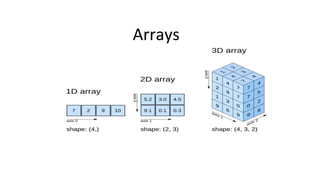
Arrays
Arrays in C
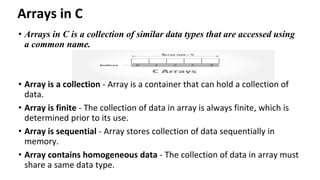
• Arrays in C is a collection of similar data types that are accessed using
a common name.
• Array is a collection - Array is a container that can hold a collection of
data.
• Array is finite - The collection of data in array is always finite, which is
determined prior to its use.
• Array is sequential - Array stores collection of data sequentially in
memory.
• Array contains homogeneous data - The collection of data in array must
share a same data type.
Arrays in C
• Variable declaration:
• int student_mark;
• float avg;
• For example, suppose we wish to arrange the average marks obtained by
100 students.
• Two options:
(a) Construct 100 variables to store average of marks obtained by 100
different students, i.e. each variable containing one student’s marks.
(b)Construct one variable (called array or subscripted variable) capable of
storing or holding all the hundred values.
dimensions of arrays
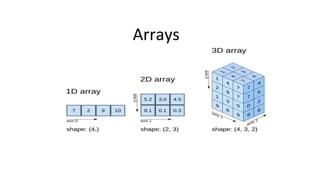
• One-dimensional array – Vectors
• Two-dimensional array – Matrix
• Multi-dimensional array
How to declare an array?
Syntax :
data_type array_name [ size ];
• data_type is a valid C data type that must be common to all array elements.
• array_name is name given to array and must be a valid C identifier.
• size is a constant value that defines array maximum capacity.
Example: int marks [5];
How to initialize an array?
There are two ways to initialize an array.
Static array initialization - Initializes all elements of array during its
declaration.
Dynamic array initialization - The declared array is initialized some time
later during execution of program.
Static initialization of array
Example:
• int marks[5] = {90, 86, 89, 76, 91};
We can declare array without array size specification
• int marks[ ] = {90, 86, 89, 76, 91};
• marks
90 86 89 76 91
Marks[0] Marks[1] Marks[2] Marks[3] Marks[4]
Dynamic initialization of array
• We can assign values to an array element dynamically during execution of
program.
• Example:
int marks[5];
scanf(%d, &marks[0]);
scanf(%d, &marks[1]);
. . .
• Best way:
int marks[5],i;
for (i=0; i<5; i++)
scanf(%d, &marks[i]);
Accessing Arrays
• Elements in an array are accessed with the help of their index.
• Example:
#include<stdio.h>
void main()
{
int marks[5]={12,23,34,45,56}; printf("%d",marks[4]);
}
Accessing Arrays
• //accessing array
• #include<stdio.h>
• void main()
• {
• int m[10],i;
• printf("Enter the marks:");
• for(i=0;i<5;i++)
• {
• scanf("%d",&m[i]);
• }
• printf("The entered marks are...n");
• for(i=0;i<5;i++)
• {
• printf("%dn",m[i]);
• }
• }
Questions
• What is array?
• dimensions of arrays???
• How to declare an array?
Array is sequential
• Array elements are always stored in contiguous memory locations.
• Example:
Example program to implement one-
dimensional array
• write a C program to declare an array capable of storing 10 student
marks. Input marks of all 10 students and find their average.
Output:
• Enter marks of 10 students: 90 86 89 76 91 95 80 77 82 93
• Average marks = 85.900002
• /*C program to find average of marks using array*/
• #include <stdio.h>
• #define SIZE 10 // Size of the array
• int main()
• {
• int marks[SIZE]; // Declare an array of size 10
• int index, sum;
• float avg;
• printf("Enter marks of %d students: ", SIZE);
• /* Input marks of all students in marks array */
• for(index=0; index<SIZE; index++)
• {
• scanf("%d", &marks[index]);
• }
• /* Find sum of all marks */
• sum = 0;
• for(index=0; index<SIZE; index++)
• {
• sum = sum + marks[index];
• }
• /* Calculate average of marks*/
• avg = (float) sum / SIZE;
• /* Print the average marks */
• printf("Average marks = %f", avg);
• return 0;
• }
Questions
• What is mean by searching?
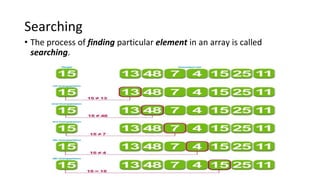
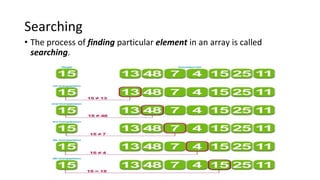
Searching
• The process of finding particular element in an array is called
searching.
C program to search element in an array
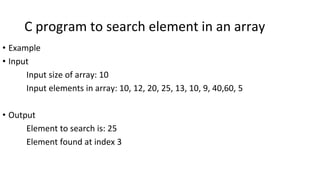
• Example
• Input
Input size of array: 10
Input elements in array: 10, 12, 20, 25, 13, 10, 9, 40,60, 5
• Output
Element to search is: 25
Element found at index 3
C program to search element in an array
• #include <stdio.h>
• int main()
{
int array[100], search, c, n;
• printf("Enter number of elements in arrayn");
scanf("%d", &n);
• printf("Enter %d integer(s)n", n);
• for (c = 0; c < n; c++)
scanf("%d", &array[c]);
• printf("Enter a number to searchn");
scanf("%d", &search);
• for (c = 0; c < n; c++)
{
if (array[c] == search) /* If required element is found */
{
printf("%d is present at location %d.n", search, c+1);
break;
}
}
if (c == n)
printf("%d isn't present in the array.n", search);
• return 0;
}
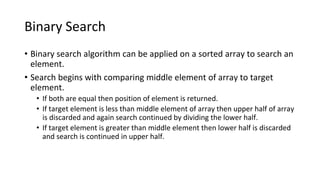
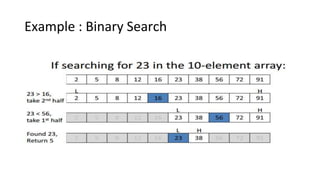
Binary Search
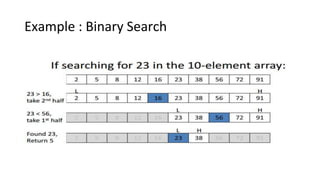
• Binary search algorithm can be applied on a sorted array to search an
element.
• Search begins with comparing middle element of array to target
element.
• If both are equal then position of element is returned.
• If target element is less than middle element of array then upper half of array
is discarded and again search continued by dividing the lower half.
• If target element is greater than middle element then lower half is discarded
and search is continued in upper half.
Example : Binary Search
Program : Binary Search
• #include<stdio.h>
•
• int main()
• {
• int arr[50],i,n,x,flag=0,first,last,mid;
•
• printf("Enter size of array:");
• scanf("%d",&n);
• printf("nEnter array element(ascending order)n");
•
• for(i=0;i<n;++i)
• scanf("%d",&arr[i]);
•
• printf("nEnter the element to search:");
• scanf("%d",&x);
•
• first=0;
• last=n-1;
Program : Binary Search
• while(first<=last)
• {
• mid=(first+last)/2;
•
• if(x==arr[mid]){
• flag=1;
• break;
• }
• else
• if(x>arr[mid])
• first=mid+1;
• else
• last=mid-1;
• }
•
• if(flag==1)
• printf("nElement found at position %d",mid+1);
• else
• printf("nElement not found");
•
• return 0;
• }
UNIT-II
ARRAYS AND STRINGS
• Defining an array – Processing an Single and Two
Dimensional array – Multidimensional Arrays, Character
Arithmetic – Defining a string – NULL character –
Initialization of Strings – Reading and Writing Strings –
Processing Strings –Searching and Sorting of Strings.
Arrays
Arrays in C
• Arrays in C is a collection of similar data types that are accessed using
a common name.
• Array is a collection - Array is a container that can hold a collection of
data.
• Array is finite - The collection of data in array is always finite, which is
determined prior to its use.
• Array is sequential - Array stores collection of data sequentially in
memory.
• Array contains homogeneous data - The collection of data in array must
share a same data type.
Arrays in C
• Variable declaration:
• int student_mark;
• float avg;
• For example, suppose we wish to arrange the average marks obtained by
100 students.
• Two options:
(a) Construct 100 variables to store average of marks obtained by 100
different students, i.e. each variable containing one student’s marks.
(b)Construct one variable (called array or subscripted variable) capable of
storing or holding all the hundred values.
dimensions of arrays
• One-dimensional array – Vectors
• Two-dimensional array – Matrix
• Multi-dimensional array
How to declare an array?
Syntax :
data_type array_name [ size ];
• data_type is a valid C data type that must be common to all array elements.
• array_name is name given to array and must be a valid C identifier.
• size is a constant value that defines array maximum capacity.
Example: int marks [5];
How to initialize an array?
There are two ways to initialize an array.
Static array initialization - Initializes all elements of array during its
declaration.
Dynamic array initialization - The declared array is initialized some time
later during execution of program.
Static initialization of array
Example:
• int marks[5] = {90, 86, 89, 76, 91};
We can declare array without array size specification
• int marks[ ] = {90, 86, 89, 76, 91};
• marks
90 86 89 76 91
Marks[0] Marks[1] Marks[2] Marks[3] Marks[4]
Dynamic initialization of array
• We can assign values to an array element dynamically during execution of
program.
• Example:
int marks[5];
scanf(%d, &marks[0]);
scanf(%d, &marks[1]);
. . .
• Best way:
int marks[5],i;
for (i=0; i<5; i++)
scanf(%d, &marks[i]);
Accessing Arrays
• Elements in an array are accessed with the help of their index.
• Example:
#include<stdio.h>
void main()
{
int marks[5]={12,23,34,45,56}; printf("%d",marks[4]);
}
Accessing Arrays
• //accessing array
• #include<stdio.h>
• void main()
• {
• int m[10],i;
• printf("Enter the marks:");
• for(i=0;i<5;i++)
• {
• scanf("%d",&m[i]);
• }
• printf("The entered marks are...n");
• for(i=0;i<5;i++)
• {
• printf("%dn",m[i]);
• }
• }
Questions
• What is array?
• dimensions of arrays???
• How to declare an array?
Array is sequential
• Array elements are always stored in contiguous memory locations.
• Example:
Example program to implement one-
dimensional array
• write a C program to declare an array capable of storing 10 student
marks. Input marks of all 10 students and find their average.
Output:
• Enter marks of 10 students: 90 86 89 76 91 95 80 77 82 93
• Average marks = 85.900002
• /*C program to find average of marks using array*/
• #include <stdio.h>
• #define SIZE 10 // Size of the array
• int main()
• {
• int marks[SIZE]; // Declare an array of size 10
• int index, sum;
• float avg;
• printf("Enter marks of %d students: ", SIZE);
• /* Input marks of all students in marks array */
• for(index=0; index<SIZE; index++)
• {
• scanf("%d", &marks[index]);
• }
• /* Find sum of all marks */
• sum = 0;
• for(index=0; index<SIZE; index++)
• {
• sum = sum + marks[index];
• }
• /* Calculate average of marks*/
• avg = (float) sum / SIZE;
• /* Print the average marks */
• printf("Average marks = %f", avg);
• return 0;
• }
Questions
• What is mean by searching?
Searching
• The process of finding particular element in an array is called
searching.
C program to search element in an array
• Example
• Input
Input size of array: 10
Input elements in array: 10, 12, 20, 25, 13, 10, 9, 40,60, 5
• Output
Element to search is: 25
Element found at index 3
C program to search element in an array
• #include <stdio.h>
• int main()
{
int array[100], search, c, n;
• printf("Enter number of elements in arrayn");
scanf("%d", &n);
• printf("Enter %d integer(s)n", n);
• for (c = 0; c < n; c++)
scanf("%d", &array[c]);
• printf("Enter a number to searchn");
scanf("%d", &search);
• for (c = 0; c < n; c++)
{
if (array[c] == search) /* If required element is found */
{
printf("%d is present at location %d.n", search, c+1);
break;
}
}
if (c == n)
printf("%d isn't present in the array.n", search);
• return 0;
}
Binary Search
• Binary search algorithm can be applied on a sorted array to search an
element.
• Search begins with comparing middle element of array to target
element.
• If both are equal then position of element is returned.
• If target element is less than middle element of array then upper half of array
is discarded and again search continued by dividing the lower half.
• If target element is greater than middle element then lower half is discarded
and search is continued in upper half.
Example : Binary Search
Program : Binary Search
• #include<stdio.h>
•
• int main()
• {
• int arr[50],i,n,x,flag=0,first,last,mid;
•
• printf("Enter size of array:");
• scanf("%d",&n);
• printf("nEnter array element(ascending order)n");
•
• for(i=0;i<n;++i)
• scanf("%d",&arr[i]);
•
• printf("nEnter the element to search:");
• scanf("%d",&x);
•
• first=0;
• last=n-1;
Program : Binary Search
• while(first<=last)
• {
• mid=(first+last)/2;
•
• if(x==arr[mid]){
• flag=1;
• break;
• }
• else
• if(x>arr[mid])
• first=mid+1;
• else
• last=mid-1;
• }
•
• if(flag==1)
• printf("nElement found at position %d",mid+1);
• else
• printf("nElement not found");
•
• return 0;
• }
Program : Binary Search
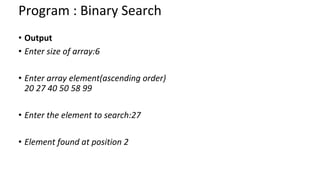
• Output
• Enter size of array:6
• Enter array element(ascending order)
20 27 40 50 58 99
• Enter the element to search:27
• Element found at position 2
Sorting
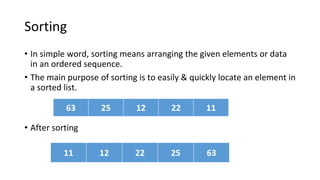
• In simple word, sorting means arranging the given elements or data
in an ordered sequence.
• The main purpose of sorting is to easily & quickly locate an element in
a sorted list.
• After sorting
63 25 12 22 11
11 12 22 25 63
Bubble Sort
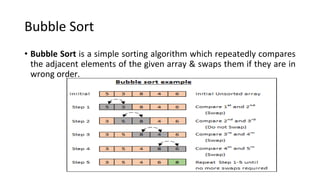
• Bubble Sort is a simple sorting algorithm which repeatedly compares
the adjacent elements of the given array & swaps them if they are in
wrong order.
Bubble Sort
• /* Bubble sort code */
• #include <stdio.h>
• int main()
{
int array[100], n, c, d, swap;
• printf("Enter number of elementsn");
scanf("%d", &n);
• printf("Enter %d integersn", n);
• for (c = 0; c < n; c++)
scanf("%d", &array[c]);
Bubble Sort
• for (c = 0 ; c < n - 1; c++)
{
for (d = 0 ; d < n - c - 1; d++)
{
if (array[d] > array[d+1]) /* For decreasing order use '<' instead of '>' */
{
swap = array[d];
array[d] = array[d+1];
array[d+1] = swap;
}
}
}
• printf("Sorted list in ascending order:n");
• for (c = 0; c < n; c++)
printf("%dn", array[c]);
• return 0;
}
Bubble Sort
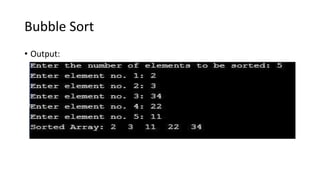
• Output:
Two Dimensional Arrays
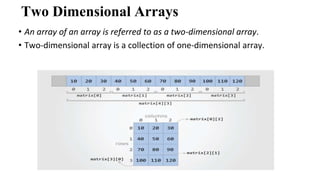
• An array of an array is referred to as a two-dimensional array.
• Two-dimensional array is a collection of one-dimensional array.
Syntax to declare two-dimensional array
• type array_name[row-size][col-size];
• type is a valid C data type.
• array_name is a valid C identifier that denotes name of the array.
• row-size is a constant that specifies matrix row size.
• col-size is also a constant that specifies column size.
Example:
• int matrix[3][4];
How to initialize two-dimensional array
int matrix[4][3] = {
{10, 20, 30}, // Initializes matrix[0]
{40, 50, 60}, // Initializes matrix[1]
{70, 80, 90}, // Initializes matrix[2]
{100, 110, 120} // Initializes matrix[3]
};
or
int matrix[4][3] = {10, 20, 30, 40, 50, 60, 70, 80, 90, 100, 110, 120};
How to access two-dimensional array
• matrix[0][0] = 10; // Assign 10 to first element of first row
• matrix[0][1] = 20; // Assign 20 to second element of first row
• matrix[1][2] = 60; // Assign 60 to third element of second row
• matrix[3][0] = 100; // Assign 100 to first element of fourth row
• // Runs 4 times iterating through each row
• for(i=0; i<4; i++)
• {
• // Runs 3 times for each row.
• for(j=0; j<3; j++)
• {
• scanf("%d", &matrix[i][j]);
• }
• }
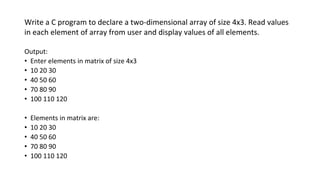
Write a C program to declare a two-dimensional array of size 4x3. Read values
in each element of array from user and display values of all elements.
Output:
• Enter elements in matrix of size 4x3
• 10 20 30
• 40 50 60
• 70 80 90
• 100 110 120
• Elements in matrix are:
• 10 20 30
• 40 50 60
• 70 80 90
• 100 110 120
• /*C program to input and display two-dimensional array*/
• #include <stdio.h>
• #define ROW_SIZE 4 // Define constant row size
• #define COL_SIZE 3 // Define constant column size
• void main()
• {
• int matrix[ROW_SIZE][COL_SIZE];
• int row, col;
• printf("Enter elements in matrix of size %dx%d n", ROW_SIZE, COL_SIZE);
• for(row=0; row<ROW_SIZE; row++) /* Outer loop to iterate through each row */
• {
• for(col=0; col<COL_SIZE; col++) /* Inner loop to iterate through columns of each row */
• {
• scanf("%d", &matrix[row][col]); /* Input element in array */
• }
• }
• /* Print all elements of array*/
• printf("nElements in matrix are: n");
• for(row=0; row<ROW_SIZE; row++)
• {
• for(col=0; col<COL_SIZE; col++)
• {
• printf("%d ", matrix[row][col]);
• }
• printf("n");
• }
• }
Exercise Program
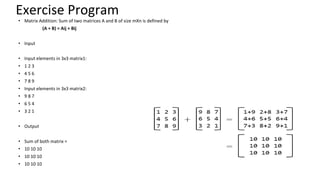
• Matrix Addition: Sum of two matrices A and B of size mXn is defined by
(A + B) = Aij + Bij
• Input
• Input elements in 3x3 matrix1:
• 1 2 3
• 4 5 6
• 7 8 9
• Input elements in 3x3 matrix2:
• 9 8 7
• 6 5 4
• 3 2 1
• Output
• Sum of both matrix =
• 10 10 10
• 10 10 10
• 10 10 10
Programs
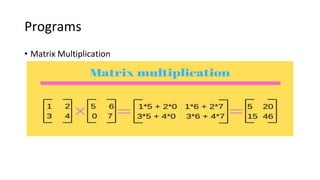
• Matrix Multiplication
Programs
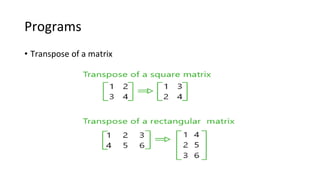
• Transpose of a matrix
Multidimensional Arrays
• In C programming, you can create an array of arrays. These arrays are
known as multidimensional arrays.
• int test[2][3][4] = {
{{3, 4, 2, 3}, {0, -3, 9, 11}, {23, 12, 23, 2}},
{{13, 4, 56, 3}, {5, 9, 3, 5}, {3, 1, 4, 9}} };
Example : Three-dimensional array
• // C Program to store and print 12 values entered by the user
• #include <stdio.h>
• int main()
• {
• int test[2][3][2];
• printf("Enter 12 values: n");
• for (int i = 0; i < 2; ++i)
• {
• for (int j = 0; j < 3; ++j)
• {
• for (int k = 0; k < 2; ++k)
• {
• scanf("%d", &test[i][j][k]);
• }
• }
• }
Example : Three-dimensional array
• // Printing values with proper index.
• printf("nDisplaying values:n");
• for (int i = 0; i < 2; ++i)
• {
• for (int j = 0; j < 3; ++j)
• {
• for (int k = 0; k < 2; ++k)
• {
• printf("test[%d][%d][%d] = %dn", i, j, k, test[i][j][k]);
• }
• }
• }
• return 0;
• }
Summary
• An array is a collection of similar elements.
• The first element in the array is numbered 0, so the last element is 1
less than the size of the array.
• An array is also known as a subscripted variable.
• Before using an array its type and dimension must be declared.
• Array elements are always stored in contiguous memory locations.
Strings
String in C
Sequence of characters is called string.
In C, a string constant is a sequence of
characters enclosed in double quotes.
Examples:
“C Programming”
“Velammal”
“3/390 Nehru Street”
“45”
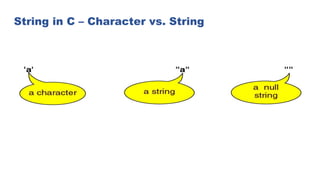
String in C – Character vs. String
String Literals
•String literal values are represented by sequences of characters
between double quotes (“)
•Examples
•“” - empty string
•“hello”
•“a” versus ‘a’
•‘a’ is a single character value (stored in 1 byte) as the ASCII value for a
•“a” is an array with two characters, the first is a, the second is the character value
0
String in C - Implementation
• A special kind of array is an array of characters
ending in the null character 0 called string
arrays
• A string is declared as an array of characters
• char s[10]
• char p[30]
• When declaring a string don’t forget to leave a
space for the null character which is also known as
the string terminator character
String in C – Memory Storage
• The string is always ended with a null
character ‘0’.
• The characters after the null character are
ignored.
• e.g., char str[20] = “Initial value”;
I n i t i a l v a l u e 0 ? ? …
[0] [13]
Duplicate String Literals
•Each string literal in a C program is stored at a different location
•So even if the string literals contain the same string, they are not equal
(in the == sense)
•Example:
•char string1[6] = “hello”;
•char string2[6] = “hello”;
•but string1 does not equal string2 (they are stored at different locations)
Declaring and Initializing String Variables
• Allocate an array of a size large enough to hold the string (plus 1 extra value for the
delimiter)
• Char string_name[size]; Example: char
city[10];
• Examples (with initialization): char str1[6] =
“Hello”;
char str2[] = “Hello”;
char str4[6] = {‘H’,’e’,’l’,’l’,’o’,’0’};
• Note, each variable is considered a constant in that the space it is connected to
cannot be changed
str1 = str2; /* not allowable, but we can copy the contents of str2 to
str1 (more later) */
• When the compiler assigns a character string to a character array it
automatically supplies a NULL (o) character at the end of the string.
• We can declare the size much larger than the string size in the
initializer.
That is the statement:
char str [10]=“GOOD”; is permitted.
• However the following declaration is illegal.
Char str2[3]=“Good”; This will result in compile time error.
• We cannot separate the initialization from declaration.
i.e. char str3[5]; str3=“Good”;
• Similarly, char s1[4]=“abc”;
char s2[4];
s2=s1; is not allowed. An array name cannot be used as the left
operand of the assignment operator.
“Why do we need a terminating NULL
character?”
•A string is not a datatype in C but it is considered a data structure stored in an
array. The string is a variable length structure and is stored in a fixed length
array. The array size is not always the size of the string and most often it is
much larger than the string stored in it. Therefore, the last element of the
array need not represent the end of the string. We need some way to
determine the end of the string data and the NULL character serves as the
“end of string”.
Question:
• What is mean by string?
Changing String Variables
•Can change parts of a string variable
char str1[6] = “hello”;
str1[0] = ‘y’;
/* str1 is now “yello” */
str1[4] = ‘0’;
/* str1 is now “yell” */
•Important to retain delimiter (replacing str1[5] in the
original string with something other than ‘0’ makes a
string that does not end)
•Have to stay within limits of array
Reading Strings from terminal
•Use %s field specification in scanf to read string:
•ignores leading white space
•reads characters until next white space encountered
•C stores null (0) char after last non-white space character.
•Example:
char Name[11];
scanf(“%s”,Name);
•‘&’ is not required before the variable name. The unused locations
are filled with garbage.
•We can also specify the field width using the form %ws in the scanf
statement for reading a specified number of characters from the input
string. Ex: scanf(“%ws”, name);
• program to read a string from user
String in C – Input/Output
• The placeholder %s is used to represent string
arguments in printf and scanf.
• Example:
•char message1[12] = "Hello world";
printf(“%s”,message1);
•message1:
char message2[12];
scanf(“%s”,message2); // type "Hello" as input
: H e l l o 0 ? ? ? ? ? ?
message2
H e l l o w o r l d 0
Reading Strings from terminal(cont)
•%s and %ws can read strings without white spaces i.e. they cannot be
used for reading a text containing more than one word. However we can
use the following code to read a line:
char line[80];
scanf(“%[^n]”, line);
printf(“%s”, line);
String Output
•Use %s field specification in printf: characters in string printed
until 0 encountered char Name[10] = “Rich”;
printf(“|%s|”,Name); /* outputs |Rich| */
•Can use width value to print string in space:
printf(“|%10s|”,Name); /* outputs | Rich| */
•Use - flag to left justify:
printf(“|%-10s|”,Name); /* outputs |Rich | */
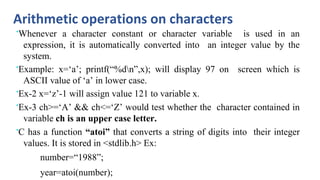
Arithmetic operations on characters
•Whenever a character constant or character variable is used in an
expression, it is automatically converted into an integer value by the
system.
•Example: x=‘a’; printf(“%dn”,x); will display 97 on screen which is
ASCII value of ‘a’ in lower case.
•Ex-2 x=‘z’-1 will assign value 121 to variable x.
•Ex-3 ch>=‘A’ && ch<=‘Z’ would test whether the character contained in
variable ch is an upper case letter.
•C has a function “atoi” that converts a string of digits into their integer
values. It is stored in <stdlib.h> Ex:
number=“1988”;
year=atoi(number);
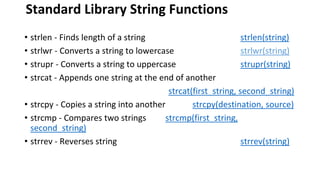
Standard Library String Functions
• strlen - Finds length of a string strlen(string)
• strlwr - Converts a string to lowercase strlwr(string)
• strupr - Converts a string to uppercase strupr(string)
• strcat - Appends one string at the end of another
strcat(first_string, second_string)
• strcpy - Copies a string into another strcpy(destination, source)
• strcmp - Compares two strings strcmp(first_string,
second_string)
• strrev - Reverses string strrev(string)
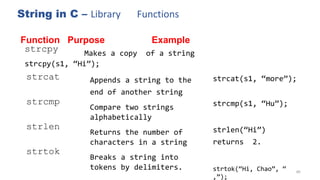
String in C – Library Functions
89
Function Purpose Example
strcpy Makes a copy of a string
strcpy(s1, “Hi”);
strcat Appends a string to the
end of another string
Compare two strings
alphabetically
Returns the number of
characters in a string
Breaks a string into
tokens by delimiters.
strcat(s1, “more”);
strcmp strcmp(s1, “Hu”);
strlen strlen(“Hi”)
returns 2.
strtok(“Hi, Chao”, “
,”);
strtok
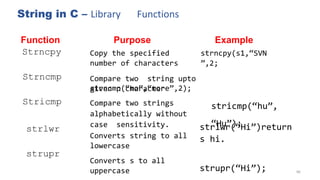
String in C – Library Functions
90
Function
Strncpy
Purpose
Copy the specified
number of characters
Example
strncpy(s1,“SVN
”,2;
Strncmp Compare two string upto
strncmp(“mo”,“more”,2);
stricmp(“hu”,
“Hu”);
given n character
Compare two strings
alphabetically without
case sensitivity.
Converts string to all
lowercase
Converts s to all
uppercase
Stricmp
strlwr strlwr(“Hi”)return
s hi.
strupr(“Hi”);
strupr
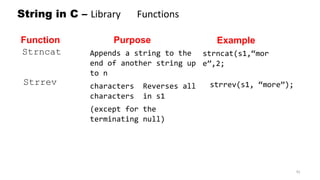
String in C – Library Functions
91
Function
Strncat
Purpose
Appends a string to the
end of another string up
to n
characters Reverses all
characters in s1
(except for the
terminating null)
Example
strncat(s1,“mor
e”,2;
Strrev strrev(s1, “more”);
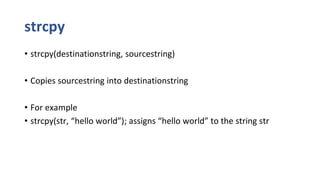
strcpy
• strcpy(destinationstring, sourcestring)
• Copies sourcestring into destinationstring
• For example
• strcpy(str, “hello world”); assigns “hello world” to the string str
Example with strcpy
#include <stdio.h>
#include <string.h>
main()
{
char x[] = “Example with strcpy”;
char y[25];
printf(“The string in array x is %s n “, x);
strcpy(y,x);
printf(“The string in array y is %s n “, y);
}
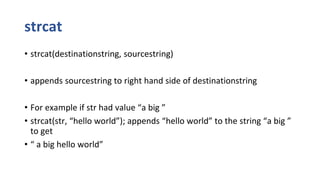
strcat
• strcat(destinationstring, sourcestring)
• appends sourcestring to right hand side of destinationstring
• For example if str had value “a big ”
• strcat(str, “hello world”); appends “hello world” to the string “a big ”
to get
• “ a big hello world”
Example with strcat
#include <stdio.h>
#include <string.h>
main()
{
char x[] = “Example with strcat”;
char y[]= “which stands for string concatenation”;
printf(“The string in array x is %s n “, x);
strcat(x,y);
printf(“The string in array x is %s n “, x);
}
strcmp
• strcmp(stringa, stringb)
• Compares stringa and stringb alphabetically
• Returns a negative value if stringa precedes stringb alphabetically
• Returns a positive value if stringb precedes stringa alphabetically
• Returns 0 if they are equal
• Note lowercase characters are greater than Uppercase
Example with strcmp
#include <stdio.h>
#include <string.h>
main()
{
char x[] = “cat”;
char y[]= “cat”;
char z[]= “dog”;
if (strcmp(x,y) == 0)
printf(“The string in array x %s is equal to that in %s n “, x,y);
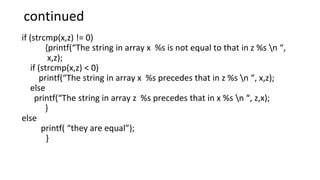
continued
if (strcmp(x,z) != 0)
{printf(“The string in array x %s is not equal to that in z %s n “,
x,z);
if (strcmp(x,z) < 0)
printf(“The string in array x %s precedes that in z %s n “, x,z);
else
printf(“The string in array z %s precedes that in x %s n “, z,x);
}
else
printf( “they are equal”);
}
strlen
• strlen(str) returns length of string excluding null character
• strlen(“tttt”) = 4 not 5 since 0 not counted
Example with strlen
#include <stdio.h>
#include <string.h>
main()
{
int i, count;
char x[] = “tommy tucket took a tiny ticket ”;
count = 0;
for (i = 0; i < strlen(x);i++)
{
if (x[i] == ‘t’) count++;
}
printf(“The number of t’s in %s is %d n “, x,count);
}
Vowels Example with strlen
#include <stdio.h>
#include <string.h>
main()
{
int i, count;
char x[] = “tommy tucket took a tiny ticket ”;
count = 0;
for (i = 0; i < strlen(x);i++)
{
if ((x[i] == ‘a’)||(x[i]==‘e’)||(x[i]==‘I’)||(x[i]==‘o’)||(x[i]==‘u’))
count++;
}
printf(“The number of vowels’s in %s is %d n “, x,count);
}
No of Words Example with strlen
#include <stdio.h>
#include <string.h>
main()
{
int i, count;
char x[] = “tommy tucket took a tiny ticket ”;
count = 0;
for (i = 0; i < strlen(x);i++)
{
if ((x[i] == ‘ ‘) count++;
}
printf(“The number of words’s in %s is %d n “, x,count+1);
}
TWO DIMENSIONAL CHARACTER ARRAY
• Like a two-dimensional integer array, a character array can be a two
dimensional array.
• A collection of strings can be stored in a two dimensional array.
• The syntax is:
• char a[2][10];
• Here, The array accommodates 2 strings with 9 characters long.
• The last location is allotted for storing the NULL character.
Example Program: 2D character array
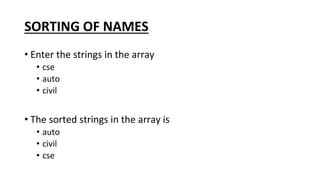
SORTING OF NAMES
• Enter the strings in the array
• cse
• auto
• civil
• The sorted strings in the array is
• auto
• civil
• cse
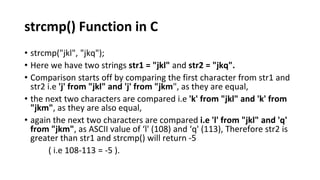
strcmp() Function in C
• strcmp("jkl", "jkq");
• Here we have two strings str1 = "jkl" and str2 = "jkq".
• Comparison starts off by comparing the first character from str1 and
str2 i.e 'j' from "jkl" and 'j' from "jkm", as they are equal,
• the next two characters are compared i.e 'k' from "jkl" and 'k' from
"jkm", as they are also equal,
• again the next two characters are compared i.e 'l' from "jkl" and 'q'
from "jkm", as ASCII value of ‘l' (108) and ‘q' (113), Therefore str2 is
greater than str1 and strcmp() will return -5
( i.e 108-113 = -5 ).
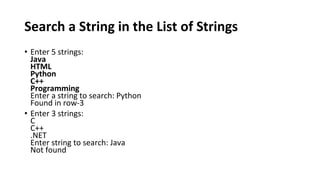
Search a String in the List of Strings
• Enter 5 strings:
Java
HTML
Python
C++
Programming
Enter a string to search: Python
Found in row-3
• Enter 3 strings:
C
C++
.NET
Enter string to search: Java
Not found
Thank you

2 Arrays & Strings.pptx

  • 1.
    VELAMMAL ENGINEERING COLLEGE AnAutonomous Institution, Affiliated to Anna University Chennai, & Approved by AICTE Delhi PROGRAMMING FOR PROBLEM SOLVING IN C (19CS101T) 1 UNIT I
  • 2.
    UNIT-II ARRAYS AND STRINGS •Defining an array – Processing an Single and Two Dimensional array – Multidimensional Arrays, Character Arithmetic – Defining a string – NULL character – Initialization of Strings – Reading and Writing Strings – Processing Strings –Searching and Sorting of Strings.
  • 3.
  • 4.
    Arrays in C •Arrays in C is a collection of similar data types that are accessed using a common name. • Array is a collection - Array is a container that can hold a collection of data. • Array is finite - The collection of data in array is always finite, which is determined prior to its use. • Array is sequential - Array stores collection of data sequentially in memory. • Array contains homogeneous data - The collection of data in array must share a same data type.
  • 5.
    Arrays in C •Variable declaration: • int student_mark; • float avg; • For example, suppose we wish to arrange the average marks obtained by 100 students. • Two options: (a) Construct 100 variables to store average of marks obtained by 100 different students, i.e. each variable containing one student’s marks. (b)Construct one variable (called array or subscripted variable) capable of storing or holding all the hundred values.
  • 6.
    dimensions of arrays •One-dimensional array – Vectors • Two-dimensional array – Matrix • Multi-dimensional array
  • 7.
    How to declarean array? Syntax : data_type array_name [ size ]; • data_type is a valid C data type that must be common to all array elements. • array_name is name given to array and must be a valid C identifier. • size is a constant value that defines array maximum capacity. Example: int marks [5];
  • 8.
    How to initializean array? There are two ways to initialize an array. Static array initialization - Initializes all elements of array during its declaration. Dynamic array initialization - The declared array is initialized some time later during execution of program.
  • 9.
    Static initialization ofarray Example: • int marks[5] = {90, 86, 89, 76, 91}; We can declare array without array size specification • int marks[ ] = {90, 86, 89, 76, 91}; • marks 90 86 89 76 91 Marks[0] Marks[1] Marks[2] Marks[3] Marks[4]
  • 10.
    Dynamic initialization ofarray • We can assign values to an array element dynamically during execution of program. • Example: int marks[5]; scanf(%d, &marks[0]); scanf(%d, &marks[1]); . . . • Best way: int marks[5],i; for (i=0; i<5; i++) scanf(%d, &marks[i]);
  • 11.
    Accessing Arrays • Elementsin an array are accessed with the help of their index. • Example: #include<stdio.h> void main() { int marks[5]={12,23,34,45,56}; printf("%d",marks[4]); }
  • 12.
    Accessing Arrays • //accessingarray • #include<stdio.h> • void main() • { • int m[10],i; • printf("Enter the marks:"); • for(i=0;i<5;i++) • { • scanf("%d",&m[i]); • } • printf("The entered marks are...n"); • for(i=0;i<5;i++) • { • printf("%dn",m[i]); • } • }
  • 13.
    Questions • What isarray? • dimensions of arrays??? • How to declare an array?
  • 14.
    Array is sequential •Array elements are always stored in contiguous memory locations. • Example:
  • 15.
    Example program toimplement one- dimensional array • write a C program to declare an array capable of storing 10 student marks. Input marks of all 10 students and find their average. Output: • Enter marks of 10 students: 90 86 89 76 91 95 80 77 82 93 • Average marks = 85.900002
  • 16.
    • /*C programto find average of marks using array*/ • #include <stdio.h> • #define SIZE 10 // Size of the array • int main() • { • int marks[SIZE]; // Declare an array of size 10 • int index, sum; • float avg; • printf("Enter marks of %d students: ", SIZE); • /* Input marks of all students in marks array */ • for(index=0; index<SIZE; index++) • { • scanf("%d", &marks[index]); • }
  • 17.
    • /* Findsum of all marks */ • sum = 0; • for(index=0; index<SIZE; index++) • { • sum = sum + marks[index]; • } • /* Calculate average of marks*/ • avg = (float) sum / SIZE; • /* Print the average marks */ • printf("Average marks = %f", avg); • return 0; • }
  • 18.
    Questions • What ismean by searching?
  • 19.
    Searching • The processof finding particular element in an array is called searching.
  • 20.
    C program tosearch element in an array • Example • Input Input size of array: 10 Input elements in array: 10, 12, 20, 25, 13, 10, 9, 40,60, 5 • Output Element to search is: 25 Element found at index 3
  • 21.
    C program tosearch element in an array • #include <stdio.h> • int main() { int array[100], search, c, n; • printf("Enter number of elements in arrayn"); scanf("%d", &n); • printf("Enter %d integer(s)n", n); • for (c = 0; c < n; c++) scanf("%d", &array[c]); • printf("Enter a number to searchn"); scanf("%d", &search); • for (c = 0; c < n; c++) { if (array[c] == search) /* If required element is found */ { printf("%d is present at location %d.n", search, c+1); break; } } if (c == n) printf("%d isn't present in the array.n", search); • return 0; }
  • 22.
    Binary Search • Binarysearch algorithm can be applied on a sorted array to search an element. • Search begins with comparing middle element of array to target element. • If both are equal then position of element is returned. • If target element is less than middle element of array then upper half of array is discarded and again search continued by dividing the lower half. • If target element is greater than middle element then lower half is discarded and search is continued in upper half.
  • 23.
  • 24.
    Program : BinarySearch • #include<stdio.h> • • int main() • { • int arr[50],i,n,x,flag=0,first,last,mid; • • printf("Enter size of array:"); • scanf("%d",&n); • printf("nEnter array element(ascending order)n"); • • for(i=0;i<n;++i) • scanf("%d",&arr[i]); • • printf("nEnter the element to search:"); • scanf("%d",&x); • • first=0; • last=n-1;
  • 25.
    Program : BinarySearch • while(first<=last) • { • mid=(first+last)/2; • • if(x==arr[mid]){ • flag=1; • break; • } • else • if(x>arr[mid]) • first=mid+1; • else • last=mid-1; • } • • if(flag==1) • printf("nElement found at position %d",mid+1); • else • printf("nElement not found"); • • return 0; • }
  • 26.
    UNIT-II ARRAYS AND STRINGS •Defining an array – Processing an Single and Two Dimensional array – Multidimensional Arrays, Character Arithmetic – Defining a string – NULL character – Initialization of Strings – Reading and Writing Strings – Processing Strings –Searching and Sorting of Strings.
  • 27.
  • 28.
    Arrays in C •Arrays in C is a collection of similar data types that are accessed using a common name. • Array is a collection - Array is a container that can hold a collection of data. • Array is finite - The collection of data in array is always finite, which is determined prior to its use. • Array is sequential - Array stores collection of data sequentially in memory. • Array contains homogeneous data - The collection of data in array must share a same data type.
  • 29.
    Arrays in C •Variable declaration: • int student_mark; • float avg; • For example, suppose we wish to arrange the average marks obtained by 100 students. • Two options: (a) Construct 100 variables to store average of marks obtained by 100 different students, i.e. each variable containing one student’s marks. (b)Construct one variable (called array or subscripted variable) capable of storing or holding all the hundred values.
  • 30.
    dimensions of arrays •One-dimensional array – Vectors • Two-dimensional array – Matrix • Multi-dimensional array
  • 31.
    How to declarean array? Syntax : data_type array_name [ size ]; • data_type is a valid C data type that must be common to all array elements. • array_name is name given to array and must be a valid C identifier. • size is a constant value that defines array maximum capacity. Example: int marks [5];
  • 32.
    How to initializean array? There are two ways to initialize an array. Static array initialization - Initializes all elements of array during its declaration. Dynamic array initialization - The declared array is initialized some time later during execution of program.
  • 33.
    Static initialization ofarray Example: • int marks[5] = {90, 86, 89, 76, 91}; We can declare array without array size specification • int marks[ ] = {90, 86, 89, 76, 91}; • marks 90 86 89 76 91 Marks[0] Marks[1] Marks[2] Marks[3] Marks[4]
  • 34.
    Dynamic initialization ofarray • We can assign values to an array element dynamically during execution of program. • Example: int marks[5]; scanf(%d, &marks[0]); scanf(%d, &marks[1]); . . . • Best way: int marks[5],i; for (i=0; i<5; i++) scanf(%d, &marks[i]);
  • 35.
    Accessing Arrays • Elementsin an array are accessed with the help of their index. • Example: #include<stdio.h> void main() { int marks[5]={12,23,34,45,56}; printf("%d",marks[4]); }
  • 36.
    Accessing Arrays • //accessingarray • #include<stdio.h> • void main() • { • int m[10],i; • printf("Enter the marks:"); • for(i=0;i<5;i++) • { • scanf("%d",&m[i]); • } • printf("The entered marks are...n"); • for(i=0;i<5;i++) • { • printf("%dn",m[i]); • } • }
  • 37.
    Questions • What isarray? • dimensions of arrays??? • How to declare an array?
  • 38.
    Array is sequential •Array elements are always stored in contiguous memory locations. • Example:
  • 39.
    Example program toimplement one- dimensional array • write a C program to declare an array capable of storing 10 student marks. Input marks of all 10 students and find their average. Output: • Enter marks of 10 students: 90 86 89 76 91 95 80 77 82 93 • Average marks = 85.900002
  • 40.
    • /*C programto find average of marks using array*/ • #include <stdio.h> • #define SIZE 10 // Size of the array • int main() • { • int marks[SIZE]; // Declare an array of size 10 • int index, sum; • float avg; • printf("Enter marks of %d students: ", SIZE); • /* Input marks of all students in marks array */ • for(index=0; index<SIZE; index++) • { • scanf("%d", &marks[index]); • }
  • 41.
    • /* Findsum of all marks */ • sum = 0; • for(index=0; index<SIZE; index++) • { • sum = sum + marks[index]; • } • /* Calculate average of marks*/ • avg = (float) sum / SIZE; • /* Print the average marks */ • printf("Average marks = %f", avg); • return 0; • }
  • 42.
    Questions • What ismean by searching?
  • 43.
    Searching • The processof finding particular element in an array is called searching.
  • 44.
    C program tosearch element in an array • Example • Input Input size of array: 10 Input elements in array: 10, 12, 20, 25, 13, 10, 9, 40,60, 5 • Output Element to search is: 25 Element found at index 3
  • 45.
    C program tosearch element in an array • #include <stdio.h> • int main() { int array[100], search, c, n; • printf("Enter number of elements in arrayn"); scanf("%d", &n); • printf("Enter %d integer(s)n", n); • for (c = 0; c < n; c++) scanf("%d", &array[c]); • printf("Enter a number to searchn"); scanf("%d", &search); • for (c = 0; c < n; c++) { if (array[c] == search) /* If required element is found */ { printf("%d is present at location %d.n", search, c+1); break; } } if (c == n) printf("%d isn't present in the array.n", search); • return 0; }
  • 46.
    Binary Search • Binarysearch algorithm can be applied on a sorted array to search an element. • Search begins with comparing middle element of array to target element. • If both are equal then position of element is returned. • If target element is less than middle element of array then upper half of array is discarded and again search continued by dividing the lower half. • If target element is greater than middle element then lower half is discarded and search is continued in upper half.
  • 47.
  • 48.
    Program : BinarySearch • #include<stdio.h> • • int main() • { • int arr[50],i,n,x,flag=0,first,last,mid; • • printf("Enter size of array:"); • scanf("%d",&n); • printf("nEnter array element(ascending order)n"); • • for(i=0;i<n;++i) • scanf("%d",&arr[i]); • • printf("nEnter the element to search:"); • scanf("%d",&x); • • first=0; • last=n-1;
  • 49.
    Program : BinarySearch • while(first<=last) • { • mid=(first+last)/2; • • if(x==arr[mid]){ • flag=1; • break; • } • else • if(x>arr[mid]) • first=mid+1; • else • last=mid-1; • } • • if(flag==1) • printf("nElement found at position %d",mid+1); • else • printf("nElement not found"); • • return 0; • }
  • 50.
    Program : BinarySearch • Output • Enter size of array:6 • Enter array element(ascending order) 20 27 40 50 58 99 • Enter the element to search:27 • Element found at position 2
  • 51.
    Sorting • In simpleword, sorting means arranging the given elements or data in an ordered sequence. • The main purpose of sorting is to easily & quickly locate an element in a sorted list. • After sorting 63 25 12 22 11 11 12 22 25 63
  • 52.
    Bubble Sort • BubbleSort is a simple sorting algorithm which repeatedly compares the adjacent elements of the given array & swaps them if they are in wrong order.
  • 53.
    Bubble Sort • /*Bubble sort code */ • #include <stdio.h> • int main() { int array[100], n, c, d, swap; • printf("Enter number of elementsn"); scanf("%d", &n); • printf("Enter %d integersn", n); • for (c = 0; c < n; c++) scanf("%d", &array[c]);
  • 54.
    Bubble Sort • for(c = 0 ; c < n - 1; c++) { for (d = 0 ; d < n - c - 1; d++) { if (array[d] > array[d+1]) /* For decreasing order use '<' instead of '>' */ { swap = array[d]; array[d] = array[d+1]; array[d+1] = swap; } } } • printf("Sorted list in ascending order:n"); • for (c = 0; c < n; c++) printf("%dn", array[c]); • return 0; }
  • 55.
  • 56.
    Two Dimensional Arrays •An array of an array is referred to as a two-dimensional array. • Two-dimensional array is a collection of one-dimensional array.
  • 57.
    Syntax to declaretwo-dimensional array • type array_name[row-size][col-size]; • type is a valid C data type. • array_name is a valid C identifier that denotes name of the array. • row-size is a constant that specifies matrix row size. • col-size is also a constant that specifies column size. Example: • int matrix[3][4];
  • 58.
    How to initializetwo-dimensional array int matrix[4][3] = { {10, 20, 30}, // Initializes matrix[0] {40, 50, 60}, // Initializes matrix[1] {70, 80, 90}, // Initializes matrix[2] {100, 110, 120} // Initializes matrix[3] }; or int matrix[4][3] = {10, 20, 30, 40, 50, 60, 70, 80, 90, 100, 110, 120};
  • 59.
    How to accesstwo-dimensional array • matrix[0][0] = 10; // Assign 10 to first element of first row • matrix[0][1] = 20; // Assign 20 to second element of first row • matrix[1][2] = 60; // Assign 60 to third element of second row • matrix[3][0] = 100; // Assign 100 to first element of fourth row • // Runs 4 times iterating through each row • for(i=0; i<4; i++) • { • // Runs 3 times for each row. • for(j=0; j<3; j++) • { • scanf("%d", &matrix[i][j]); • } • }
  • 60.
    Write a Cprogram to declare a two-dimensional array of size 4x3. Read values in each element of array from user and display values of all elements. Output: • Enter elements in matrix of size 4x3 • 10 20 30 • 40 50 60 • 70 80 90 • 100 110 120 • Elements in matrix are: • 10 20 30 • 40 50 60 • 70 80 90 • 100 110 120
  • 61.
    • /*C programto input and display two-dimensional array*/ • #include <stdio.h> • #define ROW_SIZE 4 // Define constant row size • #define COL_SIZE 3 // Define constant column size • void main() • { • int matrix[ROW_SIZE][COL_SIZE]; • int row, col; • printf("Enter elements in matrix of size %dx%d n", ROW_SIZE, COL_SIZE); • for(row=0; row<ROW_SIZE; row++) /* Outer loop to iterate through each row */ • { • for(col=0; col<COL_SIZE; col++) /* Inner loop to iterate through columns of each row */ • { • scanf("%d", &matrix[row][col]); /* Input element in array */ • } • }
  • 62.
    • /* Printall elements of array*/ • printf("nElements in matrix are: n"); • for(row=0; row<ROW_SIZE; row++) • { • for(col=0; col<COL_SIZE; col++) • { • printf("%d ", matrix[row][col]); • } • printf("n"); • } • }
  • 63.
    Exercise Program • MatrixAddition: Sum of two matrices A and B of size mXn is defined by (A + B) = Aij + Bij • Input • Input elements in 3x3 matrix1: • 1 2 3 • 4 5 6 • 7 8 9 • Input elements in 3x3 matrix2: • 9 8 7 • 6 5 4 • 3 2 1 • Output • Sum of both matrix = • 10 10 10 • 10 10 10 • 10 10 10
  • 64.
  • 65.
  • 66.
    Multidimensional Arrays • InC programming, you can create an array of arrays. These arrays are known as multidimensional arrays. • int test[2][3][4] = { {{3, 4, 2, 3}, {0, -3, 9, 11}, {23, 12, 23, 2}}, {{13, 4, 56, 3}, {5, 9, 3, 5}, {3, 1, 4, 9}} };
  • 67.
    Example : Three-dimensionalarray • // C Program to store and print 12 values entered by the user • #include <stdio.h> • int main() • { • int test[2][3][2]; • printf("Enter 12 values: n"); • for (int i = 0; i < 2; ++i) • { • for (int j = 0; j < 3; ++j) • { • for (int k = 0; k < 2; ++k) • { • scanf("%d", &test[i][j][k]); • } • } • }
  • 68.
    Example : Three-dimensionalarray • // Printing values with proper index. • printf("nDisplaying values:n"); • for (int i = 0; i < 2; ++i) • { • for (int j = 0; j < 3; ++j) • { • for (int k = 0; k < 2; ++k) • { • printf("test[%d][%d][%d] = %dn", i, j, k, test[i][j][k]); • } • } • } • return 0; • }
  • 69.
    Summary • An arrayis a collection of similar elements. • The first element in the array is numbered 0, so the last element is 1 less than the size of the array. • An array is also known as a subscripted variable. • Before using an array its type and dimension must be declared. • Array elements are always stored in contiguous memory locations.
  • 70.
  • 71.
    String in C Sequenceof characters is called string. In C, a string constant is a sequence of characters enclosed in double quotes. Examples: “C Programming” “Velammal” “3/390 Nehru Street” “45”
  • 72.
    String in C– Character vs. String
  • 73.
    String Literals •String literalvalues are represented by sequences of characters between double quotes (“) •Examples •“” - empty string •“hello” •“a” versus ‘a’ •‘a’ is a single character value (stored in 1 byte) as the ASCII value for a •“a” is an array with two characters, the first is a, the second is the character value 0
  • 74.
    String in C- Implementation • A special kind of array is an array of characters ending in the null character 0 called string arrays • A string is declared as an array of characters • char s[10] • char p[30] • When declaring a string don’t forget to leave a space for the null character which is also known as the string terminator character
  • 75.
    String in C– Memory Storage • The string is always ended with a null character ‘0’. • The characters after the null character are ignored. • e.g., char str[20] = “Initial value”; I n i t i a l v a l u e 0 ? ? … [0] [13]
  • 76.
    Duplicate String Literals •Eachstring literal in a C program is stored at a different location •So even if the string literals contain the same string, they are not equal (in the == sense) •Example: •char string1[6] = “hello”; •char string2[6] = “hello”; •but string1 does not equal string2 (they are stored at different locations)
  • 77.
    Declaring and InitializingString Variables • Allocate an array of a size large enough to hold the string (plus 1 extra value for the delimiter) • Char string_name[size]; Example: char city[10]; • Examples (with initialization): char str1[6] = “Hello”; char str2[] = “Hello”; char str4[6] = {‘H’,’e’,’l’,’l’,’o’,’0’}; • Note, each variable is considered a constant in that the space it is connected to cannot be changed str1 = str2; /* not allowable, but we can copy the contents of str2 to str1 (more later) */ • When the compiler assigns a character string to a character array it automatically supplies a NULL (o) character at the end of the string.
  • 78.
    • We candeclare the size much larger than the string size in the initializer. That is the statement: char str [10]=“GOOD”; is permitted. • However the following declaration is illegal. Char str2[3]=“Good”; This will result in compile time error. • We cannot separate the initialization from declaration. i.e. char str3[5]; str3=“Good”; • Similarly, char s1[4]=“abc”; char s2[4]; s2=s1; is not allowed. An array name cannot be used as the left operand of the assignment operator.
  • 79.
    “Why do weneed a terminating NULL character?” •A string is not a datatype in C but it is considered a data structure stored in an array. The string is a variable length structure and is stored in a fixed length array. The array size is not always the size of the string and most often it is much larger than the string stored in it. Therefore, the last element of the array need not represent the end of the string. We need some way to determine the end of the string data and the NULL character serves as the “end of string”.
  • 80.
    Question: • What ismean by string?
  • 81.
    Changing String Variables •Canchange parts of a string variable char str1[6] = “hello”; str1[0] = ‘y’; /* str1 is now “yello” */ str1[4] = ‘0’; /* str1 is now “yell” */ •Important to retain delimiter (replacing str1[5] in the original string with something other than ‘0’ makes a string that does not end) •Have to stay within limits of array
  • 82.
    Reading Strings fromterminal •Use %s field specification in scanf to read string: •ignores leading white space •reads characters until next white space encountered •C stores null (0) char after last non-white space character. •Example: char Name[11]; scanf(“%s”,Name); •‘&’ is not required before the variable name. The unused locations are filled with garbage. •We can also specify the field width using the form %ws in the scanf statement for reading a specified number of characters from the input string. Ex: scanf(“%ws”, name);
  • 83.
    • program toread a string from user
  • 84.
    String in C– Input/Output • The placeholder %s is used to represent string arguments in printf and scanf. • Example: •char message1[12] = "Hello world"; printf(“%s”,message1); •message1: char message2[12]; scanf(“%s”,message2); // type "Hello" as input : H e l l o 0 ? ? ? ? ? ? message2 H e l l o w o r l d 0
  • 85.
    Reading Strings fromterminal(cont) •%s and %ws can read strings without white spaces i.e. they cannot be used for reading a text containing more than one word. However we can use the following code to read a line: char line[80]; scanf(“%[^n]”, line); printf(“%s”, line);
  • 86.
    String Output •Use %sfield specification in printf: characters in string printed until 0 encountered char Name[10] = “Rich”; printf(“|%s|”,Name); /* outputs |Rich| */ •Can use width value to print string in space: printf(“|%10s|”,Name); /* outputs | Rich| */ •Use - flag to left justify: printf(“|%-10s|”,Name); /* outputs |Rich | */
  • 87.
    Arithmetic operations oncharacters •Whenever a character constant or character variable is used in an expression, it is automatically converted into an integer value by the system. •Example: x=‘a’; printf(“%dn”,x); will display 97 on screen which is ASCII value of ‘a’ in lower case. •Ex-2 x=‘z’-1 will assign value 121 to variable x. •Ex-3 ch>=‘A’ && ch<=‘Z’ would test whether the character contained in variable ch is an upper case letter. •C has a function “atoi” that converts a string of digits into their integer values. It is stored in <stdlib.h> Ex: number=“1988”; year=atoi(number);
  • 88.
    Standard Library StringFunctions • strlen - Finds length of a string strlen(string) • strlwr - Converts a string to lowercase strlwr(string) • strupr - Converts a string to uppercase strupr(string) • strcat - Appends one string at the end of another strcat(first_string, second_string) • strcpy - Copies a string into another strcpy(destination, source) • strcmp - Compares two strings strcmp(first_string, second_string) • strrev - Reverses string strrev(string)
  • 89.
    String in C– Library Functions 89 Function Purpose Example strcpy Makes a copy of a string strcpy(s1, “Hi”); strcat Appends a string to the end of another string Compare two strings alphabetically Returns the number of characters in a string Breaks a string into tokens by delimiters. strcat(s1, “more”); strcmp strcmp(s1, “Hu”); strlen strlen(“Hi”) returns 2. strtok(“Hi, Chao”, “ ,”); strtok
  • 90.
    String in C– Library Functions 90 Function Strncpy Purpose Copy the specified number of characters Example strncpy(s1,“SVN ”,2; Strncmp Compare two string upto strncmp(“mo”,“more”,2); stricmp(“hu”, “Hu”); given n character Compare two strings alphabetically without case sensitivity. Converts string to all lowercase Converts s to all uppercase Stricmp strlwr strlwr(“Hi”)return s hi. strupr(“Hi”); strupr
  • 91.
    String in C– Library Functions 91 Function Strncat Purpose Appends a string to the end of another string up to n characters Reverses all characters in s1 (except for the terminating null) Example strncat(s1,“mor e”,2; Strrev strrev(s1, “more”);
  • 92.
    strcpy • strcpy(destinationstring, sourcestring) •Copies sourcestring into destinationstring • For example • strcpy(str, “hello world”); assigns “hello world” to the string str
  • 93.
    Example with strcpy #include<stdio.h> #include <string.h> main() { char x[] = “Example with strcpy”; char y[25]; printf(“The string in array x is %s n “, x); strcpy(y,x); printf(“The string in array y is %s n “, y); }
  • 94.
    strcat • strcat(destinationstring, sourcestring) •appends sourcestring to right hand side of destinationstring • For example if str had value “a big ” • strcat(str, “hello world”); appends “hello world” to the string “a big ” to get • “ a big hello world”
  • 95.
    Example with strcat #include<stdio.h> #include <string.h> main() { char x[] = “Example with strcat”; char y[]= “which stands for string concatenation”; printf(“The string in array x is %s n “, x); strcat(x,y); printf(“The string in array x is %s n “, x); }
  • 96.
    strcmp • strcmp(stringa, stringb) •Compares stringa and stringb alphabetically • Returns a negative value if stringa precedes stringb alphabetically • Returns a positive value if stringb precedes stringa alphabetically • Returns 0 if they are equal • Note lowercase characters are greater than Uppercase
  • 97.
    Example with strcmp #include<stdio.h> #include <string.h> main() { char x[] = “cat”; char y[]= “cat”; char z[]= “dog”; if (strcmp(x,y) == 0) printf(“The string in array x %s is equal to that in %s n “, x,y);
  • 98.
    continued if (strcmp(x,z) !=0) {printf(“The string in array x %s is not equal to that in z %s n “, x,z); if (strcmp(x,z) < 0) printf(“The string in array x %s precedes that in z %s n “, x,z); else printf(“The string in array z %s precedes that in x %s n “, z,x); } else printf( “they are equal”); }
  • 99.
    strlen • strlen(str) returnslength of string excluding null character • strlen(“tttt”) = 4 not 5 since 0 not counted
  • 100.
    Example with strlen #include<stdio.h> #include <string.h> main() { int i, count; char x[] = “tommy tucket took a tiny ticket ”; count = 0; for (i = 0; i < strlen(x);i++) { if (x[i] == ‘t’) count++; } printf(“The number of t’s in %s is %d n “, x,count); }
  • 101.
    Vowels Example withstrlen #include <stdio.h> #include <string.h> main() { int i, count; char x[] = “tommy tucket took a tiny ticket ”; count = 0; for (i = 0; i < strlen(x);i++) { if ((x[i] == ‘a’)||(x[i]==‘e’)||(x[i]==‘I’)||(x[i]==‘o’)||(x[i]==‘u’)) count++; } printf(“The number of vowels’s in %s is %d n “, x,count); }
  • 102.
    No of WordsExample with strlen #include <stdio.h> #include <string.h> main() { int i, count; char x[] = “tommy tucket took a tiny ticket ”; count = 0; for (i = 0; i < strlen(x);i++) { if ((x[i] == ‘ ‘) count++; } printf(“The number of words’s in %s is %d n “, x,count+1); }
  • 103.
    TWO DIMENSIONAL CHARACTERARRAY • Like a two-dimensional integer array, a character array can be a two dimensional array. • A collection of strings can be stored in a two dimensional array. • The syntax is: • char a[2][10]; • Here, The array accommodates 2 strings with 9 characters long. • The last location is allotted for storing the NULL character.
  • 104.
    Example Program: 2Dcharacter array
  • 105.
    SORTING OF NAMES •Enter the strings in the array • cse • auto • civil • The sorted strings in the array is • auto • civil • cse
  • 106.
    strcmp() Function inC • strcmp("jkl", "jkq"); • Here we have two strings str1 = "jkl" and str2 = "jkq". • Comparison starts off by comparing the first character from str1 and str2 i.e 'j' from "jkl" and 'j' from "jkm", as they are equal, • the next two characters are compared i.e 'k' from "jkl" and 'k' from "jkm", as they are also equal, • again the next two characters are compared i.e 'l' from "jkl" and 'q' from "jkm", as ASCII value of ‘l' (108) and ‘q' (113), Therefore str2 is greater than str1 and strcmp() will return -5 ( i.e 108-113 = -5 ).
  • 107.
    Search a Stringin the List of Strings • Enter 5 strings: Java HTML Python C++ Programming Enter a string to search: Python Found in row-3 • Enter 3 strings: C C++ .NET Enter string to search: Java Not found
  • 108.