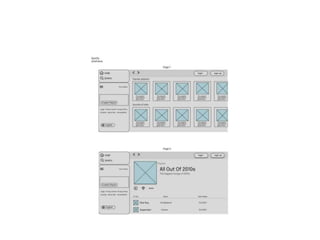
Developing Wireflow diagram for application using open source software
AIM:
To develop a Wireflow diagram for application using Figma
PROCEDURE:
Step 1: Open Figma: Launch the Figma application on your computer.
Step 2: Create a New Figma File: In Figma, click on "New" and choose "New File" to start a new project
specifically for your wireflow diagram.
Step 3: Define the Application's User Flow: Begin by understanding the user flow of your application.
Identify key screens and interactions that users will experience.
Step 4: Create Artboards for Screens: In your Figma file, create individual artboards for each screen of the
application. Artboards represent the visual interface of your app.
Step 5: Design Screen Elements: Within each artboard, design and arrange the user interface elements,
including buttons, text, images, and other components.
Maintain a consistent design throughout.
• Step 6: Linking Screens: Use Figma's interactive features to link screens together. Define interactions, such as tapping a button to
navigate to another screen.
• Step 7: Create Arrows for Navigation: On your artboards, use Figma's line tool to draw arrows or lines that represent the flow of navigation
between screens.
• Step 8: Add Descriptive Text: Include text labels to describe the purpose of each screen and interaction. This helps in clarifying the
wireflow for viewers.
• Step 9: Organize the Flow: Arrange the artboards and arrows in a logical sequence to represent the intended user flow throughthe
application.
• Step 10: Test Interactions: Use Figma's prototype mode to test the interactions and ensure that the wireflow accurately represents the
user journey.
• Step 11: Collaboration and Feedback: Share your wireflow diagram with team members and stakeholders. Allow
them to provide feedback and comments directly within Figma.
• Step 12: Refine and Update: Based on feedback, refine and update the wireflow diagram as needed. Ensure that it
accurately reflects the application's user flow.
• Step 13: Export or Share: Once the wireflow diagram is finalized, you can export it in various formats or share it
with relevant team members for implementation.
Exploring various open source collaborative interface Platform
• AIM:
• To explore various open source collaborative interface Platform
• Theory:
• Exploring various open-source collaborative interface platforms is essential for designing user-friendly and efficient digital interfaces. This
document offers an overview of different open-source platforms to facilitate UI/UX design collaboration.
• List of Explored Open Source Collaborative Interface Platforms:
• 1.Figma Community
• 2.GitHub
• 3.GitLab
• 4.InVision Freehand
• 5.Adobe XD (Starter Plan)
• 6.Miro (Free Plan)
• 7.Sketch for Teams (Beta)
• 8.Gravit Designer
• 9.Vectr 10.Penpot

1.Figma Community Figma Community offers

  • 1.
    Developing Wireflow diagramfor application using open source software AIM: To develop a Wireflow diagram for application using Figma PROCEDURE: Step 1: Open Figma: Launch the Figma application on your computer. Step 2: Create a New Figma File: In Figma, click on "New" and choose "New File" to start a new project specifically for your wireflow diagram. Step 3: Define the Application's User Flow: Begin by understanding the user flow of your application. Identify key screens and interactions that users will experience. Step 4: Create Artboards for Screens: In your Figma file, create individual artboards for each screen of the application. Artboards represent the visual interface of your app. Step 5: Design Screen Elements: Within each artboard, design and arrange the user interface elements, including buttons, text, images, and other components. Maintain a consistent design throughout.
  • 2.
    • Step 6:Linking Screens: Use Figma's interactive features to link screens together. Define interactions, such as tapping a button to navigate to another screen. • Step 7: Create Arrows for Navigation: On your artboards, use Figma's line tool to draw arrows or lines that represent the flow of navigation between screens. • Step 8: Add Descriptive Text: Include text labels to describe the purpose of each screen and interaction. This helps in clarifying the wireflow for viewers. • Step 9: Organize the Flow: Arrange the artboards and arrows in a logical sequence to represent the intended user flow throughthe application. • Step 10: Test Interactions: Use Figma's prototype mode to test the interactions and ensure that the wireflow accurately represents the user journey.
  • 3.
    • Step 11:Collaboration and Feedback: Share your wireflow diagram with team members and stakeholders. Allow them to provide feedback and comments directly within Figma. • Step 12: Refine and Update: Based on feedback, refine and update the wireflow diagram as needed. Ensure that it accurately reflects the application's user flow. • Step 13: Export or Share: Once the wireflow diagram is finalized, you can export it in various formats or share it with relevant team members for implementation.
  • 5.
    Exploring various opensource collaborative interface Platform • AIM: • To explore various open source collaborative interface Platform • Theory: • Exploring various open-source collaborative interface platforms is essential for designing user-friendly and efficient digital interfaces. This document offers an overview of different open-source platforms to facilitate UI/UX design collaboration. • List of Explored Open Source Collaborative Interface Platforms: • 1.Figma Community • 2.GitHub • 3.GitLab • 4.InVision Freehand • 5.Adobe XD (Starter Plan) • 6.Miro (Free Plan) • 7.Sketch for Teams (Beta) • 8.Gravit Designer • 9.Vectr 10.Penpot