Data Protection
After completing this module, you will be able to:
• Explain the concept of FALLBACK tables.
• List the types and levels of locking provided by Teradata.
• Describe the Recovery, Transient and Permanent Journals
and their function.
• List the utilities available for archive and recovery.
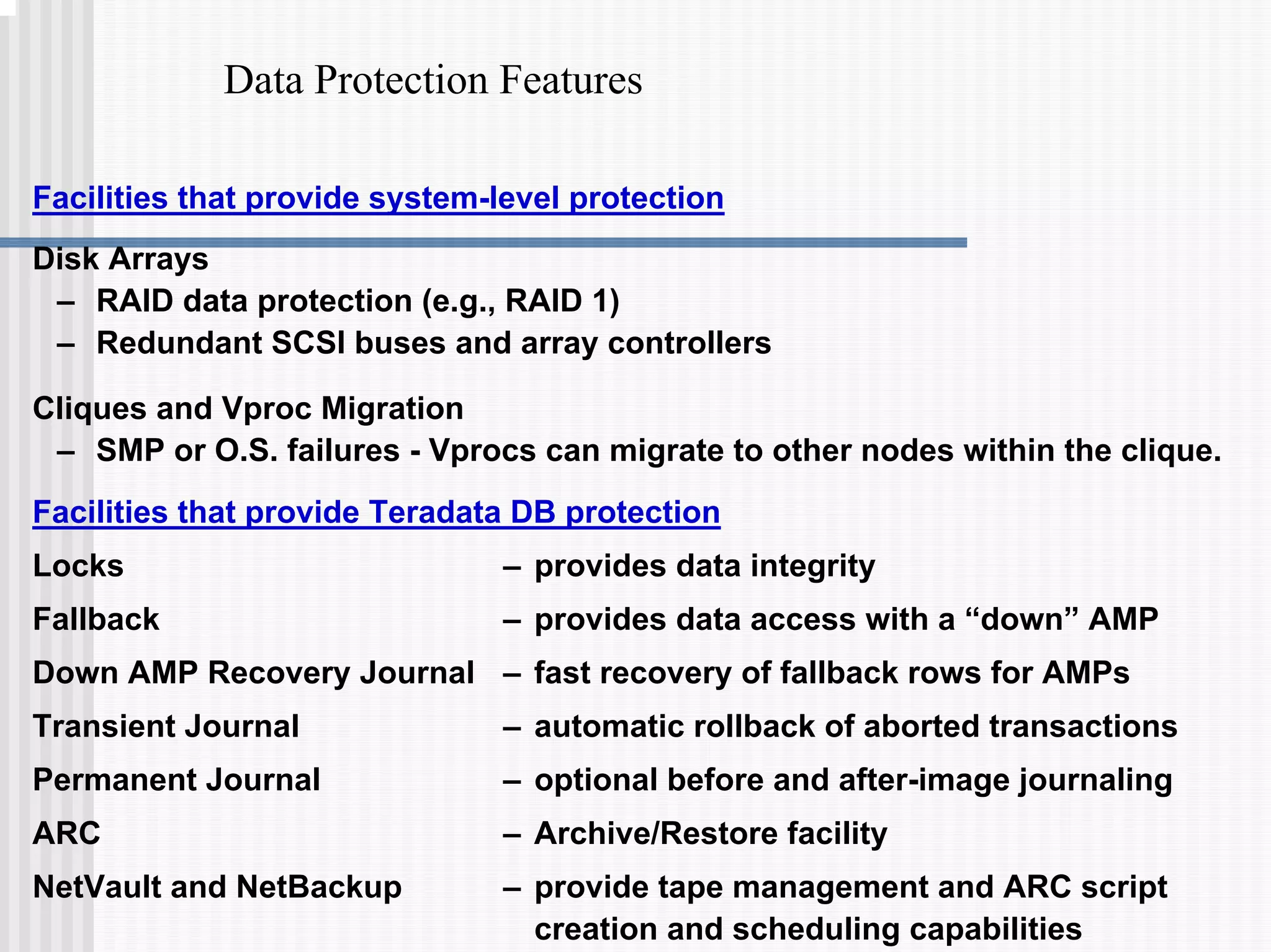
Data Protection Features
Facilities that provide system-level protection
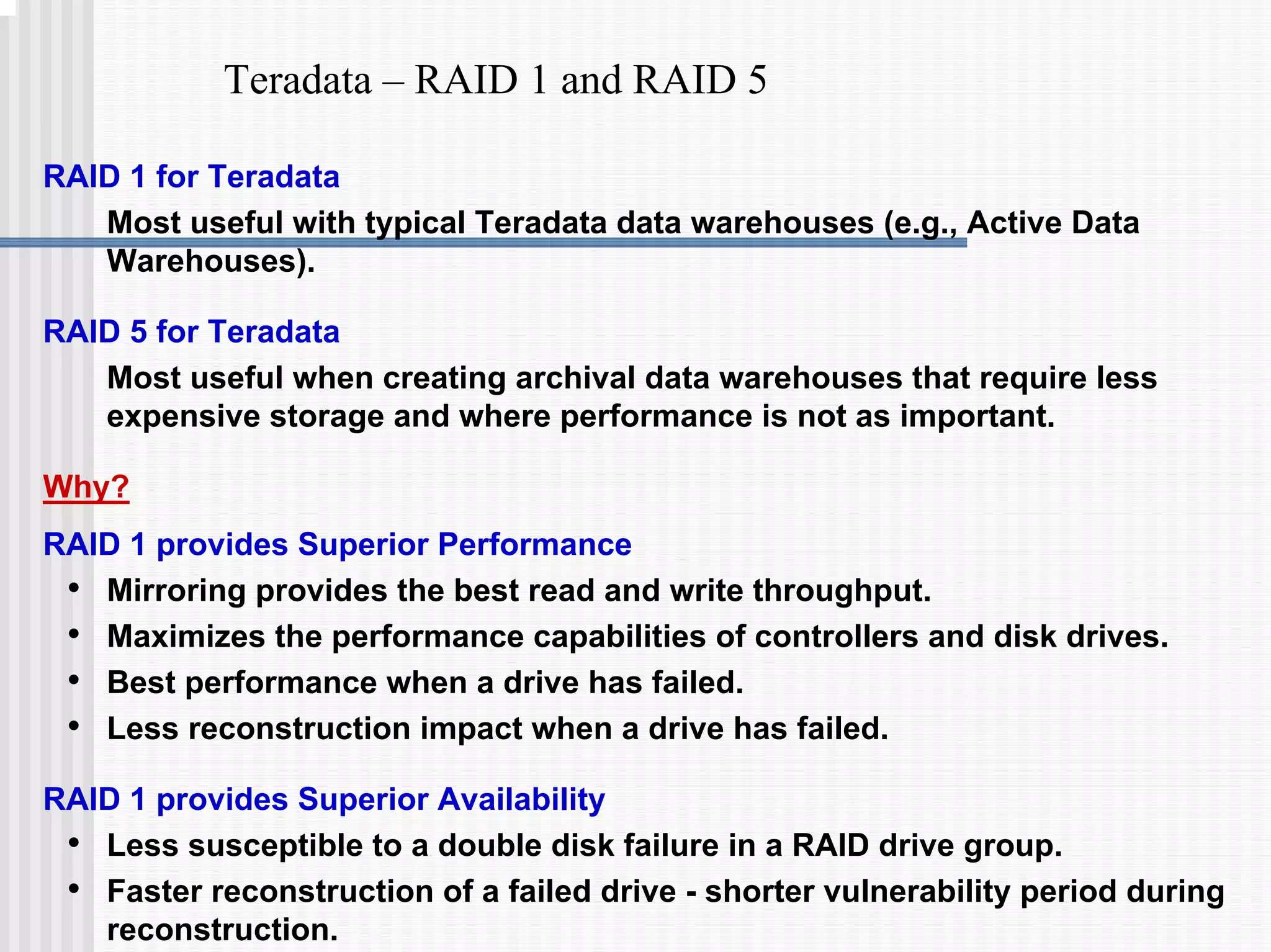
Disk Arrays
– RAID data protection (e.g., RAID 1)
– Redundant SCSI buses and array controllers
Cliques and Vproc Migration
– SMP or O.S. failures - Vprocs can migrate to other nodes within the clique.
Facilities that provide Teradata DB protection
Locks – provides data integrity
Fallback – provides data access with a “down” AMP
Down AMP Recovery Journal – fast recovery of fallback rows for AMPs
Transient Journal – automatic rollback of aborted transactions
Permanent Journal – optional before and after-image journaling
ARC – Archive/Restore facility
NetVault and NetBackup – provide tape management and ARC script
creation and scheduling capabilities
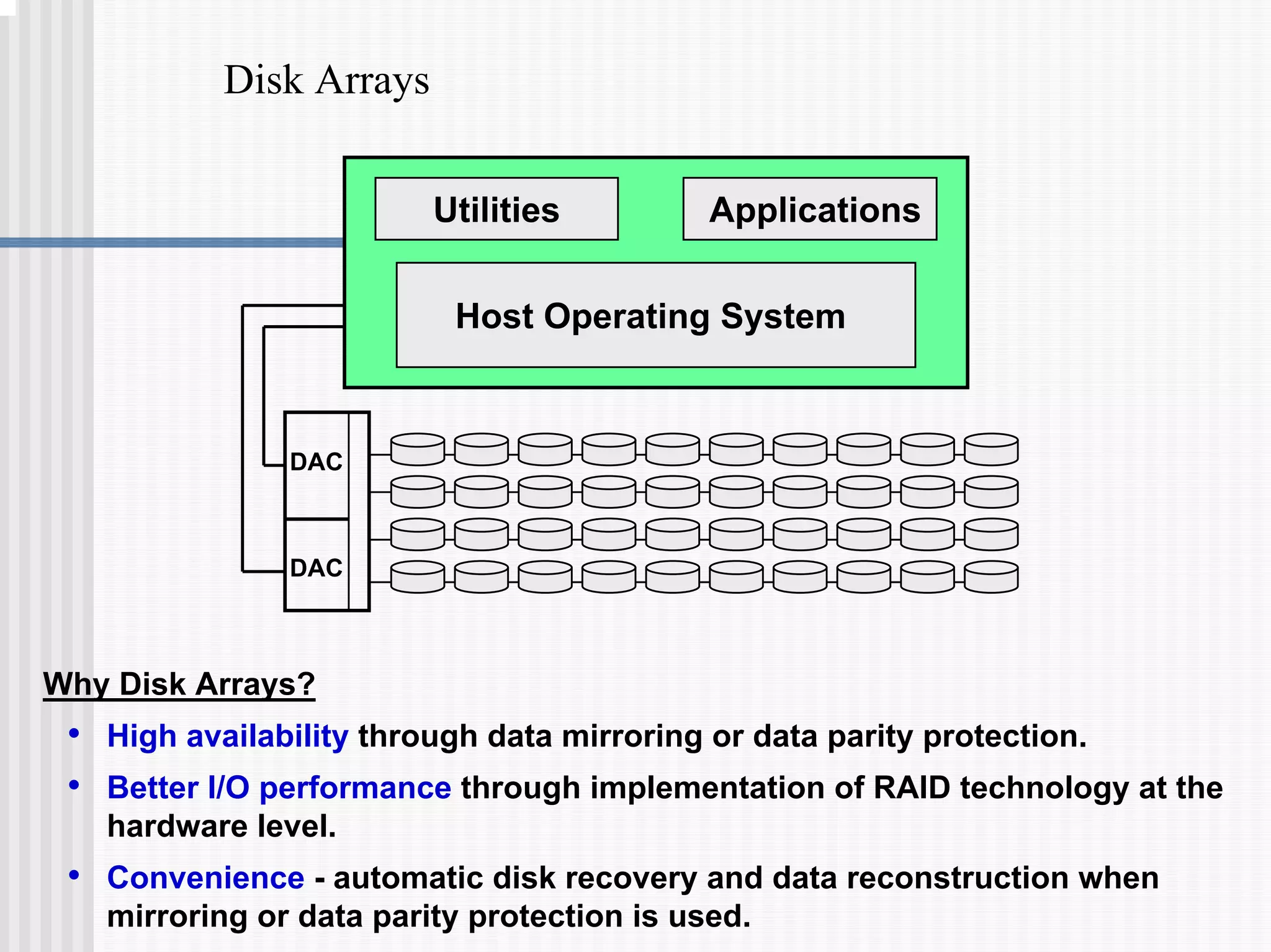
Disk Arrays
DAC
DAC
Host Operating System
Utilities Applications
Why Disk Arrays?
• High availability through data mirroring or data parity protection.
• Better I/O performance through implementation of RAID technology at the
hardware level.
• Convenience - automatic disk recovery and data reconstruction when
mirroring or data parity protection is used.
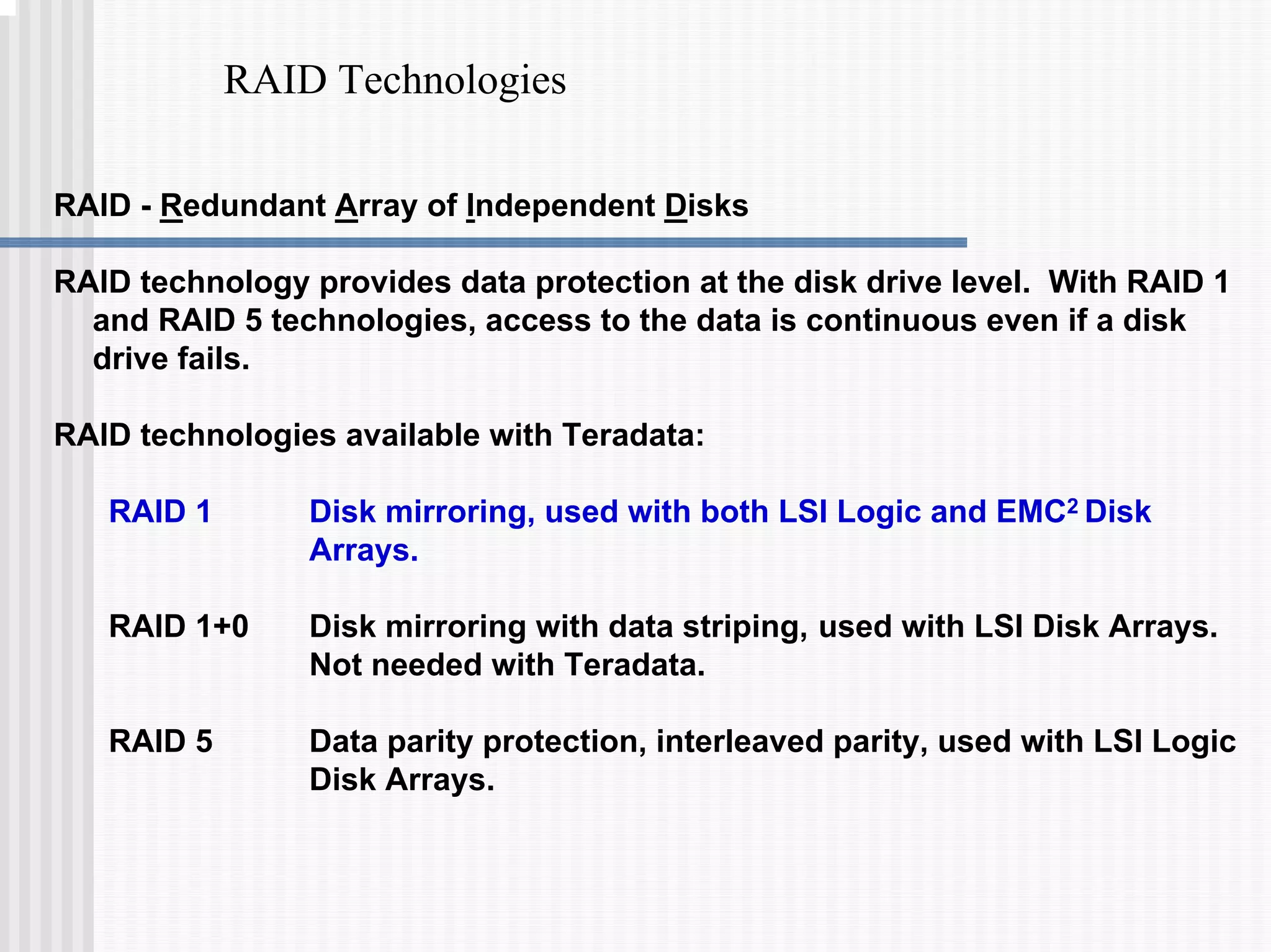
RAID Technologies
RAID - Redundant Array of Independent Disks
RAID technology provides data protection at the disk drive level. With RAID 1
and RAID 5 technologies, access to the data is continuous even if a disk
drive fails.
RAID technologies available with Teradata:
RAID 1 Disk mirroring, used with both LSI Logic and EMC2 Disk
Arrays.
RAID 1+0 Disk mirroring with data striping, used with LSI Disk Arrays.
Not needed with Teradata.
RAID 5 Data parity protection, interleaved parity, used with LSI Logic
Disk Arrays.
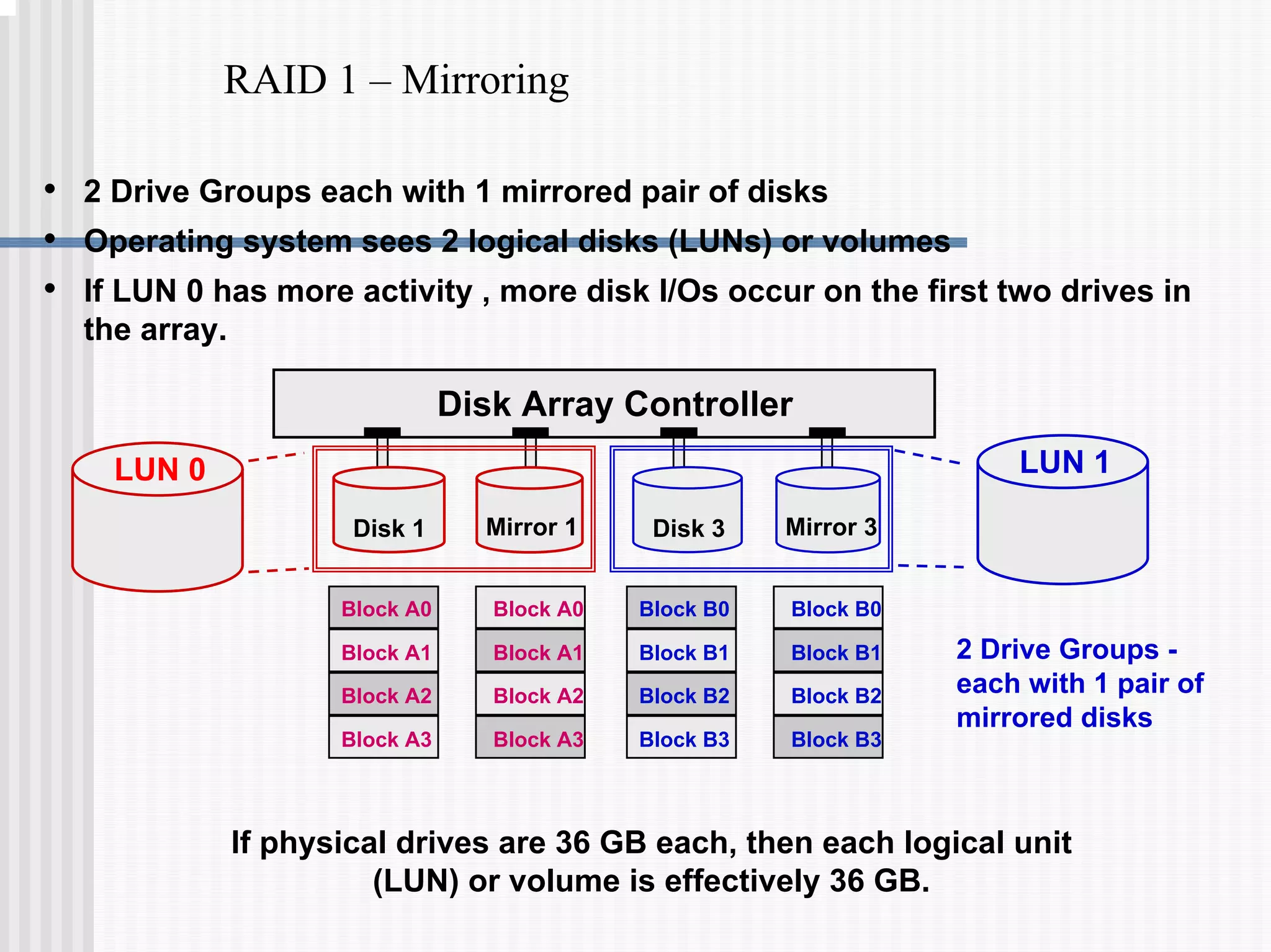
RAID 1 – Mirroring
LUN 1
LUN 0
Block A0
Block A1
Block A2
Block A3
Block A0
Block A1
Block A2
Block A3
Disk Array Controller
Block B0
Block B1
Block B2
Block B3
Block B0
Block B1
Block B2
Block B3
Mirror 3
Disk 3
Mirror 1
Disk 1
• 2 Drive Groups each with 1 mirrored pair of disks
• Operating system sees 2 logical disks (LUNs) or volumes
• If LUN 0 has more activity , more disk I/Os occur on the first two drives in
the array.
2 Drive Groups -
each with 1 pair of
mirrored disks
If physical drives are 36 GB each, then each logical unit
(LUN) or volume is effectively 36 GB.
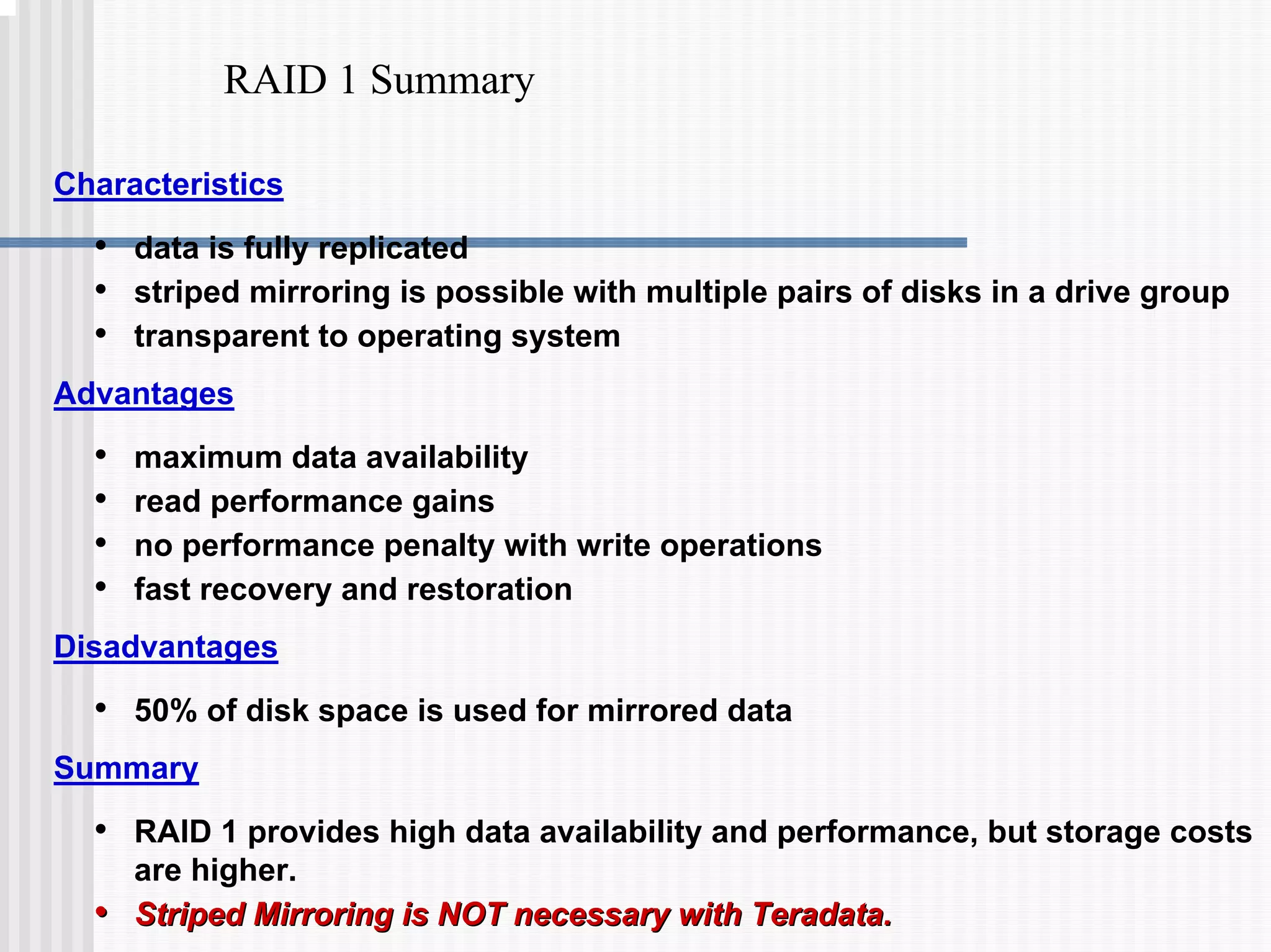
RAID 1 Summary
Characteristics
• data is fully replicated
• striped mirroring is possible with multiple pairs of disks in a drive group
• transparent to operating system
Advantages
• maximum data availability
• read performance gains
• no performance penalty with write operations
• fast recovery and restoration
Disadvantages
• 50% of disk space is used for mirrored data
Summary
• RAID 1 provides high data availability and performance, but storage costs
are higher.
•
• Striped Mirroring is NOT necessary with Teradata.
Striped Mirroring is NOT necessary with Teradata.
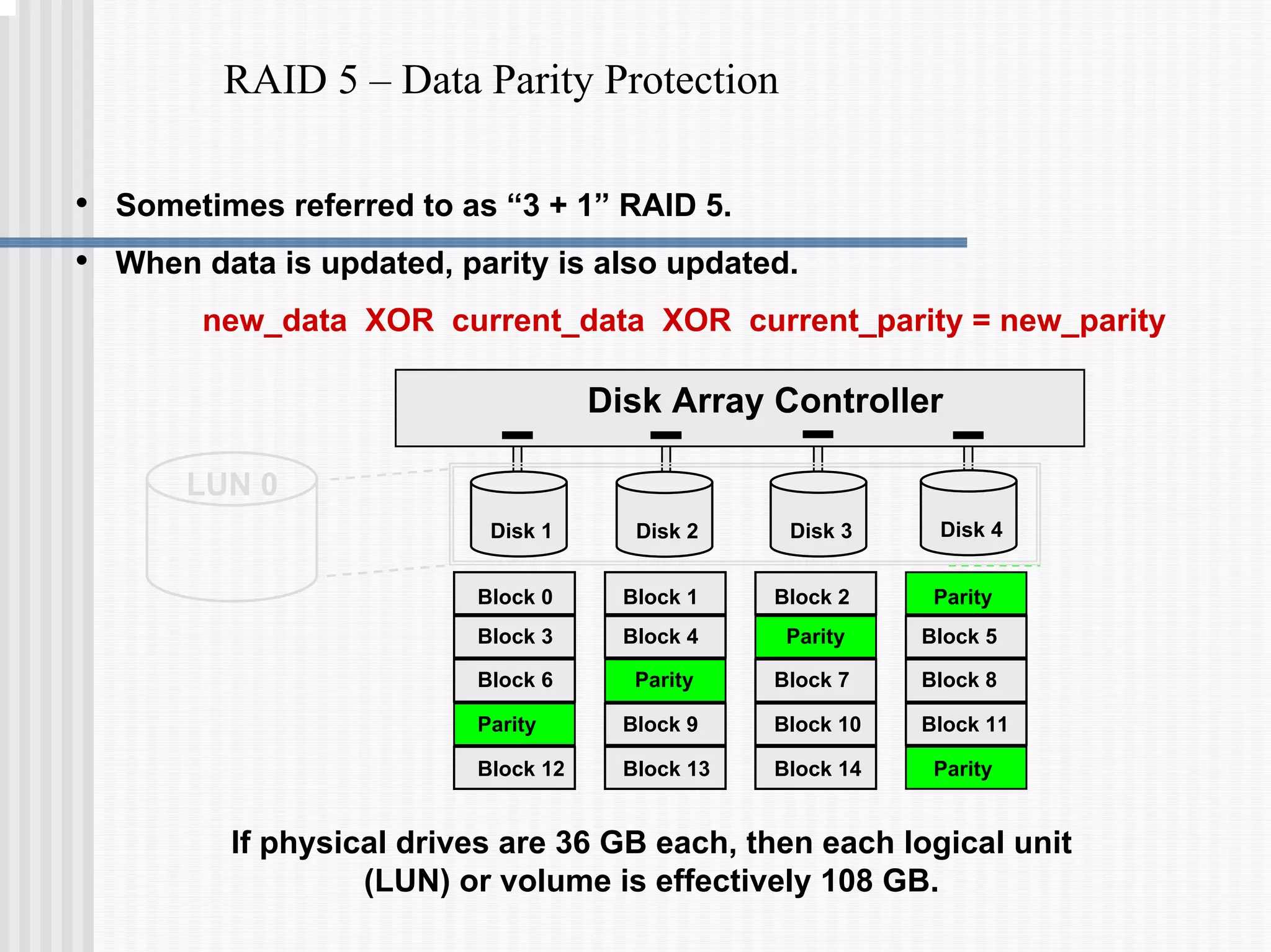
RAID 5 – Data Parity Protection
Disk Array Controller
Disk 3
Disk 1 Disk 2 Disk 4
Block 0 Block 1 Block 2 Parity
Block 3 Block 4 Parity Block 5
Block 6 Parity Block 7 Block 8
Parity Block 9 Block 10 Block 11
Block 12 Block 13 Block 14 Parity
LUN 0
• Sometimes referred to as “3 + 1” RAID 5.
• When data is updated, parity is also updated.
new_data XOR current_data XOR current_parity = new_parity
If physical drives are 36 GB each, then each logical unit
(LUN) or volume is effectively 108 GB.
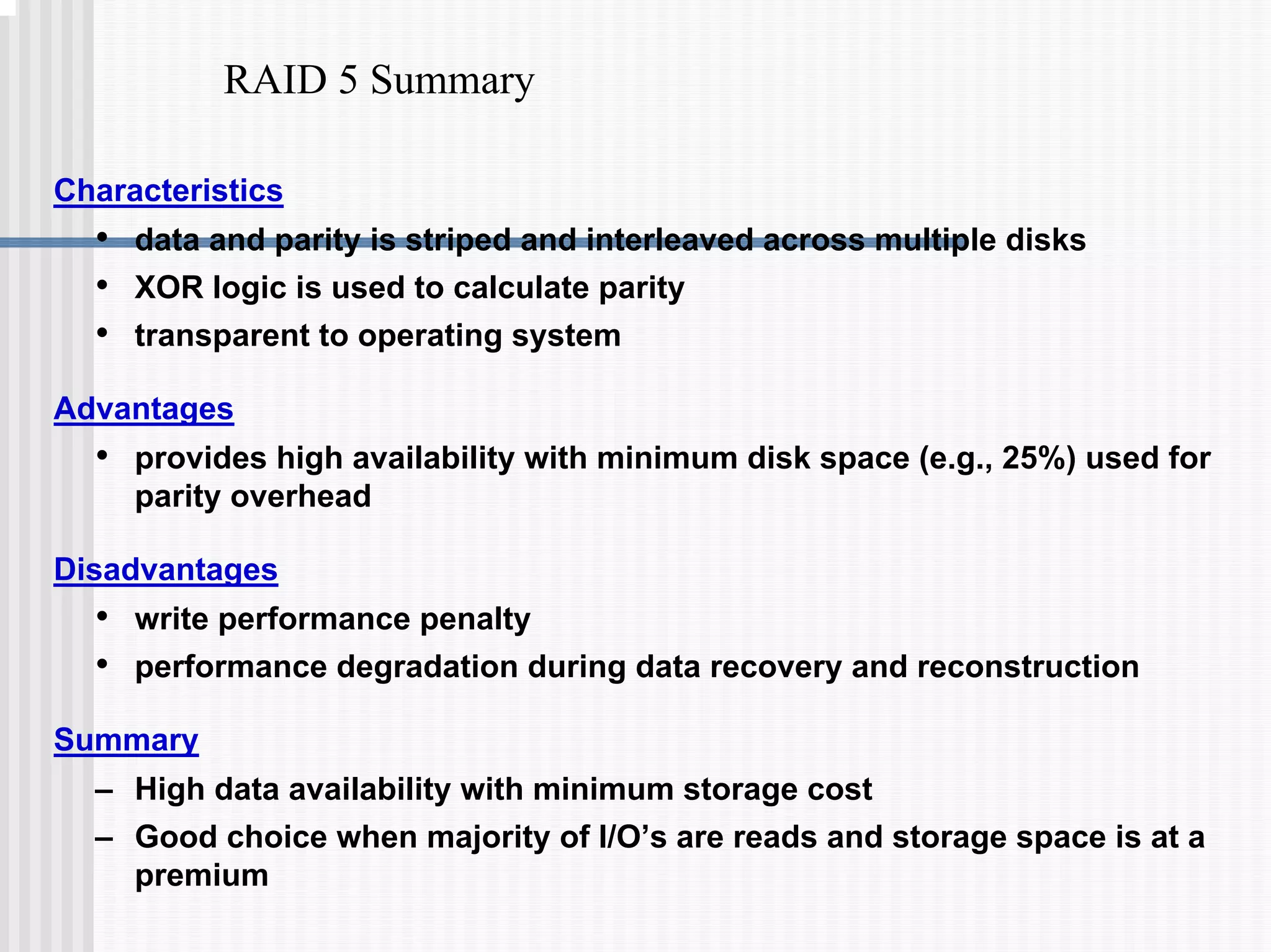
RAID 5 Summary
Characteristics
• data and parity is striped and interleaved across multiple disks
• XOR logic is used to calculate parity
• transparent to operating system
Advantages
• provides high availability with minimum disk space (e.g., 25%) used for
parity overhead
Disadvantages
• write performance penalty
• performance degradation during data recovery and reconstruction
Summary
– High data availability with minimum storage cost
– Good choice when majority of I/O’s are reads and storage space is at a
premium
Teradata – RAID 1 and RAID 5
RAID 1 for Teradata
Most useful with typical Teradata data warehouses (e.g., Active Data
Warehouses).
RAID 5 for Teradata
Most useful when creating archival data warehouses that require less
expensive storage and where performance is not as important.
Why?
RAID 1 provides Superior Performance
• Mirroring provides the best read and write throughput.
• Maximizes the performance capabilities of controllers and disk drives.
• Best performance when a drive has failed.
• Less reconstruction impact when a drive has failed.
RAID 1 provides Superior Availability
• Less susceptible to a double disk failure in a RAID drive group.
• Faster reconstruction of a failed drive - shorter vulnerability period during
reconstruction.
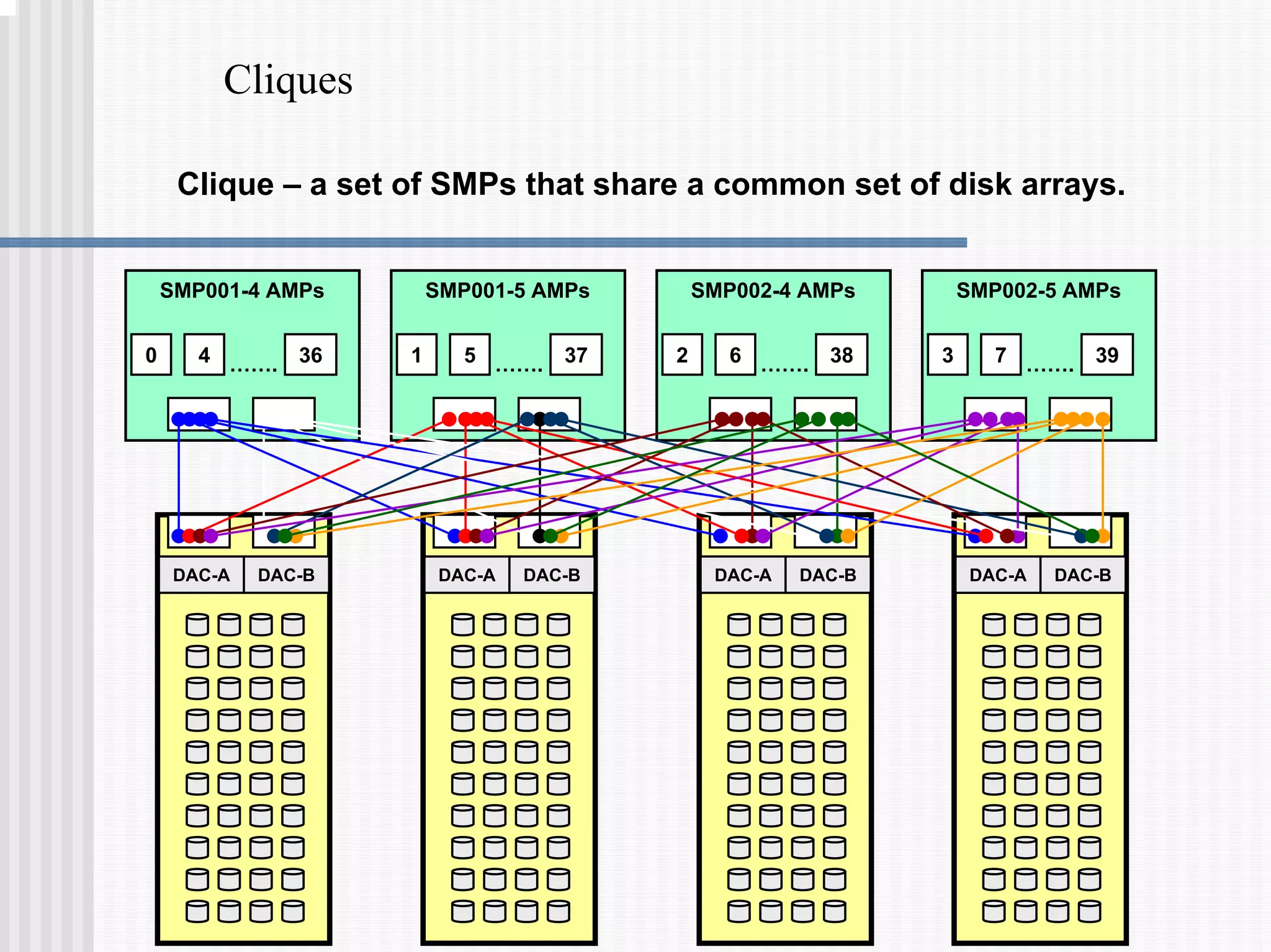
Cliques
DAC-A DAC-B
DAC-A DAC-B
DAC-A DAC-B DAC-A DAC-B
0 4 36
…….
SMP001-4 AMPs
1 5 37
…….
SMP001-5 AMPs
2 6 38
…….
SMP002-4 AMPs
3 7 39
…….
SMP002-5 AMPs
Clique – a set of SMPs that share a common set of disk arrays.
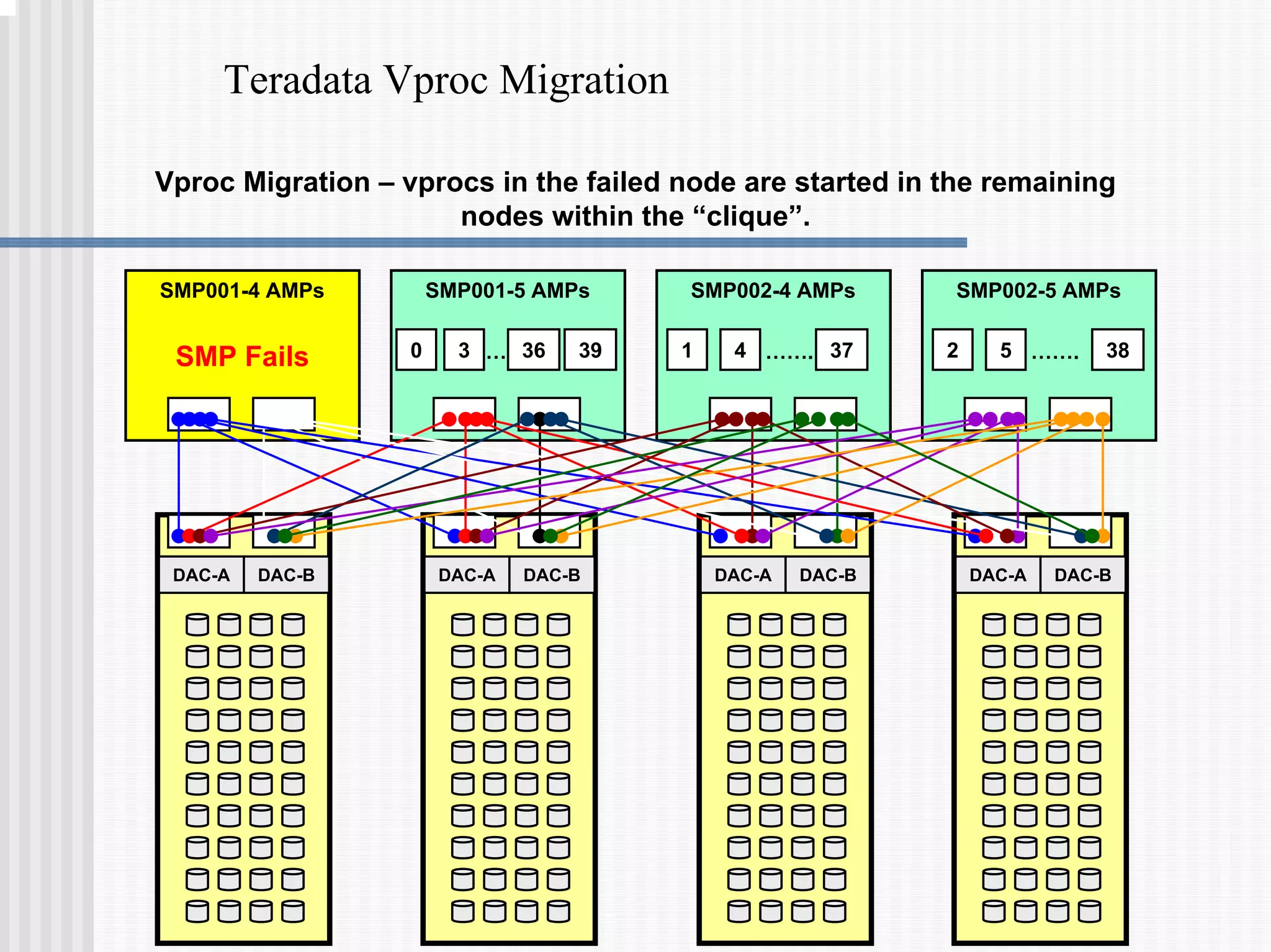
Teradata Vproc Migration
Vproc Migration – vprocs in the failed node are started in the remaining
nodes within the “clique”.
SMP Fails
DAC-A DAC-B
DAC-A DAC-B
DAC-A DAC-B DAC-A DAC-B
SMP001-4 AMPs
0 3 39
…
SMP001-5 AMPs
1 4 37
…….
SMP002-4 AMPs
2 5 38
…….
SMP002-5 AMPs
36
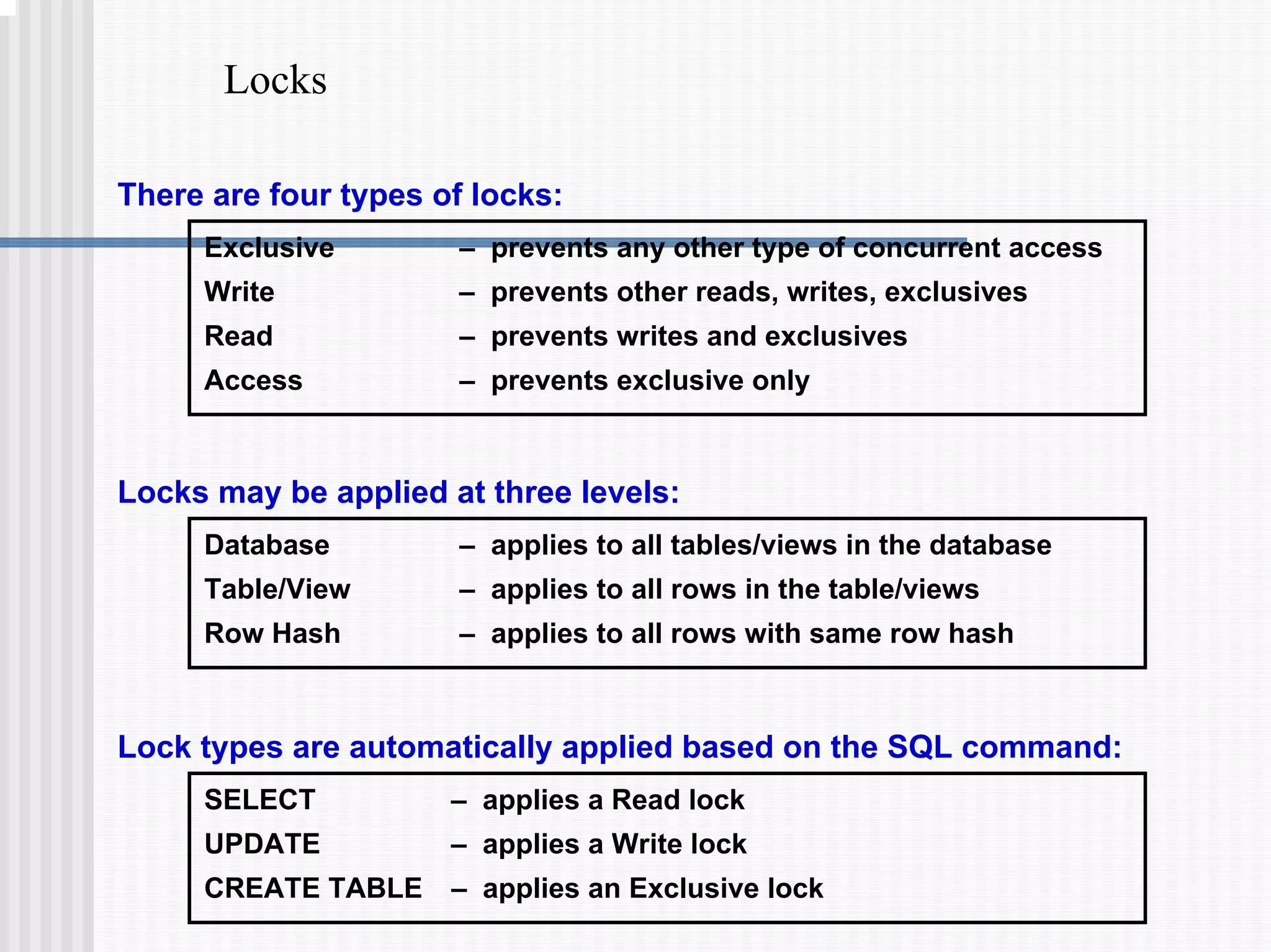
Locks
Exclusive – prevents any other type of concurrent access
Write – prevents other reads, writes, exclusives
Read – prevents writes and exclusives
Access – prevents exclusive only
There are four types of locks:
Database – applies to all tables/views in the database
Table/View – applies to all rows in the table/views
Row Hash – applies to all rows with same row hash
Locks may be applied at three levels:
Lock types are automatically applied based on the SQL command:
SELECT – applies a Read lock
UPDATE – applies a Write lock
CREATE TABLE – applies an Exclusive lock
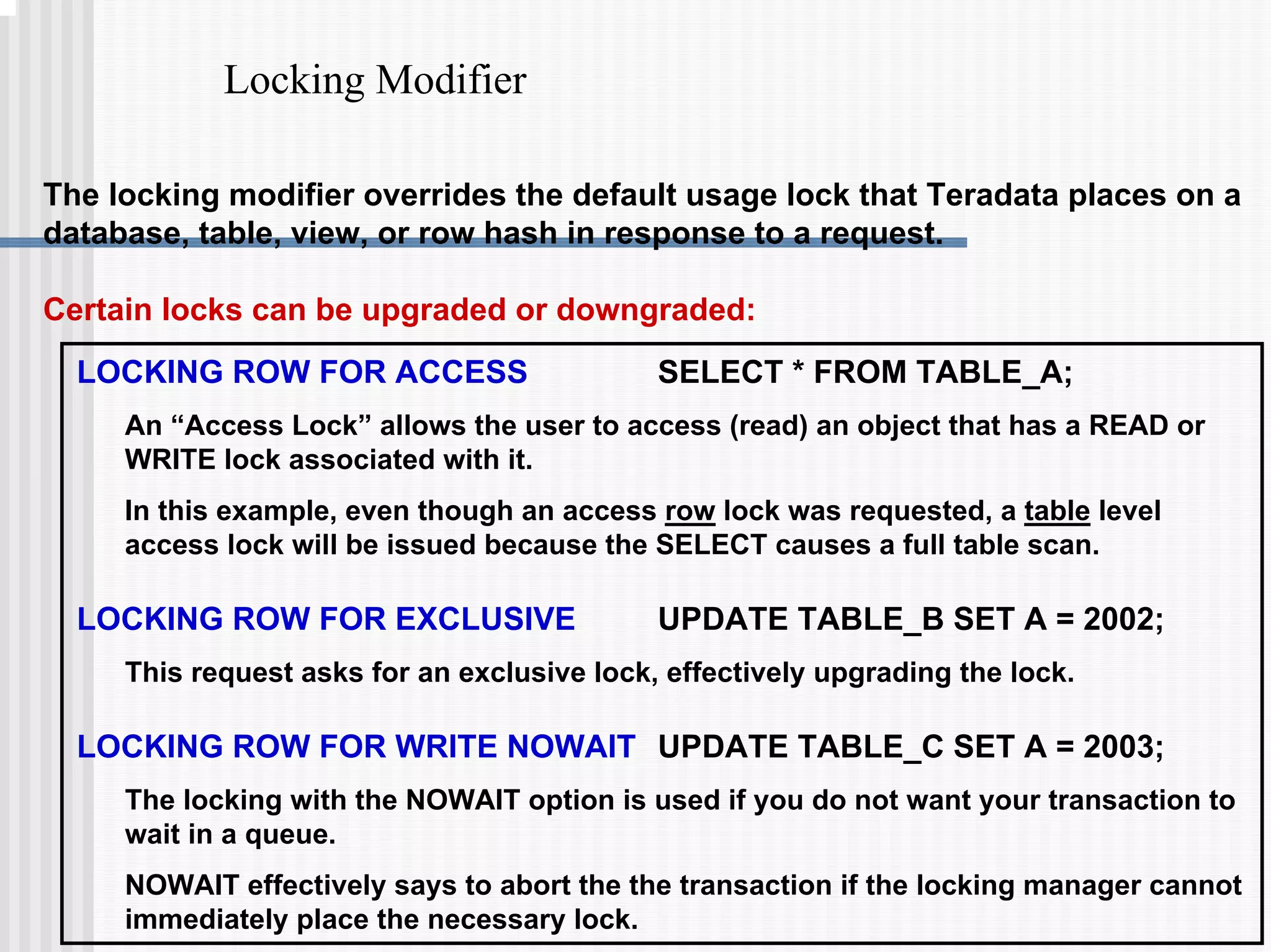
Locking Modifier
LOCKING ROW FOR ACCESS SELECT * FROM TABLE_A;
An “Access Lock” allows the user to access (read) an object that has a READ or
WRITE lock associated with it.
In this example, even though an access row lock was requested, a table level
access lock will be issued because the SELECT causes a full table scan.
LOCKING ROW FOR EXCLUSIVE UPDATE TABLE_B SET A = 2002;
This request asks for an exclusive lock, effectively upgrading the lock.
LOCKING ROW FOR WRITE NOWAIT UPDATE TABLE_C SET A = 2003;
The locking with the NOWAIT option is used if you do not want your transaction to
wait in a queue.
NOWAIT effectively says to abort the the transaction if the locking manager cannot
immediately place the necessary lock.
The locking modifier overrides the default usage lock that Teradata places on a
database, table, view, or row hash in response to a request.
Certain locks can be upgraded or downgraded:
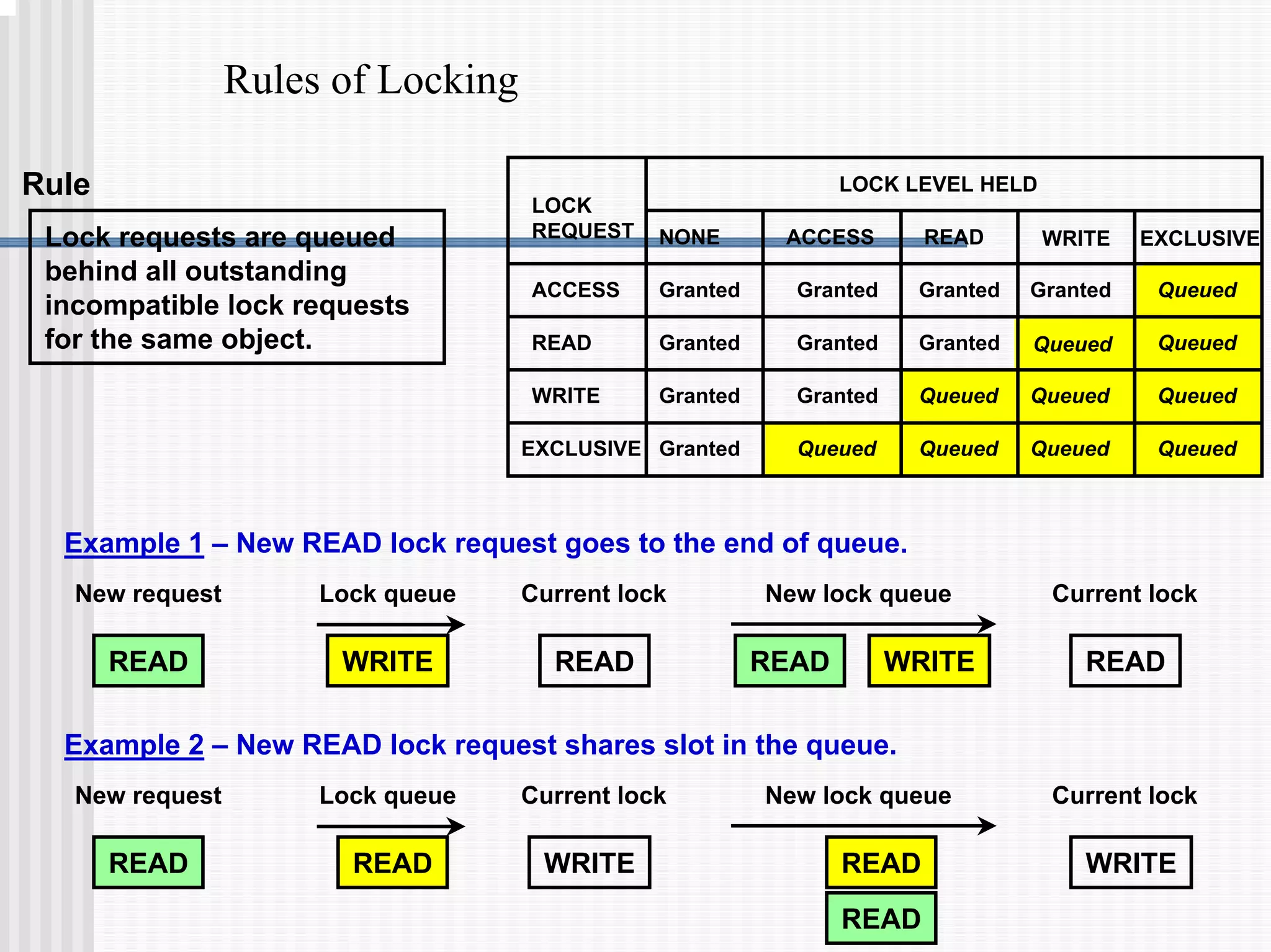
Rules of Locking
Lock requests are queued
behind all outstanding
incompatible lock requests
for the same object.
Rule
Example 1 – New READ lock request goes to the end of queue.
READ WRITE READ READ WRITE READ
New request New lock queue
Lock queue Current lock Current lock
Example 2 – New READ lock request shares slot in the queue.
READ READ
New request New lock queue
Lock queue Current lock Current lock
READ WRITE WRITE
READ
LOCK LEVEL HELD
LOCK
REQUEST
ACCESS
READ
WRITE
EXCLUSIVE
NONE ACCESS READ WRITE EXCLUSIVE
Granted
Granted Granted
Granted
Granted
Granted
Granted
Granted
Granted Granted Queued
Queued
Queued
Queued
Queued
Queued
Queued
Queued
Queued
Queued
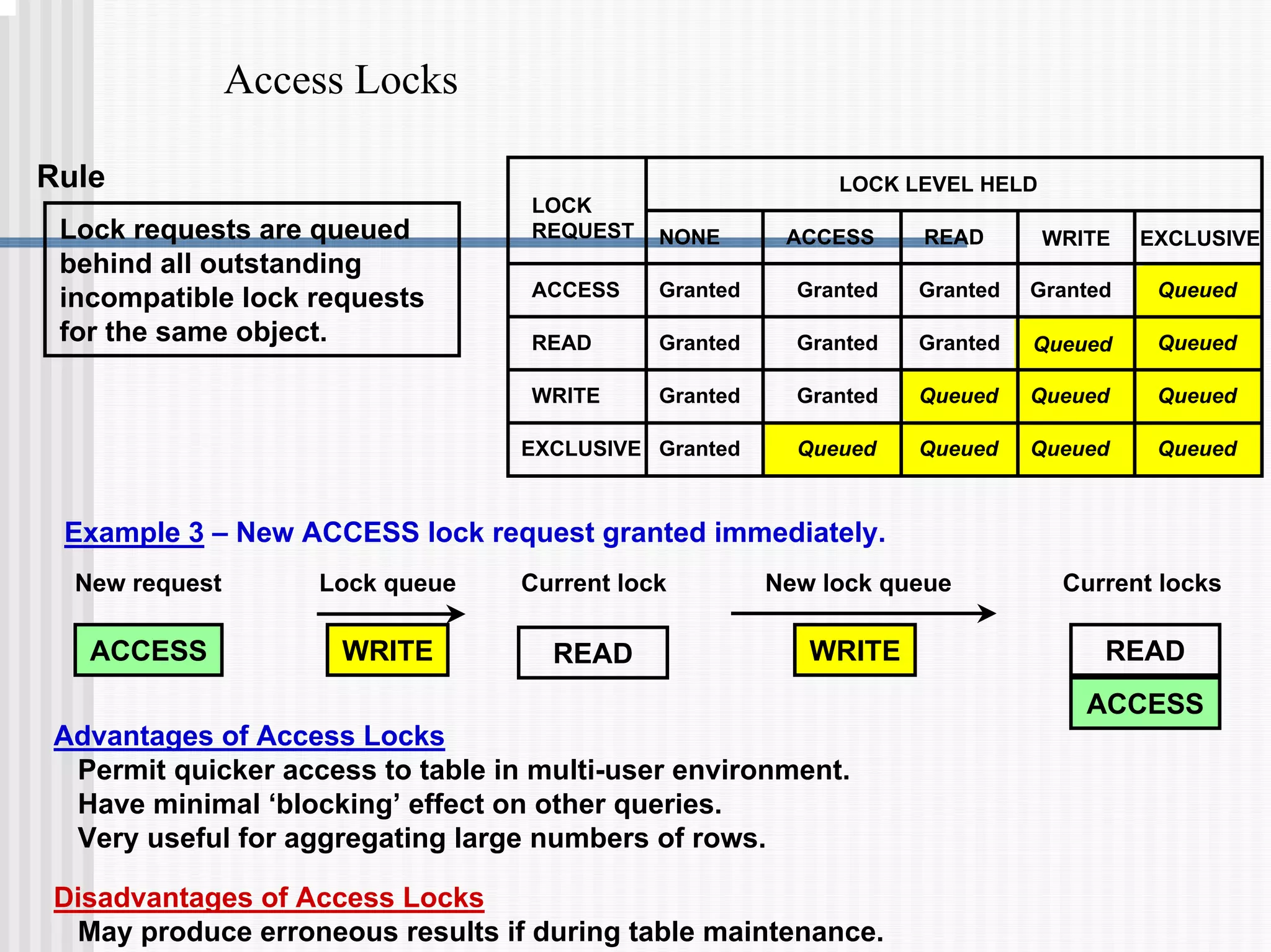
Access Locks
Lock requests are queued
behind all outstanding
incompatible lock requests
for the same object.
Rule
Example 3 – New ACCESS lock request granted immediately.
ACCESS WRITE WRITE READ
New request New lock queue
Lock queue Current lock Current locks
ACCESS
READ
Advantages of Access Locks
Permit quicker access to table in multi-user environment.
Have minimal ‘blocking’ effect on other queries.
Very useful for aggregating large numbers of rows.
Disadvantages of Access Locks
May produce erroneous results if during table maintenance.
LOCK LEVEL HELD
LOCK
REQUEST
ACCESS
READ
WRITE
EXCLUSIVE
NONE ACCESS READ WRITE EXCLUSIVE
Granted
Granted Granted
Granted
Granted
Granted
Granted
Granted
Granted Granted Queued
Queued
Queued
Queued
Queued
Queued
Queued
Queued
Queued
Queued
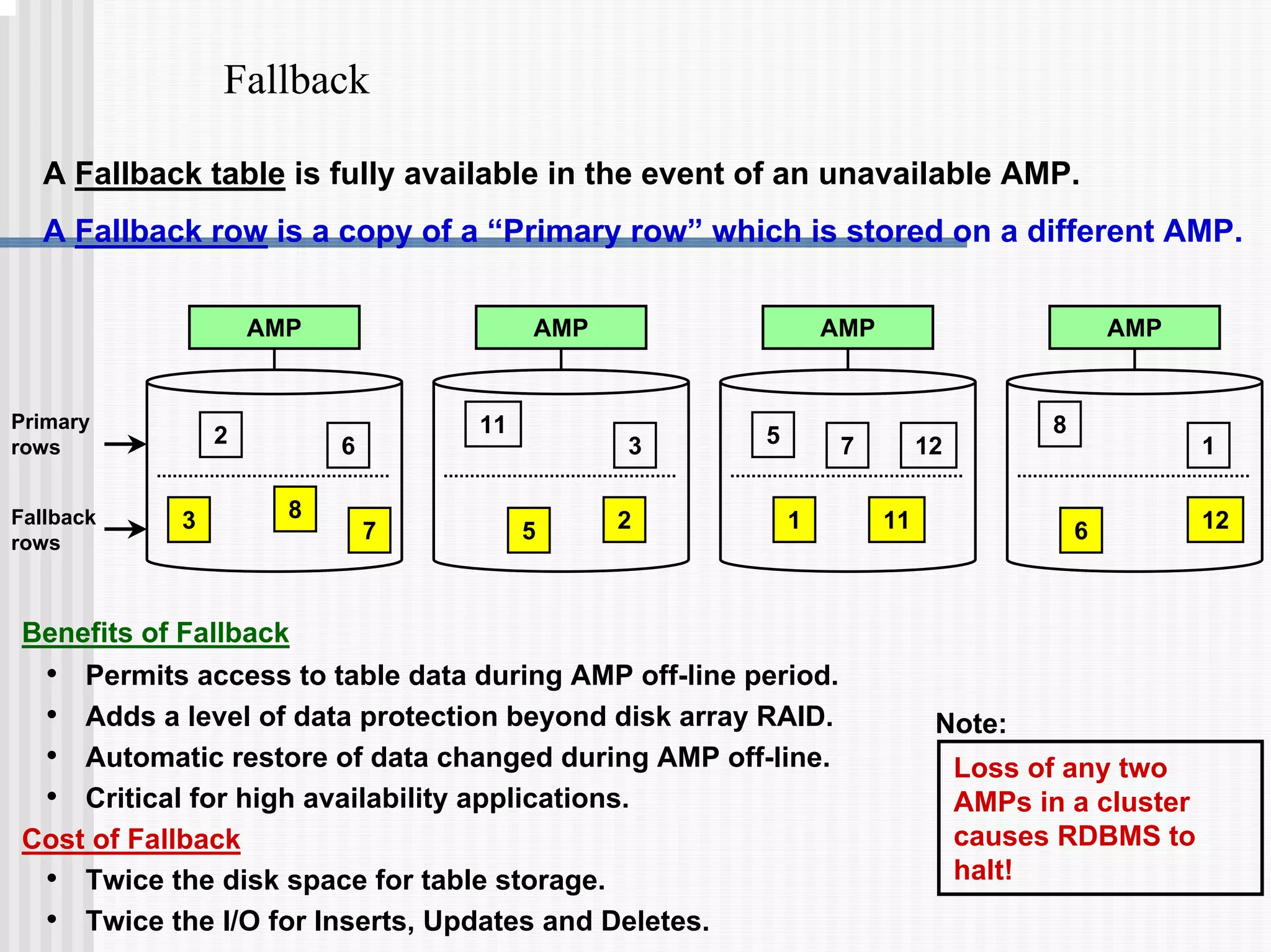
Fallback
A Fallback table is fully available in the event of an unavailable AMP.
A Fallback row is a copy of a “Primary row” which is stored on a different AMP.
Benefits of Fallback
• Permits access to table data during AMP off-line period.
• Adds a level of data protection beyond disk array RAID.
• Automatic restore of data changed during AMP off-line.
• Critical for high availability applications.
Cost of Fallback
• Twice the disk space for table storage.
• Twice the I/O for Inserts, Updates and Deletes.
Loss of any two
AMPs in a cluster
causes RDBMS to
halt!
Note:
Primary
rows
Fallback
rows
AMP
2 6
11
3 5 12
8
1
7
3 8
5 2 1 11 6 12
7
AMP AMP AMP
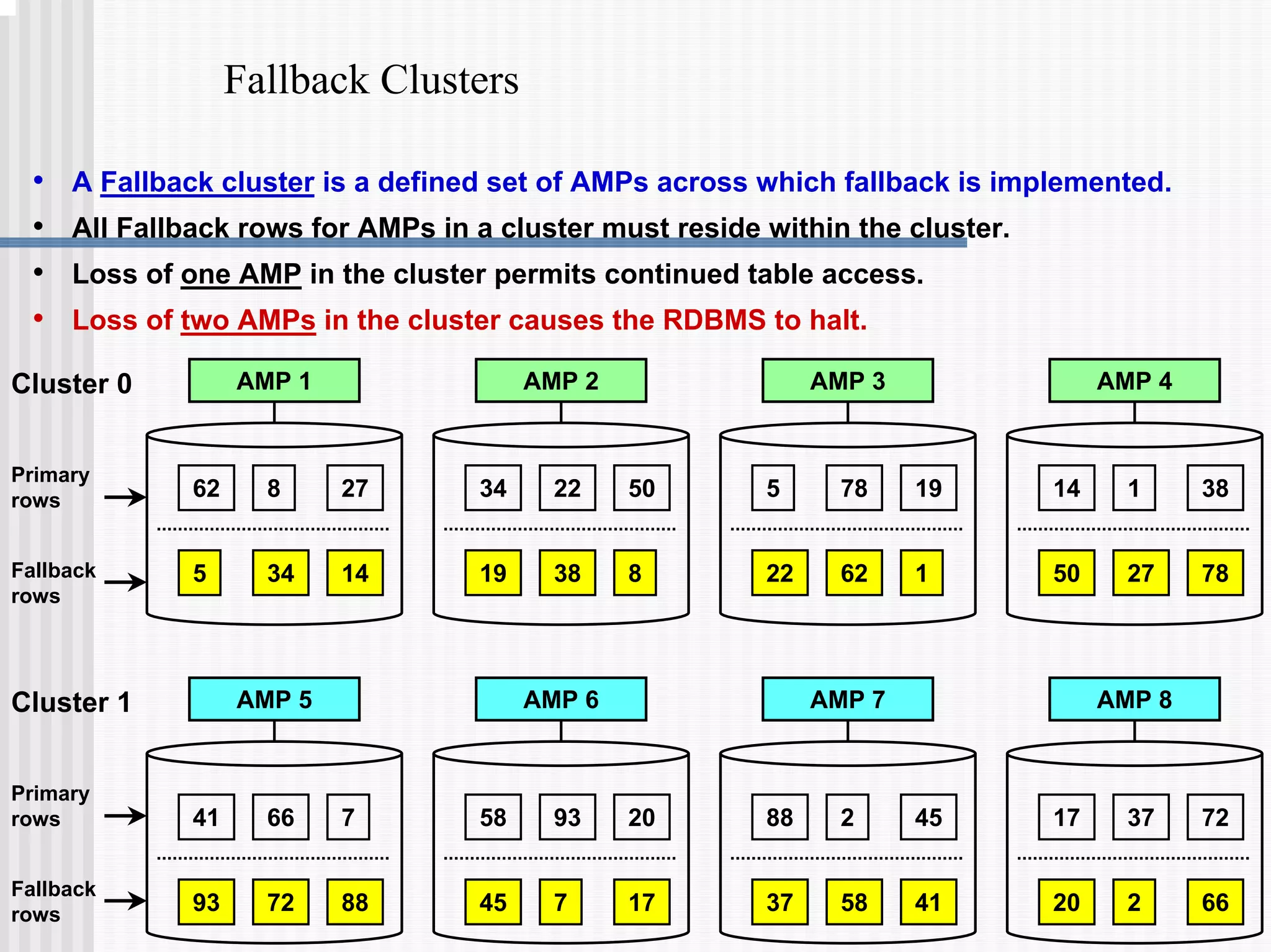
Fallback Clusters
• A Fallback cluster is a defined set of AMPs across which fallback is implemented.
• All Fallback rows for AMPs in a cluster must reside within the cluster.
• Loss of one AMP in the cluster permits continued table access.
• Loss of two AMPs in the cluster causes the RDBMS to halt.
Primary
rows
Fallback
rows
AMP 1
62 27
8
5 34 14
AMP 2 AMP 3 AMP 4
Cluster 0
34 50
22 5 19
78 14 38
1
19 38 8 22 62 1 50 27 78
Primary
rows
Fallback
rows
AMP 5 AMP 6 AMP 7 AMP 8
Cluster 1
41 7
66
93 72 88
58 20
93 88 45
2 17 72
37
45 7 17 37 58 41 20 2 66
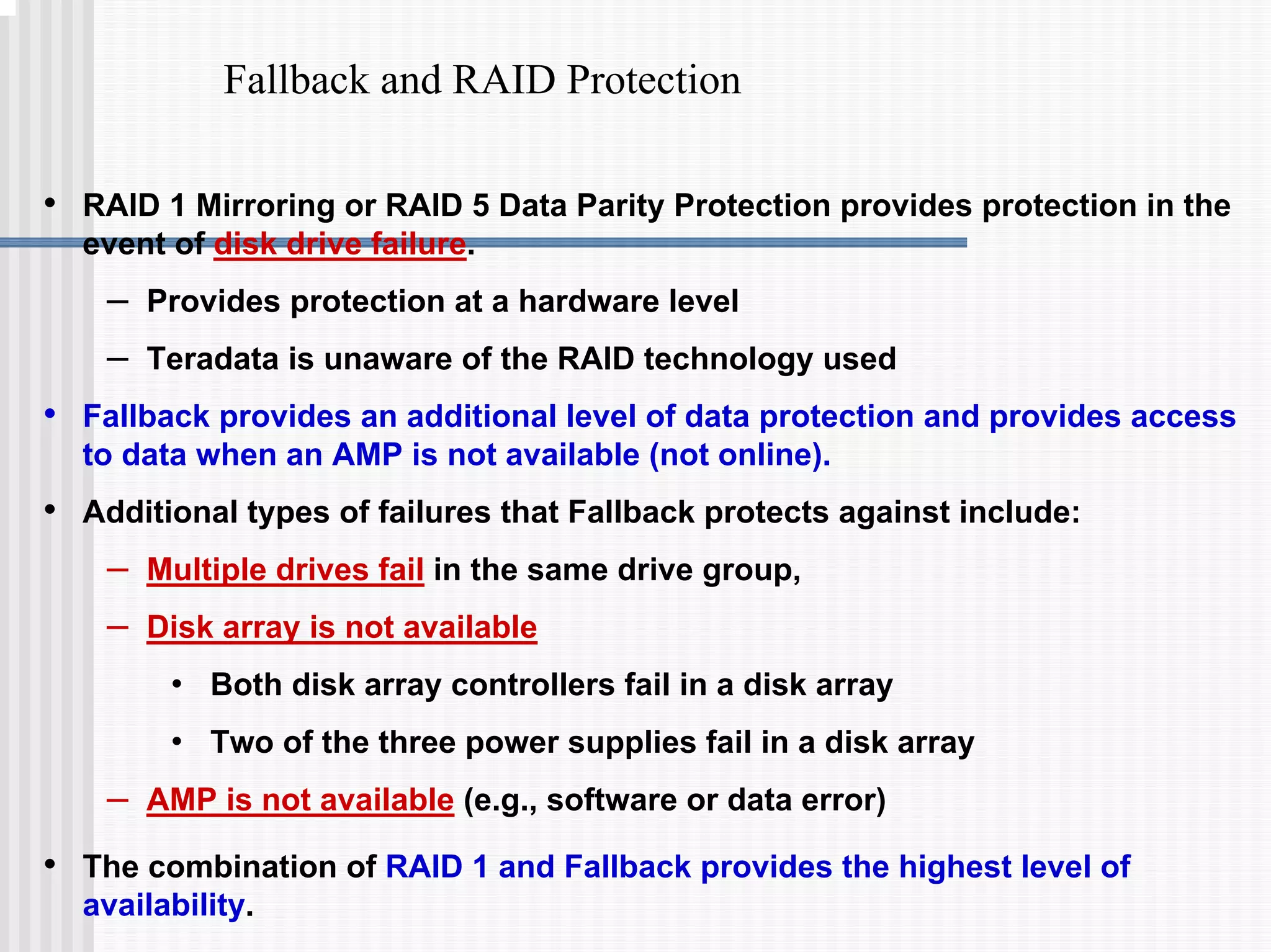
Fallback and RAID Protection
• RAID 1 Mirroring or RAID 5 Data Parity Protection provides protection in the
event of disk drive failure.
– Provides protection at a hardware level
– Teradata is unaware of the RAID technology used
• Fallback provides an additional level of data protection and provides access
to data when an AMP is not available (not online).
• Additional types of failures that Fallback protects against include:
– Multiple drives fail in the same drive group,
– Disk array is not available
• Both disk array controllers fail in a disk array
• Two of the three power supplies fail in a disk array
– AMP is not available (e.g., software or data error)
• The combination of RAID 1 and Fallback provides the highest level of
availability.
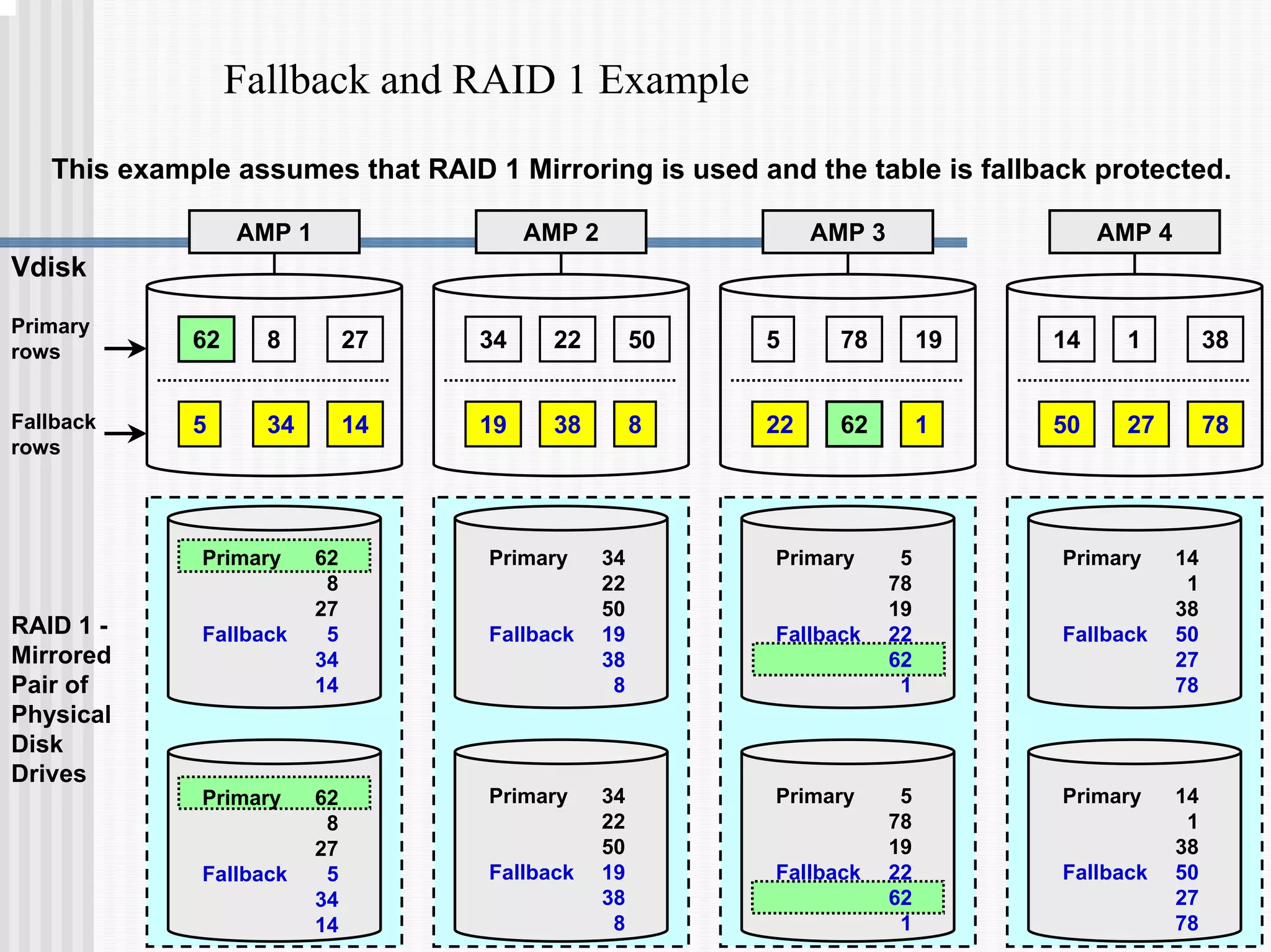
Fallback and RAID 1 Example
Primary
rows
Fallback
rows
AMP 1
62 27
8
5 34 14
AMP 2 AMP 3 AMP 4
Vdisk
34 50
22 5 19
78 14 38
1
19 38 8 22 62 1 50 27 78
RAID 1 -
Mirrored
Pair of
Physical
Disk
Drives
Primary 34
22
50
Fallback 19
38
8
Primary 34
22
50
Fallback 19
38
8
Primary 14
1
38
Fallback 50
27
78
Primary 14
1
38
Fallback 50
27
78
Primary 62
8
27
Fallback 5
34
14
Primary 62
8
27
Fallback 5
34
14
Primary 5
78
19
Fallback 22
62
1
Primary 5
78
19
Fallback 22
62
1
This example assumes that RAID 1 Mirroring is used and the table is fallback protected.
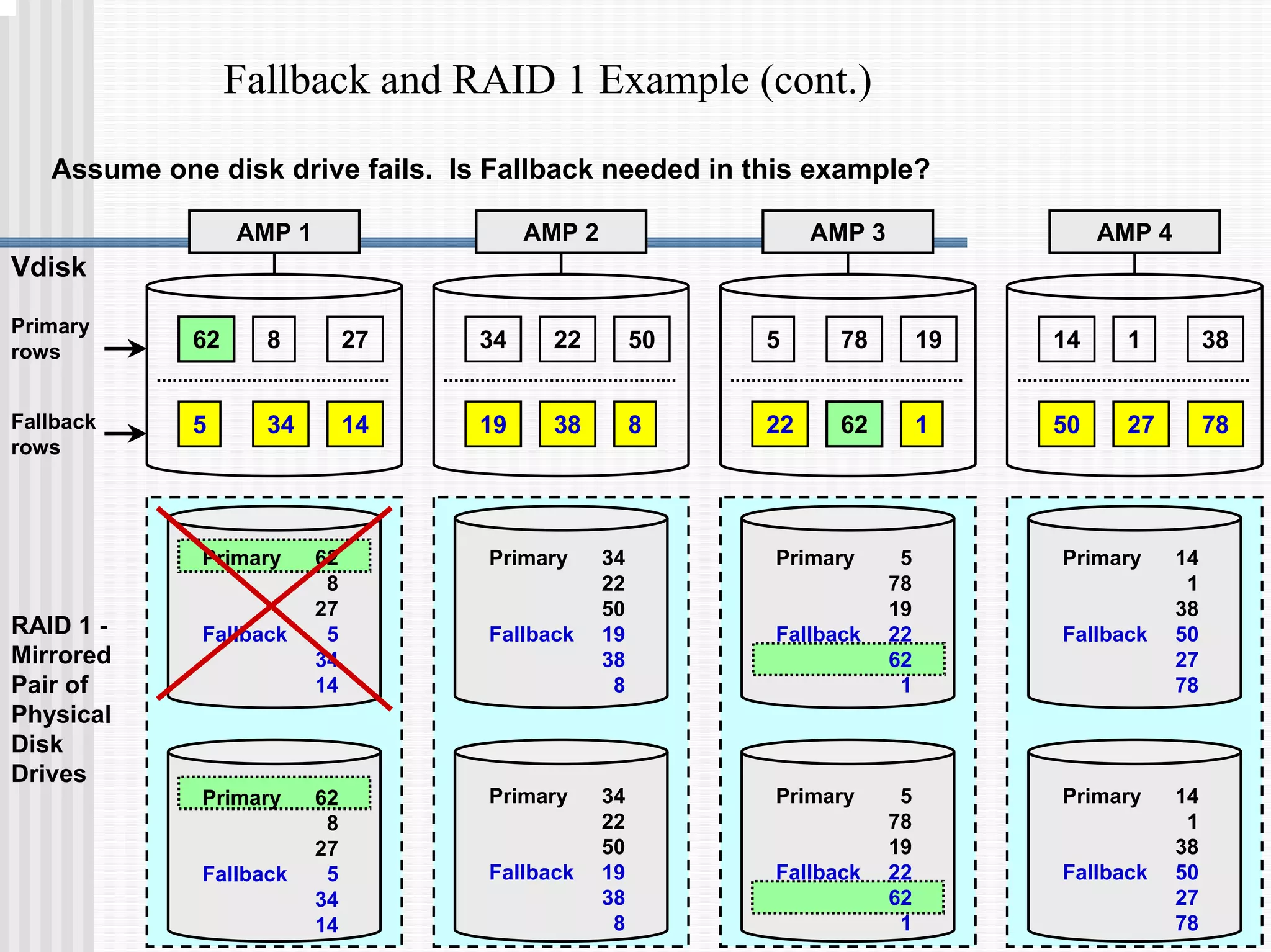
Fallback and RAID 1 Example (cont.)
Primary
rows
Fallback
rows
AMP 1
62 27
8
5 34 14
AMP 2 AMP 3 AMP 4
Vdisk
34 50
22 5 19
78 14 38
1
19 38 8 22 62 1 50 27 78
RAID 1 -
Mirrored
Pair of
Physical
Disk
Drives
Primary 34
22
50
Fallback 19
38
8
Primary 34
22
50
Fallback 19
38
8
Primary 14
1
38
Fallback 50
27
78
Primary 14
1
38
Fallback 50
27
78
Primary 62
8
27
Fallback 5
34
14
Primary 62
8
27
Fallback 5
34
14
Primary 5
78
19
Fallback 22
62
1
Primary 5
78
19
Fallback 22
62
1
Assume one disk drive fails. Is Fallback needed in this example?
Fallback and RAID 1 Example (cont.)
Primary
rows
Fallback
rows
AMP 1
62 27
8
5 34 14
AMP 2 AMP 3 AMP 4
Vdisk
34 50
22 5 19
78 14 38
1
19 38 8 22 62 1 50 27 78
RAID 1 -
Mirrored
Pair of
Physical
Disk
Drives
Primary 34
22
50
Fallback 19
38
8
Primary 34
22
50
Fallback 19
38
8
Primary 14
1
38
Fallback 50
27
78
Primary 14
1
38
Fallback 50
27
78
Primary 62
8
27
Fallback 5
34
14
Primary 62
8
27
Fallback 5
34
14
Primary 5
78
19
Fallback 22
62
1
Primary 5
78
19
Fallback 22
62
1
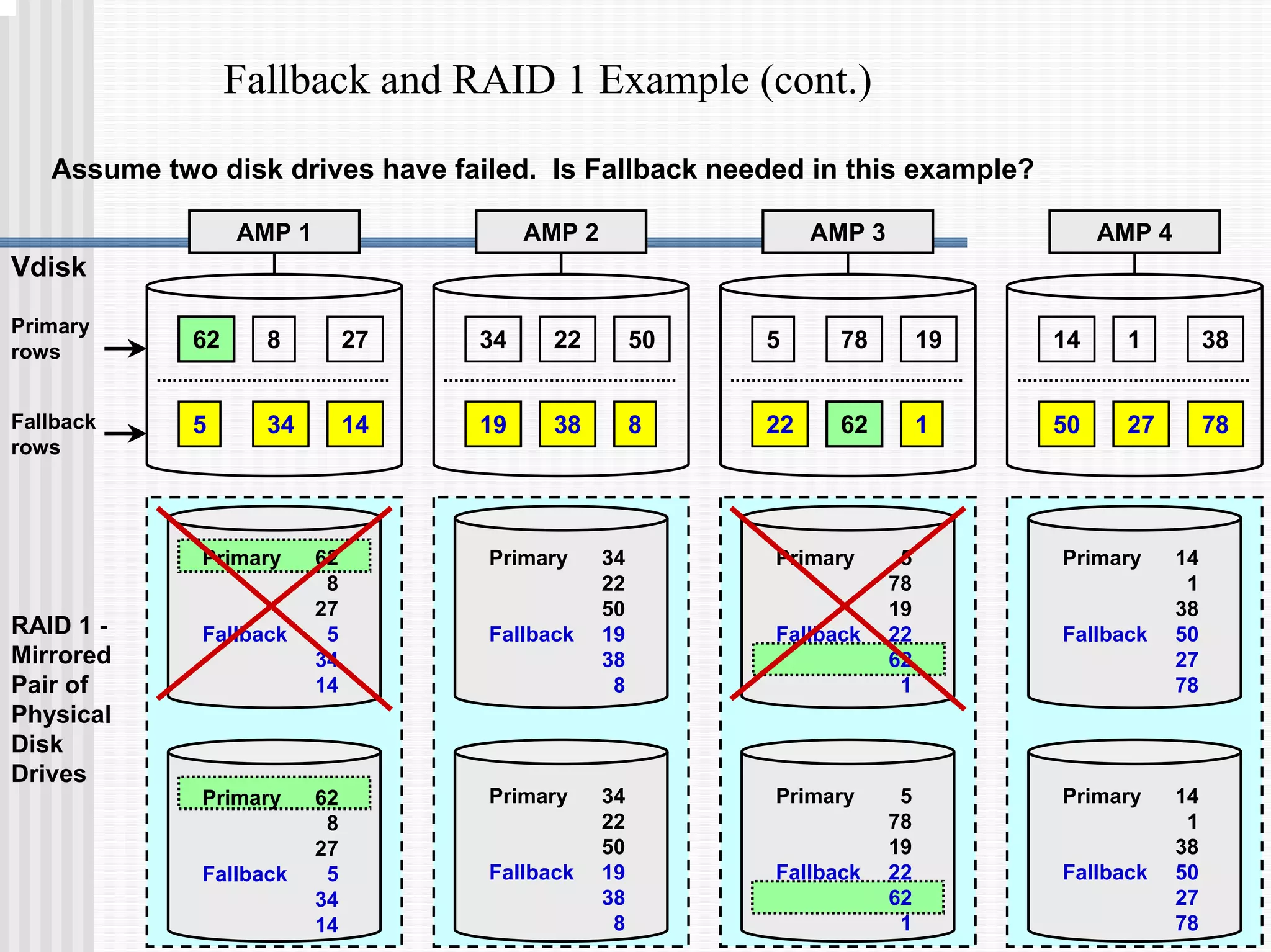
Assume two disk drives have failed. Is Fallback needed in this example?
Fallback and RAID 1 Example (cont.)
RAID 1 -
Mirrored
Pair of
Physical
Disk
Drives
Primary 34
22
50
Fallback 19
38
8
Primary 34
22
50
Fallback 19
38
8
Primary 14
1
38
Fallback 50
27
78
Primary 14
1
38
Fallback 50
27
78
Primary 62
8
27
Fallback 5
34
14
Primary 62
8
27
Fallback 5
34
14
Primary 5
78
19
Fallback 22
62
1
Primary 5
78
19
Fallback 22
62
1
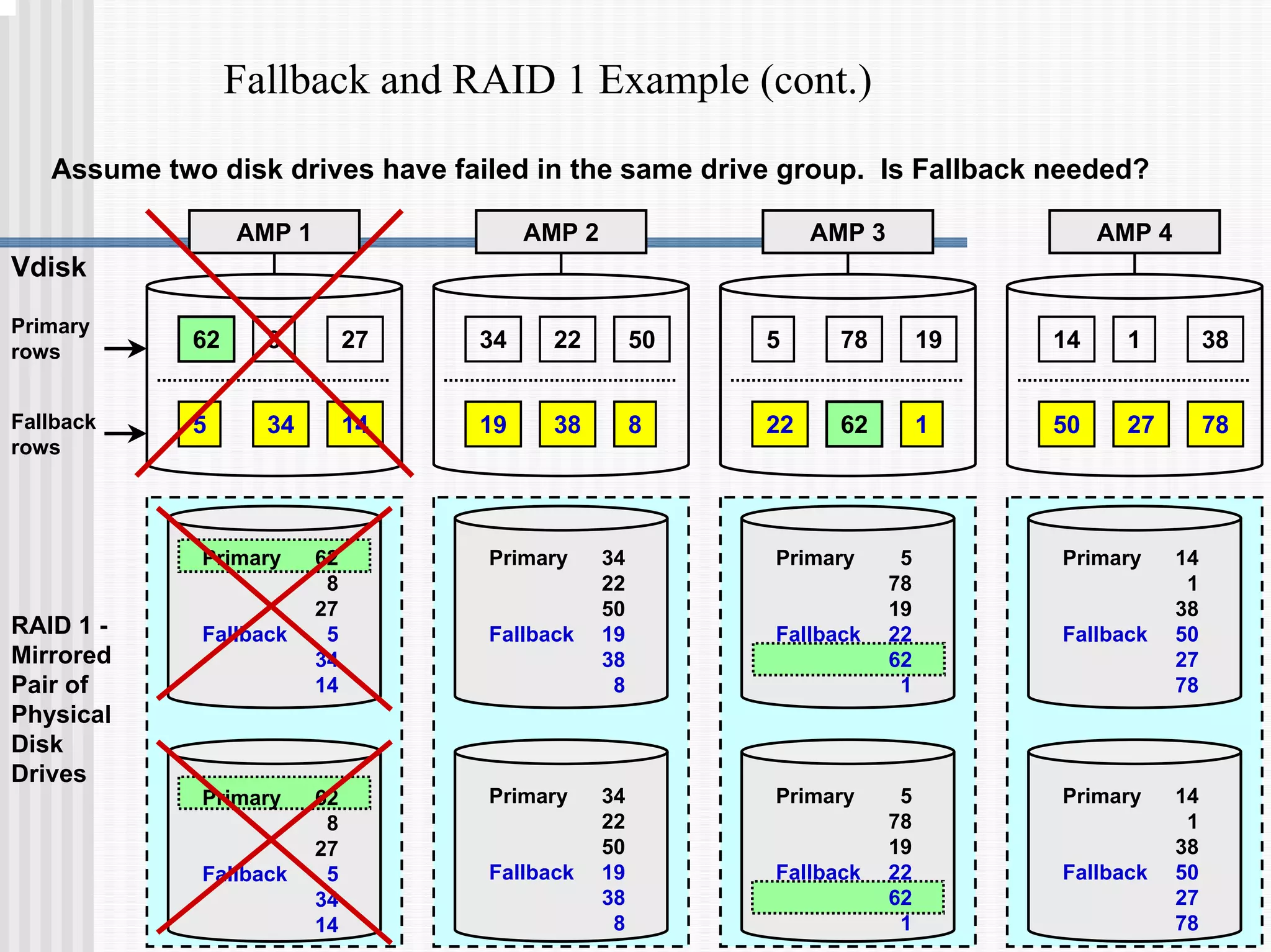
Assume two disk drives have failed in the same drive group. Is Fallback needed?
Primary
rows
Fallback
rows
AMP 1
62 27
8
5 34 14
AMP 2 AMP 3 AMP 4
Vdisk
34 50
22 5 19
78 14 38
1
19 38 8 22 62 1 50 27 78
Fallback and RAID 1 Example (cont.)
Primary
rows
Fallback
rows
AMP 1
62 27
8
5 34 14
AMP 2 AMP 3 AMP 4
Vdisk
34 50
22 5 19
78 14 38
1
19 38 8 22 62 1 50 27 78
RAID 1 -
Mirrored
Pair of
Physical
Disk
Drives
Primary 34
22
50
Fallback 19
38
8
Primary 34
22
50
Fallback 19
38
8
Primary 14
1
38
Fallback 50
27
78
Primary 14
1
38
Fallback 50
27
78
Primary 62
8
27
Fallback 5
34
14
Primary 62
8
27
Fallback 5
34
14
Primary 5
78
19
Fallback 22
62
1
Primary 5
78
19
Fallback 22
62
1
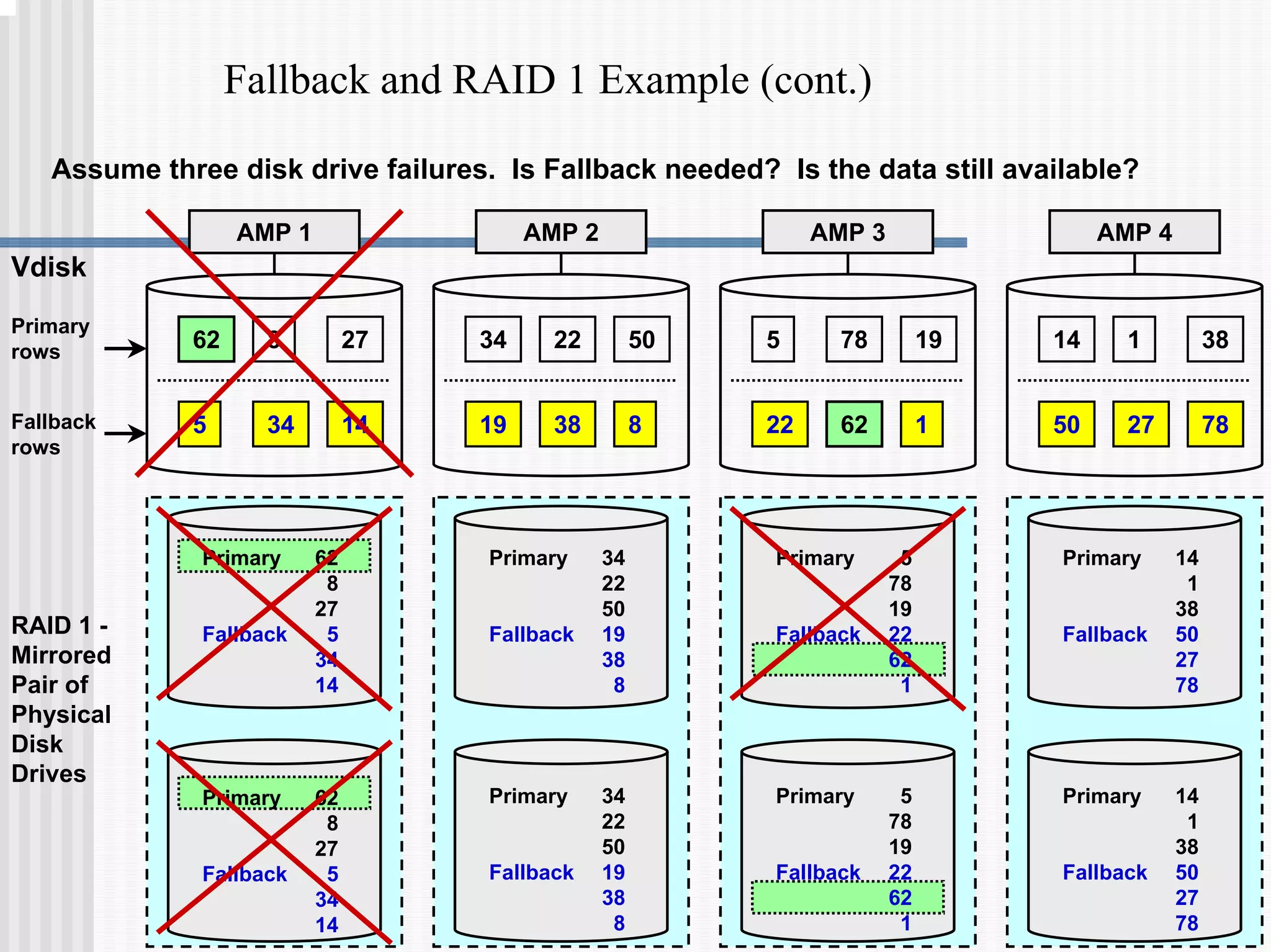
Assume three disk drive failures. Is Fallback needed? Is the data still available?
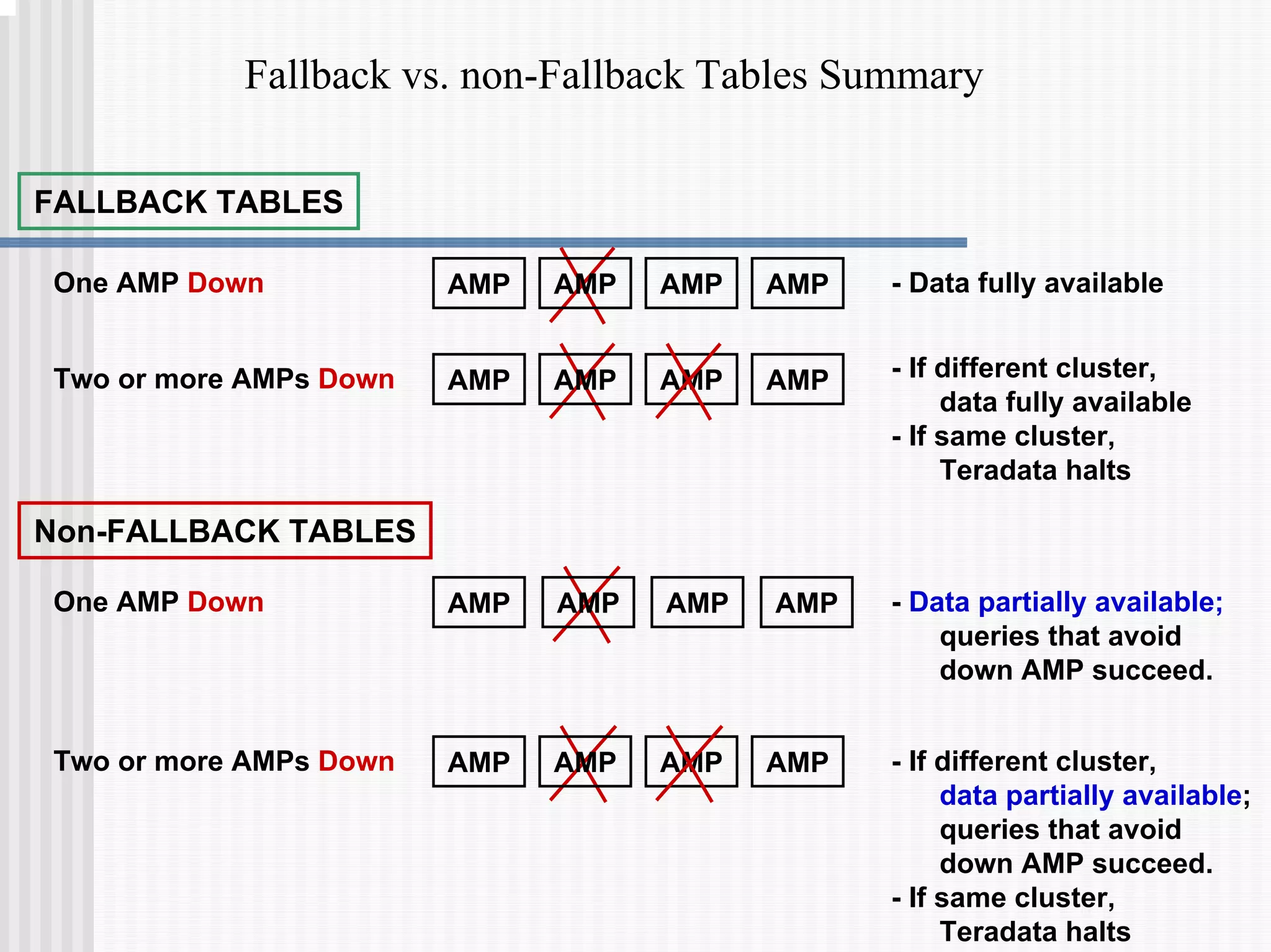
Fallback vs. non-Fallback Tables Summary
FALLBACK TABLES
One AMP Down - Data fully available
Two or more AMPs Down
AMP AMP AMP AMP
- If different cluster,
data fully available
- If same cluster,
Teradata halts
AMP AMP AMP AMP
Non-FALLBACK TABLES
One AMP Down - Data partially available;
queries that avoid
down AMP succeed.
Two or more AMPs Down
AMP AMP AMP AMP
- If different cluster,
data partially available;
queries that avoid
down AMP succeed.
- If same cluster,
Teradata halts
AMP AMP AMP AMP
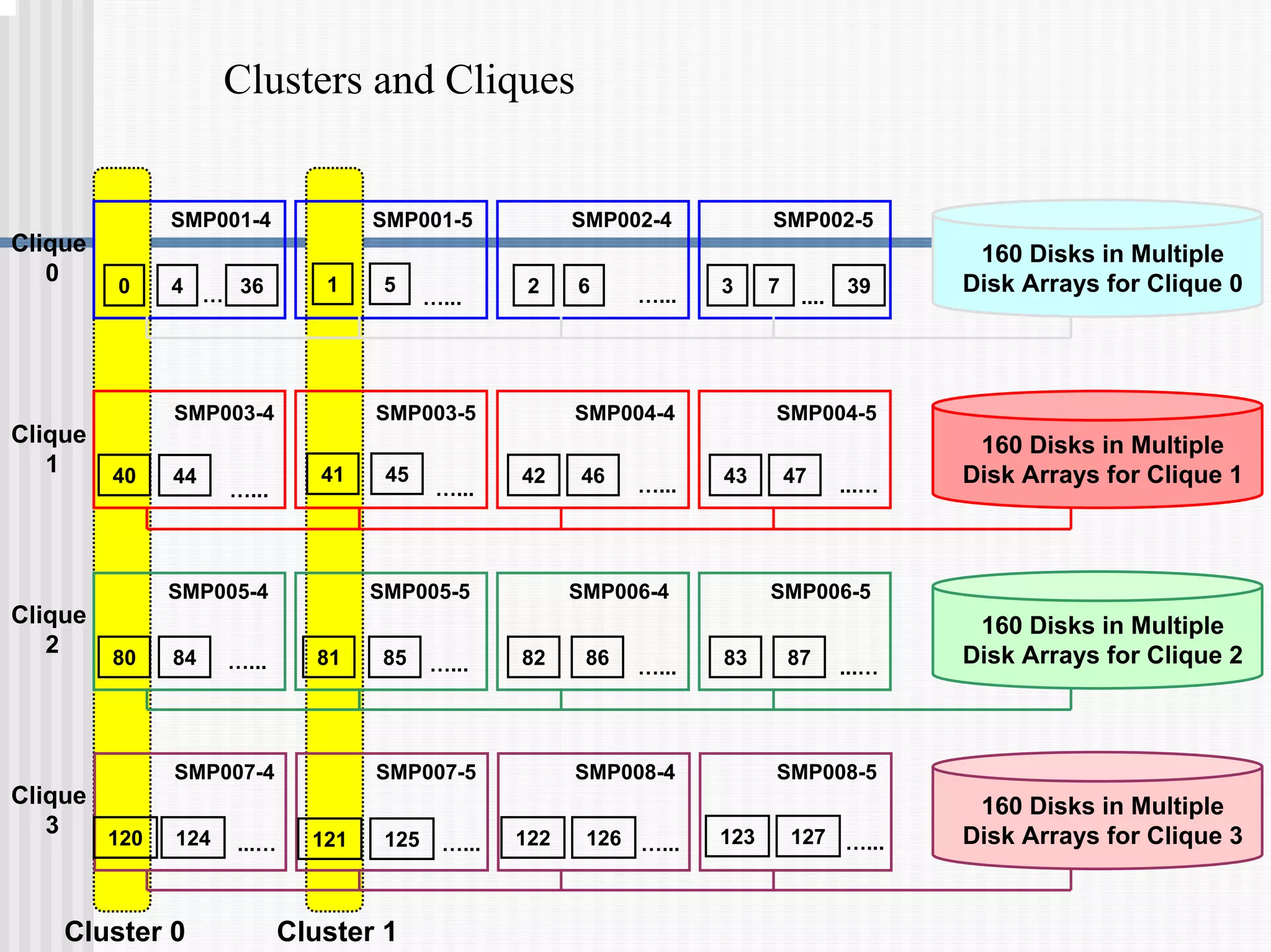
Clusters and Cliques
0 4 36
… 1 5
…...
2 6 …... 3 7
....
SMP001-4 SMP001-5 SMP002-4 SMP002-5
39
40 44
…...
41 45
…...
42 46 …... 43 47 ...…
SMP003-4 SMP003-5 SMP004-4 SMP004-5
80 84 …... 81 85 …... 82 86 …... 83 87 ...…
SMP005-4 SMP005-5 SMP006-4 SMP006-5
120 124 ...… 121 125 …...
SMP007-4 SMP007-5 SMP008-4 SMP008-5
122 126 …... 123 127 …...
160 Disks in Multiple
Disk Arrays for Clique 0
160 Disks in Multiple
Disk Arrays for Clique 1
160 Disks in Multiple
Disk Arrays for Clique 2
160 Disks in Multiple
Disk Arrays for Clique 3
Cluster 0 Cluster 1
Clique
0
Clique
1
Clique
2
Clique
3
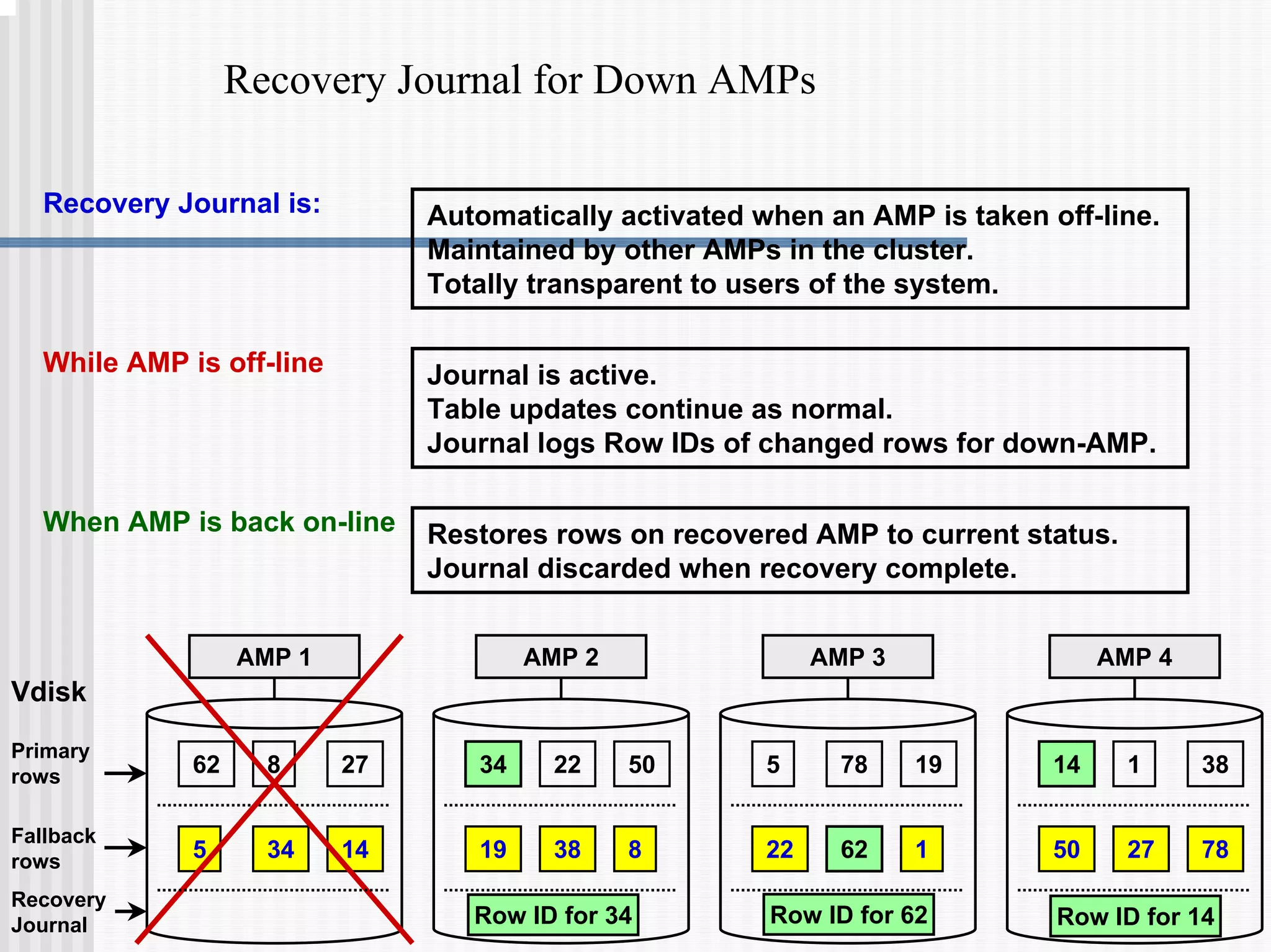
Recovery Journal for Down AMPs
Automatically activated when an AMP is taken off-line.
Maintained by other AMPs in the cluster.
Totally transparent to users of the system.
Recovery Journal is:
While AMP is off-line Journal is active.
Table updates continue as normal.
Journal logs Row IDs of changed rows for down-AMP.
When AMP is back on-line Restores rows on recovered AMP to current status.
Journal discarded when recovery complete.
Primary
rows
Fallback
rows
AMP 1
62 27
8
5 34 14
AMP 2 AMP 3 AMP 4
Vdisk
34 50
22 5 19
78 14 38
1
19 38 8 22 62 1 50 27 78
Recovery
Journal Row ID for 62
Row ID for 34 Row ID for 14
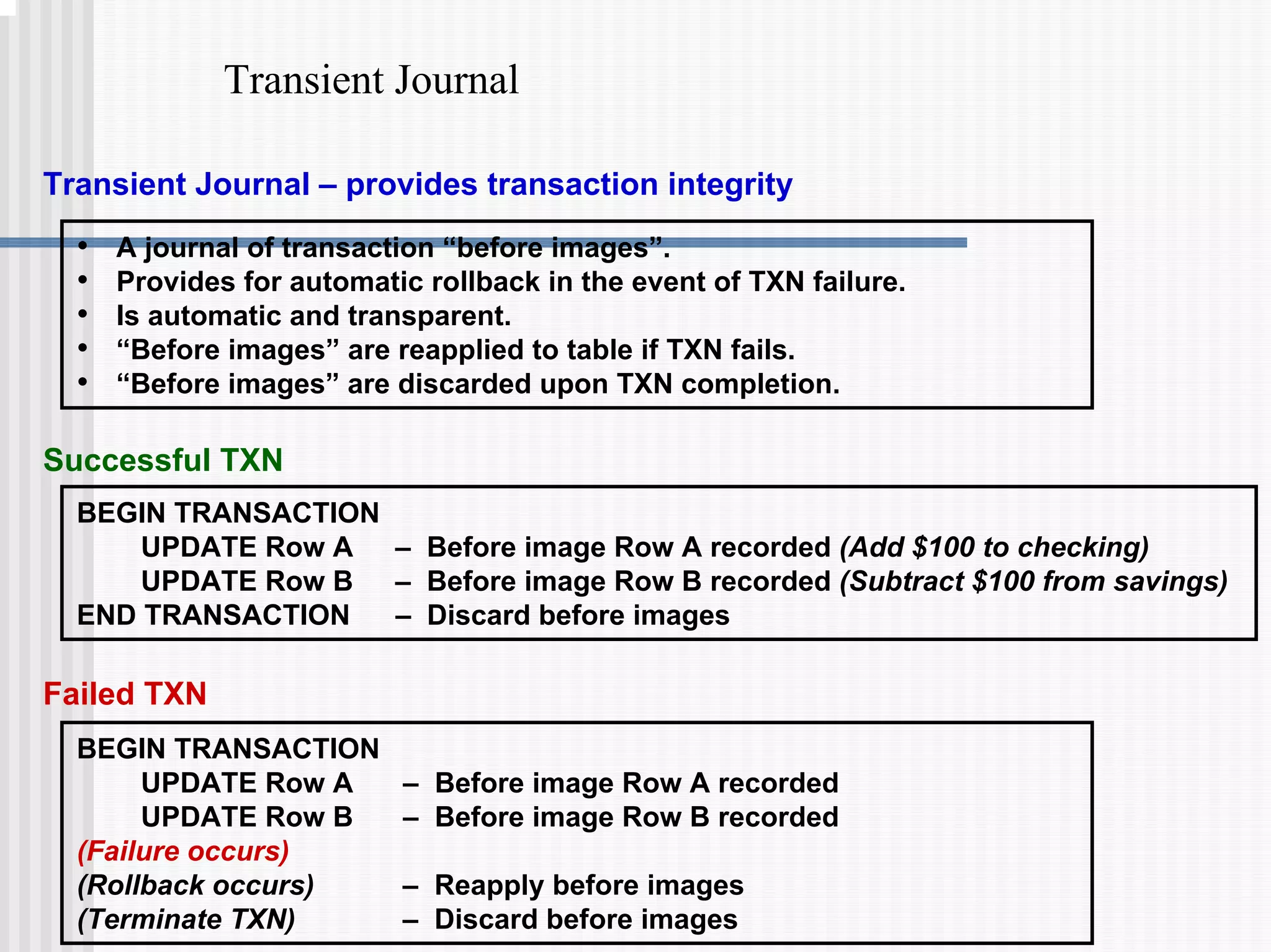
Transient Journal
Transient Journal – provides transaction integrity
• A journal of transaction “before images”.
• Provides for automatic rollback in the event of TXN failure.
• Is automatic and transparent.
• “Before images” are reapplied to table if TXN fails.
• “Before images” are discarded upon TXN completion.
BEGIN TRANSACTION
UPDATE Row A – Before image Row A recorded (Add $100 to checking)
UPDATE Row B – Before image Row B recorded (Subtract $100 from savings)
END TRANSACTION – Discard before images
Successful TXN
BEGIN TRANSACTION
UPDATE Row A – Before image Row A recorded
UPDATE Row B – Before image Row B recorded
(Failure occurs)
(Rollback occurs) – Reapply before images
(Terminate TXN) – Discard before images
Failed TXN
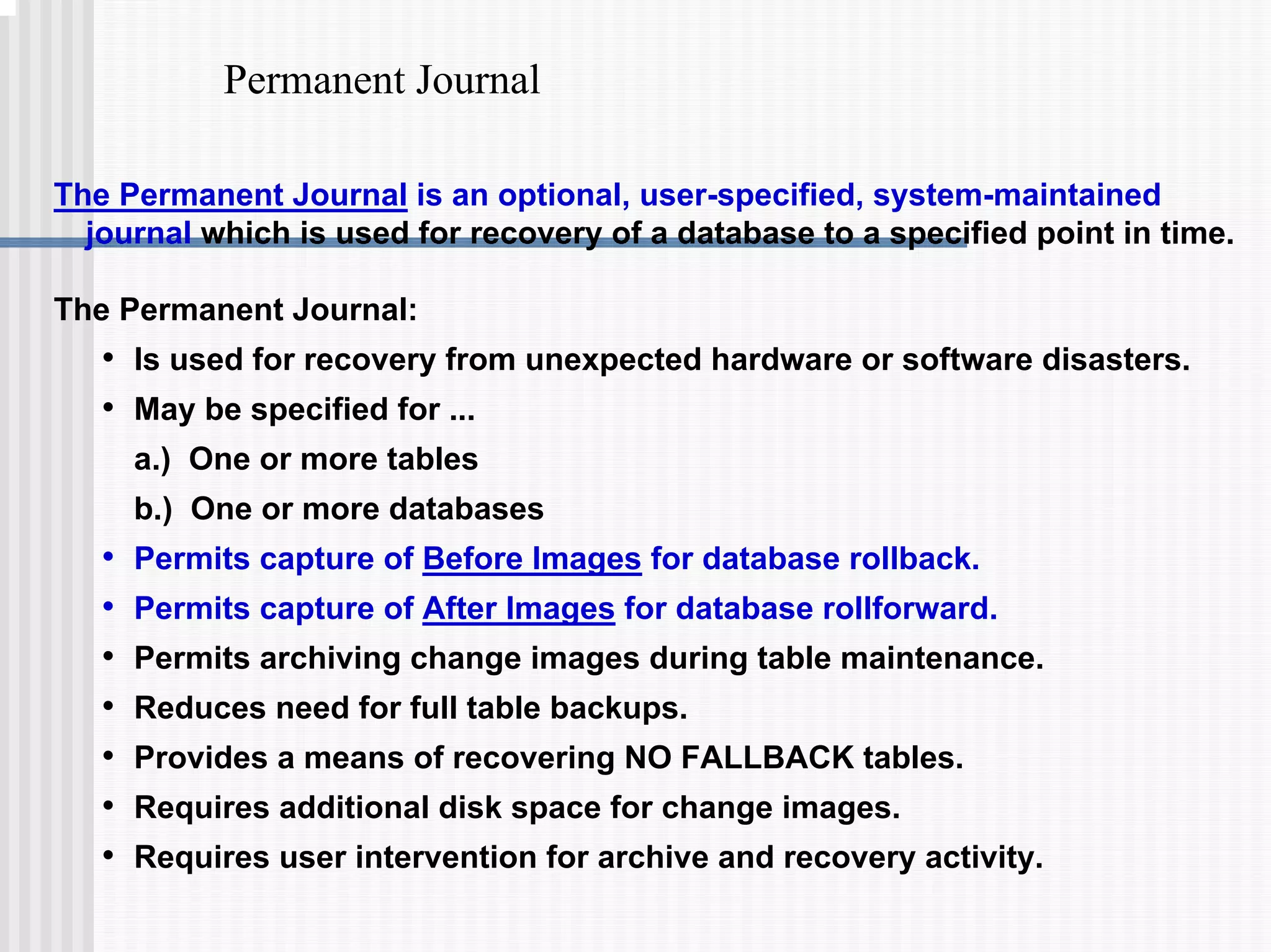
Permanent Journal
The Permanent Journal is an optional, user-specified, system-maintained
journal which is used for recovery of a database to a specified point in time.
The Permanent Journal:
• Is used for recovery from unexpected hardware or software disasters.
• May be specified for ...
a.) One or more tables
b.) One or more databases
• Permits capture of Before Images for database rollback.
• Permits capture of After Images for database rollforward.
• Permits archiving change images during table maintenance.
• Reduces need for full table backups.
• Provides a means of recovering NO FALLBACK tables.
• Requires additional disk space for change images.
• Requires user intervention for archive and recovery activity.
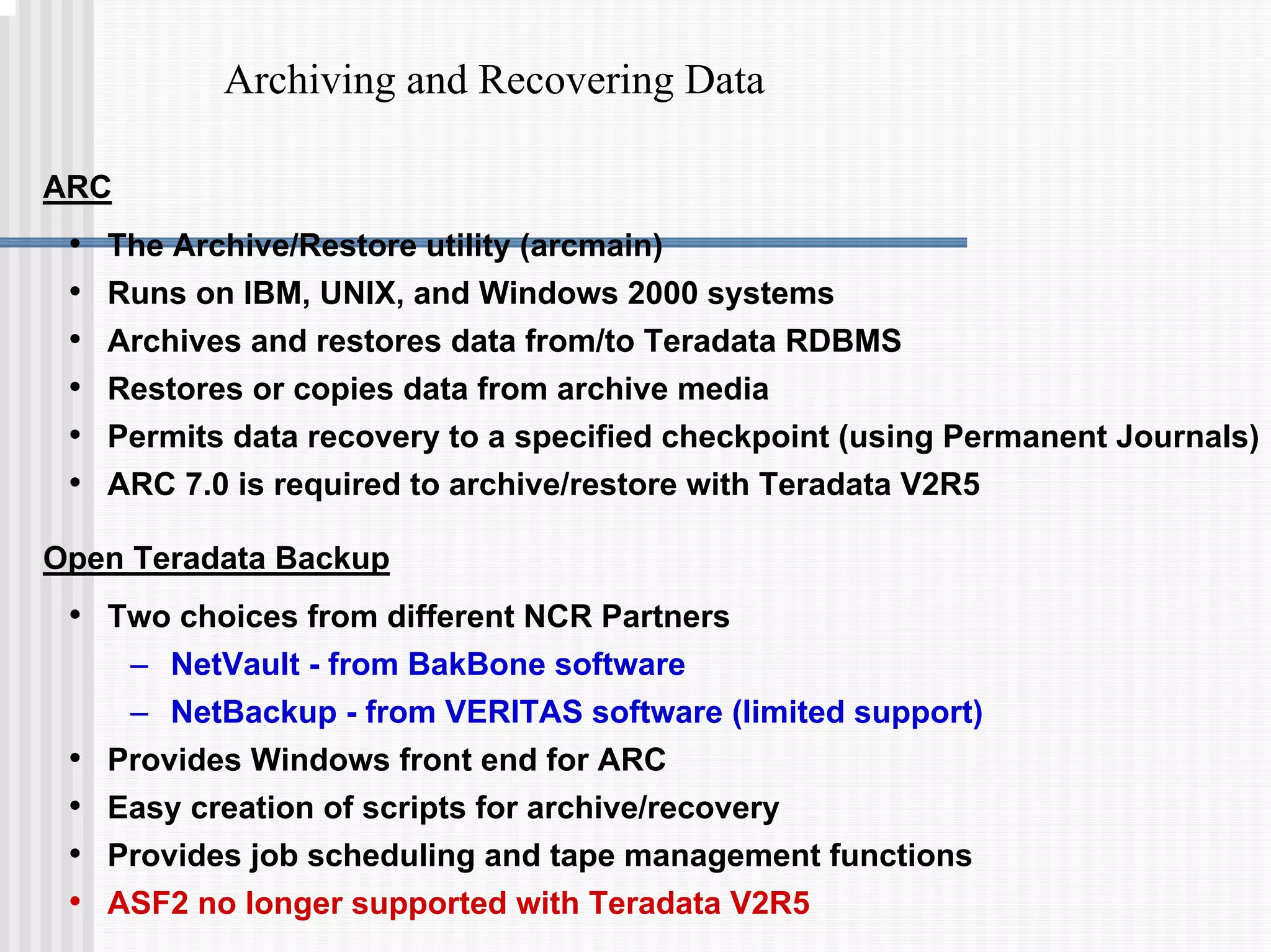
Archiving and Recovering Data
ARC
• The Archive/Restore utility (arcmain)
• Runs on IBM, UNIX, and Windows 2000 systems
• Archives and restores data from/to Teradata RDBMS
• Restores or copies data from archive media
• Permits data recovery to a specified checkpoint (using Permanent Journals)
• ARC 7.0 is required to archive/restore with Teradata V2R5
Open Teradata Backup
• Two choices from different NCR Partners
– NetVault - from BakBone software
– NetBackup - from VERITAS software (limited support)
• Provides Windows front end for ARC
• Easy creation of scripts for archive/recovery
• Provides job scheduling and tape management functions
• ASF2 no longer supported with Teradata V2R5
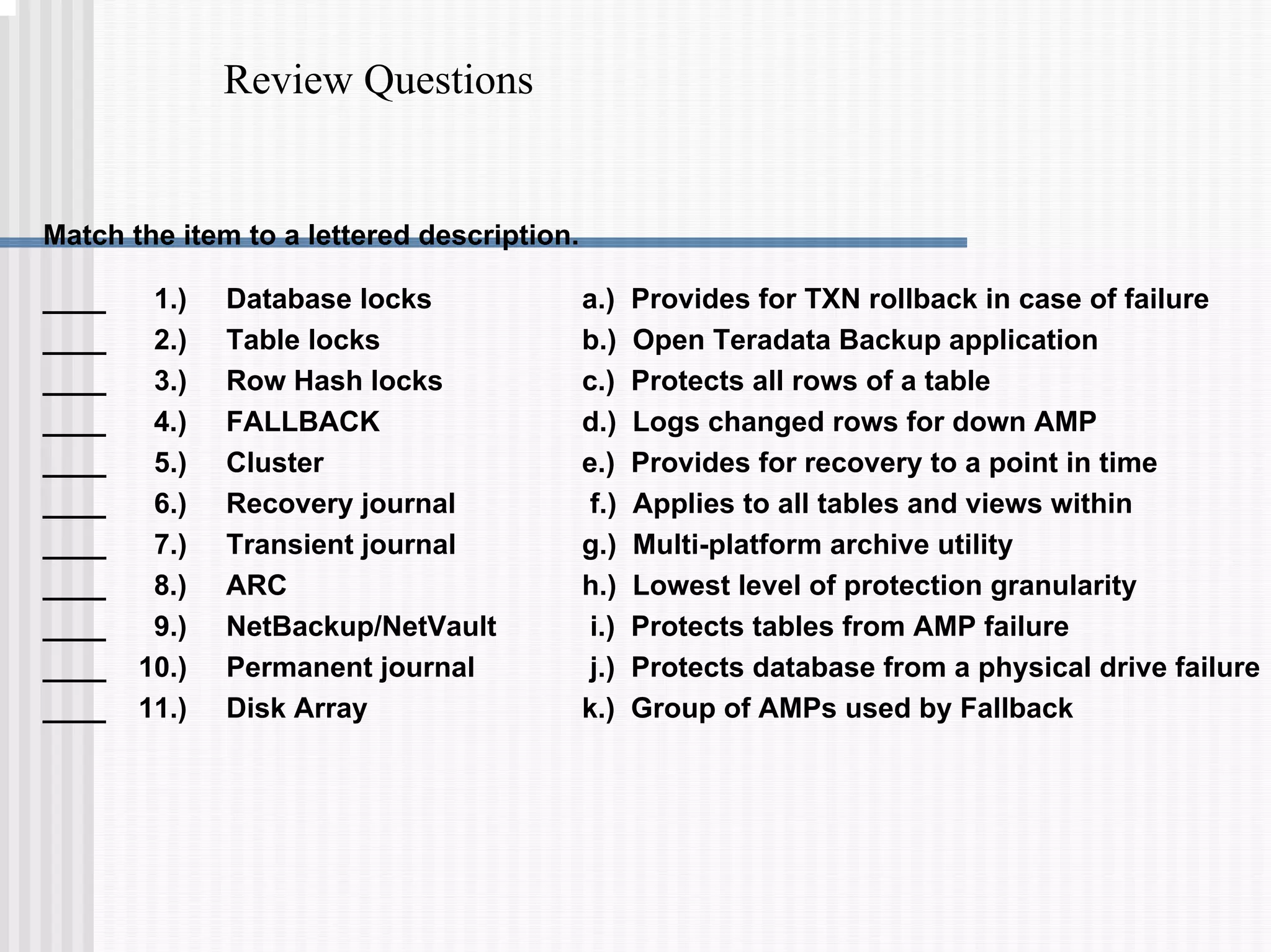
Review Questions
Match the item to a lettered description.
a.) Provides for TXN rollback in case of failure
b.) Open Teradata Backup application
c.) Protects all rows of a table
d.) Logs changed rows for down AMP
e.) Provides for recovery to a point in time
f.) Applies to all tables and views within
g.) Multi-platform archive utility
h.) Lowest level of protection granularity
i.) Protects tables from AMP failure
j.) Protects database from a physical drive failure
k.) Group of AMPs used by Fallback
____ 1.) Database locks
____ 2.) Table locks
____ 3.) Row Hash locks
____ 4.) FALLBACK
____ 5.) Cluster
____ 6.) Recovery journal
____ 7.) Transient journal
____ 8.) ARC
____ 9.) NetBackup/NetVault
____ 10.) Permanent journal
____ 11.) Disk Array
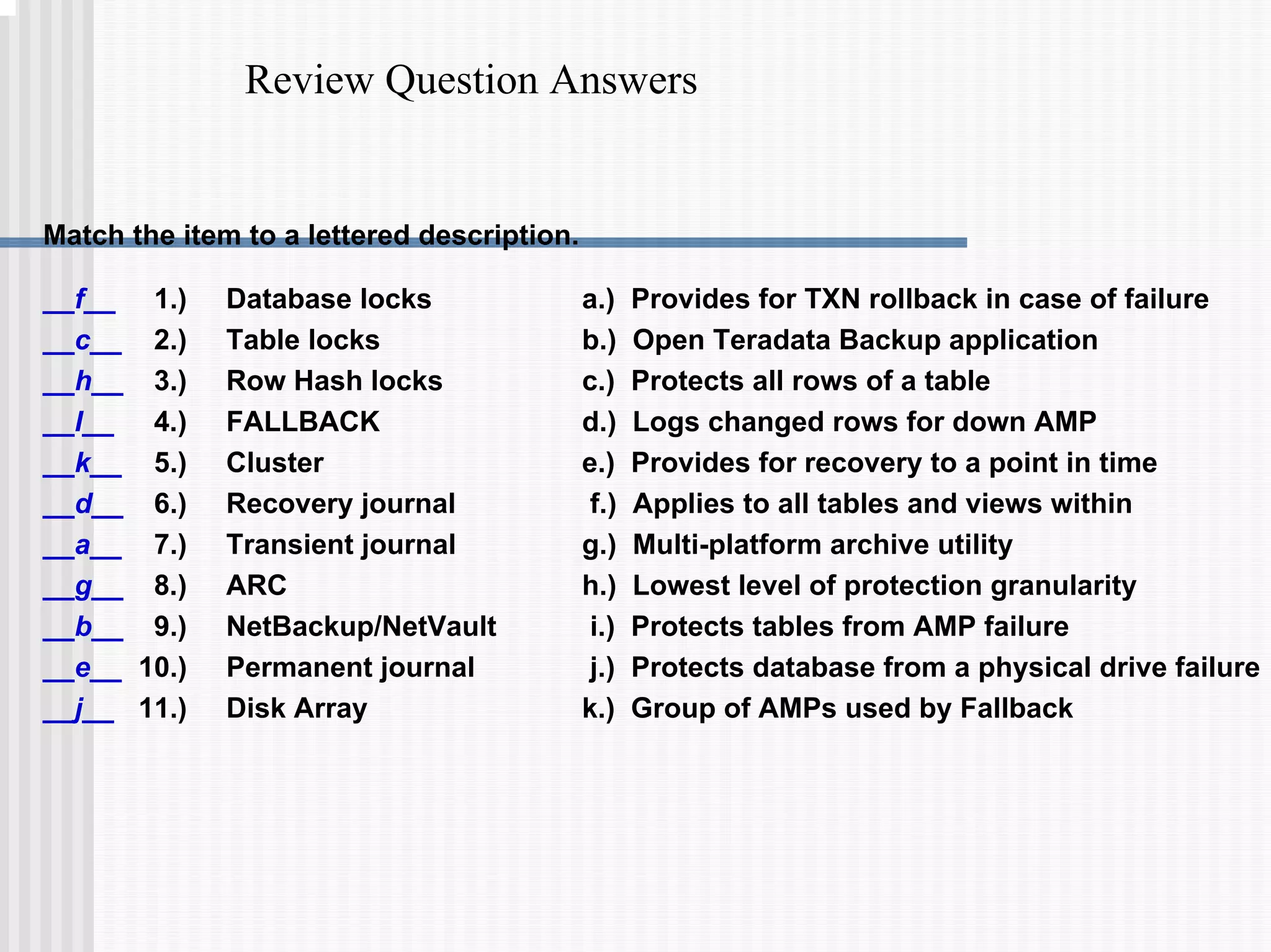
Review Question Answers
Match the item to a lettered description.
a.) Provides for TXN rollback in case of failure
b.) Open Teradata Backup application
c.) Protects all rows of a table
d.) Logs changed rows for down AMP
e.) Provides for recovery to a point in time
f.) Applies to all tables and views within
g.) Multi-platform archive utility
h.) Lowest level of protection granularity
i.) Protects tables from AMP failure
j.) Protects database from a physical drive failure
k.) Group of AMPs used by Fallback
__f__ 1.) Database locks
__c__ 2.) Table locks
__h__ 3.) Row Hash locks
__I__ 4.) FALLBACK
__k__ 5.) Cluster
__d__ 6.) Recovery journal
__a__ 7.) Transient journal
__g__ 8.) ARC
__b__ 9.) NetBackup/NetVault
__e__ 10.) Permanent journal
__j__ 11.) Disk Array

1.8 Data Protection.pdf

  • 1.
    Data Protection After completingthis module, you will be able to: • Explain the concept of FALLBACK tables. • List the types and levels of locking provided by Teradata. • Describe the Recovery, Transient and Permanent Journals and their function. • List the utilities available for archive and recovery.
  • 2.
    Data Protection Features Facilitiesthat provide system-level protection Disk Arrays – RAID data protection (e.g., RAID 1) – Redundant SCSI buses and array controllers Cliques and Vproc Migration – SMP or O.S. failures - Vprocs can migrate to other nodes within the clique. Facilities that provide Teradata DB protection Locks – provides data integrity Fallback – provides data access with a “down” AMP Down AMP Recovery Journal – fast recovery of fallback rows for AMPs Transient Journal – automatic rollback of aborted transactions Permanent Journal – optional before and after-image journaling ARC – Archive/Restore facility NetVault and NetBackup – provide tape management and ARC script creation and scheduling capabilities
  • 3.
    Disk Arrays DAC DAC Host OperatingSystem Utilities Applications Why Disk Arrays? • High availability through data mirroring or data parity protection. • Better I/O performance through implementation of RAID technology at the hardware level. • Convenience - automatic disk recovery and data reconstruction when mirroring or data parity protection is used.
  • 4.
    RAID Technologies RAID -Redundant Array of Independent Disks RAID technology provides data protection at the disk drive level. With RAID 1 and RAID 5 technologies, access to the data is continuous even if a disk drive fails. RAID technologies available with Teradata: RAID 1 Disk mirroring, used with both LSI Logic and EMC2 Disk Arrays. RAID 1+0 Disk mirroring with data striping, used with LSI Disk Arrays. Not needed with Teradata. RAID 5 Data parity protection, interleaved parity, used with LSI Logic Disk Arrays.
  • 5.
    RAID 1 –Mirroring LUN 1 LUN 0 Block A0 Block A1 Block A2 Block A3 Block A0 Block A1 Block A2 Block A3 Disk Array Controller Block B0 Block B1 Block B2 Block B3 Block B0 Block B1 Block B2 Block B3 Mirror 3 Disk 3 Mirror 1 Disk 1 • 2 Drive Groups each with 1 mirrored pair of disks • Operating system sees 2 logical disks (LUNs) or volumes • If LUN 0 has more activity , more disk I/Os occur on the first two drives in the array. 2 Drive Groups - each with 1 pair of mirrored disks If physical drives are 36 GB each, then each logical unit (LUN) or volume is effectively 36 GB.
  • 6.
    RAID 1 Summary Characteristics •data is fully replicated • striped mirroring is possible with multiple pairs of disks in a drive group • transparent to operating system Advantages • maximum data availability • read performance gains • no performance penalty with write operations • fast recovery and restoration Disadvantages • 50% of disk space is used for mirrored data Summary • RAID 1 provides high data availability and performance, but storage costs are higher. • • Striped Mirroring is NOT necessary with Teradata. Striped Mirroring is NOT necessary with Teradata.
  • 7.
    RAID 5 –Data Parity Protection Disk Array Controller Disk 3 Disk 1 Disk 2 Disk 4 Block 0 Block 1 Block 2 Parity Block 3 Block 4 Parity Block 5 Block 6 Parity Block 7 Block 8 Parity Block 9 Block 10 Block 11 Block 12 Block 13 Block 14 Parity LUN 0 • Sometimes referred to as “3 + 1” RAID 5. • When data is updated, parity is also updated. new_data XOR current_data XOR current_parity = new_parity If physical drives are 36 GB each, then each logical unit (LUN) or volume is effectively 108 GB.
  • 8.
    RAID 5 Summary Characteristics •data and parity is striped and interleaved across multiple disks • XOR logic is used to calculate parity • transparent to operating system Advantages • provides high availability with minimum disk space (e.g., 25%) used for parity overhead Disadvantages • write performance penalty • performance degradation during data recovery and reconstruction Summary – High data availability with minimum storage cost – Good choice when majority of I/O’s are reads and storage space is at a premium
  • 9.
    Teradata – RAID1 and RAID 5 RAID 1 for Teradata Most useful with typical Teradata data warehouses (e.g., Active Data Warehouses). RAID 5 for Teradata Most useful when creating archival data warehouses that require less expensive storage and where performance is not as important. Why? RAID 1 provides Superior Performance • Mirroring provides the best read and write throughput. • Maximizes the performance capabilities of controllers and disk drives. • Best performance when a drive has failed. • Less reconstruction impact when a drive has failed. RAID 1 provides Superior Availability • Less susceptible to a double disk failure in a RAID drive group. • Faster reconstruction of a failed drive - shorter vulnerability period during reconstruction.
  • 10.
    Cliques DAC-A DAC-B DAC-A DAC-B DAC-ADAC-B DAC-A DAC-B 0 4 36 ……. SMP001-4 AMPs 1 5 37 ……. SMP001-5 AMPs 2 6 38 ……. SMP002-4 AMPs 3 7 39 ……. SMP002-5 AMPs Clique – a set of SMPs that share a common set of disk arrays.
  • 11.
    Teradata Vproc Migration VprocMigration – vprocs in the failed node are started in the remaining nodes within the “clique”. SMP Fails DAC-A DAC-B DAC-A DAC-B DAC-A DAC-B DAC-A DAC-B SMP001-4 AMPs 0 3 39 … SMP001-5 AMPs 1 4 37 ……. SMP002-4 AMPs 2 5 38 ……. SMP002-5 AMPs 36
  • 12.
    Locks Exclusive – preventsany other type of concurrent access Write – prevents other reads, writes, exclusives Read – prevents writes and exclusives Access – prevents exclusive only There are four types of locks: Database – applies to all tables/views in the database Table/View – applies to all rows in the table/views Row Hash – applies to all rows with same row hash Locks may be applied at three levels: Lock types are automatically applied based on the SQL command: SELECT – applies a Read lock UPDATE – applies a Write lock CREATE TABLE – applies an Exclusive lock
  • 13.
    Locking Modifier LOCKING ROWFOR ACCESS SELECT * FROM TABLE_A; An “Access Lock” allows the user to access (read) an object that has a READ or WRITE lock associated with it. In this example, even though an access row lock was requested, a table level access lock will be issued because the SELECT causes a full table scan. LOCKING ROW FOR EXCLUSIVE UPDATE TABLE_B SET A = 2002; This request asks for an exclusive lock, effectively upgrading the lock. LOCKING ROW FOR WRITE NOWAIT UPDATE TABLE_C SET A = 2003; The locking with the NOWAIT option is used if you do not want your transaction to wait in a queue. NOWAIT effectively says to abort the the transaction if the locking manager cannot immediately place the necessary lock. The locking modifier overrides the default usage lock that Teradata places on a database, table, view, or row hash in response to a request. Certain locks can be upgraded or downgraded:
  • 14.
    Rules of Locking Lockrequests are queued behind all outstanding incompatible lock requests for the same object. Rule Example 1 – New READ lock request goes to the end of queue. READ WRITE READ READ WRITE READ New request New lock queue Lock queue Current lock Current lock Example 2 – New READ lock request shares slot in the queue. READ READ New request New lock queue Lock queue Current lock Current lock READ WRITE WRITE READ LOCK LEVEL HELD LOCK REQUEST ACCESS READ WRITE EXCLUSIVE NONE ACCESS READ WRITE EXCLUSIVE Granted Granted Granted Granted Granted Granted Granted Granted Granted Granted Queued Queued Queued Queued Queued Queued Queued Queued Queued Queued
  • 15.
    Access Locks Lock requestsare queued behind all outstanding incompatible lock requests for the same object. Rule Example 3 – New ACCESS lock request granted immediately. ACCESS WRITE WRITE READ New request New lock queue Lock queue Current lock Current locks ACCESS READ Advantages of Access Locks Permit quicker access to table in multi-user environment. Have minimal ‘blocking’ effect on other queries. Very useful for aggregating large numbers of rows. Disadvantages of Access Locks May produce erroneous results if during table maintenance. LOCK LEVEL HELD LOCK REQUEST ACCESS READ WRITE EXCLUSIVE NONE ACCESS READ WRITE EXCLUSIVE Granted Granted Granted Granted Granted Granted Granted Granted Granted Granted Queued Queued Queued Queued Queued Queued Queued Queued Queued Queued
  • 16.
    Fallback A Fallback tableis fully available in the event of an unavailable AMP. A Fallback row is a copy of a “Primary row” which is stored on a different AMP. Benefits of Fallback • Permits access to table data during AMP off-line period. • Adds a level of data protection beyond disk array RAID. • Automatic restore of data changed during AMP off-line. • Critical for high availability applications. Cost of Fallback • Twice the disk space for table storage. • Twice the I/O for Inserts, Updates and Deletes. Loss of any two AMPs in a cluster causes RDBMS to halt! Note: Primary rows Fallback rows AMP 2 6 11 3 5 12 8 1 7 3 8 5 2 1 11 6 12 7 AMP AMP AMP
  • 17.
    Fallback Clusters • AFallback cluster is a defined set of AMPs across which fallback is implemented. • All Fallback rows for AMPs in a cluster must reside within the cluster. • Loss of one AMP in the cluster permits continued table access. • Loss of two AMPs in the cluster causes the RDBMS to halt. Primary rows Fallback rows AMP 1 62 27 8 5 34 14 AMP 2 AMP 3 AMP 4 Cluster 0 34 50 22 5 19 78 14 38 1 19 38 8 22 62 1 50 27 78 Primary rows Fallback rows AMP 5 AMP 6 AMP 7 AMP 8 Cluster 1 41 7 66 93 72 88 58 20 93 88 45 2 17 72 37 45 7 17 37 58 41 20 2 66
  • 18.
    Fallback and RAIDProtection • RAID 1 Mirroring or RAID 5 Data Parity Protection provides protection in the event of disk drive failure. – Provides protection at a hardware level – Teradata is unaware of the RAID technology used • Fallback provides an additional level of data protection and provides access to data when an AMP is not available (not online). • Additional types of failures that Fallback protects against include: – Multiple drives fail in the same drive group, – Disk array is not available • Both disk array controllers fail in a disk array • Two of the three power supplies fail in a disk array – AMP is not available (e.g., software or data error) • The combination of RAID 1 and Fallback provides the highest level of availability.
  • 19.
    Fallback and RAID1 Example Primary rows Fallback rows AMP 1 62 27 8 5 34 14 AMP 2 AMP 3 AMP 4 Vdisk 34 50 22 5 19 78 14 38 1 19 38 8 22 62 1 50 27 78 RAID 1 - Mirrored Pair of Physical Disk Drives Primary 34 22 50 Fallback 19 38 8 Primary 34 22 50 Fallback 19 38 8 Primary 14 1 38 Fallback 50 27 78 Primary 14 1 38 Fallback 50 27 78 Primary 62 8 27 Fallback 5 34 14 Primary 62 8 27 Fallback 5 34 14 Primary 5 78 19 Fallback 22 62 1 Primary 5 78 19 Fallback 22 62 1 This example assumes that RAID 1 Mirroring is used and the table is fallback protected.
  • 20.
    Fallback and RAID1 Example (cont.) Primary rows Fallback rows AMP 1 62 27 8 5 34 14 AMP 2 AMP 3 AMP 4 Vdisk 34 50 22 5 19 78 14 38 1 19 38 8 22 62 1 50 27 78 RAID 1 - Mirrored Pair of Physical Disk Drives Primary 34 22 50 Fallback 19 38 8 Primary 34 22 50 Fallback 19 38 8 Primary 14 1 38 Fallback 50 27 78 Primary 14 1 38 Fallback 50 27 78 Primary 62 8 27 Fallback 5 34 14 Primary 62 8 27 Fallback 5 34 14 Primary 5 78 19 Fallback 22 62 1 Primary 5 78 19 Fallback 22 62 1 Assume one disk drive fails. Is Fallback needed in this example?
  • 21.
    Fallback and RAID1 Example (cont.) Primary rows Fallback rows AMP 1 62 27 8 5 34 14 AMP 2 AMP 3 AMP 4 Vdisk 34 50 22 5 19 78 14 38 1 19 38 8 22 62 1 50 27 78 RAID 1 - Mirrored Pair of Physical Disk Drives Primary 34 22 50 Fallback 19 38 8 Primary 34 22 50 Fallback 19 38 8 Primary 14 1 38 Fallback 50 27 78 Primary 14 1 38 Fallback 50 27 78 Primary 62 8 27 Fallback 5 34 14 Primary 62 8 27 Fallback 5 34 14 Primary 5 78 19 Fallback 22 62 1 Primary 5 78 19 Fallback 22 62 1 Assume two disk drives have failed. Is Fallback needed in this example?
  • 22.
    Fallback and RAID1 Example (cont.) RAID 1 - Mirrored Pair of Physical Disk Drives Primary 34 22 50 Fallback 19 38 8 Primary 34 22 50 Fallback 19 38 8 Primary 14 1 38 Fallback 50 27 78 Primary 14 1 38 Fallback 50 27 78 Primary 62 8 27 Fallback 5 34 14 Primary 62 8 27 Fallback 5 34 14 Primary 5 78 19 Fallback 22 62 1 Primary 5 78 19 Fallback 22 62 1 Assume two disk drives have failed in the same drive group. Is Fallback needed? Primary rows Fallback rows AMP 1 62 27 8 5 34 14 AMP 2 AMP 3 AMP 4 Vdisk 34 50 22 5 19 78 14 38 1 19 38 8 22 62 1 50 27 78
  • 23.
    Fallback and RAID1 Example (cont.) Primary rows Fallback rows AMP 1 62 27 8 5 34 14 AMP 2 AMP 3 AMP 4 Vdisk 34 50 22 5 19 78 14 38 1 19 38 8 22 62 1 50 27 78 RAID 1 - Mirrored Pair of Physical Disk Drives Primary 34 22 50 Fallback 19 38 8 Primary 34 22 50 Fallback 19 38 8 Primary 14 1 38 Fallback 50 27 78 Primary 14 1 38 Fallback 50 27 78 Primary 62 8 27 Fallback 5 34 14 Primary 62 8 27 Fallback 5 34 14 Primary 5 78 19 Fallback 22 62 1 Primary 5 78 19 Fallback 22 62 1 Assume three disk drive failures. Is Fallback needed? Is the data still available?
  • 24.
    Fallback vs. non-FallbackTables Summary FALLBACK TABLES One AMP Down - Data fully available Two or more AMPs Down AMP AMP AMP AMP - If different cluster, data fully available - If same cluster, Teradata halts AMP AMP AMP AMP Non-FALLBACK TABLES One AMP Down - Data partially available; queries that avoid down AMP succeed. Two or more AMPs Down AMP AMP AMP AMP - If different cluster, data partially available; queries that avoid down AMP succeed. - If same cluster, Teradata halts AMP AMP AMP AMP
  • 25.
    Clusters and Cliques 04 36 … 1 5 …... 2 6 …... 3 7 .... SMP001-4 SMP001-5 SMP002-4 SMP002-5 39 40 44 …... 41 45 …... 42 46 …... 43 47 ...… SMP003-4 SMP003-5 SMP004-4 SMP004-5 80 84 …... 81 85 …... 82 86 …... 83 87 ...… SMP005-4 SMP005-5 SMP006-4 SMP006-5 120 124 ...… 121 125 …... SMP007-4 SMP007-5 SMP008-4 SMP008-5 122 126 …... 123 127 …... 160 Disks in Multiple Disk Arrays for Clique 0 160 Disks in Multiple Disk Arrays for Clique 1 160 Disks in Multiple Disk Arrays for Clique 2 160 Disks in Multiple Disk Arrays for Clique 3 Cluster 0 Cluster 1 Clique 0 Clique 1 Clique 2 Clique 3
  • 26.
    Recovery Journal forDown AMPs Automatically activated when an AMP is taken off-line. Maintained by other AMPs in the cluster. Totally transparent to users of the system. Recovery Journal is: While AMP is off-line Journal is active. Table updates continue as normal. Journal logs Row IDs of changed rows for down-AMP. When AMP is back on-line Restores rows on recovered AMP to current status. Journal discarded when recovery complete. Primary rows Fallback rows AMP 1 62 27 8 5 34 14 AMP 2 AMP 3 AMP 4 Vdisk 34 50 22 5 19 78 14 38 1 19 38 8 22 62 1 50 27 78 Recovery Journal Row ID for 62 Row ID for 34 Row ID for 14
  • 27.
    Transient Journal Transient Journal– provides transaction integrity • A journal of transaction “before images”. • Provides for automatic rollback in the event of TXN failure. • Is automatic and transparent. • “Before images” are reapplied to table if TXN fails. • “Before images” are discarded upon TXN completion. BEGIN TRANSACTION UPDATE Row A – Before image Row A recorded (Add $100 to checking) UPDATE Row B – Before image Row B recorded (Subtract $100 from savings) END TRANSACTION – Discard before images Successful TXN BEGIN TRANSACTION UPDATE Row A – Before image Row A recorded UPDATE Row B – Before image Row B recorded (Failure occurs) (Rollback occurs) – Reapply before images (Terminate TXN) – Discard before images Failed TXN
  • 28.
    Permanent Journal The PermanentJournal is an optional, user-specified, system-maintained journal which is used for recovery of a database to a specified point in time. The Permanent Journal: • Is used for recovery from unexpected hardware or software disasters. • May be specified for ... a.) One or more tables b.) One or more databases • Permits capture of Before Images for database rollback. • Permits capture of After Images for database rollforward. • Permits archiving change images during table maintenance. • Reduces need for full table backups. • Provides a means of recovering NO FALLBACK tables. • Requires additional disk space for change images. • Requires user intervention for archive and recovery activity.
  • 29.
    Archiving and RecoveringData ARC • The Archive/Restore utility (arcmain) • Runs on IBM, UNIX, and Windows 2000 systems • Archives and restores data from/to Teradata RDBMS • Restores or copies data from archive media • Permits data recovery to a specified checkpoint (using Permanent Journals) • ARC 7.0 is required to archive/restore with Teradata V2R5 Open Teradata Backup • Two choices from different NCR Partners – NetVault - from BakBone software – NetBackup - from VERITAS software (limited support) • Provides Windows front end for ARC • Easy creation of scripts for archive/recovery • Provides job scheduling and tape management functions • ASF2 no longer supported with Teradata V2R5
  • 30.
    Review Questions Match theitem to a lettered description. a.) Provides for TXN rollback in case of failure b.) Open Teradata Backup application c.) Protects all rows of a table d.) Logs changed rows for down AMP e.) Provides for recovery to a point in time f.) Applies to all tables and views within g.) Multi-platform archive utility h.) Lowest level of protection granularity i.) Protects tables from AMP failure j.) Protects database from a physical drive failure k.) Group of AMPs used by Fallback ____ 1.) Database locks ____ 2.) Table locks ____ 3.) Row Hash locks ____ 4.) FALLBACK ____ 5.) Cluster ____ 6.) Recovery journal ____ 7.) Transient journal ____ 8.) ARC ____ 9.) NetBackup/NetVault ____ 10.) Permanent journal ____ 11.) Disk Array
  • 31.
    Review Question Answers Matchthe item to a lettered description. a.) Provides for TXN rollback in case of failure b.) Open Teradata Backup application c.) Protects all rows of a table d.) Logs changed rows for down AMP e.) Provides for recovery to a point in time f.) Applies to all tables and views within g.) Multi-platform archive utility h.) Lowest level of protection granularity i.) Protects tables from AMP failure j.) Protects database from a physical drive failure k.) Group of AMPs used by Fallback __f__ 1.) Database locks __c__ 2.) Table locks __h__ 3.) Row Hash locks __I__ 4.) FALLBACK __k__ 5.) Cluster __d__ 6.) Recovery journal __a__ 7.) Transient journal __g__ 8.) ARC __b__ 9.) NetBackup/NetVault __e__ 10.) Permanent journal __j__ 11.) Disk Array