@teamsugberlin #MicrosoftTeams #TeamsUGBerlin
Microsoft Teams
User Group Berlin
17. Februar 2022
Meetup #17
@teamsugberlin #MicrosoftTeams #TeamsUGBerlin
Agenda
18:00 - 18:15 Landing Zone
18:15 - 19:15 Talk 1 – OneNote and Microsoft Teams, Smarter Notetaking
Together
Heather Severino (@HeatherSeverino)
19:15 - 19:45 Microsoft Teams Neuigkeiten
Thomas Stensitzki (@stensitzki)
19:45 - ? Fragen und Antworten rund um Microsoft Teams
Organisatorisches
Dieses Meeting wird aufgezeichnet und online bereitgestellt.
This meeting will be recorded and made available online.
@teamsugberlin #MicrosoftTeams #TeamsUGBerlin
OneNote and Microsoft Teams,
Smarter Notetaking Together
Heather Severino
@HeatherSeverino
@teamsugberlin #MicrosoftTeams #TeamsUGBerlin
Neues in Microsoft Teams
Ankündigungen & Rollouts
Meetup #17
Thomas Stensitzki
@teamsugberlin #MicrosoftTeams #TeamsUGBerlin
Neuigkeiten in Microsoft Teams
 Improved Teams Guest User Usability
 Expanded reactions in Microsoft Teams
 Updated companion mode for iOS users
 Connected Templates
 Live Captions in all available languages and CART Captions on Teams
Meetings on Web
 Microsoft Viva: Praise History in Microsoft Viva Insights Weitere Informationen
 Automatically Detect Music
@teamsugberlin #MicrosoftTeams #TeamsUGBerlin
Improved Teams Guest User Usability
 Guest users can decline a pending guest invitation within Teams app
 Decline  Teams Tenant List will not show the tenant with the pending
invitation and in the Account Management tab
 Guest users can initiate leaving an org
 Leave Org  User will be guided on how to leave a tenant from Teams and
Azure Portal
 Guest users can manage guest tenant list
 Hide/Show in Settings  The tenant will be shown (or hidden) in the Menu
under the tenant list
@teamsugberlin #MicrosoftTeams #TeamsUGBerlin
Neuigkeiten in Microsoft Teams
 Improved Teams Guest User Usability
 Expanded reactions in Microsoft Teams
 Updated companion mode for iOS users
 Connected Templates
 Live Captions in all available languages and CART Captions on Teams
Meetings on Web
 Microsoft Viva: Praise History in Microsoft Viva Insights Weitere Informationen
 Automatically Detect Music
@teamsugberlin #MicrosoftTeams #TeamsUGBerlin
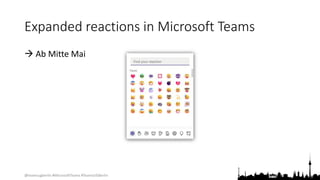
Expanded reactions in Microsoft Teams
 Ab Mitte Mai
@teamsugberlin #MicrosoftTeams #TeamsUGBerlin
Neuigkeiten in Microsoft Teams
 Improved Teams Guest User Usability
 Expanded reactions in Microsoft Teams
 Updated companion mode for iOS users
 Connected Templates
 Live Captions in all available languages and CART Captions on Teams
Meetings on Web
 Microsoft Viva: Praise History in Microsoft Viva Insights Weitere Informationen
 Automatically Detect Music
@teamsugberlin #MicrosoftTeams #TeamsUGBerlin
Neuigkeiten in Microsoft Teams
 Improved Teams Guest User Usability
 Expanded reactions in Microsoft Teams
 Updated companion mode for iOS users
 Connected Templates
 Live Captions in all available languages and CART Captions on Teams
Meetings on Web
 Microsoft Viva: Praise History in Microsoft Viva Insights Weitere Informationen
 Automatically Detect Music
@teamsugberlin #MicrosoftTeams #TeamsUGBerlin
Connected Templates
 Microsoft Team Templates allow administrators to easily deploy
consistent teams across their organization using predefined or
customized team templates across their organization.
 SharePoint templates offer a straightforward way for admins to build
sites with pre-populated pages, page templates, news post templates,
and web parts that can be customized to fit the needs of their
organization.
@teamsugberlin #MicrosoftTeams #TeamsUGBerlin
Neuigkeiten in Microsoft Teams
 Improved Teams Guest User Usability
 Expanded reactions in Microsoft Teams
 Updated companion mode for iOS users
 Connected Templates
 Live Captions in all available languages and CART Captions on Teams
Meetings on Web
 Microsoft Viva: Praise History in Microsoft Viva Insights Weitere Informationen
 Automatically Detect Music
@teamsugberlin #MicrosoftTeams #TeamsUGBerlin
Live Captions in all available languages and
CART Captions on Teams Meetings on Web
 Live captions for web
  Mitte Februar
 CART captions for web
  Mitte April
Weitere Informationen zu CART
@teamsugberlin #MicrosoftTeams #TeamsUGBerlin
Neuigkeiten in Microsoft Teams
 Improved Teams Guest User Usability
 Expanded reactions in Microsoft Teams
 Updated companion mode for iOS users
 Connected Templates
 Live Captions in all available languages and CART Captions on Teams
Meetings on Web
 Microsoft Viva: Praise History in Microsoft Viva Insights Weitere Informationen
 Automatically Detect Music
@teamsugberlin #MicrosoftTeams #TeamsUGBerlin
Neuigkeiten in Microsoft Teams
 Improved Teams Guest User Usability
 Expanded reactions in Microsoft Teams
 Updated companion mode for iOS users
 Connected Templates
 Live Captions in all available languages and CART Captions on Teams
Meetings on Web
 Microsoft Viva: Praise History in Microsoft Viva Insights Weitere Informationen
 Automatically Detect Music
@teamsugberlin #MicrosoftTeams #TeamsUGBerlin
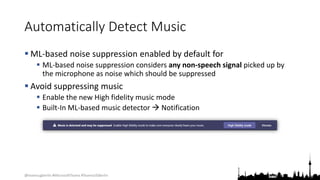
Automatically Detect Music
 ML-based noise suppression enabled by default for
 ML-based noise suppression considers any non-speech signal picked up by
the microphone as noise which should be suppressed
 Avoid suppressing music
 Enable the new High fidelity music mode
 Built-In ML-based music detector  Notification
@teamsugberlin #MicrosoftTeams #TeamsUGBerlin
Neuigkeiten in Microsoft Teams
 Transcription in 1:1 VOIP Calls ( Januar)
 Microsoft Teams: Chat density
 Mute Notifications During Meetings
 Microsoft Forms new App "Polls" in Teams
 Pin a chat message
 Walkie Talkie on iOS General Availability
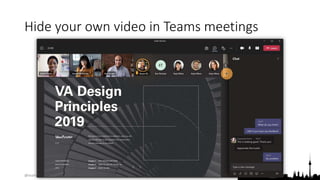
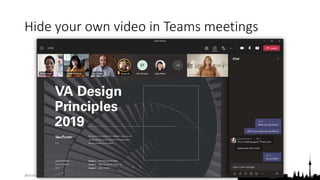
 Hide your own video in Teams meetings
@teamsugberlin #MicrosoftTeams #TeamsUGBerlin
Neuigkeiten in Microsoft Teams
 Transcription in 1:1 VOIP Calls ( Januar)
 Microsoft Teams: Chat density
 Mute Notifications During Meetings
 Microsoft Forms new App "Polls" in Teams
 Pin a chat message
 Walkie Talkie on iOS General Availability
 Hide your own video in Teams meetings
@teamsugberlin #MicrosoftTeams #TeamsUGBerlin
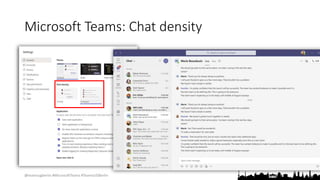
Microsoft Teams: Chat density
@teamsugberlin #MicrosoftTeams #TeamsUGBerlin
Neuigkeiten in Microsoft Teams
 Transcription in 1:1 VOIP Calls ( Januar)
 Microsoft Teams: Chat density
 Mute Notifications During Meetings
 Microsoft Forms new App "Polls" in Teams
 Pin a chat message
 Walkie Talkie on iOS General Availability
 Hide your own video in Teams meetings
@teamsugberlin #MicrosoftTeams #TeamsUGBerlin
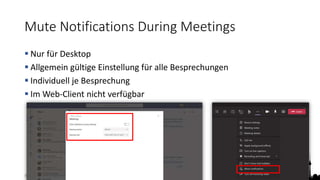
Mute Notifications During Meetings
 Nur für Desktop
 Allgemein gültige Einstellung für alle Besprechungen
 Individuell je Besprechung
 Im Web-Client nicht verfügbar
@teamsugberlin #MicrosoftTeams #TeamsUGBerlin
Neuigkeiten in Microsoft Teams
 Transcription in 1:1 VOIP Calls ( Januar)
 Microsoft Teams: Chat density
 Mute Notifications During Meetings
 Microsoft Forms new App "Polls" in Teams
 Pin a chat message
 Walkie Talkie on iOS General Availability
 Hide your own video in Teams meetings
@teamsugberlin #MicrosoftTeams #TeamsUGBerlin
Microsoft Forms new App "Polls" in Teams
 The new Microsoft Forms App "Polls" will have the same functionality,
same service, and there will be no need for data migration.
 For the previous polls that were created in the original App "Forms",
these polls will not be lost. Poll owners can still view them in the new
App "Polls" portal in Teams OR view it in the Forms web portal page
(http://forms.office.com/)
 The original App "Forms" polling capability will be retired in Teams
meeting and Teams chat. Original App "Forms" survey capability in
Teams channel Tab is not impacted.
@teamsugberlin #MicrosoftTeams #TeamsUGBerlin
Neuigkeiten in Microsoft Teams
 Transcription in 1:1 VOIP Calls ( Januar)
 Microsoft Teams: Chat density
 Mute Notifications During Meetings
 Microsoft Forms new App "Polls" in Teams
 Pin a chat message
 Walkie Talkie on iOS General Availability
 Hide your own video in Teams meetings
@teamsugberlin #MicrosoftTeams #TeamsUGBerlin
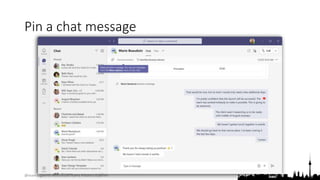
Pin a chat message
@teamsugberlin #MicrosoftTeams #TeamsUGBerlin
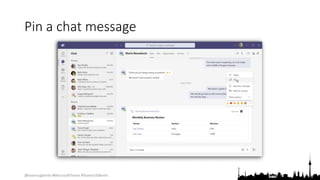
Pin a chat message
@teamsugberlin #MicrosoftTeams #TeamsUGBerlin
Neuigkeiten in Microsoft Teams
 Transcription in 1:1 VOIP Calls ( Januar)
 Microsoft Teams: Chat density
 Mute Notifications During Meetings
 Microsoft Forms new App "Polls" in Teams
 Pin a chat message
 Walkie Talkie on iOS General Availability
 Hide your own video in Teams meetings
@teamsugberlin #MicrosoftTeams #TeamsUGBerlin
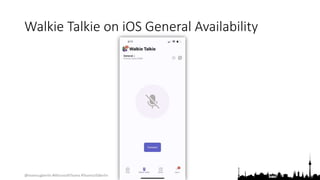
Walkie Talkie on iOS General Availability
@teamsugberlin #MicrosoftTeams #TeamsUGBerlin
Neuigkeiten in Microsoft Teams
 Transcription in 1:1 VOIP Calls ( Januar)
 Microsoft Teams: Chat density
 Mute Notifications During Meetings
 Microsoft Forms new App "Polls" in Teams
 Pin a chat message
 Walkie Talkie on iOS General Availability
 Hide your own video in Teams meetings
@teamsugberlin #MicrosoftTeams #TeamsUGBerlin
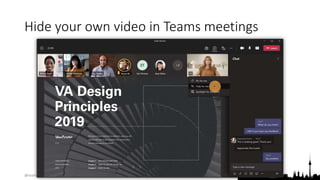
Hide your own video in Teams meetings
@teamsugberlin #MicrosoftTeams #TeamsUGBerlin
Hide your own video in Teams meetings
@teamsugberlin #MicrosoftTeams #TeamsUGBerlin
Hide your own video in Teams meetings
@teamsugberlin #MicrosoftTeams #TeamsUGBerlin
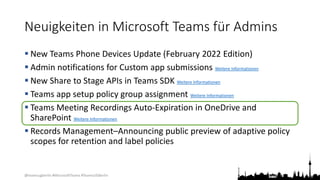
Neuigkeiten in Microsoft Teams für Admins
 New Teams Phone Devices Update (February 2022 Edition)
 Admin notifications for Custom app submissions Weitere Informationen
 New Share to Stage APIs in Teams SDK Weitere Informationen
 Teams app setup policy group assignment Weitere Informationen
 Teams Meeting Recordings Auto-Expiration in OneDrive and
SharePoint Weitere Informationen
 Records Management–Announcing public preview of adaptive policy
scopes for retention and label policies
@teamsugberlin #MicrosoftTeams #TeamsUGBerlin
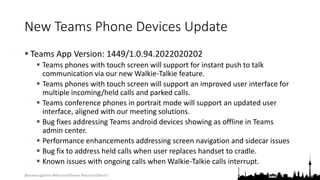
New Teams Phone Devices Update
 Teams App Version: 1449/1.0.94.2022020202
 Teams phones with touch screen will support for instant push to talk
communication via our new Walkie-Talkie feature.
 Teams phones with touch screen will support an improved user interface for
multiple incoming/held calls and parked calls.
 Teams conference phones in portrait mode will support an updated user
interface, aligned with our meeting solutions.
 Bug fixes addressing Teams android devices showing as offline in Teams
admin center.
 Performance enhancements addressing screen navigation and sidecar issues
 Bug fix to address held calls when user replaces handset to cradle.
 Known issues with ongoing calls when Walkie-Talkie calls interrupt.
@teamsugberlin #MicrosoftTeams #TeamsUGBerlin
Neuigkeiten in Microsoft Teams für Admins
 New Teams Phone Devices Update (February 2022 Edition)
 Admin notifications for Custom app submissions Weitere Informationen
 New Share to Stage APIs in Teams SDK Weitere Informationen
 Teams app setup policy group assignment Weitere Informationen
 Teams Meeting Recordings Auto-Expiration in OneDrive and
SharePoint Weitere Informationen
 Records Management–Announcing public preview of adaptive policy
scopes for retention and label policies
@teamsugberlin #MicrosoftTeams #TeamsUGBerlin
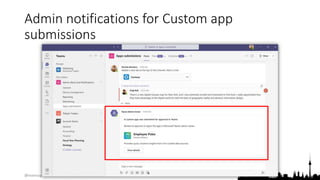
Admin notifications for Custom app
submissions
@teamsugberlin #MicrosoftTeams #TeamsUGBerlin
Neuigkeiten in Microsoft Teams für Admins
 New Teams Phone Devices Update (February 2022 Edition)
 Admin notifications for Custom app submissions Weitere Informationen
 New Share to Stage APIs in Teams SDK Weitere Informationen
 Teams app setup policy group assignment Weitere Informationen
 Teams Meeting Recordings Auto-Expiration in OneDrive and
SharePoint Weitere Informationen
 Records Management–Announcing public preview of adaptive policy
scopes for retention and label policies
@teamsugberlin #MicrosoftTeams #TeamsUGBerlin
Neuigkeiten in Microsoft Teams für Admins
 New Teams Phone Devices Update (February 2022 Edition)
 Admin notifications for Custom app submissions Weitere Informationen
 New Share to Stage APIs in Teams SDK Weitere Informationen
 Teams app setup policy group assignment Weitere Informationen
 Teams Meeting Recordings Auto-Expiration in OneDrive and
SharePoint Weitere Informationen
 Records Management–Announcing public preview of adaptive policy
scopes for retention and label policies
@teamsugberlin #MicrosoftTeams #TeamsUGBerlin
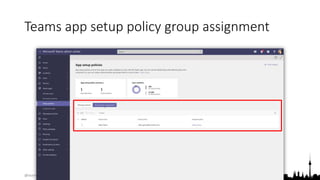
Teams app setup policy group assignment
@teamsugberlin #MicrosoftTeams #TeamsUGBerlin
Neuigkeiten in Microsoft Teams für Admins
 New Teams Phone Devices Update (February 2022 Edition)
 Admin notifications for Custom app submissions Weitere Informationen
 New Share to Stage APIs in Teams SDK Weitere Informationen
 Teams app setup policy group assignment Weitere Informationen
 Teams Meeting Recordings Auto-Expiration in OneDrive and
SharePoint Weitere Informationen
 Records Management–Announcing public preview of adaptive policy
scopes for retention and label policies
@teamsugberlin #MicrosoftTeams #TeamsUGBerlin
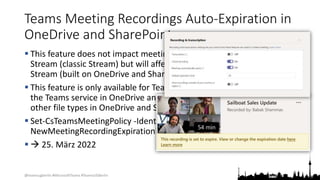
Teams Meeting Recordings Auto-Expiration in
OneDrive and SharePoint
 This feature does not impact meeting recordings stored in Microsoft
Stream (classic Stream) but will affect recordings stored in the new
Stream (built on OneDrive and SharePoint).
 This feature is only available for Teams meeting recordings created by
the Teams service in OneDrive and SharePoint. It is not available for
other file types in OneDrive and SharePoint.
 Set-CsTeamsMeetingPolicy -Identity Global -
NewMeetingRecordingExpirationDays 30
  25. März 2022
@teamsugberlin #MicrosoftTeams #TeamsUGBerlin
Neuigkeiten in Microsoft Teams für Admins
 New Teams Phone Devices Update (February 2022 Edition)
 Admin notifications for Custom app submissions Weitere Informationen
 New Share to Stage APIs in Teams SDK Weitere Informationen
 Teams app setup policy group assignment Weitere Informationen
 Teams Meeting Recordings Auto-Expiration in OneDrive and
SharePoint Weitere Informationen
 Records Management–Announcing public preview of adaptive policy
scopes for retention and label policies
@teamsugberlin #MicrosoftTeams #TeamsUGBerlin
Neuigkeiten in Microsoft Teams für Admins
 Sensitivity Labels for Teams Created from Templates
 Information Barrier Open and Owner Moderated Modes in Teams
Weitere Informationen
 Cortana Voice Activation enabled by default in Teams Rooms
Weitere Informationen
 TAC: App lists and banners in the app management page
 TAC: Enriching the App detailed page with more descriptive App
information
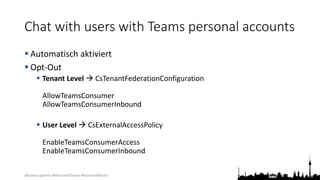
 Chat with users with Teams personal accounts
@teamsugberlin #MicrosoftTeams #TeamsUGBerlin
Neuigkeiten in Microsoft Teams für Admins
 Sensitivity Labels for Teams Created from Templates
 Information Barrier Open and Owner Moderated Modes in Teams
Weitere Informationen
 Cortana Voice Activation enabled by default in Teams Rooms
Weitere Informationen
 TAC: App lists and banners in the app management page
 TAC: Enriching the App detailed page with more descriptive App
information
 Chat with users with Teams personal accounts
@teamsugberlin #MicrosoftTeams #TeamsUGBerlin
Neuigkeiten in Microsoft Teams für Admins
 Sensitivity Labels for Teams Created from Templates
 Information Barrier Open and Owner Moderated Modes in Teams
Weitere Informationen
 Cortana Voice Activation enabled by default in Teams Rooms
Weitere Informationen
 TAC: App lists and banners in the app management page
 TAC: Enriching the App detailed page with more descriptive App
information
 Chat with users with Teams personal accounts
@teamsugberlin #MicrosoftTeams #TeamsUGBerlin
Neuigkeiten in Microsoft Teams für Admins
 Sensitivity Labels for Teams Created from Templates
 Information Barrier Open and Owner Moderated Modes in Teams
Weitere Informationen
 Cortana Voice Activation enabled by default in Teams Rooms
Weitere Informationen
 TAC: App lists and banners in the app management page
 TAC: Enriching the App detailed page with more descriptive App
information
 Chat with users with Teams personal accounts
@teamsugberlin #MicrosoftTeams #TeamsUGBerlin
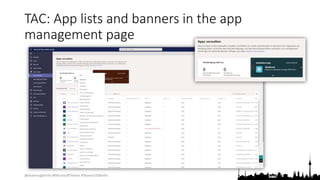
TAC: App lists and banners in the app
management page
@teamsugberlin #MicrosoftTeams #TeamsUGBerlin
Neuigkeiten in Microsoft Teams für Admins
 Sensitivity Labels for Teams Created from Templates
 Information Barrier Open and Owner Moderated Modes in Teams
Weitere Informationen
 Cortana Voice Activation enabled by default in Teams Rooms
Weitere Informationen
 TAC: App lists and banners in the app management page
 TAC: Enriching the App detailed page with more descriptive App
information
 Chat with users with Teams personal accounts
@teamsugberlin #MicrosoftTeams #TeamsUGBerlin
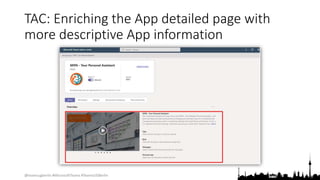
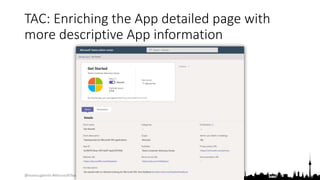
TAC: Enriching the App detailed page with
more descriptive App information
@teamsugberlin #MicrosoftTeams #TeamsUGBerlin
TAC: Enriching the App detailed page with
more descriptive App information
@teamsugberlin #MicrosoftTeams #TeamsUGBerlin
Neuigkeiten in Microsoft Teams für Admins
 Sensitivity Labels for Teams Created from Templates
 Information Barrier Open and Owner Moderated Modes in Teams
Weitere Informationen
 Cortana Voice Activation enabled by default in Teams Rooms
Weitere Informationen
 TAC: App lists and banners in the app management page
 TAC: Enriching the App detailed page with more descriptive App
information
 Chat with users with Teams personal accounts
@teamsugberlin #MicrosoftTeams #TeamsUGBerlin
Chat with users with Teams personal accounts
 Automatisch aktiviert
 Opt-Out
 Tenant Level  CsTenantFederationConfiguration
AllowTeamsConsumer
AllowTeamsConsumerInbound
 User Level  CsExternalAccessPolicy
EnableTeamsConsumerAccess
EnableTeamsConsumerInbound
@teamsugberlin #MicrosoftTeams #TeamsUGBerlin
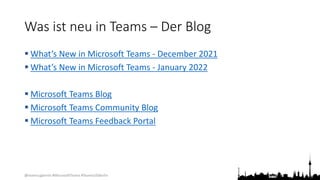
Was ist neu in Teams – Der Blog
 What’s New in Microsoft Teams - December 2021
 What’s New in Microsoft Teams - January 2022
 Microsoft Teams Blog
 Microsoft Teams Community Blog
 Microsoft Teams Feedback Portal
@teamsugberlin #MicrosoftTeams #TeamsUGBerlin
Organisatorisches
@teamsugberlin #MicrosoftTeams #TeamsUGBerlin
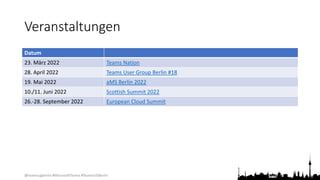
Veranstaltungen
Datum
23. März 2022 Teams Nation
28. April 2022 Teams User Group Berlin #18
19. Mai 2022 aMS Berlin 2022
10./11. Juni 2022 Scottish Summit 2022
26.-28. September 2022 European Cloud Summit
@teamsugberlin #MicrosoftTeams #TeamsUGBerlin
Vielen Dank für eure Teilnahme!
Das nächste Meetup:
 28. April 2022
https://TeamsUserGroup.Berlin/register
Spread the Word!
#TeamsUGBerlin
Aufzeichnungen unserer Meetups sind im Community Team und bei YouTube verfügbar.
@teamsugberlin #MicrosoftTeams #TeamsUGBerlin
Offene Diskussion

17. Treffen der Teams User Group Berlin

  • 1.
    @teamsugberlin #MicrosoftTeams #TeamsUGBerlin MicrosoftTeams User Group Berlin 17. Februar 2022 Meetup #17
  • 2.
    @teamsugberlin #MicrosoftTeams #TeamsUGBerlin Agenda 18:00- 18:15 Landing Zone 18:15 - 19:15 Talk 1 – OneNote and Microsoft Teams, Smarter Notetaking Together Heather Severino (@HeatherSeverino) 19:15 - 19:45 Microsoft Teams Neuigkeiten Thomas Stensitzki (@stensitzki) 19:45 - ? Fragen und Antworten rund um Microsoft Teams Organisatorisches Dieses Meeting wird aufgezeichnet und online bereitgestellt. This meeting will be recorded and made available online.
  • 3.
    @teamsugberlin #MicrosoftTeams #TeamsUGBerlin OneNoteand Microsoft Teams, Smarter Notetaking Together Heather Severino @HeatherSeverino
  • 4.
    @teamsugberlin #MicrosoftTeams #TeamsUGBerlin Neuesin Microsoft Teams Ankündigungen & Rollouts Meetup #17 Thomas Stensitzki
  • 5.
    @teamsugberlin #MicrosoftTeams #TeamsUGBerlin Neuigkeitenin Microsoft Teams  Improved Teams Guest User Usability  Expanded reactions in Microsoft Teams  Updated companion mode for iOS users  Connected Templates  Live Captions in all available languages and CART Captions on Teams Meetings on Web  Microsoft Viva: Praise History in Microsoft Viva Insights Weitere Informationen  Automatically Detect Music
  • 6.
    @teamsugberlin #MicrosoftTeams #TeamsUGBerlin ImprovedTeams Guest User Usability  Guest users can decline a pending guest invitation within Teams app  Decline  Teams Tenant List will not show the tenant with the pending invitation and in the Account Management tab  Guest users can initiate leaving an org  Leave Org  User will be guided on how to leave a tenant from Teams and Azure Portal  Guest users can manage guest tenant list  Hide/Show in Settings  The tenant will be shown (or hidden) in the Menu under the tenant list
  • 7.
    @teamsugberlin #MicrosoftTeams #TeamsUGBerlin Neuigkeitenin Microsoft Teams  Improved Teams Guest User Usability  Expanded reactions in Microsoft Teams  Updated companion mode for iOS users  Connected Templates  Live Captions in all available languages and CART Captions on Teams Meetings on Web  Microsoft Viva: Praise History in Microsoft Viva Insights Weitere Informationen  Automatically Detect Music
  • 8.
    @teamsugberlin #MicrosoftTeams #TeamsUGBerlin Expandedreactions in Microsoft Teams  Ab Mitte Mai
  • 9.
    @teamsugberlin #MicrosoftTeams #TeamsUGBerlin Neuigkeitenin Microsoft Teams  Improved Teams Guest User Usability  Expanded reactions in Microsoft Teams  Updated companion mode for iOS users  Connected Templates  Live Captions in all available languages and CART Captions on Teams Meetings on Web  Microsoft Viva: Praise History in Microsoft Viva Insights Weitere Informationen  Automatically Detect Music
  • 10.
    @teamsugberlin #MicrosoftTeams #TeamsUGBerlin Neuigkeitenin Microsoft Teams  Improved Teams Guest User Usability  Expanded reactions in Microsoft Teams  Updated companion mode for iOS users  Connected Templates  Live Captions in all available languages and CART Captions on Teams Meetings on Web  Microsoft Viva: Praise History in Microsoft Viva Insights Weitere Informationen  Automatically Detect Music
  • 11.
    @teamsugberlin #MicrosoftTeams #TeamsUGBerlin ConnectedTemplates  Microsoft Team Templates allow administrators to easily deploy consistent teams across their organization using predefined or customized team templates across their organization.  SharePoint templates offer a straightforward way for admins to build sites with pre-populated pages, page templates, news post templates, and web parts that can be customized to fit the needs of their organization.
  • 12.
    @teamsugberlin #MicrosoftTeams #TeamsUGBerlin Neuigkeitenin Microsoft Teams  Improved Teams Guest User Usability  Expanded reactions in Microsoft Teams  Updated companion mode for iOS users  Connected Templates  Live Captions in all available languages and CART Captions on Teams Meetings on Web  Microsoft Viva: Praise History in Microsoft Viva Insights Weitere Informationen  Automatically Detect Music
  • 13.
    @teamsugberlin #MicrosoftTeams #TeamsUGBerlin LiveCaptions in all available languages and CART Captions on Teams Meetings on Web  Live captions for web   Mitte Februar  CART captions for web   Mitte April Weitere Informationen zu CART
  • 14.
    @teamsugberlin #MicrosoftTeams #TeamsUGBerlin Neuigkeitenin Microsoft Teams  Improved Teams Guest User Usability  Expanded reactions in Microsoft Teams  Updated companion mode for iOS users  Connected Templates  Live Captions in all available languages and CART Captions on Teams Meetings on Web  Microsoft Viva: Praise History in Microsoft Viva Insights Weitere Informationen  Automatically Detect Music
  • 15.
    @teamsugberlin #MicrosoftTeams #TeamsUGBerlin Neuigkeitenin Microsoft Teams  Improved Teams Guest User Usability  Expanded reactions in Microsoft Teams  Updated companion mode for iOS users  Connected Templates  Live Captions in all available languages and CART Captions on Teams Meetings on Web  Microsoft Viva: Praise History in Microsoft Viva Insights Weitere Informationen  Automatically Detect Music
  • 16.
    @teamsugberlin #MicrosoftTeams #TeamsUGBerlin AutomaticallyDetect Music  ML-based noise suppression enabled by default for  ML-based noise suppression considers any non-speech signal picked up by the microphone as noise which should be suppressed  Avoid suppressing music  Enable the new High fidelity music mode  Built-In ML-based music detector  Notification
  • 17.
    @teamsugberlin #MicrosoftTeams #TeamsUGBerlin Neuigkeitenin Microsoft Teams  Transcription in 1:1 VOIP Calls ( Januar)  Microsoft Teams: Chat density  Mute Notifications During Meetings  Microsoft Forms new App "Polls" in Teams  Pin a chat message  Walkie Talkie on iOS General Availability  Hide your own video in Teams meetings
  • 18.
    @teamsugberlin #MicrosoftTeams #TeamsUGBerlin Neuigkeitenin Microsoft Teams  Transcription in 1:1 VOIP Calls ( Januar)  Microsoft Teams: Chat density  Mute Notifications During Meetings  Microsoft Forms new App "Polls" in Teams  Pin a chat message  Walkie Talkie on iOS General Availability  Hide your own video in Teams meetings
  • 19.
  • 20.
    @teamsugberlin #MicrosoftTeams #TeamsUGBerlin Neuigkeitenin Microsoft Teams  Transcription in 1:1 VOIP Calls ( Januar)  Microsoft Teams: Chat density  Mute Notifications During Meetings  Microsoft Forms new App "Polls" in Teams  Pin a chat message  Walkie Talkie on iOS General Availability  Hide your own video in Teams meetings
  • 21.
    @teamsugberlin #MicrosoftTeams #TeamsUGBerlin MuteNotifications During Meetings  Nur für Desktop  Allgemein gültige Einstellung für alle Besprechungen  Individuell je Besprechung  Im Web-Client nicht verfügbar
  • 22.
    @teamsugberlin #MicrosoftTeams #TeamsUGBerlin Neuigkeitenin Microsoft Teams  Transcription in 1:1 VOIP Calls ( Januar)  Microsoft Teams: Chat density  Mute Notifications During Meetings  Microsoft Forms new App "Polls" in Teams  Pin a chat message  Walkie Talkie on iOS General Availability  Hide your own video in Teams meetings
  • 23.
    @teamsugberlin #MicrosoftTeams #TeamsUGBerlin MicrosoftForms new App "Polls" in Teams  The new Microsoft Forms App "Polls" will have the same functionality, same service, and there will be no need for data migration.  For the previous polls that were created in the original App "Forms", these polls will not be lost. Poll owners can still view them in the new App "Polls" portal in Teams OR view it in the Forms web portal page (http://forms.office.com/)  The original App "Forms" polling capability will be retired in Teams meeting and Teams chat. Original App "Forms" survey capability in Teams channel Tab is not impacted.
  • 24.
    @teamsugberlin #MicrosoftTeams #TeamsUGBerlin Neuigkeitenin Microsoft Teams  Transcription in 1:1 VOIP Calls ( Januar)  Microsoft Teams: Chat density  Mute Notifications During Meetings  Microsoft Forms new App "Polls" in Teams  Pin a chat message  Walkie Talkie on iOS General Availability  Hide your own video in Teams meetings
  • 25.
  • 26.
  • 27.
    @teamsugberlin #MicrosoftTeams #TeamsUGBerlin Neuigkeitenin Microsoft Teams  Transcription in 1:1 VOIP Calls ( Januar)  Microsoft Teams: Chat density  Mute Notifications During Meetings  Microsoft Forms new App "Polls" in Teams  Pin a chat message  Walkie Talkie on iOS General Availability  Hide your own video in Teams meetings
  • 28.
    @teamsugberlin #MicrosoftTeams #TeamsUGBerlin WalkieTalkie on iOS General Availability
  • 29.
    @teamsugberlin #MicrosoftTeams #TeamsUGBerlin Neuigkeitenin Microsoft Teams  Transcription in 1:1 VOIP Calls ( Januar)  Microsoft Teams: Chat density  Mute Notifications During Meetings  Microsoft Forms new App "Polls" in Teams  Pin a chat message  Walkie Talkie on iOS General Availability  Hide your own video in Teams meetings
  • 30.
  • 31.
  • 32.
  • 33.
    @teamsugberlin #MicrosoftTeams #TeamsUGBerlin Neuigkeitenin Microsoft Teams für Admins  New Teams Phone Devices Update (February 2022 Edition)  Admin notifications for Custom app submissions Weitere Informationen  New Share to Stage APIs in Teams SDK Weitere Informationen  Teams app setup policy group assignment Weitere Informationen  Teams Meeting Recordings Auto-Expiration in OneDrive and SharePoint Weitere Informationen  Records Management–Announcing public preview of adaptive policy scopes for retention and label policies
  • 34.
    @teamsugberlin #MicrosoftTeams #TeamsUGBerlin NewTeams Phone Devices Update  Teams App Version: 1449/1.0.94.2022020202  Teams phones with touch screen will support for instant push to talk communication via our new Walkie-Talkie feature.  Teams phones with touch screen will support an improved user interface for multiple incoming/held calls and parked calls.  Teams conference phones in portrait mode will support an updated user interface, aligned with our meeting solutions.  Bug fixes addressing Teams android devices showing as offline in Teams admin center.  Performance enhancements addressing screen navigation and sidecar issues  Bug fix to address held calls when user replaces handset to cradle.  Known issues with ongoing calls when Walkie-Talkie calls interrupt.
  • 35.
    @teamsugberlin #MicrosoftTeams #TeamsUGBerlin Neuigkeitenin Microsoft Teams für Admins  New Teams Phone Devices Update (February 2022 Edition)  Admin notifications for Custom app submissions Weitere Informationen  New Share to Stage APIs in Teams SDK Weitere Informationen  Teams app setup policy group assignment Weitere Informationen  Teams Meeting Recordings Auto-Expiration in OneDrive and SharePoint Weitere Informationen  Records Management–Announcing public preview of adaptive policy scopes for retention and label policies
  • 36.
    @teamsugberlin #MicrosoftTeams #TeamsUGBerlin Adminnotifications for Custom app submissions
  • 37.
    @teamsugberlin #MicrosoftTeams #TeamsUGBerlin Neuigkeitenin Microsoft Teams für Admins  New Teams Phone Devices Update (February 2022 Edition)  Admin notifications for Custom app submissions Weitere Informationen  New Share to Stage APIs in Teams SDK Weitere Informationen  Teams app setup policy group assignment Weitere Informationen  Teams Meeting Recordings Auto-Expiration in OneDrive and SharePoint Weitere Informationen  Records Management–Announcing public preview of adaptive policy scopes for retention and label policies
  • 38.
    @teamsugberlin #MicrosoftTeams #TeamsUGBerlin Neuigkeitenin Microsoft Teams für Admins  New Teams Phone Devices Update (February 2022 Edition)  Admin notifications for Custom app submissions Weitere Informationen  New Share to Stage APIs in Teams SDK Weitere Informationen  Teams app setup policy group assignment Weitere Informationen  Teams Meeting Recordings Auto-Expiration in OneDrive and SharePoint Weitere Informationen  Records Management–Announcing public preview of adaptive policy scopes for retention and label policies
  • 39.
    @teamsugberlin #MicrosoftTeams #TeamsUGBerlin Teamsapp setup policy group assignment
  • 40.
    @teamsugberlin #MicrosoftTeams #TeamsUGBerlin Neuigkeitenin Microsoft Teams für Admins  New Teams Phone Devices Update (February 2022 Edition)  Admin notifications for Custom app submissions Weitere Informationen  New Share to Stage APIs in Teams SDK Weitere Informationen  Teams app setup policy group assignment Weitere Informationen  Teams Meeting Recordings Auto-Expiration in OneDrive and SharePoint Weitere Informationen  Records Management–Announcing public preview of adaptive policy scopes for retention and label policies
  • 41.
    @teamsugberlin #MicrosoftTeams #TeamsUGBerlin TeamsMeeting Recordings Auto-Expiration in OneDrive and SharePoint  This feature does not impact meeting recordings stored in Microsoft Stream (classic Stream) but will affect recordings stored in the new Stream (built on OneDrive and SharePoint).  This feature is only available for Teams meeting recordings created by the Teams service in OneDrive and SharePoint. It is not available for other file types in OneDrive and SharePoint.  Set-CsTeamsMeetingPolicy -Identity Global - NewMeetingRecordingExpirationDays 30   25. März 2022
  • 42.
    @teamsugberlin #MicrosoftTeams #TeamsUGBerlin Neuigkeitenin Microsoft Teams für Admins  New Teams Phone Devices Update (February 2022 Edition)  Admin notifications for Custom app submissions Weitere Informationen  New Share to Stage APIs in Teams SDK Weitere Informationen  Teams app setup policy group assignment Weitere Informationen  Teams Meeting Recordings Auto-Expiration in OneDrive and SharePoint Weitere Informationen  Records Management–Announcing public preview of adaptive policy scopes for retention and label policies
  • 43.
    @teamsugberlin #MicrosoftTeams #TeamsUGBerlin Neuigkeitenin Microsoft Teams für Admins  Sensitivity Labels for Teams Created from Templates  Information Barrier Open and Owner Moderated Modes in Teams Weitere Informationen  Cortana Voice Activation enabled by default in Teams Rooms Weitere Informationen  TAC: App lists and banners in the app management page  TAC: Enriching the App detailed page with more descriptive App information  Chat with users with Teams personal accounts
  • 44.
    @teamsugberlin #MicrosoftTeams #TeamsUGBerlin Neuigkeitenin Microsoft Teams für Admins  Sensitivity Labels for Teams Created from Templates  Information Barrier Open and Owner Moderated Modes in Teams Weitere Informationen  Cortana Voice Activation enabled by default in Teams Rooms Weitere Informationen  TAC: App lists and banners in the app management page  TAC: Enriching the App detailed page with more descriptive App information  Chat with users with Teams personal accounts
  • 45.
    @teamsugberlin #MicrosoftTeams #TeamsUGBerlin Neuigkeitenin Microsoft Teams für Admins  Sensitivity Labels for Teams Created from Templates  Information Barrier Open and Owner Moderated Modes in Teams Weitere Informationen  Cortana Voice Activation enabled by default in Teams Rooms Weitere Informationen  TAC: App lists and banners in the app management page  TAC: Enriching the App detailed page with more descriptive App information  Chat with users with Teams personal accounts
  • 46.
    @teamsugberlin #MicrosoftTeams #TeamsUGBerlin Neuigkeitenin Microsoft Teams für Admins  Sensitivity Labels for Teams Created from Templates  Information Barrier Open and Owner Moderated Modes in Teams Weitere Informationen  Cortana Voice Activation enabled by default in Teams Rooms Weitere Informationen  TAC: App lists and banners in the app management page  TAC: Enriching the App detailed page with more descriptive App information  Chat with users with Teams personal accounts
  • 47.
    @teamsugberlin #MicrosoftTeams #TeamsUGBerlin TAC:App lists and banners in the app management page
  • 48.
    @teamsugberlin #MicrosoftTeams #TeamsUGBerlin Neuigkeitenin Microsoft Teams für Admins  Sensitivity Labels for Teams Created from Templates  Information Barrier Open and Owner Moderated Modes in Teams Weitere Informationen  Cortana Voice Activation enabled by default in Teams Rooms Weitere Informationen  TAC: App lists and banners in the app management page  TAC: Enriching the App detailed page with more descriptive App information  Chat with users with Teams personal accounts
  • 49.
    @teamsugberlin #MicrosoftTeams #TeamsUGBerlin TAC:Enriching the App detailed page with more descriptive App information
  • 50.
    @teamsugberlin #MicrosoftTeams #TeamsUGBerlin TAC:Enriching the App detailed page with more descriptive App information
  • 51.
    @teamsugberlin #MicrosoftTeams #TeamsUGBerlin Neuigkeitenin Microsoft Teams für Admins  Sensitivity Labels for Teams Created from Templates  Information Barrier Open and Owner Moderated Modes in Teams Weitere Informationen  Cortana Voice Activation enabled by default in Teams Rooms Weitere Informationen  TAC: App lists and banners in the app management page  TAC: Enriching the App detailed page with more descriptive App information  Chat with users with Teams personal accounts
  • 52.
    @teamsugberlin #MicrosoftTeams #TeamsUGBerlin Chatwith users with Teams personal accounts  Automatisch aktiviert  Opt-Out  Tenant Level  CsTenantFederationConfiguration AllowTeamsConsumer AllowTeamsConsumerInbound  User Level  CsExternalAccessPolicy EnableTeamsConsumerAccess EnableTeamsConsumerInbound
  • 53.
    @teamsugberlin #MicrosoftTeams #TeamsUGBerlin Wasist neu in Teams – Der Blog  What’s New in Microsoft Teams - December 2021  What’s New in Microsoft Teams - January 2022  Microsoft Teams Blog  Microsoft Teams Community Blog  Microsoft Teams Feedback Portal
  • 54.
  • 55.
    @teamsugberlin #MicrosoftTeams #TeamsUGBerlin Veranstaltungen Datum 23.März 2022 Teams Nation 28. April 2022 Teams User Group Berlin #18 19. Mai 2022 aMS Berlin 2022 10./11. Juni 2022 Scottish Summit 2022 26.-28. September 2022 European Cloud Summit
  • 56.
    @teamsugberlin #MicrosoftTeams #TeamsUGBerlin VielenDank für eure Teilnahme! Das nächste Meetup:  28. April 2022 https://TeamsUserGroup.Berlin/register Spread the Word! #TeamsUGBerlin Aufzeichnungen unserer Meetups sind im Community Team und bei YouTube verfügbar.
  • 57.

Editor's Notes

  • #11 Standard: will begin rolling out in mid-May (previously early March) and expect to complete rollout by early June (previously late March). GCC: will begin rolling out in mid-May (previously early March) and expect to complete rollout by early June (previously late March). GCC-H: will begin rolling this out in mid-June (previously early April) and expect to complete rollout by late June (previously late April). DOD: will begin rolling this out in mid-June (previously early April) and expect to complete rollout by late June (previously late April).
  • #14 https://www.microsoft.com/microsoft-365/roadmap?filters=&searchterms=84724
  • #16 Communication access real-time translation (CART) 
  • #22 Customize the number of chat messages you see on the screen. Use the compact setting to fit 50 percent more messages on the screen. Comfortable setting keeps the chat display as it is in Teams today. This will be rolling out on Teams desktop.
  • #26 The original "Forms" app will be retired from Teams meetings in March (previously January), and then will be retired from Teams chat in April (previously February). Once retired from meetings/chat the “Forms” app will only be available in the Teams channel tab to provide Survey capabilities.
  • #28 Any member of a chat will be able to pin/unpin any specific chat message to the top of the chat header, for all members to see. Users can click on the pinned message to go to the original message in the chat thread. Currently, only a single message can be pinned at a time.
  • #29 Any member of a chat will be able to pin/unpin any specific chat message to the top of the chat header, for all members to see. Users can click on the pinned message to go to the original message in the chat thread. Currently, only a single message can be pinned at a time.
  • #35 Go to the Me video menu - you can find it in the Me box, clicking on ...; Select Hide for me. Your Me box is going to roll either vertically or horizontally depending on the position of your gallery. If you no longer wish to be hidden, select Unhide for me by clicking on the arrow available in the collapsed state. You can easily hide or unhide yourself when clicking on the menu next to your name in roster too.
  • #39 This feature is now available.
  • #40 If you aren’t using the Teams Client SDK, you can safely disregard this message.
  • #52 The feature will be phased roll out starting late January and will complete by late April.
  • #53 The feature will be phased roll out starting late January and will complete by late April.
  • #55 Timing: begin roll out in early December and expect to complete in mid-January (previously mid-December)