15-441 Computer Networking
Lecture 13 – DNS
Lecture 13: 02-22-2005 2
Outline
• DNS Design
• DNS Today
Lecture 13: 02-22-2005 3
Naming
• How do we efficiently locate resources?
• DNS: name  IP address
• Challenge
• How do we scale these to the wide area?
Lecture 13: 02-22-2005 4
Obvious Solutions (1)
Why not centralize DNS?
• Single point of failure
• Traffic volume
• Distant centralized database
• Single point of update
• Doesn’t scale!
Lecture 13: 02-22-2005 5
Obvious Solutions (2)
Why not use /etc/hosts?
• Original Name to Address Mapping
• Flat namespace
• /etc/hosts
• SRI kept main copy
• Downloaded regularly
• Count of hosts was increasing: machine per
domain  machine per user
• Many more downloads
• Many more updates
Lecture 13: 02-22-2005 6
Domain Name System Goals
• Basically a wide-area distributed database
• Scalability
• Decentralized maintenance
• Robustness
• Global scope
• Names mean the same thing everywhere
• Don’t need
• Atomicity
• Strong consistency
Lecture 13: 02-22-2005 7
Programmer’s View of DNS
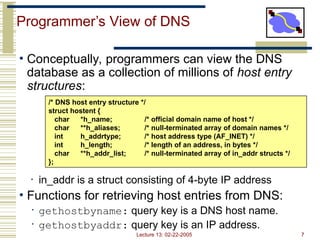
• Conceptually, programmers can view the DNS
database as a collection of millions of host entry
structures:
• in_addr is a struct consisting of 4-byte IP address
• Functions for retrieving host entries from DNS:
• gethostbyname: query key is a DNS host name.
• gethostbyaddr: query key is an IP address.
/* DNS host entry structure */
struct hostent {
char *h_name; /* official domain name of host */
char **h_aliases; /* null-terminated array of domain names */
int h_addrtype; /* host address type (AF_INET) */
int h_length; /* length of an address, in bytes */
char **h_addr_list; /* null-terminated array of in_addr structs */
};
Lecture 13: 02-22-2005 8
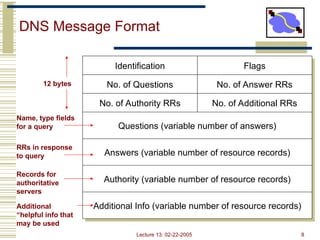
DNS Message Format
Identification
No. of Questions
No. of Authority RRs
Questions (variable number of answers)
Answers (variable number of resource records)
Authority (variable number of resource records)
Additional Info (variable number of resource records)
Flags
No. of Answer RRs
No. of Additional RRs
Name, type fields
for a query
RRs in response
to query
Records for
authoritative
servers
Additional
“helpful info that
may be used
12 bytes
Lecture 13: 02-22-2005 9
DNS Header Fields
• Identification
• Used to match up request/response
• Flags
• 1-bit to mark query or response
• 1-bit to mark authoritative or not
• 1-bit to request recursive resolution
• 1-bit to indicate support for recursive resolution
Lecture 13: 02-22-2005 10
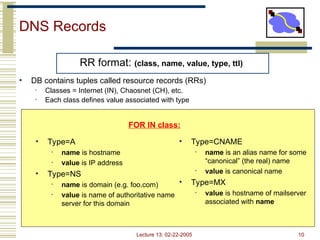
DNS Records
RR format: (class, name, value, type, ttl)
• DB contains tuples called resource records (RRs)
• Classes = Internet (IN), Chaosnet (CH), etc.
• Each class defines value associated with type
FOR IN class:
• Type=A
• name is hostname
• value is IP address
• Type=NS
• name is domain (e.g. foo.com)
• value is name of authoritative name
server for this domain
• Type=CNAME
• name is an alias name for some
“canonical” (the real) name
• value is canonical name
• Type=MX
• value is hostname of mailserver
associated with name
Lecture 13: 02-22-2005 11
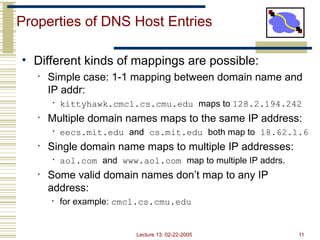
Properties of DNS Host Entries
• Different kinds of mappings are possible:
• Simple case: 1-1 mapping between domain name and
IP addr:
• kittyhawk.cmcl.cs.cmu.edu maps to 128.2.194.242
• Multiple domain names maps to the same IP address:
• eecs.mit.edu and cs.mit.edu both map to 18.62.1.6
• Single domain name maps to multiple IP addresses:
• aol.com and www.aol.com map to multiple IP addrs.
• Some valid domain names don’t map to any IP
address:
• for example: cmcl.cs.cmu.edu
Lecture 13: 02-22-2005 12
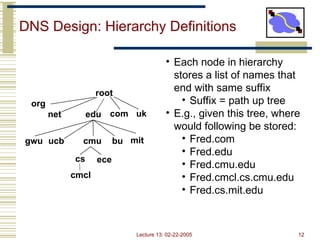
DNS Design: Hierarchy Definitions
root
edu
net
org
uk
com
gwu ucb cmu bu mit
cs ece
cmcl
• Each node in hierarchy
stores a list of names that
end with same suffix
• Suffix = path up tree
• E.g., given this tree, where
would following be stored:
• Fred.com
• Fred.edu
• Fred.cmu.edu
• Fred.cmcl.cs.cmu.edu
• Fred.cs.mit.edu
Lecture 13: 02-22-2005 13
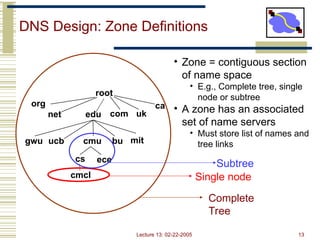
DNS Design: Zone Definitions
root
edu
net
org
uk
com
ca
gwu ucb cmu bu mit
cs ece
cmcl Single node
Subtree
Complete
Tree
• Zone = contiguous section
of name space
• E.g., Complete tree, single
node or subtree
• A zone has an associated
set of name servers
• Must store list of names and
tree links
Lecture 13: 02-22-2005 14
DNS Design: Cont.
• Zones are created by convincing owner node to
create/delegate a subzone
• Records within zone stored multiple redundant name
servers
• Primary/master name server updated manually
• Secondary/redundant servers updated by zone transfer
of name space
• Zone transfer is a bulk transfer of the “configuration” of a DNS
server – uses TCP to ensure reliability
• Example:
• CS.CMU.EDU created by CMU.EDU administrators
• Who creates CMU.EDU or .EDU?
Lecture 13: 02-22-2005 15
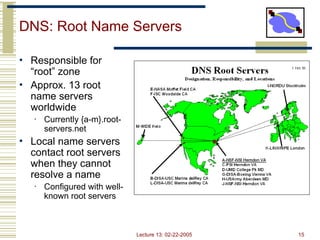
DNS: Root Name Servers
• Responsible for
“root” zone
• Approx. 13 root
name servers
worldwide
• Currently {a-m}.root-
servers.net
• Local name servers
contact root servers
when they cannot
resolve a name
• Configured with well-
known root servers
Lecture 13: 02-22-2005 16
Servers/Resolvers
• Each host has a resolver
• Typically a library that applications can link to
• Local name servers hand-configured (e.g.
/etc/resolv.conf)
• Name servers
• Either responsible for some zone or…
• Local servers
• Do lookup of distant host names for local hosts
• Typically answer queries about local zone
Lecture 13: 02-22-2005 17
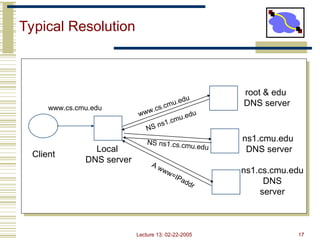
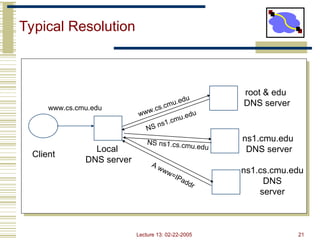
Typical Resolution
Client
Local
DNS server
root & edu
DNS server
ns1.cmu.edu
DNS server
www.cs.cmu.edu
NS ns1.cmu.edu
www.cs.cmu.edu
NS ns1.cs.cmu.edu
A www=IPaddr
ns1.cs.cmu.edu
DNS
server
Lecture 13: 02-22-2005 18
Typical Resolution
• Steps for resolving www.cmu.edu
• Application calls gethostbyname() (RESOLVER)
• Resolver contacts local name server (S1)
• S1 queries root server (S2) for (www.cmu.edu)
• S2 returns NS record for cmu.edu (S3)
• What about A record for S3?
• This is what the additional information section is for (PREFETCHING)
• S1 queries S3 for www.cmu.edu
• S3 returns A record for www.cmu.edu
• Can return multiple A records  what does this mean?
Lecture 13: 02-22-2005 19
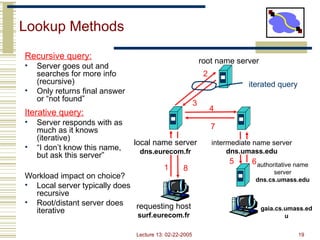
Lookup Methods
Recursive query:
• Server goes out and
searches for more info
(recursive)
• Only returns final answer
or “not found”
Iterative query:
• Server responds with as
much as it knows
(iterative)
• “I don’t know this name,
but ask this server”
Workload impact on choice?
• Local server typically does
recursive
• Root/distant server does
iterative
requesting host
surf.eurecom.fr
gaia.cs.umass.ed
u
root name server
local name server
dns.eurecom.fr
1
2
3
4
5 6authoritative name
server
dns.cs.umass.edu
intermediate name server
dns.umass.edu
7
8
iterated query
Lecture 13: 02-22-2005 20
Workload and Caching
• Are all servers/names likely to be equally popular?
• Why might this be a problem? How can we solve this problem?
• DNS responses are cached
• Quick response for repeated translations
• Other queries may reuse some parts of lookup
• NS records for domains
• DNS negative queries are cached
• Don’t have to repeat past mistakes
• E.g. misspellings, search strings in resolv.conf
• Cached data periodically times out
• Lifetime (TTL) of data controlled by owner of data
• TTL passed with every record
Lecture 13: 02-22-2005 21
Typical Resolution
Client
Local
DNS server
root & edu
DNS server
ns1.cmu.edu
DNS server
www.cs.cmu.edu
NS ns1.cmu.edu
www.cs.cmu.edu
NS ns1.cs.cmu.edu
A www=IPaddr
ns1.cs.cmu.edu
DNS
server
Lecture 13: 02-22-2005 22
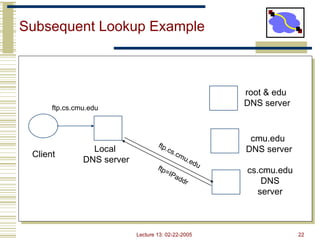
Subsequent Lookup Example
Client
Local
DNS server
root & edu
DNS server
cmu.edu
DNS server
cs.cmu.edu
DNS
server
ftp.cs.cmu.edu
ftp=IPaddr
ftp.cs.cmu.edu
Lecture 13: 02-22-2005 23
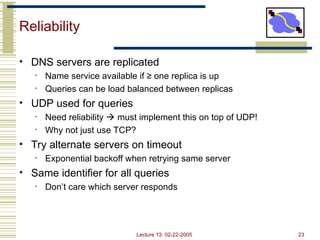
Reliability
• DNS servers are replicated
• Name service available if ≥ one replica is up
• Queries can be load balanced between replicas
• UDP used for queries
• Need reliability  must implement this on top of UDP!
• Why not just use TCP?
• Try alternate servers on timeout
• Exponential backoff when retrying same server
• Same identifier for all queries
• Don’t care which server responds
Lecture 13: 02-22-2005 24
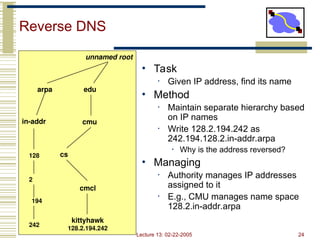
Reverse DNS
• Task
• Given IP address, find its name
• Method
• Maintain separate hierarchy based
on IP names
• Write 128.2.194.242 as
242.194.128.2.in-addr.arpa
• Why is the address reversed?
• Managing
• Authority manages IP addresses
assigned to it
• E.g., CMU manages name space
128.2.in-addr.arpa
edu
cmu
cs
kittyhawk
128.2.194.242
cmcl
unnamed root
arpa
in-addr
128
2
194
242
Lecture 13: 02-22-2005 25
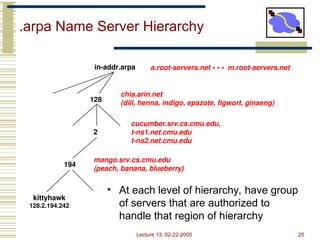
.arpa Name Server Hierarchy
• At each level of hierarchy, have group
of servers that are authorized to
handle that region of hierarchy
128
2
194
kittyhawk
128.2.194.242
in-addr.arpa a.root-servers.net • • • m.root-servers.net
chia.arin.net
(dill, henna, indigo, epazote, figwort, ginseng)
cucumber.srv.cs.cmu.edu,
t-ns1.net.cmu.edu
t-ns2.net.cmu.edu
mango.srv.cs.cmu.edu
(peach, banana, blueberry)
Lecture 13: 02-22-2005 26
Prefetching
• Name servers can add additional data to
response
• Typically used for prefetching
• CNAME/MX/NS typically point to another host name
• Responses include address of host referred to in
“additional section”
Lecture 13: 02-22-2005 27
Mail Addresses
• MX records point to mail exchanger for a name
• E.g. mail.acm.org is MX for acm.org
• Addition of MX record type proved to be a
challenge
• How to get mail programs to lookup MX record for mail
delivery?
• Needed critical mass of such mailers
Lecture 13: 02-22-2005 28
Outline
• DNS Design
• DNS Today
Lecture 13: 02-22-2005 29
Root Zone
• Generic Top Level Domains (gTLD)
= .com, .net, .org, etc…
• Country Code Top Level Domain (ccTLD)
= .us, .ca, .fi, .uk, etc…
• Root server ({a-m}.root-servers.net) also used to
cover gTLD domains
• Load on root servers was growing quickly!
• Moving .com, .net, .org off root servers was clearly
necessary to reduce load  done Aug 2000
Lecture 13: 02-22-2005 30
New gTLDs
• .info  general info
• .biz  businesses
• .aero  air-transport industry
• .coop  business cooperatives
• .name  individuals
• .pro  accountants, lawyers, and physicians
• .museum  museums
• Only new one actives so far = .info, .biz, .name
Lecture 13: 02-22-2005 31
New Registrars
• Network Solutions (NSI) used to handle all
registrations, root servers, etc…
• Clearly not the democratic (Internet) way
• Large number of registrars that can create new
domains  However NSI still handles A root server
Lecture 13: 02-22-2005 32
Recent Measurements
• No centralized caching per site
• Each machine runs own caching local server
• Why is this a problem?
• How many hosts do we need to share cache?  recent studies
suggest 10-20 hosts
• “Hit rate for DNS = 80%  1 - (#DNS/#connections)
• Is this good or bad?
• Most Internet traffic is Web
• What does a typical page look like?  average of 4-5 imbedded
objects  needs 4-5 transfers
• This alone accounts for 80% hit rate!
• Lower TTLs for A records does not affect performance
• DNS performance really relies more on NS-record caching
Lecture 13: 02-22-2005 33
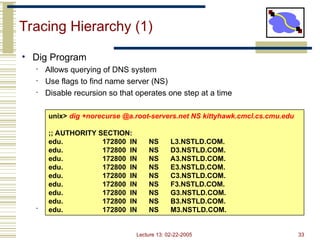
Tracing Hierarchy (1)
• Dig Program
• Allows querying of DNS system
• Use flags to find name server (NS)
• Disable recursion so that operates one step at a time
• All .edu names handled by set of servers
unix> dig +norecurse @a.root-servers.net NS kittyhawk.cmcl.cs.cmu.edu
;; AUTHORITY SECTION:
edu. 172800 IN NS L3.NSTLD.COM.
edu. 172800 IN NS D3.NSTLD.COM.
edu. 172800 IN NS A3.NSTLD.COM.
edu. 172800 IN NS E3.NSTLD.COM.
edu. 172800 IN NS C3.NSTLD.COM.
edu. 172800 IN NS F3.NSTLD.COM.
edu. 172800 IN NS G3.NSTLD.COM.
edu. 172800 IN NS B3.NSTLD.COM.
edu. 172800 IN NS M3.NSTLD.COM.
Lecture 13: 02-22-2005 34
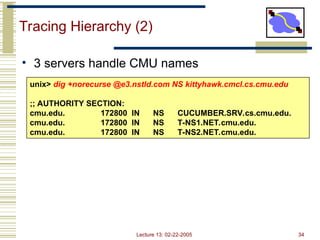
Tracing Hierarchy (2)
• 3 servers handle CMU names
unix> dig +norecurse @e3.nstld.com NS kittyhawk.cmcl.cs.cmu.edu
;; AUTHORITY SECTION:
cmu.edu. 172800 IN NS CUCUMBER.SRV.cs.cmu.edu.
cmu.edu. 172800 IN NS T-NS1.NET.cmu.edu.
cmu.edu. 172800 IN NS T-NS2.NET.cmu.edu.
Lecture 13: 02-22-2005 35
Tracing Hierarchy (3 & 4)
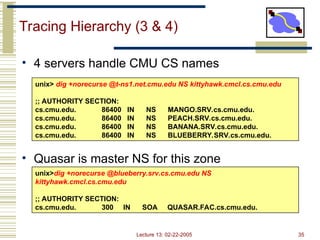
• 4 servers handle CMU CS names
• Quasar is master NS for this zone
unix> dig +norecurse @t-ns1.net.cmu.edu NS kittyhawk.cmcl.cs.cmu.edu
;; AUTHORITY SECTION:
cs.cmu.edu. 86400 IN NS MANGO.SRV.cs.cmu.edu.
cs.cmu.edu. 86400 IN NS PEACH.SRV.cs.cmu.edu.
cs.cmu.edu. 86400 IN NS BANANA.SRV.cs.cmu.edu.
cs.cmu.edu. 86400 IN NS BLUEBERRY.SRV.cs.cmu.edu.
unix>dig +norecurse @blueberry.srv.cs.cmu.edu NS
kittyhawk.cmcl.cs.cmu.edu
;; AUTHORITY SECTION:
cs.cmu.edu. 300 IN SOA QUASAR.FAC.cs.cmu.edu.
Lecture 13: 02-22-2005 36
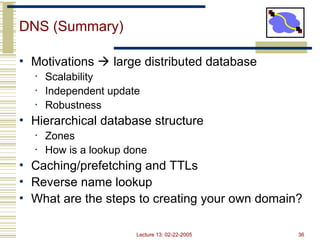
DNS (Summary)
• Motivations  large distributed database
• Scalability
• Independent update
• Robustness
• Hierarchical database structure
• Zones
• How is a lookup done
• Caching/prefetching and TTLs
• Reverse name lookup
• What are the steps to creating your own domain?
Lecture 13: 02-22-2005 37
Announcements
• Summer research positions
• Srini  wireless networking
• Dave  overlay networking
• Talk to us for details
• Email us resume
13-DNSksjsjsjndndndjsjjsjsjsjsjsjsjsjsjjs.ppt

  • 1.
  • 2.
    Lecture 13: 02-22-20052 Outline • DNS Design • DNS Today
  • 3.
    Lecture 13: 02-22-20053 Naming • How do we efficiently locate resources? • DNS: name  IP address • Challenge • How do we scale these to the wide area?
  • 4.
    Lecture 13: 02-22-20054 Obvious Solutions (1) Why not centralize DNS? • Single point of failure • Traffic volume • Distant centralized database • Single point of update • Doesn’t scale!
  • 5.
    Lecture 13: 02-22-20055 Obvious Solutions (2) Why not use /etc/hosts? • Original Name to Address Mapping • Flat namespace • /etc/hosts • SRI kept main copy • Downloaded regularly • Count of hosts was increasing: machine per domain  machine per user • Many more downloads • Many more updates
  • 6.
    Lecture 13: 02-22-20056 Domain Name System Goals • Basically a wide-area distributed database • Scalability • Decentralized maintenance • Robustness • Global scope • Names mean the same thing everywhere • Don’t need • Atomicity • Strong consistency
  • 7.
    Lecture 13: 02-22-20057 Programmer’s View of DNS • Conceptually, programmers can view the DNS database as a collection of millions of host entry structures: • in_addr is a struct consisting of 4-byte IP address • Functions for retrieving host entries from DNS: • gethostbyname: query key is a DNS host name. • gethostbyaddr: query key is an IP address. /* DNS host entry structure */ struct hostent { char *h_name; /* official domain name of host */ char **h_aliases; /* null-terminated array of domain names */ int h_addrtype; /* host address type (AF_INET) */ int h_length; /* length of an address, in bytes */ char **h_addr_list; /* null-terminated array of in_addr structs */ };
  • 8.
    Lecture 13: 02-22-20058 DNS Message Format Identification No. of Questions No. of Authority RRs Questions (variable number of answers) Answers (variable number of resource records) Authority (variable number of resource records) Additional Info (variable number of resource records) Flags No. of Answer RRs No. of Additional RRs Name, type fields for a query RRs in response to query Records for authoritative servers Additional “helpful info that may be used 12 bytes
  • 9.
    Lecture 13: 02-22-20059 DNS Header Fields • Identification • Used to match up request/response • Flags • 1-bit to mark query or response • 1-bit to mark authoritative or not • 1-bit to request recursive resolution • 1-bit to indicate support for recursive resolution
  • 10.
    Lecture 13: 02-22-200510 DNS Records RR format: (class, name, value, type, ttl) • DB contains tuples called resource records (RRs) • Classes = Internet (IN), Chaosnet (CH), etc. • Each class defines value associated with type FOR IN class: • Type=A • name is hostname • value is IP address • Type=NS • name is domain (e.g. foo.com) • value is name of authoritative name server for this domain • Type=CNAME • name is an alias name for some “canonical” (the real) name • value is canonical name • Type=MX • value is hostname of mailserver associated with name
  • 11.
    Lecture 13: 02-22-200511 Properties of DNS Host Entries • Different kinds of mappings are possible: • Simple case: 1-1 mapping between domain name and IP addr: • kittyhawk.cmcl.cs.cmu.edu maps to 128.2.194.242 • Multiple domain names maps to the same IP address: • eecs.mit.edu and cs.mit.edu both map to 18.62.1.6 • Single domain name maps to multiple IP addresses: • aol.com and www.aol.com map to multiple IP addrs. • Some valid domain names don’t map to any IP address: • for example: cmcl.cs.cmu.edu
  • 12.
    Lecture 13: 02-22-200512 DNS Design: Hierarchy Definitions root edu net org uk com gwu ucb cmu bu mit cs ece cmcl • Each node in hierarchy stores a list of names that end with same suffix • Suffix = path up tree • E.g., given this tree, where would following be stored: • Fred.com • Fred.edu • Fred.cmu.edu • Fred.cmcl.cs.cmu.edu • Fred.cs.mit.edu
  • 13.
    Lecture 13: 02-22-200513 DNS Design: Zone Definitions root edu net org uk com ca gwu ucb cmu bu mit cs ece cmcl Single node Subtree Complete Tree • Zone = contiguous section of name space • E.g., Complete tree, single node or subtree • A zone has an associated set of name servers • Must store list of names and tree links
  • 14.
    Lecture 13: 02-22-200514 DNS Design: Cont. • Zones are created by convincing owner node to create/delegate a subzone • Records within zone stored multiple redundant name servers • Primary/master name server updated manually • Secondary/redundant servers updated by zone transfer of name space • Zone transfer is a bulk transfer of the “configuration” of a DNS server – uses TCP to ensure reliability • Example: • CS.CMU.EDU created by CMU.EDU administrators • Who creates CMU.EDU or .EDU?
  • 15.
    Lecture 13: 02-22-200515 DNS: Root Name Servers • Responsible for “root” zone • Approx. 13 root name servers worldwide • Currently {a-m}.root- servers.net • Local name servers contact root servers when they cannot resolve a name • Configured with well- known root servers
  • 16.
    Lecture 13: 02-22-200516 Servers/Resolvers • Each host has a resolver • Typically a library that applications can link to • Local name servers hand-configured (e.g. /etc/resolv.conf) • Name servers • Either responsible for some zone or… • Local servers • Do lookup of distant host names for local hosts • Typically answer queries about local zone
  • 17.
    Lecture 13: 02-22-200517 Typical Resolution Client Local DNS server root & edu DNS server ns1.cmu.edu DNS server www.cs.cmu.edu NS ns1.cmu.edu www.cs.cmu.edu NS ns1.cs.cmu.edu A www=IPaddr ns1.cs.cmu.edu DNS server
  • 18.
    Lecture 13: 02-22-200518 Typical Resolution • Steps for resolving www.cmu.edu • Application calls gethostbyname() (RESOLVER) • Resolver contacts local name server (S1) • S1 queries root server (S2) for (www.cmu.edu) • S2 returns NS record for cmu.edu (S3) • What about A record for S3? • This is what the additional information section is for (PREFETCHING) • S1 queries S3 for www.cmu.edu • S3 returns A record for www.cmu.edu • Can return multiple A records  what does this mean?
  • 19.
    Lecture 13: 02-22-200519 Lookup Methods Recursive query: • Server goes out and searches for more info (recursive) • Only returns final answer or “not found” Iterative query: • Server responds with as much as it knows (iterative) • “I don’t know this name, but ask this server” Workload impact on choice? • Local server typically does recursive • Root/distant server does iterative requesting host surf.eurecom.fr gaia.cs.umass.ed u root name server local name server dns.eurecom.fr 1 2 3 4 5 6authoritative name server dns.cs.umass.edu intermediate name server dns.umass.edu 7 8 iterated query
  • 20.
    Lecture 13: 02-22-200520 Workload and Caching • Are all servers/names likely to be equally popular? • Why might this be a problem? How can we solve this problem? • DNS responses are cached • Quick response for repeated translations • Other queries may reuse some parts of lookup • NS records for domains • DNS negative queries are cached • Don’t have to repeat past mistakes • E.g. misspellings, search strings in resolv.conf • Cached data periodically times out • Lifetime (TTL) of data controlled by owner of data • TTL passed with every record
  • 21.
    Lecture 13: 02-22-200521 Typical Resolution Client Local DNS server root & edu DNS server ns1.cmu.edu DNS server www.cs.cmu.edu NS ns1.cmu.edu www.cs.cmu.edu NS ns1.cs.cmu.edu A www=IPaddr ns1.cs.cmu.edu DNS server
  • 22.
    Lecture 13: 02-22-200522 Subsequent Lookup Example Client Local DNS server root & edu DNS server cmu.edu DNS server cs.cmu.edu DNS server ftp.cs.cmu.edu ftp=IPaddr ftp.cs.cmu.edu
  • 23.
    Lecture 13: 02-22-200523 Reliability • DNS servers are replicated • Name service available if ≥ one replica is up • Queries can be load balanced between replicas • UDP used for queries • Need reliability  must implement this on top of UDP! • Why not just use TCP? • Try alternate servers on timeout • Exponential backoff when retrying same server • Same identifier for all queries • Don’t care which server responds
  • 24.
    Lecture 13: 02-22-200524 Reverse DNS • Task • Given IP address, find its name • Method • Maintain separate hierarchy based on IP names • Write 128.2.194.242 as 242.194.128.2.in-addr.arpa • Why is the address reversed? • Managing • Authority manages IP addresses assigned to it • E.g., CMU manages name space 128.2.in-addr.arpa edu cmu cs kittyhawk 128.2.194.242 cmcl unnamed root arpa in-addr 128 2 194 242
  • 25.
    Lecture 13: 02-22-200525 .arpa Name Server Hierarchy • At each level of hierarchy, have group of servers that are authorized to handle that region of hierarchy 128 2 194 kittyhawk 128.2.194.242 in-addr.arpa a.root-servers.net • • • m.root-servers.net chia.arin.net (dill, henna, indigo, epazote, figwort, ginseng) cucumber.srv.cs.cmu.edu, t-ns1.net.cmu.edu t-ns2.net.cmu.edu mango.srv.cs.cmu.edu (peach, banana, blueberry)
  • 26.
    Lecture 13: 02-22-200526 Prefetching • Name servers can add additional data to response • Typically used for prefetching • CNAME/MX/NS typically point to another host name • Responses include address of host referred to in “additional section”
  • 27.
    Lecture 13: 02-22-200527 Mail Addresses • MX records point to mail exchanger for a name • E.g. mail.acm.org is MX for acm.org • Addition of MX record type proved to be a challenge • How to get mail programs to lookup MX record for mail delivery? • Needed critical mass of such mailers
  • 28.
    Lecture 13: 02-22-200528 Outline • DNS Design • DNS Today
  • 29.
    Lecture 13: 02-22-200529 Root Zone • Generic Top Level Domains (gTLD) = .com, .net, .org, etc… • Country Code Top Level Domain (ccTLD) = .us, .ca, .fi, .uk, etc… • Root server ({a-m}.root-servers.net) also used to cover gTLD domains • Load on root servers was growing quickly! • Moving .com, .net, .org off root servers was clearly necessary to reduce load  done Aug 2000
  • 30.
    Lecture 13: 02-22-200530 New gTLDs • .info  general info • .biz  businesses • .aero  air-transport industry • .coop  business cooperatives • .name  individuals • .pro  accountants, lawyers, and physicians • .museum  museums • Only new one actives so far = .info, .biz, .name
  • 31.
    Lecture 13: 02-22-200531 New Registrars • Network Solutions (NSI) used to handle all registrations, root servers, etc… • Clearly not the democratic (Internet) way • Large number of registrars that can create new domains  However NSI still handles A root server
  • 32.
    Lecture 13: 02-22-200532 Recent Measurements • No centralized caching per site • Each machine runs own caching local server • Why is this a problem? • How many hosts do we need to share cache?  recent studies suggest 10-20 hosts • “Hit rate for DNS = 80%  1 - (#DNS/#connections) • Is this good or bad? • Most Internet traffic is Web • What does a typical page look like?  average of 4-5 imbedded objects  needs 4-5 transfers • This alone accounts for 80% hit rate! • Lower TTLs for A records does not affect performance • DNS performance really relies more on NS-record caching
  • 33.
    Lecture 13: 02-22-200533 Tracing Hierarchy (1) • Dig Program • Allows querying of DNS system • Use flags to find name server (NS) • Disable recursion so that operates one step at a time • All .edu names handled by set of servers unix> dig +norecurse @a.root-servers.net NS kittyhawk.cmcl.cs.cmu.edu ;; AUTHORITY SECTION: edu. 172800 IN NS L3.NSTLD.COM. edu. 172800 IN NS D3.NSTLD.COM. edu. 172800 IN NS A3.NSTLD.COM. edu. 172800 IN NS E3.NSTLD.COM. edu. 172800 IN NS C3.NSTLD.COM. edu. 172800 IN NS F3.NSTLD.COM. edu. 172800 IN NS G3.NSTLD.COM. edu. 172800 IN NS B3.NSTLD.COM. edu. 172800 IN NS M3.NSTLD.COM.
  • 34.
    Lecture 13: 02-22-200534 Tracing Hierarchy (2) • 3 servers handle CMU names unix> dig +norecurse @e3.nstld.com NS kittyhawk.cmcl.cs.cmu.edu ;; AUTHORITY SECTION: cmu.edu. 172800 IN NS CUCUMBER.SRV.cs.cmu.edu. cmu.edu. 172800 IN NS T-NS1.NET.cmu.edu. cmu.edu. 172800 IN NS T-NS2.NET.cmu.edu.
  • 35.
    Lecture 13: 02-22-200535 Tracing Hierarchy (3 & 4) • 4 servers handle CMU CS names • Quasar is master NS for this zone unix> dig +norecurse @t-ns1.net.cmu.edu NS kittyhawk.cmcl.cs.cmu.edu ;; AUTHORITY SECTION: cs.cmu.edu. 86400 IN NS MANGO.SRV.cs.cmu.edu. cs.cmu.edu. 86400 IN NS PEACH.SRV.cs.cmu.edu. cs.cmu.edu. 86400 IN NS BANANA.SRV.cs.cmu.edu. cs.cmu.edu. 86400 IN NS BLUEBERRY.SRV.cs.cmu.edu. unix>dig +norecurse @blueberry.srv.cs.cmu.edu NS kittyhawk.cmcl.cs.cmu.edu ;; AUTHORITY SECTION: cs.cmu.edu. 300 IN SOA QUASAR.FAC.cs.cmu.edu.
  • 36.
    Lecture 13: 02-22-200536 DNS (Summary) • Motivations  large distributed database • Scalability • Independent update • Robustness • Hierarchical database structure • Zones • How is a lookup done • Caching/prefetching and TTLs • Reverse name lookup • What are the steps to creating your own domain?
  • 37.
    Lecture 13: 02-22-200537 Announcements • Summer research positions • Srini  wireless networking • Dave  overlay networking • Talk to us for details • Email us resume
Editor's Notes

  • #6 ACID Atomic Consistent Isolated Durable
  • #35 Full SOA record… cs.cmu.edu. 300 IN SOA QUASAR.FAC.cs.cmu.edu. GRIPE.cs.cmu.edu. 2004021352 3600 1800 604800 300