Chapter 8: The Cooling Load
Cooling load is the rate at which energy must be removed from a space to
maintain the temperature and humidity at the design values.
Cooling load is determined by internal and external heat gains as well as
structure variable heat storage, all of which are transient in nature
Instantaneous heat gain
is the heat received by
the space being
conditioned.
Instantaneous cooling
load is the heat gain by
the air in the space
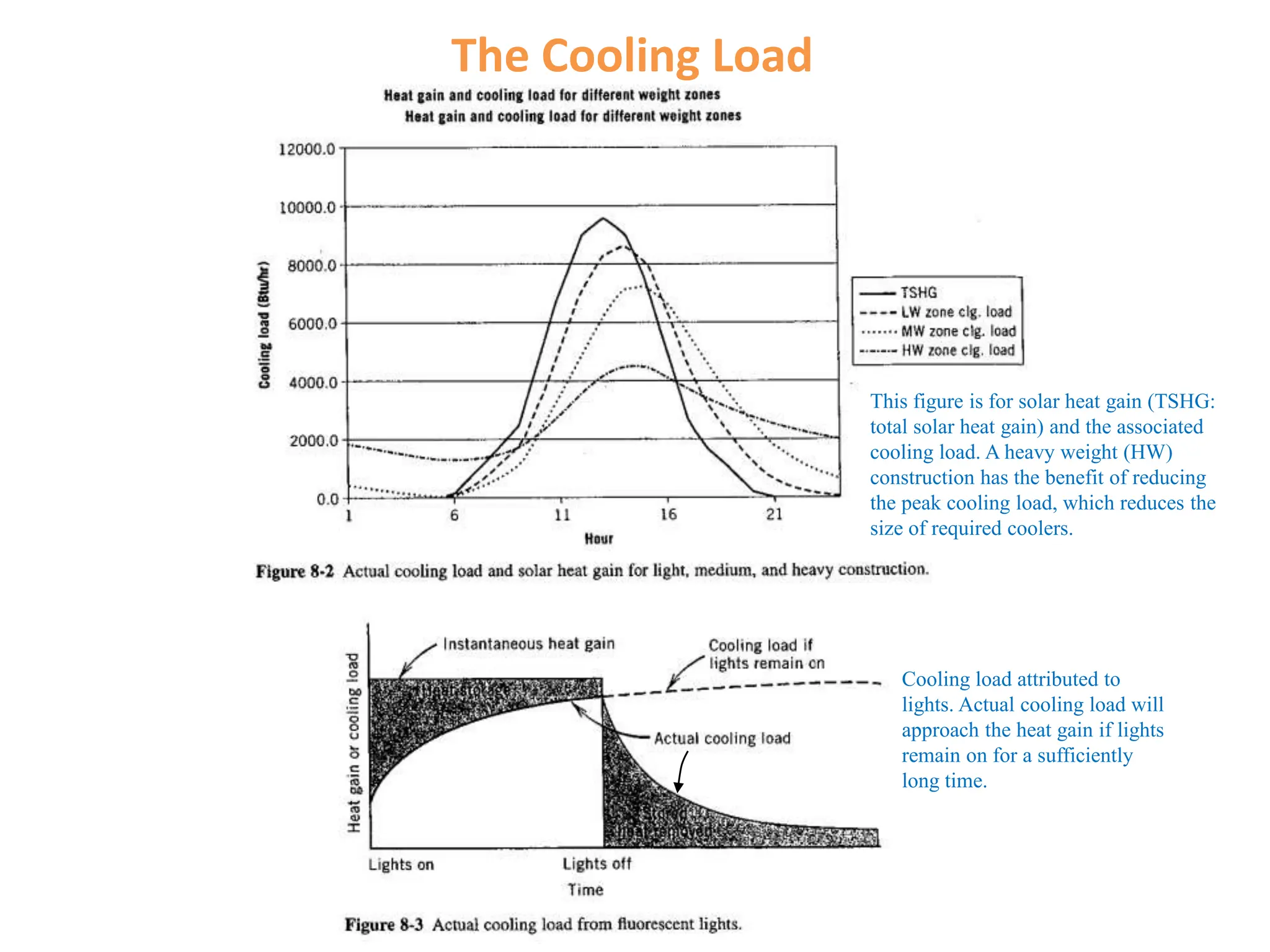
The Cooling Load
This figure is for solar heat gain (TSHG:
total solar heat gain) and the associated
cooling load. A heavy weight (HW)
construction has the benefit of reducing
the peak cooling load, which reduces the
size of required coolers.
Cooling load attributed to
lights. Actual cooling load will
approach the heat gain if lights
remain on for a sufficiently
long time.
Heat Gains
Heat Gains
Internal Heat gain -People Adjusted heat gain is a nominal value,
based on the normal percentage of
men, women, and children for the
application listed.
Internal Heat Gain-Lights/Miscellaneous
Equipment
Miscellaneous Equipment include motors, appliances, kitchen
installation, lab facilities, office equipment, etc.
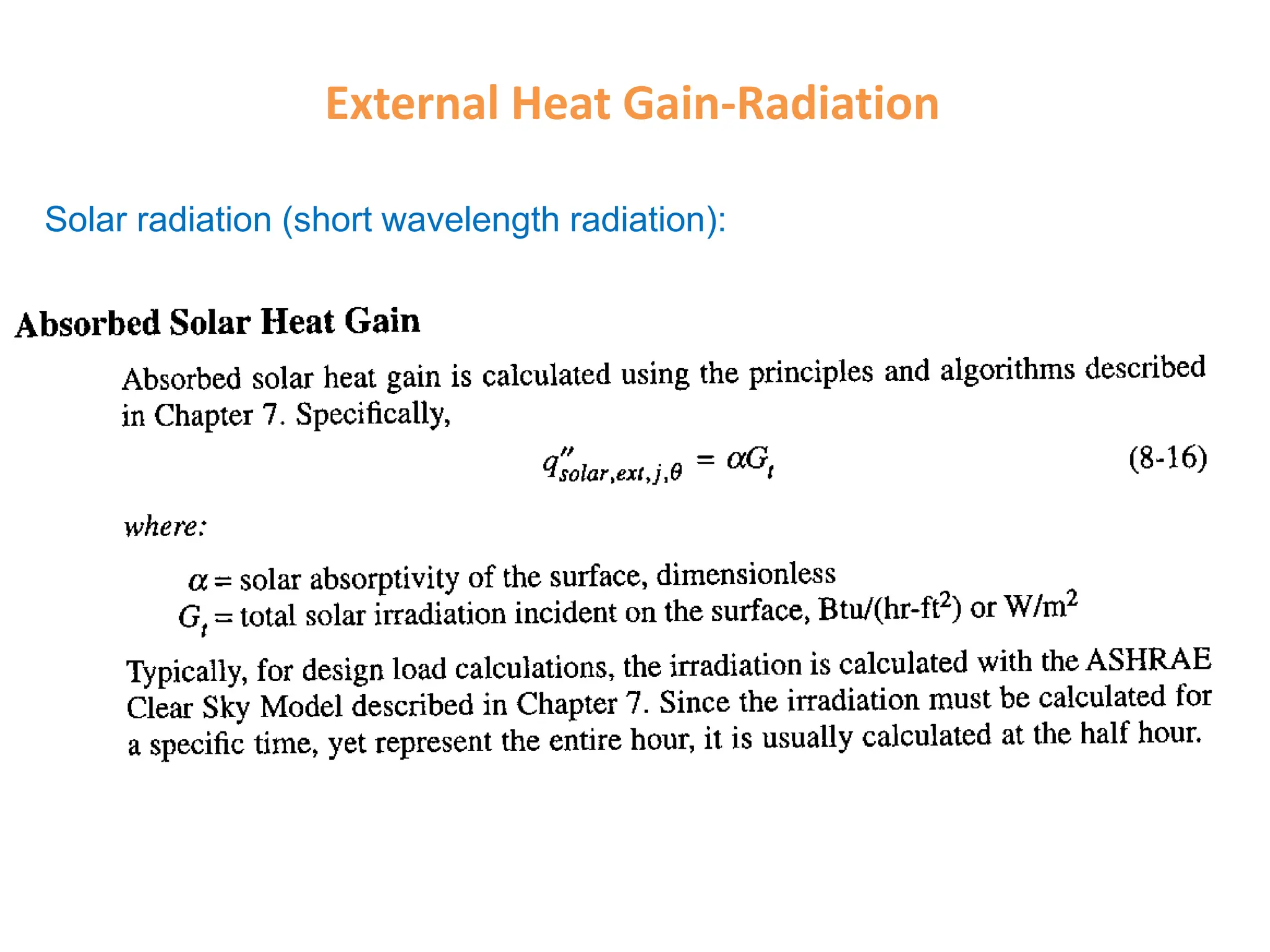
External Heat Gain-Radiation
Solar radiation (short wavelength radiation):
Solar-Irradiation on a Surface (Google)
Thermal Radiation (long wavelength)
Images of Radiation Heat Transfer between
surfaces (Google)
Thermal Radiation (long wavelength)
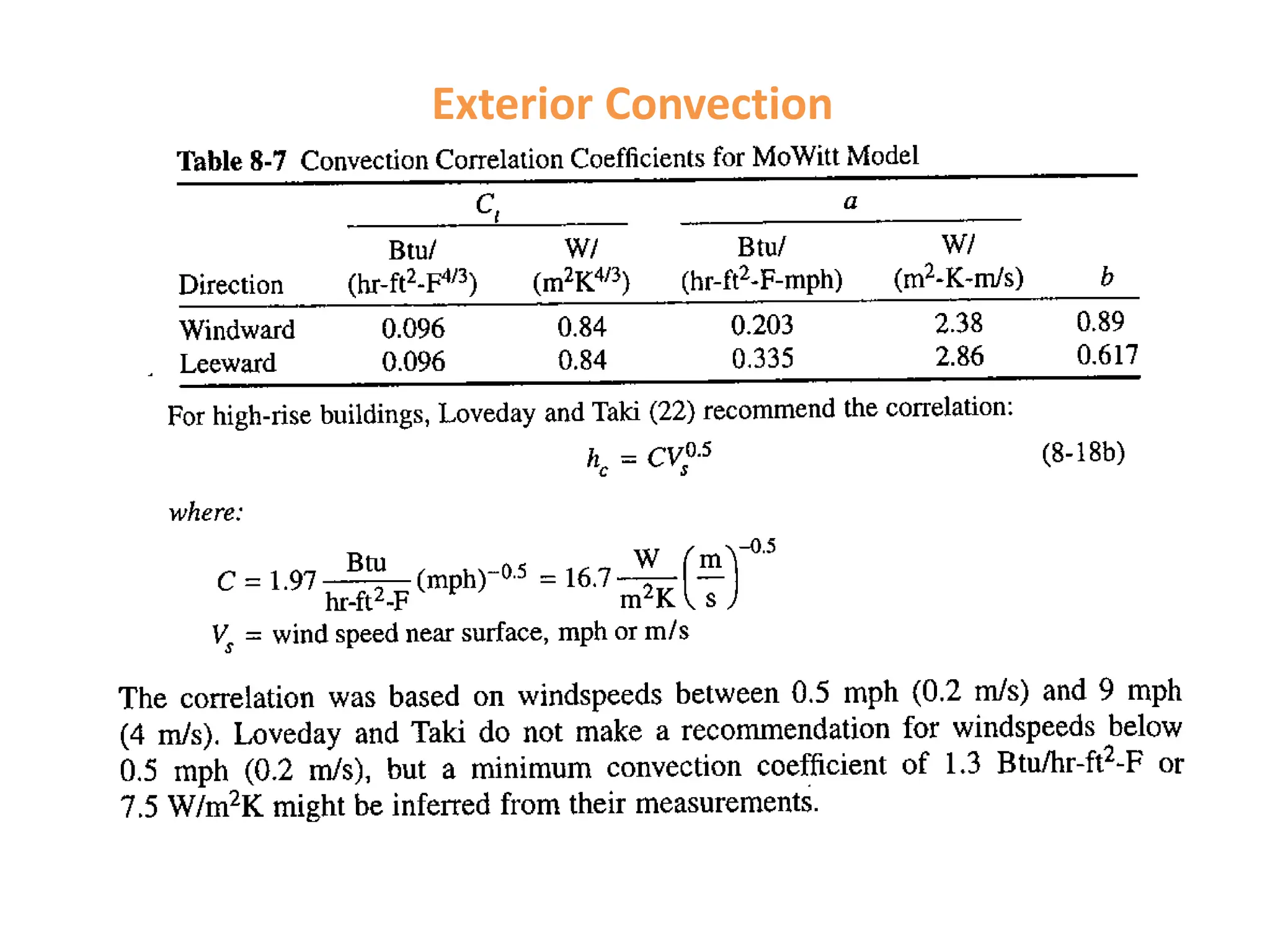
Exterior Convection
Exterior Convection
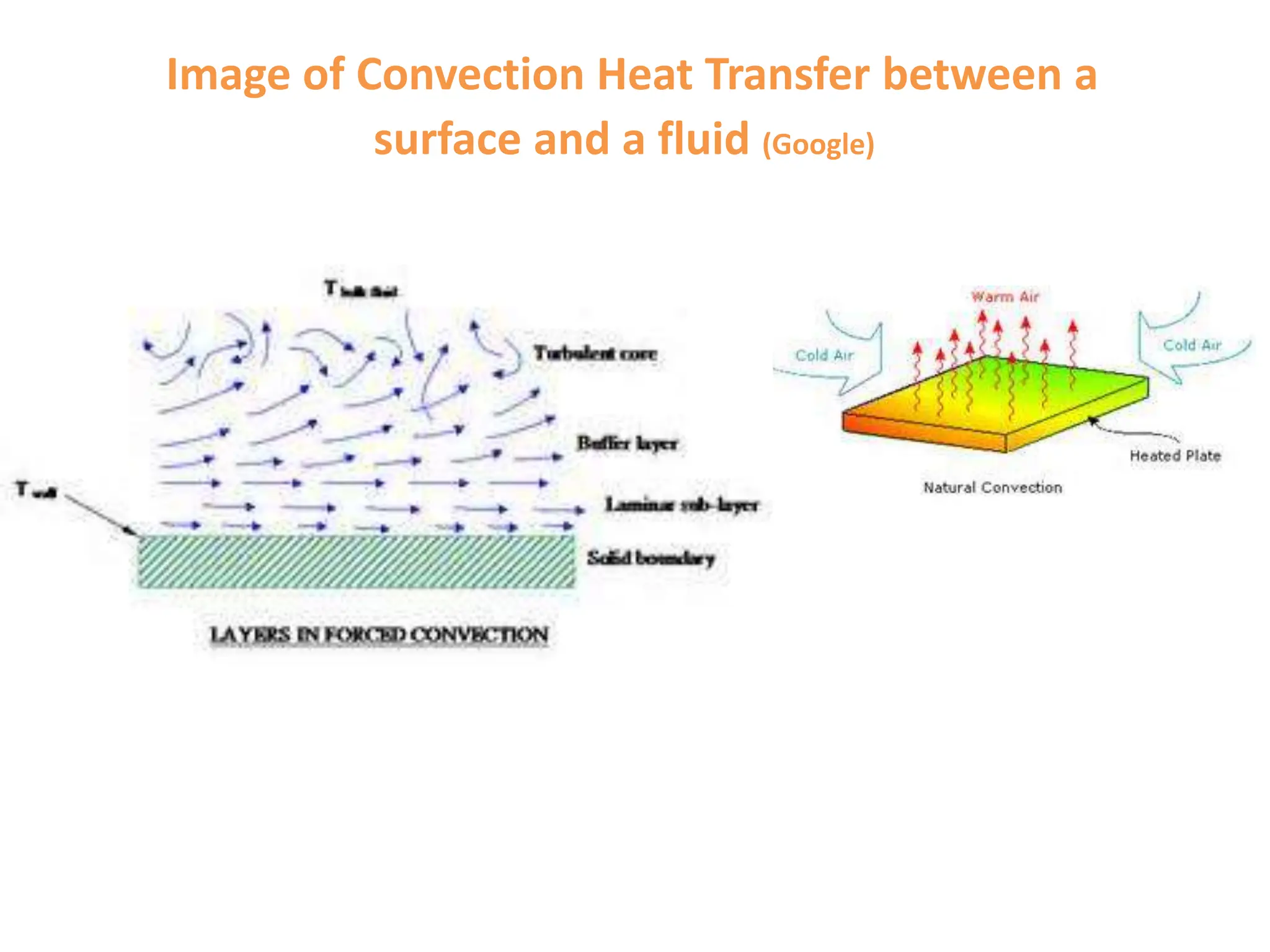
Image of Convection Heat Transfer between a
surface and a fluid (Google)
Overview of the Heat Balance Method
Heat Balance on the jth exterior surface at a given time
Heat Balance on jth Interior surface at a given time
Heat Balance on the Zone Air
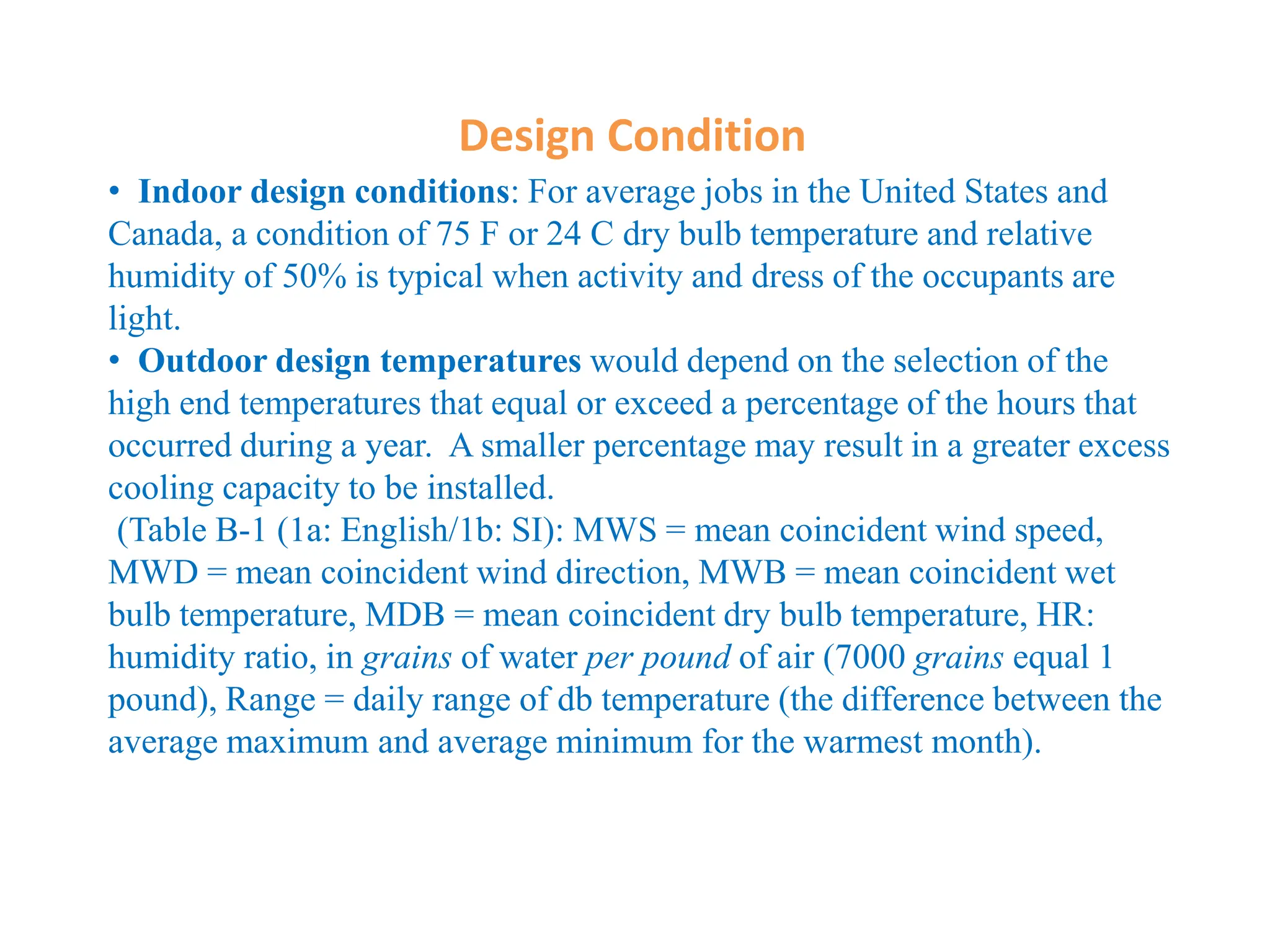
Design Condition
• Indoor design conditions: For average jobs in the United States and
Canada, a condition of 75 F or 24 C dry bulb temperature and relative
humidity of 50% is typical when activity and dress of the occupants are
light.
• Outdoor design temperatures would depend on the selection of the
high end temperatures that equal or exceed a percentage of the hours that
occurred during a year. A smaller percentage may result in a greater excess
cooling capacity to be installed.
(Table B-1 (1a: English/1b: SI): MWS = mean coincident wind speed,
MWD = mean coincident wind direction, MWB = mean coincident wet
bulb temperature, MDB = mean coincident dry bulb temperature, HR:
humidity ratio, in grains of water per pound of air (7000 grains equal 1
pound), Range = daily range of db temperature (the difference between the
average maximum and average minimum for the warmest month).
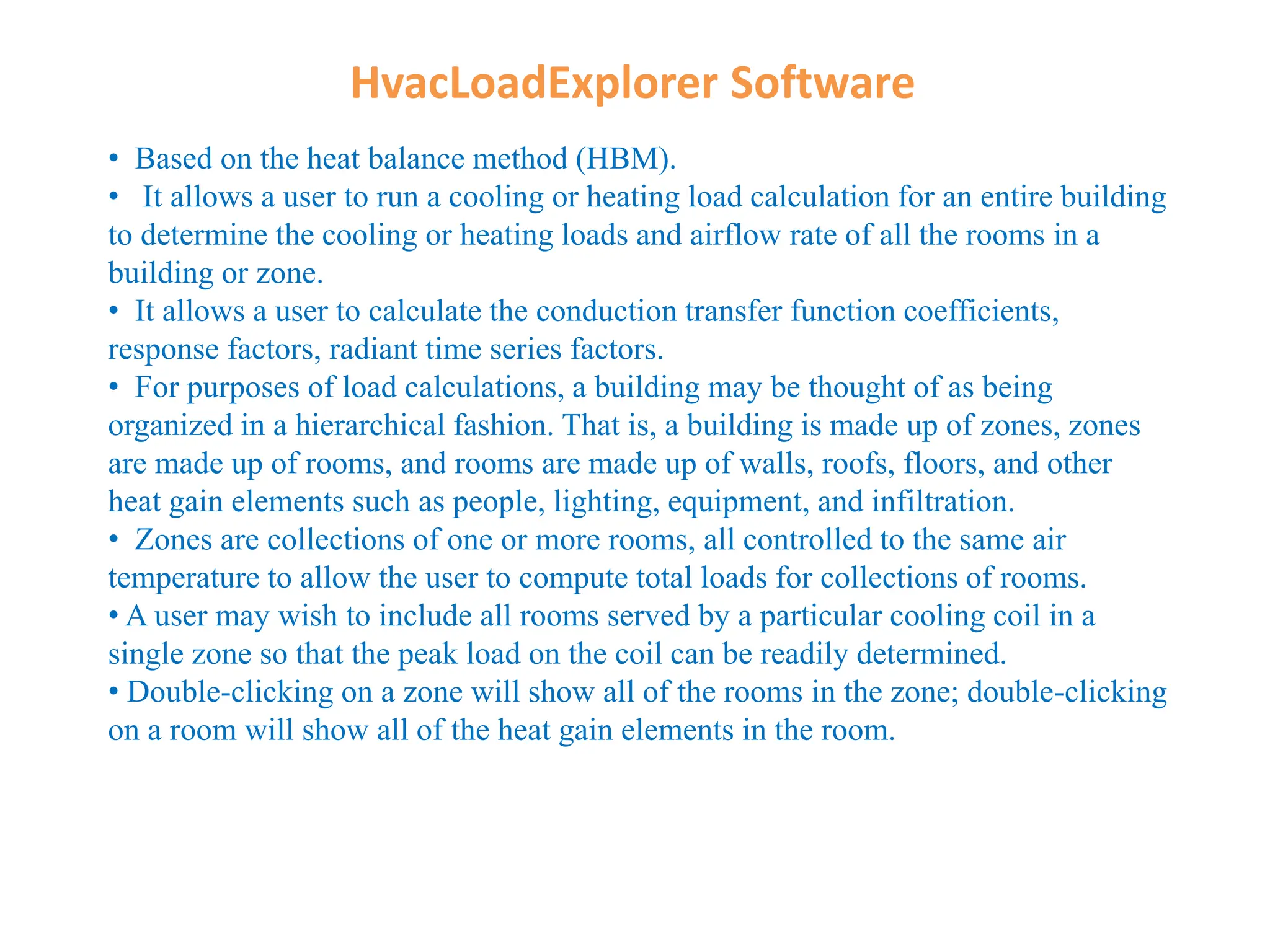
HvacLoadExplorer Software
• Based on the heat balance method (HBM).
• It allows a user to run a cooling or heating load calculation for an entire building
to determine the cooling or heating loads and airflow rate of all the rooms in a
building or zone.
• It allows a user to calculate the conduction transfer function coefficients,
response factors, radiant time series factors.
• For purposes of load calculations, a building may be thought of as being
organized in a hierarchical fashion. That is, a building is made up of zones, zones
are made up of rooms, and rooms are made up of walls, roofs, floors, and other
heat gain elements such as people, lighting, equipment, and infiltration.
• Zones are collections of one or more rooms, all controlled to the same air
temperature to allow the user to compute total loads for collections of rooms.
• A user may wish to include all rooms served by a particular cooling coil in a
single zone so that the peak load on the coil can be readily determined.
• Double-clicking on a zone will show all of the rooms in the zone; double-clicking
on a room will show all of the heat gain elements in the room.
Quick Start Guide
• First, to start describing a new building, go to the File menu and select “New”. This
will ask you to specify a file name. After this step, zones may be added to the building,
rooms may be added to the zone, and heat gain elements may be added to the room,
with the “Add Node” button shown in Figure 1.1.
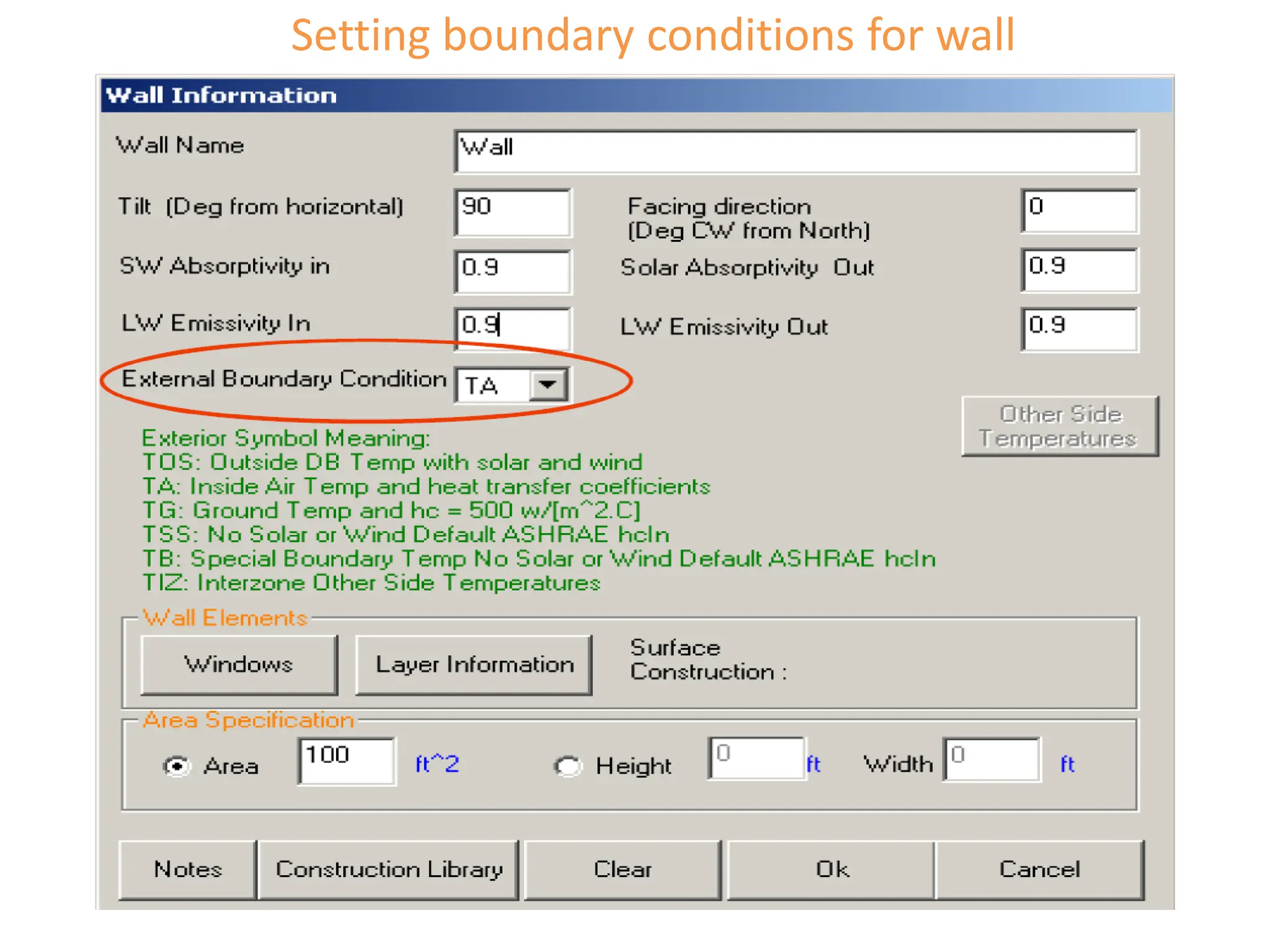
• Jumping ahead (assuming many of the additional steps are intuitive) users need to
be aware that when they specify a wall, roof, or floor, it is important to specify an
external boundary condition, as shown in Fig. 1-2. “TOS” should be used for exterior
surfaces; “TA” for interior surfaces
SW absorptivity = short wave absorptivity, related to solar irradiation
LW emissivity = long wave emissivity, related to thermal radiation
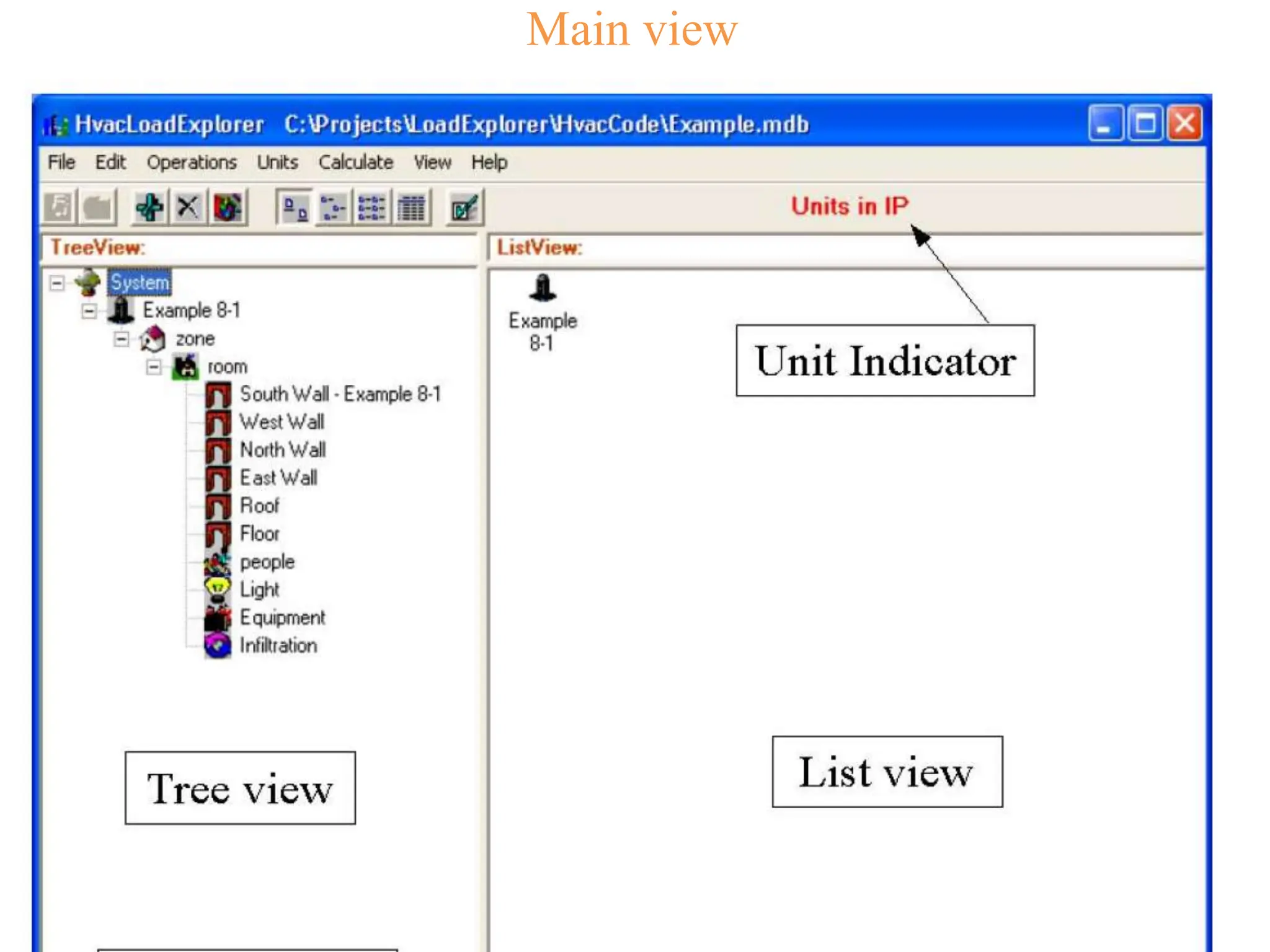
Main view
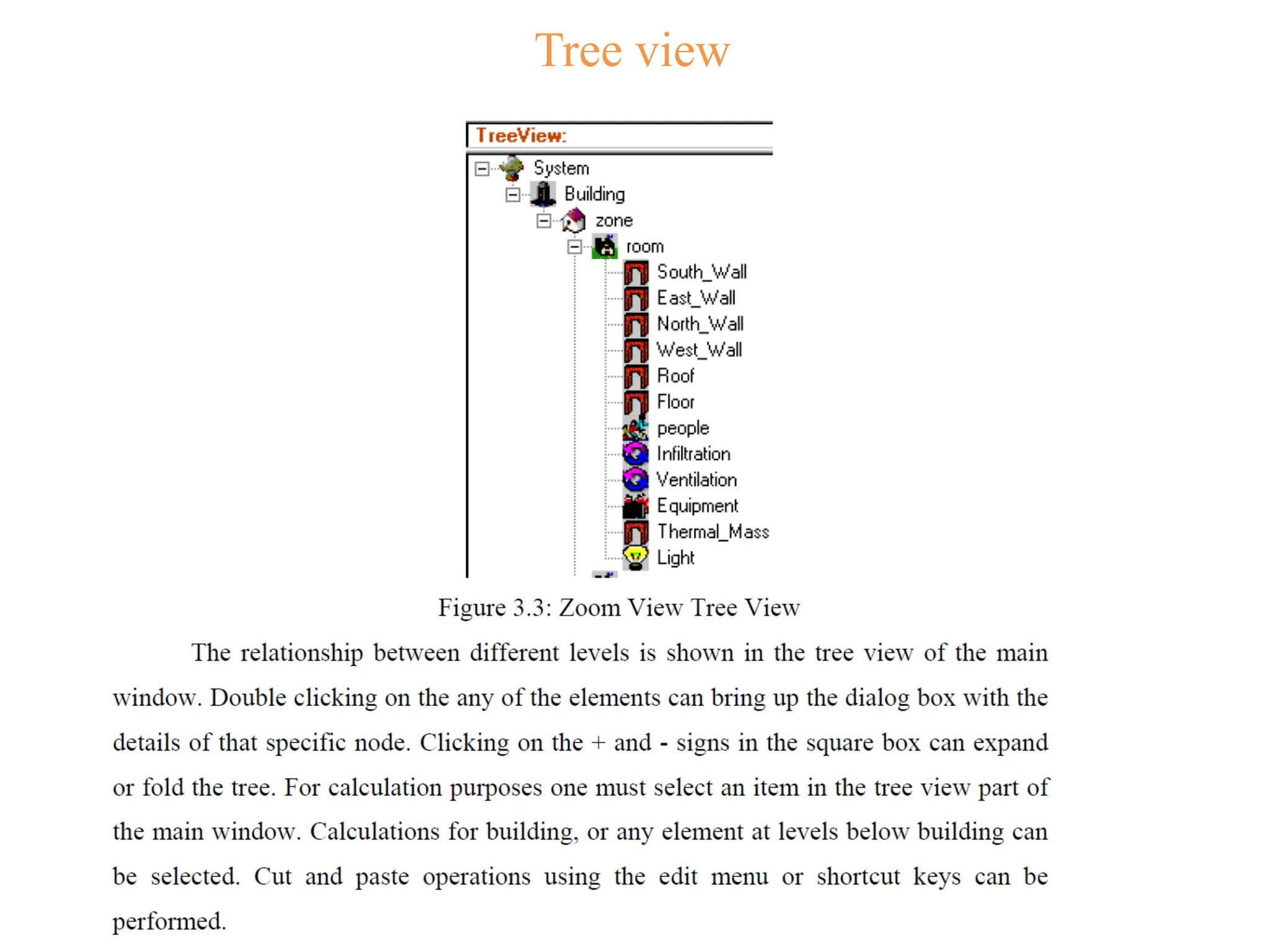
Tree view
•
•First, to start describing a new building, go to the File menu and select “New”. This
will ask you to specify a file name. After this step, zones may be added to the building,
rooms may be added to the zone, and heat gain elements may be added to the room,
with the “Add Node” button shown in Figure 1.1.
• Jumping ahead (assuming many of the additional steps are intuitive) users need to
be aware that when they specify a wall, roof, or floor, it is important to specify an
external boundary condition, as shown in Fig. 1-2. “TOS” should be used for exterior
surfaces; “TA” for interior surfaces
SW absorptivity = short wave absorptivity, related to solar irradiation
LW emissivity = long wave emissivity, related to thermal radiation
List view
Setting boundary conditions for wall
Setting structures of the wall

1078 5690.ppt

  • 1.
    Chapter 8: TheCooling Load Cooling load is the rate at which energy must be removed from a space to maintain the temperature and humidity at the design values. Cooling load is determined by internal and external heat gains as well as structure variable heat storage, all of which are transient in nature Instantaneous heat gain is the heat received by the space being conditioned. Instantaneous cooling load is the heat gain by the air in the space
  • 2.
    The Cooling Load Thisfigure is for solar heat gain (TSHG: total solar heat gain) and the associated cooling load. A heavy weight (HW) construction has the benefit of reducing the peak cooling load, which reduces the size of required coolers. Cooling load attributed to lights. Actual cooling load will approach the heat gain if lights remain on for a sufficiently long time.
  • 3.
  • 4.
  • 5.
    Internal Heat gain-People Adjusted heat gain is a nominal value, based on the normal percentage of men, women, and children for the application listed.
  • 6.
    Internal Heat Gain-Lights/Miscellaneous Equipment MiscellaneousEquipment include motors, appliances, kitchen installation, lab facilities, office equipment, etc.
  • 7.
    External Heat Gain-Radiation Solarradiation (short wavelength radiation):
  • 8.
    Solar-Irradiation on aSurface (Google)
  • 9.
  • 10.
    Images of RadiationHeat Transfer between surfaces (Google)
  • 11.
  • 12.
  • 13.
  • 14.
  • 15.
    Image of ConvectionHeat Transfer between a surface and a fluid (Google)
  • 16.
    Overview of theHeat Balance Method
  • 17.
    Heat Balance onthe jth exterior surface at a given time
  • 18.
    Heat Balance onjth Interior surface at a given time
  • 19.
    Heat Balance onthe Zone Air
  • 20.
    Design Condition • Indoordesign conditions: For average jobs in the United States and Canada, a condition of 75 F or 24 C dry bulb temperature and relative humidity of 50% is typical when activity and dress of the occupants are light. • Outdoor design temperatures would depend on the selection of the high end temperatures that equal or exceed a percentage of the hours that occurred during a year. A smaller percentage may result in a greater excess cooling capacity to be installed. (Table B-1 (1a: English/1b: SI): MWS = mean coincident wind speed, MWD = mean coincident wind direction, MWB = mean coincident wet bulb temperature, MDB = mean coincident dry bulb temperature, HR: humidity ratio, in grains of water per pound of air (7000 grains equal 1 pound), Range = daily range of db temperature (the difference between the average maximum and average minimum for the warmest month).
  • 21.
    HvacLoadExplorer Software • Basedon the heat balance method (HBM). • It allows a user to run a cooling or heating load calculation for an entire building to determine the cooling or heating loads and airflow rate of all the rooms in a building or zone. • It allows a user to calculate the conduction transfer function coefficients, response factors, radiant time series factors. • For purposes of load calculations, a building may be thought of as being organized in a hierarchical fashion. That is, a building is made up of zones, zones are made up of rooms, and rooms are made up of walls, roofs, floors, and other heat gain elements such as people, lighting, equipment, and infiltration. • Zones are collections of one or more rooms, all controlled to the same air temperature to allow the user to compute total loads for collections of rooms. • A user may wish to include all rooms served by a particular cooling coil in a single zone so that the peak load on the coil can be readily determined. • Double-clicking on a zone will show all of the rooms in the zone; double-clicking on a room will show all of the heat gain elements in the room.
  • 22.
    Quick Start Guide •First, to start describing a new building, go to the File menu and select “New”. This will ask you to specify a file name. After this step, zones may be added to the building, rooms may be added to the zone, and heat gain elements may be added to the room, with the “Add Node” button shown in Figure 1.1. • Jumping ahead (assuming many of the additional steps are intuitive) users need to be aware that when they specify a wall, roof, or floor, it is important to specify an external boundary condition, as shown in Fig. 1-2. “TOS” should be used for exterior surfaces; “TA” for interior surfaces SW absorptivity = short wave absorptivity, related to solar irradiation LW emissivity = long wave emissivity, related to thermal radiation
  • 23.
  • 24.
    Tree view • •First, tostart describing a new building, go to the File menu and select “New”. This will ask you to specify a file name. After this step, zones may be added to the building, rooms may be added to the zone, and heat gain elements may be added to the room, with the “Add Node” button shown in Figure 1.1. • Jumping ahead (assuming many of the additional steps are intuitive) users need to be aware that when they specify a wall, roof, or floor, it is important to specify an external boundary condition, as shown in Fig. 1-2. “TOS” should be used for exterior surfaces; “TA” for interior surfaces SW absorptivity = short wave absorptivity, related to solar irradiation LW emissivity = long wave emissivity, related to thermal radiation
  • 25.
  • 26.
  • 27.