World of Agile: Kanban 
by Yevhen Andrushko 
Project Manager @ 
2014 
1
Presentation plan: 
1. General Agile overview 
2. Why it called Kanban? 
3. Why we choose it? 
4. Main benefits 
5. Practical use in real projects 
6. Kanban kick-start 
7. KaŶďaŶ ŵLJth’s 
8. Kanban software, what to choose? 
9. Kanban win-win 
10. Iterative agile VS Kanban 
11. Sources digest
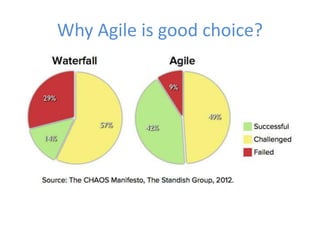
Why Agile is good choice?
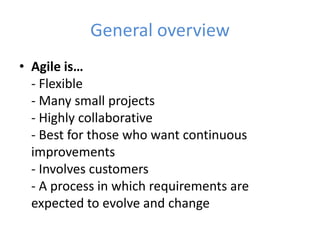
General overview 
• Agile is… 
- Flexible 
- Many small projects 
- Highly collaborative 
- Best for those who want continuous 
improvements 
- Involves customers 
- A process in which requirements are 
expected to evolve and change
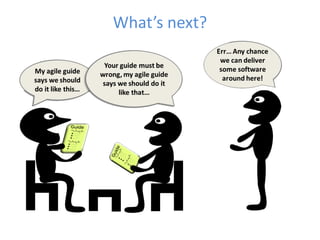
What’s Ŷedžt?
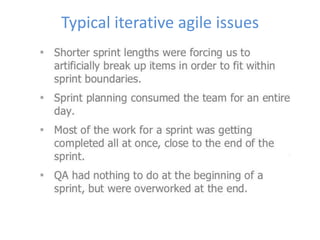
Typical iterative agile issues
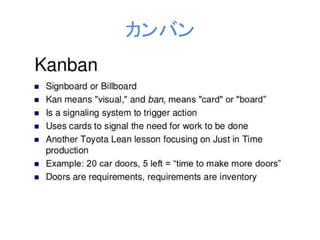
カンバン
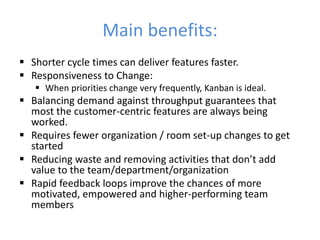
Main benefits: 
 Shorter cycle times can deliver features faster. 
 Responsiveness to Change: 
 When priorities change very frequently, Kanban is ideal. 
 Balancing demand against throughput guarantees that 
most the customer-centric features are always being 
worked. 
 Requires fewer organization / room set-up changes to get 
started 
 ReduĐiŶg ǁaste aŶd reŵoǀiŶg aĐtiǀities that doŶ’t add 
value to the team/department/organization 
 Rapid feedback loops improve the chances of more 
motivated, empowered and higher-performing team 
members
Basic principles: 
 Start with what you do now. 
 Agree to pursue incremental, 
evolutionary change 
 Respect the current process, roles, 
responsibilities & titles 
 Encourage acts of leadership at all levels
Core properties: 
 Visualize the workflow 
 Limit WIP 
 Manage flow 
 Kanban Boards are Flexible 
 Kanban Boards Help Teams Collaborate 
 Kanban Boards Increase Efficiency and Help Reduce Waste 
 Kanban Boards Lead to Increased Productivity
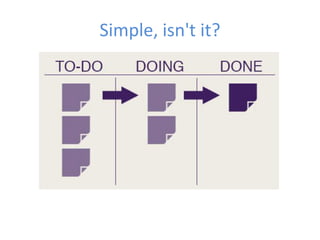
Simple, isn't it?
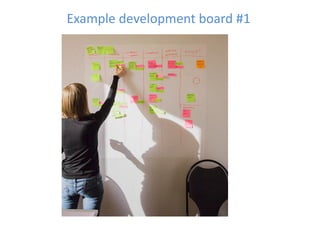
Example development board #1
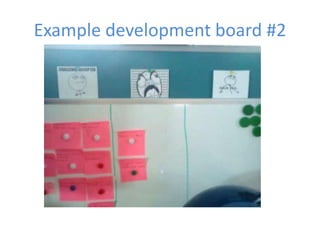
Example development board #2
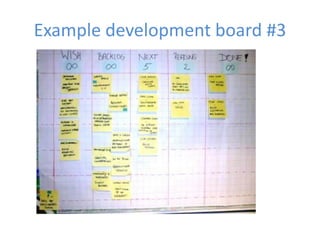
Example development board #3
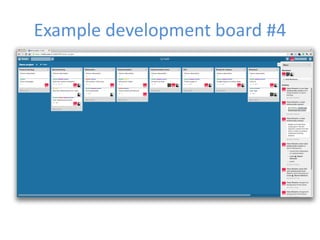
Example development board #4
Why use Kanban boards? 
• Visually see work in progress 
• Instantly understand impediments 
(things causing you to delay) and take 
steps to remove them 
• Improve communication between 
yourself and others on your team 
• Empower teams to self-manage visual 
processes and work flows 
• Inspire team collaboration
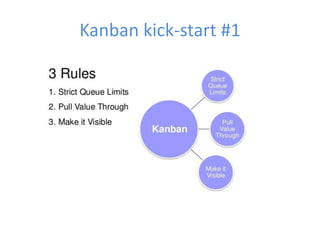
Kanban kick-start #1
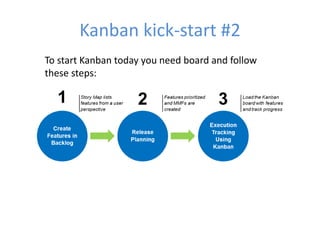
Kanban kick-start #2 
To start Kanban today you need board and follow 
these steps:
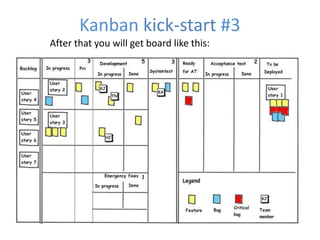
Kanban kick-start #3 
After that you will get board like this:
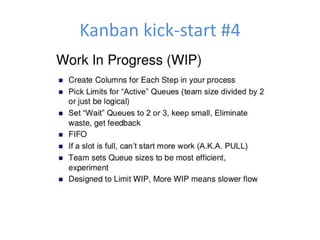
Kanban kick-start #4
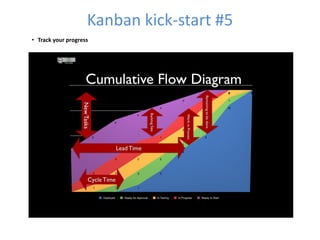
Kanban kick-start #5 
• Track your progress
Kanban boards software #1 
• Agile Zen 
One of the best User Interfaces in the industry, very easy to use 
Powerful enough for most users, and for most Kanban boards 
Very Reasonable prices 
• Lean Kit Kanban 
Powerful feature set, but also complicated to learn and use 
Pricing is relatively high, from $15 per user per month 
Their free plan is quite limited, it only gives you access to some features 
• Jira Agile (it's previous name was GreenHopper) 
Good Kanban support, but not focused since it also includes Scrum 
Jira integration is now mandatory, and this pushes the prices, and the 
complexity of their offering significantly. 
In our experience it is not a good idea to couple or join the Jira board which 
is usually used by Marketing, with the development board. This opens a 
large potential for conflict and missed communication. Given that this 
coupling is now mandatory for Jira Agile we can not recommend it. Kanban 
Ace method suggests instead that you decouple process flows to optimize 
each sub-system, and avoid miscommunication. 
Average prices
Kanban boards software #2 
• Trello 
Popular & customizable, 
Pinterest overall style 
Low scalable 
Perfect for pet projects and startups 
Very Reasonable price, $5 per user per month or $45 per 
• Kanbanize 
High flexible and customizable 
Notifications and board messaging in real time. 
Managed roles also gives added flexibility to fine tune permissions on 
projects and tasks. 
Unlimited API calls 
Very Reasonable prices 
• MS Team Foundation Server 2012 
The latest version in 2013 has recently added support for Kanban, this is 
welcome news
KaŶďaŶ ŵLJth’s 
Myth: With KaŶďaŶ LJou doŶ’t use iteratioŶs 
Fact: With Kanban iterations are optional. Do it only if you have a need 
for it in your context. 
Myth: With KaŶďaŶ LJou doŶ’t estiŵate 
Fact: With Kanban estimation is optional. Do it only if you have a need 
for it in your context. 
Myth: Kanban is better than Scrum/XP/RUP/whatever 
Fact: Kanban is just a process tool, and there is no such thing as a 
universally good or bad tool. It all depends on your context 
Myth: Kanban is a drop-in replacement to Scrum/XP/RUP/whatever 
Fact: Kanban is just about managing workflow. It hardly replaces 
anything. What it does do, however, is drive change. In Kanban you start 
with whatever process you have, visualize it, introduce WIP limits, and 
then evolve from there.
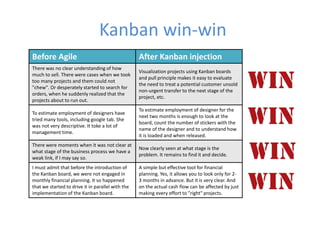
Kanban win-win 
Before Agile After Kanban injection 
There was no clear understanding of how 
much to sell. There were cases when we took 
too many projects and them could not 
"chew". Or desperately started to search for 
orders, when he suddenly realized that the 
projects about to run out. 
Visualization projects using Kanban boards 
and pull principle makes it easy to evaluate 
the need to treat a potential customer unsold 
non-urgent transfer to the next stage of the 
project, etc. 
To estimate employment of designers have 
tried many tools, including google tab. She 
was not very descriptive. It toke a lot of 
management time. 
To estimate employment of designer for the 
next two months is enough to look at the 
board, count the number of stickers with the 
name of the designer and to understand how 
it is loaded and when released. 
There were moments when it was not clear at 
what stage of the business process we have a 
weak link, if I may say so. 
Now clearly seen at what stage is the 
problem. It remains to find it and decide. 
I must admit that before the introduction of 
the Kanban board, we were not engaged in 
monthly financial planning. It so happened 
that we started to drive it in parallel with the 
implementation of the Kanban board. 
A simple but effective tool for financial 
planning. Yes, it allows you to look only for 2- 
3 months in advance. But it is very clear. And 
on the actual cash flow can be affected by just 
making every effort to "right" projects.
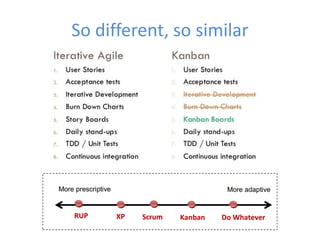
So different, so similar
Sources digest 
• Integrating Agile Development In The Real World by Peter 
Schuh 
• Lean from the Trenches: Managing Large-Scale Projects 
with Kanban by Henrik Kniberg 
• Getting Started with Kanban by Paul Klipp 
• Learning Agile: Understanding Scrum, XP, Lean, and Kanban 
by Andrew Stellman, Jennifer Greene 
• Agile Estimating and Planning by Mike Cohn 
• agileukraine.org 
• leankit.com/kanban/what-is-kanban/ 
• habahabr.ru
You know, what to do!

WebCamp: Project Management Day: World of Agile: Kanban - Евгений Андрушко

  • 1.
    World of Agile:Kanban by Yevhen Andrushko Project Manager @ 2014 1
  • 2.
    Presentation plan: 1.General Agile overview 2. Why it called Kanban? 3. Why we choose it? 4. Main benefits 5. Practical use in real projects 6. Kanban kick-start 7. KaŶďaŶ ŵLJth’s 8. Kanban software, what to choose? 9. Kanban win-win 10. Iterative agile VS Kanban 11. Sources digest
  • 3.
    Why Agile isgood choice?
  • 4.
    General overview •Agile is… - Flexible - Many small projects - Highly collaborative - Best for those who want continuous improvements - Involves customers - A process in which requirements are expected to evolve and change
  • 5.
  • 6.
  • 7.
  • 8.
    Main benefits: Shorter cycle times can deliver features faster.  Responsiveness to Change:  When priorities change very frequently, Kanban is ideal.  Balancing demand against throughput guarantees that most the customer-centric features are always being worked.  Requires fewer organization / room set-up changes to get started  ReduĐiŶg ǁaste aŶd reŵoǀiŶg aĐtiǀities that doŶ’t add value to the team/department/organization  Rapid feedback loops improve the chances of more motivated, empowered and higher-performing team members
  • 9.
    Basic principles: Start with what you do now.  Agree to pursue incremental, evolutionary change  Respect the current process, roles, responsibilities & titles  Encourage acts of leadership at all levels
  • 10.
    Core properties: Visualize the workflow  Limit WIP  Manage flow  Kanban Boards are Flexible  Kanban Boards Help Teams Collaborate  Kanban Boards Increase Efficiency and Help Reduce Waste  Kanban Boards Lead to Increased Productivity
  • 11.
  • 12.
  • 13.
  • 14.
  • 15.
  • 16.
    Why use Kanbanboards? • Visually see work in progress • Instantly understand impediments (things causing you to delay) and take steps to remove them • Improve communication between yourself and others on your team • Empower teams to self-manage visual processes and work flows • Inspire team collaboration
  • 17.
  • 18.
    Kanban kick-start #2 To start Kanban today you need board and follow these steps:
  • 19.
    Kanban kick-start #3 After that you will get board like this:
  • 20.
  • 21.
    Kanban kick-start #5 • Track your progress
  • 22.
    Kanban boards software#1 • Agile Zen One of the best User Interfaces in the industry, very easy to use Powerful enough for most users, and for most Kanban boards Very Reasonable prices • Lean Kit Kanban Powerful feature set, but also complicated to learn and use Pricing is relatively high, from $15 per user per month Their free plan is quite limited, it only gives you access to some features • Jira Agile (it's previous name was GreenHopper) Good Kanban support, but not focused since it also includes Scrum Jira integration is now mandatory, and this pushes the prices, and the complexity of their offering significantly. In our experience it is not a good idea to couple or join the Jira board which is usually used by Marketing, with the development board. This opens a large potential for conflict and missed communication. Given that this coupling is now mandatory for Jira Agile we can not recommend it. Kanban Ace method suggests instead that you decouple process flows to optimize each sub-system, and avoid miscommunication. Average prices
  • 23.
    Kanban boards software#2 • Trello Popular & customizable, Pinterest overall style Low scalable Perfect for pet projects and startups Very Reasonable price, $5 per user per month or $45 per • Kanbanize High flexible and customizable Notifications and board messaging in real time. Managed roles also gives added flexibility to fine tune permissions on projects and tasks. Unlimited API calls Very Reasonable prices • MS Team Foundation Server 2012 The latest version in 2013 has recently added support for Kanban, this is welcome news
  • 24.
    KaŶďaŶ ŵLJth’s Myth:With KaŶďaŶ LJou doŶ’t use iteratioŶs Fact: With Kanban iterations are optional. Do it only if you have a need for it in your context. Myth: With KaŶďaŶ LJou doŶ’t estiŵate Fact: With Kanban estimation is optional. Do it only if you have a need for it in your context. Myth: Kanban is better than Scrum/XP/RUP/whatever Fact: Kanban is just a process tool, and there is no such thing as a universally good or bad tool. It all depends on your context Myth: Kanban is a drop-in replacement to Scrum/XP/RUP/whatever Fact: Kanban is just about managing workflow. It hardly replaces anything. What it does do, however, is drive change. In Kanban you start with whatever process you have, visualize it, introduce WIP limits, and then evolve from there.
  • 25.
    Kanban win-win BeforeAgile After Kanban injection There was no clear understanding of how much to sell. There were cases when we took too many projects and them could not "chew". Or desperately started to search for orders, when he suddenly realized that the projects about to run out. Visualization projects using Kanban boards and pull principle makes it easy to evaluate the need to treat a potential customer unsold non-urgent transfer to the next stage of the project, etc. To estimate employment of designers have tried many tools, including google tab. She was not very descriptive. It toke a lot of management time. To estimate employment of designer for the next two months is enough to look at the board, count the number of stickers with the name of the designer and to understand how it is loaded and when released. There were moments when it was not clear at what stage of the business process we have a weak link, if I may say so. Now clearly seen at what stage is the problem. It remains to find it and decide. I must admit that before the introduction of the Kanban board, we were not engaged in monthly financial planning. It so happened that we started to drive it in parallel with the implementation of the Kanban board. A simple but effective tool for financial planning. Yes, it allows you to look only for 2- 3 months in advance. But it is very clear. And on the actual cash flow can be affected by just making every effort to "right" projects.
  • 26.
  • 27.
    Sources digest •Integrating Agile Development In The Real World by Peter Schuh • Lean from the Trenches: Managing Large-Scale Projects with Kanban by Henrik Kniberg • Getting Started with Kanban by Paul Klipp • Learning Agile: Understanding Scrum, XP, Lean, and Kanban by Andrew Stellman, Jennifer Greene • Agile Estimating and Planning by Mike Cohn • agileukraine.org • leankit.com/kanban/what-is-kanban/ • habahabr.ru
  • 28.