The Windows Phone Store
Nguyen Tuan | Microsoft Certified Trainer
Agenda
• Performance Analysis
• Creating an Application
• Configuring the application
• The Store Testing Tool
• Distributing an Application
• The Windows Phone Store
• Advertising Supported Applications
• Maximising Uptake
Performance Analysis
3
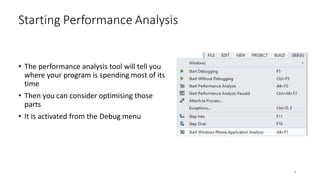
• The performance analysis tool will tell you
where your program is spending most of its
time
• Then you can consider optimising those
parts
• It is activated from the Debug menu
Starting Performance Analysis
4
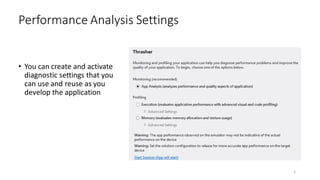
• You can create and activate
diagnostic settings that you
can use and reuse as you
develop the application
Performance Analysis Settings
5
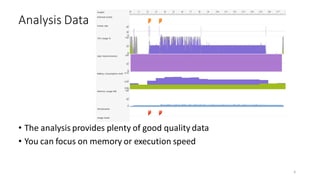
• The analysis provides plenty of good quality data
• You can focus on memory or execution speed
Analysis Data
6
7
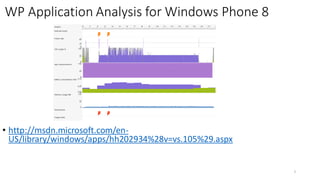
• http://msdn.microsoft.com/en-
US/library/windows/apps/hh202934%28v=vs.105%29.aspx
WP Application Analysis for Windows Phone 8
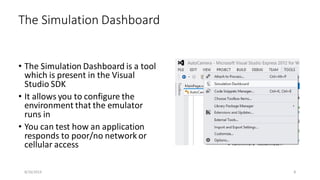
• The Simulation Dashboard is a tool
which is present in the Visual
Studio SDK
• It allows you to configure the
environment that the emulator
runs in
• You can test how an application
responds to poor/no network or
cellular access
The Simulation Dashboard
8/16/2014 8
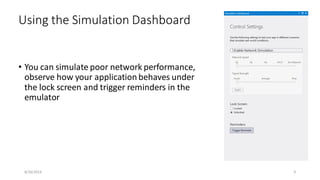
• You can simulate poor network performance,
observe how your application behaves under
the lock screen and trigger reminders in the
emulator
Using the Simulation Dashboard
8/16/2014 9
Creating an Application
10
• The XAP file brings together all the elements of your program application
• It is the item that is actually pushed onto the device when it is deployed
• The XAP file provides a common format for all Windows Phone apps & games
•Declarative, manifest-based installation
•Integrated into security model of phone
•Tied to your developer identity
•Signed by an Enterprise for enterprise deployment
The Windows Phone XAP file
11
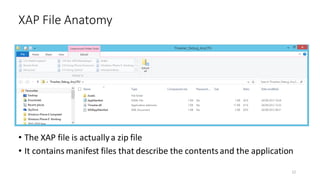
• The XAP file is actuallya zip file
• It contains manifest files that describe the contentsand the application
XAP File Anatomy
12
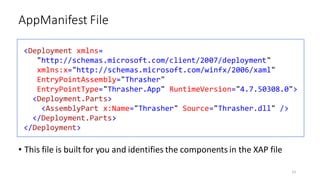
• This file is built for you and identifies the components in the XAP file
AppManifest File
13
<Deployment xmlns=
"http://schemas.microsoft.com/client/2007/deployment"
xmlns:x="http://schemas.microsoft.com/winfx/2006/xaml"
EntryPointAssembly="Thrasher"
EntryPointType="Thrasher.App" RuntimeVersion="4.7.50308.0">
<Deployment.Parts>
<AssemblyPart x:Name="Thrasher" Source="Thrasher.dll" />
</Deployment.Parts>
</Deployment>
• The other manifest file is very important
•It identifies the services that your application wishes to make use of
•It also configures the application itself
• The Windows Phone Store deployment mechanisms can use this to
ensure that users know what an application is going to do and which
hardware it will work with
• An application that attempts to use a service which is not requested in
the WMAppManifest will throw an exception at runtime if that service is
used
WMAppManifest.xml
14
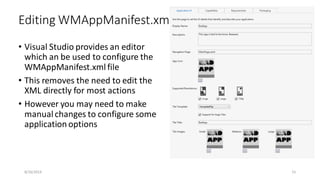
• Visual Studio provides an editor
which an be used to configure the
WMAppManifest.xml file
• This removes the need to edit the
XML directly for most actions
• However you may need to make
manual changes to configure some
application options
Editing WMAppManifest.xml
8/16/2014 15
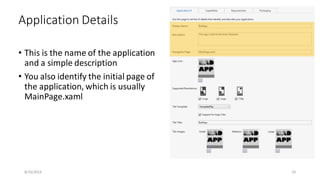
• This is the name of the application
and a simple description
• You also identify the initial page of
the application, which is usually
MainPage.xaml
Application Details
8/16/2014 16
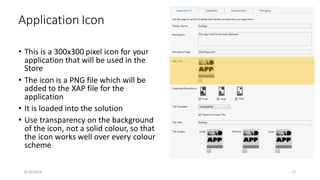
• This is a 300x300 pixel icon for your
application that will be used in the
Store
• The icon is a PNG file which will be
added to the XAP file for the
application
• It is loaded into the solution
• Use transparency on the background
of the icon, not a solid colour, so that
the icon works well over every colour
scheme
Application Icon
8/16/2014 17
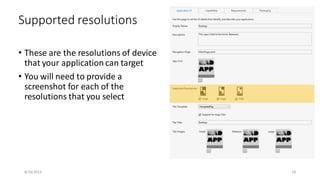
• These are the resolutions of device
that your application can target
• You will need to provide a
screenshot for each of the
resolutions that you select
Supported resolutions
8/16/2014 18
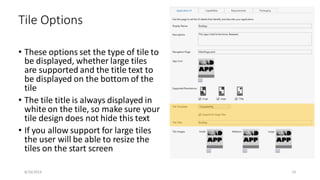
• These options set the type of tile to
be displayed, whether large tiles
are supported and the title text to
be displayed on the bottom of the
tile
• The tile title is always displayed in
white on the tile, so make sure your
tile design does not hide this text
• If you allow support for large tiles
the user will be able to resize the
tiles on the start screen
Tile Options
8/16/2014 19
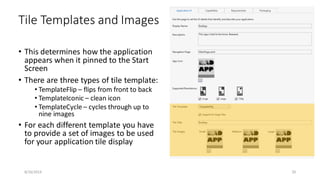
• This determines how the application
appears when it pinned to the Start
Screen
• There are three types of tile template:
• TemplateFlip – flips from front to back
• TemplateIconic – clean icon
• TemplateCycle – cycles through up to
nine images
• For each different template you have
to provide a set of images to be used
for your application tile display
Tile Templates and Images
8/16/2014 20
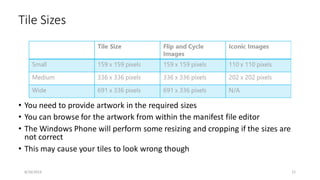
• You need to provide artwork in the required sizes
• You can browse for the artwork from within the manifest file editor
• The Windows Phone will perform some resizing and cropping if the sizes are
not correct
• This may cause your tiles to look wrong though
Tile Sizes
8/16/2014 21
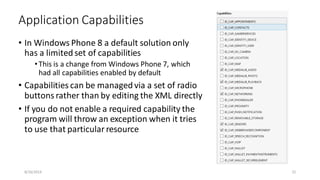
• In Windows Phone 8 a default solution only
has a limited set of capabilities
•This is a change from Windows Phone 7, which
had all capabilities enabled by default
• Capabilities can be managed via a set of radio
buttons rather than by editing the XML directly
• If you do not enable a required capability the
program will throw an exception when it tries
to use that particular resource
Application Capabilities
8/16/2014 22
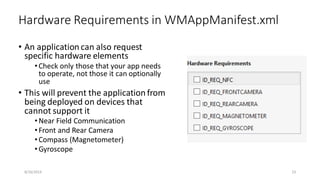
• An application can also request
specific hardware elements
•Check only those that your app needs
to operate, not those it can optionally
use
• This will prevent the application from
being deployed on devices that
cannot support it
•Near Field Communication
•Front and Rear Camera
•Compass (Magnetometer)
•Gyroscope
Hardware Requirements in WMAppManifest.xml
8/16/2014 23
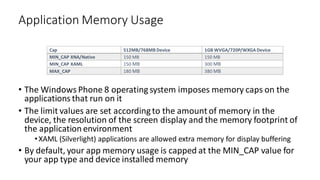
• The Windows Phone 8 operatingsystem imposes memory caps on the
applications that run on it
• The limit values are set accordingto the amount of memory in the
device, the resolution of the screen display and the memory footprint of
the application environment
•XAML (Silverlight) applications are allowed extra memory for display buffering
• By default, your app memory usage is capped at the MIN_CAP value for
your app type and device installed memory
Application Memory Usage
Cap 512MB/768MB Device 1GB WVGA/720P/WXGA Device
MIN_CAP XNA/Native 150 MB 150 MB
MIN_CAP XAML 150 MB 300 MB
MAX_CAP 180 MB 380 MB
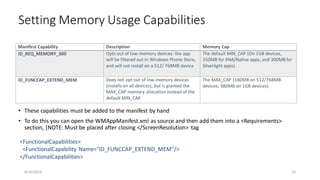
• These capabilities must be added to the manifest by hand
• To do this you can open the WMAppManifest.xml as source and then add them into a <Requirements>
section, [NOTE: Must be placed after closing </ScreenResolution> tag
Setting Memory Usage Capabilities
8/16/2014 25
Manifest Capability Description Memory Cap
ID_REQ_MEMORY_300 Opts out of low-memory devices: the app
will be filtered out in Windows Phone Store,
and will not install on a 512/ 768MB device
The default MIN_CAP (On 1GB devices,
150MB for XNA/Native apps, and 300MB for
Silverlight apps).
ID_FUNCCAP_EXTEND_MEM Does not opt out of low-memory devices
(installs on all devices), but is granted the
MAX_CAP memory allocation instead of the
default MIN_CAP.
The MAX_CAP (180MB on 512/768MB
devices; 380MB on 1GB devices).
<FunctionalCapabilities>
<FunctionalCapability Name="ID_FUNCCAP_EXTEND_MEM"/>
</FunctionalCapabilities>
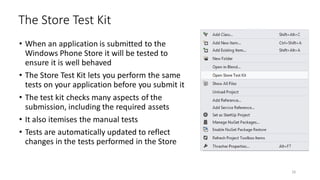
• When an application is submitted to the
Windows Phone Store it will be tested to
ensure it is well behaved
• The Store Test Kit lets you perform the same
tests on your application before you submit it
• The test kit checks many aspects of the
submission, including the required assets
• It also itemises the manual tests
• Tests are automatically updated to reflect
changes in the tests performed in the Store
The Store Test Kit
26
• The Store Test Kit is located on the Project menu for the solution
• The Store Test interface is where you can perform the automated
tests and work through the manual ones
• You can also use this to add application screenshots
Store Test Interface
8/16/2014 27
• The Store Tile is provided as a 300x300 pixel image that is used for
display in the Store
• You must provide one of these for your application
Store Tile
8/16/2014 28
• You must provide at least one screenshot for each of the display
resolutions that your application supports
• You can provide extra, optional ones if you wish
•This is a good way to promote your application
Application Screenshots
8/16/2014 29
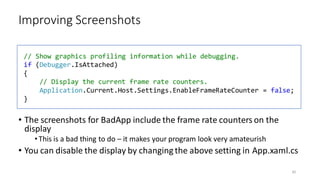
• The screenshots for BadApp include the frame rate counters on the
display
•This is a bad thing to do – it makes your program look very amateurish
• You can disable the display by changingthe above setting in App.xaml.cs
Improving Screenshots
30
// Show graphics profiling information while debugging.
if (Debugger.IsAttached)
{
// Display the current frame rate counters.
Application.Current.Host.Settings.EnableFrameRateCounter = false;
}
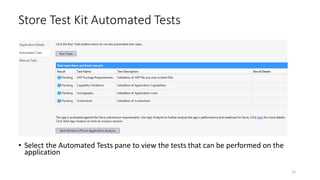
• Select the Automated Tests pane to view the tests that can be performed on the
application
Store Test Kit Automated Tests
31
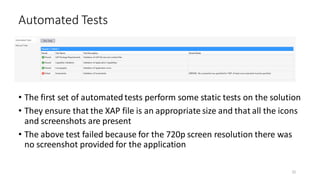
• The first set of automated tests perform some static tests on the solution
• They ensure that the XAP file is an appropriate size and that all the icons
and screenshots are present
• The above test failed because for the 720p screen resolution there was
no screenshot provided for the application
Automated Tests
32
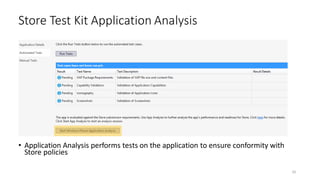
• Application Analysis performs tests on the application to ensure conformity with
Store policies
Store Test Kit Application Analysis
33
Demo
Thrasher
34
Distributing an Appliacation
35
• If you want to find your XAP file it is held alongside your binaries in the
bin directory
•Remember to make a release build for the final version of your application
•The Store Test Tool will only work on the release build of your program
• Rename it to ZIP if you want to look inside
• XAP File sizes
•For Windows Phone OS 7.1 the maximum size of the XAP package file is 225 MB
•For Windows Phone 8 the maximum size of the XAP package file is 1 GB.
• A XAP file should not be more than 20Mb in size for Over the Air (OTA)
distribution
XAP Files
36
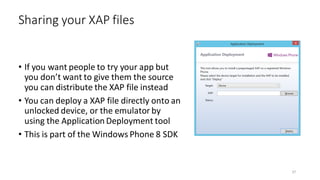
• If you want people to try your app but
you don’t want to give them the source
you can distribute the XAP file instead
• You can deploy a XAP file directly onto an
unlocked device, or the emulator by
using the Application Deployment tool
• This is part of the Windows Phone 8 SDK
Sharing your XAP files
37
• With the Windows Phone 8 Store, all XAPs are transmitted over the network
encrypted
• They are also compiled to executable code before transmission to a purchaser
• Consequently, it is difficult for someone to disassemble your application to unpick
your assemblies and find out how they work, or to steal your assets (images and
sounds)
• If you send someone your XAP file for Beta test, you do not get this protection
• In Windows Phone 7.x, apps were more vulnerable to attack, so an obfuscator tool
was sometimes used which will change the layout and variable names in your code to
make it harder to decode the way a program works
• It is unrealistic to rely on the phone security to protect your assets and program code
as hardware is always vulnerable to direct attack
Obfuscation Not Required
38
The Windows Phone Store
39
• The Windows Phone Store is the only way you can get executable
content onto a “public” phone
•Enterprises can register with Microsoft to allow them to distribute applications
to devices that have been enrolled into their Enterprise
• Users can buy applications and deploy them onto their devices
• Developers can write applications and deploy them to their own devices
for testing
•Registered developers can use up to 3 devices
•Student developers can use one device
Windows Phone Store Rules
• Register to be a publisher in the Windows Phone Store for $99 per year
• Students can register for free via Dreamspark
• Registered developers can submit applications for approval in the
Windows Phone Store
• Windows Phone dev account members have their identity validated
when they join and are allocated a unique digital signature to sign their
Windows Phone Store submissions
• Join at: http://dev.windowsphone.com
Joining the Store
41
• Developers can set a price for an application or give it away free
• Developers receive 70% of the price paid for the application
• Payment starts once the developer has earned up to $200
• The payment is made by bank transfer
• All payments are from the USA, which can cause some issues
•Very good support on the developers site and the Windows Phone Forums for
this
Payment
42
• Developers are limited in the number of free applications they can make
available
•Only 100 (!) free app submissions per developer per year
•Can make additional free application submissions at an extra cost of $20 per
submission
• Developers can publish as many paid applications as they like
• Number of apps any one developer can have certified in a single day is
limited to 20
•Avoids bulk publishing flooding the market
Free and Paid Applications
43
• Applications can be free or paid
• Developers can also allow customers to use an application in “try before buy”
mode
• Your application can determine which mode it is running in by calling a status
API
• Applications sold on a “try before buy” basis don’t show up as Free
Applications
• This may reduce the number of people who will download it
• Some people only browse the free lists
“Try before Buy” mode
44
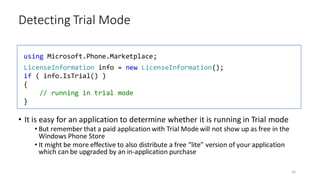
• It is easy for an application to determine whether it is running in Trial mode
• But remember that a paid application with Trial Mode will not show up as free in the
Windows Phone Store
• It might be more effective to also distribute a free “lite” version of your application
which can be upgraded by an in-application purchase
Detecting Trial Mode
45
using Microsoft.Phone.Marketplace;
LicenseInformation info = new LicenseInformation();
if ( info.IsTrial() )
{
// running in trial mode
}
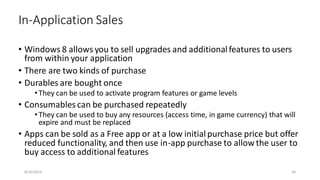
• Windows 8 allows you to sell upgrades and additional features to users
from within your application
• There are two kinds of purchase
• Durables are bought once
•They can be used to activate program features or game levels
• Consumables can be purchased repeatedly
•They can be used to buy any resources (access time, in game currency) that will
expire and must be replaced
• Apps can be sold as a Free app or at a low initial purchase price but offer
reduced functionality, and then use in-app purchase to allow the user to
buy access to additional features
In-Application Sales
8/16/2014 46
Demo
TrialApps
Store Submission
48
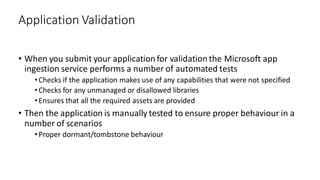
• When you submit your application for validation the Microsoft app
ingestion service performs a number of automated tests
•Checks if the application makes use of any capabilities that were not specified
•Checks for any unmanaged or disallowed libraries
•Ensures that all the required assets are provided
• Then the application is manually tested to ensure proper behaviour in a
number of scenarios
•Proper dormant/tombstone behaviour
Application Validation
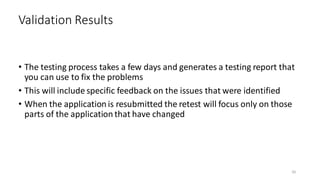
• The testing process takes a few days and generates a testing report that
you can use to fix the problems
• This will include specific feedback on the issues that were identified
• When the application is resubmitted the retest will focus only on those
parts of the application that have changed
Validation Results
50
Private Beta Testing
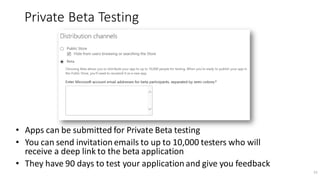
• Apps can be submitted for Private Beta testing
• You can send invitation emails to up to 10,000 testers who will
receive a deep link to the beta application
• They have 90 days to test your application and give you feedback
51
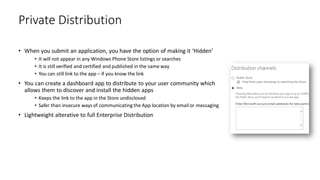
• When you submit an application, you have the option of making it ‘Hidden’
• It will not appear in any Windows Phone Store listings or searches
• It is still verified and certified and published in the same way
• You can still link to the app – if you know the link
• You can create a dashboard app to distribute to your user community which
allows them to discover and install the hidden apps
• Keeps the link to the app in the Store undisclosed
• Safer than insecure ways of communicating the App location by email or messaging
• Lightweight alterative to full Enterprise Distribution
Private Distribution
Advertising SDK
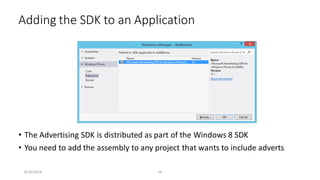
• The Advertising SDK is distributed as part of the Windows 8 SDK
• You need to add the assembly to any project that wants to include adverts
Adding the SDK to an Application
8/16/2014 ‹#›
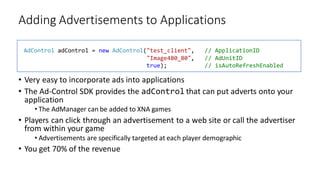
• Very easy to incorporate ads into applications
• The Ad-Control SDK provides the adControl that can put adverts onto your
application
• The AdManager can be added to XNA games
• Players can click through an advertisement to a web site or call the advertiser
from within your game
• Advertisements are specifically targeted at each player demographic
• You get 70% of the revenue
Adding Advertisements to Applications
AdControl adControl = new AdControl("test_client", // ApplicationID
"Image480_80", // AdUnitID
true); // isAutoRefreshEnabled
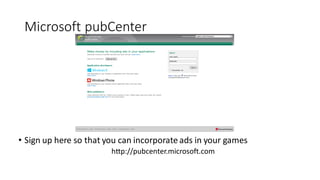
Microsoft pubCenter
• Sign up here so that you can incorporate ads in your games
http://pubcenter.microsoft.com
Demo
Advertising
Maximising Uptake
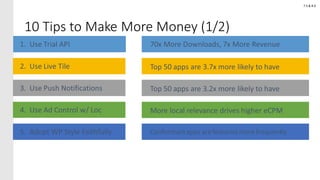
10 Tips to Make More Money (1/2)
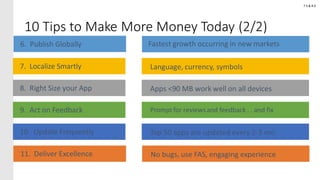
10 Tips to Make More Money Today (2/2)
Fastest growth occurring in new markets
Making your application as useful as possible
• You can increase the appeal and usefulness of your application by
maximising the number of contexts where it can be used
• Use Search Extensibility to ensure that your application appears when the
user searches for a related item
• Use background agents to provide useful functionality
• Add a Wallet behaviour if your application has any membership or transaction
based behaviour
• Provide customisable Live Tiles that are regularly updated
• Use deep links into applications to provide quick access to relevant functions
8/16/2014 61
Making your applications stand out from the crowd
• There are now quite a few applications in the Windows Phone Store
• But there is still plenty of scope for making a name (and some money) for
yourself
• Here are some tips to help maximise the uptake of your applications
• Design to sell – the design of your application is important, make it count
• Target Localisations – if there are lots of English versions of your application, make
yours the only Spanish one
• Provide a free version – you can now use in application sales to “convert” free apps
• Release upgrades – regular upgrades keep customers engaged with your product
• Encourage good feedback – provide reporting mechanisms for problems and engage
with customers who report issues. They can be your sales team..
62
http://msdn.microsoft.com/en-us/library/advertising-mobile-windows-phone-sdk%28v=msads.20%29.aspx
• Download APIs:
http://www.microsoft.com/en-us/download/details.aspx?id=8729
• Advertising in app:
http://msdn.microsoft.com/en-us/library/windowsphone/develop/hh286399%28v=vs.105%29.aspx
• Microsoft PubCenter:
http://msdn.microsoft.com/en-us/library/advertising-mobile-windows-phone-sdk-
start%28v=msads.20%29.aspx
References

13.Windows Phone Store

  • 1.
    The Windows PhoneStore Nguyen Tuan | Microsoft Certified Trainer
  • 2.
    Agenda • Performance Analysis •Creating an Application • Configuring the application • The Store Testing Tool • Distributing an Application • The Windows Phone Store • Advertising Supported Applications • Maximising Uptake
  • 3.
  • 4.
    • The performanceanalysis tool will tell you where your program is spending most of its time • Then you can consider optimising those parts • It is activated from the Debug menu Starting Performance Analysis 4
  • 5.
    • You cancreate and activate diagnostic settings that you can use and reuse as you develop the application Performance Analysis Settings 5
  • 6.
    • The analysisprovides plenty of good quality data • You can focus on memory or execution speed Analysis Data 6
  • 7.
  • 8.
    • The SimulationDashboard is a tool which is present in the Visual Studio SDK • It allows you to configure the environment that the emulator runs in • You can test how an application responds to poor/no network or cellular access The Simulation Dashboard 8/16/2014 8
  • 9.
    • You cansimulate poor network performance, observe how your application behaves under the lock screen and trigger reminders in the emulator Using the Simulation Dashboard 8/16/2014 9
  • 10.
  • 11.
    • The XAPfile brings together all the elements of your program application • It is the item that is actually pushed onto the device when it is deployed • The XAP file provides a common format for all Windows Phone apps & games •Declarative, manifest-based installation •Integrated into security model of phone •Tied to your developer identity •Signed by an Enterprise for enterprise deployment The Windows Phone XAP file 11
  • 12.
    • The XAPfile is actuallya zip file • It contains manifest files that describe the contentsand the application XAP File Anatomy 12
  • 13.
    • This fileis built for you and identifies the components in the XAP file AppManifest File 13 <Deployment xmlns= "http://schemas.microsoft.com/client/2007/deployment" xmlns:x="http://schemas.microsoft.com/winfx/2006/xaml" EntryPointAssembly="Thrasher" EntryPointType="Thrasher.App" RuntimeVersion="4.7.50308.0"> <Deployment.Parts> <AssemblyPart x:Name="Thrasher" Source="Thrasher.dll" /> </Deployment.Parts> </Deployment>
  • 14.
    • The othermanifest file is very important •It identifies the services that your application wishes to make use of •It also configures the application itself • The Windows Phone Store deployment mechanisms can use this to ensure that users know what an application is going to do and which hardware it will work with • An application that attempts to use a service which is not requested in the WMAppManifest will throw an exception at runtime if that service is used WMAppManifest.xml 14
  • 15.
    • Visual Studioprovides an editor which an be used to configure the WMAppManifest.xml file • This removes the need to edit the XML directly for most actions • However you may need to make manual changes to configure some application options Editing WMAppManifest.xml 8/16/2014 15
  • 16.
    • This isthe name of the application and a simple description • You also identify the initial page of the application, which is usually MainPage.xaml Application Details 8/16/2014 16
  • 17.
    • This isa 300x300 pixel icon for your application that will be used in the Store • The icon is a PNG file which will be added to the XAP file for the application • It is loaded into the solution • Use transparency on the background of the icon, not a solid colour, so that the icon works well over every colour scheme Application Icon 8/16/2014 17
  • 18.
    • These arethe resolutions of device that your application can target • You will need to provide a screenshot for each of the resolutions that you select Supported resolutions 8/16/2014 18
  • 19.
    • These optionsset the type of tile to be displayed, whether large tiles are supported and the title text to be displayed on the bottom of the tile • The tile title is always displayed in white on the tile, so make sure your tile design does not hide this text • If you allow support for large tiles the user will be able to resize the tiles on the start screen Tile Options 8/16/2014 19
  • 20.
    • This determineshow the application appears when it pinned to the Start Screen • There are three types of tile template: • TemplateFlip – flips from front to back • TemplateIconic – clean icon • TemplateCycle – cycles through up to nine images • For each different template you have to provide a set of images to be used for your application tile display Tile Templates and Images 8/16/2014 20
  • 21.
    • You needto provide artwork in the required sizes • You can browse for the artwork from within the manifest file editor • The Windows Phone will perform some resizing and cropping if the sizes are not correct • This may cause your tiles to look wrong though Tile Sizes 8/16/2014 21
  • 22.
    • In WindowsPhone 8 a default solution only has a limited set of capabilities •This is a change from Windows Phone 7, which had all capabilities enabled by default • Capabilities can be managed via a set of radio buttons rather than by editing the XML directly • If you do not enable a required capability the program will throw an exception when it tries to use that particular resource Application Capabilities 8/16/2014 22
  • 23.
    • An applicationcan also request specific hardware elements •Check only those that your app needs to operate, not those it can optionally use • This will prevent the application from being deployed on devices that cannot support it •Near Field Communication •Front and Rear Camera •Compass (Magnetometer) •Gyroscope Hardware Requirements in WMAppManifest.xml 8/16/2014 23
  • 24.
    • The WindowsPhone 8 operatingsystem imposes memory caps on the applications that run on it • The limit values are set accordingto the amount of memory in the device, the resolution of the screen display and the memory footprint of the application environment •XAML (Silverlight) applications are allowed extra memory for display buffering • By default, your app memory usage is capped at the MIN_CAP value for your app type and device installed memory Application Memory Usage Cap 512MB/768MB Device 1GB WVGA/720P/WXGA Device MIN_CAP XNA/Native 150 MB 150 MB MIN_CAP XAML 150 MB 300 MB MAX_CAP 180 MB 380 MB
  • 25.
    • These capabilitiesmust be added to the manifest by hand • To do this you can open the WMAppManifest.xml as source and then add them into a <Requirements> section, [NOTE: Must be placed after closing </ScreenResolution> tag Setting Memory Usage Capabilities 8/16/2014 25 Manifest Capability Description Memory Cap ID_REQ_MEMORY_300 Opts out of low-memory devices: the app will be filtered out in Windows Phone Store, and will not install on a 512/ 768MB device The default MIN_CAP (On 1GB devices, 150MB for XNA/Native apps, and 300MB for Silverlight apps). ID_FUNCCAP_EXTEND_MEM Does not opt out of low-memory devices (installs on all devices), but is granted the MAX_CAP memory allocation instead of the default MIN_CAP. The MAX_CAP (180MB on 512/768MB devices; 380MB on 1GB devices). <FunctionalCapabilities> <FunctionalCapability Name="ID_FUNCCAP_EXTEND_MEM"/> </FunctionalCapabilities>
  • 26.
    • When anapplication is submitted to the Windows Phone Store it will be tested to ensure it is well behaved • The Store Test Kit lets you perform the same tests on your application before you submit it • The test kit checks many aspects of the submission, including the required assets • It also itemises the manual tests • Tests are automatically updated to reflect changes in the tests performed in the Store The Store Test Kit 26
  • 27.
    • The StoreTest Kit is located on the Project menu for the solution • The Store Test interface is where you can perform the automated tests and work through the manual ones • You can also use this to add application screenshots Store Test Interface 8/16/2014 27
  • 28.
    • The StoreTile is provided as a 300x300 pixel image that is used for display in the Store • You must provide one of these for your application Store Tile 8/16/2014 28
  • 29.
    • You mustprovide at least one screenshot for each of the display resolutions that your application supports • You can provide extra, optional ones if you wish •This is a good way to promote your application Application Screenshots 8/16/2014 29
  • 30.
    • The screenshotsfor BadApp include the frame rate counters on the display •This is a bad thing to do – it makes your program look very amateurish • You can disable the display by changingthe above setting in App.xaml.cs Improving Screenshots 30 // Show graphics profiling information while debugging. if (Debugger.IsAttached) { // Display the current frame rate counters. Application.Current.Host.Settings.EnableFrameRateCounter = false; }
  • 31.
    • Select theAutomated Tests pane to view the tests that can be performed on the application Store Test Kit Automated Tests 31
  • 32.
    • The firstset of automated tests perform some static tests on the solution • They ensure that the XAP file is an appropriate size and that all the icons and screenshots are present • The above test failed because for the 720p screen resolution there was no screenshot provided for the application Automated Tests 32
  • 33.
    • Application Analysisperforms tests on the application to ensure conformity with Store policies Store Test Kit Application Analysis 33
  • 34.
  • 35.
  • 36.
    • If youwant to find your XAP file it is held alongside your binaries in the bin directory •Remember to make a release build for the final version of your application •The Store Test Tool will only work on the release build of your program • Rename it to ZIP if you want to look inside • XAP File sizes •For Windows Phone OS 7.1 the maximum size of the XAP package file is 225 MB •For Windows Phone 8 the maximum size of the XAP package file is 1 GB. • A XAP file should not be more than 20Mb in size for Over the Air (OTA) distribution XAP Files 36
  • 37.
    • If youwant people to try your app but you don’t want to give them the source you can distribute the XAP file instead • You can deploy a XAP file directly onto an unlocked device, or the emulator by using the Application Deployment tool • This is part of the Windows Phone 8 SDK Sharing your XAP files 37
  • 38.
    • With theWindows Phone 8 Store, all XAPs are transmitted over the network encrypted • They are also compiled to executable code before transmission to a purchaser • Consequently, it is difficult for someone to disassemble your application to unpick your assemblies and find out how they work, or to steal your assets (images and sounds) • If you send someone your XAP file for Beta test, you do not get this protection • In Windows Phone 7.x, apps were more vulnerable to attack, so an obfuscator tool was sometimes used which will change the layout and variable names in your code to make it harder to decode the way a program works • It is unrealistic to rely on the phone security to protect your assets and program code as hardware is always vulnerable to direct attack Obfuscation Not Required 38
  • 39.
  • 40.
    • The WindowsPhone Store is the only way you can get executable content onto a “public” phone •Enterprises can register with Microsoft to allow them to distribute applications to devices that have been enrolled into their Enterprise • Users can buy applications and deploy them onto their devices • Developers can write applications and deploy them to their own devices for testing •Registered developers can use up to 3 devices •Student developers can use one device Windows Phone Store Rules
  • 41.
    • Register tobe a publisher in the Windows Phone Store for $99 per year • Students can register for free via Dreamspark • Registered developers can submit applications for approval in the Windows Phone Store • Windows Phone dev account members have their identity validated when they join and are allocated a unique digital signature to sign their Windows Phone Store submissions • Join at: http://dev.windowsphone.com Joining the Store 41
  • 42.
    • Developers canset a price for an application or give it away free • Developers receive 70% of the price paid for the application • Payment starts once the developer has earned up to $200 • The payment is made by bank transfer • All payments are from the USA, which can cause some issues •Very good support on the developers site and the Windows Phone Forums for this Payment 42
  • 43.
    • Developers arelimited in the number of free applications they can make available •Only 100 (!) free app submissions per developer per year •Can make additional free application submissions at an extra cost of $20 per submission • Developers can publish as many paid applications as they like • Number of apps any one developer can have certified in a single day is limited to 20 •Avoids bulk publishing flooding the market Free and Paid Applications 43
  • 44.
    • Applications canbe free or paid • Developers can also allow customers to use an application in “try before buy” mode • Your application can determine which mode it is running in by calling a status API • Applications sold on a “try before buy” basis don’t show up as Free Applications • This may reduce the number of people who will download it • Some people only browse the free lists “Try before Buy” mode 44
  • 45.
    • It iseasy for an application to determine whether it is running in Trial mode • But remember that a paid application with Trial Mode will not show up as free in the Windows Phone Store • It might be more effective to also distribute a free “lite” version of your application which can be upgraded by an in-application purchase Detecting Trial Mode 45 using Microsoft.Phone.Marketplace; LicenseInformation info = new LicenseInformation(); if ( info.IsTrial() ) { // running in trial mode }
  • 46.
    • Windows 8allows you to sell upgrades and additional features to users from within your application • There are two kinds of purchase • Durables are bought once •They can be used to activate program features or game levels • Consumables can be purchased repeatedly •They can be used to buy any resources (access time, in game currency) that will expire and must be replaced • Apps can be sold as a Free app or at a low initial purchase price but offer reduced functionality, and then use in-app purchase to allow the user to buy access to additional features In-Application Sales 8/16/2014 46
  • 47.
  • 48.
  • 49.
    • When yousubmit your application for validation the Microsoft app ingestion service performs a number of automated tests •Checks if the application makes use of any capabilities that were not specified •Checks for any unmanaged or disallowed libraries •Ensures that all the required assets are provided • Then the application is manually tested to ensure proper behaviour in a number of scenarios •Proper dormant/tombstone behaviour Application Validation
  • 50.
    • The testingprocess takes a few days and generates a testing report that you can use to fix the problems • This will include specific feedback on the issues that were identified • When the application is resubmitted the retest will focus only on those parts of the application that have changed Validation Results 50
  • 51.
    Private Beta Testing •Apps can be submitted for Private Beta testing • You can send invitation emails to up to 10,000 testers who will receive a deep link to the beta application • They have 90 days to test your application and give you feedback 51
  • 52.
    • When yousubmit an application, you have the option of making it ‘Hidden’ • It will not appear in any Windows Phone Store listings or searches • It is still verified and certified and published in the same way • You can still link to the app – if you know the link • You can create a dashboard app to distribute to your user community which allows them to discover and install the hidden apps • Keeps the link to the app in the Store undisclosed • Safer than insecure ways of communicating the App location by email or messaging • Lightweight alterative to full Enterprise Distribution Private Distribution
  • 53.
  • 54.
    • The AdvertisingSDK is distributed as part of the Windows 8 SDK • You need to add the assembly to any project that wants to include adverts Adding the SDK to an Application 8/16/2014 ‹#›
  • 55.
    • Very easyto incorporate ads into applications • The Ad-Control SDK provides the adControl that can put adverts onto your application • The AdManager can be added to XNA games • Players can click through an advertisement to a web site or call the advertiser from within your game • Advertisements are specifically targeted at each player demographic • You get 70% of the revenue Adding Advertisements to Applications AdControl adControl = new AdControl("test_client", // ApplicationID "Image480_80", // AdUnitID true); // isAutoRefreshEnabled
  • 56.
    Microsoft pubCenter • Signup here so that you can incorporate ads in your games http://pubcenter.microsoft.com
  • 57.
  • 58.
  • 59.
    10 Tips toMake More Money (1/2)
  • 60.
    10 Tips toMake More Money Today (2/2) Fastest growth occurring in new markets
  • 61.
    Making your applicationas useful as possible • You can increase the appeal and usefulness of your application by maximising the number of contexts where it can be used • Use Search Extensibility to ensure that your application appears when the user searches for a related item • Use background agents to provide useful functionality • Add a Wallet behaviour if your application has any membership or transaction based behaviour • Provide customisable Live Tiles that are regularly updated • Use deep links into applications to provide quick access to relevant functions 8/16/2014 61
  • 62.
    Making your applicationsstand out from the crowd • There are now quite a few applications in the Windows Phone Store • But there is still plenty of scope for making a name (and some money) for yourself • Here are some tips to help maximise the uptake of your applications • Design to sell – the design of your application is important, make it count • Target Localisations – if there are lots of English versions of your application, make yours the only Spanish one • Provide a free version – you can now use in application sales to “convert” free apps • Release upgrades – regular upgrades keep customers engaged with your product • Encourage good feedback – provide reporting mechanisms for problems and engage with customers who report issues. They can be your sales team.. 62
  • 63.
    http://msdn.microsoft.com/en-us/library/advertising-mobile-windows-phone-sdk%28v=msads.20%29.aspx • Download APIs: http://www.microsoft.com/en-us/download/details.aspx?id=8729 •Advertising in app: http://msdn.microsoft.com/en-us/library/windowsphone/develop/hh286399%28v=vs.105%29.aspx • Microsoft PubCenter: http://msdn.microsoft.com/en-us/library/advertising-mobile-windows-phone-sdk- start%28v=msads.20%29.aspx References