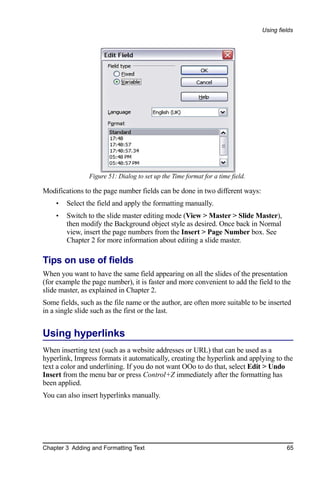
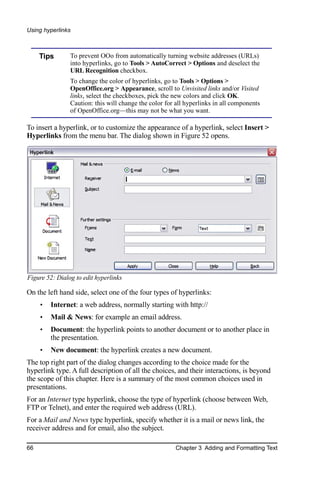
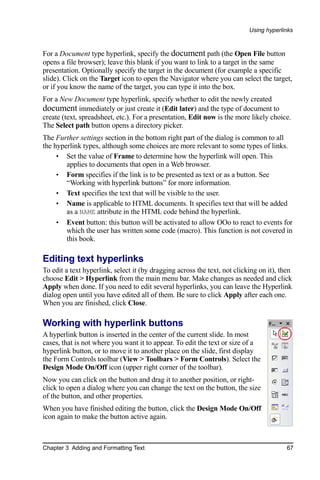
Copyright
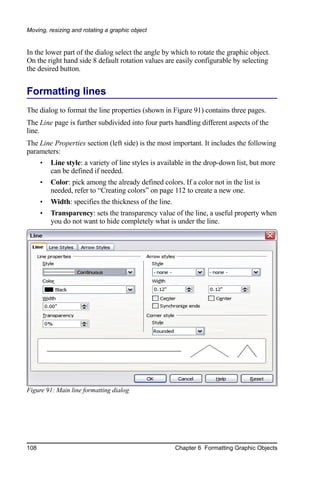
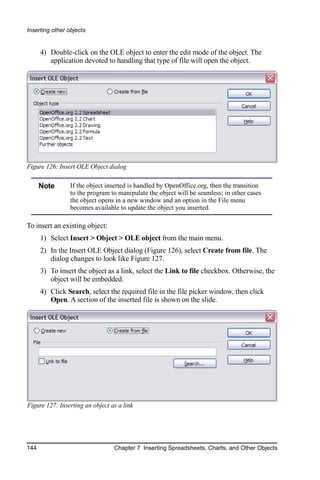
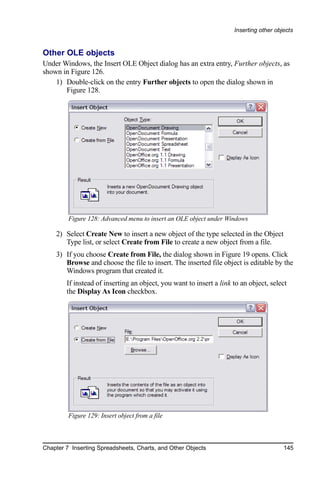
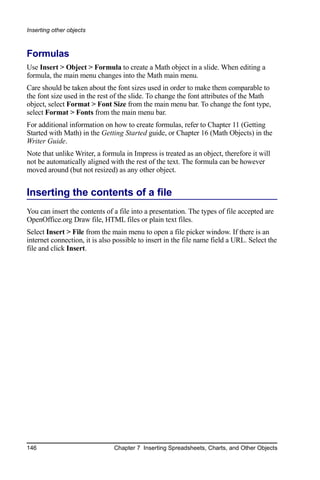
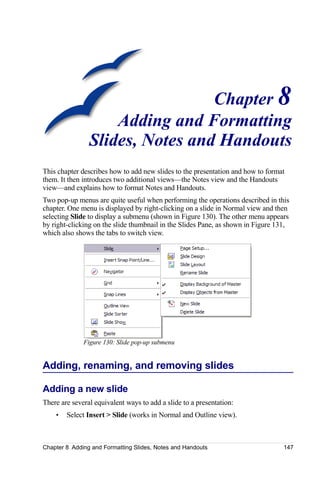
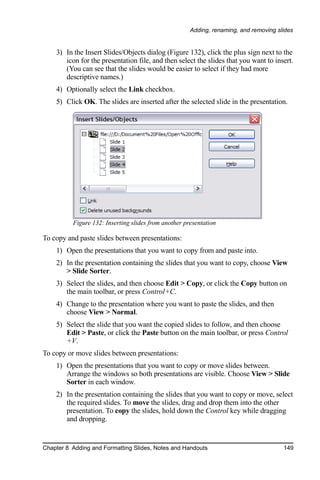
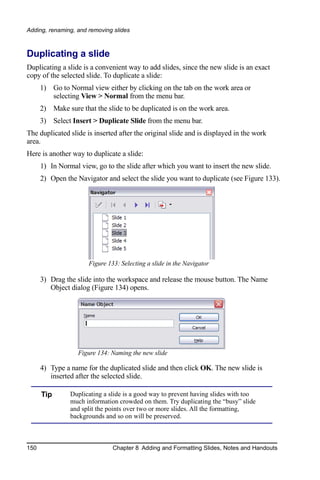
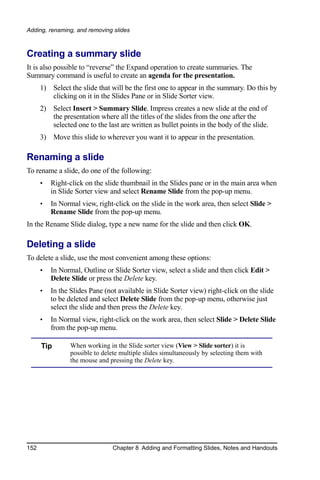
This document is Copyright © 2005–2007 by its contributors as listed in the section
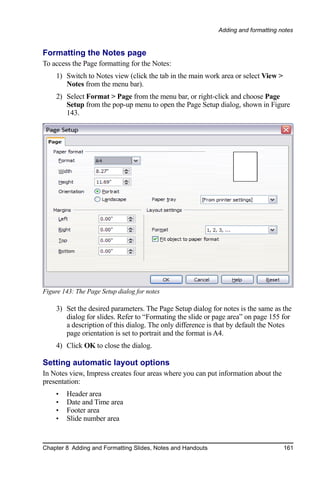
titled Authors. You may distribute it and/or modify it under the terms of either the
GNU General Public License, version 2 (http://www.gnu.org/licenses/gpl.html) or
later, or the Creative Commons Attribution License, version 3.0
(http://creativecommons.org/licenses/by/3.0/) or later.
All trademarks within this guide belong to their legitimate owners.
Authors
Michele Zarri                              Gary Schnabl
Jean Hollis Weber                          Paul Miller
Peter Hillier-Brook                        Martin J Fox
Dan Lewis
Feedback
Please direct any comments or suggestions about this document to:
authors@user-faq.openoffice.org
Acknowledgments
Tim Kampa, Charles Fannan, and Dana Oliver, students in the Technical and
Professional Writing Program at San Francisco State University, wrote a previous
version of parts of this document for OpenOffice.org 1.1 (copyright Tim Kampa).
Dan Lewis and Jean Hollis Weber rewrote portions for OpenOffice.org 2.0, from an
earlier rewrite by Linda Worthington. The book has been further revised and
expanded.
This book was created entirely using OpenOffice.org, including writing, page layout,
and PDF creation. Most graphics were produced using OOo Draw, some using the
GIMP, an open-source graphics program.
Publication details
Published by:
Friends of OpenDocument, Inc.
P. O. Box 640, Airlie Beach, QLD 4802, Australia
Published 19 July 2007. Based on OpenOffice.org 2.2.
ISBN 978-1-921320-01-9


                                                     You can download an editable version
                                                                     of this document from
                                    http://oooauthors.org/en/authors/userguide2/published/
Contents


Contents
Chapter 1
 Introducing Impress........................................................................................1
    Parts of the main Impress window..........................................................................1
       Slides pane........................................................................................................2
       Tasks pane........................................................................................................3
       Workspace........................................................................................................3
       Slide Sorter view..............................................................................................6
       Toolbars............................................................................................................9
       Navigator..........................................................................................................9
    Creating a new presentation...................................................................................9
       Planning the presentation................................................................................10
       Using the Presentation Wizard........................................................................10
    Formatting a presentation.....................................................................................13
       Creating the first slide.....................................................................................14
       Inserting additional slides...............................................................................14
       Modifying the appearance of slides................................................................17
       Modifying the slide show...............................................................................17
    Running the slide show........................................................................................19
Chapter 2
 Using Slide Masters, Styles, and Templates.................................................20
    Designing a presentation......................................................................................20
    What are slide masters?........................................................................................20
    What are styles? Why use them?..........................................................................21
       Presentation styles..........................................................................................22
       Graphic styles.................................................................................................23
    Working with slide masters..................................................................................23
       Creating slide masters.....................................................................................23
       Applying a slide master..................................................................................23
       Loading additional slide masters....................................................................24
    Modifying a slide master......................................................................................25
    Choosing and applying the background................................................................26
       Adding background objects............................................................................27
       Modifying the size and shape of default text areas..........................................29
       Adding text to all slides..................................................................................31
    Working with styles..............................................................................................32
       Creating graphics styles..................................................................................32
       Modifying styles.............................................................................................34
       Applying styles...............................................................................................34
       Deleting styles................................................................................................35


Impress Guide                                                                                                             iii
Contents


       Assigning styles to shortcut keys....................................................................35
     Working with templates........................................................................................35
       Using templates supplied with OOo...............................................................36
       Using templates from other sources................................................................36
       Setting a default template...............................................................................37
       Creating your own templates..........................................................................38
       Modifying a template......................................................................................39
       Organizing templates......................................................................................40
Chapter 3
 Adding and Formatting Text.........................................................................43
     Working with text boxes.......................................................................................43
         Using text boxes created from the Layout pane..............................................43
         Using text boxes created from the text box tool..............................................43
         Moving a text box...........................................................................................44
         Resizing a text box.........................................................................................45
         Deleting a text box..........................................................................................45
     Inserting text........................................................................................................46
         Pasting text.....................................................................................................46
         Inserting special characters.............................................................................47
         Inserting non-breaking spaces and hyphens....................................................48
     Formatting text.....................................................................................................49
         Using styles to format text..............................................................................49
         Selecting text..................................................................................................51
         Formatting characters.....................................................................................52
         Formatting paragraphs....................................................................................55
     Creating bulleted and numbered lists....................................................................58
         Creating lists in AutoLayout text boxes..........................................................58
         Creating lists in other text boxes.....................................................................59
         Creating a new outline level...........................................................................59
         Changing the appearance of the list................................................................59
         Changing the order or the outline level of bulleted or numbered lines............63
     Using fields..........................................................................................................64
         Inserting a field...............................................................................................64
         Customizing fields..........................................................................................64
         Tips on use of fields........................................................................................65
     Using hyperlinks..................................................................................................65
         Editing text hyperlinks....................................................................................67
         Working with hyperlink buttons.....................................................................67


iv                                                                                                       Impress Guide
Contents


Chapter 4
 Adding and Formatting Pictures....................................................................68
    Inserting pictures..................................................................................................68
        Inserting a picture from a file..........................................................................68
        Inserting a picture from a scanner...................................................................70
        Inserting a picture from the Gallery................................................................70
    Formatting pictures..............................................................................................71
        Moving a picture.............................................................................................71
        Resizing a picture...........................................................................................72
        Rotating a picture............................................................................................73
        Formatting using the Picture toolbar...............................................................74
        Deleting a picture............................................................................................77
    Creating an image map.........................................................................................77
    Managing the Gallery themes...............................................................................79
        Adding images to the Gallery.........................................................................79
        Deleting images from the Gallery...................................................................80
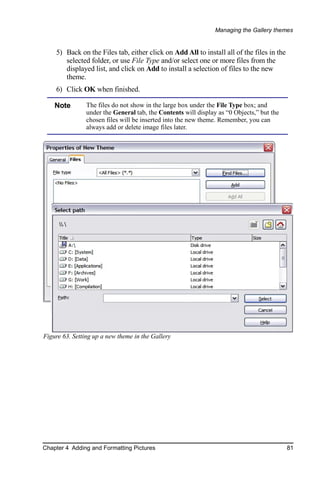
        Adding a new theme to the Gallery.................................................................80
Chapter 5
 Creating Graphic Objects..............................................................................82
    The Drawing toolbar............................................................................................82
    Creating lines and shapes.....................................................................................85
    Working with connectors......................................................................................86
        Managing glue points.....................................................................................86
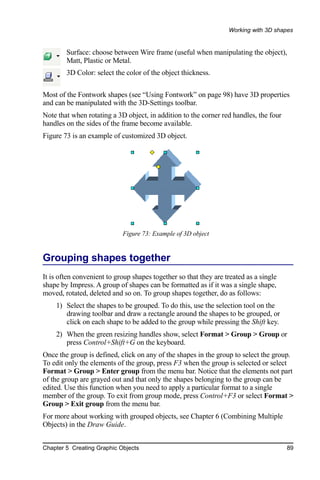
    Working with 3D shapes......................................................................................87
    Grouping shapes together.....................................................................................89
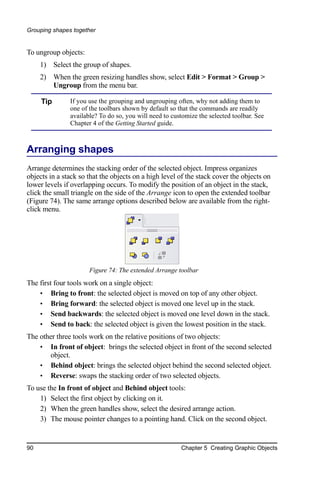
    Arranging shapes..................................................................................................90
    Flipping shapes.....................................................................................................91
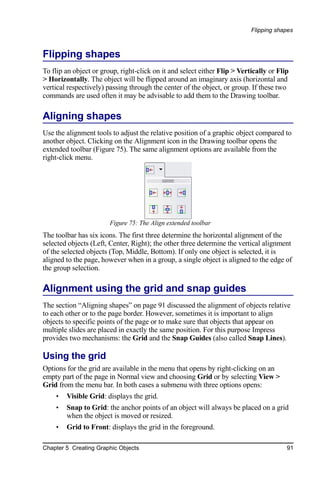
    Aligning shapes....................................................................................................91
    Alignment using the grid and snap guides............................................................91
        Using the grid.................................................................................................91
        Using snap guides...........................................................................................92
    Converting an object to a different type................................................................93
    Setting up interaction with a shape or image........................................................94
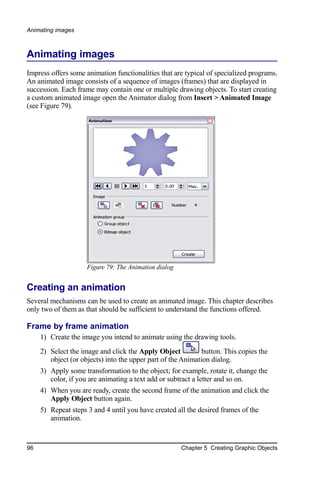
    Animating images................................................................................................96
        Creating an animation.....................................................................................96
        Other functions of the Animator.....................................................................97
    Using Fontwork....................................................................................................98
        Using the Fontwork toolbar............................................................................99
        Modifying Fontwork text as a shape.............................................................101


Impress Guide                                                                                                           v
Contents


Chapter 6
 Formatting Graphic Objects........................................................................102
     Using graphics styles to format graphics............................................................102
     Formatting lines and shapes...............................................................................104
     Moving, resizing and rotating a graphic object...................................................104
        Moving graphic objects................................................................................104
        Resizing graphic objects...............................................................................105
        Rotating graphic objects...............................................................................106
     Formatting lines.................................................................................................108
        Creating line styles.......................................................................................109
        Creating arrow styles....................................................................................110
     Formatting areas.................................................................................................111
        Creating area fills..........................................................................................112
        Colors...........................................................................................................112
        Gradients.......................................................................................................114
        Hatching.......................................................................................................117
        Bitmaps.........................................................................................................118
        Formatting shadows......................................................................................122
        Transparency formatting...............................................................................123
     Formatting text...................................................................................................124
        Text animation..............................................................................................126
     Formatting connectors........................................................................................126
Chapter 7
 Inserting Spreadsheets, Charts, and Other Objects.....................................128
     Using spreadsheets in Impress............................................................................128
         Inserting a spreadsheet..................................................................................128
         Resizing and moving a spreadsheet..............................................................130
         Moving around the spreadsheet and entering data........................................131
         Formatting spreadsheet cells.........................................................................133
     Inserting a chart..................................................................................................134
         Creating a chart in AutoLayout.....................................................................135
         Creating a chart using the Insert chart feature...............................................136
         Choosing a chart type...................................................................................136
         Entering chart data........................................................................................137
         Formatting the chart......................................................................................138
     Inserting other objects........................................................................................141
         Movies and sound.........................................................................................142
         OLE objects..................................................................................................143
         Formulas.......................................................................................................146
     Inserting the contents of a file............................................................................146


vi                                                                                                      Impress Guide
Contents


Chapter 8
 Adding and Formatting Slides, Notes and Handouts..................................147
    Adding, renaming, and removing slides.............................................................147
       Adding a new slide.......................................................................................147
       Inserting a slide from another presentation...................................................148
       Duplicating a slide........................................................................................150
       Expanding a slide..........................................................................................151
       Creating a summary slide..............................................................................152
       Renaming a slide..........................................................................................152
       Deleting a slide.............................................................................................152
    Creating slides from an outline...........................................................................153
       Sending an outline from Writer to Impress...................................................153
       Sending an autoabstract from Writer to Impress...........................................154
       Copying and pasting an outline.....................................................................155
    Modifying slides.................................................................................................155
       Formating the slide or page area...................................................................155
       Changing the background of a slide..............................................................157
       Choosing a slide layout from the list.............................................................158
       Choosing a slide master from the list............................................................159
    Adding and formatting notes..............................................................................159
       Formatting notes...........................................................................................160
       Printing notes................................................................................................163
       Exporting notes to PDF................................................................................163
    Creating handouts...............................................................................................164
       Changing the layout......................................................................................165
       Formatting handouts.....................................................................................165
       Printing handouts..........................................................................................167
Chapter 9
 Slide Shows................................................................................................169
    Putting together a slide show..............................................................................169
       Choosing basic settings for a slide show.......................................................169
       Hiding slides so they do not appear in a show..............................................172
       Showing slides in a different order...............................................................172
    Using slide transitions........................................................................................175
       Setting the timing of automatic slide changes...............................................175
       Applying a slide transition effect..................................................................176
       Removing a transition effect.........................................................................176
    Using slide animation effects..............................................................................177
       Applying an animation effect........................................................................177
       Advanced animation effects..........................................................................182
       Removing animation effects.........................................................................184

Impress Guide                                                                                                        vii
Contents


       Using interactions...............................................................................................184
Chapter 10
 Printing, e-mailing, exporting, and saving slide shows..............................186
       Quick printing....................................................................................................186
       Controlling printing............................................................................................186
           Selecting printer options for a presentation...................................................187
           Selecting default print options......................................................................189
           Printing in black and white on a color printer...............................................189
       Printing a brochure.............................................................................................190
       Exporting to PDF...............................................................................................191
           Quick export to PDF.....................................................................................191
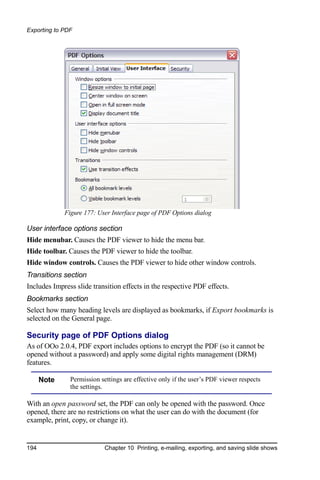
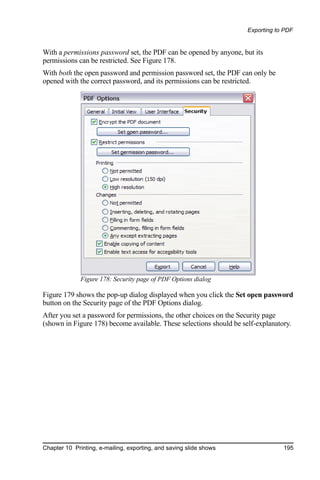
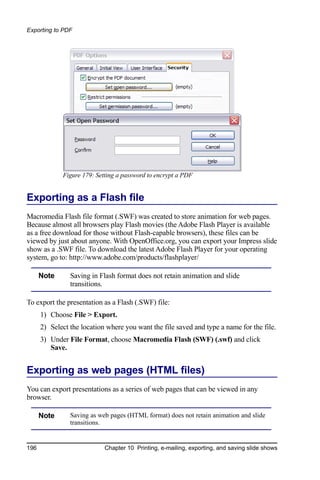
           Controlling PDF content and quality............................................................191
       Exporting as a Flash file.....................................................................................196
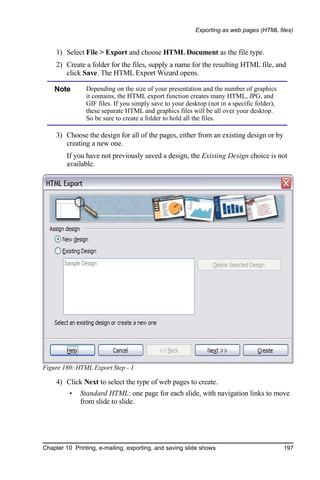
       Exporting as web pages (HTML files)................................................................196
       E-mailing a presentation.....................................................................................201
           Digital signing of documents........................................................................201
       Opening and saving a PowerPoint file................................................................202
           Saving an Impress file as a PowerPoint file..................................................202
           Opening a PowerPoint file in Impress...........................................................203
Chapter 11
 Setting Up and Customizing Impress..........................................................204
       Choosing options that affect all of OOo.............................................................204
          User Data options.........................................................................................204
          Print options.................................................................................................205
          Color options................................................................................................205
          Appearance options......................................................................................205
       Choosing options for Impress.............................................................................206
          General options.............................................................................................206
          View options.................................................................................................208
          Grid options..................................................................................................209
          Print options.................................................................................................210
       Customizing the user interface...........................................................................211
          Customizing the menu font...........................................................................211
          Customizing menu content............................................................................211
          Customizing toolbars....................................................................................212
          Customizing keyboard shortcuts...................................................................213
Appendix A
 Keyboard Shortcuts.....................................................................................216
       Function keys for Impress..................................................................................217
       Other shortcut keys for Impress..........................................................................218


viii                                                                                                     Impress Guide
Contents


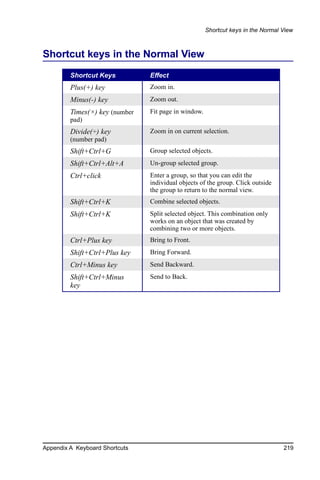
    Shortcut keys in the Normal View......................................................................219
    Shortcut keys in slide shows...............................................................................220
    Navigating with the keyboard in Slide Sorter.....................................................220
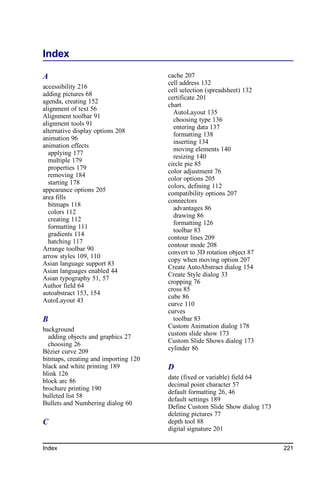
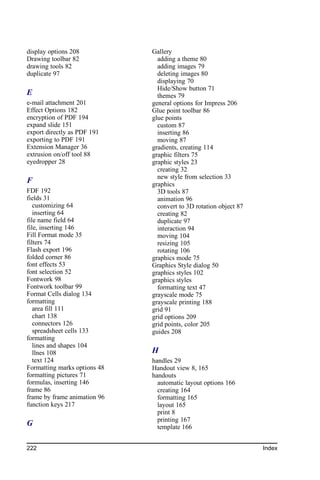
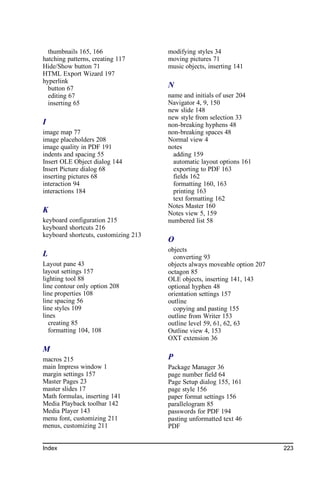
Index..............................................................................................................221


Impress Guide                                                                                                      ix
Chapter 1
                                   Introducing Impress


Impress is OpenOffice.org’s presentations (slide show) component. You can create
slides that contain many different elements, including text, bulleted and numbered
lists, tables, charts, clip art, and a wide range of graphic objects. Impress, in common
with the other components of OpenOffice.org, has access to the spelling checker and
thesaurus and comes with pre-packaged text styles, background styles, and a handy
online help.
This chapter introduces the Impress user interface and describes how to create a
simple slide show using the Presentation Wizard.
To use Impress for more than very simple slide shows, refer to the other chapters in
this guide for explanations of the program’s many features.


    Note       Drawings are created in the same way with Impress as they are with
               Draw. Refer to the Draw Guide for details on how to use the drawing
               facilities.


Parts of the main Impress window
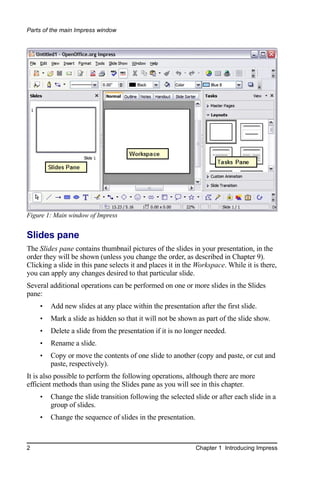
The main Impress window (Figure 1) has three parts: the Slides pane, the Workspace,
and the Tasks pane. Additionally, several toolbars can be displayed or hidden during
the creation of a presentation.

     Tip       You can remove the Slides pane or Tasks pane from view by clicking
               the X in the upper right corner. You can also show or hide these panes
               using View > Slide Pane or View > Tasks Pane.


Chapter 1 Introducing Impress                                                              1
Parts of the main Impress window


Figure 1: Main window of Impress


Slides pane
The Slides pane contains thumbnail pictures of the slides in your presentation, in the
order they will be shown (unless you change the order, as described in Chapter 9).
Clicking a slide in this pane selects it and places it in the Workspace. While it is there,
you can apply any changes desired to that particular slide.
Several additional operations can be performed on one or more slides in the Slides
pane:
    •   Add new slides at any place within the presentation after the first slide.
    •   Mark a slide as hidden so that it will not be shown as part of the slide show.
    •   Delete a slide from the presentation if it is no longer needed.
    •   Rename a slide.
    •   Copy or move the contents of one slide to another (copy and paste, or cut and
        paste, respectively).
It is also possible to perform the following operations, although there are more
efficient methods than using the Slides pane as you will see in this chapter.
    •   Change the slide transition following the selected slide or after each slide in a
        group of slides.
    •   Change the sequence of slides in the presentation.


2                                                            Chapter 1 Introducing Impress
Parts of the main Impress window


    •   Change the slide design. (A window opens allowing you to load your own
        design.)
    •   Change slide layout for a group of slides simultaneously. (This requires using
        the Layouts section of the Tasks pane.)

Tasks pane
The Tasks pane has four sections:
    •   Master pages: Here you define the page style for your presentation. Impress
        contains five pre-packaged master pages (slide masters). One of them—
        Default—is blank, while the rest have a background.

     Tip       Press F11 to open the Styles and Formatting window, where you can
               modify the styles used in any slide master to suit your purposes. This
               can be done at any time. See Chapter 2 for more information.

    •   Layout: Twenty pre-packaged layouts are shown. You can choose the one you
        want, use it as it is or modify it to your own requirements. At present it is not
        possible to create custom layouts.
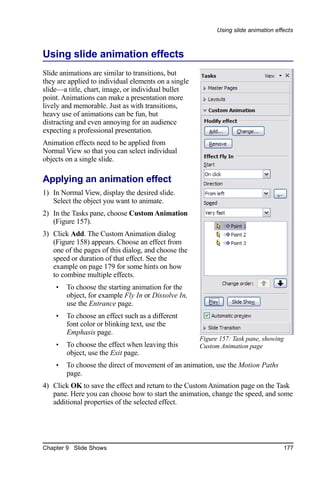
    •   Custom Animation: This section contains a variety of animation effects that
        can be applied at any time to selected elements of a slide.
    •   Slide Transition: Fifty-six transitions are available, including No Transition.
        You can select the transition speed (slow, medium, fast). You can also choose
        between an automatic or manual transition, and for how long you want the
        selected slide to be shown (automatic transition only).

Workspace
The Workspace has five tabs: Normal, Outline, Notes, Handout, and Slide Sorter,
as seen in Figure 1. These five tabs are called View Buttons. There are also many
toolbars that can be used during slide creation; they are revealed by selecting them
with View > Toolbars. The actual Workspace section is below the View Buttons. This
is where you assemble the various parts of your selected slide.
Each view is designed to ease the completion of certain tasks. In summary:
    •   Normal view is the main view for creating individual slides. Use this view to
        format and design slides and to add text, graphics, and animation effects.
    •   Outline view shows topic titles, bulleted lists, and numbered lists for each
        slide in outline format. Use this view to rearrange the order of slides, edit
        titles and headings, rearrange the order of items in a list, and add new slides.
    •   Notes view lets you add notes to each slide that are not seen when the
        presentation is shown.


Chapter 1 Introducing Impress                                                              3
Parts of the main Impress window


    •   Slide Sorter view shows a thumbnail of each slide in order. Use this view to
        rearrange the order of slides, produce a timed slide show, or add transitions
        between selected slides.
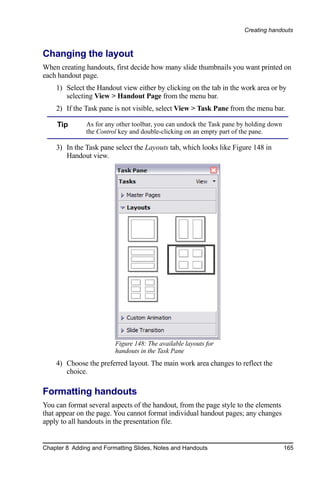
    •   Handout view lets you print your slides for a handout. You can choose one,
        two, three, four, or six slides per page from Task pane > Layouts.
        Thumbnails can be re-arranged in this view by dragging and dropping them.

Normal view
There are two ways to place a slide in the Slide Design area of the Normal view:
clicking the slide thumbnail in the Slides pane or using the Navigator.

To open the Navigator, click the Navigator button in the Standard Toolbar        or
press Ctrl+Shift+F5 and select a slide by scrolling down the Navigator list until you
find the one you want and then double-click it. For more about using the Navigator,
see page 9.

Outline view
Outline view contains all of the slides of the presentation in their numbered sequence.
Only the text in each slide is shown. Slide names are not included.
Outline view serves at least two purposes.
    1) Making changes in the text of a slide:
         •   You can add or delete text in a slide just as you can in the Normal view.
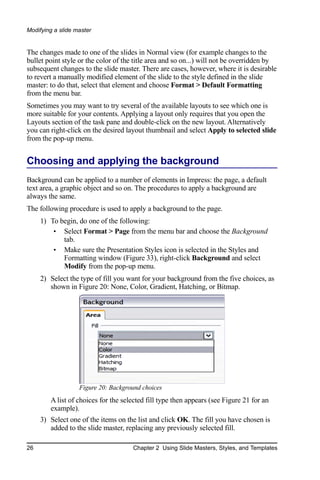
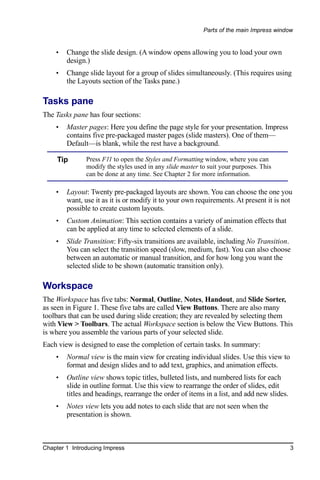
         •   You can move the paragraphs of text in the
             selected slide up or down by using the up and
             down arrow buttons (Move Up or Move Down)           Figure 2: Arrow buttons
             on the Text Formatting toolbar (Figure 2).
         •   You can change the outline level for any of the paragraphs in a slide
             using the left and right arrow buttons (Promote or Demote).
         •   You can both move a paragraph and change its outline level using a
             combination of these four arrow buttons.
    2) Comparing the slides with your outline (if you have prepared one in
       advance). If you notice from your outline that another slide is needed, you
       can create it directly in the Outline view or you can return to the Normal view
       to create it, then return to review all the slides against your outline in the
       Outline view.
        If a slide is not in the correct sequence, you can move it to its proper place.
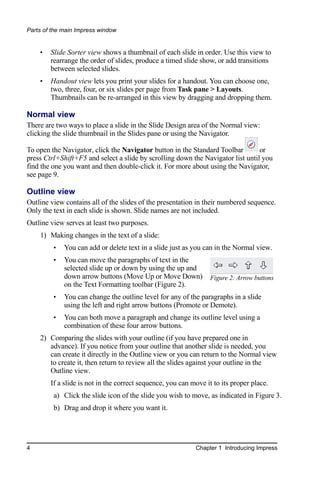
         a) Click the slide icon of the slide you wish to move, as indicated in Figure 3.
         b) Drag and drop it where you want it.


4                                                           Chapter 1 Introducing Impress
Parts of the main Impress window


       Figure 3: Outline view

Notes view
Use the Notes view to add notes to a slide:
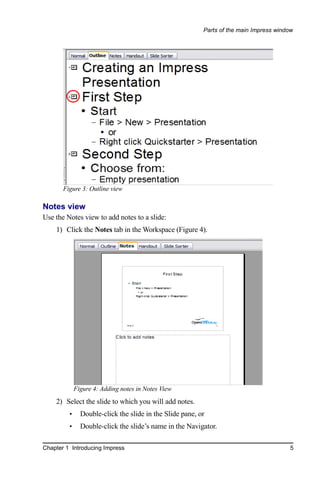
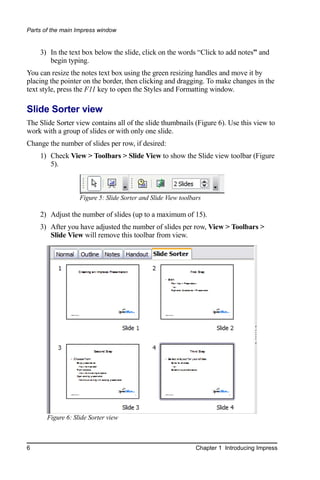
    1) Click the Notes tab in the Workspace (Figure 4).


             Figure 4: Adding notes in Notes View
    2) Select the slide to which you will add notes.
         •     Double-click the slide in the Slide pane, or
         •     Double-click the slide’s name in the Navigator.

Chapter 1 Introducing Impress                                                            5
Parts of the main Impress window


    3) In the text box below the slide, click on the words “Click to add notes” and
       begin typing.
You can resize the notes text box using the green resizing handles and move it by
placing the pointer on the border, then clicking and dragging. To make changes in the
text style, press the F11 key to open the Styles and Formatting window.

Slide Sorter view
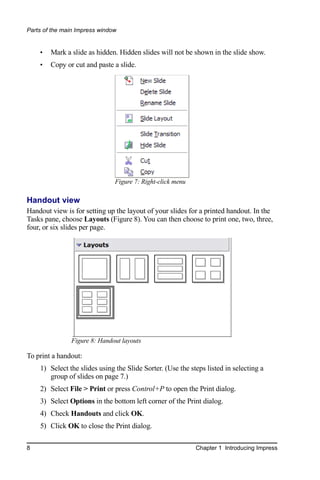
The Slide Sorter view contains all of the slide thumbnails (Figure 6). Use this view to
work with a group of slides or with only one slide.
Change the number of slides per row, if desired:
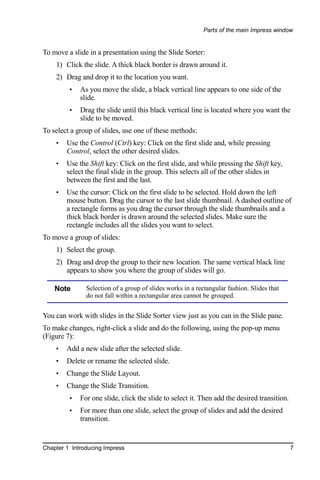
    1) Check View > Toolbars > Slide View to show the Slide view toolbar (Figure
       5).


                   Figure 5: Slide Sorter and Slide View toolbars

    2) Adjust the number of slides (up to a maximum of 15).
    3) After you have adjusted the number of slides per row, View > Toolbars >
       Slide View will remove this toolbar from view.


       Figure 6: Slide Sorter view


6                                                              Chapter 1 Introducing Impress
Parts of the main Impress window


To move a slide in a presentation using the Slide Sorter:
    1) Click the slide. A thick black border is drawn around it.
    2) Drag and drop it to the location you want.
         •   As you move the slide, a black vertical line appears to one side of the
             slide.
         •   Drag the slide until this black vertical line is located where you want the
             slide to be moved.
To select a group of slides, use one of these methods:
    •   Use the Control (Ctrl) key: Click on the first slide and, while pressing
        Control, select the other desired slides.
    •   Use the Shift key: Click on the first slide, and while pressing the Shift key,
        select the final slide in the group. This selects all of the other slides in
        between the first and the last.
    •   Use the cursor: Click on the first slide to be selected. Hold down the left
        mouse button. Drag the cursor to the last slide thumbnail. A dashed outline of
        a rectangle forms as you drag the cursor through the slide thumbnails and a
        thick black border is drawn around the selected slides. Make sure the
        rectangle includes all the slides you want to select.
To move a group of slides:
    1) Select the group.
    2) Drag and drop the group to their new location. The same vertical black line
       appears to show you where the group of slides will go.

    Note       Selection of a group of slides works in a rectangular fashion. Slides that
               do not fall within a rectangular area cannot be grouped.


You can work with slides in the Slide Sorter view just as you can in the Slide pane.
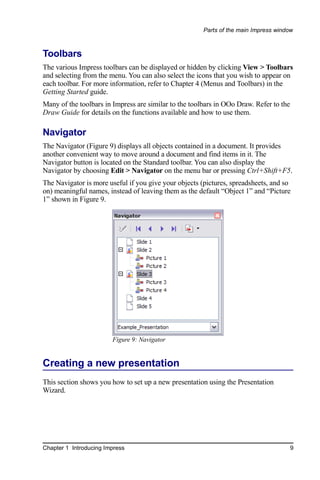
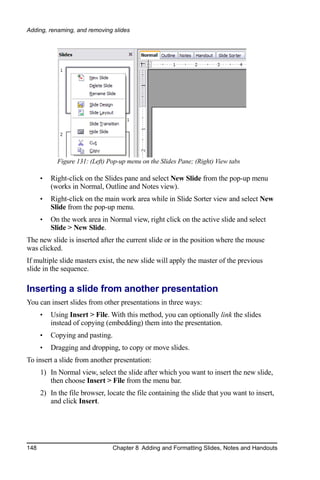
To make changes, right-click a slide and do the following, using the pop-up menu
(Figure 7):
    •   Add a new slide after the selected slide.
    •   Delete or rename the selected slide.
    •   Change the Slide Layout.
    •   Change the Slide Transition.
         •   For one slide, click the slide to select it. Then add the desired transition.
         •   For more than one slide, select the group of slides and add the desired
             transition.


Chapter 1 Introducing Impress                                                                7
Parts of the main Impress window


    •   Mark a slide as hidden. Hidden slides will not be shown in the slide show.
    •   Copy or cut and paste a slide.


                               Figure 7: Right-click menu

Handout view
Handout view is for setting up the layout of your slides for a printed handout. In the
Tasks pane, choose Layouts (Figure 8). You can then choose to print one, two, three,
four, or six slides per page.


               Figure 8: Handout layouts

To print a handout:
    1) Select the slides using the Slide Sorter. (Use the steps listed in selecting a
       group of slides on page 7.)
    2) Select File > Print or press Control+P to open the Print dialog.
    3) Select Options in the bottom left corner of the Print dialog.
    4) Check Handouts and click OK.
    5) Click OK to close the Print dialog.

8                                                           Chapter 1 Introducing Impress
Parts of the main Impress window


Toolbars
The various Impress toolbars can be displayed or hidden by clicking View > Toolbars
and selecting from the menu. You can also select the icons that you wish to appear on
each toolbar. For more information, refer to Chapter 4 (Menus and Toolbars) in the
Getting Started guide.
Many of the toolbars in Impress are similar to the toolbars in OOo Draw. Refer to the
Draw Guide for details on the functions available and how to use them.

Navigator
The Navigator (Figure 9) displays all objects contained in a document. It provides
another convenient way to move around a document and find items in it. The
Navigator button is located on the Standard toolbar. You can also display the
Navigator by choosing Edit > Navigator on the menu bar or pressing Ctrl+Shift+F5.
The Navigator is more useful if you give your objects (pictures, spreadsheets, and so
on) meaningful names, instead of leaving them as the default “Object 1” and “Picture
1” shown in Figure 9.


                        Figure 9: Navigator


Creating a new presentation
This section shows you how to set up a new presentation using the Presentation
Wizard.


Chapter 1 Introducing Impress                                                           9
Creating a new presentation


Planning the presentation
The first thing to do is decide what you are going to do with the presentation. For
example, putting a group of digital photos together in a presentation requires very
little planning. However, using a presentation to increase the knowledge of others
about your topic requires much more planning.
You need to ask and answer many questions before you begin creating a presentation.
If you are not acquainted with creating presentations, the answers will be more
general. Those who have created a variety of presentations in the past will want to
have more specific answers.
Who is to see the presentation? How will it be used? What is the subject matter? What
should be in its outline? How detailed should the outline be? Will an audio file be
played? Is animation desirable? How should the transition between slides be handled?
These are some of the many questions that should be asked, answered, and written
down before creating the presentation.
Again, it is not always necessary at this point to have specific answers to every
question. Making an outline is extremely important. You may already know exactly
what some of the slides will contain. You may only have a general idea of what you
want on some of the slides. That is alright. You can make some changes as you go.
Change your outline to match the changes you make in your slides.
The important part is that you have a general idea of what you want and how to get it.
Put that information on paper. That makes it much easier to create the presentation.

Using the Presentation Wizard
You can start Impress in several ways:
     •   From the system menu or the OpenOffice.org Quickstarter. Details vary with
         your operating system; see the Getting Started guide for more information.
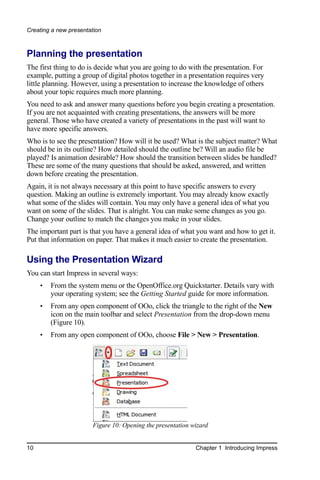
     •   From any open component of OOo, click the triangle to the right of the New
         icon on the main toolbar and select Presentation from the drop-down menu
         (Figure 10).
     •   From any open component of OOo, choose File > New > Presentation.


                       Figure 10: Opening the presentation wizard


10                                                          Chapter 1 Introducing Impress
Creating a new presentation


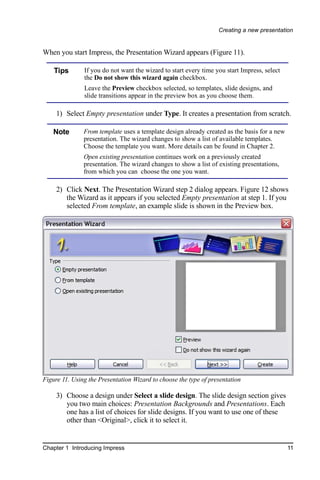
When you start Impress, the Presentation Wizard appears (Figure 11).

    Tips       If you do not want the wizard to start every time you start Impress, select
               the Do not show this wizard again checkbox.
               Leave the Preview checkbox selected, so templates, slide designs, and
               slide transitions appear in the preview box as you choose them.

     1) Select Empty presentation under Type. It creates a presentation from scratch.

   Note        From template uses a template design already created as the basis for a new
               presentation. The wizard changes to show a list of available templates.
               Choose the template you want. More details can be found in Chapter 2.
               Open existing presentation continues work on a previously created
               presentation. The wizard changes to show a list of existing presentations,
               from which you can choose the one you want.

     2) Click Next. The Presentation Wizard step 2 dialog appears. Figure 12 shows
        the Wizard as it appears if you selected Empty presentation at step 1. If you
        selected From template, an example slide is shown in the Preview box.


Figure 11. Using the Presentation Wizard to choose the type of presentation

     3) Choose a design under Select a slide design. The slide design section gives
        you two main choices: Presentation Backgrounds and Presentations. Each
        one has a list of choices for slide designs. If you want to use one of these
        other than <Original>, click it to select it.


Chapter 1 Introducing Impress                                                                11
Creating a new presentation


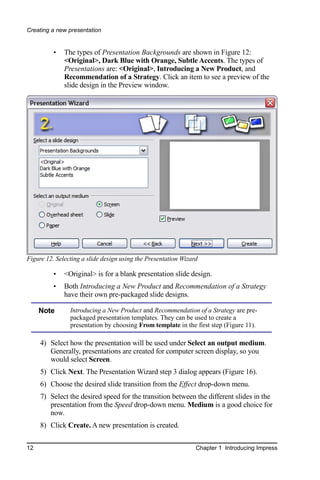
          •   The types of Presentation Backgrounds are shown in Figure 12:
              <Original>, Dark Blue with Orange, Subtle Accents. The types of
              Presentations are: <Original>, Introducing a New Product, and
              Recommendation of a Strategy. Click an item to see a preview of the
              slide design in the Preview window.


Figure 12. Selecting a slide design using the Presentation Wizard

          •   <Original> is for a blank presentation slide design.
          •   Both Introducing a New Product and Recommendation of a Strategy
              have their own pre-packaged slide designs.

     Note       Introducing a New Product and Recommendation of a Strategy are pre-
                packaged presentation templates. They can be used to create a
                presentation by choosing From template in the first step (Figure 11).

     4) Select how the presentation will be used under Select an output medium.
        Generally, presentations are created for computer screen display, so you
        would select Screen.
     5) Click Next. The Presentation Wizard step 3 dialog appears (Figure 16).
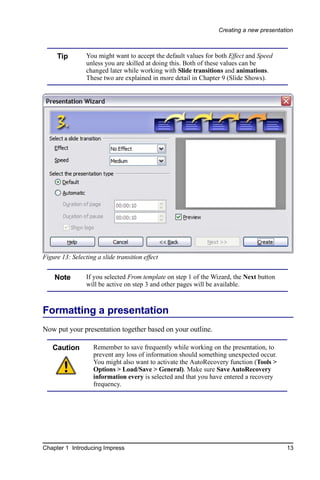
     6) Choose the desired slide transition from the Effect drop-down menu.
     7) Select the desired speed for the transition between the different slides in the
        presentation from the Speed drop-down menu. Medium is a good choice for
        now.
     8) Click Create. A new presentation is created.


12                                                              Chapter 1 Introducing Impress
Creating a new presentation


     Tip         You might want to accept the default values for both Effect and Speed
                 unless you are skilled at doing this. Both of these values can be
                 changed later while working with Slide transitions and animations.
                 These two are explained in more detail in Chapter 9 (Slide Shows).


Figure 13: Selecting a slide transition effect


    Note         If you selected From template on step 1 of the Wizard, the Next button
                 will be active on step 3 and other pages will be available.


Formatting a presentation
Now put your presentation together based on your outline.

   Caution          Remember to save frequently while working on the presentation, to
                    prevent any loss of information should something unexpected occur.
                    You might also want to activate the AutoRecovery function (Tools >
                    Options > Load/Save > General). Make sure Save AutoRecovery
                    information every is selected and that you have entered a recovery
                    frequency.


Chapter 1 Introducing Impress                                                             13
Formatting a presentation


Creating the first slide
The first slide is normally a title slide. Decide which of the layouts will best suit your
purposes for this first slide: simplicity would be appropriate in this instance. You can
use the pre-packaged layouts available in the Layout section of the Tasks pane.
Suitable layouts are Title Slide (which also contains a section for a subtitle) or Title
Only, however all but one layout (the blank one) contains a title section, so you are
not restricted to the two layouts described here.

     Tip       If you do not know the names for the pre-packaged layouts, you can use
               the tooltip feature. Position the cursor on an icon in the Layout section (or
               on any toolbar icon) and its name will be displayed in a small rectangle.
               If the tooltips are not enabled, you can enable them. From the main menu,
               select Tools > Options > OpenOffice.org > General > Help and mark the
               Tips checkbox. If the Extended tips checkbox is also marked, you will
               get more detailed tooltip information, but the tooltip names themselves
               will not be provided.

Select a layout in the Layout section of the Tasks pane by clicking on it: it appears in
the Workspace. To create the title, click on “Click to add title” (assuming the Blank
Slide layout was not used) and then type the title text. Adjustments to the formatting
of the title can be done by pressing the F11 key, right-clicking the Title presentation
style entry, and selecting Modify from the pop-up menu.
If you are using the Title Slide layout, click on “Click to add text” to add a subtitle.
Proceed as above to make adjustments to the formatting if required.

Inserting additional slides
The steps for inserting additional slides are basically the same as for selecting the title
page. It is a process that has to be repeated for each slide. Unless you are using more
than one slide master, your only concern is the Layouts section of the Tasks pane
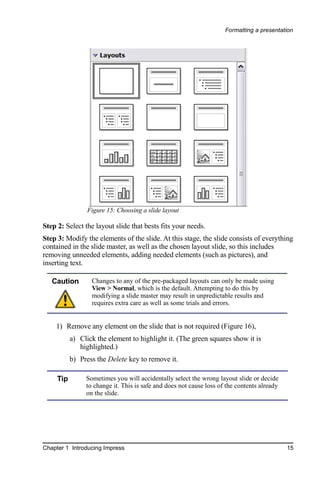
(Figure 15).
First insert all the slides your outline indicates you will need. Only after this should
you begin adding special effects such as custom animation and slide transitions.
Step 1: Insert a new slide. This can be done in a variety of ways—take your pick.
     •   Insert > Slide.
     •   Right-click on the present slide and select New Slide from the pop-up menu.
     •   Click the Slide icon in the Presentation toolbar (Figure 14).


                  Figure 14: Presentation toolbar


14                                                              Chapter 1 Introducing Impress
Formatting a presentation


                 Figure 15: Choosing a slide layout

Step 2: Select the layout slide that bests fits your needs.
Step 3: Modify the elements of the slide. At this stage, the slide consists of everything
contained in the slide master, as well as the chosen layout slide, so this includes
removing unneeded elements, adding needed elements (such as pictures), and
inserting text.

   Caution        Changes to any of the pre-packaged layouts can only be made using
                  View > Normal, which is the default. Attempting to do this by
                  modifying a slide master may result in unpredictable results and
                  requires extra care as well as some trials and errors.


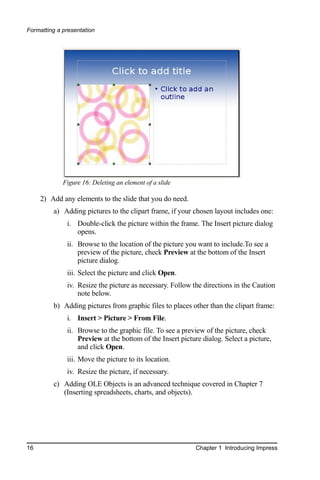
    1) Remove any element on the slide that is not required (Figure 16),
           a) Click the element to highlight it. (The green squares show it is
              highlighted.)
           b) Press the Delete key to remove it.

     Tip        Sometimes you will accidentally select the wrong layout slide or decide
                to change it. This is safe and does not cause loss of the contents already
                on the slide.


Chapter 1 Introducing Impress                                                                15
Formatting a presentation


             Figure 16: Deleting an element of a slide

     2) Add any elements to the slide that you do need.
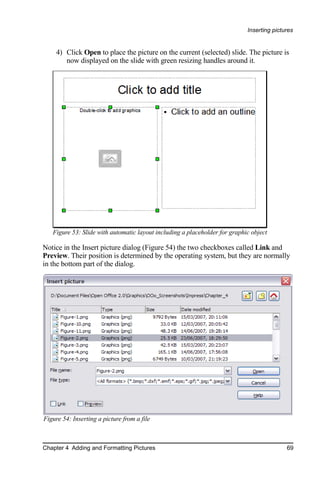
         a) Adding pictures to the clipart frame, if your chosen layout includes one:
              i. Double-click the picture within the frame. The Insert picture dialog
                 opens.
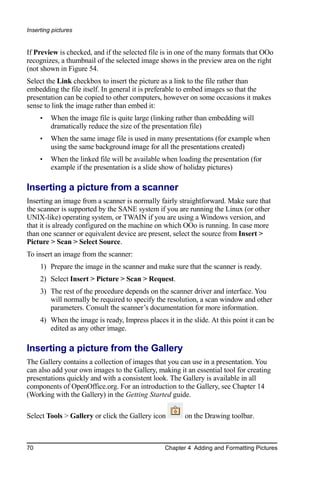
              ii. Browse to the location of the picture you want to include.To see a
                  preview of the picture, check Preview at the bottom of the Insert
                  picture dialog.
              iii. Select the picture and click Open.
              iv. Resize the picture as necessary. Follow the directions in the Caution
                  note below.
         b) Adding pictures from graphic files to places other than the clipart frame:
              i. Insert > Picture > From File.
              ii. Browse to the graphic file. To see a preview of the picture, check
                  Preview at the bottom of the Insert picture dialog. Select a picture,
                  and click Open.
              iii. Move the picture to its location.
              iv. Resize the picture, if necessary.
         c) Adding OLE Objects is an advanced technique covered in Chapter 7
            (Inserting spreadsheets, charts, and objects).


16                                                         Chapter 1 Introducing Impress
Formatting a presentation


   Caution       When resizing a graphic, right-click the picture. Select Position and
                 Size from the context menu and make sure that Keep ratio is selected.
                 Then adjust the height or width to the size you need. (As you adjust
                 one dimension both dimensions will change.) Failure to do so will
                 cause the picture to become distorted. Remember also that resizing a
                 bitmap image will reduce its quality; better by far to create an image of
                 the desired size outside of Impress.


    3) Adding text to a slide: If the slide contains text, click on “Click to add an
       outline” in the text frame and then type your text. The Outline styles from 1
       to 10 are automatically applied to the text as you insert it. You can change the
       outline level of each paragraph as well as its position within the text using the
       arrow buttons on the Text Formatting toolbar (see the section Outline view
       on page 4).
Step 4: To create additional slides, repeat steps 1–3.

Modifying the appearance of slides
To change the background and other characteristics of all slides in the presentation,
you need to modify the slide master or choose a different slide master.
A Slide Master is a slide with a specified set of characteristics which is used as the
beginning point for creating other slides. These characteristics include the
background, objects in the background, formatting of any text used, and any
background graphics.

    Note       OOo uses three interchangeable terms for this one concept. Master
               slide, slide master, and master page all refer to a slide that is used to
               create other slides. This book, however, will use only the term slide
               master, except when describing the user interface.

Impress has five pre-packaged slide masters, found in the Master Pages section of the
Tasks pane (Figure 3). You can also create and save additional master slides. See
Chapter 2 for information on creating and modifying slide masters.

Modifying the slide show
Now review the entire presentation and answer some questions. Run the slide show at
least once before answering them. You might want to add some questions of your
own.
    1) Are the slides in the correct order? If not, some of them will need to be
       moved.
    2) Would an additional slide make a particular point clearer? If so, another slide
       needs to be created.


Chapter 1 Introducing Impress                                                                17
Formatting a presentation


      3) Would some custom animations help some of the slides? (Advanced
         technique.)
      4) Should some of the slides have a different slide transition than others? The
         transition of those slides should be changed.
      5) Do some of the slides seem unnecessary? Delete the affected slide or slides
         after checking if they are indeed unnecessary.

     Caution      If one or more slides seems to be unnecessary, hide the slide or slides,
                  and view the slide show a few more times to make sure. To hide a
                  slide, right-click the slide in the Slides pane. Select Hide Slide in the
                  pop-up menu. Do not delete a slide until you have done this,
                  otherwise you may have to create that slide again.


Once you have answered these and your own questions, you should make the
necessary changes. This is done most easily in the Slide Sorter view (see page 6). If
you need one or more new slides, create them using the steps listed in “Inserting
additional slides” on page 14.

Renaming slides
Right-click on a thumbnail in the Slides pane or the Slide Sorter and choose Rename
Slide from the pop-up menu. In the Name field, delete the old name of the slide and
type the new name. Click OK to save the change.

Custom animations
If you know how to add a custom animation to a slide and wish to do so, do it now.
Custom animations are found on the Tasks pane. This is an advanced technique and is
explained in Chapter 9 (Slide shows).

Slide transitions
Your first slide show should probably have the same slide transition for all slides.
Setting Advance slide to On mouse click is the default and a simple setting. If you
want each slide to be shown for a specific amount of time, click Automatically after
and enter the number of seconds. Click Apply to all slides.
Transition choices are found on the Tasks pane. For more information about slide
transitions, see Chapter 9 (Slide Shows).

      Tip       The Slide transition section has a very useful choice: Automatic
                preview. Select its checkbox. Then when you make any changes in a
                slide transition, the new slide is previewed in the Slide Design area,
                including its transition effect.


18                                                              Chapter 1 Introducing Impress
Running the slide show


Running the slide show
To run the slide show, do one of the following:
    •   Click Slide Show > Slide Show.
    •   Click the Slide Show button on the Presentation toolbar (Figure 14) or the
        Slide Sorter toolbar (Figure 5).
    •   Press F5 or F9.
If the slide transition is Automatically after x seconds, let the slide show run by itself.
If the slide transition is On mouse click, do one of the following to move from one
slide to the next.
    •   Use the arrow keys on the keyboard to go to the next slide or to go back to
        the previous one.
    •   Click the mouse button to advance to the next slide.
    •   Press the Spacebar on the keyboard to advance to the next slide.
When you advance past the last slide, the message “Click to exit presentation...”
appears. Click the mouse or press any key to exit the presentation.
To exit the slide show at any time, including at the end, press the Esc key.


Chapter 1 Introducing Impress                                                           19
Chapter 2
                                   Using Slide Masters,
                                  Styles, and Templates

Designing a presentation
In addition to careful planning of the content (as discussed in Chapter 1), you need to
plan the appearance of the presentation. It is best to do this after you have developed
an outline, because the outline will determine some of the requirements for the slides’
appearance. For example:
     •   What color combinations (background and text) will both look good and be
         easy for your audience to see?
     •   Would a picture help your audience understand the contents better?
     •   Do you want a particular picture (for example a company logo) to appear on
         all the slides?
     •   Would the audience benefit from having the slides numbered so that they can
         quickly refer to one of them?
     •   Do you want a background graphic or gradient? If so, you need to pick
         something that does not interfere or clash with your content, for example,
         colors used in charts.
     •   Will you need one slide master or more than one? If one slide design does not
         suit all of the content, you might need more than one slide master.
You can change the appearance of slides as you develop the presentation, but planning
ahead will save you time in the long run.


What are slide masters?
A slide master is a slide that is used as the starting point for other slides. It is similar
to a page style in Writer: it controls the basic formatting of all slides based on it. A
slide show can have more than one slide master.

20                                     Chapter 2 Using Slide Masters, Styles, and Templates
What are slide masters?


    Note        OOo uses three terms for this one concept. Master slide, slide master,
                and master page all refer to a slide which is used to create other slides.
                This book uses the term slide master, except when describing the user
                interface.

A slide master has a defined set of characteristics, including the background color,
graphic, or gradient; objects (such as logos, decorative lines, and other graphics) in
the background; headers and footers; placement and size of text frames; and the
formatting of text.
All of the characteristics of slide masters are controlled by styles. The styles of any
new slide you create are inherited from the slide master from which it was created. In
other words, the styles of the slide master are available and applied to all slides
created from that slide master. Changing a style in a slide master results in changes to
all the slides based on that slide master; it is, however, possible to modify each
individual slide without affecting the slide master.

    Note        Although it is highly recommended to use the slide masters whenever
                possible, there are occasions where manual changes are needed for a
                particular slide, for example to enlarge the chart area when the text and
                chart layout is used.

Slide masters have two types of styles associated with them: presentation styles and
graphic styles. The pre-packaged presentation styles can be modified, but new
presentation styles cannot be created. However, not only can the pre-packaged
graphic styles be modified, but new graphic styles can also be created.


What are styles? Why use them?
A style is a set of formats that you can apply to selected items in your presentation to
quickly change their appearance. When you apply a style, you apply a whole group of
formats at the same time. For example, a style defines the font, type size, indents and
spacing, tab stops, and other characteristics of text; and the area fill and line style of a
frame or other object.
Using styles gives you more control over the entire presentation. Although you can
manually change each slide one element at a time, any manual changes you make
apply only to that one slide. If you have several slides with the same elements, you
would have to change those elements of each slide if you wanted your slides to have a
consistent appearance. When you do this manually, how can you be sure you changed
every slide that needs to be changed?
However, if you assign a style to each of the elements you add to your slides,
changing the style for that element changes all the slides containing it. Thus, by using
styles, you can eliminate most of the work required for changing manually created
slides.


Chapter 2 Using Slide Masters, Styles, and Templates                                         21
What are styles? Why use them?


     Tip     Press F11 to open the Styles and Formatting window. You can dock or
             undock this window by holding down the Control key while double-
             clicking the top of the window between the icons (see Figure 33). Press
             F11 to close the Styles and Formatting window when you do not need it.


       Figure 17: Styles and Formatting window


     TIP       At the bottom of the Styles and Formatting window is a drop-down list.
               You can choose to show all styles or other groups of styles, for example
               applied styles or (in the case of Graphics styles), custom styles.


Presentation styles
Presentation styles affect three elements of a slide master: the background,
background objects (such as icons, decorative lines, and text frames), and the text
placed on the slide. Text styles are further divided into Notes, Outline 1 through
Outline 9, Subtitle, and Title. The outline styles are used for the different levels of the
outline to which they belong. For example, Outline 2 is used for the subpoints of
Outline 1, and Outline 3 is used for the subpoints of Outline 2.
As described earlier, the pre-packaged presentation styles can be modified, but new
presentation styles cannot be created.


22                                    Chapter 2 Using Slide Masters, Styles, and Templates
What are styles? Why use them?


Graphic styles
Graphic styles affect many of the elements of a slide. Notice that text styles exist in
both the presentation and graphic style selections. What styles to use and when to use
them is described later in this chapter.
There are 15 pre-packaged graphic styles to choose from. You can create additional
styles or modify the pre-packaged styles.


Working with slide masters
Impress comes with five pre-packaged slide masters. They are shown in the Master
Pages section of the Task pane (Figure 19). This section has three subsections: Used
in This Presentation, Recently Used, and Available for Use. Click the + sign next to
the name of a subsection to expand it to show thumbnails of the slides, or click the –
sign to collapse the subsection to hide the thumbnails.
Each of the slide masters shown in the Available for Use list is from a template of the
same name. If you have created your own templates, or added templates from other
sources, slide masters from those templates will also appear in this list. See “Working
with templates” on page 35 for more about templates.

Creating slide masters
You can create a new slide master in a similar way to modifying the default slide
master.
To start, enable editing of slide masters by View
> Master > Slide Master.
On the Master View toolbar (Figure 18), click          Figure 18: Master View toolbar
the New Master icon (highlighted in the figure).
A second slide master appears in the Slides pane. Modify this slide master to suit your
requirements. It is also recommended that you rename this new slide master. To do
that, right-click on the slide in the Slides pane and select Rename master from the
popup menu.
When you are done, close the Master View toolbar to return to normal slide editing
mode.

Applying a slide master
In the Task Pane, be sure the Master Pages section is showing (Figure 19).
To apply one of the slide masters to all slides in your presentation, click on it in the
list.


Chapter 2 Using Slide Masters, Styles, and Templates                                       23
Working with slide masters


To apply a different slide master to one or
more selected slides:
     1) In the Slide Pane, select the slides
        you want to change.
     2) In the Task Pane, right-click on the
        slide master you want to apply to
        the selected slides, and click Apply
        to Selected Slides on the pop-up
        menu.

Loading additional slide
masters
Sometimes, in the same set of slides, you
may need to mix multiple slide masters that
may belong to different templates (the use
of templates is explained later in “Working
with templates” on page 35). For example,
you may need a completely different layout
for the first slide of the presentation, or you
may want to add to your presentation a
slide from a different presentation (based
on a template available on the hard disk).
The Slide Design dialog makes this
possible. Access this dialog either from the
menu bar (Format > Slide design) or from
the pop-up menu that appears when right-
clicking on a slide in the Slides pane.
The main window in the dialog shows the
slide masters already available for use. To
add more:
     1) Click the Load button.
     2) Select in the new dialog the
        template from which to load the
        slide master. Click OK.
                                                  Figure 19: Available master pages (slides)
     3) Click OK again to close the slide
        design dialog.
The slide masters in the template you selected are now shown also in the Master
Pages section of the task pane in the Available for use subsection.


24                                     Chapter 2 Using Slide Masters, Styles, and Templates
Working with slide masters


    Note       The slide masters you have loaded will also be available the next time
               you load the presentation. If you want to delete the unused slide
               masters, click the corresponding checkbox in the Slide Design dialog.
               Due to a bug, if the slide master was not used in the presentation, it is
               removed from the list of available slide masters anyway.


     Tip       To limit the size of the presentation file, you may want to minimize the
               number of slide masters used.


Modifying a slide master
The following items can be changed on a slide master:
    •   Background (color, gradient, hatching, or bitmap)
    •   Background objects (for example, add a logo or decorative graphics)
    •   Size, placement, and contents of header and footer elements to appear on
        every slide
    •   Size and placement of default frames for slide titles and content
Refer to Figure 22 for a graphical representation of many of these elements.
Before working on the slide master, make sure that the Styles and Formatting window
is open. See page 22 for instructions on doing this.
To select the slide master for modification:
    1) Select View > Master > Slide Master from the menu bar. This unlocks the
       properties of the slide master so you can edit it.
    2) Click Master Pages in the Task pane. This gives you access to the pre-
       packaged slide masters.
    3) Click on the slide master you want to modify among the ones available
       (Figure 19).
    4) Make changes as described in this chapter, then click the Close Master View
       icon on the Master View toolbar. Save the file before continuing.

   Caution Any changes made to one slide when in Master View mode will appear on
               all slides using this slide master. Always make sure you close Master
               View and return to Normal view before working on any of the
               presentation slides. Select View > Normal from the menu bar, or clicking
               Close Master View in the Master View toolbar to return to the normal
               slide view.


Chapter 2 Using Slide Masters, Styles, and Templates                                       25
Modifying a slide master


The changes made to one of the slides in Normal view (for example changes to the
bullet point style or the color of the title area and so on...) will not be overridden by
subsequent changes to the slide master. There are cases, however, where it is desirable
to revert a manually modified element of the slide to the style defined in the slide
master: to do that, select that element and choose Format > Default Formatting
from the menu bar.
Sometimes you may want to try several of the available layouts to see which one is
more suitable for your contents. Applying a layout only requires that you open the
Layouts section of the task pane and double-click on the new layout. Alternatively
you can right-click on the desired layout thumbnail and select Apply to selected slide
from the pop-up menu.


Choosing and applying the background
Background can be applied to a number of elements in Impress: the page, a default
text area, a graphic object and so on. The procedures to apply a background are
always the same.
The following procedure is used to apply a background to the page.
     1) To begin, do one of the following:
         • Select Format > Page from the menu bar and choose the Background
            tab.
         • Make sure the Presentation Styles icon is selected in the Styles and
            Formatting window (Figure 33), right-click Background and select
            Modify from the pop-up menu.
     2) Select the type of fill you want for your background from the five choices, as
        shown in Figure 20: None, Color, Gradient, Hatching, or Bitmap.


                   Figure 20: Background choices
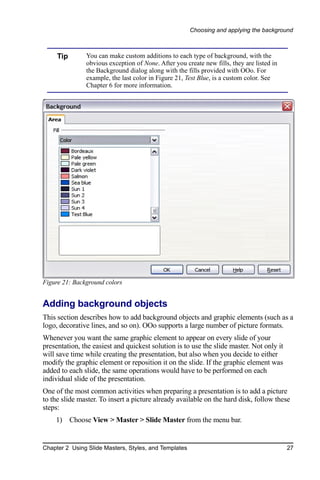
        A list of choices for the selected fill type then appears (see Figure 21 for an
        example).
     3) Select one of the items on the list and click OK. The fill you have chosen is
        added to the slide master, replacing any previously selected fill.

26                                   Chapter 2 Using Slide Masters, Styles, and Templates
Choosing and applying the background


     Tip       You can make custom additions to each type of background, with the
               obvious exception of None. After you create new fills, they are listed in
               the Background dialog along with the fills provided with OOo. For
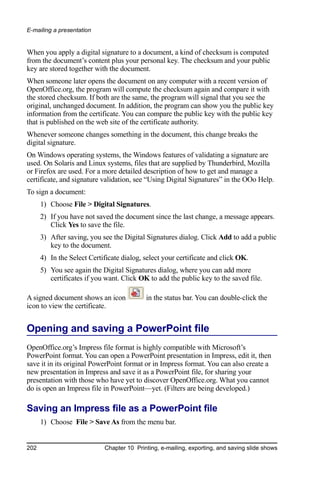
               example, the last color in Figure 21, Test Blue, is a custom color. See
               Chapter 6 for more information.


Figure 21: Background colors


Adding background objects
This section describes how to add background objects and graphic elements (such as a
logo, decorative lines, and so on). OOo supports a large number of picture formats.
Whenever you want the same graphic element to appear on every slide of your
presentation, the easiest and quickest solution is to use the slide master. Not only it
will save time while creating the presentation, but also when you decide to either
modify the graphic element or reposition it on the slide. If the graphic element was
added to each slide, the same operations would have to be performed on each
individual slide of the presentation.
One of the most common activities when preparing a presentation is to add a picture
to the slide master. To insert a picture already available on the hard disk, follow these
steps:
    1) Choose View > Master > Slide Master from the menu bar.


Chapter 2 Using Slide Masters, Styles, and Templates                                       27
Choosing and applying the background


      2) Select from the menu bar Insert > Picture > From File.
      3) Navigate to the directory where your picture is and select it. If you want to
         see a preview, select the corresponding checkbox in the file browser dialog.

     Caution     OOo offers the option to insert a picture as a link to the file rather than
                 embedding it in the document. This can be useful when a presentation is
                 not intended to be distributed elsewhere, and where it will remain in the
                 same hierarchical directory structure. For example, it could be created
                 on a notebook computer, from which the presentation will be given to,
                 typically, a group of clients.
                 If the presentation file is to be distributed, however, the picture should
                 be embedded to avoid the “missing picture” syndrome when the
                 presentation is finally given on a different computer.

Once the picture is inserted you may need to reposition it and modify its size. How to
do that is explained in Chapter 4 (Adding and Formatting Pictures).

      Tip       If you want the image to blend with the background, you can set the
                background color of the picture as transparent. Select the picture, then
                chose Tools > Eyedropper from the menu bar. Check the first checkbox
                and then move the mouse on the picture and click on the color you would
                like to make transparent. This color appears next to the checkbox. Make
                sure that Replace with... is set to Transparent and click Replace.

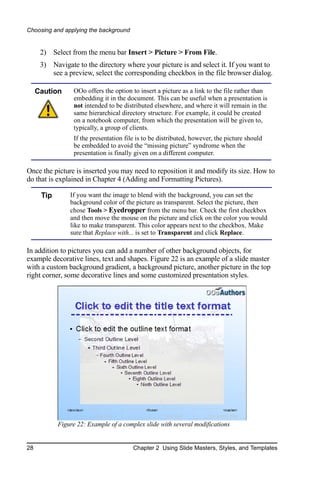
In addition to pictures you can add a number of other background objects, for
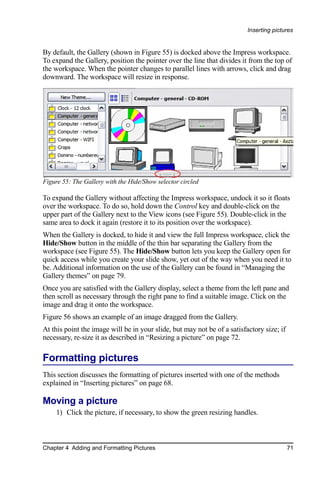
example decorative lines, text and shapes. Figure 22 is an example of a slide master
with a custom background gradient, a background picture, another picture in the top
right corner, some decorative lines and some customized presentation styles.


            Figure 22: Example of a complex slide with several modifications


28                                      Chapter 2 Using Slide Masters, Styles, and Templates
Choosing and applying the background


Modifying the size and shape of default text areas
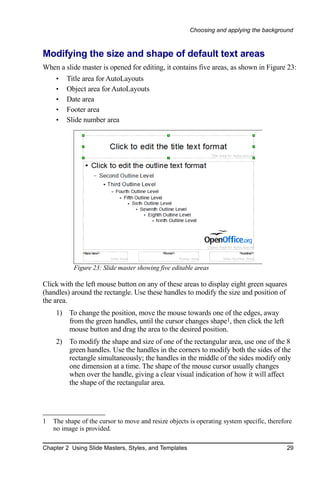
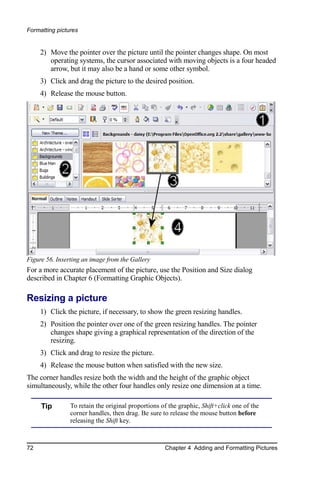
When a slide master is opened for editing, it contains five areas, as shown in Figure 23:
     •   Title area for AutoLayouts
     •   Object area for AutoLayouts
     •   Date area
     •   Footer area
     •   Slide number area


           Figure 23: Slide master showing five editable areas

Click with the left mouse button on any of these areas to display eight green squares
(handles) around the rectangle. Use these handles to modify the size and position of
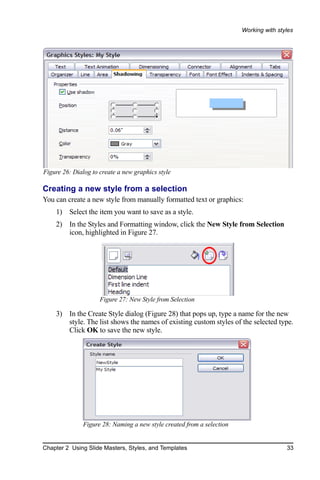
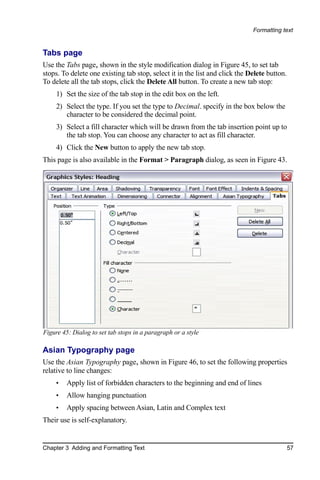
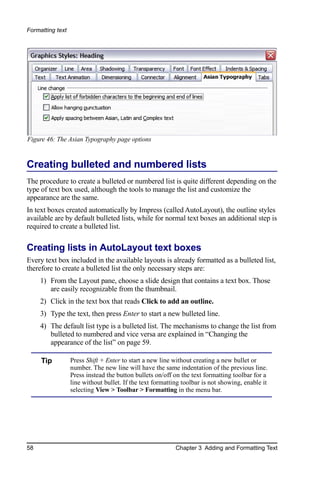
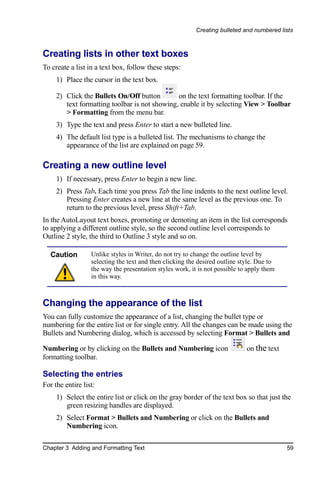
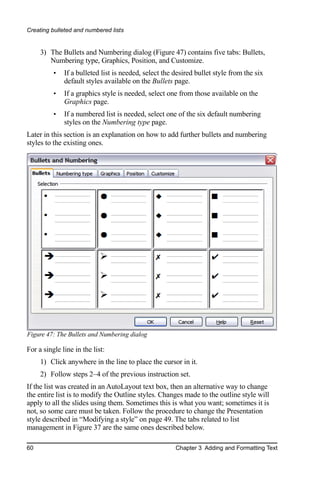
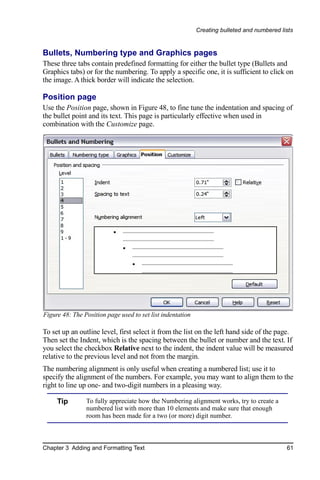
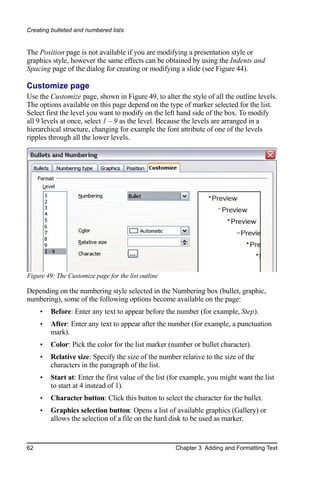
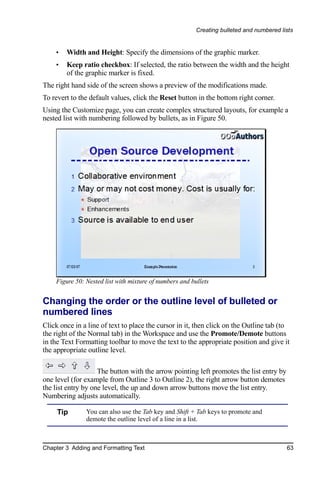
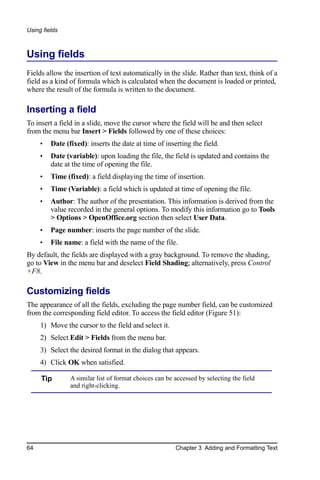
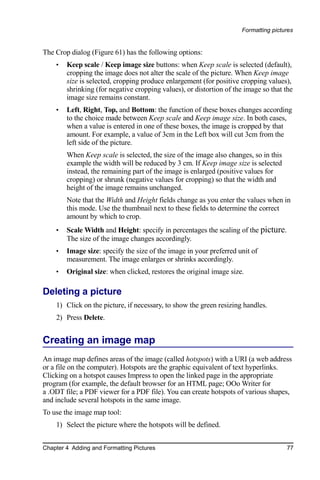
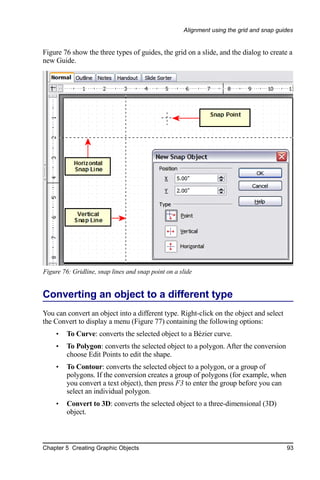
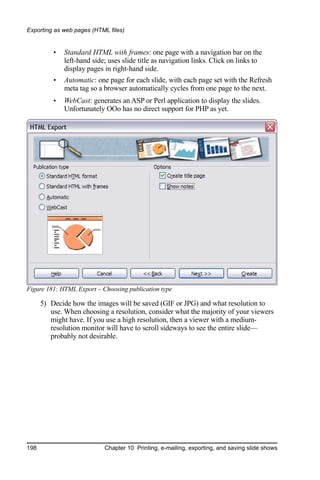
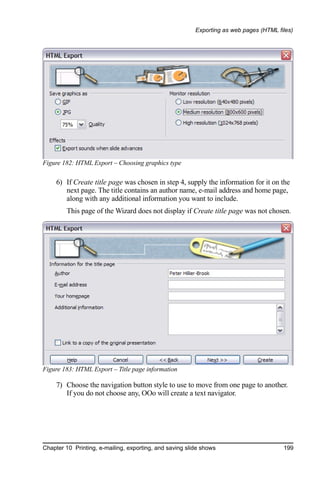
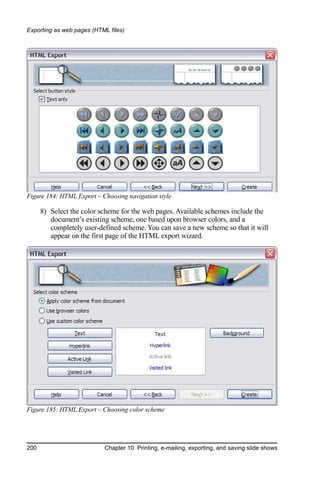
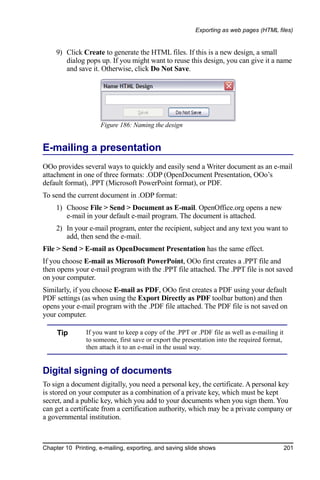
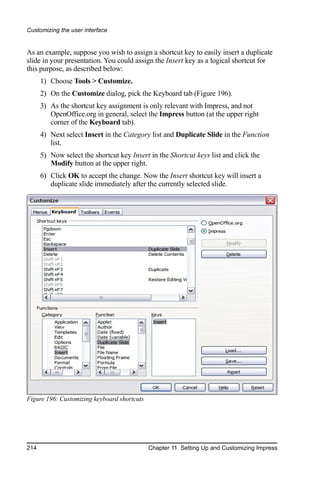
the area.
     1) To change the position, move the mouse towards one of the edges, away
        from the green handles, until the cursor changes shape1, then click the left
        mouse button and drag the area to the desired position.
     2) To modify the shape and size of one of the rectangular area, use one of the 8
        green handles. Use the handles in the corners to modify both the sides of the
        rectangle simultaneously; the handles in the middle of the sides modify only
        one dimension at a time. The shape of the mouse cursor usually changes
        when over the handle, giving a clear visual indication of how it will affect
        the shape of the rectangular area.


1   The shape of the cursor to move and resize objects is operating system specific, therefore
    no image is provided.

Chapter 2 Using Slide Masters, Styles, and Templates                                        29
Choosing and applying the background


     Tip        To keep the ratio between the sides of the rectangular area constant, move
                the mouse to one of the 4 green handles at the corner of the area and keep
                the Shift key pressed while dragging the handle with the mouse.

To more accurately control the shape and size as well as the position of the default
text area, instead of using the mouse it is better to access the Position and Size dialog.
To do that, first select the rectangular area by clicking on any point inside it, then
either press F4 or from the main menu select Format > Position and Size. The dialog
shown in Figure 24 is displayed.
The functions of this dialog are explained in the Draw Guide, so only a short
description of the most important fields is provided in this chapter.


Figure 24: The Position and Size dialog

Use the Position section to specify the X (horizontal) and Y (vertical) position of the
rectangular area. The values represent the distance of the base point (selected on the
right hand side) relative to the top left corner of the slide.
Use the Size section to specify the width and height of the rectangular are. Select as
the base point the part of the rectangular area that remains fixed. The default setting
(top left corner) means that the when resizing the area, the position of the top left
corner of the area will not change.
You can also use the Rotation tab of the dialog to rotate one of the axes by 90 degrees
to obtain a modern looking layout. In general it is preferable to use only right angles
for ease of editing, although the program does not impose restrictions on the values
that can be used.


30                                        Chapter 2 Using Slide Masters, Styles, and Templates
Choosing and applying the background


Further modifications to the default text areas
Besides the shape, size and position, it is also possible to modify other aspects of the
5 areas of the slide master, such as the background, add a border, alignment relative to
the slide and position relative to other objects.
While background style and line style of an area can be accessed from the Format
menu, in order to access the Alignment and Arrange menus you need to either open
the Drawing toolbar or use the context menu. To display the Drawing toolbar (Figure
25), select it in View > Toolbars; to open the context menu, right-click on the edge of
the rectangular area after selecting it. On the Drawing toolbar, click the arrow next to
the Alignment or Arrange icon (highlighted in Figure 25) to display choices. See the
Draw Guide for details.


Figure 25: The Drawing toolbar
The date area, footer area, and slide number area do not automatically appear on every
slide, even though you have defined them. In order to show them, you need to close
the Master View and select the desired field from the menu: Insert > Page number or
Insert > Date and time. This procedure is explained in detail in Chapter 8 (Adding
and Formatting Slides, Notes, and Handouts).

Adding text to all slides
Some of the supplied slide masters have text objects in the footer. You can add other
text objects to the master page for your slides to act as a header or a footer.
    1) Choose View > Master > Slide Master from the menu bar.
    2) On the Drawing toolbar (see Figure 25), select the Text icon.
    3) Click once and drag in the master page to draw a text object, and then type or
       paste your text into the object or add fields as described below.
    4) Choose View > Normal when you are finished.
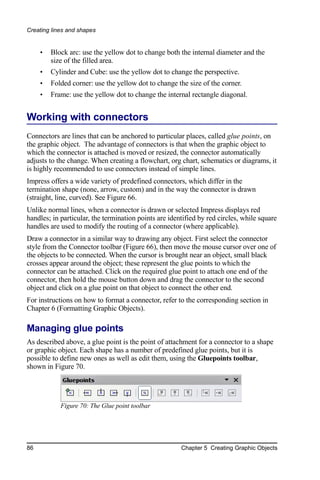
To add a field, such as the date or page number, to a text object in the header or footer,
choose Insert > Fields. and select the required field from the submenu. If you want to
edit a field in your slide, select it and choose Edit > Fields.
The fields you can use in Impress are:
    •   Date (fixed)
    •   Date (variable) —updates automatically when you reload the file
    •   Time (fixed)
    •   Time (variable)—updates automatically when you reload the file
    •   Author—First and last names listed in the OpenOffice.org user data
    •   Page number (slide number)
    •   File name

Chapter 2 Using Slide Masters, Styles, and Templates                                    31
Choosing and applying the background


     Tips      To change the number format (1,2,3 or a,b,c or i,ii,iii, etc.) for the page
               number field, choose Format > Page and then select a format from the
               list in the Layout Settings area.
               To change the author information, go to Tools > Options >
               OpenOffice.org > User Data.


Working with styles
This section describes how to create, modify, apply and delete styles in Impress. If
you are familiar with styles in Writer, you will find both similarities and differences in
Impress. The presentation styles are similar to paragraph styles in Writer and are used
in a very similar fashion. You cannot create new presentation styles but you can fully
configure the existing ones. Note that, as for the Heading styles in Writer, the Outline
styles are hierarchically linked, so a change in the Outline 1 will cascade through all
the other Outline levels.
In Impress you will also find the graphic styles very useful. As the name suggests,
graphic styles define the characteristics of a graphic object (including a text object).
If, for example, you need to create a organization chart diagram in one of the slides of
your presentation, you will surely want all the boxes to have consistent appearance,
meaning same line style, same font type, maybe same shadow and so on. The easiest
way to achieve this result with the minimum effort is to create a graphic style for the
boxes and apply it to each box. The major benefit is that if later on you decide to
modify, say, the background color of the boxes, all you need to do is modify the style.

Creating graphics styles
As discussed above you cannot create new presentation styles. You can create a new
graphics style in two ways:
     •   Using the Style dialog
     •   From a selection

Creating a new style using the Style dialog
Choose the Graphics icon at the top of the Styles and Formatting window.
To link a new style with an existing style, first select that style, and then right-click
and select New. When styles are linked, then when you change the base style (for
example, by changing the font from Times to Helvetica), all the linked fonts will
change as well. Sometimes this is exactly what you want; other times you do not want
the changes to apply to all the linked styles. It pays to plan ahead.
The style dialog is shown in Figure 26. It has 14 tabs, each with several options. If
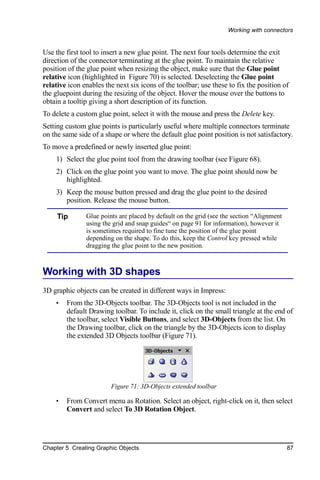
you are familiar with styles in Writer, you will find that you already know how to set
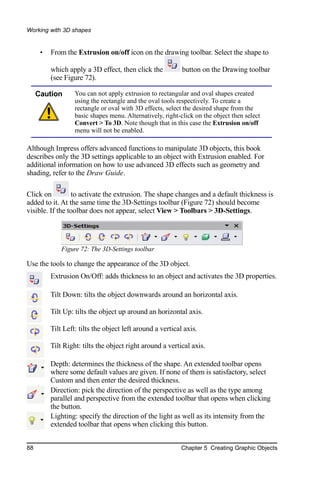
many of these options. When you are finished making changes, click OK to save
those changes.


32                                     Chapter 2 Using Slide Masters, Styles, and Templates
Working with styles


Figure 26: Dialog to create a new graphics style

Creating a new style from a selection
You can create a new style from manually formatted text or graphics:
    1) Select the item you want to save as a style.
    2) In the Styles and Formatting window, click the New Style from Selection
       icon, highlighted in Figure 27.


                     Figure 27: New Style from Selection

    3) In the Create Style dialog (Figure 28) that pops up, type a name for the new
       style. The list shows the names of existing custom styles of the selected type.
       Click OK to save the new style.


              Figure 28: Naming a new style created from a selection


Chapter 2 Using Slide Masters, Styles, and Templates                                   33
Working with styles


Modifying styles
To change an existing style, right-click on it in the Styles and Formatting window and
choose Modify from the pop-up menu. (For Presentation styles, Modify is the only
choice.)
The dialog for the modification of a graphic style is the same as the one for creating a
graphic style (Figure 26); while the dialog for modifying a presentation style is
simpler and more similar to the one to modify a paragraph style in Writer.
Make the required changes to the style and when finished click OK to save them.

Updating a style from a selection
To update a style from a selection:
     1) Select an item that has the format you want to adopt as a style.
     2) In the Styles and Formatting window, select the style you want to update
        (single-click, not double-click), and then click the Update Style icon (see
        Figure 29). Update Style is available for both presentation and graphic styles.


                      Figure 29. Updating a style from a selection


     Tip        Any changes you make to a style are effective only in the document on
                which you are working. The changes do not go into any associated
                template. If you want the changes to apply to more than one document,
                you need to change the template (see “Working with templates” on page
                35).


Applying styles
In Impress you can apply styles in two ways, both starting from the Styles and
Formatting window. First click on one of the icons at the top left (Graphics Styles or
Presentation Styles) to display a list of styles in the category you want. Then do one
of the following:
     •   Position the insertion point in the paragraph or graphic and double-click on
         the name of the style you want to apply.


34                                     Chapter 2 Using Slide Masters, Styles, and Templates
Working with styles


    •   Click the Fill Format mode icon        . The mouse pointer changes to this
        icon. Position the moving icon on the paragraph to be styled and click the
        mouse button. This mode remains active until you turn it off, so you can
        apply the same style to several paragraphs. To quit Fill Format mode, click
        the Fill Format mode icon again or press the Esc key.
        When Fill Format mode is active, a right-click anywhere in the document
        undoes the last Fill Format action. Be careful not to accidentally right-click
        and thus undo actions you want to keep.

     Tip       At the bottom of the Styles and Formatting window is a dropdown list
               (in Figure 33 the window shows All, meaning the list includes all
               available styles. You can choose to show all styles or other groups of
               styles, for example applied styles or (in the case of graphics styles)
               custom styles.


Deleting styles
You cannot remove (delete) any of OOo’s predefined styles, even if you are not using
them.
You can remove any user-defined (custom) styles; but before you do, you should
make sure the styles are not in use. If an unwanted style is in use, you will want to
replace it with a substitute style.
To delete unwanted styles, right-click on them (one at a time) in the Styles and
Formatting window and click Delete on the pop-up menu. Click Yes in the message
box that pops up.

Assigning styles to shortcut keys
OOo provides a set of predefined keyboard shortcuts which allow you to quickly
apply styles while typing in a document. You can redefine these shortcuts or define
your own, as described in Appendix A (Keyboard Shortcuts).


Working with templates
All documents in OpenOffice.org (OOo) are based on templates. However, Impress is
a little different from other OOo components, in that it starts with the Presentation
Wizard unless you have elected to turn the Wizard off.
When you choose File > New > Presentation from the menu bar, if the Presentation
Wizard is active, the Wizard offers several choices for a new presentation, one of
which is From template.


Chapter 2 Using Slide Masters, Styles, and Templates                                     35
Working with templates


If you have turned the Presentation Wizard off, when you start a new presentation by
choosing File > New > Presentation from the menu bar, OOo uses the default
presentation template. If you have not defined your own default template, OOo uses
an inbuilt blank template supplied with the program.

Using templates supplied with OOo
OOo comes with five presentation templates. Two are in the Presentations folder and
three are in the Presentation backgrounds folder. The difference between them is that
“Presentation” templates include a series of slides with sample titles and topics, while
“Presentation background” templates have only backgrounds and background objects.
Both types have predefined presentation and graphics styles.
You can create a new presentation from a previously saved presentation template by
choosing File > New > Templates and Documents from the menu bar. This opens
the Templates and Documents – Templates window. To open a new presentation based
on a template, double-click that template’s name in the list.

Using templates from other sources
If you have created your own templates, or imported templates from another location,
they are probably stored in the My Templates folder in the Templates and Documents
– Templates window. Templates installed using the Extension Manager may be
installed in their own folders. You can use them in the same way as the templates
installed with OOo.
See page 42 for information on importing templates into OOo.

Installing templates using the Extension Manager
The Package Manager was introduced in OOo 2.0.4 and renamed the Extension
Manager in OOo 2.1. This feature provides an easy way to install collections of
templates, graphics, macros, or other add-ins that have been “packaged” into files
with a .OXT extension.
     1) After you download a package, select Tools > Extension Manager from the
        menu bar. In the Extension Manager dialog (Figure 30), click Add.
     2) A file browser window opens. Find and select the package of templates you
        want to install and click Open.
     3) On the Extension Manager dialog (Figure 31), select the package you just
        added and click Enable.
The slide masters from the templates will now appear in the list of Available Master
Pages in the Task Pane (Figure 19).


36                                   Chapter 2 Using Slide Masters, Styles, and Templates
Working with templates


Figure 30: Installing a package of templates


Figure 31: Enabling a newly-added package of templates


Setting a default template
You can set a custom presentation template to be the default template. You can reset
the default later if you choose.

Setting a custom template as the default
You can set any template to be the default, as long as it is in one of the folders
displayed in the Template Management window.


Chapter 2 Using Slide Masters, Styles, and Templates                                   37
Working with templates


To set a custom template as the default:
     1) From the main menu, choose File > Templates > Organize. The Template
        Management window (Figure 32) opens.
     2) In the box on the left, double-click the folder containing the template that you
        want to set as the default, then select the template.
     3) Click the Commands button.


      Figure 32. Template Management window
     4) From the drop-down menu, choose Set As Default Template. The next time
        that you create a document by choosing File > New, the document will be
        created from this template.

Resetting the default to OOo’s in-built Default template
To re-enable OOo’s Default presentation background template as the default:
     1) In the Template Management window (Figure 32), click the Presentation
        Backgrounds folder in the box on the left.
     2) Click the Commands button.
     3) From the drop-down menu, choose Reset Default Template.

Creating your own templates
To create a template from a presentation:
     1) Open the presentation that you want to use for a template.
     2) From the main menu, choose File > Templates > Save. The Templates
        window opens (see Figure 33).
     4) In the New template field, type a name for the new template.


38                                   Chapter 2 Using Slide Masters, Styles, and Templates
Working with templates


    5) In the Categories list, click the folder in which you want to store the
       template. This is usually the My Templates folder, unless you have created
       other folders.
        To learn more about template folders, see “Organizing templates” on page 40.
    6) Click OK. OOo saves the new template and the Templates window closes.


     Figure 33. Saving a new template


Modifying a template
You can edit a template’s styles and content, and then, if you wish, you can reapply
the template’s styles to documents that were created from that template.

    Note       You can only reapply styles. You cannot reapply content.

To edit a template:
    1) From the main menu, choose File > Templates > Edit. A standard file
       browser window opens.
    2) Find and select the template that you want to edit, and then click Open. The
       selected template opens in Impress.
    3) Edit the template just as you would any other presentation. To save your
       changes, choose File > Save from the main menu.
The next time that you open a document that was created from the changed template,
the following message appears.


       Figure 34. Apply current styles message


Chapter 2 Using Slide Masters, Styles, and Templates                                   39
Working with templates


Click Yes to apply the template’s changed styles to the document. Click No if you
never want to apply the template’s changed styles to the document. Whichever option
you choose, the message box closes and the document opens in OOo.

     Caution    If you choose No in the message box shown in Figure 32, that message
                will not appear again the next time you open the document after
                changing the template it is based on. You will not get another chance to
                update the styles from the template, although you can use the macro
                given in the Note below to re-enable this feature.


     Note      To re-enable the updating from template feature:
               1) Use Tools > Macros > Organize Macros > OpenOffice.org Basic.
                  Select the document from the list, click the +, and select Standard. If
                  Standard has a + beside it, click that and select a module.
               2) Name the macro. For example, you could call it FixDocument. If the
                  Edit button is active, click it. If the Edit button is not active, click
                  New, type a module name in the pop-up dialog, and click OK.
               3) In the Basic window, enter the following:
                   Sub FixDocument
                   TemplateName = ThisComponent.DocumentInfo.Template
                     if TemplateName <> "" then
                     ThisComponent.DocumentInfo.Template = TemplateName
                     end if
                   End Sub

               4) Click the Run BASIC icon, then close the Basic window.
               5) Save the document.
               Next time you open this document, the update from template feature
               will be restored.


Organizing templates
OOo can only use templates that are in OOo template folders. You can, however,
create new OOo template folders and use them to organize your templates. For
example, you might have separate template folders for templates for different
purposes or projects. You can also import and export templates.
To begin, choose File > Templates > Organize from the main menu. The Template
Management window (Figure 34) opens.

               All the actions made by the Commands button in the Template
     Note      Management window can be made as well by right-clicking on the
               templates or the folders.


40                                     Chapter 2 Using Slide Masters, Styles, and Templates
Working with templates


Creating a template folder
To create a template folder:
    1) In the Template Management window, click any folder.
    2) Click the Commands button.
    3) From the drop-down menu, choose New. A new folder called Untitled
       appears.
    4) Type a name for the new folder, and then press the Enter key. OOo saves the
       folder with the name that you entered.

Deleting a template folder
You cannot delete the template folders supplied with OOo or installed using the
Extension Manager; you can only delete folders that you have created.
To delete a template folder that you have created:
    1) In the Template Management window, click the folder that you want to delete.
    2) Click the Commands button.
    3) From the drop-down menu, choose Delete. A dialog appears and asks you to
       confirm the delete. Click Yes.

Moving a template
To move a template from one template folder to another template folder:
    1) In the Template Management window, double-click the folder that contains
       the template you want to move. A list of all the templates contained in that
       folder appears underneath the folder name.
    2) Click the template that you want to move and drag it to the desired folder. If
       you do not have the authority to delete templates from the source folder, this
       action copies the template instead of moving it.

Deleting a template
You cannot delete the templates supplied with OOo or installed using the Extension
Manager; you can only delete templates that you have created.
To delete a template:
    1) In the Template Management window, double-click the folder that contains
       the template you want to delete. A list of all the templates contained in that
       folder appears underneath the folder name.
    2) Click the template that you want to delete.
    3) Click the Commands button.
    4) From the drop-down menu, choose Delete. A dialog appears and asks you to
       confirm the deletion. Click Yes.


Chapter 2 Using Slide Masters, Styles, and Templates                                    41
Working with templates


Importing a template
If the template that you want to use is in a different location, you must import it into
an OOo template folder.
To import a template into a template folder from another location on your computer:
     1) In the Template Management window, click the folder into which you want to
        import the template.
     2) Click the Commands button. From the drop-down menu, choose Import
        Template. A standard file browser window opens.
     3) Find and select the template that you want to import and click Open. The file
        browser window closes and the template appears in the selected template
        folder.

Exporting a template
To export a template from a template folder to another location:
     1) In the Template Management window, double-click the folder that contains
        the template you want to export. A list of all the templates contained in that
        folder appears underneath the folder name.
     2) Click the template that you want to export.
     3) Click the Commands button.
     4) From the drop-down menu, choose Export Template. The Save As window
        opens.
     5) Find the folder into which you want to export the template and click Save.
        OOo exports the template to the selected folder, and the Save As window
        closes.


42                                    Chapter 2 Using Slide Masters, Styles, and Templates
Chapter 3
              Adding and Formatting Text

This chapter describes the different ways to add text to slides and format the text.
Text in slides is contained in text boxes. There are two ways to add text boxes to a
slide:
    •   Choose a predefined layout from the Layouts section of the Tasks pane, as
        described in Chapter 1. These text boxes are called AutoLayout text boxes.
    •   Create a text box using the text tool.
This chapter describes how to create, modify, use, and delete text boxes; discusses the
various types of text that can be inserted; and explains how to format the text, how to
insert a numbered or bulleted list. and finally how and when to use fields.


Working with text boxes

Using text boxes created from the Layout pane
In Normal view:
    1) Click in the text box that reads Click to add text, Click to add an outline, or
       a similar notation.
    2) Type or paste your text in the text box.
These text boxes are known as AutoLayout text boxes. See also “Creating bulleted
and numbered lists” on page 58.

Using text boxes created from the text box tool
In Normal View:

    1) Click on the Text icon        on the Drawing toolbar. If the toolbar with the
       text icon is not visible, choose View > Toolbars > Drawing.

Chapter 3 Adding and Formatting Text                                                   43
Working with text boxes


     2) Click and drag to draw a box for the text on the slide. Do not worry about the
        vertical size and position—the text box will expand if needed as you type. To
        reposition the text box to a different part of the slide, see “Moving a text box”
        on page 44; to change the horizontal size, see “Resizing a text box” on page
        45.
     3) Release the mouse button when finished. The cursor appears in the text box,
        which is now in edit mode (gray hashed border with green resizing handles
        shown in Figure 35).
     4) Type or paste your text in the text box.
     5) Click outside the text box to deselect it.


       Figure 35: Selected text box showing the green resizing handles and text toolbar


     Note       In addition to the normal text boxes where text is horizontally aligned,
                it is possible to insert text boxes where the text is aligned vertically.
                This choice is available only when Asian languages are enabled in
                Tools > Options > Language Settings > Languages.

                Click on the      button in the drawing toolbar to create a vertical text
                box. Note that when editing the contents, the text is displayed
                horizontally.


Moving a text box
In Normal view, notice how the pointer changes from an arrow to an I-beam as you
move it over the text in a text box.


44                                                      Chapter 3 Adding and Formatting Text
Working with text boxes


    1) Click when the pointer becomes an I-beam. The text box is now in edit mode,
       with a gray border and green resizing handles.
    2) Move the I-beam (or pointer) over the gray border. Notice how it changes
       shape, becoming a four-headed arrow (or a similar shape depending on the
       operating system and user’s settings).
    3) When the four-headed arrow appears, click and drag to move the text box. An
       empty dashed-line box shows where your text box will be placed.
    4) Release the mouse button when the text box is in the desired position.

Resizing a text box
In Normal view, when the green resizing handles are displayed, move the I-beam (or
pointer) over any handle. Notice how the pointer changes shape, indicating in what
direction the text box will be resized. The corner handles change the two dimensions
of the text area simultaneously while the four handles in the middle of the sides
modify only one of the dimensions.
When the two-headed arrow is displayed, click and drag to resize the text box.

     Tip        To maintain the proportions of a text box while resizing, press and hold
                the Shift key, then click and drag. Make sure to release the mouse
                button before releasing the Shift key.

OOo also provides a different type of text box which resizes horizontally to
automatically fit the text as it is inserted. To insert an auto-resizing text box, click on

the     Icon in the text toolbar (see Figure 35) and then click on the place in the slide
where you want the first letter of the text to appear. If the text toolbar is not visible,
choose View > Toolbars > Text.
For more accurate control over the shape, size and position of the text box, instead of
using the mouse, use the Position and Size dialog. Select the text box, then press F4
or select Format > Position and Size from the menu bar. The use of this dialog is
explained in Chapter 2.

Deleting a text box
    1) Click the text once to display the gray border and green resizing handles of
       the text box.
    2) Position the pointer anywhere on the gray border so that it becomes either a
       four-headed or two-headed arrow.
    3) Click once. The gray border disappears, leaving only the green resizing
       handles.
    4) Press Delete.


Chapter 3 Adding and Formatting Text                                                       45
Working with text boxes


     Tip       Sometimes it is faster to to delete a text box by dragging a selection
               rectangle around the text box and then hitting the Delete key. Take care
               to avoid selecting and accidentally deleting other text boxes or shapes.


Inserting text

Pasting text
Text may be inserted into the text box by copying it from another document and
pasting it into Impress. However, the pasted text will probably not match the
formatting of the surrounding text or that of the other slides in the presentation. This
may be what you want on some occasions, however in most cases you want to make
sure that the presentation does not become a patchwork of different paragraph styles,
font types, bullet points and so on. There are several ways to ensure consistency;
these methods are explained below.

Pasting unformatted text
It is normally good practice to paste text without formatting and apply the formatting
later. To paste without formatting, either press Control+Shift+V and then select
Unformatted text from the dialog that appears, or click on the small black triangle

next to the paste symbol in the standard toolbar        and select Unformatted text.
The unformatted text will be formatted with the outline style at the cursor position in
an AutoLayout text box or with the default graphic style in a normal text box.

Formatting pasted text
If pasting the text into an AutoLayout area, then to give the pasted text the same look
and feel of the rest of the presentation apply the appropriate outline style to the text.
To do so:
     1) Paste the text in the desired position. Do not worry if it does not look right: it
        will in a minute.
     2) Select the text you have just pasted (see “Selecting text” on page 51 for
        details on how to do that).
     3) Select Format > Default formatting from the menu bar.

     4) Use the four arrow buttons in the Text Formatting toolbar                     to
        move the text to the appropriate position and give it the appropriate outline
        level. The button with the arrow pointing left promotes the list entry by one
        level (for example from Outline 3 to Outline 2), the right arrow button
        demotes the list entry by one level, the up and down arrow buttons move the
        list entry.


46                                                    Chapter 3 Adding and Formatting Text
Inserting text


    5) Apply manual formatting as required to sections of the text (to change font
       attributes, tabs, and so on).
If you are pasting text in a text box, you can still use styles to quickly format the text.
Note that one and only one graphic style can be applied to the copied text. To do that:
    1) Paste the text in the desired position.
    2) Select the text you have just pasted (see “Selecting text” on page 51 for
       details).
    3) Select the desired graphic style.
    4) Apply manual formatting as required to sections of the text.

     Tip     Presentation styles are very different from Writer styles and are applied in
             quite a different way. Refer to “Using styles to format text” on page 49 for
             details.


Inserting special characters
To insert special characters, such as copyright, math, geometric, or monetary symbols,
or characters from another language:
    1) Click in the place in the text where you want to insert the character.
    2) Choose Insert > Special Character. The Special Characters dialog appears.
        See Figure 36. Alternatively if the     icon is visible, you can click this to
        bring up the Special Characters dialog.

     Tip       To show toolbar buttons that are not visible, click on the small down-
               arrow on the right end of the tool bar, move the cursor over Visible
               Buttons and then click on the icon you wish to make visible.

    3) Choose the font and character subset from the Font and Subset drop-down
       menus.
    4) Click the character you want to insert. You may have to scroll to find the one
       you want.
    5) Click OK.
Selecting more than one character will insert all those characters. Characters to be
inserted are displayed below the character section in the order they were selected.
They will also be inserted in this order. If you accidentally click the wrong character,
clicking another character will only add it to the ones being inserted. Click Delete (all
the characters selected will be deleted), then click the correct characters.


Chapter 3 Adding and Formatting Text                                                        47
Inserting text


Figure 36: Insert special characters dialog


Inserting non-breaking spaces and hyphens
Where it is not desirable for words separated by a space or by a hyphen to span over
two lines, or where an optional hyphen is desired, you can insert a special formatting
mark.
To access the Formatting marks options, select from the menu bar
Insert > Formatting marks. Impress supports three formatting marks:
      •   Non-breaking space: A non-breaking space between two words prevents
          these two words being separated over two lines. Press Control+Space bar on
          the keyboard to insert a non-breaking space.
      •   Non-breaking hyphen: A non-breaking hyphen keeps the two words
          separated by the hyphen on the same line.
      •   Optional hyphen: An invisible hyphen that is activated (thus breaking the
          word) only when the word is too long to fit on one line.

     Caution      In OOo Writer a non-breaking hyphen can be inserted by pressing
                  Control+Minus sign. This shortcut does not work in Impress.


48                                                    Chapter 3 Adding and Formatting Text
Formatting text


Formatting text
Formatting text can give a presentation a consistent look and a dynamic feel. The
appropriate use of formatting can even enhance the audience’s understanding of your
message by holding their interest.
Whenever you enter text, either in an AutoLayout text box or in a normal text box, it
already comes with an underlying style. Generally this style is the outline level of the
point where the text was entered for AutoLayout text boxes or the Default Graphic
style for text boxes. Sometimes, as seen also in the “Pasting text” section on page 46,
it is very useful to re-apply the baseline style to a selection of text, thus eliminating
any manual formatting applied to it (particularly if you made a mistake and you do
not know how to undo it). On these occasions, select the manually formatted text, and
then select Format > Default formatting from the menu bar.

Using styles to format text
This chapter describes ways to apply manual formatting, but you are encouraged to
use styles to really get the best out of Impress. The good news is that all the
information given here can be immediately reused for applying styles. Chapter 2
describes how to use styles efficiently and the difference between the presentation and
graphic styles available in Impress.

Modifying a style
In Impress there are two categories of styles: presentation styles and graphics styles.
When inserting text in an AutoLayout area, the presentation styles become available,
while when inserting text in a text box or a graphic object it is possible to apply the
graphic styles.
It is possible to create new graphics styles, but not the presentation styles which are
fixed and can only be modified.
To modify a style, follow these steps:
    1) Open the Styles and Formatting window by pressing F11 or selecting
       Format > Styles and Formatting from the menu bar.
    2) Select the style category by clicking on either the Presentation Styles icon or
       the Graphic Styles icon at the top of the Style and Formatting window (see ).
    3) Right-click on the style to be modified and select Modify from the pop-up
       menu.
If you have selected a presentation style. the dialog in Figure 37 is shown.
The dialog for making modifications to a graphics style is shown in Figure 38.
The Presentation Style dialog shares five pages with the Graphics Style dialog; these
are the ones that determine the formatting of the text.


Chapter 3 Adding and Formatting Text                                                      49
Formatting text


Figure 37: The Presentation Style dialog


Figure 38: The Graphics Style modification dialog


50                                                  Chapter 3 Adding and Formatting Text
Formatting text


There is no difference between the parameters that characterize a style and the
attributes given manually to portions of text: in fact the same dialogs are used in both
cases. Therefore once you master the formatting of text, you will know how to create
and modify a style. In particular:
    •   For the Font page of a style refer to “Formatting characters” on page 52.
    •   For the Font Effects page of a style refer to “Formatting characters” on page
        52.
    •   For the Indents and Spacing page of a style refer to “Formatting paragraphs”
        on page 55.
    •   For the Alignment page of a style refer to “Formatting paragraphs” on page
        55.
    •   For the Tabs page of a style refer to “Formatting paragraphs” on page 55.
The other tabs of the Presentation Style dialog are all related to bullets and numbering
and are described in “Creating bulleted and numbered lists” on page 58.
For additional details on the other tabs in the Graphics Style dialog, please refer to
Chapter 6 (Formatting Graphic Objects).

    Note       When Asian typography is activated (Tools > Options > Language
               Settings > Languages), the dialogs in Figure 37 and Figure 38 contain
               an additional page to set some high-level options for Asian typography,
               the Fonts page contains additional information and the Alignment page
               is slightly different.


Selecting text
Text must be selected before it can be formatted manually.
    •   To format all the text in a text box, click once on the text, then click once on
        the border of the text box. Only the green resizing handles are displayed.
        Now any formatting changes will apply to all the text in the text box.
    •   To format only part of the text, click once on the text, then select the text to
        be formatted by clicking and dragging (highlighting) over it. You can also use
        keyboard combinations to select text: move the cursor where you want to
        begin your selection, press Shift and then use the arrow buttons to extend
        your selection. Formatting changes will apply only to the selected text.

     Tip       Pressing the Control key along with the Shift key while creating a
               selection is useful to speed up the process. This combination highlights
               the text word by word instead of character by character. To speed up the
               selection even further, you can combine the Shift key with the Home key
               or the End key to extend the selection up to the start or end of the line in
               which the cursor is positioned, respectively.


Chapter 3 Adding and Formatting Text                                                          51
Formatting text


Formatting characters
To view the character formatting options, select Format > Character or click the

Character button         on the Text Formatting toolbar. (If a toolbar with the text icon
is not visible, choose View > Toolbars > Text Formatting.) The Character dialog
appears.

Font page
Use the Font page, shown in Figure 39, to select the desired font type, its base
attributes (Italic, Bold, etc.) as well as the size. A sample of the font is displayed in the
lower part of the dialog. You can also specify the language of this style.
This page is available when creating or modifying a presentation style or a graphics
style.


Figure 39: The Font page, to set the basic font attributes

     Tip          When writing a presentation in multiple languages, you can make the
                  best of the language setting by creating two styles that only differ in the
                  language but are otherwise the same. This allows you to check the
                  spelling of all of the contents without affecting the appearance.

If Asian Typography has been enabled, the Font page looks like Figure 40.


52                                                           Chapter 3 Adding and Formatting Text
Formatting text


Figure 40: The Font page when Asian Typography is enabled

The page is divided into three parts. The top and bottom parts have the same
functionality as described above, while in the middle part you can specify the Asian
text font and its attributes.

Font Effects page
Use the Font Effects page, shown in Figure 41, to apply special effects to the text,
such as underlining, color, shadow and so on. As for the Font page, a sample of the
text is displayed in the lower part of the dialog allowing a quick visual check of the
effects applied.
This page is available when creating or modifying a presentation style or a graphics
style.


Figure 41: Advanced options for the character can be set in the Font Effects page


Chapter 3 Adding and Formatting Text                                                       53
Formatting text


Position page
The Position page, shown in Figure 42, has advanced options to customize text. This
page is not available when creating or modifying a presentation style or a graphics
style.
Use this page to set the text position relative to the baseline when you need to insert
subscripts or superscripts.
To create a superscript or a subscript, do the following:
     1) Select Superscript or subscript as applicable.
     2) Specify the amount by which the text should be raised (superscripts) or
        lowered (subscripts).
     3) Specify the dimension of the character relative to the baseline character size
        (in percentage).
The amount by which the text is raised or lowered can be set to automatic by selecting
the Automatic checkbox.


Figure 42: Dialog to set the character position attributes

Two more position attributes can be set on this page:
     •   The (width) scaling of the text, which specifies the percentage of the font
         width by which to compress or expand the individual characters of the
         selected text.


54                                                       Chapter 3 Adding and Formatting Text
Formatting text


    •   The spacing between the characters of the font, which can be defined in
        number of points. Selecting the Pair kerning checkbox causes OOo to
        automatically adjust the spacing between certain pairs of characters to
        visually improve the appearance. For example, when writing a V followed by
        an A (VA) the spacing between the two letters is reduced (strong kerning) as
        can be easily seen when compared with, say, VS which is not a kerning pair.

Formatting paragraphs
To view the paragraph formatting options, select Format > Paragraph or click the

Paragraph button          on the Text Formatting toolbar. If a toolbar with the text icon
is not visible, choose View > Toolbars > Text Formatting. The Paragraph dialog
(Figure 43) is shown.
This dialog contains three pages that are described in detail below. If Asian
Typography has been activated, a page called Asian Typography is also displayed.


Figure 43: The paragraph formatting dialog

Indents and Spacing page
The Indents and Spacing page, shown in Figure 43, has four sections:
    •   Indent: modifies the indentation of the text (before and after) as well as the
        indentation of the first line.
    •   Spacing: defines the space before and after each paragraph formatted with the
        style.


Chapter 3 Adding and Formatting Text                                                   55
Formatting text


     •   Line spacing: determines the spacing between two lines formatted with the
         style. Note that selecting Proportional spacing requires specifying the
         percentage of a line to be used as spacing; 100% corresponds to a single line,
         200% to a double line, 50% to half a line. If Leading is selected, specify the
         amount of line spacing in your default unit of measurement.

     Tip          Setting the line spacing to less than 100% is a good method to cram a
                  lot of text into a text box, however care must be taken as too small a
                  value will make the text hard to read.


     Tip          You can change the default unit of measurement, for example from
                  inches to centimetres, from Tools > Options > OpenOffice.org Impress
                  > General.

     •   Preview area: provides a visual representation of the settings before you
         apply them.
The Indents and Spacing page is also available when creating or modifying a graphics
style, or modifying a presentation style, as shown in Figure 44.


Figure 44: Insert and Spacing settings for the selected paragraph or style

Alignment page
Use the Alignment page to determine the text alignment: Left, Right, Center, or
Justified. A preview shows the effects of the changes. The same choices can be

accessed from the Text Formatting toolbar.
This page is also available when creating or modifying a graphics style, or modifying
a presentation style.


56                                                       Chapter 3 Adding and Formatting Text
Formatting text


Tabs page
Use the Tabs page, shown in the style modification dialog in Figure 45, to set tab
stops. To delete one existing tab stop, select it in the list and click the Delete button.
To delete all the tab stops, click the Delete All button. To create a new tab stop:
     1) Set the size of the tab stop in the edit box on the left.
     2) Select the type. If you set the type to Decimal. specify in the box below the
        character to be considered the decimal point.
     3) Select a fill character which will be drawn from the tab insertion point up to
        the tab stop. You can choose any character to act as fill character.
     4) Click the New button to apply the new tab stop.
This page is also available in the Format > Paragraph dialog, as seen in Figure 43.


Figure 45: Dialog to set tab stops in a paragraph or a style

Asian Typography page
Use the Asian Typography page, shown in Figure 46, to set the following properties
relative to line changes:
     •   Apply list of forbidden characters to the beginning and end of lines
     •   Allow hanging punctuation
     •   Apply spacing between Asian, Latin and Complex text
Their use is self-explanatory.


Chapter 3 Adding and Formatting Text                                                         57
Formatting text


Figure 46: The Asian Typography page options


Creating bulleted and numbered lists
The procedure to create a bulleted or numbered list is quite different depending on the
type of text box used, although the tools to manage the list and customize the
appearance are the same.
In text boxes created automatically by Impress (called AutoLayout), the outline styles
available are by default bulleted lists, while for normal text boxes an additional step is
required to create a bulleted list.

Creating lists in AutoLayout text boxes
Every text box included in the available layouts is already formatted as a bulleted list,
therefore to create a bulleted list the only necessary steps are:
     1) From the Layout pane, choose a slide design that contains a text box. Those
        are easily recognizable from the thumbnail.
     2) Click in the text box that reads Click to add an outline.
     3) Type the text, then press Enter to start a new bulleted line.
     4) The default list type is a bulleted list. The mechanisms to change the list from
        bulleted to numbered and vice versa are explained in “Changing the
        appearance of the list” on page 59.

     Tip          Press Shift + Enter to start a new line without creating a new bullet or
                  number. The new line will have the same indentation of the previous line.
                  Press instead the button bullets on/off on the text formatting toolbar for a
                  line without bullet. If the text formatting toolbar is not showing, enable it
                  selecting View > Toolbar > Formatting in the menu bar.


58                                                         Chapter 3 Adding and Formatting Text
Creating bulleted and numbered lists


Creating lists in other text boxes
To create a list in a text box, follow these steps:
     1) Place the cursor in the text box.

     2) Click the Bullets On/Off button        on the text formatting toolbar. If the
        text formatting toolbar is not showing, enable it by selecting View > Toolbar
        > Formatting from the menu bar.
     3) Type the text and press Enter to start a new bulleted line.
     4) The default list type is a bulleted list. The mechanisms to change the
        appearance of the list are explained on page 59.

Creating a new outline level
     1) If necessary, press Enter to begin a new line.
     2) Press Tab. Each time you press Tab the line indents to the next outline level.
        Pressing Enter creates a new line at the same level as the previous one. To
        return to the previous level, press Shift+Tab.
In the AutoLayout text boxes, promoting or demoting an item in the list corresponds
to applying a different outline style, so the second outline level corresponds to
Outline 2 style, the third to Outline 3 style and so on.

  Caution         Unlike styles in Writer, do not try to change the outline level by
                  selecting the text and then clicking the desired outline style. Due to
                  the way the presentation styles work, it is not possible to apply them
                  in this way.


Changing the appearance of the list
You can fully customize the appearance of a list, changing the bullet type or
numbering for the entire list or for single entry. All the changes can be made using the
Bullets and Numbering dialog, which is accessed by selecting Format > Bullets and

Numbering or by clicking on the Bullets and Numbering icon                   on the text
formatting toolbar.

Selecting the entries
For the entire list:
     1) Select the entire list or click on the gray border of the text box so that just the
        green resizing handles are displayed.
     2) Select Format > Bullets and Numbering or click on the Bullets and
        Numbering icon.

Chapter 3 Adding and Formatting Text                                                       59
Creating bulleted and numbered lists


     3) The Bullets and Numbering dialog (Figure 47) contains five tabs: Bullets,
        Numbering type, Graphics, Position, and Customize.
          •   If a bulleted list is needed, select the desired bullet style from the six
              default styles available on the Bullets page.
          •   If a graphics style is needed, select one from those available on the
              Graphics page.
          •   If a numbered list is needed, select one of the six default numbering
              styles on the Numbering type page.
Later in this section is an explanation on how to add further bullets and numbering
styles to the existing ones.


Figure 47: The Bullets and Numbering dialog

For a single line in the list:
     1) Click anywhere in the line to place the cursor in it.
     2) Follow steps 2–4 of the previous instruction set.
If the list was created in an AutoLayout text box, then an alternative way to change
the entire list is to modify the Outline styles. Changes made to the outline style will
apply to all the slides using them. Sometimes this is what you want; sometimes it is
not, so some care must be taken. Follow the procedure to change the Presentation
style described in “Modifying a style” on page 49. The tabs related to list
management in Figure 37 are the same ones described below.

60                                                     Chapter 3 Adding and Formatting Text
Creating bulleted and numbered lists


Bullets, Numbering type and Graphics pages
These three tabs contain predefined formatting for either the bullet type (Bullets and
Graphics tabs) or for the numbering. To apply a specific one, it is sufficient to click on
the image. A thick border will indicate the selection.

Position page
Use the Position page, shown in Figure 48, to fine tune the indentation and spacing of
the bullet point and its text. This page is particularly effective when used in
combination with the Customize page.


Figure 48: The Position page used to set list indentation

To set up an outline level, first select it from the list on the left hand side of the page.
Then set the Indent, which is the spacing between the bullet or number and the text. If
you select the checkbox Relative next to the indent, the indent value will be measured
relative to the previous level and not from the margin.
The numbering alignment is only useful when creating a numbered list; use it to
specify the alignment of the numbers. For example, you may want to align them to the
right to line up one- and two-digit numbers in a pleasing way.

     Tip        To fully appreciate how the Numbering alignment works, try to create a
                numbered list with more than 10 elements and make sure that enough
                room has been made for a two (or more) digit number.


Chapter 3 Adding and Formatting Text                                                         61
Creating bulleted and numbered lists


The Position page is not available if you are modifying a presentation style or
graphics style, however the same effects can be obtained by using the Indents and
Spacing page of the dialog for creating or modifying a slide (see Figure 44).

Customize page
Use the Customize page, shown in Figure 49, to alter the style of all the outline levels.
The options available on this page depend on the type of marker selected for the list.
Select first the level you want to modify on the left hand side of the box. To modify
all 9 levels at once, select 1 – 9 as the level. Because the levels are arranged in a
hierarchical structure, changing for example the font attribute of one of the levels
ripples through all the lower levels.


Figure 49: The Customize page for the list outline

Depending on the numbering style selected in the Numbering box (bullet, graphic,
numbering), some of the following options become available on the page:
     •   Before: Enter any text to appear before the number (for example, Step).
     •   After: Enter any text to appear after the number (for example, a punctuation
         mark).
     •   Color: Pick the color for the list marker (number or bullet character).
     •   Relative size: Specify the size of the number relative to the size of the
         characters in the paragraph of the list.
     •   Start at: Enter the first value of the list (for example, you might want the list
         to start at 4 instead of 1).
     •   Character button: Click this button to select the character for the bullet.
     •   Graphics selection button: Opens a list of available graphics (Gallery) or
         allows the selection of a file on the hard disk to be used as marker.


62                                                    Chapter 3 Adding and Formatting Text
Creating bulleted and numbered lists


    •   Width and Height: Specify the dimensions of the graphic marker.
    •   Keep ratio checkbox: If selected, the ratio between the width and the height
        of the graphic marker is fixed.
The right hand side of the screen shows a preview of the modifications made.
To revert to the default values, click the Reset button in the bottom right corner.
Using the Customize page, you can create complex structured layouts, for example a
nested list with numbering followed by bullets, as in Figure 50.


    Figure 50: Nested list with mixture of numbers and bullets


Changing the order or the outline level of bulleted or
numbered lines
Click once in a line of text to place the cursor in it, then click on the Outline tab (to
the right of the Normal tab) in the Workspace and use the Promote/Demote buttons
in the Text Formatting toolbar to move the text to the appropriate position and give it
the appropriate outline level.

                    The button with the arrow pointing left promotes the list entry by
one level (for example from Outline 3 to Outline 2), the right arrow button demotes
the list entry by one level, the up and down arrow buttons move the list entry.
Numbering adjusts automatically.

     Tip       You can also use the Tab key and Shift + Tab keys to promote and
               demote the outline level of a line in a list.


Chapter 3 Adding and Formatting Text                                                      63
Using fields


Using fields
Fields allow the insertion of text automatically in the slide. Rather than text, think of a
field as a kind of formula which is calculated when the document is loaded or printed,
where the result of the formula is written to the document.

Inserting a field
To insert a field in a slide, move the cursor where the field will be and then select
from the menu bar Insert > Fields followed by one of these choices:
     •   Date (fixed): inserts the date at time of inserting the field.
     •   Date (variable): upon loading the file, the field is updated and contains the
         date at the time of opening the file.
     •   Time (fixed): a field displaying the time of insertion.
     •   Time (Variable): a field which is updated at time of opening the file.
     •   Author: The author of the presentation. This information is derived from the
         value recorded in the general options. To modify this information go to Tools
         > Options > OpenOffice.org section then select User Data.
     •   Page number: inserts the page number of the slide.
     •   File name: a field with the name of the file.
By default, the fields are displayed with a gray background. To remove the shading,
go to View in the menu bar and deselect Field Shading; alternatively, press Control
+F8.

Customizing fields
The appearance of all the fields, excluding the page number field, can be customized
from the corresponding field editor. To access the field editor (Figure 51):
     1) Move the cursor to the field and select it.
     2) Select Edit > Fields from the menu bar.
     3) Select the desired format in the dialog that appears.
     4) Click OK when satisfied.

     Tip        A similar list of format choices can be accessed by selecting the field
                and right-clicking.


64                                                      Chapter 3 Adding and Formatting Text
Using fields


                Figure 51: Dialog to set up the Time format for a time field.

Modifications to the page number fields can be done in two different ways:
    •   Select the field and apply the formatting manually.
    •   Switch to the slide master editing mode (View > Master > Slide Master),
        then modify the Background object style as desired. Once back in Normal
        view, insert the page numbers from the Insert > Page Number box. See
        Chapter 2 for more information about editing a slide master.

Tips on use of fields
When you want to have the same field appearing on all the slides of the presentation
(for example the page number), it is faster and more convenient to add the field to the
slide master, as explained in Chapter 2.
Some fields, such as the file name or the author, are often more suitable to be inserted
in a single slide such as the first or the last.


Using hyperlinks
When inserting text (such as a website addresses or URL) that can be used as a
hyperlink, Impress formats it automatically, creating the hyperlink and applying to the
text a color and underlining. If you do not want OOo to do that, select Edit > Undo
Insert from the menu bar or press Control+Z immediately after the formatting has
been applied.
You can also insert hyperlinks manually.


Chapter 3 Adding and Formatting Text                                                     65
Using hyperlinks


     Tips       To prevent OOo from automatically turning website addresses (URLs)
                into hyperlinks, go to Tools > AutoCorrect > Options and deselect the
                URL Recognition checkbox.
                To change the color of hyperlinks, go to Tools > Options >
                OpenOffice.org > Appearance, scroll to Unvisited links and/or Visited
                links, select the checkboxes, pick the new colors and click OK.
                Caution: this will change the color for all hyperlinks in all components
                of OpenOffice.org—this may not be what you want.

To insert a hyperlink, or to customize the appearance of a hyperlink, select Insert >
Hyperlinks from the menu bar. The dialog shown in Figure 52 opens.


Figure 52: Dialog to edit hyperlinks

On the left hand side, select one of the four types of hyperlinks:
     •   Internet: a web address, normally starting with http://
     •   Mail & News: for example an email address.
     •   Document: the hyperlink points to another document or to another place in
         the presentation.
     •   New document: the hyperlink creates a new document.
The top right part of the dialog changes according to the choice made for the
hyperlink type. A full description of all the choices, and their interactions, is beyond
the scope of this chapter. Here is a summary of the most common choices used in
presentations.
For an Internet type hyperlink, choose the type of hyperlink (choose between Web,
FTP or Telnet), and enter the required web address (URL).
For a Mail and News type hyperlink, specify whether it is a mail or news link, the
receiver address and for email, also the subject.

66                                                     Chapter 3 Adding and Formatting Text
Using hyperlinks


For a Document type hyperlink, specify the document path (the Open File button
opens a file browser); leave this blank if you want to link to a target in the same
presentation. Optionally specify the target in the document (for example a specific
slide). Click on the Target icon to open the Navigator where you can select the target,
or if you know the name of the target, you can type it into the box.
For a New Document type hyperlink, specify whether to edit the newly created
document immediately or just create it (Edit later) and the type of document to
create (text, spreadsheet, etc.). For a presentation, Edit now is the more likely choice.
The Select path button opens a directory picker.
The Further settings section in the bottom right part of the dialog is common to all
the hyperlink types, although some choices are more relevant to some types of links.
     • Set the value of Frame to determine how the hyperlink will open. This
        applies to documents that open in a Web browser.
     • Form specifies if the link is to be presented as text or as a button. See
        “Working with hyperlink buttons” for more information.
     • Text specifies the text that will be visible to the user.
     • Name is applicable to HTML documents. It specifies text that will be added
        as a NAME attribute in the HTML code behind the hyperlink.
     • Event button: this button will be activated to allow OOo to react to events for
        which the user has written some code (macro). This function is not covered in
        this book.

Editing text hyperlinks
To edit a text hyperlink, select it (by dragging across the text, not clicking on it), then
choose Edit > Hyperlink from the main menu bar. Make changes as needed and click
Apply when done. If you need to edit several hyperlinks, you can leave the Hyperlink
dialog open until you have edited all of them. Be sure to click Apply after each one.
When you are finished, click Close.

Working with hyperlink buttons
A hyperlink button is inserted in the center of the current slide. In most
cases, that is not where you want it to appear. To edit the text or size of a
hyperlink button, or to move it to another place on the slide, first display
the Form Controls toolbar (View > Toolbars > Form Controls). Select the
Design Mode On/Off icon (upper right corner of the toolbar).
Now you can click on the button and drag it to another position, or right-
click to open a dialog where you can change the text on the button, the size
of the button, and other properties.
When you have finished editing the button, click the Design Mode On/Off
icon again to make the button active again.


Chapter 3 Adding and Formatting Text                                                     67
Chapter 4
                          Adding and Formatting
                                        Pictures
Pictures are often used in presentations as they can convey quickly a large amount of
information. When wisely used, they can also give the presentation a professional
look. Some presentations may require each slide to be marked with a company logo.
You may also want to use Impress to create a presentation consisting only of pictures,
such as a slideshow of holiday snapshots to share with friends.
This chapter describes how to insert and format pictures.


Inserting pictures
This section describes several ways to insert a picture from an external source into the
presentation. Once the picture has been inserted, it can be formatted extensively as
explained later in this chapter.

Inserting a picture from a file
Inserting a picture from a file is quick and easy. If the layout of the slide already
contains a placeholder for a graphic (see Figure 53), double-click anywhere in the
graphics frame. This opens a dialog for selecting the file to be inserted. The detailed
procedure is given below.
Whether you are using an AutoLayout for the placement of the picture, or you are just
inserting a picture, follow these steps:
     1) Select Insert > Picture. (When using an AutoLayout; double-click in the
        graphics frame instead.)
     2) In the Insert Picture dialog (Figure 54), browse to the directory containing the
        desired picture.
     3) Select the file. OOo recognizes a very large number of image types and, if the
        Preview check box is selected, will display a reduced copy of the selected
        file.


68                                               Chapter 4 Adding and Formatting Pictures
Inserting pictures


     4) Click Open to place the picture on the current (selected) slide. The picture is
        now displayed on the slide with green resizing handles around it.


   Figure 53: Slide with automatic layout including a placeholder for graphic object

Notice in the Insert picture dialog (Figure 54) the two checkboxes called Link and
Preview. Their position is determined by the operating system, but they are normally
in the bottom part of the dialog.


Figure 54: Inserting a picture from a file


Chapter 4 Adding and Formatting Pictures                                                   69
Inserting pictures


If Preview is checked, and if the selected file is in one of the many formats that OOo
recognizes, a thumbnail of the selected image shows in the preview area on the right
(not shown in Figure 54.
Select the Link checkbox to insert the picture as a link to the file rather than
embedding the file itself. In general it is preferable to embed images so that the
presentation can be copied to other computers, however on some occasions it makes
sense to link the image rather than embed it:
     •   When the image file is quite large (linking rather than embedding will
         dramatically reduce the size of the presentation file)
     •   When the same image file is used in many presentations (for example when
         using the same background image for all the presentations created)
     •   When the linked file will be available when loading the presentation (for
         example if the presentation is a slide show of holiday pictures)

Inserting a picture from a scanner
Inserting an image from a scanner is normally fairly straightforward. Make sure that
the scanner is supported by the SANE system if you are running the Linux (or other
UNIX-like) operating system, or TWAIN if you are using a Windows version, and
that it is already configured on the machine on which OOo is running. In case more
than one scanner or equivalent device are present, select the source from Insert >
Picture > Scan > Select Source.
To insert an image from the scanner:
     1) Prepare the image in the scanner and make sure that the scanner is ready.
     2) Select Insert > Picture > Scan > Request.
     3) The rest of the procedure depends on the scanner driver and interface. You
        will normally be required to specify the resolution, a scan window and other
        parameters. Consult the scanner’s documentation for more information.
     4) When the image is ready, Impress places it in the slide. At this point it can be
        edited as any other image.

Inserting a picture from the Gallery
The Gallery contains a collection of images that you can use in a presentation. You
can also add your own images to the Gallery, making it an essential tool for creating
presentations quickly and with a consistent look. The Gallery is available in all
components of OpenOffice.org. For an introduction to the Gallery, see Chapter 14
(Working with the Gallery) in the Getting Started guide.

Select Tools > Gallery or click the Gallery icon        on the Drawing toolbar.


70                                               Chapter 4 Adding and Formatting Pictures
Inserting pictures


By default, the Gallery (shown in Figure 55) is docked above the Impress workspace.
To expand the Gallery, position the pointer over the line that divides it from the top of
the workspace. When the pointer changes to parallel lines with arrows, click and drag
downward. The workspace will resize in response.


Figure 55: The Gallery with the Hide/Show selector circled

To expand the Gallery without affecting the Impress workspace, undock it so it floats
over the workspace. To do so, hold down the Control key and double-click on the
upper part of the Gallery next to the View icons (see Figure 55). Double-click in the
same area to dock it again (restore it to its position over the workspace).
When the Gallery is docked, to hide it and view the full Impress workspace, click the
Hide/Show button in the middle of the thin bar separating the Gallery from the
workspace (see Figure 55). The Hide/Show button lets you keep the Gallery open for
quick access while you create your slide show, yet out of the way when you need it to
be. Additional information on the use of the Gallery can be found in “Managing the
Gallery themes” on page 79.
Once you are satisfied with the Gallery display, select a theme from the left pane and
then scroll as necessary through the right pane to find a suitable image. Click on the
image and drag it onto the workspace.
Figure 56 shows an example of an image dragged from the Gallery.
At this point the image will be in your slide, but may not be of a satisfactory size; if
necessary, re-size it as described in “Resizing a picture” on page 72.

Formatting pictures
This section discusses the formatting of pictures inserted with one of the methods
explained in “Inserting pictures” on page 68.

Moving a picture
    1) Click the picture, if necessary, to show the green resizing handles.


Chapter 4 Adding and Formatting Pictures                                                   71
Formatting pictures


     2) Move the pointer over the picture until the pointer changes shape. On most
        operating systems, the cursor associated with moving objects is a four headed
        arrow, but it may also be a hand or some other symbol.
     3) Click and drag the picture to the desired position.
     4) Release the mouse button.


Figure 56. Inserting an image from the Gallery
For a more accurate placement of the picture, use the Position and Size dialog
described in Chapter 6 (Formatting Graphic Objects).

Resizing a picture
     1) Click the picture, if necessary, to show the green resizing handles.
     2) Position the pointer over one of the green resizing handles. The pointer
        changes shape giving a graphical representation of the direction of the
        resizing.
     3) Click and drag to resize the picture.
     4) Release the mouse button when satisfied with the new size.
The corner handles resize both the width and the height of the graphic object
simultaneously, while the other four handles only resize one dimension at a time.

     Tip        To retain the original proportions of the graphic, Shift+click one of the
                corner handles, then drag. Be sure to release the mouse button before
                releasing the Shift key.


72                                                  Chapter 4 Adding and Formatting Pictures
Formatting pictures


For more accurate resizing of the graphic object, use the Position and Size dialog
described in Chapter 6 (Formatting Graphic Objects).

   Caution       Be aware that re-sizing a bit-mapped (raster) image will adversely
                 affect the resolution, causing some degree of blurring. It is better to
                 externally size your picture before insertion into your presentation, if
                 possible.


Rotating a picture
As for the position and the size, rotation of a picture can be done manually or using a
dedicated dialog. The Rotation dialog is described in Chapter 6 (Formatting Graphic
Objects). To rotate a picture manually, do as follows:
    1) Select the picture if necessary so that the green handles around it show.

    2) Click the Rotate button          on the Drawing toolbar. This toolbar is usually
       located at the bottom the screen, but it can be undocked and used as a floating
       toolbar. If the toolbar is not showing, select View > Toolbars > Drawing.
       The Drawing toolbar is discussed in detail in Chapter 5 (Creating Graphic
       Objects).

    Note       The icons representing the functions in the toolbars are different,
               depending on the operating system used and on whether OOo has been
               customized for the Linux distribution in use or not. When in doubt,
               hover the mouse over the icons and wait for the tooltip to appear
               showing the name of the button.


    3) Eight red circular handles replace the green square handles, as shown in
       Figure 57. Move the mouse over one of the corner handles and the mouse
       cursor shape will change. Click the mouse and move in the direction in which
       you want to rotate the picture.
    4) When satisfied, release the mouse button.


                       Figure 57: Shape showing the red rotating
                       handles. Only the corner ones are active.


Chapter 4 Adding and Formatting Pictures                                                    73
Formatting pictures


At step 2 a black crosshair with a circle appears in the middle of the picture: this
represents the pivot point for the rotation. Normally the center of the picture will be
just fine, but on some occasions you may wish to rotate around a corner or even
around a point outside the picture; to do that, click on the crosshair and drag it to the
desired position before applying the rotation, as shown in Figure 57.
To restrict the rotation angles to multiples of 15 degrees, press the Shift key while
rotating the graphic. This is very handy to rotate pictures of right angles, for example
from portrait to landscape or vice versa.

Formatting using the Picture toolbar
When a picture is selected, the Picture toolbar (Figure 58) becomes available. This
toolbar provides a number of formatting options which are described in this section. If
the picture toolbar does not show when an image is selected, display it by selecting
View > Toolbars > Picture from the menu bar.


     Figure 58: The Picture toolbar

Applying filters
Use the left-most icon on the toolbar to apply various filters to the selected picture.
The best way to judge if a filter works for your picture is to try it (step 4 of the
following procedure explains how to undo).
To apply a filter:
      1) Select the image so that the green handles around it show.

      2) Click on the magic wand icon         in the Picture toolbar. The toolbar will
         expand to show the icons in Figure 59.


                          Figure 59: The graphic filters available in Impress

      3) Select the filter to apply. To show the name of the filter, hover the mouse
         pointer over the icon and wait for the tooltip to appear.
If not satisfied with the effect obtained, before doing anything else click the Undo
button or select Edit > Undo: Bitmap Graphic Filter from the menu bar or press
Control+Z.

74                                                   Chapter 4 Adding and Formatting Pictures
Formatting pictures


Table 1 describes briefly each of the available graphic filters and their effects. See the
Draw Guide for examples of the effects.
Table 1: Graphic filters and their effects
  Icon       Name                Effect
             Invert              Inverts the color values of a color image, or the
                                 brightness values of a grayscale image.
             Smooth              Softens the contrast of an image.

             Sharpen             Increases the contrast of an image.

             Remove noise        Removes single pixels from an image.

             Solarization        Mimics the effects of too much light in a picture. A
                                 further dialog opens to adjust the parameters.
             Aging               Simulates the effects of time on a picture. Can be
                                 applied several times. A further dialog will open to
                                 adjust the aging level.
             Posterize           Makes a picture appear like a painting by reducing the
                                 number of colors used.
             Pop Art             Modifies the picture dramatically.

             Charcoal            Displays the image as a charcoal sketch.

             Relief              A dialog is displayed to adjust the light source that on
                                 turn will create the shadow and hence the relief effect.
             Mosaic              Joins groups of pixels into a single area of one color.


Changing the Graphics mode
Use the next box in the Picture toolbar to change the mode of the image. Choose
between:
    •    Default: no changes to the graphic object.
    •    Grayscale: the image is converted to scales of gray.
    •    Black/White: each pixel of the image is converted to black or white
         depending on the brightness value.
    •    Watermark: adjusts the brightness of the image making it suitable to be used
         as a watermark. For more information on creating watermarks, refer to
         Chapter 2.


Chapter 4 Adding and Formatting Pictures                                                    75
Formatting pictures


Adjusting the color

Clicking the color adjustment button      on the Picture toolbar
opens the color adjustment dialog, shown in Figure 60.
Use this dialog to modify the individual color components of
the image (red, green, blue) as well as the brightness, contrast,
and gamma of the image. If the result is not satisfactory, press
Control+Z to restore the default values.

Setting the object transparency
Modify the percentage value in the Transparency box

                   on the Picture toolbar to make the image more
transparent. Note that this is different from the transparency         Figure 60: The color
                                                                       adjustment dialog
settings for a line or a shape (described in Chapter 5).

Adjusting the line, area and shadow settings
These settings are not very commonly used for images, with the exception of the
shadow setting that applies a shadow to the image.

Cropping pictures
To start cropping a picture, select the Crop icon          on the Picture toolbar (Figure 58).


Figure 61: The options available when cropping a picture


76                                                Chapter 4 Adding and Formatting Pictures
Formatting pictures


The Crop dialog (Figure 61) has the following options:
    •   Keep scale / Keep image size buttons: when Keep scale is selected (default),
        cropping the image does not alter the scale of the picture. When Keep image
        size is selected, cropping produce enlargement (for positive cropping values),
        shrinking (for negative cropping values), or distortion of the image so that the
        image size remains constant.
    •   Left, Right, Top, and Bottom: the function of these boxes changes according
        to the choice made between Keep scale and Keep image size. In both cases,
        when a value is entered in one of these boxes, the image is cropped by that
        amount. For example, a value of 3cm in the Left box will cut 3cm from the
        left side of the picture.
        When Keep scale is selected, the size of the image also changes, so in this
        example the width will be reduced by 3 cm. If Keep image size is selected
        instead, the remaining part of the image is enlarged (positive values for
        cropping) or shrunk (negative values for cropping) so that the width and
        height of the image remains unchanged.
        Note that the Width and Height fields change as you enter the values when in
        this mode. Use the thumbnail next to these fields to determine the correct
        amount by which to crop.
    •   Scale Width and Height: specify in percentages the scaling of the picture.
        The size of the image changes accordingly.
    •   Image size: specify the size of the image in your preferred unit of
        measurement. The image enlarges or shrinks accordingly.
    •   Original size: when clicked, restores the original image size.

Deleting a picture
    1) Click on the picture, if necessary, to show the green resizing handles.
    2) Press Delete.


Creating an image map
An image map defines areas of the image (called hotspots) with a URI (a web address
or a file on the computer). Hotspots are the graphic equivalent of text hyperlinks.
Clicking on a hotspot causes Impress to open the linked page in the appropriate
program (for example, the default browser for an HTML page; OOo Writer for
a .ODT file; a PDF viewer for a PDF file). You can create hotspots of various shapes,
and include several hotspots in the same image.
To use the image map tool:
    1) Select the picture where the hotspots will be defined.


Chapter 4 Adding and Formatting Pictures                                              77
Creating an image map


     2) Choose Edit > ImageMap from the menu bar. The ImageMap Editor dialog
        (Figure 62) opens.
     3) Use the tools and fields in the dialog to define the hotspots and links
        necessary.
     4) Click the Apply icon            to apply the settings.

     5) When done, click the Save icon          to save the imagemap to a file, then
        click the X in the upper right corner to close the dialog.


Figure 62: The dialog to create image maps. The last ‘o’ is set as an active hotspot

The top part of the dialog contains the following tools:
     •   Apply button: click this button to apply the changes.
     •   Load, Save, and Select icons.
     •   Tools for drawing a hotspot shape: these tools work in exactly the same way
         as the corresponding tools in the Drawing toolbar (described in Chapter 5).
     •   Edit, Move, Insert, Delete Points: advanced editing tools to manipulate the
         shape of a polygon hotspot. Select the Edit Points tool to activate the other
         tools.
     •   Active icon: toggles the status of the hotspot activating a deactive the
         selected hotspot or deactivating it if active.
     •   Macro: associates a macro with the hotspot instead of just associating an
         hyperlink.

78                                                   Chapter 4 Adding and Formatting Pictures
Creating an image map


    •   Properties: sets the hyperlink properties and adds the Name attribute to the
        hyperlink.
Below the toolbar, specify for the selected hotspot:
    •   Address: the address pointed by the hyperlink. You can also point to an
        anchor in a document such as a specific slide number; to do this, write the
        address in this format:
        file:///<path>/document_name#anchor_name
    •   Text: enter the text that will be displayed when the mouse is moved over the
        hotspot.
    •   Frame: where the target of the hyperlink will open: pick among _blank
        (opens in a new browser window), _self (opens in the active browser
        window), _top or _parent.

     Tip       The value _self for the target frame will work just fine in the vast
               majority of the occasions. It is therefore not recommended to use the
               other values unless absolutely necessary.

The main part of the dialog shows the image on which the hotspots will be defined
and the hotspot itself. Note that an active hotspot is indicated by a white shading,
while an inactive hotspot is identified by a red border but no shading.


Managing the Gallery themes
Graphics in the Gallery are grouped by themes, such as Bullets, Rulers, and 3D
Effects. The box on the left of the gallery window lists the available themes. Click on
a theme to see its graphics displayed in the Gallery window (see Figure 55).
The default themes are locked; no items can be added or deleted from these themes.
The locked themes are easily recognizable by right-clicking on them; the only
available option in the pop-up menu is Properties.
In a default installation, only the My themes theme is customizable, although new
themes can be added as explained in “Adding a new theme to the Gallery” on page 80.

Adding images to the Gallery
You can add new images to existing themes which you created or that can be edited.
There are two ways to add an image to an existing theme.
Method 1 (selecting a file):
    1) Right-click on the theme name in the list of themes and choose Properties
       from the pop-up menu.
    2) Click the Files tab, if necessary.


Chapter 4 Adding and Formatting Pictures                                               79
Managing the Gallery themes


     3) Click Add.
     4) Select a file and click Open. The image is added to the theme.
Method 2 (drag and drop):
     1) Open the document containing an image you want to add to the Gallery, and
        display the Gallery theme to which you want to add it.
     2) Position the mouse pointer above the image, without clicking.
     3) If the mouse pointer changes to a hand symbol, the image refers to a
        hyperlink. In this case, press the Alt key while you click the image, to select it
        without executing the respective link. If the mouse pointer does not change to
        a hand symbol, you can simply click the image to select it.
     4) Once the image is selected, evident from the green selection handles around
        it, release the mouse button. Click again on the image, keeping the mouse
        button pressed for more than two seconds. Without releasing the mouse
        button, drag the image into the document.
     5) Release the mouse button.

Deleting images from the Gallery
To delete an image from a theme:
     1) Right-click on the image in the Gallery window.
     2) Choose Delete from the pop-up menu. A message appears, asking if you want
        to delete this object.
     3) Click Yes.

     Note      The image is deleted from the Gallery only. The original image file is not
               deleted.

All the images in a gallery are actually linked files. From time to time it is beneficial
to update the gallery theme to make sure that all the files are still there. To do so,
right-click n the theme where you added at least one file and then select Update from
the pop-up menu.

Adding a new theme to the Gallery
     1) Click the New Theme button above the list of themes (see Figure 55).
     2) Click the General tab and type a name for the new theme.
     3) Click the Files tab.
     4) Click Find Files. The Select Path dialog opens (Figure 63). Browse to the
        folder that contains the image files for the new theme and click OK.


80                                                Chapter 4 Adding and Formatting Pictures
Managing the Gallery themes


    5) Back on the Files tab, either click on Add All to install all of the files in the
       selected folder, or use File Type and/or select one or more files from the
       displayed list, and click on Add to install a selection of files to the new
       theme.
    6) Click OK when finished.

    Note        The files do not show in the large box under the File Type box; and
                under the General tab, the Contents will display as “0 Objects,” but the
                chosen files will be inserted into the new theme. Remember, you can
                always add or delete image files later.


Figure 63. Setting up a new theme in the Gallery


Chapter 4 Adding and Formatting Pictures                                                   81
Chapter 5
                      Creating Graphic Objects

This chapter describes how to create your own graphics using the drawing tools
available in Impress. It focuses on the most commonly used tools and techniques.
Impress also contains a number of advanced drawing functions that are rarely used
when creating a presentation and are not fully described in this book. To create more
advanced graphic objects, the reader is invited to use OpenOffice.org Draw and then
to import the graphic object created there into an Impress slide. See the Draw Guide
for more details.


The Drawing toolbar
The Drawing toolbar collects the majority of the tools normally used to create graphic
objects. If this toolbar is not showing, select View > Toolbars > Drawing from the
main menu bar.


1 Select     4 Rectangle        7 Vertical Text    10 Basic Shapes         13 Flowcharts
2 Line       5 Ellipse          8 Curve            11 Symbol Shapes        14 Callouts
3 Arrow      6 Text             9 Connector        12 Block Arrows         15 Stars
Figure 64: First section of Drawing toolbar with drawing objects tools
The toolbar can be divided into two parts. The first part contains drawing objects, as
shown in Figure 64. The tools in this part of the Drawing toolbar are:
     •   Select: selects objects. To select multiple objects click on the top leftmost
         object and while keeping the mouse button pressed, drag the mouse to the
         bottom rightmost object of the intended selection. A marching ants rectangle
         identifying the selection area is displayed. It is also possible to select several
         objects by pressing the Control button while selecting the individual objects.

82                                                      Chapter 5 Creating Graphic Objects
The Drawing toolbar


    •   Line: draws a straight line.
    •   Arrow: draws a straight line ending with an arrowhead. The arrowhead will
        be placed where you release the mouse button.
    •   Rectangle: draws a rectangle. Press the Shift button to draw a square.
    •   Ellipse: draws an ellipse. Press the Shift button to draw a circle.
    •   Text: creates a text box with text aligned horizontally.
    •   Vertical text: creates a text box with text aligned vertically. This tool is
        available only when Asian language support has been enabled in Tools >
        Options > Language Settings > Languages.
    •   Curve: draws a curve. Click the black triangle for more options, shown in
        Figure 65. Note that the title of the submenu when undocked is Lines.


                             Figure 65: Available curve options

    •   Connectors: draws a connector line between two figures. Click the black
        triangle for additional connectors, shown in Figure 66. The use of connectors
        is described in “Working with connectors“ on page 86.


                             Figure 66: Connectors options

    •   Basic Shapes, Symbol Shapes, Block Arrows, Flowcharts, Callouts, Stars:
        click the black triangle to open a toolbar showing the available shapes in that
        category. The default shapes are shown in Figure 67. Select the desired shape,
        then draw as normal. Keep the Shift key pressed to obtain a shape where the
        height and width are equal.


Chapter 5 Creating Graphic Objects                                                     83
The Drawing toolbar


Figure 67: Available shapes for Impress

The second part of the toolbar, shown in Figure 68, contains more generic tools.


     1 Edit Points      4 From File       7 Alignment              10 Interaction
     2 Glue Points      5 Gallery         8 Arrange                11 Visible Buttons
     3 Fontwork         6 Rotate          9 Extrusion ON/Off
     Figure 68: The second section of the drawing toolbar with utility tools

Those tools are:
     •   Edit points: select this tool, then select a shape or a line, to edit the
         individual points that form the shape or line.
     •   Glue points: select this tool to edit the glue points of a graphic object. Glue
         points are the positions where connector lines terminate or start. See
         “Managing glue points” on page 86 for instructions.
     •   Fontwork: opens the Fontworks gallery. See “Using Fontwork” on page 98
         for further information.
     •   From file: equivalent to Insert > Picture > From file on the main menu. See
         Chapter 4 for details.
     •   Gallery: opens the gallery. Equivalent to Tools > Gallery on the main menu.
         See Chapter 4 for details.


84                                                       Chapter 5 Creating Graphic Objects
The Drawing toolbar


    •   Rotate: select this tool to rotate an object. As rotation is considered a
        formatting attribute, this is discussed in Chapter 6.
    •   Align object: see “Aligning shapes“ on page 91.
    •   Arrange object: see “Arranging shapes“ on page 90.
    •   Extrusion On/Off: switches 3D effects on or off for the selected object.
        Clicking this button also opens the 3D settings toolbar. See “Working with
        3D shapes” on page 87 for details.
    •   Interaction: opens a dialog where you can specify the interaction between
        the user and the object. See “Setting up interaction with a shape or image” on
        page 94.
    •   Visible buttons: use the black triangle to open a menu that allows to add or
        subtract buttons to the toolbar. The step by step procedure is given in Chapter
        4 of the Getting Started guide.


Creating lines and shapes
To create shapes and lines:
    1) Select the desired line or shape tool.
    2) Click and drag to create the object on
       the slide. See Figure 69.
When drawing a polygon, keep the Shift key
pressed to restrict the angle between the
segments to multiples of 45 degrees. To finish
drawing a polygon, double-click on the last
part of the segment. If a closed polygon was         Figure 69: Creating a shape
selected, OOo will color the inside area.
When drawing certain shapes, one or more yellow dots are displayed along with the
blue resizing handles. These dots perform a different function according to the shape
they are applied to. With the basic shapes the yellow dot (or dots) are used for the
following purposes:
    •   Rounded rectangle and Rounded square shapes: use the yellow dot to change
        the size of the curve replacing the corners.
    •   Circle Pie: use the two yellow dots to change the size of the filled sector.
    •   Isosceles triangle: move the yellow dot on one vertex to modify the triangle
        type.
    •   Trapezoid, Parallelogram, or Octagon: move the yellow dot to change the
        angle between the sides.
    •   Cross: use the yellow dot to change the thickness of the four sides.
    •   Ring: use the yellow dot to change the internal diameter.


Chapter 5 Creating Graphic Objects                                                     85
Creating lines and shapes


     •   Block arc: use the yellow dot to change both the internal diameter and the
         size of the filled area.
     •   Cylinder and Cube: use the yellow dot to change the perspective.
     •   Folded corner: use the yellow dot to change the size of the corner.
     •   Frame: use the yellow dot to change the internal rectangle diagonal.


Working with connectors
Connectors are lines that can be anchored to particular places, called glue points, on
the graphic object. The advantage of connectors is that when the graphic object to
which the connector is attached is moved or resized, the connector automatically
adjusts to the change. When creating a flowchart, org chart, schematics or diagrams, it
is highly recommended to use connectors instead of simple lines.
Impress offers a wide variety of predefined connectors, which differ in the
termination shape (none, arrow, custom) and in the way the connector is drawn
(straight, line, curved). See Figure 66.
Unlike normal lines, when a connector is drawn or selected Impress displays red
handles; in particular, the termination points are identified by red circles, while square
handles are used to modify the routing of a connector (where applicable).
Draw a connector in a similar way to drawing any object. First select the connector
style from the Connector toolbar (Figure 66), then move the mouse cursor over one of
the objects to be connected. When the cursor is brought near an object, small black
crosses appear around the object; these represent the glue points to which the
connector can be attached. Click on the required glue point to attach one end of the
connector, then hold the mouse button down and drag the connector to the second
object and click on a glue point on that object to connect the other end.
For instructions on how to format a connector, refer to the corresponding section in
Chapter 6 (Formatting Graphic Objects).

Managing glue points
As described above, a glue point is the point of attachment for a connector to a shape
or graphic object. Each shape has a number of predefined glue points, but it is
possible to define new ones as well as edit them, using the Gluepoints toolbar,
shown in Figure 70.


            Figure 70: The Glue point toolbar


86                                                     Chapter 5 Creating Graphic Objects
Working with connectors


Use the first tool to insert a new glue point. The next four tools determine the exit
direction of the connector terminating at the glue point. To maintain the relative
position of the glue point when resizing the object, make sure that the Glue point
relative icon (highlighted in Figure 70) is selected. Deselecting the Glue point
relative icon enables the next six icons of the toolbar; use these to fix the position of
the gluepoint during the resizing of the object. Hover the mouse over the buttons to
obtain a tooltip giving a short description of its function.
To delete a custom glue point, select it with the mouse and press the Delete key.
Setting custom glue points is particularly useful where multiple connectors terminate
on the same side of a shape or where the default glue point position is not satisfactory.
To move a predefined or newly inserted glue point:
    1) Select the glue point tool from the drawing toolbar (see Figure 68).
    2) Click on the glue point you want to move. The glue point should now be
       highlighted.
    3) Keep the mouse button pressed and drag the glue point to the desired
       position. Release the mouse button.

     Tip       Glue points are placed by default on the grid (see the section “Alignment
               using the grid and snap guides“ on page 91 for information), however it
               is sometimes required to fine tune the position of the glue point
               depending on the shape. To do this, keep the Control key pressed while
               dragging the glue point to the new position.


Working with 3D shapes
3D graphic objects can be created in different ways in Impress:
    •   From the 3D-Objects toolbar. The 3D-Objects tool is not included in the
        default Drawing toolbar. To include it, click on the small triangle at the end of
        the toolbar, select Visible Buttons, and select 3D-Objects from the list. On
        the Drawing toolbar, click on the triangle by the 3D-Objects icon to display
        the extended 3D Objects toolbar (Figure 71).


                        Figure 71: 3D-Objects extended toolbar

    •   From Convert menu as Rotation. Select an object, right-click on it, then select
        Convert and select To 3D Rotation Object.


Chapter 5 Creating Graphic Objects                                                         87
Working with 3D shapes


      •   From the Extrusion on/off icon on the drawing toolbar. Select the shape to

          which apply a 3D effect, then click the           button on the Drawing toolbar
          (see Figure 72).

     Caution       You can not apply extrusion to rectangular and oval shapes created
                   using the rectangle and the oval tools respectively. To create a
                   rectangle or oval with 3D effects, select the desired shape from the
                   basic shapes menu. Alternatively, right-click on the object then select
                   Convert > To 3D. Note though that in this case the Extrusion on/off
                   menu will not be enabled.

Although Impress offers advanced functions to manipulate 3D objects, this book
describes only the 3D settings applicable to an object with Extrusion enabled. For
additional information on how to use advanced 3D effects such as geometry and
shading, refer to the Draw Guide.

Click on         to activate the extrusion. The shape changes and a default thickness is
added to it. At the same time the 3D-Settings toolbar (Figure 72) should become
visible. If the toolbar does not appear, select View > Toolbars > 3D-Settings.


              Figure 72: The 3D-Settings toolbar

Use the tools to change the appearance of the 3D object.
          Extrusion On/Off: adds thickness to an object and activates the 3D properties.

          Tilt Down: tilts the object downwards around an horizontal axis.

          Tilt Up: tilts the object up around an horizontal axis.

          Tilt Left: tilts the object left around a vertical axis.

          Tilt Right: tilts the object right around a vertical axis.

          Depth: determines the thickness of the shape. An extended toolbar opens
          where some default values are given. If none of them is satisfactory, select
          Custom and then enter the desired thickness.
          Direction: pick the direction of the perspective as well as the type among
          parallel and perspective from the extended toolbar that opens when clicking
          the button.
          Lighting: specify the direction of the light as well as its intensity from the
          extended toolbar that opens when clicking this button.


88                                                         Chapter 5 Creating Graphic Objects
Working with 3D shapes


        Surface: choose between Wire frame (useful when manipulating the object),
        Matt, Plastic or Metal.
        3D Color: select the color of the object thickness.

Most of the Fontwork shapes (see “Using Fontwork” on page 98) have 3D properties
and can be manipulated with the 3D-Settings toolbar.
Note that when rotating a 3D object, in addition to the corner red handles, the four
handles on the sides of the frame become available.
Figure 73 is an example of customized 3D object.


                            Figure 73: Example of 3D object


Grouping shapes together
It is often convenient to group shapes together so that they are treated as a single
shape by Impress. A group of shapes can be formatted as if it was a single shape,
moved, rotated, deleted and so on. To group shapes together, do as follows:
    1) Select the shapes to be grouped. To do this, use the selection tool on the
       drawing toolbar and draw a rectangle around the shapes to be grouped, or
       click on each shape to be added to the group while pressing the Shift key.
    2) When the green resizing handles show, select Format > Group > Group or
       press Control+Shift+G on the keyboard.
Once the group is defined, click on any of the shapes in the group to select the group.
To edit only the elements of the group, press F3 when the group is selected or select
Format > Group > Enter group from the menu bar. Notice that the elements not part
of the group are grayed out and that only the shapes belonging to the group can be
edited. Use this function when you need to apply a particular format to a single
member of the group. To exit from group mode, press Control+F3 or select Format >
Group > Exit group from the menu bar.
For more about working with grouped objects, see Chapter 6 (Combining Multiple
Objects) in the Draw Guide.


Chapter 5 Creating Graphic Objects                                                     89
Grouping shapes together


To ungroup objects:
     1) Select the group of shapes.
     2) When the green resizing handles show, select Edit > Format > Group >
        Ungroup from the menu bar.

     Tip       If you use the grouping and ungrouping often, why not adding them to
               one of the toolbars shown by default so that the commands are readily
               available? To do so, you will need to customize the selected toolbar. See
               Chapter 4 of the Getting Started guide.


Arranging shapes
Arrange determines the stacking order of the selected object. Impress organizes
objects in a stack so that the objects on a high level of the stack cover the objects on
lower levels if overlapping occurs. To modify the position of an object in the stack,
click the small triangle on the side of the Arrange icon to open the extended toolbar
(Figure 74). The same arrange options described below are available from the right-
click menu.


                      Figure 74: The extended Arrange toolbar
The first four tools work on a single object:
    • Bring to front: the selected object is moved on top of any other object.
    • Bring forward: the selected object is moved one level up in the stack.
    • Send backwards: the selected object is moved one level down in the stack.
    • Send to back: the selected object is given the lowest position in the stack.
The other three tools work on the relative positions of two objects:
    • In front of object: brings the selected object in front of the second selected
       object.
    • Behind object: brings the selected object behind the second selected object.
    • Reverse: swaps the stacking order of two selected objects.
To use the In front of object and Behind object tools:
    1) Select the first object by clicking on it.
    2) When the green handles show, select the desired arrange action.
    3) The mouse pointer changes to a pointing hand. Click on the second object.


90                                                      Chapter 5 Creating Graphic Objects
Flipping shapes


Flipping shapes
To flip an object or group, right-click on it and select either Flip > Vertically or Flip
> Horizontally. The object will be flipped around an imaginary axis (horizontal and
vertical respectively) passing through the center of the object, or group. If these two
commands are used often it may be advisable to add them to the Drawing toolbar.

Aligning shapes
Use the alignment tools to adjust the relative position of a graphic object compared to
another object. Clicking on the Alignment icon in the Drawing toolbar opens the
extended toolbar (Figure 75). The same alignment options are available from the
right-click menu.


                        Figure 75: The Align extended toolbar
The toolbar has six icons. The first three determine the horizontal alignment of the
selected objects (Left, Center, Right); the other three determine the vertical alignment
of the selected objects (Top, Middle, Bottom). If only one object is selected, it is
aligned to the page, however when in a group, a single object is aligned to the edge of
the group selection.

Alignment using the grid and snap guides
The section “Aligning shapes” on page 91 discussed the alignment of objects relative
to each other or to the page border. However, sometimes it is important to align
objects to specific points of the page or to make sure that objects that appear on
multiple slides are placed in exactly the same position. For this purpose Impress
provides two mechanisms: the Grid and the Snap Guides (also called Snap Lines).

Using the grid
Options for the grid are available in the menu that opens by right-clicking on an
empty part of the page in Normal view and choosing Grid or by selecting View >
Grid from the menu bar. In both cases a submenu with three options opens:
    •   Visible Grid: displays the grid.
    •   Snap to Grid: the anchor points of an object will always be placed on a grid
        when the object is moved or resized.
    •   Grid to Front: displays the grid in the foreground.

Chapter 5 Creating Graphic Objects                                                      91
Alignment using the grid and snap guides


To set up the grid spacing and snapping options, choose Tools > Options >
OpenOffice.org Impress > Grid from the menu bar.

Using snap guides
Options for the guides are available in the menu that opens by clicking on an empty
part of the page in Normal view and choosing Snap Lines or by selecting View >
Guides from the menu bar. A submenu with three options opens:
     •   Visible Guides (Snap Lines Visible): the guides are shown on the slide.
     •   Snap to Guides (Snap to Snap Lines): the anchor points of the objects snap
         to the guides when the objet is moved or resized.
     •   Guides to Front (Snap Lines to Front): the guides are brought to the
         foreground and cover the objects.

     Note      The main menu uses the term Guides, but the pop-up menu refers to
               Snap Lines.

To create a new Guide:
     1) Right-click on an empty part of the work area and select Insert Snap
        Point/Line from the pop-up menu.
     2) In the dialog that appears, specify the type (Point, Vertical line, or Horizontal
        line).
     3) Depending on the choice made, the two edit fields X and Y become active;
        enter the position of the Guide.
     4) Click OK to close the dialog.

     Tip       When positioning the Snap Guides, it is useful to display the rulers. To
               do so, select View > Rulers.


     Tip       Drag a Snap Guide directly onto the slide by clicking on the ruler and
               then dragging onto the slide.

To edit a Guide:
     1) Right-click next to or on the guide to be edited.
     2) Select Edit Snap line from the pop-up menu.
     3) Enter the new value (or values) and click OK.
To delete a Guide:
     1) Right-click next or on the guide to be deleted.
     2) Choose Delete Snap line from the pop-up menu.


92                                                       Chapter 5 Creating Graphic Objects
Alignment using the grid and snap guides


Figure 76 show the three types of guides, the grid on a slide, and the dialog to create a
new Guide.


Figure 76: Gridline, snap lines and snap point on a slide


Converting an object to a different type
You can convert an object into a different type. Right-click on the object and select
the Convert to display a menu (Figure 77) containing the following options:
     •   To Curve: converts the selected object to a Bézier curve.
     •   To Polygon: converts the selected object to a polygon. After the conversion
         choose Edit Points to edit the shape.
     •   To Contour: converts the selected object to a polygon, or a group of
         polygons. If the conversion creates a group of polygons (for example, when
         you convert a text object), then press F3 to enter the group before you can
         select an individual polygon.
     •   Convert to 3D: converts the selected object to a three-dimensional (3D)
         object.


Chapter 5 Creating Graphic Objects                                                        93
Converting an object to a different type


     •   Convert to 3D Rotation Object: creates a three-dimensional shape by
         rotating the selected object around its vertical axis.
     •   To Bitmap: converts the selected object to a bitmap.
     •   To metafile: converts the selected object to Windows Metafile Format
         (WMF), containing both bitmap and vector graphic data.


                Figure 77: The convert options in the context menu


Setting up interaction with a shape or image
You can associate with a shape or an image some action to be performed when the
user clicks on it. To create an interaction:
     1) Select the graphic object for which an interaction will be created.
     2) When the green handles show, select from the Drawing toolbar (Figure 64)

         the Interaction button     or right-click on the object and select
         Interaction from the pop-up menu.
     3) The dialog shown in Figure 78 is displayed. Select the interaction type and
        the parameters (if applicable).
     4) Click OK to close the dialog.


94                                                       Chapter 5 Creating Graphic Objects
Setting up interaction with a shape or image


Figure 78: Dialog to set the interaction with a graphic object

To remove an interaction from a graphic object follow the steps 1–5, above taking
care to select No action as the interaction type at step 4.
The possible actions and their parameters are described in Table 2.
Table 2: Interactions and their parameters
   Interaction type            Parameters
   Go to Previous slide        No parameters.
   Go to Next slide            No parameters.
   Go to First slide           No parameters.
   Go to Last slide            No parameters.
   Go to Page or Object        Specify the target from the list in the Target box. You can
                               search for a specific target in the Document box at the
                               bottom of the screen.
   Go to Document              Select the document in the Document box. Use the Browse
                               button to open a file picker dialog. If the document to be
                               opened is in Open Document Presentation format, the
                               target list will be populated allowing the selection of the
                               specific target in the document.
   Play sound                  Select the file containing the sound to be played. Use the
                               Browse button to open a file picker dialog.
   Run program                 Select the program to execute. Use the Browse button to
                               locate it.
   Run Macro                   Select a macro that will run during the presentation. Use
                               the Browse button to open the macro browser dialog.
   Exit presentation           When the mouse is clicked over the graphic object, the
                               presentation will terminate.


Chapter 5 Creating Graphic Objects                                                           95
Animating images


Animating images
Impress offers some animation functionalities that are typical of specialized programs.
An animated image consists of a sequence of images (frames) that are displayed in
succession. Each frame may contain one or multiple drawing objects. To start creating
a custom animated image open the Animator dialog from Insert > Animated Image
(see Figure 79).


                     Figure 79: The Animation dialog


Creating an animation
Several mechanisms can be used to create an animated image. This chapter describes
only two of them as that should be sufficient to understand the functions offered.

Frame by frame animation
     1) Create the image you intend to animate using the drawing tools.
     2) Select the image and click the Apply Object           button. This copies the
        object (or objects) into the upper part of the Animation dialog.
     3) Apply some transformation to the object; for example, rotate it, change the
        color, if you are animating a text add or subtract a letter and so on.
     4) When you are ready, create the second frame of the animation and click the
        Apply Object button again.
     5) Repeat steps 3 and 4 until you have created all the desired frames of the
        animation.


96                                                     Chapter 5 Creating Graphic Objects
Animating images


    6) Select Bitmap object in the Animation group section of the Animator dialog.
       This allows you to customize the timing of each of the frames and the number
       of repetitions for the animation (set the value to Max to obtain an infinite
       loop).
    7) Click Create to place the animated image on the slide.

    Note       If the image to be copied in the Animator consists of several objects,
               you can choose to treat each object as a separate frame. In this case
               click the Apply objects individually button. Remember that each
               object will be centered in the animation.


Animated image in one step
For some simple animations it is possible to create all the animation frames in
advance, and place them on the slide. This method works well for a rotating line, a
shape gradually changing color, shapes increasing or decreasing size. In most of these
occasions it is convenient to use the Edit > Duplicate command.
When all the frames are already prepared, use the Apply objects individually
to create one frame for each of the objects.
It is easy to obtain for example a rotating segment:
    1) Draw a segment, say, horizontal and make it fairly thick (use Format > Line
       or the Line and Filling toolbar to do that).
    2) Open the Duplicate dialog by selecting Edit > Duplicate and set the number
       of copies to 5, the X and Y axis to 0.1, the angle to 30, the enlargement width
       and height to 0, and click OK.
    3) Select the 6 segments created by Impress and open the Animator (Insert >
       Animated image from the main menu bar).
    4) On the Animator dialog, click Apply objects individually.
    5) Select Bitmap object in the lower part of the dialog, then click the Create
       button.

Other functions of the Animator
You can review the animation at any time by pressing the Play button             as well as
navigate the various frames using the other controls available.
If you are not satisfied of a particular frame you can remove it. To do so:
    1) Navigate to the frame using the edit control with the spin buttons.
    2) Click the Delete current image button             .
You can also delete the whole animation by clicking the Delete all images button
      .


Chapter 5 Creating Graphic Objects                                                       97
Animating images


     Tip       If you want to work on the animation frames a bit more, you can copy
               them into the Impress work area by selecting Group object and then
               clicking Create.


     Tip       Since all the objects are centered in the animation window, to animate
               an object off the center of the image, create a blank rectangle of the
               same size of the final image and select it along with the object to be
               animated. Make sure that Group object is selected before clicking the
               Apply object button.


Using Fontwork
Use Fontwork to obtain special text effects. For more about this topic, see Chapter 15
(Using Fontwork) in the Getting Started guide.
To start using Fontwork:
     1) Open the Fontwork Gallery by clicking the icon on the Drawing
        toolbar (see Figure 68) or on the Fontwork toolbar (see Figure 82). If
        the Drawing toolbar is not showing, you can go directly to the Fontwork
        toolbar by selecting View > Toolbars > Fontwork from the main menu bar.
     2) Select from the Fontwork Gallery (Figure 80) the preferred style and click
        OK. You can modify it later, so pick one providing an effect similar to the
        desired one. The text Fontwork in the selected style appears on the slide.


       Figure 80: The Fontwork gallery


98                                                      Chapter 5 Creating Graphic Objects
Using Fontwork


    3) Double-click the object to edit the Fontwork text. Type your own text in place
       of the black Fontwork that appears over the object (Figure 81).
    4) Press the Esc key or click outside the area with the blue resizing handles to
       exit.


                         Figure 81. Editing Fontwork text

Now that the Fontwork object is created, you can edit some of its attributes. To do
this, you can use the Fontwork toolbar or other options as described in the next
section.

Using the Fontwork toolbar
Make sure that the Fontwork toolbar, shown in Figure 82, is visible on the workspace.
If not, select View > Toolbars > Fontwork from the main menu bar.


                         Figure 82: The Fontwork toolbar
In addition to the Fontwork Gallery icon, this toolbar contains the following icons:

                 Fontwork shape: to change the shape of the selected object, choose
         a shape from the extended toolbar (Figure 83).


                         Figure 83: The extended shapes toolbar


Chapter 5 Creating Graphic Objects                                                     99
Using Fontwork


               Fontwork Same Letter Heights: Changes the height of characters in
        the object. Toggles between normal height (some characters taller than
        others, for example capital letters, d, h, l and others) and all letters the same
        height. See Figure 84.


          Figure 84. Left: normal letters; right: same letter heights


                Fontwork Alignment: specify the alignment of the text within the
        frame from the choices available in Figure 85. The effects of the text
        alignment can only be appreciated if the text spans over two or more lines. In
        the Stretch Justify mode all the lines are filled completely.


                        Figure 85: The extended alignment toolbar


              Fontwork Character Spacing: select the desired spacing (Figure 86)
        and whether kerning pairs should be used. For custom spacing, input a
        percentage value: 100% is normal spacing; less than 100% is tight spacing;
        more than 100% is expanded spacing.


                    Figure 86: The extended character spacing toolbar


100                                                        Chapter 5 Creating Graphic Objects
Using Fontwork


Modifying Fontwork text as a shape
It is possible to treat Fontwork text as a shape and therefore to apply to it all the
formatting that has been described in this chapter. Assign line properties only to
Fontwork which does not have a 3D effect, otherwise the changes will not be visible.

     Tip       Change the Fontwork color quickly using the Area fill color swatch on
               the Line and Filling toolbar.

In the same way as it is possible to modify the angles of Trapezoids and
Parallelogram basic shape by moving the yellow dot that is displayed along with the
blue resizing handles, it is possible to modify some of the Fontwork shapes.


Chapter 5 Creating Graphic Objects                                                     101
Chapter 6
                                                   Formatting
                                               Graphic Objects

This chapter describes how to format the graphic objects created with the drawing
tools described in Chapter 5.
The formatting of each graphic object, in addition to its size, rotation and position on
the slide, is determined by a number of attributes that define the line, text and area fill
of each object. These attributes (among others) also contribute to form a graphics
style, so although this chapter discusses the formatting when applied manually to an
object, you can use the same methods to build a collection of graphics styles.


Using graphics styles to format graphics
In many situations where a presentation contains only a few graphic objects, manual
formatting can be an efficient way to change their appearance. However, when you
want to achieve consistency in the style across the slides of your presentation (or your
presentations portfolio), or simply when you want to apply the same formatting to a
large number of objects, the best approach is to use graphics styles.
Graphics styles are the equivalent for graphic objects to the presentation styles for
text. A graphics style groups all the formatting attributes that a graphic object could
have and associates this set to a name, making them quickly reusable. If a style is
modified (for example, by changing the area transparency), the changes are
automatically applied to all the graphics with that style.
Using the inheritance properties of styles also achieves professional results in a short
time. For example, if multiple lines change in color but are otherwise identically
formatted, the best way to proceed is to define a generic style for the line and a
number of hierarchically dependent styles which only differ in the line color attribute.
If later you need to change the arrowhead style or the thickness of the lines, it is
sufficient to change the parent style and all the other styles will change accordingly.


102                                                   Chapter 6 Formatting Graphic Objects
Using graphics styles to format graphics


When creating several presentations, a library of well-defined graphics styles is an
invaluable tool for speeding up the process of formatting a new presentation while
achieving the desired appearance.
To create a new style, follow the procedures outlined in Chapter 2. As shown in
Figure 87, the dialog to create a graphics style consists of 15 pages.
    •   The Organizer page, which contains a summary of the style and its
        hierarchical position, is discussed in Chapter 2.
    •   The Font, Font Effects, Indents & Spacing, Alignment, Tabs and Asian
        typography pages, which set the properties of the text and are shared with
        presentation styles, are discussed in detail in Chapter 3.
    •   The Dimensioning page is used to set the style of dimension lines and it is not
        normally used in presentations. For further details refer to the Draw Guide.
    •   The remaining pages (Text, Text animation, Connector, Line, Area,
        Shadowing, and Transparency) contain the same options as the dialogs for
        manual formatting of the Line, Area, Text and Connectors; they are discussed
        in this chapter.

    Note        In most of the cases you will not need to configure the parameters of
                every page; for example, to create a simple line style you will probably
                only use 3 of the 15 pages.


Figure 87: The dialog for defining a custom graphics style


Chapter 6 Formatting Graphic Objects                                                       103
Using graphics styles to format graphics


To apply a style, select the object (or objects) and click on the style from the Styles
and Formatting window. If the window is not showing, press F11, or click the Styles
and Formatting icon at the left-hand end of the formatting bar, or select Format >
Styles and Formatting from the menu bar. Press F11 again when the dialog is not
needed, to maximize the workspace area.


Formatting lines and shapes
Use the Format menu to modify lines and shapes.
      1) Click on the shape or line to select it.
      2) Click Format in the menu bar. Some of the options may not be available
         (grayed out) because of the type of object selected. For example, if the object
         is a simple line, the Area choice will be unavailable because a line does not
         have an area to fill.
      3) Select one of the formatting options:
          •   Line to set the characteristics of the line, including the border of an area
              (see “Formatting lines” on page 108).
          •   Area to format the fill, or interior, of an object. This includes color,
              transparency, and pattern (see “Formatting areas“ on page 111).
          •   Position and Size to move, rotate, and manipulate an object according to
              specified measurements (see “Moving, resizing and rotating a graphic
              object” on page 104).
          •   Text to format the appearance of the text that can be added to any shape
              or line (see “Formatting text“ on page 124).
Most of these commands are also available for selection in the pop-up menu that
appears by right-clicking on the object.


Moving, resizing and rotating a graphic object
This section describes the mechanisms that are available in Impress to move, resize
and rotate a graphic object. Note that the same procedures can be applied equally to a
picture (see Chapter 4) and to a graphic (see Chapter 5).

Moving graphic objects
      1) Click the graphic object, if necessary, to show the green resizing handles.
      2) Move the pointer over the graphic object until the pointer changes shape. On
         most operating systems, the cursor associated with moving objects is a four-
         headed arrow, but it may also be a hand or some other symbol.


104                                                    Chapter 6 Formatting Graphic Objects
Moving, resizing and rotating a graphic object


     3) Click and drag the graphic object to the desired position.
     4) Release the mouse button.
For a more accurate placement of the graphic object, use the Position and Size dialog
shown in Figure 88. To open this dialog, first select the graphic object by clicking on
it; when the resizing green handles are displayed, either press F4 or select Format >
Position and Size from the menu bar.
Use the Position section of the dialog to specify the X (horizontal) and Y (vertical)
position of the graphic object. The values represent the distance of the base point
(selected on the right hand side of the dialog) relative to the top left corner of the
slide.
To prevent accidental modification of the position of the graphic object, select the
Position checkbox in the Protect section (bottom left) of the dialog.
The unit of measurement for this and the other dialogs in this section is set in Tools >
Options > OpenOffice.org Impress > General.


Figure 88: Fine adjustment of position and size of the graphic object


Resizing graphic objects
     1) Click the graphic object, if necessary, to show the green resizing handles.
     2) Position the pointer over one of the green resizing handles. The pointer
        changes shape, giving a graphical representation of the direction of the
        resizing.


Chapter 6 Formatting Graphic Objects                                                       105
Moving, resizing and rotating a graphic object


      3) Click and drag to resize the graphic object.
      4) Release the mouse button when satisfied with the new size.
The corner handles resize both the width and the height of the graphic object
simultaneously, while the other four handles only resize one dimension at a time.

      Tip       To retain the original proportions of the graphic, Shift+click one of the
                corner handles, then drag. Be sure to release the mouse button before
                releasing the Shift key.

For more accurate resizing of the graphic object, use the Position and Size dialog
(Figure 88). Select as the base point the part of the graphic object that you would like
to anchor to the page. The default setting (top left corner) means that the when
resizing the area, the position of the top left corner of the area will not change. Now
modify either the Width value or the Height value of the object. To maintain the
proportions between width and height, select the Keep ratio checkbox before
modifying any value. Notice that when the checkbox is selected both dimensions
change simultaneously.
To prevent accidental modifications of the size, make sure that the Size checkbox is
selected in the Protect section in the bottom left part of the dialog.

Rotating graphic objects
As for the position and the size, rotation of an object can be done manually or using a
dedicated dialog. To rotate a graphic manually, do as follows:
      1) Select the graphic object if necessary so that the green handles around it
         show.

      2) Click the Rotate button          on the Drawing toolbar. This toolbar is usually
         located at the bottom the screen, but it can be undocked and used as a floating
         toolbar. If the toolbar is not showing, select View > Toolbars > Drawing.
         The Drawing toolbar is discussed in detail in Chapter 5.

      Note      The icons representing the functions in the toolbars are different
                depending on the operating system used and on whether OOo has been
                customized for the Linux distribution in use or not. When in doubt,
                hover the mouse over the icons and wait for the tooltip to appear
                showing the name of the button.


      3) Eight red handles replace the green square handles, as shown in Figure 89.
         Move the mouse over one of the corner handles and the mouse cursor shape
         will change. Click the mouse and move in the direction in which you want to
         rotate the graphic object.
      4) When satisfied release the mouse button.


106                                                     Chapter 6 Formatting Graphic Objects
Moving, resizing and rotating a graphic object


                              Figure 89: Shape showing the red rotating
                              handles. Only the corner ones are active.

At step 2 a black crosshair with a circle appears in the middle of the picture: this
represents the pivot point for the rotation. Normally the center of the picture will be
just fine, but on some occasions you may wish to rotate around a corner or even
around a point outside the picture; to do that, click on the crosshair and drag it to the
desired position.
To restrict the rotation angles to multiples of 15 degrees, press the Shift key while
rotating the graphic. This is very handy to rotate pictures of right angles, for example
from portrait to landscape or vice versa.
Instead of rotating a graphic object manually, you can use the Rotation dialog shown
in Figure 90. To display this dialog, select the graphic object so that the green resizing
handles are shown, then press F4 or select Format > Position and Size and select the
Rotation page.


Figure 90: The Rotation page of the Position and Size dialog

In the top part of the dialog, select the position of the pivot point relative to the top
left corner of the page. The default position of the pivot point is the center of the
figure.


Chapter 6 Formatting Graphic Objects                                                        107
Moving, resizing and rotating a graphic object


In the lower part of the dialog select the angle by which to rotate the graphic object.
On the right hand side 8 default rotation values are easily configurable by selecting
the desired button.


Formatting lines
The dialog to format the line properties (shown in Figure 91) contains three pages.
The Line page is further subdivided into four parts handling different aspects of the
line.
The Line Properties section (left side) is the most important. It includes the following
parameters:
      •   Line style: a variety of line styles is available in the drop-down list, but more
          can be defined if needed.
      •   Color: pick among the already defined colors. If a color not in the list is
          needed, refer to “Creating colors” on page 112 to create a new one.
      •   Width: specifies the thickness of the line.
      •   Transparency: sets the transparency value of the line, a useful property when
          you do not want to hide completely what is under the line.


Figure 91: Main line formatting dialog


108                                                     Chapter 6 Formatting Graphic Objects
Formatting lines


The Arrow styles section of this page is only applicable to line segments; it has no
effect on the line that forms the border of a shape or of a polygon. Use this section to
set the styles of the two ends of the segment. You can configure independently the
two ends, selecting for each of them the arrow shape (Style drop-down menu), the
Width, and the termination style (Center checkbox). Selecting the Center checkbox
moves the center of the arrowheads to the end point of the line. If the two ends should
be identical, select the Synchronize ends checkbox. To create new arrowheads, use
the Arrow styles page, as described in the following section.
Use the Corner style section of this page to choose how the connection between two
segments should look. There are four available options in the drop-down menu.
The bottom part of the page shows a preview of the applied style and a preview of
two corners so that the corner style choice can be quickly evaluated. To appreciate the
difference between corner styles, choose a thick line style and observe how the
preview changes.

Creating line styles
Use the Line Styles page of the Line dialog (shown in Figure 92) to create new line
styles and load previously saved line styles. Normally it is not a good practice to
modify the predefined styles; instead, create new ones when necessary.


                                                Load Line Style

                                                Save Line Style


Figure 92: Advanced options for creating line styles


Chapter 6 Formatting Graphic Objects                                                 109
Formatting lines


To create a new line style:
      1) Choose Format > Line from the menu bar.
      2) Select from the Line style drop-down menu a style similar to the desired one.
      3) Click Add. On the pop-up dialog, type a name for the new line style and click
         OK.
      4) Now define the new style. Start by selecting the line type for the new style.
         To alternate two line types (for example, dashes and dots) within a single line,
         select different types in the two Type boxes.
      5) Specify the number and length (not available for dot style) of each of the
         types of line selected, set the spacing between the various elements, and
         decide if the style should fit to the line width (length).
The new line style is available only in the current presentation. If you want to reuse
the line style in other presentations, click the Save Line Styles icon and type a
memorable name. This saves all of the line styles in this presentation. (Saved styles
have a file extension of .sod.)
To make previously saved line styles available in the current presentation, click the
Load Line Styles icon, select the saved list of styles, and click Open.
Use the Modify button to change the name of the style. Recommended only for
custom line styles, not the built-in ones.

Creating arrow styles
Use the third page of the Line dialog to create new arrow styles, modify existing
arrow styles, or load previously saved arrow styles.
      1) The first step is to draw a curve with the shape you want for the arrowhead.

      Note         The arrowhead must be a curve. A curve is something you could draw
                   without lifting a pencil. For example,       is a curve but   is not a
                   curve.

      2) Select the curve. With the resizing handles showing, select Format > Line
         from the menu bar, or right-click and choose Line from the pop-up menu.
      3) Go to the Arrow styles page (Figure 93), click the Add button, type a name
         for the new arrow style, and click OK.
      4) Now you can access the new style from the Arrow style list. When you select
         the name of the new style, it is shown at the bottom of the dialog.


110                                                         Chapter 6 Formatting Graphic Objects
Formatting lines


Figure 93: Advanced options for creating arrow styles


Formatting areas
Impress offers many different options for formatting the fill of an area.
    1) Start by selecting the object to which the formatting will be applied.
    2) When the resizing handles appear, select Format > Area from the menu bar.
       The dialog shown in Figure 94 is displayed.
    3) Select the desired type of fill from the drop-down list. The Area page changes
       to display the choices available for that fill style, as described on the
       following pages.
    4) Select the required fill and its parameters, and then click OK to close the
       dialog and apply your selection.
Picking the type of fill from the five available choices (None, Color, Gradient,
Hatching, and Bitmap) modifies the entries in the list below and makes some new
options appear in the Area page. The list is populated with the default choices for the
selected fill type. If none of the choices is satisfactory, you can fully customize the fill
by using the page with the corresponding name in the same dialog.


Chapter 6 Formatting Graphic Objects                                                     111
Formatting areas


Figure 94: Area page of the area formatting dialog


Creating area fills
Impress comes with many pre-defined area fills in four categories: colors, gradients,
hatching patterns, and bitmaps. If none of the provided fills is satisfactory, you can
fully customize them and create new fills. The following sections describe how to
create new fills and how to apply them.
On each page of the Area dialog, to modify the characteristics of an existing fill,
change those characteristics in the dialog and then click the Modify button. (In some
cases, you can also change the name of the fill in the same step.) However, it is
recommended to create new fills or modify custom fills, and not change the pre-
defined ones.

Colors
For color fills, select one from the list on the Area page, as shown in Figure 94.

Creating colors
On the Colors page, shown in Figure 95, you can modify existing colors or create
your own.


112                                                  Chapter 6 Formatting Graphic Objects
Formatting areas


Figure 95: Customizing colors

Every color is specified by a combination of the three primary colors (Red, Green and
Blue), hence the notation RGB. To create a new color:
    1) Enter the name for the color in the Name box.
    2) Specify the red, green and blue component on a 0 to 255 scale. Alternatively
       specify the Cyan, Magenta, Yellow and black (K) components, from 0% to
       100%.
    3) Click the Add button. The color is now added to the list on the Area page.
To modify a color:
    1) Select the color to modify from the list.
    2) Enter the new values that define the color (if necessary change the settings
       from RGB to CMYK or viceversa).
    3) Modify the name as required.
    4) Click the Modify button.
Alternatively, use the Edit button (this will open a new dialog), modify the color
components as required and click OK to exit the dialog.

     Tip       You can also add custom colors using Tools > Options >
               OpenOffice.org > Colors. This method makes the color available to all
               components of OOo, whereas colors created using Format > Area >
               Colors are only available for Impress.


Chapter 6 Formatting Graphic Objects                                                   113
Formatting areas


Gradients
A gradient fill provides a smooth transition from one color to another. The transition
pattern may vary from a simple linear transition to a more complex radial transition.
If the predefined gradients are not satisfactory, you can create a new gradient or
modify an existing one.
Select Gradient in the drop-down list on the Area page and pick the gradient from the
list (see Figure 96). To manually input the number of steps (increments) that should
be applied, deselect the Automatic checkbox and enter the number of steps required.


Figure 96: Selecting a gradient fill

Creating gradients
To create a new gradient or to modify an existing one, select the Gradients page from
the Area dialog (shown in Figure 97). Several types of gradients are predefined and in
most cases changing the From and To colors will be sufficient to obtain the desired
result.


114                                                 Chapter 6 Formatting Graphic Objects
Formatting areas


Figure 97: The Gradients page of the Area dialog

It is highly recommended to create a new gradient even if you just want to change the
two colors rather than modifying the predefined ones which should only be used as
starting points.
To create a new gradient:
    1) First choose the From and To colors (Figure 98).


           Figure 98: Gradient transition color selection

    2) Then choose a type of gradient from the list: Linear, Axial, Radial, Ellipsoid,
       Square or Rectangular.
        A preview of the gradient type is shown under the available gradients list in
        the middle of the dialog. Figure 99 shows an example.


Chapter 6 Formatting Graphic Objects                                                115
Formatting areas


           Figure 99: Center option in a radial gradient

      3) Depending on the chosen type some options will be grayed out. Set all the
         properties as desired (very often the default values will work well). The
         properties to set to create a gradient are summarized in Table 3.
      4) Click the Add button to add the newly created gradient to the list. The
         gradient is now available to all the OOo components and also for future
         presentations. It pays to give it a memorable name.
Table 3: Gradient properties
  Property                Meaning
  Center X                For Radial, Ellipsoid, Square and Rectangular gradients,
                          modify these values to set the horizontal offset of the gradient
                          center.
  Center Y                For Radial, Ellipsoid, Square and Rectangular gradients,
                          modify these values to set the vertical offset of the gradient
                          center.
  Angle                   Specifies for all the gradient types the angle of the gradient
                          axis
  Border                  Increase this value to make the gradient start further away from
                          the border of the shape
  From                    Set here the start color for the gradient. In the edit box below
                          enter the intensity of the color: 0% corresponds to black, 100%
                          to the full color.
  To                      Set here the end color for the gradient. In the edit box below
                          enter the intensity of the color: 0% corresponds to black, 100%
                          to the full color.


116                                                    Chapter 6 Formatting Graphic Objects
Formatting areas


Hatching
A hatching fill is a pattern of lines that is repeated throughout the area.
To apply a hatching pattern to an area, go to the Area page, select Hatching from the
drop-down list and then select the desired hatching from the list (Figure 100). To
apply a background color to the hatching pattern, selecting the Background color
checkbox and choose a color from the drop-down list.
As for gradients and colors, if the predefined patterns are not satisfactory, you can
create a new pattern or modify a predefined one.


Figure 100: Selecting a hatching fill pattern

Creating hatching patterns
You can create new hatching patterns or modify existing ones. Start by selecting the
Hatching page of the Area dialog. This is shown in Figure 101.
As for gradients and colors, if the predefined patterns are not satisfactory, it is
recommended to create a new pattern rather than modify a predefined one. To do so:
     1) Select a pattern similar to the one that will be created as a starting point.
     2) Modify the properties of the lines forming the pattern. A preview is
        displayed in the window below the available patterns.
     3) Click the Add button and choose a name for the newly created hatching.


Chapter 6 Formatting Graphic Objects                                                      117
Formatting areas


Figure 101: The Hatching fill dialog

The properties that can be set for a hatching pattern are shown in Table 4.
Table 4: Properties of hatching patterns
   Property                  Meaning
   Spacing                   Determines the spacing between two lines of the pattern. As
                             the value is changed the preview window is updated.
   Angle                     Use the mini map below the numerical value to quickly set
                             the angle formed by the line to multiples of 45 degrees. If
                             the required angle is not a multiple of 45 degrees, just enter
                             the desired value in the edit box.
   Line type                 Set single, double or triple line for the style of the pattern.
   Line color                Use the list to select the color of the lines that will form the
                             pattern.


Bitmaps
The last type of fill for an area is the bitmap fill.
On the Area page, chose Bitmap from the drop-down list. Select from the list of
bitmaps the one to be used to fill the area. Note that any imported bitmaps should be
available in the list.
Set the size, position and offset parameters (as applicable) in the right hand side of the
page, and then click OK to close the dialog.

118                                                      Chapter 6 Formatting Graphic Objects
Formatting areas


Figure 102: Advanced formatting for bitmap fill

As Figure 102 shows, when using a bitmap fill there are quite a number of parameters
to be configured. These are described in Table 5.
Table 5: Bitmap fill properties
   Property                    Meaning
   Size – Original             Select this box to retain the original size of the bitmap.
   Size – Relative             To rescale the object deselect the Original checkbox and
                               select this one. The Width and Height edit boxes are
                               enabled.
   Size – Width                When Relative is selected 100% means that the bitmap
                               original width will be resized to occupy the whole fill area
                               width, 50% means that the width of the bitmap will be
                               half that of the fill area.
   Size – Height               When Relative is selected 100% means that the bitmap
                               original height will be resized to occupy the whole fill
                               area height, 50% means that the height of the bitmap will
                               be half that of the fill area.
   Position – Anchor Map       Select from the map the place of the area where the
                               bitmap should be anchored to.
   Position – X offset         When tiling is enabled, enter in this box the offset for the
                               width of the bitmap in percentage values. 50% offset means
                               that at the anchor point of the bitmap OOo will place the
                               middle part of the bitmap and start tiling from there.


Chapter 6 Formatting Graphic Objects                                                        119
Formatting areas


  Property                      Meaning
  Position – Y offset           This will have the same effect of the X offset, but will
                                work on the height of the bitmap.
  Position – Tile               When this checkbox is selected the bitmap will be tiled to
                                fill the area. The size of the bitmap used for the tiling is
                                determined by the Size settings.
  Position – Autofit            Stretches the bitmap to fill the whole area. Selecting this
                                checkbox disables all the size settings.
  Offset – Row                  If tiling is enabled offsets the rows of tiled bitmaps by the
                                percentage entered in the box so that two subsequent rows
                                are not aligned.
  Offset – Column               If tiling is enabled, offsets the columns of tiled bitmaps by
                                the percentage entered in the box so that two subsequent
                                columns of bitmaps are not aligned.


The way some of these parameters work is difficult to describe; the best way to
understand them is to use them. Some examples of bitmap fills are given in Figure
104 along with the parameters used.

Creating and importing bitmaps
As for the other types of fill, OOo comes with a number of predefined bitmaps, but
you can also add (import) new ones or to create your own pattern on a 8x8 grid, using
the Bitmaps page of the Area dialog (shown in Figure 103).


Figure 103: The Bitmaps page of the Area fill dialog.


120                                                     Chapter 6 Formatting Graphic Objects
Formatting areas


      Figure 104: Some examples of bitmap fill

To create a bitmap fill:
    1) Start with the Blank bitmap type on top of the list to activate the Pattern
       editor.
    2) Select the Foreground and Background colors.
    3) Start creating the pattern by clicking with the left mouse button the squares
       (pixels) that you want to be painted in the foreground color. Use the right
       mouse button to apply the background color. Check the preview window to
       see if the desired effect is achieved.
    4) When done, click Add to save the pattern.
To import a bitmap created in Draw or another program:
    1) Click the Import button.


Chapter 6 Formatting Graphic Objects                                                 121
Formatting areas


      2) A file picker dialog is displayed. Browse to the directory containing the
         bitmap file and select it, then click Open.
      3) Type a name for the imported bitmap and click OK.

Formatting shadows
Shadowing can be applied to both lines and areas. To apply a shadow to an area, first
select the object to which shadowing should be applied, then select Format > Area.
Shadows can also be applied to lines, but it is not very obvious how to do it. One way
is to click the Shadow icon on the Line and Filling toolbar (see the last tool in Figure
105). The other way is to apply a style to the line that uses a shadow (see “Using
graphics styles to format graphics” on page 102 for additional information on using
styles).


Figure 105: The Line and Filling toolbar provides quick access to many common formatting
tools

Using the first method, you cannot customize the shadow; it is applied according to
the default settings. The second method offers full flexibility to configure the shadow
properties. If the Line and Filling toolbar is not shown when selecting an object, open
it using View > Toolbars on the menu bar.
The dialog to customize a shadow is shown in Figure 106.


Figure 106: Dialog for customizing the shadowing of graphic objects

When the Use shadow checkbox is selected, the following parameters can be set:
      •   Position: the selected point in the mini map determines the direction in which
          the shadow is cast.
      •   Distance: determines the distance between the object and the shadow.


122                                                   Chapter 6 Formatting Graphic Objects
Formatting areas


     •   Color: sets the color of the shadow.
     •   Transparency: determines the amount of transparency for the shadow.

     Tip        By setting the transparency value above 0%, the objects below the
                shadow are not completely hidden by the shadow. This produces a
                pleasant visual effect, as shown in Figure 107.


                       Figure 107: Shadow with 50% transparency


Transparency formatting
Transparency is applicable to lines, areas, and shadows. To apply transparency to
lines, refer to “Formatting lines” on page 108; for shadows, refer to “Formatting
shadows” on page 122.
To apply transparency to areas, select Format > Area and then go to the
Transparency page shown in Figure 108.


Figure 108: Setting the object transparency


Chapter 6 Formatting Graphic Objects                                                123
Formatting areas


There are two types of transparency: one which is uniformly applied to all the area of
the object, and the gradient one. To obtain a uniform transparency, select
Transparency and then select the percentage of transparency required. For a gradient
transparency so that the area becomes gradually transparent, select Gradient and then
set the parameters of the gradient:
      •   Type: pick between Linear, Axial, Radial, Ellipsoid, Quadratic or Square.
      •   Center X, Y: for some types of gradient, you can specify the position of the
          center in percentage points.
      •   Angle: the angle of the gradient, applicable to all but the radial type of
          gradients.
      •   Border: the percentage of the shape (measured from the edge) that is not
          subject to the gradient settings.
      •   Start value: the transparency value of the start point of the gradient: 0% is
          fully opaque, 100% means fully transparent.
      •   End value: the transparency value of the end point of the gradient: 0% is
          fully opaque, 100% fully transparent.


Formatting text
Impress provides two separate dialogs related to text formatting.
      •   To modify the formatting such as font, font effects and so on, select the text in
          the shape and then go to Format > Character. This is covered in Chapter 3.
      •   To determine how the text which is added to a line or a shape behaves, use the
          settings on the Text dialog, as described in this section.
Before formatting text, add it to the object (a shape or a line):
      1) Select the object to which text will be added.
      2) With the green (or blue) resizing handles showing, double-click on the object
         and wait for the cursor to become an I-beam or just start typing.
      3) Type the text. When finished, click somewhere outside the object or press
         Esc.
To format the text in a shape:
      1) Select the object to which text was added.
      2) Select Format > Text or right-click on the shape and select Text from the
         pop-up menu. The Text dialog (Figure 109) is displayed.


124                                                   Chapter 6 Formatting Graphic Objects
Formatting text


Figure 109: Main dialog to set the text properties

The top section of the dialog offers several options in the form of checkboxes. Some
of the checkboxes will be grayed out, depending on the object to which the text will
be attached.
     •   Select Fit width to text to expand the width of the shape or line if the text is
         longer than it.
     •   Select Word wrap text in shape to automatically start a new line when the
         edge of the shape is reached.
     •   Select Fit height to text to expand the object height whenever it is smaller
         than the text (set by default for lines.
     •   Select Resize shape to fit text to expand a custom shape when the text
         inserted in the shape is too large.
     •   Select Fit to frame to expand the text so that it fills all the available space.
     •   Select Adjust to contour to make the text follow a curved line.
In the Spacing to borders section, specify the amount of space to be left between the
border of the shape or line and the text; this is similar to the settings for indentation
and spacing for paragraphs.
The text anchor grid is used to decide where to anchor the text. The Full width
checkbox determines if the anchoring should be performed to the full width of the
shape.

Chapter 6 Formatting Graphic Objects                                                    125
Formatting text


Text animation
Use this page to specify special effects applied to the text. Choose between four
options in the list and where applicable the direction of the effect picking one of the
four arrow buttons to the right. The available effects are:
      •   Blink: the text will blink on the screen.
      •   Scroll through: the text will move into the shape and then out following the
          chosen direction.
      •   Scroll back and forth: the text will not exit the shape border and move first
          in the chosen direction.
      •   Scroll in: the text will scroll in towards the given direction starting from the
          edge of the shape.
By default no animation is applied.
The other properties that can be set are:
      •   Start inside checkbox: when set the animation will start from inside the
          shape.
      •   Text visible when editing checkbox: set this box to see the text while editing.
      •   Animation cycles: includes three further options to set the frequency of the
          animation, the increments between two positions of the animation and finally
          the delay before the animation starts.
To see some of the animations in action, it is necessary to start the presentation. Press
F9 or select Slide Show > Slide Show from the main menu. To return to the edit
mode, press Esc.


Formatting connectors
Connectors are lines that join two shapes. Connectors stem from a glue point of the
shape. Refer to Chapter 5 (Creating Graphic Objects) for a description of the usage of
connectors.
Connector properties can be accessed and modified in two ways:
      •   Manual formatting: right-click on the connector line and select Connector in
          the pop-up menu.
      •   Style-based formatting: select one of the available graphics styles or create a
          new one as discussed in “Using graphics styles to format graphics” on page
          102.


126                                                   Chapter 6 Formatting Graphic Objects
Formatting connectors


Both methods open the Connector dialog (shown in Figure 103) where you can set the
style of the connectors. Choose between Standard (the default), Line, Straight, and
Curved connector. Whenever multiple connectors overlap, use the Line skew section
of the dialog to distance the lines. It is possible to customize the distance between 4
different lines.
In the Line spacing section of the dialog, set the horizontal and vertical space
between the connector and the object at each end of the connector.


Figure 110: Setting up the connector properties


Chapter 6 Formatting Graphic Objects                                                127
Chapter 7
                      Inserting Spreadsheets,
                    Charts, and Other Objects

Using spreadsheets in Impress
A spreadsheet embedded in Impress includes most of the functionality of a spread-
sheet in Calc and is therefore capable of performing extremely complex calculations
and data analysis. However, in most cases people limit the use of spreadsheets in
Impress to creating complex tables or presenting data in a tabular format. If you need
to analyse your data or apply formulas, these operations are best performed in a Calc
spreadsheet and the results displayed in an embedded Impress spreadsheet.

Inserting a spreadsheet
To add a spreadsheet to a slide, select the corresponding layout in the list of
predefined layouts in the Tasks pane, as shown in Figure 111. This inserts a
placeholder for a spreadsheet in the center of a slide, as shown in Figure 112. To insert
data and modify the formatting of the spreadsheet, it is necessary to activate it and
enter the edit mode. To do so, double-click inside the frame with the green handles.


128                            Chapter 7 Inserting Spreadsheets, Charts, and Other Objects
Using spreadsheets in Impress


           Figure 111: The spreadsheet layout in the task pane

Alternatively, select Insert > Spreadsheet from the main menu bar. This opens a
small spreadsheet in the middle of the slide. When a spreadsheet is inserted using this
method, it is already in edit mode.
It is also possible to insert a spreadsheet as an OLE object as described in “Inserting
other objects” on page 141.


          Figure 112: A slide ready to host a spreadsheet


Chapter 7 Inserting Spreadsheets, Charts, and Other Objects                               129
Using spreadsheets in Impress


When editing a spreadsheet, the main menu bar and the Formatting toolbar change
(see Figure 113) showing entries and tools that make working with the spreadsheet
easier.


Figure 113: The menu bar and the formatting toolbar in spreadsheet editing mode

One of the most important changes is the presence just under the Formatting toolbar
of the Formula toolbar, shown in Figure 128. The Formula toolbar contains (from left
to right):
•     The active cell reference or the name of the selected range
•     The formula wizard button
•     The sum and formula buttons or the cancel and accept buttons (depending on the
      contents of the cell)
•     A long edit box to enter or review the contents of a cell
If you are familiar with Calc, you will immediately recognize the tools and the menu
items since they are much the same.

Resizing and moving a spreadsheet
To resize the area occupied by the spreadsheet or change its position, enter the edit
mode and use the black handles found in the gray border surrounding the spreadsheet
(see Figure 114).
Move the mouse over the handles to resize the spreadsheet area. The corner handles
resize the two sides forming the corner simultaneously, while the handles in the
middle of the sides modify one dimension at a time. When moved over each handle,
the cursor changes shape to give a visual representation of the effects applied to the
area.
When resizing or moving a spreadsheet, ignore the first row and the first column
(easily recognizable because of their light gray background) and the horizontal and
vertical scroll bars). They are only used for editing purposes and will not be included
in the visible area of the spreadsheet on the slide.


130                             Chapter 7 Inserting Spreadsheets, Charts, and Other Objects
Using spreadsheets in Impress


         Figure 114: A spreadsheet in edit mode. Note the active cell and the
         resizing black handles on the gray border

The position of the spreadsheet within the slide can be changed both when in edit
mode and when not in edit mode. In both cases:
     1) Move the mouse over the border until the cursor changes shape (typically a
        four-headed arrow).
     2) Click the left mouse button and drag the spreadsheet to the desired position.
     3) Release the mouse button.
When not in edit mode (green handles), the spreadsheet object is treated like any
other object, therefore resizing it results in changing the scale rather than the
spreadsheet area. This is not recommended as it may produce distortion of the fonts
and picture shapes.

Moving around the spreadsheet and entering data
How a spreadsheet is organized
A spreadsheet consists normally of multiple tables which in turn contain cells. How-
ever, in Impress only one of these tables can be shown at any given time on a slide.
The default for a spreadsheet embedded in Impress is one single table called “Sheet
1”. The name of the table is shown at the bottom of the spreadsheet area (see Figure
114).
If required, it is possible to add other sheets. To do that:
     1) Right-click on the bottom area.
     2) Select Insert > Sheet from the pop-up menu.


Chapter 7 Inserting Spreadsheets, Charts, and Other Objects                             131
Using spreadsheets in Impress


Just like in Calc, it is possible to rename a sheet or move it to a different position
using the same pop-up menu or the Insert menu in the main menu bar.

      Note      Even if you have many sheets in your embedded spreadsheet, only the
                sheet which is active when leaving the spreadsheet edit mode will be
                shown on the slide.

Each of the sheets is further organized in cells. Cells are the elementary unit of the
spreadsheet. They are identified by a row number (shown on the left hand side on
gray background) and a column letter (shown in the upper part again on gray
background). For example, the top left cell is identified as A1, while the third cell on
the second row is C2. All data, whether text or numbers, is input in a cell.

Moving the cursor to a cell
To move around the spreadsheet and select the cell which has the focus, you can:
      •   Use the arrow keys.
      •   Left-click with the mouse on the desired cell.
      •   Use the combinations Enter and Shift+Enter to move one cell down or one
          cell up respectively; Tab key and Shift+Tab key to move one cell to the right
          or to the left respectively.
Other keyboard shortcuts are available to move quickly to certain cells of the
spreadsheet. Refer to Chapter 7 (Getting Started with Calc) in the Getting Started
guide for further information.

Entering data in the selected cell
Keyboard input is received by the active cell, identified by a thick black border (see
Figure 114 where cell B3 is active). The cell reference (or “coordinates”) is also
shown on the left hand end of the formula bar.
To insert data, first select the cell to make it active, then type in it. Note that the input
is also added to the main part of the formula bar where it may be easier to read.
Impress will try to automatically recognize the type of contents (text, number, date,
time and so on) of a cell and apply default formatting to it. Note how the formula bar
icons change according to the type of input, displaying accept and reject buttons (
       ) whenever the input is not a formula. Use the green Accept button to accept
the input made in a cell or simply select a different cell. In case Impress wrongly
recognized the type of input, it is possible to change it using the toolbar shown in
Figure 113, or from the Format > Cells in the main menu bar.

      Tip       Sometimes it is useful to treat numbers as text (for example, telephone
                numbers) and to prevent Impress from removing the leading zeros or
                right align them in a cell. To force Impress to treat the input as text,
                type a single apostrophe ' (U + 00B4) before entering the number.


132                             Chapter 7 Inserting Spreadsheets, Charts, and Other Objects
Using spreadsheets in Impress


Formatting spreadsheet cells
Normally, for the purpose of a presentation it may be necessary to increase
considerably the size of the font as well as matching it to the style used in the
presentation.
The fastest and most flexible way to format the embedded spreadsheet is to make use
of styles. When working on an embedded spreadsheet it is possible to access the cell
styles created in Calc and use them. It is however recommended to create specific cell
styles for presentation spreadsheets, as the Calc cell styles are likely to be unsuitable
when working within Impress.
To apply a style (or indeed manual formatting of the cell attributes) to a cell or group
of cells simultaneously, first select the range to which the changes will apply. A range
consists of one or more cells, normally forming a rectagular area. A selected range
consisting of more than one cell can be easily recognized because all its cells except
the active one have a black background. To select a multiple cells range:
    1) Click on the first cell belonging to the range (either the left top cell or the
       right bottom cell of the rectangular area).
    2) Keep the left mouse button pressed and move the mouse to the opposite
       corner of the rectangular area which will form the selected range.
    3) Release the mouse button.
To add further cells to the selection press the Control key and repeat the steps 1 to 3
above.

     Tip       You can also click on the first cell in the range, hold down the Shift key,
               and click in the cell in the opposite corner. Refer to Chapter 7 (Getting
               Started with Calc) in the Getting Started book for further information on
               selecting ranges of cells.

Some shortcuts are very useful to speed up the selection:
    •   To select the whole visible sheet, click at the intersection between the rows
        indexes and the column indexes, or press Control+A.
    •   To select a column, click on the column index at the top of the spreadsheet.
    •   To select a row, click on the row index on the left hand side of the
        spreadsheet.
Once the range is selected, you can modify the formatting such as font size, alignment
(including vertical alignment), font color, number formats, borders, background and
so on. To access these settings, select Format > Cells from the main menu bar. This
command opens the dialog shown in Figure 115.


Chapter 7 Inserting Spreadsheets, Charts, and Other Objects                                  133
Using spreadsheets in Impress


Figure 115: The Format Cells dialog consists of 7 pages

If the text does not fit the width of the cell, increase these values by hovering the
mouse over the line separating two columns and, when the mouse cursor changes
shape, clicking the left button and dragging the separating line to the new position. A
similar procedure can be used to modify the height of a cell (or group of cells).
To insert rows and columns in a spreadsheet, use the Format menu or right-click on
the row and column headers and select the appropriate option from the pop-up menu.
To merge multiple cells, select the cells to be merged and select Format > Merge
cells from the main menu bar. To de-merge a group of cells, select the group and again
Format > Merge Cells (which will now have a checkmark next to it).
When you are satisfied with the formatting and the appearance of the table, exit the
edit mode by clicking outside the spreadsheet area. Note that Impress will display
exactly the section of the spreadsheet which was on the screen before leaving the edit
mode. This allows you to hide additional data from the view, but it may cause the
apparent loss of rows and columns. Therefore, take care that the desired part of the
spreadsheet is showing on the screen before leaving the edit mode.


Inserting a chart
To add a chart to a slide, select the corresponding layout in the list of predefined
layouts in the task pane or use the Insert Chart feature.


134                             Chapter 7 Inserting Spreadsheets, Charts, and Other Objects
Inserting a chart


Creating a chart in AutoLayout
    1) In the Tasks pane, choose a layout that contains a chart (look for the vertical
       bars). See Figure 116.


           Figure 116: Examples of AutoLayout templates with charts

    2) Double-click the chart icon in the center of the chart area. A full-sized chart
       appears that has been created using sample data. See Figure 117.
    3) To enter your own data in the chart, see “Entering chart data” on page 137.


          Figure 117: Chart made with sample data


Chapter 7 Inserting Spreadsheets, Charts, and Other Objects                           135
Inserting a chart


Creating a chart using the Insert chart feature
      1) Select Insert > Chart, or click the Insert Chart icon       on the Standard
         toolbar. A chart appears that has been created using sample data. See Figure
         117.
      2) To enter your own data in the chart, see the “Entering chart data” on page 137.

Choosing a chart type
      1) Double-click the chart. It should now have a gray border. The main toolbar
         has now changed to show tools specifically for charts. (If the main toolbar is
         not showing, select View > Toolbars > Main Toolbar.)

      2) Click the Chart Type icon       or select Format > Chart Type. The Chart
         Type dialog appears. See Figure 118.
      3) In the section Chart category, select either 2D or 3D to see the different
         types of charts.
      4) In the section Chart type, click one of the icons to select it and see the
         different variants of the selected chart type in the Variants section.


Figure 118: Chart Type dialog showing 2-dimensional charts


136                             Chapter 7 Inserting Spreadsheets, Charts, and Other Objects
Inserting a chart


    5) Choose a chart variant.
    6) Click OK. The chart in the presentation reflects the new type selected.

Entering chart data
Opening a chart data window
    1) Double-click the chart. It should now have a gray border. The main toolbar
       has now changed to show tools specifically for charts.

    2) Click the Chart Data icon     or select Edit > Chart Data. The Chart
       Data window (Figure 119) appears. (If the main toolbar is not showing, select
       View > Toolbars > Main Toolbar.)


     Figure 119: Chart Data area

Entering data
Enter data in the Chart Data window.
    •   Insert buttons insert a row or column.
    •   Delete buttons remove the information from a selected row or column.
    •   Switch buttons exchange the contents of the selected row with the contents of
        the row below it, or the contents of a column with those of the column to the
        right.
    •   Sort buttons organize the content in ascending order. You can sort data within
        a selected row or column, or sort the rows or columns themselves.
    •   Apply to Chart transfers the data from the table to the chart.
    •   Input fields are where you insert data. Enter information in the boxes within
        the desired rows and columns.


Chapter 7 Inserting Spreadsheets, Charts, and Other Objects                           137
Inserting a chart


          Tip       By dragging the Chart Data window so that your chart is visible, you can
                    immediately see the results after clicking the Apply to Chart button.


Formatting the chart
Format menu
The format menu has many options for formatting and fine-tuning the look of your
charts.
Double-click the chart so that it is enclosed by a gray border. Click Format in the
main menu list. See Figure 120.
      •    Title formats the titles of the chart, the x axis and y axis.
      •    Legend formats the location, borders, background, and type of the legend.
      •    Axis formats the lines that create the chart as well as the font of the text that
           appears on both the X and Y axes.
      •    Grid formats the lines that create a grid for the chart.
      •    Chart Wall, Chart Floor, and Chart Area are described in the following
           sections.


                      Figure 120: Chart format menu


138                                 Chapter 7 Inserting Spreadsheets, Charts, and Other Objects
Inserting a chart


   •       Chart Type changes what kind of chart is displayed and whether it is two- or
           three-dimensional.
   •       Auto Format takes you through the AutoLayout feature.
   •       3D Effects formats various elements of a 3D chart.
   •       3D View formats the various viewing angles of 3D chart.

    Note           Chart Floor, 3D Effects, and 3D View options are only available for a
                   3D chart. These options are unavailable (grayed out) if a two-
                   dimensional chart is selected.

The two main areas of the chart control different settings and attributes for the chart.
See Figure 121.
       •    Chart wall contains the graphic of the chart displaying the data.
       •    Chart area is the area surrounding the chart graphic. The main title and the
            key are in the chart area.

    Note           Chart Floor, from the Format menu, is only available for 3D charts
                   and has the same formatting options as 3Chart Area and Chart Wall.

Knowing the difference between the chart wall and chart area is helpful when
formatting a chart.


           Figure 121: The Chart wall and Chart area


Chapter 7 Inserting Spreadsheets, Charts, and Other Objects                                139
Inserting a chart


Resizing the chart
      1) Click on the chart to select it. Green sizing handles appear around the chart.
      2) To increase or decrease the size of the chart, click and drag one of the markers
         in one of the four corners of the chart. To maintain the correct ratio of the
         sides, hold the Shift key down while you click and drag.

Moving chart elements
      1) Double-click the chart so that is enclosed by a gray border.
      2) Click any of the elements—the title, the key, or the chart graphic—to select
         it. Green resizing handles appear.
      3) Move the pointer over the selected element. When it becomes a four-headed
         arrow, click and drag to move the element.
      4) Release the mouse button when the element is in the desired position.

      Note          If your graphic is 3D, round red handles appear which control the three-
                    dimensional angle of the graphic. You cannot resize or reposition the
                    graphic while the round red handles are showing. With the round red
                    handles showing, Shift + Click to get the green resizing handles. You can
                    now resize and reposition your 3D chart graphic. See the following tip.


      Tip           You can resize the chart graphic using its green resizing handles (Shift
                    + Click, then drag a corner handle to maintain the proportions).
                    However, you cannot resize the title or the key.


Changing the chart area background
      1) The chart area is the area surrounding the chart graphic, including the main
         title and key.
      2) Double-click the chart so that it is enclosed by a gray border.
      3) Select Format > Chart Area. The Chart Area window appears ().
      4) Choose the desired format settings.
Changing the chart graphic background
The chart wall is the area that contains the chart graphic.
      1) Double-click the chart so that it is enclosed by a gray border.
      2) Select Format > Chart Wall. The Chart Wall window appears. It has the
         same formatting options as described in “Changing the chart area
         background” above.
      3) Choose your settings and click OK.


140                                 Chapter 7 Inserting Spreadsheets, Charts, and Other Objects
Inserting a chart


Figure 122: Chart Area dialog


Inserting other objects
Impress offers the capability of inserting in a slide various types of objects such as
music or video clips, Writer documents, Math formulas, generic OLE objects and so
on. A typical presentation may contain movie clips, sound clips, OLE objects and
formulas; other objects are less frequently used since they do not appear during a slide
show.
This section covers the part of the Insert menu shown in Figure 123.


                    Figure 123: Part of the Insert menu


Chapter 7 Inserting Spreadsheets, Charts, and Other Objects                          141
Inserting other objects


Movies and sound
To insert a movie clip or a sound into a presentation, select Insert > Movie and
Sound. Select the media file to insert from the dialog, to place the object on the slide.
To insert media clips directly from the Gallery:
      1) If not already open, open the Gallery by selecting Tools > Gallery.
      2) Browse to the Theme containing media files (for example the Sounds theme).
      3) Click on the movie or sound to be inserted and drag it into the slide area.
The Media Playback toolbar (Figure 124) is automatically opened; you can preview
the media object as well as resize it. If the toolbar does not open, select Tools >
Media Player.


Figure 124: The media playback toolbar (movie clip)

The Media Playback toolbar consists of the following elements:
      •   Add button: opens a dialog where you can select the media file to be inserted.
      •   Play, Pause, Stop buttons: control the media playback.
      •   Repeat button: if pressed the media will restart once finished.
      •   Playback slider: allows to select the position within the media clip
      •   Timer: displays the current position of the media clip
      •   Mute Button: when selected the sound will be suppressed
      •   Volume Slider: allows adjusting the volume of the media clip
      •   Scaling drop-down menu: only available for movies allows scaling of the
          movie clip.
The movie will start playing as soon as the slide is shown during the presentation.
Note that Impress will only link the media clip, therefore when the presentation is
moved to a different computer, the link will most likely be broken and as a
consequence the media will not play. An easy workaround that prevents this from
happening is the following:
      1) Place the media file to be included in the presentation in the same folder
         where the presentation is stored.
      2) Insert the media file in the presentation.
      3) When sending the presentation to a different computer, send also the media
         file and place both files in the same folder on the target computer.


142                             Chapter 7 Inserting Spreadsheets, Charts, and Other Objects
Inserting other objects


    Note       At present (OOo 2.1) it is not possible to have a media file played
               throughout the presentation. It will only be active in the slide
               where it has been inserted.

Impress offers the possibility to preview the media clips that are to be inserted by
means of the provided media player. To open it select Tools > Media Player. The
media player is shown in Figure 125. Its toolbar is the same as that of the Play Media
toolbar described above.


             Figure 125: The embedded media player in OpenOffice.org


OLE objects
Use an OLE (Object Linking and Embedding) object to insert in a presentation either
a new document or an existing one. Embedding inserts a copy of the object and
details of the source program in the target document, that is the program which is
associated to the file type in the operating system. The major benefit of an OLE object
is that it is quick and easy to edit the contents just by double-clicking on it. You can
also insert a link to the object that will appear as an icon rather than an area showing
the contents itself.
To create and insert a new OLE object:
    1) Select Insert > Object > OLE object from the main menu. This opens the
       dialog shown in Figure 126.
    2) Select Create new and select the object type among the available options.

    Note       “Further objects” is only available under a Windows operating system.
               It does not appear in the list under any other system.

    3) Click OK. An empty container is placed in the slide.


Chapter 7 Inserting Spreadsheets, Charts, and Other Objects                            143
Inserting other objects


      4) Double-click on the OLE object to enter the edit mode of the object. The
         application devoted to handling that type of file will open the object.


Figure 126: Insert OLE Object dialog

      Note       If the object inserted is handled by OpenOffice.org, then the transition
                 to the program to manipulate the object will be seamless; in other cases
                 the object opens in a new window and an option in the File menu
                 becomes available to update the object you inserted.

To insert an existing object:
      1) Select Insert > Object > OLE object from the main menu.
      2) In the Insert OLE Object dialog (Figure 126), select Create from file. The
         dialog changes to look like Figure 127.
      3) To insert the object as a link, select the Link to file checkbox. Otherwise, the
         object will be embedded.
      4) Click Search, select the required file in the file picker window, then click
         Open. A section of the inserted file is shown on the slide.


Figure 127: Inserting an object as a link


144                              Chapter 7 Inserting Spreadsheets, Charts, and Other Objects
Inserting other objects


Other OLE objects
Under Windows, the Insert OLE Object dialog has an extra entry, Further objects, as
shown in Figure 126.
    1) Double-click on the entry Further objects to open the dialog shown in
       Figure 128.


         Figure 128: Advanced menu to insert an OLE object under Windows

    2) Select Create New to insert a new object of the type selected in the Object
       Type list, or select Create from File to create a new object from a file.
    3) If you choose Create from File, the dialog shown in Figure 19 opens. Click
       Browse and choose the file to insert. The inserted file object is editable by the
       Windows program that created it.
        If instead of inserting an object, you want to insert a link to an object, select
        the Display As Icon checkbox.


         Figure 129: Insert object from a file


Chapter 7 Inserting Spreadsheets, Charts, and Other Objects                             145
Inserting other objects


Formulas
Use Insert > Object > Formula to create a Math object in a slide. When editing a
formula, the main menu changes into the Math main menu.
Care should be taken about the font sizes used in order to make them comparable to
the font size used in the rest of the slide. To change the font attributes of the Math
object, select Format > Font Size from the main menu bar. To change the font type,
select Format > Fonts from the main menu bar.
For additional information on how to create formulas, refer to Chapter 11 (Getting
Started with Math) in the Getting Started guide, or Chapter 16 (Math Objects) in the
Writer Guide.
Note that unlike Writer, a formula in Impress is treated as an object, therefore it will
not be automatically aligned with the rest of the text. The formula can be however
moved around (but not resized) as any other object.


Inserting the contents of a file
You can insert the contents of a file into a presentation. The types of file accepted are
OpenOffice.org Draw file, HTML files or plain text files.
Select Insert > File from the main menu to open a file picker window. If there is an
internet connection, it is also possible to insert in the file name field a URL. Select the
file and click Insert.


146                            Chapter 7 Inserting Spreadsheets, Charts, and Other Objects
Chapter 8
                    Adding and Formatting
                Slides, Notes and Handouts
This chapter describes how to add new slides to the presentation and how to format
them. It then introduces two additional views—the Notes view and the Handouts
view—and explains how to format Notes and Handouts.
Two pop-up menus are quite useful when performing the operations described in this
chapter. One menu is displayed by right-clicking on a slide in Normal view and then
selecting Slide to display a submenu (shown in Figure 130). The other menu appears
by right-clicking on the slide thumbnail in the Slides Pane, as shown in Figure 131,
which also shows the tabs to switch view.


              Figure 130: Slide pop-up submenu


Adding, renaming, and removing slides

Adding a new slide
There are several equivalent ways to add a slide to a presentation:
    •   Select Insert > Slide (works in Normal and Outline view).


Chapter 8 Adding and Formatting Slides, Notes and Handouts                        147
Adding, renaming, and removing slides


            Figure 131: (Left) Pop-up menu on the Slides Pane; (Right) View tabs

      •   Right-click on the Slides pane and select New Slide from the pop-up menu
          (works in Normal, Outline and Notes view).
      •   Right-click on the main work area while in Slide Sorter view and select New
          Slide from the pop-up menu.
      •   On the work area in Normal view, right click on the active slide and select
          Slide > New Slide.
The new slide is inserted after the current slide or in the position where the mouse
was clicked.
If multiple slide masters exist, the new slide will apply the master of the previous
slide in the sequence.

Inserting a slide from another presentation
You can insert slides from other presentations in three ways:
      •   Using Insert > File. With this method, you can optionally link the slides
          instead of copying (embedding) them into the presentation.
      •   Copying and pasting.
      •   Dragging and dropping, to copy or move slides.
To insert a slide from another presentation:
      1) In Normal view, select the slide after which you want to insert the new slide,
         then choose Insert > File from the menu bar.
      2) In the file browser, locate the file containing the slide that you want to insert,
         and click Insert.


148                             Chapter 8 Adding and Formatting Slides, Notes and Handouts
Adding, renaming, and removing slides


    3) In the Insert Slides/Objects dialog (Figure 132), click the plus sign next to the
       icon for the presentation file, and then select the slides that you want to insert.
       (You can see that the slides would be easier to select if they had more
       descriptive names.)
    4) Optionally select the Link checkbox.
    5) Click OK. The slides are inserted after the selected slide in the presentation.


          Figure 132: Inserting slides from another presentation

To copy and paste slides between presentations:
    1) Open the presentations that you want to copy from and paste into.
    2) In the presentation containing the slides that you want to copy, choose View
       > Slide Sorter.
    3) Select the slides, and then choose Edit > Copy, or click the Copy button on
       the main toolbar, or press Control+C.
    4) Change to the presentation where you want to paste the slides, and then
       choose View > Normal.
    5) Select the slide that you want the copied slides to follow, and then choose
       Edit > Paste, or click the Paste button on the main toolbar, or press Control
       +V.
To copy or move slides between presentations:
    1) Open the presentations that you want to copy or move slides between.
       Arrange the windows so both presentations are visible. Choose View > Slide
       Sorter in each window.
    2) In the presentation containing the slides that you want to copy or move, select
       the required slides. To move the slides, drag and drop them into the other
       presentation. To copy the slides, hold down the Control key while dragging
       and dropping.


Chapter 8 Adding and Formatting Slides, Notes and Handouts                             149
Adding, renaming, and removing slides


Duplicating a slide
Duplicating a slide is a convenient way to add slides, since the new slide is an exact
copy of the selected slide. To duplicate a slide:
      1) Go to Normal view either by clicking on the tab on the work area or
         selecting View > Normal from the menu bar.
      2) Make sure that the slide to be duplicated is on the work area.
      3) Select Insert > Duplicate Slide from the menu bar.
The duplicated slide is inserted after the original slide and is displayed in the work
area.
Here is another way to duplicate a slide:
      1) In Normal view, go to the slide after which you want to insert the new slide.
      2) Open the Navigator and select the slide you want to duplicate (see Figure 133).


                      Figure 133: Selecting a slide in the Navigator

      3) Drag the slide into the workspace and release the mouse button. The Name
         Object dialog (Figure 134) opens.


                   Figure 134: Naming the new slide

      4) Type a name for the duplicated slide and then click OK. The new slide is
         inserted after the selected slide.

      Tip       Duplicating a slide is a good way to prevent having slides with too
                much information crowded on them. Try duplicating the “busy” slide
                and split the points over two or more slides. All the formatting,
                backgrounds and so on will be preserved.


150                            Chapter 8 Adding and Formatting Slides, Notes and Handouts
Adding, renaming, and removing slides


Expanding a slide
Sometimes you will have a slide with too many subpoints to fit in the space available.
Instead of reducing the font size or using other methods to squeeze more text into the
space, it is usually better to subdivide the contents of the slide into two or more slides.
As mentioned in the Tip above, you can duplicate the slide and manually split the
points. Another way is to “expand” the contents of the slide. To do this:
     1) [optional] Duplicate the slide (in case it is needed later).
     2) Choose Insert > Expand Slide from the menu bar. Impress creates a new
        slide for each highest level of the outline. The outline text becomes the title of
        the new slide. Outline points below the top level on the original slide are
        moved up one level on the new slide.
     3) If required, repeat steps 2 and 3 on any slide where level 2 entries of the
        outline exist, to expand those as well.
Figure 135 shows a slide with an outline consisting of three high level points and two
second-level points under bullet point 2. The Expand command has generated three
slides, each having as title the first level outline and (if present) the second level
points in the text area.


Figure 135: Slide 1 is expanded in slides 2, 3 and 4.


Chapter 8 Adding and Formatting Slides, Notes and Handouts                               151
Adding, renaming, and removing slides


Creating a summary slide
It is also possible to “reverse” the Expand operation to create summaries. The
Summary command is useful to create an agenda for the presentation.
      1) Select the slide that will be the first one to appear in the summary. Do this by
         clicking on it in the Slides Pane or in Slide Sorter view.
      2) Select Insert > Summary Slide. Impress creates a new slide at the end of
         the presentation where all the titles of the slides from the one after the
         selected one to the last are written as bullet points in the body of the slide.
      3) Move this slide to wherever you want it to appear in the presentation.

Renaming a slide
To rename a slide, do one of the following:
      •   Right-click on the slide thumbnail in the Slides pane or in the main area when
          in Slide Sorter view and select Rename Slide from the pop-up menu.
      •   In Normal view, right-click on the slide in the work area, then select Slide >
          Rename Slide from the pop-up menu.
In the Rename Slide dialog, type a new name for the slide and then click OK.

Deleting a slide
To delete a slide, use the most convenient among these options:
      •   In Normal, Outline or Slide Sorter view, select a slide and then click Edit >
          Delete Slide or press the Delete key.
      •   In the Slides Pane (not available in Slide Sorter view) right-click on the slide
          to be deleted and select Delete Slide from the pop-up menu, otherwise just
          select the slide and then press the Delete key.
      •   In Normal view, right-click on the work area, then select Slide > Delete Slide
          from the pop-up menu.

      Tip        When working in the Slide sorter view (View > Slide sorter) it is
                 possible to delete multiple slides simultaneously by selecting them with
                 the mouse and pressing the Delete key.


152                             Chapter 8 Adding and Formatting Slides, Notes and Handouts
Creating slides from an outline


Creating slides from an outline
As discussed in Chapter 1, when planning a presentation it is often quite useful to
develop an outline using OOo Writer. Once the outline is ready, you will probably
want to create one or more separate slides for each of the top level outline elements.
You can do this in several ways:
    •   Sending the outline from Writer to Impress (creates a new presentation)
    •   Sending an autoabstract from Writer to Impress (creates a new presentation)
    •   Copying and pasting the outline from Writer to Impress

Sending an outline from Writer to Impress
If a text document in Writer contains headings formatted with the default Heading
paragraph styles, you can choose File > Send > Outline to Presentation to create a
new presentation containing the headings as an outline.
The new presentation opens in Outline view, as shown in Figure 136. Click on the
Normal tab to populate the slides in the Slides pane.


Figure 136: Outline created from a Writer document


Chapter 8 Adding and Formatting Slides, Notes and Handouts                              153
Creating slides from an outline


As shown in Figure 137, some outline levels may have too many points to fit on one
slide. You can expand those slides as described in “Expanding a slide” on page 151,
or duplicate the slides and manually change their contents, as described in
“Duplicating a slide” on page 150.


Figure 137: Slides created from an outline may have too many points to fit the space


Sending an autoabstract from Writer to Impress
If a text document in Writer contains headings formatted with the default Heading
paragraph styles, you can use the AutoAbstract feature to copy the headings and a
number of subsequent paragraphs to a new presentation. You can specify the number
of outline levels as well as the number of paragraphs displayed.
      1) Choose File > Send > AutoAbstract to Presentation.
      2) On the Create AutoAbstract dialog (Figure 138), choose the number of
         outline levels to be copied to the presentation. For example, if you choose 4
         levels, all paragraphs formatted with Heading 1 to Heading 4 are included,
         along with the number of paragraphs specified in Subpoints per level.
      3) The new presentation opens in Outline view. Click on the Normal tab to
         populate the slides in the Slides pane.
      4) If some outline levels have too many points to fit on one slide, you can
         expand those slides as described in “Expanding a slide” on page 151 or
         duplicate the slides and manually change their contents as described in
         “Duplicating a slide” on page 150.


154                               Chapter 8 Adding and Formatting Slides, Notes and Handouts
Creating slides from an outline


       Figure 138: Choosing outline levels for an autoabstract


Copying and pasting an outline
Use this method to add slides from an outline to an existing presentation.
    1) Create a new slide and choose the “Title, Text” layout (see
       “Choosing a slide layout from the list” on page 158).
    2) Paste in the text area the outline created with Writer. Do not
       worry if the text does not fit the space on the slide.
    3) When pasting, the hierarchical structure of the outline may be lost.
       If necessary, use the Demote button on the Text Formatting toolbar to
       recreate it so that the outline points are at the correct hierarchical level. It may
       be useful to open the Style and Formatting window at the Presentation styles
       page to track the outline level of each item.
    4) If some outline levels have too many points to fit on one slide, you can
       expand those slides or duplicate the slides and manually change their
       contents.


Modifying slides
It is highly recommended to avoid manually changing the formatting of individual
slides in a presentation; instead, use slide masters as much as possible. A presentation
can have multiple slide masters, so the need for modifying slide backgrounds or other
features should be an exception rather than the rule. See Chapter 2 for details about
using slide masters.

Formating the slide or page area
The Page Setup dialog is used for several purposes, some of which depend on where
you open the dialog. For example, if you are in Notes view or Handout view when
you open the Page Setup dialog, you are setting up the page layout for Notes or
Handouts, respectively (see pages 160 and 164 for more information). If you are in
Normal view, you are formatting the slides themselves.


Chapter 8 Adding and Formatting Slides, Notes and Handouts                                  155
Modifying slides


      Note         Any changes to the page format (size, margins, orientation, and so on)
                   apply to all slides in the presentation. You cannot define more than one
                   page style in Impress, as you can in Writer or Calc.
                   You can change the background of individual slides, as described on
                   page 157.


To format the slide or page area:
      1) Switch to Normal view (click the tab in the main work area or select View >
         Normal in the menu bar).
      2) Select Format > Page from the menu bar, or right-click and choose Page
         Setup from the pop-up menu to open the Page Setup dialog, shown in Figure
         139.
         The Page tab has three sections: Paper format, Margins, and Layout settings.
         Settings on this tab affect all slides in the presentation.


Figure 139: The Page Setup dialog

      3) In the Paper format section, select the preferred Paper format from the
         drop-down list. Note that the dimensions change automatically when a
         standard format is selected. Despite the name (Paper format), the list contains
         selections for displaying the slides as well as printing them on paper.
         The default values for the Screen settings are optimized for screen
         presentation (4:3 ratio) but will also print on Letter or A4 paper with
         landscape orientation. If your computer uses a wide-screen monitor, you may

156                                Chapter 8 Adding and Formatting Slides, Notes and Handouts
Modifying slides


        wish to take advantage of that by selecting the User format and editing the
        Width and Height manually.
    4) You can also select the orientation of the slide or paper (Portrait or
       Landscape) and the paper tray to be used. Note that in Impress you cannot
       specify different trays for different pages (slides), as you can in Writer;
       however, you can specify different trays for printing slides, notes, and
       handouts. This is useful if, for example, you want to print slides on
       transparencies and handouts on ordinary paper.
        For more about printing presentations, see Chapter 10.
    5) In the Margins section, you can change the spacing between the edges of the
       page and the contents of the slide.
    6) In the Layout settings section, select the page number format in the Format
       drop-down list. To allow resizing the slide objects and fonts to fit the paper,
       select the Fit object to paper format checkbox.
    7) Click OK to save your changes.

Changing the background of a slide
A presentation can have multiple slide masters, so the need for modifying slide
backgrounds should be an exception. See Chapter 2 for details about using slide
masters.
Applying a background to a slide master or to individual slides is no different from
filling the area of a shape. See Chapter 6 (Formatting Graphic Objects) for details.
To change the background for a slide:
    1) Switch to Normal view (click the tab in the main work area or select View >
       Normal in the menu bar).
    2) Select the slide you want to change.
    3) Select Format > Page from the menu bar, or right-click and choose Page
       Setup from the pop-up menu to open the Page Setup dialog. Choose the
       Background tab.
    4) Follow the instructions in “Formatting areas” in Chapter 6.
    5) Click OK to save the changes. A pop-up dialog (shown below) asks if you
       want to change the background on all slides. To change only the selected
       slide, click No.


Chapter 8 Adding and Formatting Slides, Notes and Handouts                            157
Modifying slides


Choosing a slide layout from the list
After creating a new slide, decide what this slide will contain and what layout is most
suitable for the purpose. Impress offers various types of predefined layouts that can be
applied to a slide; these layouts are shown in Figure 140.


             Figure 140: The available automatic layouts for slides


      Note         If the layout is changed when the slide already contains contents,
                   Impress will not delete the contents, so slide elements may overlap.


To apply a layout to a slide:
      1) In the Task pane, select the Layouts tab. If the Task pane is not visible, select
         first View > Task Pane.
      2) Hover the mouse cursor over the layout thumbnail to get a tooltip with a
         summary of the contents included in the layout.
      3) Click on the selected layout to apply it to the slide.


158                               Chapter 8 Adding and Formatting Slides, Notes and Handouts
Modifying slides


You cannot create new AutoLayouts. However, if none of these layouts suit your
requirements, you can rearrange elements on an individual slide and duplicate that
slide as often as needed, copy it from one presentation to another, or save it in a
template.
All the techniques discussed in Chapter 3 for working with text boxes can be applied
to the Title and AutoLayout text elements of the slide, while the placeholder for
images can be moved and resized as discussed in Chapter 4. Chapter 7 describes how
to include and modify spreadsheets, charts, and other objects.


Choosing a slide master from the list
In the Task Pane, select the Master Pages tab.
To apply one of the slide masters to all slides in your presentation, click on it in the
list.
To apply a different slide master to one or more selected slides:
    1) In the Slide Pane or the Slide Sorter view, select the slides you want to
       change.
    2) In the Task Pane, right-click on the slide master you want to apply to the
       selected slides, and click Apply to Selected Slides on the pop-up menu.
Chapter 2 discusses slide masters (also called “master slides” and “master pages”) in
detail.


Adding and formatting notes
Notes view provide a convenient way to create reminders or add extra information to
the slides of the presentation. Notes are not displayed during a slide show, so with the
dual monitor support feature available since OOo 2.1, you can use notes as a
presentation cue. You can also print the notes pages and use them as handouts.
To add notes to a slide:
    1) In the Slides pane, select the slide to which you want to add notes.
    2) Switch to Notes view (click the tab in the main work area or select View >
       Notes from the menu bar). The main work area looks like Figure 141.
    3) Click in the text box showing “Click to add notes” and type or paste text or
       graphics as needed.
    4) To add notes to another slide, select it in the Slides pane. The Notes view
       changes to show the selected slide.
    5) When done entering notes, return to Normal view.


Chapter 8 Adding and Formatting Slides, Notes and Handouts                             159
Adding and formatting notes


                  Figure 141: The work area in Notes view


Formatting notes
It is highly recommended to use the Notes Master and the Notes Presentation style to
format the appearance of notes, rather than formatting them for each slide
individually.
All the formatting guidelines given in this section can be applied to either the Notes
Master or to the Notes Presentation style.
To open the Notes Master (Figure 142), choose View > Master > Notes Master from
the menu bar.


                Figure 142: Notes Master View


160                           Chapter 8 Adding and Formatting Slides, Notes and Handouts
Adding and formatting notes


Formatting the Notes page
To access the Page formatting for the Notes:
    1) Switch to Notes view (click the tab in the main work area or select View >
       Notes from the menu bar).
    2) Select Format > Page from the menu bar, or right-click and choose Page
       Setup from the pop-up menu to open the Page Setup dialog, shown in Figure
       143.


Figure 143: The Page Setup dialog for notes

    3) Set the desired parameters. The Page Setup dialog for notes is the same as the
       dialog for slides. Refer to “Formating the slide or page area” on page 155 for
       a description of this dialog. The only difference is that by default the Notes
       page orientation is set to portrait and the format is A4.
    4) Click OK to close the dialog.

Setting automatic layout options
In Notes view, Impress creates four areas where you can put information about the
presentation:
    •   Header area
    •   Date and Time area
    •   Footer area
    •   Slide number area


Chapter 8 Adding and Formatting Slides, Notes and Handouts                          161
Adding and formatting notes


To customize these fields, proceed as follows:
      1) Switch to Notes view from the corresponding tab in the work area or by
         selecting View > Notes from the main menu, or open the Notes Master (View
         > Master > Notes Master).
      2) Select Insert > Date and Time from the main menu to display the Header
         and Footer dialog. Select the Notes and Handout tab (Figure 144).


Figure 144: The dialog to set up header and footer for notes
      3) Select the checkboxes to activate the corresponding areas. For the Header and
         Footer, type the text in the edit fields.
         For the Date and time, select between Fixed (enter in the edit box the date
         and time that should be displayed) or Variable (the date and time of the slide
         creation will be inserted in the notes pages). Use the two drop-down menus to
         select the format of the date and the language.
         If the Page number checkbox is activated, to format the type of numbering
         refer to “Formatting the Notes page” on page 161).
      4) Click the Apply to All button to save these settings and close the dialog.

Text formatting
When text is inserted in the Notes text box, it is automatically formatted using the
Notes style from the Presentation styles. The best way to format the notes text is
therefore to modify this style to suit your needs. Refer to Chapter 2 to learn how to
work with styles.
If manual formatting is required, for example to highlight a particular section of the
notes, the guidelines given in Chapter 3 apply.


162                             Chapter 8 Adding and Formatting Slides, Notes and Handouts
Adding and formatting notes


Advanced Notes formatting
You can make other changes to the Notes pages. For example, you can:
    •   Move the text box and the slide image around the page
    •   Resize the slide image and text box
    •   Add other text boxes to the page

Printing notes
    1) Choose File > Print from the menu bar.
    2) Click the Options button on the Print dialog.
    3) In the Contents section of the Printer Options dialog, make sure that only the
       Notes checkbox is selected (Figure 145).


                     Figure 145: Select Notes for printing

    4) Make any other adjustments needed on the Printer Options dialog, then click
       OK to save the changes and return to the Print dialog.
    5) On the Print dialog, make any needed changes and then click OK to print.
For more about printing slides, notes, and handouts, see Chapter 9.

Exporting notes to PDF
    1) Choose File > Export as PDF from the menu bar and name the file.
    2) In the PDF Options dialog, choose the General tab.
    3) Under General, make sure that Export notes is checked and then click OK.


                          Figure 146: Exporting Notes to PDF


Chapter 8 Adding and Formatting Slides, Notes and Handouts                            163
Adding and formatting notes


The notes pages follow the presentation in the PDF (that is, if your presentation has
10 slides, the PDF contains 10 pages, each with one slide, followed by 10 pages with
notes formatted for paper). If you want only the Notes pages, you will need to use
some other program to remove the unwanted pages of slides from the PDF.


Creating handouts
A handout is a special view of the presentation suitable to be printed and distributed
to the audience. Each handout page contains from one to six thumbnails of the slides
so that the audience can follow what is presented as well as use it as reference. This
section explains how to customize the handout page, an example of which is given in
Figure 147.


Figure 147: Example of handout with four slide thumbnails

Note that the handout view consists of only one page regardless of the number of
slides that compose the presentation.


164                            Chapter 8 Adding and Formatting Slides, Notes and Handouts
Creating handouts


Changing the layout
When creating handouts, first decide how many slide thumbnails you want printed on
each handout page.
    1) Select the Handout view either by clicking on the tab in the work area or by
       selecting View > Handout Page from the menu bar.
    2) If the Task pane is not visible, select View > Task Pane from the menu bar.

     Tip       As for any other toolbar, you can undock the Task pane by holding down
               the Control key and double-clicking on an empty part of the pane.

    3) In the Task pane select the Layouts tab, which looks like Figure 148 in
       Handout view.


                         Figure 148: The available layouts for
                         handouts in the Task Pane
    4) Choose the preferred layout. The main work area changes to reflect the
       choice.

Formatting handouts
You can format several aspects of the handout, from the page style to the elements
that appear on the page. You cannot format individual handout pages; any changes
apply to all handouts in the presentation file.


Chapter 8 Adding and Formatting Slides, Notes and Handouts                              165
Creating handouts


Formatting the page
To format the handout pages:
      1) Be sure you are in Handouts view. (Click the Handouts tab in the work area
         or select View > Handout Page from the menu bar.)
      2) Select Format > Page from the main menu, or right-click on the handout and
         select Slide > Page Setup from the pop-up menu.
      3) On the Page Setup dialog (Figure 143 on page 161), set the paper size,
         orientation (portrait or landscape), margins, and other parameters.
      4) Click OK to close the dialog.

Setting automatic layout options
In Handout view, as in Notes view, Impress creates four areas where you can put
information about the presentation:
      •   Header area
      •   Date and Time area
      •   Footer area
      •   Slide number area
The way to access and customize these areas is the same as for the Notes and uses the
same dialog. Refer to “Setting automatic layout options” on page 161 for information.

      Note      The information in these areas does not show in Handout view, but it
                does appear correctly on the printed handouts.


Resizing thumbnails and adding graphics
You can move (but not resize) the slide thumbnails and add lines, boxes, and other
graphic elements to the handouts. Figure 149 shows an example. See Chapter 5
(Creating Graphic Objects) for instructions on using the graphics tools.

      Tip       After designing a handout, you may wish to save it in a template so you
                can reuse it whenever you want. See “Working with templates” in
                Chapter 2 (Using slide masters, styles and templates) for instructions on
                saving templates and starting a new presentation from a template.


  Caution         If you click on one of the other handout layouts and then return to the
                  one you have reformatted, the slide thumbnails return to their original
                  positions, although any lines or other graphics you have added remain
                  where you put them. You will need to move the thumbnails back to
                  where you want them.


166                             Chapter 8 Adding and Formatting Slides, Notes and Handouts
Creating handouts


              Figure 149: Customized 3-slide handout


Printing handouts
    1) Choose File > Print from the menu bar.
    2) Click the Options button on the Print dialog.
    3) In the Contents section of the Printer Options dialog, make sure that only the
       Handouts checkbox is selected (Figure 150).


                        Figure 150: Select Handouts for printing

    4) Click OK to save the change and return to the Print dialog.


Chapter 8 Adding and Formatting Slides, Notes and Handouts                        167
Creating handouts


      5) On the Print dialog, you can select which slides to include in the handouts. In
         the Print range section (Figure 151), select Pages and specify the slide
         numbers to be included. Any numbers entered here correspond to slides, not
         pieces of paper.


                 Figure 151: Choose which slides to print

For more about printing slides, notes, and handouts, see Chapter 9.

      Note      At present there is no way to export handouts to PDF.


168                             Chapter 8 Adding and Formatting Slides, Notes and Handouts
Chapter 9
                                                        Slide Shows
                                     Transitions, animations, and more


Putting together a slide show
OpenOffice.org Imoress gives you the tools to organize and display a slide show,
including:
    •   What slides to show and in what sequence
    •   Whether to run the show automatically or manually
    •   Transitions between slides
    •   Animations on individual slides
    •   Interactions: what happens when you click a button or link
Most tasks associated with putting together a show from your slides are best done in
Slide Sorter view. Choose View > Slide Sorter from the menu bar or click the Slide
Sorter tab at the top of the workspace. All of your slides appear in the workspace; you
may need to scroll to see them all.

Choosing basic settings for a slide show
Basic settings for a slide show include which slide to start from, the way you advance
the slides, the type of presentation, and pointer options.
Choose Slide Show > Slide Show Settings. The Slide Show dialog (Figure 152)
appears.


Chapter 9 Slide Shows                                                               169
Putting together a slide show


Figure 152: Choosing slide show settings

In the Range section, choose which slides to include in the slide show:
      •   All slides includes all of the slides except for those marked Hidden (see
          “Hiding slides so they do not appear in a show” on page 172). Slides are
          shown in the sequence they occur in the file. To change the sequence, either
          rearrange the slides in the slide sorter or choose a custom slide show (see
          “Showing slides in a different order” on page 172).
      •   From: starts the show at a slide other than the first. For example, you might
          have several slides at the beginning that describe you and your company, but
          when you present this show to your work colleagues, you want to skip that
          introduction.
      •   Custom Slide Show shows the slides in a different sequence that you have
          previously set up. This choice is not available until after you set up a custom
          slide show (see “Showing slides in a different order” on page 172). You can
          set up as many different custom shows as you wish from one set of slides;
          they will appear in the drop-down list under this choice.
In the Type section, choose how the slides will be displayed:
      •   Default shows the slides full screen, without the OpenOffice.org program
          controls visible, and exits the show after the last slide.
      •   Window runs the slide show in the OpenOffice.org program window and
          exits the show after the last slide.


170                                                                Chapter 9 Slide Shows
Putting together a slide show


    •   Auto restarts the slide show after the last slide. A pause slide is displayed
        between the last slide and the start slide. Press the Esc key to stop the show.
        In the box under this choice, specify the length of time before the show
        restarts. If you enter zero, the show restarts immediately without showing a
        pause slide.
        To display the OpenOffice.org logo on the pause slide, select the Show logo
        checkbox. The logo cannot be changed.
In the Options section:
    •   Change slides manually prevents slides from changing automatically. This
        choice overrides the Auto selection under Type.
    •   Mouse pointer visible shows the mouse pointer during a slide show. If you
        do not have a laser pointer or other device, this can be quite useful.
    •   Mouse pointer as pen enables you to write or draw on slides during the
        presentation. Anything you write with the pen is not saved when you exit the
        slide show. The color of the pen cannot be changed.
    •   Navigator visible displays the Navigator during the slide show. For more
        about the Navigator, see Chapter 1 (Introducing Impress).
    •   Animations allowed displays all frames of animated GIF files during the
        slide show. If this option is not selected, only the first frame of an animated
        GIF file is displayed. (This has nothing to so with the slide animations
        described in “Using slide animation effects” on page 177.)
    •   Change slides by clicking on background advances to the next slide when
        you click on the background of a slide. (Other ways of advancing to the next
        slide include pressing the spacebar on the keyboard.)
    •   Presentation always on top prevents any other program window from
        appearing on top of the presentation.
In the Multiple monitors section, you can choose which monitor to use for full screen
slide show mode, if the current desktop is displayed on more than one monitor. If the
current desktop spans only one monitor, or if the multiple-monitor feature is not
supported on the current system, you cannot select another monitor. By default the
primary monitor is used for slide show mode.


   Notes       The multiple monitors feature is new in OpenOffice.org Impress 2.1.
               This setting is saved in the user configuration and not inside the
               document.


Chapter 9 Slide Shows                                                                     171
Putting together a slide show


Hiding slides so they do not appear in a show
You may not want to show all of the slides in a particular show. You can either hide
some of the slides or set up a custom slide show. Which method is best depends on
your needs. For example, you may have draft slides that you will show when they are
finished, or you may have some slides that contain information for yourself, not your
audience.
To hide a slide:
      1) In the Slides pane, or in Slide Sorter view, select the slides that you want to
         hide.
      2) Click the Show/Hide Slide icon on the Slide View toolbar, or choose Slide
         Show > Show/Hide Slide. The slide number now has a box around it, with a
         line through it, so indicate that it is hidden (see Figure 153). The slide
         remains in the file.


            Figure 153: Slide 2 is hidden

To show a hidden slide:
      1) In the Slides pane, or in Slide Sorter view, select the hidden slides that you
         want to show.
      2) Click the Show/Hide Slide icon on the Slide View toolbar, or choose Slide
         Show > Show/Hide Slide.

Showing slides in a different order
To show the slides in a different order, you can either rearrange them in the slide
sorter or set up a custom slide show. You can define as many custom slide shows as
you need from one set of slides. In a custom slide show, you can choose which slides
to include as well as the order in which they are shown. Any slides marked Hidden
will not appear in a custom show.


172                                                                 Chapter 9 Slide Shows
Putting together a slide show


Setting up a custom slide show
To set up a custom slide show:
    1) Choose Slide Show > Custom Slide Show from the menu bar.
    2) On the Custom Slide Shows dialog (Figure 154), select the Use Custom
       Slide Show checkbox and click New.


       Figure 154: Start here to define or change a custom slide show

    3) On the Define Custom Slide Show dialog (Figure 155), type a name for the
       new custom show. Then, in the Existing slides list, select the slides to include
       in the show, in the order you want to show them. Click the >> button to
       include the slides in the Selected slides list. In Figure 155, Slide 1 has been
       included, and Slide 2 has been selected but not yet included.


Figure 155: Defining a custom slide show

        You can select and include several slides at the same time. Hold down the
        Shift key and click the first and last slide in a group to select that group (for
        example, slides 3 through 7), or hold down the Control key and click on
        individual slides to select them (for example, slides 3, 5, and 9).

Chapter 9 Slide Shows                                                                    173
Putting together a slide show


      4) When you are done arranging the order of the slides, click OK to save this
         custom show and return to the Custom Shows dialog.

      Note      If you include several slides at the same time, they are added to the
                Selected slides list in numerical order regardless of the order in which
                you selected them. In other words, if you click on slides 3, 9, and 5 in
                that order and add them all at the same time, they will be included in
                the Selected slides list in this order: 3, 5, 9. To put them in a different
                order, either select and include them one at a time or select and drag
                them up or down the list.


      Tip       Slides are added to the Selected slides list after the slide that is
                highlighted in that list. The last slide added is highlighted unless you
                select a different one. For example, you may have added slides 1, 2, 3
                and 9, in that order. Slide 9 will be highlighted. If you now want to add
                slide 15 between slides 2 and 3, select 2 in the Selected slides list, then
                select slide 15 in the Existing slides list and click >>.
                You can also add slide 15 at the end of the Selected slides list and then
                drag it up to where you want it in the sequence.


Editing, deleting, or copying a custom slide show
To edit a custom slide show (add, remove, or change the order of slides, or change the
name of the show), select it in the Custom Shows dialog (Figure 154) and click Edit.
To delete a custom slide show, select it in the Custom Shows dialog and click Delete.
Deletion is immediate; no confirmation message appears.
To create a copy of a slide show, select it in the Custom Shows dialog and click Copy.
You can now edit the copy to rename it or add, remove, or change the order of slides
in it.
You can run a custom slide show (for example, to test it) from the Custom Shows
dialog, if the Use Custom Slide Show checkbox is selected. Select the slide show
from the list and click Start.
When you are done working with custom slides shows, click Close to save all
changes and close the Custom Shows dialog.


174                                                                      Chapter 9 Slide Shows
Using slide transitions


Using slide transitions
Slide transitions are the effects that take place when one slide gives way to the next
one in the presentation, like Roll down from top or Fly in from left. They add
dynamic flair to a slideshow, smoothing the transition between slides.
You can add transitions while in Slide Sorter view or in Normal view. To see the
effect of a selection, you need to be in Normal view and select the Automatic
preview checkbox on the Slide Transition page of the Tasks pane.
You can apply a single type of transition to all slides in the presentation or apply a
different transition to any single slide, even having a different transition for every
slide in the show. While using many different transitions may be fun to do, it may not
give your show a professional appearance.


     Tip       If you want most of the slides to have the same transition, but a few to
               be different, you may find it easiest to apply one transition to all slides
               and then change only the ones you want to be different.


Setting the timing of automatic slide changes
You can set up a slide show to run automatically, either unattended or while you
speak. To set the default time for slides to be displayed before changing to the next
slide, go to the Slide Transition pane (Figure 156), leave the transition effect set to No
Transition, choose Automatically after in the Advance slide section, set a time, and
click the Apply to All Slides button.
To vary the times for some slides, choose Slide Show > Rehearse Timings from the
menu bar, or click the Rehearse Timings icon on the Slide Show toolbar. The slide
show begins in full-screen mode, and a timer appears in the lower left-hand corner of
the screen.
When you want to advance to the next slide, click the timer. To keep the default
setting for this slide, click the slide, not the timer. Continue for all slides in your
presentation. Impress records the display time for each slide. Save your presentation.
When you next look at the time set under Automatically after, you will see that the
times have changed to match what you set when rehearsing.
If you want the whole presentation to auto-repeat, open the menu Slide Show > Slide
Show Settings. Click Auto and OK.


Chapter 9 Slide Shows                                                                        175
Using slide transitions


Applying a slide transition effect
1) In the Tasks pane, choose Slide
   Transition (Figure 156).
2) In the Slides pane or Slide Sorter view,
   select the slides to which you want to
   apply the transition. If you want the
   transition to apply to all slides, you do
   not need to select them first.
3) In the Apply to selected slides list,
   select a transition.
4) Modify the selected transition by
   changing the speed or adding a sound,
   in the Modify transition area.
5) If you choose to play a sound, select it
   in the Sound list. The Loop until next
   sound checkbox now becomes active.
   Select this checkbox to play the sound
   repeatedly until another sound starts.
6) Choose how to advance to the next
   slide: manually (on mouse click) or
   automatically. If you choose
   automatically, you can specify how
   long the slide remains visible before it
   automatically advances to the next
   slide.
7) If you want the effect you just defined
   to apply to all slides in the show, click
   the Apply to All Slides button.
8) To preview the transition effect, click
   the Play button.
9) To start the slide show from the current
   slide (so you can see all the
   transitions), click the Slide Show
   button.                                       Figure 156: Task pane, showing Slide
                                                 Transition page


Removing a transition effect
Select the desired slides, then choose No Transition in the list on the Slide Transition
page of the Tasks pane.


176                                                               Chapter 9 Slide Shows
Using slide animation effects


Using slide animation effects
Slide animations are similar to transitions, but
they are applied to individual elements on a single
slide—a title, chart, image, or individual bullet
point. Animations can make a presentation more
lively and memorable. Just as with transitions,
heavy use of animations can be fun, but
distracting and even annoying for an audience
expecting a professional presentation.
Animation effects need to be applied from
Normal View so that you can select individual
objects on a single slide.

Applying an animation effect
1) In Normal View, display the desired slide.
   Select the object you want to animate.
2) In the Tasks pane, choose Custom Animation
   (Figure 157).
3) Click Add. The Custom Animation dialog
   (Figure 158) appears. Choose an effect from
   one of the pages of this dialog, and choose the
   speed or duration of that effect. See the
   example on page 179 for some hints on how
   to combine multiple effects.
    •   To choose the starting animation for the
        object, for example Fly In or Dissolve In,
        use the Entrance page.
    •   To choose an effect such as a different
        font color or blinking text, use the
        Emphasis page.
                                                      Figure 157: Task pane, showing
    •   To choose the effect when leaving this        Custom Animation page
        object, use the Exit page.
    •   To choose the direct of movement of an animation, use the Motion Paths
        page.
4) Click OK to save the effect and return to the Custom Animation page on the Task
   pane. Here you can choose how to start the animation, change the speed, and some
   additional properties of the selected effect.


Chapter 9 Slide Shows                                                                177
Using slide animation effects


Figure 158: Custom Animation dialog. Choices may vary depending on the selected object; for
example, pictures and text have different Emphasis choices.


Starting an animation effect
You have three choices for starting an animation effect:
        On click—the animation stops at this effect until the next mouse click.
        With previous—the animation runs at the same time as the previous animation.
        After previous—the animation runs as soon as the previous animation ends.


178                                                                 Chapter 9 Slide Shows
Using slide animation effects


Choosing additional properties of an animation effect
Many animations have properties that you can set or change. For example, if you
chose the Change Font Color effect on the Emphasis page, you can specify the font
color. If you chose Fly In on the Entrance page, you can specify the direction from
which the object flies in.
The label on the properties box changes depending on the choices available for each
effect. For example, a Fly In effect has a box labelled Direction and a Change Font
Color effect has a box labelled Font color.

Example: Using multiple animation effects
To illustrate how you can set up multiple effects, let’s look at a common animation:
list items fly in one at a time from the bottom of the slide, and as each new item
appears, the previous items change to a different color. Here is how to create these
effects.
Step 1. Apply the “fly in” effect to individual list items.
    1) Display the Custom Animation page of the Task pane.
    2) Create a slide with several items in a bullet list. Our example slide (Figure
       159) has four.


Figure 159: Example slide for multiple animations

    3) Select all four items. Click Add on the Custom Animation pane.
    4) On the Entrance page of the Custom Animation dialog (Figure 160), select
       Fly In, optionally change the Speed to Medium, and click OK.
    5) The four effects you have just set up are listed in the animations list on the
       Custom Animation page, as shown in Figure 161.


Chapter 9 Slide Shows                                                                   179
Using slide animation effects


               Figure 160: Choosing an entrance effect


               Figure 161: Animation list, showing four items


180                                                             Chapter 9 Slide Shows
Using slide animation effects


Step 2. Apply the “change font color” effect to some list items.
Now we want to set each of the first three list items to change color when the
following item appears on the slide. To do this:
    1) Select the first three items on the slide (not the animations list) and click Add
       in the Custom Animation pane.This time we go to the Emphasis page of the
       Custom Animation dialog and choose Change Font Color, as shown in
       Figure 162. Click OK to save this effect.


                Figure 162: Choosing an emphasis effect

    2) Notice that the three new animations are listed at the bottom of the
       animations list, and the “type of effect” icon for these three effects (in the
       second column) is different from the icon for the first four effects (see Figure
       163).


                        Figure 163: Animation list after adding a
                        second set of animations

    3) You could, if you wish, select any of the last three items and choose a
       different color from the Font color list on the Custom Animation pane.


Chapter 9 Slide Shows                                                                    181
Using slide animation effects


      4) Use the Change order: up-arrow button to move each of the last three items
         up the list to just under the other item with the same name. The animation list
         will now look like Figure 164.


                          Figure 164: Animation list after moving
                          items into required sequence

Step 3. Change the timing for some list items from With previous to On click
Notice that all of the items on the animations list (except for the two “Point one”
items) are set to start at the same time as the previous item. However, we want the
second “Point two” animation and the second “Point three” animation to also occur
On click.
      1) Select these items, and then choose On click from the Start list. The
         animation list now looks like Figure 165.
      2) Save the file.
      3) Test this set of animations by clicking the Slide Show button.


                          Figure 165: Final list of animations


Advanced animation effects
Click the Effect Options button [...] next to the properties drop-down list to display
the Effect Options dialog.


182                                                                 Chapter 9 Slide Shows
Using slide animation effects


    Note        What you see on the Effect Options dialog depends on the selected
                animation object. For example, the dialog has three pages for text objects
                but only two pages for picture objects (the Text Animation page does not
                appear). The Settings section on the Effect page also varies. Figure 166
                shows the Effect page for a Direction effect, and Figure 167 shows the
                Settings section for a Font Color effect. For picture objects, the Text
                animation box on the Effect page is unavailable.


   Figure 166: Effect option settings for a direction effect


   Figure 167: Effect option settings for a font color effect

On the Effect page of the Effect Options dialog (Figure 166) you can choose a sound
to play, whether to dim or hide the object after animation, and (in the case of text
objects) whether to animate the text all at once or word-by-word or letter-by-letter.
On the Text Animation page of the Effect Options dialog (Figure 168), you can group
text in other ways: as one object, all paragraphs at once, or by first-level paragraphs
(that is, one list item together with its sub-items, if any).


Chapter 9 Slide Shows                                                                        183
Using slide animation effects


        Figure 168: Text Animation effect options

The choices on the Timing page of the Effect Options dialog, shown in Figure 169,
should be self-explanatory.


        Figure 169: Timing page of Effect Options dialog


Removing animation effects
      1) On the Custom Animation page of the Task pane, select the desired object.
      2) Click the Remove button.


Using interactions
Interactions are things that happen when you click on an object in a slide. They are
typically used with buttons or images, but text objects can also have interactions.
Possible interactions include: go to previous slide, go to next slide, go to first slide, go
to last slide, go to page or object (that is, a specific slide or named object in a slide),
go to document, play sound, or run a macro.


184                                                                 Chapter 9 Slide Shows
Using interactions


To apply an interaction to an object (or change an interaction applied to an object),
right-click on the object and choose Interaction from the pop-up menu. The
Interaction dialog (Figure 170) appears. Select an interaction from the Action at
mouse click drop-down list.
With some interactions, after you select one, the dialog changes to offer more choices.
For example, Figure 171 shows the Interaction dialog after choosing Go to page or
object.


     Tip        A sound interaction can be also applied using the Effect Options dialog
                (Figure 166).


Figure 170: Interaction dialog before choosing an interaction


Figure 171: Interaction dialog after choosing the “Go to page or object” interaction, showing
choices for the target slide or object

c


Chapter 9 Slide Shows                                                                     185
Chapter 10
              Printing, e-mailing,
 exporting, and saving slide shows

General information about printing documents from OOo is provided in the Getting
Started guide. This chapter describes some items of particular interest to users of
Impress.


Quick printing

Click the Print File Directly icon        to send the entire document to the default
printer defined for your computer.


Controlling printing
Impress provides many options for printing a presentation: with multiple slides on
one page, with a single slide per page, with notes, as an outline, with date and time,
with page name, and more.
For more control over printing a presentation, choose File > Print to display the Print
dialog (Figure 172).
On the Print dialog, you can choose:
      •   Which printer to use (if more than one are installed on your system) and the
          properties of the printer—for example, orientation (portrait or landscape),
          which paper tray to use, and what paper size to print on. The properties
          available depend on the selected printer; consult the printer’s documentation
          for details.
      •   What slides to print, how many copies to print, and in what order to print
          them.


186                         Chapter 10 Printing, e-mailing, exporting, and saving slide shows
Controlling printing


Figure 172. The Print dialog
          •   Pages prints the slide numbers you list in the box. Use hyphens to
              indicate ranges and commas or semicolons to separate ranges; for
              example: 1, 5, 11-14, 34-40.
          •   Selection prints selected objects. This choice is available only when you
              have selected one or more objects on a slide (in Normal view).
     •   What items to print. Click the Options button to display the Printer Options
         dialog (Figure 173).

Selecting printer options for a presentation
Selections on the Printer Options dialog (Figure 173) apply to this printing of this
presentation only. To specify default printing options for Impress, see “Selecting
default print options” on page 189.
Some items of interest on the Printer Options dialog include:
Under Contents:
     •   Drawing prints one slide per page, full page, in landscape.
     •   Notes prints a single slide per page with any notes entered for that slide in
         Notes View.
     •   Handouts prints the slides in reduced size on the page, from a single slide up
         to six slides per page. To choose how many slides print on each page, first
         switch to Handout view, then choose Format > Modify Layout. Click the
         thumbnail image showing how many slide per page you want to print, then
         click OK. Now follow the print instructions above and choose Handouts.
     •   Outline prints the title and headings of each slide in outline format.


Chapter 10 Printing, e-mailing, exporting, and saving slide shows                        187
Controlling printing


Figure 173: Selecting printer options for a presentation

Under Quality:
      •   Default prints the presentation in color on a color printer or in grayscale on a
          mono printer, including all background colors and images. If you have used a
          dark background (which looks good when projected), the slides may not be
          very readable when printed, especially on handouts with small images.
      •   Grayscale prints in black, white and grayscale on both color and mono
          printers, and does not print background colors or images.
      •   Black & white prints in black, white and grayscale and does not print
          background colors or images.
Under Print, you can choose additional elements to be printed in the page margin. If
you marked Brochure in the Page options area, the only available selection in this
area is Hidden pages.
      •   Page name includes the name of the slide. Not available with brochure
          printing.
      •   Date prints the current date at time of printing. Not available with brochure
          printing.
      •   Time prints the current time. Not available with brochure printing.
      •   Hidden pages prints the slides that are marked as hidden in the presentation.
Under Page options:
      •   Default prints the slides full size.
      •   Fit to page scales down slides so they fit on the paper in the printer.
      •   Tile pages prints several slides on a page, if the slides are smaller than the
          paper.


188                           Chapter 10 Printing, e-mailing, exporting, and saving slide shows
Controlling printing


     •   Brochure is discussed in “Printing a brochure” on page 190.
     •   Paper tray from printer settings specifies that the paper tray to be used is the
         one defined in the printer setup.

Selecting default print options
Selections on the Printer Options dialog over-ride any default settings. To specify
default settings for printing, use Tools > Options > OpenOffice.org Impress > Print.
The page displayed contains the same choices as the Printer Options dialog.
Other printer settings are found in Tools > Options > OpenOffice.org > Print, as
shown in Figure 174. Use this page to specify quality settings for printing, and
whether to have OOo warn you if the paper size or orientation of your document does
not match the printer settings.


Figure 174. Print options for OpenOffice.org


Printing in black and white on a color printer
     You may wish to print documents in black and white on a color printer, to save
     expensive color ink or toner or to make handouts of slides with dark backgrounds
     easier to read. Several choices are available.
     To print the current document in black and white or grayscale:
          1) Click File > Print to open the Print dialog (Figure 172).
          2) Click Properties to open the properties dialog for the printer. The
             available choices vary from one printer to another, but you should find
             an option for Color. See your printer’s help or user manual for more
             information.


Chapter 10 Printing, e-mailing, exporting, and saving slide shows                        189
Controlling printing


          3) The choices for color may include black and white or grayscale. Choose
             one of these. Grayscale is best if you have any graphics in the document.
             Click OK to confirm your choice and return to the Print dialog, then
             click OK again to print the document.
      To set up OOo to print all color text and graphics as grayscale:
          1) Click Tools > Options > OpenOffice.org > Print to display the dialog
             shown in Figure 174.
          2) Select the Convert colors to grayscale checkbox. Click OK to save the
             change.
      To set up Impress to print all color text as black, and all graphics as grayscale:
          3) Click Tools > Options > OpenOffice.org Writer > Print.
          4) Under Quality, select the Grayscale or Black & white checkbox. Click
             OK to save the change.


Printing a brochure
You can print a presentation with two slides on each side of a sheet of paper, arranged
so that when the printed pages are folded in half, the slides are in the correct order to
form a booklet or brochure.
To print a brochure on a single-sided printer:
      1) Click File > Print. In the Print dialog (Figure 172), click Properties and be
         sure the printer is set to the same orientation (portrait or landscape) as
         specified in the page setup for your document. (Usually the orientation does
         not matter, but it does for brochures.)
      2) Click Options. In the Pages section of the Printer Options dialog (Figure
         173), choose Brochure and Right pages. Click OK twice to print the first
         side of each page.
      3) Flip the pages and put them back into the printer, new side up, and in the
         correct orientation. You may need to experiment a bit to find out what the
         correct arrangement is for your printer.
      4) Click File > Print and check Properties to make sure the printer setup is still
         correct.
      5) Click Options again. In the Pages section of the Printer Options dialog,
         choose Brochure and Left page. Click OK twice to print the second side of
         each page.
      6) If your printer can do double-sided printing, then click on the checkboxes for
         both Left and Right along with Brochure.


190                          Chapter 10 Printing, e-mailing, exporting, and saving slide shows
Exporting to PDF


Exporting to PDF
OpenOffice.org Impress can export presentations to PDF (Portable Document
Format). This industry-standard file format for file viewing is ideal for sending the
file to someone else to view using Adobe Reader or other PDF viewers.

Quick export to PDF
Click the Export Directly as PDF icon         to export the entire presentation using the
default PDF settings. You are asked to enter the file name and location for the PDF
file, but you do not get a chance to choose a page range or the print quality.

Controlling PDF content and quality
For more control over the content and quality of the resulting PDF, use File > Export
as PDF. You are asked to enter the location and file name of the PDF to be created,
and then the PDF Options dialog opens. This dialog has four pages, described in this
section. Make your selections, and then click Export.

General page of PDF Options dialog
On the General page (Figure 175), you can choose which pages to include in the PDF,
the type of compression to use for images (which affects the quality of images in the
PDF), and other options.
Range section
All: Exports the entire document.
Pages: To export a range of slides, use the format 3-6 (pages 3 to 6). To export single
slides, use the format 7;9;11 (slides 7, 9, and 11). You can also export a combination
of slide ranges and single slides, by using a format like 3-6;8;10;12.
Selection: Exports whatever material is selected.
Images section
Lossless compression: Images are stored without any loss of quality. Tends to make
large files when used with photographs. Recommended for other images.
JPEG compression: Allows for varying degrees of quality. A setting of 90% tends to
work well with photographs (small file size, little perceptible loss).
Reduce image resolution: Lower-DPI (dots per inch) images have lower quality.

    Note        EPS images with embedded previews are exported only as previews. EPS
                images without embedded previews are exported as empty placeholders.


Chapter 10 Printing, e-mailing, exporting, and saving slide shows                       191
Exporting to PDF


             Figure 175: General page of PDF Options dialog

General section
Tagged PDF: Includes special tags into the corresponding PDF tags. Some tags that
are exported are table of contents, hyperlinks, and controls. This option can increase
file sizes significantly.
Export notes: Exports notes in Writer and Calc documents as PDF notes. You may
not want this!
Export bookmarks: Exports headings as “bookmarks” (a table of contents list
displayed by some PDF readers, including Adobe Reader).
Create PDF form - Submit format: Choose the format of submitting forms from
within the PDF file. This setting overrides the control’s URL property that you set in
the document. There is only one common setting valid for the whole PDF document:
PDF (sends the whole document), FDF (sends the control contents), HTML, and
XML. Most often you will choose the PDF format.
Export automatically inserted blank pages: Not used in Impress.

Initial View page of PDF Options dialog
On the Initial View page (Figure 176), you can choose how the PDF opens by default
in a PDF viewer. The selections should be self-explanatory.


192                        Chapter 10 Printing, e-mailing, exporting, and saving slide shows
Exporting to PDF


              Figure 176: Initial View page of PDF Options dialog

User Interface page of PDF Options dialog
On the User Interface page (Figure 177), you can choose more settings to control how
a PDF viewer displays the file. Some of these choices are particularly useful when
you are creating a PDF to be used as a presentation or a kiosk-type display.
Window options section
Resize window to initial page. Causes the PDF viewer window to resize to fit the
first page of the PDF.
Center window on screen. Causes the PDF viewer window to be centered on the
computer screen.
Open in full screen mode. Causes the PDF viewer to open full-screen instead of in a
smaller window.
Display document title. Causes the PDF viewer to display the document’s title in the
title bar.


Chapter 10 Printing, e-mailing, exporting, and saving slide shows                  193
Exporting to PDF


             Figure 177: User Interface page of PDF Options dialog

User interface options section
Hide menubar. Causes the PDF viewer to hide the menu bar.
Hide toolbar. Causes the PDF viewer to hide the toolbar.
Hide window controls. Causes the PDF viewer to hide other window controls.
Transitions section
Includes Impress slide transition effects in the respective PDF effects.
Bookmarks section
Select how many heading levels are displayed as bookmarks, if Export bookmarks is
selected on the General page.

Security page of PDF Options dialog
As of OOo 2.0.4, PDF export includes options to encrypt the PDF (so it cannot be
opened without a password) and apply some digital rights management (DRM)
features.

      Note     Permission settings are effective only if the user’s PDF viewer respects
               the settings.

With an open password set, the PDF can only be opened with the password. Once
opened, there are no restrictions on what the user can do with the document (for
example, print, copy, or change it).


194                         Chapter 10 Printing, e-mailing, exporting, and saving slide shows
Exporting to PDF


With a permissions password set, the PDF can be opened by anyone, but its
permissions can be restricted. See Figure 178.
With both the open password and permission password set, the PDF can only be
opened with the correct password, and its permissions can be restricted.


              Figure 178: Security page of PDF Options dialog

Figure 179 shows the pop-up dialog displayed when you click the Set open password
button on the Security page of the PDF Options dialog.
After you set a password for permissions, the other choices on the Security page
(shown in Figure 178) become available. These selections should be self-explanatory.


Chapter 10 Printing, e-mailing, exporting, and saving slide shows                195
Exporting to PDF


             Figure 179: Setting a password to encrypt a PDF


Exporting as a Flash file
Macromedia Flash file format (.SWF) was created to store animation for web pages.
Because almost all browsers play Flash movies (the Adobe Flash Player is available
as a free download for those without Flash-capable browsers), these files can be
viewed by just about anyone. With OpenOffice.org, you can export your Impress slide
show as a .SWF file. To download the latest Adobe Flash Player for your operating
system, go to: http://www.adobe.com/products/flashplayer/

      Note      Saving in Flash format does not retain animation and slide
                transitions.

To export the presentation as a Flash (.SWF) file:
      1) Choose File > Export.
      2) Select the location where you want the file saved and type a name for the file.
      3) Under File Format, choose Macromedia Flash (SWF) (.swf) and click
         Save.


Exporting as web pages (HTML files)
You can export presentations as a series of web pages that can be viewed in any
browser.

      Note      Saving as web pages (HTML format) does not retain animation and slide
                transitions.


196                         Chapter 10 Printing, e-mailing, exporting, and saving slide shows
Exporting as web pages (HTML files)


     1) Select File > Export and choose HTML Document as the file type.
     2) Create a folder for the files, supply a name for the resulting HTML file, and
        click Save. The HTML Export Wizard opens.

    Note        Depending on the size of your presentation and the number of graphics
                it contains, the HTML export function creates many HTML, JPG, and
                GIF files. If you simply save to your desktop (not in a specific folder),
                these separate HTML and graphics files will be all over your desktop.
                So be sure to create a folder to hold all the files.

     3) Choose the design for all of the pages, either from an existing design or by
        creating a new one.
        If you have not previously saved a design, the Existing Design choice is not
        available.


Figure 180: HTML Export Step - 1

     4) Click Next to select the type of web pages to create.
          •   Standard HTML: one page for each slide, with navigation links to move
              from slide to slide.


Chapter 10 Printing, e-mailing, exporting, and saving slide shows                           197
Exporting as web pages (HTML files)


          •   Standard HTML with frames: one page with a navigation bar on the
              left-hand side; uses slide title as navigation links. Click on links to
              display pages in right-hand side.
          •   Automatic: one page for each slide, with each page set with the Refresh
              meta tag so a browser automatically cycles from one page to the next.
          •   WebCast: generates an ASP or Perl application to display the slides.
              Unfortunately OOo has no direct support for PHP as yet.


Figure 181: HTML Export – Choosing publication type

      5) Decide how the images will be saved (GIF or JPG) and what resolution to
         use. When choosing a resolution, consider what the majority of your viewers
         might have. If you use a high resolution, then a viewer with a medium-
         resolution monitor will have to scroll sideways to see the entire slide—
         probably not desirable.


198                         Chapter 10 Printing, e-mailing, exporting, and saving slide shows
Exporting as web pages (HTML files)


Figure 182: HTML Export – Choosing graphics type

     6) If Create title page was chosen in step 4, supply the information for it on the
        next page. The title contains an author name, e-mail address and home page,
        along with any additional information you want to include.
        This page of the Wizard does not display if Create title page was not chosen.


Figure 183: HTML Export – Title page information

     7) Choose the navigation button style to use to move from one page to another.
        If you do not choose any, OOo will create a text navigator.


Chapter 10 Printing, e-mailing, exporting, and saving slide shows                       199
Exporting as web pages (HTML files)


Figure 184: HTML Export – Choosing navigation style

      8) Select the color scheme for the web pages. Available schemes include the
         document’s existing scheme, one based upon browser colors, and a
         completely user-defined scheme. You can save a new scheme so that it will
         appear on the first page of the HTML export wizard.


Figure 185: HTML Export – Choosing color scheme


200                        Chapter 10 Printing, e-mailing, exporting, and saving slide shows
Exporting as web pages (HTML files)


     9) Click Create to generate the HTML files. If this is a new design, a small
        dialog pops up. If you might want to reuse this design, you can give it a name
        and save it. Otherwise, click Do Not Save.


                     Figure 186: Naming the design


E-mailing a presentation
OOo provides several ways to quickly and easily send a Writer document as an e-mail
attachment in one of three formats: .ODP (OpenDocument Presentation, OOo’s
default format), .PPT (Microsoft PowerPoint format), or PDF.
To send the current document in .ODP format:
     1) Choose File > Send > Document as E-mail. OpenOffice.org opens a new
        e-mail in your default e-mail program. The document is attached.
     2) In your e-mail program, enter the recipient, subject and any text you want to
        add, then send the e-mail.
File > Send > E-mail as OpenDocument Presentation has the same effect.
If you choose E-mail as Microsoft PowerPoint, OOo first creates a .PPT file and
then opens your e-mail program with the .PPT file attached. The .PPT file is not saved
on your computer.
Similarly, if you choose E-mail as PDF, OOo first creates a PDF using your default
PDF settings (as when using the Export Directly as PDF toolbar button) and then
opens your e-mail program with the .PDF file attached. The PDF file is not saved on
your computer.

     Tip        If you want to keep a copy of the .PPT or .PDF file as well as e-mailing it
                to someone, first save or export the presentation into the required format,
                then attach it to an e-mail in the usual way.


Digital signing of documents
To sign a document digitally, you need a personal key, the certificate. A personal key
is stored on your computer as a combination of a private key, which must be kept
secret, and a public key, which you add to your documents when you sign them. You
can get a certificate from a certification authority, which may be a private company or
a governmental institution.


Chapter 10 Printing, e-mailing, exporting, and saving slide shows                             201
E-mailing a presentation


When you apply a digital signature to a document, a kind of checksum is computed
from the document’s content plus your personal key. The checksum and your public
key are stored together with the document.
When someone later opens the document on any computer with a recent version of
OpenOffice.org, the program will compute the checksum again and compare it with
the stored checksum. If both are the same, the program will signal that you see the
original, unchanged document. In addition, the program can show you the public key
information from the certificate. You can compare the public key with the public key
that is published on the web site of the certificate authority.
Whenever someone changes something in the document, this change breaks the
digital signature.
On Windows operating systems, the Windows features of validating a signature are
used. On Solaris and Linux systems, files that are supplied by Thunderbird, Mozilla
or Firefox are used. For a more detailed description of how to get and manage a
certificate, and signature validation, see “Using Digital Signatures” in the OOo Help.
To sign a document:
      1) Choose File > Digital Signatures.
      2) If you have not saved the document since the last change, a message appears.
         Click Yes to save the file.
      3) After saving, you see the Digital Signatures dialog. Click Add to add a public
         key to the document.
      4) In the Select Certificate dialog, select your certificate and click OK.
      5) You see again the Digital Signatures dialog, where you can add more
         certificates if you want. Click OK to add the public key to the saved file.

A signed document shows an icon            in the status bar. You can double-click the
icon to view the certificate.


Opening and saving a PowerPoint file
OpenOffice.org’s Impress file format is highly compatible with Microsoft’s
PowerPoint format. You can open a PowerPoint presentation in Impress, edit it, then
save it in its original PowerPoint format or in Impress format. You can also create a
new presentation in Impress and save it as a PowerPoint file, for sharing your
presentation with those who have yet to discover OpenOffice.org. What you cannot
do is open an Impress file in PowerPoint—yet. (Filters are being developed.)

Saving an Impress file as a PowerPoint file
      1) Choose File > Save As from the menu bar.


202                         Chapter 10 Printing, e-mailing, exporting, and saving slide shows
Opening and saving a PowerPoint file


     2) Select the location where you want the PowerPoint file saved and type a
        name for the file.
     3) Under File type, choose Microsoft PowerPoint 97/2000/XP (.ppt).
     4) Click Save. The message shown in Figure 187 will appear. Click Yes to
        confirm that you want to save the file in Microsoft PowerPoint format. You
        can select the checkbox to not show the message again.

    Note        Recommendation: always save your work in Impress OpenDocument
                format (.odp) before saving in Microsoft format. Keep the Impress file
                as your working copy: if you need to change the presentation, change it
                in the Impress version and then save it again as PowerPoint. You are
                much less likely to have problems than if you open a file previously
                saved in PowerPoint format, edit it, and save it again.


   Figure 187: Warning message when saving in Microsoft PowerPoint format


Opening a PowerPoint file in Impress
If you receive a file from someone in PowerPoint format and need to edit it in
Impress, here is how to:
     1) In OpenOffice.org, choose File > Open from the menu bar.
     2) Under File type, choose All files (*.*) or Presentations or Microsoft
        PowerPoint 97/2000/XP from the drop-down list.
     3) Navigate to the PowerPoint file, select it, and click Open.
The PowerPoint file can now be edited and saved as an Impress file or a PowerPoint
file. To save the file as an Impress file, choose OpenDocument Presentation (.odp)
as the File Type.


Chapter 10 Printing, e-mailing, exporting, and saving slide shows                         203
Chapter 11
                                       Setting Up and
                                  Customizing Impress

Choosing options that affect all of OOo
This section covers some of the settings that apply to all the components of
OpenOffice.org. Other general options are discussed in Chapter 5 (Setting Up
OpenOffice.org) in the Getting Started guide.
      1) Click Tools > Options. The list on the left-hand side varies depending on
         which component of OOo is open. The illustrations in this chapter show the
         list as it appears when when OpenOffice.org Impress is open.
      2) Click the + sign to the left of OpenOffice.org on the left-hand side. A list of
         subsections drops down.


      Note      The Back button has the same effect on all pages of the Options dialog.
                It resets the options to the values that were in place when you opened
                OpenOffice.org.


User Data options
Impress uses the first and last name stored in the User Data page to fill in the Created
and Modified fields in the document properties, and the optional Author field often
used in the footer of a presentation, so you will want to ensure that your name appears
there. To do this:
      1) In the Options dialog, click OpenOffice.org > User Data.
      2) Fill in the form on the OpenOffice.org – User Data page or delete any
         existing incorrect information.


204                                         Chapter 11 Setting Up and Customizing Impress
Choosing options that affect all of OOo


Print options
Set the print options to suit your default printer and your most common printing
method. You can change these settings at any time, either through this dialog or
during the printing process (by clicking the Options button on the Print dialog).
In the Options dialog, click OpenOffice.org > User Data.
See Chapter 10 (Printing, e-mailing, exporting, and saving slide shows) for more
about the options on this page.

Color options
On the OpenOffice.org – Colors page (Figure 188), you can specify colors to use in
OOo documents. You can select a color from a color table, edit an existing color, or
define new colors. These colors will then be available in color selection palettes in all
components of OOo. You can also define colors within Impress, but those colors will
not be available to other components of OOo.


Figure 188. Defining colors to use in color palettes in OOo


Appearance options
On the OpenOffice.org – Appearance page (Figure 189), you can specify which items
are visible and the colors used to display various items.
    1) In the Options dialog, click OpenOffice.org > Appearance.
    2) The only choice specific to Impress (and Draw) is the color of the grid points.
       Scroll down in the page until you find Drawing / Presenentation (see Figure
       189). To change the default color for grid points, click the down-arrow by the
       color and select a new color from the pop-up box.
    3) If you wish to save your color changes as a color scheme, click Save, type a
       name in the Scheme box; then click OK.

Chapter 11 Setting Up and Customizing Impress                                             205
Choosing options that affect all of OOo


Figure 189. Changing the color of grid points in Impress and Draw


Choosing options for Impress
In the Options dialog, click the + sign to the left of OpenOffice.org Impress on the
left-hand side. A list of subsections drops down. (See Figure 190.)

General options
In the Options dialog, click OpenOffice.org > Impress > General.


Figure 190: Specifying general options for Impress


206                                          Chapter 11 Setting Up and Customizing Impress
Choosing options for Impress


Text objects section
Allow quick editing sets Impress to immediately switch to the text editing mode when
you click a text object. You can also activate text editing mode through the Allow

Quick Editing icon         on the Options toolbar.
Only text area selectable sets Impress to select a text frame when you click on text. In
the area of the text frame that is not filled with text, an object behind the text frame
can be selected. You can also activate this mode through the Select Text Area Only

icon      on the Options toolbar.
New document section
Start with Wizard sets Impress to start with the Presentation Wizard when opening a
presentation with File > New > Presentation.
Settings section
Use background cache sets Impress to use the cache for displaying objects on the
master page. This setting speeds up the display. Unmark this box if you want to
display changing contents on the master page.
Copy when moving automatically creates a copy when you move, rotate or resize an
object while holding down the Ctrl key. The original object will remain in its current
position and size.
Objects always moveable lets you move an object with the Rotate tool enabled. If
this box is not marked, the Rotate tool can only be used to rotate an object.
Unit of measurement determines the unit of measurement for presentations.
Tab stops defines the spacing between tab stops.
Start presentation section
Always with current page specifies that a presentation starts with the current slide.
Unmark this box to always start a presentation with the first page.
Compatibility section
The settings in this area are valid for the current document only.
Use printer metrics for document formatting applies printer metrics for printing and
for formatting the display on the screen. If this box is not checked, a printer-
independent layout is used for screen display and printing.
Add spacing between paragraphs in the current document calculates the paragraph
spacing in Impress exactly like Microsoft PowerPoint does. Microsoft PowerPoint
adds the bottom spacing of a paragraph to the top spacing of the next paragraph to
calculate the total spacing between both paragraphs. Impress normally uses only the
larger of the two spacings.


Chapter 11 Setting Up and Customizing Impress                                           207
Choosing options for Impress


View options
In the Options dialog, click OpenOffice.org > Impress > View.


Figure 191: Specifying view options for Impress

Alternative display section
If graphics elements are very complex, the screen display may build up a little slower
than usual. Choosing alternative display options prevents some items from displaying
on the screen during editing and thus speeds up screen redisplay.
Image placeholders displays only the contour of inserted graphics. You can also use

the Picture Placeholders icon          on the Options toolbar.
Contour mode displays only the contour of filled drawings, without the fill. You can

also use the Contour Mode icon            on the Options toolbar.
Text placeholders displays a text window without its text contents. You can also use

the Text placeholders icon          on the Options toolbar.
Line contour only displays lines and contours as fine lines, ignoring the currently

used line width. You can also use the Line contour only icon           on the Options
toolbar.
Display section
Rulers visible displays the rulers at the top and the left of the work area.
Guides when moving displays dotted guides that extend beyond the box containing
the selected object and which cover the entire work area, helping you position the

object when moving it. You can also use the Guides when moving icon              on the
Options toolbar.


208                                          Chapter 11 Setting Up and Customizing Impress
Choosing options for Impress


All control points in Bézier editor displays the control points of all Bézier points if
you have previously selected a Bézier curve. If this box is not marked, only the
control points of the selected Bézier points will be visible.
Contour of each individual object displays the contour line of each individual object
when moving the object. This enables you to see if single objects conflict with other
objects in the target position. If you do not mark this box, Impress displays only a
square contour that includes all selected objects.

Grid options
The Grid page defines the grid settings for Impress. Using a grid helps you determine
the exact position of your objects. You can also set this grid in line with the snap grid.
If you have activated the snap grid but wish to move or create individual objects
without snap positions, you can press the Ctrl to deactivate the snap grid for as long
as needed.
In the Options dialog, click OpenOffice.org > Impress > Grid.


Figure 192: Specifying grid options for Impress

Grid section
Snap to grid activates the “snap” function.
Visible grid displays grid points on the screen. These points will not display or print
as part of a presentation.
Resolution section
Here you can set the unit of distance for the spacing between horizontal and vertical
grid points and subdivisions (intermediate points) of the grid.
Synchronize axes changes the current grid settings symmetrically.


Chapter 11 Setting Up and Customizing Impress                                          209
Choosing options for Impress


Snap section
To snap lines snaps the edge of a dragged object to the nearest snap line when you

release the mouse button. You can also use the Snap to Guides icon          on the
Options toolbar.
To the page margins aligns the contour of the graphic object to the nearest page
margin. The cursor or a contour line of the graphics object must be in the snap range.

You can also use the Snap to Page Margins icon           on the Options toolbar.
To object frame aligns the contour of the graphic object to the border of the nearest
graphic object. The cursor or a contour line of the graphics object must be in the snap
range. You can also use the Snap to Object Border icon          on the Options toolbar.
To object points aligns the contour of the graphic object to the points of the nearest
graphic object. The cursor or a contour line of the graphics object must be in the snap
range. You can also use the Snap to Object Points icon         on the Options toolbar.
Snap range defines the snap distance between the mouse pointer and the object
contour. Impress snaps to a snap point if the mouse pointer is nearer than the distance
selected in the Snap range box.
Snap position section
When creating or moving objects restricts graphic objects vertically, horizontally or
diagonally (45°) when creating or moving them. You can temporarily deactivate this
setting by pressing the Shift key.
Extend edges creates a square based on the longer side of a rectangle when the Shift
key is pressed before you release the mouse button. This also applies to an ellipse (a
circle will be created based on the longest diameter of the ellipse). When the Extend
edges box is not marked, a square or a circle will be created based on the shorter side
or diameter.
When rotating restricts the rotation of graphic objects within the rotation angle that
you selected in the When rotating box. If you want to rotate an object outside the
defined angle, press the Ctrl key when rotating. Release the key when the desired
rotation angle is reached.
Point reduction defines the angle for point reduction. When working with polygons,
you might find it useful to reduce their editing points.

Print options
In the Options dialog, click OpenOffice.org > Impress > Print.
See Chapter 10 (Printing, e-mailing, exporting, and saving slide shows) for more
about the options on this page.


210                                        Chapter 11 Setting Up and Customizing Impress
Choosing options for Impress


Figure 193: Specifying print options for Impress


Customizing the user interface

Customizing the menu font
If you want to change the menu font from that supplied by OOo to the system font for
your operating system, do this:
     1) Choose Tools > Options > OpenOffice.org > View.
     2) Check Use system font for user interface and click OK.

Customizing menu content
You can customize menus in OpenOffice.org.
     1) Choose Tools > Customize.
     2) On the Customize dialog, pick the Menus tab (Figure 194).
     3) In the Save In drop-down list, choose whether to save this changed menu for
        Impress or for a selected document.
     4) In OpenOffice.org Impress Menus, select the menu you want to customize
        in the Menu drop-down list.
     5) You can customize each menu by clicking on the Menu or Modify buttons.
     6) You can add commands in a menu by clicking on the Add button.
     7) You can create a new menu by clicking on the New button.
     8) When you are done customizing menus, click OK to save your changes.


Chapter 11 Setting Up and Customizing Impress                                     211
Customizing the user interface


Figure 194. The Menus tab of the Customize dialog


Customizing toolbars
      1) Open the Toolbars page of the Customize dialog in one of these ways:
          •   On the toolbar, click the arrow at the end of the toolbar and choose
              Customize Toolbar.
          •   Choose View > Toolbars > Customize from the menu bar.
          •   Choose Tools > Customize > Toolbars tab from the menu bar.
      2) In the Save In drop-down list, choose whether to save this changed toolbar
         for Impress or for a selected document.
      3) In the OpenOffice.org Impress Toolbars section, choose the toolbar you
         want to modify, or click on the New button to create a new toolbar.
      4) Click the Toolbar button on the right to display a drop-down list of choices.
      5) To display or hide commands, select or deselect the checkboxes in the
         Toolbar Content – Commands section.

212                                         Chapter 11 Setting Up and Customizing Impress
Customizing the user interface


Figure 195. The Toolbars tab of the Customize window

    6) To change the position of commands on a toolbar, select a command and click
       the big up and down arrows to the right of the lists.
    7) To add commands to a toolbar, click the Add button on the right. The Add
       Commands dialog opens. Follow the instructions on this dialog and then click
       Add to return to the Customize dialog.
    8) When you are done customizing menus, click OK to save your changes.

Customizing keyboard shortcuts
The Appendix to this book lists the default keyboard shortcuts supplied with Impress.
You can change these defaults or add new shortcuts.You can assign shortcuts to
standard Impress functions or your own macros and save them for use with Impress
only, or with the entire OpenOffice.org suite.

  Caution        Be careful when reassigning your operating system’s or OOo’s
                 predefined shortcut keys. Many key assignments are universally
                 understood shortcuts, such as F1 for Help, and are always expected
                 to provide certain results. Although you can easily reset the shortcut
                 key assignments to the OOo defaults, changing some common
                 shortcut keys can cause confusion, frustration and possible data loss
                 or corruption, especially if other users share your computer.


Chapter 11 Setting Up and Customizing Impress                                             213
Customizing the user interface


As an example, suppose you wish to assign a shortcut key to easily insert a duplicate
slide in your presentation. You could assign the Insert key as a logical shortcut for
this purpose, as described below:
      1) Choose Tools > Customize.
      2) On the Customize dialog, pick the Keyboard tab (Figure 196).
      3) As the shortcut key assignment is only relevant with Impress, and not
         OpenOffice.org in general, select the Impress button (at the upper right
         corner of the Keyboard tab).
      4) Next select Insert in the Category list and Duplicate Slide in the Function
         list.
      5) Now select the shortcut key Insert in the Shortcut keys list and click the
         Modify button at the upper right.
      6) Click OK to accept the change. Now the Insert shortcut key will insert a
         duplicate slide immediately after the currently selected slide.


Figure 196: Customizing keyboard shortcuts


214                                          Chapter 11 Setting Up and Customizing Impress
Customizing the user interface


   Notes       1.   All existing shortcut keys for the selected Function are listed in the
                    Keys selection box. Since there was no currently assigned shortcut
                    for the Insert > Duplicate Slide function the Keys list was empty. If
                    it had not been, and you wished to reassign a shortcut key
                    combination that was already in use, you would first have had to
                    Delete the existing Key.
               2.   Shortcut keys that are greyed-out in the listing on the Customize
                    dialog, such as F1 and F10, are not available for reassignment.


Saving changes to a file
Changes to the shortcut key assignments (and other configurations) can be saved in a
keyboard configuration file for use at a later time, thus permitting you to create and
apply different configurations as the need arises. To save keyboard shortcuts to a file:
    1) After making your keyboard shortcut assignments, click the Save button near
       the bottom right of the Customize dialog (Figure 196).
    2) In the Save Keyboard Configuration dialog, select All files from the
       Save as Type list.
    3) Next enter a name for the keyboard configuration file in the File name box,
       or select an existing file from the list. If you need to, browse to find a file
       from another location.
    4) Click Save. A confirmation dialog will appear if you are about to overwrite an
       existing file, otherwise there will be no feedback and the file will be saved.

Loading a saved keyboard configuration
To load a saved keyboard configuration file and replace your existing configuration,
click the Load button near the bottom right of the Customize dialog (Figure 196), and
then select the configuration file from the Load Keyboard Configuration dialog.

Resetting the shortcut keys
To reset all of the keyboard shortcuts to their default values, click the Reset button
near the bottom right of the Customize dialog (Figure 196). Use this feature with care
as no confirmation dialog will be displayed; the defaults will be set without any
further notice or user input.

Running macros from key combinations
You can also define shortcut key combinations that will run macros. These shortcut
keys are strictly user-defined; none are built in. For information on macros, see
Chapter 17 (Getting started with macros) in the Getting Started guide.


Chapter 11 Setting Up and Customizing Impress                                                215
Appendix A
                                    Keyboard Shortcuts


You can use OpenOffice.org (OOo) without requiring a pointing device, such as a
mouse or trackball, by using its built-in keyboard shortcuts. Tasks as varied and
complex as docking and un-docking toolbars and windows, or changing the size or
position of objects can all be accomplished with only a keyboard. Although OOo has
its own extensive set of keyboard shortcuts, each component provides others which
are specific to its work.
For help with OOo’s keyboard shortcuts, or using OOo with a keyboard only, search
the OOo Help using the “shortcut” or “accessibility” keywords.
In addition to using the built-in keyboard shortcuts (listed in this Appendix), you can
also define your own. You can assign shortcuts to standard Impress functions or your
own macros and save them for use with Impress only, or with the entire
OpenOffice.org suite.
To adapt shortcut keys to your needs, use the Customize dialog as described in this
section and in “Customizing keyborad shortcuts” in Chapter 10 (Setting Up and
Customizing Impress).


216                                                       Appendix A Keyboard Shortcuts
Function keys for Impress


Function keys for Impress
         Shortcut Keys          Effect
         F2                     Edit text
         F3                     Edit group
         Ctrl+F3                Exit group
         Shift+F3               Duplicate
         F4                     Position and Size
         F5                     View Slide Show.
         Ctrl+Shift+F5          Navigator
         F7                     Spell check
         Ctrl+F7                Thesaurus
         F8                     Edit Points
         Ctrl+Shift+F8          Fit text to frame
         F11                    Styles and Formatting


Appendix A Keyboard Shortcuts                                            217
Other shortcut keys for Impress


Other shortcut keys for Impress
         Shortcut Keys            Effect
         Arrow key                Move the selected object or the page view
                                  in the direction of the arrow.
         Ctrl+Arrow key           Move around in the page view.
         Shift+drag               Constrains the movement of the selected
                                  object horizontally or vertically.
         Ctrl+drag (with Copy     Hold down Ctrl and drag an object to
         when moving option       create a copy of the object.
         active)
         Alt key                  Hold down Alt to draw or resize objects
                                  by dragging from the centre of the object
                                  outward.
         Alt+click                Select the object behind the currently
                                  selected object.
         Alt+Shift+click          Select the object in front of the currently
                                  selected object.
         Shift+click              Select adjacent items or a text passage.
                                  Click at the start of a selection, move to
                                  the end of the selection, and then hold
                                  down Shift while you click.
         Shift+drag (when         Hold down Shift while dragging to resize
         resizing)                an object to maintain the proportions of
                                  the object.
         Tab                      Select objects in the order in which they
                                  were created.
         Shift+Tab                Select objects in the reverse order in
                                  which they were created.
         Escape                   Exit current mode.
         Enter                    Activate a place-holder object in a new
                                  presentation (only if the frame is selected).
         Ctrl+Enter               Moves to the next text object on the slide.
                                  If there are no text objects on the slide, or
                                  if you reached the last text object, a new
                                  slide is inserted after the current slide. The
                                  new slide uses the same layout as the
                                  current slide.


218                                                     Appendix A Keyboard Shortcuts
Shortcut keys in the Normal View


Shortcut keys in the Normal View
         Shortcut Keys          Effect
         Plus(+) key            Zoom in.
         Minus(-) key           Zoom out.
         Times(×) key (number   Fit page in window.
         pad)
         Divide(÷) key          Zoom in on current selection.
         (number pad)
         Shift+Ctrl+G           Group selected objects.
         Shift+Ctrl+Alt+A       Un-group selected group.
         Ctrl+click             Enter a group, so that you can edit the
                                individual objects of the group. Click outside
                                the group to return to the normal view.
         Shift+Ctrl+K           Combine selected objects.
         Shift+Ctrl+K           Split selected object. This combination only
                                works on an object that was created by
                                combining two or more objects.
         Ctrl+Plus key          Bring to Front.
         Shift+Ctrl+Plus key    Bring Forward.
         Ctrl+Minus key         Send Backward.
         Shift+Ctrl+Minus       Send to Back.
         key


Appendix A Keyboard Shortcuts                                                     219
Shortcut keys in slide shows


Shortcut keys in slide shows
         Shortcut Keys                        Effect
         Esc                                  End presentation.
         Spacebar or Right arrow or           Play next effect (if any, else go to
         Down arrow or Page Down or           next slide).
         Enter or Return or N
         Alt+Page Down                        Go to next slide without playing
                                              effects.
         [number] + Enter                     Type a number of a slide and
                                              press Enter to go to the slide.
         Left arrow or Up arrow or            Play previous effect again. If no
         Page Up or Backspace or P            previous effect exists on this
                                              slide, show previous slide.
         Alt+Page Up                          Go to the previous slide without
                                              playing effects.
         Home                                 Jump to first slide in the slide
                                              show.
         End                                  Jump to the last slide in the slide
                                              show.
         Ctrl+Page Up                         Go to the previous slide.
         Ctrl+Page Down                       Go to the next slide.
         B or .                               Show black screen until next key
                                              or mouse wheel event.
         W or ,                               Show white screen until next key
                                              or mouse wheel event.


Navigating with the keyboard in Slide Sorter
          Shortcut Keys        Effect
          Escape               Moves the focus to the first slide.
          Arrow key            Moves the focus to the next slide.
          Spacebar             Makes the slide with the focus the current slide.


220                                                       Appendix A Keyboard Shortcuts
Index

A                                     cache 207
                                      cell address 132
accessibility 216
                                      cell selection (spreadsheet) 132
adding pictures 68
                                      certificate 201
agenda, creating 152
                                      chart
alignment of text 56
                                        AutoLayout 135
Alignment toolbar 91
                                        choosing type 136
alignment tools 91
                                        entering data 137
alternative display options 208
                                        formatting 138
animation 96
                                        inserting 134
animation effects
                                        moving elements 140
  applying 177
                                        resizing 140
  multiple 179
                                      circle pie 85
  properties 179
                                      color adjustment 76
  removing 184
                                      color options 205
  starting 178
                                      colors, defining 112
appearance options 205
                                      compatibility options 207
area fills
                                      connectors
  bitmaps 118
                                        advantages 86
  colors 112
                                        drawing 86
  creating 112
                                        formatting 126
  formatting 111
                                        toolbar 83
  gradients 114
                                      contour lines 209
  hatching 117
                                      contour mode 208
Arrange toolbar 90
                                      convert to 3D rotation object 87
arrow styles 109, 110
                                      copy when moving option 207
Asian language support 83
                                      Create AutoAbstract dialog 154
Asian languages enabled 44
                                      Create Style dialog 33
Asian typography 51, 57
                                      cropping 76
Author field 64
                                      cross 85
autoabstract 153, 154
                                      cube 86
AutoLayout 43
                                      curve 110
                                      curves
B                                       toolbar 83
                                      Custom Animation dialog 178
background
                                      custom slide show 173
  adding objects and graphics 27
                                      Custom Slide Shows dialog 173
  choosing 26
                                      cylinder 86
Bézier curve 209
bitmaps, creating and importing 120
black and white printing 189          D
blink 126
                                      date (fixed or variable) field 64
block arc 86
                                      decimal point character 57
brochure printing 190
                                      default formatting 26, 46
bulleted list 58
                                      default settings 189
Bullets and Numbering dialog 60
                                      Define Custom Slide Show dialog 173
                                      deleting pictures 77
C                                     depth tool 88
                                      digital signature 201

Index                                                                       221
display options 208           Gallery
Drawing toolbar 82              adding a theme 80
drawing tools 82                adding images 79
duplicate 97                    deleting images 80
                                displaying 70
                                Hide/Show button 71
E                               themes 79
e-mail attachment 201         general options for Impress 206
Effect Options 182            Glue point toolbar 86
encryption of PDF 194         glue points
expand slide 151                custom 87
export directly as PDF 191      inserting 86
exporting to PDF 191            moving 87
Extension Manager 36          gradients, creating 114
extrusion on/off tool 88      graphic filters 75
eyedropper 28                 graphic styles 23
                                creating 32
                                new style from selection 33
F                             graphics
FDF 192                         3D tools 87
fields 31                       animation 96
   customizing 64               convert to 3D rotation object 87
   inserting 64                 creating 82
file name field 64              duplicate 97
file, inserting 146             interaction 94
Fill Format mode 35             moving 104
filters 74                      resizing 105
Flash export 196                rotating 106
folded corner 86              graphics mode 75
font effects 53               Graphics Style dialog 50
font selection 52             graphics styles 102
Fontwork 98                   graphics styles
Fontwork toolbar 99             formatting text 47
Format Cells dialog 134       grayscale mode 75
formatting                    grayscale printing 188
   area fill 111              grid 91
   chart 138                  grid options 209
   connectors 126             grid points, color 205
   spreadsheet cells 133      guides 208
formatting
   lines and shapes 104
   llnes 108                  H
   text 124                   handles 29
Formatting marks options 48   Handout view 8, 165
formatting pictures 71        handouts
formulas, inserting 146         automatic layout options 166
frame 86                        creating 164
frame by frame animation 96     formatting 165
function keys 217               layout 165
                                print 8
                                printing 167
G                               template 166


222                                                                Index
thumbnails 165, 166                 modifying styles 34
hatching patterns, creating 117       moving pictures 71
Hide/Show button 71                   music objects, inserting 141
HTML Export Wizard 197
hyperlink
  button 67                           N
  editing 67                          name and initials of user 204
  inserting 65                        Navigator 4, 9, 150
                                      new slide 148
                                      new style from selection 33
I                                     non-breaking hyphens 48
image map 77                          non-breaking spaces 48
image placeholders 208                Normal view 4
image quality in PDF 191              notes
indents and spacing 55                  adding 159
Insert OLE Object dialog 144            automatic layout options 161
Insert Picture dialog 68                exporting to PDF 163
inserting pictures 68                   fields 162
interaction 94                          formatting 160, 163
interactions 184                        printing 163
                                        text formatting 162
                                      Notes Master 160
K                                     Notes view 5, 159
keyboard configuration 215            numbered list 58
keyboard shortcuts 216
keyboard shortcuts, customizing 213
                                      O
                                      objects
L                                       converting 93
Layout pane 43                        objects always moveable option 207
layout settings 157                   octagon 85
lighting tool 88                      OLE objects, inserting 141, 143
line contour only option 208          optional hyphen 48
line properties 108                   orientation settings 157
line spacing 56                       outline
line styles 109                         copying and pasting 155
lines                                 outline from Writer 153
  creating 85                         outline level 59, 61, 62, 63
  formatting 104, 108                 Outline view 4, 153
                                      OXT extension 36
M
macros 215                            P
main Impress window 1                 Package Manager 36
margin settings 157                   page number field 64
Master Pages 23                       Page Setup dialog 155, 161
master slides 17                      page style 156
Math formulas, inserting 141          paper format settings 156
Media Playback toolbar 142            parallelogram 85
Media Player 143                      passwords for PDF 194
menu font, customizing 211            pasting unformatted text 46
menus, customizing 211                PDF


Index                                                                      223
form 192                              Printer Options dialog 187
PDF export 191                          printing
  image quality 191                       black and white 189
  initial view 192                        brochure 190
  quality 191                             default settings 189
  range of slides 191                     grayscale 188
PDF options 191                           quality 188
  encryption 194
  passwords 194
  security 194                          Q
  user interface 193                    quality of printing 188
personal key 201                        quick editing option 207
perspective tool 88                     Quickstarter 10
Picture toolbar 74
pictures
  AutoLayout 68                         R
  color adjustment 76                   range selection (spreadsheet) 133
  cropping 76                           Rehearse Timings 175
  deleting 77                           remove manual formatting 26
  filters 74                            resizing pictures 72
  formatting 71                         resolution options 209
  inserting from a file 68              ring 85
  inserting from a scanner 70           rotating pictures 73
  inserting from Gallery 70             rounded rectangle 85
  moving 71                             rulers 208
  resizing 72
  rotating 73
  transparency 76
                                        S
pivot point for rotation 107            Screen settings 156
planning a presentation 10              security of PDF 194
polygon 85                              settings options 207
Position and Size dialog 30, 105, 107   shadows 122
position of text 54                     shapes 83
PowerPoint format                         3D 87
  opening 203                             aligning 91
  save as 202                             arranging 90
presentation                              convert 93
  backgrounds 12                          creating 85
  designing 20                            flipping 91
  first slide 14                          formatting 104
  formatting 13                           grouping 89
  modifying 17                          shortcut keys 218
  planning 10                           Show/Hide Slide icon 172
  title slide 14                        Slide Design dialog 24
  transitions 12                        slide master 17
Presentation Style dialog 50              adding text 31
presentation styles 22                    apply 23
  AutoLayout area 49                      author information 32
Presentation Wizard 10, 207               create 23
Print dialog 186                          description 21
print file directly 186                   fields 31
print options 205, 210                    loading additional 24


224                                                                         Index
modifying 25                                 formatting cells 133
Slide pop-up submenu 147                       Formatting toolbar 130
slide show                                     inserting 128
  custom 173                                   moving 130
  hide slides 172                              range 133
  organizing 169                               resizing 130
  Rehearse Timings 175                       start with current page option 207
  running 19                                 start with wizard option 207
  settings 169                               Style dialog 32
  timing of automatic slide changes 175      styles
  transitions 19                               applying 34, 104
Slide Sorter view 6                            arrow 110
slide transition effects 194                   creating graphic styles 32
slides                                         deleting 35
  adding text 17                               description 21
  adding to a presentation 147                 Fill Format mode 35
  animations 177                               formatting text 47, 49
  background, changing 157                     graphic styles 23
  copy and paste from another presentation     graphics 102
    149                                        graphics styles 32
  creating from an outline 153                 lines 109
  deleting 152                                 modifying 34, 49
  duplicating 150                              new style from selection 33
  expanding 151                                presentation styles 22
  formatting 156                               spreadsheet cell 133
  hide 18                                      Styles and Formatting window 22
  inserting 14                                 updating from selection 34
  inserting from other presentations 148     Styles and Formatting window 22, 104
  layouts 15                                 summary slide 152
  master 17, 21                              surface tool 89
  modifying 17, 155                          SWF export 196
  move 7                                     symbols, inserting 47
  move between presentations 149             synchronize axes 209
  rename 18                                  system font 211
  renaming 152
  select 7
  slide master, applying 159                 T
  subdividing 151                            tab stops 57
  summary slide 152                          Tasks pane 3
  transitions 175                            Template Management window 38
Slides pane 2                                templates
Slides Pane pop-up menu 148                    create a template folder 41
snap grid 209                                  create from a presentation 38
snap guides 92                                 delete a template folder 41
snap options 210                               deleting 41
snap position options 210                      exporting 42
snap to grid 91                                from other sources 36
special characters 47                          importing 42
spreadsheet                                    installing using Extension Manager 36
  cell selection 132                           modifying 39
  cells 132                                    moving 41
  entering data 132                            organizing 40


Index                                                                                  225
setting default template 37     text placeholders 208
  supplied with OOo 36            themes 79
  using 35                        three-dimensional objects 87
text                              tilt tools 88
  alignment 56                    time (fixed or variable) field 64
  animation 126                   timing of automatic slide changes 175
  Asian typography 57             title slide 14
  bulleted or numbered list 58    toolbars 9
  character formatting 52         toolbars, customizing 212
  default formatting 46           tooltips 14
  formatting 49, 124              transition effects
  formatting pasted text 46          applying 176
  formatting using styles 49         removing 176
  indents and spacing 55          transparency 76, 123
  inserting 46                    trapezoid 85
  line spacing 56                 triangle 85
  outline level 59
  paragraph formatting 55
  pasting 46                      U
  position 54                     unformatted text, pasting 46
  selecting 51                    unit of measurement 207
  tab stops 57                    user data options 204
text animation 126, 183           user interface, customizing 211
text areas
  handles 29
  modifying 29                    V
  position and size 30            vertical alignment of text 44
  rotation 30                     vertical text 83
text box                          video objects, inserting 141
  auto-resizing 45                view options 208
  AutoLayout 43, 58               visible grid 91, 209
  creating 44
  deleting 45
  graphics styles 49
                                  W
  moving 44                       web page export 196
  resizing 45                     Windows Metafile Format (WMF) 94
  selecting text 51               Workspace 3
  vertical alignment of text 44
text box tool 43                  Y
Text Formatting toolbar 46, 52
                                  yellow dot 85


226                                                                       Index

0500 I G Impress Guide6x9a

  • 2.
    Copyright This document isCopyright © 2005–2007 by its contributors as listed in the section titled Authors. You may distribute it and/or modify it under the terms of either the GNU General Public License, version 2 (http://www.gnu.org/licenses/gpl.html) or later, or the Creative Commons Attribution License, version 3.0 (http://creativecommons.org/licenses/by/3.0/) or later. All trademarks within this guide belong to their legitimate owners. Authors Michele Zarri Gary Schnabl Jean Hollis Weber Paul Miller Peter Hillier-Brook Martin J Fox Dan Lewis Feedback Please direct any comments or suggestions about this document to: authors@user-faq.openoffice.org Acknowledgments Tim Kampa, Charles Fannan, and Dana Oliver, students in the Technical and Professional Writing Program at San Francisco State University, wrote a previous version of parts of this document for OpenOffice.org 1.1 (copyright Tim Kampa). Dan Lewis and Jean Hollis Weber rewrote portions for OpenOffice.org 2.0, from an earlier rewrite by Linda Worthington. The book has been further revised and expanded. This book was created entirely using OpenOffice.org, including writing, page layout, and PDF creation. Most graphics were produced using OOo Draw, some using the GIMP, an open-source graphics program. Publication details Published by: Friends of OpenDocument, Inc. P. O. Box 640, Airlie Beach, QLD 4802, Australia Published 19 July 2007. Based on OpenOffice.org 2.2. ISBN 978-1-921320-01-9 You can download an editable version of this document from http://oooauthors.org/en/authors/userguide2/published/
  • 3.
    Contents Contents Chapter 1 IntroducingImpress........................................................................................1 Parts of the main Impress window..........................................................................1 Slides pane........................................................................................................2 Tasks pane........................................................................................................3 Workspace........................................................................................................3 Slide Sorter view..............................................................................................6 Toolbars............................................................................................................9 Navigator..........................................................................................................9 Creating a new presentation...................................................................................9 Planning the presentation................................................................................10 Using the Presentation Wizard........................................................................10 Formatting a presentation.....................................................................................13 Creating the first slide.....................................................................................14 Inserting additional slides...............................................................................14 Modifying the appearance of slides................................................................17 Modifying the slide show...............................................................................17 Running the slide show........................................................................................19 Chapter 2 Using Slide Masters, Styles, and Templates.................................................20 Designing a presentation......................................................................................20 What are slide masters?........................................................................................20 What are styles? Why use them?..........................................................................21 Presentation styles..........................................................................................22 Graphic styles.................................................................................................23 Working with slide masters..................................................................................23 Creating slide masters.....................................................................................23 Applying a slide master..................................................................................23 Loading additional slide masters....................................................................24 Modifying a slide master......................................................................................25 Choosing and applying the background................................................................26 Adding background objects............................................................................27 Modifying the size and shape of default text areas..........................................29 Adding text to all slides..................................................................................31 Working with styles..............................................................................................32 Creating graphics styles..................................................................................32 Modifying styles.............................................................................................34 Applying styles...............................................................................................34 Deleting styles................................................................................................35 Impress Guide iii
  • 4.
    Contents Assigning styles to shortcut keys....................................................................35 Working with templates........................................................................................35 Using templates supplied with OOo...............................................................36 Using templates from other sources................................................................36 Setting a default template...............................................................................37 Creating your own templates..........................................................................38 Modifying a template......................................................................................39 Organizing templates......................................................................................40 Chapter 3 Adding and Formatting Text.........................................................................43 Working with text boxes.......................................................................................43 Using text boxes created from the Layout pane..............................................43 Using text boxes created from the text box tool..............................................43 Moving a text box...........................................................................................44 Resizing a text box.........................................................................................45 Deleting a text box..........................................................................................45 Inserting text........................................................................................................46 Pasting text.....................................................................................................46 Inserting special characters.............................................................................47 Inserting non-breaking spaces and hyphens....................................................48 Formatting text.....................................................................................................49 Using styles to format text..............................................................................49 Selecting text..................................................................................................51 Formatting characters.....................................................................................52 Formatting paragraphs....................................................................................55 Creating bulleted and numbered lists....................................................................58 Creating lists in AutoLayout text boxes..........................................................58 Creating lists in other text boxes.....................................................................59 Creating a new outline level...........................................................................59 Changing the appearance of the list................................................................59 Changing the order or the outline level of bulleted or numbered lines............63 Using fields..........................................................................................................64 Inserting a field...............................................................................................64 Customizing fields..........................................................................................64 Tips on use of fields........................................................................................65 Using hyperlinks..................................................................................................65 Editing text hyperlinks....................................................................................67 Working with hyperlink buttons.....................................................................67 iv Impress Guide
  • 5.
    Contents Chapter 4 Addingand Formatting Pictures....................................................................68 Inserting pictures..................................................................................................68 Inserting a picture from a file..........................................................................68 Inserting a picture from a scanner...................................................................70 Inserting a picture from the Gallery................................................................70 Formatting pictures..............................................................................................71 Moving a picture.............................................................................................71 Resizing a picture...........................................................................................72 Rotating a picture............................................................................................73 Formatting using the Picture toolbar...............................................................74 Deleting a picture............................................................................................77 Creating an image map.........................................................................................77 Managing the Gallery themes...............................................................................79 Adding images to the Gallery.........................................................................79 Deleting images from the Gallery...................................................................80 Adding a new theme to the Gallery.................................................................80 Chapter 5 Creating Graphic Objects..............................................................................82 The Drawing toolbar............................................................................................82 Creating lines and shapes.....................................................................................85 Working with connectors......................................................................................86 Managing glue points.....................................................................................86 Working with 3D shapes......................................................................................87 Grouping shapes together.....................................................................................89 Arranging shapes..................................................................................................90 Flipping shapes.....................................................................................................91 Aligning shapes....................................................................................................91 Alignment using the grid and snap guides............................................................91 Using the grid.................................................................................................91 Using snap guides...........................................................................................92 Converting an object to a different type................................................................93 Setting up interaction with a shape or image........................................................94 Animating images................................................................................................96 Creating an animation.....................................................................................96 Other functions of the Animator.....................................................................97 Using Fontwork....................................................................................................98 Using the Fontwork toolbar............................................................................99 Modifying Fontwork text as a shape.............................................................101 Impress Guide v
  • 6.
    Contents Chapter 6 FormattingGraphic Objects........................................................................102 Using graphics styles to format graphics............................................................102 Formatting lines and shapes...............................................................................104 Moving, resizing and rotating a graphic object...................................................104 Moving graphic objects................................................................................104 Resizing graphic objects...............................................................................105 Rotating graphic objects...............................................................................106 Formatting lines.................................................................................................108 Creating line styles.......................................................................................109 Creating arrow styles....................................................................................110 Formatting areas.................................................................................................111 Creating area fills..........................................................................................112 Colors...........................................................................................................112 Gradients.......................................................................................................114 Hatching.......................................................................................................117 Bitmaps.........................................................................................................118 Formatting shadows......................................................................................122 Transparency formatting...............................................................................123 Formatting text...................................................................................................124 Text animation..............................................................................................126 Formatting connectors........................................................................................126 Chapter 7 Inserting Spreadsheets, Charts, and Other Objects.....................................128 Using spreadsheets in Impress............................................................................128 Inserting a spreadsheet..................................................................................128 Resizing and moving a spreadsheet..............................................................130 Moving around the spreadsheet and entering data........................................131 Formatting spreadsheet cells.........................................................................133 Inserting a chart..................................................................................................134 Creating a chart in AutoLayout.....................................................................135 Creating a chart using the Insert chart feature...............................................136 Choosing a chart type...................................................................................136 Entering chart data........................................................................................137 Formatting the chart......................................................................................138 Inserting other objects........................................................................................141 Movies and sound.........................................................................................142 OLE objects..................................................................................................143 Formulas.......................................................................................................146 Inserting the contents of a file............................................................................146 vi Impress Guide
  • 7.
    Contents Chapter 8 Addingand Formatting Slides, Notes and Handouts..................................147 Adding, renaming, and removing slides.............................................................147 Adding a new slide.......................................................................................147 Inserting a slide from another presentation...................................................148 Duplicating a slide........................................................................................150 Expanding a slide..........................................................................................151 Creating a summary slide..............................................................................152 Renaming a slide..........................................................................................152 Deleting a slide.............................................................................................152 Creating slides from an outline...........................................................................153 Sending an outline from Writer to Impress...................................................153 Sending an autoabstract from Writer to Impress...........................................154 Copying and pasting an outline.....................................................................155 Modifying slides.................................................................................................155 Formating the slide or page area...................................................................155 Changing the background of a slide..............................................................157 Choosing a slide layout from the list.............................................................158 Choosing a slide master from the list............................................................159 Adding and formatting notes..............................................................................159 Formatting notes...........................................................................................160 Printing notes................................................................................................163 Exporting notes to PDF................................................................................163 Creating handouts...............................................................................................164 Changing the layout......................................................................................165 Formatting handouts.....................................................................................165 Printing handouts..........................................................................................167 Chapter 9 Slide Shows................................................................................................169 Putting together a slide show..............................................................................169 Choosing basic settings for a slide show.......................................................169 Hiding slides so they do not appear in a show..............................................172 Showing slides in a different order...............................................................172 Using slide transitions........................................................................................175 Setting the timing of automatic slide changes...............................................175 Applying a slide transition effect..................................................................176 Removing a transition effect.........................................................................176 Using slide animation effects..............................................................................177 Applying an animation effect........................................................................177 Advanced animation effects..........................................................................182 Removing animation effects.........................................................................184 Impress Guide vii
  • 8.
    Contents Using interactions...............................................................................................184 Chapter 10 Printing, e-mailing, exporting, and saving slide shows..............................186 Quick printing....................................................................................................186 Controlling printing............................................................................................186 Selecting printer options for a presentation...................................................187 Selecting default print options......................................................................189 Printing in black and white on a color printer...............................................189 Printing a brochure.............................................................................................190 Exporting to PDF...............................................................................................191 Quick export to PDF.....................................................................................191 Controlling PDF content and quality............................................................191 Exporting as a Flash file.....................................................................................196 Exporting as web pages (HTML files)................................................................196 E-mailing a presentation.....................................................................................201 Digital signing of documents........................................................................201 Opening and saving a PowerPoint file................................................................202 Saving an Impress file as a PowerPoint file..................................................202 Opening a PowerPoint file in Impress...........................................................203 Chapter 11 Setting Up and Customizing Impress..........................................................204 Choosing options that affect all of OOo.............................................................204 User Data options.........................................................................................204 Print options.................................................................................................205 Color options................................................................................................205 Appearance options......................................................................................205 Choosing options for Impress.............................................................................206 General options.............................................................................................206 View options.................................................................................................208 Grid options..................................................................................................209 Print options.................................................................................................210 Customizing the user interface...........................................................................211 Customizing the menu font...........................................................................211 Customizing menu content............................................................................211 Customizing toolbars....................................................................................212 Customizing keyboard shortcuts...................................................................213 Appendix A Keyboard Shortcuts.....................................................................................216 Function keys for Impress..................................................................................217 Other shortcut keys for Impress..........................................................................218 viii Impress Guide
  • 9.
    Contents Shortcut keys in the Normal View......................................................................219 Shortcut keys in slide shows...............................................................................220 Navigating with the keyboard in Slide Sorter.....................................................220 Index..............................................................................................................221 Impress Guide ix
  • 11.
    Chapter 1 Introducing Impress Impress is OpenOffice.org’s presentations (slide show) component. You can create slides that contain many different elements, including text, bulleted and numbered lists, tables, charts, clip art, and a wide range of graphic objects. Impress, in common with the other components of OpenOffice.org, has access to the spelling checker and thesaurus and comes with pre-packaged text styles, background styles, and a handy online help. This chapter introduces the Impress user interface and describes how to create a simple slide show using the Presentation Wizard. To use Impress for more than very simple slide shows, refer to the other chapters in this guide for explanations of the program’s many features. Note Drawings are created in the same way with Impress as they are with Draw. Refer to the Draw Guide for details on how to use the drawing facilities. Parts of the main Impress window The main Impress window (Figure 1) has three parts: the Slides pane, the Workspace, and the Tasks pane. Additionally, several toolbars can be displayed or hidden during the creation of a presentation. Tip You can remove the Slides pane or Tasks pane from view by clicking the X in the upper right corner. You can also show or hide these panes using View > Slide Pane or View > Tasks Pane. Chapter 1 Introducing Impress 1
  • 12.
    Parts of themain Impress window Figure 1: Main window of Impress Slides pane The Slides pane contains thumbnail pictures of the slides in your presentation, in the order they will be shown (unless you change the order, as described in Chapter 9). Clicking a slide in this pane selects it and places it in the Workspace. While it is there, you can apply any changes desired to that particular slide. Several additional operations can be performed on one or more slides in the Slides pane: • Add new slides at any place within the presentation after the first slide. • Mark a slide as hidden so that it will not be shown as part of the slide show. • Delete a slide from the presentation if it is no longer needed. • Rename a slide. • Copy or move the contents of one slide to another (copy and paste, or cut and paste, respectively). It is also possible to perform the following operations, although there are more efficient methods than using the Slides pane as you will see in this chapter. • Change the slide transition following the selected slide or after each slide in a group of slides. • Change the sequence of slides in the presentation. 2 Chapter 1 Introducing Impress
  • 13.
    Parts of themain Impress window • Change the slide design. (A window opens allowing you to load your own design.) • Change slide layout for a group of slides simultaneously. (This requires using the Layouts section of the Tasks pane.) Tasks pane The Tasks pane has four sections: • Master pages: Here you define the page style for your presentation. Impress contains five pre-packaged master pages (slide masters). One of them— Default—is blank, while the rest have a background. Tip Press F11 to open the Styles and Formatting window, where you can modify the styles used in any slide master to suit your purposes. This can be done at any time. See Chapter 2 for more information. • Layout: Twenty pre-packaged layouts are shown. You can choose the one you want, use it as it is or modify it to your own requirements. At present it is not possible to create custom layouts. • Custom Animation: This section contains a variety of animation effects that can be applied at any time to selected elements of a slide. • Slide Transition: Fifty-six transitions are available, including No Transition. You can select the transition speed (slow, medium, fast). You can also choose between an automatic or manual transition, and for how long you want the selected slide to be shown (automatic transition only). Workspace The Workspace has five tabs: Normal, Outline, Notes, Handout, and Slide Sorter, as seen in Figure 1. These five tabs are called View Buttons. There are also many toolbars that can be used during slide creation; they are revealed by selecting them with View > Toolbars. The actual Workspace section is below the View Buttons. This is where you assemble the various parts of your selected slide. Each view is designed to ease the completion of certain tasks. In summary: • Normal view is the main view for creating individual slides. Use this view to format and design slides and to add text, graphics, and animation effects. • Outline view shows topic titles, bulleted lists, and numbered lists for each slide in outline format. Use this view to rearrange the order of slides, edit titles and headings, rearrange the order of items in a list, and add new slides. • Notes view lets you add notes to each slide that are not seen when the presentation is shown. Chapter 1 Introducing Impress 3
  • 14.
    Parts of themain Impress window • Slide Sorter view shows a thumbnail of each slide in order. Use this view to rearrange the order of slides, produce a timed slide show, or add transitions between selected slides. • Handout view lets you print your slides for a handout. You can choose one, two, three, four, or six slides per page from Task pane > Layouts. Thumbnails can be re-arranged in this view by dragging and dropping them. Normal view There are two ways to place a slide in the Slide Design area of the Normal view: clicking the slide thumbnail in the Slides pane or using the Navigator. To open the Navigator, click the Navigator button in the Standard Toolbar or press Ctrl+Shift+F5 and select a slide by scrolling down the Navigator list until you find the one you want and then double-click it. For more about using the Navigator, see page 9. Outline view Outline view contains all of the slides of the presentation in their numbered sequence. Only the text in each slide is shown. Slide names are not included. Outline view serves at least two purposes. 1) Making changes in the text of a slide: • You can add or delete text in a slide just as you can in the Normal view. • You can move the paragraphs of text in the selected slide up or down by using the up and down arrow buttons (Move Up or Move Down) Figure 2: Arrow buttons on the Text Formatting toolbar (Figure 2). • You can change the outline level for any of the paragraphs in a slide using the left and right arrow buttons (Promote or Demote). • You can both move a paragraph and change its outline level using a combination of these four arrow buttons. 2) Comparing the slides with your outline (if you have prepared one in advance). If you notice from your outline that another slide is needed, you can create it directly in the Outline view or you can return to the Normal view to create it, then return to review all the slides against your outline in the Outline view. If a slide is not in the correct sequence, you can move it to its proper place. a) Click the slide icon of the slide you wish to move, as indicated in Figure 3. b) Drag and drop it where you want it. 4 Chapter 1 Introducing Impress
  • 15.
    Parts of themain Impress window Figure 3: Outline view Notes view Use the Notes view to add notes to a slide: 1) Click the Notes tab in the Workspace (Figure 4). Figure 4: Adding notes in Notes View 2) Select the slide to which you will add notes. • Double-click the slide in the Slide pane, or • Double-click the slide’s name in the Navigator. Chapter 1 Introducing Impress 5
  • 16.
    Parts of themain Impress window 3) In the text box below the slide, click on the words “Click to add notes” and begin typing. You can resize the notes text box using the green resizing handles and move it by placing the pointer on the border, then clicking and dragging. To make changes in the text style, press the F11 key to open the Styles and Formatting window. Slide Sorter view The Slide Sorter view contains all of the slide thumbnails (Figure 6). Use this view to work with a group of slides or with only one slide. Change the number of slides per row, if desired: 1) Check View > Toolbars > Slide View to show the Slide view toolbar (Figure 5). Figure 5: Slide Sorter and Slide View toolbars 2) Adjust the number of slides (up to a maximum of 15). 3) After you have adjusted the number of slides per row, View > Toolbars > Slide View will remove this toolbar from view. Figure 6: Slide Sorter view 6 Chapter 1 Introducing Impress
  • 17.
    Parts of themain Impress window To move a slide in a presentation using the Slide Sorter: 1) Click the slide. A thick black border is drawn around it. 2) Drag and drop it to the location you want. • As you move the slide, a black vertical line appears to one side of the slide. • Drag the slide until this black vertical line is located where you want the slide to be moved. To select a group of slides, use one of these methods: • Use the Control (Ctrl) key: Click on the first slide and, while pressing Control, select the other desired slides. • Use the Shift key: Click on the first slide, and while pressing the Shift key, select the final slide in the group. This selects all of the other slides in between the first and the last. • Use the cursor: Click on the first slide to be selected. Hold down the left mouse button. Drag the cursor to the last slide thumbnail. A dashed outline of a rectangle forms as you drag the cursor through the slide thumbnails and a thick black border is drawn around the selected slides. Make sure the rectangle includes all the slides you want to select. To move a group of slides: 1) Select the group. 2) Drag and drop the group to their new location. The same vertical black line appears to show you where the group of slides will go. Note Selection of a group of slides works in a rectangular fashion. Slides that do not fall within a rectangular area cannot be grouped. You can work with slides in the Slide Sorter view just as you can in the Slide pane. To make changes, right-click a slide and do the following, using the pop-up menu (Figure 7): • Add a new slide after the selected slide. • Delete or rename the selected slide. • Change the Slide Layout. • Change the Slide Transition. • For one slide, click the slide to select it. Then add the desired transition. • For more than one slide, select the group of slides and add the desired transition. Chapter 1 Introducing Impress 7
  • 18.
    Parts of themain Impress window • Mark a slide as hidden. Hidden slides will not be shown in the slide show. • Copy or cut and paste a slide. Figure 7: Right-click menu Handout view Handout view is for setting up the layout of your slides for a printed handout. In the Tasks pane, choose Layouts (Figure 8). You can then choose to print one, two, three, four, or six slides per page. Figure 8: Handout layouts To print a handout: 1) Select the slides using the Slide Sorter. (Use the steps listed in selecting a group of slides on page 7.) 2) Select File > Print or press Control+P to open the Print dialog. 3) Select Options in the bottom left corner of the Print dialog. 4) Check Handouts and click OK. 5) Click OK to close the Print dialog. 8 Chapter 1 Introducing Impress
  • 19.
    Parts of themain Impress window Toolbars The various Impress toolbars can be displayed or hidden by clicking View > Toolbars and selecting from the menu. You can also select the icons that you wish to appear on each toolbar. For more information, refer to Chapter 4 (Menus and Toolbars) in the Getting Started guide. Many of the toolbars in Impress are similar to the toolbars in OOo Draw. Refer to the Draw Guide for details on the functions available and how to use them. Navigator The Navigator (Figure 9) displays all objects contained in a document. It provides another convenient way to move around a document and find items in it. The Navigator button is located on the Standard toolbar. You can also display the Navigator by choosing Edit > Navigator on the menu bar or pressing Ctrl+Shift+F5. The Navigator is more useful if you give your objects (pictures, spreadsheets, and so on) meaningful names, instead of leaving them as the default “Object 1” and “Picture 1” shown in Figure 9. Figure 9: Navigator Creating a new presentation This section shows you how to set up a new presentation using the Presentation Wizard. Chapter 1 Introducing Impress 9
  • 20.
    Creating a newpresentation Planning the presentation The first thing to do is decide what you are going to do with the presentation. For example, putting a group of digital photos together in a presentation requires very little planning. However, using a presentation to increase the knowledge of others about your topic requires much more planning. You need to ask and answer many questions before you begin creating a presentation. If you are not acquainted with creating presentations, the answers will be more general. Those who have created a variety of presentations in the past will want to have more specific answers. Who is to see the presentation? How will it be used? What is the subject matter? What should be in its outline? How detailed should the outline be? Will an audio file be played? Is animation desirable? How should the transition between slides be handled? These are some of the many questions that should be asked, answered, and written down before creating the presentation. Again, it is not always necessary at this point to have specific answers to every question. Making an outline is extremely important. You may already know exactly what some of the slides will contain. You may only have a general idea of what you want on some of the slides. That is alright. You can make some changes as you go. Change your outline to match the changes you make in your slides. The important part is that you have a general idea of what you want and how to get it. Put that information on paper. That makes it much easier to create the presentation. Using the Presentation Wizard You can start Impress in several ways: • From the system menu or the OpenOffice.org Quickstarter. Details vary with your operating system; see the Getting Started guide for more information. • From any open component of OOo, click the triangle to the right of the New icon on the main toolbar and select Presentation from the drop-down menu (Figure 10). • From any open component of OOo, choose File > New > Presentation. Figure 10: Opening the presentation wizard 10 Chapter 1 Introducing Impress
  • 21.
    Creating a newpresentation When you start Impress, the Presentation Wizard appears (Figure 11). Tips If you do not want the wizard to start every time you start Impress, select the Do not show this wizard again checkbox. Leave the Preview checkbox selected, so templates, slide designs, and slide transitions appear in the preview box as you choose them. 1) Select Empty presentation under Type. It creates a presentation from scratch. Note From template uses a template design already created as the basis for a new presentation. The wizard changes to show a list of available templates. Choose the template you want. More details can be found in Chapter 2. Open existing presentation continues work on a previously created presentation. The wizard changes to show a list of existing presentations, from which you can choose the one you want. 2) Click Next. The Presentation Wizard step 2 dialog appears. Figure 12 shows the Wizard as it appears if you selected Empty presentation at step 1. If you selected From template, an example slide is shown in the Preview box. Figure 11. Using the Presentation Wizard to choose the type of presentation 3) Choose a design under Select a slide design. The slide design section gives you two main choices: Presentation Backgrounds and Presentations. Each one has a list of choices for slide designs. If you want to use one of these other than <Original>, click it to select it. Chapter 1 Introducing Impress 11
  • 22.
    Creating a newpresentation • The types of Presentation Backgrounds are shown in Figure 12: <Original>, Dark Blue with Orange, Subtle Accents. The types of Presentations are: <Original>, Introducing a New Product, and Recommendation of a Strategy. Click an item to see a preview of the slide design in the Preview window. Figure 12. Selecting a slide design using the Presentation Wizard • <Original> is for a blank presentation slide design. • Both Introducing a New Product and Recommendation of a Strategy have their own pre-packaged slide designs. Note Introducing a New Product and Recommendation of a Strategy are pre- packaged presentation templates. They can be used to create a presentation by choosing From template in the first step (Figure 11). 4) Select how the presentation will be used under Select an output medium. Generally, presentations are created for computer screen display, so you would select Screen. 5) Click Next. The Presentation Wizard step 3 dialog appears (Figure 16). 6) Choose the desired slide transition from the Effect drop-down menu. 7) Select the desired speed for the transition between the different slides in the presentation from the Speed drop-down menu. Medium is a good choice for now. 8) Click Create. A new presentation is created. 12 Chapter 1 Introducing Impress
  • 23.
    Creating a newpresentation Tip You might want to accept the default values for both Effect and Speed unless you are skilled at doing this. Both of these values can be changed later while working with Slide transitions and animations. These two are explained in more detail in Chapter 9 (Slide Shows). Figure 13: Selecting a slide transition effect Note If you selected From template on step 1 of the Wizard, the Next button will be active on step 3 and other pages will be available. Formatting a presentation Now put your presentation together based on your outline. Caution Remember to save frequently while working on the presentation, to prevent any loss of information should something unexpected occur. You might also want to activate the AutoRecovery function (Tools > Options > Load/Save > General). Make sure Save AutoRecovery information every is selected and that you have entered a recovery frequency. Chapter 1 Introducing Impress 13
  • 24.
    Formatting a presentation Creatingthe first slide The first slide is normally a title slide. Decide which of the layouts will best suit your purposes for this first slide: simplicity would be appropriate in this instance. You can use the pre-packaged layouts available in the Layout section of the Tasks pane. Suitable layouts are Title Slide (which also contains a section for a subtitle) or Title Only, however all but one layout (the blank one) contains a title section, so you are not restricted to the two layouts described here. Tip If you do not know the names for the pre-packaged layouts, you can use the tooltip feature. Position the cursor on an icon in the Layout section (or on any toolbar icon) and its name will be displayed in a small rectangle. If the tooltips are not enabled, you can enable them. From the main menu, select Tools > Options > OpenOffice.org > General > Help and mark the Tips checkbox. If the Extended tips checkbox is also marked, you will get more detailed tooltip information, but the tooltip names themselves will not be provided. Select a layout in the Layout section of the Tasks pane by clicking on it: it appears in the Workspace. To create the title, click on “Click to add title” (assuming the Blank Slide layout was not used) and then type the title text. Adjustments to the formatting of the title can be done by pressing the F11 key, right-clicking the Title presentation style entry, and selecting Modify from the pop-up menu. If you are using the Title Slide layout, click on “Click to add text” to add a subtitle. Proceed as above to make adjustments to the formatting if required. Inserting additional slides The steps for inserting additional slides are basically the same as for selecting the title page. It is a process that has to be repeated for each slide. Unless you are using more than one slide master, your only concern is the Layouts section of the Tasks pane (Figure 15). First insert all the slides your outline indicates you will need. Only after this should you begin adding special effects such as custom animation and slide transitions. Step 1: Insert a new slide. This can be done in a variety of ways—take your pick. • Insert > Slide. • Right-click on the present slide and select New Slide from the pop-up menu. • Click the Slide icon in the Presentation toolbar (Figure 14). Figure 14: Presentation toolbar 14 Chapter 1 Introducing Impress
  • 25.
    Formatting a presentation Figure 15: Choosing a slide layout Step 2: Select the layout slide that bests fits your needs. Step 3: Modify the elements of the slide. At this stage, the slide consists of everything contained in the slide master, as well as the chosen layout slide, so this includes removing unneeded elements, adding needed elements (such as pictures), and inserting text. Caution Changes to any of the pre-packaged layouts can only be made using View > Normal, which is the default. Attempting to do this by modifying a slide master may result in unpredictable results and requires extra care as well as some trials and errors. 1) Remove any element on the slide that is not required (Figure 16), a) Click the element to highlight it. (The green squares show it is highlighted.) b) Press the Delete key to remove it. Tip Sometimes you will accidentally select the wrong layout slide or decide to change it. This is safe and does not cause loss of the contents already on the slide. Chapter 1 Introducing Impress 15
  • 26.
    Formatting a presentation Figure 16: Deleting an element of a slide 2) Add any elements to the slide that you do need. a) Adding pictures to the clipart frame, if your chosen layout includes one: i. Double-click the picture within the frame. The Insert picture dialog opens. ii. Browse to the location of the picture you want to include.To see a preview of the picture, check Preview at the bottom of the Insert picture dialog. iii. Select the picture and click Open. iv. Resize the picture as necessary. Follow the directions in the Caution note below. b) Adding pictures from graphic files to places other than the clipart frame: i. Insert > Picture > From File. ii. Browse to the graphic file. To see a preview of the picture, check Preview at the bottom of the Insert picture dialog. Select a picture, and click Open. iii. Move the picture to its location. iv. Resize the picture, if necessary. c) Adding OLE Objects is an advanced technique covered in Chapter 7 (Inserting spreadsheets, charts, and objects). 16 Chapter 1 Introducing Impress
  • 27.
    Formatting a presentation Caution When resizing a graphic, right-click the picture. Select Position and Size from the context menu and make sure that Keep ratio is selected. Then adjust the height or width to the size you need. (As you adjust one dimension both dimensions will change.) Failure to do so will cause the picture to become distorted. Remember also that resizing a bitmap image will reduce its quality; better by far to create an image of the desired size outside of Impress. 3) Adding text to a slide: If the slide contains text, click on “Click to add an outline” in the text frame and then type your text. The Outline styles from 1 to 10 are automatically applied to the text as you insert it. You can change the outline level of each paragraph as well as its position within the text using the arrow buttons on the Text Formatting toolbar (see the section Outline view on page 4). Step 4: To create additional slides, repeat steps 1–3. Modifying the appearance of slides To change the background and other characteristics of all slides in the presentation, you need to modify the slide master or choose a different slide master. A Slide Master is a slide with a specified set of characteristics which is used as the beginning point for creating other slides. These characteristics include the background, objects in the background, formatting of any text used, and any background graphics. Note OOo uses three interchangeable terms for this one concept. Master slide, slide master, and master page all refer to a slide that is used to create other slides. This book, however, will use only the term slide master, except when describing the user interface. Impress has five pre-packaged slide masters, found in the Master Pages section of the Tasks pane (Figure 3). You can also create and save additional master slides. See Chapter 2 for information on creating and modifying slide masters. Modifying the slide show Now review the entire presentation and answer some questions. Run the slide show at least once before answering them. You might want to add some questions of your own. 1) Are the slides in the correct order? If not, some of them will need to be moved. 2) Would an additional slide make a particular point clearer? If so, another slide needs to be created. Chapter 1 Introducing Impress 17
  • 28.
    Formatting a presentation 3) Would some custom animations help some of the slides? (Advanced technique.) 4) Should some of the slides have a different slide transition than others? The transition of those slides should be changed. 5) Do some of the slides seem unnecessary? Delete the affected slide or slides after checking if they are indeed unnecessary. Caution If one or more slides seems to be unnecessary, hide the slide or slides, and view the slide show a few more times to make sure. To hide a slide, right-click the slide in the Slides pane. Select Hide Slide in the pop-up menu. Do not delete a slide until you have done this, otherwise you may have to create that slide again. Once you have answered these and your own questions, you should make the necessary changes. This is done most easily in the Slide Sorter view (see page 6). If you need one or more new slides, create them using the steps listed in “Inserting additional slides” on page 14. Renaming slides Right-click on a thumbnail in the Slides pane or the Slide Sorter and choose Rename Slide from the pop-up menu. In the Name field, delete the old name of the slide and type the new name. Click OK to save the change. Custom animations If you know how to add a custom animation to a slide and wish to do so, do it now. Custom animations are found on the Tasks pane. This is an advanced technique and is explained in Chapter 9 (Slide shows). Slide transitions Your first slide show should probably have the same slide transition for all slides. Setting Advance slide to On mouse click is the default and a simple setting. If you want each slide to be shown for a specific amount of time, click Automatically after and enter the number of seconds. Click Apply to all slides. Transition choices are found on the Tasks pane. For more information about slide transitions, see Chapter 9 (Slide Shows). Tip The Slide transition section has a very useful choice: Automatic preview. Select its checkbox. Then when you make any changes in a slide transition, the new slide is previewed in the Slide Design area, including its transition effect. 18 Chapter 1 Introducing Impress
  • 29.
    Running the slideshow Running the slide show To run the slide show, do one of the following: • Click Slide Show > Slide Show. • Click the Slide Show button on the Presentation toolbar (Figure 14) or the Slide Sorter toolbar (Figure 5). • Press F5 or F9. If the slide transition is Automatically after x seconds, let the slide show run by itself. If the slide transition is On mouse click, do one of the following to move from one slide to the next. • Use the arrow keys on the keyboard to go to the next slide or to go back to the previous one. • Click the mouse button to advance to the next slide. • Press the Spacebar on the keyboard to advance to the next slide. When you advance past the last slide, the message “Click to exit presentation...” appears. Click the mouse or press any key to exit the presentation. To exit the slide show at any time, including at the end, press the Esc key. Chapter 1 Introducing Impress 19
  • 30.
    Chapter 2 Using Slide Masters, Styles, and Templates Designing a presentation In addition to careful planning of the content (as discussed in Chapter 1), you need to plan the appearance of the presentation. It is best to do this after you have developed an outline, because the outline will determine some of the requirements for the slides’ appearance. For example: • What color combinations (background and text) will both look good and be easy for your audience to see? • Would a picture help your audience understand the contents better? • Do you want a particular picture (for example a company logo) to appear on all the slides? • Would the audience benefit from having the slides numbered so that they can quickly refer to one of them? • Do you want a background graphic or gradient? If so, you need to pick something that does not interfere or clash with your content, for example, colors used in charts. • Will you need one slide master or more than one? If one slide design does not suit all of the content, you might need more than one slide master. You can change the appearance of slides as you develop the presentation, but planning ahead will save you time in the long run. What are slide masters? A slide master is a slide that is used as the starting point for other slides. It is similar to a page style in Writer: it controls the basic formatting of all slides based on it. A slide show can have more than one slide master. 20 Chapter 2 Using Slide Masters, Styles, and Templates
  • 31.
    What are slidemasters? Note OOo uses three terms for this one concept. Master slide, slide master, and master page all refer to a slide which is used to create other slides. This book uses the term slide master, except when describing the user interface. A slide master has a defined set of characteristics, including the background color, graphic, or gradient; objects (such as logos, decorative lines, and other graphics) in the background; headers and footers; placement and size of text frames; and the formatting of text. All of the characteristics of slide masters are controlled by styles. The styles of any new slide you create are inherited from the slide master from which it was created. In other words, the styles of the slide master are available and applied to all slides created from that slide master. Changing a style in a slide master results in changes to all the slides based on that slide master; it is, however, possible to modify each individual slide without affecting the slide master. Note Although it is highly recommended to use the slide masters whenever possible, there are occasions where manual changes are needed for a particular slide, for example to enlarge the chart area when the text and chart layout is used. Slide masters have two types of styles associated with them: presentation styles and graphic styles. The pre-packaged presentation styles can be modified, but new presentation styles cannot be created. However, not only can the pre-packaged graphic styles be modified, but new graphic styles can also be created. What are styles? Why use them? A style is a set of formats that you can apply to selected items in your presentation to quickly change their appearance. When you apply a style, you apply a whole group of formats at the same time. For example, a style defines the font, type size, indents and spacing, tab stops, and other characteristics of text; and the area fill and line style of a frame or other object. Using styles gives you more control over the entire presentation. Although you can manually change each slide one element at a time, any manual changes you make apply only to that one slide. If you have several slides with the same elements, you would have to change those elements of each slide if you wanted your slides to have a consistent appearance. When you do this manually, how can you be sure you changed every slide that needs to be changed? However, if you assign a style to each of the elements you add to your slides, changing the style for that element changes all the slides containing it. Thus, by using styles, you can eliminate most of the work required for changing manually created slides. Chapter 2 Using Slide Masters, Styles, and Templates 21
  • 32.
    What are styles?Why use them? Tip Press F11 to open the Styles and Formatting window. You can dock or undock this window by holding down the Control key while double- clicking the top of the window between the icons (see Figure 33). Press F11 to close the Styles and Formatting window when you do not need it. Figure 17: Styles and Formatting window TIP At the bottom of the Styles and Formatting window is a drop-down list. You can choose to show all styles or other groups of styles, for example applied styles or (in the case of Graphics styles), custom styles. Presentation styles Presentation styles affect three elements of a slide master: the background, background objects (such as icons, decorative lines, and text frames), and the text placed on the slide. Text styles are further divided into Notes, Outline 1 through Outline 9, Subtitle, and Title. The outline styles are used for the different levels of the outline to which they belong. For example, Outline 2 is used for the subpoints of Outline 1, and Outline 3 is used for the subpoints of Outline 2. As described earlier, the pre-packaged presentation styles can be modified, but new presentation styles cannot be created. 22 Chapter 2 Using Slide Masters, Styles, and Templates
  • 33.
    What are styles?Why use them? Graphic styles Graphic styles affect many of the elements of a slide. Notice that text styles exist in both the presentation and graphic style selections. What styles to use and when to use them is described later in this chapter. There are 15 pre-packaged graphic styles to choose from. You can create additional styles or modify the pre-packaged styles. Working with slide masters Impress comes with five pre-packaged slide masters. They are shown in the Master Pages section of the Task pane (Figure 19). This section has three subsections: Used in This Presentation, Recently Used, and Available for Use. Click the + sign next to the name of a subsection to expand it to show thumbnails of the slides, or click the – sign to collapse the subsection to hide the thumbnails. Each of the slide masters shown in the Available for Use list is from a template of the same name. If you have created your own templates, or added templates from other sources, slide masters from those templates will also appear in this list. See “Working with templates” on page 35 for more about templates. Creating slide masters You can create a new slide master in a similar way to modifying the default slide master. To start, enable editing of slide masters by View > Master > Slide Master. On the Master View toolbar (Figure 18), click Figure 18: Master View toolbar the New Master icon (highlighted in the figure). A second slide master appears in the Slides pane. Modify this slide master to suit your requirements. It is also recommended that you rename this new slide master. To do that, right-click on the slide in the Slides pane and select Rename master from the popup menu. When you are done, close the Master View toolbar to return to normal slide editing mode. Applying a slide master In the Task Pane, be sure the Master Pages section is showing (Figure 19). To apply one of the slide masters to all slides in your presentation, click on it in the list. Chapter 2 Using Slide Masters, Styles, and Templates 23
  • 34.
    Working with slidemasters To apply a different slide master to one or more selected slides: 1) In the Slide Pane, select the slides you want to change. 2) In the Task Pane, right-click on the slide master you want to apply to the selected slides, and click Apply to Selected Slides on the pop-up menu. Loading additional slide masters Sometimes, in the same set of slides, you may need to mix multiple slide masters that may belong to different templates (the use of templates is explained later in “Working with templates” on page 35). For example, you may need a completely different layout for the first slide of the presentation, or you may want to add to your presentation a slide from a different presentation (based on a template available on the hard disk). The Slide Design dialog makes this possible. Access this dialog either from the menu bar (Format > Slide design) or from the pop-up menu that appears when right- clicking on a slide in the Slides pane. The main window in the dialog shows the slide masters already available for use. To add more: 1) Click the Load button. 2) Select in the new dialog the template from which to load the slide master. Click OK. Figure 19: Available master pages (slides) 3) Click OK again to close the slide design dialog. The slide masters in the template you selected are now shown also in the Master Pages section of the task pane in the Available for use subsection. 24 Chapter 2 Using Slide Masters, Styles, and Templates
  • 35.
    Working with slidemasters Note The slide masters you have loaded will also be available the next time you load the presentation. If you want to delete the unused slide masters, click the corresponding checkbox in the Slide Design dialog. Due to a bug, if the slide master was not used in the presentation, it is removed from the list of available slide masters anyway. Tip To limit the size of the presentation file, you may want to minimize the number of slide masters used. Modifying a slide master The following items can be changed on a slide master: • Background (color, gradient, hatching, or bitmap) • Background objects (for example, add a logo or decorative graphics) • Size, placement, and contents of header and footer elements to appear on every slide • Size and placement of default frames for slide titles and content Refer to Figure 22 for a graphical representation of many of these elements. Before working on the slide master, make sure that the Styles and Formatting window is open. See page 22 for instructions on doing this. To select the slide master for modification: 1) Select View > Master > Slide Master from the menu bar. This unlocks the properties of the slide master so you can edit it. 2) Click Master Pages in the Task pane. This gives you access to the pre- packaged slide masters. 3) Click on the slide master you want to modify among the ones available (Figure 19). 4) Make changes as described in this chapter, then click the Close Master View icon on the Master View toolbar. Save the file before continuing. Caution Any changes made to one slide when in Master View mode will appear on all slides using this slide master. Always make sure you close Master View and return to Normal view before working on any of the presentation slides. Select View > Normal from the menu bar, or clicking Close Master View in the Master View toolbar to return to the normal slide view. Chapter 2 Using Slide Masters, Styles, and Templates 25
  • 36.
    Modifying a slidemaster The changes made to one of the slides in Normal view (for example changes to the bullet point style or the color of the title area and so on...) will not be overridden by subsequent changes to the slide master. There are cases, however, where it is desirable to revert a manually modified element of the slide to the style defined in the slide master: to do that, select that element and choose Format > Default Formatting from the menu bar. Sometimes you may want to try several of the available layouts to see which one is more suitable for your contents. Applying a layout only requires that you open the Layouts section of the task pane and double-click on the new layout. Alternatively you can right-click on the desired layout thumbnail and select Apply to selected slide from the pop-up menu. Choosing and applying the background Background can be applied to a number of elements in Impress: the page, a default text area, a graphic object and so on. The procedures to apply a background are always the same. The following procedure is used to apply a background to the page. 1) To begin, do one of the following: • Select Format > Page from the menu bar and choose the Background tab. • Make sure the Presentation Styles icon is selected in the Styles and Formatting window (Figure 33), right-click Background and select Modify from the pop-up menu. 2) Select the type of fill you want for your background from the five choices, as shown in Figure 20: None, Color, Gradient, Hatching, or Bitmap. Figure 20: Background choices A list of choices for the selected fill type then appears (see Figure 21 for an example). 3) Select one of the items on the list and click OK. The fill you have chosen is added to the slide master, replacing any previously selected fill. 26 Chapter 2 Using Slide Masters, Styles, and Templates
  • 37.
    Choosing and applyingthe background Tip You can make custom additions to each type of background, with the obvious exception of None. After you create new fills, they are listed in the Background dialog along with the fills provided with OOo. For example, the last color in Figure 21, Test Blue, is a custom color. See Chapter 6 for more information. Figure 21: Background colors Adding background objects This section describes how to add background objects and graphic elements (such as a logo, decorative lines, and so on). OOo supports a large number of picture formats. Whenever you want the same graphic element to appear on every slide of your presentation, the easiest and quickest solution is to use the slide master. Not only it will save time while creating the presentation, but also when you decide to either modify the graphic element or reposition it on the slide. If the graphic element was added to each slide, the same operations would have to be performed on each individual slide of the presentation. One of the most common activities when preparing a presentation is to add a picture to the slide master. To insert a picture already available on the hard disk, follow these steps: 1) Choose View > Master > Slide Master from the menu bar. Chapter 2 Using Slide Masters, Styles, and Templates 27
  • 38.
    Choosing and applyingthe background 2) Select from the menu bar Insert > Picture > From File. 3) Navigate to the directory where your picture is and select it. If you want to see a preview, select the corresponding checkbox in the file browser dialog. Caution OOo offers the option to insert a picture as a link to the file rather than embedding it in the document. This can be useful when a presentation is not intended to be distributed elsewhere, and where it will remain in the same hierarchical directory structure. For example, it could be created on a notebook computer, from which the presentation will be given to, typically, a group of clients. If the presentation file is to be distributed, however, the picture should be embedded to avoid the “missing picture” syndrome when the presentation is finally given on a different computer. Once the picture is inserted you may need to reposition it and modify its size. How to do that is explained in Chapter 4 (Adding and Formatting Pictures). Tip If you want the image to blend with the background, you can set the background color of the picture as transparent. Select the picture, then chose Tools > Eyedropper from the menu bar. Check the first checkbox and then move the mouse on the picture and click on the color you would like to make transparent. This color appears next to the checkbox. Make sure that Replace with... is set to Transparent and click Replace. In addition to pictures you can add a number of other background objects, for example decorative lines, text and shapes. Figure 22 is an example of a slide master with a custom background gradient, a background picture, another picture in the top right corner, some decorative lines and some customized presentation styles. Figure 22: Example of a complex slide with several modifications 28 Chapter 2 Using Slide Masters, Styles, and Templates
  • 39.
    Choosing and applyingthe background Modifying the size and shape of default text areas When a slide master is opened for editing, it contains five areas, as shown in Figure 23: • Title area for AutoLayouts • Object area for AutoLayouts • Date area • Footer area • Slide number area Figure 23: Slide master showing five editable areas Click with the left mouse button on any of these areas to display eight green squares (handles) around the rectangle. Use these handles to modify the size and position of the area. 1) To change the position, move the mouse towards one of the edges, away from the green handles, until the cursor changes shape1, then click the left mouse button and drag the area to the desired position. 2) To modify the shape and size of one of the rectangular area, use one of the 8 green handles. Use the handles in the corners to modify both the sides of the rectangle simultaneously; the handles in the middle of the sides modify only one dimension at a time. The shape of the mouse cursor usually changes when over the handle, giving a clear visual indication of how it will affect the shape of the rectangular area. 1 The shape of the cursor to move and resize objects is operating system specific, therefore no image is provided. Chapter 2 Using Slide Masters, Styles, and Templates 29
  • 40.
    Choosing and applyingthe background Tip To keep the ratio between the sides of the rectangular area constant, move the mouse to one of the 4 green handles at the corner of the area and keep the Shift key pressed while dragging the handle with the mouse. To more accurately control the shape and size as well as the position of the default text area, instead of using the mouse it is better to access the Position and Size dialog. To do that, first select the rectangular area by clicking on any point inside it, then either press F4 or from the main menu select Format > Position and Size. The dialog shown in Figure 24 is displayed. The functions of this dialog are explained in the Draw Guide, so only a short description of the most important fields is provided in this chapter. Figure 24: The Position and Size dialog Use the Position section to specify the X (horizontal) and Y (vertical) position of the rectangular area. The values represent the distance of the base point (selected on the right hand side) relative to the top left corner of the slide. Use the Size section to specify the width and height of the rectangular are. Select as the base point the part of the rectangular area that remains fixed. The default setting (top left corner) means that the when resizing the area, the position of the top left corner of the area will not change. You can also use the Rotation tab of the dialog to rotate one of the axes by 90 degrees to obtain a modern looking layout. In general it is preferable to use only right angles for ease of editing, although the program does not impose restrictions on the values that can be used. 30 Chapter 2 Using Slide Masters, Styles, and Templates
  • 41.
    Choosing and applyingthe background Further modifications to the default text areas Besides the shape, size and position, it is also possible to modify other aspects of the 5 areas of the slide master, such as the background, add a border, alignment relative to the slide and position relative to other objects. While background style and line style of an area can be accessed from the Format menu, in order to access the Alignment and Arrange menus you need to either open the Drawing toolbar or use the context menu. To display the Drawing toolbar (Figure 25), select it in View > Toolbars; to open the context menu, right-click on the edge of the rectangular area after selecting it. On the Drawing toolbar, click the arrow next to the Alignment or Arrange icon (highlighted in Figure 25) to display choices. See the Draw Guide for details. Figure 25: The Drawing toolbar The date area, footer area, and slide number area do not automatically appear on every slide, even though you have defined them. In order to show them, you need to close the Master View and select the desired field from the menu: Insert > Page number or Insert > Date and time. This procedure is explained in detail in Chapter 8 (Adding and Formatting Slides, Notes, and Handouts). Adding text to all slides Some of the supplied slide masters have text objects in the footer. You can add other text objects to the master page for your slides to act as a header or a footer. 1) Choose View > Master > Slide Master from the menu bar. 2) On the Drawing toolbar (see Figure 25), select the Text icon. 3) Click once and drag in the master page to draw a text object, and then type or paste your text into the object or add fields as described below. 4) Choose View > Normal when you are finished. To add a field, such as the date or page number, to a text object in the header or footer, choose Insert > Fields. and select the required field from the submenu. If you want to edit a field in your slide, select it and choose Edit > Fields. The fields you can use in Impress are: • Date (fixed) • Date (variable) —updates automatically when you reload the file • Time (fixed) • Time (variable)—updates automatically when you reload the file • Author—First and last names listed in the OpenOffice.org user data • Page number (slide number) • File name Chapter 2 Using Slide Masters, Styles, and Templates 31
  • 42.
    Choosing and applyingthe background Tips To change the number format (1,2,3 or a,b,c or i,ii,iii, etc.) for the page number field, choose Format > Page and then select a format from the list in the Layout Settings area. To change the author information, go to Tools > Options > OpenOffice.org > User Data. Working with styles This section describes how to create, modify, apply and delete styles in Impress. If you are familiar with styles in Writer, you will find both similarities and differences in Impress. The presentation styles are similar to paragraph styles in Writer and are used in a very similar fashion. You cannot create new presentation styles but you can fully configure the existing ones. Note that, as for the Heading styles in Writer, the Outline styles are hierarchically linked, so a change in the Outline 1 will cascade through all the other Outline levels. In Impress you will also find the graphic styles very useful. As the name suggests, graphic styles define the characteristics of a graphic object (including a text object). If, for example, you need to create a organization chart diagram in one of the slides of your presentation, you will surely want all the boxes to have consistent appearance, meaning same line style, same font type, maybe same shadow and so on. The easiest way to achieve this result with the minimum effort is to create a graphic style for the boxes and apply it to each box. The major benefit is that if later on you decide to modify, say, the background color of the boxes, all you need to do is modify the style. Creating graphics styles As discussed above you cannot create new presentation styles. You can create a new graphics style in two ways: • Using the Style dialog • From a selection Creating a new style using the Style dialog Choose the Graphics icon at the top of the Styles and Formatting window. To link a new style with an existing style, first select that style, and then right-click and select New. When styles are linked, then when you change the base style (for example, by changing the font from Times to Helvetica), all the linked fonts will change as well. Sometimes this is exactly what you want; other times you do not want the changes to apply to all the linked styles. It pays to plan ahead. The style dialog is shown in Figure 26. It has 14 tabs, each with several options. If you are familiar with styles in Writer, you will find that you already know how to set many of these options. When you are finished making changes, click OK to save those changes. 32 Chapter 2 Using Slide Masters, Styles, and Templates
  • 43.
    Working with styles Figure26: Dialog to create a new graphics style Creating a new style from a selection You can create a new style from manually formatted text or graphics: 1) Select the item you want to save as a style. 2) In the Styles and Formatting window, click the New Style from Selection icon, highlighted in Figure 27. Figure 27: New Style from Selection 3) In the Create Style dialog (Figure 28) that pops up, type a name for the new style. The list shows the names of existing custom styles of the selected type. Click OK to save the new style. Figure 28: Naming a new style created from a selection Chapter 2 Using Slide Masters, Styles, and Templates 33
  • 44.
    Working with styles Modifyingstyles To change an existing style, right-click on it in the Styles and Formatting window and choose Modify from the pop-up menu. (For Presentation styles, Modify is the only choice.) The dialog for the modification of a graphic style is the same as the one for creating a graphic style (Figure 26); while the dialog for modifying a presentation style is simpler and more similar to the one to modify a paragraph style in Writer. Make the required changes to the style and when finished click OK to save them. Updating a style from a selection To update a style from a selection: 1) Select an item that has the format you want to adopt as a style. 2) In the Styles and Formatting window, select the style you want to update (single-click, not double-click), and then click the Update Style icon (see Figure 29). Update Style is available for both presentation and graphic styles. Figure 29. Updating a style from a selection Tip Any changes you make to a style are effective only in the document on which you are working. The changes do not go into any associated template. If you want the changes to apply to more than one document, you need to change the template (see “Working with templates” on page 35). Applying styles In Impress you can apply styles in two ways, both starting from the Styles and Formatting window. First click on one of the icons at the top left (Graphics Styles or Presentation Styles) to display a list of styles in the category you want. Then do one of the following: • Position the insertion point in the paragraph or graphic and double-click on the name of the style you want to apply. 34 Chapter 2 Using Slide Masters, Styles, and Templates
  • 45.
    Working with styles • Click the Fill Format mode icon . The mouse pointer changes to this icon. Position the moving icon on the paragraph to be styled and click the mouse button. This mode remains active until you turn it off, so you can apply the same style to several paragraphs. To quit Fill Format mode, click the Fill Format mode icon again or press the Esc key. When Fill Format mode is active, a right-click anywhere in the document undoes the last Fill Format action. Be careful not to accidentally right-click and thus undo actions you want to keep. Tip At the bottom of the Styles and Formatting window is a dropdown list (in Figure 33 the window shows All, meaning the list includes all available styles. You can choose to show all styles or other groups of styles, for example applied styles or (in the case of graphics styles) custom styles. Deleting styles You cannot remove (delete) any of OOo’s predefined styles, even if you are not using them. You can remove any user-defined (custom) styles; but before you do, you should make sure the styles are not in use. If an unwanted style is in use, you will want to replace it with a substitute style. To delete unwanted styles, right-click on them (one at a time) in the Styles and Formatting window and click Delete on the pop-up menu. Click Yes in the message box that pops up. Assigning styles to shortcut keys OOo provides a set of predefined keyboard shortcuts which allow you to quickly apply styles while typing in a document. You can redefine these shortcuts or define your own, as described in Appendix A (Keyboard Shortcuts). Working with templates All documents in OpenOffice.org (OOo) are based on templates. However, Impress is a little different from other OOo components, in that it starts with the Presentation Wizard unless you have elected to turn the Wizard off. When you choose File > New > Presentation from the menu bar, if the Presentation Wizard is active, the Wizard offers several choices for a new presentation, one of which is From template. Chapter 2 Using Slide Masters, Styles, and Templates 35
  • 46.
    Working with templates Ifyou have turned the Presentation Wizard off, when you start a new presentation by choosing File > New > Presentation from the menu bar, OOo uses the default presentation template. If you have not defined your own default template, OOo uses an inbuilt blank template supplied with the program. Using templates supplied with OOo OOo comes with five presentation templates. Two are in the Presentations folder and three are in the Presentation backgrounds folder. The difference between them is that “Presentation” templates include a series of slides with sample titles and topics, while “Presentation background” templates have only backgrounds and background objects. Both types have predefined presentation and graphics styles. You can create a new presentation from a previously saved presentation template by choosing File > New > Templates and Documents from the menu bar. This opens the Templates and Documents – Templates window. To open a new presentation based on a template, double-click that template’s name in the list. Using templates from other sources If you have created your own templates, or imported templates from another location, they are probably stored in the My Templates folder in the Templates and Documents – Templates window. Templates installed using the Extension Manager may be installed in their own folders. You can use them in the same way as the templates installed with OOo. See page 42 for information on importing templates into OOo. Installing templates using the Extension Manager The Package Manager was introduced in OOo 2.0.4 and renamed the Extension Manager in OOo 2.1. This feature provides an easy way to install collections of templates, graphics, macros, or other add-ins that have been “packaged” into files with a .OXT extension. 1) After you download a package, select Tools > Extension Manager from the menu bar. In the Extension Manager dialog (Figure 30), click Add. 2) A file browser window opens. Find and select the package of templates you want to install and click Open. 3) On the Extension Manager dialog (Figure 31), select the package you just added and click Enable. The slide masters from the templates will now appear in the list of Available Master Pages in the Task Pane (Figure 19). 36 Chapter 2 Using Slide Masters, Styles, and Templates
  • 47.
    Working with templates Figure30: Installing a package of templates Figure 31: Enabling a newly-added package of templates Setting a default template You can set a custom presentation template to be the default template. You can reset the default later if you choose. Setting a custom template as the default You can set any template to be the default, as long as it is in one of the folders displayed in the Template Management window. Chapter 2 Using Slide Masters, Styles, and Templates 37
  • 48.
    Working with templates Toset a custom template as the default: 1) From the main menu, choose File > Templates > Organize. The Template Management window (Figure 32) opens. 2) In the box on the left, double-click the folder containing the template that you want to set as the default, then select the template. 3) Click the Commands button. Figure 32. Template Management window 4) From the drop-down menu, choose Set As Default Template. The next time that you create a document by choosing File > New, the document will be created from this template. Resetting the default to OOo’s in-built Default template To re-enable OOo’s Default presentation background template as the default: 1) In the Template Management window (Figure 32), click the Presentation Backgrounds folder in the box on the left. 2) Click the Commands button. 3) From the drop-down menu, choose Reset Default Template. Creating your own templates To create a template from a presentation: 1) Open the presentation that you want to use for a template. 2) From the main menu, choose File > Templates > Save. The Templates window opens (see Figure 33). 4) In the New template field, type a name for the new template. 38 Chapter 2 Using Slide Masters, Styles, and Templates
  • 49.
    Working with templates 5) In the Categories list, click the folder in which you want to store the template. This is usually the My Templates folder, unless you have created other folders. To learn more about template folders, see “Organizing templates” on page 40. 6) Click OK. OOo saves the new template and the Templates window closes. Figure 33. Saving a new template Modifying a template You can edit a template’s styles and content, and then, if you wish, you can reapply the template’s styles to documents that were created from that template. Note You can only reapply styles. You cannot reapply content. To edit a template: 1) From the main menu, choose File > Templates > Edit. A standard file browser window opens. 2) Find and select the template that you want to edit, and then click Open. The selected template opens in Impress. 3) Edit the template just as you would any other presentation. To save your changes, choose File > Save from the main menu. The next time that you open a document that was created from the changed template, the following message appears. Figure 34. Apply current styles message Chapter 2 Using Slide Masters, Styles, and Templates 39
  • 50.
    Working with templates ClickYes to apply the template’s changed styles to the document. Click No if you never want to apply the template’s changed styles to the document. Whichever option you choose, the message box closes and the document opens in OOo. Caution If you choose No in the message box shown in Figure 32, that message will not appear again the next time you open the document after changing the template it is based on. You will not get another chance to update the styles from the template, although you can use the macro given in the Note below to re-enable this feature. Note To re-enable the updating from template feature: 1) Use Tools > Macros > Organize Macros > OpenOffice.org Basic. Select the document from the list, click the +, and select Standard. If Standard has a + beside it, click that and select a module. 2) Name the macro. For example, you could call it FixDocument. If the Edit button is active, click it. If the Edit button is not active, click New, type a module name in the pop-up dialog, and click OK. 3) In the Basic window, enter the following: Sub FixDocument TemplateName = ThisComponent.DocumentInfo.Template if TemplateName <> "" then ThisComponent.DocumentInfo.Template = TemplateName end if End Sub 4) Click the Run BASIC icon, then close the Basic window. 5) Save the document. Next time you open this document, the update from template feature will be restored. Organizing templates OOo can only use templates that are in OOo template folders. You can, however, create new OOo template folders and use them to organize your templates. For example, you might have separate template folders for templates for different purposes or projects. You can also import and export templates. To begin, choose File > Templates > Organize from the main menu. The Template Management window (Figure 34) opens. All the actions made by the Commands button in the Template Note Management window can be made as well by right-clicking on the templates or the folders. 40 Chapter 2 Using Slide Masters, Styles, and Templates
  • 51.
    Working with templates Creatinga template folder To create a template folder: 1) In the Template Management window, click any folder. 2) Click the Commands button. 3) From the drop-down menu, choose New. A new folder called Untitled appears. 4) Type a name for the new folder, and then press the Enter key. OOo saves the folder with the name that you entered. Deleting a template folder You cannot delete the template folders supplied with OOo or installed using the Extension Manager; you can only delete folders that you have created. To delete a template folder that you have created: 1) In the Template Management window, click the folder that you want to delete. 2) Click the Commands button. 3) From the drop-down menu, choose Delete. A dialog appears and asks you to confirm the delete. Click Yes. Moving a template To move a template from one template folder to another template folder: 1) In the Template Management window, double-click the folder that contains the template you want to move. A list of all the templates contained in that folder appears underneath the folder name. 2) Click the template that you want to move and drag it to the desired folder. If you do not have the authority to delete templates from the source folder, this action copies the template instead of moving it. Deleting a template You cannot delete the templates supplied with OOo or installed using the Extension Manager; you can only delete templates that you have created. To delete a template: 1) In the Template Management window, double-click the folder that contains the template you want to delete. A list of all the templates contained in that folder appears underneath the folder name. 2) Click the template that you want to delete. 3) Click the Commands button. 4) From the drop-down menu, choose Delete. A dialog appears and asks you to confirm the deletion. Click Yes. Chapter 2 Using Slide Masters, Styles, and Templates 41
  • 52.
    Working with templates Importinga template If the template that you want to use is in a different location, you must import it into an OOo template folder. To import a template into a template folder from another location on your computer: 1) In the Template Management window, click the folder into which you want to import the template. 2) Click the Commands button. From the drop-down menu, choose Import Template. A standard file browser window opens. 3) Find and select the template that you want to import and click Open. The file browser window closes and the template appears in the selected template folder. Exporting a template To export a template from a template folder to another location: 1) In the Template Management window, double-click the folder that contains the template you want to export. A list of all the templates contained in that folder appears underneath the folder name. 2) Click the template that you want to export. 3) Click the Commands button. 4) From the drop-down menu, choose Export Template. The Save As window opens. 5) Find the folder into which you want to export the template and click Save. OOo exports the template to the selected folder, and the Save As window closes. 42 Chapter 2 Using Slide Masters, Styles, and Templates
  • 53.
    Chapter 3 Adding and Formatting Text This chapter describes the different ways to add text to slides and format the text. Text in slides is contained in text boxes. There are two ways to add text boxes to a slide: • Choose a predefined layout from the Layouts section of the Tasks pane, as described in Chapter 1. These text boxes are called AutoLayout text boxes. • Create a text box using the text tool. This chapter describes how to create, modify, use, and delete text boxes; discusses the various types of text that can be inserted; and explains how to format the text, how to insert a numbered or bulleted list. and finally how and when to use fields. Working with text boxes Using text boxes created from the Layout pane In Normal view: 1) Click in the text box that reads Click to add text, Click to add an outline, or a similar notation. 2) Type or paste your text in the text box. These text boxes are known as AutoLayout text boxes. See also “Creating bulleted and numbered lists” on page 58. Using text boxes created from the text box tool In Normal View: 1) Click on the Text icon on the Drawing toolbar. If the toolbar with the text icon is not visible, choose View > Toolbars > Drawing. Chapter 3 Adding and Formatting Text 43
  • 54.
    Working with textboxes 2) Click and drag to draw a box for the text on the slide. Do not worry about the vertical size and position—the text box will expand if needed as you type. To reposition the text box to a different part of the slide, see “Moving a text box” on page 44; to change the horizontal size, see “Resizing a text box” on page 45. 3) Release the mouse button when finished. The cursor appears in the text box, which is now in edit mode (gray hashed border with green resizing handles shown in Figure 35). 4) Type or paste your text in the text box. 5) Click outside the text box to deselect it. Figure 35: Selected text box showing the green resizing handles and text toolbar Note In addition to the normal text boxes where text is horizontally aligned, it is possible to insert text boxes where the text is aligned vertically. This choice is available only when Asian languages are enabled in Tools > Options > Language Settings > Languages. Click on the button in the drawing toolbar to create a vertical text box. Note that when editing the contents, the text is displayed horizontally. Moving a text box In Normal view, notice how the pointer changes from an arrow to an I-beam as you move it over the text in a text box. 44 Chapter 3 Adding and Formatting Text
  • 55.
    Working with textboxes 1) Click when the pointer becomes an I-beam. The text box is now in edit mode, with a gray border and green resizing handles. 2) Move the I-beam (or pointer) over the gray border. Notice how it changes shape, becoming a four-headed arrow (or a similar shape depending on the operating system and user’s settings). 3) When the four-headed arrow appears, click and drag to move the text box. An empty dashed-line box shows where your text box will be placed. 4) Release the mouse button when the text box is in the desired position. Resizing a text box In Normal view, when the green resizing handles are displayed, move the I-beam (or pointer) over any handle. Notice how the pointer changes shape, indicating in what direction the text box will be resized. The corner handles change the two dimensions of the text area simultaneously while the four handles in the middle of the sides modify only one of the dimensions. When the two-headed arrow is displayed, click and drag to resize the text box. Tip To maintain the proportions of a text box while resizing, press and hold the Shift key, then click and drag. Make sure to release the mouse button before releasing the Shift key. OOo also provides a different type of text box which resizes horizontally to automatically fit the text as it is inserted. To insert an auto-resizing text box, click on the Icon in the text toolbar (see Figure 35) and then click on the place in the slide where you want the first letter of the text to appear. If the text toolbar is not visible, choose View > Toolbars > Text. For more accurate control over the shape, size and position of the text box, instead of using the mouse, use the Position and Size dialog. Select the text box, then press F4 or select Format > Position and Size from the menu bar. The use of this dialog is explained in Chapter 2. Deleting a text box 1) Click the text once to display the gray border and green resizing handles of the text box. 2) Position the pointer anywhere on the gray border so that it becomes either a four-headed or two-headed arrow. 3) Click once. The gray border disappears, leaving only the green resizing handles. 4) Press Delete. Chapter 3 Adding and Formatting Text 45
  • 56.
    Working with textboxes Tip Sometimes it is faster to to delete a text box by dragging a selection rectangle around the text box and then hitting the Delete key. Take care to avoid selecting and accidentally deleting other text boxes or shapes. Inserting text Pasting text Text may be inserted into the text box by copying it from another document and pasting it into Impress. However, the pasted text will probably not match the formatting of the surrounding text or that of the other slides in the presentation. This may be what you want on some occasions, however in most cases you want to make sure that the presentation does not become a patchwork of different paragraph styles, font types, bullet points and so on. There are several ways to ensure consistency; these methods are explained below. Pasting unformatted text It is normally good practice to paste text without formatting and apply the formatting later. To paste without formatting, either press Control+Shift+V and then select Unformatted text from the dialog that appears, or click on the small black triangle next to the paste symbol in the standard toolbar and select Unformatted text. The unformatted text will be formatted with the outline style at the cursor position in an AutoLayout text box or with the default graphic style in a normal text box. Formatting pasted text If pasting the text into an AutoLayout area, then to give the pasted text the same look and feel of the rest of the presentation apply the appropriate outline style to the text. To do so: 1) Paste the text in the desired position. Do not worry if it does not look right: it will in a minute. 2) Select the text you have just pasted (see “Selecting text” on page 51 for details on how to do that). 3) Select Format > Default formatting from the menu bar. 4) Use the four arrow buttons in the Text Formatting toolbar to move the text to the appropriate position and give it the appropriate outline level. The button with the arrow pointing left promotes the list entry by one level (for example from Outline 3 to Outline 2), the right arrow button demotes the list entry by one level, the up and down arrow buttons move the list entry. 46 Chapter 3 Adding and Formatting Text
  • 57.
    Inserting text 5) Apply manual formatting as required to sections of the text (to change font attributes, tabs, and so on). If you are pasting text in a text box, you can still use styles to quickly format the text. Note that one and only one graphic style can be applied to the copied text. To do that: 1) Paste the text in the desired position. 2) Select the text you have just pasted (see “Selecting text” on page 51 for details). 3) Select the desired graphic style. 4) Apply manual formatting as required to sections of the text. Tip Presentation styles are very different from Writer styles and are applied in quite a different way. Refer to “Using styles to format text” on page 49 for details. Inserting special characters To insert special characters, such as copyright, math, geometric, or monetary symbols, or characters from another language: 1) Click in the place in the text where you want to insert the character. 2) Choose Insert > Special Character. The Special Characters dialog appears. See Figure 36. Alternatively if the icon is visible, you can click this to bring up the Special Characters dialog. Tip To show toolbar buttons that are not visible, click on the small down- arrow on the right end of the tool bar, move the cursor over Visible Buttons and then click on the icon you wish to make visible. 3) Choose the font and character subset from the Font and Subset drop-down menus. 4) Click the character you want to insert. You may have to scroll to find the one you want. 5) Click OK. Selecting more than one character will insert all those characters. Characters to be inserted are displayed below the character section in the order they were selected. They will also be inserted in this order. If you accidentally click the wrong character, clicking another character will only add it to the ones being inserted. Click Delete (all the characters selected will be deleted), then click the correct characters. Chapter 3 Adding and Formatting Text 47
  • 58.
    Inserting text Figure 36:Insert special characters dialog Inserting non-breaking spaces and hyphens Where it is not desirable for words separated by a space or by a hyphen to span over two lines, or where an optional hyphen is desired, you can insert a special formatting mark. To access the Formatting marks options, select from the menu bar Insert > Formatting marks. Impress supports three formatting marks: • Non-breaking space: A non-breaking space between two words prevents these two words being separated over two lines. Press Control+Space bar on the keyboard to insert a non-breaking space. • Non-breaking hyphen: A non-breaking hyphen keeps the two words separated by the hyphen on the same line. • Optional hyphen: An invisible hyphen that is activated (thus breaking the word) only when the word is too long to fit on one line. Caution In OOo Writer a non-breaking hyphen can be inserted by pressing Control+Minus sign. This shortcut does not work in Impress. 48 Chapter 3 Adding and Formatting Text
  • 59.
    Formatting text Formatting text Formattingtext can give a presentation a consistent look and a dynamic feel. The appropriate use of formatting can even enhance the audience’s understanding of your message by holding their interest. Whenever you enter text, either in an AutoLayout text box or in a normal text box, it already comes with an underlying style. Generally this style is the outline level of the point where the text was entered for AutoLayout text boxes or the Default Graphic style for text boxes. Sometimes, as seen also in the “Pasting text” section on page 46, it is very useful to re-apply the baseline style to a selection of text, thus eliminating any manual formatting applied to it (particularly if you made a mistake and you do not know how to undo it). On these occasions, select the manually formatted text, and then select Format > Default formatting from the menu bar. Using styles to format text This chapter describes ways to apply manual formatting, but you are encouraged to use styles to really get the best out of Impress. The good news is that all the information given here can be immediately reused for applying styles. Chapter 2 describes how to use styles efficiently and the difference between the presentation and graphic styles available in Impress. Modifying a style In Impress there are two categories of styles: presentation styles and graphics styles. When inserting text in an AutoLayout area, the presentation styles become available, while when inserting text in a text box or a graphic object it is possible to apply the graphic styles. It is possible to create new graphics styles, but not the presentation styles which are fixed and can only be modified. To modify a style, follow these steps: 1) Open the Styles and Formatting window by pressing F11 or selecting Format > Styles and Formatting from the menu bar. 2) Select the style category by clicking on either the Presentation Styles icon or the Graphic Styles icon at the top of the Style and Formatting window (see ). 3) Right-click on the style to be modified and select Modify from the pop-up menu. If you have selected a presentation style. the dialog in Figure 37 is shown. The dialog for making modifications to a graphics style is shown in Figure 38. The Presentation Style dialog shares five pages with the Graphics Style dialog; these are the ones that determine the formatting of the text. Chapter 3 Adding and Formatting Text 49
  • 60.
    Formatting text Figure 37:The Presentation Style dialog Figure 38: The Graphics Style modification dialog 50 Chapter 3 Adding and Formatting Text
  • 61.
    Formatting text There isno difference between the parameters that characterize a style and the attributes given manually to portions of text: in fact the same dialogs are used in both cases. Therefore once you master the formatting of text, you will know how to create and modify a style. In particular: • For the Font page of a style refer to “Formatting characters” on page 52. • For the Font Effects page of a style refer to “Formatting characters” on page 52. • For the Indents and Spacing page of a style refer to “Formatting paragraphs” on page 55. • For the Alignment page of a style refer to “Formatting paragraphs” on page 55. • For the Tabs page of a style refer to “Formatting paragraphs” on page 55. The other tabs of the Presentation Style dialog are all related to bullets and numbering and are described in “Creating bulleted and numbered lists” on page 58. For additional details on the other tabs in the Graphics Style dialog, please refer to Chapter 6 (Formatting Graphic Objects). Note When Asian typography is activated (Tools > Options > Language Settings > Languages), the dialogs in Figure 37 and Figure 38 contain an additional page to set some high-level options for Asian typography, the Fonts page contains additional information and the Alignment page is slightly different. Selecting text Text must be selected before it can be formatted manually. • To format all the text in a text box, click once on the text, then click once on the border of the text box. Only the green resizing handles are displayed. Now any formatting changes will apply to all the text in the text box. • To format only part of the text, click once on the text, then select the text to be formatted by clicking and dragging (highlighting) over it. You can also use keyboard combinations to select text: move the cursor where you want to begin your selection, press Shift and then use the arrow buttons to extend your selection. Formatting changes will apply only to the selected text. Tip Pressing the Control key along with the Shift key while creating a selection is useful to speed up the process. This combination highlights the text word by word instead of character by character. To speed up the selection even further, you can combine the Shift key with the Home key or the End key to extend the selection up to the start or end of the line in which the cursor is positioned, respectively. Chapter 3 Adding and Formatting Text 51
  • 62.
    Formatting text Formatting characters Toview the character formatting options, select Format > Character or click the Character button on the Text Formatting toolbar. (If a toolbar with the text icon is not visible, choose View > Toolbars > Text Formatting.) The Character dialog appears. Font page Use the Font page, shown in Figure 39, to select the desired font type, its base attributes (Italic, Bold, etc.) as well as the size. A sample of the font is displayed in the lower part of the dialog. You can also specify the language of this style. This page is available when creating or modifying a presentation style or a graphics style. Figure 39: The Font page, to set the basic font attributes Tip When writing a presentation in multiple languages, you can make the best of the language setting by creating two styles that only differ in the language but are otherwise the same. This allows you to check the spelling of all of the contents without affecting the appearance. If Asian Typography has been enabled, the Font page looks like Figure 40. 52 Chapter 3 Adding and Formatting Text
  • 63.
    Formatting text Figure 40:The Font page when Asian Typography is enabled The page is divided into three parts. The top and bottom parts have the same functionality as described above, while in the middle part you can specify the Asian text font and its attributes. Font Effects page Use the Font Effects page, shown in Figure 41, to apply special effects to the text, such as underlining, color, shadow and so on. As for the Font page, a sample of the text is displayed in the lower part of the dialog allowing a quick visual check of the effects applied. This page is available when creating or modifying a presentation style or a graphics style. Figure 41: Advanced options for the character can be set in the Font Effects page Chapter 3 Adding and Formatting Text 53
  • 64.
    Formatting text Position page ThePosition page, shown in Figure 42, has advanced options to customize text. This page is not available when creating or modifying a presentation style or a graphics style. Use this page to set the text position relative to the baseline when you need to insert subscripts or superscripts. To create a superscript or a subscript, do the following: 1) Select Superscript or subscript as applicable. 2) Specify the amount by which the text should be raised (superscripts) or lowered (subscripts). 3) Specify the dimension of the character relative to the baseline character size (in percentage). The amount by which the text is raised or lowered can be set to automatic by selecting the Automatic checkbox. Figure 42: Dialog to set the character position attributes Two more position attributes can be set on this page: • The (width) scaling of the text, which specifies the percentage of the font width by which to compress or expand the individual characters of the selected text. 54 Chapter 3 Adding and Formatting Text
  • 65.
    Formatting text • The spacing between the characters of the font, which can be defined in number of points. Selecting the Pair kerning checkbox causes OOo to automatically adjust the spacing between certain pairs of characters to visually improve the appearance. For example, when writing a V followed by an A (VA) the spacing between the two letters is reduced (strong kerning) as can be easily seen when compared with, say, VS which is not a kerning pair. Formatting paragraphs To view the paragraph formatting options, select Format > Paragraph or click the Paragraph button on the Text Formatting toolbar. If a toolbar with the text icon is not visible, choose View > Toolbars > Text Formatting. The Paragraph dialog (Figure 43) is shown. This dialog contains three pages that are described in detail below. If Asian Typography has been activated, a page called Asian Typography is also displayed. Figure 43: The paragraph formatting dialog Indents and Spacing page The Indents and Spacing page, shown in Figure 43, has four sections: • Indent: modifies the indentation of the text (before and after) as well as the indentation of the first line. • Spacing: defines the space before and after each paragraph formatted with the style. Chapter 3 Adding and Formatting Text 55
  • 66.
    Formatting text • Line spacing: determines the spacing between two lines formatted with the style. Note that selecting Proportional spacing requires specifying the percentage of a line to be used as spacing; 100% corresponds to a single line, 200% to a double line, 50% to half a line. If Leading is selected, specify the amount of line spacing in your default unit of measurement. Tip Setting the line spacing to less than 100% is a good method to cram a lot of text into a text box, however care must be taken as too small a value will make the text hard to read. Tip You can change the default unit of measurement, for example from inches to centimetres, from Tools > Options > OpenOffice.org Impress > General. • Preview area: provides a visual representation of the settings before you apply them. The Indents and Spacing page is also available when creating or modifying a graphics style, or modifying a presentation style, as shown in Figure 44. Figure 44: Insert and Spacing settings for the selected paragraph or style Alignment page Use the Alignment page to determine the text alignment: Left, Right, Center, or Justified. A preview shows the effects of the changes. The same choices can be accessed from the Text Formatting toolbar. This page is also available when creating or modifying a graphics style, or modifying a presentation style. 56 Chapter 3 Adding and Formatting Text
  • 67.
    Formatting text Tabs page Usethe Tabs page, shown in the style modification dialog in Figure 45, to set tab stops. To delete one existing tab stop, select it in the list and click the Delete button. To delete all the tab stops, click the Delete All button. To create a new tab stop: 1) Set the size of the tab stop in the edit box on the left. 2) Select the type. If you set the type to Decimal. specify in the box below the character to be considered the decimal point. 3) Select a fill character which will be drawn from the tab insertion point up to the tab stop. You can choose any character to act as fill character. 4) Click the New button to apply the new tab stop. This page is also available in the Format > Paragraph dialog, as seen in Figure 43. Figure 45: Dialog to set tab stops in a paragraph or a style Asian Typography page Use the Asian Typography page, shown in Figure 46, to set the following properties relative to line changes: • Apply list of forbidden characters to the beginning and end of lines • Allow hanging punctuation • Apply spacing between Asian, Latin and Complex text Their use is self-explanatory. Chapter 3 Adding and Formatting Text 57
  • 68.
    Formatting text Figure 46:The Asian Typography page options Creating bulleted and numbered lists The procedure to create a bulleted or numbered list is quite different depending on the type of text box used, although the tools to manage the list and customize the appearance are the same. In text boxes created automatically by Impress (called AutoLayout), the outline styles available are by default bulleted lists, while for normal text boxes an additional step is required to create a bulleted list. Creating lists in AutoLayout text boxes Every text box included in the available layouts is already formatted as a bulleted list, therefore to create a bulleted list the only necessary steps are: 1) From the Layout pane, choose a slide design that contains a text box. Those are easily recognizable from the thumbnail. 2) Click in the text box that reads Click to add an outline. 3) Type the text, then press Enter to start a new bulleted line. 4) The default list type is a bulleted list. The mechanisms to change the list from bulleted to numbered and vice versa are explained in “Changing the appearance of the list” on page 59. Tip Press Shift + Enter to start a new line without creating a new bullet or number. The new line will have the same indentation of the previous line. Press instead the button bullets on/off on the text formatting toolbar for a line without bullet. If the text formatting toolbar is not showing, enable it selecting View > Toolbar > Formatting in the menu bar. 58 Chapter 3 Adding and Formatting Text
  • 69.
    Creating bulleted andnumbered lists Creating lists in other text boxes To create a list in a text box, follow these steps: 1) Place the cursor in the text box. 2) Click the Bullets On/Off button on the text formatting toolbar. If the text formatting toolbar is not showing, enable it by selecting View > Toolbar > Formatting from the menu bar. 3) Type the text and press Enter to start a new bulleted line. 4) The default list type is a bulleted list. The mechanisms to change the appearance of the list are explained on page 59. Creating a new outline level 1) If necessary, press Enter to begin a new line. 2) Press Tab. Each time you press Tab the line indents to the next outline level. Pressing Enter creates a new line at the same level as the previous one. To return to the previous level, press Shift+Tab. In the AutoLayout text boxes, promoting or demoting an item in the list corresponds to applying a different outline style, so the second outline level corresponds to Outline 2 style, the third to Outline 3 style and so on. Caution Unlike styles in Writer, do not try to change the outline level by selecting the text and then clicking the desired outline style. Due to the way the presentation styles work, it is not possible to apply them in this way. Changing the appearance of the list You can fully customize the appearance of a list, changing the bullet type or numbering for the entire list or for single entry. All the changes can be made using the Bullets and Numbering dialog, which is accessed by selecting Format > Bullets and Numbering or by clicking on the Bullets and Numbering icon on the text formatting toolbar. Selecting the entries For the entire list: 1) Select the entire list or click on the gray border of the text box so that just the green resizing handles are displayed. 2) Select Format > Bullets and Numbering or click on the Bullets and Numbering icon. Chapter 3 Adding and Formatting Text 59
  • 70.
    Creating bulleted andnumbered lists 3) The Bullets and Numbering dialog (Figure 47) contains five tabs: Bullets, Numbering type, Graphics, Position, and Customize. • If a bulleted list is needed, select the desired bullet style from the six default styles available on the Bullets page. • If a graphics style is needed, select one from those available on the Graphics page. • If a numbered list is needed, select one of the six default numbering styles on the Numbering type page. Later in this section is an explanation on how to add further bullets and numbering styles to the existing ones. Figure 47: The Bullets and Numbering dialog For a single line in the list: 1) Click anywhere in the line to place the cursor in it. 2) Follow steps 2–4 of the previous instruction set. If the list was created in an AutoLayout text box, then an alternative way to change the entire list is to modify the Outline styles. Changes made to the outline style will apply to all the slides using them. Sometimes this is what you want; sometimes it is not, so some care must be taken. Follow the procedure to change the Presentation style described in “Modifying a style” on page 49. The tabs related to list management in Figure 37 are the same ones described below. 60 Chapter 3 Adding and Formatting Text
  • 71.
    Creating bulleted andnumbered lists Bullets, Numbering type and Graphics pages These three tabs contain predefined formatting for either the bullet type (Bullets and Graphics tabs) or for the numbering. To apply a specific one, it is sufficient to click on the image. A thick border will indicate the selection. Position page Use the Position page, shown in Figure 48, to fine tune the indentation and spacing of the bullet point and its text. This page is particularly effective when used in combination with the Customize page. Figure 48: The Position page used to set list indentation To set up an outline level, first select it from the list on the left hand side of the page. Then set the Indent, which is the spacing between the bullet or number and the text. If you select the checkbox Relative next to the indent, the indent value will be measured relative to the previous level and not from the margin. The numbering alignment is only useful when creating a numbered list; use it to specify the alignment of the numbers. For example, you may want to align them to the right to line up one- and two-digit numbers in a pleasing way. Tip To fully appreciate how the Numbering alignment works, try to create a numbered list with more than 10 elements and make sure that enough room has been made for a two (or more) digit number. Chapter 3 Adding and Formatting Text 61
  • 72.
    Creating bulleted andnumbered lists The Position page is not available if you are modifying a presentation style or graphics style, however the same effects can be obtained by using the Indents and Spacing page of the dialog for creating or modifying a slide (see Figure 44). Customize page Use the Customize page, shown in Figure 49, to alter the style of all the outline levels. The options available on this page depend on the type of marker selected for the list. Select first the level you want to modify on the left hand side of the box. To modify all 9 levels at once, select 1 – 9 as the level. Because the levels are arranged in a hierarchical structure, changing for example the font attribute of one of the levels ripples through all the lower levels. Figure 49: The Customize page for the list outline Depending on the numbering style selected in the Numbering box (bullet, graphic, numbering), some of the following options become available on the page: • Before: Enter any text to appear before the number (for example, Step). • After: Enter any text to appear after the number (for example, a punctuation mark). • Color: Pick the color for the list marker (number or bullet character). • Relative size: Specify the size of the number relative to the size of the characters in the paragraph of the list. • Start at: Enter the first value of the list (for example, you might want the list to start at 4 instead of 1). • Character button: Click this button to select the character for the bullet. • Graphics selection button: Opens a list of available graphics (Gallery) or allows the selection of a file on the hard disk to be used as marker. 62 Chapter 3 Adding and Formatting Text
  • 73.
    Creating bulleted andnumbered lists • Width and Height: Specify the dimensions of the graphic marker. • Keep ratio checkbox: If selected, the ratio between the width and the height of the graphic marker is fixed. The right hand side of the screen shows a preview of the modifications made. To revert to the default values, click the Reset button in the bottom right corner. Using the Customize page, you can create complex structured layouts, for example a nested list with numbering followed by bullets, as in Figure 50. Figure 50: Nested list with mixture of numbers and bullets Changing the order or the outline level of bulleted or numbered lines Click once in a line of text to place the cursor in it, then click on the Outline tab (to the right of the Normal tab) in the Workspace and use the Promote/Demote buttons in the Text Formatting toolbar to move the text to the appropriate position and give it the appropriate outline level. The button with the arrow pointing left promotes the list entry by one level (for example from Outline 3 to Outline 2), the right arrow button demotes the list entry by one level, the up and down arrow buttons move the list entry. Numbering adjusts automatically. Tip You can also use the Tab key and Shift + Tab keys to promote and demote the outline level of a line in a list. Chapter 3 Adding and Formatting Text 63
  • 74.
    Using fields Using fields Fieldsallow the insertion of text automatically in the slide. Rather than text, think of a field as a kind of formula which is calculated when the document is loaded or printed, where the result of the formula is written to the document. Inserting a field To insert a field in a slide, move the cursor where the field will be and then select from the menu bar Insert > Fields followed by one of these choices: • Date (fixed): inserts the date at time of inserting the field. • Date (variable): upon loading the file, the field is updated and contains the date at the time of opening the file. • Time (fixed): a field displaying the time of insertion. • Time (Variable): a field which is updated at time of opening the file. • Author: The author of the presentation. This information is derived from the value recorded in the general options. To modify this information go to Tools > Options > OpenOffice.org section then select User Data. • Page number: inserts the page number of the slide. • File name: a field with the name of the file. By default, the fields are displayed with a gray background. To remove the shading, go to View in the menu bar and deselect Field Shading; alternatively, press Control +F8. Customizing fields The appearance of all the fields, excluding the page number field, can be customized from the corresponding field editor. To access the field editor (Figure 51): 1) Move the cursor to the field and select it. 2) Select Edit > Fields from the menu bar. 3) Select the desired format in the dialog that appears. 4) Click OK when satisfied. Tip A similar list of format choices can be accessed by selecting the field and right-clicking. 64 Chapter 3 Adding and Formatting Text
  • 75.
    Using fields Figure 51: Dialog to set up the Time format for a time field. Modifications to the page number fields can be done in two different ways: • Select the field and apply the formatting manually. • Switch to the slide master editing mode (View > Master > Slide Master), then modify the Background object style as desired. Once back in Normal view, insert the page numbers from the Insert > Page Number box. See Chapter 2 for more information about editing a slide master. Tips on use of fields When you want to have the same field appearing on all the slides of the presentation (for example the page number), it is faster and more convenient to add the field to the slide master, as explained in Chapter 2. Some fields, such as the file name or the author, are often more suitable to be inserted in a single slide such as the first or the last. Using hyperlinks When inserting text (such as a website addresses or URL) that can be used as a hyperlink, Impress formats it automatically, creating the hyperlink and applying to the text a color and underlining. If you do not want OOo to do that, select Edit > Undo Insert from the menu bar or press Control+Z immediately after the formatting has been applied. You can also insert hyperlinks manually. Chapter 3 Adding and Formatting Text 65
  • 76.
    Using hyperlinks Tips To prevent OOo from automatically turning website addresses (URLs) into hyperlinks, go to Tools > AutoCorrect > Options and deselect the URL Recognition checkbox. To change the color of hyperlinks, go to Tools > Options > OpenOffice.org > Appearance, scroll to Unvisited links and/or Visited links, select the checkboxes, pick the new colors and click OK. Caution: this will change the color for all hyperlinks in all components of OpenOffice.org—this may not be what you want. To insert a hyperlink, or to customize the appearance of a hyperlink, select Insert > Hyperlinks from the menu bar. The dialog shown in Figure 52 opens. Figure 52: Dialog to edit hyperlinks On the left hand side, select one of the four types of hyperlinks: • Internet: a web address, normally starting with http:// • Mail & News: for example an email address. • Document: the hyperlink points to another document or to another place in the presentation. • New document: the hyperlink creates a new document. The top right part of the dialog changes according to the choice made for the hyperlink type. A full description of all the choices, and their interactions, is beyond the scope of this chapter. Here is a summary of the most common choices used in presentations. For an Internet type hyperlink, choose the type of hyperlink (choose between Web, FTP or Telnet), and enter the required web address (URL). For a Mail and News type hyperlink, specify whether it is a mail or news link, the receiver address and for email, also the subject. 66 Chapter 3 Adding and Formatting Text
  • 77.
    Using hyperlinks For aDocument type hyperlink, specify the document path (the Open File button opens a file browser); leave this blank if you want to link to a target in the same presentation. Optionally specify the target in the document (for example a specific slide). Click on the Target icon to open the Navigator where you can select the target, or if you know the name of the target, you can type it into the box. For a New Document type hyperlink, specify whether to edit the newly created document immediately or just create it (Edit later) and the type of document to create (text, spreadsheet, etc.). For a presentation, Edit now is the more likely choice. The Select path button opens a directory picker. The Further settings section in the bottom right part of the dialog is common to all the hyperlink types, although some choices are more relevant to some types of links. • Set the value of Frame to determine how the hyperlink will open. This applies to documents that open in a Web browser. • Form specifies if the link is to be presented as text or as a button. See “Working with hyperlink buttons” for more information. • Text specifies the text that will be visible to the user. • Name is applicable to HTML documents. It specifies text that will be added as a NAME attribute in the HTML code behind the hyperlink. • Event button: this button will be activated to allow OOo to react to events for which the user has written some code (macro). This function is not covered in this book. Editing text hyperlinks To edit a text hyperlink, select it (by dragging across the text, not clicking on it), then choose Edit > Hyperlink from the main menu bar. Make changes as needed and click Apply when done. If you need to edit several hyperlinks, you can leave the Hyperlink dialog open until you have edited all of them. Be sure to click Apply after each one. When you are finished, click Close. Working with hyperlink buttons A hyperlink button is inserted in the center of the current slide. In most cases, that is not where you want it to appear. To edit the text or size of a hyperlink button, or to move it to another place on the slide, first display the Form Controls toolbar (View > Toolbars > Form Controls). Select the Design Mode On/Off icon (upper right corner of the toolbar). Now you can click on the button and drag it to another position, or right- click to open a dialog where you can change the text on the button, the size of the button, and other properties. When you have finished editing the button, click the Design Mode On/Off icon again to make the button active again. Chapter 3 Adding and Formatting Text 67
  • 78.
    Chapter 4 Adding and Formatting Pictures Pictures are often used in presentations as they can convey quickly a large amount of information. When wisely used, they can also give the presentation a professional look. Some presentations may require each slide to be marked with a company logo. You may also want to use Impress to create a presentation consisting only of pictures, such as a slideshow of holiday snapshots to share with friends. This chapter describes how to insert and format pictures. Inserting pictures This section describes several ways to insert a picture from an external source into the presentation. Once the picture has been inserted, it can be formatted extensively as explained later in this chapter. Inserting a picture from a file Inserting a picture from a file is quick and easy. If the layout of the slide already contains a placeholder for a graphic (see Figure 53), double-click anywhere in the graphics frame. This opens a dialog for selecting the file to be inserted. The detailed procedure is given below. Whether you are using an AutoLayout for the placement of the picture, or you are just inserting a picture, follow these steps: 1) Select Insert > Picture. (When using an AutoLayout; double-click in the graphics frame instead.) 2) In the Insert Picture dialog (Figure 54), browse to the directory containing the desired picture. 3) Select the file. OOo recognizes a very large number of image types and, if the Preview check box is selected, will display a reduced copy of the selected file. 68 Chapter 4 Adding and Formatting Pictures
  • 79.
    Inserting pictures 4) Click Open to place the picture on the current (selected) slide. The picture is now displayed on the slide with green resizing handles around it. Figure 53: Slide with automatic layout including a placeholder for graphic object Notice in the Insert picture dialog (Figure 54) the two checkboxes called Link and Preview. Their position is determined by the operating system, but they are normally in the bottom part of the dialog. Figure 54: Inserting a picture from a file Chapter 4 Adding and Formatting Pictures 69
  • 80.
    Inserting pictures If Previewis checked, and if the selected file is in one of the many formats that OOo recognizes, a thumbnail of the selected image shows in the preview area on the right (not shown in Figure 54. Select the Link checkbox to insert the picture as a link to the file rather than embedding the file itself. In general it is preferable to embed images so that the presentation can be copied to other computers, however on some occasions it makes sense to link the image rather than embed it: • When the image file is quite large (linking rather than embedding will dramatically reduce the size of the presentation file) • When the same image file is used in many presentations (for example when using the same background image for all the presentations created) • When the linked file will be available when loading the presentation (for example if the presentation is a slide show of holiday pictures) Inserting a picture from a scanner Inserting an image from a scanner is normally fairly straightforward. Make sure that the scanner is supported by the SANE system if you are running the Linux (or other UNIX-like) operating system, or TWAIN if you are using a Windows version, and that it is already configured on the machine on which OOo is running. In case more than one scanner or equivalent device are present, select the source from Insert > Picture > Scan > Select Source. To insert an image from the scanner: 1) Prepare the image in the scanner and make sure that the scanner is ready. 2) Select Insert > Picture > Scan > Request. 3) The rest of the procedure depends on the scanner driver and interface. You will normally be required to specify the resolution, a scan window and other parameters. Consult the scanner’s documentation for more information. 4) When the image is ready, Impress places it in the slide. At this point it can be edited as any other image. Inserting a picture from the Gallery The Gallery contains a collection of images that you can use in a presentation. You can also add your own images to the Gallery, making it an essential tool for creating presentations quickly and with a consistent look. The Gallery is available in all components of OpenOffice.org. For an introduction to the Gallery, see Chapter 14 (Working with the Gallery) in the Getting Started guide. Select Tools > Gallery or click the Gallery icon on the Drawing toolbar. 70 Chapter 4 Adding and Formatting Pictures
  • 81.
    Inserting pictures By default,the Gallery (shown in Figure 55) is docked above the Impress workspace. To expand the Gallery, position the pointer over the line that divides it from the top of the workspace. When the pointer changes to parallel lines with arrows, click and drag downward. The workspace will resize in response. Figure 55: The Gallery with the Hide/Show selector circled To expand the Gallery without affecting the Impress workspace, undock it so it floats over the workspace. To do so, hold down the Control key and double-click on the upper part of the Gallery next to the View icons (see Figure 55). Double-click in the same area to dock it again (restore it to its position over the workspace). When the Gallery is docked, to hide it and view the full Impress workspace, click the Hide/Show button in the middle of the thin bar separating the Gallery from the workspace (see Figure 55). The Hide/Show button lets you keep the Gallery open for quick access while you create your slide show, yet out of the way when you need it to be. Additional information on the use of the Gallery can be found in “Managing the Gallery themes” on page 79. Once you are satisfied with the Gallery display, select a theme from the left pane and then scroll as necessary through the right pane to find a suitable image. Click on the image and drag it onto the workspace. Figure 56 shows an example of an image dragged from the Gallery. At this point the image will be in your slide, but may not be of a satisfactory size; if necessary, re-size it as described in “Resizing a picture” on page 72. Formatting pictures This section discusses the formatting of pictures inserted with one of the methods explained in “Inserting pictures” on page 68. Moving a picture 1) Click the picture, if necessary, to show the green resizing handles. Chapter 4 Adding and Formatting Pictures 71
  • 82.
    Formatting pictures 2) Move the pointer over the picture until the pointer changes shape. On most operating systems, the cursor associated with moving objects is a four headed arrow, but it may also be a hand or some other symbol. 3) Click and drag the picture to the desired position. 4) Release the mouse button. Figure 56. Inserting an image from the Gallery For a more accurate placement of the picture, use the Position and Size dialog described in Chapter 6 (Formatting Graphic Objects). Resizing a picture 1) Click the picture, if necessary, to show the green resizing handles. 2) Position the pointer over one of the green resizing handles. The pointer changes shape giving a graphical representation of the direction of the resizing. 3) Click and drag to resize the picture. 4) Release the mouse button when satisfied with the new size. The corner handles resize both the width and the height of the graphic object simultaneously, while the other four handles only resize one dimension at a time. Tip To retain the original proportions of the graphic, Shift+click one of the corner handles, then drag. Be sure to release the mouse button before releasing the Shift key. 72 Chapter 4 Adding and Formatting Pictures
  • 83.
    Formatting pictures For moreaccurate resizing of the graphic object, use the Position and Size dialog described in Chapter 6 (Formatting Graphic Objects). Caution Be aware that re-sizing a bit-mapped (raster) image will adversely affect the resolution, causing some degree of blurring. It is better to externally size your picture before insertion into your presentation, if possible. Rotating a picture As for the position and the size, rotation of a picture can be done manually or using a dedicated dialog. The Rotation dialog is described in Chapter 6 (Formatting Graphic Objects). To rotate a picture manually, do as follows: 1) Select the picture if necessary so that the green handles around it show. 2) Click the Rotate button on the Drawing toolbar. This toolbar is usually located at the bottom the screen, but it can be undocked and used as a floating toolbar. If the toolbar is not showing, select View > Toolbars > Drawing. The Drawing toolbar is discussed in detail in Chapter 5 (Creating Graphic Objects). Note The icons representing the functions in the toolbars are different, depending on the operating system used and on whether OOo has been customized for the Linux distribution in use or not. When in doubt, hover the mouse over the icons and wait for the tooltip to appear showing the name of the button. 3) Eight red circular handles replace the green square handles, as shown in Figure 57. Move the mouse over one of the corner handles and the mouse cursor shape will change. Click the mouse and move in the direction in which you want to rotate the picture. 4) When satisfied, release the mouse button. Figure 57: Shape showing the red rotating handles. Only the corner ones are active. Chapter 4 Adding and Formatting Pictures 73
  • 84.
    Formatting pictures At step2 a black crosshair with a circle appears in the middle of the picture: this represents the pivot point for the rotation. Normally the center of the picture will be just fine, but on some occasions you may wish to rotate around a corner or even around a point outside the picture; to do that, click on the crosshair and drag it to the desired position before applying the rotation, as shown in Figure 57. To restrict the rotation angles to multiples of 15 degrees, press the Shift key while rotating the graphic. This is very handy to rotate pictures of right angles, for example from portrait to landscape or vice versa. Formatting using the Picture toolbar When a picture is selected, the Picture toolbar (Figure 58) becomes available. This toolbar provides a number of formatting options which are described in this section. If the picture toolbar does not show when an image is selected, display it by selecting View > Toolbars > Picture from the menu bar. Figure 58: The Picture toolbar Applying filters Use the left-most icon on the toolbar to apply various filters to the selected picture. The best way to judge if a filter works for your picture is to try it (step 4 of the following procedure explains how to undo). To apply a filter: 1) Select the image so that the green handles around it show. 2) Click on the magic wand icon in the Picture toolbar. The toolbar will expand to show the icons in Figure 59. Figure 59: The graphic filters available in Impress 3) Select the filter to apply. To show the name of the filter, hover the mouse pointer over the icon and wait for the tooltip to appear. If not satisfied with the effect obtained, before doing anything else click the Undo button or select Edit > Undo: Bitmap Graphic Filter from the menu bar or press Control+Z. 74 Chapter 4 Adding and Formatting Pictures
  • 85.
    Formatting pictures Table 1describes briefly each of the available graphic filters and their effects. See the Draw Guide for examples of the effects. Table 1: Graphic filters and their effects Icon Name Effect Invert Inverts the color values of a color image, or the brightness values of a grayscale image. Smooth Softens the contrast of an image. Sharpen Increases the contrast of an image. Remove noise Removes single pixels from an image. Solarization Mimics the effects of too much light in a picture. A further dialog opens to adjust the parameters. Aging Simulates the effects of time on a picture. Can be applied several times. A further dialog will open to adjust the aging level. Posterize Makes a picture appear like a painting by reducing the number of colors used. Pop Art Modifies the picture dramatically. Charcoal Displays the image as a charcoal sketch. Relief A dialog is displayed to adjust the light source that on turn will create the shadow and hence the relief effect. Mosaic Joins groups of pixels into a single area of one color. Changing the Graphics mode Use the next box in the Picture toolbar to change the mode of the image. Choose between: • Default: no changes to the graphic object. • Grayscale: the image is converted to scales of gray. • Black/White: each pixel of the image is converted to black or white depending on the brightness value. • Watermark: adjusts the brightness of the image making it suitable to be used as a watermark. For more information on creating watermarks, refer to Chapter 2. Chapter 4 Adding and Formatting Pictures 75
  • 86.
    Formatting pictures Adjusting thecolor Clicking the color adjustment button on the Picture toolbar opens the color adjustment dialog, shown in Figure 60. Use this dialog to modify the individual color components of the image (red, green, blue) as well as the brightness, contrast, and gamma of the image. If the result is not satisfactory, press Control+Z to restore the default values. Setting the object transparency Modify the percentage value in the Transparency box on the Picture toolbar to make the image more transparent. Note that this is different from the transparency Figure 60: The color adjustment dialog settings for a line or a shape (described in Chapter 5). Adjusting the line, area and shadow settings These settings are not very commonly used for images, with the exception of the shadow setting that applies a shadow to the image. Cropping pictures To start cropping a picture, select the Crop icon on the Picture toolbar (Figure 58). Figure 61: The options available when cropping a picture 76 Chapter 4 Adding and Formatting Pictures
  • 87.
    Formatting pictures The Cropdialog (Figure 61) has the following options: • Keep scale / Keep image size buttons: when Keep scale is selected (default), cropping the image does not alter the scale of the picture. When Keep image size is selected, cropping produce enlargement (for positive cropping values), shrinking (for negative cropping values), or distortion of the image so that the image size remains constant. • Left, Right, Top, and Bottom: the function of these boxes changes according to the choice made between Keep scale and Keep image size. In both cases, when a value is entered in one of these boxes, the image is cropped by that amount. For example, a value of 3cm in the Left box will cut 3cm from the left side of the picture. When Keep scale is selected, the size of the image also changes, so in this example the width will be reduced by 3 cm. If Keep image size is selected instead, the remaining part of the image is enlarged (positive values for cropping) or shrunk (negative values for cropping) so that the width and height of the image remains unchanged. Note that the Width and Height fields change as you enter the values when in this mode. Use the thumbnail next to these fields to determine the correct amount by which to crop. • Scale Width and Height: specify in percentages the scaling of the picture. The size of the image changes accordingly. • Image size: specify the size of the image in your preferred unit of measurement. The image enlarges or shrinks accordingly. • Original size: when clicked, restores the original image size. Deleting a picture 1) Click on the picture, if necessary, to show the green resizing handles. 2) Press Delete. Creating an image map An image map defines areas of the image (called hotspots) with a URI (a web address or a file on the computer). Hotspots are the graphic equivalent of text hyperlinks. Clicking on a hotspot causes Impress to open the linked page in the appropriate program (for example, the default browser for an HTML page; OOo Writer for a .ODT file; a PDF viewer for a PDF file). You can create hotspots of various shapes, and include several hotspots in the same image. To use the image map tool: 1) Select the picture where the hotspots will be defined. Chapter 4 Adding and Formatting Pictures 77
  • 88.
    Creating an imagemap 2) Choose Edit > ImageMap from the menu bar. The ImageMap Editor dialog (Figure 62) opens. 3) Use the tools and fields in the dialog to define the hotspots and links necessary. 4) Click the Apply icon to apply the settings. 5) When done, click the Save icon to save the imagemap to a file, then click the X in the upper right corner to close the dialog. Figure 62: The dialog to create image maps. The last ‘o’ is set as an active hotspot The top part of the dialog contains the following tools: • Apply button: click this button to apply the changes. • Load, Save, and Select icons. • Tools for drawing a hotspot shape: these tools work in exactly the same way as the corresponding tools in the Drawing toolbar (described in Chapter 5). • Edit, Move, Insert, Delete Points: advanced editing tools to manipulate the shape of a polygon hotspot. Select the Edit Points tool to activate the other tools. • Active icon: toggles the status of the hotspot activating a deactive the selected hotspot or deactivating it if active. • Macro: associates a macro with the hotspot instead of just associating an hyperlink. 78 Chapter 4 Adding and Formatting Pictures
  • 89.
    Creating an imagemap • Properties: sets the hyperlink properties and adds the Name attribute to the hyperlink. Below the toolbar, specify for the selected hotspot: • Address: the address pointed by the hyperlink. You can also point to an anchor in a document such as a specific slide number; to do this, write the address in this format: file:///<path>/document_name#anchor_name • Text: enter the text that will be displayed when the mouse is moved over the hotspot. • Frame: where the target of the hyperlink will open: pick among _blank (opens in a new browser window), _self (opens in the active browser window), _top or _parent. Tip The value _self for the target frame will work just fine in the vast majority of the occasions. It is therefore not recommended to use the other values unless absolutely necessary. The main part of the dialog shows the image on which the hotspots will be defined and the hotspot itself. Note that an active hotspot is indicated by a white shading, while an inactive hotspot is identified by a red border but no shading. Managing the Gallery themes Graphics in the Gallery are grouped by themes, such as Bullets, Rulers, and 3D Effects. The box on the left of the gallery window lists the available themes. Click on a theme to see its graphics displayed in the Gallery window (see Figure 55). The default themes are locked; no items can be added or deleted from these themes. The locked themes are easily recognizable by right-clicking on them; the only available option in the pop-up menu is Properties. In a default installation, only the My themes theme is customizable, although new themes can be added as explained in “Adding a new theme to the Gallery” on page 80. Adding images to the Gallery You can add new images to existing themes which you created or that can be edited. There are two ways to add an image to an existing theme. Method 1 (selecting a file): 1) Right-click on the theme name in the list of themes and choose Properties from the pop-up menu. 2) Click the Files tab, if necessary. Chapter 4 Adding and Formatting Pictures 79
  • 90.
    Managing the Gallerythemes 3) Click Add. 4) Select a file and click Open. The image is added to the theme. Method 2 (drag and drop): 1) Open the document containing an image you want to add to the Gallery, and display the Gallery theme to which you want to add it. 2) Position the mouse pointer above the image, without clicking. 3) If the mouse pointer changes to a hand symbol, the image refers to a hyperlink. In this case, press the Alt key while you click the image, to select it without executing the respective link. If the mouse pointer does not change to a hand symbol, you can simply click the image to select it. 4) Once the image is selected, evident from the green selection handles around it, release the mouse button. Click again on the image, keeping the mouse button pressed for more than two seconds. Without releasing the mouse button, drag the image into the document. 5) Release the mouse button. Deleting images from the Gallery To delete an image from a theme: 1) Right-click on the image in the Gallery window. 2) Choose Delete from the pop-up menu. A message appears, asking if you want to delete this object. 3) Click Yes. Note The image is deleted from the Gallery only. The original image file is not deleted. All the images in a gallery are actually linked files. From time to time it is beneficial to update the gallery theme to make sure that all the files are still there. To do so, right-click n the theme where you added at least one file and then select Update from the pop-up menu. Adding a new theme to the Gallery 1) Click the New Theme button above the list of themes (see Figure 55). 2) Click the General tab and type a name for the new theme. 3) Click the Files tab. 4) Click Find Files. The Select Path dialog opens (Figure 63). Browse to the folder that contains the image files for the new theme and click OK. 80 Chapter 4 Adding and Formatting Pictures
  • 91.
    Managing the Gallerythemes 5) Back on the Files tab, either click on Add All to install all of the files in the selected folder, or use File Type and/or select one or more files from the displayed list, and click on Add to install a selection of files to the new theme. 6) Click OK when finished. Note The files do not show in the large box under the File Type box; and under the General tab, the Contents will display as “0 Objects,” but the chosen files will be inserted into the new theme. Remember, you can always add or delete image files later. Figure 63. Setting up a new theme in the Gallery Chapter 4 Adding and Formatting Pictures 81
  • 92.
    Chapter 5 Creating Graphic Objects This chapter describes how to create your own graphics using the drawing tools available in Impress. It focuses on the most commonly used tools and techniques. Impress also contains a number of advanced drawing functions that are rarely used when creating a presentation and are not fully described in this book. To create more advanced graphic objects, the reader is invited to use OpenOffice.org Draw and then to import the graphic object created there into an Impress slide. See the Draw Guide for more details. The Drawing toolbar The Drawing toolbar collects the majority of the tools normally used to create graphic objects. If this toolbar is not showing, select View > Toolbars > Drawing from the main menu bar. 1 Select 4 Rectangle 7 Vertical Text 10 Basic Shapes 13 Flowcharts 2 Line 5 Ellipse 8 Curve 11 Symbol Shapes 14 Callouts 3 Arrow 6 Text 9 Connector 12 Block Arrows 15 Stars Figure 64: First section of Drawing toolbar with drawing objects tools The toolbar can be divided into two parts. The first part contains drawing objects, as shown in Figure 64. The tools in this part of the Drawing toolbar are: • Select: selects objects. To select multiple objects click on the top leftmost object and while keeping the mouse button pressed, drag the mouse to the bottom rightmost object of the intended selection. A marching ants rectangle identifying the selection area is displayed. It is also possible to select several objects by pressing the Control button while selecting the individual objects. 82 Chapter 5 Creating Graphic Objects
  • 93.
    The Drawing toolbar • Line: draws a straight line. • Arrow: draws a straight line ending with an arrowhead. The arrowhead will be placed where you release the mouse button. • Rectangle: draws a rectangle. Press the Shift button to draw a square. • Ellipse: draws an ellipse. Press the Shift button to draw a circle. • Text: creates a text box with text aligned horizontally. • Vertical text: creates a text box with text aligned vertically. This tool is available only when Asian language support has been enabled in Tools > Options > Language Settings > Languages. • Curve: draws a curve. Click the black triangle for more options, shown in Figure 65. Note that the title of the submenu when undocked is Lines. Figure 65: Available curve options • Connectors: draws a connector line between two figures. Click the black triangle for additional connectors, shown in Figure 66. The use of connectors is described in “Working with connectors“ on page 86. Figure 66: Connectors options • Basic Shapes, Symbol Shapes, Block Arrows, Flowcharts, Callouts, Stars: click the black triangle to open a toolbar showing the available shapes in that category. The default shapes are shown in Figure 67. Select the desired shape, then draw as normal. Keep the Shift key pressed to obtain a shape where the height and width are equal. Chapter 5 Creating Graphic Objects 83
  • 94.
    The Drawing toolbar Figure67: Available shapes for Impress The second part of the toolbar, shown in Figure 68, contains more generic tools. 1 Edit Points 4 From File 7 Alignment 10 Interaction 2 Glue Points 5 Gallery 8 Arrange 11 Visible Buttons 3 Fontwork 6 Rotate 9 Extrusion ON/Off Figure 68: The second section of the drawing toolbar with utility tools Those tools are: • Edit points: select this tool, then select a shape or a line, to edit the individual points that form the shape or line. • Glue points: select this tool to edit the glue points of a graphic object. Glue points are the positions where connector lines terminate or start. See “Managing glue points” on page 86 for instructions. • Fontwork: opens the Fontworks gallery. See “Using Fontwork” on page 98 for further information. • From file: equivalent to Insert > Picture > From file on the main menu. See Chapter 4 for details. • Gallery: opens the gallery. Equivalent to Tools > Gallery on the main menu. See Chapter 4 for details. 84 Chapter 5 Creating Graphic Objects
  • 95.
    The Drawing toolbar • Rotate: select this tool to rotate an object. As rotation is considered a formatting attribute, this is discussed in Chapter 6. • Align object: see “Aligning shapes“ on page 91. • Arrange object: see “Arranging shapes“ on page 90. • Extrusion On/Off: switches 3D effects on or off for the selected object. Clicking this button also opens the 3D settings toolbar. See “Working with 3D shapes” on page 87 for details. • Interaction: opens a dialog where you can specify the interaction between the user and the object. See “Setting up interaction with a shape or image” on page 94. • Visible buttons: use the black triangle to open a menu that allows to add or subtract buttons to the toolbar. The step by step procedure is given in Chapter 4 of the Getting Started guide. Creating lines and shapes To create shapes and lines: 1) Select the desired line or shape tool. 2) Click and drag to create the object on the slide. See Figure 69. When drawing a polygon, keep the Shift key pressed to restrict the angle between the segments to multiples of 45 degrees. To finish drawing a polygon, double-click on the last part of the segment. If a closed polygon was Figure 69: Creating a shape selected, OOo will color the inside area. When drawing certain shapes, one or more yellow dots are displayed along with the blue resizing handles. These dots perform a different function according to the shape they are applied to. With the basic shapes the yellow dot (or dots) are used for the following purposes: • Rounded rectangle and Rounded square shapes: use the yellow dot to change the size of the curve replacing the corners. • Circle Pie: use the two yellow dots to change the size of the filled sector. • Isosceles triangle: move the yellow dot on one vertex to modify the triangle type. • Trapezoid, Parallelogram, or Octagon: move the yellow dot to change the angle between the sides. • Cross: use the yellow dot to change the thickness of the four sides. • Ring: use the yellow dot to change the internal diameter. Chapter 5 Creating Graphic Objects 85
  • 96.
    Creating lines andshapes • Block arc: use the yellow dot to change both the internal diameter and the size of the filled area. • Cylinder and Cube: use the yellow dot to change the perspective. • Folded corner: use the yellow dot to change the size of the corner. • Frame: use the yellow dot to change the internal rectangle diagonal. Working with connectors Connectors are lines that can be anchored to particular places, called glue points, on the graphic object. The advantage of connectors is that when the graphic object to which the connector is attached is moved or resized, the connector automatically adjusts to the change. When creating a flowchart, org chart, schematics or diagrams, it is highly recommended to use connectors instead of simple lines. Impress offers a wide variety of predefined connectors, which differ in the termination shape (none, arrow, custom) and in the way the connector is drawn (straight, line, curved). See Figure 66. Unlike normal lines, when a connector is drawn or selected Impress displays red handles; in particular, the termination points are identified by red circles, while square handles are used to modify the routing of a connector (where applicable). Draw a connector in a similar way to drawing any object. First select the connector style from the Connector toolbar (Figure 66), then move the mouse cursor over one of the objects to be connected. When the cursor is brought near an object, small black crosses appear around the object; these represent the glue points to which the connector can be attached. Click on the required glue point to attach one end of the connector, then hold the mouse button down and drag the connector to the second object and click on a glue point on that object to connect the other end. For instructions on how to format a connector, refer to the corresponding section in Chapter 6 (Formatting Graphic Objects). Managing glue points As described above, a glue point is the point of attachment for a connector to a shape or graphic object. Each shape has a number of predefined glue points, but it is possible to define new ones as well as edit them, using the Gluepoints toolbar, shown in Figure 70. Figure 70: The Glue point toolbar 86 Chapter 5 Creating Graphic Objects
  • 97.
    Working with connectors Usethe first tool to insert a new glue point. The next four tools determine the exit direction of the connector terminating at the glue point. To maintain the relative position of the glue point when resizing the object, make sure that the Glue point relative icon (highlighted in Figure 70) is selected. Deselecting the Glue point relative icon enables the next six icons of the toolbar; use these to fix the position of the gluepoint during the resizing of the object. Hover the mouse over the buttons to obtain a tooltip giving a short description of its function. To delete a custom glue point, select it with the mouse and press the Delete key. Setting custom glue points is particularly useful where multiple connectors terminate on the same side of a shape or where the default glue point position is not satisfactory. To move a predefined or newly inserted glue point: 1) Select the glue point tool from the drawing toolbar (see Figure 68). 2) Click on the glue point you want to move. The glue point should now be highlighted. 3) Keep the mouse button pressed and drag the glue point to the desired position. Release the mouse button. Tip Glue points are placed by default on the grid (see the section “Alignment using the grid and snap guides“ on page 91 for information), however it is sometimes required to fine tune the position of the glue point depending on the shape. To do this, keep the Control key pressed while dragging the glue point to the new position. Working with 3D shapes 3D graphic objects can be created in different ways in Impress: • From the 3D-Objects toolbar. The 3D-Objects tool is not included in the default Drawing toolbar. To include it, click on the small triangle at the end of the toolbar, select Visible Buttons, and select 3D-Objects from the list. On the Drawing toolbar, click on the triangle by the 3D-Objects icon to display the extended 3D Objects toolbar (Figure 71). Figure 71: 3D-Objects extended toolbar • From Convert menu as Rotation. Select an object, right-click on it, then select Convert and select To 3D Rotation Object. Chapter 5 Creating Graphic Objects 87
  • 98.
    Working with 3Dshapes • From the Extrusion on/off icon on the drawing toolbar. Select the shape to which apply a 3D effect, then click the button on the Drawing toolbar (see Figure 72). Caution You can not apply extrusion to rectangular and oval shapes created using the rectangle and the oval tools respectively. To create a rectangle or oval with 3D effects, select the desired shape from the basic shapes menu. Alternatively, right-click on the object then select Convert > To 3D. Note though that in this case the Extrusion on/off menu will not be enabled. Although Impress offers advanced functions to manipulate 3D objects, this book describes only the 3D settings applicable to an object with Extrusion enabled. For additional information on how to use advanced 3D effects such as geometry and shading, refer to the Draw Guide. Click on to activate the extrusion. The shape changes and a default thickness is added to it. At the same time the 3D-Settings toolbar (Figure 72) should become visible. If the toolbar does not appear, select View > Toolbars > 3D-Settings. Figure 72: The 3D-Settings toolbar Use the tools to change the appearance of the 3D object. Extrusion On/Off: adds thickness to an object and activates the 3D properties. Tilt Down: tilts the object downwards around an horizontal axis. Tilt Up: tilts the object up around an horizontal axis. Tilt Left: tilts the object left around a vertical axis. Tilt Right: tilts the object right around a vertical axis. Depth: determines the thickness of the shape. An extended toolbar opens where some default values are given. If none of them is satisfactory, select Custom and then enter the desired thickness. Direction: pick the direction of the perspective as well as the type among parallel and perspective from the extended toolbar that opens when clicking the button. Lighting: specify the direction of the light as well as its intensity from the extended toolbar that opens when clicking this button. 88 Chapter 5 Creating Graphic Objects
  • 99.
    Working with 3Dshapes Surface: choose between Wire frame (useful when manipulating the object), Matt, Plastic or Metal. 3D Color: select the color of the object thickness. Most of the Fontwork shapes (see “Using Fontwork” on page 98) have 3D properties and can be manipulated with the 3D-Settings toolbar. Note that when rotating a 3D object, in addition to the corner red handles, the four handles on the sides of the frame become available. Figure 73 is an example of customized 3D object. Figure 73: Example of 3D object Grouping shapes together It is often convenient to group shapes together so that they are treated as a single shape by Impress. A group of shapes can be formatted as if it was a single shape, moved, rotated, deleted and so on. To group shapes together, do as follows: 1) Select the shapes to be grouped. To do this, use the selection tool on the drawing toolbar and draw a rectangle around the shapes to be grouped, or click on each shape to be added to the group while pressing the Shift key. 2) When the green resizing handles show, select Format > Group > Group or press Control+Shift+G on the keyboard. Once the group is defined, click on any of the shapes in the group to select the group. To edit only the elements of the group, press F3 when the group is selected or select Format > Group > Enter group from the menu bar. Notice that the elements not part of the group are grayed out and that only the shapes belonging to the group can be edited. Use this function when you need to apply a particular format to a single member of the group. To exit from group mode, press Control+F3 or select Format > Group > Exit group from the menu bar. For more about working with grouped objects, see Chapter 6 (Combining Multiple Objects) in the Draw Guide. Chapter 5 Creating Graphic Objects 89
  • 100.
    Grouping shapes together Toungroup objects: 1) Select the group of shapes. 2) When the green resizing handles show, select Edit > Format > Group > Ungroup from the menu bar. Tip If you use the grouping and ungrouping often, why not adding them to one of the toolbars shown by default so that the commands are readily available? To do so, you will need to customize the selected toolbar. See Chapter 4 of the Getting Started guide. Arranging shapes Arrange determines the stacking order of the selected object. Impress organizes objects in a stack so that the objects on a high level of the stack cover the objects on lower levels if overlapping occurs. To modify the position of an object in the stack, click the small triangle on the side of the Arrange icon to open the extended toolbar (Figure 74). The same arrange options described below are available from the right- click menu. Figure 74: The extended Arrange toolbar The first four tools work on a single object: • Bring to front: the selected object is moved on top of any other object. • Bring forward: the selected object is moved one level up in the stack. • Send backwards: the selected object is moved one level down in the stack. • Send to back: the selected object is given the lowest position in the stack. The other three tools work on the relative positions of two objects: • In front of object: brings the selected object in front of the second selected object. • Behind object: brings the selected object behind the second selected object. • Reverse: swaps the stacking order of two selected objects. To use the In front of object and Behind object tools: 1) Select the first object by clicking on it. 2) When the green handles show, select the desired arrange action. 3) The mouse pointer changes to a pointing hand. Click on the second object. 90 Chapter 5 Creating Graphic Objects
  • 101.
    Flipping shapes Flipping shapes Toflip an object or group, right-click on it and select either Flip > Vertically or Flip > Horizontally. The object will be flipped around an imaginary axis (horizontal and vertical respectively) passing through the center of the object, or group. If these two commands are used often it may be advisable to add them to the Drawing toolbar. Aligning shapes Use the alignment tools to adjust the relative position of a graphic object compared to another object. Clicking on the Alignment icon in the Drawing toolbar opens the extended toolbar (Figure 75). The same alignment options are available from the right-click menu. Figure 75: The Align extended toolbar The toolbar has six icons. The first three determine the horizontal alignment of the selected objects (Left, Center, Right); the other three determine the vertical alignment of the selected objects (Top, Middle, Bottom). If only one object is selected, it is aligned to the page, however when in a group, a single object is aligned to the edge of the group selection. Alignment using the grid and snap guides The section “Aligning shapes” on page 91 discussed the alignment of objects relative to each other or to the page border. However, sometimes it is important to align objects to specific points of the page or to make sure that objects that appear on multiple slides are placed in exactly the same position. For this purpose Impress provides two mechanisms: the Grid and the Snap Guides (also called Snap Lines). Using the grid Options for the grid are available in the menu that opens by right-clicking on an empty part of the page in Normal view and choosing Grid or by selecting View > Grid from the menu bar. In both cases a submenu with three options opens: • Visible Grid: displays the grid. • Snap to Grid: the anchor points of an object will always be placed on a grid when the object is moved or resized. • Grid to Front: displays the grid in the foreground. Chapter 5 Creating Graphic Objects 91
  • 102.
    Alignment using thegrid and snap guides To set up the grid spacing and snapping options, choose Tools > Options > OpenOffice.org Impress > Grid from the menu bar. Using snap guides Options for the guides are available in the menu that opens by clicking on an empty part of the page in Normal view and choosing Snap Lines or by selecting View > Guides from the menu bar. A submenu with three options opens: • Visible Guides (Snap Lines Visible): the guides are shown on the slide. • Snap to Guides (Snap to Snap Lines): the anchor points of the objects snap to the guides when the objet is moved or resized. • Guides to Front (Snap Lines to Front): the guides are brought to the foreground and cover the objects. Note The main menu uses the term Guides, but the pop-up menu refers to Snap Lines. To create a new Guide: 1) Right-click on an empty part of the work area and select Insert Snap Point/Line from the pop-up menu. 2) In the dialog that appears, specify the type (Point, Vertical line, or Horizontal line). 3) Depending on the choice made, the two edit fields X and Y become active; enter the position of the Guide. 4) Click OK to close the dialog. Tip When positioning the Snap Guides, it is useful to display the rulers. To do so, select View > Rulers. Tip Drag a Snap Guide directly onto the slide by clicking on the ruler and then dragging onto the slide. To edit a Guide: 1) Right-click next to or on the guide to be edited. 2) Select Edit Snap line from the pop-up menu. 3) Enter the new value (or values) and click OK. To delete a Guide: 1) Right-click next or on the guide to be deleted. 2) Choose Delete Snap line from the pop-up menu. 92 Chapter 5 Creating Graphic Objects
  • 103.
    Alignment using thegrid and snap guides Figure 76 show the three types of guides, the grid on a slide, and the dialog to create a new Guide. Figure 76: Gridline, snap lines and snap point on a slide Converting an object to a different type You can convert an object into a different type. Right-click on the object and select the Convert to display a menu (Figure 77) containing the following options: • To Curve: converts the selected object to a Bézier curve. • To Polygon: converts the selected object to a polygon. After the conversion choose Edit Points to edit the shape. • To Contour: converts the selected object to a polygon, or a group of polygons. If the conversion creates a group of polygons (for example, when you convert a text object), then press F3 to enter the group before you can select an individual polygon. • Convert to 3D: converts the selected object to a three-dimensional (3D) object. Chapter 5 Creating Graphic Objects 93
  • 104.
    Converting an objectto a different type • Convert to 3D Rotation Object: creates a three-dimensional shape by rotating the selected object around its vertical axis. • To Bitmap: converts the selected object to a bitmap. • To metafile: converts the selected object to Windows Metafile Format (WMF), containing both bitmap and vector graphic data. Figure 77: The convert options in the context menu Setting up interaction with a shape or image You can associate with a shape or an image some action to be performed when the user clicks on it. To create an interaction: 1) Select the graphic object for which an interaction will be created. 2) When the green handles show, select from the Drawing toolbar (Figure 64) the Interaction button or right-click on the object and select Interaction from the pop-up menu. 3) The dialog shown in Figure 78 is displayed. Select the interaction type and the parameters (if applicable). 4) Click OK to close the dialog. 94 Chapter 5 Creating Graphic Objects
  • 105.
    Setting up interactionwith a shape or image Figure 78: Dialog to set the interaction with a graphic object To remove an interaction from a graphic object follow the steps 1–5, above taking care to select No action as the interaction type at step 4. The possible actions and their parameters are described in Table 2. Table 2: Interactions and their parameters Interaction type Parameters Go to Previous slide No parameters. Go to Next slide No parameters. Go to First slide No parameters. Go to Last slide No parameters. Go to Page or Object Specify the target from the list in the Target box. You can search for a specific target in the Document box at the bottom of the screen. Go to Document Select the document in the Document box. Use the Browse button to open a file picker dialog. If the document to be opened is in Open Document Presentation format, the target list will be populated allowing the selection of the specific target in the document. Play sound Select the file containing the sound to be played. Use the Browse button to open a file picker dialog. Run program Select the program to execute. Use the Browse button to locate it. Run Macro Select a macro that will run during the presentation. Use the Browse button to open the macro browser dialog. Exit presentation When the mouse is clicked over the graphic object, the presentation will terminate. Chapter 5 Creating Graphic Objects 95
  • 106.
    Animating images Animating images Impressoffers some animation functionalities that are typical of specialized programs. An animated image consists of a sequence of images (frames) that are displayed in succession. Each frame may contain one or multiple drawing objects. To start creating a custom animated image open the Animator dialog from Insert > Animated Image (see Figure 79). Figure 79: The Animation dialog Creating an animation Several mechanisms can be used to create an animated image. This chapter describes only two of them as that should be sufficient to understand the functions offered. Frame by frame animation 1) Create the image you intend to animate using the drawing tools. 2) Select the image and click the Apply Object button. This copies the object (or objects) into the upper part of the Animation dialog. 3) Apply some transformation to the object; for example, rotate it, change the color, if you are animating a text add or subtract a letter and so on. 4) When you are ready, create the second frame of the animation and click the Apply Object button again. 5) Repeat steps 3 and 4 until you have created all the desired frames of the animation. 96 Chapter 5 Creating Graphic Objects
  • 107.
    Animating images 6) Select Bitmap object in the Animation group section of the Animator dialog. This allows you to customize the timing of each of the frames and the number of repetitions for the animation (set the value to Max to obtain an infinite loop). 7) Click Create to place the animated image on the slide. Note If the image to be copied in the Animator consists of several objects, you can choose to treat each object as a separate frame. In this case click the Apply objects individually button. Remember that each object will be centered in the animation. Animated image in one step For some simple animations it is possible to create all the animation frames in advance, and place them on the slide. This method works well for a rotating line, a shape gradually changing color, shapes increasing or decreasing size. In most of these occasions it is convenient to use the Edit > Duplicate command. When all the frames are already prepared, use the Apply objects individually to create one frame for each of the objects. It is easy to obtain for example a rotating segment: 1) Draw a segment, say, horizontal and make it fairly thick (use Format > Line or the Line and Filling toolbar to do that). 2) Open the Duplicate dialog by selecting Edit > Duplicate and set the number of copies to 5, the X and Y axis to 0.1, the angle to 30, the enlargement width and height to 0, and click OK. 3) Select the 6 segments created by Impress and open the Animator (Insert > Animated image from the main menu bar). 4) On the Animator dialog, click Apply objects individually. 5) Select Bitmap object in the lower part of the dialog, then click the Create button. Other functions of the Animator You can review the animation at any time by pressing the Play button as well as navigate the various frames using the other controls available. If you are not satisfied of a particular frame you can remove it. To do so: 1) Navigate to the frame using the edit control with the spin buttons. 2) Click the Delete current image button . You can also delete the whole animation by clicking the Delete all images button . Chapter 5 Creating Graphic Objects 97
  • 108.
    Animating images Tip If you want to work on the animation frames a bit more, you can copy them into the Impress work area by selecting Group object and then clicking Create. Tip Since all the objects are centered in the animation window, to animate an object off the center of the image, create a blank rectangle of the same size of the final image and select it along with the object to be animated. Make sure that Group object is selected before clicking the Apply object button. Using Fontwork Use Fontwork to obtain special text effects. For more about this topic, see Chapter 15 (Using Fontwork) in the Getting Started guide. To start using Fontwork: 1) Open the Fontwork Gallery by clicking the icon on the Drawing toolbar (see Figure 68) or on the Fontwork toolbar (see Figure 82). If the Drawing toolbar is not showing, you can go directly to the Fontwork toolbar by selecting View > Toolbars > Fontwork from the main menu bar. 2) Select from the Fontwork Gallery (Figure 80) the preferred style and click OK. You can modify it later, so pick one providing an effect similar to the desired one. The text Fontwork in the selected style appears on the slide. Figure 80: The Fontwork gallery 98 Chapter 5 Creating Graphic Objects
  • 109.
    Using Fontwork 3) Double-click the object to edit the Fontwork text. Type your own text in place of the black Fontwork that appears over the object (Figure 81). 4) Press the Esc key or click outside the area with the blue resizing handles to exit. Figure 81. Editing Fontwork text Now that the Fontwork object is created, you can edit some of its attributes. To do this, you can use the Fontwork toolbar or other options as described in the next section. Using the Fontwork toolbar Make sure that the Fontwork toolbar, shown in Figure 82, is visible on the workspace. If not, select View > Toolbars > Fontwork from the main menu bar. Figure 82: The Fontwork toolbar In addition to the Fontwork Gallery icon, this toolbar contains the following icons: Fontwork shape: to change the shape of the selected object, choose a shape from the extended toolbar (Figure 83). Figure 83: The extended shapes toolbar Chapter 5 Creating Graphic Objects 99
  • 110.
    Using Fontwork Fontwork Same Letter Heights: Changes the height of characters in the object. Toggles between normal height (some characters taller than others, for example capital letters, d, h, l and others) and all letters the same height. See Figure 84. Figure 84. Left: normal letters; right: same letter heights Fontwork Alignment: specify the alignment of the text within the frame from the choices available in Figure 85. The effects of the text alignment can only be appreciated if the text spans over two or more lines. In the Stretch Justify mode all the lines are filled completely. Figure 85: The extended alignment toolbar Fontwork Character Spacing: select the desired spacing (Figure 86) and whether kerning pairs should be used. For custom spacing, input a percentage value: 100% is normal spacing; less than 100% is tight spacing; more than 100% is expanded spacing. Figure 86: The extended character spacing toolbar 100 Chapter 5 Creating Graphic Objects
  • 111.
    Using Fontwork Modifying Fontworktext as a shape It is possible to treat Fontwork text as a shape and therefore to apply to it all the formatting that has been described in this chapter. Assign line properties only to Fontwork which does not have a 3D effect, otherwise the changes will not be visible. Tip Change the Fontwork color quickly using the Area fill color swatch on the Line and Filling toolbar. In the same way as it is possible to modify the angles of Trapezoids and Parallelogram basic shape by moving the yellow dot that is displayed along with the blue resizing handles, it is possible to modify some of the Fontwork shapes. Chapter 5 Creating Graphic Objects 101
  • 112.
    Chapter 6 Formatting Graphic Objects This chapter describes how to format the graphic objects created with the drawing tools described in Chapter 5. The formatting of each graphic object, in addition to its size, rotation and position on the slide, is determined by a number of attributes that define the line, text and area fill of each object. These attributes (among others) also contribute to form a graphics style, so although this chapter discusses the formatting when applied manually to an object, you can use the same methods to build a collection of graphics styles. Using graphics styles to format graphics In many situations where a presentation contains only a few graphic objects, manual formatting can be an efficient way to change their appearance. However, when you want to achieve consistency in the style across the slides of your presentation (or your presentations portfolio), or simply when you want to apply the same formatting to a large number of objects, the best approach is to use graphics styles. Graphics styles are the equivalent for graphic objects to the presentation styles for text. A graphics style groups all the formatting attributes that a graphic object could have and associates this set to a name, making them quickly reusable. If a style is modified (for example, by changing the area transparency), the changes are automatically applied to all the graphics with that style. Using the inheritance properties of styles also achieves professional results in a short time. For example, if multiple lines change in color but are otherwise identically formatted, the best way to proceed is to define a generic style for the line and a number of hierarchically dependent styles which only differ in the line color attribute. If later you need to change the arrowhead style or the thickness of the lines, it is sufficient to change the parent style and all the other styles will change accordingly. 102 Chapter 6 Formatting Graphic Objects
  • 113.
    Using graphics stylesto format graphics When creating several presentations, a library of well-defined graphics styles is an invaluable tool for speeding up the process of formatting a new presentation while achieving the desired appearance. To create a new style, follow the procedures outlined in Chapter 2. As shown in Figure 87, the dialog to create a graphics style consists of 15 pages. • The Organizer page, which contains a summary of the style and its hierarchical position, is discussed in Chapter 2. • The Font, Font Effects, Indents & Spacing, Alignment, Tabs and Asian typography pages, which set the properties of the text and are shared with presentation styles, are discussed in detail in Chapter 3. • The Dimensioning page is used to set the style of dimension lines and it is not normally used in presentations. For further details refer to the Draw Guide. • The remaining pages (Text, Text animation, Connector, Line, Area, Shadowing, and Transparency) contain the same options as the dialogs for manual formatting of the Line, Area, Text and Connectors; they are discussed in this chapter. Note In most of the cases you will not need to configure the parameters of every page; for example, to create a simple line style you will probably only use 3 of the 15 pages. Figure 87: The dialog for defining a custom graphics style Chapter 6 Formatting Graphic Objects 103
  • 114.
    Using graphics stylesto format graphics To apply a style, select the object (or objects) and click on the style from the Styles and Formatting window. If the window is not showing, press F11, or click the Styles and Formatting icon at the left-hand end of the formatting bar, or select Format > Styles and Formatting from the menu bar. Press F11 again when the dialog is not needed, to maximize the workspace area. Formatting lines and shapes Use the Format menu to modify lines and shapes. 1) Click on the shape or line to select it. 2) Click Format in the menu bar. Some of the options may not be available (grayed out) because of the type of object selected. For example, if the object is a simple line, the Area choice will be unavailable because a line does not have an area to fill. 3) Select one of the formatting options: • Line to set the characteristics of the line, including the border of an area (see “Formatting lines” on page 108). • Area to format the fill, or interior, of an object. This includes color, transparency, and pattern (see “Formatting areas“ on page 111). • Position and Size to move, rotate, and manipulate an object according to specified measurements (see “Moving, resizing and rotating a graphic object” on page 104). • Text to format the appearance of the text that can be added to any shape or line (see “Formatting text“ on page 124). Most of these commands are also available for selection in the pop-up menu that appears by right-clicking on the object. Moving, resizing and rotating a graphic object This section describes the mechanisms that are available in Impress to move, resize and rotate a graphic object. Note that the same procedures can be applied equally to a picture (see Chapter 4) and to a graphic (see Chapter 5). Moving graphic objects 1) Click the graphic object, if necessary, to show the green resizing handles. 2) Move the pointer over the graphic object until the pointer changes shape. On most operating systems, the cursor associated with moving objects is a four- headed arrow, but it may also be a hand or some other symbol. 104 Chapter 6 Formatting Graphic Objects
  • 115.
    Moving, resizing androtating a graphic object 3) Click and drag the graphic object to the desired position. 4) Release the mouse button. For a more accurate placement of the graphic object, use the Position and Size dialog shown in Figure 88. To open this dialog, first select the graphic object by clicking on it; when the resizing green handles are displayed, either press F4 or select Format > Position and Size from the menu bar. Use the Position section of the dialog to specify the X (horizontal) and Y (vertical) position of the graphic object. The values represent the distance of the base point (selected on the right hand side of the dialog) relative to the top left corner of the slide. To prevent accidental modification of the position of the graphic object, select the Position checkbox in the Protect section (bottom left) of the dialog. The unit of measurement for this and the other dialogs in this section is set in Tools > Options > OpenOffice.org Impress > General. Figure 88: Fine adjustment of position and size of the graphic object Resizing graphic objects 1) Click the graphic object, if necessary, to show the green resizing handles. 2) Position the pointer over one of the green resizing handles. The pointer changes shape, giving a graphical representation of the direction of the resizing. Chapter 6 Formatting Graphic Objects 105
  • 116.
    Moving, resizing androtating a graphic object 3) Click and drag to resize the graphic object. 4) Release the mouse button when satisfied with the new size. The corner handles resize both the width and the height of the graphic object simultaneously, while the other four handles only resize one dimension at a time. Tip To retain the original proportions of the graphic, Shift+click one of the corner handles, then drag. Be sure to release the mouse button before releasing the Shift key. For more accurate resizing of the graphic object, use the Position and Size dialog (Figure 88). Select as the base point the part of the graphic object that you would like to anchor to the page. The default setting (top left corner) means that the when resizing the area, the position of the top left corner of the area will not change. Now modify either the Width value or the Height value of the object. To maintain the proportions between width and height, select the Keep ratio checkbox before modifying any value. Notice that when the checkbox is selected both dimensions change simultaneously. To prevent accidental modifications of the size, make sure that the Size checkbox is selected in the Protect section in the bottom left part of the dialog. Rotating graphic objects As for the position and the size, rotation of an object can be done manually or using a dedicated dialog. To rotate a graphic manually, do as follows: 1) Select the graphic object if necessary so that the green handles around it show. 2) Click the Rotate button on the Drawing toolbar. This toolbar is usually located at the bottom the screen, but it can be undocked and used as a floating toolbar. If the toolbar is not showing, select View > Toolbars > Drawing. The Drawing toolbar is discussed in detail in Chapter 5. Note The icons representing the functions in the toolbars are different depending on the operating system used and on whether OOo has been customized for the Linux distribution in use or not. When in doubt, hover the mouse over the icons and wait for the tooltip to appear showing the name of the button. 3) Eight red handles replace the green square handles, as shown in Figure 89. Move the mouse over one of the corner handles and the mouse cursor shape will change. Click the mouse and move in the direction in which you want to rotate the graphic object. 4) When satisfied release the mouse button. 106 Chapter 6 Formatting Graphic Objects
  • 117.
    Moving, resizing androtating a graphic object Figure 89: Shape showing the red rotating handles. Only the corner ones are active. At step 2 a black crosshair with a circle appears in the middle of the picture: this represents the pivot point for the rotation. Normally the center of the picture will be just fine, but on some occasions you may wish to rotate around a corner or even around a point outside the picture; to do that, click on the crosshair and drag it to the desired position. To restrict the rotation angles to multiples of 15 degrees, press the Shift key while rotating the graphic. This is very handy to rotate pictures of right angles, for example from portrait to landscape or vice versa. Instead of rotating a graphic object manually, you can use the Rotation dialog shown in Figure 90. To display this dialog, select the graphic object so that the green resizing handles are shown, then press F4 or select Format > Position and Size and select the Rotation page. Figure 90: The Rotation page of the Position and Size dialog In the top part of the dialog, select the position of the pivot point relative to the top left corner of the page. The default position of the pivot point is the center of the figure. Chapter 6 Formatting Graphic Objects 107
  • 118.
    Moving, resizing androtating a graphic object In the lower part of the dialog select the angle by which to rotate the graphic object. On the right hand side 8 default rotation values are easily configurable by selecting the desired button. Formatting lines The dialog to format the line properties (shown in Figure 91) contains three pages. The Line page is further subdivided into four parts handling different aspects of the line. The Line Properties section (left side) is the most important. It includes the following parameters: • Line style: a variety of line styles is available in the drop-down list, but more can be defined if needed. • Color: pick among the already defined colors. If a color not in the list is needed, refer to “Creating colors” on page 112 to create a new one. • Width: specifies the thickness of the line. • Transparency: sets the transparency value of the line, a useful property when you do not want to hide completely what is under the line. Figure 91: Main line formatting dialog 108 Chapter 6 Formatting Graphic Objects
  • 119.
    Formatting lines The Arrowstyles section of this page is only applicable to line segments; it has no effect on the line that forms the border of a shape or of a polygon. Use this section to set the styles of the two ends of the segment. You can configure independently the two ends, selecting for each of them the arrow shape (Style drop-down menu), the Width, and the termination style (Center checkbox). Selecting the Center checkbox moves the center of the arrowheads to the end point of the line. If the two ends should be identical, select the Synchronize ends checkbox. To create new arrowheads, use the Arrow styles page, as described in the following section. Use the Corner style section of this page to choose how the connection between two segments should look. There are four available options in the drop-down menu. The bottom part of the page shows a preview of the applied style and a preview of two corners so that the corner style choice can be quickly evaluated. To appreciate the difference between corner styles, choose a thick line style and observe how the preview changes. Creating line styles Use the Line Styles page of the Line dialog (shown in Figure 92) to create new line styles and load previously saved line styles. Normally it is not a good practice to modify the predefined styles; instead, create new ones when necessary. Load Line Style Save Line Style Figure 92: Advanced options for creating line styles Chapter 6 Formatting Graphic Objects 109
  • 120.
    Formatting lines To createa new line style: 1) Choose Format > Line from the menu bar. 2) Select from the Line style drop-down menu a style similar to the desired one. 3) Click Add. On the pop-up dialog, type a name for the new line style and click OK. 4) Now define the new style. Start by selecting the line type for the new style. To alternate two line types (for example, dashes and dots) within a single line, select different types in the two Type boxes. 5) Specify the number and length (not available for dot style) of each of the types of line selected, set the spacing between the various elements, and decide if the style should fit to the line width (length). The new line style is available only in the current presentation. If you want to reuse the line style in other presentations, click the Save Line Styles icon and type a memorable name. This saves all of the line styles in this presentation. (Saved styles have a file extension of .sod.) To make previously saved line styles available in the current presentation, click the Load Line Styles icon, select the saved list of styles, and click Open. Use the Modify button to change the name of the style. Recommended only for custom line styles, not the built-in ones. Creating arrow styles Use the third page of the Line dialog to create new arrow styles, modify existing arrow styles, or load previously saved arrow styles. 1) The first step is to draw a curve with the shape you want for the arrowhead. Note The arrowhead must be a curve. A curve is something you could draw without lifting a pencil. For example, is a curve but is not a curve. 2) Select the curve. With the resizing handles showing, select Format > Line from the menu bar, or right-click and choose Line from the pop-up menu. 3) Go to the Arrow styles page (Figure 93), click the Add button, type a name for the new arrow style, and click OK. 4) Now you can access the new style from the Arrow style list. When you select the name of the new style, it is shown at the bottom of the dialog. 110 Chapter 6 Formatting Graphic Objects
  • 121.
    Formatting lines Figure 93:Advanced options for creating arrow styles Formatting areas Impress offers many different options for formatting the fill of an area. 1) Start by selecting the object to which the formatting will be applied. 2) When the resizing handles appear, select Format > Area from the menu bar. The dialog shown in Figure 94 is displayed. 3) Select the desired type of fill from the drop-down list. The Area page changes to display the choices available for that fill style, as described on the following pages. 4) Select the required fill and its parameters, and then click OK to close the dialog and apply your selection. Picking the type of fill from the five available choices (None, Color, Gradient, Hatching, and Bitmap) modifies the entries in the list below and makes some new options appear in the Area page. The list is populated with the default choices for the selected fill type. If none of the choices is satisfactory, you can fully customize the fill by using the page with the corresponding name in the same dialog. Chapter 6 Formatting Graphic Objects 111
  • 122.
    Formatting areas Figure 94:Area page of the area formatting dialog Creating area fills Impress comes with many pre-defined area fills in four categories: colors, gradients, hatching patterns, and bitmaps. If none of the provided fills is satisfactory, you can fully customize them and create new fills. The following sections describe how to create new fills and how to apply them. On each page of the Area dialog, to modify the characteristics of an existing fill, change those characteristics in the dialog and then click the Modify button. (In some cases, you can also change the name of the fill in the same step.) However, it is recommended to create new fills or modify custom fills, and not change the pre- defined ones. Colors For color fills, select one from the list on the Area page, as shown in Figure 94. Creating colors On the Colors page, shown in Figure 95, you can modify existing colors or create your own. 112 Chapter 6 Formatting Graphic Objects
  • 123.
    Formatting areas Figure 95:Customizing colors Every color is specified by a combination of the three primary colors (Red, Green and Blue), hence the notation RGB. To create a new color: 1) Enter the name for the color in the Name box. 2) Specify the red, green and blue component on a 0 to 255 scale. Alternatively specify the Cyan, Magenta, Yellow and black (K) components, from 0% to 100%. 3) Click the Add button. The color is now added to the list on the Area page. To modify a color: 1) Select the color to modify from the list. 2) Enter the new values that define the color (if necessary change the settings from RGB to CMYK or viceversa). 3) Modify the name as required. 4) Click the Modify button. Alternatively, use the Edit button (this will open a new dialog), modify the color components as required and click OK to exit the dialog. Tip You can also add custom colors using Tools > Options > OpenOffice.org > Colors. This method makes the color available to all components of OOo, whereas colors created using Format > Area > Colors are only available for Impress. Chapter 6 Formatting Graphic Objects 113
  • 124.
    Formatting areas Gradients A gradientfill provides a smooth transition from one color to another. The transition pattern may vary from a simple linear transition to a more complex radial transition. If the predefined gradients are not satisfactory, you can create a new gradient or modify an existing one. Select Gradient in the drop-down list on the Area page and pick the gradient from the list (see Figure 96). To manually input the number of steps (increments) that should be applied, deselect the Automatic checkbox and enter the number of steps required. Figure 96: Selecting a gradient fill Creating gradients To create a new gradient or to modify an existing one, select the Gradients page from the Area dialog (shown in Figure 97). Several types of gradients are predefined and in most cases changing the From and To colors will be sufficient to obtain the desired result. 114 Chapter 6 Formatting Graphic Objects
  • 125.
    Formatting areas Figure 97:The Gradients page of the Area dialog It is highly recommended to create a new gradient even if you just want to change the two colors rather than modifying the predefined ones which should only be used as starting points. To create a new gradient: 1) First choose the From and To colors (Figure 98). Figure 98: Gradient transition color selection 2) Then choose a type of gradient from the list: Linear, Axial, Radial, Ellipsoid, Square or Rectangular. A preview of the gradient type is shown under the available gradients list in the middle of the dialog. Figure 99 shows an example. Chapter 6 Formatting Graphic Objects 115
  • 126.
    Formatting areas Figure 99: Center option in a radial gradient 3) Depending on the chosen type some options will be grayed out. Set all the properties as desired (very often the default values will work well). The properties to set to create a gradient are summarized in Table 3. 4) Click the Add button to add the newly created gradient to the list. The gradient is now available to all the OOo components and also for future presentations. It pays to give it a memorable name. Table 3: Gradient properties Property Meaning Center X For Radial, Ellipsoid, Square and Rectangular gradients, modify these values to set the horizontal offset of the gradient center. Center Y For Radial, Ellipsoid, Square and Rectangular gradients, modify these values to set the vertical offset of the gradient center. Angle Specifies for all the gradient types the angle of the gradient axis Border Increase this value to make the gradient start further away from the border of the shape From Set here the start color for the gradient. In the edit box below enter the intensity of the color: 0% corresponds to black, 100% to the full color. To Set here the end color for the gradient. In the edit box below enter the intensity of the color: 0% corresponds to black, 100% to the full color. 116 Chapter 6 Formatting Graphic Objects
  • 127.
    Formatting areas Hatching A hatchingfill is a pattern of lines that is repeated throughout the area. To apply a hatching pattern to an area, go to the Area page, select Hatching from the drop-down list and then select the desired hatching from the list (Figure 100). To apply a background color to the hatching pattern, selecting the Background color checkbox and choose a color from the drop-down list. As for gradients and colors, if the predefined patterns are not satisfactory, you can create a new pattern or modify a predefined one. Figure 100: Selecting a hatching fill pattern Creating hatching patterns You can create new hatching patterns or modify existing ones. Start by selecting the Hatching page of the Area dialog. This is shown in Figure 101. As for gradients and colors, if the predefined patterns are not satisfactory, it is recommended to create a new pattern rather than modify a predefined one. To do so: 1) Select a pattern similar to the one that will be created as a starting point. 2) Modify the properties of the lines forming the pattern. A preview is displayed in the window below the available patterns. 3) Click the Add button and choose a name for the newly created hatching. Chapter 6 Formatting Graphic Objects 117
  • 128.
    Formatting areas Figure 101:The Hatching fill dialog The properties that can be set for a hatching pattern are shown in Table 4. Table 4: Properties of hatching patterns Property Meaning Spacing Determines the spacing between two lines of the pattern. As the value is changed the preview window is updated. Angle Use the mini map below the numerical value to quickly set the angle formed by the line to multiples of 45 degrees. If the required angle is not a multiple of 45 degrees, just enter the desired value in the edit box. Line type Set single, double or triple line for the style of the pattern. Line color Use the list to select the color of the lines that will form the pattern. Bitmaps The last type of fill for an area is the bitmap fill. On the Area page, chose Bitmap from the drop-down list. Select from the list of bitmaps the one to be used to fill the area. Note that any imported bitmaps should be available in the list. Set the size, position and offset parameters (as applicable) in the right hand side of the page, and then click OK to close the dialog. 118 Chapter 6 Formatting Graphic Objects
  • 129.
    Formatting areas Figure 102:Advanced formatting for bitmap fill As Figure 102 shows, when using a bitmap fill there are quite a number of parameters to be configured. These are described in Table 5. Table 5: Bitmap fill properties Property Meaning Size – Original Select this box to retain the original size of the bitmap. Size – Relative To rescale the object deselect the Original checkbox and select this one. The Width and Height edit boxes are enabled. Size – Width When Relative is selected 100% means that the bitmap original width will be resized to occupy the whole fill area width, 50% means that the width of the bitmap will be half that of the fill area. Size – Height When Relative is selected 100% means that the bitmap original height will be resized to occupy the whole fill area height, 50% means that the height of the bitmap will be half that of the fill area. Position – Anchor Map Select from the map the place of the area where the bitmap should be anchored to. Position – X offset When tiling is enabled, enter in this box the offset for the width of the bitmap in percentage values. 50% offset means that at the anchor point of the bitmap OOo will place the middle part of the bitmap and start tiling from there. Chapter 6 Formatting Graphic Objects 119
  • 130.
    Formatting areas Property Meaning Position – Y offset This will have the same effect of the X offset, but will work on the height of the bitmap. Position – Tile When this checkbox is selected the bitmap will be tiled to fill the area. The size of the bitmap used for the tiling is determined by the Size settings. Position – Autofit Stretches the bitmap to fill the whole area. Selecting this checkbox disables all the size settings. Offset – Row If tiling is enabled offsets the rows of tiled bitmaps by the percentage entered in the box so that two subsequent rows are not aligned. Offset – Column If tiling is enabled, offsets the columns of tiled bitmaps by the percentage entered in the box so that two subsequent columns of bitmaps are not aligned. The way some of these parameters work is difficult to describe; the best way to understand them is to use them. Some examples of bitmap fills are given in Figure 104 along with the parameters used. Creating and importing bitmaps As for the other types of fill, OOo comes with a number of predefined bitmaps, but you can also add (import) new ones or to create your own pattern on a 8x8 grid, using the Bitmaps page of the Area dialog (shown in Figure 103). Figure 103: The Bitmaps page of the Area fill dialog. 120 Chapter 6 Formatting Graphic Objects
  • 131.
    Formatting areas Figure 104: Some examples of bitmap fill To create a bitmap fill: 1) Start with the Blank bitmap type on top of the list to activate the Pattern editor. 2) Select the Foreground and Background colors. 3) Start creating the pattern by clicking with the left mouse button the squares (pixels) that you want to be painted in the foreground color. Use the right mouse button to apply the background color. Check the preview window to see if the desired effect is achieved. 4) When done, click Add to save the pattern. To import a bitmap created in Draw or another program: 1) Click the Import button. Chapter 6 Formatting Graphic Objects 121
  • 132.
    Formatting areas 2) A file picker dialog is displayed. Browse to the directory containing the bitmap file and select it, then click Open. 3) Type a name for the imported bitmap and click OK. Formatting shadows Shadowing can be applied to both lines and areas. To apply a shadow to an area, first select the object to which shadowing should be applied, then select Format > Area. Shadows can also be applied to lines, but it is not very obvious how to do it. One way is to click the Shadow icon on the Line and Filling toolbar (see the last tool in Figure 105). The other way is to apply a style to the line that uses a shadow (see “Using graphics styles to format graphics” on page 102 for additional information on using styles). Figure 105: The Line and Filling toolbar provides quick access to many common formatting tools Using the first method, you cannot customize the shadow; it is applied according to the default settings. The second method offers full flexibility to configure the shadow properties. If the Line and Filling toolbar is not shown when selecting an object, open it using View > Toolbars on the menu bar. The dialog to customize a shadow is shown in Figure 106. Figure 106: Dialog for customizing the shadowing of graphic objects When the Use shadow checkbox is selected, the following parameters can be set: • Position: the selected point in the mini map determines the direction in which the shadow is cast. • Distance: determines the distance between the object and the shadow. 122 Chapter 6 Formatting Graphic Objects
  • 133.
    Formatting areas • Color: sets the color of the shadow. • Transparency: determines the amount of transparency for the shadow. Tip By setting the transparency value above 0%, the objects below the shadow are not completely hidden by the shadow. This produces a pleasant visual effect, as shown in Figure 107. Figure 107: Shadow with 50% transparency Transparency formatting Transparency is applicable to lines, areas, and shadows. To apply transparency to lines, refer to “Formatting lines” on page 108; for shadows, refer to “Formatting shadows” on page 122. To apply transparency to areas, select Format > Area and then go to the Transparency page shown in Figure 108. Figure 108: Setting the object transparency Chapter 6 Formatting Graphic Objects 123
  • 134.
    Formatting areas There aretwo types of transparency: one which is uniformly applied to all the area of the object, and the gradient one. To obtain a uniform transparency, select Transparency and then select the percentage of transparency required. For a gradient transparency so that the area becomes gradually transparent, select Gradient and then set the parameters of the gradient: • Type: pick between Linear, Axial, Radial, Ellipsoid, Quadratic or Square. • Center X, Y: for some types of gradient, you can specify the position of the center in percentage points. • Angle: the angle of the gradient, applicable to all but the radial type of gradients. • Border: the percentage of the shape (measured from the edge) that is not subject to the gradient settings. • Start value: the transparency value of the start point of the gradient: 0% is fully opaque, 100% means fully transparent. • End value: the transparency value of the end point of the gradient: 0% is fully opaque, 100% fully transparent. Formatting text Impress provides two separate dialogs related to text formatting. • To modify the formatting such as font, font effects and so on, select the text in the shape and then go to Format > Character. This is covered in Chapter 3. • To determine how the text which is added to a line or a shape behaves, use the settings on the Text dialog, as described in this section. Before formatting text, add it to the object (a shape or a line): 1) Select the object to which text will be added. 2) With the green (or blue) resizing handles showing, double-click on the object and wait for the cursor to become an I-beam or just start typing. 3) Type the text. When finished, click somewhere outside the object or press Esc. To format the text in a shape: 1) Select the object to which text was added. 2) Select Format > Text or right-click on the shape and select Text from the pop-up menu. The Text dialog (Figure 109) is displayed. 124 Chapter 6 Formatting Graphic Objects
  • 135.
    Formatting text Figure 109:Main dialog to set the text properties The top section of the dialog offers several options in the form of checkboxes. Some of the checkboxes will be grayed out, depending on the object to which the text will be attached. • Select Fit width to text to expand the width of the shape or line if the text is longer than it. • Select Word wrap text in shape to automatically start a new line when the edge of the shape is reached. • Select Fit height to text to expand the object height whenever it is smaller than the text (set by default for lines. • Select Resize shape to fit text to expand a custom shape when the text inserted in the shape is too large. • Select Fit to frame to expand the text so that it fills all the available space. • Select Adjust to contour to make the text follow a curved line. In the Spacing to borders section, specify the amount of space to be left between the border of the shape or line and the text; this is similar to the settings for indentation and spacing for paragraphs. The text anchor grid is used to decide where to anchor the text. The Full width checkbox determines if the anchoring should be performed to the full width of the shape. Chapter 6 Formatting Graphic Objects 125
  • 136.
    Formatting text Text animation Usethis page to specify special effects applied to the text. Choose between four options in the list and where applicable the direction of the effect picking one of the four arrow buttons to the right. The available effects are: • Blink: the text will blink on the screen. • Scroll through: the text will move into the shape and then out following the chosen direction. • Scroll back and forth: the text will not exit the shape border and move first in the chosen direction. • Scroll in: the text will scroll in towards the given direction starting from the edge of the shape. By default no animation is applied. The other properties that can be set are: • Start inside checkbox: when set the animation will start from inside the shape. • Text visible when editing checkbox: set this box to see the text while editing. • Animation cycles: includes three further options to set the frequency of the animation, the increments between two positions of the animation and finally the delay before the animation starts. To see some of the animations in action, it is necessary to start the presentation. Press F9 or select Slide Show > Slide Show from the main menu. To return to the edit mode, press Esc. Formatting connectors Connectors are lines that join two shapes. Connectors stem from a glue point of the shape. Refer to Chapter 5 (Creating Graphic Objects) for a description of the usage of connectors. Connector properties can be accessed and modified in two ways: • Manual formatting: right-click on the connector line and select Connector in the pop-up menu. • Style-based formatting: select one of the available graphics styles or create a new one as discussed in “Using graphics styles to format graphics” on page 102. 126 Chapter 6 Formatting Graphic Objects
  • 137.
    Formatting connectors Both methodsopen the Connector dialog (shown in Figure 103) where you can set the style of the connectors. Choose between Standard (the default), Line, Straight, and Curved connector. Whenever multiple connectors overlap, use the Line skew section of the dialog to distance the lines. It is possible to customize the distance between 4 different lines. In the Line spacing section of the dialog, set the horizontal and vertical space between the connector and the object at each end of the connector. Figure 110: Setting up the connector properties Chapter 6 Formatting Graphic Objects 127
  • 138.
    Chapter 7 Inserting Spreadsheets, Charts, and Other Objects Using spreadsheets in Impress A spreadsheet embedded in Impress includes most of the functionality of a spread- sheet in Calc and is therefore capable of performing extremely complex calculations and data analysis. However, in most cases people limit the use of spreadsheets in Impress to creating complex tables or presenting data in a tabular format. If you need to analyse your data or apply formulas, these operations are best performed in a Calc spreadsheet and the results displayed in an embedded Impress spreadsheet. Inserting a spreadsheet To add a spreadsheet to a slide, select the corresponding layout in the list of predefined layouts in the Tasks pane, as shown in Figure 111. This inserts a placeholder for a spreadsheet in the center of a slide, as shown in Figure 112. To insert data and modify the formatting of the spreadsheet, it is necessary to activate it and enter the edit mode. To do so, double-click inside the frame with the green handles. 128 Chapter 7 Inserting Spreadsheets, Charts, and Other Objects
  • 139.
    Using spreadsheets inImpress Figure 111: The spreadsheet layout in the task pane Alternatively, select Insert > Spreadsheet from the main menu bar. This opens a small spreadsheet in the middle of the slide. When a spreadsheet is inserted using this method, it is already in edit mode. It is also possible to insert a spreadsheet as an OLE object as described in “Inserting other objects” on page 141. Figure 112: A slide ready to host a spreadsheet Chapter 7 Inserting Spreadsheets, Charts, and Other Objects 129
  • 140.
    Using spreadsheets inImpress When editing a spreadsheet, the main menu bar and the Formatting toolbar change (see Figure 113) showing entries and tools that make working with the spreadsheet easier. Figure 113: The menu bar and the formatting toolbar in spreadsheet editing mode One of the most important changes is the presence just under the Formatting toolbar of the Formula toolbar, shown in Figure 128. The Formula toolbar contains (from left to right): • The active cell reference or the name of the selected range • The formula wizard button • The sum and formula buttons or the cancel and accept buttons (depending on the contents of the cell) • A long edit box to enter or review the contents of a cell If you are familiar with Calc, you will immediately recognize the tools and the menu items since they are much the same. Resizing and moving a spreadsheet To resize the area occupied by the spreadsheet or change its position, enter the edit mode and use the black handles found in the gray border surrounding the spreadsheet (see Figure 114). Move the mouse over the handles to resize the spreadsheet area. The corner handles resize the two sides forming the corner simultaneously, while the handles in the middle of the sides modify one dimension at a time. When moved over each handle, the cursor changes shape to give a visual representation of the effects applied to the area. When resizing or moving a spreadsheet, ignore the first row and the first column (easily recognizable because of their light gray background) and the horizontal and vertical scroll bars). They are only used for editing purposes and will not be included in the visible area of the spreadsheet on the slide. 130 Chapter 7 Inserting Spreadsheets, Charts, and Other Objects
  • 141.
    Using spreadsheets inImpress Figure 114: A spreadsheet in edit mode. Note the active cell and the resizing black handles on the gray border The position of the spreadsheet within the slide can be changed both when in edit mode and when not in edit mode. In both cases: 1) Move the mouse over the border until the cursor changes shape (typically a four-headed arrow). 2) Click the left mouse button and drag the spreadsheet to the desired position. 3) Release the mouse button. When not in edit mode (green handles), the spreadsheet object is treated like any other object, therefore resizing it results in changing the scale rather than the spreadsheet area. This is not recommended as it may produce distortion of the fonts and picture shapes. Moving around the spreadsheet and entering data How a spreadsheet is organized A spreadsheet consists normally of multiple tables which in turn contain cells. How- ever, in Impress only one of these tables can be shown at any given time on a slide. The default for a spreadsheet embedded in Impress is one single table called “Sheet 1”. The name of the table is shown at the bottom of the spreadsheet area (see Figure 114). If required, it is possible to add other sheets. To do that: 1) Right-click on the bottom area. 2) Select Insert > Sheet from the pop-up menu. Chapter 7 Inserting Spreadsheets, Charts, and Other Objects 131
  • 142.
    Using spreadsheets inImpress Just like in Calc, it is possible to rename a sheet or move it to a different position using the same pop-up menu or the Insert menu in the main menu bar. Note Even if you have many sheets in your embedded spreadsheet, only the sheet which is active when leaving the spreadsheet edit mode will be shown on the slide. Each of the sheets is further organized in cells. Cells are the elementary unit of the spreadsheet. They are identified by a row number (shown on the left hand side on gray background) and a column letter (shown in the upper part again on gray background). For example, the top left cell is identified as A1, while the third cell on the second row is C2. All data, whether text or numbers, is input in a cell. Moving the cursor to a cell To move around the spreadsheet and select the cell which has the focus, you can: • Use the arrow keys. • Left-click with the mouse on the desired cell. • Use the combinations Enter and Shift+Enter to move one cell down or one cell up respectively; Tab key and Shift+Tab key to move one cell to the right or to the left respectively. Other keyboard shortcuts are available to move quickly to certain cells of the spreadsheet. Refer to Chapter 7 (Getting Started with Calc) in the Getting Started guide for further information. Entering data in the selected cell Keyboard input is received by the active cell, identified by a thick black border (see Figure 114 where cell B3 is active). The cell reference (or “coordinates”) is also shown on the left hand end of the formula bar. To insert data, first select the cell to make it active, then type in it. Note that the input is also added to the main part of the formula bar where it may be easier to read. Impress will try to automatically recognize the type of contents (text, number, date, time and so on) of a cell and apply default formatting to it. Note how the formula bar icons change according to the type of input, displaying accept and reject buttons ( ) whenever the input is not a formula. Use the green Accept button to accept the input made in a cell or simply select a different cell. In case Impress wrongly recognized the type of input, it is possible to change it using the toolbar shown in Figure 113, or from the Format > Cells in the main menu bar. Tip Sometimes it is useful to treat numbers as text (for example, telephone numbers) and to prevent Impress from removing the leading zeros or right align them in a cell. To force Impress to treat the input as text, type a single apostrophe ' (U + 00B4) before entering the number. 132 Chapter 7 Inserting Spreadsheets, Charts, and Other Objects
  • 143.
    Using spreadsheets inImpress Formatting spreadsheet cells Normally, for the purpose of a presentation it may be necessary to increase considerably the size of the font as well as matching it to the style used in the presentation. The fastest and most flexible way to format the embedded spreadsheet is to make use of styles. When working on an embedded spreadsheet it is possible to access the cell styles created in Calc and use them. It is however recommended to create specific cell styles for presentation spreadsheets, as the Calc cell styles are likely to be unsuitable when working within Impress. To apply a style (or indeed manual formatting of the cell attributes) to a cell or group of cells simultaneously, first select the range to which the changes will apply. A range consists of one or more cells, normally forming a rectagular area. A selected range consisting of more than one cell can be easily recognized because all its cells except the active one have a black background. To select a multiple cells range: 1) Click on the first cell belonging to the range (either the left top cell or the right bottom cell of the rectangular area). 2) Keep the left mouse button pressed and move the mouse to the opposite corner of the rectangular area which will form the selected range. 3) Release the mouse button. To add further cells to the selection press the Control key and repeat the steps 1 to 3 above. Tip You can also click on the first cell in the range, hold down the Shift key, and click in the cell in the opposite corner. Refer to Chapter 7 (Getting Started with Calc) in the Getting Started book for further information on selecting ranges of cells. Some shortcuts are very useful to speed up the selection: • To select the whole visible sheet, click at the intersection between the rows indexes and the column indexes, or press Control+A. • To select a column, click on the column index at the top of the spreadsheet. • To select a row, click on the row index on the left hand side of the spreadsheet. Once the range is selected, you can modify the formatting such as font size, alignment (including vertical alignment), font color, number formats, borders, background and so on. To access these settings, select Format > Cells from the main menu bar. This command opens the dialog shown in Figure 115. Chapter 7 Inserting Spreadsheets, Charts, and Other Objects 133
  • 144.
    Using spreadsheets inImpress Figure 115: The Format Cells dialog consists of 7 pages If the text does not fit the width of the cell, increase these values by hovering the mouse over the line separating two columns and, when the mouse cursor changes shape, clicking the left button and dragging the separating line to the new position. A similar procedure can be used to modify the height of a cell (or group of cells). To insert rows and columns in a spreadsheet, use the Format menu or right-click on the row and column headers and select the appropriate option from the pop-up menu. To merge multiple cells, select the cells to be merged and select Format > Merge cells from the main menu bar. To de-merge a group of cells, select the group and again Format > Merge Cells (which will now have a checkmark next to it). When you are satisfied with the formatting and the appearance of the table, exit the edit mode by clicking outside the spreadsheet area. Note that Impress will display exactly the section of the spreadsheet which was on the screen before leaving the edit mode. This allows you to hide additional data from the view, but it may cause the apparent loss of rows and columns. Therefore, take care that the desired part of the spreadsheet is showing on the screen before leaving the edit mode. Inserting a chart To add a chart to a slide, select the corresponding layout in the list of predefined layouts in the task pane or use the Insert Chart feature. 134 Chapter 7 Inserting Spreadsheets, Charts, and Other Objects
  • 145.
    Inserting a chart Creatinga chart in AutoLayout 1) In the Tasks pane, choose a layout that contains a chart (look for the vertical bars). See Figure 116. Figure 116: Examples of AutoLayout templates with charts 2) Double-click the chart icon in the center of the chart area. A full-sized chart appears that has been created using sample data. See Figure 117. 3) To enter your own data in the chart, see “Entering chart data” on page 137. Figure 117: Chart made with sample data Chapter 7 Inserting Spreadsheets, Charts, and Other Objects 135
  • 146.
    Inserting a chart Creatinga chart using the Insert chart feature 1) Select Insert > Chart, or click the Insert Chart icon on the Standard toolbar. A chart appears that has been created using sample data. See Figure 117. 2) To enter your own data in the chart, see the “Entering chart data” on page 137. Choosing a chart type 1) Double-click the chart. It should now have a gray border. The main toolbar has now changed to show tools specifically for charts. (If the main toolbar is not showing, select View > Toolbars > Main Toolbar.) 2) Click the Chart Type icon or select Format > Chart Type. The Chart Type dialog appears. See Figure 118. 3) In the section Chart category, select either 2D or 3D to see the different types of charts. 4) In the section Chart type, click one of the icons to select it and see the different variants of the selected chart type in the Variants section. Figure 118: Chart Type dialog showing 2-dimensional charts 136 Chapter 7 Inserting Spreadsheets, Charts, and Other Objects
  • 147.
    Inserting a chart 5) Choose a chart variant. 6) Click OK. The chart in the presentation reflects the new type selected. Entering chart data Opening a chart data window 1) Double-click the chart. It should now have a gray border. The main toolbar has now changed to show tools specifically for charts. 2) Click the Chart Data icon or select Edit > Chart Data. The Chart Data window (Figure 119) appears. (If the main toolbar is not showing, select View > Toolbars > Main Toolbar.) Figure 119: Chart Data area Entering data Enter data in the Chart Data window. • Insert buttons insert a row or column. • Delete buttons remove the information from a selected row or column. • Switch buttons exchange the contents of the selected row with the contents of the row below it, or the contents of a column with those of the column to the right. • Sort buttons organize the content in ascending order. You can sort data within a selected row or column, or sort the rows or columns themselves. • Apply to Chart transfers the data from the table to the chart. • Input fields are where you insert data. Enter information in the boxes within the desired rows and columns. Chapter 7 Inserting Spreadsheets, Charts, and Other Objects 137
  • 148.
    Inserting a chart Tip By dragging the Chart Data window so that your chart is visible, you can immediately see the results after clicking the Apply to Chart button. Formatting the chart Format menu The format menu has many options for formatting and fine-tuning the look of your charts. Double-click the chart so that it is enclosed by a gray border. Click Format in the main menu list. See Figure 120. • Title formats the titles of the chart, the x axis and y axis. • Legend formats the location, borders, background, and type of the legend. • Axis formats the lines that create the chart as well as the font of the text that appears on both the X and Y axes. • Grid formats the lines that create a grid for the chart. • Chart Wall, Chart Floor, and Chart Area are described in the following sections. Figure 120: Chart format menu 138 Chapter 7 Inserting Spreadsheets, Charts, and Other Objects
  • 149.
    Inserting a chart • Chart Type changes what kind of chart is displayed and whether it is two- or three-dimensional. • Auto Format takes you through the AutoLayout feature. • 3D Effects formats various elements of a 3D chart. • 3D View formats the various viewing angles of 3D chart. Note Chart Floor, 3D Effects, and 3D View options are only available for a 3D chart. These options are unavailable (grayed out) if a two- dimensional chart is selected. The two main areas of the chart control different settings and attributes for the chart. See Figure 121. • Chart wall contains the graphic of the chart displaying the data. • Chart area is the area surrounding the chart graphic. The main title and the key are in the chart area. Note Chart Floor, from the Format menu, is only available for 3D charts and has the same formatting options as 3Chart Area and Chart Wall. Knowing the difference between the chart wall and chart area is helpful when formatting a chart. Figure 121: The Chart wall and Chart area Chapter 7 Inserting Spreadsheets, Charts, and Other Objects 139
  • 150.
    Inserting a chart Resizingthe chart 1) Click on the chart to select it. Green sizing handles appear around the chart. 2) To increase or decrease the size of the chart, click and drag one of the markers in one of the four corners of the chart. To maintain the correct ratio of the sides, hold the Shift key down while you click and drag. Moving chart elements 1) Double-click the chart so that is enclosed by a gray border. 2) Click any of the elements—the title, the key, or the chart graphic—to select it. Green resizing handles appear. 3) Move the pointer over the selected element. When it becomes a four-headed arrow, click and drag to move the element. 4) Release the mouse button when the element is in the desired position. Note If your graphic is 3D, round red handles appear which control the three- dimensional angle of the graphic. You cannot resize or reposition the graphic while the round red handles are showing. With the round red handles showing, Shift + Click to get the green resizing handles. You can now resize and reposition your 3D chart graphic. See the following tip. Tip You can resize the chart graphic using its green resizing handles (Shift + Click, then drag a corner handle to maintain the proportions). However, you cannot resize the title or the key. Changing the chart area background 1) The chart area is the area surrounding the chart graphic, including the main title and key. 2) Double-click the chart so that it is enclosed by a gray border. 3) Select Format > Chart Area. The Chart Area window appears (). 4) Choose the desired format settings. Changing the chart graphic background The chart wall is the area that contains the chart graphic. 1) Double-click the chart so that it is enclosed by a gray border. 2) Select Format > Chart Wall. The Chart Wall window appears. It has the same formatting options as described in “Changing the chart area background” above. 3) Choose your settings and click OK. 140 Chapter 7 Inserting Spreadsheets, Charts, and Other Objects
  • 151.
    Inserting a chart Figure122: Chart Area dialog Inserting other objects Impress offers the capability of inserting in a slide various types of objects such as music or video clips, Writer documents, Math formulas, generic OLE objects and so on. A typical presentation may contain movie clips, sound clips, OLE objects and formulas; other objects are less frequently used since they do not appear during a slide show. This section covers the part of the Insert menu shown in Figure 123. Figure 123: Part of the Insert menu Chapter 7 Inserting Spreadsheets, Charts, and Other Objects 141
  • 152.
    Inserting other objects Moviesand sound To insert a movie clip or a sound into a presentation, select Insert > Movie and Sound. Select the media file to insert from the dialog, to place the object on the slide. To insert media clips directly from the Gallery: 1) If not already open, open the Gallery by selecting Tools > Gallery. 2) Browse to the Theme containing media files (for example the Sounds theme). 3) Click on the movie or sound to be inserted and drag it into the slide area. The Media Playback toolbar (Figure 124) is automatically opened; you can preview the media object as well as resize it. If the toolbar does not open, select Tools > Media Player. Figure 124: The media playback toolbar (movie clip) The Media Playback toolbar consists of the following elements: • Add button: opens a dialog where you can select the media file to be inserted. • Play, Pause, Stop buttons: control the media playback. • Repeat button: if pressed the media will restart once finished. • Playback slider: allows to select the position within the media clip • Timer: displays the current position of the media clip • Mute Button: when selected the sound will be suppressed • Volume Slider: allows adjusting the volume of the media clip • Scaling drop-down menu: only available for movies allows scaling of the movie clip. The movie will start playing as soon as the slide is shown during the presentation. Note that Impress will only link the media clip, therefore when the presentation is moved to a different computer, the link will most likely be broken and as a consequence the media will not play. An easy workaround that prevents this from happening is the following: 1) Place the media file to be included in the presentation in the same folder where the presentation is stored. 2) Insert the media file in the presentation. 3) When sending the presentation to a different computer, send also the media file and place both files in the same folder on the target computer. 142 Chapter 7 Inserting Spreadsheets, Charts, and Other Objects
  • 153.
    Inserting other objects Note At present (OOo 2.1) it is not possible to have a media file played throughout the presentation. It will only be active in the slide where it has been inserted. Impress offers the possibility to preview the media clips that are to be inserted by means of the provided media player. To open it select Tools > Media Player. The media player is shown in Figure 125. Its toolbar is the same as that of the Play Media toolbar described above. Figure 125: The embedded media player in OpenOffice.org OLE objects Use an OLE (Object Linking and Embedding) object to insert in a presentation either a new document or an existing one. Embedding inserts a copy of the object and details of the source program in the target document, that is the program which is associated to the file type in the operating system. The major benefit of an OLE object is that it is quick and easy to edit the contents just by double-clicking on it. You can also insert a link to the object that will appear as an icon rather than an area showing the contents itself. To create and insert a new OLE object: 1) Select Insert > Object > OLE object from the main menu. This opens the dialog shown in Figure 126. 2) Select Create new and select the object type among the available options. Note “Further objects” is only available under a Windows operating system. It does not appear in the list under any other system. 3) Click OK. An empty container is placed in the slide. Chapter 7 Inserting Spreadsheets, Charts, and Other Objects 143
  • 154.
    Inserting other objects 4) Double-click on the OLE object to enter the edit mode of the object. The application devoted to handling that type of file will open the object. Figure 126: Insert OLE Object dialog Note If the object inserted is handled by OpenOffice.org, then the transition to the program to manipulate the object will be seamless; in other cases the object opens in a new window and an option in the File menu becomes available to update the object you inserted. To insert an existing object: 1) Select Insert > Object > OLE object from the main menu. 2) In the Insert OLE Object dialog (Figure 126), select Create from file. The dialog changes to look like Figure 127. 3) To insert the object as a link, select the Link to file checkbox. Otherwise, the object will be embedded. 4) Click Search, select the required file in the file picker window, then click Open. A section of the inserted file is shown on the slide. Figure 127: Inserting an object as a link 144 Chapter 7 Inserting Spreadsheets, Charts, and Other Objects
  • 155.
    Inserting other objects OtherOLE objects Under Windows, the Insert OLE Object dialog has an extra entry, Further objects, as shown in Figure 126. 1) Double-click on the entry Further objects to open the dialog shown in Figure 128. Figure 128: Advanced menu to insert an OLE object under Windows 2) Select Create New to insert a new object of the type selected in the Object Type list, or select Create from File to create a new object from a file. 3) If you choose Create from File, the dialog shown in Figure 19 opens. Click Browse and choose the file to insert. The inserted file object is editable by the Windows program that created it. If instead of inserting an object, you want to insert a link to an object, select the Display As Icon checkbox. Figure 129: Insert object from a file Chapter 7 Inserting Spreadsheets, Charts, and Other Objects 145
  • 156.
    Inserting other objects Formulas UseInsert > Object > Formula to create a Math object in a slide. When editing a formula, the main menu changes into the Math main menu. Care should be taken about the font sizes used in order to make them comparable to the font size used in the rest of the slide. To change the font attributes of the Math object, select Format > Font Size from the main menu bar. To change the font type, select Format > Fonts from the main menu bar. For additional information on how to create formulas, refer to Chapter 11 (Getting Started with Math) in the Getting Started guide, or Chapter 16 (Math Objects) in the Writer Guide. Note that unlike Writer, a formula in Impress is treated as an object, therefore it will not be automatically aligned with the rest of the text. The formula can be however moved around (but not resized) as any other object. Inserting the contents of a file You can insert the contents of a file into a presentation. The types of file accepted are OpenOffice.org Draw file, HTML files or plain text files. Select Insert > File from the main menu to open a file picker window. If there is an internet connection, it is also possible to insert in the file name field a URL. Select the file and click Insert. 146 Chapter 7 Inserting Spreadsheets, Charts, and Other Objects
  • 157.
    Chapter 8 Adding and Formatting Slides, Notes and Handouts This chapter describes how to add new slides to the presentation and how to format them. It then introduces two additional views—the Notes view and the Handouts view—and explains how to format Notes and Handouts. Two pop-up menus are quite useful when performing the operations described in this chapter. One menu is displayed by right-clicking on a slide in Normal view and then selecting Slide to display a submenu (shown in Figure 130). The other menu appears by right-clicking on the slide thumbnail in the Slides Pane, as shown in Figure 131, which also shows the tabs to switch view. Figure 130: Slide pop-up submenu Adding, renaming, and removing slides Adding a new slide There are several equivalent ways to add a slide to a presentation: • Select Insert > Slide (works in Normal and Outline view). Chapter 8 Adding and Formatting Slides, Notes and Handouts 147
  • 158.
    Adding, renaming, andremoving slides Figure 131: (Left) Pop-up menu on the Slides Pane; (Right) View tabs • Right-click on the Slides pane and select New Slide from the pop-up menu (works in Normal, Outline and Notes view). • Right-click on the main work area while in Slide Sorter view and select New Slide from the pop-up menu. • On the work area in Normal view, right click on the active slide and select Slide > New Slide. The new slide is inserted after the current slide or in the position where the mouse was clicked. If multiple slide masters exist, the new slide will apply the master of the previous slide in the sequence. Inserting a slide from another presentation You can insert slides from other presentations in three ways: • Using Insert > File. With this method, you can optionally link the slides instead of copying (embedding) them into the presentation. • Copying and pasting. • Dragging and dropping, to copy or move slides. To insert a slide from another presentation: 1) In Normal view, select the slide after which you want to insert the new slide, then choose Insert > File from the menu bar. 2) In the file browser, locate the file containing the slide that you want to insert, and click Insert. 148 Chapter 8 Adding and Formatting Slides, Notes and Handouts
  • 159.
    Adding, renaming, andremoving slides 3) In the Insert Slides/Objects dialog (Figure 132), click the plus sign next to the icon for the presentation file, and then select the slides that you want to insert. (You can see that the slides would be easier to select if they had more descriptive names.) 4) Optionally select the Link checkbox. 5) Click OK. The slides are inserted after the selected slide in the presentation. Figure 132: Inserting slides from another presentation To copy and paste slides between presentations: 1) Open the presentations that you want to copy from and paste into. 2) In the presentation containing the slides that you want to copy, choose View > Slide Sorter. 3) Select the slides, and then choose Edit > Copy, or click the Copy button on the main toolbar, or press Control+C. 4) Change to the presentation where you want to paste the slides, and then choose View > Normal. 5) Select the slide that you want the copied slides to follow, and then choose Edit > Paste, or click the Paste button on the main toolbar, or press Control +V. To copy or move slides between presentations: 1) Open the presentations that you want to copy or move slides between. Arrange the windows so both presentations are visible. Choose View > Slide Sorter in each window. 2) In the presentation containing the slides that you want to copy or move, select the required slides. To move the slides, drag and drop them into the other presentation. To copy the slides, hold down the Control key while dragging and dropping. Chapter 8 Adding and Formatting Slides, Notes and Handouts 149
  • 160.
    Adding, renaming, andremoving slides Duplicating a slide Duplicating a slide is a convenient way to add slides, since the new slide is an exact copy of the selected slide. To duplicate a slide: 1) Go to Normal view either by clicking on the tab on the work area or selecting View > Normal from the menu bar. 2) Make sure that the slide to be duplicated is on the work area. 3) Select Insert > Duplicate Slide from the menu bar. The duplicated slide is inserted after the original slide and is displayed in the work area. Here is another way to duplicate a slide: 1) In Normal view, go to the slide after which you want to insert the new slide. 2) Open the Navigator and select the slide you want to duplicate (see Figure 133). Figure 133: Selecting a slide in the Navigator 3) Drag the slide into the workspace and release the mouse button. The Name Object dialog (Figure 134) opens. Figure 134: Naming the new slide 4) Type a name for the duplicated slide and then click OK. The new slide is inserted after the selected slide. Tip Duplicating a slide is a good way to prevent having slides with too much information crowded on them. Try duplicating the “busy” slide and split the points over two or more slides. All the formatting, backgrounds and so on will be preserved. 150 Chapter 8 Adding and Formatting Slides, Notes and Handouts
  • 161.
    Adding, renaming, andremoving slides Expanding a slide Sometimes you will have a slide with too many subpoints to fit in the space available. Instead of reducing the font size or using other methods to squeeze more text into the space, it is usually better to subdivide the contents of the slide into two or more slides. As mentioned in the Tip above, you can duplicate the slide and manually split the points. Another way is to “expand” the contents of the slide. To do this: 1) [optional] Duplicate the slide (in case it is needed later). 2) Choose Insert > Expand Slide from the menu bar. Impress creates a new slide for each highest level of the outline. The outline text becomes the title of the new slide. Outline points below the top level on the original slide are moved up one level on the new slide. 3) If required, repeat steps 2 and 3 on any slide where level 2 entries of the outline exist, to expand those as well. Figure 135 shows a slide with an outline consisting of three high level points and two second-level points under bullet point 2. The Expand command has generated three slides, each having as title the first level outline and (if present) the second level points in the text area. Figure 135: Slide 1 is expanded in slides 2, 3 and 4. Chapter 8 Adding and Formatting Slides, Notes and Handouts 151
  • 162.
    Adding, renaming, andremoving slides Creating a summary slide It is also possible to “reverse” the Expand operation to create summaries. The Summary command is useful to create an agenda for the presentation. 1) Select the slide that will be the first one to appear in the summary. Do this by clicking on it in the Slides Pane or in Slide Sorter view. 2) Select Insert > Summary Slide. Impress creates a new slide at the end of the presentation where all the titles of the slides from the one after the selected one to the last are written as bullet points in the body of the slide. 3) Move this slide to wherever you want it to appear in the presentation. Renaming a slide To rename a slide, do one of the following: • Right-click on the slide thumbnail in the Slides pane or in the main area when in Slide Sorter view and select Rename Slide from the pop-up menu. • In Normal view, right-click on the slide in the work area, then select Slide > Rename Slide from the pop-up menu. In the Rename Slide dialog, type a new name for the slide and then click OK. Deleting a slide To delete a slide, use the most convenient among these options: • In Normal, Outline or Slide Sorter view, select a slide and then click Edit > Delete Slide or press the Delete key. • In the Slides Pane (not available in Slide Sorter view) right-click on the slide to be deleted and select Delete Slide from the pop-up menu, otherwise just select the slide and then press the Delete key. • In Normal view, right-click on the work area, then select Slide > Delete Slide from the pop-up menu. Tip When working in the Slide sorter view (View > Slide sorter) it is possible to delete multiple slides simultaneously by selecting them with the mouse and pressing the Delete key. 152 Chapter 8 Adding and Formatting Slides, Notes and Handouts
  • 163.
    Creating slides froman outline Creating slides from an outline As discussed in Chapter 1, when planning a presentation it is often quite useful to develop an outline using OOo Writer. Once the outline is ready, you will probably want to create one or more separate slides for each of the top level outline elements. You can do this in several ways: • Sending the outline from Writer to Impress (creates a new presentation) • Sending an autoabstract from Writer to Impress (creates a new presentation) • Copying and pasting the outline from Writer to Impress Sending an outline from Writer to Impress If a text document in Writer contains headings formatted with the default Heading paragraph styles, you can choose File > Send > Outline to Presentation to create a new presentation containing the headings as an outline. The new presentation opens in Outline view, as shown in Figure 136. Click on the Normal tab to populate the slides in the Slides pane. Figure 136: Outline created from a Writer document Chapter 8 Adding and Formatting Slides, Notes and Handouts 153
  • 164.
    Creating slides froman outline As shown in Figure 137, some outline levels may have too many points to fit on one slide. You can expand those slides as described in “Expanding a slide” on page 151, or duplicate the slides and manually change their contents, as described in “Duplicating a slide” on page 150. Figure 137: Slides created from an outline may have too many points to fit the space Sending an autoabstract from Writer to Impress If a text document in Writer contains headings formatted with the default Heading paragraph styles, you can use the AutoAbstract feature to copy the headings and a number of subsequent paragraphs to a new presentation. You can specify the number of outline levels as well as the number of paragraphs displayed. 1) Choose File > Send > AutoAbstract to Presentation. 2) On the Create AutoAbstract dialog (Figure 138), choose the number of outline levels to be copied to the presentation. For example, if you choose 4 levels, all paragraphs formatted with Heading 1 to Heading 4 are included, along with the number of paragraphs specified in Subpoints per level. 3) The new presentation opens in Outline view. Click on the Normal tab to populate the slides in the Slides pane. 4) If some outline levels have too many points to fit on one slide, you can expand those slides as described in “Expanding a slide” on page 151 or duplicate the slides and manually change their contents as described in “Duplicating a slide” on page 150. 154 Chapter 8 Adding and Formatting Slides, Notes and Handouts
  • 165.
    Creating slides froman outline Figure 138: Choosing outline levels for an autoabstract Copying and pasting an outline Use this method to add slides from an outline to an existing presentation. 1) Create a new slide and choose the “Title, Text” layout (see “Choosing a slide layout from the list” on page 158). 2) Paste in the text area the outline created with Writer. Do not worry if the text does not fit the space on the slide. 3) When pasting, the hierarchical structure of the outline may be lost. If necessary, use the Demote button on the Text Formatting toolbar to recreate it so that the outline points are at the correct hierarchical level. It may be useful to open the Style and Formatting window at the Presentation styles page to track the outline level of each item. 4) If some outline levels have too many points to fit on one slide, you can expand those slides or duplicate the slides and manually change their contents. Modifying slides It is highly recommended to avoid manually changing the formatting of individual slides in a presentation; instead, use slide masters as much as possible. A presentation can have multiple slide masters, so the need for modifying slide backgrounds or other features should be an exception rather than the rule. See Chapter 2 for details about using slide masters. Formating the slide or page area The Page Setup dialog is used for several purposes, some of which depend on where you open the dialog. For example, if you are in Notes view or Handout view when you open the Page Setup dialog, you are setting up the page layout for Notes or Handouts, respectively (see pages 160 and 164 for more information). If you are in Normal view, you are formatting the slides themselves. Chapter 8 Adding and Formatting Slides, Notes and Handouts 155
  • 166.
    Modifying slides Note Any changes to the page format (size, margins, orientation, and so on) apply to all slides in the presentation. You cannot define more than one page style in Impress, as you can in Writer or Calc. You can change the background of individual slides, as described on page 157. To format the slide or page area: 1) Switch to Normal view (click the tab in the main work area or select View > Normal in the menu bar). 2) Select Format > Page from the menu bar, or right-click and choose Page Setup from the pop-up menu to open the Page Setup dialog, shown in Figure 139. The Page tab has three sections: Paper format, Margins, and Layout settings. Settings on this tab affect all slides in the presentation. Figure 139: The Page Setup dialog 3) In the Paper format section, select the preferred Paper format from the drop-down list. Note that the dimensions change automatically when a standard format is selected. Despite the name (Paper format), the list contains selections for displaying the slides as well as printing them on paper. The default values for the Screen settings are optimized for screen presentation (4:3 ratio) but will also print on Letter or A4 paper with landscape orientation. If your computer uses a wide-screen monitor, you may 156 Chapter 8 Adding and Formatting Slides, Notes and Handouts
  • 167.
    Modifying slides wish to take advantage of that by selecting the User format and editing the Width and Height manually. 4) You can also select the orientation of the slide or paper (Portrait or Landscape) and the paper tray to be used. Note that in Impress you cannot specify different trays for different pages (slides), as you can in Writer; however, you can specify different trays for printing slides, notes, and handouts. This is useful if, for example, you want to print slides on transparencies and handouts on ordinary paper. For more about printing presentations, see Chapter 10. 5) In the Margins section, you can change the spacing between the edges of the page and the contents of the slide. 6) In the Layout settings section, select the page number format in the Format drop-down list. To allow resizing the slide objects and fonts to fit the paper, select the Fit object to paper format checkbox. 7) Click OK to save your changes. Changing the background of a slide A presentation can have multiple slide masters, so the need for modifying slide backgrounds should be an exception. See Chapter 2 for details about using slide masters. Applying a background to a slide master or to individual slides is no different from filling the area of a shape. See Chapter 6 (Formatting Graphic Objects) for details. To change the background for a slide: 1) Switch to Normal view (click the tab in the main work area or select View > Normal in the menu bar). 2) Select the slide you want to change. 3) Select Format > Page from the menu bar, or right-click and choose Page Setup from the pop-up menu to open the Page Setup dialog. Choose the Background tab. 4) Follow the instructions in “Formatting areas” in Chapter 6. 5) Click OK to save the changes. A pop-up dialog (shown below) asks if you want to change the background on all slides. To change only the selected slide, click No. Chapter 8 Adding and Formatting Slides, Notes and Handouts 157
  • 168.
    Modifying slides Choosing aslide layout from the list After creating a new slide, decide what this slide will contain and what layout is most suitable for the purpose. Impress offers various types of predefined layouts that can be applied to a slide; these layouts are shown in Figure 140. Figure 140: The available automatic layouts for slides Note If the layout is changed when the slide already contains contents, Impress will not delete the contents, so slide elements may overlap. To apply a layout to a slide: 1) In the Task pane, select the Layouts tab. If the Task pane is not visible, select first View > Task Pane. 2) Hover the mouse cursor over the layout thumbnail to get a tooltip with a summary of the contents included in the layout. 3) Click on the selected layout to apply it to the slide. 158 Chapter 8 Adding and Formatting Slides, Notes and Handouts
  • 169.
    Modifying slides You cannotcreate new AutoLayouts. However, if none of these layouts suit your requirements, you can rearrange elements on an individual slide and duplicate that slide as often as needed, copy it from one presentation to another, or save it in a template. All the techniques discussed in Chapter 3 for working with text boxes can be applied to the Title and AutoLayout text elements of the slide, while the placeholder for images can be moved and resized as discussed in Chapter 4. Chapter 7 describes how to include and modify spreadsheets, charts, and other objects. Choosing a slide master from the list In the Task Pane, select the Master Pages tab. To apply one of the slide masters to all slides in your presentation, click on it in the list. To apply a different slide master to one or more selected slides: 1) In the Slide Pane or the Slide Sorter view, select the slides you want to change. 2) In the Task Pane, right-click on the slide master you want to apply to the selected slides, and click Apply to Selected Slides on the pop-up menu. Chapter 2 discusses slide masters (also called “master slides” and “master pages”) in detail. Adding and formatting notes Notes view provide a convenient way to create reminders or add extra information to the slides of the presentation. Notes are not displayed during a slide show, so with the dual monitor support feature available since OOo 2.1, you can use notes as a presentation cue. You can also print the notes pages and use them as handouts. To add notes to a slide: 1) In the Slides pane, select the slide to which you want to add notes. 2) Switch to Notes view (click the tab in the main work area or select View > Notes from the menu bar). The main work area looks like Figure 141. 3) Click in the text box showing “Click to add notes” and type or paste text or graphics as needed. 4) To add notes to another slide, select it in the Slides pane. The Notes view changes to show the selected slide. 5) When done entering notes, return to Normal view. Chapter 8 Adding and Formatting Slides, Notes and Handouts 159
  • 170.
    Adding and formattingnotes Figure 141: The work area in Notes view Formatting notes It is highly recommended to use the Notes Master and the Notes Presentation style to format the appearance of notes, rather than formatting them for each slide individually. All the formatting guidelines given in this section can be applied to either the Notes Master or to the Notes Presentation style. To open the Notes Master (Figure 142), choose View > Master > Notes Master from the menu bar. Figure 142: Notes Master View 160 Chapter 8 Adding and Formatting Slides, Notes and Handouts
  • 171.
    Adding and formattingnotes Formatting the Notes page To access the Page formatting for the Notes: 1) Switch to Notes view (click the tab in the main work area or select View > Notes from the menu bar). 2) Select Format > Page from the menu bar, or right-click and choose Page Setup from the pop-up menu to open the Page Setup dialog, shown in Figure 143. Figure 143: The Page Setup dialog for notes 3) Set the desired parameters. The Page Setup dialog for notes is the same as the dialog for slides. Refer to “Formating the slide or page area” on page 155 for a description of this dialog. The only difference is that by default the Notes page orientation is set to portrait and the format is A4. 4) Click OK to close the dialog. Setting automatic layout options In Notes view, Impress creates four areas where you can put information about the presentation: • Header area • Date and Time area • Footer area • Slide number area Chapter 8 Adding and Formatting Slides, Notes and Handouts 161
  • 172.
    Adding and formattingnotes To customize these fields, proceed as follows: 1) Switch to Notes view from the corresponding tab in the work area or by selecting View > Notes from the main menu, or open the Notes Master (View > Master > Notes Master). 2) Select Insert > Date and Time from the main menu to display the Header and Footer dialog. Select the Notes and Handout tab (Figure 144). Figure 144: The dialog to set up header and footer for notes 3) Select the checkboxes to activate the corresponding areas. For the Header and Footer, type the text in the edit fields. For the Date and time, select between Fixed (enter in the edit box the date and time that should be displayed) or Variable (the date and time of the slide creation will be inserted in the notes pages). Use the two drop-down menus to select the format of the date and the language. If the Page number checkbox is activated, to format the type of numbering refer to “Formatting the Notes page” on page 161). 4) Click the Apply to All button to save these settings and close the dialog. Text formatting When text is inserted in the Notes text box, it is automatically formatted using the Notes style from the Presentation styles. The best way to format the notes text is therefore to modify this style to suit your needs. Refer to Chapter 2 to learn how to work with styles. If manual formatting is required, for example to highlight a particular section of the notes, the guidelines given in Chapter 3 apply. 162 Chapter 8 Adding and Formatting Slides, Notes and Handouts
  • 173.
    Adding and formattingnotes Advanced Notes formatting You can make other changes to the Notes pages. For example, you can: • Move the text box and the slide image around the page • Resize the slide image and text box • Add other text boxes to the page Printing notes 1) Choose File > Print from the menu bar. 2) Click the Options button on the Print dialog. 3) In the Contents section of the Printer Options dialog, make sure that only the Notes checkbox is selected (Figure 145). Figure 145: Select Notes for printing 4) Make any other adjustments needed on the Printer Options dialog, then click OK to save the changes and return to the Print dialog. 5) On the Print dialog, make any needed changes and then click OK to print. For more about printing slides, notes, and handouts, see Chapter 9. Exporting notes to PDF 1) Choose File > Export as PDF from the menu bar and name the file. 2) In the PDF Options dialog, choose the General tab. 3) Under General, make sure that Export notes is checked and then click OK. Figure 146: Exporting Notes to PDF Chapter 8 Adding and Formatting Slides, Notes and Handouts 163
  • 174.
    Adding and formattingnotes The notes pages follow the presentation in the PDF (that is, if your presentation has 10 slides, the PDF contains 10 pages, each with one slide, followed by 10 pages with notes formatted for paper). If you want only the Notes pages, you will need to use some other program to remove the unwanted pages of slides from the PDF. Creating handouts A handout is a special view of the presentation suitable to be printed and distributed to the audience. Each handout page contains from one to six thumbnails of the slides so that the audience can follow what is presented as well as use it as reference. This section explains how to customize the handout page, an example of which is given in Figure 147. Figure 147: Example of handout with four slide thumbnails Note that the handout view consists of only one page regardless of the number of slides that compose the presentation. 164 Chapter 8 Adding and Formatting Slides, Notes and Handouts
  • 175.
    Creating handouts Changing thelayout When creating handouts, first decide how many slide thumbnails you want printed on each handout page. 1) Select the Handout view either by clicking on the tab in the work area or by selecting View > Handout Page from the menu bar. 2) If the Task pane is not visible, select View > Task Pane from the menu bar. Tip As for any other toolbar, you can undock the Task pane by holding down the Control key and double-clicking on an empty part of the pane. 3) In the Task pane select the Layouts tab, which looks like Figure 148 in Handout view. Figure 148: The available layouts for handouts in the Task Pane 4) Choose the preferred layout. The main work area changes to reflect the choice. Formatting handouts You can format several aspects of the handout, from the page style to the elements that appear on the page. You cannot format individual handout pages; any changes apply to all handouts in the presentation file. Chapter 8 Adding and Formatting Slides, Notes and Handouts 165
  • 176.
    Creating handouts Formatting thepage To format the handout pages: 1) Be sure you are in Handouts view. (Click the Handouts tab in the work area or select View > Handout Page from the menu bar.) 2) Select Format > Page from the main menu, or right-click on the handout and select Slide > Page Setup from the pop-up menu. 3) On the Page Setup dialog (Figure 143 on page 161), set the paper size, orientation (portrait or landscape), margins, and other parameters. 4) Click OK to close the dialog. Setting automatic layout options In Handout view, as in Notes view, Impress creates four areas where you can put information about the presentation: • Header area • Date and Time area • Footer area • Slide number area The way to access and customize these areas is the same as for the Notes and uses the same dialog. Refer to “Setting automatic layout options” on page 161 for information. Note The information in these areas does not show in Handout view, but it does appear correctly on the printed handouts. Resizing thumbnails and adding graphics You can move (but not resize) the slide thumbnails and add lines, boxes, and other graphic elements to the handouts. Figure 149 shows an example. See Chapter 5 (Creating Graphic Objects) for instructions on using the graphics tools. Tip After designing a handout, you may wish to save it in a template so you can reuse it whenever you want. See “Working with templates” in Chapter 2 (Using slide masters, styles and templates) for instructions on saving templates and starting a new presentation from a template. Caution If you click on one of the other handout layouts and then return to the one you have reformatted, the slide thumbnails return to their original positions, although any lines or other graphics you have added remain where you put them. You will need to move the thumbnails back to where you want them. 166 Chapter 8 Adding and Formatting Slides, Notes and Handouts
  • 177.
    Creating handouts Figure 149: Customized 3-slide handout Printing handouts 1) Choose File > Print from the menu bar. 2) Click the Options button on the Print dialog. 3) In the Contents section of the Printer Options dialog, make sure that only the Handouts checkbox is selected (Figure 150). Figure 150: Select Handouts for printing 4) Click OK to save the change and return to the Print dialog. Chapter 8 Adding and Formatting Slides, Notes and Handouts 167
  • 178.
    Creating handouts 5) On the Print dialog, you can select which slides to include in the handouts. In the Print range section (Figure 151), select Pages and specify the slide numbers to be included. Any numbers entered here correspond to slides, not pieces of paper. Figure 151: Choose which slides to print For more about printing slides, notes, and handouts, see Chapter 9. Note At present there is no way to export handouts to PDF. 168 Chapter 8 Adding and Formatting Slides, Notes and Handouts
  • 179.
    Chapter 9 Slide Shows Transitions, animations, and more Putting together a slide show OpenOffice.org Imoress gives you the tools to organize and display a slide show, including: • What slides to show and in what sequence • Whether to run the show automatically or manually • Transitions between slides • Animations on individual slides • Interactions: what happens when you click a button or link Most tasks associated with putting together a show from your slides are best done in Slide Sorter view. Choose View > Slide Sorter from the menu bar or click the Slide Sorter tab at the top of the workspace. All of your slides appear in the workspace; you may need to scroll to see them all. Choosing basic settings for a slide show Basic settings for a slide show include which slide to start from, the way you advance the slides, the type of presentation, and pointer options. Choose Slide Show > Slide Show Settings. The Slide Show dialog (Figure 152) appears. Chapter 9 Slide Shows 169
  • 180.
    Putting together aslide show Figure 152: Choosing slide show settings In the Range section, choose which slides to include in the slide show: • All slides includes all of the slides except for those marked Hidden (see “Hiding slides so they do not appear in a show” on page 172). Slides are shown in the sequence they occur in the file. To change the sequence, either rearrange the slides in the slide sorter or choose a custom slide show (see “Showing slides in a different order” on page 172). • From: starts the show at a slide other than the first. For example, you might have several slides at the beginning that describe you and your company, but when you present this show to your work colleagues, you want to skip that introduction. • Custom Slide Show shows the slides in a different sequence that you have previously set up. This choice is not available until after you set up a custom slide show (see “Showing slides in a different order” on page 172). You can set up as many different custom shows as you wish from one set of slides; they will appear in the drop-down list under this choice. In the Type section, choose how the slides will be displayed: • Default shows the slides full screen, without the OpenOffice.org program controls visible, and exits the show after the last slide. • Window runs the slide show in the OpenOffice.org program window and exits the show after the last slide. 170 Chapter 9 Slide Shows
  • 181.
    Putting together aslide show • Auto restarts the slide show after the last slide. A pause slide is displayed between the last slide and the start slide. Press the Esc key to stop the show. In the box under this choice, specify the length of time before the show restarts. If you enter zero, the show restarts immediately without showing a pause slide. To display the OpenOffice.org logo on the pause slide, select the Show logo checkbox. The logo cannot be changed. In the Options section: • Change slides manually prevents slides from changing automatically. This choice overrides the Auto selection under Type. • Mouse pointer visible shows the mouse pointer during a slide show. If you do not have a laser pointer or other device, this can be quite useful. • Mouse pointer as pen enables you to write or draw on slides during the presentation. Anything you write with the pen is not saved when you exit the slide show. The color of the pen cannot be changed. • Navigator visible displays the Navigator during the slide show. For more about the Navigator, see Chapter 1 (Introducing Impress). • Animations allowed displays all frames of animated GIF files during the slide show. If this option is not selected, only the first frame of an animated GIF file is displayed. (This has nothing to so with the slide animations described in “Using slide animation effects” on page 177.) • Change slides by clicking on background advances to the next slide when you click on the background of a slide. (Other ways of advancing to the next slide include pressing the spacebar on the keyboard.) • Presentation always on top prevents any other program window from appearing on top of the presentation. In the Multiple monitors section, you can choose which monitor to use for full screen slide show mode, if the current desktop is displayed on more than one monitor. If the current desktop spans only one monitor, or if the multiple-monitor feature is not supported on the current system, you cannot select another monitor. By default the primary monitor is used for slide show mode. Notes The multiple monitors feature is new in OpenOffice.org Impress 2.1. This setting is saved in the user configuration and not inside the document. Chapter 9 Slide Shows 171
  • 182.
    Putting together aslide show Hiding slides so they do not appear in a show You may not want to show all of the slides in a particular show. You can either hide some of the slides or set up a custom slide show. Which method is best depends on your needs. For example, you may have draft slides that you will show when they are finished, or you may have some slides that contain information for yourself, not your audience. To hide a slide: 1) In the Slides pane, or in Slide Sorter view, select the slides that you want to hide. 2) Click the Show/Hide Slide icon on the Slide View toolbar, or choose Slide Show > Show/Hide Slide. The slide number now has a box around it, with a line through it, so indicate that it is hidden (see Figure 153). The slide remains in the file. Figure 153: Slide 2 is hidden To show a hidden slide: 1) In the Slides pane, or in Slide Sorter view, select the hidden slides that you want to show. 2) Click the Show/Hide Slide icon on the Slide View toolbar, or choose Slide Show > Show/Hide Slide. Showing slides in a different order To show the slides in a different order, you can either rearrange them in the slide sorter or set up a custom slide show. You can define as many custom slide shows as you need from one set of slides. In a custom slide show, you can choose which slides to include as well as the order in which they are shown. Any slides marked Hidden will not appear in a custom show. 172 Chapter 9 Slide Shows
  • 183.
    Putting together aslide show Setting up a custom slide show To set up a custom slide show: 1) Choose Slide Show > Custom Slide Show from the menu bar. 2) On the Custom Slide Shows dialog (Figure 154), select the Use Custom Slide Show checkbox and click New. Figure 154: Start here to define or change a custom slide show 3) On the Define Custom Slide Show dialog (Figure 155), type a name for the new custom show. Then, in the Existing slides list, select the slides to include in the show, in the order you want to show them. Click the >> button to include the slides in the Selected slides list. In Figure 155, Slide 1 has been included, and Slide 2 has been selected but not yet included. Figure 155: Defining a custom slide show You can select and include several slides at the same time. Hold down the Shift key and click the first and last slide in a group to select that group (for example, slides 3 through 7), or hold down the Control key and click on individual slides to select them (for example, slides 3, 5, and 9). Chapter 9 Slide Shows 173
  • 184.
    Putting together aslide show 4) When you are done arranging the order of the slides, click OK to save this custom show and return to the Custom Shows dialog. Note If you include several slides at the same time, they are added to the Selected slides list in numerical order regardless of the order in which you selected them. In other words, if you click on slides 3, 9, and 5 in that order and add them all at the same time, they will be included in the Selected slides list in this order: 3, 5, 9. To put them in a different order, either select and include them one at a time or select and drag them up or down the list. Tip Slides are added to the Selected slides list after the slide that is highlighted in that list. The last slide added is highlighted unless you select a different one. For example, you may have added slides 1, 2, 3 and 9, in that order. Slide 9 will be highlighted. If you now want to add slide 15 between slides 2 and 3, select 2 in the Selected slides list, then select slide 15 in the Existing slides list and click >>. You can also add slide 15 at the end of the Selected slides list and then drag it up to where you want it in the sequence. Editing, deleting, or copying a custom slide show To edit a custom slide show (add, remove, or change the order of slides, or change the name of the show), select it in the Custom Shows dialog (Figure 154) and click Edit. To delete a custom slide show, select it in the Custom Shows dialog and click Delete. Deletion is immediate; no confirmation message appears. To create a copy of a slide show, select it in the Custom Shows dialog and click Copy. You can now edit the copy to rename it or add, remove, or change the order of slides in it. You can run a custom slide show (for example, to test it) from the Custom Shows dialog, if the Use Custom Slide Show checkbox is selected. Select the slide show from the list and click Start. When you are done working with custom slides shows, click Close to save all changes and close the Custom Shows dialog. 174 Chapter 9 Slide Shows
  • 185.
    Using slide transitions Usingslide transitions Slide transitions are the effects that take place when one slide gives way to the next one in the presentation, like Roll down from top or Fly in from left. They add dynamic flair to a slideshow, smoothing the transition between slides. You can add transitions while in Slide Sorter view or in Normal view. To see the effect of a selection, you need to be in Normal view and select the Automatic preview checkbox on the Slide Transition page of the Tasks pane. You can apply a single type of transition to all slides in the presentation or apply a different transition to any single slide, even having a different transition for every slide in the show. While using many different transitions may be fun to do, it may not give your show a professional appearance. Tip If you want most of the slides to have the same transition, but a few to be different, you may find it easiest to apply one transition to all slides and then change only the ones you want to be different. Setting the timing of automatic slide changes You can set up a slide show to run automatically, either unattended or while you speak. To set the default time for slides to be displayed before changing to the next slide, go to the Slide Transition pane (Figure 156), leave the transition effect set to No Transition, choose Automatically after in the Advance slide section, set a time, and click the Apply to All Slides button. To vary the times for some slides, choose Slide Show > Rehearse Timings from the menu bar, or click the Rehearse Timings icon on the Slide Show toolbar. The slide show begins in full-screen mode, and a timer appears in the lower left-hand corner of the screen. When you want to advance to the next slide, click the timer. To keep the default setting for this slide, click the slide, not the timer. Continue for all slides in your presentation. Impress records the display time for each slide. Save your presentation. When you next look at the time set under Automatically after, you will see that the times have changed to match what you set when rehearsing. If you want the whole presentation to auto-repeat, open the menu Slide Show > Slide Show Settings. Click Auto and OK. Chapter 9 Slide Shows 175
  • 186.
    Using slide transitions Applyinga slide transition effect 1) In the Tasks pane, choose Slide Transition (Figure 156). 2) In the Slides pane or Slide Sorter view, select the slides to which you want to apply the transition. If you want the transition to apply to all slides, you do not need to select them first. 3) In the Apply to selected slides list, select a transition. 4) Modify the selected transition by changing the speed or adding a sound, in the Modify transition area. 5) If you choose to play a sound, select it in the Sound list. The Loop until next sound checkbox now becomes active. Select this checkbox to play the sound repeatedly until another sound starts. 6) Choose how to advance to the next slide: manually (on mouse click) or automatically. If you choose automatically, you can specify how long the slide remains visible before it automatically advances to the next slide. 7) If you want the effect you just defined to apply to all slides in the show, click the Apply to All Slides button. 8) To preview the transition effect, click the Play button. 9) To start the slide show from the current slide (so you can see all the transitions), click the Slide Show button. Figure 156: Task pane, showing Slide Transition page Removing a transition effect Select the desired slides, then choose No Transition in the list on the Slide Transition page of the Tasks pane. 176 Chapter 9 Slide Shows
  • 187.
    Using slide animationeffects Using slide animation effects Slide animations are similar to transitions, but they are applied to individual elements on a single slide—a title, chart, image, or individual bullet point. Animations can make a presentation more lively and memorable. Just as with transitions, heavy use of animations can be fun, but distracting and even annoying for an audience expecting a professional presentation. Animation effects need to be applied from Normal View so that you can select individual objects on a single slide. Applying an animation effect 1) In Normal View, display the desired slide. Select the object you want to animate. 2) In the Tasks pane, choose Custom Animation (Figure 157). 3) Click Add. The Custom Animation dialog (Figure 158) appears. Choose an effect from one of the pages of this dialog, and choose the speed or duration of that effect. See the example on page 179 for some hints on how to combine multiple effects. • To choose the starting animation for the object, for example Fly In or Dissolve In, use the Entrance page. • To choose an effect such as a different font color or blinking text, use the Emphasis page. Figure 157: Task pane, showing • To choose the effect when leaving this Custom Animation page object, use the Exit page. • To choose the direct of movement of an animation, use the Motion Paths page. 4) Click OK to save the effect and return to the Custom Animation page on the Task pane. Here you can choose how to start the animation, change the speed, and some additional properties of the selected effect. Chapter 9 Slide Shows 177
  • 188.
    Using slide animationeffects Figure 158: Custom Animation dialog. Choices may vary depending on the selected object; for example, pictures and text have different Emphasis choices. Starting an animation effect You have three choices for starting an animation effect: On click—the animation stops at this effect until the next mouse click. With previous—the animation runs at the same time as the previous animation. After previous—the animation runs as soon as the previous animation ends. 178 Chapter 9 Slide Shows
  • 189.
    Using slide animationeffects Choosing additional properties of an animation effect Many animations have properties that you can set or change. For example, if you chose the Change Font Color effect on the Emphasis page, you can specify the font color. If you chose Fly In on the Entrance page, you can specify the direction from which the object flies in. The label on the properties box changes depending on the choices available for each effect. For example, a Fly In effect has a box labelled Direction and a Change Font Color effect has a box labelled Font color. Example: Using multiple animation effects To illustrate how you can set up multiple effects, let’s look at a common animation: list items fly in one at a time from the bottom of the slide, and as each new item appears, the previous items change to a different color. Here is how to create these effects. Step 1. Apply the “fly in” effect to individual list items. 1) Display the Custom Animation page of the Task pane. 2) Create a slide with several items in a bullet list. Our example slide (Figure 159) has four. Figure 159: Example slide for multiple animations 3) Select all four items. Click Add on the Custom Animation pane. 4) On the Entrance page of the Custom Animation dialog (Figure 160), select Fly In, optionally change the Speed to Medium, and click OK. 5) The four effects you have just set up are listed in the animations list on the Custom Animation page, as shown in Figure 161. Chapter 9 Slide Shows 179
  • 190.
    Using slide animationeffects Figure 160: Choosing an entrance effect Figure 161: Animation list, showing four items 180 Chapter 9 Slide Shows
  • 191.
    Using slide animationeffects Step 2. Apply the “change font color” effect to some list items. Now we want to set each of the first three list items to change color when the following item appears on the slide. To do this: 1) Select the first three items on the slide (not the animations list) and click Add in the Custom Animation pane.This time we go to the Emphasis page of the Custom Animation dialog and choose Change Font Color, as shown in Figure 162. Click OK to save this effect. Figure 162: Choosing an emphasis effect 2) Notice that the three new animations are listed at the bottom of the animations list, and the “type of effect” icon for these three effects (in the second column) is different from the icon for the first four effects (see Figure 163). Figure 163: Animation list after adding a second set of animations 3) You could, if you wish, select any of the last three items and choose a different color from the Font color list on the Custom Animation pane. Chapter 9 Slide Shows 181
  • 192.
    Using slide animationeffects 4) Use the Change order: up-arrow button to move each of the last three items up the list to just under the other item with the same name. The animation list will now look like Figure 164. Figure 164: Animation list after moving items into required sequence Step 3. Change the timing for some list items from With previous to On click Notice that all of the items on the animations list (except for the two “Point one” items) are set to start at the same time as the previous item. However, we want the second “Point two” animation and the second “Point three” animation to also occur On click. 1) Select these items, and then choose On click from the Start list. The animation list now looks like Figure 165. 2) Save the file. 3) Test this set of animations by clicking the Slide Show button. Figure 165: Final list of animations Advanced animation effects Click the Effect Options button [...] next to the properties drop-down list to display the Effect Options dialog. 182 Chapter 9 Slide Shows
  • 193.
    Using slide animationeffects Note What you see on the Effect Options dialog depends on the selected animation object. For example, the dialog has three pages for text objects but only two pages for picture objects (the Text Animation page does not appear). The Settings section on the Effect page also varies. Figure 166 shows the Effect page for a Direction effect, and Figure 167 shows the Settings section for a Font Color effect. For picture objects, the Text animation box on the Effect page is unavailable. Figure 166: Effect option settings for a direction effect Figure 167: Effect option settings for a font color effect On the Effect page of the Effect Options dialog (Figure 166) you can choose a sound to play, whether to dim or hide the object after animation, and (in the case of text objects) whether to animate the text all at once or word-by-word or letter-by-letter. On the Text Animation page of the Effect Options dialog (Figure 168), you can group text in other ways: as one object, all paragraphs at once, or by first-level paragraphs (that is, one list item together with its sub-items, if any). Chapter 9 Slide Shows 183
  • 194.
    Using slide animationeffects Figure 168: Text Animation effect options The choices on the Timing page of the Effect Options dialog, shown in Figure 169, should be self-explanatory. Figure 169: Timing page of Effect Options dialog Removing animation effects 1) On the Custom Animation page of the Task pane, select the desired object. 2) Click the Remove button. Using interactions Interactions are things that happen when you click on an object in a slide. They are typically used with buttons or images, but text objects can also have interactions. Possible interactions include: go to previous slide, go to next slide, go to first slide, go to last slide, go to page or object (that is, a specific slide or named object in a slide), go to document, play sound, or run a macro. 184 Chapter 9 Slide Shows
  • 195.
    Using interactions To applyan interaction to an object (or change an interaction applied to an object), right-click on the object and choose Interaction from the pop-up menu. The Interaction dialog (Figure 170) appears. Select an interaction from the Action at mouse click drop-down list. With some interactions, after you select one, the dialog changes to offer more choices. For example, Figure 171 shows the Interaction dialog after choosing Go to page or object. Tip A sound interaction can be also applied using the Effect Options dialog (Figure 166). Figure 170: Interaction dialog before choosing an interaction Figure 171: Interaction dialog after choosing the “Go to page or object” interaction, showing choices for the target slide or object c Chapter 9 Slide Shows 185
  • 196.
    Chapter 10 Printing, e-mailing, exporting, and saving slide shows General information about printing documents from OOo is provided in the Getting Started guide. This chapter describes some items of particular interest to users of Impress. Quick printing Click the Print File Directly icon to send the entire document to the default printer defined for your computer. Controlling printing Impress provides many options for printing a presentation: with multiple slides on one page, with a single slide per page, with notes, as an outline, with date and time, with page name, and more. For more control over printing a presentation, choose File > Print to display the Print dialog (Figure 172). On the Print dialog, you can choose: • Which printer to use (if more than one are installed on your system) and the properties of the printer—for example, orientation (portrait or landscape), which paper tray to use, and what paper size to print on. The properties available depend on the selected printer; consult the printer’s documentation for details. • What slides to print, how many copies to print, and in what order to print them. 186 Chapter 10 Printing, e-mailing, exporting, and saving slide shows
  • 197.
    Controlling printing Figure 172.The Print dialog • Pages prints the slide numbers you list in the box. Use hyphens to indicate ranges and commas or semicolons to separate ranges; for example: 1, 5, 11-14, 34-40. • Selection prints selected objects. This choice is available only when you have selected one or more objects on a slide (in Normal view). • What items to print. Click the Options button to display the Printer Options dialog (Figure 173). Selecting printer options for a presentation Selections on the Printer Options dialog (Figure 173) apply to this printing of this presentation only. To specify default printing options for Impress, see “Selecting default print options” on page 189. Some items of interest on the Printer Options dialog include: Under Contents: • Drawing prints one slide per page, full page, in landscape. • Notes prints a single slide per page with any notes entered for that slide in Notes View. • Handouts prints the slides in reduced size on the page, from a single slide up to six slides per page. To choose how many slides print on each page, first switch to Handout view, then choose Format > Modify Layout. Click the thumbnail image showing how many slide per page you want to print, then click OK. Now follow the print instructions above and choose Handouts. • Outline prints the title and headings of each slide in outline format. Chapter 10 Printing, e-mailing, exporting, and saving slide shows 187
  • 198.
    Controlling printing Figure 173:Selecting printer options for a presentation Under Quality: • Default prints the presentation in color on a color printer or in grayscale on a mono printer, including all background colors and images. If you have used a dark background (which looks good when projected), the slides may not be very readable when printed, especially on handouts with small images. • Grayscale prints in black, white and grayscale on both color and mono printers, and does not print background colors or images. • Black & white prints in black, white and grayscale and does not print background colors or images. Under Print, you can choose additional elements to be printed in the page margin. If you marked Brochure in the Page options area, the only available selection in this area is Hidden pages. • Page name includes the name of the slide. Not available with brochure printing. • Date prints the current date at time of printing. Not available with brochure printing. • Time prints the current time. Not available with brochure printing. • Hidden pages prints the slides that are marked as hidden in the presentation. Under Page options: • Default prints the slides full size. • Fit to page scales down slides so they fit on the paper in the printer. • Tile pages prints several slides on a page, if the slides are smaller than the paper. 188 Chapter 10 Printing, e-mailing, exporting, and saving slide shows
  • 199.
    Controlling printing • Brochure is discussed in “Printing a brochure” on page 190. • Paper tray from printer settings specifies that the paper tray to be used is the one defined in the printer setup. Selecting default print options Selections on the Printer Options dialog over-ride any default settings. To specify default settings for printing, use Tools > Options > OpenOffice.org Impress > Print. The page displayed contains the same choices as the Printer Options dialog. Other printer settings are found in Tools > Options > OpenOffice.org > Print, as shown in Figure 174. Use this page to specify quality settings for printing, and whether to have OOo warn you if the paper size or orientation of your document does not match the printer settings. Figure 174. Print options for OpenOffice.org Printing in black and white on a color printer You may wish to print documents in black and white on a color printer, to save expensive color ink or toner or to make handouts of slides with dark backgrounds easier to read. Several choices are available. To print the current document in black and white or grayscale: 1) Click File > Print to open the Print dialog (Figure 172). 2) Click Properties to open the properties dialog for the printer. The available choices vary from one printer to another, but you should find an option for Color. See your printer’s help or user manual for more information. Chapter 10 Printing, e-mailing, exporting, and saving slide shows 189
  • 200.
    Controlling printing 3) The choices for color may include black and white or grayscale. Choose one of these. Grayscale is best if you have any graphics in the document. Click OK to confirm your choice and return to the Print dialog, then click OK again to print the document. To set up OOo to print all color text and graphics as grayscale: 1) Click Tools > Options > OpenOffice.org > Print to display the dialog shown in Figure 174. 2) Select the Convert colors to grayscale checkbox. Click OK to save the change. To set up Impress to print all color text as black, and all graphics as grayscale: 3) Click Tools > Options > OpenOffice.org Writer > Print. 4) Under Quality, select the Grayscale or Black & white checkbox. Click OK to save the change. Printing a brochure You can print a presentation with two slides on each side of a sheet of paper, arranged so that when the printed pages are folded in half, the slides are in the correct order to form a booklet or brochure. To print a brochure on a single-sided printer: 1) Click File > Print. In the Print dialog (Figure 172), click Properties and be sure the printer is set to the same orientation (portrait or landscape) as specified in the page setup for your document. (Usually the orientation does not matter, but it does for brochures.) 2) Click Options. In the Pages section of the Printer Options dialog (Figure 173), choose Brochure and Right pages. Click OK twice to print the first side of each page. 3) Flip the pages and put them back into the printer, new side up, and in the correct orientation. You may need to experiment a bit to find out what the correct arrangement is for your printer. 4) Click File > Print and check Properties to make sure the printer setup is still correct. 5) Click Options again. In the Pages section of the Printer Options dialog, choose Brochure and Left page. Click OK twice to print the second side of each page. 6) If your printer can do double-sided printing, then click on the checkboxes for both Left and Right along with Brochure. 190 Chapter 10 Printing, e-mailing, exporting, and saving slide shows
  • 201.
    Exporting to PDF Exportingto PDF OpenOffice.org Impress can export presentations to PDF (Portable Document Format). This industry-standard file format for file viewing is ideal for sending the file to someone else to view using Adobe Reader or other PDF viewers. Quick export to PDF Click the Export Directly as PDF icon to export the entire presentation using the default PDF settings. You are asked to enter the file name and location for the PDF file, but you do not get a chance to choose a page range or the print quality. Controlling PDF content and quality For more control over the content and quality of the resulting PDF, use File > Export as PDF. You are asked to enter the location and file name of the PDF to be created, and then the PDF Options dialog opens. This dialog has four pages, described in this section. Make your selections, and then click Export. General page of PDF Options dialog On the General page (Figure 175), you can choose which pages to include in the PDF, the type of compression to use for images (which affects the quality of images in the PDF), and other options. Range section All: Exports the entire document. Pages: To export a range of slides, use the format 3-6 (pages 3 to 6). To export single slides, use the format 7;9;11 (slides 7, 9, and 11). You can also export a combination of slide ranges and single slides, by using a format like 3-6;8;10;12. Selection: Exports whatever material is selected. Images section Lossless compression: Images are stored without any loss of quality. Tends to make large files when used with photographs. Recommended for other images. JPEG compression: Allows for varying degrees of quality. A setting of 90% tends to work well with photographs (small file size, little perceptible loss). Reduce image resolution: Lower-DPI (dots per inch) images have lower quality. Note EPS images with embedded previews are exported only as previews. EPS images without embedded previews are exported as empty placeholders. Chapter 10 Printing, e-mailing, exporting, and saving slide shows 191
  • 202.
    Exporting to PDF Figure 175: General page of PDF Options dialog General section Tagged PDF: Includes special tags into the corresponding PDF tags. Some tags that are exported are table of contents, hyperlinks, and controls. This option can increase file sizes significantly. Export notes: Exports notes in Writer and Calc documents as PDF notes. You may not want this! Export bookmarks: Exports headings as “bookmarks” (a table of contents list displayed by some PDF readers, including Adobe Reader). Create PDF form - Submit format: Choose the format of submitting forms from within the PDF file. This setting overrides the control’s URL property that you set in the document. There is only one common setting valid for the whole PDF document: PDF (sends the whole document), FDF (sends the control contents), HTML, and XML. Most often you will choose the PDF format. Export automatically inserted blank pages: Not used in Impress. Initial View page of PDF Options dialog On the Initial View page (Figure 176), you can choose how the PDF opens by default in a PDF viewer. The selections should be self-explanatory. 192 Chapter 10 Printing, e-mailing, exporting, and saving slide shows
  • 203.
    Exporting to PDF Figure 176: Initial View page of PDF Options dialog User Interface page of PDF Options dialog On the User Interface page (Figure 177), you can choose more settings to control how a PDF viewer displays the file. Some of these choices are particularly useful when you are creating a PDF to be used as a presentation or a kiosk-type display. Window options section Resize window to initial page. Causes the PDF viewer window to resize to fit the first page of the PDF. Center window on screen. Causes the PDF viewer window to be centered on the computer screen. Open in full screen mode. Causes the PDF viewer to open full-screen instead of in a smaller window. Display document title. Causes the PDF viewer to display the document’s title in the title bar. Chapter 10 Printing, e-mailing, exporting, and saving slide shows 193
  • 204.
    Exporting to PDF Figure 177: User Interface page of PDF Options dialog User interface options section Hide menubar. Causes the PDF viewer to hide the menu bar. Hide toolbar. Causes the PDF viewer to hide the toolbar. Hide window controls. Causes the PDF viewer to hide other window controls. Transitions section Includes Impress slide transition effects in the respective PDF effects. Bookmarks section Select how many heading levels are displayed as bookmarks, if Export bookmarks is selected on the General page. Security page of PDF Options dialog As of OOo 2.0.4, PDF export includes options to encrypt the PDF (so it cannot be opened without a password) and apply some digital rights management (DRM) features. Note Permission settings are effective only if the user’s PDF viewer respects the settings. With an open password set, the PDF can only be opened with the password. Once opened, there are no restrictions on what the user can do with the document (for example, print, copy, or change it). 194 Chapter 10 Printing, e-mailing, exporting, and saving slide shows
  • 205.
    Exporting to PDF Witha permissions password set, the PDF can be opened by anyone, but its permissions can be restricted. See Figure 178. With both the open password and permission password set, the PDF can only be opened with the correct password, and its permissions can be restricted. Figure 178: Security page of PDF Options dialog Figure 179 shows the pop-up dialog displayed when you click the Set open password button on the Security page of the PDF Options dialog. After you set a password for permissions, the other choices on the Security page (shown in Figure 178) become available. These selections should be self-explanatory. Chapter 10 Printing, e-mailing, exporting, and saving slide shows 195
  • 206.
    Exporting to PDF Figure 179: Setting a password to encrypt a PDF Exporting as a Flash file Macromedia Flash file format (.SWF) was created to store animation for web pages. Because almost all browsers play Flash movies (the Adobe Flash Player is available as a free download for those without Flash-capable browsers), these files can be viewed by just about anyone. With OpenOffice.org, you can export your Impress slide show as a .SWF file. To download the latest Adobe Flash Player for your operating system, go to: http://www.adobe.com/products/flashplayer/ Note Saving in Flash format does not retain animation and slide transitions. To export the presentation as a Flash (.SWF) file: 1) Choose File > Export. 2) Select the location where you want the file saved and type a name for the file. 3) Under File Format, choose Macromedia Flash (SWF) (.swf) and click Save. Exporting as web pages (HTML files) You can export presentations as a series of web pages that can be viewed in any browser. Note Saving as web pages (HTML format) does not retain animation and slide transitions. 196 Chapter 10 Printing, e-mailing, exporting, and saving slide shows
  • 207.
    Exporting as webpages (HTML files) 1) Select File > Export and choose HTML Document as the file type. 2) Create a folder for the files, supply a name for the resulting HTML file, and click Save. The HTML Export Wizard opens. Note Depending on the size of your presentation and the number of graphics it contains, the HTML export function creates many HTML, JPG, and GIF files. If you simply save to your desktop (not in a specific folder), these separate HTML and graphics files will be all over your desktop. So be sure to create a folder to hold all the files. 3) Choose the design for all of the pages, either from an existing design or by creating a new one. If you have not previously saved a design, the Existing Design choice is not available. Figure 180: HTML Export Step - 1 4) Click Next to select the type of web pages to create. • Standard HTML: one page for each slide, with navigation links to move from slide to slide. Chapter 10 Printing, e-mailing, exporting, and saving slide shows 197
  • 208.
    Exporting as webpages (HTML files) • Standard HTML with frames: one page with a navigation bar on the left-hand side; uses slide title as navigation links. Click on links to display pages in right-hand side. • Automatic: one page for each slide, with each page set with the Refresh meta tag so a browser automatically cycles from one page to the next. • WebCast: generates an ASP or Perl application to display the slides. Unfortunately OOo has no direct support for PHP as yet. Figure 181: HTML Export – Choosing publication type 5) Decide how the images will be saved (GIF or JPG) and what resolution to use. When choosing a resolution, consider what the majority of your viewers might have. If you use a high resolution, then a viewer with a medium- resolution monitor will have to scroll sideways to see the entire slide— probably not desirable. 198 Chapter 10 Printing, e-mailing, exporting, and saving slide shows
  • 209.
    Exporting as webpages (HTML files) Figure 182: HTML Export – Choosing graphics type 6) If Create title page was chosen in step 4, supply the information for it on the next page. The title contains an author name, e-mail address and home page, along with any additional information you want to include. This page of the Wizard does not display if Create title page was not chosen. Figure 183: HTML Export – Title page information 7) Choose the navigation button style to use to move from one page to another. If you do not choose any, OOo will create a text navigator. Chapter 10 Printing, e-mailing, exporting, and saving slide shows 199
  • 210.
    Exporting as webpages (HTML files) Figure 184: HTML Export – Choosing navigation style 8) Select the color scheme for the web pages. Available schemes include the document’s existing scheme, one based upon browser colors, and a completely user-defined scheme. You can save a new scheme so that it will appear on the first page of the HTML export wizard. Figure 185: HTML Export – Choosing color scheme 200 Chapter 10 Printing, e-mailing, exporting, and saving slide shows
  • 211.
    Exporting as webpages (HTML files) 9) Click Create to generate the HTML files. If this is a new design, a small dialog pops up. If you might want to reuse this design, you can give it a name and save it. Otherwise, click Do Not Save. Figure 186: Naming the design E-mailing a presentation OOo provides several ways to quickly and easily send a Writer document as an e-mail attachment in one of three formats: .ODP (OpenDocument Presentation, OOo’s default format), .PPT (Microsoft PowerPoint format), or PDF. To send the current document in .ODP format: 1) Choose File > Send > Document as E-mail. OpenOffice.org opens a new e-mail in your default e-mail program. The document is attached. 2) In your e-mail program, enter the recipient, subject and any text you want to add, then send the e-mail. File > Send > E-mail as OpenDocument Presentation has the same effect. If you choose E-mail as Microsoft PowerPoint, OOo first creates a .PPT file and then opens your e-mail program with the .PPT file attached. The .PPT file is not saved on your computer. Similarly, if you choose E-mail as PDF, OOo first creates a PDF using your default PDF settings (as when using the Export Directly as PDF toolbar button) and then opens your e-mail program with the .PDF file attached. The PDF file is not saved on your computer. Tip If you want to keep a copy of the .PPT or .PDF file as well as e-mailing it to someone, first save or export the presentation into the required format, then attach it to an e-mail in the usual way. Digital signing of documents To sign a document digitally, you need a personal key, the certificate. A personal key is stored on your computer as a combination of a private key, which must be kept secret, and a public key, which you add to your documents when you sign them. You can get a certificate from a certification authority, which may be a private company or a governmental institution. Chapter 10 Printing, e-mailing, exporting, and saving slide shows 201
  • 212.
    E-mailing a presentation Whenyou apply a digital signature to a document, a kind of checksum is computed from the document’s content plus your personal key. The checksum and your public key are stored together with the document. When someone later opens the document on any computer with a recent version of OpenOffice.org, the program will compute the checksum again and compare it with the stored checksum. If both are the same, the program will signal that you see the original, unchanged document. In addition, the program can show you the public key information from the certificate. You can compare the public key with the public key that is published on the web site of the certificate authority. Whenever someone changes something in the document, this change breaks the digital signature. On Windows operating systems, the Windows features of validating a signature are used. On Solaris and Linux systems, files that are supplied by Thunderbird, Mozilla or Firefox are used. For a more detailed description of how to get and manage a certificate, and signature validation, see “Using Digital Signatures” in the OOo Help. To sign a document: 1) Choose File > Digital Signatures. 2) If you have not saved the document since the last change, a message appears. Click Yes to save the file. 3) After saving, you see the Digital Signatures dialog. Click Add to add a public key to the document. 4) In the Select Certificate dialog, select your certificate and click OK. 5) You see again the Digital Signatures dialog, where you can add more certificates if you want. Click OK to add the public key to the saved file. A signed document shows an icon in the status bar. You can double-click the icon to view the certificate. Opening and saving a PowerPoint file OpenOffice.org’s Impress file format is highly compatible with Microsoft’s PowerPoint format. You can open a PowerPoint presentation in Impress, edit it, then save it in its original PowerPoint format or in Impress format. You can also create a new presentation in Impress and save it as a PowerPoint file, for sharing your presentation with those who have yet to discover OpenOffice.org. What you cannot do is open an Impress file in PowerPoint—yet. (Filters are being developed.) Saving an Impress file as a PowerPoint file 1) Choose File > Save As from the menu bar. 202 Chapter 10 Printing, e-mailing, exporting, and saving slide shows
  • 213.
    Opening and savinga PowerPoint file 2) Select the location where you want the PowerPoint file saved and type a name for the file. 3) Under File type, choose Microsoft PowerPoint 97/2000/XP (.ppt). 4) Click Save. The message shown in Figure 187 will appear. Click Yes to confirm that you want to save the file in Microsoft PowerPoint format. You can select the checkbox to not show the message again. Note Recommendation: always save your work in Impress OpenDocument format (.odp) before saving in Microsoft format. Keep the Impress file as your working copy: if you need to change the presentation, change it in the Impress version and then save it again as PowerPoint. You are much less likely to have problems than if you open a file previously saved in PowerPoint format, edit it, and save it again. Figure 187: Warning message when saving in Microsoft PowerPoint format Opening a PowerPoint file in Impress If you receive a file from someone in PowerPoint format and need to edit it in Impress, here is how to: 1) In OpenOffice.org, choose File > Open from the menu bar. 2) Under File type, choose All files (*.*) or Presentations or Microsoft PowerPoint 97/2000/XP from the drop-down list. 3) Navigate to the PowerPoint file, select it, and click Open. The PowerPoint file can now be edited and saved as an Impress file or a PowerPoint file. To save the file as an Impress file, choose OpenDocument Presentation (.odp) as the File Type. Chapter 10 Printing, e-mailing, exporting, and saving slide shows 203
  • 214.
    Chapter 11 Setting Up and Customizing Impress Choosing options that affect all of OOo This section covers some of the settings that apply to all the components of OpenOffice.org. Other general options are discussed in Chapter 5 (Setting Up OpenOffice.org) in the Getting Started guide. 1) Click Tools > Options. The list on the left-hand side varies depending on which component of OOo is open. The illustrations in this chapter show the list as it appears when when OpenOffice.org Impress is open. 2) Click the + sign to the left of OpenOffice.org on the left-hand side. A list of subsections drops down. Note The Back button has the same effect on all pages of the Options dialog. It resets the options to the values that were in place when you opened OpenOffice.org. User Data options Impress uses the first and last name stored in the User Data page to fill in the Created and Modified fields in the document properties, and the optional Author field often used in the footer of a presentation, so you will want to ensure that your name appears there. To do this: 1) In the Options dialog, click OpenOffice.org > User Data. 2) Fill in the form on the OpenOffice.org – User Data page or delete any existing incorrect information. 204 Chapter 11 Setting Up and Customizing Impress
  • 215.
    Choosing options thataffect all of OOo Print options Set the print options to suit your default printer and your most common printing method. You can change these settings at any time, either through this dialog or during the printing process (by clicking the Options button on the Print dialog). In the Options dialog, click OpenOffice.org > User Data. See Chapter 10 (Printing, e-mailing, exporting, and saving slide shows) for more about the options on this page. Color options On the OpenOffice.org – Colors page (Figure 188), you can specify colors to use in OOo documents. You can select a color from a color table, edit an existing color, or define new colors. These colors will then be available in color selection palettes in all components of OOo. You can also define colors within Impress, but those colors will not be available to other components of OOo. Figure 188. Defining colors to use in color palettes in OOo Appearance options On the OpenOffice.org – Appearance page (Figure 189), you can specify which items are visible and the colors used to display various items. 1) In the Options dialog, click OpenOffice.org > Appearance. 2) The only choice specific to Impress (and Draw) is the color of the grid points. Scroll down in the page until you find Drawing / Presenentation (see Figure 189). To change the default color for grid points, click the down-arrow by the color and select a new color from the pop-up box. 3) If you wish to save your color changes as a color scheme, click Save, type a name in the Scheme box; then click OK. Chapter 11 Setting Up and Customizing Impress 205
  • 216.
    Choosing options thataffect all of OOo Figure 189. Changing the color of grid points in Impress and Draw Choosing options for Impress In the Options dialog, click the + sign to the left of OpenOffice.org Impress on the left-hand side. A list of subsections drops down. (See Figure 190.) General options In the Options dialog, click OpenOffice.org > Impress > General. Figure 190: Specifying general options for Impress 206 Chapter 11 Setting Up and Customizing Impress
  • 217.
    Choosing options forImpress Text objects section Allow quick editing sets Impress to immediately switch to the text editing mode when you click a text object. You can also activate text editing mode through the Allow Quick Editing icon on the Options toolbar. Only text area selectable sets Impress to select a text frame when you click on text. In the area of the text frame that is not filled with text, an object behind the text frame can be selected. You can also activate this mode through the Select Text Area Only icon on the Options toolbar. New document section Start with Wizard sets Impress to start with the Presentation Wizard when opening a presentation with File > New > Presentation. Settings section Use background cache sets Impress to use the cache for displaying objects on the master page. This setting speeds up the display. Unmark this box if you want to display changing contents on the master page. Copy when moving automatically creates a copy when you move, rotate or resize an object while holding down the Ctrl key. The original object will remain in its current position and size. Objects always moveable lets you move an object with the Rotate tool enabled. If this box is not marked, the Rotate tool can only be used to rotate an object. Unit of measurement determines the unit of measurement for presentations. Tab stops defines the spacing between tab stops. Start presentation section Always with current page specifies that a presentation starts with the current slide. Unmark this box to always start a presentation with the first page. Compatibility section The settings in this area are valid for the current document only. Use printer metrics for document formatting applies printer metrics for printing and for formatting the display on the screen. If this box is not checked, a printer- independent layout is used for screen display and printing. Add spacing between paragraphs in the current document calculates the paragraph spacing in Impress exactly like Microsoft PowerPoint does. Microsoft PowerPoint adds the bottom spacing of a paragraph to the top spacing of the next paragraph to calculate the total spacing between both paragraphs. Impress normally uses only the larger of the two spacings. Chapter 11 Setting Up and Customizing Impress 207
  • 218.
    Choosing options forImpress View options In the Options dialog, click OpenOffice.org > Impress > View. Figure 191: Specifying view options for Impress Alternative display section If graphics elements are very complex, the screen display may build up a little slower than usual. Choosing alternative display options prevents some items from displaying on the screen during editing and thus speeds up screen redisplay. Image placeholders displays only the contour of inserted graphics. You can also use the Picture Placeholders icon on the Options toolbar. Contour mode displays only the contour of filled drawings, without the fill. You can also use the Contour Mode icon on the Options toolbar. Text placeholders displays a text window without its text contents. You can also use the Text placeholders icon on the Options toolbar. Line contour only displays lines and contours as fine lines, ignoring the currently used line width. You can also use the Line contour only icon on the Options toolbar. Display section Rulers visible displays the rulers at the top and the left of the work area. Guides when moving displays dotted guides that extend beyond the box containing the selected object and which cover the entire work area, helping you position the object when moving it. You can also use the Guides when moving icon on the Options toolbar. 208 Chapter 11 Setting Up and Customizing Impress
  • 219.
    Choosing options forImpress All control points in Bézier editor displays the control points of all Bézier points if you have previously selected a Bézier curve. If this box is not marked, only the control points of the selected Bézier points will be visible. Contour of each individual object displays the contour line of each individual object when moving the object. This enables you to see if single objects conflict with other objects in the target position. If you do not mark this box, Impress displays only a square contour that includes all selected objects. Grid options The Grid page defines the grid settings for Impress. Using a grid helps you determine the exact position of your objects. You can also set this grid in line with the snap grid. If you have activated the snap grid but wish to move or create individual objects without snap positions, you can press the Ctrl to deactivate the snap grid for as long as needed. In the Options dialog, click OpenOffice.org > Impress > Grid. Figure 192: Specifying grid options for Impress Grid section Snap to grid activates the “snap” function. Visible grid displays grid points on the screen. These points will not display or print as part of a presentation. Resolution section Here you can set the unit of distance for the spacing between horizontal and vertical grid points and subdivisions (intermediate points) of the grid. Synchronize axes changes the current grid settings symmetrically. Chapter 11 Setting Up and Customizing Impress 209
  • 220.
    Choosing options forImpress Snap section To snap lines snaps the edge of a dragged object to the nearest snap line when you release the mouse button. You can also use the Snap to Guides icon on the Options toolbar. To the page margins aligns the contour of the graphic object to the nearest page margin. The cursor or a contour line of the graphics object must be in the snap range. You can also use the Snap to Page Margins icon on the Options toolbar. To object frame aligns the contour of the graphic object to the border of the nearest graphic object. The cursor or a contour line of the graphics object must be in the snap range. You can also use the Snap to Object Border icon on the Options toolbar. To object points aligns the contour of the graphic object to the points of the nearest graphic object. The cursor or a contour line of the graphics object must be in the snap range. You can also use the Snap to Object Points icon on the Options toolbar. Snap range defines the snap distance between the mouse pointer and the object contour. Impress snaps to a snap point if the mouse pointer is nearer than the distance selected in the Snap range box. Snap position section When creating or moving objects restricts graphic objects vertically, horizontally or diagonally (45°) when creating or moving them. You can temporarily deactivate this setting by pressing the Shift key. Extend edges creates a square based on the longer side of a rectangle when the Shift key is pressed before you release the mouse button. This also applies to an ellipse (a circle will be created based on the longest diameter of the ellipse). When the Extend edges box is not marked, a square or a circle will be created based on the shorter side or diameter. When rotating restricts the rotation of graphic objects within the rotation angle that you selected in the When rotating box. If you want to rotate an object outside the defined angle, press the Ctrl key when rotating. Release the key when the desired rotation angle is reached. Point reduction defines the angle for point reduction. When working with polygons, you might find it useful to reduce their editing points. Print options In the Options dialog, click OpenOffice.org > Impress > Print. See Chapter 10 (Printing, e-mailing, exporting, and saving slide shows) for more about the options on this page. 210 Chapter 11 Setting Up and Customizing Impress
  • 221.
    Choosing options forImpress Figure 193: Specifying print options for Impress Customizing the user interface Customizing the menu font If you want to change the menu font from that supplied by OOo to the system font for your operating system, do this: 1) Choose Tools > Options > OpenOffice.org > View. 2) Check Use system font for user interface and click OK. Customizing menu content You can customize menus in OpenOffice.org. 1) Choose Tools > Customize. 2) On the Customize dialog, pick the Menus tab (Figure 194). 3) In the Save In drop-down list, choose whether to save this changed menu for Impress or for a selected document. 4) In OpenOffice.org Impress Menus, select the menu you want to customize in the Menu drop-down list. 5) You can customize each menu by clicking on the Menu or Modify buttons. 6) You can add commands in a menu by clicking on the Add button. 7) You can create a new menu by clicking on the New button. 8) When you are done customizing menus, click OK to save your changes. Chapter 11 Setting Up and Customizing Impress 211
  • 222.
    Customizing the userinterface Figure 194. The Menus tab of the Customize dialog Customizing toolbars 1) Open the Toolbars page of the Customize dialog in one of these ways: • On the toolbar, click the arrow at the end of the toolbar and choose Customize Toolbar. • Choose View > Toolbars > Customize from the menu bar. • Choose Tools > Customize > Toolbars tab from the menu bar. 2) In the Save In drop-down list, choose whether to save this changed toolbar for Impress or for a selected document. 3) In the OpenOffice.org Impress Toolbars section, choose the toolbar you want to modify, or click on the New button to create a new toolbar. 4) Click the Toolbar button on the right to display a drop-down list of choices. 5) To display or hide commands, select or deselect the checkboxes in the Toolbar Content – Commands section. 212 Chapter 11 Setting Up and Customizing Impress
  • 223.
    Customizing the userinterface Figure 195. The Toolbars tab of the Customize window 6) To change the position of commands on a toolbar, select a command and click the big up and down arrows to the right of the lists. 7) To add commands to a toolbar, click the Add button on the right. The Add Commands dialog opens. Follow the instructions on this dialog and then click Add to return to the Customize dialog. 8) When you are done customizing menus, click OK to save your changes. Customizing keyboard shortcuts The Appendix to this book lists the default keyboard shortcuts supplied with Impress. You can change these defaults or add new shortcuts.You can assign shortcuts to standard Impress functions or your own macros and save them for use with Impress only, or with the entire OpenOffice.org suite. Caution Be careful when reassigning your operating system’s or OOo’s predefined shortcut keys. Many key assignments are universally understood shortcuts, such as F1 for Help, and are always expected to provide certain results. Although you can easily reset the shortcut key assignments to the OOo defaults, changing some common shortcut keys can cause confusion, frustration and possible data loss or corruption, especially if other users share your computer. Chapter 11 Setting Up and Customizing Impress 213
  • 224.
    Customizing the userinterface As an example, suppose you wish to assign a shortcut key to easily insert a duplicate slide in your presentation. You could assign the Insert key as a logical shortcut for this purpose, as described below: 1) Choose Tools > Customize. 2) On the Customize dialog, pick the Keyboard tab (Figure 196). 3) As the shortcut key assignment is only relevant with Impress, and not OpenOffice.org in general, select the Impress button (at the upper right corner of the Keyboard tab). 4) Next select Insert in the Category list and Duplicate Slide in the Function list. 5) Now select the shortcut key Insert in the Shortcut keys list and click the Modify button at the upper right. 6) Click OK to accept the change. Now the Insert shortcut key will insert a duplicate slide immediately after the currently selected slide. Figure 196: Customizing keyboard shortcuts 214 Chapter 11 Setting Up and Customizing Impress
  • 225.
    Customizing the userinterface Notes 1. All existing shortcut keys for the selected Function are listed in the Keys selection box. Since there was no currently assigned shortcut for the Insert > Duplicate Slide function the Keys list was empty. If it had not been, and you wished to reassign a shortcut key combination that was already in use, you would first have had to Delete the existing Key. 2. Shortcut keys that are greyed-out in the listing on the Customize dialog, such as F1 and F10, are not available for reassignment. Saving changes to a file Changes to the shortcut key assignments (and other configurations) can be saved in a keyboard configuration file for use at a later time, thus permitting you to create and apply different configurations as the need arises. To save keyboard shortcuts to a file: 1) After making your keyboard shortcut assignments, click the Save button near the bottom right of the Customize dialog (Figure 196). 2) In the Save Keyboard Configuration dialog, select All files from the Save as Type list. 3) Next enter a name for the keyboard configuration file in the File name box, or select an existing file from the list. If you need to, browse to find a file from another location. 4) Click Save. A confirmation dialog will appear if you are about to overwrite an existing file, otherwise there will be no feedback and the file will be saved. Loading a saved keyboard configuration To load a saved keyboard configuration file and replace your existing configuration, click the Load button near the bottom right of the Customize dialog (Figure 196), and then select the configuration file from the Load Keyboard Configuration dialog. Resetting the shortcut keys To reset all of the keyboard shortcuts to their default values, click the Reset button near the bottom right of the Customize dialog (Figure 196). Use this feature with care as no confirmation dialog will be displayed; the defaults will be set without any further notice or user input. Running macros from key combinations You can also define shortcut key combinations that will run macros. These shortcut keys are strictly user-defined; none are built in. For information on macros, see Chapter 17 (Getting started with macros) in the Getting Started guide. Chapter 11 Setting Up and Customizing Impress 215
  • 226.
    Appendix A Keyboard Shortcuts You can use OpenOffice.org (OOo) without requiring a pointing device, such as a mouse or trackball, by using its built-in keyboard shortcuts. Tasks as varied and complex as docking and un-docking toolbars and windows, or changing the size or position of objects can all be accomplished with only a keyboard. Although OOo has its own extensive set of keyboard shortcuts, each component provides others which are specific to its work. For help with OOo’s keyboard shortcuts, or using OOo with a keyboard only, search the OOo Help using the “shortcut” or “accessibility” keywords. In addition to using the built-in keyboard shortcuts (listed in this Appendix), you can also define your own. You can assign shortcuts to standard Impress functions or your own macros and save them for use with Impress only, or with the entire OpenOffice.org suite. To adapt shortcut keys to your needs, use the Customize dialog as described in this section and in “Customizing keyborad shortcuts” in Chapter 10 (Setting Up and Customizing Impress). 216 Appendix A Keyboard Shortcuts
  • 227.
    Function keys forImpress Function keys for Impress Shortcut Keys Effect F2 Edit text F3 Edit group Ctrl+F3 Exit group Shift+F3 Duplicate F4 Position and Size F5 View Slide Show. Ctrl+Shift+F5 Navigator F7 Spell check Ctrl+F7 Thesaurus F8 Edit Points Ctrl+Shift+F8 Fit text to frame F11 Styles and Formatting Appendix A Keyboard Shortcuts 217
  • 228.
    Other shortcut keysfor Impress Other shortcut keys for Impress Shortcut Keys Effect Arrow key Move the selected object or the page view in the direction of the arrow. Ctrl+Arrow key Move around in the page view. Shift+drag Constrains the movement of the selected object horizontally or vertically. Ctrl+drag (with Copy Hold down Ctrl and drag an object to when moving option create a copy of the object. active) Alt key Hold down Alt to draw or resize objects by dragging from the centre of the object outward. Alt+click Select the object behind the currently selected object. Alt+Shift+click Select the object in front of the currently selected object. Shift+click Select adjacent items or a text passage. Click at the start of a selection, move to the end of the selection, and then hold down Shift while you click. Shift+drag (when Hold down Shift while dragging to resize resizing) an object to maintain the proportions of the object. Tab Select objects in the order in which they were created. Shift+Tab Select objects in the reverse order in which they were created. Escape Exit current mode. Enter Activate a place-holder object in a new presentation (only if the frame is selected). Ctrl+Enter Moves to the next text object on the slide. If there are no text objects on the slide, or if you reached the last text object, a new slide is inserted after the current slide. The new slide uses the same layout as the current slide. 218 Appendix A Keyboard Shortcuts
  • 229.
    Shortcut keys inthe Normal View Shortcut keys in the Normal View Shortcut Keys Effect Plus(+) key Zoom in. Minus(-) key Zoom out. Times(×) key (number Fit page in window. pad) Divide(÷) key Zoom in on current selection. (number pad) Shift+Ctrl+G Group selected objects. Shift+Ctrl+Alt+A Un-group selected group. Ctrl+click Enter a group, so that you can edit the individual objects of the group. Click outside the group to return to the normal view. Shift+Ctrl+K Combine selected objects. Shift+Ctrl+K Split selected object. This combination only works on an object that was created by combining two or more objects. Ctrl+Plus key Bring to Front. Shift+Ctrl+Plus key Bring Forward. Ctrl+Minus key Send Backward. Shift+Ctrl+Minus Send to Back. key Appendix A Keyboard Shortcuts 219
  • 230.
    Shortcut keys inslide shows Shortcut keys in slide shows Shortcut Keys Effect Esc End presentation. Spacebar or Right arrow or Play next effect (if any, else go to Down arrow or Page Down or next slide). Enter or Return or N Alt+Page Down Go to next slide without playing effects. [number] + Enter Type a number of a slide and press Enter to go to the slide. Left arrow or Up arrow or Play previous effect again. If no Page Up or Backspace or P previous effect exists on this slide, show previous slide. Alt+Page Up Go to the previous slide without playing effects. Home Jump to first slide in the slide show. End Jump to the last slide in the slide show. Ctrl+Page Up Go to the previous slide. Ctrl+Page Down Go to the next slide. B or . Show black screen until next key or mouse wheel event. W or , Show white screen until next key or mouse wheel event. Navigating with the keyboard in Slide Sorter Shortcut Keys Effect Escape Moves the focus to the first slide. Arrow key Moves the focus to the next slide. Spacebar Makes the slide with the focus the current slide. 220 Appendix A Keyboard Shortcuts
  • 231.
    Index A cache 207 cell address 132 accessibility 216 cell selection (spreadsheet) 132 adding pictures 68 certificate 201 agenda, creating 152 chart alignment of text 56 AutoLayout 135 Alignment toolbar 91 choosing type 136 alignment tools 91 entering data 137 alternative display options 208 formatting 138 animation 96 inserting 134 animation effects moving elements 140 applying 177 resizing 140 multiple 179 circle pie 85 properties 179 color adjustment 76 removing 184 color options 205 starting 178 colors, defining 112 appearance options 205 compatibility options 207 area fills connectors bitmaps 118 advantages 86 colors 112 drawing 86 creating 112 formatting 126 formatting 111 toolbar 83 gradients 114 contour lines 209 hatching 117 contour mode 208 Arrange toolbar 90 convert to 3D rotation object 87 arrow styles 109, 110 copy when moving option 207 Asian language support 83 Create AutoAbstract dialog 154 Asian languages enabled 44 Create Style dialog 33 Asian typography 51, 57 cropping 76 Author field 64 cross 85 autoabstract 153, 154 cube 86 AutoLayout 43 curve 110 curves B toolbar 83 Custom Animation dialog 178 background custom slide show 173 adding objects and graphics 27 Custom Slide Shows dialog 173 choosing 26 cylinder 86 Bézier curve 209 bitmaps, creating and importing 120 black and white printing 189 D blink 126 date (fixed or variable) field 64 block arc 86 decimal point character 57 brochure printing 190 default formatting 26, 46 bulleted list 58 default settings 189 Bullets and Numbering dialog 60 Define Custom Slide Show dialog 173 deleting pictures 77 C depth tool 88 digital signature 201 Index 221
  • 232.
    display options 208 Gallery Drawing toolbar 82 adding a theme 80 drawing tools 82 adding images 79 duplicate 97 deleting images 80 displaying 70 Hide/Show button 71 E themes 79 e-mail attachment 201 general options for Impress 206 Effect Options 182 Glue point toolbar 86 encryption of PDF 194 glue points expand slide 151 custom 87 export directly as PDF 191 inserting 86 exporting to PDF 191 moving 87 Extension Manager 36 gradients, creating 114 extrusion on/off tool 88 graphic filters 75 eyedropper 28 graphic styles 23 creating 32 new style from selection 33 F graphics FDF 192 3D tools 87 fields 31 animation 96 customizing 64 convert to 3D rotation object 87 inserting 64 creating 82 file name field 64 duplicate 97 file, inserting 146 interaction 94 Fill Format mode 35 moving 104 filters 74 resizing 105 Flash export 196 rotating 106 folded corner 86 graphics mode 75 font effects 53 Graphics Style dialog 50 font selection 52 graphics styles 102 Fontwork 98 graphics styles Fontwork toolbar 99 formatting text 47 Format Cells dialog 134 grayscale mode 75 formatting grayscale printing 188 area fill 111 grid 91 chart 138 grid options 209 connectors 126 grid points, color 205 spreadsheet cells 133 guides 208 formatting lines and shapes 104 llnes 108 H text 124 handles 29 Formatting marks options 48 Handout view 8, 165 formatting pictures 71 handouts formulas, inserting 146 automatic layout options 166 frame 86 creating 164 frame by frame animation 96 formatting 165 function keys 217 layout 165 print 8 printing 167 G template 166 222 Index
  • 233.
    thumbnails 165, 166 modifying styles 34 hatching patterns, creating 117 moving pictures 71 Hide/Show button 71 music objects, inserting 141 HTML Export Wizard 197 hyperlink button 67 N editing 67 name and initials of user 204 inserting 65 Navigator 4, 9, 150 new slide 148 new style from selection 33 I non-breaking hyphens 48 image map 77 non-breaking spaces 48 image placeholders 208 Normal view 4 image quality in PDF 191 notes indents and spacing 55 adding 159 Insert OLE Object dialog 144 automatic layout options 161 Insert Picture dialog 68 exporting to PDF 163 inserting pictures 68 fields 162 interaction 94 formatting 160, 163 interactions 184 printing 163 text formatting 162 Notes Master 160 K Notes view 5, 159 keyboard configuration 215 numbered list 58 keyboard shortcuts 216 keyboard shortcuts, customizing 213 O objects L converting 93 Layout pane 43 objects always moveable option 207 layout settings 157 octagon 85 lighting tool 88 OLE objects, inserting 141, 143 line contour only option 208 optional hyphen 48 line properties 108 orientation settings 157 line spacing 56 outline line styles 109 copying and pasting 155 lines outline from Writer 153 creating 85 outline level 59, 61, 62, 63 formatting 104, 108 Outline view 4, 153 OXT extension 36 M macros 215 P main Impress window 1 Package Manager 36 margin settings 157 page number field 64 Master Pages 23 Page Setup dialog 155, 161 master slides 17 page style 156 Math formulas, inserting 141 paper format settings 156 Media Playback toolbar 142 parallelogram 85 Media Player 143 passwords for PDF 194 menu font, customizing 211 pasting unformatted text 46 menus, customizing 211 PDF Index 223
  • 234.
    form 192 Printer Options dialog 187 PDF export 191 printing image quality 191 black and white 189 initial view 192 brochure 190 quality 191 default settings 189 range of slides 191 grayscale 188 PDF options 191 quality 188 encryption 194 passwords 194 security 194 Q user interface 193 quality of printing 188 personal key 201 quick editing option 207 perspective tool 88 Quickstarter 10 Picture toolbar 74 pictures AutoLayout 68 R color adjustment 76 range selection (spreadsheet) 133 cropping 76 Rehearse Timings 175 deleting 77 remove manual formatting 26 filters 74 resizing pictures 72 formatting 71 resolution options 209 inserting from a file 68 ring 85 inserting from a scanner 70 rotating pictures 73 inserting from Gallery 70 rounded rectangle 85 moving 71 rulers 208 resizing 72 rotating 73 transparency 76 S pivot point for rotation 107 Screen settings 156 planning a presentation 10 security of PDF 194 polygon 85 settings options 207 Position and Size dialog 30, 105, 107 shadows 122 position of text 54 shapes 83 PowerPoint format 3D 87 opening 203 aligning 91 save as 202 arranging 90 presentation convert 93 backgrounds 12 creating 85 designing 20 flipping 91 first slide 14 formatting 104 formatting 13 grouping 89 modifying 17 shortcut keys 218 planning 10 Show/Hide Slide icon 172 title slide 14 Slide Design dialog 24 transitions 12 slide master 17 Presentation Style dialog 50 adding text 31 presentation styles 22 apply 23 AutoLayout area 49 author information 32 Presentation Wizard 10, 207 create 23 Print dialog 186 description 21 print file directly 186 fields 31 print options 205, 210 loading additional 24 224 Index
  • 235.
    modifying 25 formatting cells 133 Slide pop-up submenu 147 Formatting toolbar 130 slide show inserting 128 custom 173 moving 130 hide slides 172 range 133 organizing 169 resizing 130 Rehearse Timings 175 start with current page option 207 running 19 start with wizard option 207 settings 169 Style dialog 32 timing of automatic slide changes 175 styles transitions 19 applying 34, 104 Slide Sorter view 6 arrow 110 slide transition effects 194 creating graphic styles 32 slides deleting 35 adding text 17 description 21 adding to a presentation 147 Fill Format mode 35 animations 177 formatting text 47, 49 background, changing 157 graphic styles 23 copy and paste from another presentation graphics 102 149 graphics styles 32 creating from an outline 153 lines 109 deleting 152 modifying 34, 49 duplicating 150 new style from selection 33 expanding 151 presentation styles 22 formatting 156 spreadsheet cell 133 hide 18 Styles and Formatting window 22 inserting 14 updating from selection 34 inserting from other presentations 148 Styles and Formatting window 22, 104 layouts 15 summary slide 152 master 17, 21 surface tool 89 modifying 17, 155 SWF export 196 move 7 symbols, inserting 47 move between presentations 149 synchronize axes 209 rename 18 system font 211 renaming 152 select 7 slide master, applying 159 T subdividing 151 tab stops 57 summary slide 152 Tasks pane 3 transitions 175 Template Management window 38 Slides pane 2 templates Slides Pane pop-up menu 148 create a template folder 41 snap grid 209 create from a presentation 38 snap guides 92 delete a template folder 41 snap options 210 deleting 41 snap position options 210 exporting 42 snap to grid 91 from other sources 36 special characters 47 importing 42 spreadsheet installing using Extension Manager 36 cell selection 132 modifying 39 cells 132 moving 41 entering data 132 organizing 40 Index 225
  • 236.
    setting default template37 text placeholders 208 supplied with OOo 36 themes 79 using 35 three-dimensional objects 87 text tilt tools 88 alignment 56 time (fixed or variable) field 64 animation 126 timing of automatic slide changes 175 Asian typography 57 title slide 14 bulleted or numbered list 58 toolbars 9 character formatting 52 toolbars, customizing 212 default formatting 46 tooltips 14 formatting 49, 124 transition effects formatting pasted text 46 applying 176 formatting using styles 49 removing 176 indents and spacing 55 transparency 76, 123 inserting 46 trapezoid 85 line spacing 56 triangle 85 outline level 59 paragraph formatting 55 pasting 46 U position 54 unformatted text, pasting 46 selecting 51 unit of measurement 207 tab stops 57 user data options 204 text animation 126, 183 user interface, customizing 211 text areas handles 29 modifying 29 V position and size 30 vertical alignment of text 44 rotation 30 vertical text 83 text box video objects, inserting 141 auto-resizing 45 view options 208 AutoLayout 43, 58 visible grid 91, 209 creating 44 deleting 45 graphics styles 49 W moving 44 web page export 196 resizing 45 Windows Metafile Format (WMF) 94 selecting text 51 Workspace 3 vertical alignment of text 44 text box tool 43 Y Text Formatting toolbar 46, 52 yellow dot 85 226 Index