A Guide to SQL, Seventh Edition
Objectives
 Retrieve data from a database using SQL
commands
 Use compound conditions
 Use computed columns
 Use the SQL LIKE operator
 Use the SQL IN operator
 Sort data using the ORDER BY clause
A Guide to SQL, Seventh Edition
Objectives
 Sort data using multiple keys and in ascending and
descending order
 Use SQL aggregate functions
 Use subqueries
 Group data using the GROUP BY clause
 Select individual groups of data using the HAVING
clause
 Retrieve columns with null values
A Guide to SQL, Seventh Edition
Constructing Simple Queries
 Important feature of DBMS is ability to answer a
wide variety of questions about the data
 A query is a question represented in a way that
the DBMS can understand
 Use the SELECT command to query a database
A Guide to SQL, Seventh Edition
Constructing Simple Queries
 SELECT-FROM-WHERE is the basic form of the
command
 SELECT clause is the list of columns to include in
query results
 FROM clause is the name of the table with the
data being queried
 WHERE clause is optional, listing any conditions
to apply to the data
A Guide to SQL, Seventh Edition
Retrieving Certain Columns and Rows
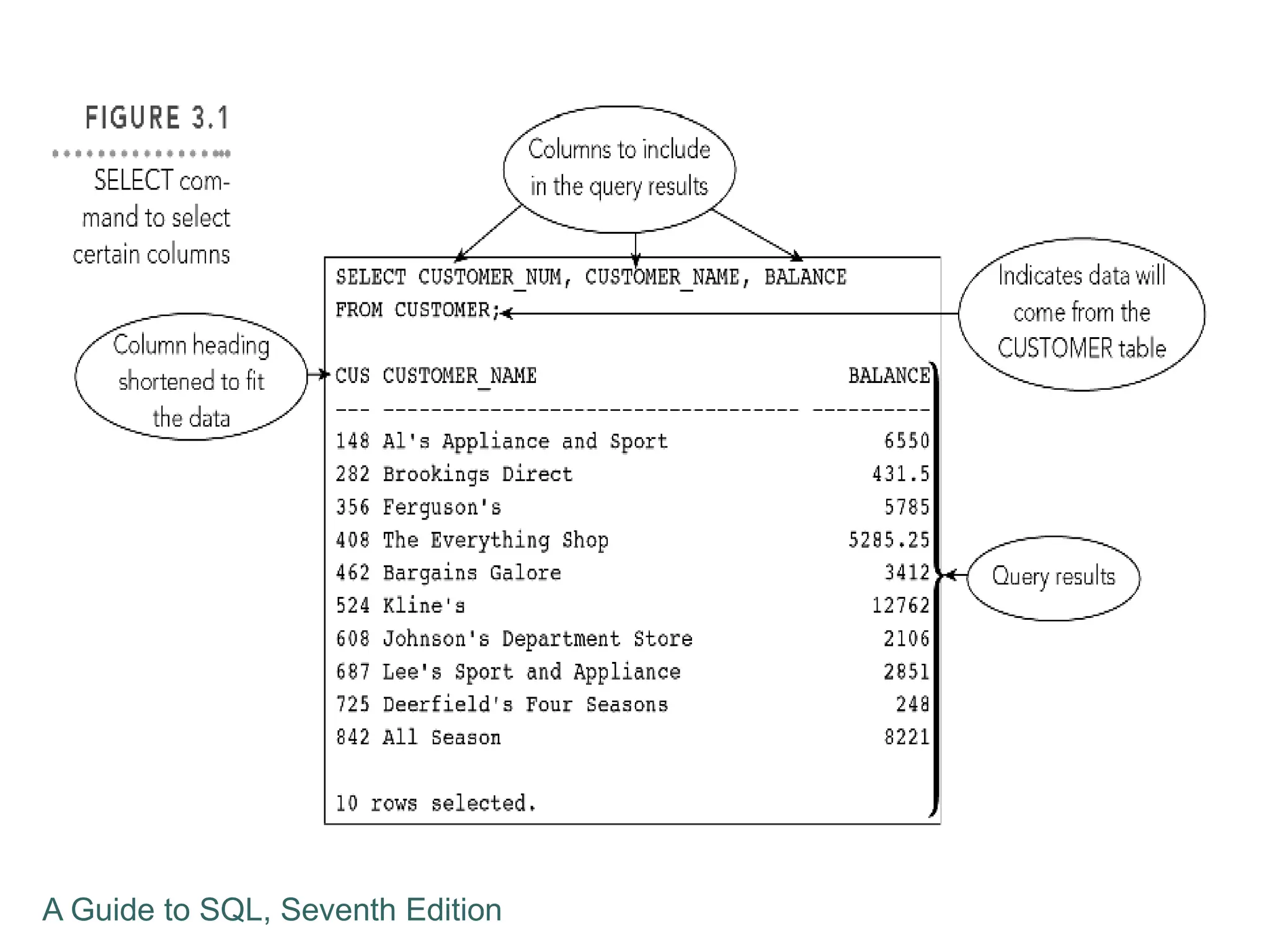
 A command can retrieve specified columns and all
rows
 List the number, name and balance of all
customers
 No WHERE clause is needed, because all
customers are requested
A Guide to SQL, Seventh Edition
Retrieving All Columns and Rows
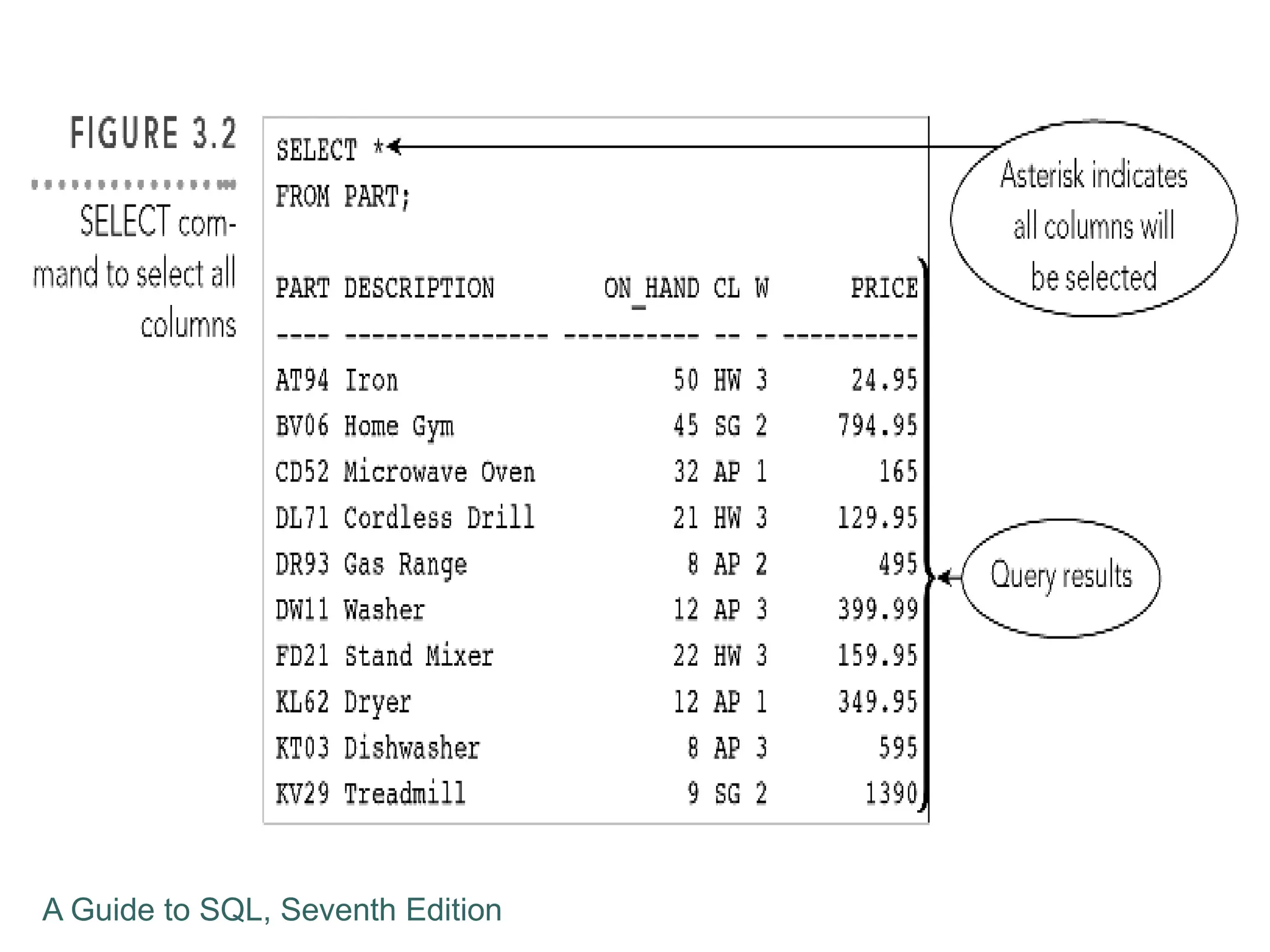
 Use an asterisk (*) to indicate all columns in the
SELECT clause
 Results will list all columns in the order in the
description when the table was created
 List columns in SELECT clause to present
columns in a different order
A Guide to SQL, Seventh Edition
Using a WHERE Clause
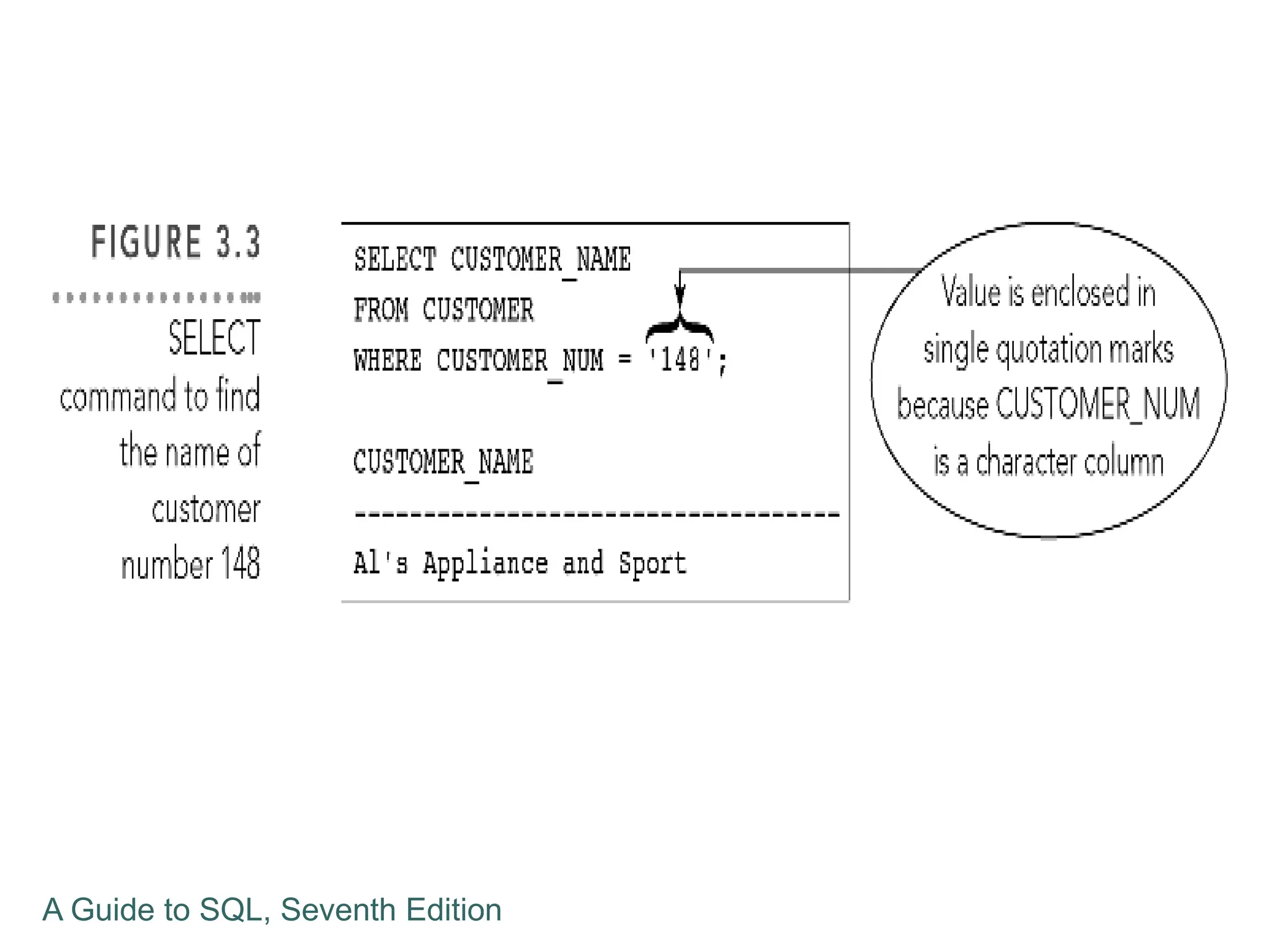
 WHERE clause is used to retrieve rows that
satisfy some condition
 What is the name of customer number 148?
 A simple condition form: column name,
comparison operator, and then either a column
name or a value
A Guide to SQL, Seventh Edition
Using a WHERE Clause
 Character values in SQL are case sensitive
 “Grove” is different than “grove”
 Simple conditions can compare columns
 WHERE BALANCE > CREDIT_LIMIT
A Guide to SQL, Seventh Edition
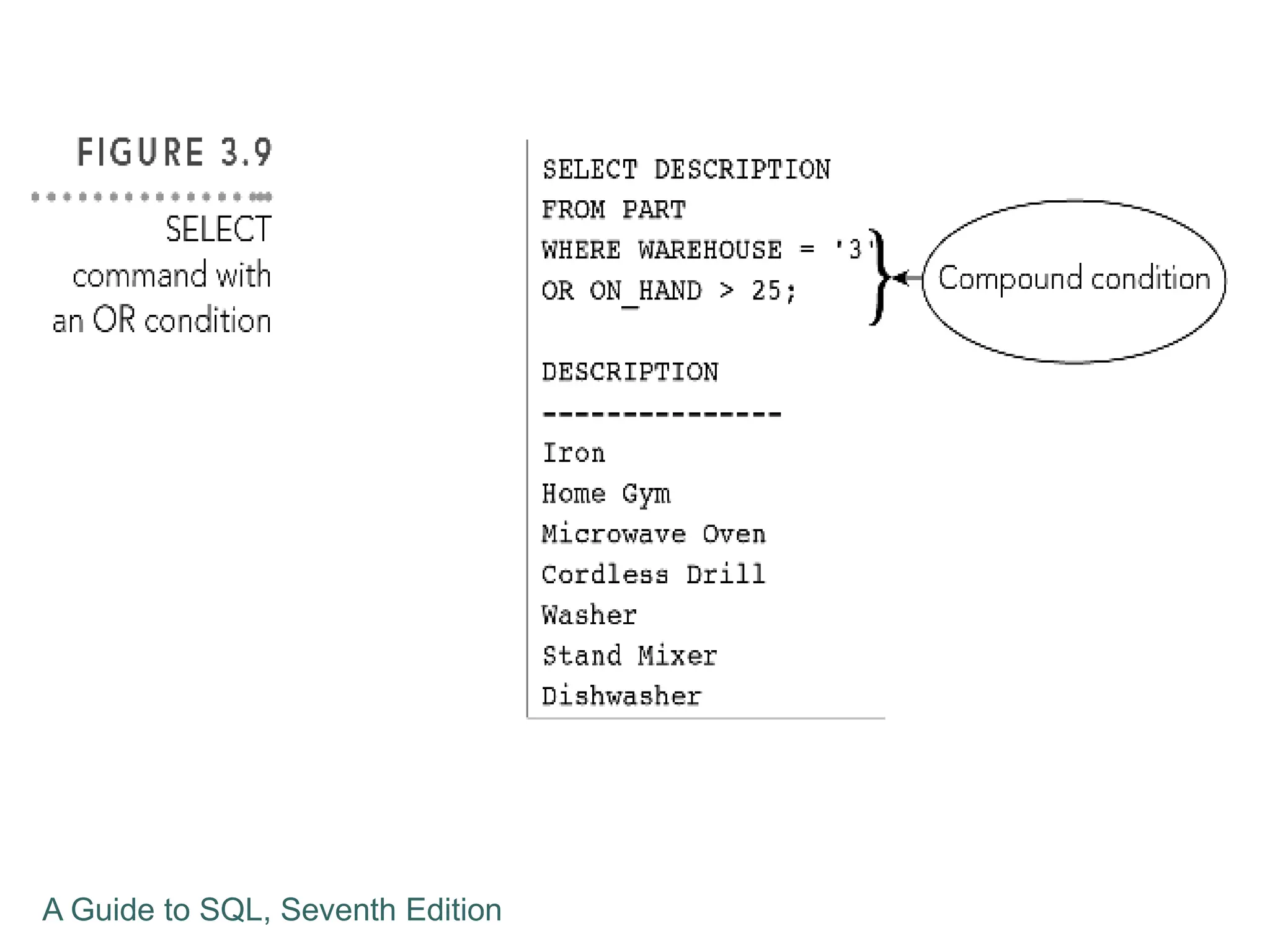
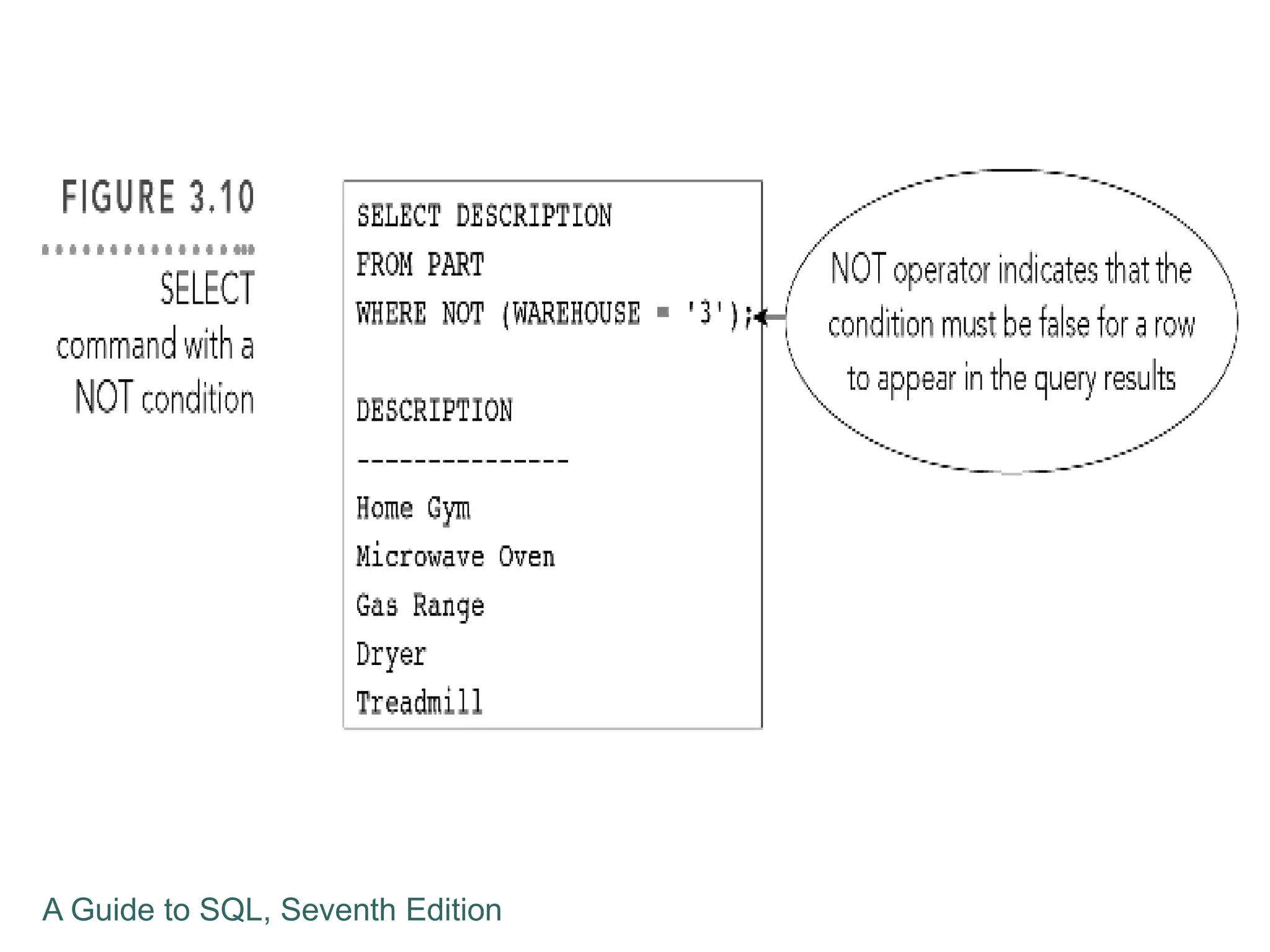
Using Compound Conditions
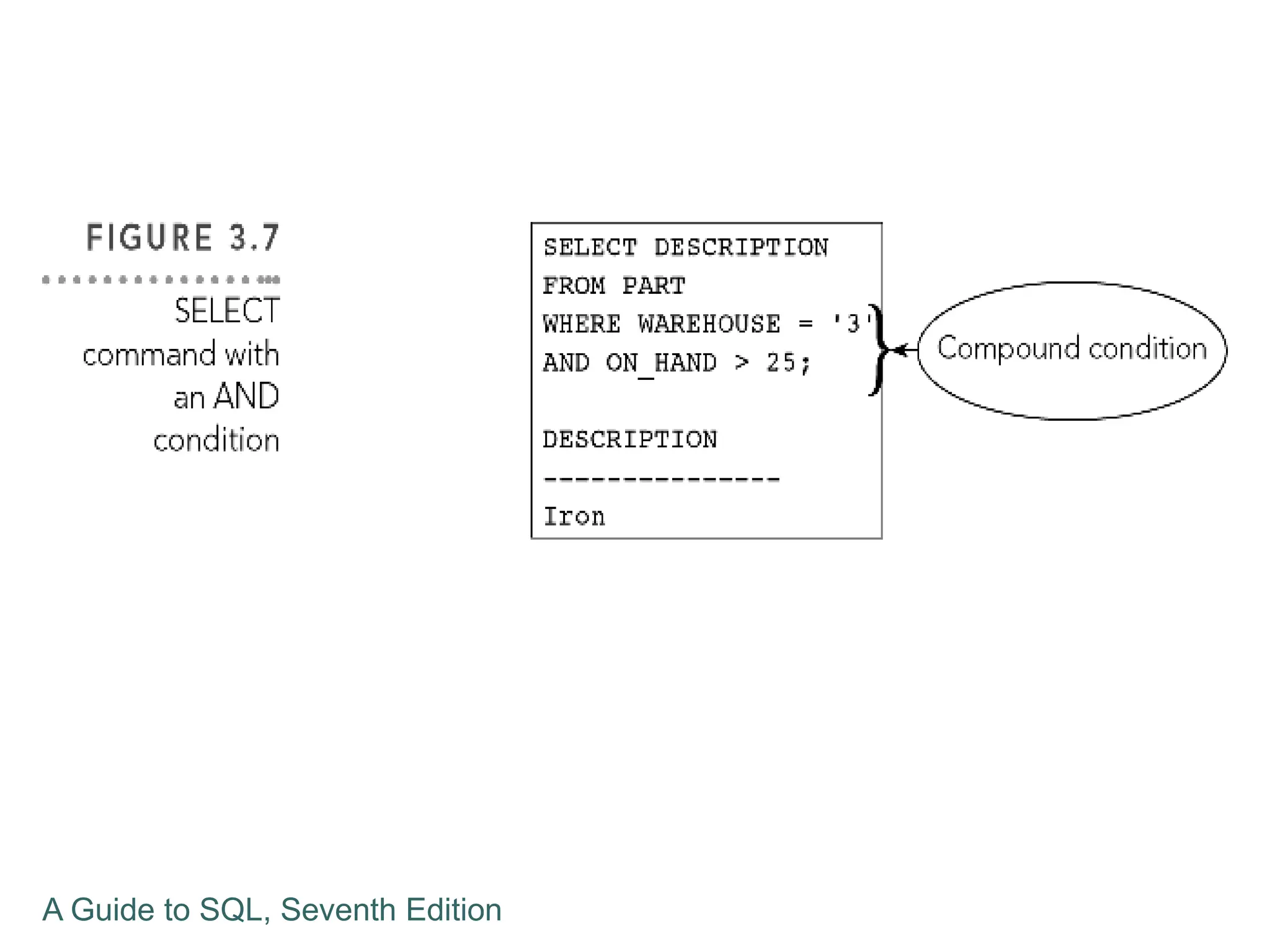
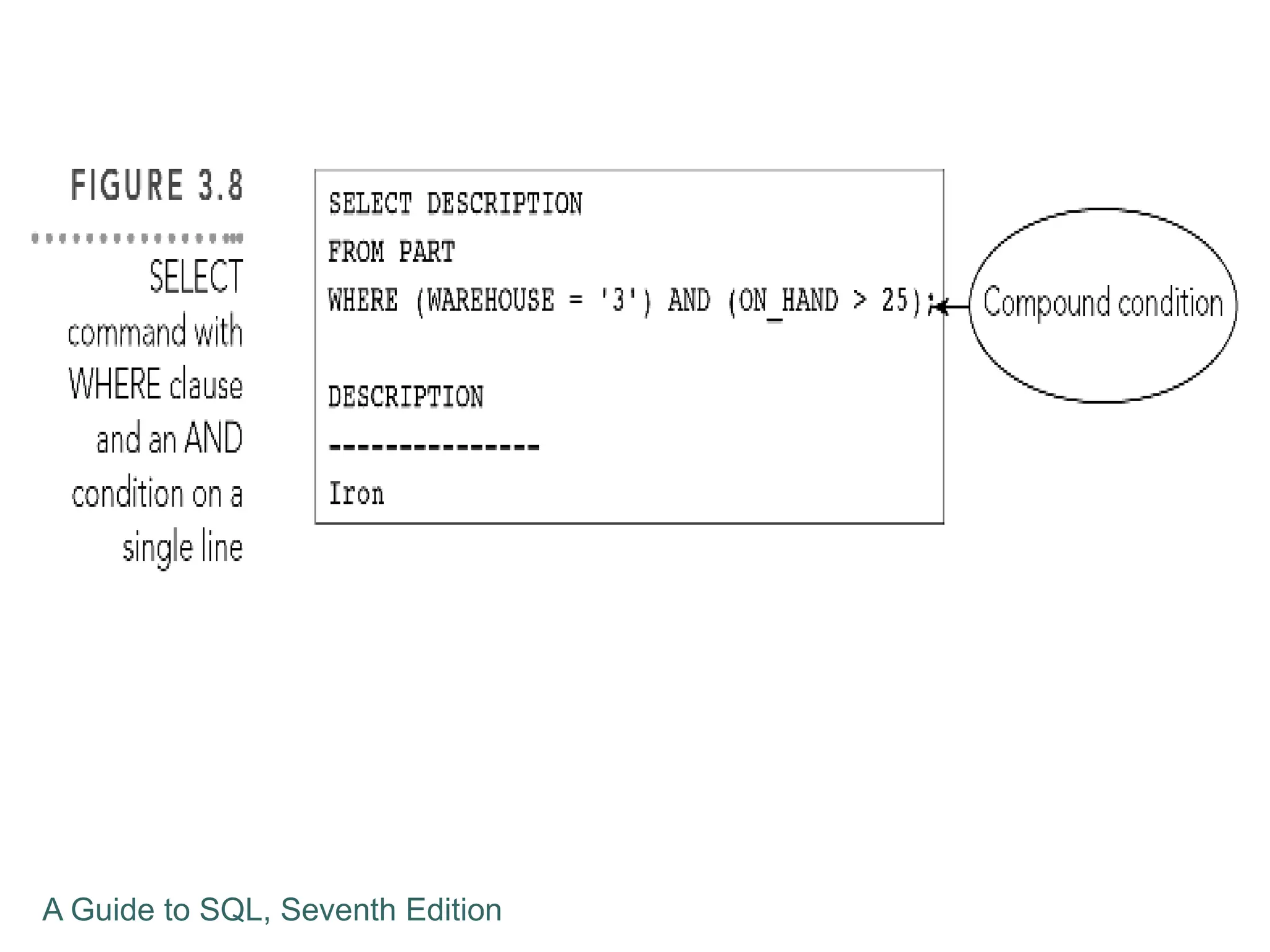
 Compound conditions connect two or more
simple conditions with AND, OR, and NOT
operators
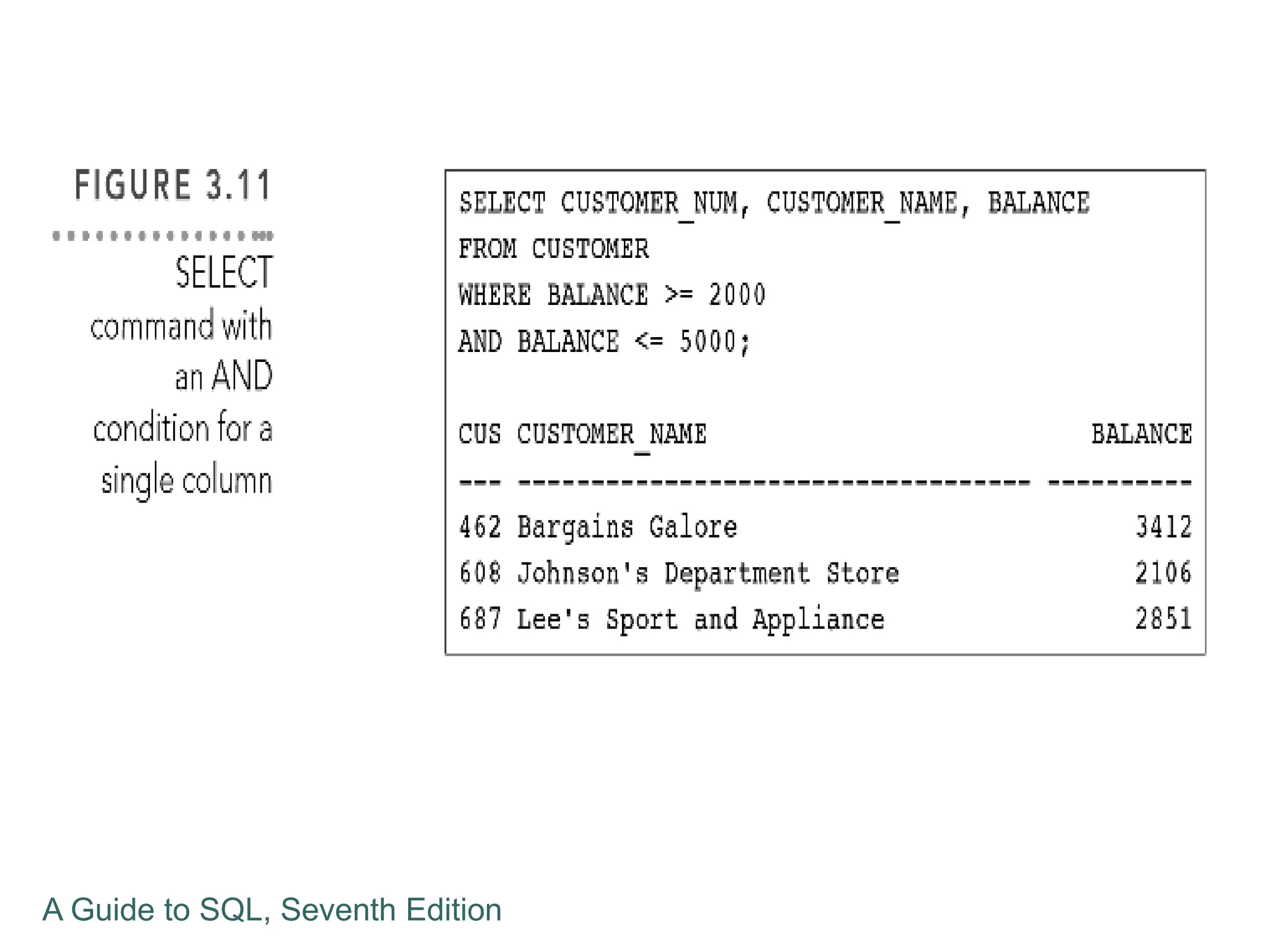
 AND operator shows results that all simple
conditions are true
 OR operator shows results that any simple
condition is true
 NOT operator reverses the truth of the original
condition
A Guide to SQL, Seventh Edition
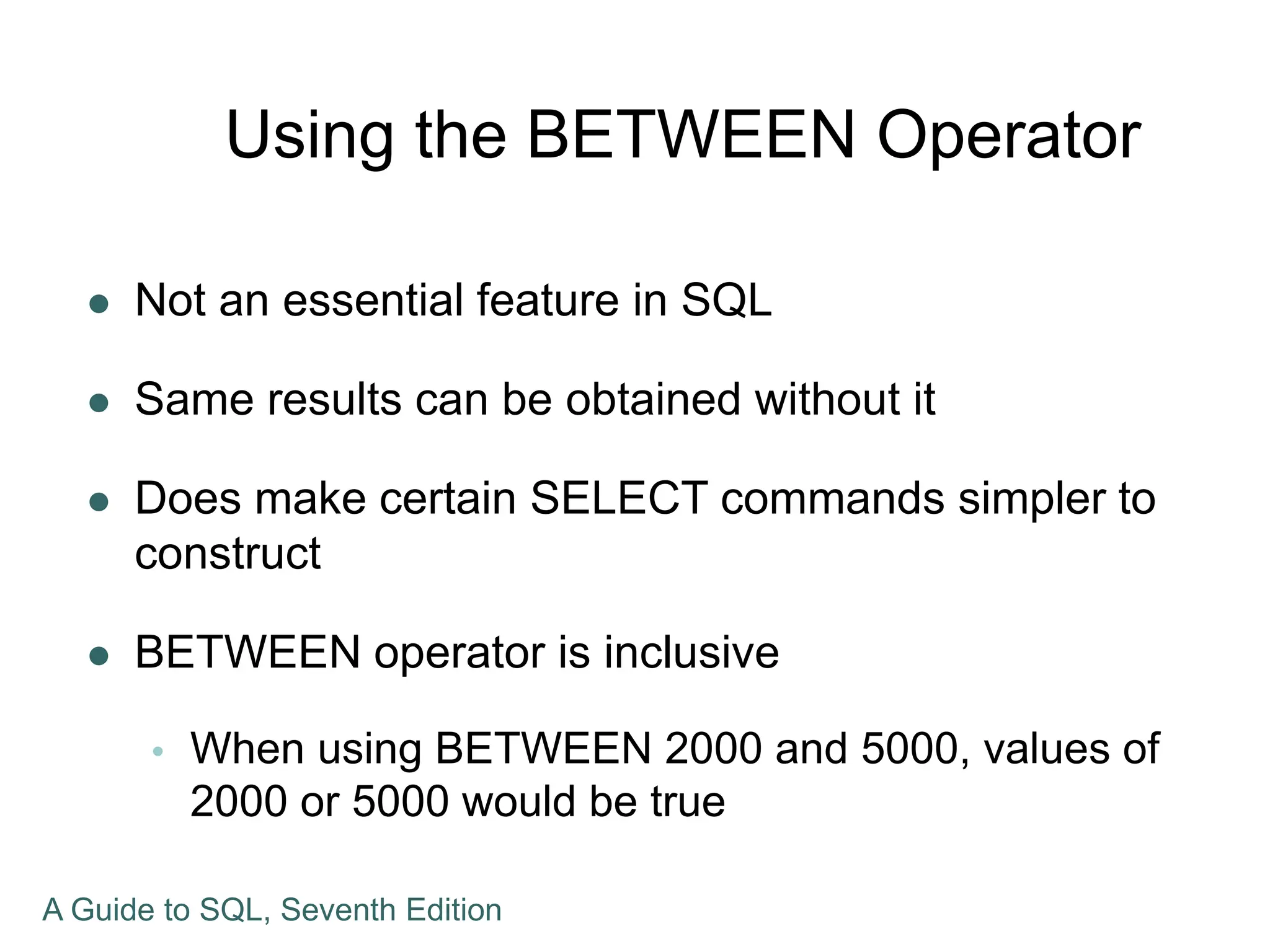
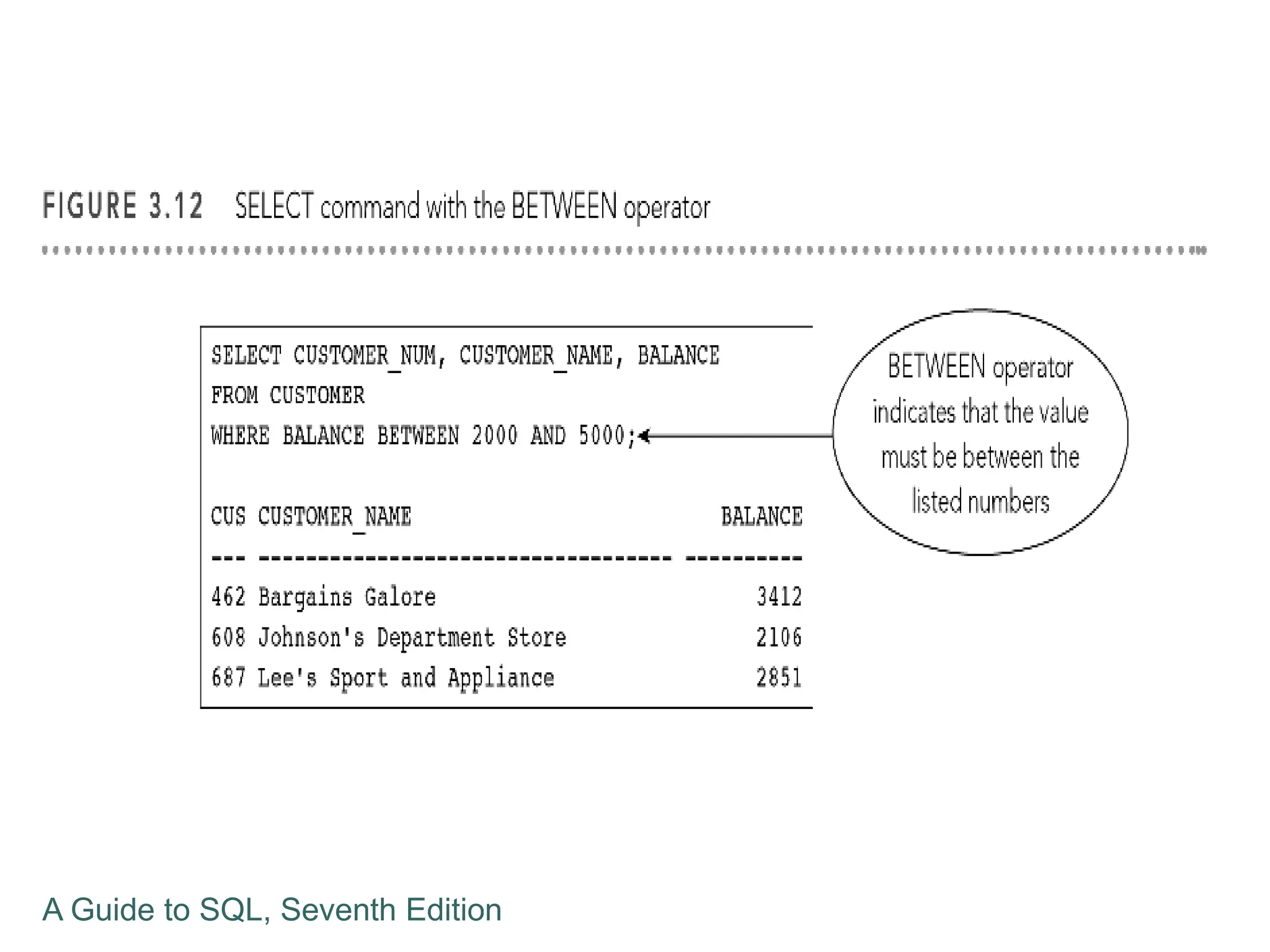
Using the BETWEEN Operator
 Not an essential feature in SQL
 Same results can be obtained without it
 Does make certain SELECT commands simpler to
construct
 BETWEEN operator is inclusive
 When using BETWEEN 2000 and 5000, values of
2000 or 5000 would be true
A Guide to SQL, Seventh Edition
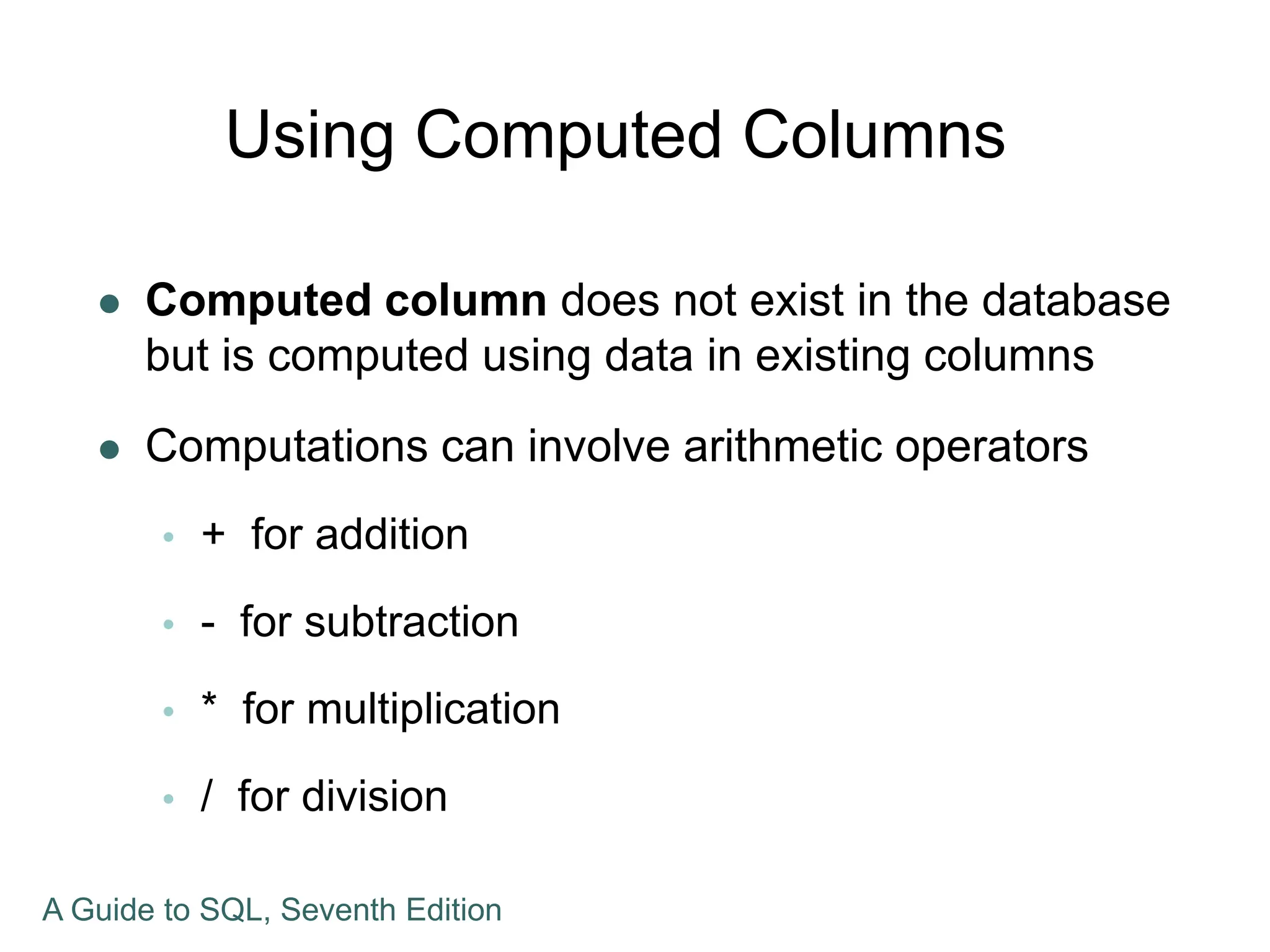
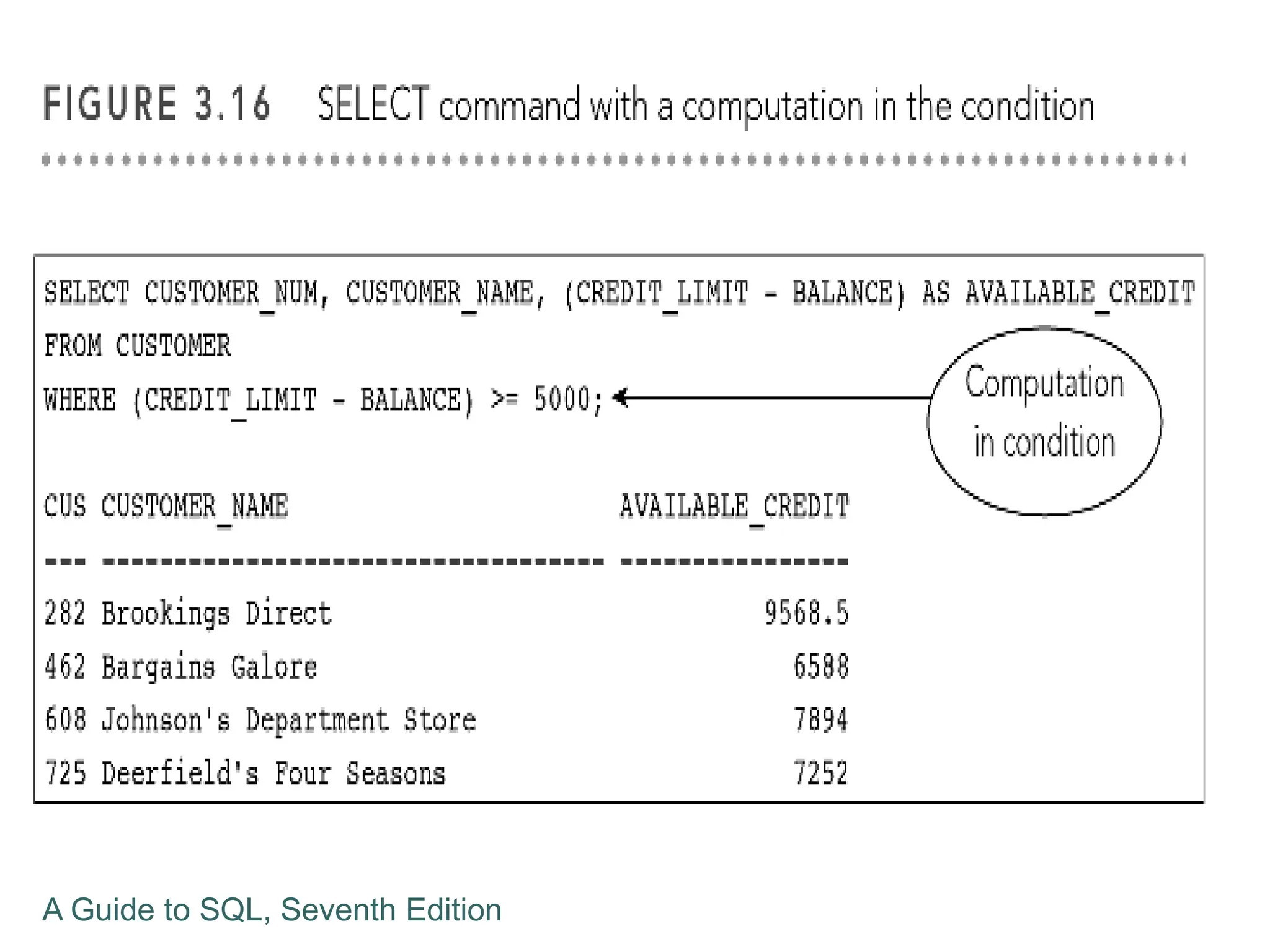
Using Computed Columns
 Computed column does not exist in the database
but is computed using data in existing columns
 Computations can involve arithmetic operators
 + for addition
 - for subtraction
 * for multiplication
 / for division
A Guide to SQL, Seventh Edition
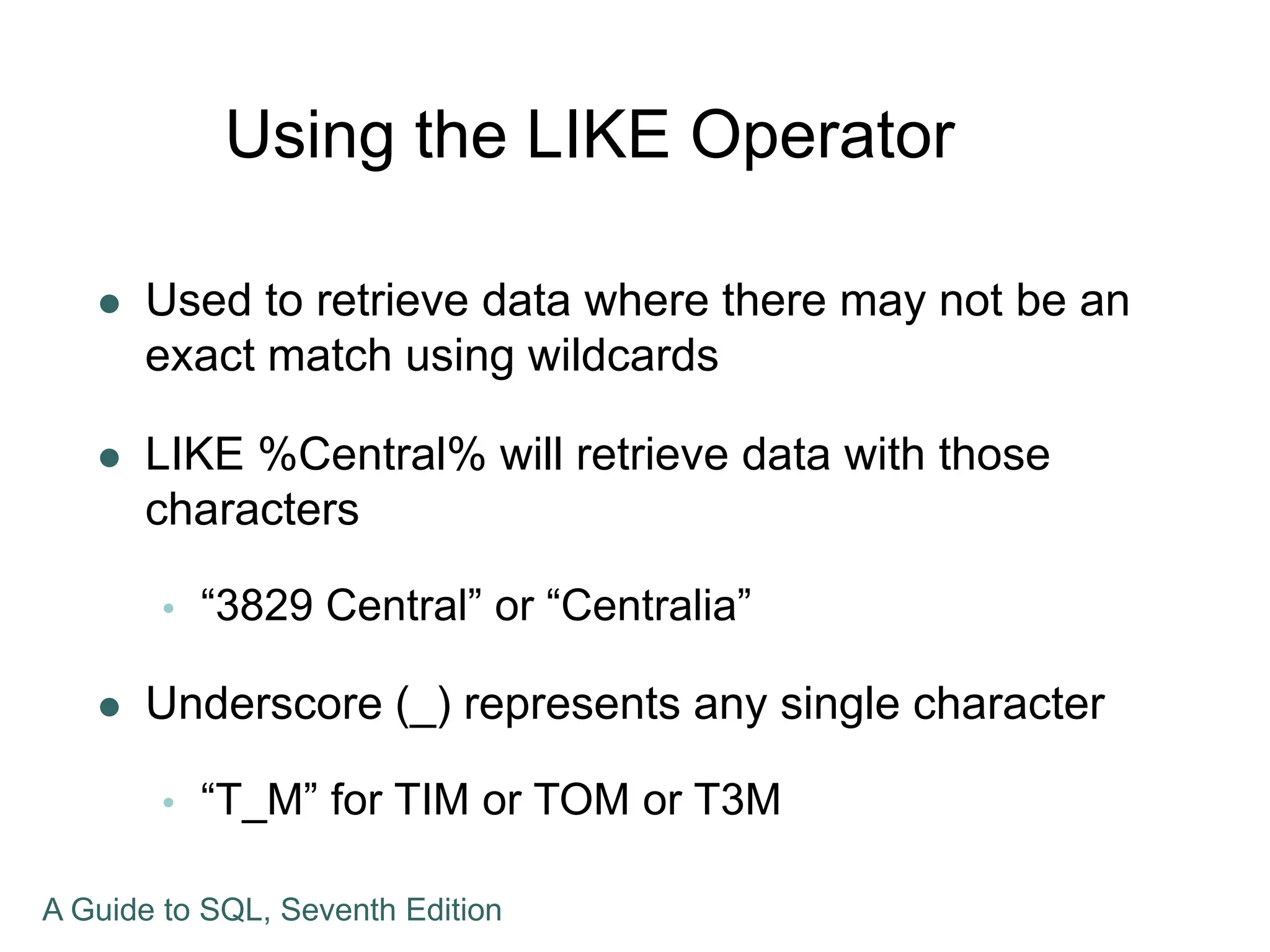
Using the LIKE Operator
 Used to retrieve data where there may not be an
exact match using wildcards
 LIKE %Central% will retrieve data with those
characters
 “3829 Central” or “Centralia”
 Underscore (_) represents any single character
 “T_M” for TIM or TOM or T3M
A Guide to SQL, Seventh Edition
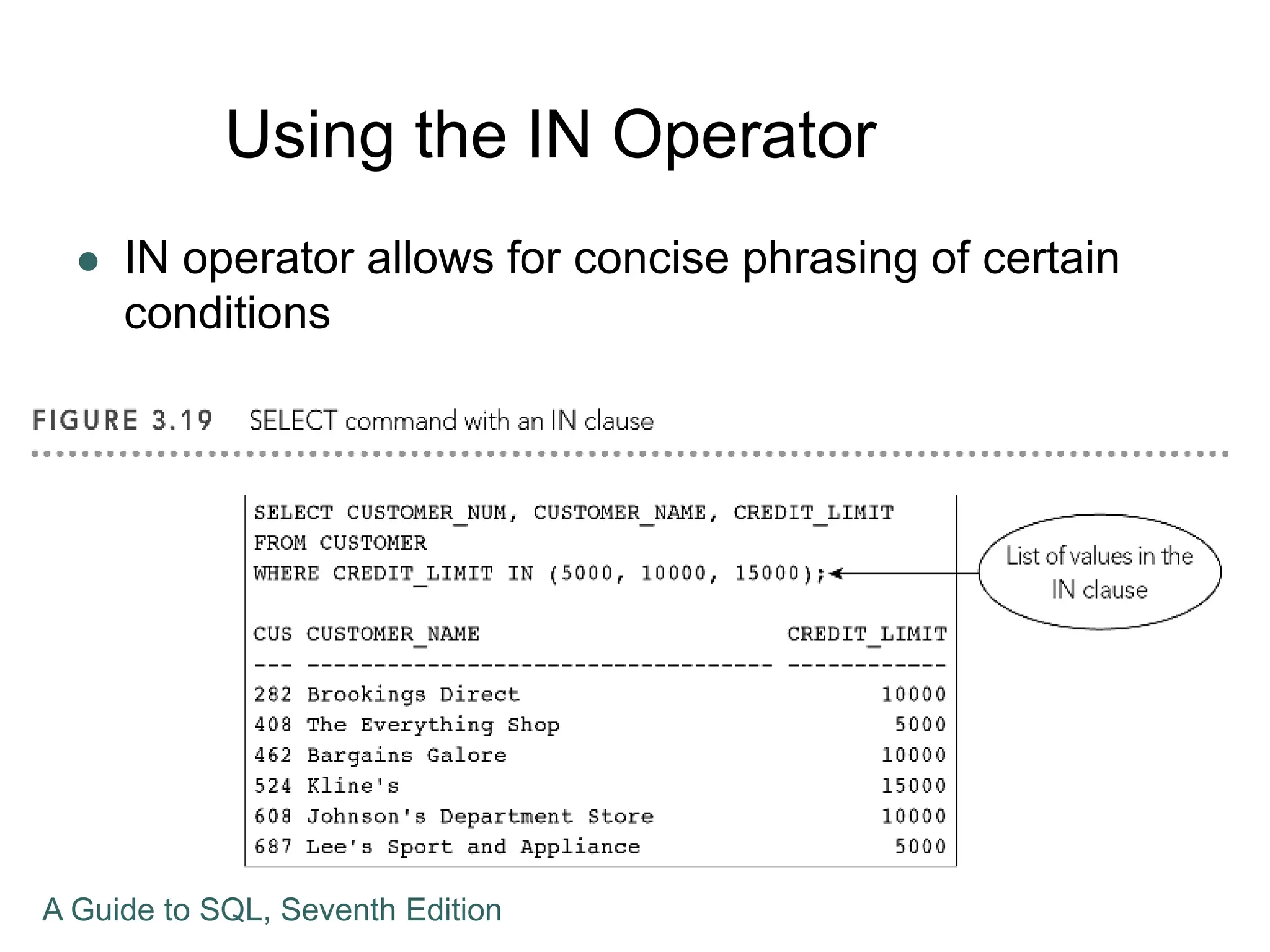
Using the IN Operator
 IN operator allows for concise phrasing of certain
conditions
A Guide to SQL, Seventh Edition
Sorting
 ORDER BY clause to list data in a specific order
 Column on which data is to be sorted is the sort
key
 Use ORDER BY clause followed by sort key
 Rows are sorted in ascending order unless
another order is specified
A Guide to SQL, Seventh Edition
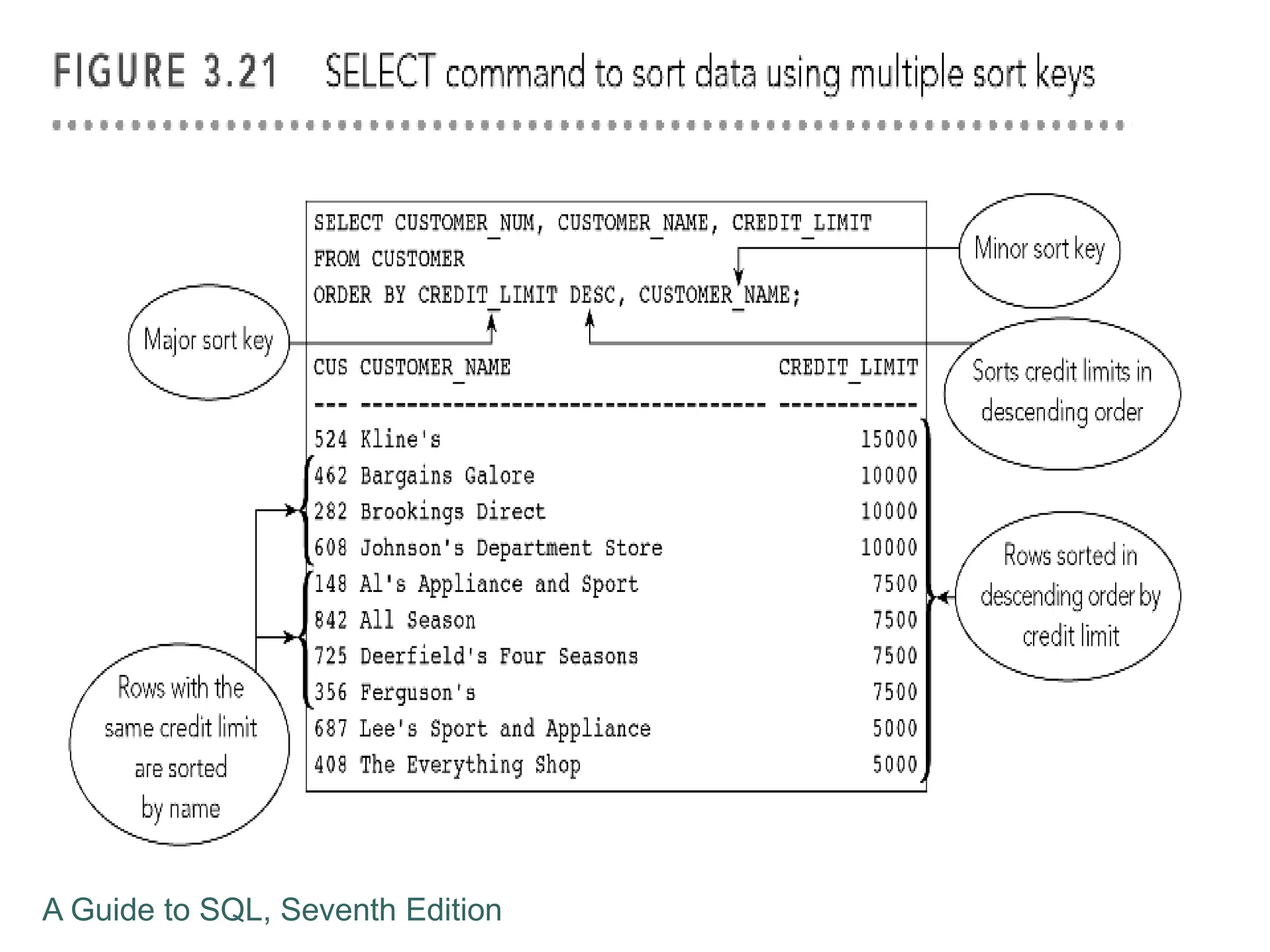
Additional Sorting Options
 Possible to sort data by more than one key
 Major sort key and minor sort key
 List sort keys in order of importance in the
ORDER BY clause
 For descending order sort, use DESC
A Guide to SQL, Seventh Edition
Using Functions
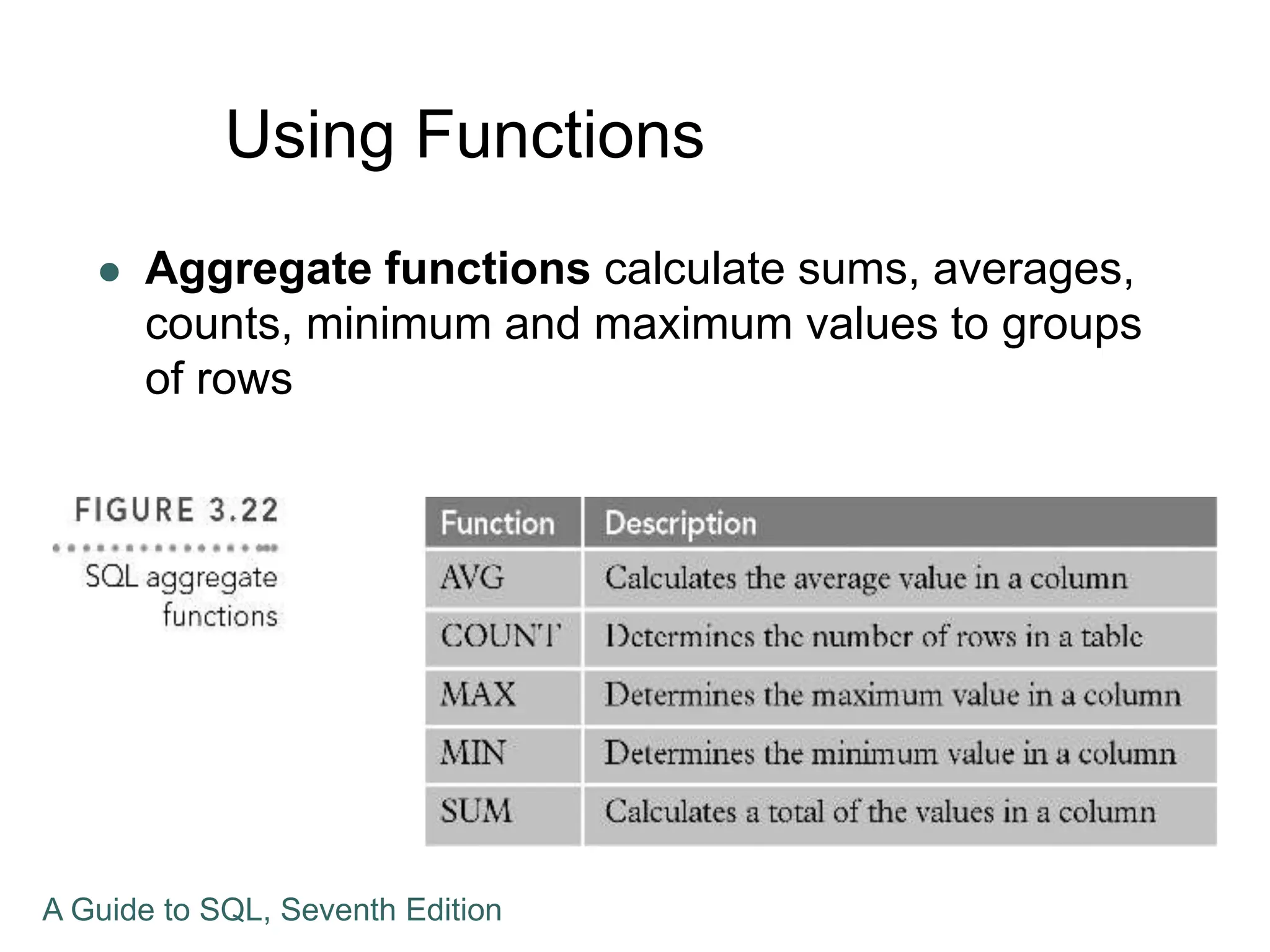
 Aggregate functions calculate sums, averages,
counts, minimum and maximum values to groups
of rows
A Guide to SQL, Seventh Edition
Using the COUNT Function
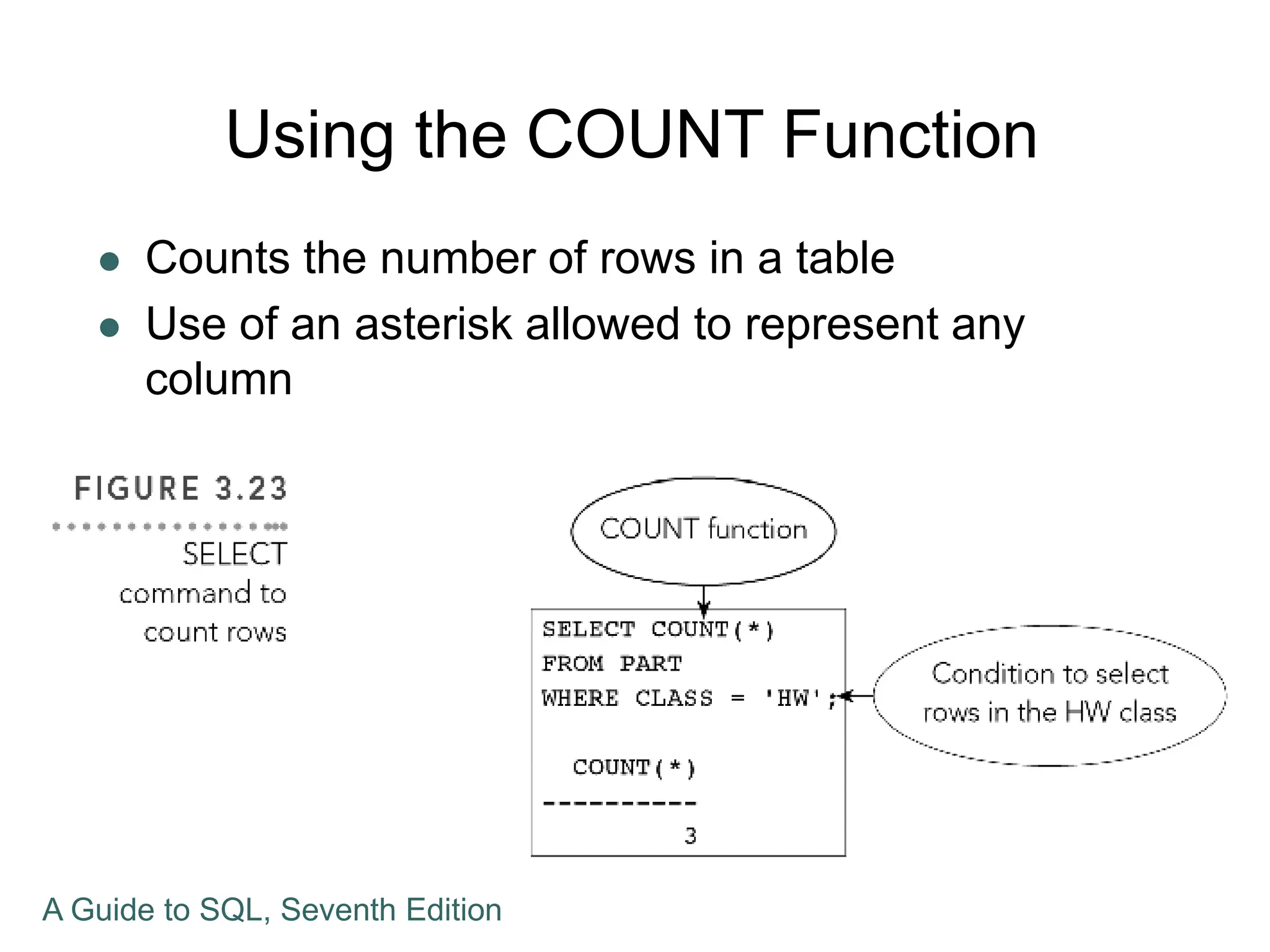
 Counts the number of rows in a table
 Use of an asterisk allowed to represent any
column
A Guide to SQL, Seventh Edition
Using the SUM Function
 Used to calculate totals of columns
 Column to be summed must be specified and
must be numeric
 AVG, MAX, and MIN functions are similar,
resulting in different statistics
 Null values are ignored and not used in these
calculations
A Guide to SQL, Seventh Edition
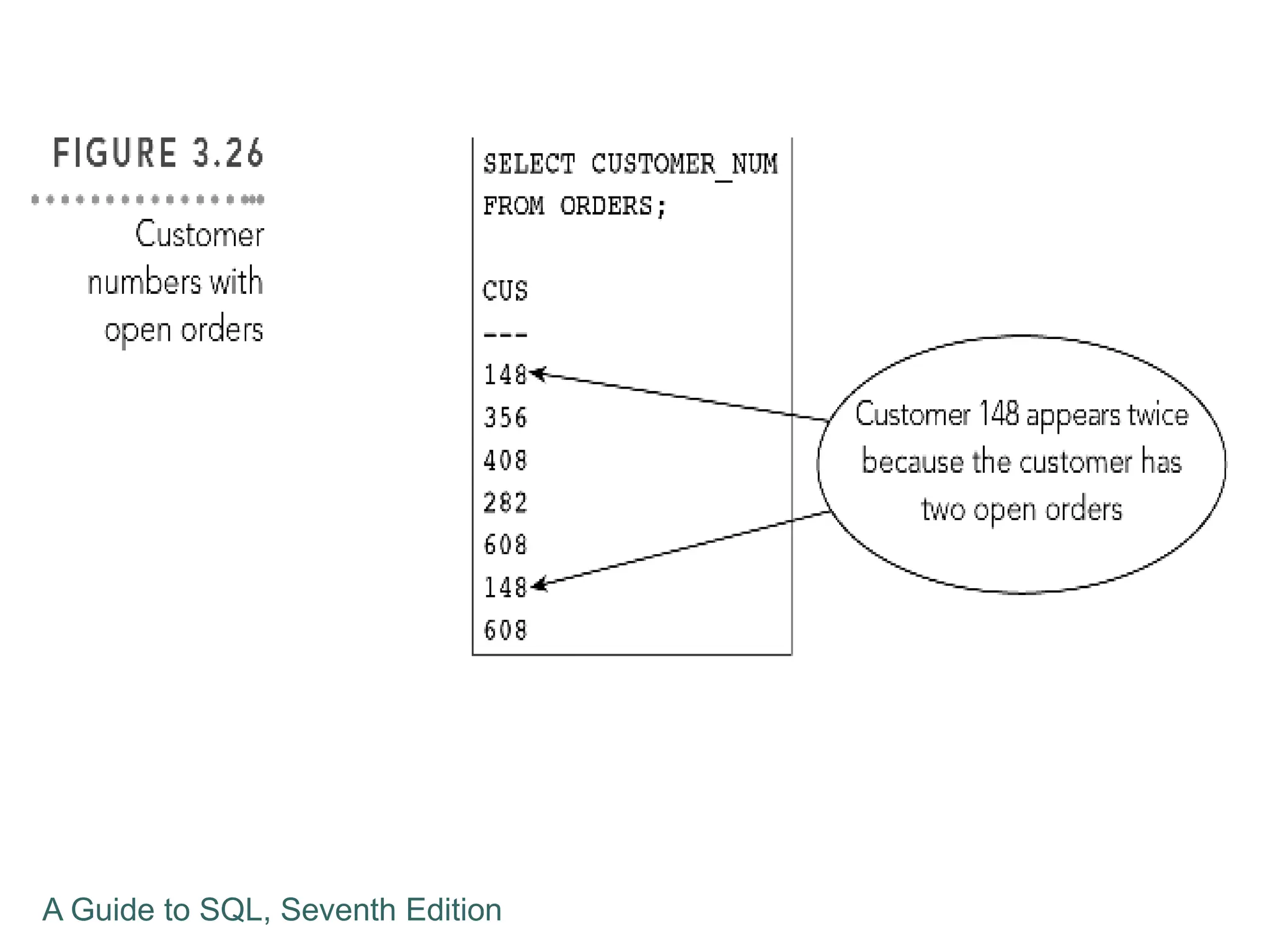
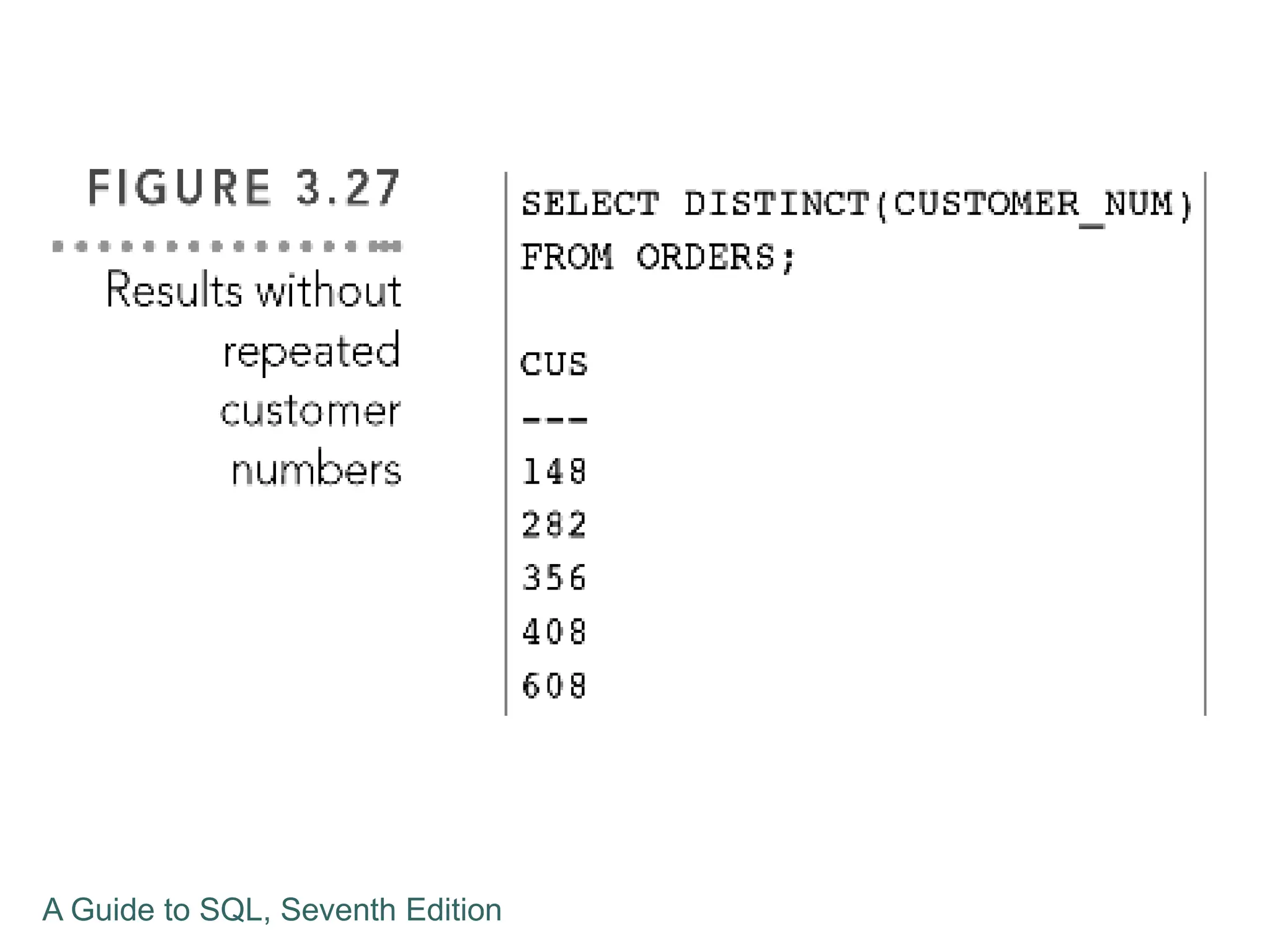
Using the DISTINCT Operator
 Used to ensure uniqueness in the data results
A Guide to SQL, Seventh Edition
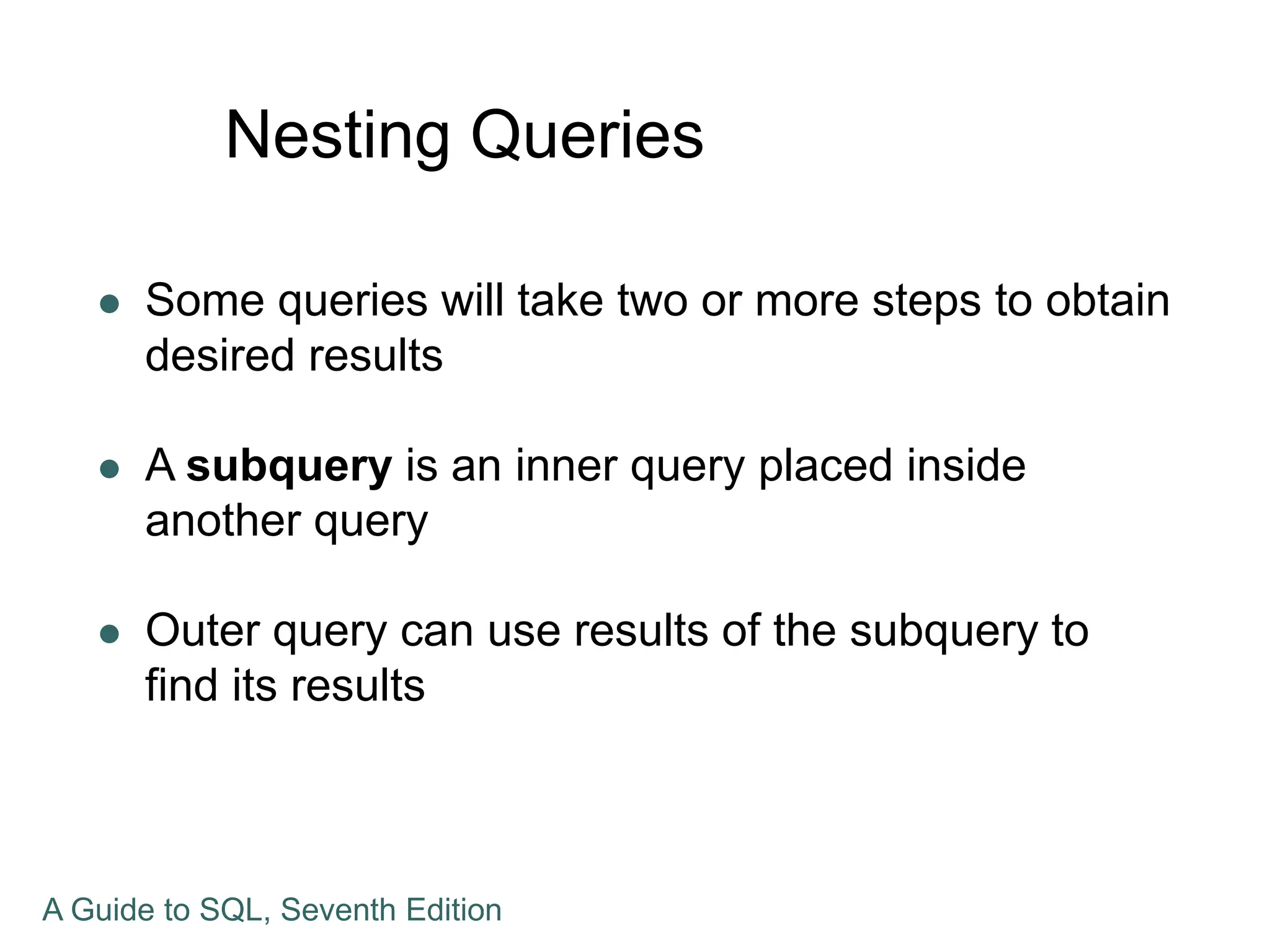
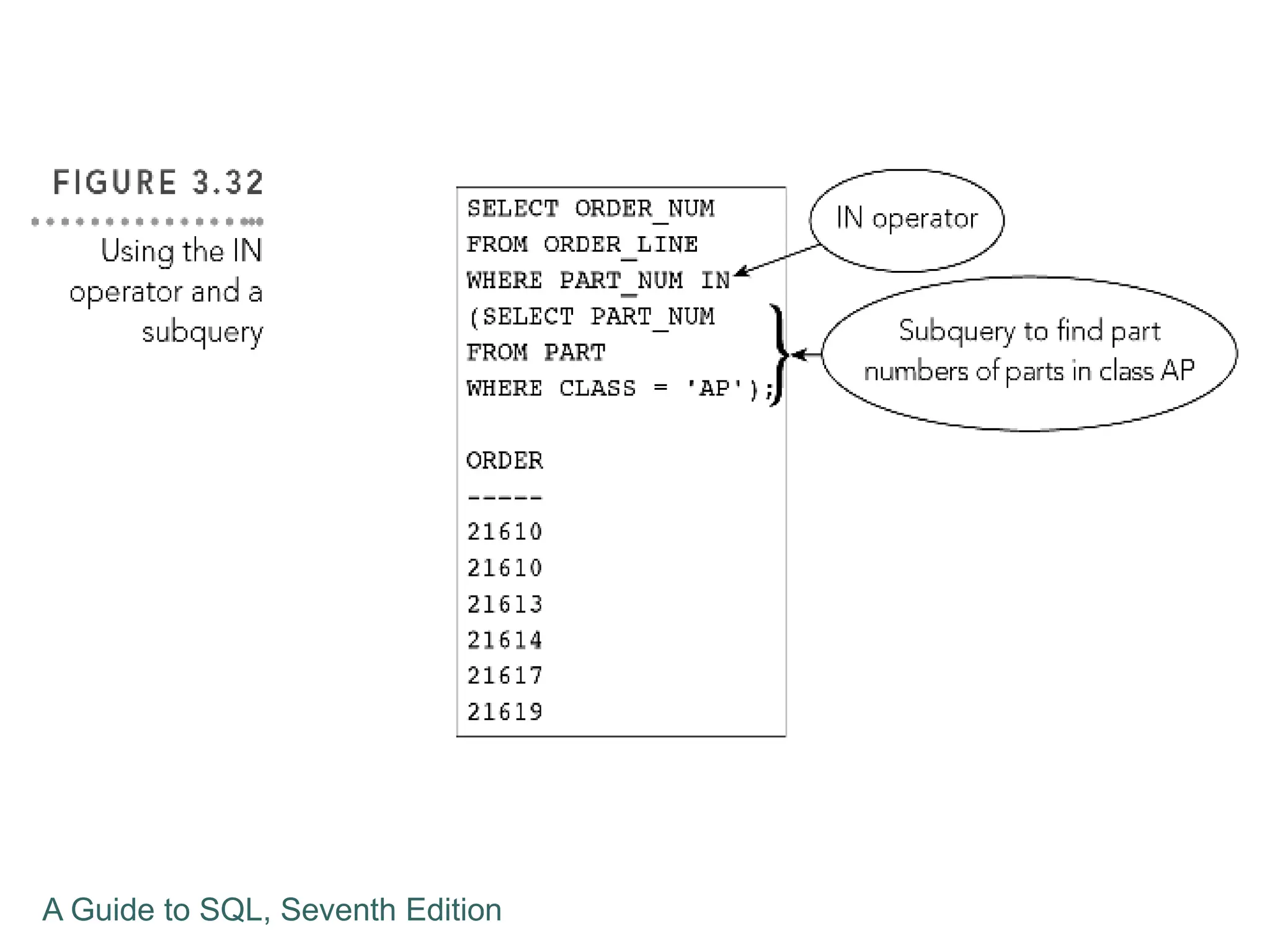
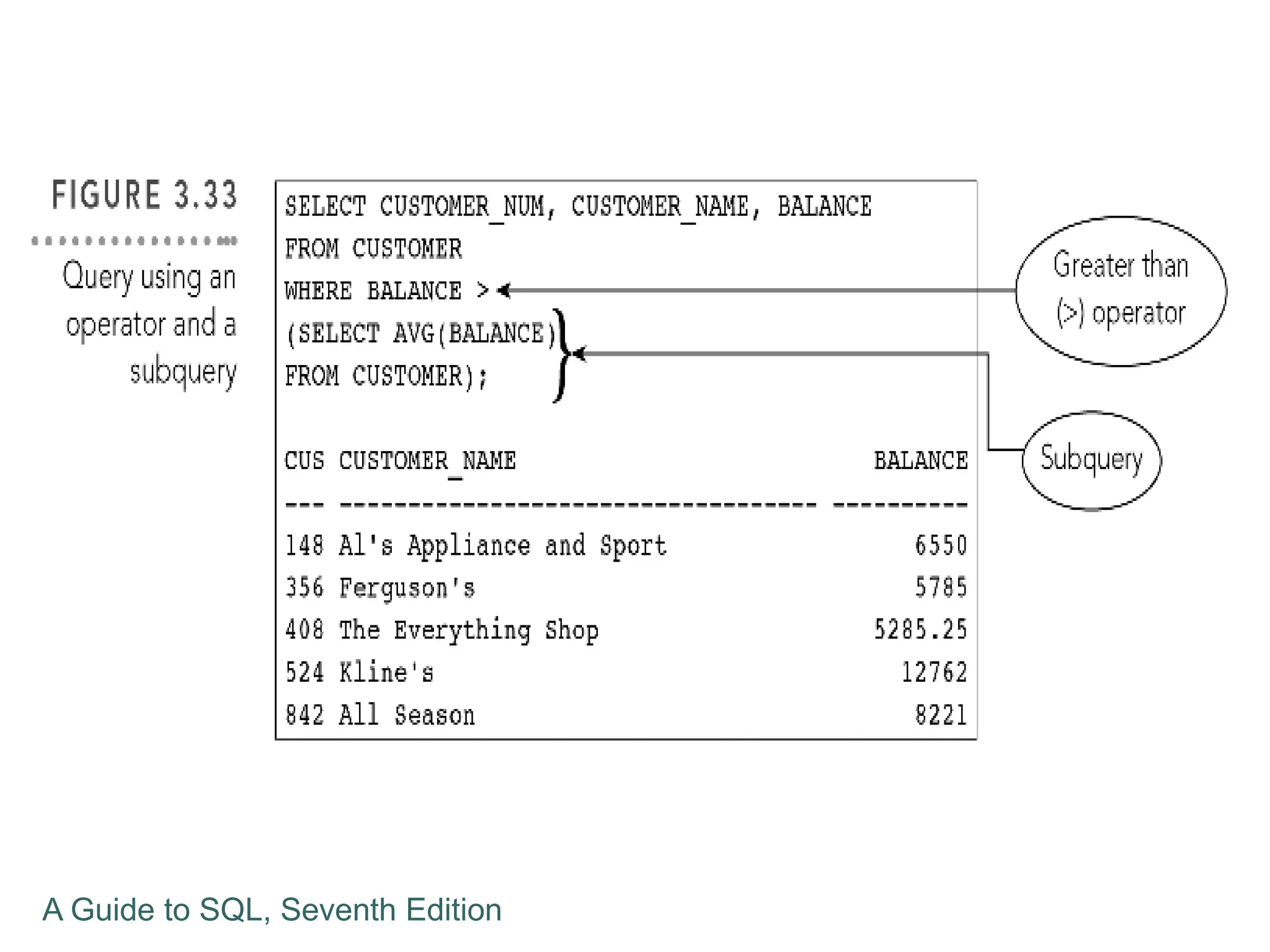
Nesting Queries
 Some queries will take two or more steps to obtain
desired results
 A subquery is an inner query placed inside
another query
 Outer query can use results of the subquery to
find its results
A Guide to SQL, Seventh Edition
Grouping
 Grouping creates groups of rows that share
common characteristics
 Calculations in the SELECT command are
performed for entire groups
 Data can be GROUPED BY a particular column,
such as REP_NUM and then the statistics are
calculated
 One line of output is produced for each group
A Guide to SQL, Seventh Edition
Using a HAVING Clause
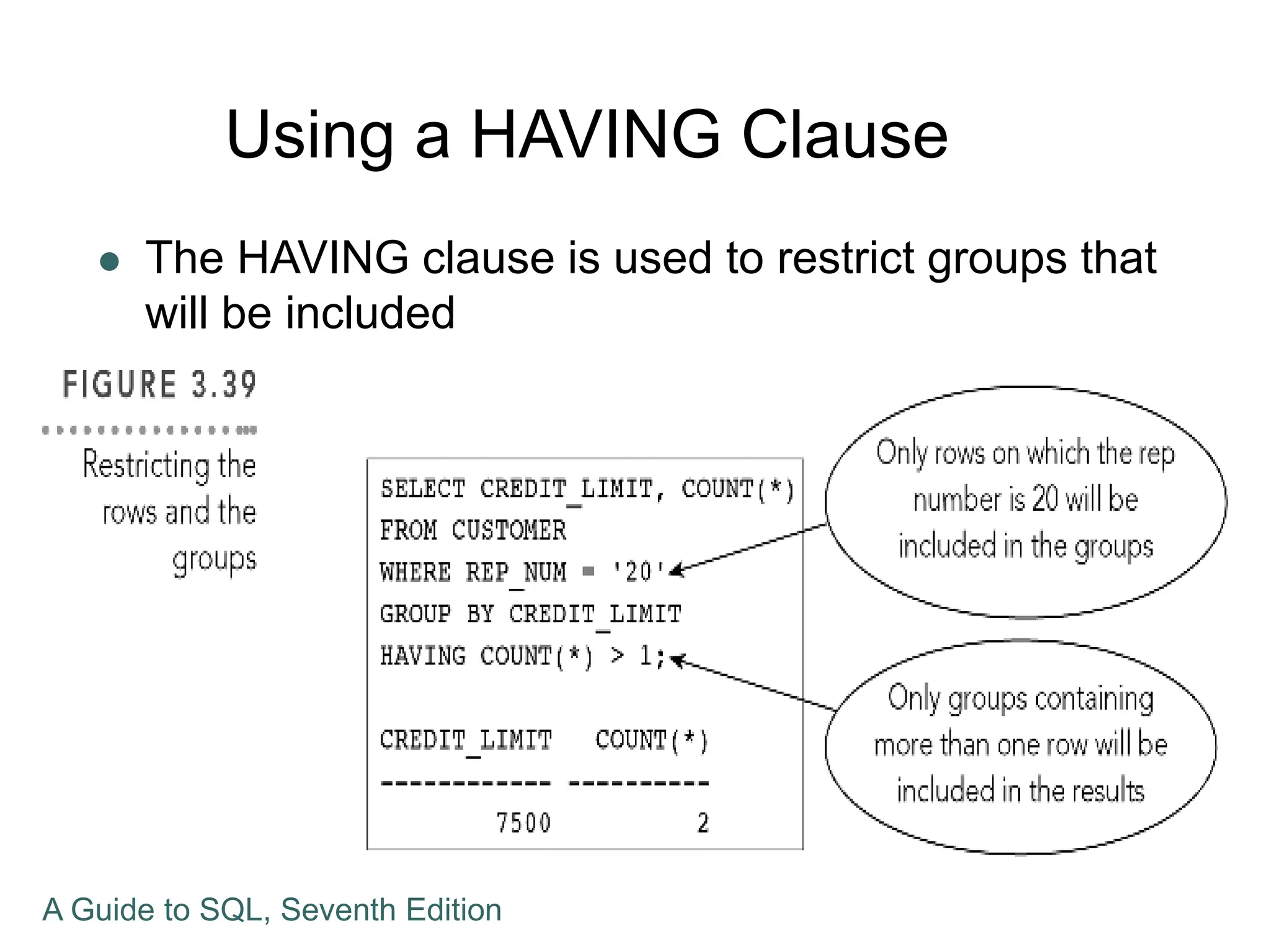
 The HAVING clause is used to restrict groups that
will be included
A Guide to SQL, Seventh Edition
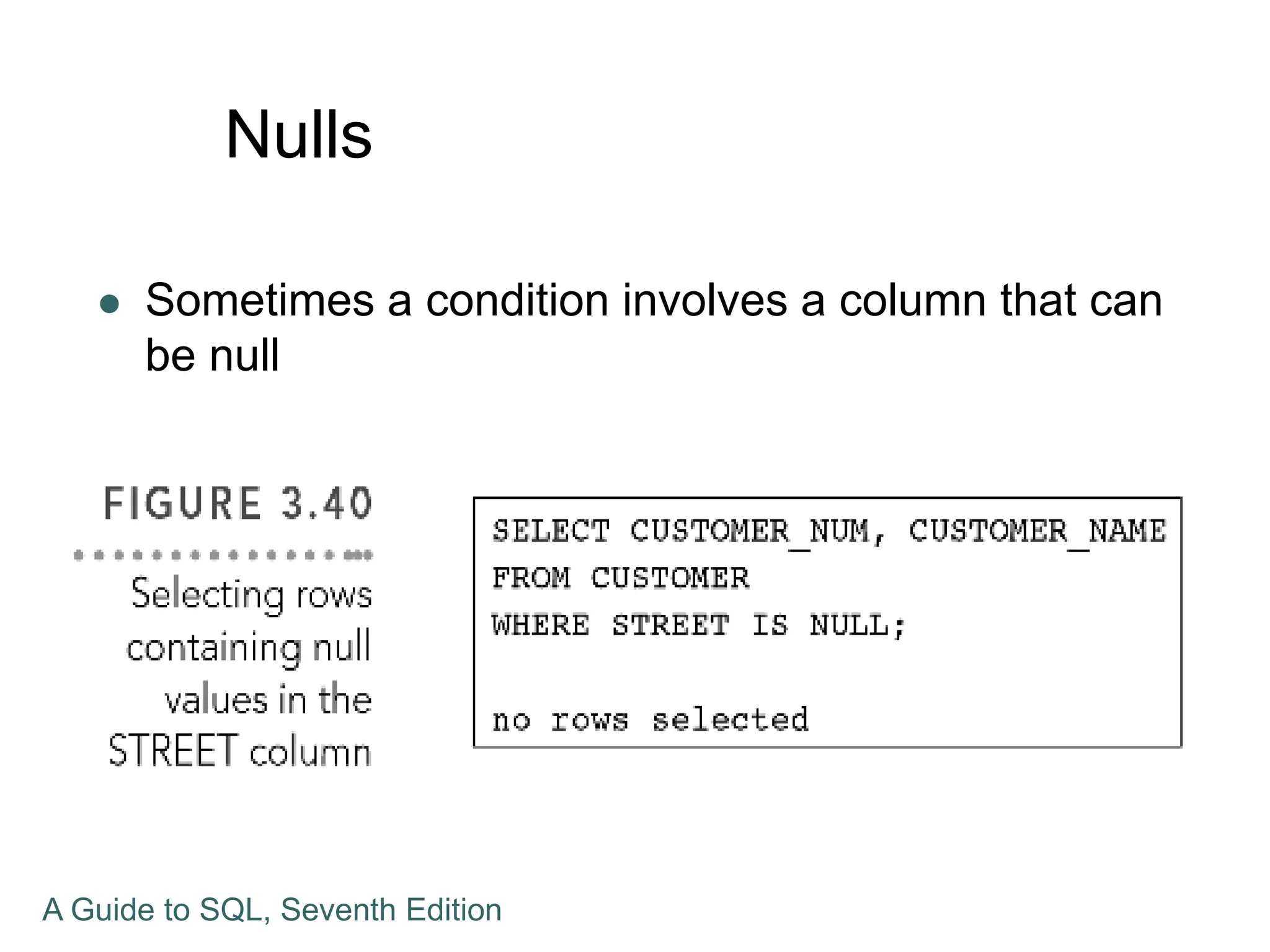
Nulls
 Sometimes a condition involves a column that can
be null
A Guide to SQL, Seventh Edition
Summary
 Create queries that retrieve data from single tables
using SELECT commands
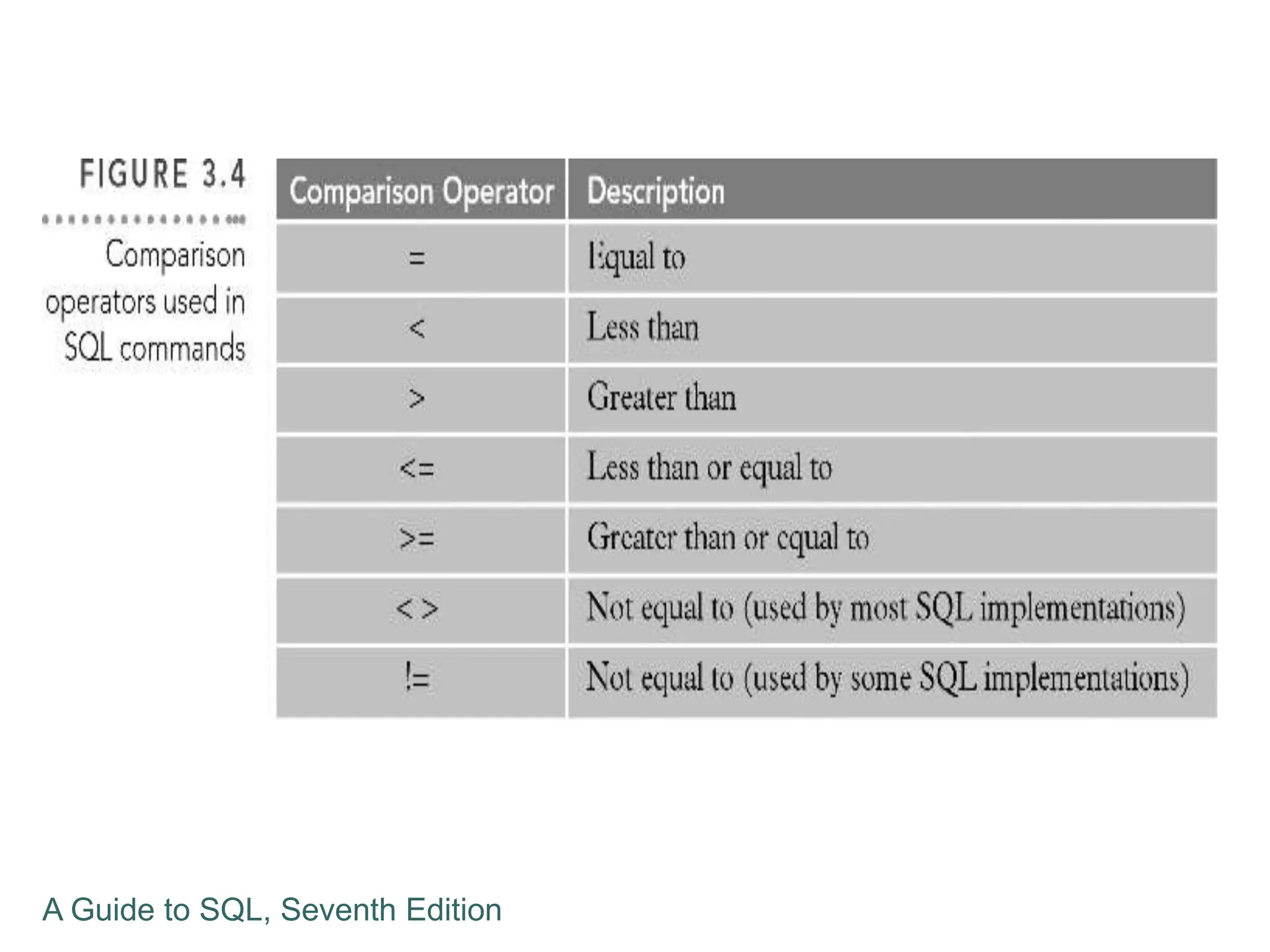
 Comparison operators: =, >,=>,<,=<, or <>, or !=
 Compound conditions using AND,OR, and NOT
 Use the BETWEEN operator
 Use the LIKE operator
A Guide to SQL, Seventh Edition
Summary
 Use the IN operator
 Use and ORDER BY clause to sort data
 Process aggregate functions with COUNT,
SUM,AVG,MAX, and MIN
 Use the DISTINCT operator and subqueries
 Use GROUP BY, HAVING and IS NULL
A Guide to SQL, Seventh Edition

05. Single Table Query - Sistem Basis Data
  • 1.
    A Guide toSQL, Seventh Edition
  • 2.
    Objectives  Retrieve datafrom a database using SQL commands  Use compound conditions  Use computed columns  Use the SQL LIKE operator  Use the SQL IN operator  Sort data using the ORDER BY clause A Guide to SQL, Seventh Edition
  • 3.
    Objectives  Sort datausing multiple keys and in ascending and descending order  Use SQL aggregate functions  Use subqueries  Group data using the GROUP BY clause  Select individual groups of data using the HAVING clause  Retrieve columns with null values A Guide to SQL, Seventh Edition
  • 4.
    Constructing Simple Queries Important feature of DBMS is ability to answer a wide variety of questions about the data  A query is a question represented in a way that the DBMS can understand  Use the SELECT command to query a database A Guide to SQL, Seventh Edition
  • 5.
    Constructing Simple Queries SELECT-FROM-WHERE is the basic form of the command  SELECT clause is the list of columns to include in query results  FROM clause is the name of the table with the data being queried  WHERE clause is optional, listing any conditions to apply to the data A Guide to SQL, Seventh Edition
  • 6.
    Retrieving Certain Columnsand Rows  A command can retrieve specified columns and all rows  List the number, name and balance of all customers  No WHERE clause is needed, because all customers are requested A Guide to SQL, Seventh Edition
  • 7.
    A Guide toSQL, Seventh Edition
  • 8.
    Retrieving All Columnsand Rows  Use an asterisk (*) to indicate all columns in the SELECT clause  Results will list all columns in the order in the description when the table was created  List columns in SELECT clause to present columns in a different order A Guide to SQL, Seventh Edition
  • 9.
    A Guide toSQL, Seventh Edition
  • 10.
    Using a WHEREClause  WHERE clause is used to retrieve rows that satisfy some condition  What is the name of customer number 148?  A simple condition form: column name, comparison operator, and then either a column name or a value A Guide to SQL, Seventh Edition
  • 11.
    A Guide toSQL, Seventh Edition
  • 12.
    A Guide toSQL, Seventh Edition
  • 13.
    Using a WHEREClause  Character values in SQL are case sensitive  “Grove” is different than “grove”  Simple conditions can compare columns  WHERE BALANCE > CREDIT_LIMIT A Guide to SQL, Seventh Edition
  • 14.
    Using Compound Conditions Compound conditions connect two or more simple conditions with AND, OR, and NOT operators  AND operator shows results that all simple conditions are true  OR operator shows results that any simple condition is true  NOT operator reverses the truth of the original condition A Guide to SQL, Seventh Edition
  • 15.
    A Guide toSQL, Seventh Edition
  • 16.
    A Guide toSQL, Seventh Edition
  • 17.
    A Guide toSQL, Seventh Edition
  • 18.
    A Guide toSQL, Seventh Edition
  • 19.
    Using the BETWEENOperator  Not an essential feature in SQL  Same results can be obtained without it  Does make certain SELECT commands simpler to construct  BETWEEN operator is inclusive  When using BETWEEN 2000 and 5000, values of 2000 or 5000 would be true A Guide to SQL, Seventh Edition
  • 20.
    A Guide toSQL, Seventh Edition
  • 21.
    A Guide toSQL, Seventh Edition
  • 22.
    Using Computed Columns Computed column does not exist in the database but is computed using data in existing columns  Computations can involve arithmetic operators  + for addition  - for subtraction  * for multiplication  / for division A Guide to SQL, Seventh Edition
  • 23.
    A Guide toSQL, Seventh Edition
  • 24.
    Using the LIKEOperator  Used to retrieve data where there may not be an exact match using wildcards  LIKE %Central% will retrieve data with those characters  “3829 Central” or “Centralia”  Underscore (_) represents any single character  “T_M” for TIM or TOM or T3M A Guide to SQL, Seventh Edition
  • 25.
    Using the INOperator  IN operator allows for concise phrasing of certain conditions A Guide to SQL, Seventh Edition
  • 26.
    Sorting  ORDER BYclause to list data in a specific order  Column on which data is to be sorted is the sort key  Use ORDER BY clause followed by sort key  Rows are sorted in ascending order unless another order is specified A Guide to SQL, Seventh Edition
  • 27.
    Additional Sorting Options Possible to sort data by more than one key  Major sort key and minor sort key  List sort keys in order of importance in the ORDER BY clause  For descending order sort, use DESC A Guide to SQL, Seventh Edition
  • 28.
    A Guide toSQL, Seventh Edition
  • 29.
    Using Functions  Aggregatefunctions calculate sums, averages, counts, minimum and maximum values to groups of rows A Guide to SQL, Seventh Edition
  • 30.
    Using the COUNTFunction  Counts the number of rows in a table  Use of an asterisk allowed to represent any column A Guide to SQL, Seventh Edition
  • 31.
    Using the SUMFunction  Used to calculate totals of columns  Column to be summed must be specified and must be numeric  AVG, MAX, and MIN functions are similar, resulting in different statistics  Null values are ignored and not used in these calculations A Guide to SQL, Seventh Edition
  • 32.
    Using the DISTINCTOperator  Used to ensure uniqueness in the data results A Guide to SQL, Seventh Edition
  • 33.
    A Guide toSQL, Seventh Edition
  • 34.
    A Guide toSQL, Seventh Edition
  • 35.
    Nesting Queries  Somequeries will take two or more steps to obtain desired results  A subquery is an inner query placed inside another query  Outer query can use results of the subquery to find its results A Guide to SQL, Seventh Edition
  • 36.
    A Guide toSQL, Seventh Edition
  • 37.
    A Guide toSQL, Seventh Edition
  • 38.
    Grouping  Grouping createsgroups of rows that share common characteristics  Calculations in the SELECT command are performed for entire groups  Data can be GROUPED BY a particular column, such as REP_NUM and then the statistics are calculated  One line of output is produced for each group A Guide to SQL, Seventh Edition
  • 39.
    Using a HAVINGClause  The HAVING clause is used to restrict groups that will be included A Guide to SQL, Seventh Edition
  • 40.
    Nulls  Sometimes acondition involves a column that can be null A Guide to SQL, Seventh Edition
  • 41.
    A Guide toSQL, Seventh Edition
  • 42.
    Summary  Create queriesthat retrieve data from single tables using SELECT commands  Comparison operators: =, >,=>,<,=<, or <>, or !=  Compound conditions using AND,OR, and NOT  Use the BETWEEN operator  Use the LIKE operator A Guide to SQL, Seventh Edition
  • 43.
    Summary  Use theIN operator  Use and ORDER BY clause to sort data  Process aggregate functions with COUNT, SUM,AVG,MAX, and MIN  Use the DISTINCT operator and subqueries  Use GROUP BY, HAVING and IS NULL A Guide to SQL, Seventh Edition