Steps to solve LP problem using Solver

Step 1: Understand the given problem and identify the key decision variables. Formulate the given LP
problem. The formulated model should clearly include the definition of the key decision variables,
objective function. State whether the problem of interest is maximization/minimization and state the
constraints. After clearly formulating the problem use the following steps to solve the problem using
solver.

Step 2: To solve LP problem using solver first we need to frame the given problem according to the
requirement of the solver.(I am giving one way of doing it. One can use other ways of doing same.)

Step 3: Start the frame with title to the given problem. (Usually in the first row)

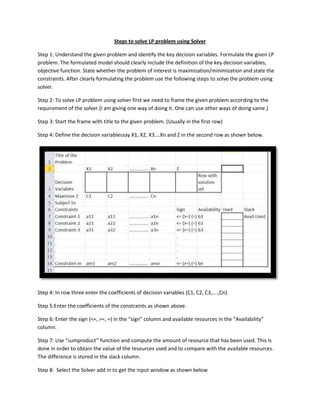
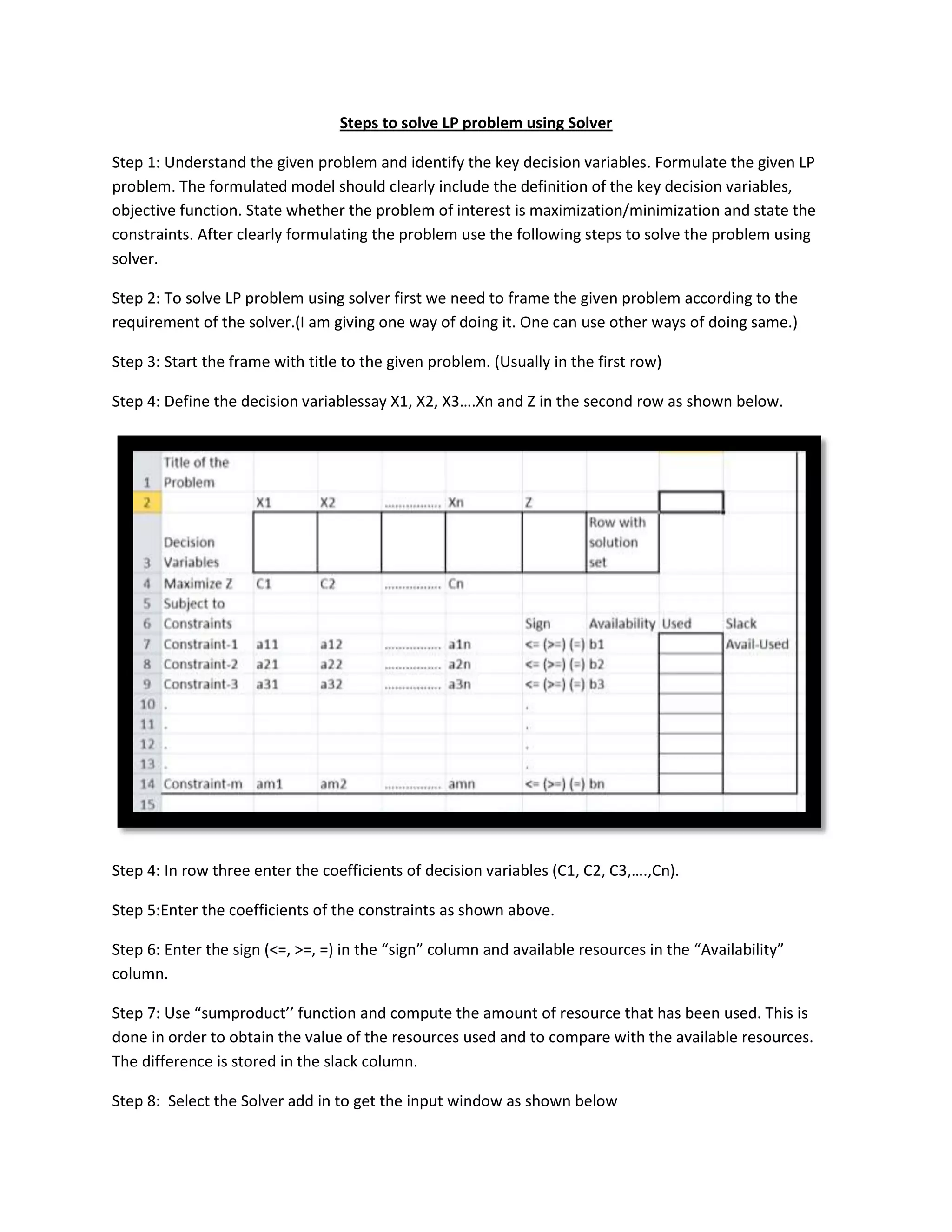
Step 4: Define the decision variablessay X1, X2, X3….Xn and Z in the second row as shown below.


Step 4: In row three enter the coefficients of decision variables (C1, C2, C3,….,Cn).

Step 5:Enter the coefficients of the constraints as shown above.

Step 6: Enter the sign (<=, >=, =) in the “sign” column and available resources in the “Availability”
column.

Step 7: Use “sumproduct’’ function and compute the amount of resource that has been used. This is
done in order to obtain the value of the resources used and to compare with the available resources.
The difference is stored in the slack column.

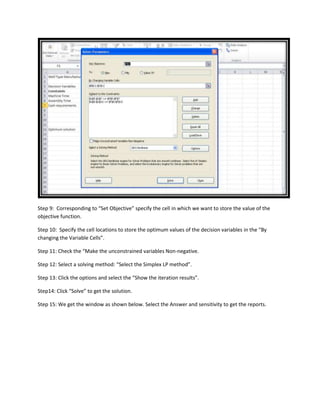
Step 8: Select the Solver add in to get the input window as shown below
Step 9: Corresponding to “Set Objective” specify the cell in which we want to store the value of the
objective function.

Step 10: Specify the cell locations to store the optimum values of the decision variables in the “By
changing the Variable Cells”.

Step 11: Check the “Make the unconstrained variables Non-negative.

Step 12: Select a solving method: “Select the Simplex LP method”.

Step 13: Click the options and select the “Show the iteration results”.

Step14: Click “Solve” to get the solution.

Step 15: We get the window as shown below. Select the Answer and sensitivity to get the reports.
01.steps to solve the lp problem using excel solver

01.steps to solve the lp problem using excel solver

  • 1.
    Steps to solveLP problem using Solver Step 1: Understand the given problem and identify the key decision variables. Formulate the given LP problem. The formulated model should clearly include the definition of the key decision variables, objective function. State whether the problem of interest is maximization/minimization and state the constraints. After clearly formulating the problem use the following steps to solve the problem using solver. Step 2: To solve LP problem using solver first we need to frame the given problem according to the requirement of the solver.(I am giving one way of doing it. One can use other ways of doing same.) Step 3: Start the frame with title to the given problem. (Usually in the first row) Step 4: Define the decision variablessay X1, X2, X3….Xn and Z in the second row as shown below. Step 4: In row three enter the coefficients of decision variables (C1, C2, C3,….,Cn). Step 5:Enter the coefficients of the constraints as shown above. Step 6: Enter the sign (<=, >=, =) in the “sign” column and available resources in the “Availability” column. Step 7: Use “sumproduct’’ function and compute the amount of resource that has been used. This is done in order to obtain the value of the resources used and to compare with the available resources. The difference is stored in the slack column. Step 8: Select the Solver add in to get the input window as shown below
  • 2.
    Step 9: Correspondingto “Set Objective” specify the cell in which we want to store the value of the objective function. Step 10: Specify the cell locations to store the optimum values of the decision variables in the “By changing the Variable Cells”. Step 11: Check the “Make the unconstrained variables Non-negative. Step 12: Select a solving method: “Select the Simplex LP method”. Step 13: Click the options and select the “Show the iteration results”. Step14: Click “Solve” to get the solution. Step 15: We get the window as shown below. Select the Answer and sensitivity to get the reports.