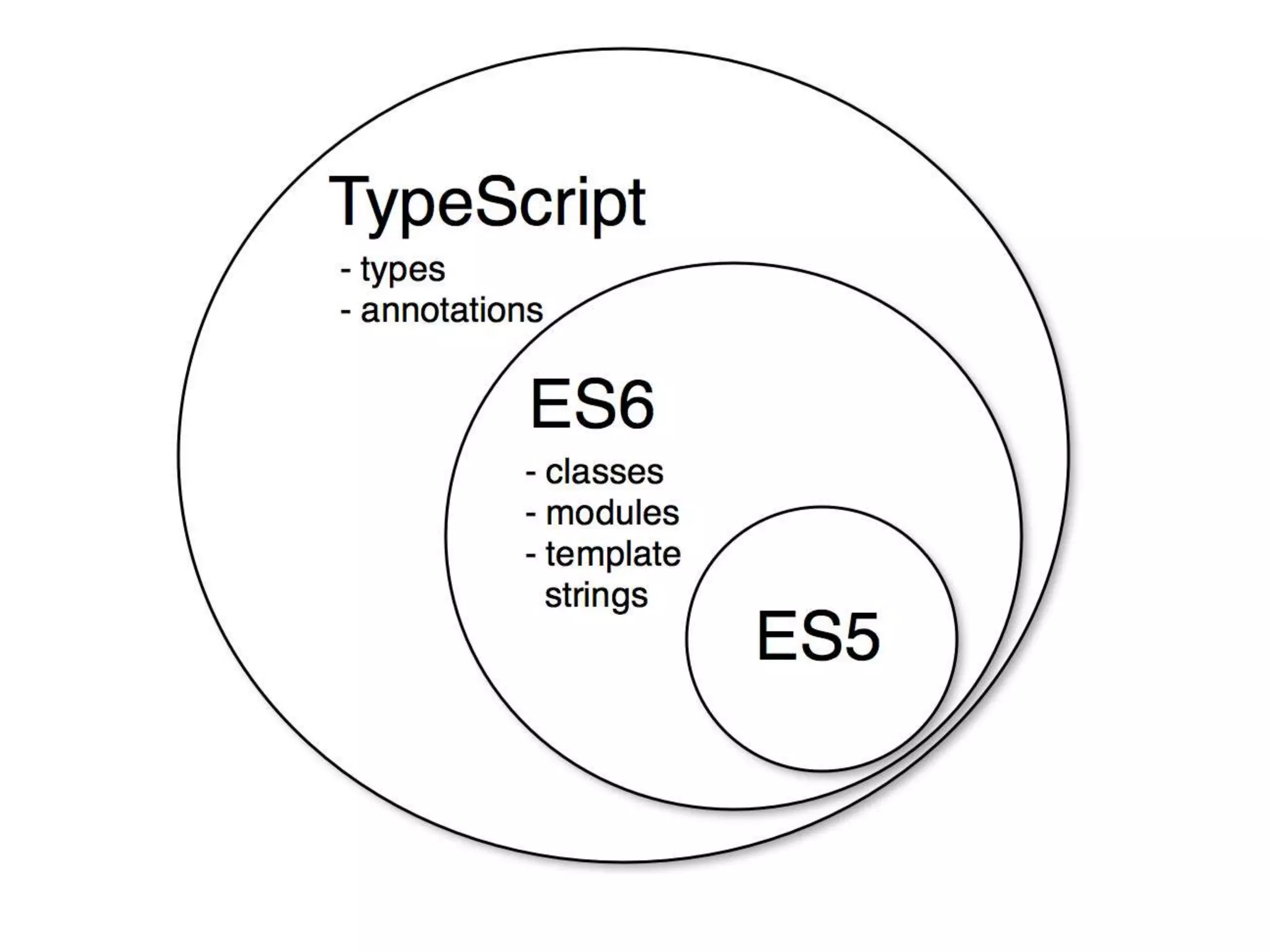
• TypeScript este un limbaj de programare liber
și deschis, dezvoltat și întreținut de Microsoft.
Este o suprasetare strict sintactică a
JavaScript-ului și adaugă programarea optimă
statică și programarea orientată pe obiecte pe
bază de clase a limbajului.
Anders Hejlsberg
Arhitectul principal al lui
C# și creatorul lui Delphi
și al lui Turbo Pascal, a
lucrat la dezvoltarea
TypeScript.
TypeScript poate fi folosit
pentru a dezvolta
aplicații JavaScript
pentru execuția pe
partea clientului sau a
serverului (Node.js).
Features of TypeScript
ITVDN
• TypeScript is just JavaScript;
• TypeScript supports other JS libraries;
• JavaScript is TypeScript;
• TypeScript is portable.
Why Use TypeScript?
• Compilation
• Strong Static Typing
• TypeScript supports type definitions for
existing JavaScript libraries
• TypeScript supports Object Oriented
Programming
Components of TypeScript
• Language: It comprises of the syntax, keywords,
and type annotations.
• The TypeScript Compiler: The TypeScript
compiler (tsc) converts the instructions written in
TypeScript to its JavaScript equivalent.
• The TypeScript Language Service: The language
service supports the common set of a typical
editor operations like statement completions,
signature help, code formatting and outlining,
colorization, etc.
TypeScript ─ Try it Option Online
http://www.typescriptlang.org/play/
The TypeScript Compiler
Installation
1. Node.js and NPM
2. npm install -g typescript
3. Configuration IDE
4. …
A TypeScript program is composed of:
• Modules;
• Functions;
• Variables;
• Statements and Expressions;
• Comments.
Compile and Execute a TypeScript
Program
Step 1: Save the file with .ts extension.
Step 2: Command Prompt:
tsc Test.ts
or
node Test.js
Compiler Flags
Identifiers in TypeScript
TypeScript – Types
Built-in types
Variable Declaration in TypeScript
TypeScript Variable Scope
var global_num=12 //global variable
class Numbers
{
num_val=13; //class variable
static sval=10; //static field
storeNum():void
{
var local_num=14; //local variable
}
}
console.log("Global num: "+global_num)
console.log(Numbers.sval) //static variable
var obj= new Numbers();
console.log("Global num: "+obj.num_val)
TypeScript ─ Operators
• Arithmetic operators
• Logical operators
• Relational operators
• Bitwise operators
• Assignment operators
• Ternary/conditional operator
• String operator
• Type Operator
Arithmetic Operators
Relational Operators
Logical Operators
Assignment Operators
Conditional Operator (?)
Test ? expr1 : expr2
• Test: refers to the conditional expression
• expr1:value returned if the condition is true
• expr2: value returned if the condition is false
var num:number=-2 ;
var result= num > 0 ?"positive":"non-positive"
console.log(result);
Type Operators
var num=12
console.log(typeof num);
//output: number
TypeScript ─ Decision Making
if(boolean_expression)
{
// statement(s) will execute
if the Boolean
expression is true
}
else
{
// statement(s) will execute
if the Boolean
expression is false
}
var num:number = 12;
if (num % 2==0)
{
console.log("Even");
}
else
{
console.log("Odd");
}
switch(variable_expression)
{
case constant_expr1:
{//statements;
break;
}
case constant_expr2:
{
//statements;
break;
}
default:
{
//statements;
break;
}
}
var grade = "A";
switch (grade) {
case "A":
{ console.log("Excellent");
break;
}
case "B":
{ console.log("Good");
break;
}
case "C":
{ console.log("Fair");
break;
}
case "D":
{ console.log("Poor");
break;
}
default:
{ console.log("Invalid choice");
break;
}
}
TypeScript ─ Loops
The while Loop
while(condition)
{
// statements if
the condition
is true
}
var num:number=5;
var factorial:number=1;
while(num >=1)
{
factorial=factorial * num;
num--;
}
console.log("The factorial is "+factorial);
The for Loop
for ( initial_count_value; termination-condition; step)
{
//statements
}
var num:number= 5;
var i:number;
var factorial=1;
for( i=num; i>=1; i--)
{ factorial*=i; }
console.log(factorial)
The for...in loop
for (var val in list)
{
//statements
}
var j:any;
var n:any=“abc"
for(j in n)
{
console.log(n[j])
}
The do…while loop
Do {
//statements
}wh
var n:number=10;
do
{
console.log(n);
n--;
}while(n>=0);
TypeScript – Functions
function
function_name()
:return_type
{
//statements
return value;
}
function greet() {
return "Hello World";
}
function caller() {
var msg = greet(); //function greet() invoked
console.log(msg);
}
//invoke function
caller();
Parameterized Function
function test_param(n1:number,s1:string)
{
console.log(n1)
console.log(s1)
}
test_param(123,"this is a string")
Rest Parameters
function addNumbers(...nums:number[])
{
var i;
var sum:number=0;
for(i=0;i<nums.length;i++)
{
sum=sum+nums[i];
}
console.log("sum of the numbers",sum)
}
addNumbers(1,2,3)
addNumbers(10,10,10,10,10)
Anonymous Function
var msg= function()
{
return "hello world";
}
console.log(msg())
-----------------------------------------------------
var res=function(a:number,b:number)
{
return a*b;
};
console.log(res(12,2))
The Function Constructor
var res=new Function( [arguments] ) { ... }
-------------
var myFunction =
new Function("a", "b", "return a * b");
var x = myFunction(4, 3);
console.log(x);
Lambda Expression
It is an anonymous function expression that
points to a single line of code.
( [param1, parma2,…param n] )=>statement;
-----------------------------
var foo=(x:number)=>10+x
console.log(foo(100)) //outputs 110
var display=x=>
{
console.log("The function got "+x)
}
display(12)
TypeScript ─ Numbers
TypeScript ─ Strings
TypeScript – Arrays
var alphas:string[];
alphas=["1","2","3","4"]
console.log(alphas[0]);
console.log(alphas[1]);
----------------
var names = new Array("Mary", "Tom", "Jack", "Jill");
for (var i = 0; i < names.length; i++) {
console.log(names[i]);
}
Array Methods
Array Methods
Interfaces
interface LabelledValue { label: string; }
Function printLabel (labelledObj: LabelledValue) {
console.log(labelledObj.label);
}
let myObj = {size: 10, label: "Size 10 Object"};
printLabel(myObj);
Optional Properties
interface SquareConfig {
color?: string;
width?: number;
}
Readonly properties
interface Point {
readonly x: number;
readonly y: number;
}
let p1: Point = { x: 10, y: 20 };
p1.x = 5; // error!
Extending Interfaces
interface Shape {
color: string;
}
interface Square extends Shape {
sideLength: number;
}
let square = <Square>{};
square.color = "blue";
square.sideLength = 10;
Implementing an interface
interface ClockInterface {
currentTime: Date;
setTime(d: Date);
}
class Clock implements ClockInterface {
currentTime: Date;
setTime(d: Date) {
this.currentTime = d;
}
constructor(h: number, m: number) { }
}
Classes
class Student {
fullName: string;
constructor(public firstName, public middleInitial, public lastName) {
this.fullName = firstName + " " + middleInitial + " " + lastName;
}
}
interface Person {
firstName: string;
lastName: string;
}
function greeter(person : Person) {
return "Hello, " + person.firstName + " " + person.lastName; }
var user = new Student("Jane", "M.", "User");
document.body.innerHTML = greeter(user);
public - по умолчанию
private - не может быть доступен вне этого
класса
protected - аналогично private за исключением
того, что члены, объявленные protected, могут
быть доступны в подклассах.
readonly
static - которые видны в классе без создания
экземпляра

002. Introducere in type script